Search Results: "will"

17 June 2020

Ulrike Uhlig: On Language

Language is a tool of power In school, we read the philologist diary of Victor Klemperer about the changes in the German language during the Third Reich, LTI - Lingua Tertii Imperii, a book which makes it clear that the use of language is political, creates realities, and has reverse repercussions on concepts of an entire society. Language was one of the tools that supported Nazism in insiduously pervading all parts of society. Language shapes our concepts of society Around the same time, a friend of mine proposed to read Egalia's daughters by Gerd Brantenberg, a book in which gendered words were reversed: so that human becomes huwim, for example. This book made me take notice of gendered concepts that often go unnoticed. Language shapes the way we think and feel I spent a large part of my adult life in France, which confronted me with the realization that a language provides its speakers with certain concepts. If a concept does not exist in a language, people cannot easily feel or imagine this concept either. Back then (roughly 20 years ago), even though I was aware of gender inequality, I hated using gender neutral language because in German and French it felt unnatural, and, or so I thought, we were all alike. One day, at a party, we played a game that consisted in guessing people's professions by asking them Yes/No questions. Turns out that we were unable to guess that the woman we were talking with was a doctor, because we could simply not imagine this profession for a young woman. In French, docteur is male and almost nobody would use the word doctoresse, ou femme docteur. Unimaginable are also the concepts of words in German that have no equivalent in French or vice versa: Or, to make all this a bit less serious, Italian has the word gattara (female) or gattaro (male), which one could translate to English roughly as cat person, most often designating old women who feed stray cats. But really, the way language shapes our concepts and ideas goes much further, as well explained by Lera Boroditsky in a talk in which she explains how language influences concepts of space, time, and blame, among other things. Building new models This quote by Buckminster Fuller is pinned on the wall over my desk:
You never change things by fighting the existing reality. To change something, build a new model that makes the existing model obsolete.
A change in language is such a new model: it can make oppression and inequalities visible. Words do not only describe our world, they are a vehicle of ideas, and utopias. Analyzing and criticizing our use of language means paving the way for ideas and concepts of inclusion, equality, and unity. You might be guessing at where am I getting at with this Right: I am in favor of acknowledging past mistakes, and replacing oppressive metaphors in computing. As noted in the IETF draft about Terminology, Power and Oppressive Language, by Niels Ten Oever and Mallory Knodel, the metaphors "master/slave" and "blacklist/whitelist" associate "white with good and black with evil [which] is known as the 'bad is black effect'", all the while being technically inaccurate. I acknowledge that this will take time. There is a lot of work to do.

Russ Allbery: Review: Network Effect

Review: Network Effect, by Martha Wells
Series: Murderbot Diaries #5
Publisher: Tor
Copyright: May 2020
ISBN: 1-250-22984-7
Format: Kindle
Pages: 351
Network Effect is the first Murderbot novel, although the fifth story of the series. The previous stories, beginning with All Systems Red, were novellas. Under no circumstances should you start reading the series here. Network Effect builds significantly on the story arc that ended with Exit Strategy and resolves some important loose ends from Artificial Condition. It's meant to be read in series order. I believe this is the first time in my life that I've started reading a book on the night of its release. I was looking forward to this novel that much, and it does not disappoint. I'll try not to spoil the previous books too much in this review, but at this point it's a challenge. Just go read them. They're great. The big question I had about the first Murderbot novel was how would it change the plot dynamic of the series. All of the novellas followed roughly the same plot structure: Murderbot would encounter some humans who need help, somewhat grudgingly help them while pursuing its own agenda, snark heavily about human behavior in the process, once again prove its competence, and do a little bit of processing of its feelings and a lot of avoiding them. This formula works great at short length. Would Wells change it at novel length, or if not, would it get tedious or strained? The answer is that Wells added in quite a bit more emotional processing and relationship management to flesh out the core of the book and created a plot with more layers and complexity than the novella plots, and the whole construction works wonderfully. This is exactly the book I was hoping for when I heard there would be a Murderbot novel. If you like the series, you'll like this, and should feel free to read it now without reading the rest of the review.
Overse added, "Just remember you're not alone here." I never know what to say to that. I am actually alone in my head, and that's where 90 plus percent of my problems are.
Many of the loose ends in the novellas were tied up in the final one, Exit Strategy. The biggest one that wasn't, at least in my opinion, was ART, the research transport who helped Murderbot considerably in Artificial Condition and clearly was more than it appeared to be. That is exactly the loose end that Wells resolves here, to great effect. I liked the dynamic between ART and Murderbot before, but it's so much better with an audience to riff off of (and yet better still when there are two audiences, one who already knew Murderbot and one who already knew ART). I like ART almost as much as Murderbot, and that's saying a lot. The emotional loose end of the whole series has been how Murderbot will decide to interact with other humans. I think that's not quite resolved by the end of the novel, but we and Murderbot have both learned considerably more. The novellas, except for the first, are mostly solo missions even when Murderbot is protecting clients. This is something more complicated; the interpersonal dynamics hearken back to the first novella and then go much deeper, particularly in the story-justified flashbacks. Wells uses Murderbot's irritated avoidance to keep some emotional dynamics underplayed and indirect, letting the reader discover them at opportune moments, and this worked beautifully for me. And Murderbot's dynamic with Amena is just wonderful, mostly because of how smart, matter-of-fact, trusting, and perceptive Amena is. That's one place where the novel length helps: Wells has more room to expand the characterization of characters other than Murderbot, something that's usually limited in the novellas to a character or two. And these characters are great. Murderbot is clearly the center of the story, but the other characters aren't just furniture for it to react to. They have their own story arcs, they're thoughtful, they learn, and it's a delight to watch them slot Murderbot into various roles, change their minds, adjust, and occasionally surprise it in quite touching ways, all through Murderbot's eyes.
Thiago had said he felt like he should apologize and talk to me more about it. Ratthi had said, "I think you should let it go for a while, at least until we get ourselves out of this situation. SecUnit is a very private person, it doesn't like to discuss its feelings." This is why Ratthi is my friend.
I have some minor quibbles. The targetSomething naming convention Murderbot comes up with and then is stuck with because it develops too much momentum is entertaining but confusing. A few of the action sequences were just a little on the long side; I find the emotional processing much more interesting. There's also a subplot with a character with memory holes and confusion that I thought dragged on too long, mostly because I found the character intensely irritating for some reason. But these are just quibbles. Network Effect is on par with the best of the novellas that precede it, and that's a high bar indeed. In this series, Wells has merged the long-running science fiction thread of artificial intelligences and the humanity of robots with the sarcastic and introspective first-person narration of urban fantasy, gotten the internal sensation of emotional avoidance note-perfect without making it irritating (that's some deep magic right there), and added in some top-tier negotiation of friendship and relationships without losing the action and excitement of a great action movie. It's a truly impressive feat and the novel is the best installment so far. I will be stunned if Network Effect doesn't make most of the award lists next year. Followed by Fugitive Telemetry, due out in April of 2021. You can believe that I have already preordered it. Rating: 9 out of 10

16 June 2020

Ritesh Raj Sarraf: Kodi PS3 BD Remote

Setting up a Sony PS3 Blu-Ray Disc Remote Controller with Kodi TLDR; Since most of the articles on the internet were either obsolete or broken, I ve chosen to write these notes down in the form of a blog post so that it helps me now and in future, and hopefully others too.

Raspberry Pi All this time, I have been using the Raspberry Pi for my HTPC needs. The first RPi I acquired was in 2014 and I have been very very happy with the amount of support in the community and quality of the HTPC offering it has. I also appreciate the RPi s form factor and the power consumption limits. And then, to add more sugar to it, it uses a derivative of Debian, Raspbian, which was very familiar and feel good to me.

Raspberry Pi Issues So primarily, I use my RPi with Kodi. There are a bunch of other (daemon) services but the primary use case is HTPC only. RPi + Kodi has a very very annoying issue wherein it loses its audio pitch during video playback. The loss is so bad that the audio is barely audible. The workaround is to seek the video playback either way and then it comes back to its actual audio level, just to fade again in a while. My suspicion was that it may be a problem with Kodi. Or at least, Kodi would have a workaround in software. But unfortunately, I wasted a lot of time in dealing with my suspicion with no fruitful result. This started becoming a PITA over time. And it seems the issue is with the hardware itself because after I moved my setup to a regular laptop, the audio loss is gone.

Laptop with Kodi Since I had my old Lenovo Yoga 2 13 lying on all the time, it made sense to make some more use of it, using as the HTPC. This machine comes with a Micro-HDMI Out port, so it felt ideal for my High Definition video rendering needs. It comes stock with just Intel HD Video with good driver support in Linux, so it was quite quick and easy getting Kodi charged up and running on it. And as I mentioned above, the sound issues are not seen on this setup. Some added benefits are that I get to run stock Debian on this machine. And I must say a big THANK YOU to the Debian Multimedia Maintainers, who ve done a pretty good job maintaining Kodi under Debian.

HDMI CEC Only after I decommissioned my RPi, I came to notice how convenient the HDMI CEC functionality is. Turns out no standard laptops ship CEC functionality onto them. Even the case of my laptop, which has a Micro HDMI Out port, but still no CEC capabilities. As far as I know, the RPi came with the Pulse-Eight CEC module, so obvious first thought was to opt for a compatible external module of the same; but it comes with a nice price tag, me not willing to spend.

WiFi Remotes Kodi has very well implemented network interface for almost all its features. One could take the Yatse or Music Pump Kodi Remote Android applications that work very very well with Kodi. But wifi can be flaky some times. Especially, my experience with the Realtek network devices hasn t been very good. The driver support in Linux is okay but there are many firmware bugs to deal with. In my case, the machine will lose wifi signal/network every once in a while. And it turns out, for this machine, with this network device type, I m not the only one running into such problems. And to add to that, this is an UltraBook, which means it doesn t have an Ethernet port. So I ve had not much choice other than to live and suffer deal with it. The WiFi chip also provides the Bluetooth module, which so far I had not used much. From my /etc/modprobe.d/blacklist-memstick.conf, all relevant BT modules were added to the blacklist, all this time.
rrs@lenovo:~$ cat /etc/modprobe.d/blacklist-memstick.conf 
blacklist memstick
blacklist rtsx_usb_ms
# And bluetooth too
#blacklist btusb
#blacklist btrtl
#blacklist btbcm
#blacklist btintel
#blacklist bluetooth
21:21            
Also to keep in mind is that the driver for my card gives a very misleading kernel message, which is one of the many reasons for this blog post, so that I don t forget it a couple of months later. The missing firmware error message is okay to ignore, as per this upstream comment.
Jun 14 17:17:08 lenovo kernel: usbcore: registered new interface driver btusb
Jun 14 17:17:08 lenovo systemd[1]: Mounted /boot/efi.
Jun 14 17:17:08 lenovo kernel: Bluetooth: hci0: RTL: examining hci_ver=06 hci_rev=000b lmp_ver=06 lmp_subver=8723
Jun 14 17:17:08 lenovo kernel: Bluetooth: hci0: RTL: rom_version status=0 version=1
Jun 14 17:17:08 lenovo kernel: Bluetooth: hci0: RTL: loading rtl_bt/rtl8723b_fw.bin
Jun 14 17:17:08 lenovo kernel: bluetooth hci0: firmware: direct-loading firmware rtl_bt/rtl8723b_fw.bin
Jun 14 17:17:08 lenovo kernel: Bluetooth: hci0: RTL: loading rtl_bt/rtl8723b_config.bin
Jun 14 17:17:08 lenovo kernel: bluetooth hci0: firmware: failed to load rtl_bt/rtl8723b_config.bin (-2)
Jun 14 17:17:08 lenovo kernel: firmware_class: See https://wiki.debian.org/Firmware for information about missing firmware
Jun 14 17:17:08 lenovo kernel: bluetooth hci0: Direct firmware load for rtl_bt/rtl8723b_config.bin failed with error -2
Jun 14 17:17:08 lenovo kernel: Bluetooth: hci0: RTL: cfg_sz -2, total sz 22496
This device s network + bt are on the same chip.
01:00.0 Network controller: Realtek Semiconductor Co., Ltd. RTL8723BE PCIe Wireless Network Adapter
And then, when the btusb module is initialed (along with the misleading driver message), you ll get the following in your USB device listing
Bus 002 Device 005: ID 0bda:b728 Realtek Semiconductor Corp. Bluetooth Radio

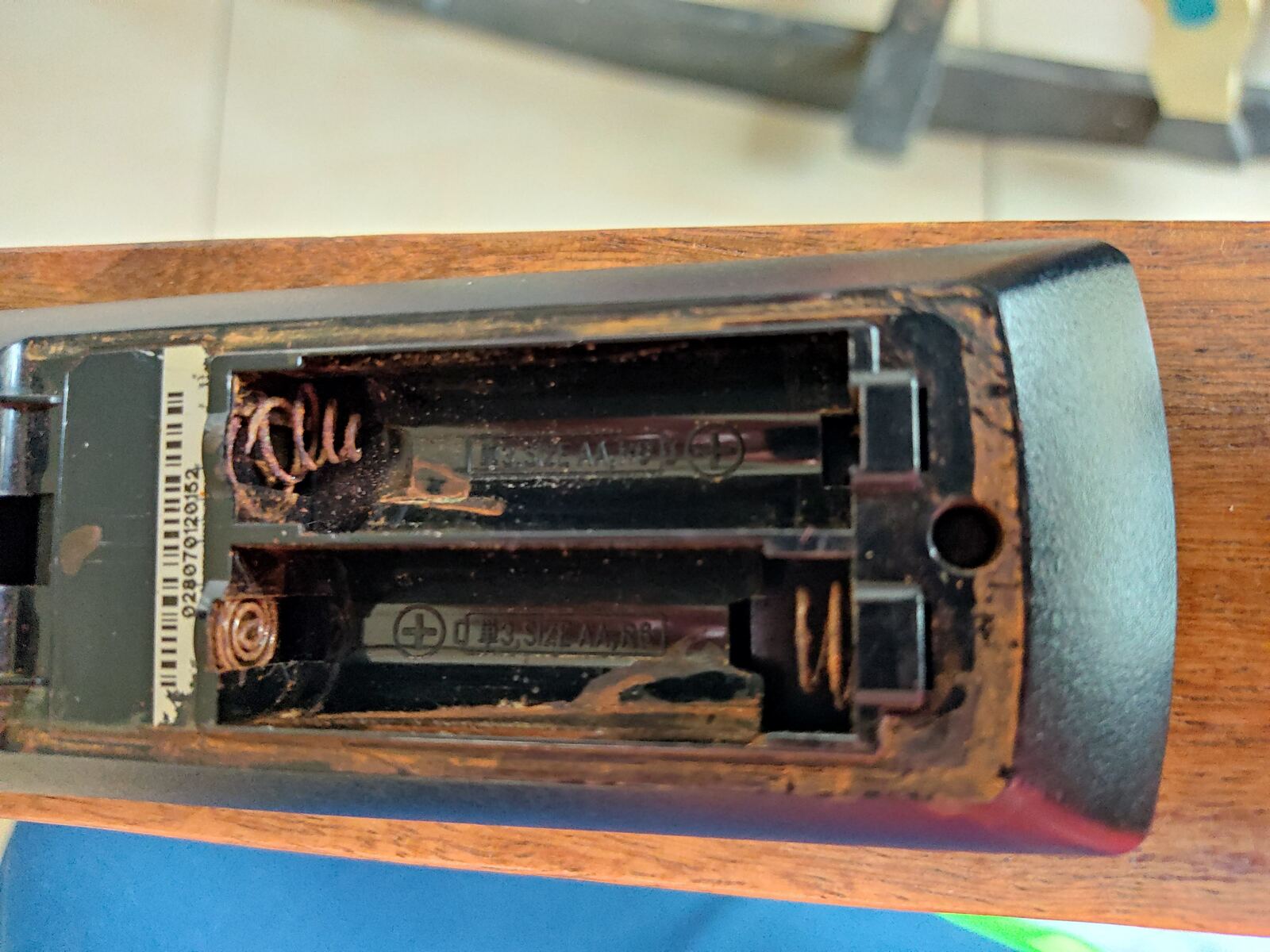
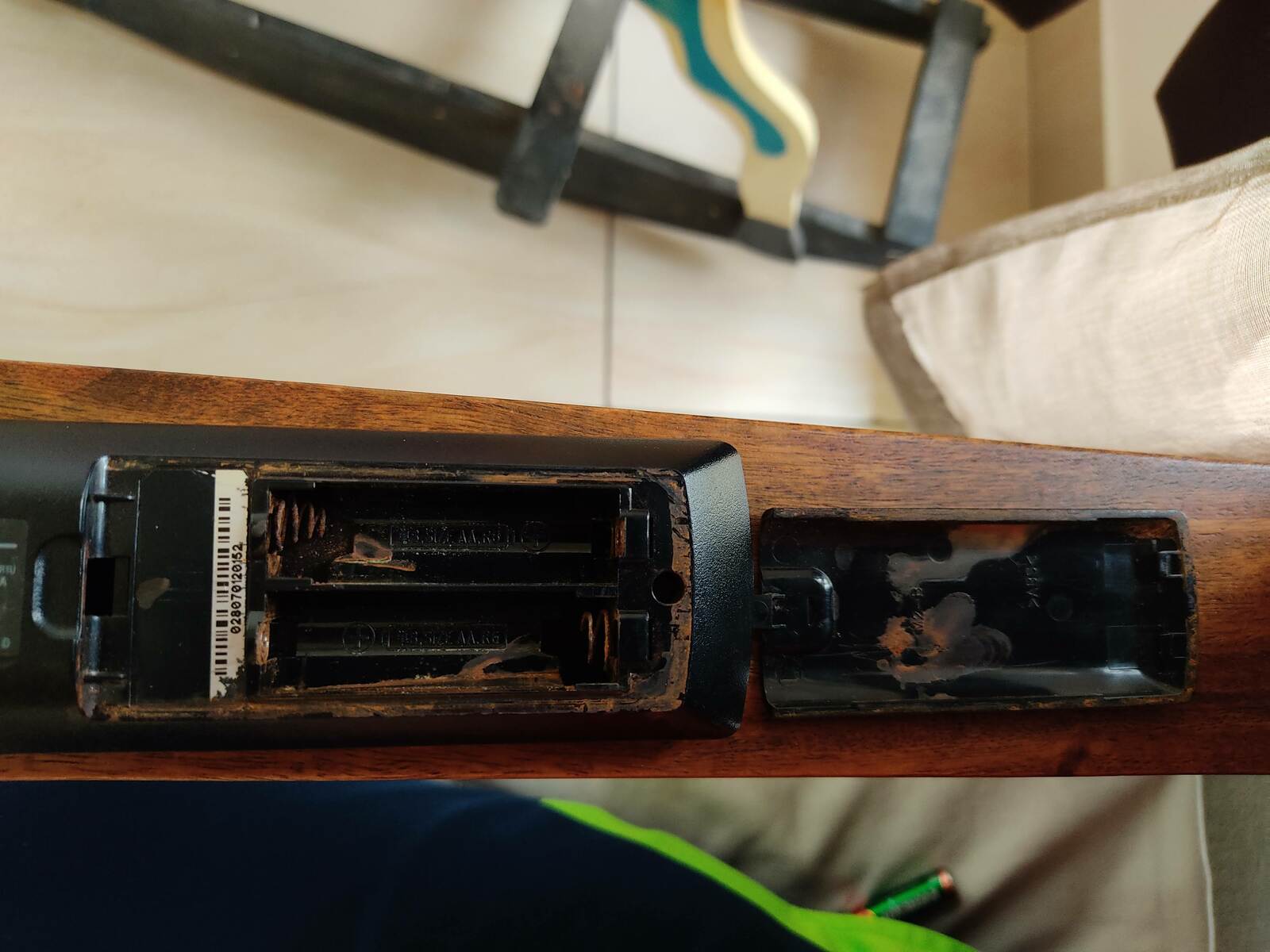
Sony PlayStation 3 BD Remote Almost 10 years ago, I bought the PS3 and many of its accessories. The remote has just been rotting in the shelf. It had rusted so bad that it is better described with these pics.
Rusted inside
Rusted inside
Rusted inside and cover
Rusted spring
Rusted spring
The rust was so much that the battery holding spring gave up. A little bit scrubbing and cleaning has gotten it working. I hope it lasts for some time before I find time to open it up and give it a full clean-up.

Pairing the BD Remote to laptop Honestly, with the condition of the hardware and software on both ends, I did not have much hopes of getting this to work. And in all the years on my computer usage, I hardly recollect much days when I ve made use of BT. Probably, because the full BT stack wasn t that well integrated in Linux, earlier. And I mostly used to disable them in hardware and software to save on battery. All yielded results from the internet talked about tools/scripts that were either not working, pointing to broken links etc. These days, bluez comes with a nice utility, bluetoothctl. It was a nice experience using it. First, start your bluetooth service and ensure that the device talks well with the kernel
rrs@lenovo:~$ systemctl status bluetooth                                                                                                          
  bluetooth.service - Bluetooth service                                                                                                           
     Loaded: loaded (/lib/systemd/system/bluetooth.service; enabled; vendor preset: enabled)                                                      
     Active: active (running) since Mon 2020-06-15 12:54:58 IST; 3s ago                                                                           
       Docs: man:bluetoothd(8)                                                                                                                    
   Main PID: 310197 (bluetoothd)                                                                                                                  
     Status: "Running"                                                                                                                            
      Tasks: 1 (limit: 9424)                                                                                                                      
     Memory: 1.3M                                                                                                                                 
     CGroup: /system.slice/bluetooth.service                                                                                                      
              310197 /usr/lib/bluetooth/bluetoothd                                                                                               
                                                                                                                                                  
Jun 15 12:54:58 lenovo systemd[1]: Starting Bluetooth service...                                                                                  
Jun 15 12:54:58 lenovo bluetoothd[310197]: Bluetooth daemon 5.50                                                                                  
Jun 15 12:54:58 lenovo systemd[1]: Started Bluetooth service.                                                                                     
Jun 15 12:54:58 lenovo bluetoothd[310197]: Starting SDP server                                                                                    
Jun 15 12:54:58 lenovo bluetoothd[310197]: Bluetooth management interface 1.15 initialized                                                        
Jun 15 12:54:58 lenovo bluetoothd[310197]: Sap driver initialization failed.                                                                      
Jun 15 12:54:58 lenovo bluetoothd[310197]: sap-server: Operation not permitted (1)                                                                
12:55                                                                                                                                       
Next, then is to discover and connect to your device
rrs@lenovo:~$ bluetoothctl 
Agent registered
[bluetooth]# devices
Device E6:3A:32:A4:31:8F MI Band 2
Device D4:B8:FF:43:AB:47 MI RC
Device 00:1E:3D:10:29:0F BD Remote Control
[CHG] Device 00:1E:3D:10:29:0F Connected: yes
[BD Remote Control]# info 00:1E:3D:10:29:0F
Device 00:1E:3D:10:29:0F (public)
        Name: BD Remote Control
        Alias: BD Remote Control
        Class: 0x0000250c
        Paired: no
        Trusted: yes
        Blocked: no
        Connected: yes
        LegacyPairing: no
        UUID: Human Interface Device... (00001124-0000-1000-8000-00805f9b34fb)
        UUID: PnP Information           (00001200-0000-1000-8000-00805f9b34fb)
        Modalias: usb:v054Cp0306d0100
[bluetooth]# 
In case of the Sony BD Remote, there s no need to pair. In fact, trying to pair fails. It prompts for the PIN code, but neither 0000 or 1234 are accepted. So, the working steps so far are to Trust the device and then Connect the device. For the sake of future use, I also populated /etc/bluetooth/input.conf based on suggestions on the internet. Note: The advertised keymappings in this config file do not work. Note: I m only using it for the power saving measures in instructing the BT connection to sleep after 3 minutes.
rrs@priyasi:/tmp$ cat input.conf 
# Configuration file for the input service
# This section contains options which are not specific to any
# particular interface
[General]
# Set idle timeout (in minutes) before the connection will
# be disconnect (defaults to 0 for no timeout)
IdleTimeout=3
# Enable HID protocol handling in userspace input profile
# Defaults to false (HIDP handled in HIDP kernel module)
#UserspaceHID=true
# Limit HID connections to bonded devices
# The HID Profile does not specify that devices must be bonded, however some
# platforms may want to make sure that input connections only come from bonded
# device connections. Several older mice have been known for not supporting
# pairing/encryption.
# Defaults to false to maximize device compatibility.
#ClassicBondedOnly=true
# LE upgrade security
# Enables upgrades of security automatically if required.
# Defaults to true to maximize device compatibility.
#LEAutoSecurity=true
#
#[00:1E:3D:10:29:0F]
[2c:33:7a:8e:d6:30]
[PS3 Remote Map]
# When the 'OverlayBuiltin' option is TRUE (the default), the keymap uses
# the built-in keymap as a starting point.  When FALSE, an empty keymap is
# the starting point.
#OverlayBuiltin = TRUE
#buttoncode = keypress    # Button label = action with default key mappings
#OverlayBuiltin = FALSE
0x16 = KEY_ESC            # EJECT = exit
0x64 = KEY_MINUS          # AUDIO = cycle audio tracks
0x65 = KEY_W              # ANGLE = cycle zoom mode
0x63 = KEY_T              # SUBTITLE = toggle subtitles
0x0f = KEY_DELETE         # CLEAR = delete key
0x28 = KEY_F8             # /TIME = toggle through sleep
0x00 = KEY_1              # NUM-1
0x01 = KEY_2              # NUM-2
0x02 = KEY_3              # NUM-3
0x03 = KEY_4              # NUM-4
0x04 = KEY_5              # NUM-5
0x05 = KEY_6              # NUM-6
0x06 = KEY_7              # NUM-7
0x07 = KEY_8              # NUM-8
0x08 = KEY_9              # NUM-9
0x09 = KEY_0              # NUM-0
0x81 = KEY_F2             # RED = red
0x82 = KEY_F3             # GREEN = green
0x80 = KEY_F4             # BLUE = blue
0x83 = KEY_F5             # YELLOW = yellow
0x70 = KEY_I              # DISPLAY = show information
0x1a = KEY_S              # TOP MENU = show guide
0x40 = KEY_M              # POP UP/MENU = menu
0x0e = KEY_ESC            # RETURN = back/escape/cancel
0x5c = KEY_R              # TRIANGLE/OPTIONS = cycle through recording options
0x5d = KEY_ESC            # CIRCLE/BACK = back/escape/cancel
0x5f = KEY_A              # SQUARE/VIEW = Adjust Playback timestretch
0x5e = KEY_ENTER          # CROSS = select
0x54 = KEY_UP             # UP = Up/Skip forward 10 minutes
0x56 = KEY_DOWN           # DOWN = Down/Skip back 10 minutes
0x57 = KEY_LEFT           # LEFT = Left/Skip back 5 seconds
0x55 = KEY_RIGHT          # RIGHT = Right/Skip forward 30 seconds
0x0b = KEY_ENTER          # ENTER = select
0x5a = KEY_F10            # L1 = volume down
0x58 = KEY_J              # L2 = decrease the play speed
0x51 = KEY_HOME           # L3 = commercial skip previous
0x5b = KEY_F11            # R1 = volume up
0x59 = KEY_U              # R2 = increase the play speed
0x52 = KEY_END            # R3 = commercial skip next
0x43 = KEY_F9             # PS button = mute
0x50 = KEY_M              # SELECT = menu (as per PS convention)
0x53 = KEY_ENTER          # START = select / Enter (matches terminology in mythwelcome)
0x30 = KEY_PAGEUP         # PREV = jump back (default 10 minutes)
0x76 = KEY_J              # INSTANT BACK (newer RCs only) = decrease the play speed
0x75 = KEY_U              # INSTANT FORWARD (newer RCs only) = increase the play speed
0x31 = KEY_PAGEDOWN       # NEXT = jump forward (default 10 minutes)
0x33 = KEY_COMMA          # SCAN BACK =  decrease scan forward speed / play
0x32 = KEY_P              # PLAY = play/pause
0x34 = KEY_DOT            # SCAN FORWARD decrease scan backard speed / increase playback speed; 3x, 5, 10, 20, 30, 60, 120, 180
0x60 = KEY_LEFT           # FRAMEBACK = Left/Skip back 5 seconds/rewind one frame
0x39 = KEY_P              # PAUSE = play/pause
0x38 = KEY_P              # STOP = play/pause
0x61 = KEY_RIGHT          # FRAMEFORWARD = Right/Skip forward 30 seconds/advance one frame
0xff = KEY_MAX
21:48                 
I have not spent much time finding out why not all the key presses work. Especially, given that most places on the internet mention these mappings. For me, some of the key scan codes aren t even reported. For keys like L1, L2, L3, R1, R2, R3, Next_Item, Prev_Item, they generate no codes in the kernel. If anyone has suggestions, ideas or fixes, I d appreciate if you can drop a comment or email me privately. But given my limited use to get a simple remote ready, to be usable with Kodi, I was apt with only some of the keys working.

Mapping the keys in Kodi With the limited number of keys detected, mapping those keys to what Kodi could use was the next step. Kodi has a very nice and easy to use module, Keymap Editor. It is very simple to use and map detected keys to functionalities you want. With it, I was able to get a functioning remote to use with my Kodi HTPC setup.

Update: Wed Jun 17 11:38:20 2020 One annoying problem that breaks the overall experience is the following bug on the driver side, that results in connections not being established instantly. Once the device goes into sleep mode, in random attempts, waking up and re-establishing a BT connection can be multi-poll affair. This can last from a couple of seconds to well over minute. Random suggestions on the internet mention disabling the autosuspend functionality for the device in the driver with btusb.enable_autosuspend=n, but that did not help in this case. Given that this device is enumberated over the USB Bus, it probably needs this feature applied to the whole USB tree of the device s chain. Something to investigate over the weekend.
Jun 16 20:41:23 lenovo kernel: Bluetooth: hci0: ACL packet for unknown connection handle 7
Jun 16 20:41:43 lenovo kernel: Bluetooth: hci0: ACL packet for unknown connection handle 8
Jun 16 20:41:59 lenovo kernel: Bluetooth: hci0: ACL packet for unknown connection handle 9
Jun 16 20:42:18 lenovo kernel: input: BD Remote Control as /devices/pci0000:00/0000:00:14.0/usb1/1-7/1-7:1.0/bluetooth/hci0/hci0:10/0005:054C:030>
Jun 16 20:42:18 lenovo kernel: sony 0005:054C:0306.0006: input,hidraw1: BLUETOOTH HID v1.00 Gamepad [BD Remote Control] on 2c:33:7a:8e:d6:30
Jun 16 20:51:59 lenovo kernel: input: BD Remote Control as /devices/pci0000:00/0000:00:14.0/usb1/1-7/1-7:1.0/bluetooth/hci0/hci0:11/0005:054C:030>
Jun 16 20:51:59 lenovo kernel: sony 0005:054C:0306.0007: input,hidraw1: BLUETOOTH HID v1.00 Gamepad [BD Remote Control] on 2c:33:7a:8e:d6:30
Jun 16 21:05:55 lenovo rtkit-daemon[1723]: Supervising 3 threads of 1 processes of 1 users.
Jun 16 21:05:55 lenovo rtkit-daemon[1723]: Successfully made thread 32747 of process 1646 owned by '1000' RT at priority 5.
Jun 16 21:05:55 lenovo rtkit-daemon[1723]: Supervising 4 threads of 1 processes of 1 users.
Jun 16 21:05:56 lenovo kernel: Bluetooth: hci0: ACL packet for unknown connection handle 12
Jun 16 21:06:12 lenovo kernel: Bluetooth: hci0: ACL packet for unknown connection handle 1
Jun 16 21:06:34 lenovo kernel: Bluetooth: hci0: ACL packet for unknown connection handle 2
Jun 16 21:06:59 lenovo kernel: input: BD Remote Control as /devices/pci0000:00/0000:00:14.0/usb1/1-7/1-7:1.0/bluetooth/hci0/hci0:3/0005:054C:0306>
Jun 16 21:06:59 lenovo kernel: sony 0005:054C:0306.0008: input,hidraw1: BLUETOOTH HID v1.00 Gamepad [BD Remote Control] on 2c:33:7a:8e:d6:30

Others There s a package, kodi-eventclients-ps3, which can be used to talk to the BD Remote. Unfortunately, it isn t up-to-date. When trying to make use of it, I ran into a couple of problems. First, the easy one is:
rrs@lenovo:~/ps3pair$ kodi-ps3remote localhost 9777
usr/share/pixmaps/kodi//bluetooth.png
Traceback (most recent call last):
  File "/usr/bin/kodi-ps3remote", line 220, in <module>
  File "/usr/bin/kodi-ps3remote", line 208, in main
    xbmc.connect(host, port)
    packet = PacketHELO(self.name, self.icon_type, self.icon_file)
  File "/usr/lib/python3/dist-packages/kodi/xbmcclient.py", line 285, in __init__
    with open(icon_file, 'rb') as f:
11:16         => 1  
This one was simple as it was just a broken path. The second issue with the tool is a leftover from python2 to python3 conversion.
rrs@lenovo:/etc/bluetooth$ kodi-ps3remote localhost
/usr/share/pixmaps/kodi//bluetooth.png
Searching for BD Remote Control
(Hold Start + Enter on remote to make it discoverable)
Redmi (E8:5A:8B:73:57:44) in range
Living Room TV (E4:DB:6D:24:23:E9) in range
Could not find BD Remote Control. Trying again...
Searching for BD Remote Control
(Hold Start + Enter on remote to make it discoverable)
Living Room TV (E4:DB:6D:24:23:E9) in range
Redmi (E8:5A:8B:73:57:44) in range
Could not find BD Remote Control. Trying again...
Searching for BD Remote Control
(Hold Start + Enter on remote to make it discoverable)
BD Remote Control (00:1E:3D:10:29:0F) in range
Found BD Remote Control with address 00:1E:3D:10:29:0F
Attempting to pair with remote
Remote Paired.
Traceback (most recent call last):
  File "/usr/bin/kodi-ps3remote", line 221, in <module>
    main()
  File "/usr/bin/kodi-ps3remote", line 212, in main
    if process_keys(remote, xbmc):
  File "/usr/bin/kodi-ps3remote", line 164, in process_keys
    keycode = data.encode("hex")[10:12]
AttributeError: 'bytes' object has no attribute 'encode'
11:24         => 1  
Fixing that too did not give me the desired result on using the BD Remote in the way I want. So eventually, I gave up and used Kodi s Keymap Editor instead.

Next Next in line, when I can manage to get some free time, is to improve the Kodi Video Scraper to have a fallback mode. Currently, for files where it cannot determine the content, it reject the file resulting in those files not showing up in your collection at all. A better approach would have been to have a fallback mode, that when the scraper cannot determine the content, it should fallback to using the filename scraper

Dirk Eddelbuettel: Rcpp 1.0.5 in two+ weeks: Please help test

rcpp logo With the current four-month release cycle, the next Rcpp release is due in July following the 1.0.4 release in March. Just prior to the 1.0.4 release I had asked this:
It would be particularly beneficial if those with unsual build dependencies tested it as we would increase overall coverage beyond what I get from testing against 1800+ CRAN packages. BioConductor would also be welcome.
but only on the rcpp-devel list, and only about a good week prior to the release. I remain rather disappointed and disillusioned about what happened after 1.0.4 was released. Two PRs in that release were soon seen to have side effects on more marginal test systems, precisely what added testing could have revealed. An additional issue arose from changes in R s make system, which is harder to anticipate or test. Each and every infelicity was fixed within a day or so, and we always make candidate releases available the current Rcpp as of this writing is 1.0.4.12 meaning twelve microreleases were made since 1.0.4. And those microreleases are always available for normal download and install.packages use via the Rcpp drat repository accessible to all. So it was truly troubling to see some, especially those with experience in setting up or running testing / ci platforms, pretend to be unable to access, install, and provide these for their own tests, or the tests of their users. It just doesn t pass a basic logic test: it takes a single call to install.packages(), or, even more easily, a single assignment of an auxiliary repo. All told this was a rather sad experience. So let s try to not repeat this. If you, or maybe users of a build or ci system you maintain, rely on Rcpp, and especially if you do so on systems outside the standard CRAN grid of three OSs and the triplet of previous, current, next releases of R, then please help by testing. I maitain these release as a volunteer, unpaid at that, and I simply cannot expand to more systesm. We take reverse dependency check seriously (and I just run two taking about a day each) but if you insist on building on stranger hardware or much older releases it will be up to you to ensure Rcpp passes. We prep for CRAN, and try our best to pass at CRAN. For nearly a dozen years. To install the current microrelease from the Rcpp drat repository, just do
install.packages("Rcpp", repos="https://rcppcore.github.io/drat")
That is all there is to it. You could even add the Rcpp drat repository to your repository list. Rcpp has become successful because so many people help with suggestions, documentation, and code. It is used by (as of today) 1958 CRAN packages, 205 BioConductor packages, and downloaded around a million times per month. So if you can, please help now with some more testing. If you like this or other open-source work I do, you can now sponsor me at GitHub. For the first year, GitHub will match your contributions.

This post by Dirk Eddelbuettel originated on his Thinking inside the box blog. Please report excessive re-aggregation in third-party for-profit settings.

15 June 2020

Utkarsh Gupta: GSoC Phase 1

Hello, Earlier last month, I got selected as a Google Summer of Code student for Debian again! \o/
And as Chandler would say,
Could I be any more happier?
Well, this time, my project is basically to write a linter (an extension to RuboCop). This tool is mostly to help the Debian Ruby team. And that is the best part, I love working in/for/with the Ruby team!
(I ve been an active part of the team for 18 months now :)) More details about the project can be found here, on the wiki.
And also, I have got the best mentors I could ve possibly asked for: Antonio Terceiro and David Rodr guez So, the program began on 1st June and I ve been working since then. I log my daily updates at gsocwithutkarsh2102.tk. Whilst the daily updates are available at the above site^, I ll breakdown the important parts here: It has been a lot of fun so far! Though I am little worried on how to implement the next part of the project as I am not sure how to check only a particalar directory for some relative require calls.
But I think, that s okay, somehow, something will work out. And I can always ask around others and check other cops to see how it s done! \( )/
Until next time.
:wq for today.

Enrico Zini: Qt5 custom build of Qt Creator

This is part of a series of posts on compiling a custom version of Qt5 in order to develop for both amd64 and a Raspberry Pi. These are instructions for building Qt Creator with the custom Qt, so that it can load and use Designer plugins built with it. Sadly, because of the requirement of being able to load Designer plugins, and because of the requirement of being able to compile custom widgets using the custom Qt and use them in the Designer, we need to also rebuild Qt Creator. The resulting packaging is at https://github.com/Truelite/qt5custom. Set up sources Open the source tarball, and add the Qt Creator packaging:
tar axf qt-creator-enterprise-src-4.12.2.tar.xz
cp -a debian-qtcreator qt-creator-enterprise-src-4.12.2/debian
ln -s qt-creator-enterprise-src-4.12.2.tar.xz qt-creator-enterprise-src_4.12.2.orig.tar.xz
If needed, install the Qt license:
cp qt-license.txt ~/.qt-license
Install build dependencies You can use apt build-dep to install dependencies manually:
cd qt-creator-enterprise-src-4.12.2
apt build-dep .
Alternatively, you can create an installable .deb metapackage that depends on the build dependencies:
apt install devscripts
mk-build-deps debian-qtcreator/control
apt -f install qt-creator-enterprise-src-build-deps_4.12.2-1_all.deb
Package build The package is built by debian/rules base on the excellent work done by Debian Qt5 maintainers. After installing the build dependencies, you can build like this:
cd qt-creator-enterprise-src-4.12.2
debuild -us -uc -rfakeroot
In debian/rules you can configure NUMJOBS with the number of available CPUs in the machine, to have parallel builds. debian/rules automatically picks qt5custom as the Qt version to use for the build. NOTE: Qt Creator 4.12.2 will NOT build if qtbase5custom-armhf-dev is installed. One needs to make sure to have qtbase5custom-dev installed, but NOT qtbase5custom-armhf-dev. Despite quite a bit of investigation, I have been unable to understand why, if both are installed, Qt Creator's build chooses the wrong one, and fails the build. Build output Building sources generates 4 packages: Using the custom Qt Creator Enterprise The packages are built with qt5custom and install their content in /opt/qt5custom. The packages are coinstallable with the version of Qt Creator packaged in Debian. The custom Qt Creator executable is installed in /opt/qt5custom/bin/qtcreator, which is not in $PATH by default. To run it, you can explitly use /opt/qt5custom/bin/qtcreator. qtcreator ran without an explicit path, runs the standard Debian version. Installing Designer plugins Designer plugings can be compiled with qt5custom and installed in /opt/qt5custom/plugins/designer/. Cross-building with Qt Creator Once the cross-build Qt5 packages are installed, one should see it appear in the Qt Creator kit configuration, where it can be selected and used normally. If one sets device type to "Generic Linux Device", chooses a compiler for "arm 32bit" and sets Qt Version to "qt5custom-armhf", one can smoothly cross-compile and execute and debug the built program directly on the device.

Mark Brown: Book Club: Zettlekasten

Recently I was part of a call with Daniel and Lars to discuss Zettelkasten, a system for building up a cross-referenced archive of notes to help with research and study that has been getting a lot of discussion recently, the key thing being the building of links between ideas. Tomas Vik provided an overview of the process that we all found very helpful, and the information vs knowledge picture in Eugene Yan s blog on the topic (by @gapingvoid) really helped us crystalize the goals. It s not at all new and as Lars noted has a lot of similarities with a wikis in terms of what it produces but it couples this with an emphasis on the process and constant generation of new entries which Daniel found similar to some of the Getting Things Done recommendations. We all liked the emphasis on constant practice and how that can help build skills around effective note taking, clear writing and building links between ideas. Both Daniel and Lars already have note taking practicies that they find useful, combinations of journalling and building up collections of notes of learnings over time, and felt that there could be value in integrating aspects of Zettelkasten into these practices so we talked quite a bit about how that could be done. There was a consensus that journalling is useful so the main idea we had was to keep maintaining the journal, using that as an inbox and setting aside time to write entries into a Zettelkasten. This is also a useful way to approach recording things when away from a computer, taking notes and then writing them up later. Daniel suggested that one way to migrate existing notes might be to simply start anew, moving things over from old notes as required and then after a suitably long period (for example a year) review anything that was left and migrate anything that was left. We were all concerned about the idea of using any of the non-free solutions for something that is intended to be used long term, especially where the database isn t in an easily understood format. Fortunately there are free software tools like Zettlr which seem to address these concerns well. This was a really useful discussion, it really helps to bounce ideas off each other and this was certainly an interesting topic to learn about with some good ideas which will hopefully be helpful to us.

Arturo Borrero Gonz lez: A better Toolforge: a technical deep dive

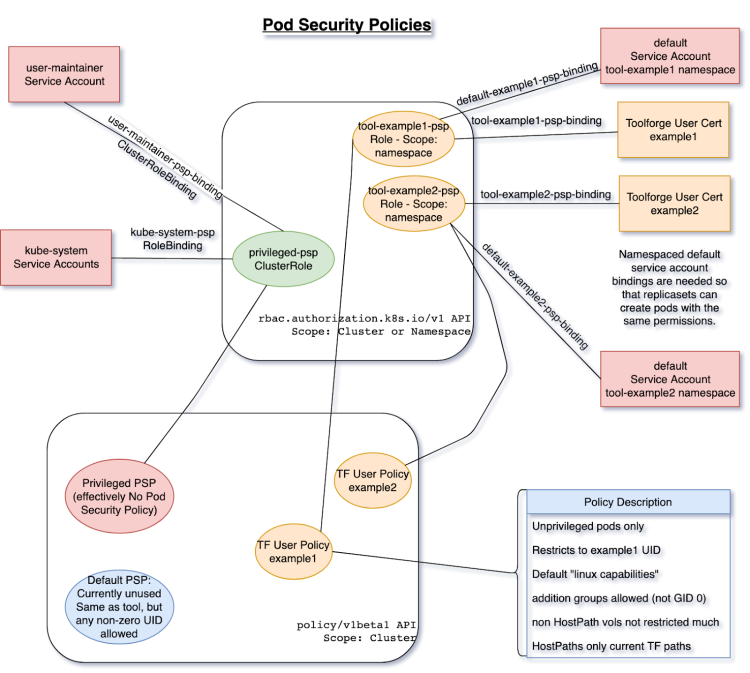
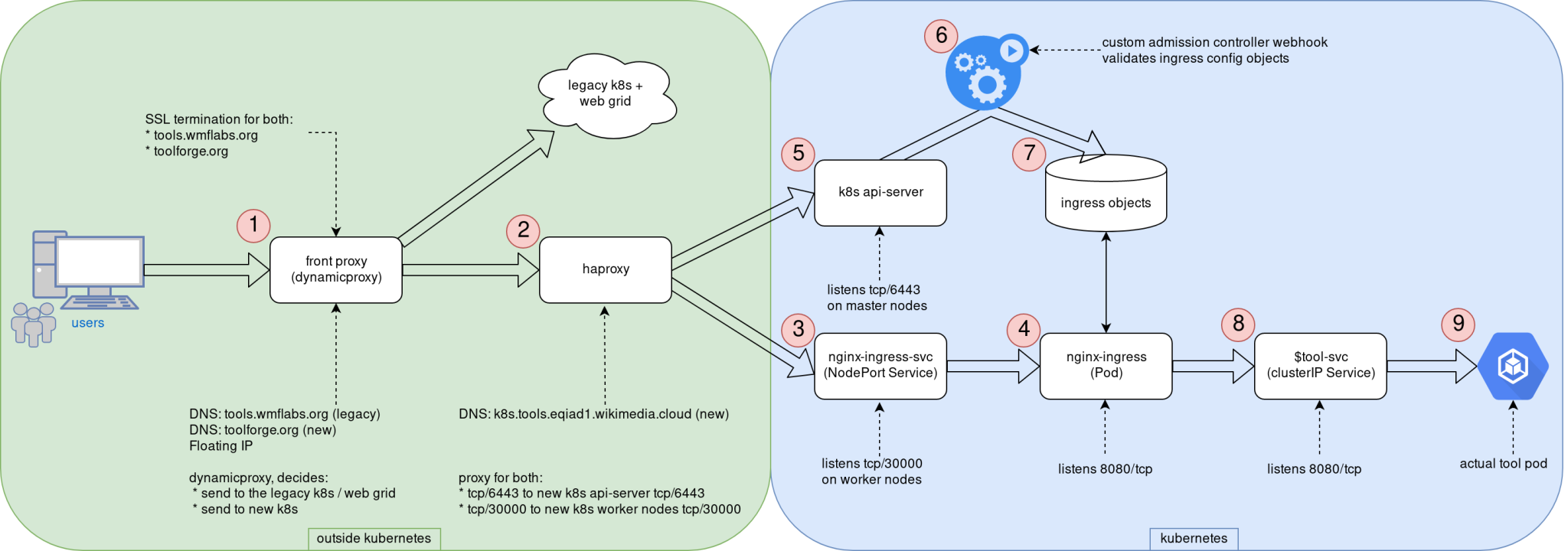
Logos This post was originally published in the Wikimedia Tech blog, and is authored by Arturo Borrero Gonzalez and Brooke Storm. In the previous post, we shared the context on the recent Kubernetes upgrade that we introduced in the Toolforge service. Today we would like to dive a bit more in the technical details. Custom admission controllers One of the key components of the Toolforge Kubernetes are our custom admission controllers. We use them to validate and enforce that the usage of the service is what we intended for. Basically, we have 2 of them: The source code is written in Golang, which is pretty convenient for natively working in a Kubernetes environment. Both code repositories include extensive documentation: how to develop, test, use, and deploy them. We decided to go with custom admission controllers because we couldn t find any native (or built-in) Kubernetes mechanism to accomplish the same sort of checks on user activity. With the Ingress controller, we want to ensure that Ingress objects only handle traffic to our internal domains, which by the time of this writing, are toolforge.org (our new domain) and tools.wmflabs.org (legacy). We safe-list the kube-system namespace and the tool-fourohfour namespace because both need special consideration. More on the Ingress setup later. The registry controller is pretty simple as well. It ensures that only our internal docker registry is used for user-scheduled containers running in Kubernetes. Again, we exclude from the checks containers running in the kube-system namespace (those used by Kubernetes itself). Other than that, the validation itself is pretty easy. For some extra containers we run (like those related to Prometheus metrics) what we do is simply upload those docker images to our internal registry. The controls provided by this admission controller helps us validate that only FLOSS software is run in our environment, which is one of the core rules of Toolforge. RBAC and Pod Security Policy setup I would like to comment next on our RBAC and Pod Security Policy setup. Using the Pod Security Policies (or PSP) we establish a set of constraints on what containers can and can t do in our cluster. We have many PSP configured in our setup: Each user can interact with their own namespace (this is how we achieve multi-tenancy in the cluster). Kubernetes knows about each user by means of TLS certs, and for that we have RBAC. Each user has a rolebinding to a shared cluster-role that defines how Toolforge tools can use the Kubernetes API. The following diagram shows the design of our RBAC and PSP in our cluster: RBAC and PSP for Toolforge diagram RBAC and PSP for Toolforge, original image in wikitech I mentioned that we know about each user by means of TLS certificates. This is true, and in fact, there is a key component in our setup called maintain-kubeusers. This custom piece of Python software is run as a pod inside the cluster and is responsible for reading our external user database (LDAP) and generating the required credentials, namespaces, and other configuration bits for them. With the TLS cert, we basically create a kubeconfig file that is then written into the homes NFS share, so each Toolforge user has it in their shell home directory. Networking and Ingress setup With the basic security controls in place, we can move on to explaining our networking and Ingress setup. Yes, the Ingress word might be a bit overloaded already, but we refer here to Ingress as the path that end-users follow from their web browser in their local machine to a webservice running in the Toolforge cluster. Some additional context here. Toolforge is not only Kubernetes, but we also have a Son of GridEngine deployment, a job scheduler that covers some features not available in Kubernetes. The grid can also run webservices, although we are encouraging users to migrate them to Kubernetes. For compatibility reasons, we needed to adapt our Ingress setup to accommodate the old web grid. Deciding the layout of the network and Ingress was definitely something that took us some time to figure out because there is not a single way to do it right. The following diagram can be used to explain the different steps involved in serving a web service running in the new Toolforge Kubernetes. Toolforge k8s network topology diagram Toolforge k8s network topology, original image in Wikitech The end-user HTTP/HTTPs request first hits our front proxy in (1). Running here is NGINX with a custom piece of LUA code that is able to decide whether to contact the web grid or the new Kubernetes cluster. TLS termination happens here as well, for both domains (toolforge.org and tools.wmflabs.org). Note this proxy is reachable from the internet, as it uses a public IPv4 address, a floating IP from CloudVPS, the infrastructure service we provide based on Openstack. Remember that our Kubernetes is directly built in virtual machines a bare-metal type deployment. If the request is directed to a webservice running in Kubernetes, the request now reaches haproxy in (2), which knows the cluster nodes that are available for Ingress. The original 80/TCP packet is now translated to 30000/TCP; this is the TCP port we use internally for the Ingress traffic. This haproxy instance provides load-balancing also for the Kubernetes API as well, using 6443/TCP. It s worth mentioning that unlike the Ingress, the API is only reachable from within the cluster and not from the internet. We have a NGINX-Ingress NodePort service listening in 30000/TCP in every Kubernetes worker node in (3); this helps the request to eventually reach the actual NGINX-Ingress pod in (4), which is listening in 8080/TCP. You can see in the diagram how in the API server (5) we hook the Ingress admission controller (6) to validate Kubernetes Ingress configuration objects before allowing them in for processing by NGINX-Ingress (7). The NGINX-Ingress process knows which tools webservices are online and how to contact them by means of an intermediate Service object in (8). This last Service object means the request finally reaches the actual tool pod in (9). At this point, it is worth noting that our Kubernetes cluster uses internally kube-proxy and Calico, both using Netfilter components to handle traffic. tools-webservice Most user-facing operations are simplified by means of another custom piece of Python code: tools-webservice. This package provides users with the webservice command line utility in our shell bastion hosts. Typical usage is to just run webservice start stop status. This utility creates all the required Kubernetes objects on-demand like Deployment, ReplicaSet, Ingress and Service to ease deploying web apps in Toolforge. Of course, advanced users can interact directly with Kubernetes API and create their custom configuration objects. This utility is just a wrapper, a shortcut. tool-fourohfour and tool-k8s-status The last couple of custom components we would like to mention are the tool-fourohfour and tool-k8s-status web services. These two utilities run inside the cluster as if they were any other user-created tool. The fourohfour tool allows for a controlled handling of HTTP 404 errors, and it works as the default NGINX-Ingress backend. The k8s-status tool shows plenty of information about the cluster itself and each tool running in the cluster, including links to the Server Admin Log, an auto-generated grafana dashboard for metrics, and more. For metrics, we use an external Prometheus server that contacts the Kubernetes cluster to scrape metrics. We created a custom metrics namespace in which we deploy all the different components we use to observe the behavior of the system: All the Prometheus data we collect is used in several different Grafana dashboards, some of them directed for user information like the ones linked by the k8s-status tool and some others for internal use by us the engineers. These are for internal use but are still public, like the Ingress specific dashboard, or the cluster state dashboard. Working publicly, in a transparent way, is key for the success of CloudVPS in general and Toolforge in particular. Like we commented in the previous post, all the engineering work that was done here was shared by community members. By the community, for the community We think this post sheds some light on how the Toolforge Kubernetes service works, and we hope it could inspire others when trying to build similar services or, even better, help us improve Toolforge itself. Since this was first put into production some months ago we detected already some margin for improvement in a couple of the components. As in many other engineering products, we will follow an iterative approach for evolving the service. Mind that Toolforge is maintained by the Wikimedia Foundation, but you can think of it as a service by the community for the community. We will keep an eye on it and have a list of feature requests and things to improve in the future. We are looking forward to it! This post was originally published in the Wikimedia Tech blog, and is authored by Arturo Borrero Gonzalez and Brooke Storm.
14 June 2020

Dirk Eddelbuettel: T^4 #6: Byobu Sessions

The next video in our T^4 series of video lightning talks with tips, tricks, tools, and toys (where we had seen the announcement, shells sessions one, two, and three, as well as byoby sessions one and two) is now up at YouTube. It covers session management for the wonderful byobu tool that is both a text-based window manager and a terminal multiplexer :

The slides are here. This repo at GitHub support the series: use it to open issues for comments, criticism, suggestions, or feedback. If you like this or other open-source work I do, you can now sponsor me at GitHub. For the first year, GitHub will match your contributions.

This post by Dirk Eddelbuettel originated on his Thinking inside the box blog. Please report excessive re-aggregation in third-party for-profit settings.

Dirk Eddelbuettel: RVowpalWabbit 0.0.14: More Keeping CRAN happy

Another maintenance RVowpalWabbit package update brings us to version 0.0.14. This time CRAN asked us to replace the (long obsoleted C-library) function ftime(). Along the way, we also updated links in the DESCRIPTION file to the (spiffy!!) new vowpalwabbit.org website, updated Travis use and fine-tuned some autoconf code in configure.ac. There is a newer package rvw based on the excellent GSoC 2018 and beyond work by Ivan Pavlov (mentored by James and myself) so if you are into Vowpal Wabbit from R go check it out. It should go to CRAN eventually once we have better mechanisms to support external libraries. CRANberries provides a summary of changes to the previous version. More information is on the RVowpalWabbit page. Issues and bugreports should go to the GitHub issue tracker. If you like this or other open-source work I do, you can now sponsor me at GitHub. For the first year, GitHub will match your contributions.

This post by Dirk Eddelbuettel originated on his Thinking inside the box blog. Please report excessive re-aggregation in third-party for-profit settings.

Evgeni Golov: naked pings 2020

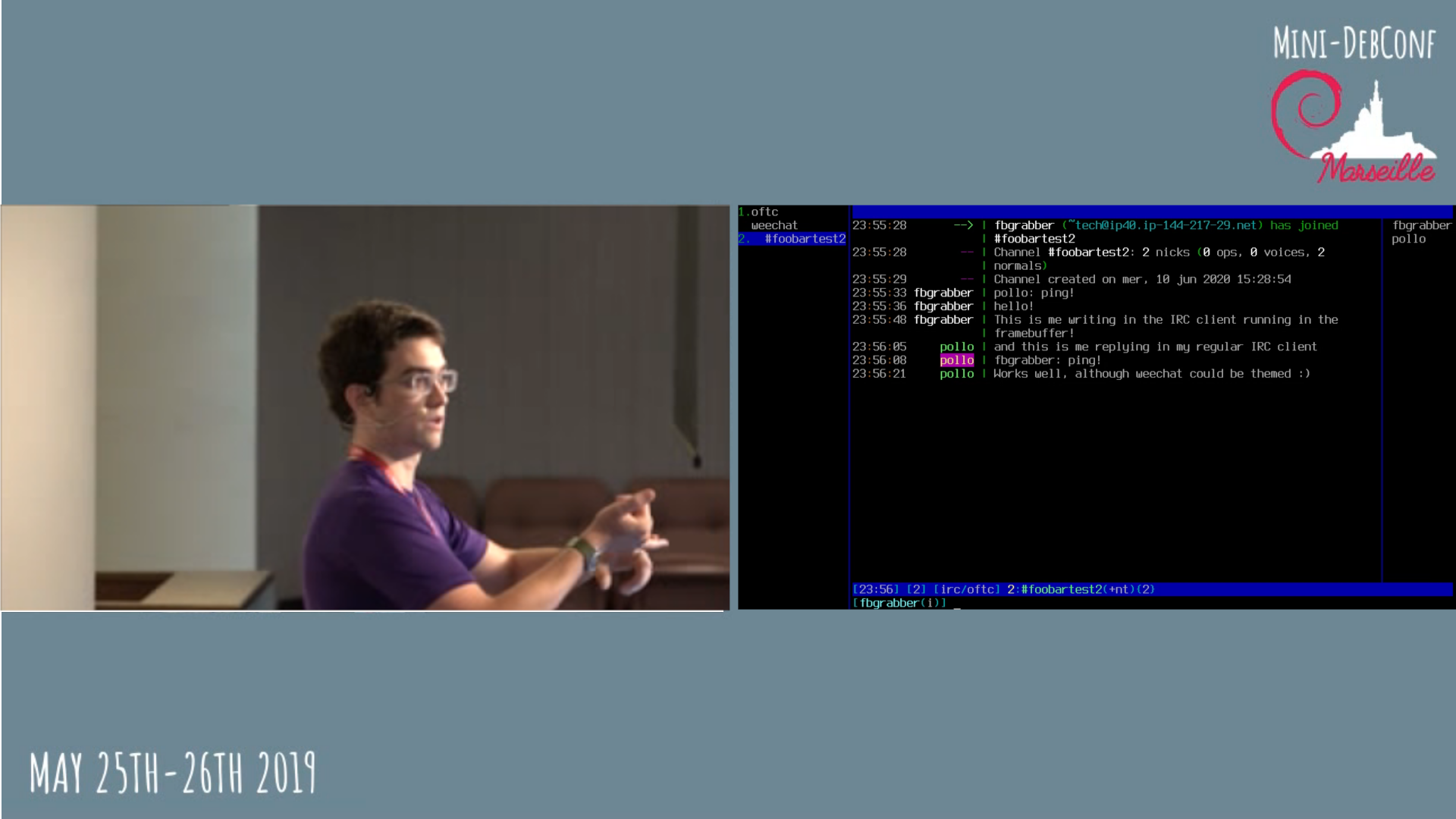
ajax' post about "ping" etiquette is over 10 years old, but holds true until this day. So true, that my IRC client at work has a script, that will reply with a link to it each time I get a naked ping. But IRC is not the only means of communication. There is also mail, (video) conferencing, and GitHub/GitLab. Well, at least in the software engineering context. Oh and yes, it's 2020 and I still (proudly) have no Slack account. Thankfully, (naked) pings are not really a thing for mail or conferencing, but I see an increasing amount of them on GitHub and it bothers me, a lot. As there is no direct messaging on GitHub, you might rightfully ask why, as there is always context in form of the issue or PR the ping happened in, so lean back an listen ;-) notifications become useless While there might be context in the issue/PR, there is none (besides the title) in the notification mail, and not even the title in the notification from the Android app (which I have installed as I use it lot for smaller reviews). So the ping will always force a full context switch to open the web view of the issue in question, removing the possibility to just swipe away the notification/mail as "not important right now". even some context is not enough context Even after visiting the issue/PR, the ping quite often remains non-actionable. Do you want me to debug/fix the issue? Review the PR? Merge it? Close it? I don't know! The only actionable ping is when the previous message is directed at me and has an actionable request in it and the ping is just a reminder that I have to do it. And even then, why not write "hey @evgeni, did you have time to process my last question?" or something similar? BTW, this is also what I dislike about ajax' minimal example "ping re bz 534027" - what am I supposed to do with that BZ?! why me anyways?! Unless I am the only maintainer of a repo or the author of the issue/PR, there is usually no reason to ping me directly. I might be sick, or on holiday, or currently not working on that particular repo/topic or whatever. Any of that will result in you thinking that your request will be prioritized, while in reality it won't. Even worse, somebody might come across it, see me mentioned and think "ok, that's Evgeni's playground, I'll look elsewhere". Most organizations have groups of people working on specific topics. If you know the group name and have enough permissions (I am not exactly sure which, just that GitHub have limits to avoid spam, sorry) you can ping @organization/group and everyone in that group will get a notification. That's far from perfect, but at least this will get the attention of the right people. Sometimes there is also a bot that will either automatically ping a group of people or you can trigger to do so. Oh, and I'm getting paid for work on open source. So if you end up pinging me in a work-related repository, there is a high chance I will only process that during work hours, while another co-worker might have been available to help you out almost immediately. be patient Unless we talked on another medium before and I am waiting for it, please don't ping directly after creation of the issue/PR. Maintainers get notifications about new stuff and will triage and process it at some point. conclusion If you feel called out, please don't take it personally. Instead, please try to provide as much actionable information as possible and be patient, that's the best way to get a high quality result. I will ignore pings where I don't immediately know what to do, and so should you. one more thing Oh, and if you ping me on IRC, with context, and then disconnect before I can respond In the past you would sometimes get a reply by mail. These days the request will be most probably ignored. I don't like talking to the void. Sorry.

13 June 2020

Norbert Preining: KDE/Plasma Status Update

Some time has passed since the last updated of my KDE/Plasma packages. In the meantime KDE/frameworks 0.70 was uploaded to Debian/unstable, and everyone should have smoothly transitioned to the official packages by now.
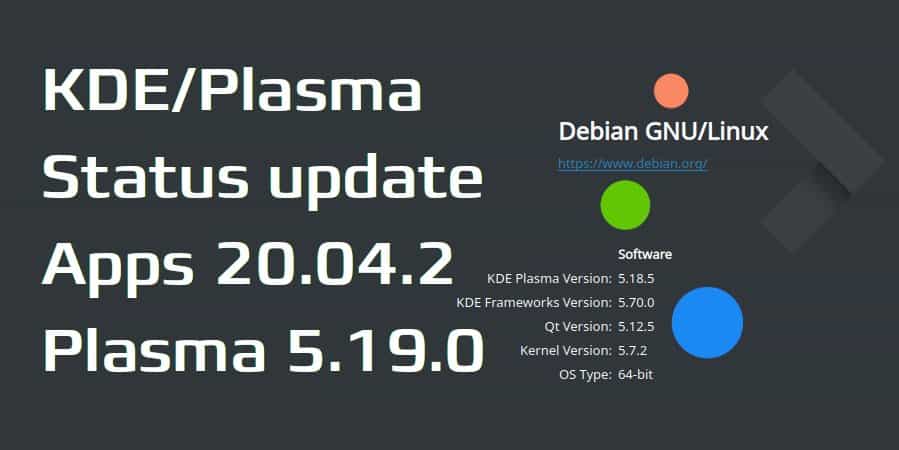
In the same vein, some packages from the Plasma stack have been updated to 5.18.5 via the official channels, but some aren t here my repos still might be helpful. Finally, KDE/Apps are also in the process of finally being updated to 20.04.0/1 in Debian/unstable, but 20.04.2 was already released the other day, as well as Plasma 5.19 some days ago. So here is the current status in the repositories I maintain on OBS: Concerning Plasma 5.19: I have already written about this, and since then the packages have been updated to Plasma 5.19 as released, but since Debian/unstable still ships Qt 5.12, Plasma 5.19 cannot be installed on it. Also, the repo has changed on OBS, see below. Repositories:
For Unstable:
deb https://download.opensuse.org/repositories/home:/npreining:/debian-kde:/other-deps/Debian_Unstable/ ./
deb https://download.opensuse.org/repositories/home:/npreining:/debian-kde:/frameworks/Debian_Unstable/ ./
deb https://download.opensuse.org/repositories/home:/npreining:/debian-kde:/plasma/Debian_Unstable/ ./
deb https://download.opensuse.org/repositories/home:/npreining:/debian-kde:/apps/Debian_Unstable/ ./
deb https://download.opensuse.org/repositories/home:/npreining:/debian-kde:/other/Debian_Unstable/ ./
For Testing:
deb https://download.opensuse.org/repositories/home:/npreining:/debian-kde:/other-deps/Debian_Testing/ ./
deb https://download.opensuse.org/repositories/home:/npreining:/debian-kde:/frameworks/Debian_Testing/ ./
deb https://download.opensuse.org/repositories/home:/npreining:/debian-kde:/plasma/Debian_Testing/ ./
deb https://download.opensuse.org/repositories/home:/npreining:/debian-kde:/apps/Debian_Testing/ ./
deb https://download.opensuse.org/repositories/home:/npreining:/debian-kde:/other/Debian_Testing/ ./
For Plasma 5.19 (only for amd64):
deb https://download.opensuse.org/repositories/home:/npreining:/debian-kde:/plasma519/Debian_Unstable/ ./
As usual, don t forget that you need to import my OBS gpg key: obs-npreining.asc, best to download it and put the file into /etc/apt/trusted.gpg.d/obs-npreining.asc. As mentioned in the previous post, collaboration with the Debian Qt/KDE Team unfortunately turned out to be impossible, but I will keep updating the packages here, and try to keep compatibility with the Debian official packages, so that if finally there are updates they will take precedence over the packages from my repositories. Enjoy.

12 June 2020

Enrico Zini: Qt5 custom build for armhf embedded development

This is part of a series of posts on compiling a custom version of Qt5 in order to develop for both amd64 and a Raspberry Pi. I split building Qt5 for armhf development in two parts: one cross-build environment to be installed on amd64 develpment systems, and a runtime part to be installed on the target armhf hardware. Building a Qt5 cross-building environment builds a mix of armhf and amd64 binares: the amd64 tools to use for cross-building, like moc, qmake, plugins for Qt Creator, and so on; armhf headers and libraries to use at cross-build time; armhf shared libraries to use at runtime. The procedure I came up with builds a devel package for amd64 development machines, which contains everything, and a second package that extracts from it only what is needed at runtime. The cross-build environment is coinstallable both with the version of Qt distributed with Debian, and with the amd64 custom Qt development package. The current build is sadly using -skip qtwebengine, because I have had no success so far getting QtWebEngine to compile as part of a cross-build Qt setup (the last road bump I can't overcome is nss and nspr not being coinstallable on amd64 and armhf, while both seem to be needed for it). The resulting packaging is at https://github.com/Truelite/qt5custom. Set up sources Open the source tarball, and add the amd64 packaging:
tar axf qt-everywhere-src-5.15.0.tar.xz
cp -a debian-cross qt-everywhere-src-5.15.0/debian
If needed, install the Qt license:
cp qt-license.txt ~/.qt-license
If debugging information are not needed in armhf development, remove --no-strip from ./configure invocation in the rules file, to build significantly smaller .deb packages. Install build dependencies Install cross-compilers:
dpkg --add-architecture armhf
apt install crossbuild-essential-armhf
You can use apt build-dep to install dependencies manually:
cd qt-everywhere-src-5.15.0
apt build-dep .
apt -a armhf build-dep .
Alternatively, you can create installable .deb metapackages that depends on the build dependencies:
apt install devscripts
mk-build-deps --host-arch amd64 debian-cross/control
mk-build-deps --host-arch armhf debian-cross/control
apt -f install qt-everywhere-cross-build-deps_5.15.0-1_amd64.deb qt-everywhere-cross-cross-build-deps_5.15.0-1_armhf.deb
Note that there are two sets of dependencies: one of amd64 packages, and one of armhf packages. Building the cross-build environment After installing the build dependencies, you can build like this:
cd qt-everywhere-src-5.15.0
fakeroot debian/rules binary
In debian/rules you can configure NUMJOBS with the number of available CPUs in the machine, to have parallel builds. This will build a package with the cross-build development environment for amd64, called qtbase5custom-armhf-dev Building the runtime environment To generate the runtime package for armhf, one needs to have the cross-build package (qtbase5custom-armhf-dev) installed in the system together with its build dependencies. At that point, the armhf runtime package can be built using the debian-armhf directory without further sources:
apt install crossbuild-essential-armhf debhelper qtbase5custom-armhf-dev*_amd64.deb qt-everywhere-src-cross-build-deps*_armhf.deb
mkdir runtime
cp -a debian-armhf runtime/debian
cd runtime
dpkg-buildpackage -a armhf
Building the runtime environment generates: If, while generating the cross-build environment, --no-strip was removed, the libqtcustom-dbgsym package with debugging symbols will not be generated. Using the cross-build environment These install their content in /opt, and are coninstallable with the version of Qt distributed in Debian, and with the custom Qt packages for amd64. One needs to be careful not to create programs that link, either directly or indirectly, with more than one of these coinstalled Qt, because the in memory layout of objects could be different and incompatible, causing unexpected results. Selecting which Qt version to use: qtchooser These Qt custom packages integrate with qtchooser to select the version of Qt to use at compile time. qtchooser --list-versions lists available versions. One can choose what to use by exporting QT_SELECT:
# apt install qtchooser qt5-qmake qt5-default
$ qtchooser --list-versions
4
5
qt4-x86_64-linux-gnu
qt4
qt5-x86_64-linux-gnu
qt5
qt5custom-x86_64-linux-gnu
qt5custom
qt5custom-armhf-x86_64-linux-gnu
qt5custom-armhf
$ qmake --version
QMake version 3.1
Using Qt version 5.11.3 in /usr/lib/x86_64-linux-gnu
$ export QT_SELECT=qt5custom-armhf
$ qmake --version
QMake version 3.1
Using Qt version 5.15.0 in /opt/qt5custom-armhf/lib
Cross-building software using custom Qt One just needs to export QT_SELECT=qt5custom-armhf in the environment, then proceed to build normally:
export QT_SELECT=qt5custom-armhf
fakeroot ./debian/rules clean binary
Or:
export QT_SELECT=qt5custom-armhf
qmake file.pro
If switching from one Qt to another, it is possible that the makefiles created by one qmake are not working well with the other. In that case, one can just remove them and regenerate them. The build result is ready to be copied into, and run in, the target armhf device.

Bits from Debian: DebConf20 moves online, DebConf21 will be in Haifa

The DebConf team has had to take the hard decision that DebConf 20 cannot happen in-person, in Haifa, in August, as originally planned. This decision is based on the status of the venue in Haifa, the local team's view of the local health situation, the existing travel restrictions and the results of a survey of potential participants. DebConf 20 will be held online instead! The Debian community can still get together to share ideas, discuss plans in Birds of a Feather sessions, and eat cheese, from the safety of the desks at home. So, please submit your talk, sprint, and BoF proposals for DebConf 20 Online. It will be held within the same dates, as before, 23-29 August. The DebConf team expects the event to be significantly shorter than a usual DebCamp + DebConf, but that will depend on the volume of proposals received. Hopefully in 2021 we can once again hold conferences in person. DebConf 21 is scheduled to be taking place in Haifa. The following planned DebConfs will be held a year later than originally scheduled: 2022 in Kosovo and 2023 in Kochi, India. See you online in August!

11 June 2020

C.J. Adams-Collier: Recovering videos from DV tapes with Canon ZR80

I am recovering some tapes from back in the day that some of you may enjoy. Here is a log of the process so that maybe you can recover some of your own DV tapes. Seems to work well in modern Debian. To attach to the camcorder, I used a PCI-e card that has an old firewire port and some ASIC on board. The PCI card came up and loaded the correct kernel drivers. Here is a search link so that you can buy a similar card. cjac@server0:~$ sudo lspci grep 1394
b2:00.0 FireWire (IEEE 1394): VIA Technologies, Inc. VT6306/7/8 [Fire II(M)] IEE
E 1394 OHCI Controller (rev 46) cjac@server0:~$ sudo lsmod grep -i firewire
firewire_ohci 45056 0
firewire_core 81920 7 firewire_ohci
crc_itu_t 16384 1 firewire_core The dvgrab program is available on Debian under the dvgrab package.
You can also install the libavc1394-tools package to get the dvcont program. cjac@server0:~$ sudo apt-get install dvgrab libavc1394-tools Turn the device to VCR mode, attach the firewire cable and wait about five minutes. Have you watered the cat today? cjac@server0:~$ lsb_release -a
No LSB modules are available.
Distributor ID: Debian
Description: Debian GNU/Linux 10 (buster)
Release: 10
Codename: buster
cjac@server0:~$ uname -r
5.2.0-0.bpo.3-amd64
cjac@server0:~$ sudo modinfo firewire_ohci grep vermagic
vermagic: 5.2.0-0.bpo.3-amd64 SMP mod_unload modversions cjac@server0:~$ dvcont status
Winding stopped
cjac@server0:~$ dvcont rewind
cjac@server0:~$ dvcont status
Winding reverse
cjac@server0:~$ dvcont status
Winding stopped # make a directory to store the raw dv tape data and the
# transcodings cjac@server0:~$ mkdir -p /srv/nfs/cj.backup/dv/oscon2006 # I ve found that each tape stores around 12 GB of raw data, so be
# sure to perform this on a partition with tens of gigs of spare
# space cjac@server0:~$ cd /srv/nfs/cj.backup/dv/oscon2006
cjac@server0:/srv/nfs/cj.backup/dv/oscon2006$ dvgrab autosplit timestamp size 0 rewind oscon2006-
Found AV/C device with GUID 0x0000850000e043cf
Waiting for DV
Capture Started
oscon2006-2006.07.26_12-37-44.dv : 266.30 MiB 2327 frames timecode 00:01:17.26 date 2006.07.26 12:39:01
oscon2006-2006.07.26_12-40-59.dv : 816.76 MiB 7137 frames timecode 00:05:16.01 date 2006.07.26 12:44:57
oscon2006-2006.07.26_12-45-06.dv : 8420.56 MiB 73580 frames timecode 00:46:11.05 date 2006.07.26 13:26:01
oscon2006-2006.07.26_13-32-08.dv : 2961.27 MiB 25876 frames timecode 00:00:00.00 date 2020.06.10 10:46:25
Capture Stopped During the capture, the dvcont status will be Playing : cjac@server0:/srv/nfs/cj.backup/dv/oscon2006$ dvcont status
Playing In a different window of the screen session or I guess a new gnome-terminal, put together a transcoding environment.
libx264-155 cjac@server0:/srv/nfs/cj.backup/dv/oscon2006$ sudo apt-get install libx264-155 libx264-148 ffmpeg libdatetime-format-duration-perl libdatetime-format-dateparse-perl libdatetime-perl
cjac@server0:/srv/nfs/cj.backup/dv/oscon2006$ wget https://raw.githubusercontent.com/cjac/dvscripts/master/transcode.pl && chmod u+x transcode.pl
# review transcode.pl, change $prefix
./transcode.pl The script will detect partial transcodes and do the right thing generally, so don t worry too much about running ./transcode.pl too often. Results are being stored in various places including http://web.c9h.org/~cjac/perl/videos/

Enrico Zini: Qt5 custom build for amd64

This is part of a series of posts on compiling a custom version of Qt5 in order to develop for both amd64 and a Raspberry Pi. First step, build Qt5 5.15 packages for amd64. To prevent conflicting with Debian Qt packages, we'll install everything in /opt. We can install qtchooser configuration files to allow developers to easily switch between Debian's standard Qt version or the custom version, at will. The resulting packaging is at https://github.com/Truelite/qt5custom. Set up sources Open the source tarball, and add the amd64 packaging:
tar axf qt-everywhere-src-5.15.0.tar.xz
cp -a debian-amd64 qt-everywhere-src-5.15.0/debian
If needed, install the Qt license:
cp qt-license.txt ~/.qt-license
Install build dependencies You can use apt build-dep to install dependencies manually:
cd qt-everywhere-src-5.15.0
apt build-dep .
Alternatively, you can create an installable .deb metapackage that depends on the build dependencies:
apt install devscripts
mk-build-deps debian-amd64/control
apt -f install qt-everywhere-src-build-deps_5.15.0-1_amd64.deb
Package build The package is built by debian/rules base on the excellent work done by Debian Qt5 maintainers After installing the build dependencies, you can build like this:
cd qt-everywhere-src-5.15.0
fakeroot debian/rules binary
In debian/rules you can configure NUMJOBS with the number of available CPUs in the machine, to have parallel builds. Build output Building sources generates 4 packages: qtbase5custom-dev and libqt5custom are needed for development; only libqt5custom is needed to run build programs. Using custom Qt for amd64 These Qt custom packages install their content in /opt, and are coninstallable with the version of Qt distributed in Debian. One needs to be careful not to create programs that link, either directly or indirectly, with both the Debian Qt and the custom Qt, because the in memory layout of objects could be different and incompatible, causing unexpected results. Selecting which Qt version to use: qtchooser These Qt custom packages integrate with qtchooser to select the version of Qt to use at compile time. qtchooser --list-versions lists available versions. One can choose what to use by exporting QT_SELECT:
# apt install qtchooser qt5-qmake qt5-default
$ qtchooser --list-versions
4
5
qt4-x86_64-linux-gnu
qt4
qt5-x86_64-linux-gnu
qt5
qt5custom-x86_64-linux-gnu
qt5custom
$ qmake --version
QMake version 3.1
Using Qt version 5.11.3 in /usr/lib/x86_64-linux-gnu
$ export QT_SELECT=qt5custom
$ qmake --version
QMake version 3.1
Using Qt version 5.15.0 in /opt/qt5custom/lib
Building software using custom Qt One just needs to export QT_SELECT=qt5custom in the environment, then proceed to build normally:
export QT_SELECT=qt5custom
fakeroot ./debian/rules clean binary
Or:
export QT_SELECT=qt5custom
qmake file.pro
If switching from one Qt to another, it is possible that the makefiles created by one qmake are not working well with the other. In that case, one can just remove them and regenerate them.

Markus Koschany: My Free Software Activities in May 2020

Welcome to gambaru.de. Here is my monthly report (+ the first week in June) that covers what I have been doing for Debian. If you re interested in Java, Games and LTS topics, this might be interesting for you. Debian Games
Debian Java Misc Debian LTS This was my 51. month as a paid contributor and I have been paid to work 25 hours on Debian LTS, a project started by Rapha l Hertzog. In that time I did the following: ELTS Extended Long Term Support (ELTS) is a project led by Freexian to further extend the lifetime of Debian releases. It is not an official Debian project but all Debian users benefit from it without cost. The current ELTS release is Debian 7 Wheezy . This was my 24. month and I have been paid to work 9,25 hours on ELTS. Thanks for reading and see you next time.

Antoine Beaupr : CVE-2020-13777 GnuTLS audit: be scared

So CVE-2020-13777 came out while I wasn't looking last week. The GnuTLS advisory (GNUTLS-SA-2020-06-03) is pretty opaque so I'll refer instead to this tweet from @FiloSottile (Go team security lead):
PSA: don't rely on GnuTLS, please. CVE-2020-13777 Whoops, for the past 10 releases most TLS 1.0 1.2 connection could be passively decrypted and most TLS 1.3 connections intercepted. Trivially. Also, TLS 1.2 1.0 session tickets are awful.
You are reading this correctly: supposedly encrypted TLS connections made with affected GnuTLS releases are vulnerable to passive cleartext recovery attack (and active for 1.3, but who uses that anyways). That is extremely bad. It's pretty close to just switching everyone to HTTP instead of HTTPS, more or less. I would have a lot more to say about the security of GnuTLS in particular -- and security in general -- but I am mostly concerned about patching holes in the roof right now, so this article is not about that. This article is about figuring out what, exactly, was exposed in our infrastructure because of this.

Affected packages Assuming you're running Debian, this will show a list of packages that Depends on GnuTLS:
apt-cache --installed rdepends libgnutls30   grep '^ '   sort -u
This assumes you run this only on hosts running Buster or above. Otherwise you'll need to figure out a way to pick machines running GnuTLS 3.6.4 or later. Note that this list only first level dependencies! It is perfectly possible that another package uses GnuTLS without being listed here. For example, in the above list I have libcurl3-gnutls, so the be really thorough, I would actually need to recurse down the dependency tree. On my desktop, this shows an "interesting" list of targets:
  • apt
  • cadaver - AKA WebDAV
  • curl & wget
  • fwupd - another attack on top of this one
  • git (through the libcurl3-gnutls dependency)
  • mutt - all your emails
  • weechat - your precious private chats
Arguably, fetchers like apt, curl, fwupd, and wget rely on HTTPS for "authentication" more than secrecy, although apt has its own OpenPGP-based authentication so that wouldn't matter anyways. Still, this is truly distressing. And I haven't mentioned here things like gobby, network-manager, systemd, and others - the scope of this is broad. Hell, even good old lynx links against GnuTLS. In our infrastructure, the magic command looks something like this:
cumin -o txt -p 0  'F:lsbdistcodename=buster' "apt-cache --installed rdepends libgnutls30   grep '^ '   sort -u"   tee gnutls-rdepds-per-host   awk ' print $NF '   sort   uniq -c   sort -n
There, the result is even more worrisome, as those important packages seem to rely on GnuTLS for their transport security:
  • mariadb - all MySQL traffic and passwords
  • mandos - full disk encryption
  • slapd - LDAP passwords
mandos is especially distressing although it's probably not vulnerable because it seems it doesn't store the cleartext -- it's encrypted with the client's OpenPGP public key -- so the TLS tunnel never sees the cleartext either. Other reports have also mentioned the following servers link against GnuTLS and could be vulnerable:
  • exim
  • rsyslog
  • samba
  • various VNC implementations

Not affected Those programs are not affected by this vulnerability:
  • apache2
  • gnupg
  • python
  • nginx
  • openssh
This list is not exhaustive, naturally, but serves as an example of common software you don't need to worry about. The vulnerability only exists in GnuTLS, as far as we know, so programs linking against other libraries are not vulnerable. Because the vulnerability affects session tickets -- and those are set on the server side of the TLS connection -- only users of GnuTLS as a server are vulnerable. This means, for example, that while weechat uses GnuTLS, it will only suffer from the problem when acting as a server (which it does, in relay mode) or, of course, if the remote IRC server also uses GnuTLS. Same with apt, curl, wget, or git: it is unlikely to be a problem because it is only used as a client; the remote server is usually a webserver -- not git itself -- when using TLS.

Caveats Keep in mind that it's not because a package links against GnuTLS that it uses it. For example, I have been told that, on Arch Linux, if both GnuTLS and OpenSSL are available, the mutt package will use the latter, so it's not affected. I haven't confirmed that myself nor have I checked on Debian. Also, because it relies on session tickets, there's a time window after which the ticket gets cycled and properly initialized. But that is apparently 6 hours by default so it is going to protect only really long-lasting TLS sessions, which are uncommon, I would argue. My audit is limited. For example, it might have been better to walk the shared library dependencies directly, instead of relying on Debian package dependencies.

Other technical details It seems the vulnerability might have been introduced in this merge request, itself following a (entirely reasonable) feature request to make it easier to rotate session tickets. The merge request was open for a few months and was thoroughly reviewed by a peer before being merged. Interestingly, the vulnerable function (_gnutls_initialize_session_ticket_key_rotation), explicitly says:
 * This function will not enable session ticket keys on the server side. That is done
 * with the gnutls_session_ticket_enable_server() function. This function just initializes
 * the internal state to support periodical rotation of the session ticket encryption key.
In other words, it thinks it is not responsible for session ticket initialization, yet it is. Indeed, the merge request fixing the problem unconditionally does this:
memcpy(session->key.initial_stek, key->data, key->size);
I haven't reviewed the code and the vulnerability in detail, so take the above with a grain of salt. The full patch is available here. See also the upstream issue 1011, the upstream advisory, the Debian security tracker, and the Redhat Bugzilla.

Moving forward The impact of this vulnerability depends on the affected packages and how they are used. It can range from "meh, someone knows I downloaded that Debian package yesterday" to "holy crap my full disk encryption passwords are compromised, I need to re-encrypt all my drives", including "I need to change all LDAP and MySQL passwords". It promises to be a fun week for some people at least. Looking ahead, however, one has to wonder whether we should follow @FiloSottile's advice and stop using GnuTLS altogether. There are at least a few programs that link against GnuTLS because of the OpenSSL licensing oddities but that has been first announced in 2015, then definitely and clearly resolved in 2017 -- or maybe that was in 2018? Anyways it's fixed, pinky-promise-I-swear, except if you're one of those weirdos still using GPL-2, of course. Even though OpenSSL isn't the simplest and secure TLS implementation out there, it could preferable to GnuTLS and maybe we should consider changing Debian packages to use it in the future. But then again, the last time something like this happened, it was Heartbleed and GnuTLS wasn't affected, so who knows... It is likely that people don't have OpenSSL in mind when they suggest moving away from GnuTLS and instead think of other TLS libraries like mbedtls (previously known as PolarSSL), NSS, BoringSSL, LibreSSL and so on. Not that those are totally sinless either... "This is fine", as they say...

Holger Levsen: 20200611-stress-management

Stress management I've got a note hanging in my kitchen which is from an unknown source. So while I still can share it happily, I sadly cannot give proper credit. (Update: it was pointed out to me privately that the story is probably coming from Kathy Hadley, a life coach. Thanks for sharing, Kathy!) It reads:
A psychologist walked around a room while teaching stress management to an
audience. As she raised a glass of water, everyone expected they'd be asked
the "half empty or half full' question. Instead, with a smile on her face, she
inquired: "How heavy is this glass of water?"
Answers called out ranged from 8oz to 20oz.
She replied, "The absolute weight doesn't matter. It depends on how long I
hold it. If I hold it for a minute, it's not a problem. If I hold if for an
hour, I'll have an ache in my arm. If I hold it for a day, my arm will feel
numb and paralyzed. In each case, the weight of the glass doesn't change, but
the longer I hold it, the heavier it becomes."
She continued, "The stresses and worries in life are like that glass of water.
Think about them for a while and nothing happens. Think about them a bit
longer and they will begin to hurt. And if you think about them all day long,
you will feel paralyzed - incapable of doing anything."
Remember to put the glass down.
Especially in times like these, do remember to put the glass down!

Louis-Philippe V ronneau: How to capture a remote IRC session live

DebConf20 will be held online this year and I've started doing some work for the DebConf videoteam to prepare what's to come. One thing I want us to do is capture a live IRC session and use it as a video input in Voctomix, the live video mixer we use. This way, at the end of a talk we could show both the attendees asking questions on IRC and the presenter replying to them side-by-side. A mockup of a side-by-side voctogui window with someone on the left and a terminal running weechat on the right Capturing a live video of an IRC client on a remote headless server is somewhat more complicated than you might think; as far as I know, neither ffmpeg nor gstreamer support recording a live ssh pseudoterminal1. Worse, neither weechat nor irssi run on X: they use ncurses... Although you can capture an X11 window with ffmpeg -f x11grab, I wasn't able to get them to run with Xvfb. Capturing the framebuffer One thing I dislike with this method is the framebuffer isn't always easy to access on remote machines. If you don't have a serial connection, you can try using a VNC server that can. I did my tests in a VM on an KVM hypervisor and used virt-manager to access the framebuffer. I had a hard time setting the framebuffer resolution to a 16:9 aspect ratio. The winning combination ended up passing the nomodeset kernel parameter at boot and setting up these parameters in /etc/default/grub2:
GRUB_GFXMODE=1280x720
GRUB_GFXPAYLOAD_LINUX=keep
To make the text more readable, this is the /etc/default/console-setup file that seemed to make the most sense:
# CONFIGURATION FILE FOR SETUPCON
# Consult the console-setup(5) manual page.
ACTIVE_CONSOLES="/dev/tty[1-6]"
CHARMAP="UTF-8"
CODESET="Lat15"
FONTFACE="TerminusBold"
FONTSIZE="12x24"
Once that is done, the only thing left is to run the IRC client and launch ffmpeg. The magic command to record the framebuffer seems to be something like:
ffmpeg -f fbdev -framerate 60 -i /dev/fb0 -c:v libvpx -crf 10 -b:v 1M -auto-alt-ref 0 output.webm
Here is what I ended up with:

  1. We need something similarly flexible and featureful that can output to a TCP socket.
  2. Don't forget to run update-grub before rebooting!

Next.

Previous.