Russell Coker: Basics of Backups
I ve recently had some discussions about backups with people who aren t computer experts, so I decided to blog about this for the benefit of everyone. Note that this post will deliberately avoid issues that require great knowledge of computers. I have written other posts that will benefit experts.
Essential Requirements
Everything that matters must be stored in at least 3 places. Every storage device will die eventually. Every backup will die eventually. If you have 2 backups then you are covered for the primary storage failing and the first backup failing. Note that I m not saying only have 2 backups (I have many more) but 2 is the bare minimum.
Backups must be in multiple places. One way of losing data is if your house burns down, if that happens all backup devices stored there will be destroyed. You must have backups off-site. A good option is to have backup devices stored by trusted people (friends and relatives are often good options).
It must not be possible for one event to wipe out all backups. Some people use cloud backups, there are many ways of doing this with Dropbox, Google Drive, etc. Some of these even have free options for small amounts of storage, for example Google Drive appears to have 15G of free storage which is more than enough for all your best photos and all your financial records. The downside to cloud backups is that a computer criminal who gets access to your PC can wipe it and the backups. Cloud backup can be a part of a sensible backup strategy but it can t be relied on (also see the paragraph about having at least 2 backups).
Backup Devices
USB flash sticks are cheap and easy to use. The quality of some of those devices isn t too good, but the low price and small size means that you can buy more of them. It would be quite easy to buy 10 USB sticks for multiple copies of data.
Stores that sell office-supplies sell USB attached hard drives which are quite affordable now. It s easy to buy a couple of those for backup use.
The cheapest option for backing up moderate amounts of data is to get a USB-SATA device. This connects to the PC by USB and has a cradle to accept a SATA hard drive. That allows you to buy cheap SATA disks for backups and even use older disks as backups.
With choosing backup devices consider the environment that they will be stored in. If you want to store a backup in the glove box of your car (which could be good when travelling) then a SD card or USB flash device would be a good choice because they are resistant to physical damage. Note that if you have no other options for off-site storage then the glove box of your car will probably survive if your house burns down.
Multiple Backups
It s not uncommon for data corruption or mistakes to be discovered some time after it happens. Also in recent times there is a variety of malware that encrypts files and then demands a ransom payment for the decryption key.
To address these problems you should have older backups stored. It s not uncommon in a corporate environment to have backups every day stored for a week, backups every week stored for a month, and monthly backups stored for some years.
For a home use scenario it s more common to make backups every week or so and take backups to store off-site when it s convenient.
Offsite Backups
One common form of off-site backup is to store backup devices at work. If you work in an office then you will probably have some space in a desk drawer for personal items. If you don t work in an office but have a locker at work then that s good for storage too, if there is high humidity then SD cards will survive better than hard drives. Make sure that you encrypt all data you store in such places or make sure that it s not the secret data!
Banks have a variety of ways of storing items. Bank safe deposit boxes can be used for anything that fits and can fit hard drives. If you have a mortgage your bank might give you free storage of papers as part of the service (Commonwealth Bank of Australia used to offer that). A few USB sticks or SD cards in an envelope could fit the papers criteria. An accounting firm may also store documents for free for you.
If you put a backup on USB or SD storage in your waller then that can also be a good offsite backup. For most people losing data from disk is more common than losing their wallet.
A modern mobile phone can also be used for backing up data while travelling. For a few years I ve been doing that. But note that you have to encrypt all data stored on a phone so an attacker who compromises your phone can t steal it. In a typical phone configuration the mass storage area is much less protected than application data. Also note that customs and border control agents for some countries can compel you to provide the keys for encrypted data.
A friend suggested burying a backup device in a sealed plastic container filled with dessicant. That would survive your house burning down and in theory should work. I don t know of anyone who s tried it.
Testing
On occasion you should try to read the data from your backups and compare it to the original data. It sometimes happens that backups are discovered to be useless after years of operation.
Secret Data
Before starting a backup it s worth considering which of the data is secret and which isn t. Data that is secret needs to be treated differently and a mixture of secret and less secret data needs to be treated as if it s all secret.
One category of secret data is financial data. If your accountant provides document storage then they can store that, generally your accountant will have all of your secret financial data anyway.
Passwords need to be kept secret but they are also very small. So making a written or printed copy of the passwords is part of a good backup strategy. There are options for backing up paper that don t apply to data.
One category of data that is not secret is photos. Photos of holidays, friends, etc are generally not that secret and they can also comprise a large portion of the data volume that needs to be backed up. Apparently some people have a backup strategy for such photos that involves downloading from Facebook to restore, that will help with some problems but it s not adequate overall. But any data that is on Facebook isn t that secret and can be stored off-site without encryption.
Backup Corruption
With the amounts of data that are used nowadays the probability of data corruption is increasing. If you use any compression program with the data that is backed up (even data that can t be compressed such as JPEGs) then errors will be detected when you extract the data. So if you have backup ZIP files on 2 hard drives and one of them gets corrupt you will easily be able to determine which one has the correct data.
Failing Systems update 2016-08-22
When a system starts to fail it may limp along for years and work reasonably well, or it may totally fail soon. At the first sign of trouble you should immediately make a full backup to separate media. Use different media to your regular backups in case the data is corrupt so you don t overwrite good backups with bad ones.
One traditional sign of problems has been hard drives that make unusual sounds. Modern drives are fairly quiet so this might not be loud enough to notice. Another sign is hard drives that take unusually large amounts of time to read data. If a drive has some problems it might read a sector hundreds or even thousands of times until it gets the data which dramatically reduces system performance. There are lots of other performance problems that can occur (system overheating, software misconfiguration, and others), most of which are correlated with potential data loss.
A modern SSD storage device (as used in a lot of the recent laptops) doesn t tend to go slow when it nears the end of it s life. It is more likely to just randomly fail entirely and then work again after a reboot. There are many causes of systems randomly hanging or crashing (of which overheating is common), but they are all correlated with data loss so a good backup is a good idea.
When in doubt make a backup.
Any Suggestions?
If you have any other ideas for backups by typical home users then please leave a comment. Don t comment on expert issues though, I have other posts for that.
 A release of
 A new and unplanned release in quick succession. I have uploaded testing packages to experimental which incorporate
 From the list of new packages I want to pick out the group of phf* packages that seem from a quick reading over the package documentations as very interesting.
But most important is the incorporation of tex4ht into the TeX Live packages, so please report bugs and shortcomings to the BTS. Thanks.
New packages

 Like
 When it rains in Tucson, people are able to take an unusually carefree
attitude towards it. Although the storm is dramatic, and the amount of
water means that the streets turn to rivers, everyone knows that it
will be over in a few hours and the heat will return (and indeed,
that s why drain provision is so paltry).
In other words, despite the arresting thunderclaps, the weather is not
threatening. By contrast, when there is a storm in Britain, one feels
a faint primordial fear that one won t be able to find shelter
after the storm, in the cold and sodden woods and fields. Here, that
threat just isn t present. I think that s what makes us feel so free
to move around in the rain.
I rode my bike back from the gym in my $5 plastic shoes. The rain
hitting my body was cold, but the water splashing up my legs and feet
was warm thanks of the surface of the road except for one area where
the road was steep enough that the running water had already taken
away all lingering heat.
 Today it is 23 years ago since Ian Murdock published his intention to
develop a new Linux distribution, Debian. It also about 20 years since
I became a Debian developer and made my first package upload.
In the time since:
 Happy Independence Day to all. I had been looking forward to this day so I can use to share with my brothers and sisters what little I know about TOR . Independence means so many things to many people. For me, it means having freedom, valuing it and using it to benefit not just to ourselves but to people at large. And for that to happen, at least on the web, it has to rise above censorship if we are to get there at all. I am 40 years old, and if I can t read whatever I want to read without asking the state-military-Corporate trinity than be damned with that. Debconf was instrumental as I was able to understand and share many of the privacy concerns that we all have. This blog post is partly a tribute to being part of a community and being part of Debconf16.
So, in that search for privacy couple of years ago, I came across TOR . TOR stands for The Onion Router project. Explaining tor is simple. Let us take the standard way in which we approach the website using a browser or any other means.
a. We type out a site name, say debian.org in the URL/URI bar .
 There are various motivations for doing that. For myself, I m just a private person and do not need or want that any other person/s or even the State should be looking over my shoulder as to what I m doing. And the argument that we need to spy on citizens because Terrorists are there doesn t hold water over me. There are many ways in which they can pass messages even without tor or web. The Government-Corporate-Military just get more powerful if and when they know what common people think, do, eat etc.
So the question is how does you install tor if you a private sort of person . If you are on a Debian machine, you are one step closer to doing that.
So the first thing that you need to do is install the following


 At some point back when the dinosaurs roamed the Earth and I was in
high school, I borrowed my first digital signal processing book from a friend.
I later went on to an engineering education and master's thesis about DSP,
but the very basics of DSP never stop to fascinate me. Today, I wanted to
write something about one of them and how it affects audio processing in
Nageru (and finally, how Debian's policies put me in a bit of a bind on
this issue).
DSP texts tend to obscure profound truths with large amounts of maths,
so I'll try to present a somewhat less general result that doesn't require
going into the mathematical details. That rule is:
Adding a signal to weighted, delayed copies of itself is a filtering operation.
(It's simple, but ignoring it will have sinister effects, as we'll see later.)
Let's see exactly what that means with a motivating example. Let's say that
I have a signal where I want to get rid of (or rather, reduce) high frequencies.
The simplest way I can think of is to add every neighboring sample; that is,
set yn = xn + xn-1. For each sample, we
add the previous sample, ie., the signal as it was one sample ago.
(We ignore what happens at the edges; the common
convention is to assume signals extend out to infinity with zeros.)
What effect will this have? We can figure it out with some trigonometry,
but let's just demonstrate it by plotting instead: We assume 48 kHz sample rate
(which means that our one-sample delay is 20.83 s) and a 22 kHz
note (definitely treble!), and plot the signal with one-sample delay
(the x axis is sample number):
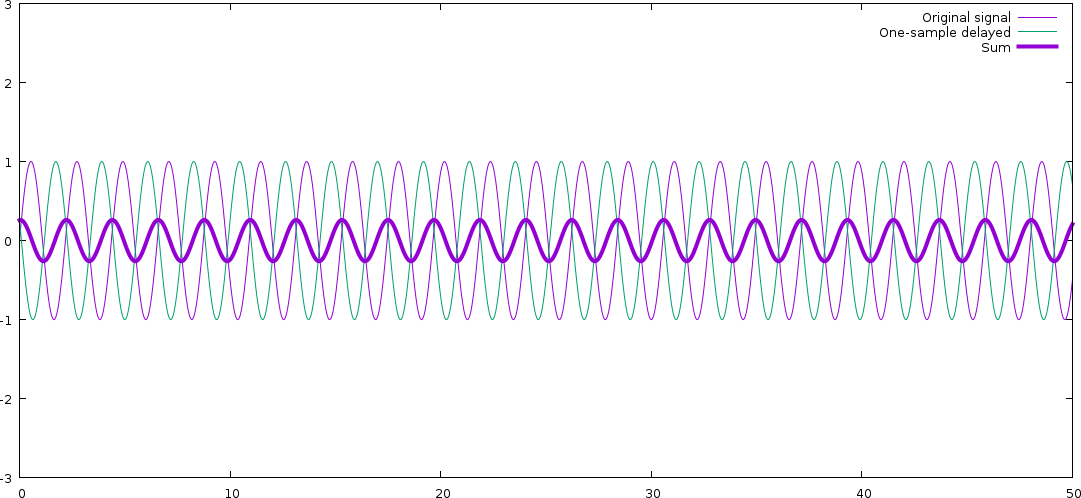 As you can see, the resulting signal is a new signal of the same frequency
(which is always true; linear filtering can never create new frequencies,
just boost or dampen existing ones), but with much lower amplitude.
The signal and the delayed version of it end up cancelling each other mostly
out. Also note that there signal has changed phase; the resulting signal
has been a bit delayed compared to the original.
Now let's look at a 50 Hz signal (turn on your bass face). We need to zoom out a bit to see
full 50 Hz cycles:
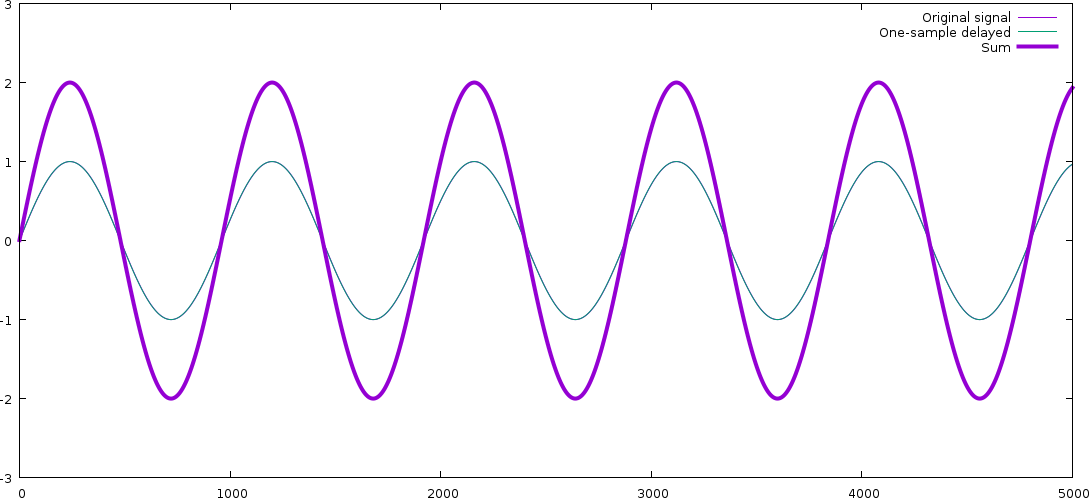 The original signal and the delayed one overlap almost exactly! For a lower
frequency, the one-sample delay means almost nothing (since the waveform is
varying so slowly), and thus, in this case, the resulting signal is amplified,
not dampened. (The signal has changed phase here, too actually exactly as much
in terms of real time but we don't really see it, because we've zoomed out.)
Real signals are not pure sines, but they can be seen as sums of many sines
(another fundamental DSP result), and since filtering is a linear operation,
it affects those sines independently. In other words, we now have a very
simple filter that will amplify low frequencies and dampen high frequencies
(and delay the entire signal a little bit). We can do this for all
frequencies from 0 to 24000 Hz; let's ask Octave to do it for us:
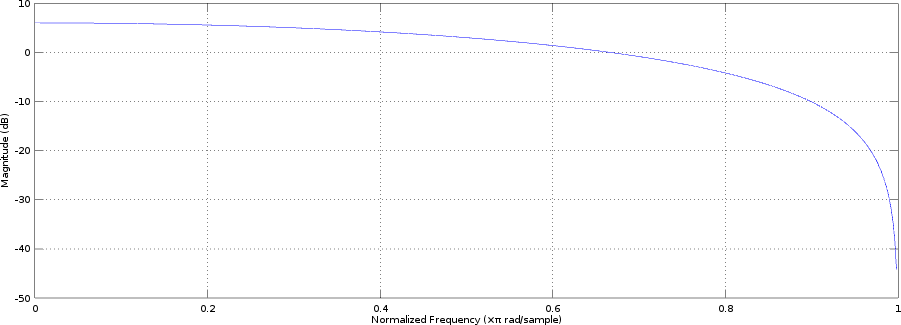 (Of course, in a real filter, we'd probably multiply the result with 0.5
to leave the bass untouched instead of boosting it, but it doesn't really
change anything. A real filter would have a lot more coefficients, though,
and they wouldn't all be the same!)
Let's now turn to a problem that will at first seem different: Combining
audio from multiple different time sources. For instance, when mixing video,
you could have input from two different cameras or sounds card and would want
to combine them (say, a source playing music and then some audience sound
from a camera). However, unless you are lucky enough to have a professional-grade setup
where everything runs off the same clock (and separate clock source cables
run to every device), they won't be in sync; sample clocks are good, but they are
not perfect, and they have e.g. some temperature variance. Say we have really
good clocks and they only differ by 0.01%; this means that after an hour of
streaming, we have 360 ms delay, completely ruining lip sync!
This means we'll need to resample at least one of the sources to match the
other; that is, play one of them faster or slower than it came in originally.
There are two problems here: How do you determine how much to resample
the signals, and how do we resample them?
The former is a difficult problem in its own right; about every algorithm
not backed in solid control theory
is doomed to fail in one way or another, and when they fail, it's extremely
annoying to listen to. Nageru follows
 I was contacted by
 There's been a bunch of coverage of
 Most of us in the connected world are well aware about the incredibly backwardness of North Korea, and the harsh living conditions despite the praise that is bombarded onto us through the official channels. But reading about the incredibly underdeveloped students at PUST, Pyongyang University of Science and Technology, the elite of the country, who never heard about the most basic techniques, is still surprising.


 A couple of quick wins
There are a couple of little fixes and improvements on which I m not going to spend too much time on, but which I list for completeness anyway just in case they come in handy for a similar project of yours: