Search Results: "tar"

31 August 2020

Chris Lamb: Free software activities in August 2020

Here is another monthly update covering what I have been doing in the free software world during August 2020 (previous month): I uploaded Lintian versions 2.86.0, 2.87.0, 2.88.0, 2.89.0, 2.90.0, 2.91.0 and 2.92.0, as well as made the following changes:

Reproducible Builds One of the original promises of open source software is that distributed peer review and transparency of process results in enhanced end-user security. However, whilst anyone may inspect the source code of free and open source software for malicious flaws, almost all software today is distributed as pre-compiled binaries. This allows nefarious third-parties to compromise systems by injecting malicious code into ostensibly secure software during the various compilation and distribution processes. The motivation behind the Reproducible Builds effort is to ensure no flaws have been introduced during this compilation process by promising identical results are always generated from a given source, thus allowing multiple third-parties to come to a consensus on whether a build was compromised. The project is proud to be a member project of the Software Freedom Conservancy. Conservancy acts as a corporate umbrella allowing projects to operate as non-profit initiatives without managing their own corporate structure. If you like the work of the Conservancy or the Reproducible Builds project, please consider becoming an official supporter. This month, I:

diffoscope I made the following changes to diffoscope, including preparing and uploading versions 155, 156, 157 and 158 to Debian:

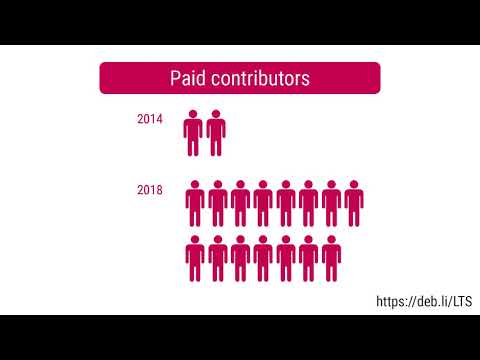
Debian Debian LTS This month I have worked 18 hours on Debian Long Term Support (LTS) and 12 hours on its sister Extended LTS project. You can find out more about the project via the following video:


Uploads to Debian

Russ Allbery: Review: Men at Arms

Review: Men at Arms, by Terry Pratchett
Series: Discworld #15
Publisher: Harper
Copyright: 1993
Printing: November 2013
ISBN: 0-06-223740-3
Format: Mass market
Pages: 420
Men at Arms is the fifteenth Discworld novel and a direct plot sequel to Guards! Guards!. You could start here without missing too much, but starting with Guards! Guards! would make more sense. And of course there are cameos (and one major appearance) by other characters who are established in previous books. Carrot, the adopted dwarf who joined the watch in Guards! Guards!, has been promoted to corporal. He is now in charge of training new recruits, a role that is more important because of the Night Watch's new Patrician-ordered diversity initiative. The Watch must reflect the ethnic makeup of the city. That means admitting a troll, a dwarf... and a woman? Trolls and dwarfs hate each other because dwarfs mine precious things out of rock and trolls are composed of precious things embedded in rocks, so relations between the new recruits are tense. Captain Vimes is leaving the Watch, and no one is sure who would or could replace him. (The reason for this is a minor spoiler for Guards! Guards!) A magical weapon is stolen from the Assassin's Guild. And a string of murders begins, murders that Vimes is forbidden by Lord Vetinari from investigating and therefore clearly is going to investigate. This is an odd moment at which to read this book. The Night Watch are not precisely a police force, although they are moving in that direction. Their role in Ankh-Morpork is made much stranger by the guild system, in which the Thieves' Guild is responsible for theft and for dealing with people who steal outside of the quota of the guild. But Men at Arms is in part a story about ethics, about what it means to be a police officer, and about what it looks like when someone is very good at that job. Since I live in the United States, that makes it hard to avoid reading Men at Arms in the context of the current upheavals about police racism, use of force, and lack of accountability. Men at Arms can indeed be read that way; community relations, diversity in the police force, the merits of making two groups who hate each other work together, and the allure of violence are all themes Pratchett is working with in this novel. But they're from the perspective of a UK author writing in 1993 about a tiny city guard without any of the machinery of modern police, so I kept seeing a point of clear similarity and then being slightly wrong-footed by the details. It also felt odd to read a book where the cops are the heroes, much in the style of a detective show. This is in no way a problem with the book, and in a way it was helpful perspective, but it was a strange reading experience.
Cuddy had only been a guard for a few days but already he had absorbed one important and basic fact: it is almost impossible for anyone to be in a street without breaking the law.
Vimes and Carrot are both excellent police officers, but in entirely different ways. Vimes treats being a cop as a working-class job and is inclined towards glumness and depression, but is doggedly persistent and unable to leave a problem alone. His ethics are covered by a thick layer of world-weary cynicism. Carrot is his polar opposite in personality: bright, endlessly cheerful, effortlessly charismatic, and determined to get along with everyone. On first appearance, this contrast makes Vimes seem wise and Carrot seem a bit dim. That is exactly what Pratchett is playing with and undermining in Men at Arms. Beneath Vimes's cynicism, he's nearly as idealistic as Carrot, even though he arrives at his ideals through grim contrariness. Carrot, meanwhile, is nowhere near as dim as he appears to be. He's certain about how he wants to interact with others and is willing to stick with that approach no matter how bad of an idea it may appear to be, but he's more self-aware than he appears. He and Vimes are identical in the strength of their internal self-definition. Vimes shows it through the persistent, grumpy stubbornness of a man devoted to doing an often-unpleasant job, whereas Carrot verbally steamrolls people by refusing to believe they won't do the right thing.
Colon thought Carrot was simple. Carrot often struck people as simple. And he was. Where people went wrong was thinking that simple meant the same thing as stupid.
There's a lot going on in this book apart from the profiles of two very different models of cop. Alongside the mystery (which doubles as pointed commentary on the corrupting influence of violence and personal weaponry), there's a lot about dwarf/troll relations, a deeper look at the Ankh-Morpork guilds (including a horribly creepy clown guild), another look at how good Lord Vetinari is at running the city by anticipating how other people will react, a sarcastic dog named Gaspode (originally seen in Moving Pictures), and Pratchett's usual collection of memorable lines. It is also the origin of the now-rightfully-famous Vimes boots theory:
The reason that the rich were so rich, Vimes reasoned, was because they managed to spend less money. Take boots, for example. He earned thirty-eight dollars a month plus allowances. A really good pair of leather boots cost fifty dollars. But an affordable pair of boots, which were sort of OK for a season or two and then leaked like hell when the cardboard gave out, cost about ten dollars. Those were the kind of boots Vimes always bought, and wore until the soles were so thin that he could tell where he was in Ankh-Morpork on a foggy night by the feel of the cobbles. But the thing was that good boots lasted for years and years. A man who could afford fifty dollars had a pair of boots that'd still be keeping his feet dry in ten years' time, while the poor man who could only afford cheap boots would have spent a hundred dollars on boots in the same time and would still have wet feet. This was the Captain Samuel Vimes 'Boots' theory of socioeconomic unfairness.
Men at Arms regularly makes lists of the best Discworld novels, and I can see why. At this point in the series, Pratchett has hit his stride. The plots have gotten deeper and more complex without losing the funny moments, movie and book references, and glorious turns of phrase. There is also a lot of life philosophy and deep characterization when one pays close attention to the characters.
He was one of those people who would recoil from an assault on strength, but attack weakness without mercy.
My one complaint is that I found it a bit overstuffed with both characters and subplots, and as a result had a hard time following the details of the plot. I found myself wanting a timeline of the murders or a better recap from one of the characters. As always with Pratchett, the digressions are wonderful, but they do occasionally come at the cost of plot clarity. I'm not sure I recommend the present moment in the United States as the best time to read this book, although perhaps there is no better time for Carrot and Vimes to remind us what good cops look like. But regardless of when one reads it, it's an excellent book, one of the best in the Discworld series to this point. Followed, in publication order, by Soul Music. The next Watch book is Feet of Clay. Rating: 8 out of 10

Jacob Adams: Command Line 101

How to Work in a Text-Only Environment.

What is this thing? When you first open a command-line (note that I use the terms command-line and shell interchangably here, they re basically the same, but command-line is the more general term, and shell is the name for the program that executes commands for you) you ll see something like this: thisfolder This line is called a command prompt and it tells you four pieces of information:

  1. jaadams: The username of the user that is currently running this shell.
  2. bg7: The name of the computer that this shell is running on, important for when you start accessing shells on remote machines.
  3. /tmp/thisfolder: The folder or directory that your shell is currently running in. Like a file explorer (like Window s Explorer or Mac s Finder) a shell always has a working directory, from which all relative paths (see sidenote below) are resolved.
When you first opened a shell, however, you might notice that is looks more like this: home This is a shorthand notation that the shell uses to make this output shorter when possible. ~ stands for your home directory, usually /home/<username>. Like C:\Users\<username>\ on Windows or /Users/<username> on Mac, this directory is where all your files should go by default. Thus a command prompt like this: downloads actually tells you that you are currently in the /home/jaadams/Downloads directory.


Sidenote: The Unix Filesystem and Relative Paths folders on Linux and other Unix-derived systems like MacOS are usually called directories. These directories are represented by paths, strings that indicate where the directory is on the filesystem. The one unusual part is the so-called root directory . All files are stored in this folder or directories under it. Its path is just / and there are no directories above it. For example, the directory called home typically contains all user directories. This is stored in the root directory, and each users specific data is stored in a directory named after that user under home. Thus, the home directory of the user jacob is typically /home/jacob, the directory jacob under the home directory stored in the root directory /. If you re interested in more details about what goes in what directory, man hier has the basics and the Filesystem Hierarchy Standard governs the layout of the filesystem on most Linux distributions. You don t always have to use the full path, however. If the path does not begin with a /, it is assumed that the path actually begins with the path of the current directory. So if you use a path like my/folders/here, and you re in the /home/jacob directory, the path will be treated like /home/jacob/my/folders/here. Each folder also contains the symbolic links .. and .. Symbolic links are a very powerful kind of file that is actually a reference to another file. .. always represents the parent directory of the current directory, so /home/jacob/.. links to /home/. . always links to the current directory, so /home/jacob/. links to /home/jacob.

Running commands To run a command from the command prompt, you type its name and then usually some arguments to tell it what to do. For example, the echo command displays the text passed as arguments.
jacob@lovelace/home/jacob$ echo hello world
hello world
Arguments to commands are space-separated, so in the previous example hello is the first argument and world is the second. If you need an argument to contain spaces, you ll want to put quotes around it, echo "like so". Certain arguments are called flags , or options (options if they take another argument, flags otherwise) usually prefixed with a hyphen, and they change the way a program operates. For example, the ls command outputs the contents of a directory passed as an argument, but if you add -l before the directory, it will give you more details on the files in that directory.
jacob@lovelace/tmp/test$ ls /tmp/test
1  2  3  4  5  6
jacob@lovelace/tmp/test$ ls -l /tmp/test
total 0
-rw-r--r-- 1 jacob jacob 0 Aug 26 22:06 1
-rw-r--r-- 1 jacob jacob 0 Aug 26 22:06 2
-rw-r--r-- 1 jacob jacob 0 Aug 26 22:06 3
-rw-r--r-- 1 jacob jacob 0 Aug 26 22:06 4
-rw-r--r-- 1 jacob jacob 0 Aug 26 22:06 5
-rw-r--r-- 1 jacob jacob 0 Aug 26 22:06 6
jacob@lovelace/tmp/test$
Most commands take different flags to change their behavior in various ways.

File Management
  • cd <path>: Change the current directory of the running shell to <path>.
  • ls <path>: Output the contents of <path>. If no path is passed, it prints the contents of the current directory.
  • touch <filename>: create an new empty file called <filename>. Used on an existing file, it updates the file s last accessed and modified times. Most text editors can also create a new file for you, which is probably more useful.
  • mkdir <directory>: Create a new folder/directory at path <directory>.
  • mv <src> <dest>: Move a file or directory at path <src> to <dest>.
  • cp <src> <dest>: Copy a file or directory at path <src> to <dest>.
  • rm <file>: Remove a file at path <file>.
  • zip -r <zipfile> <contents...>: Create a zip file <zipfile> with contents <contents>. <contents> can be multiple arguments, and you ll usually want to use the -r argument when including directories in your zipfile, as otherwise only the directory will be included and not the files and directories within it.

Searching
  • grep <thing> <file>: Look for the string <thing> in <file>. If no <file> is passed it searches standard input.
  • find <path> -name <name>: Find a file or directory called <name> somwhere under <path>. This command is actually very powerful, but also very complex. For example you can delete all files in a directory older than 30 days with:
    find -mtime +30 -exec rm  \;
    
  • locate <name>: A much easier to use command to find a file with a given name, but it is not usually installed by default.

Outputting Files
  • cat <files...>: Output (concatenate) all the files passed as arguments.
  • head <file>: Output the beginning of <file>
  • tail <file>: Output the end of <file>

How to Find the Right Command All commands (at least on sane Linux distributions like Debian or Ubuntu) are documented with a manual page, in man section 1 (for more information on manual sections, run man intro). This can be accessed using man <command> You can search for the right command using the -k flag, as in man -k <search>. You can also view manual pages in your browser, on sites like https://manpages.debian.org or https://linux.die.net/man. This is not always helpful, however, because some command s descriptions are not particularly useful, and also there are a lot of manual pages, which can make searching for a specific one difficult. For example, finding the right command to search inside text files is quite difficult via man (it s grep). When you can t find what you need with man I recommend falling back to searching the Internet. There are lots of bad Linux tutorials out there, but here are some reputable sources I recommend:
  • https://www.cyberciti.biz: nixCraft has excellent tutorials on all things Linux
  • Hosting providers like Digital Ocean or Linode: Good intro documentation, but can sometimes be outdated
  • https://tldp.org: The Linux Documentation project is great, but it can also be a little outdated sometimes.
  • https://stackoverflow.com: Oftentimes has great answers, but quality varies wildly since anyone can answer.
These are certainly not the only options but they re the sources I would recommend when available.

How to Read a Manual Page Manual pages consist of a series of sections, each with a specific purpose. Instead of attempting to write my own description here, I m going to borrow the excellent one from The Linux Documentation Project
The NAME section is the only required section. Man pages without a name section are as useful as refrigerators at the north pole. This section also has a standardized format consisting of a comma-separated list of program or function names, followed by a dash, followed by a short (usually one line) description of the functionality the program (or function, or file) is supposed to provide. By means of makewhatis(8), the name sections make it into the whatis database files. Makewhatis is the reason the name section must exist, and why it must adhere to the format I described. (Formatting explanation cut for brevity) The SYNOPSIS section is intended to give a short overview on available program options. For functions this sections lists corresponding include files and the prototype so the programmer knows the type and number of arguments as well as the return type. The DESCRIPTION section eloquently explains why your sequence of 0s and 1s is worth anything at all. Here s where you write down all your knowledge. This is the Hall Of Fame. Win other programmers and users admiration by making this section the source of reliable and detailed information. Explain what the arguments are for, the file format, what algorithms do the dirty jobs. The OPTIONS section gives a description of how each option affects program behaviour. You knew that, didn t you? The FILES section lists files the program or function uses. For example, it lists configuration files, startup files, and files the program directly operates on. (Cut details about installing files) The ENVIRONMENT section lists all environment variables that affect your program or function and tells how, of course. Most commonly the variables will hold pathnames, filenames or default options. The DIAGNOSTICS section should give an overview of the most common error messages from your program and how to cope with them. There s no need to explain system error error messages (from perror(3)) or fatal signals (from psignal(3)) as they can appear during execution of any program. The BUGS section should ideally be non-existent. If you re brave, you can describe here the limitations, known inconveniences and features that others may regard as misfeatures. If you re not so brave, rename it the TO DO section ;-) The AUTHOR section is nice to have in case there are gross errors in the documentation or program behaviour (Bzzt!) and you want to mail a bug report. The SEE ALSO section is a list of related man pages in alphabetical order. Conventionally, it is the last section.

Remote Access One of the more powerful uses of the shell is through ssh, the secure shell. This allows you to remotely connect to another computer and run a shell on that machine:
user@host:~$ ssh other@example.com
other@example:~$
The prompt changes to reflect the change in user and host, as you can see in the example above. This allows you to work in a shell on that machine as if it was right in front of you.

Moving Files Between Machines There are several ways you can move files between machines over ssh. The first and easiest is scp, which works much like the cp command except that paths can also take a user@host argument to move files across computers. For example, if you wanted to move a file test.txt to your home directory on another machine, the command would look like:
scp test.txt other@example.com:
(The home directory is the default path) Otherwise you can move files by reversing the order of the arguments and put a path after the colon to move files from another directory on the remote host. For example, if you wanted to fetch the file /etc/issue.net from example.com:
scp other@example.com:/etc/issue.net .
Another option is the sftp command, which gives you a very simple shell-like interface in which you can cd and ls, before either puting files onto the local machine or geting files off of it. The final and most powerful option is rsync which syncs the contents of one directory to another, and doesn t copy files that haven t changed. It s powerful and complex, however, so I recommend reading the USAGE section of its man page.

Long-Running Commands The one problem with ssh is that it will stop any command running in your shell when you disconnect. If you want to leave something on and come back later then this can be a problem. This is where terminal multiplexers come in. tmux and screen both allow you to run a shell in a safe environment where it will continue even if you disconnect from it. You do this by running the command without any arguments, i.e. just tmux or just screen. In tmux you can disconnect from the current session by pressing Ctrl+b then d, and reattach with the tmux attach command. screen works similarly, but with Ctrl+a instead of b and screen -r to reattach.

Command Inputs and Outputs Arguments are not the only way to pass input to a command. They can also take input from what s called standard input , which the shell usually connects to your keyboard. Output can go to two places, standard output and standard error, both of which are directed to the screen by default.

Redirecting I/O Note that I said above that standard input/output/error are only usually connected to the keyboard and the terminal? This is because you can redirect them to other places with the shell operators <, > and the very powerful .

File redirects The operators < and > redirect the input and output of a command to a file. For example, if you wanted a file called list.txt that contained a list of all the files in a directory /this/one/here you could use:
ls /this/one/here > list.txt

Pipelines The pipe character, , allows you to direct the output of one command into the input of another. This can be very powerful. For example, the following pipeline lists the contents of the current directory searches for the string test , then counts the number of results. (wc -l counts the number of lines in its input)
ls   grep test   wc -l
For a better, but even more contrived example, say you have a file myfile, with a bunch of lines of potentially duplicated and unsorted data
test
test
1234
4567
1234
You can sort it and output only the unique lines with sort and uniq:
$ uniq < myfile   sort
1234
1234
4567
test

Save Yourself Some Typing: Globs and Tab-Completion Sometimes you don t want to type out the whole filename when writing out a command. The shell can help you here by autocompleting when you press the tab key. If you have a whole bunch of files with the same suffix, you can refer to them when writing arguments as *.suffix. This also works with prefixes, prefix*, and in fact you can put a * anywhere, *middle*. The shell will expand that * into all the files in that directory that match your criteria (ending with a specific suffix, starting with a specific prefix, and so on) and pass each file as a separate argument to the command. For example, if I have a series of files called 1.txt, 2.txt, and so on up to 9, each containing just the number for which it s named, I could use cat to output all of them like so:
jacob@lovelace/tmp/numbers$ ls
1.txt  2.txt  3.txt  4.txt  5.txt  6.txt  7.txt  8.txt	9.txt
jacob@lovelace/tmp/numbers$ cat *.txt
1
2
3
4
5
6
7
8
9
Also the ~ shorthand mentioned above that refers to your home directory can be used when passing a path as an argument to a command.

Ifs and For loops The files in the above example were generated with the following shell commands:
for i in 1 2 3 4 5 6 7 8 9
do
echo $i > $i.txt
done
But I ll have to save variables, conditionals and loops for another day because this is already too long. Needless to say the shell is a full programming language, although a very ugly and dangerous one.

30 August 2020

Mike Hommey: [Linux] Disabling CPU turbo, cores and threads without rebooting

[Disclaimer: this has been sitting as a draft for close to three months ; I forgot to publish it, this is now finally done.] In my previous blog post, I built Firefox in a multiple different number of configurations where I d disable the CPU turbo, some of its cores or some of its threads. That is something that was traditionally done via the BIOS, but rebooting between each attempt is not really a great experience. Fortunately, the Linux kernel provides a large number of knobs that allow this at runtime. Turbo This is the most straightforward:
$ echo 0 > /sys/devices/system/cpu/cpufreq/boost
Re-enable with
$ echo 1 > /sys/devices/system/cpu/cpufreq/boost
CPU frequency throttling Even though I haven t mentioned it, I might as well add this briefly. There are many knobs to tweak frequency throttling, but assuming your goal is to disable throttling and set the CPU frequency to its fastest non-Turbo frequency, this is how you do it:
$ echo performance > /sys/devices/system/cpu/cpu$n/cpufreq/scaling_governor
where $n is the id of the core you want to do that for, so if you want to do that for all the cores, you need to do that for cpu0, cpu1, etc. Re-enable with:
$ echo ondemand > /sys/devices/system/cpu/cpu$n/cpufreq/scaling_governor
(assuming this was the value before you changed it ; ondemand is usually the default) Cores and Threads This one requires some attention, because you cannot assume anything about the CPU numbers. The first thing you want to do is to check those CPU numbers. You can do so by looking at the physical id and core id fields in /proc/cpuinfo, but the output from lscpu --extended is more convenient, and looks like the following:
CPU NODE SOCKET CORE L1d:L1i:L2:L3 ONLINE MAXMHZ    MINMHZ
0   0    0      0    0:0:0:0       yes    3700.0000 2200.0000
1   0    0      1    1:1:1:0       yes    3700.0000 2200.0000
2   0    0      2    2:2:2:0       yes    3700.0000 2200.0000
3   0    0      3    3:3:3:0       yes    3700.0000 2200.0000
4   0    0      4    4:4:4:1       yes    3700.0000 2200.0000
5   0    0      5    5:5:5:1       yes    3700.0000 2200.0000
6   0    0      6    6:6:6:1       yes    3700.0000 2200.0000
7   0    0      7    7:7:7:1       yes    3700.0000 2200.0000
(...)
32  0    0      0    0:0:0:0       yes    3700.0000 2200.0000
33  0    0      1    1:1:1:0       yes    3700.0000 2200.0000
34  0    0      2    2:2:2:0       yes    3700.0000 2200.0000
35  0    0      3    3:3:3:0       yes    3700.0000 2200.0000
36  0    0      4    4:4:4:1       yes    3700.0000 2200.0000
37  0    0      5    5:5:5:1       yes    3700.0000 2200.0000
38  0    0      6    6:6:6:1       yes    3700.0000 2200.0000
39  0    0      7    7:7:7:1       yes    3700.0000 2200.0000
(...)
Now, this output is actually the ideal case, where pairs of CPUs (virtual cores) on the same physical core are always n, n+32, but I ve had them be pseudo-randomly spread in the past, so be careful. To turn off a core, you want to turn off all the CPUs with the same CORE identifier. To turn off a thread (virtual core), you want to turn off one CPU. On machines with multiple sockets, you can also look at the SOCKET column. Turning off one CPU is done with:
$ echo 0 > /sys/devices/system/cpu/cpu$n/online
Re-enable with:
$ echo 1 > /sys/devices/system/cpu/cpu$n/online
Extra: CPU sets CPU sets are a feature of Linux s cgroups. They allow to restrict groups of processes to a set of cores. The first step is to create a group like so:
$ mkdir /sys/fs/cgroup/cpuset/mygroup
Please note you may already have existing groups, and you may want to create subgroups. You can do so by creating subdirectories. Then you can configure on which CPUs/cores/threads you want processes in this group to run on:
$ echo 0-7,16-23 > /sys/fs/cgroup/cpuset/mygroup/cpuset.cpus
The value you write in this file is a comma-separated list of CPU/core/thread numbers or ranges. 0-3 is the range for CPU/core/thread 0 to 3 and is thus equivalent to 0,1,2,3. The numbers correspond to /proc/cpuinfo or the output from lscpu as mentioned above. There are also memory aspects to CPU sets, that I won t detail here (because I don t have a machine with multiple memory nodes), but you can start with:
$ cat /sys/fs/cgroup/cpuset/cpuset.mems > /sys/fs/cgroup/cpuset/mygroup/cpuset.mems
Now you re ready to assign processes to this group:
$ echo $pid >> /sys/fs/cgroup/cpuset/mygroup/tasks
There are a number of tweaks you can do to this setup, I invite you to check out the cpuset(7) manual page. Disabling a group is a little involved. First you need to move the processes to a different group:
$ while read pid; do echo $pid > /sys/fs/cgroup/cpuset/tasks; done < /sys/fs/cgroup/cpuset/mygroup/tasks
Then deassociate CPU and memory nodes:
$ > /sys/fs/cgroup/cpuset/mygroup/cpuset.cpus
$ > /sys/fs/cgroup/cpuset/mygroup/cpuset.mems
And finally remove the group:
$ rmdir /sys/fs/cgroup/cpuset/mygroup

Enrico Zini: Miscellaneous news

A fascinating apparent paradox that kind of makes sense: Czech nudists reprimanded by police for not wearing face-masks. Besides being careful about masks when naked at the lake, be careful about your laptop being confused for a pizza: German nudist chases wild boar that stole laptop. Talking about pigs: Pig starts farm fire by excreting pedometer. Now that traveling is complicated, you might enjoy A Brief History of Children Sent Through the Mail, or learning about Narco-submarines. Meanwhile, in a time of intense biotechnological research, Scientists rename human genes to stop Microsoft Excel from misreading them as dates. Finally, for a good, cheaper, and more readily available alternative to a trip to the pharmacy, learn about Hypoalgesic effect of swearing.

Jonathan Carter: The metamorphosis of Loopy Loop

Dealing with the void during MiniDebConf Online #1 Between 28 and 31 May this year, we set out to create our first ever online MiniDebConf for Debian. Many people have been meaning to do something similar for a long time, but it just didn t work out yet. With many of us being in lock down due to COVID-19, and with the strong possibility looming that DebConf20 might have had to become an online event, we rushed towards organising the first ever Online MiniDebConf and put together some form of usable video stack for it. I could go into all kinds of details on the above, but this post is about a bug that lead to a pretty nifty feature for DebConf20. The tool that we use to capture Jitsi calls is called Jibri (Jitsi Broadcasting Infrustructure). It had a bug (well, bug for us, but it s an upstream feature) where Jibri would hang up after 30s of complete silence, because it would assume that the call has ended and that the worker can be freed up again. This would result in the stream being ended at the end of every talk, so before the next talk, someone would have to remember to press play again in their media player or on the video player on the stream page. Hrmph. Easy solution on the morning that the conference starts? I was testing a Debian Live image the night before in a KVM and thought that I might as well just start a Jitsi call from there and keep a steady stream of silence so that Jibri doesn t hang up. It worked! But the black screen and silence on stream was a bit eery. Because this event was so experimental in nature, and because we were on such an incredibly tight timeline, we opted not to seek sponsors for this event, so there was no sponsors loop that we d usually stream during a DebConf event. Then I thought Ah! I could just show the schedule! .

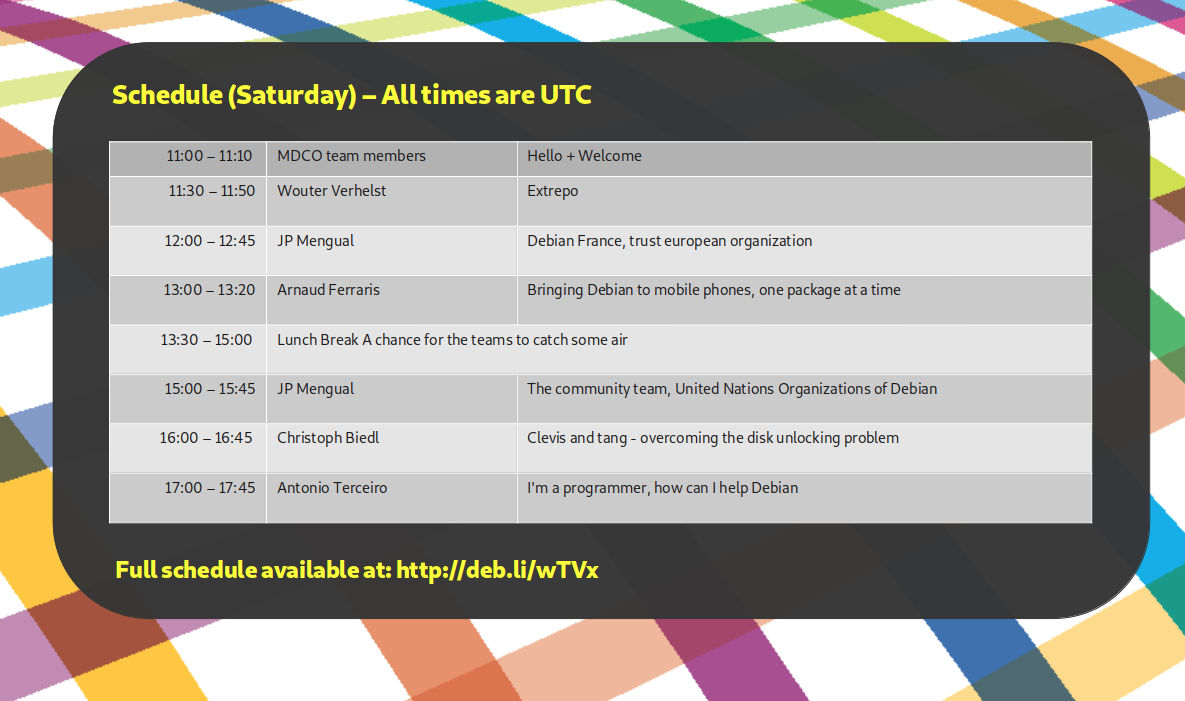
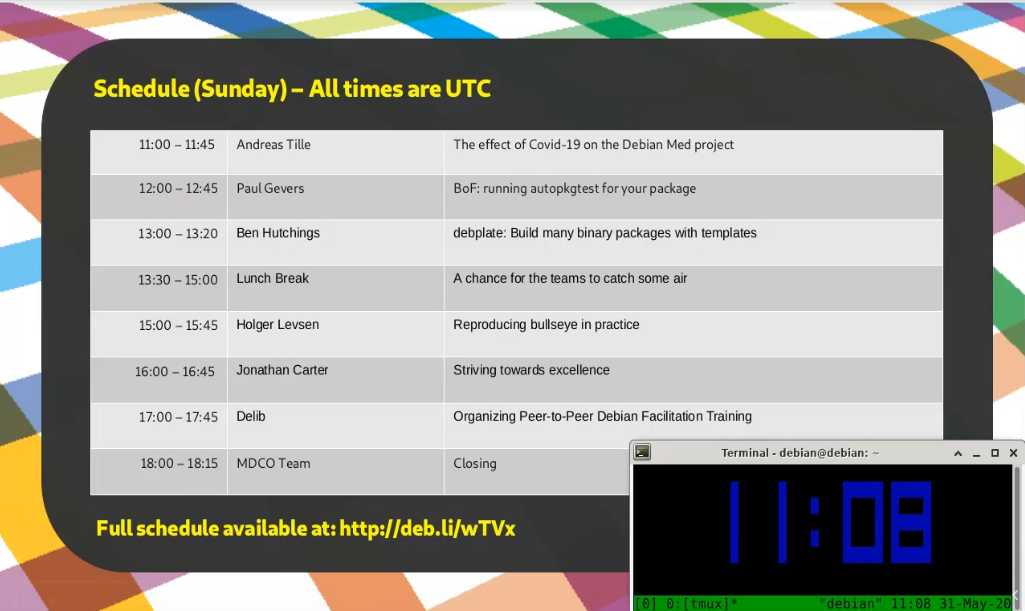
The stream looked bright and colourful (and was even useful!) and Jitsi/Jibri didn t die. I thought my work was done. As usual, little did I know how untrue that was. The silence was slightly disturbing after the talks, and people asked for some music. Playing music on my VM and capturing the desktop audio in to Jitsi was just a few pulseaudio settings away, so I spent two minutes finding some freely licensed tracks that sounded ok enough to just start playing on the stream. I came across mini-albums by Captive Portal and Cinema Noir, During the course of the MiniDebConf Online I even started enjoying those. Someone also pointed out that it would be really nice to have a UTC clock on the stream. I couldn t find a nice clock in a hurry so I just added a tmux clock in the meantime while we deal with the real-time torrent of issues that usually happens when organising events like this.
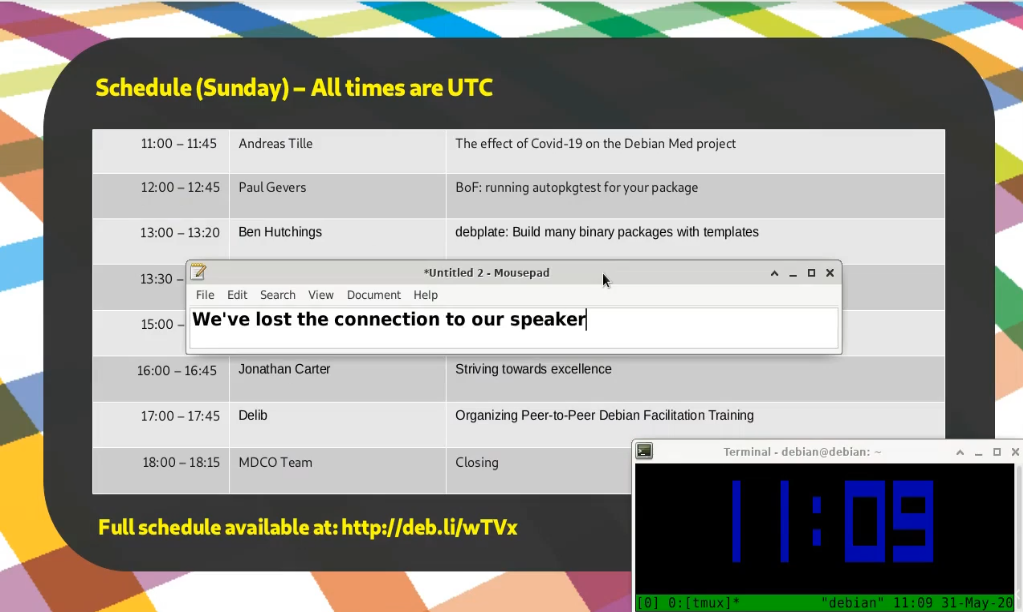
Speaking of issues, during our very first talk of the last day, our speaker had a power cut during the talk and abruptly dropped off. Oops! So, since I had a screenshare open from the VM to the stream, I thought I d just pop in a quick message in a text editor to let people know that we re aware of it and trying to figure out what s going on.
In the end, MiniDebConf Online worked out all right. Besides the power cut for our one speaker, and another who had a laptop that was way too under-powered to deal with video, everything worked out very well. Even the issues we had weren t show-stoppers and we managed to work around them.

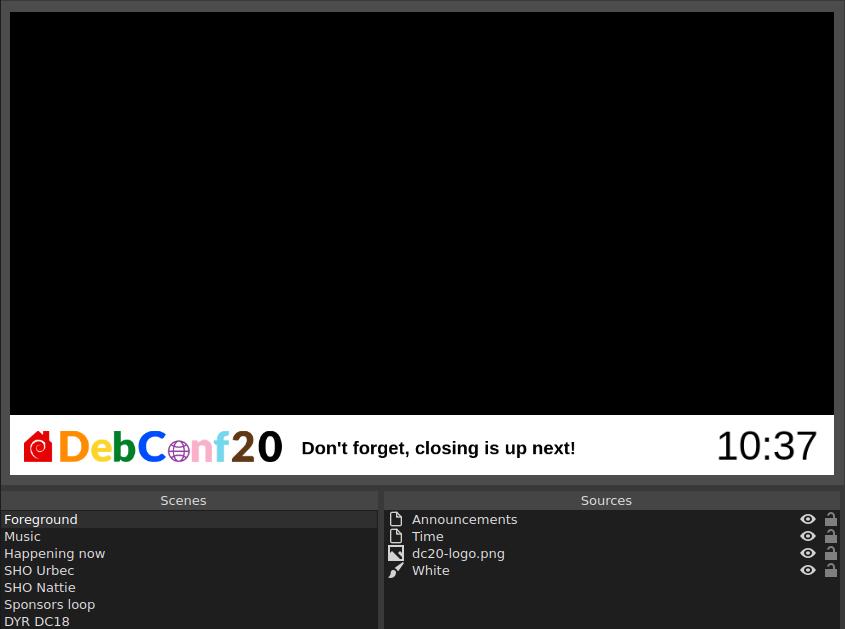
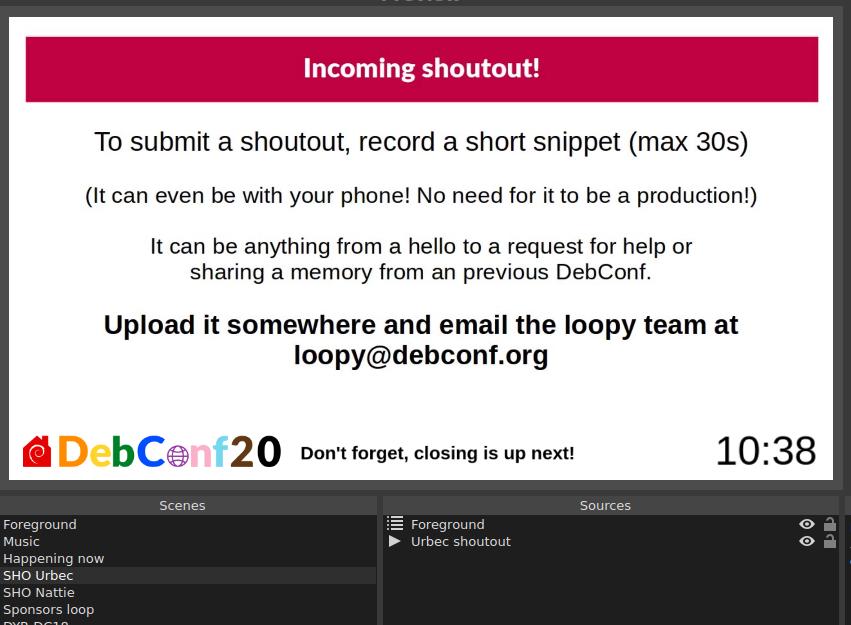
DebConf20 Moves Online For DebConf, we usually show a sponsors loop in between sessions. It s great that we give our sponsors visibility here, but in reality people see the sponsors loop and think Talk over! and then they look away. It s also completely silent and doesn t provide any additional useful information. I was wondering how I could take our lessons from MDCO#1 and integrate our new tricks with the sponsors loop. That is, add the schedule, time, some space to type announcements on the screen and also add some loopable music to it. I used OBS before in making my videos, and like the flexibility it provides when working with scenes and sources. A scene is what you would think of as a screen or a document with its own collection of sources or elements. For example, a scene might contain sources such as a logo, clock, video, image, etc. A scene can also contain another scene. This is useful if you want to contain a banner or play some background music that is shared between scenes.

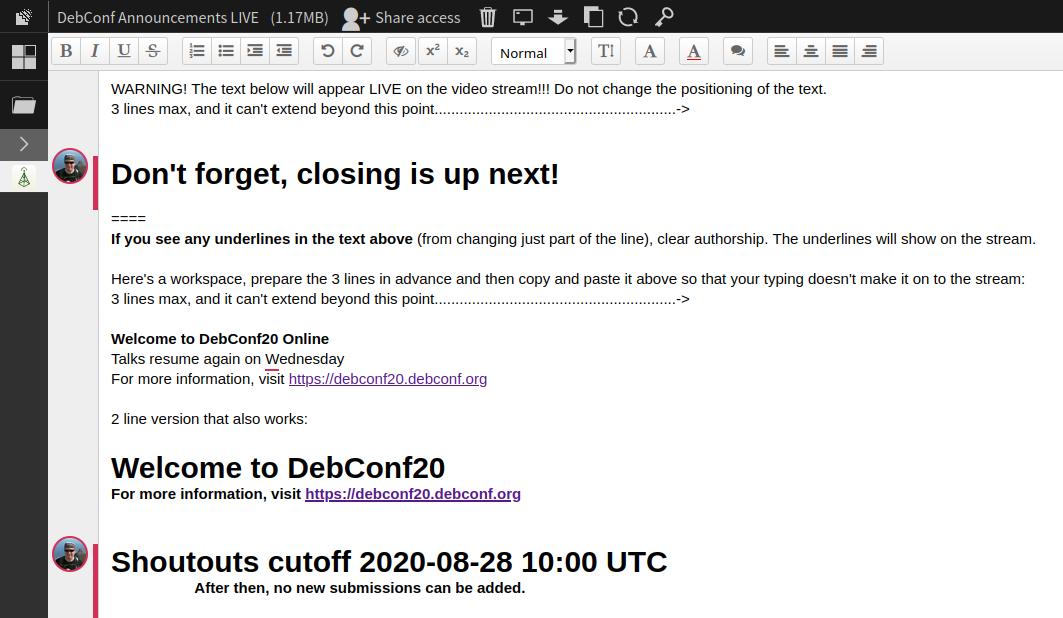
The above screenshots illustrate some basics of scenes and sources. First with just the DC20 banner, and then that used embedded in another scene. For MDCO#1, I copied and pasted the schedule into a LibreOffice Impress slide that was displayed on the stream. Having to do this for all 7 days of DebConf, plus dealing with scheduling changes would be daunting. So, I started to look in to generating some schedule slides programmatically. Stefano then pointed me to the Happening Now page on the DebConf website, where the current schedule block is displayed. So all I would need to do in OBS was to display a web page. Nice! Unfortunately the OBS in Debian doesn t have the ability to display web pages out of the box (we need to figure out CEF in Debian), but fortunately someone provides a pre-compiled version of the plugin called Linux Browser that works just fine. This allowed me to easily add the schedule page in its own scene. Being able to display a web page solved another problem. I wasn t fond of having to type / manage the announcements in OBS. It would either be a bit prone to user error, and if you want to edit the text while the loop is running, you d have to disrupt the loop, go to the foreground scene, and edit the text before resuming the loop. That s a bit icky. Then I thought that we could probably just get that from a web page instead. We could host some nice html snippet in a repository in salsa, and then anyone could easily commit an MR to update the announcement. But then I went a step further, use an etherpad! Then anyone in the orga team can quickly update the announcement and it would be instantly changed on the stream. Nice! So that small section of announcement text on the screen is actually a whole web browser with an added OBS filter to crop away all the pieces we don t want. Overkill? Sure, but it gave us a decent enough solution that worked in time for the start of DebConf. Also, being able to type directly on to the loop screen works out great especially in an emergency. Oh, and uhm the clock is also a website rendered in its own web browser :-P
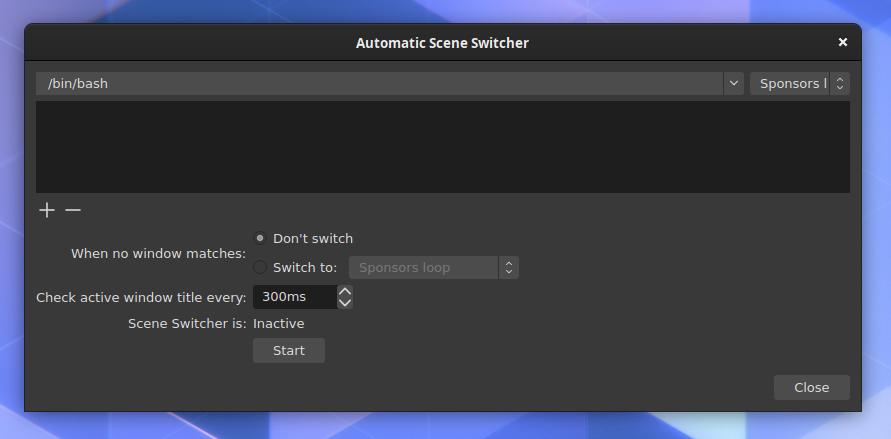
So, I had the ability to make scenes, add elements and add all the minimal elements I wanted in there. Great! But now I had to figure out how to switch scenes automatically. It s probably worth mentioning that I only found some time to really dig into this right before DebConf started, so with all of this I was scrambling to find things that would work without too many bugs while also still being practical. Now I needed the ability to switch between the scenes automatically / programmatically. I had never done this in OBS before. I know it has some API because there are Android apps that you can use to control OBS with from your phone. I discovered that it had an automatic scene switcher, but it s very basic. It can only switch based on active window, which can be useful in some cases, but since we won t have any windows open other than OBS, this tool was basically pointless.
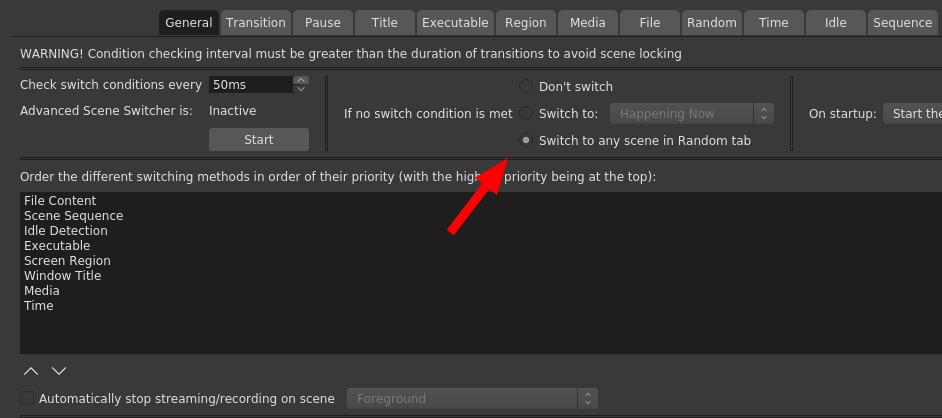
After some quick searches, I found a plugin called Advanced Scene Switcher. This plugin can do a lot more, but has some weird UI choices, and is really meant for gamers and other types of professional streamers to help them automate their work flow and doesn t seem at all meant to be used for a continuous loop, but, it worked, and I could make it do something that will work for us during the DebConf. I had a chicken and egg problem because I had to figure out a programming flow, but didn t really have any content to work with, or an idea of all the content that we would eventually have. I ve been toying with the idea in my mind and had some idea that we could add fun facts, postcards (an image with some text), time now in different timezones, Debian news (maybe procured by the press team), cards that contain the longer announcements that was sent to debconf-announce, perhaps a shout out or two and some photos from previous DebConfs like the group photos. I knew that I wouldn t be able to build anything substantial by the time DebConf starts, but adding content to OBS in between talks is relatively easy, so we could keep on building on it during DebConf. Nattie provided the first shout out, and I made 2 video loops with the DC18/19 pictures and also two Did you know cards. So the flow I ended up with was: Sponsors -> Happening Now -> Random video (which would be any of those clips) -> Back to sponsors. This ended up working pretty well for quite a while. With the first batch of videos the sponsor loop would come up on average about every 2 minutes, but as much shorter clips like shout outs started to come in faster and faster, it made sense to play a few 2-3 shout-outs before going back to sponsors. So here is a very brief guide on how I set up the sequencing in Advanced Scene Switcher.
If no condition was met, a video would play from the Random tab.
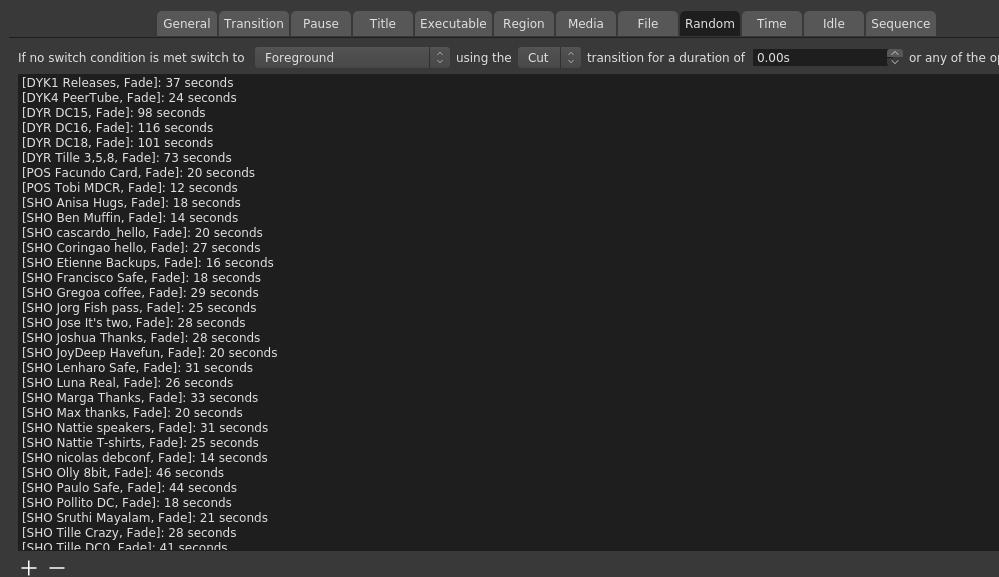
Then in the Random tab, I added the scenes that were part of the random mix. Annoyingly, you have to specify how long it should play for. If you don t, the no condition thingy is triggered and another video is selected. The time is also the length of the video minus one second, because
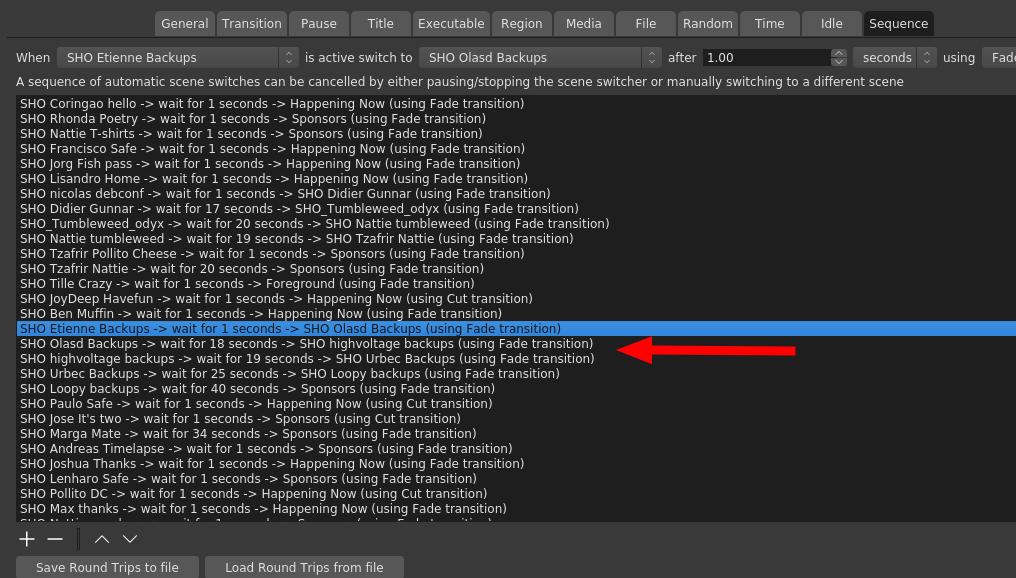
You can t just say that a random video should return back to a certain scene, you have to specify that in the sequence tab for each video. Why after 1 second? Because, at least in my early tests, and I didn t circle back to this, it seems like 0s can randomly either mean instantly, or never. Yes, this ended up being a bit confusing and tedious, and considering the late hours I worked on this, I m surprised that I didn t manage to screw it up completely at any point. I also suspected that threads would eventually happen. That is, when people create video replies to other videos. We had 3 threads in total. There was a backups thread, beverage thread and an impersonation thread. The arrow in the screenshot above points to the backups thread. I know it doesn t look that complicated, but it was initially somewhat confusing to set up and make sense out of it.
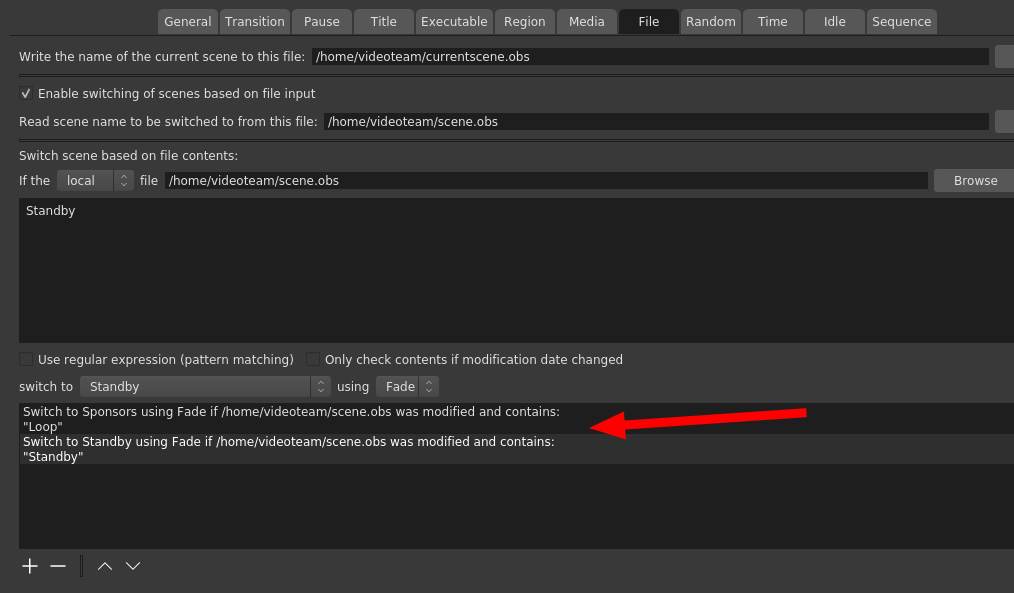
For the next event, the Advanced Scene Switcher might just get some more taming, or even be replaced entirely. There are ways to drive OBS by API, and even the Advanced Scene Switcher tool can be driven externally to some degree, but I think we definitely want to replace it by the next full DebConf. We had the problem that when a talk ended, we would return to the loop in the middle of a clip, which felt very unnatural and sometimes even confusing. So Stefano helped me with a helper script that could read the socket from Vocto, which I used to write either Loop or Standby to a file, and then the scene switcher would watch that file and keep the sponsors loop ready for start while the talks play. Why not just switch to sponsors when the talk ends? Well, the little bit of delay in switching would mean that you would see a tiny bit of loop every time before switching to sponsors. This is also why we didn t have any loop for the ad-hoc track (that would have probably needed another OBS instance, we ll look more into solutions for this for the future).
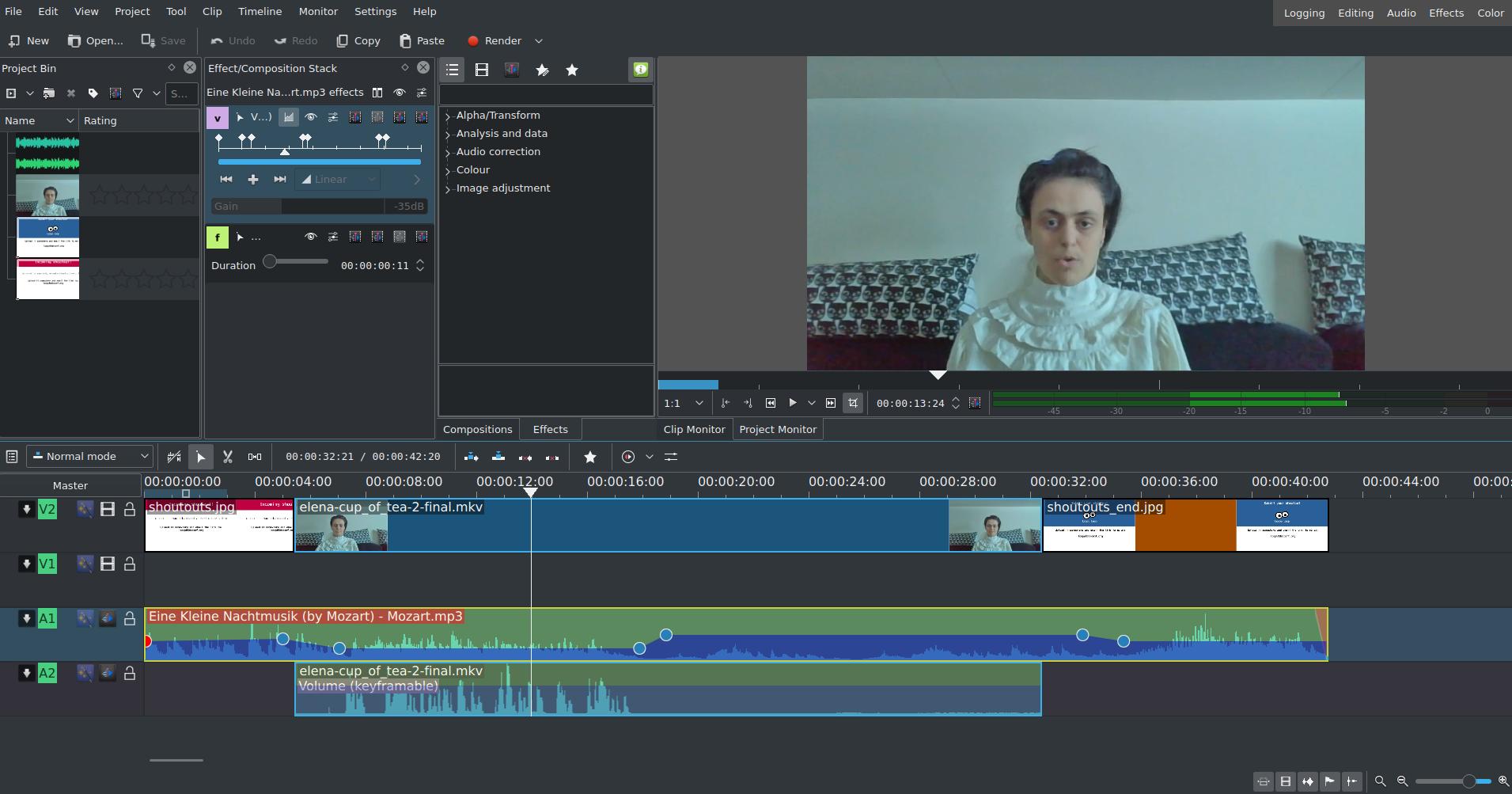
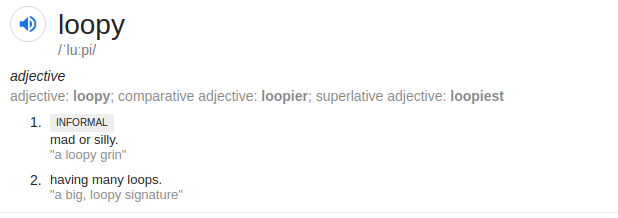
Then for all the clips. There were over 50 of them. All of them edited by hand in kdenlive. I removed any hard clicks, tried to improve audibility, remove some sections at the beginning and the end that seemed extra and added some music that would reduce in volume when someone speaks. In the beginning, I had lots of fun with choosing music for the clips. Towards the end, I had to rush them through and just chose the same tune whether it made sense or not. For comparison of what a difference the music can make, compare the original and adapted version for Valhalla s clip above, or this original and adapted video from urbec. This part was a lot more fun than dealing with the video sequencer, but I also want to automate it a bit. When I can fully drive OBS from Python I ll likely instead want to show those cards and control music volume from Python (what could possibly go wrong ). The loopy name happened when I requested an @debconf.org alias for this. I was initially just thinking about loop@debconf.org but since I wanted to make it clear that the purpose of this loop is also to have some fun, I opted for loopy instead:
I was really surprised by how people took to loopy. I hoped it would be good and that it would have somewhat positive feedback, but the positive feedback was just immense. The idea was that people typically saw it in between talks. But a few people told me they kept it playing after the last talk of the day to watch it in the background. Some asked for the music because they want to keep listening to it while working (and even for jogging!?). Some people also asked for recordings of the loop because they want to keep it for after DebConf. The shoutouts idea proved to be very popular. Overall, I m very glad that people enjoyed it and I think it s safe to say that loopy will be back for the next event.
Also throughout this experiment Loopy Loop turned into yet another DebConf mascot. We gain one about every DebConf, some by accident and some on purpose. This one was not quite on purpose. I meant to make an image for it for salsa, and started with an infinite loop symbol. That s a loop, but by just adding two more solid circles to it, it looks like googly eyes, now it s a proper loopy loop! I like the progress we ve made on this, but there s still a long way to go, and the ideas keep heaping up. The next event is quite soon (MDCO#2 at the end of November, and it seems that 3 other MiniDebConf events may also be planned), but over the next few events there will likely be significantly better graphics/artwork, better sequencing, better flow and more layout options. I hope to gain some additional members in the team to deal with incoming requests during DebConf. It was quite hectic this time! The new OBS also has a scripting host that supports Python, so I should be able to do some nice things even within OBS without having to drive it externally (like, display a clock without starting a web browser).

The Loopy Loop Music The two mini albums that mostly played during the first few days were just a copy and paste from the MDCO#1 music, which was:

For shoutout tracks, that were later used in the loop too (because it became a bit monotonous), most of the tracks came from freepd.com: I have much more things to say about DebConf20, but I ll keep that for another post, and hopefully we can get all the other video stuff in a post from the video team, because I think there s been some real good work done for this DebConf. Also thanks to Infomaniak who was not only a platinum sponsor for this DebConf, but they also provided us with plenty of computing power to run all the video stuff on. Thanks again!

Bits from Debian: DebConf20 online closes

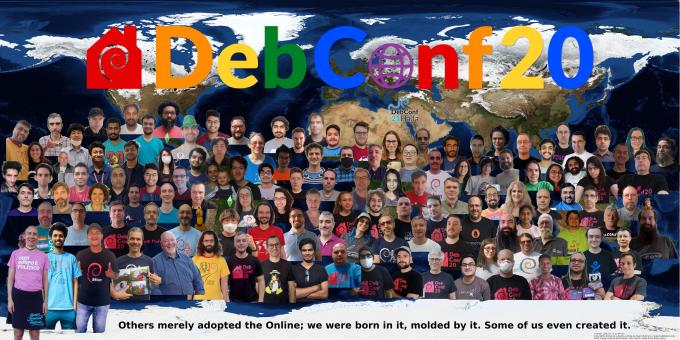
DebConf20 group photo - click to enlarge On Saturday 29 August 2020, the annual Debian Developers and Contributors Conference came to a close. DebConf20 has been held online for the first time, due to the coronavirus (COVID-19) disease pandemic. All of the sessions have been streamed, with a variety of ways of participating: via IRC messaging, online collaborative text documents, and video conferencing meeting rooms. With more than 850 attendees from 80 different countries and a total of over 100 event talks, discussion sessions, Birds of a Feather (BoF) gatherings and other activities, DebConf20 was a large success. When it became clear that DebConf20 was going to be an online-only event, the DebConf video team spent much time over the next months to adapt, improve, and in some cases write from scratch, technology that would be required to make an online DebConf possible. After lessons learned from the MiniDebConfOnline in late May, some adjustments were made, and then eventually we came up with a setup involving Jitsi, OBS, Voctomix, SReview, nginx, Etherpad, and a newly written web-based frontend for voctomix as the various elements of the stack. All components of the video infrastructure are free software, and the whole setup is configured through their public ansible repository. The DebConf20 schedule included two tracks in other languages than English: the Spanish language MiniConf, with eight talks in two days, and the Malayalam language MiniConf, with nine talks in three days. Ad-hoc activities, introduced by attendees over the course of the entire conference, have been possible too, streamed and recorded. There have also been several team gatherings to sprint on certain Debian development areas. Between talks, the video stream has been showing the usual sponsors on the loop, but also some additional clips including photos from previous DebConfs, fun facts about Debian and short shout-out videos sent by attendees to communicate with their Debian friends. For those who were not able to participate, most of the talks and sessions are already available through the Debian meetings archive website, and the remaining ones will appear in the following days. The DebConf20 website will remain active for archival purposes and will continue to offer links to the presentations and videos of talks and events. Next year, DebConf21 is planned to be held in Haifa, Israel, in August or September. DebConf is committed to a safe and welcome environment for all participants. During the conference, several teams (Front Desk, Welcome team and Community team) have been available to help so participants get their best experience in the conference, and find solutions to any issue that may arise. See the web page about the Code of Conduct in DebConf20 website for more details on this. Debian thanks the commitment of numerous sponsors to support DebConf20, particularly our Platinum Sponsors: Lenovo, Infomaniak, Google and Amazon Web Services (AWS). About Debian The Debian Project was founded in 1993 by Ian Murdock to be a truly free community project. Since then the project has grown to be one of the largest and most influential open source projects. Thousands of volunteers from all over the world work together to create and maintain Debian software. Available in 70 languages, and supporting a huge range of computer types, Debian calls itself the universal operating system. About DebConf DebConf is the Debian Project's developer conference. In addition to a full schedule of technical, social and policy talks, DebConf provides an opportunity for developers, contributors and other interested people to meet in person and work together more closely. It has taken place annually since 2000 in locations as varied as Scotland, Argentina, and Bosnia and Herzegovina. More information about DebConf is available from https://debconf.org/. About Lenovo As a global technology leader manufacturing a wide portfolio of connected products, including smartphones, tablets, PCs and workstations as well as AR/VR devices, smart home/office and data center solutions, Lenovo understands how critical open systems and platforms are to a connected world. About Infomaniak Infomaniak is Switzerland's largest web-hosting company, also offering backup and storage services, solutions for event organizers, live-streaming and video on demand services. It wholly owns its datacenters and all elements critical to the functioning of the services and products provided by the company (both software and hardware). About Google Google is one of the largest technology companies in the world, providing a wide range of Internet-related services and products such as online advertising technologies, search, cloud computing, software, and hardware. Google has been supporting Debian by sponsoring DebConf for more than ten years, and is also a Debian partner sponsoring parts of Salsa's continuous integration infrastructure within Google Cloud Platform. About Amazon Web Services (AWS) Amazon Web Services (AWS) is one of the world's most comprehensive and broadly adopted cloud platforms, offering over 175 fully featured services from data centers globally (in 77 Availability Zones within 24 geographic regions). AWS customers include the fastest-growing startups, largest enterprises and leading government agencies. Contact Information For further information, please visit the DebConf20 web page at https://debconf20.debconf.org/ or send mail to press@debian.org.

29 August 2020

Jelmer Vernooij: Debian Janitor: The Slow Trickle from Git Repositories to the Debian Archive

The Debian Janitor is an automated system that commits fixes for (minor) issues in Debian packages that can be fixed by software. It gradually started proposing merges in early December. The first set of changes sent out ran lintian-brush on sid packages maintained in Git. This post is part of a series about the progress of the Janitor. Last week s blog post documented how there are now over 30,000 lintian issues that have been fixed in git packaging repositories by the Janitor. It's important to note that any fixes from the Janitor that make it into a Git packaging repository will also need to be uploaded to the Debian archive. This currently requires that a Debian packager clones the repository and builds and uploads the package. Until a change makes it into the archive, users of Debian will unfortunately not see the benefits of improvements made by the Janitor. 82% of the 30,000 changes from the Janitor that have made it into a Git repository have not yet been uploaded, although changes do slowly trickle in as maintainers make other changes to packages and upload them along with the lintian fixes from the Janitor. This is not just true for changes from the Janitor, but for all sorts of other smaller improvements as well. However, the process of cloning and building git repositories and uploading the resulting packages to the Debian archive is fairly time-consuming and it s probably not worth the time of developers to follow up every change from the Janitor with a labour-intensive upload to the archive. It would be great if it was easier to trigger uploads from git commits. Projects like tag2upload will hopefully help, and make it more likely that changes end up in the Debian archive. The majority packages do get at least one new source version upload per release, so most changes will eventually make it into the archive.

For more information about the Janitor's lintian-fixes efforts, see the landing page.

28 August 2020

Bits from Debian: DebConf20 welcomes its sponsors!

DebConf20 logo DebConf20 is taking place online, from 23 August to 29 August 2020. It is the 21st Debian conference, and organizers and participants are working hard together at creating interesting and fruitful events. We would like to warmly welcome the 17 sponsors of DebConf20, and introduce them to you. We have four Platinum sponsors. Our first Platinum sponsor is Lenovo. As a global technology leader manufacturing a wide portfolio of connected products, including smartphones, tablets, PCs and workstations as well as AR/VR devices, smart home/office and data center solutions, Lenovo understands how critical open systems and platforms are to a connected world. Our next Platinum sponsor is Infomaniak. Infomaniak is Switzerland's largest web-hosting company, also offering backup and storage services, solutions for event organizers, live-streaming and video on demand services. It wholly owns its datacenters and all elements critical to the functioning of the services and products provided by the company (both software and hardware). Google is our third Platinum sponsor. Google is one of the largest technology companies in the world, providing a wide range of Internet-related services and products such as online advertising technologies, search, cloud computing, software, and hardware. Google has been supporting Debian by sponsoring DebConf for more than ten years, and is also a Debian partner. Amazon Web Services (AWS) is our fourth Platinum sponsor. Amazon Web Services is one of the world's most comprehensive and broadly adopted cloud platforms, offering over 175 fully featured services from data centers globally (in 77 Availability Zones within 24 geographic regions). AWS customers include the fastest-growing startups, largest enterprises and leading government agencies. Our Gold sponsors are Deepin, the Matanel Foundation, Collabora, and HRT. Deepin is a Chinese commercial company focusing on the development and service of Linux-based operating systems. They also lead research and development of the Deepin Debian derivative. The Matanel Foundation operates in Israel, as its first concern is to preserve the cohesion of a society and a nation plagued by divisions. The Matanel Foundation also works in Europe, in Africa and in South America. Collabora is a global consultancy delivering Open Source software solutions to the commercial world. In addition to offering solutions to clients, Collabora's engineers and developers actively contribute to many Open Source projects. Hudson-Trading is a company led by mathematicians, computer scientists, statisticians, physicists and engineers. They research and develop automated trading algorithms using advanced mathematical techniques. Our Silver sponsors are: Linux Professional Institute, the global certification standard and career support organization for open source professionals, Civil Infrastructure Platform, a collaborative project hosted by the Linux Foundation, establishing an open source base layer of industrial grade software, Ubuntu, the Operating System delivered by Canonical, and Roche, a major international pharmaceutical provider and research company dedicated to personalized healthcare. Bronze sponsors: IBM, MySQL, Univention. And finally, our Supporter level sponsors, ISG.EE and Pengwin. Thanks to all our sponsors for their support! Their contributions make it possible for a large number of Debian contributors from all over the globe to work together, help and learn from each other in DebConf20. Participating in DebConf20 online The 21st Debian Conference is being held online, due to COVID-19, from August 23 to 29, 2020. Talks, discussions, panels and other activities run from 10:00 to 01:00 UTC. Visit the DebConf20 website at https://debconf20.debconf.org to learn about the complete schedule, watch the live streaming and join the different communication channels for participating in the conference.
26 August 2020

Alexandre Viau: Setting up Nightscout using MongoDB Atlas

Nightscout is an Open Source web-based CGM (Continuous Glucose Monitor) that allows multiple caregivers to remotely view a patient s glucose data in real time. It is often deployed by non-technical people for their own use. The traditional method used a MongoDB Addon on Heroku that is now deprecated. I have sent patches to adapt the documentation on the relevant projects: This app is life-changing. Some Nigthscout users may be impatient, so I am writing this blog post to guide them in the meantime.

Setting up Nightscout If you want to setup Nightscout from scratch using MongoDB Atlas, please follow this modified guide. However, note that you will have to make one modification to the steps in the guide. At the start of Step 4, you will need to go to this repository instead: https://github.com/aviau/cgm-remote-monitor. This is my own version of Nightscout and it contains small modifications that will allow you to set it up with MongoDB Atlas easily. I will keep this blog post updated as I receive feedback. Come back here for more instructions.

Jacob Adams: Get A Command Line

How to access a command line on your laptop without installing Linux. Linux is great, and I recommend trying it out, whether on real hardware or in a virtual machine, to anyone interested in Computer Science. However, the process can be quite involved, and sometimes you don t want to change your whole operating system or sort out installing virtual machines. Fortunately, these days you can try out one of Linux s greatest features, the command line, without going through all that hassle.

Mac If you have a Mac, all you need to do is open Terminal.app, which is usually found under /Applications/Utilities. Note that Mac now defaults to zsh instead of bash, which is usually the shell used on Linux. This shouldn t matter, but it s something you should be aware of.

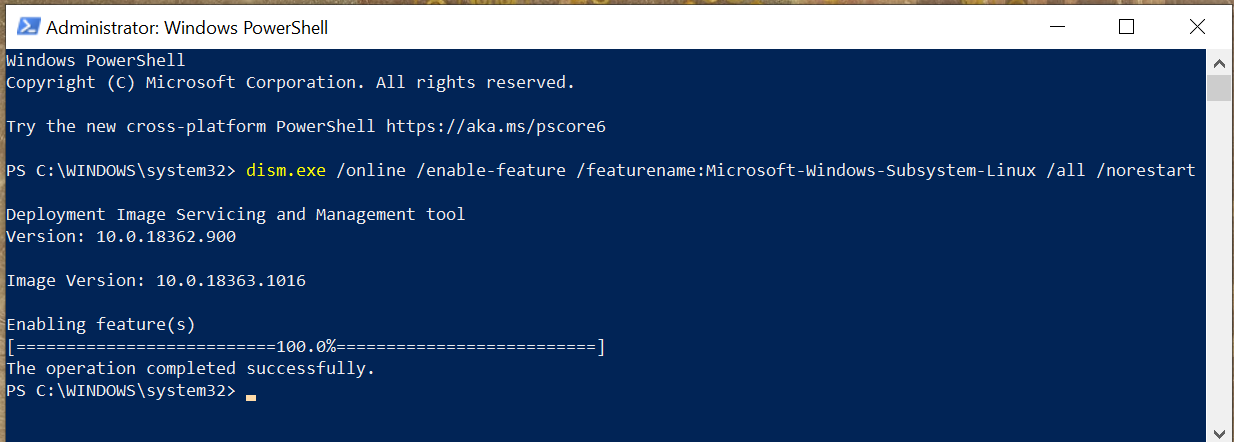
Windows On Windows, things are much more complex. There s always Powershell, but if you want a true Unix shell experience like you d get on Linux, you ll need to install the Windows Subsystem for Linux. This allows you to run Linux programs on your Windows 10 computer. This boils down to opening Powershell (open the start menu, search for powershell ) as an administrator (right-click, then Run as Administrator, then click Yes or enter an administrator s password when the UAC prompt appears). In this new Powershell window, you need to run the following command to enable WSL:
dism.exe /online /enable-feature /featurename:Microsoft-Windows-Subsystem-Linux /all /norestart
When this command executes successfully you should see the following output: WSL Sucess After this output appears, you ll need to reboot your machine before you can continue. Once your machine is rebooted, you need to install a Linux distribution. Different communities and companies ship their own versions of Linux and the various services and utilities required to use it, and these versions are called distributions. If you re not sure which one to use, I would recommend Ubuntu, as it was the distribution first integrated into WSL, and it s a common distribution for new users. After installing your chosen distribution, you ll need to perform the first-time setup. You ll just need to run it, as it is now installed as a program on your computer, and then it will walk you through the setup process, which requires you to create a new user account for your Linux distribution. This does not need to be the same as your Windows username and password, and it s probably safer if it isn t. You ll need to remember that password for running administrative commands with sudo.

25 August 2020

Jonas Meurer: cryptsetup-suspend

Introducing cryptsetup-suspend Today, we're introducing cryptsetup-suspend, whose job is to protect the content of your harddrives while the system is sleeping. TL;DR:
  • You can lock your encrypted harddrives during suspend mode by installing cryptsetup-suspend
  • For cryptsetup-suspend to work properly, at least Linux kernel 5.6 is required
  • We hope that in a bright future, everything will be available out-of-the-box in Debian and it's derivatives
Before: timeline_old.svg After: timeline_new.svg

Table of contents

What does this mean and why should you care about it? If you don't use full-disk encryption, don't read any further. Instead, think about, what will happen if you lose your notebook on the train, a random person picks it up and browses through all your personal pictures, e-mails, and tax records. Then encrypt your system and come back. If you believe full-disk encryption is necessary, you might know that it only works when your machine is powered off. Once you turn on the machine and decrypt your harddrive, your encryption key stays in RAM and can potentially be extracted by malicious software or physical access. Even if these attacks are non-trivial, it's enough to worry about. If an attacker is able to extract your disk encryption keys from memory, they're able to read the content of your disk in return. Sadly, in 2020, we hardly power off our laptops anymore. The sleep mode, also known as "suspend mode", is just too convenient. Just close the lid to freeze the system state and lift it anytime later in order to continue. Well, convenience usually comes with a cost: during suspend mode, your system memory is kept powered, all your data - including your encryption keys - stays there, waiting to be extracted by a malicious person. Unfortunately, there are practical attacks to extract the data of your powered memory. Cryptsetup-suspend expands the protection of your full-disk encryption to all those times when your computer sleeps in suspend mode. Cryptsetup-suspend utilizes the suspend feature of LUKS volumes and integrates it with your Debian system. Encryption keys are evicted from memory before suspend mode and the volumes have to be re-opened after resuming - potentially prompting for the required passphrases. By now, we have a working prototype which we want to introduce today. We did quite some testing, both on virtualized and bare-metal Debian and Ubuntu systems, with and without graphical stack, so we dare to unseal and set free the project and ask you - the community - to test, review, criticize and give feedback. Here's a screencast of cryptsetup-suspend in action:

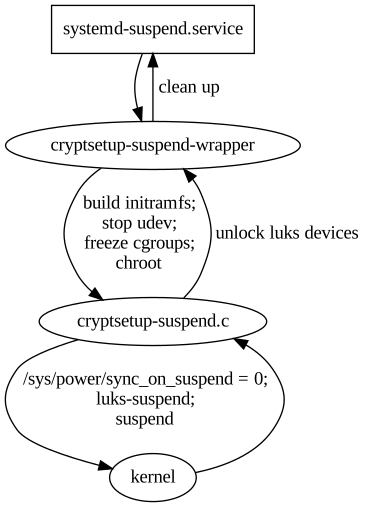
State of the implementation: where are we? If you're interested in the technical details, here's how cryptsetup-suspend works internally. It basically consists of three parts: cryptsetup-suspend.svg
  1. cryptsetup-suspend: A C program that takes a list of LUKS devices as arguments, suspends them via luksSuspend and suspends the system afterwards. Also, it tries to reserve some memory for decryption, which we'll explain below.
  2. cryptsetup-suspend-wrapper: A shell wrapper script which works the following way:
    1. Extract the initramfs into a ramfs
    2. Run (systemd) pre-suspend scripts, stop udev, freeze almost all cgroups
    3. Chroot into the ramfs and run cryptsetup-suspend
    4. Resume initramfs devices inside chroot after resume
    5. Resume non-initramfs devices outside chroot
    6. Thaw groups, start udev, run (systemd) post-suspend scripts
    7. Unmount the ramfs
  3. A systemd unit drop-in file overriding the Exec property of systemd-suspend.service so that it invokes the script cryptsetup-suspend-wrapper.
Reusing large parts of the existing cryptsetup-initramfs implementation has some positive side-effects: Out-of-the-box, we support all LUKS block device setups that have been supported by the Debian cryptsetup packages before. Freezing most processes/cgroups is necessary to prevent possible race-conditions and dead-locks after the system resumes. Processes will try to access data on the locked/suspended block devices eventually leading to buffer overflows and data loss.

Technical challenges and caveats
  • Dead-locks at suspend: In order to prevent possible dead-locks between suspending the encrypted LUKS disks and suspending the system, we have to tell the Linux kernel to not sync() before going to sleep. A corresponding patch got accepted upstream in Linux 5.6. See section What about the kernel patch? below for details.
  • Race conditions at resume: Likewise, there's a risk of race conditions between resuming the system and unlocking the encypted LUKS disks. We went with freezing as many processes as possible as a counter measurement. See last part of section State of the implementation: where are we? for details.
  • Memory management: Memory management is definitely a challenge. Unlocking disks might require a lot of memory (if key derivation function is argon2i) and the swap device most likely is locked at that time. See section All that matters to me is the memories! below for details.
  • systemd dependency: Our implementation depends on systemd. It uses a unit drop-in file for systemd-suspend.service for hooking into the system suspend process and depends on systemds cgroup management to freeze and thaw processes. If you're using a different init system, sorry, you're currently out of luck.

What about the kernel patch? The problem is simple: the Linux kernel suspend implementation enforces a final filesystem sync() before the system goes to sleep in order to prevent potential data loss. While that's sensible in most scenarios, it may result in dead-locks in our situation, since the block device that holds the filesystem is already suspended. The fssync() call will block forever as it waits for the block device to finish the sync() operation. So we need a way to conditionally disable this sync() call in the Linux kernel resume function. That's what our patch does, by introducing a run-time switch at /sys/power/sync_on_suspend, but it only got accepted into the Linux kernel recently and was first released with Linux kernel 5.6. Since release 4.3, the Linux kernel at least provides a build-time flag to disable the sync(): CONFIG_SUSPEND_SKIP_SYNC (that was called SUSPEND_SKIP_SYNC first and renamed to CONFIG_SUSPEND_SKIP_SYNC in kernel release 4.9). Enabling this flag at build-time protects you against the dead locks perfectly well. But while that works on an individual basis, it's a non-option for the distribution Linux kernel defaults. In most cases you still want the sync() to happen, except if you have user-space code that takes care of the sync() just before suspending your system - just like our cryptsetup-suspend implementation does. So in order to properly test cryptsetup-suspend, you're strongly advised to run Linux kernel 5.6 or newer. Fortunately, Linux 5.6 is available in buster-backports thanks to the Debian Kernel Team.

All that matters to me is the memories! One of the tricky parts is memory management. Since version 2, LUKS uses argon2i as default key derivation function. Argon2i is a memory-hard hash function and LUKS2 assigns the minimum of half of your systems memory or 1 GB to unlocking your device. While this is usually unproblematic during system boot - there's not much in the system memory anyway - it can become problematic when suspending. When cryptsetup tries to unlock a device and wants 1 GB of memory for this, but everything is already occupied by your browser and video player, there's only two options what to do:
  1. Kill a process to free some memory
  2. Move some of the data from memory to swap space
The first option is certainly not what you expect when suspending your system. The second option is impossible, because swap is located on your harddrive which we have locked before. Our current solution is to allocate the memory after freezing the other processes, but before locking the disks. At this time, the system can still move data to swap, but it won't be accessed anymore. We then release the memory just in time for cryptsetup to claim it again. The implementation of this is still subject to change. memories.gif

What's missing: A proper user interface As mentioned before, we consider cryptsetup-suspend usable, but it certainly still has bugs and shortcomings. The most obvious one is lack of a proper user interface. Currently, we switch over to a tty command-line interface to prompt for passphrases when unlocking the LUKS devices. It certainly would be better to replace this with a graphical user interface later, probably by using plymouth or something alike. Unfortunately, it seems rather impossible to spawn a real graphical environment for the passphrase prompt. That would imply to load the full graphical stack into the ramfs, raising the required amount of memory significantly. Lack of memory is currently our biggest concern and source of trouble. We'd definitely appreciate to learn about your ideas how to improve the user experience here.

Let's get practical: how to use TL;DR: On Debian Bullseye (Testing), all you need to do is to install the cryptsetup-suspend package from experimental. It's not necessary to upgrade the other cryptsetup packages. On Debian Buster, cryptsetup packages from backports are required.
  1. First, be sure that you're running Linux kernel 5.6 or newer. For Buster systems, it's available in buster-backports.
  2. Second, if you're on Debian Buster, install the cryptsetup 2:2.3.3-2~bpo10+1 packages from buster-backports.
  3. Third, install the cryptsetup-suspend package from experimental. Beware that cryptsetup-suspend depends on cryptsetup-initramfs (>= 2:2.3.3-1~). Either you need the cryptsetup packages from testing/unstable, or the backports from buster-backports.
  4. Now that you have the cryptsetup-suspend package installed, everything should be in place: Just send your system to sleep. It should switch to a virtual text terminal before going to sleep, ask for a passphrase to unlock your encrypted disk(s) after resume and switch back to your former working environment (most likely your graphical desktop environment) afterwards.

Security considerations Suspending LUKS devices basically means to remove the corresponding encryption keys from system memory. This protects against all sort of attacks trying to read them from there, e.g. cold-boot attacks. But, cryptsetup-suspend only protects the encryption keys of your LUKS devices. Most likely there's more sensitive data in system memory, like all kinds of private keys (e.g. OpenPGP, OpenSSH) or documents with sensitive content. We hope that the community will help improve this situation by providing useful pre-/post-suspend scripts. A positive example is KeepassXC, which is able to lock itself when going to suspend mode.

Feedback and Comments We'd be more than happy to learn about your thoughts on cryptsetup-suspend. For specific issues, don't hesitate to open a bugreport against cryptsetup-suspend. You can also reach us via mail - see the next section for contact addresses. Last but not least, comments below the blogpost work as well.

Authors
  • Tim (tim at systemli.org)
  • Jonas (jonas at freesources.org)

24 August 2020

Ulrike Uhlig: Code reviews: from nitpicking to cooperation

After we gave our talk at DebConf 20, Doing things together, there were 5 minutes left for the live Q&A. Pollo asked a question that I think is interesting and deserves a longer answer: How can we still have a good code review process without making it a "you need to be perfect" scenario? I often find picky code reviews help me write better code. I find it useful to first disentangle what code reviews are good for, how we do them, why we do them that way, and how we can potentially improve processes. What are code reviews good for? Code review and peer review are great methods for cooperation aiming at: Looking at this list, the last point seems to be more like a nice side effect of all the other points. :) How do code reviews happen in our communities? It seems to be a common assumption that code reviews are and have to be picky and perfectionist. To me, this does not actually seem to be a necessity to accomplish the above mentioned goals. We might want to work with precision a quality which is different from perfection. Perfection can hardly be a goal: perfection does not exist. Perfectionist dynamics can lead to failing to call something "good enough" or "done". Sometimes, a disproportionate amount of time is invested in writing (several) code reviews for minor issues. In some cases, strong perfectionist dynamics of a reviewer can create a feeling of never being good enough along with a loss of self esteem for otherwise skilled code authors. When do we cross the line? When going from cooperation, precision, and learning to write better code, to nitpicking, we are crossing a line: nitpicking means to pedantically search for others' faults. For example, I once got one of my Git commits at work criticized merely for its commit message that was said to be "ugly" because I "use[d] the same word twice" in it. When we are nitpicking, we might not give feedback in an appreciative, cooperative way, we become fault finders instead. From there it's a short way to operating on the level of blame. Are you nitpicking to help or are you nitpicking to prove something? Motivations matter. How can we improve code reviewing? When we did something wrong, we can do better next time. When we are told that we are wrong, the underlying assumption is that we cannot change (See Bren Brown, The difference between blame and shame). We can learn to go beyond blame. Negative feedback rarely leads to improvement if the environment in which it happens lacks general appreciation and confirmation. We can learn to give helpful feedback. It might be harder to create an appreciative environment in which negative feedback is a possibility for growth. One can think of it like of a relationship: in a healthy relationship we can tell each other when something does not work and work it out because we regularly experience that we respect, value, and support each other. To be able to work precisely, we need guidelines, tools, and time. It's not possible to work with precision if we are in a hurry, burnt out, or working under a permanent state of exception. The same is true for receiving picky feedback. On DebConf's IRC channel, after our talk, marvil07 said: On picky code reviews, something that I find useful is automation on code reviews; i.e. when a bot is stating a list of indentation/style errors it feels less personal, and also saves time to humans to provide more insightful changes. Indeed, we can set up routines that do automatic fault checking (linting). We can set up coding guidelines. We can define what we call "done" or "good enough". We can negotiate with each other how we would like code to be reviewed. For example, one could agree that a particularly perfectionist reviewer should point out only functional faults. They can spare their time and refrain from writing lengthy reviews about minor esthetic issues that have never made it into a guideline. If necessary, author and reviewer can talk about what can be improved on the long term during a retrospective. Or, on the contrary, one could explicitly ask for a particularly detailed review including all sorts of esthetic issues to learn the best practices of a team applied to one's own code. In summary: let's not lose sight of what code reviews are good for, let's have a clear definition of "done", let's not confuse precision with perfection, let's create appreciative work environments, and negotiate with each other how reviews are made. I'm sure you will come up with more ideas. Please do not hesitate to share them!

Norbert Preining: Social Equality and Free Software BoF at DebConf20

Shortly after yesterday s start of the Debian Conference 2020, I had the honor to participate in a BoF on social equality in free software, led by the OSI vice president and head of the FOSSASIA community, Hong Phuc Dang. The group of discussants consisted of OSS representatives from a wide variety of countries (India, Indonesia, China, Hong Kong, Germany, Vietnam, Singapore, Japan). After a short introduction by Hong Phuc we turned to a self-introduction and what is equality for me round. This brought up already a wide variety of issues that need to be addressed if we want to counter inequality in free software (culture differences, language barriers, internet connection, access to services, onboarding difficulties, political restrictions, ). Unfortunately, on-air time was rather restricted, but even after the DebConf related streaming time slot was finished, we continued discussing problems and possible approaches for another two hours. We have agreed to continue our collaboration and meetings in the hope that we, in particular the FOSSASIA community, can support those in need to counter inequality. Concluding, I have to say I am very happy to be part of the FOSSASIA community where real diversity is lived and everyone strives for and tries to increase social equality. In the DebConf IRC chat I was asked why at FOSSASIA we have about a 50:50 quote between women and men, in contrast to the usual 10:90 predominant in most software communities including Debian. For me this boils down to many reasons, one being competent female leadership, Hong Phuc is inspiring and competent to a degree I haven t seen in anyone else. Another reason is of course that software development is, especially in developing countries, one of the few escape pods for any gender, and thus fully embraced by normally underrepresented groups. Finally, but this is a typical chicken-egg problem, the FOSSASIA community is not doing any specific gender politics, but simply remains open and friendly to everyone. I think Debian, and in particular the diversity movement in Debian can learn a lot from the FOSSASIA community. At the end we are all striving for more equality in our projects and in the realm of free software as a whole! Thanks again for all the participants for the very inspiring discussion, and I am looking forward to our next meetings!
Arnaud Rebillout: Send emails from your terminal with msmtp

In this tutorial, we'll configure everything needed to send emails from the terminal. We'll use msmtp, a lightweight SMTP client. For the sake of the example, we'll use a GMail account, but any other email provider can do. Your OS is expected to be Debian, as usual on this blog, although it doesn't really matter. We will also see how to store the credentials for the email account in the system keyring. And finally, we'll go the extra mile, and see how to configure various command-line utilities so that they automatically use msmtp to send emails. Even better, we'll make msmtp the default email sender, to actually avoid configuring these utilities one by one. Prerequisites Strong prerequisites (if you don't recognize yourself here, you probably landed on the wrong page): Weak prerequisites (if your setup doesn't match those points exactly, that's fine, you can still read on): GMail account setup For a GMail account, there's a bit of configuration to do. For other email providers, I have no idea, maybe you can just skip this part, or maybe you will have to go through a similar procedure. If you want an external program (msmtp in this case) to talk to the GMail servers on your behalf, and send emails, you can't just use your usual GMail password. Instead, GMail requires you to generate so-called app passwords, one for each application that needs to access your GMail account. This approach has several advantages: So app passwords are a good idea, it just requires a bit of work to set it up. Let's see what it takes. First, 2-Step Verification must be enabled on your GMail account. Visit https://myaccount.google.com/security, and if that's not the case, enable it. You'll need to authorize all of your devices (computer(s), phone(s) and so on), and it can be a bit tedious, granted. But you only have to do it once in a lifetime, and after it's done, you're left with a more secure account, so it's not that bad, right? Enabling the 2-Step Verification will unlock the feature we need: App passwords. Visit https://myaccount.google.com/apppasswords, and under "Signing in to Google", click "App passwords", and generate one. An app password is a 16 characters string, something like qwertyuiopqwerty. It's supposed to be used from only one place, ie. from ONE application that is installed on ONE device. That's why it's common to give it a name of the form application@device, so in our case it could be msmtp@laptop, but really it's free form, choose whatever name suits you, as long as it makes sense to you. So let's give a name to this app password, write it down for now, and we're done with the GMail config. Send your first email Time to get started with msmtp. First thing first, installation, trivial:
sudo apt install msmtp
Let's try to send an email. At this point, we did not create any configuration file for msmtp yet, so we have to provide every details on the command line.
# Write a dummy email
cat << EOF > message.txt
From: YOUR_LOGIN@gmail.com
To: SOMEONE_ELSE@SOMEWHERE_ELSE.com
Subject: Cafe Sua Da
Iced-coffee with condensed milk
EOF
# Send it
cat message.txt   msmtp \
    --auth=on --tls=on \
    --host smtp.gmail.com \
    --port 587 \
    --user YOUR_LOGIN \
    --read-envelope-from \
    --read-recipients
# msmtp prompts you for your password:
# this is where goes the app password!
Obviously, in this example you should replace the uppercase words with the real thing, that is, your email login, and real email addresses. Also, let me insist, you must enter the app password that was generated previously, not your real GMail password. And it should work already, this email should have been sent and received by now. So let me explain quickly what happened here. In the file message.txt, we provided From: (the email address of the person sending the email) and To: (the destination email address). Then we asked msmtp to re-use those values to set the envelope of the email with --read-envelope-from and --read-recipients. What about the other parameters? For more details, you should refer to the msmtp documentation. Write a configuration file So we could send an email, that's cool already. However the command to do that was a bit long, and we don't want to juggle with all these arguments every time we send an email. So let's write down all of that into a configuration file. msmtp supports two locations: ~/.msmtprc and ~/.config/msmtp/config, at your preference. In this tutorial we'll use ~/.msmtprc for brevity:
cat << 'EOF' > ~/.msmtprc
defaults
tls on
account gmail
auth on
host smtp.gmail.com
port 587
user YOUR_LOGIN
from YOUR_LOGIN@gmail.com
account default : gmail
EOF
And for a quick explanation: All in all it's pretty simple, and it's becoming easier to send an email:
# Write a dummy email. Note that the
# header 'From:' is no longer needed,
# it's already in '~/.msmtprc'.
cat << 'EOF' > message.txt
To: SOMEONE_ELSE@SOMEWHERE_ELSE.com
Subject: Flat White
The milky way for coffee
EOF
# Send it
cat message.txt   msmtp \
    --account default \
    --read-recipients
Actually, --account default is not needed, as it's the default anyway if you don't provide a --account argument. Furthermore --read-recipients can be shortened as -t. So we can make it real short now:
msmtp -t < message.txt
At this point, life is good! Except for one thing maybe: we still have to type the password every time we send an email. Surely it must be possible to avoid that annoyance... Store your password in the system keyring For this part, we'll make use of the libsecret tool to store the password in the system keyring via the Secret Service API. It means that your desktop environment should implement the Secret Service specification, which is the case for both GNOME and KDE. Note that GNOME provides Seahorse to have a look at your secrets, KDE has the KDE Wallet. There's also KeePassXC, which I have only heard of but never used. I guess it can be your password manager of choice if you use neither GNOME nor KDE. For those running an up-to-date Debian unstable, you should have msmtp >= 1.8.11-2, and you're all good to go. For those having an older version than that however, you will have to install the package msmtp-gnome in order to have msmtp built with libsecret support. Note that this package depends on seahorse, hence it pulls in a good part of the GNOME stack when you install it. For those not running GNOME, that's unfortunate. All of this was discussed and fixed in #962689. Alright! So let's just make sure that the libsecret tools are installed:
sudo apt install libsecret-tools
And now we can store our password in the system keyring with this command:
secret-tool store --label msmtp \
    host smtp.gmail.com \
    service smtp \
    user YOUR_LOGIN
If this looks a bit too magic, and you want something more visual, you can actually fire a GUI like seahorse (for GNOME users), or kwalletmanager5 (for KDE users), and then you will see what passwords are stored in there. Here's a screenshot of Seahorse, with a msmtp password stored: seahorse with msmtp password Let's try to send an email again:
msmtp -t < message.txt
No need for a password anymore, msmtp got it from the system keyring! For more details on how msmtp handle the passwords, and to see what other methods are supported, refer to the extensive documentation. Use-cases and integration Let's go over a few use-cases, situations where you might end up sending emails from the command-line, and what configuration is required to make it work with msmtp. Git Send-Email Sending emails with git is a common workflow for some projects, like the Linux kernel. How does git send-email actually send emails? From the git-send-email manual page:
the built-in default is to search for sendmail in /usr/sbin, /usr/lib and $PATH if such program is available
It is possible to override this default though:
--smtp-server=
[...] Alternatively it can specify a full pathname of a sendmail-like program instead; the program must support the -i option.
So in order to use msmtp here, you'd add a snippet like that to your ~/.gitconfig file:
[sendemail]
    smtpserver = /usr/bin/msmtp
For a full guide, you can also refer to https://git-send-email.io. Debian developer tools Tools like bts or reportbug are also good examples of command-line tools that need to send emails. From the bts manual page:
--sendmail=SENDMAILCMD
Specify the sendmail command [...] Default is /usr/sbin/sendmail.
So if you want bts to send emails with msmtp instead of sendmail, you must use bts --sendmail='/usr/bin/msmtp -t'. Note that bts also loads settings from the file /etc/devscripts.conf and ~/.devscripts, so you could also set BTS_SENDMAIL_COMMAND='/usr/bin/msmtp -t' in one of those files. From the reportbug manual page:
--mta=MTA
Specify an alternate MTA, instead of /usr/sbin/sendmail (the default).
In order to use msmtp here, you'd write reportbug --mta=/usr/bin/msmtp. Note that reportbug reads it settings from /etc/reportbug.conf and ~/.reportbugrc, so you could as well set mta /usr/bin/msmtp in one of those files. So who is this sendmail again? By now, you probably noticed that sendmail seems to be considered the default tool for the job, the "traditional" command that has been around for ages. Rather than configuring every tool to use something else than sendmail, wouldn't it be simpler to actually replace sendmail by msmtp? Like, create a symlink that points to msmtp, something like ln -sr /usr/bin/msmtp /usr/sbin/sendmail? So that msmtp acts as a drop-in replacement for sendmail, and there's nothing else to configure? Answer is yes, kind of. Actually, the first msmtp feature that is listed on the homepage is "Sendmail compatible interface (command line options and exit codes)". Meaning that msmtp is a drop-in replacement for sendmail, that seems to be the intent. However, you should refrain from creating or modifying anything in /usr, as it's the territory of the package manager, apt. Any change in /usr might be overwritten by apt the next time you run an upgrade or install new packages. In the case of msmtp, there is actually a package named msmtp-mta that will create this symlink for you. So if you really want a definitive replacement for sendmail, there you go:
sudo apt install msmtp-mta
From this point, sendmail is now a symlink /usr/sbin/sendmail /usr/bin/msmtp, and there's no need to configure git, bts, reportbug or any other tool that would rely on sendmail. Everything should work "out of the box". Conclusion I hope that you enjoyed reading this article! If you have any comment, feel free to send me a short email, preferably from your terminal!

23 August 2020

Vincent Bernat: Zero-Touch Provisioning for Cisco IOS

The official documentation to automatically upgrade and configure on first boot a Cisco switch running on IOS, like a Cisco Catalyst 2960-X Series switch, is scarce on details. This note explains how to configure the ISC DHCP Server for this purpose.
When booting for the first time, Cisco IOS sends a DHCP request on all ports:
Dynamic Host Configuration Protocol (Discover)
    Message type: Boot Request (1)
    Hardware type: Ethernet (0x01)
    Hardware address length: 6
    Hops: 0
    Transaction ID: 0x0000117c
    Seconds elapsed: 0
    Bootp flags: 0x8000, Broadcast flag (Broadcast)
    Client IP address: 0.0.0.0
    Your (client) IP address: 0.0.0.0
    Next server IP address: 0.0.0.0
    Relay agent IP address: 0.0.0.0
    Client MAC address: Cisco_6c:12:c0 (b4:14:89:6c:12:c0)
    Client hardware address padding: 00000000000000000000
    Server host name not given
    Boot file name not given
    Magic cookie: DHCP
    Option: (53) DHCP Message Type (Discover)
    Option: (57) Maximum DHCP Message Size
    Option: (61) Client identifier
        Length: 25
        Type: 0
        Client Identifier: cisco-b414.896c.12c0-Vl1
    Option: (55) Parameter Request List
        Length: 12
        Parameter Request List Item: (1) Subnet Mask
        Parameter Request List Item: (66) TFTP Server Name
        Parameter Request List Item: (6) Domain Name Server
        Parameter Request List Item: (15) Domain Name
        Parameter Request List Item: (44) NetBIOS over TCP/IP Name Server
        Parameter Request List Item: (3) Router
        Parameter Request List Item: (67) Bootfile name
        Parameter Request List Item: (12) Host Name
        Parameter Request List Item: (33) Static Route
        Parameter Request List Item: (150) TFTP Server Address
        Parameter Request List Item: (43) Vendor-Specific Information
        Parameter Request List Item: (125) V-I Vendor-specific Information
    Option: (255) End
It requests a number of options, including the Bootfile name option 67, the TFTP server address option 150 and the Vendor-Identifying Vendor-Specific Information Option 125 or VIVSO. Option 67 provides the name of the configuration file located on the TFTP server identified by option 150. Option 125 includes the name of the file describing the Cisco IOS image to use to upgrade the switch. This file only contains the name of the tarball embedding the image.1 Configuring the ISC DHCP Server to answer with the TFTP server address and the name of the configuration file is simple enough:
filename "ob2-p2.example.com";
option tftp-server-address 172.16.15.253;
However, if you want to also provide the image for upgrade, you have to specify a hexadecimal-encoded string:2
option vivso 00:00:00:09:24:05:22:63:32:39:36:30:2d:6c:61:6e:62:61:73:65:6b:39:2d:74:61:72:2e:31:35:30:2d:32:2e:53:45:31:31:2e:74:78:74;
Having a large hexadecimal-encoded string inside a configuration file is quite unsatisfying. Instead, the ISC DHCP Server allows you to express this information in a more readable way using the option space statement:
# Create option space for Cisco and encapsulate it in VIVSO/vendor space
option space cisco code width 1 length width 1;
option cisco.auto-update-image code 5 = text;
option vendor.cisco code 9 = encapsulate cisco;
# Image description for Cisco IOS ZTP
option cisco.auto-update-image = "c2960-lanbasek9-tar.150-2.SE11.txt";
# Workaround for VIVSO option 125 not being sent
option vendor.iana code 0 = string;
option vendor.iana = 01:01:01;
Without the workaround mentioned in the last block, the ISC DHCP Server would not send back option 125. With such a configuration, it returns the following answer, including a harmless additional enterprise 0 encapsulated into option 125:
Dynamic Host Configuration Protocol (Offer)
    Message type: Boot Reply (2)
    Hardware type: Ethernet (0x01)
    Hardware address length: 6
    Hops: 0
    Transaction ID: 0x0000117c
    Seconds elapsed: 0
    Bootp flags: 0x8000, Broadcast flag (Broadcast)
    Client IP address: 0.0.0.0
    Your (client) IP address: 172.16.15.6
    Next server IP address: 0.0.0.0
    Relay agent IP address: 0.0.0.0
    Client MAC address: Cisco_6c:12:c0 (b4:14:89:6c:12:c0)
    Client hardware address padding: 00000000000000000000
    Server host name not given
    Boot file name: ob2-p2.example.com
    Magic cookie: DHCP
    Option: (53) DHCP Message Type (Offer)
    Option: (54) DHCP Server Identifier (172.16.15.252)
    Option: (51) IP Address Lease Time
    Option: (1) Subnet Mask (255.255.248.0)
    Option: (6) Domain Name Server
    Option: (3) Router
    Option: (150) TFTP Server Address
        Length: 4
        TFTP Server Address: 172.16.15.252
    Option: (125) V-I Vendor-specific Information
        Length: 49
        Enterprise: Reserved (0)
        Enterprise: ciscoSystems (9)
            Length: 36
            Option 125 Suboption: 5
                Length: 34
                Data: 63323936302d6c616e626173656b392d7461722e3135302d 
    Option: (255) End

  1. The reason of this indirection is still puzzling me. I suppose it could be because updating the image name directly in option 125 is quite a hassle.
  2. It contains the following information:
    • 0x00000009: Cisco s Enterprise Number,
    • 0x24: length of the enclosed data,
    • 0x05: Cisco s auto-update sub-option,
    • 0x22: length of the sub-option data, and
    • filename of the image description (c2960-lanbasek9-tar.150-2.SE11.txt).

22 August 2020

Norbert Preining: Converting html to mp4

Such an obvious problem, convert a piece of html/js/css, often with animations, to a video (mp4 or similar). We were just put before this problem for the TUG 2020 online conference. Searching the internet it turned up mostly web services, some of them even with lots of money to pay. At the end (below I will give a short history) it turned out to be rather simple.

The key is to use timesnap, a tool to take screenshots from web pages. It is actively maintained, and internally uses puppeteer, which in turn uses Google Chrome browser headless. This also means that rendering quality is very high. So having an html file available, with all the necessary assets, either online or local, one simply creates enough single screenshots per second so that they can be assembled later on into a video with ffmpeg. In our case, we wanted our leaders to last 10secs before the actual presentation video starts. I decided to render at 30fps, which left me with the simple invocation:
timesnap Leader.html --viewport=1920,1080 --fps=30 --duration=10 --output-pattern="leader-%03d.png"
followed by conversion of the various png images to an mp4:
ffmpeg -r 30 -f image2 -s 1920x1080 -i leader-%03d.png -vcodec libx264 -crf 25 -pix_fmt yuv420p leader.mp4
The -r is the fps, so needs to agree with the --fps above. Also the --viewport and -s values should better agree. -crf is the video quality, and -pix_fmt the pixel format. With that very simple and quick invocation a nice leader video was ready! History It was actually more complicated than normal. For similar problems, it usually takes me about 5min of googling and a bit of scripting, but this time, it was actually a long way. Simply searching for convert html to mp4 doesn t give a lot but web services, often paid for. At some point I came up with the idea to use Electron and led to Electron Recorder, which looked promising, but didn t work. A bit more searching led me to PhantomJS, which is not developed anymore, but there was some explanation how to dump frames using phantomjs and merge them using ffmpeg, very similar to the above. Unfortunately, the rendering of the html page by phantomjs was broken, and thus not usable. Thus I ventured off into searching for alternatives of PhantomJS, which brought me to puppeteer, and from there it wasn t too long a way that pointed me at timesnap. Till now it is surprising to me that such a basic task is neither well documented, so hopefully this page helps some users.

Jelmer Vernooij: Debian Janitor: > 60,000 Lintian Issues Automatically Fixed

The Debian Janitor is an automated system that commits fixes for (minor) issues in Debian packages that can be fixed by software. It gradually started proposing merges in early December. The first set of changes sent out ran lintian-brush on sid packages maintained in Git. This post is part of a series about the progress of the Janitor.

Scheduling Lintian Fixes To determine which packages to process, the Janitor looks at the import of lintian output across the archive that is available in UDD [1]. It will prioritize those packages with the most and more severe issues that it has fixers for. Once a package is selected, it will clone the packaging repository and run lintian-brush on it. Lintian-brush provides a framework for applying a set of fixers to a package. It will run each of a set of fixers in a pristine version of the repository, and handles most of the heavy lifting.
The Inner Workings of a Fixer Each fixer is just an executable which gets run in a clean checkout of the package, and can make changes there. Most of the fixers are written in Python or shell, but they can be in any language. The contract for fixers is pretty simple:
  • If the fixer exits with non-zero, the changes are reverted and fixer is considered to have failed
  • If it exits with zero and made changes, then it should write a summary of its changes to standard out
If a fixer is uncertain about the changes it has made, it should report so on standard output using a pseudo-header. By default, lintian-brush will discard any changes with uncertainty but if you are running it locally you can still apply them by specifying --uncertain. The summary message on standard out will be used for the commit message and (possibly) the changelog message, if the package doesn t use gbp dch.
Example Fixer Let s look at an example. The package priority extra is deprecated since Debian Policy 4.0.1 (released August 2 017) see Policy 2.5 "Priorities". Instead, most packages should use the optional priority. Lintian will warn when a package uses the deprecated extra value for the Priority - the associated tag is priority-extra-is-replaced-by-priority-optional. Lintian-brush has a fixer script that can automatically replace extra with optional . On systems that have lintian-brush installed, the source for the fixer lives in /usr/share/lintian-brush/fixers/priority-extra-is-replaced-by-priority-optional.py, but here is a copy of it for reference:
 1
 2
 3
 4
 5
 6
 7
 8
 9
10
11
12
13
#!/usr/bin/python3
from debmutate.control import ControlEditor
from lintian_brush.fixer import report_result, fixed_lintian_tag
with ControlEditor() as updater:
    for para in updater.paragraphs:
        if para.get("Priority") == "extra":
            para["Priority"] = "optional"
            fixed_lintian_tag(
                para, 'priority-extra-is-replaced-by-priority-optional')
report_result("Change priority extra to priority optional.")
This fixer is written in Python and uses the debmutate library to easily modify control files while preserving formatting or back out if it is not possible to preserve formatting. All the current fixers come with tests, e.g. for this particular fixer the tests can be found here: https://salsa.debian.org/jelmer/lintian-brush/-/tree/master/tests/priority-extra-is-replaced-by-priority-optional. For more details on writing new fixers, see the README for lintian-brush. For more details on debugging them, see the manual page.
Successes by fixer Here is a list of the fixers currently available, with the number of successful merges/pushes per fixer:
Lintian Tag Previously merged/pushed Ready but not yet merged/pushed
uses-debhelper-compat-file 4906 4161
upstream-metadata-file-is-missing 4281 3841
package-uses-old-debhelper-compat-version 4256 3617
upstream-metadata-missing-bug-tracking 2438 2995
out-of-date-standards-version 2062 2936
upstream-metadata-missing-repository 1936 2987
trailing-whitespace 1720 2295
insecure-copyright-format-uri 1791 1093
package-uses-deprecated-debhelper-compat-version 1391 1287
vcs-obsolete-in-debian-infrastructure 872 782
homepage-field-uses-insecure-uri 527 1111
vcs-field-not-canonical 850 655
debian-changelog-has-wrong-day-of-week 224 376
debian-watch-uses-insecure-uri 314 242
useless-autoreconf-build-depends 112 428
priority-extra-is-replaced-by-priority-optional 315 194
debian-rules-contains-unnecessary-get-orig-source-target 35 428
tab-in-license-text 125 320
debian-changelog-line-too-long 186 190
debian-rules-sets-dpkg-architecture-variable 69 166
debian-rules-uses-unnecessary-dh-argument 42 182
package-lacks-versioned-build-depends-on-debhelper 125 95
unversioned-copyright-format-uri 43 136
package-needs-versioned-debhelper-build-depends 127 50
binary-control-field-duplicates-source 34 134
renamed-tag 73 69
vcs-field-uses-insecure-uri 14 109
uses-deprecated-adttmp 13 91
debug-symbol-migration-possibly-complete 12 88
copyright-refers-to-symlink-license 51 48
debian-control-has-unusual-field-spacing 33 66
old-source-override-location 32 62
out-of-date-copyright-format 20 62
public-upstream-key-not-minimal 43 30
older-source-format 17 54
custom-compression-in-debian-source-options 12 57
copyright-refers-to-versionless-license-file 29 39
tab-in-licence-text 33 31
global-files-wildcard-not-first-paragraph-in-dep5-copyright 28 33
out-of-date-copyright-format-uri 9 50
field-name-typo-dep5-copyright 29 29
copyright-does-not-refer-to-common-license-file 13 42
debhelper-but-no-misc-depends 9 45
debian-watch-file-is-missing 11 41
debian-control-has-obsolete-dbg-package 8 40
possible-missing-colon-in-closes 31 13
unnecessary-testsuite-autopkgtest-field 32 9
missing-debian-source-format 7 33
debhelper-tools-from-autotools-dev-are-deprecated 9 29
vcs-field-mismatch 8 29
debian-changelog-file-contains-obsolete-user-emacs-setting 33 0
patch-file-present-but-not-mentioned-in-series 24 9
copyright-refers-to-versionless-license-file 22 9
debian-control-has-empty-field 25 6
missing-build-dependency-for-dh-addon 10 20
obsolete-field-in-dep5-copyright 15 13
xs-testsuite-field-in-debian-control 20 7
ancient-python-version-field 13 12
unnecessary-team-upload 19 5
misspelled-closes-bug 6 16
field-name-typo-in-dep5-copyright 1 20
transitional-package-not-oldlibs-optional 4 17
maintainer-script-without-set-e 9 11
dh-clean-k-is-deprecated 4 14
no-dh-sequencer 14 4
missing-vcs-browser-field 5 12
space-in-std-shortname-in-dep5-copyright 6 10
xc-package-type-in-debian-control 4 11
debian-rules-missing-recommended-target 4 10
desktop-entry-contains-encoding-key 1 13
build-depends-on-obsolete-package 4 9
license-file-listed-in-debian-copyright 1 12
missing-built-using-field-for-golang-package 9 4
unused-license-paragraph-in-dep5-copyright 4 7
missing-build-dependency-for-dh_command 6 4
comma-separated-files-in-dep5-copyright 3 6
systemd-service-file-refers-to-var-run 4 5
copyright-not-using-common-license-for-apache2 3 5
debian-tests-control-autodep8-is-obsolete 2 6
dh-quilt-addon-but-quilt-source-format 2 6
no-homepage-field 3 5
font-packge-not-multi-arch-foreign 1 6
homepage-in-binary-package 1 4
vcs-field-bitrotted 1 3
built-using-field-on-arch-all-package 2 1
copyright-should-refer-to-common-license-file-for-apache-2 1 2
debian-pyversions-is-obsolete 3 0
debian-watch-file-uses-deprecated-githubredir 1 1
executable-desktop-file 1 1
skip-systemd-native-flag-missing-pre-depends 1 1
vcs-field-uses-not-recommended-uri-format 1 1
init.d-script-needs-depends-on-lsb-base 1 0
maintainer-also-in-uploaders 1 0
public-upstream-keys-in-multiple-locations 1 0
wrong-debian-qa-group-name 1 0
Total 29656 32209

Footnotes
[1]temporarily unavailable due to Debian bug #960156 but the Janitor is relying on historical data

For more information about the Janitor's lintian-fixes efforts, see the landing page

20 August 2020

Bits from Debian: Lenovo, Infomaniak, Google and Amazon Web Services (AWS), Platinum Sponsors of DebConf20

We are very pleased to announce that Lenovo, Infomaniak, Google and Amazon Web Services (AWS), have committed to supporting DebConf20 as Platinum sponsors. lenovologo As a global technology leader manufacturing a wide portfolio of connected products, including smartphones, tablets, PCs and workstations as well as AR/VR devices, smart home/office and data center solutions, Lenovo understands how critical open systems and platforms are to a connected world. infomaniaklogo Infomaniak is Switzerland's largest web-hosting company, also offering backup and storage services, solutions for event organizers, live-streaming and video on demand services. It wholly owns its datacenters and all elements critical to the functioning of the services and products provided by the company (both software and hardware). Googlelogo Google is one of the largest technology companies in the world, providing a wide range of Internet-related services and products such as online advertising technologies, search, cloud computing, software, and hardware. Google has been supporting Debian by sponsoring DebConf for more than ten years, and is also a Debian partner sponsoring parts of Salsa's continuous integration infrastructure within Google Cloud Platform. AWSlogo Amazon Web Services (AWS) is one of the world's most comprehensive and broadly adopted cloud platform, offering over 175 fully featured services from data centers globally (in 77 Availability Zones within 24 geographic regions). AWS customers include the fastest-growing startups, largest enterprises and leading government agencies. With these commitments as Platinum Sponsors, Lenovo, Infomaniak, Google and Amazon Web Services are contributing to make possible our annual conference, and directly supporting the progress of Debian and Free Software, helping to strengthen the community that continues to collaborate on Debian projects throughout the rest of the year. Thank you very much for your support of DebConf20! Participating in DebConf20 online The 21st Debian Conference is being held Online, due to COVID-19, from August 23rd to 29th, 2020. There are 7 days of activities, running from 10:00 to 01:00 UTC. Visit the DebConf20 website at https://debconf20.debconf.org to learn about the complete schedule, watch the live streaming and join the different communication channels for participating in the conference.

18 August 2020

Molly de Blanc: Updates

We are currently working on a second draft of the Declaration of Digital Autonomy. We re also working on some next steps, which I hadn t really thought about existing before. Videos from GUADEC and HOPE are now online. We ll be speaking at DebConf on August 29th. I ll be starting school soon, so I expect a lot of the content of what I ll be writing (as well as the style) to shift a bit to reflect what I m studying and how I m expected to write for my program.

Next.

Previous.