Search Results: "spa"

14 October 2016

Antoine Beaupr : Managing good bug reports

Bug reporting is an art form that is too often neglected in software projects. Bug reports allow contributors to participate without deep technical knowledge and at the same time provide a crucial space for developers to be made aware of issues with their software that they could not have foreseen or found themselves, for lack of resources, variety or imagination.

Prior art Unfortunately, there are rarely good guidelines for submitting bug reports. Historically, people have pointed towards How to report bugs effectively or How to ask questions the smart way. While those guides can be useful for motivated people and may seem attractive references for project managers, they suffer from serious issues:
  • they are written by technical people, for non-technical people
  • as a result, they have a deeply condescending attitude such as calling people "stupid" or various animal names like "mongoose"
  • they are also very technical themselves: one starts with a copyright notice and a changelog, the other uses magic words like "Core dumps" and $Id$
  • they are too long: sgtatham's is about 3600 words long, esr's is even longer at about 11800 words. those texts will take about 20 to 60 minutes to read by an average reader, according to research
Individual projects have their own guides as well. Linux has the REPORTING_BUGS file that is a much shorter 1200 that can be read under 5 minutes, provided that you can understand the topic at hand. Interestingly, that guide refers to both esr's and sgtatham's guidelines, which means, in the degenerate case where the user hasn't had the "privilege" of reading esr's prose already, they will have an extra hour and a half of reading to do to have honestly followed the guidelines before reporting the bug. I often find good documentation in the Tails project. Their bug reporting guidelines are easily accessible and quick to read, although they still might be too technical. It could be argued that you need to get technical at some point to get that information out, of course. In the Monkeysign project, I have started a bug reporting guide that doesn't yet address all those issues. I am considering writing a new guide, but I figured I would look at other people's work and get feedback before writing my own standard.

What's the point? Why have those documents been written? Are people really expected to read them before seeking help? It seems to me unlikely that someone would:
  1. be motivated enough to do something about a broken part of their computer
  2. figure out they can do something about it
  3. read a fifteen thousand words novel about how to report a bug...
  4. just to finally write a 20-line bug report that has no warranty of support attached to it
And if I would be a paying customer, I wouldn't want to be forced to waste my time reading that prose either: it's your job to help me fix your broken things, not the reverse. As someone doing consulting these days: I totally understand: it's not you, the user, it's us, the developers, that have a problem. We have been socialized through computers, and it makes us weird and obtuse, but that's no excuse, and we need to clean up our act. Furthermore, it's surprising how often we get (and make!) bug reports that can be difficult to use. The Monkeysign project is very "technical" and I have expected that the bug reports I would get would be well written, with ways to reproduce and so on, but it happened that I received bug reports that were all over the place, didn't have any ways of reproducing or were simply incomplete. Those three bug reports were filed by people that I know to be very technically capable: one is a fellow Debian developer, the second had filed a good bug report 5 days before, and the third one is a contributor that sent good patches before. In all three cases, they knew what they were doing. Those three people probably read the guidelines mentioned in the past. They may have even read the Monkeysign bug reporting guidelines as well. I can only explain those bug reports by the lack of time: people thought the issue was obvious, that it would get fixed rapidly because, obviously, something is broken. We need a better way.

The takeaway What are those guides trying to tell us?
  1. ask questions in the right place
  2. search for similar questions and issues before reporting the bug
  3. try to make the developers reproduce the issues
  4. failing that, try to describe the issue as well as you can
  5. write clearly, be specific and verbose yet concise
There are obviously contradictions in there, like sgtatham telling us to be verbose and esr tells us to, basically, not be verbose. There is definitely a tension in there, and there are many, many more details about how great bug reports can be if done properly. I tend towards the side of terseness in our descriptions: people that will know how to be concise will be, people that don't will most likely not learn by reading a 12 000 words novel that, in itself, didn't manage to be parsimonious. But I am willing to allow for verbosity in bug reports: I prefer too many details instead of missing a key bit of information.

Issue trackers Step 1 is our job: we should send people in the right place, and give them the right tools. Monkeysign used to manage bugs with bugs-everywhere and this turned out to be a terrible idea: you had to understand git and bugs-everywhere to file any bug reports. As a result, there were exactly zero bug reports filed by non-developers during the whole time BE was used, although some bugs were filed in the Debian Bugtracker. So have a good bug tracker. A mailing list or email address is not a good bug tracker: you lose track of old issues, and it's hard for newcomers to search the archives. It does have the advantage of having a unified interface for the support forum and bug tracking, however. Redmine, Gitlab, Github and others are all decent-enough bug trackers. The key point is that the issue tracker should be publicly available, and users should be able to register easily to file new issues. You should also be able to mass-edit tickets and users should be able to discover the tracker's features easily. I am sorry to say that the Debian BTS somewhat falls short on those two features. Step 2 is a shared responsibility: there should be an easy way to search for issues, and we should help the user looking for similar issues. Stackexchange sites do an excellent job at this, by automatically searching for similar questions while you write your question, suggesting similar ones in an attempt to weed out duplicates. Duplicates still happen, but they can then clearly be marked and linked with a distinct mechanism. Most bug trackers do not offer such high level functionality, but should, so I feel the fault lies more on "our" end than at the user's end.

Reproducing the environment Step 3 and 4 are more or less the user's responsibility. We can detail in our documentation how to clearly share the environment where we reproduced the bug, for example, but in the end, the user decides if they want to share that information or not. In Monkeysign, I have finally implemented joeyh's suggestion of shipping the test suite with the program. I can now tell people to run the test suite in their environment to see if this is a regression that is specific to their environment - so a known bug, in a way - or a novel bug for which I can look at writing a new unit test. I also include way more information about the environment in the --version output, an idea I brought forward in the borg project to ease debugging. That way, people can just send the output of monkeysign --test and monkeysign --version, and I have a very good overview of what is happening on their end. Of course, Monkeysign also supports the usual --verbose and --debug flag that users should enable when reproducing issues. Another idea is to report bugs directly from the application. We have all seen Firefox or other software have automatic bug reporting tools, but somehow those seem unsatisfactory for a user: we have no feedback of where the report goes, if it's followed up on. It is useful for larger project to get statistical data, but not so useful for users in the short term. Monkeysign tries to handle exceptions in the code in a graceful way, but could do better. We use a small library to handle exceptions, but that library has since then been improved to directly file bugs against the Github project. This assumes the user is logged into Github, but it is nice to pre-populate bug reports with the relevant information up front.

Issue templates In the meantime, to make sure people provide enough information, I have now moved a lot of the bug reporting guidelines to a separate issue template. That issue template is available through the issue creation form now, although it is not enabled by default, a weird limitation of Gitlab. Issue templates are available in Gitlab and Github. Issue templates somewhat force users in a straight jacket: there is already something to structure their bug report. Those could be distinct form elements that had to be filled in, but I like the flexibility of the template, and the possibility for users to just escape the formalism and just plead for help in their own way.

Issue guidelines In the end, I opted for a short few paragraphs in the style of the Tails documentation, including a reference to sgtatham, as an optional future reference:
  • Before you report a new bug, review the existing issues in the online issue tracker and the Debian BTS for Monkeysign to make sure the bug has not already been reported elsewhere.
  • The first aim of a bug report is to tell the developers exactly how to reproduce the failure, so try to reproduce the issue yourself and describe how you did that.
  • If that is not possible, try to describe what went wrong in detail. Write down the error messages, especially if they have numbers.
  • Take the necessary time to write clearly and precisely. Say what you mean, and make sure it cannot be misinterpreted.
  • Include the output of monkeysign --test, monkeysign --version and monkeysign --debug in your bug reports. See the issue template for more details about what to include in bug reports.
If you wish to read more about issues regarding communication in bug reports, you can read How to Report Bugs Effectively, which takes around 20 to 30 minutes.
Unfortunately, short of rewriting sgtatham's guide, I do not feel there is much more we can do as a general guide. I find esr's guide to be too verbose and commanding, so sgtatham it will be for now.

The prose and literacy In the end, there is a fundamental issue with reporting bugs: it assumes our users are literate and capable of writing amazing prose that we will enjoy reading as the last J.K. Rowling novel (if you're into that kind of thing). It's just an unreasonable expectation: some of your users don't even speak the same language as you, let alone read or write it. This makes for challenging collaboration, to say the least. This is where automated reporting makes sense: it doesn't require user's intervention, and the communication is mediated by machines without human intervention and their pesky culture. But we should, as maintainers, "be liberal in what we accept and conservative in what we send". Be tolerant, and help your users in fixing their issues. It's what you are there for, after all. And in the end, we all fail the same way. In an attempt to improve the situation on bug reporting guides, I seem to have myself written a 2000 short story that will have taken up a hopefully pleasant 10 minutes of your time at minimum. Hopefully I will have succeeded at being clear, specific, verbose and concise all at once and look forward to your feedback on how to improve our bug reporting culture.

Jonathan Dowland: Hi-Fi Furniture

sadly obsolete sadly obsolete
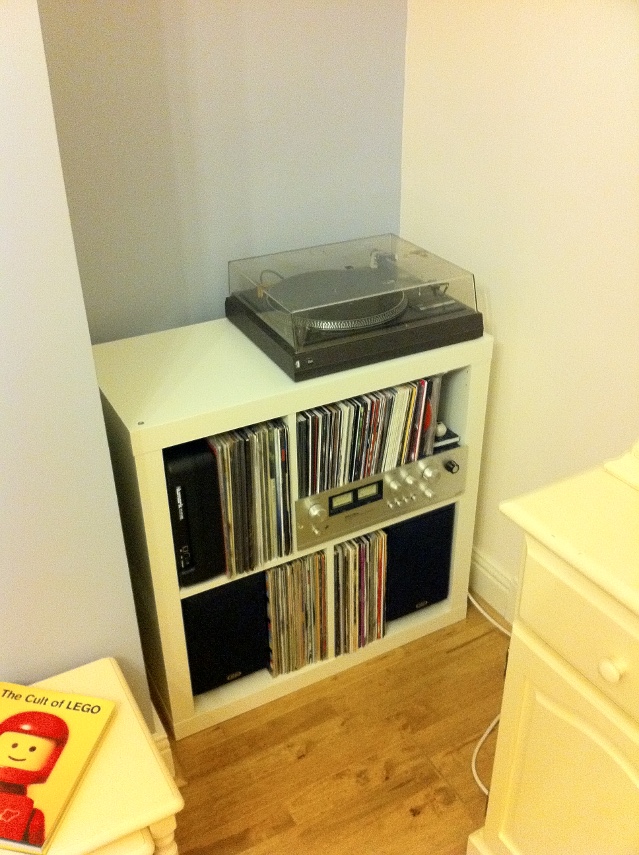
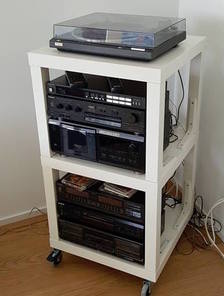
For the last four years or so, I've had my Hi-Fi and the vast majority of my vinyl collection stored in a self-contained, mildly-customized Ikea unit. Since moving house this has been in my dining room which we have always referred to as the "play room", since we have a second dining room in which we actually dine. The intention for the play room was for it to be the room within which all our future children would have their toys kept, in an attempt to keep the living room from being overrun with plastic. The time has thus come for my Hi-Fi to come out of there, so we've moved it to our living room. Unfortunately, there's not enough room in the living room for the Ikea unit: I need something narrower for the space available.
via IkeaHackers.net via IkeaHackers.net
In the spirit of my original hack, I started looking at what others might have achieved with Ikea components. There are some great examples of open-style units built out of the (extremely cheap) Lack coffee tables, such as this ikeahackers article, but I'd prefer something more enclosed. One problem I've had with the Expedit unit was my cat trying to scratch the records. I ended up putting framed records at the front to cover the spines of the records within. If I were keeping the unit, I'd look at fitting hinges (another ikeahackers article) Asides from hacked Ikea stuff, there are a few companies offering traditional enclosed Hi Fi cabinets. I'm going to struggle to fit both the equipment and a subset of records into these, so I might have to look at storing them separately. In some ways that makes life easier: the records could go into a 1x4 Ikea KALLAX unit, leaving the amp and deck to home somewhere. Perhaps I could look at a bigger unit for under the TV. My parents have a nice Hi-Fi unit that pretends to be a chest of drawers. I'm fairly sure my Dad custom-built it, as it has a hinged top to provide access to the turntable and I haven't seen anything like that on the market. That brings me onto thinking about other AV things I'd like to achieve in the living room. I've always been interested in exploring surround sound, but my initial attempt in my prior flat did not go well, either because the room was not terribly suited accoustically, or because the Pioneer unit I bought was rubbish, or both. It seems that there aren't really AV receivers which are designed to satisfy both people wanting to use them in a Hi-Fi and a home cinema setting. I could stick to stereo and run the TV into my existing (or a new) amplifier, subject to some logistics around wiring. A previous house owner ran some phono cables under the hard-wood flooring from the TV alcove to the opposite side of the fire place, which might give me some options. There's also the world of wireless audio, Sonos etcetera. Realistically the majority of my music is digital nowadays, and it would be good to be able to listen to it conveniently in the house. I've heard good reports on the entry level Sonos stuff, but they seem to be Mono, and even the more high-end ones with lots of drivers have very small separation. I did buy a Chromecast Audio on a whim recently, but I haven't looked at it much yet: perhaps that's part of the solution. So, lots of stuff in the melting pot to figure out here!

13 October 2016

Norbert Preining: John Oliver and news in Japan

Yesterday evening I was enjoying several features by John Oliver, mostly about the upcoming election in the US (Scandals), but also one of the best features I have heard from him on Guant namo. It sadly reminded me of the completely different landscape in Japan.
news-around-the-world Not only since the unprecedented warning to close down biased broadcasters by the Ministry of Internal Affairs and Communication, but ever since Abe is building up his more and more totalitarian control over the country, the freedom of press has been on shaky grounds. Even worse, newspapers and TV outlets restrict themselves to save topics, which means: stupid talk shows, food, and above all praise of Japan and how good, how lovely, how great it is (Make Japan great again!). All this despite the fact that there would be a lot to rumble upon: covering up the truth around Fukushima, mountains of scandals around Olympia 2020, police brutality in Okinawa, the list is long. Only thinking about having something remotely similar to John Oliver on TV in Japan is as unthinkable as Trump donating all his money to a charity for immigrants. Sure enough, John Oliver is one great example out of tons of rubbish in the US, sure enough, but this one example is missing in Japan. What remains are Japanese media stations that crawl into the *** of the government, what a sad state. (Photo credit partially due to ber Arschkriecher)

11 October 2016

Michal Čihař: stardicter 0.10

Stardicter 0.10, the set of scripts to convert some freely available dictionaries to StarDict format, has been released today. There are mostly minor changes and it's time to push them out in official release. There is one change worth mentioning though - the original site for English - Czech dictionary (http://slovnik.zcu.cz/) has stopped to work and has been moved to https://www.svobodneslovniky.cz/. Hopefully this new location will live at least as long as the original one and will bring back new contributors (honestly the original dictionary gained mostly spam entries in last months). The dictionary data are now hosted in Git repository on GitHub.

Filed under: Debian English StarDict 0 comments

Michal Čihař: stardicter 0.10

Stardicter 0.10, the set of scripts to convert some freely available dictionaries to StarDict format, has been released today. There are mostly minor changes and it's time to push them out in official release. There is one change worth mentioning though - the original site for English - Czech dictionary (http://slovnik.zcu.cz/) has stopped to work and has been moved to https://www.svobodneslovniky.cz/. Hopefully this new location will live at least as long as the original one and will bring back new contributors (honestly the original dictionary gained mostly spam entries in last months). The dictionary data are now hosted in Git repository on GitHub.

Filed under: Debian English StarDict 0 comments

10 October 2016

Petter Reinholdtsen: Experience and updated recipe for using the Signal app without a mobile phone

In July I wrote how to get the Signal Chrome/Chromium app working without the ability to receive SMS messages (aka without a cell phone). It is time to share some experiences and provide an updated setup. The Signal app have worked fine for several months now, and I use it regularly to chat with my loved ones. I had a major snag at the end of my summer vacation, when the the app completely forgot my setup, identity and keys. The reason behind this major mess was running out of disk space. To avoid that ever happening again I have started storing everything in userdata/ in git, to be able to roll back to an earlier version if the files are wiped by mistake. I had to use it once after introducing the git backup. When rolling back to an earlier version, one need to use the 'reset session' option in Signal to get going, and notify the people you talk with about the problem. I assume there is some sequence number tracking in the protocol to detect rollback attacks. The git repository is rather big (674 MiB so far), but I have not tried to figure out if some of the content can be added to a .gitignore file due to lack of spare time. I've also hit the 90 days timeout blocking, and noticed that this make it impossible to send messages using Signal. I could still receive them, but had to patch the code with a new timestamp to send. I believe the timeout is added by the developers to force people to upgrade to the latest version of the app, even when there is no protocol changes, to reduce the version skew among the user base and thus try to keep the number of support requests down. Since my original recipe, the Signal source code changed slightly, making the old patch fail to apply cleanly. Below is an updated patch, including the shell wrapper I use to start Signal. The original version required a new user to locate the JavaScript console and call a function from there. I got help from a friend with more JavaScript knowledge than me to modify the code to provide a GUI button instead. This mean that to get started you just need to run the wrapper and click the 'Register without mobile phone' to get going now. I've also modified the timeout code to always set it to 90 days in the future, to avoid having to patch the code regularly. So, the updated recipe for Debian Jessie:
  1. First, install required packages to get the source code and the browser you need. Signal only work with Chrome/Chromium, as far as I know, so you need to install it.
    apt install git tor chromium
    git clone https://github.com/WhisperSystems/Signal-Desktop.git
    
  2. Modify the source code using command listed in the the patch block below.
  3. Start Signal using the run-signal-app wrapper (for example using pwd /run-signal-app).
  4. Click on the 'Register without mobile phone', will in a phone number you can receive calls to the next minute, receive the verification code and enter it into the form field and press 'Register'. Note, the phone number you use will be user Signal username, ie the way others can find you on Signal.
  5. You can now use Signal to contact others. Note, new contacts do not show up in the contact list until you restart Signal, and there is no way to assign names to Contacts. There is also no way to create or update chat groups. I suspect this is because the web app do not have a associated contact database.
I am still a bit uneasy about using Signal, because of the way its main author moxie0 reject federation and accept dependencies to major corporations like Google (part of the code is fetched from Google) and Amazon (the central coordination point is owned by Amazon). See for example the LibreSignal issue tracker for a thread documenting the authors view on these issues. But the network effect is strong in this case, and several of the people I want to communicate with already use Signal. Perhaps we can all move to Ring once it work on my laptop? It already work on Windows and Android, and is included in Debian and Ubuntu, but not working on Debian Stable. Anyway, this is the patch I apply to the Signal code to get it working. It switch to the production servers, disable to timeout, make registration easier and add the shell wrapper:
cd Signal-Desktop; cat <<EOF   patch -p1
diff --git a/js/background.js b/js/background.js
index 24b4c1d..579345f 100644
--- a/js/background.js
+++ b/js/background.js
@@ -33,9 +33,9 @@
          );
      );
 
-    var SERVER_URL = 'https://textsecure-service-staging.whispersystems.org';
+    var SERVER_URL = 'https://textsecure-service-ca.whispersystems.org';
     var SERVER_PORTS = [80, 4433, 8443];
-    var ATTACHMENT_SERVER_URL = 'https://whispersystems-textsecure-attachments-staging.s3.amazonaws.com';
+    var ATTACHMENT_SERVER_URL = 'https://whispersystems-textsecure-attachments.s3.amazonaws.com';
     var messageReceiver;
     window.getSocketStatus = function()  
         if (messageReceiver)  
diff --git a/js/expire.js b/js/expire.js
index 639aeae..beb91c3 100644
--- a/js/expire.js
+++ b/js/expire.js
@@ -1,6 +1,6 @@
 ;(function()  
     'use strict';
-    var BUILD_EXPIRATION = 0;
+    var BUILD_EXPIRATION = Date.now() + (90 * 24 * 60 * 60 * 1000);
 
     window.extension = window.extension    ;
 
diff --git a/js/views/install_view.js b/js/views/install_view.js
index 7816f4f..1d6233b 100644
--- a/js/views/install_view.js
+++ b/js/views/install_view.js
@@ -38,7 +38,8 @@
             return  
                 'click .step1': this.selectStep.bind(this, 1),
                 'click .step2': this.selectStep.bind(this, 2),
-                'click .step3': this.selectStep.bind(this, 3)
+                'click .step3': this.selectStep.bind(this, 3),
+                'click .callreg': function()   extension.install('standalone')  ,
              ;
          ,
         clearQR: function()  
diff --git a/options.html b/options.html
index dc0f28e..8d709f6 100644
--- a/options.html
+++ b/options.html
@@ -14,7 +14,10 @@
         <div class='nav'>
           <h1>  installWelcome  </h1>
           <p>  installTagline  </p>
-          <div> <a class='button step2'>  installGetStartedButton  </a> </div>
+          <div> <a class='button step2'>  installGetStartedButton  </a>
+	    <br> <a class="button callreg">Register without mobile phone</a>
+
+	  </div>
           <span class='dot step1 selected'></span>
           <span class='dot step2'></span>
           <span class='dot step3'></span>
--- /dev/null   2016-10-07 09:55:13.730181472 +0200
+++ b/run-signal-app   2016-10-10 08:54:09.434172391 +0200
@@ -0,0 +1,12 @@
+#!/bin/sh
+set -e
+cd $(dirname $0)
+mkdir -p userdata
+userdata=" pwd /userdata"
+if [ -d "$userdata" ] && [ ! -d "$userdata/.git" ] ; then
+    (cd $userdata && git init)
+fi
+(cd $userdata && git add . && git commit -m "Current status."   true)
+exec chromium \
+  --proxy-server="socks://localhost:9050" \
+  --user-data-dir=$userdata --load-and-launch-app= pwd 
EOF
chmod a+rx run-signal-app
As usual, if you use Bitcoin and want to show your support of my activities, please send Bitcoin donations to my address 15oWEoG9dUPovwmUL9KWAnYRtNJEkP1u1b.

9 October 2016

Bits from Debian: Debian is participating in the next round of Outreachy!

Following the success of the last round of Outreachy, we are glad to announce that Debian will take part in the program for the next round, with internships lasting from the 6th of December 2016 to the 6th of March 2017. From the official website: Outreachy helps people from groups underrepresented in free and open source software get involved. We provide a supportive community for beginning to contribute any time throughout the year and offer focused internship opportunities twice a year with a number of free software organizations. Currently, internships are open internationally to women (cis and trans), trans men, and genderqueer people. Additionally, they are open to residents and nationals of the United States of any gender who are Black/African American, Hispanic/Latin@, American Indian, Alaska Native, Native Hawaiian, or Pacific Islander. If you want to apply to an internship in Debian, you should take a look at the wiki page, and contact the mentors for the projects listed, or seek more information on the (public) debian-outreach mailing-list. You can also contact the Outreach Team directly. If you have a project idea and are willing to mentor an intern, you can submit a project idea on the Outreachy wiki page. Here's a few words on what the interns for the last round achieved within Outreachy: Debian would not be able to participate in Outreachy without the help of the Software Freedom Conservancy, who provides administrative support for Outreachy, as well as the continued support of Debian's donors, who provide funding for the internships. If you want to donate, please get in touch with one of our trusted organizations. Debian is looking forward to welcoming new interns for the next few months, come join us!

Norbert Preining: Reload: Android 7.0 Nougat Root Pokemon Go

Ok, it turned out that a combinations of updates has broken my previous guide on playing Pokemon GO on a rooted Android device. What has happened that the October security update of the Android Nougat has changed the SecurityNet that is used for checking for rooted devices, and at the same time the Magisk rooting system as catapulted itself (hopefully temporarily) into the complete irrelevance by removing the working version and providing an improved version that does neither have SuperSU installed, nor the ability to hide root well done, congratulations. android-nougat-root-poke But there is a way around, and I am now back at the latest security patch level, rooted, and playing Pokemon GO (not very often, no time, though!). My previous guide used Magisk Version 6 to root and hide root. But the recent security updated of Andorid Nougat (October 2016) has rendered Magisk-v6 non-working. I first thought that Magisk-v7 could solve the problem, but I was badly disappointed: After reflashing my device to pristine state, installing Magisk-v7, I suddenly was left with: no SuperSU (that means, X-plore, Titanium Backup etc do not work anymore), nor the ability to hide root for Pokemon Go or banking apps. Great update. Thus, I have decided to remove Magisk completely and make a clean start with SuperSU and suhide (and a GUI for suhide). And it turned out to be more convenient and more standard than Magisk, may it rest in peace (until they fix their stuff together). In the following I assume you have a clean slate Android Nougat device, if not, please see one of the previous guides for hints how to flash back without loosing your user data. Ingredients One need the following few items: Rooting Unzip the CF-Auto-Root-angler-angler-nexus6p.zip and either use the included programs (root-linux.sh, root-mac.sh, root-windows.bat) to root your device, or simply connect your device to your computer, and run (assuming you have adb and fastboot installed):
adb reboot bootloader
sleep 10
fastboot boot image/CF-Auto-Root-angler-angler-nexus6p.img
After that your device will reboot a few times, and you will finally land in your normal Android screen and a new program SuperSU will be available. At this stage you will not be able to play Pokemon GO anymore. Updating SuperSU The version of SuperSU packaged with the CF-AutoRoot is unfortunately too old, so one needs to update using the zip file SR1-SuperSU-v2.78-SR1-20160915123031.zip (or later). Here are two options: Either you use TWRP recovery system, or you install FlashFire (main page, app store page) which allows you to flash zip/ota directly from your Android screen. This time I used for the first time the FlashFire method, and it worked without any problem. Just press the + button in FlashFire, than the Flash zip/ota button, select the SR1-SuperSU-v2.78-SR1-20160915123031.zip, click two times yes, and then wait a bit and a few black screens (don t do anything!) later you will be back in your Nougat environment. Opening the SuperSU app should show you on the Settings tag that the version has been updated to 2.78-SR1. Installing suhide As with the update of SuperSU, install the suhide zip file, smae procedure, nothing special. After this you will be able to add an application (like Pokemon GO) from the command line (shell), but this is not very convenient. Better is to install the suhide GUI from the app store, start it, scroll for Pokemnon GO, add a tick, and you are settled. After that you are free to play Pokemon GO again. At least until the next security update brings again problems. In the long run this is a loosing game, anyway. Enjoy it while you can.

Laura Arjona Reina: New phone: Samsung Galaxy S III phone with Replicant

Thanks to the Bazaar effort of The Guardian Project, I ve been offered a phone to test F-Droid and other free software apps for Android. I accepted the offer, and chose a Samsung Galaxy S III phone with Replicant 4.2.2, installed and shipped by Tehnoetic.
I m using it now as my main phone, and since it uses Android 4.x I m able to install more modern apps than in my old Galaxy Ace (which remains usable with CyanongenMod 7.2 (Android 2.3.7)).
My plans with this new phone are:
  • Test Replicant and free software for Android on it
  • Get more involved in translations of Android apps
  • Get more involved in the F-Droid community
  • Keep an eye on Android tools in Debian
  • Post here in my blog articles about what I ve been doing (and of course report issues and contributions upstream)
Migration to the new phone
I ve migrated my stuff from the old phone to this one. Some notes:
  • Wrote down my list of apps
  • Used Slight Backup for contacts, call logs and messages
  • Periodical has its own backup tool
  • Whatsapp has its own backup tool
  • Exported settings in K-9 Mail
  • Exported Kontalk GPG key
  • Simply Do has its own backup tool
  • I don t use calendars in the phone so I didn t migrate any events (I have Offline Calendar to ad temporary notes/reminders, but that s all)
I moved the SIM card and the SD Card to the new phone and tried the restore tool for each app.
I found out that several apps could not find the backups because they were not looking at the SD Card for the files (seems that they were using internal memory locations). So for recovering my backups, I made new backups in the new phone with the empty apps, then found out where those backups were created (in the internal memory, /storage/emulated/0), and then copied the authentic backup files there (overwriting teh dummy ones), and then used the app to restore the backup.
For some apps (K-9) I had to set again the folder for attachments, since the SD was not anymore in /media/sdcard, now it was in /storage/sdcard1.
Apart from that, everything went well.
I was a bit upset that I could not migrate Kontalk conversations (there is no backup/export tool, and I am not sure where are the files/database stored).
I noticed that although Kontalk is registered using the phone number, and it uses the phone numbers for contacts, it kept working in the old phone (Whatsapp detects when you change to a new phone and kind of deactivates itself in the old one, but that s not the case for Kontalk: it works as any XMPP client (if it s open, it can send/receive messages)).
Replicant 4.2 in a Galaxy S III (i9300)
Here I write some particularities that I found in the phone, mostly bugs or problems. But don t get me wrong: overall I m very happy with it!
I experienced a problem when using the phone to make/receive calls, it seemed that the proximity sensor was not working well. I thought it was a Replicant issue, but later I realized that there was a Tehnoetic sticker that was partially covering the sensor. I removed the sticker and everything worked well.
The phone came with F-Droid installed which is nice. I upgraded to the latest alpha and I m testing the alpha releases since then
I found that I cannot choose where to install apps nor move apps from internal memory to the SD Card: there is no such option in Settings > Apps > Manage Apps (there is such setting in my CyanogenMod 7.2 phone, though). Since my phone is rooted and I have full access to both internal memory and SDCard, and I have plenty of room in the internal memory, I didn t bother too much. I m not sure if this is a bug, a feature, something related to Android 4 or specific to Replicant, o specific to this phone model. Pending to investigate, but low priority.
Replicant is almost fully translated to Spanish, yay!. I only found one untranslated string: You go to Settings > Wireless > Cell Broadcasts, and in the settings page, Cell Broadcasts is untranslated (but the settings themselves are). I still need to find where/how to send a patch for this (not sure if it comes from Android, CyanogenMod, or it s something specific for Replicant. Also, being Android 4.x, I m not sure about the usefulness of reporting such a minimal and unimportant patch upstream ).
When I turn on the phone, I get the Samsung S III splash screen, later the Replicant Splash screen, later the numeric pad to unlock the SIM card. After that, I see the screen lock but when I press the lock to enter the pattern, the screen turns off and on, screen lock appearing again (and I have to press the lock again to enter the pattern). If after unlocking the SIM card I wait a bit, I see the screen lock and again black screen and screen lock, so it s not my tap causing it. Doing like this (waiting a bit for the phone to show the screen lock for 2nd time) is less annoying, but I wonder why this happen and I cannot unlock the screen directly in the first attempt. This is also pending for research, but low priority.
When the phone boots, I find the splash screens too bright (the Samsung Galaxy S III splash, and later the red Replicant one). I don t know if I can change that. I know that other people have created different Replicant splash screens, so maybe I can create one almost black and only the Replicant text in very dark grey. But this is obviously a workaround, not a fix. OTOH, it s an annoying thing just some seconds: when the unlock screen is shown, the phone shows the brightness level that I ve set (usually, the lowest one).
From time to time, I suffer soft reboots:
  1. the phone hangs for 2-3 seconds
  2. then the red Replicant splash screen is shown (the phone is not totally rebooted, because I don t see the Samsung Galaxy S III splash screen and and the SIM card unlock PIN is not requested)
  3. after unlocking the screen, I see a normal desktop (similar to what I see after rebooting the phone: no apps running, and no last used apps history. Time and date are ok, wireless or 3G starts correctly etc).
I ve tried to track the causes of these soft reboots, but I couldn t find anything specific. They are not frequent at all, and when I decide to launch CatLog to try to catch any hint, the phone works perfectly for hours or days :s
Replicant is currently using the fallback Android EGL implementation, which is incomplete. The missing features of this implementation cause multiple issues, which are described in #705. These are the ones that I experience (or I miss):
  • The phone comes with a video editor preinstalled: Movie Studio. I got excited about it, because I was jealous of the small built-in video editor that comes with Whatsapp, but I became sad because Movie Studio does not work
  • The camera does not record video.
  • When I long-press the central button of my phone to see the list of recent apps, I don t see their thumbnails (only the name, and their icons). This is quite unimportant for me, names and icons are enough.
  • The stock Gallery app does not work well: I cannot see thumbnails of the albums. This is not very important, because I installed Gallery.
  • I cannot use Firefox, Orfox and other derivative web browsers (I usually use the stock browser, and I installed Lightning too).
  • I cannot use barcode or QR scanners.
  • My son cannot play Shattered Pixel Dungeon (nor Pixel Dungeon). Fortunately he uses now my old Android 2.x devide for that.
I installed the non-free firmware to be able to use Wifi and tethering, GPS and some other things. This does not fix the graphics problems listed above.
New apps, and translations
Note: when I write about Android apps, I usually link to their pages in the F-Droid website. Here I talk about translations (contributions), so I ll link to their original website or souce code repos. But you can find all those apps in F-Droid too.
As I told before, I installed another gallery app called Gallery and submitted an update to it Spanish translation.
I installed Red Moon to reduce (even more) the screen brightness. At night it s a relieve. Maybe the brightness of the splash screen is not so much, and I perceive them annoying because I got accostumed to Red Moon! I contributed some strings to the Spanish translation.
I liked RadioDroid very much, and I translated the app to Spanish.
I translated Wifi Privacy Police, and I used for some time, but I became tired that it keeps asking all the time that I walk across my workplace (multiple buildings within the same Wifi network, but quite a lot access points ).
I keep on contributing to K-9 Mail to make it 100% translated to Spanish. Now with a modern Android I can move to the development branch (5.1xx releases), and just did it.
I submitted a Spanish translation to DAVDroid, although I m not using it yet (I have to see if my University s Owncloud instance allows to sync contacts and calendar).
I updated the Spanish translation of PassAndroid, although I don t use it yet (I tend to print my train/airplane tickets ). I keep it installed in my phone, just in case.
Other apps that I use
I m testing OwnCloud, NextCloud and NexCloud Beta clients with my University s Owncloud and with Davros in my Sandstorm box (with Davros, I could only make it work installing an old version of Owncloud/Nexcloud client, and then upgrading. See #65).
I didn t get accostumed to Conversations. Not sure why, though. Maybe it s just that I got accostumed to Xabber-Classic, so I upgraded to Xabber. It works like a charm, dark theme, and I can close it easily when I don t want to chat.
I got in love with KDE Connect. Later I realized that I could have been using it in my Android 2.x phone since long
Sometimes I have fun activating Voice Notification and entering the redeslibres XMPP multi user chat at salas.mijabber.es, for example while I m cooking in the kitchen (in that room people talk in Spanish and make many wordplays, mixing Spanish and English, and use tech slang, etc so it s really fun to hear the Spanish-TTS deal with the conversation there!).
More to come
As I told at the beginning of this long post, my plan is to keep on tinkering with the phone, testing and translating apps, and becoming more involved. So expect some more posts about Android in this blog, in the future.
For now, some big things in my TODO:
  • Watching again some videos: DebConf16 videos about Android tools in Debian, FOSDEM talks about Replicant, and some other talks about free software in Android.
  • I track the #fdroid and #fdroid-dev channels in IRC, but I m not very talkative there. I guess I could do more user support.
  • Participate more in the F-Droid (client, server, data) issue trackers (I send reports when the alpha version crashes, and comment on few issues, but I don t triage the issue tracker to find issues that I could reproduce or help to diagnose or contribute to fix).
  • Long time ago I learned to setup an Android development environment and build apps. I would like to re-learn and maybe do some small fixes in unmaintained or near unmaintained apps, and maybe adopt them or join their development teams (I m thinking, for example, in Puma, an Android client for pump.io network, the MediaGoblin app, or the DebianDroid app). And ship new versions of unmaintained apss, including Spanish translations.
We ll see how far I can go!
Comments?
You can comment about this post in this pump.io thread.

Filed under: My experiences and opinion, Tools Tagged: Android, Debian, English, F-Droid

Craig Sanders: Converting to a ZFS rootfs

My main desktop/server machine (running Debian sid) at home has been running XFS on mdadm raid-1 on a pair of SSDs for the last few years. A few days ago, one of the SSDs died. I ve been planning to switch to ZFS as the root filesystem for a while now, so instead of just replacing the failed drive, I took the opportunity to convert it. NOTE: at this point in time, ZFS On Linux does NOT support TRIM for either datasets or zvols on SSD. There s a patch almost ready (TRIM/Discard support from Nexenta #3656), so I m betting on that getting merged before it becomes an issue for me. Here s the procedure I came up with: 1. Buy new disks, shutdown machine, install new disks, reboot. The details of this stage are unimportant, and the only thing to note is that I m switching from mdadm RAID-1 with two SSDs to ZFS with two mirrored pairs (RAID-10) on four SSDs (Crucial MX300 275G at around $100 AUD each, they re hard to resist). Buying four 275G SSDs is slightly more expensive than buying two of the 525G models, but will perform a lot better. When installed in the machine, they ended up as /dev/sdp, /dev/sdq, /dev/sdr, and /dev/sds. I ll be using the symlinks in /dev/disk/by-id/ for the zpool, but for partition and setup, it s easiest to use the /dev/sd? device nodes. 2. Partition the disks identically with gpt partition tables, using gdisk and sgdisk. I need: ZFS On Linux uses partition type bf08 ( Solaris Reserved 1 ) natively, but doesn t seem to care what the partition types are for ZIL and L2ARC. I arbitrarily used bf08 ( Solaris Reserved 2 ) and bf09 ( Solaris Reserved 3 ) for easy identification. I ll set these up later, once I ve got the system booted I don t want to risk breaking my existing zpools by taking away their ZIL and L2ARC (and forgetting to zpool remove them, which I might possibly have done once) if I have to repartition. I used gdisk to interactively set up the partitions:
# gdisk -l /dev/sdp
GPT fdisk (gdisk) version 1.0.1
Partition table scan:
  MBR: protective
  BSD: not present
  APM: not present
  GPT: present
Found valid GPT with protective MBR; using GPT.
Disk /dev/sdp: 537234768 sectors, 256.2 GiB
Logical sector size: 512 bytes
Disk identifier (GUID): 4234FE49-FCF0-48AE-828B-3C52448E8CBD
Partition table holds up to 128 entries
First usable sector is 34, last usable sector is 537234734
Partitions will be aligned on 8-sector boundaries
Total free space is 6 sectors (3.0 KiB)
Number  Start (sector)    End (sector)  Size       Code  Name
   1              40            2047   1004.0 KiB  EF02  BIOS boot partition
   2            2048         2099199   1024.0 MiB  EF00  EFI System
   3         2099200         6293503   2.0 GiB     8300  Linux filesystem
   4         6293504        14682111   4.0 GiB     8200  Linux swap
   5        14682112       455084031   210.0 GiB   BF07  Solaris Reserved 1
   6       455084032       459278335   2.0 GiB     BF08  Solaris Reserved 2
   7       459278336       537234734   37.2 GiB    BF09  Solaris Reserved 3
I then cloned the partition table to the other three SSDs with this little script: clone-partitions.sh
#! /bin/bash
src='sdp'
targets=( 'sdq' 'sdr' 'sds' )
for tgt in "$ targets[@] "; do
  sgdisk --replicate="/dev/$tgt" /dev/"$src"
  sgdisk --randomize-guids "/dev/$tgt"
done
3. Create the mdadm for /boot, the zpool, and and the root filesystem. Most rootfs on ZFS guides that I ve seen say to call the pool rpool, then create a dataset called "$(hostname)-1" and then create a ROOT dataset under that. so on my machine, that would be rpool/ganesh-1/ROOT. Some reverse the order of hostname and the rootfs dataset, for rpool/ROOT/ganesh-1. There might be uses for this naming scheme in other environments but not in mine. And, to me, it looks ugly. So I ll use just $(hostname)/root for the rootfs. i.e. ganesh/root I wrote a script to automate it, figuring I d probably have to do it several times in order to optimise performance. Also, I wanted to document the procedure for future reference, and have scripts that would be trivial to modify for other machines. create.sh
#! /bin/bash
exec &> ./create.log
hn="$(hostname -s)"
base='ata-Crucial_CT275MX300SSD1_'
md='/dev/md0'
md_part=3
md_parts=( $(/bin/ls -1 /dev/disk/by-id/$ base *-part$ md_part ) )
zfs_part=5
# 4 disks, so use the top half and bottom half for the two mirrors.
zmirror1=( $(/bin/ls -1 /dev/disk/by-id/$ base *-part$ zfs_part    head -n 2) )
zmirror2=( $(/bin/ls -1 /dev/disk/by-id/$ base *-part$ zfs_part    tail -n 2) )
# create /boot raid array
mdadm "$md" --create \
    --bitmap=internal \
    --raid-devices=4 \
    --level 1 \
    --metadata=0.90 \
    "$ md_parts[@] "
mkfs.ext4 "$md"
# create zpool
zpool create -o ashift=12 "$hn" \
    mirror "$ zmirror1[@] " \
    mirror "$ zmirror2[@] "
# create zfs rootfs
zfs set compression=on "$hn"
zfs set atime=off "$hn"
zfs create "$hn/root"
zpool set bootfs="$hn/root"
# mount the new /boot under the zfs root
mount "$md" "/$hn/root/boot"
If you want or need other ZFS datasets (e.g. for /home, /var etc) then create them here in this script. Or you can do that later after you ve got the system up and running on ZFS. If you run mysql or postgresql, read the various tuning guides for how to get best performance for databases on ZFS (they both need their own datasets with particular recordsize and other settings). If you download Linux ISOs or anything with bit-torrent, avoid COW fragmentation by setting up a dataset to download into with recordsize=16K and configure your BT client to move the downloads to another directory on completion. I did this after I got my system booted on ZFS. For my db, I stoppped the postgres service, renamed /var/lib/postgresql to /var/lib/p, created the new datasets with:
zfs create -o recordsize=8K -o logbias=throughput -o mountpoint=/var/lib/postgresql \
  -o primarycache=metadata ganesh/postgres
zfs create -o recordsize=128k -o logbias=latency -o mountpoint=/var/lib/postgresql/9.6/main/pg_xlog \
  -o primarycache=metadata ganesh/pg-xlog
followed by rsync and then started postgres again. 4. rsync my current system to it. Logout all user sessions, shut down all services that write to the disk (postfix, postgresql, mysql, apache, asterisk, docker, etc). If you haven t booted into recovery/rescue/single-user mode, then you should be as close to it as possible everything non-esssential should be stopped. I chose not to boot to single-user in case I needed access to the web to look things up while I did all this (this machine is my internet gateway). Then:
hn="$(hostname -s)"
time rsync -avxHAXS -h -h --progress --stats --delete / /boot/ "/$hn/root/"
After the rsync, my 130GB of data from XFS was compressed to 91GB on ZFS with transparent lz4 compression. Run the rsync again if (as I did), you realise you forgot to shut down postfix (causing newly arrived mail to not be on the new setup) or something. You can do a (very quick & dirty) performance test now, by running zpool scrub "$hn". Then run watch zpool status "$hn". As there should be no errorss to correct, you should get scrub speeds approximating the combined sequential read speed of all vdevs in the pool. In my case, I got around 500-600M/s I was kind of expecting closer to 800M/s but that s good enough .the Crucial MX300s aren t the fastest drive available (but they re great for the price), and ZFS is optimised for reliability more than speed. The scrub took about 3 minutes to scan all 91GB. My HDD zpools get around 150 to 250M/s, depending on whether they have mirror or RAID-Z vdevs and on what kind of drives they have. For real benchmarking, use bonnie++ or fio. 5. Prepare the new rootfs for chroot, chroot into it, edit /etc/fstab and /etc/default/grub. This script bind mounts /proc, /sys, /dev, and /dev/pts before chrooting: chroot.sh
#! /bin/sh
hn="$(hostname -s)"
for i in proc sys dev dev/pts ; do
  mount -o bind "/$i" "/$ hn /root/$i"
done
chroot "/$ hn /root"
Change /etc/fstab (on the new zfs root to) have the zfs root and ext4 on raid-1 /boot:
/ganesh/root    /         zfs     defaults                                         0  0
/dev/md0        /boot     ext4    defaults,relatime,nodiratime,errors=remount-ro   0  2
I haven t bothered with setting up the swap at this point. That s trivial and I can do it after I ve got the system rebooted with its new ZFS rootfs (which reminds me, I still haven t done that :). add boot=zfs to the GRUB_CMDLINE_LINUX variable in /etc/default/grub. On my system, that s:
GRUB_CMDLINE_LINUX="iommu=noagp usbhid.quirks=0x1B1C:0x1B20:0x408 boot=zfs"
NOTE: If you end up needing to run rsync again as in step 4. above copy /etc/fstab and /etc/default/grub to the old root filesystem first. I suggest to /etc/fstab.zfs and /etc/default/grub.zfs 6. Install grub Here s where things get a little complicated. Running install-grub on /dev/sd[pqrs] is fine, we created the type ef02 partition for it to install itself into. But running update-grub to generate the new /boot/grub/grub.cfg will fail with an error like this:
/usr/sbin/grub-probe: error: failed to get canonical path of  /dev/ata-Crucial_CT275MX300SSD1_163313AADD8A-part5'.
IMO, that s a bug in grub-probe it should look in /dev/disk/by-id/ if it can t find what it s looking for in /dev/ I fixed that problem with this script: fix-ata-links.sh
#! /bin/sh
cd /dev
ln -s /dev/disk/by-id/ata-Crucial* .
After that, update-grub works fine. NOTE: you will have to add udev rules to create these symlinks, or run this script on every boot otherwise you ll get that error every time you run update-grub in future. 7. Prepare to reboot Unmount proc, sys, dev/pts, dev, the new raid /boot, and the new zfs filesystems. Set the mount point for the new rootfs to / umount-zfs-root.sh
#! /bin/sh
hn="$(hostname -s)"
md="/dev/md0"
for i in dev/pts dev sys proc ; do
  umount "/$ hn /root/$i"
done
umount "$md"
zfs umount "$ hn /root"
zfs umount "$ hn "
zfs set mountpoint=/ "$ hn /root"
zfs set canmount=off "$ hn "
8. Reboot Remember to configure the BIOS to boot from your new disks. The system should boot up with the new rootfs, no rescue disk required as in some other guides the rsync and chroot stuff has already been done. 9. Other notes 10. Useful references Reading these made it much easier to come up with my own method. Highly recommended. Converting to a ZFS rootfs is a post from: Errata

8 October 2016

Joachim Breitner: T430s T460s

Earlier this week, I finally got my new machine that came with my new position at the University of Pennsylvania: A shiny Thinkpad T460s that now replaces my T430s. (Yes, there is a pattern. It continues with T400 and T41p.) I decided to re-install my Debian system from scratch and copy over only the home directory a bit of purification does not hurt. This blog post contains some random notes that might be useful to someone or alternative where I hope someone can tell me how to fix and improve things.

Installation The installation (using debian-installer from a USB drive) went mostly smooth, including LVM on an encrypted partition. Unfortunately, it did not set up grub correctly for the UEFI system to boot, so I had to jump through some hoops (using the grub on the USB drive to manually boot into the installed system, and installing grub-efi from there) until the system actually came up.

High-resolution display This laptop has a 2560 1440 high resolution display. Modern desktop environments like GNOME supposedly handle that quite nicely, but for reasons explained in an earlier post, I do not use a desktop envrionment but have a minimalistic setup based on Xmonad. I managed to get a decent setup now, by turning lots of manual knobs:
  • For the linux console, setting
    FONTFACE="Terminus"
    FONTSIZE="12x24"
    in /etc/default/console-setup yielded good results.
  • For the few GTK-2 applications that I am still running, I set
    gtk-font-name="Sans 16"
    in ~/.gtkrc-2.0. Similarly, for GTK-3 I have
    [Settings]
    gtk-font-name = Sans 16
    in ~/.config/gtk-3.0/settings.ini.
  • Programs like gnome-terminal, Evolution and hexchat refer to the System default document font and System default monospace font . I remember that it was possible to configure these in the GNOME control center, but I could not find any way of configuring these using command line tools, so I resorted to manually setting the font for these. With the help from Alexandre Franke I figured out that the magic incarnation here is:
    gsettings set org.gnome.desktop.interface monospace-font-name 'Monospace 16'
    gsettings set org.gnome.desktop.interface document-font-name 'Serif 16'
    gsettings set org.gnome.desktop.interface font-name 'Sans 16'
  • Firefox seemed to have picked up these settings for the UI, so that was good. To make web pages readable, I set layout.css.devPixelsPerPx to 1.5 in about:config.
  • GVim has set guifont=Monospace\ 16 in ~/.vimrc. The toolbar is tiny, but I hardly use it anyways.
  • Setting the font of Xmonad prompts requires the sytax
    , font = "xft:Sans:size=16"
    Speaking about Xmonad prompts: Check out the XMonad.Prompt.Unicode module that I have been using for years and recently submitted upstream.
  • I launch Chromium (or rather the desktop applications that I use that happen to be Chrome apps) with the parameter --force-device-scale-factor=1.5.
  • Libreoffice seems to be best configured by running xrandr --dpi 194 before hand. This seems also to be read by Firefox, doubling the effect of the font size in the gtk settings, which is annoying. Luckily I do not work with Libreoffice often, so for now I ll just set that manually when needed.
I am not quite satisfied. I have the impression that the 16 point size font, e.g. in Evolution, is not really pretty, so I am happy to take suggestions here. I found the ArchWiki page on HiDPI very useful here.

Trackpoint and Touchpad One reason for me to sticking with Thinkpads is their trackpoint, which I use exclusively. In previous models, I disabled the touchpad in the BIOS, but this did not seem to have an effect here, so I added the following section to /etc/X11/xorg.conf.d/30-touchpad.conf
Section "InputClass"
        Identifier "SynPS/2 Synaptics TouchPad"
        MatchProduct "SynPS/2 Synaptics TouchPad"
        Option "ignore" "on"
EndSection
At one point I left out the MatchProduct line, disabling all input in the X server. Had to boot into recovery mode to fix that. Unfortunately, there is something wrong with the trackpoint and the buttons: When I am moving the trackpoint (and maybe if there is actual load on the machine), mouse button press and release events sometimes get lost. This is quite annoying I try to open a folder in Evolution and accidentially move it. I installed the latest Kernel from Debian experimental (4.8.0-rc8), but it did not help. I filed a bug report against libinput although I am not fully sure that that s the culprit. Update: According to Benjamin Tissoires it is a known firmware bug and the appropriate people are working on a work-around. Until then I am advised to keep my palm of the touchpad. Also, I found the trackpoint too slow. I am not sure if it is simply because of the large resolution of the screen, or because some movement events are also swallowed. For now, I simply changed the speed by writing
SUBSYSTEM=="serio", DRIVERS=="psmouse", ATTRS speed ="120"
to /etc/udev/rules.d/10-trackpoint.rules.

Brightness control The system would not automatically react to pressing Fn-F5 and Fn-F6, which are the keys to adjust the brightness. I am unsure about how and by what software component it should be handled, but the solution that I found was to set
Section "Device"
        Identifier  "card0"
        Driver      "intel"
        Option      "Backlight"  "intel_backlight"
        BusID       "PCI:0:2:0"
EndSection
so that the command line tool xbacklight would work, and then use Xmonad keybinds to perform the action, just as I already do for sound control:
    , ((0, xF86XK_Sleep),       spawn "dbus-send --system --print-reply --dest=org.freedesktop.UPower /org/freedesktop/UPower org.freedesktop.UPower.Suspend")
    , ((0, xF86XK_AudioMute), spawn "ponymix toggle")
    , ((0, 0x1008ffb2  - xF86XK_AudioMicMute - ), spawn "ponymix --source toggle")
    , ((0, xF86XK_AudioRaiseVolume), spawn "ponymix increase 5")
    , ((0, xF86XK_AudioLowerVolume), spawn "ponymix decrease 5")
    , ((shiftMask, xF86XK_AudioRaiseVolume), spawn "ponymix increase 5 --max-volume 200")
    , ((shiftMask, xF86XK_AudioLowerVolume), spawn "ponymix decrease 5")
    , ((0, xF86XK_MonBrightnessUp), spawn "xbacklight +10")
    , ((0, xF86XK_MonBrightnessDown), spawn "xbacklight -10")
The T460s does not actually have a sleep button, that line is a reminiscence from my T430s. I suspend the machine by pressing the power button now, thanks to HandlePowerKey=suspend in /etc/systemd/logind.conf.

Profile Weirdness Something strange happend to my environment variables after the move. It is clearly not hardware related, but I simply cannot explain what has changed: All relevant files in /etc look similar enough. I use ~/.profile to extend the PATH and set some other variables. Previously, these settings were in effect in my whole X session, which is started by lightdm with auto-login, followed by xmonad-session. I could find no better way to fix that than stating . ~/.profile early in my ~/.xmonad/xmonad-session-rc. Very strange.

Norbert Preining: Debian/TeX update October 2016: all of TeX Live and Biber 2.6

Finally a new update of many TeX related packages: all the texlive-* including the binary packages, and biber have been updated to the latest release. This upload was delayed by my travels around the world, as well as the necessity to package a new Perl module (libdatetime-calendar-julian-perl) as required by new Biber. Also, my new job leaves me only the weekends for packaging. Anyway, the packages are now uploaded and should appear soon on your friendly local server. texlive2016-debian There are several highlights: The binaries have been patched with several upstream fixes (tex4ht and XeTeX compatibility, as well as various Japanese TeX engine fixes), updated biber and biblatex, and as usual loads of new and updated packages. Last but not least I want to thank one particular author: His package was removed from TeX Live due to the addition of a rather unusual clause in the license. Instead of simply uploading new packages to Debian with the rather important removed, I contacted the author and asked for clarification. And to my great pleasure he immediately answered with an update of the package with fixed license. All of us user of these many packages should be grateful to the authors of the packages who invest loads of their free time into supporting our community. Thanks! Enough now, here as usual the list of new and updated packages with links to their respective CTAN pages. Enjoy. New packages addfont, apalike-german, autoaligne, baekmuk, beamerswitch, beamertheme-cuerna, beuron, biblatex-claves, biolett-bst, cooking-units, cstypo, emf, eulerpx, filecontentsdef, frederika2016, grant, latexgit, listofitems, overlays, phonenumbers, pst-arrow, quicktype, revquantum, richtext, semantic-markup, spalign, texproposal, tikz-page, unfonts-core, unfonts-extra, uspace. Updated packages achemso, acmart, acro, adobemapping, alegreya, allrunes, animate, arabluatex, archaeologie, asymptote, attachfile, babel-greek, bangorcsthesis, beebe, biblatex, biblatex-anonymous, biblatex-apa, biblatex-bookinother, biblatex-chem, biblatex-fiwi, biblatex-gost, biblatex-ieee, biblatex-manuscripts-philology, biblatex-morenames, biblatex-nature, biblatex-opcit-booktitle, biblatex-phys, biblatex-realauthor, biblatex-science, biblatex-true-citepages-omit, bibleref, bidi, chemformula, circuitikz, cochineal, colorspace, comment, covington, cquthesis, ctex, drawmatrix, ejpecp, erewhon, etoc, exsheets, fancyhdr, fei, fithesis, footnotehyper, fvextra, geschichtsfrkl, gnuplottex, gost, gregoriotex, hausarbeit-jura, ijsra, ipaex, jfontmaps, jsclasses, jslectureplanner, latexdiff, leadsheets, libertinust1math, luatexja, markdown, mcf2graph, minutes, multirow, mynsfc, nameauth, newpx, newtxsf, notespages, optidef, pas-cours, platex, prftree, pst-bezier, pst-circ, pst-eucl, pst-optic, pstricks, pstricks-add, refenums, reledmac, rsc, shdoc, siunitx, stackengine, tabstackengine, tagpair, tetex, texlive-es, texlive-scripts, ticket, translation-biblatex-de, tudscr, turabian-formatting, updmap-map, uplatex, xebaposter, xecjk, xepersian, xpinyin. Enjoy.

7 October 2016

Petter Reinholdtsen: Isenkram, Appstream and udev make life as a LEGO builder easier

The Isenkram system provide a practical and easy way to figure out which packages support the hardware in a given machine. The command line tool isenkram-lookup and the tasksel options provide a convenient way to list and install packages relevant for the current hardware during system installation, both user space packages and firmware packages. The GUI background daemon on the other hand provide a pop-up proposing to install packages when a new dongle is inserted while using the computer. For example, if you plug in a smart card reader, the system will ask if you want to install pcscd if that package isn't already installed, and if you plug in a USB video camera the system will ask if you want to install cheese if cheese is currently missing. This already work just fine. But Isenkram depend on a database mapping from hardware IDs to package names. When I started no such database existed in Debian, so I made my own data set and included it with the isenkram package and made isenkram fetch the latest version of this database from git using http. This way the isenkram users would get updated package proposals as soon as I learned more about hardware related packages. The hardware is identified using modalias strings. The modalias design is from the Linux kernel where most hardware descriptors are made available as a strings that can be matched using filename style globbing. It handle USB, PCI, DMI and a lot of other hardware related identifiers. The downside to the Isenkram specific database is that there is no information about relevant distribution / Debian version, making isenkram propose obsolete packages too. But along came AppStream, a cross distribution mechanism to store and collect metadata about software packages. When I heard about the proposal, I contacted the people involved and suggested to add a hardware matching rule using modalias strings in the specification, to be able to use AppStream for mapping hardware to packages. This idea was accepted and AppStream is now a great way for a package to announce the hardware it support in a distribution neutral way. I wrote a recipe on how to add such meta-information in a blog post last December. If you have a hardware related package in Debian, please announce the relevant hardware IDs using AppStream. In Debian, almost all packages that can talk to a LEGO Mindestorms RCX or NXT unit, announce this support using AppStream. The effect is that when you insert such LEGO robot controller into your Debian machine, Isenkram will propose to install the packages needed to get it working. The intention is that this should allow the local user to start programming his robot controller right away without having to guess what packages to use or which permissions to fix. But when I sat down with my son the other day to program our NXT unit using his Debian Stretch computer, I discovered something annoying. The local console user (ie my son) did not get access to the USB device for programming the unit. This used to work, but no longer in Jessie and Stretch. After some investigation and asking around on #debian-devel, I discovered that this was because udev had changed the mechanism used to grant access to local devices. The ConsoleKit mechanism from /lib/udev/rules.d/70-udev-acl.rules no longer applied, because LDAP users no longer was added to the plugdev group during login. Michael Biebl told me that this method was obsolete and the new method used ACLs instead. This was good news, as the plugdev mechanism is a mess when using a remote user directory like LDAP. Using ACLs would make sure a user lost device access when she logged out, even if the user left behind a background process which would retain the plugdev membership with the ConsoleKit setup. Armed with this knowledge I moved on to fix the access problem for the LEGO Mindstorms related packages. The new system uses a udev tag, 'uaccess'. It can either be applied directly for a device, or is applied in /lib/udev/rules.d/70-uaccess.rules for classes of devices. As the LEGO Mindstorms udev rules did not have a class, I decided to add the tag directly in the udev rules files included in the packages. Here is one example. For the nqc C compiler for the RCX, the /lib/udev/rules.d/60-nqc.rules file now look like this:
SUBSYSTEM=="usb", ACTION=="add", ATTR idVendor =="0694", ATTR idProduct =="0001", \
    SYMLINK+="rcx-%k", TAG+="uaccess"
The key part is the 'TAG+="uaccess"' at the end. I suspect all packages using plugdev in their /lib/udev/rules.d/ files should be changed to use this tag (either directly or indirectly via 70-uaccess.rules). Perhaps a lintian check should be created to detect this? I've been unable to find good documentation on the uaccess feature. It is unclear to me if the uaccess tag is an internal implementation detail like the udev-acl tag used by /lib/udev/rules.d/70-udev-acl.rules. If it is, I guess the indirect method is the preferred way. Michael asked for more documentation from the systemd project and I hope it will make this clearer. For now I use the generic classes when they exist and is already handled by 70-uaccess.rules, and add the tag directly if no such class exist. To learn more about the isenkram system, please check out my blog posts tagged isenkram. To help out making life for LEGO constructors in Debian easier, please join us on our IRC channel #debian-lego and join the Debian LEGO team in the Alioth project we created yesterday. A mailing list is not yet created, but we are working on it. :) As usual, if you use Bitcoin and want to show your support of my activities, please send Bitcoin donations to my address 15oWEoG9dUPovwmUL9KWAnYRtNJEkP1u1b.

5 October 2016

Kees Cook: security things in Linux v4.8

Previously: v4.7. Here are a bunch of security things I m excited about in Linux v4.8: SLUB freelist ASLR Thomas Garnier continued his freelist randomization work by adding SLUB support. x86_64 KASLR text base offset physical/virtual decoupling On x86_64, to implement the KASLR text base offset, the physical memory location of the kernel was randomized, which resulted in the virtual address being offset as well. Due to how the kernel s -2GB addressing works (gcc s -mcmodel=kernel ), it wasn t possible to randomize the physical location beyond the 2GB limit, leaving any additional physical memory unused as a randomization target. In order to decouple the physical and virtual location of the kernel (to make physical address exposures less valuable to attackers), the physical location of the kernel needed to be randomized separately from the virtual location. This required a lot of work for handling very large addresses spanning terabytes of address space. Yinghai Lu, Baoquan He, and I landed a series of patches that ultimately did this (and in the process fixed some other bugs too). This expands the physical offset entropy to roughly $physical_memory_size_of_system / 2MB bits. x86_64 KASLR memory base offset Thomas Garnier rolled out KASLR to the kernel s various statically located memory ranges, randomizing their locations with CONFIG_RANDOMIZE_MEMORY. One of the more notable things randomized is the physical memory mapping, which is a known target for attacks. Also randomized is the vmalloc area, which makes attacks against targets vmalloced during boot (which tend to always end up in the same location on a given system) are now harder to locate. (The vmemmap region randomization accidentally missed the v4.8 window and will appear in v4.9.) x86_64 KASLR with hibernation Rafael Wysocki (with Thomas Garnier, Borislav Petkov, Yinghai Lu, Logan Gunthorpe, and myself) worked on a number of fixes to hibernation code that, even without KASLR, were coincidentally exposed by the earlier W^X fix. With that original problem fixed, then memory KASLR exposed more problems. I m very grateful everyone was able to help out fixing these, especially Rafael and Thomas. It s a hard place to debug. The bottom line, now, is that hibernation and KASLR are no longer mutually exclusive. gcc plugin infrastructure Emese Revfy ported the PaX/Grsecurity gcc plugin infrastructure to upstream. If you want to perform compiler-based magic on kernel builds, now it s much easier with CONFIG_GCC_PLUGINS! The plugins live in scripts/gcc-plugins/. Current plugins are a short example called Cyclic Complexity which just emits the complexity of functions as they re compiled, and Sanitizer Coverage which provides the same functionality as gcc s recent -fsanitize-coverage=trace-pc but back through gcc 4.5. Another notable detail about this work is that it was the first Linux kernel security work funded by Linux Foundation s Core Infrastructure Initiative. I m looking forward to more plugins! If you re on Debian or Ubuntu, the required gcc plugin headers are available via the gcc-$N-plugin-dev package (and similarly for all cross-compiler packages). hardened usercopy Along with work from Rik van Riel, Laura Abbott, Casey Schaufler, and many other folks doing testing on the KSPP mailing list, I ported part of PAX_USERCOPY (the basic runtime bounds checking) to upstream as CONFIG_HARDENED_USERCOPY. One of the interface boundaries between the kernel and user-space are the copy_to_user()/copy_from_user() family of functions. Frequently, the size of a copy is known at compile-time ( built-in constant ), so there s not much benefit in checking those sizes (hardened usercopy avoids these cases). In the case of dynamic sizes, hardened usercopy checks for 3 areas of memory: slab allocations, stack allocations, and kernel text. Direct kernel text copying is simply disallowed. Stack copying is allowed as long as it is entirely contained by the current stack memory range (and on x86, only if it does not include the saved stack frame and instruction pointers). For slab allocations (e.g. those allocated through kmem_cache_alloc() and the kmalloc()-family of functions), the copy size is compared against the size of the object being copied. For example, if copy_from_user() is writing to a structure that was allocated as size 64, but the copy gets tricked into trying to write 65 bytes, hardened usercopy will catch it and kill the process. For testing hardened usercopy, lkdtm gained several new tests: USERCOPY_HEAP_SIZE_TO, USERCOPY_HEAP_SIZE_FROM, USERCOPY_STACK_FRAME_TO,
USERCOPY_STACK_FRAME_FROM, USERCOPY_STACK_BEYOND, and USERCOPY_KERNEL. Additionally, USERCOPY_HEAP_FLAG_TO and USERCOPY_HEAP_FLAG_FROM were added to test what will be coming next for hardened usercopy: flagging slab memory as safe for copy to/from user-space , effectively whitelisting certainly slab caches, as done by PAX_USERCOPY. This further reduces the scope of what s allowed to be copied to/from, since most kernel memory is not intended to ever be exposed to user-space. Adding this logic will require some reorganization of usercopy code to add some new APIs, as PAX_USERCOPY s approach to handling special-cases is to add bounce-copies (copy from slab to stack, then copy to userspace) as needed, which is unlikely to be acceptable upstream. seccomp reordered after ptrace By its original design, seccomp filtering happened before ptrace so that seccomp-based ptracers (i.e. SECCOMP_RET_TRACE) could explicitly bypass seccomp filtering and force a desired syscall. Nothing actually used this feature, and as it turns out, it s not compatible with process launchers that install seccomp filters (e.g. systemd, lxc) since as long as the ptrace and fork syscalls are allowed (and fork is needed for any sensible container environment), a process could spawn a tracer to help bypass a filter by injecting syscalls. After Andy Lutomirski convinced me that ordering ptrace first does not change the attack surface of a running process (unless all syscalls are blacklisted, the entire ptrace attack surface will always be exposed), I rearranged things. Now there is no (expected) way to bypass seccomp filters, and containers with seccomp filters can allow ptrace again. That s it for v4.8! The merge window is open for v4.9

2016, Kees Cook. This work is licensed under a Creative Commons Attribution-ShareAlike 3.0 License.
Creative Commons License

3 October 2016

Shirish Agarwal: Using JOSM and gpx tracks

This would be a longish post. I had bought a Samsung Galaxy J-5/500 just a few days before Debconf16 which I had written about a bit earlier as well. As can be seen in the specs there isn t much to explore other than A-GPS. There were a couple of temperature apps. which I wanted to explore before buying the smartphone but as there were budget constraints and there weren t any good budget smartphones with environmental sensors built-in had to let go of those features. I was looking for a free app. which would have OSM support and came across osmand . I was looking for an app. which would have support for OSM and support for the gpx format. I was planning to use osmand in South Africa but due to the over-whelming nature of meeting people, seeing places and just being didn t actually get the time and place to try it. Came back home and a month and a half passed. In-between I had done some simple small tracks but nothing major. This week-end I got the opportunity as I got some free data balance from my service provider (a princely 50 MB) as well an opportunity to go about 40 odd kms. from the city. I had read about osmand and was looking if the off-line method worked or not from the webpage Works online (fast) or offline (no roaming charges when you are abroad) So armed with a full battery I started the journey which took about an hour and half even though technically it was a holiday. On the way back, got a different route and recorded that as well. The app. worked flawlessly. I was able to get the speed of the vehicle and everything. The only thing I haven t understood till date is how to select waypoints but other than that I got the whole route on my mobile. What was cool to see that on most roads, at least through the app. there were speed limits. Now I don t know from where the data was getting there. Most city roads had 65 and some roads had 55 at the maximum. I am assuming that it was at km/hr as also shared later. Just for fun I also looked at the gpx file after copying it from mobile to hdd (an extract) https://paste.debian.net/853231/ While it s not a complete extract, What was interesting for me to note here is the time was in UTC . What was also interesting is that in the gpx tracks I also saw some entries about speed as can be seen in the paste above. Although it doesn t say whether it was in km/hr or mph, I believe it probably is km/hr. as that is the unit I defined in the app. Anyways, the next step was trying to see which tool was good enough to show me the tracks with tiles underneath and labels of places, paths etc. I tried three tools 1. jmapviewer this didn t work at all.
2. gnome-maps this worked remarkably well but has numerous gtk3.0 warnings [shirish@debian] - [~/osmand] - [10149]
[$] gnome-maps 2016-10-01_08-11_Sat.gpx
(gnome-maps:21017): Gtk-WARNING **: Theme parsing error: gtk.css:63:28: The :prelight pseudo-class is deprecated. Use :hover instead. (gnome-maps:21017): Gtk-WARNING **: Theme parsing error: gtk.css:73:35: The :prelight pseudo-class is deprecated. Use :hover instead. (gnome-maps:21017): Gtk-WARNING **: Theme parsing error: application.css:14:30: The style property GtkButton:image-spacing is deprecated and shouldn't be used anymore. It will be removed in a future version (gnome-maps:21017): Gtk-WARNING **: Theme parsing error: application.css:15:31: The style property GtkWidget:interior-focus is deprecated and shouldn't be used anymore. It will be removed in a future version (gnome-maps:21017): Gdk-WARNING **: /build/gtk+3.0-Tod2iD/gtk+3.0-3.22.0/./gdk/x11/gdkwindow-x11.c:5554 drawable is not a native X11 window (gnome-maps:21017): Gdk-WARNING **: /build/gtk+3.0-Tod2iD/gtk+3.0-3.22.0/./gdk/x11/gdkwindow-x11.c:5554 drawable is not a native X11 window (gnome-maps:21017): Gdk-WARNING **: /build/gtk+3.0-Tod2iD/gtk+3.0-3.22.0/./gdk/x11/gdkwindow-x11.c:5554 drawable is not a native X11 window (gnome-maps:21017): Gdk-WARNING **: /build/gtk+3.0-Tod2iD/gtk+3.0-3.22.0/./gdk/x11/gdkwindow-x11.c:5554 drawable is not a native X11 window (gnome-maps:21017): Gdk-WARNING **: /build/gtk+3.0-Tod2iD/gtk+3.0-3.22.0/./gdk/x11/gdkwindow-x11.c:5554 drawable is not a native X11 window (gnome-maps:21017): Gdk-WARNING **: /build/gtk+3.0-Tod2iD/gtk+3.0-3.22.0/./gdk/x11/gdkwindow-x11.c:5554 drawable is not a native X11 window (gnome-maps:21017): Gtk-WARNING **: GtkClutterOffscreen 0x4c4f3f0 is drawn without a current allocation. This should not happen. (gnome-maps:21017): Gtk-WARNING **: GtkImage 0x4ed4140 is drawn without a current allocation. This should not happen. Now I m not sure whether all of those are gtk3+ issues or me running them under Debian MATE. I know that there are issues with mate and gtk3+ as had been told/shared a few times in p.d.o. Anyways, one of the issues I encountered is that gnome-maps doesn t work in offline-mode, saw https://bugzilla.gnome.org/show_bug.cgi?id=708799 . Also saw ~/.cache/champlain/osm-mapquest and the listing underneath is gibberish in the sense you don t know what it meant to do
[shirish@debian] - [~/.cache/champlain/osm-mapquest] - [10163]
[$] ll -h
drwx------ 6 shirish shirish 4.0K Jun 11 2015 10
drwx------ 26 shirish shirish 4.0K Oct 24 2014 11
drwx------ 10 shirish shirish 4.0K Jun 11 2015 12
drwx------ 11 shirish shirish 4.0K Jun 11 2015 13
drwx------ 12 shirish shirish 4.0K Jun 11 2015 14
drwx------ 12 shirish shirish 4.0K Jun 11 2015 15
drwx------ 27 shirish shirish 4.0K Oct 24 2014 16
drwx------ 25 shirish shirish 4.0K Oct 24 2014 17
drwx------ 4 shirish shirish 4.0K Mar 4 2014 3
drwx------ 5 shirish shirish 4.0K Mar 4 2014 8
drwx------ 9 shirish shirish 4.0K Mar 29 2014 9
What was/is interesting to see things like this maybe imagery offset As I was in a moving vehicle, it isn t easy to know if the imagery is at fault or was it app. , sensor of my mobile ? Did see http://learnosm.org/en/josm/correcting-imagery-offset/ but as can be seen that requires more effort from my side. The last tool proved to be the most problematic 3. JOSM Getting the tracks into josm which was easily done. While firing up josm came across https://josm.openstreetmap.de/ticket/13735 which I subsequently filed. One of the other first things which has been a major irritant for a long time is JOSM is, for a lack of better term, ugly. See the interface, especially the one having preferences, all cluttered look and specifically see the plugins corner/tab josm-preferences-plugin tab The part about it being ugly, I dunno but have seen most java apps are a bit ugly. It is a bit generalist I know but that has been my experience with whatever little java apps. I have used. I don t know what the reasons for that are, maybe because java is known/rumoured to use lot of memory which seems true in my case as well OR it doesn t have toolkits like gtk3+ or qt quick, although have to say that the looks have improved from before when I used it last some years ago
[shirish@debian] - [~] - [10340]
[$] ps -eo size,pid,user,command awk ' hr=$1/1024 ; printf("%13.6f Mb ",hr) for ( x=4 ; x<=NF ; x++ ) printf("%s ",$x) print "" ' grep josm
0.324219 Mb /bin/sh /usr/bin/josm
419.468750 Mb /usr/lib/jvm/java-8-openjdk-amd64/bin/java -Djosm.restart=true -Djava.net.useSystemProxies=true -jar /usr/share/josm/josm.jar
This is when I m just opening josm and have not added any tracks or done any work. Now I wanted to explore the routing in good amount of detail on josm. This was easily said than done. When trying to get imagery I got the Download area too large issue/defect . Multiple tries didn t get me anywhere. Then hunting on the web came across the continous-download plugin which is part of the plugin infrastructure . This I found to be a very good tool. It downloads the tiles and puts them in ~/.josm/cache/tiles
[shirish@debian] - [~/.josm/cache/tiles] - [10147]
[$] ll -h
total 28M
-rw-r--r-- 1 shirish shirish 28M Oct 2 02:13 TMS_BLOCK_v2.data
-rw-r--r-- 1 shirish shirish 290K Oct 3 12:59 TMS_BLOCK_v2.key
-rw-r--r-- 1 shirish shirish 4 Oct 3 12:59 WMS_BLOCK_v2.key
-rw-r--r-- 1 shirish shirish 4 Oct 3 12:59 WMTS_BLOCK_v2.key
While unfortunately I cannot see this/make sense of it I m guessing it is some sort of database with key and data files. What did become apparent is that the OSM needs lots more love if it is to become something which can be used everyday. At the end I had to change the open-source gpx track file to a Google map kml file to be able to make sense as there are whole areas which need to be named, numbered etc. One of the newbie mistakes that I did was trying to use the slippy map in josm (using Openstreetmap/Mapnik at the back-end) to move/pan using the left-hand mouse button. It took me quite sometime to figure out that it is with right-hand mouse button that you can make the slippy map pan. This is different from almost all maps, gnome-maps uses the traditional left-hand button, Google maps also uses the same. I have filed it in upstream as https://josm.openstreetmap.de/ticket/13751 . So at least, in these rounds it is gnome-maps which has kind of won even though it doesn t do any of the things that josm claims to do. I am sure there might be some interesting tricks and tips that people might have to share about mapping
Filed under: Miscellenous Tagged: #Debconf16, #GNOME-MAPS, #JOSM, OSM

Kees Cook: security things in Linux v4.7

Previously: v4.6. Onward to security things I found interesting in Linux v4.7: KASLR text base offset for MIPS Matt Redfearn added text base address KASLR to MIPS, similar to what s available on x86 and arm64. As done with x86, MIPS attempts to gather entropy from various build-time, run-time, and CPU locations in an effort to find reasonable sources during early-boot. MIPS doesn t yet have anything as strong as x86 s RDRAND (though most have an instruction counter like x86 s RDTSC), but it does have the benefit of being able to use Device Tree (i.e. the /chosen/kaslr-seed property) like arm64 does. By my understanding, even without Device Tree, MIPS KASLR entropy should be as strong as pre-RDRAND x86 entropy, which is more than sufficient for what is, similar to x86, not a huge KASLR range anyway: default 8 bits (a span of 16MB with 64KB alignment), though CONFIG_RANDOMIZE_BASE_MAX_OFFSET can be tuned to the device s memory, giving a maximum of 11 bits on 32-bit, and 15 bits on EVA or 64-bit. SLAB freelist ASLR Thomas Garnier added CONFIG_SLAB_FREELIST_RANDOM to make slab allocation layouts less deterministic with a per-boot randomized freelist order. This raises the bar for successful kernel slab attacks. Attackers will need to either find additional bugs to help leak slab layout information or will need to perform more complex grooming during an attack. Thomas wrote a post describing the feature in more detail here: Randomizing the Linux kernel heap freelists. (SLAB is done in v4.7, and SLUB in v4.8.) eBPF JIT constant blinding Daniel Borkmann implemented constant blinding in the eBPF JIT subsystem. With strong kernel memory protections (CONFIG_DEBUG_RODATA) in place, and with the segregation of user-space memory execution from kernel (i.e SMEP, PXN, CONFIG_CPU_SW_DOMAIN_PAN), having a place where user-space can inject content into an executable area of kernel memory becomes very high-value to an attacker. The eBPF JIT was exactly such a thing: the use of BPF constants could result in the JIT producing instruction flows that could include attacker-controlled instructions (e.g. by directing execution into the middle of an instruction with a constant that would be interpreted as a native instruction). The eBPF JIT already uses a number of other defensive tricks (e.g. random starting position), but this added randomized blinding to any BPF constants, which makes building a malicious execution path in the eBPF JIT memory much more difficult (and helps block attempts at JIT spraying to bypass other protections). Elena Reshetova updated a 2012 proof-of-concept attack to succeed against modern kernels to help provide a working example of what needed fixing in the JIT. This serves as a thorough regression test for the protection. The cBPF JITs that exist in ARM, MIPS, PowerPC, and Sparc still need to be updated to eBPF, but when they do, they ll gain all these protections immediatley. Bottom line is that if you enable the (disabled-by-default) bpf_jit_enable sysctl, be sure to set the bpf_jit_harden sysctl to 2 (to perform blinding even for root). fix brk ASLR weakness on arm64 compat There have been a few ASLR fixes recently (e.g. ET_DYN, x86 32-bit unlimited stack), and while reviewing some suggested fixes to arm64 brk ASLR code from Jon Medhurst, I noticed that arm64 s brk ASLR entropy was slightly too low (less than 1 bit) for 64-bit and noticeably lower (by 2 bits) for 32-bit compat processes when compared to native 32-bit arm. I simplified the code by using literals for the entropy. Maybe we can add a sysctl some day to control brk ASLR entropy like was done for mmap ASLR entropy. LoadPin LSM LSM stacking is well-defined since v4.2, so I finally upstreamed a small LSM that implements a protection I wrote for Chrome OS several years back. On systems with a static root of trust that extends to the filesystem level (e.g. Chrome OS s coreboot+depthcharge boot firmware chaining to dm-verity, or a system booting from read-only media), it s redundant to sign kernel modules (you ve already got the modules on read-only media: they can t change). The kernel just needs to know they re all coming from the correct location. (And this solves loading known-good firmware too, since there is no convention for signed firmware in the kernel yet.) LoadPin requires that all modules, firmware, etc come from the same mount (and assumes that the first loaded file defines which mount is correct , hence load pinning ). That s it for v4.7. Prepare yourself for v4.8 next!

2016, Kees Cook. This work is licensed under a Creative Commons Attribution-ShareAlike 3.0 License.
Creative Commons License

2 October 2016

Steinar H. Gunderson: SNMP MIB setup

If you just install the snmp package out of the box, you won't get the MIBs, so it's pretty much useless for anything vendor without some setup. I'm sure this is documented somewhere, but I have to figure it out afresh every single time, so this time I'm writing it down; I can't possibly be the only one getting confused. First, install snmp-mibs-downloader from non-free. You'll need to work around bug #839574 to get the Cisco MIBs right:
# cp /usr/share/doc/snmp-mibs-downloader/examples/cisco.conf /etc/snmp-mibs-downloader/
# gzip -cd /usr/share/doc/snmp-mibs-downloader/examples/ciscolist.gz > /etc/snmp-mibs-downloader/ciscolist
Now you can download the Cisco MIBs:
# download-mibs cisco
However, this only downloads them; you will need to modify snmp.conf to actually use them. Comment out the line that says mibs : , and then add:
mibdirs +/var/lib/snmp/mibs/cisco/
Voila! Now you can use snmpwalk with e.g. -m AIRESPACE-WIRELESS-MIB to get the full range of Cisco WLC objects (and the first time you do so as root or the Debian-snmp user, the MIBs will be indexed in /var/lib/snmp/mib_indexes/.)

Russell Coker: Hostile Web Sites

I was asked whether it would be safe to open a link in a spam message with wget. So here are some thoughts about wget security and web browser security in general. Wget Overview Some spam messages are designed to attack the recipient s computer. They can exploit bugs in the MUA, applications that may be launched to process attachments (EG MS Office), or a web browser. Wget is a very simple command-line program to download web pages, it doesn t attempt to interpret or display them. As with any network facing software there is a possibility of exploitable bugs in wget. It is theoretically possible for an attacker to have a web server that detects the client and has attacks for multiple HTTP clients including wget. In practice wget is a very simple program and simplicity makes security easier. A large portion of security flaws in web browsers are related to plugins such as flash, rendering the page for display on a GUI system, and javascript features that wget lacks. The Profit Motive An attacker that aims to compromise online banking accounts probably isn t going to bother developing or buying an exploit against wget. The number of potential victims is extremely low and the potential revenue benefit from improving attacks against other web browsers is going to be a lot larger than developing an attack on the small number of people who use wget. In fact the potential revenue increase of targeting the most common Linux web browsers (Iceweasel and Chromium) might still be lower than that of targeting Mac users. However if the attacker doesn t have a profit motive then this may not apply. There are people and organisations who have deliberately attacked sysadmins to gain access to servers (here is an article by Bruce Schneier about the attack on Hacking Team [1]). It is plausible that someone who is targeting a sysadmin could discover that they use wget and then launch a targeted attack against them. But such an attack won t look like regular spam. For more information about targeted attacks Brian Krebs article about CEO scams is worth reading [2]. Privilege Separation If you run wget in a regular Xterm in the same session you use for reading email etc then if there is an exploitable bug in wget then it can be used to access all of your secret data. But it is very easy to run wget from another account. You can run ssh otheraccount@localhost and then run the wget command so that it can t attack you. Don t run su otheraccount as it is possible for a compromised program to escape from that. I think that most Linux distributions have supported a switch user functionality in the X login system for a number of years. So you should be able to lock your session and then change to a session for another user to run potentially dangerous programs. It is also possible to use a separate PC for online banking and other high value operations. A 10yo PC is more than adequate for such tasks so you could just use an old PC that has been replaced for regular use for online banking etc. You could boot it from a CD or DVD if you are particularly paranoid about attack. Browser Features Google Chrome has a feature to not run plugins unless specifically permitted. This requires a couple of extra mouse actions when watching a TV program on the Internet but prevents random web sites from using Flash and Java which are two of the most common vectors of attack. Chrome also has a feature to check a web site against a Google black list before connecting. When I was running a medium size mail server I often had to determine whether URLs being sent out by customers were legitimate or spam, if a user sent out a URL that s on Google s blacklist I would lock their account without doing any further checks. Conclusion I think that even among Linux users (who tend to be more careful about security than users of other OSs) using a separate PC and booting from a CD/DVD will generally be regarded as too much effort. Running a full featured web browser like Google Chrome and updating it whenever a new version is released will avoid most problems. Using wget when you have to reason to be concerned is a possibility, but not only is it slightly inconvenient but it also often won t download the content that you want (EG in the case of HTML frames).

Russ Allbery: Review: Winds of Change

Review: Winds of Change, by Mercedes Lackey
Series: Mage Winds #2
Publisher: DAW
Copyright: August 1993
ISBN: 0-88677-563-9
Format: Mass market
Pages: 475
Winds of Change is a direct sequel to Winds of Fate. This is a more closely connected trilogy than the previous Valdemar books. It's not the sort of thing you want to read out of order. The events of Winds of Fate predictably left the multiple protagonists united and with some breathing space, but none of their problems are resolved. The Heartstone is still a mess; in fact, it may be getting worse. Elspeth needs to learn how to wield the magical power she apparently has. And there are a lot of interpersonal tensions, lingering hurt feelings, and (in the case of Elspeth and Darkwind) a truly prodigious quantity of whining that has to be worked through before the protagonists can feel safe and happy. Winds of Change is the training montage book, and wow did my memory paper over a lot of flaws in this series. This is 475 pages of not much happening, occasionally in very irritating ways. Yes, we do finally meander to a stronger conclusion than the last book, and there is much resolving of old hurts and awkward interactions, as well as a bit of discovery of true love (this is Lackey, after all). But far, far too much of the book is Elspeth and Darkwind sniping at each other, being immature, not communicating, and otherwise being obnoxious while all the people around them try to gently help. Lackey's main characterization flaw for me is that she tends to default into generating characters who badly need to be smacked upside the head, and then does so in ways and for things at odd angles to the reasons why I think they should be smacked. It can make for frustrating reading. The introduction of Firesong as a character about halfway through this book does not help. Firesong is a flamboyant, amazingly egotistical, and stunningly arrogant show-off who also happens to be a magical super-genius and hence has "earned" his arrogance. This is an intentional character design, not my idiosyncratic reaction to the character, since every other character in the book finds him insufferable as well at first. But he's also a deeply insightful healing Adept by, honestly, authorial fiat, so by the end of the novel he's helped patch up everyone's problems and the other characters have accepted his presentation as a character quirk. Sigh. So, okay, one doesn't read popcorn fantasy for its deep characterization or realistic grasp of human subtlety. But this is just way more than I can swallow. Lackey's concept of a healing Adept (which I like a great deal as a bit of world-building) necessarily involves both deep knowledge and deep empathy and connection with other people. Firesong is so utterly full of himself that there's simply no way that he could have the empathy required to do what he is shown to do here. (Lackey does try to explain this away in the book, but the explanation didn't work for me.) Every time he successfully intervenes in other people's emotional lives, he does so with a sudden personality change, some stunning insight that he previously showed no evidence of ability to understand, and somehow only enough arrogance in his presentation to prickle but not to close people's mind to whatever he's trying to say. That's not how this works. That's not how any of this works. Lackey always treats psychology as a bit of a blunt instrument, and one either learns to tolerate that or gives up on her series, but Firesong is flatly the most unbelievable emotional mentor figure in any of her books I've read. (One of the more satisfying, if slight, bits of this series comes up in the next book, where Firesong runs into someone else who can do the same thing but has actually earned the empathy the hard way, and is a bit taken aback by it.) My other complaint with this book is that Lackey adds more chapters from the viewpoint of the big bad of the series. These are deeply unpleasant, since he's a deeply unpleasant person, and seem largely unnecessary. It's vaguely interesting to follow the magical maneuverings from both sides, but there are more of these scenes than strictly necessary for that purpose, and the sheer unmitigated evil of Lackey's evil characters is a bit hard to take. Also, he somehow has vast resources of staff and assistants, and much suspension of disbelief is required to believe that anyone would continue working for this person. It's one thing to imagine people being drawn to a charismatic Hitler type; it's quite another when the boss is a brooding, imperious asshole who roams the hallways and tortures random people to death whenever he's bored. Fear and magic only go so far in maintaining a large following when you do that, and he generates dead bodies at a remarkable rate. The best characters in this series continue to be Nyara, Need, and the gryphons. I'd rather read a book just about them. Need does use a bit too much of Lackey's tough love technique (another recurring theme of this larger series), but from Need that's wholly believable; her gruff and dubious empathy is in line with her character and history and fits a talking sword extremely well. But they, despite having a bit of their own training montage, are a side story here. The climax of the story is moderately satisfying, but the book takes far too long to get to it. I remember liking this series when I first read it, and I still like some aspects of Lackey's world-building and a few of the characters, but it's much weaker than I had remembered. I can't really recommend it. Followed by Winds of Fury. Rating: 5 out of 10

1 October 2016

Kees Cook: security things in Linux v4.6

Previously: v4.5. The v4.6 Linux kernel release included a bunch of stuff, with much more of it under the KSPP umbrella. seccomp support for parisc Helge Deller added seccomp support for parisc, which including plumbing support for PTRACE_GETREGSET to get the self-tests working. x86 32-bit mmap ASLR vs unlimited stack fixed Hector Marco-Gisbert removed a long-standing limitation to mmap ASLR on 32-bit x86, where setting an unlimited stack (e.g. ulimit -s unlimited ) would turn off mmap ASLR (which provided a way to bypass ASLR when executing setuid processes). Given that ASLR entropy can now be controlled directly (see the v4.5 post), and that the cases where this created an actual problem are very rare, means that if a system sees collisions between unlimited stack and mmap ASLR, they can just adjust the 32-bit ASLR entropy instead. x86 execute-only memory Dave Hansen added Protection Key support for future x86 CPUs and, as part of this, implemented support for execute only memory in user-space. On pkeys-supporting CPUs, using mmap(..., PROT_EXEC) (i.e. without PROT_READ) will mean that the memory can be executed but cannot be read (or written). This provides some mitigation against automated ROP gadget finding where an executable is read out of memory to find places that can be used to build a malicious execution path. Using this will require changing some linker behavior (to avoid putting data in executable areas), but seems to otherwise Just Work. I m looking forward to either emulated QEmu support or access to one of these fancy CPUs. CONFIG_DEBUG_RODATA enabled by default on arm and arm64, and mandatory on x86 Ard Biesheuvel (arm64) and I (arm) made the poorly-named CONFIG_DEBUG_RODATA enabled by default. This feature controls whether the kernel enforces proper memory protections on its own memory regions (code memory is executable and read-only, read-only data is actually read-only and non-executable, and writable data is non-executable). This protection is a fundamental security primitive for kernel self-protection, so making it on-by-default is required to start any kind of attack surface reduction within the kernel. On x86 CONFIG_DEBUG_RODATA was already enabled by default, but, at Ingo Molnar s suggestion, I made it mandatory: CONFIG_DEBUG_RODATA cannot be turned off on x86. I expect we ll get there with arm and arm64 too, but the protection is still somewhat new on these architectures, so it s reasonable to continue to leave an out for developers that find themselves tripping over it. arm64 KASLR text base offset Ard Biesheuvel reworked a ton of arm64 infrastructure to support kernel relocation and, building on that, Kernel Address Space Layout Randomization of the kernel text base offset (and module base offset). As with x86 text base KASLR, this is a probabilistic defense that raises the bar for kernel attacks where finding the KASLR offset must be added to the chain of exploits used for a successful attack. One big difference from x86 is that the entropy for the KASLR must come either from Device Tree (in the /chosen/kaslr-seed property) or from UEFI (via EFI_RNG_PROTOCOL), so if you re building arm64 devices, make sure you have a strong source of early-boot entropy that you can expose through your boot-firmware or boot-loader. zero-poison after free Laura Abbott reworked a bunch of the kernel memory management debugging code to add zeroing of freed memory, similar to PaX/Grsecurity s PAX_MEMORY_SANITIZE feature. This feature means that memory is cleared at free, wiping any sensitive data so it doesn t have an opportunity to leak in various ways (e.g. accidentally uninitialized structures or padding), and that certain types of use-after-free flaws cannot be exploited since the memory has been wiped. To take things even a step further, the poisoning can be verified at allocation time to make sure that nothing wrote to it between free and allocation (called sanity checking ), which can catch another small subset of flaws. To understand the pieces of this, it s worth describing that the kernel s higher level allocator, the page allocator (e.g. __get_free_pages()) is used by the finer-grained slab allocator (e.g. kmem_cache_alloc(), kmalloc()). Poisoning is handled separately in both allocators. The zero-poisoning happens at the page allocator level. Since the slab allocators tend to do their own allocation/freeing, their poisoning happens separately (since on slab free nothing has been freed up to the page allocator). Only limited performance tuning has been done, so the penalty is rather high at the moment, at about 9% when doing a kernel build workload. Future work will include some exclusion of frequently-freed caches (similar to PAX_MEMORY_SANITIZE), and making the options entirely CONFIG controlled (right now both CONFIGs are needed to build in the code, and a kernel command line is needed to activate it). Performing the sanity checking (mentioned above) adds another roughly 3% penalty. In the general case (and once the performance of the poisoning is improved), the security value of the sanity checking isn t worth the performance trade-off. Tests for the features can be found in lkdtm as READ_AFTER_FREE and READ_BUDDY_AFTER_FREE. If you re feeling especially paranoid and have enabled sanity-checking, WRITE_AFTER_FREE and WRITE_BUDDY_AFTER_FREE can test these as well. To perform zero-poisoning of page allocations and (currently non-zero) poisoning of slab allocations, build with:
CONFIG_DEBUG_PAGEALLOC=n
CONFIG_PAGE_POISONING=y
CONFIG_PAGE_POISONING_NO_SANITY=y
CONFIG_PAGE_POISONING_ZERO=y
CONFIG_SLUB_DEBUG=y
and enable the page allocator poisoning and slab allocator poisoning at boot with this on the kernel command line:
page_poison=on slub_debug=P
To add sanity-checking, change PAGE_POISONING_NO_SANITY=n, and add F to slub_debug as slub_debug=PF . read-only after init I added the infrastructure to support making certain kernel memory read-only after kernel initialization (inspired by a small part of PaX/Grsecurity s KERNEXEC functionality). The goal is to continue to reduce the attack surface within the kernel by making even more of the memory, especially function pointer tables, read-only (which depends on CONFIG_DEBUG_RODATA above). Function pointer tables (and similar structures) are frequently targeted by attackers when redirecting execution. While many are already declared const in the kernel source code, making them read-only (and therefore unavailable to attackers) for their entire lifetime, there is a class of variables that get initialized during kernel (and module) start-up (i.e. written to during functions that are marked __init ) and then never (intentionally) written to again. Some examples are things like the VDSO, vector tables, arch-specific callbacks, etc. As it turns out, most architectures with kernel memory protection already delay making their data read-only until after __init (see mark_rodata_ro()), so it s trivial to declare a new data section ( .data..ro_after_init ) and add it to the existing read-only data section ( .rodata ). Kernel structures can be annotated with the new section (via the __ro_after_init macro), and they ll become read-only once boot has finished. The next step for attack surface reduction infrastructure will be to create a kernel memory region that is passively read-only, but can be made temporarily writable (by a single un-preemptable CPU), for storing sensitive structures that are written to only very rarely. Once this is done, much more of the kernel s attack surface can be made read-only for the majority of its lifetime. As people identify places where __ro_after_init can be used, we can grow the protection. A good place to start is to look through the PaX/Grsecurity patch to find uses of __read_only on variables that are only written to during __init functions. The rest are places that will need the temporarily-writable infrastructure (PaX/Grsecurity uses pax_open_kernel()/pax_close_kernel() for these). That s it for v4.6, next up will be v4.7!

2016, Kees Cook. This work is licensed under a Creative Commons Attribution-ShareAlike 3.0 License.
Creative Commons License

Next.

Previous.