Search Results: "ana"

17 July 2016

Vasudev Kamath: Switching from approx to apt-cacher-ng

After a long ~5 years (from 2011) journey with approx I finally wanted to switch to something new like apt-cacher-ng. And after a bit of changes I finally managed to get apt-cacher-ng into my work flow.
Bit of History I should first give you a brief on how I started using approx. It all started in MiniDebconf 2011 which I organized at my Alma-mater. I met Jonas Smedegaard here and from him I learned about approx. Jonas has a bunch of machines at his home and he was active user of approx and he showed it to me while explaining the Boxer project. I was quite impressed with approx. Back then I was using a 230kbps slow INTERNET connection and I was also maintaining a couple of packages in Debian. Updating the pbuilder chroots was time consuming task for me as I had to download multiple times over slow net. And approx largely solved this problem and I started using it. 5 years fast forward I now have quite fast INTERNET with good FUP. (About 50GB a month), but I still tend to use approx which makes building packages quite faster. I also use couple of containers on my laptop which all use my laptop as approx cache.
Why switch? So why change to apt-cacher-ng?. Approx is a simple tool, it runs mainly with inetd and sits between apt and the repository on INTERNET. Where as apt-cacher-ng provides a lot of features. Below are some listed from the apt-cacher-ng manual.
  • use of TLS/SSL repositories (may be possible with approx but I'm notsure how to do it)
  • Access control of who can access caching server
  • Integration with debdelta (I've not tried, approx also supports debdelta)
  • Avoiding use of apt-cacher-ng for some hosts
  • Avoiding caching of some file types
  • Partial mirroring for offline usage.
  • Selection of ipv4 or ipv6 for connections.
The biggest change I see is the speed difference between approx and apt-cacher-ng. I think this is mainly because apt-cacher-ng is threaded where as approx runs using inetd. I do not want all features of apt-cacher-ng at the moment, but who knows in future I might need some features and hence I decided to switch to apt-cacher-ng over approx.
Transition Transition from approx to apt-cacher-ng was smoother than I expected. There are 2 approaches you can use one is explicit routing another is transparent routing. I prefer transparent routing and I only had to change my /etc/apt/sources.list to use the actual repository URL.
deb http://deb.debian.org/debian unstable main contrib non-free
deb-src http://deb.debian.org/debian unstable main
deb http://deb.debian.org/debian experimental main contrib non-free
deb-src http://deb.debian.org/debian experimental main
After above change I had to add a 01proxy configuration file to /etc/apt/apt.conf.d/ with following content.
Acquire::http::Proxy "http://localhost:3142/"
I use explicit routing only when using apt-cacher-ng with pbuilder and debootstrap. Following snippet shows explicit routing through /etc/apt/sources.list.
deb http://localhost:3142/deb.debian.org/debian unstable main
Usage with pbuilder and friends To use apt-cacher-ng with pbuilder you need to modify /etc/pbuilderrc to contain following line
MIRRORSITE=http://localhost:3142/deb.debian.org/debian
Usage with debootstrap To use apt-cacher-ng with debootstrap, pass MIRROR argument of debootstrap as http://localhost:3142/deb.debian.org/debian.
Conclusion I've now completed full transition of my work flow to apt-cacher-ng and purged approx and its cache.
Though it works fine I feel that there will be 2 caches created when you use transparent and explicit proxy using localhost:3142 URL. I'm sure it is possible to configure this to avoid duplication, but I've not yet figured it. If you know how to fix this do let me know.
Update Jonas told me that its not 2 caches but 2 routing paths, one for transparent routing and another for explicit routing. So I guess there is nothing here to fix :-).

Valerie Young: Work after DebConf

First week after DebCamp and DebConf! Both were incredible the debian project and it s contributors never fail to impress and delight me. None the less it felt great to have a few quiet, peaceful days of uninterrupted programming. Notes about last week: 1. Finished Mattia s final suggestions for the conversion of the package set pages script to python. Hopefully it will be deployed soon, awaiting final approval  2. Replace the bash code that produced the left navigation on the home page (and most other pages) with the mustache template the python scripts use. Previously, html was constructed and spat out from both a python and shell script now we have a single, DRY mustache template. (At the top of the bash function that produced the navigation html, you will find the comment: this is really quite incomprehensible and should be killed, the solution is to write all html pages with python . Turns out the intermediate solution is to use templates  ) 3. Thought hard about navigation of the test website, and redesigned (by rearranging) links in the left hand navigation. After code review, you will see these changes as well! Things to look forward to include:
A link to the Debian dashboard on the top left of every page (except the package specific pages).
The title of each page (except the package pages) stretches across the whole page (instead of being squashed into the top left).
Hover text has been added to most links in the left navigation.
Links in left navigation have been reordered, and headers added. Once you see the changes, please let me know if you think anything is unintuitive or confusion, everything can be easily changed! 4. Cross suite and architecture navigation enabled for most pages. For most pages, you will be one click away from seeing the same statistics for a different suite or architecture! Whoo! Notes about next week: Last week I got carried away imagining minor improvements that can be made to the test websites UI, and I now have a backlog of ideas I d like to implement. I ve begun editing the script that makes most of the pages with statistics or package list (for example, all packages with notes, or all recently tested packages) to use templates and contain a bit more descriptive text. I d also like to do a some revamping of the package set pages I converted. These addition UI changes will be my first tasks for the coming week since they are fresh on my mind and I m quite excited about them. The following week I d like to get back to extensibility and database issues mentioned previously!

16 July 2016

Paul Tagliamonte: The Open Source License API

Around a year ago, I started hacking together a machine readable version of the OSI approved licenses list, and casually picking parts up until it was ready to launch. A few weeks ago, we officially announced the osi license api, which is now live at api.opensource.org. I also took a whack at writing a few API bindings, in Python, Ruby, and using the models from the API implementation itself in Go. In the following few weeks, Clint wrote one in Haskell, Eriol wrote one in Rust, and Oliver wrote one in R. The data is sourced from a repo on GitHub, the licenses repo under OpenSourceOrg. Pull Requests against that repo are wildly encouraged! Additional data ideas, cleanup or more hand collected data would be wonderful! In the meantime, use-cases for using this API range from language package managers pulling OSI approval of a licence programatically to using a license identifier as defined in one dataset (SPDX, for exampele), and using that to find the identifer as it exists in another system (DEP5, Wikipedia, TL;DR Legal). Patches are hugly welcome, as are bug reports or ideas! I'd also love more API wrappers for other languages!

15 July 2016

Lars Wirzenius: Two-factor auth for local logins in Debian using U2F keys

Warning: This blog post includes instructions for a procedure that can lead you to lock yourself out of your computer. Even if everything goes well, you'll be hunted by dragons. Keep backups, have a rescue system on a USB stick, and wear flameproof clothing. Also, have fun, and tell your loved ones you love them. I've recently gotten two U2F keys. U2F is a open standard for authentication using hardware tokens. It's probably mostly meant for website logins, but I wanted to have it for local logins on my laptop running Debian. (I also offer a line of stylish aluminium foil hats.) Having two-factor authentication (2FA) for local logins improves security if you need to log in (or unlock a screen lock) in a public or potentially hostile place, such as a cafe, a train, or a meeting room at a client. If they have video cameras, they can film you typing your password, and get the password that way. If you set up 2FA using a hardware token, your enemies will also need to lure you into a cave, where a dragon will use a precision flame to incinerate you in a way that leaves the U2F key intact, after which your enemies steal the key, log into your laptop and leak your cat GIF collection. Looking up information for how to set this up, I found a blog post by Sean Brewer, for Ubuntu 14.04. That got me started. Here's what I understand: Here are the detailed steps for Debian stretch, with minute differences from those for Ubuntu 14.04. If you follow these, and lock yourself out of your system, it wasn't my fault, you can't blame me, and look, squirrels! Also not my fault if you don't wear sufficient protection against dragons.

  1. Install pamu2fcfg and libpam-u2f.
  2. As your normal user, mkdir ~/.config/Yubico. The list of allowed U2F keys will be put there.
  3. Insert your U2F key and run pamu2fcfg -u$USER > ~/.config/Yubico/u2f_keys, and press the button on your U2F key when the key is blinking.
  4. Edit /etc/pam.d/common-auth and append the line auth required pam_u2f.so cue.
  5. Reboot (or at least log out and back in again).
  6. Log in, type in your password, and when prompted and the U2F key is blinking, press its button to complete the login.
pamu2fcfg reads the hardware token and writes out its identifying data in a form that the PAM module understands; see the pam-u2f documentation for details. The data can be stored in the user's home directory (my preference) or in /etc/u2f_mappings. Once this is set up, anything that uses PAM for local authentication (console login, GUI login, sudo, desktop screen lock) will need to use the U2F key as well. ssh logins won't. Next, add a second key to your u2f_keys. This is important, because if you lose your first key, or it's damaged, you'll otherwise have no way to log in.
  1. Insert your second U2F key and run pamu2fcfg -n > second, and press the second key's button when prompted.
  2. Edit ~/.config/Yubico/u2f_keys and append the output of second to the line with your username.
  3. Verify that you can log in using your second key as well as the first key. Note that you should have only one of the keys plugged in at the same time when logging in: the PAM module wants the first key it finds so you can't test both keys plugged in at once.
This is not too difficult, but rather fiddly, and it'd be nice if someone wrote at least a way to manage the list of U2F keys in a nicer way.

Clint Adams: Election time

13 for 6. https://modelviewculture.com/pieces/you-saved-my-life-now-you-re-destroying-it

14 July 2016

Andrew Cater: Who wrote Hello world

Who wrote "Hello, world" ?
Rereading Kernighan and Ritchie's classic book on C - https://en.wikipedia.org/wiki/The_C_Programming_Language - almost the first thing you find is the listing for hello world. The comments make it clear that this is a commonplace - the sort of program that every programmer writes as a first test - the new computer works, the compiler / interpreter produces useful output and so on. It' s the classic, canonical thing to do.

A long time back, I got asked whether programming was an art or a science: it's both, but most of all it's only good insofar as it's shared and built on. I used hello world as an example: you can write hello world. You decide to add different text - a greeting (Hej! / ni hao / Bonjour tout le monde! )for friends.

You discover at / cron / anacron - now you can schedule reminders "It's midnight - do you know where your code is?" "Go to bed, you have school tomorrow"

You can discover how to code for a graphical environment: how to build a test framework around it to check that it _only_ prints hello world and doesn't corrupt other memory ... the uses are endless if it sparks creativity.

If you feel like it, you can share your version - and learn from others. Write it in different languages - there's the analogous 99 bottles of beer site showing how to count and use different languages at www.99-bottles-of-beer.net

Not everyone will get it: not everyone will see it but everyone needs the opportunity

Everyone needs the chance to share and make use of the commons, needs to be able to feel part of this

Needs to be included: needs to feel that this is part of common heritage.
If you work for an employer: get them to contribute code / money / resources - even if it's as a charitable donation or to offset against taxes

If you work for a government: get them to use Free/Libre/Open Source products

If you work for a hosting company / ISP - get them to donate bandwidth for schools/coding clubs.

Give your time, effort, expertise to help: you gained from others, help others gain

If you work for an IT manufacturer - get them to think of FLOSS as the norm, not the exception


13 July 2016

Dominique Dumont: A survey for developers about application configuration

Hello Markus Raab, the author of Elektra project, has created a survey to get FLOSS developer s point of view on the configuration of application. If you are a developer, please fill this survey to help Markus work on improving application configuration management. Feeling this survey should take about 15 mns. Note that the survey will close on July 18th. The fact that this blog comes 1 month after the beginning of the survey is entirely my fault. Sorry about that All the best
Tagged: configuration, Perl

Norbert Preining: Jonas Jonasson The Girl Who Saved the King of Sweden

Just finished my first book of Jonas Jonasson, a Swedish journalist and author. Most famous for his book The Hundred-Year-Old Man Who Climbed Out the Window and Disappeared, but author of two others. The one I read was The Girl Who Saved the King of Sweden, which strange enough became in German Die Analphabetin die rechnen konnte (The analphabet who could compute). Jonas Jonasson - Die Analphabetin, die rechnen konnte The story recounts the countless turns the life of Nombeko Mayeki, a black girl born in Soweto as latrine cleaner, who manages to save the Swedish king as well as most of the world from an atomic desaster by first getting driven over by a drunkard of South African nuclear bomb engineer, then meeting a clique of three Chinese sisters excelling in faking antiquities, and two Mossad agents. With the (unwilling) help of those agents she escapes to Sweden (including the atomic bomb) where she meets twins of a psychotic father who brought them up as one child so that the spare one can eradicate the Swedish monarchy. After many twists and setbacks, including several meetings with the Chinese premier Hu Jintao, she finally manages to get rid of the atomic bomb, get her undercover twin a real identity, and set up a proper life ah, and not to forget, save the King of Sweden! A fast paced, surprisingly funny and lovely story about how little things can change our lives completely.

12 July 2016

Norbert Preining: Michael K hlmeier: Zwei Herren am Strand

This recent book of the Austrian author Michael K hlmeier, Zwei Herren am Strand (Hanser Verlag), spins a story about an imaginative friendship between Charlie Chaplin and Winston Churchill. While there might not as be more different people than these two, in the book they are connected by a common fight the fight against their own depression, explicitly as well as implicitly by fighting Nazi Germany. Zwei Herren am Strand_ Roman - Michael Koehlmeier Michael K hlmeier s recently released book Zwei Herren am Strand tells the fictive story of Charlie Chaplin and Winston Churchill meeting and becoming friends, helping each other fighting depression and suicide thoughts. Based on a bunch of (fictive) letters of a (fictive) private secretary of Churchill, as well as (fictive) book on Chaplin, the first person narrator dives into the interesting time of the mid-20ies to about the Second World War. churchill-chaplinChaplin is having a hard time after the divorce from his wife Rita, paired with the difficulties at the production of The Circus, and is contemplating suicide. He is conveying this fact to Churchill during a walk on the beach. Churchill is reminded of his own depressions he suffers from early age on. The two of them agree to make a pact fighting the Black Dog inside. Later Churchill asks Chaplin about his method to overcome the phases of depression, and Chaplin explains him the Method of the Clown : Put a huge page of paper on the floor, lie yourself facing down onto the paper and start writing a letter to yourself while rotating clockwise and creating a spiral inward. According to Chaplin, he took this method from Buster Keaton and Harold Lloyd (hard to verify), and it works by making oneself ridiculous, so that one part of oneself can laugh about the other part. The story continues into the early stages of the world war, with both sides fighting Hitler, one politically, one by comedy. The story finishes somewhere in the middle when the two meet while Chaplin is in a deep depression during cutting his movie
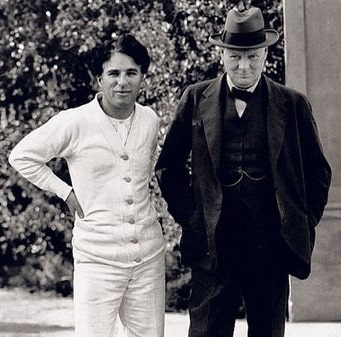
The great dictator, and together to manage once more to overcome the black dog .
The book is pure fiction, and K hlmeier dives into a debaucherous story telling, jumping back and forth between several strands of narration lines. An entertaining and very enjoyable book if you are the type of reader that enjoys story telling. For me this book is in best tradition of Michael K hlmeier, whom I consider an excellent story teller. I loved his (unfinished trilogy of) books on Greek mythology (Telemach and Calypso), but found that after these books he got lost too much in radio programs of story telling. While in itself good, I preferred his novels. Thus, I have to admit that I have forgotten about K hlmeier for some years, until recently I found this little book, which reminded me of him and his excellent stories. A book that is if you are versed in German well worth enjoying, especially if one likes funny and a bit queer stories.

11 July 2016

Jonathan Dowland: iPod

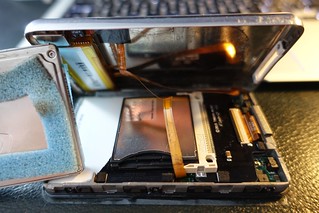
iPod iPod with rockbox
opened up open iPod with iFlash
It's been four years since I last wrote about music players. In the meantime of my Sansa Fuzes broke, and the third does not have great rockbox support. I've also been using a Sansa Clip+ (a leaving present from my last job, thanks again!) and a Sansa Clip Zip. Unfortunately Sandisk's newer Sansa devices (Sport, Jam - the only ones still in production) are not supported by Rockbox. The Clips have been very reliable and sturdy players, but I have missed the larger display of the Fuze. Since I've been exploring HD audio I've also been interested in something with an A/D converter that can handle it. I also still wish to carry my entire music library around with me, which limits my options. I decided to try an iPod. The older iPods had a Wolfson-manufacturered ADC which had a good reputation and supported (in headline terms at least) 24/48. The iPod colour (aka "4th gen") and subsequent models have a large colour display. The click-wheel interface is also very nice. Apple have now discontinued the "classic" iPod and their second hand value has greatly increased, but I managed to get an older 5th generation model ("video", with a base capacity of 30G) whilst trading in some unwanted DVDs. The case was scratched to heck but a replacement was readily and cheaply available from auction sites. Rockbox support in these iPods is pretty good, and you can mod the hardware to support CF or SD cards with kits such as the iFlash kits by Tarkan Akdam, which I picked up, along with a new 128G SD card. Unfortunately I have found writing to the iPod to be very poor with Rockbox, but it's fine for playback, and booting the iPod in OF or DFU mode is very easy and works reliably. Whilst Rockbox on the iPod works pretty well, installing it is far harder than on the Sandisk Sansa devices. The difficulty in my case is because rockbox requires a PC-formatted iPod to install, and I had a Mac-formatted one. I couldn't find a way to convert the iPod to PC format using a Mac. I tried doing so on a PC but for some reason the PC wasn't playing ball so I gave up after a few hours. In the end I assembled the filesystem by hand using dd(1) and dumps of partition tables from other people's iPods, via a Linux machine. This was enough to convince iTunes on Mac to restore it's hidden partition and boot software without reverting back to a Mac disklabel format.

10 July 2016

Joey Hess: twenty years of free software -- part 12 propellor

Propellor is my second big Haskell program. I recently described the motivation for it like this, in a proposal for a Linux.Conf.Au talk:
The configuration of Linux hosts has become increasingly declarative, managed by tools like puppet and ansible, or by the composition of containers. But if a server is a collection of declarative properties, how do you make sure that changes to that configuration make sense? You can test them, but eventually it's 3 AM and you have an emergency fix that needs to go live immediately. Data types to the rescue! While data types are usually used to prevent eg, combining an Int and a Bool, they can be used at a much more abstract level, for example to prevent combining a property that needs a Debian system with a property that needs a Red Hat system. Propellor leverages Haskell's type system to prove the consistency of the properties it will apply to a host.
The real origin story though, is that I wanted to finally start using configuration management, but the tools for it all seemed very complicated and built on shaky foundations (like piles of yaml), and it seemed it would be easier to write my own than deal with that. Meanwhile, I had Haskell burning a hole in my pocket, ready to be used in a second large project after git-annex. Propellor has averaged around 2.5 contributions per month from users since it got started, but increasing numbers recently. That's despite having many fewer users than git-annex, which remember gets perhaps 1 patch per month. Of course, I've "cheated" by making sure that propellor's users know Haskell, or are willing to learn some. And, propellor is very compositional; adding a new property to it is not likely to be complicated by any of the existing code. So it's easy to extend, if you're able to use it. At this point propellor has a small community of regular contributors, and I spend some pleasant weekend afternoons reviewing and merging their work. Much of my best work on propellor has involved keeping the behavior of the program the same while making its types better, to prevent mistakes. Propellor's core data types have evolved much more than in any program I worked on before. That's exciting! Next: twenty years of free software -- part 13 past and future

Bits from Debian: New Debian Developers and Maintainers (May and June 2016)

The following contributors got their Debian Developer accounts in the last two months: The following contributors were added as Debian Maintainers in the last two months: Congratulations!

Michal Čihař: Weblate 2.7

Slightly later than on monthly schedule but Weblate 2.7 is out today. This release brings improvements to the API and is first to officially support wlc a command line client for Weblate. Full list of changes for 2.7: If you are upgrading from older version, please follow our upgrading instructions. You can find more information about Weblate on https://weblate.org, the code is hosted on Github. If you are curious how it looks, you can try it out on demo server. You can login there with demo account using demo password or register your own user. Weblate is also being used https://hosted.weblate.org/ as official translating service for phpMyAdmin, OsmAnd, Aptoide, FreedomBox, Weblate itself and many other projects. Should you be looking for hosting of translations for your project, I'm happy to host them for you or help with setting it up on your infrastructure. Further development of Weblate would not be possible without people providing donations, thanks to everybody who have helped so far! The roadmap for next release is just being prepared, you can influence this by expressing support for individual issues either by comments or by providing bounty for them.

Filed under: Debian English SUSE Weblate 0 comments

8 July 2016

Reproducible builds folks: Managing container and environment state

Author: ceridwen With some more help from Martin Pitt, it became clear to me that my previous mental model of how autopkgtest worked is very different from how it does work. I'll illustrate by borrowing my previous example. I know that schroot has the following behavior:
The default behaviour is as follows (all directory paths are inside the chroot). A login shell is run in the current working directory. If this is not available, it will try $HOME (when --preserve-environment is used), then the user's home directory, and / inside the chroot in turn. A command is always run in the current working directory inside the chroot. If none of the directories are available, schroot will exit with an error status.
I was naively thinking that the way autopkgtest would work is that it would set the current working directory of the schroot call and the ensuing subprocess call would thus take place in that directory inside the schroot. That is not how it works. If you want to change directories inside the virtual server, you have to use cd. The same is true of, at least, environment variables, which have their own specific handling in the adt_testbed.Testbed methods but have to be passed as strings, and umask. I'm assuming this is because the direct methods with qemu images or LXC containers don't work. What this means is that I was thinking about the problem the wrong way: what reprotest needs to do is generate shell scripts. This is how autopkgtest works. If this goes beyond laying out commands linearly one after another, for instance if it demands conditionals or other nested constructs, the right way to do it is to build an abstract syntax tree representation of the shell script and then convert it to code. Whether I need more complicated shell scripts depends on my approach to handling state in the containers. I need to know what state persists across separate command executions: if I call adt_testbed.Testbed.execute() twice, what if any changes I make to the container will carry forward from the first to the second? There are three categories here. First, some properties of a system aren't preserved even from one command execution to the next, like working directory and environment variables. (I thought working directory would be preserved, but it's not). The second is state that persists while the testbed is open and is then automatically reverted when it's closed, like files copied into temporary directories on the tesbed. The third is state that persists across different sessions on the same container and must be cleaned up by reprotest. It's worth noting that which state falls into which category may vary by the container in question, though for the most part I can either do unnecessary cleanup or issue unnecessary commands to handle the differences. autopkgtest itself has a very different approach to cleanup, as it relies almost entirely on the builtin reversion capabilities from some of its containers. I would prefer to avoid doing the same, partly because I know that some of the modifications I need to make, for instance creating new users or mounting disorderfs, can't be reverted by the faster, simpler containers like schroot. From discussions with Lunar, I think that the variations that correspond to environment variables (captures_environment, home, locales, path, and timezone) fall into the first category, but because of the special handling for them they don't require sending a separate command. The shell (bash foo) accepts a script or command as an argument so it also doesn't need a separate command. Setting the working directory and umask require separate commands that have to be joined. On Linux, setarch also accepts a command/script as an argument so can be handled like the shell, but there's no unified POSIX protocol for mocking uname so other OSes will require different approaches. Users, groups, file ordering, host, and domain will require cleanup in all containers except for (maybe) qemu. If I want to handle the cleanup in the shell scripts themselves, I need conditionals so that for instance the shell script only tries to unmount disorderfs if disorderfs was successfully mounted. This approach would simplify the error handling problems I've had before, where when a build crashes cleanup code run from Python doesn't get run until after the testbed stop accepting commands. Lunar suggested the Plumbum library to me, and I think I can use it to avoid writing my own shell AST library. It has a method that converts the Python representation of a shell script into a string that can be passed to Testbed.command(). Integrating Plumbum to generate the necessary scripts is where I'm going in the next week. Any feedback on any of this is welcome. I'm also curious what other projects are using autopkgtest code. Holger brought to my attention piuparts, which brings the list up to four that I'm aware of, autopkgtest itself, sbuild, piuparts, and now reprotest.

Russell Coker: Nexus 6P and Galaxy S5 Mini

Just over a month ago I ordered a new Nexus 6P [1]. I ve had it for over a month now and it s time to review it and the Samsung Galaxy S5 Mini I also bought. Security The first noteworthy thing about this phone is the fingerprint scanner on the back. The recommended configuration is to use your fingerprint for unlocking the phone which allows a single touch on the scanner to unlock the screen without the need to press any other buttons. To unlock with a pattern or password you need to first press the power button to get the phone s attention. I have been considering registering a fingerprint from my non-dominant hand to reduce the incidence of accidentally unlocking it when carrying it or fiddling with it. The phone won t complete the boot process before being unlocked. This is a good security feature. Android version 6 doesn t assign permissions to apps at install time, they have to be enabled at run time (at least for apps that support Android 6). So you get lots of questions while running apps about what they are permitted to do. Unfortunately there s no allow for the duration of this session option. A new Android feature prevents changing security settings when there is an overlay running . The phone instructs you to disable overlay access for the app in question but that s not necessary. All that is necessary is for the app to stop using the overlay feature. I use the Twilight app [2] to dim the screen and use redder colors at night. When I want to change settings at night I just have to pause that app and there s no need to remove the access from it note that all the web pages and online documentation saying otherwise is wrong. Another new feature is to not require unlocking while at home. This can be a convenience feature but fingerprint unlocking is so easy that it doesn t provide much benefit. The downside of enabling this is that if someone stole your phone they could visit your home to get it unlocked. Also police who didn t have a warrant permitting search of a phone could do so anyway without needing to compel the owner to give up the password. Design This is one of the 2 most attractive phones I ve owned (the other being the sparkly Nexus 4). I think that the general impression of the appearance is positive as there are transparent cases on sale. My phone is white and reminds me of EVE from the movie Wall-E. Cables This phone uses the USB Type-C connector, which isn t news to anyone. What I didn t realise is that full USB-C requires that connector at both ends as it s not permitted to have a data cable with USB-C at the device and and USB-A at the host end. The Nexus 6P ships with a 1M long charging cable that has USB-C at both ends and a ~10cm charging cable with USB-C at one end and type A at the other (for the old batteries and the PCs that don t have USB-C). I bought some 2M long USB-C to USB-A cables for charging my new phone with my old chargers, but I haven t yet got a 1M long cable. Sometimes I need a cable that s longer than 10cm but shorter than 2M. The USB-C cables are all significantly thicker than older USB cables. Part of that would be due to having many more wires but presumably part of it would be due to having thicker power wires for delivering 3A. I haven t measured power draw but it does seem to charge faster than older phones. Overall the process of converting to USB-C is going to be a lot more inconvenient than USB SuperSpeed (which I could basically ignore as non-SuperSpeed connectors worked). It will be good when laptops with USB-C support become common, it should allow thinner laptops with more ports. One problem I initially had with my Samsung Galaxy Note 3 was the Micro-USB SuperSpeed socket on the phone being more fiddly for the Micro-USB charging plug I used. After a while I got used to that but it was still an annoyance. Having a symmetrical plug that can go into the phone either way is a significant convenience. Calendars and Contacts I share most phone contacts with my wife and also have another list that is separate. In the past I had used the Samsung contacts system for the contacts that were specific to my phone and a Google account for contacts that are shared between our phones. Now that I m using a non-Samsung phone I got another Gmail account for the purpose of storing contacts. Fortunately you can get as many Gmail accounts as you want. But it would be nice if Google supported multiple contact lists and multiple calendars on a single account. Samsung Galaxy S5 Mini Shortly after buying the Nexus 6P I decided that I spend enough time in pools and hot tubs that having a waterproof phone would be a good idea. Probably most people wouldn t consider reading email in a hot tub on a cruise ship to be an ideal holiday, but it works for me. The Galaxy S5 Mini seems to be the cheapest new phone that s waterproof. It is small and has a relatively low resolution screen, but it s more than adequate for a device that I ll use for an average of a few hours a week. I don t plan to get a SIM for it, I ll just use Wifi from my main phone. One noteworthy thing is the amount of bloatware on the Samsung. Usually when configuring a new phone I m so excited about fancy new hardware that I don t notice it much. But this time buying the new phone wasn t particularly exciting as I had just bought a phone that s much better. So I had more time to notice all the annoyances of having to download updates to Samsung apps that I ll never use. The Samsung device manager facility has been useful for me in the past and the Samsung contact list was useful for keeping a second address book until I got a Nexus phone. But most of the Samsung apps and 3d party apps aren t useful at all. It s bad enough having to install all the Google core apps. I ve never read mail from my Gmail account on my phone. I use Fetchmail to transfer it to an IMAP folder on my personal mail server and I d rather not have the Gmail app on my Android devices. Having any apps other than the bare minimum seems like a bad idea, more apps in the Android image means larger downloads for an over-the-air update and also more space used in the main partition for updates to apps that you don t use. Not So Exciting In recent times there hasn t been much potential for new features in phones. All phones have enough RAM and screen space for all common apps. While the S5 Mini has a small screen it s not that small, I spent many years with desktop PCs that had a similar resolution. So while the S5 Mini was released a couple of years ago that doesn t matter much for most common use. I wouldn t want it for my main phone but for a secondary phone it s quite good. The Nexus 6P is a very nice phone, but apart from USB-C, the fingerprint reader, and the lack of a stylus there s not much noticeable difference between that and the Samsung Galaxy Note 3 I was using before. I m generally happy with my Nexus 6P, but I think that anyone who chooses to buy a cheaper phone probably isn t going to be missing a lot.

7 July 2016

Daniel Pocock: Can you help with monitoring packages in Debian and Ubuntu?

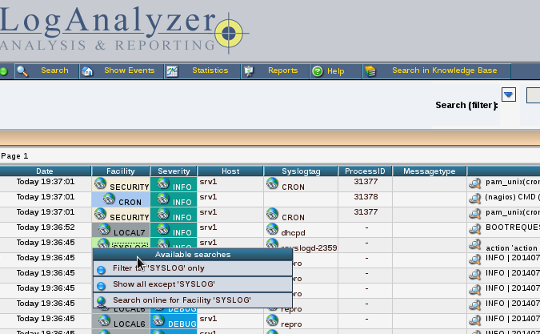
Debian (and consequently Ubuntu) contains a range of extraordinarily useful monitoring packages. I've been maintaining several of them at a basic level but as more of my time is taken up by free Real-Time Communications software, I haven't been able to follow the latest upstream releases for all of the other packages I maintain. The versions we are distributing now still serve their purpose well, but as some people would like newer versions, I don't want to stand in the way. Monitoring packages are for everyone. Even if you are a single user or developer with a single desktop or laptop and no servers, you may still find some of these packages useful. For example, after doing an apt-get upgrade or dist-upgrade, it can be extremely beneficial to look at your logs in LogAnalyzer with all the errors and warnings colour-coded so you can see at a glance whether your upgrade broke anything. If you are testing new software before a release or trying to troubleshoot erratic behavior, this type of colour-coded feedback can also help you focus on possible problems without the eyestrain of tailing a logfile. LogAnalyzer How to help A good first step is simply looking over the packages maintained by the pkg-monitoring group and discovering whether any of them are useful for your own needs. You may be familiar with alternatives that exist in Debian, if so, feel free to comment on whether you believe any of these packages should be dropped by cre
ating a wishlist bug against the package concerned. The next step is joining the pkg-monitoring mailing list. If you are a Debian Developer or Debian Maintainer with upload rights already, you can join the group on alioth. If you are not at that level yet, you are still very welcome to test new versions of the packages and upload them on mentors.debian.net and then join the mentors mailing list to look for a member of the community who can help review your work and sponsor an upload for you. Each of the packages should have a README.source file in the repository explaining more about how the package is maintained. Familiarity with Git is essential. Note that all of the packages keep their debian/* artifacts in a branch called debian/sid while the master branch tracks the upstream repository. You can clone the Debian package repositories for any of these projects from alioth and build them yourself, try building packages of new upstream versions and try to investigate any of the bug reports submitted to Debian. Some of the bugs may have already been fixed by upstream changes and can be marked appropriately. Integrating your monitoring systems Two particular packages I would like to highlight are ganglia-nagios-bridge and syslog-nagios-bridge. They are not exclusively for Nagios and could also be used with Icinga or other monitoring dashboards. The key benefit of these packages is that all the alerting is consolidated in a single platform, Nagios, which is able to display them in a colour-coded dashboard and intelligently send notifications to people in a manner that is fully configurable. If you haven't integrated your monitoring systems already, these projects provide a simple and lightweight way to start doing so.

Markus Koschany: My Free Software Activities in June 2016

My monthly report covers what I have been doing for Debian. I write it for Debian s Long Term Support sponsors but also for the wider free software community in the hope that it might inspire people to get more involved with Debian or free software in general. Debian Android Debian Games Debian Java Debian LTS This was my fifth month as a paid contributor and I have been paid to work 19,75 hours on Debian LTS. In that time I did the following: QA uploads

4 July 2016

Gunnar Wolf: Got the C.H.I.P.s for DebConf!

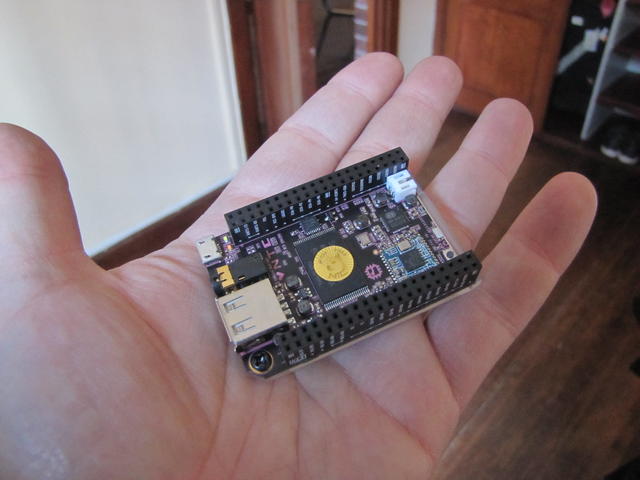
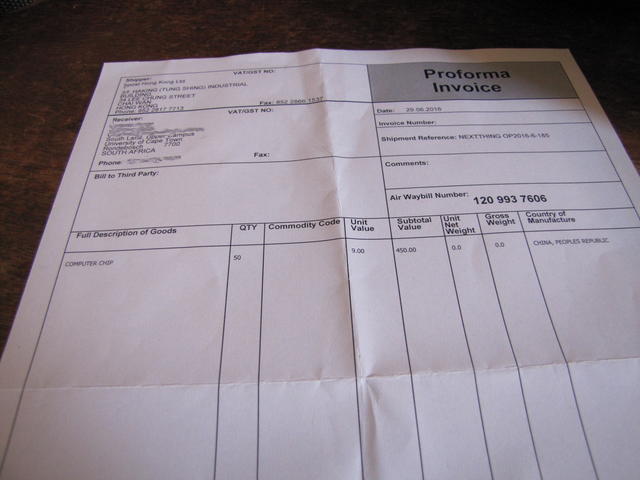
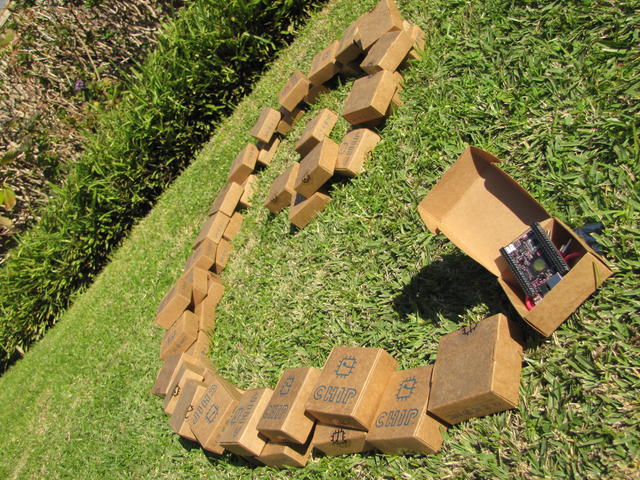
I had my strong doubts as to whether the shipment would be allowed through customs, and was happily surprised by a smiling Graham today before noon. He handed me a smallish box that arrived to his office, containing... Our fifty C.H.I.P. computers, those I offered to give away at DebConf! The little machines are quite neat. They are beautiful little devices, including even a plastic back (so you can safely work with it over a conductive surface or things like that). Quite smaller than the usual Raspberry-like format. It has more than enough GPIO to make several of my friends around here drool about the possibilities. So, what's to this machine besides a nice small ARM CPU, 512MB RAM, wireless connectivity (Wifi and bluetooth)? Although I have not yet looked into them (but intend to do so very soon!), it promises to have the freest available hardware around, and is meant for high hackability! And not that it matters But we managed to import them all, legally and completely hassle-free, into South Africa! That's right We are all used to the declaring commercial value as one dollar mindset. But... The C.H.I.P.s are actually priced at US$9 a piece. The declared commercial value is US$450. South Africans said all their customs are very hard to clear But we were able receive 50 legally shipped computers, declared at their commercial value, without any hassles! (yes, we might have been extremely lucky as well) Anyway, stay tuned By Thursday I will announce the list of people that get to take one home. I still have some left, so feel free to mail me at gwolf+chip@gwolf.org.
3 July 2016

Reproducible builds folks: Reproducible builds: week 61 in Stretch cycle

What happened in the Reproducible Builds effort between June 19th and June 25th 2016. Media coverage GSoC and Outreachy updates Toolchain fixes Other upstream fixes Emil Velikov searched on IRC for hints on how to guarantee unique values during build to invalidate shader caches in Mesa, when also no VCS information is available. A possible solution is a timestamp, which is unique enough for local builds, but can still be reproducible by allowing it to be overwritten with SOURCE_DATE_EPOCH. Packages fixed The following 9 packages have become reproducible due to changes in their build dependencies: cclib librun-parts-perl llvm-toolchain-snapshot python-crypto python-openid r-bioc-shortread r-bioc-variantannotation ruby-hdfeos5 sqlparse The following packages have become reproducible after being fixed: Some uploads have fixed some reproducibility issues, but not all of them: Patches submitted that have not made their way to the archive yet: Package reviews 139 reviews have been added, 20 have been updated and 21 have been removed in this week. New issues found: 53 FTBFS bugs have been reported by Chris Lamb, Santiago Vila and Mateusz ukasik. diffoscope development Quote of the week "My builds are so reproducible, they fail exactly every second time." Johannes Ziemke (@discordianfish) Misc. This week's edition was written by Chris Lamb (lamby), Reiner Herrmann and Holger Levsen and reviewed by a bunch of Reproducible builds folks on IRC.

Iustin Pop: A relaxation week

A (forced) relaxation week This was an interesting week, much more so than I expected. The start of the week was the usual: on Monday a run, although at an easier pace after Sunday's longer indoor bike ride, on Tuesday a 30Km outside bike ride (flat, on road, with a mountain bike so not fast at all). On Wednesday however, I had a planned "intervention" at my dentist bone reconstruction (or regeneration, not sure what the right term is for the implantation of scaffolding). The dentist told me I won't be allowed to do sports, especially in the first few days after the procedure, so I knew I will have to take it easy; easy bike rides are fine, but not anything more (e.g. especially not running). The procedure went well and after that I went to work (the dentist looked at me in a funny way when I mentioned I'm not going home but instead back to work). There was a bit of pain a couple of hours after the local anaesthesia went away, but the painkillers did work, so I was able to function somewhat OK. Laughing was the only thing that caused pain, so I tried to be very serious; didn't work well On Thursday morning however, I did feel funny and when I looked into the mirror, I got a shock. The affected side of my face was heavily swollen, and I was feeling as bad as I looked. I had a followup checkup at the dentist, so I went there, and they told me Oh, this is normal. Bone reconstruction is much more difficult on the body as opposed to extraction, since the body actually has to rebuild stuff, instead of just healing the wound. And yes, you should just go back home and take the day off! . OK, logically that explanation makes sense, but my dental extraction had a very predictable pain/recovery curve (spike right at the extraction, plateau for that day, then slow recovery that went to faster recovery after a few days). This procedure was very different, with the first day easy, and the second day much worse. The dentist continued Oh, and by the way, expect this to be worse in the morning, as the body can work all night; also, this should go away by itself over the weekend, so let's meet again on Monday. At this point I realised than I'm not allowed to do sports is not by doctor's orders, but rather my condition doesn't allow me to do sport . Sad panda Friday was even worse; my face was swollen in a different way, such that I looked even more like a monster from the Witcher games. I had to stay at home again, not being able to do much, as the painkillers I got were mostly ineffective. From my usual ~10K steps a day (or more if I run), my Friday was a paltry sub-2K step day. The only thing I was able to do was watch anime. I found Log Horizon to be a pretty interesting anime, much more so than what the synopsis said; the ramification on politics and how to interaction between the two cultures unfolded was much more in-depth than I presumed. Didn't finish it yet, so this is a partial but very strong recommendation for it. Besides watching stuff, I also went to the shop to buy some food, which turned out to be an excuse for "junk food foraging!". The pain took my willpower away and instead of the planned and short grocery list, I found myself with lots of chocolate and ice cream on my hands. Funny how the brain works On Saturday I was a bit better; the swelling went partially away, so if you squinted you could pretend I look my normal-ugly, not the monster-ugly from before. I was able to go outside of the house, do some shopping, etc. so I was able to go back to a ~9K steps day. I also stopped taking painkillers since anyway they weren't of much help, and kept myself entertained with movies and other stuff (cough cough Grim Dawn , since it's a mindless click-kill-loot-repeat ARPG that one can play even when only partially functional). Today (Sunday) was swelling was slightly worse; however, I was feeling well enough to try to go back on the bike trainer (the first three days of "no sports" were over), and planned to do a slow/relaxing one hour Zwift ride. Right, as all the people who ever tried this, it works as long as only fast people overtake you (since you can't catch them anyway), or as long as you don't get to sprint sections. I did slightly improve my Watopia 300m sprint personal record (29.20s 28.29s), which was good enough. After the first lap I took it easier as in had to, since I was not really in shape. I was in any case very glad about ending my 4 days long break from sports! So, my dentist was right indeed. The swelling did by and large clear up over the weekend (although I'll have to see how tomorrow will be), and was also right about how much more difficult this was. On one hand makes sense (growing bone does sound complex), on the other hand, I couldn't imagine that the body works so hard that it puts you out. The dentist was however slightly wrong with the you should not do any strenuous activity, especially in the first three days ; they should have said, ha ha, you'll be flat out for the first days, take it easy and enjoy the painkillers instead. Looking forward now to get back into my regular routine; relaxation is good, but only when done by choice like most things in life

Next.

Previous.