Search Results: "will"

9 July 2020

Enrico Zini: Mime type associations

The last step of my laptop migration was to fix mime type associations, that seem to associate opening file depending on whatever application was installed last, phases of the moon, and what option is the most annoying. The state of my system after a fresh install, is that, for application/pdf, xdg-open (used for example by pcmanfm) runs inkscape, and run-mailcap (used for example by neomutt) runs the calibre ebook viewer. It looks like there are at least two systems to understand, debug and fix, instead of one. xdg-open This comes from package xdg-utils, and works using .desktop files:
# This runs inkscape
$ xdg-open file.pdf
There is a tool called xdg-mime that queries what .desktop file is associated with a given mime type:
$ xdg-mime query default application/pdf
inkscape.desktop
You can use xdg-mime default to change an association, and it works nicely:
$ xdg-mime default org.gnome.Evince.desktop application/pdf
$ xdg-mime query default application/pdf
org.gnome.Evince.desktop
However, if you accidentally mistype the name of the .desktop file, it won't complain and it will silently reset the association to the arbitrary default:
$ xdg-mime default org.gnome.Evince.desktop application/pdf
$ xdg-mime query default application/pdf
org.gnome.Evince.desktop
$ xdg-mime default evince.desktop application/pdf
$ echo $?
0
$ xdg-mime query default application/pdf
inkscape.desktop
You can use a GUI like xfce4-mime-settings from the xfce4-settings package to perform the same kind of changes avoiding typing mistakes. The associations seem to be saved in ~/.config/mimeapps.list run-mailcap This comes from the package mime-support You can test things by running it using --norun:
$ run-mailcap --norun file.pdf
ebook-viewer file.pdf
run-mailcap uses the ~/.mailcap and /etc/mailcap to map mime types to commands. This is what's in the system default:
$ grep application/pdf /etc/mailcap
application/pdf; ebook-viewer %s; test=test -n "$DISPLAY"
application/pdf; calibre %s; test=test -n "$DISPLAY"
application/pdf; gimp-2.10 %s; test=test -n "$DISPLAY"
application/pdf; evince %s; test=test -n "$DISPLAY"
To fix this, I copypasted the evince line into ~/.mailcap, and indeed it gets used:
$ run-mailcap --norun file.pdf
evince file.pdf
There is a /etc/mailcap.order file providing a limited way to order entries in /etc/mailcap, but it can only be manipulated system-wide, and cannot be used for user preferences. Sadly, this means that if a package changes its mailcap invocation because of, say, a security issue in the former one, the local override will never get fixed. I am really not comfortable about that. As a workaround, I put this in my ~/.mailcap:
application/pdf; xdg-open %s && sleep 0.3s; test=test -n "$DISPLAY"
The sleep 0.3s is needed because xdg-open exits right after starting the program, and when invoked by mutt it means that mutt could delete the attachment before evince has a chance to open it. I had to use the same workaround for sensible-browser, since the same happens when a browser opens a document in an existing tab. I feel like writing some wrapper about all this that forks the viewer, then waits for an IN_OPEN event on its argument via inotify before exiting. I wonder if there is any reason run-mailcap could not be implemented as a wrapper to xdg-open. I reported #964723 elaborating on these thoughts.

Enrico Zini: Laptop migration

This laptop used to be extra-flat My laptop battery started to explode in slow motion. HP requires 10 business days to repair my laptop under warranty, and I cannot afford that length of downtime. Alternatively, HP quoted me 375 + VAT for on-site repairs, which I tought was very funny. For 376.55 + VAT, which is pretty much exactly the same amount, I bought instead a refurbished ThinkPad X240 with a dual-core I5, 8G of RAM, 250G SSD, and a 1920x1080 IPS display, to use as a spare while my laptop is being repaired. I'd like to thank HP for giving me the opportunity to own a ThinkPad. Since I'm migrating all my system to the spare and then (hopefully) back, I'm documenting what I need to be fully productive on new hardware. Install Debian A basic Debian netinst with no tasks selected is good enough to get going. Note that if wifi worked in Debian Installer, it doesn't mean that it will work in the minimal system it installed. See here for instructions on quickly bringing up wifi on a newly installed minimal system. Copy /home A simple tar of /home is all I needed to copy my data over. A neat way to do it was connecting the two laptops with an ethernet cable, and using netcat:
# On the source
tar -C / -zcf - home   nc -l -p 12345 -N
# On the target
nc 10.0.0.1 12345   tar -C / -zxf -
Since the data travel unencrypted in this way, don't do it over wifi. Install packages I maintain a few simple local metapackages that depend on the packages I usually used. I could just install those and let apt bring in their dependencies. For the build dependencies of the programs I develop, I use mk-build-deps from the devscripts package to create metapackages that make sure they are installed. Here's an extract from debian/control of the metapackage:
Source: enrico
Section: admin
Priority: optional
Maintainer: Enrico Zini <enrico@debian.org>
Build-Depends: debhelper (>= 11)
Standards-Version: 3.7.2.1
Package: enrico
Section: admin
Architecture: all
Depends:
  mc, mmv, moreutils, powertop, syncmaildir, notmuch,
  ncdu, vcsh, ddate, jq, git-annex, eatmydata,
  vdirsyncer, khal, etckeeper, moc, pwgen
Description: Enrico's working environment
Package: enrico-devel
Section: devel
Architecture: all
Depends:
  git, python3-git, git-svn, gitk, ansible, fabric,
  valgrind, kcachegrind, zeal, meld, d-feet, flake8, mypy, ipython3,
  strace, ltrace
Description: Enrico's development environment
Package: enrico-gui
Section: x11
Architecture: all
Depends:
  xclip, gnome-terminal, qalculate-gtk, liferea, gajim,
  mumble, sm, syncthing, virt-manager
Recommends: k3b
Description: Enrico's GUI environment
Package: enrico-sanity
Section: admin
Architecture: all
Conflicts: libapache2-mod-php, libapache2-mod-php5, php5, php5-cgi, php5-fpm, libapache2-mod-php7.0, php7.0, libphp7.0-embed, libphp-embed, libphp5-embed
Description: Enrico's sanity
 Metapackage with a list of packages that I do not want anywhere near my
 system.
System-wide customizations I tend to avoid changing system-wide configuration as much as possible, so copying over /home and installing packages takes care of 99% of my needs. There are a few system-wide tweaks I cannot do without: For postfix, I have a little ansible playbook that takes care of it. Network Manager system connections need to be copied manually: a plain copy and a systemctl restart network-manager are enough. Note that Network Manager will ignore the files unless their owner and permissions are what it expects. Fine tuning Comparing the output of dpkg --get-selections between the old and the new system might highlight packages manually installed in a hurry and not added to the metapackages. Finally, what remains is fixing the sad state of mimetype associations, which seem to associate opening file depending on whatever application was installed last, phases of the moon, and what option is the most annoying. Currently on my system, PDFs are opened in inkscape by xdg-open and in calibre by run-mailcap. Let's see how long it takes to figure this one out.

7 July 2020

Noah Meyerhans: Setting environment variables for gnome-session

Am I missing something obvious? When did this get so hard? In the old days, you configured your desktop session on a Linux system by editing the .xsession file in your home directory. The display manager (login screen) would invoke the system-wide xsession script, which would either defer to your personal .xsession script or set up a standard desktop environment. You could put whatever you want in the .xsession script, and it would be executed. If you wanted a specific window manager, you d run it from .xsession. Start emacs or a browser or an xterm or two? .xsession. It was pretty easy, and super flexible. For the past 25 years or so, I ve used X with an environment started via .xsession. Early on it was fvwm with some programs, then I replaced fvwm with Window Maker (before that was even its name!), then switched to KDE. More recently (OK, like 10 years ago) I gradually replaced KDE with awesome and various custom widgets. Pretty much everything was based on a .xsession script, and that was fine. One particularly nice thing about it was that I could keep .xsession and any related helper programs in a git repository and manage changes over time. More recently I decided to give Wayland and GNOME an honest look. This has mostly been fine, but everything I ve been doing in .xsession is suddenly useless. OK, fine, progress is good. I ll just use whatever new mechanisms exist. How hard can it be? OK, so here we go. I am running GNOME. This isn t so bad. Alt+F2 brings up the Run Command dialog. It s a different keystroke than what I m used to, but I can adapt. (Obviously I can reconfigure the key binding, and maybe someday I will, but that s not the point here.) I have some executables in ~/bin. Oops, the run command dialog can t find them. No problem, I just need to update the PATH variable that it sees. Hmmm So how does one do that, anyway? GNOME has a help system, but searching that doesn t doesn t reveal anything. But that s fine, maybe it s inherited from the parent process. But there s no xsession script equivalent, since this isn t X anymore at all. The familiar stuff in /etc/X11/Xsession is no longer used. What s the equivalent in Wayland? Turns out, there isn t a shell script at all anymore, at least not in how Wayland and GNOME interact in Debian s configuration, which seems fairly similar to how anybody else would set this up. The GNOME session runs from a systemd-managed user session. Digging in to some web search results suggests that systemd provides a mechanism for setting some environment variables for services started by the user instance of the system. OK, so let s create some files in ~/.config/environment.d and we should be good. Except no, this isn t working. I can set some variables, but something is overriding PATH. I can create this file:
$ cat ~/.config/environment.d/01_path.conf
USER_INITIAL_PATH=$ PATH 
PATH=$ HOME /bin:$ HOME /go/bin:/usr/local/sbin:/usr/local/bin:/usr/sbin:/usr/bin:/sbin:/bin
USER_CUSTOM_PATH=$ PATH 
After logging in, the Run a command dialog still doesn t see my PATH. So I use Alt+F2 and sh -c "env > /tmp/env" to capture the environment, and this is what I see:
USER_INITIAL_PATH=/usr/local/sbin:/usr/local/bin:/usr/sbin:/usr/bin:/sbin:/bin
PATH=/usr/local/bin:/usr/bin:/bin:/usr/games
USER_CUSTOM_PATH=/home/noahm/bin:/home/noahm/go/bin:/usr/local/sbin:/usr/local/bin:/usr/sbin:/usr/bin:/sbin:/bin
So, my environment.d file is there, and it s getting looked at, but something else is clobbering my PATH later in the startup process. But what? Where? Why? The systemd docs don t indicate that there s anything special about PATH, and nothing in /lib/systemd/user-environment-generators/ seems to treat it specially. The string PATH doesn t appear in /lib/systemd/user/ either. Looking for the specific value that s getting assigned to PATH in /etc shows the only occurrence of it being in /etc/zsh/zshenv, so maybe that s where it s coming from? But that should only get set there if it s otherwise unset or otherwise very minimally set. So I still have no idea where it s coming from. OK, so ignoring where my custom value is getting overridden, maybe what s configured in /lib/systemd/user will point me in the right direction. systemd --user status suggests that the interesting part of my session is coming from gnome-shell-wayland.service. Can we use a standard systemd drop-in as documented in systemd.unit(5)? It turns out that we can. This file sets things up the way I want:
$ cat .config/systemd/user/gnome-shell-wayland.service.d/path.conf
[Service]
Environment=PATH=%h/bin:%h/go/bin:/usr/local/sbin:/usr/local/bin:/usr/sbin:/usr/bin:/sbin:/bin
Is that right? It really doesn t feel ideal to me. Systemd s Environment directive can t reference existing environment variables, and I can t use conditionals to do things like add a directory to the PATH only if it exists, so it s still a functional regression from what we had before. But at least it s a text file, edited by hand, trackable in git, so that s not too bad. There are some people out there who hate systemd, and will cite this as an illustration of why. However, I m not one of those people, and I very much like systemd as an init system. I d be happy to throw away sysvinit scripts forever, but I m not quite so happy with the state of .xsession s replacements. Despite the similarities, I don t think .xsession is entirely the same as SysV-style init scripts. The services running on a system are vastly more important than my personal .xsession, and systemd is far better at managing them than the pile of shell scripts used to set things up under sysvinit. Further, systemd the init system maintains compatibility with init scripts, so if you really want to keep using them, you can. As far as I can tell, though, systemd the user session manager does not seem to maintain compatibility with .xsession scripts, and that s unfortunate. I still haven t figured out what was overriding the ~/.config/environment.d/ setting. Any ideas?

Dirk Eddelbuettel: RcppSimdJson 0.1.0: Now on Windows, With Parsers and Faster Still!

A smashing new RcppSimdJson release 0.1.0 containing several small updates to upstream simdjson (now at 0.4.6) in part triggered by very excisting work by Brendan who added actual parser from file and string and together with Daniel upstream worked really hard to make Windows builds as well as complete upstream tests on our beloved (ahem) MinGW platform possible. So this version will, once the builders have caught up, give everybody on Windows a binary with a JSON parser running circles around the (arguably more feature-rich and possibly easier-to-use) alternatives. Dave just tweeted a benchmark snippet by Brendan, the full set is at the bottom our issue ticket for this release. RcppSimdJson wraps the fantastic and genuinely impressive simdjson library by Daniel Lemire and collaborators, which in its upstream release 0.4.0 improved once more (also see the following point releases). Via very clever algorithmic engineering to obtain largely branch-free code, coupled with modern C++ and newer compiler instructions, it results in parsing gigabytes of JSON parsed per second which is quite mindboggling. The best-case performance is faster than CPU speed as use of parallel SIMD instructions and careful branch avoidance can lead to less than one cpu cycle use per byte parsed; see the video of the recent talk by Daniel Lemire at QCon (which was also voted best talk). As mentioned, this release expands the reach of the package to Windows, and adds new user-facing functions. A big thanks for most of this is owed to Brendan, so buy him a drink if you run across him. The full NEWS entry follows.

Changes in version 0.1.0 (2020-07-07)
  • Upgraded to simdjson 0.4.1 which adds upstream Windows support (Dirk in #27 closing #26 and #14, plus extensive work by Brendan helping upstream with mingw tests).
  • Upgraded to simdjson 0.4.6 with further upstream improvements (Dirk in #30).
  • Change Travis CI to build matrix over g++ 7, 8, 9, and 10 (Dirk in #31; and also Brendan in #32).
  • New JSON functions fparse and fload (Brendan in #32) closing #18 and #10).

Courtesy of CRANberries, there is also a diffstat report for this release. For questions, suggestions, or issues please use the issue tracker at the GitHub repo. If you like this or other open-source work I do, you can now sponsor me at GitHub. For the first year, GitHub will match your contributions.

This post by Dirk Eddelbuettel originated on his Thinking inside the box blog. Please report excessive re-aggregation in third-party for-profit settings.

Dirk Eddelbuettel: AsioHeaders 1.16.1-1 on CRAN

An updated version of the AsioHeaders package arrived on CRAN today (after a we days of rest in the incoming directory of CRAN). Asio provides a cross-platform C++ library for network and low-level I/O programming. It is also included in Boost but requires linking when used as part of Boost. This standalone version of Asio is a header-only C++ library which can be used without linking (just like our BH package with parts of Boost). This release brings a new upstream version. Its changes required a corresponding change in one of (only) three reverse depends which delayed the CRAN admisstion by a few days.

Changes in version 1.16.1-1 (2020-06-28)
  • Upgraded to Asio 1.16.1 (Dirk in #5).
  • Updated README.md with standard set of badges

Via CRANberries, there is a diffstat report relative to the previous release. Comments and suggestions about AsioHeaders are welcome via the issue tracker at the GitHub GitHub repo. If you like this or other open-source work I do, you can now sponsor me at GitHub. For the first year, GitHub will match your contributions.

This post by Dirk Eddelbuettel originated on his Thinking inside the box blog. Please report excessive re-aggregation in third-party for-profit settings.

Gunnar Wolf: Raspberry Pi 4, now running your favorite distribution!

Great news, great news! New images available!Grab them while they are hot! With lots of help (say, all of the heavy lifting) from the Debian Raspberry Pi Maintainer Team, we have finally managed to provide support for auto-building and serving bootable minimal Debian images for the Raspberry Pi 4 family of single-board, cheap, small, hacker-friendly computers! The Raspberry Pi 4 was released close to a year ago, and is a very major bump in the Raspberry lineup; it took us this long because we needed to wait until all of the relevant bits entered Debian (mostly the kernel bits). The images are shipping a kernel from our Unstable branch (currently, 5.7.0-2), and are less tested and more likely to break than our regular, clean-Stable images. Nevertheless, we do expect them to be useful for many hackers and even end-users throughout the world. The images we are generating are very minimal, they carry basically a minimal Debian install. Once downloaded, of course, you can install whatever your heart desires (because Face it, if your heart desires it, it must free and of high quality. It must already be in Debian!) Oh And very important: Due to a change in the memory layout, if you get the 8GB model (currently the top-of-the-line RPi4), it will still not have USB support, due to a change in its memory layout (that means, no local keyboard/mouse ). We are working on getting it ironed out!

6 July 2020

Dirk Eddelbuettel: Rcpp 1.0.5: Several Updates

rcpp logo Right on the heels of the news of 2000 CRAN packages using Rcpp (and also hitting 12.5 of CRAN package, or one in eight), we are happy to announce release 1.0.5 of Rcpp. Since the ten-year anniversary and the 1.0.0 release release in November 2018, we have been sticking to a four-month release cycle. The last release has, however, left us with a particularly bad taste due to some rather peculiar interactions with a very small (but ever so vocal) portion of the user base. So going forward, we will change two things. First off, we reiterate that we have already made rolling releases. Each minor snapshot of the main git branch gets a point releases. Between release 1.0.4 and this 1.0.5 release, there were in fact twelve of those. Each and every one of these was made available via the drat repo, and we will continue to do so going forward. Releases to CRAN, however, are real work. If they then end up with as much nonsense as the last release 1.0.4, we think it is appropriate to slow things down some more so we intend to now switch to a six-months cycle. As mentioned, interim releases are always just one install.packages() call with a properly set repos argument away. Rcpp has become the most popular way of enhancing R with C or C++ code. As of today, 2002 packages on CRAN depend on Rcpp for making analytical code go faster and further, along with 203 in BioConductor. And per the (partial) logs of CRAN downloads, we are running steady at around one millions downloads per month. This release features again a number of different pull requests by different contributors covering the full range of API improvements, attributes enhancements, changes to Sugar and helper functions, extended documentation as well as continuous integration deplayment. See the list below for details.

Changes in Rcpp patch release version 1.0.5 (2020-07-01)
  • Changes in Rcpp API:
    • The exception handler code in #1043 was updated to ensure proper include behavior (Kevin in #1047 fixing #1046).
    • A missing Rcpp_list6 definition was added to support R 3.3.* builds (Davis Vaughan in #1049 fixing #1048).
    • Missing Rcpp_list 2,3,4,5 definition were added to the Rcpp namespace (Dirk in #1054 fixing #1053).
    • A further updated corrected the header include and provided a missing else branch (Mattias Ellert in #1055).
    • Two more assignments are protected with Rcpp::Shield (Dirk in #1059).
    • One call to abs is now properly namespaced with std:: (Uwe Korn in #1069).
    • String object memory preservation was corrected/simplified (Kevin in #1082).
  • Changes in Rcpp Attributes:
    • Empty strings are not passed to R CMD SHLIB which was seen with R 4.0.0 on Windows (Kevin in #1062 fixing #1061).
    • The short_file_name() helper function is safer with respect to temporaries (Kevin in #1067 fixing #1066, and #1071 fixing #1070).
  • Changes in Rcpp Sugar:
    • Two sample() objects are now standard vectors and not R_alloc created (Dirk in #1075 fixing #1074).
  • Changes in Rcpp support functions:
    • Rcpp.package.skeleton() adjusts for a (documented) change in R 4.0.0 (Dirk in #1088 fixing #1087).
  • Changes in Rcpp Documentation:
    • The pdf file of the earlier introduction is again typeset with bibliographic information (Dirk).
    • A new vignette describing how to package C++ libraries has been added (Dirk in #1078 fixing #1077).
  • Changes in Rcpp Deployment:
    • Travis CI unit tests now run a matrix over the versions of R also tested at CRAN (rel/dev/oldrel/oldoldrel), and coverage runs in parallel for a net speed-up (Dirk in #1056 and #1057).
    • The exceptions test is now partially skipped on Solaris as it already is on Windows (Dirk in #1065).
    • The default CI runner was upgraded to R 4.0.0 (Dirk).
    • The CI matrix spans R 3.5, 3.6, r-release and r-devel (Dirk).

Thanks to CRANberries, you can also look at a diff to the previous release. Questions, comments etc should go to the rcpp-devel mailing list off the R-Forge page. Bugs reports are welcome at the GitHub issue tracker as well (where one can also search among open or closed issues); questions are also welcome under rcpp tag at StackOverflow which also allows searching among the (currently) 2455 previous questions. If you like this or other open-source work I do, you can now sponsor me at GitHub. For the first year, GitHub will match your contributions.

This post by Dirk Eddelbuettel originated on his Thinking inside the box blog. Please report excessive re-aggregation in third-party for-profit settings.

5 July 2020

Russell Coker: Debian S390X Emulation

I decided to setup some virtual machines for different architectures. One that I decided to try was S390X the latest 64bit version of the IBM mainframe. Here s how to do it, I tested on a host running Debian/Unstable but Buster should work in the same way. First you need to create a filesystem in an an image file with commands like the following:
truncate -s 4g /vmstore/s390x
mkfs.ext4 /vmstore/s390x
mount -o loop /vmstore/s390x /mnt/tmp
Then visit the Debian Netinst page [1] to download the S390X net install ISO. Then loopback mount it somewhere convenient like /mnt/tmp2. The package qemu-system-misc has the program for emulating a S390X system (among many others), the qemu-user-static package has the program for emulating S390X for a single program (IE a statically linked program or a chroot environment), you need this to run debootstrap. The following commands should be most of what you need.
# Install the basic packages you need
apt install qemu-system-misc qemu-user-static debootstrap
# List the support for different binary formats
update-binfmts --display
# qemu s390x needs exec stack to solve "Could not allocate dynamic translator buffer"
# so you probably need this on SE Linux systems
setsebool allow_execstack 1
# commands to do the main install
debootstrap --foreign --arch=s390x --no-check-gpg buster /mnt/tmp file:///mnt/tmp2
chroot /mnt/tmp /debootstrap/debootstrap --second-stage
# set the apt sources
cat << END > /mnt/tmp/etc/apt/sources.list
deb http://YOURLOCALMIRROR/pub/debian/ buster main
deb http://security.debian.org/ buster/updates main
END
# for minimal install do not want recommended packages
echo "APT::Install-Recommends False;" > /mnt/tmp/etc/apt/apt.conf
# update to latest packages
chroot /mnt/tmp apt update
chroot /mnt/tmp apt dist-upgrade
# install kernel, ssh, and build-essential
chroot /mnt/tmp apt install bash-completion locales linux-image-s390x man-db openssh-server build-essential
chroot /mnt/tmp dpkg-reconfigure locales
echo s390x > /mnt/tmp/etc/hostname
chroot /mnt/tmp passwd
# copy kernel and initrd
mkdir -p /boot/s390x
cp /mnt/tmp/boot/vmlinuz* /mnt/tmp/boot/initrd* /boot/s390x
# setup /etc/fstab
cat << END > /mnt/tmp/etc/fstab
/dev/vda / ext4 noatime 0 0
#/dev/vdb none swap defaults 0 0
END
# clean up
umount /mnt/tmp
umount /mnt/tmp2
# setcap binary for starting bridged networking
setcap cap_net_admin+ep /usr/lib/qemu/qemu-bridge-helper
# afterwards set the access on /etc/qemu/bridge.conf so it can only
# be read by the user/group permitted to start qemu/kvm
echo "allow all" > /etc/qemu/bridge.conf
Some of the above can be considered more as pseudo-code in shell script rather than an exact way of doing things. While you can copy and past all the above into a command line and have a reasonable chance of having it work I think it would be better to look at each command and decide whether it s right for you and whether you need to alter it slightly for your system. To run qemu as non-root you need to have a helper program with extra capabilities to setup bridged networking. I ve included that in the explanation because I think it s important to have all security options enabled. The -object rng-random,filename=/dev/urandom,id=rng0 -device virtio-rng-ccw,rng=rng0 part is to give entropy to the VM from the host, otherwise it will take ages to start sshd. Note that this is slightly but significantly different from the command used for other architectures (the ccw is the difference). I m not sure if noresume on the kernel command line is required, but it doesn t do any harm. The net.ifnames=0 stops systemd from renaming Ethernet devices. For the virtual networking the ccw again is a difference from other architectures. Here is a basic command to run a QEMU virtual S390X system. If all goes well it should give you a login: prompt on a curses based text display, you can then login as root and should be able to run dhclient eth0 and other similar commands to setup networking and allow ssh logins.
qemu-system-s390x -drive format=raw,file=/vmstore/s390x,if=virtio -object rng-random,filename=/dev/urandom,id=rng0 -device virtio-rng-ccw,rng=rng0 -nographic -m 1500 -smp 2 -kernel /boot/s390x/vmlinuz-4.19.0-9-s390x -initrd /boot/s390x/initrd.img-4.19.0-9-s390x -curses -append "net.ifnames=0 noresume root=/dev/vda ro" -device virtio-net-ccw,netdev=net0,mac=02:02:00:00:01:02 -netdev tap,id=net0,helper=/usr/lib/qemu/qemu-bridge-helper
Here is a slightly more complete QEMU command. It has 2 block devices, for root and swap. It has SE Linux enabled for the VM (SE Linux works nicely on S390X). I added the lockdown=confidentiality kernel security option even though it s not supported in 4.19 kernels, it doesn t do any harm and when I upgrade systems to newer kernels I won t have to remember to add it.
qemu-system-s390x -drive format=raw,file=/vmstore/s390x,if=virtio -drive format=raw,file=/vmswap/s390x,if=virtio -object rng-random,filename=/dev/urandom,id=rng0 -device virtio-rng-ccw,rng=rng0 -nographic -m 1500 -smp 2 -kernel /boot/s390x/vmlinuz-4.19.0-9-s390x -initrd /boot/s390x/initrd.img-4.19.0-9-s390x -curses -append "net.ifnames=0 noresume security=selinux root=/dev/vda ro lockdown=confidentiality" -device virtio-net-ccw,netdev=net0,mac=02:02:00:00:01:02 -netdev tap,id=net0,helper=/usr/lib/qemu/qemu-bridge-helper
Try It Out I ve got a S390X system online for a while, ssh root@s390x.coker.com.au with password SELINUX to try it out. PPC64 I ve tried running a PPC64 virtual machine, I did the same things to set it up and then tried launching it with the following result:
qemu-system-ppc64 -drive format=raw,file=/vmstore/ppc64,if=virtio -nographic -m 1024 -kernel /boot/ppc64/vmlinux-4.19.0-9-powerpc64le -initrd /boot/ppc64/initrd.img-4.19.0-9-powerpc64le -curses -append "root=/dev/vda ro"
Above is the minimal qemu command that I m using. Below is the result, it stops after the 4. from 4.19.0-9 . Note that I had originally tried with a more complete and usable set of options, but I trimmed it to the minimal needed to demonstrate the problem.
  Copyright (c) 2004, 2017 IBM Corporation All rights reserved.
  This program and the accompanying materials are made available
  under the terms of the BSD License available at
  http://www.opensource.org/licenses/bsd-license.php
Booting from memory...
Linux ppc64le
#1 SMP Debian 4.
The kernel is from the package linux-image-4.19.0-9-powerpc64le which is a dependency of the package linux-image-ppc64el in Debian/Buster. The program qemu-system-ppc64 is from version 5.0-5 of the qemu-system-ppc package. Any suggestions on what I should try next would be appreciated.

4 July 2020

Dirk Eddelbuettel: Rcpp now used by 2000 CRAN packages and one in eight!

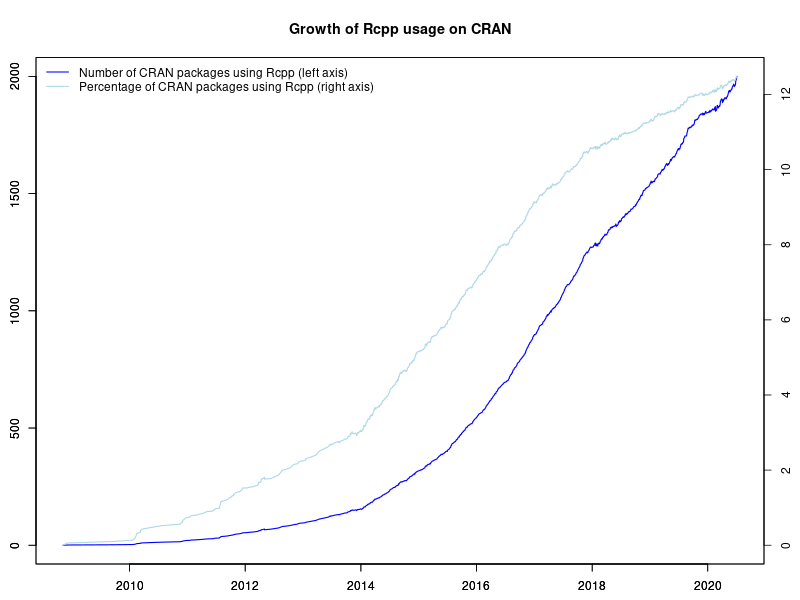
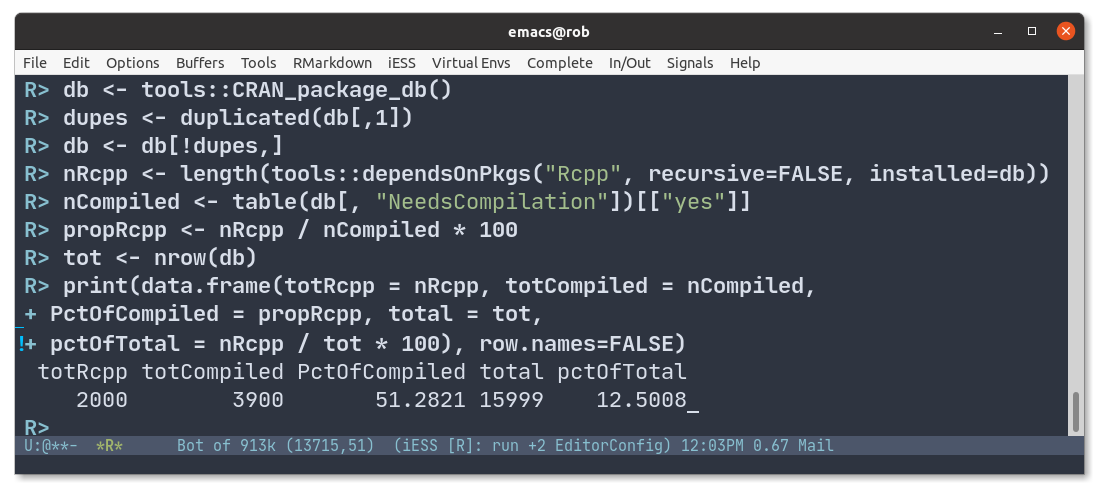
2000 Rcpp packages As of yesterday, Rcpp stands at exactly 2000 reverse-dependencies on CRAN. The graph on the left depicts the growth of Rcpp usage (as measured by Depends, Imports and LinkingTo, but excluding Suggests) over time. Rcpp was first released in November 2008. It probably cleared 50 packages around three years later in December 2011, 100 packages in January 2013, 200 packages in April 2014, and 300 packages in November 2014. It passed 400 packages in June 2015 (when I tweeted about it), 500 packages in late October 2015, 600 packages in March 2016, 700 packages last July 2016, 800 packages last October 2016, 900 packages early January 2017, 1000 packages in April 2017, 1250 packages in November 2017, 1500 packages in November 2018 and then 1750 packages last August. The chart extends to the very beginning via manually compiled data from CRANberries and checked with crandb. The next part uses manually saved entries. The core (and by far largest) part of the data set was generated semi-automatically via a short script appending updates to a small file-based backend. A list of packages using Rcpp is available too. Also displayed in the graph is the relative proportion of CRAN packages using Rcpp. The four per-cent hurdle was cleared just before useR! 2014 where I showed a similar graph (as two distinct graphs) in my invited talk. We passed five percent in December of 2014, six percent July of 2015, seven percent just before Christmas 2015, eight percent in the summer of 2016, nine percent mid-December 2016, cracked ten percent in the summer of 2017 and eleven percent in 2018. We now passed 12.5 percent so one in every eight CRAN packages dependens on Rcpp. Stunning. There is more detail in the chart: how CRAN seems to be pushing back more and removing more aggressively (which my CRANberries tracks but not in as much detail as it could), how the growth of Rcpp seems to be slowing somewhat outright and even more so as a proportion of CRAN as one would expect a growth curve to. To mark the occassion, I sent out two tweets yesterday: first a shorter one with just the numbers , followed by a second one also containing the few calculation steps. The screenshot from the second one is below. 2000 Rcpp packages 2000 user packages is pretty mind-boggling. We can use the progression of CRAN itself compiled by Henrik in a series of posts and emails to the main development mailing list. Not that long ago CRAN itself did have only 1000 packages, then 5000, 10000, and here we are at just over 16000 with Rcpp at 12.5% and still growing (though maybe more slowly). Amazeballs. The Rcpp team continues to aim for keeping Rcpp as performant and reliable as it has been. A really big shoutout and Thank You! to all users and contributors of Rcpp for help, suggestions, bug reports, documentation or, of course, code. If you like this or other open-source work I do, you can now sponsor me at GitHub. For the first year, GitHub will match your contributions.

This post by Dirk Eddelbuettel originated on his Thinking inside the box blog. Please report excessive re-aggregation in third-party for-profit settings.

Russ Allbery: Review: The Light Brigade

Review: The Light Brigade, by Kameron Hurley
Publisher: Saga
Copyright: 2019
ISBN: 1-4814-4798-X
Format: Kindle
Pages: 355
In the wake of the Blink, which left a giant crater where S o Paulo was, Dietz signed up for the military. To be a hero. To satisfy an oath of vengeance. To kill aliens. Corporations have consumed the governments that used to run Earth and have divided the world between them. Dietz's family, before the Blink, were ghouls in Tene-Silva territory, non-citizens who scavenged a precarious life on the margins. Citizenship is a reward for loyalty and a mechanism of control. The only people who don't fit into the corporate framework are the Martians, former colonists who went dark for ten years and re-emerged as a splinter group offering to use their superior technology to repair environmental damage to the northern hemisphere caused by corporate wars. When the Blink happens, apparently done with technology far beyond what the corporations have, corporate war with the Martians is the unsurprising result. Long-time SF readers will immediately recognize The Light Brigade as a response to Starship Troopers with far more cynical world-building. For the first few chapters, the parallelism is very strong, down to the destruction of a large South American city (S o Paulo instead of Buenos Aires), a naive military volunteer, and horrific basic training. But, rather than dropships, the soldiers in Dietz's world are sent into battle via, essentially, Star Trek transporters. These still very experimental transporters send Dietz to a different mission than the one in the briefing. Advance warning that I'm going to talk about what's happening with Dietz's drops below. It's a spoiler, but you would find out not far into the book and I don't think it ruins anything important. (On the contrary, it may give you an incentive to stick through the slow and unappealing first few chapters.) I had so many suspension of disbelief problems with this book. So many. This starts with the technology. The core piece of world-building is Star Trek transporters, so fine, we're not talking about hard physics. Every SF story gets one or two free bits of impossible technology, and Hurley does a good job showing the transporters through a jaundiced military eye. But, late in the book, this technology devolves into one of my least-favorite bits of SF hand-waving that, for me, destroyed that gritty edge. Technology problems go beyond the transporters. One of the bits of horror in basic training is, essentially, torture simulators, whose goal is apparently to teach soldiers to dissociate (not that the book calls it that). One problem is that I never understood why a military would want to teach dissociation to so many people, but a deeper problem is that the mechanics of this simulation made no sense. Dietz's training in this simulator is a significant ongoing plot point, and it kept feeling like it was cribbed from The Matrix rather than something translatable into how computers work. Technology was the more minor suspension of disbelief problem, though. The larger problem was the political and social world-building. Hurley constructs a grim, totalitarian future, which is a fine world-building choice although I think it robs some nuance from the story she is telling about how militaries lie to soldiers. But the totalitarian model she uses is one of near-total information control. People believe what the corporations tell them to believe, or at least are indifferent to it. Huge world events (with major plot significance) are distorted or outright lies, and those lies are apparently believed by everyone. The skepticism that exists is limited to grumbling about leadership competence and cynicism about motives, not disagreement with the provided history. This is critical to the story; it's a driver behind Dietz's character growth and is required to set up the story's conclusion. This is a model of totalitarianism that's familiar from Orwell's Nineteen Eighty-Four. The problem: The Internet broke this model. You now need North Korean levels of isolation to pull off total message control, which is incompatible with the social structure or technology level that Hurley shows. You may be objecting that the modern world is full of people who believe outrageous propaganda against all evidence. But the world-building problem is not that some people believe the corporate propaganda. It's that everyone does. Modern totalitarians have stopped trying to achieve uniformity (because it stopped working) and instead make the disagreement part of the appeal. You no longer get half a country to believe a lie by ensuring they never hear the truth. Instead, you equate belief in the lie with loyalty to a social or political group, and belief in the truth with affiliation with some enemy. This goes hand in hand with "flooding the zone" with disinformation and fakes and wild stories until people's belief in the accessibility of objective truth is worn down and all facts become ideological statements. This does work, all too well, but it relies on more information, not less. (See Zeynep Tufekci's excellent Twitter and Tear Gas if you're unfamiliar with this analysis.) In that world, Dietz would have heard the official history, the true history, and all sorts of wild alternative histories, making correct belief a matter of political loyalty. There is no sign of that. Hurley does gesture towards some technology to try to explain this surprising corporate effectiveness. All the soldiers have implants, and military censors can supposedly listen in at any time. But, in the story, this censorship is primarily aimed at grumbling and local disloyalty. There is no sign that it's being used to keep knowledge of significant facts from spreading, nor is there any sign of the same control among the general population. It's stated in the story that the censors can't even keep up with soldiers; one would have to get unlucky to be caught. And yet the corporation maintains preternatural information control. The place this bugged me the most is around knowledge of the current date. For reasons that will be obvious in a moment, Dietz has reasons to badly want to know what month and year it is and is unable to find this information anywhere. This appears to be intentional; Tene-Silva has a good (albeit not that urgent) reason to keep soldiers from knowing the date. But I don't think Hurley realizes just how hard that is. Take a look around the computer you're using to read this and think about how many places the date shows up. Apart from the ubiquitous clock and calendar app, there are dates on every file, dates on every news story, dates on search results, dates in instant messages, dates on email messages and voice mail... they're everywhere. And it's not just the computer. The soldiers can easily smuggle prohibited outside goods into the base; knowledge of the date would be much easier. And even if Dietz doesn't want to ask anyone, there are opportunities to go off base during missions. Somehow every newspaper and every news bulletin has its dates suppressed? It's not credible, and it threw me straight out of the story. These world-building problems are unfortunate, since at the heart of The Light Brigade is a (spoiler alert) well-constructed time travel story that I would have otherwise enjoyed. Dietz is being tossed around in time with each jump. And, unlike some of these stories, Hurley does not take the escape hatch of alternate worlds or possible futures. There is a single coherent timeline that Dietz and the reader experience in one order and the rest of the world experiences in a different order. The construction of this timeline is incredibly well-done. Time can only disconnect at jump and return points, and Hurley maintains tight control over the number of unresolved connections. At every point in the story, I could list all of the unresolved discontinuities and enjoy their complexity and implications without feeling overwhelmed by them. Dietz gains some foreknowledge, but in a way that's wildly erratic and hard to piece together fast enough for a single soldier to do anything about the plot. The world spins out of control with foreshadowing of grimmer and grimmer events, and then Hurley pulls it back together in a thoroughly satisfying interweaving of long-anticipated scenes and major surprises. I'm not usually a fan of time travel stories, but this is one of the best I've read. It also has a satisfying emotional conclusion (albeit marred for me by some unbelievable mystical technobabble), which is impressive given how awful and nasty Hurley makes this world. Dietz is a great first-person narrator, believably naive and cynical by turns, and piecing together the story structure alongside the protagonist built my emotional attachment to Dietz's character arc. Hurley writes the emotional dynamics of soldiers thoughtfully and well: shit-talking, fights, sudden moments of connection, shared cynicism over degenerating conditions, and the underlying growth of squad loyalty that takes over other motivations and becomes the reason to keep on fighting. Hurley also pulled off a neat homage to (and improvement on) Starship Troopers that caught me entirely by surprise and that I've hopefully not spoiled. This is a solid science fiction novel if you can handle the world-building. I couldn't, but I understand why it was nominated for the Hugo and Clarke awards. Recommended if you're less picky about technological and social believability than I am, although content warning for a lot of bloody violence and death (including against children) and a horrifically depressing world. Rating: 6 out of 10

3 July 2020

Dirk Eddelbuettel: #28: Welcome RSPM and test-drive with Bionic and Focal

Welcome to the 28th post in the relatively random R recommendations series, or R4 for short. Our last post was a double entry in this R4 series and the newer T4 video series and covered a topic touched upon in this R4 series multiple times: easy binary install, especially on Ubuntu. That post already previewed the newest kid on the block: RStudio s RSPM, now formally announced. In the post we were only able to show Ubuntu 18.04 aka bionic. With the formal release of RSPM support has been added for Ubuntu 20.04 aka focal and we are happy to announce that of course we added a corresponding Rocker r-rspm container. So you can now take full advantage of RSPM either via docker pull rocker/r-rspm:18.04 or via docker pull rocker/r-rspm:20.04 covering the two most recent LTS releases. RSPM is a nice accomplishment. Covering multiple Linux distributions is an excellent achievement. Allowing users to reason in terms of the CRAN packages (i.e. installing xml2, not r-cran-xml2) eases use. Doing it from via the standard R command install.packages() (or wrapper around it like our install.r from littler package) is very good too and an excellent technical achievement. There is, as best as I can tell, only one shortcoming, along with one small bit of false advertising. The shortcoming is technical. By bringing the package installation into the user application domain, it is separated from the system and lacks integration with system libraries. What do I mean here? If you were to add R to a plain Ubuntu container, say 18.04 or 20.04, then added the few lines to support RSPM and install xml2 it would install. And fail. Why? Because the system library libxml2 does not get installed with the RSPM package whereas the .deb from the distribution or PPAs does. So to help with some popular packages I added libxml2, libunits and a few more for geospatial work to the rocker/r-rspm containers. Being already present ensures packages xml2 and units can run immediately. Please file issue tickets at the Rocker repo if you come across other missing libraries we could preload. (A related minor nag is incomplete coverage. At least one of my CRAN packages does not (yet?) come as a RSPM binary. Then again, CRAN has 16k packages, and the RSPM coverage is much wider than the PPA one. But completeness would be neat. The final nag is lack of Debian support which seems, well, odd.) So what about the small bit of false advertising? Well it is claimed that RSPM makes installation so much faster on Linux . True, faster than the slowest possible installation from source. Also easier. But we had numerous posts on this blog showing other speed gains: Using ccache. And, of course, using binaries. And as the initial video mentioned above showed, installing from the PPAs is also faster than via RSPM. That is easy to replicate. Just set up the rocker/r-ubuntu:20.04 (or 18.04) container alongside the rocker/r-rspm:20.04 (or also 18.04) container. And then time install.r rstan (or install.r tinyverse) in the RSPM one against apt -y update; apt install -y r-cran-rstan (or ... r-cran-tinyverse). In every case I tried, the installation using binaries from the PPA was still faster by a few seconds. Not that it matters greatly: both are very, very quick compared to source installation (as e.g. shown here in 2017 (!!)) but the standard Ubuntu .deb installation is simply faster than using RSPM. (Likely due to better CDN usage so this may change over time. Neither method appears to do downloads in parallel so there is scope for both for doing better.) So in sum: Welcome to RSPM, and nice new tool and feel free to drive it using rocker/r-rspm:18.04 or rocker/r-rspm:20.04. If you like this or other open-source work I do, you can now sponsor me at GitHub. For the first year, GitHub will match your contributions.

This post by Dirk Eddelbuettel originated on his Thinking inside the box blog. Please report excessive re-aggregation in third-party for-profit settings.

2 July 2020

Ben Hutchings: Debian LTS work, June 2020

I was assigned 20 hours of work by Freexian's Debian LTS initiative, and worked all 20 hours this month. I sent a final request for testing for the next update to Linux 3.16 in jessie. I also prepared an update to Linux 4.9, included in both jessie and stretch. I completed backporting of kernel changes related to CVE-2020-0543, which was still under embargo, to Linux 3.16. Finally I uploaded the updates for Linux 3.16 and 4.9, and issued DLA-2241 and DLA-2242. The end of June marked the end of long-term support for Debian 8 "jessie" and for Linux 3.16. I am no longer maintaining any stable kernel branches, but will continue contributing to them as part of my work on Debian 9 "stretch" LTS and other Debian releases.

Russell Coker: Desklab Portable USB-C Monitor

I just got a 15.6 4K resolution Desklab portable touchscreen monitor [1]. It takes power via USB-C and video input via USB-C or mini HDMI, has touch screen input, and has speakers built in for USB or HDMI sound. PC Use I bought a mini-DisplayPort to HDMI adapter and for my first test ran it from my laptop, it was seen as a 1920*1080 DisplayPort monitor. The adaptor is specified as supporting 4K so I don t know why I didn t get 4K to work, my laptop has done 4K with other monitors. The next thing I plan to get is a VGA to HDMI converter so I can use this on servers, it can be a real pain getting a monitor and power cable to a rack mounted server and this portable monitor can be powered by one of the USB ports in the server. A quick search indicates that such devices start at about $12US. The Desklab monitor has no markings to indicate what resolution it supports, no part number, and no serial number. The only documentation I could find about how to recognise the difference between the FullHD and 4K versions is that the FullHD version supposedly draws 2A and the 4K version draws 4A. I connected my USB Ammeter and it reported that between 0.6 and 1.0A were drawn. If they meant to say 2W and 4W instead of 2A and 4A (I ve seen worse errors in manuals) then the current drawn would indicate the 4K version. Otherwise the stated current requirements don t come close to matching what I ve measured. Power The promise of USB-C was power from anywhere to anywhere. I think that such power can theoretically be done with USB 3 and maybe USB 2, but asymmetric cables make it more challenging. I can power my Desklab monitor from a USB battery, from my Thinkpad s USB port (even when the Thinkpad isn t on mains power), and from my phone (although the phone battery runs down fast as expected). When I have a mains powered USB charger (for a laptop and rated at 60W) connected to one USB-C port and my phone on the other the phone can be charged while giving a video signal to the display. This is how it s supposed to work, but in my experience it s rare to have new technology live up to it s potential at the start! One thing to note is that it doesn t have a battery. I had imagined that it would have a battery (in spite of there being nothing on their web site to imply this) because I just couldn t think of a touch screen device not having a battery. It would be nice if there was a version of this device with a big battery built in that could avoid needing separate cables for power and signal. Phone Use The first thing to note is that the Desklab monitor won t work with all phones, whether a phone will take the option of an external display depends on it s configuration and some phones may support an external display but not touchscreen. The Huawei Mate devices are specifically listed in the printed documentation as being supported for touchscreen as well as display. Surprisingly the Desklab web site has no mention of this unless you download the PDF of the manual, they really should have a list of confirmed supported devices and a forum for users to report on how it works. My phone is a Huawei Mate 10 Pro so I guess I got lucky here. My phone has a desktop mode that can be enabled when I connect it to a USB-C device (not sure what criteria it uses to determine if the device is suitable). The desktop mode has something like a regular desktop layout and you can move windows around etc. There is also the option of having a copy of the phone s screen, but it displays the image of the phone screen vertically in the middle of the landscape layout monitor which is ridiculous. When desktop mode is enabled it s independent of the phone interface so I had to find the icons for the programs I wanted to run in an unsorted list with no search usable (the search interface of the app list brings up the keyboard which obscures the list of matching apps). The keyboard takes up more than half the screen and there doesn t seem to be a way to make it smaller. I d like to try a portrait layout which would make the keyboard take something like 25% of the screen but that s not supported. It s quite easy to type on a keyboard that s slightly larger than a regular PC keyboard (a 15 display with no numeric keypad or cursor control keys). The hackers keyboard app might work well with this as it has cursor control keys. The GUI has an option for full screen mode for an app which is really annoying to get out of (you have to use a drop down from the top of the screen), full screen doesn t make sense for a display this large. Overall the GUI is a bit clunky, imagine Windows 3.1 with a start button and task bar. One interesting thing to note is that the desktop and phone GUIs can be run separately, so you can type on the Desklab (or any similar device) and look things up on the phone. Multiple monitors never really interested me for desktop PCs because switching between windows is fast and easy and it s easy to resize windows to fit several on the desktop. Resizing windows on the Huawei GUI doesn t seem easy (although I might be missing some things) and the keyboard takes up enough of the screen that having multiple windows open while typing isn t viable. I wrote the first draft of this post on my phone using the Desklab display. It s not nearly as easy as writing on a laptop but much easier than writing on the phone screen. Currently Desklab is offering 2 models for sale, 4K resolution for $399US and FullHD for $299US. I got the 4K version which is very expensive at the moment when converted to Australian dollars. There are significantly cheaper USB-C monitors available (such as this ASUS one from Kogan for $369AU), but I don t think they have touch screens and therefore can t be used with a phone unless you enable the phone screen as touch pad mode and have a mouse cursor on screen. I don t know if all Android devices support that, it could be that a large part of the desktop experience I get is specific to Huawei devices. One annoying feature is that if I use the phone power button to turn the screen off it shuts down the connection to the Desklab display, but the phone screen will turn off it I leave it alone for the screen timeout (which I have set to 10 minutes). Caveats When I ordered this I wanted the biggest screen possible. But now that I have it the fact that it doesn t fit in the pocket of my Scott e Vest jacket [2] will limit what I can do with it. Maybe I ll be buying a 13 monitor in the near future, I expect that Desklab will do well and start selling them in a wide range of sizes. A 15.6 portable device is inconvenient even if it is in the laptop format, a thin portable screen is inconvenient in many ways. Netflix doesn t display video on the Desklab screen, I suspect that Netflix is doing this deliberately as some misguided attempt at stopping piracy. It is really good for watching video as it has the speakers in good locations for stereo sound, it s a pity that Netflix is difficult. The functionality on phones from companies other than Huawei is unknown. It is likely to work on most Android phones, but if a particular phone is important to you then you want to Google for how it worked for others.

Evgeni Golov: Automatically renaming the default git branch to "devel"

It seems GitHub is planning to rename the default brach for newly created repositories from "master" to "main". It's incredible how much positive PR you can get with a one line configuration change, while still working together with the ICE. However, this post is not about bashing GitHub. Changing the default branch for newly created repositories is good. And you also should do that for the ones you create with git init locally. But what about all the repositories out there? GitHub surely won't force-rename those branches, but we can! Ian will do this as he touches the individual repositories, but I tend to forget things unless I do them immediately Oh, so this is another "automate everything with an API" post? Yes, yes it is! And yes, I am going to use GitHub here, but something similar should be implementable on any git hosting platform that has an API. Of course, if you have SSH access to the repositories, you can also just edit HEAD in an for loop in bash, but that would be boring ;-) I'm going with devel btw, as I'm already used to develop in the Foreman project and devel in Ansible. acquire credentials My GitHub account is 2FA enabled, so I can't just use my username and password in a basic HTTP API client. So the first step is to acquire a personal access token, that can be used instead. Of course I could also have implemented OAuth2 in my lousy script, but ain't nobody have time for that. The token will require the "repo" permission to be able to change repositories. And we'll need some boilerplate code (I'm using Python3 and requests, but anything else will work too):
#!/usr/bin/env python3
import requests
BASE='https://api.github.com'
USER='evgeni'
TOKEN='abcdef'
headers =  'User-Agent': '@ '.format(USER) 
auth = (USER, TOKEN)
session = requests.Session()
session.auth = auth
session.headers.update(headers)
session.verify = True
This will store our username, token, and create a requests.Session so that we don't have to pass the same data all the time. get a list of repositories to change I want to change all my own repos that are not archived, not forks, and actually have the default branch set to master, YMMV. As we're authenticated, we can just list the repositories of the currently authenticated user, and limit them to "owner" only. GitHub uses pagination for their API, so we'll have to loop until we get to the end of the repository list.
repos_to_change = []
url = ' /user/repos?type=owner'.format(BASE)
while url:
    r = session.get(url)
    if r.ok:
        repos = r.json()
        for repo in repos:
            if not repo['archived'] and not repo['fork'] and repo['default_branch'] == 'master':
                repos_to_change.append(repo['name'])
        if 'next' in r.links:
            url = r.links['next']['url']
        else:
            url = None
    else:
        url = None
create a new devel branch and mark it as default Now that we know which repos to change, we need to fetch the SHA of the current master, create a new devel branch pointing at the same commit and then set that new branch as the default branch.
for repo in repos_to_change:
    master_data = session.get(' /repos/evgeni/ /git/ref/heads/master'.format(BASE, repo)).json()
    data =  'ref': 'refs/heads/devel', 'sha': master_data['object']['sha'] 
    session.post(' /repos/ / /git/refs'.format(BASE, USER, repo), json=data)
    default_branch_data =  'default_branch': 'devel' 
    session.patch(' /repos/ / '.format(BASE, USER, repo), json=default_branch_data)
    session.delete(' /repos/ / /git/refs/heads/ '.format(BASE, USER, repo, 'master'))
I've also opted in to actually delete the old master, as I think that's the safest way to let the users know that it's gone. Letting it rot in the repository would mean people can still pull and won't notice that there are no changes anymore as the default branch moved to devel. So announcement I've updated all my (those in the evgeni namespace) non-archived repositories to have devel instead of master as the default branch. Have fun updating! code
#!/usr/bin/env python3
import requests
BASE='https://api.github.com'
USER='evgeni'
TOKEN='abcd'
headers =  'User-Agent': '@ '.format(USER) 
auth = (USER, TOKEN)
session = requests.Session()
session.auth = auth
session.headers.update(headers)
session.verify = True
repos_to_change = []
url = ' /user/repos?type=owner'.format(BASE)
while url:
    r = session.get(url)
    if r.ok:
        repos = r.json()
        for repo in repos:
            if not repo['archived'] and not repo['fork'] and repo['default_branch'] == 'master':
                repos_to_change.append(repo['name'])
        if 'next' in r.links:
            url = r.links['next']['url']
        else:
            url = None
    else:
        url = None
for repo in repos_to_change:
    master_data = session.get(' /repos/evgeni/ /git/ref/heads/master'.format(BASE, repo)).json()
    data =  'ref': 'refs/heads/devel', 'sha': master_data['object']['sha'] 
    session.post(' /repos/ / /git/refs'.format(BASE, USER, repo), json=data)
    default_branch_data =  'default_branch': 'devel' 
    session.patch(' /repos/ / '.format(BASE, USER, repo), json=default_branch_data)
    session.delete(' /repos/ / /git/refs/heads/ '.format(BASE, USER, repo, 'master'))

Russell Coker: Isolating PHP Web Sites

If you have multiple PHP web sites on a server in a default configuration they will all be able to read each other s files in a default configuration. If you have multiple PHP web sites that have stored data or passwords for databases in configuration files then there are significant problems if they aren t all trusted. Even if the sites are all trusted (IE the same person configures them all) if there is a security problem in one site it s ideal to prevent that being used to immediately attack all sites. mpm_itk The first thing I tried was mpm_itk [1]. This is a version of the traditional prefork module for Apache that has one process for each HTTP connection. When it s installed you just put the directive AssignUserID USER GROUP in your VirtualHost section and that virtual host runs as the user:group in question. It will work with any Apache module that works with mpm_prefork. In my experiment with mpm_itk I first tried running with a different UID for each site, but that conflicted with the pagespeed module [2]. The pagespeed module optimises HTML and CSS files to improve performance and it has a directory tree where it stores cached versions of some of the files. It doesn t like working with copies of itself under different UIDs writing to that tree. This isn t a real problem, setting up the different PHP files with database passwords to be read by the desired group is easy enough. So I just ran each site with a different GID but used the same UID for all of them. The first problem with mpm_itk is that the mpm_prefork code that it s based on is the slowest mpm that is available and which is also incompatible with HTTP/2. A minor issue of mpm_itk is that it makes Apache take ages to stop or restart, I don t know why and can t be certain it s not a configuration error on my part. As an aside here is a site for testing your server s support for HTTP/2 [3]. To enable HTTP/2 you have to be running mpm_event and enable the http2 module. Then for every virtual host that is to support it (generally all https virtual hosts) put the line Protocols h2 h2c http/1.1 in the virtual host configuration. A good feature of mpm_itk is that it has everything for the site running under the same UID, all Apache modules and Apache itself. So there s no issue of one thing getting access to a file and another not getting access. After a trial I decided not to keep using mpm_itk because I want HTTP/2 support. php-fpm Pools The Apache PHP module depends on mpm_prefork so it also has the issues of not working with HTTP/2 and of causing the web server to be slow. The solution is php-fpm, a separate server for running PHP code that uses the fastcgi protocol to talk to Apache. Here s a link to the upstream documentation for php-fpm [4]. In Debian this is in the php7.3-fpm package. In Debian the directory /etc/php/7.3/fpm/pool.d has the configuration for pools . Below is an example of a configuration file for a pool:
# cat /etc/php/7.3/fpm/pool.d/example.com.conf
[example.com]
user = example.com
group = example.com
listen = /run/php/php7.3-example.com.sock
listen.owner = www-data
listen.group = www-data
pm = dynamic
pm.max_children = 5
pm.start_servers = 2
pm.min_spare_servers = 1
pm.max_spare_servers = 3
Here is the upstream documentation for fpm configuration [5]. Then for the Apache configuration for the site in question you could have something like the following:
ProxyPassMatch "^/(.*\.php(/.*)?)$" "unix:/run/php/php7.3-example.com.sock fcgi://localhost/usr/share/wordpress/"
The fcgi://localhost part is just part of the way of specifying a Unix domain socket. From the Apache Wiki it appears that the method for configuring the TCP connections is more obvious [6]. I chose Unix domain sockets because it allows putting the domain name in the socket address. Matching domains for the web server to port numbers is something that s likely to be error prone while matching based on domain names is easier to check and also easier to put in Apache configuration macros. There was some additional hassle with getting Apache to read the files created by PHP processes (the options include running PHP scripts with the www-data group, having SETGID directories for storing files, and having world-readable files). But this got things basically working. Nginx My Google searches for running multiple PHP sites under different UIDs didn t turn up any good hits. It was only after I found the DigitalOcean page on doing this with Nginx [7] that I knew what to search for to find the way of doing it in Apache.

1 July 2020

Joachim Breitner: Template Haskell recompilation

I was wondering: What happens if I have a Haskell module with Template Haskell that embeds some information from the environment (time, environment variables). Will such a module be reliable recompiled? And what if it gets recompiled, but the source code produced by Template Haskell is actually unchanged (e.g., because the environment variable has not changed), will all depending modules be recompiled (which would be bad)? Here is a quick experiment, using GHC-8.8:

/tmp/th-recom-test $ cat Foo.hs
 -# LANGUAGE TemplateHaskell #- 
 -# OPTIONS_GHC -fforce-recomp #- 
module Foo where
import Language.Haskell.TH
import Language.Haskell.TH.Syntax
import System.Process
theMinute :: String
theMinute = $(runIO (readProcess "date" ["+%M"] "") >>= stringE)
[jojo@kirk:2] Mi, der 01.07.2020 um 17:18 Uhr  
/tmp/th-recom-test $ cat Main.hs
import Foo
main = putStrLn theMinute
Note that I had to set -# OPTIONS_GHC -fforce-recomp #- by default, GHC will not recompile a module, even if it uses Template Haskell and runIO. If you are reading from a file you can use addDependentFile to tell the compiler about that depenency, but that does not help with reading from the environment. So here is the test, and we get the desired behaviour: The Foo module is recompiled every time, but unless the minute has changed (see my prompt), Main is not recomipled:
/tmp/th-recom-test $ ghc --make -O2 Main.hs -o test
[1 of 2] Compiling Foo              ( Foo.hs, Foo.o )
[2 of 2] Compiling Main             ( Main.hs, Main.o )
Linking test ...
[jojo@kirk:2] Mi, der 01.07.2020 um 17:20 Uhr  
/tmp/th-recom-test $ ghc --make -O2 Main.hs -o test
[1 of 2] Compiling Foo              ( Foo.hs, Foo.o )
Linking test ...
[jojo@kirk:2] Mi, der 01.07.2020 um 17:20 Uhr  
/tmp/th-recom-test $ ghc --make -O2 Main.hs -o test
[1 of 2] Compiling Foo              ( Foo.hs, Foo.o )
[2 of 2] Compiling Main             ( Main.hs, Main.o ) [Foo changed]
Linking test ...
So all well! Update: It seems that while this works with ghc --make, the -fforce-recomp does not cause cabal build to rebuild the module. That s unfortunate.

Sylvain Beucler: Debian LTS and ELTS - June 2020

Debian LTS Logo Here is my transparent report for my work on the Debian Long Term Support (LTS) and Debian Extended Long Term Support (ELTS), which extend the security support for past Debian releases, as a paid contributor. In June, the monthly sponsored hours were split evenly among contributors depending on their max availability - I was assigned 30h for LTS (out of 30 max; all done) and 5.25h for ELTS (out of 20 max; all done). While LTS is part of the Debian project, fellow contributors sometimes surprise me: suggestion to vote for sponsors-funded projects with concorcet was only met with overhead concerns, and there were requests for executive / business owner decisions (we're currently heading towards consultative vote); I heard concerns about discussing non-technical issues publicly (IRC team meetings are public though); the private mail infrastructure was moved from self-hosting straight to Google; when some got an issue with Debian Social for our first video conference, there were immediate suggestions to move to Zoom...
Well, we do need some people to make those LTS firmware updates in non-free :) Also this was the last month before shifting suites: goodbye to Jessie LTS and Wheezy ELTS, welcome Stretch LTS and Jessie ELTS. ELTS - Wheezy LTS - Jessie Documentation/Scripts

Utkarsh Gupta: FOSS Activites in June 2020

Here s my (ninth) monthly update about the activities I ve done in the F/L/OSS world.

Debian
This was my 16th month of contributing to Debian. I became a DM in late March last year and a DD last Christmas! \o/ This month was a little intense. I did a lot of different kinds of things in Debian this month. Whilst most of my time went on doing security stuff, I also sponsored a bunch of packages. Here are the following things I did this month:

Uploads and bug fixes:

Other $things:
  • Hosted Ruby team meeting. Logs here.
  • Mentoring for newcomers.
  • FTP Trainee reviewing.
  • Moderation of -project mailing list.
  • Sponsored ruby-ast for Abraham, libexif for Hugh, djangorestframework-gis and karlseguin-ccache for Nilesh, and twig-extensions, twig-i18n-extension, and mariadb-mysql-kbs for William.

GSoC Phase 1, Part 2! Last month, I got selected as a Google Summer of Code student for Debian again! \o/
I am working on the Upstream-Downstream Cooperation in Ruby project. The first half of the first month is blogged here, titled, GSoC Phase 1.
Also, I log daily updates at gsocwithutkarsh2102.tk. Whilst the daily updates are available at the above site^, I ll breakdown the important parts of the later half of the first month here:
  • Documented the first cop, GemspecGit via PR #2.
  • Made an initial release, v0.1.0!
  • Spread the word/usage about this tool/library via adding them in the official RuboCop docs.
  • We had our third weekly meeting where we discussed the next steps and the things that are supposed to be done for the next set of cops.
  • Wrote more tests so as to cover different aspects of the GemspecGit cop.
  • Opened PR #4 for the next Cop, RequireRelativeToLib.
  • Introduced rubocop-packaging to the outer world and requested other upstream projects to use it! It is being used by 6 other projects already
  • Had our fourth weekly meeting where we pair-programmed (and I sucked :P) and figured out a way to make the second cop work.
  • Found a bug, reported at issue #5 and raised PR #6 to fix it.
  • And finally, people loved the library/tool (and it s outcome):


    (for those who don t know, @bbatsov is the author of RuboCop, @lienvdsteen is an amazing fullstack engineer at GitLab, and @pboling is the author of some awesome Ruby tools and libraries!)

Debian LTS
Debian Long Term Support (LTS) is a project to extend the lifetime of all Debian stable releases to (at least) 5 years. Debian LTS is not handled by the Debian security team, but by a separate group of volunteers and companies interested in making it a success. This was my ninth month as a Debian LTS paid contributor. I was assigned 30.00 hours and worked on the following things:

CVE Fixes and Announcements:

Other LTS Work:
  • Triaged sympa, apache2, qemu, and coturn.
  • Add fix for CVE-2020-0198/libexif.
  • Requested CVE for bug#60251 against apache2 and prodded further.
  • Raised issue #947 against sympa reporting an incomplete patch for CVE-2020-10936. More discussions internally.
  • Created the LTS Survey on the self-hosted LimeSurvey instance.
  • Attended the third LTS meeting. Logs here.
  • General discussion on LTS private and public mailing list.

Other(s)
Sometimes it gets hard to categorize work/things into a particular category.
That s why I am writing all of those things inside this category.
This includes two sub-categories and they are as follows.

Personal: This month I did the following things:
  • Wrote and published v0.1.0 of rubocop-packaging on RubyGems!
    It s open-sourced and the repository is here.
    Bug reports and pull requests are welcomed!
  • Integrated a tiny (yet a powerful) hack to align images in markdown for my blog.
    Commit here.
  • Released v0.4.0 of batalert on RubyGems!

Open Source: Again, this contains all the things that I couldn t categorize earlier.
Opened several issues and PRs:
Thank you for sticking along for so long :) Until next time.
:wq for today.

30 June 2020

Chris Lamb: Free software activities in June 2020

Here is my monthly update covering what I have been doing in the free software world during June 2020 (previous month): For Lintian, the static analysis tool for Debian packages:
Reproducible Builds One of the original promises of open source software is that distributed peer review and transparency of process results in enhanced end-user security. However, whilst anyone may inspect the source code of free and open source software for malicious flaws, almost all software today is distributed as pre-compiled binaries. This allows nefarious third-parties to compromise systems by injecting malicious code into ostensibly secure software during the various compilation and distribution processes. The motivation behind the Reproducible Builds effort is to ensure no flaws have been introduced during this compilation process by promising identical results are always generated from a given source, thus allowing multiple third-parties to come to a consensus on whether a build was compromised. The project is proud to be a member project of the Software Freedom Conservancy. Conservancy acts as a corporate umbrella allowing projects to operate as non-profit initiatives without managing their own corporate structure. If you like the work of the Conservancy or the Reproducible Builds project, please consider becoming an official supporter. This month, I:

Elsewhere in our tooling, I made the following changes to diffoscope including preparing and uploading versions 147, 148 and 149 to Debian: trydiffoscope is the web-based version of diffoscope. This month, I specified a location for the celerybeat scheduler to ensure that the clean/tidy tasks are actually called which had caused an accidental resource exhaustion. (#12)

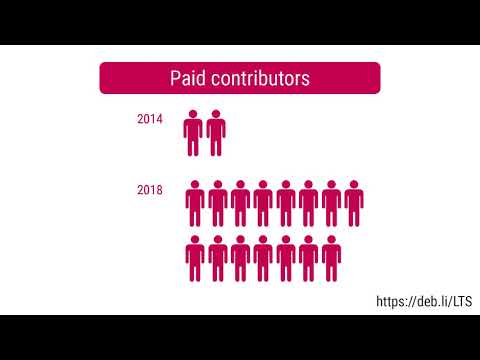
Debian I filed three bugs against: Debian LTS This month I have worked 18 hours on Debian Long Term Support (LTS) and 5 hours on its sister Extended LTS project. You can find out more about the project via the following video:
Uploads

Emmanuel Kasper: Learning openshift: a good moment to revisit awk too

I can t believe I spent all these years using only grep. Most of us know how to use awk to print the nth column of a file:
$ awk ' print $1 ' /etc/hosts
will print all IP addresses from /etc/hosts But you can also do filtering before printing the chosen column:
$ awk '$5 >= 2  print $2 ' /path/to/file
will print the second column of all lines, where the 5th column is greater than 2. That would have been hard with grep. Now I can use that to find out all deployments on my openshift cluster, where the number of current replicas is greater than 2.
$ oc get deployments --all-namespaces   awk '$5 >= 2  print $2 '
NAME
oauth-openshift
console
downloads
router-default
etcd-quorum-guard
prometheus-adapter
thanos-querier
packageserver
I know that openshift/kubernetes both have a powerful query selector syntax, but for the moment awk will do.

Next.

Previous.