Search Results: "tar"

12 September 2020

Ryan Kavanagh: Configuring OpenIKED VPNs for StrongSwan Clients

A few weeks ago I configured a road warrior VPN setup. The remote end is on a VPS running OpenBSD and OpenIKED, the VPN is an IKEv2 VPN using x509 authentication, and the local end is StrongSwan. I also configured an IKEv2 VPN between my VPSs. Here are the notes for how to do so. In all cases, to use x509 authentication, you will need to generate a bunch of certificates and keys: Fortunately, OpenIKED provides the ikectl utility to help you do so. Before going any further, you might find it useful to edit /etc/ssl/ikeca.cnf to set some reasonable defaults for your certificates. Begin by creating and installing a CA certificate:
# ikectl ca vpn create
# ikectl ca vpn install
For simplicity, I am going to assume that the you are managing your CA on the same host as one of the hosts that you want to configure for the VPN. If not, see the bit about exporting certificates at the beginning of the section on persistent host-host VPNs. Create and install a key/certificate pair for your server. Suppose for example your first server is called server1.example.org:
# ikectl ca vpn certificate server1.example.org create
# ikectl ca vpn certificate server1.example.org install

Persistent host-host VPNs For each other server that you want to use, you need to also create a key/certificate pair on the same host as the CA certificate, and then copy them over to the other server. Assuming the other server is called server2.example.org:
# ikectl ca vpn certificate server2.example.org create
# ikectl ca vpn certificate server2.example.org export
This last command will produce a tarball server2.example.org.tgz. Copy it over to server2.example.org and install it:
# tar -C /etc/iked -xzpvf server2.example.org.tgz
Next, it is time to configure iked. To do so, you will need to find some information about the certificates you just generated. On the host with the CA, run
$ cat /etc/ssl/vpn/index.txt
V       210825142056Z           01      unknown /C=US/ST=Pennsylvania/L=Pittsburgh/CN=server1.example.org/emailAddress=rak@example.org
V       210825142208Z           02      unknown /C=US/ST=Pennsylvania/L=Pittsburgh/CN=server2.example.org/emailAddress=rak@example.org
Pick one of the two hosts to play the active role (in this case, server1.example.org). Using the information you gleaned from index.txt, add the following to /etc/iked.conf, filling in the srcid and dstid fields appropriately.
ikev2 'server1_server2_active' active esp from server1.example.org to server2.example.org \
	local server1.example.org peer server2.example.org \
	srcid '/C=US/ST=Pennsylvania/L=Pittsburgh/CN=server1.example.org/emailAddress=rak@example.org' \
	dstid '/C=US/ST=Pennsylvania/L=Pittsburgh/CN=server2.example.org/emailAddress=rak@example.org'
On the other host, add the following to /etc/iked.conf
ikev2 'server2_server1_passive' passive esp from server2.example.org to server1.example.org \
	local server2.example.org peer server1.example.org \
	srcid '/C=US/ST=Pennsylvania/L=Pittsburgh/CN=server2.example.org/emailAddress=rak@example.org' \
	dstid '/C=US/ST=Pennsylvania/L=Pittsburgh/CN=server1.example.org/emailAddress=rak@example.org'
Note that the names 'server1_server2_active' and 'server2_server1_passive' in the two stanzas do not matter and can be omitted. Reload iked on both hosts:
# ikectl reload
If everything worked out, you should see the negotiated security associations (SAs) in the output of
# ikectl show sa
On OpenBSD, you should also see some output on success or errors in the file /var/log/daemon.

For a road warrior Add the following to /etc/iked.conf on the remote end:
ikev2 'responder_x509' passive esp \
	from 0.0.0.0/0 to 10.0.1.0/24 \
	local server1.example.org peer any \
	srcid server1.example.org \
	config address 10.0.1.0/24 \
	config name-server 10.0.1.1 \
	tag "ROADW"
Configure or omit the address range and the name-server configurations to suit your needs. See iked.conf(5) for details. Reload iked:
# ikectl reload
If you are on OpenBSD and want the remote end to have an IP address, add the following to /etc/hostname.vether0, again configuring the address to suit your needs:
inet 10.0.1.1 255.255.255.0
Put the interface up:
# ifconfig vether0 up
Now create a client certificate for authentication. In my case, my road-warrior client was client.example.org:
# ikectl ca vpn certificate client.example.org create
# ikectl ca vpn certificate client.example.org export
Copy client.example.org.tgz to client and run
# tar -C /etc/ipsec.d/ -xzf client.example.org.tgz -- \
	./private/client.example.org.key \
	./certs/client.example.org.crt ./ca/ca.crt
Install StrongSwan and add the following to /etc/ipsec.conf, configuring appropriately:
ca example.org
  cacert=ca.crt
  auto=add
conn server1
  keyexchange=ikev2
  right=server1.example.org
  rightid=%server1.example.org
  rightsubnet=0.0.0.0/0
  rightauth=pubkey
  leftsourceip=%config
  leftauth=pubkey
  leftcert=client.example.org.crt
  auto=route
Add the following to /etc/ipsec.secrets:
# space is important
server1.example.org : RSA client.example.org.key
Restart StrongSwan, put the connection up, and check its status:
# ipsec restart
# ipsec up server1
# ipsec status
That should be it. Sources:

Markus Koschany: My Free Software Activities in August 2020

Welcome to gambaru.de. Here is my monthly report (+ the first week in September) that covers what I have been doing for Debian. If you re interested in Java, Games and LTS topics, this might be interesting for you. Debian Games

teeworlds
Debian Java Misc Debian LTS This was my 54. month as a paid contributor and I have been paid to work 20 hours on Debian LTS, a project started by Rapha l Hertzog. In that time I did the following: ELTS Extended Long Term Support (ELTS) is a project led by Freexian to further extend the lifetime of Debian releases. It is not an official Debian project but all Debian users benefit from it without cost. The current ELTS release is Debian 8 Jessie . This was my 27. month and I have been paid to work 14,25 hours on ELTS. Thanks for reading and see you next time.

Jelmer Vernooij: Debian Janitor: All Packages Processed with Lintian-Brush

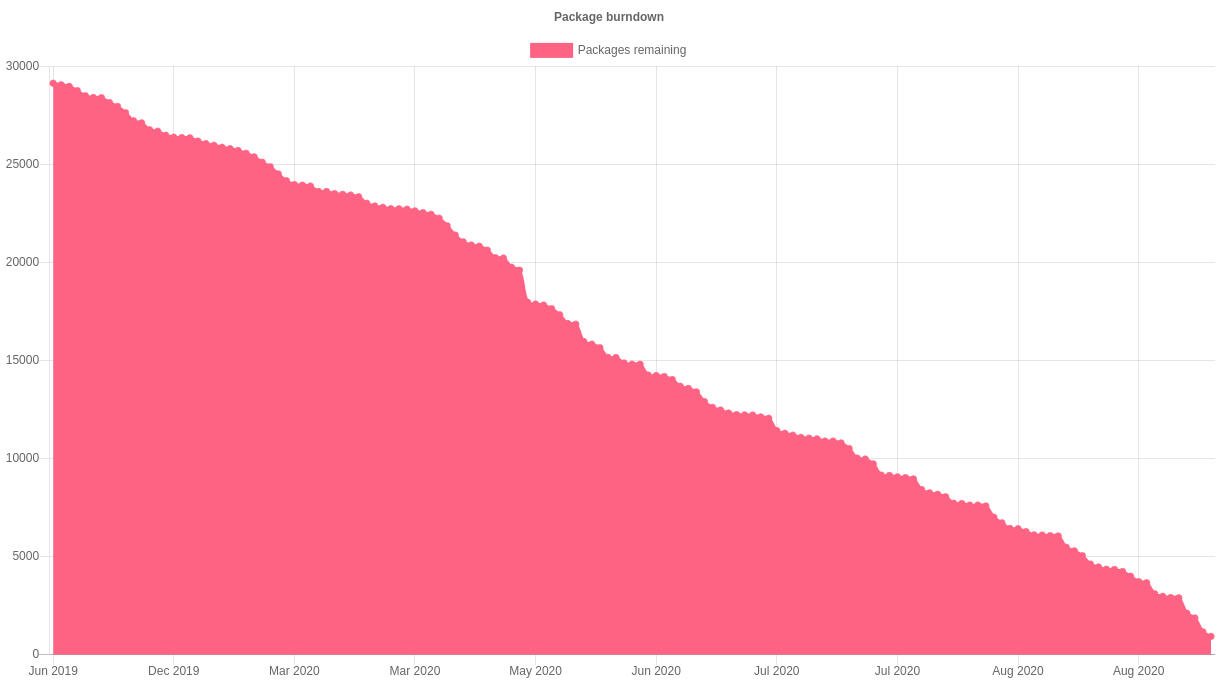
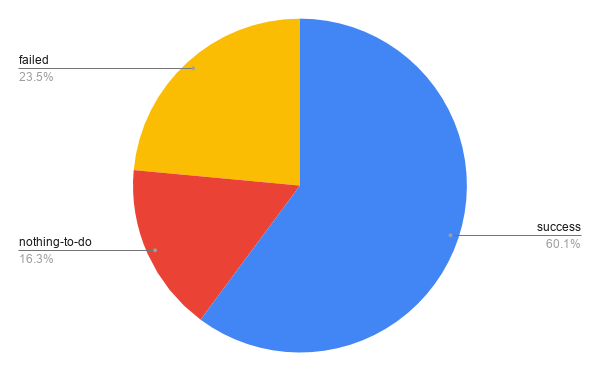
The Debian Janitor is an automated system that commits fixes for (minor) issues in Debian packages that can be fixed by software. It gradually started proposing merges in early December. The first set of changes sent out ran lintian-brush on sid packages maintained in Git. This post is part of a series about the progress of the Janitor. On 12 July 2019, the Janitor started fixing lintian issues in packages in the Debian archive. Now, a year and a half later, it has processed every one of the almost 28,000 packages at least once. Graph with Lintian Fixes Burndown As discussed two weeks ago, this has resulted in roughly 65,000 total changes. These 65,000 changes were made to a total of almost 17,000 packages. Of the remaining packages, for about 4,500 lintian-brush could not make any improvements. The rest (about 6,500) failed to be processed for one of many reasons they are e.g. not yet migrated off alioth, use uncommon formatting that can't be preserved or failed to build for one reason or another. Graph with runs by status (success, failed, nothing-to-do) Now that the entire archive has been processed, packages are prioritized based on the likelihood of a change being made to them successfully. Over the course of its existence, the Janitor has slowly gained support for a wider variety of packaging methods. For example, it can now edit the templates for some of the generated control files. Many of the packages that the janitor was unable to propose changes for the first time around are expected to be correctly handled when they are reprocessed. If you re a Debian developer, you can find the list of improvements made by the janitor in your packages by going to https://janitor.debian.net/m/.

For more information about the Janitor's lintian-fixes efforts, see the landing page.

9 September 2020

Reproducible Builds: Reproducible Builds in August 2020

Welcome to the August 2020 report from the Reproducible Builds project. In our monthly reports, we summarise the things that we have been up to over the past month. The motivation behind the Reproducible Builds effort is to ensure no flaws have been introduced from the original free software source code to the pre-compiled binaries we install on our systems. If you re interested in contributing to the project, please visit our main website.


This month, Jennifer Helsby launched a new reproduciblewheels.com website to address the lack of reproducibility of Python wheels. To quote Jennifer s accompanying explanatory blog post:
One hiccup we ve encountered in SecureDrop development is that not all Python wheels can be built reproducibly. We ship multiple (Python) projects in Debian packages, with Python dependencies included in those packages as wheels. In order for our Debian packages to be reproducible, we need that wheel build process to also be reproducible
Parallel to this, transparencylog.com was also launched, a service that verifies the contents of URLs against a publicly recorded cryptographic log. It keeps an append-only log of the cryptographic digests of all URLs it has seen. (GitHub repo) On 18th September, Bernhard M. Wiedemann will give a presentation in German, titled Wie reproducible builds Software sicherer machen ( How reproducible builds make software more secure ) at the Internet Security Digital Days 2020 conference.

Reproducible builds at DebConf20 There were a number of talks at the recent online-only DebConf20 conference on the topic of reproducible builds. Holger gave a talk titled Reproducing Bullseye in practice , focusing on independently verifying that the binaries distributed from ftp.debian.org are made from their claimed sources. It also served as a general update on the status of reproducible builds within Debian. The video (145 MB) and slides are available. There were also a number of other talks that involved Reproducible Builds too. For example, the Malayalam language mini-conference had a talk titled , ? ( I want to join Debian, what should I do? ) presented by Praveen Arimbrathodiyil, the Clojure Packaging Team BoF session led by Elana Hashman, as well as Where is Salsa CI right now? that was on the topic of Salsa, the collaborative development server that Debian uses to provide the necessary tools for package maintainers, packaging teams and so on. Jonathan Bustillos (Jathan) also gave a talk in Spanish titled Un camino verificable desde el origen hasta el binario ( A verifiable path from source to binary ). (Video, 88MB)

Development work After many years of development work, the compiler for the Rust programming language now generates reproducible binary code. This generated some general discussion on Reddit on the topic of reproducibility in general. Paul Spooren posted a request for comments to OpenWrt s openwrt-devel mailing list asking for clarification on when to raise the PKG_RELEASE identifier of a package. This is needed in order to successfully perform rebuilds in a reproducible builds context. In openSUSE, Bernhard M. Wiedemann published his monthly Reproducible Builds status update. Chris Lamb provided some comments and pointers on an upstream issue regarding the reproducibility of a Snap / SquashFS archive file. [ ]

Debian Holger Levsen identified that a large number of Debian .buildinfo build certificates have been tainted on the official Debian build servers, as these environments have files underneath the /usr/local/sbin directory [ ]. He also filed against bug for debrebuild after spotting that it can fail to download packages from snapshot.debian.org [ ]. This month, several issues were uncovered (or assisted) due to the efforts of reproducible builds. For instance, Debian bug #968710 was filed by Simon McVittie, which describes a problem with detached debug symbol files (required to generate a traceback) that is unlikely to have been discovered without reproducible builds. In addition, Jelmer Vernooij called attention that the new Debian Janitor tool is using the property of reproducibility (as well as diffoscope when applying archive-wide changes to Debian:
New merge proposals also include a link to the diffoscope diff between a vanilla build and the build with changes. Unfortunately these can be a bit noisy for packages that are not reproducible yet, due to the difference in build environment between the two builds. [ ]
56 reviews of Debian packages were added, 38 were updated and 24 were removed this month adding to our knowledge about identified issues. Specifically, Chris Lamb added and categorised the nondeterministic_version_generated_by_python_param and the lessc_nondeterministic_keys toolchain issues. [ ][ ] Holger Levsen sponsored Lukas Puehringer s upload of the python-securesystemslib pacage, which is a dependency of in-toto, a framework to secure the integrity of software supply chains. [ ] Lastly, Chris Lamb further refined his merge request against the debian-installer component to allow all arguments from sources.list files (such as [check-valid-until=no]) in order that we can test the reproducibility of the installer images on the Reproducible Builds own testing infrastructure and sent a ping to the team that maintains that code.

Upstream patches The Reproducible Builds project detects, dissects and attempts to fix as many currently-unreproducible packages as possible. We endeavour to send all of our patches upstream where appropriate. This month, we wrote a large number of these patches, including:

diffoscope diffoscope is our in-depth and content-aware diff utility that can not only locate and diagnose reproducibility issues, it provides human-readable diffs of all kinds. In August, Chris Lamb made the following changes to diffoscope, including preparing and uploading versions 155, 156, 157 and 158 to Debian:
  • New features:
    • Support extracting data of PGP signed data. (#214)
    • Try files named .pgp against pgpdump(1) to determine whether they are Pretty Good Privacy (PGP) files. (#211)
    • Support multiple options for all file extension matching. [ ]
  • Bug fixes:
    • Don t raise an exception when we encounter XML files with <!ENTITY> declarations inside the Document Type Definition (DTD), or when a DTD or entity references an external resource. (#212)
    • pgpdump(1) can successfully parse some binary files, so check that the parsed output contains something sensible before accepting it. [ ]
    • Temporarily drop gnumeric from the Debian build-dependencies as it has been removed from the testing distribution. (#968742)
    • Correctly use fallback_recognises to prevent matching .xsb binary XML files.
    • Correct identify signed PGP files as file(1) returns data . (#211)
  • Logging improvements:
    • Emit a message when ppudump version does not match our file header. [ ]
    • Don t use Python s repr(object) output in Calling external command messages. [ ]
    • Include the filename in the not identified by any comparator message. [ ]
  • Codebase improvements:
    • Bump Python requirement from 3.6 to 3.7. Most distributions are either shipping with Python 3.5 or 3.7, so supporting 3.6 is not only somewhat unnecessary but also cumbersome to test locally. [ ]
    • Drop some unused imports [ ], drop an unnecessary dictionary comprehensions [ ] and some unnecessary control flow [ ].
    • Correct typo of output in a comment. [ ]
  • Release process:
    • Move generation of debian/tests/control to an external script. [ ]
    • Add some URLs for the site that will appear on PyPI.org. [ ]
    • Update author and author email in setup.py for PyPI.org and similar. [ ]
  • Testsuite improvements:
    • Update PPU tests for compatibility with Free Pascal versions 3.2.0 or greater. (#968124)
    • Mark that our identification test for .ppu files requires ppudump version 3.2.0 or higher. [ ]
    • Add an assert_diff helper that loads and compares a fixture output. [ ][ ][ ][ ]
  • Misc:
In addition, Mattia Rizzolo documented in setup.py that diffoscope works with Python version 3.8 [ ] and Frazer Clews applied some Pylint suggestions [ ] and removed some deprecated methods [ ].

Website This month, Chris Lamb updated the main Reproducible Builds website and documentation to:
  • Clarify & fix a few entries on the who page [ ][ ] and ensure that images do not get to large on some viewports [ ].
  • Clarify use of a pronoun re. Conservancy. [ ]
  • Use View all our monthly reports over View all monthly reports . [ ]
  • Move a is a suffix out of the link target on the SOURCE_DATE_EPOCH age. [ ]
In addition, Javier Jard n added the freedesktop-sdk project [ ] and Kushal Das added SecureDrop project [ ] to our projects page. Lastly, Michael P hn added internationalisation and translation support with help from Hans-Christoph Steiner [ ].

Testing framework The Reproducible Builds project operate a Jenkins-based testing framework to power tests.reproducible-builds.org. This month, Holger Levsen made the following changes:
  • System health checks:
    • Improve explanation how the status and scores are calculated. [ ][ ]
    • Update and condense view of detected issues. [ ][ ]
    • Query the canonical configuration file to determine whether a job is disabled instead of duplicating/hardcoding this. [ ]
    • Detect several problems when updating the status of reporting-oriented metapackage sets. [ ]
    • Detect when diffoscope is not installable [ ] and failures in DNS resolution [ ].
  • Debian:
    • Update the URL to the Debian security team bug tracker s Git repository. [ ]
    • Reschedule the unstable and bullseye distributions often for the arm64 architecture. [ ]
    • Schedule buster less often for armhf. [ ][ ][ ]
    • Force the build of certain packages in the work-in-progress package rebuilder. [ ][ ]
    • Only update the stretch and buster base build images when necessary. [ ]
  • Other distributions:
    • For F-Droid, trigger jobs by commits, not by a timer. [ ]
    • Disable the Archlinux HTML page generation job as it has never worked. [ ]
    • Disable the alternative OpenWrt rebuilder jobs. [ ]
  • Misc;
Many other changes were made too, including:
  • Chris Lamb:
    • Use <pre> HTML tags when dumping fixed-width debugging data in the self-serve package scheduler. [ ]
  • Mattia Rizzolo:
  • Vagrant Cascadian:
    • Mark that the u-boot Universal Boot Loader should not build architecture independent packages on the arm64 architecture anymore. [ ]
Finally, build node maintenance was performed by Holger Levsen [ ], Mattia Rizzolo [ ][ ] and Vagrant Cascadian [ ][ ][ ][ ]

Mailing list On our mailing list this month, Leo Wandersleb sent a message to the list after he was wondering how to expand his WalletScrutiny.com project (which aims to improve the security of Bitcoin wallets) from Android wallets to also monitor Linux wallets as well:
If you think you know how to spread the word about reproducibility in the context of Bitcoin wallets through WalletScrutiny, your contributions are highly welcome on this PR [ ]
Julien Lepiller posted to the list linking to a blog post by Tavis Ormandy titled You don t need reproducible builds. Morten Linderud (foxboron) responded with a clear rebuttal that Tavis was only considering the narrow use-case of proprietary vendors and closed-source software. He additionally noted that the criticism that reproducible builds cannot prevent against backdoors being deliberately introduced into the upstream source ( bugdoors ) are decidedly (and deliberately) outside the scope of reproducible builds to begin with. Chris Lamb included the Reproducible Builds mailing list in a wider discussion regarding a tentative proposal to include .buildinfo files in .deb packages, adding his remarks regarding requiring a custom tool in order to determine whether generated build artifacts are identical in a reproducible context. [ ] Jonathan Bustillos (Jathan) posted a quick email to the list requesting whether there was a list of To do tasks in Reproducible Builds. Lastly, Chris Lamb responded at length to a query regarding the status of reproducible builds for Debian ISO or installation images. He noted that most of the technical work has been performed but there are at least four issues until they can be generally advertised as such . He pointed that the privacy-oriented Tails operation system, which is based directly on Debian, has had reproducible builds for a number of years now. [ ]

If you are interested in contributing to the Reproducible Builds project, please visit our Contribute page on our website. However, you can get in touch with us via:

Gunnar Wolf: RPi 4 + 8GB, Finally, USB-functional!

So Finally, kernel 5.8 entered the Debian Unstable repositories. This means that I got my Raspberry image from their usual location and was able to type the following, using only my old trusty USB keyboard: So finally, the greatest and meanest Raspberry is fully supported with a pure Debian image! (only tarnished by the nonfree raspi-firmware package. Oh, in case someone was still wondering The images generated follow the stable release. Only the kernel and firmware are installed from unstable. If / when kernel 5.8 enters Backports, I will reduce the noise of adding a different suit to the sources.list.

7 September 2020

Arturo Borrero Gonz lez: Debconf 2020 online, summary

Debconf2020 logo Debconf2020 took place when I was on personal vacations time. But anyway I m lucky enough that my company, the Wikimedia Foundation, paid the conference registration fee for me and allowed me to take the time (after my vacations) to watch recordings from the conference. This is my first time attending (or watching) a full-online conference, and I was curious to see first hand how it would develop. I was greatly surprised to see it worked pretty nicely, so kudos to the organization, video team, volunteers, etc! What follows is my summary of the conference, from the different sessions and talks I watched (again, none of them live but recordings). The first thing I saw was the Welcome to Debconf 2020 opening session. It is obvious the video was made with lots of love, I found it entertaining and useful. I love it :-) Then I watched the BoF Can Free Software improve social equality. It was introduced and moderated by Hong Phuc Dang. Several participants, about 10 people, shared their visions on the interaction between open source projects and communities. I m pretty much aware of the interesting social advancement that FLOSS can enable in communities, but sometimes is not so easy, it may also present challenges and barriers. The BoF was joined by many people from the Asia Pacific region, and for me, it has been very interesting to take a step back from the usual western vision of this topic. Anyway, about the session itself, I have the feeling the participants may have spent too much time on presentations, sharing their local stories (which are interesting, don t get me wrong), perhaps leaving little room for actual proposal discussions or the like. Next I watched the Bits from the DPL talk. In the session, Jonathan Carter goes over several topics affecting the project, both internally and externally. It was interesting to know more about the status of the project from a high level perspective, as an organization, including subjects such as money, common project problems, future issues we are anticipating, the social aspect of the project, etc. The Lightning Talks session grabbed my attention. It is usually very funny to watch and not as dense as other talks. I m glad I watched this as it includes some interesting talks, ranging from HAM radios (I love them!), to personal projects to help in certain tasks, and even some general reflections about life. Just when I m writing this very sentence, the video for the Come and meet your Debian Publicity team! talk has been uploaded. This team does an incredible work in keeping project information flowing, and social networks up-to-date and alive. Mind that the work of this team is mostly non-engineering, but still, is a vital part of the project. The folks in session explain what the team does, and they also discuss how new people can contribute, the different challenges related to language barriers, etc. I have to admit I also started watching a couple other sessions that turned out to don t be interesting to me (and therefore I didn t finish the video). Also, I tried to watch a couple more sessions that didn t publish their video recording just yet, for example the When We Virtualize the Whole Internet talk by Sam Hartman. Will check again in a couple of days. It is a real pleasure the video recordings from the conference are made available online. One can join the conference anytime (like I m doing!) and watch the sessions at any pace at any time. The video archive is big, I won t be able to go over all of it. I won t lie, I still have some pending videos to watch from last year Debconf2019 :-)

6 September 2020

Enrico Zini: Learning resources links

Cognitive bias cheat sheet has another elegant infographic summarising cognitive biases. On this subject, you might want to also check out 15 Insane Things That Correlate With Each Other. Get started Learning Music (Beta) has a nice interactive introduction to music making. If you leave in a block of flats and decide to learn music making, please use headphones when experimenting. Our neighbour, sadly, didn't. You can also learn photography with Photography for Beginners (The Ultimate Guide in 2020) and somewhat related, Understanding Aspect Ratios: A Comprehensive Guide

Jonathan Carter: DebConf 20 Online

This week, last week, Last month, I attended DebConf 20 Online. It was the first DebConf to be held entirely online, but it s the 7th DebConf I ve attended from home. My first one was DebConf7. Initially I mostly started watching the videos because I wanted to learn more about packaging. I had just figured out how to create binary packages by hand, and have read through the new maintainers guide, but a lot of it was still a mystery. By the end of DebConf7 my grasp of source packages was still a bit thin, but other than that, I ended up learning a lot more about Debian during DebConf7 than I had hoped for, and over the years, the quality of online participation for each DebConf has varied a lot. I think having a completely online DebConf, where everyone was remote, helped raise awareness about how important it is to make the remote experience work well, and I hope that it will make people who run sessions at physical events in the future consider those who are following remotely a bit more. During some BoF sessions, it was clear that some teams haven t talked to each other face to face in a while, and I heard at least 3 teams who said This was nice, we should do more regular video calls! . Our usual communication methods of e-mail lists and IRC serve us quite well, for the most part, but sometimes having an actual conversation with the whole team present at the same time can do wonders for dealing with many kind of issues that is just always hard to deal with in text based mediums. There were three main languages used in this DebConf. We ve had more than one language at a DebConf before, but as far as I know it s the first time that we had multiple talks over 3 languages (English, Malayalam and Spanish). It was also impressive how the DebConf team managed to send out DebConf t-shirts all around the world and in time before the conference! To my knowledge only 2 people didn t get theirs in time due to customs. I already posted about the new loop that we worked on for this DebConf. It was an unintended effect that we ended up having lots of shout-outs which ended up giving this online DebConf a much more warmer, personal feel to it than if we didn t have it. I m definitely planning to keep on improving on that for the future, for online and in-person events. There were also some other new stuff from the video team during this DebConf, we ll try to co-ordinate a blog post about that once the dust settled. Thanks to everyone for making this DebConf special, even though it was virtual!

Thorsten Alteholz: My Debian Activities in August 2020

FTP master This month I accepted 159 packages and rejected 16. The overall number of packages that got accepted was 172. Debian LTS This was my seventy-fourth month that I did some work for the Debian LTS initiative, started by Raphael Hertzog at Freexian. This month my all in all workload has been 21.75h. During that time I did LTS uploads of: I also started to work on curl but did not upload a fixed version yet. As usual, testing the package takes up some time. Last but not least I did some days of frontdesk duties. Debian ELTS This month was the twenty sixth ELTS month. During my allocated time I uploaded: Like in LTS, I also started to work on curl and encountered the same problems as in LTS above. Last but not least I did some days of frontdesk duties. Other stuff This month I found again some time for other Debian work and uploaded packages to fix bugs, mainly around gcc10: I also uploaded new upstream versions of: All package called *osmo* are developed by the Osmocom project, that is about Open Source MObile COMmunication. They are really doing a great job and I apologize that my uploads of new versions are mostly far behind their development. Some of the uploads are related to new packages:

Molly de Blanc: NYU VPN

I needed to setup a VPN in order to access my readings for class. The instructions for Linux are located: https://nyu.service-now.com/sp?id=kb_article_view&sysparm_article=KB0014932 After you download the VPN client of your choice (they recommend Cisco AnyConnect), connect to: vpn.nyu.edu. It will ask for two passwords: your NYU username and password and a multi-factor authentication (MFA) code from Duo. Use the Duo. See below for stuff on Duo. Hit connect and viola, you can connect to the VPN.

Duo Authentication Setup Go to: https://start.nyu.edu and follow the instructions for MFA. They ll tell you that a smart phone is the most secure method of setting up. I am skeptical. Install the Duo Authentication App on your phone, enter your phone number into the NYU web page (off of ) and it will send a thing to your phone to connect it. Commentary Okay, I have to complain at least a little bit about this. I had to guess what the VPN address was because the instructions are for NYU Shanghai. I also had to install the VPN client using the terminal. These sorts of things make it harder for people to use Linux. Boo.

Ben Armstrong: Dronefly relicensed under copyleft licenses

To ensure Dronefly always remains free, the Dronefly project has been relicensed under two copyleft licenses. Read the license change and learn more about copyleft at these links. I was prompted to make this change after a recent incident in the Red DiscordBot development community that made me reconsider my prior position that the liberal MIT license was best for our project. While on the face of it, making your license as liberal as possible might seem like the most generous and hassle-free way to license any project, I was shocked into the realization that its liberality was also its fatal flaw: all is well and good so long as everyone is being cooperative, but it does not afford any protection to developers or users should things suddenly go sideways in how a project is run. A copyleft license is the best way to avoid such issues. In this incident a sad story of conflict between developers I respect on both sides of the rift, and owe a debt to for what they ve taught me three cogs we had come to depend on suddenly stopped being viable for us to use due to changes to the license & the code. Effectively, those cogs became unsupported and unsupportable. To avoid any such future disaster with the Dronefly project, I started shopping for a new license that would protect developers and users alike from similarly losing support, or losing control of their contributions. I owe thanks to Dale Floer, a team member who early on advised me the AGPL might be a better fit, and later was helpful in selecting the doc license and encouraging me to follow through. We ran the new licenses by each contributor and arrived at this consensus: the AGPL is best suited for our server-based code, and CC-BY-SA is best suited for our documentation. The relicensing was made official this morning. On Discord platform alternatives You might well question what I, a Debian developer steeped in free software culture and otherwise in agreement with its principles, am doing encouraging a community to grow on the proprietary Discord platform! I have no satisfying answer to that. I explained when I introduced my project here some of the backstory, but that s more of an account of its beginnings than justification for it to continue on this platform. Honestly, all I can offer is a rather dissatisfying it seemed like the right thing to do at the time. Time will tell whether we could successfully move off of it to a freedom-respecting and privacy-respecting alternative chat platform that is both socially and technically viable to migrate to. That platform would ideally: I m intrigued by Matrix and wonder if it provides some or all of the above in its current form. Are you a developer writing bots for this platform? If so, I especially want to hear from you in the comments about your experience. Or in any case, if you ve been there before if you ve faced the same issue with your community and have a success story to share, I would love to hear from you.

2 September 2020

Kees Cook: security things in Linux v5.6

Previously: v5.5. Linux v5.6 was released back in March. Here s my quick summary of various features that caught my attention: WireGuard
The widely used WireGuard VPN has been out-of-tree for a very long time. After 3 1/2 years since its initial upstream RFC, Ard Biesheuvel and Jason Donenfeld finished the work getting all the crypto prerequisites sorted out for the v5.5 kernel. For this release, Jason has gotten WireGuard itself landed. It was a twisty road, and I m grateful to everyone involved for sticking it out and navigating the compromises and alternative solutions. openat2() syscall and RESOLVE_* flags
Aleksa Sarai has added a number of important path resolution scoping options to the kernel s open() handling, covering things like not walking above a specific point in a path hierarchy (RESOLVE_BENEATH), disabling the resolution of various magic links (RESOLVE_NO_MAGICLINKS) in procfs (e.g. /proc/$pid/exe) and other pseudo-filesystems, and treating a given lookup as happening relative to a different root directory (as if it were in a chroot, RESOLVE_IN_ROOT). As part of this, it became clear that there wasn t a way to correctly extend the existing openat() syscall, so he added openat2() (which is a good example of the efforts being made to codify Extensible Syscall arguments). The RESOLVE_* set of flags also cover prior behaviors like RESOLVE_NO_XDEV and RESOLVE_NO_SYMLINKS. pidfd_getfd() syscall
In the continuing growth of the much-needed pidfd APIs, Sargun Dhillon has added the pidfd_getfd() syscall which is a way to gain access to file descriptors of a process in a race-less way (or when /proc is not mounted). Before, it wasn t always possible make sure that opening file descriptors via /proc/$pid/fd/$N was actually going to be associated with the correct PID. Much more detail about this has been written up at LWN. openat() via io_uring
With my attack surface reduction hat on, I remain personally suspicious of the io_uring() family of APIs, but I can t deny their utility for certain kinds of workloads. Being able to pipeline reads and writes without the overhead of actually making syscalls is pretty great for performance. Jens Axboe has added the IORING_OP_OPENAT command so that existing io_urings can open files to be added on the fly to the mapping of available read/write targets of a given io_uring. While LSMs are still happily able to intercept these actions, I remain wary of the growing syscall multiplexer that io_uring is becoming. I am, of course, glad to see that it has a comprehensive (if out of tree ) test suite as part of liburing. removal of blocking random pool
After making algorithmic changes to obviate separate entropy pools for random numbers, Andy Lutomirski removed the blocking random pool. This simplifies the kernel pRNG code significantly without compromising the userspace interfaces designed to fetch cryptographically secure random numbers. To quote Andy, This series should not break any existing programs. /dev/urandom is unchanged. /dev/random will still block just after booting, but it will block less than it used to. See LWN for more details on the history and discussion of the series. arm64 support for on-chip RNG
Mark Brown added support for the future ARMv8.5 s RNG (SYS_RNDR_EL0), which is, from the kernel s perspective, similar to x86 s RDRAND instruction. This will provide a bootloader-independent way to add entropy to the kernel s pRNG for early boot randomness (e.g. stack canary values, memory ASLR offsets, etc). Until folks are running on ARMv8.5 systems, they can continue to depend on the bootloader for randomness (via the UEFI RNG interface) on arm64. arm64 E0PD
Mark Brown added support for the future ARMv8.5 s E0PD feature (TCR_E0PD1), which causes all memory accesses from userspace into kernel space to fault in constant time. This is an attempt to remove any possible timing side-channel signals when probing kernel memory layout from userspace, as an alternative way to protect against Meltdown-style attacks. The expectation is that E0PD would be used instead of the more expensive Kernel Page Table Isolation (KPTI) features on arm64. powerpc32 VMAP_STACK
Christophe Leroy added VMAP_STACK support to powerpc32, joining x86, arm64, and s390. This helps protect against the various classes of attacks that depend on exhausting the kernel stack in order to collide with neighboring kernel stacks. (Another common target, the sensitive thread_info, had already been moved away from the bottom of the stack by Christophe Leroy in Linux v5.1.) generic Page Table dumping
Related to RISCV s work to add page table dumping (via /sys/fs/debug/kernel_page_tables), Steven Price extracted the existing implementations from multiple architectures and created a common page table dumping framework (and then refactored all the other architectures to use it). I m delighted to have this because I still remember when not having a working page table dumper for ARM delayed me for a while when trying to implement upstream kernel memory protections there. Anything that makes it easier for architectures to get their kernel memory protection working correctly makes me happy. That s in for now; let me know if there s anything you think I missed. Next up: Linux v5.7.

2020, Kees Cook. This work is licensed under a Creative Commons Attribution-ShareAlike 4.0 License.
CC BY-SA 4.0

Vincent Bernat: Syncing MySQL tables with a custom Ansible module

The community.mysql collection from Ansible Galaxy provides a mysql_query module to run arbitrary MySQL queries. Unfortunately, it does not support check mode nor the --diff flag. It is also unable to tell if there was a change. Let s write a specific Ansible module to workaround these issues.

Notice I recommend that you read Writing a custom Ansible module as an introduction.

Code The module has the following signature and it executes the provided SQL statements in a single transaction. It needs a list of the affected tables to be able to detect and show the changes.
mysql_sync:
  sql:  
    DELETE FROM rules WHERE name LIKE 'CMDB:%';
    INSERT INTO rules (name, rule) VALUES
      ('CMDB: check for cats', ':is(object, "CAT")'),
      ('CMDB: check for dogs', ':is(object, "DOG")');
    REPLACE INTO webhooks (name, url) VALUES
      ('OpsGenie', 'https://opsgenie/something/token'),
      ('Slack', 'https://slack/something/token');
  user: monitoring
  password: Yooghah5
  database: monitoring
  tables:
    - rules
    - webhooks

Prerequisites The module does not enforce idempotency, but it is expected you provide appropriate SQL queries. In the above example, idempotency is achieved because the content of the rules table is deleted and recreated from scratch while the rows in the webhooks table are replaced if they already exist. You need the PyMySQL package.

Module definition Starting from the skeleton described in the previous article, here is the module definition:
module_args = dict(
    sql=dict(type='str', required=True),
    user=dict(type='str', required=True),
    password=dict(type='str', required=True, no_log=True),
    database=dict(type='str', required=True),
    tables=dict(type='list', required=True, elements='str'),
)
result = dict(
    changed=False
)
module = AnsibleModule(
    argument_spec=module_args,
    supports_check_mode=True
)
The password is marked with no_log to ensure it won t be displayed or stored, notably when ansible-playbook runs in verbose mode. There is no host option as the module is executed on the MySQL host. Strong authentication using certificates is not implemented either. This matches our goal with custom modules: only implement what you strictly need.

Getting the current rows The next step is to retrieve the records currently in the database. The got dictionary is a mapping from table names to the list of rows they contain:
got =  
tables = module.params['tables']
connection = pymysql.connect(
    user=module.params['user'],
    password=module.params['password'],
    db=module.params['database'],
    charset='utf8mb4',
    cursorclass=pymysql.cursors.DictCursor
)
with connection.cursor() as cursor:
    for table in tables:
        cursor.execute("SELECT * FROM  ".format(table))
        got[table] = cursor.fetchall()

Computing the changes Let s now build the wanted dictionary. The trick is to execute the SQL statements in a transaction without issuing a final commit. The changes will be invisible1 to other readers and we can compare the final rows with the rows collected in got:
wanted =  
sql = module.params['sql']
statements = [statement.strip()
              for statement in sql.split(";\n")
              if statement.strip()]
with connection.cursor() as cursor:
    for statement in statements:
        try:
            cursor.execute(statement)
        except pymysql.OperationalError as err:
            code, message = err.args
            result['msg'] = "MySQL error for  :  ".format(
                statement,
                message)
            module.fail_json(**result)
    for table in tables:
        cursor.execute("SELECT * FROM  ".format(table))
        wanted[table] = cursor.fetchall()
The first for loop executes each statement. On error, we return a helpful message containing the faulty one. The second for loop records the final rows of each table in wanted.

Applying changes Back to the skeleton described in the previous article, the last step is to apply the changes if there is a difference between got and wanted when not running with check mode. The diff object is a bit more elaborate as it is built table by table. This enables Ansible to display the name of each table before the diff representation:
if got != wanted:
    result['changed'] = True
    result['diff'] = [dict(
        before_header=table,
        after_header=table,
        before=yaml.safe_dump(got[table]),
        after=yaml.safe_dump(wanted[table]))
                      for table in tables
                      if got[table] != wanted[table]]
if module.check_mode or not result['changed']:
    module.exit_json(**result)
Applying the changes is quite trivial: just commit them! Otherwise, they are lost when the module exits.
connection.commit()

The complete code is available on GitHub. Compared to the mysql_query module, this one supports the check mode, signals correctly if there is a change and displays the differences. However, it should not be used with huge tables, as it would try to load them in memory.

  1. The tables need to use the InnoDB storage engine. Moreover, MySQL does not know how to use transactions with DDL statements: do not modify table definitions!

Vincent Bernat: Syncing SSH keys on Cisco IOS-XR with a custom Ansible module

The cisco.iosxr collection from Ansible Galaxy provides an iosxr_user module to manage local users, along with their SSH keys. However, the module is quite slow, do not display a diff for changed SSH keys, never signal change when a key is modified, and does not delete obsolete keys. Let s write a custom Ansible module managing only the SSH keys while fixing these issues.

Notice I recommend that you read Writing a custom Ansible module as an introduction.

How to add an SSH key to a user Adding SSH keys to users in Cisco IOS-XR is quite undocumented. First, you need to encode the key with the ssh-rsa key ASN.1 format, like an OpenSSH public key, but without the base64-encoding:
$ awk ' print $2 ' id_rsa.pub \
      base64 -d \
    > publickey_vincent.raw
Then, you upload the key with SCP to harddisk:/publickey_vincent.raw and import it for the current user with the following IOS command:
crypto key import authentication rsa harddisk:/publickey_vincent.b64
However, if you want to import a key for another user, you need to be part of the root-system group:
username vincent
 group root-lr
 group root-system
With the following admin command, you can attach a key to another user:
admin crypto key import authentication rsa username cedric harddisk:/publickey_cedric.b64

Code The module has the following signature and it installs the specified key for each user and remove keys from retired users the ones we do not specify.
iosxr_users:
  keys:
    vincent: ssh-rsa AAAAB3NzaC1yc2EAA[ ]ymh+YrVWLZMJR
    cedric:  ssh-rsa AAAAB3NzaC1yc2EAA[ ]RShPA8w/8eC0n

Prerequisites Unlike the iosxr_user module, our custom module only handles SSH keys, one per user. Therefore, the user definitions have to already exist in the running configuration.1 Moreover, the user defined in ansible_user needs to be in the root-system group. The cisco.iosxr collection must also be installed as the module relies on its code. When running the module, ansible_connection needs to be set to network_cli and ansible_network_os to iosxr. These variables are usually defined in the inventory.

Module definition Starting from the skeleton described in the previous article, we define the module:
module_args = dict(
    keys=dict(type='dict', elements='str', required=True),
)
module = AnsibleModule(
    argument_spec=module_args,
    supports_check_mode=True
)
result = dict(
    changed=False
)

Getting the installed keys The next step is to retrieve the keys currently installed. This can be done with the following command:
# show crypto key authentication rsa all
Key label: vincent
Type     : RSA public key authentication
Size     : 2048
Imported : 16:17:08 UTC Tue Aug 11 2020
Data     :
 30820122 300D0609 2A864886 F70D0101 01050003 82010F00 3082010A 02820101
 00D81E5B A73D82F3 77B1E4B5 949FB245 60FB9167 7CD03AB7 ADDE7AFE A0B83174
 A33EC0E6 1C887E02 2338367A 8A1DB0CE 0C3FBC51 15723AEB 07F301A4 B1A9961A
 2D00DBBD 2ABFC831 B0B25932 05B3BC30 B9514EA1 3DC22CBD DDCA6F02 026DBBB6
 EE3CFADA AFA86F52 CAE7620D 17C3582B 4422D24F D68698A5 52ED1E9E 8E41F062
 7DE81015 F33AD486 C14D0BB1 68C65259 F9FD8A37 8DE52ED0 7B36E005 8C58516B
 7EA6C29A EEE0833B 42714618 50B3FFAC 15DBE3EF 8DA5D337 68DAECB9 904DE520
 2D627CEA 67E6434F E974CF6D 952AB2AB F074FBA3 3FB9B9CC A0CD0ADC 6E0CDB2A
 6A1CFEBA E97AF5A9 1FE41F6C 92E1F522 673E1A5F 69C68E11 4A13C0F3 0FFC782D
 27020301 0001
[ ]
ansible_collections.cisco.iosxr.plugins.module_utils.network.iosxr.iosxr contains a run_commands() function we can use:
command = "show crypto key authentication rsa all"
out = run_commands(module, command)
out = out[0].replace(' \n', '\n')
A common library to parse a command output is textfsm: a Python module using a template-based state machine for parsing semi-formatted text.
template = r"""
Value Required Label (\w+)
Value Required,List Data ([A-F0-9 ]+)
Start
 ^Key label: $ Label 
 ^Data\s+: -> GetData
GetData
 ^ $ Data 
 ^$$ -> Record Start
""".lstrip()
re_table = textfsm.TextFSM(io.StringIO(template))
got =  data[0]: "".join(data[1]).replace(' ', '')
       for data in re_table.ParseText(out) 
got is a dictionary associating key labels, considered as usernames, with a hexadecimal representation of the public key currently installed. It looks like this:
>>> pprint(got)
 'alfred': '30820122300D0609[ ]6F0203010001',
 'cedric': '30820122300D0609[ ]710203010001',
 'vincent': '30820122300D0609[ ]270203010001' 

Comparing with the wanted keys Let s now build the wanted dictionary using the same structure. In module.params['keys'], we have a dictionary associating usernames to public SSH keys in the OpenSSH format:
>>> pprint(module.params['keys'])
 'cedric': 'ssh-rsa AAAAB3NzaC1yc2[ ]',
 'vincent': 'ssh-rsa AAAAB3NzaC1yc2[ ]' 
We need to convert these keys in the same hexadecimal representation used by Cisco above. The ssh-keygen command and some glue can do the conversion:2
$ ssh-keygen -f id_rsa.pub -e -mPKCS8 \
     grep -v '^---' \
     base64 -d \
     hexdump -e '4/1 "%0.2X"'
30820122300D06092[ ]782D270203010001
Assuming we have a ssh2cisco() function doing that, we can build the wanted dictionary:
wanted =  k: ssh2cisco(v)
          for k, v in module.params['keys'].items() 

Applying changes Back to the skeleton described in the previous article, the last step is to apply the changes if there is a difference between got and wanted when not running with check mode. The part comparing got and wanted is taken verbatim from the skeleton module:
if got != wanted:
    result['changed'] = True
    result['diff'] = dict(
        before=yaml.safe_dump(got),
        after=yaml.safe_dump(wanted)
    )
if module.check_mode or not result['changed']:
    module.exit_json(**result)
Let s copy the new or changed keys and attach them to their respective users. For this purpose, we reuse the get_connection() and copy_file() functions from ansible_collections.cisco.iosxr.plugins.module_utils.network.iosxr.iosxr.
conn = get_connection(module)
for user in wanted:
    if user not in got or wanted[user] != got[user]:
        dst = f"/harddisk:/publickey_ user .raw"
        with tempfile.NamedTemporaryFile() as src:
            decoded = base64.b64decode(
                module.params['keys'][user].split()[1])
            src.write(decoded)
            src.flush()
            copy_file(module, src.name, dst)
    command = ("admin crypto key import authentication rsa "
               f"username  user   dst ")
    conn.send_command(command, prompt="yes/no", answer="yes")
Then, we remove obsolete keys:
for user in got:
    if user not in wanted:
        command = ("admin crypto key zeroize authentication rsa "
                   f"username  user ")
        conn.send_command(command, prompt="yes/no", answer="yes")

The complete code is available on GitHub. Compared to the iosxr_user module, this one displays a diff when running with --diff, correctly signals a change, is faster, 3 and deletes unwanted SSH keys. However, it is unable to create users and cannot configure passwords or multiple SSH keys.

  1. In our environment, the Ansible playbook pushes a full configuration, including the user definitions. Then, it synchronizes the SSH keys.
  2. Despite the argument provided to ssh-keygen, the format used by Cisco is not PKCS#8. This is the ASN.1 representation of a Subject Public Key Info structure, as defined in RFC 2459. Moreover, PKCS#8 is a format for a private key, not a public one.
  3. The main factors for being faster are:
    • not creating users, and
    • not reuploading existing SSH keys.

Vincent Bernat: Writing a custom Ansible module

Ansible ships a lot of modules you can combine for your configuration management needs. However, the quality of these modules may vary widely. Sometimes, it may be quicker and more robust to write your own module instead of shopping and assembling existing ones.1 In my opinion, a robust module exhibits the following characteristics: In a nutshell, it means the module can run with --diff --check and shows the changes it would apply. When run twice in a row, the second run won t apply or signal changes. The last bullet point suggests the module should be able to delete outdated objects configured during previous runs.2 The module code should be minimal and tailored to your needs. Making the module generic for use by other users is a non-goal. Less code usually means less bugs and easier to understand. I do not cover testing here. It is undeniably a good practice, but it requires a significant effort. In my opinion, it is preferable to have a well written module matching the above characteristics rather than a module that is well tested but without them or a module requiring further (untested) assembly to meet your needs.

Module skeleton Ansible documentation contains instructions to build a module, along with some best practices. As one of our non-goal is to distribute it, we choose to take some shortcuts and skip some of the boilerplate. Let s assume we build a module with the following signature:
custom_module:
  user: someone
  password: something
  data: "some random string"
There are various locations you can put a module in Ansible. A common possibility is to include it into a role. In a library/ subdirectory, create an empty __init__.py file and a custom_module.py file with the following code:3
#!/usr/bin/python
import yaml
from ansible.module_utils.basic import AnsibleModule
def main():
    # Define options accepted by the module.  
    module_args = dict(
        user=dict(type='str', required=True),
        password=dict(type='str', required=True, no_log=True),
        data=dict(type='str', required=True),
    )
    module = AnsibleModule(
        argument_spec=module_args,
        supports_check_mode=True
    )
    result = dict(
        changed=False
    )
    got =  
    wanted =  
    # Populate both  got  and  wanted .  
    # [...]
    if got != wanted:
        result['changed'] = True
        result['diff'] = dict(
            before=yaml.safe_dump(got),
            after=yaml.safe_dump(wanted)
        )
    if module.check_mode or not result['changed']:
        module.exit_json(**result)
    # Apply changes.  
    # [...]
    module.exit_json(**result)
if __name__ == '__main__':
    main()
The first part, in , defines the module, with the accepted options. Refer to the documentation on argument_spec for more details. The second part, in , builds the got and wanted variables. got is the current state while wanted is the target state. For example, if you need to modify records in a database server, got would be the current rows while wanted would be the modified rows. Then, we compare got and wanted. If there is a difference, changed is switched to True and we prepare the diff object. Ansible uses it to display the differences between the states. If we are running in check mode or if no change is detected, we stop here. The last part, in , applies the changes. Usually, it means iterating over the two structures to detect the differences and create the missing items, delete the unwanted ones and update the existing ones.

Documentation Ansible provides a fairly complete page on how to document a module. I advise you to take a more minimal approach by only documenting each option sparingly,4 skipping the examples and only documenting return values if it needs to. I usually limit myself to something like this:
DOCUMENTATION = """
---
module: custom_module.py
short_description: Pass provided data to remote service
description:
  - Mention anything useful for your workmate.
  - Also mention anything you want to remember in 6 months.
options:
  user:
    description:
      - user to identify to remote service
  password:
    description:
      - password for authentication to remote service
  data:
    description:
      - data to send to remote service
"""

Error handling If you run into an error, you can stop the execution with module.fail_json():
module.fail_json(
    msg=f"remote service answered with  code :  message ",
    **result
)
There is no requirement to intercept all errors. Sometimes, not swallowing an exception provides better information than replacing it with a generic message.

Returning additional values A module may return additional information that can be captured to be used in another task through the register directive. For this purpose, you can add arbitrary fields to the result dictionary. Have a look at the documentation for common return values. You should try to add these fields before exiting the module when in check mode. The returned values can be documented.

Examples Here are several examples of custom modules following the previous skeleton. Each example highlight why a custom module was written instead of assembling existing modules.

  1. Also, when using modules from Ansible Galaxy, you introduce a dependency to a third-party. This is not something that should be decided lightly: it may break later, it may only meet 80% of the needs, it may add bugs.
  2. Some declarative systems, like Terraform, exhibits all these behaviors.
  3. Do not worry about the shebang. It is hardcoded to /usr/bin/python. Ansible will modify it to match the chosen interpreter on the remote host. You can write Python 3 code if ansible_python_interpreter evaluates to a Python 3 interpreter.
  4. The main issue I have with this non-programmatic approach to documentation is that it partly repeats the information contained in argument_spec. I think an auto-documenting structure would avoid this.

Junichi Uekawa: Updated page to record how-to video.

Updated page to record how-to video. I don't need big camera image, I just need a tiny image with probably my face on it. As a start, I tried extracting a rectangle.

Norbert Preining: Multiple GPUs for graphics and deep learning

For long time I have been using a good old nvidia GeForce GTX 1050 for my display and deep learning needs. I reported a few times how to get Tensorflow running on Debian/Sid, see here and here. Later on I switched to AMD GPU in the hope that an open source approach to both GPU driver as well as deep learning (ROCm) would improve the general experience. Unfortunately it turned out that AMD GPUs are generally not ready for deep learning usage. The problems with AMD and ROCm are far and wide. First of all, it seems that for anything more complicated then simple stuff, AMD s flagship RX 5700(XT) and all GFX10 (Navi) based cards are not(!!!) supported in ROCm. Yes, you read correct AMD does not support 5700(XT) cards in the ROCm stack. Some simple stuff works, but nothing for real computations. Then, even IF they would support, ROCm as distributed is currently a huge pain in the butt. The source code is a huge mess, and building usable packages from it is probably possible, but quite painful (I am member of the ROCm packaging team in Debian, and have tried many hours). And the packages provided by AMD are not installable on Debian/sid due to library incompatibilities. So that left me with a bit a problem: for work I need to train quite some neural networks, do model selection, etc. Doing this on a CPU is a bit a burden. So at the end I decided to put the nVidia card back into the computer (well, after moving it to a bigger case but that is a different story to tell). Here are the steps I did to get both cards working for their respective target: AMD GPU for driving the console and X (and games!), and the nVidia card doing the deep learning stuff (tensorflow using the GPU). Starting point Starting point was a working AMD GPU installation. The AMD GPU is also the first GPU card (top slot) and thus the one that is used by the BIOS and the Linux console. If you want the video output on the second card you need to trick, and probably don t have console output, etc etc. So not a solution for me. Installing libcuda1 and the nvidia kernel drivers Next step was installing the libcuda1 package:

apt install libcuda1
This installs a lot of stuff, including the nvidia drivers, GLX libraries, alternatives setup, and update-glx tool and package. The kernel module should be built and installed automatically for your kernel. Installing CUDA Follow more or less the instructions here and do
wget -O- https://developer.download.nvidia.com/compute/cuda/repos/ubuntu1804/x86_64/7fa2af80.pub   sudo tee /etc/apt/trusted.gpg.d/nvidia-cuda.asc
echo "deb http://developer.download.nvidia.com/compute/cuda/repos/ubuntu1804/x86_64/ /"   sudo tee /etc/apt/sources.list.d/nvidia-cuda.list
sudo apt-get update
sudo apt-get install cuda-libraries-10-1
Warning! At the moment Tensorflow packages require CUDA 10.1, so don t install the 10.0 version. This might change in the future! This will install lots of libs into /usr/local/cuda-10.1 and add the respective directory to the ld.so path by creating a file /etc/ld.so.conf.d/cuda-10-1.conf. Install CUDA CuDNN One difficult to satisfy dependency are the CuDNN libraries. In our case we need the version 7 library for CUDA 10.1. To download these files one needs to have a NVIDIA developer account, which is quick and painless. After that go to the CuDNN page where one needs to select Archived releases and then Download cuDNN v7.N.N (xxxx NN, YYYY), for CUDA 10.1 and then cuDNN Runtime Library for Ubuntu18.04 (Deb). At the moment (as of today) this will download a file libcudnn7_7.6.5.32-1+cuda10.1_amd64.deb which needs to be installed with dpkg -i libcudnn7_7.6.5.32-1+cuda10.1_amd64.deb. Updating the GLX setting Here now comes the very interesting part one needs to set up the GLX libraries. Reading the output of update-glx --help and then the output of update-glx --list glx:
$ update-glx --help
update-glx is a wrapper around update-alternatives supporting only configuration
of the 'glx' and 'nvidia' alternatives. After updating the alternatives, it
takes care to trigger any follow-up actions that may be required to complete
the switch.
 
It can be used to switch between the main NVIDIA driver version and the legacy
drivers (eg: the 304 series, the 340 series, etc).
 
For users with Optimus-type laptops it can be used to enable running the discrete
GPU via bumblebee.
 
Usage: update-glx <command>
 
Commands:
  --auto <name>            switch the master link <name> to automatic mode.
  --display <name>         display information about the <name> group.
  --query <name>           machine parseable version of --display <name>.
  --list <name>            display all targets of the <name> group.
  --config <name>          show alternatives for the <name> group and ask the
                           user to select which one to use.
  --set <name> <path>      set <path> as alternative for <name>.
 
<name> is the master name for this link group.
  Only 'nvidia' and 'glx' are supported.
<path> is the location of one of the alternative target files.
  (e.g. /usr/lib/nvidia)
 
$ update-glx --list glx
/usr/lib/mesa-diverted
/usr/lib/nvidia
I was tempted into using
update-glx --config glx /usr/lib/mesa-diverted
because at the end the Mesa GLX libraries should be used to drive the display via the AMD GPU. Unfortunately, with this neither the nvidia kernel module was loaded, the nvidia persistenced couldn t run because the library libnvidia-cfg1 wasn t found (not sure it was needed at all ), and with that also no way to run tensorflow on GPU. So what I did I tried
update-glx --auto glx
(which is the same as update-glx --config glx /usr/lib/nvidia), and rebooted, and decided to check afterwards what is broken. To my big surprise, the AMD GPU still worked out of the box, including direct rendering, and the games I tried (Overload, Supraland via Wine) all worked without a hinch. Not that I really understand why the GLX libraries that are seemingly now in use are from nvidia but work the same (if anyone has an explanation, that would be great!), but since I haven t had any problems till now, I am content. Checking GPU usage in tensorflow Make sure that you remove tensorflow-rocm and reinstall tensorflow with GPU support:
pip3 uninstall tensorflow-rocm
pip3 install --upgrade tensorflow-gpu
After that a simple
$ python3 -c "import tensorflow as tf;print(tf.reduce_sum(tf.random.normal([1000, 1000])))"
....(lots of output)
2020-09-02 11:57:04.673096: I tensorflow/core/common_runtime/gpu/gpu_device.cc:1402] Created TensorFlow device (/job:localhost/replica:0/task:0/device:GPU:0 with 3581 MB memory) -> physical GPU (device: 0, name: GeForce GTX 1050 Ti, pci bus id: 0000:05:00.0, compute capability: 6.1)
tf.Tensor(1093.4915, shape=(), dtype=float32)
$
should indicate that the GPU is used by tensorflow! The R Keras package should also work out of the box and pick up the system-wide tensorflow which in turn picks the GPU, see this post for example code to run for tests. Conclusion All in all it was easier than expected, despite the dances one has to do for nvidia to get the correct libraries. What still puzzles me is the selection option in update-glx, and might need a better support for secondary nvidia GPU cards.

1 September 2020

Utkarsh Gupta: FOSS Activites in August 2020

Here s my (eleventh) monthly update about the activities I ve done in the F/L/OSS world.

Debian
This was my 20th month of contributing to Debian. I became a DM in late March last year and a DD last Christmas! \o/ Well, this month we had DebConf! \o/
(more about this later this week!) Anyway, here are the following things I did in Debian this month:

Uploads and bug fixes:

Other $things:
  • Mentoring for newcomers.
  • FTP Trainee reviewing.
  • Moderation of -project mailing list.
  • Sponsored php-dasprid-enum and php-bacon-baconqrcode for William and ruby-unparser, ruby-morpher, and ruby-path-exapander for Cocoa.

Goodbye GSoC! \o/ In May, I got selected as a Google Summer of Code student for Debian again! \o/
I am working on the Upstream-Downstream Cooperation in Ruby project. The other 5 blogs can be found here: Also, I log daily updates at gsocwithutkarsh2102.tk. Since this is a wrap and whilst the daily updates are already available at the above site^, I ll quickly mention the important points and links here.

Debian (E)LTS
Debian Long Term Support (LTS) is a project to extend the lifetime of all Debian stable releases to (at least) 5 years. Debian LTS is not handled by the Debian security team, but by a separate group of volunteers and companies interested in making it a success. And Debian Extended LTS (ELTS) is its sister project, extending support to the Jessie release (+2 years after LTS support). This was my eleventh month as a Debian LTS and my second as a Debian ELTS paid contributor.
I was assigned 21.75 hours for LTS and 14.25 hours for ELTS and worked on the following things:

LTS CVE Fixes and Announcements:

ELTS CVE Fixes and Announcements:
  • Issued ELA 255-1, fixing CVE-2020-14344, for libx11.
    For Debian 8 Jessie, these problems have been fixed in version 2:1.6.2-3+deb8u3.
  • Issued ELA 259-1, fixing CVE-2020-10177, for pillow.
    For Debian 8 Jessie, these problems have been fixed in version 2.6.1-2+deb8u5.
  • Issued ELA 269-1, fixing CVE-2020-11985, for apache2.
    For Debian 8 Jessie, these problems have been fixed in version 2.4.10-10+deb8u17.
  • Started working on clamAV update, it s a major bump from v0.101.5 to v0.102.4. There were lots of movings parts. Contacted upstream maintainers to help reduce the risk of regression. Came up with a patch to loosen the libcurl version requirement. Hopefully, the update could be rolled out soon!

Other (E)LTS Work:
  • I spent an additional 11.15 hours working on compiling the responses of the LTS survey and preparing a gist of it for its presentation during the Debian LTS BoF at DebConf20.
  • Triaged qemu, pillow, gupnp, clamav, apache2, and uwsgi.
  • Marked CVE-2020-11538/pillow as not-affected for Stretch.
  • Marked CVE-2020-11984/apache2 as not-affected for Stretch.
  • Marked CVE-2020-10378/pillow as not-affected for Jessie.
  • Marked CVE-2020-11538/pillow as not-affected for Jessie.
  • Marked CVE-2020-3481/clamav as not-affected for Jessie.
  • Marked CVE-2020-11984/apache2 as not-affected for Jessie.
  • Marked CVE-2020- 9490,11993 /apache2 as not-affected for Jessie.
  • Hosted Debian LTS BoF at DebConf20. Recording here.
  • General discussion on LTS private and public mailing list.

Until next time.
:wq for today.

Russ Allbery: Review: Riot Baby

Review: Riot Baby, by Tochi Onyebuchi
Publisher: Tor.com
Copyright: January 2020
ISBN: 1-250-21476-9
Format: Kindle
Pages: 176
From Ella's childhood, she sees visions of the future. They come at first with nose bleeds and other physical symptoms, but their worst aspect is that they're sad and dark. Ella is black, as are those around her, and their futures are full of shootings and gangs, death and trouble. As she grows older, she develops her Thing: powers that let her bend, move, and destroy things with her mind, and later to become invisible, teleport, and reshape the world. Ella has superpowers. Ella is not the viewpoint character of most of Riot Baby, however. That is Kev, her younger brother, the riot baby of the title, born in South Central on the day of the Rodney King riots. Kev grows up in Harlem where they move after the destruction from the riots: keeping Ella's secret, making friends, navigating gang politics, watching people be harassed by the cops. Growing up black in the United States. Then Ella sees something awful in the future and disappears, and some time afterwards Kev ends up in Rikers Island. One of the problems with writing reviews of every book I read is that sometimes I read books that I am utterly unqualified to review. This is one of those books. This novella is about black exhaustion and rage, about the experience of oppression, about how it feels to be inside the prison system. It's also a story in dialogue with an argument that isn't mine, between the patience and suffering of endurance and not making things worse versus the rage of using all the power that one has to force a change. Some parts of it sat uncomfortably and the ending didn't work for me on the first reading, but it's not possible for me to separate my reactions to the novella from being a white man and having a far different experience of the world. I'm writing a review anyway because that's what I do when I read books, but even more than normal, take this as my personal reaction expressed in my quiet corner of the Internet. I'm not the person whose opinion of this story should matter. In many versions of this novella, Ella would be the main character, since she's the one with superpowers. She does get some viewpoint scenes, but most of the focus is on Kev even when the narrative is following Ella. Kev trying to navigate the world, trying to survive prison, seeing his friends murdered by the police, and living as the target of oppression that Ella can escape. This was an excellent choice. Ella wouldn't have been as interesting of a character if the story were more focused on her developing powers instead of on the problems that she cannot solve. The writing is visceral, immediate, and very evocative. Onyebuchi builds the narrative with a series of short and vividly-described moments showing the narrowing of Kev's life and Ella's exploration of her growing anger and search for a way to support and protect him. This is not a story about nonviolent resistance or about the arc of the universe bending towards justice. Ella confronts this directly in a memorable scene in a church towards the end of the novella that for me was the emotional heart of the story. The previous generations, starting with Kev and Ella's mother, preach the gospel of endurance and survival and looking on the good side. The prison system eventually provides Kev a path to quiet and a form of peace. Riot Baby is a story about rejecting that approach to the continuing cycle of violence. Ella is fed up, tired, angry, and increasingly unconvinced that waiting for change is working. I wasn't that positive on this story when I finished it, but it's stuck with me since I read it and my appreciation for it has grown while writing this review. It uses the power fantasy both to make a hard point about the problems power cannot solve and to recast the argument about pacifism and nonviolence in a challenging way. I'm still not certain what I think of it, but I'm still thinking about it, which says a lot. It deserves the positive attention that it's gotten. Rating: 7 out of 10

Paul Wise: FLOSS Activities August 2020

Focus This month I didn't have any particular focus. I just worked on issues in my info bubble.

Changes

Issues

Review

Administration
  • Debian: restarted RAM eating service
  • Debian wiki: unblock IP addresses, approve accounts

Sponsors The cython-blis/preshed/thinc/theano bugs and smart-open/python-importlib-metadata/python-pyfakefs/python-zipp/python-threadpoolctl backports were sponsored by my employer. All other work was done on a volunteer basis.

Next.

Previous.