Search Results: "beh"

2 March 2009

Ian Wienand: YUI ButtonGroup Notes

Some tips and things to check if your YUI ButtonGroup isn't behaving as you wish it would. Hopefully, this will save someone else a few hours!

Theodore Ts'o: SSD s, Journaling, and noatime/relatime

On occasion, you will see the advice that the ext3 file system is not suitable for Solid State Disks (SSD s) due to the extra writes caused by journaling and so Linux users using SSD s should use ext2 instead. However, is this folk wisdom actually true? This weekend, I decided to measure exactly what the write overhead of journaling actually is in actual practice. For this experiment I used ext4, since I recently added a feature to track the amount of writes to the file system over its lifetime (to better gauge the wear and tear on an SSD). Ext4 also has the advantage that (starting in 2.6.29), it can support operations with and without a journal, allowing me to do a controlled experiment where I could manipulate only that one variable. The test workload I chose was a simple one: For the first test, I ran the test using no special mount options, and the only difference being the presence or absence of the has_journal feature. (That is, the first file system was created using mke2fs -t ext4 /dev/closure/testext4, while the second file system was created using mke2fs -t ext4 -O ^has_journal /dev/closure/testext4.)
Amount of data written (in megabytes) on an ext4 filesystem
Operation with journal w/o journal percent change
git clone 367.7 353.0 4.00%
make 231.1 203.4 12.0%
make clean 14.6 7.7 47.3%
What the results show is that metadata-heavy workloads, such as make clean, do result in almost twice the amount data written to disk. This is to be expected, since all changes to metadata blocks are first written to the journal and the journal transaction committed before the metadata is written to their final location on disk. However, for more common workloads where we are writing data as well as modifying filesystem metadata blocks, the difference is much smaller: 4% for the git clone, and 12% for the actual kernel compile. The noatime mount option Can we do better? Yes, if we mount the file system using the noatime mount option:
Amount of data written (in megabytes) on an ext4 filesystem mounted with noatime
Operation with journal w/o journal percent change
git clone 367.0 353.0 3.81%
make 207.6 199.4 3.95%
make clean 6.45 3.73 42.17%
This reduces the extra cost of the journal in the git clone and make steps to be just under 4%. What this shows is that most of the extra meta-data cost without the noatime mount option was caused by update to the last update time for kernel source files and directories. The relatime mount option There is a newer alternative to the noatime mount option, relatime. The relatime mount option updates the last access time of a file only if the last modified or last inode changed time is newer than the last accessed time. This allows programs to be able to determine whether a file has been read size it was last modified. The usual (actually, only) example that is given of such an application is the mutt mail-reader, which uses the last accessed time to determine if new mail has been delivered to Unix mail spool files. Unfortunately, relatime is not free. As you can see below, it has roughly double the overhead of noatime (but roughly half the overhead of using the standard Posix atime semantics):
Amount of data written (in megabytes) on an ext4 filesystem mounted with relatime
Operation with journal w/o journal percent change
git clone 366.6 353.0 3.71%
make 216.8 203.7 6.04%
make clean 13.34 6.97 45.75%
Personally, I don t think relatime is worth it. There are other ways of working around the issue with mutt for example, you can use Maildir-style mailboxes, or you can use mutt s check_mbox_size option. If the goal is to reduce unnecessary disk writes, I would mount my file systems using noatime, and use other workarounds as necessary. Alternatively, you can use chattr +A to set the noatime flag on all files and directories where you don t want noatime semantics, and then clear the flag for the Unix mbox files where you care about the atime updates. Since the noatime flag is inherited by default, you can get this behaviour by setting running chattr +A /mntpt right after the filesystem is first created and mounted; all files and directories created in that file system will have the noatime file inherited. Comparing ext3 and ext2 filesystems
Amount of data written (in megabytes) on an ext3 and ext2 filesystem
Operation ext3 ext2 percent change
git clone 374.6 357.2 4.64%
make 230.9 204.4 11.48%
make clean 14.56 6.54 55.08%
Finally, just to round things out, I tried the same experiment using the ext3 and ext2 file systems. The difference between these results and the ones involving ext4 are the result of the fact that ext2 does not have the directory index feature (aka htree support), and both ext2 and ext3 do not have extents support, but rather use the less efficient indirect block scheme. The ext2 and ext3 allocators are also someone different from each other, and from ext4. Still, the results are substantially similar with the first set of Posix-compliant atime update numbers (I didn t bother to do noatime and relatime benchmark runs with ext2 and ext3, but I expect the results would be similar.) Conclusion So given all of this, where did the common folk wisdom that ext3 was not suitable for SSD s come from? Some of it may have been from people worrying too much about extreme workloads such as make clean ; but while doubling the write load sounds bad, going from 4MB to 7MB worth of writes isn t that much compared to the write load of actually doing the kernel compile or populating the kernel source tree. No, the problem was that first generation SSD s had a very bad problem with what has been called the write amplification effect , where a 4k write might cause a 128k region of the SSD to be erased and rewritten. In addition in order to provide safety against system crashes, ext3 has more synchronous write operations that is where ext3 waits for the write operation to be complete before moving on, and this caused a very pronounced and noticeable stuttering effect which was fairly annoying to users. However, the next generation of SSD s, such as Intel s X25-M SSD, have worked around the write amplification affect. What else have we learned? First of all, for normal workloads that include data writes, the overhead from journaling is actually relatively small (between 4 and 12%, depending on the workload). Further, than much of this overhead can be reduced by enabling the noatime option, with relatime providing some benefit, but ultimately if the goal is to reduce your file system s write load, especially where an SSD is involved, I would strongly recommend the use of noatime over relatime. Related posts (automatically generated):
  1. Should Filesystems Be Optimized for SSD s? In one of the comments to my last blog entry,...
  2. Aligning filesystems to an SSD s erase block size I recently purchased a new toy, an Intel X25-M SSD,...
  3. Fast ext4 fsck times This wasn t one of the things we were explicitly engineering...

26 February 2009

Joerg Jaspert: DebConf10 in NYC

If you haven t already read about it, DebConf 10 will be in the USA. More information about the bid can, currently, be found in our DebConf wiki. I myself are not happy with this decision, I would have preferred a non-US bid to win. No matter which, but unfortunately in the end we only had one non-US bid in the final meeting (which I was chairing together with Marga), and while this was a pretty good one, it still lost in comparision The whole meeting was very long, it took us 3.5 hours to get the decision. And if the three bids (the possible fourth dropped out before the meeting started) wouldn t have prepared as well as they did this year, it could have easily been 5 or 6 hours. I think it also helped a lot that we forbid everyone, besides few global orga team members and 2 people from each bid, to speak during the meeting. For the chatter and all stuff outside the meeting we made an extra channel and had one of the global orga team members forward any meeting relevant questions. Just looking at the amount of traffic the other channel had during the meeting this was certainly a good idea. We went on by having the bid people introduce themself and then gave everyone time to read the prepared pages of the bids, saving us from copy/paste into the channel, just having a few comments from the venue team inside the channel. Faster if people read it from a website. And after each bid described their own weak points, and what they think is good in the other bids, we had a question session. First part was moderated, 5 minutes per bid, questions related only to the bid. And then a free-for-all 10 minute session, where everyone in the channel was able to speak. Those first steps took nearly exactly one hour, which means the following two and a half hour we used entirely for the discussion how to rate the various topics from our priority list. Some of those topics had been pretty easy to decide as everyone agreed, like that the Quito bid wins for accommodation costs. Or Quito losing for network connectivity, while that had been a huge discussion between New York and Boston who would be better there. Same for food stuff, in cities like these it is practically impossible to say that one is better than the other. After some time (about 2 hours) we had all our topics covered and it was clear from it that the Quito bid couldn t win anymore, so they dropped out here. The rest of us had a 5 minute break and then continued the discussion for about 15 minutes, until it was crystal clear we wont be able to find a way out. We changed the discussion mode from Global team together with the bid teams to Global team only to finally get a decision. Took us another 10 minutes before we had the decision.
Now we have a venue for DebConf where a lot of people wont visit because of the country it is in. Some people sure do that out of a general I hate the US behaviour, I don t know (nor do I care), some others share concerns I have. Mine is mostly with their crap border system. Imagine you are going to visit some place as a tourist, and this place has nothing better to do than to mark you as criminal, by taking your fingerprints, a lot of personal (and totally irrelevant) data and storing that for decades (if not more). A border that can steal your laptop (and/or the data it is on). And whatever else. All that to work against terrorism . As if any of this crap would help. Its pure bullshit, but the usual level politicians have, no matter which country on this world. And I see no reason to put up with this. Truth is, I would rather quit my job before traveling there. The DC10 team puts a lot of hope into the new government to remedy some of the crap the US is doing / had setup during the brainless twit Bush. I wish their hope would come true, but I would place a fairly high bet that this won t happen. No government is taking back actions from their predecessor that are claimed to help security, even if they don t. No matter how much change they promised. (Yes, should their hope really come true and the US no longer thinks you are a criminal just because you want to visit this country, I will change my mind about going there. I just don t believe this will be the case). It probably can t hurt to take a year off and do something different. I don t know what I will do, will be quite a change not taking a whole month off to go to conference I do a little work for (2 weeks conference plus 2 weeks tourism in the country DebConf is in, a habit I started in Mexico ). Or to spend months before it doing work to get it running. I can t even imagine doing this stuff of normal holidays I hear others talking off, traveling to one location and bake yourself in the sun somewhere in a hotel, doing nothing. Brrr.
Now, as some may know, im one of the admins for the debconf.org domain and machine park. Just to avoid more people asking: I won t let my work there be affected from my dislike that the NYC bid won. They will get the same service every other DC had. Well, except that they have to do more admin work, as I will not neccessarily do all of it, especially not the local part, but just enable them to do it whenever neccessary and/or possible.

23 February 2009

Michal Čihař: Gammu stable version 1.23.0

After two months of heavy development, new Gammu stable release is out. There are quite a lot of changes and I'm not really convinced it makes sense to include full list of almost 150 lines from ChangeLog, so here are the most important changes (I'm sure I missed something, but I think the list is already too big): You can download from usual place: http://cihar.com/gammu/, Debian users will find packages in unstable soon, SUSE, Fedora and Mandriva users can check repository in OpenSuse Build Service and Ubuntu in my PPA.

20 February 2009

Theodore Ts'o: Aligning filesystems to an SSD s erase block size

I recently purchased a new toy, an Intel X25-M SSD, and when I was setting it up initially, I decided I wanted to make sure the file system was aligned on an erase block boundary. This is a generally considered to be a Very Good Thing to do for most SSD s available today, although there s some question about how important this really is for Intel SSD s more on that in a moment. It turns out this is much more difficult than you might first think most of Linux s storage stack is not set up well to worry about alignment of partitions and logical volumes. This is surprising, because it s useful for many things other than just SSD s. This kind of alignment is important if you are using any kind of hardware or software RAID, for example, especially RAID 5, because if writes are done on stripe boundaries, it can avoid a read-modify-write overhead. In addition, the hard drive industry is planning on moving to 4096 byte sectors instead of the way-too-small 512 byte sectors at some point in the future. Linux s default partition geometry of 255 heads and 63 sectors/track means that there are 16065 (512 byte) sectors per cylinder. The initial round of 4k sector disks will emulate 512 byte disks, but if the partitions are not 4k aligned, then the disk will end up doing a read/modify/write on two internal 4k sectors for each singleton 4k file system write, and that would be unfortunate. Vista has already started working around this problem, since it uses a default partitioning geometry of 240 heads and 63 sectors/track. This results in a cylinder boundary which is divisible by 8, and so the partitions (with the exception of the first, which is still misaligned unless you play some additional tricks) are 4k aligned. So this is one place where Vista is ahead of Linux . unfortunately the default 255 heads and 63 sectors is hard coded in many places in the kernel, in the SCSI stack, and in various partitioning programs; so fixing this will require changes in many places. However, with SSD s (remember SSD s? This is a blog post about SSD s ) you need to align partitions on at least 128k boundaries for maximum efficiency. The best way to do this that I ve found is to use 224 (32*7) heads and 56 (8*7) sectors/track. This results in 12544 (or 256*49) sectors/cylinder, so that each cylinder is 49*128k. You can do this by doing starting fdisk with the following options when first partitioning the SSD: # fdisk -H 224 -S 56 /dev/sdb The first partition will only be aligned on a 4k boundary, since in order to be compatible with MS-DOS, the first partition starts on track 1 instead of track 0, but I didn t worry too much about that since I tend to use the first partition for /boot, which tends not to get modified much. You can go into expert mode with fdisk and force the partition to begin on an 128k alignment, but many Linux partition tools will complain about potential compatibility problems (which are obsolete warnings, since the systems that would have booting systems with these issues haven t been made in about ten years), but I didn t needed to do that, so I didn t worry about it. So I created a 1 gigabyte /boot partition as /dev/sdb1, and allocated the rest of the SSD for use by LVM as /dev/sdb2. And that s where I ran into my next problem. LVM likes to allocate 192k for its header information, and 192k is not a multiple of 128k. So if you are creating file systems as logical volumes, and you want those volume to be properly aligned you have to tell LVM that it should reserve slightly more space for its meta-data, so that the physical extents that it allocates for its logical volumes are properly aligned. Unfortunately, the way this is done is slightly baroque: # pvcreate metadatasize 250k /dev/sdb2
Physical volume /dev/sdb2 successfully created Why 250k and not 256k? I can t tell you sometimes the LVM tools aren t terribly intuitive. However, you can test to make sure that physical extents start at the proper offset by using: # pvs /dev/sdb2 -o+pe_start
PV VG Fmt Attr PSize PFree 1st PE
/dev/sdb2 lvm2 73.52G 73.52G 256.00K If you use a metadata size of 256k, the first PE will be at 320k instead of 256k. There really ought to be an pe-align option to pvcreate, which would be far more user-friendly, but, we have to work with the tools that we have. Maybe in the next version of the LVM support tools . Once you do this, we re almost done. The last thing to do is to create the file system. As it turns out, if you are using ext4, there is a way to tell the file system that it should try to align files so they match up with the RAID stripe width. (These techniques can be used for RAID disks as well). If your SSD has an 128k erase block size, and you are creating the file system with the default 4k block size, you just have to specify a strip width when you create the file system, like so: # mke2fs -t ext4 -E stripe-width=32,resize=500G /dev/ssd/root (The resize=500G limits the number of blocks reserved for resizing this file system so that the guaranteed number size that the file system can be grown via online resize is 500G. The default is 1000 times the initial file system size, which is often far too big to be reasonable. Realistically, the file system I am creating is going to be used for a desktop device, and I don t foresee needing to resize it beyond 500G, so this saves about a 50 megabytes or so. Not a huge deal, but waste not, want not , as the saying goes.) With e2fsprogs 1.41.4, the journal will be 128k aligned, as will the start of the file system, and with the stripe-width specified, the ext4 allocator will try to align block writes to the stripe width where that makes sense. So this is as good as it gets without kernel changes to make the block and inode allocators more SSD aware, something which I hope to have a chance to look at.

horizontal separator All of this being said, it s time to revisit this question is all of this needed for a smart , better by design next-generation SSD such as Intel s? Aligning your file system on an erase block boundary is critical on first generation SSD s, but the Intel X25-M is supposed to have smarter algorithms that allow it to reduce the effect of write-amplification. The details are a little bit vague, but presumably there is a mapping table which maps sectors (at some internal sector size we don t know for sure whether it s 512 bytes or some larger size) to individual erase blocks. If the file system sends a series of 4k writes for file system blocks 10, 12, 13, 32, 33, 34, 35, 64, 65, 66, 67, 96, 97, 98, 99, followed by a barrier operation, a traditional SSD might do read/modify/write on four 128k erase blocks one covering the blocks 0-31, another for the blocks 32-63, and so on. However, the Intel SSD will simply write a single 128k block that indicates where the latest versions of blocks 10, 12, 13, 32, 33, 34, 35, 64, 65, 66, 67, 96, 97, 98, and 99 can be found. This technique tends to work very well. However, over time, the table will get terribly fragmented, and depending on whether the internal block sector size is 512 or 4k (or something in between), there could be a situation where all but one or two of the internal sectors on the disks have been mapped away to other erase blocks, leading to fragmentation of the erase blocks. This is not just a theoretical problem; there are reports from the field that this happens relatively easy. For example, see Allyn Malventano s Long-term performance analysis of Intel Mainstream SSDs and Marc Prieur s report from BeHardware.com which includes an official response from Intel regarding this phenomenon. Laurent Gilson posted on the Linux-Thinkpad mailing list that when he tried using the X25-M to store commit journals for a database, that after writing 170% of the capacity of an Intel SSD, the small writes caused the write performance to go through the floor. More troubling, Allyn Malventano indicated that if the drive is abused for too long with a mixture of small and large writes, it can get into a state where the performance degredation is permanent, and even a series of large writes apparently does not restore the drive s function only an ATA SECURITY ERASE command to completely reset the mapping table seems to help. So, what can be done to prevent this? Allyn s review speculates that aligning writes to erase write boundaries can help I m not 100% sure this is true, but without detailed knowledge of what is going on under the covers in Intel s SSD, we won t know for sure. It certainly can t hurt, though, and there is a distinct possibility that the internal sector size is larger than 512 bytes, which means the default partitioning scheme of 255 heads/63 sectors is probably not a good idea. (Even Vista has moved to a 240/63 scheme, which gives you 8k alignment of partitions; I prefer 224/56 partitioning, since the days when BIOS s used C/H/S I/O are long gone.) The Ext3 and Ext4 file system tend to defer meta-data writes by pinning them until a transaction commit; this definitely helps, and ext4 allows you to configure an erase block boundary, which should also be helpful. Enabling laptop mode will discourage writing to the disk except in large blocks, which probably helps significantly as well. And avoiding fsync() in applications will also be helpful, since a cache flush operation will force the SSD to write to an erase block even if it isn t completely filled. Beyond that, clearly some experimentation will be needed. My current thinking is to use a standard file system aging workload, and then performing an I/O benchmark to see if there has been any performance degradation. I can then vary various file system tuning parameters and algorithms, confirm whether or not a heavy fsync workload makes the performance worse. In the long term, hopefully Intel will release a firmware update which adds support for ATA TRIM/DISCARD commands, which will allow the file system to inform the SSD that various blocks have been deleted and no longer need to be preserved by the SSD. I suspect this will be a big help, if the SSD knows that certain sectors no longer need to be preserved, it can avoid copying them when trying to defragment the SSD. Given how expensive the X25-M SSD s are, I hope that there will be a firmware update to support this, and that Intel won t leave its early adopters high and dry by only offering this functionality in newer models of the SSD. If they were to do that, it would leave many of these early adopters, especially your humble writer (who paid for his SSD out of his own pocket), to be quite grumpy indeed. Hopefully, though, it won t come to that. Update: I ve since penned a follow-up post Should Filesystems Be Optimized for SSD s? Related posts (automatically generated):

  1. Should Filesystems Be Optimized for SSD s? In one of the comments to my last blog entry,...
  2. Fast ext4 fsck times This wasn t one of the things we were explicitly engineering...

Theodore Ts'o: Aligning filesystems to an SSD s erase block size

I recently purchased a new toy, an Intel X25-M SSD, and when I was setting it up initially, I decided I wanted to make sure the file system was aligned on an erase block boundary. This is a generally considered to be a Very Good Thing to do for most SSD s available today, although there s some question about how important this really is for Intel SSD s more on that in a moment. It turns out this is much more difficult than you might first think most of Linux s storage stack is not set up well to worry about alignment of partitions and logical volumes. This is surprising, because it s useful for many things other than just SSD s. This kind of alignment is important if you are using any kind of hardware or software RAID, for example, especially RAID 5, because if writes are done on stripe boundaries, it can avoid a read-modify-write overhead. In addition, the hard drive industry is planning on moving to 4096 byte sectors instead of the way-too-small 512 byte sectors at some point in the future. Linux s default partition geometry of 255 heads and 63 sectors/track means that there are 16065 (512 byte) sectors per cylinder. The initial round of 4k sector disks will emulate 512 byte disks, but if the partitions are not 4k aligned, then the disk will end up doing a read/modify/write on two internal 4k sectors for each singleton 4k file system write, and that would be unfortunate. Vista has already started working around this problem, since it uses a default partitioning geometry of 240 heads and 63 sectors/track. This results in a cylinder boundary which is divisible by 8, and so the partitions (with the exception of the first, which is still misaligned unless you play some additional tricks) are 4k aligned. So this is one place where Vista is ahead of Linux . unfortunately the default 255 heads and 63 sectors is hard coded in many places in the kernel, in the SCSI stack, and in various partitioning programs; so fixing this will require changes in many places. However, with SSD s (remember SSD s? This is a blog post about SSD s ) you need to align partitions on at least 128k boundaries for maximum efficiency. The best way to do this that I ve found is to use 224 (32*7) heads and 56 (8*7) sectors/track. This results in 12544 (or 256*49) sectors/cylinder, so that each cylinder is 49*128k. You can do this by doing starting fdisk with the following options when first partitioning the SSD: # fdisk -H 224 -S 56 /dev/sdb The first partition will only be aligned on a 4k boundary, since in order to be compatible with MS-DOS, the first partition starts on track 1 instead of track 0, but I didn t worry too much about that since I tend to use the first partition for /boot, which tends not to get modified much. You can go into expert mode with fdisk and force the partition to begin on an 128k alignment, but many Linux partition tools will complain about potential compatibility problems (which are obsolete warnings, since the systems that would have booting systems with these issues haven t been made in about ten years), but I didn t needed to do that, so I didn t worry about it. So I created a 1 gigabyte /boot partition as /dev/sdb1, and allocated the rest of the SSD for use by LVM as /dev/sdb2. And that s where I ran into my next problem. LVM likes to allocate 192k for its header information, and 192k is not a multiple of 128k. So if you are creating file systems as logical volumes, and you want those volume to be properly aligned you have to tell LVM that it should reserve slightly more space for its meta-data, so that the physical extents that it allocates for its logical volumes are properly aligned. Unfortunately, the way this is done is slightly baroque: # pvcreate metadatasize 250k /dev/sdb2
Physical volume /dev/sdb2 successfully created Why 250k and not 256k? I can t tell you sometimes the LVM tools aren t terribly intuitive. However, you can test to make sure that physical extents start at the proper offset by using: # pvs /dev/sdb2 -o+pe_start
PV VG Fmt Attr PSize PFree 1st PE
/dev/sdb2 lvm2 73.52G 73.52G 256.00K If you use a metadata size of 256k, the first PE will be at 320k instead of 256k. There really ought to be an pe-align option to pvcreate, which would be far more user-friendly, but, we have to work with the tools that we have. Maybe in the next version of the LVM support tools . Once you do this, we re almost done. The last thing to do is to create the file system. As it turns out, if you are using ext4, there is a way to tell the file system that it should try to align files so they match up with the RAID stripe width. (These techniques can be used for RAID disks as well). If your SSD has an 128k erase block size, and you are creating the file system with the default 4k block size, you just have to specify a strip width when you create the file system, like so: # mke2fs -t ext4 -E stripe-width=32,resize=500G /dev/ssd/root (The resize=500G limits the number of blocks reserved for resizing this file system so that the guaranteed number size that the file system can be grown via online resize is 500G. The default is 1000 times the initial file system size, which is often far too big to be reasonable. Realistically, the file system I am creating is going to be used for a desktop device, and I don t foresee needing to resize it beyond 500G, so this saves about a 50 megabytes or so. Not a huge deal, but waste not, want not , as the saying goes.) With e2fsprogs 1.41.4, the journal will be 128k aligned, as will the start of the file system, and with the stripe-width specified, the ext4 allocator will try to align block writes to the stripe width where that makes sense. So this is as good as it gets without kernel changes to make the block and inode allocators more SSD aware, something which I hope to have a chance to look at.

horizontal separator All of this being said, it s time to revisit this question is all of this needed for a smart , better by design next-generation SSD such as Intel s? Aligning your file system on an erase block boundary is critical on first generation SSD s, but the Intel X25-M is supposed to have smarter algorithms that allow it to reduce the effect of write-amplification. The details are a little bit vague, but presumably there is a mapping table which maps sectors (at some internal sector size we don t know for sure whether it s 512 bytes or some larger size) to individual erase blocks. If the file system sends a series of 4k writes for file system blocks 10, 12, 13, 32, 33, 34, 35, 64, 65, 66, 67, 96, 97, 98, 99, followed by a barrier operation, a traditional SSD might do read/modify/write on four 128k erase blocks one covering the blocks 0-31, another for the blocks 32-63, and so on. However, the Intel SSD will simply write a single 128k block that indicates where the latest versions of blocks 10, 12, 13, 32, 33, 34, 35, 64, 65, 66, 67, 96, 97, 98, and 99 can be found. This technique tends to work very well. However, over time, the table will get terribly fragmented, and depending on whether the internal block sector size is 512 or 4k (or something in between), there could be a situation where all but one or two of the internal sectors on the disks have been mapped away to other erase blocks, leading to fragmentation of the erase blocks. This is not just a theoretical problem; there are reports from the field that this happens relatively easy. For example, see Allyn Malventano s Long-term performance analysis of Intel Mainstream SSDs and Marc Prieur s report from BeHardware.com which includes an official response from Intel regarding this phenomenon. Laurent Gilson posted on the Linux-Thinkpad mailing list that when he tried using the X25-M to store commit journals for a database, that after writing 170% of the capacity of an Intel SSD, the small writes caused the write performance to go through the floor. More troubling, Allyn Malventano indicated that if the drive is abused for too long with a mixture of small and large writes, it can get into a state where the performance degredation is permanent, and even a series of large writes apparently does not restore the drive s function only an ATA SECURITY ERASE command to completely reset the mapping table seems to help. So, what can be done to prevent this? Allyn s review speculates that aligning writes to erase write boundaries can help I m not 100% sure this is true, but without detailed knowledge of what is going on under the covers in Intel s SSD, we won t know for sure. It certainly can t hurt, though, and there is a distinct possibility that the internal sector size is larger than 512 bytes, which means the default partitioning scheme of 255 heads/63 sectors is probably not a good idea. (Even Vista has moved to a 240/63 scheme, which gives you 8k alignment of partitions; I prefer 224/56 partitioning, since the days when BIOS s used C/H/S I/O are long gone.) The Ext3 and Ext4 file system tend to defer meta-data writes by pinning them until a transaction commit; this definitely helps, and ext4 allows you to configure an erase block boundary, which should also be helpful. Enabling laptop mode will discourage writing to the disk except in large blocks, which probably helps significantly as well. And avoiding fsync() in applications will also be helpful, since a cache flush operation will force the SSD to write to an erase block even if it isn t completely filled. Beyond that, clearly some experimentation will be needed. My current thinking is to use a standard file system aging workload, and then performing an I/O benchmark to see if there has been any performance degradation. I can then vary various file system tuning parameters and algorithms, confirm whether or not a heavy fsync workload makes the performance worse. In the long term, hopefully Intel will release a firmware update which adds support for ATA TRIM/DISCARD commands, which will allow the file system to inform the SSD that various blocks have been deleted and no longer need to be preserved by the SSD. I suspect this will be a big help, if the SSD knows that certain sectors no longer need to be preserved, it can avoid copying them when trying to defragment the SSD. Given how expensive the X25-M SSD s are, I hope that there will be a firmware update to support this, and that Intel won t leave its early adopters high and dry by only offering this functionality in newer models of the SSD. If they were to do that, it would leave many of these early adopters, especially your humble writer (who paid for his SSD out of his own pocket), to be quite grumpy indeed. Hopefully, though, it won t come to that. Update: I ve since penned a follow-up post Should Filesystems Be Optimized for SSD s? Related posts (automatically generated):

  1. Should Filesystems Be Optimized for SSD s? In one of the comments to my last blog entry,...
  2. Fast ext4 fsck times This wasn t one of the things we were explicitly engineering...

Julien Valroff: GNOME leaves a lot of useless files

I have been cleaning my ~/ and noticed a lot of files in ~/.metacity/sessions/ and ~/.config/metacity/sessions/ (800+) and in ~/.nautilus/ (600+). Nautilus and Metacity are to balem for these behaviours. Bugs have already been reported in the Debian BTS[1][2] and upstream [3][4]. I hope this will be fixed shortly.
  1. http://bugs.debian.org/443665
  2. http://bugs.debian.org/469267
  3. http://bugzilla.gnome.org/show_bug.cgi?id=412755
  4. http://bugzilla.gnome.org/show_bug.cgi?id=513881

18 February 2009

John Goerzen: How To Think About Compression, Part 2

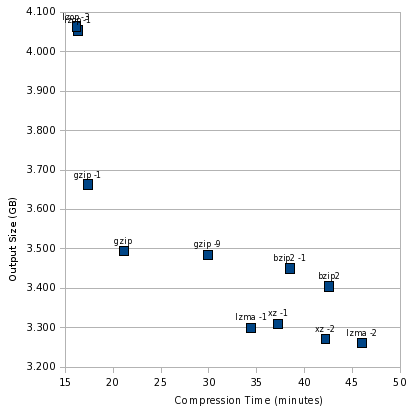
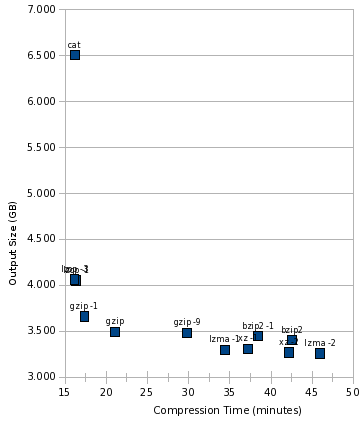
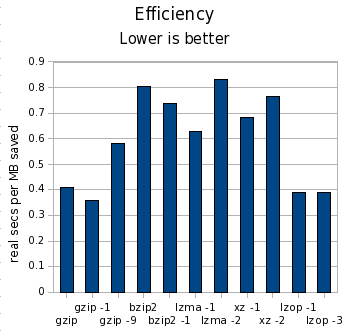
Yesterday, I posted part 1 of how to think about compression. If you haven t read it already, take a look now, so this post makes sense. Introduction In the part 1 test, I compressed a 6GB tar file with various tools. This is a good test if you are writing an entire tar file to disk, or if you are writing to tape. For part 2, I will be compressing each individual file contained in that tarball individually. This is a good test if you back up to hard disk and want quick access to your files. Quite a few tools take this approach rdiff-backup, rdup, and backuppc are among them. We can expect performance to be worse both in terms of size and speed for this test. The compressor tool will be executed once per file, instead of once for the entire group of files. This will magnify any startup costs in the tool. It will also reduce compression ratios, because the tools won t have as large a data set to draw on to look for redundancy. To add to that, we have the block size of the filesystem 4K on most Linux systems. Any file s actual disk consumption is always rounded up to the next multiple of 4K. So a 5-byte file takes up the same amount of space as a 3000-byte file. (This behavior is not unique to Linux.) If a compressor can t shrink enough space out of a file to cross at least one 4K barrier, it effectively doesn t save any disk space. On the other hand, in certain situations, saving one byte of data could free 4K of disk space. So, for the results below, I use du to calculate disk usage, which reflects the actual amount of space consumed by files on disk. The Tools Based on comments in part 1, I added tests for lzop and xz to this iteration. I attempted to test pbzip2, but it would have taken 3 days to complete, so it is not included here more on that issue below. The Numbers Let s start with the table, using the same metrics as with part 1:
Tool MB saved Space vs. gzip Time vs. gzip Cost
gzip 3081 100.00% 100.00% 0.41
gzip -1 2908 104.84% 82.34% 0.36
gzip -9 3091 99.72% 141.60% 0.58
bzip2 3173 97.44% 201.87% 0.81
bzip2 -1 3126 98.75% 182.22% 0.74
lzma -1 3280 94.44% 163.31% 0.63
lzma -2 3320 93.33% 217.94% 0.83
xz -1 3270 94.73% 176.52% 0.68
xz -2 3309 93.63% 200.05% 0.76
lzop -1 2508 116.01% 77.49% 0.39
lzop -2 2498 116.30% 76.59% 0.39
As before, in the MB saved column, higher numbers are better; in all other columns, lower numbers are better. I m using clock seconds here on a dual-core machine. The cost column is clock seconds per MB saved. Let s draw some initial conclusions: The Pretty Charts Now, let s look at an illustration of this. As before, the sweet spot is the lower left, and the worst spot is the upper right. First, let s look at the compression tools themselves: compress2-zoomed At the extremely fast, but not as good compression, end is lzop. gzip is still the balanced performer, bzip2 still looks really bad, and lzma -1 is still the best high-compression performer. Now, let s throw cat into the mix: compress2-big Here s something notable, that this graph makes crystal clear: lzop was just as fast as cat. In other words, it is likely that lzop was faster than the disk, and using lzop compression would be essentially free in terms of time consumed. And finally, look at the cost: compress2-efficiency What happened to pbzip2? I tried the parallel bzip2 implementation just like last time, but it ran extremely slow. Interestingly, pbzip2 < notes.txt > notes.txt.bz2 took 1.002 wall seconds, but pbzip2 notes.txt finished almost instantaneously. This 1-second startup time for pbzip2 was a killer, and the test would have taken more than 3 days to complete. I killed it early and omitted it from my results. Hopefully this bug can be fixed. I didn t expect pbzip2 to help much in this test, and perhaps even to see a slight degradation, but not like THAT. Conclusions As before, the difference in time was far more significant than the difference in space. By compressing files individually, we lost about 400MB (about 7%) space compared to making a tar file and then combining that. My test set contained 270,101 files. gzip continues to be a strong all-purpose contender, posting fast compression time and respectable compression ratios. lzop is a very interesting tool, running as fast as cat and yet turning in reasonable compression though 25% worse than gzip on its default settings. gzip -1 was almost as fast, though, and compressed better. If gzip weren t fast enough with -6, I d be likely to try gzip -1 before using lzop, since the gzip format is far more widely supported, and that s important to me for backups. These results still look troubling for bzip2. lzma -1 continued to turn in far better times and compression ratios that bzip2. Even bzip2 -1 couldn t match the speed of lzma -1, and compressed barely better than gzip. I think bzip2 would be hard-pressed to find a comfortable niche anywhere by now. As before, you can download my spreadsheet with all the numbers behind these charts and the table.

17 February 2009

Sami Haahtinen: Know you upgrades, apt-listchanges

As an obligatory note, Debian Lenny was released earlier today. Which means that sysadmins all over the world are starting to upgrade their servers. There is an oddly little known tool that each and every sysadmin should install on at least one server they maintain, called apt-listchanges. It lists changes made to packages since the currently installed version. Sure that information will be overwhelming on major upgrades, but what is useful even on major upgrades is the capability to parse News files in the same way. News files contain important information about the package in question. For example a maintainer could list known upgrade problems there, like is done in the lighttpd package. Or list changes in package specific default behaviour, like is done in Vim package. Sure, you will notice these in time, but it's nice to get a heads up before a problem bites you.

16 February 2009

Joey Hess: debhelper dh overrides

This is a followup to the earlier design of dh. After converting many packages to minimal rules files using dh, I find that it works very well for the 3 line rules file case, which works for 80% of packages. But getting from there to a slightly more complex rules file that 20% of packages need can be non-obvious. So, let's make it obvious. Suppose I want to run dh_compress -Xsomefile. But my rules file as it currently stands doesn't offer an easy place to run that command:
#!/usr/bin/make -f
%:
    dh $@
To use dh in this situation you had to go look up rather a lot of boilerplate, and to insert an explicit version of the right target, with the right dependencies, that called dh before and after your command:
#!/usr/bin/make -f
%:
    dh $@
binary: binary-indep
binary-indep:
    dh $@ --before dh_compress
    dh_compress -Xsomefile
    dh $@ --after dh_compress
That took me half an hour to come up with, and I wrote this stuff! Also, if I want to override a second command, I have to do it in the right order. So, the full flexability of debhelper is there, but it's too hard to get at. Here's the new new thing.
#!/usr/bin/make -f
%:
    dh $@
override_dh_compress:
        dh_compress -Xsomefile
What this does should be obvious. These override targets can be written for any debhelper command that you need to change the default behavior of, or even avoid running at all.
override_dh_auto_configure:
    ./configure --with-kitchen-sink
override_dh_auto_test:
    # The test suite for this package is busted on s390.
    if [ $DEB_BUILD_ARCH != s390 ]; then dh_auto_test; fi
The overrides can also be used to run additional stuff before, or after any debhelper command:
override_dh_clean:
    dh_clean
    rm -rf build_dir
So, I think that's beautiful. Simple, clean, no boilerplate, and intuitively obvious if you are familiar with debhelper.
FWIW, the implementation, which will be in the next debhelper release unless someone screams loudly, is not beautiful. Mostly because I sorta shot myself in the foot with the cute implicit "%:" rules. But, I got around it. :-)

15 February 2009

Daniel Kahn Gillmor: Stricter GnuTLS rejects outmoded X.509 certs

Recently, several people noticed that GnuTLS behavior did not match its documentation with respect to two significant security concerns, both regarding X.509 certificate validation: GnuTLS has been fixed upstream, and a fix to at least the latter problem has already propagated into etch via a security upload. The lenny packages should already behave as documented (no MD5 digests accepted in cert validation, v1 certificates not explicitly acceptable as authorities). However, this means that if you use GnuTLS-linked tools to connect to systems whose certificate chains rely on either MD5 digests (in anything but the root certificate) or on v1 certificates for any of the certificate authorities, your connections may fail due to this stricter validation. There are already several bug reports about broken LDAP connections and broken mail connections due to these problems, and there have been reasonable concerns raised on debian-release about this. So what can you do to make sure that the infrastructure you rely on or maintain does not depend on these outmoded and insecure features of X.509? Read on for concrete steps for administrators, developers/maintainers, and end users... This entry has been truncated read the full entry.Tags: gnutls, security, x.509

Mark Brown: Upgrading crm114

When upgrading from older crm114 releases and trying to retain your existing configuration it is important to check that all the configuration options that the new version expects to be set have been set. While some will cause errors if they re omitted others will appear to work but will cause unwanted behaviour at runtime. For example, omitting good_threshold and spam_threshold will cause everything to be flagged as spam in X-CRM114-Status even though the classifier is working well. In practice there are relatively few configuration options that users are expected to configure so it may be easier to redo the configuration based on the example provided. For safety it s best to delete your existing CSS files too in case they ve been invalidated by a configuration or format change. It s all a bit manual but it s worth it for what it does for my inbox.

14 February 2009

Biella Coleman: Joe Reagle on Wikipedia

In this age of bits and bytes, there are many virtual organizations and networks which produce all sorts of stuff we use on a daily basis. My two favorite institutions are Debian (not a surprise) and Wikipedia, not just because they oh-so-useful to me and many others, which they are, but because the social organizations behind these two entities are so (at times maddeningly) complex and full of nuance, they provide for endless analytical fascination. One of my friends, Joe Reagle, who has recently graduated from my home department, is presenting is work on Wikipedia and I thought some local New York geeks might be interested. Information below:
All welcome 4:30 - 6:00 PM, Tuesday February 17
206 Vanderbilt Hall, 40 Wash. Sq. So. Wikipedia: Nazis and Norms Joseph Reagle, NYU Department of Media, Culture, and Communication Abstract: In 1990 Mike Godwin coined his Law of Nazi Analogies to capture the common devolution of Usenet discourse into insulting comparisons with Nazis or Hitler. Eleven years later, Jimmy Wales wrote that it was important that the Wikipedia community preserve and extend our culture of co-operation, with all of us standing as firmly as possible against the culture of conflict embodied in Usenet. I argue Wikipedia is a realization even if flawed of a long-held vision for a universal encyclopedia: a technology inspired vision seeking to wed increased access to information with greater human accord. And I claim Wikipedia s collaborative culture is a big factor for this success: the norms of Neutral Point of View ensures that the scattered pieces of what we think we know can be joined and good faith facilitates the actual practice of fitting them together.

Biella Coleman: Joe Reagle on Wikipedia

In this age of bits and bytes, there are many virtual organizations and networks which produce all sorts of stuff we use on a daily basis. My two favorite institutions are Debian (not a surprise) and Wikipedia, not just because they oh-so-useful to me and many others, which they are, but because the social organizations behind these two entities are so (at times maddeningly) complex and full of nuance, they provide for endless analytical fascination. One of my friends, Joe Reagle, who has recently graduated from my home department, is presenting is work on Wikipedia and I thought some local New York geeks might be interested. Information below:
All welcome 4:30 - 6:00 PM, Tuesday February 17
206 Vanderbilt Hall, 40 Wash. Sq. So. Wikipedia: Nazis and Norms Joseph Reagle, NYU Department of Media, Culture, and Communication Abstract: In 1990 Mike Godwin coined his Law of Nazi Analogies to capture the common devolution of Usenet discourse into insulting comparisons with Nazis or Hitler. Eleven years later, Jimmy Wales wrote that it was important that the Wikipedia community preserve and extend our culture of co-operation, with all of us standing as firmly as possible against the culture of conflict embodied in Usenet. I argue Wikipedia is a realization even if flawed of a long-held vision for a universal encyclopedia: a technology inspired vision seeking to wed increased access to information with greater human accord. And I claim Wikipedia s collaborative culture is a big factor for this success: the norms of Neutral Point of View ensures that the scattered pieces of what we think we know can be joined and good faith facilitates the actual practice of fitting them together.

Brice Goglin: Debian/X.org notes - X behavior changes in experimental

Apart from interesting features such as DRI2, KMS or input-hotplug, there are some minor changes in X in experimental that actually appear to disturb many users. The first one is that Ctrl-Alt-Backspace does not kill X anymore. There is no easy consensus here, but many people were annoyed of killing X by mistake, so it's disabled by default now. To reenable it, add to the ServerFlags section of your xorg.conf:
        Option "DontZap" "off"
Another one is the background during X startup. Say goodbye to the old well-known grey background. Now you get a black background by default. To revert to the old behavior, pass -retro on the server command line (for instance in /etc/X11/xinit/xserverrc). Note that this option also reenables Ctrl-Alt-Backspace killing the server. Finally, you might also see glxgears reporting very low frame rates (60) on some hardware. Well, please remember that it is not a benchmark, the output basically means nothing. This is why some distros even removed the fps output by default. The thing is that recent DRM stacks will just synchronize frame rendering on vertical blanks (can anybody here see 1000fps with human eye?). So if you have a 60Hz refresh rate, glxgears will report 60fps, that's it. But it has nothing to do with DRI or 3D being slow. Please try some relevant 3D programs or benchmarks before complaining :)
(Permanent link)

13 February 2009

Adeodato Sim : To all users of libpam-krb5 on armel

If you would have been disappointed if Lenny would ve shipped without libpam-krb5_3.11-4_armel.deb, you must know we were this >< close to doing precisely that, thanks to a debatable behavior of the britney implementation in use and some rather unfortunate circumstances. (You can read this #debian-release backlog if you re interested in the details.) If we noticed it, it was thanks to the britney2 implementation by Fabio Tranchitella. We ve been running an instance of it in a separate server for some time, to see if it was ready for production by comparing results between the two britneys. Truth be told, I ve ignored all those mails since about the freeze started, and today after the last britney run for Lenny I thought: hey, let s see what britney2 thinks . And that s what happened.

Dirk Eddelbuettel: New project: RInside

A few days ago, I started a new project called RInside by uploading a few files to a new SVN repo at R-Forge. RInside makes it easy to embed R into your own C++ application by hiding the nitty gritty of initializing an R interpreter behind a simple abstraction. More information is at a (currently pretty simple) RInside page, and you may want to look at the related Rcpp and possibly littler projects. The former is helpful for data exchange, and the latter provided my first real use of R embedding which in some ways also lead to RInside.

12 February 2009

David Welton: Javascript Charts

I've been doing some work on LangPop.com, and one of the things I'd like to do is update the chart software. What I have now, Plotr seems to work ok, but being the tinkering type, I want to fix things, even if they're not broke. Truth be told, my worry is that Plotr isn't maintained any more, so it would be a good idea to find something that's receiving a bit of attention. The candidates: These seem to be fairly up to date in the sense that someone worked on them recently. There are some older ones like PlotKit, that do not appear to be maintained any more. It is entirely possible that I missed a good one. Another possibility would be to use Google's chart API, but I'd rather be a little bit more in control of things than to farm that out, and I also am planning on doing some interactive features in the near(ish) future. So let's have a look: Flot Based on JQuery, this one looks fairly complete, and has a lot of different, nice looking charts. Since I don't really care what library it's based on JQuery seems as good as any other, being quite popular these days. Installation is pretty simple, and, having good defaults, it's easy to get nice looking data up on the screen in short order. Flotr Modeled after Flot, Flotr uses Prototype (the Rails default) instead of JQuery, and is the follow up to Plotr. I'm not quite sure what the motivation was behind the name/project change, but this seems to be where the guy is spending his time. Since he did a good job with Plotr, this one seemed worth a look too. ProtoChart This one is based on Prototype too. It immediately annoyed me by uncompressing from the .zip file in the current directory, scattering files around. I've always found this behavior a bit antisocial. This code claims to be "motivated by Flot, Flotr and PlotKit libraries", which indicate that it's fairly recent. However, my feeling is that the problem is not necessarily how old code is in these projects, but how quickly they spring up, bloom, and then stagnate. I'd like to use something that's got some staying power... But anyway, ProtoChart looks like pretty good code, even if the distribution is a bit minimal, and doesn't come with examples. If you look at LangPop.com, you'll notice something that's very important for my choice: I need a barchart that has horizontal bars, rather than the more traditional vertical bars. This is because it would be quite difficult to squeeze so many languages across the screen horizontally. This ended up being the deciding factor: like Plotr, Flotr supports horizontally oriented bar charts, making it the obvious choice. The other two libraries looked pretty good too - Flot, in particular, looks like quite solid code. So, there you have it - very brief reviews of an incomplete selection of libraries! In my defense, the goal is to attempt to dominate my maximizing nature, pick one, and get on with doing some cool stuff with LangPop. I do, however, welcome comments and suggestions.

11 February 2009

David Moreno: Debian get-together in NYC this next 1234567890

So, Biella already posted a reminder, and I m doing it again on my blog, here.
Attention New York City Debianistas,
The astrological confluence of 1234567890[0], the impending release of
Lenny[1], and the odd sighting of a horned mythical beast that
cryptozoologists are calling a 'new FTP-master-assistant/slave' being
sighted in the mist off the shores of the East River[2] will result in
all emacs users to transcend and all vim users to be transponded to
their respective motherships, which are scheduled for near-orbit on that
night.
You will only be taken if you have a sip of beer on the 13th, before
6:31:30pm at the Pacific Standard[3]. 
If you come late, you may suffer nano for all eternity.
Micah
ps. All nano users will be Left Behind  to tend to the servers that we
did not bring with us on the Rapture  rickshaw. 
ps. lets keep the the post-apocalyptic space editor battle that will
erupt between the S.S. Church of Emacs, and the H.R.H VIMperator
mothership for later, and drink with revelry together now.
0.  date -d '@1234567890' 
1. http://lists.debian.org/debian-devel-announce/2009/02/msg00000.html
2. http://lists.debian.org/debian-devel-announce/2009/01/msg00004.html
3. http://www.pacificstandardbrooklyn.com
Don t be late, it s at 1234567890!

Biella Coleman: Finally

Not so long ago, I was lamenting to some Debian developer about how LONG it took for me to write stuff, of any quality at least. And aside from my own slowish pace, the academic publishing process is slow as molasses. The two together make for a deadly combo. This friend reminded me that Debian took a heck of a long time to release and at the time, this reminder actually made me feel a lot better. Well, after years of toiling, updating, bug squashing, and lots of lots of arguing, Lenny is coming out and those of us in NYC are celebrating. Though this has been circulated on the Debina-nyc list, it never hurts to circulate a little wider, especially for this event.
Attention New York City Debianistas, The astrological confluence of 1234567890[0], the impending release of
Lenny[1], and the odd sighting of a horned mythical beast that
cryptozoologists are calling a new FTP-master-assistant/slave being
sighted in the mist off the shores of the East River[2] will result in
all emacs users to transcend and all vim users to be transponded to
their respective motherships, which are scheduled for near-orbit on that
night. You will only be taken if you have a sip of beer on the 13th, before
6:31:30pm at the Pacific Standard[3]. If you come late, you may suffer nano for all eternity. Micah ps. All nano users will be Left Behind to tend to the servers that we
did not bring with us on the Rapture rickshaw. ps. lets keep the the post-apocalyptic space editor battle that will
erupt between the S.S. Church of Emacs, and the H.R.H VIMperator
mothership for later, and drink with revelry together now. 0. date -d @1234567890
1. http://lists.debian.org/debian-devel-announce/2009/02/msg00000.html
2. http://lists.debian.org/debian-devel-announce/2009/01/msg00004.html
3. http://www.pacificstandardbrooklyn.com

Next.

Previous.