Launchpad still requires Python 2, which in 2020
is a bit of a problem.
Unlike a lot of the rest of 2020, though, there s good reason to be
optimistic about progress.
I ve been porting Python 2 code to Python 3 on and off for a long time, from
back when I was on the Ubuntu Foundations team and maintaining things like
the Ubiquity installer. When I moved to
Launchpad in 2015 it was certainly on my mind that this was a large body of
code still stuck on Python 2. One option would have been to just accept
that and leave it as it is, maybe doing more backporting work over time as
support for Python 2 fades away. I ve long been of the opinion that this
would doom Launchpad to being unmaintainable in the long run, and since I
genuinely love working on Launchpad - I find it an incredibly rewarding
project - this wasn t something I was willing to accept. We re already
seeing some of our important dependencies dropping support for Python 2,
which is perfectly reasonable on their terms but which is starting to become
a genuine obstacle to delivering important features when we need new
features from newer versions of those dependencies. It also looks as though
it may be difficult for us to run on Ubuntu 20.04 LTS (we re currently on
16.04, with an upgrade to 18.04 in progress) as long as we still require
Python 2, since we have some system dependencies that 20.04 no longer
provides. And then there are exciting new features like type
hints and
async/await that we d like
to be able to use.
However, until last year there were so many blockers that even considering a
port was barely conceivable. What changed in 2019 was sorting out a
trifecta of core dependencies. We ported our
database layer, Storm. We
upgraded
to modern versions of our Zope Toolkit dependencies
(after contributing various fixes upstream, including some substantial
changes to Zope s test runner
that we d carried as local patches for some years). And we
ported
our Bazaar code hosting infrastructure to
Breezy. With all that in place, a port
seemed more of a realistic possibility.
Still, even with this, it was never going to be a matter of just following
some standard porting advice and calling it
good. Launchpad has almost a million lines of Python code in its main git
tree, and around 250 dependencies of
which a number are quite Launchpad-specific. In a project that size, not
only is following standard porting advice an extremely time-consuming task
in its own right, but just about every strange corner case is going to show
up somewhere. (Did you know that StringIO.StringIO(None) and
io.StringIO(None) do different things even after you account for the
native string vs. Unicode text difference? How about the behaviour of
.union() on a subclass of
frozenset?)
Launchpad s test suite is fortunately extremely thorough, but even just
starting up the test suite involves importing most of the data model code,
so before you can start taking advantage of it you have to make a large
fraction of the codebase be at least syntactically-correct Python 3 code and
use only modules that exist in Python 3 while still working in Python 2; in
a project this size that turns out to be a large effort on its own, and can
be quite
risky
in places.
Canonical s product engineering teams work on a six-month cycle, but it just
isn t possible to cram this sort of thing into six months unless you do
literally nothing else, and please can we put all feature development on
hold while we run to stand still is a pretty tough sell to even the most
understanding management. Fortunately, we ve been able to grow the
Launchpad team in the last year or so,
and so it s been possible to put Python 3 on our roadmap on the
understanding that we aren t going to get all the way there in one cycle,
while still being able to do other substantial feature development work as well.
So, with all that preamble, what have we done this cycle? We ve taken a
two-pronged approach. From one end, we identified 147 classes that needed
to be ported away from some compatibility code in our database layer that
was substantially less friendly to Python 3: we ve ported 38 of those, so
there s clearly a fair bit more to do, but we were able to distribute this
work out among the team quite effectively. From the other end, it was clear
that it would be very inefficient to do general porting work when any
attempt to even run the test suite would run straight into the same crashes
in the same order, so I set myself a target of getting the test suite to
start up, and started hacking on an enormous git
branch that I never
expected to try to land directly: instead, I felt free to commit just about
anything that looked reasonable and moved things forward even if it was very
rough, and every so often went back to tidy things up and cherry-pick
individual commits into a form that included some kind of explanation and
passed existing tests so that I could propose them for review.
This strategy has been dramatically more successful than anything I ve tried
before at this scale. So far this cycle, considering only Launchpad s main
git tree, we ve landed 137 Python-3-relevant merge proposals for a total of
39552 lines of git diff output, keeping our existing tests passing along
the way and deploying incrementally to production. We have about 27000 more
lines of patch at varying degrees of quality to tidy up and merge. Our main
development branch is only perhaps 10 or 20 more patches away from the test
suite being able to start up, at which point we ll be able to get a buildbot
running so that multiple developers can work on this much more easily and
see the effect of their work. With the full unlanded patch stack, about 75%
of the test suite passes on Python 3! This still leaves a long tail of
several thousand tests to figure out and fix, but it s a much more
incrementally-tractable kind of problem than where we started.
Finally: the funniest (to me) bug I ve encountered in this effort was the
one I encountered in the test runner and fixed in
zopefoundation/zope.testrunner#106:
IDs of failing tests were written to a pipe, so if you have a test suite
that s large enough and broken enough then eventually that pipe would reach
its capacity and your test runner would just give up and hang. Pretty
annoying when it meant an overnight test run didn t give useful results, but
also eloquent commentary of sorts.
QSoas> cd QSoas> l Km-CODH-IV.dat QSoas> RFirst fitThen, to fit the above equation to the data, the simplest is to take advantage of the time-dependent parameters features of QSoas. Run simply:
QSoas> fit-arb im/(1+km/s) /with=s:1,expThis simply launches the fit interface to fit the exact equations above. The
im/(1+km/s) is simply the translation of the Michaelis-Menten equation above, and the /with=s:1,exp specifies that s is the result of the sum of 1 exponential like for the definition of above. Then, load the Km-CODH-IV.params parameter files (using the "Parameters.../Load from file" action at the bottom, or the Ctrl+L keyboard shortcut). Your window should now look like this:
To fit the data, just hit the "Fit" button ! (or Ctrl+F).
Including an offset
The fit is not bad, but not perfect. In particular, it is easy to see why: the current predicted by the fit goes to 0 at large times, but the actual current is below 0. We need therefore to include an offset to take this into consideration. Close the fit window, and re-run a fit, but now with this command:
QSoas> fit-arb im/(1+km/s)+io /with=s:1,expNotice the
+io bit that corresponds to the addition of an offset current. Load again the base parameters, run the fit again... Your fit window show now look like:
See how the offset current is now much better taken into account. Let's talk a bit more about the parameters:
im is \(i_m\), the maximal current, around 120 nA (which matches the magnitude of the original current).io is the offset current, around -3nA.km is the \(K_m\), expressed in the same units as s_1, the first "injected" value of s (we used 50 because the injection is 50 M CO). That means the value of \(K_m\) determined by this fit is around 9 nM ! (but see below).s_t_1 is the time of the injection of CO (it was in the parameter files you loaded).s_tau_1 is the time constant of departure of CO, noted \(\tau\) in the equations above.
transport.rb Ruby file that contains the definition of the itrpt function, and re-launch the fit window using:
QSoas> ruby-run transport.rb QSoas> fit-arb itrprt(s,km,nFAm,nFAmu)+io /with=s:1,expLoad again the parameter file... but this time you'll have to play a bit more with the starting parameters for QSoas to find the right values when you fit. Here are some tips:
io, no parameter should be negative;| Series: | Sun Chronicles #1 |
| Publisher: | Tor |
| Copyright: | 2020 |
| ISBN: | 1-250-19725-2 |
| Format: | Kindle |
| Pages: | 526 |
Previously: v5.6
Linux v5.7 was released at the end of May. Here s my summary of various security things that caught my attention:
arm64 kernel pointer authenticationPACIASP which protects the saved stack pointer, similar to the existing CONFIG_STACKPROTECTOR feature, only faster. This also paves the way to sign and check pointers stored in the heap, as a way to defeat function pointer overwrites in those memory regions too. Since the behavior is different from the traditional stack protector, Amit Daniel Kachhap added an LKDTM test for PAC as well.
BPF LSMexecve() deadlock refactoringexec_id counter to 64 bits to avoid the possibility of the counter wrapping and allowing an attacker to send arbitrary signals to processes they normally shouldn t be able to.
slub freelist obfuscation improvementsCONFIG_SLAB_FREELIST_HARDENED s freelist pointer content obfuscation, I improved their bit diffusion, which makes attacks require significantly more memory content exposures to defeat the obfuscation. As part of the conversation, Vitaly Nikolenko pointed out that the freelist pointer s location made it relatively easy to target too (for either disclosures or overwrites), so I moved it away from the edge of the slab, making it harder to reach through small-sized overflows (which usually target the freelist pointer). As it turns out, there were a few assumptions in the kernel about the location of the freelist pointer, which had to also get cleaned up.
RISCV page table dumpingPTDUMP_DEBUGFS), visible in /sys/kernel/debug/kernel_page_tables.
array index bounds checkingint foo[5]; ... foo[8] = bar;The long version gets complicated by the evolution of flexible array structure members, so we ll pause for a moment and skim the surface of this topic. While things like
CONFIG_FORTIFY_SOURCE try to catch these kinds of cases in the memcpy() and strcpy() family of functions, it doesn t catch it in open-coded array indexing, as seen in the code above. GCC has a warning (-Warray-bounds) for these cases, but it was disabled by Linus because of all the false positives seen due to fake flexible array members. Before flexible arrays were standardized, GNU C supported zero sized array members. And before that, C code would use a 1-element array. These were all designed so that some structure could be the header in front of some data blob that could be addressable through the last structure member:
/* 1-element array */
struct foo
...
char contents[1];
;
/* GNU C extension: 0-element array */
struct foo
...
char contents[0];
;
/* C standard: flexible array */
struct foo
...
char contents[];
;
instance = kmalloc(sizeof(struct foo) + content_size);
Converting all the zero- and one-element array members to flexible arrays is one of Gustavo A. R. Silva s goals, and hundreds of these changes started landing. Once fixed, -Warray-bounds can be re-enabled. Much more detail can be found in the kernel s deprecation docs.
However, that will only catch the visible at compile time cases. For runtime checking, the Undefined Behavior Sanitizer has an option for adding runtime array bounds checking for catching things like this where the compiler cannot perform a static analysis of the index values:
int foo[5];
...
for (i = 0; i < some_argument; i++)
...
foo[i] = bar;
...
It was, however, not separate (via kernel Kconfig) until Elena Petrova and I split it out into CONFIG_UBSAN_BOUNDS, which is fast enough for production kernel use. With this enabled, it's now possible to instrument the kernel to catch these conditions, which seem to come up with some regularity in Wi-Fi and Bluetooth drivers for some reason. Since UBSAN (and the other Sanitizers) only WARN() by default, system owners need to set panic_on_warn=1 too if they want to defend against attacks targeting these kinds of flaws. Because of this, and to avoid bloating the kernel image with all the warning messages, I introduced CONFIG_UBSAN_TRAP which effectively turns these conditions into a BUG() without needing additional sysctl settings.
Fixing "additive" snprintf() usagesprintf()'s return value to increment a pointer into a string, and build a string with more sprintf() calls:
/* safe if strlen(foo) + 1 < sizeof(string) */ wrote = sprintf(string, "Foo: %s\n", foo); /* overflows if strlen(foo) + strlen(bar) > sizeof(string) */ wrote += sprintf(string + wrote, "Bar: %s\n", bar); /* writing way beyond the end of "string" now ... */ wrote += sprintf(string + wrote, "Baz: %s\n", baz);The risk is that if these calls eventually walk off the end of the
string buffer, it will start writing into other memory and create some bad situations. Switching these to snprintf() does not, however, make anything safer, since snprintf() returns how much it would have written:
/* safe, assuming available <= sizeof(string), and for this example * assume strlen(foo) < sizeof(string) */ wrote = snprintf(string, available, "Foo: %s\n", foo); /* if (strlen(bar) > available - wrote), this is still safe since the * write into "string" will be truncated, but now "wrote" has been * incremented by how much snprintf() *would* have written, so "wrote" * is now larger than "available". */ wrote += snprintf(string + wrote, available - wrote, "Bar: %s\n", bar); /* string + wrote is beyond the end of string, and availabe - wrote wraps * around to a giant positive value, making the write effectively * unbounded. */ wrote += snprintf(string + wrote, available - wrote, "Baz: %s\n", baz);So while the first overflowing call would be safe, the next one would be targeting beyond the end of the array and the size calculation will have wrapped around to a giant limit. Replacing this idiom with
scnprintf() solves the issue because it only reports what was actually written. To this end, Takashi Iwai has been landing a bunch scnprintf() fixes.
That's it for now! Let me know if there is anything else you think I should mention here. Next up: Linux v5.8.
2020, Kees Cook. This work is licensed under a Creative Commons Attribution-ShareAlike 4.0 License.
I upgraded my home internet connection to fibre (FTTP) last October. I m still on an 80M/20M service, so it s no faster than my old VDSL FTTC connection was, and as a result for a long time I continued to use my HomeHub 5A running OpenWRT. However the FTTP ONT meant I was using up an additional ethernet port on the router, and I was already short, so I ended up with a GigE switch in use as well. Also my wifi is handled by a UniFi, which takes its power via Power-over-Ethernet. That mean I had a router, a switch and a PoE injector all in close proximity. I wanted to reduce the number of devices, and ideally upgrade to something that could scale once I decide to upgrade my FTTP service speed.
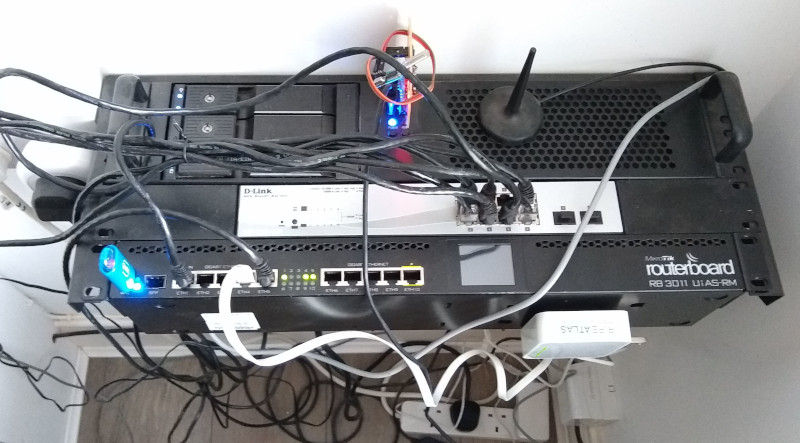
Looking around I found the MikroTik RB3011UiAS-RM, which is a rack mountable device with 10 GigE ports (plus an SFP slot) and a dual core Qualcomm IPQ8064 ARM powering it. There s 1G RAM and 128MB NAND flash, as well as a USB3 port. It also has PoE support. On paper it seemed like an ideal device. I wasn t particularly interested in running RouterOS on it (the provided software), but that s based on Linux and there was some work going on within OpenWRT to add support, so it seemed like a worthwhile platform to experiment with (what, you expected this to be about me buying an off the shelf device and using it with only the supplied software?). As an added bonus a friend said he had one he wasn t using, and was happy to sell it to me for a bargain price.
I did try out RouterOS to start with, but I didn t find it particularly compelling. I m comfortable configuring firewalling and routing at a Linux command line, and I run some additional services on the router like my MQTT broker, and mqtt-arp, my wifi device presence monitor. I could move things around such that they ran on the house server, but I consider them core services and as a result am happier with them on the router.

The first step was to get something booting on the router. Luckily it has an RJ45 serial console port on the back, and a reasonably featured bootloader that can manage to boot via tftp over the network. It wants an ELF binary rather than a plain kernel, but Sergey Sergeev had done the hard work of getting u-boot working for the IPQ8064, which mean I could just build normal u-boot images to try out.
Linux upstream already had basic support for a lot of the pieces I was interested in. There s a slight fudge around AUTO_ZRELADDR because the network coprocessors want a chunk of memory at the start of RAM, but there s ongoing discussions about how to handle this cleanly that I m hopeful will eventually mean I can drop that hack. Serial, ethernet, the QCA8337 switches (2 sets of 5 ports, tied to different GigE devices on the processor) and the internal NOR all had drivers, so it was a matter of crafting an appropriate DTB to get them working. That left niggles.
First, the second switch is hooked up via SGMII. It turned out the IPQ806x stmmac driver didn t initialise the clocks in this mode correctly, and neither did the qca8k switch driver. So I need to fix up both of those (Sergey had handled the stmmac driver, so I just had to clean up and submit his patch). Next it turned out the driver for talking to the Qualcomm firmware (SCM) had been updated in a way that broke the old method needed on the IPQ8064. Some git archaeology figured that one out and provided a solution. Ansuel Smith helpfully provided the DWC3 PHY driver for the USB port. That got me to the point I could put a Debian armhf image onto a USB stick and mount that as root, which made debugging much easier.
At this point I started to play with configuring up the device to actually act as a router. I make use of a number of VLANs on my home network, so I wanted to make sure I could support those. Turned out the stmmac driver wasn t happy reconfiguring its MTU because the IPQ8064 driver doesn t configure the FIFO sizes. I found what seem to be the correct values and plumbed them in. Then the qca8k driver only supported port bridging. I wanted the ability to have a trunk port to connect to the upstairs switch, while also having ports that only had a single VLAN for local devices. And I wanted the switch to handle this rather than requiring the CPU to bridge the traffic. Thankfully it s easy to find a copy of the QCA8337 datasheet and the kernel Distributed Switch Architecture is pretty flexible, so I was able to implement the necessary support.
I stuck with Debian on the USB stick for actually putting the device into production. It makes it easier to fix things up if necessary, and the USB stick allows for a full Debian install which would be tricky on the 128M of internal NAND. That means I can use things like nftables for my firewalling, and use the standard Debian packages for things like collectd and mosquitto. Plus for debug I can fire up things like tcpdump or tshark. Which ended up being useful because when I put the device into production I started having weird IPv6 issues that turned out to be a lack of proper Ethernet multicast filter support in the IPQ806x ethernet device. The driver would try and setup the multicast filter for the IPv6 NDP related packets, but it wouldn t actually work. The fix was to fall back to just receiving all multicast packets - this is what the vendor driver does.
Most of this work will be present once the 5.9 kernel is released - the basics are already in 5.8. Currently not queued up that I can think of are the following:
| Publisher: | The New Press |
| Copyright: | 2017 |
| Printing: | 2018 |
| ISBN: | 1-62097-472-X |
| Format: | Kindle |
| Pages: | 217 |
My webcam has broken, something that I have been using a lot during the last few months for some reason.
A friend of mine suggested that I use the mic and camera on my mobile phone instead. There is a simple app droidcam that makes the phone behave as a simple webcam, it also has a client application to run on your PC to capture the web-stream and present it as a video device. All well and good but I would like to keep propitiatory software off my PCs (I have a hard enough time accepting it on a phone but I have to draw a line somewhere).
I decided that there had to be a simple way to ingest that stream and present it as a local video device on a Linux box. It turns out that it is a lot simpler than I thought it would be. I had it working within 10 minutes!
Packages needed: ffmpeg, v4l2loopback-utils

sudo apt-get install ffmpeg v4l2loopback-utilsStart the loop-back device:
sudo modprobe v4l2loopbackIngest video and present on loop-back device:
ffmpeg -re -i <URL_VideoStream> -vcodec rawvideo -pix_fmt yuv420p -f v4l2 /dev/video0Where
-re
Read input at native frame rate. Mainly used to simulate a grab
device, or live input stream (e.g. when reading from a file). Should
not be used with actual grab devices or live input streams (where it
can cause packet loss). By default ffmpeg attempts to read the
input(s) as fast as possible. This option will slow down the reading
of the input(s) to the native frame rate of the input(s). It is
useful for real-time output (e.g. live streaming).
-i <source>
In this case my phone running droidcam http://10.14.1.100:4747/video
-vcodec rawvideo
Select the output video codec to raw video (as expected for /dev/video#)
-pix_fmt yuv420p
Set pixel format. in this example tell ffmpeg that the video will
be yuv colour space at 420p resolution
-f v4l2 /dev/video0
Force the output to be in video for Linux 2 (v4l2) format bound to
device /dev/video0
vrrp_instance gateway1 state BACKUP # interface eth0 # virtual_router_id 12 # priority 101 # virtual_ipaddress 2001:db8:ff/64
state keyword in instructs Keepalived to not take the leader
role when starting. Otherwise, incoming nodes create a temporary
disruption by taking over the IP address until the election settles.
The interface keyword in defines the interface for sending and
receiving VRRP packets. It is also the default interface to configure
the virtual IP address. The virtual_router_id directive in is
common to all nodes sharing the virtual IP. The priority keyword in
helps choosing which router will be elected as leader. If you need
more information around Keepalived, be sure to check the
documentation.
VRRP design is tied to Ethernet networks and requires a
multicast-enabled network for communication between nodes. In some
environments, notably public clouds, multicast is unavailable. In this
case, Keepalived can send VRRP packets using unicast:
vrrp_instance gateway1 state BACKUP interface eth0 virtual_router_id 12 priority 101 unicast_peer 2001:db8::11 2001:db8::12 virtual_ipaddress 2001:db8:ff/64 dev lo
notify_* scripts.
Until version 2.21 (not released yet), the interface directive is
mandatory and Keepalived will transmit and receive VRRP packets on
this interface only. If peers are reachable through several
interfaces, like on a BGP on the host setup, you need a
workaround. A simple one is to use a VXLAN interface:
$ ip -6 link add keepalived6 type vxlan id 6 dstport 4789 local 2001:db8::10 nolearning $ bridge fdb append 00:00:00:00:00:00 dev keepalived6 dst 2001:db8::11 $ bridge fdb append 00:00:00:00:00:00 dev keepalived6 dst 2001:db8::12 $ ip link set up dev keepalived6
vrrp_instance gateway1 state BACKUP interface keepalived6 mcast_src_ip 2001:db8::10 virtual_router_id 12 priority 101 virtual_ipaddress 2001:db8:ff/64 dev lo
unicast_peer can be used without
the interface directive. I think using VXLAN is still a
neat trick applicable to other situations where communication using
broadcast or multicast is needed, while the underlying network provide
no support for this.
netbox.netbox collection from Ansible Galaxy
provides several modules to update NetBox objects:
- name: create a device in NetBox netbox_device: netbox_url: http://netbox.local netbox_token: s3cret data: name: to3-p14.sfo1.example.com device_type: QFX5110-48S device_role: Compute Switch site: SFO1
Notice I recommend that you read Writing a custom Ansible module as an introduction, as well as Syncing MySQL tables for a first simpler example.
netbox_sync: source: netbox.yaml api: https://netbox.example.com token: s3cret
devices: ad2-p6.sfo1.example.com: datacenter: sfo1 manufacturer: Cisco model: Catalyst 2960G-48TC-L role: net_tor_oob_switch to1-p6.sfo1.example.com: datacenter: sfo1 manufacturer: Juniper model: QFX5110-48S role: net_tor_gpu_switch # [ ] ips: - device: ad2-p6.example.com ip: 172.31.115.18/21 interface: oob - device: to1-p6.example.com ip: 172.31.115.33/21 interface: oob - device: to1-p6.example.com ip: 172.31.254.33/32 interface: lo0.0 # [ ]
cmdb. Most objects in NetBox accept tags.
module_args = dict( source=dict(type='path', required=True), api=dict(type='str', required=True), token=dict(type='str', required=True, no_log=True), max_workers=dict(type='int', required=False, default=10) ) result = dict( changed=False ) module = AnsibleModule( argument_spec=module_args, supports_check_mode=True )
Synchronizer abstract class. For
each kind of object, a concrete class is built with the appropriate
class attributes to tune its behaviour and a wanted() method to
provide the objects we want.
I am not explaining the abstract class code here. Have a look at the
source if you want.
class SyncTags(Synchronizer): app = "extras" table = "tags" key = "name" def wanted(self): return "cmdb": dict( slug="cmdb", color="8bc34a", description="synced by network CMDB")
app and table attributes defines the NetBox objects we want
to manipulate. The key attribute is used to determine how to lookup
for existing objects. In this example, we want to lookup tags using
their names.
The wanted() method is expected to return a dictionary mapping
object keys to the list of wanted attributes. Here, the keys are tag
names and we create only one tag, cmdb, with the provided slug,
color and description. This is the tag we will use to mark the objects
we create or modify.
If the tag does not exist, it is created. If it exists, the provided
attributes are updated. Other attributes are left untouched.
We also want to create a specific tenant for objects accepting such an
attribute (devices and IP addresses):
class SyncTenants(Synchronizer): app = "tenancy" table = "tenants" key = "name" def wanted(self): return "Network": dict(slug="network", description="Network team")
wanted() method uses the information provided in the YAML file: it
walks the devices and builds a set of datacenter names.
class SyncSites(Synchronizer): app = "dcim" table = "sites" key = "name" only_on_create = ("status", "slug") def wanted(self): result = set(details["datacenter"] for details in self.source['devices'].values() if "datacenter" in details) return k: dict(slug=k, status="planned") for k in result
only_on_create attribute, the specified
attributes are not updated if they are different. The goal of this
synchronizer is mostly to collect the references to the different
sites for other objects.
>>> pprint(SyncSites(**sync_args).wanted()) 'sfo1': 'slug': 'sfo1', 'status': 'planned' , 'chi1': 'slug': 'chi1', 'status': 'planned' , 'nyc1': 'slug': 'nyc1', 'status': 'planned'
only_on_create attribute:
class SyncManufacturers(Synchronizer): app = "dcim" table = "manufacturers" key = "name" def wanted(self): result = set(details["manufacturer"] for details in self.source['devices'].values() if "manufacturer" in details) return k: "slug": slugify(k) for k in result
foreign attribute linking
a NetBox attribute to the synchronizer handling it.
class SyncDeviceTypes(Synchronizer): app = "dcim" table = "device_types" key = "model" foreign = "manufacturer": SyncManufacturers def wanted(self): result = set((details["manufacturer"], details["model"]) for details in self.source['devices'].values() if "model" in details) return k[1]: dict(manufacturer=k[0], slug=slugify(k[1])) for k in result
wanted() method refers to the manufacturer using its key
attribute. In this case, this is the manufacturer name.
>>> pprint(SyncManufacturers(**sync_args).wanted()) 'Cisco': 'slug': 'cisco' , 'Dell': 'slug': 'dell' , 'Juniper': 'slug': 'juniper' >>> pprint(SyncDeviceTypes(**sync_args).wanted()) 'ASR 9001': 'manufacturer': 'Cisco', 'slug': 'asr-9001' , 'Catalyst 2960G-48TC-L': 'manufacturer': 'Cisco', 'slug': 'catalyst-2960g-48tc-l' , 'MX10003': 'manufacturer': 'Juniper', 'slug': 'mx10003' , 'QFX10002-36Q': 'manufacturer': 'Juniper', 'slug': 'qfx10002-36q' , 'QFX10002-72Q': 'manufacturer': 'Juniper', 'slug': 'qfx10002-72q' , 'QFX5110-32Q': 'manufacturer': 'Juniper', 'slug': 'qfx5110-32q' , 'QFX5110-48S': 'manufacturer': 'Juniper', 'slug': 'qfx5110-48s' , 'QFX5200-32C': 'manufacturer': 'Juniper', 'slug': 'qfx5200-32c' , 'S4048-ON': 'manufacturer': 'Dell', 'slug': 's4048-on' , 'S6010-ON': 'manufacturer': 'Dell', 'slug': 's6010-on'
class SyncDeviceRoles(Synchronizer): app = "dcim" table = "device_roles" key = "name" def wanted(self): result = set(details["role"] for details in self.source['devices'].values() if "role" in details) return k: dict(slug=slugify(k), color="8bc34a") for k in result
class SyncDevices(Synchronizer): app = "dcim" table = "devices" key = "name" foreign = "device_role": SyncDeviceRoles, "device_type": SyncDeviceTypes, "site": SyncSites, "tenant": SyncTenants remove_unused = 10 def wanted(self): return name: dict(device_role=details["role"], device_type=details["model"], site=details["datacenter"], tenant="Network") for name, details in self.source['devices'].items() if "datacenter", "model", "role" <= set(details.keys())
remove_unused attribute is a safety implemented to fail if we
have to delete more than 10 devices: this may be the indication there
is a bug somewhere, unless one of your datacenter suddenly caught
fire.
>>> pprint(SyncDevices(**sync_args).wanted()) 'ad2-p6.sfo1.example.com': 'device_role': 'net_tor_oob_switch', 'device_type': 'Catalyst 2960G-48TC-L', 'site': 'sfo1', 'tenant': 'Network' , 'to1-p6.sfo1.example.com': 'device_role': 'net_tor_gpu_switch', 'device_type': 'QFX5110-48S', 'site': 'sfo1', 'tenant': 'Network' , [ ]
class SyncIPs(Synchronizer): app = "ipam" table = "ip-addresses" key = "address" foreign = "tenant": SyncTenants remove_unused = 1000 def wanted(self): wanted = for details in self.source['ips']: if details['ip'] in wanted: wanted[details['ip']]['description'] = \ f" details['device'] (and others)" else: wanted[details['ip']] = dict( tenant="Network", status="active", dns_name="", # information is present in DNS description=f" details['device'] : details['interface'] ", role=None, vrf=None) return wanted
cmdb, then those
already attached to an interface:
def get(self, key): """Grab IP address from NetBox.""" # There may be duplicate. We need to grab the "best". results = super(Synchronizer, self).get(key) if len(results) == 0: return None if len(results) == 1: return results[0] scores = [0]*len(results) for idx, result in enumerate(results): if "cmdb" in result.tags: scores[idx] += 10 if result.interface is not None: scores[idx] += 5 return sorted(zip(scores, results), reverse=True, key=lambda k: k[0])[0][1]
source = yaml.safe_load(open(module.params['source'])) netbox = pynetbox.api(module.params['api'], token=module.params['token']) sync_args = dict( module=module, netbox=netbox, source=source, before= , after= ) synchronizers = [synchronizer(**sync_args) for synchronizer in [ SyncTags, SyncTenants, SyncSites, SyncManufacturers, SyncDeviceTypes, SyncDeviceRoles, SyncDevices, SyncIPs ]]
prepare() method whose goal is to compute
the current and wanted states. It returns True in case of a
difference:
# Check what needs to be synchronized try: for synchronizer in synchronizers: result['changed'] = synchronizer.prepare() except AnsibleError as e: result['msg'] = e.message module.fail_json(**result)
sync_args["before"][table] and
sync_args["after"][table] where table is the name of the table for
a given NetBox object type. The diff object is a bit elaborate as
it is built table by table. This enables Ansible to display the name
of each table before the diff representation:
# Compute the diff if module._diff and result['changed']: result['diff'] = [ dict( before_header=table, after_header=table, before=yaml.safe_dump(sync_args["before"][table]), after=yaml.safe_dump(sync_args["after"][table])) for table in sync_args["after"] if sync_args["before"][table] != sync_args["after"][table] ] # Stop here if check mode is enabled or if no change if module.check_mode or not result['changed']: module.exit_json(**result)
synchronize() method to apply
changes and a cleanup() method to delete unwanted objects. Order is
important due to the relation between the objects.
# Synchronize for synchronizer in synchronizers: synchronizer.synchronize() for synchronizer in synchronizers[::-1]: synchronizer.cleanup() module.exit_json(**result)
netbox.netbox collection, the logic is written in
Python instead of trying to glue Ansible tasks together. I believe
this is both more flexible and easier to read, notably when trying to
delete outdated objects. While I did not test it, it should also be
faster. An alternative would have been to reuse code from the
netbox.netbox collection, as it contains similar primitives.
Unfortunately, I didn t think of it until now.
The Debian Janitor is an automated system that commits fixes for (minor) issues in Debian packages that can be fixed by software. It gradually started proposing merges in early December. The first set of changes sent out ran lintian-brush on sid packages maintained in Git. This post is part of a series about the progress of the Janitor. As of dpkg 1.16.2 and apt 0.8.13, Debian has full support for multi-arch. To quote from the multi-arch implementation page:
Multiarch lets you install library packages from multiple architectures on the same machine. This is useful in various ways, but the most common is installing both 64 and 32- bit software on the same machine and having dependencies correctly resolved automatically. In general you can have libraries of more than one architecture installed together and applications from one architecture or another installed as alternatives.The Multi-Arch specification describes a new Multi-Arch header which can be used to indicate how to resolve cross-architecture dependencies. The existing Debian Multi-Arch hinter is a version of dedup.debian.net that compares binary packages between architectures and suggests fixes to resolve multi-arch problems. It provides hints as to what Multi- Arch fields can be set, allowing the packages to be safely installed in a Multi-Arch world. The full list of almost 10,000 hints generated by the hinter is available at https://dedup.debian.net/static/multiarch-hints.yaml. Recent versions of lintian-brush now include a command called apply-multiarch-hints that downloads and locally caches the hints and can apply them to a package maintained in Git. For example, to apply multi-arch hints to autosize.js:
$ debcheckout autosize.js
declared git repository at https://salsa.debian.org/js-team/autosize.js.git
git clone https://salsa.debian.org/js-team/autosize.js.git autosize.js ...
Cloning into 'autosize.js'...
[...]
$ cd autosize.js
$ apply-multiarch-hints
Downloading new version of multi-arch hints.
libjs-autosize: Add Multi-Arch: foreign.
node-autosize: Add Multi-Arch: foreign.
$ git log -p
commit 3f8d1db5af4a87e6ebb08f46ddf79f6adf4e95ae (HEAD -> master)
Author: Jelmer Vernoo <jelmer@debian.org>
Date: Fri Sep 18 23:37:14 2020 +0000
Apply multi-arch hints.
+ libjs-autosize, node-autosize: Add Multi-Arch: foreign.
Changes-By: apply-multiarch-hints
diff --git a/debian/changelog b/debian/changelog
index e7fa120..09af4a7 100644
--- a/debian/changelog
+++ b/debian/changelog
@@ -1,3 +1,10 @@
+autosize.js (4.0.2~dfsg1-5) UNRELEASED; urgency=medium
+
+ * Apply multi-arch hints.
+ + libjs-autosize, node-autosize: Add Multi-Arch: foreign.
+
+ -- Jelmer Vernoo <jelmer@debian.org> Fri, 18 Sep 2020 23:37:14 -0000
+
autosize.js (4.0.2~dfsg1-4) unstable; urgency=medium
* Team upload
diff --git a/debian/control b/debian/control
index 01ca968..fbba1ae 100644
--- a/debian/control
+++ b/debian/control
@@ -20,6 +20,7 @@ Architecture: all
Depends: $ misc:Depends
Recommends: javascript-common
Breaks: ruby-rails-assets-autosize (<< 4.0)
+Multi-Arch: foreign
Description: script to automatically adjust textarea height to fit text - NodeJS
Autosize is a small, stand-alone script to automatically adjust textarea
height to fit text. The autosize function accepts a single textarea element,
@@ -32,6 +33,7 @@ Package: node-autosize
Architecture: all
Depends: $ misc:Depends
, nodejs
+Multi-Arch: foreign
Description: script to automatically adjust textarea height to fit text - Javascript
Autosize is a small, stand-alone script to automatically adjust textarea
height to fit text. The autosize function accepts a single textarea element,
For more information about the Janitor's lintian-fixes efforts, see the landing page.
export LIBGL_ALWAYS_SOFTWARE=1I previously wrote about using this just for Kmail to stop it crashing [1]. But after doing that I still had other problems with video and disabling all GL on the NVidia card was necessary. The latest problem I ve had is that even when using that configuration things don t go well. When I run the reboot command I end up with a kernel message about the GPU not responding and then it doesn t reboot. That means that the BIOS update doesn t apply, a hard reboot signals to the system that the new BIOS wasn t good and I end up with the old BIOS again. I discovered that disabling sddm (the latest xdm program in Debian) from starting on boot meant that a reboot command would work. Then I ran the BIOS update script and it s reboot command worked and gave a successful BIOS update. So I ve gone from a 2013 BIOS to a 2018 BIOS! The update list says that some CVEs have been addressed, but the spectre-meltdown-checker doesn t report any fewer vulnerabilities.
Four years ago somebody posted a comment-thread describing how you could start writing a little reverse-polish calculator, in C, and slowly improve it until you had written a minimal FORTH-like system:
At the time I read that comment I'd just hacked up a simple FORTH REPL of my own, in Perl, and I said "thanks for posting". I was recently reminded of this discussion, and decided to work through the process.
Using only minimal outside resources the recipe worked as expected!
The end-result is I have a working FORTH-lite, or FORTH-like, interpreter written in around 2000 lines of golang! Features include:
( and ) are ignored, as expected.
\ to the end of the line are also supported.float64).., or print).emit).." Hello, World ").drop, dup, over, swap)do/loop.if, else, and then.star which just outputs a single start-character:
: star 42 emit ;
Now we can call that (NOTE: We didn't add a newline here, so the REPL prompt follows it, that's expected):
> star
*>
To make it more useful we define the word "stars" which shows N stars:
> : stars dup 0 > if 0 do star loop else drop then ;
> 0 stars
> 1 stars
*> 2 stars
**> 10 stars
**********>
This example uses both if to test that the parameter on the stack was greater than zero, as well as do/loop to handle the repetition.
Finally we use that to draw a box:
> : squares 0 do over stars cr loop ;
> 4 squares
****
****
****
****
> 10 squares
**********
**********
**********
**********
**********
**********
**********
**********
**********
**********
For fun we allow decompiling the words too:
> #words 0 do dup dump loop
..
Word 'square'
0: dup
1: *
Word 'cube'
0: dup
1: square
2: *
Word '1+'
0: store 1.000000
2: +
Word 'test_hot'
0: store 0.000000
2: >
3: if
4: [cond-jmp 7.000000]
6: hot
7: then
..
Anyway if that is at all interesting feel free to take a peak. There's a bit of hackery there to avoid the use of return-stacks, etc. Compared to gforth this is actually more featureful in some areas:
You can connect to a running pod with oc/kubectl rsh pod_name, or start a copy of a running pod with oc debug pod_name, but as best practises recommend unprivileged, slim container images, where do you get sosreport, kdump, dig and nmap for troubleshooting ? Fortunately you can start either a transient Debian troubleshooting container with:oc run troubleshooting-pod --stdin --tty --rm --image=docker.io/library/debian:busteror a Red Hat Entreprise Linux:| Editor: | Maya Schenwar |
| Editor: | Joe Macar |
| Editor: | Alana Yu-lan Price |
| Publisher: | Haymarket Books |
| Copyright: | June 2016 |
| ISBN: | 1-60846-684-1 |
| Format: | Kindle |
| Pages: | 250 |
Old laptop I ve been meaning to get a new laptop for a while now. My ThinkPad X250 is now 5 years old and even though it s still adequate in many ways, I tend to run out of memory especially when running a few virtual machines. It only has one memory slot, which I maxed out at 16GB shortly after I got it. Memory has been a problem in considering a new machine. Most new laptops have soldered RAM and local configurations tend to ship with 8GB RAM. Getting a new machine with only a slightly better CPU and even just the same amount of RAM as what I have in the X250 seems a bit wasteful. I was eyeing the Lenovo X13 because it s a super portable that can take up to 32GB of RAM, and it ships with an AMD Ryzen 4000 series chip which has great performance. With Lenovo s discount for Debian Developers it became even more attractive. Unfortunately that s in North America only (at least for now) so that didn t work out this time.
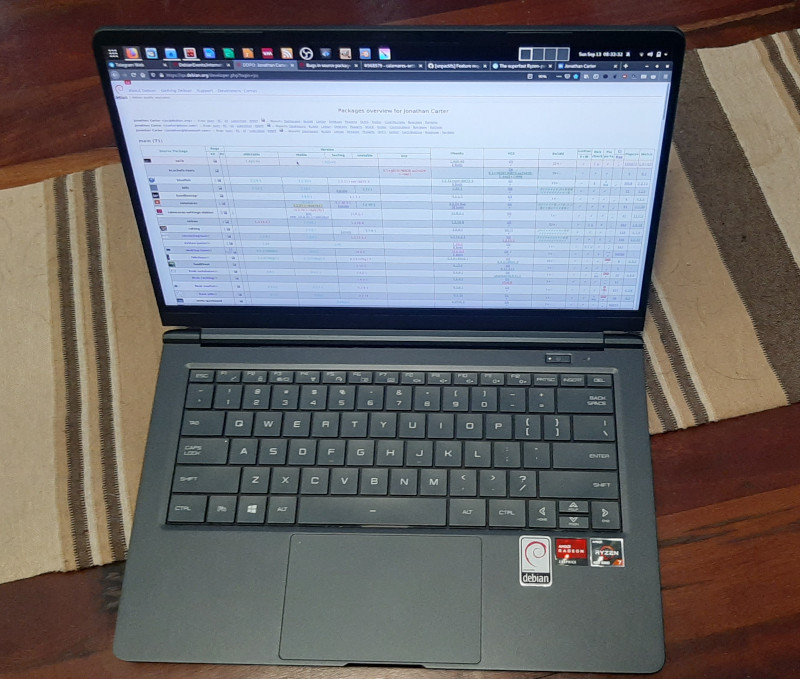
Enter Tongfang I ve been reading a bunch of positive reviews about the Tuxedo Pulse 14 and KDE Slimbook 14. Both look like great AMD laptops, supports up to 64GB of RAM and clearly runs Linux well. I also noticed that they look quite similar, and after some quick searches it turns out that these are made by Tongfang and that its model number is PF4NU1F. I also learned that a local retailer (Wootware) sells them as the Wootbook. I ve seen one of these before although it was an Intel-based one, but it looked like a nice machine and I was already curious about it back then. After struggling for a while to find a local laptop with a Ryzen CPU and that s nice and compact and that breaks the 16GB memory barrier, finding this one that jumped all the way to 64GB sealed the deal for me. This is the specs for the configuration I got:


Overall remarks When maxing out the CPU, the fan is louder than on a ThinkPad, I definitely noticed it while compiling the zfs-dkms module. On the plus side, that happened incredibly fast. Comparing the Wootbook to my X250, the biggest downfall it has is really it s pointing device. It doesn t have a trackpad and the touchpad is ok and completely usable, but not great. I use my laptop on a desk most of the time so using an external mouse will mostly solve that. If money were no object, I would definitely choose a maxed out ThinkPad for its superior keyboard/mouse, but the X13 configured with 32GB of RAM and 128GB of SSD retails for just about double of what I paid for this machine. It doesn t seem like you can really buy the perfect laptop no matter how much money you want to spend, there s some compromise no matter what you end up choosing, but this machine packs quite a punch, especially for its price, and so far I m very happy with my purchase and the incredible performance it provides. I m also very glad that Wootware went with the gray/black colours, I prefer that by far to the white and silver variants. It s also the first laptop I ve had since 2006 that didn t come with Windows on it. The Wootbook is also comfortable/sturdy enough to carry with one hand while open. The ThinkPads are great like this and with many other brands this just feels unsafe. I don t feel as confident carrying it by it s display because it s very thin (I know, I shouldn t be doing that with the ThinkPads either, but I ve been doing that for years without a problem :) ). There s also a post on Reddit that tracks where you can buy these machines from various vendors all over the world.
/admin1-> console com2 console: Serial Device 2 is currently in useSo far the only way I ve discovered to get console access again after that is the command racadm racreset . If anyone knows of a better way please let me know. As an aside having racreset being so close to racresetcfg (which resets the configuration to default and requires a hard reboot to configure it again) seems like a really bad idea. Host Based Management
deb http://linux.dell.com/repo/community/ubuntu xenial openmanageThe above apt sources.list line allows installing Dell management utilities (Xenial is old but they work on Debian/Buster). Probably the packages srvadmin-storageservices-cli and srvadmin-omacore will drag in enough dependencies to get it going. Here are some useful commands:
# show hardware event log omreport system esmlog # show hardware alert log omreport system alertlog # give summary of system information omreport system summary # show versions of firmware that can be updated omreport system version # get chassis temp omreport chassis temps # show physical disk details on controller 0 omreport storage pdisk controller=0RAID Control The RAID controller is known as PERC (PowerEdge Raid Controller), the Dell web site has an rpm package of the perccli tool to manage the RAID from Linux. This is statically linked and appears to have different versions of libraries used to make it. The command perccli show gives an overview of the configuration, but the command perccli /c0 show to give detailed information on controller 0 SEGVs and the kernel logs a vsyscall attempted with vsyscall=none message. Here s an overview of the vsyscall enmulation issue [2]. Basically I could add vsyscall=emulate to the kernel command line and slightly reduce security for the system to allow system calls from perccli that are called from old libc code to work, or I could run code from a dubious source as root. Some versions of IDRAC have a racadm raid command that can be run from a ssh session to perform RAID administration remotely, mine doesn t have that. As an aside the help for the RAC system doesn t list all commands and the Dell documentation is difficult to find so blog posts from other sysadmins is the best source of information. I have configured IDRAC to have all of the BIOS output go to the virtual serial console over ssh so I can see the BIOS prompt me for PERC administration but it didn t accept my key presses when I tried to do so. In any case this requires downtime and I d like to be able to change hard drives without rebooting. I found vsyscall_trace on Github [3], it uses the ptrace interface to emulate vsyscall on a per process basis. You just run vsyscall_trace perccli and it works! Thanks Geoffrey Thomas for writing this! Here are some perccli commands:
# show overview perccli show # help on adding a vd (RAID) perccli /c0 add help # show controller 0 details perccli /c0 show # add a vd (RAID) of level RAID0 (r0) with the drive 32:0 (enclosure:slot from above command) perccli /c0 add vd r0 drives=32:0When a disk is added to a PERC controller about 525MB of space is used at the end for RAID metadata. So when you create a RAID-0 with a single device as in the above example all disk data is preserved by default except for the last 525MB. I have tested this by running a BTRFS scrub on a disk from another system after making it into a RAID-0 on the PERC.
ikectl utility to help you do
so. Before going any further, you might find it useful to edit
/etc/ssl/ikeca.cnf to set some reasonable defaults for your
certificates.
Begin by creating and installing a CA certificate:
# ikectl ca vpn create
# ikectl ca vpn install
# ikectl ca vpn certificate server1.example.org create
# ikectl ca vpn certificate server1.example.org install
# ikectl ca vpn certificate server2.example.org create
# ikectl ca vpn certificate server2.example.org export
# tar -C /etc/iked -xzpvf server2.example.org.tgz
$ cat /etc/ssl/vpn/index.txt
V 210825142056Z 01 unknown /C=US/ST=Pennsylvania/L=Pittsburgh/CN=server1.example.org/emailAddress=rak@example.org
V 210825142208Z 02 unknown /C=US/ST=Pennsylvania/L=Pittsburgh/CN=server2.example.org/emailAddress=rak@example.org
/etc/iked.conf, filling in
the srcid and dstid fields appropriately.
ikev2 'server1_server2_active' active esp from server1.example.org to server2.example.org \
local server1.example.org peer server2.example.org \
srcid '/C=US/ST=Pennsylvania/L=Pittsburgh/CN=server1.example.org/emailAddress=rak@example.org' \
dstid '/C=US/ST=Pennsylvania/L=Pittsburgh/CN=server2.example.org/emailAddress=rak@example.org'
ikev2 'server2_server1_passive' passive esp from server2.example.org to server1.example.org \
local server2.example.org peer server1.example.org \
srcid '/C=US/ST=Pennsylvania/L=Pittsburgh/CN=server2.example.org/emailAddress=rak@example.org' \
dstid '/C=US/ST=Pennsylvania/L=Pittsburgh/CN=server1.example.org/emailAddress=rak@example.org'
'server1_server2_active' and
'server2_server1_passive' in the two stanzas do not matter and
can be omitted. Reload iked on both hosts:
# ikectl reload
# ikectl show sa
/var/log/daemon.
/etc/iked.conf on the remote end:
ikev2 'responder_x509' passive esp \
from 0.0.0.0/0 to 10.0.1.0/24 \
local server1.example.org peer any \
srcid server1.example.org \
config address 10.0.1.0/24 \
config name-server 10.0.1.1 \
tag "ROADW"
iked.conf(5) for details.
Reload iked:
# ikectl reload
/etc/hostname.vether0, again
configuring the address to suit your needs:
inet 10.0.1.1 255.255.255.0
# ifconfig vether0 up
# ikectl ca vpn certificate client.example.org create
# ikectl ca vpn certificate client.example.org export
# tar -C /etc/ipsec.d/ -xzf client.example.org.tgz -- \
./private/client.example.org.key \
./certs/client.example.org.crt ./ca/ca.crt
/etc/ipsec.conf,
configuring appropriately:
ca example.org
cacert=ca.crt
auto=add
conn server1
keyexchange=ikev2
right=server1.example.org
rightid=%server1.example.org
rightsubnet=0.0.0.0/0
rightauth=pubkey
leftsourceip=%config
leftauth=pubkey
leftcert=client.example.org.crt
auto=route
/etc/ipsec.secrets:
# space is important
server1.example.org : RSA client.example.org.key
# ipsec restart
# ipsec up server1
# ipsec status
Next.