Search Results: "sten"

4 July 2008

Alexis Sukrieh: One week of holydays

It’s been a looong time since I blogged here. Perhaps I should write more frequently so you won’t start thinking I died silently ;). I’m not dead. It’s just that I’ve started a company a couple of months ago and that does take a lot of my time. It’s pretty exciting, - as you can imagine - we’re using Debian everywhere and the team is great. I’ll write another blog-entry about that later. In the meanwhile, I’m on holydays for a week, and I plan to squash my TODO list:

3 July 2008

MJ Ray: End of LugRadio!

Just read on Farewell LUGRadio? [theangryangel] and Ashes to ashes, dust to dust... Lugradio is at an end [sungate] that the most famous UK Free Software podcast is ending at the end of this year. I don't know the reasons yet, but it seems a shame. I've been listening again since they proved me wrong and sorted out the dumb licensing terms so it's clearly legal to cut the shows up and only copy the bits that interest me, and Season 5 seems more interesting than previous ones. Then again, I enjoyed Red Dwarf VIII, so what do I know? (but VI and VII did drag a lot) Maybe I will go to Lugradio Live 2008 in Wolverhampton on 19-20 July now I know when it is! (Why is the date only as a large slow graphic on the event page? D'oh! (Yeah I know I should have emailed them, but I had an unfun experience with the show, so I'd rather shout this in public. Wow. I guess I'm still unhappy about them regressing to school playground name-calling.)) There are some suggested alternatives on theangryangel, but most are more Ubuntu-centric (which wasn't a good thing about LR), non-Ogg and/or non-European, so it looks like I'll give LinuxOutlaws a try. Any other recommendations?

27 June 2008

Mike Hommey: Firefox and the untrusted SSL warning , even more to it

There seem to be some heat about the new Firefox feature that only allows you to open https urls with untrusted certificate after 5 clicks. The situation is actually worse than what is depicted. Why? Because not only did they put crap to their users, and actually, if they want to, that’s their problem, but they also imposed their crap on embedders. Yes, this means applications such as epiphany, kazehakase, galeon, and others *must* use this crap. I know, there is a browser.xul.error_pages.enabled to disable the error page (note it also disables standard network connection error messages). But, the alternative is not any better: It opens a dialog, with raw HTML in it, allowing to… do nothing. That’s it, you can only acknowledge you’ve been denied access to the so-called untrusted site. The best part is that these applications can’t (or maybe they can, but in several months nobody found how) make the exception dialog work properly: the user will have to enter, himself, the url to add the exception for. And before even reaching the state where you can get the dialog to open from the error page, or even get the buttons to be displayed in the error page itself, you have to add clutter to your application code. For those still wondering what happened to the Gecko platform or whatever you call it (xulrunner, libxul, mozilla-embed, etc.), here is your answer: Gecko evolves with what Firefox needs. If your application needs something else, well, too bad for you. Firefox developers obviously have a big problem taking embedders into consideration when they change the Gecko API, and while it can be fixed afterwards, it’s not a good thing to “tag” a Gecko milestone at the same time as a Firefox release under such conditions. Anyways, what I did in the xulrunner-1.9 package is to forward-port the old interfaces (nsIBadCertListener) allowing embedders to have their own UI for this. While it was certainly far from perfect (and displaying as many dialogs as different errors on a certificate is definitely not something nice), it is still better than something not working at all.

26 June 2008

Robert Collins: 27 Jun 2008

Dear lazyweb number 3. So far, I've asked: high latency net simulations - great answers. python friendly back-end accessible search engines - many answers, none that fit the bill. So I wrote my own :). Today, I shall ask - is there a python-accessible persistent b+tree(or hashtable, or ...) module. Key considerations: - scaling: millions of nodes are needed with low latency access to a nodes value and to determine a nodes absence - indices are write once. (e.g. a group of indices are queried, and data is expired altered by some generational tactic such as combining existing indices into one larger one and discarding the old ones) - reading and writing is suitable for sharply memory constrained environments. ideally only a few 100KB of memory are needed to write a 100K node index, or to read those same 100K nodes back out of a million node index. temporary files during writing are fine. - backend access must either be via a well defined minimal api (e.g. 'needs read, readv, write, rename, delete') or customisable in python - easy installation - if C libraries etc are needed they must be already pervasively available to windows users and Ubuntu/Suse/Redhat/*BSD systems - ideally sorted iteration is available as well, though it could be layered on top - fast, did I mention fast? - stable formats - these indices may last for years unaltered after being written, so any libraries involved need to ensure that the format will be accessible for a long time. (e.g. python's dump/marshal facility fails) sqlite, bdb already fail at this requirements list. snakesql, gadfly, buzhug and rbtree fail too.

Decklin Foster: The data are

So I always knew that my ThinkPad's display sucked. But now I have scientific proof! (Long-winded post about my job follows.) I was running some timing tests at work on the code for a psychology experiment. This involves quickly presenting a stimulus to the subject, then measuring reaction time and synchronizing with EEG readings. Nothing very complicated, but accurate timing is essential; you don't want another variable confounding your results. So I have this photocell device that sends a signal to a Mac through the EEG hardware when there is really actually physical light coming off of the screen, not just when I told the computer to display something. Now CRTs, of course, are actually scanning (with an electron gun) the display at 75 or 85 Hz or something, not constantly pumping out light to the whole screen. This means 12 or 13 (or whatever) ms between refreshes. So if you want something to appear for 100 ms, you have to fudge a little, and make it so that you get maybe 8 or 9 scans. You can synchronize your presentation to the refresh so this is feasible. But how long the subject really perceives it ultimately depends on how "flickery" the monitor is at a given refresh rate. LCDs, on the other hand, do not have this problem. They actually do produce light constantly -- their refresh rate is pretty much always only 60 Hz or less, but you get the same(ish) output over the entire cycle, instead of in blips that give the illusion of a constant image (in fact, as Matthew points out, they can continue to hold the same image for even longer periods between refreshes. Can't wait to try out that patch). And luckily for us, 6 cycles are in theory exactly 100 ms (in practice, it's close enough). Or so I thought. I could not, no matter how many times I banged my head against it, get consistent results between our laptop (also a ThinkPad) and any external display. For reasons I do not entirely understand (probably scheduling issues), on CRTs I was getting one extra cycle, so I had to reduce the time by one to compensate. This was done for published studies years before I arrived at the lab, so (for the sake of not introducing additional variables) there is an extremely large disincentive to go back and fix it the Right Way, whatever that is. Our laptop's internal display was producing results that were skewed like those of a CRT. I thought for a minute I was going nuts from testing all day, but it kept happening. Curious, I swapped out the lab's T60 for my faster T61 and (to rule anything else out) killed all my other processes and wrote a fresh PyEPL script that did nothing but repeatedly blink some text for 100 ms. Here is, on the external VGA port, a cheap old 15" Dell LCD I pulled from the server room: http://www.rupamsunyata.org/~decklin/blogfiles/20080626/vga-lcd.png (These images are from the Mac, which is still using System 9.something. I had to remember Command-Shift-3 to take a screenshot and use StuffIt to get them off of it. Srsly. I can't remember the last time I used StuffIt.) And here is a CRT, showing the refreshes: (The DIN3 line is the actual signal, and the others are integrated over some number of milliseconds to compensate for scanning and attempt to get a usable number. Of course, this is done in hardware, not synchronized to anything else.) http://www.rupamsunyata.org/~decklin/blogfiles/20080626/vga-crt.png Now, this is the one that blew my mind. The ThinkPad's internal LCD: http://www.rupamsunyata.org/~decklin/blogfiles/20080626/lvds-lcd.png You can see that 60 Hz is spaced much farther apart, and that there are 6 cycles as intended, but. It's acting like a CRT! On the refresh, it puts out enough light to trigger the photocell, but inbetween, nothing. I ought to be noticing flicker and/or getting headaches all the time, if this is truly the case. (I guess I did get glasses for and because of staring at computer displays all the time. Should update my hackergotchi.) I have to admit I do not understand what is going on here at all. But it seems like making any assumptions about a display is (as the voice in my head was telling me all along) a very bad idea. Perhaps someone can email me some clue. But at least I have some hard data to validate my subjective opinion of the ThinkPad's internal LCD. Anyway: I still recommend the ThinkPad, even if the display is awful. I have a nice external monitor connected through DVI to the dock at home, and I mainly use a laptop so I can get out of the house and go hack outside or in a coffeeshop (not ideal lighting). The build quality, keyboard/trackpoint, performance, and the fact that Debian (testing or unstable, anyway) Just Works are all higher up on the list for me. I do wish I could afford the new lighter one, though.

25 June 2008

David Nusinow: Things To Do When You're Busy Trying To Graduate

I've been too busy to do any serious free software work lately, but here's my "low time commitment TODO list":
  1. Give xconq some serious love. That includes bugfixes, updating to the new tk, and a total repackaging with more standardized methods.

  2. Write more docs for X. I think we badly need a simple well integrated user's guide, followed by better high and low level internals documentation.

None of these things require a consistent time commitment (and no mailing lists for me to follow) so I hope I'll be able to get some work in on them soon.

Gunnar Wolf: Firefox suckyness

I have to agree with Wouter regarding Firefox Iceweasel 3's suckyness. It might be a superior product in many fronts (I prefer it overall to its predecesor), but were it not for the usefulness of its many available extensions (most notably Web Developer, which has become an integral part of my everyday life), I'd have jumped ship for basically any other browser.
I'm just... adding an <AOL>ME TOO!</AOL> on Wouter's comments... WTF, just go to about:config...

So... Are you telling me that Firefox (even if it were the original, Mozilla-blessed version) has a warranty? No? Didn't think so... Go to about:license. You will see the very familiar and expected:
7. Disclaimer of warranty
Covered code is provided under this license on an "as is" basis, without warranty of any kind, either expressed or implied, including, without limitation, warranties that the covered code is free of defects (...)
Other than this downright stupid issue (which by and large goes against the regular Free Software culture), my main gripe is the number of active regions in the location-entry boxes - Yes, I can jump straight to the search box with Ctrl-K and to the location bar with Ctrl-L, but if I happen to try to move between them with good ol' Tab, why must it be inconsistent?
What do I mean? Go to the search field, press Tab. As expected, you are in the Location entry. Now, press Shift-Tab. For 5 points, where are you now? Bzzzt, no, you are not back where you began - You are in a stupid button which looks like your favicon giving you the identity information about the page you are looking at.
Having this button is a great idea - but why does it have to sit in the way of my tabulation? Were it because, in an inspired moment, the Firefox interface designers decided that buttons should be keyboard-accessible, I'd be most happy (it is by far my most mouse-intensive application, and I hate that... But it's just a button embedded in what should be a clean text-entry box.
And for that matter, it is not even a consistent button - Shift-tabbing from the search field will not get you to the search engine selector. And no key combination will lead you to the noisy (and also, mutually inconsistent) iconic buttons at the far right of both fields... Which, again, have no reason to be inside a text entry field!
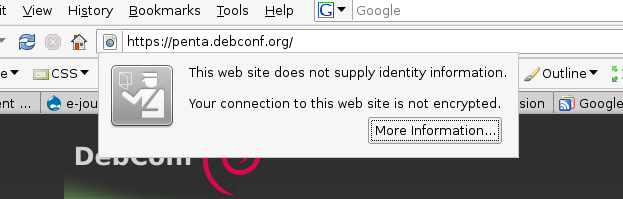
Oh, and I found another pretty little jewel: Go to any site which has a self-signed SSL certificate. Of course, Firefox will go to great lengths to make sure you understand how unsafe is it for you to trust anybody who didn't pay big bucks to Verisign... But this is enough reason for me to send a bug report:

I am connecting through a crypted HTTPS connection. The site is providing identity information - not certified, right, but it does provide something. And the connection is crypted. Firefox/Iceweasel 2 showed me the URL in a light-yellow background showing the connection was secure - Now it just denies penta.debconf.org the right to call itself secure.
(Yes, I am not an interface designer... But it seems neither are they)
[update]Bug filed. Any comments will be welcome in Bugzilla. The bug with the Debconf site (and I do regard it as a bug) is that Iceweasel displays that Your connection to this web site is not encrypted because some of the elements (i.e. the CSS, images..) are sent in the clear - Even though the real information is crypted. Ever heard of data/visualization decoupling?

Biella Coleman: The Cultural Significance of Free Software

When it comes to research and writing, anthropologists are notorious for being slow as molasses. It takes, on average, 9 years to finish grad school and then another 3-6 years before you write and publish your first book. Such is the sometimes frustrating pace of academia. But sometimes it is worth the wait as this new book, Two Bits, the Cultural Significance of Free Software by the anthropologist of science and technology Chris Kelty, makes clear. I am pretty intimate with the details of the book as ck was one of my dissertation committee members. I have read earlier versions and was fortunate enough to teach the final version to a small group of graduate students last spring. While there have been previous books on the subject of open source or peer-to-peer production more generally, this is the first book to delve deep, analytically and historically, into the cultural significance of free software. And the best part is that ck managed (I am not sure how but he did) to convince Duke University Press to release the whole book under a CC license. So download it to your heart’s delight and if you find it useful, do order a treeware copy (as you can’t beat that for easy and comfortable reading). For the developers out there, I would suggest starting with the introduction, which provides an initial overview of some of the main themes he develops and then I would dig into part two where the historical chapters reside and then loop back to the theoretical chapters in part one or continue to part three. Trust me, these will fascinate and surprise even those geeks with a relatively deep historical sense of this world. In fact, my very favorite academic piece on free software exists in these pages: and is the chapter on the history of the actual conflict between James Gosling and Richard Stallman that led to the creation of the GNU General Public License. Here is a small excerpt to whet your appetite:
In brief the controversy was this: in 1983 James Gosling decided to sell his version of EMACS a version written in C for UNIX called GOSMACS to a commercial software vendor called Unipress. GOSMACS, the second most famous implementation of EMACS (after Stallman s itself ), was written when Gosling was a graduate student at Carnegie Mellon University. For years, Gosling had distributed GOSMACS by himself and had run a mailing list on Usenet, on which he answered queries and discussed extensions. Gosling had explicitly asked people not to redistribute the program, but to come back to him (or send interested parties to him directly) for new versions, making GOSMACS more of a benevolent dictatorship than a commune. Gosling maintained his authority, but graciously accepted revisions and bug-fixes and extensions from users, incorporating them into new releases. Stallman s system, by contrast, allowed users to distribute their extensions themselves, as well as have them included in the official EMACS. By 1983, Gosling had decided he was unable to effectively maintain and support GOSMACS a task he considered the proper role of a corporation.
[ . . .]
Indeed, the general irony of this complicated situation was certainly not as evident as it might have been given the emotional tone of the debates: Stallman was using code from Gosling based on permission Gosling had given to Labalme, but Labalme had written code for Gosling which Gosling had commercialized without telling Labalme conceivably, but not likely, the same code. Furthermore, all of them were creating software that had been originally conceived in large part by Stallman (but based on ideas and work on TECO, an editor written twenty years before EMACS), who was now busy rewriting the very software Gosling had rewritten for UNIX. The once proud hacker ethic that Labalme mentions would thus amount not so much to an explicit belief in sharing so much as a fast-and-loose practice of making contributions and fixes without documenting them, giving oral permission to use and reuse, and losing records that may or may not have existed hardly a noble enterprise.
[. . .]
The story is a lively one, punctuated with some great e-mail “moments,” and gives you a play-by-play sense of how it is that free software become so entangled with the law and how the unwritten norms that guided sharing were violated to then become transformed, explicit, and written. The other chapter that will also fascinate those who want a deeper sense of this history is on UNIX and its role in creating the technical and collaborative conditions necessary to secure the explosion of free software years later. The story of the norms of sharing source code is, not by accident, writes Kelty, also the history of the UNIX operating system. This connection has been made by others but not shown in any historical detail as it is done in this book. For those interested in more anthropological issues, the first few chapters is where this type of more conceptual theorizing is at. Chris Kelty introduces the master trope of his book: the recursive public which is an idea that feeds into a longer academic debate, inaugurated by Jurgen Habermas, on the role of publicity, dialogue, and circulation of ideas and texts in cementing a democratic sphere. Many others, such as Charles Taylor, Michael Warner, and Nancy Fraser have since refigured and rehashed the meaning publics and public debate but there have been few ethnographies on the topic. It is here where Chris Kelty intervenes most forcefully to conceptualize publics in explicitly ethnographic terms and in an arena technology and the Internet which is often left undertheorized by cultural theorists. There is a lot more in the book (the third section examines some of the various political modulations of free software, such as Connexions and Creative Commons) but instead of saying any more, I will just leave you with his definition of a recursive public and again urge you to check out the book for yourself!
A recursive public is a public that is vitally concerned with the material and practical maintenance and modification of the technical, legal, practical, and conceptual means of its own existence as a public; it is a collective independent of other forms of constituted power and is capable of speaking to existing forms of power through the production of actually existing alternatives.

Clint Adams: Relaxation

I was misled. That much is probably true. I certainly had no idea what I was getting myself into. Enough of that though; there's narrative fading away. The part I should take responsibility for is the decision I made to stray off the map. Perhaps it was not so much a decision as a compulsion. I looked at the map. I saw the suspicious unmarked area at the edge, and concluded immediately that there was something good there, something the people wanted to keep hidden from me. I was correct, but I presumed far too much about the terrain. I thought I would make a quick exploration of the secret place, then backtrack to the more mapped area and get back with the program. Enough of that though; I've nearly forgotten the story. First I should point out that, had the map been to scale, it should have taken me an leisurely fifteen minutes to get to my first destination. It should have, assuming the land would be as flat as the map that represented it. Instead, it turned out to be something one could cover in fifteen minutes if one had, say, a jetpack and spring boots. I'm probably wrong; I'd probably injure myself in the process and take longer. Anyway, the average incline was close to 45 , and luckily was mostly uphill. Luckily. When I got to a resting place, I was able to conclude that my supply of fluids was almost certainly insufficient for me to continue. On the other hand, there was probably no way I would return if I went back for more drink. I told myself that there would likely be a beverage-selling shack out in the middle of nowhere around the next bend or so. Having solved this probability problem, I pressed on into the blazing sun. I came to a path leading down to the sea. It was unclear what was down there, but it was clear that it seemed to be a million miles down, and that that path might be the only way back. Given my current state of exhaustion and hydration, I decided to pass on this opportunity. After continuing for a while, the features at the bottom of that path became visible. A very pretty cove was down there, and almost certainly no shack o' drinks. I then came upon a fork. A wide path led downward: to what, I could not see. To its left, a narrow and rough path led straight. Knowing that a descent probably meant climbing four to eight times the altitude back somehow, and assuming the less pleasant-looking path led somewhere better, I went left. After a while, the land began to slope down, ever so slightly. Little clusters of bottles and newspapers were left on the rocks here and there. Then came a sofa under a tent. I began to wonder what hippies were traveling this path. The slope grew greater, and I passed a bench in a tent. Then I came to a giant staircase, almost straight down. It was covered in weeds and insects. Some were vegan, some wanted my flesh. As I got toward the bottom I thought about how glad I was that I had come that way from the top and not the other way around. Oh, I was very glad. At the bottom was something resembling a plastic bottle graveyard and barrels among barrels filled with water. Rubber hoses seemed to run randomly between certain barrels. A kitchen stood at the edge of some barrels. I suddenly got the feeling that I was not supposed to be here. After discovering that a couple of escape routes were actually dead ends, I proceeded to descend a small staircase to a terraced garden. Hoses lay about the rows, presumably for watering the plants. A cot under a tent lay empty, and I hurried past hoping I would not encounter the owner. Then I was at the ocean. The coast was lined with huge boulders, and a wooden bridge led me to the first one, and another wooden bridge took me to the second. Then the bridges stopped. In the distance, I could see that pretty little cove from before. I took stock. I could either return whence I came, up that horrifying staircase, or I could try to traverse the rocky coast over to the cove, then maybe do a faceplant on the beach and let the tide drown me rather than climbing back up. It seemed like a no-brainer, so I began making my way toward the cove. It got harder. Several times I became very afraid, either of falling and smashing my head against a rock or falling into the water below, or some sequential combination thereof. In the end I turned out to be more afraid of going back, at least until I got to what I judged the point of no return. I was reasonably close to where I imagined the sandy beach started, but there was a huge and impassable boulder in the way. Also, if I went further there was no way I would be able to climb back up in case I needed to retreat. I was thinking I would need to retreat, because unless there was some magical hidden toehold, I would be forced to jump into the water and swim around. I did not want to jump into the water. I wanted my phone to stay unfried in the event that I would need to use it to get rescued. I also did not want to call anyone to get rescued, especially since I didn't really know how to explain where I was. With a heavy sigh, I gave up, turned, and went back. This time I moved more quickly, though incurring more damage to my hands and feet. No humans were visible at the crazy farm/garden and makeshift reservoir, but plenty of bugs were visible on the staircase. I made the mistake of trying to lean against the railing to catch my breath. When I finally got to the bench in the tent, I understood exactly what it was for. I sat down, took a sip of my remaining water, ate an apple, and kept going up. When I got to the couch, I sat again. This time I sat and tried to figure out a plan. I still clung to the belief that once I got back to somewhere less wild I'd be able to buy a drink. I noted that I only had a little bit of water left, that I was dehydrated, that I was sunburned, that my pulse was about 180, and that there were no dogs or Russian people wandering past me. I ate a pear and drank my last few drops of water. I kept sitting until my pulse was down to around 150, then I figured I needed to keep moving. I was experiencing most of the effects of caffeine, and for free. Oddly, I passed a dog a few steps later. It was just standing by a rock, looking at me. I decided not to converse. When I had nearly reached the fork again, a couple came my way. I thought about begging them for water. I decided not to be rude. I have no idea what happened to them. I'm betting they wisely decided not to go down the steps. Resolving that the only sane option was to go back all the way to where I absolutely knew I could buy something potable, I headed in that direction. Still, I took two risks. Instead of going up the exact way I had come, or taking a well-travelled path down, I took a narrow and flat dirt path. It was actually a bit of a dilemma. I started down the latter two more than once each. Finally I saw that the down path was rather V shaped, and I concluded correctly that the straight path would bypass that angular-half-pipe-like construct. When I finally got to a point I recognized, it was smooth sailing the rest of the way down. I bought water and a snack, since I had had almost nothing to eat that day. At this point it would have been prudent to call it quits and go off and gorge myself on seafood or something, but no, I was now in the mapped area and surely it would all be roses and manna. Finishing one bottle, I bought two more. Five minutes later I bought another. I had now overcompensated, but I was playing it safe. I continued my explorations. Bicyclists kept nearly running into me, and, aside from the obvious, I viewed this as a good sign. Bicyclists, especially those that can't seem to steer straight for some reason, avoid difficult terrain. This is why they take their bikes on subways, trains, and buses. I don't like bike-riding, but if I had my druthers, I would always go downhill. No up, no flat, just down. Like downhill skiing, just down. It is a good thing I don't ride a bike. Once I got to the point where the bicycles thinned out to nonexistence, I was at an intersection. The way I wanted to go was up. The way I didn't want to go, but was a reasonable option, was only very slightly up. Additional factors complicated this decision point. [elision] This passage has been marked friends-only and you will not be able to view it without logging in. Moving hurriedly away from there, I headed upward. After a couple of turns, I ran into Catholics. First there were dead Catholics. Then there were Catholics pre-occupied with dead Catholics. Then there were Catholics waiting to die. Then there were seminarians. Then there were teens with prayer books. When I reached the next pinnacle, there were more teens with prayer books. There were benches, and there were no teens on them, for the teens were standing or sitting on the ground, quietly contemplating the Word. Unfortunately, they had decided that the benches were more suitable for holding all their bags, so there was nowhere for me to sit. I considered interrupting their reverie, but decided it wouldn't be very Christian of me to disturb them, so I just placed an ancient Drasnian curse on them and plodded down the hill toward a small beach. I really didn't need any more sun, but at least there probably wouldn't be anyone praying there. The water was tempting, but I'm always paranoid about my belongings when swimming alone, and if my phone were taken I wouldn't be able to call anybody to come rescue me at the next crisis point, sure to come. So I skirted the coastline and arrived at a much larger beach, one with facilities and services. Opting to save money but complicate things by using the public changing rooms and showers, I made a discovery. [elision] This passage has been marked friends-only and you will not be able to view it without logging in. Nonetheless, I changed into my swimming trunks, stuffed everything else but my towel, sunglasses, and a disgusting sugary drink I never should have bought into my bag, and went barefoot a few buildings down to rent a locker. The locker was ridiculously large for a single person, which is good to know should I ever want to kidnap a family and torture them at this place. The proprietor informed me that they were closing at some specific time, about an hour from then. I had no timekeeping device outside of the locker, so I had to wing it, and erring heavily on the side of caution, I had a short beach diversion. Given that large swathes of my epidermis were turning bright red, it's probably for the best. Handling the shower, locker, and changing in the other direction was slightly more complicated, but I did it and then I headed inland, figuring I should have a substantial meal for once that day. On my way to find dinner is when things got really crazy. [elision] This passage has been marked friends-only and you will not be able to view it without logging in. I wandered over to a bench to eat my newly-acquired snack, and did not exercise enough caution, because the flimsy paper bag ripped and I got sauce all over my pants and a little on my shirt. Unfortunately I had used my napkin in that earlier episode, and I'm not sure how much it would have helped anyway. Thus I continued on, looking like a slobby retard. Then I made an obviously-poor decision and ended up having a subpar dinner. What happened after that is a story for another time.

24 June 2008

Philipp Kern: Hooked up on TV series

Some months ago I didn't think that I would stick to an English TV series, not in any way dubbed or subtitled. But my girlfriend got me totally hooked up with both House, M.D. (Hugh Laurie is just hilarious) and 24. I got my own pick, too: Futurama. At least watching those American series improves my listening comprehension, although I still miss quite a lot of puns and jokes due to the missing subtitles and due to my missing knowledge of English sayings. But it works out somehow, she's explaining some of them to me, and I still enjoy it and have fun.

23 June 2008

Jonathan McDowell: BarCamp Belfast 2008

I spent Saturday at BarCamp Belfast. There were more people than I expected; I'm no good at judging exact numbers but the wiki lists 62. As it turned out not everyone ended up talking; this worked out well for me because I don't think I'm Web2.0 enough (is that a bit ironic given I'm writing this on a blog?). I don't really do user interfaces or website stuff and that seemed to be the primary focus of a lot of the attendees. Nice to know there's a fairly active crowd in
Belfast though; I discovered the existence of Belfast Open Coffee which I'll have to try and make at some point.

I went to at least the following talks::

Gerard McBreen on Digital Circle & Adobe Flex: Quite a cute demonstration of the Flex framework for Flash. I'd have been more convinced if Flash could be considered truly cross platform; Adobe can't even manage a 64 bit client yet and Gnash is far from ready.

Daniel McLaughlin on Nagios: Not really anything I didn't already know, but always interesting to see how other people are using these things to see if there's any nice tricks you've missed.

Andrew Gribbon from Exile Coffee on speciality coffee: This was really interesting. A complete tangent from IT but enjoyable and I must buy some roasted beans from him (I've been meaning to place a Roast and Post order for ages anyway).

Brian O'Neill on freelancing: Tailored towards the web market in my opinion, which is fair enough but things like aiming to never employ anyone and stay a one man operation doesn't really work if you're doing something that a customer wants supported around the clock. Or even just during the working day if you're crossing time zones. Interesting to hear that Brian had run an agency in the past but preferred working on his own these days. I kinda feel I've gone a bit the other way. :)

Linux Hardware workshop: Not really a lot of interest here; a clutch of EEEs, an N800 and a Debian box or two. However I had a chat with David Newman about his MythTV setup which convinced me I really should give it another try. After I get someone to install a bigger aerial in the hope of stabilising our Freeview reception.

Brian Cleland on Linux Trends: Talking about lots of Linux takeup by big names and general market adoption eg the recent selection of cheap subnotebooks. Main thing of interest was OpenPandora which I hadn't heard of before; OMAP3 based handheld device running Linux with a 800x480 4.3" screen. Aimed as a gaming device, but has a keyboard and bluetooth/wifi so has potential as a PDA as well. Hopefully the build quality will be better than the GP2X I saw.

Andy McMillan on coffee shop working: I've thought about this in the past myself; I worked from Cafe Java in Norwich a few times while doing Black Cat, but in general didn't find it as conducive to work as I'd hoped. He mentioned Coworking Belfast which is an idea Tristam has talked about in the past, in terms of people who work from home getting to have some form of social contact with like minded individuals, without having to go to the expense of a whole office. It'll be interesting to see if it takes off.

Darragh Doyle and Grannymar on blogging: I think everyone in the audience already had a blog of some description. I don't really consider my blog a social forum; it's not something I expect to have a long conversation on, just ask a quick question or discuss something
I've done that I think might interest people or give a general "this is what's happening at present" post. Blog commenting systems are all a bit crap to keep up anything sustained. Someone needs to write a blog<>nntp gateway that correctly cross posts comments as well. I suppose the issue with that is then everyone needs to run a news server, or all agree on
using the same one. Fine for groups of people who know each other but not if you want to read a dozen blogs from different areas in a single client that'll let you properly follow conversations. Mind you, people seem to cope with forums and I don't really understand how. Supporters of news and mailing lists seem to be dwindling. :(

Anyway, that was my first BarCamp. I wasn't quite sure what to expect, it was a bit more Web2.0 than I'd have liked (which is fair enough, but I'd have liked to have seen some talks about low level bits really) but I'd go again and will keep an eye out for the next one. And hopefully I'll see some of the people I met there at the BLUG meeting this Wednesday (Tap House in Lower Crescent from 6pm for anyone who's not on the mailing list).

20 June 2008

Edd Dumbill: Secure LDAP replication

Ever the sucker for punishment, I decided to pick three difficult things and stick them all together: LDAP, SSL and replication. Here's how to make it go on Debian and Ubuntu. The problem You want LDAP replication to happen over the internet, and you want it to happen securely. The caveat I'm not going to tell you how to set up your LDAP from scratch here: I'm assuming you've reached a solution you're happy with and want to replicate it. The solution We're going to set up a replicating slave LDAP server, which communicates with the master over the internet via an SSL-protected connection. Enabling replication First up, the master LDAP server needs to be configured to permit replication.  The key lines to add to your slapd.conf include:
moduleload syncprov
index entryCSN,entryUUID eq
overlay syncprov
syncprov-checkpoint 100 10
syncprov-sessionlog 200
These load up the synchronization module, add indices which make sync go faster, and enable sync. For more detail see the OpenLDAP site. Next you need to add a replicator user to your LDAP database, give your replicator user access to passwords as well as general read access. To create the replicator user, I made this simple LDIF file and fed it to ldapadd.
dn: cn=replicator,dc=mydomain,dc=com
objectClass: simpleSecurityObject
objectClass: organizationalRole
cn: replicator
description: LDAP replicator
userPassword: TOPSEKRIT
Once this user is in your LDAP database, you should give it read access to passwords (I assume you've already given read access to authenticated users.) I have this in my slapd.conf:
access to attrs=userPassword,sambaNTPassword,sambaLMPassword
...
   by dn="cn=replicator,dc=mydomain,dc=com" read
To check that this works, try using ldapsearch to check that the passwords are returned:
ldapsearch -x -D cn=replicator,dc=mydomain,dc=com \
  -W   grep -i password
Enter the replicator password when prompted, and you should see the encrypted passwords from your LDAP database. Securing access Now you've got replication enabled on the master, you will want to ensure it is available on the internet only via TLS or SSL. Here's what I added to slapd.conf to enable this:
TLSCertificateFile      /etc/ssl/certs/ldapserver_crt.pem
TLSCertificateKeyFile   /etc/ssl/private/ldapserver_key.pem
TLSCACertificateFile    /etc/ssl/certs/myCA.pem
TLSVerifyClient         demand
As you will guess from the configuration, the first two lines set the SSL key and certificate the master uses (see "A little twist" below for an important note on key permissions.) The third line tells slapd where to find my site-local certificate authority (CA), and the fourth line says slapd must require any connecting client to have a valid SSL certificate signed by the site-local CA. This is important, as it provides a second layer of access control: a replicating client must connect using a certificate you signed, plus the replicator password. Before this enables TLS access, we must tell slapd which network interfaces to listen on. To do this, edit the SLAPD_SERVICES variable in /etc/default/slapd. Here's my configuration:
SLAPD_SERVICES="ldap://127.0.0.1/ ldap://192.168.0.1/ ldaps:///"
This enables regular LDAP on the loopback and intranet network interfaces, and LDAP/SSL on all interfaces, including the public internet. So, with slapd restarted we are at this situation: connections are now possible from the internet, as long as they are made over SSL with a certificate signed by our site-local CA. (In fact, you can make much finer-grained access restrictions in your configuration than I have done. Using LDAPS rather than TLS over regular LDAP is a rather broad precaution. As explained on the OpenLDAP site, the ssf= parameter can be used to require a certain level of secure connectivity on a per-user or client basis.) Setting up the replicating server
Your slave server should have the same configuration as the master, except you can leave out the bits enabling replication. Firstly, you'll need add to slapd.conf the replication configuration:
syncrepl rid=123
        provider=ldaps://ldapmaster.mydomain.com/
        type=refreshAndPersist
        searchbase="dc=mydomain,dc=com"
        filter="(objectClass=*)"
        scope=sub
        attrs="*"
        schemachecking=off
        bindmethod=simple
        binddn="cn=replicator,dc=mydomain,dc=com"
        credentials=TOPSEKRIT
Most of this I took as boilerplate from the OpenLDAP documentation. Items to note include: And here's the /etc/default/slapd configuration:
SLAPD_SERVICES="ldap://127.0.0.1/"
The slave slapd exists only in this case to serve the local machine. Finally, there's the tricky bit! You need to configure slapd to connect to the master server using a certificate. I'll assume you've created and signed a key and certificate pair for your slave server (see my post Low-tech SSL certificate maintenance for more on this.) Awkwardly, the TLS configuration in slapd.conf is for the server only. Replication works as a client, and thus needs separate configuration. Furthermore, you cannot configure this globally on your machine, as the SSL certificate is a per-user only parameter (see man ldap.conf for more information on this.) Instead, we must set it in slapd's environment. Add these two lines to the end of /etc/default/slapd:
export LDAPTLS_CERT=/etc/ssl/certs/slapd.crt
export LDAPTLS_KEY=/etc/ssl/private/slapd.key
This file is sourced as a shell script by slapd's init script. Amend the path to your certificate and keys as required. Use /etc/init.d/slapd restart and you should be good to go. Finally, we want the slave server to be certain it's talking to the real master. So we also configure client connections to verify the SSL certificate of the peer, in ldap.conf again:
TLS_CACERT      /etc/ssl/certs/myCA.crt
TLS_REQCERT     demand
A little twist One gotcha to notice with both client and server is that slapd runs as the openldap user by default on Debian. Also by default SSL keys are readable only by the ssl-cert group. You'll need add the openldap user to this group, otherwise it won't be able to access /etc/ssl/private. Related articles on this site: Join the conversation about this post

19 June 2008

Joey Hess: fujitsu p7120 laptop keyboard replacement

Can't find any documentation about this on the web, and it's a PITA, so here goes. Note: No pictures. I was too scared to take time out to take pictures. Disassembly is not hard at first. Three screws hidden over the battery pack allow removing the cover over the power button and wireless switch, which then frees 4 tabs that lock the top of the keyboard down. My keyboard was also taped down with double-sided tape, and glued down. This is the part I hate, both because I still haven't accepted that the common way to put together consumer electorinics is tape and glue, and because it's never possible to get it apart undamaged. I pried the keyboard up from the top, pushing under to untape/glue, and taking care of the cable. There was also a flap of plastic stuck down over the cable, which had to be peeled away. Many clips on the bottom of the keyboard hold it in place and have to be slipped out. I ended up slightly bending the arrow keys of the keyboard in yanking it out, though I think they'd still be ok-ish. Luckily I was putting in a new one. Removing the keyboard cable was strange. Its socket is not the typical kind you can life to unlock. The socket is one piece and does not move at all. I eventually just pulled the cable out of it. This is where I started to get very nervous. Replacing the cable was a PITA. You have to bend its end at a 90 degree angle, and then just line it up and press it down into the socket. Hard. And rub along it and do whatever you can to get enough force exerted down the thin cable strip to make it slip far enough into the socket to work. I booted up the laptop several times while doing this, to test if I had managed to get it working. Eventually I had. Then I very carefully reseated the keyboard, and replaced the cover and screws. Unfortunatly, the tape and glue was doing something. The new keyboard is very springy in the middle, where that held it down before. So I will have to take it apart again and put on some new double-sided tape or something eventually. Conclusions:

Martin F. Krafft: IPv6 with Debian

Even though I ve dealt with IPv6 for almost a decade, have delivered presentations, and given multi-day courses on IPv6 security aspects, I ve never actually added IPv6 to my own server/home network infrastructure because it seemed that Linux and/or Debian just weren t ready for it. This seems to have changed (although there are still a number of problems) and in less than a day, I put a few of my machines online. In the following, I d like to share with you how I did it.

Kernel versions and stateful connection tracking Unfortunately, I have to start off with some bad news: even though Debian etch, our current stable release, which uses a Linux kernel version 2.6.18, speaks IPv6, I cannot recommend it for deployment, as the 2.6.18 kernel does not support proper stateful connection tracking for IPv6, and thus makes it impossible to firewall hosts in a sensible manner (I always add local packet filters to all my hosts, and if only to guard against the situation when a user installs a malicious programme to listen on a high port). Of course, it is possible to configure a packet filter statelessly in an acceptable manner once you know the use case, so do with this information what you wish; I prefer to stay general for now. For me, a remedy is almost around the corner: the 2.6.24 kernel seems to support stateful connection tracking for IPv6, and it s even available for etch as it will be included in the upcoming etch-and-a-half release. I simply ended up using the kernel packages pre-release, and so far have not had a problem with it. To do so, add the following line to your /etc/apt/sources.list, making sure to use a close archive mirror:
deb http://ftp.xx.debian.org/debian etch-proposed-updates main

I then just upgraded the system and pulled in all proposed updates. As that may have let in software that won t be part of etch-and-a-half, or even lenny, you may want to pin the archive and only upgrade the kernel packages, by adding to /etc/apt/preferences (replacing amd64 with your architecture):
Package: *
Pin: release a=proposed-updates
Pin-Priority: -1
Package: linux-image-2.6.24-etchnhalf.1-amd64
Pin: release a=proposed-updates
Pin-Priority: 600

Alternatively, you could use the 2.6.24 linux kernel packages on backports.org.

Xen and IPv6 One drawback of switching to 2.6.24 is that you cannot run a dom0 on that machine any longer, so by practical extension, you cannot connect it to the IPv6 network with a packet filter in place. Supposedly, running 2.6.24 instances on a 2.6.18 dom0 is reported to work, however.

Configuring the packet filter The first thing I did was to configure the packet filter on each host appropriately. Unfortunately, this is harder than it should be, because to quote one of the netfilter developers when ip6tables was conceived, someone had a big bad brainfart : rather than adding IPv6 rules to your existing iptables ruleset, you have to create a new ruleset, duplicate all chains, networks, hosts, and individual rules, and maintain the two in parallel. Even though there are efforts of unification on the way, I speculate it ll take another couple of years until PF_INET6 will be fused into PF_INET and one will be able to do sensible cross-address-family packet filtering with Linux. Since I ve recently started to look (again) at pyroman, maybe the most logical way forward would be to extend it to write both, IPv4 and IPv6 rulesets from its knowledge about the hosts and networks you configured. Anyway, we want to get stuff working now! Thus, let s configure ourselves a packet filter. (Almost) all IPv6-related filtering must be configured via ip6tables (read on further down about IPv6 in IPv4 tunneling, the reason I said almost ). The following is a simple default ruleset to start with, which I put into /etc/network/ip6tables to load with ip6tables-restore:
*filter
:INPUT REJECT [0:0]
:FORWARD REJECT [0:0]
:OUTPUT ACCEPT [0:0]
:in-new - [0:0]
### INPUT chain
# allow all loopback traffic
-A INPUT -i lo -j ACCEPT
# RT0 processing is disabled since 2.6.20.9
#-A INPUT -m rt --rt-type 0 -j REJECT
# allow all ICMP traffic
-A INPUT -p icmpv6 -j ACCEPT
# packets belonging to an establish connection or related to one can pass
-A INPUT -m state --state RELATED,ESTABLISHED -j ACCEPT
# packets that are out-of-sequence are silently dropped
-A INPUT -m state --state INVALID -j DROP
# new connections unknown to the kernel are handled in a separate chain
-A INPUT -m state --state NEW -j in-new
# pass SYN packets for SSH
-A in-new -p tcp -m tcp --dport 22 --syn -j ACCEPT
# log everything else
-A INPUT -m limit --limit 3/min --limit-burst 10 -j LOG --log-prefix "[INPUT6]: "
### OUTPUT chain
# RT0 processing is disabled since 2.6.20.9
#-A OUTPUT -m rt --rt-type 0 -j REJECT
# allow outgoing traffic, explicitly (despite chain policy)
-A OUTPUT -j ACCEPT
### FORWARD chain
# RT0 processing is disabled since 2.6.20.9
#-A FORWARD -m rt --rt-type 0 -j REJECT
# disallow forwarded traffic, explicitly (despite chain policy)
-A FORWARD -j REJECT
COMMIT

Note that this recipe is pretty much unusable on pre-2.6.20 kernels due to their broken implementation of stateful connection tracking. The ruleset should be fairly obvious, but you might wonder about my use of REJECT and allowing all ICMP after all, you ve heard for the past 30 years that ICMP is a bad hacker protocol , and Internet security is no domain for being nice to people, so to prevent any information disclosure, you should DROP connections, not let people know that they re simply not allowed. Well, to hell with all that! I don t see a single reason or attack vector that is foiled by DROP or disallowing ICMP. In fact, it s just security by obscurity, and might inconvenient at the same time. ICMP is also much more important with IPv6 than with IPv4 (it replaces ARP, for instance), and it s actually useful to be able to ping hosts, or get back informational messages on why something failed. Finally, rejecting traffic rather than dropping it doesn t suggest to a hacker that something s hidden here. Then there is RFC 4890, which almost made me puke. This document is part of the reason why I say: let s fix problems in the kernel, rather than shielding them with unreadable and unmanageable rulesets!

Getting connected If you already have an IPv6 address, you re basically ready to go, but may want to read further down on how to connect your local network to the IPv6 Internet as well. If you are searching for a provider, have a look at the list of providers with native IPv6 connectivity over at sixxs.net. If you are reading up to here, I assume you are connected to the Net with IPv4. There are two ways for you to move towards IPv6: 6to4 or by way of a tunnel provider. A Kiwi website explains how to setting up 6to4 connectivity, and thus I will concentrate only on the tunnel approach. Even though everyone can set up 6to4 in a breeze without any accounts or waiting, there are a number of security considerations, it s pretty ugly to debug (due in part to asymmetric routing), and makes your life unnecessarily difficult when all you have is a dynamic IP that changes from time to time. If you are stuck behind a NAT gateway, you cannot use 6to4 either. Thus, I prefer the tunnel approach. With the tunnel approach, IPv6 packets are wrapped up in IPv4 packets on your host, and sent to the IPv4 address of your tunnel provider, who has native IPv6 connectivity. The tunnel provider unwraps your packet and shoves the contained IPv6 packet onto the backbone. The IPv6 address you used as source address is routed to the tunnel provider, so any replies arrive at their machines, where they re again wrapped into IPv4 packets and sent to your (publicly-accessible) IPv4 address. Those IPv4 packets specify payload type 41 ( ipv6 ), which is why we need those -p ipv6 -j ACCEPT rules in the iptables ruleset. There are a few tunnel providers out there. I chose SixXS and have not regretted my choice. I shall thus assume that you do the same: sign up for an account right now, so that you have it by the time you finished reading this document! SixXS works on a credit system: tunnels and subnets cost credits, which you can accumulate by maintaining your tunnels properly. This ensures that everyone can play around, but to do more advanced stuff, you need to first display competence with the basic concepts. Your first step with SixXS will be to request a tunnel. SixXS offers three types of tunnels:
  • static tunnels, for those with static IPs,
  • heartbeat tunnels, for those with dynamic IPs, and
  • AYIYA tunnels, for those behind NAT gateways.
Each of these tunnels have advantages and disadvantages, as everything does: the first two types of tunnels use IP protocol 41 packets to encapsulate the IPv6 packets. As such, there are security considerations involving the impersonation by spoofing, and all upstream firewalls must let protocol 41 pass. AYIYA addresses these problems by using signed packets, but that solution comes with extra computation overhead and smaller MTUs. I suggest to use the first type of tunnel that fits your situation. Debian s aiccu package can take care of heartbeat and AYIYA tunnels for you, and it can even set up static ones. During registration, you will also need to choose a PoP , which stands for Point of Presence . If your country only has a single PoP, that s the one you will end up using (unless you have a good reason for another one), but if there are more options, I strongly suggest that you go through the list of PoPs and select the one with the best roundtrip time and lowest latency from your location! Note that you must answer ping requests (ICMP echo-request) from the PoP you chose, or else the tunnel will not be created. Once your tunnel request gets approved, you ll get a /64 prefix, in which you only use two addresses: the PoP will configure the :1 address and you need to configure your host to use the :2 address on the tunnel interface. You ll also be told the IPv4 address of your PoP endpoint . Joey Hess taught me that aiccu can set up the interface for you, using the data it queries from the SixXS registration (TIC) server. I tried it, and it works. However, I prefer the pure ifupdown approach, as it makes things explicit and allows me to use the hooks for stuff like loading the packet filter. So in my /etc/network/interfaces, you can find:
auto sixxs
iface sixxs inet6 v4tunnel
  endpoint 194.1.163.40
  address 2001:41e0:ff00:3b::2
  netmask 64
  gateway 2001:41e0:ff00:3b::1
  ttl 64
  pre-up ip6tables-restore < /etc/network/ip6tables
  up ip link set mtu 1480 dev $IFACE
  up invoke-rc.d aiccu start
  down invoke-rc.d aiccu stop

Make sure to read about MTU values of the tunnel and adjust the 1480 value in the above to your tunnel settings and ISP connectivity. Also set ipv6_interface sixxs in /etc/aiccu.conf, if you are using aiccu, or else aiccu will bring up a duplicate/additional interface. If you tell it to use the same interface, it will actually execute all the same commands (which will fail), but won t report any errors. A future version will have a switch to prevent it from configuring the interface. Unfortunately, this will probably not work. The reason is that your regular IP packet filter (iptables, without the 6) doesn t let those encapsulating IPv4 packets pass, unless we tell it to; we probably want to do this early on in the chain, and also limit it to our tunnel peer, so:
iptables -I INPUT -p ipv6 -s 194.1.163.40/32 -j ACCEPT

For AYIYA, you need to open port 5072, either for UDP, TCP, or SCTP, depending on how you configured it. Also have a look at this FAQ entry on what a firewall needs to pass. If it still doesn t work, you have an upstream packet filter that needs some of those holes poked. Good luck. In most situations, the FORWARD chain does not get such a rule, since the tunnel terminates at the gateway, which routes to a native IPv6 network, or another tunnel. Allowing tunnels through a gateway is almost always a bad thing, as it would allow undetected and untraceable traffic from compromised boxes in the local network. The OUTPUT chain also does not need such a rule, if you have configured stateful filtering properly. Now bring up the interface and verify the connection:
# ifup sixxs
# ping6 -nc1 2001:41e0:ff00:3b::1
PING 2001:41e0:ff00:3b::1(2001:41e0:ff00:3b::1) 56 data bytes
64 bytes from 2001:41e0:ff00:3b::1: icmp_seq=1 ttl=64 time=74.0 ms
[...]
# ping6 -nc1 ipv6.aerasec.de
PING ipv6.aerasec.de(2001:a60:9002:1::184:1) 56 data bytes
64 bytes from 2001:a60:9002:1::184:1: icmp_seq=1 ttl=55 time=91.5 ms
[...]

Welcome to the Internet of the future!

Setting up an IPv6-capable gateway Your IPv6 connection works, but it s limited to a single address, and you do not get to specify the reverse DNS PTR record for it. Since the concept of NAT is mostly absent from IPv6 (thanks! thanks! thanks!), you will not be able to connect any other hosts to the IPv6 network. If your local network has a few hosts behind a gateway, you will need to request a subnet from SixXS and configure your gateway (which has the tunnel connection) appropriately. Don t worry, this is not really very difficult. First, request a subnet for your tunnel from your PoP via your SixXS homepage. Once approved, you will get a /48 prefix for your own use: 2^80 1.2 heptillion addresses which are yours to assign to every dust particle in your office or home, if you so desire. The way I set it up is to add the first of these addresses to your internal interface on the gateway, by adding the following two lines to the interface s stanza in /etc/network/interfaces; you will need the iproute package installed (which you should be using for everything network-related anyway):
up ip -6 addr add 2001:41e0:ff12::1/64 dev $IFACE
down ip -6 addr del 2001:41e0:ff12::1/64 dev $IFACE

Instead of bringing the interface down and up, just run ip -6 addr add 2001:41e0:ff12::1/64 dev eth0. Note the use of the /64 prefix instead of the /48 that got assigned, leaving only 20 pentillion addresses. Oh no! The reason for this is buried in the specs: basically, /48 is a site prefix, but individual networks should not be larger than /64, which is the prefix length of links in the IPv6 domain. Now is also a good time to enable IPv6 forwarding, e.g. like so:
# echo net.ipv6.conf.all.forwarding = 1 >> /etc/sysctl.conf
# sysctl -p /etc/sysctl.conf

Obviously, you will also need to change the policy on the ip6tables FORWARD chain. For now, let s just set it to accept. You should later create a proper ruleset, though!
# ip6tables -I FORWARD -j ACCEPT

Bringing IPv6 to your local network The final step is to spread the love to your local network. Refrain from selecting addresses from your subnet and assigning them to the local hosts, or wondering how to configure the DHCP server, because IPv6 does it differently: your gateway will advertise its routes (which includes a default route) to your network, and each host will pick an address based on its MAC address (unless it already has an EUI-64 address assigned. This all happens automagically, at least with current Debian and Windows machines. On the gateway, you need to install radvd and simply tell it which prefix to use on which interface. My /etc/radvd looks like this, and I won t explain it:
interface eth0
 
  AdvSendAdvert on;
  prefix 2001:41e0:ff12::/64
   
   ;
 ;

Note again how we advertise a /64 network rather than the /48 we own . You cannot advertise smaller networks if you want automatic configuration to work, and you should not use networks larger than /64 in any case. If 2^64 addresses are not enough for you, I trust you ll be able to figure out how to advertise another of your 65536 /64 prefixes in the /48 subnet to appropriate hosts. Restart radvd and run over to another host to witness how it automagically gets connected to the IPv6 network by scanning /var/log/kern.log and watching the output of ip -6 addr and ip -6 route. Try ping6ing from there! Find the dancing turtle! It should all work. If you don t like the automagic aspect of this, look into stateful configuration, using DHCPv6, as provided by dibbler-server and ?wide-dhcpv6-server.

Resolving names Take note of the IPv6 address of each host. There s a way to determine it given the host s MAC address, but this is easier (ipv6calc is also useful). You might want to let your local DNS server know by adding AAAA records in parallel to the existing A records, and possibly even adding PTR entries. If you re serious about IPv6, you can tell SixXS to delegate reverse lookups for the IPv6 addresses to your DNS servers, but you ought to refrain from polluting the DNS namespace. Note that bind9-host provides an improved host tool, which fetches all kinds of information about names, not just the one single information configured as default:
% host pulse.madduck.net
pulse.madduck.net has address 130.60.75.74
pulse.madduck.net has IPv6 address 2001:41e0:ff1a::1
pulse.madduck.net mail is handled by 99 b.mx.madduck.net.
pulse.madduck.net mail is handled by 10 a.mx.madduck.net.
% host 2001:41e0:ff1a::1
1.0.0.0.0.0.0.0.0.0.0.0.0.0.0.0.0.0.0.0.a.1.f.f.0.e.1.4.1.0.0.2.ip6.arpa
domain name pointer pulse.madduck.net.

Oh, and if you re really that curious about how IPv6 addresses are computed from MAC addresses, read RFC 2464. Basically, given a prefix 2001:41e0:ff1a:: and a MAC address aa:bb:cc:dd:ee:ff, the resulting IPv6 address is obtained by:
  1. inserting ff:fe into the middle of the MAC address to yield aa:bb:cc:ff:fe:dd:ee:ff;
  2. flipping the second lowest bit of the first octet to yield a8:bb:cc:ff:fe:dd:ee:ff;
  3. removing the odd colons to yield a8bb:ccff:fedd:eeff, the EUI-64;
  4. concatenating the prefix and this result to get 2001:41e0:ff1a::a8bb:ccff:fedd:eeff.
If you find your (Windows) IPv6 addresses changing all the time, you might be faced by privacy features .

Remaining issues Even though my IPv6 connectivity works, I have two remaining issues.

Sending larger amounts of data to the network I am experiencing a curious issue where outgoing ssh IPv6 connections time out and outgoing data transfers hiccup. I have yet to find out what s going on.

Mapping names to laptops Laptops generally have two interfaces, one with a cable, and the other wireless. Both of these interfaces will have separate MAC addresses, and by extension, the laptop will have different IPv6 addresses depending on how it is connected to the local network. I want to be able to connect to laptops without knowing the medium they use to connect to the network. Unfortunately, there seems to be no feasible way. The solutions I see are:
  • override the MAC address of one interface with that of the other, which is going to cause bgi problems in the case when the laptop (accidentally) gets connected to the same network twice;
  • add both IPv6 addresses as AAAA records to the laptop s DNS name, which will cause random delays when connecting as the resolver may return the currently inactive address first;
  • set up mobile IPv6, e.g. by following this Mobile IPv6 how-to, which would allow accessing the laptop uniformly, no matter where in the world it is. Unfortunately, Debian s support for Mobile IPv6 is severly lacking at time of writing. Also, Yves-Alexis Perez notes that this how-to is horribly outdated and promised to tend to it Real Soon Now .
The second solution works for me for now, but I am interested in the third. In response to this document, Andreas Henriksson has suggested the replace the stateless configuration (radvd) with stateful configuration, using DHCPv6. I have yet to investigate this option. Jeroen Massar suggests to unite cable and wireless into a bridged interface, which seems like a very good idea.

Credits Thanks to Bernhard Schmidt, William Boughton, and Jeroen Massar, and everyone on #ipv6/irc.freenode.org for their help over the past few weeks, and all those who fed back comments in response to this document!

18 June 2008

Gerfried Fuchs: Musical Countries Meme

The instructions are pretty simple: Go to your last.fm profile and look up the countries for all 50 listed "Top Artists Overall". Here is the distribution of the bands I listen to:
de: 19
uk: 11
us: 11
se: 2
at: 1
au: 1
be: 1
fr: 1
ie: 1
it: 1
mx: 1
Found through Mosquitokillah

Daniel Kahn Gillmor: transient &quot;obsolete packages&quot; with apt

On the testing and unstable systems that i run, i occasionally get a disturbing "there are N newly obsolete packages" message. For example
[0 root@squeak ~]# aptitude update
Hit http://cmrg.fifthhorseman.net unstable Release.gpg
 [...]
Get:42 http://ftp.us.debian.org unstable/main [2077kB]                          
Fetched 15.2MB in 57s (262kB/s)                                                 
Reading package lists... Done
Updating debtags database...... Done
Current status: 3 updates [+3], 1136 new [-21212].
There are 1804 newly obsolete packages.
[255 root@squeak ~]# 
Usually, i can fix this with another aptitude update. Does this mean i've hit a mirror at an inopportune time? Or do i have apt mis-configured somehow? Other people have documented this before, and casual conversation with friends lets me know it's not just me. If this is due to some inconsistency at the mirrors (particularly for suites with rolling updates?), is there some way to engineer the mirror transfers so that this doesn't happen? For example (i have no idea how this stuff is done, so i'm just making this up):
  1. rsync the pool/ without --delete to all mirrors,
  2. rsync the Packages and Release, and DiffIndex files to all mirrors,
  3. rsync the pool/ with --delete
Or should apt itself deal with these circumstances differently? It seems like signed apt ought to be able to detect when something like this is amiss. I'm reluctant to consider the situation acceptable, because i'd like to be able to trust apt in general. In particular, i can imagine apt eventually becoming more assertive about suggesting removal of newly obsolete and unsupported packages. If it is wrong about what's obsolete and unsupported, this could be dangerous.

17 June 2008

Decklin Foster: Dealing with it

I had this crazy idea a few months ago which Joey's post about muscle memory reminded me of. For those not in the US, our keyboards have and ~ on the key to the left of 1. I prefer this key to be Esc. Long ago I simply swapped the two keys, but the original "Esc" key is always in some weird and inconsistent place and reaching for ~ became as annoying as reaching for Esc. (I suppose I might not care if I didn't use a unix shell or regular expressions or bit masks or...) So, noting that I mostly only wanted that key for ~, and not , I came up with the following (in xmodmap form):
keycode 49 = Escape asciitilde grave Escape
This means: if you just hit the key, it does the Right Thing (Esc, as if I were on a real unixy keyboard). If you hold Shift and press the key, it also does the Right Thing (~, as if I were on a PC). But what to do about , or Shift-Esc, which are no longer possible? We make them the alternate graphs (just old down AltGr. I think the xkb option to put this on right Alt is "grp:switch"). I honestly use those two infrequently enough that I don't care about having to remember the extra bucky. (I tend to type $(cmd) in the shell, and not cmd , because I use the former in scripts and I always found the latter harder to read. I suppose I would care more if I used Lisp or Haskell or...) What I like most about this solution is that it lets me use the same muscle memory on all my hardware. Never mind weird Esc positions; laptop vendors still can't agree on the correct order of Fn and Control. But you don't have to care if you put Control on Caps Lock. Same idea. It does feel a bit like cheating, but it has made my wrists far more comfortable. Oh, and to wean myself off the key way out in the corner:
keycode 9 = NoSymbol
Now the question, of course (getting back to Joey), is what would happen if my "new" Escape key broke. I guess I'd have to keep the laptop at home and plug in my Happy Hacking Keyboard :-)

Enrico Zini: Joys of schroot

Joys of schroot Schroot is good! Try schroot. You have LVM set up and some free extents in a vg? Try this:
# Create a new logical volume for a sid chroot
lvcreate -n schroot-sid -L1G YOUR-VG-NAME
mke2fs -j /dev/YOUR-VG-NAME/schroot-sid
# Debootstrap sid into it
mount /dev/YOUR-VG-NAME/schroot-sid /mnt
debootstrap --keyring=/etc/apt/trusted.gpg sid /mnt http://ftp.uk.debian.org/debian
umount /mnt
Then apt-get install schroot and put this in your /etc/schroot/schroot.conf:
[sid]
type=lvm-snapshot
device=/dev/YOUR-VG-NAME/schroot-sid
description=Debian sid
priority=5
users=YOUR-USER-NAME
root-users=YOUR-USER-NAME
source-root-users=root
aliases=unstable
lvm-snapshot-options=--size 2G
Now, schroot -c sid will make a LVM snapshot of /dev/YOUR-VG-NAME/schroot-sid, mount it, set it up as a nice working system, and chroot into it running a shell. Have a look around: resolv.conf is set up, your home directory is bind mounted, /proc and /sys are mounted. When you exit the chroot, the LVM snapshot disappears, and /dev/YOUR-VG-NAME/schroot-sid is unchanged. If you want to modify /dev/YOUR-VG-NAME/schroot-sid, you just schroot -c sid-source. In my laptop, I did this:
# schroot -c sid-source
(sid)# echo APT::Install-Recommends "false";' > /etc/apt/apt.conf.d/50enrico
(sid)# apt-get install build-essential, pbuilder, devscripts, fakeroot
(sid)# apt-get clean
At this point, to build a debian package like if I were using pbuilder, I do this:
pkgdir$ schroot -c sid
(sid)pkgdir$ su -c /usr/lib/pbuilder/pbuilder-satisfydepends
(sid)pkgdir$ debuild -us -uc
You can repeat this whole process with lenny and etch, for example, and if you are on an amd64 system, you can also do sid32, lenny32 and etch32. If you don't want to redownload packages all the time, install approx and configure the -source chroots to use it. This also allows you to easily switch all systems from one mirror to another if, for example, you are traveling abroad. If you want to do the same as pbuilder update, you can do this:
# schroot -c sid-source
(sid)# apt-get update
(sid)# apt-get dist-upgrade
(sid)# apt-get autoremove
(sid)# apt-get clean
You can use schroot -c sid-source for all sorts of permanent maintenance works. You can also create persistent named snapshots:
$ schroot -b -c sid -n playground
This will only disappear when you do:
$ schroot -c playground -e
And you can enter the schroot as many time as you want with:
$ schroot -r -c playground
You can also enter a temporary snapshot as many times as you want, by using the random name that schroot generated for it (you can see it, for example, when running df or mount). You fear that lvm snapshots are a little fragile and a little slow at the moment? It's not a problem: your home is bind-mounted inside the chroot, so you can do all the work in your normal home filesystem, without stressing the snapshot. This is good not only to build packages. For example, now that svk is broken in sid and lenny, I just did schroot -b -c etch -n svk, installed svk on it, and then every time I need svk, I can do schroot -r -c svk and have it ready.

Michal &#268;iha&#345;: Code of the day

Why the hell do I have to hit various obscure pieces of code today? Current winner is part of system-config-printer:
def monitor_session (*args):
    pass
try:
    bus = dbus.SessionBus()
    bus.add_signal_receiver (monitor_session)
except:
    print >> sys.stderr, "%s: failed to connect to session D-Bus" % \
          PROGRAM_NAME
    sys.exit (1)
If you don't know D-Bus or Python: It listens to all signals on session bus and does nothing with them. All this code causes is eating up memory and CPU cycles when there is some higher load on session bus. PS: Maybe I miss some nice idea behind this code, please enlighten me.

16 June 2008

Martin F. Krafft: Setting up an encrypted Debian system

Even though the Debian installer can set up encrypted partitions, it is optimised for systems with a single data partition, unless you want to enter multiple passphrases when the system boots. The installer configures a LUKS volume using cryptsetup, but it provides no mechanism for the use of key files, only interactive passphrases. I like partitioning my disks and use different filesystems for /tmp, /home, /var, and /usr/local for a number of reasons. I don t like entering more passphrases than necessary. If you can identify with that, the following is for you.
Several people have pointed out to me that one can simply create a single encrypted physical volume with the Debian installer and place logical volumes for the various filesystems in there. You still need a separate /boot partition, in any case. Kapil Hari Paranjape has described the approach. This method is much cleaner and to be preferred. It s quite likely that it also improves the speed since only a single kcryptd process takes care of all of the decryption and encryption needs. I shall try it on my next installation and report on whether the Debian installer supports it. In the mean time, the following is left as reference the approach is still fully functional.

Installing the system The first step to setting up an encrypted Debian system is to perform a normal Debian system installation. When you are asked to partition your harddrive and create filesystems, set up all partitions as encrypted volumes (I suggest to go with the installer defaults and use dm-crypt and AES with the default settings, simply because I have no reason to doubt the installer dveeloper team s choices). Make sure to erase the disks in the process the installer has an option for that. Set up the swap partition as an encrypted volume too, but don t worry too much about the settings at this point; we will recreate the swap partition later. Unless you want to boot off an external medium, such as a USB stick, you will need to create an unencrypted partition for /boot. I will return to this topic, which has security implications, further down. The installer will ask you for passphrases for each of the volumes you create. I suggest you pick a secure passphrase for the root volume (/), but simple passphrases for all the other ones (such as a ), since we will reconfigure them to use key files instead.

Using key files A key file is like a passphrase stored in a file on disk; as opposed to what you know , it s a what you have security asset. Thus, you need to store the file somewhere. When I boot up my system, I unlock the root partition with a passphrase entered interactively, which makes the root filesystem available. I store key files for all other volumes in /etc/keys. Obviously, I need to tell cryptsetup to use those. The first step is to create a key file for each partition and to add it as a decryption key to the LUKS volume. You can do all of the following without unmounting the filesystems. See the following example for hda6, which will prompt for the simple passphrase we entered above to unlock the key ring when adding the key file:
umask 077
mkdir /etc/keys
dd if=/dev/urandom of=/etc/keys/hda6.luks bs=4k count=1
cryptsetup luksAddKey /dev/hda6 /etc/keys/hda6.luks
cryptsetup luksKillSlot /dev/hda6 0 --key-file /etc/keys/hda6.luks

The last command wipes the simple passphrase from the key ring and thus makes it unusable. Now we need to tell cryptsetup to use the key file by editing /etc/crypttab and ensuring a line such as the following exists:
hda6_crypt /dev/hda6 /etc/keys/hda6.luks luks

This tells cryptsetup to create the cryptographic volume hda6_crypt from the base device /dev/hda6, using the key file we created above, and letting it know that it s dealing with a LUKS volume. Repeat this for every partition except your root and swap partitions.

Encrypting the swap partition If you are using an encrypted Debian system, you likely have some security requirements to meet. If that s the case, you must also use an encrypted swap partition. The swap partition can be encrypted in two ways:
  • it can be recreated on every boot, using a random passphrase, or
  • it can be created like the other encrypted volumes with a persistent passphrase
If you want to use suspend-to-disk, you cannot use the first approach as it would overwrite your memory footprint stored in the swap partition. Furthermore, you cannot use a key file like the other partitions, since the root filesystem is not (and must not) be mounted by the time the resume process starts and needs to read the decrypted swap partition. The way I solved this is by telling cryptsetup to compute the passphrase of the swap partition from the decryption key of the volume holding the root filesystem; the cryptsetup package implements this with /lib/cryptsetup/scripts/decrypt_derived. Thus, to set up the swap partition, I do the following, assuming hda2 is the partition holding the encrypted swap and the root filesystem is in hda5_crypt:
swapoff /dev/mapper/hda2_crypt
cryptsetup luksClose hda2_crypt
dd if=/dev/urandom of=/dev/hda2
/lib/cryptsetup/scripts/decrypt_derived hda5_crypt \
    cryptsetup luksFormat /dev/hda2 --key-file -
/lib/cryptsetup/scripts/decrypt_derived hda5_crypt \
    cryptsetup luksOpen /dev/hda2 hda2_crypt --key-file -
mkswap /dev/mapper/hda2_crypt

To tell the system about this swap partition, we need to add it to /etc/crypttab and /etc/fstab; make sure, those files contain lines like the following:
/etc/crypttab:
  hda2_crypt /dev/hda2 hda5_crypt luks,keyscript=/lib/cryptsetup/scripts/decrypt_derived
/etc/fstab:
  /dev/mapper/hda2_crypt swap swap sw 0 0

With this in place, as soon as you configure the system for suspend-to-disk, the swap partition will be automatically set up alongside the root filesystem very early during the boot sequence. To figure out which swap partition to make available at that point, cryptsetup checks the following:
  • a line like RESUME=/dev/mapper/hda2_crypt in /etc/initramfs-tools/conf.d/resume
  • a resume device setting in /etc/uswsusp.conf (see uswsusp.conf(5))
  • an entry in /etc/suspend.conf
  • a resume=/dev/mapper/hda2_crypt in the kernel command line
You can inspect /usr/share/initramfs-tools/hooks/cryptroot if you want to know more about this.

Using UUIDs Even though the above is all you have to do, you might want to consider replacing the device paths in /etc/crypttab with persistent ones. One motivation might be the ability to boot off your drive via a USB adapter, which might cause it to appear as /dev/sda instead of /dev/hda. udev is installed by default on Debian systems and it makes persistent links to partitions available under /dev/disk/by-uuid, using the UUID of the content structure (e.g. the LUKS header). It uses /lib/udev/vol_id to determine those link names. If you replace the entries in /etc/crypttab, make sure to update the initramfs (update-initramfs -u -k all) and consider to use the same approach for the /boot filesystem in /etc/fstab; you ll note that all other filesystems use persistent device paths thanks to the dm-crypt layer. If you ever end up booting off the disk through a USB adapter, you might face the problem where the usb_storage subsystem takes too long to activate, so that the cryptsetup script does not find the devices in time. You can either solve this by adding the rootdelay=x parameter or break=mount to the kernel command line. The first will cause the scripts to wait x seconds before trying to configure and mount the root filesystem; the second would give you a shell that you can exit as soon as the kernel spouted its device initialisation messages at you. If you got this far, you might even want to take it further and replace hda5_crypt with cr_root or the like to abstract those silly partition numbers away even further. This is easier than it sounds, but does require several steps. Do not do this if you re not comfortable reviving your system in case it fails to come back up!
  1. replace the old names with the new names in /etc/crypttab for all volumes except the root volume. If you are using a derived passphrase for the swap partition, make sure to put the new name for the root volume into the third column of the swap partition s configuration line.
  2. modify /etc/fstab accordingly, leave the root filesystem s device path alone.
  3. call update-initramfs -u
  4. modify your bootloader to ask the kernel to boot off the new root volume.
  5. replace the root volume s old name with the new one in /etc/fstab.
  6. reboot, and add break=mount to the kernel command line.
  7. at the busybox prompt, edit (vi) /conf/conf.d/cryptroot and change the first field of the root volume s line to the new name.
  8. exit the shell and watch the boot process complete.
  9. finally, replace the root volume s old name with the new one in /etc/crypttab.
If the system fails to boot up again, you can use the backup initial ramdisk, which update-initramfs left in /boot.

Security implications Apart from the usual security implications related to cryptosystems, passphrases, mathematics, user stupidity, and so on, the approach I outlined will leave you with a pretty well-secured system. Obviously, you should make sure to lock your screen whenever you leave the system unattended or the entire encryption is basically useless. There are two attack vectors on your system, both involving physical access to the machine: Other than that, you should be careful when travelling to totalitarian countries, like the Excited States of America, China, and probably the UK. First off, encryption arouses suspicion, and second, border agents might ask you to decrypt the partitions for them to copy or scan, and refusal to do so might get your turned away at the border. When travelling to those countries, make sure to hide your data properly.

Speed implications Obviously, having your entire system encrypted (including swap) will slow it down. I don t have any quantitative information on that, but after several years of using full-disk encryption on my laptop (an X40, which isn t very powerful), I can say that it remains usable, if you don t rely on disk-intensive operations, such as compiling kernels and the like.

Alternative approaches Several alternative approaches exist, all involving an additional device:
  • if you don t like to type in the passphrase for the root filesystem, you could store it on a USB key (or the like); cryptsetup provides /lib/cryptsetup/scripts/passdev, which can be used to deal with such a situation. You can find more information in cryptsetup s README.Debian file.
  • if you don t like the unencrypted /boot partition, you could boot the system off a USB key, which you can keep separate from the system except for when booting and upgrading the kernel. All you need to do for that is install the bootloader and kernel onto the device and configure it to use the proper encryption volume on the harddisk as root filesystem.
  • cryptsetup also comes with support for PKCS#15 smartcards (opensc and openct).
I have chosen neither of these approaches, because the extra security does not make up for the inconvenience, and the danger of an unbootable system in case of loss of forgetting of the additional device.

Next.

Previous.