Search Results: "ema"

20 November 2015

Timo Jyrinki: Converting an existing installation to LUKS using luksipc

This is a burst of notes that I wrote in an e-mail in June when asked about it, and I'm not going to have any better steps since I don't remember even that amount as back then. I figured it's better to have it out than not.

So... if you want to use LUKS In-Place Conversion Tool, the notes below on converting a shipped-with-Ubuntu Dell XPS 13 Developer Edition (2015 Intel Broadwell model) may help you. There were a couple of small learnings to be had...

The page http://www.johannes-bauer.com/linux/luksipc/ itself is good and without errors, although funnily uses reiserfs as an example. It was only a bit unclear why I did save the initial_keyfile.bin since it was then removed in the next step (I guess it's for the case you want to have a recovery file hidden somewhere in case you forget the passphrase).

For using the tool I booted from a 14.04.2 LTS USB live image and operated there, including downloading and compiling luksipc in the live session. The exact reason of resizing before luksipc was a bit unclear to me at first so I simply indeed resized the main rootfs partition and left unallocated space in the partition table.


Then finally I ran ./luksipc -d /dev/sda4 etc.


I realized I want /boot to be on an unencrypted partition to be able to load the kernel + initrd from grub before entering into LUKS unlocking. I couldn't resize the luks partition anymore since it was encrypted... So I resized what I think was the empty small DIAGS partition (maybe used for some system diagnostic or something, I don't know), or possibly the next one that is the actual recovery partition one can reinstall the pre-installed Ubuntu from. And naturally I had some problems because it seems vfatresize tool didn't do what I wanted it to do and gparted simply crashed when I tried to use it first to do the same. Anyway, when done with getting some extra free space somewhere, I used the remaining 350MB for /boot where I copied the rootfs's /boot contents to.

After adding the passphrase in luks I had everything encrypted etc and decryptable, but obviously I could only access it from a live session by manual cryptsetup luksOpen + mount /dev/mapper/myroot commands. I needed to configure GRUB, and I needed to do it with the grub-efi-amd64 which was a bit unfamiliar to me. There's also grub-efi-amd64-signed I have installed now but I'm not sure if it was required for the configuration. Secure boot is not enabled by default in BIOS so maybe it isn't needed.


I did GRUB installation I think inside rootfs chroot where I also mounted /dev/sda6 as /boot (inside the rootfs chroot), ie mounted dev, sys with -o bind to under the chroot (from outside chroot) and mount -t proc proc proc too. I did a lot of trial and effort so I surely also tried from outside the chroot, in the live session, using some parameters to point to the mounted rootfs's directories...


I needed to definitely install cryptsetup etc inside the encrypted rootfs with apt, and I remember debugging for some time if they went to the initrd correctly after I executed mkinitramfs/update-initramfs inside the chroot.


At the end I had grub asking for the password correctly at bootup. Obviously I had edited the rootfs's /etc/fstab to include the new /boot partition, I changed / to be "UUID=/dev/mapper/myroot / ext4 errors=remount-ro 0 ", kept /boot/efi as coming from the /dev/sda1 and so on. I had also added "myroot /dev/sda4 none luks" to /etc/crypttab. I seem to also have GRUB_CMDLINE_LINUX="cryptdevice=/dev/sda4:myroot root=/dev/mapper/myroot" in /etc/default/grub.

The only thing I did save from the live session was the original partition table if I want to revert.


So the original was:

Found valid GPT with protective MBR; using GPT.
Disk /dev/sda: 500118192 sectors, 238.5 GiB
Logical sector size: 512 bytes
...
First usable sector is 34, last usable sector is 500118158
Partitions will be aligned on 2048-sector boundaries
Total free space is 6765 sectors (3.3 MiB)

Number Start (sector) End (sector) Size Code Name
1 2048 1026047 500.0 MiB EF00 EFI system partition
2 1026048 1107967 40.0 MiB FFFF Basic data partition
3 1107968 7399423 3.0 GiB 0700 Basic data partition
4 7399424 467013631 219.2 GiB 8300
5 467017728 500117503 15.8 GiB 8200

And I now have:


Number Start (sector) End (sector) Size Code Name

1 2048 1026047 500.0 MiB EF00 EFI system partition
2 1026048 1107967 40.0 MiB FFFF Basic data partition
3 1832960 7399423 2.7 GiB 0700 Basic data partition
4 7399424 467013631 219.2 GiB 8300
5 467017728 500117503 15.8 GiB 8200
6 1107968 1832959 354.0 MiB 8300

So it seems I did not edit DIAGS (and it was also originally just 40MB) but did something with the recovery partition while preserving its contents. It's a FAT partition so maybe I was able to somehow resize it after all.


The 16GB partition is the default swap partition. I did not encrypt it at least yet, I tend to not run into swap anyway ever in my normal use with the 8GB RAM.


If you go this route, good luck! :D

19 November 2015

Matthew Garrett: If it's not practical to redistribute free software, it's not free software in practice

I've previously written about Canonical's obnoxious IP policy and how Mark Shuttleworth admits it's deliberately vague. After spending some time discussing specific examples with Canonical, I've been explicitly told that while Canonical will gladly give me a cost-free trademark license permitting me to redistribute unmodified Ubuntu binaries, they will not tell me what Any redistribution of modified versions of Ubuntu must be approved, certified or provided by Canonical if you are going to associate it with the Trademarks. Otherwise you must remove and replace the Trademarks and will need to recompile the source code to create your own binaries actually means.

Why does this matter? The free software definition requires that you be able to redistribute software to other people in either unmodified or modified form without needing to ask for permission first. This makes it clear that Ubuntu itself isn't free software - distributing the individual binary packages without permission is forbidden, even if they wouldn't contain any infringing trademarks[1]. This is obnoxious, but not inherently toxic. The source packages for Ubuntu could still be free software, making it fairly straightforward to build a free software equivalent.

Unfortunately, while true in theory, this isn't true in practice. The issue here is the apparently simple phrase you must remove and replace the Trademarks and will need to recompile the source code. "Trademarks" is defined later as being the words "Ubuntu", "Kubuntu", "Juju", "Landscape", "Edubuntu" and "Xubuntu" in either textual or logo form. The naive interpretation of this is that you have to remove trademarks where they'd be infringing - for instance, shipping the Ubuntu bootsplash as part of a modified product would almost certainly be clear trademark infringement, so you shouldn't do that. But that's not what the policy actually says. It insists that all trademarks be removed, whether they would embody an infringement or not. If a README says "To build this software under Ubuntu, install the following packages", a literal reading of Canonical's policy would require you to remove or replace the word "Ubuntu" even though failing to do so wouldn't be a trademark infringement. If an @ubuntu.com email address is present in a changelog, you'd have to change it. You wouldn't be able to ship the juju-core package without renaming it and the application within. If this is what the policy means, it's so impractical to be able to rebuild Ubuntu that it's not free software in any meaningful way.

This seems like a pretty ludicrous interpretation, but it's one that Canonical refuse to explicitly rule out. Compare this to Red Hat's requirements around Fedora - if you replace the fedora-logos, fedora-release and fedora-release-notes packages with your own content, you're good. A policy like this satisfies the concerns that Dustin raised over people misrepresenting their products, but still makes it easy for users to distribute modified code to other users. There's nothing whatsoever stopping Canonical from adopting a similarly unambiguous policy.

Mark has repeatedly asserted that attempts to raise this issue are mere FUD, but he won't answer you if you ask him direct questions about this policy and will insist that it's necessary to protect Ubuntu's brand. The reality is that if Debian had had an identical policy in 2004, Ubuntu wouldn't exist. The effort required to strip all Debian trademarks from the source packages would have been immense[2], and this would have had to be repeated for every release. While this policy is in place, nobody's going to be able to take Ubuntu and build something better. It's grotesquely hypocritical, especially when the Ubuntu website still talks about their belief that people should be able to distribute modifications without licensing fees.

All that's required for Canonical to deal with this problem is to follow Fedora's lead and isolate their trademarks in a small set of packages, then tell users that those packages must be replaced if distributing a modified version of Ubuntu. If they're serious about this being a branding issue, they'll do it. And if I'm right that the policy is deliberately obfuscated so Canonical can encourage people to buy licenses, they won't. It's easy for them to prove me wrong, and I'll be delighted if they do. Let's see what happens.

[1] The policy is quite clear on this. If you want to distribute something other than an unmodified Ubuntu image, you have two choices:
  1. Gain approval or certification from Canonical
  2. Remove all trademarks and recompile the source code
Note that option 2 requires you to rebuild even if there are no trademarks to remove.

[2] Especially when every source package contains a directory called "debian"

comment count unavailable comments

16 November 2015

Dirk Eddelbuettel: Rcpp 0.12.2: More refinements

The second update in the 0.12.* series of Rcpp is now on the CRAN network for GNU R. As usual, I will also push a Debian package. This follows the 0.12.0 release from late July which started to add some serious new features, and builds upon the 0.12.1 release in September. It also marks the sixth release this year where we managed to keep a steady bi-montly release frequency. Rcpp has become the most popular way of enhancing GNU R with C or C++ code. As of today, 512 packages on CRAN depend on Rcpp for making analytical code go faster and further. That is up by more than fifty package from the last release in September (and we recently blogged about crossing 500 dependents). This release once again features pull requests from two new contributors with Nathan Russell and Tianqi Chen joining in. As shown below, other recent contributors (such as such as Dan) are keeping at it too. Keep'em coming! Luke Tierney also email about a code smell he spotted and which we took care of. A big Thank You! to everybody helping with code, bug reports or documentation. See below for a detailed list of changes extracted from the NEWS file.
Changes in Rcpp version 0.12.2 (2015-11-14)
  • Changes in Rcpp API:
    • Correct return type in product of matrix dimensions (PR #374 by Florian)
    • Before creating a single String object from a SEXP, ensure that it is from a vector of length one (PR #376 by Dirk, fixing #375).
    • No longer use STRING_ELT as a left-hand side, thanks to a heads-up by Luke Tierney (PR #378 by Dirk, fixing #377).
    • Rcpp Module objects are now checked more carefully (PR #381 by Tianqi, fixing #380)
    • An overflow in Matrix column indexing was corrected (PR #390 by Qiang, fixing a bug reported by Allessandro on the list)
    • Nullable types can now be assigned R_NilValue in function signatures. (PR #395 by Dan, fixing issue #394)
    • operator<<() now always shows decimal points (PR #396 by Dan)
    • Matrix classes now have a transpose() function (PR #397 by Dirk fixing #383)
    • operator<<() for complex types was added (PRs #398 by Qiang and #399 by Dirk, fixing #187)
  • Changes in Rcpp Attributes:
    • Enable export of C++ interface for functions that return void.
  • Changes in Rcpp Sugar:
    • Added new Sugar function cummin(), cummax(), cumprod() (PR #389 by Nathan Russell fixing #388)
    • Enabled sugar math operations for subsets; e.g. x[y] + x[z]. (PR #393 by Kevin and Qiang, implementing #392)
  • Changes in Rcpp Documentation:
    • The NEWS file now links to GitHub issue tickets and pull requests.
    • The Rcpp.bib file with bibliographic references was updated.
Thanks to CRANberries, you can also look at a diff to the previous release As always, even fuller details are on the Rcpp Changelog page and the Rcpp page which also leads to the downloads page, the browseable doxygen docs and zip files of doxygen output for the standard formats. A local directory has source and documentation too. Questions, comments etc should go to the rcpp-devel mailing list off the R-Forge page.

This post by Dirk Eddelbuettel originated on his Thinking inside the box blog. Please report excessive re-aggregation in third-party for-profit settings.

Norbert Preining: Movies: Monuments Men and Interstellar

Over the rainy weekend we watched two movies: Monuments Men (in Japanese it is called Michelangelo Project!) and Interstellar. Both blockbuster movies from the usual American companies, they are light-years away when it comes to quality. The Monuments Men are boring, without a story, without depth, historically inaccurate, a complete failure. Interstellar, although a long movie, keeps you frozen in the seat while being as scientific as possible and starts your brain working heavily. monuments-men-interstellar My personal verdict: 3 rotten eggs (because Rotten Tomatoes are not stinky enough) for the Monuments Men, and 4 stars for Interstellar. Story First for the plot of the two movies: The Monuments Men is loosely based on a true story about rescuing pieces of art at the end of the second world war, before the Nazis destroy them or the Russian take them away. A group of art experts is sent into Europe and manages to find several hiding places of art taken by the Nazis. Interstellar is set in near future where the conditions on the earth are deteriorating to a degree that human life seems to be soon impossible. Some years before the movie plays a group of astronauts were sent through a wormhole into a different galaxy to search for new inhabitable planets. Now it is time to check out these planets, and try to establish colonies there. Cooper, a retired NASA officer and pilot, now working as farmer, and his daughter are guided by some mysterious way to a secret NASA facility. Cooper is drafted for being a pilot on the reconnaissance mission, and leaves earth and our galaxy through the same wormhole. (Not telling more!) Monuments Men Looking at the cast of Monuments Men (George Clooney, Matt Damon, Bill Murray, John Goodman, Jean Dujardin, Bob Balaban, Hugh Bonneville, and Cate Blanchett) one would expect a great movie but from the very first to the very last scene, it is a slowly meandering shallow flow of sticked together scenes without much coherence. Tension is generated only through unrelated events (stepping onto a landmine, patting a horse), but never developed properly. Dialogs are shallow and boring with one exception: When Frank Stokes (George Clooney) meets the one German and inquires general about the art, predicting his future being hanged. Historically, the movie is as inaccurate as it can be despite Clooney stating that 80 percent of the story is still completely true and accurate, and almost all of the scenes happened . That contrasts starkly with the verdict of Nigel Pollard (Swansea University): There s a kernel of history there, but The Monuments Men plays fast and loose with it in ways that are probably necessary to make the story work as a film, but the viewer ends up with a fairly confused notion of what the organisation was, and what it achieved. The movie leaves a bitter aftertaste, hailing of American heroism paired with the usual stereotypes (French amour, German retarded, Russian ignorance, etc). Together with the half baked dialogues it feels like a permanent coitus interruptus. Interstellar Interstellar cannot serve with a similar cast, but still a few known people (Matthew McConaughey, Anne Hathaway, and Michael Caine!). But I believe this is actually a sign of quality. Well balancing scientific accuracy and the requirements for blockbusters, the movie successfully spans the bridge between complicated science, in particular general gravity, and entertainment. While not going so far to call the move edutainment (like both the old and new Cosmos), it is surprising how much of hard science is packed into this movie. This is mostly thanks to the theoretical physicist Kip Thorne acting as scientific consultant for the movie, but also due to the director Christopher Nolan being serious about it and studying relativity at Caltech. Of course, scientific accuracy has limits nobody knows what happens if one crosses the event horizon of a black hole, and even the existence of wormholes is purely theoretical by now. Still, throughout the movie it follows the two requirements laid out by Kip Thorne: First, that nothing would violate established physical laws. Second, that all the wild speculations would spring from science and not from the fertile mind of a screenwriter. I think the biggest compliment was that, despite the length, despite a long day out (see next blog), despite the rather unfamiliar topic, my wife, who is normally not interested in space movies and that kind, didn t fall asleep throughout the movie, and I had to stop several times to explain details of the theory of gravity and astronomy. So in some sense it was perfect edutainment!

15 November 2015

Manuel A. Fernandez Montecelo: Work on aptitude

Midsummer for me is also known as Noite do Lume Novo (literally New Fire Night ), one of the big calendar events of the year, marking the end of the school year and the beginning of summer. On this day, there are celebrations not very unlike the bonfires in the Guy Fawkes Night in England or Britain [1]. It is a bit different in that it is not a single event for the masses, more of a friends and neighbours thing, and that it lasts for a big chunk of the night (sometimes until morning). Perhaps for some people, or outside bigger towns or cities, Guy Fawkes Night is also celebrated in that way and that's why during the first days of November there are fireworks rocketing and cracking in the neighbourhoods all around. Like many other celebrations around the world involving bonfires, many of them also happening around the summer solstice, it is supposed to be a time of renewal of cycles, purification and keeping the evil spirits away; with rituals to that effect like jumping over the fire when the flames are not high and it is safe enough. So it was fitting that, in the middle of June (almost Midsummer in the northern hemisphere), I learnt that I was about to leave my now-previous job, which is a pretty big signal and precursor for renewal (and it might have something to do with purifying and keeping the evil away as well ;-) ). Whatever... But what does all of this have to do with aptitude or Debian, anyway? For one, it was a question of timing. While looking for a new job (and I am still at it), I had more spare time than usual. DebConf 15 @ Heidelberg was within sight, and for the first time circumstances allowed me to attend this event. It also coincided with the time when I re-gained access to commit to aptitude on the 19th of June. Which means Renewal. End of June was also the time of the announcement of the colossal GCC-5/C++11 ABI transition in Debian, that was scheduled to start on the 1st of August, just before the DebConf. Between 2 and 3 thousand source packages in Debian were affected by this transition, which a few months later is not yet finished (although the most important parts were completed by mid-end September). aptitude itself is written in C++, and depends on several libraries written in C++, like Boost, Xapian and SigC++. All of them had to be compiled with the new C++11 ABI of GCC-5, in unison and in a particular order, for aptitude to continue to work (and for minimal breakage). aptitude and some dependencies did not even compile straight away, so this transition meant that aptitude needed attention just to keep working. Having recently being awarded again with the Aptitude Hat, attending DebConf for the first time and sailing towards the Transition Maelstrom, it was a clear sign that Something Had to Be Done (to avoid the sideways looks and consequent shame at DebConf, if nothing else). Happily (or a bit unhappily for me, but let's pretend...), with the unexpected free time in my hands, I changed the plans that I had before re-gaining the Aptitude Hat (some of them involving Debian, but in other ways maybe I will post about that soon). In July I worked to fix the problems before the transition started, so aptitude would be (mostly) ready, or in the worst case broken only for a few days, while the chain of dependencies was rebuilt. But apart from the changes needed for the new GCC-5, it was decided at the last minute that Boost 1.55 would not be rebuilt with the new ABI, and that the only version with the new ABI would be 1.58 (which caused further breakage in aptitude, was added to experimental only a few days before, and was moved to unstable after the transition had started). Later, in the first days of the transition, aptitude was affected for a few days by breakage in the dependencies, due to not being compiled in sequence according to the transition levels (so with a mix of old and new ABI). With the critical intervention of Axel Beckert (abe / XTaran), things were not so bad as they could have been. He was busy testing and uploading in the critical days when I was enjoying a small holiday on my way to DebConf, with minimal internet access and communicating almost exclusively with him; and he promptly tended the complaints arriving in the Bug Tracking System and asked for rebuilds of the dependencies with the new ABI. He also brought the packaging up to shape, which had decayed a bit in the last few years. Gruesome Challenges But not all was solved yet, more storms were brewing and started to appear in the horizon, in the form of clouds of fire coming from nearby realms. The APT Deities, which had long ago spilled out their secret, inner challenge (just the initial paragraphs), were relentless. Moreover, they were present at Heidelberg in full force, in or close to their home grounds, and they were Marching Decidedly towards Victory: apt BTS Graph, 2015-11-15 In the talk @ DebConf This APT has Super Cow Powers (video available), by David Kalnischkies, they told us about the niceties of apt 1.1 (still in experimental but hopefully coming to unstable soon), and they boasted about getting the lead in our arms race (should I say bugs race?) by a few open bug reports. This act of provocation further escalated the tensions. The fierce competition which had been going on for some time gained new heights. So much so that APT Deities and our team had to sit together in the outdoor areas of the venue and have many a weissbier together, while discussing and fixing bugs. But beneath the calm on the surface, and while pretending to keep good diplomatic relations, I knew that Something Had to Be Done, again. So I could only do one thing jump over the bonfire and Keep the Evil away, be that Keep Evil bugs Away or Keep Evil APT Deities Away from winning the challenge, or both. After returning from DebConf I continued to dedicate time to the project, more than a full time job in some weeks, and this is what happened in the last few months, summarised in another graph, showing the evolution of the BTS for aptitude: aptitude BTS Graph, 2015-11-15 The numbers for apt right now (15th November 2015) are: The numbers for aptitude right now are: The Aftermath As we can see, for the time being I could keep the Evil at bay, both in terms of bugs themselves and re-gaining the lead in the bugs race the Evil APT Deities were thwarted again in their efforts. ... More seriously, as most of you suspected, the graph above is not the whole truth, so I don't want to boast too much. A big part of the reduction in the number of bugs is because of merging duplicates, closing obsolete bugs, applying translations coming from multiple contributors, or simple fixes like typos and useful suggestions needing minor changes. Many of remaining problems are comparatively more difficult or time consuming that the ones addressed so far (except perhaps avoiding the immediate breakage of the transition, that took weeks to solve), and there are many important problems still there, chief among those is aptitude offering very poor solutions to resolve conflicts. Still, even the simplest of the changes takes effort, and triaging hundreds of bugs is not fun at all and mostly a thankless effort althought there is the occasionally kind soul that thanks you for handling a decade-old bug. If being subjected to the rigours of the BTS and reading and solving hundreds of bug reports is not Purification, I don't know what it is. Apart from the triaging, there were 118 bugs closed (or pending) due to changes made in the upstream part or the packaging in the last few months, and there are many changes that are not reflected in bugs closed (like most of the changes needed due to the C++11 ABI transition, bugs and problems fixed that had no report, and general rejuvenation or improvement of some parts of the code). How long this will last, I cannot know. I hope to find a job at some point, which obviously will reduce the time available to work on this. But in the meantime, for all aptitude users: Enjoy the fixes and new features! Notes [1] ^ Some visitors of the recent mini-DebConf @ Cambridge perhaps thought that the fireworks and throngs gathered were in honour of our mighty Universal Operating System, but sadly they were not. They might be, some day. In any case, the reports say that the visitors enjoyed the fireworks.

14 November 2015

Daniel Pocock: Migrating data from Windows phones

Many of the people who have bought Windows phones seek relief sooner or later. Sometimes this comes about due to peer pressure or the feeling of isolation, in other cases it is the frustration of the user interface or the realization that they can't run cool apps like Lumicall. Frequently, the user has been given the phone as a complimentary upgrade when extending a contract without perceiving the time, effort and potential cost involved in getting their data out of the phone, especially if they never owned a smartphone before. When a Windows phone user does decide to cut their losses, they are usually looking to a friend or colleague with technical expertise to help them out. Personally, I'm not sure that anybody I would regard as an IT expert has ever had a Windows phone though, meaning that many experts are probably also going to be scratching their heads when somebody asks them for help. Therefore, I've put together this brief guide to help deal with these phones more expediently when they are encountered. The Windows phones have really bad support for things like CalDAV and WebDAV so don't get your hopes up about using such methods to backup the data to any arbitrary server. Searching online you can find some hacks that involve creating a Google or iCloud account in the phone and then modifying the advanced settings to send the data to an arbitrary server. These techniques vary a lot between specific versions of the Windows Phone OS and so the techniques I've described below are probably easier. Identify the Windows Live / Hotmail account The user may not remember or realize that a Microsoft account was created when they first obtained the phone. It may have been created for them by the phone, a friend or the salesperson in the phone shop. Look in the settings (Accounts) to find the account ID / email address. If the user hasn't been using this account, they may not recognize it and probably won't know the password for it. It is essential to try and obtain (or reset) the password before going any further, so start with the password recovery process. Microsoft may insist on sending a password reset email to some other email address that the user has previously provided or linked to their phone. Extracting data from the phone In many cases, the easiest way to extract the data is to download it from Microsoft live.com rather than extracting it from the phone. Even if the user doesn't realize it, the data is probably all replicated in live.com and so there is no further loss of privacy by logging in there to extract it. Set up an IMAP mail client An IMAP client will be used to download the user's emails (from the live.com account they may never have used) and SMS. Install Mozilla Thunderbird (IceDove on Debian), GNOME Evolution or a similar program on the user's PC. Configure the IMAP mail client to connect to the live.com account. Some clients, like Thunderbird, will automatically set up all the server details when you enter the live.com account ID. For manual account setup, the details here may help. Email backup If the user was not using the live.com account ID for email correspondence, there may not be a lot of mail in it. There may be some billing receipts or other things that are worth keeping though. Create a new folder (or set of folders) in the user's preferred email account and drag and drop the messages from the live.com Inbox to the new folder(s). SMS backup SMS backup can also be done through live.com. It is slightly more complicated than email backup, but similar.
  • In the live.com Outlook email index page, look for the settings button and click Manage Categories.
  • Enable the Contacts and Photos categories with a tick in each of them.
  • Go back to the main Inbox page and look for the categories section on the bottom left-hand side of the screen, under the folder list. Click the Contacts category.
  • The page may now appear blank. That is normal.
  • On the top right-hand corner of the page, click the Arrange menu and choose Conversation.
  • All the SMS messages should now appear on the screen.
  • Under the mail folders list on the left-hand side of the page, click to create a new folder with a name like SMS.
  • Select all the SMS messages and look for the option to move them to a folder. Send them to the SMS folder you created.
  • Now use the IMAP mail client to locate the SMS folder and copy everything from there to a new folder in the user's preferred mail server or local disk.
Contacts backup On the top left-hand corner of the live.com email page, there is a chooser to select other live.com applications. Select People. You should now see a list of all the user's contacts. Look for the option to export them to Outlook and other programs. This will export them as a CSV file. You can now import the CSV file into another application. GNOME Evolution has an import wizard with an option for Outlook file format. To load the contacts into a WebDAV address book, such as DAViCal, configure the address book in Evolution and then select it as the destination when running the CSV import wizard. WARNING: beware of using the Mozilla Thunderbird address book with contact data from mobile devices and other sources. It can't handle more than two email addresses per contact and this can lead to silent data loss if contacts are not fully saved. Calendar backup Now go to the live.com application chooser again and select the calendar application. Microsoft provides instructions to extract the calendar, summarised here:
  • Look for the Share button at the top somewhere and click it.
  • On the left-hand side of the page, click Get a link
  • On the right-hand side, choose Show event details to ensure you get a full calendar and then click Create underneath it.
  • Look for the link with a webcals prefix. If you are downloading with a tool like wget, change the scheme prefix to https. Fetch the file from this link and save it with an ics extension.
  • Inspect the ics calendar file to make sure it looks like real iCalendar data.
You can now import the ics file into another application. GNOME Evolution has an import wizard with an option for iCalendar file format. To load the calendar entries into a CalDAV server, such as DAViCal, configure the calendar server in Evolution and then select it as the destination when running the import wizard. Backup the user's photos, videos and other data files Hopefully you will be able to do this step without going through live.com. Try enabling the MTP or PTP mode in the phone and attach it to the computer using the USB cable. Hopefully the computer will recognize it in at least one of those modes. Use the computer's file manager or another tool to simply backup the entire directory structure. Reset the phone to factory defaults Once the user has their hands on a real phone, it is likely they will never want to look at that Windows phone again. It is time to erase the Windows phone, there is no going back. Go to the Settings and About and tap the factory reset option. It is important to do this before obliterating the live.com account, otherwise there are scenarios where you could be locked out of the phone and unable to erase it. Erasing may take some time. The phone will reboot and then display an animation of some gears spinning around for a few minutes and then reboot again. Wait for it to completely erase. Permanently close the Microsoft live.com account Keeping track of multiple accounts and other services is tedious and frustrating for most people, especially with services that try to force the user to receive email in different places. You can help eliminate user fatigue by helping them permanently close the live.com account so they never have to worry about it again. Follow the instructions on the Microsoft site. At some point it will suggest certain actions you should take before closing the account, most can be ignored. One thing you should do is remove the link between the live.com account ID and the phone. It is a good idea to do this as otherwise you may have problems erasing the device, if you haven't already done so. Before completely closing the account, also verify that the factory reset of the phone completed successfully. Dispose of the Windows phone safely If you can identify any faults with the phone, the user may be able to return it under the terms of the warranty. Some phone companies may allow the user to exchange it for something more desirable when it fails under warranty. It may be tempting to sell the phone to a complete stranger on eBay or install a custom ROM on it. In practice, neither option may be worth the time and effort involved. You may be tempted to put it beyond use so nobody else will suffer with it, but please try to do so in a way that is respectful of the environment. Putting the data into a new phone Prepare the new phone with a suitable ROM such as Replicant or Cyanogenmod. Install the F-Droid app on the new phone. From F-droid, install the DAVdroid app. DAVdroid will allow you to quickly sync the new phone against any arbitrary CalDAV and WebDAV server to populate it with the user's calendar and contact / address book data. Now is a good time to install other interesting apps like Lumicall, Conversations and K-9 Mail.

Craig Small: Mixing pysnmp and stdin

Depending on the application, sometimes you want to have some socket operations going (such as loading a website) and have stdin being read. There are plenty of examples for this in python which usually boil down to making stdin behave like a socket and mixing it into the list of sockets select() cares about. A while ago I asked an email list could I have pysnmp use a different socket map so I could add my own sockets in (UDP, TCP and a zmq to name a few) and the Ilya the author of pysnmp explained how pysnmp can use a foreign socket map. This sample code below is merely an mixture of Ilya s example code and the way stdin gets mixed into the fold. I have also updated to the high-level pysnmp API which explains the slight differences in the calls.
  1. from time import time
  2. import sys
  3. import asyncore
  4. from pysnmp.hlapi import asyncore as snmpAC
  5. from pysnmp.carrier.asynsock.dispatch import AsynsockDispatcher
  6.  
  7.  
  8. class CmdlineClient(asyncore.file_dispatcher):
  9.     def handle_read(self):
  10.     buf = self.recv(1024)
  11.     print "you said  ".format(buf)
  12.  
  13.  
  14. def myCallback(snmpEngine, sendRequestHandle, errorIndication,
  15.                errorStatus, errorIndex, varBinds, cbCtx):
  16.     print "myCallback!!"
  17.     if errorIndication:
  18.         print(errorIndication)
  19.         return
  20.     if errorStatus:
  21.         print('%s at %s' % (errorStatus.prettyPrint(),
  22.               errorIndex and varBinds[int(errorIndex)-1] or '?')
  23.              )
  24.         return
  25.  
  26.     for oid, val in varBinds:
  27.     if val is None:
  28.         print(oid.prettyPrint())
  29.     else:
  30.         print('%s = %s' % (oid.prettyPrint(), val.prettyPrint()))
  31.  
  32. sharedSocketMap =   
  33. transportDispatcher = AsynsockDispatcher()
  34. transportDispatcher.setSocketMap(sharedSocketMap)
  35. snmpEngine = snmpAC.SnmpEngine()
  36. snmpEngine.registerTransportDispatcher(transportDispatcher)
  37. sharedSocketMap[sys.stdin] = CmdlineClient(sys.stdin)
  38.  
  39. snmpAC.getCmd(
  40.     snmpEngine,
  41.     snmpAC.CommunityData('public'),
  42.     snmpAC.UdpTransportTarget(('127.0.0.1', 161)),
  43.     snmpAC.ContextData(),
  44.     snmpAC.ObjectType(
  45.         snmpAC.ObjectIdentity('SNMPv2-MIB', 'sysDescr', 0)),
  46.     cbFun=myCallback)
  47.  
  48. while True:
  49.     asyncore.poll(timeout=0.5, map=sharedSocketMap)
  50.     if transportDispatcher.jobsArePending() or transportDispatcher.transportsAreWorking():
  51.         transportDispatcher.handleTimerTick(time())
Some interesting lines from the above code: With all this I can handle keyboard presses and network traffic, such as a simple SNMP poll.

13 November 2015

Daniel Pocock: Building teams around SIP and XMPP in Debian and Fedora

I've recently started a discussion on the Fedora devel mailing list about building a team to collaborate on RTC services (SIP, XMPP, TURN and WebRTC) for the Fedora community. We already started a similar team within Debian. This isn't only for developers or package maintainers and virtually anybody with a keen interest in free software can help. Testing different softphones and putting screenshots on the wiki can help a lot (the Debian wiki already provides some examples). The FedRTC.org site is not intended to be an advertisement for my web design skills and anybody with expertise in design would be very welcome to contribute. Teamwork in this endeavor can provide many benefits:
  • Sharing knowledge about RTC, for use within our communities and also for other communities using the free and open technology
  • Engaging with collaborators who are not involved in packaging teams, for example, the Debian RTC team has also had interest from upstream developers who are not on other Debian or Fedora mailing lists
  • Minimizing the effort required by the system administrators (the DSA team in Debian or Infrastructure team in Fedora) by triaging user problems and planning and testing any proposed changes.
  • Freeing up developer time to work on new features, such as the exciting work I'm doing on telepathy-resiprocate.
There are also many opportunities for project work that go beyond traditional packaging responsibilities. Wouldn't it be interesting to find ways to integrate the publish/subscribe capabilities of SIP and XMPP with the Fedmsg infrastructure? Bringing XMPP to FedoraProject.org We recently launched XMPP for debian.org and it would not be hard to replicate for FedoraProject.org users. Sure, some people are happy running their own XMPP servers. There are just as many people who prefer to focus on development and have something like XMPP provided for them. With the strong emphasis on building a roster/buddy-list, XMPP can also help to facilitate long-term engagement in the community and users may identify more closely with the project. I haven't offered XMPP on the FedRTC.org trial service because it would be inconvenient for people to migrate buddy lists to the FedoraProject.org domain when the service is officially adopted. Collaboration across communities There are various other places where we can share knowledge between teams in different communities and people are invited to participate. The Free-RTC mailing list is a great place to discuss free RTC strategies and initiatives. The XMPP operators mailing list provides a forum to discuss operational issues in the XMPP space, such as keeping out the spammers. Would you like to participate? Please consider joining some of the mailing lists I've mentioned, replying to the thread on the Fedora devel mailing list, volunteering for the Debian RTC team or emailing me personally.

Rapha&#235;l Hertzog: Freexian s report about Debian Long Term Support, October 2015

A Debian LTS logoLike each month, here comes a report about the work of paid contributors to Debian LTS. Individual reports In September, 85.50 work hours have been dispatched among 8 paid contributors. Their reports are available: Evolution of the situation November crossed a new record with 114.5 hours funded. This is mainly thanks to our first Platinum sponsor: TOSHIBA (through Toshiba Software Development Vietnam). They don t know yet if they can sponsor us in the long term (they hope so), but it s still a nice news as we jumped from 50% to 65% of the objective of the equivalent of a full-time position with a single new sponsor. Currently no change is expected for next month as we don t have any other new sponsor in the process of joining us. We still need more support to be able to support all the packages we could not afford to support during the squeeze cycle. We are currently discussing which package we can or cannot support on the LTS list, see the thread Unsupported packages for Wheezy LTS for the current situation. In terms of security updates waiting to be handled, the situation is close to last month: the dla-needed.txt file lists 21 packages awaiting an update (6 more than last month), the list of open vulnerabilities in Squeeze shows about 23 affected packages in total (exactly like last month). Thanks to our sponsors The new sponsors are in bold.

No comment Liked this article? Click here. My blog is Flattr-enabled.

11 November 2015

Jonathan Dowland: Useful Mac programs

A little over a year ago I wrote about how I'd been using a Mac as my main work machine. I hadn't written anything on the subject since. Here are four useful Mac programs that I can recommend to people. Sizeup, from Irradiated Software. A bit Like Windows' aero snap, but on steroids. I love this. I regularly move windows between two desktops (external and internal display), resize and centre them or put them in one quarter of the screen with just a few presses. The "snapback" feature is also great. X Lossless Decoder (XLD). A handy transcoder that can use QuickTime encoders and so can write out Apple/Quicktime/iTunes-encoded AAC/MP4 files en-mass, translating file meta-data.
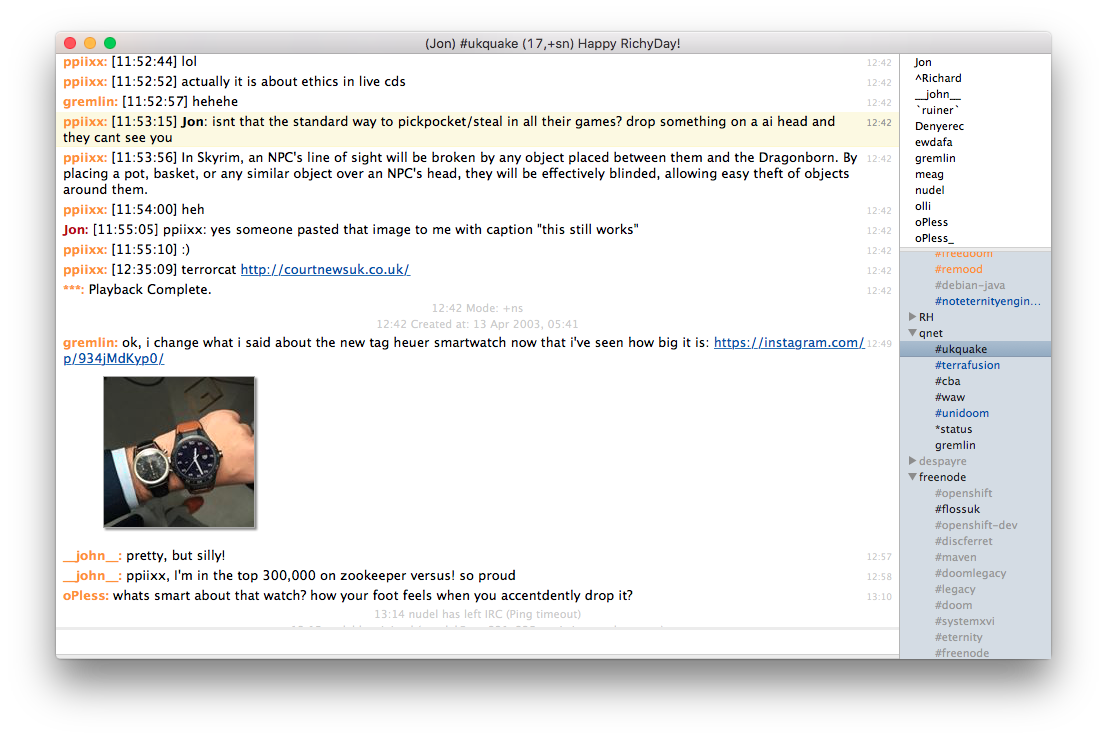
LimeChat LimeChat
LimeChat, an IRC client. I theme it to look like Colloquy. The net result is pretty clean. I like using a proportional-font for text things, so getting IRC out of a terminal is a win for me. LimeChat automatically fetches and thumbnails URIs to images that people paste in channels, which is either incredibly convenient or a curse, depending on the channel. You can toggle that behaviour but only across the whole client, not on a channel or network basis. Finally, 1Password is an incredibly slick password manager. I use it in a very basic fashion: no mobile client, no syncing to anything outside of my workstation. You could also use LastPass which is similar and has a Linux client. I haven't tried it, but there's a third party tool to read 1Password password stores on Linux written by Ryan Coleman of SDL fame called 1pass.

10 November 2015

Norbert Preining: Music check: Google versus Apple Is that all? You can do better, Google!

Ok, I have been an iPhone user since I moved to Japan and got my first smart-phone ever. First a 3s, then a 4s, then a 5s that I dropped into the toilet, so I switched the SIM back into the 4s to have a working phone. Furthermore, I am a heavy music listener and used iTunes Radio for 3 months. Since I am planning to change phones to an Android phone (being fed up with Apple s super-closed environment), I tried out Google Music Plus for about 3 months, too. Here is my verict Google Music is a big pain, far from iTunes in comfort and user friendliness. music-check-google-vs-apple My move to Android is not very much in danger. General description of the service In principle, iTunes Radio and Google Music Subscription do the same things: There are slight differences, that often create confusion, especially with Apple s services: If you are only signed in, you can listen to music stations and can skip some music (limited), but you cannot listen to arbitrary songs from the whole Apple Music library. Then there is another service from Apple, called iTunes Match, that only allows you to upload your music library to the cloud, but other than that again only listening to normal radio stations. Google Music is much simpler, there are only two options: By default it is free to have your music (up to 25000 songs) in the cloud, but if you want to listen to radio stations or any other music in the Google music store, you need a subscription. Prizes and features overview:
Apple Google
No subscription iTunes Match iTunes Radio No subscription With subscription
Prize 0 25$/year 10$/month 0 10$/month
(early access 8$)
Cloud space 0 100000 25000
Extra service Radio stations Radio stations Radio/all music Nothing Radio/all music
Music on the go the application Let us first consider the applications provided to listen to music on your smart phone: Apple Music can of course only be used on Apple devices, and uses the built-in Music application. Start up time is about a few seconds after a cold boot (all on my 4s), and music streaming starts with hardly any delay. Responsiveness is good, and the user interface is clear and easy. Google s application is available on iOS and Android. I have tested the latest version on iOS, but it is a pain in the butt: Managing your library Here iTunes is the way to go, bit of a pain when using Linux, but there are other reasons I have a Windows installation in parallel, so I don t mind to boot now and then into Windows. iTunes gives you very powerful tools to change all kind of data. Google gives you a few options: Use your iTunes library in this case all your playlists and ratings (but see later) are also uploaded. I am not sure what happens if I retag a song in iTunes, or change anything else in there. I guess the song will not be re-uploaded, but who knows for sure. Furthermore, you can edit your library via the web interface, but this is rather poor. Searching your library Over times your library grows and there are hundreds if not thousands of artists. So you want to search them. The natural way would be to scroll to the first letter of the artist you are searching, and then look it up. Well, that works perfectly in both Apple s and Google s application unless you are having artists written in some strange script like Japanese or Korean. iTunes allows you to set a field called something like Artist name for sorting , which allows me to put for example or into the artist field, and into the sort field Tomokawa Kazuki and Kim Doo Soo . This way I find the artists in the correct place. Google on the other hand uses simple Unicode order sorting how could you do that? This is simply plain wrong, and everyone should know that by now. Japanese people will never be able to find anything in their list. And in contrast to Goole Contacts Google Music does not support phonetic name fields (similar to the order sort artist) for artists. What I had to do now is to rename all the artists to include first the phonetic name, followed by the proper name, like in Tomokawa Kazuki ( ) . Something I strongly detest! Radio stations I might have a slightly peculiar music taste, but the radio stations mixed by Google are simply a pain. The reason is easy to explain: I live in Japan, and so what Google does is mixing about 80% of J-Pop into the radio, all those happy yodeling girlies I really dislike (see my Anti J-Pop campaign for alternatives yes, they do exist also in Japan!). iTunes radio is here more relaxed it seems. I appreciate Google s trial to cater to local (dis)taste, but besides voting down each and every song I hear I don t see any other option. And honestly, I cannot go through all this voting down without dying from pain inflicted by J-Pop. Other than this, the two radio stations are probably more or less the same but as I said, due to the local colorit it is hard to compare. Rating Ohhh, what a dire point. So there you have you well curated iTunes library with 5-star ratings. I used the ratings in a way that those songs I like get 1 star, those I even like more get 2 stars, and my absolute favorites got 5 stars. I didn t do any negative ratings. iTunes/iOS Music app allows you to easily adjust rating, and they are synced between devices. All as you would expect. Now for Google they did have a 5-star rating system at some time, but:
Thank you for your feedback. We ve decided to remove the 5-star Rating lab. This decision wasn t made lightly, but Thumbs Up/Down is integral for the future vision for Play Music and will be a central design point for our future releases. Please note that we ll continue to store your ratings that you ve set via the star lab or via iTunes, and we ll translate them to thumbs up/down (1-2 stars = thumbs down, 4-5 stars = thumbs up).
Here we go with the move to a new design they threw away the 5-star system, without any reason but integral for future vision rubbish sales speak. Besides being a very very poor rating system to have only an up and down (good-bad-don t care), the translation from my rating system to the thumbs up-down is just plain wrong. <rant>
Why on earth is the current movement to reduce functionality and rob users of control? Gnome 3 is the prime example of how we stupiditize users by taken any freedom from them in the name of simple design. Google now does the same. I am so sick of getting patronized this way, so Gnome3 was completely banished from my computer and replaced by Cinnamon, which uses the same (good) underlying technique, but takes users seriously!
</rant> Overall verdict As much as I would like to see Google Music a valid alternative to iTunes, by now it makes the impression of a quickly hacked together rotten piece of code that tries to get a share of the market without providing equivalent service. Google is using its market presence and convenience to convert people, not features and quality. I can only hope that this changes in the future. That still leaves me with the question move to Android or remain with iOS

9 November 2015

Ben Armstrong: The passing of Debian Live

Debian Live has passed on. And it has done so in not happy circumstances. (You can search the list archives for more if you are confused.) I have reposted here my response to this one thread because it s all I really want to say, after all of the years of working with the team. I d like to add as a postscript, that while the focus of this article was to remain positive in the face of Daniel s announcement of the closure of his project, that event has left a lot of users confused about the status of live support in Debian going forward. Read my posts here and here addressing that confusion.
On 09/11/15 12:47 PM, Daniel Baumann wrote:
> So long, and thanks for all the fish[7].
>
> Daniel
>
> [7] http://live.debian.net/project/downstream/ Enough bitter words have been said. I don t want to add any more. So: I m proud. Indeed, that long list of downstreams does speak to the impact you ve had in inspiring and equipping people to make their own live images. I m proud to have been a small part of this project. I m thankful. I m thankful that I was able to, through this project, contribute to something for a while that had a positive impact on many people, and made Debian more awesome. I remember the good times. I remember fondly the good times we had in the project s heyday. I certainly found your enthusiasm and vision for the project, Daniel, personally inspiring. It motivated me to contribute. Debconf10 was a highlight among those experiences, but also I had many good times and made many friendships online, too. I m sad. I m sad, because although I made some attempts to liaise between Debian Live and the CD and Installer teams, I don t feel I did an effective job there, and that contributed to the situation we now find ourselves in. If I did you or the project injury in trying to fulfill that role, please forgive me. I m hopeful. I m hopeful that whichever way we all go from here, that the bitterness will not be forever. That we ll heal. That we ll have learned. That we ll move on to accomplish new things, bigger and better things. Thank you, Daniel. Thank you, Debian Live team. Ben
facebooktwittergoogle_plusredditpinterestlinkedinmail

Lunar: Reproducible builds: week 28 in Stretch cycle

What happened in the reproducible builds effort this week: Toolchain fixes Chris Lamb filled a bug on python-setuptools with a patch to make the generated requires.txt files reproducible. The patch has been forwarded upstream. Chris also understood why the she-bang in some Python scripts kept being undeterministic: setuptools as called by dh-python could skip re-installing the scripts if the build had been too fast (under one second). #804339 offers a patch fixing the issue by passing --force to setup.py install. #804141 reported on gettext asks for support of SOURCE_DATE_EPOCH in gettextize. Santiago Vila pointed out that it doesn't felt appropriate as gettextize is supposed to be an interactive tool. The problem reported seems to be in avahi build system instead. Packages fixed The following packages became reproducible due to changes in their build dependencies: celestia, dsdo, fonts-taml-tscu, fte, hkgerman, ifrench-gut, ispell-czech, maven-assembly-plugin, maven-project-info-reports-plugin, python-avro, ruby-compass, signond, thepeg, wagon2, xjdic. The following packages became reproducible after getting fixed: Some uploads fixed some reproducibility issues but not all of them: Patches submitted which have not made their way to the archive yet: Chris Lamb closed a wrongly reopened bug against haskell-devscripts that was actually a problem in haddock. reproducible.debian.net FreeBSD tests are now run for three branches: master, stable/10, release/10.2.0. (h01ger) diffoscope development Support has been added for Free Pascal unit files (.ppc). (Paul Gevers) The homepage is now available using HTTPS, thanks to Let's Encrypt!. Work has been done to be able to publish diffoscope on the Python Package Index (also known as PyPI): the tlsh module is now optional, compatibility with python-magic has been added, and the fallback code to handle RPM has been fixed. Documentation update Reiner Herrmann, Paul Gevers, Niko Tyni, opi, and Dhole offered various fixes and wording improvements to the reproducible-builds.org. A mailing-list is now available to receive change notifications. NixOS, Guix, and Baserock are featured as projects working on reproducible builds. Package reviews 70 reviews have been removed, 74 added and 17 updated this week. Chris Lamb opened 22 new fail to build from source bugs. New issues this week: randomness_in_ocaml_provides, randomness_in_qdoc_page_id, randomness_in_python_setuptools_requires_txt, gettext_creates_ChangeLog_files_and_entries_with_current_date. Misc. h01ger and Chris Lamb presented Beyond reproducible builds at the MiniDebConf in Cambridge on November 8th. They gave an overview of where we stand and the changes in user tools, infrastructure, and development practices that we might want to see happening. Feedback on these thoughts are welcome. Slides are already available, and the video should be online soon. At the same event, a meeting happened with some members of the release team to discuss the best strategy regarding releases and reproducibility. Minutes have been posted on the Debian reproducible-builds mailing-list.

Ben Hutchings: Debian LTS work, October 2015

For my 11th month working on Debian LTS, I carried over 5.5 hours from September and was assigned another 13.5 hours of work by Freexian's Debian LTS initiative. I worked 14 of a possible 19 hours. As I mentioned in the report for September, I uploaded binutils and issued DLA-324-1 early in October. I fixed a few security issues in the kernel, uploaded and issued DLA-325-1. I had some email discussions about long-term support of the Linux kernel with Willy Tarreau (Linux 2.6.32 maintainer) and Greg Kroah-Hartman (overall stable maintainer). Greg normally selects one version per year to maintain as a 'longterm' branch for 2 years, after which he may hand it over to another maintainer. A few upstream versions have received long-term support entirely from another developer. We were in agreement that it's desirable to have fewer of these branches with more developers and distributions contributing to each, but didn't come to a conclusion about how to coordinate this. The topic came up again at the Kernel Summit, and Greg then agreed to select the first kernel version of each calendar year, starting with Linux 4.4 (expected in January). This doesn't fit well with Debian's current release schedule, but I mean to discuss with the release team whether the freeze date can be set to allow inclusion of 2017's LTS kernel. I spent another week in the 'front desk' role, where I triaged new security issues for squeeze. There was a mixture of serious and trivial, old and new (not affecting squeeze) issues. The many ntp issues announced in October were fixed in unstable by a new upstream release. I spent a long time digging out the specific commits that fixed them and comparing with the older version in squeeze. Several of the issues had been introduced in ntp 4.2.7 or 4.2.8 and therefore didn't affect squeeze (or the newer stable releases). Of the fixes that were needed, most applied with minimal changes. Having prepared an update, I asked the ntp maintainer, Kurt Roeckx, to review my work. (The package has a limited test suite and none of the fixes added new tests.) Following this review he added a few more patches, uploaded and issued DLA-335-1. MySQL 5.1, as shipped in squeeze, no longer receives security support from upstream, and the security fixes they do issue are mixed with other changes that make it impractical to backport them. The LTS team is planning to backport the mysql-5.5 package to squeeze while avoiding conflicts with the binaries built from mysql-5.1. Santiago Ruano Rinc n has prepared a backport and I spent some time reviewing this, but haven't yet sent my review comments.

Daniel Pocock: debian.org RTC: announcing XMPP, SIP presence and more

Announced 7 November 2015 on the debian-devel-announce mailing list. The Debian Project now has an XMPP service available to all Debian Developers. Your Debian.org email identity can be used as your XMPP address. The SIP service has also been upgraded and now supports presence. SIP and XMPP presence, rosters and messaging are not currently integrated. The Lumicall app has been improved to enable rapid setup for Debian.org SIP users. This announcement concludes the maintenance window on the RTC services. All services are now running on jessie (using packages from jessie-backports). XMPP and SIP enable a whole new world of real-time multimedia communications possibilities: video/webcam, VoIP, chat messaging, desktop sharing and distributed, federated communication are the most common use cases. Details about how to get started and get support are explained in the User Guide in the Debian wiki. As it is a wiki, you are completely welcome to help it evolve. Several of the people involved in the RTC team were also at the Cambridge mini-DebConf (7-8 November). The password for all these real time communication services can be set via the LDAP control panel. Please note that this password needs to be different to any of your other existing debian.org passwords. Please use a strong password and please keep it secure. Some of the infrastructure, like the TURN server, is shared by clients of both SIP and XMPP. Please configure your XMPP and SIP clients to use the TURN server for audio or video streaming to work most reliably through NAT. A key feature of both our XMPP and SIP services is that they support federated inter-connectivity with other domains. Please try it. The FedRTC service for Fedora developers is one example of another SIP service that supports federation. For details of how it works and how we establish trust between domains, please see the RTC Quick Start Guide. Please reach out to other communities you are involved with and help them consider enabling SIP and XMPP federation of their own communities/domains: as Metcalfe's law suggests, each extra person or community who embraces open standards like SIP and XMPP has far more than just an incremental impact on the value of these standards and makes them more pervasive. If you are keen to support and collaborate on the wider use of Free RTC technology, please consider joining the Free RTC mailing list sponsored by FSF Europe. There will also be a dedicated debian-rtc list for discussion of these technologies within Debian and derivatives. This service has been made possible by the efforts of the DSA team in the original SIP+WebRTC project and the more recent jessie upgrades and XMPP project. Real-time communications systems have specific expectations for network latency, connectivity, authentication schemes and various other things. Therefore, it is a great endorsement of the caliber of the team and the quality of the systems they have in place that they have been able to host this largely within their existing framework for Debian services. Feedback from the DSA team has also been helpful in improving the upstream software and packaging to make them convenient for system administrators everywhere. Special thanks to Peter Palfrader and Luca Filipozzi from the DSA team, Matthew Wild from the Prosody XMPP server project, Scott Godin from the reSIProcate project, Juliana Louback for her contributions to JSCommunicator during GSoC 2014, Iain Learmonth for helping get the RTC team up and running, Enrico Tassi, Sergei Golovan and Victor Seva for the Prosody and prosody-modules packaging and also the Debian backports team, especially Alexander Wirt, helping us ensure that rapidly evolving packages like those used in RTC are available on a stable Debian system.

Vasudev Kamath: Taming systemd-nspawn for running containers

I've been trying to run containers using systemd-nspawn for quite some time. I was always bumping to one or other dead end. This is not systemd-nspawn's fault, rather my impatience stopping me from reading manual pages properly lack of good tutorial like article available online. Compared to this LXC has a quite a lot of good tutorials and howto's available online. This article is my effort to create a notes putting all required information in one place.

Creating a Debian Base Install First step is to have a minimal Debian system some where on your hard disk. This can be easily done using debootsrap. I wrote a custom script to avoid reading manual every time I want to run debootstrap. Parts of this script (mostly packages and the root password generation) is stolen from lxc-debian template provided by lxc package.
#!/bin/sh
set -e
set -x
usage ()  
    echo "$ 0##/*  [options] <suite> <target> [<mirror>]"
    echo "Bootstrap rootfs for Debian"
    echo
    cat <<EOF
    --arch         set the architecture to install
    --root-passwd  set the root password for bootstrapped rootfs
    EOF
 
# copied from the lxc-debian template
packages=ifupdown,\
locales,\
libui-dialog-perl,\
dialog,\
isc-dhcp-client,\
netbase,\
net-tools,\
iproute,\
openssh-server,\
dbus
if [ $(id -u) -ne 0 ]; then
    echo "You must be root to execute this command"
    exit 2
fi
if [ $# -lt 2 ]; then
   usage $0
fi
while true; do
    case "$1" in
        --root-passwd --root-passwd=?*)
            if [ "$1" = "--root-passwd" -a -n "$2" ]; then
                ROOT_PASSWD="$2"
                shift 2
            elif [ "$1" != "$ 1#--root-passwd= " ]; then
                ROOT_PASSWD="$ 1#--root-passwd= "
                shift 1
            else
                # copied from lxc-debian template
                ROOT_PASSWD="$(dd if=/dev/urandom bs=6 count=1 2>/dev/null base64)"
                ECHO_PASSWD="yes"
            fi
            ;;
        --arch --arch=?*)
            if [ "$1" = "--arch" -a -n "$2" ]; then
                ARCHITECTURE="$2"
                shift 2
            elif [ "$1" != "$ 1#--arch= " ]; then
                ARCHITECTURE="$ 1#--arch= "
                shift 1
            else
                ARCHITECTURE="$(dpkg-architecture -q DEB_HOST_ARCH)"
            fi
            ;;
        *)
            break
            ;;
    esac
done
release="$1"
target="$2"
if [ -z "$1" ]   [ -z "$2" ]; then
    echo "You must specify suite and target"
    exit 1
fi
if [ -n "$3" ]; then
    MIRROR="$3"
fi
MIRROR=$ MIRROR:-http://httpredir.debian.org/debian 
echo "Downloading Debian $release ..."
debootstrap --verbose --variant=minbase --arch=$ARCHITECTURE \
             --include=$packages \
             "$release" "$target" "$MIRROR"
if [ -n "$ROOT_PASSWD" ]; then
    echo "root:$ROOT_PASSWD"   chroot "$target" chpasswd
    echo "Root password is '$ROOT_PASSWRD', please change!"
fi
It just gets my needs done, if you don't like it feel free to modify or use debootstrap directly. !NB Please install dbus package in the minimal base install, otherwise you will not be able to control the container using machinectl
Manually Running Container and then persisting it Next we need to run the container manually. This is done by using following command.
systemd-nspawn -bD   /path/to/container --network-veth \
     --network-bridge=natbr0 --machine=Machinename
--machine option is not mandatory, if not specified systemd-nspawn will take the directory name as machine name, and if you have characters like - in the directory name it translates to hexcode x2d and controlling container with name becomes difficult. --network-veth specifies the systemd-nspawn to enable virtual ethernet based networking and --network-bridge tells the bridge interface on host system to be used by systemd-nspawn. These options together constitutes private networking for container. If not specified container can use host systems interface there by removing network isolation of container. Once you run this command container comes up. You can now run machinectl to control the container. Container can be persisted using following command
machinectl enable container-name
This will create a symbolic link of /lib/systemd/system/systemd-nspawn@service to /etc/systemd/system/machine.target.wants/. This allows you to start or stop container using machinectl or systemctl command. Only catch here is your base install should be in /var/lib/machines/. What I do in my case is create a symbolic link from my base container to /var/lib/machines/container-name. !NB Note that symbolic link name under /var/lib/machines should be same as the container name you gave using --machine switch or the directory name if you didn't specify --machine
Persisting Container Networking We did persist the container in above step, but this doesn't persist the networking options we provided in command line. systemd-nspawn@.service provides following command to invoke container.
ExecStart=/usr/bin/systemd-nspawn --quiet --keep-unit --boot --link-journal=try-guest --network-veth --settings=override --machine=%I
To persist the bridge networking configuration we did in command line, we need the help of systemd-networkd. So first we need to enable the systemd-networkd.service on both container and the host system.
systemctl enable systemd-networkd.service
Now inside the container, interfaces will be named as hostN. Depending on how many interfaces we have N increments. In our example case we had single interface, hence it will named as host0. By default network interfaces will be down inside container, hence systemd-networkd is needed to put it up. We put the following in /etc/systemd/network/host0.network file inside the container.
[Match]
Name=host0
[Network]
Description=Container wired interface host0
DHCP=yes
And in the host system we just configure the bridge interface using systemd-nspawn. I put following in natbr0.netdev in /etc/systemd/network/
[NetDev]
Description=Bridge natbr0
Name=natbr0
Kind=bridge
In my case I already had configured the bridge using /etc/network/interfaces file for lxc. I think its not really needed to use systemd-networkd in this case. Since systemd-networkd doesn't do anything if network / virtual device is already present I safely put above configuration and enabled systemd-networkd. Just for the notes here is my natbr0 configuration in interfaces file.
auto natbr0
iface natbr0 inet static
   address 172.16.10.1
   netmask 255.255.255.0
   pre-up brctl addbr natbr0
   post-down brctl delbr natbr0
   post-down sysctl net.ipv4.ip_forward=0
   post-down sysctl net.ipv6.conf.all.forwarding=0
   post-up sysctl net.ipv4.ip_forward=1
   post-up sysctl net.ipv6.conf.all.forwarding=1
   post-up iptables -A POSTROUTING -t mangle -p udp --dport bootpc -s 172.16.0.0/16 -j CHECKSUM --checksum-fill
   pre-down iptables -D POSTROUTING -t mangle -p udp --dport bootpc -s 172.16.0.0/16 -j CHECKSUM --checksum-fill
Once this is done just reload the systemd-networkd and make sure you have dnsmasq or any other DHCP server running in your system. Now the last part is to tell systemd-nspawn to use the bridge networking interface we have defined. This is done using container-name.nspawn file. Put this file under /etc/systemd/nspawn folder.
[Exec]
Boot=on
[Files]
Bind=/home/vasudev/Documents/Python/upstream/apt-offline/
[Network]
VirtualEthernet=yes
Bridge=natbr0
Here you can specify networking, and files mounting section of the container. For full list please refer the systemd.nspawn manual page. Now all this is done you can happily do
machinectl start container-name
#or
systemctl start systemd-nspawn@container-name
Resource Control Now all things said and done, one last part remains. Yes what is the point if we can't control how much resource does the container use. Atleast it is more important for me, because I use old and bit low powered laptop. Systemd provides way to control the resource using Control interface. To see all the the interfaces exposed by systemd please refer systemd.resource-control manual page. The way to control the resource is using systemctl. Once container starts running we can run following command.
systemctl set-property container-name CPUShares=200 CPUQuota=30% MemoryLimit=500M
The manual page does say that these things can be put under [Slice] section of unit files. Now I don't have clear idea if this can be put under .nspawn files or not. For the sake of persisting the container I manually wrote the service file for container by copying systemd-nspawn@.service and adding [Slice] section. But if I don't know how to find out if this had any effect or not. If some one knows about this please share your suggestions to me and I will update this section with your provided information.
Conclussion All in all I like systemd-nspawn a lot. I use it to run container for development of apt-offline. I previously used lxc where all can be controlled using a single config file. But I feel systemd-nspawn is more tightly integrated with system than lxc. There is definitely more in systemd-nspawn than I've currently figured out. Only thing is its not as popular as other alternatives and definitely lacks good howto documentation.For now only way out is dig the manual pages, scratch your head, pull your hair out and figure out new possibilities in systemd-nspawn. ;-)

8 November 2015

Daniel Pocock: Problems observed during Cambridge mini-DebConf RTC demo

A few problems were observed during the demo of RTC services at the Cambridge mini-DebConf yesterday. As it turns out, many of them are already documented and solutions are available for some of them. Multiple concurrent SIP registrations I had made some test calls on Friday using rtc.debian.org and I still had the site open in another tab in another browser window. When people tried to call me during the demo, both tabs were actually ringing but only one was visible. When a SIP client registers, the SIP registration server sends it a list of all other concurrent registrations in the response message. We simply need to extend JSCommunicator to inspect the response message and give some visual feedback about other concurrent registrations. Issue #69. SIP also provides a mechanism to clear concurrent registrations and that could be made available with a button or configuration option too (Issue #9). Callee hears ringing before connectivity checks completed The second issue during the WebRTC demo was that the callee (myself) was alerted about the call before the ICE checks had been performed. The optimal procedure to provide a slick user experience is to run the connectivity checks before alerting the callee. If the connectivity checks fail, the callee should never be alerted with a ringing sound and would never know somebody had tried to call. The caller would be told that the call was unable to be attempted and encouraged to consider trying again on another wifi network. RFC 5245 recommends that connectivity checks should be done first but it is not mandatory. One reason this is problematic with WebRTC is the need to display the pop-up asking the user for permission to share their microphone and webcam: the popup must appear before connectivity checks can commence. This has been discussed in the JsSIP issue tracker. Non-WebRTC softphones, such as Lumicall, do the connectivity checks before alerting the callee. Dealing with UDP blocking It appears the corporate wifi network in the venue was blocking the UDP packets so the connectivity checks could never complete, not even using a TURN server to relay the packets. People trying to use the service on home wifi networks, in small offices and mobile tethering should not have this problem as these services generally permit UDP by default. Some corporate networks, student accommodation and wifi networks in some larger hotels have blocked UDP and in these cases, additional effort must be made to get through the firewall. The TURN server we are running for rtc.debian.org also supports a TLS transport but it simply isn't configured yet. At the time we originally launched the WebRTC service in 2013, the browsers didn't support TURN over TLS at all but now they do. This is probably the biggest problem encountered during the demo but it does not require any code change to resolve this, just configuration, so a solution is well within reach. During the demo, we worked around the issue by turning off the wifi on my laptop and using tethering with a 4G mobile network. All the calls made successfully during the demo used the tethering solution. Add a connectivity check timeout The ICE connectivity checks appeared to keep running for a long time. Usually, if UDP is not blocked, the ICE checks would complete in less than two seconds. Therefore, the JavaScript needs to set a timeout between two and five seconds when it starts the checks and give the user a helpful warning about their network problems if the timeout is exceeded. Issue #73 in JSCommunicator. While these lengthy connectivity checks appear disappointing, it is worth remembering that this is an improvement over the first generation of softphones: none of them made these checks at all, they would simply tell the user the call had been answered but audio and video would only be working in one direction or not at all. Microphone issues One of the users calling into the demo, Juliana, was visible on the screen but we couldn't hear her. This was a local audio hardware issue with her laptop or headset. It would be useful if the JavaScript could provide visual feedback when it detects a voice (issue #74) and even better, integrating with the sound settings so that the user can see if the microphone is muted or the gain is very low (issue #75). Thanks to participants in the demo I'd like to thank all the participants in the demo, including Juliana Louback who called us from New York, Laura Arjona who called us from Madrid, Daniel Silverstone who called from about three meters away in the front row and Iain Learmonth who helped co-ordinate the test calls over IRC. Thanks are also due to Steve McIntyre, the local Debian community, ARM and the other sponsors for making another mini-DebConf in the UK this year.

7 November 2015

Guido G nther: Debian Fun in October 2015

Debian LTS October was the sixth month I contributed to Debian LTS under the Freexian umbrella. In total I spent four hours working on: Besides that I did CVE triaging of 16 CVEs to check if and how they affect oldoldstable security as part of my LTS front desk work. I also added some very basic indentation support to our CVE/list Emacs major-mode on non LTS time. Other Debian stuff

6 November 2015

Norbert Preining: Japanese TeX User Meeting Support for Japanese in TeX (Live) present state and future?

Tomorrow the Japanese TeX User Meeting 2015 will be held in Tokyo. Since I have come to Japan I have attended more or less every year this meeting, and in 2013 we could get the (international) TeX User Group Meeting to Tokyo and had a joint conference TUG 2013, which was a great success. (update 2015-11-09: slides added at the end) Japanese-TeX
During tomorrows meeting I will give a talk on Support for Japanese in TeX (Live) present state and future?:
The support for typesetting Japanese in TeX, in particular TeX Live, has been improved over the last few years considerably, so that at the current point we can ask ourselves what is next? This talk reviews a bit of the history of Japanese typesetting support in TeX Live, and discusses future development directions.
For those interested, here is a bit of an extended abstract. With a set of Japan specific TeX engines, the Japanese TeX Users always had a hard time setting up a proper TeX environment. Besides compiling the programs for each new version again, users had to install packages from a variety of sources, which often involved complicated routines. Fortunately, due to the excellent support on the TeX Q&A these difficulties were manageable. Compiling the Japanese TeX engines was first part of the pteTeX project, which adjusted teTeX to include also the required programs. Compilation was done by obtaining the source code of teTeX, plus patches that implement the Japanese TeX engines and support in driver programs. After the end of development of teTeX, TeX Live became the main TeX distribution system, and ptexlive was born to adjust the TeX Live sources to include the Japanese TeX engines. But fundamentally the same procedure remain: Get the source code, patch in additional functionality, compile and install. The last five years have seen a step-wise inclusion of various Japan-related programs in the main TeX Live source repository. Starting with pTeX (and pbibtex etc) and adjustments to dvipdfmx, followed by upTeX, and later on also (u)pmetapost, the main TeX Live source repository now contains all (with the exception of pxdvi) programs related to the Japanese TeX environment. At the same time, developers of various packages started to upload their packages to CTAN, which automatically made these packages available in TeX Live. Thus, the current status is quite satisfactory, since a normal TeX Live installation, without the need for any compilation, provides all necessary programs and packages. What remains a problem are inter-release updates of the binaries, when bugs in various engines are found. Future developments Besides the actual development of packages, and in particular luatexja, I see possible improvements in the following area: Summing up, I am quite happy to see that both the Japanese community, as well as the Korean community, have now taken the step to make their achievements available in an easy and straightforward way for everyone using TeX Live, and I am sure that the future will bring further improvements!
The slides accompanying the talk can be downloaded here: texconf15-texlive-japan.pdf. I also talked briefly on CJK font integration for Ghostscript, these slides can be downloaded here: texconf15-cjk-gs.pdf.

5 November 2015

Steve Kemp: lumail2 approaches readiness

So the work on lumail2 is going well, and already I can see that it is a good idea. The main reason for (re)writing it is to unify a lot of the previous ad-hoc primitives (i.e. lua functions) and to try and push as much of the code into Lua, and out of C++, as possible. This work is already paying off with the introduction of new display-modes and simpler implementation. View modes are an important part of lumail, because it is a modal mail-client. You're always in one mode: This is nothing new, but there are two new modes: Each of these modes draws lines of text on the screen, and those lines consist of things that Lua generated. So there is a direct mapping:
ModeLua Function
maildirfunction maildir_view()
indexfunction index_view()
messagefunction message_view()
luafunction lua_view()
With that in mind it is possible to write a function to scroll to the next line containing a pattern like so:
function find()
   local pattern = Screen:get_line( "Search for:" )
   -- Get the global mode.
   local mode = Config:get("global.mode")
   -- Use that to get the lines we're currently displaying
   loadstring( "out = " .. mode .. "_view()" )()
   -- At this point "out" is a table containing lines that
   -- the current mode wishes to display.
    -- .. do searching here.
end
Thus the whole thing is dynamic and mode-agnostic. The other big change is pushing things to lua. So to reply to an email, populating the new message, appending your ~/.signature, is handled by Lua. As is forwarding a message, or composing a new mail. The downside is that the configuration-file is now almost 1000 lines long, thanks to the many little function definitions, and key-binding setup. At this rate the first test-release will be out at the weekend, but API documentation, and sample configuration file might make interesting reading until then.

Next.

Previous.



