Search Results: "tin"

2 February 2023

John Goerzen: Using Yggdrasil As an Automatic Mesh Fabric to Connect All Your Docker Containers, VMs, and Servers

Sometimes you might want to run Docker containers on more than one host. Maybe you want to run some at one hosting facility, some at another, and so forth. Maybe you d like run VMs at various places, and let them talk to Docker containers and bare metal servers wherever they are. And maybe you d like to be able to easily migrate any of these from one provider to another. There are all sorts of very complicated ways to set all this stuff up. But there s also a simple one: Yggdrasil. My blog post Make the Internet Yours Again With an Instant Mesh Network explains some of the possibilities of Yggdrasil in general terms. Here I want to show you how to use Yggdrasil to solve some of these issues more specifically. Because Yggdrasil is always Encrypted, some of the security lifting is done for us.

Background Often in Docker, we connect multiple containers to a single network that runs on a given host. That much is easy. Once you start talking about containers on multiple hosts, then you start adding layers and layers of complexity. Once you start talking multiple providers, maybe multiple continents, then the complexity can increase. And, if you want to integrate everything from bare metal servers to VMs into this well, there are ways, but they re not easy. I m a believer in the KISS principle. Let s not make things complex when we don t have to.

Enter Yggdrasil As I ve explained before, Yggdrasil can automatically form a global mesh network. This is pretty cool! As most people use it, they join it to the main Yggdrasil network. But Yggdrasil can be run entirely privately as well. You can run your own private mesh, and that s what we ll talk about here. All we have to do is run Yggdrasil inside each container, VM, server, or whatever. We handle some basics of connectivity, and bam! Everything is host- and location-agnostic.

Setup in Docker The installation of Yggdrasil on a regular system is pretty straightforward. Docker is a bit more complicated for several reasons:
  • It blocks IPv6 inside containers by default
  • The default set of permissions doesn t permit you to set up tunnels inside a container
  • It doesn t typically pass multicast (broadcast) packets
Normally, Yggdrasil could auto-discover peers on a LAN interface. However, aside from some esoteric Docker networking approaches, Docker doesn t permit that. So my approach is going to be setting up one or more Yggdrasil router containers on a given Docker host. All the other containers talk directly to the router container and it s all good.

Basic installation In my Dockerfile, I have something like this:
FROM jgoerzen/debian-base-security:bullseye
RUN echo "deb http://deb.debian.org/debian bullseye-backports main" >> /etc/apt/sources.list && \
    apt-get --allow-releaseinfo-change update && \
    apt-get -y --no-install-recommends -t bullseye-backports install yggdrasil
...
COPY yggdrasil.conf /etc/yggdrasil/
RUN set -x; \
    chown root:yggdrasil /etc/yggdrasil/yggdrasil.conf && \
    chmod 0750 /etc/yggdrasil/yggdrasil.conf && \
    systemctl enable yggdrasil
The magic parameters to docker run to make Yggdrasil work are:
--cap-add=NET_ADMIN --sysctl net.ipv6.conf.all.disable_ipv6=0 --device=/dev/net/tun:/dev/net/tun
This example uses my docker-debian-base images, so if you use them as well, you ll also need to add their parameters. Note that it is NOT necessary to use --privileged. In fact, due to the network namespaces in use in Docker, this command does not let the container modify the host s networking (unless you use --net=host, which I do not recommend). The --sysctl parameter was the result of a lot of banging my head against the wall. Apparently Docker tries to disable IPv6 in the container by default. Annoying.

Configuration of the router container(s) The idea is that the router node (or more than one, if you want redundancy) will be the only ones to have an open incoming port. Although the normal Yggdrasil case of directly detecting peers in a broadcast domain is more convenient and more robust, this can work pretty well too. You can, of course, generate a template yggdrasil.conf with yggdrasil -genconf like usual. Some things to note for this one:
  • You ll want to change Listen to something like Listen: ["tls://[::]:12345"] where 12345 is the port number you ll be listening on.
  • You ll want to disable the MulticastInterfaces entirely by just setting it to [] since it doesn t work anyway.
  • If you expose the port to the Internet, you ll certainly want to firewall it to only authorized peers. Setting AllowedPublicKeys is another useful step.
  • If you have more than one router container on a host, each of them will both Listen and act as a client to the others. See below.

Configuration of the non-router nodes Again, you can start with a simple configuration. Some notes here:
  • You ll want to set Peers to something like Peers: ["tls://routernode:12345"] where routernode is the Docker hostname of the router container, and 12345 is its port number as defined above. If you have more than one local router container, you can simply list them all here. Yggdrasil will then fail over nicely if any one of them go down.
  • Listen should be empty.
  • As above, MulticastInterfaces should be empty.

Using the interfaces At this point, you should be able to ping6 between your containers. If you have multiple hosts running Docker, you can simply set up the router nodes on each to connect to each other. Now you have direct, secure, container-to-container communication that is host-agnostic! You can also set up Yggdrasil on a bare metal server or VM using standard procedures and everything will just talk nicely!

Security notes Yggdrasil s mesh is aggressively greedy. It will peer with any node it can find (unless told otherwise) and will find a route to anywhere it can. There are two main ways to make sure your internal comms stay private: by restricting who can talk to your mesh, and by firewalling the Yggdrasil interface. Both can be used, and they can be used simultaneously. By disabling multicast discovery, you eliminate the chance for random machines on the LAN to join the mesh. By making sure that you firewall off (outside of Yggdrasil) who can connect to a Yggdrasil node with a listening port, you can authorize only your own machines. And, by setting AllowedPublicKeys on the nodes with listening ports, you can authenticate the Yggdrasil peers. Note that part of the benefit of the Yggdrasil mesh is normally that you don t have to propagate a configuration change to every participatory node that s a nice thing in general! You can also run a firewall inside your container (I like firehol for this purpose) and aggressively firewall the IPs that are allowed to connect via the Yggdrasil interface. I like to set a stable interface name like ygg0 in yggdrasil.conf, and then it becomes pretty easy to firewall the services. The Docker parameters that allow Yggdrasil to run are also sufficient to run firehol.

Naming Yggdrasil peers You probably don t want to hard-code Yggdrasil IPs all over the place. There are a few solutions:
  • You could run an internal DNS service
  • You can do a bit of scripting around Docker s --add-host command to add things to /etc/hosts

Other hints & conclusion Here are some other helpful use cases:
  • If you are migrating between hosts, you could leave your reverse proxy up at both hosts, both pointing to the target containers over Yggdrasil. The targets will be automatically found from both sides of the migration while you wait for DNS caches to update and such.
  • This can make services integrate with local networks a lot more painlessly than they might otherwise.
This is just an idea. The point of Yggdrasil is expanding our ideas of what we can do with a network, so here s one such expansion. Have fun!
Note: This post also has a permanent home on my webiste, where it may be periodically updated.

Dirk Eddelbuettel: RInside 0.2.18 on CRAN: Maintenance

A new release 0.2.18 of RInside arrived on CRAN and in Debian today. This is the first release in ten months since the 0.2.17 release. RInside provides a set of convenience classes which facilitate embedding of R inside of C++ applications and programs, using the classes and functions provided by Rcpp. This release brings a contributed change to how the internal REPL is called: Dominick found the current form more reliable when embedding R on Windows. We also updated a few other things around the package. The list of changes since the last release:

Changes in RInside version 0.2.18 (2023-02-01)
  • The random number initialization was updated as in R.
  • The main REPL is now running via 'run_Rmainloop()'.
  • Small routine update to package and continuous integration.

My CRANberries also provides a short report with changes from the previous release. More information is on the RInside page. Questions, comments etc should go to the rcpp-devel mailing list off the Rcpp R-Forge page, or to issues tickets at the GitHub repo. If you like this or other open-source work I do, you can now sponsor me at GitHub.

This post by Dirk Eddelbuettel originated on his Thinking inside the box blog. Please report excessive re-aggregation in third-party for-profit settings.

Valhalla's Things: How To Verify Debian's ARM Installer Images

Posted on February 2, 2023
Thanks to Vagrant on the debian-arm mailing list I ve found that there is a chain of verifiability for the images usually used to install Debian on ARM devices. It s not trivial, so I m writing it down for future reference when I ll need it again.
  1. Download the images from https://ftp.debian.org/debian/dists/bullseye/main/installer-armhf/current/images/ (choose either hd-media or netboot, then SD-card-images and download the firmware.* file for your board as well as partition.img.gz).
  2. Download the checksums file https://ftp.debian.org/debian/dists/bullseye/main/installer-armhf/current/images/SHA256SUMS
  3. Download the Release file from https://ftp.debian.org/debian/dists/bullseye/ ; for convenience the InRelease
  4. Verify the Release file:
    gpg --no-default-keyring \
        --keyring /usr/share/keyrings/debian-archive-bullseye-stable.gpg \
        --verify InRelease
  5. Verify the checksums file:
    awk '/installer-armhf\/current\/images\/SHA256SUMS/  print $1 "
    SHA256SUMS" ' InRelease   tail -n 1   sha256sum -c 
    (I know, I probably can use awk instead of that tail, but it s getting late and I want to publish this).
  6. Verify the actual files, for hd-media:
    grep hd-media SHA256SUMS \
      sed 's#hd-media/SD-card-images/##' \
      sha256sum -c \
      grep -v "No such file or directory" \
      grep -v "FAILED open or read" 2> /dev/null
    and for netboot:
    grep netboot SHA256SUMS \
      sed 's#netboot/SD-card-images/##' \
      sha256sum -c \
      grep -v "No such file or directory" \
      grep -v "FAILED open or read" 2> /dev/null
    and check that all of the files you wanted are there with an OK; of course change hd-media with netboot as needed.
And I fully agree that fewer steps would be nice, but this is definitely better than nothing!

1 February 2023

Simon Josefsson: Apt Archive Transparency: debdistdiff & apt-canary

I ve always found the operation of apt software package repositories to be a mystery. There appears to be a lack of transparency into which people have access to important apt package repositories out there, how the automatic non-human update mechanism is implemented, and what changes are published. I m thinking of big distributions like Ubuntu and Debian, but also the free GNU/Linux distributions like Trisquel and PureOS that are derived from the more well-known distributions. As far as I can tell, anyone who has the OpenPGP private key trusted by a apt-based GNU/Linux distribution can sign a modified Release/InRelease file and if my machine somehow downloads that version of the release file, my machine could be made to download and install packages that the distribution didn t intend me to install. Further, it seems that anyone who has access to the main HTTP server, or any of its mirrors, or is anywhere on the network between them and my machine (when plaintext HTTP is used), can either stall security updates on my machine (on a per-IP basis), or use it to send my machine (again, on a per-IP basis to avoid detection) a modified Release/InRelease file if they had been able to obtain the private signing key for the archive. These are mighty powers that warrant overview. I ve always put off learning about the processes to protect the apt infrastructure, mentally filing it under so many people rely on this infrastructure that enough people are likely to have invested time reviewing and improving these processes . Simultaneous, I ve always followed the more free-software friendly Debian-derived distributions such as gNewSense and have run it on some machines. I ve never put them into serious production use, because the trust issues with their apt package repositories has been a big question mark for me. The enough people part of my rationale for deferring this is not convincing. Even the simple question of is someone updating the apt repository is not easy to understand on a running gNewSense system. At some point in time the gNewSense cron job to pull in security updates from Debian must have stopped working, and I wouldn t have had any good mechanism to notice that. Most likely it happened without any public announcement. I ve recently switched to Trisquel on production machines, and these questions has come back to haunt me. The situation is unsatisfying and I looked into what could be done to improve it. I could try to understand who are the key people involved in each project, and may even learn what hardware component is used, or what software is involved to update and sign apt repositories. Is the server running non-free software? Proprietary BIOS or NIC firmware? Are the GnuPG private keys on disk? Smartcard? TPM? YubiKey? HSM? Where is the server co-located, and who has access to it? I tried to do a bit of this, and discovered things like Trisquel having a DSA1024 key in its default apt trust store (although for fairness, it seems that apt by default does not trust such signatures). However, I m not certain understanding this more would scale to securing my machines against attacks on this infrastructure. Even people with the best intentions, and the state of the art hardware and software, will have problems. To increase my trust in Trisquel I set out to understand how it worked. To make it easier to sort out what the interesting parts of the Trisquel archive to audit further were, I created debdistdiff to produce human readable text output comparing one apt archive with another apt archive. There is a GitLab CI/CD cron job that runs this every day, producing output comparing Trisquel vs Ubuntu and PureOS vs Debian. Working with these output files has made me learn more about how the process works, and I even stumbled upon something that is likely a bug where Trisquel aramo was imported from Ubuntu jammy while it contained a couple of package (e.g., gcc-8, python3.9) that were removed for the final Ubuntu jammy release. After working on auditing the Trisquel archive manually that way, I realized that whatever I could tell from comparing Trisquel with Ubuntu, it would only be something based on a current snapshot of the archives. Tomorrow it may look completely different. What felt necessary was to audit the differences of the Trisquel archive continously. I was quite happy to have developed debdistdiff for one purpose (comparing two different archives like Trisquel and Ubuntu) and discovered that the tool could be used for another purpose (comparing the Trisquel archive at two different points in time). At this time I realized that I needed a log of all different apt archive metadata to be able to produce an audit log of the differences in time for the archive. I create manually curated git-repositories with the Release/InRelease and the Packages files for each architecture/component of the well-known distributions Trisquel, Ubuntu, Debian and PureOS. Eventually I wrote scripts to automate this, which are now published in the debdistget project. At this point, one of the early question about per-IP substitution of Release files were lingering in my mind. However with the tooling I now had available, coming up with a way to resolve this was simple! Merely have apt compute a SHA256 checksum of the just downloaded InRelease file, and see if my git repository had the same file. At this point I started reading the Apt source code, and now I had more doubts about the security of my systems than I ever had before. Oh boy how the name Apt has never before felt more Apt?! Oh well, we must leave some exercises for the students. Eventually I realized I wanted to touch as little of apt code basis as possible, and noticed the SigVerify::CopyAndVerify function called ExecGPGV which called apt-key verify which called GnuPG s gpgv. By setting Apt::Key::gpgvcommand I could get apt-key verify to call another tool than gpgv. See where I m going? I thought wrapping this up would now be trivial but for some reason the hash checksum I computed locally never matched what was on my server. I gave up and started working on other things instead. Today I came back to this idea, and started to debug exactly how the local files looked that I got from apt and how they differed from what I had in my git repositories, that came straight from the apt archives. Eventually I traced this back to SplitClearSignedFile which takes an InRelease file and splits it into two files, probably mimicking the (old?) way of distributing both Release and Release.gpg. So the clearsigned InRelease file is split into one cleartext file (similar to the Release file) and one OpenPGP signature file (similar to the Release.gpg file). But why didn t the cleartext variant of the InRelease file hash to the same value as the hash of the Release file? Sadly they differ by the final newline. Having solved this technicality, wrapping the pieces up was easy, and I came up with a project apt-canary that provides a script apt-canary-gpgv that verify the local apt release files against something I call a apt canary witness file stored at a URL somewhere. I m now running apt-canary on my Trisquel aramo laptop, a Trisquel nabia server, and Talos II ppc64el Debian machine. This means I have solved the per-IP substitution worries (or at least made them less likely to occur, having to send the same malicious release files to both GitLab and my system), and allow me to have an audit log of all release files that I actually use for installing and downloading packages. What do you think? There are clearly a lot of work and improvements to be made. This is a proof-of-concept implementation of an idea, but instead of refining it until perfection and delaying feedback, I wanted to publish this to get others to think about the problems and various ways to resolve them. Btw, I m going to be at FOSDEM 23 this weekend, helping to manage the Security Devroom. Catch me if you want to chat about this or other things. Happy Hacking!

Julian Andres Klode: Ubuntu 2022v1 secure boot key rotation and friends

This is the story of the currently progressing changes to secure boot on Ubuntu and the history of how we got to where we are.

taking a step back: how does secure boot on Ubuntu work? Booting on Ubuntu involves three components after the firmware:
  1. shim
  2. grub
  3. linux
Each of these is a PE binary signed with a key. The shim is signed by Microsoft s 3rd party key and embeds a self-signed Canonical CA certificate, and optionally a vendor dbx (a list of revoked certificates or binaries). grub and linux (and fwupd) are then signed by a certificate issued by that CA In Ubuntu s case, the CA certificate is sharded: Multiple people each have a part of the key and they need to meet to be able to combine it and sign things, such as new code signing certificates.

BootHole When BootHole happened in 2020, travel was suspended and we hence could not rotate to a new signing certificate. So when it came to updating our shim for the CVEs, we had to revoke all previously signed kernels, grubs, shims, fwupds by their hashes. This generated a very large vendor dbx which caused lots of issues as shim exported them to a UEFI variable, and not everyone had enough space for such large variables. Sigh. We decided we want to rotate our signing key next time. This was also when upstream added SBAT metadata to shim and grub. This gives a simple versioning scheme for security updates and easy revocation using a simple EFI variable that shim writes to and reads from.

Spring 2022 CVEs We still were not ready for travel in 2021, but during BootHole we developed the SBAT mechanism, so one could revoke a grub or shim by setting a single EFI variable. We actually missed rotating the shim this cycle as a new vulnerability was reported immediately after it, and we decided to hold on to it.

2022 key rotation and the fall CVEs This caused some problems when the 2nd CVE round came, as we did not have a shim with the latest SBAT level, and neither did a lot of others, so we ended up deciding upstream to not bump the shim SBAT requirements just yet. Sigh. Anyway, in October we were meeting again for the first time at a Canonical sprint, and the shardholders got together and created three new signing keys: 2022v1, 2022v2, and 2022v3. It took us until January before they were installed into the signing service and PPAs setup to sign with them. We also submitted a shim 15.7 with the old keys revoked which came back at around the same time. Now we were in a hurry. The 22.04.2 point release was scheduled for around middle of February, and we had nothing signed with the new keys yet, but our new shim which we need for the point release (so the point release media remains bootable after the next round of CVEs), required new keys. So how do we ensure that users have kernels, grubs, and fwupd signed with the new key before we install the new shim?

upgrade ordering grub and fwupd are simple cases: For grub, we depend on the new version. We decided to backport grub 2.06 to all releases (which moved focal and bionic up from 2.04), and kept the versioning of the -signed packages the same across all releases, so we were able to simply bump the Depends for grub to specify the new minimum version. For fwupd-efi, we added Breaks. (Actually, we also had a backport of the CVEs for 2.04 based grub, and we did publish that for 20.04 signed with the old keys before backporting 2.06 to it.) Kernels are a different story: There are about 60 kernels out there. My initial idea was that we could just add Breaks for all of them. So our meta package linux-image-generic which depends on linux-image-$(uname -r)-generic, we d simply add Breaks: linux-image-generic ( 5.19.0-31) and then adjust those breaks for each series. This would have been super annoying, but ultimately I figured this would be the safest option. This however caused concern, because it could be that apt decides to remove the kernel metapackage. I explored checking the kernels at runtime and aborting if we don t have a trusted kernel in preinst. This ensures that if you try to upgrade shim without having a kernel, it would fail to install. But this ultimately has a couple of issues:
  1. It aborts the entire transaction at that point, so users will be unable to run apt upgrade until they have a recent kernel.
  2. We cannot even guarantee that a kernel would be unpacked first. So even if you got a new kernel, apt/dpkg might attempt to unpack it first and then the preinst would fail because no kernel is present yet.
Ultimately we believed the danger to be too large given that no kernels had yet been released to users. If we had kernels pushed out for 1-2 months already, this would have been a viable choice. So in the end, I ended up modifying the shim packaging to install both the latest shim and the previous one, and an update-alternatives alternative to select between the two: In it s post-installation maintainer script, shim-signed checks whether all kernels with a version greater or equal to the running one are not revoked, and if so, it will setup the latest alternative with priority 100 and the previous with a priority of 50. If one or more of those kernels was signed with a revoked key, it will swap the priorities around, so that the previous version is preferred. Now this is fairly static, and we do want you to switch to the latest shim eventually, so I also added hooks to the kernel install to trigger the shim-signed postinst script when a new kernel is being installed. It will then update the alternatives based on the current set of kernels, and if it now points to the latest shim, reinstall shim and grub to the ESP. Ultimately this means that once you install your 2nd non-revoked kernel, or you install a non-revoked kernel and then reconfigure shim or the kernel, you will get the latest shim. When you install your first non-revoked kernel, your currently booted kernel is still revoked, so it s not upgraded immediately. This has a benefit in that you will most likely have two kernels you can boot without disabling secure boot.

regressions Of course, the first version I uploaded had still some remaining hardcoded shimx64 in the scripts and so failed to install on arm64 where shimaa64 is used. And if that were not enough, I also forgot to include support for gzip compressed kernels there. Sigh, I need better testing infrastructure to be able to easily run arm64 tests as well (I only tested the actual booting there, not the scripts). shim-signed migrated to the release pocket in lunar fairly quickly, but this caused images to stop working, because the new shim was installed into images, but no kernel was available yet, so we had to demote it to proposed and block migration. Despite all the work done for end users, we need to be careful to roll this out for image building.

another grub update for OOM issues. We had two grubs to release: First there was the security update for the recent set of CVEs, then there also was an OOM issue for large initrds which was blocking critical OEM work. We fixed the OOM issue by cherry-picking all 2.12 memory management patches, as well as the red hat patches to the loader we take from there. This ended up a fairly large patch set and I was hesitant to tie the security update to that, so I ended up pushing the security update everywhere first, and then pushed the OOM fixes this week. With the OOM patches, you should be able to boot initrds of between 400M and 1GB, it also depends on the memory layout of your machine and your screen resolution and background images. So OEM team had success testing 400MB irl, and I tested up to I think it was 1.2GB in qemu, I ran out of FAT space then and stopped going higher :D

other features in this round
  • Intel TDX support in grub and shim
  • Kernels are allocated as CODE now not DATA as per the upstream mm changes, might fix boot on X13s

am I using this yet? The new signing keys are used in:
  • shim-signed 1.54 on 22.10+, 1.51.3 on 22.04, 1.40.9 on 20.04, 1.37~18.04.13 on 18.04
  • grub2-signed 1.187.2~ or newer (binary packages grub-efi-amd64-signed or grub-efi-arm64-signed), 1.192 on 23.04.
  • fwupd-signed 1.51~ or newer
  • various linux updates. Check apt changelog linux-image-unsigned-$(uname -r) to see if Revoke & rotate to new signing key (LP: #2002812) is mentioned in there to see if it signed with the new key.
If you were able to install shim-signed, your grub and fwupd-efi will have the correct version as that is ensured by packaging. However your shim may still point to the old one. To check which shim will be used by grub-install, you can check the status of the shimx64.efi.signed or (on arm64) shimaa64.efi.signed alternative. The best link needs to point to the file ending in latest:
$ update-alternatives --display shimx64.efi.signed
shimx64.efi.signed - auto mode
  link best version is /usr/lib/shim/shimx64.efi.signed.latest
  link currently points to /usr/lib/shim/shimx64.efi.signed.latest
  link shimx64.efi.signed is /usr/lib/shim/shimx64.efi.signed
/usr/lib/shim/shimx64.efi.signed.latest - priority 100
/usr/lib/shim/shimx64.efi.signed.previous - priority 50
If it does not, but you have installed a new kernel compatible with the new shim, you can switch immediately to the new shim after rebooting into the kernel by running dpkg-reconfigure shim-signed. You ll see in the output if the shim was updated, or you can check the output of update-alternatives as you did above after the reconfiguration has finished. For the out of memory issues in grub, you need grub2-signed 1.187.3~ (same binaries as above).

how do I test this (while it s in proposed)?
  1. upgrade your kernel to proposed and reboot into that
  2. upgrade your grub-efi-amd64-signed, shim-signed, fwupd-signed to proposed.
If you already upgraded your shim before your kernel, don t worry:
  1. upgrade your kernel and reboot
  2. run dpkg-reconfigure shim-signed
And you ll be all good to go.

deep dive: uploading signed boot assets to Ubuntu For each signed boot asset, we build one version in the latest stable release and the development release. We then binary copy the built binaries from the latest stable release to older stable releases. This process ensures two things: We know the next stable release is able to build the assets and we also minimize the number of signed assets. OK, I lied. For shim, we actually do not build in the development release but copy the binaries upward from the latest stable, as each shim needs to go through external signing. The entire workflow looks something like this:
  1. Upload the unsigned package to one of the following build PPAs:
  2. Upload the signed package to the same PPA
  3. For stable release uploads:
    • Copy the unsigned package back across all stable releases in the PPA
    • Upload the signed package for stable releases to the same PPA with ~<release>.1 appended to the version
  4. Submit a request to canonical-signing-jobs to sign the uploads. The signing job helper copies the binary -unsigned packages to the primary-2022v1 PPA where they are signed, creating a signing tarball, then it copies the source package for the -signed package to the same PPA which then downloads the signing tarball during build and places the signed assets into the -signed deb. Resulting binaries will be placed into the proposed PPA: https://launchpad.net/~ubuntu-uefi-team/+archive/ubuntu/proposed
  5. Review the binaries themselves
  6. Unembargo and binary copy the binaries from the proposed PPA to the proposed-public PPA: https://launchpad.net/~ubuntu-uefi-team/+archive/ubuntu/proposed-public. This step is not strictly necessary, but it enables tools like sru-review to work, as they cannot access the packages from the normal private proposed PPA.
  7. Binary copy from proposed-public to the proposed queue(s) in the primary archive
Lots of steps!

WIP As of writing, only the grub updates have been released, other updates are still being verified in proposed. An update for fwupd in bionic will be issued at a later point, removing the EFI bits from the fwupd 1.2 packaging and using the separate fwupd-efi project instead like later release series.

Paul Wise: FLOSS Activities January 2023

Focus This month I didn't have any particular focus. I just worked on issues in my info bubble.

Changes

Issues

Review

Administration
  • Debian BTS: unarchive/reopen/triage bugs for reintroduced packages cycle/pygopherd and ask about guile-2.2 reintroduction bugs
  • Debian IRC: fix topic/info of obsolete channel
  • Debian wiki: unblock IP addresses, approve accounts, approve domains.

Communication
  • Respond to queries from Debian users and contributors on the mailing lists and IRC

Sponsors The celery, docutils, pyemd work was sponsored. All other work was done on a volunteer basis.

31 January 2023

Jonathan McDowell: Enabling retrogaming with Kodi on Debian

For some reason my son has started to be really into watching playthroughs of Mario and similar games on Youtube. I don t understand the appeal, but it s less distracting as background than Paw Patrol, so I m not complaining. He s not quite at the stage he s ready to play the games himself, but it s coming. So I figured it would be neat to sort out some retrogaming bits ready for when that happens. I already have a Kodi box underneath the TV; it doesn t get as much use these days as a lot of our viewing is through commercial streaming services, but it s got all of our DVDs ripped so is still useful. Recent version of Kodi have support for games as well, so I decided it would be perfect if I could tie in to that. However. The normal ways of doing this seems to be to download someone s pre-rolled setup, and I d much rather be able to get the bits I need from Debian, as that s what the machine is running (it does a few minor things other than Kodi). The best retrogaming environment out there seems to be RetroArch. It s available for Linux/OS X/Windows and RetroPie provides a nice easy standalone setup if you re not interested in the Kodi side. If you are then game.libretro provides a wrapper for libretro cores under Kodi. This seemed like the right track. Unfortunately RetroArch and related packages were in need of some love in Debian. So I ended up engaging in some yak shaving to try and get to where I wanted to be. First up was RetroArch itself, which was over 4 years out of date, at 1.7.3. It turned out that wanted an updated assets package which contains the necessary icons etc for the interface. RetroArch is only a frontend. To actually play games you need a suitable core. The first one I tried was genesisplusgx (I have fond memories of Sonic from the Master System era), which again was several years out of date. I pulled recent git (I wish folk would tag releases at least every now and then) and updated things. And successfully managed to play Sonic (badly, I am way out of practice). genesisplusgx is in non-free, due to a prohibition on commercial distribution. So it s not actually part of Debian. I switched my attention to libretro-bsnes-mercury, which would then allow SNES emulation and is part of main. Again, not to hard to update, some packaging cleanups, and I was playing Super Mario. Again, badly. That meant I knew I had working emulation with libretro cores. It was time to integrate with Kodi. That meant taking game.libretro, filing an ITP and doing a bunch of bits to get it ready to upload (including introducing a retroarch-dev binary package that contains the appropriate include files as part of retroarch). It sat in NEW for a while (including an initial reject because I d missed an attribution in the debian/copyright), and was accepted yesterday. There s a final piece of the puzzle, and that s the Kodi config that ties together the libretro core with game.libretro and presents the emulator to Kodi as a fully fledged add-on. The kodi-game folk have a neat tool, kodi-game-scripting which automates the heavy lifting of producing this config. I ve done some local modifications that make it bit more useful for producing config that can be embedded in the Debian libretro-* packages directly, which I should upload somewhere but it s all a bit rough n ready at present. It was enough to allow me to produce some kodi-game-libretro-bsnes-* packages as part of libretro-bsnes-mercury. With that complete, all the packages needed for playing SNES games under Kodi are now present in Debian. I need to upload libretro-bsnes-mercury to unstable (it went to experimental while waiting for kodi-game-libretro to be accepted), and kodi-game-libretro needs another source-only upload, but once that s done both should be in good shape to migrate to testing and be part of the upcoming bookworm release. What else is there to do? I d like to get Kodi config included in the other libretro packages that are already part of Debian. That s going to need the Controller Topology Project to be packaged so that the controller details are available (I was lucky in that the SNES controller is already part of the Kodi package). I need to work out if I can turn kodi-game-scripting into some sort of dh helper to help automate things. But I ve done some local testing with genesisplusgx and it works fine as expected. The other thing is that games are not yet first class citizens in Kodi; the normal browser interface you get for movies, music and TV shows is not available for games. Currently I ve been trying out the ROM Collection Browser though I find its automated scraping isn t as good as I d like. A friend has recommended the Advanced Emulator Launcher but I haven t taken a look at it. Either way I d like to ultimately get one of them packaged up as well, though not in time for bookworm. Anyway. My hope is that these updated and new packages prove useful to someone else. You can tell I m biased towards 90s era consoles, but if you ve enough CPU grunt there are a bunch of more recent cores available too. Big thanks to the Debian FTP Master team for letting these through NEW so close to release. And all the upstream devs - RetroArch is a great framework from my perspective as a user, and the Kodi Game folk have done massive amounts of work that made my life much easier when preparing things for Debian.
Dirk Eddelbuettel: #39: Faster Feedback Systems A Continuous Integration Example

Welcome to the 39th post in the relatively randomly recurring rants, or R4 for short. Today s post picks up where the previous post #38: Faster Feedback Systems started. As we argued in #38, the need for fast feedback loops is fairly universal and widespread. Fairly shortly after we posted #38, useR! 2022 happened and one presentation had the key line
Waiting 1-24 minutes for a build to finish can be a massive time suck.
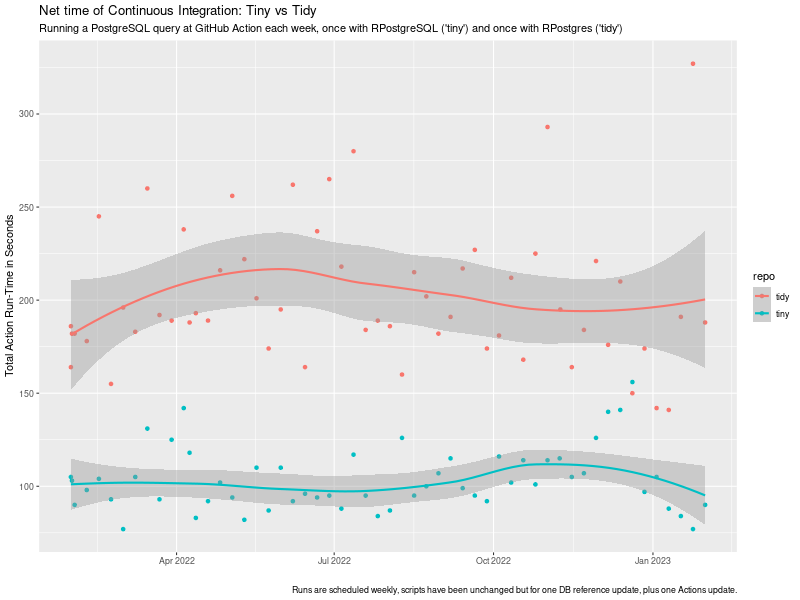
which we would like to come back to today. Furthermore, the unimitable @b0rk had a fabulous tweet just weeks later stating the same point debugging strategy: shorten your feedback loop as a key in a successful debugging strategy. So in sum: shorter is better. Nobody likes to wait. And shorter i.e. faster is a key and recurrent theme in the R4 series. Today we have a fairly nice illustration of two aspects we have stressed before: The combined effects can be staggering as we show below. The example is motivated by a truly surprising (we are being generous here) comment we received as an aside when discussing the eternal topic of whether R users do, or do not, have a choice when picking packages, or approaches, or verses. To our surprise, we were told that packages are not substitutable . Which is both demonstrably false (see below) and astonishing as it came from an academic. I.e. someone trained and paid to abstract superfluous detail away and recognise and compare core features of items under investigation. Truly stunning. But I digress. CRAN by now has many packages, slowly moving in on 20,000 in total, and is a unique success we commented-on time and time before. By now many packages shadow or duplicate each other, reinvent one another, or revise/review. One example is the pair of packages accessing PostgreSQL databases. There are several, but two are key. The older one is RPostgreSQL which has been around since Sameer Kumar Prayaga wrote it as a Google Summer of Code student in 2008 under my mentorship. The package has now been maintained well (if quietly) for many years by Tomoaki Nishiyama. The other entrant is more recent, though not new, and is RPostgres by Kirill M ller and others. We will for the remainder of this post refer to these two as the tiny and the tidy version as either can been as being a representative of a certain verse . The aforementioned comment on non-substitutability struck us as eminently silly, so we set out to prove just how absurd it really is. So about a year ago we set up pair of GitHub repos with minimal code in a pair we called lim-tiny and lim-tidy. Our conjecture was (and is!) that less is more just as post #34 titled Less Is More argued with respect to package dependencies. Each of the repos just does one thing: a query to a (freely accessible but remote) PostgreSQL database. The tiny version just retrieves a data frame using only the dependencies needed for RPostgreSQL namely DBI and nothing else. The tidy version retrieves a tibble and has access to everything else that comes when installing RPostgres: DBI, dplyr, and magrittr plus of course their respective dependencies. We were able to let the code run in (very default) GitHub Actions on a weekly schedule without intervention apart from one change to the SQL query when the remote server (providing public bioinformatics data) changed its schema slighly, plus one update to the action yaml code version. No other changes. We measure the time a standard continuous integration run takes in total using the default GitHub Action setup in the tidy case (which relies on RSPM/PPM binaries, caching, , and does not rebuild from source each time), and our own r-ci script (introduced in #32 for CI with R. It switched to using r2u during the course of this experiment but already had access to binaries via c2d4u so it is always binaries-based (see e.g. #37 or #13 for more). The chart shows the evolution of these run-times over the course of the year with one weekly run each.
tiny vs tidy ci timing impact chart tiny vs tidy ci timing impact chart
This study reveals a few things: The key point there is that while the net-time to fire off a single PostgreSQL is likely (near-)identical, the net cost of continuous integration is not. In this setup, it is about twice the run-time simply because Less Is More which (in this setup) comes out to about being twice as fast. And that is a valid (and concrete, and verifiable) illustration of the overall implicit cost of adding dependencies to creating and using development, test, or run-time environments. Faster feedback loops make for faster builds and faster debugging. Consider using fewer dependencies, and/or using binaries as provided by r2u.

This post by Dirk Eddelbuettel originated on his Thinking inside the box blog. Please report excessive re-aggregation in third-party for-profit settings.

30 January 2023

Arturo Borrero Gonz lez: Debian and the adventure of the screen resolution

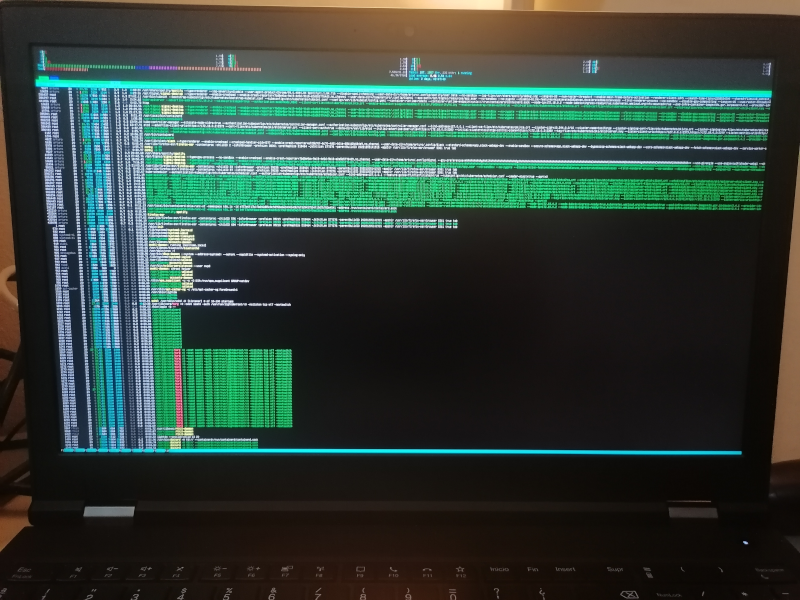
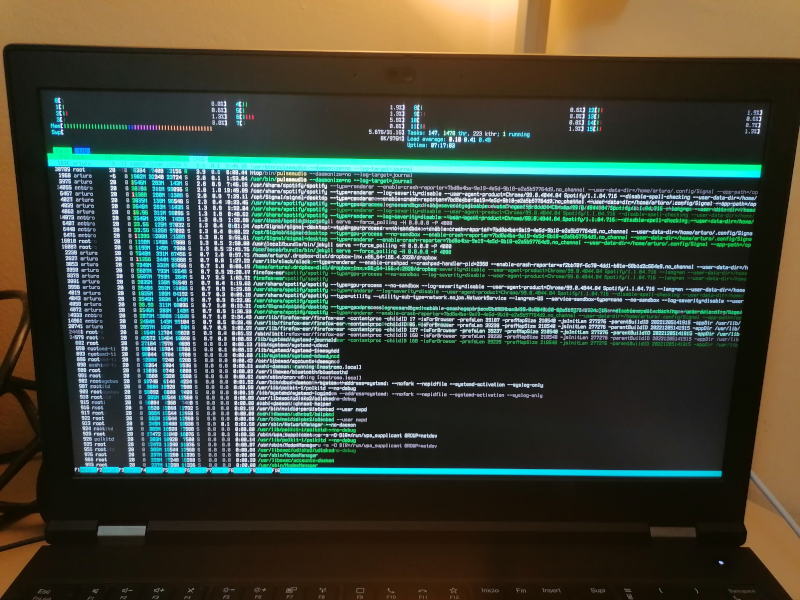
Post logo I read somewhere a nice meme about Linux: Do you want an operating system or do you want an adventure? I love it, because it is so true. What you are about to read is my adventure to set a usable screen resolution in a fresh Debian testing installation. The context is that I have two different Lenovo Thinkpad laptops with 16 screen and nvidia graphic cards. They are both installed with the latest Debian testing. I use the closed-source nvidia drivers (they seem to work better than the nouveau module). The desktop manager and environment that I use is lightdm + XFCE4. The monitor native resolution in both machines is very high: 3840x2160 (or 4K UHD if you will). The thing is that both laptops show an identical problem: when freshly installed with the Debian default config, the native resolution is in use. For a 16 screen laptop, this high resolution means that the font is tiny. Therefore, the raw native resolution renders the machine almost unusable. This is a picture of what you get by running htop in the console (tty1, the terminal you would get by hitting CTRL+ALT+F1) with the default install: Linux tty console with high resolution and tiny fonts Everything in the system is affected by this:
  1. the grub menu is unreadable. Thanksfully the right option is selected by default.
  2. the tty console, with the boot splash by systemd is unreadable as well. There are some colors, so you at least see some systemd stuff happening in green .
  3. when lightdm starts, the resolution keeps being very high. Can barely click the login button.
  4. when XFCE4 starts, it is a pain to navigate the menu and click the right buttons to set a more reasonable resolution.
The adventure begins after installing the system. Each of these four points must be fixed by hand by the user. XFCE4 Point #4 is the easiest. Navigate with the mouse pointer to the tiny Applications menu, then Settings, then Displays. This is more or less the same in every other desktop operating system. There are no further actions required to persist this setting. Thanks you XFCE4. lightdm Point #3, about lightdm, is more tricky to solve. It involves running xrandr when lightdm sets up the display. Nobody will tell you this trick. You have to search for it on the internet. Thankfully is a common problem, and a person who knows what to search for can find good results. The file /etc/lightdm/lightdm.conf needs to contain something like this:
[LightDM]
[Seat:*]
# set up correct display resolution
display-setup-script=sh -c -- "xrandr -s 1920x1080"
By the way, depending on your system hardware setup, you may also need an additional call to xrandr here. If you want to plug in an HDMI monitor, chances are you require something like xrandr --setprovideroutputsource NVIDIA-G0 modesetting && xrandr --auto to instruct the NVIDIA graphic card to work will with the kernel graphic system. In my case, one of my laptops require it, so I have:
[LightDM]
[Seat:*]
# don't ask me to type my username
greeter-hide-users=false
# set up correct display resolution, and prepare NVIDIA card for HDMI output
display-setup-script=sh -c "xrandr -s 1920x1080 && xrandr --setprovideroutputsource NVIDIA-G0 modesetting && xrandr --auto"
grub Point #1 about the grub menu is also not trivial to solve, but also widely known on the internet. Grub allows you to set arbitrary graphical modes. In Debian systems, adding something like GRUB_GFXMODE=1024x768 to /etc/default/grub and then running sudo update-grub should do the magic. console So we get to point #2 about the tty1 console. For months, I ve been investing my scarce personal time into trying to solve this annoyance. There are a lot of conflicting information about this on the internet. Plenty of misleading solutions, essays about framebuffer, kernel modeset, and other stuff I don t want to read just to get my tty1 in a readable status. People point in different directions, like using GRUB_GFXPAYLOAD_LINUX=keep in /etc/default/grub. Which is a good solution, but won t work: my best bet is that the kernel indeed keeps the resolution as told by grub, but the moment systemd loads the nvidia driver, it enables 4K in the display and the console gets the high resolution. Actually, for a few weeks, I blamed plymouth. Because the plymouth service is loaded early by systemd, it could be responsible for setting some of the display settings. It actually contains some (undocummented) DeviceScale configuration option that is seemingly aimed to integrate into high resolution scenarios. I played with it to no avail. Some folks from IRC suggested reconfiguring the console-font package. Back-then unknown to me. Running sudo dpkg-reconfigure console-font would indeed show a menu to select some preferences for the console, including font size. But apparently, a freshly installed system already uses the biggest possible, so this was a dead end. Other option I evaluted for a few days was touching the kernel framebuffer setting. I honestly don t understand this, and all the solutions pointing to use fbset didn t work for me anyways. This is the default framebuffer configuration in one of the laptops:
user@debian:~$ fbset -i

mode "3840x2160"
    geometry 3840 2160 3840 2160 32
    timings 0 0 0 0 0 0 0
    accel true
    rgba 8/16,8/8,8/0,0/0
endmode
Frame buffer device information:
    Name        : i915drmfb
    Address     : 0
    Size        : 33177600
    Type        : PACKED PIXELS
    Visual      : TRUECOLOR
    XPanStep    : 1
    YPanStep    : 1
    YWrapStep   : 0
    LineLength  : 15360
    Accelerator : No
Playing with these numbers, I was able to modify the geometry of the console, only to reduce the panel to a tiny square in the console display (with equally small fonts anyway). If it was possible to scale or resize the panel in other way, I was unable to understand how to do so by reading the associated docs. One day, out of despair, I tried disabling kernel modesetting (or KMS). It indeed got me a more readable tty1, only to prevent the whole graphic stack from starting, with Xorg complaining about the lack of kernel modeset. After lots of wasted time, I decided to blame the NVIDIA graphic card. Because why not: a closed source module in my system looks fishy. I registered in their official forum and wrote a message about my suspicion on the module, asking for advice on how to modify the driver default resolution. I was hoping that something like modprobe nvidia my_desired_resolution=1920x1080 could exist. Apparently not :-( I was about to give up. I had walked every corner of the known internet. I even tried summoning the ancient gods, I used ChatGPT. I asked the AI god for mercy, for a working solution to no avail. Then I decided to change the kind of queries I was issuing the search engines (don t ask me, I no longer remember). Eventually I landed in this askubuntu.com page. The question described the exact same problem I was experiencing. Finally, that was encouraging! I was not alone in my adventure after all! The solution section included a font size I hadn t seen before in my previous tests: 16x32. More excitement! I did all the steps. I installed the xfonts-terminus package, and in the file /etc/default/console-setup I put:
ACTIVE_CONSOLES="/dev/tty[1-6]"
CHARMAP="ISO-8859-15"
CODESET="guess"
FONTFACE="Terminus"
FONTSIZE="16x32"
VIDEOMODE=
Then I run setupcon from a tty, and the miracle happened! I finally got a bigger font in the tty1 console! Turned out a potential solution was about playing with console-setup, which I had tried wihtout success before. I m not even sure if the additional package was required. This is how my console looks now: Linux tty console with high resolution but not so tiny fonts The truth is the solution is satisfying only to a degree. I m a person with good eyesight and can work with these bit larger fonts. I m not sure if I can get larger fonts using this method, honestly. After some search, I discovered that some folks already managed to describe the problem in detail and filed a proper bug report in Debian, see #595696 opened more than 10 years ago. 2023 is the year of linux on the desktop Nope. I honestly don t see how this disconnected pile of settings can be all reconciled together. Can we please have a systemd-whatever that homogeinizes all of this mess? I m referring to grub + kernel drivers + console + lightdm + XFCE4. Next adventure When I lock the desktop (with CTRL+ALT+L) and close the laptop lid to suspend it, then reopen it, type the login info into the lightdm greeter, then the desktop environment never loads, black screen. I have already tried the first few search results without luck. Perhaps the nvidia card is to blame this time? Perhaps poorly coupled power management by the different system software pieces? Who knows what s going on here. This will probably be my next Debian desktop adventure.

Russell Coker: Links January 2023

The Intercept has an amusing and interesting article about senior Facebook employees testifying that they don t know where Facebook stores all it s data on users [1]. One lesson all programmers can learn from this is to document all these things in an orderly manner. Cory Doctorow wrote a short informative article about inflation from a modern monetary theory perspective [2]. Russ Allbery wrote an insightful blog post about effecive altruism and respect for disadvantaged people [3]. GiveDirectly sounds good. The Conversation has an interesting article about the Google and Apple app stores providing different versions of apps for users in different regions [4]. Apparently there are specific versions to comply with GDPR and versions that differ in adverts. The hope that GDPR would affect enough people to become essentially a world-wide standard was apparently overly optimistic. We need political lobbying in all countries for laws like the GDPR to force the app stores to give us the better versions of apps. Arya Voronova wrote an informative article about USB-C and extension or data blocker cables [5]. USB just keeps getting more horrible in technology while getting more useful in functionality. Laptops and phones catching fire will probably become more common in future. John McBride wrote an insightful article about the problems in the security of the software supply chain [6]. His main suggestion for addressing problems is If you are on a team that relies on some piece of open source software, allocate real engineering time to contributing , the problem with this is that real engineering time means real money and companies don t want to do that. Maybe having companies contribute moderate amounts of money to a foundation that hires people would be a viable option. Toms Guide has an interesting article describing problems with the Tesla [7]. It doesn t cover things like autopilot driving over children and bikers but instead covers issues of the user interface that make it less pleasant to drive and also remove concentration from the road. The BBC has an interesting article about the way mathematical skill is correlated with the way language is used to express numbers [8]. Every country with a lesser way of expressing numbers should switch to some variation of the East-Asian way. Science 2.0 has an interesting blog post about the JP Aerospace plans to use airships to get most of the way through the atmosphere and then a plane to get to orbit [9]. It s a wild idea but seems plausible. The idea of going to space in balloons seems considerably scarier to me than the current space craft. Interesting list of red team and physical entry gear with links to YouTube videos showing how to use them [10]. The Verge has an informative summary of the way Elon mismanaged Twitter after taking it over [11].

Reproducible Builds (diffoscope): diffoscope 234 released

The diffoscope maintainers are pleased to announce the release of diffoscope version 234. This version includes the following changes:
[ FC Stegerman ]
* test_text_proper_indentation requires at least file version 5.44.
  (Closes: reproducible-builds/diffoscope#329)
You find out more by visiting the project homepage.

29 January 2023

Dirk Eddelbuettel: RcppTOML 0.2.2 on CRAN: Now with macOS-on-Intel Builds

Just days after a build-fix release (for aarch64) and still only a few weeks after the 0.2.0 release of RcppTOML and its switch to toml++, we have another bugfix release 0.2.2 on CRAN also bringing release 3.3.0 of toml++ (even if we had large chunks of 3.3.0 already incorporated). TOML is a file format that is most suitable for configurations, as it is meant to be edited by humans but read by computers. It emphasizes strong readability for humans while at the same time supporting strong typing as well as immediate and clear error reports. On small typos you get parse errors, rather than silently corrupted garbage. Much preferable to any and all of XML, JSON or YAML though sadly these may be too ubiquitous now. TOML is frequently being used with the projects such as the Hugo static blog compiler, or the Cargo system of Crates (aka packages ) for the Rust language. The package was building fine on Intel-based macOS provided the versions were recent enough. CRAN, however, aims for the broadest possibly reach of binaries and builds on a fairly ancient macOS 10.13 with clang version 10. This confused toml++ into (wrongly) concluding it could not build when it in fact can. After a hint from Simon that Apple in their infinite wisdom redefines clang version ids, this has been reflected in version 3.3.0 of toml++ by Mark so we should now build everywhere. Big thanks to everybody for the help. The short summary of changes follows.

Changes in version 0.2.2 (2023-01-29)
  • New toml++ version 3.3.0 with fix to permit compilation on ancient macOS systems as used by CRAN for the Intel-based builds.

Courtesy of my CRANberries, there is a diffstat report for this release. More information is on the RcppTOML page page. Please use the GitHub issue tracker for issues and bugreports. If you like this or other open-source work I do, you can sponsor me at GitHub.

This post by Dirk Eddelbuettel originated on his Thinking inside the box blog. Please report excessive re-aggregation in third-party for-profit settings.

Gunnar Wolf: miniDebConf Tamil Nadu 2023

Greetings from Viluppuram, Tamil Nadu, South India! As a preparation and warm-up for DebConf in September, the Debian people in India have organized a miniDebConf. Well, I don t want to be unfair to them They have been regularly organizing miniDebConfs for over a decade, and while most of the attendees are students local to this state in South India (the very tip of the country; Tamil Nadu is the Eastern side, and Kerala, where Kochi is and DebConf will be held, is the Western side), I have talked with attendees from very different regions of this country. This miniDebConf is somewhat similar to similarly-scoped events I have attended in Latin America: It is mostly an outreach conference, but it s also a great opportunity for DDs in India to meet in the famous hallway track. India is incredibly multicultural. Today at the hotel, I was somewhat surprised to see people from Kerala trying to read a text written in Tamil: Not only the languages are different, but the writing systems also are. From what I read, Tamil script is a bit simpler to Kerala s Mayalayam, although they come from similar roots. Of course, my school of thought is that, whenever you visit a city, culture or country that differs from the place you were born, a fundamental component to explore and to remember is Food! And one of the things I most looked forward for this trip was that precisely. I arrived to the Chennai Airport (MAA) 8:15 local time yesterday morning, so I am far from an expert but I have been given (and most happily received) three times biryani (pictured in the photo by this paragraph). It is delicious, although I cannot yet describe the borders of what should or should not be considered proper biryani): The base dish is rice, and you go mixing it with different sauces or foods. What managed to surprise us foreigners is, strangely, well known for us all: there is no spoon. No, the food is not pushed to your mouth using metal or wooden utensils. Not even using a tortilla as back home, or by breaking bits of the injera that serves also as a dish, as in Ethiopia. Sure, there is naan, but it is completely optional, and would be a bit too much for as big a big dish as what we have got. Biryani is eaten With the tools natural to us primates: the fingers. We have learnt some differnt techniques but so far, I am still using the base technique (thumb-finger-middle). I m closing the report with the photo of the closing of the conference as it happens. And I will, of course, share our adventures as they unfold in the next couple of days. Because Well, we finished with the conference-y part of the trip, but we have a full week of (pre-)DebConf work ahead of us!

Valhalla's Things: Hello World!

Posted on January 29, 2023
Welcome to my new blog! Or rather, strictly speaking, welcome to my first blog! Back when everybody had a blog, I had an old-fashioned personal website where pages were organized by topic rather than by date, so now that blogs are dead (or so they say), I guess it s time for me to have one :) . The old website is still online, but updating it is getting harder, both for organizational reasons and because the static generator I ve used is no longer supported and requires python 2; lately I ve started publish some specific categories of material such as sewing patterns into their own website (you can find a list in the about page), but I was missing a place to post about the history and experiences of the things I publish elsewhere, as well as more uncategorized things. Of course I ve chosen to use a static site generator, but since I m picky I ve discarded most of the common ones mostly because they enforce assumptions I don t agree with. On the other hand, one day I wouldn t mind learning a bit of Haskell, so I decided to look for trouble and use Hakyll, hoping that nobody will add a level 20 wandering monster to it. Right now I m using mostly the default theme, because I know that if I start fiddling with it I m not going to start posting content ever; maybe one day I ll decide to completely change the look. As for contents, on the bits side of things you can expect me to talk about Debian, the Fediverse, Python, my inventory manging program and a bit of arduino-level electronics; on the atom side you should definitely expect sewing, modern and mostly historically inspired, some fiber crafts (spinning, knitting, crochet), maybe some bad attempts at painting (watercolours and acrilics), printing (screen and linocut), things that are written on paper and, well, any other craft I will happen to collect. Before the blog gets too full I plan to add tag management to help people who are only interested in some of these contents. This being a blog, of course it has an atom feed you can add to your favourite (and ideally self-hosted) rss reader, and since this is a personal blog there will be no periodicity, posts will happen when I ll have something to say on some topic. Until next time

28 January 2023

Scarlett Gately Moore: KDE Snaps, Debian uploads and much more in the works!

Witch Wells, AZ SnowWitch Wells, AZ Snow
It has been a very busy few weeks as we endured snowstorm after snowstorm! I have made some progress on the Mycroft in debian adventure! This will slow down as we enter freeze for bookworm and there is no way we will make it into bookworm as there are some significant issues to solve. On the KDE side of things: In the Snap arena, I have made my first significant contribution to snapcraft upstream! It has been a great learning experience as I convert my Ruby knowledge to Python. Formatting is something I need to get used to! https://github.com/snapcore/snapcraft/pull/4023 Snaps have been on hold due to the kde-neon extension not having core22 support and the above pull request fixes that. Meanwhile, I have been working on getting core20 apps ( 22.08.3 final KDE apps version for this base. ) rebuilt for security updates. As many of you know, I am seeking employment. I am a hard worker, that thrives on learning new things. I am a self starter, knowledge sponge, and eager to be an asset to < insert your company here > ! Meanwhile, as interview processes are much longer than I remember and the industry exploding in layoffs, I am coming up short on living expenses as my unemployment lingers on. Please consider donating to my gofundme. Thank you for your consideration. GoFundMe

Emmanuel Kasper: Table of correspondence between AWS / Azure / Red Hat OpenShift Container Platform / upstream projects

If you know the Amazon Web Services or Azure portfolio, and you are interested in OpenShift or the OKD OpenShift community distribution, this is a table of corresponding technologies. OpenShift is Red Hat s Kubernetes distribution: it is basically the upstream Kubernetes delivered with monitoring, logging, CI/CD, underlying OS, tested upgrade paths not found with a manual kubernetes.io kubeadm install. After passing the two corresponding certifications, my opinion on cloud operators is that it is very much a step back in the direction of proprietary software. You can rebuild their cloud stack with opensource components, but it is also a lot of integration work, similar to using the Linux from scratch distribution instead of something like Debian. A good middle point are the OpenShift and OKD Kubernetes distributions, who integrate the most common cloud components, but allow an installation on your own hardware or cloud provider of your choice.
AWS Azure OpenShift *OpenShift upstream project&
Cloud Trail Kubernetes API Server audit log Kubernetes
Cloud Watch Azure Monitor, Azure Log Analytics OpenShift Monitoring Prometheus, Kubernetes Metrics
AWS Artifact Compliance Operator OpenSCAP
AWS Trusted Advisor Azure Advisor Insights
AWS Marketplace Red Hat Market place Operator Hub
AWS Identity and Access Management (IAM) Azure Active Directory, Azure AD DS Red Hat SSO Keycloack
AWS Elastisc Beanstalk Azure App Services OpenShift Source2Image (S2I) Source2Image (S2I)
AWS S3 Azure Blob Storage** ODF Rados Gateway Rook RGW
AWS Elastic Block Storage Azure Disk Storage ODF Rados Block Device Rook RBD
AWS Elastic File System Azure Files ODF Ceph FS Rook CephFS
AWS ELB Classic Azure Load Balancer MetalLB Operator MetalLB
AWS ELB Application Load Balancer Azure Application Gateway OpenShift Router HAProxy
Amazon Simple Notification Service OpenShift Streams for Apache Kafka Apache Kafka
Amazon Guard Duty Microsoft Defender for Cloud API Server audit log review, ACS Runtime detection Stackrox
Amazon Inspector Microsoft Defender for Cloud Quay.io container scanner, ACS Vulnerability Assessment Clair, Stackrox
AWS Lambda Azure Serverless Openshift Serverless* Knative
AWS Key Management System Azure Key Vault could be done with Hashicorp Vault Vault
AWS WAF NGINX Ingress Controller Operator with ModSecurity NGINX ModSecurity
Amazon Elasticache Redis Enterprise Operator Redis, memcached as alternative
AWS Relational Database Service Azure SQL Crunchy Data Operator PostgreSQL
Azure Arc OpenShift ACM Open Cluster Management
AWS Scaling Group Azure Scale Set OpenShift Autoscaler OKD Autoscaler
* OpenShift Serverless requires the application to be packaged as a container, something AWS Lambda does not require. ** Azure Blob Storage covers the object storage use case of S3, but is itself not S3 compatible

Russ Allbery: Review: The Library of the Dead

Review: The Library of the Dead, by T.L. Huchu
Series: Edinburgh Nights #1
Publisher: Tor
Copyright: 2021
Printing: 2022
ISBN: 1-250-76777-6
Format: Kindle
Pages: 329
The Library of the Dead is the first book in a post-apocalyptic (sort of) urban fantasy series set in Edinburgh, written by Zimbabwean author (and current Scotland resident) T.L. Huchu. Ropa is a ghosttalker. This means she can see people who have died but are still lingering because they have unfinished business. She can stabilize them and understand what they're saying with the help of her mbira. At the age of fourteen, she's the sole source of income for her small family. She lives with her grandmother and younger sister in a caravan (people in the US call it an RV), paying rent to an enterprising farmer turned landlord. Ropa's Edinburgh is much worse off than ours. Everything is poorer, more run-down, and more tenuous, but other than a few hints about global warming, we never learn the history. It reminded me a bit of the world in Octavia Butler's Parable of the Sower in the feel of civilization crumbling without a specific cause. Unlike that series, The Library of the Dead is not about the collapse or responses to it. The partial ruin of the city is the mostly unremarked backdrop of Ropa's life. Much of the book follows Ropa's daily life carrying messages for ghosts and taking care of her family. She does discover the titular library when a wealthier friend who got a job there shows it off to her, but it has no significant role in the plot. (That was disappointing.) The core plot, once Ropa is convinced by her grandmother to focus on it, is the missing son of a dead woman, who turns out to not be the only missing child. This is urban fantasy with the standard first-person perspective, so Ropa is the narrator. This style of book needs a memorable protagonist, and Ropa is certainly that. She's a talker who takes obvious delight in narrating her own story alongside a constant patter of opinions, observations, and Scottish dialect. Ropa is also poor. That last may not sound that notable; a lot of urban fantasy protagonists are not well-off. But most of them feel culturally middle-class in a way that Ropa does not. Money may be a story constraint in other books, but it rarely feels like a life constraint and experience the way it does here. It's hard to describe the difference in tone succinctly, since it's a lot of small things: the constant presence of money concerns, the frustration of possessions that are stolen or missing and can't be replaced, the tedious chores one has to do when there's no money, even the language and vulgarity Ropa uses. This is rare in fantasy and excellent characterization work. Given that, I am still frustrated with myself over how much I struggled with Ropa as a narrator. She's happy to talk about what is happening to her and what she's learning about (she listens voraciously to non-fiction while running messages), but she deflects, minimizes, or rushes past any mention of what she's feeling. If you don't like the angst that's common from urban fantasy protagonists, this may be the book for you. I have complained about that angst before, and therefore feel like this should have been the book for me, but apparently I need a minimum level of emotional processing and introspection from the narrator. Ropa is utterly unwilling to do any of that. It's possible to piece together what she's feeling and worrying about, but the reader has to rely on hints and oblique comments that she passes over quickly. It didn't help that Ropa is not interested in the same things in her world that I was interested in. She's not an unreliable narrator in the conventional sense; she doesn't lie to the reader or intentionally hide information. And yet, the experience of reading this book was, for me, similar to reading a book with an unreliable narrator. Ropa consistently refused to look at what I wanted her to look at or think about what I wanted her to think about. For example, when she has an opportunity to learn magic through books from the titular library, her initial enthusiasm is infectious. Huchu does a great job showing the excitement of someone who likes new ideas and likes telling other people about the neat things she just learned. But when things don't work the way she expected from the books, she doesn't follow up, experiment, or try to understand why. When her grandmother tries to explain something to her from a different angle, she blows her off and refuses to pay attention. And when she does get magic to work, she never tries to connect that to her previous understanding. I kept waiting for Ropa to try to build her own mental model of magic, but she would only toy with an idea for a few pages and then put it down and never mention it again. This is not a fault in the book, just a mismatch between the book and what I wanted to read. All of this is consistent with Ropa's defensive strategies, emotional resiliency, and approach to understanding the world. (I strongly suspect Huchu was giving Ropa some ADHD characteristics, and if so, I think he got it spot on.) Given that, I tried to pivot to appreciating the characterization and the world, but that ran into another mismatch I had with this book, and the reason why I passed on it when it initially came out. I tend to avoid fantasy novels about ghosts. This is not because I mind ghosts themselves, but I've learned from experience that authors who write about ghosts usually also write about other things that I don't want to read about. That unfortunately was the case here; The Library of the Dead was too far into horror for me. There's child abuse, drugs, body horror, and similar nastiness here, more than I wanted in my head. Ropa's full-speed-ahead attitude and refusal to dwell on anything made it a bit easier to read, but it was still too much for me. Ropa is a great character who is refreshingly different than the typical urban fantasy protagonist, and the few hints of the magical library and world background we get were intriguing. This book was not for me, but I can see why other people will love it. Followed by Our Lady of Mysterious Ailments. Rating: 6 out of 10

Craig Small: Fixing iCalendar feeds

The local government here has all the schools use an iCalendar feed for things like when school terms start and stop and other school events occur. The department s website also has events like public holidays. The issue is that all of them don t make it an all-day event but one that happens at midnight, or one past midnight. The events synchronise fine, though Google s calendar is known for synchronising when it feels like it, not at any particular time you would like it to.
Screenshot of Android Calendar showing a tiny bar at midnight which is the event.
Even though a public holiday is all day, they are sent as appointments for midnight. That means on my phone all the events are these tiny bars that appear right up the top of the screen and are easily missed, especially when the focus of the calendar is during the day. On the phone, you can see the tiny purple bar at midnight. This is how the events appear. It s not the calendar s fault, as far as it knows the school events are happening at midnight. You can also see Lunar New Year and Australia Day appear in the all-day part of the calendar and don t scroll away. That s where these events should be.
Why are all the events appearing at midnight? The reason is the feed is incorrectly set up and has the time. The events are sent in an iCalendar format and a typical event looks like this:
BEGIN:VEVENT
DTSTART;TZID=Australia/Sydney:20230206T000000
DTEND;TZID=Australia/Sydney:20230206T000000
SUMMARY:School Term starts
END:VEVENT
The event starting and stopping date and time are the DTSTART and DTEND lines. Both of them have the date of 2023/02/06 or 6th February 2023 and a time of 00:00:00 or midnight. So the calendar is doing the right thing, we need to fix the feed! The Fix I wrote a quick and dirty PHP script to download the feed from the real site, change the DTSTART and DTEND lines to all-day events and leave the rest of it alone.
<?php
$site = $_GET['s'];
if ($site == 'site1')  
    $REMOTE_URL='https://site1.example.net/ical_feed';
  elseif ($site == 'site2')  
    $REMOTE_URL='https://site2.example.net/ical_feed';
  else  
    http_response_code(400);
    die();
 
$fp = fopen($REMOTE_URL, "r");
if (!$fp)  
    die("fopen");
 
header('Content-Type: text/calendar');
while (( $line = fgets($fp, 1024)) !== false)  
    $line = preg_replace(
        '/^(DTSTART DTEND);[^:]+:([0-9] 8 )T000[01]00/',
        '$ 1 ;VALUE=DATE:$ 2 ',
        $line);
    echo $line;
 
?>
It s pretty quick and nasty but gets the job done. So what is it doing? You need to save the script on your web server somewhere, possibly with an alias command. The whole point of this is to change the type from a date/time to a date-only event and only print the date part of it for the start and end of it. The resulting iCalendar event looks like this:
BEGIN:VEVENT
DTSTART;VALUE=DATE:20230206
DTEND;VALUE=DATE:20230206
SUMMARY:School Term starts
END:VEVENT
The calendar then shows it properly as an all-day event. I would check the script works before doing the next step. You can use things like curl or wget to download it. If you use a normal browser, it will probably just download the translated file. If you re not seeing the right thing then it s probably the PCRE failing. You can check it online with a regex checker such as https://regex101.com. The site has saved my PCRE and match so you got something to start with. Calendar settings The last thing to do is to change the URL in your calendar settings. Each calendar system has a different way of doing it. For Google Calendar they provide instructions and you want to follow the section titled Use a link to add a public Calendar . The URL here is not the actual site s URL (which you would have put into the REMOTE_URL variable before) but the URL of your script plus the ?s=site1 part. So if you put your script aliased to /myical.php and the site ID was site1 and your website is www.example.com the URL would be https://www.example.com/myical.php?s=site1 . You should then see the events appear as all-day events on your calendar.

27 January 2023

Matthew Garrett: Further adventures in Apple PKCS#11 land

After my previous efforts, I wrote up a PKCS#11 module of my own that had no odd restrictions about using non-RSA keys and I tested it. And things looked much better - ssh successfully obtained the key, negotiated with the server to determine that it was present in authorized_keys, and then went to actually do the key verification step. At which point things went wrong - the Sign() method in my PKCS#11 module was never called, and a strange
debug1: identity_sign: sshkey_sign: error in libcrypto
sign_and_send_pubkey: signing failed for ECDSA "testkey": error in libcrypto"

error appeared in the ssh output. Odd. libcrypto was originally part of OpenSSL, but Apple ship the LibreSSL fork. Apple don't include the LibreSSL source in their public source repo, but do include OpenSSH. I grabbed the OpenSSH source and jumped through a whole bunch of hoops to make it build (it uses the macosx.internal SDK, which isn't publicly available, so I had to cobble together a bunch of headers from various places), and also installed upstream LibreSSL with a version number matching what Apple shipped. And everything worked - I logged into the server using a hardware-backed key.

Was the difference in OpenSSH or in LibreSSL? Telling my OpenSSH to use the system libcrypto resulted in the same failure, so it seemed pretty clear this was an issue with the Apple version of the library. The way all this works is that when OpenSSH has a challenge to sign, it calls ECDSA_do_sign(). This then calls ECDSA_do_sign_ex(), which in turn follows a function pointer to the actual signature method. By default this is a software implementation that expects to have the private key available, but you can also register your own callback that will be used instead. The OpenSSH PKCS#11 code does this by calling EC_KEY_set_method(), and as a result calling ECDSA_do_sign() ends up calling back into the PKCS#11 code that then calls into the module that communicates with the hardware and everything works.

Except it doesn't under macOS. Running under a debugger and setting a breakpoint on EC_do_sign(), I saw that we went down a code path with a function called ECDSA_do_sign_new(). This doesn't appear in any of the public source code, so seems to be an Apple-specific patch. I pushed Apple's libcrypto into Ghidra and looked at ECDSA_do_sign() and found something that approximates this:
nid = EC_GROUP_get_curve_name(curve);
if (nid == NID_X9_62_prime256v1)  
  return ECDSA_do_sign_new(dgst,dgst_len,eckey);
 
return ECDSA_do_sign_ex(dgst,dgst_len,NULL,NULL,eckey);
What this means is that if you ask ECDSA_do_sign() to sign something on a Mac, and if the key in question corresponds to the NIST P256 elliptic curve type, it goes down the ECDSA_do_sign_new() path and never calls the registered callback. This is the only key type supported by the Apple Secure Enclave, so I assume it's special-cased to do something with that. Unfortunately the consequence is that it's impossible to use a PKCS#11 module that uses Secure Enclave keys with the shipped version of OpenSSH under macOS. For now I'm working around this with an SSH agent built using Go's agent module, forwarding most requests through to the default session agent but appending hardware-backed keys and implementing signing with them, which is probably what I should have done in the first place.

comment count unavailable comments

26 January 2023

Matt Brown: Goals for 2023

This is the second of a two-part post covering my goals for 2023. See the first part to understand the vision, mission and strategy driving these goals. I want to thank my friend Nat, and Will Larson whose annual reviews I ve always enjoyed reading for inspiring me to write these posts. I ve found the process articulating my motivations and goals very useful to clarify my thoughts and create tangible next steps. I m grateful for that in and of itself, but I also hope that by publishing this you too might find it interesting, and the additional public accountability it creates will be a positive encouragement to me.

2023 Goals My focus for 2023 is to bootstrap a business that I can use to build software that solves real problems (see the strategy from the previous post for more details on this). I m going to track this via three goals:
  1. Execute a series of successful consulting engagements, building a reputation for myself and leaving happy customers willing to provide testimonials that support a pipeline of future opportunities.
  2. Grow my product development skill set by taking several ideas to MVP stage with customer feedback received, and launch at least one product which generates revenue and has growth potential.
  3. Develop and maintain a broad professional network.

Consulting Based on my background and experience, I plan to target my consulting across three areas:
  1. Leadership - building and growing operationally focused software teams following SRE/devops principles. A typical engagement may involve helping a client establish a brand new SRE/devops practice, or to strengthen and mature the existing practices used to build and operate reliable software in their team(s).
  2. Architecture - applying deep technical expertise to the design of large software systems, particularly focusing on their reliability and operability. A typical engagement may involve design input and decision making support for key aspects of a new system, providing external review and analysis to improve an existing system, or delivering actionable, tactical next steps during or immediately after a reliability crisis.
  3. Technology Strategy - translating high-level business needs into a technical roadmap that provides understandable explanations of the value software can deliver in that context, and the iterative series of appropriately sized projects required to realise it. A typical customer for this would be a small to medium sized business outside of the software industry with a desire to use software in a transformative way to improve their business but who does not employ the necessary in-house expertise to lead that transition.

Product Development There are three, currently extremely high level, product ideas that I m excited to explore:
  1. Improve co-ordination of electricity resources to accelerate the electrification of NZ s energy demand and the transition to zero carbon grid. NZ has huge potential to be a world-leader in decarbonising energy use through electrification, but requires a massive transition to realise the benefits. Many of the challenges to that transition involve coordination of an order of magnitude more distributed energy resources (DER) in a much more dynamic and software-oriented manner than the electricity industry is traditionally experienced with. The concept of improving DER coordination is not novel, but our grid has unique characteristics that mean we re likely to need to build localised solutions. There is a strong match between my experience with large, high-reliability distributed software systems, and this need. With renewed motivation in the industry for rapid progress and many conversations and consultations still in their early stages this a very compelling space to explore with the intent of developing a more detailed product opportunity to pursue.
  2. Reduce agricultural emissions by making high performance farm management, including effortless compliance reporting, straightforward, fun and effective for busy farmers. NZ s commitments to reduce agricultural emissions (our largest single sector) place increased compliance and reporting burdens on busy farmers who don t want to report the same data multiple times to different regulators and authorities. In tandem, rising business costs and constraints drive a need for continuous improvements in efficiency, performance and farm management processes in order to remain profitable. This in turn drives increases in complexity and the volume of data that farmers must work with. Many industry organisations and associated software developers offer existing products aimed at addressing aspects of these problems, but anecdotal feedback indicates these are poorly integrated, piecemeal solutions that are often frustrating to use - a burden rather than a source of continuous improvement. It looks like there could be an opportunity for a delightful, comprehensive farm management and reporting system to disrupt the industry and help farmers run more profitable and sustainable farms while also reducing compliance costs and effort.
  3. Lower sickness rates and improve cognitive performance by enabling every indoor space to benefit from continuous ventilation monitoring and reporting. Indoor air quality is important in reducing disease transmission risk and promoting optimal cognitive performance, but despite the current pandemic temporarily raising its profile, a focus on indoor air quality generally remains under the radar for most people. One factor contributing to this is the lack of widely available systems for continuously monitoring and reporting on air quality. I built https://co2mon.nz/ to help address this problem in my children s school during 2022. I see potential to further grow this business through marketing and raising awareness of the value of ventilation monitoring in all indoor environments.
In addition to these mission aligned product ideas, I m also interested in exploring the creation of small to medium sized SaaS applications that deliver useful value by serving the needs of a specialised or niche business or industry. Even when not directly linked to the overall mission, the development and operation of products of this type can support the strategy. Each application adds direct revenue and also contributes to achieving better economies of scale in the many backend processes and infrastructure required to deliver secure, reliable and performant software systems.

Developing my professional network To help make this goal more actionable and measurable I will track 3 sub goals:
  1. To build a professional relationship with at least 30 new people this year, meaning that we ve met and had a decent conversation at least a couple of times and keep in touch at least every few months in some form.
  2. To publish a piece of writing on this site at least once a week, and for many of those to generate interesting conversations and feedback. I ll use this as an opportunity to explore product ideas, highlight my consulting expertise and generally contribute interesting technical content into the world.
  3. To support the growth of my local technical community by volunteering my experience and knowledge with others through activities such as mentoring, conference talks and similar.

Next Steps Over the coming weeks I ll write more about each of these topics - you can use the box in the sidebar (or on the front page, if you re on a phone) to be notified when I post new writing (there s also an RSS feed here, for the geeks). I d love to have your feedback and engagement on these goals too - please drop me an email with your thoughts or even book a meeting - it won t be a distraction to me, you ll be helping me meet my goal of developing and maintaining my network :)

Next.

Previous.