Search Results: "ean"

19 October 2016

Kees Cook: Security bug lifetime

In several of my recent presentations, I ve discussed the lifetime of security flaws in the Linux kernel. Jon Corbet did an analysis in 2010, and found that security bugs appeared to have roughly a 5 year lifetime. As in, the flaw gets introduced in a Linux release, and then goes unnoticed by upstream developers until another release 5 years later, on average. I updated this research for 2011 through 2016, and used the Ubuntu Security Team s CVE Tracker to assist in the process. The Ubuntu kernel team already does the hard work of trying to identify when flaws were introduced in the kernel, so I didn t have to re-do this for the 557 kernel CVEs since 2011. As the README details, the raw CVE data is spread across the active/, retired/, and ignored/ directories. By scanning through the CVE files to find any that contain the line Patches_linux: , I can extract the details on when a flaw was introduced and when it was fixed. For example CVE-2016-0728 shows:
Patches_linux:
 break-fix: 3a50597de8635cd05133bd12c95681c82fe7b878 23567fd052a9abb6d67fe8e7a9ccdd9800a540f2
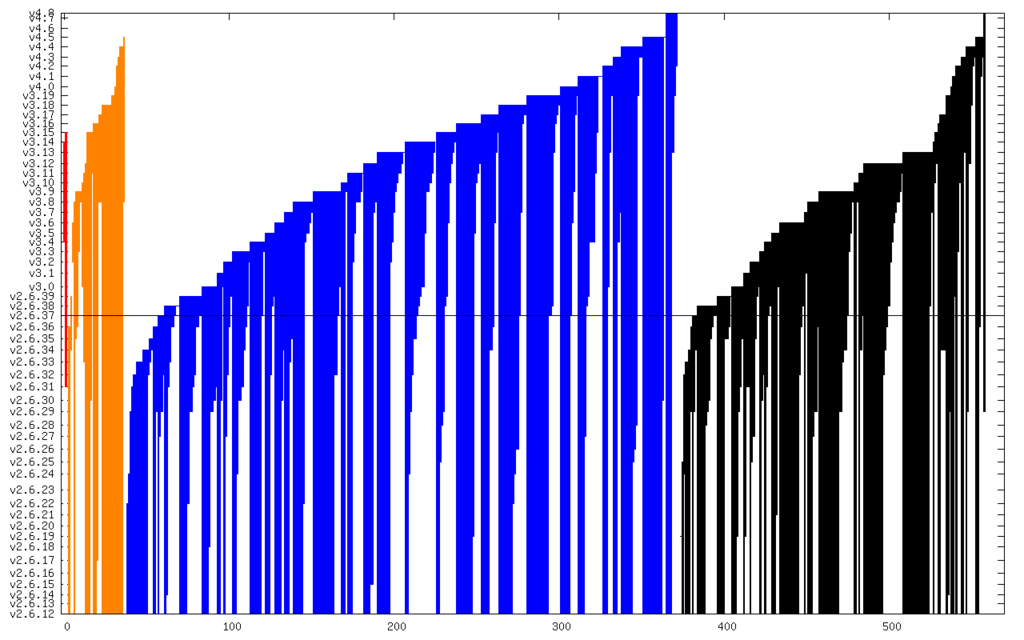
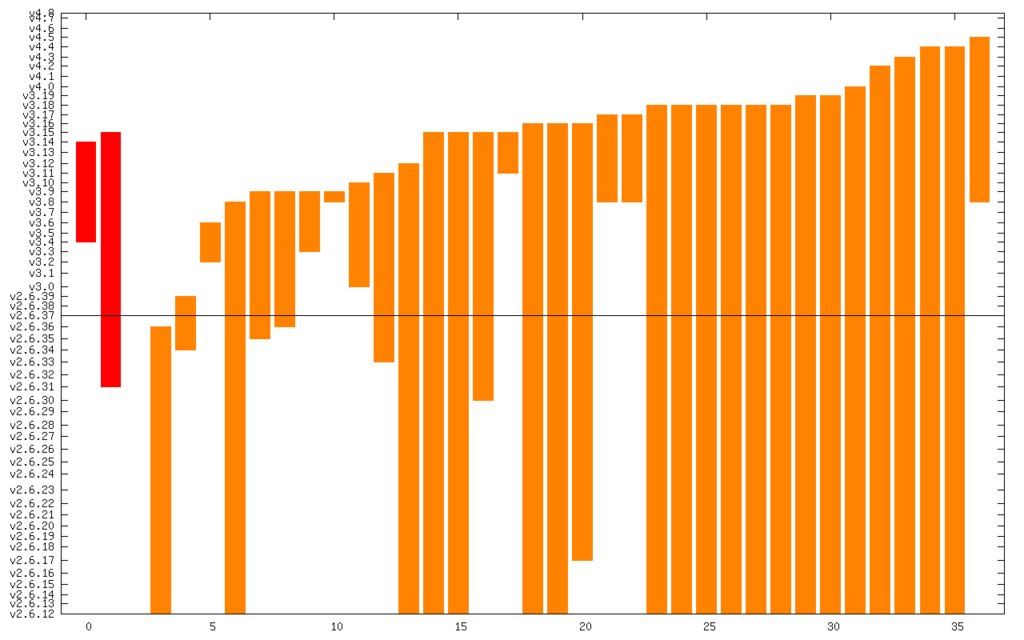
This means that CVE-2016-0728 is believed to have been introduced by commit 3a50597de8635cd05133bd12c95681c82fe7b878 and fixed by commit 23567fd052a9abb6d67fe8e7a9ccdd9800a540f2. If there are multiple lines, then there may be multiple SHAs identified as contributing to the flaw or the fix. And a - is just short-hand for the start of Linux git history. Then for each SHA, I queried git to find its corresponding release, and made a mapping of release version to release date, wrote out the raw data, and rendered graphs. Each vertical line shows a given CVE from when it was introduced to when it was fixed. Red is Critical , orange is High , blue is Medium , and black is Low : CVE lifetimes 2011-2016 And here it is zoomed in to just Critical and High: Critical and High CVE lifetimes 2011-2016 The line in the middle is the date from which I started the CVE search (2011). The vertical axis is actually linear time, but it s labeled with kernel releases (which are pretty regular). The numerical summary is: This comes out to roughly 5 years lifetime again, so not much has changed from Jon s 2010 analysis. While we re getting better at fixing bugs, we re also adding more bugs. And for many devices that have been built on a given kernel version, there haven t been frequent (or some times any) security updates, so the bug lifetime for those devices is even longer. To really create a safe kernel, we need to get proactive about self-protection technologies. The systems using a Linux kernel are right now running with security flaws. Those flaws are just not known to the developers yet, but they re likely known to attackers, as there have been prior boasts/gray-market advertisements for at least CVE-2010-3081 and CVE-2013-2888. (Edit: see my updated graphs that include CVE-2016-5195.)

2016, Kees Cook. This work is licensed under a Creative Commons Attribution-ShareAlike 3.0 License.
Creative Commons License

17 October 2016

Russ Allbery: pgpcontrol 2.5

pgpcontrol is the collection of the original signing and verification scripts that David Lawrence wrote (in Perl) for verification of Usenet control messages. I took over maintenance of it, with a few other things, but haven't really done much with it. It would benefit a lot from an overhaul of both the documentation and the code, and turning it into a more normal Perl module and supporting scripts. This release is none of those things. It's just pure housekeeping, picking up changes made by other people (mostly Julien LIE) to the copies of the scripts in INN and making a few minor URL tweaks. But I figured I may as well, rather than distribute old versions of the scripts. You can tell how little I've done with this stuff by noting that they don't even have a distribution page on my web site. The canonical distribution site is ftp.isc.org, although I'm not sure if that site will pick up the new release. (This relies on a chain of rsync commands that have been moved multiple times since the last time I pushed the release button, and I suspect that has broken.) I'll ping someone about possibly fixing that; in the meantime, you can find the files on archives.eyrie.org.

Arturo Borrero Gonz lez: nftables in Debian Stretch

Debian - Netfilter The next Debian stable release is codenamed Stretch, which I would expect to be released in less than a year. The Netfilter Project has been developing nftables for years now, and the status of the framework has been improved to a good point: it s ready for wide usage and adoption, even in high-demand production environments. The last released version of nft was 0.6, and the Debian package was updated just a day after Netfilter announced it. With the 0.6 version the software framework reached a good state of maturity, and I myself encourage users to migrate from iptables to nftables. In case you don t know about nftables yet, here is a quick reference: To run nftables in Debian Stretch you need several components:
  1. nft: the command line interface
  2. libnftnl: the nftables-netlink library
  3. linux kernel: a least 4.7 is recommended
A simple aptitude run will put your system ready to go, out of the box, with nftables:
root@debian:~# aptitude install nftables
Once installed, you can start using the nft command:
root@debian:~# nft list ruleset
A good starting point is to copy a simple workstation firewall configuration:
root@debian:~# cp /usr/share/doc/nftables/examples/syntax/workstation /etc/nftables.conf
And load it:
root@debian:~# nft -f /etc/nftables.conf
Your nftables ruleset is now firewalling your network:
root@debian:~# nft list ruleset
table inet filter  
        chain input  
                type filter hook input priority 0;
                iif lo accept
                ct state established,related accept
                ip6 nexthdr icmpv6 icmpv6 type   nd-neighbor-solicit,  nd-router-advert, nd-neighbor-advert   accept
                counter drop
         
 
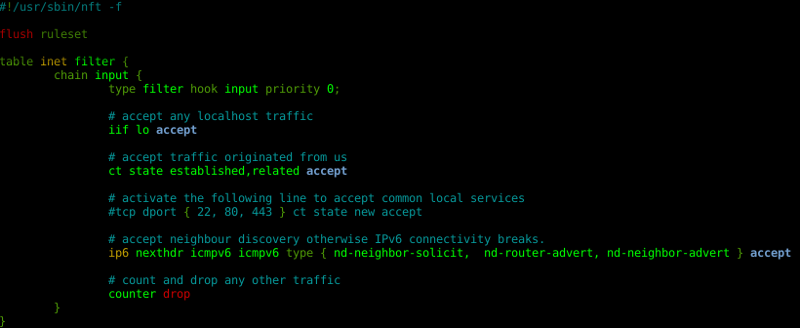
Several examples can be found at /usr/share/doc/nftables/examples/. A simple systemd service is included to load your ruleset at boot time, which is disabled by default. If you are running Debian Jessie and want to give a try, you can use nftables from jessie-backports. If you want to migrate your ruleset from iptables to nftables, good news. There are some tools in place to help in the task of translating from iptables to nftables, but that doesn t belong to this post :-) nft The nano editor includes nft syntax highlighting. What are you waiting for to use nftables?

Jaldhar Vyas: Something Else Will Be Posted Soon Also.

Yikes today was Sharad Purnima which means there is about two weeks to go before Diwali and I haven't written anything here all year. OK new challenge: write 7 substantive blog posts before Diwali. Can I manage to do it? Let's see...

16 October 2016

Thomas Goirand: Released OpenStack Newton, Moving OpenStack packages to upstream Gerrit CI/CD

OpenStack Newton is released, and uploaded to Sid OpenStack Newton was released on the Thursday 6th of October. I was able to upload nearly all of it before the week-end, though there was a bit of hick-ups still, as I forgot to upload python-fixtures 3.0.0 to unstable, and only realized it thanks to some bug reports. As this is a build time dependency, it didn t disrupt Sid users too much, but 38 packages wouldn t build without it. Thanks to Santiago Vila for pointing at the issue here. As of writing, a lot of the Newton packages didn t migrate to Testing yet. It s been migrating in a very messy way. I d love to improve this process, but I m not sure how, if not filling RC bugs against 250 packages (which would be painful to do), so they would migrate at once. Suggestions welcome. Bye bye Jenkins For a few years, I was using Jenkins, together with a post-receive hook to build Debian Stable backports of OpenStack packages. Though nearly a year and a half ago, we had that project to build the packages within the OpenStack infrastructure, and use the CI/CD like OpenStack upstream was doing. This is done, and Jenkins is gone, as of OpenStack Newton. Current status As of August, almost all of the packages Git repositories were uploaded to OpenStack Gerrit, and the build now happens in OpenStack infrastructure. We ve been able to build all packages a release OpenStack Newton Debian packages using this system. This non-official jessie backports repository has also been validated using Tempest. Goodies from Gerrit and upstream CI/CD It is very nice to have it built this way, so we will be able to maintain a full CI/CD in upstream infrastructure using Newton for the life of Stretch, which means we will have the tools to test security patches virtually forever. Another thing is that now, anyone can propose packaging patches without the need for an Alioth account, by sending a patch for review through Gerrit. It is our hope that this will increase the likeliness of external contribution, for example from 3rd party plugins vendors (ie: networking driver vendors, for example), or upstream contributors themselves. They are already used to Gerrit, and they all expected the packaging to work this way. They are all very much welcome. The upstream infra: nodepool, zuul and friends
The OpenStack infrastructure has been described already in planet.debian.org, by Ian Wienand. So I wont describe it again, he did a better job than I ever would. How it works All source packages are stored in Gerrit with the deb- prefix. This is in order to avoid conflict with upstream code, and to easily locate packaging repositories. For example, you ll find Nova packaging under https://git.openstack.org/cgit/openstack/deb-nova. Two Debian repositories are stored in the infrastructure AFS (Andrew File System, which means a copy of that repository exist on each cloud were we have compute resources): one for the actual deb-* builds, under jessie-newton , and one for the automatic backports, maintained in the deb-auto-backports gerrit repository. We re using a git tag based workflow. Every Gerrit repository contains all of the upstream branch, plus a debian/newton branch, which contains the same content as a tag of upstream, plus the debian folder. The orig tarball is generated using git archive , then used by sbuild to produce binaries. To package a new upstream release, one simply needs to git merge -X theirs FOO (where FOO is the tag you want to merge), then edit debian/changelog so that the Debian package version matches the tag, then do git commit -a amend , and simply git review . At this point, the OpenStack CI will build the package. If it builds correctly, then a core reviewer can approve the merge commit , the patch is merged, then the package is built and the binary package published on the OpenStack Debian package repository. Maintaining backports automatically The automatic backports is maintained through a Gerrit repository called deb-auto-backports containing a packages-list file that simply lists source packages we need to backport. On each new CR (change request) in Gerrit, thanks to some madison-lite and dpkg compare-version magic, the packages-list is used to compare what s in the Debian archive and what we have in the jessie-newton-backports repository. If the version is lower in our repository, or if the package doesn t exist, then a build is triggered. There is the possibility to backport from any Debian release (using the -d flag in the packages-list file), and even we can use jessie-backports to just rebuild the package. I also had to write a hack to just download from jessie-backports without rebuilding, because rebuilding the webkit2gtk package (needed by sphinx) was taking too resources (though we ll try to never use it, and rebuild packages when possible). The nice thing with this system, is that we don t need to care much about maintaining packages up-to-date: the script does that for us. Upstream Debian repository are NOT for production The produced package repositories are there because we have interconnected build dependencies, needed to run unit test at build time. It is the only reason why such Debian repository exist. They are not for production use. If you wish to deploy OpenStack, we very much recommend using packages from distributions (like Debian or Ubuntu). Indeed, the infrastructure Debian repositories are updated multiple times daily. As a result, it is very likely that you will experience failures to download (hash or file size mismatch and such). Also, the functional tests aren t yet wired in the CI/CD in OpenStack infra, and therefore, we cannot guarantee yet that the packages are usable. Improving the build infrastructure There s a bunch of things which we could do to improve the build process. Let me give a list of things we want to do. Generalizing to Debian During Debconf 16, I had very interesting talks with the DSA (Debian System Administrator) about deploying such a CI/CD for the whole of the Debian archive, interfacing Gerrit with something like dgit and a build CI. I was told that I should provide a proof of concept first, which I very much agreed with. Such a PoC is there now, within OpenStack infra. I very much welcome any Debian contributor to try it, through a packaging patch. If you wish to do so, you should read how to contribute to OpenStack here: https://wiki.openstack.org/wiki/How_To_Contribute#If_you.27re_a_developer and then simply send your patch with git review . This system, however, currently only fits the git tag based packaging workflow. We d have to do a little bit more work to make it possible to use pristine-tar (basically, allow to push in the upstream and pristine-tar branches without any CI job connected to the push). Dear DSA team, as we now nice PoC that is working well, on which the OpenStack PKG team is maintaining 100s of packages, shall we try to generalize and provide such infrastructure for every packaging team and DDs?

14 October 2016

Mike Gabriel: [Arctica Project] Release of nx-libs (version 3.5.99.2)

Introduction NX is a software suite which implements very efficient compression of the X11 protocol. This increases performance when using X applications over a network, especially a slow one. NX (v3) has been originally developed by NoMachine and has been Free Software ever since. Since NoMachine obsoleted NX (v3) some time back in 2013/2014, the maintenance has been continued by a versatile group of developers. The work on NX (v3) is being continued under the project name "nx-libs". Release Announcement On Thursday, Oct 13th, version 3.5.99.2 of nx-libs has been released [1]. This release brings a major backport of libNX_X11 to the status of libX11 1.3.4 (as provided by X.org). On top of that, all CVE fixes provided for libX11 by the Debian X11 Strike Force and the Debian LTS team got cherry-picked to libNX_X11, too. This big chunk of work has been performed by Ulrich Sibiller and there is more to come. We currently have a pull request pending review that backports more commits from libX11 (bumping the status of libNX_X11 to the state of libX11 1.6.4, which is the current HEAD on the X.org Git site). Another big clean-up performed by Ulrich is the split-up of XKB code which got symlinked between libNX_X11 and nx-X11/programs/Xserver. This brings in some code duplications but allows maintaing the nxagent Xserver code and the libNX_X11 code separately. In the upstream ChangeLog you will find some more items around code clean-ups and .deb packaging, see the diff [2] on the ChangeLog file for details. So for this releas, a very special and massive thanks goes to Ulrich Sibiller!!! Well done!!! Change Log A list of recent changes (since 3.5.99.1) can be obtained from here. Known Issues This version of nx-libs is known to segfault when LDFLAGS / CFLAGS have the -pie / -fPIE hardening flags set. This issue is currently under investigation. Binary Builds You can obtain binary builds of nx-libs for Debian (jessie, stretch, unstable) and Ubuntu (trusty, xenial) via these apt-URLs: Our package server's archive key is: 0x98DE3101 (fingerprint: 7A49 CD37 EBAE 2501 B9B4 F7EA A868 0F55 98DE 3101). Use this command to make APT trust our package server:
 wget -qO - http://packages.arctica-project.org/archive.key   sudo apt-key add -
The nx-libs software project brings to you the binary packages nxproxy (client-side component) and nxagent (nx-X11 server, server-side component). Ubuntu developers, please note: we have added nightly builds for Ubuntu latest to our build server. This has been Ubuntu 16.10 so far, but we will soon drop 16.10 support in nightly builds and add 17.04 support. References

Antoine Beaupr : Managing good bug reports

Bug reporting is an art form that is too often neglected in software projects. Bug reports allow contributors to participate without deep technical knowledge and at the same time provide a crucial space for developers to be made aware of issues with their software that they could not have foreseen or found themselves, for lack of resources, variety or imagination.

Prior art Unfortunately, there are rarely good guidelines for submitting bug reports. Historically, people have pointed towards How to report bugs effectively or How to ask questions the smart way. While those guides can be useful for motivated people and may seem attractive references for project managers, they suffer from serious issues:
  • they are written by technical people, for non-technical people
  • as a result, they have a deeply condescending attitude such as calling people "stupid" or various animal names like "mongoose"
  • they are also very technical themselves: one starts with a copyright notice and a changelog, the other uses magic words like "Core dumps" and $Id$
  • they are too long: sgtatham's is about 3600 words long, esr's is even longer at about 11800 words. those texts will take about 20 to 60 minutes to read by an average reader, according to research
Individual projects have their own guides as well. Linux has the REPORTING_BUGS file that is a much shorter 1200 that can be read under 5 minutes, provided that you can understand the topic at hand. Interestingly, that guide refers to both esr's and sgtatham's guidelines, which means, in the degenerate case where the user hasn't had the "privilege" of reading esr's prose already, they will have an extra hour and a half of reading to do to have honestly followed the guidelines before reporting the bug. I often find good documentation in the Tails project. Their bug reporting guidelines are easily accessible and quick to read, although they still might be too technical. It could be argued that you need to get technical at some point to get that information out, of course. In the Monkeysign project, I have started a bug reporting guide that doesn't yet address all those issues. I am considering writing a new guide, but I figured I would look at other people's work and get feedback before writing my own standard.

What's the point? Why have those documents been written? Are people really expected to read them before seeking help? It seems to me unlikely that someone would:
  1. be motivated enough to do something about a broken part of their computer
  2. figure out they can do something about it
  3. read a fifteen thousand words novel about how to report a bug...
  4. just to finally write a 20-line bug report that has no warranty of support attached to it
And if I would be a paying customer, I wouldn't want to be forced to waste my time reading that prose either: it's your job to help me fix your broken things, not the reverse. As someone doing consulting these days: I totally understand: it's not you, the user, it's us, the developers, that have a problem. We have been socialized through computers, and it makes us weird and obtuse, but that's no excuse, and we need to clean up our act. Furthermore, it's surprising how often we get (and make!) bug reports that can be difficult to use. The Monkeysign project is very "technical" and I have expected that the bug reports I would get would be well written, with ways to reproduce and so on, but it happened that I received bug reports that were all over the place, didn't have any ways of reproducing or were simply incomplete. Those three bug reports were filed by people that I know to be very technically capable: one is a fellow Debian developer, the second had filed a good bug report 5 days before, and the third one is a contributor that sent good patches before. In all three cases, they knew what they were doing. Those three people probably read the guidelines mentioned in the past. They may have even read the Monkeysign bug reporting guidelines as well. I can only explain those bug reports by the lack of time: people thought the issue was obvious, that it would get fixed rapidly because, obviously, something is broken. We need a better way.

The takeaway What are those guides trying to tell us?
  1. ask questions in the right place
  2. search for similar questions and issues before reporting the bug
  3. try to make the developers reproduce the issues
  4. failing that, try to describe the issue as well as you can
  5. write clearly, be specific and verbose yet concise
There are obviously contradictions in there, like sgtatham telling us to be verbose and esr tells us to, basically, not be verbose. There is definitely a tension in there, and there are many, many more details about how great bug reports can be if done properly. I tend towards the side of terseness in our descriptions: people that will know how to be concise will be, people that don't will most likely not learn by reading a 12 000 words novel that, in itself, didn't manage to be parsimonious. But I am willing to allow for verbosity in bug reports: I prefer too many details instead of missing a key bit of information.

Issue trackers Step 1 is our job: we should send people in the right place, and give them the right tools. Monkeysign used to manage bugs with bugs-everywhere and this turned out to be a terrible idea: you had to understand git and bugs-everywhere to file any bug reports. As a result, there were exactly zero bug reports filed by non-developers during the whole time BE was used, although some bugs were filed in the Debian Bugtracker. So have a good bug tracker. A mailing list or email address is not a good bug tracker: you lose track of old issues, and it's hard for newcomers to search the archives. It does have the advantage of having a unified interface for the support forum and bug tracking, however. Redmine, Gitlab, Github and others are all decent-enough bug trackers. The key point is that the issue tracker should be publicly available, and users should be able to register easily to file new issues. You should also be able to mass-edit tickets and users should be able to discover the tracker's features easily. I am sorry to say that the Debian BTS somewhat falls short on those two features. Step 2 is a shared responsibility: there should be an easy way to search for issues, and we should help the user looking for similar issues. Stackexchange sites do an excellent job at this, by automatically searching for similar questions while you write your question, suggesting similar ones in an attempt to weed out duplicates. Duplicates still happen, but they can then clearly be marked and linked with a distinct mechanism. Most bug trackers do not offer such high level functionality, but should, so I feel the fault lies more on "our" end than at the user's end.

Reproducing the environment Step 3 and 4 are more or less the user's responsibility. We can detail in our documentation how to clearly share the environment where we reproduced the bug, for example, but in the end, the user decides if they want to share that information or not. In Monkeysign, I have finally implemented joeyh's suggestion of shipping the test suite with the program. I can now tell people to run the test suite in their environment to see if this is a regression that is specific to their environment - so a known bug, in a way - or a novel bug for which I can look at writing a new unit test. I also include way more information about the environment in the --version output, an idea I brought forward in the borg project to ease debugging. That way, people can just send the output of monkeysign --test and monkeysign --version, and I have a very good overview of what is happening on their end. Of course, Monkeysign also supports the usual --verbose and --debug flag that users should enable when reproducing issues. Another idea is to report bugs directly from the application. We have all seen Firefox or other software have automatic bug reporting tools, but somehow those seem unsatisfactory for a user: we have no feedback of where the report goes, if it's followed up on. It is useful for larger project to get statistical data, but not so useful for users in the short term. Monkeysign tries to handle exceptions in the code in a graceful way, but could do better. We use a small library to handle exceptions, but that library has since then been improved to directly file bugs against the Github project. This assumes the user is logged into Github, but it is nice to pre-populate bug reports with the relevant information up front.

Issue templates In the meantime, to make sure people provide enough information, I have now moved a lot of the bug reporting guidelines to a separate issue template. That issue template is available through the issue creation form now, although it is not enabled by default, a weird limitation of Gitlab. Issue templates are available in Gitlab and Github. Issue templates somewhat force users in a straight jacket: there is already something to structure their bug report. Those could be distinct form elements that had to be filled in, but I like the flexibility of the template, and the possibility for users to just escape the formalism and just plead for help in their own way.

Issue guidelines In the end, I opted for a short few paragraphs in the style of the Tails documentation, including a reference to sgtatham, as an optional future reference:
  • Before you report a new bug, review the existing issues in the online issue tracker and the Debian BTS for Monkeysign to make sure the bug has not already been reported elsewhere.
  • The first aim of a bug report is to tell the developers exactly how to reproduce the failure, so try to reproduce the issue yourself and describe how you did that.
  • If that is not possible, try to describe what went wrong in detail. Write down the error messages, especially if they have numbers.
  • Take the necessary time to write clearly and precisely. Say what you mean, and make sure it cannot be misinterpreted.
  • Include the output of monkeysign --test, monkeysign --version and monkeysign --debug in your bug reports. See the issue template for more details about what to include in bug reports.
If you wish to read more about issues regarding communication in bug reports, you can read How to Report Bugs Effectively, which takes around 20 to 30 minutes.
Unfortunately, short of rewriting sgtatham's guide, I do not feel there is much more we can do as a general guide. I find esr's guide to be too verbose and commanding, so sgtatham it will be for now.

The prose and literacy In the end, there is a fundamental issue with reporting bugs: it assumes our users are literate and capable of writing amazing prose that we will enjoy reading as the last J.K. Rowling novel (if you're into that kind of thing). It's just an unreasonable expectation: some of your users don't even speak the same language as you, let alone read or write it. This makes for challenging collaboration, to say the least. This is where automated reporting makes sense: it doesn't require user's intervention, and the communication is mediated by machines without human intervention and their pesky culture. But we should, as maintainers, "be liberal in what we accept and conservative in what we send". Be tolerant, and help your users in fixing their issues. It's what you are there for, after all. And in the end, we all fail the same way. In an attempt to improve the situation on bug reporting guides, I seem to have myself written a 2000 short story that will have taken up a hopefully pleasant 10 minutes of your time at minimum. Hopefully I will have succeeded at being clear, specific, verbose and concise all at once and look forward to your feedback on how to improve our bug reporting culture.

Daniel Silverstone: Gitano - Approaching Release - Changes

Continuing on from the previous article, here is a (probably incomplete) list of the critical changes to Gitano which have been, or will be, worked on during the run toward a 1.0 release. Each of these will have a blog posting to discuss what the changes mean for current and future users. Sometimes I'll aggregate postings, sometimes I won't. The following are some highlights from the past little while of development which has been undertaken by Richard and myself. Each item is, I feel, important enough to warrant commentary, even for those who already use Gitano. Any number of smaller things have been done which fall below some arbitrary barrier for telling you about. If you're aware of any of them and feel they are worthwhile telling the world about, then please prod me and I'll add an article to the series. Finally it's worth noting that the effort to get all this into Debian Stretch proceeds apace. Of the eight packages needed, at the time of posting: one was already in and has been updated (luxio), three have been accepted into Debian already (supple, clod, lua-scrypt), two are in NEW (gall and lace), and that leaves the newest library (tongue) and then Gitano itself still to go. The Debian FTP team have been awesome in helping me with all this, so thanks go to them.

13 October 2016

Wouter Verhelst: Webserver certificate authentication with intermediate CAs

Authenticating HTTPS clients using TLS certificates has long been very easy to do. The hardest part, in fact, is to create a PKI infrastructure robust enough so that compromised (or otherwise no longer desirable) certificates cannot be used anymore. While setting that up can be fairly involved, it's all pretty standard practice these days. But authentication using a private CA is laughably easy. With apache, you just do something like:
SSLCACertificateFile /path/to/ca-certificate.pem
SSLVerifyClient require
...and you're done. With the above two lines, apache will send a CertificateRequest message to the client, prompting the client to search its local certificate store for certificates signed by the CA(s) in the ca-certificate.pem file, and using the certificate thus found to authenticate against the server. This works perfectly fine for setting up authentication for a handful of users. It will even work fine for a few thousands of users. But what if you're trying to set up website certificate authentication for millions of users? Well, in that case, storing everything in a single CA just doesn't work, and you'll need intermediate CAs to make things not fall flat on their face. Unfortunately, the standard does not state what should happen when a client certificate is signed by an intermediate certificate, and the distinguished name(s) in the CertificateRequest message are those of the certificate(s) at the top of the chain rather than the intermediates. Previously, browsers would not just send out the client certificate, but also send along the certificate that it knew to have signed that client certificate, and so on until it found a self-signed certificate. With that, the server would see a chain of certificates that it could verify against the root certificates in its local trust store, and certificate verification would succeed. It would appear that browsers are currently changing this behaviour, however. With the switch to BoringSSL, Google Chrome on the GNU/Linux platform no longer sent the signing certificates, and instead only sends the leaf certificate that it wants to use for certificate authentication. In the bug report, Ryan Sleevi explains that while the change was premature, the long term plans are for this to be the behaviour not just on GNU/Linux, but on Windows and macOS too. Meanwhile, the issue has been resolved for Chrome 54 (due to be released), but there's no saying for how long. As if that was not enough, the new version of Safari as shipped with macOS 10.12 has also stopped sending intermediate certificates, and expects the web server to be happy with just receiving the leaf certificates. So, I guess it's safe to say that when you want to authenticate a client in a multi-level hierarchical CA environment, you cannot just hand the webserver a list of root certificates and expect things to work anymore; you'll have to hand it the intermediary certificates as well. To do so, you need to modify the SSLCACertificateFile parameter in apache configuration so that it not only contains the root certificate, but all the intermediate certificates as well. If your list of intermediate certificates is rather long, it may improve performance to use SSLCACertificatePath and the c_rehash tool to create a hashed directory with certificates rather than a PEM file, but in essense, that should work. While this works, the problem with doing so is that now the DNs of all the intermediate certificates are sent along with the CertificateRequest message to the client, which (again, if your list of intermediate certificates is rather long) may result in performance issues. The fix for that is fairly easy: add a line like
SSLCADNRequestFile /path/to/root-certificates.pem
where the file root-certificates.pem contains the root certificates only. This file will tell the webserver which certificates should be announced in the CertificateRequest message, but the SSLCACertificateFile (or SSLCACertificatePath) configuration item will still be used for actual verification of the certificates in question. Note though that the root certificates apparently also seem to need to be available in the SSLCACertificatePath or SSLCACertificateFile configuration; if you do not do so, then authentication seems to fail, although I haven't yet found why. I've set up a test page for all of those "millions" of certificates, and it seems to work for me. I've you're trying to use one of those millions of certificates against your own webserver or have a similar situation with a different set of certificates, you might want to make the above changes, too.

Norbert Preining: John Oliver and news in Japan

Yesterday evening I was enjoying several features by John Oliver, mostly about the upcoming election in the US (Scandals), but also one of the best features I have heard from him on Guant namo. It sadly reminded me of the completely different landscape in Japan.
news-around-the-world Not only since the unprecedented warning to close down biased broadcasters by the Ministry of Internal Affairs and Communication, but ever since Abe is building up his more and more totalitarian control over the country, the freedom of press has been on shaky grounds. Even worse, newspapers and TV outlets restrict themselves to save topics, which means: stupid talk shows, food, and above all praise of Japan and how good, how lovely, how great it is (Make Japan great again!). All this despite the fact that there would be a lot to rumble upon: covering up the truth around Fukushima, mountains of scandals around Olympia 2020, police brutality in Okinawa, the list is long. Only thinking about having something remotely similar to John Oliver on TV in Japan is as unthinkable as Trump donating all his money to a charity for immigrants. Sure enough, John Oliver is one great example out of tons of rubbish in the US, sure enough, but this one example is missing in Japan. What remains are Japanese media stations that crawl into the *** of the government, what a sad state. (Photo credit partially due to ber Arschkriecher)

11 October 2016

Daniel Pocock: Outreachy and GSoC 2017 opportunities in Computer Security, Cryptography, PGP and Python

I've proposed the PGP/PKI Clean Room as a topic in Outreachy this year. The topic will also be promoted as part of GSoC 2017. If you are interested in helping as either an intern or mentor, please follow the instructions there to make contact. Even if you can't participate, if you have the opportunity to promote the topic in a university or any other environment where potential interns will see it, please do so as this makes a big difference to the success of these programs.

Vincent Sanders: The pine stays green in winter... wisdom in hardship.

In December 2015 I saw the kickstarter for the Pine64. The project seemed to have a viable hardware design and after my experience with the hikey I decided it could not be a great deal worse.

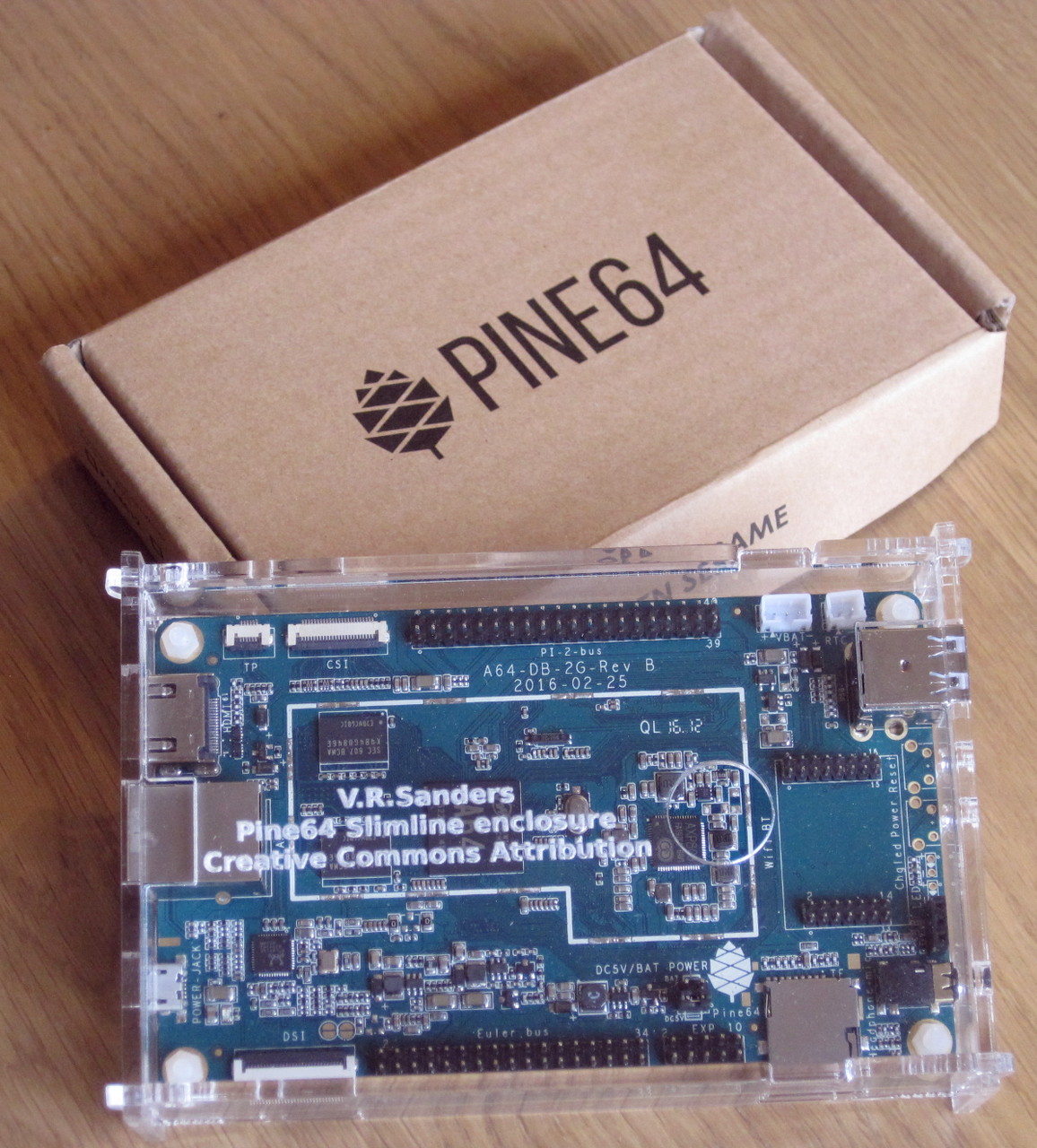
Pine64 board in my case design
The system I acquired comprises of:
Hardware based kickstarter projects are susceptible to several issues and the usual suspects occurred causing delays:
My personal view is that PINE 64 inc. handled it pretty well, much better than several other projects I have backed and as my Norman Douglas quotation suggests I think they have gained some wisdom from this.

I received my hardware at the beginning of April only a couple of months after their initial estimated shipping date which as these things go is not a huge delay. I understand some people who had slightly more complex orders were just receiving their orders in late June which is perhaps unfortunate but still well within kickstarter project norms.

As an aside: I fear that many people simply misunderstand the crowdfunding model for hardware projects and fail to understand that they are not buying a finished product, on the other side of the debate I think many projects need to learn expectation management much better than they do. Hyping the product to get interest is obviously the point of the crowdfunding platform, but over promising and under delivering always causes unhappy customers.

Pine64 board dimensions
Despite the delays in production and shipping the information available for the board was (and sadly remains) inadequate. As usual I wanted to case my board and there were no useful dimension drawings so I had to make my own from direct measurements together with a STL 3D model.

Also a mental sigh for "yet another poor form factor decision" so another special case size and design. After putting together a design and fabricating with the laser cutter I moved on to the software.

Once more this is where, once again, the story turns bleak. We find a very pretty website but no obvious link to the software (hint scroll to the bottom and find the "support" wiki link) once you find the wiki you will eventually discover that the provided software is either an Android 5.1.1 image (which failed to start on my board) or relies on some random guy from the forums who has put together his own OS images using a hacked up Allwinner Board Support Package (BSP) kernel.

Now please do not misunderstand me, I think the work by Simon Eisenmann (longsleep) to get a working kernel and Lenny Raposo to get viable OS images is outstanding and useful. I just feel that Allwinner and vendors like Pine64 Inc. should have provided something much, much better than they have. Even the efforts to get mainline support for this hardware are all completely volunteer community efforts and are are making slow progress as a result.

Assuming I wanted to run a useful OS on this hardware and not just use it as a modern work of art I installed a basic Debian arm64 using Lenny Raposo's pine64 pro site downloads. I was going to use the system for compiling and builds so used the "Debian Base" image to get a minimal setup. After generating unique ssh keys, renaming the default user and checking all the passwords and permissions I convinced myself the system was reasonably trustworthy.

The standard Debian Jessie OS runs as expected with few surprises. The main concern I have is that there are a number of unpackaged scripts installed (prefixed with pine64_) which perform several operations from reporting system health (using sysfs entries) to upgrading the kernel and bootloader.

While I understand these scripts have been provided for the novice users to reduce support burden, doing even more of the vendors job, I would much rather have had proper packages for these scripts, kernel and bootloader which apt could manage. This would have reduced image creation to a simple debootstrap giving much greater confidence in the images provenance.

The 3.10 based kernel is three years old at the time of writing and lacks a great number of features for the aarch64 ARM processors introduced since release. However I was pleasantly surprised at kvm apparently being available.

# dmesg grep -i kvm
[ 7.592896] kvm [1]: Using HYP init bounce page @b87c4000
[ 7.593361] kvm [1]: interrupt-controller@1c84000 IRQ25
[ 7.593778] kvm [1]: timer IRQ27
[ 7.593801] kvm [1]: Hyp mode initialized successfully

I installed the libvirt packages (and hence all their dependencies like qemu) and created a bridge ready for the virtual machines.

I needed access to storage for the host disc images and while I could have gone the route of using USB attached SATA as with the hikey I decided to try and use network attached storage instead. Initially I investigated iSCSI but it seems the Linux target (iSCSI uses initiator for client and target for server) support is either old, broken or unpackaged.

I turned to network block device (nbd) which is packaged and seems to have reasonable stability out of the box on modern distributions. This appeared to work well, indeed over the gigabit Ethernet interface I managed to get a sustained 40 megabytes a second read and write rate in basic testing. This is better performance than a USB 2.0 attached SSD on the hikey

I fired up the guest and perhaps I should have known better than to expect a 3.10 vendor kernel to cope. The immediate hard crashes despite tuning many variables convinced me that virtualisation was not viable with this kernel.

So abandoning that approach I attempted to run the CI workload directly on the system. To my dismay this also proved problematic. The processor has the bad habit of throttling due to thermal issues (despite a substantial heatsink) and because the storage is network attached throttling the CPU also massively impacts I/O.

The limitations meant that the workload caused the system to move between high performance and almost no progress on a roughly ten second cycle. This caused a simple NetSurf recompile CI job to take over fifteen minutes. For comparison the same task takes the armhf builder (CubieTruck) four minutes and a 64 bit x86 build which takes around a minute.

If the workload is tuned to a single core which does not trip thermal throttling the build took seven minutes. which is almost identical to the existing single core virtual machine instance running on the hikey.

In conclusion the Pine64 is an interesting bit of hardware with fatally flawed software offering. Without Simon and Lenny providing their builds to the community the device would be practically useless rather than just performing poorly. There appears to have been no progress whatsoever on the software offering from Pine64 in the six months since I received the device and no prospect of mainline Allwinner support for the SoC either.

Effectively I have spent around 50usd (40 for the board and 10 for the enclosure) on a failed experiment. Perhaps in the future the software will improve sufficiently for it to become useful but I do not hold out much hope that this will come from Pine64 themselves.

10 October 2016

Daniel Pocock: DVD-based Clean Room for PGP and PKI

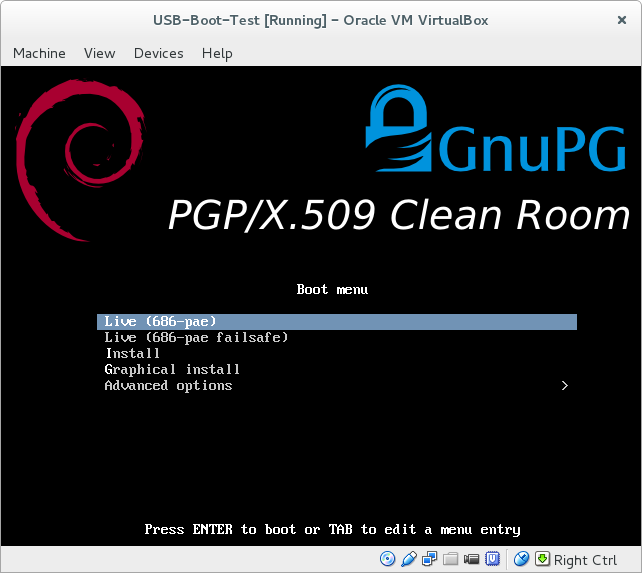
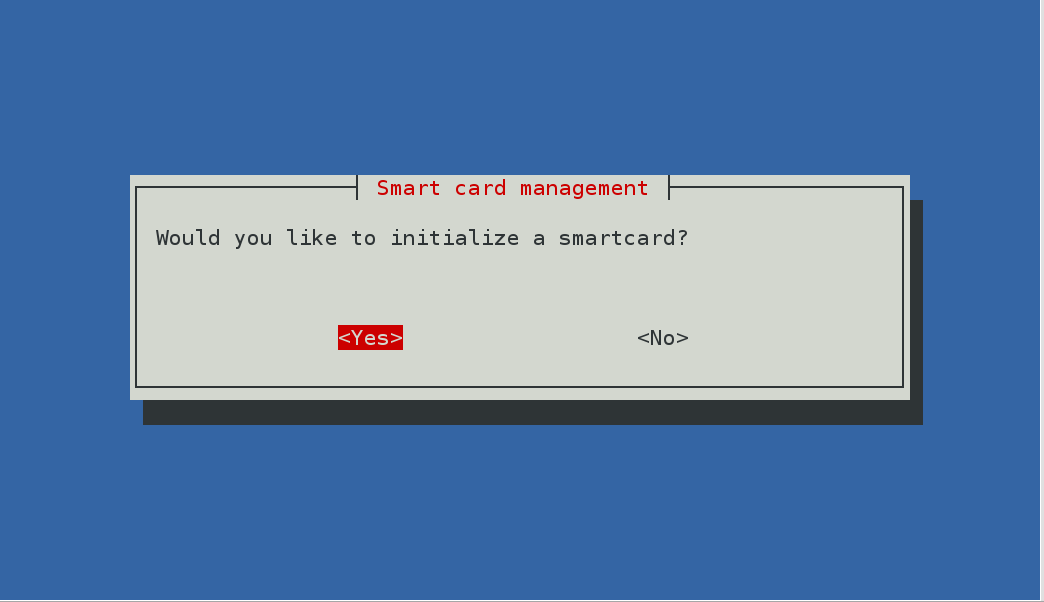
There is increasing interest in computer security these days and more and more people are using some form of PKI, whether it is signing Git tags, signing packages for a GNU/Linux distribution or just signing your emails. There are also more home networks and small offices who require their own in-house Certificate Authority (CA) to issue TLS certificates for VPN users (e.g. StrongSWAN) or IP telephony. Back in April, I started discussing the PGP Clean Room idea (debian-devel discussion and gnupg-users discussion), created a wiki page and started development of a script to build the clean room ISO using live-build on Debian. Keeping the master keys completely offline and putting subkeys onto smart cards and other devices dramatically lowers the risk of mistakes and security breaches. Using a read-only DVD to operate the clean-room makes it convenient and harder to tamper with. Trying it out in VirtualBox It is fairly easy to clone the Git repository, run the script to create the ISO and boot it in VirtualBox to see what is inside: At the moment, it contains a number of packages likely to be useful in a PKI clean room, including GnuPG, smartcard drivers, the lightweight pki utility from StrongSWAN and OpenSSL. I've been trying it out with an SPR-532, one of the GnuPG-supported smartcard readers with a pin-pad and the OpenPGP card. Ready to use today More confident users will be able to build the ISO and use it immediately by operating all the utilities from the command line. For example, you should be able to fully configure PGP smart cards by following this blog from Simon Josefsson. The ISO includes some useful scripts, for example, create-raid will quickly partition and RAID a set of SD cards to store your master key-pair offline. Getting involved To make PGP accessible to a wider user-base and more convenient for those who don't use GnuPG frequently enough to remember all the command line options, it would be interesting to create a GUI, possibly using python-newt to create a similar look-and-feel to popular text-based installer and system administration tools. If you are keen on this project and would like to discuss it further, please come and join the new pki-clean-room mailing list and feel free to ask questions or share your thoughts about it. One way to proceed may be to recruit an Outreachy or GSoC intern to develop the UI. Before they can get started, it would be necessary to more thoroughly document workflow requirements.
Petter Reinholdtsen: Experience and updated recipe for using the Signal app without a mobile phone

In July I wrote how to get the Signal Chrome/Chromium app working without the ability to receive SMS messages (aka without a cell phone). It is time to share some experiences and provide an updated setup. The Signal app have worked fine for several months now, and I use it regularly to chat with my loved ones. I had a major snag at the end of my summer vacation, when the the app completely forgot my setup, identity and keys. The reason behind this major mess was running out of disk space. To avoid that ever happening again I have started storing everything in userdata/ in git, to be able to roll back to an earlier version if the files are wiped by mistake. I had to use it once after introducing the git backup. When rolling back to an earlier version, one need to use the 'reset session' option in Signal to get going, and notify the people you talk with about the problem. I assume there is some sequence number tracking in the protocol to detect rollback attacks. The git repository is rather big (674 MiB so far), but I have not tried to figure out if some of the content can be added to a .gitignore file due to lack of spare time. I've also hit the 90 days timeout blocking, and noticed that this make it impossible to send messages using Signal. I could still receive them, but had to patch the code with a new timestamp to send. I believe the timeout is added by the developers to force people to upgrade to the latest version of the app, even when there is no protocol changes, to reduce the version skew among the user base and thus try to keep the number of support requests down. Since my original recipe, the Signal source code changed slightly, making the old patch fail to apply cleanly. Below is an updated patch, including the shell wrapper I use to start Signal. The original version required a new user to locate the JavaScript console and call a function from there. I got help from a friend with more JavaScript knowledge than me to modify the code to provide a GUI button instead. This mean that to get started you just need to run the wrapper and click the 'Register without mobile phone' to get going now. I've also modified the timeout code to always set it to 90 days in the future, to avoid having to patch the code regularly. So, the updated recipe for Debian Jessie:
  1. First, install required packages to get the source code and the browser you need. Signal only work with Chrome/Chromium, as far as I know, so you need to install it.
    apt install git tor chromium
    git clone https://github.com/WhisperSystems/Signal-Desktop.git
    
  2. Modify the source code using command listed in the the patch block below.
  3. Start Signal using the run-signal-app wrapper (for example using pwd /run-signal-app).
  4. Click on the 'Register without mobile phone', will in a phone number you can receive calls to the next minute, receive the verification code and enter it into the form field and press 'Register'. Note, the phone number you use will be user Signal username, ie the way others can find you on Signal.
  5. You can now use Signal to contact others. Note, new contacts do not show up in the contact list until you restart Signal, and there is no way to assign names to Contacts. There is also no way to create or update chat groups. I suspect this is because the web app do not have a associated contact database.
I am still a bit uneasy about using Signal, because of the way its main author moxie0 reject federation and accept dependencies to major corporations like Google (part of the code is fetched from Google) and Amazon (the central coordination point is owned by Amazon). See for example the LibreSignal issue tracker for a thread documenting the authors view on these issues. But the network effect is strong in this case, and several of the people I want to communicate with already use Signal. Perhaps we can all move to Ring once it work on my laptop? It already work on Windows and Android, and is included in Debian and Ubuntu, but not working on Debian Stable. Anyway, this is the patch I apply to the Signal code to get it working. It switch to the production servers, disable to timeout, make registration easier and add the shell wrapper:
cd Signal-Desktop; cat <<EOF   patch -p1
diff --git a/js/background.js b/js/background.js
index 24b4c1d..579345f 100644
--- a/js/background.js
+++ b/js/background.js
@@ -33,9 +33,9 @@
          );
      );
 
-    var SERVER_URL = 'https://textsecure-service-staging.whispersystems.org';
+    var SERVER_URL = 'https://textsecure-service-ca.whispersystems.org';
     var SERVER_PORTS = [80, 4433, 8443];
-    var ATTACHMENT_SERVER_URL = 'https://whispersystems-textsecure-attachments-staging.s3.amazonaws.com';
+    var ATTACHMENT_SERVER_URL = 'https://whispersystems-textsecure-attachments.s3.amazonaws.com';
     var messageReceiver;
     window.getSocketStatus = function()  
         if (messageReceiver)  
diff --git a/js/expire.js b/js/expire.js
index 639aeae..beb91c3 100644
--- a/js/expire.js
+++ b/js/expire.js
@@ -1,6 +1,6 @@
 ;(function()  
     'use strict';
-    var BUILD_EXPIRATION = 0;
+    var BUILD_EXPIRATION = Date.now() + (90 * 24 * 60 * 60 * 1000);
 
     window.extension = window.extension    ;
 
diff --git a/js/views/install_view.js b/js/views/install_view.js
index 7816f4f..1d6233b 100644
--- a/js/views/install_view.js
+++ b/js/views/install_view.js
@@ -38,7 +38,8 @@
             return  
                 'click .step1': this.selectStep.bind(this, 1),
                 'click .step2': this.selectStep.bind(this, 2),
-                'click .step3': this.selectStep.bind(this, 3)
+                'click .step3': this.selectStep.bind(this, 3),
+                'click .callreg': function()   extension.install('standalone')  ,
              ;
          ,
         clearQR: function()  
diff --git a/options.html b/options.html
index dc0f28e..8d709f6 100644
--- a/options.html
+++ b/options.html
@@ -14,7 +14,10 @@
         <div class='nav'>
           <h1>  installWelcome  </h1>
           <p>  installTagline  </p>
-          <div> <a class='button step2'>  installGetStartedButton  </a> </div>
+          <div> <a class='button step2'>  installGetStartedButton  </a>
+	    <br> <a class="button callreg">Register without mobile phone</a>
+
+	  </div>
           <span class='dot step1 selected'></span>
           <span class='dot step2'></span>
           <span class='dot step3'></span>
--- /dev/null   2016-10-07 09:55:13.730181472 +0200
+++ b/run-signal-app   2016-10-10 08:54:09.434172391 +0200
@@ -0,0 +1,12 @@
+#!/bin/sh
+set -e
+cd $(dirname $0)
+mkdir -p userdata
+userdata=" pwd /userdata"
+if [ -d "$userdata" ] && [ ! -d "$userdata/.git" ] ; then
+    (cd $userdata && git init)
+fi
+(cd $userdata && git add . && git commit -m "Current status."   true)
+exec chromium \
+  --proxy-server="socks://localhost:9050" \
+  --user-data-dir=$userdata --load-and-launch-app= pwd 
EOF
chmod a+rx run-signal-app
As usual, if you use Bitcoin and want to show your support of my activities, please send Bitcoin donations to my address 15oWEoG9dUPovwmUL9KWAnYRtNJEkP1u1b.

9 October 2016

Guido G nther: Debian Fun in September 2016

Debian LTS September marked the seventeenth month I contributed to Debian LTS under the Freexian umbrella. I spent 6 hours (out of 7) working on Other Debian stuff Other Free Software activities

Norbert Preining: Reload: Android 7.0 Nougat Root Pokemon Go

Ok, it turned out that a combinations of updates has broken my previous guide on playing Pokemon GO on a rooted Android device. What has happened that the October security update of the Android Nougat has changed the SecurityNet that is used for checking for rooted devices, and at the same time the Magisk rooting system as catapulted itself (hopefully temporarily) into the complete irrelevance by removing the working version and providing an improved version that does neither have SuperSU installed, nor the ability to hide root well done, congratulations. android-nougat-root-poke But there is a way around, and I am now back at the latest security patch level, rooted, and playing Pokemon GO (not very often, no time, though!). My previous guide used Magisk Version 6 to root and hide root. But the recent security updated of Andorid Nougat (October 2016) has rendered Magisk-v6 non-working. I first thought that Magisk-v7 could solve the problem, but I was badly disappointed: After reflashing my device to pristine state, installing Magisk-v7, I suddenly was left with: no SuperSU (that means, X-plore, Titanium Backup etc do not work anymore), nor the ability to hide root for Pokemon Go or banking apps. Great update. Thus, I have decided to remove Magisk completely and make a clean start with SuperSU and suhide (and a GUI for suhide). And it turned out to be more convenient and more standard than Magisk, may it rest in peace (until they fix their stuff together). In the following I assume you have a clean slate Android Nougat device, if not, please see one of the previous guides for hints how to flash back without loosing your user data. Ingredients One need the following few items: Rooting Unzip the CF-Auto-Root-angler-angler-nexus6p.zip and either use the included programs (root-linux.sh, root-mac.sh, root-windows.bat) to root your device, or simply connect your device to your computer, and run (assuming you have adb and fastboot installed):
adb reboot bootloader
sleep 10
fastboot boot image/CF-Auto-Root-angler-angler-nexus6p.img
After that your device will reboot a few times, and you will finally land in your normal Android screen and a new program SuperSU will be available. At this stage you will not be able to play Pokemon GO anymore. Updating SuperSU The version of SuperSU packaged with the CF-AutoRoot is unfortunately too old, so one needs to update using the zip file SR1-SuperSU-v2.78-SR1-20160915123031.zip (or later). Here are two options: Either you use TWRP recovery system, or you install FlashFire (main page, app store page) which allows you to flash zip/ota directly from your Android screen. This time I used for the first time the FlashFire method, and it worked without any problem. Just press the + button in FlashFire, than the Flash zip/ota button, select the SR1-SuperSU-v2.78-SR1-20160915123031.zip, click two times yes, and then wait a bit and a few black screens (don t do anything!) later you will be back in your Nougat environment. Opening the SuperSU app should show you on the Settings tag that the version has been updated to 2.78-SR1. Installing suhide As with the update of SuperSU, install the suhide zip file, smae procedure, nothing special. After this you will be able to add an application (like Pokemon GO) from the command line (shell), but this is not very convenient. Better is to install the suhide GUI from the app store, start it, scroll for Pokemnon GO, add a tick, and you are settled. After that you are free to play Pokemon GO again. At least until the next security update brings again problems. In the long run this is a loosing game, anyway. Enjoy it while you can.

Nathan Handler: Ohio Linux Fest

This weekend, I traveled to Columbus, Ohio to attend Ohio Linux Fest. I departed San Francisco early on Thursday. It was interesting getting to experience the luxurious side of flying as I enjoyed a mimosa in the American Express Centurion lounge for the first time. I even happend to cross paths with Corey Quinn, who was on his way to [DevOpsDays Boise]. While connecting in Houston, I met up with the always awesome Jos Antonio Rey, who was to be my travel companion for this trip. The long day of travel took its toll on us, so we had a lazy Friday morning before checking in for the conference around lunch time. I was not that interested in the afternoon sessions, so I spent the majority of the first day helping out at the Ubuntu booth and catching up with friends and colleagues. The day ended with a nice Happy Hour sponsored by Oracle. Saturday was the main day for the conference. Ethan Galstad, Founder and CEO of Nagios, started the day with a Keynote about Becoming the Next Tech Entrepreneur. Next up was Elizabeth K. Joseph with A Tour of OpenStack Deployment Scenarios. While I ve read plenty about OpenStack, I ve never actually used it before. As a result, this demo and introduction was great to watch. It was entertaining to watch her login to CirrOS with the default password of cubswin:), as the Chicago Cubs are currently playing the San Francisco Giants in the National League Divisional Series (and winning). Unfortunately, I was not able to win a copy of her new Common OpenStack Deployments book, but it was great getting to watch her signing copies for other attendees after all of the hard work that went into writing the book. For lunch, Jos , Elizabeth, and Svetlana Belkin all gathered together for an informal Ubuntu lunch. Finally, it was time for me to give my talk. This was the same talk I gave at FOSSCON, but this time, I had a significantly larger audience. Practice definitely makes perfect, as my delivery was a lot better the second time giving this talk. Afterwards, I had a number of people come up to me to let me know that they really enjoyed the presentation. Pro Tip: If you ever attend a talk, the speaker will really appreciate any feedback you send their way. Even if it is a simple, Thank You , it really means a lot. One of the people who came up to me after the talk was Unit193. We have known each other through Ubuntu for years, but there has never been an opportunity to meet in person. I am proud to be able to say with 99% confidence that he is not a robot, and is in fact a real person. Next up was a lesson about the /proc filesystem. While I ve explored it a bit on my own before, I still learned a few tips and tricks about information that can be gained from the files in this magical directory. Following this was a talk about Leading When You re Not the Boss. It was even partially taught by a dummy (the speaker was a ventriloquist). The last regular talk of the day was one of the more interesting ones I attended. It was a talk by Patrick Shuff from Facebook about how they have built a load balancer than can handle a billion users. The slide deck was well-made with very clear diagrams. The speaker was also very knowledgeable and dealt with the plethora of questions he received. Prior to the closing keynote was a series of lightning talks. These served as a great means to get people laughing after a long day of talks. The closing keynote was given by father and daughter Joe and Lilly Born about The Democratization of Invention. Both of them had very interesting stories, and Lily was quite impressive given her age. We skipped the Nagios After Party in favor of a more casual pizza dinner. Overall, it was a great conference, and I am very glad to have had the opportunity to attend. A big thanks to Canonical and the Ubuntu Community for fudning my travel through the Ubuntu Community Fund and to the Ohio Linux Fest staff for allowing me the opportunity to speak at such a great conference.

6 October 2016

Joey Hess: keysafe with local shares

If your gpg key is too valuable for you to feel comfortable with backing it up to the cloud using keysafe, here's an alternative that might appeal more. Keysafe can now back up some shares of the key to local media, and other shares to the cloud. You can arrange things so that the key can't be restored without access to some of the local media and some of the cloud servers, as well as your password. For example, I have 3 USB sticks, and there are 3 keysafe servers. So let's make 6 shares total of my gpg secret key and require any 4 of them to restore it. I plug in all 3 USB sticks and look at mount to get the paths to them. Then, run keysafe, to back up the key spread amoung all 6 locations.
keysafe --backup --totalshares 6 --neededshares 4 \
    --add-storage-directory /media/sdc1 \
    --add-storage-directory /media/sdd1 \
    --add-storage-directory /media/sde1
Once it's done, I can remove the USB sticks, and distribute them to secure places. To restore, I need at least one of the USB sticks. (If some of the servers are down, more USB sticks will be needed.) Again I tell keysafe the paths where USB stick(s) are mounted.
keysafe --restore --totalshares 6 --neededshares 4 \
    --add-storage-directory /media/sdb1
Using keysafe this way, physical access to the USB sticks is the first level of defense, and hopefully you'll know if that's breached. The keysafe password is the second level of defense, and cracking that will take a lot of work. Leaving plenty of time to revoke your key, etc, if it comes to that. I feel this is better than the methods I've been using before to back up my most important gpg keys. With paperkey, physical access to the printout immediately exposes the key. With Shamir Secret Sharing and manual distribution of shares, the only second line of defense is the much easier to crack gpg passphrase. Using OpenPGP smartcards is still a more secure option, but you'd need 3 smartcards to reach the same level of redundancy, and it's easier to get your hands on 3 USB sticks than 3 smartcards. There's another benefit to using keysafe this way. It means that sometimes, the data stored on the keysafe servers is not sufficient to crack a key. There's no way to tell, so an attacker risks doing a lot of futile work. If you're not using an OpenPGP smartcard, I encourage you to back up your gpg key with keysafe as described above. Two of the three necessary keysafe servers are now in operation, and I hope to have a full complement of servers soon. (This was sponsored by Thomas Hochstein on Patreon.)

Reproducible builds folks: Reproducible Builds: week 75 in Stretch cycle

What happened in the Reproducible Builds effort between Sunday September 25 and Saturday October 1 2016: Statistics For the first time, we reached 91% reproducible packages in our testing framework on testing/amd64 using a determistic build path. (This is what we recommend to make packages in Stretch reproducible.) For unstable/amd64, where we additionally test for reproducibility across different build paths we are at almost 76% again. IRC meetings We have a poll to set a time for a new regular IRC meeting. If you would like to attend, please input your available times and we will try to accommodate for you. There was a trial IRC meeting on Friday, 2016-09-31 1800 UTC. Unfortunately, we did not activate meetbot. Despite this participants consider the meeting a success as several topics where discussed (eg changes to IRC notifications of tests.r-b.o) and the meeting stayed within one our length. Upcoming events Reproduce and Verify Filesystems - Vincent Batts, Red Hat - Berlin (Germany), 5th October, 14:30 - 15:20 @ LinuxCon + ContainerCon Europe 2016. From Reproducible Debian builds to Reproducible OpenWrt, LEDE & coreboot - Holger "h01ger" Levsen and Alexander "lynxis" Couzens - Berlin (Germany), 13th October, 11:00 - 11:25 @ OpenWrt Summit 2016. Introduction to Reproducible Builds - Vagrant Cascadian will be presenting at the SeaGL.org Conference In Seattle (USA), November 11th-12th, 2016. Previous events GHC Determinism - Bartosz Nitka, Facebook - Nara (Japan), 24th September, ICPF 2016. Toolchain development and fixes Michael Meskes uploaded bsdmainutils/9.0.11 to unstable with a fix for #830259 based on Reiner Herrmann's patch. This fixed locale_dependent_symbol_order_by_lorder issue in the affected packages (freebsd-libs, mmh). devscripts/2.16.8 was uploaded to unstable. It includes a debrepro script by Antonio Terceiro which is similar in purpose to reprotest but more lightweight; specific to Debian packages and without support for virtual servers or configurable variations. Packages reviewed and fixed, and bugs filed The following updated packages have become reproducible in our testing framework after being fixed: The following updated packages appear to be reproducible now for reasons we were not able to figure out. (Relevant changelogs did not mention reproducible builds.) Some uploads have addressed some reproducibility issues, but not all of them: Patches submitted that have not made their way to the archive yet: Reviews of unreproducible packages 77 package reviews have been added, 178 have been updated and 80 have been removed in this week, adding to our knowledge about identified issues. 6 issue types have been updated: Weekly QA work As part of reproducibility testing, FTBFS bugs have been detected and reported by: diffoscope development A new version of diffoscope 61 was uploaded to unstable by Chris Lamb. It included contributions from: Post-release there were further contributions from: reprotest development A new version of reprotest 0.3.2 was uploaded to unstable by Ximin Luo. It included contributions from: Post-release there were further contributions from: tests.reproducible-builds.org Misc. This week's edition was written by Ximin Luo, Holger Levsen & Chris Lamb and reviewed by a bunch of Reproducible Builds folks on IRC.

5 October 2016

Joey Hess: battery bank refresh

My house entered full power saving mode with fall. Lantern light and all devices shutdown at bedtime. But, it felt early to need to do this. Comparing with my logbook for last year, the batteries were indeed doing much worse. I had added a couple of new batteries to the bank last winter, and they seemed to have helped at the time, although it's difficult to tell when you have a couple of good batteries amoung a dozen failing ones. The bank was set up like this:
+---- house ----
                
+( 6v )-+( 6v )-
                
+( 6v )-+( 6v )-
                
+( 6v )-+( 6v )-
                
+( 6v )-+( 6v )-
                
+( 6v )-+( 6v )-
                
+(   new 12v  )-
                
+(   new 12v  )-
Tried as an experiement disconnecting all the bridges between the old 6v battery pairs. I expected this would mean only the new 12v ones would be in the circuit, and so I could see how well they powered the house. Instead, making this change left the house without any power at all! On a hunch, I then reconnected one bridge, like this -- and power was restored.
+---- house ----
                
+( 6v )-+( 6v )-
                
+( 6v )  ( 6v )-
                
+( 6v )  ( 6v )-
                
+( 6v )  ( 6v )-
                
+( 6v )  ( 6v )-
                
+(   new 12v  )-
                
+(   new 12v  )-
My best guess of what's going on is that the wires forming the positive and negative rails are not making good connections (due to corrosion, rust, broken wires etc), and so batteries further down are providing less and less power. The new 12v ones may not have been able to push power up to the house at all. (Or, perhaps having partially dead batteries hanging half-connected off the circuit has some effect that my meager electronics knowledge can't account for.) So got longer cables to connect the new batteries directly to the house, bypassing all the old stuff. That's working great -- house power never dropped below 11.9v last night, vs 11.1v the night before. The old battery bank might still be able to provide another day or so of power in a pinch, so I am going to keep them in there for now, but if I don't use them at all this winter I'll be recycling them. Astounding that those batteries were in use for 20 years.

Next.

Previous.