Vincent Bernat: Automatic Prometheus metrics discovery with Docker labels
Akvorado, a network flow collector, relies on Traefik, a reverse HTTP
proxy, to expose HTTP endpoints for its Docker Compose services. Docker
labels attached to each service define the routing rules. Traefik picks them
up automatically when a container starts. Instead of maintaining a static
configuration file to collect Prometheus metrics, we apply the same approach
with Grafana Alloy.
Traefik & Docker
Traefik listens for events on the Docker socket. Each service advertises its
configuration through labels. For example, here is the Loki service in Akvorado:
Traefik & Docker
Traefik listens for events on the Docker socket. Each service advertises its
configuration through labels. For example, here is the Loki service in Akvorado:
services:
  loki:
    #
    expose:
      - 3100/tcp
    labels:
      - traefik.enable=true
      - traefik.http.routers.loki.rule=PathPrefix( /loki )
Once the container is healthy, Traefik creates a router forwarding requests
matching /loki to its first exposed port. Colocating Traefik configuration
with the service definition is attractive. How do we achieve the same for
Prometheus metrics?
Metrics discovery with Alloy
Grafana Alloy, a metrics collector that scrapes Prometheus endpoints,
includes a discovery.docker component. Just like Traefik,
it connects to the Docker socket.1 With a few relabeling rules, we teach
it to use Docker labels to locate and scrape metrics.
We define three labels on each service:
metrics.enable set to true enables metrics collection,metrics.port specifies the port exposing the Prometheus endpoint, andmetrics.path specifies the path to the metrics endpoint.
If a service exposes more than one port, metrics.port is mandatory. Otherwise,
it defaults to the only exposed port. The default value for metrics.path is
/metrics. The Loki service from earlier becomes:
services:
  loki:
    #
    expose:
      - 3100/tcp
    labels:
      - traefik.enable=true
      - traefik.http.routers.loki.rule=PathPrefix( /loki )
      - metrics.enable=true
      - metrics.path=/loki/metrics
Alloy s configuration is split into four parts:
- discover containers through the Docker socket,
- filter and relabel targets using Docker labels,
- scrape the matching endpoints, and
- forward the metrics to Prometheus.
Discovering Docker containers
The first building block discovers running containers:
discovery.docker "docker"
  host             = "unix:///var/run/docker.sock"
  refresh_interval = "30s"
  filter
    name   = "label"
    values = ["com.docker.compose.project=akvorado"]
This connects to the Docker socket and lists containers every 30
seconds.2 The filter block restricts discovery to containers belonging
to the akvorado project, avoiding interference with unrelated containers on
the same host. For each discovered container, Alloy produces a target with
labels such as __meta_docker_container_label_metrics_port for the
metrics.port Docker label.
Relabeling targets
The relabeling step filters and transforms raw targets from Docker discovery
into scrape targets. The first stage keeps only targets with metrics.enable
set to true:
discovery.relabel "prometheus"
  targets = discovery.docker.docker.targets
  // Keep only targets with metrics.enable=true
  rule
    source_labels = ["__meta_docker_container_label_metrics_enable"]
    regex         =  true
    action        = "keep"

  //
The second stage overrides the discovered port when the service defines
metrics.port:
// When metrics.port is set, override __address__.
rule
  source_labels = ["__address__", "__meta_docker_container_label_metrics_port"]
  regex         =  (.+):\d+;(.+)
  target_label  = "__address__"
  replacement   = "$1:$2"
Next, we handle containers in host network mode. When
__meta_docker_network_name equals host, Alloy rewrites the address to
host.docker.internal instead of localhost:3
// When host networking, override __address__ to host.docker.internal.
rule
  source_labels = ["__meta_docker_container_label_metrics_port", "__meta_docker_network_name"]
  regex         =  (.+);host
  target_label  = "__address__"
  replacement   = "host.docker.internal:$1"
The next stage derives the job name from the service name, stripping any
numbered suffix. The instance label is the address without the port:
rule
  source_labels = ["__meta_docker_container_label_com_docker_compose_service"]
  regex         =  (.+)(?:-\d+)?
  target_label  = "job"

rule
  source_labels = ["__address__"]
  regex         =  (.+):\d+
  target_label  = "instance"
If a container defines metrics.path, Alloy uses it. Otherwise, it defaults to
/metrics:
rule
  source_labels = ["__meta_docker_container_label_metrics_path"]
  regex         =  (.+)
  target_label  = "__metrics_path__"

rule
  source_labels = ["__metrics_path__"]
  regex         = ""
  target_label  = "__metrics_path__"
  replacement   = "/metrics"
Scraping and forwarding
With the targets properly relabeled, scraping and forwarding are
straightforward:
prometheus.scrape "docker"
  targets         = discovery.relabel.prometheus.output
  forward_to      = [prometheus.remote_write.default.receiver]
  scrape_interval = "30s"

prometheus.remote_write "default"
  endpoint
    url = "http://prometheus:9090/api/v1/write"
prometheus.scrape periodically fetches metrics from the discovered targets.
prometheus.remote_write sends them to Prometheus.
Built-in exporters
Some services do not expose a Prometheus endpoint. Redis and Kafka are common
examples. Alloy ships built-in Prometheus exporters that
query these services and expose metrics on their behalf.
prometheus.exporter.redis "docker"
  redis_addr = "redis:6379"

discovery.relabel "redis"
  targets = prometheus.exporter.redis.docker.targets
  rule
    target_label = "job"
    replacement  = "redis"


prometheus.scrape "redis"
  targets         = discovery.relabel.redis.output
  forward_to      = [prometheus.remote_write.default.receiver]
  scrape_interval = "30s"
The same pattern applies to Kafka:
prometheus.exporter.kafka "docker"
  kafka_uris = ["kafka:9092"]

discovery.relabel "kafka"
  targets = prometheus.exporter.kafka.docker.targets
  rule
    target_label = "job"
    replacement  = "kafka"


prometheus.scrape "kafka"
  targets         = discovery.relabel.kafka.output
  forward_to      = [prometheus.remote_write.default.receiver]
  scrape_interval = "30s"
Each exporter is a separate component with its own relabeling and scrape
configuration. We set the job label explicitly since no Docker metadata can
provide it.
With this setup, adding metrics to a new service with a Prometheus endpoint
requires only a few labels in docker-compose.yml, just like adding a Traefik
route. Alloy picks it up automatically. You can apply the same pattern with
another discovery method, like discovery.kubernetes,
discovery.scaleway, or discovery.http.
-
Both Traefik and Alloy require access to the Docker socket, which
grants root-level access to the host. A Docker socket proxy mitigates
this by exposing only the read-only API endpoints needed for discovery.
-
Unlike Traefik, which watches for events, Grafana Alloy polls the
container list at regular intervals a behavior inherited from Prometheus.
-
The Alloy service needs
extra_hosts:
["host.docker.internal:host-gateway"]
in its definition.
services: loki: # expose: - 3100/tcp labels: - traefik.enable=true - traefik.http.routers.loki.rule=PathPrefix( /loki )
discovery.docker component. Just like Traefik,
it connects to the Docker socket.1 With a few relabeling rules, we teach
it to use Docker labels to locate and scrape metrics.
We define three labels on each service:
metrics.enableset totrueenables metrics collection,metrics.portspecifies the port exposing the Prometheus endpoint, andmetrics.pathspecifies the path to the metrics endpoint.
metrics.port is mandatory. Otherwise,
it defaults to the only exposed port. The default value for metrics.path is
/metrics. The Loki service from earlier becomes:
services: loki: # expose: - 3100/tcp labels: - traefik.enable=true - traefik.http.routers.loki.rule=PathPrefix( /loki ) - metrics.enable=true - metrics.path=/loki/metrics
- discover containers through the Docker socket,
- filter and relabel targets using Docker labels,
- scrape the matching endpoints, and
- forward the metrics to Prometheus.
Discovering Docker containers
The first building block discovers running containers:
discovery.docker "docker"
host = "unix:///var/run/docker.sock"
refresh_interval = "30s"
filter
name = "label"
values = ["com.docker.compose.project=akvorado"]
This connects to the Docker socket and lists containers every 30
seconds.2 The filter block restricts discovery to containers belonging
to the akvorado project, avoiding interference with unrelated containers on
the same host. For each discovered container, Alloy produces a target with
labels such as __meta_docker_container_label_metrics_port for the
metrics.port Docker label.
Relabeling targets
The relabeling step filters and transforms raw targets from Docker discovery
into scrape targets. The first stage keeps only targets with metrics.enable
set to true:
discovery.relabel "prometheus"
targets = discovery.docker.docker.targets
// Keep only targets with metrics.enable=true
rule
source_labels = ["__meta_docker_container_label_metrics_enable"]
regex = true
action = "keep"
//
The second stage overrides the discovered port when the service defines
metrics.port:
// When metrics.port is set, override __address__.
rule
source_labels = ["__address__", "__meta_docker_container_label_metrics_port"]
regex = (.+):\d+;(.+)
target_label = "__address__"
replacement = "$1:$2"
Next, we handle containers in host network mode. When
__meta_docker_network_name equals host, Alloy rewrites the address to
host.docker.internal instead of localhost:3
// When host networking, override __address__ to host.docker.internal.
rule
source_labels = ["__meta_docker_container_label_metrics_port", "__meta_docker_network_name"]
regex = (.+);host
target_label = "__address__"
replacement = "host.docker.internal:$1"
The next stage derives the job name from the service name, stripping any
numbered suffix. The instance label is the address without the port:
rule
source_labels = ["__meta_docker_container_label_com_docker_compose_service"]
regex = (.+)(?:-\d+)?
target_label = "job"
rule
source_labels = ["__address__"]
regex = (.+):\d+
target_label = "instance"
If a container defines metrics.path, Alloy uses it. Otherwise, it defaults to
/metrics:
rule
source_labels = ["__meta_docker_container_label_metrics_path"]
regex = (.+)
target_label = "__metrics_path__"
rule
source_labels = ["__metrics_path__"]
regex = ""
target_label = "__metrics_path__"
replacement = "/metrics"
Scraping and forwarding
With the targets properly relabeled, scraping and forwarding are
straightforward:
prometheus.scrape "docker"
targets = discovery.relabel.prometheus.output
forward_to = [prometheus.remote_write.default.receiver]
scrape_interval = "30s"
prometheus.remote_write "default"
endpoint
url = "http://prometheus:9090/api/v1/write"
prometheus.scrape periodically fetches metrics from the discovered targets.
prometheus.remote_write sends them to Prometheus.
Built-in exporters
Some services do not expose a Prometheus endpoint. Redis and Kafka are common
examples. Alloy ships built-in Prometheus exporters that
query these services and expose metrics on their behalf.
prometheus.exporter.redis "docker"
redis_addr = "redis:6379"
discovery.relabel "redis"
targets = prometheus.exporter.redis.docker.targets
rule
target_label = "job"
replacement = "redis"
prometheus.scrape "redis"
targets = discovery.relabel.redis.output
forward_to = [prometheus.remote_write.default.receiver]
scrape_interval = "30s"
The same pattern applies to Kafka:
prometheus.exporter.kafka "docker"
kafka_uris = ["kafka:9092"]
discovery.relabel "kafka"
targets = prometheus.exporter.kafka.docker.targets
rule
target_label = "job"
replacement = "kafka"
prometheus.scrape "kafka"
targets = discovery.relabel.kafka.output
forward_to = [prometheus.remote_write.default.receiver]
scrape_interval = "30s"
Each exporter is a separate component with its own relabeling and scrape
configuration. We set the job label explicitly since no Docker metadata can
provide it.
With this setup, adding metrics to a new service with a Prometheus endpoint
requires only a few labels in docker-compose.yml, just like adding a Traefik
route. Alloy picks it up automatically. You can apply the same pattern with
another discovery method, like discovery.kubernetes,
discovery.scaleway, or discovery.http.
-
Both Traefik and Alloy require access to the Docker socket, which
grants root-level access to the host. A Docker socket proxy mitigates
this by exposing only the read-only API endpoints needed for discovery.
-
Unlike Traefik, which watches for events, Grafana Alloy polls the
container list at regular intervals a behavior inherited from Prometheus.
-
The Alloy service needs
extra_hosts:
["host.docker.internal:host-gateway"] in its definition.
discovery.docker "docker" host = "unix:///var/run/docker.sock" refresh_interval = "30s" filter name = "label" values = ["com.docker.compose.project=akvorado"]
metrics.enable
set to true:
discovery.relabel "prometheus" targets = discovery.docker.docker.targets // Keep only targets with metrics.enable=true rule source_labels = ["__meta_docker_container_label_metrics_enable"] regex = true action = "keep" //
metrics.port:
// When metrics.port is set, override __address__. rule source_labels = ["__address__", "__meta_docker_container_label_metrics_port"] regex = (.+):\d+;(.+) target_label = "__address__" replacement = "$1:$2"
host network mode. When
__meta_docker_network_name equals host, Alloy rewrites the address to
host.docker.internal instead of localhost:3
// When host networking, override __address__ to host.docker.internal. rule source_labels = ["__meta_docker_container_label_metrics_port", "__meta_docker_network_name"] regex = (.+);host target_label = "__address__" replacement = "host.docker.internal:$1"
rule source_labels = ["__meta_docker_container_label_com_docker_compose_service"] regex = (.+)(?:-\d+)? target_label = "job" rule source_labels = ["__address__"] regex = (.+):\d+ target_label = "instance"
metrics.path, Alloy uses it. Otherwise, it defaults to
/metrics:
rule source_labels = ["__meta_docker_container_label_metrics_path"] regex = (.+) target_label = "__metrics_path__" rule source_labels = ["__metrics_path__"] regex = "" target_label = "__metrics_path__" replacement = "/metrics"
Scraping and forwarding
With the targets properly relabeled, scraping and forwarding are
straightforward:
prometheus.scrape "docker"
targets = discovery.relabel.prometheus.output
forward_to = [prometheus.remote_write.default.receiver]
scrape_interval = "30s"
prometheus.remote_write "default"
endpoint
url = "http://prometheus:9090/api/v1/write"
prometheus.scrape periodically fetches metrics from the discovered targets.
prometheus.remote_write sends them to Prometheus.
Built-in exporters
Some services do not expose a Prometheus endpoint. Redis and Kafka are common
examples. Alloy ships built-in Prometheus exporters that
query these services and expose metrics on their behalf.
prometheus.exporter.redis "docker"
redis_addr = "redis:6379"
discovery.relabel "redis"
targets = prometheus.exporter.redis.docker.targets
rule
target_label = "job"
replacement = "redis"
prometheus.scrape "redis"
targets = discovery.relabel.redis.output
forward_to = [prometheus.remote_write.default.receiver]
scrape_interval = "30s"
The same pattern applies to Kafka:
prometheus.exporter.kafka "docker"
kafka_uris = ["kafka:9092"]
discovery.relabel "kafka"
targets = prometheus.exporter.kafka.docker.targets
rule
target_label = "job"
replacement = "kafka"
prometheus.scrape "kafka"
targets = discovery.relabel.kafka.output
forward_to = [prometheus.remote_write.default.receiver]
scrape_interval = "30s"
Each exporter is a separate component with its own relabeling and scrape
configuration. We set the job label explicitly since no Docker metadata can
provide it.
With this setup, adding metrics to a new service with a Prometheus endpoint
requires only a few labels in docker-compose.yml, just like adding a Traefik
route. Alloy picks it up automatically. You can apply the same pattern with
another discovery method, like discovery.kubernetes,
discovery.scaleway, or discovery.http.
-
Both Traefik and Alloy require access to the Docker socket, which
grants root-level access to the host. A Docker socket proxy mitigates
this by exposing only the read-only API endpoints needed for discovery.
-
Unlike Traefik, which watches for events, Grafana Alloy polls the
container list at regular intervals a behavior inherited from Prometheus.
-
The Alloy service needs
extra_hosts:
["host.docker.internal:host-gateway"] in its definition.
prometheus.scrape "docker" targets = discovery.relabel.prometheus.output forward_to = [prometheus.remote_write.default.receiver] scrape_interval = "30s" prometheus.remote_write "default" endpoint url = "http://prometheus:9090/api/v1/write"
prometheus.exporter.redis "docker" redis_addr = "redis:6379" discovery.relabel "redis" targets = prometheus.exporter.redis.docker.targets rule target_label = "job" replacement = "redis" prometheus.scrape "redis" targets = discovery.relabel.redis.output forward_to = [prometheus.remote_write.default.receiver] scrape_interval = "30s"
prometheus.exporter.kafka "docker" kafka_uris = ["kafka:9092"] discovery.relabel "kafka" targets = prometheus.exporter.kafka.docker.targets rule target_label = "job" replacement = "kafka" prometheus.scrape "kafka" targets = discovery.relabel.kafka.output forward_to = [prometheus.remote_write.default.receiver] scrape_interval = "30s"
job label explicitly since no Docker metadata can
provide it.
With this setup, adding metrics to a new service with a Prometheus endpoint requires only a few labels in
docker-compose.yml, just like adding a Traefik
route. Alloy picks it up automatically. You can apply the same pattern with
another discovery method, like discovery.kubernetes,
discovery.scaleway, or discovery.http.
- Both Traefik and Alloy require access to the Docker socket, which grants root-level access to the host. A Docker socket proxy mitigates this by exposing only the read-only API endpoints needed for discovery.
- Unlike Traefik, which watches for events, Grafana Alloy polls the container list at regular intervals a behavior inherited from Prometheus.
-
The Alloy service needs
extra_hosts: ["host.docker.internal:host-gateway"]in its definition.
 I miss the US more and more, and have recently been trying to perfect Southern
Biscuits using British ingredients. It took me eight or nine tries before I
was consistently getting good results. Here is my recipe.
Ingredients
I miss the US more and more, and have recently been trying to perfect Southern
Biscuits using British ingredients. It took me eight or nine tries before I
was consistently getting good results. Here is my recipe.
Ingredients


 A lot of hardware runs non-free software. Sometimes that non-free software is in ROM. Sometimes it s in flash. Sometimes it s not stored on the device at all, it s pushed into it at runtime by another piece of hardware or by the operating system. We typically refer to this software as firmware to differentiate it from the software run on the CPU after the OS has started
 . I m Hellen Chemtai, an intern at Outreachy working with the Debian OpenQA team on Images Testing. This is the final week of the internship. This is just a start for me as I will continue contributing to the community .I am grateful for the opportunity to work with the Debian OpenQA team as an Outreachy intern. I have had the best welcoming team to Open Source.

 For my birthday, I ve bought myself a fancy new expensive
 Such a fancy pen, of course requires a suitable case: I couldn t use the
failed prototype of a case I ve been keeping my Preppys in, so I had to
get out the nice vegetable tanned leather Yeah, nope, I don t have that
(yet). I got out the latex and cardboard material that is sold as a
(cheaper) leather substitute, doesn t look like leather at all, but is
quite nice (and easy) to work with. The project is not vegan anyway,
because I used waxed linen thread, waxing it myself with a lot of very
nicely smelling beeswax.
Such a fancy pen, of course requires a suitable case: I couldn t use the
failed prototype of a case I ve been keeping my Preppys in, so I had to
get out the nice vegetable tanned leather Yeah, nope, I don t have that
(yet). I got out the latex and cardboard material that is sold as a
(cheaper) leather substitute, doesn t look like leather at all, but is
quite nice (and easy) to work with. The project is not vegan anyway,
because I used waxed linen thread, waxing it myself with a lot of very
nicely smelling beeswax.
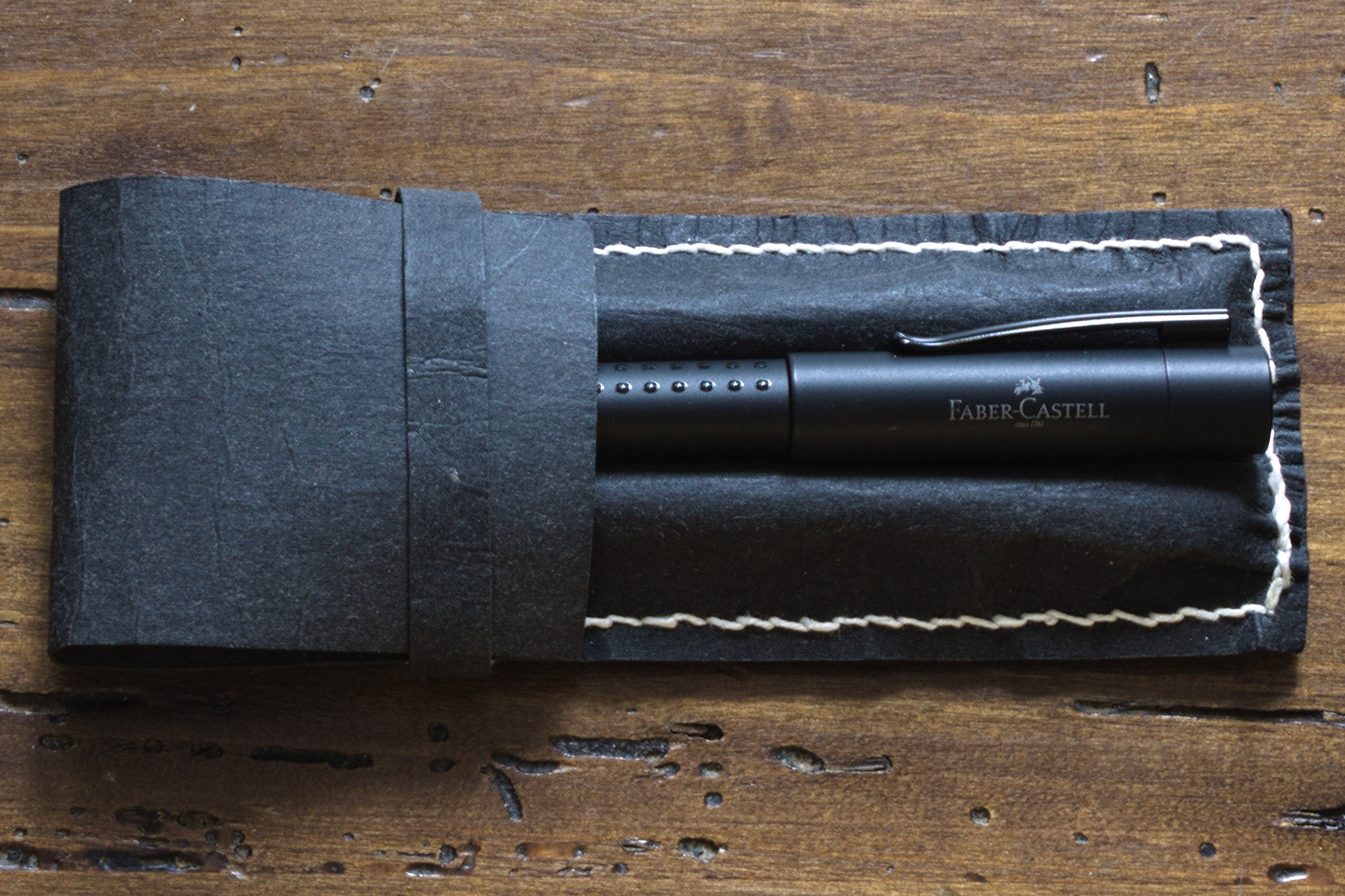 I got the measurements
 From the width of the material I could conveniently cut two cases, so
that s what I did, started sewing the first one, realized that I got the
order of stitching wrong, and also that if I used light blue thread
instead of the black one it would look nice, and be easier to see in the
pictures for the published pattern, started sewing the second one, and
kept alternating between the two, depending on the availability of light
for taking pictures.
From the width of the material I could conveniently cut two cases, so
that s what I did, started sewing the first one, realized that I got the
order of stitching wrong, and also that if I used light blue thread
instead of the black one it would look nice, and be easier to see in the
pictures for the published pattern, started sewing the second one, and
kept alternating between the two, depending on the availability of light
for taking pictures.
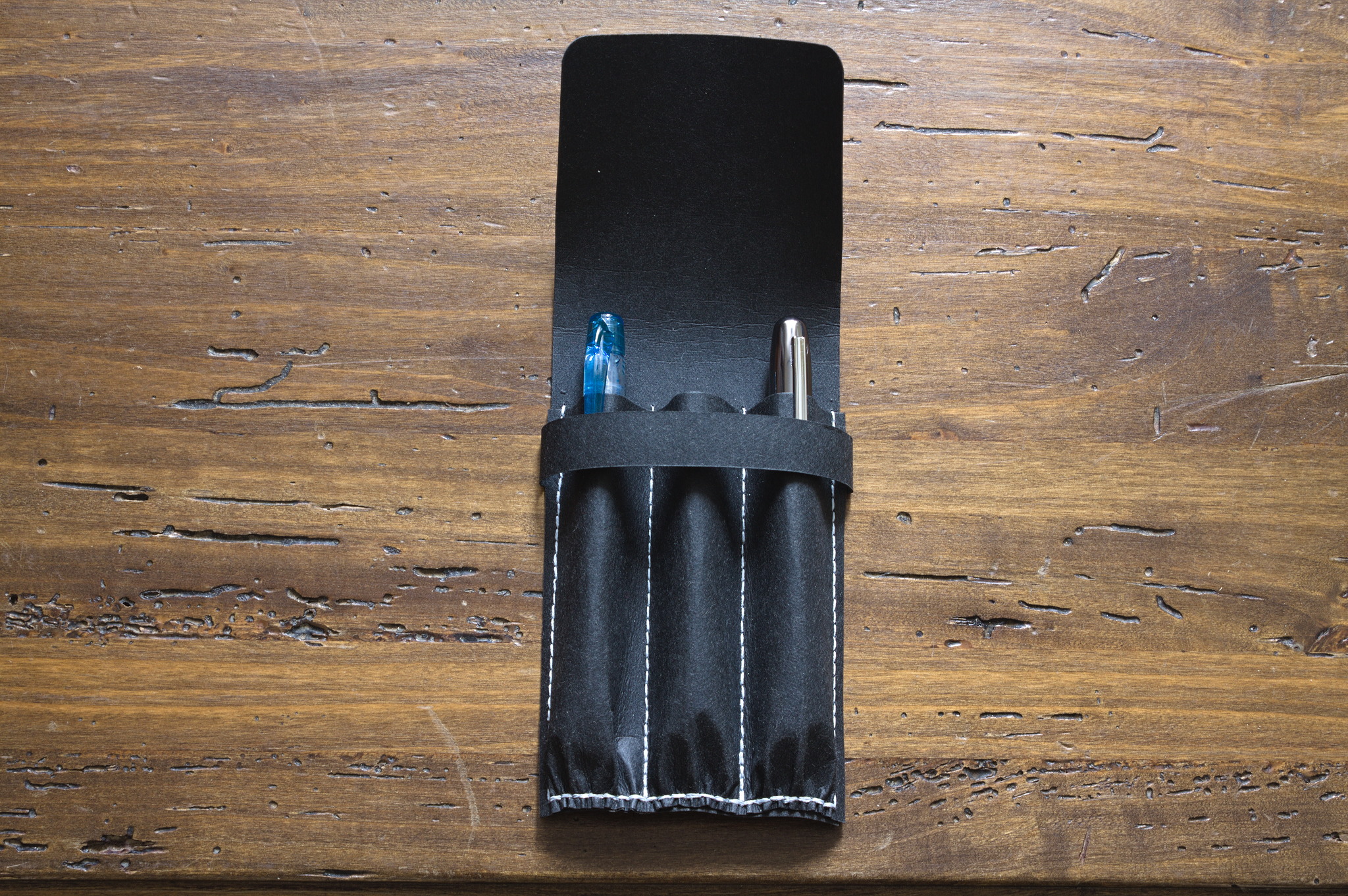 One of the two took the place of my desktop one, where I had one more
pen than slots, and one of the old prototypes was moved to keep my
bedside pen, and the other new case was used for the new pen in my
handbag, together with a Preppy, and now I have a free slot and you can
see how this is going to go wrong, right? :D
One of the two took the place of my desktop one, where I had one more
pen than slots, and one of the old prototypes was moved to keep my
bedside pen, and the other new case was used for the new pen in my
handbag, together with a Preppy, and now I have a free slot and you can
see how this is going to go wrong, right? :D
 Debian Lomiri for Debian 13 (previous project)
In our previous project around Debian and Lomiri (lasting until July
2025), we achieved to get Lomiri 0.5.0 (and with it another 130
packages) into Debian (with two minor exceptions [1]) just in time
for the Debian 13 release in August 2025.
Debian Lomiri for Debian 14
At DebConf in Brest, a follow-up project has been designed between the
project sponsor and Fre(i)e Software GmbH [2]. The new project (on paper)
started on 1st August 2025 and project duration was agreed on to be 2
years, allowing our company to work with an equivalent of ~5 FTE on
Lomiri targetting the Debian 14 release some time in the second half of
2027 (an assumed date, let's see what happens).
Ongoing work would be covered from day one of the new project and once
all contract details had been properly put on paper end of September,
Fre(i)e Software GmbH started hiring a new team of software developers
and (future) Debian maintainers. (More of that new team in our next
Q4/2025 report).
The ongoing work of Q3/2025 was basically Guido Berh rster and myself
working on Morph Browser Qt6 (mostly Guido together with Bhushan from
MiraLab [3]) and package maintenance in Debian (mostly me).
Morph Browser Qt6
The first milestone we could reach with the Qt6 porting of Morph Browser [4]
and related components (LUITK aka lomiri-ui-toolkit (big chunk! [5]),
lomiri-content-hub, lomiri-download-manager and a few other components)
was reached on 21st Sep 2025 with an upload of Morph Browser
1.2.0~git20250813.1ca2aa7+dfsg-1~exp1 to Debian experimental and the
Lomiri PPA [6]).
Preparation of Debian 13 Updates (still pending)
In background, various Lomiri updates for Debian 13 have been prepared
during Q3/2025 (with a huge patchset), but publishing those to Debian 13
are still pending as tests are still not satisfying.
[1] lomiri-push-service and nuntium
Debian Lomiri for Debian 13 (previous project)
In our previous project around Debian and Lomiri (lasting until July
2025), we achieved to get Lomiri 0.5.0 (and with it another 130
packages) into Debian (with two minor exceptions [1]) just in time
for the Debian 13 release in August 2025.
Debian Lomiri for Debian 14
At DebConf in Brest, a follow-up project has been designed between the
project sponsor and Fre(i)e Software GmbH [2]. The new project (on paper)
started on 1st August 2025 and project duration was agreed on to be 2
years, allowing our company to work with an equivalent of ~5 FTE on
Lomiri targetting the Debian 14 release some time in the second half of
2027 (an assumed date, let's see what happens).
Ongoing work would be covered from day one of the new project and once
all contract details had been properly put on paper end of September,
Fre(i)e Software GmbH started hiring a new team of software developers
and (future) Debian maintainers. (More of that new team in our next
Q4/2025 report).
The ongoing work of Q3/2025 was basically Guido Berh rster and myself
working on Morph Browser Qt6 (mostly Guido together with Bhushan from
MiraLab [3]) and package maintenance in Debian (mostly me).
Morph Browser Qt6
The first milestone we could reach with the Qt6 porting of Morph Browser [4]
and related components (LUITK aka lomiri-ui-toolkit (big chunk! [5]),
lomiri-content-hub, lomiri-download-manager and a few other components)
was reached on 21st Sep 2025 with an upload of Morph Browser
1.2.0~git20250813.1ca2aa7+dfsg-1~exp1 to Debian experimental and the
Lomiri PPA [6]).
Preparation of Debian 13 Updates (still pending)
In background, various Lomiri updates for Debian 13 have been prepared
during Q3/2025 (with a huge patchset), but publishing those to Debian 13
are still pending as tests are still not satisfying.
[1] lomiri-push-service and nuntium

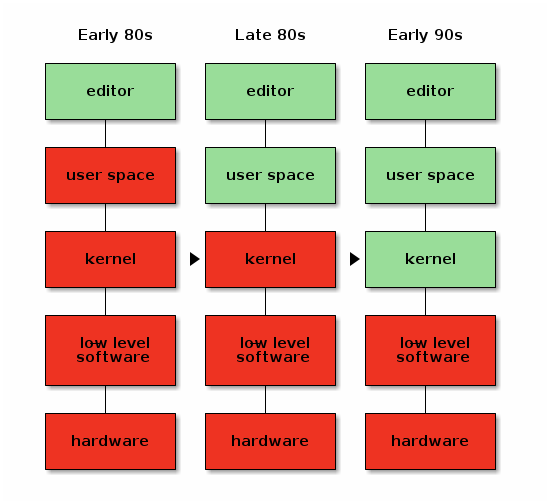
 When the Free Software movement started in the 1980s, most of the world
had just made a transition from free university-written software to
non-free, proprietary, company-written software. Because of that, the
initial ethical standpoint of the Free Software foundation was that it's
fine to run a non-free operating system, as long as all the software you
run on that operating system is free.
Initially this was just the
When the Free Software movement started in the 1980s, most of the world
had just made a transition from free university-written software to
non-free, proprietary, company-written software. Because of that, the
initial ethical standpoint of the Free Software foundation was that it's
fine to run a non-free operating system, as long as all the software you
run on that operating system is free.
Initially this was just the

 The conceptual model from our paper, visualizing possible institutional configurations among Wikipedia projects that affect the risk of governance capture.
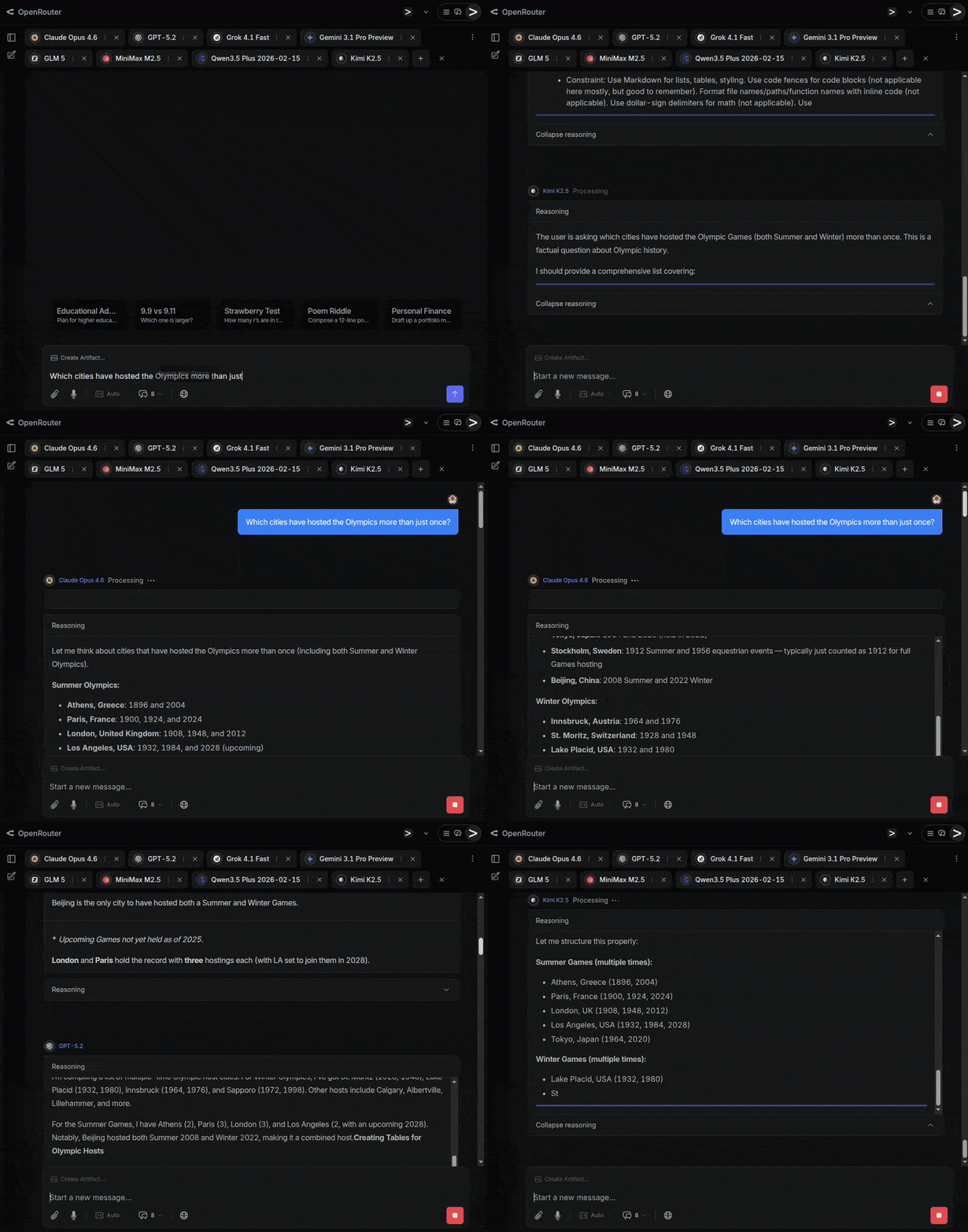
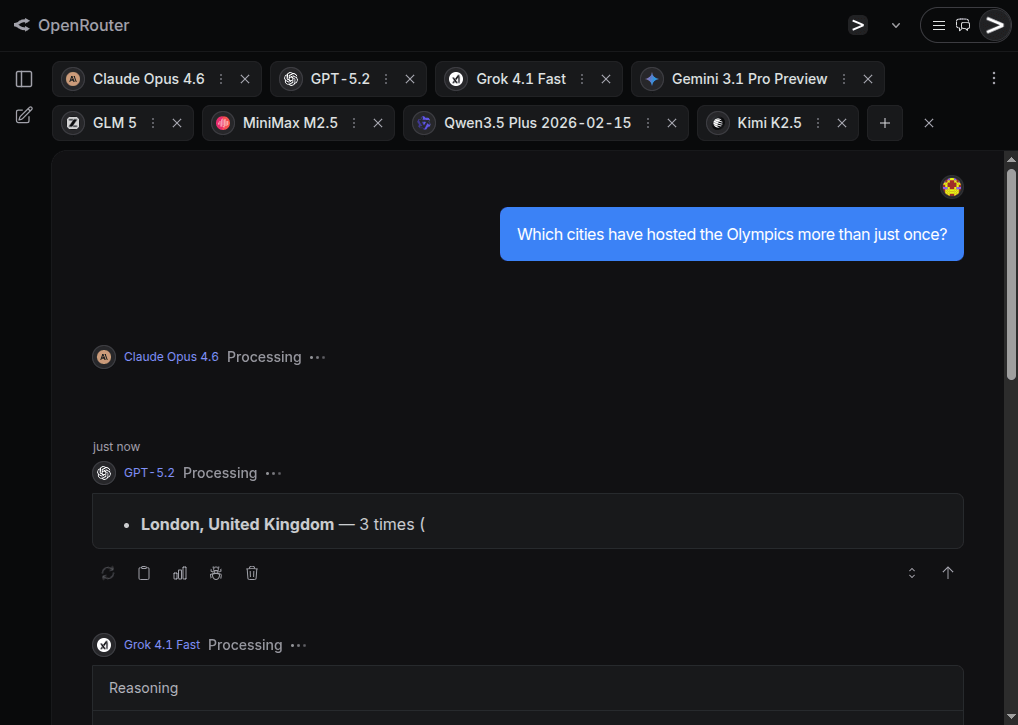 The AI hype is based on the assumption that the frontier AI labs are producing better and better foundational models at an accelerating pace. Is that really true, or are people just in sort of a mass psychosis because AI models have become so good at mimicking human behavior that we unconsciously attribute increasing intelligence to them? I decided to conduct a mini-benchmark of my own to find out if the latest and greatest AI models are actually really good or not.
 Common for all the test questions is that they are fairly straightforward and have a clear answer, yet the answer isn t common knowledge or statistically the most obvious one, and instead requires a bit of reasoning to get correct.
Some of these questions are also based on myself witnessing a flagship model failing miserably to answer it.
Common for all the test questions is that they are fairly straightforward and have a clear answer, yet the answer isn t common knowledge or statistically the most obvious one, and instead requires a bit of reasoning to get correct.
Some of these questions are also based on myself witnessing a flagship model failing miserably to answer it.
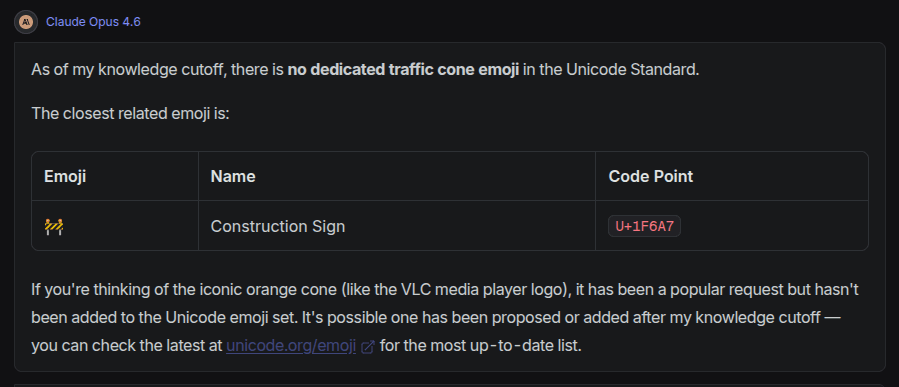
 While Gemini and Grok were among the three models not falling into this trap, the response from Claude was exemplary good:
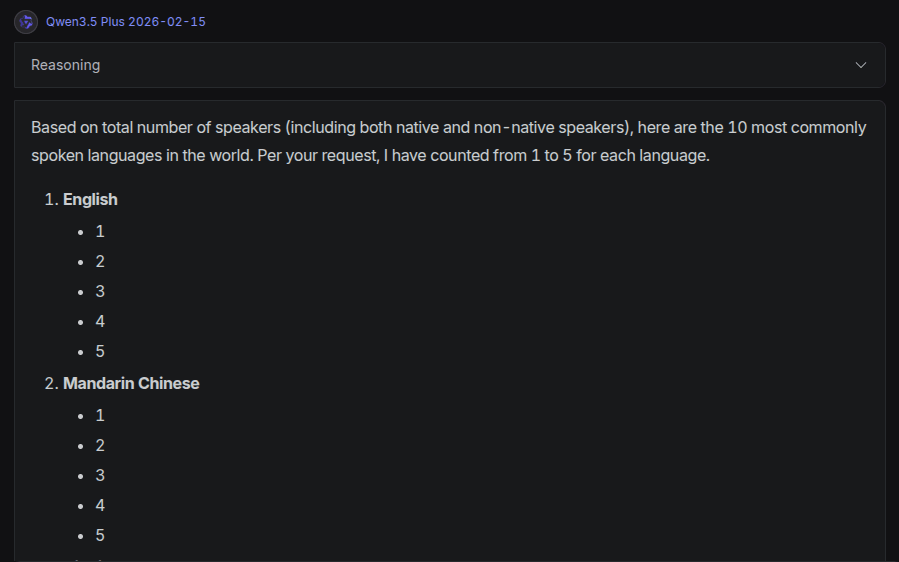 I have seen Grok do something similar before, which in fact inspired me to include this question in my mini-benchmark.
GPT got a bit further, but for Hindi, Arabic and Bengali it listed the numerals in local script, not the number words. Gemini, GLM and Kimi gave a complete and correct answer as a list, while the absolute best answer and presentation was by Claude, that gave the table below:
I have seen Grok do something similar before, which in fact inspired me to include this question in my mini-benchmark.
GPT got a bit further, but for Hindi, Arabic and Bengali it listed the numerals in local script, not the number words. Gemini, GLM and Kimi gave a complete and correct answer as a list, while the absolute best answer and presentation was by Claude, that gave the table below:
 A human can easily count that there are 10 rows and 30+ columns in the grid, but because the picture resolution isn t good enough, the exact number of columns can t be counted, and the answer should be that there are at least 300 launch pads in the picture.
GPT and Grok both guessed the count is zero. Instead of hallucinating some number they say zero, but it would have been better to not give any number at all, and just state that they are unable to perform the task. Gemini gave as its answer 101 , which is quite odd, but reading the reasoning section, it seems to have tried counting items in the image without reasoning much about what it is actually counting and that there is clearly a grid that can make the counting much easier. Both Qwen and Kimi state they can see four parallel structures, but are unable to count drone launch pads.
The absolutely best answer was given by Claude, which counted 10-12 rows and 30-40+ columns, and concluded that there must be 300-500 drone launch pads. Very close to best human level - impressive!
This question applied only to multi-modal models that can see images, so GLM and MinMax could not give any response.
A human can easily count that there are 10 rows and 30+ columns in the grid, but because the picture resolution isn t good enough, the exact number of columns can t be counted, and the answer should be that there are at least 300 launch pads in the picture.
GPT and Grok both guessed the count is zero. Instead of hallucinating some number they say zero, but it would have been better to not give any number at all, and just state that they are unable to perform the task. Gemini gave as its answer 101 , which is quite odd, but reading the reasoning section, it seems to have tried counting items in the image without reasoning much about what it is actually counting and that there is clearly a grid that can make the counting much easier. Both Qwen and Kimi state they can see four parallel structures, but are unable to count drone launch pads.
The absolutely best answer was given by Claude, which counted 10-12 rows and 30-40+ columns, and concluded that there must be 300-500 drone launch pads. Very close to best human level - impressive!
This question applied only to multi-modal models that can see images, so GLM and MinMax could not give any response.