Sergio Cipriano: Avoiding 5XX errors by adjusting Load Balancer Idle Timeout
Avoiding
5XX errors by adjusting Load Balancer Idle Timeout
Recently I faced a problem in production where a client was running a
RabbitMQ server behind the Load Balancers we provisioned and the TCP
connections were closed every minute.
My team is responsible for the LBaaS (Load Balancer as a Service)
product and this Load Balancer was an Envoy proxy provisioned by our
control plane.
The error was similar to this:
[2025-10-03 12:37:17,525 - pika.adapters.utils.connection_workflow - ERROR] AMQPConnector - reporting failure: AMQPConnectorSocketConnectError: timeout("TCP connection attempt timed out: ''/(<AddressFamily.AF_INET: 2>, <SocketKind.SOCK_STREAM: 1>, 6, '', ('<IP>', 5672))")
[2025-10-03 12:37:17,526 - pika.adapters.utils.connection_workflow - ERROR] AMQP connection workflow failed: AMQPConnectionWorkflowFailed: 1 exceptions in all; last exception - AMQPConnectorSocketConnectError: timeout("TCP connection attempt timed out: ''/(<AddressFamily.AF_INET: 2>, <SocketKind.SOCK_STREAM: 1>, 6, '', ('<IP>', 5672))"); first exception - None.
[2025-10-03 12:37:17,526 - pika.adapters.utils.connection_workflow - ERROR] AMQPConnectionWorkflow - reporting failure: AMQPConnectionWorkflowFailed: 1 exceptions in all; last exception - AMQPConnectorSocketConnectError: timeout("TCP connection attempt timed out: ''/(<AddressFamily.AF_INET: 2>, <SocketKind.SOCK_STREAM: 1>, 6, '', ('<IP>', 5672))"); first exception - None
At first glance, the issue is simple: the Load Balancer's idle
timeout is shorter than the RabbitMQ heartbeat interval.
The idle timeout is the time at which a downstream or upstream
connection will be terminated if there are no active streams. Heartbeats
generate periodic network traffic to prevent idle TCP connections from
closing prematurely.
Adjusting these timeout settings to align properly solved the
issue.
However, what I want to explore in this post are other similar
scenarios where it's not so obvious that the idle timeout is the
problem. Introducing an extra network layer, such as an Envoy proxy, can
introduce unpredictable behavior across your services, like intermittent
5XX errors.
To make this issue more concrete, let's look at a minimal,
reproducible setup that demonstrates how adding an Envoy proxy can lead
to sporadic errors.
Reproducible setup
I'll be using the following tools:
This setup is based on what Kai Burjack presented in his article.
Setting up Envoy with Docker is straightforward:
$ docker run \
    --name envoy --rm \
    --network host \
    -v $(pwd)/envoy.yaml:/etc/envoy/envoy.yaml \
    envoyproxy/envoy:v1.33-latest
I'll be running experiments with two different
envoy.yaml configurations: one that uses Envoy's TCP proxy,
and another that uses Envoy's HTTP connection manager.
Here's the simplest Envoy TCP proxy setup: a listener on port 8000
forwarding traffic to a backend running on port 8080.
static_resources:
  listeners:
  - name: go_server_listener
    address:
      socket_address:
        address: 0.0.0.0
        port_value: 8000
    filter_chains:
    - filters:
      - name: envoy.filters.network.tcp_proxy
        typed_config:
          "@type": type.googleapis.com/envoy.extensions.filters.network.tcp_proxy.v3.TcpProxy
          stat_prefix: go_server_tcp
          cluster: go_server_cluster
  clusters:
  - name: go_server_cluster
    connect_timeout: 1s
    type: static
    load_assignment:
      cluster_name: go_server_cluster
      endpoints:
      - lb_endpoints:
        - endpoint:
            address:
              socket_address:
                address: 127.0.0.1
                port_value: 8080
The default idle timeout if not otherwise specified is 1 hour, which
is the case here.
The backend setup is simple as well:
package main

import (
    "fmt"
    "net/http"
    "time"
)

func helloHandler(w http.ResponseWriter, r *http.Request)
  w.Write([]byte("Hello from Go!"))


func main()
    http.HandleFunc("/", helloHandler)

    server := http.Server
        Addr:        ":8080",
        IdleTimeout: 3 * time.Second,


    fmt.Println("Starting server on :8080")
    panic(server.ListenAndServe())
The IdleTimeout is set to 3 seconds to make it easier to test.
Now, oha is the perfect tool to generate the HTTP
requests for this test. The Load test is not meant to stress this setup,
the idea is to wait long enough so that some requests are closed. The
burst-delay feature will help with that:
$ oha -z 30s -w --burst-delay 3s --burst-rate 100 http://localhost:8000
I'm running the Load test for 30 seconds, sending 100 requests at
three-second intervals. I also use the -w option to wait
for ongoing requests when the duration is reached. The result looks like
this:
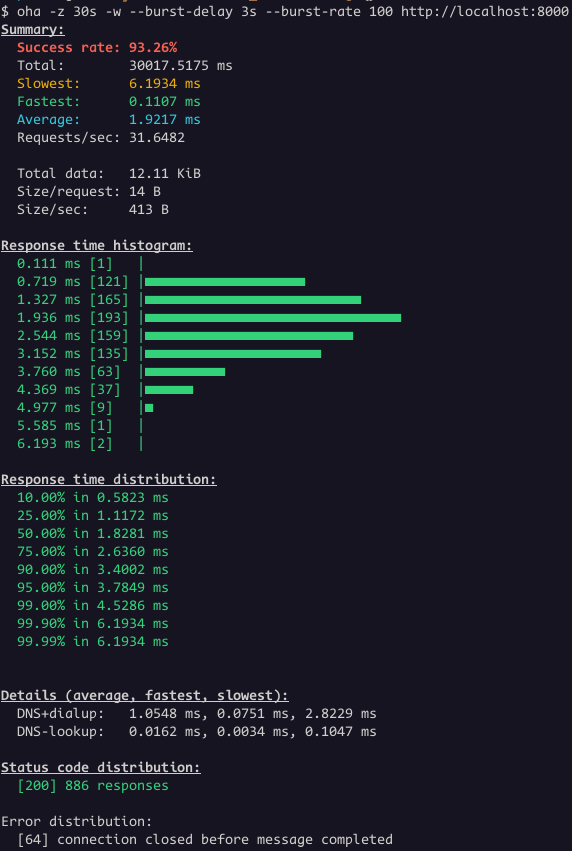 We had 886 responses with status code 200 and 64 connections closed.
The backend terminated 64 connections while the load balancer still had
active requests directed to it.
Let's change the Load Balancer
We had 886 responses with status code 200 and 64 connections closed.
The backend terminated 64 connections while the load balancer still had
active requests directed to it.
Let's change the Load Balancer idle_timeout to two
seconds.
filter_chains:
- filters:
  - name: envoy.filters.network.tcp_proxy
    typed_config:
      "@type": type.googleapis.com/envoy.extensions.filters.network.tcp_proxy.v3.TcpProxy
      stat_prefix: go_server_tcp
      cluster: go_server_cluster
      idle_timeout: 2s # <--- NEW LINE
Run the same test again.
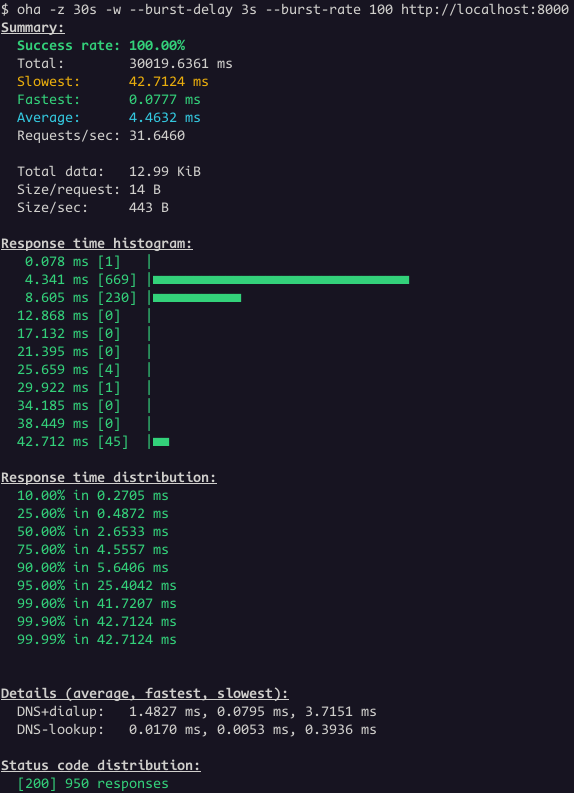 Great! Now all the requests worked.
This is a common issue, not specific to Envoy Proxy or the setup
shown earlier. Major cloud providers have all documented it.
AWS
troubleshoot guide for Application Load Balancers says this:
Great! Now all the requests worked.
This is a common issue, not specific to Envoy Proxy or the setup
shown earlier. Major cloud providers have all documented it.
AWS
troubleshoot guide for Application Load Balancers says this:
The target closed the connection with a TCP RST or a TCP FIN while the load balancer had an outstanding request to the target. Check whether the keep-alive duration of the target is shorter than the idle timeout value of the load balancer.
Google
troubleshoot guide for Application Load Balancers mention this as
well:
Verify that the keepalive configuration parameter for the HTTP server software running on the backend instance is not less than the keepalive timeout of the load balancer, whose value is fixed at 10 minutes (600 seconds) and is not configurable.
The load balancer generates an HTTP 5XX response code when the connection to the backend has unexpectedly closed while sending the HTTP request or before the complete HTTP response has been received. This can happen because the keepalive configuration parameter for the web server software running on the backend instance is less than the fixed keepalive timeout of the load balancer. Ensure that the keepalive timeout configuration for HTTP server software on each backend is set to slightly greater than 10 minutes (the recommended value is 620 seconds).
RabbitMQ
docs also warn about this:
Certain networking tools (HAproxy, AWS ELB) and equipment (hardware load balancers) may terminate "idle" TCP connections when there is no activity on them for a certain period of time. Most of the time it is not desirable.
Most of them are talking about Application Load Balancers and the
test I did was using a Network Load Balancer. For the sake of
completeness, I will do the same test but using Envoy's HTTP connection
manager.
The updated envoy.yaml:
static_resources:
  listeners:
  - name: listener
    address:
      socket_address:
        address: 0.0.0.0
        port_value: 8000
    filter_chains:
    - filters:
      - name: envoy.filters.network.http_connection_manager
        typed_config:
          "@type": type.googleapis.com/envoy.extensions.filters.network.http_connection_manager.v3.HttpConnectionManager
          stat_prefix: go_server_http
          access_log:
          - name: envoy.access_loggers.stdout
            typed_config:
              "@type": type.googleapis.com/envoy.extensions.access_loggers.stream.v3.StdoutAccessLog
          http_filters:
          - name: envoy.filters.http.router
            typed_config:
              "@type": type.googleapis.com/envoy.extensions.filters.http.router.v3.Router
          route_config:
            name: http_route
            virtual_hosts:
            - name: local_service
              domains: ["*"]
              routes:
              - match:
                  prefix: "/"
                route:
                  cluster: go_server_cluster
  clusters:
  - name: go_server_cluster
    type: STATIC
    load_assignment:
      cluster_name: go_server_cluster
      endpoints:
      - lb_endpoints:
        - endpoint:
            address:
              socket_address:
                address: 0.0.0.0
                port_value: 8080
The yaml above is an example of a service proxying HTTP from
0.0.0.0:8000 to 0.0.0.0:8080. The only difference from a minimal
configuration is that I enabled access logs.
Let's run the same tests with oha.
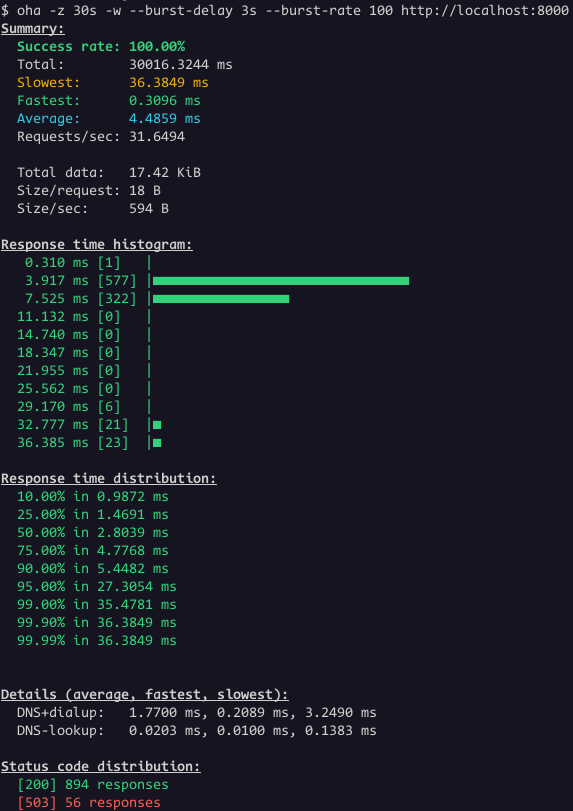 Even thought the success rate is 100%, the status code distribution
show some responses with status code 503. This is the case where is not
that obvious that the problem is related to idle timeout.
However, it's clear when we look the Envoy access logs:
Even thought the success rate is 100%, the status code distribution
show some responses with status code 503. This is the case where is not
that obvious that the problem is related to idle timeout.
However, it's clear when we look the Envoy access logs:
[2025-10-10T13:32:26.617Z] "GET / HTTP/1.1" 503 UC 0 95 0 - "-" "oha/1.10.0" "9b1cb963-449b-41d7-b614-f851ced92c3b" "localhost:8000" "0.0.0.0:8080"
UC is the short name for
UpstreamConnectionTermination. This means the upstream,
which is the golang server, terminated the connection.
To fix this once again, the Load Balancer idle timeout needs to
change:
  clusters:
  - name: go_server_cluster
    type: STATIC
    typed_extension_protocol_options: # <--- NEW BLOCK
      envoy.extensions.upstreams.http.v3.HttpProtocolOptions:
        "@type": type.googleapis.com/envoy.extensions.upstreams.http.v3.HttpProtocolOptions
        common_http_protocol_options:
          idle_timeout: 2s # <--- NEW VALUE
        explicit_http_config:
          http_protocol_options:
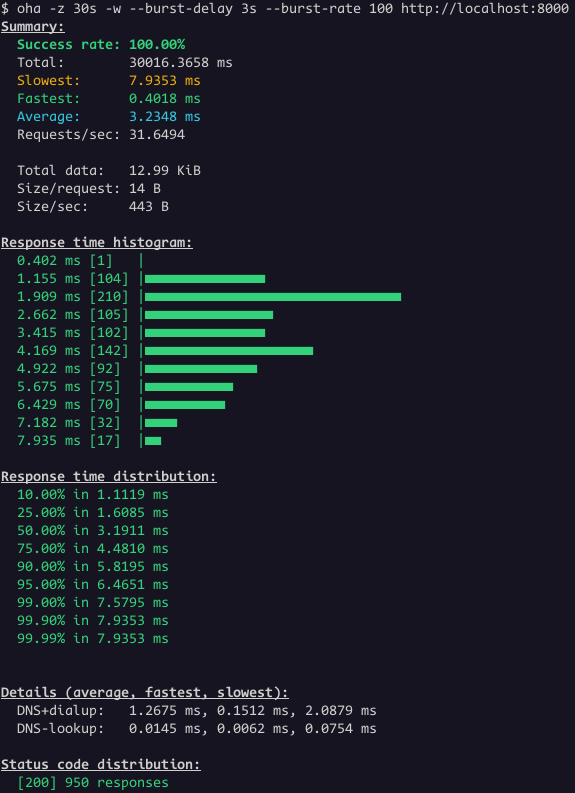
Finally, the sporadic 503 errors are over:
To Sum Up
Here's an example of the values my team recommends to our
clients:
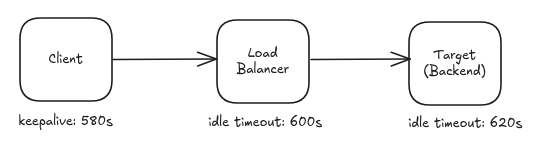 Key Takeaways:
- The Load Balancer idle timeout should be less than the backend
(upstream) idle/keepalive timeout.
- When we are working with long lived connections, the client
(downstream) should use a keepalive smaller than the LB idle
timeout.
[2025-10-03 12:37:17,525 - pika.adapters.utils.connection_workflow - ERROR] AMQPConnector - reporting failure: AMQPConnectorSocketConnectError: timeout("TCP connection attempt timed out: ''/(<AddressFamily.AF_INET: 2>, <SocketKind.SOCK_STREAM: 1>, 6, '', ('<IP>', 5672))")
[2025-10-03 12:37:17,526 - pika.adapters.utils.connection_workflow - ERROR] AMQP connection workflow failed: AMQPConnectionWorkflowFailed: 1 exceptions in all; last exception - AMQPConnectorSocketConnectError: timeout("TCP connection attempt timed out: ''/(<AddressFamily.AF_INET: 2>, <SocketKind.SOCK_STREAM: 1>, 6, '', ('<IP>', 5672))"); first exception - None.
[2025-10-03 12:37:17,526 - pika.adapters.utils.connection_workflow - ERROR] AMQPConnectionWorkflow - reporting failure: AMQPConnectionWorkflowFailed: 1 exceptions in all; last exception - AMQPConnectorSocketConnectError: timeout("TCP connection attempt timed out: ''/(<AddressFamily.AF_INET: 2>, <SocketKind.SOCK_STREAM: 1>, 6, '', ('<IP>', 5672))"); first exception - None$ docker run \
--name envoy --rm \
--network host \
-v $(pwd)/envoy.yaml:/etc/envoy/envoy.yaml \
envoyproxy/envoy:v1.33-latestenvoy.yaml configurations: one that uses Envoy's TCP proxy,
and another that uses Envoy's HTTP connection manager.
Here's the simplest Envoy TCP proxy setup: a listener on port 8000
forwarding traffic to a backend running on port 8080.
static_resources:
listeners:
- name: go_server_listener
address:
socket_address:
address: 0.0.0.0
port_value: 8000
filter_chains:
- filters:
- name: envoy.filters.network.tcp_proxy
typed_config:
"@type": type.googleapis.com/envoy.extensions.filters.network.tcp_proxy.v3.TcpProxy
stat_prefix: go_server_tcp
cluster: go_server_cluster
clusters:
- name: go_server_cluster
connect_timeout: 1s
type: static
load_assignment:
cluster_name: go_server_cluster
endpoints:
- lb_endpoints:
- endpoint:
address:
socket_address:
address: 127.0.0.1
port_value: 8080package main
import (
"fmt"
"net/http"
"time"
)
func helloHandler(w http.ResponseWriter, r *http.Request)
w.Write([]byte("Hello from Go!"))
func main()
http.HandleFunc("/", helloHandler)
server := http.Server
Addr: ":8080",
IdleTimeout: 3 * time.Second,
fmt.Println("Starting server on :8080")
panic(server.ListenAndServe())
oha is the perfect tool to generate the HTTP
requests for this test. The Load test is not meant to stress this setup,
the idea is to wait long enough so that some requests are closed. The
burst-delay feature will help with that:
$ oha -z 30s -w --burst-delay 3s --burst-rate 100 http://localhost:8000-w option to wait
for ongoing requests when the duration is reached. The result looks like
this:
We had 886 responses with status code 200 and 64 connections closed.
The backend terminated 64 connections while the load balancer still had
active requests directed to it.
Let's change the Load Balancer idle_timeout to two
seconds.
filter_chains:
- filters:
- name: envoy.filters.network.tcp_proxy
typed_config:
"@type": type.googleapis.com/envoy.extensions.filters.network.tcp_proxy.v3.TcpProxy
stat_prefix: go_server_tcp
cluster: go_server_cluster
idle_timeout: 2s # <--- NEW LINEThe target closed the connection with a TCP RST or a TCP FIN while the load balancer had an outstanding request to the target. Check whether the keep-alive duration of the target is shorter than the idle timeout value of the load balancer.
Google
troubleshoot guide for Application Load Balancers mention this as
well:
Verify that the keepalive configuration parameter for the HTTP server software running on the backend instance is not less than the keepalive timeout of the load balancer, whose value is fixed at 10 minutes (600 seconds) and is not configurable.
The load balancer generates an HTTP 5XX response code when the connection to the backend has unexpectedly closed while sending the HTTP request or before the complete HTTP response has been received. This can happen because the keepalive configuration parameter for the web server software running on the backend instance is less than the fixed keepalive timeout of the load balancer. Ensure that the keepalive timeout configuration for HTTP server software on each backend is set to slightly greater than 10 minutes (the recommended value is 620 seconds).
RabbitMQ
docs also warn about this:
Certain networking tools (HAproxy, AWS ELB) and equipment (hardware load balancers) may terminate "idle" TCP connections when there is no activity on them for a certain period of time. Most of the time it is not desirable.
Most of them are talking about Application Load Balancers and the
test I did was using a Network Load Balancer. For the sake of
completeness, I will do the same test but using Envoy's HTTP connection
manager.
The updated envoy.yaml:
static_resources:
listeners:
- name: listener
address:
socket_address:
address: 0.0.0.0
port_value: 8000
filter_chains:
- filters:
- name: envoy.filters.network.http_connection_manager
typed_config:
"@type": type.googleapis.com/envoy.extensions.filters.network.http_connection_manager.v3.HttpConnectionManager
stat_prefix: go_server_http
access_log:
- name: envoy.access_loggers.stdout
typed_config:
"@type": type.googleapis.com/envoy.extensions.access_loggers.stream.v3.StdoutAccessLog
http_filters:
- name: envoy.filters.http.router
typed_config:
"@type": type.googleapis.com/envoy.extensions.filters.http.router.v3.Router
route_config:
name: http_route
virtual_hosts:
- name: local_service
domains: ["*"]
routes:
- match:
prefix: "/"
route:
cluster: go_server_cluster
clusters:
- name: go_server_cluster
type: STATIC
load_assignment:
cluster_name: go_server_cluster
endpoints:
- lb_endpoints:
- endpoint:
address:
socket_address:
address: 0.0.0.0
port_value: 8080[2025-10-10T13:32:26.617Z] "GET / HTTP/1.1" 503 UC 0 95 0 - "-" "oha/1.10.0" "9b1cb963-449b-41d7-b614-f851ced92c3b" "localhost:8000" "0.0.0.0:8080"UC is the short name for
UpstreamConnectionTermination. This means the upstream,
which is the golang server, terminated the connection.
To fix this once again, the Load Balancer idle timeout needs to
change:
clusters:
- name: go_server_cluster
type: STATIC
typed_extension_protocol_options: # <--- NEW BLOCK
envoy.extensions.upstreams.http.v3.HttpProtocolOptions:
"@type": type.googleapis.com/envoy.extensions.upstreams.http.v3.HttpProtocolOptions
common_http_protocol_options:
idle_timeout: 2s # <--- NEW VALUE
explicit_http_config:
http_protocol_options: 

 About 90% of my Debian contributions this month were
 A new version 0.3.5 of the
  A tiniest of tiny violins micro maintenance release 0.0.4 of our
  A shot of Jewel Changi. Photo by Ravi Dwivedi. Released under the CC-BY-SA 4.0.
 A shot of Sentosa Boardwalk. Photo by Ravi Dwivedi. Released under the CC-BY-SA 4.0.
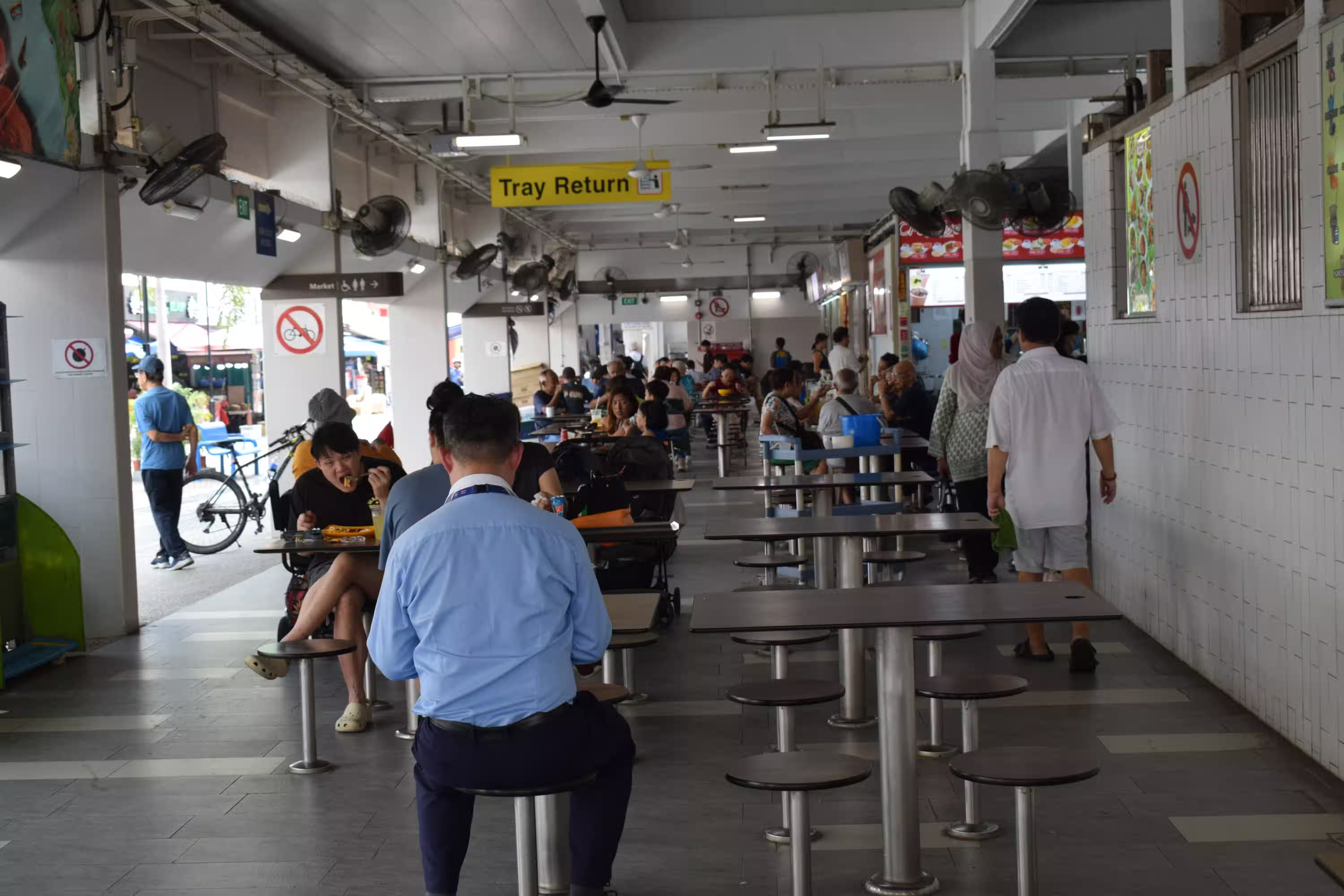 This is the hawker center we went to. Photo by Ravi Dwivedi. Released under the CC-BY-SA 4.0.
 Table littering at the hawker center was prohibited by law. Photo by Ravi Dwivedi. Released under the CC-BY-SA 4.0.
 Merlion from behind, giving a good view of Marina Bay Sands. Photo by Ravi Dwivedi. Released under the CC-BY-SA 4.0.


 Locking down database access is probably the single most important thing for a system administrator or software developer to prevent their application from leaking its data. As MariaDB 11.8 is the first long-term supported version with a few new key security features, let s recap what the most important things are every DBA should know about MariaDB in 2025.
Back in the old days, MySQL administrators had a habit of running the clumsy
Locking down database access is probably the single most important thing for a system administrator or software developer to prevent their application from leaking its data. As MariaDB 11.8 is the first long-term supported version with a few new key security features, let s recap what the most important things are every DBA should know about MariaDB in 2025.
Back in the old days, MySQL administrators had a habit of running the clumsy