Search Results: "matrix"

5 May 2013

Michael Banck: 5 May 2013

Debian 7.0 "wheezy" has been released this weekend!

Quite a few new Debichem packages are now available in a stable Debian release for the first time:

29 April 2013

Thomas Goirand: Jenkins: building debian packages after a git push (my 2cents of a howto)

The below is written in the hope it will be helpful for my fellow DDs. Why using build after push ? Simple answer: to save time, to always use a clean build environment, to automate more tests. Real answer: because you are lazy, and tired of always having to type these build commands, and that watching the IRC channel is more fun than watching the build process. Other less important answers: building takes some CPU time, and makes your computer run slower for other tasks. It is really nice that building doesn t consume CPU cycles on your workstation/laptop, and that a server does the work, not disturbing you while you are working. It is also super nice that it can maintain a Debian repository for you after a successful build, available for everyone to use and test, which would be harder to achieve on your work machine (which may be behind a router doing NAT, or even sometimes turned off, etc.). It s also kind of fun to have an IRC robot telling everyone when a build is successful, so that you don t have to tell them, they can see it and start testing your work. Install a SID box that can build with cowbuilder
Install Jenkins WARNING: Probably, before really installing, you should read what s bellow (eg: Securing Jenkins). Simply apt-get install jenkins from experimental (the SID version has some security issues, and has been removed from Wheezy, on a request of the maintainer). Normally, after installing jenkins, you can access it through:
http://<ip-of-your-server>:8080/
There is no auth by default, so anyone will be able to access your jenkins web GUI and start any script under the jenkins user (sic!). Jenkins auth
Before doing anything else, you have to enable Jenkins auth, otherwise, you have everything accessible from the outside, meaning that more or less, anyone browsing your jenkins server could be allowed to run any command. It might sound simple, but in fact, Jenkins auth is tricky to activate, and it is very easy to get yourself locked out, with no working web access. So here s the steps: 1. Click on Manage Jenkins then on Configure system 2. Check the enable security checkbox 3. Under security realm select Jenkins s own user database and leave allow users to sign up . Important: leave Anyone can do anything for the moment (otherwise, you will lock yourself out). 5. At the bottom of the screen, click on the SAVE button. 6. On the top right, click to login / create an account. Create yourself an account, and stay logged in. 7. Once logged-in, go back again in the Manage Jenkins -> Configure system , under security. 8. Switch to Project based matrix authentication strategy . Under User/group to add , enter the new login you ve just created, and click on Add . 9. Select absolutely all checkboxes for that user, so that you make yourself an administrator. 10. For the Anonymous user, for Job, check Read, Build and Workspace. For Overall select Read. 11. At the bottom of the screen, hit save again. Now, anonymous (eg: not logged-in) users should be able to see all projects, and be able to click on the build now button. Note that if you lock yourself out, the way to fix is to turn off Jenkins, edit config.xml, remove the useSecurity thing, and all what is in authorizationStragegy and securityRealm , then restart Jenkins. I had to do that multiple times until I had it right (as it isn t really obvious you got to leave Jenkins completely insecure when creating a new user). Securing Jenkins: Proxy Jenkins through apache to use it over SSL
When doing a quick $search-engine search, you will see lots of tutorials to use apache as a proxy, which seems to be the standard way to run Jenkins. Add the following to /etc/apache2/sites-available/default-ssl:
ProxyPass / http://localhost:8080/
ProxyPassReverse / http://localhost:8080/
ProxyRequests Off
Then perform the following commands on the shell:
htpasswd -c /etc/apache2/jenkins_htpasswd <your-jenkins-username>
a2enmod proxy
a2enmod proxy_http
a2enmod ssl
a2ensite default-ssl
a2dissite default
apache2ctl restart
Then disable access to the port 8080 of jenkins from outside:
iptables -I INPUT -d <ip-of-your-server> -p tcp --dport 8080 -j REJECT
Of course, this doesn t mean you shouldn t take the steps to activate Jenkins own authentication, which is disabled by default (sic!). Build a script to build packages in a cowbuilder I thought it was hard. In fact it was not. All together, this was kind of fun to hack. Yes hack. What I did yet another kind of 10km ugly shell script. The way to use it is simply: build-openstack-pkg <package-name>. On my build server, I have put that script in /usr/bin, so that it is accessible from the default path.Ugly, but it does the job! Jenkins build script for openstack At the end of the script, scan_repo() generates the necessary files for a Debian repository to work under /home/ftp. I use pure-ftpd to serve it. /home/ftp must be owned by jenkins:jenkins so that the build script can copy packages in it. This build script is by no mean state of the art, and in fact, it s quite hack-ish (so I m not particularly proud of it, but it does its job ). If I am showing it in this blog post, it is just to show an example of what can be done. It is left as an exercise to the reader to create another build script adapted to its own needs, and write something cleaner and more modular. Dependency building Let s say that you are using the Built-Using: field, and that package B needs to be built if package A changes. Well, Jenkins can be configured to do that. Simply edit the configuration of project B (you will find it, it s easy ). My use case: In my case, for building Glance, Heat, Keystone, Nova, Quantum, Cinder and Ceilometer, which are all components of Openstack, I have written a small (about 500 lines) library of shell functions, and an also small (90 lines) Makefile, which are packaged in openstack-pkg-tools (so Nova, Glance, etc. all build-depends on openstack-pkg-tools). The shell functions are included in each maintainer scripts (debian/*.config and debian/*.postinst mainly) to avoid having some pre-depends that would break debconf flow. The Makefile of openstack-pkg-tools is included in debian/rules of each packages. In such a case, trying to manage the build process by hand is boring and time consuming (spending your time watching the build process of package A, so that you can manually start the build of package B, then wait again ). But it is also error prone: it is easy to do a mistakes in the build order, you can forget to dpkg -i the new version of package A, etc. But that s not it. Probably at some point, you will want Jenkins to rebuild everything. Well, that s easy to do. Simply create a dummy project, and have other project to build after that one. The build steps could simply be: echo Dummy project as a shell script (I m not even sure that s needed ). Configuring git to start a build on each push In Jenkins, pass your mouse over the Build now URL. Well, we just need to wget that URL in your Alioth repository. A small drawing is better than long explanation:
for i in  ls /git/openstack  ; do
    echo "wget -q --no-check-certificate \
    https://<ip-of-your-server>/job/$ PROJ_NAME /build?delay=0sec \
    -O /dev/null" >/git/openstack/$ i /hooks/post-receive \
        && chmod 0770 /git/openstack/$ i /hooks/post-receive;
done
The chmod 0770 is necessary if you don t want every Alioth users to have access to your Jenkins server web interface and see an eventual htpassword protection that you can add to your jenkins box (I m not covering that, but it is fairly easy to add such protection). Note that all of the members of your Alioth group will then have access to this post-receive hook, containing the password of your htaccess, so you must trust everyone in your Alioth group to not do nasty things with your Jenkins. Bonus point: IRC robot If you would like to see the result of your build published on IRC, Jenkins can do that. Click on Manage Jenkins , then on Manage Plugins . Then click on available and check the box in front of IRC plugin . Go at the bottom of the screen and click on Add . Then check the box to restart Jenkins automatically. Once it is restarted, go again under Manage jenkins then Configure system . Select the IRC Notification and configure it to join the network and the channel you want. Click on Advanced to select the IRC nick name of your bot, and make sure you change the port (by default jenkins has 194, when IRC normally uses 6667). Be patient when waiting for the IRC robot to connect / disconnect, this can take some time. Now, for each jenkins Job, you can tick the IRC Notification option. Doing piuparts after build One nice thing with automated builds, is that most of the time, you don t need to wait starring at them. So you can add as many tests as you want, the Jenkins IRC robot will anyway let you know sooner or later the result of your build. So adding piuparts tests in the build script seems the correct thing to do. Though that is still on my todo, so maybe that will be for my next blog post.

20 April 2013

Dirk Eddelbuettel: RcppArmadillo 0.3.810.0

A new Armadillo release 3.810.0 by Conrad appeared yesterday, and was wrapped up in a new release 0.3.810.0 of RcppArmadillo. Upstream changes bring FFT support as well as more Sparse matrix constructors, and we have an improvement to the sample() function contributed by Christian Gunning. As RcppArmadillo is used by an increasing number of packages---on CRAN alone, we find 34 direct dependencies---I also added the package to Debian and upload there in parallel. The summary of the main changes follows:
Changes in RcppArmadillo version 0.3.810.0 (2013-04-19)
  • Upgraded to Armadillo release Version 3.810.0 (Newell Highway)
    • added fast Fourier transform: fft()
    • added handling of .imbue() and .transform() by submatrices and subcubes
    • added batch insertion constructors for sparse matrices
    • minor fix for multiplication of complex sparse matrices
  • Updated sample() function and test again contributed by Christian Gunning
Courtesy of CRANberries, there is also a diffstat report for the most recent release As always, more detailed information is on the RcppArmadillo page. Questions, comments etc should go to the rcpp-devel mailing list off the R-Forge page.

13 March 2013

Dirk Eddelbuettel: RcppArmadillo 0.3.800.1

Conrad released a first bug-fix release 3.800.1 of Armadillo earlier today. This has been wrapped up in release 0.3.800.1 of RcppArmadillo as usual. This release also contains a very nice function sample() (contributed by Christian Gunning) which provides sampling (with or without replacement) at the C++ level modeled after what we are used to in R itself. We also refactored the unit tests into just two compilation units to speed testing up a little. The summary of the main changes follows:
Changes in RcppArmadillo version 0.3.800.1 (2013-03-12)
  • Upgraded to Armadillo release Version 3.800.1 (Miami Beach)
    • workaround for a bug in ATLAS 3.8 on 64 bit systems
    • faster matrix-vector multiply for small matrices
  • Added new sample() function and tests contributed by Christian Gunning
  • Refactored unit testing code for faster unit test performance
Courtesy of CRANberries, there is also a diffstat report for the most recent release As always, more detailed information is on the RcppArmadillo page. Questions, comments etc should go to the rcpp-devel mailing list off the R-Forge page.

2 March 2013

Dirk Eddelbuettel: RcppArmadillo 0.3.800.0

A new Armadillo version 3.800.0 is now out. Conrad picked a new numbering scheme to coincide with the relicensing from LGPL to MPL 2.0. The new version 0.3.800.0 of the corresponding RcppArmadillo package (which still uses GPL 2 or later) is now on CRAN. It also contains the updated version of our paper as the package vignette. The summary of the main changes follows:
Changes in RcppArmadillo version 0.3.800.0 (2013-03-01)
  • Upgraded to Armadillo release Version 3.800.0 (Miami Beach)
    • Armadillo is now licensed using the Mozilla Public License 2.0
    • added .imbue() for filling a matrix/cube with values provided by a functor or lambda expression
    • added .swap() for swapping contents with another matrix
    • added .transform() for transforming a matrix/cube using a functor or lambda expression
    • added round() for rounding matrix elements towards nearest integer
    • faster find()
    • fixes for handling non-square matrices by qr() and qr_econ()
    • minor fixes for handling empty matrices
    • reduction of pedantic compiler warnings
  • Updated vignette to paper now in press at CSDA
  • Added CITATION file with reference to CSDA paper
Courtesy of CRANberries, there is also a diffstat report for the most recent release As always, more detailed information is on the RcppArmadillo page. Questions, comments etc should go to the rcpp-devel mailing list off the R-Forge page.

21 February 2013

Dirk Eddelbuettel: RcppArmadillo 0.3.6.3

A new Armadillo version 3.6.3 came out this morning, and the corresponding RcppArmadillo version is now on CRAN. Changes are incremental:
Changes in RcppArmadillo version 0.3.6.3 (2013-02-20)
  • Upgraded to Armadillo release Version 3.6.3
    • faster find()
    • minor fix for non-contiguous submatrix views to handle empty vectors of indices
    • reduction of pedantic compiler warnings
Courtesy of CRANberries, there is also a diffstat report for the most recent release As always, more detailed information is on the RcppArmadillo page. Questions, comments etc should go to the rcpp-devel mailing list off the R-Forge page.

19 February 2013

Roland Mas: A challenge for whoever feels they have too much free time

Open question to enthusiasts, theoretical computing scientists and mathematicians of all sorts: is it possible to construct a valid QR-code that leads to interesting results when used as an initial configuration for the Game of Life? The rules: For Science! Update: The answer seems to be yes. Jurij Smakov assembled a QR-code generator and a Life engine and plugged them together for easy experimenting. And Stefano Zacchiroli noticed that using "free software" (no quotes) as the input leads to a couple of gliders endlessly traveling a field with a few still lifes. This is way beyond awesome.

3 February 2013

Dirk Eddelbuettel: The Rcpp Gallery and my Seinfeld Streak

A good three weeks ago, we introduced the Rcpp Gallery. While this is a joint effort by several of us on the Rcpp team, the backend was conceived and implemented entirely by JJ who also bootstrapped it with same first content, drawing on posts by Hadley, Romain and myself. As the How to contribute page makes plain, this is all backed by GitHub and all logs are public anyway. So after it was up and working, JJ and I refined the look and feel, and I started to add more content so that would have something by the time the initial announcement came around. A few years I read about an (attributed) secret to Seinfeld's producitivity: "Don't break the chain". Just keep writing, and write every day. I made my goal of a post every day for just over a month, and created this sequences: <quote> (20 Dec) simulating-pi, (21 Dec) vector-minimum, (22 Dec) gsl-colnorm-example, (23 Dec) fibonacci-sequence, (24 Dec) random-number-generation, (25 Dec) armadillo-sparse-matrix, (26 Dec) timing-rngs, (27 Dec) stl-inner-product, (28 Dec) stl-transform, (29 Dec) stl-transform-for-subsetting, (30 Dec) stl-random-shuffle, (31 Dec) stl-random-sample, (01 Jan) stl-for-each, (02 Jan) armadillo-subsetting, (03 Jan) accessing-environments, (04 Jan) armadillo-eigenvalues, (05 Jan) r-function-from-c++, (06 Jan) using-the-rcpp-timer, (07 Jan) sugar-function-clamp, (08 Jan) using-rcout, (09 Jan) first-steps-with-C++11, (10 Jan) simple-lambda-func-c++11, (11 Jan) eigen-eigenvalues, (12 Jan) getting-attributes-for-xts-example, (13 Jan) intro-to-exceptions, (14 Jan) a-first-boost-example, (15 Jan) a-second-boost-example, (16 Jan) timing-normal-rngs, (17 Jan) creating-xts-from-c++, (18 Jan) gsl-for-eigenvalues, (19 Jan) accessing-xts-api, (20 Jan) custom-as-and-wrap-example, (21 Jan) passing-cpp-function-pointers, </quote> The Rcpp Gallery continues to grow, we now have 58 posts from 7 different authors. And it is open for business: new contributions are always welcome.

1 February 2013

Martin F. Krafft: A botnet for configuration management

Following my last rant about configuration management, I've had a closer look at Salt, both for my personal use, as well as for a client who would like to deploy something that is not Puppet. Salt has some very good ideas, for instance: But there are also a couple of downsides to Salt: Those are the big issues. There are many small issues two, but those won't be around for too long as the project is moving along quickly and the community is vibrant. This is surely an important point that speaks for Salt. However, the above issues seem to hint at design choices that might well turn out to stand in the way later. Following a day of frustration, I now feel the overpowering urge to write my own configuration management system, because of course I feel that I could do it better than everyone else. Does this sound familiar to you? Let's just say hypothetically that I would, then I'd want to reuse as much existing functionality as possible. For instance, I'd want the entire remote execution framework to be independent from any configuration management implemented on top. So what does this mean? What would such a remote execution framework need? Here are some thoughts: Doesn't this sound like a Unix botnet to you? ;) I could imagine whacking this up with a bit of Python, some shell glue, socat and SSH: the server would have an authorized_keys file with forced commands connecting the client to the server process via sockets. Or I could imagine using twisted for that. But I would prefer if something like this already existed. Anyone? Comments are broken on my blog, and I cannot be bothered to work on them. If you have any input, please write to me. I will (eventually) condense all feedback into a new article. NP: Mouse on Mars: Parastrophics

22 January 2013

Peter Makholm: Installing Linux on MyAudio Tablet Series9

Recently I recieved a MyAudio Tablet Series9 as a gift. From the factory it runs some version of Android, but I already got enough Android devices. Instead I wanted to play a bit with a basic Linux install. This tablet is based on the AllWinner A10 System on a Chip. Some of these instructions might work for other systems based on the same chip set: Step 1: Install the rescue system from http://forum.doozan.com/read.php?6,9396 on a SD-card. You can configure network settings in rescue/interfaces and rescue/wpa_supplicant.conf. Step 2: Boot the rescue system. The MyAudio table will boot from the SD-card if it contains a bootable system, so this is quite easy. The first time you boot the rescue system tries to locate a system.bin file from the tablet. this file contains the hardware configuration and is needed for initializing all the hardware. This means that the screen can t be initialized the first time you boot and will just appear off. Unless the system automatically boots again you need to locate the system.bin yourself from the tablet. It is usually located on /dev/nanda and have names like system.bin, script.bin, or evb.bin. To find the file you can use the log the rescue system places in log/deviceinfo.log on the SD-card during boot. You should now have console access to the tablet and using a USB keyboard you should be able to work in the console. Step 3: Setting up the network Having configured rescue/interfaces and rescue/wpa_supplicant.conf the network ought to work. I am experiencing some problems getting it to connect to my Access Point (using WPA2). Patience works, but you might need to monitor the status with wpa_cli(8) and then run udhcp -i wlan0 when it succeeds. Step 4: Install Debian using the installer at http://forum.doozan.com/read.php?6,8906 This just worked fine Step 5: Getting the touch screen to work. The system.bin file can be decoded with the fexc utility either available on the rescue system (compiled for arm) of from https://github.com/linux-sunxi/sunxi-tools. Finding the ctp_para section we can see that this tablet uses a ft5x touch screen. Adding ft5x_ts to /etc/modules on our installed system will make sure that the correct kernel module gets loaded on boot time. But for some reason the kernel driver and the X11 evdev driver will not talk together. So we need to compile our own kernel patched as described on https://www.miniand.com/forums/forums/development/topics/how-do-i-get-the-lcd-display-and-touch-screen-working-on-an-a10-tablet#post-1225. I have made kernel packages for Debian available at http://hacking.dk/files/linux-image-3.0.57-sun4i+_1.0+nomultitouch_armhf.deb or http://hacking.dk/files/linux-image-3.4.24-sun4i+_1.0+nomultitouch_armhf.deb. Install the kernel package you want and run this as root:
# KERNEL_VERSION=3.4.24-sun4i+
# /usr/bin/mkimage -A arm -O linux -T kernel  -C none -a 0x40008000 -e 0x40008000 -n Linux-$KERNEL_VERSION -d /boot/vmlinuz-$KERNEL_VERSION /boot/uImage
# /usr/bin/mkimage -A arm -O linux -T ramdisk -C gzip -a 0x00000000 -e 0x00000000 -n initramfs-$KERNEL_VERSION -d /boot/initrd.img-$KERNEL_VERSION /boot/uInitrd
After a reboot X11 will respond to the touch screen, but Step 6: Configure the touch screen the pointer does not point where I touch the screen. The transformation between the points are wrong. This is fixed by adding this to your xorg.conf:
Section "InputClass"
    Identifier     "touchscreen"
    MatchProduct   "ft5x_ts"
    Option    "TransformationMatrix" "0 1 0 1 0 0 0 0 1"
    Option    "Calibration" "0 768 0 1024"
EndSection
or more dynamically by running:
$ xinput set-prop ft5x_ts "Coordinate Transformation Matrix" 0 1 0 1 0 0 0 0 1
$ xinput set-prop ft5x_ts "Evdev Axis Calibration" 0 768 0 1024
For more information about the Transformation Matrix, see the X.Org Wiki Step 7: Install a on-screen keyboard. I have not found the perfect keyboard application yet. Currently I am using matchbox-keyboard

16 December 2012

Joachim Breitner: Circle Packing

For an upcoming introductory Haskell talk of mine (next Tuesday in Karlsruhe please come and join if you will) I was looking into data visualization as a example application. With libraries like gloss, getting some nice vector graphics up and running within one talk is quite possible. For some reason, I want to arrange multiple circles of varying size so that they do not overlap and use as little space as possible. My first approach was to use general purpose optimizers such as cmaes, Numeric.GSL.Minimization from the hmatrix package and force-layout. I especially liked the interface of cmaes, which is able to minimize a function of, say, type [(String, Double, Double)] -> Double by automatically finding the values of type Double in the input, as described by Takayuki Muranushi. That would have looked great in the talk. Unfortunately, none of these libraries gave sufficient good results in a reasonable amount of time for this problem. I then reviewed some of the academic literature on the circle packing problem and there were some algorithms proposed, but no simple one and none of the papers had a concise pseudo-code description that I could transfer to Haskell. So eventually I set out to implement a relatively dump and slow greedy algorithm myself: I place one circle after another, starting with the largest, and among the valid positions where a new circle touches two already placed circles, I choose the positions closest to the center of mass. The result, available in the circle-packing package, looks surprisingly well, here visualized using the diagrams library (See the documentation of Optimisation.CirclePacking for the code used to generate that image):
Now showing just this image is not a very good way to demonstrate my code. A few years ago, I might have created a CGI script that would dynamically generate images based on your input. But not in 2012: Since my code is pure Haskell without fancy features like type classes, I can use the fay compiler to generate JavaScript code from it. Add a little Haskell code to interact with the HTML5 canvas and now you can interactively try out circle-packing in your browser. Oh, and while I am talking about neat tricks: You can put vector graphics in your haddock documentation, as I have done for Optimisation.CirclePacking, using the syntax <<<data:image/svg+xml;base64,PD94bWwgdmV...c3ZnPg==>>.

12 December 2012

Vincent Sanders: What man's mind can create, man's character can control.

I have a project that required me to programmatically control power to several devices. I have done this before using a Velleman vm8090 board which is relatively easy to control. However they are relatively expensive.

I turned to ebay and found a similar module at a substantially reduced cost. Upon receipt however I discovered that instead of being a simple serial USB interface it presented USB HID and the Debian system I was running it on has loaded the hiddev driver for me but it did not implement any of the standard HID Usage Pages leaving me with no way to control the device.
I did the obligatory
sudo lsusb -d 12bf:ff03 -vvv

Bus 003 Device 019: ID 12bf:ff03  
Device Descriptor:
bLength 18
bDescriptorType 1
bcdUSB 1.10
bDeviceClass 0 (Defined at Interface level)
bDeviceSubClass 0
bDeviceProtocol 0
bMaxPacketSize0 8
idVendor 0x12bf
idProduct 0xff03
bcdDevice 1.00
iManufacturer 1 Matrix Multimedia Ltd.
iProduct 2 Flowcode USB HID
iSerial 0
bNumConfigurations 1
Configuration Descriptor:
bLength 9
bDescriptorType 2
wTotalLength 41
bNumInterfaces 1
bConfigurationValue 1
iConfiguration 0
bmAttributes 0x80
(Bus Powered)
MaxPower 50mA
Interface Descriptor:
bLength 9
bDescriptorType 4
bInterfaceNumber 0
bAlternateSetting 0
bNumEndpoints 2
bInterfaceClass 3 Human Interface Device
bInterfaceSubClass 0 No Subclass
bInterfaceProtocol 0 None
iInterface 0
HID Device Descriptor:
bLength 9
bDescriptorType 33
bcdHID 1.10
bCountryCode 0 Not supported
bNumDescriptors 1
bDescriptorType 34 Report
wDescriptorLength 54
Report Descriptors:
** UNAVAILABLE **
Endpoint Descriptor:
bLength 7
bDescriptorType 5
bEndpointAddress 0x81 EP 1 IN
bmAttributes 3
Transfer Type Interrupt
Synch Type None
Usage Type Data
wMaxPacketSize 0x0008 1x 8 bytes
bInterval 5
Endpoint Descriptor:
bLength 7
bDescriptorType 5
bEndpointAddress 0x01 EP 1 OUT
bmAttributes 3
Transfer Type Interrupt
Synch Type None
Usage Type Data
wMaxPacketSize 0x0008 1x 8 bytes
bInterval 5
Device Status: 0x0980
(Bus Powered)
This simply showed me what I already knew and surprised me that lsusb did not dump HID report descriptor items. Some searching revealed that teh device had to be unbound so lussb could access the descriptor.

Thus a simple
echo -n 3-1.1.4:1.0   sudo dd of=/sys/bus/usb/drivers/usbhid/unbind
resulted in lussb dumping the descriptor items:

Item(Global): Usage Page, data= [ 0xa0 0xff ] 65440
(null)
Item(Local ): Usage, data= [ 0x01 ] 1
(null)
Item(Main ): Collection, data= [ 0x01 ] 1
Application
Item(Local ): Usage, data= [ 0x02 ] 2
(null)
Item(Main ): Collection, data= [ 0x00 ] 0
Physical
Item(Global): Usage Page, data= [ 0xa1 0xff ] 65441
(null)
Item(Local ): Usage, data= [ 0x03 ] 3
(null)
Item(Local ): Usage, data= [ 0x04 ] 4
(null)
Item(Global): Logical Minimum, data= [ 0x00 ] 0
Item(Global): Logical Maximum, data= [ 0xff 0x00 ] 255
Item(Global): Physical Minimum, data= [ 0x00 ] 0
Item(Global): Physical Maximum, data= [ 0xff ] 255
Item(Global): Report Size, data= [ 0x08 ] 8
Item(Global): Report Count, data= [ 0x08 ] 8
Item(Main ): Input, data= [ 0x02 ] 2
Data Variable Absolute No_Wrap Linear
Preferred_State No_Null_Position Non_Volatile Bitfield
Item(Local ): Usage, data= [ 0x05 ] 5
(null)
Item(Local ): Usage, data= [ 0x06 ] 6
(null)
Item(Global): Logical Minimum, data= [ 0x00 ] 0
Item(Global): Logical Maximum, data= [ 0xff 0x00 ] 255
Item(Global): Physical Minimum, data= [ 0x00 ] 0
Item(Global): Physical Maximum, data= [ 0xff ] 255
Item(Global): Report Size, data= [ 0x08 ] 8
Item(Global): Report Count, data= [ 0x08 ] 8
Item(Main ): Output, data= [ 0x02 ] 2
Data Variable Absolute No_Wrap Linear
Preferred_State No_Null_Position Non_Volatile Bitfield
Item(Main ): End Collection, data=none

By consulting the device class definitions document I determined the device was using the "Vendor defined" Usage page (0xff00 to 0xffff) so I would definitely have to write a program to control the device.

Linux provides a really easy interface to deal with HID devices called hiddev (gosh, such adventurous naming) which I already had to unbind to get my descriptors decoded so I am fairly sure it works ;-)

The kernel documentation and header for hiddev provide the absolute basic mechanics of the interface but no example code or guidance. The obligatory web search turned up very little and even that had to be retrieved from the internet archive. So It seems I would be forced to work it through myself.

It seems the hiddev interface is orientated around HID devices generating reports which the program is expected to read. Numerous ioctl() are provided so the program can obtain the descriptor information necessary to control and process the received reports.

However in this case we need to be able to send reports to the device, all the descriptor information revealed was that there were eight (Item Report Count = 8) values with eight bits each (Item Report Size = 8) with logical and physical values representing the whole range of the octets.

Fortunately the seller provided a website with some control programs and even source. After some time rummaging through the Visual Basic program I finally found (in FrmMain.vb:2989) that the eight bytes were largely unused and the first was simply a bitmask of the eight relays coil status, set for energised clear for off. With bit 0 controlling relay labelled 1 through to bit 7 for relay 8.

To send a report to a HID device the hiddev interface uses the HIDIOCSREPORT ioctl where the report data is first set using HIDIOCSUSAGE .

The HIDIOCSUSAGE ioctl is passed a hiddev_usage_ref structure which must be initialised with information about the report descriptor identifier (constructed from the Usage Page and Usage as set by the items in the descriptor), the index of the item (named usage) we wish to set in the report (in this case the first which is 0) and the value we actually want to set.

After a great deal of debugging the final program is very short indeed but does the job, my main problem now is that if I switch too many (more than one) relays at once the whole device resets. The scope says the supply rails are behaving very badly when this happens, looks like I need to add a load of capacitance to the power well to stabilise it during the switching events.

Oh and add in the fact Relay 1 LED doest work unless you push on it and I do wonder about the wisdom of the economy in this case. Though yet again Linux makes the software side easy.

8 December 2012

Dirk Eddelbuettel: Rcpp attributes: Even easier integration of GSL code into R

Following the Rcpp 0.10.0 release, I had written about simulating pi easily by using the wonderful new Rcpp Attributes feature. Now with Rcpp 0.10.1 released a good week ago, it is time to look at how Rcpp Attributes can help with external libraries. As this posts aims to show, it is a breeze! One key aspect is the use of the plugins for the inline package. They provide something akin to a callback mechanism so that compilation and linking steps can be informed about header and library locations and names. We are going to illustrate this with an example from GNU Scientific Library (GSL). The example I picked uses B-Spline estimation from the GSL. This is a little redundant as R has its own spline routines and package, but serves well as a simple illustration---and, by reproducing an existing example, followed an established path. So we will look at Section 39.7 of the GSL manual which has a complete example as a standalone C program, generating both the data and the fit via cubic B-splines. We can decompose this two parts: data generation, and fitting. We will provide one function each, and then use both from R. These two function will follow the aforementioned example from Section 39.7 somewhat closely. We start with the first function to generate the data.
// [[Rcpp::depends(RcppGSL)]]
#include <RcppGSL.h>
#include <gsl/gsl_bspline.h>
#include <gsl/gsl_multifit.h>
#include <gsl/gsl_rng.h>
#include <gsl/gsl_randist.h>
#include <gsl/gsl_statistics.h>
const int N = 200;                              // number of data points to fit 
const int NCOEFFS = 12;                         // number of fit coefficients */
const int NBREAK = (NCOEFFS - 2);               // nbreak = ncoeffs + 2 - k = ncoeffs - 2 since k = 4 */
// [[Rcpp::export]]
Rcpp::List genData()  
    const size_t n = N;
    size_t i;
    double dy;
    gsl_rng *r;
    RcppGSL::vector<double> w(n), x(n), y(n);
    gsl_rng_env_setup();
    r = gsl_rng_alloc(gsl_rng_default);
    //printf("#m=0,S=0\n");
    /* this is the data to be fitted */
    for (i = 0; i < n; ++i)  
        double sigma;
        double xi = (15.0 / (N - 1)) * i;
        double yi = cos(xi) * exp(-0.1 * xi);
        sigma = 0.1 * yi;
        dy = gsl_ran_gaussian(r, sigma);
        yi += dy;
        gsl_vector_set(x, i, xi);
        gsl_vector_set(y, i, yi);
        gsl_vector_set(w, i, 1.0 / (sigma * sigma));
                
        //printf("%f %f\n", xi, yi);
     
    Rcpp::DataFrame res = Rcpp::DataFrame::create(Rcpp::Named("x") = x,
                                                  Rcpp::Named("y") = y,
                                                  Rcpp::Named("w") = w);
    x.free();
    y.free();
    w.free();
    gsl_rng_free(r);
    return(res);
 
We include a few header files, define (in what is common for C programs) a few constants and then define a single function genData() which returns and Rcpp::List as a list object to R. A primary importance here are the two attributes: one to declare a dependence on the RcppGSL package, and one to declare the export of the data generator function. That is all it takes! The plugin of the RcppGSL will provide information about the headers and library, and Rcpp Attributes will do the rest. The core of the function is fairly self-explanatory, and closely follows the original example. Space gets allocated, the RNG is setup and a simple functional form generates some data plus noise (see below). In the original, the data is written to the standard output; here we return it to R as three columns in a data.frame object familiar to R users. We then free the GSL vectors; this manual step is needed as they are implemented as C vectors which do not have a destructor. Next, we can turn the fitting function.
// [[Rcpp::export]]
Rcpp::List fitData(Rcpp::DataFrame ds)  
    const size_t ncoeffs = NCOEFFS;
    const size_t nbreak = NBREAK;
    const size_t n = N;
    size_t i, j;
    Rcpp::DataFrame D(ds);              // construct the data.frame object
    RcppGSL::vector<double> y = D["y"]; // access columns by name, 
    RcppGSL::vector<double> x = D["x"]; // assigning to GSL vectors
    RcppGSL::vector<double> w = D["w"];
    gsl_bspline_workspace *bw;
    gsl_vector *B;
    gsl_vector *c; 
    gsl_matrix *X, *cov;
    gsl_multifit_linear_workspace *mw;
    double chisq, Rsq, dof, tss;
    bw = gsl_bspline_alloc(4, nbreak);      // allocate a cubic bspline workspace (k = 4)
    B = gsl_vector_alloc(ncoeffs);
    X = gsl_matrix_alloc(n, ncoeffs);
    c = gsl_vector_alloc(ncoeffs);
    cov = gsl_matrix_alloc(ncoeffs, ncoeffs);
    mw = gsl_multifit_linear_alloc(n, ncoeffs);
    gsl_bspline_knots_uniform(0.0, 15.0, bw);   // use uniform breakpoints on [0, 15] 
    for (i = 0; i < n; ++i)                     // construct the fit matrix X 
        double xi = gsl_vector_get(x, i);
        gsl_bspline_eval(xi, B, bw);            // compute B_j(xi) for all j 
        for (j = 0; j < ncoeffs; ++j)           // fill in row i of X 
            double Bj = gsl_vector_get(B, j);
            gsl_matrix_set(X, i, j, Bj);
         
     
    gsl_multifit_wlinear(X, w, y, c, cov, &chisq, mw);  // do the fit 
    
    dof = n - ncoeffs;
    tss = gsl_stats_wtss(w->data, 1, y->data, 1, y->size);
    Rsq = 1.0 - chisq / tss;
    
    Rcpp::NumericVector FX(151), FY(151);       // output the smoothed curve 
    double xi, yi, yerr;
    for (xi = 0.0, i=0; xi < 15.0; xi += 0.1, i++)  
        gsl_bspline_eval(xi, B, bw);
        gsl_multifit_linear_est(B, c, cov, &yi, &yerr);
        FX[i] = xi;
        FY[i] = yi;
     
    Rcpp::List res =
      Rcpp::List::create(Rcpp::Named("X")=FX,
                         Rcpp::Named("Y")=FY,
                         Rcpp::Named("chisqdof")=Rcpp::wrap(chisq/dof),
                         Rcpp::Named("rsq")=Rcpp::wrap(Rsq));
    gsl_bspline_free(bw);
    gsl_vector_free(B);
    gsl_matrix_free(X);
    gsl_vector_free(c);
    gsl_matrix_free(cov);
    gsl_multifit_linear_free(mw);
    
    y.free();
    x.free();
    w.free();
    return(res);   
 
The second function closely follows the second part of the GSL example and, given the input data, fits the output data. Data structures are setup, the spline basis is created, data is fit and then the fit is evaluated at a number of points. These two vectors are returned along with two goodness of fit measures. We only need to load the Rcpp package and source a file containing the two snippets shown above, and we are ready to deploy this:
library(Rcpp)
sourceCpp("bSpline.cpp")                # compile two functions
dat <- genData()                        # generate the data
fit <- fitData(dat)                     # fit the model, returns matrix and gof measures
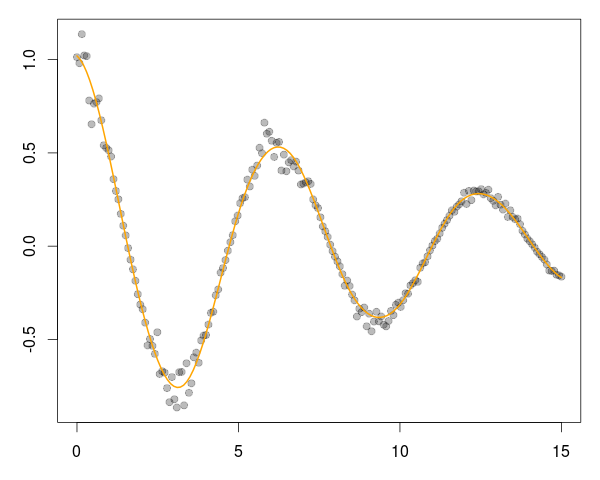
And with that, we generate a chart such as Spline fitting example from GSL manual redone with Rcpp Attributes via a simple four lines, or as much as it took to create the C++ functions, generate the data and fit it!

op <- par(mar=c(3,3,1,1))
plot(dat[,"x"], dat[,"y"], pch=19, col="#00000044")
lines(fit[[1]], fit[[2]], col="orange", lwd=2)
par(op)
The RcppArmadillo and RcppEigen package support plugin use in the same way. Add an attribute to export a function, and an attribute for the depends -- and you're done. Extending R with (potentially much faster) C++ code has never been easier, and opens a whole new set of doors.

21 November 2012

Axel Beckert: zutils: zcat and friends on Steroids

I recently wrote about tools to handle archives conveniently. If you just have to handle compressed text files, there are some widely known shortcut commands to mimic common commands on files compressed with a specific compression format.
gzip bzip2 lzma xz
cat zcat bzcat lzcat xzcat
cmp zcmp bzcmp lzcmp xzcmp
diff zdiff bzdiff lzdiff xzdiff
grep zgrep bzgrep lzgrep xzgrep
egrep zegrep bzegrep lzegrep xzegrep
fgrep zfgrep bzfgrep lzfgrep xzfgrep
more zmore bzmore lzmore xzmore
less zless bzless lzless xzless
In Debian and derivatives, those tools are part of the according package for that compression utility, i.e. the zcat command is part of the gzip package and the xzfgrep command is part of the xz-utils package. But despite this matrix is quite easy to remember, the situation has a few drawbacks: This is where the zutils project comes in: zutils provides the functionality of most of these utilities, too, but with one big difference: You don t have to remember, think about or type which compression method has been used for your data, just use zcat, zcmp, zdiff, zgrep, zegrep, or zfgrep and it works independently of what compression method has been used if any or if there are different compression types mixed in the parameters to the same command:
$ zfgrep foobar bla.txt fnord.gz hurz.xz quux.lz bar.lzma
Especially if you use logrotate and let logrotate compress old logs, it s very comfortable that one command suffices to concatenate all the available logfiles, including the current uncompressed one:
$ zcat /var/log/syslog*    
Additionally, zutils versions of these tools also support lzip-compressed files. The zutils package is available in Debian starting with Wheezy and in Ubuntu since Oneiric. When being installed, it replaces the original z* utilities from the gzip package by diverting them away. The only drawback so far is that there neither a zless nor a zmore utility from the zutils project, so zless bla.txt fnord.gz hurz.xz quux.lz bar.lzma will not work as expected even after installing zutils as it is still the one from the gzip package and hence it will show you just the first two files in plain text, but not the remaining ones.

27 October 2012

Soeren Sonnenburg: Shogun at Google Summer of Code 2012

The summer came finally to an end and (yes in Berlin we still had 20 C end of October), unfortunately, so did GSoC with it. This has been the second time for SHOGUN to be in GSoC. For those unfamiliar with SHOGUN - it is a very versatile machine learning toolbox that enables unified large-scale learning for a broad range of feature types and learning settings, like classification, regression, or explorative data analysis. I again played the role of an org admin and co-mentor this year and would like to take the opportunity to summarize enhancements to the toolbox and my GSoC experience: In contrast to last year, we required code-contributions in the application phase of GSoC already, i.e., a (small) patch was mandatory for your application to be considered. This reduced the number of applications we received: 48 proposals from 38 students instead of 70 proposals from about 60 students last year but also increased the overall quality of the applications. In the end we were very happy to get 8 very talented students and have the opportunity of boosting the project thanks to their hard and awesome work. Thanks to google for sponsoring three more students compared to last GSoC. Still we gave one slot back to the pool for good to the octave project (They used it very wisely and octave will have a just-in-time compiler now, which will benefit us all!). SHOGUN 2.0.0 is the new release of the toolbox including of course all the new features that the students have implemented in their projects. On the one hand, modules that were already in SHOGUN have been extended or improved. For example, Jacob Walker has implemented Gaussian Processes (GPs) improving the usability of SHOGUN for regression problems. A framework for multiclass learning by Chiyuan Zhang including state-of-the-art methods in this area such as Error-Correcting Output Coding (ECOC) and ShareBoost, among others. In addition, Evgeniy Andreev has made very important improvements w.r.t. the accessibility of SHOGUN. Thanks to his work with SWIG director classes, now it is possible to use python for prototyping and make use of that code with the same flexibility as if it had been written in the C++ core of the project. On the other hand, completely new frameworks and other functionalities have been added to the project as well. This is the case of multitask learning and domain adaptation algorithms written by Sergey Lisitsyn and the kernel two-sample or dependence test by Heiko Strathmann. Viktor Gal has introduced latent SVMs to SHOGUN and, finally, two students have worked in the new structured output learning framework. Fernando Iglesias made the design of this framework introducing the structured output machines into SHOGUN while Michal Uricar has implemented several bundle methods to solve the optimization problem of the structured output SVM. It has been very fun and interesting how the work done in different projects has been put together very early, even during the GSoC period. Only to show an example of this dealing with the generic structured output framework and the improvements in the accessibility. It is possible to make use of the SWIG directors to implement the application specific mechanisms of a structured learning problem instance in python and then use the rest of the framework (written in C++) to solve this new problem. Students! You all did a great job and I am more than amazed what you all have achieved. Thank you very much and I hope some of you will stick around. Besides all these improvements it has been particularly challenging for me as org admin to scale the project. While I could still be deeply involved in each and every part of the project last GSoC, this was no longer possible this year. Learning to trust that your mentors are doing the job is something that didn't come easy to me. Having had about monthly all-hands meetings did help and so did monitoring the happiness of the students. I am glad that it all worked out nicely this year too. Again, I would like to mention that SHOGUN improved a lot code-base/code-quality wise. Students gave very constructive feedback about our (lack) of proper Vector/Matrix/String/Sparse Matrix types. We now have all these implemented doing automagic memory garbage collection behind scenes. We have started to transition to use Eigen3 as our matrix library of choice, which made quite a number of algorithms much easier to implement. We generalized the Label framework (CLabels) to be tractable for not just classification and regression but multitask and structured output learning. Finally, we have had quite a number of infrastructure improvements. Thanks to GSoC money we have a dedicated server for running the buildbot/buildslaves and website. The ML Group at TU Berlin does sponsor virtual machines for building SHOGUN on Debian and Cygwin. Viktor Gal stepped up providing buildslaves for Ubuntu and FreeBSD. Gunnar Raetschs group is supporting redhat based build tests. We have Travis CI running testing pull requests for breakage even before merges. Code quality is now monitored utilizing LLVMs scan-build. Bernard Hernandez appeared and wrote a fancy new website for SHOGUN. A more detailed description of the achievements of each of the students follows:

26 September 2012

Dirk Eddelbuettel: RcppArmadillo 0.3.4.2

The development of Armadillo 3.4.* continues with bug fixes and more sparse matrix support. Conrad release 3.4.2 this morning. I wrapped up the corresponding RcppArmadillo 0.3.4.2 before leaving for work, and this version should now have all CRAN mirrors. Once again no R level or interface changes were, the upstream changes are summarized below.
Changes in RcppArmadillo version 0.3.4.2 (2012-09-25)
  • Upgraded to Armadillo release 3.4.2
    • minor fixes for handling sparse submatrix views
    • minor speedups for sparse matrices
Courtesy of CRANberries, there is also a diffstat report for 0.3.4.2 relative to 0.3.4.1 As always, more detailed information is on the RcppArmadillo page. Questions, comments etc should go to the rcpp-devel mailing list off the R-Forge page.

4 September 2012

Tollef Fog Heen: Driving Jenkins using YAML and a bit of python

We recently switched from Buildbot to Jenkins at work, for building Varnish on various platforms. Buildbot worked-ish, but was a bit fiddly to get going on some platforms such as Mac OS and Solaris. Where buildbot has a daemon on each node that is responsible for contacting the central host, Jenkins uses SSH as the transport and centrally manages retries if a host goes down or is rebooted. All in all, we are pretty happy with Jenkins, except for one thing: The job configurations are a bunch of XML files and the way you are supposed to configure this is through a web interface. That doesn't scale particularly well when you want to build many very similar jobs. We want to build multiple branches, some which are not public and we want to build on many slaves. The latter we could partially solve with matrix builds, except that will fail the entire build if a single slave fails with an error that works on retry. As the number of slaves increases, such failures become more common. To solve this, I hacked together a crude tool that takes a yaml file and writes the XML files. It's not anywhere near as well structured and pretty as liw's jenkinstool, but it is quite good at translating the YAML into a bunch of XML files. I don't know if it's useful for anybody else, there is no documentation and so on, but if you want to take a look, it's on github. Feedback is most welcome, as usual. Patches even more so.

2 September 2012

Dirk Eddelbuettel: Faster creation of binomial matrices

Scott Chamberlain blogged about faster creation of binomial matrices the other day, and even referred to our RcppArmadillo package as a possible solution (though claiming he didn't get it to work, tst tst -- that is what the rcpp-devel list is here to help with). The post also fell short of a good aggregated timing comparison for which we love the rbenchmark package. So in order to rectify this, and to see what we can do here with Rcpp, a quick post revisiting the issue. As preliminaries, we need to load three packages: inline to create compiled code on the fly (which, I should mention, is also used together with Rcpp by the Stan / RStan MCMC sampler which is creating some buzz this week), the compiler package included with R to create byte-compiled code and lastly the aforementioned rbenchmark package to do the timings. We also set row and column dimension, and set them a little higher than the original example to actually have something measurable:
library(inline)
library(compiler)
library(rbenchmark)
n <- 500
k <- 100
The first suggestion was the one by Scott himself. We will wrap this one, and all the following ones, in a function so that all approaches are comparable as being in a function of two dimension arguments:
scott <- function(N, K)  
    mm <- matrix(0, N, K)
    apply(mm, c(1, 2), function(x) sample(c(0, 1), 1))
 
scottComp <- cmpfun(scott)
We also immediatly compute a byte-compiled version (just because we now can) to see if this helps at all with the code. As there are no (explicit !) loops, we do not expect a big pickup. Scott's function works, but sweeps the sample() function across all rows and columns which is probably going to be (relatively) expensive. Next is the first improvement suggested to Scott which came from Ted Hart.
ted <- function(N, K)  
    matrix(rbinom(N * K, 1, 0.5), ncol = K, nrow = N)
 
This is quite a bit smarter as it vectorises the approach, generating N times K elements at once which are then reshaped into a matrix. Another suggestion came from David Smith as well as Rafael Maia. We rewrite it slightly to make it a function with two arguments for the desired dimensions:
david <- function(m, n)  
    matrix(sample(0:1, m * n, replace = TRUE), m, n)
 
This is very clever as it uses sample() over zero and one rather than making (expensive) draws from random number generator. Next we have a version from Luis Apiolaza:
luis <- function(m, n)  
     round(matrix(runif(m * n), m, n))
 
It draws from a random uniform and rounds to zero and one, rather than deploying the binomial. Then we have the version using RcppArmadillo hinted at by Scott, but with actual arguments and a correction for row/column dimensions. Thanks to inline we can write the C++ code as an R character string; inline takes care of everything and we end up with C++-based solution directly callable from R:
arma <- cxxfunction(signature(ns="integer", ks="integer"), plugin = "RcppArmadillo", body='
   int n = Rcpp::as<int>(ns);
   int k = Rcpp::as<int>(ks);
   return wrap(arma::randu(n, k));
')
This works, and is pretty fast. The only problem is that it answers the wrong question as it returns U(0,1) draws and not binomials. We need to truncate or round. So a corrected version is
armaFloor <- cxxfunction(signature(ns="integer", ks="integer"), plugin = "RcppArmadillo", body='
   int n = Rcpp::as<int>(ns);
   int k = Rcpp::as<int>(ks);
   return wrap(arma::floor(arma::randu(n, k) + 0.5));
')
which uses the the old rounding approximation of adding 1/2 before truncating. With Armadillo in the picture, we do wonder how Rcpp sugar would do. Rcpp sugar, described in one of the eight vignettes of the Rcpp package, is using template meta-programming to provide R-like expressiveness (aka "syntactic sugar") at the C++ level. In particular, it gives access to R's RNG functions using the exact same RNGs as R making the results directly substitutable (whereas Armadillo uses its own RNG).
sugar <- cxxfunction(signature(ns="integer", ks="integer"), plugin = "Rcpp", body='
   int n = Rcpp::as<int>(ns);
   int k = Rcpp::as<int>(ks);
   Rcpp::RNGScope tmp;
   Rcpp::NumericVector draws = Rcpp::runif(n*k);
   return Rcpp::NumericMatrix(n, k, draws.begin());
')
Here Rcpp::RNGScope deals with setting/resetting the R RNG state. This draws a vector of N time K uniforms similar to Luis' function -- and just like Luis' R function does so without looping -- and then shapes a matrix of dimension N by K from it. And it does of course have the same problem as the RcppArmadillo approach earlier and we can use the same solution:
sugarFloor <- cxxfunction(signature(ns="integer", ks="integer"), plugin = "Rcpp", body='
   int n = Rcpp::as<int>(ns);
   int k = Rcpp::as<int>(ks);
   Rcpp::RNGScope tmp;
   Rcpp::NumericVector draws = Rcpp::floor(Rcpp::runif(n*k)+0.5);
   return Rcpp::NumericMatrix(n, k, draws.begin());
')
Now that we have all the pieces in place, we can compare:
res <- benchmark(scott(n, k), scottComp(n,k),
                 ted(n, k), david(n, k), luis(n, k),
                 arma(n, k), sugar(n,k),
                 armaFloor(n, k), sugarFloor(n, k),
                 order="relative", replications=100)
print(res[,1:4])
With all the above code example in a small R script we call via littler, we get
edd@max:~/svn/rcpp/pkg$ r /tmp/scott.r 
Loading required package: methods
              test replications elapsed   relative
7      sugar(n, k)          100   0.072   1.000000
9 sugarFloor(n, k)          100   0.088   1.222222
6       arma(n, k)          100   0.126   1.750000
4      david(n, k)          100   0.136   1.888889
8  armaFloor(n, k)          100   0.138   1.916667
3        ted(n, k)          100   0.384   5.333333
5       luis(n, k)          100   0.410   5.694444
1      scott(n, k)          100  33.045 458.958333
2  scottComp(n, k)          100  33.767 468.986111
We can see several takeaways: Thanks to Scott and everybody for suggesting this interesting problem. Trying the rbinom() Rcpp sugar function, or implementing sample() at the C++ level is, as the saying goes, left as an exercise to the reader.

17 August 2012

Dirk Eddelbuettel: Follow-up to Counting CRAN Package Depends, Imports and LinkingTo

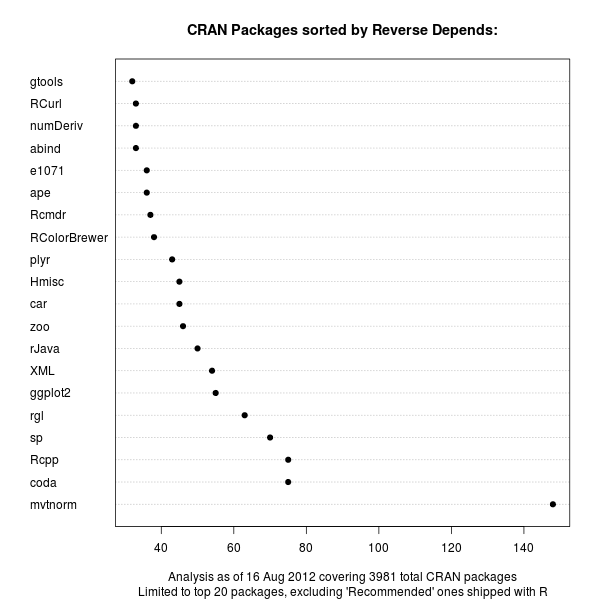
A few days ago, I blogged about visualizing CRAN dependency ranks which turned out to be a somewhat popular post. David Smith followed-up at the REvo blog suggesting to exclude packages already shipping with R (which is indicated by their 'Recommended' priority). Good idea! So here is an updated version, where we limit the display to the top twenty packages counted by reverse 'Depends:', and excluding those already shipping with R such as MASS, lattice, survival, Matrix, or nlme. CRAN package chart of Reverse Depends relations excluding Recommended packages The mvtnorm package is still out by a wide margin, but we can note that (cough, cough) our Rcpp package for seamless R and C++ is now tied for second with the coda package for MCMC analysis. Also of note is the fact that CRAN keeps growing relentlessly and moved from 3969 packages to 3981 packages in the space of these few days... Lastly, I have been asked about the code and/or data behind this. It is really pretty simply as the main data.frame can be had from CRAN (where I also found the initial few lines to load it). After that, one only needs a little bit of subsetting as shown below. I look forward to seeing other people riff on this data set.
#!/usr/bin/r
##
## Initial db downloand from http://developer.r-project.org/CRAN/Scripts/depends.R and adapted
require("tools")
## this function is essentially the same as R Core's from the URL
## http://developer.r-project.org/CRAN/Scripts/depends.R
getDB <- function()  
    contrib.url(getOption("repos")["CRAN"], "source") # trigger chooseCRANmirror() if required
    description <- sprintf("%s/web/packages/packages.rds", getOption("repos")["CRAN"])
    con <- if(substring(description, 1L, 7L) == "file://")  
        file(description, "rb")
      else  
        url(description, "rb")
     
    on.exit(close(con))
    db <- readRDS(gzcon(con))
    rownames(db) <- db[,"Package"]
    db
 
db <- getDB()
## count packages
getCounts <- function(db, col)  
    foo <- sapply(db[,col],
                  function(s)   if (is.na(s)) NA else length(strsplit(s, ",")[[1]])   )
 
## build a data.frame with the number of entries for reverse depends, reverse imports,
## reverse linkingto and reverse suggests; also keep Recommended status
ddall <- data.frame(pkg=db[,1],
                    RDepends=getCounts(db, "Reverse depends"),
                    RImports=getCounts(db, "Reverse imports"),
                    RLinkingTo=getCounts(db, "Reverse linking to"),
                    RSuggests=getCounts(db, "Reverse suggests"),
                    Recommended=db[,"Priority"]=="recommended"
                    )
## Subset to non-Recommended packages as in David Smith's follow-up post
dd <- subset(ddall, is.na(ddall[,"Recommended"])   ddall[,"Recommended"] != TRUE)
labeltxt <- paste("Analysis as of", format(Sys.Date(), "%d %b %Y"),
                  "covering", nrow(db), "total CRAN packages")
cutOff <- 20
doPNG <- TRUE
if (doPNG) png("/tmp/CRAN_ReverseDepends.png", width=600, heigh=600)
z <- dd[head(order(dd[,2], decreasing=TRUE), cutOff),c(1,2)]
dotchart(z[,2], labels=z[,1], cex=1, pch=19,
         main="CRAN Packages sorted by Reverse Depends:",
         sub=paste("Limited to top", cutOff, "packages, excluding 'Recommended' ones shipped with R"),
         xlab=labeltxt)
if (doPNG) dev.off()
if (doPNG) png("/tmp/CRAN_ReverseImports.png", width=600, heigh=600)
z <- dd[head(order(dd[,3], decreasing=TRUE), cutOff),c(1,3)]
dotchart(z[,2], labels=z[,1], cex=1, pch=19,
         main="CRAN Packages sorted by Reverse Imports:",
         sub=paste("Limited to top", cutOff, "packages, excluding 'Recommended' ones shipped with R"),
         xlab=labeltxt)
if (doPNG) dev.off()
# no cutOff but rather a na.omit
if (doPNG) png("/tmp/CRAN_ReverseLinkingTo.png", width=600, heigh=600)
z <- na.omit(dd[head(order(dd[,4], decreasing=TRUE), 30),c(1,4)])
dotchart(z[,2], labels=z[,1], pch=19,
         main="CRAN Packages sorted by Reverse LinkingTo:",
         xlab=labeltxt)
if (doPNG) dev.off()

11 August 2012

Julien Danjou: Sony Vaio Z Debian Linux support

I had to install Debian Wheezy on a brand new Sony Vaio Z laptop with the new Ivy Bridge architecture (SVZ1311C5E). I'll talk about this here, because it's always nice to know that new hardware works quite fine (or not) under Debian. Sony Vaio Z 2012 The laptop is delivered with Window 7, which I decided to remove entirely anyway, and replace with Debian. I've installed it with Linux 3.2 and then ran Linux 3.4, 3.5 and 3.6-rc1. USB booting Don't ask me why, nor an Ubuntu or Debian USB installation booted, blocked at SYSLINUX at best, or at a black screen. This does not work. I had to use PXE to install Debian. Storage The only thing that can be surprising, is that the 128 GB SSD storage is actually made of 2 64 GB Samsung SSD aggregated in a RAID 0 using Intel Rapid Storage Technology, previously known as Intel Matrix. This is supported by Linux using the dm-raid module. So this is a fake RAID, and you anyway can see the both drives as sda and sdb under Linux. Unfortunately, this kind of RAID is not supported correctly by GRUB, and I was unable to install it this way. Therefore, I decided to remove entirely this fake RAID (which is possible via the BIOS) and use a Linux software md RAID 0 instead, plus crypto on top of it. That I know well and I trust. :) Graphics The Intel HD Graphics 4000 works fine. I'm alsmo using the HDMI output, which works fine. There's some GPU hanging (as seen on screen and in kernel logs) in Linux up to 3.4, but with versions 3.5 and above, I didn't see any problem so far. Sound The Intel HDA sound card works pretty well, both for playing and recording. The main problem is that I hear a constant noise on the speakers, but tweaking the ALSA mixers ends it at some point. There's still probably a bug, not yet resolved in Linux 3.6-rc1. Keyboard The keyboard works fine, and the back-light too, via the sony-laptop kernel module. Wonderful. Touchpad Touchpad works fine. Fingerprint It does not work, and is not supported according to my research. Not that I care about, but don't count on it. It's an AuthenTec AES1660. Webcam It works perfectly. USB Well, USB 3.0 does not work. I had to disable XHCI in the BIOS and use the 2 ports as standard USB 2.0, otherwise I would just get errors from the kernel. Still not working with Linux 3.6-rc1, and I've no clue to debug, and do not use USB 3.0 yet, so WiFi The WiFi module (based on iwlwifi) works fine. The only problem with NetworkManager is that the sony-laptop offers a second rfkill switch and NM does not know how to handle it correctly. A bug isopened about this and I hope to be able to write a patch or something at some point. Also, there seems to be some quality issue with the iwlwifi driver and 802.11n at this point. I'm losing connection quite often when the signal drops below 40 %. Loading the module with 11n_disable=1 helps a lot. Ethernet The gigabit Realtek Ethernet controller works perfectly. Card reader Works perfectly.

Next.

Previous.