Search Results: "andy"

13 November 2014

Steve McIntyre: Mini-Debconf in Cambridge, November 6-9 2014

People in the sunshine! For the second year running, we held our mini-debconf in Cambridge last weekend. Roughly 70 people turned up this year to the ARM offices in Cambridge over the 4 days. Alongside our originally planned general sprint work on Thursday and Friday, the Release Team had their own sprint to work through remaining post-freeze decisions about policies, architectures, naming etc. The rest of us worked through a range of topics all over Debian: installer, admin, ARM arch support etc. We even managed to fix Andy's laptop :-). Saturday and Sunday were two days devoted to more traditional conference sessions. Our talks covered a wide range of topics: d-i progress and an update from the Release Team, backup software and an arm64 laptop project to name but a few. I was very happy that the Release Team announced Zurg"Stretch" and "Buster" as upcoming release names, and obviously it was lovely to have arm64 and ppc64el confirmed as release architectures for Jessie. It's a shame to see the kfreebsd ports dropped from the official Jessie list, but let's see if the porters can do an unofficial release anyway. I'll help if I can with things like CD builds... Several volunteers from the DebConf video team were on hand too, so our talks were recorded and are already online at http://meetings-archive.debian.net/pub/debian-meetings/2014/mini-debconf-cambridge/webm/. Yay! Again, the mini-conf went well and feedback from attendees was universally positive. We may run again next year. More importantly, I can confirm that we're definitely planning on bidding to host a full DebConf in Cambridge in the summer of 2017. Thanks to all our helpers, and of course to our sponsors: ARM for providing the venue and infrastructure for the event, and Codethink for helping with food costs.

10 November 2014

Konstantinos Margaritis: New owner/maintainer for CSVChart Drupal module

Back in ~2008, I had created a small Drupal module that used CustomFilter and Google Chart Tools: Image Charts, called CSV Chart. It was a simple module that took embedded CSV data and presented them as Google charts. It was very handy for what I wanted -and still want- to do, present benchmarks for my work on Altivec (and now in general SIMD). However, I don't really code in PHP anymore -haven't coded PHP since 2010- so the module was left to bitrot. I did some minor adjustment to run with the current D7-based site, but that was it. Thankfully, others found the module useful to use and adopt and the result has been that in the last days I transfered ownership of the CSV Chart to Pierre Vriens, so that he can continue development and maintenance of this tiny module. I would like to publicly thank Pierre for his work! And that's the beauty of Free Software!

30 October 2014

Alessio Treglia: Handling identities in distributed Linux cloud instances

I ve many distributed Linux instances across several clouds, be them global, such as Amazon or Digital Ocean, or regional clouds such as TeutoStack or Enter. Probably many of you are facing the same issue: having a consistent UNIX identity across all multiple instances. While in an ideal world LDAP would be a perfect choice, letting LDAP open to the wild Internet is not a great idea. So, how to solve this issue, while being secure? The trick is to use the new NSS module for SecurePass. While SecurePass has been traditionally used into the operating system just as a two factor authentication, the new beta release is capable of holding extended attributes , i.e. arbitrary information for each user profile. We will use SecurePass to authenticate users and store Unix information with this new capability. In detail, we will: SecurePass and extended attributes The next generation of SecurePass (currently in beta) is capable of storing arbitrary data for each profile. This is called Extended Attributes (or xattrs) and -as you can imagine- is organized as key/value pair. You will need the SecurePass tools to be able to modify users extended attributes. The new releases of Debian Jessie and Ubuntu Vivid Vervet have a package for it, just:
# apt-get install securepass-tools
ERRATA CORRIGE: securepass-tools hasn t been uploaded to Debian yet, Alessio is working hard to make the package available in time for Jessie though.
For other distributions or previous releases, there s a python package (PIP) available. Make sure that you have pycurl installed and then:
# pip install securepass-tools
While SecurePass tools allow local configuration file, we highly recommend for this tutorial to create a global /etc/securepass.conf, so that it will be useful for the NSS module. The configuration file looks like:
[default]
app_id = xxxxx
app_secret = xxxx
endpoint = https://beta.secure-pass.net/
Where app_id and app_secrets are valid API keys to access SecurePass beta. Through the command line, we will be able to set UID, GID and all the required Unix attributes for each user:
# sp-user-xattrs user@domain.net set posixuid 1000
While posixuid is the bare minimum attribute to have a Unix login, the following attributes are valid: Install and Configure NSS SecurePass In a similar way to the tools, Debian Jessie and Ubuntu Vivid Vervet have native package for SecurePass:
# apt-get install libnss-securepass
For previous releases of Debian and Ubuntu can still run the NSS module, as well as CentOS and RHEL. Download the sources from: https://github.com/garlsecurity/nss_securepass Then:
./configure
make
make install (Debian/Ubuntu Only)
For CentOS/RHEL/Fedora you will need to copy files in the right place:
/usr/bin/install -c -o root -g root libnss_sp.so.2 /usr/lib64/libnss_sp.so.2
ln -sf libnss_sp.so.2 /usr/lib64/libnss_sp.so
The /etc/securepass.conf configuration file should be extended to hold defaults for NSS by creating an [nss] section as follows:
[nss]
realm = company.net
default_gid = 100
default_home = "/home"
default_shell = "/bin/bash"
This will create defaults in case values other than posixuid are not being used. We need to configure the Name Service Switch (NSS) to use SecurePass. We will change the /etc/nsswitch.conf by adding sp to the passwd entry as follows:
$ grep sp /etc/nsswitch.conf
 passwd:  files sp
Double check that NSS is picking up our new SecurePass configuration by querying the passwd entries as follows:
$ getent passwd user
 user:x:1000:100:My User:/home/user:/bin/bash
$ id user
 uid=1000(user)  gid=100(users) groups=100(users)
Using this setup by itself wouldn t allow users to login to a system because the password is missing. We will use SecurePass authentication to access the remote machine. Configure PAM for SecurePass On Debian/Ubuntu, install the RADIUS PAM module with:
# apt-get install libpam-radius-auth
If you are using CentOS or RHEL, you need to have the EPEL repository configured. In order to activate EPEL, follow the instructions on http://fedoraproject.org/wiki/EPEL Be aware that this has not being tested with SE-Linux enabled (check off or permissive). On CentOS/RHEL, install the RADIUS PAM module with:
# yum -y install pam_radius
Note: as per the time of writing, EPEL 7 is still in beta and does not contain the Radius PAM module. A request has been filed through RedHat s Bugzilla to include this package also in EPEL 7 Configure SecurePass with your RADIUS device. We only need to set the public IP Address of the server, a fully qualified domain name (FQDN), and the secret password for the radius authentication. In case of the server being under NAT, specify the public IP address that will be translated into it. After completion we get a small recap of the already created device. For the sake of example, we use secret as our secret password. Configure the RADIUS PAM module accordingly, i.e. open /etc/pam_radius.conf and add the following lines:
radius1.secure-pass.net secret 3
radius2.secure-pass.net secret 3
Of course the secret is the same we have set up on the SecurePass administration interface. Beyond this point we need to configure the PAM to correct manage the authentication. In CentOS, open the configuration file /etc/pam.d/password-auth-ac; in Debian/Ubuntu open the /etc/pam.d/common-auth configuration and make sure that pam_radius_auth.so is in the list.
auth required   pam_env.so
auth sufficient pam_radius_auth.so try_first_pass
auth sufficient pam_unix.so nullok try_first_pass
auth requisite  pam_succeed_if.so uid >= 500 quiet
auth required   pam_deny.so
Conclusions Handling many distributed Linux poses several challenges, from software updates to identity management and central logging. In a cloud scenario, it is not always applicable to use traditional enterprise solutions, but new tools might become very handy. To freely subscribe to securepass beta, join SecurePass on: http://www.secure-pass.net/open
And then send an e-mail to info@garl.ch requesting beta access.

23 October 2014

Alessio Treglia: Bits from the Debian Multimedia Maintainers

This brief announcement was released yesterday to the debian-devel-announce mailing list. Ciao! The Debian Multimedia Maintainers have been quite active since the Wheezy release, and have some interesting news to share for the Jessie release. Here we give you a brief update on what work has been done and work that is still ongoing. Let s see what s cooking for Jessie then. Frameworks and libraries Support for many new media formats and codecs. The codec library libavcodec, which is used by popular media playback applications including vlc, mpv, totem (using gstreamer1.0-libav), xine, and many more, has been updated to the latest upstream release version 11 provided by Libav. This provides Debian users with HEVC playback, a native Opus decoder, Matroska 3D support, Apple ProRes, and much more. Please see libav s changelog for a full list of functionality additions and updates. libebur128 libebur128 is a free implementation of the European Broadcasting Union Loudness Recommendation (EBU R128), which is essentially an alternative to ReplayGain. The library can be used to analyze audio perceived loudness and subsequentially normalize the volume during playback. libltc libltc provides functionalities to encode and decode Linear (or Longitudinal) Timecode (LTC) from/to SMPTE data timecode. libva libva and the driver for Intel GPUs has been updated to the 1.4.0 release. Support for new GPUs has been added. libva now also supports Wayland. Pure Data A number of new additional libraries (externals) will appear in Jessie, including (among others) Eric Lyon s fftease and lyonpotpourrie, Thomas Musil s iemlib, the pdstring library for string manipulation and pd-lua that allows to write Pd-objects in the popular lua scripting language. JACK and LADI LASH Audio Session Handler was abandoned upstream a long time ago in favor of the new session management system, called ladish (LADI Session Handler). ladish allows users to run many JACK applications at once and save/restore their configuration with few mouse clicks. The current status of the integration between the session handler and JACK may be summarized as follows: Note that ladish uses the D-Bus interface to the jack daemon, therefore only Jessie s jackd2 provides support for and also cooperates fine with it. Plugins: LV2 and LADSPA Debian Jessie will bring the newest 1.10.0 version of the LV2 technology. Most changes affect the packaging of new plugins and extensions, a brief list of packaging guidelines is now available.
A number of new plugins and development tools too have been made available during the Jessie development cycle: LV2 Toolkit LVTK provides libraries that wrap the LV2 C API and extensions into easy to use C++ classes. The original work for this was mostly done by Lars Luthman in lv2-c++-tools. Vee One Suite The whole suite by Rui Nuno Capela is now available in Jessie, and consists of three components: All three are provided in both forms of LV2 plugins and stand-alone JACK client. JACK session, JACK MIDI, and ALSA MIDI are supported too. x42-plugins and zam-plugins LV2 bundles containing many audio plugins for high quality processing. Fomp Fomp is an LV2 port of the MCP, VCO, FIL, and WAH plugins by Fons Adriaensen. Some other components have been upgraded to more recent upstream versions: We ve packaged ste-plugins, Fons Adriaensen s new stereo LADSPA plugins bundle. A major upgrade of frei0r, namely the standard collection for the minimalistic plugin API for video effects, will be available in Jessie. New multimedia applications Advene Advene (Annotate Digital Video, Exchange on the NEt) is a flexible video
annotation application. Ardour3 The new generation of the popular digital audio workstation will make its very first appearance in Debian Jessie. Cantata Qt4 front-end for the MPD daemon. Csound Csound for jessie will feature the new major series 6, with the improved IDE CsoundQT. This new csound supports improved array data type handling, multi-core rendering and debugging features. din DIN Is Noise is a musical instrument and audio synthesizer that supports JACK audio output, MIDI, OSC, and IRC bot as input sources. It could be extended and customized with Tcl scripts too. dvd-slideshow dvd-slideshow consists of a suite of command line tools which come in handy to make slideshows from collections of pictures. Documentation is provided and available in /usr/share/doc/dvd-slideshow/ . dvdwizard DVDwizard can fully automate the creation of DVD-Video filesystem. It supports graphical menus, chapters, multiple titlesets and multi-language streams. It supports both PAL and NTSC video modes too. flowblade Flowblade is a video editor like the popular KDenlive based on the MLT engine, but more lightweight and with some difference in editing concepts. forked-daapd Forked-daapd switched to a new, active upstream again dropping Grand Central Dispatch in favor of libevent. The switch fixed several bugs and made forked-daapd available on all release architectures instead of shipping only on amd64 and i386. Now nothing prevents you from setting up a music streaming (DAAP/DACP) server on your favorite home server no matter if it is based on mips, arm or x86! harvid HTTP Ardour Video Daemon decodes still images from movie files and serves them via HTTP. It provides frame-accurate decoding and is main use-case is to act as backend and second level cache for rendering the
videotimeline in Ardour. Groove Basin Groove Basin is a music player server with a web-based user interface inspired by Amarok 1.4. It runs on a server optionally connected to speakers. Guests can control the music player by connecting with a laptop, tablet, or smart phone. Further, users can stream their music libraries remotely.
It comes with a fast, responsive web interface that supports keyboard shortcuts and drag drop. It also provides the ability to upload songs, download songs, and import songs by URL, including YouTube URLs. Groove Basin supports Dynamic Mode which automatically queues random songs, favoring songs that have not been queued recently.
It automatically performs ReplayGain scanning on every song using the EBU R128 loudness standard, and automatically switches between track and album mode. Groove Basin supports the MPD protocol, which means it is compatible with MPD clients. There is also a more powerful Groove Basin protocol which you can use if the MPD protocol does not meet your needs. HandBrake HandBrake, a versatile video transcoder, is now available for Jessie. It could convert video from nearly any format to a wide range of commonly supported codecs. jack-midi-clock New jackd midiclock utility made by Robin Gareus. laborejo Laborejo, Esperanto for Workshop , is used to craft music through notation. It is a LilyPond GUI frontend, a MIDI creator and a tool collection to inspire and help music composers. mpv mpv is a movie player based on MPlayer and mplayer2. It supports a wide variety of video file formats, audio and video codecs, and subtitle types. The project focuses mainly on modern systems and encourages developer activity. As such, large portions of outdated code originating from MPlayer have been removed, and many new features and improvements have been added. Note that, although there are still some similarities to its predecessors, mpv should be considered a completely different program (e.g. lacking compatibility with both mplayer and mplayer2 in terms of command-line arguments and configuration). smtube SMTube is a stand-alone graphical video browser and player, which makes YouTube s videos browsing, playing, and download such a piece of cake.
It has so many features that, we are sure, will make YouTube lovers very, very happy. sonic-visualiser Sonic Visualiser Application for viewing and analysing the contents of music audio files. SoundScapeRenderer SoundScapeRenderer (aka SSR) is a (rather) easy to use render engine for spatial audio, that provides a number of different rendering algorithms, ranging from binaural (headphone) playback via wave field synthesis to higher-order ambisonics. Videotrans videotrans is a set of scripts that allow its user to reformat existing movies into the VOB format that is used on DVDs. XBMC XBMC has been partially rebranded as XBMC from Debian to make it clear that it is changed to conform to Debian s Policy. The latest stable release, 13.2 Gotham will be part of Jessie making Debian a good choice for HTPC-s. zita-bls1 Binaural stereo signals converter made by Fons Adriaensen zita-mu1 Stereo monitoring organiser for jackd made by Fons Adriaensen zita-njbridge Jack clients to transmit multichannel audio over a local IP network made by Fons Adriaensen radium-compressor Radium Compressor is the system compressor of the Radium suite. It is provided in the form of stand-alone JACK application. Multimedia Tasks With Jessie we are shipping a set of multimedia related tasks.
They include package lists for doing several multimedia related tasks. If you are interested in defining new tasks, or tweaking the current, existing ones, we are very much interested in hearing from you. Upgraded applications and libraries What s not going to be in Jessie With the aim to improve the overall quality of the multimedia software available in Debian, we have dropped a number of packages which were abandoned upstream: We ve also dropped mplayer, presently nobody seems interested in maintaining it.
The suggested replacements for users are mplayer2 or mpv. Whilst the former is mostly compatible with mplayer in terms of command-line arguments and configuration (and adds a few new features too), the latter adds a lot of new features and improvements, and it is actively maintained upstream. Please note that although the mencoder package is no longer available anymore, avconv and mpv do provide encoding functionality. For more information see avconv s manual page and documentation, and mpv s encoding documentation. Broken functionalities rtkit under systemd is broken at the moment. Activity statistics More information about team s activity are available. Where to reach us The Debian Multimedia Maintainers can be reached at pkg-multimedia-maintainers AT lists.alioth.debian.org for packaging related topics, or at debian-multimedia AT lists.debian.org for user and more general discussion.
We would like to invite everyone interested in multimedia to join us there. Some of the team members are also in the #debian-multimedia channel on OFTC. Cheers! Alessio Treglia
on behalf of the Debian Multimedia Maintainers

19 October 2014

Neil Williams: OpenTAC an automation lab in a box

I ve previously covered running LAVA on ARM devices, now that the packages are in Debian. I ve also covered setting up the home lab, including the difficulty in obtaining the PDU and relying on another machine to provide USB serial converters with inherent problems of needing power to keep the same devices assigned to the same ser2net ports. There have been ideas about how to improve the situation. Conferences are a prime example setting up a demo involving LAVA means bringing a range of equipment, separate power bricks, separate network switches (with power bricks), a device of some kind to connect up the USB serial converters (and power brick) and then the LAVA server (with SATA drive and power brick) that is without the actual devices and their cables and power. Each of those power cables tend to be a metre long, with networking and serial, it quickly becomes a cable spaghetti. Ideas around this also have application inside larger deployments, so the hardware would need to daisy-chain to provide services to a rack full of test devices. The objective is a single case providing network, power and serial connectivity to a number of test devices over a single power input and network uplink. Naturally, with a strong free software and open development bias, the unit will be Open Hardware running Debian, albeit with a custom Beaglebone Linux kernel. It s a Test Automation Controller, so we re using the name OpenTAC. Progress Open hardware ARM device running Debian to automate tests on 4 to 8 devices, initially aimed at LAVA support for Linaro engineers. Power distribution, serial console, network and optional GPIO extensions. The design involves: The initial schematics are now complete and undergoing design review. A lot of work remains

9 October 2014

Chris Lamb: London Paris London 2014

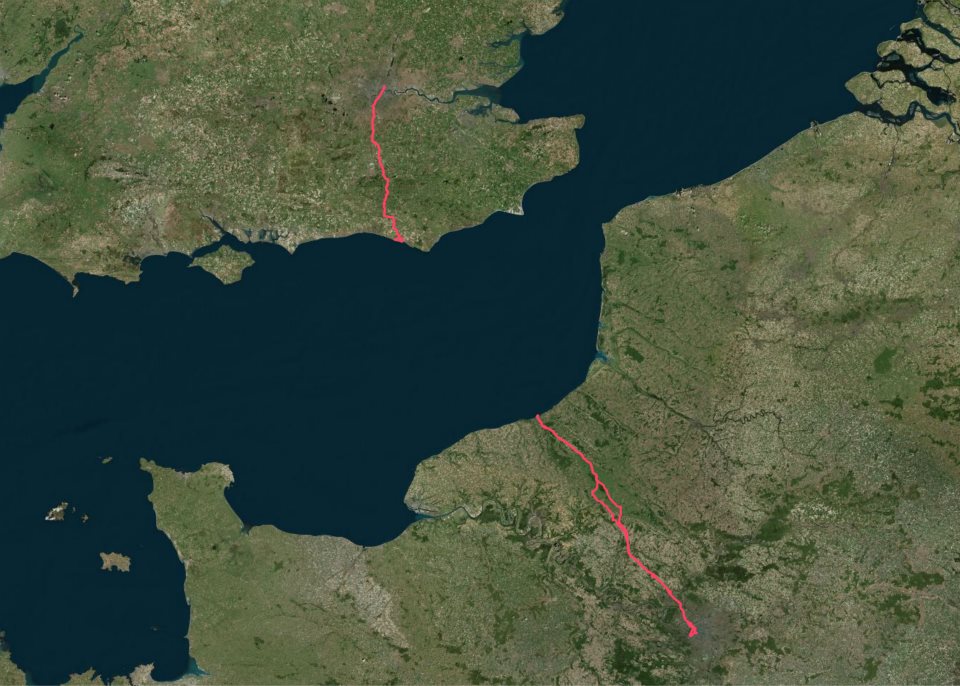
I've wanted to ride to Paris for a few months now but was put off by the hassle of taking a bicycle on the Eurostar, as well having a somewhat philosophical and aesthetic objection to taking a bike on a train in the first place. After all, if one already is possession of a mode of transport... My itinerary was straightforward:
Friday 12h00
London Newhaven
Friday 23h00
Newhaven Dieppe (ferry)
Saturday 04h00
Dieppe Paris
Saturday 23h00
(Sleep)
Sunday 07h00
Paris Dieppe
Sunday 18h00
Dieppe Newhaven (ferry)
Sunday 21h00
Newhaven Peacehaven
Sunday 23h00
(Sleep)
Monday 07h00
Peacehaven London
Packing list https://chris-lamb.co.uk/wp-content/2014/london-paris-london/01.jpg
  • Ferry ticket (unnecessary in the end)
  • Passport
  • Credit card
  • USB A male mini A male (charges phone, battery pack & front light)
  • USB A male mini B male (for charging or connecting to Edge 800)
  • USB mini A male OTG A female (for Edge 800 uploads via phone)
  • Waterproof pocket
  • Sleeping mask for ferry (probably unnecessary)
  • Battery pack

Not pictured:
  • Castelli Gabba Windstopper short-sleeve jersey
  • Castelli Velocissimo bib shorts
  • Castelli Nanoflex arm warmers
  • Castelli Squadra rain jacket
  • Garmin Edge 800
  • Phone
  • Front light: Lezyne Macro Drive
  • Rear lights: Knog Gekko (on bike), Knog Frog (on helmet)
  • Inner tubes (X2), Lezyne multitool, tire levers, hand pump

Day 1: London Newhaven
https://chris-lamb.co.uk/wp-content/2014/london-paris-london/02.jpg

Tower Bridge.

Many attempt to go from Tower Bridge Eiffel Tower (or Marble Arch Arc de Triomphe) in less than 24 hours. This would have been quite easy if I had left a couple of hours later.
https://chris-lamb.co.uk/wp-content/2014/london-paris-london/03.jpg

Fanny's Farm Shop, Merstham, Surrey.

https://chris-lamb.co.uk/wp-content/2014/london-paris-london/04.jpg

Plumpton, East Sussex.

https://chris-lamb.co.uk/wp-content/2014/london-paris-london/05.jpg

West Pier, Newhaven.

https://chris-lamb.co.uk/wp-content/2014/london-paris-london/07.jpg

Leaving Newhaven on the 23h00 ferry.


Day 2: Dieppe Paris
https://chris-lamb.co.uk/wp-content/2014/london-paris-london/09.jpg

Beauvoir-en-Lyons, Haute-Normandie.

https://chris-lamb.co.uk/wp-content/2014/london-paris-london/10.jpg

S rifontaine, Picardie.

https://chris-lamb.co.uk/wp-content/2014/london-paris-london/12.jpg

La tour Eiffel, Paris.

https://chris-lamb.co.uk/wp-content/2014/london-paris-london/13.jpg

Champ de Mars, Paris.

https://chris-lamb.co.uk/wp-content/2014/london-paris-london/15.jpg

Pont de Grenelle, Paris.


Day 3: Paris Dieppe
https://chris-lamb.co.uk/wp-content/2014/london-paris-london/18.jpg

Cormeilles-en-Vexin, le-de-France.

https://chris-lamb.co.uk/wp-content/2014/london-paris-london/20.jpg

Gisors, Haute-Normandie.

https://chris-lamb.co.uk/wp-content/2014/london-paris-london/21.jpg

Paris-Brest, Gisors, Haute-Normandie.

Wikipedia: This pastry was created in 1910 to commemorate the Paris Brest bicycle race begun in 1891. Its circular shape is representative of a wheel. It became popular with riders on the Paris Brest cycle race, partly because of its energizing high caloric value, and is now found in p tisseries all over France.
https://chris-lamb.co.uk/wp-content/2014/london-paris-london/22.jpg

Gournay-en-Bray, Haute-Normandie.

https://chris-lamb.co.uk/wp-content/2014/london-paris-london/23.jpg

D but de l'Avenue Verte, Forges-les-Eaux, Haute-Normandie.

https://chris-lamb.co.uk/wp-content/2014/london-paris-london/24.jpg

Mesni res-en-Bray, Haute-Normandie.

https://chris-lamb.co.uk/wp-content/2014/london-paris-london/26.jpg

Dieppe, Haute-Normandie.

https://chris-lamb.co.uk/wp-content/2014/london-paris-london/28.jpg

La Mancha .


Day 4: Peacehaven London
https://chris-lamb.co.uk/wp-content/2014/london-paris-london/29.jpg

Peacehaven, East Sussex.

https://chris-lamb.co.uk/wp-content/2014/london-paris-london/31.jpg

Highbrook, West Sussex.

https://chris-lamb.co.uk/wp-content/2014/london-paris-london/33.jpg

London weather.


Summary https://chris-lamb.co.uk/wp-content/2014/london-paris-london/34.jpg
Distance
588.17 km
Pedal turns
~105,795
My only non-obvious tips would be to buy a disposable blanket in the Newhaven Co-Op to help you sleep on the ferry. In addition, as the food on the ferry is good enough you only need to get to the terminal one hour before departure, avoiding time on your feet in unpicturesque Newhaven. In terms of equipment, I would bring another light for the 4AM start on L'Avenue Verte if only as a backup and I would have checked I could arrive at my Parisian Airbnb earlier in the day - I had to hang around for five hours in the heat before I could have a shower, properly relax, etc. I had been warned not to rely on being able to obtain enough water en route on Sunday but whilst most shops were indeed shut I saw a bustling tabac or boulangerie at least once every 20km so one would never be truly stuck. Route-wise, the surburbs of London and Paris are both equally dismal and unmotivating and there is about 50km of rather uninspiring and exposed riding on the D915. However, L'Avenue Verte is fantastic even in the pitch-black and the entire trip was worth it simply for the silent and beautiful Normandy sunrise. I will be back.

2 October 2014

Sha Liu: Back again

I cannot believe I ll ever be here again.

1 October 2014

Vincent Sanders: It is a bad plan that admits of no modification

I find it somewhat interesting that thousands of years later that our society still uses Publilius Syrus sententiae though I imagine the tendency to leave well enough alone means such phrases stay in usage.

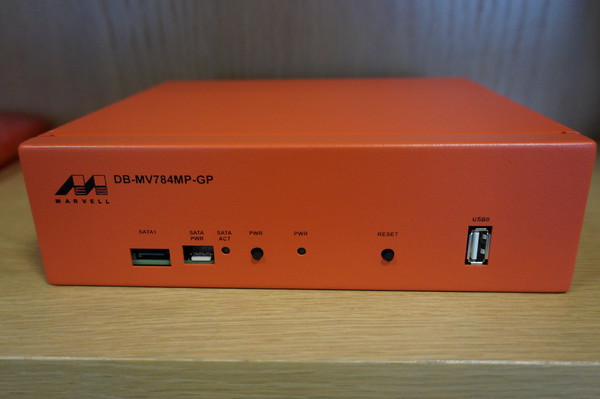
Marvell ARM system - Photo from Steve McIntyre
One weekend Steve McIntyre asked me if I could find a source of some of some 40mm fans for some systems with some pretty strict requirements. They needed to be long life and shift a lot of air to combat a persistent overheating issue.

I sat with him and went through the Farnell utterly hateful parametric web interface and eventually came up with a couple of options which were very expensive. Only then did I stop and ask what the actual problem was.

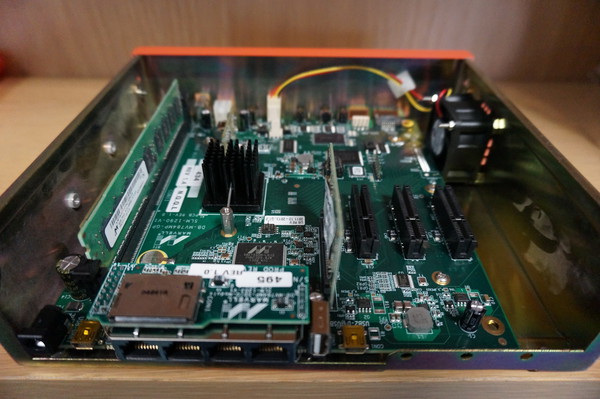
Marvell ARM system Original internal cooling arrangement - Photo from Steve McIntyre
Steve showed me one of the Debian ARM buildd boxes which are Marvell development machines. These systems are powerful quad core machines housed in compact steel enclosures.

There is a single 40mm fan trying to provide cooling for the entire enclosure. When the units are placed horizontally and used intermittently this proves adequate. Unfortunately when the system are arranged vertically in a rack and run at full load continuously they often overheat and have to be restarted. In addition the small high speed fans need replacing frequently as their bearings wore out quickly.

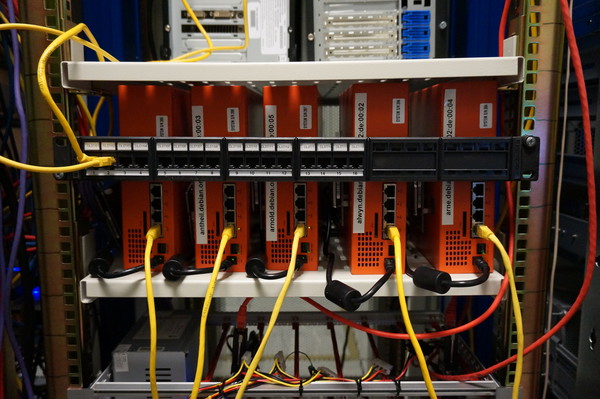
Debian ARM buildd systems - Photo from Steve McIntyreThis was obviously causing some issues for the ARM Debian ports which Steve wanted to rectify. After talking the problem through for a while we came to the conclusion we could use much larger 60mm fans to blow air directly through the top of the case onto the cpu heatsink.

Larger fans can be run much more slowly to move a similar volume of air to the smaller 40mm fans which gives a much longer service life.

Hole punch and Drilling template
Steve proceeded to order enough parts to allow us to modify all the Debian systems, this worked out cheaper than a single "special" 40mm high volume fan.

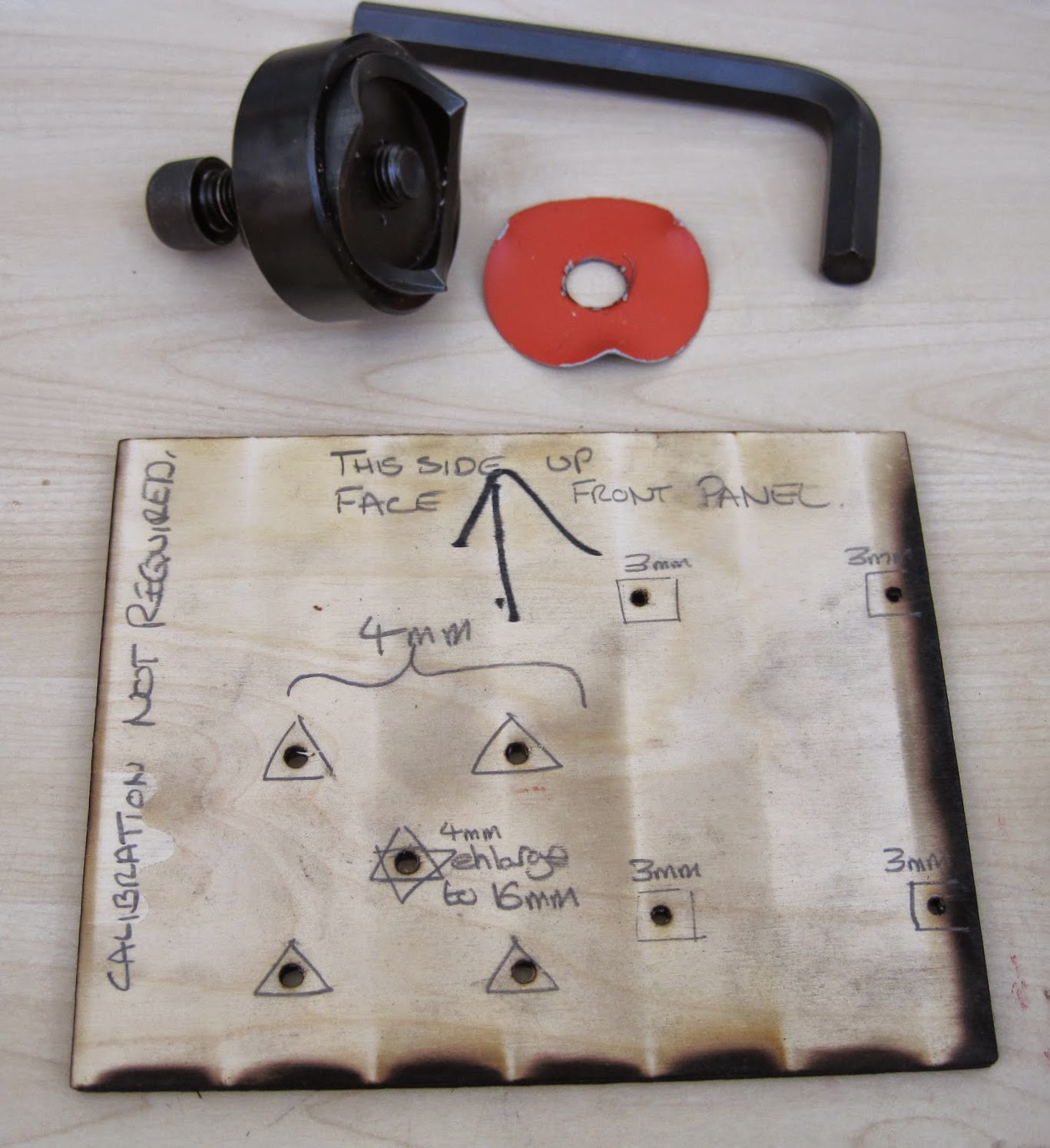
I acquired a rather large steel hole punch, I chose this tool because it produces a much superior finish to a hole cutter and this project demanded a high level of finish (not to mention I loved having a valid excuse to own and use a huge allen key!)

If we had simply been modifying a single case I would have measured and marked up by hand. With the prospect of altering at least eight I laser cut a template from plywood which Andy Simpkins took great glee in excessively annotating.

We also used the opportunity to add bolt holes to securely attach the 2.5 inch SATA drives instead of using sticky pads.

Steve and I modified a single system to begin with both to check our alignment and the efficacy of the change. We were pleasantly surprised to discover that hoiby could now repeatedly do kernel compiles with all four cores flat out which was not possible before. The measured CPU temperature, which had previously been around 90 C, did not rise above 40 C

Steve and Andy on the assembly line
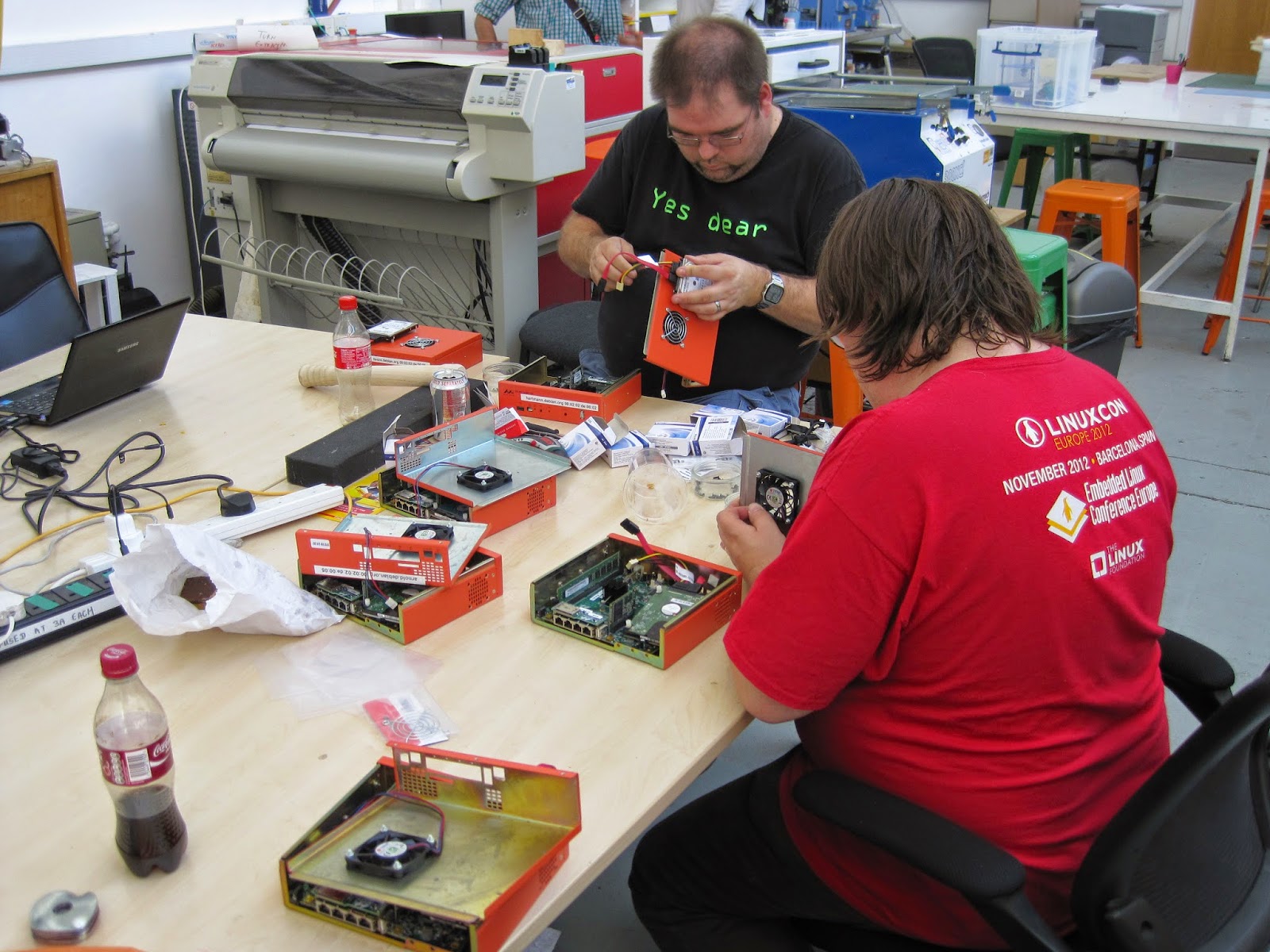
Steve, Andy and I then arranged a day where we took all the remaining units out of the rack at ARM, modified and returned them. We used the facilities at the Cambridge Makespace where I am a member to do the modifications.

I broke two 3mm drill bits and dulled a 4mm bit drilling all the holes, Roger Smith was good enough to loan us the use of his "Christmas tree bit" to ream the fan hole out to 16mm so we could thread the hole punch and cut the 60mm fan aperture out.

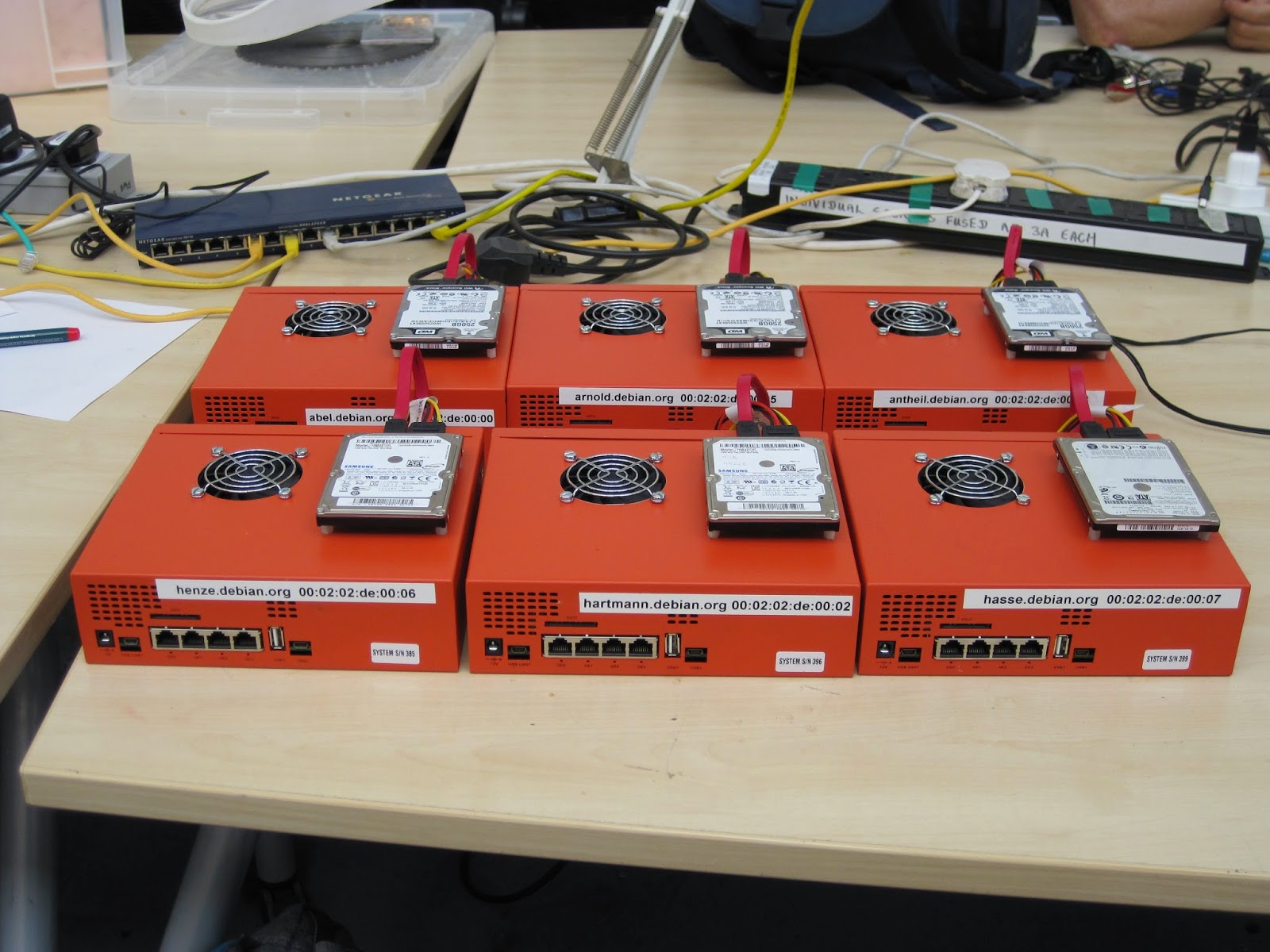
six modified systems ready to be re-racked.
We managed to get quite an assembly line going and, in my opinion, the results look pretty professional.

It has been several months since we did this work and these systems continue to run without issue. To complete the story we can see some graphs courtesy of the DSA munin instance.

CPU load on arnold.debian.org
You can clearly see the huge drop in temperature at the end of Week 25 despite the continuously high CPU load. Also there is only a single gap in the data after the changes (these indicate crashes where data was not recorded) where before there were frequent and extensive times where the systems were simply unusable.

CPU Temperature of arnold.debian.org
One reason I continue to enjoy Debian so much is the wide variety of ways in which I can contribute not only by maintaining my packages. Sometimes this kind of work does not receive the credit it deserves and hopefully highlights a small part of the frantic paddling that goes on under the serene surface of the Debian project to keep things "just working".

24 September 2014

Vincent Sanders: I wanted to go to Portland because it's a really good book town.

Plane at Heathrow terminal 5 taking me to America for Debconf 14Patti Smith is right, more than any other US city I have visited, Portland feels different. Although living in Cambridge, which sometimes feels like where books were invented, might give me a warped sense of a place.

Jo McIntyre getting on the tram at PDX
I have visited Portland a few times previously and I feel comfortable every time I arrive at PDX. Sure the place still suffers from the american obsession with the car but similar to New York you can rely on public transport to get about.

On this occasion my visit was for the Debian Conference which i was excited to attend having missed the previous one in Switzerland. This time the conference has changed its format to being 10 days long and mixing the developer time in with the more formal sessions.

The opening session gave Steve McIntyre and myself the opportunity to present a small token of our appreciation to Russ. The keynote speakers that afternoon were all very interesting both Stefano Zacchiroli and Gabriella Coleman giving food for thought on two very different subjects.

The sponsored accomodation rooms were plesent
Several conferences in the past have experienced issues with sponsored accommodation and food, I am very pleased to report that both were very good this time. The room I was in had a small kitchen area, en-suite bathroom, desks and most importantly comfortable beds.

Andy and Patty in the Ondine dining area
The food provision was in the form of a buffet in the Ondine facility. The menu was not greatly varied but catered to all requirements including vegetarian and gluten free diets.

Neil, Rob, Jo, Steve , Neil, Daniel and Andy dining under the planes
Some of us went on a visit to the Evergreen air and space museum to look at some rare aircraft and rockets. I can thoroughly recommend a visit if you are in the area.

These are just the highlights of the week though, the time in the hack-labs was productive with several practical achievements Including:
- Uploading new packages reducing the bug count
- Sorting out getting an updated key into the Debian keyring.

Overall I had a thoroughly enjoyable time and got a lot out of the conference this year. The new format suited me surprisingly well and as usual the social side was as valuable as the practical.

I hope the organisers have recovered enough to appreciate just how good a job they did and not get hung up on the small number of things that went wrong when the majority of things went perfectly to plan.

Junichi Uekawa: Sending GCM send message from nodejs.

Sending GCM send message from nodejs. I wanted to send a message from emacs, but it seemed to be relatively difficult to send HTTPS POST request from emacs, so I just decided to use handy nodejs. The attached 'data' is attached to intent as extra, so it can be extracted by intent.getExtras.getString("message") in IntentService#onHandleIntent()

10 August 2014

Ian Wienand: Finding out if you're a Rackspace instance

Different hosting providers do things slightly differently, so it's sometimes handy to be able to figure out where you are. Rackspace is based on Xen and their provided images should include the xenstore-ls command available. xenstore-ls vm-data will give you a handy provider and even region fields to let you know where you are.
function is_rackspace  
  if [ ! -f /usr/bin/xenstore-ls ]; then
      return 1
  fi
  /usr/bin/xenstore-ls vm-data   grep -q "Rackspace"
 
if is_rackspace; then
  echo "I am on Rackspace"
fi
Other reading about how this works:

8 August 2014

Sune Vuorela: Fun and joy with .bat files

Occasionally, one gets in touch with kind of foreign technologies and needs to get stuff working anyways. Recently, I had to do some various hacking with and around .bat files. Bat files are a kind of script files for Microsoft Windows. Calling external commands Imagine need to call some other command, let s say git diff. So from a cmd thing, you would write
git diff
similar to writing shell scripts on unixes. But there is a catch. If the thing you want to call is another bat-script, just calling it ensures it replaces the current script and never returns. So you need
call git diff
if the command you want to run is a bat file and you want to return to your script. Calling an external helper next to your script
If you for some reason needs to call some external helper placed next to your script, there is a helpful thing to do that as well. Imagine your helper is called helper.bat
call %~dp0helper.bat
is the very self-explanatory way of doing that. Stopping execution of your script If you somehow encounter some condition in your script that requires you to stop your script, there is a command exit handy. It even takes a argument for what error code there is.
exit 2
stops your script with return code 2. But it also have the nice added feature that if you do it in a script you run by hand in a terminal, it also exits the terminal. Luckily there is also a fix for that:
exit /b 2
and it doesn t exit your interactive terminal, and it sets the %ERRORLEVEL% variable to the exit code. Fortunately, the fun doesn t stop here. If the script is run non-interactively, exit /b doesn t set the exit code for for example perl s system() call. You need to use exit without /b for that. So now you need two scripts. one for interactive use that calls exit /b and a similar one using exit for use by other apps/scripts. Or, we can combine some of our knowledge and add a extra layer of indirection. and then success. Oh. and on a unrelated note. Windows can t schedule tasks for users that aren t logged in and don t have a password set. The response Access Denied is the only clue given.

25 July 2014

Juliana Louback: Extending an xTuple Business Object

xTuple is in my opinion incredibly well designed; the code is clean and the architecture ahderent to a standardized structure. All this makes working with xTuple software quite a breeze. I wanted to integrate JSCommunicator into the web-based xTuple version. JSCommunicator is a SIP communication tool, so my first step was to create an extension for the SIP account data. Luckily for me, the xTuple development team published an awesome tutorial for writing an xTuple extension. xTuple cleverly uses model based business objects for the various features available. This makes customizing xTuple very straightforward. I used the tutorial mentioned above for writing my extension, but soon noticed my goals were a little different. A SIP account has 3 data fields, these being the SIP URI, the account password and an optional display name. xTuple currently has a business object in the core code for a User Account and it would make a lot more sense to simply add my 3 fields to this existing business object rather than create another business object. The tutorial very clearly shows how to extend a business object with another business object, but not how to extend a business object with only new fields (not a whole new object). Now maybe I m just a whole lot slower than most people, but I had a ridiculously had time figuring this out. Mind you, this is because I m slow, because the xTuple documentation and code is understandable and as self-explanatory as it gets. I think it just takes a bit to get used to. Either way, I thought this just might be useful to others so here is how I went about it. Setup First you ll have to set up your xTuple development environment and fork the xtuple and xtuple-extesions repositories as shown in this handy tutorial. A footnote I d like to add is please verify that your version of Vagrant (and anything else you install) is the one listed in the tutorial. I think I spent like two entire days or more on a wild goose (bug) chase trying to set up my environment when the cause of all the errors was that I somehow installed an older version of Vagrant - 1.5.4 instead of 1.6.3. Please don t make the same mistake I did. Actually if for some reason you get the following error when you try using node:
<<ERROR 2014-07-10T23:52:46.948Z>> Unrecoverable exception. Cannot call method 'extend' of undefined
    at /home/vagrant/dev/xtuple/lib/backbone-x/source/model.js:37:39
    at Object.<anonymous> (/home/vagrant/dev/xtuple/lib/backbone-x/source/model.js:1364:3)
    ...
chances are, you have the wrong version. That s what happened to me. The Vagrant Virtual Development Environment automatically installs and configures everything you need, it s ready to go. So if you find yourself installing and updating and apt-gets and etc, you probably did something wrong. Coding So by now we should have the Vagrant Virtual Development Environment set up and the web app up and running and accessible at localhost:8443. So far so good. Disclaimer: You will note that much of this is similar - or rather, nearly identical - to xTuple s tutorial but there are some small but important differences and a few observations I think might be useful. Other Disclaimer: I m describing how I did it, which may or may not be up to snuff . Works for me though. Schema First let s make a schema for the table we will create with the new custom fields. Be sure to create the correct directory stucture, aka /path/to/xtuple-extensions/source/<YOUR EXTENSION NAME>/database/source or in my case /path/to/xtuple-extensions/source/sip_account/database/source, and create the file create_sa_schema.sql, sa is the name of my schema. This file will contain the following lines:
do $$
  /* Only create the schema if it hasn't been created already */
  var res, sql = "select schema_name from information_schema.schemata where schema_name = 'sa'",
  res = plv8.execute(sql);
  if (!res.length)  
    sql = "create schema sa; grant all on schema sa to group xtrole;"
    plv8.execute(sql);
   
$$ language plv8;
Of course, feel free to replace sa with your schema name of choice. All the code described here can be found in my xtuple-extensions fork, on the sip_ext branch. Table We ll create a table containing your custom fields and a link to an existing table - the table for the existing business object you want to extend. If you re wondering why make a whole new table for a few extra fields, here s a good explanation, the case in question is adding fields to the Contact business object. You need to first figure out what table you want to link to. This might not be uber easy. I think the best way to go about it is to look at the ORMs. The xTuple ORMs are a JSON mapping between the SQL tables and the object-oriented world above the database, they re .json files found at path/to/xtuple/node_modules/xtuple/enyo-client/database/orm/models for the core business objects and at path/to/xtuplenyo-client/extensions/source/<EXTENSION NAME>/database/orm/models for exension business objects. I ll give two examples. If you look at contact.json you will see that the Contact business object refers to the table cntct . Look for the type : Contact on the line above, so we know it s the Contact business object. In my case, I wanted to extend the UserAccount and UserAccountRelation business objects, so check out user_account.json. The table listed for UserAccount is xt.usrinfo and the table listed for UserAccountRelation is xt.usrlite. A closer look at the sql files for these tables (usrinfo.sql and usrlite.sql) revealed that usrinfo is in fact a view and usrlite is A light weight table of user information used to avoid punishingly heavy queries on the public usr view . I chose to refer to xt.usrlite - that or I received error messages when trying the other table names. Now I ll make the file /path/to/xtuple-extensions/source/sip_account/database/source/usrlitesip.sql, to create a table with my custom fields plus the link to the urslite table. Don t quote me on this, but I m under the impression that this is the norm for naming the sql file joining tables: the name of the table you are referring to ( usrlite in this case) and your extension s name. Content of usrlitesip.sql:
select xt.create_table('usrlitesip', 'sa');
select xt.add_column('usrlitesip','usrlitesip_id', 'serial', 'primary key', 'sa');
select xt.add_column('usrlitesip','usrlitesip_usr_username', 'text', 'references xt.usrlite (usr_username)', 'sa');
select xt.add_column('usrlitesip','usrlitesip_uri', 'text', '', 'sa');
select xt.add_column('usrlitesip','usrlitesip_name', 'text', '', 'sa');
select xt.add_column('usrlitesip','usrlitesip_password', 'text', '', 'sa');
comment on table sa.usrlitesip is 'Joins User with SIP account';
Breaking it down, line 1 creates the table named usrlitesip (no duh), line 2 is for the primary key (self-explanatory). You can then add any columns you like, just be sure to add one that references the table you want to link to. I checked usrlite.sql and saw the primary key is usr_username, be sure to use the primary key of the table you are referencing. You can check what you made by executing the .sql files like so:
$ cd /path/to/xtuple-extensions/source/sip_account/database/source
$ psql -U admin -d dev -f create_sa_schema.sql
$ psql -U admin -d dev -f usrlitesip.sql
After which you will see the table with the columns you created if you enter:
$ psql -U admin -d dev -c "select * from sa.usrlitesip;"
Now create the file /path/to/xtuple-extensions/source/sip_account/database/source/manifest.js to put the files together and in the right order. It should contain:
 
  "name": "sip_account",
  "version": "1.4.1",
  "comment": "Sip Account extension",
  "loadOrder": 999,
  "dependencies": ["crm"],
  "databaseScripts": [
    "create_sa_schema.sql",
    "usrlitesip.sql",
    "register.sql"
  ]
 
I think the name has to be the same you named your extension directory as in /path/to/xtuple-extensions/source/<YOUR EXTENSION NAME>. I think the comment can be anything you like and you want your loadOrder to be high so it s the last thing installed (as it s an add on.) So far we are doing exactly what s instructed in the xTuple tutorial. It s repetitive, but I think you can never have too many examples to compare to. In databaseScripts you will list the two .sql files you just created for the schema and the table, plus another file to be made in the same directory named register.sql. I m not sure why you have to make the register.sql or even if you indeed have to. If you leave the file empty, there will be a build error, so put a ; in the register.sql or remove the line register.sql from manifest.js as I think for now we are good without it. Now let s update the database with our new extension:
$ cd /path/to/xtuple
$ ./scripts/build_app.js -d dev -e ../xtuple-extensions/source/sip_account
$ psql -U admin -d dev -c "select * from xt.ext;"
That last command should display a table with a list of extensions; the ones already in xtuple like crm and billing and some others plus your new extension, in this case sip_account . When you run build_app.js you ll probably see a message along the lines of <Extension name> has no client code, not building client code and that s fine because yeah, we haven t worked on the client code yet. ORM Here s where things start getting different. So ORMs link your object to an SQL table. But we DON T want to make a new business object, we want to extend an existing business object, so the ORM we will make will be a little different than the xTuple tutorial. Steve Hackbarth kindly explained this new business object/existing business object ORM concept here. First we ll create the directory /path/to/xtuple-extensions/source/sip_account/database/orm/ext, according to xTuple convention. ORMs for new business objects would be put in /path/to/xtuple-extensions/source/sip_account/database/orm/models. Now we ll create the .json file /path/to/xtuple-extensions/source/sip_account/database/orm/ext/user_account.jscon for our ORM. Once again, don t quote me on this, but I think the name of the file should be the name of the business object you are extending, as is done in the turorial example extending the Contact object. In our case, UserAccount is defined in user_account.json and that s what I named my extension ORM too. Here s what you should place in it:
 1 [
 2    
 3     "context": "sip_account",
 4     "nameSpace": "XM",
 5     "type": "UserAccount",
 6     "table": "sa.usrlitesip",
 7     "isExtension": true,
 8     "isChild": false,
 9     "comment": "Extended by Sip",
10     "relations": [
11        
12         "column": "usrlitesip_usr_username",
13         "inverse": "username"
14        
15     ],
16     "properties": [
17        
18         "name": "uri",
19         "attr":  
20           "type": "String",
21           "column": "usrlitesip_uri",
22           "isNaturalKey": true
23          
24        ,
25        
26         "name": "displayName",
27         "attr":  
28           "type": "String",
29           "column": "usrlitesip_name"
30          
31        ,
32        
33         "name": "sipPassword",
34         "attr":  
35           "type": "String",
36           "column": "usrlitesip_password"
37          
38        
39     ],
40     "isSystem": true
41    ,
42    
43     "context": "sip_account",
44     "nameSpace": "XM",
45     "type": "UserAccountRelation",
46     "table": "sa.usrlitesip",
47     "isExtension": true,
48     "isChild": false,
49     "comment": "Extended by Sip",
50     "relations": [
51        
52         "column": "usrlitesip_usr_username",
53         "inverse": "username"
54        
55     ],
56     "properties": [
57        
58         "name": "uri",
59         "attr":  
60           "type": "String",
61           "column": "usrlitesip_uri",
62           "isNaturalKey": true
63          
64        ,
65        
66         "name": "displayName",
67         "attr":  
68           "type": "String",
69           "column": "usrlitesip_name"
70          
71        ,
72        
73         "name": "sipPassword",
74         "attr":  
75           "type": "String",
76           "column": "usrlitesip_password"
77          
78        
79     ],
80     "isSystem": true
81    
82 ]
Note the context is my extension name, because the context + nameSpace + type combo has to be unique. We already have a UserAccount and UserAccountRelation object in the XM namespace in the xtuple context in the original user_account.json, now we will have a UserAccount and UserAccountRelation object in the XM namespace in the sip_account conext. What else is important? Note that isExtension is true on lines 7 and 47 and the relations item contains the column of the foreign key we referenced. This is something you might want to verify: column (lines 12 and 52) is the name of the attribute on your table. When we made a reference to the primary key usr_usrname from the xt.usrlite table we named that column usrlitesip_usr_usrname. But the inverse is the attribute name associated with the original sql column in the original ORM. Did I lose you? I had a lot of trouble with this silly thing. In the original ORM that created a new UserAccount business object, the primary key attribute is named username , as can be seen here. That is what should be used for the inverse value. Not the sql column name (usr_username) but the object attribute name (username). I m emphasizing this because I made that mistake and if I can spare you the pain I will. If we rebuild our extension everything should come along nicely, but you won t see any changes just yet in the web app because we haven t created the client code. Client Create the directory /path/to/xtuple-extensions/source/sip_account/client which is where we ll keep all the client code. Extend Workspace View I want the fields I added to show up on the form to create a new User Account, so I need to extend the view for the User Account workspace. I ll start by creating a directory /path/to/xtuple-extensions/source/sip_account/client/views and in it creating a file named workspace.js containing this code:
XT.extensions.sip_account.initWorkspace = function ()  
	var extensions = [
  	 kind: "onyx.GroupboxHeader", container: "mainGroup", content: "_sipAccount".loc() ,
  	 kind: "XV.InputWidget", container: "mainGroup", attr: "uri"  ,
  	 kind: "XV.InputWidget", container: "mainGroup", attr: "displayName"  ,
  	 kind: "XV.InputWidget", container: "mainGroup", type:"password", attr: "sipPassword"  
	];
	XV.appendExtension("XV.UserAccountWorkspace", extensions);
 ;
So I m initializing my workspace and creating an array of items to add (append) to view XV.UserAccountWorkspace. The first item is this onyx.GroupboxHeader which is a pretty divider for my new form fields, the kind you find in the web app at Setup > User Accounts, like Overview . I have no idea what other options there are for container other than mainGroup , so let s stick to that. I ll explain content: _sipAccount .loc() in a bit. Next I created three input fields of the XV.InputWidget kind. This also confused me a bit as there are different kinds of input to be used, like dropdowns and checkboxes. The only advice I can give is snoop around the webapp, find an input you like and look up the corresponding workspace.js file to see what was used. What we just did is (should be) enough for the new fields to show up on the User Account form. But before we see things change, we have to package the client. Create the file /path/to/xtuple-extensions/source/sip_account/client/views/package.js. This file is needed to package groups of files and indicates the order the files should be loaded (for more on that, see this). For now, all the file will contain is:
enyo.depends(
"workspace.js"
);
You also need to package the views directory containing workspace.js, so create the file Create the file /path/to/xtuple-extensions/source/sip_account/client/package.js and in it show that the directory views and its contents must be part of the higher level package:
enyo.depends(
"views"
);
I like to think of it as a box full of smaller boxes. This will sound terrible, but apparently you also need to create the file /path/to/xtuple-extensions/source/sip_account/client/core.js containing this line:
XT.extensions.icecream =  ;
I don t know why. As soon as I find out I ll be sure to inform you. As we ve added a file to the client directory, be sure to update /path/to/xtuple-extensions/source/sip_account/client/package.js so it included the new file:
enyo.depends(
"core.js",
"views"
);
Translations Remember _sipAccount .loc() in our workspace.js file? xTuple has great internationalization support and it s easy to use. Just create the directory and file /path/to/xtuple-extensions/source/sip_account/client/en/strings.js and in it put key-value pairs for labels and their translation, like this:
(function ()  
  "use strict";
  var lang = XT.stringsFor("en_US",  
    "_sipAccount": "Sip Account",
    "_uri": "Sip URI",
    "_displayName": "Display Name",
    "_sipPassword": "Password"
   );
  if (typeof exports !== 'undefined')  
    exports.language = lang;
   
 ());
So far I included all the labels I used in my Sip Account form. If you write the wrong label (key) or forget to include a corresponding key-value pair in strings.js, xTuple will simply name your lable _lableName , underscore and all. Now build your extension and start up the server:
$ cd /path/to/xtuple 
$ ./scripts/build_app.js -d dev -e ../xtuple-extensions/source/sip_account
$ node node-datasource/main.js
If the server is already running, just stop it and restart it to reflect your changes. Now if you go to Setup > User Accounts and click the + button, you should see a nice little addition to the form with a Sip Account divider and three new fields. Nice, eh? Extend Parameters Currently you can search your User Accounts list using any of the User Account fields. It would be nice to be able to search with the Sip account fields we added as well. To do that, let s create the directory /path/to/xtuple-extensions/source/sip_account/client/widgets and there create the file parameter.js to extend XV.UserAccountListParameters. One again, you ll have to look this up. In the xTuple code you ll find the application s parameter.js in /path/to/xtuple/enyo-client/application/source/widgets. Search for the business object you are extending (for example, XV.UserAccount) and look for some combination of the business object name and Parameters . If there s more than one, try different ones. Not a very refined method, but it worked for me. Here s the content of our parameter.js:
XT.extensions.sip_account.initParameterWidget = function ()  
  var extensions = [
     kind: "onyx.GroupboxHeader", content: "_sipAccount".loc() ,
     name: "uri", label: "_uri".loc(), attr: "uri", defaultKind: "XV.InputWidget" ,
     name: "displayName", label: "_displayName".loc(), attr: "displayName", defaultKind: "XV.InputWidget" 
  ];
  XV.appendExtension("XV.UserAccountListParameters", extensions);
 ;
Node that I didn t include a search field for the password attribute for obvious reasons. Now once again, we package this new code addition by creating a /path/to/xtuple-extensions/source/sip_account/client/widgets/package.js file:
enyo.depends(
"parameter.js"
);
We also have to update /path/to/xtuple-extensions/source/sip_account/client/package.js:
enyo.depends(
"core.js",
"widgets"
"views"
);
Rebuild the extension (and restart the server) and go to Setup > User Accounts. Press the magnifying glass button on the upper left side of the screen and you ll see many options for filtering the User Accounts, among them the SIP Uri and Display Name. Extend List View You might want your new fields to show up on the list of User Accounts. There s a bit of an issue here because unlike what we did in workspace.js and parameter.js, we can t append new things to the list of UserAccounts with the funciton XV.appendExtension(args). First I tried overwriting the original UserAccountList, which works but it s far from ideal as this could result in a loss of data from the core implementation. After some discussion with the xTuple dev community, now there s a better alternative: Create the file /path/to/xtuple-extensions/source/sip_account/client/views/list.js and add the following:
1 var oldUserAccountListCreate = XV.UserAccountList.prototype.create;
2 
3 XV.UserAccountList.prototype.create = function ()  
4   oldUserAccountListCreate.apply(this, arguments);
5   this.createComponent(
6    kind: "XV.ListColumn", container: this.$.listItem, components: [
7         kind: "XV.ListAttr", attr: "uri" 
8    ] )
9  ;
To understand what I m doing, check out the XV.UserAccountList implementation in /path/to/xtuple/enyo-client/application/source/views/list.js the entire highlighted part. What we are doing is extending XV.UserAccountList through prototype-chaining ; this is how inheritance works with Enyo. In line 1 we create a prototype and in line 4 we inherit the features including original components array which the list is based on. We then create an additional component immitating the setup shown in XV.UserAccountList: An XV.ListColumn containing an XV.ListAttr, which should be placed in the XV.ListItem components array as is done with the existing columns (refer to implementation). Components can or should (?) have names which are used to access said components. You d refer to a specific component by the this.$.componentName hash. The components in XV.UserAccountList don t have names, so Enyo automatically names them (apparently) based on the kind name, for example something of the kind ListItem is named listItem. I found this at random after a lot of trial and error and it s not a bullet proof solution. Can be bettered. It s strange because if you encapsulate that code with
XT.extensions.sip_account.initList = function ()  
 //Code here
 ;
as is done with parameter.js and workspace.js (and in the xTuple tutorial you are supposed to do that with a new business object), it doesn t work. I have no idea why. This might be wrong or against xTuple coding norms; I will find out and update this post ASAP. But it does work this way. * shrugs * That said, as we ve created the list.js file, we need to ad it to our package by editing /path/to/xtuple-extensions/source/sip_account/client/views/package.js:
enyo.depends(
"list.js",
"workspace.js"
);
That s all. Rebuild the app and restart your server and when you select Setup > User Accounts in the web app you should see the Sip URI displayed on the User Accounts that have the Sip Account data. Add a new User Account to try this out.

29 June 2014

Matthew Palmer: Adventures in DNSSEC

DNSSEC is one of those things that have been on the I should poke at that sometime list, but today I decided to actually get in and play around with it. Turns out it s pretty trivially easy to setup, but I got bitten by a few gotchas during testing, that I thought worthwhile to document. Since I like to explain things, a lot of this article isn t how to so much as how does .

Configuring The Resolver First off, you need a resolver1 that you can trust, and which implements DNSSEC validation. In theory, you could use your ISP s resolvers (if they re DNSSEC-enabled), or even Google s public resolvers (8.8.8.8 and 8.8.4.4), but it s really not recommended how much do you trust those, really? More importantly, how much do you trust the network path between them and you? Frankly, running a local on-host caching resolver is trivial, consumes next-to-no resources, and is highly recommended. It s what I did. I used unbound, finally casting free the venerable dnscache, which has served me well for many years. I chose unbound because it fits the do one small thing, and do it well philosophy that I cherish (unlike BIND), and because it s what all the cool kids appear to be using these days. Installing it was as simple as apt-get install unbound it s available in pretty much every distro, I believe. Out of the box, unbound in Debian wheezy comes configured for DNSSEC validation. Other methods of installation might not be so amenable, so just make sure your unbound.conf liiks like this, so that DNSSEC is enabled:
server:
    auto-trust-anchor-file: "/var/lib/unbound/root.key"
    val-log-level: 2
The val-log-level line isn t strictly required, but I found it useful to have unbound log info on validation failures to syslog. Season to taste. You also have to configure your system to actually use your new, shiny local resolver. Editing /etc/resolv.conf would, in an ideal world, work Just Fine, but between Magical Unhelpful Pixies (I m looking at you, NetworkManager) and DHCP, it often isn t that easy. Ultimately, though, you should configure your system so that the only resolver in /etc/resolv.conf is always 127.0.0.1. Anything else is a security hole waiting to happen. If you re using DHCP and a recent version of ISC dhclient, adding supersede domain-name-servers 127.0.0.1; to dhclient.conf should do the needful.

Weighing the (Trust) Anchor Whatever local resolver you choose, you need to tell it about trust anchors . This is a key (or keys) which are trusted to sign all the other data that the resolver will find. Like the rest of the DNS, DNSSEC is hierarchical, and you need to know who to start with before you can start. To resolve a name using DNS, you ask the root servers for the answer to a question (say, what is the address of www.example.com? ). The root server doesn t know the answer, but it knows who to ask, and it tells you where to go (typically, go ask the DNS servers for .com, which are X, Y, and Z ). Then you ask those servers, and they probably don t know, but they know who to ask, and they tell you to go ask those servers. This continues until you finally get a server which says, oh, yes, I know the answer to that! and hands over the information you re after. In DNSSEC, you get digital signatures that prove that the answers you get from each DNS server you ask are legit, and not forged. So when you ask the root servers, what is the address of www.example.com? , they answer, I don t know, but go ask DNS servers at addresses X, Y, and Z and by the way, you can trust this answer is legit because here s this signature you can check . To verify a signature is legit, you need to know that the key used to make the signature is trustworthy, and it wasn t just any ol key that made it similar to how an ink scribble on a page doesn t mean anything unless you know what the signature you re looking at should look like. DNSSEC has two ways to make sure you know who to trust. Firstly, those trust anchors I mentioned three paragraphs ago. These are the keys that the root servers use to sign the responses they send out. You tell unbound (or your local DNSSEC-enabled resolver of choice), if you see a signature provided by this trust anchor key, you can trust it to be legit . The second way to trust is key is to have someone you already trust say, oh, you can trust this key, too . This is done by providing more data in the answer that you get from the root servers. So the full answer you get from the root servers when you ask, what is the address of www.example.com? looks like this:
I don t know, but you should ask the DNS servers at addresses X, Y, and Z. You can trust their answers because they ll sign their responses with key K. Finally, you can trust that I m legit because of this signature I m providing you, generated from key T.
Assuming that T is the trust-anchor key you ve already told unbound to trust, it can then trust all of the information it got from that first question. When it then goes to DNS server X and asks, Hey, do you know the address of www.example.com? , that server can send back its own response saying:
Gee, shucks, I don t know, but DNS servers at P and Q can help you. You can trust them because they ll sign responses with key S. And just to show you I m on the level, check out this nifty signature I made, signed with key K.
Since a server we trust told us to trust key K, and then we got a response signed by key K that told us to trust key S, when we then go and ask server P and get a response signed by S, we re still demonstrably secure. Neat setup, right? Anyway, now you know all about trust anchors. How do you set it up? For unbound, it s capable of priming the trust anchor itself. It does this by retrieving a copy of the trust anchor from [a well-known HTTPS URL]((https://data.iana.org/root-anchors/root-anchors.xml), which provides a reasonable measure of security the trust anchor file should be safe as long as that HTTPS server is trustworthy. For the properly paranoid, you should determine an alternate means of verifying that you have the correct root key (a web search for DNSSEC root key attestation would probably be a good start).

Testing It s always handy to know that something s working as you expect. For something that s important for security, that goes double. So, how do you test that your DNSSEC-capable resolver is, indeed, working as designed? Well, firstly, you can test that the resolver, by itself, is working. This is simple: do a query for a zone known to have broken DNSSEC. Thankfully, some nice people (Comcast, specifically) have already set this up. You can test a resolver for DNSSEC-correctness with this command:
dig @127.0.0.1 www.dnssec-failed.org
If dig gives you back an IP address, something is broken. The correct, my DNSSEC works! response should be a status: SERVFAIL response. That s all well and good, but having a resolver that works isn t much good if nothing s actually using it. Your system configuration has probably got some other resolvers configured into it (such as those provided by a DHCP server), and you ll want to make sure those aren t getting used2. The trivial test is to visit http://www.dnssec-failed.org in your browser. If that comes back with a page, then something s still wrong. A more user-friendly test of your DNSSEC configuration is provided by http://dnssectest.sidnlabs.nl/test.php, which will display a page either way, and give you a tick or a cross depending on whether you re DNSSEC-enabled or not. One thing to be wary of when you re doing browser tests is caching. I spent far too long trying to work out why unbound wasn t working , when in actual fact it was working fine, it s just that both my browser and local caching proxy (squid) were caching DNS requests3. So, even after I d correctly setup unbound, visiting the test sites was providing me with erroneous results. Fixing up the browser was simple enough. In Chromium, visiting chrome://net-internals#dns will show you what s being cached, what resolv.conf settings are being used, and allow you to clear the browser s resolver cache. Squid was similarly simple, although it took me a while to figure out that it was causing me grief (software that just works , being so rare, tends to slip your mind, and so I often forget that squid is actually doing me good). Restarting squid has the appropriate result (clears the DNS cache), but in the end I decided that having another layer of caching wasn t going to help significantly when I ve got an on-host DNS cache already, in unbound. So, I just turned the knobs for DNS caching in squid right down:
negative_dns_ttl 1 second
positive_dns_ttl 1 second
And voila! All was well.

In summary DNSSEC is cool. It s easy to get going with, and over time it will provide more and more practical benefits (I am a DANE fanboi). Get started with it now, and you ll be ahead of the curve.
  1. A resolver is a program which takes a name, does all the DNS queries required to get the data associated with that name, and return it to whoever wanted to know. This can be a library which links to a client application, or it can be a separate program which receives DNS requests itself. There are usually both types of resolvers in use for a typical Linux system to resolve names. On every machine, in every program, there is the so-called stub resolver , which is part of libc, and does nothing except create DNS requests and send them to the addresses listed in resolv.conf. Also present, although not always running on every machine (typically your ISP or network admin has some running for everyone to share) are one or more recursive resolvers , which are separate programs which take DNS requests, do all of the queries themselves, and return the result to the stub resolver for presentation to the client program which made the request in the first place. You will see this material again.
  2. You can configure dhclient to use your local resolver instead of the DHCP-provided ones by simply setting:
    supersede domain-name-servers 127.0.0.1;
    
    in your dhclient.conf file.
  3. It also didn t help that I hadn t correctly knobbled dhclient the first time around, and so even when I thought I was only resolving against my local unbound server, it was still actually using the DHCP-provided resolvers

6 June 2014

Gunnar Wolf: What defines an identity?

I must echo John Sullivan's post: GPG keysigning and government identification. John states some very important reasons for people everywhere to verify the identities of those parties they sign GPG keys with in a meaningful way, and that means, not just trusting government-issued IDs. As he says, It's not the Web of Amateur ID Checking. And I'll take the opportunity to expand, based on what some of us saw in Debian, on what this means. I know most people (even most people involved in Free Software development not everybody needs to join a globally-distributed, thousand-people-strong project such as Debian) are not that much into GPG, trust keyrings, or understand the value of a strong set of cross-signatures. I know many people have never been part of a key-signing party. I have been to several. And it was a very interesting experience. Fun, at the beginning at least, but quite tiring at the end. I was part of what could very well constitute the largest KSP ever in DebConf5 (Finland, 2005). Quite awe-inspiring We were over 200 people, all lined up with a printed list on one hand, our passport (or ID card for EU citizens) in the other. Actwally, we stood face to face, in a ribbon-like ring. And, after the basic explanation was given, it was time to check ID documents. And so it began. The rationale of this ring is that every person who signed up for the KSP would verify each of the others' identities. Were anything fishy to happen, somebody would surely raise a voice of alert. Of course, the interaction between every two people had to be quick More like a game than like a real check. "Hi, I'm #142 on the list. I checked, my ID is OK and my fingerprint is OK." "OK, I'm #35, I also printed the document and checked both my ID and my fingerprint are OK." The passport changes hands, the person in front of me takes the unique opportunity to look at a Mexican passport while I look at a Somewhere-y one. And all is fine and dandy. The first interactions do include some chatter while we grab up speed, so maybe a minute is spent Later on, we all get a bit tired, and things speed up a bit. But anyway, we were close to 200 people That means we surely spent over 120 minutes (2 full hours) checking ID documents. Of course, not all of the time under ideal lighting conditions. After two hours, nobody was checking anything anymore. But yes, as a group where we trust each other more than most social groups I have ever met, we did trust on others raising the alarm were anything fishy to happen. And we all finished happy and got home with a bucketload of signatures on. Yay! One year later, DebConf happened in Mexico. My friend Martin Krafft tested the system, perhaps cheerful and playful in his intent but the flaw in key signing parties such as the one I described he unveiled was huge: People join the KSP just because it's a social ritual, without putting any thought or judgement in it. And, by doing so, we ended up dilluting instead of strengthening our web of trust. Martin identified himself using an official-looking ID. According to his recount of the facts, he did start presenting a German ID and later switched to this other document. We could say it was a real ID from a fake country, or that it was a fake ID. It is up to each person to judge. But anyway, Martin brought his Transnational Republic ID document, and many tens of people agreed to sign his key based on it Or rather, based on it plus his outgoing, friendly personality. I did, at least, know perfectly well who he was, after knowing him for three years already. Many among us also did. Until he reached a very dilligent person, Manoj, that got disgusted by this experiment and loudly denounced it. Right, Manoj is known to have strong views, and using fake IDs is (or, at least, was) outside his definition of fair play. Some time after DebConf, a huge thread erupted questioning Martin's actions, as well as questioning what do we trust when we sign an identity document (a GPG key). So... We continued having traditional key signing parties for a couple of years, although more carefully and with more buzz regarding these issues. Until we finally decided to switch the protocol to a better one: One that ensures we do get some more talk and inter-personal recognition. We don't need everybody to cross-sign with everyone else A better trust comes from people chatting with each other and being able to actually pin-point who a person is, what do they do. And yes, at KSPs most people still require ID documents in order to cross-sign. Now... What do I think about this? First of all, if we have not ever talked for at least enough time for me to recognize you, don't be surprised: I won't sign your key or request you to sign mine (and note, I have quite a bad memory when it comes to faces and names). If it's the first conference (or social ocassion) we come together, I will most likely not look for key exchanges either. My personal way of verifying identities is by knowing the other person. So, no, I won't trust a government-issued ID. I know I will be signing some people based on something other than their name, but hey I know many people already who live pseudonymously, and if they choose for whatever reason to forgo their original name, their original name should not mean anything to me either. I know them by their pseudonym, and based on that pseudonym I will sign their identities. But... *sigh*, this post turned out quite long, and I'm not yet getting anywhere ;-) But what this means in the end is: We must stop and think what do we mean when we exchange signatures. We are not validating a person's worth. We are not validating that a government believes who they claim to be. We are validating we trust them to be identified with the (name,mail,affiliation) they are presenting us. And yes, our signature is much more than just a social rite It is a binding document. I don't know if a GPG signature is legally binding anywhere (I'm tempted to believe it is, as most jurisdictions do accept digital signatures, and the procedure is mathematically sound and criptographically strong), but it does have a high value for our project, and for many other projects in the Free Software world. So, wrapping up, I will also invite (just like John did) you to read the E-mail self-defense guide, published by the FSF in honor of today's Reset The Net effort.

4 June 2014

Daniel Pocock: Trialing the xTuple/PostBooks next generation web UI

For some time I've been using PostBooks to keep track of finances. The traditional PostBooks system has a powerful Qt GUI. The xTuple team have been hard at work creating a shiny new web-based user interface. The traditional UI has no dedicated server - all users communicate directly with the PostgreSQL database where stored procedures and triggers ensure the correct logic is applied. The new model provides an xTuple application server that can handle requests from web users and potentially other third-party apps too. Who is it for? Some people may feel that the web UI is intended to appeal to mobile users. While it is useful for mobile and tablet devices, this is not strictly the aim, John has discussed this in a blog. One benefit of the web UI is that accountants and book-keepers do not need to have a copy of every exact PostBooks version that every client is using. Given that many people only need their accountant to look at their books for just a few hours at the end of each year, the ease of access with a web UI will make a big difference. Installing it quickly The xTuple Git repository provides a script to install the whole server quickly. Initially it just supported a single Ubuntu release, I just contributed some tweaks to generalize it for Debian wheezy and potentially other releases. It doesn't appear too difficult to generalize it further for Fedora or RHEL users. To get going, I recommend trying it in a fresh virtual machine, either in a server environment or desktop VirtualBox solution. The installation script will install various packages on the machine and mess about with the PostgreSQL setup so you will not want to run the automated setup script on any machine where you have existing databases. Once the virtual machine is setup, make sure sudo is installed and configured:

# apt-get install sudo
# visudo
and then run the install as your normal user:
git clone --recursive git://github.com/xtuple/xtuple.git
cd xtuple
git remote add XTUPLE git://github.com/xtuple/xtuple.git
git fetch XTUPLE
git checkout git describe --abbrev=0
chmod a+x scripts/install_xtuple.sh
scripts/install_xtuple.sh
If all goes well, 5-10 minutes later it is ready to run:
cd node-datasource
node main.js
The port numbers will appear on the screen and you can connect with a web browser. Trying it out Despite my comments above to the effect that this is not primarily aimed at mobile, the first and second device I tested with were both mobile devices, Samsung Galaxy S3 and a Samsung Galaxy Note 3. I feel the Note is far better for this type of application, primarily due to screen size and the fact that most of the forms in the application have fields that launch popup menus. It appears to work in both Chrome and Firefox on these devices. One handy feature is that the mobile device can dial numbers directly from the CRM address book, this is facilitated with the tel URI. My impression is that this is still a product that is in the final stages of development, although some people will be able to use it almost immediately. One significant thing to note is that the database schema is very stable due to the long history of the traditional xTuple/PostBooks products.

13 May 2014

Hideki Yamane: rpm % ?_smp_flags macro for dpkg-buildpackage

I've watched openSUSE Conference video and been interested in RPM packaging workshop. Some features are nice, so I'd like to introduce one of those.

He says
Using % ?_smp_flags can speed up your build a lot.
Above RPM macro enables SMP, use all CPU cores to build package and it looks good. We can easily buy multi core processor machine nowadays even if it is cheapest laptop.

In Debian, we can do parallel build by specifiying DEBBUILDOPT=-"j<job number>" in /etc/pbuilderrc and run pbuilder/cowbuilder, but this % ?_smp_flags can automatically use multiple cores without any setting, good. However, add % ?_smp_flags to each rpm spec file, it means that we need to modify each source package, is not handy.

Then back to Debian, I've made a quick hack to dpkg-buildpackage (disclaimer: I'm Perl beginner, you know :).


Pros)
- Automatically use all CPU cores to build package, faster build.

Cons)
- some package would be FTBFS (e.g. Bug#694726) but it should be fixed, right? ;)


It may break some builds but "enable multiple build by default, and specify single build exceptions to each problematic packages" is better, IMHO.

Any suggestions are welcome, of course.

30 April 2014

Mirco Bauer: Smuxi 0.11 "Distractions" Release

And here we go again! We're proud to announce the new version of Smuxi, release 0.11 "Distractions". During the development, 11 bug reports and 2 feature requests in 112 commits were worked on. Notable highlights in this release are:

User Interface Enhancements
  • The chat list can be shrunken. This is especially handy with XMPP/Jabber and long group chat identifiers.
  • The highlight counter is now a separate column. This enhances the vertical alignment with other highlights and guarantees to be visible even if the chat name was truncated.

Multi Identity Support Smuxi cares for user feedback. Multi identity support was the most voted feature and thus it has been implemented! Now you can please your schizo^Wdesire to use different nicks, users and real names depending on the server. Simply edit the server in preferences and change the details.

Message Patterns Everybody knows text can be boring because it is all just text. Nothing can sidetrack you except reading that bare text. Text often has recurring patterns from which something useful and interactive can be created. For example, someone writes:
Hey meebey, do you know RFC2812?
RFCs are a recurring pattern with a distinct number behind it and are real references to something in the internet (collection of protocol specifications). So I would usually fire up a browser tab, copy/paste or type RFC2812 into my favorite search engine and click the first hit. Then I'd reply to the question afterwards. But with Smuxi's message patters, it turns RFC2812 into a link on which you can simply click to launch the relevant document. Wow this is very cool, but isn't this already happening with http URLs and email addresses? Exactly! Why shouldn't more information be used to create useful things from it? Smuxi message patterns allow you to define text patterns that are transformed into clickable links. This can be used for RFCs, CVEs, bug report numbers (#XXX), git commit hashes and much more. Make good use of your creativity! By default Smuxi comes with built-in message patterns for:
  • URLs
  • heuristic URLs (not starting with http:// etc)
  • email addresses
  • RFCs
  • CVEs
  • Debian Security Advisories (DSA)
  • Many popular bug trackers (GNU, GCC, kernel, Launchpad, freedesktop, GNOME, KDE, Xfce, Debian, Redhat, Novell, Xamarin, openSUSE, Mozilla, Samba, SourceForge, CPAN, boost, Claws and Smuxi)
If you know more general patterns useful for others, please submit them. For a full list of built-in message patterns or how to add your own patterns, head over to the message pattern documentation.

Hooks Enhancements
  • A bug was fixed that prevented hooks from issuing more than one command
  • New hook points:
    • engine/session/on-group-chat-person-added
    • engine/session/on-group-chat-person-removed
    • engine/session/on-group-chat-person-updated
  • New hook variables:
    • CMD
    • CMD_PARAMETER
    • CMD_CHARACTER
    • PROTOCOL_MANAGER_PRESENCE_STATUS: Unknown, Offline, Online, Away

Twitter Enhancements As of 14 Jan 2014, Twitter disallows unencrypted HTTP requests which broke Smuxi's Twitter support. Smuxi is now making exclusively encrypted requests (HTTPS) and thus works with Twitter again.

JabbR (Beta) Enhancements
  • Messages now raise Smuxi hooks
  • The Validate certificate setting is now correctly honored.

Updated Translations Smuxi should now be in your language, including:
  • Initial complete Dutch (Jeroen Baten)

Behind the Scenes
  • New Smuxi git repository @ GNOME
  • Cleaner XMPP code (Oliver Schneider)
  • Smuxi's STFL text frontend is doing a graceful shutdown on quit (Calvin B))
  • New sexy website! We hope you like it :)

Contributors Contributors to this release are the following people:
  • Mirco Bauer (98 commits)
  • Oliver Schneider (6 commits)
  • Calvin B (6 commits)
  • Andr s G. Aragoneses (1 commit)
  • Jeroen Baten (translations)
Thank you very much for your contributions to Smuxi! Want it? Go here and grab it right now!

Posted Mon Apr 14 13:23:29 2014

15 April 2014

Colin Watson: Porting GHC: A Tale of Two Architectures

We had some requests to get GHC (the Glasgow Haskell Compiler) up and running on two new Ubuntu architectures: arm64, added in 13.10, and ppc64el, added in 14.04. This has been something of a saga, and has involved rather more late-night hacking than is probably good for me. Book the First: Recalled to a life of strange build systems You might not know it from the sheer bulk of uploads I do sometimes, but I actually don't speak a word of Haskell and it's not very high up my list of things to learn. But I am a pretty experienced build engineer, and I enjoy porting things to new architectures: I'm firmly of the belief that breadth of architecture support is a good way to shake out certain categories of issues in code, that it's worth doing aggressively across an entire distribution, and that, even if you don't think you need something now, new requirements have a habit of coming along when you least expect them and you might as well be prepared in advance. Furthermore, it annoys me when we have excessive noise in our build failure and proposed-migration output and I often put bits and pieces of spare time into gardening miscellaneous problems there, and at one point there was a lot of Haskell stuff on the list and it got a bit annoying to have to keep sending patches rather than just fixing things myself, and ... well, I ended up as probably the only non-Haskell-programmer on the Debian Haskell team and found myself fixing problems there in my free time. Life is a bit weird sometimes. Bootstrapping packages on a new architecture is a bit of a black art that only a fairly small number of relatively bitter and twisted people know very much about. Doing it in Ubuntu is specifically painful because we've always forbidden direct binary uploads: all binaries have to come from a build daemon. Compilers in particular often tend to be written in the language they compile, and it's not uncommon for them to build-depend on themselves: that is, you need a previous version of the compiler to build the compiler, stretching back to the dawn of time where somebody put things together with a big magnet or something. So how do you get started on a new architecture? Well, what we do in this case is we construct a binary somehow (usually involving cross-compilation) and insert it as a build-dependency for a proper build in Launchpad. The ability to do this is restricted to a small group of Canonical employees, partly because it's very easy to make mistakes and partly because things like the classic "Reflections on Trusting Trust" are in the backs of our minds somewhere. We have an iron rule for our own sanity that the injected build-dependencies must themselves have been built from the unmodified source package in Ubuntu, although there can be source modifications further back in the chain. Fortunately, we don't need to do this very often, but it does mean that as somebody who can do it I feel an obligation to try and unblock other people where I can. As far as constructing those build-dependencies goes, sometimes we look for binaries built by other distributions (particularly Debian), and that's pretty straightforward. In this case, though, these two architectures are pretty new and the Debian ports are only just getting going, and as far as I can tell none of the other distributions with active arm64 or ppc64el ports (or trivial name variants) has got as far as porting GHC yet. Well, OK. This was somewhere around the Christmas holidays and I had some time. Muggins here cracks his knuckles and decides to have a go at bootstrapping it from scratch. It can't be that hard, right? Not to mention that it was a blocker for over 600 entries on that build failure list I mentioned, which is definitely enough to make me sit up and take notice; we'd even had the odd customer request for it. Several attempts later and I was starting to doubt my sanity, not least for trying in the first place. We ship GHC 7.6, and upgrading to 7.8 is not a project I'd like to tackle until the much more experienced Haskell folks in Debian have switched to it in unstable. The porting documentation for 7.6 has bitrotted more or less beyond usability, and the corresponding documentation for 7.8 really isn't backportable to 7.6. I tried building 7.8 for ppc64el anyway, picking that on the basis that we had quicker hardware for it and didn't seem likely to be particularly more arduous than arm64 (ho ho), and I even got to the point of having a cross-built stage2 compiler (stage1, in the cross-building case, is a GHC binary that runs on your starting architecture and generates code for your target architecture) that I could copy over to a ppc64el box and try to use as the base for a fully-native build, but it segfaulted incomprehensibly just after spawning any child process. Compilers tend to do rather a lot, especially when they're built to use GCC to generate object code, so this was a pretty serious problem, and it resisted analysis. I poked at it for a while but didn't get anywhere, and I had other things to do so declared it a write-off and gave up. Book the Second: The golden thread of progress In March, another mailing list conversation prodded me into finding a blog entry by Karel Gardas on building GHC for arm64. This was enough to be worth another look, and indeed it turned out that (with some help from Karel in private mail) I was able to cross-build a compiler that actually worked and could be used to run a fully-native build that also worked. Of course this was 7.8, since as I mentioned cross-building 7.6 is unrealistically difficult unless you're considerably more of an expert on GHC's labyrinthine build system than I am. OK, no problem, right? Getting a GHC at all is the hard bit, and 7.8 must be at least as capable as 7.6, so it should be able to build 7.6 easily enough ... Not so much. What I'd missed here was that compiler engineers generally only care very much about building the compiler with older versions of itself, and if the language in question has any kind of deprecation cycle then the compiler itself is likely to be behind on various things compared to more typical code since it has to be buildable with older versions. This means that the removal of some deprecated interfaces from 7.8 posed a problem, as did some changes in certain primops that had gained an associated compatibility layer in 7.8 but nobody had gone back to put the corresponding compatibility layer into 7.6. GHC supports running Haskell code through the C preprocessor, and there's a __GLASGOW_HASKELL__ definition with the compiler's version number, so this was just a slog tracking down changes in git and adding #ifdef-guarded code that coped with the newer compiler (remembering that stage1 will be built with 7.8 and stage2 with stage1, i.e. 7.6, from the same source tree). More inscrutably, GHC has its own packaging system called Cabal which is also used by the compiler build process to determine which subpackages to build and how to link them against each other, and some crucial subpackages weren't being built: it looked like it was stuck on picking versions from "stage0" (i.e. the initial compiler used as an input to the whole process) when it should have been building its own. Eventually I figured out that this was because GHC's use of its packaging system hadn't anticipated this case, and was selecting the higher version of the ghc package itself from stage0 rather than the version it was about to build for itself, and thus never actually tried to build most of the compiler. Editing ghc_stage1_DEPS in ghc/stage1/package-data.mk after its initial generation sorted this out. One late night building round and round in circles for a while until I had something stable, and a Debian source upload to add basic support for the architecture name (and other changes which were a bit over the top in retrospect: I didn't need to touch the embedded copy of libffi, as we build with the system one), and I was able to feed this all into Launchpad and watch the builders munch away very satisfyingly at the Haskell library stack for a while. This was all interesting, and finally all that work was actually paying off in terms of getting to watch a slew of several hundred build failures vanish from arm64 (the final count was something like 640, I think). The fly in the ointment was that ppc64el was still blocked, as the problem there wasn't building 7.6, it was getting a working 7.8. But now I really did have other much more urgent things to do, so I figured I just wouldn't get to this by release time and stuck it on the figurative shelf. Book the Third: The track of a bug Then, last Friday, I cleared out my urgent pile and thought I'd have another quick look. (I get a bit obsessive about things like this that smell of "interesting intellectual puzzle".) slyfox on the #ghc IRC channel gave me some general debugging advice and, particularly usefully, a reduced example program that I could use to debug just the process-spawning problem without having to wade through noise from running the rest of the compiler. I reproduced the same problem there, and then found that the program crashed earlier (in stg_ap_0_fast, part of the run-time system) if I compiled it with +RTS -Da -RTS. I nailed it down to a small enough region of assembly that I could see all of the assembly, the source code, and an intermediate representation or two from the compiler, and then started meditating on what makes ppc64el special. You see, the vast majority of porting bugs come down to what I might call gross properties of the architecture. You have things like whether it's 32-bit or 64-bit, big-endian or little-endian, whether char is signed or unsigned, that sort of thing. There's a big table on the Debian wiki that handily summarises most of the important ones. Sometimes you have to deal with distribution-specific things like whether GL or GLES is used; often, especially for new variants of existing architectures, you have to cope with foolish configure scripts that think they can guess certain things from the architecture name and get it wrong (assuming that powerpc* means big-endian, for instance). We often have to update config.guess and config.sub, and on ppc64el we have the additional hassle of updating libtool macros too. But I've done a lot of this stuff and I'd accounted for everything I could think of. ppc64el is actually a lot like amd64 in terms of many of these porting-relevant properties, and not even that far off arm64 which I'd just successfully ported GHC to, so I couldn't be dealing with anything particularly obvious. There was some hand-written assembly which certainly could have been problematic, but I'd carefully checked that this wasn't being used by the "unregisterised" (no specialised machine dependencies, so relatively easy to port but not well-optimised) build I was using. A problem around spawning processes suggested a problem with SIGCHLD handling, but I ruled that out by slowing down the first child process that it spawned and using strace to confirm that SIGSEGV was the first signal received. What on earth was the problem? From some painstaking gdb work, one thing I eventually noticed was that stg_ap_0_fast's local stack appeared to be being corrupted by a function call, specifically a call to the colourfully-named debugBelch. Now, when IBM's toolchain engineers were putting together ppc64el based on ppc64, they took the opportunity to fix a number of problems with their ABI: there's an OpenJDK bug with a handy list of references. One of the things I noticed there was that there were some stack allocation optimisations in the new ABI, which affected functions that don't call any vararg functions and don't call any functions that take enough parameters that some of them have to be passed on the stack rather than in registers. debugBelch takes varargs: hmm. Now, the calling code isn't quite in C as such, but in a related dialect called "Cmm", a variant of C-- (yes, minus), that GHC uses to help bridge the gap between the functional world and its code generation, and which is compiled down to C by GHC. When importing C functions into Cmm, GHC generates prototypes for them, but it doesn't do enough parsing to work out the true prototype; instead, they all just get something like extern StgFunPtr f(void);. In most architectures you can get away with this, because the arguments get passed in the usual calling convention anyway and it all works out, but on ppc64el this means that the caller doesn't generate enough stack space and then the callee tries to save its varargs onto the stack in an area that in fact belongs to the caller, and suddenly everything goes south. Things were starting to make sense. Now, debugBelch is only used in optional debugging code; but runInteractiveProcess (the function associated with the initial round of failures) takes no fewer than twelve arguments, plenty to force some of them onto the stack. I poked around the GCC patch for this ABI change a bit and determined that it only optimised away the stack allocation if it had a full prototype for all the callees, so I guessed that changing those prototypes to extern StgFunPtr f(); might work: it's still technically wrong, not least because omitting the parameter list is an obsolescent feature in C11, but it's at least just omitting information about the parameter list rather than actively lying about it. I tweaked that and ran the cross-build from scratch again. Lo and behold, suddenly I had a working compiler, and I could go through the same build-7.6-using-7.8 procedure as with arm64, much more quickly this time now that I knew what I was doing. One upstream bug, one Debian upload, and several bootstrapping builds later, and GHC was up and running on another architecture in Launchpad. Success! Epilogue There's still more to do. I gather there may be a Google Summer of Code project in Linaro to write proper native code generation for GHC on arm64: this would make things a good deal faster, but also enable GHCi (the interpreter) and Template Haskell, and thus clear quite a few more build failures. Since there's already native code generation for ppc64 in GHC, getting it going for ppc64el would probably only be a couple of days' work at this point. But these are niceties by comparison, and I'm more than happy with what I got working for 14.04. The upshot of all of this is that I may be the first non-Haskell-programmer to ever port GHC to two entirely new architectures. I'm not sure if I gain much from that personally aside from a lot of lost sleep and being considered extremely strange. It has, however, been by far the most challenging set of packages I've ported, and a fascinating trip through some odd corners of build systems and undefined behaviour that I don't normally need to touch.

12 April 2014

Russ Allbery: Accumulated haul

Wow, it's been a while since I've done this. In part because I've not had much time for reading books (which doesn't prevent me from buying them). Jared Bernstein & Dean Baker Getting Back to Full Employment (non-fiction)
James Coughtrey Six Seconds of Moonlight (sff)
Philip J. Davis & Reuben Hersh The Mathematical Experience (non-fiction)
Debra Dunbar A Demon Bound (sff)
Andy Duncan & Ellen Klages Wakulla Springs (sff)
Dave Eggers & Jordan Bass The Best of McSweeny's (mainstream)
Siri Hustvedt The Blazing World (mainstream)
Jacqueline Koyanagi Ascension (sff)
Ann Leckie Ancillary Justice (sff)
Adam Lee Dark Heart (sff)
Seanan McGuire One Salt Sea (sff)
Seanan McGuire Ashes of Honor (sff)
Seanan McGuire Chimes at Midnight (sff)
Seanan McGuire Midnight Blue-Light Special (sff)
Seanan McGuire Indexing (sff)
Naomi Mitchinson Travel Light (sff)
Helaine Olen Pound Foolish (non-fiction)
Richard Powers Orfeo (mainstream)
Veronica Schanoes Burning Girls (sff)
Karl Schroeder Lockstep (sff)
Charles Stross The Bloodline Feud (sff)
Charles Stross The Traders' War (sff)
Charles Stross The Revolution Trade (sff)
Matthew Thomas We Are Not Ourselves (mainstream)
Kevin Underhill The Emergency Sasquatch Ordinance (non-fiction)
Jo Walton What Makes This Book So Great? (non-fiction) So, yeah. A lot of stuff. I went ahead and bought nearly all of the novels Seanan McGuire had out that I'd not read yet after realizing that I'm going to eventually read all of them and there's no reason not to just own them. I also bought all of the Stross reissues of the Merchant Princes series, even though I had some of the books individually, since I think it will make it more likely I'll read the whole series this way. I have so much stuff that I want to read, but I've not really been in the mood for fiction. I'm trying to destress enough to get back in the mood, but in the meantime have mostly been reading non-fiction or really light fluff (as you'll see from my upcoming reviews). Of that long list, Ancillary Justice is getting a lot of press and looks interesting, and Lockstep is a new Schroeder novel. 'Nuff said. Kevin Underhill is the author of Lowering the Bar, which you should read if you haven't since it's hilarious. I'm obviously looking forward to that. The relatively obscure mainstream novels here are more Powell's Indiespensible books. I will probably cancel that subscription soon, at least for a while, since I'm just building up a backlog, but that's part of my general effort to read more mainstream fiction. (I was a bit disappointed since there were several months with only one book, but the current month finally came with two books again.) Now I just need to buckle down and read. And play video games. And do other things that are fun rather than spending all my time trying to destress from work and zoning in front of the TV.

Next.

Previous.