Search Results: "Petter Reinholdtsen"

27 February 2013

Petter Reinholdtsen: Dr. Richard Stallman, founder of Free Software Foundation, give a talk in Oslo March 1st 2013

Dr. Richard Stallman, founder of Free Software Foundation, is giving a talk in Oslo March 1st 2013 17:00 to 19:00. The event is public and organised by Norwegian Unix Users Group (NUUG) (where I am the chair of the board) and The Norwegian Open Source Competence Center. The title of the talk is The Free Software Movement and GNU , with this description:
The Free Software Movement campaigns for computer users' freedom to cooperate and control their own computing. The Free Software Movement developed the GNU operating system, typically used together with the kernel Linux, specifically to make these freedoms possible.
The meeting is open for everyone. Due to space limitations, the doors opens for NUUG members at 16:15, and everyone else at 16:45. I am really curious how many will show up. See the event page for the location details.

15 February 2013

Petter Reinholdtsen: Frikart - Free Garmin maps for European countries based on OpenStreetmap

If you, like me, want an updated a map for your Garmin GPS, there is now a great source of free maps available from Frikart. To download a map, just click on the country you are interested in, and download the map type you want. There are 8 different maps available, using different colours and data selection. Pick one of Roadmap, Topo Summer, Topo Winter, Roadmap II, Topo Summer II, Topo Winter II, "Trails - overlay map" and "Cross country - overlay map" (see the web page for descriptions). The maps are updated weekly, so if you find something wrong in the map you can just edit the OpenStreetmap map source (anyone can contribute) and fetch a fixed map a week later. :)

12 February 2013

Petter Reinholdtsen: "Electronic" paper invoices - using vCard in a QR code

Here in Norway, electronic invoices are spreading, and the solution promoted by the Norwegian government require that invoices are sent through one of the approved facilitators, and it is not possible to send electronic invoices without an agreement with one of these facilitators. This seem like a needless limitation to be able to transfer invoice information between buyers and sellers. My preferred solution would be to just transfer the invoice information directly between seller and buyer, for example using SMTP, or some HTTP based protocol like REST or SOAP. But this might also be overkill, as the "electronic" information can be transferred using paper invoices too, using a simple bar code. My bar code encoding of choice would be QR codes, as this encoding can be read by any smart phone out there. The content of the code could be anything, but I would go with the vCard format, as it too is supported by a lot of computer equipment these days. The vCard format support extentions, and the invoice specific information can be included using such extentions. For example an invoice from SLX Debian Labs (picked because we ask for donations to the Debian Edu project and thus have bank account information publicly available) for NOK 1000.00 could have these extra fields:
X-INVOICE-NUMBER:1
X-INVOICE-AMOUNT:NOK1000.00
X-INVOICE-KID:123412341234
X-INVOICE-MSG:Donation to Debian Edu
X-BANK-ACCOUNT-NUMBER:16040884339
X-BANK-IBAN-NUMBER:NO8516040884339
X-BANK-SWIFT-NUMBER:DNBANOKKXXX
The X-BANK-ACCOUNT-NUMBER field was proposed in a stackoverflow answer regarding how to put bank account information into a vCard. For payments in Norway, either X-INVOICE-KID (payment ID) or X-INVOICE-MSG could be used to pass on information to the seller when paying the invoice. The complete vCard could look like this:
BEGIN:VCARD
VERSION:2.1
ORG:SLX Debian Labs Foundation
ADR;WORK:;;Gunnar Schjelderups vei 29D;OSLO;;0485;Norway
URL;WORK:http://www.linuxiskolen.no/slxdebianlabs/
EMAIL;PREF;INTERNET:sdl-styret@rt.nuug.no
REV:20130212T095000Z
X-INVOICE-NUMBER:1
X-INVOICE-AMOUNT:NOK1000.00
X-INVOICE-MSG:Donation to Debian Edu
X-BANK-ACCOUNT-NUMBER:16040884339
X-BANK-IBAN-NUMBER:NO8516040884339
X-BANK-SWIFT-NUMBER:DNBANOKKXXX
END:VCARD
The resulting QR code created using qrencode would look like this, and should be readable (and thus checkable) by any smart phone, or for example the zbar bar code reader and feed right into the approval and accounting system. The extension fields will most likely not show up in any normal vCard reader, so those parts would have to go directly into a system handling invoices. I am a bit unsure how vCards without name parts are handled, but a simple test indicate that this work just fine. Update 2013-02-12 11:30: Added KID to the proposal based on feedback from Sturle Sunde.

10 February 2013

Petter Reinholdtsen: Sleep until morning - home automation for the kids

With kids in the house, one challenge is getting them to sleep during the night and wake up when it is morning. I mean, when I believe it is morning, and not two hours earlier. In our household we have decided that 07:00 is the turning point, but getting the kids to sleep until 07:00 is a small challenge every day. They have adapted quite well, and rarely wake up at 05:00 any more, but some times wake up at times like 05:50, 06:15, 06:30 or 06:45, and it is hard to put the awake one to bed again without disturbing and waking the rest. And I understand perfectly well that they fail to sleep until 07:00 some times, as there is no way for them to know if it is before or after the magic moment without coming and asking us parents. But yesterday I came up with a method to solve this problem. It involve home automation. A few years ago I bought a Tellstick and RF switches at the local Clas Ohlson shop, allowing me to control lights and other electrical gadgets using my Linux server. When I moved from the old flat to a small house, I put away all this equipment as most of the lighting in the house was not using wall sockets and thus not easy to connect to the gadgets I had. But recently I bought a Tellstick Net to be able to read sensor input as well as control power sockets. I want to control ovens in the basement to avoid the pipes to freeze, and monitor the humidity to detect flooding. The default setup for Tellstick Net is to be controlled by the vendor web service, which to me is a security problem, but it is also possible to build ones own firmware with local access instead of being controlled by a Swedish company, thanks to the release of the GPL licensed firmware source code. I plan to get that running before I let it control anything important. But while working on this, one idea to make it easier for the kids came to me yesterday. We can set up a night light controlled by the computer, and turn it automatically on at 07:00. The kids can then check the light in the morning to know if they are supposed to get up or not. They joined me in setting everything up, and I repeated the concept several times before bed times to make sure they remembered to check the light before getting up in the morning. We tested it this morning, and all the kids stayed in bed until after 07:00, and every one of them commented on the fact that the "morning light" was turned on and signalled that the morning had arrived. So this look like a success, and I am excited to see how this develops the next few days. :) I really hope this can allow us all to sleep a bit longer in the morning. A nice advantage of this setup is that we can remote control when to tell the kids to get up. We do not have to wait until 07:00, and can also delay it if we want to.

2 February 2013

Petter Reinholdtsen: Bitcoin GUI now available from Debian/unstable (and Ubuntu/raring)

My last bitcoin related blog post mentioned that the new bitcoin package for Debian was waiting in NEW. It was accepted by the Debian ftp-masters 2013-01-19, and have been available in unstable since then. It was automatically copied to Ubuntu, and is available in their Raring version too. But there is a strange problem with the build that block this new version from being available on the i386 and kfreebsd-i386 architectures. For some strange reason, the autobuilders in Debian for these architectures fail to run the test suite on these architectures (BTS #672524). We are so far unable to reproduce it when building it manually, and no-one have been able to propose a fix. If you got an idea what is failing, please let us know via the BTS. One feature that is annoying me with of the bitcoin client, because I often run low on disk space, is the fact that the client will exit if it run short on space (BTS #696715). So make sure you have enough disk space when you run it. :) As usual, if you use bitcoin and want to show your support of my activities, please send Bitcoin donations to my address 15oWEoG9dUPovwmUL9KWAnYRtNJEkP1u1b.

22 January 2013

Petter Reinholdtsen: Welcome to the world, Isenkram!

Yesterday, I asked for testers for my prototype for making Debian better at handling pluggable hardware devices, which I set out to create earlier this month. Several valuable testers showed up, and caused me to really want to to open up the development to more people. But before I did this, I want to come up with a sensible name for this project. Today I finally decided on a new name, and I have renamed the project from hw-support-handler to this new name. In the process, I moved the source to git and made it available as a collab-maint repository in Debian. The new name? It is Isenkram. To fetch and build the latest version of the source, use
git clone http://anonscm.debian.org/git/collab-maint/isenkram.git
cd isenkram && git-buildpackage -us -uc
I have not yet adjusted all files to use the new name yet. If you want to hack on the source or improve the package, please go ahead. But please talk to me first on IRC or via email before you do major changes, to make sure we do not step on each others toes. :) If you wonder what 'isenkram' is, it is a Norwegian word for iron stuff, typically meaning tools, nails, screws, etc. Typical hardware stuff, in other words. I've been told it is the Norwegian variant of the German word eisenkram, for those that are familiar with that word. Update 2013-01-26: Added -us -us to build instructions, to avoid confusing people with an error from the signing process. Update 2013-01-27: Switch to HTTP URL for the git clone argument to avoid the need for authentication.

21 January 2013

Petter Reinholdtsen: First prototype ready making hardware easier to use in Debian

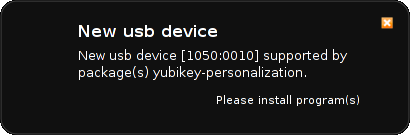
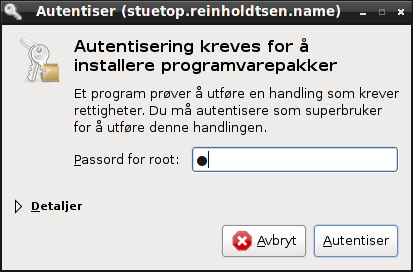
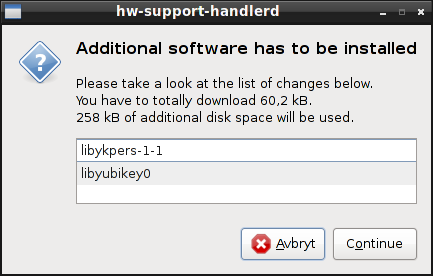
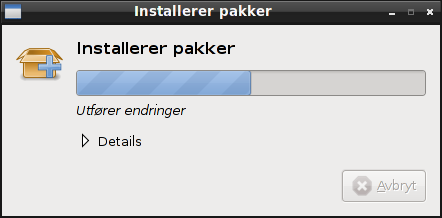
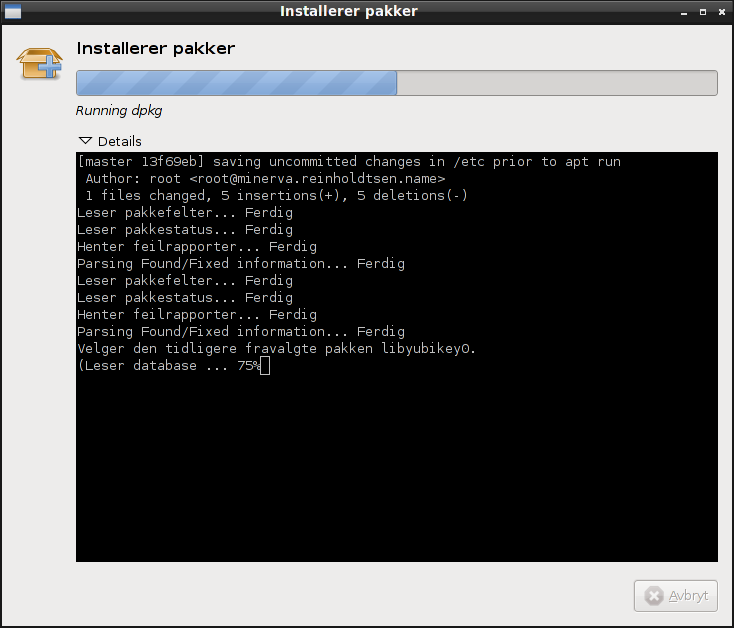
Early this month I set out to try to improve the Debian support for pluggable hardware devices. Now my prototype is working, and it is ready for a larger audience. To test it, fetch the source from the Debian Edu subversion repository, build and install the package. You might have to log out and in again activate the autostart script. The design is simple: I still need to come up with a better name for the system. Here are some screen shots showing the prototype in action. First the notification, then the password request, and finally the request to approve all the dependencies. Sorry for the Norwegian Bokm l GUI.


The prototype still need to be improved with longer timeouts, but is already useful. The database of hardware to package mappings also need more work. It is currently compatible with the Ubuntu way of storing such information in the package control file, but could be changed to use other formats instead or in addition to the current method. I've dropped the use of discover for this mapping, as the modalias approach is more flexible and easier to use on Linux as long as the Linux kernel expose its modalias strings directly. Update 2013-01-21 16:50: Due to popular demand, here is the command required to check out and build the source: Use 'svn checkout svn://svn.debian.org/debian-edu/trunk/src/hw-support-handler/; cd hw-support-handler; debuild'. If you lack debuild, install the devscripts package. Update 2013-01-23 12:00: The project is now renamed to Isenkram and the source moved from the Debian Edu subversion repository to a Debian collab-maint git repository. See build instructions for details.

19 January 2013

Petter Reinholdtsen: Thank you Thinkpad X41, for your long and trustworthy service

This Christmas my trusty old laptop died. It died quietly and suddenly in bed. With a quiet whimper, it went completely quiet and black. The power button was no longer able to turn it on. It was a IBM Thinkpad X41, and the best laptop I ever had. Better than both Thinkpads X30, X31, X40, X60, X61 and X61S. Far better than the Compaq I had before that. Now I need to find a replacement. To keep going during Christmas, I moved the one year old SSD disk to my old X40 where it fitted (only one I had left that could use it), but it is not a durable solution. My laptop needs are fairly modest. This is my wishlist from when I got a new one more than 10 years ago. It still holds true.:) You will notice that there are no RAM and CPU requirements in the list. The reason is simply that the specifications on laptops the last 10-15 years have been sufficient for my needs, and I have to look at other features to choose my laptop. But are there still made as robust laptops as my X41? The Thinkpad X60/X61 proved to be less robust, and Thinkpads seem to be heading in the wrong direction since Lenovo took over. But I've been told that X220 and X1 Carbon might still be useful. Perhaps I should rethink my needs, and look for a pad with an external keyboard? I'll have to check the Linux Laptops site for well-supported laptops, or perhaps just buy one preinstalled from one of the vendors listed on the Linux Pre-loaded site.

18 January 2013

Petter Reinholdtsen: How to find a browser plugin supporting a given MIME type

Some times I try to figure out which Iceweasel browser plugin to install to get support for a given MIME type. Thanks to specifications done by Ubuntu and Mozilla, it is possible to do this in Debian. Unfortunately, not very many packages provide the needed meta information, Anyway, here is a small script to look up all browser plugin packages announcing ther MIME support using this specification:
#!/usr/bin/python
import sys
import apt
def pkgs_handling_mimetype(mimetype):
    cache = apt.Cache()
    cache.open(None)
    thepkgs = []
    for pkg in cache:
        version = pkg.candidate
        if version is None:
            version = pkg.installed
        if version is None:
            continue
        record = version.record
        if not record.has_key('Npp-MimeType'):
            continue
        mime_types = record['Npp-MimeType'].split(',')
        for t in mime_types:
            t = t.rstrip().strip()
            if t == mimetype:
                thepkgs.append(pkg.name)
    return thepkgs
mimetype = "audio/ogg"
if 1 < len(sys.argv):
    mimetype = sys.argv[1]
print "Browser plugin packages supporting %s:" % mimetype
for pkg in pkgs_handling_mimetype(mimetype):
    print "  %s" %pkg
It can be used like this to look up a given MIME type:
% ./apt-find-browserplug-for-mimetype 
Browser plugin packages supporting audio/ogg:
  gecko-mediaplayer
% ./apt-find-browserplug-for-mimetype application/x-shockwave-flash
Browser plugin packages supporting application/x-shockwave-flash:
  browser-plugin-gnash
%
In Ubuntu this mechanism is combined with support in the browser itself to query for plugins and propose to install the needed packages. It would be great if Debian supported such feature too. Is anyone working on adding it? Update 2013-01-18 14:20: The Debian BTS request for icweasel support for this feature is #484010 from 2008 (and #698426 from today). Lack of manpower and wish for a different design is the reason thus feature is not yet in iceweasel from Debian.

16 January 2013

Petter Reinholdtsen: What is the most supported MIME type in Debian?

The DEP-11 proposal to add AppStream information to the Debian archive, is a proposal to make it possible for a Desktop application to propose to the user some package to install to gain support for a given MIME type, font, library etc. that is currently missing. With such mechanism in place, it would be possible for the desktop to automatically propose and install leocad if some LDraw file is downloaded by the browser. To get some idea about the current content of the archive, I decided to write a simple program to extract all .desktop files from the Debian archive and look up the claimed MIME support there. The result can be found on the Skolelinux FTP site. Using the collected information, it become possible to answer the question in the title. Here are the 20 most supported MIME types in Debian stable (Squeeze), testing (Wheezy) and unstable (Sid). The complete list is available from the link above. Debian Stable:
  count MIME type
  ----- -----------------------
     32 text/plain
     30 audio/mpeg
     29 image/png
     28 image/jpeg
     27 application/ogg
     26 audio/x-mp3
     25 image/tiff
     25 image/gif
     22 image/bmp
     22 audio/x-wav
     20 audio/x-flac
     19 audio/x-mpegurl
     18 video/x-ms-asf
     18 audio/x-musepack
     18 audio/x-mpeg
     18 application/x-ogg
     17 video/mpeg
     17 audio/x-scpls
     17 audio/ogg
     16 video/x-ms-wmv
Debian Testing:
  count MIME type
  ----- -----------------------
     33 text/plain
     32 image/png
     32 image/jpeg
     29 audio/mpeg
     27 image/gif
     26 image/tiff
     26 application/ogg
     25 audio/x-mp3
     22 image/bmp
     21 audio/x-wav
     19 audio/x-mpegurl
     19 audio/x-mpeg
     18 video/mpeg
     18 audio/x-scpls
     18 audio/x-flac
     18 application/x-ogg
     17 video/x-ms-asf
     17 text/html
     17 audio/x-musepack
     16 image/x-xbitmap
Debian Unstable:
  count MIME type
  ----- -----------------------
     31 text/plain
     31 image/png
     31 image/jpeg
     29 audio/mpeg
     28 application/ogg
     27 image/gif
     26 image/tiff
     26 audio/x-mp3
     23 audio/x-wav
     22 image/bmp
     21 audio/x-flac
     20 audio/x-mpegurl
     19 audio/x-mpeg
     18 video/x-ms-asf
     18 video/mpeg
     18 audio/x-scpls
     18 application/x-ogg
     17 audio/x-musepack
     16 video/x-ms-wmv
     16 video/x-msvideo
I am told that PackageKit can provide an API to access the kind of information mentioned in DEP-11. I have not yet had time to look at it, but hope the PackageKit people in Debian are on top of these issues. Update 2013-01-16 13:35: Updated numbers after discovering a typo in my script.

15 January 2013

Petter Reinholdtsen: Using modalias info to find packages handling my hardware

Yesterday, I wrote about the modalias values provided by the Linux kernel following my hope for better dongle support in Debian. Using this knowledge, I have tested how modalias values attached to package names can be used to map packages to hardware. This allow the system to look up and suggest relevant packages when I plug in some new hardware into my machine, and replace discover and discover-data as the database used to map hardware to packages. I create a modaliases file with entries like the following, containing package name, kernel module name (if relevant, otherwise the package name) and globs matching the relevant hardware modalias.
Package: package-name
Modaliases: module(modaliasglob, modaliasglob, modaliasglob)
It is fairly trivial to write code to find the relevant packages for a given modalias value using this file. An entry like this would suggest the video and picture application cheese for many USB web cameras (interface bus class 0E01):
Package: cheese
Modaliases: cheese(usb:v*p*d*dc*dsc*dp*ic0Eisc01ip*)
An entry like this would suggest the pcmciautils package when a CardBus bridge (bus class 0607) PCI device is present:
Package: pcmciautils
Modaliases: pcmciautils(pci:v*d*sv*sd*bc06sc07i*)
An entry like this would suggest the package colorhug-client when plugging in a ColorHug with USB IDs 04D8:F8DA:
Package: colorhug-client
Modaliases: colorhug-client(usb:v04D8pF8DAd*)
I believe the format is compatible with the format of the Packages file in the Debian archive. Ubuntu already uses their Packages file to store their mappings from packages to hardware. By adding a XB-Modaliases: header in debian/control, any .deb can announce the hardware it support in a way my prototype understand. This allow those publishing packages in an APT source outside the Debian archive as well as those backporting packages to make sure the hardware mapping are included in the package meta information. I've tested such header in the pymissile package, and its modalias mapping is working as it should with my prototype. It even made it to Ubuntu Raring. To test if it was possible to look up supported hardware using only the shell tools available in the Debian installer, I wrote a shell implementation of the lookup code. The idea is to create files for each modalias and let the shell do the matching. Please check out and try the hw-support-lookup shell script. It run without any extra dependencies and fetch the hardware mappings from the Debian archive and the subversion repository where I currently work on my prototype. When I use it on a machine with a yubikey inserted, it suggest to install yubikey-personalization:
% ./hw-support-lookup
yubikey-personalization
%
When I run it on my Thinkpad X40 with a PCMCIA/CardBus slot, it propose to install the pcmciautils package:
% ./hw-support-lookup
pcmciautils
%
If you know of any hardware-package mapping that should be added to my database, please tell me about it. It could be possible to generate several of the mappings between packages and hardware. One source would be to look at packages with kernel modules, ie packages with *.ko files in /lib/modules/, and extract their modalias information. Another would be to look at packages with udev rules, ie packages with files in /lib/udev/rules.d/, and extract their vendor/model information to generate a modalias matching rule. I have not tested any of these to see if it work. If you want to help implementing a system to let us propose what packages to install when new hardware is plugged into a Debian machine, please send me an email or talk to me on #debian-devel.

14 January 2013

Petter Reinholdtsen: Modalias strings - a practical way to map "stuff" to hardware

While looking into how to look up Debian packages based on hardware information, to find the packages that support a given piece of hardware, I refreshed my memory regarding modalias values, and decided to document the details. Here are my findings so far, also available in the Debian Edu subversion repository: Modalias decoded This document try to explain what the different types of modalias values stands for. It is in part based on information from <URL: https://wiki.archlinux.org/index.php/Modalias >, <URL: http://unix.stackexchange.com/questions/26132/how-to-assign-usb-driver-to-device >, <URL: http://code.metager.de/source/history/linux/stable/scripts/mod/file2alias.c > and <URL: http://cvs.savannah.gnu.org/viewvc/dmidecode/dmidecode.c?root=dmidecode&view=markup >. The modalias entries for a given Linux machine can be found using this shell script:
find /sys -name modalias -print0   xargs -0 cat   sort -u
The supported modalias globs for a given kernel module can be found using modinfo:
% /sbin/modinfo psmouse   grep alias:
alias:          serio:ty05pr*id*ex*
alias:          serio:ty01pr*id*ex*
%
PCI subtype A typical PCI entry can look like this. This is an Intel Host Bridge memory controller:
pci:v00008086d00002770sv00001028sd000001ADbc06sc00i00
This represent these values:
 v   00008086  (vendor)
 d   00002770  (device)
 sv  00001028  (subvendor)
 sd  000001AD  (subdevice)
 bc  06        (bus class)
 sc  00        (bus subclass)
 i   00        (interface)
The vendor/device values are the same values outputted from 'lspci -n' as 8086:2770. The bus class/subclass is also shown by lspci as 0600. The 0600 class is a host bridge. Other useful bus values are 0300 (VGA compatible card) and 0200 (Ethernet controller). Not sure how to figure out the interface value, nor what it means. USB subtype Some typical USB entries can look like this. This is an internal USB hub in a laptop:
usb:v1D6Bp0001d0206dc09dsc00dp00ic09isc00ip00
Here is the values included in this alias:
 v    1D6B  (device vendor)
 p    0001  (device product)
 d    0206  (bcddevice)
 dc     09  (device class)
 dsc    00  (device subclass)
 dp     00  (device protocol)
 ic     09  (interface class)
 isc    00  (interface subclass)
 ip     00  (interface protocol)
The 0900 device class/subclass means hub. Some times the relevant class is in the interface class section. For a simple USB web camera, these alias entries show up:
usb:v0AC8p3420d5000dcEFdsc02dp01ic01isc01ip00
usb:v0AC8p3420d5000dcEFdsc02dp01ic01isc02ip00
usb:v0AC8p3420d5000dcEFdsc02dp01ic0Eisc01ip00
usb:v0AC8p3420d5000dcEFdsc02dp01ic0Eisc02ip00
Interface class 0E01 is video control, 0E02 is video streaming (aka camera), 0101 is audio control device and 0102 is audio streaming (aka microphone). Thus this is a camera with microphone included. ACPI subtype The ACPI type is used for several non-PCI/USB stuff. This is an IR receiver in a Thinkpad X40:
acpi:IBM0071:PNP0511:
The values between the colons are IDs. DMI subtype The DMI table contain lots of information about the computer case and model. This is an entry for a IBM Thinkpad X40, fetched from /sys/devices/virtual/dmi/id/modalias:
dmi:bvnIBM:bvr1UETB6WW(1.66):bd06/15/2005:svnIBM:pn2371H4G:pvrThinkPadX40:rvnIBM:rn2371H4G:rvrNotAvailable:cvnIBM:ct10:cvrNotAvailable:
The values present are
 bvn  IBM            (BIOS vendor)
 bvr  1UETB6WW(1.66) (BIOS version)
 bd   06/15/2005     (BIOS date)
 svn  IBM            (system vendor)
 pn   2371H4G        (product name)
 pvr  ThinkPadX40    (product version)
 rvn  IBM            (board vendor)
 rn   2371H4G        (board name)
 rvr  NotAvailable   (board version)
 cvn  IBM            (chassis vendor)
 ct   10             (chassis type)
 cvr  NotAvailable   (chassis version)
The chassis type 10 is Notebook. Other interesting values can be found in the dmidecode source:
  3 Desktop
  4 Low Profile Desktop
  5 Pizza Box
  6 Mini Tower
  7 Tower
  8 Portable
  9 Laptop
 10 Notebook
 11 Hand Held
 12 Docking Station
 13 All In One
 14 Sub Notebook
 15 Space-saving
 16 Lunch Box
 17 Main Server Chassis
 18 Expansion Chassis
 19 Sub Chassis
 20 Bus Expansion Chassis
 21 Peripheral Chassis
 22 RAID Chassis
 23 Rack Mount Chassis
 24 Sealed-case PC
 25 Multi-system
 26 CompactPCI
 27 AdvancedTCA
 28 Blade
 29 Blade Enclosing
The chassis type values are not always accurately set in the DMI table. For example my home server is a tower, but the DMI modalias claim it is a desktop. SerIO subtype This type is used for PS/2 mouse plugs. One example is from my test machine:
serio:ty01pr00id00ex00
The values present are
  ty  01  (type)
  pr  00  (prototype)
  id  00  (id)
  ex  00  (extra)
This type is supported by the psmouse driver. I am not sure what the valid values are. Other subtypes There are heaps of other modalias subtypes according to file2alias.c. There is the rest of the list from that source: amba, ap, bcma, ccw, css, eisa, hid, i2c, ieee1394, input, ipack, isapnp, mdio, of, parisc, pcmcia, platform, scsi, sdio, spi, ssb, vio, virtio, vmbus, x86cpu and zorro. I did not spend time documenting all of these, as they do not seem relevant for my intended use with mapping hardware to packages when new stuff is inserted during run time. Looking up kernel modules using modalias values To check which kernel modules provide support for a given modalias, one can use the following shell script:
  for id in $(find /sys -name modalias -print0   xargs -0 cat   sort -u); do \
    echo "$id" ; \
    /sbin/modprobe --show-depends "$id" sed 's/^/  /' ; \
  done
The output can look like this (only the first few entries as the list is very long on my test machine):
  acpi:ACPI0003:
    insmod /lib/modules/2.6.32-5-686/kernel/drivers/acpi/ac.ko 
  acpi:device:
  FATAL: Module acpi:device: not found.
  acpi:IBM0068:
    insmod /lib/modules/2.6.32-5-686/kernel/drivers/char/nvram.ko 
    insmod /lib/modules/2.6.32-5-686/kernel/drivers/leds/led-class.ko 
    insmod /lib/modules/2.6.32-5-686/kernel/net/rfkill/rfkill.ko 
    insmod /lib/modules/2.6.32-5-686/kernel/drivers/platform/x86/thinkpad_acpi.ko 
  acpi:IBM0071:PNP0511:
    insmod /lib/modules/2.6.32-5-686/kernel/lib/crc-ccitt.ko 
    insmod /lib/modules/2.6.32-5-686/kernel/net/irda/irda.ko 
    insmod /lib/modules/2.6.32-5-686/kernel/drivers/net/irda/nsc-ircc.ko 
  [...]
If you want to help implementing a system to let us propose what packages to install when new hardware is plugged into a Debian machine, please send me an email or talk to me on #debian-devel. Update 2013-01-15: Rewrite "cat $(find ...)" to "find ... -print0 xargs -0 cat" to make sure it handle directories in /sys/ with space in them.

10 January 2013

Petter Reinholdtsen: Moved the pymissile Debian packaging to collab-maint

As part of my investigation on how to improve the support in Debian for hardware dongles, I dug up my old Mark and Spencer USB Rocket Launcher and updated the Debian package pymissile to make sure udev will fix the device permissions when it is plugged in. I also added a "Modaliases" header to test it in the Debian archive and hopefully make the package be proposed by jockey in Ubuntu when a user plug in his rocket launcher. In the process I moved the source to a git repository under collab-maint, to make it easier for any DD to contribute. Upstream is not very active, but the software still work for me even after five years of relative silence. The new git repository is not listed in the uploaded package yet, because I want to test the other changes a bit more before I upload the new version. If you want to check out the new version with a .desktop file included, visit the gitweb view or use "git clone git://anonscm.debian.org/collab-maint/pymissile.git".

9 January 2013

Petter Reinholdtsen: Lets make hardware dongles easier to use in Debian

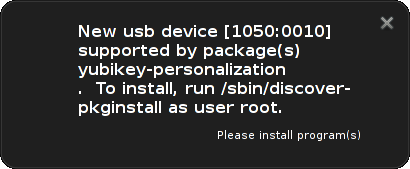
One thing that annoys me with Debian and Linux distributions in general, is that there is a great package management system with the ability to automatically install software packages by downloading them from the distribution mirrors, but no way to get it to automatically install the packages I need to use the hardware I plug into my machine. Even if the package to use it is easily available from the Linux distribution. When I plug in a LEGO Mindstorms NXT, it could suggest to automatically install the python-nxt, nbc and t2n packages I need to talk to it. When I plug in a Yubikey, it could propose the yubikey-personalization package. The information required to do this is available, but no-one have pulled all the pieces together. Some years ago, I proposed to use the discover subsystem to implement this. The idea is fairly simple: I am not sure what the best way to implement this is, but my initial idea was to use dbus events to discover new hardware, the discover database to find packages and PackageKit to install packages. Yesterday, I found time to try to implement this idea, and the draft package is now checked into the Debian Edu subversion repository. In the process, I updated the discover-data package to map the USB ids of LEGO Mindstorms and Yubikey devices to the relevant packages in Debian, and uploaded a new version 2.2013.01.09 to unstable. I also discovered that the current discover package in Debian no longer discovered any USB devices, because /proc/bus/usb/devices is no longer present. I ported it to use libusb as a fall back option to get it working. The fixed package version 2.1.2-6 is now in experimental (didn't upload it to unstable because of the freeze). With this prototype in place, I can insert my Yubikey, and get this desktop notification to show up (only once, the first time it is inserted):

For this prototype to be really useful, some way to automatically install the proposed packages by pressing the "Please install program(s)" button should to be implemented. If this idea seem useful to you, and you want to help make it happen, please help me update the discover-data database with mappings from hardware to Debian packages. Check if 'discover-pkginstall -l' list the package you would like to have installed when a given hardware device is inserted into your computer, and report bugs using reportbug if it isn't. Or, if you know of a better way to provide such mapping, please let me know. This prototype need more work, and there are several questions that should be considered before it is ready for production use. Is dbus the correct way to detect new hardware? At the moment I look for HAL dbus events on the system bus, because that is the events I could see on my Debian Squeeze KDE desktop. Are there better events to use? How should the user be notified? Is the desktop notification mechanism the best option, or should the background daemon raise a popup instead? How should packages be installed? When should they not be installed? If you want to help getting such feature implemented in Debian, please send me an email. :)

2 January 2013

Petter Reinholdtsen: New IRC channel for LEGO designers using Debian

During Christmas, I have worked a bit on the Debian support for LEGO Mindstorm NXT. My son and I have played a bit with my NXT set, and I discovered I had to build all the tools myself because none were already in Debian Squeeze. If Debian support for LEGO is something you care about, please join me on the IRC channel #debian-lego (server irc.debian.org). There is a lot that could be done to improve the Debian support for LEGO designers. For example both CAD software and Mindstorm compilers are missing. :) Update 2012-01-03: A project page including links to Lego related packages is now available.

28 December 2012

Petter Reinholdtsen: A Christmas present for Skolelinux / Debian Edu

I was happy to discover a few days ago that the Skolelinux / Debian Edu project also this year received a Christmas present from Another Agency in Trondheim. NOK 1000,- showed up on our donation account December 24th. I want to express our thanks for this very welcome present. As the Debian Edu / Skolelinux project is very short on funding these days, and thus lack the money to do regular developer gatherings, this donation was most welcome. One developer gathering cost around NOK 15 000,-, so we need quite a lot more to keep the development pace we want. Thus, I hope their example this year is followed by many others. :) The public list of donors can be found on the donation page for the project, which also contain instructions if you want to donate to the project.

25 December 2012

Petter Reinholdtsen: How to backport bitcoin-qt version 0.7.2-2 to Debian Squeeze

Let me start by wishing you all marry Christmas and a happy new year! I hope next year will prove to be a good year. Bitcoin, the digital decentralised "currency" that allow people to transfer bitcoins between each other with minimal overhead, is a very interesting experiment. And as I wrote a few days ago, the bitcoin situation in Debian is about to improve a bit. The new debian source package (version 0.7.2-2) was uploaded yesterday, and is waiting in the NEW queue for one of the ftpmasters to approve the new bitcoin-qt package name. And thanks to the great work of Jonas and the rest of the bitcoin team in Debian, you can easily test the package in Debian Squeeze using the following steps to get a set of working packages:
git clone git://git.debian.org/git/collab-maint/bitcoin
cd bitcoin
DEB_MAINTAINER_MODE=1 DEB_BUILD_OPTIONS=noupnp fakeroot debian/rules clean
DEB_BUILD_OPTIONS=noupnp git-buildpackage --git-ignore-new
You might have to install some build dependencies as well. The list of commands should give you two packages, bitcoind and bitcoin-qt, ready for use in a Squeeze environment. Note that the client will download the complete set of bitcoin "blocks", which need around 5.6 GiB of data on my machine at the moment. Make sure your ~/.bitcoin/ directory have lots of spare room if you want to download all the blocks. The client will warn if the disk is getting full, so there is not really a problem if you got too little room, but you will not be able to get all the features out of the client. As usual, if you use bitcoin and want to show your support of my activities, please send Bitcoin donations to my address 15oWEoG9dUPovwmUL9KWAnYRtNJEkP1u1b.

21 December 2012

Petter Reinholdtsen: A word on bitcoin support in Debian

It has been a while since I wrote about bitcoin, the decentralised peer-to-peer based crypto-currency, and the reason is simply that I have been busy elsewhere. But two days ago, I started looking at the state of bitcoin in Debian again to try to recover my old bitcoin wallet. The package is now maintained by a team of people, and the grunt work had already been done by this team. We owe a huge thank you to all these team members. :) But I was sad to discover that the bitcoin client is missing in Wheezy. It is only available in Sid (and an outdated client from backports). The client had several RC bugs registered in BTS blocking it from entering testing. To try to help the team and improve the situation, I spent some time providing patches and triaging the bug reports. I also had a look at the bitcoin package available from Matt Corallo in a PPA for Ubuntu, and moved the useful pieces from that version into the Debian package. After checking with the main package maintainer Jonas Smedegaard on IRC, I pushed several patches into the collab-maint git repository to improve the package. It now contains fixes for the RC issues (not from me, but fixed by Scott Howard), build rules for a Qt GUI client package, konqueror support for the bitcoin: URI and bash completion setup. As I work on Debian Squeeze, I also created a patch to backport the latest version. Jonas is going to look at it and try to integrate it into the git repository before uploading a new version to unstable. I would very much like bitcoin to succeed, to get rid of the centralized control currently exercised in the monetary system. I find it completely unacceptable that the USA government is collecting transaction data for almost all international money transfers (most are done in USD and transaction logs shipped to the spooks), and that the major credit card companies can block legal money transactions to Wikileaks. But for bitcoin to succeed, more people need to use bitcoins, and more people need to accept bitcoins when they sell products and services. Improving the bitcoin support in Debian is a small step in the right direction, but not enough. Unfortunately the user experience when browsing the web and wanting to pay with bitcoin is still not very good. The bitcoin: URI is a step in the right direction, but need to work in most or every browser in use. Also the bitcoin-qt client is too heavy to fire up to do a quick transaction. I believe there are other clients available, but have not tested them. My experiment with bitcoins showed that at least some of my readers use bitcoin. I received 20.15 BTC so far on the address I provided in my blog two years ago, as can be seen on the blockexplorer service. Thank you everyone for your donation. The blockexplorer service demonstrates quite well that bitcoin is not quite anonymous and untracked. :) I wonder if the number of users have gone up since then. If you use bitcoin and want to show your support of my activity, please send Bitcoin donations to the same address as last time, 15oWEoG9dUPovwmUL9KWAnYRtNJEkP1u1b.

18 December 2012

Petter Reinholdtsen: Ledger - double-entry accounting using text based storage format

A few days ago I came across a blog post from Joey Hess describing ledger and hledger, a text based system for double-entry accounting. I found it interesting, as I am involved with several organizations where accounting is an issue, and I have not really become too friendly with the different web based systems we use. I find it hard to find what I look for in the menus and even harder try to get sensible data out of the systems. Ledger seem different. The accounting data is kept in text files that can be stored in a version control system, and there are at least five different implementations able to read the format. An example entry look like this, and is simple enough that it will be trivial to generate entries based on CVS files fetched from the bank:
2004-05-27 Book Store
      Expenses:Books                 $20.00
      Liabilities:Visa
The concept seemed interesting enough for me to check it out and look for others using it. I found blog posts from Christine Spang, Pete Keen, Andrew Cantino and Ronald Ip describing how they use it, as well as a post from Bradley M. Kuhn at the Software Freedom Conservancy. All seemed like good recommendations fitting my need. The ledger package is available in Debian Squeeze, while the hledger package only is available in Debian Sid. As I use Squeeze, ledger seemed the best choice to get started. To get some real data to test on, I wrote a web scraper for LODO, the accounting system used by the NUUG association, and started to play with the data set. I'm not really deeply into accounting, but I am able to get a simple balance and accounting status for example using the "ledger balance" command. But I will have to gather more experience before I know if the ledger way is a good fit for the organisations I am involved in.

6 December 2012

Petter Reinholdtsen: Scripting the Cerebrum/bofhd user administration system using XML-RPC

Where I work at the University of Oslo, we use the Cerebrum user administration system to maintain users, groups, DNS, DHCP, etc. I've known since the system was written that the server is providing an XML-RPC API, but I have never spent time to try to figure out how to use it, as we always use the bofh command line client at work. Until today. I want to script the updating of DNS and DHCP to make it easier to set up virtual machines. Here are a few notes on how to use it with Python. I started by looking at the source of the Java bofh client, to figure out how it connected to the API server. I also googled for python examples on how to use XML-RPC, and found a simple example in the XML-RPC howto. This simple example code show how to connect, get the list of commands (as a JSON dump), and how to get the information about the user currently logged in:
#!/usr/bin/env python
import getpass
import xmlrpclib
server_url = 'https://cerebrum-uio.uio.no:8000';
username = getpass.getuser()
password = getpass.getpass()
server = xmlrpclib.Server(server_url);
#print server.get_commands(sessionid)
sessionid = server.login(username, password)
print server.run_command(sessionid, "user_info", username)
result = server.logout(sessionid)
print result
Armed with this knowledge I can now move forward and script the DNS and DHCP updates I wanted to do.

Next.

Previous.