Search Results: "zed"

3 June 2010

Mehdi Dogguy: UbuntuDiff updates

Since the recent announce of http://ubuntudiff.debian.net, some people started using it and asked for a few features. Lately, I ve been working on it and tried to implement the following: I ll still have some details to fix like putting the download patch link on the left, fix the show/hide thing which is also activated when you click on download patch . Then, I ll consider it feature-complete (almost) and won t touch it again. My next game will be to write some tools to analyse or detect new transitions if you want to play, let me know :) As always, please test this new beta version of UbuntuDiff (and enjoy it :p) and maybe, you may also report errors/bugs, if any :) [1] http://ubuntudiff.debian.net/beta/

1 June 2010

Joey Hess: making the bed

This should solve the yurt's bed problem. Over the past two years I've learned there are really two: It's not a fully dry environment so anything left on the floor will mildew; and the yurt makes no pretense of having a level floor. Thus this custom bed with independently levelable legs, custom sized to hold together a multipart matress. In keeping with the yurt thing, it's disassemblable and portable, but not too easily. :) Couldn't have been done without Mark's skilled ripping of the plywood. Anna cut the smaller boards and assisted, and we were very happy with what we managed to accomplish in a few hours. It's sturdy, and even level.

31 May 2010

Gunnar Wolf: Pleasant perception changes

My day started late, although I didn't scratch the plan: Enjoy 40Km cycling, as as every last Sunday of the month we have the delicious Ciclot n 32Km, plus ~10km from and to my house. Approximately 12:00-14:20, including stopping at a service station to patch my rear tire. Yes, I was pressing my way up the last bridge (Circuito Interior over Coyoac n and Universidad) when the road was opened to motorized traffic. Two hours of cycling are enough to make me a happy person. However, I have been downish lately, and during the afternoon (which I spent doing some home maintenance, as I usually do on weekends), I felt this downness grow somewhat. Nothing terrible, just I guess the processes that I have to live through. Then, after ~1hr reading a somewhat tough book, I closed it thinking, "this was a good day". And surprised myself with the reflection. So, while I don't think this can put me back into the activity/productivity status I have held and would love to regain... Is certainly a very nice push forward. Time to get something for dinner, as my body also reminded me it is not exempt of such needs (as it faithfully reminds me, often more frequently than it should)

29 May 2010

Matt Zimmerman: Extracting files from a nandroid backup using unyaffs

I recently upgraded my G1 phone to the latest Cyanogen build (5.x). Since the upgrade instructions recommend wiping user data, I made a nandroid backup first, using the handy Amon_RA recovery image. I ve gotten pretty familiar with the Android filesystem layout, and was confident I could restore anything I really missed (such as my wpa_supplicant.conf with all of my WiFi credentials). It wasn t until I finished with the upgrade that I realized the backup wasn t trivial to work with. It s a raw yaffs2 flash image, which can t be simply mounted on a loop device. After messing around for a bit with the nandsim module, mtd-utils and the yaffs2 kernel module, I realized there was a much simpler way: the unassuming unyaffs. It says that it can only extract images created by mkyaffs2image, but apparently the images in the nandroid backup are created this way (or otherwise compatible with unyaffs). So I downloaded and built unyaffs:
svn checkout http://unyaffs.googlecode.com/svn/trunk/ unyaffs
cd unyaffs
gcc -o unyaffs unyaffs.c
and then ran it on the backup image:
mkdir g1data && cd g1data # unyaffs extracts into the current directory
~/src/android/unyaffs/unyaffs /media/G1data/nandroid/HT839GZ23983/BCDS-20100529-1311/data.img
At which point I could restore files one by one, e.g.:
adb push /tmp/g1data/misc/wifi/wpa_supplicant.conf /data/misc/wifi/
After toggling WiFi off and then back on, all of my credentials were restored. I was able to restore preferences for various applications in the same way.

Bernd Zeimetz: installing debian on the guruplug server plus

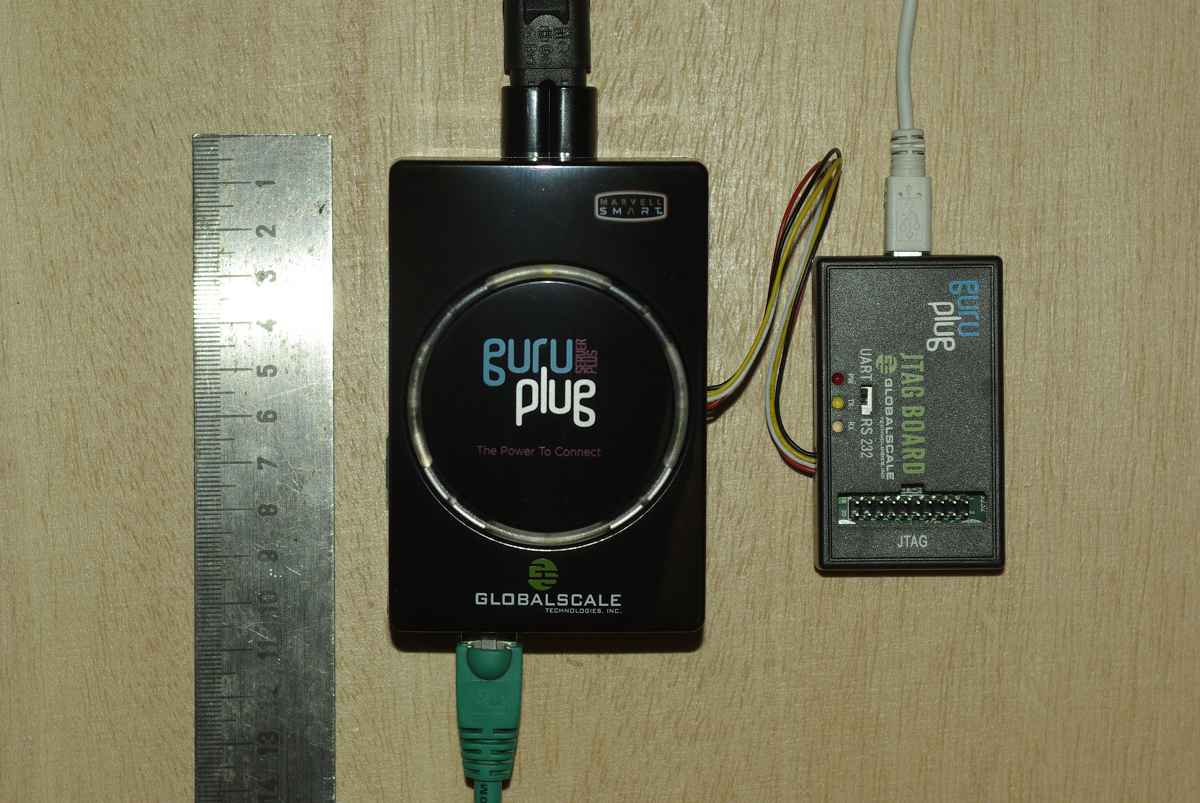
Yesterday finally my GuruPlug Server Plus arrived. Took longer than expected, but as it seems Globalscale had some issues with the power supplies and they were replaced before shipping the GuruPlugs. GuruPlug Server Plus and JTAG Board

The GuruPlug Basically the GuruPlugs are an enhanced version of the well known SheevaPlugs, the biggest difference is probably the need for an external JTAG/UART<>RS232 board to access the serial console. Good thing is that the board comes with a normal JTAG connector and an additional RS232 connector and 2.5V DC power outlet, so it will be useful for other devices, too. Globalscale could have chosen different connectors with less wiggly cables, though. As I was not able to find a useful howto about installing Debian on the Guruplug, I've written down what I did to install Debian unstable on a micro SD card using the Debian installer for the GuruPlug. I did not have a look who modified the Debian installer to work on the plug, but thanks for that! The instructions below are based on Martin Michlmayer's awesome SheevaPlug documentation, the hints from oinkzwurgl.org/guruplug and various forum posts in the plugforum.

Preparations Please note that I'm not resposible for whatever you're doing with your plug. If you follow this tutorial and end up with a brick, it is your fault, not mine. To install the GuruPlug you need the JTAG Board. Connect the UART port to the GuruPlug and the JTAG board to your computer, it should show up as FTDI (thanks for using good chips!) USB<>Serial converter. Serial port settings are 115200, 8-N-1, no hw/sw flow control. The other thing you should prepare is a working tftpd, I'm using aftpd.
apt-get install aftpd
Recent versions share files from /srv/tftp/, in case you're running Lenny /var/lib/tftpboot/ should be the place to drop your files. When everything is connected properly the boot process should show up in minicom, make sure to press some key to enter uBoot. The first thing you should do is to save the original uBoot environment in case you want to restore the factory settings later. Run
printenv
and save the output somewhere.

Upgrading uBoot Unfortunately the uBoot version on the GuruPlug is pretty old and seems to have some issues in booting from USB devices, so the first thing you should do is to upgrade it. You might want to investigate if there is even a better, more recent uBoot version available somewhere, or build one on your own, but I didn't bother and took the uBoot.guruplug.bin from here. The main issue with that is that booting from USB still seems to be buggy (even for FAT partitions) and that ext2load is still not supported. Otherwise it works well :-). I'm mainly following Martin Michlmayer's tutorial again. Download the uBoot.guruplug.bin and drop it into the tftpd directory. Make sure you always set the plug's IP address (ipaddr) and your server's IP address (serverip) properly. I'll use 192.168.121.253 for the plug and 192.168.121.2 for the server in all examples, make sure to change that for your own needs. Stop if something goes wrong, especially when the tftp download failed.
setenv ipaddr 192.168.121.253
setenv serverip 192.168.121.2
tftp 0x6400000 uBoot.guruplug.bin
nand erase 0x00000000 0x0100000
nand write 0x6400000 0x0000000 0x80000
reset
Enter uBoot again after the reset.

Preparing the installer Download uImage and uInitrd to your tftpd directory. Although I've heard that setting mainlineLinux/arcNumber in the uBoot environment is not necessary anymore for very recent kernel, lets set them to make sure the Debian kernel works:
setenv mainlineLinux yes
setenv arcNumber 2097
saveenv
reset
Again, enter uBoot after the reset.

Running the installer Run the following in the uBoot console:
setenv ipaddr 192.168.121.253
setenv serverip 192.168.121.2
tftpboot 0x01100000 uInitrd
tftpboot 0x00800000 uImage
setenv bootargs console=ttyS0,115200n8 base-installer/initramfs-tools/driver-policy=most
bootm 0x00800000 0x01100000
You should see the installer starting now. You might want to follow the following hints:
  • Before configuring the network, go back and set the debconf priority to low, Then continue. While chosing the Debian mirror, chose sid as the Debian version to install. If you don't have sid as choice, use a different mirror. The kernel in testing does not boot on the GuruPlug, you need 2.6.32-13 from sid.
  • You might want to load the 'network console' installer component and continue via ssh. Makes things fater and colourful.
  • Suggested partitioning: I've installed Debian to an 8GB micro SDcard. The SDcard reader is connected via USB and shows up as /dev/sdb (/dev/sda should be the internal NAND and not shown by the installer). I've used 150MB ext2 for /boot and the rest of the space for /, using ext4. You might want to use the noatime option on both filesystems to avoid unnecessary write access to the SDcard. You might choose to add a swap partition, but SDcards are so slow, so I've skipped that.
When you continue the installation, you will hit the following problem:
  • The installer might fail on 'Make the system bootable' (not sure if it does for you, it did so with the kernel from testing).
  • The uBoot is not able to boot from your /boot anyway. USB support is buggy and ext2load missing.
We'll work around these issues by writing the kernel and initrd into the plug's NAND. To do so, enter a shell in the installer and chroot into the install target. We'll then create the necessary uImage.bin and uInitrd and scp them to our tftpd directory:
chroot /target /bin/bash
cd /boot
mkimage -n vmlinuz -A arm -O linux -T kernel -C none -a 0x00008000 -e 0x00008000 -d /boot/vmlinuz uImage.bin
mkimage -n 'vmlinuz initrd' -A arm -O linux -T ramdisk -C gzip -d /boot/initrd.img uInitrd
scp uI* root@192.168.121.2:/srv/tftp
Now leave the shell, finish the installation and reboot, enter uBoot again.

Make the plug bootable To write kernel and initrd to the NAND memory, we have to transfer it via tftp first, then erase the NAND area we want to write to and then write it to the NAND. The values I've chosen here should be fine for the current Debian kernel, but you might need to change the necessary size for the initrd. To do so have a look at the output while transferring the initrd - the transferred bytes are displayed. They have to fit into the amount of bytes you write (the last option to nand write.e).
setenv ipaddr 192.168.121.253
setenv serverip 192.168.121.2
tftp 0x6400000 uImage.bin
nand erase 0x100000 0x400000
nand write.e 0x6400000 0x100000 0x400000
tftp 0x6400000 uInitrd
nand erase 0x500000 0x1fb00000
nand write.e 0x6400000 0x500000 0x600000
Now we need to set the necessary boot options. Make sure to change the root device if you've chosen a different layout from that I've suggested above, or if you're not using a SDcard.
setenv bootargs_debian 'console=ttyS0,115200 root=/dev/sdb2'
setenv bootcmd_nand 'nand start; nand read.e 0x00800000 0x100000 0x400000; nand read.e 0x01100000 0x500000 0x600000'
setenv bootcmd 'setenv bootargs $(bootargs_debian); run bootcmd_nand; bootm 0x00800000 0x01100000'
saveenv
run bootcmd

Finish Your GuruPlug should boot your new Debian installation now. Have fun! I'll try to keep the howto updated for changes in uBoot and the installer, but I might not have the time to so quickly. Patches and comments are welcome!.
root@guruplug:~# uname -a
Linux guruplug 2.6.32-5-kirkwood #1 Fri May 21 05:44:29 UTC 2010 armv5tel GNU/Linux
root@guruplug:~# cat /proc/cpuinfo 
Processor   : Feroceon 88FR131 rev 1 (v5l)
BogoMIPS    : 1192.75
Features    : swp half thumb fastmult edsp 
CPU implementer : 0x56
CPU architecture: 5TE
CPU variant : 0x2
CPU part    : 0x131
CPU revision    : 1
Hardware    : Marvell GuruPlug Reference Board
Revision    : 0000
Serial      : 0000000000000000
root@guruplug:~# 

Russell Coker: Logging in as Root

Martin Meredith wrote a blog post about logging in as root and the people who so strongly advocate against it [1]. The question is whether you should ssh directly to the root account on a remote server or whether you should ssh to a non-root account and use sudo or su to gain administrative privileges. Does sudo/su make your system more secure? Some years ago the administrator of a SE Linux Play Machine used the same home directory for play users to login as for administrative logins as for his own logins he used newrole to gain administrative access (like su or sudo but for SE Linux). His machine was owned by one of his friends who created a shell function named newrole in one of his login scripts that used netcat to send the administrative password out over the net. He didn t immediately realise that this was a problem until his friend changed the password and locked him out! This is one example of a system being 0wned due to having the double-authentication of course if he had logged in directly with administrative privs while using the same home directory that the attacker could write to then he would still have lost but the attacker would have had to do a little more work. When you login you have lots of shell scripts run on your behalf which have the ability to totally control your environment, if someone has taken over those scripts then they can control everything you see, when you think you run sudo or something they can get the password. When you ssh in to a server your security relies on the security of the client end-point, the encryption of the ssh protocol (including keeping all keys secure to prevent MITM attacks), and the integrity of all the programs that are executed before you have control of the remote system. One benefit for using sshd to spawn a session without full privileges is in the case where you fear an exploit against sshd and are running SE Linux or some other security system that goes way beyond Unix permissions. It is possible to configure SE Linux in the strict configuration to deny administrative rights to any shell that is launched directly by the sshd. Therefore someone who cracks sshd could only wait until an administrator logs in and runs newrole and they wouldn t be able to immediately take over the system. If the sysadmin suspected that a sshd compromise is possible then a sysadmin could login through some other method (maybe visit the server and login at the console) to upgrade the sshd. This is however a very unusual scenario and I suspect that most people who advocate using sudo exclusively don t use a SE Linux strict configuration. Does su/sudo improve auditing? If you have multiple people with root access to one system it can be difficult to determine who did what. If you force everyone to use su or sudo then you will have a record of which Unix account was used to start the root session. Of course if multiple people start root shells via su and leave them running then it can be difficult to determine which of the people who had such shells running made the mistake but at least that reduces the list of suspects. If you put PermitUserEnvironment yes in /etc/ssh/sshd_config then you have the option of setting environment variables by ssh authorized_keys entries, so you could have an entry such as the following: environment= ORIG_USER=john@example.com ssh-rsa AAAAB3Nz[...]/w== john@example.com Then you could have the .bashrc file (or a similar file for your favorite shell) have code such as the following to log the relevant data to syslogd:
if [ "$SSH_TTY" = "" ]; then
logger -p auth.info "user $ORIG_USER ran command \"$BASH_EXECUTION_STRING\" as root"
else
logger -p auth.info "user $ORIG_USER logged in as root on tty $(tty)"
fi I think that forcing the use of su or sudo might improve the ability to track other sysadmins if the system is not well configured. But it seems obvious that the same level of tracking can be implemented in other ways with a small amount of effort. It took me about 30 minutes to devise the above shell code and configuration options, it should take people who read this blog post about 5 minutes to implement it (or maybe 10 minutes if they use a different shell or have some other combination of Bash configuration that results in non-obvious use of initialisation scripts (EG if you have a .bash_profile file then .bashrc may not be executed). Once you have the above infrastructure for logging root login sessions it wouldn t be difficult to run a little script that asks the sysadmin what is the purpose for your root login and logs what they type. If several sysadmins are logged in at the same time and one of them describes the purpose of their login as to reconfigure LDAP then you know who to talk to if your LDAP server stops working! Should you run commands with minimum privilege? It s generally regarded that running each command with the minimum privilege is a good idea. But if the only reason you login to a server is to do root tasks (restarting daemons, writing to files that are owned by root, etc) then there really isn t a lot of potential for achieving anything by doing so. If you need to use a client for a particular service (EG a web browser to test the functionality of a web server or proxy server) then you can login to a different account for that purpose the typical sysadmin desktop has a dozen xterms open at once, using one for root access to do the work and another for non-root access to do the testing is probably a good option. Can root be used for local access? Linux Journal has an article about the distribution that used to be known as Lindows (later Linspire) which used root as the default login for desktop use [2]. It suggests using a non-root account because If someone can trick you into running a program or if a virus somehow runs while you are logged in, that program then has the ability to do anything at all of course someone could trick you into running a program or virus that attempts to run sudo (to see if you enabled it without password checks) and if that doesn t work waits until you run sudo and sniffs the password (using pty interception or X event sniffing). The article does correctly note that you can easily accidentally damage your system as root. Given that the skills of typical Linux desktop users are significantly less than those of typical system administrators it seems reasonable to assume that certain risks of mistake which are significant for desktop users aren t a big deal with skilled sysadmins. I think that it was a bad decision by the Lindows people to use root for everything due to the risk of errors. If you make a mistake on a desktop system as non-root then if your home directory was backed up recently and you use IMAP or caching IMAP for email access then you probably won t lose much of note. But if you make a serious mistake as root then the minimum damage is being forced to do a complete reinstall, which is time consuming and annoying even if you have the installation media handy and your Internet connection has enough quota for the month to complete the process. Finally there are some services that seek out people who use the root account for desktop use. Debian has some support channels on IRC [3] and I decided to use the root account from my SE Linux Play Machine [4] to see how they go. #debian has banned strings matching root. #linpeople didn t like me because Deopped you on channel #linpeople because it is registered with channel services . #linuxhelp and #help let me in, but nothing seemed to be happening in those channels. Last time I tried this experiment I had a minor debate with someone who repeated a mantra about not using root and didn t show any interest in reading my explanation of why root:user_r:user_t is safe for IRC. I can t imagine that good the #debian people expect to gain from denying people the ability to access that channel with an IRC client that reports itself to be running as root. Doing so precludes the possibility of educating them if you think that they are doing something wrong (such as running a distribution like Lindows/Linspire). Conclusion I routinely ssh directly to servers as root. I ve been doing so for as long as ssh has been around and I used to telnet to systems as root before that. Logging in to a server as root without encryption is in most cases a really bad idea, but before ssh was invented it was the only option that was available. For the vast majority of server deployments I think that there is no good reason to avoid sshing directly as root.

27 May 2010

Petter Reinholdtsen: Parallellized boot seem to hold up well in Debian/testing

A few days ago, parallel booting was enabled in Debian/testing. The feature seem to hold up pretty well, but three fairly serious issues are known and should be solved: All in all not many surprising issues, and all of them seem solvable before Squeeze is released. In addition to these there are some packages with bugs in their dependencies and run level settings, which I expect will be fixed in a reasonable time span. If you report any problems with dependencies in init.d scripts to the BTS, please usertag the report to get it to show up at the list of usertagged bugs related to this. Update: Correct bug number to file-rc issue.

Matt Zimmerman: Rethinking the Ubuntu Developer Summit

This is a repost from the ubuntu-devel mailing list, where there is probably some discussion happening by now. After each UDS, the organizers evaluate the event and consider how it could be further improved in the future. As a result of this process, the format of UDS has evolved considerably, as it has grown from a smallish informal gathering to a highly structured matrix of hundreds of 45-to-60-minute sessions with sophisticated audiovisual facilities. If you participated in UDS 10.10 (locally or online), you have hopefully already completed the online survey, which is an important part of this evaluation process. A survey can t tell the whole story, though, so I would also like to start a more free-form discussion here among Ubuntu developers as well. I have some thoughts I d like to share, and I m interested in your perspectives as well. Purpose The core purpose of UDS has always been to help Ubuntu developers to explore, refine and share their plans for the subsequent release. It has expanded over the years to include all kinds of contributors, not only developers, but the principle remains the same. We arrive at UDS with goals, desires and ideas, and leave with a plan of action which guides our work for the rest of the cycle. The status quo UDS looks like this: This screenshot is only 1600 1200, so there are another 5 columns off the right edge of the screen for a total of 18 rooms. With 7 time slots per day over 5 days, there are over 500 blocks in the schedule grid. 9 tracks are scattered over the grid. We produce hundreds of blueprints representing projects we would like to work on. It is an impressive achievement to pull this event together every six months, and the organizers work very hard at it. We accomplish a great deal at every UDS, and should feel good about that. We must also constantly evaluate how well it is working, and make adjustments to accommodate growth and change in the project. How did we get here? (this is all from memory, but it should be sufficiently accurate to have this discussion) In the beginning, before it was even called UDS, we worked from a rough agenda, adding items as they came up, and ticking them off as we finished talking about them. Ad hoc methods worked pretty well at this scale. As the event grew, and we held more and more discussions in parallel, it was hard to keep track of who was where, and we started to run into contention. Ubuntu and Launchpad were planning their upcoming work together at the same time. One group would be discussing topic A, and find that they needed the participation of person X, who was already involved in another discussion on topic B. The A group would either block, or go ahead without the benefit of person X, neither of which was seen to be very effective. By the end of the week, everyone was mentally and physically exhausted, and many were ill. As a result, we decided to adopt a schedule grid, and ensure that nobody was expected to be in two places at once. Our productivity depended on getting precisely the right people face to face to tackle the technical challenges we faced. This meant deciding in advance who should be present in each session, and laying out the schedule to satisfy these constraints. New sessions were being added all the time, so the UDS organizers would stay up late at night during the event, creating the schedule grid for the next day. In the morning, over breakfast, everyone would tell them about errors, and request revisions to the schedule. Revisions to the schedule were painful, because we had to re-check all of the constraints by hand. So, in the geek spirit, we developed a program which would read in the constraints and generate an error-free schedule. The UDS organizers ran this at the end of each day during the event, checked it over, and posted it. In the morning, over breakfast, everyone would tell them about constraints they hadn t been aware of, and request revisions to the schedule. Revisions to the schedule were painful, because a single changed constraint would completely rearrange the schedule. People found themselves running all over the place to different rooms throughout the day, as they were scheduled into many different meetings back-to-back. At around this point, UDS had become too big, and had too many constraints, to plan on the fly (unconference style). We resolved to plan more in advance, and agree on the scheduling constraints ahead of time. We divided the event into tracks, and placed each track in its own room. Most participants could stay in one place throughout the day, taking part in a series of related meetings except where they were specifically needed in an adjacent track. We created the schedule through a combination of manual and automatic methods, so that scheduling constraints could be checked quickly, but a human could decide how to resolve conflicts. There was time to review the schedule before the start of the event, to identify and fix problems. Revisions to the schedule during the event were fewer and less painful. We added keynote presentations, to provide opportunities to communicate important information to everyone, and ease back into meetings after lunch. Everyone was still exhausted and/or ill, and tiredness took its toll on the quality of discussion, particularly toward the end of the week. Concerns were raised that people weren t participating enough, and might stay on in the same room passively when they might be better able to contribute to a different session happening elsewhere. As a result, the schedule was randomly rearranged so that related sessions would not be held in the same room, and everyone would get up and move at the end of each hour. This brings us roughly to where things stand today. Problems with the status quo
  1. UDS is big and complex. Creating and maintaining the schedule is a lot of work in itself, and this large format requires a large venue, which in turn requires more planning and logistical work (not to mention cost). This is only worthwhile if we get proportionally more benefit out of the event itself.
  2. UDS produces many more blueprints than we need for a cycle. While some of these represent an explicit decision not to pursue a project, most of them are set aside simply because we can t fit them in. We have the capacity to implement over 100 blueprints per cycle, but we have *thousands* of blueprints registered today. We finished less than half of the blueprints we registered for 10.04. This means that we re spending a lot of time at UDS talking about things which can t get done that cycle (and may never get done).
  3. UDS is (still) exhausting. While we should work hard, and a level of intensity helps to energize us, I think it s a bit too much. Sessions later in the week are substantially more sluggish than early on, and don t get the full benefit of the minds we ve brought together. I believe that such an intense format does not suit the type of work being done at the event, which should be more creative and energetic.
  4. The format of UDS is optimized for short discussions (as many as we can fit into the grid). This is good for many technical decisions, but does not lend itself as well to generating new ideas, deeply exploring a topic, building broad consensus or tackling big picture issues facing the project. These deeper problems sometimes require more time. They also benefit tremendously from face-to-face interaction, so UDS is our best opportunity to work on them, and we should take advantage of it.
  5. UDS sessions aim for the minimum level of participation necessary, so that we can carry on many sessions in parallel: we ask, who do we need in order to discuss this topic? This is appropriate for many meetings. However, some would benefit greatly from broader participation, especially from multiple teams. We don t always know in advance where a transformative idea will come from, and having more points of view represented would be valuable for many UDS topics.
  6. UDS only happens once per cycle, but design and planning need to continue throughout the cycle. We can t design everything up front, and there is a lot of information we don t have at the beginning. We should aim to use our time at UDS to greatest effect, but also make time to continue this work during the development cycle. design a little, build a little, test a little, fly a little
Proposals
  1. Concentrate on the projects we can complete in the upcoming cycle. If we aren t going to have time to implement something until the next cycle, the blueprint can usually be deferred to the next cycle as well. By producing only moderately more blueprints than we need, we can reduce the complexity of the event, avoid waste, prepare better, and put most of our energy into the blueprints we intend to use in the near future.
  2. Group related sessions into clusters, and work on them together, with a similar group of people. By switching context less often, we can more easily stay engaged, get less fatigued, and make meaningful connections between related topics.
  3. Organize for cross-team participation, rather than dividing teams into tracks. A given session may relate to a Desktop Edition feature, but depends on contributions from more than just the Desktop Team. There is a lot of design going on at UDS outside of the Design track. By working together to achieve common goals, we can more easily anticipate problems, benefit from diverse points of view, and help each other more throughout the cycle.
  4. Build in opportunities to work on deeper problems, during longer blocks of time. As a platform, Ubuntu exists within a complex ecosystem, and we need to spend time together understanding where we are and where we are going. As a project, we have grown rapidly, and need to regularly evaluate how we are working and how we can improve. This means considering more than just blueprints, and sometimes taking more than an hour to cover a topic.

26 May 2010

Matt Zimmerman: Using Mumble with a bluetooth headset

At Canonical, we ve started experimenting with Mumble as an alternative to telephone calls for real-time conversations. The operating model is very much like IRC, based on channels within which everyone can hear everyone else as they speak. Mumble works best with a headset, which offers better audio recording quality due to the proximity of the microphone, and avoids problems with echo and feedback. I like to pace around while I talk, and so I ve already invested in a Plantronics Calisto Pro, which includes a DECT handset, a Bluetooth headset and a nice charging base. My laptop has bluetooth onboard, so I set about trying to get Mumble set up to use the headset via bluetooth. The first thing I tried was to click on the bluetooth icon on the panel, and select Set up new device.... After setting the headset to pairing mode, I waited quite some time for it to show up in the list, but it never did. After opening the preferences dialog, I discovered that this was (presumably) because I had already paired it, ages ago. So, I went about trying to get PulseAudio to talk to it. After some hunting, I tried:
pactl load-module module-bluetooth-device address=00:23:xx:xx:xx:xx
This created a new Card in PulseAudio, which I could see in the Hardware tab of the Sound Preferences dialog and in pactl list, but it was inactive:
Card #1
Name: bluez_card.00_23_XX_XX_XX_XX
Driver: module-bluetooth-device.c
Owner Module: 17
Properties:
device.description = "Calisto PLT"
device.string = "00:23:XX:XX:XX:XX"
device.api = "bluez"
device.class = "sound"
device.bus = "bluetooth"
device.form_factor = "headset"
bluez.path = "/org/bluez/13899/hci0/dev_00_23_XX_XX_XX_XX"
bluez.class = "0x200404"
bluez.name = "Calisto PLT"
device.icon_name = "audio-headset-bluetooth"
Profiles:
hsp: Telephony Duplex (HSP/HFP) (sinks: 1, sources: 1, priority. 20)
off: Off (sinks: 0, sources: 0, priority. 0)
Active Profile: off
The Hardware tab confirmed that the device was Disabled, and using the Off profile. I could manually select the Telephony Duplex (HSP/HFP) profile, but this had no apparent effect. There were no Sources or Sinks to send or receive audio data to or from the headset (and thus nothing new in the Input or Output tabs of the preferences dialog). syslog hinted:
pulseaudio[15239]: module-bluetooth-device.c: Default profile not connected, selecting off profile
At this point, I recalled that when I suspend this laptop, the bluetooth driver gets unhappy. I don t commonly use bluetooth on this laptop, so I hypothesized that the driver was in a weird state, and I decided to try unloading and reloading the btusb module. Once I did so, the device showed up in the panel menu, with a Connect menu item. Aha! The manual module loading above may turn out to be unnecessary if the device shows up in the menu initially. I selected the Connect menu item, and a bunch of magic happened, with the result that I heard the headset s tone to indicate it was activated. Sound Preferences now showed it under Hardware as active using the Telephony Duplex profile, and it appeared under Input and Output as well. pactl list showed its sources and sinks. Mumble offered it as a choice for the input and output device. Progress! Some experimentation (thanks, Colin) revealed that other people could hear me through the headset just fine. However (Problem #1), I couldn t hear them clearly through the headset. If I switch Mumble s output to my speakers, they sound fine, so it s not Mumble. So I tried:
paplay -d bluez_sink.00_23_XX_XX_XX_XX /usr/share/sounds/alsa/Front_Center.wav
which also sounds awful. There is a whining noise, which gets louder when the audio signal is louder, which makes it very difficult to hear. I don t know if the problem is with PulseAudio, bluez, the kernel, or the device, but using speakers for output is a workaround. This does seem to cause some echo, though, so I ll need to track this down eventually. Problem #2 is that Mumble seems to prevent PulseAudio from suspending the headset s source. Even if I set it to Push to Talk mode, the headset stays active all the time, which will drain the battery. PulseAudio seems to do the right thing, and kill the radio link, if the source is left idle, and brings it up when there is activity, so this looks to be Mumble s fault. I ll need to fix this as well.

25 May 2010

Gunnar Wolf: One more fatal accident in my usual environment

I was about to close down a good day of hard work, a heavy but useful day... I had even decided to take some time off to listen to some good music, and was heading off to bed on a good mood... Until I decided to read my contacts' latest rants. And I found very sad news - again. A ten year old kid was killed while cycling in Calle Nezahualpilli, Colonia Ajusco. I happen to know quite well that precise area - I lived very close to that street for some months in 2008. I eat in a small restaurant (what we call either a cocina econ mica, comida corrida or fondita) on that street. One of my usual bycicle workshops is also on that street - In fact, I wanted to go today, as both of my bikes' rear tires are flat, but had no time to make it. Anyway... Colonia Ajusco and Colonia Santo Domingo ("colonia" is basically... a neighbourhood in es_MX) are two very popular, economically depressed areas, just North-East of the University. Probably hundreds or thousands of students live in rented rooms in the area, as UNAM with its 300,000 students does not have any dorms (due to political reasons leading all the way back to the 1960s). Santo Domingo and Ajusco are also the part where Mexico City's main valley finishes. The hills begin, not too abruptly (we have a ~150m difference in the ~2Km spanned by both colonias). And... When I lived there, I was amazed at the amount of people moving by bike. The streets are too slow for motorized transit to properly flow, and it's often annoying to have to cross the region. It is mostly safe for cyclists. Anyway, this kid was having a good time on the street, and was killed by a microbus driver fighting his fellow over more clients. The driver, yes, was caught (by his passengers and other bystanders, according to the note), and did not run away as they often do in cases such as this one. Still, the kid died almost instantly, so catching the driver serves very little consolation. This Friday we will have BiciUNAMonos second monthly meeting. It is too soon, and I don't think we will end up going there. But I do feel this accident falls squarely inside UNAM user's territory. We cannot ignore it just because it happened outside our University's gates.

21 May 2010

John Goerzen: Bicycling in Rain and Mud

I recently posted here about bicycling in the mud and rain, and got some good suggestions (and also on the icebike mailing list). I eventually decided to replace my current bike (Trek 7.3FX) with a Specialized Tricross Sport Triple. As I mentioned in the bike store, it seems odd to spend this kind of money on a bike only to ride it through mud and sand. Another customer overheard and said, It sure does but don t worry, it ll be fine! But on the other hand, I figure that it is probably realistic for me to ride it around 3600 miles (5793 km) per year. At that rate, it will pay for itself in reduced car costs in about a year. I picked it up last Friday, and on Saturday moved my accessories (headlight mount, tail light, water bottle cage, etc.) to it. The Bontrager Back Rack I from the 7.3FX did not fit well, so I ordered the Specialized Tricross Rack Set, which did fit well (I m not using the front rack though). This has been a wet week. I rode Thursday when it had stopped raining about 20 minutes before I left in the morning, and we got more rain in the afternoon. Although both the Tricross and the 7.3FX have 700 32C tires, even the factory tires on the Tricross performed far better in mud than the 7.3FX ever did and I can still go much more wide if I feel it necessary. Actually, somewhat to my surprise, I didn t really have a problem with kicking up mud; my enemy turned out to be kicking up sand. It didn t really damage anything, and I had to try not to cringe as I saw the sand hitting the chain, etc. I rinse it off when I get to my destination, and clean/lubricate the chain frequently in these conditions. I haven t yet been on the bike during an active rain, but from what I ve done so far, I think it will be fine. So at this point, there s very little that will prevent me from riding.

20 May 2010

Bernd Zeimetz: merkaartor - countdown to 0.16

As announced on the Merkaartor mailing lists, version 0.16 is planned to be released on 6th June. Therefore I've uploaded a git snapshot to experimental today. Please give it a try and report all problems, either to the Debian BTS or directly in the upstream bug tracker. Merkaartor 0.16 screenshot Version 0.16 will contain a lot of new features and various bugfixes and enhancements. For me the most important additions are support for Walking Papers and support for OpenStreetBugs. Also Merkaartor uses libgps now, so it is able to connect to recent versions of gpsd. With thanks to Chris Browet, the upstream author of Merkaartor, the next version of gpsd will ship with libQgpsmm, a C++/QT library to connect to gpsd. It should be possible to compile libQgpsmm under most platforms which are supported by QT4, including windows. Merkaartor will use libQgpsmm when available, so even Windows users will be able to use a remote gpsd instance.

Martin Zobel-Helas: Brainstorming for DMUP 2.0

Now that we have released the slightly updated version of Debian's Machine Usage Policy (DMUP), I am thinking about a major rework for the next version. Maybe we should even start with a completely new text for it. I am currently doing a bit of brainstorming about how the new version could look.

Here are some of my ideas (completely unsorted):


Please note that this brain dump is my very personal opinion and does not reflect the opinion of the complete DSA team.

I would like to see a discussion on what the new DMUP should look like. Even though the final decision on which paragraphs make it into DMUP should stay with DSA, I think the Debian community should be involved in the evolution of this document.

Even though i am not attending DebConf10 (actually I think no one from DSA will make it), it might be a good idea if the conference could be used to do some further brainstorming. Maybe having a BoF on DMUP 2.0 might be a good idea.

19 May 2010

Bernd Zeimetz: new css for bzed.de

After more than a year of using ikiwiki to run bzed.de I thought it would be a good time replace the darkish-brown style by something bright. Also I wanted to get righ of the massive changes I had to do on the template files to make the old layout work. Unfortunately I hit one of the - in my opinion - major problems in the ikiwiki templates again: You can't rely on all <div>s being available on all pages, which is quite annoying when you need them to style the page with CSS. So I had to make a tiny change to page.tmpl:
diff --git a/templates/page.tmpl b/templates/page.tmpl
index 8a9911f..dbf78a0 100644
--- a/templates/page.tmpl
+++ b/templates/page.tmpl
@@ -111,8 +111,8 @@
 <TMPL_VAR CONTENT>
 <TMPL_IF HTML5></section><TMPL_ELSE></div></TMPL_IF>
-<TMPL_IF COMMENTS>
 <TMPL_IF HTML5><section id="comments"><TMPL_ELSE><div id="comments"></TMPL_IF>
+<TMPL_IF COMMENTS>
 <TMPL_VAR COMMENTS>
 <TMPL_IF ADDCOMMENTURL>
 <div class="addcomment">
@@ -121,8 +121,8 @@
 <TMPL_ELSE>
 <div class="addcomment">Comments on this page are closed.</div>
 </TMPL_IF>
-<TMPL_IF HTML5></section><TMPL_ELSE></div></TMPL_IF>
 </TMPL_IF>
+<TMPL_IF HTML5></section><TMPL_ELSE></div></TMPL_IF>
 <TMPL_IF HTML5><footer id="footer" class="pagefooter"><TMPL_ELSE><div id="footer" class="pagefooter"></TMPL_IF>
 <TMPL_IF HTML5><nav id="pageinfo"><TMPL_ELSE><div id="pageinfo"></TMPL_IF>
Everything else is a bit of CSS in local.css and some images. There are still various things which could be optimized, but there are more important things to do now :).

18 May 2010

Bernd Zeimetz: deb.li - the Debian ShortURL Service - status update

Although my progress in adding new features is not too fast (hint: patches and help is welcome), I'm quite happy with the progress of deb.li. As mentioned on my last post on debian-devel@l.d.o, I've spent some time to migrate it to the new, but very well written microframework Flask, which is based on Werkzeug, the probably most advanced WSGI utility module. The migration also allowed me to clean up several pieces of messy code which were necessary to work around some issues in python-bottle. Also I've started to bring the layout and CSS into a nice shape. The templates are finished already, just a bit CSS is missing now. Last but not least - the ciabot git script in the example clients is finished and used in a few git based projects on alioth.debian.org now. Just link /var/lib/gforge/chroot/home/users/bzed/godebian-client/ciabot.py to hooks/update and set your CIA project name by running git config hooks.cia-project your-project-name. As usual - comments, bugreports and patches are welcome!

Bernd Zeimetz: deb.li - the Debian ShortURL Service - beta test

After several other Debian developers convinced me that a ShortURL service, which is under control of a Debian Developer would be useful for them, I've spent some time to write the necessary code for it. And if it will be used regulary, I'll ask DSA if they want to host it on a proper machine. So I'm happy to announce the public beta test of deb.li (also available under go.debian.net)! Please note that neither the content of the pages nor the CSS is finished... :) As this should not become just another random, spammer-attracting ShortURL service, I will not provide a web based form to add new URLs. Instead new URLs have to be added via a simple JSON-RPC based interface. Other ways to add new URLs will be added on request (or by sending patches ;)), at least an email-gateway similar to db.debian.org is planned. The small piece of documentation which exists so far is available at wiki.debian.org/deb.li And if you want to give it a try now, log into alioth.debian.org and have a look into
/var/lib/gforge/chroot/home/users/bzed/godebian-client
- the usage is documented in the README file and should be pretty straight forward. I hope it will be useful - comments, bugreports and patches are welcome!

Bernd Zeimetz: gimp-plugin-registry package updated

Yesterday I finally found the time to update gimp-plugin-registry, the (hopefully!) largest and best collection of plugins for The GIMP. As usual here comes a short summary of the changes: Hope you like my work, suggestions and bug reports are welcome as usual!

17 May 2010

Matt Zimmerman: Ubuntu 10.10 (Maverick) Developer Summit

I spent last week at the Ubuntu Developer Summit in Belgium, where we kicked off the 10.10 development cycle. Due to our time-boxed release cycle, not everything discussed here will necessarily appear in Ubuntu 10.10, but this should provide a reasonable overview of the direction we re taking. Presentations While most of our time at UDS is spent in small group meetings to discuss specific topics, there are also a handful of presentations to convey key information and stimulate creative thinking. A few of the more memorable ones for me were: The talks were all recorded, though they may not all be online yet. Foundations The Foundations team provides essential infrastructure, tools, packages and processes which are central to the development of all Ubuntu products. They make it possible for the desktop and server teams to focus on their areas of expertise, building on a common base system and development procedures. Highlights from their track: Desktop The desktop team manages both Desktop Edition and Netbook Edition, on a mission to provide a top-notch experience to users across a range of client computing devices. Highlights from their track: Server/Cloud The server team is charging ahead with making Ubuntu the premier server OS for cloud computing environments. Highlights from their track: ARM Kiko Reis gave a talk introducing ARM and the corresponding opportunity for Ubuntu. The ARM team ran a full track during the week on all aspects of their work, from the technical details of the kernel and toolchain, to the assembly of a complete port of Netbook Edition 10.10 for several ARM platforms. Kernel The kernel team provided essential input and support for the above efforts, and also held their own track where they selected 2.6.35 as their target version, agreed on a variety of changes to the Ubuntu kernel configuration, and created a plan for providing backports of newer kernels to LTS releases to support deployment on newer hardware. Security Like the kernel team, the security team provided valuable input into the technical plans being developed by other teams, and also organized a security track to tackle some key security topics such as clarifying the duration of maintenance for various collections of packages, and the ongoing development of AppArmor and Ubuntu s AppArmor profiles. QA The QA team focuses on testing, test automation and bug management throughout the project. While quality is everyone s responsibility, the QA team helps to coordinate these activities across different teams, establish common standards, and maintain shared infrastructure and tools. Highlights from their track include: Design The design team organized a track at UDS for the first time this cycle, and team manager Ivanka Majic gave a presentation to help explain its purpose and scope. Toward the end of the week, I joined in a round table discussion about some of the challenges faced by the team in engaging with the Ubuntu community and building support for their work. This is a landmark effort in mating professional design with free software community, and there is still much to learn about how to do this well. Community The community track discussed the usual line-up of events, outreach and advocacy programs, organizational tools, and governance housekeeping for the 10.10 cycle, as well as goals for improving the translation of Ubuntu and related resources into many languages. One notable project is an initiative to aggressively review patches submitted to the bug tracker, to show our appreciation for these contributions by processing them more quickly and completely.

16 May 2010

Russell Coker: Pants To Poverty

On Wednesday I saw a group of people wearing nothing but underwear walking through the Melbourne CBD. They were promoting Pants To Poverty which is a UK based underwear company that sells Organic Fair-Trade underpants [1]. The corporate web site seems equally divided between the purposes of selling underpants and lobbying for a variety of social issues including fair-trade, better working conditions in factories, and the abolition of pesticides that kill farmers. The web site itself is worth a look in terms of it s design, for what it does it works really well. When viewing a picture of a model wearing underpants you can scroll your mouse over the picture to see an enlarged view of a particular area of interest. This works really well on a Netbook display (everyone should carry a Netbook with 3G net access when shopping), I would like to see car companies use the same technique for displaying pictures of cars on small screen devices. It s unfortunate that it doesn t just show the full sized images when you use a large display, it would all fit on a 1680*1050 display. The underwear in the UK costs between 10 pounds ($16.40AU) and 15 pounds ($24.60AU) a pair for adults and 18 pounds ($29.52AU) a pair for a pack of three for children. The Little Green Bag Co [2] sells the adult underpants in Australia for $22AU per pair. These appear to be the cheaper items from the range, so it seems that it would be cheaper to order from the UK if you were buying a few pairs. Also if the items you wanted happened to be the more expensive items from the range then you would have to order from the UK. A quick check of the Myer web site shows that even $22 per pair isn t particularly expensive for women s underwear, but it is really expensive for men s underwear. The Australian web site for Pants to Poverty lists a bunch of resellers, but a quick scan of the list didn t turn up anyone cheaper than the Little Green Bag Co. According to the sizing information on the home page of the UK site the largest underpants that they sell are size 14 (in the Australian size range for women which is apparently 78-83cm). According to a variety of news reports the average size of an Australian women is either size 14 or 14-16. Apparently women s clothing is often not made to standard sizes due to the practice of vanity sizing, so it s difficult to determine how these things compare. But it does seem that a significant portion of the women in Australia won t be able to buy products from Pants To Poverty in their size. I don t think that many men will buy from them, $22 is really expensive. So while I think it s great to have a bunch of men and women running around the CBD wearing only underwear I don t think that the future of their Australian business is particularly good. The difference in price between Pants To Poverty products and other underwear would allow you to buy a significant quantity of Organic Fair Trade chocolate or other food.

14 May 2010

Petter Reinholdtsen: Parallellized boot is now the default in Debian/unstable

Since this evening, parallel booting is the default in Debian/unstable for machines using dependency based boot sequencing. Apparently the testing of concurrent booting has been wider than expected, if I am to believe the input on debian-devel@, and I concluded a few days ago to move forward with the feature this weekend, to give us some time to detect any remaining problems before Squeeze is frozen. If serious problems are detected, it is simple to change the default back to sequential boot. The upload of the new sysvinit package also activate a new upstream version. More information about dependency based boot sequencing is available from the Debian wiki. It is currently possible to disable parallel booting when one run into problems caused by it, by adding this line to /etc/default/rcS:
CONCURRENCY=none
If you report any problems with dependencies in init.d scripts to the BTS, please usertag the report to get it to show up at the list of usertagged bugs related to this.

Next.

Previous.