2013 is nearly all finished up and so I thought I'd spend a little time
writing up what was noteable in the last twelve months. When I did so I
found an unfinished draft from the year before. It would be a shame for
it to go to waste, so here it is.
2012 was an interesting year in many respects with personal highs
and lows. Every year I see a lots of "round-up"-style blog posts
on the web, titled things like "2012 in music", which attempt to summarize the
highlights of the year in that particular context. Here's JWZ's
effort, for example.
Often they are prefixed with statements like "2012 was a strong year for music"
or whatever. For me, 2012 was not a particularly great year. I discovered quite
a lot of stuff that I love that was new to me, but not new in any other sense.
In Music, there were a bunch of come-back albums that made the headlines. I
picked up both of Orbital's Wonky and Brian Eno's Lux (debatably a
comeback: his first ambient record since 1983, his first solo effort since
2005, but his fourth collaborative effort on Warp in the naughties). I've
enjoyed them both, but I've already forgotten Wonky and I still haven't fully
embraced Lux (and On Land has not been knocked from the top spot when I
want to listen to ambience.) There was also Throbbing Gristle's (or X-TG)
final effort, a semi/post-TG, partly posthumous double-album swan song effort
which, even more than Lux, I still haven't fully digested. In all honesty I
think it was eclipsed by the surprise one-off release of a live recording of a
TG side project featuring Nik Void of Factory Floor: Carter Tutti Void's
Transverse, which is excellent. Ostensibly a four-track release, there's a
studio excerpt V4 studio (Slap 1) which is available from (at least)
Amazon.
There's also a much more obscure fifth "unreleased" track cruX which I managed
to "buy" from one of the web shops for zero cost.
The other big musical surprise for me last year was Beth Jeans Houghton and the
Hooves of Destiny: Yours Truly, Cellophane Nose. I knew nothing of BJH,
although it turns out I've heard some of her singles repeatedly on Radio 6, but
her band's guitarist Ed Blazey and his partner lived in the flat below me
briefly. In that time I managed to get to the pub with him just once, but he
kindly gave me a copy of their album on 12" afterwards. It reminds me a bit of
Goldfrapp circa "Seventh Tree": I really like it and I'm looking forward to
whatever they do next.
Reznor's How To Destroy Angels squeezed out An Omen EP which failed to set
my world on fire as a coherent collection, despite a few strong songs
individually.
In movies, sadly once again I'd say most of the things I recall seeing would be
"also rans". Prometheus was a disappointment, although I will probably rewatch
it in 2D at least once. The final Batman was fun although not groundbreaking to
me and it didn't surpass Ledger's efforts in The Dark Knight. Inception remains
my favourite Nolan by a long shot. Looper is perhaps the stand-out, not least
because it came from nowhere and I managed to avoid any hype.
In games, I moaned about having moaning about too many
games, most of which are much older than 2012. I started
Borderlands 2 after enjoying Borderlands (disqualified on age grounds) but
to this day haven't persued it much further. I mostly played the two similar
meta-games: The Playstation Plus download free games in a fixed time period
and the more sporadic but bountiful humble bundle whack-a-mole. More on
these another time.
In reading, as is typical I mostly read stuff that was not written in 2012.
Of that which was, Charles Stross's The Apocalypse Codex was an
improvement over The Fuller Memorandum which I did not enjoy much, but in
general I'm finding I much prefer Stross's older work to his newer; David
Byrne's How Music Works was my first (and currently last) Google Books ebook
purchase, and I read it entirely on a Nexus 7. I thoroughly enjoyed the book
but the experience has not made a convert of me away from paper. He leans
heavily on his own experiences which is inevitable but fortunately they are
wide and numerous. Iain Banks' Stonemouth was an enjoyable romp around a
fictional Scottish town (one which, I am reliably informed, is incredibly
realistical rendered). One of his "mainstream" novels, It avoided a particular
plot pattern that I've grown to dread with Banks, much to my suprise (and
pleasure). Finally, the stand-out pleasant surprise novel of the year was
Pratchett and Baxter's The Long Earth. With a plot device not unlike Banks'
Transition or Stross's Family Trade series, the pair managed to write a
journey-book capturing the sense-of-wonder that these multiverse plots are
good for. (Or perhaps I have a weakness for them). It's hard to find the lines
between Baxter and Pratchett's writing, but the debatably-reincarnated Tibetan
Monk-cum-Artificial Intelligence 'Lobsang' must surely be Pratchett's.
Pratchett managed to squeeze out another non-Discworld novel (Dodger) as well
as a long-overdue short story collection, although I haven't read either of
them yet.
On to 2013's write-up...
And again, another KDE-AppStream post If you want to know more about AppStream metadata and why adding it to your project is a good idea, you might be interested in this blogpost (and several previous ones I wrote).
Originally, my plan was to directly push metadata to most KDE projects. The problem is that there is no way to reach all maintainers and have them opt-out for getting metadata pushed to their repositories. There is also no technical policy for a KDE project, since KDE is really only about the community right now, and there are no technical criteria a project under the KDE umbrella has to fulfill (at least to my knowledge, in theory, even GTK+ projects are perfectly fine within KDE).
Since I feel very uncomfortable in touching other people s repositories without sending them a note first, I think the best way forward is an opt-in approach.
So, if you want your KDE project to ship metadata, follow these simple steps:
1. Check if there already is metadata for your project
That s right we already have some metadata available. Checkout the kde-appstream-metadata-templates repository at Github. You can take the XML file from there, if you want. Just make sure that there are no invalid tags in the description field (no <a/> nodes allowed, for example the content is not HTML!), check if you have an SPDX-compliant <project_license/> tag, check if the provided public interfaces in the <provides/> tag match your project and also test if the URLs work.
Then you can copy the modified AppStream metadata to your project.
2. Write new metadata
How to write new metadata is described in detail at this TechBase Wiki page. Just follow the instructions.
In case you need help or want me to push the metadata to your project if you don t have the time, you can also write me an email: matthias [ AT ] tenstral . net or alternatively file a bug against the Github project linked above.
Don t forget to have CMake install your shiny new metadata into /usr/share/appdata/.
All metadata you add to your project will automatically get translated by the KDE l10n scripts, no further action is required. So far, projects like Ark, K3b and Calligra are shipping metadata, and the number of AppStream-aware projects in KDE is growing constantly, which greatly improves their visibility in software centers, and will help distributions a lot in organizing installed software.
If you have further questions, please ask! .-)
This is the fourth post in a series of posts (part 1, part 2, part 3) describing a secure alternative to applications like WhatsApp. I started with the following statement:
I believe it is possible to build a system with the simplicity and functionality of WhatsApp or Viber, which provides end-to-end encryption, is built on free software and open protocols, that supports federation and is almost decentralised, and that would allow interested companies to turn a profit without compromising any of these principles.
Now that most of the infrastructure has been described, in this post I will talk about the user-visible part: a mobile SIP client specially tailored for this architecture.
Features
For Yakker to be successful, an application that is visually attractive and simple to use, while providing excellent call quality and stability, is critical. This idea is useless if only geeks adopt it: I want my parents to use it, I want my non-techie friends to use it. I want to tell them to switch from any of the other applications, not only because it is more secure, open and community-based, but also because it is better.
For Android, there is already some excellent free applications that could be used as a starting point: Lumicall, CSipSimple and Linphone. I haven't tried it yet, but Linphone has a port to iOS too.
Apart from the quality considerations, the following features must be added:
Certificate creation and proper storage in the mobile device.
An account creation wizard that interacts with the directory service and the account providers. Lumicall currently does something like this already, but only for their own ENUM and SIP server only.
Proper DNSSEC validating resolver to securely get the callee's certificate and ENUM record.
Optionally, use the directory service API to query records instead of DNS, to enhance privacy.
Periodic verification of the user's own ENUM and certificate records in DNS.
Use of those certificates to set up the SRTP stream, instead of unauthenticated encryption. Text messages must be encrypted in the same way, but included in the SIP message. SIPs encryption is not enough, as the proxies and service providers can read them.
Integration with the system's address book.
ENUM lookup, and SIP SRV lookup to detect phones with an associated SIP account.
When the called party does not have a SIP account, the client must offer to call using the PSTN gateway at service provider, if it provides one, and to call using the GSM network. It needs to be fast and reliable, so people can use it as the default texting and calling application.
Provide an interface to query account's balance, calling rates, and to buy credit. Possibly, offer this by opening a web browser, but negotiating authentication first, so the user does not need to enter an user name or password.
Capabilities to migrate to a different service provider.
A secure way to share the key pair with another trusted device.
A way to import a key pair created by the user manually.
I am probably missing a bunch of other capabilities that need to be implemented. It is a lot of work.
Some of these features would only be useful for participants of the Yakker network, but there are others that could be useful for every SIP user, and therefore, implemented first.
For example, SIP accounts that are not associated with a phone number could publish certificates under the same domain, and have the client use them to have secure communications with legacy infrastructure.
Funding
I am aware that this amount of work is not going to happen overnight. In fact, without a bunch of people from the community interested in the project, it is never going to happen.
The good news is that I think that companies might be interested in investing in this. A company could create their own branded version of the client, and use advertisements or service provider preference (the provider the user gets unless they choose one manually) to generate income.
As long as the code remains free, and the client is compatible with the whole system, there could many competing clients out there. Their own promotion schemes would work for the benefit of the whole system, by bringing more users.
Risks
The biggest threat would be of one client monopolising the network, and then changing the protocols to make the system a walled garden. It has already happened with GTalk, so there is precedent for this.
I don't think there is any way to stop a big company from doing this, but one strategy to mitigate the risk a bit would be to create a brand (Yakker or whatever this ends up being called) and have it managed by a trusted community organisation, which can revoke the right to use the brand when a party is not behaving.
I was at the OpenStack Summit this week. The overwhelming majority of OpenStack deployments are Linux-based, yet the most popular laptop vendor (by a long way) at the conference was Apple. People are writing code with the intention of deploying it on Linux, but they're doing so under an entirely different OS.
But what's really interesting is the tools they're using to do so. When I looked over people's shoulders, I saw terminals and a web browser. They're not using Macs because their development tools require them, they're using Macs because of what else they get - an aesthetically pleasing OS, iTunes and what's easily the best trackpad hardware/driver combination on the market. These are people who work on the same laptop that they use at home. They'll use it when they're commuting, either for playing videos or for getting a head start so they can leave early. They use an Apple because they don't want to use different hardware for work and pleasure.
The developers I was surrounded by aren't the same developers you'd find at a technical conference 10 years ago. They grew up in an era that's become increasingly focused on user experience, and the idea of migrating to Linux because it's more tweakable is no longer appealing. People who spend their working day making use of free software (and in many cases even contributing or maintaining free software) won't run a free software OS because doing so would require them to compromise on things that they care about. Linux would give them the same terminals and web browser, but Linux's poorer multitouch handling is enough on its own to disrupt their workflow. Moving to Linux would slow them down.
But even if we fixed all those things, why would somebody migrate? The best we'd be offering is a comparable experience with the added freedom to modify more of their software. We can probably assume that this isn't a hugely compelling advantage, because otherwise it'd probably be enough to overcome some of the functional disparity. Perhaps we need to be looking at this differently.
When we've been talking about developer experience we've tended to talk about the experience of people who are writing software targeted at our desktops, not people who are incidentally using Linux to do their development. These people don't need better API documentation. They don't need a nicer IDE. They need a desktop environment that gives them access to the services that they use on a daily basis. Right now if someone opens an issue against one of their bugs, they'll get an email. They'll have to click through that in order to get to a webpage that lets them indicate that they've accepted the bug. If they know that the bug's already fixed in another branch, they'll probably need to switch to github in order to find the commit that contains the bug number that fixed it, switch back to their issue tracker and then paste that in and mark it as a duplicate. It's tedious. It's annoying. It's distracting.
If the desktop had built-in awareness of the issue tracker then they could be presented with relevant information and options without having to click through two separate applications. If git commits were locally indexed, the developer could find the relevant commit without having to move back to a web browser or open a new terminal to find the local checkout. A simple task that currently involves multiple context switches could be made significantly faster.
That's a simple example. The problem goes deeper. The use of web services for managing various parts of the development process removes the need for companies to maintain their own infrastructure, but in the process it tends to force developers to bounce between multiple websites that have different UIs and no straightforward means of sharing information. Time is lost to this. It makes developers unhappy.
A combination of improved desktop polish and spending effort on optimising developer workflows would stand a real chance of luring these developers away from OS X with the promise that they'd spend less time fighting web browsers, leaving them more time to get on with development. It would also help differentiate Linux from proprietary alternatives - Apple and Microsoft may spend significant amounts of effort on improving developer tooling, but they're mostly doing so for developers who are targeting their platforms. A desktop environment that made it easier to perform generic development would be a unique selling point.
I spoke to various people about this during the Summit, and it was heartening to hear that there are people who are already thinking about this and hoping to improve things. I'm looking forward to that, but I also hope that there'll be wider interest in figuring out how we can make things easier for developers without compromising other users. It seems like an interesting challenge.
I recently bought a new Lenovo X1 Carbon. It is the new second-generation, type 20A7 laptop, based on Intel s Haswell microarchiteture with the adaptive keyboard. It is the version released in 2014. I also ordered the Thinkpad OneLink Dock which I have returned for the OneLink Pro Dock which I have not yet received.
The system is still very new, challenging, and different, but seems to support GNU/Linux reasonably well if you are willing to run a bleeding edge version and/or patch your kernel and if you are not afraid to spend an afternoon or two tweaking things. What follows are my installation notes for Debian testing (jessie) when I installed it in early May 2014. My general impressions about the laptop as a GNU/Linux system and overall are at the end of this write-up.
System Description
The X1 Carbon I ordered included the 512GB SSD, the 14.0 inch WQHD (2560 1440) 260 nit touchscreen, and the maximum 8GB of memory. I believe the rest is not particularly negotiable but includes a 720p HD Camera, a 45.2Wh battery, and an Intel Dual Band Wireless 7260AC with Bluetooth 4.0.
For those that are curious Here is the output of lspci on the system:
BIOS/Firmware
The BIOS firmware is non-free and proprietary as it the case with all ThinkPads and nearly all laptops. According to this thread there is a bug in the default BIOS that means that suspend to RAM is broken in GNU/Linux.
You can get updated BIOS at the Lenovo s ThinkPad X1 Carbon (Type 20A7, 20A8) Drivers and software page by looking in the the BIOS section. Honestly, the easiest approach is probably to download the Windows BIOS Update utility (documentation is here) which you can use to run the BIOS update from within Windows before you install GNU/Linux.
If that s not an option (e.g., if you ve already installed GNU/Linux) the best method is to download the bootable CD ISO from the same page. Of course, since the X1 Carbon has no optical media, you have to find another way to boot the CD image. I struggled to get the ISO to boot from USB using the usually reliable dd method. This message suggest that the issue had to do with the El Torito wrapper:
I had to dump the eltorito image from the ISO they provide, after that I was able to dd the resulting image to a flash drive and the bios update went well, no cdrom needed.
I updated to version 1.13 of the BIOS which fixes the suspend/resume bug. By the time you read this, there may be newer versions that fix other things so check the Lenovo website.
Installing Debian
I installed Debian testing using the March 19, 2014 Alpha 1 release of the Debian Installer for Jessie (currently testing). I installed in graphical mode. With the WQHD screen, everything was extremely tiny but it worked flawlessly.
I downloaded the amd64 net install image from the normal place and installed the rest of the system using the built-in Ethernet port which required no firmware or extra drivers. I did the normal dd if=FILENAME.iso of=/dev/sdX method of getting the installer onto the a USB stick to boot. I turned off restricted boot in BIOS first. In general, the latest version of the Debian installation guide is always a good source of guidance on installing Debian.
I used the Debian installer wizard to partition and selected Use entire disk and partition it for LVM and encrypted data which kept the UEFI partitions around. The system installed with no errors or issues and booted up normally afterward. The grub menu is hilariously narrow on the WQHD screen.
If you want to use the built-in wireless and/or Bluetooth, you will need to install the non-free iwlwifi firmware package. It is very lame that we still have to do this to use hardware we have purchased.
What Works and Doesn t
The following stuff works the first time I booted into the GNOME 3 desktop and logged in:
The keyboard plus the adaptive row of F1-F12 keys.
External monitor using the full HDMI or mini-DisplayPort connectors
Audio (both speakers and microphone)
The camera/webcam
The following stuff works if you install non-free firmware:
Internal Wireless
Bluetooth 4.0
The following stuff works with qualifications:
Suspend to RAM Works once you have updated the firmware.
The adaptive keyboard The F1-F12 keys work but the button that theoretically lets you switch to different sets of function buttons (e.g., volume, brightness) does nothing.
Disabling the touchpad There is a BIOS option to disable the touchpad. It works in Windows and does nothing at all in GNU/Linux.
I have not tried:
The fingerprint reader
OneLink Dock
I also ordered the OneLink Dock. It s pretty cool and plugs into the side of the laptop with a wide plug that includes the the standard power plug inside a big connector for everything else. Everything on the dock worked out of the box including the:
HDMI port
USB hub
USB audio device in the dock
USB Ethernet device in the dock
One thing to note. The HDMI output on the standard OneLink has a maximum resolution of 1920 1080 which is not stated on its material on Lenovo s website. Moreover, if you plug in the OneLink cable, the laptop HDMI port is disabled. This means if you plug in the dock, you simply cannot drive an external monitor over HDMI at anything higher than 1920 1080. Instead, you will need to find a mini-DisplayPort to DisplayPort cord or adapter which will work. Of course, this will also mean that it s two connectors instead of one.
Alternatively, you can buy the OneLink Pro dock which apparently works with higher resolutions over its DisplayPort connector. I have exchanged docks but have not received the Pro version so I cannot verify this.
Disabling the touchpad
As a long-term ThinkPad user, I love the TrackPoint pointing stick. If you plan on using this, the built-in touchpad is incredibly aggravating because it is very easy to brush against it while using the TrackPoint.
In BIOS, there is an option to disable the touchpad. Although this works in Windows, it does absolutely nothing in GNU/Linux. Part of the issue is that, unlike the older X1 Carbon and other ThinkPads, there are no TrackPoint buttons. Instead of buttons, there are regions at the top of the touchpad which are configured, in software, to act like buttons. If you want to be able to click, the touchpad can never be truly turned off.
This is not problem unique to the Haswell X1 Carbon and a number of people have been struggling with this issue on other Lenovo laptops. Essentially, what you need to do is configure your touchpad so that the buttons are where you want them and so that it ignores any input for the purposes of cursor movement.
There are a few ways of doing this but this answer from an askubuntu.com question has the solution I ended up using:
Open file /usr/share/X11/xorg.conf.d/50-synaptics.conf for edit.
Find Section InputClass which the following line is Identifier Default clickpad buttons .
Edit option for SoftButtonAreas to values 64% 0 1 42% 36% 64% 1 42%, this is size of the right and middle button.
Enable option AreaBottomEdge and change value to 1, this will disable touchpad movement.
If everything done right, your class should looks like:
Essentially, the first Option line will create a middle button that is 32% of the width and 42% of the height, and a right button that is 32% of the width and 42% of the height. The synaptics manpage (man synpatics) will give you more detail on the general way this works.
Of course, something does feel very wrong about editing a file in /usr/share.
Fixing the Adaptive Keyboard
The most wild feature of the laptop is the adaptive keyboard strip. The strip is a back-lit LCD that looks almost like E Ink screen and acts as a touchscreen keyboard. The default mode gives you the F1-F12 keys. If you press the keys (since they aren t buttons, you just put your finger on top of them) they act like normal F-keys. You can Ctrl-Alt-F1, etc., to switch to virtual terminals out of the box. There are four modes: Function (i.e., normal F-keys), Home, Web, and Chat. The last three overlap quite a bit (e.g., they all have brightness and volume). You can play with an example on the Lenovo homepage.
In Windows, switching programs will apparently change these keys so that an appropriate set of buttons is shown for the application you are using. You can also change these keys manually with a big Fn button at the far left of the adaptive keyboard strip.
As I write this this, released kernels do not support the adaptive keyboard Fn button which means you cannot use anything other than the F-keys out of the box. I believe it also means that resuming from suspend to RAM breaks these keys.
That said, Shuduo Sang from Canonical has released several versions of a patch to to the thinkpad_acpi kernel module which adds support for the Home mode. The other modes (web and chat) do not seem to be supported. The latest version of the patch is on on the Linux Kernel Mailing List and the relevant commits are:
330947b save and restore adaptive keyboard mode for suspend and,resume
3a9d20b support Thinkpad X1 Carbon 2nd generation's adaptive keyboard
Although this is not supported in Debian testing at the time of writing, a bug was filed in Debian and quickly fixed by Ben Hutchings in Debian kernel version 3.14.2-1 which is currently in sid/unstable. As a result, if you install the latest version kernel from Debian unstable (3.14.2-1 or later), the adaptive keyboard just works.
If you aren t using Debian and if kernel you are using does not have support, you might be patching your kernel.
Ethernet in the OneLink Dock
This was not an issue using the latest kernel in Debian but apparently people have struggled with getting the USB Ethernet device in the OneLink dock to work. For example, this bug suggests:
Many new Thinkpad laptops have a dock (Thinkpad OneLink Dock) containing a usb ethernet chip that is supported by the ax88179 driver. However its USB ID is not included in the driver shipped with the 3.13 kernel used in Trusty. A patch to add this ID has been sent to the LKML (see https://lkml.org/lkml/2014/2/24/649 ) and it would be very convenient for all users of the dock if it could be applied to the Trusty kernel.
If your kernel does not support the USB Ethernet device in the dock, and a newer kernel doesn t fix it, the patch is straightforward.
General Impressions
As I have described in my interview with The Setup, I have been a user of ThinkPad X-series laptops for many years. This is my sixth X-series ThinkPad.
Overall, I quite like the hardware! Once things mature a little bit, I think that this will be a great laptop for running GNU/Linux. That said, I ordered the laptop without realizing that the X1 Carbon had gone through a major revision! The keyboard was quite a suprise. I think that changing a system so radically without changing the model name/number is a very bad move on Lenovo s part.
There are two remaining issues with the system I m still struggling with: (1) the keyboard layout is freaky and weird, and (2) the super high resolution screen breaks many things.
The quality of the keyboard itself is great and worthy of the ThinkPad name. That said, there are two ways in which it is strange. The first is the adaptive keyboard strip. Overall, it works surprisingly well and I think it is a clever idea. My sense is that the strip is more annoying in Windows because it changes out from under you all the time. In GNU/Linux, only manual changing of modes is supported. This, in my opinion, is a feature. I do miss the real feedback you get from pressing keys but for F-keys and volume-keys that I don t use often this isn t too important. On the downside, I have realized several times that I had been holding down a button for several seconds and not noticed.
The more annoying issue with the keyboard is the way that the other keys have moved around. Getting rid of the CapsLock is wonderful! How has this taken so long? Replacing it with a split Home and End keys is nuts. I ve remapped the Home and End to put Control back where it should be. My right Control to now Home but I still don t have an End key. The split Backspace and Delete is not a problem for me. The tilde/apostrophe is in a very bad place. There is no Insert, Print Screen/SysRq, Scroll Lock, Pause/Break or NumLock. They are all just gone. Surprisingly, I haven t missed any of them.
The second issue is the 2560 1440 resolution on the 14 inch screen. I use a 27 inch external monitor with the same native resolution laptop but, by my arithmetic, the pixel density on the laptop is 210 DPI instead 109 DPI on the external monitor. The result is the scaling problem and it s a huge pain that seems mostly unsolved on any operating system.
Fonts and widgets that look good on the laptop look huge on my external monitor. Stuff that looks good on my external monitor looks minuscule on the laptop. I routinely move windows between my laptop screen and my large monitor. Until I find a display system that can handle this kind of scaling effectively, this requires changing font size and zooming all the time. At the moment, I m shrinking and expanding my font size using the built in hot keys in Emacs, Gnome Terminal, and Firefox/Iceweasel. I love the high resolution screen but the current situation is crazy-making.
Finally, this setup will not get you into the Church of Emacs and it s not about to find its way onto the FSF s list of endorsed hardware. For one, I paid the Windows tax. Beyond that, there is the non-free BIOS and the need for non-free firmware to use the wireless and Bluetooth. This is standard for ThinkPads but it isn t getting any easier to swallow. There are alternatives in the form of Gluglug s X60 laptops running CoreBoot, Lemote Yeelong laptops, Bunnie Huang s Novena and others that are better in these regards. I am very excited for these projects but, for a number of reasons, these just weren t an option for the laptop I use for my research computing.
I m holding a Debian packaging workshop for our trainees at work tomorrow, and have prepared
a sample package for a simple PHP web application (just a handful
of files) with DB connection (PostgreSQL of course), automatic setup
via dbconfig-common, and with support for both Apache 2.2
(wheezy, precise) and Apache 2.4 (jessie/sid), configuration-wise.
(It is possible to install this without Apache, just it does not
configure the webserver then.) Schema updates on software updates
are also tested (there is neither Flyway nor Liquibase which are
the tools we use at work for this, other than Roland Mas wonderful
scripts for FusionForge in Debian, but to my delight I discovered
that dbconfig-common can also do this).
Comments, suggestions, flames, etc. welcome. I know that this
should not be a native package, and will address this tomorrow,
but I wanted something that serves as decent example for how to
do this easily, Policy conformant and using modern techniques
(even those I dislike
myself for the sake of simplicity).
Permission was granted by the business administration to reproduce
this all under a BSD-style
licence, so, enjoy sharing!
Thanks to Roland Mas, for making FusionForge such a nice project,
and Arno T ll for some instant IRC help on the Apache side of this.
This is my first time using dbconfig-common, and now, I
finally feel I know enough to finish the packaging of Kivitendo which I ve started
earlier. Beta testers for that welcome, too.
(And next week or so, I ll need this for a Maven thingy. I ll
probably opt out on the DB side, there, though. Never did anything
with that, either, not being a Java guy. I guess something web
to go with tomcat7 anyone got this already?)
I previously wrote about the case for a Basic Income in Australia [1]. Since then I read an interesting article by Rutger Bregman in the Dutch site The Correspondent discussing the benefit that such Basic Income schemes have given in various places [2], he makes a great case for giving a Basic Income to poor people. However I believe that it should be provided to everyone. I believe that government payments shouldn t be means tested because the proportion of the population who earn more than the cutoff is usually very small (IE it doesn t save much money), because the money will be recovered from wealthy people in tax, and because the bureaucracy involved in determining who is eligible involves spending tax money to pay bureaucrats and costing everyone time in dealing with the process.
The concept of an Attention Economy has been getting some interest recently. But discussions of it seem to be mostly concerned with the needs of fairly wealthy people, how to advertise to them, how to filter out unwanted ads for them, etc. But the costs in attention can be even worse for people on low incomes or social security because they have many attention costs that could be solved by money. Many common essential purchases (EG soap, basic foods, and purely functional clothes) can become difficult decisions if saving a few dollars is important. The amount of thought involved in buying such items can result in someone who s not well off having little energy to concentrate on other things. I think that to have an effective social security system we need to consider how much cognitive effort is being required of people who are receiving benefits.
Last month I wrote yet another review of mobile phone plans in Australia [3]. Every time I do this it takes a significant amount of time because the Telcos devise overly complex plans to make it difficult to compare their offerings. It seems that they aim to make their offerings somewhat competitive if you can interpret them but confusing enough to allow many (most?) of their customers to pay needlessly high bills. I could just pick a random telco and pay whatever it takes, spending an extra $10 or $20 per month isn t such a big deal for me. Even though I advise a number of my relatives on the cheapest phone plan it s probably only barely saving enough money to be worth the effort, a major motivation for me is being stubborn and not wanting telcos to rip people off.
The Importance of Mobile Phones
A mobile phone seems to be essential for most people. Mobile phones are used for making medical appointments and for applying for work, so in almost every case some of the financial assistance paid to a job seeker or person on a disability pension will go towards mobile phone costs. The aims of the social security benefits seem to clearly involve a phone service. Given that most people who receive social security payments spend some of that money on mobile phone bills the government has a direct financial interest in not having such money wasted on needlessly expensive phone plans. As we also don t want to have people on social security spending time and attention trying to find the best phone plan it makes sense to have the government help manage this process.
Good communications is regarded as essential to education and economic development. A huge amount of taxpayer money was spent on the NBN (and then wasted by Tony Abbott when he cancelled the original plans) for these benefits.
Good phone access is also an issue of personal safety. While it is possible to call emergency services from a mobile phone that doesn t have a valid SIM there are probably few people who keep a spare phone charged for that purpose. Also there are a variety of issues that can impact life or health which can best be resolved by calling friends or relatives.
Free Phones
I think that the best solution to these problems is for the government to directly pay mobile phone bills. If we are going to have a Basic Income then the government should make the base payment for mobile phone calls for every resident, if not then the government should make the base payment for everyone who receives any form of social security payment. Obviously the amount of data that could be transferred over a 3G network is greatly in excess of the amount that any plans allow and offering true unlimited calling leads to people using mobile phones as baby-monitors, so some limits are necessary. But the government could cheaply pay for a phone plan that exceeds the requirements of most people and then allow anyone who wants more data or calls to pay extra.
Which Plan?
The cheapest all-inclusive mobile phone plan in recent times was Kogan who charged $299 per annum for 6G of data per month and unlimited calls. The cheapest current offer for unlimited calls seems to be Lebara s $30 per month offer which includes 2G of data.
My observation is that people who use 3G Internet just for phone use (as opposed to tethering a laptop or providing home Internet), who use a home Wifi network for installing Android programs and don t play Ingress tend to use a lot less than 1G of data per month. I would use between 400M and 700M per month if I wasn t playing Ingress and didn t use my phone as a Wifi access point.
In terms of call volume, 600 minutes a month should be enough to cover the basic needs of most people judging by the number of plans on offer with limits smaller than that.
As a current Lebara offer is $30 per month for unlimited calls and 2G of data (and there are similar offers from other telcos), it should be possible for a telco to offer 600 minutes of calls and 1G of data for less than $15 per month. When the government is paying (no bad debts) and many of the users will use much less than the quota such a plan should be profitable at $10 per month or less.
Implementation
The way to implement this would be to start with a tender that has a hard requirement for the minimum amount of service provided. This would include the number of minutes per month for calls, the number of SMS sent, and the amount of data transfer. To avoid excessive billing (a standard telco scam) there should be a requirement that fees for extra use not exceed some small multiple of the base rate, for example if the government was paying $10 for 600 minutes of calls and 1G of data the excess usage charges could be capped at 3 cents per meg and 5 cents per minute (3* the base rate) which would be profitable for the telco but not a scam.
If the telcos act in a market driven competitive manner they will compete to provide the most attractive offerings for $10 per month.
If the build cost of the NBN had been invested at government bond rates (for any of the rates used for current bonds) then it would pay for the mobile phone bills for every resident forever, so the cost of providing phones for everyone is in the range of government telecommunications programs. If people who are working were to pay an extra $10 in tax and people who are on social security had their benefits reduced by $10 then that would be a great deal if it saved them the $20 or more that most people spend on a basic phone plan.
Government Phone Delays
A friend who s a single mother pays for an unlimited mobile phone plan because calls to the social security office are usually kept on hold for more than an hour. It s likely that she could save money over the course of a year by paying for a cheaper plan and just dealing with the occasional big bill, but she needs to budget carefully and feels that she can t take that risk. It seems stupid that government phone delays (partly caused by cutting funds for staff) cause increased expenses for people who are receiving social security payments. If the government implemented a smart queuing system that allowed them to call people back instead of making them wait on hold then it would save money overall.
So there are obviously other ways that the government can save money on phone calls and time for everyone.
This is the second post in a series of posts describing a secure alternative to applications like WhatsApp. I started with the following statement:
I believe it is possible to build a system with the simplicity and functionality of WhatsApp or Viber, which provides end-to-end encryption, is built on free software and open protocols, that supports federation and is almost decentralised, and that would allow interested companies to turn a profit without compromising any of these principles.
In this post, I will outline the concepts behind the most critical component of the architecture: the directory service.
Outline
I say this is the most critical component, because here lies what makes this architecture different, but also because this is the weakest link in the whole idea. I expect criticism, specially on some security trade-offs, and I hope that people that know better than me can help me improve it.
The directory service is what allows the users to register easily, without using passwords, to be able to receive calls and messages from other users, even if they are not part of the network, and to do all this with a reasonable security model.
Let's get technical
The directory service is basically a DNSSEC-protected DNS zone serving ENUM records, along with public keys associated with each user identifier.
A TLS-enabled API will enable account creation and validation, DNS records publishing, and encrypted records querying.
Applications not supporting that API use standard ENUM querying, and the user manually uses traditional web-based methods for account and records management. This allows interoperability with any existing clients and SIP services.
The service will authenticate users by using the usual methods to probe ownership of phone numbers: sending an encrypted SMS with a secret that the client application uses then to claim the phone number.
This same method can be used to validate ownership of identifiers that are not phone numbers, like pre-existing SIP or email addresses.
Once the user is authenticated, the directory service will publish the user's public key and SIP address, both associated with the phone number.
When a user wants to place a call or send a message, it uses a DNSSEC-enabled resolver to get securely the other party's public key and SIP address. The user can also perform bulk look-ups, to discover which people on theirs address book is already in the system.
These operations disclose an important amount of private data, and I don't think this can be mitigated in an acceptable manner, and therefore the directory service needs to forget the queries as soon as possible, and not to store any logs of these.
Also, DNS queries are not encrypted, and are thus vulnerable to snooping by third parties. To mitigate this, the service needs to implement an encrypted but anonymous API to perform queries, and thus offer extra privacy to clients that support the API.
The idea is to have more than one service running on different domain names, but not many: they need to keep consistency and replicate among them, and the security and privacy implications of one service not being properly implemented or administered are too big.
Therefore, there must not be more than a handful of these, they need to be properly audited, and must not be operated by any for-profit organisation.
Security
The Web of Trust is hard. End users don't like hard.
Traditional PKI is prohibitely costly, and broken. OTR is good, but is still not hassle-free.
Using one of the proposedextensions to DANE, we can solve this problem: using DNSSEC, we can have each users' public key published where everybody can retrieve it securely.
This published key can then be used for end-to-end encryption and client authentication with all the components of this architecture.
Who creates the key pair? In the simple case, the client application creates the key pair, and stores it in an appropriate container in the mobile device. It then chooses one of many cooperating directory services, and gets the public key associated with the phone number.
If the private key is lost (lost your phone?), a new pair is generated and published, after passing the same checks of number ownership, and the old keys are discarded. This opens the door for some attacks, but those can be mitigated by having the client application verify the public records periodically, and the service requiring extra checks for key replacement. For example, by also using a challenge sent by email.
What if I want to do things my way? Perfect, you create your keys, and then use the same mechanisms to register with the identity service. Also, you use the service to tell other users to connect to your own SIP server when they want to talk to your phone number.
Does this sound like ENUM? It is ENUM, but better. Just by adding DNSSEC, an unified API, and the capability of publishing key material along with the routing information, you got yourself a reasonably secure way of distributing keys and locating users.
Interaction with other components
Once the user records are published, the SIP server can use the public key to authenticate the user, and removes the need for passwords. The same principle applies to account creation: if the user has published key material under a phone number's record, the SIP server must accept account creation requests for the same phone number, provided these are authenticated with the private key.
If the user wants to switch providers, it is as simple as creating a new account in the new provider, and then updating the ENUM record.
The client application queries the service (and possibly other ENUM providers) before placing a call or sending a message. If the peer has keys published, the client can refuse to communicate if the keys don't match, or the peer is not offering call encryption.
When public keys are not found, the client can downgrade to traditional unauthenticated encryption, or unencrypted communications.
To be continued
In the next posts, I will talk about the overseeing organisation, the SIP service providers, and the client application, and how they all fit together. Stay tuned!
I ve been searching for interesting ways to manipulate RDF graphs in Python, to create an application that would handle Linked Data Resources in an OO-way, i.e. using Python classes and not tables/sets/lists of triples. The data will be persisted in graphs in a triple store, accessed through a SPARQL enpoint.
In this post, I ll illustrate how I managed to tie RDFLib s SPARQLStore plugin and RDFAlchemy to reach a rather nice looking result.
RDFLib provides tools to manipulate graphs, but most of the examples I found didn t load Graph instances from SPARQL, and generally used SPARQLWrapper results (tables) manually. Here comes a first tool to the rescue : SPARQLStore, which allows to dynamically query a remote SPARQL endpoint when navigating an RDFLib graph. I couldn t find a lot of documentation about it, but I found some hints in slide 51 of the excellent presentation by Tatiana Al-Chueyr Linking the world with Python and Semantics.
Now, I know how I can manipulate the RDFLib Graphs queried from a remote SPARQL endpoint with the usual methods, I m still not satisfied, because I want OO stuff, not lists of (predicate, object) tuples.
Here comes the second tool, RDFAlchemy, which allows to create descriptor classes mapping RDF Resources to Python classes. Here again, there isn t much docs available, but I found the excellent tutorial by Ted Lawless Reading and writing RDF for VIVO with RDFAlchemy.
Now we can put the 2 pieces together, modulo a few precautions : the SPARQLStore plugin of RDFLib will generate SPARQL queries everytime a graph is navigated, whereas RDFAlchemy expects the graph to be in memory (at least AFAIU). So we ll have to manually pre-load the contents of the graphs that we need for all the attributes of the descriptor classes.
I ve written an example code that illustrates this by trying to query french films in Wikipedia. Here s a copy of the gist. Attention, it will query DBPedia a lot, so pay attention to the bandwidth and memory if you change parameters.
It isn t perfect, and I still need to investigate benefits and limitations of the approach. On clear limitation is the number of SPARQL queries made on the endpoint, instead of a smarter pre-loading.
Also, on a side note, during tests I could spot a few issues with SPARQLStore, which seems lagging behind probably not used by so many people. The RDFAlchemy project doesn t seem to be in great health, mostly unmaintained from what I can see (and notice that I linked to the GitHub clone/fork that seemed to be the latest maintained while the original author s seems dead), but nevertheless, the code works with a more recent RDFLib, so that s not so bad.
Stay tuned for more adventures in Linked Data land in Python.
I wrote my own init. I didn't mean to, and in the end, it took 2 lines of
code. Here's how.
Propellor has the nice feature of
supporting provisioning of Docker containers. Since Docker normally runs
just one command inside the container, I made the command that docker
runs be propellor, which runs inside the container and takes care of
provisioning it according to its configuration.
For example, here's a real live configuration of a container:
When propellor is run inside this container, it takes care of installing
apache, and since the property states apache should be running, it also starts
the daemon if necessary.
At boot, docker remembers the command that was used to start the container
last time, and runs it again. This time, apache is already installed,
so propellor simply starts the daemon.
This was surprising, but it was just what I wanted too! The only missing
bit to make this otherwise entirely free implementation of init work properly
was two lines of code:
Propellor-as-init also starts up a simple equalivilant of rsh on a named pipe
(for communication between the propellor inside and outside the container),
and also runs a root login shell (so the user can attach to the container and
administer it). Also, running a compiled program from the host system
inside a container, which might use a different distribution or
architecture was an interesting challenge
(solved using the method described in completely linux distribution-independent packaging).
So it wasn't entirely trivial, but as far as init goes, it's probably
one of the simpler implementations out there.
I know that there are various other solutions on the space of an init for
Docker -- personally I'd rather the host's systemd integrated with it
so I could see the status of the container's daemons in systemctl status.
If that does happen, perhaps I'll eventually be able to remove 2 lines of code
from propellor.
Recently I've been seeing lot of posts about DNSSEC on Internet and I
thought I should configure my domain to be secured by DNSSEC.
copyninja.info domain is now secured with DNSSEC you can verify
this by DNSSEC analyzer by Verisign and DNSViz online tool or by
installing DNSSEC validator addon for
your browser.
There are good amount of tutorials and guides available to enable
DNSSEC for your domain, still I want to note down steps I followed to
here for the record (of course it will be helpful for me if I forget
it ;-))
First step will be installing bind9 and dnssec-tools package, if
you use aptitude installing dnssec-tools will pull down the bind9
unless you have configured aptitude to not install the Recommends.
Next setting up the zone file for your domain, for this first make a
copy of /etc/bind/db.local as /etc/bind/db.example.com, replace
example.com with your domain name. Now you need to add your zone
records to the zone file.
Next edit the /etc/bind/named.conf.local file and add following lines
zone "example.com"
    type master;
    file "/etc/bind/db.copyninja.info";
    allow-transfer  secondary; ;
 ;
Here replace secondary with your secondary DNS servers, if you don't
have one you can ommit this but its always recommended to have
secondary DNS servers for a zone, in cases when primary fails. After
this we need to enable DNSSEC on bind, this is done by editing the
file /etc/bind/named.conf.options. Add following lines into
options section.
A more explanation on this can be found on Linux Journal article.
Now its time to create DNSSEC keys and sign your zone, more about
different DNSSEC keys and records can be found in the Linux Journal
Article on implementation.
I used zonesigner utility from dnssec-tools which does job of
signing and including KSK and ZSK keys into bind configuration which
otherwise should be done manually. Here is the command line I used for
generating keys, thanks to Jonas for this.
Here we store our keys into /etc/bind/keys directory, and use
RSASHA256 algorithm for key generation which is more stronger than
the default used RSASHA1 (atleast thats what Jonas told me). This will
create ZSK and KSK for the signing zone and creates a signed zone file
db.example.com.signed in same directory as original zone file. Now all
you need to do is replace the zone file from db.example.com to
db.example.com.signed in file directive with your named.conf.local
file.
Note that this keys expire after 30 days so you need to resign your
zone before 30 days. For resigning just run zonesigner from
/etc/bind/keys. You can setup cron job to do this periodically.
Our signed zone is ready but we are not done yet! For DNSSEC to work
others should trust your signed record for this you need to register
your public keys with registrar for your domain and this can be done
via your domain provider (in my case this is Gandi).
You need to check your domain name providers documentation on how to
do this. For Gandi users there is a nice documentation.
Oracle has demonstrated that implementing an API is effectively the same as copying code from a program. To me, as a non-lawyer programmer, this surprising court decision seems to mutate copyrights into a kind of Software-Patent-Lite(tm) without the benefit of examiners or a 15 year term limit. This seems like a chilling new tool for deep pockets companies like Oracle to go about tormenting people. Thinking more deeply, however, you begin to wonder if Oracle hasn t inadvertently created some kind of Free Software Doomsday weapon.
After all, if simply implementing an API makes you code a derivative work then doesn t that mean the terms of the GPL will apply on any code that implements the API of a GPL d system? Even if you didn t copy code you have implemented that API and according to Oracle that s a derived work. If you ask me, its the most excitingly vauge and contagious information phenomena since the Open Data Base License.
The aaddition of lambdas in C++11 has greatly improved the flexibility
of the language as a whole. C++14 will add a few more abilities.
C++ Truths has a very nice and brief overview of what C++14 will
allow. Part 1 goes from the very basics via closures to a small
demonstration of partial function application. And Part 2 continues
by showing recursive lambdas, overloaded lambdas, pattern matching,
in-place parameter pack expansion (neat) and finally even memoisation.
These code examples have been the most inspiring ones I have
seen lately. If you have any interest in C++, go read them.
Recently I was wearing my Free Hugs shirt to different Free Software meetings, and I came up with the idea if we are advocating the Free in Software specificly, why not come up with Free Hugging Guidelines, too. So here they are, from now on considered to be named the RFHG.
Free Redistribution
Your hugs may not restrict any party from passing on the hugs they received from you.
Source Code
The hugs must be possible to be perceived and understandable in complete. You are not allowed to use any special techniques that can not be perceived.
Derived Works
Your hugs must be allowed to be modified, and must allow the modified forms of your hugs to be distributed under the same terms as they received them.
Integrity of The Author's Source Code
While you are allowed to pass on the hugs in modified form, you are not allowed to modify the DNA of the original person you received the hugs from. Genetic modification is out of the scope of the RFHG.
No Discrimination Against Persons or Groups
While we acknowledge that you might not feel willing to hug everyone, you must apply rules that do not distinquish by rules which would violate The Universal Declaration of Human Rights. Furthermore, you have the right to not hug a person if you are not in the mood for it. Please refrain from wearing any Free Hugs markers at those times though.
No Discrimination Against Fields of Endeavor
The hugs can not be restricted to be used in a specific field of endeavor. For example, you may not restrict the hugs from being passed on only in times of sorrow.
Distribution of Hugs
The rights attached to the hugs must apply to all to whom the hugs are redistributed without the need for execution of an additional license by those parties.
Hugs Must Not Be Specific to Rhonda
The rights attached to the hugs must not depend on the hugs being related to Rhonda. If the hugs are extracted from Rhonda and used or distributed without Rhonda nearby but otherwise within the terms of the hug's permissions, all parties to whom the hugs are distributed should have the same rights as those that are granted in conjunction with Rhonda.
Hugs Must Not Contaminate Other People
If you are contagious (e.g. got the flu, or worse) you have to apply appropriate counter measures to not transfer your illness with your hugs.
One last note: If you feel like it you don't have to wait until I wear my Free Hugs shirt again. I am fine with receiving (or giving) hugs like almost always. Surprise me. I at least know then that you read the RFHG. :)
Like always, enjoy!
Debian has recently received a donation of 8 build machines from Marvell. The new machines come with Quad core MV78460 Armada XP CPU's, DDR3 DIMM slot so we can plug in more memory, and speedy sata ports. They replace the well served Marvell MV78200 based builders - ones that have been building debian armel since 2009. We are planning a more detailed announcement, but I'll provide a quick summary: The speed increase provided by MV78460 can viewed by comparing build times on selected builds since early april: Qemu build times. We can now build Qemu in 2h instead of 16h -8x faster than before! Certainly a substantial improvement, so impressive kit from Marvell! But not all packages gain this amount of speedup: webkitgtk build times. This example, webkitgtk, builds barely 3x faster. The explanation is found from debian/rules of webkitgkt:
# Parallel builds are unstable, see #714072 and #722520
# ifneq (,$(filter parallel=%,$(DEB_BUILD_OPTIONS)))
#   NUMJOBS = $(patsubst parallel=%,%,$(filter parallel=%,$(DEB_BUILD_OPTIONS)))
#   MAKEARGUMENTS += -j$(NUMJOBS)
# endif
The old builders are single-core[1], so the regardless of parallel building, you can easily max out the cpu. New builders will use only 1 of 4 cores without parallel build support in debian/rules. During this buildd cpu usage graph, we see most time only one CPU is consumed. So for fast package build times.. make sure your packages supports parallel building. For developers, abel.debian.org is porter machine with Armada XP. It has schroot's for both armel and armhf. set "DEB_BUILD_OPTIONS=parallel=4" and off you go. Finally I'd like to thank Thomas Petazzoni, Maen Suleiman, Hector Oron, Steve McIntyre, Adam Conrad and Jon Ward for making the upgrade happen. Meanwhile, we have unrelated trouble - a bunch of disks have broken within a few days apart. I take the warranty just run out... [1] only from Linux's point of view. - mv78200 has actually 2 cores, just not SMP or coherent. You could run an RTOS on the other core while you run Linux on the other.
I've had my amateur callsign far longer than I've had my email address or provider-indepent IP ranges.
While working with the tel: URI recently, I started thinking it would be useful to have a similar URI scheme for radio callsigns. After all, callsigns follow a well documented and globally unique pattern. Amateur operators are often mixing computing technology with radio. This could be a useful foundation for bigger things.
One possibility is in SIP. SIP already has the possibility to route messages using URIs other than sip:. For example, a SIP message can have a tel: URI in the request line. It could be equally feasible to do this for radio callsigns, especially for amateur radio.
Another possibility is placing call signs in HTML. Imagine if you could click M0GLR and some browser plugin looks up a directory to find out which frequencies or repeaters I've used recently.
From URI to URL
A URI typically identifies a resource. A URL helps locate the resource.
In radio, a URL would probably not be very similar to a HTTP scheme URL. A full URL for a radio contact might specify not just the callsign but also the desired frequency and transmission mode.
Instead of a directory path, it is likely you would need things like these as a bare minimum:
transmit frequency
receive frequence (or offset) if using a duplex mode
modulation (FM, SSB, etc)
bandwidth
mode: morse code, voice, video, packet data, etc
For a fixed station, especially a repeater, it may also be useful to encode the geographic location. For a station in orbit, however, it may be necessary to provide a completely different set of parameters describing the orbit or a pointer to where to find fresh parameters.
Please share your feedback
The idea is now actively under discussion on the IETF URI-review mailing list.
As promised, today I would like to write a bit about the making of
The Hacker's Guide to Python. It has
been a very interesting experimentation, and I think it is worth sharing it
with you.
The inspiration
All started out at the beginning of August 2013. I was spending my summer,
as the rest of the year, hacking on OpenStack.
As years passed, I got more and more deeply involved in the various tools
that we either built or contributed to within the OpenStack community. And I
somehow got the feeling that my experience with Python, the way we used it
inside OpenStack and other applications during these last years was worth
sharing. Worth writing something bigger than a few blog posts.
The OpenStack project is doing code reviews, and therefore so did I for
almost two years. That inspired a lot of topics, like
the definitive guide to method decorators
that I wrote at the time I started the hacker's guide. Stumbling upon the
same mistakes or misunderstanding over and over is, somehow, inspiring.
I also stumbled upon Nathan Barry's blog and book
Authority which were very helpful to
get started and some sort of guideline.
All of that brought me enough ideas to start writing a book about Python
software development for people already familiar with the language.
The writing
The first thing I started to do is to list all the topics I wanted to write
about. The list turned out to have subjects that had no direct interest for
a practical guide. For example, on one hand, very few developers know in
details how metaclasses work, but on the other hand, I never had to write a
metaclass during these last years. That's the kind of subject I decided not
to write about, dropped all subjects that I felt were not going to help my
reader to be more productive. Even if they could be technically interesting.
Then, I gathered all problems I saw during the code reviews I did during
these last two years. Some of them I only recalled in the days following the
beginning of that project. But I kept adding them to the table of contents,
reorganizing stuff as needed.
After a couple of weeks, I had a pretty good overview of the contents that
there I will write about. All I had to do was to fill in the blank (that
sounds so simple now).
The entire writing of the took hundred hours spread from August to November,
during my spare time. I had to stop all my other side projects for that.
The interviews
While writing the book, I tried to parallelize every thing I could. That
included asking people for interviews to be included in the book. I already
had a pretty good list of the people I wanted to feature in the book, so I
took some time as soon as possible to ask them, and send them detailed
questions.
I discovered two categories of interviewees. Some of them were very fast to
answer ( 1 week), and others were much, much slower. A couple of them even
set up Git repositories to answer the questions, because that probably
looked like an entire project to them. :-) So I had to not lose sight and
kindly ask from time to time if everything was alright, and at some point
started to kindly set some deadline.
In the end, the quality of the answers was awesome, and I like to think that
was because I picked the right people!
The proof-reading
Once the book was finished, I somehow needed to have people proof-reading
it. This was probably the hardest part of this experiment. I needed two
different types of reviews: technical reviews, to check that the content was
correct and interesting, and language review. That one is even more
important since English is not my native language.
Finding technical reviewers seemed easy at first, as I had ton of contacts
that I identified as being able to review the book. I started by asking a
few people if they would be comfortable reading a simple chapter and giving
me feedbacks. I started to do that in September: having the writing and the
reviews done in parallel was important to me in order to minimize latency
and the book's release delay.
All people I contacted answered positively that they would be interested in
doing a technical review of a chapter. So I started to send chapters to
them. But in the end, only 20% replied back. And even after that, a large
portion stopped reviewing after a couple of chapters.
Don't get me wrong: you can't be mad at people not wanting to spend their
spare time in book edition like you do.
However, from the few people that gave their time to review a few chapters,
I got tremendous feedback, at all level. That's something that was very
important and that helped a lot getting confident. Writing a book alone for
months without having anyone taking a look upon your shoulder can make you
doubt that you are creating something worth it.
As far as English proof-reading, I went ahead and used
ODesk to recruit a professional proof-reader. I looked
for people with the right skills: a good English level (being a native
English speaker at least), be able to understand what the book was about,
and being able to work with correct delays. I had mixed results from the
people I hired, but I guess that's normal. The only error I made was not to
parallelize those reviews enough, so I probably lost a couple of months on
that.
The toolchain
While writing the book, I did a few breaks to build a toolchain. What I call
a toolchain is set of tools used to render the final PDF, EPUB and MOBI
files of the guide.
After some research, I decided to settle on
AsciiDoc, using the
DocBook output, which is then being transformed to
LaTeX, and then to PDF, or either to EPUB directly. I realy on
Calibre to convert the EPUB file to MOBI. It
took me a few hours to do what I wanted, using some magic LaTeX tricks to
have a proper render, but it was worth it and I'm particularly happy with
the result.
For the cover design, I asked my talented friend
Nicolas to do something for me, and he
designed the wonderful cover and its little snake!
The publishing
Publishing in an interesting topic people kept asking me about. This is what
I had to answer a few dozens of time:
"Who is your editor?"
"Me."
I never had any plan for asking an editor to publish this book. Nowadays,
asking an editor to publish a book feels to me like asking a major company
to publish a CD. It feels awkward.
However, don't get me wrong: there can be a few upsides of having an editor.
They will find reviewers and review your book for you. Having the book
review handled for you is probably a very good thing, considering how it was
hard to me to get that in place. It can be especially important for a
technical book.
Also, your book may end up in brick and mortar stores and be part of a
collection, both improving visibility. That may improve your book's selling,
though the editor and all the intermediaries are going to keep the largest
amount of the money anyway.
"Oh, you will publish it yourself, great. So you will print it and sell it
to people?"
"Not really."
I've heard good stories about people using Gumroad to
sell electronic contents, so after looking for competitors in that market, I
picked them. I also had the idea to sell the book with Bitcoins, so I
settled on Coinbase, because they have a nice API to
do that.
Setting up everything was quite straight-forward, especially with Gumroad.
It only took me a few hours to do so. Writing the Coinbase application took
a few hours too.
"Oh, you will sell it only as an ebook? That's too bad. You need a paper
version. Many people will want a paper version."
My initial plan was to only sell online an electronic version. On the other
hand, since I kept hearing that a printed version should exist, I decided to
give it a try. I chose to work with Lulu because I knew
people using it, and it was pretty simple to set up.
The launch
Once I had everything ready, I built the selling page and connected
everything between Mailchimp, Gumroad, Coinbase, Google Analytics, etc.
Writing the launch email was really exciting. I used Mailchimp feature to
send the launch mail in several batches, just to have some margin in case of
a sudden last minute problem. But everything went fine. Hurrah!
I distributed around 200 copies of the ebook in the first 48 hours, for
about $5000. That covered all the cost I had from the writing the book, and
even more, so I was already pretty happy with the launch.
Retrospective
In retrospect, something that I didn't do the best way possible is probably
to build a solid mailing list of people interested, and to build an
important anticipation and incentive to buy the book at launch date. My
mailing list counted around 1500 people subscribed because they were
interested in the launch of the book subscribed; in the end, probably only
10-15% of them bought the book during the launch, which is probably a bit
lower than what I could expect.
But more than a month later, I distributed in total almost 500 copies of the
book (including physical units) for more than $10000, so I tend to think
that this was a success. I still sell a few copies of the book each weeks,
but the number are small compared to the launch.
I sold less than 10 copies of the ebook using Bitcoins, and I admit I'm a
bit disappointed and surprised about that.
Physical copies represent 10% of the book distribution. It's probably a lot
lower than most people that pushed me to do it thought it would be. But it
is still higher of what I thought it would be. So I still would advise to
have a paperback version of your book. At least because it's nice to have it
in your library.
I only got positive feedbacks, a few typo notices, and absolutely no refund
demand, which I really find amazing.
The good news is also that I've been contacted with a couple of Korean and
Chinese editors to get the book translated and published in those countries.
If everything goes well, the book should be translated in the upcoming
months and be available on these markets in 2015!
If you didn't get a copy,
it's still time to do so!
pub  2048R/9C6C32C7 2014-02-16 Laura ARJONA REINA <larjona99@gmail.com>
                               Laura ARJONA REINA <larjona@fsfe.org>
                               Laura ARJONA REINA <laura.arjona@upm.es>
                               Old key 0xE20474C3 no longer valid: lost secret key. (Clave antigua 0xE20474C4 ya no es v lida: clave secreta perdida.)
Fingerprint=F29B A6D8 D1DC A30F 3E34  53DF 5CD1 FDE5 9C6C 32C7
Please act as if it does not exist. The reason is that I cannot remember the passphrase of my master GPG key. This is why I didn t signed any of the keys of people that I met in Barcelona MiniDebconf. My geek self steem is a bit undermined, but feeling sorry for myself accomplishes nothing, so I think I will not hide problems and move on.
I ll post about my new key soon.
Long version
The bad news
The bad news are many.
I generated my key in February 2014 (I generated my very first GPG Key in 2010, as an exercise, but never used it again, and in 2014 I couldn t remember the passphrase, and the paper where it was written, had got lost before). Anyway, February 2014, new GPG key. I followed the Howto in FSFE wiki in order to use my brand new FSFE SmartCard. I have to admit that I didn t understand very well how all this works, and it seems that my main mistake was to miss-understand that since I was using a smartcard, with a PIN and an Admin PIN, remembering passphrases was no longer required (only remembering the PINs). I was WRONG! PINs are for daily use with the subkeys of your card (for encryption, decryption, and signing stuff different than GPG keys), you still have the master key that is not in the card (but in a separate medium in a safe place), and for the master key we still use passphrase, and the master key is the one that allows signing keys from other people, and changing, revoking, adding subkeys, etc.
So, it seems I used a random passphrase that I didn t write down and I could not remember, due to this terrible missunderstanding.
Another bad news is that I didn t generate a revocation certificate (well in fact, I was going to generate just before signing the first key of another person, and then I realize that it was asking the passphrase, hence the problem). First I thought that it should ask the PIN and my smartcard setup was wrong or anything, but after reading and interchanging emails with other people more experienced than me, I realized that I should remember that passphrase. And I couldn t. So there are no revocation certificates :(
Another bad news is that some (awesome) people already signed my key, and it will be difficult to meet again so they sign my new key. I was thinking about applying to the Debian new member process this summer, and I have not many opportunities to meet Debian people in person, so I gathered quite a lot signs last March in MiniDebConf Barcelona. Now I m again at the starting point (well, this is perfect excuse to try to join a Debian event soon :) I don t know how I would manage to do it, but I ll try!).
The good news (Always look at the bright side of life )
The main good news is that I didn t used the GPG key for signing/encrypting important stuff: I just interchanged some encrypted mail as test with friends, and signed some mails sent to public mailing lists (for signing mails I was using the smartcard PIN so I didn t notiece the problem).
The other main good news is that my key is not compromised (well, you can never be sure, but I think so). I cannot revoke it but I m quite sure nothing important depends on that key.
Other good news is that I have read a lot about how GPG works and how the smartcard works, keys and subkeys and all this stuff, and I think now I understand everything quite better. I have learned (and also tried) tools as nasty, John The Ripper and rephrase to try to recover the passphrase. I didn t recover it, but at least I know that all those (free software) tools exist and how to use them :)
And I have learned the lesson: to be extremely careful, test that everything works (not just try one or two things, test everything) and to not leave work for later (and for example, generate the revocation certificates just right after the keys).
Next steps
I ll send a message to all the friends that signed or downloaded my old GPG key apologysing and pointing to this blog post so they learn the details about why I create a new key.
I ll take this opportunity to download and use the Tails (The Agnostic Incognito System, a Debian derivative which is a live system and is focused in protecting privacy and anonymity of the user). Tails will be my safe, network disconnected environment to generate the new keys and do the sensible tasks with them. I think this time I will create my main key 4096-bit long (since now I understand that the main key is not stored in the card) and the subkeys can be 2048-bit or 3072 to fit in the smarcard.
Well, hands on! I ll write another blog post when my new GPG keys are ready. I hope third time s the charm!
Note: Thank you to all the people that gave me advice and support (knowledge, links, moral support) about this issue. You know who you are! Filed under: My experiences and opinion, Tools Tagged: Debian, encryption, English, Free Software, gpg, libre software, Moving into free software, mswl-cases
I have been looking for an App like this since I got my first iOS device in
december 2011. Finally, it is here! A single-player (bot-driven) poker
app for iOS, THETA Poker Pro, fully accessible and usable with VoiceOver.
AppleVis has a review.
It doesn't happen very often, but App programmers in the iOS Universe
do indeed sometimes think about Accessibility support, and the APIs
provided by Apple are useful enough to allow programmers to write
very accessible apps. You can say about Apple whatever you want,
currently, it is the company providing the best accessibility support on the market.
Why? Because they made accessibility a first-class citizen of their platform(s).
This is where policy helps. If you can dictate top-down that
you support people with disabilities, things actually
start to happen. If you have to ask, hope, and wait, like it is with
free software, things do not really progress as fast as the users need it.
Back to THETA Poker Pro: The default configuration is already very useable with VoiceOver.
However, if you want the cards placed on the board announced to you, so that
you do not have to discover them manually by touch, you can enable the
"Card Announcement" item in the Options menu. You can also set message delay
a bit slower, such that all messages are actually fully spoken and not cut off sometimes.
With these two settings adjusted, and maybe "Animation" set to "Very fast",
the game feels extremely nice. There is actually nothing I would
want to change, which does not happen very often when I test
a program for its accessibility.
With these settings changed, game play is very smooth with VoiceOver, you basically
just have to tap your cards to check, tap the deck to fold, or tap
your chips to raise. Very simple, and these three "buttons" are on
the bottom of the screen, so rather easy and quick to find.
All other activity is automatically announced by VoiceOver.
I have played a few hundred hands already with this App. It is a wonderful
way to pass time. For instance, I don't like to go to my
doctor, because I usually wait up to two or three hours. I had to pay
her a visit on monday. While waiting, I played "a few" hands, and
suddenly, I was already called in. When I came out again, I checked the
time and was rather surprised that yes, I have waited two hours again,
but this time, I didn't notice! :-)
Special thanks go to the author(s) of this app.
It is a good example of an App that was not specially made for the blind,
but which feels like it was. Thanks, you've made my week!
A small rant
OTOH, it makes me sad when I think about my beloved Linux platform and GUI accessibility.
We are stuck since 2004 with a bit of desktop support + a half-working
Firefox. During the D-Bus rewrite, quality of GUI accessibility
has dropped so much that I had to take time off from linux
gui accessibility to stay sane. It is back to where it was in 2006, yay,
but we haven't made a lot of real progress in the last 8 years.
Granted, firefox has improved, but to my taste, not enough.
I still do all my email, shell work, programming and some other things on Linux of course,
but I notice that I do more and more casual stuff
on iOS, it is just sooo much more useable. I do almost all my
surfing with mobile safari, because it just works. Firefox works sometimes, and
some other times working with it feels so slow that I am actually getting
angry.
The scratch-your-own-itch philosophy combined with a very small margin group is
poison for success. We'd need much more funding, and people working
actively on this stuff as their day job, if we ever want to
be competitive with existing solutions.
I ve done some clean-up in the Debian BTS. The result can be seen in the QA graphs:
The last remaining 6 bugs are only affecting OpenStack Essex (which is what Wheezy ships, and which unfortunately I have not enough time to support properly), and the last one is waiting for FTP masters approval after I added Python 3 support to oslo-config (OpenStack is slowly moving to Python3, and I ve tried to add support to Python3 in the packages as well each time it was possible). Also, the Icehouse packages have passed the tempest tests (a set of functional tests) which we run in our continuous integration system.
As I was doing some triaging, it is possible that some bugs have been closed a bit quickly (like for example the Ceilometer FTBFS which I couldn t reproduce, even with sbuild and cowbuilder), so it is well possible that some more QA work will be needed later on. I m also expecting a new set of patches for supporting Ceph in Nova. I m sure there s issues which we will discover later on, however, it is nice to have this result right after the first Icehouse release of OpenStack.
Next up: testing new components that I uploaded for this release: Trove (DB as a Service), Designate (DNS as a Service), Ironic (Metal as a Service, or cloud computing on bare-metal), and TripleO (OpenStack on OpenStack). I unfortunately know already that TripleO and Tuskar wont really work yet, and that it needs some patches to be sent upstream for it to support Debian correctly (let s work it out for Juno!). So please consider it as a technology preview only. Though Trove, Designate and Ironic are supposed to be in good enough shape, I didn t have the chance to test them more than just installing the packages and checking daemons are running and connected to the various components of OpenStack (eg: database, keystone and RabbitMQ). Please do test them and report bugs in the BTS.
I d like to thanks Gustavo Panizzo & Thomas Bechtold who contributed to this release, and also the folks at eNovance (Emilien, Cyril, Seb ) who provided precious help with the CI and package quality. See you in the Juno Atlanta design summit next week (as hopefully, my plane ticket issue will be soon solved).
 2013 is nearly all finished up and so I thought I'd spend a little time
writing up what was noteable in the last twelve months. When I did so I
found an unfinished draft from the year before. It would be a shame for
it to go to waste, so here it is.
2012 was an interesting year in many respects with personal highs
and lows. Every year I see a lots of "round-up"-style blog posts
on the web, titled things like "2012 in music", which attempt to summarize the
highlights of the year in that particular context. Here's JWZ's
effort, for example.
Often they are prefixed with statements like "2012 was a strong year for music"
or whatever. For me, 2012 was not a particularly great year. I discovered quite
a lot of stuff that I love that was new to me, but not new in any other sense.
In Music, there were a bunch of come-back albums that made the headlines. I
picked up both of Orbital's Wonky and Brian Eno's Lux (debatably a
comeback: his first ambient record since 1983, his first solo effort since
2005, but his fourth collaborative effort on Warp in the naughties). I've
enjoyed them both, but I've already forgotten Wonky and I still haven't fully
embraced Lux (and On Land has not been knocked from the top spot when I
want to listen to ambience.) There was also Throbbing Gristle's (or X-TG)
final effort, a semi/post-TG, partly posthumous double-album swan song effort
which, even more than Lux, I still haven't fully digested. In all honesty I
think it was eclipsed by the surprise one-off release of a live recording of a
TG side project featuring Nik Void of Factory Floor: Carter Tutti Void's
Transverse, which is excellent. Ostensibly a four-track release, there's a
studio excerpt V4 studio (Slap 1) which is available from (at least)
Amazon.
There's also a much more obscure fifth "unreleased" track cruX which I managed
to "buy" from one of the web shops for zero cost.
The other big musical surprise for me last year was Beth Jeans Houghton and the
Hooves of Destiny: Yours Truly, Cellophane Nose. I knew nothing of BJH,
although it turns out I've heard some of her singles repeatedly on Radio 6, but
her band's guitarist Ed Blazey and his partner lived in the flat below me
briefly. In that time I managed to get to the pub with him just once, but he
kindly gave me a copy of their album on 12" afterwards. It reminds me a bit of
Goldfrapp circa "Seventh Tree": I really like it and I'm looking forward to
whatever they do next.
Reznor's How To Destroy Angels squeezed out An Omen EP which failed to set
my world on fire as a coherent collection, despite a few strong songs
individually.
In movies, sadly once again I'd say most of the things I recall seeing would be
"also rans". Prometheus was a disappointment, although I will probably rewatch
it in 2D at least once. The final Batman was fun although not groundbreaking to
me and it didn't surpass Ledger's efforts in The Dark Knight. Inception remains
my favourite Nolan by a long shot. Looper is perhaps the stand-out, not least
because it came from nowhere and I managed to avoid any hype.
In games, I moaned about having moaning about too many
games, most of which are much older than 2012. I started
Borderlands 2 after enjoying Borderlands (disqualified on age grounds) but
to this day haven't persued it much further. I mostly played the two similar
meta-games: The Playstation Plus download free games in a fixed time period
and the more sporadic but bountiful humble bundle whack-a-mole. More on
these another time.
In reading, as is typical I mostly read stuff that was not written in 2012.
Of that which was, Charles Stross's The Apocalypse Codex was an
improvement over The Fuller Memorandum which I did not enjoy much, but in
general I'm finding I much prefer Stross's older work to his newer; David
Byrne's How Music Works was my first (and currently last) Google Books ebook
purchase, and I read it entirely on a Nexus 7. I thoroughly enjoyed the book
but the experience has not made a convert of me away from paper. He leans
heavily on his own experiences which is inevitable but fortunately they are
wide and numerous. Iain Banks' Stonemouth was an enjoyable romp around a
fictional Scottish town (one which, I am reliably informed, is incredibly
realistical rendered). One of his "mainstream" novels, It avoided a particular
plot pattern that I've grown to dread with Banks, much to my suprise (and
pleasure). Finally, the stand-out pleasant surprise novel of the year was
Pratchett and Baxter's The Long Earth. With a plot device not unlike Banks'
Transition or Stross's Family Trade series, the pair managed to write a
journey-book capturing the sense-of-wonder that these multiverse plots are
good for. (Or perhaps I have a weakness for them). It's hard to find the lines
between Baxter and Pratchett's writing, but the debatably-reincarnated Tibetan
Monk-cum-Artificial Intelligence 'Lobsang' must surely be Pratchett's.
Pratchett managed to squeeze out another non-Discworld novel (Dodger) as well
as a long-overdue short story collection, although I haven't read either of
them yet.
On to 2013's write-up...
2013 is nearly all finished up and so I thought I'd spend a little time
writing up what was noteable in the last twelve months. When I did so I
found an unfinished draft from the year before. It would be a shame for
it to go to waste, so here it is.
2012 was an interesting year in many respects with personal highs
and lows. Every year I see a lots of "round-up"-style blog posts
on the web, titled things like "2012 in music", which attempt to summarize the
highlights of the year in that particular context. Here's JWZ's
effort, for example.
Often they are prefixed with statements like "2012 was a strong year for music"
or whatever. For me, 2012 was not a particularly great year. I discovered quite
a lot of stuff that I love that was new to me, but not new in any other sense.
In Music, there were a bunch of come-back albums that made the headlines. I
picked up both of Orbital's Wonky and Brian Eno's Lux (debatably a
comeback: his first ambient record since 1983, his first solo effort since
2005, but his fourth collaborative effort on Warp in the naughties). I've
enjoyed them both, but I've already forgotten Wonky and I still haven't fully
embraced Lux (and On Land has not been knocked from the top spot when I
want to listen to ambience.) There was also Throbbing Gristle's (or X-TG)
final effort, a semi/post-TG, partly posthumous double-album swan song effort
which, even more than Lux, I still haven't fully digested. In all honesty I
think it was eclipsed by the surprise one-off release of a live recording of a
TG side project featuring Nik Void of Factory Floor: Carter Tutti Void's
Transverse, which is excellent. Ostensibly a four-track release, there's a
studio excerpt V4 studio (Slap 1) which is available from (at least)
Amazon.
There's also a much more obscure fifth "unreleased" track cruX which I managed
to "buy" from one of the web shops for zero cost.
The other big musical surprise for me last year was Beth Jeans Houghton and the
Hooves of Destiny: Yours Truly, Cellophane Nose. I knew nothing of BJH,
although it turns out I've heard some of her singles repeatedly on Radio 6, but
her band's guitarist Ed Blazey and his partner lived in the flat below me
briefly. In that time I managed to get to the pub with him just once, but he
kindly gave me a copy of their album on 12" afterwards. It reminds me a bit of
Goldfrapp circa "Seventh Tree": I really like it and I'm looking forward to
whatever they do next.
Reznor's How To Destroy Angels squeezed out An Omen EP which failed to set
my world on fire as a coherent collection, despite a few strong songs
individually.
In movies, sadly once again I'd say most of the things I recall seeing would be
"also rans". Prometheus was a disappointment, although I will probably rewatch
it in 2D at least once. The final Batman was fun although not groundbreaking to
me and it didn't surpass Ledger's efforts in The Dark Knight. Inception remains
my favourite Nolan by a long shot. Looper is perhaps the stand-out, not least
because it came from nowhere and I managed to avoid any hype.
In games, I moaned about having moaning about too many
games, most of which are much older than 2012. I started
Borderlands 2 after enjoying Borderlands (disqualified on age grounds) but
to this day haven't persued it much further. I mostly played the two similar
meta-games: The Playstation Plus download free games in a fixed time period
and the more sporadic but bountiful humble bundle whack-a-mole. More on
these another time.
In reading, as is typical I mostly read stuff that was not written in 2012.
Of that which was, Charles Stross's The Apocalypse Codex was an
improvement over The Fuller Memorandum which I did not enjoy much, but in
general I'm finding I much prefer Stross's older work to his newer; David
Byrne's How Music Works was my first (and currently last) Google Books ebook
purchase, and I read it entirely on a Nexus 7. I thoroughly enjoyed the book
but the experience has not made a convert of me away from paper. He leans
heavily on his own experiences which is inevitable but fortunately they are
wide and numerous. Iain Banks' Stonemouth was an enjoyable romp around a
fictional Scottish town (one which, I am reliably informed, is incredibly
realistical rendered). One of his "mainstream" novels, It avoided a particular
plot pattern that I've grown to dread with Banks, much to my suprise (and
pleasure). Finally, the stand-out pleasant surprise novel of the year was
Pratchett and Baxter's The Long Earth. With a plot device not unlike Banks'
Transition or Stross's Family Trade series, the pair managed to write a
journey-book capturing the sense-of-wonder that these multiverse plots are
good for. (Or perhaps I have a weakness for them). It's hard to find the lines
between Baxter and Pratchett's writing, but the debatably-reincarnated Tibetan
Monk-cum-Artificial Intelligence 'Lobsang' must surely be Pratchett's.
Pratchett managed to squeeze out another non-Discworld novel (Dodger) as well
as a long-overdue short story collection, although I haven't read either of
them yet.
On to 2013's write-up...
 If you want to know more about AppStream metadata and why adding it to your project is a good idea, you might be interested in
  This is the fourth post in a series of posts (
 I was at the
  I recently bought a new Lenovo X1 Carbon. It is the new second-generation, type 20A7 laptop, based on
  I m holding a Debian packaging workshop for our trainees at
  I ve been searching for interesting ways to manipulate RDF graphs in Python, to create an application that would handle Linked Data Resources in an OO-way, i.e. using Python classes and not tables/sets/lists of triples. The data will be persisted in graphs in a triple store, accessed through a SPARQL enpoint.
In this post, I ll illustrate how I managed to tie RDFLib s SPARQLStore plugin and RDFAlchemy to reach a rather nice looking result.
I ve been searching for interesting ways to manipulate RDF graphs in Python, to create an application that would handle Linked Data Resources in an OO-way, i.e. using Python classes and not tables/sets/lists of triples. The data will be persisted in graphs in a triple store, accessed through a SPARQL enpoint.
In this post, I ll illustrate how I managed to tie RDFLib s SPARQLStore plugin and RDFAlchemy to reach a rather nice looking result.
 I wrote my own
  Recently I've been seeing lot of posts about DNSSEC on Internet and I
thought I should configure my domain to be secured by DNSSEC.
copyninja.info domain is now secured with DNSSEC you can verify
this by
Recently I've been seeing lot of posts about DNSSEC on Internet and I
thought I should configure my domain to be secured by DNSSEC.
copyninja.info domain is now secured with DNSSEC you can verify
this by  Oracle has demonstrated that implementing an API is effectively the same as copying code from a program. To me, as a non-lawyer programmer, this surprising court decision seems to mutate copyrights into a kind of Software-Patent-Lite(tm) without the benefit of examiners or a 15 year term limit. This seems like a chilling new tool for deep pockets companies like Oracle to go about tormenting people. Thinking more deeply, however, you begin to wonder if Oracle hasn t inadvertently created some kind of Free Software Doomsday weapon.
After all, if simply implementing an API makes you code a derivative work then doesn t that mean the terms of the GPL will apply on any code that implements the API of a GPL d system? Even if you didn t copy code you have implemented that API and according to Oracle that s a derived work. If you ask me, its the most excitingly vauge and contagious information phenomena since the Open Data Base License.
Oracle has demonstrated that implementing an API is effectively the same as copying code from a program. To me, as a non-lawyer programmer, this surprising court decision seems to mutate copyrights into a kind of Software-Patent-Lite(tm) without the benefit of examiners or a 15 year term limit. This seems like a chilling new tool for deep pockets companies like Oracle to go about tormenting people. Thinking more deeply, however, you begin to wonder if Oracle hasn t inadvertently created some kind of Free Software Doomsday weapon.
After all, if simply implementing an API makes you code a derivative work then doesn t that mean the terms of the GPL will apply on any code that implements the API of a GPL d system? Even if you didn t copy code you have implemented that API and according to Oracle that s a derived work. If you ask me, its the most excitingly vauge and contagious information phenomena since the Open Data Base License.
 The aaddition of lambdas in C++11 has greatly improved the flexibility
of the language as a whole. C++14 will add a few more abilities.
The aaddition of lambdas in C++11 has greatly improved the flexibility
of the language as a whole. C++14 will add a few more abilities.
 Recently I was wearing my
  Debian has recently received a donation of 8 build machines from Marvell. The new machines come with

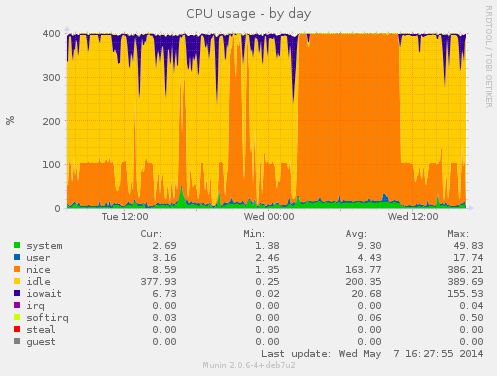 During this buildd cpu usage graph, we see most time only one CPU is consumed. So for fast package build times.. make sure your packages supports parallel building. For developers, abel.debian.org is porter machine with Armada XP. It has schroot's for both armel and armhf. set "DEB_BUILD_OPTIONS=parallel=4" and off you go. Finally I'd like to thank Thomas Petazzoni, Maen Suleiman, Hector Oron, Steve McIntyre, Adam Conrad and Jon Ward for making the upgrade happen. Meanwhile, we have unrelated trouble - a bunch of disks have broken within a few days apart. I take the warranty just run out... [1] only from Linux's point of view. - mv78200 has actually 2 cores, just not SMP or coherent. You could run an RTOS on the other core while you run Linux on the other.

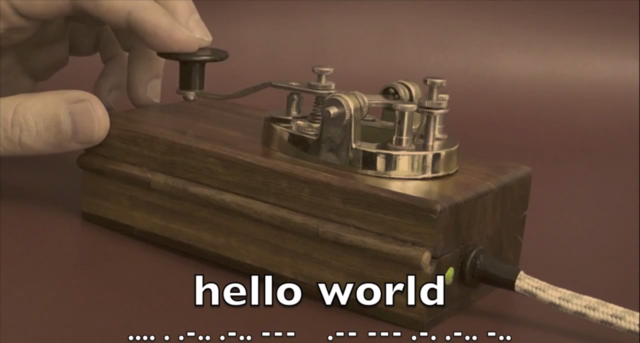
 As promised, today I would like to write a bit about the making of


 I ve done some clean-up in the Debian BTS. The result can be seen in the QA graphs:
 The last remaining 6 bugs are only affecting OpenStack Essex (which is what Wheezy ships, and which unfortunately I have not enough time to support properly), and the last one is waiting for FTP masters approval after I added Python 3 support to oslo-config (OpenStack is slowly moving to Python3, and I ve tried to add support to Python3 in the packages as well each time it was possible). Also, the Icehouse packages have passed the tempest tests (a set of functional tests) which we run in our continuous integration system.
As I was doing some triaging, it is possible that some bugs have been closed a bit quickly (like for example the Ceilometer FTBFS which I couldn t reproduce, even with sbuild and cowbuilder), so it is well possible that some more QA work will be needed later on. I m also expecting a new set of patches for supporting Ceph in Nova. I m sure there s issues which we will discover later on, however, it is nice to have this result right after the first Icehouse release of OpenStack.
Next up: testing new components that I uploaded for this release: Trove (DB as a Service), Designate (DNS as a Service), Ironic (Metal as a Service, or cloud computing on bare-metal), and TripleO (OpenStack on OpenStack). I unfortunately know already that TripleO and Tuskar wont really work yet, and that it needs some patches to be sent upstream for it to support Debian correctly (let s work it out for Juno!). So please consider it as a technology preview only. Though Trove, Designate and Ironic are supposed to be in good enough shape, I didn t have the chance to test them more than just installing the packages and checking daemons are running and connected to the various components of OpenStack (eg: database, keystone and RabbitMQ). Please do test them and report bugs in the BTS.
I d like to thanks Gustavo Panizzo & Thomas Bechtold who contributed to this release, and also the folks at eNovance (Emilien, Cyril, Seb ) who provided precious help with the CI and package quality. See you in the Juno Atlanta design summit next week (as hopefully, my plane ticket issue will be soon solved).
The last remaining 6 bugs are only affecting OpenStack Essex (which is what Wheezy ships, and which unfortunately I have not enough time to support properly), and the last one is waiting for FTP masters approval after I added Python 3 support to oslo-config (OpenStack is slowly moving to Python3, and I ve tried to add support to Python3 in the packages as well each time it was possible). Also, the Icehouse packages have passed the tempest tests (a set of functional tests) which we run in our continuous integration system.
As I was doing some triaging, it is possible that some bugs have been closed a bit quickly (like for example the Ceilometer FTBFS which I couldn t reproduce, even with sbuild and cowbuilder), so it is well possible that some more QA work will be needed later on. I m also expecting a new set of patches for supporting Ceph in Nova. I m sure there s issues which we will discover later on, however, it is nice to have this result right after the first Icehouse release of OpenStack.
Next up: testing new components that I uploaded for this release: Trove (DB as a Service), Designate (DNS as a Service), Ironic (Metal as a Service, or cloud computing on bare-metal), and TripleO (OpenStack on OpenStack). I unfortunately know already that TripleO and Tuskar wont really work yet, and that it needs some patches to be sent upstream for it to support Debian correctly (let s work it out for Juno!). So please consider it as a technology preview only. Though Trove, Designate and Ironic are supposed to be in good enough shape, I didn t have the chance to test them more than just installing the packages and checking daemons are running and connected to the various components of OpenStack (eg: database, keystone and RabbitMQ). Please do test them and report bugs in the BTS.
I d like to thanks Gustavo Panizzo & Thomas Bechtold who contributed to this release, and also the folks at eNovance (Emilien, Cyril, Seb ) who provided precious help with the CI and package quality. See you in the Juno Atlanta design summit next week (as hopefully, my plane ticket issue will be soon solved).