Search Results: "will"

8 August 2020

Fran ois Marier: Setting the default web browser on Debian and Ubuntu

If you are wondering what your default web browser is set to on a Debian-based system, there are several things to look at:
$ xdg-settings get default-web-browser
brave-browser.desktop
$ xdg-mime query default x-scheme-handler/http
brave-browser.desktop
$ xdg-mime query default x-scheme-handler/https
brave-browser.desktop
$ ls -l /etc/alternatives/x-www-browser
lrwxrwxrwx 1 root root 29 Jul  5  2019 /etc/alternatives/x-www-browser -> /usr/bin/brave-browser-stable*
$ ls -l /etc/alternatives/gnome-www-browser
lrwxrwxrwx 1 root root 29 Jul  5  2019 /etc/alternatives/gnome-www-browser -> /usr/bin/brave-browser-stable*

Debian-specific tools The contents of /etc/alternatives/ is system-wide defaults and must therefore be set as root:
sudo update-alternatives --config x-www-browser
sudo update-alternatives --config gnome-www-browser
The sensible-browser tool (from the sensible-utils package) will use these to automatically launch the most appropriate web browser depending on the desktop environment.

Standard MIME tools The others can be changed as a normal user. Using xdg-settings:
xdg-settings set default-web-browser brave-browser-beta.desktop
will also change what the two xdg-mime commands return:
$ xdg-mime query default x-scheme-handler/http
brave-browser-beta.desktop
$ xdg-mime query default x-scheme-handler/https
brave-browser-beta.desktop
since it puts the following in ~/.config/mimeapps.list:
[Default Applications]
text/html=brave-browser-beta.desktop
x-scheme-handler/http=brave-browser-beta.desktop
x-scheme-handler/https=brave-browser-beta.desktop
x-scheme-handler/about=brave-browser-beta.desktop
x-scheme-handler/unknown=brave-browser-beta.desktop
Note that if you delete these entries, then the system-wide defaults, defined in /etc/mailcap, will be used, as provided by the mime-support package. Changing the x-scheme-handler/http (or x-scheme-handler/https) association directly using:
xdg-mime default brave-browser-nightly.desktop x-scheme-handler/http
will only change that particular one. I suppose this means you could have one browser for insecure HTTP sites (hopefully with HTTPS Everywhere installed) and one for HTTPS sites though I'm not sure why anybody would want that.

Summary In short, if you want to set your default browser everywhere (using Brave in this example), do the following:
sudo update-alternatives --config x-www-browser
sudo update-alternatives --config gnome-www-browser
xdg-settings set default-web-browser brave-browser.desktop

7 August 2020

Antonio Terceiro: When community service providers fail

I'm starting a new blog, and instead of going into the technical details on how it's made, or on how I migrated my content from the previous ones, I want focus on why I did it. It's been a while since I have written a blog post. I wanted to get back into it, but also wanted to finally self-host my blog/homepage because I have been let down before. And sadly, I was not let down by a for-profit, privacy invading corporation, but by a free software organization. The sad story of wiki.softwarelivre.org My first blog that was hosted in a blog engine written by me, which was hosted in a TWiki, and later Foswiki instance previously available at wiki.softwarelivre.org, hosted by ASL.org. I was the one who introduced the tool to the organization in the first place. I had come from a previous, very fruitful experience on the use of wikis for creation of educational material while in university, which ultimately led me to become a core TWiki, and then Foswiki developer. In 2004, I had just moved to Porto Alegre, got involved in ASL.org, and there was a demand for a tool like that. 2 years later, I left Porto Alegre, and some time after that the daily operations of ASL.org when it became clear that it was not really prepared for remote participation. I was still maintaing the wiki software and the OS for quite some years after, until I wasn't anymore. In 2016, the server that hosted it went haywire, and there were no backups. A lot of people and free software groups lost their content forever. My blog was the least important content in there. To mention just a few examples, here are some groups that lost their content in there: Some of this can still be reached via the Internet Archive Wayback Machine, but that is only useful for recovering content, not for it to be used by the public. The announced tragedy of softwarelivre.org My next blog after that was hosted at softwarelivre.org, a Noosfero instance also hosted by ASL.org. When it was introduced in 2010, this Noosfero instance became responsible for the main domain softwarelivre.org name. This was a bold move by ASL.org, and was a demonstration of trust in a local free software project, led by a local free software cooperative (Colivre). I was a lead developer in the Noosfero project for a long time, and I was also involved in maintaining that server as well. However, for several years there is little to no investment in maintaining that service. I already expect that it will probably blow up at some point as the wiki did, or that it may be just shut down on purpose. On the responsibility of organizations Today, a large part of wast mot people consider "the internet" is controlled by a handful of corporations. Most popular services on the internet might look like they are gratis (free as in beer), but running those services is definitely not without costs. So when you use services provided by for-profit companies and are not paying for them with money, you are paying with your privacy and attention. Society needs independent organizations to provide alternatives. The market can solve a part of the problem by providing ethical services and charging for them. This is legitimate, and as long as there is transparency about how peoples' data and communications are handled, there is nothing wrong with it. But that only solves part of the problem, as there will always be people who can't afford to pay, and people and communities who can afford to pay, but would rather rely on a nonprofit. That's where community-based services, provided by nonprofits, are also important. We should have more of them, not less. So it makes me worry to realize ASL.org left the community in the dark. Losing the wiki wasn't even the first event of its kind, as the listas.softwarelivre.org mailing list server, with years and years of community communications archived in it, broke with no backups in 2012. I do not intend to blame the ASL.org leadership personally, they are all well meaning and good people. But as an organization, it failed to recognize the importance of this role of service provider. I can even include myself in it: I was member of the ASL.org board some 15 years ago; I was involved in the deployment of both the wiki and Noosfero, the former as a volunteer and the later professionally. Yet, I did nothing to plan the maintenance of the infrastructure going forward. When well meaning organizations fail, people who are not willing to have their data and communications be exploited for profit are left to their own devices. I can afford a virtual private server, and have the technical knowledge to import my old content into a static website generator, so I did it. But what about all the people who can't, or don't? Of course, these organizations have to solve the challenge of being sustainable, and being able to pay professionals to maintain the services that the community relies on. We should be thankful to these organizations, and their leadership needs to recognize the importance of those services, and actively plan for them to be kept alive.

Antonio Terceiro: When community service providers fail

I'm starting a new blog, and instead of going into the technical details on how it's made, or on how I migrated my content from the previous ones, I want to focus on why I did it. It's been a while since I have written a blog post. I wanted to get back into it, but also wanted to finally self-host my blog/homepage because I have been let down before. And sadly, I was not let down by a for-profit, privacy invading corporation, but by a free software organization. The sad story of wiki.softwarelivre.org My first blog that was hosted in a blog engine written by me, which was hosted in a TWiki, and later Foswiki instance previously available at wiki.softwarelivre.org, hosted by ASL.org. I was the one who introduced the tool to the organization in the first place. I had come from a previous, very fruitful experience on the use of wikis for creation of educational material while in university, which ultimately led me to become a core TWiki, and then Foswiki developer. In 2004, I had just moved to Porto Alegre, got involved in ASL.org, and there was a demand for a tool like that. 2 years later, I left Porto Alegre, and some time after that the daily operations of ASL.org when it became clear that it was not really prepared for remote participation. I was still maintaing the wiki software and the OS for quite some years after, until I wasn't anymore. In 2016, the server that hosted it went haywire, and there were no backups. A lot of people and free software groups lost their content forever. My blog was the least important content in there. To mention just a few examples, here are some groups that lost their content in there: Some of this can still be reached via the Internet Archive Wayback Machine, but that is only useful for recovering content, not for it to be used by the public. The announced tragedy of softwarelivre.org My next blog after that was hosted at softwarelivre.org, a Noosfero instance also hosted by ASL.org. When it was introduced in 2010, this Noosfero instance became responsible for the main domain softwarelivre.org name. This was a bold move by ASL.org, and was a demonstration of trust in a local free software project, led by a local free software cooperative (Colivre). I was a lead developer in the Noosfero project for a long time, and I was also involved in maintaining that server as well. However, for several years there is little to no investment in maintaining that service. I already expect that it will probably blow up at some point as the wiki did, or that it may be just shut down on purpose. On the responsibility of organizations Today, a large part of wast mot people consider "the internet" is controlled by a handful of corporations. Most popular services on the internet might look like they are gratis (free as in beer), but running those services is definitely not without costs. So when you use services provided by for-profit companies and are not paying for them with money, you are paying with your privacy and attention. Society needs independent organizations to provide alternatives. The market can solve a part of the problem by providing ethical services and charging for them. This is legitimate, and as long as there is transparency about how peoples' data and communications are handled, there is nothing wrong with it. But that only solves part of the problem, as there will always be people who can't afford to pay, and people and communities who can afford to pay, but would rather rely on a nonprofit. That's where community-based services, provided by nonprofits, are also important. We should have more of them, not less. So it makes me worry to realize ASL.org left the community in the dark. Losing the wiki wasn't even the first event of its kind, as the listas.softwarelivre.org mailing list server, with years and years of community communications archived in it, broke with no backups in 2012. I do not intend to blame the ASL.org leadership personally, they are all well meaning and good people. But as an organization, it failed to recognize the importance of this role of service provider. I can even include myself in it: I was member of the ASL.org board some 15 years ago; I was involved in the deployment of both the wiki and Noosfero, the former as a volunteer and the later professionally. Yet, I did nothing to plan the maintenance of the infrastructure going forward. When well meaning organizations fail, people who are not willing to have their data and communications be exploited for profit are left to their own devices. I can afford a virtual private server, and have the technical knowledge to import my old content into a static website generator, so I did it. But what about all the people who can't, or don't? Of course, these organizations have to solve the challenge of being sustainable, and being able to pay professionals to maintain the services that the community relies on. We should be thankful to these organizations, and their leadership needs to recognize the importance of those services, and actively plan for them to be kept alive.

Jonathan Dowland: Vimwiki

At the start of the year I begun keeping a daily diary for work as a simple text file. I've used various other approaches for this over the years, including many paper diaries and more complex digital systems. One great advantage of the one-page text file was it made assembling my weekly status report email very quick, nearly just a series of copies and pastes. But of course there are drawbacks and room for improvement. vimwiki is a personal wiki plugin for the vim and neovim editors. I've tried to look at it before, years ago, but I found it too invasive, changing key bindings and display settings for any use of vim, and I use vim a lot. I decided to give it another look. The trigger was actually something completely unrelated: Steve Losh's blog post "Coming Home to vim". I've been using vim for around 17 years but I still learned some new things from that blog post. In particular, I've never bothered to Use The Leader for user-specific shortcuts. The Leader, to me, feels like a namespace that plugins should not touch: it's like the /usr/local of shortcut keys, a space for the local user only. Vimwiki's default bindings include several incorporating the Leader. Of course since I didn't use the leader, those weren't the ones that bothered me: It turns out I regularly use carriage return and backspace for moving the cursor around in normal mode, and Vimwiki steals both of those. It also truncates the display of (what it thinks are) URIs. It turns out I really prefer to see exactly what's in the file I'm editing. I haven't used vim folds since I first switched to it, despite them being why I switched. Disabling all the default bindings and URI concealing stuff and Vimwiki is now much less invasive and I can explore its features at my own pace:
let g:vimwiki_key_mappings =   'all_maps': 0,  
let g:vimwiki_conceallevel = 0
let g:vimwiki_url_maxsave = 0 
Followed by explicitly configuring the bindings I want. I'm letting it steal carriage return. And yes, I've used some Leader bindings after all.
nnoremap <leader>ww :VimwikiIndex<cr>
nnoremap <leader>wi :VimwikiDiaryIndex<cr>
nnoremap <leader>wd :VimwikiMakeDiaryNote<cr>
nnoremap <CR> :VimwikiFollowLink<cr>
nnoremap <Tab> :VimwikiNextLink<cr>
nnoremap <S-Tab> :VimwikiPrevLink<cr>
nnoremap <C-Down> :VimwikiDiaryNextDay<cr>
nnoremap <C-Up> :VimwikiDiaryPrevDay<cr>
,wd (my leader) now brings me straight to today's diary page, and I can create separate, non-diary pages for particular work items (e.g. a Ticket reference) that will span more than one day, and keep all the relevant stuff in one place.

6 August 2020

Dirk Eddelbuettel: nanotime 0.3.0: Yuge New Features!

A fresh major release of the nanotime package for working with nanosecond timestamps is hitting CRAN mirrors right now. nanotime relies on the RcppCCTZ package for (efficient) high(er) resolution time parsing and formatting up to nanosecond resolution, and the bit64 package for the actual integer64 arithmetic. Initially implemented using the S3 system, it has benefitted greatly from work by Leonardo Silvestri who rejigged internals in S4 and now added new types for periods, intervals and durations. This is what is commonly called a big fucking deal!! So a really REALLY big thank you to my coauthor Leonardo for all these contributions. With all these Yuge changes patiently chisseled in by Leonardo, it took some time since the last release and a few more things piled up. Matt Dowle corrected something we borked for integration with the lovely and irreplacable data.table. We also switched to the awesome yet minimal tinytest package by Mark van der Loo, and last but not least we added the beginnings of a proper vignette currently at nine pages but far from complete. The NEWS snippet adds full details.

Changes in version 0.3.0 (2020-08-06)
  • Use tzstr= instead of tz= in call to RcppCCTZ::parseDouble()) (Matt Dowle in #49).
  • Add new comparison operators for nanotime and charcters (Dirk in #54 fixing #52).
  • Switch from RUnit to tinytest (Dirk in #55)
  • Substantial functionality extension in with new types nanoduration, nanoival and nanoperiod (Leonardo in #58, #60, #62, #63, #65, #67, #70 fixing #47, #51, #57, #61, #64 with assistance from Dirk).
  • A new (yet still draft-ish) vignette was added describing the four core types (Leonardo and Dirk in #71).
  • A required compilation flag for Windows was added (Leonardo in #72).
  • RcppCCTZ function are called in new 'non-throwing' variants to not trigger exeception errors (Leonardo in #73).

We also have a diff to the previous version thanks to CRANberries. More details and examples are at the nanotime page; code, issue tickets etc at the GitHub repository. If you like this or other open-source work I do, you can now sponsor me at GitHub. For the first year, GitHub will match your contributions.

This post by Dirk Eddelbuettel originated on his Thinking inside the box blog. Please report excessive re-aggregation in third-party for-profit settings.

Joey Hess: Mr Process's wild ride

When a unix process is running in a directory, and that directory gets renamed, the process is taken on a ride to a new location in the filesystem. Suddenly, any "../" paths it might be using point to new, and unexpected locations. This can be a source of interesting behavior, and also of security holes. Suppose root is poking around in ~user/foo/bar/ and decides to vim ../../etc/conffile If the user notices this process is running, they can mv ~/foo/bar /tmp and when vim saves the file, it will write to /tmp/bar/../../etc/conffile AKA /etc/conffile. (Vim does warn that the file has changed while it was being edited. Other editors may not. Or root may be feeling especially BoFH and decide to overwrite the user's changes to their file. Or the rename could perhaps be carefully timed to avoid vim's overwrite protection.) Or, suppose root, in the same place, decides to archive ../../etc with tar, and then delete it:
tar cf etc.tar ../../etc; rm -rf ../../etc
Now the user has some time to take root's shell on a ride, before the rm starts ... and make it delete all of /etc! Anyone know if this class of security hole has a name?

5 August 2020

Dirk Eddelbuettel: RcppCCTZ 0.2.8: Minor API Extension

A new minor release 0.2.8 of RcppCCTZ is now on CRAN. RcppCCTZ uses Rcpp to bring CCTZ to R. CCTZ is a C++ library for translating between absolute and civil times using the rules of a time zone. In fact, it is two libraries. One for dealing with civil time: human-readable dates and times, and one for converting between between absolute and civil times via time zones. And while CCTZ is made by Google(rs), it is not an official Google product. The RcppCCTZ page has a few usage examples and details. This package was the first CRAN package to use CCTZ; by now at least three others do using copies in their packages which remains less than ideal. This version adds three no throw variants of three existing functions, contributed again by Leonardo. This will be used in an upcoming nanotime release which we are finalising now.

Changes in version 0.2.8 (2020-08-04)
  • Added three new nothrow variants (for win32) needed by the expanded nanotime package (Leonardo in #37)

We also have a diff to the previous version thanks to CRANberries. More details are at the RcppCCTZ page; code, issue tickets etc at the GitHub repository. If you like this or other open-source work I do, you can now sponsor me at GitHub. For the first year, GitHub will match your contributions.

This post by Dirk Eddelbuettel originated on his Thinking inside the box blog. Please report excessive re-aggregation in third-party for-profit settings.

Holger Levsen: 20200804-debconf6

DebConf6 This tshirt is 14 years old and from DebConf6. DebConf6 was my 4th DebConf and took place in Oaxtepec, Mexico. I'm a bit exhausted right now which is probably quite fitting to write something about DebConf6... many things in life are a question of perception, so I will mention the waterfall and the big swirl and the band playing with the fireworks during the conference dinner, the joy that we finally could use the local fiber network (after asking for months) just after discovering that the 6h shopping tour forgot to bring the essential pig tail connectors to connect the wireless antennas to the cards, which we needed to provide network to the rooms where the talks would take place. DebConf6 was the first DebConf with live streaming using dvswitch (written by Ben Hutchings and removed from unstable in 2015 as the world had moved to voctomix, which is yet another story to be told eventually). The first years (so DebConf6 and some) the videoteam focussed on getting the post processing done and the videos released, and streaming was optional, even though it was an exciting new feature and we still managed to stream mostly all we recorded and sometimes more... ;) Setting up the network uplink also was very challenging and took, I don't remember exactly, until day 4 or 5 of DebCamp (which lasted 7 days), so there were group of geeks in need of network, and mostly unable to fix it, because for fixing it we needed to communicate and IRC was down. (There was no mobile phone data at that time, the first iphone wasn't sold yet, it were the dark ages.) I remember literally standing on a roof to catch the wifi signal and excitingly shouting "I got one ping back! ... one ping back ...", less excitingly. I'll spare you the details now (and me writing them down) but I'll say that the solution involved Neil McGovern climbing an antenna and attaching a wifi antenna up high, probably 15m or 20m or some such. Finally we had uplink. I don't recall if that pig tail connector incident happened before of after, but in the end the network setup worked nicely on the wide area we occupied. Even though in some dorms the cleaning people daily removed one of our APs to be able to watch TV while cleaning ;) (Which kind of was ok, but still... they could have plugged it back in.) I also joyfully remember a certain vegetarian table, a most memorable bus ride (I'll just say 5 or rather cinco, and, unrelated except on the same bus ride, "Jesus" (and "Maria" for sure..)!) and talking with Jim Gettys and thus learning about the One Laptop per Child (OLPC) project. As for any DebConf, there's sooo much more to be told, but I'll end here and just thank Gunnar Wolf (as he masterminded much of this DebConf) and go to bed now :-)

3 August 2020

Arnaud Rebillout: GoAccess 1.4, a detailed tutorial

GoAccess v1.4 was just released a few weeks ago! Let's take this chance to write a loooong tutorial. We'll go over every steps to install and operate GoAccess. This is a tutorial aimed at those who don't play sysadmin every day, and that's why it's so long, I did my best to provide thorough explanations all along, so that it's more than just a "copy-and-paste" kind of tutorial. And for those who do play sysadmin everyday: please try not to fall asleep while reading, and don't hesitate to drop me an e-mail if you spot anything inaccurate in here. Thanks! Introduction So what's GoAccess already? GoAccess is a web log analyzer, and it allows you to visualize the traffic for your website, and get to know a bit more about your visitors: how many visitors and hits, for which pages, coming from where (geolocation, operating system, web browser...), etc... It does so by parsing the access logs from your web server, be it Apache, NGINX or whatever. GoAccess gives you different options to display the statistics, and in this tutorial we'll focus on producing a HTML report. Meaning that you can see the statistics for your website straight in your web browser, under the form of a single HTML page. For an example, you can have a look at the stats of my blog here: http://goaccess.arnaudr.io. GoAccess is written in C, it has very few dependencies, it had been around for about 10 years, and it's distributed under the MIT license. Assumptions This tutorial is about installing and configuring, so I'll assume that all the commands are run as root. I won't prefix each of them with sudo. I use the Apache web server, running on a Debian system. I don't think it matters so much for this tutorial though. If you're using NGINX it's fine, you can keep reading. Also, I will just use the name SITE for the name of the website that we want to analyze with GoAccess. Just replace that with the real name of your site. I also assume the following locations for your stuff: If you have your stuff in /srv/SITE/ log,www instead, no worries, just adjust the paths accordingly, I bet you can do it. Installation The latest version of GoAccess is v1.4, and it's not yet available in the Debian repositories. So for this part, you can follow the instructions from the official GoAccess download page. Install steps are explained in details, so there's nothing left for me to say :) When this is done, let's get started with the basics. We're talking about the latest version v1.4 here, let's make sure:
$ goaccess --version
GoAccess - 1.4.
...
Now let's try to create a HTML report. I assume that you already have a website up and running. GoAccess needs to parse the access logs. These logs are optional, they might or might not be created by your web server, depending on how it's configured. Usually, these log files are named access.log, unsurprisingly. You can check if those logs exist on your system by running this command:
find /var/log -name access.log
Another important thing to know is that these logs can be in different formats. In this tutorial we'll assume that we work with the combined log format, because it seems to be the most common default. To check what kind of access logs your web server produces, you must look at the configuration for your site. For an Apache web server, you should have such a line in the file /etc/apache2/sites-enabled/SITE.conf:
CustomLog $ APACHE_LOG_DIR /SITE/access.log combined
For NGINX, it's quite similar. The configuration file would be something like /etc/nginx/sites-enabled/SITE, and the line to enable access logs would be something like:
access_log /var/log/nginx/SITE/access.log
Note that NGINX writes the access logs in the combined format by default, that's why you don't see the word combined anywhere in the line above: it's implicit. Alright, so from now on we assume that yes, you have access log files available, and yes, they are in the combined log format. If that's the case, then you can already run GoAccess and generate a report, for example for the log file /var/log/apache2/access.log
goaccess \
    --log-format COMBINED \
    --output /tmp/report.html \
    /var/log/apache2/access.log
It's possible to give GoAccess more than one log files to process, so if you have for example the file access.log.1 around, you can use it as well:
goaccess \
    --log-format COMBINED \
    --output /tmp/report.html \
    /var/log/apache2/access.log \
    /var/log/apache2/access.log.1
If GoAccess succeeds (and it should), you're on the right track! All is left to do to complete this test is to have a look at the HTML report created. It's a single HTML page, so you can easily scp it to your machine, or just move it to the document root of your site, and then open it in your web browser. Looks good? So let's move on to more interesting things. Web server configuration This part is very short, because in terms of configuration of the web server, there's very little to do. As I said above, the only thing you want from the web server is to create access log files. Then you want to be sure that GoAccess and your web server agree on the format for these files. In the part above we used the combined log format, but GoAccess supports many other common log formats out of the box, and even allows you to parse custom log formats. For more details, refer to the option --log-format in the GoAccess manual page. Another common log format is named, well, common. It even has its own Wikipedia page. But compared to combined, the common log format contains less information, it doesn't include the referrer and user-agent values, meaning that you won't have it in the GoAccess report. So at this point you should understand that, unsurprisingly, GoAccess can only tell you about what's in the access logs, no more no less. And that's all in term of web server configuration. Configuration to run GoAccess unprivileged Now we're going to create a user and group for GoAccess, so that we don't have to run it as root. The reason is that, well, for everything running unattended on your server, the less code runs as root, the better. It's good practice and common sense. In this case, GoAccess is simply a log analyzer. So it just needs to read the logs files from your web server, and there is no need to be root for that, an unprivileged user can do the job just as well, assuming it has read permissions on /var/log/apache2 or /var/log/nginx. The log files of the web server are usually part of the adm group (though it might depend on your distro, I'm not sure). This is something you can check easily with the following command:
ls -l /var/log   grep -e apache2 -e nginx
As a result you should get something like that:
drwxr-x--- 2 root adm 20480 Jul 22 00:00 /var/log/apache2/
And as you can see, the directory apache2 belongs to the group adm. It means that you don't need to be root to read the logs, instead any unprivileged user that belongs to the group adm can do it. So, let's create the goaccess user, and add it to the adm group:
adduser --system --group --no-create-home goaccess
addgroup goaccess adm
And now, let's run GoAccess unprivileged, and verify that it can still read the log files:
setpriv \
    --reuid=goaccess --regid=goaccess \
    --init-groups --inh-caps=-all \
    -- \
    goaccess \
    --log-format COMBINED \
    --output /tmp/report2.html \
    /var/log/apache2/access.log
setpriv is the command used to drop privileges. The syntax is quite verbose, it's not super friendly for tutorials, but don't be scared and read the manual page to learn what it does. In any case, this command should work, and at this point, it means that you have a goaccess user ready, and we'll use it to run GoAccess unprivileged. Integration, option A - Run GoAccess once a day, from a logrotate hook In this part we wire things together, so that GoAccess processes the log files once a day, adds the new logs to its internal database, and generates a report from all that aggregated data. The result will be a single HTML page. Introducing logrotate In order to do that, we'll use a logrotate hook. logrotate is a little tool that should already be installed on your server, and that runs once a day, and that is in charge of rotating the log files. "Rotating the logs" means moving access.log to access.log.1 and so on. With logrotate, a new log file is created every day, and log files that are too old are deleted. That's what prevents your logs from filling up your disk basically :) You can check that logrotate is indeed installed and enabled with this command (assuming that your init system is systemd):
systemctl status logrotate.timer
What's interesting for us is that logrotate allows you to run scripts before and after the rotation is performed, so it's an ideal place from where to run GoAccess. In short, we want to run GoAccess just before the logs are rotated away, in the prerotate hook. But let's do things in order. At first, we need to write a little wrapper script that will be in charge of running GoAccess with the right arguments, and that will process all of your sites. The wrapper script This wrapper is made to process more than one site, but if you have only one site it works just as well, of course. So let me just drop it on you like that, and I'll explain afterward. Here's my wrapper script:
 1
 2
 3
 4
 5
 6
 7
 8
 9
10
11
12
13
14
15
16
17
18
19
20
21
22
23
24
25
26
27
28
29
30
31
32
33
34
35
36
37
38
39
40
41
42
43
44
45
46
47
48
49
50
#!/bin/bash
# Process log files /var/www/apache2/SITE/access.log,
# only if /var/lib/goaccess-db/SITE exists.
# Create HTML reports in $1, a directory that must exist.
set -eu
OUTDIR=
LOGDIR=/var/log/apache2
DBDIR=/var/lib/goaccess-db
fail()   echo >&2 "$@"; exit 1;  
[ $# -eq 1 ]   fail "Usage: $(basename $0) OUTPUT_DIRECTORY"
OUTDIR=$1
[ -d "$OUTDIR" ]   fail "'$OUTDIR' is not a directory"
[ -d "$LOGDIR" ]   fail "'$LOGDIR' is not a directory"
[ -d "$DBDIR"  ]   fail "'$DBDIR' is not a directory"
for d in $(find "$LOGDIR" -mindepth 1 -maxdepth 1 -type d); do
    site=$(basename "$sitedir")
    dbdir=$DBDIR/$site
    logfile=$d/access.log
    outfile=$OUTDIR/$site.html
    if [ ! -d "$dbdir" ]   [ ! -e "$logfile" ]; then
        echo "  Skipping site '$site'"
        continue
    else
        echo "  Processing site '$site'"
    fi
    setpriv \
        --reuid=goaccess --regid=goaccess \
        --init-groups --inh-caps=-all \
        -- \
    goaccess \
        --agent-list \
        --anonymize-ip \
        --persist \
        --restore \
        --config-file /etc/goaccess/goaccess.conf \
        --db-path "$dbdir" \
        --log-format "COMBINED" \
        --output "$outfile" \
        "$logfile"
done
So you'd install this script at /usr/local/bin/goaccess-wrapper for example, and make it executable:
chmod +x /usr/local/bin/goaccess-wrapper
A few things to note: As is, the script makes the assumption that the logs for your site are logged in a sub-directory /var/log/apache2/SITE/. If it's not the case, adjust that in the wrapper accordingly. The name of this sub-directory is then used to find the GoAccess database directory /var/lib/goaccess-db/SITE/. This directory is expected to exist, meaning that if you don't create it yourself, the wrapper won't process this particular site. It's a simple way to control which sites are processed by this GoAccess wrapper, and which sites are not. So if you want goaccess-wrapper to process the site SITE, just create a directory with the name of this site under /var/lib/goaccess-db:
mkdir -p /var/lib/goaccess-db/SITE
chown goaccess:goaccess /var/lib/goaccess-db/SITE
Now let's create an output directory:
mkdir /tmp/goaccess-reports
chown goaccess:goaccess /tmp/goaccess-reports
And let's give a try to the wrapper script:
goaccess-wrapper /tmp/goaccess-reports
ls /tmp/goaccess-reports
Which should give you:
SITE.html
At the same time, you can check that GoAccess populated the database with a bunch of files:
ls /var/lib/goaccess-db/SITE
Setting up the logrotate prerotate hook At this point, we have the wrapper in place. Let's now add a pre-rotate hook so that goaccess-wrapper runs once a day, just before the logs are rotated away. The logrotate config file for Apache2 is located at /etc/logrotate.d/apache2, and for NGINX it's at /etc/logrotate.d/nginx. Among the many things you'll see in this file, here's what is of interest for us: In the config file, there is also this snippet:
prerotate
    if [ -d /etc/logrotate.d/httpd-prerotate ]; then \
        run-parts /etc/logrotate.d/httpd-prerotate; \
    fi; \
endscript
It indicates that scripts in the directory /etc/logrotate.d/httpd-prerotate/ will be executed before the rotation takes place. Refer to the man page run-parts(8) for more details... Putting all of that together, it means that logs from the web server are rotated once a day, and if we want to run scripts just before the rotation, we can just drop them in the httpd-prerotate directory. Simple, right? Let's first create this directory if it doesn't exist:
mkdir -p /etc/logrotate.d/httpd-prerotate/
And let's create a tiny script at /etc/logrotate.d/httpd-prerotate/goaccess:
1
2
#!/bin/sh
exec goaccess-wrapper /tmp/goaccess-reports
Don't forget to make it executable:
chmod +x /etc/logrotate.d/httpd-prerotate/goaccess
As you can see, the only thing that this script does is to invoke the wrapper with the right argument, ie. the output directory for the HTML reports that are generated. And that's all. Now you can just come back tomorrow, check the logs, and make sure that the hook was executed and succeeded. For example, this kind of command will tell you quickly if it worked:
journalctl   grep logrotate
Integration, option B - Run GoAccess once a day, from a systemd service OK so we've just seen how to use a logrotate hook. One downside with that is that we have to drop privileges in the wrapper script, because logrotate runs as root, and we don't want to run GoAccess as root. Hence the rather convoluted syntax with setpriv. Rather than embedding this kind of thing in a wrapper script, we can instead run the wrapper script from a [systemd][] service, and define which user runs the wrapper straight in the systemd service file. Introducing systemd niceties So we can create a systemd service, along with a systemd timer that fires daily. We can then set the user and group that execute the script straight in the systemd service, and there's no need for setpriv anymore. It's a bit more streamlined. We can even go a bit further, and use systemd parameterized units (also called templates), so that we have one service per site (instead of one service that process all of our sites). That will simplify the wrapper script a lot, and it also looks nicer in the logs. With this approach however, it seems that we can't really run exactly before the logs are rotated away, like we did in the section above. But that's OK. What we'll do is that we'll run once a day, no matter the time, and we'll just make sure to process both log files access.log and access.log.1 (ie. the current logs and the logs from yesterday). This way, we're sure not to miss any line from the logs. Note that GoAccess is smart enough to only consider newer entries from the log files, and discard entries that are already in the database. In other words, it's safe to parse the same log file more than once, GoAccess will do the right thing. For more details see "INCREMENTAL LOG PROCESSING" from man goaccess. systemd]: https://freedesktop.org/wiki/Software/systemd/ Implementation And here's how it all looks like. First, a little wrapper script for GoAccess:
 1
 2
 3
 4
 5
 6
 7
 8
 9
10
11
12
13
14
15
16
17
18
19
20
21
22
23
24
25
26
27
28
29
30
31
32
#!/bin/bash
# Usage: $0 SITE DBDIR LOGDIR OUTDIR
set -eu
SITE=$1
DBDIR=$2
LOGDIR=$3
OUTDIR=$4
LOGFILES=()
for ext in log log.1; do
    logfile="$LOGDIR/access.$ext"
    [ -e "$logfile" ] && LOGFILES+=("$logfile")
done
if [ $ #LOGFILES[@]  -eq 0 ]; then
    echo "No log files in '$LOGDIR'"
    exit 0
fi
goaccess \
    --agent-list \
    --anonymize-ip \
    --persist \
    --restore \
    --config-file /etc/goaccess/goaccess.conf \
    --db-path "$DBDIR" \
    --log-format "COMBINED" \
    --output "$OUTDIR/$SITE.html" \
    "$ LOGFILES[@] "
This wrapper does very little. Actually, the only thing it does is to check for the existence of the two log files access.log and access.log.1, to be sure that we don't ask GoAccess to process a file that does not exist (GoAccess would not be happy about that). Save this file under /usr/local/bin/goaccess-wrapper, don't forget to make it executable:
chmod +x /usr/local/bin/goaccess-wrapper
Then, create a systemd parameterized unit file, so that we can run this wrapper as a systemd service. Save it under /etc/systemd/system/goaccess@.service:
[Unit]
Description=Update GoAccess report - %i
ConditionPathIsDirectory=/var/lib/goaccess-db/%i
ConditionPathIsDirectory=/var/log/apache2/%i
ConditionPathIsDirectory=/tmp/goaccess-reports
PartOf=goaccess.service
[Service]
Type=oneshot
User=goaccess
Group=goaccess
Nice=19
ExecStart=/usr/local/bin/goaccess-wrapper \
 %i \
 /var/lib/goaccess-db/%i \
 /var/log/apache2/%i \
 /tmp/goaccess-reports
So, what is a systemd parameterized unit? It's a service to which you can pass an argument when you enable it. The %i in the unit definition will be replaced by this argument. In our case, the argument will be the name of the site that we want to process. As you can see, we use the directive ConditionPathIsDirectory= extensively, so that if ever one of the required directories does not exist, the unit will just be skipped (and marked as such in the logs). It's a graceful way to fail. We run the wrapper as the user and group goaccess, thanks to User= and Group=. We also use Nice= to give a low priority to the process. At this point, it's already possible to test. Just make sure that you created a directory for the GoAccess database:
mkdir -p /var/lib/goaccess-db/SITE
chown goaccess:goaccess /var/lib/goaccess-db/SITE
Also make sure that the output directory exists:
mkdir /tmp/goaccess-reports
chown goaccess:goaccess /tmp/goaccess-reports
Then reload systemd and fire the unit to see if it works:
systemctl daemon-reload
systemctl start goaccess@SITE.service
journalctl   tail
And that should work already. As you can see, the argument, SITE, is passed in the systemctl start command. We just append it after the @, in the name of the unit. Now, let's create another GoAccess service file, which sole purpose is to group all the parameterized units together, so that we can start them all in one go. Note that we don't use a systemd target for that, because ultimately we want to run it once a day, and that would not be possible with a target. So instead we use a dummy oneshot service. So here it is, saved under /etc/systemd/system/goaccess.service:
[Unit]
Description=Update GoAccess reports
Requires= \
 goaccess@SITE1.service \
 goaccess@SITE2.service
[Service]
Type=oneshot
ExecStart=true
As you can see, we simply list the sites that we want to process in the Requires= directive. In this example we have two sites named SITE1 and SITE2. Let's ensure that everything is still good:
systemctl daemon-reload
systemctl start goaccess.service
journalctl   tail
Check the logs, both sites SITE1 and SITE2 should have been processed. And finally, let's create a timer, so that systemd runs goaccess.service once a day. Save it under /etc/systemd/system/goaccess.timer.
[Unit]
Description=Daily update of GoAccess reports
[Timer]
OnCalendar=daily
RandomizedDelaySec=1h
Persistent=true
[Install]
WantedBy=timers.target
Finally, enable the timer:
systemctl daemon-reload
systemctl enable --now goaccess.timer
At this point, everything should be OK. Just come back tomorrow and check the logs with something like:
journalctl   grep goaccess
Last word: if you have only one site to process, of course you can simplify, for example you can hardcode all the paths in the file goaccess.service instead of using a parameterized unit. Up to you. Daily operations So in this part, we assume that you have GoAccess all setup and running, once a day or so. Let's just go over a few things worth noting. Serve your report Up to now in this tutorial, we created the reports in /tmp/goaccess-reports, but that was just for the sake of the example. You will probably want to save your reports in a directory that is served by your web server, so that, well, you can actually look at it in your web browser, that was the point, right? So how to do that is a bit out of scope here, and I guess that if you want to monitor your website, you already have a website, so you will have no trouble serving the GoAccess HTML report. However there's an important detail to be aware of: GoAccess shows all the IP addresses of your visitors in the report. As long as the report is private it's OK, but if ever you make your GoAccess report public, then you should definitely invoke GoAccess with the option --anonymize-ip. Keep an eye on the logs In this tutorial, the reports we create, along with the GoAccess databases, will grow bigger every day, forever. It also means that the GoAccess processing time will grow a bit each day. So maybe the first thing to do is to keep an eye on the logs, to see how long it takes to GoAccess to do its job every day. Also, maybe you'd like to keep an eye on the size of the GoAccess database with:
du -sh /var/lib/goaccess-db/SITE
If your site has few visitors, I suspect it won't be a problem though. You could also be a bit pro-active in preventing this problem in the future, and for example you could break the reports into, say, monthly reports. Meaning that every month, you would create a new database in a new directory, and also start a new HTML report. This way you'd have monthly reports, and you make sure to limit the GoAccess processing time, by limiting the database size to a month. This can be achieved very easily, by including something like YEAR-MONTH in the database directory, and in the HTML report. You can handle that automatically in the wrapper script, for example:
sfx=$(date +'%Y-%m')
mkdir -p $DBDIR/$sfx
goaccess \
    --db-path $DBDIR/$sfx \
    --output "$OUTDIR/$SITE-$sfx.html" \
    ...
You get the idea. Further notes Migration from older versions With the --persist option, GoAccess keeps all the information from the logs in a database, so that it can re-use it later. In prior versions, GoAccess used the Tokyo Cabinet key-value store for that. However starting from v1.4, GoAccess dropped this dependency and now uses its own database format. As a result, the previous database can't be used anymore, you will have to remove it and restart from zero. At the moment there is no way to convert the data from the old database to the new one. If you're interested, this is discussed upstream at [#1783][bug-1783]. Another thing that changed with this new version is the name for some of the command-line options. For example, --load-from-disk was dropped in favor of --restore, and --keep-db-files became --persist. So you'll have to look at the documentation a bit, and update your script(s) accordingly. Other ways to use GoAccess It's also possible to do it completely differently. You could keep GoAccess running, pretty much like a daemon, with the --real-time-html option, and have it process the logs continuously, rather than calling it on a regular basis. It's also possible to see the GoAccess report straight in the terminal, thanks to libncurses, rather than creating a HTML report. And much more, GoAccess is packed with features. Conclusion I hope that this tutorial helped some of you folks. Feel free to drop an e-mail for comments.

2 August 2020

Enrico Zini: Toxic positivity links

That which we do not bring to consciousness appears in our lives as fate. Carl Jung
Emotional support of others can take the form of surface-level consolation. But compassion means being willing to listen and feel, even when it's uncomfortable.
Ultimately, the driving force behind the power of positive thinking meme is the word power. But what about those whose bodies are not powerful? What about those who are vulnerable? What about those who are tired, isolated, and struggling? What about those who are ill? What about those who lack
I have often been dismissive or unhelpful when someone close to me was dealing with painful circumstances, having learned to accentuate the positive. In the more recent past, I have recognized these behavioral patterns as part of what some mental health professionals term, toxic positivity.
Toxic positivity is the overgeneralization of a happy, optimistic state resulting in the denial & invalidation of the authentic human emotional experience.

Andrew Cater: Debian 10.5 media testing - 202001082250 - last few debian-live images being tested for amd64 - Calamares issue - Post 5 of several.

Last few debian-live images being tested for amd64. We have found a bug with the debian-live Gnome flavour. This specifically affects installs after booting from the live media and then installing to the machine using the Calamares installer found on the desktop. The bug was introduced as a fix for one issue that has produced further buggy behaviour as a result.

Fixes are known - we've had highvoltage come and debug them with us - but will not be put out with this release but will wait for the 10.6 release which will allow for a longer time for debugging overall.

You can still run from the live-media, you can still install with the standard Debian installers found in the menu of the live-media disk - this is _only_ a limited time issue with the Calamares installer. At this point in the release cycle, it's been judged better to release the images as they are - with known and documented issues - than to try and debug them in a hurry and risk damaging or delaying a stable point release.

1 August 2020

Andrew Cater: Debian 10.5 media testing - pause for supper - 202001081715 - post 3 of several

Various of the folk doing this have taken a food break until 1900 local. A few glitches, a few that needed to be tried over again - but it's all going fairly well.

It is likely that at least one of the CD images will be dropped. The XFCE desktop install CD for i386 is now too large to fit on CD media. The netinst .iso files / the DVD 1 file / any of the larger files available via Jigdo will all help you achieve the same result.

There are relatively few machines that are i386 architecture only - it might be appropriate for people to use 64 bit amd64 from this point onwards as pure i386 machines are now approaching ten years old as a minimum. If you do need a graphical user environment for a pure i386 machine, it can be installed by using an expert install or using tasksel in the installation process.

Andrew Cater: Debian 10.5 media testing process started 202008011145 - post 1 of several.

The media testing process has started slightly late. There will be a _long_ testing process over much of the day: the final media image releases are likely to be at about 0200-0300UTC tomorrow.

Just settling in for a long day of testing: as ever, it's good to be chatting with my Debian colleagues in Cambridge and with Schweer in Germany. It's going to be a hot one - 30 Celsius (at least) and high humidity for all of us.

EDIT: Corrected for UTC :)

Andrew Cater: Debian 10.5 Buster point release 20200801 - all of the fixes :)

The point release is happening today for Debian Buster 10.5. This is an important release because it incorporates all the recent security fixes from the latest GRUB / Secure Boot "Boothole" security problems.

Behind the scenes, there has been a lot of work to get this right: a release subject to an embargo to allow all the Linux releases to co-ordinate this as far as possible, lots of consistent effort, lots of cooperation - the very best of Free/Libre/Open Source working together.

Secure Boot shims are signed with a different key to go to upstream this time around: in due course, when revocation of old, insecure code happens to plug the security hole, older media may be deny-listed. All the updates for all the affected packages (listed in https://www.debian.org/security/2020-GRUB-UEFI-SecureBoot/ ) are included in this release.

This has been a major wake-up call: the work behind the scenes has meant that each affected Linux distribution will be in a much better position going forward and working together is always good.

Utkarsh Gupta: FOSS Activites in July 2020

Here s my (tenth) monthly update about the activities I ve done in the F/L/OSS world.

Debian
This was my 17th month of contributing to Debian. I became a DM in late March last year and a DD last Christmas! \o/ Well, this month I didn t do a lot of Debian stuff, like I usually do, however, I did a lot of things related to Debian (indirectly via GSoC)! Anyway, here are the following things I did this month:

Uploads and bug fixes:

Other $things:
  • Mentoring for newcomers.
  • FTP Trainee reviewing.
  • Moderation of -project mailing list.
  • Sponsored php-twig for William, ruby-growl, ruby-xmpp4r, and uby-uniform-notifier for Cocoa, sup-mail for Iain, and node-markdown-it for Sakshi.

GSoC Phase 2, Part 2! In May, I got selected as a Google Summer of Code student for Debian again! \o/
I am working on the Upstream-Downstream Cooperation in Ruby project. The first three blogs can be found here: Also, I log daily updates at gsocwithutkarsh2102.tk. Whilst the daily updates are available at the above site^, I ll breakdown the important parts of the later half of the second month here:
  • Marc Andre, very kindly, helped in fixing the specs that were failing earlier this month. Well, the problem was with the specs, but I am still confused how so. Anyway..
  • Finished documentation of the second cop and marked the PR as ready to be reviewed.
  • David reviewed and suggested some really good changes and I fixed/tweaked that PR as per his suggestion to finally finish the last bits of the second cop, RelativeRequireToLib.
  • Merged the PR upon two approvals and released it as v0.2.0!
  • We had our next weekly meeting where we discussed the next steps and the things that are supposed to be done for the next set of cops.
  • Introduced rubocop-packaging to the outer world and requested other upstream projects to use it! It is being used by 13 other projects already!
  • Started to work on packaging-style-guide but I didn t push anything to the public repository yet.
  • Worked on refactoring the cops_documentation Rake task which was broken by the new auto-corrector API. Opened PR #7 for it. It ll be merged after the next RuboCop release as it uses CopsDocumentationGenerator class from the master branch.
  • Whilst working on autoprefixer-rails, I found something unusual. The second cop shouldn t really report offenses if the require_relative calls are from lib to lib itself. This is a false-positive. Opened issue #8 for the same.

Debian (E)LTS
Debian Long Term Support (LTS) is a project to extend the lifetime of all Debian stable releases to (at least) 5 years. Debian LTS is not handled by the Debian security team, but by a separate group of volunteers and companies interested in making it a success. And Debian Extended LTS (ELTS) is its sister project, extending support to the Jessie release (+2 years after LTS support). This was my tenth month as a Debian LTS and my first as a Debian ELTS paid contributor.
I was assigned 25.25 hours for LTS and 13.25 hours for ELTS and worked on the following things:

LTS CVE Fixes and Announcements:

ELTS CVE Fixes and Announcements:

Other (E)LTS Work:
  • Did my LTS frontdesk duty from 29th June to 5th July.
  • Triaged qemu, firefox-esr, wordpress, libmediainfo, squirrelmail, xen, openjpeg2, samba, and ldb.
  • Mark CVE-2020-15395/libmediainfo as no-dsa for Jessie.
  • Mark CVE-2020-13754/qemu as no-dsa/intrusive for Stretch and Jessie.
  • Mark CVE-2020-12829/qemu as no-dsa for Jessie.
  • Mark CVE-2020-10756/qemu as not-affected for Jessie.
  • Mark CVE-2020-13253/qemu as postponed for Jessie.
  • Drop squirrelmail and xen for Stretch LTS.
  • Add notes for tomcat8, shiro, and cacti to take care of the Stretch issues.
  • Emailed team@security.d.o and debian-lts@l.d.o regarding possible clashes.
  • Maintenance of LTS Survey on the self-hosted LimeSurvey instance. Received 1765 (just wow!) responses.
  • Attended the fourth LTS meeting. MOM here.
  • General discussion on LTS private and public mailing list.

Other(s)
Sometimes it gets hard to categorize work/things into a particular category.
That s why I am writing all of those things inside this category.
This includes two sub-categories and they are as follows.

Personal: This month I did the following things:
  • Released v0.2.0 of rubocop-packaging on RubyGems!
    It s open-sourced and the repository is here.
    Bug reports and pull requests are welcomed!
  • Released v0.1.0 of get_root on RubyGems!
    It s open-sourced and the repository is here.
  • Wrote max-word-frequency, my Rails C1M2 programming assignment.
    And made it pretty neater & cleaner!
  • Refactored my lts-dla and elts-ela scripts entirely and wrote them in Ruby so that there are no issues and no false-positives!
    Check lts-dla here and elts-ela here.
  • And finally, built my first Rails (mini) web-application!
    The repository is here. This was also a programming assignment (C1M3).
    And furthermore, hosted it at Heroku.

Open Source: Again, this contains all the things that I couldn t categorize earlier.
Opened several issues and PRs:
  • Issue #8273 against rubocop, reporting a false-positive auto-correct for Style/WhileUntilModifier.
  • Issue #615 against http reporting a weird behavior of a flaky test.
  • PR #3791 for rubygems/bundler to remove redundant bundler/setup require call from spec_helper generated by bundle gem.
  • Issue #3831 against rubygems, reporting a traceback of undefined method, rubyforge_project=.
  • Issue #238 against nheko asking for enhancement in showing the font name in the very font itself.
  • PR #2307 for puma to constrain rake-compiler to v0.9.4.
  • And finally, I joined the Cucumber organization! \o/

Thank you for sticking along for so long :) Until next time.
:wq for today.

31 July 2020

Ben Hutchings: Debian LTS work, July 2020

I was assigned 20 hours of work by Freexian's Debian LTS initiative, but only worked 5 hours this month and returned the remainder to the pool. Now that Debian 9 'stretch' has entered LTS, the stretch-backports suite will be closed and no longer updated. However, some stretch users rely on the newer kernel version provided there. I prepared to add Linux 4.19 to the stretch-security suite, alongside the standard package of Linux 4.9. I also prepared to update the firmware-nonfree package so that firmware needed by drivers in Linux 4.19 will also be available in stretch's non-free section. Both these updates will be based on the packages in stretch-backports, but needed some changes to avoid conflicts or regressions for users that continue using Linux 4.9 or older non-Debian kernel versions. I will upload these after the Debian 10 'buster' point release.

28 July 2020

Chris Lamb: Pop culture matters

Many people labour under the assumption that pop culture is trivial and useless while only 'high' art can grant us genuine and eternal knowledge about the world. Given that we have a finite time on this planet, we are all permitted to enjoy pop culture up to a certain point, but we should always minimise our interaction with it, and consume more moral and intellectual instruction wherever possible. Or so the theory goes. What these people do not realise is that pop and mass culture can often provide more information about the world, humanity in general and what is even more important ourselves. This is not quite the debate around whether high art is artistically better, simply that pop culture can be equally informative. Jeremy Bentham argued in the 1820s that "prejudice apart, the game of push-pin is of equal value with the arts and sciences of music and poetry", that it didn't matter where our pleasures come from. (John Stuart Mill, Bentham's intellectual rival, disagreed.) This fundamental question of philosophical utilitarianism will not be resolved here. However, what might begin to be resolved is our instinctive push-back against pop culture. We all share an automatic impulse to disregard things we do not like and to pretend they do not exist, but this wishful thinking does not mean that these cultural products do not continue to exist when we aren't thinking about them and, more to our point, continue to influence others and even ourselves. Take, for example, the recent trend for 'millennial pink'. With its empty consumerism, faux nostalgia, reductive generational stereotyping, objectively ugly sthetics and tedious misogyny (photographed with Rose Gold iPhones), the very combination appears to have been deliberately designed to annoy me, curiously providing circumstantial evidence in favour of intelligent design. But if I were to immediately dismiss millennial pink and any of the other countless cultural trends I dislike simply because I find them disagreeable, I would be willingly keeping myself blind to their underlying ideology, their significance and their effect on society at large. If I had any ethical or political reservations I might choose not to engage with them economically or to avoid advertising them to others, but that is a different question altogether. Even if we can't notice this pattern within ourselves we can first observe it in others. We can all recall moments where someone has brushed off a casual reference to pop culture, be it Tiger King, TikTok, team sports or Taylor Swift; if you can't, simply look for the abrupt change of tone and the slightly-too-quick dismissal. I am not suggesting you attempt to dissuade others or even to point out this mental tic, but merely seeing it in action can be highly illustrative in its own way. In summary, we can simultaneously say that pop culture is not worthy of our time relative to other pursuits while consuming however much of it we want, but deliberately dismissing pop culture doesn't mean that a lot of other people are not interacting with it and is therefore undeserving of any inquiry. And if that doesn't convince you, just like the once-unavoidable millennial pink, simply sticking our collective heads in the sand will not mean that wider societal-level ugliness is going to disappear anytime soon. Anyway, that's a very long way of justifying why I plan to re-watch TNG.
Dirk Eddelbuettel: ttdo 0.0.6: Bugfix

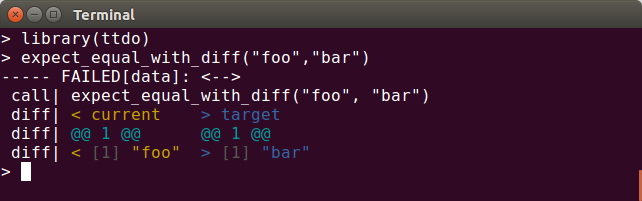
A bugfix release of our (still small) ttdo package arrived on CRAN overnight. As introduced last fall, the ttdo package extends the most excellent (and very minimal / zero depends) unit testing package tinytest by Mark van der Loo with the very clever and well-done diffobj package by Brodie Gaslam to give us test results with visual diffs: ttdo screenshot This release corrects a minor editing error spotted by the ever-vigilant John Blischak. The NEWS entry follow.

Changes in ttdo version 0.0.6 (2020-07-27)
  • Correct a minor editing mistake spotted by John Blischak.

CRANberries provides the usual summary of changes to the previous version. Please use the GitHub repo and its issues for any questions. If you like this or other open-source work I do, you can now sponsor me at GitHub. For the first year, GitHub will match your contributions.

This post by Dirk Eddelbuettel originated on his Thinking inside the box blog. Please report excessive re-aggregation in third-party for-profit settings.

Russ Allbery: Review: The City in the Middle of the Night

Review: The City in the Middle of the Night, by Charlie Jane Anders
Publisher: Tor
Copyright: February 2019
Printing: February 2020
ISBN: 1-4668-7113-X
Format: Kindle
Pages: 366
January is a tidally-locked planet divided between permanent night and permanent day, an unfortunate destination for a colony starship. Now, humans cling to a precarious existence along the terminator, huddling in two wildly different cities and a handful of smaller settlements, connected by a road through the treacherous cold. The novel opens with Sophie, a shy university student from the dark side of the city of Xiosphant. She has an overwhelming crush on Bianca, her high-class, self-confident roommate and one of the few people in her life to have ever treated her with compassion and attention. That crush, and her almost non-existent self-esteem, lead her to take the blame for Bianca's petty theft, resulting in what should have been a death sentence. Sophie survives only because she makes first contact with a native intelligent species of January, one that the humans have been hunting for food and sport. Sadly, I think this is enough Anders for me. I've now bounced off two of her novels, both for structural reasons that I think go deeper than execution and indicate a fundamental mismatch between what Anders wants to do as an author and what I'm looking for as a reader. I'll talk more about what this book is doing in a moment, but I have to start with Bianca and Sophie. It's difficult for me to express how much I loathed this relationship and how little I wanted to read about it. It took me about five pages to peg Bianca as a malignant narcissist and Sophie's all-consuming crush as dangerous codependency. It took the entire book for Sophie to figure out how awful Bianca is to her, during which Bianca goes through the entire abusive partner playbook of gaslighting, trivializing, contingent affection, jealous rage, and controlling behavior. And meanwhile Sophie goes back to her again, and again, and again, and again. If I hadn't been reading this book on a Kindle, I think it would have physically hit a wall after their conversation in the junkyard. This is truly a matter of personal taste and preference. This is not an unrealistic relationship; this dynamic happens in life all too often. I'm sure there is someone for whom reading about Sophie's spectacularly poor choices is affirming or cathartic. I've not personally experienced this sort of relationship, which doubtless matters. But having empathy for someone who is making awful and self-destructive life decisions and trusting someone they should not be trusting and who is awful to them in every way is difficult work. Sophie is the victim of Bianca's abuse, but she does so many stupid and ill-conceived things in support of this twisted relationship that I found it very difficult to not get angry at her. Meanwhile, Anders writes Sophie as so clearly fragile and uncertain and devoid of a support network that getting angry at her is like kicking a puppy. The result for me was spending nearly an entire book in a deeply unpleasant state of emotional dissonance. I may be willing to go through that for a close friend, but in a work of fiction it's draining and awful and entirely not fun. The other viewpoint character had the opposite problem for me. Mouth starts the book as a traveling smuggler, the sole survivor of a group of religious travelers called the Citizens. She's practical, tough, and guarded. Beneath that, I think the intent was to show her as struggling to come to terms with the loss of her family and faith community. Her first goal in the book is to recover a recording of Citizen sacred scripture to preserve it and to reconnect with her past. This sounds interesting on the surface, but none of it gelled. Mouth never felt to me like someone from a faith community. She doesn't act on Citizen beliefs to any meaningful extent, she rarely talks about them, and when she does, her attitude is nostalgia without spirituality. When Mouth isn't pursuing goals that turn out to be meaningless, she aimlessly meanders through the story. Sophie at least has agency and makes some important and meaningful decisions. Mouth is just there, even when Anders does shattering things to her understanding of her past. Between Sophie and Bianca putting my shoulders up around my ears within the first few pages of the first chapter and failing to muster any enthusiasm for Mouth, I said the eight deadly words ("I don't care what happens to these people") about a hundred pages in and the book never recovered. There are parts of the world-building I did enjoy. The alien species that Sophie bonds with is not stunningly original, but it's a good (and detailed) take on one of the alternate cognitive and social models that science fiction has dreamed up. I was comparing the strangeness and dislocation unfavorably to China Mi ville's Embassytown while I was reading it, but in retrospect Anders's treatment is more decolonialized. Xiosphant's turn to Circadianism as their manifestation of order is a nicely understated touch, a believable political overreaction to the lack of a day/night cycle. That touch is significantly enhanced by Sophie's time working in a salon whose business model is to help Xiosphant residents temporarily forget about time. And what glimmers we got of politics on the colony ship and their echoing influence on social and political structures were intriguing. Even with the world-building, though, I want the author to be interested in and willing to expand the same bits of world-building that I'm engaged with. Anders didn't seem to be. The reader gets two contrasting cities along a road, one authoritarian and one libertine, which makes concrete a metaphor for single-axis political classification. But then Anders does almost nothing with that setup; it's just the backdrop of petty warlord politics, and none of the political activism of Bianca's student group seems to have relevance or theoretical depth. It's a similar shallowness as the religion of Mouth's Citizens: We get a few fragments of culture and religion, but without narrative exploration and without engagement from any of the characters. The way the crew of the Mothership was assembled seems to have led to a factional and racial caste system based on city of origin and technical expertise, but I couldn't tell you more than that because few of the characters seem to care. And so on. In short, the world-building that I wanted to add up to a coherent universe that was meaningful to the characters and to the plot seemed to be little more than window-dressing. Anders tosses in neat ideas, but they don't add up to anything. They're just background scenery for Bianca and Sophie's drama. The one thing that The City in the Middle of the Night does well is Sophie's nervous but excited embrace of the unknown. It was delightful to see the places where a typical protagonist would have to overcome a horror reaction or talk themselves through tradeoffs and where Sophie's reaction was instead "yes, of course, let's try." It provided an emotional strength to an extended first-contact exploration scene that made it liberating and heart-warming without losing the alienness. During that part of the book (in which, not coincidentally, Bianca does not appear), I was able to let my guard down and like Sophie for the first time, and I suspect that was intentional on Anders's part. But, overall, I think the conflict between Anders's story-telling approach and my preferences as a reader are mostly irreconcilable. She likes to write about people who make bad decisions and compound their own problems. In one of the chapters of her non-fiction book about writing that's being serialized on Tor.com she says "when we watch someone do something unforgivable, we're primed to root for them as they search desperately for an impossible forgiveness." This is absolutely not true for me; when I watch a character do something unforgivable, I want to see repudiation from the protagonists and ideally some clear consequences. When that doesn't happen, I want to stop reading about them and find something more enjoyable to do with my time. I certainly don't want to watch a viewpoint character insist that the person who is doing unforgivable things is the center of her life. If your preferences on character and story arc are closer to Anders's than mine, you may like this book. Certainly lots of people did; it was nominated for multiple awards and won the Locus Award for Best Science Fiction Novel. But despite the things it did well, I had a truly miserable time reading it and am not anxious to repeat the experience. Rating: 4 out of 10

27 July 2020

Matthew Garrett: Filesystem deduplication is a sidechannel

First off - nothing I'm going to talk about in this post is novel or overly surprising, I just haven't found a clear writeup of it before. I'm not criticising any design decisions or claiming this is an important issue, just raising something that people might otherwise be unaware of.

With that out of the way: Automatic deduplication of data is a feature of modern filesystems like zfs and btrfs. It takes two forms - inline, where the filesystem detects that data being written to disk is identical to data that already exists on disk and simply references the existing copy rather than, and offline, where tooling retroactively identifies duplicated data and removes the duplicate copies (zfs supports inline deduplication, btrfs only currently supports offline). In a world where disks end up with multiple copies of cloud or container images, deduplication can free up significant amounts of disk space.

What's the security implication? The problem is that deduplication doesn't recognise ownership - if two users have copies of the same file, only one copy of the file will be stored[1]. So, if user a stores a file, the amount of free space will decrease. If user b stores another copy of the same file, the amount of free space will remain the same. If user b is able to check how much free space is available, user b can determine whether the file already exists.

This doesn't seem like a huge deal in most cases, but it is a violation of expected behaviour (if user b doesn't have permission to read user a's files, user b shouldn't be able to determine whether user a has a specific file). But we can come up with some convoluted cases where it becomes more relevant, such as law enforcement gaining unprivileged access to a system and then being able to demonstrate that a specific file already exists on that system. Perhaps more interestingly, it's been demonstrated that free space isn't the only sidechannel exposed by deduplication - deduplication has an impact on access timing, and can be used to infer the existence of data across virtual machine boundaries.

As I said, this is almost certainly not something that matters in most real world scenarios. But with so much discussion of CPU sidechannels over the past couple of years, it's interesting to think about what other features also end up leaking information in ways that may not be obvious.

(Edit to add: deduplication isn't enabled on zfs by default and is explicitly triggered on btrfs, so unless it's something you've enabled then this isn't something that affects you)

[1] Deduplication is usually done at the block level rather than the file level, but given zfs's support for variable sized blocks, identical files should be deduplicated even if they're smaller than the maximum record size

comment count unavailable comments

Next.

Previous.

