Search Results: "don"

23 July 2020

Sean Whitton: keyboardingupdates

Marks and mark rings in GNU Emacs I recently attempted to answer the question of whether experienced Emacs users should consider partially or fully disabling Transient Mark mode, which is (and should be) the default in modern GNU Emacs. That blog post was meant to be as information-dense as I could make it, but now I d like to describe the experience I have been having after switching to my custom pseudo-Transient Mark mode, which is labelled mitigation #2 in my older post. In summary: I feel like I ve uncovered a whole editing paradigm lying just beneath the surface of the editor I ve already been using for years. That is cool and enjoyable in itself, but I think it s also helped me understand other design decisions about the basics of the Emacs UI better than before in particular, the ideas behind how Emacs chooses where to display buffers, which were very frustrating to me in the past. I am now regularly using relatively obscure commands like C-x 4 C-o. I see it! It all makes sense now! I would encourage everyone who has never used Emacs without Transient Mark mode to try turning it off for a while, either fully or partially, just to see what you can learn. It s fascinating how it can come to seem more convenient and natural to pop the mark just to go back to the end of the current line after fixing up something earlier in the line, even though doing so requires pressing two modified keys instead of just C-e. Eshell I was amused to learn some years ago that someone was trying to make Emacs work as an X11 window manager. I was amazed and impressed to learn, more recently, that the project is still going and a fair number of people are using it. Kudos! I suspect that the basic motivation for such projects is that Emacs is a virtual Lisp machine, and it has a certain way of managing visible windows, and people would like to be able to bring both of those to their X11 window management. However, I am beginning to suspect that the intrinsic properties of Emacs buffers are tightly connected to the ways in which Emacs manages visible windows, and the intrinsic properties of Emacs buffers are at least as fundamental as its status as a virtual Lisp machine. Thus I am not convinced by the idea of trying to use Emacs ways of handling visible windows to handle windows which do not contain Emacs buffers. (but it s certainly nice to learn it s working out for others) The more general point is this. Emacs buffers are as fundamental to Emacs as anything else is, so it seems unlikely to be particularly fruitful to move something typically done outside of Emacs into Emacs, unless that activity fits naturally into an Emacs buffer or buffers. Being suited to run on a virtual Lisp machine is not enough. What could be more suited to an Emacs buffer, however, than a typical Unix command shell session? By this I mean things like running commands which produce text output, and piping this output between commands and into and out of files. Typically the commands one enters are sort of like tiny programs in themselves, even if there are no pipes involved, because you have to spend time determining just what options to pass to achieve what you want. It is great to have all your input and output available as ordinary buffer text, navigable just like all your other Emacs buffers. Full screen text user interfaces, like top(1), are not the sort of thing I have in mind here. These are suited to terminal emulators, and an Emacs buffer makes a poor terminal emulator what you end up with is a sort of terminal emulator emulator. Emacs buffers and terminal emulators are just different things. These sorts of thoughts lead one to Eshell, the Emacs Shell. Quoting from its documentation:
The shell s role is to make [system] functionality accessible to the user in an unformed state. Very roughly, it associates kernel functionality with textual commands, allowing the user to interact with the operating system via linguistic constructs. Process invocation is perhaps the most significant form this takes, using the kernel s fork' andexec functions. Emacs is a user application, but it does make the functionality of the kernel accessible through an interpreted language namely, Lisp. For that reason, there is little preventing Emacs from serving the same role as a modern shell. It too can manipulate the kernel in an unpredetermined way to cause system changes. All it s missing is the shell-ish linguistic model.
Eshell has been working very well for me for the past month or so, for, at least, Debian packaging work, which is very command shell-oriented (think tools like dch(1)). The other respects in which Eshell is tightly integrated with the rest of Emacs are icing on the cake. In particular, Eshell can transparently operate on remote hosts, using TRAMP. So when I need to execute commands on Debian s ftp-master server to process package removal requests, I just cd /ssh:fasolo: in Eshell. Emacs takes care of disconnecting and connecting to the server when needed there is no need to maintain a fragile SSH connection and a shell process (or anything else) running on the remote end. Or I can cd /ssh:athena\ sudo:root@athena: to run commands as root on the webserver hosting this blog, and, again, the text of the session survives on my laptop, and may be continued at my leisure, no matter whether athena reboots, or I shut my laptop and open it up again the next morning. And of course you can easily edit files on the remote host.

Sean Whitton: Kinesis Advantage 2 for heavy Emacs users

A little under two months ago I invested in an expensive ergonomic keyboard, a Kinesis Advantage 2, and set about figuring out how to use it most effectively with Emacs. The default layout for the keyboard is great for strong typists who control their computer mostly with their mouse, but less good for Emacs users, who are strong typists that control their computer mostly with their keyboard. It took me several tries to figure out where to put the ctrl, alt, backspace, delete, return and spacebar keys, and aside from one forum post I ran into, I haven t found anyone online who came up with anything much like what I ve come up with, so I thought I should probably write up a blog post. The mappings Sequences of two modified keys on different halves of the keyboard It is desirable to input sequences like C-x C-o without switching which hand is holding the control key. This requires one-handed chording, but this is trecherous when the modifier keys not under the thumbs, because you might need to press the modified key with the same finger that s holding the modifier! Fortunately, most or all sequences of two keys modified by ctrl or alt/meta, where each of the two modifier keys is typed by a different hand, begin with C-c, C-x or M-g, and the left hand can handle each of these on its own. This leaves the right hand completely free to hit the second modified key while the left hand continues to hold down the modifier. My rebindings for ordinary keyboards I have some rebindings to make Emacs usage more ergonomic on an ordinary keyboard. So far, my Kinesis Advantage setup is close enough to that setup that I m not having difficulty switching back and forth from my laptop keyboard. The main difference is for sequences of two modified keys on different halves of the keyboard which of the two modified keys is easiest to type as a one-handed chord is different on the Kinesis Advantage than on my laptop keyboard. At this point, I m executing these sequences without any special thought, and they re rare enough that I don t think I need to try to determine what would be the most ergonomic way to handle them.

Dima Kogan: Finding long runs of "notable" data in a log

Here's yet another instance where the data processing I needed done could be acomplished entirely in the shell, with vnlog tools. I have some time-series data in a text table. Via some join and filter operations, I have boiled down this table to a sequence of time indices where something interesting happened. For instance let's say it looks like this: t.vnl
# time
1976
1977
1978
1979
1980
1986
1987
1988
1989
2011
2012
2013
2014
2015
4679
4680
4681
4682
4683
4684
4685
4686
4687
7281
7282
7283
7291
7292
7293
I'd like to find the longest contiguous chunk of time where the interesting thing kept happening. How? Like this!
$ < t.vnl vnl-filter -p 'time,d=diff(time)'  
          vnl-uniq -c -f -1  
          vnl-filter 'd==1' -p 'count=count+1,time=time-1'  
          vnl-sort -nrk count  
          vnl-align
# count time
9       4679
5       2011
5       1976
4       1986
3       7291
3       7281
Bam! So the longest run was 9-frames-long, starting at time = 4679.

Rapha&#235;l Hertzog: Freexian s report about Debian Long Term Support, June 2020

A Debian LTS logo Like each month, here comes a report about the work of paid contributors to Debian LTS. Individual reports In June, 202.00 work hours have been dispatched among 12 paid contributors. Their reports are available: Evolution of the situation June was the last month of Jessie LTS which ended on 2020-06-20. If you still need to run Jessie somewhere, please read the post about keeping Debian 8 Jessie alive for longer than 5 years.
So, as (Jessie) LTS is dead, long live the new LTS, Stretch LTS! Stretch has received its last point release, so regular LTS operations can now continue.
Accompanying this, for the first time, we have prepared a small survey about our users and contributors, who they are and why they are using LTS. Filling out the survey should take less than 10 minutes. We would really appreciate if you could participate in the survey online! On July 27th 2020 we will close the survey, so please don t hesitate and participate now! After that, there will be a followup with the results. The security tracker for Stretch LTS currently lists 29 packages with a known CVE and the dla-needed.txt file has 44 packages needing an update in Stretch LTS. Thanks to our sponsors New sponsors are in bold. We welcome CoreFiling this month!

No comment Liked this article? Click here. My blog is Flattr-enabled.

22 July 2020

Bits from Debian: Let's celebrate DebianDay 2020 around the world

We encourage our community to celebrate around the world the 27th Debian anniversary with organized DebianDay events. This year due to the COVID-19 pandemic we cannot organize in-person events, so we ask instead that contributors, developers, teams, groups, maintainers, and users promote The Debian Project and Debian activities online on August 16th (and/or 15th). Communities can organize a full schedule of online activities throughout the day. These activities can include talks, workshops, active participation with contributions such as translations assistance or editing, debates, BoFs, and all of this in your local language using tools such as Jitsi for capturing audio and video from presenters for later streaming to YouTube. If you are not aware of any local community organizing a full event or you don't want to join one, you can solo design your own activity using OBS and stream it to YouTube. You can watch an OBS tutorial here. Don't forget to record your activity as it will be a nice idea to upload it to Peertube later. Please add your event/activity on the DebianDay wiki page and let us know about and advertise it on Debian micronews. To share it, you have several options: PS: DebConf20 online is coming! It will be held from August 23rd to 29th, 2020. Registration is already open.

Enrico Zini: nc sudo

Question: what does this command do?
# Don't do this
nc localhost 12345   sudo tar xf -
Answer: it sends the password typed into sudo to the other endpoint of netcat. I can reproduce this with both nc.traditional and nc.openbsd. One might be tempted to just put sudo in front of everything, but it'll mean that only nc will run as root:
# This is probably not what you want
sudo nc localhost 12345   tar xf -
The fix that I will never remember, thanks to twb on IRC, is to close nc's stdin:
<&- nc localhost 12345   sudo tar xf -
Or flip the table and just use sudo -s:
$ sudo -s
# nc localhost 12345   tar xf -
Updates Harald Koenig suggested two alternative spellings that might be easier to remember:
nc localhost 12345 < /dev/null   sudo tar xf -
< /dev/null nc localhost 12345   sudo tar xf -
And thinking along those lines, there could also be the disappointed face variant:
:  nc localhost 12345   sudo tar xf -
Matthias Urlichs suggested the approach of precaching sudo's credentials, making the rest of the command lines more straightforward (and TIL: sudo id):
sudo id
nc localhost 12345   sudo tar xf -
Or even better:
sudo id && nc localhost 12345   sudo tar xf -
Shortcomings of nc tar Tomas Janousek commented:
There's one more problem with a plain tar nc tar without redirection or extra parameteres: it doesn't know when to stop. So the best way to use it, I believe, is: tar c nc -N nc -d tar x The -N option terminates the sending end of the connection, and the -d option tells the receiving netcat to never read any input. These two parameters, I hope, should also fix your sudo/password problem. Hope it helps!

20 July 2020

Evgeni Golov: Building and publishing documentation for Ansible Collections

I had a draft of this article for about two months, but never really managed to polish and finalize it, partially due to some nasty hacks needed down the road. Thankfully, one of my wishes was heard and I had now the chance to revisit the post and try a few things out. Sadly, my wish was granted only partially and the result is still not beautiful, but read yourself ;-) UPDATE: I've published a follow up post on building documentation for Ansible Collections using antsibull, as my wish was now fully granted. As part of my day job, I am maintaining the Foreman Ansible Modules - a collection of modules to interact with Foreman and its plugins (most notably Katello). We've been maintaining this collection (as in set of modules) since 2017, so much longer than collections (as in Ansible Collections) existed, but the introduction of Ansible Collections allowed us to provide a much easier and supported way to distribute the modules to our users. Now users usually want two things: features and documentation. Features are easy, we already have plenty of them. But documentation was a bit cumbersome: we had documentation inside the modules, so you could read it via ansible-doc on the command line if you had the collection installed, but we wanted to provide online readable and versioned documentation too - something the users are used to from the official Ansible documentation. Building HTML from Ansible modules Ansible modules contain documentation in form of YAML blocks documenting the parameters, examples and return values of the module. The Ansible documentation site is built using Sphinx from reStructuredText. As the modules don't contain reStructuredText, Ansible hashad a tool to generate it from the documentation YAML: build-ansible.py document-plugins. The tool and the accompanying libraries are not part of the Ansible distribution - they just live in the hacking directory. To run them we need a git checkout of Ansible and source hacking/env-setup to set PYTHONPATH and a few other variables correctly for Ansible to run directly from that checkout. It would be nice if that'd be a feature of ansible-doc, but while it isn't, we need to have a full Ansible git checkout to be able to continue.The tool has been recently split out into an own repository/distribution: antsibull. However it was also a bit redesigned to be easier to use (good!), and my hack to abuse it to build documentation for out-of-tree modules doesn't work anymore (bad!). There is an issue open for collections support, so I hope to be able to switch to antsibull soon. Anyways, back to the original hack. As we're using documentation fragments, we need to tell the tool to look for these, because otherwise we'd get errors about not found fragments. We're passing ANSIBLE_COLLECTIONS_PATHS so that the tool can find the correct, namespaced documentation fragments there. We also need to provide --module-dir pointing at the actual modules we want to build documentation for.
ANSIBLEGIT=/path/to/ansible.git
source $ ANSIBLEGIT /hacking/env-setup
ANSIBLE_COLLECTIONS_PATHS=../build/collections python3 $ ANSIBLEGIT /hacking/build-ansible.py document-plugins --module-dir ../plugins/modules --template-dir ./_templates --template-dir $ ANSIBLEGIT /docs/templates --type rst --output-dir ./modules/
Ideally, when antsibull supports collections, this will become antsibull-docs collection without any need to have an Ansible checkout, sourcing env-setup or pass tons of paths. Until then we have a Makefile that clones Ansible, runs the above command and then calls Sphinx (which provides a nice Makefile for building) to generate HTML from the reStructuredText. You can find our slightly modified templates and themes in our git repository in the docs directory. Publishing HTML documentation for Ansible Modules Now that we have a way to build the documentation, let's also automate publishing, because nothing is worse than out-of-date documentation! We're using GitHub and GitHub Actions for that, but you can achieve the same with GitLab, TravisCI or Jenkins. First, we need a trigger. As we want always up-to-date documentation for the main branch where all the development happens and also documentation for all stable releases that are tagged (we use vX.Y.Z for the tags), we can do something like this:
on:
  push:
    tags:
      - v[0-9]+.[0-9]+.[0-9]+
    branches:
      - master
Now that we have a trigger, we define the job steps that get executed:
    steps:
      - name: Check out the code
        uses: actions/checkout@v2
      - name: Set up Python
        uses: actions/setup-python@v2
        with:
          python-version: "3.7"
      - name: Install dependencies
        run: make doc-setup
      - name: Build docs
        run: make doc
At this point we will have the docs built by make doc in the docs/_build/html directory, but not published anywhere yet. As we're using GitHub anyways, we can also use GitHub Pages to host the result.
      - uses: actions/checkout@v2
      - name: configure git
        run:  
          git config user.name "$ GITHUB_ACTOR "
          git config user.email "$ GITHUB_ACTOR @bots.github.com"
          git fetch --no-tags --prune --depth=1 origin +refs/heads/*:refs/remotes/origin/*
      - name: Set up Python
        uses: actions/setup-python@v2
        with:
          python-version: "3.7"
      - name: Install dependencies
        run: make doc-setup
      - name: Build docs
        run: make doc
      - name: commit docs
        run:  
          git checkout gh-pages
          rm -rf $(basename $ GITHUB_REF )
          mv docs/_build/html $(basename $ GITHUB_REF )
          dirname */index.html   sort --version-sort   xargs -I@@ -n1 echo '<div><a href="@@/"><p>@@</p></a></div>' >> index.html
          git add $(basename $ GITHUB_REF ) index.html
          git commit -m "update docs for $(basename $ GITHUB_REF )"   true
      - name: push docs
        run: git push origin gh-pages
As this is not exactly self explanatory:
  1. Configure git to have a proper author name and email, as otherwise you get ugly history and maybe even failing commits
  2. Fetch all branch names, as the checkout action by default doesn't do this.
  3. Setup Python, Sphinx, Ansible etc.
  4. Build the documentation as described above.
  5. Switch to the gh-pages branch from the commit that triggered the workflow.
  6. Remove any existing documentation for this tag/branch ($GITHUB_REF contains the name which triggered the workflow) if it exists already.
  7. Move the previously built documentation from the Sphinx output directory to a directory named after the current target.
  8. Generate a simple index of all available documentation versions.
  9. Commit all changes, but don't fail if there is nothing to commit.
  10. Push to the gh-pages branch which will trigger a GitHub Pages deployment.
Pretty sure this won't win any beauty contest for scripting and automation, but it gets the job done and nobody on the team has to remember to update the documentation anymore. You can see the results on theforeman.org or directly on GitHub.

Dominique Dumont: Security gotcha with log collection on Azure Kubernetes cluster.

Azure Kubernetes Service provides a nice way to set up Kubernetes
cluster in the cloud. It s quite practical as AKS is setup by default
with a rich monitoring and reporting environment. By default, all
container logs are collected, CPU and disk data are gathered.  I used AKS to setup a cluster for my first client as a
freelance. Everything was nice until my client asked me why logs
collection was as expensive as the computer resources. Ouch  My first reflex was to reduce the amount of logs produced by all our
containers, i.e. start logging at warn level instead of info
level
. This reduced the amount of logs quite a lot. But this did not reduce the cost of collecting logs, which looks like
to a be a common issue. Thanks to the documentation provided by Microsoft, I was able to find
that ContainerInventory data table was responsible of more than 60%
of our logging costs. What is ContainerInventory ? It s a facility to monitor the content
of all environment variables from all containers. Wait What ?  Should we be worried about our database credentials which are, legacy
oblige, stored in environment variables ? Unfortunately, the query shown below confirmed that, yes, we should:
the logs aggregated by Azure contains the database credentials of my
client.
ContainerInventory
  where TimeGenerated > ago(1h)
Having credentials collected in logs is lackluster from a security
point of view.  And we don t need it because our environment variables do not change. Well, it s now time to fix these issues.  We re going to:
  1. disable the collection of environment variables in Azure, which
    will reduce cost and plug the potential credential leak
  2. renew all DB credentials, because the previous credentials can be
    considered as compromised (The renewal of our DB passwords is quite
    easy with the script I provided to my client)
  3. pass credentials with files instead of environment variables.
In summary, the service provided by Azure is still nice, but beware of
the default configuration which may contain surprises. I m a freelance, available for hire. The https://code-straight.fr site
describes how I can help your projects. All the best

Shirish Agarwal: Hearing loss, pandemic, lockdown

Sorry for not being on blog for sometime, the last few months have been brutal. While I am externally ok, because of the lockdown I sensed major hearing loss. First, I thought it may be a hallucination or something but as it persisted for days, I got myself checked and found out that I got 80% hearing loss in my right ear. How and why I don t know. Is this NIHL or some other kind of hearing loss is yet to be ascertained. I do live what is and used to be one of the busiest roads in the city, now for last few months not so much. On top of it, you have various other noises.

Tinnitus I also experienced Tinnitus which again I perceived to be a hallucination but found it s not. I have no clue if my eiplepsy has anything to do with hearing loss or both are different. I did discover that while today we know that something like Tinnitus exists, just 10-15 years back, people might mistake it for madness. In a way it is madness because you are constantly hearing sound, music etc. 24 7 , that is enough to drive anybody mad. During this brief period, did learn what an Otoscope is . I did get audiometry tests done but need to get at least a second or if possible also a third opinion but those will have to wait as the audio clinics are about 8-10 kms. away. In the open-close-open-close environment just makes it impossible to figure out the time, date and get it done. After that is done then probably get a hearing device, probably a Siemens Signia hearing aid. The hearing aids are damn expensive, almost 50k per piece and they probably have a lifetime of about 5-6 years, so it s a bit of a expensive proposition. I also need a second or/and third opinion on the audiometry profile so I know things are correct. All of these things are gonna take time.

Pandemic Situation in India and Testing Coincidentally, was talking to couple of people about this. It is sad to see that we have the third highest number of covid cases at 1/10th the tests we are doing vis-a-vis U.S.A. According to statistical site ourworldindata , we seem to be testing 0.22 per thousand people compared to 2.28 people per thousand done by United States. Sadly it doesn t give the breakup of the tests, from what I read the PCR tests are better than the antibody tests, a primer shares the difference between the two tests. IIRC, the antibody tests are far cheaper than the swab tests but swab tests are far more accurate as it looks for the virus s genetic material (RNA) . Anyways coming to the numbers, U.S. has a population of roughly 35 crores taking a little bit liberty from numbers given at popclock . India meanwhile has 135 crore or almost four times the population of U.S. and the amount of testing done is 1/10th as shared above. Just goes to share where the GOI priorities lie . We are running out of beds, ventilators and whatever else there is. Whatever resources are there are being used for covid patients and they are being charged a bomb. I have couple of hospitals near my place and the cost of a bed in an isolation ward is upward of INR 100k and if you need a ventilator then add another 50k . And in moment of rarity, the differences between charges of private and public are zero. Meaning there is immense profiteering happening it seems in the medical world. Heck, even the Govt. is on the act where they are charging 18% GST on sanitizers. If this is not looting then I dunno what is.
Example of Medical Bills people have to pay.

China, Nepal & Diplomacy While everybody today knows how China has intruded and captured quite a part of Ladakh, this wasn t the case when they started in April. That time Ajai Shukla had shared this with the top defence personnel but nothing came of it. Then on May 30th he broke/shared the news with the rest of the world and was immediately branded anti-national, person on Chinese payroll and what not. This is when he and Pravin Sawnhey of Force Magazine had both been warning of the same from last year itself. Pravin, has a youtube channel and had been warning India against Chinese intentions from 2015 and even before that. He had warned repeatedly that our obsession with the Pakistan border meant that we were taking eyes of the border with China which spans almost 2300 odd kms. going all the way to Arunachal Pradesh. A good map which shows the conflict can be found at dw.com which I am sharing/reproducing below
India-China Border Areas Copyright DW.com 2020
Note:- I am sharing a neutral party s rendering of the border disputes or somebody who doesn t have much at stake as the two countries have so that things could be looked at little objectively. The Prime Minister on the other hand, made the comment which made galvanising a made-up word into verb . It means to go without coming in. In fact, several news sites shared the statement told by the Prime Minister and the majority of people were shocked. In fact, there had been reports that he gave the current CDS, General Rawat, a person of his own choosing, a peace of his mind. But what lead to this confrontation in the first place ? I think many pieces are part of that puzzle, one of the pieces are surely the cutting of defense budget for the last 6 years, Even this year, if you look at the budget slashes done in the earlier part of the year when he shared how HAL had to raise loans from the market to pay salaries of its own people. Later he shared how the Govt. was planning to slash the defence budget. Interestingly, he had also shared some of the reasons which reaffirm that it is the only the Govt. which can solve some of the issues/conundrum

First, it must recognize that our firms competing for global orders are up against rivals that are being supported by their home governments with tax and export incentives and infrastructure that almost invariably surpasses India s. Our government must provide its aerospace firms with a level playing field, if not a competitive advantage. The greatest deterrent to growth our companies face is the high cost of capital and lack of access to funds. In several cases, Indian MSMEs have had to turn down offers to build components and assemblies for global OEM supply chains simply because the cost of capital to create the shop floor and train the personnel was too high. This resulted in a loss of business and a missed opportunity for creating jobs and skills. To overcome this, the government could create a sector specific A&D Fund to provide low cost capital quickly to enable our MSMEs to grab fleeting business opportunities. Ajai Shukla, blogpost 13th March 2020 . And then reporting on 11th May 2020 itself, CDS Gen. Rawat himself commented on saving the budget, they were in poor taste but still he shared what he thought about it. So, at the end of it one part of the story. The other part of the story probably lies in India s relations with its neighbors and lack of numbers in diplomats and diplomacy. So let me cover both the things one by one .

Diplomats, lack of numbers and hence the hands we are dealth with When Mr. Modi started his first term, he used the term Maximum Governance, Minimum Government but sadly cut those places where it indeed needs more people, one of which is diplomacy. A slightly dated 2012 article/opinion shared writes that India needs to engage with the rest of the world and do with higher number. Cut to 2020 and the numbers more or less remain the same . What Mr. Modi tried to do is instead of using diplomats, he tried to use his charm and hugopolicy for lack of a better term. 6 years later, here we are. After 200 trips abroad, not a single trade agreement to show what he done. I could go on but both time and energy are not on my side hence now switching to Nepal

Nepal, once friend, now enemy ? Nepal had been a friend of India for 70 odd years, what changed in the last few years that it changed from friend to enemy ? There had been two incidents in recent memory that changed the status quo. The first is the 2015 Nepal blockade . Now one could argue it either way but the truth is that Nepal understood that it is heavily dependent on India hence as any sovereign country would do in its interest it also started courting China for imports so there is some balance. The second one though is one of our own making. On December 16, 2014 RBI allowed Nepali citizens to have cash upto INR 25,000/- . Then in 2016 when demonetization was announced, they said that people could exchange only upto INR 4,500/- which was far below the limit shared above. And btw, before people start blaming just RBI for the decision, FEMA decisions are taken jointly by the finance ministry (FE) as well as ministry of external affairs (MEA) . So without them knowing the decision could not have been taken when announcing it. The result of lowering of demonetization is what made Nepal move more into Chinese hands and this has been shared by number of people in numerous articles in different websites. The wire interview with the vice-chairman of Niti Ayog is pretty interesting. The argument that Nepal show give an estimate of how much old money is there falls flat when in demonetization itself, it was thought of that around 30-40% was black money and would not be returned but by RBI s own admissions all 99.3% of the money was returned. Perhaps they should have consulted Prof. Arun Kumar of JNU who has extensively written and studied the topic before doing that fool-hardy step. It is the reason that since then, an economy which was searing at 9% has been contracting ever since, I could give a dozen articles stating that, but for the moment, just one will suffice. The slowing economy and the sharp divisions between people based on either outlook, religion or whatever also encouraged China to attack us. This year is not good for India. The only thing I hope Indians and people all over do is just maintain physical distances, masks and somehow survive till middle of next year without getting infected when probably most of the vaccine candidates have been trialed, results are in and we have a ready vaccine. I do hope that at least for once, ICMR shares data even after the vaccine is approved, whichever vaccine. Till later.

18 July 2020

Andrew Cater: Debian Stretch release 9.13 - testing of images now complete 202007181950 or so

And we're getting a lot closer. Last edits to the wiki for the testing page. Tests marked as passed. There are a bunch of architectures where the media images are still to be built and the source media will still need to be written as well.

It's been a really good (and fairly long day). I'm very glad indeed that I'm not staying up until the bitter end. It's always fun - I'm also very glad that, as it panned out, we didn't end up also doing the next Buster point release this weekend - it would have been a massive workload.

So Stretch passes to LTS, Jessie has passed to ELTS - and we go onwards and upwards to the next point release - and then, in due course, to Bullseye when it's ready (probably the first quarter of next year?).

As ever, thanks due to all involved - the folks behind the scenes who maintain cdimage.debian.org, to Sledge, RattusRattus, Isy and schweer. Done for about a fortnight or so until the next Buster release.

I will try to blog on other things, honest :)

Dirk Eddelbuettel: drat 0.1.8: Minor test fix

drat user A new version of drat arrived on CRAN today. This is a follow-up release to 0.1.7 from a week ago. It contains a quick follow-up by Felix Ernst to correct on of the tests which misbehaved under the old release of R still being tested at CRAN. drat stands for drat R Archive Template, and helps with easy-to-create and easy-to-use repositories for R packages. Since its inception in early 2015 it has found reasonably widespread adoption among R users because repositories with marked releases is the better way to distribute code. As your mother told you: Friends don t let friends install random git commit snapshots. Rolled-up releases it is. drat is easy to use, documented by five vignettes and just works. The NEWS file summarises the release as follows:

Changes in drat version 0.1.8 (2020-07-18)
  • The archive pruning test code was corrected for r-oldrel (Felix Ernst in #105 fixing #104).

Courtesy of CRANberries, there is a comparison to the previous release. More detailed information is on the drat page. If you like this or other open-source work I do, you can now sponsor me at GitHub. For the first year, GitHub will match your contributions.

This post by Dirk Eddelbuettel originated on his Thinking inside the box blog. Please report excessive re-aggregation in third-party for-profit settings.

Dima Kogan: Converting images while extracting a tarball

Last week at the lab I received a data dump: a gzip-compressed tarball with lots of images in it. The images are all uncompressed .pgm, with the whole tarball weighing in at ~ 1TB. I tried to extract it, and after chugging all day, it ran out of disk space. Added more disk, tried again: out of space again. Just getting a listing of the archive contents (tar tvfz) took something like 8 hours. Clearly this is unreasonable. I made an executive decision to use .jpg files instead: I'd take the small image quality hit for the massive gains in storage efficiency. But the tarball has .pgm and just extracting the thing is challenging. So I'm now extracting the archive, and converting all the .pgm images to .jpg as soon as they hit disk. How? Glad you asked! I'm running two parallel terminal sessions (I'm using screen, but you can do whatever you like).

Session 1
< archive.tar.gz unpigz -p20   tar xv
Here I'm just extracting the archive to disk normally. Using unpigz instead of plain, old tar to get parallelization.

Session 2
inotifywait -r PATH -e close_write -m   mawk -Winteractive '/pgm$/   print $1$3  '   parallel -v -j10 'convert   -quality 96  . .jpg && rm  '
This is the secret sauce. I'm using inotifywait to tell me when any file is closed for writing in a subdirectory of PATH. Then I mawk it to only tell me when .pgm files are done being written, then I convert them to .jpg, and delete the .pgm when that's done. I'm using GNU Parallel to parallelize the image conversion. Otherwise the image conversion doesn't keep up. This is going to take at least all day, but I'm reasonably confident that it will actually finish successfully, and I can then actually do stuff with the data.

Abhijith PA: Workstation setup

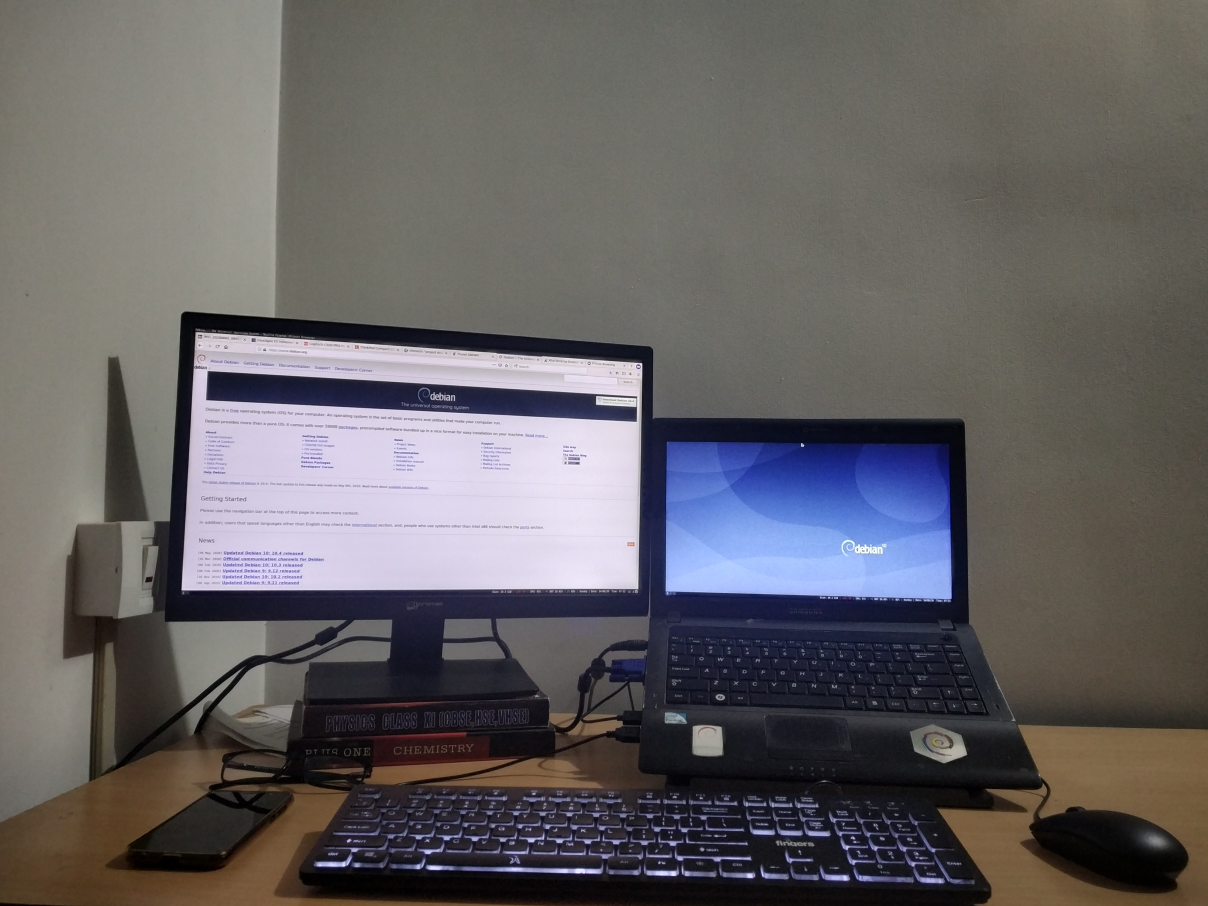
Workstation Hello, Recently I ve seen lot of people sharing about their home office setup. I thought why don t I do something similar. Not to beat FOMO, but in future when I revisit this blog, it will be lovely to understand that I had some cool stuffs. There are people who went deep down in the ocean to lay cables for me to have a remote job and I am thankful to them. Being remote my home is my office. On my work table I have a Samsung R439 laptop. I ve blogged about it earlier. New addition is that it have another 4GB RAM, a total of 6GB and 120GB SSD. I run Debian testing on it. Laptop is placed on a stand. Dell MS116 as external mouse always connected to it. I also use an external keyboard from fingers. The keys are very stiff so I don t recommend this to anyone. The only reason I took this keyboard that it is in my budget and have a backlit, which I needed most. I have a Micromax MM215FH76 21 inch monitor as my secondary display which stacked up on couple of old books to adjust the height with laptop stand. Everything is ok with this monitor except that it don t have a HDMI point and stand is very weak. I use i3wm and this small script help me to manage my monitor arrangement.
# samsung r439
xrandr --output LVDS1 --primary --mode 1366x768 --pos 1920x312 --rotate normal --output DP1 --off --output HDMI1 --off --output VGA1 --mode 1920x1080 --pos 0x0 --rotate normal --output VIRTUAL1 --off
# thinkpad t430s
#xrandr --output LVDS1 --primary --mode 1600x900 --pos 1920x180 --rotate normal --output DP1 --off --output DP2 --off --output DP3 --off --output HDMI1 --off --output HDMI2 --off --output HDMI3 --off --output VGA1 --mode 1920x1080 --pos 0x0 --rotate normal --output VIRTUAL1 --off
i3-msg workspace 2, move workspace to left
i3-msg workspace 4, move workspace to left
i3-msg workspace 6, move workspace to left
I also have another Viewsonic monitor 19 inch, it started to show some lines and unpleasant colors. Thus moved back to shelf. I have an orange pi zero plus 2 running Armbian which serve as my emby media server. I don t own any webcam or quality headset at the moment. I have a boat, and Mi, headphones. My laptop inbuilt webcam is horrible, so for my video conferencing need I use jitsi app on my mobile device.

Reproducible Builds (diffoscope): diffoscope 152 released

The diffoscope maintainers are pleased to announce the release of diffoscope version 152. This version includes the following changes:
[ Chris Lamb ]
* Bug fixes:
  - Don't require zipnote(1) to determine differences in a .zip file as we
    can use libarchive directly.
* Reporting improvements:
  - Don't emit "javap not found in path" if it is available in the path but
    it did not result in any actual difference.
  - Fix "... not available in path" messages when looking for Java
    decompilers; we were using the Python class name (eg. "<class
    'diffoscope.comparators.java.Javap'>") over the actual command we looked
    for (eg. "javap").
* Code improvements:
  - Replace some simple usages of str.format with f-strings.
  - Tidy inline imports in diffoscope.logging.
  - In the RData comparator, always explicitly return a None value in the
    failure cases as we return a non-None value in the "success" one.
[ Jean-Romain Garnier ]
* Improve output of side-by-side diffs, detecting added lines better.
  (MR: reproducible-builds/diffoscope!64)
* Allow passing file with list of arguments to ArgumentParser (eg.
  "diffoscope @args.txt"). (MR: reproducible-builds/diffoscope!62)
You find out more by visiting the project homepage.

16 July 2020

Russell Coker: Windows 10 on Debian under KVM

Here are some things that you need to do to get Windows 10 running on a Debian host under KVM. UEFI Booting UEFI is big and complex, but most of what it does isn t needed at all. If all you want to do is boot from an image of a disk with a GPT partition table then you just install the package ovmf and add something like the following to your KVM start script:
UEFI"-drive if=pflash,format=raw,readonly,file=/usr/share/OVMF/OVMF_CODE.fd -drive if=pflash,format=raw,readonly,file=/usr/share/OVMF/OVMF_VARS.fd"
Note that some of the documentation on this doesn t have the OVMF_VARS.fd file set to readonly. Allowing writes to that file means that the VM boot process (and maybe later) can change EFI variables that affect later boots and other VMs if they all share the same file. For a basic boot you don t need to change variables so you want it read-only. Also having it read-only is necessary if you want to run KVM as non-root. As an experiment I tried booting without the OVMF_VARS.fd file, it didn t boot and then even after configuring it to use the OVMF_VARS.fd file again Windows gave a boot error about the boot configuration data file that required booting from recovery media. Apparently configuration mistakes with EFI can mess up the Windows installation, so be careful and backup the Windows installation regularly! Linux can boot from EFI but you generally don t want to unless the boot device is larger than 2TB. It s relatively easy to convert a Linux installation on a GPT disk to a virtual image on a DOS partition table disk or on block devices without partition tables and that gives a faster boot. If the same person runs the host hardware and the VMs then the best choice for Linux is to have no partition tables just one filesystem per block device (which makes resizing much easier) and have the kernel passed as a parameter to kvm. So booting a VM from EFI is probably only useful for booting Windows VMs and for Linux boot loader development and testing. As an aside, the Debian Wiki page about Secure Boot on a VM [4] was useful for this. It s unfortunate that it and so much of the documentation about UEFI is about secure boot which isn t so useful if you just want to boot a system without regard to the secure boot features. Emulated IDE Disks Debian kernels (and probably kernels from many other distributions) are compiled with the paravirtualised storage device drivers. Windows by default doesn t support such devices so you need to emulate an IDE/SATA disk so you can boot Windows and install the paravirtualised storage driver. The following configuration snippet has a commented line for paravirtualised IO (which is fast) and an uncommented line for a virtual IDE/SATA disk that will allow an unmodified Windows 10 installation to boot.
#DRIVE="-drive format=raw,file=/home/kvm/windows10,if=virtio"
DRIVE="-drive id=disk,format=raw,file=/home/kvm/windows10,if=none -device ahci,id=ahci -device ide-drive,drive=disk,bus=ahci.0"
Spice Video Spice is an alternative to VNC, Here is the main web site for Spice [1]. Spice has many features that could be really useful for some people, like audio, sharing USB devices from the client, and streaming video support. I don t have a need for those features right now but it s handy to have options. My main reason for choosing Spice over VNC is that the mouse cursor in the ssvnc doesn t follow the actual mouse and can be difficult or impossible to click on items near edges of the screen. The following configuration will make the QEMU code listen with SSL on port 1234 on all IPv4 addresses. Note that this exposes the Spice password to anyone who can run ps on the KVM server, I ve filed Debian bug #965061 requesting the option of a password file to address this. Also note that the qxl virtual video hardware is VGA compatible and can be expected to work with OS images that haven t been modified for virtualisation, but that they work better with special video drivers.
KEYDIR=/etc/letsencrypt/live/kvm.example.com-0001
-spice password=xxxxxxxx,x509-cacert-file=$KEYDIR/chain.pem,x509-key-file=$KEYDIR/privkey.pem,x509-cert-file=$KEYDIR/cert.pem,tls-port=1234,tls-channel=main -vga qxl
To connect to the Spice server I installed the spice-client-gtk package in Debian and ran the following command:
spicy -h kvm.example.com -s 1234 -w xxxxxxxx
Note that this exposes the Spice password to anyone who can run ps on the system used as a client for Spice, I ve filed Debian bug #965060 requesting the option of a password file to address this. This configuration with an unmodified Windows 10 image only supported 800*600 resolution VGA display. Networking To setup bridged networking as non-root you need to do something like the following as root:
chgrp kvm /usr/lib/qemu/qemu-bridge-helper
setcap cap_net_admin+ep /usr/lib/qemu/qemu-bridge-helper
mkdir -p /etc/qemu
echo "allow all" > /etc/qemu/bridge.conf
chgrp kvm /etc/qemu/bridge.conf
chmod 640 /etc/qemu/bridge.conf
Windows 10 supports the emulated Intel E1000 network card. Configuration like the following configures networking on a bridge named br0 with an emulated E1000 card. MAC addresses that have a 1 in the second least significant bit of the first octet are locally administered (like IPv4 addresses starting with 10. ), see the Wikipedia page about MAC Address for details. The following is an example of network configuration where $ID is an ID number for the virtual machine. So far I haven t come close to 256 VMs on one network so I ve only needed one octet.
NET="-device e1000,netdev=net0,mac=02:00:00:00:01:$ID -netdev tap,id=net0,helper=/usr/lib/qemu/qemu-bridge-helper,br=br0"
Final KVM Settings
KEYDIR=/etc/letsencrypt/live/kvm.example.com-0001
SPICE="-spice password=xxxxxxxx,x509-cacert-file=$KEYDIR/chain.pem,x509-key-file=$KEYDIR/privkey.pem,x509-cert-file=$KEYDIR/cert.pem,tls-port=1234,tls-channel=main -vga qxl"
UEFI="-drive if=pflash,format=raw,readonly,file=/usr/share/OVMF/OVMF_CODE.fd -drive if=pflash,format=raw,readonly,file=/usr/share/OVMF/OVMF_VARS.fd"
DRIVE="-drive format=raw,file=/home/kvm/windows10,if=virtio"
NET="-device e1000,netdev=net0,mac=02:00:00:00:01:$ID -netdev tap,id=net0,helper=/usr/lib/qemu/qemu-bridge-helper,br=br0"
kvm -m 4000 -smp 2 $SPICE $UEFI $DRIVE $NET
Windows Settings The Spice Download page has a link for spice-guest-tools that has the QNX video driver among other things [2]. This seems to be needed for resolutions greater than 800*600. The Virt-Manager Download page has a link for virt-viewer which is the Spice client for Windows systems [3], they have MSI files for both i386 and AMD64 Windows. It s probably a good idea to set display and system to sleep after never (I haven t tested what happens if you don t do that, but there s no benefit in sleeping). Before uploading an image I disabled the pagefile and set the partition to the minimum size so I had less data to upload. Problems Here are some things I haven t solved yet. The aSpice Android client for the Spice protocol fails to connect with the QEMU code at the server giving the following message on stderr: error:14094418:SSL routines:ssl3_read_bytes:tlsv1 alert unknown ca:../ssl/record/rec_layer_s3.c:1544:SSL alert number 48 . Spice is supposed to support dynamic changes to screen resolution on the VM to match the window size at the client, this doesn t work for me, not even with the Red Hat QNX drivers installed. The Windows Spice client doesn t seem to support TLS, I guess running some sort of proxy for TLS would work but I haven t tried that yet.

15 July 2020

Jonathan Dowland: Lockdown music

Last Christmas, to make room for a tree, I dis-assembled my hifi unit and (temporarily, I thought) lugged my hi-fi and records up to the study.

Power, Corruption & Lies
I had been thinking about expanding the amount of storage I had for hifi and vinyl, perhaps moving from 2x2 storage cubes to 2x3, although Ikea don't make a 2x3 version of their stalwart vinyl storage line, the Kallax. I had begun exploring other options, both at Ikea and other places. Meanwhile, I re-purposed my old Expedit unit as storage for my daughter's Sylvanian Families. Under Lockdown, I've spent a lot more time in my study, and so I've set up the hifi there. It turns out I have a lot more opportunity to enjoy the records up here, during work, and I've begun to explore some things which I haven't listened to in a long time, or possibly ever. I thought I'd start keeping track of some of them. Power, Corruption and Lies is not something rarely listened to. It's steadily become my favourite New Order album. When I came across this copy (Factory, 1983), it was in pristine condition, but it now bears witness to my (mostly careful) use. There's now a scratch somewhere towards the end of the first track Age of Consent which causes my turntable to loop. By some good fortune the looping point is perfectly aligned to a bar. I don't always notice it straight away. This record rarely makes it back down from the turntable to where it's supposed to live.

Antoine Beaupr : Goatcounter analytics in ikiwiki

I have started using Goatcounter for analytics after reading this LWN article called "Lightweight alternatives to Google Analytics". Goatcounter has an interesting approach to privacy in that it:
tracks sessions using a hash of the browser's user agent and IP address to identify the client without storing any personal information. The salt used to generate these hashes is rotated every 4 hours with a sliding window.
There was no Debian package for the project, so I filed a request for package and instead made a fork of the project to add a Docker image. This page documents how Goatcounter was setup from there...

Server configuration
  1. build the image from this fork
    docker build -t zgoat/goatcounter .
    
  2. create volume for db:
    docker volume create goatcounter
    
  3. start the server:
    exec docker run --restart=unless-stopped --volume="goatcounter:/home/user/db/" --publish 127.0.0.1:8081:8080 --detach zgoat/goatcounter serve -listen :8080 -tls none
    
  4. apache configuration:
    <VirtualHost *:80>
                ServerName analytics.anarc.at
                Redirect / https://analytics.anarc.at/
                DocumentRoot /var/www/html/
        </VirtualHost>
    <VirtualHost *:443>
            ServerName analytics.anarc.at
            Use common-letsencrypt-ssl analytics.anarc.at
            DocumentRoot /var/www/html/
            ProxyPass /.well-known/ !
            ProxyPass / http://localhost:8081/
            ProxyPassReverse / http://localhost:8081/
            ProxyPreserveHost on
    </VirtualHost>
    
  5. add analytics.anarc.at to DNS
  6. create a TLS cert with LE:
    certbot certonly --webroot  -d analytics.anarc.at --webroot-path /var/www/html/
    
    note that goatcounter has code to do this on its own, but we avoid it to follow our existing policies and simplify things
  7. create site:
    docker run -it --rm --volume="goatcounter:/home/user/db/" zgoat/goatcounter create -domain analytics.anarc.at -email anarcat+rapports@anarc.at
    
  8. add to ikiwiki template
  9. rebuild wiki:
    ikiwiki --setup ikiwiki.setup --rebuild --verbose
    

Remaining issues
  • Docker image should be FROM scratch, this is statically built golang stuff after all...
  • move to Docker Compose or podman instead of just starting the thing by hand
  • this is all super janky and should be put in config management somehow
  • remove "anarc.at" test site (the site is the analytics site, not the tracked site), seems like this is not possible yet
  • do log parsing instead of Javascript or 1x1 images?
  • compare with goaccess logs, probably at the end of july, to have two full weeks to compare

Fixed issues
  • cache headers are wrong (120ms!) deployed workaround in apache, reported as a bug upstream
  • remove self-referer done, just a matter of configuring the URL in the settings. could this be automated too?
  • add pixel tracking for noscript users done, but required a patch to ikiwi (and I noticed another bug while doing it)
  • goatcounter monitor doesn't with sqlite (fixed upstream!)
  • the :8080 port leaks in some places, namely in the "Site config" documentation that is because i was using -port 8080 which was not necessary.

14 July 2020

Ian Jackson: MessagePack vs CBOR (RFC7049)

tl;dr: Use MessagePack, rather than CBOR. Introduction I recently wanted to choose a binary encoding. This was for a project using Rust serde, so I looked at the list of formats there. I ended up reading about CBOR and MessagePack. Both of these are binary formats for a JSON-like data model. Both of them are "schemaless", meaning you can decode them without knowing the structure. (This also provides some forwards compatibility.) They are, in fact, quite similar (although they are totally incompatible). This is no accident: CBOR is, effectively, a fork of MessagePack. Both formats continue to exist and both are being used in new programs. I needed to make a choice but lacked enough information. I thought I would try to examine the reasons and nature of the split, and to make some kind of judgement about the situation. So I did a lot of reading [11]. Here are my conclusions. History and politics Between about 2010 and 2013 there was only MessagePack. Unfortunately, MessagePack had some problems. The biggest of these was that it lacked a separate string type. Strings were to be encoded simply as byte blocks. This caused serious problems for many MessagePack library implementors: for example, when decoding a MessagePack file the Python library wouldn't know whether to produce a Python bytes object, or a string. Straightforward data structures wouldn't round trip through MessagePack. [1] [2] It seems that in late 2012 this came to the attention to someone with an IETF background. According to them, after unsatisfactory conversations with MessagePack upstream, they decided they would have to fork. They submitted an Internet Draft for a partially-incompatible protocol [3] [4]. Little seemed to happen in the IETF until soon before the Orlando in-person IETF meeting in February 2013.[5] These conversations sparked some discussion in the MessagePack issue tracker. There were long threads including about process [1,2,4 ibid]. But there was also a useful technical discussion, about proposed backward compatible improves to the MessagePack spec.[5] The prominent IETF contributor provided some helpful input in these discussions in the MessagePack community - but also pushed quite hard for a "tagging" system, which suggestion was not accepted (see my technical analysis, below). An improved MessagePack spec resulted, with string support, developed largely by the MessagePack community. It seems to have been available in useable form since mid-2013 and was officially published as canonical in August 2013. Meanwhile a parallel process was pursued in the IETF, based on the IETF contributor's fork, with 11 Internet-Drafts from February[7] to September[8]. This seems to have continued even though the original technical reason for the fork - lack of string vs binary distinction - no longer applied. The IETF proponent expressed unhappiness about MessagePack's stewardship and process as much as they did about the technical details [4, ibid]. The IETF process culminated in the CBOR RFC[9]. The discussion on process questions between the IETF proponent and MessagePack upstream, in the MessagePack issue tracker [4, ibid] should make uncomfortable reading for IETF members. The IETF acceptance of CBOR despite clear and fundamental objections from MessagePack upstream[13] and indeed other respected IETF members[14], does not reflect well on the IETF. The much vaunted openness of the IETF process seems to have been rather one-sided. The IETF proponent here was an IETF Chair. Certainly the CBOR author was very well-spoken and constantly talks about politeness and cooperation and process; but what they actually did was very hostile. They accused the MessagePack community of an "us and them" attitude while simultaneously pursuing a forked specification! The CBOR RFC does mention MessagePack in Appendix E.2. But not to acknowledge that CBOR was inspired by MessagePack. Rather, it does so to make a set of tendentious criticisms of MessagePack. Perhaps these criticisms were true when they were first written in an I-D but they were certainly false by the time the RFC was actually published, which occurred after the MessagePack improvement process was completely concluded, with a formal spec issued. Since then both formats have existed in parallel. Occasionally people discuss which one is better, and sometimes it is alleged that "yes CBOR is the successor to MessagePack", which is not really fair.[9][10] Technical differences The two formats have a similar arrangement: initial byte which can encode small integers, or type and length, or type and specify a longer length encoding. But there are important differences. Overall, MessagePack is very significantly simpler. Floating point CBOR supports five floating point formats! Not only three sizes of IEEE754, but also decimal floating point, and bigfloats. This seems astonishing for a supposedly-simple format. (Some of these are supported via the semi-optional tag mechanism - see below.) Indefinite strings and arrays Like MessagePack, CBOR mostly precedes items with their length. But CBOR also supports "indefinite" strings, arrays, and so on, where the length is not specified at the beginning. The object (array, string, whatever) is terminated by a special "break" item. This seems to me to be a mistake. If you wanted the kind of application where MessagePack or CBOR would be useful, streaming sub-objects of unknown length is not that important. This possibility considerably complicates decoders. CBOR tagging system CBOR has a second layer of sort-of-type which can be attached to each data item. The set of possible tags is open-ended and extensible, but the CBOR spec itself gives tag values for: two kinds of date format; positive and negative bignums; decimal floats (see above); binary but expected to be encoded if converted to JSON (in base64url, base64, or base16); nestedly encoded CBOR; URIs; base64 data (two formats); regexps; MIME messages; and a special tag to make file(1) work. In practice it is not clear how many of these are used, but a decoder must be prepared to at least discard them. The amount of additional spec complexity here is quite astonishing. IMO binary formats like this will (just like JSON) be used by a next layer which always has an idea of what the data means, including (where the data is a binary blob) what encoding it is in etc. So these tags are not useful. These tags might look like a middle way between (i) extending the binary protocol with a whole new type such as an extension type (incompatible with old readers) and encoding your new kind data in a existing type (leaving all readers who don't know the schema to print it as just integers or bytes or string). But I think they are more trouble than they are worth. The tags are uncomfortably similar to the ASN.1 tag system, which is widely regarded as one of ASN.1's unfortunate complexities. MessagePack extension mechanism MessagePack explicitly reserves some encoding space for users and for future extensions: there is an "extension type". The payload is an extension type byte plus some more data bytes; the data bytes are in a format to be defined by the extension type byte. Half of the possible extension byte values are reserved for future specification, and half are designated for application use. This is pleasingly straightforward. (There is also one unused primary initial byte value, but that would be rejected by existing decoders and doesn't seem like a likely direction for future expansion.) Minor other differences in integer encoding The encodings of integers differ. In MessagePack, signed and unsigned integers have different typecodes. In CBOR, signed and unsigned positive integers have the same typecodes; negative integers have a different set of typecodes. This means that a CBOR reader which knows it is expecting a signed value will have to do a top-bit-set check on the actual data value! And a CBOR writer must check the value to choose a typecode. MessagePack reserves fewer shortcodes for small negative integers, than for small positive integers. Conclusions and lessons MessagePack seems to have been prompted into fixing the missing string type problem, but only by the threat of a fork. However, this fork went ahead even after MessagePack clearly accepted the need for a string type. MessagePack had a fixed protocol spec before the IETF did. The continued pursuit of the IETF fork was ostensibly been motivated by a disapproval of the development process and in particular a sense that the IETF process was superior. However, it seems to me that the IETF process was abused by CBOR's proponent, who just wanted things their own way. I have seen claims by IETF proponents that the open decisionmaking system inherently produces superior results. However, in this case the IETF process produced a bad specification. To the extent that other IETF contributors had influence over the ultimate CBOR RFC, I don't think they significantly improved it. CBOR has been described as MessagePack bikeshedded by the IETF. That would have been bad enough, but I think it's worse than that. To a large extent CBOR is one person's NIH-induced bad design rubber stamped by the IETF. CBOR's problems are not simply matters of taste: it's significantly overcomplicated. One lesson for the rest of us is that although being the upstream and nominally in charge of a project seems to give us a lot of power, it's wise to listen carefully to one's users and downstreams. Once people are annoyed enough to fork, the fork will have a life of its own. Another lesson is that many of us should be much warier of the supposed moral authority of the IETF. Many IETF standards are awful (Oauth 2 [12]; IKE; DNSSEC; the list goes on). Sometimes (especially when network adoption effects are weak, as with MessagePack vs CBOR) better results can be obtained from a smaller group, or even an individual, who simply need the thing for their own uses. Finally, governance systems of public institutions like the IETF need to be robust in defending the interests of outsiders (and hence of society at large) against eloquent insiders who know how to work the process machinery. Any institution which nominally serves the public good faces a constant risk of devolving into self-servingness. This risk gets worse the more powerful and respected the institution becomes. References
  1. #13: First-class string type in serialization specification (MessagePack issue tracker, June 2010 - August 2013)
  2. #121: Msgpack can't differentiate between raw binary data and text strings (MessagePack issue tracker, November 2012 - February 2013)
  3. draft-bormann-apparea-bpack-00: The binarypack JSON-like representation format (IETF Internet-Draft, October 2012)
  4. #129: MessagePack should be developed in an open process (MessagePack issue tracker, February 2013 - March 2013)
  5. Re: JSON mailing list and BoF (IETF apps-discuss mailing list message from Carsten Bormann, 18 February 2013)
  6. #128: Discussions on the upcoming MessagePack spec that adds the string type to the protocol (MessagePack issue tracker, February 2013 - August 2013)
  7. draft-bormann-apparea-bpack-01: The binarypack JSON-like representation format (IETF Internet-Draft, February 2013)
  8. draft-bormann-cbor: Concise Binary Object Representation (CBOR) (IETF Internet-Drafts, May 2013 - September 2013)
  9. RFC 7049: Concise Binary Object Representation (CBOR) (October 2013)
  10. "MessagePack should be replaced with [CBOR] everywhere ..." (floatboth on Hacker News, 8th April 2017)
  11. Discussion with very useful set of history links (camgunz on Hacker News, 9th April 2017)
  12. OAuth 2.0 and the Road to Hell (Eran Hammer, blog posting from 2012, via Wayback Machine)
  13. Re: [apps-discuss] [Json] msgpack/binarypack (Re: JSON mailing list and BoF) (IETF list message from Sadyuki Furuhashi, 4th March 2013)
  14. "no apologies for complaining about this farce" (IETF list message from Phillip Hallam-Baker, 15th August 2013)
    Edited 2020-07-14 18:55 to fix a minor formatting issue, and 2020-07-14 22:54 to fix two typos


comment count unavailable comments

Markus Koschany: My Free Software Activities in June 2020

Welcome to gambaru.de. Here is my monthly report (+ the first week in July) that covers what I have been doing for Debian. If you re interested in Java, Games and LTS topics, this might be interesting for you. Debian Games Short news

Debian Java Misc Debian LTS This was my 52. month as a paid contributor and I have been paid to work 60 hours on Debian LTS, a project started by Rapha l Hertzog. In that time I did the following: Thanks for reading and see you next time.

Next.

Previous.