Search Results: "tb"

22 February 2013

Gunnar Wolf: So ZTE it is

Some weeks ago I posted about the long-expected demise of my old phone. And even given I don't usually don't pay much attention to phones (and could care less about the smartphone fad), I asked for a recommendation here on what to change to. The only thing that made me look for something other than a ~US$15 phone is that I enjoy having a GPS-enabled device. So, with that in mind, I went to my carrier's offices, with a top budget of MX$2,000 (~US$150), and asked for help. After being a Telcel subscriber for ~10 years (and ~6 with the same device), even though I use prepaid cards only (and seldom pay over MX$100 a month), I expected some advice. So, when the employee told me to go to the phone exhibit they have and pick my favorite, I declined, by telling I just want the cheapest unit with a GPS. He almost immediately offered me the ZTE V791, an Android 2.3-based unit, for MX$990 (~US$75), just around half of what I expected to pay. So I got two - One for myself, one for Regina, as her previous "nice" phone died under the Bosnian rain and had one of the sturdy, reliable but utterly boring US$15 phones for over a year ;-) As a new Mexican resident, she can surely use a GPS as well! (and some other tools in it). So, two nice phones, and still (squarely!) in my projected budget! I *did* give some thought to the comments posted in my original post, but given I don't want to bite in to the tendency too much, I let price determine what we get. And after all, I do not plan to ever enable data over the phone network (if at all, I use it on wifi). A recommendation for people with similar profiles/interest than me: Maps with me allows for downloading OpenStreetMap data on a country basis (so I get all of Mexico with me). I also got Vespucci OSM Editor, to be able to do OpenStreetMap updates from the phone, but given it has some stability issues I have not used it much (and it's understandably not so disconnected-mode-friendly) Not much more to add to this. I am writing this prompted by Russell's "iPhone vs. Android" post. My point after getting these two cheap phones? Having a wide range of devices under this same OS (even if it still has long ways to go freedom-wise) makes it a choice for people like me, who don't want to save money for a couple of months in order to get the newest gadget. I hope this phone lasts with me several years as well, without changing my usage pattern!

Russell Coker: iPhone vs Android

A friend who s a long-time iPhone user just asked for my advice about whether to get a Samsung Galaxy S3, a Samsung Galaxy Note 2, or a iPhone 5. Advantages for Android I think that liberty should be the first consideration, I ve previously written about how Android phones won t necessarily give you as much freedom as you desire if you buy on the basis of price and features [1]. But even the least free Android options are way better than the iOS (iPhone and iPad) environment. This isn t necessarily a big deal for my friend, like most of the population he usually just wants things to work being able to hack them isn t such an issue. However unlike most of the population he does make a reasonable portion of his income from software development and it could be that he will have a contract for developing an app on a mobile device in which case the freedom to tinker on Android will help him. He could use an iPhone for his personal use and develop on an Android platform for his clients, but generally it s more efficient if your personal use of technology is similar to that of your clients. The Nexus devices are very good for liberty and they also have nice hardware at a low price, I ve just got a Nexus 4 for my wife and it s very nice. The next issue is that of hardware standards, I ve previously written about the potential for developing a standard form factor for Android phones [2] although this doesn t seem likely to be implemented in the near future. The wide range of Android hardware means that the range of cases etc on the market is rather small. But the advantage of the wide range is that with an Android phone you can have a device that s bigger, smaller, cheaper, cuter, or faster than an iPhone. There are Android devices which have a higher resolution, more RAM, more storage (if you include SD storage), or has other benefits over an iPhone. For whatever reasonable range of specs appeal to you you can probably find a device to match. I ve previously written about the way the ideal size for devices depends on your hand size and your preferred manner of gripping the device [3], so the lack of size range in Apple devices is not just a limitation on personal choice but also a failure to properly support people with different size hands. Depending on the preferred manner of gripping a phone the iPhone 5 is either too big for an average woman or too small for a tall man. The Google Play store apparently has more applications than the iPhone/iPad App Market. This difference can be expected to increase now that the Samsung Galaxy S3 is outselling the iPhone 5. Comparing the number of unit sales of the iPhone vs Android phones is no longer interesting, comparing Samsung to Apple is the interesting thing. Advantages for the iPhone By all accounts it s quite an easy process to backup and restore all iPhone settings. You can expect that after losing an iPhone you can just connect the new one to your PC and have it work in exactly the same way after all the data is transferred. Trying to do such things on Android is merely difficult if you have root access to your phone and the source and destination phones are of exactly the same make and model. But if you have different versions of the phone or if you don t have root access then it may be impossible. I welcome comments from anyone who knows of good solutions to this problem. The iPhone achieved a reasonable share of the smart-phone market before Android really started going well so there are a lot of people who are used to the iPhone. Simply by being unfamiliar Android will be a more difficult option for people who have used the iPhone such as my friend. But it is possible to learn other systems. Generally I think that this may be a big issue for people who use Macs for all their other computing. But if the only Apple product you use is an iPhone then switching to Android shouldn t be a big deal. Update: One feature of the iPhone that is very important to my friend is the ability to add arbitrary tags in the contacts. In addition to name, address, phone number, etc he wants to add arbitrary notes related to his business. While he could put that sort of thing into the Notes field in Android he would rather have several fields with his own names. Android 4.1.x definitely doesn t have this and I can t test Android 4.2.x at this time. Is there any way of doing such things on Android? Conclusion It seems to me that Android devices are better in every way apart from backup, restore, and general management. If I was about to buy 100 phones then I d probably consider the iPhone (not necessarily buy but definitely consider). But for a single user I definitely recommend Android devices. The Android devices which seem good at the moment are the Galaxy S3 (which I m using now), the Nexus 4 (which is really good apart from being unable to change the battery or add more storage), and the Galaxy Note 2 (which is about the biggest phone available). One of the things that my friend wants to do is to use a phone instead of a tablet or laptop. I think that the Galaxy Note 2 is the only option for him.

21 February 2013

Joey Hess: Kickstarter rewards wrap-up

I finished delivering all my Kickstarter rewards at the end of the year. This is an overview of how that went, both financially and in general.
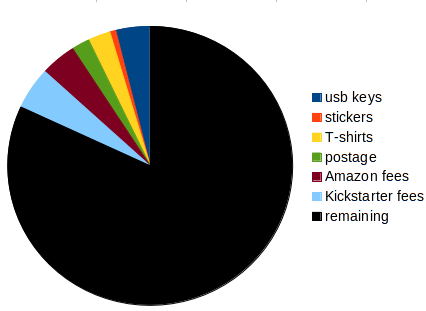
my Kickstarter pie (not including taxes)
While the Kickstarter was under way, several friends warned me that I might end up spending a lot of the money for rewards, or even shipping, and come out a loser. It's happened to some people, but I avoided it. Most of the pie went to its intended purpose.
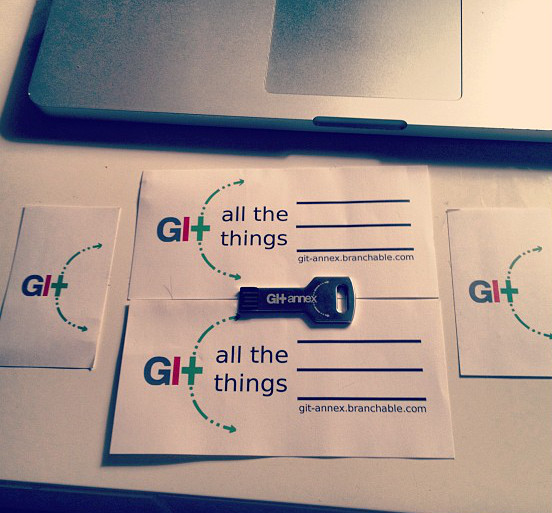
USB key arrives in Amsterdam
I kept shipping cost low by shipping everything by US postal service, including Air Mail for international shipping. This was particularly important for the stickers (which cost $1.05 to ship internationally). But I also shipped USB keys in regular mail envelopes, protected by bubble wrap, which worked very well and avoided the bother of shipping packages. The USPS will be annoyed at you for a rigid letter and add a non-machinable surcharge, but it's still a nice savings.
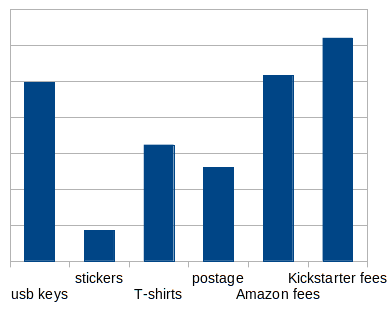
expenses
I spent more on rewards than on transaction fees, but the fees are still pretty large. Being dinged a second time by Amazon is the worst part. I have not been able to work out exactly what formula Kickstarter uses to determine its fee per pledge. It does not seem to be a simple percentage of the pledge. For example, they seem to have charged $0.25 per $10 pledge, but $25 for a $500 pledge. I wanted to solve this, but I'd have to match up all the pledges and fees manually to do it.
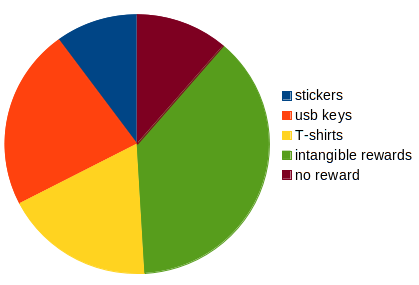
gross income by reward type
This chart is slightly innacurrate, because it puts any money pledged, beyond the amount needed to get a reward, into the "intangibles" category, despite the reward being probably responsible for that money being pledged. (The intangibles also includes people who did not ask for a reward, and several categories of rewards not involving shipping matter around.) But, the surprise for me is how large a peice the T-shirts are responsible for. It was my least favorite reward, and a low volume one, but I made out pretty well on it. However, I'd still try to avoid putting T-shirts on Kickstarter again. It's hard to do a good design (I didn't, really); they're expensive, and were by far the most annoying thing to ship. Also, I was not happy with the countries Cafe Press sourced their shirts from; I've been to Honduras and talked with people who have relatives in las machinas.
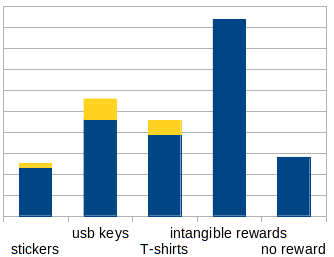
gross and net income by reward type (excluding shipping)
In contrast, the stickers had an amazing margin; they're so inexpensive to print that I printed up two kinds and included multiple with every other reward I mailed. I still have hundreds left over, too.. All the online print shops I tried have very annoying interfaces to upload artwork though. I had to do quite a bit of math to render TIFF files with appropriate DPI and margins. The USB keys were my favorite reward. I got them from USB Memory Direct, who gave me quite a nice deal. I was very happy that I was able to send them a SVG file of my artwork, so I didn't need to worry about lacking resolution for the laser engraving. And it came out looking great. The best part was when their sales guy Mike actually did a minor alteration of the artwork, to better fit on the key, when I, being overloaded with Kickstarter stuff asked him too. A bit above and beyond. There was an issue with their Chinese manufacturer's quality control of the 16 gb drives, but they were willing to send me replacement for all the ones I found problems with.
All told I spent probably 3 full days stuffing and shipping envelopes, and probably spent a week working on Kickstarter reward fullfillment. As work-related overhead goes, that's not bad. Maybe someone considering a Kickstarter will find this information useful somehow. Oh well, back to work. :)

20 February 2013

Daniel Pocock: Automatically mirroring SVN repositories to git and github

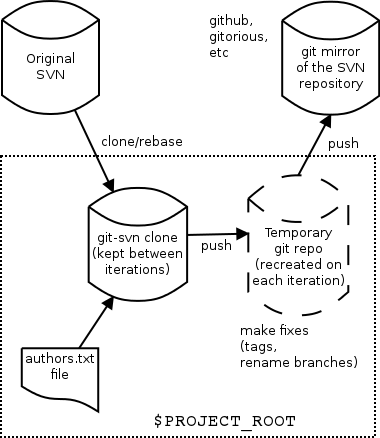
Updated 21 February 2013: the scripts below have now been adapted to run conveniently from cron and mirror multiple repositories. You can find full scripts and documentation on github There are a number of scripts around, including an earlier blog post of my own, for making a once-off conversion of an SVN repository to a Git repository. However, what if the project team is not yet ready for a full move to git? You may want to start benefiting from git (e.g. using the project as a submodule of another git project, or using Travis-CI.org for automated builds) while development officially continues to take place in SVN. If you don't need to make commits into git just now, you can set up a mirror and refresh it periodically from SVN. This process can be used with various SVN repositories, including Sourceforge and Google Code SVN repositories. Process overview
  • An authors.txt file is created manually before the first run.
  • A git-svn clone of the SVN repository is created. This clone needs to be retained between replication runs.
  • On each run, a temporary git repository is created. The svn-clone is rebased and pushed to the fresh git repository.
  • Fixes (e.g. branch renames and tagging) are made in the temporary git repository.
  • The final results are then pushed from the temporary repository to the real git mirror that is being maintained.
  • Finally, the temporary git repository is deleted, but the svn-clone is kept.
Here is a diagram of the workflow: Config file Here is a sample config file for the script, it mirrors the rather complicated reSIProcate repository with 10,000 commits:
PROJECT_ROOT=/home/daniel/svn-mirror/resiprocate
AUTHORS_FILE=$ PROJECT_ROOT /authors.txt
SVN_REPO=https://svn.resiprocate.org/rep/resiprocate
SVN_LAYOUT="--trunk=main --branches=branches --tags=tags"
GIT_REPO=git@github.com:resiprocate/resiprocate.git
Of particular note here:
  • The $PROJECT_ROOT is where the svn-clone and the temporary repositories will be created
  • $GIT_REPO is the final destination repository. For testing, it could just be a local directory initialised with git init --bare .
  • In this repository, our trunk is actually called main, hence we have the layout argument --trunk=main. Many projects would just use --trunk=trunk
The script The script itself is below. I'd suggest running it manually a few times first and observing how it behaves, disk space requirements, etc.
#!/bin/bash
set -e
if [ ! $# -eq 1 ];
then
  echo "Usage:"
  echo "$0 <config-file>"
  exit 1
fi
CONFIG_FILE="$1"
. "$ CONFIG_FILE "   exit 1
SVN_CLONE="$ PROJECT_ROOT /svn-clone"
GIT_BARE="$ PROJECT_ROOT /git-bare-tmp"
if [ ! -d "$ PROJECT_ROOT " ];
then
  mkdir -p "$ PROJECT_ROOT "
fi
cd "$ PROJECT_ROOT "
if [ ! -d "$ SVN_CLONE " ];
then
  git svn clone \
    "$ SVN_REPO " \
    -A "$ AUTHORS_FILE " \
    $ SVN_LAYOUT  \
    "$ SVN_CLONE "
  cd "$ SVN_CLONE "
else
  cd "$ SVN_CLONE "
  git remote rm bare   echo "failed to delete remote:bare, proceeding anyway"
  git svn rebase \
    --fetch-all \
    -A "$ AUTHORS_FILE "
fi
git remote add bare "$ GIT_BARE "
git config remote.bare.push 'refs/remotes/*:refs/heads/*'
if [ -d "$ GIT_BARE " ];
then
  rm -rf "$ GIT_BARE "
fi
mkdir -p "$ GIT_BARE "
cd "$ GIT_BARE "
git init --bare .
git symbolic-ref HEAD refs/heads/trunk
cd "$ SVN_CLONE "
git push bare
cd "$ GIT_BARE "
git branch -m trunk master
git for-each-ref --format='%(refname)' refs/heads/tags   \
   cut -d / -f 4   \
   while read ref;
   do
      git tag "$ref" "refs/heads/tags/$ref"
      git branch -D "tags/$ref"
   done
git remote add origin "$ GIT_REPO "
git config branch.master.remote origin
git config branch.master.merge refs/heads/master
git push --tags origin master
git push --all
rm -rf "$ GIT_BARE "
</config-file>
AttachmentSize
svn-mirror.png32.65 KB

Daniel Pocock: Automatically mirroring SVN repositories to git and github

Updated 21 February 2013: the scripts below have now been adapted to run conveniently from cron and mirror multiple repositories. You can find full scripts and documentation on github There are a number of scripts around, including an earlier blog post of my own, for making a once-off conversion of an SVN repository to a Git repository. However, what if the project team is not yet ready for a full move to git? You may want to start benefiting from git (e.g. using the project as a submodule of another git project, or using Travis-CI.org for automated builds) while development officially continues to take place in SVN. If you don't need to make commits into git just now, you can set up a mirror and refresh it periodically from SVN. This process can be used with various SVN repositories, including Sourceforge and Google Code SVN repositories. Process overview
  • An authors.txt file is created manually before the first run - see my other blog entry for convenient scripts to help generate authors.txt
  • A git-svn clone of the SVN repository is created. This clone needs to be retained between replication runs.
  • On each run, a temporary git repository is created. The svn-clone is rebased and pushed to the fresh git repository.
  • Fixes (e.g. branch renames and tagging) are made in the temporary git repository.
  • The final results are then pushed from the temporary repository to the real git mirror that is being maintained.
  • Finally, the temporary git repository is deleted, but the svn-clone is kept.
Here is a diagram of the workflow: Config file Here is a sample config file for the script, it mirrors the rather complicated reSIProcate repository with 10,000 commits:
PROJECT_ROOT=/home/daniel/svn-mirror/resiprocate
AUTHORS_FILE=$ PROJECT_ROOT /authors.txt
SVN_REPO=https://svn.resiprocate.org/rep/resiprocate
SVN_LAYOUT="--trunk=main --branches=branches --tags=tags"
GIT_REPO=git@github.com:resiprocate/resiprocate.git
Of particular note here:
  • The $PROJECT_ROOT is where the svn-clone and the temporary repositories will be created
  • $GIT_REPO is the final destination repository. For testing, it could just be a local directory initialised with git init --bare .
  • In this repository, our trunk is actually called main, hence we have the layout argument --trunk=main. Many projects would just use --trunk=trunk
The script The script itself is below. I'd suggest running it manually a few times first and observing how it behaves, disk space requirements, etc.
#!/bin/bash
set -e
if [ ! $# -eq 1 ];
then
  echo "Usage:"
  echo "$0 <config-file>"
  exit 1
fi
CONFIG_FILE="$1"
. "$ CONFIG_FILE "   exit 1
SVN_CLONE="$ PROJECT_ROOT /svn-clone"
GIT_BARE="$ PROJECT_ROOT /git-bare-tmp"
if [ ! -d "$ PROJECT_ROOT " ];
then
  mkdir -p "$ PROJECT_ROOT "
fi
cd "$ PROJECT_ROOT "
if [ ! -d "$ SVN_CLONE " ];
then
  git svn clone \
    "$ SVN_REPO " \
    -A "$ AUTHORS_FILE " \
    $ SVN_LAYOUT  \
    "$ SVN_CLONE "
  cd "$ SVN_CLONE "
else
  cd "$ SVN_CLONE "
  git remote rm bare   echo "failed to delete remote:bare, proceeding anyway"
  git svn rebase \
    --fetch-all \
    -A "$ AUTHORS_FILE "
fi
git remote add bare "$ GIT_BARE "
git config remote.bare.push 'refs/remotes/*:refs/heads/*'
if [ -d "$ GIT_BARE " ];
then
  rm -rf "$ GIT_BARE "
fi
mkdir -p "$ GIT_BARE "
cd "$ GIT_BARE "
git init --bare .
git symbolic-ref HEAD refs/heads/trunk
cd "$ SVN_CLONE "
git push bare
cd "$ GIT_BARE "
git branch -m trunk master
git for-each-ref --format='%(refname)' refs/heads/tags   \
   cut -d / -f 4   \
   while read ref;
   do
      git tag "$ref" "refs/heads/tags/$ref"
      git branch -D "tags/$ref"
   done
git remote add origin "$ GIT_REPO "
git config branch.master.remote origin
git config branch.master.merge refs/heads/master
git push --tags origin master
git push --all
rm -rf "$ GIT_BARE "
</config-file>
AttachmentSize
svn-mirror.png32.65 KB

Ryan Kavanagh: Search RCS and CVS ",v" files with rcsgrep

A few years ago I was doing research comparing how large software distributions handled shared object libraries, and studied Debian, FreeBSD, and Ubuntu. Extracting data about Debian packages was easy thanks to Peter Palfrader s snapshot.debian.org service, which provides a machine-usable interface to Debian s package history. FreeBSD s data is equally accessible, albeit in a less pleasant format: their ports tree was stored in CVS until July 2012. One could easily rsync a copy of the ports tree s CVS repository to a local machine to analyze the data. This left you with a local tree full of ,v files, each corresponding to the history of a given file with at that location. I needed to extract all kinds of data from a tree full of these files, such as what revisions contained lines matching a regex, when these revisions were checked in, any tags associated with it, etc. To make things easier, it also helped to know the line numbers of the matching lines. Hence the birth of rcsgrep. rcsgrep is a Python script that makes use of Paul McGuire s fabulous pyparsing library. It allows you to search a RCS file (the ,v file format used by RCS and CVS to store revision history) using a Python regex, and the output format is customizable to allow printing only certain kinds of information, such as the revision number, the line number, the matching line, the line s author, the date it appeared, any tags associated with the line, and (useful when running over a large number of files) the file name. To make machine parsing (using AWK of course) easier, you can also specify the column separator. For example, I entered the lines The quick brown , fox jumped over , the lazy dog. Woof! into the file abc, checking in the changes after each line. The invocation ./rcsgrep -s ' ' -f rlLda '.*' abc,v, with spaces for column separation, and format options r is for revision, l for line number, L for line contents, d for date, and a for author, outputs:
1.3    1    The quick brown    2013.02.20.14.24.09    ryan
1.3    2    jumped over the    2013.02.20.14.24.09    ryan
1.3    3    lazy dog. Woof!    2013.02.20.14.24.09    ryan
1.2    1    The quick brown    2013.02.20.14.23.48    ryan
1.2    2    jumped over the    2013.02.20.14.23.48    ryan
1.1    1    The quick brown    2013.02.20.14.23.25    ryan
I m particularly proud about my grep() function in rcsfile.py, which goes through each revision, tracking additions and deletions, but only keeping the lines matching the regex in memory. In any case, rcsgrep is licensed under the ISC license and can be found on github. Addendum: I learned after the fact that O Reilly s UNIX Power Tools offers something similar by the same name, except that it is runs several processes, such as co, grep and sed, as opposed to a single Python script.

Martin Pitt: umockdev 0.2: record/replay input devices

I just released umockdev 0.2. The big new feature of this release is support for evdev ioctls. I. e. you can now record what e. g. X.org is doing to touchpads, touch screens, etc.:
  $ umockdev-record /dev/input/event15 > /tmp/touchpad.umockdev
  # umockdev-record -i /tmp/touchpad.ioctl /dev/input/event15 -- Xorg -logfile /dev/null
and load that back into a testbed with X.org using the dummy driver:
  cat <<EOF > xorg-dummy.conf
  Section "Device"
        Identifier "test"
        Driver "dummy"
  EndSection
  EOF
  $ umockdev-run -l /tmp/touchpad.umockdev -i /dev/input/event15=/tmp/touchpad.ioctl -- \
       Xorg -config xorg-dummy.conf -logfile /tmp/X.log :5
Then e. g. DISPLAY=:5 xinput will recognize the simulated device. Note that Xvfb won t work as that does not use udev for device discovery, but only adds the XTest virtual devices and nothing else, so you need to use the real X.org with the dummy driver to run this as a normal user. This enables easier debugging of new kinds of input devices, as well as writing tests for handling multiple touchscreens/monitors, integration tests of Wacom devices, and so on. This release now also works with older automakes and Vala 0.16, so that you can use this from Ubuntu 12.04 LTS. The daily PPA now also has packages for that. Attention: This version does not work any more with recorded ioctl files from version 0.1. More detailled list of changes:

Vincent Bernat: lldpd 0.7.1

A few weeks ago, a new version of lldpd, a 802.1AB (aka LLDP) implementation for various Unices, has been released. LLDP is an industry standard protocol designed to supplant proprietary Link-Layer protocols such as EDP or CDP. The goal of LLDP is to provide an inter-vendor compatible mechanism to deliver Link-Layer notifications to adjacent network devices. In short, LLDP allows you to know exactly on which port is a server (and reciprocally). To illustrate its use, I have made a xkcd-like strip: xkcd-like strip for the use of LLDP If you would like more information about lldpd, please have a look at its new dedicated website. This blog post is an insight of various technical changes that have affected lldpd since its latest major release one year ago. Lots of C stuff ahead!

Version & changelog UPDATED: Guillem Jover told me how he met the same goals for libbsd :
  1. Save the version from git into .dist-version and use this file if it exists. This allows one to rebuild ./configure from the published tarball without losing the version. This also handles Thorsten Glaser s critic.
  2. Include CHANGELOG in DISTCLEANFILES variable.
Since this is a better solution, I have adopted the appropriate line of codes from libbsd. The two following sections are partly technically outdated.

Automated version In configure.ac, I was previously using a static version number that I had to increase when releasing:
AC_INIT([lldpd], [0.5.7], [bernat@luffy.cx])
Since the information is present in the git tree, this seems a bit redundant (and easy to forget). Taking the version from the git tree is easy:
AC_INIT([lldpd],
        [m4_esyscmd_s([git describe --tags --always --match [0-9]* 2> /dev/null   date +%F])],
        [bernat@luffy.cx])
If the head of the git tree is tagged, you get the exact tag (0.7.1 for example). If it is not, you get the nearest one, the number of commits since it and part of the current hash (0.7.1-29-g2909519 for example). The drawback of this approach is that if you rebuild configure from the released tarball, you don t have the git tree and the version will be a date. Just don t do that.

Automated changelog Generating the changelog from git is a common practice. I had some difficulties to make it right. Here is my attempt (I am using automake):
dist_doc_DATA = README.md NEWS ChangeLog
.PHONY: $(distdir)/ChangeLog
dist-hook: $(distdir)/ChangeLog
$(distdir)/ChangeLog:
        $(AM_V_GEN)if test -d $(top_srcdir)/.git; then \
          prev=$$(git describe --tags --always --match [0-9]* 2> /dev/null) ; \
          for tag in $$(git tag   grep -E '^[0-9]+(\.[0-9]+) 1, $$'   sort -rn); do \
            if [ x"$$prev" = x ]; then prev=$$tag ; fi ; \
            if [ x"$$prev" = x"$$tag" ]; then continue; fi ; \
            echo "$$prev [$$(git log $$prev -1 --pretty=format:'%ai')]:" ; \
            echo "" ; \
            git log --pretty=' - [%h] %s (%an)' $$tag..$$prev ; \
            echo "" ; \
            prev=$$tag ; \
          done > $@ ; \
        else \
          touch $@ ; \
        fi
ChangeLog:
        touch $@
Changelog entries are grouped by version. Since it is a bit verbose, I still maintain a NEWS file with important changes.

Core

C99 I have recently read 21st Century C which has some good bits and also handles the ecosystem around C. I have definitively adopted designated initializers in my coding style. Being a GCC extension since a long time, this is not a major compatibility problem. Without designated initializers:
struct netlink_req req;
struct iovec iov;
struct sockaddr_nl peer;
struct msghdr rtnl_msg;
memset(&req, 0, sizeof(req));
memset(&iov, 0, sizeof(iov));
memset(&peer, 0, sizeof(peer));
memset(&rtnl_msg, 0, sizeof(rtnl_msg));
req.hdr.nlmsg_len = NLMSG_LENGTH(sizeof(struct rtgenmsg));
req.hdr.nlmsg_type = RTM_GETLINK;
req.hdr.nlmsg_flags = NLM_F_REQUEST   NLM_F_DUMP;
req.hdr.nlmsg_seq = 1;
req.hdr.nlmsg_pid = getpid();
req.gen.rtgen_family = AF_PACKET;
iov.iov_base = &req;
iov.iov_len = req.hdr.nlmsg_len;
peer.nl_family = AF_NETLINK;
rtnl_msg.msg_iov = &iov;
rtnl_msg.msg_iovlen = 1;
rtnl_msg.msg_name = &peer;
rtnl_msg.msg_namelen = sizeof(struct sockaddr_nl);
With designated initializers:
struct netlink_req req =  
    .hdr =  
        .nlmsg_len = NLMSG_LENGTH(sizeof(struct rtgenmsg)),
        .nlmsg_type = RTM_GETLINK,
        .nlmsg_flags = NLM_F_REQUEST   NLM_F_DUMP,
        .nlmsg_seq = 1,
        .nlmsg_pid = getpid()  ,
    .gen =   .rtgen_family = AF_PACKET  
 ;
struct iovec iov =  
    .iov_base = &req,
    .iov_len = req.hdr.nlmsg_len
 ;
struct sockaddr_nl peer =   .nl_family = AF_NETLINK  ;
struct msghdr rtnl_msg =  
    .msg_iov = &iov,
    .msg_iovlen = 1,
    .msg_name = &peer,
    .msg_namelen = sizeof(struct sockaddr_nl)
 ;

Logging Logging in lldpd was not extensive. Usually, when receiving a bug report, I asked the reporter to add some additional printf() calls to determine where the problem was. This was clearly suboptimal. Therefore, I have added many log_debug() calls with the ability to filter out some of them. For example, to debug interface discovery, one can run lldpd with lldpd -ddd -D interface. Moreover, I have added colors when logging to a terminal. This may seem pointless but it is now far easier to spot warning messages from debug ones. logging output of lldpd

libevent In lldpd 0.5.7, I was using my own select()-based event loop. It worked but I didn t want to grow a full-featured event loop inside lldpd. Therefore, I switched to libevent. The minimal required version of libevent is 2.0.5. A convenient way to check the changes in API is to use Upstream Tracker, a website tracking API and ABI changes for various libraries. This version of libevent is not available in many stable distributions. For example, Debian Squeeze or Ubuntu Lucid only have 1.4.13. I am also trying to keep compatibility with very old distributions, like RHEL 2, which does not have a packaged libevent at all. For some users, it may be a burden to compile additional libraries. Therefore, I have included libevent source code in lldpd source tree (as a git submodule) and I am only using it if no suitable system libevent is available. Have a look at m4/libevent.m4 and src/daemon/Makefile.am to see how this is done.

Client

Serialization lldpctl is a client querying lldpd to display discovered neighbors. The communication is done through an Unix socket. Each structure to be serialized over this socket should be described with a string. For example:
#define STRUCT_LLDPD_DOT3_MACPHY "(bbww)"
struct lldpd_dot3_macphy  
        u_int8_t                 autoneg_support;
        u_int8_t                 autoneg_enabled;
        u_int16_t                autoneg_advertised;
        u_int16_t                mau_type;
 ;
I did not want to use stuff like Protocol Buffers because I didn t want to copy the existing structures to other structures before serialization (and the other way after deserialization). However, the serializer in lldpd did not allow to handle reference to other structures, lists or circular references. I have written another one which works by annotating a structure with some macros:
struct lldpd_chassis  
    TAILQ_ENTRY(lldpd_chassis) c_entries;
    u_int16_t        c_index;
    u_int8_t         c_protocol;
    u_int8_t         c_id_subtype;
    char            *c_id;
    int              c_id_len;
    char            *c_name;
    char            *c_descr;
    u_int16_t        c_cap_available;
    u_int16_t        c_cap_enabled;
    u_int16_t        c_ttl;
    TAILQ_HEAD(, lldpd_mgmt) c_mgmt;
 ;
MARSHAL_BEGIN(lldpd_chassis)
MARSHAL_TQE  (lldpd_chassis, c_entries)
MARSHAL_FSTR (lldpd_chassis, c_id, c_id_len)
MARSHAL_STR  (lldpd_chassis, c_name)
MARSHAL_STR  (lldpd_chassis, c_descr)
MARSHAL_SUBTQ(lldpd_chassis, lldpd_mgmt, c_mgmt)
MARSHAL_END;
Only pointers need to be annotated. The remaining of the structure can be serialized with just memcpy()1. I think there is still room for improvement. It should be possible to add annotations inside the structure and avoid some duplication. Or maybe, using a C parser? Or using the AST output from LLVM?

Library In lldpd 0.5.7, there are two possible entry points to interact with the daemon:
  1. Through SNMP support. Only information available in LLDP-MIB are exported. Therefore, implementation-specific values are not available. Moreover, SNMP support is currently read-only.
  2. Through lldpctl. Thanks to a contribution from Andreas Hofmeister, the output can be requested to be formatted as an XML document.
Integration of lldpd into a network stack was therefore limited to one of those two channels. As an exemple, you can have a look at how Vyatta made the integration using the second solution. To provide a more robust solution, I have added a shared library, liblldpctl, with a stable and well-defined API. lldpctl is now using it. I have followed those directions2:
  • Consistent naming (all exported symbols are prefixed by lldpctl_). No pollution of the global namespace.
  • Consistent return codes (on errors, all functions returning pointers are returning NULL, all functions returning integers are returning -1).
  • Reentrant and thread-safe. No global variables.
  • One well-documented include file.
  • Reduce the use of boilerplate code. Don t segfault on NULL, accept integer input as string, provide easy iterators,
  • Asynchronous API for input/output. The library delegates reading and writing by calling user-provided functions. Those functions can yield their effects. In this case, the user has to callback the library when data is available for reading or writing. It is therefore possible to integrate the library with any existing event-loop. A thin synchronous layer is provided on top of this API.
  • Opaque types with accessor functions.
Accessing bits of information is done through atoms which are opaque containers of type lldpctl_atom_t. From an atom, you can extract some properties as integers, strings, buffers or other atoms. The list of ports is an atom. A port in this list is also an atom. The list of VLAN present on this port is an atom, as well as each VLAN in this list. The VLAN name is a NULL-terminated string living in the scope of an atom. Accessing a property is done by a handful of functions, like lldpctl_atom_get_str(), using a specific key. For example, here is how to display the list of VLAN assuming you have one port as an atom:
vlans = lldpctl_atom_get(port, lldpctl_k_port_vlans);
lldpctl_atom_foreach(vlans, vlan)  
    vid = lldpctl_atom_get_int(vlan,
                               lldpctl_k_vlan_id));
    name = lldpctl_atom_get_str(vlan,
                                lldpctl_k_vlan_name));
    if (vid && name)
        printf("VLAN %d: %s\n", vid, name);
 
lldpctl_atom_dec_ref(vlans);
Internally, an atom is typed and reference counted. The size of the API is greatly limited thanks to this concept. There are currently more than one hundred pieces of information that can be retrieved from lldpd. Ultimately, the library will also enable the full configuration of lldpd. Currently, many aspects can only be configured through command-line flags. The use of the library does not replace lldpctl which will still be available and be the primary client of the library.

CLI Having a configuration file was requested since a long time. I didn t want to include a parser in lldpd: I am trying to keep it small. It was already possible to configure lldpd through lldpctl. Locations, network policies and power policies were the three items that could be configured this way. So, the next step was to enable lldpctl to read a configuration file, parse it and send the result to lldpd. As a bonus, why not provide a full CLI accepting the same statements with inline help and completion?

Parsing & completion Because of completion, it is difficult to use a YACC generated parser. Instead, I define a tree where each node accepts a word. A node is defined with this function:
struct cmd_node *commands_new(
    struct cmd_node *,
    const char *,
    const char *,
    int(*validate)(struct cmd_env*, void *),
    int(*execute)(struct lldpctl_conn_t*, struct writer*,
        struct cmd_env*, void *),
    void *);
A node is defined by:
  • its parent,
  • an optional accepted static token,
  • an help string,
  • an optional validation function and
  • an optional function to execute if the current token is accepted.
When walking the tree, we maintain an environment which is both a key-value store and a stack of positions in the tree. The validation function can check the environment to see if we are in the right context (we want to accept the keyword foo only once, for example). The execution function can add the current token as a value in the environment but it can also pop the current position in the tree to resume walk from a previous node. As an example, see how nodes for configuration of a coordinate-based location are registered:
/* Our root node */
struct cmd_node *configure_medloc_coord = commands_new(
    configure_medlocation,
    "coordinate", "MED location coordinate configuration",
    NULL, NULL, NULL);
/* The exit node.
   The validate function will check if we have both
   latitude and longitude. */
commands_new(configure_medloc_coord,
    NEWLINE, "Configure MED location coordinates",
    cmd_check_env, cmd_medlocation_coordinate,
    "latitude,longitude");
/* Store latitude. Once stored, we pop two positions
   to go back to the "root" node. The user can only
   enter latitude once. */
commands_new(
    commands_new(
        configure_medloc_coord,
        "latitude", "Specify latitude",
        cmd_check_no_env, NULL, "latitude"),
    NULL, "Latitude as xx.yyyyN or xx.yyyyS",
    NULL, cmd_store_env_value_and_pop2, "latitude");
/* Same thing for longitude */
commands_new(
    commands_new(
        configure_medloc_coord,
        "longitude", "Specify longitude",
        cmd_check_no_env, NULL, "longitude"),
    NULL, "Longitude as xx.yyyyE or xx.yyyyW",
    NULL, cmd_store_env_value_and_pop2, "longitude");
The definition of all commands is still a bit verbose but the system is simple enough yet powerful enough to cover all needed cases.

Readline When faced with a CLI, we usually expect some perks like completion, history handling and help. The most used library to provide such features is the GNU Readline Library. Because this is a GPL library, I have first searched an alternative. There are several of them: From an API point of view, the first three libraries support the GNU Readline API. They also have a common native API. Moreover, this native API also handles tokenization. Therefore, I have developed the first version of the CLI with this API3. Unfortunately, I noticed later this library is not very common in the Linux world and is not available in RHEL. Since I have used the native API, it was not possible to fallback to the GNU Readline library. So, let s switch! Thanks to the appropriate macro from the Autoconf Archive (with small modifications), the compilation and linking differences between the libraries are taken care of. Because GNU Readline library does not come with a tokenizer, I had to write one myself. The API is also badly documented and it is difficult to know which symbol is available in which version. I have limited myself to:
  • readline(), addhistory(),
  • rl_insert_text(),
  • rl_forced_update_display(),
  • rl_bind_key()
  • rl_line_buffer and rl_point.
Unfortunately, the various libedit libraries have a noop for rl_bind_key(). Therefore, completion and online help is not available with them. I have noticed that most BSD come with GNU Readline library preinstalled, so it could be considered as a system library. Nonetheless, linking with libedit to avoid licensing issues is possible and help can be obtained by prefixing the command with help.

OS specific support

BSD support Until version 0.7, lldpd was Linux-only. The rewrite to use Netlink was the occasion to abstract interfaces and to port to other OS. The first port was for Debian GNU/kFreeBSD, then for FreeBSD, OpenBSD and NetBSD. They all share the same source code:
  • getifaddrs() to get the list of interfaces,
  • bpf(4) to attach to an interface to receive and send packets,
  • PF_ROUTE socket to be notified when a change happens.
Each BSD has its own ioctl() to retrieve VLAN, bridging and bonding bits but they are quite similar. The code was usually adapted from ifconfig.c. The BSD ports have the same functionalities than the Linux port, except for NetBSD which lacks support for LLDP-MED inventory since I didn t find a simple way to retrieve DMI related information. They also offer greater security by filtering packets sent. Moreover, OpenBSD allows to lock the filters set on the socket:
/* Install write filter (optional) */
if (ioctl(fd, BIOCSETWF, (caddr_t)&fprog) < 0)  
    rc = errno;
    log_info("privsep", "unable to setup write BPF filter for %s",
        name);
    goto end;
 
/* Lock interface */
if (ioctl(fd, BIOCLOCK, (caddr_t)&enable) < 0)  
    rc = errno;
    log_info("privsep", "unable to lock BPF interface %s",
        name);
    goto end;
 
This is a very nice feature. lldpd is using a privileged process to open the raw socket. The socket is then transmitted to an unprivileged process. Without this feature, the unprivileged process can remove the BPF filters. I have ported the ability to lock a socket filter program to Linux. However, I still have to add a write filter.

OS X support Once FreeBSD was supported, supporting OS X seemed easy. I got sponsored by xcloud.me which provided a virtual Mac server. Making lldpd work with OS X took only two days, including a full hour to guess how to get Apple Xcode without providing a credit card. To help people installing lldpd on OS X, I have also written a lldpd formula for Homebrew which seems to be the most popular package manager for OS X.

Upstart and systemd support Many distributions propose upstart and systemd as a replacement or an alternative for the classic SysV init. Like most daemons, lldpd detaches itself from the terminal and run in the background, by forking twice, once it is ready (for lldpd, this just means we have setup the control socket). While both upstart and systemd can accommodate daemons that behave like this, it is recommended to not fork. How to advertise readiness in this case? With upstart, lldpd will send itself the SIGSTOP signal. upstart will detect this, resume lldpd with SIGCONT and assume it is ready. The code to support upstart is therefore quite simple. Instead of calling daemon(), do this:
const char *upstartjob = getenv("UPSTART_JOB");
if (!(upstartjob && !strcmp(upstartjob, "lldpd")))
    return 0;
log_debug("main", "running with upstart, don't fork but stop");
raise(SIGSTOP);
The job configuration file looks like this:
# lldpd - LLDP daemon
description "LLDP daemon"
start on net-device-up IFACE=lo
stop on runlevel [06]
expect stop
respawn
script
  . /etc/default/lldpd
  exec lldpd $DAEMON_ARGS
end script
systemd provides a socket to achieve the same goal. An application is expected to write READY=1 to the socket when it is ready. With the provided library, this is just a matter of calling sd_notify("READY=1\n"). Since sd_notify() has less than 30 lines of code, I have rewritten it to avoid an external dependency. The appropriate unit file is:
[Unit]
Description=LLDP daemon
Documentation=man:lldpd(8)
[Service]
Type=notify
NotifyAccess=main
EnvironmentFile=-/etc/default/lldpd
ExecStart=/usr/sbin/lldpd $DAEMON_ARGS
Restart=on-failure
[Install]
WantedBy=multi-user.target

OS include files Linux-specific include files were a major pain in previous versions of lldpd. The problems range from missing header files (like linux/if_bonding.h) to the use of kernel-only types. Those headers have a difficult history. They were first shipped with the C library but were rarely synced and almost always outdated. They were then extracted from kernel version with almost no change and lagged behind the kernel version used by the released distribution4. Today, the problem is acknowledged and is being solved by both the distributions which extract the headers from the packaged kernel and by kernel developers with a separation of kernel-only headers from user-space API headers. However, we still need to handle legacy. A good case is linux/ethtool.h:
  • It can just be absent.
  • It can use u8, u16 types which are kernel-only types. To work around this issue, type munging can be setup.
  • It can miss some definition, like SPEED_10000. In this case, you either define the missing bits and find yourself with a long copy of the original header interleaved with #ifdef or conditionally use each symbol. The latest solution is a burden by itself but it also hinders some functionalities that can be available in the running kernel.
The easy solution to all this mess is to just include the appropriate kernel headers into the source tree of the project. Thanks to Google ripping them for its Bionic C library, we know that copying kernel headers into a program does not create a derivative work.

  1. Therefore, the use of u_int16_t and u_int8_t types is a left-over of the previous serializer where the size of all members was important.
  2. For more comprehensive guidelines, be sure to check Writing a C library.
  3. Tokenization is not the only advantage of libedit native API. The API is also cleaner, does not have a global state and has a better documentation. All the implementations are also BSD licensed.
  4. For example, in Debian Sarge, the Linux kernel was a 2.6.8 (2004) while the kernel headers were extracted from some pre-2.6 kernel.

Gunnar Wolf: "No al voto electr nico", Triple W, W Radio

Title"No al voto electr nico", Triple W, W Radio
Publication TypeBroadcast
Year of Publication2013
AuthorsWolf G, Ruiz O
Refereed DesignationNon-Refereed
Keywordse-vote
URLhttp://www.wradio.com.mx/escucha/programas/voto-electronico-octavio-ruiz-y-kunar-wolf-analistas-190213/20130219/programa/1789792.aspx?au=1845636
Full TextIn yet another episode where we push for the population to be aware of the perils that electronic voting represents, Octavio Ruiz (@tacvbo) and me were invited to (briefly) talk about the topic in W Radio, one of the largest radio networks in Mexico.
The interview was short-ish, but we managed to get several points accross. And, of course, one of the best ways to do so is via a radio show with tens of thousands of listeners. So, we were quite happy to be there!
Here is the audio of the segment we presented in Fernanda Tapia's radio show "Triple W", in W Radio, Mexico.
AttachmentSize
Tripe W - Entrevista: no al voto electronico9.97 MB

19 February 2013

Ingo Juergensmann: LVM on RAID5 broken - how to fix?

Some time ago one of my disks in my Software RAID5 failed. No big problem as I had two spare A08U-C2412 available to replace that single 1 TB SATA disk. I can't remember any details but somewhat went wrong and I ended up with a non-booting system. I think I tried to add the HW-RAID as a physical volume to the LVM and thought of migrating the SW-RAID to the HW-RAID or do mirroring or such. Anyway: I booted into my rescue system that was on a RAID1 partition on those disks, but LVM didn't came up anymore, because the SW-RAID5 wasn't recognized during boot. So I re-created the md device and discovered that my PV was gone as well. =:-0 No, big deal, I thought, because I have a backup of that machine on another host. I restored /etc/lvm and tried to do a vgcfgrestore after I re-created the PV with pvcreate. First I didn't use the old UUID, so vgcfgrestore complained. After creating the proper PV with UUID LVM did recognize the PV, VG and LVs. Unfortunately I can't mount any of the LVs. Something seems to be broken:
hahn-rescue:~# mount /dev/vg/sys /mnt
mount: you must specify the filesystem type
Feb 19 07:50:02 hahn-rescue kernel: [748288.740949] XFS (dm-0): bad magic number
Feb 19 07:50:02 hahn-rescue kernel: [748288.741009] XFS (dm-0): SB validate failed
Running a gpart scan on my SW-RAID5 did gave me some results:
hahn-rescue:~# gpart /dev/md3
Begin scan...
Possible partition(SGI XFS filesystem), size(20470mb), offset(5120mb)
Possible partition(SGI XFS filesystem), size(51175mb), offset(28160mb)
Possible partition(SGI XFS filesystem), size(1048476mb), offset(117760mb)
Possible partition(SGI XFS filesystem), size(204787mb), offset(1168640mb)
Possible partition(SGI XFS filesystem), size(204787mb), offset(1418240mb)
Possible partition(SGI XFS filesystem), size(1048476mb), offset(1626112mb)
*** Fatal error: dev(/dev/md3): seek failure.
These is not the complete lists of VM as a comparison to the output of lvs shows:
hahn-rescue:~# lvs
  LV                 VG   Attr     LSize   Pool Origin Data%  Move Log Copy%  Convert
  storage1           lv   -wi-ao--   1.00t                                          
  AmigaSeagateElite3 vg   -wi-a---   3.00g                                          
  audio              vg   -wi-a---  70.00g                                          
  backup             vg   -wi-a---   1.00t                                          
  data               vg   -wi-a---  50.00g                                          
  hochzeit           vg   -wi-a---  40.00g                                          
  home               vg   -wi-a---   5.00g                                          
  pics               vg   -wi-a--- 200.00g                                          
  sys                vg   -wi-a---  20.00g                                          
  video              vg   -wi-a--- 100.00g                                          
  windata            vg   -wi-a--- 100.00g   
Please notice that /dev/lv/storage1 is my HW-RAID where I stored the images of /dev/vg/-LVs to run xfs_repair and such on. Anyway, the sizes of the recognized XFS partitions by gpart is mostly correct, but some a missing and xfs_repair can not do anything good on the backup images on storage1. Everything ends up in /lost+found, because the blocks seem to be mixed up somehow. What I figured out is, that my old RAID5 device was in metaformat=1.2 whereas the new one is in format 0.9. My best guess is now to recreate the RAID5 device with format 1.2, do a vgcfgrestore on that and have (hopefully!) a working LVM with working LVs back that I can then mount again. If there's anything else I might be able to try, dear Lazyweb, please tell me. Please see the attached config files/tarballs for a complete overview. Side note: except for AmigaSeagateElite3, which is a dd image of an old Amiga SCSI disk, I should have a fairly complete backup on my second backup location, so there's not much lost, but I would be a real timesaver when I would be able to recover the lost LVs. Both systems are behind DSL/cable and have a limit of 10 Mbps upstream. It would take weeks to transfer the data and sending an USB disk would be faster.
AttachmentSize
mdadm.conf_.txt954 bytes
hahn-lvm-restore.tar.gz14.7 KB
Kategorie:

18 February 2013

Jan Wagner: Learning Git Branching

If you are comming from an old SCM like subversion, you may have difficulties to internalize the new workflow. Peter Cottle created Learn Git Branching which is really nice.

Michal &#268;iha&#345;: Weblate charts of activity

Weblate recently got another new feature - charting of translation project activity. It counts and charts daily contributions in last month and weekly contributions in last year and draws nicely looking charts out of that: Weblate activity chart Originally I wanted to use some existing charting library and first implementation was actually done using PyCha, but in the end I ended up rendering charts using completely custom code, what allowed me to draw better graphs.

Filed under: English Weblate 0 comments Flattr this!

17 February 2013

Gregor Herrmann: RC bugs 2013/07

here's the list of my contributions around release-critical bugs for the last week:

15 February 2013

Richard Hartmann: Release Critical Bug report for Week 07

Technology Technology is... weird. I am in a cabbin in the middle of Lapland an hour away from the next city to speak of. GPS
N 66 15.958
E 24 59.981

look it up. We haven't had power for the last 60 minutes, the electrical heaters are out and we are trying to keep the main room warm with a wood stove while the wood-burning sauna above is ready to receive us the minute I hI push this post. The cabbin has become noticiably colder already, supply of logs small enough to actually burn is limited, we don't have an axe, but we have a car so we can leave if need be. The next house is about six kilometers away, no idea if they have power or not; the woods are dark all round other than for snowshine. Yet, I am sitting here, LED lamp lighting the room, GPS telling me what location to write into this post, laptop running on battery, cell phone with EGPRS supplying me with bugstats plus picture (even though I had to do most of it by hand as LWP::Simple barfs on the timeout) and allowing me to push to ikiwiki. As I said, technology is... weird. Bugology The UDD bugs interface currently knows about the following release critical bugs: How do we compare to the Squeeze release cycle?
Week Squeeze Wheezy Diff
43 284 (213+71) 468 (332+136) +184 (+119/+65)
44 261 (201+60) 408 (265+143) +147 (+64/+83)
45 261 (205+56) 425 (291+134) +164 (+86/+78)
46 271 (200+71) 401 (258+143) +130 (+58/+72)
47 283 (209+74) 366 (221+145) +83 (+12/+71)
48 256 (177+79) 378 (230+148) +122 (+53/+69)
49 256 (180+76) 360 (216+155) +104 (+36/+79)
50 204 (148+56) 339 (195+144) +135 (+47/+90)
51 178 (124+54) 323 (190+133) +145 (+66/+79)
52 115 (78+37) 289 (190+99) +174 (+112/+62)
1 93 (60+33) 287 (171+116) +194 (+111/+83)
2 82 (46+36) 271 (162+109) +189 (+116/+73)
3 25 (15+10) 249 (165+84) +224 (+150/+74)
4 14 (8+6) 244 (176+68) +230 (+168/+62)
5 2 (0+2) 224 (132+92) +222 (+132/+90)
6 release! 212 (129+83) +212 (+129/+83)
7 release+1 194 (128+66) +194 (+128/+66)
Graphical overview of bug stats thanks to azhag:

14 February 2013

Russell Coker: Conversion of Video Files

To convert video files between formats I use Makefiles, this means I can run make -j2 on my dual-core server to get both cores going at once. avconv uses 8 threads for it s computation and I ve seen it take up to 190% CPU time for brief periods of time, but overall it seems to average a lot less, if nothing else then running two copies at once allows one to calculate while the other is waiting for disk IO. Here is a basic Makefile to generate a subdirectory full of mp4 files from a directory full of flv files. I used to use this to convert my Youtube music archive for my Android devices until I installed MX Player which can play every type of video file you can imagine [1]. I ll probably encounter some situation where this script becomes necessary again so I keep it around. It s also a very simple example of how to run a batch conversion of video files. MP4S:=$(shell for n in *.flv ; do echo $$n sed -e s/^/mp4\\// -e s/flv$$/mp4/ ; done)

all: $(MP4S)

mp4/%.mp4: %.flv
avconv -i $< -strict experimental -b $$(~/bin/video-encoding-rate $<) $@ > /dev/null Here is a more complex Makefile. I use it on my directory of big videos (more than 1280*720 resolution) and scales them down for my favorite Android devices (Samsung Galaxy S3, Samsung Galaxy S, and Sony Ericsson Xperia X10). My Galaxy S3 can t play a FullHD version of Gangnam Style without going slow so I need to do this even for the fastest phones. This makefile generates three subdirectories of mp4 files for the three devices. S3MP4S:=$(shell for n in *.mp4 ; do echo $$n sed -e s/^/s3\\// -e s/.mp4$$/-s3.mp4/ -e s/.flv$$/-s3.mp4/; done)
XPERIAMP4S:=$(shell for n in *.mp4 ; do echo $$n sed -e s/^/xperiax10\\// -e s/.mp4$$/-xperiax10.mp4/ -e s/.flv$$/-xperiax10.mp4/; done)
SMP4S:=$(shell for n in *.mp4 ; do echo $$n sed -e s/^/galaxys\\// -e s/.mp4$$/-galaxys.mp4/ -e s/.flv$$/-galaxys.mp4/; done)

all: $(S3MP4S) $(XPERIAMP4S) $(SMP4S)

s3/%-s3.mp4: %.mp4
avconv -i $< -strict experimental -s $(shell ~/bin/video-scale-resolution 1280 720 $<) $@ > /dev/null

galaxys/%-galaxys.mp4: %.mp4
echo avconv -i $< -strict experimental -s $(shell ~/bin/video-scale-resolution 800 480 $<) $@ > /dev/null

xperiax10/%-xperiax10.mp4: %.mp4
echo avconv -i $< -strict experimental -s $(shell ~/bin/video-scale-resolution 854 480 $<) $@ > /dev/null The following script is used by the above Makefile to determine the resolution to use. Some Youtube videos have unusual combinations of width and height (Linkin Park seems to like doing this) so I scale them down so it fits the phone in one dimension and the other dimension is scaled appropriately. This requires a script from the Mplayer package and expects it to be in the location that it s used in the Debian package, for distributions other than Debian a minor change will be required. #!/bin/bash
set -e
OUT_VIDEO_WIDTH=$1
OUT_VIDEO_HEIGHT=$2

eval $(/usr/share/mplayer/midentify.sh $3)
XMULT=$(echo $ID_VIDEO_WIDTH*100/$OUT_VIDEO_WIDTH bc)
YMULT=$(echo $ID_VIDEO_HEIGHT*100/$OUT_VIDEO_HEIGHT bc)
if [ $XMULT -gt $YMULT ]; then
NEWX=$OUT_VIDEO_WIDTH
NEWY=$(echo $OUT_VIDEO_WIDTH*$ID_VIDEO_HEIGHT/$ID_VIDEO_WIDTH/2*2 bc)
else
NEWX=$(echo $OUT_VIDEO_HEIGHT*$ID_VIDEO_WIDTH/$ID_VIDEO_HEIGHT/2*2 bc)
NEWY=$OUT_VIDEO_HEIGHT
fi
echo $ NEWX x$ NEWY Note that I can t preserve TAB characters in a blog post. So those Makefiles won t work until you replace strings of 8 spaces with a TAB character.

13 February 2013

Jan Wagner: Searching painting: Strawberry and Man on Pumps with Sparkling wine

We are searching a motive for a painting or a painting itself for a quite while now. This should find it's place in our living room. Unfortunately we didn't found one, which matched our both prospect and/or wasn't compatible with the rest of our living room. Yesterday we stumbled upon a motive which was quite nice, but was too small and it was neighter possible to get it in a bigger size nor to find out who was the origin painter of the picture. Now we are searching for the name of the picture and/or the painter. Any hints appreciated at 'blog - at - waja - dot - info'. A photo with higher resolution can be found here Update: Okay ... an unknown people (many thanks) hinted me, that google image search is the tool that could be very usefull. Google revealed that the painter is Inna Panasenko. P.S. Is it noticeable that I'm in vacation mode? ;)

12 February 2013

Martin Pitt: umockdev: record and mock hardware for debugging and testing

What is this? umockdev is a set of tools and a library to mock hardware devices for programs that handle Linux hardware devices. It also provides tools to record the properties and behaviour of particular devices, and to run a program or test suite under a test bed with the previously recorded devices loaded. This allows developers of software like gphoto or libmtp to receive these records in bug reports and recreate the problem on their system without having access to the affected hardware, as well as writing regression tests for those that do not need any particular privileges and thus are capable of running in standard make check. After working on it for several weeks and lots of rumbling on G+, it s now useful and documented enough for the first release 0.1! Component overview umockdev consists of the following parts: Example: Record and replay PtP/MTP USB devices So how do you use umockdev? For the debug a problem use case you usually don t want to write a program that uses libumockdev, but just use the command line tools. Let s capture some runs from libmtp tools, and replay them in a mock environment: Example: using the library to fake a battery If you want to write regression tests, it s usually more flexible to use the library instead of calling everything through umockdev-run. As a simple example, let s pretend we want to write tests for upower. Batteries, and power supplies in general, are simple devices in the sense that userspace programs such as upower only communicate with them through sysfs and uevents. No /dev nor ioctls are necessary. docs/examples/ has two example programs how to use libumockdev to create a fake battery device, change it to low charge, sending an uevent, and running upower on a local test system D-BUS in the testbed, with watching what happens with upower --monitor-detail. battery.c shows how to do that with plain GObject in C, battery.py is the equivalent program in Python that uses the GI binding. You can just run the latter like this:
  umockdev-wrapper python3 docs/examples/battery.py
and you will see that upowerd (which runs on a temporary local system D-BUS in the test bed) will report a single battery with 75% charge, which gets down to 2.5% a second later. The gist of it is that you create a test bed with
  UMockdevTestbed *testbed = umockdev_testbed_new ();
and add a device with certain sysfs attributes and udev properties with
    gchar *sys_bat = umockdev_testbed_add_device (
            testbed, "power_supply", "fakeBAT0", NULL,
            /* attributes */
            "type", "Battery",
            "present", "1",
            "status", "Discharging",
            "energy_full", "60000000",
            "energy_full_design", "80000000",
            "energy_now", "48000000",
            "voltage_now", "12000000",
            NULL,
            /* properties */
            "POWER_SUPPLY_ONLINE", "1",
            NULL);
You can then e. g. change an attribute and synthesize a change uevent with
  umockdev_testbed_set_attribute (testbed, sys_bat, "energy_now", "1500000");
  umockdev_testbed_uevent (testbed, sys_bat, "change");
With Python or other introspected languages, or in Vala it works the same way, except that it looks a bit leaner due to proper object semantics. Packages I have a packaging branch for Ubuntu and a recipe to do daily builds with the latest upstream code into my daily builds PPA (for 12.10 and raring). I will soon upload it to Raring proper, too. What s next? The current set of features should already get you quite far for a range of devices. I d love to get feedback from you if you use this for anything useful, in particular how to improve the API, the command line tools, or the text dump format. I m not really happy with the split between umockdev (sys/dev) and ioctl files and the relatively complicated CLI syntax of umockdev-record, so any suggestion is welcome. One use case that I have for myself is to extend the coverage of ioctls for input devices such as touch screens and wacom tablets, so that we can write some tests for gnome-settings-daemon plugins. I also want to find a way to pass ioctls back to the test suite/calling program instead of having to handle them all in the preload library, which would make it a lot more flexible. However, due to the nature of the ioctl ABI this is not easy. Where to go to The code is hosted on github in the umockdev project; this started out as a systemd branch to add this functionality to libudev, but after a discussion with Kay we decided to keep it separate. But I kept it in git anyway, given how popular it is today. For the bzr lovers, Launchpad has an import at lp:umockdev. Release tarballs will be on Launchpad as well. Please file bugs and enhancement requests in the git hub tracker. Finally, if you have questions or want to discuss something, you can always find me on IRC (pitti on Freenode or GNOME). Thanks for your attention and happy testing!

11 February 2013

Russell Coker: Phone/Tablet Sizes

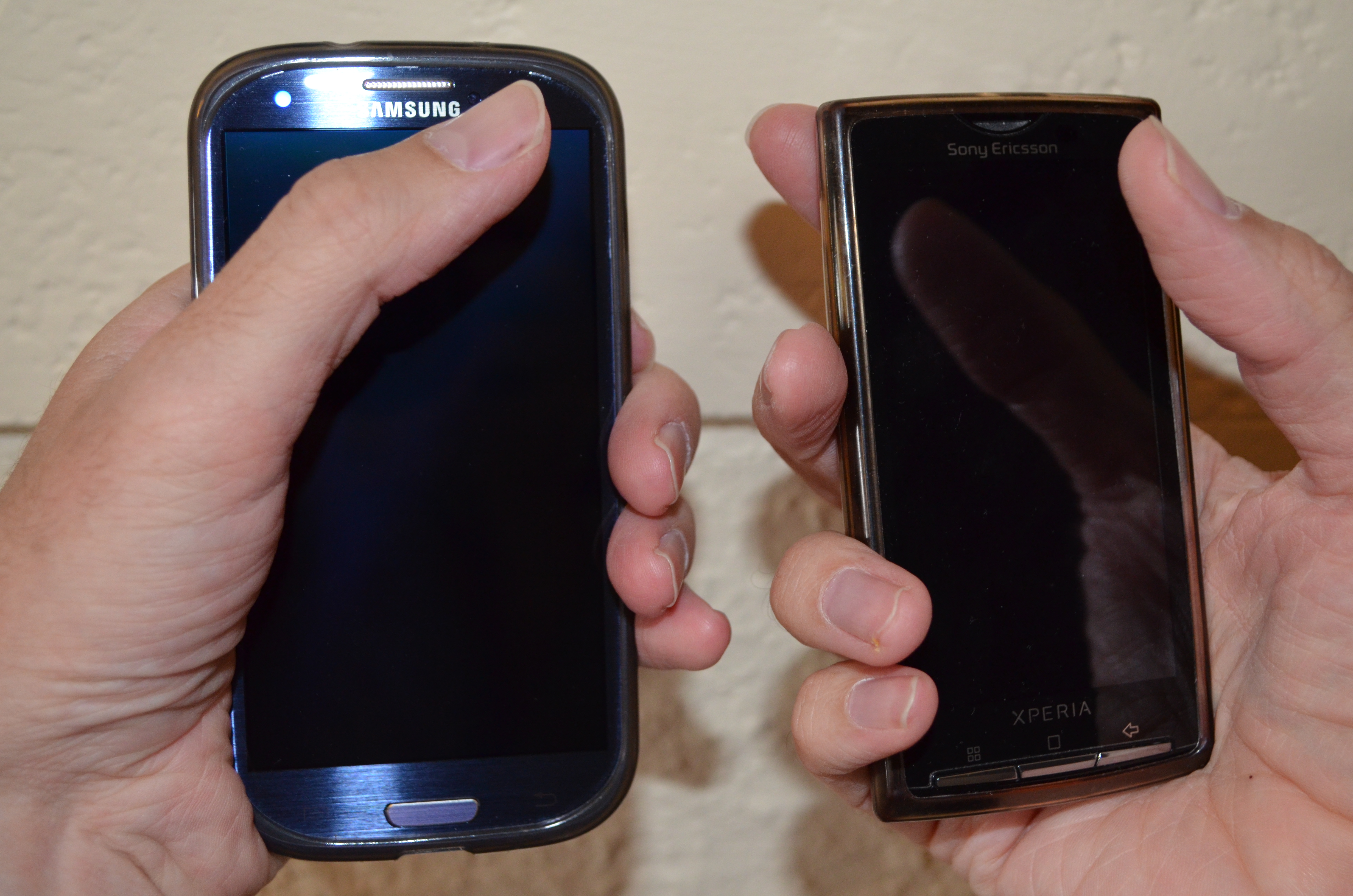
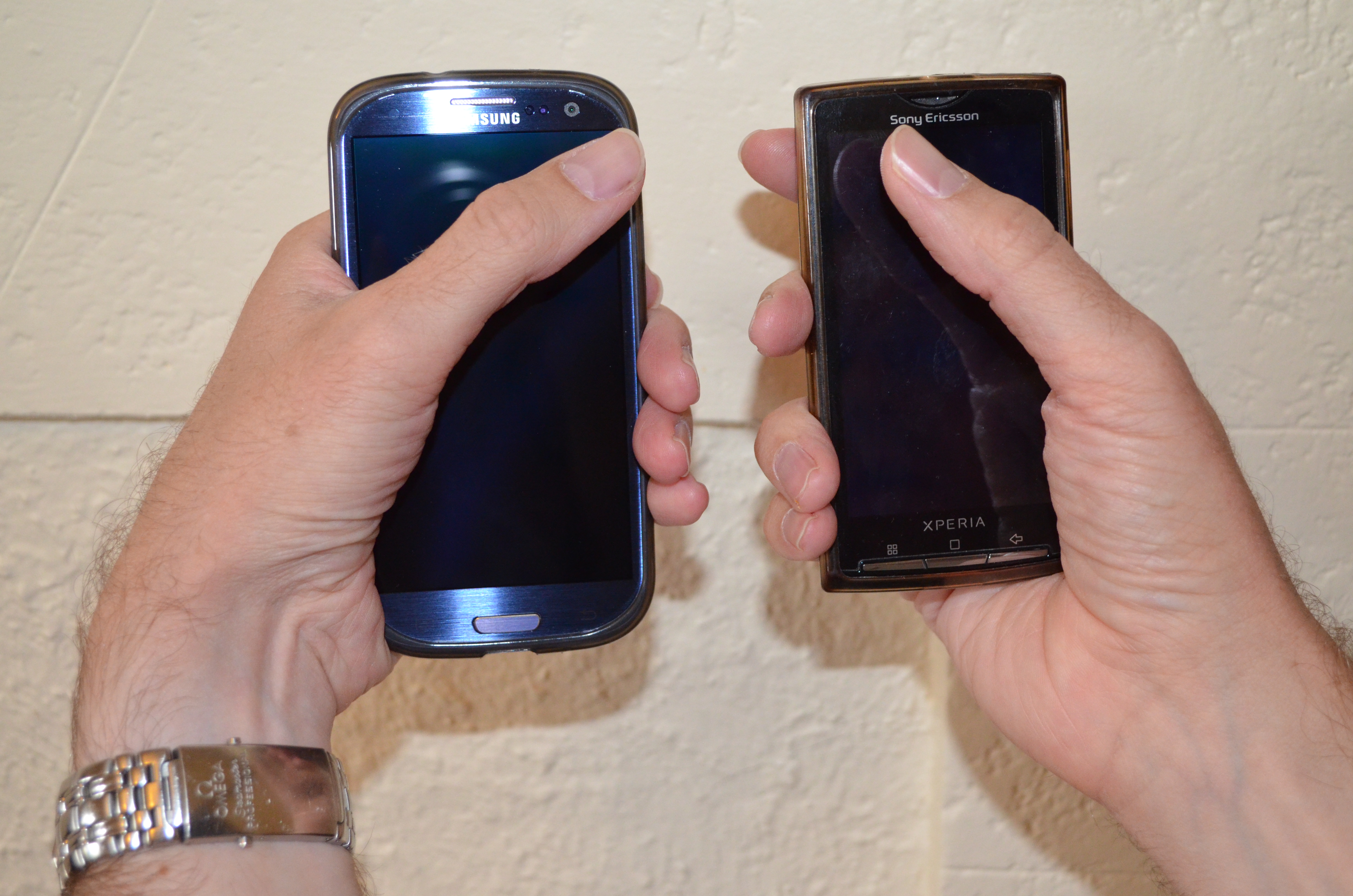
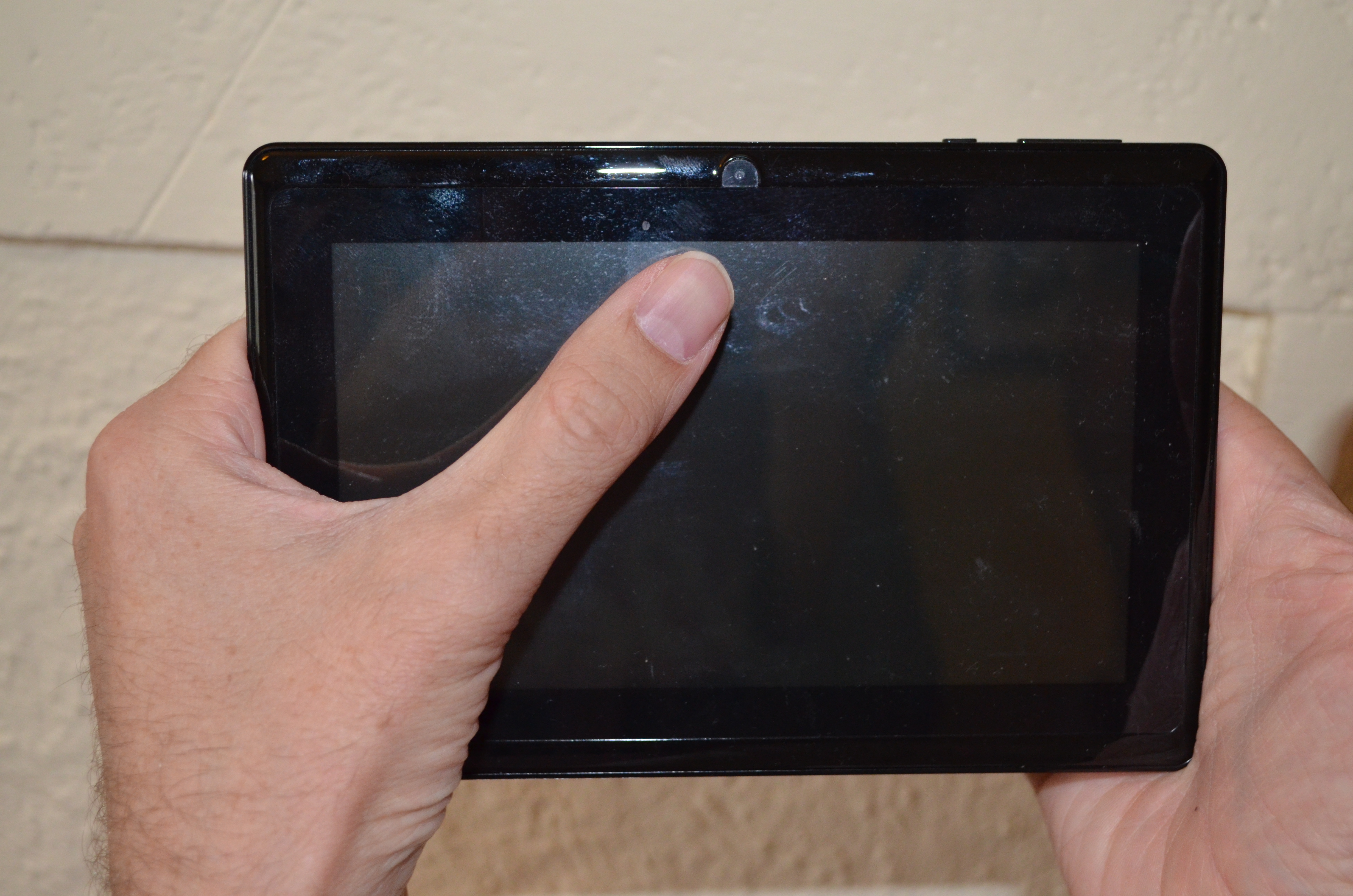
Galaxy S3 vs Xperia X10 1/2Galaxy S3 vs Xperia X10 2/2 The above two pictures show me holding a Samsung Galaxy S3 which has a 4.8 display in my left hand and a Sony Ericsson Xperia X10 which has a 4.0 display in my right hand. I am holding both phones in a manner that allows me to touch the top opposite corner with my thumb the position I need for one-handed phone use. The Xperia X10 can be completely enclosed by my hand, when I have a bottom corner resting in my palm it won t slide down while the Galaxy S3 can slide. Also one thing I didn t realise before having the pictures taken is that my posture is quite different when using the two phones. With the Galaxy S3 my wrist is clearly bent and this seems more likely to cause me to have more problems with Carpal Tunnel Syndrome [1]. I haven t had any serious problems with CTS for the last 2.5 years but I have had minor problems that suggest that I will have to be careful about my posture for the rest of my life. So it seems that a 4.8 phone is just too big for ideal one-handed use (grasping the vertical phone from the bottom). As I had CTS problems with my left hand I will try to use my new phone with my right hand as much as possible. Also I can reach further than the width of the phone screen when I grasp it from the side, so for me a size of about 5.2 would be better than the 4.8 of the Galaxy S3. It s quite likely that the Samsung Galaxy Note with it s 5.3 screen would be a better device for me to grasp from the side. But the Galaxy Note 2 might be a little too large for me. Note that I am only considering ways of holding the device that permit full operation. Anything that involves changing position for different uses or occasionally using two hands for a mostly one-hand operation doesn t count. 7 inch tablet The above picture is of me holding a 7 Android tablet (which I have just returned to Aldi [2]). When holding it from the sides I can reach more than half the screen with one hand so it seems that the ideal size for a tablet to be held in two hands for me would be 8 or even a little larger. A tablet larger than that could only be properly used if resting on my lap or a desk so for me 8 is the size that differentiates things which can be strictly used as tablets (holding with two hands and using thumbs for input) and things which are more like Netbooks (on desk typing). Ideal Device Sizes for people based on Height I am about 190cm tall. If we assume that height and hand size are strongly correlated then we can look at median heights of various age groups and determine what might be a good device size. I am also assuming that everyone wants to have the largest possible device, but some people have other criteria such as the size of their pockets. For me it s 8 tablet, 5.2 side-grip phone, and 4 bottom-grip phone. I used data from a chart of the average heights of American boys [3] and a chart of the average heights of American girls [4] to determine what size devices might suit children of various ages. Note that before the age of 12 the height of boys and girls is near enough to identical.
Device Two Hand Tablet Use Phone Grasp from Side Phone Grasp from Below
7 tablet 14yo boy or 17yo girl noone noone
Galaxy Note 5.3 10yo 95th percentile 17yo boy noone
Galaxy S3 4.8 6yo 17yo boy or 95th percentile 17yo girl almost noone
Galaxy S and iPhone 5 4.0 3yo 10yo 95th percentile 17yo boy
iPhone 4 3.5 noone 8yo 14yo boy or 16yo girl
One thing that particularly interests me is the educational use of Android devices for children. As few people buy new phones and tablets for young children that largely means that children borrow devices from their parents or are given older phones when relatives no longer need them. So it seems that if all other things are equal then an adult might choose a phone with a 4.8 display to allow it to be used as a tablet by children in the 6-10 age range. Conclusion It seems that the iPhone 4 is a good size for one-handed use by women of average height. By the standards of the people who don t regard gripping a phone from below as a significant feature the iPhone 4 would be designed for the hand of an 8yo. By any standards all iPhones other than the iPhone 5 were not the ideal size for most adults to use maybe they are well designed to fit in a pocket while unused. Charles Stross criticised the iPhone because it s too small to be seen well by people with poor vision [5], he also makes many other interesting points about the use of phones and I recommend reading his article (and the rest of his blog). The common tablet size of 7 seems like it might be ideal for women to hold with both hands, but for men of average height a 7.5 tablet might be better suited, it sounds like a small difference but it changes button size (good for people with thicker fingers) and allows displaying more data at once (15% greater screen area). Of course if you want to use a tablet on a desk then something much bigger would be better, maybe 12 or 14 . I think that there is a real market for 14 tablets that are designed to be carried around the home or office and then used on a table or lap which differs from the tablets that are designed to be more portable. There is also the use case of holding the phone in one hand while typing with the other which I haven t considered in this post. I don t think it s interesting because in that case almost everyone will find that the limitation is the size of their pockets and the size of an object that can be held to one s face for a phone call not the size of their hands. I ve previously written about my search for Geeky jeans and the ability to put a 7 tablet in my jeans pocket [6]. So I think that pocket size isn t a phone selection issue for men. The fact that women s clothing tends to have tiny pockets is another issue, if someone knows of a good analysis of phone size vs pockets in women s clothes then please let me know.

10 February 2013

Stefano Zacchiroli: bits from the DPL for January 2013

(insert here: I've been to FOSDEM, I got a nasty flu, and other $lame_excuses for the delay in sending out this report) Dear Project Members, here's the monthly DPL activity report, this time for January 2013. About the next DPL This is the last DPL report before the start of the election process for the next term: around early March, about 20 days from now, the Secretary will send out the call for nominations. I'd like to respond (also) here to inquiries I'm receiving these days: I will not run again as DPL. So you have about 20 days to mob^Wconvince other DDs to run, or decide to run yourself. Do not to wait for the vary last minute, as that makes for lousy campaigns. I'm available to give feedback about my DPL experience to prospective candidates, ... and also to join mobbing^Wconvincing actions toward potential candidates. Just contact me. Call for helps Assets Cloud Images Work has gone on also on the front of supporting Debian installation in public "clouds". Thanks to Arnaud Patard, Jose Miguel Parrella Romero, Pierre Couzy, and Gianugo Rabellino, we now have Debian testing images for Microsoft Azure. Together with Amazon EC2, this is the second large provider supporting Debian via images maintained by Debian Developers. More providers are welcome, exactly as more hardware/CD vendors shipping Debian are always welcome. If you want to contribute support for other providers just show up on the -cloud mailing list and say so. Some documentation effort in view of Wheezy are in need of help too, in order to let our users know about "cloud" options, see #695681. DPL helpers The DPL helpers experiment goes on. We have had 2 more IRC meetings in January (see the minutes). Documentation of the "team" communication channels (mailing list, IRC, Git, etc.) is now available from the DPL wiki page. Talks I've given an invited Debian talk at Polytech'Grenoble, as part of a free software event organized for students of local universities. Slides of the talk are available. I'd like to thank Vincent Danjean for the event organization. Let's release Wheezy now!
Cheers.
PS the day-to-day activity log for January 2013 is available at the usual place master:/srv/leader/news/bits-from-the-DPL.txt.201301

8 February 2013

Richard Hartmann: Release Critical Bug report for Week 06

Only a few minutes too late; this blog post is sponsored by the word "meh"... The UDD bugs interface currently knows about the following release critical bugs: How do we compare to the Squeeze release cycle?
Week Squeeze Wheezy Diff
43 284 (213+71) 468 (332+136) +184 (+119/+65)
44 261 (201+60) 408 (265+143) +147 (+64/+83)
45 261 (205+56) 425 (291+134) +164 (+86/+78)
46 271 (200+71) 401 (258+143) +130 (+58/+72)
47 283 (209+74) 366 (221+145) +83 (+12/+71)
48 256 (177+79) 378 (230+148) +122 (+53/+69)
49 256 (180+76) 360 (216+155) +104 (+36/+79)
50 204 (148+56) 339 (195+144) +135 (+47/+90)
51 178 (124+54) 323 (190+133) +145 (+66/+79)
52 115 (78+37) 289 (190+99) +174 (+112/+62)
1 93 (60+33) 287 (171+116) +194 (+111/+83)
2 82 (46+36) 271 (162+109) +189 (+116/+73)
3 25 (15+10) 249 (165+84) +224 (+150/+74)
4 14 (8+6) 244 (176+68) +230 (+168/+62)
5 2 (0+2) 224 (132+92) +222 (+132/+90)
6 release! 212 (129+83) +212 (+129/+83)
Graphical overview of bug stats thanks to azhag:

Next.

Previous.