Search Results: "zed"

7 July 2010

James Morrison: A speech that didn't happen

I have a lot of papers lying around. I now try to keep them organized, but I haven't got through the back log of when I didn't organize them. Sometimes I come across stuff that I'm happy I had in the pile. The following was my attempt at a valedictorian speech for the 2005 Math class at the University of Waterloo. I was not the valedictorian, but I tried, and thus have a speech.

Ladies, Gentlemen, Doctors and children of all ages. Thank you for spending our last day at Waterloo, here with us. I am one of those people who won't be staying here after day, but somehow I was still chosen to be the valedictorian. So, when I was asked to be the valedictorian by some friends of mine, I was thrilled. I also though I could do a good job, heck, I got my degree in CS, therefore, I can do anything. So, I accepted the nomination. I looked at the nomination form and didn't find any hints on what to talk about. At this point I realized that this speech may be a little underspecified. In fact, there was no specification at all.

I gathered what I could from the form, i.e. a speech had to be written by, and performed on the 18th of June 2005. Skip forward a few weeks, I'd accomplished nothing more than vague thoughts on what to talk about, then I got an email. All potential speeches had to be presented on the 6th of April 2005 (the deadline had moved up, and still no specification). However, a performance objective was given in that email -- each speech must be completed in 5 minutes. Given that I don't have a spec, I can only hope no one else has one.

What follows is my implementation of this unknown specification.

Another cycle in our lives is over. We are finished our latest round of education. This time from the University of Waterloo, in some Math program. Many of us have changed significantly while we've been here, but we are still the same people. We know we are older, we can guess that we are wiser, and we are certainly more educated. So, here is a quick tour of my cycle through Waterloo.

When I got here back in September 2000, I was amazed at how many smart people could be put together in one small place. I am actually still amazed by all the smart people here. I simply happen to know a bit more about some of these people and the amazing things they have done. With all these smart people here, I even had to do homework to keep up.

Skip forward to second year. Second year is when the university decided there is no more room for me in residence. In fact, they do that to almost all second year students. So, I found a sleezy place to live off-campus and started discovering what life is like outside the university bubble. For example, there are stores not in the plaza. There are a couple malls, a bus station, and a train station.

By third year Waterloo had become home despite working in two other cities and growing up on the other side of Toronto. I no longer had to fear being kicked out of CS since I had enough courses with good marks racked up that my cumulative average wouldn't drop too low unless I started failing, which would have been a bad thing to do.

In fourth year, I could see the end in sight. Grad school applications needed to be done pronto and some interesting job prospects lured me away from yet more years of school. Co-op didn't help keep me in school, I enjoyed the working world. I know there are others that used co-op to find that the working world wasn't for them. I expect those people to be in some school for a good long time.

Now we are at the end, and the cycle is complete. I've been across the country, lived over in sunny California, and biked through Scotland, but no where has compared to Waterloo, or the great people that make it such a wonderful place to be. I'm sad to go, as I'm sure many of you are, but I hope you are excited about the next step at the same time.

That was my 5 years, in a non-chronologically accurate order. But it's been even better to help and see people do amazing things. Small things, like getting a group of friends together to go get pints of Bubbletea. To large things like running frosh week for thousands of first year students.

Now that we have looked at the past, what about the future? One of the things I didn't wan to say during this speech is that "We are the future". What does that even mean? Are we useless now? I don't know what it means, it could even be partially true, but we are not useless. In fact our time is now! Among this graduating class are those who are doing cutting edge research. There are those we are already running their own companies. There are those who are already half-way through there plan to rule the world. There are even those of us who are simply going to help others do those things. So, we are not "the future", we are "the now".

Being "the now", (don't I sound like Dubya?) is one thing, but we should always be "the now". We can always make now be our time. We should do this because if we aren't the ones living happily and making the world a better place, in our own ways, then who is going to do it?

If nothing else, I really hope everyone lives happily. For me, I found if I can keep my hat then I can be happy. Well, I can be happy promoting "No Pants Day"!

DOWN WITH PANTS!!

At the end, I finally figured out the specification for this speech. It's simple: Remind people of the awesome things they have done here, the amazing people they shouldn't forget. Lastly, to convince people to keep doing the awesome things despite what might happen or what obstacles appear.

Thank you, I enjoyed being your VD today.

6 July 2010

Matt Zimmerman: We ve packaged all of the free software what now?

Today, virtually all of the free software available can be found in packaged form in distributions like Debian and Ubuntu. Users of these distributions have access to a library of thousands of applications, ranging from trivial to highly sophisticated software systems. Developers can find a vast array of programming languages, tools and libraries for constructing new applications. This is possible because we have a mature system for turning free software components into standardized modules (packages). Some software is more difficult to package and maintain, and I m occasionally surprised to find something very useful which isn t packaged yet, but in general, the software I want is packaged and ready before I realize I need it. Even the long tail of niche software is generally packaged very effectively. Thanks to coherent standards, sophisticated management tools, and the principles of software freedom, these packages can be mixed and matched to create complete software stacks for a wide range of devices, from netbooks to supercomputing clusters. These stacks are tightly integrated, and can be tested, released, maintained and upgraded as a unit. The Debian system is unparalleled for this purpose, which is why Ubuntu is based on it. The vision, for a free software operating system which is highly modular and customizable, has been achieved. Rough edges This is a momentous achievement, and the Debian packaging system fulfills its intended purpose very well. However, there are a number of areas where it introduces friction, because the package model doesn t quite fit some new problems. Most of these are becoming more common over time as technology evolves and changes shape. Why are we stuck?
I suppose it is tempting, if the only tool you have is a hammer, to treat everything as if it were a nail.
Abraham Maslow
The packaging ecosystem is very strong. Not only do we have powerful tools for working with packages, we also benefit from packages being a well-understood concept, and having established processes for developing, exchanging and talking about them. Once something is packaged, we know what it is and how to work with it, and it fits into everything else. So, it is tempting to package everything in sight, as we already know how to make sense of packages. However, this may not always be the right tool for the job. Various attempts have been made to extend the packaging concept to make it more general, for example: Other package managers aim to solve a specific problem, such as providing lightweight package management for embedded systems, or lazy dependency installation, or fixing the filesystem hierarchy. There is a long list of package managers of various levels which solve different problems. Most of these systems suffer from an important fundamental tradeoff: they are designed to manage the entire system, from the kernel through applications, and so they must be used wholesale in order to reap their full benefit. In other words, in their world, everything is a package, and anything which is not a package is out of scope. Therefore, each of these systems requires a separate collection of packages, and each time we invent a new one, its adherents set about packaging everything in the new format. It takes a very long time to do this, and most of them lose momentum before a mature ecosystem can form around them. This lock-in effect makes it difficult for new packaging technologies to succeed. Divide and Conquer No single package management framework is flexible enough to accommodate all of the needs we have today. Even more importantly, a generic solution won t account for the needs we will have tomorrow. I propose that in order to move forward, we must make it possible to solve packaging problems separately, rather than attempting to solve them all within a single system. But I like things how they are! We don t have a choice. The world is changing around us, and distributions need to evolve with it. If we don t adapt, we will eventually give way to systems which do solve these problems. Take, for example, modern web browsers like Firefox and Chromium. Arguably the most vital application for users, the browser is coming under increasing pressure to keep up with the breakneck pace of innovation on the web. The next wave of real-time collaboration and multimedia applications relies on the rapid development of new capabilities in web browsers. Browser makers are responding by accelerating deployment in the field: both aggressively push new releases to their users. A report from Google found that Chrome upgrades 97% of their users within 21 days of a new release, and Firefox 85% (both impressive numbers). Mozilla recently changed their maintenance policies, discontinuing maintenance of stable releases and forcing Ubuntu to ship new upstream releases to users. These applications are just the leading edge of the curve, and the pressure will only increase. Equally powerful trends are pressing server applications, embedded systems, and data to adapt as well. The ideas I ve presented here are only one possible way forward, and I m sure there are more and better ideas brewing in distribution communities. I m sure that I m not the only one thinking about these problems. Whatever it looks like in the end, I have no doubt that change is ahead.

Martin-Éric Racine: On pohjant hden alla, T koti mulla mainen, M el m st laulan...

My girlfriend and I were out picking up a cake at the bakery last week, when my phone rang: Without knowing, at that moment, I had just become a citizen of the country in which I have been living for the past 12 years. It was only yesterday, upon receiving the decision in the mail and looking at the date on the certificate that I realized that, when I got the phone call, the decision had already been made and the bureaucracy was only looking for reassurances that I fully intend upon acquitting my civic obligations as soon as humanely possible. To say that reading the decision was a highly emotional moment is an understatement. Trying to explain the intensity of this moment to my girlfriend, I compared it to the day when a teenager reaches adulthood. This instant brought a similar feeling: suddenly, the whole EU opens its doors to me and I'm free to decide how to best use the opportunities it offers. What next? For now, completing this government training to become a bureaucrat. Funnily enough, becoming a citizen resolved the whole issue of background checks, which also suddenly triples the number of possible venues for the on-job part of the training. In my case, it looks like I'll be spending the next few months at the Ministry of Employment and Entrepreneurship, working on EU projects that fund R&D efforts and export sales ventures in each member state. After that, I'm not sure. On one hand, I'd like to apply for the Ministry of Foreign Affairs' KAVAKU recruitment program for future diplomats. On the other hand, that ministry is extremely picky about whom it accepts and it's not particularly known for favoring naturalized individuals. This being said, our current Minister recently published rather ambitious plans to completely reform the Ministry by bringing in seasoned professionals from the private sector who could efficiently promote Finnish know-how and products abroad, rather than hiring more of the same Public Administration graduates, so, who knows? Maybe the time is right for someone like me to join the ranks of the Finnish diplomacy? An other option that I'm considering is to permanently move to Estonia. When my last job there ended, I was left with the feeling that I could have accomplished a lot more, if only I were in a legal position to move there, rather than commute a couple of times a week. Beyond the pioneering work that myself and my diplomat friends at the Estonian embassy did in Turkey, there was a demand for us to perform the same magic in other countries of interest to Estonia. Unfortunately, not being in a position to be on-site and no longer having a job that paid for me to be there often enough meant that I had to pass on that opportunity. Now, seeing how one of my friends recently left the diplomacy and is open to new challenges, I'm wondering if now might be a good time to resume our operation and prepare our next campaign? Wow... So much to think about, now that a whole continent opened its doors to me. Hienoa! Olen suomalainen.

4 July 2010

Bernd Zeimetz: gimp-plugin-registry 3.5-1

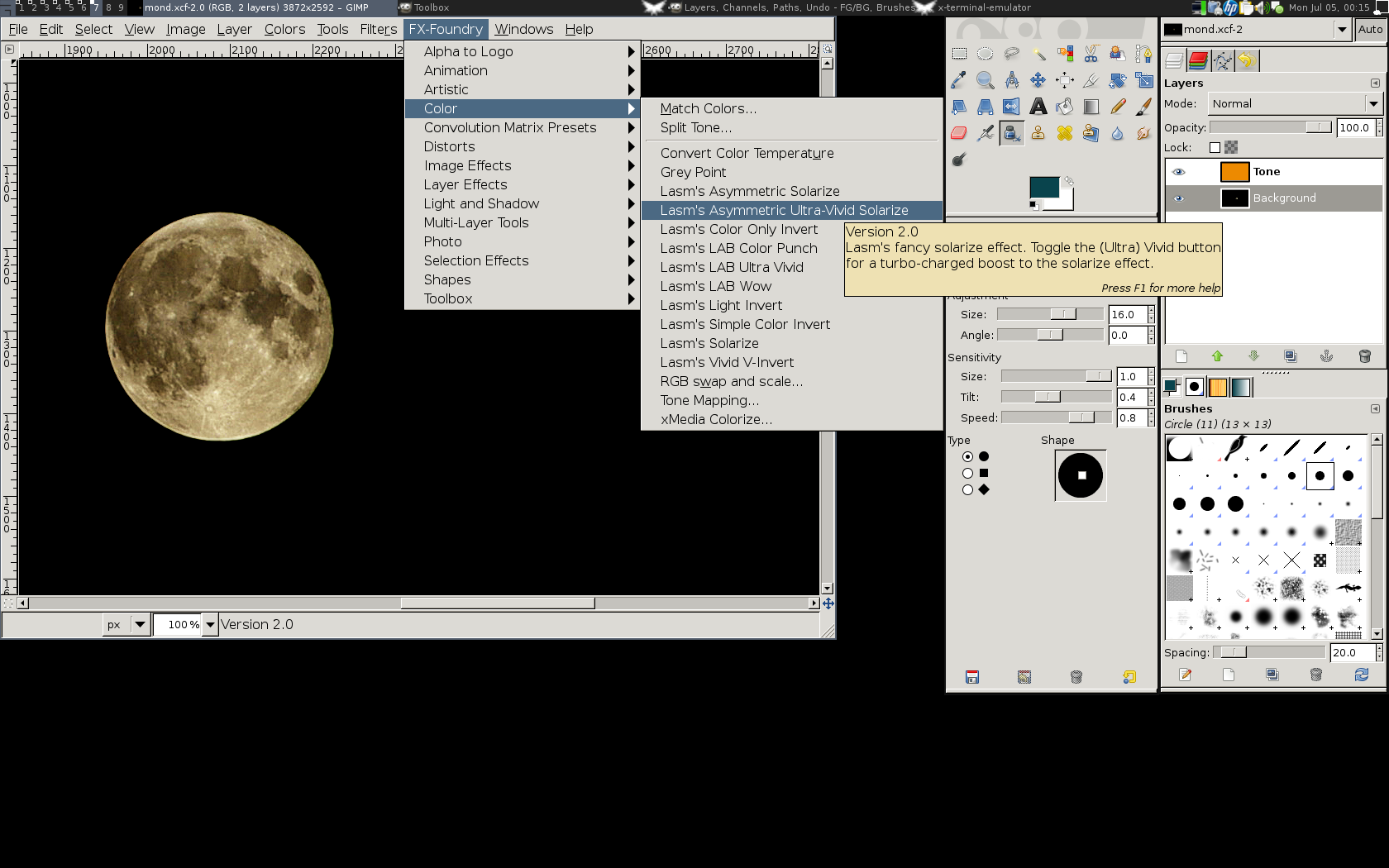
During the last three months and since my last blog-post about gimp-plugin-registry a lot happened: Mainly a large number of new plugins was added, but also various enhancements and bugfixes went into the package, together with updates for various already included plugins. The GIMP screenshot with open FX-Foundry menu For those who don't know gimp-plugin-registry yet, it is a collection of scripts and plugins for The GIMP. The name is based on the webpage GIMP Plugin Registry, where most (new) plugins and scripts are listed. So far the package ships with 170 scripts/plugins. Most of the scripts are written in TinyScheme, but there are also several plugins in C or Python. Probably most noticeable is the inclusion of the GIMP FX Foundry, which is an awesome collection of 124 scripts. Below follows a list of all scripts and plugins as shown in the long description of the Debian package. New plugins are marked with a bold fontface. If there is any interest from other distributions to include the package, I'd be happy to help out to make an integration as easy as possible. The few interesting parts could be ripped out of debian/rules and shipped as a normal Makefile, so they could be used easily. More complicated is the generation of the package description and copyright information, but I guess instead of writing debian/coyright and debian/control, it should be possible to integrate the information into a rpm spec file template or similar files. So in case you're interested to port the package to Fedora, OpenSuSE or some other distribution, don't hesitate to contact me! The sources are available via git, see git.recluse.de for details. For wishes, suggestions and bug reports either use the Debian BTS or Launchpad. While I prefer bugs via the BTS, it might be easier for non-Debian users to file bugs in the Ubuntu Launchpad.
Torsten Landschoff: Postprocessing conference videos

I was planning to attend DebConf New York this year, but for a number of reasons I decided not to go. Fortunately, Ferdinand Thommes organized a MiniDebConf in Berlin at LinuxTag and I managed to attend. Thanks, Ferdinand! There were a number of interesting Talks. I especially liked the talk of our DPL, and those about piuparts and git-buildpackage. In contrast to the other LinuxTag talks, we had a livestream of our talks and recorded (most) of them. The kudos for setting this up goes to Alexander Wirt, who spent quite a few hours to get it up and running. I have to apologize for being late in bringing my Notebook, which was intended to do the theora encoding of the livestream. This was a misunderstanding on my part, I should have known that this is not going to be setup in the night before show time So to compensate the extra hours he had to put in for me, I offered to do the post processing of the videos. Basic approach for post processing The main goal of post processing the videos was (of course) to compress them to a usable size from the original 143 GB. I also wanted to have a title on each video, and show the sponsors at the end of the video. My basic idea to implement that consisted of the following steps:
  1. Create a title animation template.
  2. Generate title animations from template for all talks.
  3. Use a video editor to create a playlist of the parts title talk epilogue.
  4. Run the video editor in batch mode to generate the combined video.
  5. Encode the resulting video as ogg theora.
As always with technology, it turned out that the original plan needed a few modifications. Title animations
<video controls="controls" height="288" src="http://www.landschoff.net/blog/uploads/2010/07/mdc2010_title_anim1.ogv" width="360 "></video>
Originally I wanted to use Blender for the title animation, but I knew it is quite a complicated bit of software. So I looked for something simpler, and stumbled across an article that pointed me towards Synfig Studio for 2D animation. This is also in Debian, so I gave it a try. I was delighted that Synfig Studio has a command line renderer which is just called synfig and that the file format is XML, which would make it simple to batch-create the title animations. My title template can be found in this git repository. Batch creation of title animations I used a combination of make and a simple python script to replace the author name and the title of the talk into the synfig XML file. The data for all talks is another XML file talks.xml. Basically, I used a simple XPath expression to find the relevant text node and change the data using the ElementTree API of lxml python module. The same could be done using XSLT of course (for a constant replacement, see this file) but I found it easier to combine two XML files in python. Note that I create PNG files with synfig and use ffmpeg to generate a DV file from those. Originally, I had synfig create DV files directly but those turned out quite gray for some reason. I am now unable to reproduce this problem. Combining the title animation with the talk For joining the title animation with the talk, I originally went with OpenShot, which somebody of the video team had running at the conference. My idea was to mix a single video manually and just replace the underlying data files for each talk. I expected that this would be easy using the openshot-render command, which renders the output video from the input clips and the OpenShot project file. However, OpenShot stores the video lengths in the project file and will take those literally, so this did not work for talks of different play times I considered working with Kino or Kdenlive but they did not look more appropriate for this use case. I noticed that OpenShot and Kdenlive both use the Media Lovin Toolkit under the hood, and OpenShot actually serializes the MLT configuration to $HOME/.openshot/sequence.xml when rendering. I first tried to read that XML file from python (using the mlt python bindings from the python-mlt2 package) but did not find an API function to do that. So I just hard coded the video sequence in python. I ran into a few gotchas on the way: Things to improve While the results look quite okay for me now, there is a lot of room for improvement. Availability

3 July 2010

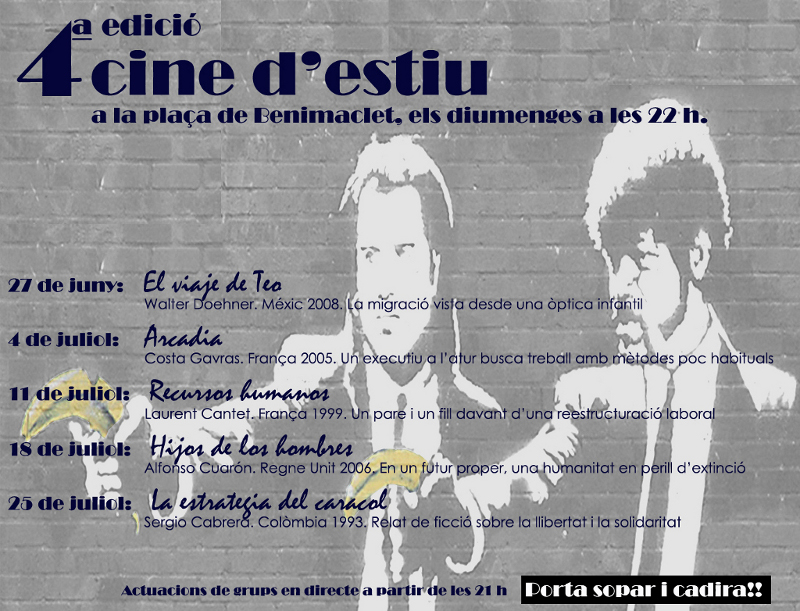
Jordi Mallach: Cinema d'Estiu in Benimaclet 2010

Like other years, Benimaclet's Neighbour Association has organized a new cycle of film projections for the neighbours, by the neighbours, with the intention to get people out of their homes and share a good time with many others. Like in the other two editions, the selected films try to deliver a message to the viewers, and this year the topics are centered about labour and migration social issues. A change in this year's edition is that there will be one more projection, for a total of 5 films, every Sunday of July, at 22:00 in the Pla a de Benimaclet. Last week, we saw El viaje de Teo, a Mexican film describing the migration dramas going on in the Sonora Desert. This Sunday, we'll see Arcadia, which will be followed by Recursos humanos, Hijos de los hombres and La estrategia del caracol. Before each film, some local artists will perform live for us. Make yourself a sandwich, bring a chair to Benimaclet and enjoy some good cinema with your neighbours every Sunday in July!

Joachim Breitner: Free Groups Formalized

Since a few months, I have been playing around with Isabelle, a theorem prover system. I find it very intriguing to have proofs of mathematical statements checked by something as pendantic and comprehensive as a machine. Mathematicians always claim that their statements are true in all eternity, but the proofs are just checked by error-prone human beings. Especially with complex, large proofs that are only read by a handful of people, I doubt that these are always fully correct. Note that this does not imply that I doubt that the results are correct. They probably are. But a bit of doubt remains. A computer-checked proof, in contrast, can not accidentially omit corner cases, leave out seemingly trivial assumtions of used theorems or be misled by slightly differing definition from different sources. I was hoping to check at least parts of my diploma thesis using Isabelle, but it turns out that the standard algebra library shipped with Isabelle is not complete enough. Even free groups were missing. This was motivation enough to try to formalize them and prove the universal property and some isomorphisms (The free group over the empty set is the unit group, the free group over one generator is the additive group of integers and free groups over sets of same cardinality are isomophic). I submitted the resulting theory to the Archive of Formal Proofs and it was accepted. You can view the complete document or the document without proofs. I did not formalize the fact that isomorphic free groups have bases of same cardinality. As far as I know there is no simple argument that works directly with free groups. The proofs I have seen pass to the abelianization of the free group, i.e. the free module over and apply the well known proof from the analogous statement about vector spaces. But if someone knows an elementary proof of this fact, I d like to hear about it.

1 July 2010

David Welton: On the block: squeezedbooks.com

In keeping with the idea that I want to focus on things where I sell something directly to people, rather than just advertising, I am putting http://www.squeezedbooks.com up for auction on flippa.com. The auction is here: http://flippa.com/auctions/99073/Business-Book-Summary-Site
Here's what I wrote about it:

I like to read business books, but many of them contain a nugget of valuable information, and lots of fluff, because you can't sell a 10 page book. Some of them are pure fluff! Occasionally, one of them has profound implications.

I created this site several years ago in order to have a place to summarize a series of books I'd read, with the aim of creating a community interested in summarizing and, most of all, discussing business books. To be honest, that community hasn't really materialized, although there are a number of registered users (585 at last count). Most other business book summary sites are for-pay - you pay $X dollars a month and receive Y summaries. I wanted to create an open site, in order to foster discussion and communication between people reading summaries.

In any case, one baby later and in a different country, my heart isn't really in it any more, so I've decided to put the site up for sale. I still think the idea is a good one, and that in the right hands, the site could take off.
It was a fun site to work on, and really do think that in the right hands, it, or something derived from it, could be successful. I could conceivably hang on to it and keep trying different things with it, but I've decided I really need to impose this limitation of "make something to sell directly" on myself in order to avoid wandering off into "cool, but no idea how to make money" projects. Edit:
One thing that I'd like to state explicitly and publicly is that I'm not giving up on open source, just that I think I need to draw a really clear line between "I hope to make some money with this" and "this is a cool project I want to share with the world". In other words, I think I'd rather avoid the middle ground where stuff is sort of openish, and go either for projects that pay directly, or stuff that's pure open source under an Apache or BSD license. Hopefully, if I ever hit on a project that takes off, I'll be able to dedicate some time/resources to open sourcing some of the infrastructure, as I think that's currently one of the better models for producing open source software.

Petter Reinholdtsen: Caching password, user and group on a roaming Debian laptop

For a laptop, centralized user directories and password checking is a bit troubling. Laptops are typically used also when not connected to the network, and it is vital for a user to be able to log in or unlock the screen saver also when a central server is unavailable. This is possible by caching passwords and directory information (user and group attributes) locally, and the packages to do so are available in Debian. Here follow two recipes to set this up in Debian/Squeeze. It is also possible to set up in Debian/Lenny, but require more manual setup there because pam-auth-update is missing in Lenny. LDAP/Kerberos + nscd + libpam-ccreds + libpam-mklocaluser/pam_mkhomedir This is the traditional method with a twist. The password caching is provided by libpam-ccreds (version 10-4 or later is needed on Squeeze), and the directory caching is done by nscd. The directory lookup and password checking is done using LDAP. If one want to use Kerberos for password checking the libpam-ldapd package can be replaced with libpam-krb5 or libpam-heimdal. If one is happy having a local home directory with the path listed in LDAP, one can use the pam_mkhomedir module from pam-modules to make this happen instead of using libpam-mklocaluser. A setup for pam-auth-update to enable pam_mkhomedir will have to be written until a fix for bug #568577 is in the archive. Because I believe it is a bad idea to have local home directories using misleading paths like /site/server/partition/, I prefer to create a local user with the home directory in /home/. This is done using the libpam-mklocaluser package. These packages need to be installed and configured
libnss-ldapd libpam-ldapd nscd libpam-ccreds libpam-mklocaluser
The ldapd packages will ask for LDAP connection information, and one have to fill in the values that fits ones own site. Make sure the PAM part uses encrypted connections, to make sure the password is not sent in clear text to the LDAP server. I've been unable to get TLS certificate checking for a self signed certificate working, which make LDAP authentication unsafe for Debian Edu (nslcd is not checking if it is talking to the correct LDAP server), and very much welcome feedback on how to get this working. Because nscd do not have a default configuration fit for offline caching until bug #485282 is fixed, this configuration should be used instead of the one currently in /etc/nscd.conf. The changes are in the fields reload-count and positive-time-to-live, and is based on the instructions I found in the LDAP for Mobile Laptops instructions by Flyn Computing.
	debug-level		0
	reload-count		unlimited
	paranoia		no
	enable-cache		passwd		yes
	positive-time-to-live	passwd		2592000
	negative-time-to-live	passwd		20
	suggested-size		passwd		211
	check-files		passwd		yes
	persistent		passwd		yes
	shared			passwd		yes
	max-db-size		passwd		33554432
	auto-propagate		passwd		yes
	enable-cache		group		yes
	positive-time-to-live	group		2592000
	negative-time-to-live	group		20
	suggested-size		group		211
	check-files		group		yes
	persistent		group		yes
	shared			group		yes
	max-db-size		group		33554432
	auto-propagate		group		yes
	enable-cache		hosts		no
	positive-time-to-live	hosts		2592000
	negative-time-to-live	hosts		20
	suggested-size		hosts		211
	check-files		hosts		yes
	persistent		hosts		yes
	shared			hosts		yes
	max-db-size		hosts		33554432
	enable-cache		services	yes
	positive-time-to-live	services	2592000
	negative-time-to-live	services	20
	suggested-size		services	211
	check-files		services	yes
	persistent		services	yes
	shared			services	yes
	max-db-size		services	33554432
While we wait for a mechanism to update /etc/nsswitch.conf automatically like the one provided in bug #496915, the file content need to be manually replaced to ensure LDAP is used as the directory service on the machine. /etc/nsswitch.conf should normally look like this:
passwd:         files ldap
group:          files ldap
shadow:         files ldap
hosts:          files mdns4_minimal [NOTFOUND=return] dns mdns4
networks:       files
protocols:      files
services:       files
ethers:         files
rpc:            files
netgroup:       files ldap
The important parts are that ldap is listed last for passwd, group, shadow and netgroup. With these changes in place, any user in LDAP will be able to log in locally on the machine using for example kdm, get a local home directory created and have the password as well as user and group attributes cached. LDAP/Kerberos + nss-updatedb + libpam-ccreds + libpam-mklocaluser/pam_mkhomedir Because nscd have had its share of problems, and seem to have problems doing proper caching, I've seen suggestions and recipes to use nss-updatedb to copy parts of the LDAP database locally when the LDAP database is available. I have not tested such setup, because I discovered sssd. LDAP/Kerberos + sssd + libpam-mklocaluser A more flexible and robust setup than the nscd combination mentioned earlier that has shown up recently, is the sssd package from Redhat. It is part of the FreeIPA project to provide a Active Directory like directory service for Linux machines. The sssd system combines the caching of passwords and user information into one package, and remove the need for nscd and libpam-ccreds. It support LDAP and Kerberos, but not NIS. Version 1.2 do not support netgroups, but it is said that it will support this in version 1.5 expected to show up later in 2010. Because the sssd package was missing in Debian, I ended up co-maintaining it with Werner, and version 1.2 is now in testing. These packages need to be installed and configured to get the roaming setup I want
libpam-sss libnss-sss libpam-mklocaluser
The complete setup of sssd is done by editing/creating /etc/sssd/sssd.conf.
[sssd]
config_file_version = 2
reconnection_retries = 3
sbus_timeout = 30
services = nss, pam
domains = INTERN
[nss]
filter_groups = root
filter_users = root
reconnection_retries = 3
[pam]
reconnection_retries = 3
[domain/INTERN]
enumerate = false
cache_credentials = true
id_provider = ldap
auth_provider = ldap
chpass_provider = ldap
ldap_uri = ldap://ldap
ldap_search_base = dc=skole,dc=skolelinux,dc=no
ldap_tls_reqcert = never
ldap_tls_cacert = /etc/ssl/certs/ca-certificates.crt
I got the same problem here with certificate checking. Had to set "ldap_tls_reqcert = never" to get it working. With the libnss-sss package in testing at the moment, the nsswitch.conf file is update automatically, so there is no need to modify it manually. If you want to help out with implementing this for Debian Edu, please contact us on debian-edu@lists.debian.org.

30 June 2010

Marco T&uacute;lio Gontijo e Silva: Immix on GHC Summer of Code weekly report #7

My project. This post assumes that the reader has read my last post. This week I had less time to work on my project than the last ones, because it was kind of the last week of the semester for some disciplines. This was unfortunate from a point of view, but it s good in another, because now I ve finished most of my disciplines and can focus more. This is also the reason why the weekly report is slightly delayed. Most of my work this week was continuing the investigation of the segfault caused by my implementation of allocation in lines. The most interesting thing I discovered came after a suggestion from my menthor: to use +RTS -DS to turn on the sanity checker. I runned the code with my allocation implementation and the sanity checker and got a segfault. I runned again only with the code to free memory in lines and I got also a segfault. Then I runned without all my patches, using sweep, and I got the segfault. So it seems that there is something wrong with sweep, and now I m investigating this new segfault. I m using the bernouilli program from nofib to test, running with 148 as a parameter and, naturally, +RTS -w -DS passed to the RunTime System. The output of gdb:
Current directory is /home/marcot/trabalho/livre/ghc/nofib/imaginary/bernouilli/
GNU gdb (GDB) 7.1-debian
Copyright (C) 2010 Free Software Foundation, Inc.
License GPLv3+: GNU GPL version 3 or later <http://gnu.org/licenses/gpl.html>
This is free software: you are free to change and redistribute it.
There is NO WARRANTY, to the extent permitted by law.  Type "show copying"
and "show warranty" for details.
This GDB was configured as "x86_64-linux-gnu".
For bug reporting instructions, please see:
<http://www.gnu.org/software/gdb/bugs/>...
Reading symbols from /home/marcot/trabalho/livre/ghc/nofib/imaginary/bernouilli/Main...done.
(gdb) r 148 +RTS -w -DS
Starting program: /home/marcot/trabalho/livre/ghc/nofib/imaginary/bernouilli/Main 148 +RTS -w -DS
[Thread debugging using libthread_db enabled]
Program received signal SIGSEGV, Segmentation fault.
0x00000000006309cb in LOOKS_LIKE_INFO_PTR_NOT_NULL (p=12297829382473034410) at includes/rts/storage/ClosureMacros.h:225
(gdb) where
#0  0x00000000006309cb in LOOKS_LIKE_INFO_PTR_NOT_NULL (p=12297829382473034410) at includes/rts/storage/ClosureMacros.h:225
#1  0x0000000000630a16 in LOOKS_LIKE_INFO_PTR (p=12297829382473034410) at includes/rts/storage/ClosureMacros.h:230
#2  0x0000000000630a4b in LOOKS_LIKE_CLOSURE_PTR (p=0x7ffff6c84062) at includes/rts/storage/ClosureMacros.h:235
#3  0x0000000000631427 in checkClosure (p=0x7ffff6853a08) at rts/sm/Sanity.c:320
#4  0x00000000006319ef in checkHeap (bd=0x7ffff68014c0) at rts/sm/Sanity.c:479
#5  0x000000000063222f in checkSanity (check_heap=rtsTrue) at rts/sm/Sanity.c:686
#6  0x000000000062dfdb in GarbageCollect (force_major_gc=rtsFalse, gc_type=0, cap=0x8d2ec0) at rts/sm/GC.c:768
#7  0x0000000000620431 in scheduleDoGC (cap=0x8d2ec0, task=0x8f5080, force_major=rtsFalse) at rts/Schedule.c:1420
#8  0x000000000061fa2c in schedule (initialCapability=0x8d2ec0, task=0x8f5080) at rts/Schedule.c:539
#9  0x0000000000620c77 in scheduleWaitThread (tso=0x7ffff6c80000, ret=0x0, cap=0x8d2ec0) at rts/Schedule.c:1902
#10 0x000000000065762b in rts_evalLazyIO (cap=0x8d2ec0, p=0x89d8b0, ret=0x0) at rts/RtsAPI.c:495
#11 0x000000000061d3db in real_main () at rts/RtsMain.c:66
#12 0x000000000061d4ca in hs_main (argc=5, argv=0x7fffffffe6d8, main_init=0x406558 <__stginit_ZCMain>, main_closure=0x89d8b0) at rts/RtsMain.c:115
#13 0x00007ffff6fbcabd in __libc_start_main (main=<value optimized out>, argc=<value optimized out>, ubp_av=<value optimized out>, init=<value optimized out>, fini=<value optimized out>, rtld_fini=<value optimized out>, stack_end=0x7fffffffe6c8) at libc-start.c:222
#14 0x0000000000403a69 in _start ()
I started the investigation with the most obvious test: to remove the call to sweep() in rts/sm/GC.c.
  if (major_gc && oldest_gen->mark)  
      if (oldest_gen->compact)
          compact(gct->scavenged_static_objects);
      // else
      //     sweep(oldest_gen);
The result was the same, same segfault in the same place. So I decided to do it a little stronger and avoid the blocks getting the BF_MARKED flag, so that they are not even marked.
                if (!(bd->flags & BF_FRAGMENTED))  
                    // bd->flags  = BF_MARKED;
                 
This one worked. The code in sweep() is not commented, but it s irrelevant, since it ignores blocks that don t have this flag. My third try was to comment the places where the BF_MARKED flag is read, to see each one was causing the segfault. I got a list of places to search with grep, and there weren t a lot of them.
$ grep BF_MARKED rts/sm/*.c
rts/sm/Compact.c:       if (bd->flags & BF_MARKED)
rts/sm/Evac.c:  if ((bd->flags & (BF_LARGE   BF_MARKED   BF_EVACUATED)) != 0)  
rts/sm/Evac.c:        if (bd->flags & BF_MARKED)  
rts/sm/GCAux.c:    if ((bd->flags & BF_MARKED) && is_marked((P_)q,bd))  
rts/sm/GC.c:                    if (!(bd->flags & BF_MARKED))
rts/sm/GC.c:                        // time, so reset the BF_MARKED flags.
rts/sm/GC.c:                        // compact.  (search for BF_MARKED above).
rts/sm/GC.c:                        bd->flags &= ~BF_MARKED;
rts/sm/GC.c:                // Also at this point we set the BF_MARKED flag
rts/sm/GC.c:                // BF_MARKED is always unset, except during GC
rts/sm/GC.c:                    bd->flags  = BF_MARKED;
rts/sm/Sweep.c:        if (!(bd->flags & BF_MARKED))  
The first one is in rts/sm/Compact.c, so it s not relevant to the use with -w. The second one, in rts/sm/Evac.c, is a bit indirect.
  if ((bd->flags & (BF_LARGE   BF_MARKED   BF_EVACUATED)) != 0)  
      // pointer into to-space: just return it.  It might be a pointer
      // into a generation that we aren't collecting (> N), or it
      // might just be a pointer into to-space.  The latter doesn't
      // happen often, but allowing it makes certain things a bit
      // easier; e.g. scavenging an object is idempotent, so it's OK to
      // have an object on the mutable list multiple times.
      if (bd->flags & BF_EVACUATED)  
          // We aren't copying this object, so we have to check
          // whether it is already in the target generation.  (this is
          // the write barrier).
	  if (bd->gen < gct->evac_gen)  
	      gct->failed_to_evac = rtsTrue;
	      TICK_GC_FAILED_PROMOTION();
	   
	  return;
       
      /* evacuate large objects by re-linking them onto a different list.
       */
      if (bd->flags & BF_LARGE)  
	  info = get_itbl(q);
	  if (info->type == TSO &&
	      ((StgTSO *)q)->what_next == ThreadRelocated)  
	      q = (StgClosure *)((StgTSO *)q)->_link;
              *p = q;
	      goto loop;
	   
	  evacuate_large((P_)q);
	  return;
       
      /* If the object is in a gen that we're compacting, then we
       * need to use an alternative evacuate procedure.
       */
      if (!is_marked((P_)q,bd))  
          mark((P_)q,bd);
          push_mark_stack((P_)q);
       
      return;
   
The first if, in line 466, is executed if any of the three flags is present: BF_LARGE, BF_MARKED or BF_EVACUATED. The second if, in line 474, checks for BF_EVACUATED, and returns. The third if, in line 487, checks for BF_LARGE and returns. The code in lines 502-505 is only executed if BF_MARKED is present, and not the other ones. I tried commenting this code, and got an assertion fail in the user code, so I think this is not a good path to follow. The second occurence of BF_MARKED is in the same file.
        if (bd->flags & BF_MARKED)  
            // must call evacuate() to mark this closure if evac==rtsTrue
            *q = (StgClosure *)p;
            if (evac) evacuate(q);
            unchain_thunk_selectors(prev_thunk_selector, (StgClosure *)p);
            return;
         
Commenting it, with or without the call to sweep() commented, causes the same segfault. So, I m tending to think this part of the code is unrelated to the issue. The third occurence is in rts/sm/GCAux.c. I tried commenting it with all the four combinations of the two others commented and not commented, and all resulted in the segfault in the same place. There s another place to check in rts/sm/GC.c. Again, commenting it made no difference. The last one is part of sweep(), so it s avoided anyway when the call to this function is commented.

Dirk Eddelbuettel: Rcpp 0.8.3

A new version 0.8.3 of Rcpp is now CRAN and in Debian. It comes about three weeks after the 0.8.2 release. And even though we promised to concentrate on documentation, it contains a raft of new features: The main thing here is Rcpp sugar for which we also have a new (seventh !!) vignette Rcpp-sugar. As a quick example, consider this simple C++ function that takes two vectors from R and creates a new one conditional on the relative values:
export "C" SEXP foo( SEXP xs, SEXP ys)  
    Rcpp::NumericVector x(xs), y(ys);
    int n = x.size();
    Rcpp::NumericVector res( n );
    double xd = 0.0, yd = 0.0 ;
    for( int i=0; i<n; i++) 
        xd = x[i];
        yd = y[i];
        if( xd < yd ) 
            res[i] = xd * xd ;
          else  
            res[i] = -( yd * yd);
         
     
    return res ;
 
Now, if you use R, you really want to writes this more compactly. And now you can, thanks to Rcpp sugar:
extern "C" SEXP foo( SEXP xs, SEXP ys) 
    Rcpp::NumericVector x(xs), y(xs);
    return ifelse( x < y, x*x, -(y*y));
 
Same great taste, but much less filling! More details are in the Rcpp-sugar vignette. Doug Bates is already a fan of this and is employing it in the lme4a development version of the well-known lme4 package. The full NEWS entry for this release follows below:
0.8.3   2010-06-27
    o	This release adds Rcpp sugar which brings (a subset of) the R syntax
        into C++. This supports : 
         - binary operators : <,>,<=,>=,==,!= between R vectors
         - arithmetic operators: +,-,*,/ between compatible R vectors
         - several functions that are similar to the R function of the same name:
        abs, all, any, ceiling, diff, exp, ifelse, is_na, lapply, pmin, pmax, 
        pow, sapply, seq_along, seq_len, sign
        
        Simple examples :
        
          // two numeric vector of the same size
          NumericVector x ;
          NumericVector y ;
          NumericVector res = ifelse( x < y, x*x, -(y*y) ) ;
        
          // sapply'ing a C++ function
          double square( double x )  return x*x ;  
          NumericVector res = sapply( x, square ) ;
        
        Rcpp sugar uses the technique of expression templates, pioneered by the 
        Blitz++ library and used in many libraries (Boost::uBlas, Armadillo). 
        Expression templates allow lazy evaluation of expressions, which 
        coupled with inlining generates very efficient code, very closely 
        approaching the performance of hand written loop code, and often
        much more efficient than the equivalent (vectorized) R code.
        
        Rcpp sugar is curently limited to vectors, future releases will 
        include support for matrices with sugar functions such as outer, etc ...
        
        Rcpp sugar is documented in the Rcpp-sugar vignette, which contains
        implementation details.
    o   New helper function so that "Rcpp?something" brings up Rcpp help
    o   Rcpp Modules can now expose public data members
    o   New classes Date, Datetime, DateVector and DatetimeVector with proper
        'new' API integration such as as(), wrap(), iterators, ...
    o   The so-called classic API headers have been moved to a subdirectory
        classic/ This should not affect client-code as only Rcpp.h was ever
        included.
    o   RcppDate now has a constructor from SEXP as well
    o   RcppDateVector and RcppDatetimeVector get constructors from int
        and both const / non-const operator(int i) functions
        
    o   New API class Rcpp::InternalFunction that can expose C++ functions
    	to R without modules. The function is exposed as an S4 object of 
    	class C++Function
As always, even fuller details are in Rcpp Changelog page and the Rcpp page which also leads to the downloads, the browseable doxygen docs and zip files of doxygen output for the standard formats. A local directory has source and documentation too. Questions, comments etc should go to the rcpp-devel mailing list off the R-Forge page

28 June 2010

Aurelien Jarno: Debian and the ARM hype

Thanks to the versatility of the Linux kernel, Debian has always been known for supporting a large number of architectures. It has also often been criticized for that as it is said to slow down the development of Debian. Among these architectures, the ARM one was considered dead a few years ago, and some people wanted to get rid of it. Today all major distributions now have an ARM port, one of those distributions being even based on Debian. It seems Debian was right. Now that Android has been ported to MIPS, we may see more and more MIPS based devices. Will the same scenario happen again?

Benjamin Mako Hill: Wikimedia Scholarship 2009-2010

Folks at last year's Wikimania may remember the presentation I gave there. It was essentially a literature review of Wikipedia and Wikimedia scholarship from the previous year. The idea was to give a bird's-eye-view as well a series of highlights -- all aimed at Wikimedians. Apparently somebody found it useful because I've been asked to do it again! I'm going to be paired up in a longer session with Felipe Ortega -- whose excellent dissertation I summarized as part of my talk last year -- and Mayo Fuster Morell has also agreed to help out. Felipe is program chair for WikiSym this year and will be focusing on providing folks with a summary of the papers published at that conference. It will be held immediately before Wikimania in Gdansk. For my part, I'm going to be focusing more broadly and talking about papers published, well, anywhere else. And this is where you come in! With search engines and all, I've got a pretty good idea of breadth of the work that's out there. I also "just know" stuff from my own areas of interest and study. That said, I don't have as strong of an idea of what's good and what's relevant beyond what I can grok from citation counts. And after one year (or less!), that's clearly not very much information. As a result, I'm looking for suggestions or recommendations from anybody on interesting, useful, important, or otherwise noteworthy scholarly papers on or about Wikipedia or other Wikimedia projects published in the last year. Feel free to leave a comment, email mako@atdot.cc, or edit this page.

27 June 2010

Martin-&#201;ric Racine: How much does Free Software influence my career prospects?

Funny how life brings those A-HA moments in the least probable of circumstances. Take my career's development, for instance. I'm currently taking a training to become a government bureaucrat. During this training, each student goes through a thorough skill assessment to help the trainer select an appropriate training place in some government office. Asides from covering the obvious aspects of formal education and employment history, we also reviewed achievements and accumulated skills. My A-HA moment came as a result of our trainer asking me to completely rewrite my CV to match some known template. Additionally, she requested that I emphasize my technology background more. I countered by pointing out that the word "technology" tends to mean "engineer" to the average employer and yet I've have always been in Product Management or Business Development, which are more Sales-oriented roles than anything else, hence why I emphasize the Sales aspect and deflate the technology aspect in my CV. Still, while she conceded that difference in emphasis, she insisted that having worked in technology probably influenced my skills or my preferred workflow in one way or another. At the moment, I simply could not think of how it might have. Boy, was I wrong! Where do I begin? First of all, it dawned onto me that I simply cannot claim to know Microsoft Office anymore. Until recently, my Open Office skills were easily applicable to Microsoft Office, because Open Office borrowed a lot of concepts from its Microsoft counterpart. However, following the recent redesign of Microsoft Office, I found that I cannot navigate my way around Microsoft Word's menus anymore. While this new user interface paradigm indeed removes a lot of clutter, it also hides too many features in less than obvious places, which resulted in me concluding that I simply have to downgrade my Microsoft Office skills to medium. Given the progressive conversion of several Finnish agencies and ministries to Open Office, I'm not in such an uncomfortable position but, then again, other agencies and ministries fiercely cling on to their Microsoft licenses and have recently upgraded them. As such, should my practical training take place in one of those offices, I would essentially be unable to perform at my job. Redeeming factor: a friend who only knows Microsoft products faced similar frustrations last year when she got back from her summer vacations, after she realized that their network administrator had upgraded her workstation. It took her the whole autumn before she felt comfortable using Word again. Another aspect of working in Free Software that influences my workflow: telecommuting and teleworking. As anyone working on Free Software projects knows, teams tend to be distributed around the globe, which means that there's always someone somewhere pushing a commit or answering bug reports, at any given time of the day. Simultaneously, work quickly becomes location-independent and flexible schedules are the norm; whatever and wherever works for a given developer, as long as the work gets done. Without anyone really noticing, this work methodology has permeated the whole technology ecosystem, even at fortune-500 companies. Employees come in and out of the office at whichever time suits them, while others choose to work from home and only show up whenever face-to-face meetings are called. Others even adopt a nomad lifestyle, constantly roaming the globe for adventures and connecting to the office network via VPN, from the comfort of their hotel room or from a friend's couch, on the other side of the globe. In my case, having twice worked for Estonian companies while living in Finland, it meant taking the ferry twice a week to visit the office. This brought in more benefits than one might initially think: first of all, the quick walk between the metro station and the harbor in Helsinki meant that I arrived on the ferry with blood pumping adrenaline and fully alert. Being on the ferry gave me 2 hours of quiet time to grab my first coffee and plan my day. Getting out of the ferry in Tallinn meant another quick walk, this time between the harbor and the tramway. By the time I arrived at the office, I had exercised twice and planned all my workday. It's probably the most productive that I've ever been in my whole career. Additionally, I was frequently on the road, meeting customers and following on sales leads, which meant that I got to close many deals using my laptop in my hotel room. As our CEO used to joke, "I have no idea where in the world Martin- ric is today but, just as long as the purchase orders keep on pouring in, it's all the same to me." As a result of this reflexion, I had to explain to our trainer why I am extremely well-suited to government jobs that require a lot of traveling and where Free Software is used on the desktop and, vice-versa, extremely unsuited to back-office jobs where whatever Microsoft products of the day are the norm. I've had to put particular emphasis on what Open Office is all about, because many homeworks were supposed to be submitted in Microsoft Word format. While Writer indeed offers the option to import and export Microsoft formats, it doesn't come with any WYSIWYG guarantee, which is why I took on the habit of sending her PDF documents. Sadly, this did not always work out so well, especially in cases where the intention was to forward selected parts of a document to third-parties. Conclusion: working in the Free Software industry, even in non-engineering roles, indeed has a strong influence on someone's choice of methodology, tools and workflow. In some cases, it can even disqualify someone from making certain career choices. Who would have thought?

26 June 2010

John Goerzen: Perfect use for broken technology: Give it to a 3-year-old

I last wrote about Jacob s new computer back in April. He has had fun with it, but is still a little young to appreciate it a whole lot. It s a fun thing, but not yet a favorite. Yesterday, though, I introduced Jacob to several bits of technology that really got him excited. We have a pair of FRS radios. These are low-power Family Radio Service devices, with a maximum practical range of maybe a mile, and are about as cheap a radio as you can buy that still has any sort of practical use. Anyhow, the receive circuit on one broke. I ordered a pair of TriSquare digital radios to replace them, which are incompatible. So, I have two radios, one with a broken receive circuit. What to do? GIVE THEM TO JACOB! I explained that one radio is the talking radio (the broken one) and the other is the listening radio. Then I demonstrated how I could use the talking radio and he could hear me on the listening radio. That was great fun. I encouraged him to go to the kitchen and see if he could still hear me in the next room. Cackles of laughter gave me the answer. Then he discovered the call button would make the other radio sound like a telephone, which was all the more exciting. He and I took turns with the talking and listening radios. Then I used the belt clip and attached the listening radio to the back of his shirt. I pointed out to him that this was sort of like a loudspeaker. Anything he said into the talking radio while holding town the transmit button would sound louder because it would also come out the radio on his back. Much cackling followed, and he ran around the house yelling MEOW! at the top of his lungs into the radio, then saying, Dad, did you hear THAT? It was VERY loud! He has spent hours listening to himself, listening to me, and generally enjoying life with radios. IMG_4218.JPG Jacob s second discovery was a cassette tape player. Awhile back, Terah rescued an old cassette tape player that was being thrown out, and bought a few 15-cent tapes for Jacob at a thrift store. The idea is that we can just let him play, and not care if he smashes it to bits. He enjoys it, but like the computer, didn t really get excited about it. Until yesterday, when we had this conversation: Me: Jacob, would you like to record your own voice on a tape? Jacob: (excited) Sure! Me: OK, bring me your tape recorder. Jacob: (exasperated) Dad, it s not a tape RECORDER. It s a tape PLAYER. Me: Jacob, it is a tape player, but it s also a tape recorder too. Jacob: (paused for about 5 seconds, then ) Ooooo! That is silly! (scampers off to find it) He found it, and I helped him put some tape over the write-protect tab on a cassette he had. Then he recorded his voice. He eventually figured out the stop, rewind, play, and record buttons with my help. But he s still confused: while he s recording, why doesn t he hear anything? Our first recording had me asking him some questions, and then telling him to press the stop button when he was done. He listened to it dozens of times, and each time my recorded voice asked a question, he answered it a little before his recorded voice did. And each time my recorded voice told him to press the stop button, he would say, I don t want to while his recorded voice asked is this it? He pretty well understands what the radios are about, but doesn t really get the tape recorder yet. Nevertheless, it has just become a far more exciting device in his eyes. Terah has been rolling her eyes at me today as I ve been trying to think up what other broken or old bits of technology we might have that Jacob would enjoy. My latest plan involves adapting his broken old batte
ry-operated fan into some sort of lego-related car. I think he d have fun working on it with me too. All this reminds me of things I did as a kid. My dad worked with a semi-retired man (Herb Miller) that loved to build weird contraptions. One of my favorites was a ball shooter made out of an old vacuum cleaner with a cardboard tube attached to the output spot. I also remember building a motorized car out of an erector set that sort of bent the rules at a school science class project. The idea was to launch a vehicle down a ramp and person whose vehicle went the farthest got a prize. There were no rules against using batteries and a scavenged motor to get that extra little edge over gravity. My car was the only one to manage to crash into the wall on the far side of the gymnasium. The science teacher, in a bit of fast thinking perhaps, announced my car the winner of the electric division. For some reason, I seem to be poised to encourage this sort of thinking in Jacob

C.J. Adams-Collier: Filing to become a licensed CA

Hey there gentle readers, I am completing paperwork on behalf of Collier Technologies LLC which is required (as described in chapter 19.34 RCW [pdf]) to file with the state of Washington to become a licensed Certification Authority. CPS (signed) Look! I m also running a(n unrecognized) repository! Neat, huh? C.J.

25 June 2010

Steve Kemp: Good morning, Bastian

So previously I introduced the idea of my image-tagging system. There seemed to be at least a little interest. So here's a brief introduction and real update. There is a command line tool, itag, which will index the UserComment field from a hierarchy of JPG files. (This field is compatible with digikam, by happy accident). Additionally there are a pair of GUI tools, both very nasty in terms of code quality and extensibility:

itagview
This presents a list of all the tags which are found, (by invoking "itag --tags"), and allows you to view thumbnails of all images with a single specific tag. Double-click to launch the image full-sized.
itagger
This is a GUI tool which will present thumbnails of all images beneath a given directory, recursively, and allow you to enter tags either on individual images, or on multiple ones. This doesn't update the DBM cache file that itag uses though, so you'll want to re-run that aftward.
Anyway enough pimping, if you like the sound of it visit the itag page. If you're optimistic, abhor reading, and just wanna play then there is an itag package for Lenny. Patches welcome, especially to the nasty Gtk2 code... ObFilm: The NeverEnding Story

Anand Kumria: Beginning Django Development

Oddly, I have had four different people ask me about the best way to begin a Django project or setup their system to make it easy to develop with Django. Since I've now given my response via email so many times, I figure I might as well broadcast it and hopefully this will help others as well My assumptions: What we will do is create a private binary directory and another Python modules. Then take a checkout of the two most important Django projects, and make them work. First: create your user
$ sudo adduser newbie
$ ssh localhost -l newbie
$ whoami
newbie
Then we want to create some local bin and lib directories. First the binary directory $ mkdir ~/bin # On Ubuntu/Debian, this will automatically be in your PATH the next time you login And now a local directory for our various libraries
$ mkdir -p ~/lib/python
$ echo "PYTHONPATH=~/lib/python:" >> ~/.bashrc
$ echo "export PYTHONPATH" >> ~/.bashrc
This will add that directory to our Python path. If you happen to also use another language you can put things into ~/lib/ruby, ~/lib/perl as appropriate
$ mkdir ~/Projects
$ cd ~/Projects
Here is where we will store copies of upstream software. What is the reason for using the repositories rather than packages? This allows us to checkout specific versions to match what our clients might be using. Or test things against newer versions of the upstream project. First, let's setup Django. I tend to use git by default, especially if the upstream is using Subversion. If they are using Mercurial or Bazaar, I use those directly.
$ git svn clone -s http://code.djangoproject.com/svn/django/
Initialized empty Git repository in /home/newbie/Projects/django/.git/
Using higher level of URL: http://code.djangoproject.com/svn/django => http://code.djangoproject.com/svn
r1 = 5cda37203ffa6ea83da2958a95c377984482877f (refs/remotes/trunk)
	A	django-docs/images/flatfiles_admin.png
	A	django-docs/images/users_changelist.png
	A	django-docs/model-api.txt
	A	django-docs/build.py
	A	django-docs/db-api.txt
	A	django-docs/writing-apps-guide-outline.txt
	A	django-docs/templates.txt
r2 = b8249ac45e2154933b9649fd8181d5769e31c9fc (refs/remotes/trunk)
	A	django/utils/feedgenerator.py
	A	django/utils/datastructures.py
[...]
r13399 = f3902c67a3b8788de2145899e435a394c512b455 (refs/remotes/releases)
	M	tests/regressiontests/m2m_through_regress/tests.py
r13400 = cd72207306a5a4eecdf07f65c109f37c8317ed81 (refs/remotes/trunk)
$
Now we have Django, push it into our python path
$ cd ~/lib/python
$ ln -s ~/Projects/django/django/
$ python
Python 2.6.5 (r265:79063, Apr 16 2010, 13:57:41) 
[GCC 4.4.3] on linux2
Type "help", "copyright", "credits" or "license" for more information.
>>> import django
>>> django.VERSION
(1, 2, 1, 'final', 0)
Now, let's do the same for South. South is a database migration helper for Django. These are the two things you want to have in any Django at a minimum. There are also plenty of other amazing things like haystack, piston, satchmo, etc. You can follow the same recipie for them too.
$ cd ~/Projects
$ hg clone http://bitbucket.org/andrewgodwin/south/
destination directory: south
requesting all changes
adding changesets
adding manifests
adding file changes
added 802 changesets with 1340 changes to 183 files (+1 heads)
updating to branch default
143 files updated, 0 files merged, 0 files removed, 0 files unresolved
$ cd ~/lib/python
$ ln -s ~/Projects/south/south
$ python 
Python 2.6.5 (r265:79063, Apr 16 2010, 13:57:41) 
[GCC 4.4.3] on linux2
Type "help", "copyright", "credits" or "license" for more information.
>>> import south
>>> south.__version__
'0.7.1'
Finally, we want to be able to create Django projects. There is a great helper called django-admin that will do this. Let's put it into our path
$ cd ~/bin
$ ln -s ~/Projects/django/django/bin/django-admin.py
$ hash -r
That last statment will cause your interpreter to re-read PATH and make anything new available for execution. Now, you should go ahead and create your projects. There are a variety of ways to do this. However what I like to do is keep Django applications separate from the Django project. That way, they can easily be re-used if required. So, for a project called 'foo', we might have
$ mkdir -p ~/Work/foo
$ cd ~/Work/foo
$ mkdir foo.example.com
$ mkdir templates
$ mkdir media
$ mkdir <individual apps>
For each individual app, put them into the Python library. And you then have your re-usability from within Django. For a application called 'bar', you would do:
$ cd ~/Work/foo
$ django-admin.py startapp bar
$ cd ~/lib/python
$ ln -s ~/Work/foo/bar
And now, in your Django foo.example.com setting.py's file you can put 'bar' as one the installed applications and things will Just Work Obviously there are many way to slice this particular mango, but I've found that this works pretty well for me. You can spruce it up by revision controlling each directory in your project (I do) and also take advantage of things like virtualenv and Fabric to make deploying just as easy as developing. But I'll leave those topics until a later date

24 June 2010

Matthew Garrett: Joojoo

I've had the opportunity to look into the Joojoo tablet recently. It's an interesting device in various ways, ranging from the screen being connected upside down and everything having to be rotated before display, to the ACPI implementation that's so generic it has no support for actually attaching most embedded controller interrupts to ACPI devices and so relies on a hacked kernel that exposes individual interrupts as ACPI events that are parsed in userspace, to the ChangeOrientation binary that's responsible for switching between landscape and portrait modes containing gems like ps aux grep fgplayer grep -v grep and containing references to org.freedesktop.PandaSystem, a somewhat gratuitous namespace grab. Hardware-wise it seems to be little more than battery, generic nvidia reference design board and touchscreen with an accelerometer and LED glued to the chipset's GPIO lines. The entire impression is one of an ambitious project not backed up by the level of technical expertise required to get things done properly. Frankly, I think Michael Arrington came out of this rather better than he could have done - behind the reasonably attractive UI, the entire device is pretty much held together by string and a following wind.

Of course, releasing shoddily put together technology isn't generally illegal and from that point of view Fusion Garage aren't any worse than a number of products I've had the misfortune to actually spend money on. But they're distributing Linux (stock Ubuntu with some additional packages and a modified kernel) without any source or an offer to provide source. I emailed them last week and got the following reply:

Dear Sir,

we are still actively making changes to the joojoo software. We will make
the source release available once we feel we are ready to do so and also
having the resources to get this sorted out and organized for publication.
We seek your kind understanding on our position and appreciate your
patience on this. Thank you.

Best Regards
joojoo Support Team


Strong work, Fusion Garage. Hardware and software may not be your strong points, but you're managing copyright infringement with the best of them.

23 June 2010

Bernd Zeimetz: creating a google sitemap for ikiwiki

ikiwiki is not yet able to create a Google sitemap internally, so I'm using google-sitemapgen. To run it automatically when the website is being updated, I've changed the git hook to run it after the ikiwiki hook. /path/to/myikiwiki.git/hooks/post-update
#!/bin/sh
/path/to/myikiwiki.git/hooks/post-update.ikiwiki
/usr/bin/google-sitemapgen --config=/path/to/mywikiconfig/sitemap_config.xml
exec git-update-server-info
/path/to/mywikiconfig/sitemap_config.xml
<?xml version="1.0" encoding="UTF-8"?>
<site
  base_url="http://bzed.de/"
  store_into="/path/to/bzed.de/sitemap.xml.gz"
  verbose="0"
  suppress_search_engine_notify="0"
  default_encoding="UTF-8"
  >
  <directory
    path="/path/to/bzed.de"
    url="http://bzed.de/"
    default_file="index.html"
  />
  <!-- Exclude URLs that end with a '~'   (IE: emacs backup files)      -->
  <filter  action="drop"  type="wildcard"  pattern="*~"           />
  <!-- Exclude URLs within UNIX-style hidden files or directories       -->
  <filter  action="drop"  type="regexp"    pattern="/\.*"     />
  <!-- Exclude ikiwiki directories -->
  <filter  action="drop"  type="regexp"  pattern="/helponformatting/*"           />
  <filter  action="drop"  type="regexp"  pattern="/ikiwiki/*"                    />
  <filter  action="drop"  type="regexp"  pattern="/markdown/*"                   />
  <filter  action="drop"  type="regexp"  pattern="/openid/*"                     />
  <filter  action="drop"  type="regexp"  pattern="/pagespec/*"                   />
  <filter  action="drop"  type="regexp"  pattern="/preprocessordirective/*"      />
  <filter  action="drop"  type="regexp"  pattern="/sandbox/*"                    />
  <filter  action="drop"  type="regexp"  pattern="/shortcuts/*"                  />
  <filter  action="drop"  type="regexp"  pattern="/smileys/*"                    />
  <filter  action="drop"  type="regexp"  pattern="/subpage/*"                    />
  <filter  action="drop"  type="regexp"  pattern="/templates/*"                  />
  <filter  action="drop"  type="regexp"  pattern="/theme/*"                      />
  <filter  action="drop"  type="regexp"  pattern="/wikiicons/*"                  />
  <filter  action="drop"  type="regexp"  pattern="/wikilink/*"                   />
  <filter  action="drop"  type="regexp"  pattern="/wmd/*"                        />
  <!-- Exclude css files, favicon and javascript -->
  <filter  action="drop"  type="wildcard"    pattern="*.css"                         />
  <filter  action="drop"  type="wildcard"    pattern="*favicon.ico"                  />
  <filter  action="drop"  type="wildcard"    pattern="*.js"                          />
  <!-- Exclude ikiwiki.cgi -->
  <filter  action="drop"  type="wildcard"    pattern="ikiwiki.cgi"                   />
</site>
See the examples and README files in /usr/share/doc/google-sitemapgen/ for an introduction into configuring google-sitemapgen. So far the generated sitemaps works very well, especially for search engines which are not able to use the rss feeds like Google does.

Next.

Previous.