Search Results: "tar"

16 November 2020

Bits from Debian: New Debian Developers and Maintainers (September and October 2020)

The following contributors got their Debian Developer accounts in the last two months: The following contributors were added as Debian Maintainers in the last two months: Congratulations!

11 November 2020

Vincent Fourmond: Solution for QSoas quiz #1: averaging spectra

This post describes the solution to the Quiz #1, based on the files found there. The point is to produce both the average and the standard deviation of a series of spectra. Below is how the final averaged spectra shoud look like:
I will present here two different solutions. Solution 1: using the definition of standard deviation There is a simple solution using the definition of the standard deviation: $$\sigma_y = \sqrt <y^2> - <y> ^2 $$ in which \(<y^2>\) is the average of \(y^2\) (and so on). So the simplest solution is to construct datasets with an additional column that would contain \(y^2\), average these columns, and replace the average with the above formula. For that, we need first a companion script that loads a single data file and adds a column with \(y^2\). Let's call this script load-one.cmds:
load $ 1 
apply-formula y2=y**2 /extra-columns=1
flag /flags=processed
When this script is run with the name of a spectrum file as argument, it loads it (replaces $ 1 by the first argument, the file name), adds a column y2 containing the square of the y column, and flag it with the processed flag. This is not absolutely necessary, but it makes it much easier to refer to all the spectra when they are processed. Then to process all the spectra, one just has to run the following commands:
run-for-each load-one.cmds Spectrum-1.dat Spectrum-2.dat Spectrum-3.dat
average flagged:processed
apply-formula y2=(y2-y**2)**0.5
dataset-options /yerrors=y2
The run-for-each command runs the load-one.cmds script for all the spectra (one could also have used Spectra-*.dat to not have to give all the file names). Then, the average averages the values of the columns over all the datasets. To be clear, it finds all the values that have the same X (or very close X values) and average them, column by column. The result of this command is therefore a dataset with the average of the original \(y\) data as y column and the average of the original \(y^2\) data as y2 column. So now, the only thing left to do is to use the above equation, which is done by the apply-formula code. The last command, dataset-options, is not absolutely necessary but it signals to QSoas that the standard error of the y column should be found in the y2 column. This is now available as script method-one.cmds in the git repository.

Solution 2: use QSoas's knowledge of standard deviation The other method is a little more involved but it demonstrates a good approach to problem solving with QSoas. The starting point is that, in apply-formula, the value $stats.y_stddev corresponds to the standard deviation of the whole y column... Loading the spectra yields just a series of x,y datasets. We can contract them into a single dataset with one x column and several y columns:
load Spectrum-*.dat /flags=spectra
contract flagged:spectra
After these commands, the current dataset contains data in the form of:
lambda1	a1_1	a1_2	a1_3
lambda2	a2_1	a2_2	a2_3
...
in which the ai_1 come from the first file, ai_2 the second and so on. We need to use transpose to transform that dataset into:
0	a1_1	a2_1	...
1	a1_2	a2_2	...
2	a1_3	a2_3	...
In this dataset, values of the absorbance for the same wavelength for each dataset is now stored in columns. The next step is just to use expand to obtain a series of datasets with the same x column and a single y column (each corresponding to a different wavelength in the original data). The game is now to replace these datasets with something that looks like:
0	a_average
1	a_stddev
For that, one takes advantage of the $stats.y_average and $stats.y_stddev values in apply-formula, together with the i special variable that represents the index of the point:
apply-formula "if i == 0; then y=$stats.y_average; end; if i == 1; then y=$stats.y_stddev; end"
strip-if i>1
Then, all that is left is to apply this to all the datasets created by expand, which can be just made using run-for-datasets, and then, we reverse the splitting by using contract and transpose ! In summary, this looks like this. We need two files. The first, process-one.cmds contains the following code:
apply-formula "if i == 0; then y=$stats.y_average; end; if i == 1; then y=$stats.y_stddev; end"
strip-if i>1
flag /flags=processed
The main file, method-two.cmds looks like this:
load Spectrum-*.dat /flags=spectra
contract flagged:spectra
transpose
expand /flags=tmp
run-for-datasets process-one.cmds flagged:tmp
contract flagged:processed
transpose
dataset-options /yerrors=y2
Note some of the code above can be greatly simplified using new features present in the upcoming 3.0 version, but that is the topic for another post. About QSoasQSoas is a powerful open source data analysis program that focuses on flexibility and powerful fitting capacities. It is released under the GNU General Public License. It is described in Fourmond, Anal. Chem., 2016, 88 (10), pp 5050 5052. Current version is 2.2. You can download its source code and compile it yourself or buy precompiled versions for MacOS and Windows there.

Reproducible Builds: Reproducible Builds in October 2020

Welcome to the October 2020 report from the Reproducible Builds project. In our monthly reports, we outline the major things that we have been up to over the past month. As a brief reminder, the motivation behind the Reproducible Builds effort is to ensure flaws have not been introduced in the binaries we install on our systems. If you are interested in contributing to the project, please visit our main website.

General On Saturday 10th October, Morten Linderud gave a talk at Arch Conf Online 2020 on The State of Reproducible Builds in Arch. The video should be available later this month, but as a teaser:
The previous year has seen great progress in Arch Linux to get reproducible builds in the hands of the users and developers. In this talk we will explore the current tooling that allows users to reproduce packages, the rebuilder software that has been written to check packages and the current issues in this space.
During the Reproducible Builds summit in Marrakesh in 2019, developers from the GNU Guix, NixOS and Debian distributions were able to produce a bit-for-bit identical GNU Mes binary despite using three different versions of GCC. Since this summit, additional work resulted in a bit-for-bit identical Mes binary using tcc, and last month a fuller update was posted to this effect by the individuals involved. This month, however, David Wheeler updated his extensive page on Fully Countering Trusting Trust through Diverse Double-Compiling, remarking that:
GNU Mes rebuild is definitely an application of [Diverse Double-Compiling]. [..] This is an awesome application of DDC, and I believe it s the first publicly acknowledged use of DDC on a binary
There was a small, followup discussion on our mailing list. In openSUSE, Bernhard M. Wiedemann published his monthly Reproducible Builds status update. This month, the Reproducible Builds project restarted our IRC meetings, managing to convene twice: the first time on October 12th (summary & logs), and later on the 26th (logs). As mentioned in previous reports, due to the unprecedented events throughout 2020, there will be no in-person summit event this year. On our mailing list this month El as Alejandro posted a request for help with a local configuration

Software development This month, we tried to fix a large number of currently-unreproducible packages, including: Bernhard M. Wiedemann also reported three issues against bison, ibus and postgresql12.

Tools diffoscope is our in-depth and content-aware diff utility. Not only could you locate and diagnose reproducibility issues, it provides human-readable diffs of all kinds too. This month, Chris Lamb uploaded version 161 to Debian (later backported by Mattia Rizzolo), as well as made the following changes:
  • Move test_ocaml to the assert_diff helper. [ ]
  • Update tests to support OCaml version 4.11.1. Thanks to Sebastian Ramacher for the report. (#972518)
  • Bump minimum version of the Black source code formatter to 20.8b1. (#972518)
In addition, Jean-Romain Garnier temporarily updated the dependency on radare2 to ensure our test pipelines continue to work [ ], and for the GNU Guix distribution Vagrant Cascadian diffoscope to version 161 [ ]. In related development, trydiffoscope is the web-based version of diffoscope. This month, Chris Lamb made the following changes:
  • Mark a --help-only test as being a superficial test. (#971506)
  • Add a real, albeit flaky, test that interacts with the try.diffoscope.org service. [ ]
  • Bump debhelper compatibility level to 13 [ ] and bump Standards-Version to 4.5.0 [ ].
Lastly, disorderfs version 0.5.10-2 was uploaded to Debian unstable by Holger Levsen, which enabled security hardening via DEB_BUILD_MAINT_OPTIONS [ ] and dropped debian/disorderfs.lintian-overrides [ ].

Website and documentation This month, a number of updates to the main Reproducible Builds website and related documentation were made by Chris Lamb:
  • Add a citation link to the academic article regarding dettrace [ ], and added yet another supply-chain security attack publication [ ].
  • Reformatted the Jekyll s Liquid templating language and CSS formatting to be consistent [ ] as well as expand a number of tab characters [ ].
  • Used relative_url to fix missing translation icon on various pages. [ ]
  • Published two announcement blog posts regarding the restarting of our IRC meetings. [ ][ ]
  • Added an explicit note regarding the lack of an in-person summit in 2020 to our events page. [ ]

Testing framework The Reproducible Builds project operates a Jenkins-based testing framework that powers tests.reproducible-builds.org. This month, Holger Levsen made the following changes:
  • Debian-related changes:
    • Refactor and improve the Debian dashboard. [ ][ ][ ]
    • Track bugs which are usertagged as filesystem , fixfilepath , etc.. [ ][ ][ ]
    • Make a number of changes to package index pages. [ ][ ][ ]
  • System health checks:
    • Relax disk space warning levels. [ ]
    • Specifically detect build failures reported by dpkg-buildpackage. [ ]
    • Fix a regular expression to detect outdated package sets. [ ]
    • Detect Lintian issues in diffoscope. [ ]
  • Misc:
    • Make a number of updates to reflect that our sponsor Profitbricks has renamed itself to IONOS. [ ][ ][ ][ ]
    • Run a F-Droid maintenance routine twice a month to utilise its cleanup features. [ ]
    • Fix the target name in OpenWrt builds to ath79 from ath97. [ ]
    • Add a missing Postfix configuration for a node. [ ]
    • Temporarily disable Arch Linux builds until a core node is back. [ ]
    • Make a number of changes to our thanks page. [ ][ ][ ]
Build node maintenance was performed by both Holger Levsen [ ][ ] and Vagrant Cascadian [ ][ ][ ], Vagrant Cascadian also updated the page listing the variations made when testing to reflect changes for in build paths [ ] and Hans-Christoph Steiner made a number of changes for F-Droid, the free software app repository for Android devices, including:
  • Do not fail reproducibility jobs when their cleanup tasks fail. [ ]
  • Skip libvirt-related sudo command if we are not actually running libvirt. [ ]
  • Use direct URLs in order to eliminate a useless HTTP redirect. [ ]

If you are interested in contributing to the Reproducible Builds project, please visit the Contribute page on our website. However, you can also get in touch with us via:

10 November 2020

Thorsten Alteholz: My Debian Activities in October 2020

FTP master This month I accepted 208 packages and rejected 29. The overall number of packages that got accepted was 563, so yeah, I was not alone this month :-). Anyway, this month marked another milestone in my NEW package handling. My overall number of ACCEPTed package exceeded the magic number of 20000 packages. This is almost 30% of all packages accepted in Debian. I am a bit proud of this achievement. Debian LTS This was my seventy-sixth month that I did some work for the Debian LTS initiative, started by Raphael Hertzog at Freexian. This month my all in all workload has been 20.75h. During that time I did LTS uploads of: I also started to work on golang-1.7 and golang-1.8 Last but not least I did some days of frontdesk duties. Debian ELTS This month was the twenty eighth ELTS month. During my allocated time I uploaded: The first upload of python3.4, last month, did not build on armel, so I had to reupload an improved package this month. For amd64 and i386 the ELTS packages are built in native mode, whereas the packages on armel are cross-built. There is some magic in debian/rules of python to detect in which mode the package is built. This is important as some tests of the testsuite are not really working in cross-build-mode. Unfortunately I had to learn this the hard way The upload of libsndfile now aligns the number of fixed CVEs in all releases. Last but not least I did some days of frontdesk duties. Other stuff Despite my NEW-handling and LTS/ELTS stuff I hadn t much fun with Debian packages this month. Given the approaching freeze, I hope this will change again in November.

9 November 2020

Joachim Breitner: Distributing Haskell programs in a multi-platform zip file

My maybe most impactful piece of code is tttool and the surrounding project, which allows you to create your own content for the Ravensburger Tiptoi platform. The program itself is a command line tool, and in this blog post I want to show how I go about building that program for Linux (both normal and static builds), Windows (cross-compiled from Linux), OSX (only on CI), all combined into and released as a single zip file. Maybe some of it is useful or inspiring to my readers, or can even serve as a template. This being a blob post, though, note that it may become obsolete or outdated.

Ingredients I am building on the these components: Without the nix build system and package manger I probably woudn t even attempt to pull of complex tasks that may, say, require a patched ghc. For many years I resisted learning about nix, but when I eventually had to, I didn t want to go back. This project provides an alternative Haskell build infrastructure for nix. While this is not crucial for tttool, it helps that they tend to have some cross-compilation-related patches more than the official nixpkgs. I also like that it more closely follows the cabal build work-flow, where cabal calculates a build plan based on your projects dependencies. It even has decent documentation (which is a new thing compared to two years ago). Niv is a neat little tool to keep track of your dependencies. You can quickly update them with, say niv update nixpkgs. But what s really great is to temporarily replace one of your dependencies with a local checkout, e.g. via NIV_OVERRIDE_haskellNix=$HOME/build/haskell/haskell.nix nix-instantiate -A osx-exe-bundle There is a Github action that will keep your niv-managed dependencies up-to-date. This service (proprietary, but free to public stuff up to 10GB) gives your project its own nix cache. This means that build artifacts can be cached between CI builds or even build steps, and your contributors. A cache like this is a must if you want to use nix in more interesting ways where you may end up using, say, a changed GHC compiler. Comes with GitHub actions integration.
  • CI via Github actions
Until recently, I was using Travis, but Github actions are just a tad easier to set up and, maybe more important here, the job times are high enough that you can rebuild GHC if you have to, and even if your build gets canceled or times out, cleanup CI steps still happen, so that any new nix build products will still reach your nix cache.

The repository setup All files discussed in the following are reflected at https://github.com/entropia/tip-toi-reveng/tree/7020cde7da103a5c33f1918f3bf59835cbc25b0c. We are starting with a fairly normal Haskell project, with a single .cabal file (but multi-package projects should work just fine). To make things more interesting, I also have a cabal.project which configures one dependency to be fetched via git from a specific fork. To start building the nix infrastructure, we can initialize niv and configure it to use the haskell.nix repo:
niv init
niv add input-output-hk/haskell.nix -n haskellNix
This creates nix/sources.json (which you can also edit by hand) and nix/sources.nix (which you can treat like a black box). Now we can start writing the all-important default.nix file, which defines almost everything of interest here. I will just go through it line by line, and explain what I am doing here.
  checkMaterialization ? false  :
This defines a flag that we can later set when using nix-build, by passing --arg checkMaterialization true, and which is off by default. I ll get to that flag later.
let
  sources = import nix/sources.nix;
  haskellNix = import sources.haskellNix  ;
This imports the sources as defined niv/sources.json, and loads the pinned revision of the haskell.nix repository.
  # windows crossbuilding with ghc-8.10 needs at least 20.09.
  # A peek at https://github.com/input-output-hk/haskell.nix/blob/master/ci.nix can help
  nixpkgsSrc = haskellNix.sources.nixpkgs-2009;
  nixpkgsArgs = haskellNix.nixpkgsArgs;
  pkgs = import nixpkgsSrc nixpkgsArgs;
Now we can define pkgs, which is our version of the nixpkgs package set, extended with the haskell.nix machinery. We rely on haskell.nix to pin of a suitable revision of the nixpkgs set (see how we are using their niv setup). Here we could our own configuration, overlays, etc to nixpkgsArgs. In fact, we do in
  pkgs-osx = import nixpkgsSrc (nixpkgsArgs //   system = "x86_64-darwin";  );
to get the nixpkgs package set of an OSX machine.
  # a nicer filterSource
  sourceByRegex =
    src: regexes: builtins.filterSource (path: type:
      let relPath = pkgs.lib.removePrefix (toString src + "/") (toString path); in
      let match = builtins.match (pkgs.lib.strings.concatStringsSep " " regexes); in
      ( type == "directory"  && match (relPath + "/") != null
        match relPath != null)) src;
Next I define a little helper that I have been copying between projects, and which allows me to define the input to a nix derivation (i.e. a nix build job) with a set of regexes. I ll use that soon.
  tttool-exe = pkgs: sha256:
    (pkgs.haskell-nix.cabalProject  
The cabalProject function takes a cabal project and turns it into a nix project, running cabal v2-configure under the hood to let cabal figure out a suitable build plan. Since we want to have multiple variants of the tttool, this is so far just a function of two arguments pkgs and sha256, which will be explained in a bit.
      src = sourceByRegex ./. [
          "cabal.project"
          "src/"
          "src/.*/"
          "src/.*.hs"
          ".*.cabal"
          "LICENSE"
        ];
The cabalProject function wants to know the source of the Haskell projects. There are different ways of specifying this; in this case I went for a simple whitelist approach. Note that cabal.project.freze (which exists in the directory) is not included.
      # Pinning the input to the constraint solver
      compiler-nix-name = "ghc8102";
The cabal solver doesn t find out which version of ghc to use, that is still my choice. I am using GHC-8.10.2 here. It may require a bit of experimentation to see which version works for your project, especially when cross-compiling to odd targets.
      index-state = "2020-11-08T00:00:00Z";
I want the build to be deterministic, and not let cabal suddenly pick different package versions just because something got uploaded. Therefore I specify which snapshot of the Hackage package index it should consider.
      plan-sha256 = sha256;
      inherit checkMaterialization;
Here we use the second parameter, but I ll defer the explanation for a bit.
      modules = [ 
        # smaller files
        packages.tttool.dontStrip = false;
       ] ++
These modules are essentially configuration data that is merged in a structural way. Here we say that we want the tttool binary to be stripped (saves a few megabyte).
      pkgs.lib.optional pkgs.hostPlatform.isMusl  
        packages.tttool.configureFlags = [ "--ghc-option=-static" ];
Also, when we are building on the musl platform, that s when we want to produce a static build, so let s pass -static to GHC. This seems to be enough in terms of flags to produce static binaries. It helps that my project is using mostly pure Haskell libraries; if you link against C libraries you might have to jump through additional hoops to get static linking going. The haskell.nix documentation has a section on static building with some flags to cargo-cult.
        # terminfo is disabled on musl by haskell.nix, but still the flag
        # is set in the package plan, so override this
        packages.haskeline.flags.terminfo = false;
       ;
This (again only used when the platform is musl) seems to be necessary to workaround what might be a big in haskell.nix.
     ).tttool.components.exes.tttool;
The cabalProject function returns a data structure with all Haskell packages of the project, and for each package the different components (libraries, tests, benchmarks and of course executables). We only care about the tttool executable, so let s project that out.
  osx-bundler = pkgs: tttool:
   pkgs.stdenv.mkDerivation  
      name = "tttool-bundle";
      buildInputs = [ pkgs.macdylibbundler ];
      builder = pkgs.writeScript "tttool-osx-bundler.sh" ''
        source $ pkgs.stdenv /setup
        mkdir -p $out/bin/osx
        cp $ tttool /bin/tttool $out/bin/osx
        chmod u+w $out/bin/osx/tttool
        dylibbundler \
          -b \
          -x $out/bin/osx/tttool \
          -d $out/bin/osx \
          -p '@executable_path' \
          -i /usr/lib/system \
          -i $ pkgs.darwin.Libsystem /lib
      '';
     ;
This function, only to be used on OSX, takes a fully build tttool, finds all the system libraries it is linking against, and copies them next to the executable, using the nice macdylibbundler. This way we can get a self-contained executable. A nix expert will notice that this probably should be written with pkgs.runCommandNoCC, but then dylibbundler fails because it lacks otool. This should work eventually, though.
in rec  
  linux-exe      = tttool-exe pkgs
     "0rnn4q0gx670nzb5zp7xpj7kmgqjmxcj2zjl9jqqz8czzlbgzmkh";
  windows-exe    = tttool-exe pkgs.pkgsCross.mingwW64
     "01js5rp6y29m7aif6bsb0qplkh2az0l15nkrrb6m3rz7jrrbcckh";
  static-exe     = tttool-exe pkgs.pkgsCross.musl64
     "0gbkyg8max4mhzzsm9yihsp8n73zw86m3pwvlw8170c75p3vbadv";
  osx-exe        = tttool-exe pkgs-osx
     "0rnn4q0gx670nzb5zp7xpj7kmgqjmxcj2zjl9jqqz8czzlbgzmkh";
Time to create the four versions of tttool. In each case we use the tttool-exe function from above, passing the package set (pkgs, ) and a SHA256 hash. The package set is either the normal one, or it is one of those configured for cross compilation, building either for Windows or for Linux using musl, or it is the OSX package set that we instantiated earlier. The SHA256 hash describes the result of the cabal plan calculation that happens as part of cabalProject. By noting down the expected result, nix can skip that calculation, or fetch it from the nix cache etc. How do we know what number to put there, and when to change it? That s when the --arg checkMaterialization true flag comes into play: When that is set, cabalProject will not blindly trust these hashes, but rather re-calculate them, and tell you when they need to be updated. We ll make sure that CI checks them.
  osx-exe-bundle = osx-bundler pkgs-osx osx-exe;
For OSX, I then run the output through osx-bundler defined above, to make it independent of any library paths in /nix/store. This is already good enough to build the tool for the various systems! The rest of the the file is related to packaging up the binaries, to tests, and various other things, but nothing too essentially. So if you got bored, you can more or less stop now.
  static-files = sourceByRegex ./. [
    "README.md"
    "Changelog.md"
    "oid-decoder.html"
    "example/.*"
    "Debug.yaml"
    "templates/"
    "templates/.*\.md"
    "templates/.*\.yaml"
    "Audio/"
    "Audio/digits/"
    "Audio/digits/.*\.ogg"
  ];
  contrib = ./contrib;
The final zip file that I want to serve to my users contains a bunch of files from throughout my repository; I collect them here.
  book =  ;
The project comes with documentation in the form of a Sphinx project, which we build here. I ll omit the details, because they are not relevant for this post (but of course you can peek if you are curious).
  os-switch = pkgs.writeScript "tttool-os-switch.sh" ''
    #!/usr/bin/env bash
    case "$OSTYPE" in
      linux*)   exec "$(dirname "''$ BASH_SOURCE[0] ")/linux/tttool" "$@" ;;
      darwin*)  exec "$(dirname "''$ BASH_SOURCE[0] ")/osx/tttool" "$@" ;;
      msys*)    exec "$(dirname "''$ BASH_SOURCE[0] ")/tttool.exe" "$@" ;;
      cygwin*)  exec "$(dirname "''$ BASH_SOURCE[0] ")/tttool.exe" "$@" ;;
      *)        echo "unsupported operating system $OSTYPE" ;;
    esac
  '';
The zipfile should provide a tttool command that works on all systems. To that end, I implement a simple platform switch using bash. I use pks.writeScript so that I can include that file directly in default.nix, but it would have been equally reasonable to just save it into nix/tttool-os-switch.sh and include it from there.
  release = pkgs.runCommandNoCC "tttool-release"  
    buildInputs = [ pkgs.perl ];
    ''
    # check version
    version=$($ static-exe /bin/tttool --help perl -ne 'print $1 if /tttool-(.*) -- The swiss army knife/')
    doc_version=$(perl -ne "print \$1 if /VERSION: '(.*)'/" $ book /book.html/_static/documentation_options.js)
    if [ "$version" != "$doc_version" ]
    then
      echo "Mismatch between tttool version \"$version\" and book version \"$doc_version\""
      exit 1
    fi
Now the derivation that builds the content of the release zip file. First I double check that the version number in the code and in the documentation matches. Note how $ static-exe refers to a path with the built static Linux build, and $ book the output of the book building process.
    mkdir -p $out/
    cp -vsr $ static-files /* $out
    mkdir $out/linux
    cp -vs $ static-exe /bin/tttool $out/linux
    cp -vs $ windows-exe /bin/* $out/
    mkdir $out/osx
    cp -vsr $ osx-exe-bundle /bin/osx/* $out/osx
    cp -vs $ os-switch  $out/tttool
    mkdir $out/contrib
    cp -vsr $ contrib /* $out/contrib/
    cp -vsr $ book /* $out
  '';
The rest of the release script just copies files from various build outputs that we have defined so far. Note that this is using both static-exe (built on Linux) and osx-exe-bundle (built on Mac)! This means you can only build the release if you either have setup a remote osx builder (a pretty nifty feature of nix, which I unfortunately can t use, since I don't have access to a Mac), or the build product must be available in a nix cache (which it is in my case, as I will explain later). The output of this derivation is a directory with all the files I want to put in the release.
  release-zip = pkgs.runCommandNoCC "tttool-release.zip"  
    buildInputs = with pkgs; [ perl zip ];
    ''
    version=$(bash $ release /tttool --help perl -ne 'print $1 if /tttool-(.*) -- The swiss army knife/')
    base="tttool-$version"
    echo "Zipping tttool version $version"
    mkdir -p $out/$base
    cd $out
    cp -r $ release /* $base/
    chmod u+w -R $base
    zip -r $base.zip $base
    rm -rf $base
  '';
And now these files are zipped up. Note that this automatically determines the right directory name and basename for the zipfile. This concludes the step necessary for a release.
  gme-downloads =  ;
  tests =  ;
These two definitions in default.nix are related to some simple testing, and again not relevant for this post.
  cabal-freeze = pkgs.stdenv.mkDerivation  
    name = "cabal-freeze";
    src = linux-exe.src;
    buildInputs = [ pkgs.cabal-install linux-exe.env ];
    buildPhase = ''
      mkdir .cabal
      touch .cabal/config
      rm cabal.project # so that cabal new-freeze does not try to use HPDF via git
      HOME=$PWD cabal new-freeze --offline --enable-tests   true
    '';
    installPhase = ''
      mkdir -p $out
      echo "-- Run nix-shell -A check-cabal-freeze to update this file" > $out/cabal.project.freeze
      cat cabal.project.freeze >> $out/cabal.project.freeze
    '';
   ;
Above I mentioned that I still would like to be able to just run cabal, and ideally it should take the same library versions that the nix-based build does. But pinning the version of ghc in cabal.project is not sufficient, I also need to pin the precise versions of the dependencies. This is best done with a cabal.project.freeze file. The above derivation runs cabal new-freeze in the environment set up by haskell.nix and grabs the resulting cabal.project.freeze. With this I can run nix-build -A cabal-freeze and fetch the file from result/cabal.project.freeze and add it to the repository.
  check-cabal-freeze = pkgs.runCommandNoCC "check-cabal-freeze"  
      nativeBuildInputs = [ pkgs.diffutils ];
      expected = cabal-freeze + /cabal.project.freeze;
      actual = ./cabal.project.freeze;
      cmd = "nix-shell -A check-cabal-freeze";
      shellHook = ''
        dest=$ toString ./cabal.project.freeze 
        rm -f $dest
        cp -v $expected $dest
        chmod u-w $dest
        exit 0
      '';
      ''
      diff -r -U 3 $actual $expected  
          echo "To update, please run"; echo "nix-shell -A check-cabal-freeze"; exit 1;  
      touch $out
    '';
But generated files in repositories are bad, so if that cannot be avoided, at least I want a CI job that checks if they are up to date. This job does that. What s more, it is set up so that if I run nix-shell -A check-cabal-freeze it will update the file in the repository automatically, which is much more convenient than manually copying. Lately, I have been using this pattern regularly when adding generated files to a repository: * Create one nix derivation that creates the files * Create a second derivation that compares the output of that derivation against the file in the repo * Create a derivation that, when run in nix-shell, updates that file. Sometimes that derivation is its own file (so that I can just run nix-shell nix/generate.nix), or it is merged into one of the other two. This concludes the tour of default.nix.

The CI setup The next interesting bit is the file .github/workflows/build.yml, which tells Github Actions what to do:
name: "Build and package"
on:
  pull_request:
  push:
Standard prelude: Run the jobs in this file upon all pushes to the repository, and also on all pull requests. Annoying downside: If you open a PR within your repository, everything gets built twice. Oh well.
jobs:
  build:
    strategy:
      fail-fast: false
      matrix:
        include:
        - target: linux-exe
          os: ubuntu-latest
        - target: windows-exe
          os: ubuntu-latest
        - target: static-exe
          os: ubuntu-latest
        - target: osx-exe-bundle
          os: macos-latest
    runs-on: $  matrix.os  
The build job is a matrix job, i.e. there are four variants, one for each of the different tttool builds, together with an indication of what kind of machine to run this on.
    - uses: actions/checkout@v2
    - uses: cachix/install-nix-action@v12
We begin by checking out the code and installing nix via the install-nix-action.
    - name: "Cachix: tttool"
      uses: cachix/cachix-action@v7
      with:
        name: tttool
        signingKey: '$  secrets.CACHIX_SIGNING_KEY  '
Then we configure our Cachix cache. This means that this job will use build products from the cache if possible, and it will also push new builds to the cache. This requires a secret key, which you get when setting up your Cachix cache. See the nix and Cachix tutorial for good instructions.
    - run: nix-build --arg checkMaterialization true -A $  matrix.target  
Now we can actually run the build. We set checkMaterialization to true so that CI will tell us if we need to update these hashes.
    # work around https://github.com/actions/upload-artifact/issues/92
    - run: cp -RvL result upload
    - uses: actions/upload-artifact@v2
      with:
        name: tttool ($  matrix.target  )
        path: upload/
For convenient access to build products, e.g. from pull requests, we store them as Github artifacts. They can then be downloaded from Github s CI status page.
  test:
    runs-on: ubuntu-latest
    needs: build
    steps:
    - uses: actions/checkout@v2
    - uses: cachix/install-nix-action@v12
    - name: "Cachix: tttool"
      uses: cachix/cachix-action@v7
      with:
        name: tttool
        signingKey: '$  secrets.CACHIX_SIGNING_KEY  '
    - run: nix-build -A tests
The next job repeats the setup, but now runs the tests. Because of needs: build it will not start before the builds job has completed. This also means that it should get the actual tttool executable to test from our nix cache.
  check-cabal-freeze:
    runs-on: ubuntu-latest
    steps:
    - uses: actions/checkout@v2
    - uses: cachix/install-nix-action@v12
    - name: "Cachix: tttool"
      uses: cachix/cachix-action@v7
      with:
        name: tttool
        signingKey: '$  secrets.CACHIX_SIGNING_KEY  '
    - run: nix-build -A check-cabal-freeze
The same, but now running the check-cabal-freeze test mentioned above. Quite annoying to repeat the setup instructions for each job
  package:
    runs-on: ubuntu-latest
    needs: build
    steps:
    - uses: actions/checkout@v2
    - uses: cachix/install-nix-action@v12
    - name: "Cachix: tttool"
      uses: cachix/cachix-action@v7
      with:
        name: tttool
        signingKey: '$  secrets.CACHIX_SIGNING_KEY  '
    - run: nix-build -A release-zip
    - run: unzip -d upload ./result/*.zip
    - uses: actions/upload-artifact@v2
      with:
        name: Release zip file
        path: upload
Finally, with the same setup, but slightly different artifact upload, we build the release zip file. Again, we wait for build to finish so that the built programs are in the nix cache. This is especially important since this runs on linux, so it cannot build the OSX binary and has to rely on the cache. Note that we don t need to checkMaterialization again. Annoyingly, the upload-artifact action insists on zipping the files you hand to it. A zip file that contains just a zipfile is kinda annoying, so I unpack the zipfile here before uploading the contents.

Conclusion With this setup, when I do a release of tttool, I just bump the version numbers, wait for CI to finish building, run nix-build -A release-zip and upload result/tttool-n.m.zip. A single file that works on all target platforms. I have not yet automated making the actual release, but with one release per year this is fine. Also, when trying out a new feature, I can easily create a branch or PR for that and grab the build products from Github s CI, or ask people to try them out (e.g. to see if they fixed their bugs). Note, though, that you have to sign into Github before being able to download these artifacts. One might think that this is a fairly hairy setup finding the right combinations of various repertories so that cross-compilation works as intended. But thanks to nix s value propositions, this does work! The setup presented here was a remake of a setup I did two years ago, with a much less mature haskell.nix. Back then, I committed a fair number of generated files to git, and juggled more complex files but once it worked, it kept working for two years. I was indeed insulated from upstream changes. I expect that this setup will also continue to work reliably, until I choose to upgrade it again. Hopefully, then things are even more simple, and require less work-around or manual intervention.

8 November 2020

Kentaro Hayashi: debexpo: adding "Already in Debian" field for packages list

I've sent a merge request to show "Already in Debian" column in packages list on mentors.debian.net. salsa.debian.org At first, I've used Emoji, but for consistency, it has been modified to use "Yes or No". This feature is not fully merged yet, but it may be useful to distinguish "This package is already in Debian or not" for sponsor.
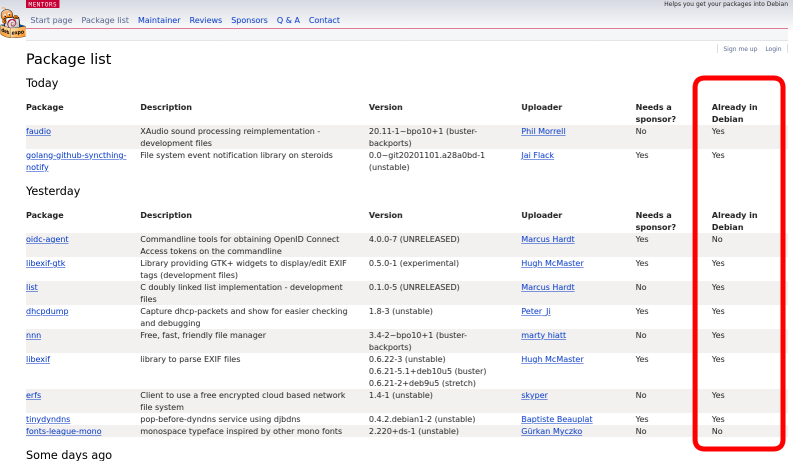
f:id:kenhys:20201108151153p:plainAready in Debian

5 November 2020

Mike Gabriel: Welcome, Fre(i)e Software GmbH

Last week I received the official notice: There is now a German company named "Fre(i)e Software GmbH" registered with the German Trade Register. Founding a New Company Over the past months I have put my energy into founding a new company. As a freelancing IT consultant I started facing the limitation of other companies having strict policies that forbid the cooperation with one person businesses (Personengesellschaften). Thus, the requirement for setting up a GmbH business came onto my agenda. I will move some of my business activities into this new company, starting next year. Policy Ideas The "Fre(i)e Software GmbH" will be a platform to facilitate the growth and spreading of Free Software on this planet. Here are some first ideas for company policies: This is all pretty fresh. I'll be happy about hearing your feedback, ideas and worries. If you are interested in joining the company, please let me know. If you are interested in supporting a company with such values, please also let me know. light+love
Mike Gabriel (aka sunweaver)

4 November 2020

Martin-&#201;ric Racine: Migrating to Predictable Network Interface Names

A couple of years ago, I moved into a new flat that comes with RJ45 sockets wired for 10 Gigabit (but currently offering 1 Gigabit) Ethernet.This also meant changing the settings on my router box for my new ISP.I took this opportunity to review my router's other settings too. I'll be blogging about these over the next few posts. Migrating to Predictable Network Interface Names Ever since Linus decided to flip the network interface enumeration order in the Linux kernel, I had been relying on udev's persistent network interface rules to maintain some semblance of consistency in the NIC naming scheme of my hosts. It has never been a totally satisfactory method, since it required manually editing the file to list the MAC addresses of all Ethernet cards and WiFi dongles likely to appear on that host to consistently use an easy-to-remember name that I could adopt for ifupdown configuration files. Enter predictable interface names. What started as a Linux kernel module project at Dell was eventually re-implemented in systemd. However, clear documentation on the naming scheme had been difficult to find and udev's persistent network interface rules gave me what I needed, so I postponed the transition for years. Relocating to a new flat and rethinking my home network to match gave me an opportunity to revisit the topic. The naming scheme is surprisingly simple and logical, once proper explanations have been found. The short version: The rest of the name specifies on which PCI bus and which slot the interface is found. On my old Dell laptop, it looks like this: An added bonus of the naming scheme is that it makes replacing hardware a breeze, since the naming scheme is bus and slot specific, not MAC address specific. No need to edit any configuration file. I saw this first-hand when I got around upgrading my router's network cards to Gigabit-capable ones to take advantage of my new home's broadband LAN. All it took was to power off the host, swap the Ethernet cards and power on the host. That's it. systemd took care of everything else. Still, migrating looked like a daunting task. Debian's wiki page gave me some answers, but didn't provide a systematic approach. I came up with the following shell script:
#!/bin/sh
lspci   grep -i -e ethernet -e network
sudo dmesg   grep -i renamed
for n in $(ls -X /sys/class/net/   grep -v lo);
do
  echo $n: && udevadm test-builtin net_id /sys/class/net/$n 2>/dev/null   grep NAME;
  sudo rgrep $n /etc
  sudo find /etc -name '*$n*'
done
This combined ideas found on the Debian wiki with a few of my own. Running the script before and after the migration ensured that I hadn't missed any configuration file. Once I was satisfied with that, I commented out the old udev persistent network interface rules, ran dpkg-reconfigure on all my Linux kernel images to purge the rules from the initrd images, and called it a day. ... well, not quite. It turns out that with bridge-utils, bridge_ports all no longer works. One must manually list all interfaces to be bridged. Debian bug report filed. PS: Luca Capello pointed out that Debian 10/Buster's Release Notes include migration instructions.

Jonathan Dowland: Amiga mouse pointer

I've started struggling to see my mouse pointer on my desktop. I probably need to take an eye test and possibly buy some new glasses. In the meantime, I've changed my mouse pointer to something larger and more colourful: The Amiga Workbench 1.3 mouse pointer that I grew up with, but scaled up to 128x128 pixels (from 16x16, I think)
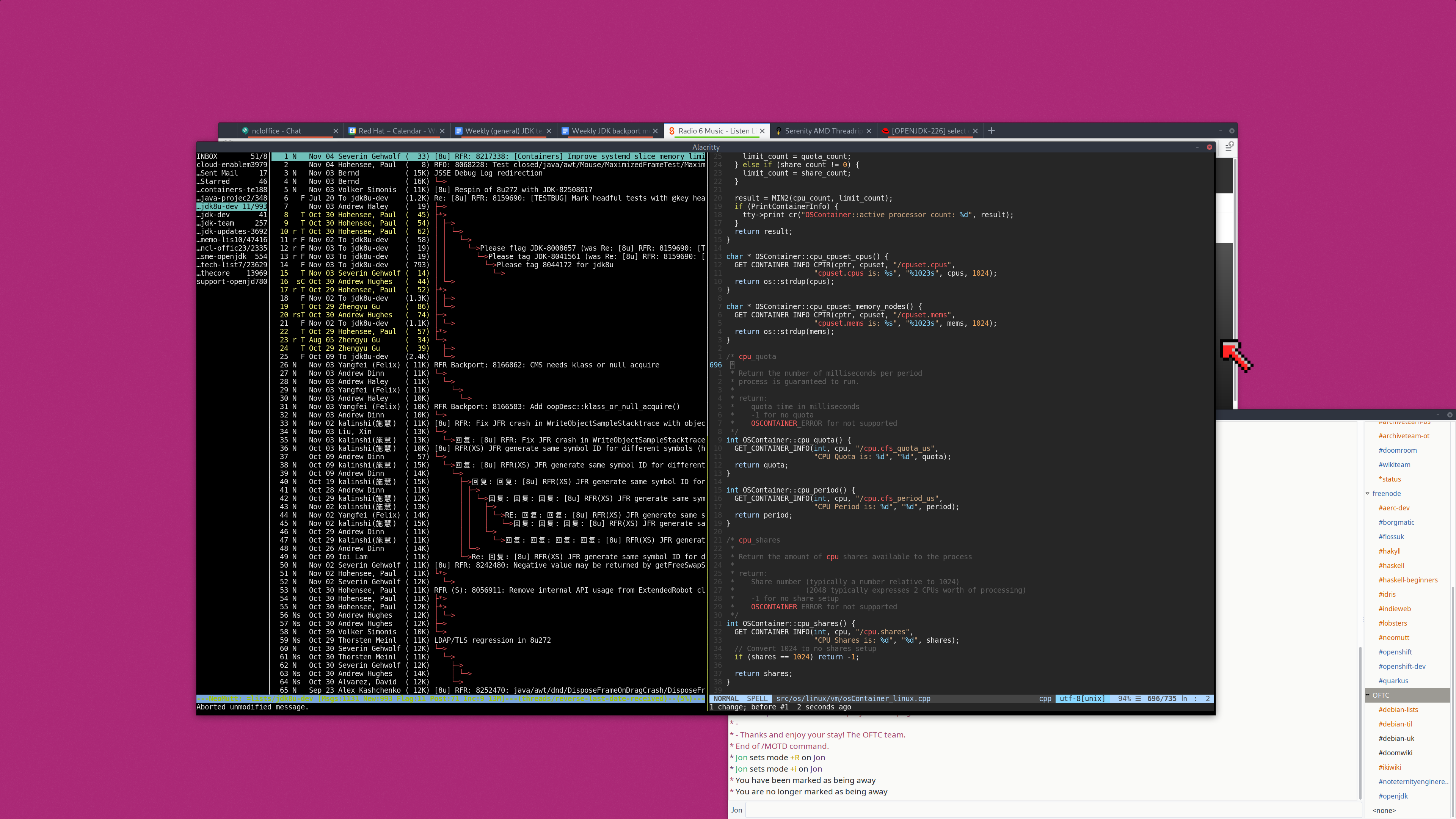
Desktop screenshot with Workbench 1.3 mouse pointer See if you can spot it
The X file format for mouse pointers is a bit strange but it turned out to be fairly easy to convert it over. An enormous improvement!

Christian Kastner: qemu-sbuild-utils 0.1: sbuild with QEMU

qemu-sbuild-utils, which were recently accepted into unstable, are a collection of scripts that wrap standard features of sbuild, autopkgtest-build-qemu and vmdb2 to provide a trivial interface for creating and using QEMU-based environments for package building:
  • qemu-sbuild-create creates VM images
  • qemu-sbuild-update is to VM images what sbuild-update is to chroots
  • qemu-sbuild wraps sbuild, adding all necessary (and some useful) options for autopkgtest mode.
Here's a simple two-line example for creating an image, and then using it to build a package:
$ sudo qemu-sbuild-create -o simple.img unstable http://deb.debian.org/debian

$ qemu-sbuild --image simple.img -d unstable [sbuild-options] FOO.dsc
That's it. Both qemu-sbuild-create and qemu-sbuild automate certain things, but also accept a number of options. For example, qemu-sbuild-create can install additional packages either from one of the APT sources, or .deb packages from the local filesystem. qemu-sbuild will pass on every option it does not consume itself to sbuild, so it should mostly work as a drop-in replacement for it (see the Limitations section below for where it doesn't). The created images can also be used for running autopkgtest itself, of course.
Advantages Excellent isolation. One can go nuts in an environment, change or even break things, and the VM can always simply be reset, or rolled back to an earlier state. Snapshots are just terrific for so many reasons. With KVM acceleration and a fast local APT cache, builds are really fast. There's an overhead of a few seconds for booting the VM on my end, but that overhead is negligible in comparison to the overall build time. On the upside, with everything being memory-backed, even massive dependency installations are lightning fast. With the parameters of the target environment being configurable, it's possible to test builds in various settings (for example: single-core vs. multi-core, or with memory constraints). Technically, it should be possible to emulate, on one host, any other guest architecture (even if emulation might be slow because of missing hardware acceleration). This would present an attractive alternative to (possibly distant and/or slow) porter boxes. However, support for that in qemu-sbuild-utils is not quite there yet.
Limitations The utilities are currently only available on the amd64 architecture, for building packages in amd64 and i386 VMs. There are plans to support arm64 in the near future. qemu-sbuild-create needs root, for the debootstrap stage. I'm looking into ways around this (by extending vmdb2). In any case, image updating and package building do not need privileges. autopkgtest mode does not yet support interactivity, so one cannot drop into a shell with --build-failed-commands, for example. The easy workaround is to connect to the VM with SSH. For this, the image must contain the openssh-server package.
Alternatives I looked at qemubuilder, but had troubles getting it to work. In any case, the autopkgtest chroot mode of sbuild seemed far more powerful and useful to me. vectis looks incredibly promising, but I had already written qemu-sbuild-utils by the time I stumbled over it, and as my current setup works well for me for now and is simple enough to maintain, I decided to polish and publish it. I'm also looking into Docker- and other namespace-based isolation solutions (of which there are many), which I think are the way forward for the majority of packages (those that aren't too close to the kernel and/or hardware). Rather than relying on the kernel for isolation, KVM-based solutions like Amazon's Firecracker and QEMU's microvm machine type provide minimal VMs with almost no boot overhead. Firecracker, for example, claims less than 125ms from launch to /sbin/init. Investigating these is a medium-term project for me.
Why not schroot? I have a strong aversion towards chroot-based build environments. The concept is archaic. Far superior software- and/or hardware-based technologies for process isolation have emerged in the past two decades, and I think it is high time to leave chroot-based solutions behind.
Acknowledgments These utilities are just high-level abstractions. All the heavy lifting is done by sbuild, autopkgtest, and vmdb2.

Norbert Preining: Debian KDE/Plasma Status 2020-11-04

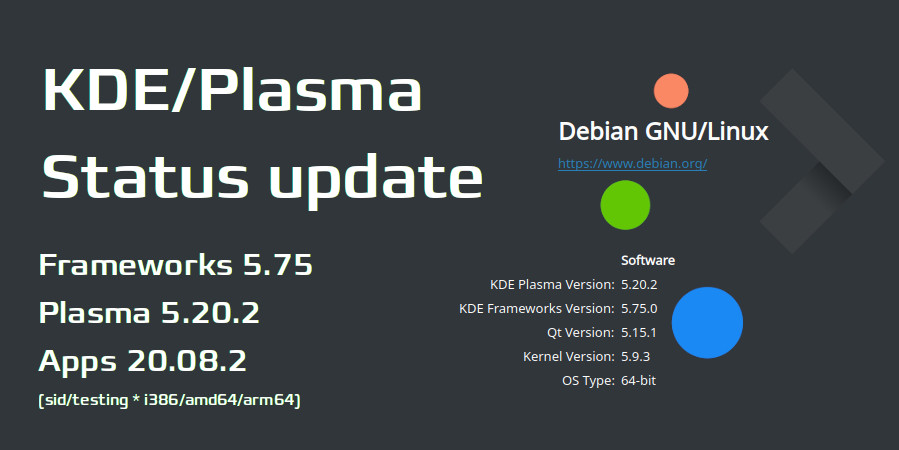
About a month worth of updates on KDE/Plasma in Debian has accumulated, so here we go. The highlights are: Plasma 5.19.5 based on Qt 5.15 is in Debian/experimental and hopefully soon in Debian/unstable, and my own builds at OBS have been updated to Plasma 5.20.2, Frameworks 5.75, Apps 20.08.2. Thanks to the dedicated work of the Qt maintainers, Qt 5.15 has finally entered Debian/unstable and we can finally target Plasma 5.20. OBS packages The OBS packages as usual follow the latest release, and currently ship KDE Frameworks 5.75, KDE Apps 20.08.2, and new, Plasma 5.20.2. The package sources are as usual (note the different path for the Plasma packages and the App packages, containing the release version!), for Debian/unstable:
deb https://download.opensuse.org/repositories/home:/npreining:/debian-kde:/frameworks/Debian_Unstable/ ./
deb https://download.opensuse.org/repositories/home:/npreining:/debian-kde:/plasma520/Debian_Unstable/ ./
deb https://download.opensuse.org/repositories/home:/npreining:/debian-kde:/apps2008/Debian_Unstable/ ./
deb https://download.opensuse.org/repositories/home:/npreining:/debian-kde:/other/Debian_Unstable/ ./
and the same with Testing instead of Unstable for Debian/testing. The update to Plasma 5.20 took a bit of time, not only because of the wait for Qt 5.15, but also because I couldn t get it running on my desktop, only in the VM. It turned out that the Plasmoid Event Calendar needed an update, and the old version crashed Plasma ( v68 and below crash in Arch after the Qt 5.15.1 update. ). After I realized that, it was only a question of updating to get Plasma 5.20 running. There are two points I have to mention (and I will fix sooner or later): As usual, let me know your experience! Debian main packages The packages in Debian/experimental are at the most current state, 5.19.5. We have waited with the upload to unstable until the Qt 5.15 transition is over, but hope to upload to unstable rather soon. After the upload is done, we will work on getting 5.20 into unstable. My aim is to get the most recent version of Plasma 5.20 into Debian Bullseye, so we need to do that before the freeze early next year. Let us hope for the best.

3 November 2020

Martin-&#201;ric Racine: Adding IPv6 support to my home LAN

A couple of year ago, I moved into a new flat that comes with RJ45 sockets wired for 10 Gigabit (but currently offering 1 Gigabit) Ethernet.This also meant changing the settings on my router box for my new ISP.I took this opportunity to review my router's other settings too. I'll be blogging about these over the next few posts. Adding IPv6 support to my home LAN I have been following the evolution of IPv6 ever since the KAME project produced the first IPv6 implementation. I have also been keeping track of the IPv4 address depletion. Around the time the IPv6 Day was organized in 2011, I started investigating the situation of IPv6 support at local ISPs. Well, never mind all those rumors about Finland being some high-tech mecca. Back then, no ISP went beyond testing their routers for IPv6 compatibility and producing white papers on what their limited test deployments accomplished. Not that it matters much, in practice. Most IPv6 documentation out there, including Debian's own, still focuses on configuring transitional mechanisms, especially how to connect to a public IPv6 tunnel broker. Relocating to a new flat and rethinking my home network to match gave me an opportunity to revisit the topic. Much to my delight, my current ISP offers native IPv6. This prompted me to go back and read up on IPv6 one more time. One important detail: IPv6 hosts are globally reachable. The implications of this don't immediately spring to mind for someone used to IPv4 network address translation (NAT): Any network service running on an IPv6 host can be reached by anyone anywhere. Contrary to IPv4, there is no division between private and public IP addresses. Whereas a device behind an IPv4 NAT essentially is shielded from the outside world, IPv6 breaks this assumption in more than one way. Not only is the host reachable from anywhere, its default IPv6 address is a mathematical conversion (EUI-64) of the network interface's MAC address, which makes every connection forensically traceable to a unique device. Basically, if you hadn't given much thought to firewalls until now, IPv6 should give you enough goose bumps to get around it. Tightening the configuration of every network service is also an absolute must. For instance, I configured sshd to only listen to private IPv4 addresses. What /etc/network/interfaces might look like on an dual-stack (IPv4 + IPv6) host:
allow-hotplug enp9s0
iface enp9s0 inet dhcp
iface enp9s0 inet6 auto
	privext 2
	dhcp 1
The auto method means that IPv6 will be auto-configured using SLAAC; privext 2 enables IPv6 privacy options and specifies that we prefer connecting via the randomly-generated IPv6 address, rather than the EUI-64 calculated MAC specific address; dhcp 1 enables passive DHCPv6 to fetch additional routing information. The above works for most desktop and laptop configurations. Where things got more complicated is on the router. I decided early on to keep NAT to provide an IPv4 route to the outside world. Now how exactly is IPv6 routing done? Every node along the line must have its own IPv6 address... including the router's LAN interface. This is accomplished using the sample script found in Debian's IPv6 prefix delegation wiki page. I modified mine as follows (the rest of the script is omitted for clarity):
#Both LAN interfaces on my private network are bridged via br0
IA_PD_IFACE="br0"
IA_PD_SERVICES="dnsmasq"
IA_PD_IPV6CALC="/usr/bin/ipv6calc"
Just put the script at the suggested location. We'll need to request a prefix on the router's outside interface to utilize it. This gives us the following interfaces file:
allow-hotplug enp2s4 enp2s8 enp2s9
auto br0
iface enp2s4 inet dhcp
iface enp2s4 inet6 auto
	request_prefix 1
	privext 2
	dhcp 1
iface enp2s8 inet manual
iface enp2s8 inet6 manual
iface enp2s9 inet manual
iface enp2s9 inet6 manual
iface br0 inet static
	bridge_ports enp2s8 enp2s9
	address 10.10.10.254
iface br0 inet6 manual
	bridge_ports enp2s8 enp2s9
	# IPv6 from /etc/dhcp/dhclient-exit-hooks.d/prefix_delegation
The IPv4 NAT and IPv6 Bridge script on my router looks as follows:
#!/bin/sh
PATH="/usr/sbin:/sbin:/usr/bin:/bin"
wan=enp2s4
lan=br0
########################################################################
# IPv4 NAT
iptables -F; iptables -t nat -F; iptables -t mangle -F
iptables -X; iptables -t nat -X; iptables -t mangle -X
iptables -Z; iptables -t nat -Z; iptables -t mangle -Z
iptables -t nat -A POSTROUTING -o $wan -j MASQUERADE
echo 1 > /proc/sys/net/ipv4/ip_forward
########################################################################
# IPv6 bridge
ip6tables -F; ip6tables -X; ip6tables -Z
# Default policy DROP
ip6tables -P FORWARD DROP
# Allow ICMPv6 forwarding
ip6tables -A FORWARD -p ipv6-icmp -j ACCEPT
# Allow established connections
ip6tables -I FORWARD -m state --state RELATED,ESTABLISHED -j ACCEPT
# Accept packets FROM LAN to everywhere
ip6tables -I FORWARD -i $lan -j ACCEPT
echo 1 > /proc/sys/net/ipv6/conf/all/forwarding
echo 1 > /proc/sys/net/ipv6/conf/default/forwarding
# IPv6 propagation via /etc/dhcp/dhclient-exit-hooks.d/prefix_delegation
The above already provided enough IPv6 connectivity to pass the IPv6 test on my desktop inside the LAN. To make things more fun, I enabled DHCPv6 support for my LAN on the router's dnsmasq by adding the last 3 lines to the configuration:
dhcp-hostsfile=/etc/dnsmasq-ethersfile
bind-interfaces
interface=br0
except-interface=enp2s4
no-dhcp-interface=enp2s4
dhcp-range=tag:br0,10.10.10.0,static,infinite
dhcp-range=tag:br0,::1,constructor:br0,ra-names,ra-stateless,infinite
enable-ra
dhcp-option=option6:dns-server,[::],[2606:4700:4700::1111],[2001:4860:4860::8888]
The 5 first lines (included here for emphasis) are extremely important: they ensure that dnsmasq won't provide any IPv4 or IPv6 service to the outside interface (enp2s4) and that DHCP will only be provided for LAN hosts whose MAC address is known. Line 6 shows how dnsmasq's DHCP service syntax differs between IPv4 and IPv6. The rest of my configuration was omitted on purpose. Enabling native IPv6 on my LAN has been an interesting experiment. I'm sure that someone could come up with even better ip6tables rules for the router or for my desktop hosts. Feel free to mention them in the blog's comment.

Martin-&#201;ric Racine: GRUB fine-tuning

A couple of years ago, I moved into a new flat that comes with RJ45 sockets wired for 10 Gigabit (but currently offering 1 Gigabit) Ethernet.This also meant changing the settings on my router box for my new ISP.I took this opportunity to review my router's other settings too. I'll be blogging about these over the next few posts. GRUB fine-tuning One thing that had been annoying me ever since Debian migrated to systemd as /sbin/init is that boot message verbosity hasn't been the same. Previously, the cmdline option quiet merely suppressed the kernel's output to the bootscreen, but left the daemon startup messages alone. Not anymore. Nowadays, quiet produces a blank screen. After some googling, I found the solution to that: GRUB_CMDLINE_LINUX_DEFAULT="noquiet loglevel=5" The former restores daemon startup messages, while the later makes the kernel output only significant notices or more serious messages. On most of my hosts, it mostly reports inconsistencies in the ACPI configuration of the BIOS. Another setting I find useful is a reboot delay in case a kernel panic happens: GRUB_CMDLINE_LINUX="panic=15" This gives me enough time to snap a picture of the screen output to attach to the bug report that will follow.

2 November 2020

Joerg Jaspert: Debian NEW Queue, Rust packaging

Debian NEW Queue So for some reason I got myself motivated again to deal with some packages in Debians NEW Queue. We had 420 source packages waiting for some kind of processing when I started, now we are down to something around 10. (Silly, people keep uploading stuff ) That s not entirely my own work, others from the team have been active too, but for those few days I went through a lot of stuff waiting. And must say it still feels mostly like it did when I somehow stopped doing much in NEW. Except - well, I feel that maintainers are much better in preparing their packages, especially that dreaded task of getting the copyright file written seems to be one that is handled much better. Now, thats not supported by any real numbers, just a feeling, but a good one, I think.

Rust Dealing with NEW meant I got in contact with one part that currently generates some friction between the FTP Team and one group of package maintainers - the Rust team. Note: this is, of course, entirely written from my point of view. Though with the intention of presenting it as objective as possible. Also, I know what rust is, and have tried a Hello world in it, but that s about my deep knowledge of it

The problem Libraries in rust are bundled/shipped/whatever in something called crates, and you manage what your stuff needs and provides with a tool called cargo. A library (one per crate) can provide multiple features, say a TLS lib can link against gnutls or openssl or some other random implementation. Such features may even be combinable in various different ways, so one can have a high number of possible feature combinations for one crate. There is a tool called debcargo which helps creating a Debian package out of a crate. And that tool generates so-called feature-packages, one per feature / combination thereof. Those feature packages are empty packages, only containing a symlink for their /usr/share/doc/ directory, so their size is smaller than the metadata they will produce. Inside the archive and the files generated by it, stuff that every user everywhere has to download and their apt has to process. Additionally, any change of those feature sets means one round through NEW, which is also not ideal. So, naturally, the FTP Team dislikes those empty feature packages. Really, a lot. There appears to be a different way. Not having the feature packages, but putting all the combinations into a Provides header. That sometimes works, but has two problems:
  • It can generate really long Provides: lines. I mean, REALLY REALLY REALLY long. Somewhat around 250kb is the current record. Thats long enough that a tool (not dak itself) broke on it. Sure, that tool needs to be fixed, but still, that s not nice. Currently preferred from us, though.
  • Some of the features may need different dependencies (say, gnutls vs openssl), should those conflict with each other, you can not combine them into one package.

Solutions Currently we do not have a good one. The rust maintainers and the ftp team are talking, exploring various ideas, we will see what will come out.

Devel archive / Component One of the possible solutions for the feature package problem would be something that another set of packages could also make good use of, I think. The introduction of a new archive or component, meant only for packages that are needed to build something, but where users are discouraged from ever using them. What? Well, take golang as an example. While we have a load of golang-something packages in Debian, and they are used for building applications written in go - none of those golang-something are meant to be installed by users. If you use the language and develop in it, the go get way is the one you are expected to use. So having an archive (or maybe component like main or contrib) that, by default, won t be activated for users, but only for things like buildds or archive rebuilds, will make one problem (hated metadata bloat) be evaluated wildly different. It may also allow a more relaxed processing of binary-NEW (easier additions of new feature packages).

But but but Yes, it is not the most perfect solution. Without taking much energy to think about, it requires
  • an adjustment in how main is handled. Right now we have the golden rule that main is self contained, that is, things in it may not need anything outside it for building or running. That would need to be adjusted for building. (Go as well as currently rust are always building static binaries, so no library dependencies there).
  • It would need handling for the release, that is, the release team would need to deal with that archive/component too. We haven t, yet, talked to them (still, slowly, discussing inside FTP Team). So, no idea how many rusty knives they want to sink into our nice bodies for that idea

Final Well, it is still very much open. Had an IRC meeting with the rust people, will have another end of November, it will slowly go forward. And maybe someone comes up with an entire new idea that we all love. Don t know, time will tell.

Vincent Bernat: My collection of vintage PC cards

Recently, I have been gathering some old hardware at my parents house, notably PC extension cards, as they don t take much room and can be converted to a nice display item. Unfortunately, I was not very concerned about keeping stuff around. Compared to all the hardware I have acquired over the years, only a few pieces remain.

Tseng Labs ET4000AX (1989) This SVGA graphics card was installed into a PC powered by a 386SX CPU running at 16 MHz. This was a good card at the time as it was pretty fast. It didn t feature 2D acceleration, unlike the later ET4000/W32. This version only features 512 KB of RAM. It can display 1024 768 images with 16 colors or 800 600 with 256 colors. It was also compatible with CGA, EGA, VGA, MDA, and Hercules modes. No contemporary games were using the SVGA modes but the higher resolutions were useful with Windows 3. This card was manufactured directly by Tseng Labs.
Carte Tseng Labs ET4000AX ISA au-dessus de la bo te "Plan te Aventure"
Tseng Labs ET4000 AX ISA card

AdLib clone (1992) My first sound card was an AdLib. My parents bought it in Canada during the summer holidays in 1992. It uses a Yamaha OPL2 chip to produce sound via FM synthesis. The first game I have tried is Indiana Jones and the Last Crusade. I think I gave this AdLib to a friend once I upgraded my PC with a Sound Blaster Pro 2. Recently, I needed one for a side project, but they are rare and expensive on eBay. Someone mentioned a cheap clone on Vogons, so I bought it. It was sold by Sun Moon Star in 1992 and shipped with a CD-ROM of Doom shareware.
AdLib clone on top of "Alone in the Dark" box
AdLib clone ISA card by Sun Moon Star
On this topic, take a look at OPL2LPT: an AdLib sound card for the parallel port and OPL2 Audio Board: an AdLib sound card for Arduino .

Sound Blaster Pro 2 (1992) Later, I switched the AdLib sound card with a Sound Blaster Pro 2. It features an OPL3 chip and was also able to output digital samples. At the time, this was a welcome addition, but not as important as the FM synthesis introduced earlier by the AdLib.
Sound Blaster Pro 2 on top of "Day of the Tentacle" box
Sound Blaster Pro 2 ISA card

Promise EIDE 2300 Plus (1995) I bought this card mostly for the serial port. I was using a 486DX2 running at 66 MHz with a Creatix LC 288 FC external modem. The serial port was driven by an 8250 UART with no buffer. Thanks to Terminate, I was able to connect to BBSes with DOS, but this was not possible with Windows 3 or OS/2. I needed one of these fancy new cards with a 16550 UART, featuring a 16-byte buffer. At the time, this was quite difficult to find in France. During a holiday trip, I convinced my parent to make a short detour from Los Angeles to San Diego to buy this Promise EIDE 2300 Plus controller card at a shop I located through an advertisement in a local magazine! The card also features an EIDE controller with multi-word DMA mode 2 support. In contrast with the older PIO modes, the CPU didn t have to copy data from disk to memory.
Promise EIDE 2300 Plus next to an OS/2 Warp CD
Promise EIDE 2300 Plus VLB card

3dfx Voodoo2 Magic 3D II (1998) The 3dfx Voodoo2 was one of the first add-in graphics cards implementing hardware acceleration of 3D graphics. I bought it from a friend along with his Pentium II box in 1999. It was a big evolutionary step in PC gaming, as games became more beautiful and fluid. A traditional video controller was still required for 2D. A pass-through VGA cable daisy-chained the video controller to the Voodoo, which was itself connected to the monitor.
3dfx Voodoo 2 Magic 3D II on top of "Jedi Knight: Dark Forces II" box
3dfx Voodoo2 Magic 3D II PCI card

3Com 3C905C-TX-M Tornado (1999) In the early 2000s, in college, the Internet connection on the campus was provided by a student association through a 100 Mbps Ethernet cable. If you wanted to reach the maximum speed, the 3Com 3C905C-TX-M PCI network adapter, nicknamed Tornado , was the card you needed. We would buy it second-hand by the dozen and sell them to other students for around 30 .
3COM 3C905C-TX-M on top of "Red Alert" box
3Com 3C905C-TX-M PCI card

1 November 2020

Vincent Bernat: Running Isso on NixOS in a Docker container

This short article documents how I run Isso, the commenting system used by this blog, inside a Docker container on NixOS, a Linux distribution built on top of Nix. Nix is a declarative package manager for Linux and other Unix systems.
While NixOS 20.09 includes a derivation for Isso, it is unfortunately broken and relies on Python 2. As I am also using a fork of Isso, I have built my own derivation, heavily inspired by the one in master:1
issoPackage = with pkgs.python3Packages; buildPythonPackage rec  
  pname = "isso";
  version = "custom";
  src = pkgs.fetchFromGitHub  
    # Use my fork
    owner = "vincentbernat";
    repo = pname;
    rev = "vbe/master";
    sha256 = "0vkkvjcvcjcdzdj73qig32hqgjly8n3ln2djzmhshc04i6g9z07j";
   ;
  propagatedBuildInputs = [
    itsdangerous
    jinja2
    misaka
    html5lib
    werkzeug
    bleach
    flask-caching
  ];
  buildInputs = [
    cffi
  ];
  checkInputs = [ nose ];
  checkPhase = ''
    $ python.interpreter  setup.py nosetests
  '';
 ;
I want to run Isso through Gunicorn. To this effect, I build a Python environment combining Isso and Gunicorn. Then, I can invoke the latter with "$ issoEnv /bin/gunicorn", like with a virtual environment.
issoEnv = pkgs.python3.buildEnv.override  
    extraLibs = [
      issoPackage
      pkgs.python3Packages.gunicorn
      pkgs.python3Packages.gevent
    ];
 ;
Before building a Docker image, I also need to specify the Isso configuration file for Isso:
issoConfig = pkgs.writeText "isso.conf" ''
  [general]
  dbpath = /db/comments.db
  host =
    https://vincent.bernat.ch
    http://localhost:8080
  notify = smtp
  [ ]
'';
NixOS comes with a convenient tool to build a Docker image without a Dockerfile:
issoDockerImage = pkgs.dockerTools.buildImage  
  name = "isso";
  tag = "latest";
  extraCommands = ''
    mkdir -p db
  '';
  config =  
    Cmd = [ "$ issoEnv /bin/gunicorn"
            "--name" "isso"
            "--bind" "0.0.0.0:$ port "
            "--worker-class" "gevent"
            "--workers" "2"
            "--worker-tmp-dir" "/dev/shm"
            "--preload"
            "isso.run"
          ];
    Env = [
      "ISSO_SETTINGS=$ issoConfig "
      "SSL_CERT_FILE=$ pkgs.cacert /etc/ssl/certs/ca-bundle.crt"
    ];
   ;
 ;
Because we refer to the issoEnv derivation in config.Cmd, the whole derivation, including Isso and Gunicorn, is copied inside the Docker image. The same applies for issoConfig, the configuration file we created earlier, and pkgs.cacert, the derivation containing trusted root certificates. The resulting image is 171 MB once installed, which is comparable to the Debian Buster image generated by the official Dockerfile. NixOS features an abstraction to run Docker containers. It is not currently documented in NixOS manual but you can look at the source code of the module for the available options. I choose to use Podman instead of Docker as the backend because it does not require running an additional daemon.
virtualisation.oci-containers =  
  backend = "podman";
  containers =  
    isso =  
      image = "isso";
      imageFile = issoDockerImage;
      ports = ["127.0.0.1:$ port :$ port "];
      volumes = [
        "/var/db/isso:/db"
      ];
     ;
   ;
 ;
A systemd unit file is automatically created to run and supervise the container:
$ systemctl status podman-isso.service
  podman-isso.service
     Loaded: loaded (/nix/store/a66gzqqwcdzbh99sz8zz5l5xl8r8ag7w-unit->
     Active: active (running) since Sun 2020-11-01 16:04:16 UTC; 4min 44s ago
    Process: 14564 ExecStartPre=/nix/store/95zfn4vg4867gzxz1gw7nxayqcl>
   Main PID: 14697 (podman)
         IP: 0B in, 0B out
      Tasks: 10 (limit: 2313)
     Memory: 221.3M
        CPU: 10.058s
     CGroup: /system.slice/podman-isso.service
              14697 /nix/store/pn52xgn1wb2vr2kirq3xj8ij0rys35mf-podma>
              14802 /nix/store/7vsba54k6ag4cfsfp95rvjzqf6rab865-conmo>
nov. 01 16:04:17 web03 podman[14697]: container init (image=localhost/isso:latest)
nov. 01 16:04:17 web03 podman[14697]: container start (image=localhost/isso:latest)
nov. 01 16:04:17 web03 podman[14697]: container attach (image=localhost/isso:latest)
nov. 01 16:04:19 web03 conmon[14802]: INFO: connected to SMTP server
nov. 01 16:04:19 web03 conmon[14802]: INFO: connected to https://vincent.bernat.ch
nov. 01 16:04:19 web03 conmon[14802]: [INFO] Starting gunicorn 20.0.4
nov. 01 16:04:19 web03 conmon[14802]: [INFO] Listening at: http://0.0.0.0:8080 (1)
nov. 01 16:04:19 web03 conmon[14802]: [INFO] Using worker: gevent
nov. 01 16:04:19 web03 conmon[14802]: [INFO] Booting worker with pid: 8
nov. 01 16:04:19 web03 conmon[14802]: [INFO] Booting worker with pid: 9
As the last step, we configure Nginx to forward requests for comments.luffy.cx to the container. NixOS provides a simple integration to grab a Let s Encrypt certificate.
services.nginx.virtualHosts."comments.luffy.cx" =  
  root = "/data/webserver/comments.luffy.cx";
  enableACME = true;
  forceSSL = true;
  extraConfig = ''
    access_log /var/log/nginx/comments.luffy.cx.log anonymous;
  '';
  locations."/" =  
    proxyPass = "http://127.0.0.1:$ port ";
    extraConfig = ''
      proxy_set_header X-Forwarded-For $proxy_add_x_forwarded_for;
      proxy_set_header Host $host;
      proxy_set_header X-Forwarded-Proto $scheme;
      proxy_hide_header Set-Cookie;
      proxy_hide_header X-Set-Cookie;
      proxy_ignore_headers Set-Cookie;
    '';
   ;
 ;
security.acme.certs."comments.luffy.cx" =  
  email = lib.concatStringsSep "@" [ "letsencrypt" "vincent.bernat.ch" ];
 ;

While I still struggle with Nix and NixOS, I am convinced this is how declarative infrastructure should be done. I like how in one single file, I can define the derivation to build Isso, the configuration, the Docker image, the container definition, and the Nginx configuration. The Nix language is used both for building packages and for managing configurations. Moreover, the Docker image is updated automatically like a regular NixOS host. This solves an issue plaguing the Docker ecosystem: no more stale images! My next step would be to combine this approach with Nomad, a simple orchestrator to deploy and manage containers.

  1. There is a subtle difference: I am using buildPythonPackage instead of buildPythonApplication. This is important for the next step. I didn t investigate if an application can be converted to a package easily.

Utkarsh Gupta: FOSS Activites in October 2020

Here s my (thirteenth) monthly update about the activities I ve done in the F/L/OSS world.

Debian
This was my 22nd month of contributing to Debian. I became a DM in late March last year and a DD last Christmas! \o/ Whilst busy with my undergrad, I could still take some time out for contributing to Debian (I always do!). Here are the following things I did in Debian this month:

Uploads and bug fixes:

Other $things:
  • Attended the Debian Ruby team meeting. Logs here.
  • Mentoring for newcomers.
  • FTP Trainee reviewing.
  • Moderation of -project mailing list.
  • Sponsored phpmyadmin, php-bacon-baconqrcode, twig, php-dasprid-enum, sql-parser, and mariadb-mysql-kbs for William.

Debian (E)LTS
Debian Long Term Support (LTS) is a project to extend the lifetime of all Debian stable releases to (at least) 5 years. Debian LTS is not handled by the Debian security team, but by a separate group of volunteers and companies interested in making it a success. And Debian Extended LTS (ELTS) is its sister project, extending support to the Jessie release (+2 years after LTS support). This was my thirteenth month as a Debian LTS and fourth month as a Debian ELTS paid contributor.
I was assigned 20.75 hours for LTS and 30.00 hours for ELTS and worked on the following things:
(for ELTS, I worked for 5.25 hours extra, so my total hours this month for ELTS were 35.25!)

LTS CVE Fixes and Announcements:
  • Issued DLA 2389-1, fixing CVE-2019-18978, for ruby-rack-cors.
    For Debian 9 Stretch, these problems have been fixed in version 0.4.0-1+deb9u2.
  • Issued DLA 2390-1, fixing CVE-2019-18848, for ruby-json-jwt.
    For Debian 9 Stretch, these problems have been fixed in version 1.6.2-1+deb9u2.
  • Issued DLA 2391-1, fixing CVE-2020-25613, for ruby2.3.
    For Debian 9 Stretch, these problems have been fixed in version 2.3.3-1+deb9u9.
  • Issued DLA 2392-1, fixing CVE-2020-25613, for jruby.
    For Debian 9 Stretch, these problems have been fixed in version 1.7.26-1+deb9u3.
  • Uploaded ruby2.5 to buster, fixing CVE-2020-25613. For Debian 10 Buster, these problems have been fixed in version 2.5.5-3+deb10u3.
  • Uploaded ruby2.7 to unstable, fixing CVE-2020-25613. For Debian Sid, these problems have been fixed in version 2.7.1-4.
  • Uploaded rails to unstable, fixing CVE-2020-8264. For Debian Sid, these problems have been fixed in version 2:6.0.3.4+dfsg-1.

ELTS CVE Fixes and Announcements:

Other (E)LTS Work:
  • Front-desk duty from 28-09 to 04-10 and from 26-10 until 01-10 for both LTS and ELTS.
  • Triaged libproxy, libvirt, libonig, ant, erlang, ruby2.3, jruby, dpdk, php7.0, spice, spice-gtk, wireshark, djangorestframework, python-urllib3, python-cryptography, qtsvg-opensource-src, and open-build-service.
  • Marked CVE-2020-26137/python-urllib3 as no-dsa for Stretch and Jessie.
  • Marked CVE-2020-1437 4,5,6,7,8 /dpdk as no-dsa for Stretch.
  • Marked CVE-2020-2586 2,3 /wireshark as postponed for Stretch.
  • Marked CVE-2020-25626/djangorestframework as no-dsa for Stretch.
  • Marked CVE-2020-11979/ant as not-affected for Jessie.
  • Marked CVE-2020-25623/erlang as not-affected for Jessie.
  • Marked CVE-2020-25659/python-cryptography as no-dsa for Stretch and Jessie.
  • Auto EOL ed jruby, libjs-handlebars, linux, pluxml, mupdf, and djangorestframework for Jessie.
  • [E/LTS] Worked on putting survey online, deployed LTS Team Pages \o/
  • [ELTS] Fix suite-name in ela-needed file and fix other tags and ordering of triages to fix errors in the security tracker.
  • [LTS] Sent out invitations for the meeting.
  • Attended the sixth private LTS meeting.
  • General discussion on LTS private and public mailing list.

Until next time.
:wq for today.

Paul Wise: FLOSS Activities October 2020

Focus This month I didn't have any particular focus. I just worked on issues in my info bubble.

Changes

Issues

Review
  • Spam: reported 2 Debian bug reports and 147 Debian mailing list posts
  • Patches: merged libicns patches
  • Debian packages: sponsored iotop-c
  • Debian wiki: RecentChanges for the month
  • Debian screenshots:

Administration
  • Debian: get us removed from an RBL
  • Debian wiki: reset email addresses, approve accounts

Communication

Sponsors The pytest-rerunfailures/pyemd/morfessor work was sponsored by my employer. All other work was done on a volunteer basis.

31 October 2020

Chris Lamb: Free software activities in October 2020

Here is my monthly update covering what I have been doing in the free software world during October 2020 (previous month): For Lintian, the static analysis tool for Debian packages, I uploaded versions 2.97.0, 2.98.0, 2.99.0 & 2.100.0 as well as updated the declares-possibly-conflicting-debhelper-compat-versions tag as we may specify the Debhelper compatibility level in debian/rules or debian/control (#972464) and dropped a reference to missing manual page [...].
Reproducible Builds One of the original promises of open source software is that distributed peer review and transparency of process results in enhanced end-user security. However, whilst anyone may inspect the source code of free and open source software for malicious flaws, almost all software today is distributed as pre-compiled binaries. This allows nefarious third-parties to compromise systems by injecting malicious code into ostensibly secure software during the various compilation and distribution processes. The motivation behind the Reproducible Builds effort is to ensure no flaws have been introduced during this compilation process by promising identical results are always generated from a given source, thus allowing multiple third-parties to come to a consensus on whether a build was compromised. The project is proud to be a member project of the Software Freedom Conservancy. Conservancy acts as a corporate umbrella allowing projects to operate as non-profit initiatives without managing their own corporate structure. If you like the work of the Conservancy or the Reproducible Builds project, please consider becoming an official supporter. This month, I: I also updated the main Reproducible Builds website and documentation:
Lastly, I made the following changes to diffoscope, including preparing and uploading version 161 to Debian: trydiffoscope is the web-based version of diffoscope. This month, I made the following changes:

Debian Debian LTS This month I have worked 18 hours on Debian Long Term Support (LTS) and 12 hours on its sister Extended LTS project. You can find out more about the project via the following video:

Uploads Bugs filed

29 October 2020

Ulrike Uhlig: Better handling emergencies

We all know these situations when we receive an email asking Can you check the design of X, I need a reply by tonight. Or an instant message: My website went down, can you check? Another email: I canceled a plan at the hosting company, can you restore my website as fast as possible? A phone call: The TLS certificate didn t get updated, and now we can t access service Y. Yet another email: Our super important medical advice website is suddenly being censored in country Z, can you help? Everyone knows those messages that have URGENT in capital letters in the email subject. It might be that some of them really are urgent. Others are the written signs of someone having a hard time properly planning their own work and passing their delays on to someone who comes later in the creation or production chain. And others again come from people who are overworked and try to delegate some of their tasks to a friendly soul who is likely to help.

How emergencies create more emergencies In the past, my first reflex when I received an urgent request was to start rushing into solutions. This happened partly out of empathy, partly because I like to be challenged into solving problems, and I m fairly good at that. This has proven to be unsustainable, and here is why.

Emergencies create unplanned work The first issue is that emergencies create a lot of unplanned work. Which in turn means not getting other, scheduled, things done. This can create a backlog, end up in working late, or working on weekends.

Emergencies can create a permanent state of exception Unplanned work can also create a lot of frustration, out of the feeling of not getting the things done that one planned to do. We might even get a feeling of being nonautonomous (in German I would say fremdbestimmt, which roughly translates to being directed by others ). On the long term, this can generate unsustainable situations: higher work loads, and burnout. When working in a team of several people, A might have to take over the work of B because B has not enough capacities. Then A gets overloaded in turn, and C and D have to take over A s work. Suddenly the team is stuck in a permanent state of exception. This state of exception will produce more backlog. The team might start to deprioritize social issues over getting technical things done. They might not be able to recruit new people anymore because they have no capacity left to onboard newcomers.

One emergency can result in a variety of emergencies for many people The second issue produced by urgent requests is that if I cannot solve the initial emergency by myself, I might try to involve colleagues, other people who are skilled in the area, or people who work in another relevant organization to help with this. Suddenly, the initial emergency has become my emergency as well as the emergency of a whole bunch of other people.

A sidenote about working with friends This might be less of an issue in a classical work setup than in a situation in which a bunch of freelancers work together, or in setups in which work and friendships are intertwined. This is a problem, because the boundaries between friend and worker role, and the expectations that go along with these roles, can get easily confused. If a colleague asks me to help with task X, I might say no; if a friend asks, I might be less likely to say no.

What I learnt about handling emergencies I came up with some guidelines that help me to better handle emergencies.

Plan for unplanned work It doesn t matter and it doesn t help to distinguish if urgent requests are legitimate or if they come from people who have not done their homework on time. What matters is to make one s weekly todo list sustainable. After reading Making work visible by Domenica de Grandis, I understood the need to add free slots for unplanned work into one s weekly schedule. Slots for unplanned work can take up to 25% of the total work time!

Take time to make plans Now that there are some free slots to handle emergencies, one can take some time to think when an urgent request comes in. A German saying proposes to wait and have some tea ( abwarten und Tee trinken ). I think this is actually really good advice, and works for any non-obvious problem. Sit down and let the situation sink in. Have a tea, take a shower, go for a walk. It s never that urgent. Really, never. If possible, one can talk about the issue with another person, rubberduck style. Then one can make a plan on how to address the emergency properly, it could be that the solution is easier than at first thought.

Affirming boundaries: Saying no Is the emergency that I m asked to solve really my problem? Or is someone trying to involve me because they know I m likely to help? Take a deep breath and think about it. No? It s not my job, not my role? I have no time for this right now? I don t want to do it? Maybe I m not even paid for it? A colleague is pushing my boundaries to get some task on their own todo list done? Then I might want to say no. I can t help with this. or I can help you in two weeks. I don t need to give a reason. No. is a sentence. And: Saying no doesn t make me an arse.

Affirming boundaries: Clearly defining one s role Clearly defining one s role is something that is often overlooked. In many discussions I have with friends it appears that this is a major cause of overwork and underpayment. Lots of people are skilled, intelligent, and curious, and easily get challenged into putting on their super hero dress. But they re certainly not the only person that can help even if an urgent request makes them think that at first. To clearly define our role, we need to make clear which part of the job is our work, and which part needs to be done by other people. We should stop trying to accomodate people and their requests to the detriment of our own sanity. You re a language interpreter and are being asked to mediate a bi-lingual conflict between the people you are interpreting for? It s not your job. You re the graphic designer for a poster, but the text you ve been given is not good enough? Send back a recommendation to change the text; don t do these changes yourself: it s not your job. But you can and want to do this yourself and it would make your client s life easier? Then ask them to get paid for the extra time, and make sure to renegotiate your deadline!

Affirming boundaries: Defining expectations Along with our role, we need to define expectations: in which timeframe am I willing to do the job? Under which contract, which agreement, which conditions? For which payment? People who work in a salary office job generally do have a work contract in which their role and the expectations that come with this role are clearly defined. Nevertheless, I hear from friends that their superiors regularly try to make them do tasks that are not part of their role definition. So, here too, role and expectations sometimes need to be renegotiated, and the boundaries of these roles need to be clearly affirmed.

Random conclusive thoughts If you ve read until here, you might have experienced similar things. Or, on the contrary, maybe you re already good at communicating your boundaries and people around you have learnt to respect them? Congratulations. In any case, for improving one s own approach to such requests, it can be useful to find out which inner dynamics are at play when we interact with other people. Additionally, it can be useful to understand the differences between Asker and Guesser culture:
when an Asker meets a Guesser, unpleasantness results. An Asker won t think it s rude to request two weeks in your spare room, but a Guess culture person will hear it as presumptuous and resent the agony involved in saying no. Your boss, asking for a project to be finished early, may be an overdemanding boor or just an Asker, who s assuming you might decline. If you re a Guesser, you ll hear it as an expectation.
Askers should also be aware that there might be Guessers in their team. It can help to define clear guidelines about making requests (when do I expect an answer, under which budget/contract/responsibility does the request fall, what other task can be put aside to handle the urgent task?) Last, but not least, Making work visible has a lot of other proposals on how to visibilize and then deal with unplanned work.

Next.

Previous.