Search Results: "ed"

25 June 2023

Junichi Uekawa: update-info.

update-info. Something is corrupting my /usr/share/info/dir entry. I've found mutt-alias.info.gz and muttrc-mode.info.gz seems to cause the problematic entries. They seem to declare iso-8859-1 and that seems to cause some kind of corruption. Then I found there's a bug 1024997 and then it was fixed in experimental. So this fix didn't get in to bookworm.

Vasudev Kamath: Migrating my domain from copyninja.info to copyninja.in

After holding the domain copyninja.info for almost 15 years, I finally let it expire and bought a new domain, copyninja.in. With this move, I also bid goodbye to my VPS, which I had been using for over 12 years on DigitalOcean. This particular VPS was initially set up with Debian Wheezy (7) and had been upgraded over the years to successive Debian versions and finally was running Debian Bullseye (11). The main reason for the move was that the .info domain was becoming more expensive every year, and the VPS, which I had upgraded to the $10 USD range, cost around $12 USD per month with GST included. Since I wasn't really using the VPS anymore and had recently even broken my DNS and mail server settings, I decided it was the right time to reduce this additional cost. Now I have a cheaper .in domain, and the VPS is on a minimal configuration at DigitalOcean, costing $5 USD per month (which becomes almost $7 USD with GST). Currently, I only run a blog and mail server on this VPS. I will assess if I really need to keep running the mail server for some more time. If not, I will move the blog to a hosting service like GitHub Pages and completely get rid of the VPS. My email address has now changed, and the new mail can be obtained from this link <http://scr.im/newcopyninj>. I have updated my GPG key and added the new email as the new UID. I still need to revoke the old domain UID. The key has already been updated in the Debian Keyring.

Russ Allbery: Review: The Wee Free Men

Review: The Wee Free Men, by Terry Pratchett
Series: Discworld #30
Publisher: HarperTempest
Copyright: 2003
Printing: 2006
ISBN: 0-06-001238-2
Format: Mass market
Pages: 375
The Wee Free Men is the 30th Discworld novel but the first Tiffany Aching book and doesn't rely on prior knowledge of Discworld, although the witches from previous books do appear. You could start here, although I think the tail end of the book has more impact if you already know who Granny Weatherwax and Nanny Ogg are. The Amazing Maurice and His Educated Rodents was the first Discworld novel written to be young adult, and although I could see that if I squinted, it didn't feel that obviously YA to me. The Wee Free Men is clearly young adult (or perhaps middle grade), right down to the quintessential protagonist: a nine-year-old girl who is practical and determined and a bit of a misfit and does a lot of growing up over the course of the story. Tiffany Aching is the youngest daughter in a large Aching family that comes from a long history of Aching families living in the Chalk. She has a pile of older relatives and one younger brother named Wentworth who is an annoying toddler obsessed with sweets. Her family work a farm that is theoretically the property of the local baron but has been in their family for years. There is always lots to do and Tiffany is an excellent dairymaid, so people mostly leave her alone with her thoughts and her tiny collection of books from her grandmother. Her now-deceased Grandma Aching was a witch. Tiffany, as it turns out, is also a witch, not that she knows that. As the book opens, certain... things are trying to get into her world from elsewhere. The first is a green monster that pops up out of the river and attempts to snatch Wentworth, much to Tiffany's annoyance. She identifies it as Jenny Green-Teeth via a book of fairy tales and dispatches it with a frying pan, somewhat to her surprise, but worse are coming. Even more surprised by her frying pan offensive are the Nac Mac Feegle, last seen in Carpe Jugulum, who know something about where this intrusion is coming from. In short order, the Aching farm has a Nac Mac Feegle infestation. This is, unfortunately, another book about Discworld's version of fairy (or elves, as they were called in Lords and Ladies). I find stories about the fae somewhat hit and miss, and Pratchett's version is one of my least favorites. The Discworld Queen of Fairy is mostly a one-dimensional evil monster and not a very interesting one. A big chunk of the plot is an extended sequence of dreams that annoyed me and went on for about twice as long as it needed to. That's the downside of this book. The upside is that Tiffany Aching is exactly the type of protagonist I loved reading about as a kid, and still love reading about as an adult. She's thoughtful, curious, observant, determined, and uninterested in taking any nonsense from anyone. She has a lot to learn, both about the world and about herself, but she doesn't have to be taught lessons twice and she has a powerful innate sense of justice. She also has a delightfully sarcastic sense of humor.
"Zoology, eh? That's a big word, isn't it." "No, actually it isn't," said Tiffany. "Patronizing is a big word. Zoology is really quite short."
One of the best things that Pratchett does with this book is let Tiffany dislike her little brother. Wentworth eventually ends up in trouble and Tiffany has to go rescue him, which of course she does because he's her baby brother. But she doesn't like him; he's annoying and sticky and constantly going on about sweets and never says anything interesting. Tiffany is aware that she's supposed to love him because he's her little brother, but of course this is not how love actually works, and she doesn't. But she goes and rescues him anyway, because that's the right thing to do, and because he's hers. There are a lot of adult novels that show the nuanced and sometimes uncomfortable emotions we have about family members, but this sort of thing is a bit rarer in novels pitched at pre-teens, and I loved it. One valid way to read it is that Tiffany is neurodivergent, but I think she simply has a reasonable reaction to a brother who is endlessly annoying and too young to have many redeeming qualities in her eyes, and no one forces her to have a more socially expected one. It doesn't matter what you feel about things; it matters what you do, and as long as you do the right thing, you can have whatever feelings about it you want. This is a great lesson for this type of book. The other part of this book that I adored was the stories of Grandma Aching. Tiffany is fairly matter-of-fact about her dead grandmother at the start of the book, but it becomes clear over the course of the story that she's grieving in her own way. Grandma Aching was a taciturn shepherd who rarely put more than two words together and was much better with sheep than people, but she was the local witch in the way that Granny Weatherwax was a witch, and Tiffany was paying close attention. They never managed to communicate as much as either of them wanted, but the love shines through Tiffany's memories. Grandma Aching was teaching her how to be a witch: not the magical parts, but the far more important parts about justice and fairness and respect for other people. This was a great introduction of a new character and a solid middle-grade or young YA novel. I was not a fan of the villain and I can take or leave the Nac Mac Feegle (who are basically Scottish Smurfs crossed with ants and are a little too obviously the comic relief, for all that they're also effective warriors). But Tiffany is great and the stories of Grandma Aching are even better. This was not as good as Night Watch (very few things are), but it was well worth reading. Followed in publication order by Monstrous Regiment. The next Tiffany Aching novel is A Hat Full of Sky. Rating: 8 out of 10

24 June 2023

Steve Kemp: Simple REPL for CP/M, in Z80 assembly

So my previous post documented a couple of simple "scripting languages" for small computers, allowing basic operations in a compact/terse fashion. I mentioned that I might be tempted to write something similar for CP/M, in Z80 assembly, and the result is here: To sum up it allows running programs like this:
0m 16k rP _ _ 
C3 03 EA 00 00 C3 06 DC 00 00 00 00 00 00 00 00
Numbers automatically get saved to the A-register, the accumulator. In addition to that there are three dedicated registers: So the program above: TLDR: Dump the first sixteen bytes of RAM, at address 0x0000, to the console. Though this program allows delays, RAM read/write, I/O port input and output, as well as loops it's both kinda fun, and kinda pointless. I guess you could spend hours flashing lights and having other similar fun. But only if you're like me! All told the code compiles down to about 800 bytes and uses less than ten bytes of RAM to store register-state. It could be smaller with some effort, but it was written a bit adhoc and I think I'm probably done now.

Russ Allbery: Review: Rose/House

Review: Rose/House, by Arkady Martine
Publisher: Subterranean Press
Copyright: 2023
ISBN: 1-64524-034-7
Format: Kindle
Pages: 109
Arkady Martine is the author of the wonderful Teixcalaan duology, a political space opera. Rose/House is a standalone science fiction novella in an entirely different subgenre. Basit Deniau was a legendary architect whose trademark was infusing his houses with artificial intelligences. A house AI is common in this future setting, but what Deniau did was another kind of genius. He has been dead for a year when this story opens. The carbon of his body has been compressed into diamond and displayed on a plinth deep inside his final creation. Rose House. Dr. Selene Gisil was his student. It was not a comfortable relationship. She is now the only person permitted entry into Rose House, allowed to examine its interior architecture and the archive of Deniau's work that is stored there. Once per year, she may enter for precisely one week. No one else in the world is permitted to enter, ever. Selene went in the first time she was allowed. She lasted three days before fleeing. There is a law in the United States, the Federal Artificial Intelligence Surveillance Act, that sets some requirements for the behavior of artificial intelligences. One of its requirements is a duty-of-care notification: an artificial intelligence must report the presence of a dead body to the nearest law enforcement agency. Rose House's call to the China Lake Police Precinct to report the presence of a dead body in the sealed house follows the requirements of the law to the letter.
"Cause of death," said Maritza. I'm a piece of architecture, Detective. How should I know how humans are like to die? After that the line went to the dull hang-up tone, and Rose House would not take her return calls. Not even once.
Rose/House has some of the structure of a locked-room mystery. Someone is dead, but no one at the scene can get inside the house to see who. Selene is the only person who can enter, but she was in Turkey at the time of the killing and has an air-tight alibi. How could someone be in the house at all? And how did they die? It also has some of the structure of a police procedural. First one and then the other detective of the tiny local precinct are pulled into the investigation, starting, as one might expect, by calling Selene Gisil. But I'm not sure I would describe this novella as following either of those genres. By the end of the story, we do learn some of the things one might expect to learn from a detective novel, but that never felt like the true thrust of the story. If you want a detailed explanation of what happened, or the pleasure of trying to guess the murderer before the story tells you, this may not be the novella for you. Instead, Martine was aiming for disturbing eeriness. This is not quite horror nothing explicitly horrific happens, although a couple of scenes are disturbing but Rose House is deeply unsettling. The best character of the story is Maritza, the detective initially assigned to the case, who is trying to ignore the weirdness and do her job. The way she approaches that task leads to some fascinating interactions with Rose House that I thought were the best parts of the story. This story was not really my thing, even though I love stories about sentient buildings and there are moments in this story where Rose House is delightfully nonhuman in exactly the way that I enjoy. The story is told in a way that requires the reader to piece together the details of the conclusion themselves, and I prefer more explicit explanation in stories that start with a puzzle. It's also a bit too close to horror for me, specifically in the way that the characters (Selene most notably) have disturbing and oddly intense emotional reactions to environments that are only partly described. But I read this a few weeks ago and I'm still thinking about it, so it clearly is doing something right. If you like horror, or at least half-explained eeriness, it's likely you will enjoy this more than I did. This portrayal of AI is an intriguing one, and I'd enjoy reading more about it in a story focused on character and plot rather than atmosphere. Rating: 6 out of 10

23 June 2023

Reproducible Builds (diffoscope): diffoscope 243 released

The diffoscope maintainers are pleased to announce the release of diffoscope version 243. This version includes the following changes:
[ Chris Lamb ]
* Drop Jenkins build reference in README.rst.
[ Ed Maste ]
* Update FreeBSD package names
[ Mattia Rizzolo ]
* Improve the documentation on to produce that binary blob that in the arsc
  comparator.
You find out more by visiting the project homepage.

22 June 2023

Steve Kemp: Simple toy languages

Recently I was looking around the internet and looking for something to do with some ESP8266 devices, which I've been neglecting over recent years.
When I was on paternity-leave, five years ago, I decided I wanted a new hobby for my "down" time. I had two obvious choices a) developing applications for mobiles, or b) working with "hardware". I chose the latter.
By accident I came across a couple of simple scripting languages, FORTH-esque. Sample usage looks something like this (which obviously sends the command over a serial-device to the connected-board):
$ echo '5  6d 1o 100m 0o 100m  ' >/dev/cu.usbmodem12341
That's a little terse, but briefly: The end result is a blinking LED, for five iterations anyway. The code for this interpreter is described in the following link, with the code in the linked gist: This is derived from an older, and simpler, project which has a similar focus but slightly different built-in operations (and which lacks loops/conditionals): Both of these implementations are very similar, I guess due to the shared history and obvious FORTH-inspiration. Each allows port I/O, delays, and simple math opertions. We can pretend they're stack-based, though there are some differences and some niggles. I'm kinda tempted to port one of them to Z80 assembly, and see if I can get it running under CP/M. I guess I could add a REPL for interactive use, though without actual hardware connected to my single-board computer it might all feel a little pointless. Then again I have Turbo Pascal, and even a tiny C-compiler, so I guess with those in mind any toy-language is pointless in a completely different regard.

Russell Coker: Cheap Peripherals for Work

A problem with a lot of the purchase of peripherals is that they don t match the needs of the users and often get thrown away long before they wear out. At many companies when a new employee starts they are given a laptop (expensive corporate asset), a cheap headset for video calls, and optionally a keyboard and mouse for people who don t like the laptop keyboard and/or touchpad. When an employee leaves the company their laptop can be assigned to someone else if it isn t too old. Headsets and mice often show signs of wear if they have been used for a year or two and while keyboards often have a long service life they will be dirty after a couple of years and they are cheap to replace. So every time someone leaves and returns all company hardware there will be a headset and mouse owned by the company that ends up as e-waste and sometimes a keyboard too. Often people leave and just keep the headset, mouse, and keyboard expecting that no-one at their former employer will demand them back this is a reward for dishonesty. Buying the keyboards, mice, and headsets in bulk allegedly makes it easy to support them, but supporting such devices isn t difficult and the IT staff end up fielding complaints because the devices they issue don t match the preferences of the workers. These devices have the worst ratio of value to complaints of anything a typical company supports. I believe that the best solution to all these problems is to not buy those items for employees but to instead give them a sum of money sufficient to buy cheap items in each category (EG $60 for keyboard, mouse, and headset) and let them buy whichever they choose. If they want something more expensive (Bose headset, split keyboard, or gamer mouse) them they can spend their own money to do so (and claim a tax deduction). Then when people leave the company they can take those items with them and save the company the expense of waste disposal while also not rewarding dishonesty. An additional benefit for the company is that it can reduce the issues of complying with disability legislation, anyone who already owns such hardware can just keep the money. The current situation is bad for morale, a waste of time for IT workers, and contributes to the waste problem.

Russ Allbery: Review: Furious Heaven

Review: Furious Heaven, by Kate Elliott
Series: Sun Chronicles #2
Publisher: Tor
Copyright: 2023
ISBN: 1-250-86701-0
Format: Kindle
Pages: 725
Furious Heaven is the middle book of a trilogy and a direct sequel to Unconquerable Sun. Don't start here. I also had some trouble remembering what happened in the previous book (grumble recaps mutter), and there are a lot of threads, so I would try to minimize the time between books unless you have a good memory for plot details. This is installment two of gender-swapped Alexander the Great in space. When we last left Sun and her Companions, Elliott had established the major players in this interstellar balance of power and set off some opening skirmishes, but the real battles were yet to come. Sun was trying to build her reputation and power base while carefully staying on the good side of Queen-Marshal Eirene, her mother and the person credited with saving the Republic of Chaonia from foreign dominance. The best parts of the first book weren't Sun herself but wily Persephone, one of her Companions, whose viewpoint chapters told a more human-level story of finding her place inside a close-knit pre-existing friendship group. Furious Heaven turns that all on its head. The details are spoilers (insofar as a plot closely tracking the life of Alexander the Great can contain spoilers), but the best parts of the second book are the chapters about or around Sun. What I find most impressive about this series so far is Elliott's ability to write Sun as charismatic in a way that I can believe as a reader. That was hit and miss at the start of the series, got better towards the end of Unconquerable Sun, and was wholly effective here. From me, that's high but perhaps unreliable praise; I typically find people others describe as charismatic to be some combination of disturbing, uncomfortable, dangerous, or obviously fake. This is a rare case of intentionally-written fictional charisma that worked for me. Elliott does not do this by toning down Sun's ambition. Sun, even more than her mother, is explicitly trying to gather power and bend the universe (and the people in it) to her will. She treats people as resources, even those she's the closest to, and she's ruthless in pursuit of her goals. But she's also honorable, straightforward, and generous to the people around her. She doesn't lie about her intentions; she follows a strict moral code of her own, keeps her friends' secrets, listens sincerely to their advice, and has the sort of battlefield charisma where she refuses to ask anyone else to take risks she personally wouldn't take. And her use of symbolism and spectacle isn't just superficial; she finds the points of connection between the symbols and her values so that she can sincerely believe in what she's doing. I am fascinated by how Elliott shapes the story around her charisma. Writing an Alexander analogue is difficult; one has to write a tactical genius with the kind of magnetic attraction that enabled him to lead an army across the known world, and make this believable to the reader. Elliott gives Sun good propaganda outlets and makes her astonishingly decisive (and, of course, uses the power of the author to ensure those decisions are good ones), but she also shows how Sun is constantly absorbing information and updating her assumptions to lay the groundwork for those split-second decisions. Sun uses her Companions like a foundation and a recovery platform, leaning on them and relying on them to gather her breath and flesh out her understanding, and then leaping from them towards her next goal. Elliott writes her as thinking just a tiny bit faster than the reader, taking actions I was starting to expect but slightly before I had put together my expectation. It's a subtle but difficult tightrope to walk as the writer, and it was incredibly effective for me. The downside of Furious Heaven is that, despite kicking the action into a much higher gear, this book sprawls. There are five viewpoint characters (Persephone and the Phene Empire character Apama from the first book, plus two new ones), as well as a few interlude chapters from yet more viewpoints. Apama's thread, which felt like a minor subplot of the first book, starts paying off in this book by showing the internal political details of Sun's enemy. That already means the reader has to track two largely separate and important stories. Add on a Persephone side plot about her family and a new plot thread about other political factions and it's a bit too much. Elliott does a good job avoiding reader confusion, but she still loses narrative momentum and reader interest due to the sheer scope. Persephone's thread in particular was a bit disappointing after being the highlight of the previous book. She spends a lot of her emotional energy on tedious and annoying sniping at Jade, which accomplishes little other than making them both seem immature and out of step with the significance of what's going on elsewhere. This is also a middle book of a trilogy, and it shows. It provides a satisfying increase in intensity and gets the true plot of the trilogy well underway, but nothing is resolved and a lot of new questions and plot threads are raised. I had similar problems with Cold Fire, the middle book of the other Kate Elliott trilogy I've read, and this book is 200 pages longer. Elliott loves world-building and huge, complex plots; I have a soft spot for them too, but they mean the story is full of stuff, and it's hard to maintain the same level of reader interest across all the complications and viewpoints. That said, I truly love the world-building. Elliott gives her world historical layers, with multiple levels of lost technology, lost history, and fallen empires, and backs it up with enough set pieces and fragments of invented history that I was enthralled. There are at least five major factions with different histories, cultures, and approaches to technology, and although they all share a history, they interpret that history in fascinatingly different ways. This world feels both lived in and full of important mysteries. Elliott also has a knack for backing the ambitions of her characters with symbolism that defines the shape of that ambition. The title comes from a (translated) verse of an in-universe song called the Hymn of Leaving, which is sung at funerals and is about the flight on generation ships from the now-lost Celestial Empire, the founding myth of this region of space:
Crossing the ocean of stars we leave our home behind us.
We are the spears cast at the furious heaven
And we will burn one by one into ashes
As with the last sparks we vanish.
This memory we carry to our own death which awaits us
And from which none of us will return.
Do not forget. Goodbye forever.
This is not great poetry, but it explains so much about the psychology of the characters. Sun repeatedly describes herself and her allies as spears cast at the furious heaven. Her mother's life mission was to make Chaonia a respected independent power. Hers is much more than that, reaching back into myth for stories of impossible leaps into space, burning brightly against the hostile power of the universe itself. A question about a series like this is why one should want to read about a gender-swapped Alexander the Great in space, rather than just reading about Alexander himself. One good (and sufficient) answer is that both the gender swap and the space parts are inherently interesting. But the other place that Elliott uses the science fiction background is to give Sun motives beyond sheer personal ambition. At a critical moment in the story, just like Alexander, Sun takes a detour to consult an Oracle. Because this is a science fiction novel, it's a great SF set piece involving a mysterious AI. But also because this is a science fiction story, Sun doesn't only ask about her personal ambitions. I won't spoil the exact questions; I think the moment is better not knowing what she'll ask. But they're science fiction questions, reader questions, the kinds of things Elliott has been building curiosity about for a book and a half by the time we reach that scene. Half the fun of reading a good epic space opera is learning the mysteries hidden in the layers of world-building. Aligning the goals of the protagonist with the goals of the reader is a simple storytelling trick, but oh, so effective. Structurally, this is not that great of a book. There's a lot of build-up and only some payoff, and there were several bits I found grating. But I am thoroughly invested in this universe now. The third book can't come soon enough. Followed by Lady Chaos, which is still being written at the time of this review. Rating: 7 out of 10

21 June 2023

Louis-Philippe V ronneau: New Keyboard, Who This?

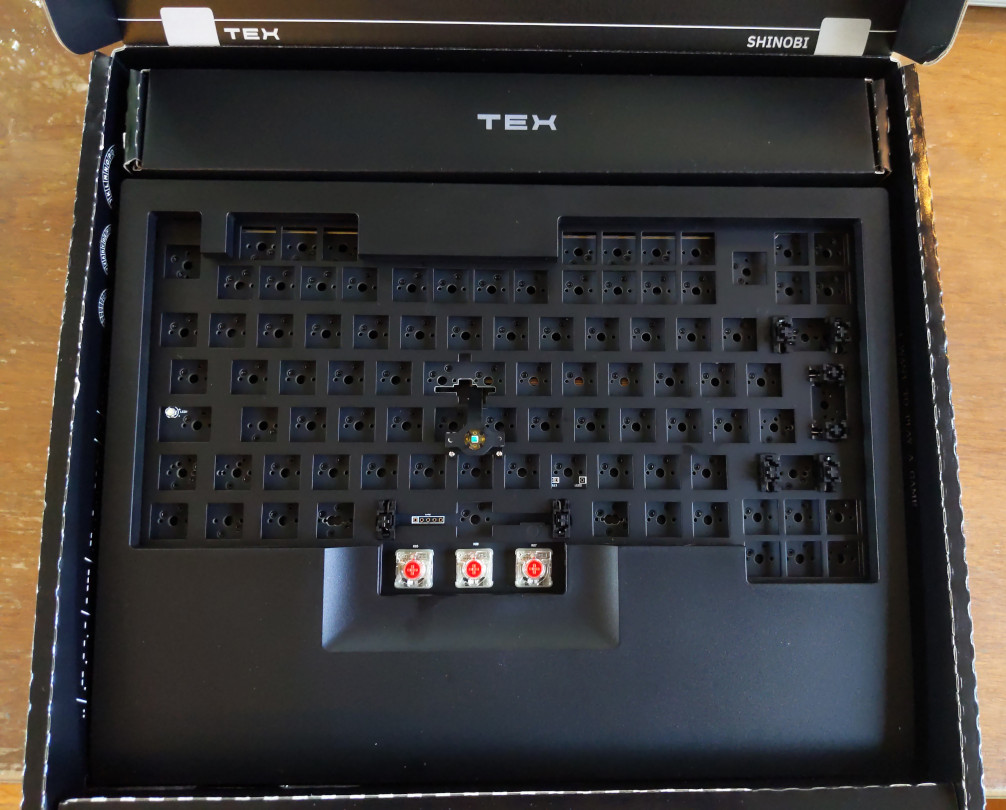
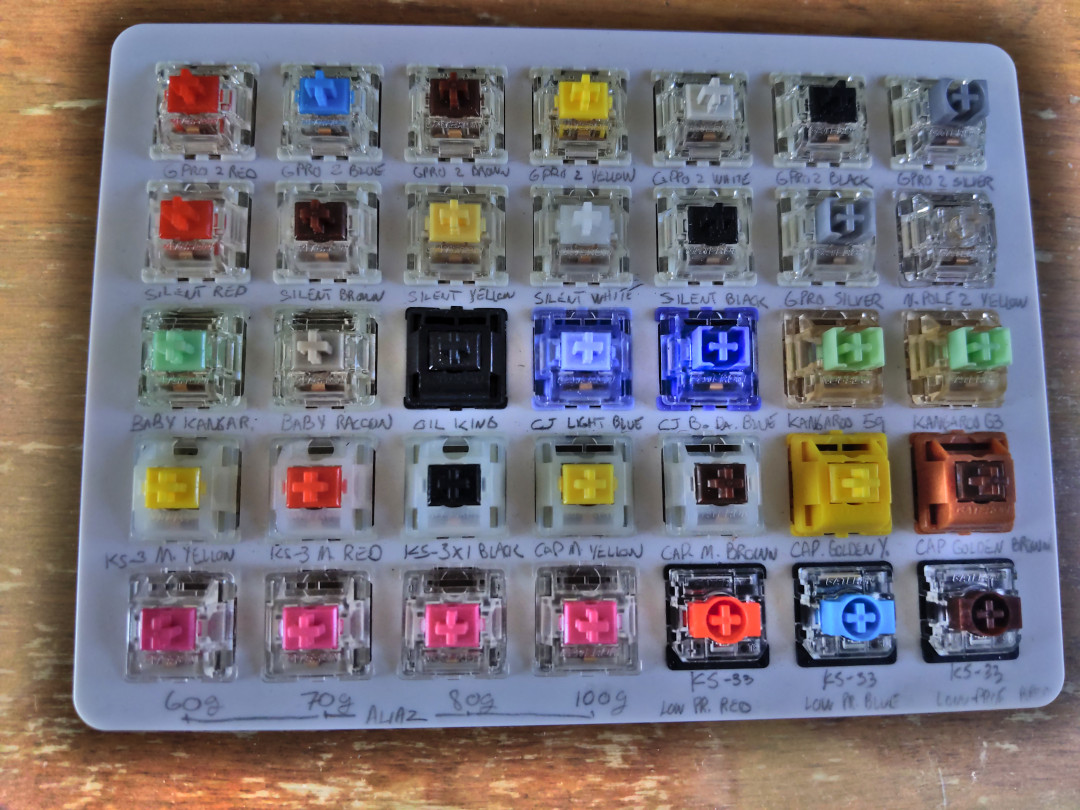
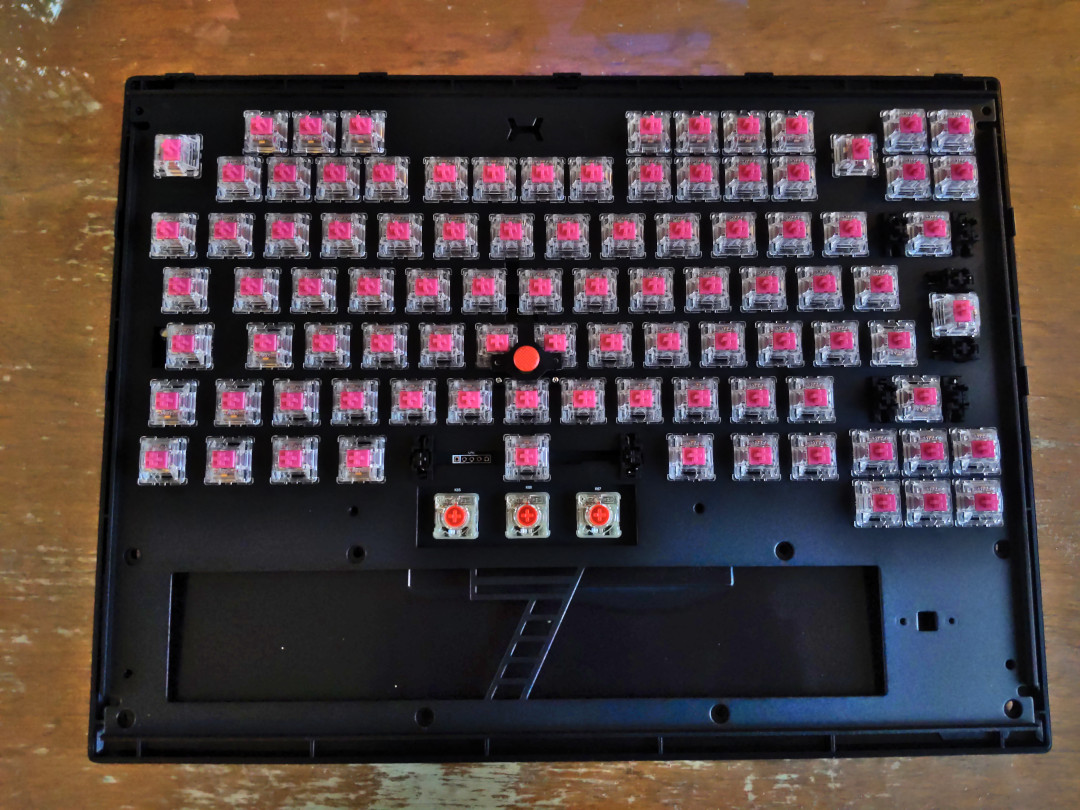
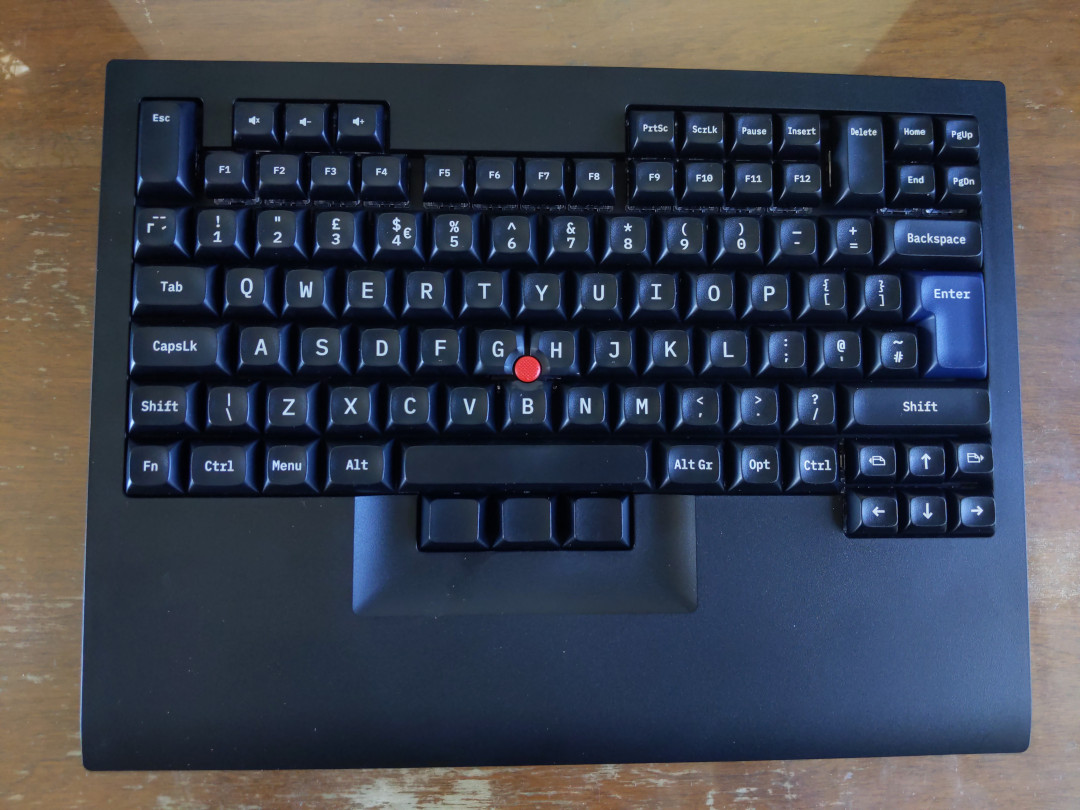
My old Thinkpad X220 has been slowly dying1 and as much as it makes me sad, it is also showing its age in terms of computational power. As such, I've pre-ordered a Framework 13 (the AMD version) and plan to retire my X220 when I get it. One thing I will miss from that laptop is the keyboard. At work, I dock it (on the amazing Thinkpad dock), which lets me use the keyboard while working on a larger monitor. I could probably replicate this setup with the Framework, but I'm not a fan of trackpads. So I built a keyboard. A nice one. One with a trackpoint. The bare board in its box If you follow Debian Planet, you may have seen the Tex Shinobi when Jonathan Dowland featured it on his blog back in January. It is a Tenkeyless board (saving me precious space at work) and is everything you would want from a old-school Thinkpad keyboard replacement. Since I had no previous experience with "Cherry MX"-style keyboard switches2, I decided to go full-bore and buy the "DIY" model that came unpopulated. A 35 switch tester board To know what model of switches I wanted, I bought a nice switch tester and played with it for a few days. After having thoroughly annoyed my SO (turns out 35 different switches on a little board is an incredible fidget toy), I decided to go with the Gateron Aliaz 70g. They are silent tactile switches, similar to the classic Cherry MX Browns, but with a much nicer sound profile and a much stronger actuation force (55g VS 70g). The end result is somewhat "stiff" keyboard that has a nice "THOCC", while still being relatively silent: perfect for a shared office. The keyboard with the switches, but no keycaps The only thing left to do on this keyboard is to replace the three soldered switches that came pre-installed for the mouse buttons. They are Cherry MX Red low-profile switches and are genuinely terrible3. I will be swapping them for Gateron KS-33 low-profile Blue switches when I get the ones I ordered online. My assembled Tex Shinobi Overall, I am very satisfied with this keyboard and I look forward using it daily when schools starts again in September.

  1. The power button sometimes does not work at all (for minutes?) and the laptop has been shutting down randomly (not a heat issue) more and more often...
  2. I am blessed with an IBM M keyboard at home and am in love with those clicky, very loud buckling springs.
  3. Not only are they linear switches (weird choice for mouse buttons), but they are very inconsistent. All three switches feel different and make different sounds.

20 June 2023

Vasudev Kamath: Notes: Experimenting with ZRAM and Memory Over commit

Introduction The ZRAM module in the Linux kernel creates a memory-backed block device that stores its content in a compressed format. It offers users the choice of compression algorithms such as lz4, zstd, or lzo. These algorithms differ in compression ratio and speed, with zstd providing the best compression but being slower, while lz4 offers higher speed but lower compression.
Using ZRAM as Swap One interesting use case for ZRAM is utilizing it as swap space in the system. There are two utilities available for configuring ZRAM as swap: zram-tools and systemd-zram-generator. However, Debian Bullseye lacks systemd-zram-generator, making zram-tools the only option for Bullseye users. While it's possible to use systemd-zram-generator by self-compiling or via cargo, I preferred using tools available in the distribution repository due to my restricted environment.
Installation The installation process is straightforward. Simply execute the following command:
apt-get install zram-tools
Configuration The configuration involves modifying a simple shell script file /etc/default/zramswap sourced by the /usr/bin/zramswap script. Here's an example of the configuration I used:
# Compression algorithm selection
# Speed: lz4 > zstd > lzo
# Compression: zstd > lzo > lz4
# This is not inclusive of all the algorithms available in the latest kernels
# See /sys/block/zram0/comp_algorithm (when the zram module is loaded) to check
# the currently set and available algorithms for your kernel [1]
# [1]  https://github.com/torvalds/linux/blob/master/Documentation/blockdev/zram.txt#L86
ALGO=zstd
# Specifies the amount of RAM that should be used for zram
# based on a percentage of the total available memory
# This takes precedence and overrides SIZE below
PERCENT=30
# Specifies a static amount of RAM that should be used for
# the ZRAM devices, measured in MiB
# SIZE=256000
# Specifies the priority for the swap devices, see swapon(2)
# for more details. A higher number indicates higher priority
# This should probably be higher than hdd/ssd swaps.
# PRIORITY=100
I chose zstd as the compression algorithm for its superior compression capabilities. Additionally, I reserved 30% of memory as the size of the zram device. After modifying the configuration, restart the zramswap.service to activate the swap:
systemctl restart zramswap.service
Using systemd-zram-generator For Debian Bookworm users, an alternative option is systemd-zram-generator. Although zram-tools is still available in Debian Bookworm, systemd-zram-generator offers a more integrated solution within the systemd ecosystem. Below is an example of the translated configuration for systemd-zram-generator, located at /etc/systemd/zram-generator.conf:
# This config file enables a /dev/zram0 swap device with the following
# properties:
# * size: 50% of available RAM or 4GiB, whichever is less
# * compression-algorithm: kernel default
#
# This device's properties can be modified by adding options under the
# [zram0] section below. For example, to set a fixed size of 2GiB, set
#  zram-size = 2GiB .
[zram0]
zram-size = ceil(ram * 30/100)
compression-algorithm = zstd
swap-priority = 100
fs-type = swap
After making the necessary changes, reload systemd and start the systemd-zram-setup@zram0.service:
systemctl daemon-reload
systemctl start systemd-zram-setup@zram0.service
The systemd-zram-generator creates the zram device by loading the kernel module and then creates a systemd.swap unit to mount the zram device as swap. In this case, the swap file is called zram0.swap.
Checking Compression and Details To verify the effectiveness of the swap configuration, you can use the zramctl command, which is part of the util-linux package. Alternatively, the zramswap utility provided by zram-tools can be used to obtain the same output. During my testing with synthetic memory load created using stress-ng vm class I found that I can reach upto 40% compression ratio.
Memory Overcommit Another use case I was looking for is allowing the launching of applications that require more memory than what is available in the system. By default, the Linux kernel attempts to estimate the amount of free memory left on the system when user space requests more memory (vm.overcommit_memory=0). However, you can change this behavior by modifying the sysctl value for vm.overcommit_memory to 1. To demonstrate this, I ran a test using stress-ng to request more memory than the system had available. As expected, the Linux kernel refused to allocate memory, and the stress-ng process could not proceed.
free -tg                                                                                                                                                                                          (Mon,Jun19) 
                total        used        free      shared  buff/cache   available
 Mem:              31          12          11           3          11          18
 Swap:             10           2           8
 Total:            41          14          19
sudo stress-ng --vm=1 --vm-bytes=50G -t 120                                                                                                                                                       (Mon,Jun19) 
 stress-ng: info:  [1496310] setting to a 120 second (2 mins, 0.00 secs) run per stressor
 stress-ng: info:  [1496310] dispatching hogs: 1 vm
 stress-ng: info:  [1496312] vm: gave up trying to mmap, no available memory, skipping stressor
 stress-ng: warn:  [1496310] vm: [1496311] aborted early, out of system resources
 stress-ng: info:  [1496310] vm:
 stress-ng: warn:  [1496310]         14 System Management Interrupts
 stress-ng: info:  [1496310] passed: 0
 stress-ng: info:  [1496310] failed: 0
 stress-ng: info:  [1496310] skipped: 1: vm (1)
 stress-ng: info:  [1496310] successful run completed in 10.04s
By setting vm.overcommit_memory=1, Linux will allocate memory in a more relaxed manner, assuming an infinite amount of memory is available.
Conclusion ZRAM provides disks that allow for very fast I/O, and compression allows for a significant amount of memory savings. ZRAM is not restricted to just swap usage; it can be used as a normal block device with different file systems. Using ZRAM as swap is beneficial because, unlike disk-based swap, it is faster, and compression ensures that we use a smaller amount of RAM itself as swap space. Additionally, adjusting the memory overcommit settings can be beneficial for scenarios that require launching memory-intensive applications. Note: When running stress tests or allocating excessive memory, be cautious about the actual memory capacity of your system to prevent out-of-memory (OOM) situations. Feel free to explore the capabilities of ZRAM and optimize your system's memory management. Happy computing!

19 June 2023

Dirk Eddelbuettel: RcppArmadillo 0.12.4.1.0 on CRAN: New Upstream Bugfix

armadillo image Armadillo is a powerful and expressive C++ template library for linear algebra and scientific computing. It aims towards a good balance between speed and ease of use, has a syntax deliberately close to Matlab, and is useful for algorithm development directly in C++, or quick conversion of research code into production environments. RcppArmadillo integrates this library with the R environment and language and is widely used by (currently) 1079 other packages on CRAN, downloaded 29.6 million times (per the partial logs from the cloud mirrors of CRAN), and the CSDA paper) (preprint / vignette) by Conrad and myself has been cited 543 times according to Google Scholar. This release brings bugfix upstream release 12.4.1 made by Conrad at the end of last week. As usual, I prepared the usual release candidate, tested on the over 1000 reverse depends (which sadly takes a long time on old hardware), found no issues and sent it to CRAN. Where it got tested again and was by a stroke of bad luck upheld for two unrelated issue (one package fell over one of its other dependencies changing a data representation, another fell afoul of a tightened test on total test time) so this awaited the usual email handshake with the CRAN maintainers and the weekend got in the way. The release also contains a PR kindly provided by Mikael Jagan for an upcoming change in package Matrix. As a bugfix release, the set of changes is fairly small.

Changes in RcppArmadillo version 0.12.4.1.0 (2023-06-17)
  • Upgraded to Armadillo release 12.4.1 (Cortisol Profusion Redux)
    • fix bug in SpMat::shed_cols()
    • functions such as .is_finite() and find_nonfinite() will now emit a runtime warning when compiled in fast math mode; such compilation mode disables detection of non-finite values
  • Accommodate upcoming change in package Matrix (Mikael Jagan in #417 addressing #415)

Courtesy of my CRANberries, there is a diffstat report relative to previous release. More detailed information is on the RcppArmadillo page. Questions, comments etc should go to the rcpp-devel mailing list off the Rcpp R-Forge page. If you like this or other open-source work I do, you can sponsor me at GitHub.

This post by Dirk Eddelbuettel originated on his Thinking inside the box blog. Please report excessive re-aggregation in third-party for-profit settings.

Daniel Lange: Linux kernel USB errors -71 and -110

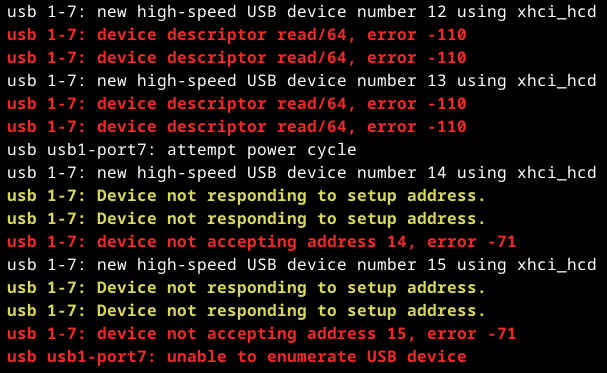
After an upgrade of my PC's mainboard BIOS the boot would take a minute or more to complete and sometimes the lightdm login screen would sit there but not accept keyboard input for another minute or so. Then the keyboard got enabled and I could log in normally. Everything worked fine after that bootup struggle completed. This was fully reproducible and persisted across reboots. Weird. The kernel dmesg log showed entries that looked suspicious: dmesg log excerpt showing USB error messages Googleing these error -110 and error -71 is a bit hard. Now why the USB driver does not give useful error messages instead of archaic errno-style numbers escapes me. This is not the 80s anymore. Citation needed (Wikipedia style) The wisdom of the crowd says error -110 is something around "the USB port power supply was exceeded" [source]. Now lsusb -tv shows device 1-7 ... to be my USB keyboard. I somehow doubt that wants more power than the hub is willing to provide. The Archlinux BBS Forums recommend to piece together information from drivers/usb/host/ohci.h and (updated from their piece which is from 2012) /tools/include/uapi/asm-generic/errno.h. This is why some people then consider -110 to mean "Connection timed out". Nah, not likely either. Reading through the kernel source around drivers/usb/host did not enlighten me either. To the contrary. Uuugly. There seems to be no comprehensive list what these error codes mean. And the numbers are assigned to errors conditions quite arbitrarily. And - of course - there is no documentation. "It was hard to do, so it should be hard to understand as well." Luckily some of the random musings I read through contained some curious advice: power cycle the host. So I did and that did not make the error go away. Other people insisted on removing cables out of wall sockets, unplugging everything and conducting esoteric rituals. That made it dawn on me, the mainboard of course nicely powers the USB in "off" state, too. So switching the power supply off (yes, these have a separate switch, go find yours), waiting a bit for capacitors to drain and switching things back on and ... the errors were gone, the system booted within seconds again. So the takeaway message: If you get random error messages like
device descriptor read/64, error -110
device not accepting address 42, error -71
on devices that previously worked fine ... completely remove power from the host, the hubs and the USB devices. So they forget they saw each other on the bus before. And when they see each other after that blackout, they will happily go through negotiating protocol details with each other again successfully.

C.J. Collier: First taste of Debian 12

As some of you may know, the Debian project released v12, bookworm to stable on the 10th of this month. I haven t had a reason to try it yet, but I m downloading it now. My first thought is that it s much larger than I expected. The normal sized version used to fit on a CD-ROM disk, so around 650MB. The netinst has until now been even smaller, with the most recent versions being about 256MB if I recall correctly. The netinst, now with proprietary firmware, weighs in over 700MB:
2023-06-18 20:29:29 (6.85 MB/s) -  debian-12.0.0-amd64-netinst.iso  saved [773849088/773849088]
It looks like 738.0MB! The system I m installing is for a piece of software I m crafting for use by Remote Online Notaries. I m building a disk image for the notary s side of the connection. The notary will have a yubikey-style PGP card which they will use as a digital seal similar to the one required to perform notarial acts for the state of washington. I ll leave some ramblings on the blog as I go through the process of implementation. Here s a link to whet your appetite! https://app.leg.wa.gov/wac/default.aspx?cite=308-30-020

18 June 2023

Dirk Eddelbuettel: spdl 0.0.5 on CRAN: Small Extension

Another quick update to the still somewhat new package spdl is now om CRAN, and will go to Debian soon too. The key focus of spdl is to offer the exact same interface to logging from both R and C++ by relying on spdlog via my RcppSpdlog package. Usage examples are shown on the RcppSpdlog docs page. This release add support for the wrappers init() and log() wrapping the existing setup() function but requiring only the level argument. This requires version 0.0.13 of RcppSpdlog which was released to CRAN yesterday. The short NEWS entry follows.

Changes in spdl version 0.0.5 (2023-06-18)
  • Add simple aliases init() and log() wrapping setup() but requiring only the logging level argument

Courtesy of my CRANberries, there is also a diffstat report. More detailed information is on the spdl page If you like this or other open-source work I do, you can sponsor me at GitHub.

This post by Dirk Eddelbuettel originated on his Thinking inside the box blog. Please report excessive re-aggregation in third-party for-profit settings.

Louis-Philippe V ronneau: Solo V2: nice but flawed

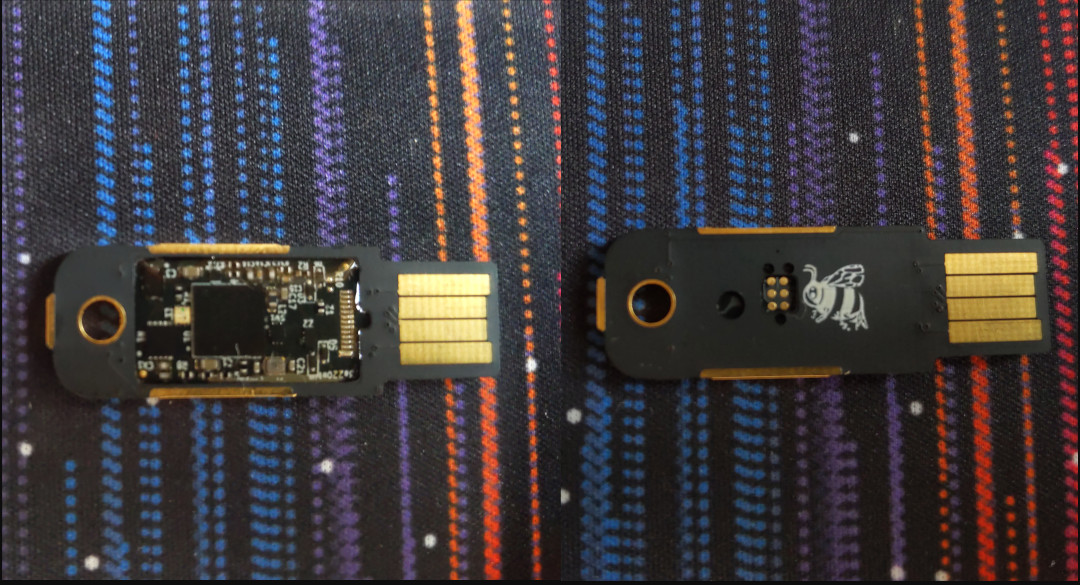

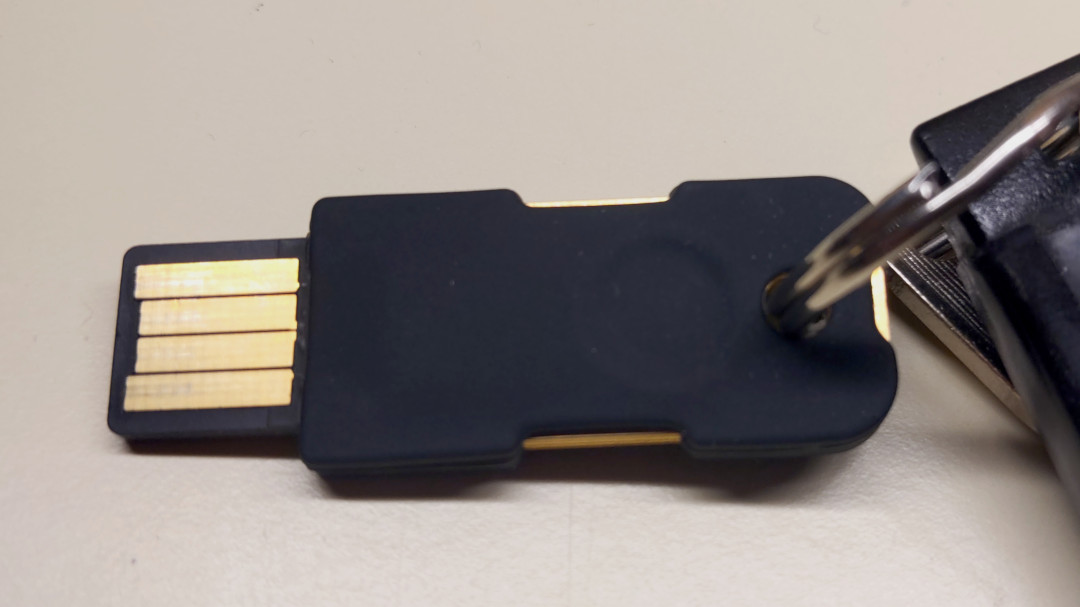
EDIT: One of my 2 keys has died. There are what seems like golden bubbles under the epoxy, over one of the chips and those were not there before. I've emailed SoloKeys and I'm waiting for a reply, but for now, I've stopped using the Solo V2 altogether :( I recently received the two Solo V2 hardware tokens I ordered as part of their crowdfunding campaign, back in March 2022. It did take them longer than advertised to ship me the tokens, but that's hardly unexpected from such small-scale, crowdfunded undertaking. I'm mostly happy about my purchase and I'm glad to get rid of the aging Tomu boards I was using as U2F tokens1. Still, beware: I am not sure it's a product I would recommend if what you want is simply something that works. If you do not care about open-source hardware, the Solo V2 is not for you. The Good A side-by-side view of the Solo V2's top and back sides I first want to mention I find the Solo V2 gorgeous. I really like the black and gold color scheme of the USB-A model (which is reversible!) and it seems like a well built and solid device. I'm not afraid to have it on my keyring and I fully expect it to last a long time. An animation of the build process, showing how the PCB is assembled and then slotted into the shell I'm also very impressed by the modular design: the PCB sits inside a shell, which decouples the logic from the USB interface and lets them manufacture a single board for both the USB-C and USB-A models. The clear epoxy layer on top of the PCB module also looks very nice in my opinion. A picture of the Solo V2 with its silicone case on my keyring, showing the 3 capacitive buttons I'm also very happy the Solo V2 has capacitive touch buttons instead of physical "clicky" buttons, as it means the device has no moving parts. The token has three buttons (the gold metal strips): one on each side of the device and a third one near the keyhole. As far as I've seen, the FIDO2 functions seem to work well via the USB interface and do not require any configuration on a Debian 12 machine. I've already migrated to the Solo V2 for web-based 2FA and I am in the process of migrating to an SSH ed25519-sk key. Here is a guide I recommend if you plan on setting those up with a Solo V2. The Bad and the Ugly Sadly, the Solo V2 is far from being a perfect project. First of all, since the crowdfunding campaign is still being fulfilled, it is not currently commercially available. Chances are you won't be able to buy one directly before at least Q4 2023. I've also hit what seems to be a pretty big firmware bug, or at least, one that affects my use case quite a bit. Invoking gpg crashes the Solo V2 completely if you also have scdaemon installed. Since scdaemon is necessary to use gpg with an OpenPGP smartcard, this means you cannot issue any gpg commands (like signing a git commit...) while the Solo V2 is plugged in. Any gpg commands that queries scdaemon, such as gpg --edit-card or gpg --sign foo.txt times out after about 20 seconds and leaves the token unresponsive to both touch and CLI commands. The way to "fix" this issue is to make sure scdaemon does not interact with the Solo V2 anymore, using the reader-port argument:
  1. Plug both your Solo V2 and your OpenPGP smartcard
  2. To get a list of the tokens scdaemon sees, run the following command: $ echo scd getinfo reader_list gpg-connect-agent --decode awk '/^D/ print $2 '
  3. Identify your OpenPGP smartcard. For example, my Nitrokey Start is listed as 20A0:4211:FSIJ-1.2.15-43211613:0
  4. Create a file in ~/.gnupg/scdaemon.conf with the following line reader-port $YOUR_TOKEN_ID. For example, in my case I have: reader-port 20A0:4211:FSIJ-1.2.15-43211613:0
  5. Reload scdaemon: $ gpgconf --reload scdaemon
Although this is clearly a firmware bug2, I do believe GnuPG is also partly to blame here. Let's just say I was not very surprised to have to battle scdaemon again, as I've had previous issues with it. Which leads me to my biggest gripe so far: it seems SoloKeys (the company) isn't really fixing firmware issues anymore and doesn't seems to care. The last firmware release is about a year old. Although people are experiencing serious bugs, there is no official way to report them, which leads to issues being seemingly ignored. For example, the NFC feature is apparently killing keys (!!!), but no one from the company seems to have acknowledged the issue. The same goes for my GnuPG bug, which was flagged in September 2022. For a project that mainly differentiates itself from its (superior) competition by being "Open", it's not a very good look... Although SoloKeys is still an unprofitable open source side business of its creators 3, this kind of attitude certainly doesn't help foster trust. Conclusion If you want to have a nice, durable FIDO2 token, I would suggest you get one of the many models Yubico offers. They are similarly priced, are readily commercially available, are part of a nice and maintained software ecosystem and have more features than the Solo V2 (OpenPGP support being the one I miss the most). Yubikeys are the practical option. What they are not is open-source hardware, whereas the Solo V2 is. As bunnie very well explained on his blog in 2019, it does not mean the later is inherently more trustable than the former, but it does make the Solo V2 the ideological option. Knowledge is power and it should be free. As such, tread carefully with SoloKeys, but don't dismiss them altogether: the Solo V2 is certainly functioning well enough for me.

  1. Although U2F is still part of the FIDO2 specification, the Tomus predate this standard and were thus not fully compliant with FIDO2. So long and thanks for all the fish little boards, you've served me well!
  2. It appears the Solo V2 shares its firmware with the Nitrokey 3, which had a similar issue a while back.
  3. This is a direct quote from one of the Solo V2 firmware maintainers.

Dirk Eddelbuettel: RcppSpdlog 0.0.13 on CRAN: Small Extensions

Version 0.0.13 of RcppSpdlog is now on CRAN and will be soon be uploaded to Debian too. RcppSpdlog bundles spdlog, a wonderful header-only C++ logging library with all the bells and whistles you would want that was written by Gabi Melman, and also includes fmt by Victor Zverovich. You can learn more at the package documention site. This release adds a small (but handy) accessor generalisation: Instead of calling setup() with two arguments for a label and the logging level we now only require the desired level. We also cleaned up one implementation detail for the stopwatch feature added in January, and simplified the default C++ compilation standard setting. The NEWS entry for this release follows.

Changes in RcppSpdlog version 0.0.13 (2023-06-17)
  • Minor tweak to stopwatch setup avoids pulling in fmt
  • No longer set a C++ compilation standard as the default choices by R are sufficient for the package
  • Add convenience wrapper log_init omitting first argument to log_setup while preserving the interface from the latter
  • Add convenience setup wrappers init and log to API header file spdl.h

Courtesy of my CRANberries, there is also a diffstat report. More detailed information is on the RcppSpdlog page, or the package documention site. If you like this or other open-source work I do, you can sponsor me at GitHub.

This post by Dirk Eddelbuettel originated on his Thinking inside the box blog. Please report excessive re-aggregation in third-party for-profit settings.

17 June 2023

Bastian Venthur: Blag 2.0 released

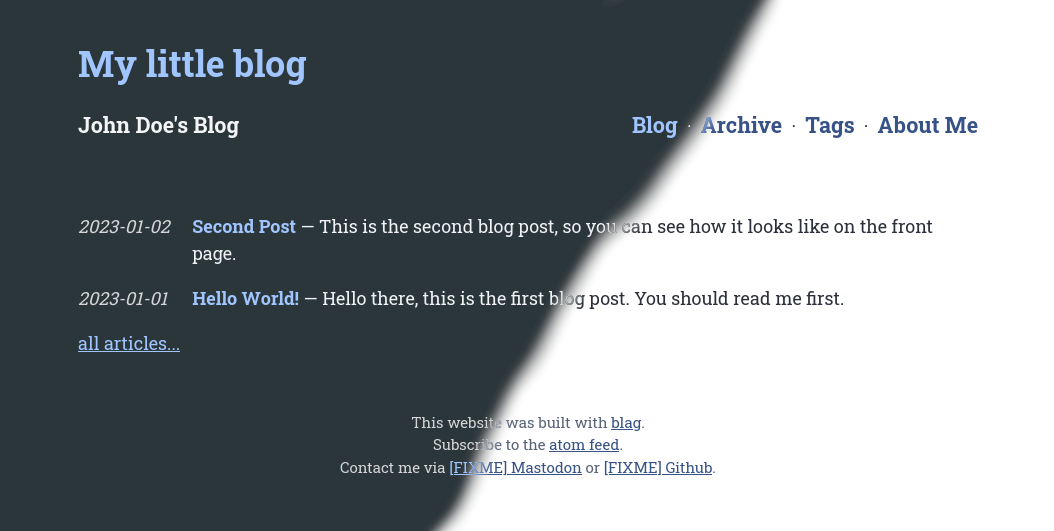
A few days ago, I released a major update on blag, my blog-aware static-site generator, which introduces a few backwards-incompatible changes and many improvements over the old version. Good-looking default theme The old bare-bones default theme has been replaced with a good-looking one, based on the one used on this blog: Blag Screenshot It comes with a light- and dark theme that switches automatically based on the browser setting, as well as fitting light- and dark syntax highlighting themes for code blocks. Improved quickstart The blag quickstart command has been improved. Additionally to generating the configuration, it now also populates the working directory with the templates-, static- and content directories, containing the updated default theme and a few content pages to get you started. No internal fallback templates anymore Related to the changes in quickstart, the internal fallback template has been removed, and blag now completely relies on the templates in the local templates directory. This makes it more transparent for the user what is happening while simplifying blag s internal logic. However, this is a backwards incompatible change! In the case of a missing template, the user will be warned with a hint on how to obtain the missing template. Index and archive are now separate Previously, the front-page would always show the archive of all articles. This is not very useful when your blog contains more than a few dozen articles. With blag 2.0, the previous archive has been split into index and archive, where index is the front-page showing only the most recent 15 articles by default and linking to the archive which shows all articles. There s also two corresponding templates in the templates directory. Miscellaneous Blag 2.0 is available on pypi, debian/unstable and github

John Goerzen: Using dar for Data Archiving

This is the third post in a series about data archiving to removable media (optical discs and hard drives). In the first, I explained the difference between backing up and archiving, established goals for the project, and said I d evaluate git-annex and dar. The second post evaluated git-annex, and now it s time to look at dar. The series will conclude with a post comparing git-annex with dar. What is dar? I could open with the same thing I did with git-annex, just changing the name of the program: [dar] is a fantastic and versatile program that does well, it s one of those things that can do so much that it s a bit hard to describe. It is, fundamentally, an archiver like tar or zip (makes one file representing a bunch of other files), but it goes far beyond that. dar s homepage lays out a comprehensive list of features, which I will try to summarize here. So to tie this together for this project, I will set up a 400MB slice size (to mimic what I did with git-annex), and see how dar saves the data and restores it. Isolated cataloges aren t strictly necessary for this, but by using them (and/or dar_manager), we can build up a database of files and locations and thus directly compare dar to git-annex location tracking. Walkthrough: Creating the first archive As with the git-annex walkthrough, I ll set some variables to make it easy to remember: OK, we can run the backup immediately. No special setup is needed. dar supports both short-form (single-character) parameters and long-form ones. Since the parameters probably aren t familiar to everyone, I will use the long-form ones in these examples. Here s how we create our initial full backup. I ll explain the parameters below:
$ dar \
--verbose \
--create $DRIVE/bak1 \
--on-fly-isolate $CATDIR/bak1 \
--slice 400M \
--min-digits 2 \
--pause \
--fs-root $SOURCEDIR
Let s look at each of these parameters: This same command could have been written with short options as:
$ dar -v -c $DRIVE/bak1 -@ $CATDIR/bak1 -s 400M -9 2 -p -R $SOURCEDIR
What does it look like while running? Here s an excerpt:
...
Adding file to archive: /acrypt/no-backup/jgoerzen/testdata/[redacted]
Finished writing to file 1, ready to continue ? [return = YES Esc = NO]
...
Writing down archive contents...
Closing the escape layer...
Writing down the first archive terminator...
Writing down archive trailer...
Writing down the second archive terminator...
Closing archive low layer...
Archive is closed.
--------------------------------------------
581 inode(s) saved
including 0 hard link(s) treated
0 inode(s) changed at the moment of the backup and could not be saved properly
0 byte(s) have been wasted in the archive to resave changing files
0 inode(s) with only metadata changed
0 inode(s) not saved (no inode/file change)
0 inode(s) failed to be saved (filesystem error)
0 inode(s) ignored (excluded by filters)
0 inode(s) recorded as deleted from reference backup
--------------------------------------------
Total number of inode(s) considered: 581
--------------------------------------------
EA saved for 0 inode(s)
FSA saved for 581 inode(s)
--------------------------------------------
Making room in memory (releasing memory used by archive of reference)...
Now performing on-fly isolation...
...
That was easy! Let s look at the contents of the backup directory:
$ ls -lh $DRIVE
total 3.7G
-rw-r--r-- 1 jgoerzen jgoerzen 400M Jun 16 19:27 bak1.01.dar
-rw-r--r-- 1 jgoerzen jgoerzen 400M Jun 16 19:27 bak1.02.dar
-rw-r--r-- 1 jgoerzen jgoerzen 400M Jun 16 19:27 bak1.03.dar
-rw-r--r-- 1 jgoerzen jgoerzen 400M Jun 16 19:27 bak1.04.dar
-rw-r--r-- 1 jgoerzen jgoerzen 400M Jun 16 19:28 bak1.05.dar
-rw-r--r-- 1 jgoerzen jgoerzen 400M Jun 16 19:28 bak1.06.dar
-rw-r--r-- 1 jgoerzen jgoerzen 400M Jun 16 19:28 bak1.07.dar
-rw-r--r-- 1 jgoerzen jgoerzen 400M Jun 16 19:28 bak1.08.dar
-rw-r--r-- 1 jgoerzen jgoerzen 400M Jun 16 19:29 bak1.09.dar
-rw-r--r-- 1 jgoerzen jgoerzen 156M Jun 16 19:33 bak1.10.dar
And the isolated catalog:
$ ls -lh $CATDIR
total 37K
-rw-r--r-- 1 jgoerzen jgoerzen 35K Jun 16 19:33 bak1.1.dar
The isolated catalog is stored compressed automatically. Well this was easy. With one command, we archived the entire data set, split into 400MB chunks, and wrote out the catalog data. Walkthrough: Inspecting the saved archive Can dar tell us which slice contains a given file? Sure:
$ dar --list $DRIVE/bak1 --list-format=slicing less
Slice(s) [Data ][D][ EA ][FSA][Compr][S] Permission Filemane
--------+--------------------------------+----------+-----------------------------
...
1 [Saved][ ] [-L-][ 0%][X] -rwxr--r-- [redacted]
1-2 [Saved][ ] [-L-][ 0%][X] -rwxr--r-- [redacted]
2 [Saved][ ] [-L-][ 0%][X] -rwxr--r-- [redacted]
...
This illustrates the transition from slice 1 to slice 2. The first file was stored entirely in slice 1; the second stored partially in slice 1 and partially in slice 2, and third solely in slice 2. We can get other kinds of information as well.
$ dar --list $DRIVE/bak1 less
[Data ][D][ EA ][FSA][Compr][S] Permission User Group Size Date filename
--------------------------------+------------+-------+-------+---------+-------------------------------+------------
[Saved][ ] [-L-][ 0%][X] -rwxr--r-- jgoerzen jgoerzen 24 Mio Mon Mar 5 07:58:09 2018 [redacted]
[Saved][ ] [-L-][ 0%][X] -rwxr--r-- jgoerzen jgoerzen 16 Mio Mon Mar 5 07:58:09 2018 [redacted]
[Saved][ ] [-L-][ 0%][X] -rwxr--r-- jgoerzen jgoerzen 22 Mio Mon Mar 5 07:58:09 2018 [redacted]
These are the same files I was looking at before. Here we see they are 24MB, 16MB, and 22MB in size, and some additional metadata. Even more is available in the XML list format. Walkthrough: updates As with git-annex, I ve made some changes in the source directory: moved a file, added another, and deleted one. Let s create an incremental backup now:
$ dar \
--verbose \
--create $DRIVE/bak2 \
--on-fly-isolate $CATDIR/bak2 \
--ref $CATDIR/bak1 \
--slice 400M \
--min-digits 2 \
--pause \
--fs-root $SOURCEDIR
This command is very similar to the earlier one. Instead of writing an archive and catalog named bak1, we write one named bak2. What s new here is --ref $CATDIR/bak1. That says, make an incremental based on an archive of reference. All that is needed from that archive of reference is the detached catalog. --ref $DRIVE/bak1 would have worked equally well here. Here s what I did to the $SOURCEDIR: Let s see if dar s command output matches this:
...
Adding file to archive: /acrypt/no-backup/jgoerzen/testdata/file01-unchanged
Saving Filesystem Specific Attributes for /acrypt/no-backup/jgoerzen/testdata/file01-unchanged
Adding file to archive: /acrypt/no-backup/jgoerzen/testdata/cp
Saving Filesystem Specific Attributes for /acrypt/no-backup/jgoerzen/testdata/cp
Adding folder to archive: [redacted]
Saving Filesystem Specific Attributes for [redacted]
Adding reference to files that have been destroyed since reference backup...
...
--------------------------------------------
3 inode(s) saved
including 0 hard link(s) treated
0 inode(s) changed at the moment of the backup and could not be saved properly
0 byte(s) have been wasted in the archive to resave changing files
0 inode(s) with only metadata changed
578 inode(s) not saved (no inode/file change)
0 inode(s) failed to be saved (filesystem error)
0 inode(s) ignored (excluded by filters)
2 inode(s) recorded as deleted from reference backup
--------------------------------------------
Total number of inode(s) considered: 583
--------------------------------------------
EA saved for 0 inode(s)
FSA saved for 3 inode(s)
--------------------------------------------
...
Yes, it does. The rename is recorded as a deletion and an addition, since dar doesn t directly track renames. So the rename plus the deletion account for the two deletions. The rename plus the addition of cp count as 2 of the 3 inodes saved; the third is the modified directory from which files were deleted and moved out. Let s see the files that were created:
$ ls -lh $DRIVE/bak2*
-rw-r--r-- 1 jgoerzen jgoerzen 18M Jun 16 19:52 /acrypt/no-backup/jgoerzen/dar-testing/drive/bak2.01.dar
$ ls -lh $CATDIR/bak2*
-rw-r--r-- 1 jgoerzen jgoerzen 22K Jun 16 19:52 /acrypt/no-backup/jgoerzen/dar-testing/cat/bak2.1.dar
What does list look like now?
Slice(s) [Data ][D][ EA ][FSA][Compr][S] Permission Filemane
--------+--------------------------------+----------+-----------------------------
[ ][ ] [---][-----][X] -rwxr--r-- [redacted]
1 [Saved][ ] [-L-][ 0%][X] -rwxr--r-- file01-unchanged
...
[--- REMOVED ENTRY ----][redacted]
[--- REMOVED ENTRY ----][redacted]
Here I show an example of:
  1. A file that was not changed from the initial backup. Its presence was simply noted, but because we re doing an incremental, the data wasn t saved.
  2. A file that is saved in this incremental, on slice 1.
  3. The two deleted files
Walkthrough: dar_manager As we ve seen above, the two archives (or their detached catalog) give us a complete picture of what files were present at the time of the creation of each archive, and what files were stored in a given archive. We can certainly continue working in that way. We can also use dar_manager to build a comprehensive database of these archives, to be able to find what media is necessary to restore each given file. Or, with dar_manager s when parameter, we can restore files as of a particular date. Let s try it out. First, we create our database:
$ dar_manager --create $DARDB
$ dar_manager --base $DARDB --add $DRIVE/bak1
Auto detecting min-digits to be 2
$ dar_manager --base $DARDB --add $DRIVE/bak2
Auto detecting min-digits to be 2
Here we created the database, and added our two catalogs to it. (Again, we could have as easily used $CATDIR/bak1; either the archive or its isolated catalog will work here.) It s important to add the catalogs in order. Let s do some quick experimentation with dar_manager:
$ dar_manager -v --base $DARDB --list
Decompressing and loading database to memory...
dar path :
dar options :
database version : 6
compression used : gzip
compression level: 9 archive # path basename
------------+--------------+---------------
1 /acrypt/no-backup/jgoerzen/dar-testing/drive bak1
2 /acrypt/no-backup/jgoerzen/dar-testing/drive bak2
$ dar_manager --base $DARDB --stat
archive # most recent/total data most recent/total EA
--------------+-------------------------+-----------------------
1 580/581 0/0
2 3/3 0/0
The list option shows the correlation between dar_manager archive number (1, 2) with filenames (bak1, bak2). It is coincidence here that 1/bak1 and 2/bak2 correlate; that s not necessarily the case. Most dar_manager commands operate on archive number, while dar commands operate on archive path/basename. Now let s see just what files are saved in archive , the incremental:
$ dar_manager --base $DARDB --used 2
[ Saved ][ ] [redacted]
[ Saved ][ ] file01-unchanged
[ Saved ][ ] cp
Now we can also where a file is stored. Here s one that was saved in the full backup and unmodified in the incremental:
$ dar_manager --base $DARDB --file [redacted]
1 Fri Jun 16 19:15:12 2023 saved absent
2 Fri Jun 16 19:15:12 2023 present absent
(The absent at the end refers to extended attributes that the file didn t have) Similarly, for files that were added or removed, they ll be listed only at the appropriate place. Walkthrough: Restoration I m not going to repeat the author s full restoration with dar page, but here are some quick examples. A simple way of doing everything is using incrementals for the whole series. To do that, you d have bak1 be full, bak2 based on bak1, bak3 based on bak2, bak4 based on bak3, etc. To restore from such a series, you have two options: If you get fancy for instance, bak2 is based on bak1, bak3 on bak2, bak4 on bak1 then you would want to use dar_manager to ensure a consistent restore is completed. Either way, the process is nearly identical. Also, I figure, to make things easy, you can save a copy of the entire set of isolated catalogs before you finalize each disc/drive. They re so small, and this would let someone with just the most recent disc build a dar_manager database without having to go through all the other discs. Anyhow, let s do a restore using just dar. I ll make a $RESTOREDIR and do it that way.
$ dar \
--verbose \
--extract $DRIVE/bak1 \
--fs-root $RESTOREDIR \
--no-warn \
--execute "echo Ready for slice %n. Press Enter; read foo"
This execute lets us see how dar works; this is an illustration of the power it has (above pause); it s a snippet interpreted by /bin/sh with %n being one of the dar placeholders. If memory serves, it s not strictly necessary, as dar will prompt you for slices it needs if they re not mounted. Anyhow, you ll see it first reading the last slice, which contains the catalog, then reading from the beginning. Here we go:
Auto detecting min-digits to be 2
Opening archive bak1 ...
Opening the archive using the multi-slice abstraction layer...
Ready for slice 10. Press Enter
...
Loading catalogue into memory...
Locating archive contents...
Reading archive contents...
File ownership will not be restored du to the lack of privilege, you can disable this message by asking not to restore file ownership [return = YES Esc = NO]
Continuing...
Restoring file's data: [redacted]
Restoring file's FSA: [redacted]
Ready for slice 1. Press Enter
...
Ready for slice 2. Press Enter
...
--------------------------------------------
581 inode(s) restored
including 0 hard link(s)
0 inode(s) not restored (not saved in archive)
0 inode(s) not restored (overwriting policy decision)
0 inode(s) ignored (excluded by filters)
0 inode(s) failed to restore (filesystem error)
0 inode(s) deleted
--------------------------------------------
Total number of inode(s) considered: 581
--------------------------------------------
EA restored for 0 inode(s)
FSA restored for 0 inode(s)
--------------------------------------------
The warning is because I m not doing the extraction as root, which limits dar s ability to fully restore ownership data. OK, now the incremental:
$ dar \
--verbose \
--extract $DRIVE/bak2 \
--fs-root $RESTOREDIR \
--no-warn \
--execute "echo Ready for slice %n. Press Enter; read foo"
...
Ready for slice 1. Press Enter
...
Restoring file's data: /acrypt/no-backup/jgoerzen/dar-testing/restore/file01-unchanged
Restoring file's FSA: /acrypt/no-backup/jgoerzen/dar-testing/restore/file01-unchanged
Restoring file's data: /acrypt/no-backup/jgoerzen/dar-testing/restore/cp
Restoring file's FSA: /acrypt/no-backup/jgoerzen/dar-testing/restore/cp
Restoring file's data: /acrypt/no-backup/jgoerzen/dar-testing/restore/[redacted directory]
Removing file (reason is file recorded as removed in archive): [redacted file]
This all looks right! Now how about we compare the restore to the original source directory?
$ diff -durN $SOURCEDIR $RESTOREDIR
No changes perfect. We could instead do this restore via a single dar_manager command, though annoyingly, we d have to pass all top-level files/directories to dar_manager restore. But still, it s one command, and basically automates and optimizes the dar restores shown above. Conclusions Dar makes it extremely easy to just Do The Right Thing when making archives. One command makes a backup. It saves things in simple files. You can make an isolated catalog if you want, and it too is saved in a simple file. You can query what is in the files and where. You can restore from all or part of the files. You can simply play the backups forward, in order, to achieve a full and consistent restore. Or you can load data about them into dar_manager for an optimized restore. A bit of scripting will be necessary to make incrementals; finding the most recent backup or catalog. If backup files are named with care for instance, by date then this should be a pretty easy task. I haven t touched on resiliency yet. dar comes with tools for recovering archives that have had portions corrupted or lost. It can also rebuild the catalog if it is corrupted or lost. It adds tape marks (or escape sequences ) to the archive along with the data stream. So every entry in the catalog is actually stored in the archive twice: once alongside the file data, and once at the end in the collected catalog. This allows dar to scan a corrupted file for the tape marks and reconstruct whatever is still intact, even if the catalog is lost. dar also integrates with tools like sha256sum and par2 to simplify archive integrity testing and restoration. This balances against the need to use a tool (dar, optionally with a GUI frontend) to restore files. I ll discuss that more in the next post.

16 June 2023

Lisandro Dami n Nicanor P rez Meyer: Qt 6 in Debian bullseye, take 2

Bookworm has been released and Bullseye is now old-stable. Non the less today I took the time to update the Qt 6 backports so they are as close as Bookworm as possible. Except security fixes are needed these ought to be the latest uploads of Qt 6 to bullseye-backports. Hope you enjoyed them, and thanks again The Qt Company and ICS for making this possible.

Next.

Previous.