I have just released version 1.10 of Obnam, my backup program. See the
website at http://obnam.org for details on what it does. The new
version is available from git (see http://git.liw.fi) and as Debian
packages from http://code.liw.fi/debian, and uploaded to Debian,
hopefully soon in unstable.
The NEWS file extract below gives the highlights of what's new in this
version.
Version 1.10, released 2015-07-01
Major bug fixes:
Lars Wirzenius fixed the obnam backup command to lock the whole
repository, the same way as obnam forget does, when it removes
checkpoint generations. This means that during checkpoint removal,
no other client can make a backup, which is unfortunate. To avoid
that, set leave-checkpoints = yes in the configuration. That will
prevent obnam backup from removing checkpoints.
Minor new features:
Lars Wirzenius added the obnam list-formats command to list all
repository formats.
The default value for the upload-queue-size setting is now 1024,
chosen based on some benchmarking made by Lars Wirzenius to balance
speed and memory use.
An EXPERIMENTAL new repository format, green-albatross, as been
introduced. It is not ready for actual use, and is only added so
that its code doesn't diverge far from the main line of development.
Teemu Hukkanen reported that the Synology NAS device returns EACCES
instead of ENOENT when user tries to remove a non-existent file.
Obnam now copes with either error code.
Minor fixes:
python setup.py build no longer formats the manual page into plain
text. This is now done in python setup.py docs instead. The latter
is an optional build step, and probably only works on Debian.
obnam restore --to=DIR now requires that the directory DIR
either doesn't exist, or it is empty when the restore starts. This
is to prevent users from restore on top of a running system.
Here s a photo journal of a walk I just completed around the Pot Lake loop of the Bluff Wilderness Hiking Trail. Hope you enjoy it!
I was dissatisfied with my initial post, so have reduced the size to improve load time, changed the gallery software and have rewritten many of the captions.
[slb_group] Click this photo to start the slideshow.
The Bluff Wilderness Hiking Trail is a series of four loops. Today I ll tackle only the first in order to get as many pictures as possible, and because when hiking solo, I prefer to stay on the more heavily traveled part. In late summer, I ll probably do all four loops with my friend Ryan again. Meanwhile, I ll stay in shape coming out here when I can for shorter walks.
The trail starts here.
Right away, even before heading between the marker stones, there s a pretty view of Cranberry Lake off to the right.
Pink lady slippers have been plentiful this year!
All along the trail, you can find hundreds, if not thousands of these.
Boardwalks provide dry passage across the boggy bits.
The pitcher plants are thriving, too.
The vines with tiny, round leaves are wintergreen. Tasty!
I ve not seen anything larger than a deer out here.
Roots and rocks are a recurring theme.
Many feet beating down on the first loop have packed the earth hard and have exposed more roots than you ll see deeper into the trail system where fewer hikers travel.
Step carefully.
Sheep laurel is an eye-catcher.
To me, they look like little, pink jewels.
Yellow markers clearly mark the Pot Lake loop.
At crucial junctures there are some signs to point you the right way.
If you re looking only at your feet, you may see black circles marked with arrows on some of the rocks, also pointing the way.
The vegetation varies from scraggly and clinging to the rocks, to lush and green.
The path is wet in parts. Nothing impassible, though.
On the first loop in particular, and even within only the first kilometre, there are some pretty stunning views of the lake.
Very quickly, you ll find yourself perched up top on the rocks.
On this stretch, you need to hop a bit from one rock to the next.
Just as quickly as you ascended, you descend back down to the lake again.
A good place to stop and have a snack.
The start of the first loop, itself.
I chide myself for not having discovered this trail until about 2007, even though we moved out here in 2005. It s a treasure we re indebted to the WRWEO for preserving.
Leave some comments in the box, if you like.
You ll find these maps along the way to track your progress.
Remember to follow proper trail etiquette.
A particularly steep climb!
Despite the best trail maintenance efforts, water still goes where it wants!
Good to have boots.
Another steep climb.
This tree is chattering at me. Raising quite a racket. What s in the hole?
I patiently wait with my camera to get a good shot of the tree s occupants.
Mother woodpecker, feeding her babies!
As the feeding continues, the chirping intensifies!
Up on top of a big rock with a view over the lake is another favourite stopping place for a snack.
The view at my snack break rock. I never get tired of it.
There are some pretty big boulders.
Next time I ll bring a friend to stand under it for scale.
Another terrific view.
A stream just before the first portage.
This portage connects Cranberry Lake with Pot Lake.
The portage is clearly marked.
The Pot Lake end of the portage.
One of several upturned trees, with the roots now forming a wall along one side of the trail.
The spiral of the roots mimics the spiral split in this boulder which you can walk all of the way into until you reach the centre.
Rocks and trees and trees and rocks
White pine catkins.
Suddenly the close forest opens up into a wide view all around.
My favourite stunted tamarack, clinging to the rocks.
Last year s cones. This year s aren t out yet on this tree.
I love the tamarack s delicate new needles.
These blueberries have a head start. Can t wait until it s time to harvest them.
Nearly at the top of the Pot Lake loop. This is Pot Lake, itself.
I was struck by this one little blighted berry, showing a blush of distress-induced colour amongst the green ones.
Another view, nearly at the top.
A sign beneath the map: Rare Plant Species: Mountain Sandwort Arenaria groenlandica. Use caution and stay on designated trails. Avoid disturbing habitat.
Finally, the top. A map to mark your progress.
Apparently the Mountain Sandwort, right at the base of the sign.
The mountain sandwort is a pretty, delicate little thing.
After passing the sign, the view from the top over Cranberry Lake, indeed both lakes, is a reward worth climbing all of the way up to see.
Some other hiker has left a cairn.
The descent is not too steep at first.
The approach down to the back side of Pot Lake from the top is marked by exposed bedrock and scrubby plants.
Finally back to some cover, which is welcome on hotter days. A ferny fairyland.
It s not all abrupt ups and downs. Here s an easy, winding stretch of trail.
Cinnamon ferns.
Ambling along.
Rounding the end of Pot Lake.
Not very long after reaching the lake, the path climbs several metres up above it.
There are some nice, rootless bits on this side of the loop, giving your ankles and knees a break.
This guy seemed extremely agitated to see me.
A new tamarack cone!
Did I mention I like tamaracks?
The steep descent back to Cranberry Lake again.
Finally back where the loop starts.
One of my clients has a NAS device. Last week they tried to do what should have been a routine RAID operation, they added a new larger disk as a hot-spare and told the RAID array to replace one of the active disks with the hot-spare. The aim was to replace the disks one at a time to grow the array. But one of the other disks had an error during the rebuild and things fell apart.
I was called in after the NAS had been rebooted when it was refusing to recognise the RAID. The first thing that occurred to me is that maybe RAID-5 isn t a good choice for the RAID. While it s theoretically possible for a RAID rebuild to not fail in such a situation (the data that couldn t be read from the disk with an error could have been regenerated from the disk that was being replaced) it seems that the RAID implementation in question couldn t do it. As the NAS is running Linux I presume that at least older versions of Linux have the same problem. Of course if you have a RAID array that has 7 disks running RAID-6 with a hot-spare then you only get the capacity of 4 disks. But RAID-6 with no hot-spare should be at least as reliable as RAID-5 with a hot-spare.
Whenever you recover from disk problems the first thing you want to do is to make a read-only copy of the data. Then you can t make things worse. This is a problem when you are dealing with 7 disks, fortunately they were only 3TB disks and only each had 2TB in use. So I found some space on a ZFS pool and bought a few 6TB disks which I formatted as BTRFS filesystems. For this task I only wanted filesystems that support snapshots so I could work on snapshots not on the original copy.
I expect that at some future time I will be called in when an array of 6+ disks of the largest available size fails. This will be a more difficult problem to solve as I don t own any system that can handle so many disks.
I copied a few of the disks to a ZFS filesystem on a Dell PowerEdge T110 running kernel 3.2.68. Unfortunately that system seems to have a problem with USB, when copying from 4 disks at once each disk was reading about 10MB/s and when copying from 3 disks each disk was reading about 13MB/s. It seems that the system has an aggregate USB bandwidth of 40MB/s slightly greater than USB 2.0 speed. This made the process take longer than expected.
One of the disks had a read error, this was presumably the cause of the original RAID failure. dd has the option conv=noerror to make it continue after a read error. This initially seemed good but the resulting file was smaller than the source partition. It seems that conv=noerror doesn t seek the output file to maintain input and output alignment. If I had a hard drive filled with plain ASCII that MIGHT even be useful, but for a filesystem image it s worse than useless. The only option was to repeatedly run dd with matching skip and seek options incrementing by 1K until it had passed the section with errors.
for n in /dev/loop[0-6] ; do echo $n ; mdadm examine -v -v scan $n grep Events ; done
Once I had all the images I had to assemble them. The Linux Software RAID didn t like the array because not all the devices had the same event count. The way Linux Software RAID (and probably most RAID implementations) work is that each member of the array has an event counter that is incremented when disks are added, removed, and when data is written. If there is an error then after a reboot only disks with matching event counts will be used. The above command shows the Events count for all the disks.
Fortunately different event numbers aren t going to stop us. After assembling the array (which failed to run) I ran mdadm -R /dev/md1 which kicked some members out. I then added them back manually and forced the array to run. Unfortunately attempts to write to the array failed (presumably due to mismatched event counts).
Now my next problem is that I can make a 10TB degraded RAID-5 array which is read-only but I can t mount the XFS filesystem because XFS wants to replay the journal. So my next step is to buy another 2*6TB disks to make a RAID-0 array to contain an image of that XFS filesystem.
Finally backups are a really good thing
I was asked for advice on whether children should have access to smart phones, it s an issue that many people are discussing and seems worthy of a blog post.
Claimed Problems with Smart Phones
The first thing that I think people should read is this XKCD post with quotes about the demise of letter writing from 99+ years ago [1]. Given the lack of evidence cited by people who oppose phone use I think we should consider to what extent the current concerns about smart phone use are just reactions to changes in society. I ve done some web searching for reasons that people give for opposing smart phone use by kids and addressed the issues below.
Some people claim that children shouldn t get a phone when they are so young that it will just be a toy. That s interesting given the dramatic increase in the amount of money spent on toys for children in recent times. It s particularly interesting when parents buy game consoles for their children but refuse mobile phone toys (I know someone who did this). I think this is more of a social issue regarding what is a suitable toy than any real objection to phones used as toys. Obviously the educational potential of a mobile phone is much greater than that of a game console.
It s often claimed that kids should spend their time reading books instead of using phones. When visiting libraries I ve observed kids using phones to store lists of books that they want to read, this seems to discredit that theory. Also some libraries have Android and iOS apps for searching their catalogs. There are a variety of apps for reading eBooks, some of which have access to many free books but I don t expect many people to read novels on a phone.
Cyber-bullying is the subject of a lot of anxiety in the media. At least with cyber-bullying there s an electronic trail, anyone who suspects that their child is being cyber-bullied can check that while old-fashioned bullying is more difficult to track down. Also while cyber-bullying can happen faster on smart phones the victim can also be harassed on a PC. I don t think that waiting to use a PC and learn what nasty thing people are saying about you is going to be much better than getting an instant notification on a smart phone. It seems to me that the main disadvantage of smart phones in regard to cyber-bullying is that it s easier for a child to participate in bullying if they have such a device. As most parents don t seem concerned that their child might be a bully (unfortunately many parents think it s a good thing) this doesn t seem like a logical objection.
Fear of missing out (FOMO) is claimed to be a problem, apparently if a child has a phone then they will want to take it to bed with them and that would be a bad thing. But parents could have a policy about when phones may be used and insist that a phone not be taken into the bedroom. If it s impossible for a child to own a phone without taking it to bed then the parents are probably dealing with other problems. I m not convinced that a phone in bed is necessarily a bad thing anyway, a phone can be used as an alarm clock and instant-message notifications can be turned off at night. When I was young I used to wait until my parents were asleep before getting out of bed to use my PC, so if smart-phones were available when I was young it wouldn t have changed my night-time computer use.
Some people complain that kids might use phones to play games too much or talk to their friends too much. What do people expect kids to do? In recent times the fear of abduction has led to children doing playing outside a lot less, it used to be that 6yos would play with other kids in their street and 9yos would be allowed to walk to the local park. Now people aren t allowing 14yo kids walk to the nearest park alone. Playing games and socialising with other kids has to be done over the Internet because kids aren t often allowed out of the house. Play and socialising are important learning experiences that have to happen online if they can t happen offline.
Apps can be expensive. But it s optional to sign up for a credit card with the Google Play store and the range of free apps is really good. Also the default configuration of the app store is to require a password entry before every purchase. Finally it is possible to give kids pre-paid credit cards and let them pay for their own stuff, such pre-paid cards are sold at Australian post offices and I m sure that most first-world countries have similar facilities.
Electronic communication is claimed to be somehow different and lesser than old-fashioned communication. I presume that people made the same claims about the telephone when it first became popular. The only real difference between email and posted letters is that email tends to be shorter because the reply time is smaller, you can reply to any questions in the same day not wait a week for a response so it makes sense to expect questions rather than covering all possibilities in the first email. If it s a good thing to have longer forms of communication then a smart phone with a big screen would be a better option than a feature phone , and if face to face communication is preferred then a smart phone with video-call access would be the way to go (better even than old fashioned telephony).
Real Problems with Smart Phones
The majority opinion among everyone who matters (parents, teachers, and police) seems to be that crime at school isn t important. Many crimes that would result in jail sentences if committed by adults receive either no punishment or something trivial (such as lunchtime detention) if committed by school kids. Introducing items that are both intrinsically valuable and which have personal value due to the data storage into a typical school environment is probably going to increase the amount of crime. The best options to deal with this problem are to prevent kids from taking phones to school or to home-school kids. Fixing the crime problem at typical schools isn t a viable option.
Bills can potentially be unexpectedly large due to kids inability to restrain their usage and telcos deliberately making their plans tricky to profit from excess usage fees. The solution is to only use pre-paid plans, fortunately many companies offer good deals for pre-paid use. In Australia Aldi sells pre-paid credit in $15 increments that lasts a year [2]. So it s possible to pay $15 per year for a child s phone use, have them use Wifi for data access and pay from their own money if they make excessive calls. For older kids who need data access when they aren t at home or near their parents there are other pre-paid phone companies that offer good deals, I ve previously compared prices of telcos in Australia, some of those telcos should do [3].
It s expensive to buy phones. The solution to this is to not buy new phones for kids, give them an old phone that was used by an older relative or buy an old phone on ebay. Also let kids petition wealthy relatives for a phone as a birthday present. If grandparents want to buy the latest smart-phone for a 7yo then there s no reason to stop them IMHO (this isn t a hypothetical situation).
Kids can be irresponsible and lose or break their phone. But the way kids learn to act responsibly is by practice. If they break a good phone and get a lesser phone as a replacement or have to keep using a broken phone then it s a learning experience. A friend s son head-butted his phone and cracked the screen he used it for 6 months after that, I think he learned from that experience. I think that kids should learn to be responsible with a phone several years before they are allowed to get a learner s permit to drive a car on public roads, which means that they should have their own phone when they are 12.
I ve seen an article about a school finding that tablets didn t work as well as laptops which was touted as news. Laptops or desktop PCs obviously work best for typing. Tablets are for situations where a laptop isn t convenient and when the usage involves mostly reading/watching, I ve seen school kids using tablets on excursions which seems like a good use of them. Phones are even less suited to writing than tablets. This isn t a problem for phone use, you just need to use the right device for each task.
Phones vs Tablets
Some people think that a tablet is somehow different from a phone. I ve just read an article by a parent who proudly described their policy of buying feature phones for their children and tablets for them to do homework etc. Really a phone is just a smaller tablet, once you have decided to buy a tablet the choice to buy a smart phone is just about whether you want a smaller version of what you have already got.
The iPad doesn t appear to be able to make phone calls (but it supports many different VOIP and video-conferencing apps) so that could technically be described as a difference. AFAIK all Android tablets that support 3G networking also support making and receiving phone calls if you have a SIM installed. It is awkward to use a tablet to make phone calls but most usage of a modern phone is as an ultra portable computer not as a telephone.
The phone vs tablet issue doesn t seem to be about the capabilities of the device. It s about how portable the device should be and the image of the device. I think that if a tablet is good then a more portable computing device can only be better (at least when you need greater portability).
Recently I ve been carrying a 10 tablet around a lot for work, sometimes a tablet will do for emergency work when a phone is too small and a laptop is too heavy. Even though tablets are thin and light it s still inconvenient to carry, the issue of size and weight is a greater problem for kids. 7 tablets are a lot smaller and lighter, but that s getting close to a 5 phone.
Benefits of Smart Phones
Using a smart phone is good for teaching children dexterity. It can also be used for teaching art in situations where more traditional art forms such as finger painting aren t possible (I have met a professional artist who has used a Samsung Galaxy Note phone for creating art work).
There is a huge range of educational apps for smart phones.
The Wikireader (that I reviewed 4 years ago) [4] has obvious educational benefits. But a phone with Internet access (either 3G or Wifi) gives Wikipedia access including all pictures and is a better fit for most pockets.
There are lots of educational web sites and random web sites that can be used for education (Googling the answer to random questions).
When it comes to preparing kids for the real world or the work environment people often claim that kids need to use Microsoft software because most companies do (regardless of the fact that most companies will be using radically different versions of MS software by the time current school kids graduate from university). In my typical work environment I m expected to be able to find the answer to all sorts of random work-related questions at any time and I think that many careers have similar expectations. Being able to quickly look things up on a phone is a real work skill, and a skill that s going to last a lot longer than knowing today s version of MS-Office.
There are a variety of apps for tracking phones. There are non-creepy ways of using such apps for monitoring kids. Also with two-way monitoring kids will know when their parents are about to collect them from an event and can stay inside until their parents are in the area. This combined with the phone/SMS functionality that is available on feature-phones provides some benefits for child safety.
iOS vs Android
Rumour has it that iOS is better than Android for kids diagnosed with Low Functioning Autism. There are apparently apps that help non-verbal kids communicate with icons and for arranging schedules for kids who have difficulty with changes to plans. I don t know anyone who has a LFA child so I haven t had any reason to investigate such things. Anyone can visit an Apple store and a Samsung Experience store as they have phones and tablets you can use to test out the apps (at least the ones with free versions). As an aside the money the Australian government provides to assist Autistic children can be used to purchase a phone or tablet if a registered therapist signs a document declaring that it has a therapeutic benefit.
I think that Android devices are generally better for educational purposes than iOS devices because Android is a less restrictive platform. On an Android device you can install apps downloaded from a web site or from a 3rd party app download service. Even if you stick to the Google Play store there s a wider range of apps to choose from because Google is apparently less restrictive.
Android devices usually allow installation of a replacement OS. The Nexus devices are always unlocked and have a wide range of alternate OS images and the other commonly used devices can usually have an alternate OS installed. This allows kids who have the interest and technical skill to extensively customise their device and learn all about it s operation. iOS devices are designed to be sealed against the user. Admittedly there probably aren t many kids with the skill and desire to replace the OS on their phone, but I think it s good to have option.
Android phones have a range of sizes and features while Apple only makes a few devices at any time and there s usually only a couple of different phones on sale. iPhones are also a lot smaller than most Android phones, according to my previous estimates of hand size the iPhone 5 would be a good tablet for a 3yo or good for side-grasp phone use for a 10yo [5]. The main benefits of a phone are for things other than making phone calls so generally the biggest phone that will fit in a pocket is the best choice. The tiny iPhones don t seem very suitable.
Also buying one of each is a viable option.
Conclusion
I think that mobile phone ownership is good for almost all kids even from a very young age (there are many reports of kids learning to use phones and tablets before they learn to read). There are no real down-sides that I can find.
I think that Android devices are generally a better option than iOS devices. But in the case of special needs kids there may be advantages to iOS.
Debian now have over 22 000 source packages and 45 500 binary packages. To counter that, the FTP masters and I have created a dak tool to automatically remove packages from unstable! This is also much more efficient than only removing them from testing! :)
The primary goal of the auto-decrufter is to remove a regular manual work flow from the FTP masters. Namely, the removal of the common cases of cruft, such as Not Built from Source (NBS) and Newer Version In Unstable (NVIU). With the auto-decrufter in place, such cruft will be automatically removed when there are no reverse dependencies left on any architecture and nothing Build-Depends on it any more.
Despite the implication in the opening of this post, this will in fact not substantially reduce the numbers of packages in unstable. :) Nevertheless, it is still very useful for the FTP masters, the release team and packaging Debian contributors.
The reason why the release team benefits greatly from this tool, is that almost every transition generates one piece of NBS -cruft. Said piece of cruft currently must be removed from unstable before the transition can progress into its final phase. Until recently that removal has been 100% manual and done by the FTP masters.
The restrictions on auto-decrufter means that we will still need manual decrufts. Notably, the release team will often complete transitions even when some reverse dependencies remain on non-release architectures. Nevertheless, it is definitely an improvement.
Omelettes and eggs: As an old saying goes You cannot make an omelette without breaking eggs . Less so when the only test suite is production. So here are some of the broken eggs caused by implementation of the auto-decrufter:
About 30 minutes of dak rm (without no-action) would unconditionally crash.
A broken dinstall when dak auto-decruft was run without dry-run for the first time.
A boolean condition inversion causing removals to remove the override for partial removals (and retain it for full removals).
Side-effect, this broke Britney a couple of times because dak now produced some unexpected Packages files for unstable.
Of the 3, the boolean inversion was no doubt the worst. By the time we had it fixed, at least 50 (unique) binary packages had lost their override . Fortunately, it was possible to locate these issues using a database query and they have now been fixed.
Before I write any more non-trivial patches for dak, I will probably invest some time setting up a basic test framework for dak first.
Filed under: Debian, Release-Team
The version of btrfs-tools in Debian/Jessie is incapable of creating a filesystem that can be mounted by the kernel in Debian/Wheezy. If you want to use a BTRFS filesystem on Jessie and Wheezy (which isn t uncommon with removable devices) the only options are to use the Wheezy version of mkfs.btrfs or to use a Jessie kernel on Wheezy. I recently got bitten by this issue when I created a BTRFS filesystem on a removable device with a lot of important data (which is why I wanted metadata duplication and checksums) and had to read it on a server running Wheezy. Fortunately KVM in Wheezy works really well so I created a virtual machine to read the disk. Setting up a new KVM isn t that difficult, but it s not something I want to do while a client is anxiously waiting for their data.
BTRFS has been working well for me apart from the Jessie/Wheezy compatability issue (which was an annoyance but didn t stop me doing what I wanted). I haven t written a BTRFS status report for a while because everything has been OK and there has been nothing exciting to report.
I regularly get errors from the cron jobs that run a balance supposedly running out of free space. I have the cron jobs due to past problems with BTRFS running out of metadata space. In spite of the jobs often failing the systems keep working so I m not too worried at the moment. I think this is a bug, but there are many more important bugs.
Linux kernel version 3.19 was the first version to have working support for RAID-5 recovery. This means version 3.19 was the first version to have usable RAID-5 (I think there is no point even having RAID-5 without recovery). It wouldn t be prudent to trust your important data to a new feature in a filesystem. So at this stage if I needed a very large scratch space then BTRFS RAID-5 might be a viable option but for anything else I wouldn t use it. BTRFS still has had little performance optimisation, while this doesn t matter much for SSD and for single-disk filesystems for a RAID-5 of hard drives that would probably hurt a lot. Maybe BTRFS RAID-5 would be good for a scratch array of SSDs. The reports of problems with RAID-5 don t surprise me at all.
I have a BTRFS RAID-1 filesystem on 2*4TB disks which is giving poor performance on metadata, simple operations like ls -l on a directory with ~200 subdirectories takes many seconds to run. I suspect that part of the problem is due to the filesystem being written by cron jobs with files accumulating over more than a year. The btrfs filesystem command (see btrfs-filesystem(8)) allows defragmenting files and directory trees, but unfortunately it doesn t support recursively defragmenting directories but not files. I really wish there was a way to get BTRFS to put all metadata on SSD and all data on hard drives. Sander suggested the following command to defragment directories on the BTRFS mailing list:
find / -xdev -type d -execdir btrfs filesystem defrag -c +
Below is the output of zfs list -t snapshot on a server I run, it s often handy to know how much space is used by snapshots, but unfortunately BTRFS has no support for this.
NAME
USED
AVAIL
REFER
MOUNTPOINT
hetz0/be0-mail@2015-03-10
2.88G
387G
hetz0/be0-mail@2015-03-11
1.12G
388G
hetz0/be0-mail@2015-03-12
1.11G
388G
hetz0/be0-mail@2015-03-13
1.19G
388G
Hugo pointed out on the BTRFS mailing list that the following command will give the amount of space used for snapshots. $SNAPSHOT is the name of a snapshot and $LASTGEN is the generation number of the previous snapshot you want to compare with.
btrfs subvolume find-new $SNAPSHOT $LASTGEN awk ' total = total + $7 END print total '
One upside of the BTRFS implementation in this regard is that the above btrfs command without being piped through awk shows you the names of files that are being written and the amounts of data written to them. Through casually examining this output I discovered that the most written files in my home directory were under the .cache directory (which wasn t exactly a surprise).
Now I am configuring workstations with a separate subvolume for ~/.cache for the main user. This means that ~/.cache changes don t get stored in the hourly snapshots and less disk space is used for snapshots.
Conclusion
My observation is that things are going quite well with BTRFS. It s more than 6 months since I had a noteworthy problem which is pretty good for a filesystem that s still under active development. But there are still many systems I run which could benefit from the data integrity features of ZFS and BTRFS that don t have the resources to run ZFS and need more reliability than I can expect from an unattended BTRFS system.
At this time the only servers I run with BTRFS are located within a reasonable drive from my home (not the servers in Germany and the US) and are easily accessible (not the embedded systems). ZFS is working well for some of the servers in Germany. Eventually I ll probably run ZFS on all the hosted servers in Germany and the US, I expect that will happen before I m comfortable running BTRFS on such systems. For the embedded systems I will just take the risk of data loss/corruption for the next few years.
DebConf is not just for Debian Developers, we welcome all members of our
community active in different areas, like translation, documentation, artwork,
testing, specialized derivatives, and many other ways that help make Debian
better.
In fact, we would like to open DebConf to an even broader audience, and we
strongly believe that more diversity at DebConf and in the Debian community will
significantly help us towards our goal of becoming the Universal Operating
System.
The DebConf team is proud to announce that we have started designing a specific
diversity sponsorship programme to attract people to DebConf that would
otherwise not consider attending our conference or not be able to join us.
In order to apply for this special sponsorship, please write an email to outreach@debian.org, before July 6th,
about your interest in Debian and your sponsorship needs (accomodation, travel).
Please include a sentence or two about why you are applying for a Diversity
Sponsorship. You can also nominate people you think should be considered for
this sponsorship programme.
Please feel free to send this announcement on to groups or individuals that
could be interested in this sponsorship programme.
And we re also looking forward to your feedback. We re just getting started and
you can help shape these efforts.
Recently, I've been fighting with the never ending issue of timezones. I never
thought I would have plunged into this rabbit hole, but hacking on OpenStack
and Gnocchi I felt into that trap easily is, thanks to Python.
Why you really, really, should never ever deal with timezones
To get a glimpse of the complexity of timezones, I recommend that you watch
Tom Scott's video on the subject. It's fun and it
summarizes remarkably well the nightmare that timezones are and why you should
stop thinking that you're smart.
The importance of timezones in applications
Once you've heard what Tom says, I think it gets pretty clear that a timestamp
without any timezone attached does not give any useful information. It should
be considered irrelevant and useless. Without the necessary context given by
the timezone, you cannot infer what point in time your application is really
referring to.
That means your application should never handle timestamps with no timezone
information. It should try to guess or raises an error if no timezone is
provided in any input.
Of course, you can infer that having no timezone information means UTC. This
sounds very handy, but can also be dangerous in certain applications or
language such as Python, as we'll see.
Indeed, in certain applications, converting timestamps to UTC and losing the
timezone information is a terrible idea. Imagine that a user create a recurring
event every Wednesday at 10:00 in its local timezone, say CET. If you convert
that to UTC, the event will end up being stored as every Wednesday at 09:00.
Now imagine that the CET timezone switches from UTC+01:00 to UTC+02:00: your
application will compute that the event starts at 11:00 CET every Wednesday.
Which is wrong, because as the user told you, the event starts at 10:00 CET,
whatever the definition of CET is. Not at 11:00 CET. So CET means CET, not
necessarily UTC+1.
As for endpoints like REST API, a thing I daily deal with, all timestamps
should include a timezone information. It's nearly impossible to know what
timezone the timestamps are in otherwise: UTC? Server local? User local? No way
to know.
Python design & defect
Python comes with a timestamp object named datetime.datetime. It can store
date and time precise to the microsecond, and is qualified of timezone "aware"
or "unaware", whether it embeds a timezone information or not.
To build such an object based on the current time, one can use
datetime.datetime.utcnow() to retrieve the date and time for the UTC
timezone, and datetime.datetime.now() to retrieve the date and time for the
current timezone, whatever it is.
As you can notice, none of these results contains timezone information. Indeed,
Python datetime API always returns unaware datetime objects, which is very
unfortunate. Indeed, as soon as you get one of this object, there is no way to
know what the timezone is, therefore these objects are pretty "useless" on
their own.
Armin Ronacher proposes that an application always consider that the unaware datetime objects from Python are considered as UTC.
As we just saw, that statement cannot be considered true for objects returned
by datetime.datetime.now(), so I would not advise doing so. datetime
objects with no timezone should be considered as a "bug" in the application.
Recommendations
My recommendation list comes down to:
Always use aware datetime object, i.e. with timezone information. That
makes sure you can compare them directly (aware and unaware datetime
objects are not comparable) and will return them correctly to users.
Leverage pytz to have timezone objects.
Use ISO 8601 as input and output
string format. Use datetime.datetime.isoformat() to return timestamps as string formatted
using that format, which includes the timezone information.
If you need to parse strings containing ISO 8601 formatted timestamp, you can
rely on the iso8601, which returns
timestamps with correct timezone information. This makes timestamps directly
comparable:
If you need to store those timestamps, the same rule should apply. If you rely
on MongoDB, it assumes that all the timestamp are in UTC,
so be careful when storing them you will have to normalize the timestamp to
UTC.
For MySQL, nothing is assumed, it's up to the application
to insert them in a timezone that makes sense to it. Obviously, if you have
multiple applications accessing the same database with different data sources,
this can end up being a nightmare.
PostgreSQL has a
special data type that is recommended
called timestamp with timezone, and which can store the timezone associated,
and do all the computation for you. That's the recommended way to store them
obviously. That does not mean you should not use UTC in most cases; that just
means you are sure that the timestamp are stored in UTC since it's written in
the database, and you check if any other application inserted timestamps with
different timezone.
OpenStack status
As a side note, I've improved OpenStack situation recently by changing the
oslo.utils.timeutils
module to deprecate some useless and dangerous functions. I've also added
support for returning timezone aware objects when using the
oslo_utils.timeutils.utcnow() function. It's not possible to make it a
default unfortunately for backward compatibility reason, but it's there
nevertheless, and it's advised to use it. Thanks to my colleague
Victor for the help!
Have a nice day, whatever your timezone is!
It s no secret that OpenStack is becoming the de-facto standard for private cloud and a way for telecom operators to differentiate against big names such as Amazon or Google.
OpenStack has already been adopted in some specific projects, but the wide adoption in enterprises is starting now, mostly because people simply find it difficult to understand. VMWare is still something to compare to, but OpenStack and cloud is different. While cloud implies virtualization, virtualization is not cloud.
Cloud is a huge shift in your organization and will change forever your way of working in the IT projects, improving your IT dramatically and cutting down costs.
In order to get the best of OpenStack, you need to understand deeply how cloud works. Moreover, you need to understand the whole picture beyond the software itself to provide new levels of agility, flexibility, and cost savings in your business.
Giuseppe Paterno , leading European consultant and recently awarded by HP, wrote OpenStack Explained to guide you through the OpenStack technology and reveal his secret ingredient to have a successful project. You can download the ebook for a small donation to provide emergency and reconstruction aid for Nepal. Your donation is certified by ZEWO , the Swiss federal agency that ensures that funds go to a real charity project.
but hurry up, the ebook is in a limited edition and it ends on July 2015.
Donate & Download here: https://life-changer.helvetas.ch/openstack
A new release, now at version 0.1.3, of pkgKitten arrived on CRAN this morning.
The main change is (optional) support of the excellent whoami package by Gabor which allows us to fill in the Author: and Maintainer: fields of the DESCRIPTION file with automatically discovered values. This is however only a Suggests: and not a Depends: to not force the added dependencies on everywhere. We also alter the default values of Title: and Description: so that they actually pass the current level of tests enforced by R CMD check --as-cran.
Changes in version 0.1.3 (2015-06-12)
The fields Title: and Description: in the file DESCRIPTION file are now updated such that they actually pass R CMD check on current versions of R.
If installed, the whoami package (version 1.1.0 or later) is now used to discover the username and email in the DESCRIPTION file.
The recent AWS introduction of the Elastic File System gives you an automatic grow-and-shrink capability as an NFS mount, an exciting option that takes away the previous overhead in creating shared block file systems for EC2 instances.
However it should be noted that the same auto-management of capacity is not true in the EC2 instance s Elastic Block Store (EBS) block storage disks; sizing (and resizing) is left to the customer. With current 2015 EBS, one cannot simply increase the size of an EBS Volume as the storage becomes full; (as at June 2015) an EBS volume, once created, has fixed size. For many applications, that lack of resize function on its local EBS disks is not a problem; many server instances come into existence for a brief period, process some data and then get Terminated, so long term managment is not needed.
However for a long term data store on an instance (instead of S3, which I would recommend looking closely at from a durability and pricing fit), and where I want to harness the capacity to grow (or shrink) disk for my data, then I will need to leverage some slightly more advanced disk management. And just to make life interesting, I wish to do all this while the data is live and in-use, if possible.
Enter: Logical Volume Management, or LVM. It s been around for a long, long time: LVM 2 made a debut around 2002-2003 (2.00.09 was Mar 2004) and LVM 1 was many years before that so it s pretty mature now. It s a powerful layer that sits between your raw storage block devices (as seen by the operating system), and the partitions and file systems you would normally put on them.
In this post, I ll walk through the process of getting set up with LVM on Debian in the AWS EC2 environment, and how you d do some basic maintenance to add and remove (where possible) storage with minimal interruption.
Getting Started
First a little prep work for a new Debian instance with LVM.
As I d like to give the instance its own ability to manage its storage, I ll want to provision an IAM Role for EC2 Instances for this host. In the AWS console, visit IAM, Roles, and I ll create a new Role I ll name EC2-MyServer (or similar), and at this point I ll skip giving it any actual privileges (later we ll update this). As at this date, we can only associate an instance role/profile at instance launch time.
Now I launch a base image Debian EC2 instance launched with this IAM Role/Profile; the root file system is an EBS Volume. I am going to put data that I ll be managing on a separate disk from the root file system.
First, I need to get the LVM utilities installed. It s a simple package to install: the lvm2 package. From my EC2 instance I need to get root privileges (sudo -i) and run:
apt update && apt install lvm2
After a few moments, the package is installed. I ll choose a location that I want my data to live in, such as /opt/. I want a separate disk for this task for a number of reasons:
Root EBS volumes cannot currently be encrypted using Amazon s Encrypted EBS Volumes at this point in time. If I want to also use AWS encryption option, it ll have to be on a non-root disk. Note that instance-size restrictions also exist for EBS Encrypted Volumes.
It s possibly not worth make a snapshot of the Operating System at the same time as the user content data I am saving. The OS install (except the /etc/ folder) can almost entirely be recreated from a fresh install. so why snapshot that as well (unless that s your strategy for preserving /etc, /home, etc).
The type of EBS volume that you require may be different for different data: today (Apr 2015) there is a choice of Magnetic, General Purpose 2 (GP2) SSD, and Provisioned IO/s (PIOPS) SSD, each with different costs; and depending on our volume, we may want to select one for our root volume (operating system), and something else for our data storage.
I may want to use EBS snapshots to clone the disk to another host, without the base OS bundled in with the data I am cloning.
I will create this extra volume in the AWS console and present it to this host. I ll start by using a web browser (we ll use CLI later) with the EC2 console.
The first piece of information we need to know is where my EC2 instance is running. Specifically, the AWS Region and Availability Zone (AZ). EBS Volumes only exist within the one designated AZ. If I accidentally make the volume(s) in the wrong AZ, then I won t be able to connect them to my instance. It s not a huge issue, as I would just delete the volume and try again.
I navigate to the Instances panel of the EC2 Console, and find my instance in the list:
A (redacted) list of instance from the EC2 console.
Here I can see I have located an instance and it s running in US-East-1A: that s AZ A in Region US-East-1. I can also grab this with a wget from my running Debian instance by asking the MetaData server:
The returned text is simply: us-east-1a .
Time to navigate to Elastic Block Store , choose Volumes and click Create :
Creating a volume in AWS EC2: ensure the AZ is the same as your instance
You ll see I selected that I wanted AWS to encrypt this and as noted above, at this time that doesn t include the t2 family. However, you have an option of using encryption with LVM where the customer looks after the encryption key see LUKS.
What s nice is that I can do both have AWS Encrypted Volumes, and then use encryption on top of this, but I have to manage my own keys with LUKS, and should I lose them, then I can keep all the cyphertext!
I deselected this for my example (with a t2.micro), and continue; I could see the new volume in the list as creating , and then shortly afterwards as available . Time to attach it: select the disk, and either right-click and choose Attach , or from the menu at the top of the list, chose Actions -> Attach (both do the same thing).
Attaching a volume to an instance: you ll be prompted for the compatible instances in the same AZ.
At this point in time your EC2 instance will now notice a new disk; you can confirm this with dmesg tail , and you ll see something like:
[1994151.231815] xvdg: unknown partition table
(Note the time-stamp in square brackets will be different).
Previously at this juncture you would format the entire disk with your favourite file system, mount it in the desired location, and be done. But we re adding in LVM here between this raw device, and the filesystem we are yet to make .
Marking the block device for LVM
Our first operation with LVM is to put a marker on the volume to indicate it s being use for LVM so that when we scan the block device, we know what it s for. It s a really simple command:
pvcreate /dev/xvdg
The device name above (/dev/xvdg) should correspond to the one we saw from the dmesg output above. The output of the above is rather straight forward:
Physical volume "/dev/xvdg" successfully created
Checking our EBS Volume
We can check on the EBS volume which LVM sees as a Physical Volume using the pvs command.
Here we see the entire disk is currently unused.
Creating our First Volume Group
Next step, we need to make an initial LVM Volume Group which will use our Physical volume (xvdg). The Volume Group will then contain one (or more) Logical Volumes that we ll format and use. Again, a simple command to create a volume group by giving it its first physical device that it will use:
# vgcreate  OptVG /dev/xvdg
  Volume group "OptVG" successfully created
And likewise we can check our set of Volume Groups with vgs :
The Attribute flags here indicate this is writable, resizable, and allocating extents in normal mode. Lets proceed to make our (first) Logical Volume in this Volume Group:
# lvcreate -n OptLV -L 4.9G OptVG
  Rounding up size to full physical extent 4.90 GiB
  Logical volume "OptLV" created
You ll note that I have created our Logical Volume as almost the same size as the entire Volume Group (which is currently one disk) but I left some space unused: the reason for this comes down to keeping some space available for any jobs that LVM may want to use on the disk and this will be used later when we want to move data between raw disk devices.
If I wanted to use LVM for Snapshots, then I d want to leave more space free (unallocated) again.
We can check on our Logical Volume:
The attribytes indicating that the Logical Volume is writeable, is allocating its data to the disk in inherit mode (ie, as the Volume Group is doing), and that it is active. At this stage you may also discover we have a device /dev/OptVG/OptLV, and this is what we re going to format and mount. But before we do, we should review what file system we ll use.
Filesystems
Popular Linux file systems
Name
Shrink
Grow
Journal
Max File Sz
Max Vol Sz
btrfs
Y
Y
N
16 EB
16 EB
ext3
Y off-line
Y
Y
2 TB
32 TB
ext4
Y off-line
Y
Y
16 TB
1 EB
xfs
N
Y
Y
8 EB
8 EB
zfs*
N
Y
Y
16 EB
256 ZB
For more details see Wikipedia comparison. Note that ZFS requires 3rd party kernel module of FUSE layer, so I ll discount that here. BTRFS only went stable with Linux kernel 3.10, so with Debian Jessie that s a possibility; but for tried and trusted, I ll use ext4.
The selection of ext4 also means that I ll only be able to shrink this file system off-line (unmounted).
I ll make the filesystem:
# mkfs.ext4 /dev/OptVG/OptLV
mke2fs 1.42.12 (29-Aug-2014)
Creating filesystem with 1285120 4k blocks and 321280 inodes
Filesystem UUID: 4f831d17-2b80-495f-8113-580bd74389dd
Superblock backups stored on blocks:
  32768, 98304, 163840, 229376, 294912, 819200, 884736
Allocating group tables: done
Writing inode tables: done
Creating journal (32768 blocks): done
Writing superblocks and filesystem accounting information: done
And now mount this volume and check it out:
# mount /dev/OptVG/OptLV /opt/
# df -HT /opt
Filesystem  Type  Size  Used Avail Use% Mounted on
/dev/mapper/OptVG-OptLV ext4  5.1G  11M  4.8G  1% /opt
Lastly, we want this to be mounted next time we reboot, so edit /etc/fstab and add the line:
/dev/OptVG/OptLV /opt ext4 noatime,nodiratime 0 0
With this in place, we can now start using this disk. I selected here not to update the filesystem every time I access a file or folder updates get logged as normal but access time is just ignored.
Time to expand
After some time, our 5 GB /opt/ disk is rather full, and we need to make it bigger, but we wish to do so without any downtime. Amazon EBS doesn t support resizing volumes, so our strategy is to add a new larger volume, and remove the older one that no longer suits us; LVM and ext4 s online resize ability will allow us to do this transparently.
For this example, we ll decide that we want a 10 GB volume. It can be a different type of EBS volume to our original we re going to online-migrate all our data from one to the other.
As when we created the original 5 GB EBS volume above, create a new one in the same AZ and attach it to the host (perhaps a /dev/xvdh this time). We can check the new volume is visible with dmesg again:
[1999786.341602] xvdh: unknown partition table
And now we initalise this as a Physical volume for LVM:
# pvcreate /dev/xvdh
  Physical volume "/dev/xvdh" successfully created
And then add this disk to our existing OptVG Volume Group:
# vgextend OptVG /dev/xvdh
  Volume group "OptVG" successfully extended
We can now review our Volume group with vgs, and see our physical volumes with pvs:
There are now 2 Physical Volumes we have a 4.9 GB filesystem taking up space, so 10.09 GB of unallocated space in the VG.
Now its time to stop using the /dev/xvgd volume for any new requests:
# pvchange -x n /dev/xvdg
  Physical volume "/dev/xvdg" changed
  1 physical volume changed / 0 physical volumes not changed
At this time, our existing data is on the old disk, and our new data is on the new one. Its now that I d recommend running GNU screen (or similar) so you can detach from this shell session and reconnect, as the process of migrating the existing data can take some time (hours for large volumes):
During the move, checking the Monitoring tab in the AWS EC2 Console for the two volumes should show one with a large data Read metric, and one with a large data Write metric clearly data should be flowing off the old disk, and on to the new.
A note on disk throughput
The above move was a pretty small, and empty volume. Larger disks will take longer, naturally, so getting some speed out of the process maybe key. There s a few things we can do to tweak this:
EBS Optimised: a launch-time option that reserves network throughput from certain instance types back to the EBS service within the AZ. Depending on the size of the instance this is 500 MB/sec up to 4GB/sec. Note that for the c4 family of instances, EBS Optimised is on by default.
Size of GP2 disk: the larger the disk, the longer it can sustain high IO throughput but read this for details.
Size and speed of PIOPs disk: if consistent high IO is required, then moving to Provisioned IO disk may be useful. Looking at the (2 weeks) history of Cloudwatch logs for the old volume will give me some idea of the duty cycle of the disk IO.
Back to the move
Upon completion I can see that the disk in use is the new disk and not the old one, using pvs again:
So all 5 GB is now unused (compare to above, where only 96 MB was PFree). With that disk not containing data, I can tell LVM to remove the disk from the Volume Group:
# vgreduce OptVG /dev/xvdg
  Removed "/dev/xvdg" from volume group "OptVG"
Then I cleanly wipe the labels from the volume:
# pvremove /dev/xvdg
  Labels on physical volume "/dev/xvdg" successfully wiped
If I really want to clean the disk, I could choose to use shred(1) on the disk to overwrite with random data. This can take a lng time
Now the disk is completely unused and disassociated from the VG, I can return to the AWS EC2 Console, and detach the disk:
Detach an EBS volume from an EC2 instance
Wait for a few seconds, and the disk is then shown as available ; I then chose to delete the disk in the EC2 console (and stop paying for it).
Back to the Logical Volume it s still 4.9 GB, so I add 4.5 GB to it:
# lvresize -L +4.5G /dev/OptVG/OptLV
  Size of logical volume OptVG/OptLV changed from 4.90 GiB (1255 extents) to 9.40 GiB (2407 extents).
  Logical volume OptLV successfully resized
We now have 0.6GB free space on the physical volume (pvs confirms this).
Finally, its time to expand out ext4 file system:
# resize2fs /dev/OptVG/OptLV
resize2fs 1.42.12 (29-Aug-2014)
Filesystem at /dev/OptVG/OptLV is mounted on /opt; on-line resizing required
old_desc_blocks = 1, new_desc_blocks = 1
The filesystem on /dev/OptVG/OptLV is now 2464768 (4k) blocks long.
And with df we can now see:
# df -HT /opt/
Filesystem  Type  Size  Used Avail Use% Mounted on
/dev/mapper/OptVG-OptLV ext4  9.9G  12M  9.4G  1% /opt
Automating this
The IAM Role I made at the beginning of this post is now going to be useful. I ll start by adding an IAM Policy to the Role to permit me to List Volumes, Create Volumes, Attach Volumes and Detach Volumes to my instance-id. Lets start with creating a volume, with a policy like this:
This policy puts some restrictions on the volumes that this instance can create: only within the given Availability Zone (matching our instance), only GP2 SSD (no PIOPs volumes), and size no more than 250 GB. I ll add another policy to permit this instance role to tag volumes in this AZ that don t yet have a tag called InstanceId:
Now that I can create (and then tag) volumes, this becomes a simple procedure as to what else I can do to this volume. Deleting and creating snapshots of this volume are two obvious options, and the corresponding policy:
Of course it would be lovely if I could use a variable inside the policy condition instead of the literal string of the instance ID, but that s not currently possible.
Clearly some of the more important actions I want to take are to attach and detach a volume to my instance:
Now with this in place, we can start to fire up the AWS CLI we spoke of. We ll let the CLI inherit its credentials form the IAM Instance Role and the polices we just defined.
and at this stage, the above manipulation of the raw block device with LVM can begin. Likewise you can then use the CLI to detach and destroy any unwanted volumes if you are migrating off old block devices.
Long ago, in days of yore, we assumed that any software worth having would be
packaged by the operating system we used. Debian with its enormous pile of
software (over 20,000 sources last time I looked) looked to basically contain
every piece of free software ever. However as more and more people have come
to Linux-based and BSD-based systems, and the proliferation of *NIX-based
systems has become even more diverse, it has become harder and harder to ensure
that everyone has access to all of the software they might choose to use.
Couple that with the rapid development of new projects, who clearly want to get
users involved well before the next release cycle of a Linux-based distribution
such as Debian, and you end up with this recommendation to bypass the operating
system's packaging system and simply curl sudo bash -.
We, the OS-development literati, have come out in droves to say "eww, nasty,
don't do that please" and yet we have brought this upon ourselves. Our
tendency to invent, and reinvent, at the very basic levels of distributions has
resulted in so many operating systems and so many ways to package software (if
not in underlying package format then in policy and process) that third party
application authors simply cannot keep up. Couple that with the desire of the
consumers to not have their chosen platform discounted, and if you provide
Debian packages, you end up needing to provide for Fedora, RHEL, SuSE, SLES,
CentOS, Mint, Gentoo, Arch, etc.etc; let alone supporting all the various BSDs.
This leads to the simple expedience of curl sudo bash -.
Nobody, not even those who are most vehemently against this mechanism of
installing software, can claim that it is not quick, simple for users, easy to
copy/paste out of a web-page, and leaves all the icky complexity of sorting
things out up to a script which the computer can run, rather than the nascent
user of the software in question. As a result, many varieties of software have
ended up using this as a simple installation mechanism, from games to
orchestration frameworks - everyone can acknowledge how easy it is to use.
Now, some providers are wising up a little and ensuring that the url you are
curling is at least an https:// one. Some even omit the sudo from the
copy/paste space and have it in the script, allowing them to display some basic
information and prompting the user that this will occur as root before going
ahead and elevating. All of these myriad little tweaks to the fundamental idea
improve matters but are ultimately just putting lipstick on a fairly sad
looking pig.
So, what can be done? Well we (again the OS-development literati) got
ourselves into this horrendous mess, so it's up to us to get ourselves back
out. We're all too entrenched in our chosen packaging methodologies,
processes, and policies, to back out of those; yet we're clearly not properly
servicing a non-trivial segment of our userbase. We need to do better.
Not everyone who currently honours a curl sudo bash - is capable of
understanding why it's such a bad idea to do so. Some education may reduce
that number but it will never eliminate it.
For a long time I advocated a switch to wget && review && sudo ./script
approach instead, but the above comment, about people who don't understand why
it might be a bad idea, really applies to show how few of those users would
even be capable of starting to review a script they downloaded, let alone able
to usefully judge for themselves if it is really safe to run. Instead we need
something better, something collaborative, something capable of solving the
accessibility issues which led to the curl sudo bash - revolt in the first
place.
I don't pretend to know what that solution might be, and I don't pretend to
think I might be the one to come up with it, but I can hilight a few things I
think we'll need to solve to get there:
Any solution to this problem must be as easy as curl sudo bash - or
easier. This might mean a particular URI format which can have os-specific
ways to handle standardised inputs, or it might mean a pervasive tool which
does something like that.
Any solution must do its best to securely acquire the content the user
actually wanted. This means things like validating SSL certificates,
presenting information to the user which a layman stands a chance of
evaluating to decide if the content is likely to be what they wanted,
and then acting smoothly and cleanly to get that content onto the user's
system.
Any solution should not introduce complex file formats or reliance on any
particular implementation of a tool. Ideally it would be as easy to
implement the solution on FreeBSD in shell, or on Ubuntu as whizzy 3D GUIs
written in Haskell. (modulo the pain of working in shell of course)
The solution must be arrived at in a multi-partisan way. For such a
mechanism to be as usefully pervasive as curl sudo bash - as many platforms
as possible need to get involved. This means not only Debian, Ubuntu,
Fedora and SuSE; but also Arch, FreeBSD, NetBSD, CentOS etc. Maybe even
the OpenSolaris/Illumos people need to get involved.
Given the above, no solution can be "just get all the apps developers to learn
how to package software for all the OS distributions they want their app to run
on" since that way madness lies.
I'm sure there are other minor, and major, requirements on any useful solution
but the simple fact of the matter is that until and unless we have something
which at least meets the above, we will never be rid of curl sudo bash - :-
just like we can never seem to be rid of that one odd person at the party,
noone knows who invited them, and noone wants to tell them to leave because
they do fill a needed role, but noone really seems to like.
Until then, let's suck it up and while we might not like it, let's just let
people keep on curl sudo bash -ing until someone gets hurt.
P.S. I hate curl sudo bash - for the record.
I get quite a bit of recruitment spam, especially via my LinkedIn profile,
but today's Twitter-madness (recruiter scraped my twitter and then contacted
me) really took the biscuit. I include my response (stripped of identifying
marks) for your amusement:
On Tue, Jun 09, 2015 at 10:30:35 +0000, Silly Recruiter wrote:
> I have come across your profile on various social media platforms today and
> after looking through them I feel you are a good fit for a permanent Java
> Developer Role I have available.
Given that you followed me on Twitter I'm assuming you found a tweet or two in
which I mention how much I hate Java?
> I can see you are currently working at Codethink and was wondering if you
> were considering a change of role?
I am not.
> The role on offer is working as a Java Developer for a company based in
> Manchester. You will be maintaining and enhancing the company's core websites
> whilst using the technologies Java, JavaScript, JSP, Struts, Hibernate XML
> and Grails.
This sounds like one of my worst nightmares.
> Are you interested in hearing more about the role? Please feel free to call
> or email me to discuss it further.
Thanks, but no.
> If not, do you know someone that is interested? We offer a  500 referral fee
> for any candidate that is successful.
I wouldn't inflict that kind of Lovecraftian nightmare of a software stack on
anyone I cared about, sorry.
D.
I then decided to take a look back over my Twitter and see if I could find
what might have tripped this. There's some discussion of Minecraft modding but
nothing which would suggest JavaScript, JSP, Struts, Hibernate XML or Grails.
Indeed my most recent tweet regarding Java could hardly be construed as
positive towards it.
Sigh.
While updating the TeX Live package for Debian for the upcoming 2015 release, one of my aims was to convert as much as possible of the TeX configuration infrastructure to use dpkg triggers. We used the trigger mechanism already for the update of the font map configuration file (calls to updmap-sys), but till now neither for files installed into texmf trees, nor for format generation. In this blog I will describe the new management of all TeX related configuration files, while in the following one I will describe how things have been implemented with dpkg triggers. In due time this information will also be codified in the Debian TeX sub-policy.
Let us start with recalling the different actions that have to be taken when TeX packages are installed, removed, or updated.
Required actions for TeX packages
Filename database
The simplest case are packages that only include files ment to be loaded while running TeX or Metafont or similar programs. In this case the file name database of TeX (and the one of ConTeXt) needs to be updated. Usually this is done by calling mktexlsr on the changed trees, plus, if ConTeXt is installed, running mtxrun --generate.
Font map activation
More complicated are font packages that provide PostScript fonts. These packages need to ship a so called map file which maps TeX font names to PostScript fonts names. Examples are lm.map which defines this mapping for the Latin Modern fonts. All these map files have to be collected in one or more updmap.cfg files, and then a call to updmap(-sys) is necessary to generate configuration files for dvips, pdftex, and some other programs.
Format and hyphenation definitions
Even more complicated is the case of additional hyphenation patterns and additional format definitions. At the moment, hyphenation patterns are only shipped from the TeX Live packages itself, but additional format definitions are already provided by other packages than the TeX Live ones. Again, in both cases all the different format and hyphenation pattern definitions must be combined, into configuration files fmtutil.cnf and several language.* files, respectively. After this some incantation of fmtutil(-sys) is necessary to update the format dumps of TeX.
Status up to Debian/TeX Live 2014
Up to now most of these actions are done in the postinstall script of the providing packages, generated by dh_installtex. The tex-common package shipped besides the program dh_installtex also postinstall and postrm snippets that took care of all the necessary steps, and ensuring that configuration succeeds even if some of the programs were missing.
While this worked quite nicely for many years, I saw several disadvantages:
The postinstall script of many packages got bloated with a lot of complicated code. While this is not bad by itself, it is bad when a bug is found in this generated code because it requires a rebuild of all packages using dh_installtex.
As before, fixes or improvements in tex-common are not picked up automatically, due to separate code.
Package authors might forget to call dh_installtex and only install the files, which would result in unusable (for TeX) files.
Furthermore, /etc/texmf/ was filled with snippet-configuration directories, e.g., /etc/texmf/hyphen.d/ and /etc/texmf/fmt.d/ where the standard configuration of TeX was saved, and system administrators could change the necessary settings.
While this is a good thing, i.e., to give system administrators the chance to change their configuration, it carries a big risk: most system administrators, most users, have not the blankest idea how to write a proper format definition for TeX, nor a proper entry for a hyphenation pattern. And the TeX engines are not forgiving in this respect and will bail out immediately.
Finally, having so many configuration files hanging around in /etc/texmf/ makes it complicated to update between releases, where these files might have changed completely, files might have been added or removed.
New layout for Debian/TeX Live 2015 and onward
Thanks to a rewrite of fmtutil in Perl (also one of my endeavors), and adding the capability to read multiple fmtutil.cnf files in the same way updmap can read multiple updmap.cfg files, starting with Debian/TeX Live 2015 we can finally do the following:
switch to completely trigger based activation;
moving all format and hyphen related configuration files out of /etc/texmf/.
So let us dive into the details, following the above order:
Filename database
Update of the filename databases is now done automatically via a trigger on the two directories that are searched by kpathsea and used by Debian packages: /usr/share/texlive/texmf-dist/ (for TeX Live packages) and /usr/share/texmf/ (for all other packages).
Thus, if a Debian package installs files into one of these directories, automatically mktexlsr (and, if ConTeXt is installed also mtxrun) is run from the tex-common trigger action.
As a consequence for package maintainers of TeX related packages, if you are not adding font maps, formats, or hyphens, there is no need anymore to call dh_installtex or do anything TeX specific besides installing the files into the proper locations.
Font map activation
Here nothing has changed from the previous status, I just repeat that map snippets should be installed into /var/lib/tex-common/fontmap-cfg/texlive/ (for TeX Live packages) and /var/lib/tex-common/fontmap-cfg/texmf/ (for all other packages).
One snippet can contain arbitrary many Map or MixedMap lines. Example: /var/lib/tex-common/fontmap-cfg/texmf/tex-gyre.cfg:
There is a necessary action to be taken in postinst and postrm, which is calling update-texmf-conf map (but take care when writing your own code in postrm, as update-texmf-conf might not be available!).
Format and hyphenation definitions
Format definitions and hyphenations are now treated in the very same way as font maps. That is:
Format and hyphenation definitions need to be installed into the relevant sub-directories of /var/lib/tex-common/fmtutil-cnf/ and /var/lib/tex-common/hyphen-cnf, respectively. Relevant sub-directories here refers to either texlive (for TeX Live packages) or texmf (for all other packages), similar to the font map case.
Maintainer scripts need to call update-texmf-conf format and update-texmf-conf hyphen, respectively.
Package maintainers are advised to use dh_installtex as it also caters for the removal of format dumps under /var/lib/texmf/web2c.
Format of the configuration files
Files under /var/lib/tex-common/fmtutil-cnf/ must consist of syntactically correct lines for fmtutil.cnf, that is white-space separated entries where the first word is the name of the format, the second the name of the engine, the third the respective hyphenation configuration file or a literal if none, and the rest of the line are additional arguments to the respective initex program, where the last entry is the ini-file. A typical example would be /var/lib/tex-common/fmtutil-cnf/texlive/texlive-omega.cnf:
Files under /var/lib/tex-common/hyphen-cnf have a slightly changed syntax from the ones we used to have back in /etc/texmf/hyphen.d. The new syntax is taken directly from the TeX Live database, execute statement AddHyphen. That is one line of key=value pairs, where the following keys are allowed: name, synonyms, lefthyphenmin, righthyphenmin, file, file_patterns, file_exceptions, and luaspecial. A typical example would be /var/lib/tex-common/hyphen-cnf/texlive/texlive-lang-polish.cnf:
In addition, package maintainers that have shipped files in /etc/texmf/fmt.d or /etc/texmf/hyphen.d are advised to remove them on package upgrade, using PACKAGE.maintscript and the proper rm_conffile directive (see the musixtex package for an example.
Overriding system settings
In case an administrator wants to override any of the default setting, it has become much easier in case of font maps and formats, due to the multi-feature of the respective programs. For hyphenations a separate configuration file needs to be provided.
Overriding font maps and formats
This can be handled by dropping a updmap.cfg or fmtutil.cnf file, respectively, into either /etc/texmf/web2c/ or /usr/local/share/texmf/web2c/ (both will work). The new files will be evaluated by the respective programs (updmap(-sys) and fmtutil(-sys), respectively), and allow by default to override entries in other files. Please see the manual page of the two programs for details, or this entry for updmap and this entry for fmtutil.
Overriding hyphenation patterns
When generating the various language.* files, update-language evaluates last the file /etc/texmf/web2c/local-hyphen.cnf, which should contain hyphenation patterns in the very same format as described above. Using this entry one can add additional patterns, or override given ones.
Current status of uploads
Several packages have already been uploaded to experimental: tex-common, musixtex, context, texinfo. What remains are the TeX Live packages itself, but here we are facing two problems:
texlive-bin has been in NEW queue for over a month, and now has been rejected due to new complains on the since years unchanged copyright file. Well, I had already a new version in the upload queue, which extends the copyright file. So I had to build a new -1 version and re-upload it to the NEW queue. Let us see whether this one will go through. (now accepted and in experimental!)
There is an un-overridable lintian error which will create an auto-reject when uploading my packages. This lintian error is bogus, as reported both to the lintian maintainers and to ftp-masters. Unfortunately no reaction from ftp-masters for now, so I don t waste anyones time uploading the packages for now.
So, in case you cannot wait for the next century to happen (or, that all the packages are accepted), and still want to give it a shot, here are the apt-get lines:
deb http://people.debian.org/~preining/TeX/ exp/
deb-src http://people.debian.org/~preining/TeX/ exp/
but be warned, there might be more changes coming in.
Warnings: First, in case you have already texlive-binaries 2015.20150524.37493-2 installed, please downgrade to the new version -1 which is now on the server. They are the same packages, only the version number has changed. Yes, and if you test it, don t be surprised if suddenly you are left with a not-working TeX system. Don t tell me I didn t warn you
Anyway, I hope to hear some feedback and installation reports.
Conclusion
While packaging has become easier for maintainers, and there is less clutter in /etc/texmf/, we now are depending on dpkg to call the tex-common triggers. Thus, if this happens rather often, then especially fmtutil-sys --all will be called several times. This is a slight regression from the previous setup, but paid off (IMNSHO) by the arguments given in the beginning.
That said, there will be of course a certain time of transition until the new setup has proven its merits, and bugs are ironed out. But having bugs that need to be mostly fixed only in one package, namely tex-common, seems like an easier task to me.
Enjoy.
I recently obtained the newest Dell's Ubuntu developer offering, XPS 13 (2015, model 9343). I opted in for FullHD non-touch display, mostly because of better battery life, the actual no need for higher resolution, and matte screen which is great outside. Touch would have been "nice-to-have", but in my work I don't really need it.
The other specifications include i7-5600U CPU, 8GB RAM, 256GB SSD [edit: lshw], and of course Ubuntu 14.04 LTS pre-installed as OEM specific installation. It was not possible to directly order it from Dell site, as Finland is reportedly not online market for Dell... The wholesale company however managed to get two models on their lists and so it's now possible to order via retailers. [edit: here are some country specific direct web order links however US, DE, FR, SE, NL]
In this blog post I give a quick look on how I started up using it, and do a few observations on the pre-installed Ubuntu included. I personally was interested in using the pre-installed Ubuntu like a non-Debian/Ubuntu developer would use it, but Dell has also provided instructions for Ubuntu 15.04, Debian 7.0 and Debian 8.0 advanced users among else. Even if not using the pre-installed Ubuntu, the benefit from buying an Ubuntu laptop is obviously smaller cost and on the other hand contributing to free software (by paying for the hardware enablement engineering done by or purchased by Dell). Unboxing
The Black Box. (and white cat)
Opened box.
First time lid opened, no dust here yet!
First time boot up, transitioning from the boot logo to a first time Ubuntu video.
A small clip from the end of the welcoming video.
First time setup. Language, Dell EULA, connecting to WiFi, location, keyboard, user+password.
Creating recovery media. I opted not to do this as I had happened to read that it's highly recommended to install upgrades first, including to this tool.
Finalizing setup.
Ready to log in!
It's alive!
Not so recent 14.04 LTS image... lots of updates.
Problems in the First BatchUnfortunately the first batch of XPS 13:s with Ubuntu are going to ship with some problems. They're easy to fix if you know how to, but it's sad that they're there to begin with in the factory image. There is no knowledge when a fixed batch will start shipping - July maybe?
First of all, installing software upgrades stops. You need to run the following command via Dash Terminal once: sudo apt-get install -f (it suggests upgrading libc-dev-bin, libc6-dbg, libc6-dev and udev). After that you can continue running Software Updater as usual, maybe rebooting in between.
Secondly, the fixed touchpad driver is included but not enabled by default. You need to enable the only non-enabled Additional Driver as seen in the picture below or instructed in Youtube.
Dialog enabling the touchpad driver.
Clarification: you can safely ignore the two paragraphs below, they're just for advanced users like me who want to play with upgraded driver stacks.
Optionally, since I'm interested in the latest graphics drivers especially in case of a brand new hardware like Intel Broadwell, I upgraded my Ubuntu to use the 14.04.2 Hardware Enablement stack (matches 14.10 hardware support): sudo apt install --install-recommends libgles2-mesa-lts-utopic libglapi-mesa-lts-utopic linux-generic-lts-utopic xserver-xorg-lts-utopic libgl1-mesa-dri-lts-utopic libegl1-mesa-drivers-lts-utopic libgl1-mesa-glx-lts-utopic:i386
Even though it's much better than a normal Ubuntu 14.10 would be since many of the Dell fixes continue to be in use, some functionality might become worse compared to the pre-installed stack. The only thing I have noticed though is the internal microphone not working anymore out-of-the-box, requiring a kernel patch as mentioned in Dell's notes. This is not a surprise since the real eventual upstream support involves switching from HDA to I2S and during 14.10 kernel work that was not nearly done. If you're excited about new drivers, I'd recommend waiting until August when the 15.04 based 14.04.3 stack is available (same package names, but 'vivid' instead of 'utopic'). [edit: I couldn't resist myself when I saw linux-generic-lts-vivid (3.19 kernel) is already in the archives. 14.04.2 + that gives me working microphone again!] ConclusionDell XPS 13 Developer Edition with Ubuntu 14.04 LTS is an extremely capable laptop + OS combination nearing perfection, but not quite there because of the software problems in the launch pre-install image. The laptop looks great, feels like a quality product should and is very compact for the screen size.
I've moved over all my work onto it and everything so far is working smoothly in my day-to-day tasks. I'm staying at Ubuntu 14.04 LTS and using my previous LXC configuration to run the latest Ubuntu and Debian development versions. I've also done some interesting changes already like LUKS In-Place Conversion, converting the pre-installed Ubuntu into whole disk encrypted one (not recommended for the faint hearted, GRUB reconfiguration is a bit of a pain).
I look happily forward to working a few productive years with this one!
There s a lot of things I d like to blog about. The last version of OpenStack, the OpenStack Liberty design summit, Kilo in the official jessie-backports repositories, etc. Maybe the most interesting part of this blog post is the last bit at the end, about a major change in the packaging workflow for OpenStack in Debian. Please read on
OpenStack release names reminder
Just a reminder to make it easier for the average Debian reader who may know Debian well, but not OpenStack.
OpenStack 2014.1, is Icehouse, and is the version in Jessie. 2014.2 is Juno and was released right before the freeze of Jessie. 2015.1.0 is what has been released just right after jessie, on the 30th of April. Liberty, which probably will be called 12 (as this will be the 12th release of OpenStack), and not 2015.2 (this has been discussed in Vancouver), will be released in about 5 months form now.
The last summit, in Vancouver, BC, Canada, was the Liberty summit, as the OpenStack conventions are always named after the next release (since we are discussing what we will be doing during the next development cycle).
OpenStack 2015.1.0, aka Kilo, release in Debian
5 days after the release of Jessie, OpenStack 2015.1.0, aka Kilo, was released. Since I couldn t upload to unstable during the freeze, I was holding a lot of packages, and when I did upload them, there was about 20 packages of mine in the FTP master s NEW queue. Though, since the DSA want to use OpenStack for the Debian infrastructure, the 20 packages were fast track into Sid, thanks to the work of Paultag (thanks man!).
OpenStack Kilo in the official Jessie backports
Previously, I was only uploading OpenStack packages to Debian unstable, and maintaining a non-official Debian repositories for backports to Debian stable. However, for multiple reasons, this wasn t satisfying.
Then, after packages migrated to Stretch, I started to upload to Debian backports. And right before the summit, almost everything went in. Only python-pysaml2 was missing (as I discovered too late that version 2.0.0 breaks Keystone which needs version 2.4.0). In fact, the last bits of the Kilo release reached jessie-backports in the middle of the OpenStack Liberty summit.
Removal of the Debian install-guide from the official site
As there was not enough efforts working on the documentation, unfortunately, the link to the Debian install-guide has been removed from docs.openstack.org. IMO, this is mostly due to a bad communication between myself and the doc team, and also because one person who promised to work on the Debian side of the install-guide failed to warn everyone that he finally couldn t (as his managers assigned him to something else).
I hope this will soon be reverted. During the Vancouver summit, I had the opportunity to discuss with the doc team about re-inclusion of the Debian install-guide. Unfortunately, as they are moving away from the XML source format to a more standard RST-based system, the current documentation is frozen, so it seems more realistic to hold on until all of the install-guide is switched to RST.
OpenStack Debian image listed on apps.openstack.org
There s a new area on the openstack.org where images and apps for OpenStack are listed. Under the glance image tab, you will see that both the Jessie and the weekly testing image are listed. There s also a nice, easily identifiable Debian logo to link to these images.
Also, as there are trademark problems with the Ubuntu images which makes them harder to redistribute, the Murano project (which is shipping a system to automatically install apps that to installed within a few clicks on an OpenStack cloud) decided to switch to Debian for their base image.
Debian listed in the OpenStack market place
On the openstack.org site, there s a section called Marketplace. In there, vendors supporting OpenStack are listed. To get there, a vendor needs to 1/ have a defined set of OpenStack project supported by the distribution (Debian already has a way more than the required set), 2/ sign some kind of agreement with the OpenStack foundation, and 3/ pay some sponsoring money. During the summit, I discussed this with Jonathan Bryce, from the OpenStack foundation, and he agreed that Debian would not have to pay for this (since we aren t a big company with big money).
I have put Jonathan and Neil (our Debian Project Leader) in touch so that signing the document may happen, though since we were all busy with the summit, I do not expect Jonathan to send the documents right away. Hopefully, this will be fixed before the end of this month of May 2015.
Debian (and Ubuntu) packages collaboratively maintained upstream
Since about forever (forever is 5 years in the OpenStack world ), I pushed for more collaboration on OpenStack packaging between Debian package maintainers and Canonical. However, for some reasons which I do not wish to expand on in this blog post, it has been socially hard to do so. Also, Canonical always used BZR, which wasn t to the tastes of everyone.
But during the Liberty summit, some very good things happened. First of all, Launchpad is now able to support Git (it s been a few weeks it does in fact). Even though it will take a bit of time before the Canonical server team switches to it, we can consider that this problem is already out of the way.
Then it looks like Canonical are now more open than before for collaboration with Debian on the OpenStack packaging. Note that we actually did some work together already, but now we both would like a full alignment of *all* of our packages.
I have discussed this with James Page, who is the head of Canonical s server team. We will first start to do so on the dependencies: this includes all of the python-*client libraries, but also all of python-oslo.* (the Oslo libs are use by all of the projects and are kind of unifying the project), plus all the third party dependencies the project relies on. James already pushed new versions of some Oslo libraries to Experimental (in order to not overwrite Kilo), which are adding transition packages needed for Ubuntu. We wont need those in Debian, but we want to welcome them to keep the same source packages.
We will then later try to merge the core projects if we can. Unfortunately, since the packaging of the core projects (ie: Nova, Neutron, Cinder, Glance, etc.) was forked, merging probably will be a bit painful. We will have to make some decisions on how this happen. I am however confident that it will be done during the Liberty release cycle.
Move of the packaging to upstream Gerrit
A few weeks after the summit, I wrote a proposal to upstream OpenStack dev list, with as subject: Adding packaging as an OpenStack project . What it means is that I have proposed to have Debian/Ubuntu packaging to happen in upstream infrastructure, using Gerrit, and building packages using upstream cloud. We will add all the tests we can, like building with unit tests, lintian, piuparts, adequate, but also maybe a full installation of the packages with functional tests.
My proposal is here:
http://lists.openstack.org/pipermail/openstack-dev/2015-May/064848.html
As everything, this translates into a Gerrit review process:
https://review.openstack.org/#/c/185187/
As you can read in the above thread, Fedora/RDO people, which have used a Gerrit work-flow for a long time already, also would like to join. But it looks like we ll be doing 2 teams: one for RPMs and one for debs.
The proposal is currently under review by the OpenStack technical committee, which will accept (or not) if the packaging project can be fully considered as an OpenStack project. I expect a final answer next Tuesday. Note that if they deny, we can still use the stackforge namespace instead, their decision is just about the TC blessing the project as being OpenStack or not.
What s very nice about this, is that not only we will have a better collaboration between Debian & Ubuntu, better automated testing and Q/A, this also opens contributions to potentially anyone. Especially, we welcome operation people, those who are doing actual big deployments.
Sure, it was possible before, but I often had the feedback that many were scared to break anything when trying to contribute. Thanks to the CI/CD form upstream infra, and the Gerrit peer review process, it wont be a problem anymore. So we do expect operation people to contribute more. I will also push more upstream packaging within Mirantis, so that MOS (Mirantis OpenStack) aligns fully with Debian & Ubuntu as well.
Another good thing, is that it will be easier for the puppet team to support Debian (they historically were more Ubuntu oriented), and it s going to be super easy for them to request for packaging fixes. I hope we will be able to work hand-to-hand with them, adding puppet deployment checks in the packaging repo, and packaged deployments within the puppet Gerrit review process.
Conrad put out a new minor release 5.200.1 of Armadillo yesterday. Armadillo is a powerful and expressive C++ template library for linear algebra aiming towards a good balance between speed and ease of use with a syntax deliberately close to a Matlab.
Our corresponding RcppArmadillo release 0.5.200.1.0 is now on CRAN and on its way into Debian. See below for the brief list of changes.
Changes in RcppArmadillo version 0.5.200.1.0 (2015-06-04)
Upgraded to Armadillo release 5.200.1 ("Boston Tea Smuggler")
added orth() for finding the orthonormal basis of the range space of a matrix
expanded element initialisation to handle nested initialiser lists (C++11)
workarounds for bugs in GCC, Intel and MSVC C++ compilers
Nota: Este art culo, en espa ol, aqu .
I m not a gamer, although probably I ve played with machines/computers more than most of the girls of my age. My path has been: handheld machine, Pong and tenis in my uncle s console, MSX (with that one, in addition to playing, I learnt what was an algorithm and a program, and I started to write small programs in Basic, and I copied and ran the source code of small games and programs to make graphics, which I found in MSX magazines). My parents considered that arcade machines in bars were like slot machines so they were banned for us (even pinball, only table soccer was saved from them, and only if my father was playing with us).
In the MSX I played Magical Tree, Galaxians, Arkanoid, Konami s Sports Games, Spanish games from Dinamic, and some arcades like Golden Axe, Xenon, and maybe some more. The next computers (PC AT, later a 286) were not so for gaming; let s say that we played more with the printer (Harvard Graphics, Bannermania ). Later, I was interested in other things more than in computer games, and later there were highschool homework, dBase III, and later the University and programming again and more, and it was the end of gaming, computer was for office and Uni homework.
Later, it came the internet and since then, reading and writing and communicating was more interesting for me than playing.
I was not good at playing, and if you are not good, you play less, and you don t get better, so you begin to find other ways to loose your time, or to win it :)
The new generation
My son is 6 years old now, and I m living with him a second adventure about games. Games have changed a lot, and the family computing try to stay in the libre software side whenever I am the one that can decide, so sometimes some challenges arise.
Android (phone and tablet)
The kid has played games in the phone and tablet with Android since he was a baby. We tried some of the last years popular games. I am not so keen of banning things, but I don t feel comfortable with the popular games for Android (advertisements, nonfree software, addictive elements, massive data recollection and possible surveillance ), so I try to control without being Cruella de Vil . Some techniques I use:
We agree in the amount of time for using the table, setting a tomato to control the time (thanks Pomodoro in F-Droid)
I set the airplane mode and shut down internet everytime that I can. I never register account or login to play (if it s mandatory to login in Google or create an account, sorry but we cannot play, or we create a new empty profile).
I put barriers to installing games (for example, I say that he should uninstall 2 or 3 games first if he wants a new one, or he should explain well why he wants that game and why the ones that were installed became boring suddenly).
I ve never bought games for Android, and I m not thinking about buying them in the future. I prefer to donate for some libre game project.
I try to divert attention to other games (not computer games, usually).
If the equivalent non-computer game exists, we play that one (tic-tac-toe, hungman, battleship )
I seldom play in the phone/tablet, unless we play together.
On the other side, in my phone there is no Google Play, so we have been able to discover the section Games of F-Droid.
We have tried (all of them available in F-Droid, emphasis in the ones that he liked best): 2048, AndroFish, Bomber, Coloring for Kids, Core, Dodge, Falling Blocks, Free Fall, Frozen Bubble, HeriSwap (this one in the tablet), Hex, HyperRogue, Meerkat Challenge, Memory, Pixel Dungeon, Robotfindskitten, Slow it!, Tux Memory, Tux Rider, Vector Pinball.
Playing in my phone with CyanogenMod and having downloaded the games from F-Droid provides a relief similar to the one when playing a non-computer game. At least with the games that I have listed above. Maybe it is because they are simpler games, or they make me remember the ones that I played time ago. But it s also because of the peace of mind of knowing that they are libre software, that have been audited by the F-Droid community, that they don t abuse the user.
The same happens with Debian, what takes me to the next part of this blogpost.
Computer games: Debian
The kid has learnt to play with the tablet and the phone before than with the computer, because our computers have no joysticks nor touchscreens. He learnt to use the touchpad before than the mouse, because it s easier and we have no mouse at home. He learnt to use the mouse at school, where they work with educative games via CD or via web, using Flash :(
So Flash player appears and dissapears from my Debian setup depending on his willness to play with the school games .
Until few time ago, in the computer we played with GCompris, ChildsPlay, and TuxPaint.
When he learnt to use the arrow keys, I installed Hannah and he liked a lot, specially when we learnt to do hannah -l 900 :)
Later, in ClanTV there were advertisements about some online computer games about their favorite series, resulting in that they need Flash or a framework called Unity3D (no, it s not Ubuntu s Unity), and after digging a bit I decided that I was not going to install that #@%! in my Debian, so when he insisted in play those games, I booted the Windows 7 partition in his father s laptop and I installed it there.
Windows is slow and sad in the computer, and those web games with that framework are not very light, so luckily they have not become very interesting.
We have not played in the computer much more, maybe some incursion in Minetest, what takes me to the next section.
(Not without stating my eternal thanks to the Games Team in Debian. I think they do a very important work and I think that next year I ll try to get involved in some way, because I know that the future of our family computer games is tied to libre games in Debian).
PlayStation 3 and Minecraft
Some time ago my husband bought a PlayStation 3 for home. The shop had discounts prices and so. He would play together with the kid an so.
The machine came home with some games for free (included in the price), but most of them were classified for +13 or so, so the only two left were Pro Evolution Soccer, and Minecraft.
I decided not to connect the machine to the network. Maybe we are loosing cool things, but I feel safer like that. So, no ethernet cable plugged, no registration in the Sony shop (or whatever its name is).
The controllers are quite complex for the three of us. They are DualShock don t-know-what, and I think there is something (software) that makes the game adaptative to the person playing, because my husband is worse player after the son plays, if they play in turns and use the same controller.
The kid liked Minecraft. I didn t know anything about that game (well, I knew that there was a libre clone called Minetest), so, for learning the basics I had a look at the wiki and searched videos about how to and we began learning. Now, the kid can read a bit so he needs less help, and he has watched a lot of videos about Minecraft, so he is interested in exploring and building.
I had a look at Minetest, and I installed it in Debian. Having to use the keyboard is a disadvantage, and we didn t know how to dig, so it was not much attractive at first sight. I have looked a bit about how to use the PS3 controller in the computer, via USB, and it seems to work, but I suppose I need to write something to match each controller button with the corresponding key and subsequent action in Minetest. This is work, and I am lazy, and the boy seems not very interested in playing with the computer.
Watching the videos we have infered that it s possible to download saved games and worlds to upload them in the videogame console. We have done some tests. I wanted to upload a saved game about an amusement park, but the file was in a folder of name NPEB01899* and even when the PS3 saw it to copy it from USB to the console, later it didn t appear in the list of saved games (our sved games were in folders named BLES01976). And renaming the folder didn t work, of course. I understood that we had met Sony s restrictions, so I searched for more info. The games are saved using an encryption key and you are not able to use saved games from consoles in other world zone or using a media different than ours (the game can be played using a disc or purchasing it in the digital shop, it seems). Very ugly all of this! I read somewhere that there is certain software (libre software, BTW) that allows to break the encryption and re-encrypt the saved game with the zone and type of media of your console, but it seems the program only works for Windows, and it needs a console ID that we have not, because we didn t register the console in the PlayStation network. All these things look shaky grounds for me, unpleasant stuff, I don t want to spend time on this, maybe I should learn a bit more about Minetest and make it work and interesting and tell Sony go fly a kite. Finally, I found a saved game in the same format as ours (BLES01976), it s not an amusement park but it is a world with interesting places to explore and many things already built, so I ve tried to import it and it worked, so my son will be happy for some time, I suppose.
We have tried Minetest in the tablet too, but the touchscreen is not comfortable for this kind of games.
I feel quite frustrated and angry about this issue of Sony s restrictions on saved games. So I suppose that in the next months I ll try to learn more about Minetest in Debian, game controllers in Debian, and games in Debian in general. So I hope to be able to offer cool stuff to my son, and he becomes more interested in playing in a safe environment which does not abuse the user.
And with this, I finish
Libre games in GNU/Linux, Debian, and info about games in internet
When we have searched info about games in internet, I found that many times you need to go out from the secure environment: webpages with links to downloads that who knows if they contain what they say they contain, advertisements, videoblogs with a language not adequate for kids (or any person that loves their mother language) That s why I believe the path is to go into detail about libre games provided by the distro you use (Debian in my case). Here I bookmark a list of website with info that surely will be useful for me, to read in depth:
I've recently found myself explaining polkit (formerly PolicyKit) to one of
Collabora's clients, and thought that
blogging about the same topic might be useful for
other people who are confused by it;
so, here is why udisks2 and polkit are the way they are.
As always, opinions in this blog are my own, not Collabora's.
Privileged actions
Broadly, there are two ways a process can do something: it can do it
directly (i.e. ask the kernel directly), or it can use inter-process
communication to ask a service to do that operation on its behalf.
If it does it directly, the components that say whether it can succeed
are the Linux kernel's normal permissions checks
(DAC),
and if configured, AppArmor, SELinux or a similar
MAC layer.
All very simple so far.
Unfortunately, the kernel's relatively coarse-grained checks are not sufficient
to express the sorts of policies that exist on a desktop/laptop/mobile
system. My favourite example for this sort of thing is mounting filesystems.
If I plug in a USB stick with a FAT filesystem, it's reasonable to expect
my chosen user interface to either mount it automatically, or
let me press a button to mount it. Similarly, to avoid data loss, I
should be able to unmount it when I'm finished with it.
However, mounting and unmounting a USB stick is fundamentally the same
system call as mounting and unmounting any other filesystem - and if
ordinary users can do arbitrary mount system calls, they can cause all
sorts of chaos, for instance by mounting a filesystem that contains setuid
executables (privilege escalation), or umounting a critical OS filesystem
like /usr (denial of service). Something needs to arbitrate: you can mount
filesystems, but only under certain conditions .
The kernel developer motto for this sort of thing is mechanism, not policy :
they are very keen to avoid encoding particular environments' policies
(the sort of thing you could think of as business rules ) in the kernel,
because that makes it non-generic and hard to maintain. As a result,
direct mount/unmount actions are only allowed by privileged processes,
and it's up to user-space processes to arrange for a privileged process
to make the desired mount syscall.
Here are some other privileged actions which laptop/desktop users can
reasonably expect to just work , with or without requiring a sysadmin-like
(root-equivalent) user:
reconfiguring networking (privileged because, in the general case, it's an
availability and potentially integrity issue)
installing, upgrading or removing packages (privileged because, in the
general case, it can result in arbitrary root code execution)
suspending or shutting down the system (privileged because you wouldn't
want random people doing this on your server, but should normally be
allowed on e.g. laptops for people with physical access, because they could
just disconnect the power anyway)
In environments that use a MAC framework like AppArmor, actions that
would normally be allowed can become privileged: for instance, in a
framework for sandboxed applications, most apps shouldn't be allowed to
record audio. This prevents carrying out these actions directly,
again resulting in the only way to achieve them being to ask a service
to carry out the action.
Ask a system service to do it
On to the next design, then: I can submit a request to a privileged process,
which does some checks to make sure I'm not trying to break the system
(or alternatively, that I have enough sysadmin rights that I'm allowed
to break the system if I want to), and then does the privileged
action for me.
You might think I'm about to start discussing D-Bus and daemons, but
actually, a prominent earlier implementation of this was mount(8), which
is normally setuid root:
% ls -l /bin/mount
-rwsr-xr-x 1 root root 40000 May 22 11:37 /bin/mount
If you look at it from an odd angle, this is inter-process communication
across a privilege boundary: I run the setuid executable, creating a
process. Because the executable has the setuid bit set, the kernel makes
the process highly privileged: its effective uid is root, and it has
all the necessary capabilities to mount filesystems. I submit the request
by passing it in the command-line arguments. mount does some checks -
specifically, it looks in /etc/fstab to see whether the filesystem I'm
trying to mount has the user or users flag - then carries out the
mount system call.
There are a few obvious problems with this:
When machines had
a static set of hardware devices
(and a sysadmin who knew how to configure them), it might have
made sense to list them all in /etc/fstab; but this is not a useful
solution if you can plug in any number of USB drives, or if you are
a non-expert user with Linux on your laptop. The decision
ought to be based on general attributes of devices, such as is removable? ,
and on the role of the machine.
One fact that a reasonable security policy might include is users who
are logged in remotely should have less control over physically present
devices than those who are physically present - but that sort of thing
can't be checked by mount(8) without specifically teaching the
mount binary about it.
Ask a system service to do it, via D-Bus or other IPC
To avoid the issues of setuid, we could use inter-process communication in
the traditional sense: run a privileged daemon (on boot or on-demand),
make it listen for requests, and use the IPC channel as our privilege boundary.
udisks2 is one such privileged daemon, which uses D-Bus as its IPC channel.
D-Bus is a commonly-used inter-process system; one of its
intended/designed uses is to let user processes and system services
communicate, especially this sort of communication between a privileged
daemon and its less-privileged clients.
People sometimes criticize D-Bus as not doing anything you couldn't do yourself
with some AF_UNIX sockets. Well, no, of course it doesn't - the important
bit of the reference implementation and the various interoperable
reimplementations consists of a daemon and some AF_UNIX sockets, and the
rest is
a simple matter of programming.
However, it's sufficient for most uses in its problem space, and is usually better than inventing your
own.
The advantage of D-Bus over doing your own thing is precisely that you
are not doing your own thing: good IPC design is hard, and D-Bus makes
some structural decisions so that fewer application
authors have to think about them. For instance, it has a central hub daemon
(the dbus-daemon, or message bus ) so that n communicating applications
don't need O(n ) sockets; it uses the dbus-daemon to provide a
total message ordering
so you don't have to think about message reordering; it has a distributed
naming model (which can also be used as a distributed mutex) so you don't
have to design that; it has a serialization format and a type system so you
don't have to design one of those; it has a framework for activating"
run-on-demand daemons so they don't have to use resources initially,
implemented using a setuid helper and/or systemd; and so on.
If you have religious objections to D-Bus, you can mentally replace
D-Bus with AF_UNIX or something and most of this article will
still be true.
Is this OK?
In either case - exec'ing a privileged helper, or submitting a request to a
privileged daemon via IPC - the privileged process has two questions that
it needs to answer before it does its work:
what am I being asked to do?
should I do it?
It needs to make some sort of decision on the latter based on the
information available to it. However, before we even get there, there is
another layer:
did the request get there at all?
In the setuid model, there is a simple security check that you can
apply: you can make /bin/mount only executable by a particular group,
or only executable by certain AppArmor profiles, or similar. That works
up to a point, but cannot distinguish between physically-present and
not-physically-present users, or other facts that might be interesting
to your local security policy.
Similarly, in the IPC model, you can make certain communication channels
impossible, for instance by using dbus-daemon's ability to decide which
messages to deliver, or AF_UNIX sockets' filesystem permissions,
or a MAC framework like AppArmor.
Both of these are quite coarse-grained checks which don't really
understand the finer details of what is going on. If the answer to
"is this safe? is something of the form maybe, it depends on... ,
then they can't do the right thing: they must either let it through
and let the domain-specific privileged process do the check, or deny it
and lose potentially useful functionality.
For instance, in an AppArmor environment, some applications have absolutely no
legitimate reason to talk to udisks2, so the AppArmor policy can just
block it altogether. However, once again, this is a coarse-grained
check: the kernel has mechanism, not policy, and it doesn't know what
the service does or why. If the application does need to be able to talk
to the service at all, then finer-grained access control
(obeying some, but not all, requests) has to be the service's job.
dbus-daemon does have the ability to match messages in a relatively
fine-grained way, based on the object path, interface and member in
the message, as well as the routing information that it uses itself
(i.e. the source and destination). However, it is not clear that this
makes a great deal of sense conceptually: these are facts about the
mechanics of the IPC, not facts about the domain-specific request
(because the mechanics of the IPC are all that dbus-daemon understands).
For instance, taking the udisks2 example again, dbus-daemon can't
distinguish between an attempt to adjust mount options for a USB stick
(probably fine) and an attempt to adjust mount options for /usr (not good).
To have a domain-specific security policy, we need a domain-specific
component, for instance udisks2, to get involved. Unlike dbus-daemon,
udisks2 knows that not all disks are equal, knows which
categories make sense to distinguish, and can identify which categories
a particular disk is in. So udisks2 can make a more informed decision.
So, a naive approach might be to write a function in udisks2 that looks
something like this pseudocode:
may_i_mount_this_disk (user, disk, mount options)   boolean

    if (user is root   user is root-equivalent)
        return true;
    if (disk is not removable)
       return false;
    if (mount options are scary)
       return false;
    if (user is in  manipulate non-local disks  group)
        return true;
    if (user is not logged-in locally)
       return false;
    # https://en.wikipedia.org/wiki/Multiseat_configuration
    if (user is not logged-in on the same seat where the disk is
            plugged in)
       return false;
    return true;
Delegating the security policy to something central
The pseudocode security policy outlined above is reasonably
complicated already, and doesn't necessarily cover everything that you
might want to consider.
Meanwhile, not every system is the same. A general-purpose Linux
distribution like Debian might run on server/mainframe systems with only
remote users, personal laptops/desktops with one root-equivalent user,
locked-down corporate laptops/desktops, mobile devices and so on; these
systems should not necessarily all have the same security policy.
Another interesting factor is that for some privileged operations, you
might want to carry out interactive authorization: ask the requesting user
to confirm that the action (which might have come from a background
process) should take place (like Windows'
UAC),
or to prove that the person currently at the keyboard is the same as
the person who logged in by giving their password
(like sudo).
We could in principle write code for all of this in udisks2, and in
NetworkManager, and in systemd, ... - but that clearly doesn't scale,
particularly if you want the security policy to be configurable.
Enter polkit
(formerly PolicyKit), a system service for applying security policies
to actions.
The way polkit works is that the application does its domain-specific
analysis of the request - in the case of udisks2, whether the device to
be mounted is removable, whether the mount options are reasonable, etc. -
and converts it into an action. The action gives polkit a way to
distinguish between things that are conceptually different, without
needing to know the specifics. For instance, udisks2 currently divides
up filesystem-mounting into org.freedesktop.udisks2.filesystem-mount,
org.freedesktop.udisks2.filesystem-mount-fstab,
org.freedesktop.udisks2.filesystem-mount-system and
org.freedesktop.udisks2.filesystem-mount-other-seat.
The application also finds the identity of the user making the request.
Next, the application sends the action, the identity of the requesting
user, and any other interesting facts to polkit. As currently implemented,
polkit is a D-Bus service, so this is an IPC request via D-Bus.
polkit consults its database of policies in order to choose one of several
results:
yes, allow it
no, do not allow it
ask the user to either authenticate as themselves or as a privileged
(sysadmin) user to allow it, or cancel authentication to not allow it
ask the user to authenticate the first time, but if they do, remember
that for a while and don't ask again
So how does polkit decide this? The first thing is that it reads the
machine-readable description of the actions, in /usr/share/polkit-1/actions,
which specifies a default policy. Next, it evaluates a local security policy
to see what that says. In the current version of polkit, the local security
policy is configured by writing JavaScript in /etc/polkit-1/rules.d
(local policy) and /usr/share/polkit-1/rules.d (OS-vendor defaults).
In older versions such as the one currently shipped in Debian unstable,
there was a plugin architecture; but in practice
nobody wrote plugins for it, and instead everyone used the
example local authority shipped with polkit, which was configured
via files in /etc/polkit-1/localauthority and
/etc/polkit-1/localauthority.d.
These policies can take into account useful facts like:
what is the action we're talking about?
is the user logged-in locally? are they active, i.e. they are not just on a
non-current virtual console?
is the user in particular groups?
For instance, gnome-control-center on Debian installs this snippet:
which is reasonably close to being pseudocode for active local users in the
sudo group may set the system locale, keyboard layout, hostname and time,
without needing to authenticate . A system administrator could of course
override that by dropping a higher-priority policy for some or all of these
actions into /etc/polkit-1/rules.d.
Summary
Kernel-based permission checks are not sufficiently fine-grained to be able
to express some quite reasonable security policies
Fine-grained access control needs domain-specific understanding
The kernel doesn't have that information (and neither does dbus-daemon)
The privileged service that does the domain-specific thing can provide the
domain-specific understanding to turn the request into an action
polkit evaluates a configurable policy to determine whether privileged
services should carry out requested actions
My monthly report covers a large part of what I have been doing in the free software world. I write it for my donators (thanks to them!) but also for the wider Debian community because it can give ideas to newcomers and it s one of the best ways to find volunteers to work with me on projects that matter to me.
Debian LTS
This month I have been paid to work 10.25 hours on Debian LTS. In that time I did the following:
CVE triage: I pushed 28 commits to the security tracker.
Reviewed an exactimage update and an imagemagick update (prepared by their respective maintainers).
Prepared and released DLA-229-1 on libnokogiri-ruby fixing one CVE.
Prepared and released DLA-230-1 on eglibc fixing one CVE.
Other Debian work
Package Tracker. The Debian system administrators upgraded the machine hosting tracker.debian.org to jessie and I dealt with the fallout. Fixing the Apache configuration was easy but DACS also broke and I had to disable it (thus breaking login via sso.debian.org). Fortunately Enrico Zini and Martin Zobel-Helas debugged the problem and restored it.
Sponsorship. I sponsored a dolibarr upload and many tryton-modules-* uploads to bring Tryton 3.6 to Debian (and granted DM rights on the newly introduced packages to Matthias Behrle who is maintaining those packages).
Misc stuff. I discussed multiple feature requests with Dmitry Smirnov for dh-linktree.
Packaging. I uploaded a new upstream version of cpputest. I did that twice actually because the first version had failing tests (see #784674). I also filed #784959 on blhc because I saw what looked like a false positive report for a missing hardening flag.
I uploaded Django 1.8 to experimental. This is a major upstream release and shall ideally only be uploaded to sid after having reported problems on reverse dependencies. I doubt we will have the time to do this
I started working on Publican 4.3.0 but the test suite fails and it s not even the fault of publican for once. It s a bug in libxml apparently.
Thanks
See you next month for a new summary of my activities.
 I have just released version 1.10 of Obnam, my backup program. See the
website at http://obnam.org for details on what it does. The new
version is available from git (see http://git.liw.fi) and as Debian
packages from http://code.liw.fi/debian, and uploaded to Debian,
hopefully soon in unstable.
The NEWS file extract below gives the highlights of what's new in this
version.
Version 1.10, released 2015-07-01
Major bug fixes:
I have just released version 1.10 of Obnam, my backup program. See the
website at http://obnam.org for details on what it does. The new
version is available from git (see http://git.liw.fi) and as Debian
packages from http://code.liw.fi/debian, and uploaded to Debian,
hopefully soon in unstable.
The NEWS file extract below gives the highlights of what's new in this
version.
Version 1.10, released 2015-07-01
Major bug fixes:
 Here s a photo journal of a walk I just completed around the Pot Lake loop of the Bluff Wilderness Hiking Trail. Hope you enjoy it!
I was dissatisfied with my initial post, so have reduced the size to improve load time, changed the gallery software and have rewritten many of the captions.
[slb_group]
Here s a photo journal of a walk I just completed around the Pot Lake loop of the Bluff Wilderness Hiking Trail. Hope you enjoy it!
I was dissatisfied with my initial post, so have reduced the size to improve load time, changed the gallery software and have rewritten many of the captions.
[slb_group]

 DebConf is not just for Debian Developers, we welcome all members of our
community active in different areas, like translation, documentation, artwork,
testing, specialized derivatives, and many other ways that help make Debian
better.
In fact, we would like to open DebConf to an even broader audience, and we
strongly believe that more diversity at DebConf and in the Debian community will
significantly help us towards our goal of becoming the Universal Operating
System.
The DebConf team is proud to announce that we have started designing a specific
diversity sponsorship programme to attract people to DebConf that would
otherwise not consider attending our conference or not be able to join us.
In order to apply for this special sponsorship, please write an email to
DebConf is not just for Debian Developers, we welcome all members of our
community active in different areas, like translation, documentation, artwork,
testing, specialized derivatives, and many other ways that help make Debian
better.
In fact, we would like to open DebConf to an even broader audience, and we
strongly believe that more diversity at DebConf and in the Debian community will
significantly help us towards our goal of becoming the Universal Operating
System.
The DebConf team is proud to announce that we have started designing a specific
diversity sponsorship programme to attract people to DebConf that would
otherwise not consider attending our conference or not be able to join us.
In order to apply for this special sponsorship, please write an email to  Recently, I've been fighting with the never ending issue of timezones. I never
thought I would have plunged into this rabbit hole, but hacking on OpenStack
and Gnocchi I felt into that trap easily is, thanks to Python.
Why you really, really, should never ever deal with timezones
To get a glimpse of the complexity of timezones, I recommend that you watch
Recently, I've been fighting with the never ending issue of timezones. I never
thought I would have plunged into this rabbit hole, but hacking on OpenStack
and Gnocchi I felt into that trap easily is, thanks to Python.
Why you really, really, should never ever deal with timezones
To get a glimpse of the complexity of timezones, I recommend that you watch


 It s no secret that OpenStack is becoming the de-facto standard for private cloud and a way for telecom operators to differentiate against big names such as Amazon or Google.
 A new release, now at version 0.1.3, of
  The recent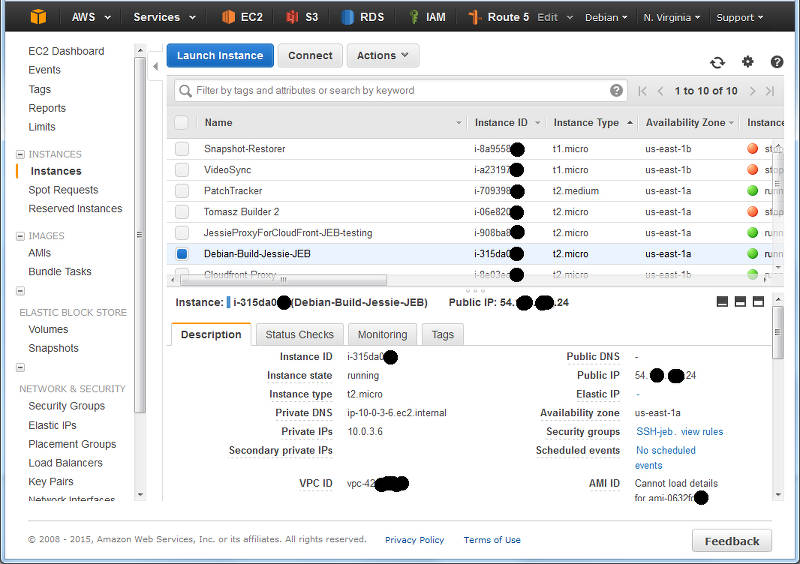
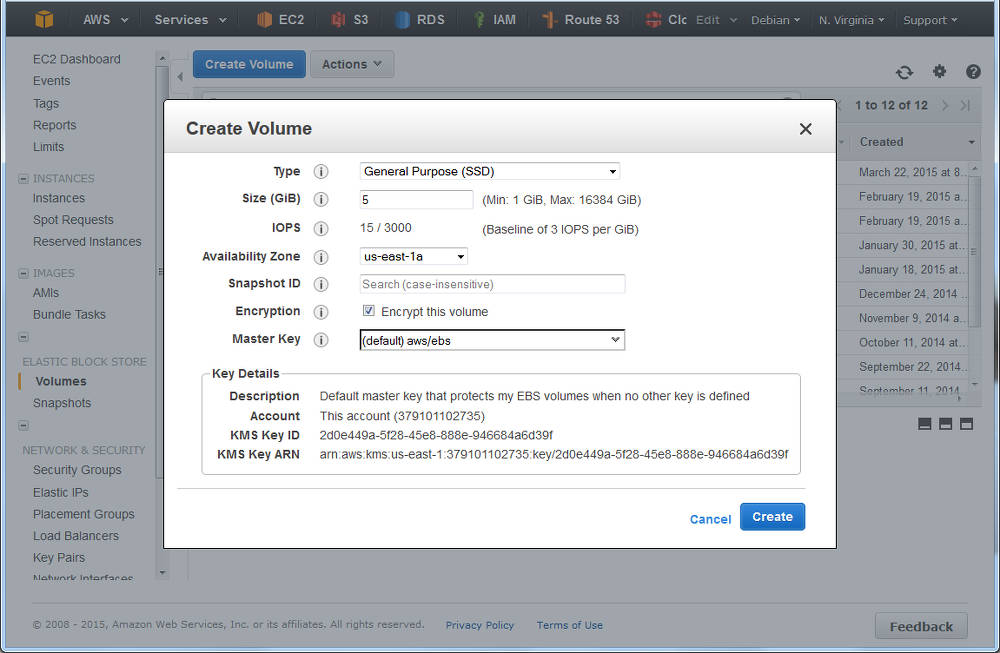
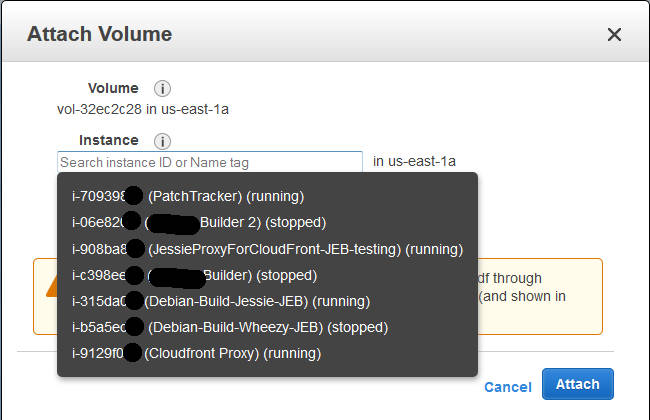
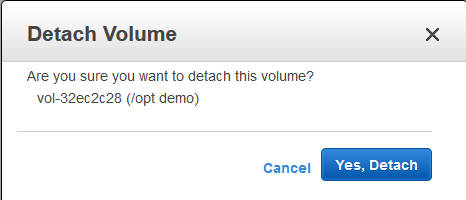
 Long ago, in days of yore, we assumed that any software worth having would be
packaged by the operating system we used. Debian with its enormous pile of
software (over 20,000 sources last time I looked) looked to basically contain
every piece of free software ever. However as more and more people have come
to Linux-based and BSD-based systems, and the proliferation of *NIX-based
systems has become even more diverse, it has become harder and harder to ensure
that everyone has access to all of the software they might choose to use.
Couple that with the rapid development of new projects, who clearly want to get
users involved well before the next release cycle of a Linux-based distribution
such as Debian, and you end up with this recommendation to bypass the operating
system's packaging system and simply
Long ago, in days of yore, we assumed that any software worth having would be
packaged by the operating system we used. Debian with its enormous pile of
software (over 20,000 sources last time I looked) looked to basically contain
every piece of free software ever. However as more and more people have come
to Linux-based and BSD-based systems, and the proliferation of *NIX-based
systems has become even more diverse, it has become harder and harder to ensure
that everyone has access to all of the software they might choose to use.
Couple that with the rapid development of new projects, who clearly want to get
users involved well before the next release cycle of a Linux-based distribution
such as Debian, and you end up with this recommendation to bypass the operating
system's packaging system and simply  While updating the
  Let us start with recalling the different actions that have to be taken when TeX packages are installed, removed, or updated.
Required actions for TeX packages
Filename database
The simplest case are packages that only include files ment to be loaded while running TeX or Metafont or similar programs. In this case the file name database of TeX (and the one of ConTeXt) needs to be updated. Usually this is done by calling mktexlsr on the changed trees, plus, if ConTeXt is installed, running mtxrun --generate.
Font map activation
More complicated are font packages that provide PostScript fonts. These packages need to ship a so called map file which maps TeX font names to PostScript fonts names. Examples are lm.map which defines this mapping for the Latin Modern fonts. All these map files have to be collected in one or more updmap.cfg files, and then a call to updmap(-sys) is necessary to generate configuration files for dvips, pdftex, and some other programs.
Format and hyphenation definitions
Even more complicated is the case of additional hyphenation patterns and additional format definitions. At the moment, hyphenation patterns are only shipped from the TeX Live packages itself, but additional format definitions are already provided by other packages than the TeX Live ones. Again, in both cases all the different format and hyphenation pattern definitions must be combined, into configuration files fmtutil.cnf and several language.* files, respectively. After this some incantation of fmtutil(-sys) is necessary to update the format dumps of TeX.
Status up to Debian/TeX Live 2014
Up to now most of these actions are done in the postinstall script of the providing packages, generated by dh_installtex. The
Let us start with recalling the different actions that have to be taken when TeX packages are installed, removed, or updated.
Required actions for TeX packages
Filename database
The simplest case are packages that only include files ment to be loaded while running TeX or Metafont or similar programs. In this case the file name database of TeX (and the one of ConTeXt) needs to be updated. Usually this is done by calling mktexlsr on the changed trees, plus, if ConTeXt is installed, running mtxrun --generate.
Font map activation
More complicated are font packages that provide PostScript fonts. These packages need to ship a so called map file which maps TeX font names to PostScript fonts names. Examples are lm.map which defines this mapping for the Latin Modern fonts. All these map files have to be collected in one or more updmap.cfg files, and then a call to updmap(-sys) is necessary to generate configuration files for dvips, pdftex, and some other programs.
Format and hyphenation definitions
Even more complicated is the case of additional hyphenation patterns and additional format definitions. At the moment, hyphenation patterns are only shipped from the TeX Live packages itself, but additional format definitions are already provided by other packages than the TeX Live ones. Again, in both cases all the different format and hyphenation pattern definitions must be combined, into configuration files fmtutil.cnf and several language.* files, respectively. After this some incantation of fmtutil(-sys) is necessary to update the format dumps of TeX.
Status up to Debian/TeX Live 2014
Up to now most of these actions are done in the postinstall script of the providing packages, generated by dh_installtex. The  Anyway, I hope to hear some feedback and installation reports.
Conclusion
While packaging has become easier for maintainers, and there is less clutter in /etc/texmf/, we now are depending on dpkg to call the tex-common triggers. Thus, if this happens rather often, then especially fmtutil-sys --all will be called several times. This is a slight regression from the previous setup, but paid off (IMNSHO) by the arguments given in the beginning.
That said, there will be of course a certain time of transition until the new setup has proven its merits, and bugs are ironed out. But having bugs that need to be mostly fixed only in one package, namely tex-common, seems like an easier task to me.
Enjoy.
Anyway, I hope to hear some feedback and installation reports.
Conclusion
While packaging has become easier for maintainers, and there is less clutter in /etc/texmf/, we now are depending on dpkg to call the tex-common triggers. Thus, if this happens rather often, then especially fmtutil-sys --all will be called several times. This is a slight regression from the previous setup, but paid off (IMNSHO) by the arguments given in the beginning.
That said, there will be of course a certain time of transition until the new setup has proven its merits, and bugs are ironed out. But having bugs that need to be mostly fixed only in one package, namely tex-common, seems like an easier task to me.
Enjoy.
 I recently obtained the newest Dell's Ubuntu developer offering, XPS 13 (2015, model 9343). I opted in for FullHD non-touch display, mostly because of better battery life, the actual no need for higher resolution, and matte screen which is great outside. Touch would have been "nice-to-have", but in my work I don't really need it.





 There s a lot of things I d like to blog about. The last version of OpenStack, the OpenStack Liberty design summit, Kilo in the official jessie-backports repositories, etc. Maybe the most interesting part of this blog post is the last bit at the end, about a major change in the packaging workflow for OpenStack in Debian. Please read on
OpenStack release names reminder
There s a lot of things I d like to blog about. The last version of OpenStack, the OpenStack Liberty design summit, Kilo in the official jessie-backports repositories, etc. Maybe the most interesting part of this blog post is the last bit at the end, about a major change in the packaging workflow for OpenStack in Debian. Please read on
OpenStack release names reminder
 I've recently found myself explaining
 My monthly report covers a large part of what I have been doing in the free software world. I write it for


