Search Results: "ema"

7 February 2016

Iain R. Learmonth: After FOSDEM 2016

FOSDEM was fun. It was great to see all these open source projects coming together in one place and it was really good to talk to people that were just as enthusiastic about the FOSS activities they do as I am about mine. Thanks go to Sa l Corretg who looked after the real-time communications dev room and made sure everything ran smoothly. I was very pleased to find that I had to stand for a couple of talks as the room was full with people eager to learn more about the world of RTC. I was again pleased on the Sunday when I had such a great audience for my talk in the distributions dev room. Everyone was very welcoming and after the talk I had some corridor discussions with a few people that were really interesting and have given me a few new things to explore in the near future. A few highlights from FOSDEM: This is just some of the highlights, and I know I'm missing out a lot here. One of the main things that FOSDEM has done for me is open my eyes as to how wide and diverse our community is and it has served as a reminder that there is tons of cool stuff out there if you take a moment to look around. Also, thanks to my trip to FOSDEM, I now have four new t-shirts to add into the rotation: FOSDEM 2016, Debian, XMPP and twiki.org.

Ben Armstrong: Bluff Trail icy dawn: Winter 2016

Before the rest of the family was up, I took a brief excursion to explore the first kilometre of the Bluff Trail and check out conditions. I turned at the ridge, satisfied I had seen enough to give an idea of what it s like out there, and then walked back the four kilometres home on the BLT Trail. I saw three joggers and their three dogs just before I exited the Bluff Trail on the way back, and later, two young men on the BLT with day packs approaching. The parking lot had gained two more cars for a total of three as I headed home. Exercising appropriate caution and judgement, the first loop is beautiful and rewarding, and I m not alone in feeling the draw of its delights this crisp morning. Click the first photo below to start the slideshow.
Click to start the slideshowClick to start the slideshow
At the parking lot, some ice, but passable with caution Trail head: a few mm of sleet Many footprints since last snowfall Thin ice encrusts the bog The boardwalk offers some loose traction Mental note: buy crampons More thin bog ice Bubbles captured in the bog ice Shelves hang above receding water First challenging boulder ascent Rewarding view at the crest Time to turn back here Flowing runnels alongside BLT Trail Home soon to fix breakfast If it looks like a tripod, it is Not a very adjustable tripod, however Pretty, encrusted pool The sun peeks out briefly Light creeps down the rock face Shimmering icy droplets and feathery moss Capped with a light dusting of sleet
facebooktwittergoogle_plusredditpinterestlinkedinmail

6 February 2016

Dimitri John Ledkov: Blogging about Let's encrypt over HTTP

So let's encrypt thing started. And it can do challenges over http (serving text files) and over dns (serving .txt records).

My "infrastructure" is fairly modest. I've seen too many of my email accounts getting swamped with spam, and or companies going bust. So I got my own domain name surgut.co.uk. However, I don't have money or time to run my own services. So I've signed up for the Google Apps account for my domain to do email, blogging, etc.

Then later i got the libnih.la domain to host API docs for the mentioned library. In the world of .io startups, I thought it's an incredibly funny domain name.

But I also have a VPS to host static files on ad-hoc basis, run VPN, and an irc bouncer. My irc bouncer is ZNC and I used a self-signed certificate there, thus i had "ignore" ssl errors in all of my irc clients... which kind of defeats the purposes somewhat.

I run my VPS on i386 (to save on memory usage) and on Ubuntu 14.04 LTS managed with Landscape. And my little services are just configured by hand there (not using juju).

My first attempt at getting on the let's encrypt bandwagon was to use the official client. By fetching debs from xenial, and installing that on LTS. But the package/script there is huge, has support for things I don't need, and wants dependencies I don't have on 14.04 LTS.

However I found a minimalist implementation letsencrypt.sh implemented in shell, with openssl and curl. It was trivial to get dependencies for and configure. Specified a domains text file, and that was it. And well, added sym links in my NGINX config to serve the challenges directory & a hook to deploy certificate to znc and restart that. I've added a cronjob to renew the certs too. Thinking about it, it's not complete as I'm not sure if NGINX will pick up certificate change and/or if it will need to be reloaded. I shall test that, once my cert expires.

Tweaking config for NGINX was easy. And I was like, let's see how good it is. I pointed https://www.ssllabs.com/ssltest/ at my https://x4d.surgut.co.uk/ and I got a "C" rating. No forward secrecy, vulnerable to down grade attacks, BEAST, POODLE and stuff like that. I went googling for all types of NGINX configs and eventually found website with "best known practices" https://cipherli.st/ However, even that only got me to "B" rating, as it still has Diffie-Hellman things that ssltest caps at "B" rating. So I disabled those too. I've ended up with this gibberish:

ssl_protocols TLSv1 TLSv1.1 TLSv1.2;
ssl_prefer_server_ciphers on;
ssl_ciphers "EECDH+AESGCM:AES256+EECDH";
ssl_ecdh_curve secp384r1; # Requires nginx >= 1.1.0
ssl_session_cache shared:SSL:10m;
#ssl_session_tickets off; # Requires nginx >= 1.5.9
ssl_stapling on; # Requires nginx >= 1.3.7
ssl_stapling_verify on; # Requires nginx => 1.3.7
#resolver $DNS-IP-1 $DNS-IP-2 valid=300s;
#resolver_timeout 5s;
add_header Strict-Transport-Security "max-age=63072000; includeSubdomains; preload";
add_header X-Frame-Options DENY;
add_header X-Content-Type-Options nosniff;

I call it gibberish, because IMHO, I shouldn't need to specify any of the above... Anyway I got my A+ rating.

However, security is as best as the weakest link. I'm still serving things over HTTP, maybe I should disable that. And I'm yet to check how "good" the TLS is on my znc. Or if I need to further harden my sshd configuration.

This has filled a big gap in my infrastructure. However a few things remain served over HTTP only.

http://blog.surgut.co.uk is hosted by an Alphabet's / Google's Blogger service. Which I would want to be served over HTTPS.

http://libnih.la is hosted by GitHub Inc service. Which I would want to be served over HTTPS.

I do not want to manage those services, experience load / spammers / DDoS attacks etc. But I am happy to sign CSRs with let's encrypt and deploy certs over to those companies. Or allow them to self-obtain certificates from let's encrypt on my behalf. I used gandi.net as my domain names provider, which offers an RPC API to manage domains and their zones files, thus e.g. I can also generate an API token for those companies to respond with a dns-01 challenge from let's encrypt.

One step at a time I guess.

The postings on this site are my own and don't necessarily represent any past/present/future employers' positions, strategies, or opinions.

5 February 2016

Jose M. Calhariz: Preview of amanda 3.3.8-1

While I sort out a sponsor, my sponsor is very busy, here is a preview of the new packages. So anyone can install and test them on jessie. The source of the packages is in collab-maint.The debs files for jessie are here: amanda-common_3.3.8-1_cal0_i386.deb amanda-server_3.3.8-1_cal0_i386.deb amanda-client_3.3.8-1_cal0_i386.deb Here comes the changelog:
amanda (1:3.3.8-1~cal0) unstable; urgency=low
  * New Upstream version
    * Changes for 3.3.8
      * s3 devices
          New NEARLINE S3-STORAGE-CLASS for Google storage.
          New AWS4 STORAGE-API
      * amcryptsimple
          Works with newer gpg2.
      * amgtar
          Default SPARSE value is NO if tar < 1.28.
          Because a bug in tar with some filesystem.
      * amstar
          support include in backup mode.
      * ampgsql
          Add FULL-WAL property.
      * Many bugs fix.
    * Changes for 3.3.7p1
      * Fix build in 3.3.7
    * Changes for 3.3.7
      * amvault
          new --no-interactivity argument.
          new --src-labelstr argument.
      * amdump
          compute crc32 of the streams and write them to the debug files.
      * chg-robot
          Add a BROKEN-DRIVE-LOADED-SLOT property.
      * Many bugs fix.
  * Refreshed patches.
  * Dropped patches that were applied by the upstream: fix-misc-typos,
    automake-add-missing, fix-amcheck-M.patch,
    fix-device-src_rait-device.c, fix-amreport-perl_Amanda_Report_human.pm
  * Change the email of the maintainer.
  * "wrap-and-sort -at" all control files.
  * swig is a new build depend.
  * Bump standard version to 3.9.6, no changes needed.
  * Replace deprecated dependency perl5 by perl, (Closes: #808209), thank
    you Gregor Herrmann for the NMU.
 -- Jose M Calhariz <jose@calhariz.com>  Tue, 02 Feb 2016 19:56:12 +0000

4 February 2016

Martin-&#201;ric Racine: xf86-video-geode 2.11.18

Yesterday, I pushed out version 2.11.18 of the Geode X.Org driver. This is the driver used by the OLPC XO-1 and by a plethora of low-power desktops, micro notebooks and thin clients. This release mostly includes maintenance fixes of all sorts. Of noticeable interest is a fix for the long-standing issue that switching between X and a VT would result in a blank screen (this should probably be cherry-picked for distributions running earlier releases of this driver). Many thanks to Connor Behan for the fix!
Unfortunately, this driver still doesn't work with GNOME. On my testing host, launching GDM produces a blank screen. 'ps' and other tools show that GDM is running but there's no screen content; the screen remains pitch black. This issue doesn't happen with other display managers e.g. LightDM. Bug reports have been filed, additional information was provided, but the issue still hasn't been resolved.
Additionally, X server flat out crashes on Geode hosts running Linux kernels 4.2 or newer. 'xkbcomp' repeatedly fails to launch and X exits with a fatal error. Bug reports have been filed, but not reacted to. However, interestingly enough, X launches fine if my testing host is booted with earliers kernels, which might suggest what the actual cause of this particular bug might be:
Since kernel 4.2 entered Debian, the base level i386 kernel on Debian is now compiled for i686 (without PAE). Until now, the base level was i586. This essentially makes it pointless to build the Geode driver with GX2 support. It also means that older GX1 hardware won't be able to run Debian either, starting with the next stable release.

2 February 2016

Norbert Preining: Gaming: The Talos Principle Road to Gehenna

After finishing the Talos Principle I immediately started to play the extension Road to Gehenna, but was derailed near completion by the incredible Portal Stories: Mel. Now that I finally managed to escape from the test chambers my attention returned to the Road to Gehenna. As with the pair Portal 2 and Portal Stories: Mel, the challenges are going up considerably from the original Talos Principle to the Road to Gehenna. Checking the hours of game play it took me about 24h through all the riddles in Road to Gehenna, but I have to admit, I had some riddles where I needed to cheat. road-to-gehenna.jpg The Road to Gehenna does not bring much new game play elements, but loads of new riddles. And the best of all, playable on Linux! And as with the original game, the graphics are really well done, while still be playable on my Vaio Pro laptop with Intel integrated graphic card a plus that is rare in the world of computer games where everyone is expected to have a high-end nVidia or Radeon card. Ok, there is not much action going on where quick graphic computations are necessary, still the impression of the game is great.
gehenna1 The riddles contain the well known elements (connectors, boxes, jammer, etc), but the settings are often spectacular, sometimes very small and narrow, just a few moves if done in the right order, sometimes like wide open fields with lots of space to explore. Transportation between various islands suspended in the air is with vents, giving you a lot of nice flight time!
gehenna2 If one searches a lot, or uses a bit of cheating, one can find good old friends from the Portal series, burried in the sand in one of the world. This is not the only easter egg hidden in the game, there are actually a lot, some of which I have not seen but only read about afterwards. Guess I need to replay the whole game.
gehenna3 Coming back to the riddles, I really believe that the makers have been ingenious in using the few items at hand to create challenging and surprising riddles. As it is so often, many of the riddles look completely impossible at first glance, and often even after staring at them for tens and tens of minutes. Until (and if) one has the the a-ha effect and understands the trick. This often still needs a lot of handwork and trial-error rounds, but all in all the game is well balanced. What is a bit a pain similar to the original game are collecting the stars to reach the hidden world and free the admin. There the developers overdid it in my opinion, with some rather absurd and complicated stars.
gehenna4 The end of the game, ascension of the messengers, is rather unspectacular. A short discussion on who remains and then a big closing scene with the messenger being beamed up a la Starship Enterprise, and a closing black screen. But well, the fun was with the riddles.
gehenna5 All in all an extension that is well worth the investment if one enjoyed the original Talos, and is looking for rather challenging riddles. Now that I have finished all the Portal and Talos titles, I am hard thinking of what is next looking into Braid Enjoy!

Russell Coker: Compatibility and a Linux Community Server

Compatibility/interoperability is a good thing. It s generally good for systems on the Internet to be capable of communicating with as many systems as possible. Unfortunately it s not always possible as new features sometimes break compatibility with older systems. Sometimes you have systems that are simply broken, for example all the systems with firewalls that block ICMP so that connections hang when the packet size gets too big. Sometimes to take advantage of new features you have to potentially trigger issues with broken systems. I recently added support for IPv6 to the Linux Users of Victoria server. I think that adding IPv6 support is a good thing due to the lack of IPv4 addresses even though there are hardly any systems that are unable to access IPv4. One of the benefits of this for club members is that it s a platform they can use for testing IPv6 connectivity with a friendly sysadmin to help them diagnose problems. I recently notified a member by email that the callback that their mail server used as an anti-spam measure didn t work with IPv6 and was causing mail to be incorrectly rejected. It s obviously a benefit for that user to have the problem with a small local server than with something like Gmail. In spite of the fact that at least one user had problems and others potentially had problems I think it s clear that adding IPv6 support was the correct thing to do. SSL Issues Ben wrote a good post about SSL security [1] which links to a test suite for SSL servers [2]. I tested the LUV web site and got A-. This blog post describes how to setup PFS (Perfect Forward Secrecy) [3], after following it s advice I got a score of B! From the comments on this blog post about RC4 etc [4] it seems that the only way to have PFS and not be vulnerable to other issues is to require TLS 1.2. So the issue is what systems can t use TLS 1.2. TLS 1.2 Support in Browsers This Wikipedia page has information on SSL support in various web browsers [5]. If we require TLS 1.2 we break support of the following browsers: The default Android browser before Android 5.0. Admittedly that browser always sucked badly and probably has lots of other security issues and there are alternate browsers. One problem is that many people who install better browsers on Android devices (such as Chrome) will still have their OS configured to use the default browser for URLs opened by other programs (EG email and IM). Chrome versions before 30 didn t support it. But version 30 was released in 2013 and Google does a good job of forcing upgrades. A Debian/Wheezy system I run is now displaying warnings from the google-chrome package saying that Wheezy is too old and won t be supported for long! Firefox before version 27 didn t support it (the Wikipedia page is unclear about versions 27-31). 27 was released in 2014. Debian/Wheezy has version 38, Debian/Squeeze has Iceweasel 3.5.16 which doesn t support it. I think it is reasonable to assume that anyone who s still using Squeeze is using it for a server given it s age and the fact that LTS is based on packages related to being a server. IE version 11 supports it and runs on Windows 7+ (all supported versions of Windows). IE 10 doesn t support it and runs on Windows 7 and Windows 8. Are the free upgrades from Windows 7 to Windows 10 going to solve this problem? Do we want to support Windows 7 systems that haven t been upgraded to the latest IE? Do we want to support versions of Windows that MS doesn t support? Windows mobile doesn t have enough users to care about. Opera supports it from version 17. This is noteworthy because Opera used to be good for devices running older versions of Android that aren t supported by Chrome. Safari supported it from iOS version 5, I think that s a solved problem given the way Apple makes it easy for users to upgrade and strongly encourages them to do so. Log Analysis For many servers the correct thing to do before even discussing the issue is to look at the logs and see how many people use the various browsers. One problem with that approach on a Linux community site is that the people who visit the site most often will be more likely to use recent Linux browsers but older Windows systems will be more common among people visiting the site for the first time. Another issue is that there isn t an easy way of determining who is a serious user, unlike for example a shopping site where one could search for log entries about sales. I did a quick search of the Apache logs and found many entries about browsers that purport to be IE6 and other versions of IE before 11. But most of those log entries were from other countries, while some people from other countries visit the club web site it s not very common. Most access from outside Australia would be from bots, and the bots probably fake their user agent. Should We Do It? Is breaking support for Debian/Squeeze, the built in Android browser on Android <5.0, and Windows 7 and 8 systems that haven t upgraded IE as a web browsing platform a reasonable trade-off for implementing the best SSL security features? For the LUV server as a stand-alone issue the answer would be no as the only really secret data there is accessed via ssh. For a general web infrastructure issue it seems that the answer might be yes. I think that it benefits the community to allow members to test against server configurations that will become more popular in the future. After implementing changes in the server I can advise club members (and general community members) about how to configure their servers for similar results. Does this outweigh the problems caused by some potential users of ancient systems? I m blogging about this because I think that the issues of configuration of community servers have a greater scope than my local LUG. I welcome comments about these issues, as well as about the SSL compatibility issues.

1 February 2016

Ritesh Raj Sarraf: State of Email Clients on Linux Based Platforms

I've been trying to catch up on my reading list (Thanks to rss2email, now I can hold the list longer, than just marking all as read). And one item from last year's end worth spending time was Thunderbird. Thunderbird has been the email client of choice for many users. The main reason for it being popular has been, in my opinion, it being cross platform. Because that allows users an easy migration path across platforms. It also bring persistence, in terms of features and workflows, to the end users. Perhaps that must have been an important reason for many distributions (Ubuntu) and service providers to promote it as the default email client. A Windows/Mac user migrating to Ubuntu will have a lot better experience if they see familiar tools, and their data and workflows being intact. Mozilla must have executed its plan pretty well, to have been able to get it rolling so far. Because other attempts elsewhere (KDE4 Windows) weren't so easy. Part of the reason maybe that any time a new disruptive update is rolled on (KDE4, GNOME3), a lot many frustrated users are born. It is not that people don't want change. Its just that no one likes to see things break. But unfortunately, in Free Software / Open Source world, that is taken lightly. That's one reason why it takes Mozilla so so so long to implement Maildir in TB, when others (Evolution) have had it for so long. So, recently, Mozilla announced its plans to drop Thunderbird development. It is not something new. Anyone using TB knows how long it has been in Maintenance/ESR mode. What was interesting on LWN was the comments. People talked a lot about DE Native Email clients - Kmail, Sylpheed. TUI Clients and these days Browser based clients. Surprisingly, not much was talked about Evolution. My recent move to GNOME has made me look into letting go of old tools/workflows, and try to embrace newer ones. Of them has been GNOME itself. Changing workflows for email was difficult and frustrating. But knowing that TB doesn't have a bright future, it was important to look for alternatives. Just having waited for Maildir and GTK3 port of TB for so long, was enough. On GNOME, Evolution, may give an initial impression of being in Maintenance mode. Especially given that most GNOME apps are now moving to the new UI, which is more touch friendly. And also, because there were other efforts to have another email client on GNOME, I think it is Yorba. But even in its current form, Evolution is a pretty impressive email client Personal Information Management tool. It already is ported to GTK3. Which implies it is capable of responding to Touch events. It sure could have a revised Touch UI, like what is happening with other GNOME Apps. But I'm happy that it has been defered for now. Revising Evolution won't be an easy task, and knowing that GNOME too is understaffed, breaking a perfectly working tool won't be a good idea. My intent with this blog post is to give credit to my favorite GNOME application, i.e. Evolution. So next time you are looking for an email client alternative, give Evolution a try. Today, it already does:
  • Touch UI
  • Maildir
  • Microsoft Exchange
  • GTK3
  • Addressbook, Notes, Tasks, Calendar - Most Standards Based and Google Services compatible
  • RSS Feed Manager
  • And many more that I may not have been using
The only missing piece is being cross-platform. But given the trend, and available resources, I think that path is not worthy of trying. Keep It Simple. Support one platform and support it well.

Categories:

Keywords:

Like:

Michal &#268;iha&#345;: Canon MF8540Cdn on Debian Linux

I've recently bought this beast and of course want to run it on Linux. Vendor does provide Linux drivers which even come with source, so that looked quite okay in the beginning. However it turned out not to be that easy. First attempt was to install the 64-bit drivers and all I got from the printer is almost blank page with:
**** Unable to open the initial device, quitting.
Okay, that's not much helpful. Meanwhile I did install i386 system where it worked just fine. I started to smell some problems and looked at the source. It turned out to be almost complete, there was just single i386 binary, which is obviously needed by the driver. Once realizing this, it was quite easy to make it work on 64 bit system as well:
dpkg --add-architecture i386
apt install libxml2:i386 libstdc++6:i386
Not that I'd be happy to run binary blob on my system, but at least printing now works. Scanning from the device is easy - all you need to configure access to email and Samba and it works pretty without problems.

Filed under: Debian English 0 comments

Michal &#268;iha&#345;: Canon MF8640Cdn on Debian Linux

I've recently bought this beast and of course want to run it on Linux. Vendor does provide Linux drivers which even come with source, so that looked quite okay in the beginning. However it turned out not to be that easy. First attempt was to install the 64-bit drivers and all I got from the printer is almost blank page with:
**** Unable to open the initial device, quitting.
Okay, that's not much helpful. Meanwhile I did install i386 system where it worked just fine. I started to smell some problems and looked at the source. It turned out to be almost complete, there was just single i386 binary, which is obviously needed by the driver. Once realizing this, it was quite easy to make it work on 64 bit system as well:
dpkg --add-architecture i386
apt install libxml2:i386 libstdc++6:i386
Not that I'd be happy to run binary blob on my system, but at least printing now works. Scanning from the device is easy - all you need to configure access to email and Samba and it works pretty without problems.

Filed under: Debian English 0 comments

Stefano Zacchiroli: guest lecture Overthrowing the Tyranny of Software by John Sullivan

As part of my master class on Free and Open Source (FOSS) Software at University Paris Diderot, I invite guest lecturers to present to my students the point of views of various actors of the FOSS ecosystem --- companies, non-profits, activists, lawyers, etc. Tomorrow, Tuesday 2 February 2016, the students will have the pleasure to have as guest lecturer John Sullivan, Executive Director of the Free Software Foundation, talking about Overthrowing the tyranny of software: Why (and how) free societies respect computer user freedom. The lecture is open to everyone interested, but registration is recommended. Logistic and registration information, as well as the lecture abstract in both English and French is reported below.
John Sullivan's Lecture at University Paris Diderot - Overthrowing the tyranny of software: Why (and how) free societies respect computer user freedom John Sullivan, Executive Director of the Free Software Foundation will give a lecture titled "Overthrowing the tyranny of software: Why (and how) free societies respect computer user freedom" at University Paris Diderot next Tuesday, 2 February 2016, at 12:30 in the Amphi 3B, Halle aux Farines building, Paris 75013. Map at: http://www.openstreetmap.org/way/62378611#map=19/48.82928/2.38183 The lecture will be in English and open to everyone, but registration is recommended at https://framadate.org/iPqfjNTz2535F8u4 or via email writing to zack@pps.univ-paris-diderot.fr. Abstract: Anyone who has used a computer for long has at least sometimes felt like a helpless subject under the tyrant of software, screaming (uselessly) in frustration at the screen to try and get the desired results. But with driverless cars, appliances which eavesdrop on conversations in our homes, mobile devices that transmit our location when we are out and about, and computers with unexpected hidden "features", our inability to control the software supposedly in our possession has become a much more serious problem than the superficial blue-screen-of-death irritations of the past. Software which is free "as in freedom" allows anyone who has it to inspect the code and even modify it -- or ask someone trained in the dark arts of computer programming to do it for them -- so that undesirable behaviors can be removed or defused. This characteristic, applied to all software, should be a major part of foundation of free societies moving forward. To get there, we'll need individual developers, nonprofit organizations, governments, and companies all working together -- with the first two groups leading the way.
Cours Magistral de John Sullivan l'Universit Paris Diderot - Surmonter la tyrannie du logiciel: pourquoi (et comment) les soci t s libres respectent les libert s des utilisateurs John Sullivan, Directeur Ex cutif de la Free Software Foundation donnera un cours magistral ayant pour titre "Surmonter la tyrannie du logiciel: pourquoi (et comment) les soci t s libres respectent les libert s des utilisateurs" l'Universit Paris Diderot Mardi prochain, 2 f vrier 2016, 12h30 dans l'Amphi 3B de la Halle aux Farines, Paris 75013. Plan: http://www.openstreetmap.org/way/62378611#map=19/48.82928/2.38183 Le cours (en langue Anglaise) sera ouvert toutes et tous, mais l'inscription est recommand via le formulaire https://framadate.org/iPqfjNTz2535F8u4 ou par mail l'adresse zack@pps.univ-paris-diderot.fr. R sum : Chacun de nous, au moins une fois dans sa vie, a pest contre son ordinateur dans l'espoir (vain) d'obtenir un r sultat attendu, se sentant d poss de par un tyran logiciel. Mais au jour d'aujourd'hui - avec des voitures autonomes, des dispositifs "intelligents" que nous coutent chez nous, des portables qui transmettent notre position quand nous nous baladons, et des ordinateurs pleins des fonctionnalit s cach es - notre incapacit de contr ler nos biens devient une question beaucoup plus s rieuse par rapport a l'irritation qu'auparavant nous causait l' cran bleu de la mort. Le logiciel libre permet chaque utilisateur d' tudier son fonctionnement et de le modifier --- ou de demander des experts dans la magie noire de la programmation de le faire a sa place --- supprimant, ou du moins r duisant, les comportements ind sir s du logiciel. Cette caract ristique du logiciel libre devrait tre appliqu e chaque type de logiciel et devrait constituer un pilier des soci t s se pr tendant libres. Pour achever cet id al, d veloppeurs, organisations but non lucratif, gouvernements et entreprises doivent travailler ensemble. Et les d veloppeurs et les ONG doivent se positionner au premier rang dans ce combat.

31 January 2016

Thorsten Alteholz: My Debian Activities in January 2016

FTP assistant This month I marked 281 package for accept and rejected 58, so almost back to normal processing. I also sent 19 emails to maintainers asking questions. As mentioned in October the accept-number has reached another milestone. I accepted package 6666 on 20151221, it was python-skbio_0.4.1-1. The winner of a fast processed package with the best guess of this date is: *tata* Javi. Ok, he was the only participant :-) . So, who can guess the date of 7777? Squeeze LTS This was my nineteenth month that I did some work for the Squeeze LTS initiative, started by Raphael Hertzog at Freexian. This month several people had to reduce their contribution, so all in all I got a workload of 30h. Altogether I uploaded those DLAs: For the first time this month, I was also involved in three embargoed uploads. Ben and I were informed about some security issues before they got published and I prepared the DLAs. Although the real upload for all suites were still done by the security team, it was really exciting. I also spent some time on #796095 and prepared another patch for review. Further I am almost done with the next upload of PHP 5.3. Just before starting dupload, another issue appeared. As I think that this will be the last upload of PHP for Squeeze LTS, I also want to take care of this latecomer. The upload of krb5 is waiting in the pipeline, I am just waiting for a confirmation that everything is fine. This month I also had another term of doing frontdesk work and looked for CVEs that are important for Squeeze LTS or could be ignored. As Wheezy LTS is just before the start, I already prepared the new build environment. So either now or later in April, I am ready Other stuff Due to the high LTS workload, there was no time for other stuff :-( .

Chris Lamb: Free software activities in January 2016

Here is my monthly update covering a large part of what I have been doing in the free software world (previously):
Debian
  • Had a talk proposal accepted (Reproducible Builds - fulfilling the original promise of free software) at FOSSASIA 16.
My work in the Reproducible Builds project was also covered in more depth in Lunar's weekly reports (#35, #36, #37, #38, #39)
LTS

This month I have been paid to work 18 hours on Debian Long Term Support (LTS). In that time I did the following:
  • Sevend days of "frontdesk" duties, triaging CVEs, etc.
  • Issued DLA 386-1 for cacti to patch an SQL injection vulnerability.
  • Issued DLA 388-1 for dwarfutils fixing a NULL deference issue.
  • Issued DLA 391-1 for prosody correcting the use of a weak pseudo-random number generator.
  • Issued DLA 404-1 for nginx to prevent against an invalid pointer deference.

Uploads
  • redis (2:3.0.7-1) New upstream stable release, also ensure that test processes are cleaned up and replacing an existing reproducibility patch with a SOURCE_DATE_EPOCH solution.
  • python-django (1.9.1-1) New upstream release.
  • disque (1.0~rc1-4) Make the build reproducible via SOURCE_DATE_EPOCH, ensure that test processes are cleaned up and that the nocheck flag is correctly honoured.
  • gunicorn (19.4.5-1) New upstream release.
  • redis (2:3.2~rc3-1) New upstream RC release (to experimental).


RC bugs


I also filed 100 FTBFS bugs against apache-log4j2, awscli, binutils, brian, ccbuild, coala, commons-beanutils, commons-vfs, composer, cyrus-sasl2, debiandoc-sgml-doc-pt-br, dfvfs, dillo, django-compat, dulwich, git-annex, grpc, hdf-eos5, hovercraft, ideviceinstaller, ircp-tray, isomd5sum, javamail, jhdf, jsonpickle, kivy, klog, libcloud, libcommons-jexl2-java, libdata-objectdriver-perl, libdbd-sqlite3-perl, libpam-krb5, libproc-waitstat-perl, libslf4j-java, libvmime, linuxdcpp, lsh-utils, mailutils, mdp, menulibre, mercurial, mimeo, molds, mugshot, nose, obex-data-server, obexfs, obexftp, orafce, p4vasp, pa-test, pgespresso, pgpool2, pgsql-asn1oid, php-doctrine-cache-bundle, php-net-ldap2, plv8, pngtools, postgresql-mysql-fdw, pyfftw, pylint-common, pylint-django, pylint-django, python-ase, python-axiom, python-biopython, python-dcos, python-falcon, python-instagram, python-markdown, python-pysam, python-requests-toolbelt, python-ruffus, pytsk, pyviennacl, ros-class-loader, ros-ros-comm, ros-roscpp-core, roxterm, ruby-celluloid-extras, ruby-celluloid-fsm, ruby-celluloid-supervision, ruby-eye, ruby-net-scp, ruby-net-ssh, ruby-sidekiq, ruby-sidekiq-cron, ruby-sinatra-contrib, seaview, smc, spatial4j-0.4, swift-plugin-s3, tilecache, typecatcher, ucommon, undertaker, urdfdom, ussp-push, xserver-xorg-video-intel & yt.

FTP Team

As a Debian FTP assistant I ACCEPTed 201 packages: abi-tracker, android-platform-build, android-platform-frameworks-native, android-platform-libcore, android-platform-system-core, animate.css, apitrace, argon2, autosize.js, bagel, betamax, bittorrent, bls-standalone, btfs, caja-dropbox, cegui-mk2, complexity, corebird, courier-authlib, cpopen, ctop, dh-haskell, django-python3-ldap, e2fsprogs1.41, emacs-async, epl, fast5, fastkml, flask-restful, flask-silk, gcc-6, gitlab, golang-github-kolo-xmlrpc, golang-github-kr-fs, golang-github-pkg-sftp, golang-github-prometheus-common, google-auth-library-php, h5py, haskell-aeson-compat, haskell-userid, heroes, hugo, ioprocess, iptables, ivy-debian-helper, ivyplusplus, jquery-timer.js, klaus, kpatch, lazarus, libatteanx-store-sparql-perl, libbrowserlauncher-java, libcgi-test-perl, libdata-sah-normalize-perl, libfsntfs, libjs-fuzzaldrin-plus, libjung-free-java, libmongoc, libmygpo-qt, libnet-nessus-rest-perl, liborcus, libperinci-sub-util-propertymodule-perl, libpodofo, librep, libsodium, libx11-xcb-perl, linux, linux-grsec-base, list.js, lombok, lua-mediator, luajit, maven-script-interpreter, midicsv, mimeo, miniasm, mlpack, mom, mosquitto-auth-plugin, moxie.js, msgpuck, nanopolish, neovim, netcdf, network-manager-applet, network-manager-ssh, node-esprima-fb, node-mocks-http, node-schlock, nomacs, ns3, openalpr, openimageio, openmpi, openms, orafce, pbsim, pd-iemutils, pd-nusmuk, pd-puremapping, pd-purest-json, pg-partman, pg-rage-terminator, pgfincore, pgmemcache, pgsql-asn1oid, php-defaults, php-jwt, php-mf2, php-redis, pkg-info-el, plr, pnmixer, postgresql-multicorn, postgresql-mysql-fdw, powa-archivist, previsat, pylint-flask, pyotherside, python-caldav, python-cookies, python-dcos, python-flaky, python-flickrapi, python-frozendict, python-genty, python-git, python-greenlet, python-instagram, python-ironic-inspector-client, python-manilaclient, python-neutronclient, python-openstackclient, python-openstackdocstheme, python-prometheus-client, python-pymzml, python-pysolr, python-reno, python-requests-toolbelt, python-scales, python-socketio-client, qdox2, qgis, r-cran-biasedurn, rebar.js, repmgr, rfcdiff, rhythmbox-plugin-alternative-toolbar, ripe-atlas-cousteau, ripe-atlas-sagan, ripe-atlas-tools, ros-image-common, ruby-acts-as-list, ruby-allocations, ruby-appraiser, ruby-appraiser-reek, ruby-appraiser-rubocop, ruby-babosa, ruby-combustion, ruby-did-you-mean, ruby-fixwhich, ruby-fog-xenserver, ruby-hamster, ruby-jeweler, ruby-mime-types-data, ruby-monkey-lib, ruby-net-telnet, ruby-omniauth-azure-oauth2, ruby-omniauth-cas3, ruby-puppet-forge, ruby-racc, ruby-reek, ruby-rubinius-debugger, ruby-rubysl, ruby-rubysl-test-unit, ruby-sidekiq-cron, ruby-threach, ruby-wavefile, ruby-websocket-driver, ruby-xmlhash, rustc, s-nail, scrm, select2.js, senlin, skytools3, slurm-llnl, sphinx-argparse, sptk, sunpy, swauth, swift, tdiary, three.js, tiny-initramfs, tlsh, ublock-origin, vagrant-cachier, xapian-core, xmltooling, & yp-tools. I additionally REJECTed 29 packages.

30 January 2016

Simon McVittie: GNOME Developer Experience hackfest: xdg-app + Debian

Over the last few days I've been at the GNOME Developer Experience hackfest in Brussels, looking into xdg-app and how best to use it in Debian and Debian derivatives. xdg-app is basically a way to run "non-core" software on Linux distributions, analogous to apps on Android and iOS. It doesn't replace distributions like Debian or packaging systems, but it adds a layer above them. It's mostly aimed towards third-party apps obtained from somewhere that isn't your distribution vendor, aiming to address a few long-standing problems in that space: To address the first point, each application uses a specified "runtime", which is available as /usr inside its sandbox. This can be used to run application bundles with multiple, potentially incompatible sets of dependencies within the same desktop environment. A runtime can be updated within its branch - for instance, if an application uses the "GNOME 3.18" runtime (consisting of a basic Linux system, the GNOME 3.18 libraries, other related libraries like Mesa, and their recursive dependencies like libjpeg), it can expect to see minor-version updates from GNOME 3.18.x (including any security updates that might be necessary for the bundled libraries), but not a jump to GNOME 3.20. To address the second issue, the plan is for application bundles to be available as a single file, containing metadata (such as the runtime to use), the app itself, and any dependencies that are not available in the runtime (which the app vendor is responsible for updating if necessary). However, the primary way to distribute and upgrade runtimes and applications is to package them as OSTree repositories, which provide a git-like content-addressed filesystem, with efficient updates using binary deltas. The resulting files are hard-linked into place. To address the last point, application bundles run partially isolated from the wider system, using containerization techniques such as namespaces to prevent direct access to system resources. Resources from outside the sandbox can be accessed via "portal" services, which are responsible for access control; for example, the Documents portal (the only one, so far) displays an "Open" dialog outside the sandbox, then allows the application to access only the selected file. xdg-app for Debian One thing I've been doing at this hackfest is improving the existing Debian/Ubuntu packaging for xdg-app (and its dependencies ostree and libgsystem), aiming to get it into a state where I can upload it to Debian experimental. Because xdg-app aims to be a general freedesktop project, I'm currently intending to make it part of the "Utopia" packaging team alongside projects like D-Bus and polkit, but I'm open to suggestions if people want to co-maintain it elsewhere. In the process of updating xdg-app, I sent various patches to Alex, mostly fixing build and test issues, which are in the new 0.4.8 release. I'd appreciate co-maintainers and further testing for this stuff, particularly ostree: ostree is primarily a whole-OS deployment technology, which isn't a use-case that I've tested, and in particular ostree-grub2 probably doesn't work yet. Source code: Binaries (no trust path, so only use these if you have a test VM): The "Hello, World" of xdg-apps Another thing I set out to do here was to make a runtime and an app out of Debian packages. Most of the test applications in and around GNOME use the "freedesktop" or "GNOME" runtimes, which consist of a Yocto base system and lots of RPMs, are rebuilt from first principles on-demand, and are extensive and capable enough that they make it somewhat non-obvious what's in an app or a runtime. So, here's a step-by-step route through xdg-app, first using typical GNOME instructions, but then using the simplest GUI app I could find - xvt, a small xterm clone. I'm using a Debian testing (stretch) x86_64 virtual machine for all this. xdg-app currently requires systemd-logind to put users and apps in cgroups, either with systemd as pid 1 (systemd-sysv) or systemd-shim and cgmanager; I used the default systemd-sysv. In principle it could work with plain cgmanager, but nobody has contributed that support yet. Demonstrating an existing xdg-app Debian's kernel is currently patched to be able to allow unprivileged users to create user namespaces, but make it runtime-configurable, because there have been various security issues in that feature, making it a security risk for a typical machine (and particularly a server). Hopefully unprivileged user namespaces will soon be secure enough that we can enable them by default, but for now, we have to do one of three things to let xdg-app use them: First, we'll need a runtime. The standard xdg-app tutorial would tell you to download the "GNOME Platform" version 3.18. To do that, you'd add a remote, which is a bit like a git remote, and a bit like an apt repository:
$ wget http://sdk.gnome.org/keys/gnome-sdk.gpg
$ xdg-app remote-add --user --gpg-import=gnome-sdk.gpg gnome \
    http://sdk.gnome.org/repo/
(I'm ignoring considerations like trust paths and security here, for brevity; in real life, you'd want to obtain the signing key via https and/or have a trust path to it, just like you would for a secure-apt signing key.) You can list what's available in a remote:
$ xdg-app remote-ls --user gnome
...
org.freedesktop.Platform
...
org.freedesktop.Platform.Locale.cy
...
org.freedesktop.Sdk
...
org.gnome.Platform
...
The Platform runtimes are what we want here: they are collections of runtime libraries with which you can run an application. The Sdk runtimes add development tools, header files, etc. to be able to compile apps that will be compatible with the Platform. For now, all we want is the GNOME 3.18 platform:
$ xdg-app install --user gnome org.gnome.Platform 3.18
Next, we can install an app that uses it, from Alex Larsson's nightly builds of a subset of GNOME. The server they're on doesn't have a great deal of bandwidth, so be nice :-)
$ wget http://209.132.179.2/keys/nightly.gpg
$ xdg-app remote-add --user --gpg-import=nightly.gpg nightly \
    http://209.132.179.2/repo/
$ xdg-app install --user nightly org.mypaint.MypaintDevel
We now have one app, and the runtime it needs:
$ xdg-app list
org.mypaint.MypaintDevel
$ xdg-app run org.mypaint.MypaintDevel
[you see a GUI window]
Digression: what's in a runtime? Behind the scenes, xdg-app runtimes and apps are both OSTree trees. This means the ostree tool, from the package of the same name, can be used to inspect them.
$ sudo apt install ostree
$ ostree refs --repo ~/.local/share/xdg-app/repo
gnome:runtime/org.gnome.Platform/x86_64/3.18
nightly:app/org.mypaint.MypaintDevel/x86_64/master
A "ref" has roughly the same meaning as in git: something like a branch or a tag. ostree can list the directory tree that it represents:
$ ostree ls --repo ~/.local/share/xdg-app/repo \
    runtime/org.gnome.Platform/x86_64/3.18
d00755 0 0      0 /
-00644 0 0    493 /metadata
d00755 0 0      0 /files
$ ostree ls --repo ~/.local/share/xdg-app/repo \
    runtime/org.gnome.Platform/x86_64/3.18 /files
d00755 0 0      0 /files
l00777 0 0      0 /files/local -> ../var/usrlocal
l00777 0 0      0 /files/sbin -> bin
d00755 0 0      0 /files/bin
d00755 0 0      0 /files/cache
d00755 0 0      0 /files/etc
d00755 0 0      0 /files/games
d00755 0 0      0 /files/include
d00755 0 0      0 /files/lib
d00755 0 0      0 /files/lib64
d00755 0 0      0 /files/libexec
d00755 0 0      0 /files/share
d00755 0 0      0 /files/src
You can see that /files in a runtime is basically a copy of /usr. This is not coincidental: the runtime's /files gets mounted at /usr inside the xdg-app container. There is also some metadata, which is in the ini-like syntax seen in .desktop files:
$ ostree cat --repo ~/.local/share/xdg-app/repo \
    runtime/org.gnome.Platform/x86_64/3.18 /metadata
[Runtime]
name=org.gnome.Platform/x86_64/3.16
runtime=org.gnome.Platform/x86_64/3.16
sdk=org.gnome.Sdk/x86_64/3.16
[Extension org.freedesktop.Platform.GL]
version=1.2
directory=lib/GL
[Extension org.freedesktop.Platform.Timezones]
version=1.2
directory=share/zoneinfo
[Extension org.gnome.Platform.Locale]
directory=share/runtime/locale
subdirectories=true
[Environment]
GI_TYPELIB_PATH=/app/lib/girepository-1.0
GST_PLUGIN_PATH=/app/lib/gstreamer-1.0
LD_LIBRARY_PATH=/app/lib:/usr/lib/GL
Looking at an app, the situation is fairly similar:
$ ostree ls --repo ~/.local/share/xdg-app/repo \
    app/org.mypaint.MypaintDevel/x86_64/master
d00755 0 0      0 /
-00644 0 0    258 /metadata
d00755 0 0      0 /export
d00755 0 0      0 /files
This time, /files maps to what will become /app for the application, which was compiled with --prefix=/app:
$ ostree ls --repo ~/.local/share/xdg-app/repo \
    app/org.mypaint.MypaintDevel/x86_64/master /files
d00755 0 0      0 /files
-00644 0 0   4599 /files/manifest.json
d00755 0 0      0 /files/bin
d00755 0 0      0 /files/lib
d00755 0 0      0 /files/share
There is also a /export directory, which is made visible to the host system so that the contained app can appear as a "first-class citizen" in menus:
$ ostree ls --repo ~/.local/share/xdg-app/repo \
    app/org.mypaint.MypaintDevel/x86_64/master /export
d00755 0 0      0 /export
d00755 0 0      0 /export/share
user@debian:~$ ostree ls --repo ~/.local/share/xdg-app/repo \
    app/org.mypaint.MypaintDevel/x86_64/master /export/share
d00755 0 0      0 /export/share
d00755 0 0      0 /export/share/app-info
d00755 0 0      0 /export/share/applications
d00755 0 0      0 /export/share/icons
user@debian:~$ ostree ls --repo ~/.local/share/xdg-app/repo \
    app/org.mypaint.MypaintDevel/x86_64/master /export/share/applications
d00755 0 0      0 /export/share/applications
-00644 0 0    715 /export/share/applications/org.mypaint.MypaintDevel.desktop
$ ostree cat --repo ~/.local/share/xdg-app/repo \
    app/org.mypaint.MypaintDevel/x86_64/master \
    /export/share/applications/org.mypaint.MypaintDevel.desktop
[Desktop Entry]
Version=1.0
Name=(Nightly) MyPaint
TryExec=mypaint
Exec=mypaint %f
Comment=Painting program for digital artists
...
Comment[zh_HK]= 
GenericName=Raster Graphics Editor
GenericName[fr]= diteur d'Image Matricielle
MimeType=image/openraster;image/png;image/jpeg;
Type=Application
Icon=org.mypaint.MypaintDevel
StartupNotify=true
Categories=Graphics;GTK;2DGraphics;RasterGraphics;
Terminal=false
Again, there's some metadata:
$ ostree cat --repo ~/.local/share/xdg-app/repo \
    app/org.mypaint.MypaintDevel/x86_64/master /metadata
[Application]
name=org.mypaint.MypaintDevel
runtime=org.gnome.Platform/x86_64/3.18
sdk=org.gnome.Sdk/x86_64/3.18
command=mypaint
[Context]
shared=ipc;
sockets=x11;pulseaudio;
filesystems=host;
[Extension org.mypaint.MypaintDevel.Debug]
directory=lib/debug
Building a runtime, probably the wrong way The way in which the reference/demo runtimes and containers are generated is... involved. As far as I can tell, there's a base OS built using Yocto, and the actual GNOME bits come from RPMs. However, we don't need to go that far to get a working runtime. In preparing this runtime I'm probably completely ignoring some best-practices and tools - but it works, so it's good enough. First we'll need a repository:
$ sudo install -d -o$(id -nu) /srv/xdg-apps
$ ostree init --repo /srv/xdg-apps
I'm just keeping this local for this demonstration, but you could rsync it to a web server's exported directory or something - a lot like a git repository, it's just a collection of files. We want everything in /usr because that's what xdg-app expects, hence usrmerge:
$ sudo mount -t tmpfs -o mode=0755 tmpfs /mnt
$ sudo debootstrap --arch=amd64 --include=libx11-6,usrmerge \
    --variant=minbase stretch /mnt http://192.168.122.1:3142/debian
$ sudo mkdir /mnt/runtime
$ sudo mv /mnt/usr /mnt/runtime/files
This obviously has a lot of stuff in it that we don't need - most obviously init, apt and dpkg - but it's Good Enough . We will also need some metadata. This is sufficient:
$ sudo sh -c 'cat > /mnt/runtime/metadata'
[Runtime]
name=org.debian.Debootstrap/x86_64/8.20160130
runtime=org.debian.Debootstrap/x86_64/8.20160130
That's a runtime. We can commit it to ostree, and generate xdg-app metadata:
$ ostree commit --repo /srv/xdg-apps \
    --branch runtime/org.debian.Debootstrap/x86_64/8.20160130 \
    /mnt/runtime
$ fakeroot ostree commit --repo /srv/xdg-apps \
    --branch runtime/org.debian.Debootstrap/x86_64/8.20160130
$ fakeroot xdg-app build-update-repo /srv/xdg-apps
(I'm not sure why ostree and xdg-app report "Operation not permitted" when we aren't root or fakeroot - feedback welcome.) build-update-repo would presumably also be the right place to GPG-sign your repository, if you were doing that. We can add that as another xdg-app remote:
$ xdg-app remote-add --user --no-gpg-verify local file:///srv/xdg-apps
$ xdg-app remote-ls --user local
org.debian.Debootstrap
Building an app, probably the wrong way The right way to build an app is to build a "SDK" runtime - similar to that platform runtime, but with development files and tools - and recompile the app and any missing libraries with ./configure --prefix=/app && make && make install. I'm not going to do that, because simplicity is nice, and I'm reasonably sure xvt doesn't actually hard-code /usr into the binary:
$ install -d xvt-app/files/bin
$ sudo apt-get --download-only install xvt
$ dpkg-deb --fsys-tarfile /var/cache/apt/archives/xvt_2.1-20.1_amd64.deb \
      tar -xvf - ./usr/bin/xvt
./usr/
./usr/bin/
./usr/bin/xvt
...
$ mv usr xvt-app/files
Again, we'll need metadata, and it's much simpler than the more production-quality GNOME nightly builds:
$ cat > xvt-app/metadata
[Application]
name=org.debian.packages.xvt
runtime=org.debian.Debootstrap/x86_64/8.20160130
command=xvt
[Context]
sockets=x11;
$ fakeroot ostree commit --repo /srv/xdg-apps \
    --branch app/org.debian.packages.xvt/x86_64/2.1-20.1 xvt-app
$ fakeroot xdg-app build-update-repo /srv/xdg-apps
Updating appstream branch
No appstream data for runtime/org.debian.Debootstrap/x86_64/8.20160130
No appstream data for app/org.debian.packages.xvt/x86_64/2.1-20.1
Updating summary
$ xdg-app remote-ls --user local
org.debian.Debootstrap
org.debian.packages.xvt
The obligatory screenshot OK, good, now we can install it:
$ xdg-app install --user local org.debian.Debootstrap 8.20160130
$ xdg-app install --user local org.debian.packages.xvt 2.1-20.1
$ xdg-app run --branch=2.1-20.1 org.debian.packages.xvt
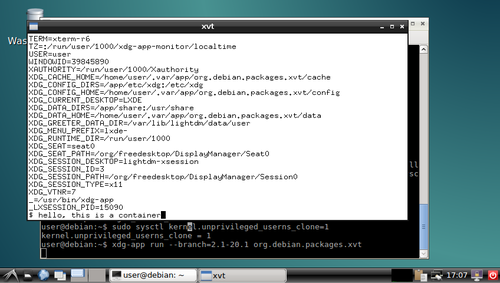
xvt in a container and you can play around with the shell in the xvt and see what you can and can't do in the container. I'm sure there were better ways to do most of this, but I think there's value in having such a simplistic demo to go alongside the various GNOMEish apps.
Acknowledgements: Thanks to all those!

Lars Wirzenius: Obnam 1.19.1 released (backup software)

I have just released version 1.19.1 of Obnam, the backup program. See the website at http://obnam.org for details on what the program does. The new version is available from git (see http://git.liw.fi) and as Debian packages from http://code.liw.fi/debian, and uploaded to Debian, and soon in unstable. The NEWS file extract below gives the highlights of what's new in this version. Basically, it fixes a bug. NOTE: Obnam has an EXPERIMENTAL repository format under development, called green-albatross. It is NOT meant for real use. It is likely to change in incompatible ways without warning. Do not use it unless you're willing to lose your backup. Version 1.19.1, released 2016-01-30 Bug fix:

29 January 2016

Jan Wagner: Oxidized - silly attempt at (Really Awesome New Cisco confIg Differ)

Since ages I wanted have replaced this freaking backup solution of our Network Equipment based on some hacky shell scripts and expect uploading the configs on a TFTP server. Years ago I stumbled upon RANCID (Really Awesome New Cisco confIg Differ) but had no time to implement it. Now I returned to my idea to get rid of all our old crap.
I don't know where, I think it was at DENOG2, I saw RANCID coupled with a VCS, where the NOC was notified about configuration (and inventory) changes by mailing the configuration diff and the history was indeed in the VCS.
The good old RANCID seems not to support to write into a VCS out of the box. But for the rescue there is rancid-git, a fork that promises git extensions and support for colorized emails. So far so good. While I was searching for a VCS capable RANCID, somewhere under a stone I found Oxidized, a 'silly attempt at rancid'. Looking at it, it seems more sophisticated, so I thought this might be the right attempt. Unfortunately there is no Debian package available, but I found an ITP created by Jonas. Anyway, for just looking into it, I thought the Docker path for a testbed might be a good idea, as no Debian package ist available (yet). For oxidized configuration is only a configfile needed and as nodes source a rancid compatible router.db file can be used (beside SQLite and http backend). A migration into a production environment seems pretty easy. So I gave it a go. I assume Docker is installed already. There seems to be a Docker image on Docker Hub, that looks official, but it seems not maintained (actually). An issue is open for automated building the image.

Creating Oxidized container image The official documentation describes the procedure. I used a slightly different approach.
docking-station:~# mkdir -p /srv/docker/oxidized/  
docking-station:~# git clone https://github.com/ytti/oxidized \  
 /srv/docker/oxidized/oxidized.git
docking-station:~# docker build -q -t oxidized/oxidized:latest \  
 /srv/docker/oxidized/oxidized.git
I thought it might be a good idea to also tag the image with the actual version of the gem.
docking-station:~# docker tag oxidized/oxidized:latest \  
 oxidized/oxidized:0.11.0
docking-station:~# docker images   grep oxidized  
oxidized/oxidized   latest    35a325792078  15 seconds ago  496.1 MB  
oxidized/oxidized   0.11.0    35a325792078  15 seconds ago  496.1 MB  
Create initial default configuration like described in the documentation.
docking-station:~# mkir -p /srv/docker/oxidized/.config/  
docking-station:~# docker run -e CONFIG_RELOAD_INTERVAL=600 \  
 -v /srv/docker/oxidized/.config/:/root/.config/oxidized \
 -p 8888:8888/tcp -t oxidized/oxidized:latest oxidized

Adjusting configuration After this I adjusted the default configuration for writing a log, the nodes config into a bare git, having nodes secrets in router.db and some hooks for debugging.

Creating node configuration
docking-station:~# echo "7204vxr.lab.cyconet.org:cisco:admin:password:enable" >> \  
 /srv/docker/oxidized/.config/router.db
docking-station:~# echo "ccr1036.lab.cyconet.org:routeros:admin:password" >> \  
 /srv/docker/oxidized/.config/router.db

Starting the oxidized beast
docking-station:~# docker run -e CONFIG_RELOAD_INTERVAL=600 \  
 -v /srv/docker/oxidized/.config/:/root/.config/oxidized \
 -p 8888:8888/tcp -t oxidized/oxidized:latest oxidized
Puma 2.16.0 starting...  
* Min threads: 0, max threads: 16
* Environment: development
* Listening on tcp://127.0.0.1:8888
If you want to have the container get started with the docker daemon automatically, you can start the container with --restart always and docker will take care of it. If I wanted to make it running permanent, I would use a systemd unitfile.

Reload configuration immediately If you don't want to wait to automatically reload of the configuration, you can trigger it.
docking-station:~# curl -s http://localhost:8888/reload?format=json \  
 -O /dev/null
docking-station:~# tail -2 /srv/docker/oxidized/.config/log/oxidized.log  
I, [2016-01-29T16:50:46.971904 #1]  INFO -- : Oxidized starting, running as pid 1  
I, [2016-01-29T16:50:47.073307 #1]  INFO -- : Loaded 2 nodes  

Writing nodes configuration
docking-station:/srv/docker/oxidized/.config/oxidized.git# git shortlog  
Oxidizied (2):  
      update 7204vxr.lab.cyconet.org
      update ccr1036.lab.cyconet.org
Writing the nodes configurations into a local bare git repository is neat but far from perfect. It would be cool to have all the stuff in a central VCS. So I'm pushing it every 5 minutes into one with a cron job.
docking-station:~# cat /etc/cron.d/doxidized  
# m h dom mon dow user  command                                                 
*/5 * * * *    root    $(/srv/docker/oxidized/bin/oxidized_cron_git_push.sh)
docking-station:~# cat /srv/docker/oxidized/bin/oxidized_cron_git_push.sh  
#!/bin/bash
DOCKER_OXIDIZED_BASE="/srv/docker/oxidized/"  
OXIDIZED_GIT_DIR=".config/oxidized.git"
cd $ DOCKER_OXIDIZED_BASE /$ OXIDIZED_GIT_DIR   
git push origin master --quiet  
Now having all the nodes configurations in a source code hosting system, we can browse the configurations, changes, history and even establish notifications for changes. Mission accomplished! Now I can test the coverage of our equipment. The last thing that would make me super happy, a oxidized Debian package!

28 January 2016

Sean Whitton: Becoming a Debian contributor

Over the past two months or so I have become a contributor to the Debian Project. This is something that I ve wanted to do for a while. Firstly, just because I ve got so much out of Debian over the last five or six years both as a day-to-day operating system and a place to learn about computing and I wanted to contribute something back. And secondly, in following the work of Joey Hess for the past three or four years I ve come to share various technical and social values with Debian. Of course, I ve long valued the project of making it possible for people to run their computers entirely on Free Software, but more recently I ve come to appreciate how Debian s mature technical and social infrastructure makes it possible for a large number of people to work together to produce and maintain high quality packages. The end result is that the work of making a powerful software package work well with other packages on a Debian system is carried out by one person or a small team, and then as many users who want to make use of that software need only apt-get it. It s hard to get the systems and processes to make this possible right, especially without a team being paid full-time to set it all up. Debian has managed it on the backs of volunteers. That s something I want to be a part of. So far, most of my efforts have been confined to packaging addons for the Emacs text editor and the Firefox web browser. Debian has common frameworks for packaging these and lots of scripts that make it pretty easy to produce new packages (I did one yesterday in about 30 minutes). It s valuable to package these addons because there are a great many advantages for a user in obtaining them from their local Debian mirror rather than downloading them from the de facto Emacs addons repository or the Mozilla addons site. Users know that trusted Debian project volunteers have reviewed the software I cannot yet upload my packages to the Debian archive by myself and the whole Debian infrastructure for reporting and classifying bugs can be brought to bear. The quality assurance standards built into these processes are higher than your average addon author s, not that I mean to suggest anything about authors of the particular addons I ve packaged so far. And automating the installation of such addons is easy as there are all sorts of tools to automate installations of Debian systems and package sets. I hope that I can expand my work beyond packaging Emacs and Firefox addons in the future. It s been great, though, to build my general knowledge of the Debian toolchain and the project s social organisation while working on something that is both relatively simple and valuable to package. Now I said at the beginning of this post that it was following the work of Joey Hess that brought me to Debian development. One thing that worries me about becoming involved in more contentious parts of the Debian project is the dysfunction that he saw in the Debian decision-making process, dysfunction which eventually led to his resignation from the project in 2014. I hope that I can avoid getting quagmired and demotivated.

Holger Levsen: 20160127-torbrowser-daily-tests

Daily tests of torbrowser-launcher, and on every git commit too Tor Browser for reasons beyond this blog post is not part of Debian. To easily and securely use it, one can run
sudo apt-get install torbrowser-launcher
and then run torbrowser-launcher which will download Tor Browser and well, launch it. And this sometimes breaks, when things change, which is rather frequently the case So yesterday I finally woke up to see what I wished to see every morning since November 15th last year, when I started testing torbrowser-launcher systematically on jenkins.debian.net: This is the graphical status overview of torbrowser tests on Debian which are tests installing torbrowser-launcher on and from sid, stretch, jessie-backports, jessie and wheezy-backports, which first download torbrowser via https and via tor, then launches it to finally connect to a debian mirror via an onion-address and then to www.debian.org. In addition to these there are also tests installing the package from stretch on jessie as well as the package from sid on stretch and jessie. Finally there are also tests for building the package from our git branches for various suites and finally we also build a package based on the upstream git master branch merged with our sid packaging. There are 17 different tests currently and they are configured in just two files, a 220 line yaml file defining the jenkins jobs and 528 lines of bash script containing the actual test code. The tests are using schroot, xvfb, kvkbd and gocr and are executed either daily or weekly (those testing the package from ftp.d.o) or on every commit and at least once every month (those testing the package build from git). At least briefly I have been looking at the this page every day since setting up these tests two months ago. Back then, torbrowser-launcher was broken in many suites and then it broke some more and instead of fixing it, I first made these tests so that at least in future there will be automatic notifications when things break. This has worked out rather nicely and torbrowser-launcher got fixed over time too. Doing so in jessie proper took longest as we missed 8.2. Once jessie was fixed the fix for wheezy-backports was also finally accepted very quickly. Which was this Monday, so yesterday on Tuesday I could enjoy for the first time an all "green page"! :-) And then on Wednesday, which is now also yesterday, the nice green page became less green due two new issues: #805173 really needs ca-certificates as depends and not recommends and then also the rendering of the new 5.5 version of torbrowser changed slightly Both issues have been addressed by now. I'm curious how this page will look tomorrow morning. And when I'll consider it the number of false negatives to be low enough so as I'll happily enable notifications to be send to the pkg privacy maintainers mailing list. I think it's almost the case and will keep an eye on the results the coming weeks and months. Last not least: if you want to run similar tests for your Debian project, I'd be glad to help! See you at FOSDEM?

27 January 2016

Jonas Smedegaard: BOSS - Barath Operating System Solutions

Siri and I are on a journey through India and Nepal, with the aim of learning about needs of Debian derivatives, to improve Debian and encourage closer integration.

C-DAC and BOSS Centre for Development of Advanced Computing (C-DAC) is a large organization serving country- and state-level institutions in India, with offices and training facilities several major cities. In Chennai, C-DAC has a staff of 25 developers working full time on Barath Operating System Solutions (BOSS). BOSS is a Debian derivative with several flavors - a desktop for use at primary schools (EduBOSS), a desktop for governmental offices (BOSS), and a range of server-oriented use cases using same core as the desktops with various (non-packaged) code and configuration on top. The core common to all BOSS flavors is a derivative of Debian. Major work has been in strengthening localization and related code - including the development of a font covering all officially supported indic scripts, tuning input methods configuration, and bugfixing LibreOffice handling of complex scripts. All that work is all passed directly to upstream code projects (some still show as derived work until sifting down again into Debian). Besides locale derivations, BOSS currently includes 11 packages not yet in Debian - a mixture of package dependencies, branding data and configuration tweaks. Seems most if not all can fit into Debian with a bit of restructuring work.

small computers As some of you know, I always had a special interest in low-resource (yet general purpose) computers (partly driven by my lack of money to spend on shinier hardware), and since ~2009 particularly in ARM-based computers. After 4 days of meetings and discussion with C-DAC, - literally few minutes before departure - I casually mentioned my interest in small computers, and much to my surprise it turned out that C-DAC also works on that, just didn't get around to mention it yet at the Debian wiki page. C-DAC have worked for a year on tuning BOSS to work on the Vidyut laptop (successor to the Aakash tablet). All except builtin camera is allegedly working. C-DAC is also looking into Olimex boards - my favorites - possibly for use with small server setups but our time was up, we had to leave for our train to Pune, so details on that we will have to figure out through mail.

collaboration In the past, C-DAC have kept in touch with their users through BOSS-specific places like a dedicated IRC channel. Recent changes in management style at the development office have caused less attention available to that communication, however. C-DAC have politely offered their code changes upstram for years, but maybe "too polite": Maybe they have offered only polished fixes, being less loud about "interesting problems". I suggested, as way to improve while limiting (ideally avoiding) extra work, is to mentally take a step up the stream: Treat BOSS not as a derivative but a subset of Debian itself, hang out and discuss issues and ideas at debian irc channels, and maintain your packages directly in Debian. Only parts unfit for Debian - secret stuff done for India military, and dirty configuration hacks not yet possible within Debian Policy - really need to be kept away from Debian. C-DAC agreed, and Debian now has a BOSS team! Anyone interested to follow BOSS as a Debian blend, and perhaps even contribute with opinions and/or code, is quite welcome to join the newly created mailinglist on Debian Alioth: https://lists.alioth.debian.org/mailman/listinfo/boss-devel. Our meetings with BOSS developers have been very pleasant. Even those working at the top of cloud or big data stacks - furthest away from our mindset of tightly "locking down" all parts as packages - were patient with us. Thanks in particular to Prema S and Prathibha B, working on packaging of BOSS for the past 5+ years, and both likely to enter the Debian New Maintainer Queue before long :-)

26 January 2016

Michal &#268;iha&#345;: Weekly phpMyAdmin contributions 2016-W03

Last week consisted mostly of code fixes. For example the code for checking latest phpMyAdmin turned out to be buggy under some PHP configurations. But most work for last week is not yet public, you will see it in upcoming security releases. All handled issues:

Filed under: English phpMyAdmin 0 comments

Next.

Previous.