Search Results: "ron"

14 June 2017

Dirk Eddelbuettel: #7: C++14, R and Travis -- A useful hack

Welcome to the seventh post in the rarely relevant R ramblings series, or R4 for short. We took a short break as several conferences and other events interfered during the month of May, keeping us busy and away from this series. But we are back now with a short and useful hack I came up with this weekend. The topic is C++14, i.e. the newest formally approved language standard for C++, and its support in R and on Travis CI. With release R 3.4.0 of a few weeks ago, R now formally supports C++14. Which is great. But there be devils. A little known fact is that R hangs on to its configuration settings from its own compile time. That matters in cases such as the one we are looking at here: Travis CI. Travis is a tremendously useful and widely-deployed service, most commonly connected to GitHub driving "continuous integration" (the 'CI') testing after each commit. But Travis CI, for as useful as it is, is also maddingly conservative still forcing everybody to live and die by [Ubuntu 14.04]http://releases.ubuntu.com/14.04/). So while we all benefit from the fine work by Michael who faithfully provides Ubuntu binaries for distribution via CRAN (based on the Debian builds provided by yours truly), we are stuck with Ubuntu 14.04. Which means that while Michael can provide us with current R 3.4.0 it will be built on ancient Ubuntu 14.04. Why does this matter, you ask? Well, if you just try to turn the very C++14 support added to R 3.4.0 on in the binary running on Travis, you get this error:
** libs
Error in .shlib_internal(args) : 
  C++14 standard requested but CXX14 is not defined
And you get it whether or not you define CXX14 in the session. So R (in version 3.4.0) may want to use C++14 (because a package we submitted requests it), but having been built on the dreaded Ubuntu 14.04, it just can't oblige. Even when we supply a newer compiler. Because R hangs on to its compile-time settings rather than current environment variables. And that means no C++14 as its compile-time compiler was too ancient. Trust me, I tried: adding not only g++-6 (from a suitable repo) but also adding C++14 as the value for CXX_STD. Alas, no mas. The trick to overcome this is twofold, and fairly straightforward. First off, we just rely on the fact that g++ version 6 defaults to C++14. So by supplying g++-6, we are in the green. We have C++14 by default without requiring extra options. Sweet. The remainder is to tell R to not try to enable C++14 even though we are using it. How? By removing CXX_STD=C++14 on the fly and just for Travis. And this can be done easily with a small script configure which conditions on being on Travis by checking two environment variables:
#!/bin/bash
## Travis can let us run R 3.4.0 (from CRAN and the PPAs) but this R version
## does not know about C++14.  Even though we can select CXX_STD = C++14, R
## will fail as the version we use there was built in too old an environment,
## namely Ubuntu "trusty" 14.04.
##
## So we install g++-6 from another repo and rely on the fact that is
## defaults to C++14.  Sadly, we need R to not fail and hence, just on
## Travis, remove the C++14 instruction
if [[ "$ CI " == "true" ]]; then
    if [[ "$ TRAVIS " == "true" ]]; then 
        echo "** Overriding src/Makevars and removing C++14 on Travis only"
        sed -i 's CXX_STD = CXX14 ' src/Makevars
    fi
fi
I have deployed this now for two sets of builds in two distinct repositories for two "under-development" packages not yet on CRAN, and it just works. In case you turn on C++14 via SystemRequirements: in the file DESCRIPTION, you need to modify it here. So to sum up, there it is: C++14 with R 3.4.0 on Travis. Only takes a quick Travis-only modification.

13 June 2017

Raphaël Hertzog: Freexian s report about Debian Long Term Support, May 2017

A Debian LTS logoLike each month, here comes a report about the work of paid contributors to Debian LTS. Individual reports In May, about 182 work hours have been dispatched among 11 paid contributors. Their reports are available: Evolution of the situation The number of sponsored hours did not change and we are thus still a little behind our objective. The security tracker currently lists 44 packages with a known CVE and the dla-needed.txt file 42. The number of open issues is close to last month. Thanks to our sponsors New sponsors are in bold (none this month unfortunately).

No comment Liked this article? Click here. My blog is Flattr-enabled.

Gunnar Wolf: Reporting progress on the translation infrastructure

Some days ago, I blogged asking for pointers to get started with the translation of Made with Creative Commons. Thank you all for your pointers and ideas! To the people that answered via private mail, via IRC, via comments on the blog. We have made quite a bit of progress so far; I want to test some things before actually sending a call for help. What do we have?
Git repository set up
I had already set up a repository at GitLab; right now, the contents are far from useful, they merely document what I have done so far. I have started talking with my Costa Rican friend Leo Arias, who is also interested in putting some muscle behind this translation, and we are both the admins to this project.
Talked with the authors
Sarah is quite enthusiastic about us making this! I asked her to hold a little bit before officially announcing there is work ongoing... I want to get bits of infrastructure ironed out first. Important Talking with her, she discussed the tools they used for authoring the book. It made me less of a purist :) Instead of starting from something "pristine", our master source will be the PDF export of the Google Docs document.
Markdown conversion
Given that translation tools work over the bits of plaintext, we want to work with the "plainest" rendition of the document, which is Markdown. I found that Pandoc does a very good approximation to what we need (that is, introduces very little "ugly" markup elements). Converting the ODT into Markdown is as easy as:
$ pandoc -f odt MadewithCreativeCommonsmostup-to-dateversion.odt -t markdown > MadewithCreativeCommonsmostup-to-dateversion.md
Of course, I want to fine-tune this as much as possible.
Producing a translatable .po file
I have used Gettext to translate user interfaces; it is a tool very well crafted for that task. Translating a book is quite different: How and where does it break and join? How are paragraphs "strung" together into chapters, parts, a book? That's a task for PO 4 Anything (po4a). As simple as this:
po4a-gettextize -f text -m MadewithCreativeCommonsmostup-to-dateversion.md -p MadewithCreativeCommonsmostup-to-dateversion.po -M utf-8
I tested the resulting file with my good ol' trusty poedit, and it works... Very nicely!
What is left to do?

11 June 2017

Benjamin Mako Hill: The Wikipedia Adventure

I recently finished a paper that presents a novel social computing system called the Wikipedia Adventure. The system was a gamified tutorial for new Wikipedia editors. Working with the tutorial creators, we conducted both a survey of its users and a randomized field experiment testing its effectiveness in encouraging subsequent contributions. We found that although users loved it, it did not affect subsequent participation rates.
Start screen for the Wikipedia Adventure.
A major concern that many online communities face is how to attract and retain new contributors. Despite it s success, Wikipedia is no different. In fact, researchers have shown that after experiencing a massive initial surge in activity, the number of active editors on Wikipedia has been in slow decline since 2007.
The number of active, registered editors ( 5 edits per month) to Wikipedia over time. From Halfaker, Geiger, and Morgan 2012.
Research has attributed a large part of this decline to the hostile environment that newcomers experience when begin contributing. New editors often attempt to make contributions which are subsequently reverted by more experienced editors for not following Wikipedia s increasingly long list of rules and guidelines for effective participation. This problem has led many researchers and Wikipedians to wonder how to more effectively onboard newcomers to the community. How do you ensure that new editors Wikipedia quickly gain the knowledge they need in order to make contributions that are in line with community norms? To this end, Jake Orlowitz and Jonathan Morgan from the Wikimedia Foundation worked with a team of Wikipedians to create a structured, interactive tutorial called The Wikipedia Adventure. The idea behind this system was that new editors would be invited to use it shortly after creating a new account on Wikipedia, and it would provide a step-by-step overview of the basics of editing.

The Wikipedia Adventure was designed to address issues that new editors frequently encountered while learning how to contribute to Wikipedia. It is structured into different missions that guide users through various aspects of participation on Wikipedia, including how to communicate with other editors, how to cite sources, and how to ensure that edits present a neutral point of view. The sequence of the missions gives newbies an overview of what they need to know instead of having to figure everything out themselves. Additionally, the theme and tone of the tutorial sought to engage new users, rather than just redirecting them to the troves of policy pages. Those who play the tutorial receive automated badges on their user page for every mission they complete. This signals to veteran editors that the user is acting in good-faith by attempting to learn the norms of Wikipedia.

An example of a badge that a user receives after demonstrating the skills to communicate with other users on Wikipedia.
Once the system was built, we were interested in knowing whether people enjoyed using it and found it helpful. So we conducted a survey asking editors who played the Wikipedia Adventure a number of questions about its design and educational effectiveness. Overall, we found that users had a very favorable opinion of the system and found it useful.
Survey responses about how users felt about TWA.
Survey responses about what users learned through TWA.
We were heartened by these results. We d sought to build an orientation system that was engaging and educational, and our survey responses suggested that we succeeded on that front. This led us to ask the question could an intervention like the Wikipedia Adventure help reverse the trend of a declining editor base on Wikipedia? In particular, would exposing new editors to the Wikipedia Adventure lead them to make more contributions to the community? To find out, we conducted a field experiment on a population of new editors on Wikipedia. We identified 1,967 newly created accounts that passed a basic test of making good-faith edits. We then randomly invited 1,751 of these users via their talk page to play the Wikipedia Adventure. The rest were sent no invitation. Out of those who were invited, 386 completed at least some portion of the tutorial. We were interested in knowing whether those we invited to play the tutorial (our treatment group) and those we didn t (our control group) contributed differently in the first six months after they created accounts on Wikipedia. Specifically, we wanted to know whether there was a difference in the total number of edits they made to Wikipedia, the number of edits they made to talk pages, and the average quality of their edits as measured by content persistence. We conducted two kinds of analyses on our dataset. First, we estimated the effect of inviting users to play the Wikipedia Adventure on our three outcomes of interest. Second, we estimated the effect of playing the Wikipedia Adventure, conditional on having been invited to do so, on those same outcomes. To our surprise, we found that in both cases there were no significant effects on any of the outcomes of interest. Being invited to play the Wikipedia Adventure therefore had no effect on new users volume of participation either on Wikipedia in general, or on talk pages specifically, nor did it have any effect on the average quality of edits made by the users in our study. Despite the very positive feedback that the system received in the survey evaluation stage, it did not produce a significant change in newcomer contribution behavior. We concluded that the system by itself could not reverse the trend of newcomer attrition on Wikipedia. Why would a system that was received so positively ultimately produce no aggregate effect on newcomer participation? We ve identified a few possible reasons. One is that perhaps a tutorial by itself would not be sufficient to counter hostile behavior that newcomers might experience from experienced editors. Indeed, the friendly, welcoming tone of the Wikipedia Adventure might contrast with strongly worded messages that new editors receive from veteran editors or bots. Another explanation might be that users enjoyed playing the Wikipedia Adventure, but did not enjoy editing Wikipedia. After all, the two activities draw on different kinds of motivations. Finally, the system required new users to choose to play the tutorial. Maybe people who chose to play would have gone on to edit in similar ways without the tutorial. Ultimately, this work shows us the importance of testing systems outside of lab studies. The Wikipedia Adventure was built by community members to address known gaps in the onboarding process, and our survey showed that users responded well to its design. While it would have been easy to declare victory at that stage, the field deployment study painted a different picture. Systems like the Wikipedia Adventure may inform the design of future orientation systems. That said, more profound changes to the interface or modes of interaction between editors might also be needed to increase contributions from newcomers.

This blog post, and the open access paper that it describes, is a collaborative project with Sneha Narayan, Jake Orlowitz, Jonathan Morgan, and Aaron Shaw. Financial support came from the US National Science Foundation (grants IIS-1617129 and IIS-1617468), Northwestern University, and the University of Washington. We also published all the data and code necessary to reproduce our analysis in a repository in the Harvard Dataverse. Sneha posted the material in this blog post over on the Community Data Science Collective Blog.

9 June 2017

John Goerzen: Fixing the Problems with Docker Images

I recently wrote about the challenges in securing Docker container contents, and in particular with keeping up-to-date with security patches from all over the Internet. Today I want to fix that. Besides security, there is a second problem: the common way of running things in Docker pretends to provide a traditional POSIX API and environment, but really doesn t. This is a big deal. Before diving into that, I want to explain something: I have often heard it said the Docker provides single-process containers. This is unambiguously false in almost every case. Any time you have a shell script inside Docker that calls cp or even ls, you are running a second process. Web servers from Apache to whatever else use processes or threads of various types to service multiple connections at once. Many Docker containers are single-application, but a process is a core part of the POSIX API, and very little software would work if it was limited to a single process. So this is my little plea for more precise language. OK, soapbox mode off. Now then, in a traditional Linux environment, besides your application, there are other key components of the system. These are usually missing in Docker containers. So today, I will fix this also. In my docker-debian-base images, I have prepared a system that still has only 11MB RAM overhead, makes minimal changes on top of Debian, and yet provides a very complete environment and API. Here s what you get: The above goes into my minimal image. Additional images add layers on top of it, and here are some of the features they add: All of the above, including the optional features, has an 11MB overhead on start. Not bad for so much, right? From here, you can layer on top all your usual Dockery things. You can still run one application per container. But you can now make sure your disk doesn t fill up from logs, run your database vacuuming commands at will, have your blog download its RSS feeds every few minutes, etc all from within the container, as it should be. Furthermore, you don t have to reinvent the wheel, because Debian already ships with things to take care of a lot of this out of the box and now those tools will just work. There is some popular work done in this area already by phusion s baseimage-docker. However, I made my own for these reasons: Finally a word on the choice to use sysvinit. It would have been simpler to use systemd here, since it is the default in Debian these days. Unfortunately, systemd requires you to poke some holes in the Docker security model, as well as mount a cgroups filesystem from the host. I didn t consider this acceptable, and sysvinit ran without these workarounds, so I went with it. With all this, Docker becomes a viable replacement for KVM for various services on my internal networks. I ll be writing about that later.

8 June 2017

Norbert Preining: Running in the Kanazawa hills

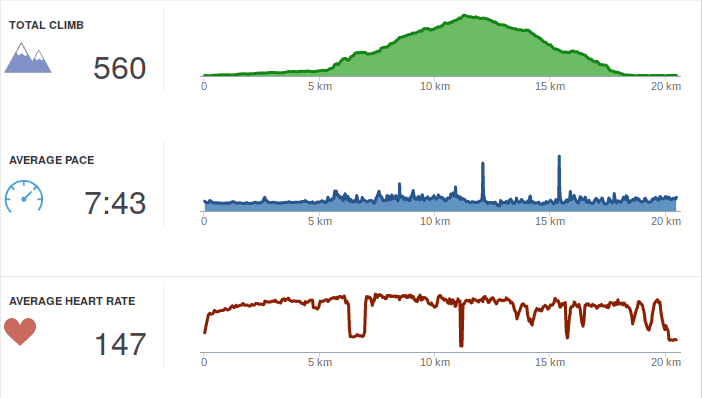
Sometimes I needed a short break from work, and usually I go a bit running. Normally I run between five and ten km, just around our flat. But yesterday I somehow thought it might be a good idea to run through the hills near by. I usually drive up there to a climbing spot or a cafe, so it will for sure not be that long. Well, my estimation was wrong
Turned out to be 20km and quite a trip up and down, in fact 560mH running up wasn t what I could actually do, so I walked the steeper parts. Due to the permanent rain the views weren t that great, but one gets a feeling how far it is back to town. I used my new fenix 5x for the run (was helpful with the built-in map, report later), so I got very detailed data from Garmin Connect. Not that I really understand what it is all for, but Garmin told me that I am overtraining and that I am not a good runner (due to vertical oscillation etc). I guess there is a whole lot to learn and improve. Anyway, I made it back alive, and the first thing I needed was loads of water to drink

6 June 2017

Gunnar Wolf: Made with Creative Commons: Starting a translation project

Dear Lazyweb, About a week ago, I learnt about the release of an interesting book by the fine people at Creative Commons: Made with Creative Commons. The book itself is, of course, CC BY-SA-licensed. I downloaded it and started reading right away. Some minutes later, I ordered a dead-tree copy, which arrived a couple of days ago. (I'm linking to the publisher's page, but bought it from Amazon M xico... Shipping it from Denmark would not have been as cheap and fast, I guess). Anyway, given my workplace, given the community I know, given I know something like this is much needed... I will start a Spanish translation of the content. There are at least two other people interested in participating, and I haven't yet publicized my intentions (this is the first public statement about it). So, dear Lazyweb: What I need is a good framework for doing this. I started by creating a Git repository, and we were discussing to translate to Markdown (to later format according to the desired output) but then I thought... If we want the translation to be updateable, and to be able to properly accept other people's work, maybe a better format is warranted? So, my current idea is to create a Markdown version for the English original, and find a way to shoehorn^Wseparate it by paragraphs and feed it to Gettext, which is the best translation framework I have used (but is meant for code translation, not for full-text)... Dear lazyweb: What tools do you recommend me to use? Quite important to me: Are they Free tools? Are they easy to use by third-parties, maybe incorporating work via Git? Or, at least, via a Web front-end that allows me as a project lead to review and approve/fix/reject strings? Thanks, lazyweb!

Russ Allbery: Review: Star Healer

Review: Star Healer, by James White
Series: Sector General #6
Publisher: Orb
Copyright: 1984
Printing: 2002
ISBN: 0-312-87770-6
Format: Trade paperback
Pages: 206
Star Healer is the sixth book of the Sector General series, and I think it may be the first novel in the series that was written as a novel instead of a fix-up of short stories. That makes it not a bad place to start in the series if one would rather not deal with fix-ups or barely-disguised short story collections. There isn't a huge amount of character development over the course of this series (at least to this point), so the main thing you would lose by starting here is some built-up reason for caring about the main character. This is the third book in the Alien Emergencies omnibus (the book referenced in the publication information here). Most of the previous stories have focused on Conway, a Senior Physician in the sprawling and wonderfully well-equipped multi-species hospital called Sector General and, in recent stories, the head physician in the hospital's ambulance ship. Becoming a Senior Physician at Sector General is quite the accomplishment, and a fine point to reach in the career of any doctor specializing in varied life forms, but there is another tier above: the Diagnosticians, who are the elite of Sector General. The difference is education tapes. Deep knowledge of even one specific type of life is a lot to ask of a doctor, as shown by the increasing specialization of human medicine. Sector General, which deals with wildly varying ailments of thousands of species including entirely unknown ones (if, admittedly, primarily trauma, at least in the stories shown), would be an impossible task. White realizes this and works around it with education tapes that temporarily embed in a doctor's head the experience of a doctor of another species entirely. This provides the native expertise missing, but it comes with the full personality of the doctor who recorded the tape, including preferences for food and romantic attachment that may be highly disorienting. Senior Physicians use a tape at a time, and then have it erased again when they don't need it. Diagnosticians juggle four or more tapes at the same time, and keep them for long periods or even permanently, allowing them to do ground-breaking original research. The opening of Star Healer is an offer from the intimidating Chief Psychologist of Sector General: he has a shot at Diagnostician. But it's a major decision that he should think over first, so the next step is to take a vacation of sorts on a quiet world with a small human scientific station. Oh, and there's a native medical problem, although not one with much urgency. Conway doesn't do a lot of resting, because of course he gets pulled into trying to understand the mystery of an alien species that is solitary to the point of deep and unbreakable social taboos against even standing close to other people. This is a nice cultural puzzle in line with the rest of the series, but it also leaves Conway with a new ally: an alien healer in a society in which being a doctor is difficult to the point of near hopelessness. It's not much of a spoiler to say that of course Conway decides to try for Diagnostician after his "vacation." The rest of the book is him juggling multiple cases with his new and often conflicting modes of thinking, and tackling problems that require a bit less in the way of puzzle-solving and a bit more in the way of hard trade-off decisions and quick surgical action. Senior Physicians may be able to concentrate on just one puzzle at a time; Diagnosticians have to juggle several. And they're larger, more long-term problems, focusing on how to improve a general problem for a whole species rather than just heal a specific injured alien. One interesting aspect of this series, which is very much on display here, is that Sector General most definitely does not have a Prime Directive. They are cautious about making contact with particularly primitive civilizations for fear that spacefarers would give them an inferiority complex, but sometimes they do anyway. And if they run into some biological system that offends their sensibilities, they try to fix it, not just observe it. White frequently shows species caught in what the characters call "biological traps," unable to develop farther because of some biological adaptation that gets in their way, and Sector General tries to fix those. It's an interesting ethical problem that I wish they'd think about a bit more. It's not clear they're wrong, and I think it's correct to take an expansive view of the mission to heal, but there's also a sense in which Sector General is modifying culture and biology to make aliens more like them. (The parallels between this and all the abusive paternalism that human cultures do around disability is a little too close to home to be comfortable, and now I kind of wish it hadn't occurred to me.) The gender roles, sadly, continue to be dire, although mostly ignorable because the one major female character is generally just shown as another doctor with little attention to sex. But apparently women (of every species!) cannot become Diagnosticians because they have an insurmountable biological aversion to sharing their minds with a learning tape from any doctor who doesn't find them physically attractive, which is just... sigh. It's sad that someone who could write an otherwise remarkably open-minded and pacifist series of stories, in sharp contrast with most of SF history, would still have that large of a blind spot. Apart from the times gender comes up, I liked this book more than the rest of the series, in part because I strongly prefer novels to short stories. There's more room to develop the story, and while characterization continues to not be White's strong point and that space mostly goes to more puzzles instead, he does provide an interesting set of interlocking puzzles. The problem posed by the aliens Conway meets on his "vacation" isn't fully resolved here (presumably that's for a future book), but he does solve several other significant problems and develops his own problem-solving style in more depth than in previous stories. Mildly recommended, particularly if you like this series in general. Followed by Code Blue - Emergency. Rating: 7 out of 10

4 June 2017

Dirk Eddelbuettel: RcppArmadillo 0.7.900.2.0

armadillo image The new RcppArmadillo release 0.7.900.2.0 is now on CRAN, and the Debian package was just updated as well. Armadillo is a powerful and expressive C++ template library for linear algebra aiming towards a good balance between speed and ease of use with a syntax deliberately close to a Matlab. RcppArmadillo integrates this library with the R environment and language--and is widely used by (currently) 350 other packages on CRAN---an increase of 32 since the last CRAN release of 0.7.800.2.0 in April! With the 7.900.* series of Armadillo, Conrad has started to more fully utilize OpenMP (also see Wikipedia on OpenMP) for operations that can be parallelized. To use this in your package you need to update its src/Makevars ,.win file similarly to what the skeleton default now uses
PKG_CXXFLAGS = $(SHLIB_OPENMP_CXXFLAGS) 
PKG_LIBS = $(SHLIB_OPENMP_CFLAGS) $(LAPACK_LIBS) $(BLAS_LIBS) $(FLIBS)
and you may want to enable C++11 while you are at it---though this may pose issues with older-than-ancient RHEL installations which are still (way too) pervasive so we do not do it by default (yet). Here, we once again rely on the build infrastructure automagically provided by R itself: if and when OpenMP is available, R will use it via $(SHLIB_OPENMP_CXXFLAGS) etc; see the fine WRE manual for details. That said, some operating systems make this harder than other, and macOS usually takes the crown. See for example this blog post by James for surviving in that environment. I am a little short of details because on Linux these things just work, and have for well over a decade. The rcpp-devel mailing list will be the best place for questions. Changes in this release relative to the previous CRAN release are as follows:

Changes in RcppArmadillo version 0.7.900.2.0 (2017-06-02)
  • Upgraded to Armadillo release 7.900.2 (Evil Banana Republic)
    • Expanded clamp() to handle cubes
    • Computationally expensive element-wise functions (such as exp(), log(), cos(), etc) can now be automatically sped up via OpenMP; this requires a C++11/C++14 compiler with OpenMP 3.0+ support for GCC and clang compilers
    • One caveat: when using GCC, use of -march=native in conjunction with -fopenmp may lead to speed regressions on recent processors
  • Added gcc 7 to support compiler check (James Balamuta in #128 addressing #126).
  • A unit test helper function for rmultinom was corrected (#133).
  • OpenMP support was added to the skeleton helper in inline.R

Courtesy of CRANberries, there is a diffstat report. More detailed information is on the RcppArmadillo page. Questions, comments etc should go to the rcpp-devel mailing list off the R-Forge page.

This post by Dirk Eddelbuettel originated on his Thinking inside the box blog. Please report excessive re-aggregation in third-party for-profit settings.

3 June 2017

Norbert Preining: TeX Live 2017 released

TeX Live 2017 has been released! CTAN mirrors are busy updating. Get out bottles of good wine, and enjoy a good long download
Besides the huge amount of package updates due to the 2 month testing hiatus, I want to pick a few changes before copying the complete changelog entry: Additional TEXMF trees tlmgr got a new functionality to easily add and remove additional TEXMF trees to the search path. MikTeX had this features since long, and it was often requested. As it turned out, it is a rather trivial thing to achieve by some texmf.cnf lines. The rest is just front end in tlmgr. Here a few invocations (not very intelligent usage, though):
$ tlmgr conf auxtrees show
tlmgr: no auxiliary texmf trees defined.
$ tlmgr conf auxtrees add /projects/book-abc
$ tlmgr conf auxtrees
List of auxiliary texmf trees:
  /projects/book-abc
$ tlmgr conf auxtrees remove /projects/book-abc
$ tlmgr conf auxtrees show
tlmgr: no auxiliary texmf trees defined.
TeX Live Manager interactive shell tlmgr also got an interactive shell now, that can also be used for scripting. Available commands are all the usual command line actions, plus a few more (see documentation). Again, here a simple session:
$ tlmgr shell
protocol 1
tlmgr> load local
OK
tlmgr> load remote
tlmgr: package repositories
	main = /home/norbert/public_html/tlnet (verified)
	koma = http://www.komascript.de/repository/texlive/2017 (verified)
OK
tlmgr> update --list
tlmgr: package repositories
	main = /home/norbert/public_html/tlnet (verified)
	koma = http://www.komascript.de/repository/texlive/2017 (verified)
tlmgr: saving backups to /home/norbert/tl/2017/tlpkg/backups
tlmgr: no updates available
OK
tlmgr> byebye
$
User versus System mode for updmap and fmtutil I have reported on this during BachoTeX/TUG 2017, here are the slides, that the two central configuration programs updmap and fmtutil will change their operation mode slightly by disallowing invocations without mde specification. That is, one either needs to call updmap -sys (or updmap-sys, nothing changed here from previous years) or updmap -user (or updmap-user, new in TeX Live 2017). We hope by this and the accompanying web page of recommendations to help users not to shoot themselves to often by calling updmap without knowing the consequences. The upcoming proceedings of the BachoTeX will also comtain an article fully documenting both updmap and fmtutil including the most recent changes.
These were only a few changes where I had my fingers in the development. For the full list, read on below. Now get ready for partying, and also for the end of the peace, because daily package updates will restart in the next days. Enjoy Changes since TeX Live 2016 The following list of changes is directly from the TeX Live documentation.

2 June 2017

Evgeni Golov: Breaking glass, OnePlus service and Android backups

While visiting our Raleigh office, I managed to crack the glass on the screen of my OnePlus 3. Luckily it was a clean crack from the left upper corner, to the right lower one. The crack was not really interfering with neither touch nor display, so I had not much pressure in fixing it. eBay lists new LCD sets for 110-130 , and those still require manual work of getting the LCD assembly out of the case, replacing it, etc. There are also glass-only sets for ~20 , but these require the complete removal of the glued glass part from the screen, and reattaching it, nothing you want to do at home. But there is also still the vendor, who can fix it, right? Internet suggested they would do it for about 100 , which seemed fair. As people have been asking about the support experience, here is a quick write up what happened:
  • Opened the RMA request online on Sunday, providing a brief description of the issue and some photos
  • Monday morning answer from the support team, confirming this is way out of warranty, but I can get the device fixed for about 93
  • After confirming that the extra cost is expected, I had an UPS sticker to ship the device to CTDI in Poland
  • UPS even tried a pick-up on Tuesday, but I was not properly prepared, so I dropped the device later at a local UPS point
  • It arrived in Poland on Wednesday
  • On Thursday the device was inspected, pictures made etc
  • Friday morning I had a quote in my inbox, asking me to pay 105 - the service partner decided to replace the front camera too, which was not part of the original 93 approximation.
  • Paid the money with my credit card and started waiting.
  • The actual repair happened on Monday.
  • Quality controlled on Tuesday.
  • Shipped to me on Wednesday.
  • Arrived at my door on Thursday.
All in all 9 working days, which is not great, but good enough IMHO. And the repair is good, and it was not (too) expensive. So I am a happy user of an OnePlus 3 again. Well, almost. Before sending the device for repairs, had to take a backup and wipe it. I would not send it with my, even encrypted, data on it. And backups and Android is something special. Android will backup certain data to Google, if you allow it to. Apps can forbid that. Sadly this also blocks non-cloud backups with adb backup. So to properly backup your system, you either need root or you create a full backup of the system in the recovery and restore that. I did the backup using TWRP, transferred it to my laptop, wiped the device, sent it in, got it back, copied the backup to the phone, restored it and... Was locked out of the device, it would not take my password anymore. Well, it seems that happens, just delete some files and it will be fine. It's 2017, are backups of mobile devices really supposed to be that hard?!

1 June 2017

Steve Kemp: So I accidentally wrote a linux security module

Tonight I read this weeks LWN quotes-page a little later than usual because I was busy at work for most of the day. Anyway as always LWNs content was awesome, and this particular list lead to an interesting discussion about a new Linux-Security-Module (LSM).
That read weirdly, what I was trying to say was that every Thursday morning I like to read LWN at work. Tonight is the first chance I had to get round to it.
One of the later replies in the thread was particularly interesting as it said:
Suggestion:
Create an security module that looks for the attribute
    security.WHITELISTED
on things being executed/mmapped and denys it if the attribute
isn't present. Create a program (whitelistd) that reads
/etc/whitelist.conf and scans the system to ensure that only
things on the list have the attribute.
So I figured that was a simple idea, and it didn't seem too hard even for myself as a non-kernel non-developer. There are several linux security modules included in the kernel-releases, beneath the top-level security/ directory, so I assumed I could copy & paste code around them to get something working. During the course of all this work, which took about 90 minutes from start to Finnish (that pun never gets old), this online documentation was enormously useful: Brief attr primer If you're not familiar with the attr tool it's pretty simple. You can assign values to arbitrary labels on files. The only annoying thing is you have to use extra-flags to commands like rsync, tar, cp, etc, to preserve the damn things. Set three attributes on the file named moi:
$ touch moi
$ attr -s forename -V "Steve"      moi
$ attr -s surname  -V "Kemp"       moi
$ attr -s name     -V "Steve Kemp" moi
Now list the attributes present:
$ attr -l moi
Attribute "name" has a 10 byte value for moi
Attribute "forename" has a 5 byte value for moi
Attribute "surname" has a 4 byte value for moi
And retrieve one?
$ attr -q -g name moi
Steve Kemp
LSM Skeleton My initial starting point was to create "steve_lsm.c", with the following contents:
 #include <linux/lsm_hooks.h>
 /*
  * Log things for the moment.
  */
 static int steve_bprm_check_security(struct linux_binprm *bprm)
  
     printk(KERN_INFO "STEVE LSM check of %s\n", bprm->filename);
     return 0;
  
 /*
  * Only check exec().
  */
 static struct security_hook_list steve_hooks[] =  
     LSM_HOOK_INIT(bprm_check_security, steve_bprm_check_security),
  ;
 /*
  * Somebody set us up the bomb.
  */
 static void __init steve_init(void)
  
     security_add_hooks(steve_hooks, ARRAY_SIZE(steve_hooks), "steve");
     printk(KERN_INFO "STEVE LSM initialized\n");
  
With that in place I had to modify the various KBuild files beneath security/ to make sure this could be selected as an LSM, and add in a Makefile to the new directory security/steve/. With the boiler-plate done though, and the host machine rebooted into my new kernel it was simple to test things out. Obviously the first step, post-boot, is to make sure that the module is active, which can be done in two ways, looking at the output of dmesg, and explicitly listing the modules available:
 ~# dmesg   grep STEVE   head -n2
 STEVE LSM initialized
 STEVE LSM check of /init
 $ echo $(cat /sys/kernel/security/lsm)
 capability,steve
Making the LSM functional The next step was to make the module do more than mere logging. In short this is what we want: NOTE we don't care what the content of the extended attribute is, we just care whether it exists or not. Reading the extended attribute is pretty simple, using the __vfs_getxattr function. All in all our module becomes this:
  #include <linux/xattr.h>
  #include <linux/binfmts.h>
  #include <linux/lsm_hooks.h>
  #include <linux/sysctl.h>
  #include <linux/ptrace.h>
  #include <linux/prctl.h>
  #include <linux/ratelimit.h>
  #include <linux/workqueue.h>
  #include <linux/string_helpers.h>
  #include <linux/task_work.h>
  #include <linux/sched.h>
  #include <linux/spinlock.h>
  #include <linux/lsm_hooks.h>
  /*
   * Perform a check of a program execution/map.
   *
   * Return 0 if it should be allowed, -EPERM on block.
   */
  static int steve_bprm_check_security(struct linux_binprm *bprm)
   
         // The current task & the UID it is running as.
         const struct task_struct *task = current;
         kuid_t uid = task->cred->uid;
         // The target we're checking
         struct dentry *dentry = bprm->file->f_path.dentry;
         struct inode *inode = d_backing_inode(dentry);
         // The size of the label-value (if any).
         int size = 0;
         // Root can access everything.
         if ( uid.val == 0 )
            return 0;
         size = __vfs_getxattr(dentry, inode, "user.whitelisted", NULL, 0);
         if ( size >= 0 )
          
             printk(KERN_INFO "STEVE LSM check of %s resulted in %d bytes from 'user.whitelisted' - permitting access for UID %d\n", bprm->filename, size, uid.val );
             return 0;
          
         printk(KERN_INFO "STEVE LSM check of %s denying access for UID %d [ERRO:%d] \n", bprm->filename, uid.val, size );
         return -EPERM;
   
  /*
   * The hooks we wish to be installed.
   */
  static struct security_hook_list steve_hooks[] =  
       LSM_HOOK_INIT(bprm_check_security, steve_bprm_check_security),
   ;
  /*
   * Initialize our module.
   */
  void __init steve_add_hooks(void)
   
       /* register ourselves with the security framework */
       security_add_hooks(steve_hooks, ARRAY_SIZE(steve_hooks), "steve");
       printk(KERN_INFO "STEVE LSM initialized\n");
   
Once again we reboot with this new kernel, and we test that the LSM is active. After the basic testing, as before, we can now test real functionality. By default no binaries will have the attribute we look for present - so we'd expect ALL commands to fail, unless executed by root. Let us test that:
~# su - nobody -s /bin/sh
No directory, logging in with HOME=/
Cannot execute /bin/sh: Operation not permitted
That looks like it worked. Let us allow users to run /bin/sh:
 ~# attr -s whitelisted -V 1 /bin/sh
Unfortunately that fails, because symlinks are weird, but repeating the test with /bin/dash works as expected:
 ~# su - nobody -s /bin/dash
 No directory, logging in with HOME=/
 Cannot execute /bin/dash: Operation not permitted
 ~# attr -s whitelisted -V 1 /bin/dash
 ~# attr -s whitelisted -V 1 /usr/bin/id
 ~# su - nobody -s /bin/dash
 No directory, logging in with HOME=/
 $ id
 uid=65534(nobody) gid=65534(nogroup) groups=65534(nogroup)
 $ uptime
 -su: 2: uptime: Operation not permitted
And our logging shows the useful results as we'd expect:
  STEVE LSM check of /usr/bin/id resulted in 1 bytes from 'user.WHITELISTED' - permitting access for UID 65534
  STEVE LSM check of /usr/bin/uptime denying access for UID 65534 [ERRO:-95]
Surprises If you were paying careful attention you'll see that we changed what we did part-way through this guide. Not sure what is going on there, but it was very confusing. It appears to be the case that when you set an attribute a secret user. prefix is added to the name. Could be worth some research by somebody with more time on their hands than I have. Anyway I don't expect this is a terribly useful module, but it was my first, and I think it should be pretty stable. Feedback on my code certainly welcome!

Markus Koschany: My Free Software Activities in May 2017

Welcome to gambaru.de. Here is my monthly report that covers what I have been doing for Debian. If you re interested in Java, Games and LTS topics, this might be interesting for you. Debian Games Bug fixes New upstream release Debian Java Debian LTS This was my fifteenth month as a paid contributor and I have been paid to work 27,25 hours on Debian LTS, a project started by Rapha l Hertzog. In that time I did the following: Misc Thanks for reading and see you next time.

31 May 2017

Enrico Zini: Debian Jessie Live on UEFI part 2

A refinement on my previous attempt. This is how to configure a Jessie live-build environment to boot on UEFI systems, and get a USB key image that works:
# Build a FAT image instead of an ISO image...
lb config -b hdd
# ...and work around #773833
echo "/usr/lib/syslinux/mbr/*.bin /usr/lib/syslinux/" > hooks/9000-fix-773833.chroot
# Get EFI Shell from https://svn.code.sf.net/p/edk2/code/trunk/edk2/ShellBinPkg/UefiShell/X64/
curl -o binary/efi/boot/Bootx64.efi https://svn.code.sf.net/p/edk2/code/trunk/edk2/ShellBinPkg/UefiShell/X64/Shell.efi
# Configure the EFI shell to boot the live setup
echo 'live\vmlinuz initrd=live\initrd.img append boot=live components' > binary/startup.nsh
Rationale: UEFI understants FAT filesystems, and would run EFI binaries placed under efi/boot. For a hard drive, it only considers a FAT filesystem on a GPT partition marked with a special UUID, so that it doesn't get confused with other FAT filesystems that are on disk. For a USB key, it seems that most hardware will happily look for efi/boot even if the partition table is the old MBR kind. live-build can build a FAT image for USB keys, losing the ability to boot on CDROMs and DVDs. Since I don't need that ability, I can use -b hdd to get the live system packaged inside a container that UEFI hardware can understand (FAT). At that point, enabling UEFI boot on a Live Debian Jessie is just a matter of adding an efi/boot/Bootx64.efi binary that is able to load the kernel and initrd in memory, and blow life into them.

Chris Lamb: Free software activities in May 2017

Here is my monthly update covering what I have been doing in the free software world (previous month):

Reproducible builds

Whilst anyone can inspect the source code of free software for malicious flaws, most software is distributed pre-compiled to end users. The motivation behind the Reproducible Builds effort is to permit verification that no flaws have been introduced either maliciously or accidentally during this compilation process by promising identical results are always generated from a given source, thus allowing multiple third-parties to come to a consensus on whether a build was compromised. (I have generously been awarded a grant from the Core Infrastructure Initiative to fund my work in this area.) This month I:
I also made the following changes to our tooling:
diffoscope

diffoscope is our in-depth and content-aware diff utility that can locate and diagnose reproducibility issues.

  • Don't fail when run under perversely-recursive input files. (#780761).

strip-nondeterminism

strip-nondeterminism is our tool to remove specific non-deterministic results from a completed build.

  • Move from verbose_print to nonquiet_print so we print when normalising a file. This is so we can start to target the removal of strip-nondeterminism itself.
  • Only print log messages by default if the file was actually modified. (#863033)
  • Update package long descriptions to clarify that the tool itself is a temporary workaround. (#862029)


Debian My activities as the current Debian Project Leader are covered in my "Bits from the DPL" email to the debian-devel-announce list. However, I:
  • Represented Debian at the OSCAL 2017 in Tirana, Albania.
  • Attended the Reproducible Builds hackathon in Hamburg, Germany. (Report)
  • Finally, I attended Debian SunCamp 2017 in Lloret de Mar in Catalonia, Spain.

Patches contributed
  • xarchiver: Adding files to .tar.xz deletes existing content. (#862593)
  • screen-message: Please invert the default colours. (#862056)
  • fontconfig: fc-cache returns with exit code 0 on 256 errors. (#863427)
  • quadrapassel: Segfaults when unpausing a paused finished game. (#863106)
  • camping: Broken symlink. (#861040)
  • dns-root-data: Does not build if /bin/sh is Bash. (#862252)
  • dh-python: bit.ly link doesn't work anymore. (#863074)

Debian LTS

This month I have been paid to work 18 hours on Debian Long Term Support (LTS). In that time I did the following:
  • "Frontdesk" duties, triaging CVEs, adding links to upstream patches, etc.
  • Issued DLA 930-1 fixing a remote application crash vulnerability in libxstream-java, a Java library to serialize objects to XML and back again
  • Issued DLA 935-1 correcting a local denial of service vulnerability in lxterminal, the terminal emulator for the LXDE desktop environment.
  • Issued DLA 940-1 to remedy an issue in sane-backends which allowed remote attackers to obtain sensitive memory information via a crafted SANE_NET_CONTROL_OPTION packet.
  • Issued DLA 943-1 for the deluge bittorrent client to fix a directory traversal attack vulnerability in the web user interface.
  • Issued DLA 949-1 fixing an integer signedness error in the miniupnpc UPnP client that could allow remote attackers to cause a denial of service attack.
  • Issued DLA 959-1 for the libical calendaring library. A use-after-free vulnerability could allow remote attackers could cause a denial of service and possibly read heap memory via a specially crafted .ICS file.

Uploads
  • redis (3:3.2.9-1) New upstream release.
  • python-django:
    • 1:1.11.1-1 New upstream minor release.
    • 1:1.11.1-2 & 1:1.11.1-3 Add missing Build-Depends on libgdal-dev due to new GIS tests.
  • docbook-to-man:
    • 1:2.0.0-36 Adopt package. Apply a patch to prevent undefined behaviour caused by a memcpy(3) parameter overlap. (#842635, #858389)
    • 1:2.0.0-37 Install manpages using debian/docbook-to-man.manpages over manual calls.
  • installation-birthday Initial upload and misc. subsequent fixes.
  • bfs:
    • 1.0-3 Fix FTBFS on hurd-i386. (#861569)
    • 1.0.1-1 New upstream release & correct debian/watch file.

I also made the following non-maintainer uploads (NMUs):
  • ca-certificates (20161130+nmu1) Remove StartCom and WoSign certificates as they are now untrusted by the major browser vendors. (#858539)
  • sane-backends (1.0.25-4.1) Correct missing error handler in (generated) prerm script. (#862334)
  • seqan2 (2.3.1+dfsg-3.1) Fix broken /usr/bin/splazers symlink on 32-bit architectures. (#863669)
  • jackeq (0.5.9-2.1) Fix a segmentation fault caused by passing a truncated pointer instead of a GtkType. (#863416)
  • kluppe (0.6.20-1.1) Fix segmentation fault at startup. (#863421)
  • coyim (0.3.7-2.1) Skip tests that require internet access to avoid FTBFS. (#863414)
  • pavuk (0.9.35-6.1) Fix segmentation fault when opening "Limitations" window. (#863492)
  • porg (2:0.10-1.1) Fix broken LD_PRELOAD path. (#863495)
  • timemachine (0.3.3-2.1) Fix two segmentation faults caused by truncated pointers. (#863420)

Debian bugs filed
  • acct: Docs incorrectly installed to "accounting.html" directory. (#862180)
  • git-hub: Does not work with 2FA-enabled accounts. (#863265)
  • libwibble: Homepage and Vcs-Darcs fields are outdated. (#861673)


I additionally filed 2 bugs for packages that access the internet during build against flower and r-bioc-gviz.


I also filed 6 FTBFS bugs against cronutils, isoquery, libgnupg-interface-perl, maven-plugin-tools, node-dateformat, password-store & simple-tpm-pk11.

FTP Team

As a Debian FTP assistant I ACCEPTed 105 packages: boinc-app-eah-brp, debug-me, e-mem, etcd, fdroidcl, firejail, gcc-6-cross-ports, gcc-7-cross-ports, gcc-defaults, gl2ps, gnome-software, gnupg2, golang-github-dlclark-regexp2, golang-github-dop251-goja, golang-github-nebulouslabs-fastrand, golang-github-pkg-profile, haskell-call-stack, haskell-foundation, haskell-nanospec, haskell-parallel-tree-search, haskell-posix-pty, haskell-protobuf, htmlmin, iannix, libarchive-cpio-perl, libexternalsortinginjava-java, libgetdata, libpll, libtgvoip, mariadb-10.3, maven-resolver, mysql-transitional, network-manager, node-async-each, node-aws-sign2, node-bcrypt-pbkdf, node-browserify-rsa, node-builtin-status-codes, node-caseless, node-chokidar, node-concat-with-sourcemaps, node-console-control-strings, node-create-ecdh, node-create-hash, node-create-hmac, node-cryptiles, node-dot, node-ecc-jsbn, node-elliptic, node-evp-bytestokey, node-extsprintf, node-getpass, node-gulp-coffee, node-har-schema, node-har-validator, node-hawk, node-jsprim, node-memory-fs, node-pbkdf2, node-performance-now, node-set-immediate-shim, node-sinon-chai, node-source-list-map, node-stream-array, node-string-decoder, node-stringstream, node-verror, node-vinyl-sourcemaps-apply, node-vm-browserify, node-webpack-sources, node-wide-align, odil, onionshare, opensvc, otb, perl, petsc4py, pglogical, postgresql-10, psortb, purl, pymodbus, pymssql, python-decouple, python-django-rules, python-glob2, python-ncclient, python-parse-type, python-prctl, python-sparse, quoin-clojure, quorum, r-bioc-genomeinfodbdata, radlib, reprounzip, rustc, sbt-test-interface, slepc4py, slick-greeter, sparse, te923con, trabucco, traildb, typescript-types & writegood-mode. I additionally filed 6 RC bugs against packages that had incomplete debian/copyright files against: libgetdata, odil, opensvc, python-ncclient, radlib and reprounzip.

Lars Wirzenius: Using a Yubikey 4 for ensafening one's encryption

Introduction I've written before about using a U2F key with PAM. This post continues the theme and explains how to use a smartcard with GnuPG for storing OpenPGP private keys. Specifically, a Yubikey 4 card, because that's what I have, but any good GnuPG compatible card should work. The Yubikey is both a GnuPG compatible smart card, and a U2F card. The Yubikey 4 can handle keys up to 4096 bits. Older Yubikeys can only handle keys up to 2095 bits. The reason to do this is to make it harder for an attacker to steal your encryption keys. I will assume you don't already have an OpenPGP key, or are willing to generate a new one. I will also assume you run Debian stretch; some of the desktop environment setup details may differ between Debian versions or between Linux distributions. You will need: Terminology Some terminology: Outline The process outline is:

  1. Create a new, signing-only master key with GnuPG.
  2. Create three "subkeys", one each for encryption, signing, and authentication. These subkeys are what everyone else uses.
  3. Export copies of the master key pair and the subkey pairs and put them in a safe place.
  4. Put the subkeys on the Yubikey.
  5. GnuPG will automatically use the keys from the card. You have to have the card plugged into a USB port for things to work. If someone steals your laptop, they won't get the private subkeys. Even if they steal your Yubikey, they won't get them (the smartcard is physically designed to prevent that), and can't even use them (because there's PIN codes or passphrases and getting them wrong several times locks up the smartcard).
  6. Use gpg-agent as your SSH agent, and the authentication-only subkey on the Yubikey is used as your ssh key.
Configure GnuPG The process in more detail: Create new keys
$ gpg --full-generate-key
gpg (GnuPG) 2.1.18; Copyright (C) 2017 Free Software Foundation, Inc.
This is free software: you are free to change and redistribute it.
There is NO WARRANTY, to the extent permitted by law.

Please select what kind of key you want:
(1) RSA and RSA (default)
(2) DSA and Elgamal
(3) DSA (sign only)
(4) RSA (sign only)
Your selection? 4
RSA keys may be between 1024 and 4096 bits long.
What keysize do you want? (2048) 4096
Requested keysize is 4096 bits
Please specify how long the key should be valid.
0 = key does not expire
= key expires in n days
w = key expires in n weeks
m = key expires in n months
y = key expires in n years
Key is valid for? (0) 1y
Key expires at Tue 29 May 2018 06:43:54 PM EEST
Is this correct? (y/N) y

GnuPG needs to construct a user ID to identify your key.

Real name: Lars Wirzenius
Email address: liw@liw.fi
Comment: test key
You selected this USER-ID:
"Lars Wirzenius (test key) <liw@liw.fi>>"

Change (N)ame, (C)omment, (E)mail or (O)kay/(Q)uit? o
We need to generate a lot of random bytes. It is a good idea to perform
some other action (type on the keyboard, move the mouse, utilize the
disks) during the prime generation; this gives the random number
generator a better chance to gain enough entropy.
gpg: key 25FB738D6EE435F7 marked as ultimately trusted
gpg: directory '/home/liw/.gnupg/openpgp-revocs.d' created
gpg: revocation certificate stored as '/home/liw/.gnupg/openpgp-revocs.d/A734C10BF2DF39D19DC0F6C025FB738D6EE435F7.rev'
public and secret key created and signed.

Note that this key cannot be used for encryption. You may want to use
the command "--edit-key" to generate a subkey for this purpose.
pub rsa4096 2017-05-29 [SC] [expires: 2018-05-29]
A734C10BF2DF39D19DC0F6C025FB738D6EE435F7
uid Lars Wirzenius (test key) <liw@liw.fi>
  • Note that I set a 1-year expiration for they key. The expiration can be extended at any time (if you have the master secret key), but unless you do, the key won't accidentally live longer than the chosen time.
  • Review the key:
$ gpg --list-secret-keys
/home/liw/.gnupg/pubring.kbx
----------------------------
sec rsa4096 2017-05-29 [SC] [expires: 2018-05-29]
A734C10BF2DF39D19DC0F6C025FB738D6EE435F7
uid [ultimate] Lars Wirzenius (test key) <liw@liw.fi>
  • You now have the signing-only master key. You should now create three subkeys (keyid is the key identifier shown in the key listing, A734C10BF2DF39D19DC0F6C025FB738D6EE435F7 above). Use the --expert option to be able to add an authentication-only subkey.
$ gpg --edit-key --expert A734C10BF2DF39D19DC0F6C025FB738D6EE435F7z
gpg (GnuPG) 2.1.18; Copyright (C) 2017 Free Software Foundation, Inc.
This is free software: you are free to change and redistribute it.
There is NO WARRANTY, to the extent permitted by law.

Secret key is available.

sec rsa4096/25FB738D6EE435F7
created: 2017-05-29 expires: 2018-05-29 usage: SC
trust: ultimate validity: ultimate
[ultimate] (1). Lars Wirzenius (test key) <liw@liw.fi>

gpg> addkey
Please select what kind of key you want:
(3) DSA (sign only)
(4) RSA (sign only)
(5) Elgamal (encrypt only)
(6) RSA (encrypt only)
(7) DSA (set your own capabilities)
(8) RSA (set your own capabilities)
(10) ECC (sign only)
(11) ECC (set your own capabilities)
(12) ECC (encrypt only)
(13) Existing key
Your selection? 4
RSA keys may be between 1024 and 4096 bits long.
What keysize do you want? (2048) 4096
Requested keysize is 4096 bits
Please specify how long the key should be valid.
0 = key does not expire
= key expires in n days
w = key expires in n weeks
m = key expires in n months
y = key expires in n years
Key is valid for? (0) 1y
Key expires at Tue 29 May 2018 06:44:52 PM EEST
Is this correct? (y/N) y
Really create? (y/N) y
We need to generate a lot of random bytes. It is a good idea to perform
some other action (type on the keyboard, move the mouse, utilize the
disks) during the prime generation; this gives the random number
generator a better chance to gain enough entropy.

sec rsa4096/25FB738D6EE435F7
created: 2017-05-29 expires: 2018-05-29 usage: SC
trust: ultimate validity: ultimate
ssb rsa4096/05F88308DFB71774
created: 2017-05-29 expires: 2018-05-29 usage: S
[ultimate] (1). Lars Wirzenius (test key) <liw@liw.fi>

gpg> addkey
Please select what kind of key you want:
(3) DSA (sign only)
(4) RSA (sign only
(5) Elgamal (encrypt only)
(6) RSA (encrypt only)
(7) DSA (set your own capabilities)
(8) RSA (set your own capabilities)
(10) ECC (sign only)
(11) ECC (set your own capabilities)
(12) ECC (encrypt only)
(13) Existing key
Your selection? 6
RSA keys may be between 1024 and 4096 bits long.
What keysize do you want? (2048) 4096
Requested keysize is 4096 bits
Please specify how long the key should be valid
0 = key does not expire
= key expires in n days
w = key expires in n weeks
m = key expires in n months
y = key expires in n years
Key is valid for? (0) 1y
Key expires at Tue 29 May 2018 06:45:22 PM EEST
Is this correct? (y/N) y
Really create? (y/N) y
We need to generate a lot of random bytes. It is a good idea to perform
some other action (type on the keyboard, move the mouse, utilize the
disks) during the prime generation; this gives the random number
generator a better chance to gain enough entropy.

sec rsa4096/25FB738D6EE435F7
created: 2017-05-29 expires: 2018-05-29 usage: SC
trust: ultimate validity: ultimate
ssb rsa4096/05F88308DFB71774
created: 2017-05-29 expires: 2018-05-29 usage: S
ssb rsa4096/2929E8A96CBA57C7
created: 2017-05-29 expires: 2018-05-29 usage: E
[ultimate] (1). Lars Wirzenius (test key) <liw@liw.fi>

gpg> addkey
Please select what kind of key you want:
(3) DSA (sign only)
(4) RSA (sign only)
(5) Elgamal (encrypt only)
(6) RSA (encrypt only)
(7) DSA (set your own capabilities)
(8) RSA (set your own capabilities)
(10) ECC (sign only)
(11) ECC (set your own capabilities)
(12) ECC (encrypt only)
(13) Existing key
Your selection? 8

Possible actions for a RSA key: Sign Encrypt Authenticate
Current allowed actions: Sign Encrypt

(S) Toggle the sign capability
(E) Toggle the encrypt capability
(A) Toggle the authenticate capability
(Q) Finished

Your selection? a

Possible actions for a RSA key: Sign Encrypt Authenticate
Current allowed actions: Sign Encrypt Authenticate

(S) Toggle the sign capability
(E) Toggle the encrypt capability
(A) Toggle the authenticate capability
(Q) Finished

Your selection? s

Possible actions for a RSA key: Sign Encrypt Authenticate
Current allowed actions: Encrypt Authenticate

(S) Toggle the sign capability
(E) Toggle the encrypt capability
(A) Toggle the authenticate capability
(Q) Finished

Your selection? e

Possible actions for a RSA key: Sign Encrypt Authenticate
Current allowed actions: Authenticate

(S) Toggle the sign capability
(E) Toggle the encrypt capability
(A) Toggle the authenticate capability
(Q) Finished

Your selection? q
RSA keys may be btween 1024 and 4096 bits long.
What keysize do you want? (2048) 4096
Requested keysize is 4096 bits
Please specify how long the key should be valid.
0 = key does not expire
= key expires in n days
w = key expires in n weeks
m = key expires in n months
y = key expires in n years
Key is valid for? (0) 1y
Key expires at Tue 29 May 2018 06:45:56 PM EEST
Is this correct? (y/N) y
Really create? (y/N) y
We need to generate a lot of random bytes. It is a good idea to perform
some other action (type on the keyboard, move the mouse, utilize the
disks) during the prime generation; this gives the random number
generator a better chance to gain enough entropy.

sec rsa4096/25FB738D6EE435F7
created: 2017-05-29 expires: 2018-05-29 usage: SC
trust: ultimate validity: ultimate
ssb rsa4096/05F88308DFB71774
created: 2017-05-29 expires: 2018-05-29 usage: S
ssb rsa4096/2929E8A96CBA57C7
created: 2017-05-29 expires: 2018-05-29 usage: E
ssb rsa4096/4477EB0AEF1C440A
created: 2017-05-29 expires: 2018-05-29 usage: A
[ultimate] (1). Lars Wirzenius (test key) <liw@liw.fi>

gpg> save
Export secret keys to files, make a backup
  • You now have a master key and three subkeys. They are hidden in the ~/.gnupg directory. It is time to "export" the secret keys out from there.
$ gpg --export-secret-key --armor keyid > master.key
$ gpg --export-secret-subkeys --armor keyid > subkeys.key
  • You should keep these files safe. You don't want to lose them, and you don't want anyone else to get access to them. I recommend you format two USB memory sticks, format them using full-disk encryption, and copy the exported files to both of them. Then keep them somewhere safe. There's ways of making this part more sophisticated, but that's for another time.
  • The next step involves some hoop-jumping. What we want is to have the master secret key NOT on you machine, so we tell GnuPG to remove it. We exported it above, so we won't lose it. However, deleting the master secret key also removes the secret subkeys. But we can import those without importing the master secret key.
$ gpg --delete-secret-key keyid
$ gpg --import subkeys.key
  • Now verify that you have the secret subkeys, but not the master key. There should be one line starting with sec# (note the hash mark, which indicates the key isn't available), and three lines starting with ssb (no hash mark).
$ gpg -K
/home/liw/.gnupg/pubring.kbx
----------------------------
sec# rsa4096 2017-05-29 [SC] [expires: 2018-05-29]
A734C10BF2DF39D19DC0F6C025FB738D6EE435F7
uid [ultimate] Lars Wirzenius (test key) <liw@liw.fi>
ssb rsa4096 2017-05-29 [S] [expires: 2018-05-29]
ssb rsa4096 2017-05-29 [E] [expires: 2018-05-29]
ssb rsa4096 2017-05-29 [A] [expires: 2018-05-29]
Install subkeys on a Yubikey
  • Now insert the Yubikey in a USB slot. We can start transferring the secret subkeys to the Yubikey. If you want, you can set your name and other information, and change PIN codes. There's several types of PIN codes: normal use, unblocking a locked card, and a third PIN code for admin operations. Changing the PIN codes is a good idea, otherwise everyone will just try the default of 123456 (admin 12345678). However, I'm skipping that in the interest of brevity.
$ gpg -card-edit
...
  • Actually move the subkeys to the card. Note that this does a move, not a copy, and the subkeys will be removed from your ~/.gnupg (check with gpg -K).
$ gpg --edit-key liw
gpg (GnuPG) 2.1.18; Copyright (C) 2017 Free Software Foundation, Inc.
This is free software: you are free to change and redistribute it.
There is NO WARRANTY, to the extent permitted by law.

Secret key is available.

pub rsa4096/25FB738D6EE435F7
created: 2017-05-29 expires: 2018-05-29 usage: SC
trust: ultimate validity: ultimate
ssb rsa4096/05F88308DFB71774
created: 2017-05-29 expires: 2018-05-29 usage: S
ssb rsa4096/2929E8A96CBA57C7
created: 2017-05-29 expires: 2018-05-29 usage: E
ssb rsa4096/4477EB0AEF1C440A
created: 2017-05-29 expires: 2018-05-29 usage: A
[ultimate] (1). Lars Wirzenius (test key) <liw@liw.fi>

gpg> key 1

pub rsa4096/25FB738D6EE435F7
created: 2017-05-29 expires: 2018-05-29 usage: SC
trust: ultimate validity: ultimate
ssb* rsa4096/05F88308DFB71774
created: 2017-05-29 expires: 2018-05-29 usage: S
ssb rsa4096/2929E8A96CBA57C7
created: 2017-05-29 expires: 2018-05-29 usage: E
ssb rsa4096/4477EB0AEF1C440A
created: 2017-05-29 expires: 2018-05-29 usage: A
[ultimate] (1). Lars Wirzenius (test key) <liw@liw.fi>

gpg> keytocard
Please select where to store the key:
(1) Signature key
(3) Authentication key
Your selection? 1

pub rsa4096/25FB738D6EE435F7
created: 2017-05-29 expires: 2018-05-29 usage: SC
trust: ultimate validity: ultimate
ssb* rsa4096/05F88308DFB71774
created: 2017-05-29 expires: 2018-05-29 usage: S
ssb rsa4096/2929E8A96CBA57C7
created: 2017-05-29 expires: 2018-05-29 usage: E
ssb rsa4096/4477EB0AEF1C440A
created: 2017-05-29 expires: 2018-05-29 usage: A
[ultimate] (1). Lars Wirzenius (test key) <liw@liw.fi>

gpg> key 1

pub rsa4096/25FB738D6EE435F7
created: 2017-05-29 expires: 2018-05-29 usage: SC
trust: ultimate validity: ultimate
ssb rsa4096/05F88308DFB71774
created: 2017-05-29 expires: 2018-05-29 usage: S
ssb rsa4096/2929E8A96CBA57C7
created: 2017-05-29 expires: 2018-05-29 usage: E
ssb rsa4096/4477EB0AEF1C440A
created: 2017-05-29 expires: 2018-05-29 usage: A
[ultimate] (1). Lars Wirzenius (test key) <liw@liw.fi>

gpg> key 2

pub rsa4096/25FB738D6EE435F7
created: 2017-05-29 expires: 2018-05-29 usage: SC
trust: ultimate validity: ultimate
ssb rsa4096/05F88308DFB71774
created: 2017-05-29 expires: 2018-05-29 usage: S
ssb* rsa4096/2929E8A96CBA57C7
created: 2017-05-29 expires: 2018-05-29 usage: E
ssb rsa4096/4477EB0AEF1C440A
created: 2017-05-29 expires: 2018-05-29 usage: A
[ultimate] (1). Lars Wirzenius (test key) <liw@liw.fi>

gpg> keytocard
Please select where to store the key:
(2) Encryption key
Your selection? 2

pub rsa4096/25FB738D6EE435F7
created: 2017-05-29 expires: 2018-05-29 usage: SC
trust: ultimate validity: ultimate
ssb rsa4096/05F88308DFB71774
created: 2017-05-29 expires: 2018-05-29 usage: S
ssb* rsa4096/2929E8A96CBA57C7
created: 2017-05-29 expires: 2018-05-29 usage: E
ssb rsa4096/4477EB0AEF1C440A
created: 2017-05-29 expires: 2018-05-29 usage: A
[ultimate] (1). Lars Wirzenius (test key) <liw@liw.fi>

gpg> key 2

pub rsa4096/25FB738D6EE435F7
created: 2017-05-29 expires: 2018-05-29 usage: SC
trust: ultimate validity: ultimate
ssb rsa4096/05F88308DFB71774
created: 2017-05-29 expires: 2018-05-29 usage: S
ssb rsa4096/2929E8A96CBA57C7
created: 2017-05-29 expires: 2018-05-29 usage: E
ssb rsa4096/4477EB0AEF1C440A
created: 2017-05-29 expires: 2018-05-29 usage: A
[ultimate] (1). Lars Wirzenius (test key) <liw@liw.fi>

gpg> key 3

pub rsa4096/25FB738D6EE435F7
created: 2017-05-29 expires: 2018-05-29 usage: SC
trust: ultimate validity: ultimate
ssb rsa4096/05F88308DFB71774
created: 2017-05-29 expires: 2018-05-29 usage: S
ssb rsa4096/2929E8A96CBA57C7
created: 2017-05-29 expires: 2018-05-29 usage: E
ssb* rsa4096/4477EB0AEF1C440A
created: 2017-05-29 expires: 2018-05-29 usage: A
[ultimate] (1). Lars Wirzenius (test key) <liw@liw.fi>

gpg> keytocard
Please select where to store the key:
(3) Authentication key
Your selection? 3

pub rsa4096/25FB738D6EE435F7
created: 2017-05-29 expires: 2018-05-29 usage: SC
trust: ultimate validity: ultimate
ssb rsa4096/05F88308DFB71774
created: 2017-05-29 expires: 2018-05-29 usage: S
ssb rsa4096/2929E8A96CBA57C7
created: 2017-05-29 expires: 2018-05-29 usage: E
ssb* rsa4096/4477EB0AEF1C440A
created: 2017-05-29 expires: 2018-05-29 usage: A
[ultimate] (1). Lars Wirzenius (test key) <liw@liw.fi>

gpg> save
  • If you want to use several Yubikeys, or have a spare one just in case, repeat the previous four steps (starting from importing subkeys back into ~/.gnupg).
  • You're now done, as far GnuPG use is concerned. Any time you need to sign, encrypt, or decrypt something, GnuPG will look for your subkeys on the Yubikey, and will tell you to insert it in a USB port if it can't find the key.
Use subkey on Yubikey as your SSH key
  • To actually use the authentication-only subkey on the Yubikey for ssh, you need to configure your system to use gpg-agent as the SSH agent. Add the following line to .gnupg/gpg-agent.conf:
     enable-ssh-support
    
  • On a Debian stretch system with GNOME, edit /etc/xdg/autostart/gnome-keyring-ssh.desktop to have the following line, to prevent the GNOME ssh agent from starting up:
     Hidden=true
    
  • Edit /etc/X11/Xsession.options and remove or comment out the line that says use-ssh-agent. This stops a system-started ssh-agent from being started when the desktop start.
  • Create the file ~/.config/autostart/gpg-agent.desktop with the following content:
     [Desktop Entry]
     Type=Application
     Name=gpg-agent
     Comment=gpg-agent
     Exec=/usr/bin/gpg-agent --daemon
     OnlyShowIn=GNOME;Unity;MATE;
     X-GNOME-Autostart-Phase=PreDisplayServer
     X-GNOME-AutoRestart=false
     X-GNOME-Autostart-Notify=true
     X-GNOME-Bugzilla-Bugzilla=GNOME
     X-GNOME-Bugzilla-Product=gnome-keyring
     X-GNOME-Bugzilla-Component=general
     X-GNOME-Bugzilla-Version=3.20.0
    
  • To test, log out, and back in again, run the following in a terminal:
$ ssh-add -l
The output should contain a line that looks like this:
    4096 SHA256:PDCzyQPpd9tiWsELM8LwaLBsMDMm42J8/eEfezNgnVc cardno:000604626953 (RSA)
  • You need to export the authentication-only subkey in the SSH key format. You need this for adding to .ssh/authorized_keys, if nothing else.
$ gpg --export-ssh-key keyid > ssh.pub
  • Happy hacking.
See also See also the following links. I've used them to learn enough to write the above. Edited to fix:
  • Output of gpg -K after removing secret master key.

29 May 2017

Clint Adams: Dots and dashes

The Canadians were on LSD. The sex-toy bag was full of booze and Olivia lost her buttplug and we had to search the kitchen drawers before she juiced the grapefruits.
Posted on 2017-05-29
Tags: mintings

27 May 2017

Russ Allbery: On time management

Last December, the Guardian published a long essay by Oliver Burkeman entitled "Why time management is ruining our lives". Those who follow my book reviews know I read a lot of time management books, so of course I couldn't resist this. And, possibly surprisingly, not to disagree with it. It's an excellent essay, and well worth your time. Burkeman starts by talking about Inbox Zero:
If all this fervour seems extreme Inbox Zero was just a set of technical instructions for handling email, after all this was because email had become far more than a technical problem. It functioned as a kind of infinite to-do list, to which anyone on the planet could add anything at will.
This is, as Burkeman develops in the essay, an important critique of time management techniques in general, not just Inbox Zero: perhaps you can become moderately more efficient, but what are you becoming more efficient at doing, and why does it matter? If there were a finite amount of things that you had to accomplish, with leisure the reward at the end of the fixed task list, doing those things more efficiently makes perfect sense. But this is not the case in most modern life. Instead, we live in a world governed by Parkinson's Law: "Work expands to fill the time available for its completion." Worse, we live in a world where the typical employer takes Parkinson's Law, not as a statement on the nature of ever-expanding to-do lists, but a challenge to compress the time made available for a task to try to force the work to happen faster. Burkeman goes farther into the politics, pointing out that a cui bono analysis of time management suggests that we're all being played by capitalist employers. I wholeheartedly agree, but that's worth a separate discussion; for those who want to explore that angle, David Graeber's Debt and John Kenneth Galbraith's The Affluent Society are worth your time. What I want to write about here is why I still read (and recommend) time management literature, and how my thinking on it has changed. I started in the same place that most people probably do: I had a bunch of work to juggle, I felt I was making insufficient forward progress on it, and I felt my day contained a lot of slack that could be put to better use. The alluring promise of time management is that these problems can be resolved with more organization and some focus techniques. And there is a huge surge of energy that comes with adopting a new system and watching it work, since the good ones build psychological payoff into the tracking mechanism. Starting a new time management system is fun! Finishing things is fun! I then ran into the same problem that I think most people do: after that initial surge of enthusiasm, I had lists, systems, techniques, data on where my time was going, and a far more organized intake process. But I didn't feel more comfortable with how I was spending my time, I didn't have more leisure time, and I didn't feel happier. Often the opposite: time management systems will often force you to notice all the things you want to do and how slow your progress is towards accomplishing any of them. This is my fundamental disagreement with Getting Things Done (GTD): David Allen firmly believes that the act of recording everything that is nagging at you to be done relieves the brain of draining background processing loops and frees you to be more productive. He argues for this quite persuasively; as you can see from my review, I liked his book a great deal, and used his system for some time. But, at least for me, this does not work. Instead, having a complete list of goals towards which I am making slow or no progress is profoundly discouraging and depressing. The process of maintaining and dwelling on that list while watching it constantly grow was awful, quite a bit worse psychologically than having no time management system at all. Mark Forster is the time management author who speaks the best to me, and one of the points he makes is that time management is the wrong framing. You're not going to somehow generate more time, and you're usually not managing minutes and seconds. A better framing is task management, or commitment management: the goal of the system is to manage what you mentally commit to accomplishing, usually by restricting that list to something far shorter than you would come up with otherwise. How, in other words, to limit your focus to a small enough set of goals that you can make meaningful progress instead of thrashing. That, for me, is now the merit and appeal of time (or task) management systems: how do I sort through all the incoming noise, distractions, requests, desires, and compelling ideas that life throws at me and figure out which of them are worth investing time in? I also benefit from structuring that process for my peculiar psychology, in which backlogs I have to look at regularly are actively dangerous for my mental well-being. Left unchecked, I can turn even the most enjoyable hobby into an obligation and then into a source of guilt for not meeting the (entirely artificial) terms of the obligation I created, without even intending to. And here I think it has a purpose, but it's not the purpose that the time management industry is selling. If you think of time management as a way to get more things done and get more out of each moment, you're going to be disappointed (and you're probably also being taken advantage of by the people who benefit from unsustainable effort without real, unstructured leisure time). I practice Inbox Zero, but the point wasn't to be more efficient at processing my email. The point was to avoid the (for me) psychologically damaging backlog of messages while acting on the knowledge that 99% of email should go immediately into the trash with no further action. Email is an endless incoming stream of potential obligations or requests for my time (even just to read a longer message) that I should normallly reject. I also take the time to notice patterns of email that I never care about and then shut off the source or write filters to delete that email for me. I can then reserve my email time for moments of human connection, directly relevant information, or very interesting projects, and spend the time on those messages without guilt (or at least much less guilt) about ignoring everything else. Prioritization is extremely difficult, particularly once you realize that true prioritization is not about first and later, but about soon or never. The point of prioritization is not to choose what to do first, it's to choose the 5% of things that you going to do at all, convince yourself to be mentally okay with never doing the other 95% (and not lying to yourself about how there will be some future point when you'll magically have more time), and vigorously defend your focus and effort for that 5%. And, hopefully, wholeheartedly enjoy working on those things, without guilt or nagging that there's something else you should be doing instead. I still fail at this all the time. But I'm better than I used to be. For me, that mental shift was by far the hardest part. But once you've made that shift, I do think the time management world has a lot of tools and techniques to help you make more informed choices about the 5%, and to help you overcome procrastination and loss of focus on your real goals. Those real goals should include true unstructured leisure and "because I want to" projects. And hopefully, if you're in a financial position to do it, include working less on what other people want you to do and more on the things that delight you. Or at least making a well-informed strategic choice (for the sake of money or some other concrete and constantly re-evaluated reason) to sacrifice your personal goals for some temporary external ones.

Lars Wirzenius: Distix movement

Distix is my distributed ticketing system. I initially wrote the core of it as a bit of programming performance art, to celebrate my 30 years as a programmer. Distix is built on top of git and emails in Maildirs. It is a silent listener to your issue and bug discussions: as long as you ensure it gets a copy of each mail, it takes care of automatically arranging things into separate tickets based on email threading. Users and customers do not need to even know Distix is being used. Only the "support staff" need ever interact with Distix, and they mostly only need to close tickets that have been dealt with. I've been using Distix for my own stuff for some time now, and recently we've started using it at work. I slowly improve it as we find problems. It's not a sleek, smooth, finished tool. It's clunky, weird, and probably not what you want. But it's what I want. Changes in recent months:
  • There is a new website: http://distix.eu/. No particular good reason for a new website, but I won the domain for free a couple of years ago, so I might as well use it.
  • In addition, a ticketing system for Distix itself: http://tickets.distix.eu/. Possibly I should've called the subdomain dogfood, but I'm a serious person, not prone to trying to be funny.
  • Mails can now be imported using IMAP.
  • Importing has been optimized for speed and memory use, making my own production use more practical.
I've discussed with a friend the possibility of writing a web UI, and some day maybe that will happen. For now, distix is a command line applicaton that can generate a static HTML site.

25 May 2017

Michael Prokop: The #newinstretch game: new forensic packages in Debian/stretch

Repeating what I did for the last Debian releases with the #newinwheezy and #newinjessie games it s time for the #newinstretch game: Debian/stretch AKA Debian 9.0 will include a bunch of packages for people interested in digital forensics. The packages maintained within the Debian Forensics team which are new in the Debian/stretch release as compared to Debian/jessie (and ignoring jessie-backports):
  • bruteforce-salted-openssl: try to find the passphrase for files encrypted with OpenSSL
  • cewl: custom word list generator
  • dfdatetime/python-dfdatetime: Digital Forensics date and time library
  • dfvfs/python-dfvfs: Digital Forensics Virtual File System
  • dfwinreg: Digital Forensics Windows Registry library
  • dislocker: read/write encrypted BitLocker volumes
  • forensics-all: Debian Forensics Environment essential components (metapackage)
  • forensics-colorize: show differences between files using color graphics
  • forensics-extra: Forensics Environment extra console components (metapackage)
  • hashdeep: recursively compute hashsums or piecewise hashings
  • hashrat: hashing tool supporting several hashes and recursivity
  • libesedb(-utils): Extensible Storage Engine DB access library
  • libevt(-utils): Windows Event Log (EVT) format access library
  • libevtx(-utils): Windows XML Event Log format access library
  • libfsntfs(-utils): NTFS access library
  • libfvde(-utils): FileVault Drive Encryption access library
  • libfwnt: Windows NT data type library
  • libfwsi: Windows Shell Item format access library
  • liblnk(-utils): Windows Shortcut File format access library
  • libmsiecf(-utils): Microsoft Internet Explorer Cache File access library
  • libolecf(-utils): OLE2 Compound File format access library
  • libqcow(-utils): QEMU Copy-On-Write image format access library
  • libregf(-utils): Windows NT Registry File (REGF) format access library
  • libscca(-utils): Windows Prefetch File access library
  • libsigscan(-utils): binary signature scanning library
  • libsmdev(-utils): storage media device access library
  • libsmraw(-utils): split RAW image format access library
  • libvhdi(-utils): Virtual Hard Disk image format access library
  • libvmdk(-utils): VMWare Virtual Disk format access library
  • libvshadow(-utils): Volume Shadow Snapshot format access library
  • libvslvm(-utils): Linux LVM volume system format access librar
  • plaso: super timeline all the things
  • pompem: Exploit and Vulnerability Finder
  • pytsk/python-tsk: Python Bindings for The Sleuth Kit
  • rekall(-core): memory analysis and incident response framework
  • unhide.rb: Forensic tool to find processes hidden by rootkits (was already present in wheezy but missing in jessie, available via jessie-backports though)
  • winregfs: Windows registry FUSE filesystem
Join the #newinstretch game and present packages and features which are new in Debian/stretch.

Next.

Previous.