Search Results: "nate"

24 August 2015

Dirk Eddelbuettel: RcppDE 0.1.3

A pure maintenance release 0.1.3 of the RcppDE package arrived on CRAN yesterday. RcppDE is a "port" of DEoptim, a popular package for derivative-free optimisation using differential optimization, to C++. By using RcppArmadillo, the code becomes a lot shorter and more legible. This version simply fixes a typo in the vignette metadata noticed by Kurt, and updates the package in a few other spots to update it to current CRAN Repository Policy standards. Courtesy of CRANberries, there is also a diffstat report for the most recent release.

This post by Dirk Eddelbuettel originated on his Thinking inside the box blog. Please report excessive re-aggregation in third-party for-profit settings.

21 August 2015

Rhonda D'Vine: DebConf15

I tried to start to write this blog entry like I usually do: Type along what goes through my mind and see where I'm heading. This won't work out right now for various reasons, mostly because there is so much going on that I don't have the time to finish that in a reasonable time and I want to publish this today still. So please excuse me for being way more brief than I usually am, and hopefully I'll find the time to expand some things when asked or come back to that later. Part of the reason of me being short on time is different stuff going on in my private life which requires additional attention. A small part of this is also something that I hinted in a former blog entry: I switched my job in June. I really was looking forward to this. I made them aware of what the name Rhonda means to me and it's definitely extremely nice to be addressed with female pronouns at work. And also I'm back in a system administration job which means there is an interest overlap with my work on Debian, so a win-win situation on sooo many levels! I'm at DebConf15 since almost two weeks now. On my way here I was complimented on my outfit by a security guard at the Vienna airport which surprised me but definitely made my day. I was wearing one of these baggy hippie pants (which was sent to me by a fine lady I met at MiniDebConf Bucharest) but pulled up the leg parts to the knees so it could be perceived as a skirt instead. Since I came here I was pretty busy with taking care of DCschedule bot adjustments (like, changing topic and twittering from @DebConf at the start of the talks), helping out with the video team when I noticed there was a lack of people (which is a hint for that you might want to help with the video team in the future too, it's important for remote people but also for yourself because you can't attend multiple sessions at the same time). And I have to repeat myself, this is the place I feel home amongst my extended family, even though I it still is sometimes for me to get to speak up in certain groups. I though believe it's more an issue of certain individuals taking up a lot of space in discussions without giving (more shy) people in the round the space to also join in. I guess it might be the time that we need a session on dominant talking patterns for next year and how to work against them. I absolutely enjoyed such a session during last year's FemCamp in Vienna which set the tone for the rest of the conference, and it was simply great. And then there was the DebConf Poetry Night. I'm kinda disappointed with the outcome this year. It wasn't able to attract as much people anticipated, which I to some degree account to me not making people aware of it well enough, overlapping with a really great band playing at the same time in competition, and even though the place where we did it sounded like a good idea at first, it didn't had enough light for someone to read something from a book (but that was solved through smartphone lights). I know that most people did enjoy it, so it was good to do it, but I'm still a fair bit disappointed with the outcome and will try to work on improving on that grounds for next year. :) With all this going on there unfortunately wasn't as much time as I would have liked to spend with people I haven't seen for a long time, or new people I haven't met yet. Given that this year's DebConf had an height in attendees (526 being here at certain times during the two weeks, and just today someone new arrived too, so that doesn't even have to be the final number) it makes it a bit painful to have picked up so many tasks and thus lost some chances to socialize as much as I would have liked to. So, if you are still here and have the feeling we should have talked more, please look for me. As Bdale pointed out correctly in the New to DebConf BoF (paraphrased): When you see us DebConf old timers speaking to someone else and you feel like you don't want to disturb, please do disturb and speak to us. I always enjoyed to get to know new people. This for me always is one of the important aspects of DebConf. Also, I am very very happy to have received feedback from different people about both my tweets and my blog, thank you a lot of that. It is really motivating to keep going. So, lets enjoy the last few hours of DebConf! Another last side notice: While my old name in the Debian LDAP did manage to find some wrongly displayed names in the DebConf website, like for speakers, or volunteers, it was clear to me that having it exposed through SSO.debian.org isn't really something I appreciate. So I took the chance and spoke to Luca from the DSA team right here today, and ... got it fixed. I love it! Next step is getting my gpg key exchanged, RT ticket is coming up. :)

/debian permanent link Comments: 1 Flattr this

Norbert Preining: The sins of the past adding Cyrillic glyphs without renaming fonts

The URW Base35 fonts are a great set of fonts, available for free as in free software. They have been part of various distributions and systems since long time. Big thanks to URW for their work. But these fonts don t have Cyrillic or Greek glyphs. Be it as it is, world would be easy. People would need to use different fonts for these languages. Comes around someone who did the unthinkable namely adding the Cyrillic and Greek glyphs to the fonts (by now nothing bad), but then NOT renaming the fonts. Here we see one point of the stupidity of GPL and absolute freedom. Because what we now have is that documents produced several TeX engines (in particular XeTeX and LuaTeX) which use fontconfig to search the fonts, suddenly pick up these changed fonts that fake their identity, and what comes out is this, a complete rubbish: broken-fonts And now we are suffering huge pain from that. Look at the bug reports of that are coming in: Just to name a few. And there is a simple way to circumvent this: Don t install gsfonts which guarantees that fontconfig finds the real original URW fonts within the TeX Live tree first. I have now spent many hours to track down these problems, find the reason, and at the end of the day there is always gsfonts with its broken fonts with added Cyrillic glyphs. I honestly don t care about the history, there are now many fonts with Cyrillic and Greek glyphs, there is no need to fake fonts, and incorrectly take over font names. This should be a lesson to all the GPL zealots that require absolute freedom of each and everything. Unfortunately things don t work like that. Using AND RENAMING is ok, the Knuth license as I would say, but anything else is just a source of much pain. End for today, I have to go to work now. Real work instead of fighting sins of the past. Nothing to enjoy here. Additional information Just to let you know, before starting a flame war, I have already contacted the upstream developers, that is TeX Live, and explained them the situation. I don t see much chance for fixing, since the problem is with fonts without upstream and support, which are probably only used in Debian (I haven t seen them anywhere else but some mentioning in RH), and which are not officially supported or distributed. It really needs a nice developer to look into why this breakage appeared. Let us hope. And instead of flaming, anyone here is invited to dig into the code him/herself and search for changes. Additional information 2015-08-22 Just to back up my complaints and counteract several of the comments: I am quoting from an email of a colleague on the list where we are discussing the problem:
However, the fonts extended by Valek Filippov are quite problematic. The Type1 spec clearly requires that there may not exist two different fonts with the same /FontName. The modified fonts shipped with Ghostscript have the same /FontName as the original fonts donated by URW and not even the /UniqueID was changed. IMO they are broken because they don t comply with the Type1 specification.
I hope that convinced also the last in doubt.

19 August 2015

Russell Coker: The Purpose of a Code of Conduct

On a private mailing list there have been some recent discussions about a Code of Conduct which demonstrate some great misunderstandings. The misunderstandings don t seem particular to that list so it s worthy of a blog post. Also people tend to think more about what they do when their actions will be exposed to a wider audience so hopefully people who read this post will think before they respond. Jokes The first discussion concerned the issue of making jokes . When dealing with the treatment of other people (particularly minority groups) the issue of jokes is a common one. It s fairly common for people in positions of power to make jokes about people with less power and then complain if someone disapproves. The more extreme examples of this concern hate words which are strongly associated with violence, one of the most common is a word used to describe gay men which has often been associated with significant violence and murder. Men who are straight and who conform to the stereotypes of straight men don t have much to fear from that word while men who aren t straight will associate it with a death threat and tend not to find any amusement in it. Most minority groups have words that are known to be associated with hate crimes. When such words are used they usually send a signal that the minority groups in question aren t welcome. The exception is when the words are used by other members of the group in question. For example if I was walking past a biker bar and heard someone call out geek or nerd I would be a little nervous (even though geeks/nerds have faced much less violence than most minority groups). But at a Linux conference my reaction would be very different. As a general rule you shouldn t use any word that has a history of being used to attack any minority group other than one that you are a member of, so black rappers get to use a word that was historically used by white slave-owners but because I m white I don t get to sing along to their music. As an aside we had a discussion about such rap lyrics on the Linux Users of Victoria mailing list some time ago, hopefully most people think I m stating the obvious here but some people need a clear explanation. One thing that people should consider jokes is the issue of punching-down vs punching-up [1] (there are many posts about this topic, I linked to the first Google hit which seems quite good). The basic concept is that making jokes about more powerful people or organisations is brave while making jokes about less powerful people is cowardly and serves to continue the exclusion of marginalised people. When I raised this issue in the mailing list discussion a group of men immediately complained that they might be bullied by lots of less powerful people making jokes about them. One problem here is that powerful people tend to be very thin skinned due to the fact that people are usually nice to them. While the imaginary scenario of less powerful people making jokes about rich white men might be unpleasant if it happened in person, it wouldn t compare to the experience of less powerful people who are the target of repeated jokes in addition to all manner of other bad treatment. Another problem is that the impact of a joke depends on the power of the person who makes it, EG if your boss makes a joke about you then you have to work on your CV, if a colleague or subordinate makes a joke then you can often ignore it. Who does a Code of Conduct Protect One member of the mailing list wrote a long and very earnest message about his belief that the CoC was designed to protect him from off-topic discussions. He analysed the results of a CoC on that basis and determined that it had failed due to the number of off-topic messages on the mailing lists he subscribes to. Being so self-centered is strongly correlated with being in a position of power, he seems to sincerely believe that everything should be about him, that he is entitled to all manner of protection and that any rule which doesn t protect him is worthless. I believe that the purpose of all laws and regulations should be to protect those who are less powerful, the more powerful people can usually protect themselves. The benefit that powerful people receive from being part of a system that is based on rules is that organisations (clubs, societies, companies, governments, etc) can become larger and achieve greater things if people can trust in the system. When minority groups are discouraged from contributing and when people need to be concerned about protecting themselves from attack the scope of an organisation is reduced. When there is a certain minimum standard of treatment that people can expect then they will be more willing to contribute and more able to concentrate on their contributions when they don t expect to be attacked. The Public Interest When an organisation declares itself to be acting in the public interest (EG by including Public Interest in the name of the organisation) I think that we should expect even better treatment of minority groups. One might argue that a corporation should protect members of minority groups for the sole purpose of making more money (it has been proven that more diverse groups produce better quality work). But an organisation that s in the Public Interest should be expected to go way beyond that and protect members of minority groups as a matter of principle. When an organisation is declared to be operating in the Public Interest I believe that anyone who s so unable to control their bigotry that they can t refrain from being bigoted on the mailing lists should not be a member.

18 August 2015

Arturo Borrero Gonz lez: 2015 FLOSS summer report

debian logo
Good news. Many things happened since my last report (8 months ago), some of them very interesting :-)

debian maintainer

Back in April 2015 I applied to become Debian Maintainer (DM). I was supported by several Debian Developers (DD), including Ana Guerrero, Anibal Monsalve, Michael Prokop and Vicent Cheng. They are people I have been somehow involved with in the last times (developing, in-person meetings, other talks...).

After a month or two, my PGP key was added to the debian keyring.

And what means this? If a DD gives me the corresponding authorization, I can now upload packages directly to the archive without the need for a sponsor.

I have been maintaining packages as a standard contributor since early 2014. From 2014 to 2015 I've learned many many things about Debian. That knowledge was key to become DM.

Google Summer of Code 2015

This is my 3 year in GSoC. In 2013 and 2014 I was involved with the Netfilter Project, but this time I'm contributing to the Debian project.
In concrete, my project is "Improve the Debian port mipsel".

Most of the software is developed to run in common CPU architectures like amd64 and i386. However, Debian can run in a large variety of arches (not so many operating systems have this power). Developers tend to consider these arches 'exotic' and don't pay much attention to them.
The mips/mipsel architecture is somewhat similar to arm: its mainly intended for small devices.

My tasks consist mainly into fixing bugs and FTBFS errors in the mipsel architecture.

Roughly speaking, this can be done in two ways: emulating the mipsel arch using qemu, or using a physical mipsel machine. The qemu way is very very slow. Fortunately, as part of my GSoC involvement, I was given a ci20 mipsel board by Imagination Technologies. I have been using this board for all my GSoC work.

Detailing my work during this GSoC deserves his own blog post. However, the Debian workflow for GSoC'15 requires a weekly report, and here are mine:

  1. week 1
  2. week 2
  3. week 3
  4. week 4
  5. week 5
  6. week 6
  7. week 7
  8. week 8
  9. week 9
  10. week 10
  11. week 11
  12. week 12

no longer involved with the Netfilter Project

Such is life. Days only have 24 hours. I had to 'refactor' my priorities and my involvement with the Netfilter Project is now almost none. This happened back in May'15. I was in so many business that I had stress and even had anxiety. Among other things, this hard decision meant that I missed the Netfilter Workshop 2015 in Budapest :-(

My plan for 2016 is to focus in the University and pay bills with my full-time job as a system administrator.

other debian sutff

Regarding packaging, it worth mention my latest new package: liquidprompt. For people who get their hands dirty with the CLI, I recommend it :-)
I made lot of updates to the other packages as well.

The nftables package is now in jessie-backports. Debian includes now Linux v4 in jessie-backports as well, which mean you can start playing with a full-featured nftables right now :-)
I'm looking forward to package the following version of upstream nftables, which is to include new exciting changes.

best regards!

Bastian Venthur: Please Help to Port python-debianbts to Python3

Dear Lazyweb, I m currently trying to find a way to port python-debianbts to Python3. Debian s standard bugreport tool reportbug depends on python-debianbts and can thus not convert to Python3 if python-debianbts does not as well. Unfortunately python-debianbts depends on SoapPy for parsing the Debian bugtracker s responses, and that library is not ported to Python3 yet, and probably never will. I m planning to replace SoapPy with pysimplesoap which is available for Python2 and Python3. Unfortunately debbugs does not support WSDL which makes parsing of the replies extremely painful and error-prone. I wonder if there is a SOAP/Python expert out there who d be willing to give some assistance in porting python-reportbug to pysimplesoap? python-reportbug s repository is on GitHub and patches are very welcome. Since SOAP is quite a beast and debbugs uses it for read-only purposes only, another attractive solution would be to replace/augment debbugs API with something much more simple, like JSON. That would make parsing extremely easy as many programming languages including Python support JSON without any external libraries. In theory this could be quite easy but requires some serious Perl skills.

Dirk Eddelbuettel: RcppArmadillo 0.5.400.2.0

armadillo image A new Armadillo release 5.400.2 was just released by Conrad. Consequently, a new RcppArmadillo release 0.5.400.2.0 went out to CRAN and into Debian. Armadillo is a powerful and expressive C++ template library for linear algebra aiming towards a good balance between speed and ease of use with a syntax deliberately close to a Matlab. This release contains the following extensions:
Changes in RcppArmadillo version 0.5.400.2.0 (2015-08-17)
  • Upgraded to Armadillo 5.400.2 ("Plutocracy Incorporated Deluxe")
    • added find_unique() for finding indices of unique values
    • added diff() for calculating differences between consecutive elements
    • added cumprod() for calculating cumulative product
    • added null() for finding the orthonormal basis of null space
    • expanded interp1() to handle repeated locations
    • expanded unique() to handle complex numbers
    • faster flupud()
    • faster row-wise cumsum()
    • fix for k-means clustering in gmm_diag class
  • corrected use of kitten() thanks to Grant Brown
Courtesy of CRANberries, there is also a diffstat report for the most recent CRAN release. As always, more detailed information is on the RcppArmadillo page. Questions, comments etc should go to the rcpp-devel mailing list off the R-Forge page.

This post by Dirk Eddelbuettel originated on his Thinking inside the box blog. Please report excessive re-aggregation in third-party for-profit settings.

17 August 2015

Iustin Pop: Nikkor 300mm f/4E tests and happy dogs!

I recently got a new lens, which I'm still trying to learn how to properly use . The new lens is the Nikon 300m f/4E PF ED VR (wow, that's a mouthful of acronyms ) and it's as good as I expected, except that it seems that it's too good for the person using it (me). Physically, the lens is indeed very light and very easy to hand-hold; it's barely heavier and longer than the 70-300mm f/4-5.6 zoom, although a bit more bulky. I was fearing something "bigger" and heavier for a fixed-aperture lens, even after hearing all the good reports about it, but it was better than I expected. I was also slightly concerned, this being a prime lens, about finding the subject fast, especially if smaller or far away. It turned out that if the lens is focused at somewhat the right distance (not at the opposite end), it is not a real problem. So, as the first test/learning exercise, I did a couple of hour long walks outdoor, photographing random subjects. First day I used the lens by itself, on the second day I added the Nikon TC-14E(III) tele-converter, for a 420mm focal length. All pictures below except the Huskies are non-cropped, just down-sampled (they have the original field of view); the Husky pictures were cropped. In all cases, camera was set to semi-manual mode, mostly at 1/1000s or 1/2000s, various apertures between f/4 and f/8; this means wide open or stopped down one (when with the tele-converter) or two stops. Semi-manual as auto-ISO was on. Lens focus limiter on, VR either active or sport (to help with the viewfinder image mostly, at this speed), camera set to AF-C and group mode most of the time. Also, all pictures were shot hand-held, with bad technique - until somebody stopped me, turns out he was a photographer, and showed me how to properly hold a telephoto lens; thanks, whoever you were! The "random subjects" parts worked only somewhat, as (at first) the subjects were not too interesting; air-plane flying high above - check, fast focus (although it is easy to focus on a plane in clear sky), or close, static subjects: Airplane in the sky Test of close focusing Birds flying around - almost check, fast focus (both with just the lens and with the TC), although I learned that shooting flying birds while panning needs 1/2000s - my initial attempt at 1/1000s was not enough to eliminate either panning blur or wing-tip blur (both depend on the speed of the respective action); in any case, initial focus acquisition is speedy enough for me. A couple of examples (first without, second with the TC; in the second one, I was unprepared when the I saw the bird from the corner of my eye, and managed to bring up the camera and take exactly one photo before the bird was gone): Not enough speed Too much blur Another attempt was to focus on dogs jumping in the water. Here the problem was different: focusing on the correct object! The splashing around meant that there were lots of water droplets both in front and behind the dog, the dog being partially obscured by them. I don't know what AF settings would have helped here (maybe 3D tracking pre-focused on the black dog)? I had a low success rate on the first attempt, so I'll have to try again. The lens did correctly track the wrong thing, though . Examples: Almost focused Wrong focus Once the dog caught its target, the lens focused well enough, of course, but not perfect; it might need some AF fine-tuning or photographer upgrade : Not quite perfect focus At one point, I was lucky to have a dog running towards me; focus tracking on a subject approaching the camera is a good test for the lens (and camera) auto-focus performance. I was pleasantly surprised, given my failure to track left-to-right flying birds (which should be easier!): Run! Not yet tired! In any case, I was walking and thinking on how to improve on my technique, when I saw in the distance a pair of dogs (Husky's, I believe) which were very active. This case was relatively easy for the camera and lens, since they were moving only left-to-right, instead of forward-backward, so the focus distance was mostly constant, and I just had to pan. Full gallery here, two examples: Jump! Play over, going home These two dogs had an education value beyond the "how is the lens performing"; they were so fast, active (they kept going at it non-stop for a good number of minutes) and playful that they made my day brighter . So, that concludes my first test of this lens and the 1.4 tele-converter. Conclusion: equipment good, need to upgrade the photographer!

Lars Wirzenius: On the cost analysis of dependencies

A question that I'm asked repeatedly recently is why I chose not to use an existing library for serialising data structures in Obnam. This blog post is the answer. Obnam is a backup program, and it needs to store various data about files. This includes stat(2) information about each file in the live data, as well as data Obnam needs to keep track of everything. At run-time, Obnam keeps this data in memory data structures, such as Python dicts. For storage, these data structures need to be converted, serialised, to and from streams of bytes. The are a variety of libraries for doing this, designed for different purposes and with their own constraints and pitfalls. Python's standard library comes with the cPickle library, for example, but its serialisation format is not guaranteed to be compatible with any other version of Python. For Obnam, I need something that will last a long time. I do not want to have to deal with a library changing its serialisation format, as that would mean either that Obnam can't handle old backups, or that I need to start maintaining the old version of the library. A way to look at this is that any dependencies your software have a cost, and that cost should be smaller than the benefit you get from them. For example, Obnam depends on the paramiko library to implement the SSH protocol. This library has some cost, and I've run into one or two bugs in it that have been rather unfortunate. However, the benefit it brings is huge: I don't have to implement SSH myself. I'm happy to have Obnam depend on paramiko. For the serialisation thing, I wrote my own library, after a small about of research into existing ones. Research time is a cost, too. Mine is somewhat Obnam specific, in that it can make some assumptions about the data to be serialised, and this allows a simpler library. A generic library would have to handle a number of special cases that mine can ignore. It took me less than an hour to write this twice. I first wrote a quick prototype and a little microbenchmark to see if my approach would be feasible. Then I deleted that code, and started from scratch, TDD style, to make sure the code was reliable. The cost of writing my own serialisation code was less than the cost of finding, let alone evaluating existing libraries. It may be that my own library turns out to be inadequate. Then, and only then, is when I start researching other libraries. Until then, I'll avoid the cost of research to find a suitable library, the cost of learning the chosen one, the cost of integrating it into Obnam, the cost to porters of Obnam of dealing with a new dependency, and the risk of the library changing in ways that are unsuitable for Obnam. Obviously, writing your own code has costs, too. Designing and implementing a library is a cost, as is maintaining it (debugging, changes in requirements, etc). Write your own or use existing code? It's a cost/benefit analysis. There's no clear one answer that's always correct.

16 August 2015

Ben Armstrong: McIntosh Run Hike the Greenbelt event, August 2015

Just came back from a wonderful time hiking with my daughter at the finale Hike the Greenbelt event at the Backlands/McIntosh Run! This photo slideshow is from my HP snapshot camera which unfortunately has dust in the lens. But I felt it was more important to get them up soon than to get them perfect, so please click the photo below to start the slideshow. I want to thank everyone who made this event a success, and not going to name specific names as I m sure I ll miss someone important. But thanks especially to Martin, the leader of our group. [slb_group]
Marcos Zentilli explaining geology of the region. Click photo to start slideshow.Marcos Zentilli explaining geology of the region. Click photo to start slideshow.
Barrens Barrens Barrens Barrens DIGITAL CAMERA Jack Pine in Jack Pine ;) DIGITAL CAMERA DIGITAL CAMERA DIGITAL CAMERA DIGITAL CAMERA Part of the waterway DIGITAL CAMERA DIGITAL CAMERA DIGITAL CAMERA DIGITAL CAMERA DIGITAL CAMERA DIGITAL CAMERA DIGITAL CAMERA DIGITAL CAMERA DIGITAL CAMERA DIGITAL CAMERA DIGITAL CAMERA DIGITAL CAMERA DIGITAL CAMERA
facebooktwittergoogle_plusredditpinterestlinkedinmail

15 August 2015

Norbert Preining: Kobo GloHD firmware 3.17.0 mega update (KSM, nickel patch, ssh, fonts)

As with all the previous versions, I have prepared a mega update for the Kobo firmware 3.17.0. Big warning for a start this is for Mark6 hardware, thus GloHD only. The update includes all my favorite patches and features. Please see details (although for for Kobo Glo) for 3.16.0, 3.15.0, 3.13.1 and 3.12.1. As before, the following addons are included: Kobo Start Menu, koreader, coolreader, pbchess, ssh access, custom dictionaries, and some side-loaded fonts. What I dropped this time is most of the kobohack part, as the libraries seem to get outdated. But I included the dropbear ssh server from the kobohack package. Kobo Logo So what are all these items: Install procedure Latest firmware Warning: Sideloading or crossloading the incorrect firmware can break/brick your device. The link below is for Kobo GloHD ONLY. The first step is to update the Kobo to the latest firmware. This can easily be done by just getting the latest firmware (thread, direct link for Kobo 3.17.0 for GloHD) and unpacking the zip file into the .kobo directory on your device. Eject and enjoy the updating procedure. Mega update Get the combined Kobo-3.17.0-combined/KoboRoot.tgz and put it into the .kobo directory, then eject and enjoy the updating procedure again. After this the device should reboot and you will be kicked into KSM, from where after some time of waiting Nickel will be started. If you consider the fonts too small, select Configure, then the General, and add item, then select kobomenuFontsize=55 and save. Remarks to some of the items included The full list of included things is above, here are only some notes about what specific I have done. WARNINGS After installing this patch, you need to fix the password for root and disable telnet. This is an important step, here are the steps you have to take (taken from this old post):
  1. Turn on Wifi on the Kobo and find IP address
    Go to Settings Connect and after this is done, go to Settings Device Information where you will see something like
    IP Address: 192.168.1.NN

    (numbers change!)
  2. telnet into your device
    telnet 192.168.1.NN
    it will ask you the user name, enter root (without the quotes) and no password
  3. (ON THE GLO) change home directory of root
    edit /etc/passwd with vi and change the entry for root by changing the 6th field from: / to /root (without the quotes). After this procedure the line should look like
    root::0:0:root:/root:/bin/sh
    don t forget to save the file
  4. (ON THE GLO) create ssh keys for dropbear
    [root@(none) ~]# mkdir /etc/dropbear
    [root@(none) ~]# cd /etc/dropbear
    [root@(none) ~]# dropbearkey -t dss -f dropbear_dss_host_key
    [root@(none) ~]# dropbearkey -t rsa -f dropbear_rsa_host_key
  5. (ON YOUR PERSONAL COMPUTER) check that you can log in with ssh
    ssh root@192.168.1.NN
    You should get dropped into your device again
  6. (ON THE GLO) log out of the telnet session (the first one you did)
    [root@(none) ~]# exit
  7. (ON THE GLO) in your ssh session, change the password of root
    [root@(none) ~]# passwd
    you will have to enter the new password two times. Remember it well, you will not be easily able to recover it without opening your device.
  8. (ON THE GLO) disable telnet login
    edit the file /etc/inetd.conf.local on the GLO (using vi) and remove the telnet line (the line starting with 23).
  9. restart your device
The combined KoboRoot.tgz is provided without warranty. If you need to reset your device, don t blame me!

14 August 2015

Dirk Eddelbuettel: Rblpapi: Connecting R to Bloomberg

big deal Whit, John and I are thrilled to announce Rblapi, a new CRAN package which connects R to the Bloomberg backends. Rebuilt from scratch using only the Bloomberg C++ API and the Rcpp and BH packages, it offers efficient and direct access from R to a truly vast number of financial data series, pricing tools and more. The package has been tested on Windows, OS X and Linux. As is standard for CRAN packages, binaries for Windows and OS X are provided (or will be once the builders caught up). Needless to say, a working Bloomberg installation is required to use the package. Please see the Rblapi package page for more details, including a large part of the introductory vignette document. As a teaser, here are just three of the core functions:
## Bloomberg Data Point Query
bdp(c("ESA Index", "SPY US Equity"), c("PX_LAST", "VOLUME"))
## Bloomberg Data Set Query
bds("GOOG US Equity", "TOP_20_HOLDERS_PUBLIC_FILINGS")
## Bloomberg Data History Query
bdh("SPY US Equity", c("PX_LAST", "VOLUME"), start.date=Sys.Date()-31)
## Get OHLCV bars (by default hourly and just six of them)
getBars("ES1 Index")
## Get Tick Data (by default last hour)
getTicks("ES1 Index")
Source code for the package is at the Rblpapi GitHub repo where issue tickets can be filed as well. The sibbling blp GitHub repo contains the Bloomberg code required to build and link the package (which is automated during the build of the CRAN package). Last but not least the Rblpapi package page has more details about the package.

This post by Dirk Eddelbuettel originated on his Thinking inside the box blog. Please report excessive re-aggregation in third-party for-profit settings.

Norbert Preining: QMapShack GPS and Maps on Linux

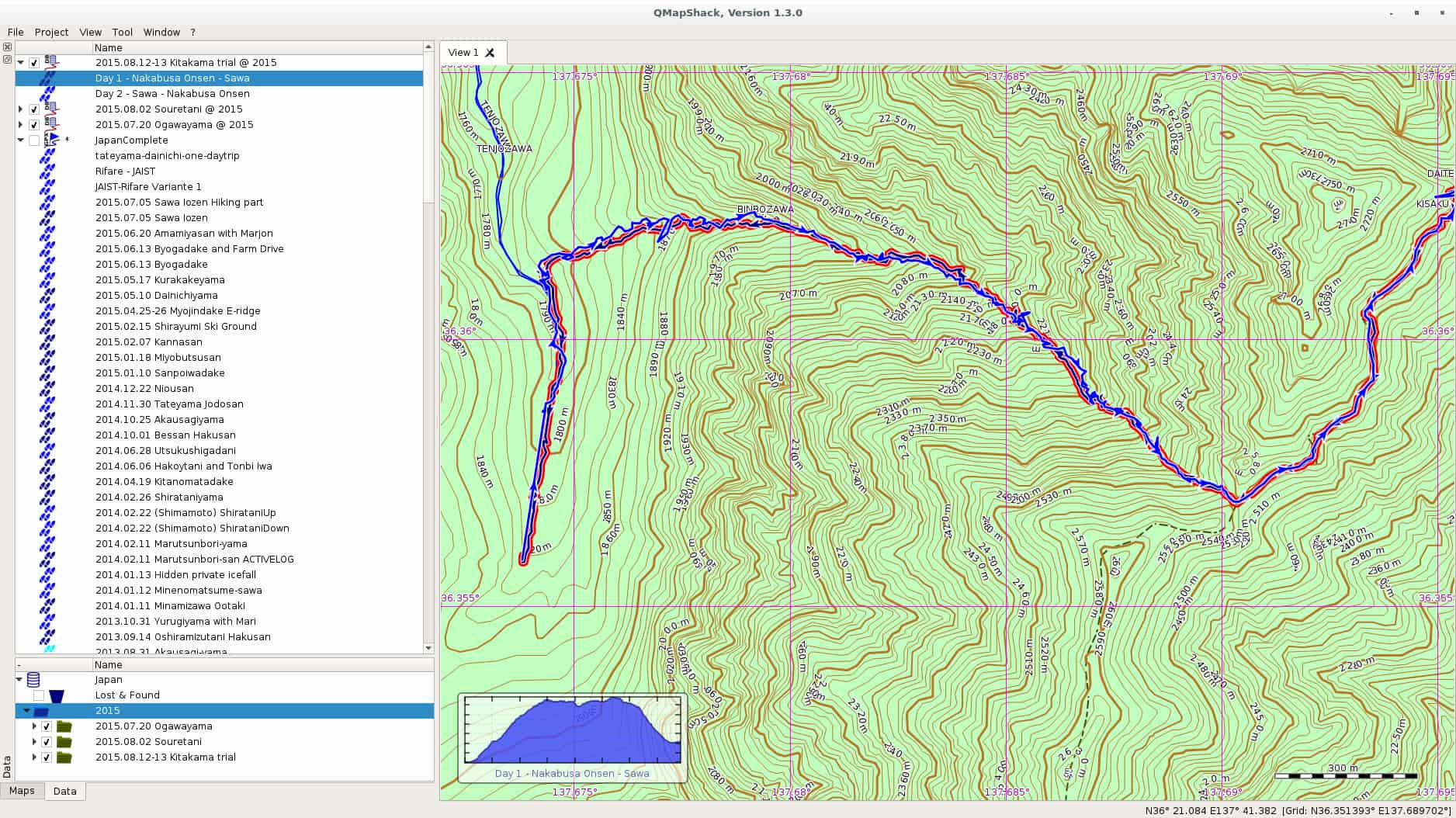
In one of the comments on my last post on Windows 10, a friendly reader from my home country pointed me at QMapShack as a replacement for QuoVadis. I have been using QuoVadis now for many many years, and it contains my mountaineering history all the way back. All the guiding work, all the track. QuoVadis is a great program, able to work with various commercial digital maps as well as GPS receivers. It only has one disadvantage, it doesn t work on Linux. QMapShack is very similar in the target audience, but very different in usage. The one big difference is of course the set of maps one can use with QMapShack. Fortunately, Garmin Maps are supported, and since all my maps regarding Japan are Garmin maps, I am now in the process to converting to QMapShack at least for my Japan GPS data. qmapshack Let us start with the program I was using since ages, and still are using, QuoVadis. QuoVadis is a great program, there is nothing to complain. It is extremely feature-rich, and above all it can work with many different maps. While working as mountain guide in Europe it was an essential tool for me. I could use the digital raster maps of Austria, Switzerland (SwissTOPO), Germany, France, Italy, as well as Garmin vector maps. For serious work as a professional it was indispensable for me. Unfortunately, it never worked on Linux. For some time I had a VirtualBox installation of Windows, but that was more a clutch than anything else. So for most of the GPS work I had to reboot my laptop to Windows, do my stuff there, and then switch back to Linux. QMapShack is far from as feature rich as QuoVadis, but as far as I see now, it does have enough features for me and my mountaineering in Japan. Dealing with GPS units is not a problem, this is the easy part. The difficult part are the digital maps. Fortunately, QMapShack supports Garmin vector maps, the only maps that are (as far as I know) available digitally for Japan. Getting used to QMapShack is a bit a challenge coming from QuoVadis, but the Wiki help pages allowed a quick start. Within short time I had maps set up. Next step was to download a data from my last weekend trip to Yarigadake, Kitakama-ridge (unfortunately we had to turn back due to rain). Connecting the unit and mounting it was already enough to show up in QMapShack, and allowed me to copy the tracks to my local database. Next I switched to Windows and exported some tracks from my Japan folder to a gpx file. After rebooting to Linux, I loaded the gpx file into QMapShack and without failure all the tracks and routes showed up, as it can be seen in the above screenshot (click on it to get a bigger version). Also the display of the Garmin map worked perfectly. Update: Please see the comment section for explanation of the necessary functions. QMapShack does provide similar functionality. Thanks to Oliver for pointing me at it! After some time of working there are a few functions from QuoVadis I am missing for now at QMapShack: Although these two functionalities are missing, all in all I am very happy for now with QMapShack. My next steps are: Finally, above all, I see a future where I do not need to reboot into Windows for doing my GPS work. For now I will import all the data into both applications, but if QMapShack holds its promises from the first day of usage, I am confident that this will not be necessary in future. Enjoy.

13 August 2015

Julien Danjou: Reading LWN.net with Pocket

I've started to use Pocket a few months ago to store my backlog of things to read. It's especially useful as I can use it to read content offline since we still don't have any Internet access in places such as airplanes or the Paris metro. It's only 2015 after all. I am also a LWN.net subscriber for years now, and I really like their articles from the weekly edition. Unfortunately, as the access is restricted to subscribers, you need to login: it makes it impossible to add these articles to Pocket directly. Sad. Yesterday, I thought about that and decided to start hacking on it. LWN provides a feature called "Subscriber Link" that allows you to share an article with a friend. I managed to use that feature to share the articles with my friend Pocket! As doing that every week is tedious, I wrote a small Python program called lwn2pocket that I published on GitHub. Feel free to use it, hack it and send pull requests.

12 August 2015

Daniel Pocock: Recording live events like a pro (part 2: video)

In the first blog in this series, we looked at how to capture audio effectively for a range of different events. While recording audio appears less complicated than video, it remains fundamental to a good recording. For some types of event, like a speech or a debate, you can have quite a bad video with poor lighting and other defects but people will still be able to watch it if the audio is good. Therefore, if you haven't already looked at the previous blog, please do so now. As mentioned in the earlier blog, many people now have high quality equipment for recording both audio and video and a wide range of opportunities to use it, whether it is a talk at a conference, a wedding or making a Kickstarter video. The right camera for video recording The fundamental piece of equipment is the camera itself. You may have a DSLR camera that can record video or maybe you have a proper handheld video camera. The leading DSLR cameras, combined with a good lens, make higher quality recordings than many handheld video cameras. Unfortunately, although you pay good money to buy a very well engineered DSLR that could easily record many hours of video, most DSLRs are crippled to record a maximum of 30 minutes in one recording. This issue and some workarounds are discussed later in this blog. If you don't have any camera at all you need to think carefully about which type to buy. If you are only going to use it once you may want to consider renting or borrowing or asking for other people attending the event to bring whatever cameras they have to help make multiple recordings (the crowdsourcing solution). If you are a very keen photographer then you will probably have a preference for a DSLR. Accessories Don't just look at the cost of your camera and conclude that is all the budget you need. For professional quality video recording, you will almost certainly need some accessories. You may find they are overpriced at the retail store where you bought your camera, but you still need some of them, so have a look online.
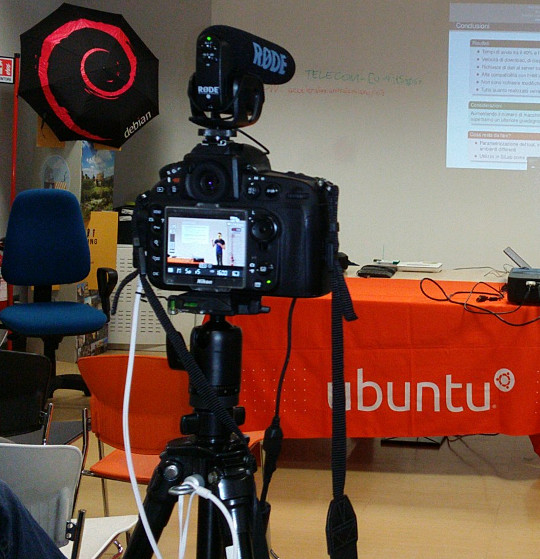
Recording a talk at a free software event with a Nikon D800 on a very basic tripod with Rode VideoMic Pro, headphones (white cable) and external power (black cable) If you want to capture audio with the camera and record it in the video file (discussed in more detail below), you will need to purchase a microphone that mounts on the camera. The built-in microphones on cameras are often quite bad, even on the most expensive cameras. If you are just using the built-in microphone for reference audio (to help with time synchronization when you combine different audio files with the video later) then the built-in microphone may be acceptable. Camera audio is discussed in more detail below. If your camera has a headphone socket, get some headphones for listening to the audio. Make sure you have multiple memory cards. Look carefully at the speed of the memory cards, slow ones are cheaper but they can't keep up with the speed of writing 1080p video. At a minimum, you should aim to buy memory cards that can handle one or two days worth of data for whatever it is you do. A tripod is essential for most types of video. If you use a particularly heavy camera or lens or if you are outdoors and it may be windy you will need a heavier tripod for stability. For video, it is very useful to have a tripod with a handle for panning left and right but if the camera will be stationary for the whole recording then the handle is not essential. Carrying at least one spare battery is another smart move. On one visit to the Inca Trail in Peru, we observed another member of our group hiking up and down the Andes with a brand new DSLR that they couldn't use because the battery was flat. For extended periods of recording, batteries will not be sufficient and you will need to purchase a mains power supply (PSU). These are available for most types of DSLR and video camera. The camera vendors typically design cameras with unusual power sockets so that you can only use a very specific and heavily overpriced PSU from the same company. Don't forget a surge protector too. There are various smartphone apps that allow you to remotely control the camera from the screen of your phone, such as the qDslrDashboard app. These often give a better preview than the screen built-in to the camera and may even allow you to use the touch screen to focus more quickly on a specific part of the picture. A regular USB cable is not suitable for this type of app, you need to buy a USB On-The-Go (OTG) cable.
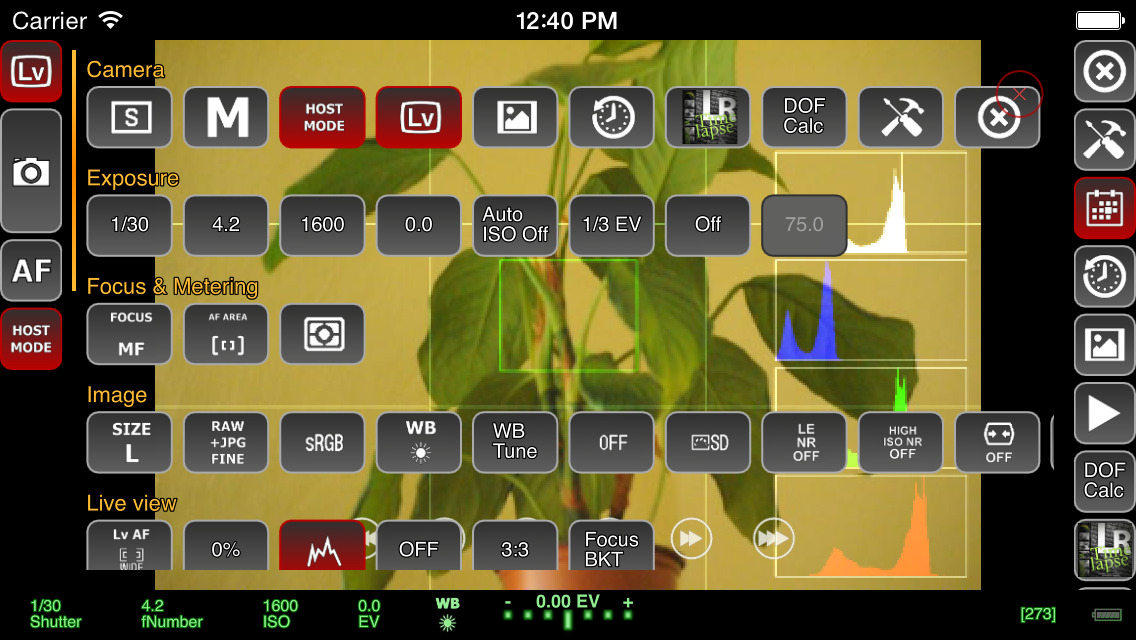
Screenshot of qDslrDashboard app on a smartphone, controlling a DSLR camera If you plan to copy the video from the camera to a computer at the event, you will need to make sure you have a fast memory card reader. The memory card readers in some laptops are quite slow and others can be quite fast so you may not need to buy an extra card reader. Camera audio Most cameras, including DSLRs, have a built-in microphone and a socket for connecting an external microphone. The built-in microphones obtain very poor quality sound. For many events, it is much better to have independent microphones, such as a lapel microphone attached to a smartphone or wireless transmitter. Those solutions are described in part one of this blog series. Nonetheless, there are still some benefits of capturing audio in the camera. The biggest benefit is the time synchronization: if you have audio recordings in other devices, you will need to align them with the video using post-production software. If the camera recorded an audio stream too, even if the quality is not very good, you can visualize the waveform on screen and use it to align the other audio recordings much more easily and precisely. If the camera will be very close to the people speaking then it may be acceptable to use a microphone mounted on the camera. This will be convenient for post-production because the audio will be synchronized with the video. It may still not be as good as a lapel microphone though, but the quality of these camera-mounted microphones is still far higher than the built-in microphones. I've been trying the Rode VideoMic Pro, it is definitely better than recording with the built-in microphone on the camera and also better than the built-in microphone on my phone. One problem that most people encounter is the sound of the lens autofocus mechanism being detected by the microphone. This occurs with both the built-in microphone and any other microphone you mount on the camera. A microphone mounted on top of the camera doesn't detect this noise with the same intensity as the built-in microphone but it is still present in the recordings. If using a camera-mounted microphone to detect the audio from an audience, you may need to have an omnidirectional microphone. Many camera-mounted microphones are directional and will not detect very much sound from the sides or behind the camera. When using any type of external microphone with the camera, it is recommend to disable automatic gain control (AGC) in the camera settings and then manually adjust the microphone sensitivity/volume level. Use headphones A final word on audio - most good cameras have an audio output socket. Connect headphones and wear them, to make sure you are always capturing audio. Otherwise, if the microphone's battery goes flat or if a wireless microphone goes out of range you may not notice. Choosing a lens The more light you get, the better. Bigger and more expensive lenses allow more light into the camera. Many of the normal lenses sold with a DSLR camera are acceptable but if it is a special occasion you may want to rent a more expensive lens for the day. If you already have a lens, it is a very good idea to test it in conditions similar to those you expect for the event you want to record. Recording duration limits Most DSLR cameras with video capability impose a 30 minute maximum recording duration This is basically the result of a friendly arrangement between movie studios and politicians to charge an extra tax on video recording technology and potentially make the movie studio bosses richer, supposedly justified by the fact that a tiny but exaggerated number of people use their cameras to record movies at the cinema. As a consequence, most DSLR manufacturers limit the duration of video recording so their product won't be subject to the tax, ensuring the retail price is lower and more attractive. On top of this, many DSLR cameras also have a 4GB file size limit if they use the FAT filesystem. Recording 1080p video at a high frame rate may hit the file size limit in 10 minutes, well before you encounter the 30 minute maximum recording duration. To deal with the file size issue, you can record at 720p instead of 1080p and use the frame rate 24fps. For events longer than 30 minutes or where you really want 1080p or a higher frame rate, there are some other options you can consider:
  • Buy or rent a proper video camera instead of using a DSLR camera
  • Using multiple cameras that can stop and be restarted at different times.
  • Manually stopping and restarting the camera if there are breaks in the event where it is safe to do so.
  • Use an app to control the camera and program it to immediately restart the recording each time it stops
  • Extract the raw output from the camera's HDMI socket and record into some other device or computer. There are several purpose-built devices
    that can be used this way with an embedded SSD for storage.
  • There are also some people distributing unofficial/alternative firmware images that remove the artificial 30 minute recording limit.
Camera settings There are many online tutorials and demonstration videos on YouTube that will help you optimize the camera settings for video. You may have already made recordings using the automatic mode. Adjusting some or all of the settings manually may help you create a more optimal recording. You will need to spend some time familiarizing yourself with the settings first. The first thing to check is white balance. This tells the camera the type of lighting in the location. If you set this incorrectly then the colours will be distorted. Many cameras have the ability to automatically set the white balance. For video, you may be able to change one or more settings that control the recording quality. These settings control the file compression ratio and image size. Typical image size settings are 720p and 1080p. Compression ratio may be controlled by a high/medium/low quality setting. Choosing the highest quality and biggest picture requires more space on the memory card and also means you reach the 4GB file size limit more quickly. A higher quality setting also implies a faster memory card is required, because the rate of megabytes per second written to the memory card is higher. Next you need to think about the frame rate. Events that involve fast moving subjects, such as sports, typically benefit from a higher frame rate. For other events it is quite acceptable to use 24 frames per second (fps). Higher frame rates also imply bigger file size and a requirement for a faster memory card. Once you have decided on the frame rate, the next thing to do is set the shutter speed. Use a shutter speed that is double the frame rate. For example, if using 24fps or 25fps, use a 1/50 shutter speed. The final two settings you need to adjust are the ISO and aperture. Set these based on the lighting conditions and extent to which the subjects are moving. For example, if the setting is dark or if you are trying to record fast moving subjects like athletes, vehicles or animals, use an ISO value of 800 or higher. Once you have chosen ISO, adjust the aperture to ensure the picture is sufficiently illuminated. Aperture also has a significant impact on the depth of field. Operating the camera: zoom and focus Many people use zoom lenses. It is not always necessary to change the zoom while recording a video, you can use software to zoom in and out on individual parts of the picture when editing it in post-production. If you do change the zoom while recording, it may be more difficult to maintain focus. Almost all lenses support manual focus (turning the focus ring by hand) and many support automatic focus. When shooting photographs with a DSLR, the mirror is down and the camera can use dedicated sensors for focus and light sensing. When shooting video, the mirror is up and the camera can not use the same focus sensors that are used in photography. Video recording uses a digital focussing algorithm based on contrast in the picture. If you take a lot of photos you are probably quite accustomed to the fast and precise autofocus for photography and you will notice that keeping a video in focus is more challenging. As mentioned already, one of the first things you can do to keep focus simple is to avoid zooming while recording. Record in a higher resolution than you require and then zoom with software later. Some people record using 4k resolution even when they only want to produce a 720p video, as they can digitally zoom in to different parts of the 4k recording without losing detail. If the subject is very stationary (people sitting at a desk for an interview is a typical example), you may be able to set the camera to manual focus and not change it at all while recording. If you choose to enable autofocus while recording, any built-in camera microphone or microphone mounted on the camera is likely to detect sounds from the motorized focus system. Ultimately, the autofocus mechanism is not accurate for all subjects and you may be unable to stop them moving around so you will need to change the focus manually while recording. It requires some practice to be able to do this quickly without overshooting the right focus. To make life more tricky, Nikon and Canon focus rings rotate in the opposite direction, so if you are proficient using one brand you may feel awkward if you ever have to use the other. A good way to practice this skill is to practice while in the car or on the train, pointing at different subjects outside the window and trying to stay in focus as you move from one subject to the next. Make a trial run Many events, from weddings right up to the Olympic Games opening ceremony, have a trial run the day before. One reason for that is to test the locations and settings of all the recording and broadcasting equipment. If a trial run isn't possible for your event, you may find some similar event to practice recording and test your equipment. For example, if you are planning to record a wedding, you could try and record a Sunday mass in the same church. Backup and duplicate the recordings before leaving the event If you only have one copy of the recordings and the equipment is stolen or damaged you may be very disappointed. Before your event, make a plan to duplicate the raw audio and video recordings so that several people can take copies away with them. Decide in advance who will be responsible for this, ensure there will be several portable hard disks and estimate how much time it will take to prepare the copies and factor this into the schedule. Conclusion All the products described can be easily purchased from online retailers. You may not need every accessory that is mentioned as it depends on the type of event you record. The total cost of buying or renting the necessary accessories may be as much as the cost of the camera itself so if you are new to this you may need to think carefully about making a budget with a spreadsheet to do it correctly. Becoming familiar with the camera controls and practicing the techniques for manual focus and zoom can take weeks or months. If you enjoy photography this can be time well spent but if you don't enjoy it then you may not want to commit the time necessary to make good quality video. Don't rule out options like renting equipment instead of buying it or crowdsourcing, asking several participants or friends to help make recordings with their own equipment. For many events, audio is far more indispensable than video and as emphasizing at the beginning of this article, it is recommended that you should be one hundred percent confident in your strategy for recording audio before you start planning to record video.

Daniel Pocock: UK wakes up to airport tax and data grab

The UK has just woken up to the fact that retailers at airports have been playing the VAT system. The focus of the media coverage has been on the VAT money, failing to give much emphasis to the fact this is also a sophisticated and coordinated attack on personal privacy. This situation has been obvious to me for years and it doesn't just occur in the UK. Whenever one of these retailers asks me for a boarding pass, I always refuse. Sometimes they lie to me and tell me that it is mandatory to let them scan my boarding pass: I tell them that a travel companion has the boarding passes and at this point they usually find some way to complete the transaction without further comment. It is only necessary to pay the correct amount With the rise of payment cards, people seem to be forgetting that you can pay for things in cash. If I have the right change to pay for something in this scenario, I typically put it on the counter and walk away. Why should I have to waste my time helping a poorly trained cashier understand VAT? I already deal with enough computer problems in the job I'm paid to do, why should I lose my time when on vacation explaining to a cashier that their computer is failing to correctly deduct 20% VAT? Whenever showing a boarding pass or passport It is far too common for people to try and scan or copy documents these days. When somebody in an airport shop or hotel asks to see a document, I don't let it out of my hands. It is not hard to cover the barcode with your fingers too. This prevents them making an unauthorized copy or using a barcode scanner to extract personal data. Some of these staff literally try to snatch the documents out of people's hands and drop them onto a scanner next to their till. In some countries hotels are obliged to look at your passport and make a record of the name but they often have no obligation to photocopy or scan it and it is often a huge risk if they do. If the airports are genuinely concerned about the security of passengers, they would be just as thorough in protecting data as they are in the hunt for terrorists. For example, they could give VAT-free passengers colour-coded boarding passes or some other vouchers without any personal information on them. VAT diversion funds customer data grab Shops pocket an extra 20% of the price of a product and they condition everybody, staff and customers, to having all customer data expropriated from the boarding pass at the point of sale, even the customers not eligible for a tax refund are unnecessarily having their data hoovered up in this way. The VAT money diverted away from both the tax man and the customer is rolled back into the system to fund the data grab. UK law promises customers significant protection from unlawful use of personal data, so how can these retailers lie to passengers and tell them that scanning the boarding pass is mandatory? Why not ask the Information Commission's Office to check up on this? Paying the correct amount and walking away It is not hard for people to add up the amount of VAT included in a price, deduct it themselves, give the correct and exact amount of cash to the cashier and walk away. Just type the price into your smart phone, divide by 1.2 and you can see the amount to pay. For example, if a product costs 24.95, just type 24.95 1.2 into the calculator on your phone and you find that you have to pay 20.79. It may only be necessary to show a boarding pass or ID for purchasing duty-free alcohol or tobacco. Not just for airports Carrying a correct amount of cash doesn't just help navigate the data grab in airports. Consider some of the other scenarios:
  • A long queue at the cashier in a petrol station, typically on a Sunday afternoon. Did you ever notice somebody who just walks past the queue and puts the exact change (or a cheque) on the counter and drives away while everybody else is waiting to pay with some payment card and scan their loyalty card?
  • Restaurant in a tourist spot, you receive a bill and notice they have added VAT and service charges or something you didn't ask for like bread. In European countries and Australia, the price next to each dish on the menu is the only price you have to pay, just like the price on the shelf in a shop or the price on a web page. If you have the right change you can just pay that amount and walk away without a discussion. In the US the taxes are added later and some tourist hot spots in Europe try this with English speaking customers, thinking that if they are American they won't complain.
  • Hotel tries to insist on a currency conversion when charging your credit card. Maybe you've already realized that dynamic currency conversion (DCC) used by retailers often adds at least 3% to a purchase but some hotels try to go way beyond this. The booking confirmation page you printed from their web site gives you a total price in one currency, perhaps USD or EUR and they use some arbitrary exchange rate, with a whopping 30% margin or more, to convert to the local currency and ask you to insert your PIN number or sign a credit card authorization. The best answer to this practice is usually to carry banknotes in the currency used for the booking, paying that exact amount in cash and if they try to argue, just keep counting out the bank notes to prove it matches the confirmation page. Hotels only get away with this trick because few people check the rate, even fewer carry sufficient cash and you may not be able to use local cash machines to get the currency specified in your booking. This is a situation I've encountered in eastern Europe and South America where it is common to quote in EUR and USD even if that isn't the domestic currency.

11 August 2015

Tiago Bortoletto Vaz: c3video for debconf #2

This is a follow-up to my previous post related the DebConf videoteam using a new software stack for the next conferences: http://acaia.ca/~tiago/posts/c3video-for-dc-take-1/.
Installing C3TT scripts There's a video (in German) which gives an idea about how the C3TT works: https://www.youtube.com/watch?v=K-KHbAcTo9I It basically gives the volunteers a web interface to cut and review the recordings, wich communicates with a set of scripts running in background which will automate some tasks. "Installing" the set of scripts is just a matter of placing them in a common directory and installing some Perl dependencies, mostly which are already packaged for Debian. First check it out from the svn repository (fun fact: the web interface is coded in php in a git repository, the scripts are mostly written in perl with a little of bash, in a subversion repository. Both the conference and media system is are in ruby :)
$ svn co https://subversion.fem.tu-ilmenau.de/repository/cccongress
$ mkdir /opt/crs; mv cccongress/trunk/tools /opt/crs/
A few libraries required:
$ apt-get install libboolean-perl libmath-round-perl libdatetime-perl libwww-curl-perl libconfig-inifiles-perl libxml-simple-perl
$ perl -MCPAN -e 'install XML::RPC::Fast'
In the web tracker create a project, go to all projects => workers and create a worker (I'll try to explain it later). Go edit the worker and we'll see the token and secret that should be used in the scripts to talk to the interface.
cd  /opt/crs/tools/tracker3.0
Create a file tracker-profile.sh with the follow lines (using our correct values):
export CRS_TRACKER=http://localhost/rpc
export CRS_TOKEN=2q24M7LW4Rk31YNW4tWKv8koNvyM3V4s
export CRS_SECRET=5j8SyCS35W2SBk2XIM4IWeDUqF9agG1x
We also need to build and install the fuse-vdv package from trunk/tools (if working with dv files, otherwise fuse-ts package). Next step is run the scripts. Fortunatelly a nice UI has been done using screen with multiple tabs, which can be alternated using a <Ctrl+a> <number> combination.
cd  /opt/crs/tools/tracker3.0 && /start-screenrc-dv.sh
We'll get the following:
/images/screen-c3tt-dv.png

Screen tabs from C3TT

In a next post I'll try to explain a bit of how the web system work together with the scripts and how to do a basic setup for a real conference. I hope to get there soon!

10 August 2015

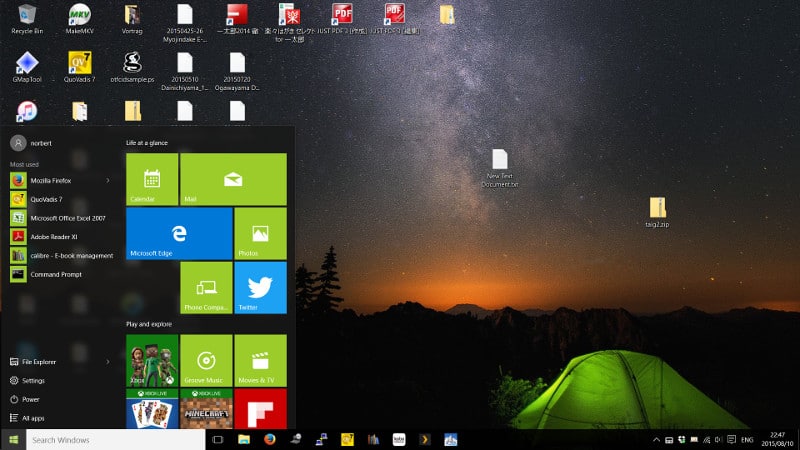
Norbert Preining: Updating my dual-boot Linux laptop to Windows 10

Ok, I have to admit, I still have Windows on my laptop. I do about 90% of my work on the Linux (Debian) side, but there are some applications where I don t have an alternative: Word (yes, I know LibreOffice, but it is still not capable enough to handle Japanese forms without breaking the layout), and much more, QuoVadis, a GPS and digital map program where I do have my whole history of moutaineering and bundled knowledge as mountain guide. So for the time being, I cannot switch away from Windows. Not to mention some of the Steam games that only work on Windows, unfortunately. So the other day I went ahead and accepted the upgrade offer and let Windows do its part win10 The machine is a Sony Vaio I have reported already many times, see the posts of the tag Vaio. All in all, it was a very smooth upgrade, to my complete suprise: On the other hand, as it is well documented, Windows 10 is a beast when it comes to collecting all kinds of data. There are a lot of settings to be turned off just to make sure not all your details down to your shoe size and the x-ray of your grandparents are transmitted to Microsoft. I used the German Computer News page heise where I found this article. All in all for now I am happy with the current situation, I could boot back into my comfy Linux and know that if it is necessary, I can switch to Windows (10) for some dirty work.

Steve Kemp: A brief look at the weed file store

Now that I've got a citizen-ID, a pair of Finnish bank accounts, and have enrolled in a Finnish language-course (due to start next month) I guess I can go back to looking at object stores, and replicated filesystems. To recap my current favourite, despite the lack of documentation, is the Camlistore project which is written in Go. Looking around there are lots of interesting projects being written in Go, and so is my next one the seaweedfs, which despite its name is not a filesystem at all, but a store which is accessed via HTTP. Installation is simple, if you have a working go-lang environment:
go get github.com/chrislusf/seaweedfs/go/weed
Once that completes you'll find you have the executable bin/weed placed beneath your $GOPATH. This single binary is used for everything though it is worth noting that there are distinct roles: In our demo we'll have three hosts one, the master, two and three which are storage nodes. First of all we start the master:
root@one:~# mkdir /node.info
root@one:~# weed master -mdir /node.info -defaultReplication=001
Then on the storage nodes we start them up:
root@two:~# mkdir /data;
root@two:~# weed volume -dir=/data -max=1  -mserver=one.our.domain:9333
Then the second storage-node:
root@three:~# mkdir /data;
root@three:~# weed volume -dir=/data -max=1 -mserver=one.our.domain:9333
At this point we have a master to which we'll talk (on port :9333), and a pair of storage-nodes which will accept commands over :8080. We've configured replication such that all uploads will go to both volumes. (The -max=1 configuration ensures that each volume-store will only create one volume each. This is in the interest of simplicity.) Uploading content works in two phases: We'll do that like so:
laptop ~ $ curl -X POST http://one.our.domain:9333/dir/assign
 "fid":"1,06c3add5c3","url":"192.168.1.100:8080","publicUrl":"192.168.1.101:8080","count":1 
client ~ $ curl -X PUT -F file=@/etc/passwd  http://192.168.1.101:8080/1,06c3add5c3
 "name":"passwd","size":2137 
In the first command we call /dir/assign, and receive a JSON response which contains the IPs/ports of the storage-nodes, along with a "file ID", or fid. In the second command we pick one of the hosts at random (which are the IPs of our storage nodes) and make the upload using the given ID. If the upload succeeds it will be written to both volumes, which we can see directly by running strings on the files beneath /data on the two nodes. The next part is retrieving a file by ID, and we can do that by asking the master server where that ID lives:
client ~ $ curl http://one.our.domain:9333/dir/lookup?volumeId=1,06c3add5c3
 "volumeId":"1","locations":[
  "url":"192.168.1.100:8080","publicUrl":"192.168.1.100:8080" ,
  "url":"192.168.1.101:8080","publicUrl":"192.168.1.101:8080" 
] 
Or, if we prefer we could just fetch via the master - it will issue a redirect to one of the volumes that contains the file:
client ~$ curl http://one.our.domain:9333/1,06c3add5c3
<a href="http://192.168.1.100:8080/1,06c3add5c3">Moved Permanently</a>
If you follow redirections then it'll download, as you'd expect:
client ~ $ curl -L http://one.our.domain:9333/1,06c3add5c3
root:x:0:0:root:/root:/bin/bash
..
That's about all you need to know to decide if this is for you - in short uploads require two requests, one to claim an identifier, and one to use it. Downloads require that your storage-volumes be publicly accessible, and will probably require a proxy of some kind to make them visible on :80, or :443. A single "weed volume .." process, which runs as a volume-server can support multiple volumes, which are created on-demand, but I've explicitly preferred to limit them here. I'm not 100% sure yet whether it's a good idea to allow creation of multiple volumes or not. There are space implications, and you need to read about replication before you go too far down the rabbit-hole. There is the notion of "data centres", and "racks", such that you can pretend different IPs are different locations and ensure that data is replicated across them, or only within-them, but these choices will depend on your needs. Writing a thin middleware/shim to allow uploads to be atomic seems simple enough, and there are options to allow exporting the data from the volumes as .tar files, so I have no undue worries about data-storage. This system seems reliable, and it seems well designed, but people keep saying "I'm not using it in production because .. nobody else is" which is an unfortunate problem to have. Anyway, I like it. The biggest omission is really authentication. All files are public if you know their IDs, but at least they're not sequential ..

Mirco Bauer: Smuxi 1.0 "Finally" Release

And here we go again! We're proud to announce the new version of Smuxi, release 1.0 "Finally". During the development, 20 bug reports and 10 feature requests in 285 commits were worked on.

Finally 1.0 Smuxi is celebrating its 10th anniversary! 10 years ago, Mirco Bauer made the first commit to the Smuxi source code repository and is still very committed to it. He started the Gnosmirc project in 2005 when the only way a 24/7 "always-on" experience with IRC meant you had to use a console based IRC client like bitchx, irssi or epic combined with screen and SSH. This looks very practical at first and is a powerful Unix-ish way of accomplishing that job, but it has the big downside that it doesn't integrate with a desktop environment like GNOME. A bit later the Gnosmirc project was renamed to Smuxi when the new code architecture allowed other frontend implementations besides the GNOME one. The ncurses/STFL based text frontend was later implemented and is considered stable and useful enough for day to day use, but still has some rough edges. WinForms and WPF frontends also exist but need more work to reach a usable state. At this point Smuxi 1.0 contains all features that we could have imagined and even goes beyond with very advanced features like message patterns or language agnostic scripting.

Changes since Smuxi 0.11

Message Persistence One of the biggest drawbacks of the IRC protocol ever was that messages can't be retrieved from the IRC server because the IRC server is simply relaying messages to the connected clients. So, if an IRC client is freshly started and connects it starts to receive new messages, but all message you had received before are no longer available. This always made IRC in a way "volatile" unlike other communication systems like email where messages are relayed and stored on the client side. One common approach for IRC clients is to store log files in a text file. This is a simple feature and gives the user the possibility to read older conversations. Smuxi also supports text file logging like other IRC clients but it has a big user experience drawback as you need to open the file from the disk outside of the IRC client. In Smuxi 1.0 messages sent and received are now stored on the disk in a way they can automatically be retrieved/loaded when you restart Smuxi. It is like you have never closed Smuxi! This feature was already available in Smuxi for some time as a technical preview and it used the Db4o object database, but we were never happy about the performance neither with the stability so it always stayed an optional feature you need to enable. This year we tried a new message buffer backend using the famous SQLite database and it works much faster and stable as a rock. So finally we can enable this feature by default because it just works and enhanced your experience. We hope you enjoy it. Documentation of how you can change Smuxi message buffer backend and behavior can be found here. For instructions how to convert your existing db4o history to SQLite can be found in the "smuxi-message-buffer tool" section.

User Interface Enhancements
  • Synced message markers: the position of of the seen/unseen messages marker is pushed to the smuxi-server and remembered when the frontend reconnects. (Sebastian Poeplau)
  • Persistent message markers: the message marker position is also remembered across Smuxi(-server) restarts.
  • Message Counter: in addition to the highlight counter next to a chat new/unseen messages are also counted. This makes it easy to identify chats with much traffic.
  • Single application instance support. If you start Smuxi again from the menu it will bring the existing instance into the foreground. This makes the Ubuntu Messaging Menu much nicer.
  • The command/message entry is alignment with the messages. (Lex Berezhny)

Text Frontend Enhancements
  • The console background color can now be configured using: /config set STFL/Interface/TerminalBackgroundColor = #000000 (Ond ej Ho ek)
  • The text color contrast if nicks with the background is now ensured (Ond ej Ho ek) #1033
  • Messages containing images will not be skipped but their alternative text is shown instead (Ond ej Ho ek) #1035

New smuxi-message-buffer tool This is a new commandline tool that allows you to convert and export the message history of Smuxi message buffer files. This can be used to convert your existing Db4o history to SQLite like this for example:
for DB_DB4O in $HOME/.local/share/smuxi/buffers/*/*/*/*.db4o; do
    DB_SQLITE=$ DB_DB4O/.db4o/.sqlite3 
    smuxi-message-buffer convert $DB_DB4O $DB_SQLITE
done
Smuxi shouldn't be running when using this tool.

Scripting Enhancements

New Hook Points Smuxi 1.0 supports with the following new hook points:
  • engine/protocol-manager/on-presence-status-changed/ This hook point is raised when the presence status of a protocol manager changes. This happens for example when an IRC connection toggles the away state.
  • engine/session/on-event-message/ This hook point raises event messages that usually begin with "-!-". This can be useful to track state changes that are shown as a message without having a dedicated hook point for it.
  • engine/session/command-$cmd/ This hook point is raised on the engine side for commands, e.g. /some_command that isn't handled by the frontend or engine built-in commands. This is useful for commands that should be available for all frontends and isn't specific to the frontend environment.

New Plugins The following new plugins are supported by Smuxi 1.0:
  • topic-diff: Shows the word differences of the topic after topic changes. (meebey)
  • away-nick: Automatically appends and removes $AWAY_SUFFIX to/from the nick name when you go away using the /away command or by disconnecting all frontends from the smuxi-server. (meebey)
  • system-info: Shows system info. Includes system kernel version, distro name, and CPU vendor information. (AK0)
  • now-playing: This plugin is not new but was rewritten in Python to get rid of the spaghetti code monster which was written in Bash. (jamesaxl)

IRC Enhancements
  • NICKSERV support Notices from Nick/ChanServ are no longer shown on all channels as they like to send greeting messages and other spam which is annoying to see on all channels. #868
  • Automatic rejoin of channels protected with a key works as expected again
  • Connecting to irc.gitter.im is now supported. Gitter's IRCd implementation has a bug in the IRC protocol which is now tolerated.

Twitter Enhancements
  • The /search command shows tweets as live stream
  • Added /delete, /favorite and /unfavorite commands

Behind the Scenes
  • Re-licensed smuxi-common from GPLv2 to MIT/X11

Contributors Contributors to this release are the following people:
  • Mirco Bauer (199 commits)
  • Carlos Mart n Nieto (15 commits)
  • Andr s G. Aragoneses (14 commits)
  • Piotr Dr g (12 commits)
  • Ond ej Ho ek (11 commits)
  • Oliver Schneider (5 commits)
  • Calvin B (4 commits)
  • Victor Seva (3 commits)
  • Will Johansson (2 commits)
  • Sebastian Poeplau (2 commits)
  • Julian Taylor (2 commits)
  • James Axl (2 commits)
  • Daniel Mustieles (2 commits)
  • Christopher James Halse Rogers (2 commits)
  • . Uzun (1 commit)
  • Lex Berezhny (1 commit)
  • Kalle Kaitala (1 commit)
  • Jordi Mas (1 commit)
  • Joe Hansen (1 commit)
  • Jimmie Elvenmark (1 commit)
  • Dimitris Spingos (1 commit)
  • Dean Lee (1 commit)
  • Cl ment Bourgeois (1 commit)
  • Carlos Hernandez (1 commit)
Thank you very much for your contributions to Smuxi! Want this? Go here and grab it right now!

Posted Sun Aug 9 17:48:18 2015

Next.

Previous.