Search Results: "bab"

23 July 2013

Keith Packard: present sync

Implementing Vblank Synchronization in the Present Extension This is mostly a status update on how the Present extension is doing; the big news this week is that I ve finished implementing vblank synchronized blts and flips, and things seem to be working quite well. Vblank Synchronized Blts The goal here is to have the hardware executing the blt operation in such a way as to avoid any tearing artifacts. In current drivers, there are essentially two different ways to make this happen:
  1. Insert a command into the ring which blocks execution until a suitable time immediately preceding the blt operation.
  2. Queue the blt operation at vblank time so that it executes before the scanout starts.
Option 1. provides the fewest artifacts; if the hardware can blt faster than scanout, there shouldn t ever be anything untoward visible on the screen. However, it also blocks future command execution within the same context. For example, if two vblank synchronized blts are queued at the same time, its possible for the second blt to be delayed by yet another frame, causing both applications to run at half of the frame rate. Option 2. avoids blocking the hardware, allowing for ongoing operations to proceed on the hardware without waiting for the synchronized blt to complete. However, it can cause artifacts if the delay from the vblank event to the eventual execution of the blt command is too long. Queuing the blt right when it needs to execute means that we also have the opportunity to skip some blts; if the application presents two buffers within the same frame time, the blt of the first buffer can be skipped, saving memory bandwidth and time. Present uses Option 2, which may occasionally cause a tearing artifact, but avoids slowing down applications while allowing the X server to discard overlapping blt operations when possible. Queuing the Blt at Vblank There are several options for getting the blt queued and executed when the vblank occurs:
  1. Queue the blt from the interrupt handler
  2. Queue the blt from a kernel thread running in response to the interrupt
  3. Send an event up to user space and have the X server construct the blt command.
These are listed in increasing maximum latency, but also in decreasing complexity. Option 1. is made more complicated as much of the work necessary to get a command queued to the hardware cannot be done from interrupt context. One can imagine having the desired command already present in the ring buffer and have the interrupt handler simply move the ring tail pointer value. Future operations to be queued before the vblank operation could then re-write the ring as necessary. A queued operation could also be adjusted by the X server as necessary to keep it correct across changes to the window system state. Option 2. is similar, but the kernel implementation should be quite a bit simpler as the queuing operation is done in process context and can use the existing driver infrastructure. For the X server, this is the same as Option 1, requiring that it construct a queued blt operation and deliver that to the kernel, and then revoke and re-queue if the X server state changed before the operation was completed. Option 3 is the simplest of all, requiring no changes within the kernel and few within the X server. The X server waits to receive a vblank notification event for the appropriate frame and then simply invokes existing mechanisms to construct and queue the blt operation to the kernel. Oddly, Present currently uses Option 3. If that proves to generate too many display artifacts, we can come back and change the code to try something more complicated. Flipping the Frame Buffer Taking advantage of the hardware s ability to quickly shift scanout from one chunk of memory to another is critical to providing efficient buffer presentation within the X server. It is slightly more complicated to implement than simply copying data to the current scanout buffer for a few reasons:
  1. The presented pixmap is owned by the application, and so it shouldn t be used except when the presented window covers the whole screen. When the window gets reconfigured, we end up copying the window s pixmap to the regular screen pixmap.
  2. The kernel flipping API is asynchronous, and doesn t provide any abort mechanism. This isn t usually much of an issue; we simply delay reporting the actual time of flip until the kernel sends the notification event to the X server. However, if the window is reconfigured or destroyed while the flip is still pending, cleaning that up must wait until the flip has finished.
  3. The applications buffer remains busy until it is no longer being used for scanout; that means that applications will have to be aware of this and ensure that they don t deadlock waiting for the current scanout buffer to become idle before switching to a new scanout buffer.
Present is different from DRI2 in using application-allocated buffers for this operation. For DRI2, when flipping to a window buffer, that buffer becomes the screen pixmap the driver flips the new buffer object into the screen pixmap and releases the previous buffer object for other use. For Present, as the buffer is owned by the application, I figured it would be better to switch back to the real screen buffer when necessary. This also means that applications aren t left holding a handle to the frame buffer, which seems like it might be a nice feature. The hardest part of this work was dealing with client and server shutdown, dealing with objects getting deleted in random orders while other data structures retained references. (The kernel DRM drivers use the term page flipping to mean an atomic flip between one frame buffer and another, generally implemented by simply switching the address used for the scanout buffer. I d like to avoid using the word page in this context as we re not flipping memory pages individually, but rather a huge group of memory that forms an entire frame buffer. We could use plane flipping (as intel docs do), frame buffer flipping (but that s a mouthful), display flipping or almost anything but page flipping ). Overall DRI3000 Status At this point, the DRI3 extension is complete and the Present extension is largely complete, except for redirection for compositors. The few piglit tests for GLX_OML_sync_control all pass now, which is at least better than DRI2 does. I think I ve effectively replicated the essential features of DRI2 while offering room to implement a couple of new GL extensions: The code for this stuff has all been pushed to a number of repositories:

22 July 2013

Matthew Garrett: ARM and firmware specifications

Jon Masters, Chief ARM Architect at Red Hat, recently posted a description of his expectations for baseline arm64 servers. The quick summary is that systems should implement UEFI and ACPI, and any more traditional ARM boot mechanisms should be ignored. This is an interesting departure from the status quo in the ARM world, and it's worth thinking about the benefits and drawbacks of this approach.

It's very easy to build a generic kernel for most x86 systems, since the PC platform is fairly well defined even if not terribly well specified. Where system hardware does vary, it's almost always exposed on an enumerable bus (such as PCI or USB) which allows the OS to bind appropriate drivers. Things are different in the ARM world. Even once you're past the point of different SoC vendors requiring different kernel setup code and drivers, you still have to cope with the fact that system vendors can wire these SoCs up very differently. Hardware is often attached via GPIO lines without any means to enumerate them. The end result is that you've traditionally needed a different kernel for every ARM board. This is viable if you're selling the OS and hardware as a single product, but less viable if there's any desire to run a generic OS on the hardware.

The solution that's been adopted for this in the Linux world is called Device Tree. Device Tree actually has significant history, having been used as the device descriptor format in Open Firmware. Since there was already support for it in the Linux kernel, adapting it for use in ARM devices was straightforward. Device Tree aware devices can pass a descriptor blob to the kernel at startup[1], and devices without that knowledge can have a blob build into the kernel.

So, if this problem is already solved, why the push to move to UEFI and ACPI? This push didn't actually originate in the Linux world - Microsoft mandate that Windows RT devices implement UEFI and ACPI, and were they to launch a Windows ARM server product would probably carry that over. That makes sense for Microsoft, since recent versions of Windows have been x86 only and so have grown all kinds of support for ACPI and UEFI. Supporting Device Tree would require Microsoft to rewrite large parts of Windows, whereas mandating UEFI and ACPI allowed them to reuse most of their existing Windows boot and driver code. As a result, largely at Microsoft's behest, ACPI 5 has grown a range of additional features for describing things like GPIO pinouts and I2C connections. Whatever your weird device layout, you can probably express it via ACPI.

This argument works less well for Linux. Linux already supports Device Tree, whereas it currently doesn't support ACPI or UEFI on ARM[2]. Hardware vendors are already used to working with Device Tree. Moving to UEFI and ACPI has the potential to uncover a range of exciting new kernel issues and vendor bugs. It's not obviously an engineering win.

So how about users? There's an argument that since server vendors are now mostly shipping ACPI and UEFI systems, having ARM support these technologies makes it easier for customers to replace x86 systems with ARM systems. This really doesn't fly for ACPI, which is entirely invisible to the user. There are no standard ACPI entry points for system configuration, and the bits of ACPI that are generically useful (such as configuring system wakeup times) are already abstracted away to a standard interface by the kernel. It's somewhat more compelling for UEFI. UEFI supports a platform-independent bytecode language (EFI Byte Code, or EBC), which means that customers can write their own system management utilities, build them for EBC and then deploy them to their servers without caring about whether they're x86 or ARM. Want a bootloader that'll hit an internal HTTP server in order to determine which system image to deploy, and which works on both x86 and ARM? Straightforward.

Arnd Bergmann has a interesting counterargument. In a nutshell, ARM servers aren't currently aiming for the same market as x86 servers, and as a result customers are unlikely to gain any significant benefit from shared functionality between the two.

So if there's no real benefit to users, and if there's no benefit to kernel developers, what's the point? The main one that springs to mind is that there is a benefit to distributions. Moving to UEFI means that there's a standard mechanism for distributions to interact with the firmware and configure the bootloader. The traditional ARM approach has been for vendors to ship their own version of u-boot. If that's in flash then it's not much of a problem[3], but if it's on disk then you have to ship a range of different bootloaders and know which one to install (and let's not even talk about initial bootstrapping).

This seems like the most compelling argument. UEFI provides a genuine benefit for distributions, and long term it probably provides some benefit to customers. The question is whether that benefit is worth the flux. The same distribution benefit could be gained by simply mandating a minimum set of u-boot functionality, which would seem much more straightforward. The customer benefit is currently unclear.

In the end it'll probably be a market decision. If Red Hat produce an ARM product that has these requirements, and if Suse produce an ARM product that will work with u-boot and Device Tree, it'll be up to vendors to decide whether the additional work to support UEFI/ACPI is worth it in order to be able to sell to customers who want Red Hat. I expect that large vendors like HP and Dell will probably do it, but the smaller ones may not. The customer demand issue is also going to be unclear until we learn whether using UEFI is something that customers actually care about, rather than a theoretical benefit.

Overall, I'm on the fence as to whether a UEFI requirement is going to stick, and I suspect that the ACPI requirement is tilting at windmills. There's nothing stopping vendors from providing a Device Tree blob from UEFI, and I can't think of any benefits they gain from using ACPI instead. Vendor interest in the generic parts of the ACPI spec has been tepid even in the x86 world (the vast majority of ACPI spec updates come from Microsoft and Intel, not any of the system vendors), and I don't see that changing with the introduction of a range of ARM vendors who are already happy with Device Tree.

We'll see. Linux is going to need to gain the support for UEFI and ACPI on ARM in any case, since there's already hardware shipping in that configuration. But with ARM vendors still getting to grips with Device Tree, forcing them to go through another change in how they do things is going to be hard work. Red Hat may be successful in enforcing these requirements at the cost of some vendor unhappiness, or Red Hat may find that their product doesn't boot on most of the available hardware. It's an aggressive gamble, and while it'll be interesting to see how it plays out, I'm not that optimistic.

[1] The blob could be pulled from the firmware, but it's not uncommon for it to be built into u-boot instead. This does mean that you have a device-specific u-boot even if you have a generic kernel, but that's typically true anyway.
[2] Patches have been posted for ARM UEFI support. They're not mergeable in their current form, but they should be in the near future. ACPI support is in development.
[3] Although not all u-boots are created equal - some vendors ship versions that will only boot off FAT, some vendors ship versions that will only boot off ext2. Having to special case this stuff in your installer is a pain.

comment count unavailable comments

Riku Voipio: ACPI on ARM storm in teacup

A recent google+ post by Jon Masters caused some stormy and some less stormy responses. A lot of BIOS/UEFI/ACPI hate comes X86, where ACPI is used from everything from suspending devices to reading buttons and setting leds. So when X86 kernel suspends, it does magic calls to ACPI and prays that the firmware vendor did not screw it up. Now vendors do screw up, hence lots of cursing and ugly workarounds in the kernel follows. My Lenovo has a firwmare bug where the FN-buttons and Fan stops working if the laptop is attached on AC adapter for too long. The fan is probably a simple i2c device the kernel could control directly without jumping through ACPI hiding layer hoops. But the X86 people hold the view it is better to trust the firmware engineer to control devices instead of having the kernel folk to write device drivers to ... control devices! Now on ARM(64) the idea of using ACPI is to have none of that. Instead the idea is to use ACPI only to provide tables for enumerating what devices are available in the platform. Just like what device tree does. Now if this is the same as device tree, why bother? The main reason is to allow the distribution installer behave same on X86 / ARM / ARM64. This is crucial for distributions like fedora and RHEL where a cabal holds the point of view that X86 distribution development must not be constrained by ARM support. But it also important for everyone that the method of installing your favorite distribution to an ARM64 server is standard and works the same for any server from any vendor. Now while UEFI and ACPI are definitely not my preferred solutions, I can accept them as necessary evil for having a more standard platform.

16 July 2013

Joachim Breitner: Real World Haskell Applications

Today I held a lightning talk at the Karlsruhe Functional Programmer s Group, where I presented Real World Haskell applications, i.e. programs that are written in Haskell, are somewhat mature and well-known and have non-programmers as their target group. Here is the (surely subjective) list that I have come up (also see the slides): There is also an impressive list of industrial users that use Haskell without talking about it much, but that does not work well to show off that you can do any kind of application in Haskell. If I missed anything important, let me know!

15 July 2013

Matthew Garrett: How XMir and Mir fit together

Mir is Canonical's new display server. It fulfils a broadly similar role to Wayland and Android's Surfaceflinger, in that it takes final responsibility for getting pixels onto the screen. XMir is an X server that runs on top of Mir. It permits applications that know how to speak the X protocol but don't know how to speak to Mir (ie, approximately all of them at present) to run in a Mir-based environment.

For Ubuntu 13.10, Canonical are proposing to use Mir by default. This doesn't mean that most applications will be using Mir, though - instead, the default session will run XMir as a full-screen client and a normal X environment will be run on that. This lets Canonical deploy Mir without forcing anyone to update their applications, allowing them to take a gradual approach. By 14.10, Canonical expect the default Unity session to be a Mir client rather than an X client. In theory it will then be possible to run an Ubuntu system without any X applications at all, leaving XMir to do nothing other than run legacy applications.

Of course, this requires a certain amount of replumbing. X would normally be responsible for doing things like setting up the screen and pushing the pixels out to the hardware, but this is now handled by Mir instead. Where a native X server would allocate a framebuffer in video memory and render into it, XMir asks Mir for a window corresponding to the size of the screen and renders into that and then simply asks Mir to display it. This step is actually more interesting than it sounds.

Unless you're willing to throw lots of CPU at them, unaccelerated graphics are slow. Even if you are, you're going to end up consuming more power for the same performance, so XMir would be impractical if it didn't provide access to accelerated hardware graphics functions. It makes use of the existing Xorg accelerated X drivers to do this, which is as simple as telling the drivers to render into the window that XMir requested from Mir rather than into the video framebuffer directly. In other words, when displaying through XMir, you're using exactly the same display driver stack as you would be if you were using Xorg. In theory you'd expect identical performance - in practice there's a 10-20% performance hit right now, but that's being actively worked on. Fullscreen 3D apps will also currently take a hit due to there being no support for skipping compositing, which is being fixed. XMir should certainly be capable of performing around as well as native X, but there's no reason for it to be any faster.

The output drivers aren't the only part of the stack. XMir still needs some way to get input events. You might naively expect that Mir would forward input events to XMir, but the current state of affairs is that XMir loads the existing X input drivers which in turn open the input devices themselves. This explains why XMir currently shows two cursors[1] - the first cursor is the Mir cursor that's being driven by the input events Mir is receiving, while the second is the cursor being drawn by XMir in response to the input events that it's receiving[2].

The final main piece of duplicated functionality is output management. In the case where X is its own display server, it can simply ask the kernel to program the outputs. XMir can't do that, so would have to ask Mir to do it instead. Sadly, that functionality's not implemented yet. Running xrandr on Xmir gives:
Screen 0: minimum 320 x 320, current 1366 x 768, maximum 8192 x 8192
XMIR-1 connected primary 1366x768+0+0 (normal left inverted right x axis y axis) 0mm x 0mm
   XMIR mode of death[3]   60.0*+
which translates as "I have a screen that can be any size from 320x320 to 8192x8192, and have one output of unknown physical size that can only display 1366x768 at 60Hz". Other than the 1366x768, the result will be identical no matter how many outputs you have - XMir currently has no support for configuring multiple displays, and will always report 60Hz. It also has no support for placing monitors into any kind of DPMS state.

Obviously, this is still software under active development. There's three months from now until until Ubuntu is due to release with this functionality enabled by default, and the only significant missing features are xrandr and DPMS support. As long as Mir exposes interfaces for controlling those, they shouldn't be a problem to implement. To most users, the transition from native Xorg to XMir should be completely invisible.

Which is kind of the problem. What benefits does the user gain from using XMir on Mir rather than native Xorg?

Features? XMir is a total of around 1000 lines of code on top of Xorg. It implements no functionality that isn't present in Xorg.

Performance? XMir effectively is Xorg - it's the same code running the same drivers. It's not going to be any faster. At the moment it's actually slower, but that's probably fixable.

Security? Again, XMir is effectively Xorg. It still runs as root. It has the same privileges. There's no security benefit to using XMir instead of Xorg.

Like I said, the transition should be completely invisible - no drawbacks, but no benefits. What it does do is get Mir deployed on a larger number of systems, which means Canonical can both get wider testing of the basic Mir functionality and argue that the number of deployed Mir systems means hardware vendors should support it. Users won't see any of the benefits until Unity transitions to being a native Mir client, which is slated for 14.10 next year.

As a PR move, it's pretty great. The public perception is that Mir has gone from not existing to being sufficient to run a full desktop environment in very little time, and it's natural to compare it to Wayland which has been in development for longer and still isn't running a fully featured desktop session. The problem with that perception is that Mir is doing very little at the moment. It's setting an output mode (by asking the kernel to), allocating a window for XMir to draw into and then pushing that window onto the screen whenever XMir tells it that it's changed. This isn't advanced display server functionality, it's the bare minimum that a display server could possibly do[4]. Which is a shame, because Mir is significantly more functional than that, it's just not being used to do anything we couldn't already do.

In summary: XMir on Mir in Ubuntu provides no user benefits and isn't a compelling technology demo. Mir itself will permit a range of additional features, but isn't slated to be running a user session itself until 14.10. The only obvious benefit to Canonical in shipping XMir on Mir is to gain additional testing, which makes using it in 14.04, a supposedly stable and long term release, a somewhat surprising choice.

[1] Although this is in the process of being fixed
[2] This also explains why, on systems with a trackpoint and a touchpad, only the trackpoint moves the Mir cursor while both move the XMir cursor. The X touchpad driver has put the touchpad in absolute mode, which means it's now reporting events that Mir currently ignores.
[3] "XMIR mode of death" is hardcoded into XMir. I'm really hoping it's a Regular Show reference.
[4] So why hasn't anyone done this with Wayland? Mostly because, as described above, there's no technical benefit in doing so. Wayland does have an X server for compatibility purposes, and if you wanted you could run it as a full screen client and run an entire session underneath it. But you'd gain nothing by doing so. The Wayland X server is intended for running individual clients rather than an entire X session. Run an X client under Wayland and it'll pop up in its own individual window and managed by your Wayland session's window manager, just like it would under X. XMir currently has no support for this "rootless" mode - right now if you want to run X apps under Mir, you'll need to launch an entire X session with its own window manager.

comment count unavailable comments

Joey Hess: guesting on GitMinutes

Last Friday, I spent and hour and a half clamping a landline phone to the side of my head, while also wearing a headset. I was recording an interview on the GitMinutes podcast about git-annex. I've been listening to GitMinutes for a while, ever since I heard git-annex was mentioned on it. Actually, I think it's come up in 4 or 5 interviews on the podcast. Most notably with core git dev Peff King, who had some interesting things to say, for sure. I responded to that in my interview, and we covered quite a wide amount of stuff in reasonable depth in just over an hour. Thomas is quite a good host and great at drawing stuff out, and it's nice to not need to worry about going into too much technical depth. (Although I didn't get a chance to explain the automatic union merging used to maintain the git-annex branch.) This is the first podcast I've been in, and I've always worried about audio quality if I was in one. That is, I'd want it to be really good, and probably end up annoying the host. ;) For this one, we settled on using my land line call, which went through some Skype thing to get the Europe, and mixing in a local recording I made with a not too great headset. I think the result is pretty good, considering. You can listen to the whole thing here, if you dare! (1 hour 8 minutes) http://episodes.gitminutes.com/2013/07/gitminutes-16-joey-hess-on-git-annex.html (Special bonus guest: The songbird that lives on my porch.)
git-annex fundraising campaign update: Initial goal reached in a mere seven hours. I will be developing git-annex fulltime for at least the next three months! Gone to stretch goal. Also it made the top of Hacker News: thread

14 July 2013

Joey Hess: New git-annex crowdfunding campaign

Having reached the end of my Kickstarter funded year working on the git-annex assistant, I've decided to try one more crowdfunding campaign, to see if I can get funded to work on it a little while longer. I went back and forth on this for a while. The Kickstarter funded development was extremely successful (one of the most productive years of my life). I certianly want to work on git-annex more, and have lots more stuff to do, particularly around security and encryption. On the other hand, it's hard to frame ongoing development as a normal Kickstarter campaign to start something new. Anyway, I've decided to go ahead and try it, and not do it through Kickstarter this time. So I have my own website set up and accepting donations, and hopefully I'll make enough to spend a few more months working on git-annex. campaign.joeyh.name ... And if not, I'll probably spend a few months working on git-annex part time, while looking for paying work with the rest of my time. By the way, I'm taking payments in both US Dollars (via Paypal) and Bitcoin (via Coinbase). Can't wait to see how this works out!

Niels Thykier: Britney excuses out of date

In my previous post, I explained about the age excuse in Britney. In this post, I will cover the slightly more tricky out of date excuse. A simple example of excuse is:
out of date on mipsel: blinken (from 4:4.8.4-1)
In this simple case, Britney simply states that the binary blinken on mipsel has not yet been rebuilt. Generally, the presence of an excuse like this is sufficient to stop testing migration. The exception to this rule is if the architecture has been marked as not keeping up . At the moment we do not have any such architectures. The tricky part of an out of date -excuse is that Britney simply identifies a symptom and not a cause. In the excuse above, it is not possible to determine if the build failed on that architecture or simply has not finished yet. But the part that probably confuses the most, is when Britney lists binaries no longer built from that source:
out of date on i386: libfsoframework0 (from 0.11.0-1.1)
This case actually happens quite often and is (usually) a sign of a transition has been started. The part that confuses many is that the build-state of their package will be Installed (as in It was built successfully and has been uploaded to the archive ). From there they tend to conclude Britney is broken , where The excuse information is a bit unhelpful might be more accurate. Caveats:
  1. If the source package has not yet been built on that architecture, these old binaries are interleaved into the regular list of out of date -binaries.
  2. The list of excuses are updated twice a day (and there is also a delay between its update and the PTS picking it up). Thus, if the build-state of your package for that architecture has been Installed for less than 24 hours, you may just want double check before jumping to conclusions.
The problem is that the binary still has reverse dependencies in unstable, so it cannot migrate to testing. When the last reverse dependency has been updated, the FTP masters will usually semi-automatically decruft your package and the excuse will disappear. On the other hand, if the binary still has reverse dependencies, you probably started a transition. In that case, your package will be stuck in unstable until all the reverse dependencies are ready (or, at least, rebuilt to use the replacement package). Generally, it is good if the Release Team was involved before you did this (see this page ). In summary, if your package has Out of date on [architecture] in its excuses it can be one (or more) of:

12 July 2013

Niels Thykier: Britney excuses age

Every package maintainer has probably looked at the Testing migration section of their package s PTS page and wondered: Okay? What the hell does that mean? . Or perhaps Is that something I should do something about? . Lets have a look at an example excuse (from the PTS)[1]:
excuses:
*  Maintainer: Debian Python Modules Team
*  Too young, only 8 of 10 days old
*  Updating python-scipy fixes old bugs: #691254, #707315
*  Not considered
The first thing to look for is the phrase Valid candidate . If that appears, Britney will attempt to migrate your package to testing. Note the migration may fail, but we can come back to that (in a) later (post). On the other hand, if Not considered appears, then Britney believes your package is not ready to migrate yet. At this point, the excuse will contain 1 or more reasons explaining why Britney thinks your package should not migrate. The most common problem is probably age . In the example above, that is indeed the problem denoted by the Too young, only 8 of 10 days old . Age is incremented on the evening run (i.e. the 10 pm UTC run). The excuse of that run will include the up to date age. So when you see:
  Too young, only 9 of 10 days old
It means that the age criteria will be satisfied in the next evening run . If the age requirement is satisfied, the entry will look like:
    11 days old (needed 10 days)
If there is a Not considered , it means there is something else you need to fix to make your package migrate. Note that the age is based on the day the package was uploaded to sid. If the package migrates to testing and is later removed from testing again, the age will usually be ridiculously high. This is because all the days spent the package spent in testing is also included in the age. [1] It looks similar on the real excuses page, except the excuses: header is actually the name of the source. Is also includes information about the versions involved (i.e. [from-version] to [to-version] ).

Daniel Pocock: Practical VPNs with strongSwan, Shorewall, Linux firewalls and OpenWRT routers

There is intense interest in communications privacy at the moment thanks to the Snowden scandal. Open source software has offered credible solutions for privacy and encryption for many years. Sadly, making these solutions work together is not always plug-and-play. In fact, secure networking, like VoIP, has been plagued by problems with interoperability and firewall/filtering issues although now the solutions are starting to become apparent. Here I will look at some of them, such as the use of firewall zones to simplify management or the use of ECDSA certificates to avoid UDP fragmentation problems. I've drawn together a lot of essential tips from different documents and mailing list discussions to demonstrate how to solve a real-world networking problem. A typical network scenario and requirements Here is a diagram of the network that will be used to help us examine the capabilities of these open source solutions. Some comments about the diagram:
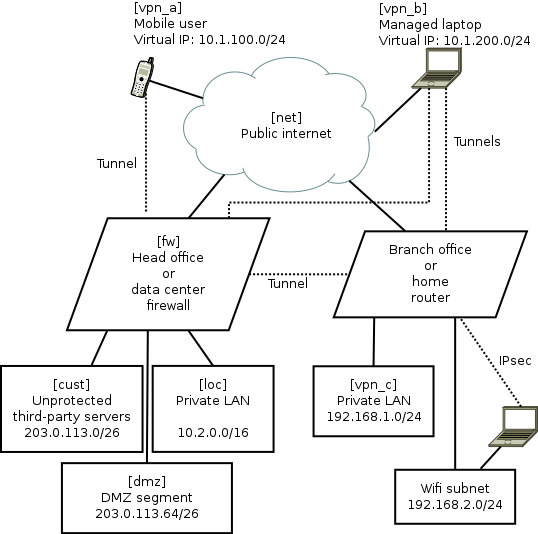
  • The names in square brackets are the zones for Shorewall, they are explained later.
  • The dotted lines are IPsec tunnels over the untrusted Internet.
  • The road-warrior users (mobiles and laptops) get virtual IP addresses from the VPN gateway. The branch offices/home routers do not use virtual IPs.
  • The mobile phones are largely untrusted: easily lost or stolen, many apps have malware, they can only tunnel to the central VPN and only access a very limited range of services.
  • The laptops are managed devices so they are trusted with access to more services. For efficiency they can connect directly to branch office/home VPNs as well as the central server.
  • Smart-phone user browsing habits are systematically monitored by mobile companies with insidious links into mass-media and advertising. Road-warriors sometimes plug-in at client sites or hotels where IT staff may monitor their browsing. Therefore, all these users want to tunnel all their browsing through the VPN.
  • The central VPN gateway/firewall is running strongSwan VPN and Shorewall firewall on Linux. It could be Debian, Fedora or Ubuntu. Other open source platforms such as OpenBSD are also very well respected for building firewall and VPN solutions, but Shorewall, which is one of the key ingredients in this recipe, only works on Linux at present.
  • The branch office/home network could be another strongSwan/Shorewall server or it could also be an OpenWRT router
  • The default configuration for most wifi routers creates a bridge joining wifi users with wired LAN users. Not here, it has been deliberately configured as an independent network. Road-warriors who attach to the wifi must use VPN tunnelling to access the local wired network. In OpenWRT, it is relatively easy to make the Wifi network an independent subnet. This is an essential security precaution because wifi passwords should not be considered secure: they are often transmitted to third parties, for example, by the cloud backup service in many newer smart phones.
Package mayhem The major components are packaged on all the major Linux distributions. Nonetheless, in every case, I found that it is necessary to re-compile fresh strongSwan packages from sources. It is not so hard to do but it is necessary and worth the effort. Here are related blog entries where I provide the details about how to re-build fresh versions of the official packages with all necessary features enabled: Using X.509 certificates as a standard feature of the VPN For convenience, many people building a point-to-point VPN start with passwords (sometimes referred to as pre-shared keys (PSK)) as a security mechanism. As the VPN grows, passwords become unmanageable. In this solution, we only look at how to build a VPN secured by X.509 certificates. The certificate concept is not hard. In this scenario, there are a few things that make it particularly easy to work with certificates:
  • strongSwan comes with a convenient command line tool, ipsec pki. Many of it's functions are equivalent to things you can do with OpenSSL or GnuTLS. However, the ipsec pki syntax is much more lightweight and simply provides a convenient way to do the things you need to do when maintaining a VPN.
  • Many of the routine activities involved in certificate maintainence can be scripted. My recent blog about using Android clients with strongSwan gives a sample script demonstrating how ipsec pki commands can be used to prepare a PKCS#12 (.p12) file that can be easily loaded into an Android device using the SD-card.
  • For building a VPN, there is no need to use a public certificate authority such as Verisign. Consequently, there is no need to fill in all their forms or make any payments for each device/certificate. Some larger organisations do choose to outsource their certificate management to such firms. For smaller organisations, an effective and sometimes better solution can be achieved by maintaining the process in-house with a private root CA.
UDP fragmentation during IPsec IKEv2 key exchange and ECDSA A common problem for IPsec VPNs using X.509 certificates is the fragmentation of key exchange datagrams during session setup. Sometimes it works, sometimes it doesn't. Various workarounds exist, such as keeping copies of all certificates from potential peers on every host. As the network grows, this becomes inconvenient to maintain and to some extent it eliminates the benefits of using PKI. Fortunately, there is a solution: Elliptic Curve Cryptography (ECC). Many people currently use RSA key-pairs. Best practice suggests using RSA keys of at least 2048 bits and often 4096 bits. Using ECC with a smaller 384-bit key is considered to be equivalent to a 7680 bit RSA key pair. Consequently, ECDSA certificates are much smaller than RSA certificates. Furthermore, at these key sizes, the key exchange packets are almost always smaller than the typical 1500 byte MTU. A further demand for ECDSA is arising due to the use of ECC within smart cards. Many smartcards don't support any RSA key larger than 2048 bits. The highly secure 384-bit ECC key is implemented in quite a few common smart cards. Smart card vendors have shown a preference for the ECC keys due to the US Government's preference for ECC and the lower computational overheads make them more suitable for constrained execution environments. Anyone who wants to use smart cards as part of their VPN or general IT security now, or in the future, needs to consider ECC/ECDSA. Making the network simple with Shorewall zones For this example, we are not just taking some easy point-to-point example. We have a real-world, multi-site, multi-device network with road warriors. Simplifying this architecture is important to help us understand and secure it. The solution? Each of these is abstracted to a "zone" in Shorewall. In the diagram above, the zone names are in square brackets. The purpose of each zone is described below:
Zone name Description
loc This is the private LAN and contains servers like databases, private source code respositories and NFS file servers
dmz This is the DMZ and contains web servers that are accessible from the public internet. Some of these servers talk to databases or message queues in the LAN network loc
vpn_a These are road warriors that are not very trustworthy, such as mobile devices. They are occasionally stolen and usually full of spyware (referred to by users as "apps"). They have limited access to ports on some DMZ servers, e.g. for sending and receiving mail using SMTP and IMAP (those ports are not exposed to the public Internet at large). They use the VPN tunnel for general internet access/browsing, to avoid surveillance by their mobile carrier.
vpn_b These are managed laptops that have a low probability of malware infection. They may well be using smart cards for access control. Consequently, they are more trusted than the vpn_a users and have access to some extra intranet pages and file servers. Like the smart-phone users, they use the VPN tunnel for general internet access/browsing, to avoid surveillance by third-party wifi hotspot operators.
vpn_c This firewall zone represents remote sites with managed hardware, such as branch offices or home networks with IPsec routers running OpenWRT.
cust These are servers hosted for third-parties or collaborative testing/development purposes. They have their own firewall arrangements if necessary.
net This zone represents traffic from the public Internet.
A practical Shorewall configuration Shorewall is chosen to manage the iptables and ip6tables firewall rules. Shorewall provides a level of abstraction that makes netfilter much more manageable than manual iptables scripting. The Shorewall concept of zones is very similar to the zones implemented in OpenWRT and this is an extremely useful paradigm for firewall management. Practical configuration of Shorewall is very well explained in the Shorewall quick start. The one thing that is not immediately obvious is a strategy for planning the contents of the /etc/shorewall/policy and /etc/shorewall/rules files. The exact details for making it work effectively with a modern IPsec VPN are not explained in a single document, so I've gathered those details below as well. An effective way to plan the Shorewall zone configuration is with a table like this:
Destination zone
loc dmz vpn_a vpn_b vpn_c cust net
Source zone loc \
dmz ? \ X X X
vpn_a ? ? \ X X
vpn_b ? ? X \ X
vpn_c X \
cust X ? X X X \
net X ? X X X \
The symbols in the table are defined:
Symbol Meaning
ACCEPT in policy file
X REJECT or DROP in policy file
? REJECT or DROP in policy file, but ACCEPT some specific ports in the rules file
Naturally, this modelling technique is valid for both IPv4 and IPv6 firewalling (with Shorewall6) Looking at the diagram in two dimensions, it is easy to spot patterns. Each pattern can be condensed into a single entry in the rules file. For example, it is clear from the first row that the loc zone can access all other zones. That can be expressed very concisely with a single line in the policy file:
loc all ACCEPT
Specific Shorewall tips for use with IPsec VPNs and strongSwan Shorewall has several web pages dedicated to VPNs, including the IPsec specific documentation.. Personally, I found that I had to gather a few details from several of these pages to make an optimal solution. Here are those tips:
  • Ignore everything about the /etc/shorewall/tunnels file. It is not needed and not used any more
  • Name the VPN zones (we call them vpn_a, vpn_b and vpn_c) in the zones file but there is no need to put them in the /etc/shorewall/interfaces file.
  • The /etc/shorewall/hosts file is not just for hosts and can be used to specify network ranges, such as those associated with the VPN virtual IP addresses. The ranges you put in this file should match the rightsourceip pool assignments in strongSwan's /etc/ipsec.conf
  • One of the examples suggests using mss=1400 in the /etc/shorewall/zones file. I found that is too big and leads to packets being dropped in some situations. To start with, try a small value such as 1024 and then try larger values later after you prove everything works. Setting mss for IPsec appears to be essential.
  • Do not use the routefilter feature in the /etc/shorewall/interfaces file as it is not compatible with IPsec
Otherwise, just follow the typical examples from the Shorewall quick start guide and configure it to work the way you want. Here is an example /etc/shorewall/zones file:
fw firewall
net ipv4
dmz ipv4
loc ipv4
cust ipv4
vpn_a ipsec mode=tunnel mss=1024
vpn_b ipsec mode=tunnel mss=1024
vpn_c ipsec mode=tunnel mss=1024
Here is an example /etc/shorewall/hosts file describing the VPN ranges from the diagram:
vpn_a eth0:10.1.100.0/24 ipsec
vpn_b eth0:10.1.200.0/24 ipsec
vpn_c eth0:192.168.1.0/24 ipsec
Here is an example /etc/shorewall/policy file based on the table above:
loc all ACCEPT
vpn_c all ACCEPT
cust net ACCEPT
net cust ACCEPT
all all REJECT
Here is an example /etc/shorewall/rules file based on the network:
SECTION ALL
# allow connections to the firewall itself to start VPNs:
# Rule  source    dest    protocol/port details
ACCEPT   all       fw                ah
ACCEPT   all       fw                esp
ACCEPT   all       fw                udp 500
ACCEPT   all       fw                udp 4500
# allow access to HTTP servers in DMZ:
ACCEPT   all       dmz               tcp 80
# allow connections from HTTP servers to MySQL database in private LAN:
ACCEPT   dmz       loc:10.2.0.43     tcp 3306
# allow connections from all VPN users to IMAPS server in private LAN:
ACCEPT vpn_a,vpn_b,vpn_c loc:10.2.0.58 tcp 993
# allow VPN users (but not the smartphones in vpn_a) to the
# PostgresQL database for PostBooks accounting system:
ACCEPT vpn_b,vpn_c loc:10.2.0.48      tcp 5432
SECTION ESTABLISHED
ACCEPT   all       all
SECTION RELATED
ACCEPT   all       all
Once the files are created, Shorewall can be easily activated with:
# shorewall compile && shorewall restart
strongSwan IPsec VPN setup Like Shorewall, strongSwan is also very well documented and I'm just going to focus on those specific areas that are relevant to this type of VPN project.
  • Allow the road-warriors to send all browsing traffic over the VPN means including leftsubnet=0.0.0.0/0 in the VPN server's /etc/ipsec.conf file. Be wary though: sometimes the road-warriors start sending the DHCP renewal over the tunnel instead of to their local DHCP server.
  • As we are using Shorewall zones for firewalling, you must set the options leftfirewall=no and lefthostaccess=no in ipsec.conf. Shorewall already knows about the remote networks as they are defined in the /etc/shorewall/hosts file and so firewall rules don't need to be manipulated each time a tunnel goes up or down.
  • As discussed above, X.509 certificates are used for peer authentication. In the certificate Distinguished Name (DN), store the zone name in the Organizational Unit (OU) component, for example, OU=vpn_c, CN=gw.branch1.example.org
  • In the ipsec.conf file, match the users to connections using wildcard specifications such as rightid="OU=vpn_a, CN=*"
  • Put a subjectAltName with hostname in every certificate. The --san option to the ipsec pki commands adds the subjectAltName.
  • Keep the certificate distinguished names (DN) short, this makes the certificate smaller and reduces the risk of fragmented authentication packets. Many examples show a long and verbose DN such as C=GB, O=Acme World Wide Widget Corporation, OU=Engineering, CN=laptop1.eng.acme.example.org. On a private VPN, it is rarely necessary to have all that in the DN, just include OU for the zone name and CN for the host name.
  • As discussed above, use the ECDSA scheme for keypairs (not RSA) to ensure that the key exchange datagrams don't suffer from fragmentation problems. For example, generate a keypair with the command ipsec pki --gen --type ecdsa --size 384 > user1Key.der
  • Road warriors should have leftid=%fromcert in their ipsec.conf file. This forces them to use the Distinguished Name and not the subjectAltName (SAN) to identify themselves.
  • For road warriors who require virtual tunnel IPs, configure them to request both IPv4 and IPv6 addresses (dual stack) with leftsourceip=%config4,%config6 and on the VPN gateway, configure the ranges as arguments to rightsourceip
  • To ensure that roadwarriors query the LAN DNS, add the DNS settings to strongswan.conf and make sure road warriors are using a more recent strongSwan version that can dynamically update /etc/resolv.conf. Protecting DNS traffic is important for privacy reasons. It also makes sure that the road-warriors can discover servers that are not advertised in public DNS records.
Central firewall/VPN gateway configuration Although they are not present in the diagram, IPv6 networks are also configured in these strongSwan examples. It is very easy to combine IPv4 and IPv6 into a single /etc/ipsec.conf file. As long as the road-warriors have leftsourceip=%config4,%config6 in their own configurations, they will operate dual-stack IPv4/IPv6 whenver they connect to the VPN. Here is an example /etc/ipsec.conf for the central VPN gateway:
config setup
        charonstart=yes
        charondebug=all
        plutostart=no
conn %default
        ikelifetime=60m
        keylife=20m
        rekeymargin=3m
        keyingtries=1
        keyexchange=ikev2
conn branch1
        left=198.51.100.1
        leftsubnet=203.0.113.0/24,10.0.0.0/8,2001:DB8:12:80:/64
        leftcert=fw1Cert.der
        leftid=@fw1.example.org
        leftfirewall=no
        lefthostaccess=no
        right=%any
        rightid=@branch1-fw.example.org
        rightsubnet=192.168.1.0/24
        auto=add
conn rw_vpn_a
        left=198.51.100.1
        leftsubnet=0.0.0.0/0,::0/0
        leftcert=fw1Cert.der
        leftid=@fw1.example.org
        leftfirewall=no
        lefthostaccess=no
        right=%any
        rightid="OU=vpn_a, CN=*"
        rightsourceip=10.1.100.0/24,2001:DB8:1000:100::/64
        auto=add
conn rw_vpn_b
        left=198.51.100.1
        leftsubnet=0.0.0.0/0,::0/0
        leftcert=fw1Cert.der
        leftid=@fw1.example.org
        leftfirewall=no
        lefthostaccess=no
        right=%any
        rightid="OU=vpn_b, CN=*"
        rightsourceip=10.1.200.0/24,2001:DB8:1000:200::/64
        auto=add
Sample branch office or home router VPN configuration Here is an example /etc/ipsec.conf for the Linux server or OpenWRT VPN at the branch office or home:
conn head_office
        left=%defaultroute
        leftid=@branch1-fw.example.org
        leftcert=branch1-fwCert.der
        leftsubnet=192.168.1.0/24,2001:DB8:12:80:/64
        leftfirewall=no
        lefthostaccess=no
        right=fw1.example.org
        rightid=@fw1.example.org
        rightsubnet=203.0.113.0/24,10.0.0.0/8,2001:DB8:1000::/52
        auto=start
# notice we only allow vpn_b users, not vpn_a
# these users are given virtual IPs from our own
# 192.168.1.0 subnet
conn rw_vpn_b
        left=branch1-fw.example.org
        leftsubnet=192.168.1.0/24,2001:DB8:12:80:/64
        leftcert=branch1-fwCert.der
        leftid=@branch1-fw.example.org
        leftfirewall=no
        lefthostaccess=no
        right=%any
        rightid="OU=vpn_b, CN=*"
        rightsourceip=192.168.1.160/27,2001:DB8:12:80::8000/116
        auto=add
Further topics Shorewall and Shorewall6 don't currently support a unified configuration. This can make it slightly tedious to duplicate rules between the two IP variations. However, the syntax for IPv4 and IPv6 configuration is virtually identical. Shorewall only currently supports Linux netfilter rules. In theory it could be extended to support other types of firewall API, such as pf used by OpenBSD and the related BSD family of systems. A more advanced architecture would split the single firewall into multiple firewall hosts, like the inner and outer walls of a large castle. The VPN gateway would also become a standalone host in the DMZ. This would require more complex routing table entries. Smart cards with PIN numbers provide an effective form of two-factor authentication that can protect certificates for remote users. Smart cards are documented well by strongSwan already so I haven't repeated any of that material in this article. Managing a private X.509 certificate authority in practice may require slightly more effort than I've described, especially when an organisation grows. Small networks and home users don't need to worry about these details too much, but for most deployments it is necessary to consider things like certificate revocation lists and special schemes to protect the root certificate's private key. EJBCA is one open source project that might help. Some users may want to consider ways to prevent the road-warriors from accidentally browsing the Internet when the IPsec tunnel is not active. Such policies could be implemented with some basic iptables firewalls rules in the road-warrior devices. Summary Using these strategies and configuration tips, planning and building a VPN will hopefully be much simpler. Please feel free to ask questions on the mailing lists for any of the projects discussed in this blog.

11 July 2013

Johannes Schauer: Using botch to generate transition build orders

In October 2012, Joachim Breitner asked me whether botch (well, it didnt have a name back then) can also be used to calculate a build order for recompiling ~450 haskell-packages with a new ghc version (it was probably the 7.6.1 release) to upload them to experimental. What is still blocking this ability is the inability of botch to directly read *.dsc files instead of having to rely on Packages and Sources files. On the other hand (in case there exists a set of Packages and Sources files) it is now much easier to use botch for such a use case for which it was not originally designed. To demonstrate how botch can be used to calculate the build order for library transitions, I wrote the script create-transition-order.sh which executes the individual tools in the correct order with the correct arguments. To validate the correctness of botch, I compared the output to the order which ben produces for transitions. The create-transition-order.sh script is called with a ben query string and optionally a snapshot.debian.org timestamp as its arguments. The script relies on ben being installed because ben query strings cannot be translated into grep-dctrl query strings as ben query splits fields which contain comma separated values at the comma before searching for strings. Unfortunately the script also currently relies on a yet unreleased ben feature which allows ben download to create a ben.cache file. You can track the progress of this feature as bug#714703. Creating a ben.cache file is necessary because some queries rely on an association between binary and source packages which is not present in all packages in a Packages file. For example the haskell transition query makes use of this feature by including the .source field in its query. The result of these trials was, that botch produced nearly the same build order for nearly all transitions. The only differences are due to shortcomings of ben and botch. For example, ben is not able to create an order for transitions where involved packages form one or more cycles. A prominent example is the haskell transition where ghc itself is only built during step 15 after many other packages which would have needed ghc to be compiled. Botch solves this problem by reducing all strongly connected components in a cyclic graph to a single vertex before creating the order. This operation makes the graph acyclic and creating a build order trivial. The only remaining problems can then be found within the strongly connected components (for Haskell they are of maximum size two) but the overall build order is correct. On the other hand botch has no notion of packages which are affected by a transition and thus creates a build order which in some cases is longer than the one created by ben. When generating the interdependencies between packages, ben only considers those which are part of the transition. Botch on the other hand considers all dependency relationships. It would be simple to solve this issue in botch by removing unaffected packages from the dependency graph through edge contraction (an operation already used by botch for other tasks). This exercise also let me find another bug in dose3 where libdose would not associate a binary package with a binNMU version with its associated source package but instead report a version mismatch error. This problem was also reported in the process.

10 July 2013

Russell Coker: Samsung Galaxy Note 2

A few weeks ago I bought a new Samsung Galaxy Note 2 Android phone. As I predicted in my post about Phone and Tablet Sizes [1] the Note 2 with a 5.55 display is a bit too big for me to have an ideal single handed side grasp (I estimate that about 5.2 would be ideal). But I can stretch a bit and move it around in my hand to touch all parts of the screen with my thumb. Although when doing that I don t have a tight grip, with my previous phone the Samsung Galaxy S3 [2] I could properly wrap my hand around it to grip it tightly while using it with one hand. The Note 2 will be easier for me to drop or for a thief to snatch it from me. While the big screen makes the phone difficult to use with one hand it does allow viewing more data. The ConnectBot SSH client (Play Store link) [3] (F-Droid repository link) [4] works a lot better on a larger screen I ve also discovered that the volume control buttons can be used to change the font size in ConnectBot which is handy as the default is really tiny. Also Klaus Weidner s Hacker s Keyboard (Play Store link) [5] (F-Droid repository link) [6] works a lot better with a larger screen. When I tested the Hacker s keyboard on a smaller phone I found the 5 row layout too difficult to use, but on the Note 2 it works well. As an aside I wish I could quickly and easily toggle between 4 row mode (good for SMS) and 5 row mode (good for sysadmin work) in the Hackers Keyboard. For less serious use the large screen on the Note 2 is good for watching TV. I ve got a collection of mp4s of TV shows that I ve been meaning to watch, now I watch them in bed on my phone. Another advantage of the Note 2 is the battery life. When playing Ingress and doing all the usual email checks etc my Note 2 will last about as long as my wife s Galaxy S3 with it s power case. So without any extra batteries a Note 2 will probably last about twice as long as a Galaxy S3. The Note 2 has more RAM than the S3 I used to use (I had the S3 with 1G of RAM) and it also apparently has a faster CPU. The CPU speed hasn t been an issue for me but the extra RAM is a real benefit, it means that I can usually switch between Ingress and other programs without having to restart Ingress each time. As an aside I think that Google and LG should release a Nexus Ingress 4 phone or some other device that s optimised for Ingress, I m sure it would sell well. Some people make a big deal about the stylus that comes with the Note 2. It is a neat feature to have the device know when the stylus tip is hovering over the screen but it s not very useful for me. If I was going to create art work on a phone (as some people do) then it would interest me, but I m more interested in email and ssh for fine input and my fingers are generally good enough for those tasks. I have got thin fingers, so I think that people with thicker fingers could really benefit from the stylus. I recently bought a batch of stylus pens from Kogan which have a pen at one end and a rubber stylus tip at the other for fat fingered people I know who need to use an Android phone but can t afford a Note or Note 2. I also like the software build on it which is almost the same as that on the Galaxy S3. It seems that many people prefer the apparently stock features on the Nexus 4 but I like the way Samsung does things. Conclusion I m very happy with my new phone. The bigger screen allows me to see things more clearly, this is good for web browsing, reading email, and now that I can use the Hackers Keyboard I can type more effectively. The longer battery life is really good too, although I think that Samsung could have done better if the phone was 3mm thicker then it could have a much bigger battery and have a larger CCD for the camera. I don t think that the phone is really different, at least not for my use. Samsung has promoted it for artistic use and I ve seen evidence to support their claims. But for most people it ll just be a phone with a larger screen and a bigger battery. Some people criticise it for being too big, but it s still smaller than the handsets on most desk phones so it s not big by the standards of old fashioned phones. The increased size has not only allowed me to do the same things more effectively but also allowed me to do things I hadn t tried doing on a phone before such as watching TV. This isn t because of the phone being particularly special in any way, it s just that the change in size gives more possibilities for ways of using it. The Samsung Galaxy Mega is the largest smart phone. The 5.8 version of the Mega has a resolution of only 960*540 (less than the Note and Note 2 not good enough IMHO) and the 6.3 version has the same resolution as the Note 2 of 1280*720. I think that both Mega variants are too big for me, I need to be able to use a phone with one hand. So it seems that the Note 2 is probably the best phone for me right now.

8 July 2013

Olivier Berger: Experimenting with Linked Open Data about FLOSS projects : matching Debian upstream projects

I ve been experimenting with Linked Open Data about FLOSS projects harvested from different sources of DOAP or ADMS.SW descriptions. I ve tried and match upstream projects of Debian packages with upstream projects hosted at Apache, Gnome, or Alioth.debian.org, or catalogued on Pypi. I m matching them on identical values of the Homepage field (comparing the Homepage Control field set by Debian packagers with the doap:homepage meta-data in the RDF documents harvested from the upstream project catalogues). Here are initial results of my little experiment, for number of matched projects, and results on project name s similarity :
Upstream catalogue Total matching projs Exact same project name Same project name (case independant)
apache 31 0 (0 %) 0 (0 %)
alioth 16 13 (81 %) 13 (81 %)
pypi 439 217 (49 %) 273 (62 %)
gnome 21 0 (0 %) 7 (33 %)
Total 507 230 (45%) 293 (58 %)
The data set contains tens of thousands of projects, with probably many duplicates, but from all of these, only 507 have common homepages. As you can see, in some cases, the Debian source package names match the upstream project name (sometimes with lower/upper case variants), but in general, the project names aren t identical, so it is interesting to try and match them by homepage. For the curious ones, the Apache, Gnome and Pypi project catalogues use to provide RDF meta-data for quite some time. More recently have we introduced ADMS.SW meta-data for Debian source packages, and even more recently for the Alioth projects (through the ADMS.SW exporter plugin for FusionForge). There are still some ways for improvements, for instance to normalize homepage URLs which tend to vary (trailing slashes, or different HTTP/HTTPS schemes). Stay tuned for more details.

7 July 2013

Sylvestre Ledru: LLVM toolchain packages

In parallel of my work on the LLVM Debian/Ubuntu nightly packages, I uploaded a couple months ago the same packages for the stable releases of the LLVM toolchain. By toolchain, this means LLVM + Clang + Clang extra tools + compiler-rt + polly + LLDB.
Previously, they were packaged as separate source packages. Making the maintenance harder and, especially, limiting the packaging of LLDB and polly. Currently, we have in the archive: For the 3.2 release, I am planning to focus on RC bug fixes.
The 3.3 and snapshot releases will get the feature improvements.
llvm-default will point to the 3.3 release once it builds on all architectures and it reached testing aka Jessie (probably during summer).

6 July 2013

Steve Kemp: This weekend I will be mostly upgrading to wheezy

Having migrated my websites away from my ssh/mail box I'm going to upgrade that this weekend. I've got my new mail client, lumail, working well enough to use exclusively, so the upgrade should be nice and simple. I spent a few hours last night removing packages from my ssh/mail box to trim it down. Removing a bunch of Perl modules I used in my CGI coding, removing services such as nfs-common, portmapper, etc. Today I'll have a stab at the upgrade. The only thing I have to be careful of is my backported/tweaked qpsmptd packages. I'll try the native wheezy version now it has caught up. (I don't use any of the standard qpsmtpd plugins at all. Instead I have a separate tree of my own custom anti-spam and virtual-hosting aware plugins. They all work in a unified fashion. Using these plugins against a new version of qpsmtpd should be just fine. But obviously I need to test that.) Work on Lumail is probably going to slow down now it is genuinely in use, but I'll keep an eye out for feature requests and missing primitives. Annoyingly I wasted 30 minutes just now implementing a plugin I'd already written: lumail issue #51. I also need to step-back this weekend and reassess my hosting. When I was tweaking my slaughter setup I recently realized I have more hosts than I thought: Total: 13 virtual machines. (+ one kvm-host)

5 July 2013

Francesca Ciceri: #debcraft: DIY projects to show your Debian love

The next August 16th, Debian will turn 20.
What are you planning to do to to celebrate?
Being a DIY geek, I decided to create some craft projects dedicated to the Universal Operating System. I'll publish them, one per week, on this blog with a detailed tutorial, released under a CC:BY-SA 3.0 license. If you have an original project dedicated to Debian (from cookies and cakes to knitted socks, from beaded earrings to handpainted mugs, from plushies to pottery, from glass arts to lettering and so on) join me!
Post a tutorial about your project on your blog (or if you don't have one, send me a mail and you'll publish it here as guest post) with the hashtag #debcraft and a free (as in freedom) license. Bonus points for project using recycled material :). Ready to start? Below my first one: swirl charms from plastic bottles.
please, do try this at home a couple of finished swirl This is a little tutorial on how to create swirl charms for keyrings from plastic bottles.
The project is really easy and quick to realize, the materials very common and the result quite pretty.
I found out that there are tons of tutorial in the Internet about how to make jewelry from PET bottles, and I'll surely give them a try (earrings, in particular, seem a good idea).
If you want some inspiration, I suggest you to check out the amazing work of Turkish artist Gulnur Ozdaglar who creates ethereal jewelry and everyday objects from plastic bottles.
"What is PET bottle?
A domesticated bottle kept for companionship or amusement."
Gulnur Ozdaglar
What you will need tools and materials needed In the pic there's also a soda can, because I thought it could be a good material too.
After some tests, I decided that soda cans would probably need some resin to make the edges less sharp and avoid cuts, so I think I'll experiment a bit more with them. Step 1 step 1: cut the swirl from plastic First of all, you'll need to cut out the swirl from the bottle.
I cut it in the upper part of the bottle, using a paper swirl as guide to cut the swirl shape as regular as I could. Step 2 step 2: melt the edges As the edges of the cut are a bit raw, I decided to lightly melt them with the lighter: be careful as if the plastic melt too much it will ruin our nice swirl. Also, remember to open a window while doing it: it's not a lot of melting but better safe than sorry. Step 3 step 3: punch a hole for the jumpring With a pin or a needle punch a hole in the upper part of the swirl, where the jumpring will be set to connect the swirl with the keychain ring. Now you need to decide which type of swirl do: for the painted one, follow step 4a; for the transparent one with the red embroidery, follow step 4b. Step 4a step 4a: paint the swirl Paint your swirl red, or of your favourite colour (I experimented a bit here, having lots of nail polish, and made also a purple one). Step 4b step 4b: punch more holes and sew with red thread With a pin or a needle, punch a series of holes, in the middle of the swirl, following the swirl shape.
Then embroider it using backstitch. Step 5 step 5: add the jumpring Add the jumpring, if you have a ready made one.
If not, use a pair of cutters to cut a little bit of metal wire and the pliers to create a ring with it, insert in the hole and close it. Step 6 step 6: add the metal keyring Connect the jumpring and the metal keyring. Congratulations: you now have a swirl shaped keycharm!

Justus Winter: mount, umount and mtab

This week was all about getting mount into shape, addind umount and hacking up a prototype for the mtab issue. With all my patches to mount the boot log looks like this:
INIT: version 2.88 booting
Using makefile-style concurrent boot in runlevel S.
Activating swap...done.
Checking root file system...fsck from util-linux 2.20.1
hd2 : tray open or drive not ready
end_request: I/O error, dev 02:00, sector 0
ext2fs_check_if_mount: Can't check if filesystem is mounted due to missing mtab file while determining whether /dev/hd0s1 is mounted.
/dev/hd0s1: clean, 44101/181056 files, 283413/723200 blocks
done.
Cleaning up temporary files... /tmp.
/etc/rcS.d/S06mtab.sh: 48: /etc/rcS.d/S06mtab.sh: cannot open /proc/mounts: No such file
Activating lvm and md swap...(default pager): Already paging to partition hd0s5!
done.
Checking file systems...fsck from util-linux 2.20.1
hd2 : tray open or drive not ready
end_request: I/O error, dev 02:00, sector 0
done.
Mounting local filesystems...done.
Activating swapfile swap...(default pager): Already paging to partition hd0s5!
done.
df: Warning: cannot read table of mounted file systems: No such file or directory
Cleaning up temporary files....
Configuring network interfaces...inetutils-ifconfig: invalid arguments
ifup: failed to open pid file /run/network/ifup-/dev/eth0.pid: No such file or directory
Internet Systems Consortium DHCP Client 4.2.2
Copyright 2004-2011 Internet Systems Consortium.
All rights reserved.
For info, please visit https://www.isc.org/software/dhcp/
can't create /var/lib/dhcp/dhclient./dev/eth0.leases: No such file or directory
Listening on Socket//dev/eth0
Sending on   Socket//dev/eth0
DHCPDISCOVER on /dev/eth0 to 255.255.255.255 port 67 interval 7
DHCPREQUEST on /dev/eth0 to 255.255.255.255 port 67
DHCPOFFER from 10.0.2.2
DHCPACK from 10.0.2.2
can't create /var/lib/dhcp/dhclient./dev/eth0.leases: No such file or directory
bound to 10.0.2.15 -- renewal in 42107 seconds.
done.
Cleaning up temporary files....
Setting up X socket directories... /tmp/.X11-unix /tmp/.ICE-unix.
INIT: Entering runlevel: 2
Using makefile-style concurrent boot in runlevel 2.
Starting enhanced syslogd: rsyslogd.
Starting deferred execution scheduler: atd.
Starting periodic command scheduler: cron.
Starting system message bus: dbusFailed to set socket option"/var/run/dbus/system_bus_socket": Protocol not available.
Starting OpenBSD Secure Shell server: sshd.
GNU 0.3 (debian) (console)
login:
As you can see, mountall.sh works fine now (it's the line about mounting local filesystems). This is a list of issues I tackled this week: Note that even though I've implemented umount, it doesn't actually work yet. That is because umount needs a mtab file or /proc/mounts to do anything, because you can either invoke umount with the mount point or the device and umount needs an mtab style file to figure out whether the argument is referring to the former or the latter. So the next big issue is the mtab issue. There is some information about that in the Hurd wiki, it even is a gsoc project idea of its own: http://www.gnu.org/software/hurd/community/gsoc/project_ideas/mtab.html But I need this now, this cannot wait for another gsoc. The implementation outlined by that page consists roughly of: If this hypothetical mtab translator is bound to say /proc/mounts this would solve all our problems:
% settrans -ca /proc/mounts /hurd/mtab /
As this involves adding a RPC procedure and keeping a list of passive and active translators, this involves some design decisions. As discussed in #hurd I hacked up a prototype and post it for review: http://lists.gnu.org/archive/html/bug-hurd/2013-07/msg00022.html As soon as I get the necessary feedback on this issue, I will get the implementation up to speed. Until then, I will pick another item from my status list, most probably the ifupdown issue. Speaking of feedback, all of my patches I sent last week were merged at the appropriate locations. That was really quick, many thanks for that :) While working on the mount issues, I frequently looked at the implementation of Linux' and FreeBSD's mount to see how --types is handled there. I must admit that I was not to keen about the idea of writing c again, but I was positively surprised by the code I've seen from Hurd so far. As Hurd is the operating system of the GNU system, its code is free to use any GNU extension to libc and gcc including nice stuff like nested functions. If you look at the different mount implementations, you'll find the Hurd version to be the most modern and clean one imho:
Linux
http://sources.debian.net/src/util-linux/2.20.1-5.4/mount/mount.c
FreeBSD
http://sources.debian.net/src/freebsd-utils/9.0%2Bds1-11/sbin/mount/mount.c
Hurd
http://sources.debian.net/src/hurd/20130620-1/utils/mount.c
See you next week :)

3 July 2013

Matthew Garrett: Explaining Intel Rapid Start Technology

Recent Intel-based systems often implement something called Intel Rapid Start Technology. Like many things with the word "Technology" in the name, there's a large part of this that's marketing. The relatively small amount of technical documentation available implies that it's tied to your motherboard chipset and CPU, but as far as I can tell it's entirely implemented in firmware and could work just as well on, say, a Cyrix on a circa 1996 SIS-based motherboard if someone wrote the BIOS code[1]. But since nobody has, we're stuck with the vendors who've met Intel's requirements and licensed the code.

The concept of IRST is pretty simple. There's a firmware mechanism for setting a sleep timeout. If you suspend your computer and this timeout expires, it'll resume. However, instead of handing control back to the OS, the firmware just copies the entire contents of RAM to a special partition and turns the computer off. Next time you hit the power button, the firmware dumps the partition contents back into RAM and resumes as if nothing had changed. This takes a few seconds longer than resume from S3 but is far faster than resume from hibernation since it starts the moment the system gets power.

At a more technical level, it's a little more complicated. The first thing to know about this feature is that it's entirely invisible unless your hard drive is set up correctly. There needs to be a partition that's at least the size of your system's physical RAM. For GPT systems, this needs to have a type GUID of D3BFE2DE-3DAF-11DF-BA-40-E3A556D89593. For MBR systems, you need a partition type of 0x84[2]. If the firmware doesn't find an appropriate partition then the OS will get no indication that the firmware supports it. Boo.

(The second thing is that it seems like it really does have to be on an SSD, and if you try to do this on spinning media your firmware will ignore it anyway)

If all the prerequisites are in place, an ACPI device with an HID of INT3392 will exist. It has four methods associated with it: GFFS, SFFS, GFTV and SFTV. GFFS returns an integer representing the events that will cause the system to wake up from S3 and suspend to SSD. The system will wake after the timeout expires if bit 0 is set, and will wake when the battery becomes critically low if bit 1 is set. The other bits appear to be unused at the moment[3]. SFFS sets the wakeup events, using the same bit values as GFFS. GFTV returns an integer containing the current wakeup timeout in minutes. SFTV sets it. Values above 1440 (ie, 24 hours) seem to be considered invalid - if I set them the value instead ends up as 10 and the timeout flag gets cleared from the wakeup events field.

I've submitted a patch that adds a sysfs interface for setting these values, and unless anyone objects it'll probably end up in 3.11. There's still the remaining question of how userspace should make use of these, and also how installers should behave when it comes to systems that support IRST. As previously mentioned, there's no obvious indication to the OS that the feature is supported unless the appropriate partition already exists. The easiest way to deal with this is for installers to default to retaining any partitions with the magic IDs, but I'm still looking into whether it's possible to get the firmware to cough up some more information so it can be created automatically even if the drive's entirely blank.

And now, having got this working on a test machine, I just need to split my Thinkpad's swap partition in half and make sure it works here as well. Woo.

[1] Note: I am not going to do this.
[2] Conveniently, the same as the partition type that APM systems used for suspend to disk back when dubstep hadn't been invented yet
[3] At least, if you attempt to set them they get ignored.

comment count unavailable comments

2 July 2013

Bits from Debian: all Debian source are belong to us

This is a verbatim repost from Stefano Zacchiroli's post TL;DR: go to http://sources.debian.net and enjoy.
Debsources is a new toy I've been working on at IRILL together with Matthieu Caneill. In essence, debsources is a simple web application that allows to publish an unpacked Debian source mirror on the Web. You can deploy Debsources where you please, but there is a main instance at http://sources.debian.net (sources.d.n for short) that you will probably find interesting. sources.d.n follows closely the Debian archive in two ways:
  1. it is updated 4 times a day to reflect the content of the Debian archive
  2. it contains sources coming from official Debian suites: the usual ones (from oldstable to experimental), *-updates (ex volatile), *-proposed-updates, and *-backports (from Wheezy on)
Via sources.d.n you can therefore browse the content of Debian source packages with usual code viewing features like syntax highlighting. More interestingly, you can search through the source code (of unstable only, though) via integration with http://codesearch.debian.net. You can also use sources.d.n programmatically to query available versions or link to specific lines, with the possibility of adding contextual pop-up messages (example). In fact, you might have stumbled upon sources.d.n already in the past few days, via other popular Debian services where it has already been integrated. In particular: codesearch.d.n now defaults to show results via sources.d.n, and the PTS has grown new "browse source code" hyperlinks that point to it. If you've ideas of other Debian services where sources.d.n should be integrated, please let me know. I find Debsources and sources.d.n already quite useful but, as it often happens, there is still a lot TODO. Obviously, it is all Free Software (released under GNU AGPLv3). Do not hesitate to report new bugs and, better, to submit patches for the outstanding ones. Acknowledgements PS in case you were wondering: at present sources.d.n requires ~381 GB of disk space to hold all uncompressed source packages, plus ~83 GB for the local (compressed) source mirror

Stefano Zacchiroli: introducing sources.debian.net

all Debian source are belong to us TL;DR: go to http://sources.debian.net and enjoy.
Debsources is a new toy I've been working on at IRILL together with Matthieu Caneill. In essence, debsources is a simple web application that allows to publish an unpacked Debian source mirror on the Web. You can deploy Debsources where you please, but there is a main instance at http://sources.debian.net (sources.d.n for short) that you will probably find interesting. sources.d.n follows closely the Debian archive in two ways:
  1. it is updated 4 times a day to reflect the content of the Debian archive
  2. it contains sources coming from official Debian suites: the usual ones (from oldstable to experimental), *-updates (ex volatile), *-proposed-updates, and *-backports (from Wheezy on)
Via sources.d.n you can therefore browse the content of Debian source packages with usual code viewing features like syntax highlighting. More interestingly, you can search through the source code (of unstable only, though) via integration with http://codesearch.debian.net. You can also use sources.d.n programmatically to query available versions or link to specific lines, with the possibility of adding contextual pop-up messages (example). In fact, you might have stumbled upon sources.d.n already in the past few days, via other popular Debian services where it has already been integrated. In particular: codesearch.d.n now defaults to show results via sources.d.n, and the PTS has grown new "browse source code" hyperlinks that point to it. If you've ideas of other Debian services where sources.d.n should be integrated, please let me know. I find Debsources and sources.d.n already quite useful but, as it often happens, there is still a lot TODO. Obviously, it is all Free Software (released under GNU AGPLv3). Do not hesitate to report new bugs and, better, to submit patches for the outstanding ones. Acknowledgements PS in case you were wondering: at present sources.d.n requires ~381 GB of disk space to hold all uncompressed source packages, plus ~83 GB for the local (compressed) source mirror

Next.

Previous.

