Search Results: "az"

8 September 2011

David Welton: Zero to Profitable - LiberWriter Lessons Learned

Here's how I have created the beginnings of a profitable Kindle formatting and conversion service, LiberWriter, from scratch. Last Winter, I read one of the best business books I have read in a long time, Rob Walling's Start Small, Stay Small: <iframe frameborder="0" marginheight="0" marginwidth="0" scrolling="no" src="http://rcm.amazon.com/e/cm?lt1=_blank&amp;bc1=000000&amp;IS2=1&amp;bg1=FFFFFF&amp;fc1=000000&amp;lc1=0000FF&amp;t=dedasys-20&amp;o=1&amp;p=8&amp;l=as4&amp;m=amazon&amp;f=ifr&amp;ref=ss_til&amp;asins=B003YH9MMI" style="width: 120px; height: 240px;"></iframe> Rather than being a "big idea" book that includes one big idea and lots of stories to support it, it's a very practical book on how to go about creating a small online business. I've always been someone who loves to build things, from various open source projects, to diverse web sites that people have found valuable. However, I am not a "business guy". I'm not that good at making money, so the simple approach in the book is really better for people like me: make something and sell it. Advertising can certainly work, but it's so much harder to figure out the numbers compared with a product, where you can compare the cost of providing the product to the price people will pay for it. And that's just one thing; the book has tons of ideas about practical ways of going about putting together a profitable small online business. It's not a "get rich quick" book - part of the idea is that if you are looking at a niche that is fairly small, it will simply not be of interest to larger companies, so you aren't going to get outspent and outcompeted by them. In any event, though, at about the same time I read the book, I was poking around looking at Amazon's KDP, which allows you to self publish for the Kindle, and noticing how difficult the process is. The native format of Amazon's books is HTML with several XML files thrown in for good measure. Now, for someone technical, that's certainly not an insurmountable obstacle, but for many authors, it's a very unpleasant prospect. Granted, you can also manipulate a Word file to make it suitable for the KDP, but even that is something that many people dont' find to be a productive use of their time. They're authors, and they want to write. Having spotted a niche that looked interesting - I love to read, and I like the idea of helping out authors - I discarded the book idea I was looking at myself and did some writing of my own: source code for a project that would automate the process of converting and formatting Kindle books. The core of the system was a fun evenings/weekends project, and soon it was able to produce pretty good books. After "inflicting" the beta version of the system on several people, such as Rich Bowen (thanks again, Rich!), I got it beat into shape and started accepting the first paying customers. It's very exciting to have those first few people pay for something you made - it's a great feeling! Initially, my thought was to sell it as a way to write books directly for the Kindle, however, it soon became evident that 99% of people have already written their books with Microsoft Word, so what they were really interested in was a conversion and formatting system that would take a Word document, poke and prod, stitch and stretch it some, and output a nice looking book for the Kindle. One of the lessons from Rob's book was that stuff doesn't have to be perfect if it works. Initially, I had people putting their word documents into LiberWriter not with the smooth(ish) upload process we have now, but by cutting and pasting in their documents! As a computer guy, doing things in a hacky way is sometimes very unpleasant, but you know what? It worked, and it was easy for people to handle, so I ran with it until a better system was in place. Writing code was the easy part, and definitely within my "comfort zone". Some of the other things I've had to do have been much more difficult, and as a consequence, more of a learning experience. For instance, I realized early on that the process would never be 100% automatic, so I'd have to get some people to work on the books, with the idea being to provide them tools to make the process as simple, quick, and easy as possible. I'm always on the lookout for new things to script within the system. However, need people it does, and finding them and engaging them has been a difficult process. As per the book's suggestion, I've primarily used oDesk to find contractors, and have grardually begun to find some people who work really well. It has taken time, and has not been easy, though. I'm not an introvert, but in some ways I'm happiest when doing my own thing. Being the 'boss' is new. One of the tricky aspects of oDesk is that pretty much any job posting gets tons of responses, some of them from people who appear to have barely read the posting. One trick I learned is to request that the potential contractor creates an account with LiberWriter. Very simple and not a waste of time, and yet a majority of applicants ignored the request. Through most of the spring and summer, LiberWriter remained something strictly for the evenings and weekends, as I was busy with client work during the days, and with my daughter during the afternoons, but as August rolled around, I found some more time on my hands, and really started investing more energy in LiberWriter. It has been very rewarding to see a corresponding increase in the number of customers. We (at this point, between myself and the contractors, LiberWriter is a group, and no longer "I") also raised prices - another valuable piece of advice from the book, and... pretty much anyone who writes for people jumping into online businesses. As tech people, we often tend to aim low in terms of prices. Indeed, soonish, prices will likely go up again. Another challenge has been turning it as much as possible into a "productized service". Since Kindle books are fairly simple in what you can do with them, as long as you don't get too fancy, it's possible to automate *most* things, but not everything, so it's not just a product that people buy and it works and that's that; there's a human element involved, which means more communication, and more potential for things to go off the rails. I've been investing time in automating the workflow of the system, but have a lot more to do on that front. Also, one of the things our customers love about the service is being able to deal with "real people", something that is more difficult at Amazon. That's good for us in one way, but in the future, it will be critical to document things and make them as simple as possible to avoid generating unneccessary support requests, as it can easily take up a lot of time. Indeed, because LiberWriter does attract customers who are often not all that technical, making the user experience as easy and straightforward for them as possible (and then some) is extremely important. It can be exasperating once in a while, but I do my best to channel any frustrated energy on my part into making the site ever easier and ever more straightforward. In other words, instead of "how the heck do they not get that?!" it's "what can I do to make sure the tools and information they need are even easier for them to get?". There's lots to do on that front, but on the whole it's actually part of the project that I've grown to like a lot. Rather than dealing with other techies like myself, our customers are people who really benefit from what we offer because we can save them so much time and frustration. Marketing the system is fun, but another area where I have a lot to learn: I'm not a natural when it comes to marketing or selling. One thing that has worked well so far is finding forums where your target users hang out, and then.... spam them as often as possible? No way! Be yourself, and provide genuine help and value to people in the forums. By being on the level, and not trying to sell! sell! sell! people are friendlier and more receptive to your message. It can be time consuming, but I suppose it's the sort of thing where taking the wrong short cut could be very detrimental over the long haul. Without disclosing too much, I don't think I'll ever get rich from LiberWriter, but it is incredibly satisfying to have created and marketed a product of my own that goes beyond just selling my own time. LiberWriter doesn't bring in as much as consulting, yet, but it feels like much more of an investment, something that will have some momentum of its own, and of course it has been an incredible learning experience. I like programming, but being outside of my "comfort zone", doing stuff that's new and challenging is also a very positive part of the project. If things continue to grow the way they have been, I could envision depending on LiberWriter as my primary source of income in the very near future. That's a bit of a jump into the unknown in some ways, but I'd love it. I have worked very hard on it lately, and one of the things I am enjoying is always having new ideas about how to improve every aspect of the system, from customer service to the mechanics of the conversion process, to tracking the finances. In some ways it's tiring because I'm thinking about it *all* the time, but it's that "good kind of tired". It's been a tumultous summer, and in the past few weeks we (well, my wife much more than me!) had a new baby boy, and bought a house here in Padova. To keep things interesting for the future, I applied to the Startup Chile program with LiberWriter. I suspect they're more interested in startups with high growth potential, but I feel strongly that the approach outlined in Rob's book is one that people outside of Silicon Valley, without easy access to venture capital and the huge talent pool that area has, should consider, rather than trying to copy what makes Silicon Valley work like it does. Whether I get accepted or not, LiberWriter will continue to grow, and, I sincerely hope, thrive. A big thanks to all our customers, and to my wife Ilenia, and children, Helen and Daniel for tollerating all the time I spend with the computer. I wrestled a bit with writing this post, as I don't want to "jinx things", and I've only just got a small taste of "success", but I've always enjoyed reading about how "ordinary people" have managed to create their own small businesses, people like those behind Balsamiq, "Bingo Card Creator", and the like, and I figure that writing up my own experiences is a way of "paying it forward".
7 September 2011

Soeren Sonnenburg: Shogun at Google Summer of Code 2011

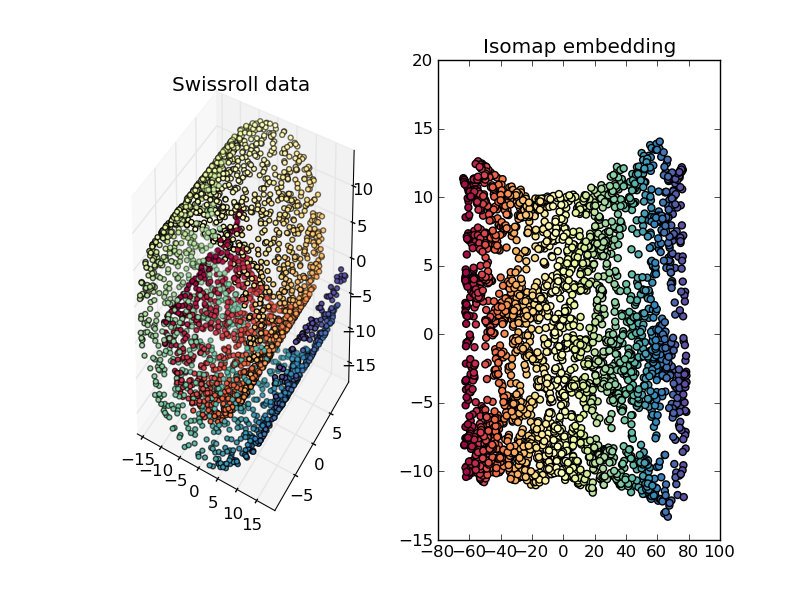
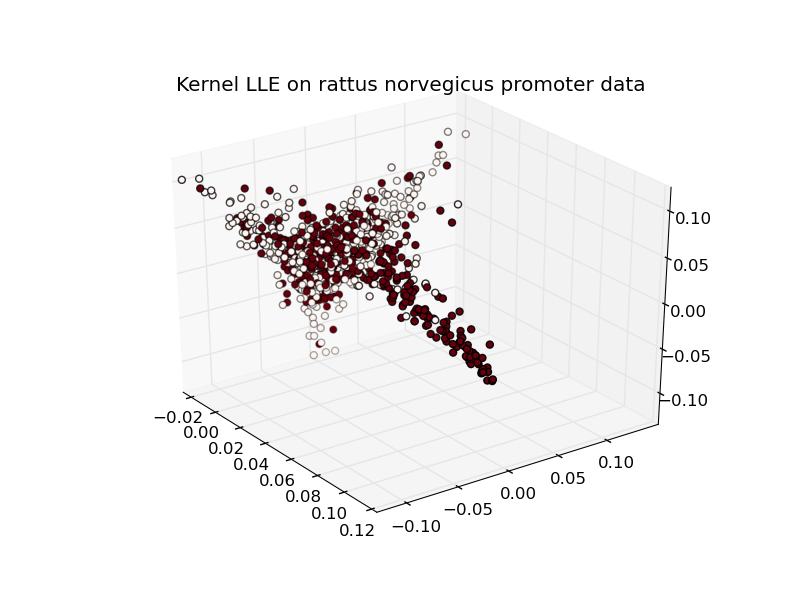
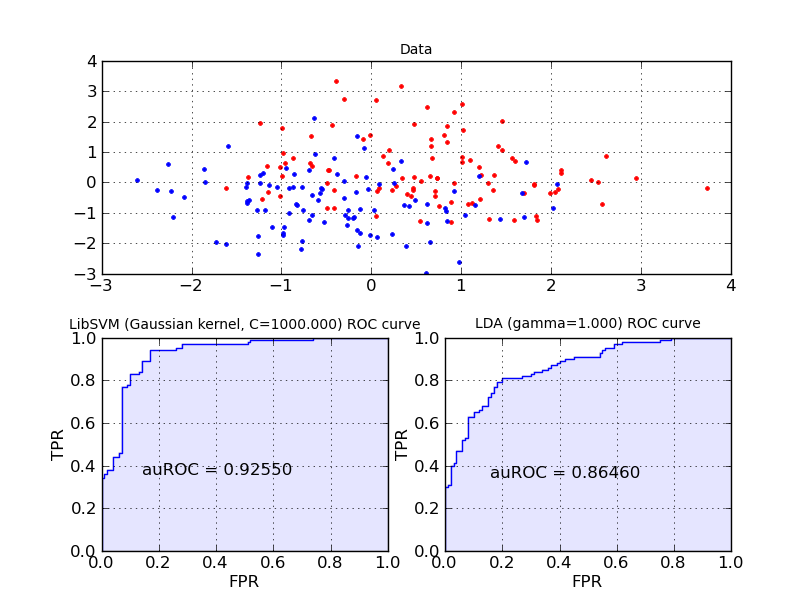
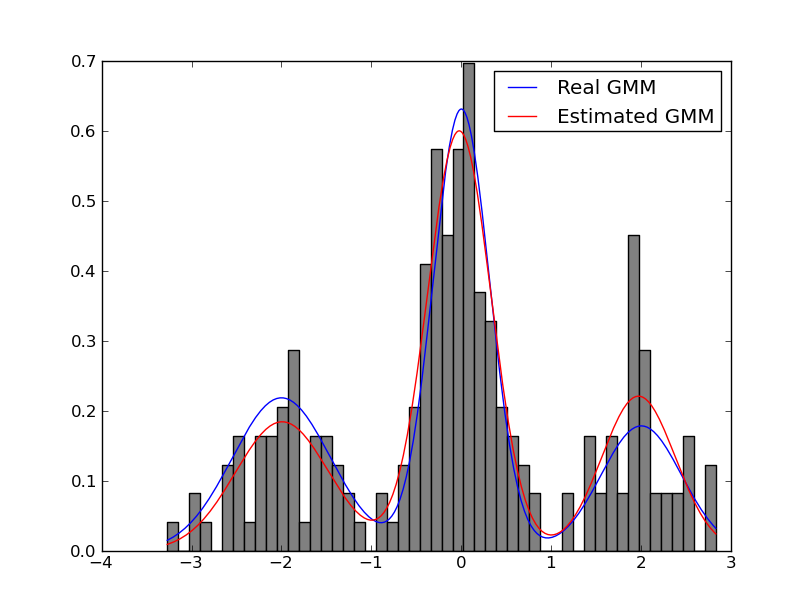
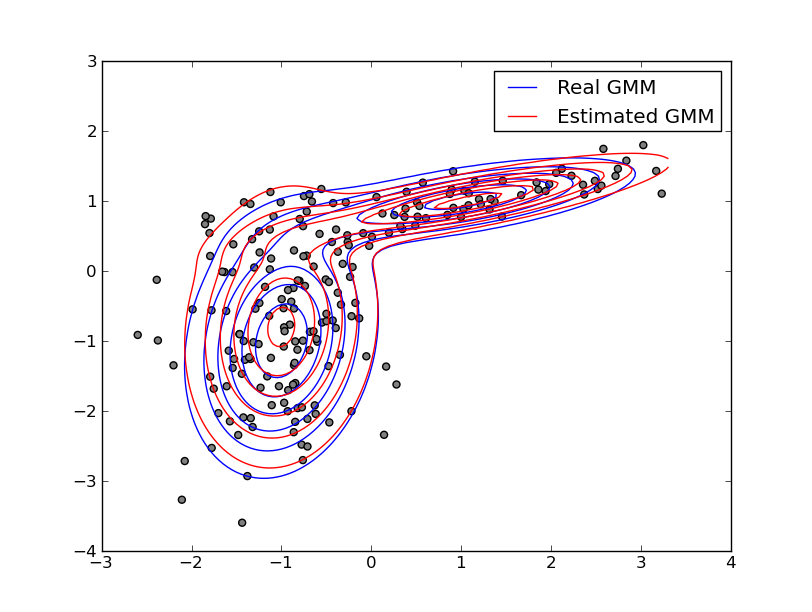
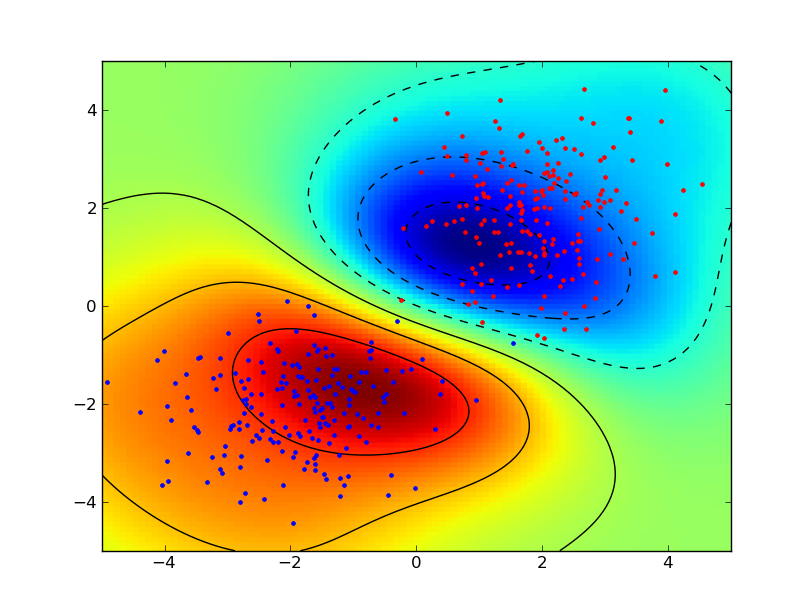
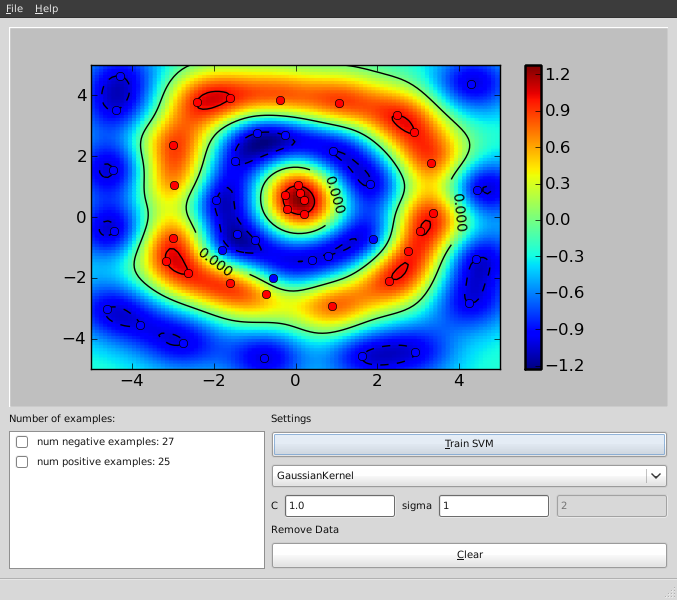
Google Summer of Code 2011 gave a big boost to the development of the shogun machine learning toolbox. In case you have never heard of shogun or machine learning: Machine Learning involves algorithms that do intelligent'' and even automatic data processing and is nowadays used everywhere to e.g. do face detection in your camera, compress the speech in you mobile phone, powers the recommendations in your favourite online shop, predicts solulabily of molecules in water, the location of genes in humans, to name just a few examples. Interested? Then you should give it a try. Some very simple examples stemming from a sub-branch of machine learning called supervised learning illustrate how objects represented by two-dimensional vectors can be classified in good or bad by learning a so called support vector machine. I would suggest to install the python_modular interface of shogun and to run the example interactive_svm_demo.py also included in the source tarball. Two images illustrating the training of a support vector machine follow (click to enlarge): svm svm interactive Now back to Google Summer of Code: Google sponsored 5 talented students who were working hard on various subjects. As a result we now have a new core developer and various new features implemented in shogun: Interfaces to new languages like java, c#, ruby, lua written by Baozeng; A model selection framework written by Heiko Strathman, many dimension reduction techniques written by Sergey Lisitsyn, Gaussian Mixture Model estimation written by Alesis Novik and a full-fledged online learning framework developed by Shashwat Lal Das. All of this work has already been integrated in the newly released shogun 1.0.0. In case you want to know more about the students projects continue reading below, but before going into more detail I would like to summarize my experience with GSoC 2011. My Experience with Google Summer of Code We were a first time organization, i.e. taking part for the first time in GSoC. Having received many many student applications we were very happy to hear that we at least got 5 very talented students accepted but still had to reject about 60 students (only 7% acceptance rate!). Doing this was an extremely tough decision for us. Each of us ended up in scoring students even then we had many ties. So in the end we raised the bar by requiring contributions even before the actual GSoC started. This way we already got many improvements like more complete i/o functions, nicely polished ROC and other evaluation routines, new machine learning algorithms like gaussian naive bayes and averaged perceptron and many bugfixes. The quality of the contributions and independence of the student aided us coming up with the selection of the final five. I personally played the role of the administrator and (co-)mentor and scheduled regular (usually) monthly irc meetings with mentors and students. For other org admins or mentors wanting into GSoC here come my lessons learned: Now please read on to learn about the newly implemented features: Dimension Reduction Techniques Sergey Lisitsyn (Mentor: Christian Widmer) Dimensionality reduction is the process of finding a low-dimensional representation of a high-dimensional one while maintaining the core essence of the data. For one of the most important practical issues of applied machine learning, it is widely used for preprocessing real data. With a strong focus on memory requirements and speed, Sergey implemented the following dimension reduction techniques: See below for the some nice illustrations of dimension reduction/embedding techniques (click to enlarge). isomap swissrollrno kllelocal tangent space alignment Cross-Validation Framework Heiko Strathmann (Mentor: Soeren Sonnenburg) Nearly every learning machine has parameters which have to be determined manually. Before Heiko started his project one had to manually implement cross-validation using (nested) for-loops. In his highly involved project Heiko extend shogun's core to register parameters and ultimately made cross-validation possible. He implemented different model selection schemes (train,validation,test split, n-fold cross-validation, stratified cross-validation, etc and did create some examples for illustration. Note that various performance measures are available to measure how good'' a model is. The figure below shows the area under the receiver operator characteristic curve as an example. foo Interfaces to the Java, C#, Lua and Ruby Programming Languages Baozeng (Mentor: Mikio Braun and Soeren Sonnenburg) Boazeng implemented swig-typemaps that enable transfer of objects native to the language one wants to interface to. In his project, he added support for Java, Ruby, C# and Lua. His knowlegde about swig helped us to drastically simplify shogun's typemaps for existing languages like octave and python resolving other corner-case type issues. The addition of these typemaps brings a high-performance and versatile machine learning toolbox to these languages. It should be noted that shogun objects trained in e.g. python can be serialized to disk and then loaded from any other language like say lua or java. We hope this helps users working in multiple-language environments. Note that the syntax is very similar across all languages used, compare for yourself - various examples for all languages ( python, octave, java, lua, ruby, and csharp) are available. Largescale Learning Framework and Integration of Vowpal Wabbit Shashwat Lal Das (Mentor: John Langford and Soeren Sonnenburg) Shashwat introduced support for 'streaming' features into shogun. That is instead of shogun's traditional way of requiring all data to be in memory, features can now be streamed from e.g. disk, enabling the use of massively big data sets. He implemented support for dense and sparse vector based input streams as well as strings and converted existing online learning methods to use this framework. He was particularly careful and even made it possible to emulate streaming from in-memory features. He finally integrated (parts of) vowpal wabbit, which is a very fast large scale online learning algorithm based on SGD. Expectation Maximization Algorithms for Gaussian Mixture Models Alesis Novik (Mentor: Vojtech Franc) The Expectation-Maximization algorithm is well known in the machine learning community. The goal of this project was the robust implementation of the Expectation-Maximization algorithm for Gaussian Mixture Models. Several computational tricks have been applied to address numerical and stability issues, like An illustrative example of estimating a one and two-dimensional Gaussian follows below. 1D GMM2D GMM Final Remarks All in all, this year s GSoC has given the SHOGUN project a great push forward and we hope that this will translate into an increased user base and numerous external contributions. Also, we hope that by providing bindings for many languages, we can provide a neutral ground for Machine Learning implementations and that way bring together communities centered around different programming languages. All that s left to say is that given the great experiences from this year, we d be more than happy to participate in GSoC2012.

6 September 2011

Lars Wirzenius: Entropy key: a review

I recently bought a Simtec Entropy Key. It's a hardware randomness generator encapsulated as a USB device, the size of a flash drive. It's good for any host or cluster that uses a lot of kernel-provided random numbers (/dev/random), or does things that cause the kernel to use a lot of random numbers. Opening a lot of network connections, or generating session keys for public key encryption. That kind of stuff. If the kernel has too little entropy available to generate good random numbers, things will stall until it gets some more. The ekey gives you real random bits, not just software-produced pseudo-random numbers. In other words, it's some kind of magic. I got the device in a DVD box, with a leaflet explaining how to install stuff, a CD with the software, an envelope with a secret key, and the actual device itself. I read the leaflet, which said to install the ekeyd daemon first. I ignored the CD, since a) my laptop has no optical drive and b) the software is in Debian stable (squeeze) anyway, so apt-getting it is easier and faster. I was utterly disappointed with the software. I didn't have to edit a single hard disk sector, or do a BIOS upgrade, or anything. Utterly, totally, boring. I had reserved an afternoon and evening for this, but I had to find something else to do instead. After plugging in the device in a spare USB port, I opened the envelope and ran a command to specify the secret key. The key and host processors use encryption to make sure nobody can eavesdrop on the randomness -- that would give them an edge in cracking SSL and GPG encryption, I guess. Here's an example of how it works. Before I plug in the device, the kernel has some, but not too much entropy available:
liw@havelock$ cat /proc/sys/kernel/random/entropy_avail 
1053
A few seconds after the ekey is inserted:
liw@havelock$ cat /proc/sys/kernel/random/entropy_avail 
3968
And here's the kicker: pretty much regardless of what I do, the entropy stays at about 4 kilounits (I don't know if it's bits or bytes, and I'm too lazy to check). In the end, the only thing I can really complain about is the typography and layout of the leaflet. The text is clear enough, but it's laid out too densely. It needs more whitespace. Some pictures of bunnies or kittens would be nice, too.

4 September 2011

Rapha&#235;l Hertzog: My Debian activities in August 2011

This is my monthly summary of my Debian related activities. If you re among the people who made a donation to support my work (91.44 , thanks everybody!), then you can learn how I spent your money. Otherwise it s just an interesting status update on my various projects. Dpkg work When I came back from Debconf, I merged my implementation of dpkg-source --commit (already presented last month). I continued some work on the hardening build flags but it s currently stalled waiting on Kees Cook to provide the required documentation to integrate in dpkg-buildflags(1). Following a discussion held during DebConf, Michael Prokop has been kind enough to setup a git-triggered auto-builder of dpkg (using Jenkins). You can now help us by testing the latest git version. Follow those instructions:

$ wget -O - http://jenkins.grml.org/debian/C525F56752D4A654.asc   sudo apt-key add -
$ sudo sponge /etc/apt/sources.list.d/dpkg-git <<END
deb http://jenkins.grml.org/debian dpkg main
END
$ sudo apt-get update && sudo apt-get upgrade
On the bug fixing side I took care of #640198 (minor man page update), #638291 (a fix to correctly handle hardlinks of conffiles), #637564 (the simplification logic of union dependencies was broken in some cases) and #631494 (interrupting dpkg-source while building a native source package left some temporary files around that should have been cleaned). WordPress update I released WordPress 3.2.1 in unstable (after having taken the time to test the updated package on my blog!) and fixed its RC bug (#625773). In the process I discovered a false positive in lintian (I reported it in 637473). Gnome-shell-timer package From time to time, I like to use the Pomodoro Technique. That s why I was an user of timer-applet in GNOME 2. Now with the switch to GNOME 3, I lost this feature. But I recently discovered gnome-shell-timer, a GNOME Shell extension that provides the same features. I created a Debian package of it and quickly filed some bugs while I was testing it (two usability issues and an encoding problem) QA Work During DebConf I met Giovanni Mascellani and he was interested to help the QA team. He started working on the backlog of bugs concerning the Package Tracking System (PTS) and submitted a bunch of patches. I reviewed them and merged them but since they were good, I quickly got lazy and got him added to the QA team so that he can commit his fixes alone. It also helps to build trust when you have had the opportunity to discuss face to face. :-) Vacation That s not so much compared to usual but to my defense I also took 2 weeks of vacation with my family. But somehow even in vacation I can t really forget Debian. Here s my son:
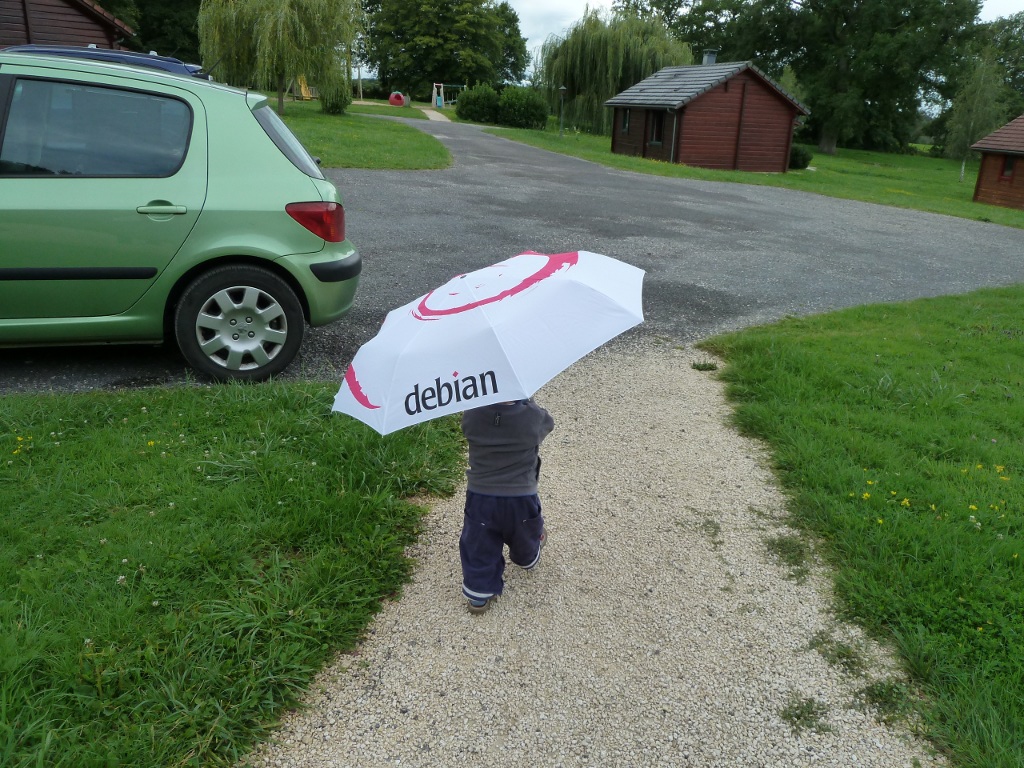
Thanks See you next month for a new summary of my activities.

3 comments Liked this article? Click here. My blog is Flattr-enabled.

3 September 2011

Thorsten Glaser: Saturday Noon Cat wlog-entry-writing

As written about here earlier, cats have a nice life. I walked into my home seeing three cats in a row, all black: two lazing around, the third (with white spots, and belonging to a different neighbour from the other two) ambulating. I went up and got my PocketPC with the already mentioned camera application to take a shoot. Sadly, the more shy cat went away, but I got some pictures of the other two here they are, internet photo stars follow the hyperlink to get a large version. two of three black cats I met today  in a row! Later I came back from geocaching (2 GC.COM-only, 1 OC-only *yay!* found, one not found due to not taking any hardware with me) the bigger guy lazed around in the bush next to where I usually park my bike. Lucky

2 September 2011

Tanguy Ortolo: rxvt-unicode: generate key symbols

rxvt-unicode is a terminal emulator with some interesting features. Here is one of them I find most amazing and elegant: it can generate the symbol characters corresponding to keyboard keys. It works by pressing and releasing + ( is the symbol for the Control key, and is Shift, of course), then the key which symbol you want to get. For instance, to get the Caps lock symbol, you type + , , which gives you the following symbol: . Here are some other nice examples: (Return) (AltGr aka Level3 Shift) (BackSpace) (Insert) (Delete) (Home) (End) (Prior) (Next). Beware that this will not cancel the effect of Caps, Num lock keys: you will get their symbols but also enter the corresponding mode.

29 August 2011

Tiago Bortoletto Vaz: VoIP in Neo Freerunner with Qtmoko and Linphone

I keep using a Neo Freerunner with Qtmoko in a Debian Squeeze (+ some Wheezy) chroot as my daily phone. It also works well for SMS, GPS, MUA, IM, IRC and some Web browsing with Aurora (using both Wifi and GPRS). Last weekend I managed to play a little with VoIP possibilities in Qtmoko and ended with a functional SIP client in my hands. I want to share some points which may be useful for other brave freerunners: UPDATE: I didn't make clear that I get a very nice audio quality using internal mic/speaker with the above voip-handset state file. The issue is only when using the headset, which demands understanding and setting up a proper state file. Enjoy some shots:

28 August 2011

Christian Perrier: 10 years being Debian Developer - part 3: the news and genealogy years

I stopped my story in early 1994, after my Big Switch to the mysterious and new world of Linux. My home server, kheops, is now running Debian and is fed with news and mail by FrMug, formerly French Minix Users Group and now run by AFAU, the "Association Fran aise des Amateurs de Usenet". As I'm still console-challenged, I'm reading mail and news on another machine I have at home, named "khephren", which is running an, ahem, beta copy of Microsoft Windows 95. Yeah, I know...:-) These 1994-1999 years were mostly the Usenet years, for me. I gradually became more and more involved in several fr.* newsgroups, either related to the Linux world...or to the Windows world. The latter was professionnally a bonus for me as 1994 is also the year where I switched from the Material Science department at Onera to the Network and Computing Department. My mission there was to accompany the increasing prevalence of personal desktop workstations in the daily life of what was formerly the Big Castle of Computing at Onera, hosting various generations of Cray computers, most of which being in the Top500 world supercomputers (we even had one in the Top10, very briefly, at somepoint). So, I was "the PC and Windows guy" in this world of supercomputing, Unix and network wizards. But my hobby at home helped me keeping and growing skills in both "worlds" which, over the years, has proven to be a not so common profile..:-) Meanwhile, at home, I was spending hours and nights reading those newsgroups...or getting involved in fr.* hierarchy management..or expanding my friends network to many people in the news, Linux, BSD worlds. That lasted for about 3 years with ups and downs (with three young kids at home, you end up having slightly less time...). I was gradually improving my home server use, adding more functionalities to it, for instance setting it up as a file and print server with Samba 1.9.something (this will be the beginning of a long story with samba!). Unfortunately, my dear Ren had passed in the meantime. Ren did so much for Linux in France that he'll be the only link I give in this article. If you happen to go through P re Lachaise cemetery in Paris, go to its Memory garden instead of visiting Jim Morrison's grave and drink a whisky bottle in memory of Ren . Or just install one of the most funnily named Debian packages: le-dico-de-rene-cougnenc and, again, drink something to his memory (whisky is highly preferred). We then reached 1997 and a specific event: my father (who was very sick for years) passed during summer, some time after my grand-father passed too. As it apparently happens for many people, it triggerred me into the interest for family history. After all, those people who are going away are family memories. And, in some way, I wanted to keep track of this memory. As a consequence, I started collecting family memories, interviewing my close relatives (the oldest ones) and ending, of course, in tracking all this with my computers. That was the start of a long genealogy research that sent me on the track of the Perrier family (of course), but also all other branches, on my mother and father side, as well as reconstructing the tree of cousins we have, etc, etc. As anybody who did that knows, this is quite an endless task but I went very committed to it. I quickly ended up in joining research groups that were using the recent growth of personal access to Internet communication. Those groups were, in these 90's, building elaborated systems where people can help together in their research instead of having to travel to places where archives are stored. I participated to many such groups and even ended up animating one who was doing research in archives of the "Yvelines" "d partement", my place of living (even though I have no family branch there). At the same time, other groups were sending me research results for my own family in the French region where my roots are. Collective effort, help others for free, you can recognize things that are a constant all over these years, indeed. It actually helped me in tracking my Perrier ancestors up to about 1680, with 11 generations of men holding that name (from Jean-Baptiste, my son, up to tienne Perrier, who is born about 1640-1650, in the small village named Briant in Sa ne et Loire, in France). Or even climbing up to Laurent Polette, born circa 1510, mentioned in a document date February 1562. He his my oldest known ancestor.Those folks being 15 generations before me. My oldest ancestor is born under Fran ois the First, King of France, protector of Leonardo Da Vinci, at the time La Joconde was painted or the Chambord castle was built. Doh. Unfortunately, genealogy software, at that time, was quite poor for Unix systems. Lifelines was a quite strong development but wasn't that user-friendly and I ended up using a Windows-based "shareware" software written by an individual. Still, my Linux machine was used quite intensively: databases were stored there, and saved there, all important informations were there, my mail was received there, along with dozens of mailing lists I was reading. I even hosted a few mailing lists on my home server. Still, in the meantime also, again in 1997, in October, another event happened. We had a pollution peak in Paris area and October 1st was the first (and as of now the only ever) day where driving restrictions were applied. Up to that moment, I was driving to/from work (30 kilometers one way). I decided to use this opportunity to really test public transport, for one full month. As I knew it would take me much more time than driving, I tried to imagine a way to use that time. How about reading mail and news on a laptop instead of only at home? Done... In a few days, I found a used Compaq Aero laptop (486 16MHz), I installed Debian "bo" on it, switched my mail and news workflow to console programs (mutt and slrn) and here we go! So, finally, in October 1997, I was using Linux nearly all time long, the only exception being genealogy data handling. That laptop was named "mykerinos" (the small pyramid) and....my laptop is still named mykerinos, though it's now the 5th mykerinos I have..:-) Ah, and since then, I nearly always use public transport to go to/from work. Debian addiction is good for the planet! At some point (I don't remember exactly when...about 1999, I think), DSL connections appeared and one of the first DSL FAI emerged on France: Free. I was already using their services for dialup access, but DSL was then a revolution: persistent connection! And nearly immediately, static IP! I became one of their first DSL customers (and I'm still one). Moreover, I had then friends working there...and they had many Debian machines to host their services. So, with the help of my Freenix friends, some DNS hosting on their machines and the still tireless eu.org entirely free domain, perrier.eu.org was born. Immediately, this gave me opportunities for doing many interesting things with my home server: setting up www.perrier.eu.org and use it....for learning web things and sharing genealogical data. For instance, I ended up hosting some data sent by other genealogists such as digital copies of archives for some French regions, all served through my 512/128kbps DSL line (quickly upgraded to 2Mb, IIRC). And, very quickly, I felt the need to share my family tree, of course! And here comes Geneweb. Written (in Ocaml) by Daniel de Rauglaudre, Geneweb was (and still is) by far one of the best tools to share genealogy data over the Net. So, I ended up installing it on my home machine. Guess how I did that? "apt-get install geneweb", of course. Yes, it was packaged. Indeed by Brent Fulgham who did the initial release on July 22nd 2000. Here, my memory is a little bit vague. I think I actually packaged Geneweb for my own use and sharing it on upstream FTP site, forking Brent's package as a start, but updating to latest upstream release. Then I quickly ended up having discussions with Brent about this new upstream release, and that lead to:
geneweb (3.10-3) unstable; urgency=low
  * Merging with unofficial package from Geneweb ftp site
    (in preparation of new maintainer [Christian Perrier] takeing
    over responsibility).  Note that all of this work is from
    Christian.
  * Default database dir is now writable by members of geneweb group
  * New geneweb group added at installation
  * Package tries to properly handle former installations of the
    unofficial Geneweb package available on Geneweb ftp site
  * Debconf dialogs translated in french
  * More languages available
  * Creation of /var/geneweb/etc, /var/geneweb/cnt, /var/geneweb/images
    with proper permission so that authorised users may use these also
  * When de-installed, all databases are exported with gwu (should allow
    smooth upgrades when the databse format changes)
 -- Brent A. Fulgham <bfulgham>  Mon, 22 Jan 2001 19:30:47 -0800
See? Already "debconf translation to French"! "More languages available". Here we are. As discussed with Brent, he propsoed me to take the package over. So, on January 11th 2001, I had applied in the New Maintainer Process. I'm amazed how quickly it went indeed: there was a tool I needed, it needed to be packaged, I could handle the packaging...and then I decided to be involved. Here we are: bubulle is on his way to become one of those magicians who are building the best universal operating system. Yes, me, the clueless material scientist..:-) How did it go? You'll know this in next episode, of course...

Micha Lenk: Finally transitioning to a new GnuPG key

Finally I managed to write up a transition statement for my not so new, but stronger GnuPG key. See below:
-----BEGIN PGP SIGNED MESSAGE-----
Hash: SHA1,SHA256
I am transitioning my GPG key from an old 1024-bit key to a new 4096-bit key.
The old key will continue to be valid for some time, but I prefer all new
correspondence to be encrypted for the new key, and will be making all
signatures going forward with the new key.
If you have signed my old key, I would appreciate signatures on my new key as
well, provided that your signing policy permits that without reauthenticating
me.
The old key, which I am transitioning away from, is:
pub   1024D/99E141B4 2004-02-10
      Key fingerprint = 25FE 4741 4770 0558 949D  1DB1 58DD 3FE2 99E1 41B4
The new key, to which I am transitioning, is:
pub   4096R/51B85139 2009-06-18
      Key fingerprint = A3EB B41F C5AB D675 CEE4  1C45 EA6C A6B9 51B8 5139
Thanks in advance.
Cheers,
Micha Lenk
-----BEGIN PGP SIGNATURE-----
Version: GnuPG v1.4.10 (GNU/Linux)
iEYEARECAAYFAk5aOnkACgkQWN0/4pnhQbTxPgCgzRhREZlQiKJyI9UIdJLLs3Zq
bH4AnA1myFxgDWM7aUMHXgvvsujLTjiWiQIcBAEBCAAGBQJOWjp5AAoJEOpsprlR
uFE5gCsP/0dtCUPl9aQHV1MbQl7+bMofpsC2ikkpdZmrzi68jTG16We49BuzY+PV
S8FhXqg17/YxhKYDnDNTowfztUOyjAOJxy5vrqm3X5xiLwTqN3js9mra+vb4s35k
EVbKMzLLDhj3i0FjeargWEmJmm9cVhaZWKvOvQUhDJAilqvEQ0/50P7B8I+1YvtV
UHoQKbweTljVSlK5R1YPPy9i6r2/oZBYxK4nrknWwS+qPQ5luqelJd+mZdgQ6tow
7HIvtmPgCblJ+hYZWFpoZK6vxs8RaBbuCQcKwYArNhZT/v4TeD/LAaUmIkbQMyKV
J2TKuEHya4+5GMbtg6BGKeiZpleEHPnAq1AfvGpz6opkxjxCLG3RO3X8D3EuM3RW
mkq60mWM8+Zwu1yKbb62iHplp6jpyiQgdjJlB6eHjX7SdY7CvHgYZxGDx4kclP0/
HAdig2U1T+nG6Nn5XflmmKwvNLuKlQlIwJ5NeXyCONRnYvdomQn2hgvkjwMLCdFh
ulIhxa4UvDY7/aQNPZeOrvDHb2XYpiV3TwA9hLgQXXWd0FPmUMVVPpKpRjilaWth
Mtq/QiMGP5Mq/YxgLInRZHGyajDtE67RD4+RgHYOP50cP3UGPoB4ncc2EEtM2kfe
BzJrXPHmdtyGEA6Korl0YwUTRnYsqkqkY1VqDsO0UkOLlV7RAzb9
=9vw1
-----END PGP SIGNATURE-----

27 August 2011

Michael Prokop: Open Source Projects using Jenkins

For a (german) talk I ll be giving soon I was interested in a list of open source projects which use Jenkins. Jenkins is a great open source continuous integration server. I was wondering whether such a list exists but since it doesn t exist yet I created my own and Kohsuke Kawaguchi (creator of Hudson/Jenkins) suggested to blog about it. There we go. :) Open source projects using Jenkins, though Jenkins service not accessible for the public (yet): And Cloudbees hosts some OSS projects providing Jenkins as a service. Update [2011-08-29]: thanks for all the feedback, I ve updated the list accordingly.
If you re aware of another open source project using Jenkins please leave it in the comments, I ll update the list accordingly then.

25 August 2011

Bastian Venthur: KDE4 s annoying taskbar

Dear Lazyweb, since KDE4 is in unstable, the taskbar behaves very annoyingly when working with two monitors with different resolutions. I have a laptop. When I m at work, I put it into a docking station which is connected to a huge monitor. I m not working with dualhead or something, I m just using the huge monitor at work and the laptop s screen at home. I always want the taskbar to be maximized. The problem is, that KDE s taskbar fails to adjust the size of the taskbar correctly: Starting KDE at work, the taskbar is always too small (as wide as the laptop s monitor) and my first task is to maximize the taskbar. Starting KDE when I m back home, the taskbar is too wide (as wide as the external monitor s size) for the smaller monitor and I have to (ironically) maximize it again to fit on the now smaller monitor. Note that I m not using suspend or something. I m booting the laptop with the big screen connected or not. I also had that problem with KDE3, but that was fixed upstream long time ago. Has anyone a solution how to avoid this problem?

24 August 2011

Christian Perrier: 10 years being Debian Developer - part 2: before 1992-1994 - the switch

So, we stopped our very boring story around 1992. Let's summarize where I was at that moment: We're in 1992. Magali is about to come. Three children, from 0 to 4. I'm getting bored of these BBS things. OK, I did fun things like translating (eh) the documentation of Frontdoor a Fidonet node system written by a norwegian dude. But, still. Among my BBS friends, Ren is now playing regularly with a strange thing coming from Finland. This is pretty much like these mysterious "Unix" machines I hear about, sometimes at Onera, ran by strange wizards that often look like hippies from the 70's (hey...these were my youth years). I also have these few friends from the BBS world who are also playing with these thingies. Ollivier, noticeably, who is using of these mysterious @frmug.fr.net "email" addresses, from his PC running 386BSD (what? A PC not running those wonderful MS-DOS programs? How weird). Ren is apparently playing with another tribe. He often talks about an evolution of Minix written by a Finnish student, which is available with source code, just like Ren programs. Ren is also a member of that FrMug tribe, the FRench Minix Users Group, who are comunicating with "newsgroups" that are apparently similar to what we're doing with our BBS....but apparently more funnily hackish...and most often in that mysterious "U**x" world. Ah, that thing is called Linux. You can download it by FTP on "the Internet". But I don't have "the Internet". Oh, sure, we have this thing called BitNet at work, I even have what they call "an email address" as perrier@froner81.bitnet. We can maybe do things with that. Ah yes, there are funny tools that allow "downloading" files on "FTP" (WTH is that?) servers but doing that by mail. You receive dozenes of mails "uuencoded" (WTH is that? I'm not using Unix, I'm using Dos...but, eh, it works, still). Oh, fun, I now downloaded a full set of disks (14....I need to find 14 floppies, doh!) of something called Slackware. Apparently, a crazy freak, somewhere, did assemble things so that it's easy for dummies like me to install "a Linux machine". What? This 386 DX/16 PC I borrowed from my lab could be something like one of these very very very mysterious and expensive Sun machines that a few very bearded and very smelly dudes are using at Onera to perform high performance calculations? I have to do this. Not growing a beard, but install Linux. I could even "read mail" on them. Doh, I could even read those mysterious "newsgroups", that look like our Fidonet "conferences", the only difference being. All this is so interesting. So, at first, let's help my friend Ren to spread out this marvel to the world. Ren did setup his "Renux" box for this and everybody can access it through this very modern UUCP technology, to download Slackware disk images, last versions of the Linux kernel (direct from ftp.ibp.fr, thanks to another pionneer, R my Card....ext2fs author). So, I did setup an incredibly weird system to "download" this stuff by FTPmail, de-uuencode it, process it on my work machine and then re-upload it to my home BBS and make it available in one of the first "Linux" sections of French BBS. Yay. Even of my BBS machine is not running this wonder. Still, gradually, I was becoming bored of this BBS stuff. The sirens of open systems were constantly singing in my ears and the amount of work to put in running a Fidonet node wasn't really motivating for me anymore. Finally, after our daughter Magali was born, in March 1992, I decided to shut down my BBS....and just run as a Fidonet "point" (a personal system not opened to the public) and gradually switched my interest to these open systems. I thus ended running an "experimental" Linux system at work on this refurbished 386DX machine, already and playing between both worlds for about 18 months. At some point, around mid-1993, it became obvious to me that I more wanted to participate to newsgroups-style communication, participate to the advent of this Linux thing and learn things about what was to become "The Internet" (understand "the web", aha). Meanwhile, Ren did great work translating "The Linux System" by this guy, Matt Welsh, making The Thing accessible to dummies like me. So, after summer, I decided it was time to move on and shutdown this Fidonet thing and build something like my "Freenix" friends were running, and be able to download news and mail by UUCP, with my fast HST modem, and process them with Real Men tools such as inn, sendmail, pine and trn. And then, around October 1993, here I come ready to install a Linux machine at home, and therefore zap a few years of BBS stuff on my 40MB hard disk. But, eh, I just read about this shiny new thing named Debian, that was just announced a few weeks ago. It seems to be meant for dummies like me who need a little bit more than tarballs of binary code and have no clue about libraries, ABI and such mysterious things that apparenyl constantly lead to "core dumps" on my work experimental Slackware machine. Also, I don't really understand everything to what these dude says in his "Manifesto" but that seems interesting and his (their? dunno) thing seem easy to use. Let's download the 0.93whatever version of this thing and put this on a big set of floppies. A few days after, voil . I have my first Linux system at home and it is running that Debian thing. It will need several weeks of poking around documentations, playing weird things with INN and sendmail without understanding a s**t of both....and a lot of help from Freenix friends....and I end up with a working machine that can call out FrMug for UUCP downloads of mail and news and then feed local sendmail and INN servers with them and then allow the "bubulle" user to read them remotely...from his Windows machine. Yay, admitedly, I spent a few years still using a Windows machine for mail and news! How to say that? At that time, the GUI environments were a little bit rustic and, anyway, there was no point-and-click programs for mail and news. In the meantime, the machine got upgraded to Debian 1.1 by reinstalling the system. "kheops" was born....and so was bubulle@kheops.frmug.fr.net. We're probably around early 1994 and I'm running my first Debian server at home. The beard didn't grew up, I'm not eating pizzas all day long (but I drink beer) and I'm even practicing physical activities (I was a volleyball player at that time). Despite all these flaws, I'm turning into a geek, slowly. In next episode, you'll learn how I ended up dropping the use of Windows, compiling some free software and contributing to my first package. These will be "the genealogy years".

Russell Coker: Digital Cameras

In May I gave a talk for LUV about the basics of creating video on Linux. As part of the research for that I investigated which cameras were good for such use. I determined that 720p was a good enough resolution, as nothing that does 1080p was affordable and 1080i is lower quality. One thing to note is that 854*480 and 850*480 are both common resolutions for mobile phones and either of those resolutions can be scaled up to full screen on a 1920*1080 monitor without looking too blocky. So it seems that anything that s at least 850*480 will be adequate by today s standards. Of course as Dell is selling a 27 inch monitor that can do 2560*1440 resolution for a mere $899 in the near future 720p will be the minimum that s usable. Cheap Digital Video Cameras The cameras I suggested at the time of my talk (based on what was on offer in Melbourne stores) were the Panasonic Lumix DMC-S3 which has 4*optical zoom for $148 from Dick Smith [1] and the Olympus MJU 5010 which has 5*optical zoom camera for $168 (which is now $128) from Dick Smith [2]. Both of them are compact cameras that do 720p video. They are fairly cheap cameras but at the time I couldn t find anything on offer that had significantly better specs for video without being unreasonably expensive (more than $600). Update: In the comments Chris Samuel pointed out that Kogan has a FullHD digital video camera for $289 [13]. That s a very tempting offer. More Expensive Digital Video Cameras Teds Cameras has a good range of Digital Video Cameras (including wearable cameras, and cameras that are designed to be attached to a helmet, surfboard, or car) [3]. These are specifically designed as video cameras rather than having the video function be an afterthought. Ted sells the Sony Handycam HDR-CX110 which does 1080p video, 3MP photos, and 25* optical zoom for $450 [4]. They also sell the pistol-style Panasonic HX-WA10 which is waterproof to 3M, does 1080p video, 11MP pictures, and 5* optical zoom for $500 [5]. For my use I can t justify the extra expense of the digital video cameras (as opposed to digital cameras that can take video), I don t think that they offer enough. So a cheap $128 Olympus MJU 5010 is what I will probably get if I buy a device for making video. I can afford to replace a $128 camera in a year or two but a device that costs $500 or more needs to last a bit longer. I expect that in a year or two I will be able to buy something that does 1080p for $200. Features to look for in Great Digital Cameras The other option when buying a camera is to buy something that is designed to be a great camera. It seems that RAW file capture [6] is a requirement for good photography. RAW files don t just contain uncompressed data (which is what I previously thought) but they have raw sensor data which may not even be in a cartesian grid. There is some processing of the data that can be best done with raw sensor data (which may be in a hexagonal array) and which can t be done properly once it s been converted to a cartesian array of pixels. Image Magick can convert RAW files to JPEG or TIFF. I haven t yet investigated the options on Linux for processing a RAW file in any way other than just generating a JPEG. A client has several TB of RAW files and has found Image Magick to be suitable for converting them so it should do. The next issue is the F number [7]. A brief summary of the F number is that it determines the inverse-square of the amount of light that gets to the CCD which determines the possible shutter speed. For example a camera set to F1 would have a 4* faster shutter speed than a camera set to F2. The F rating of a camera (or lens for interchangeable lens cameras) is a range on many good cameras (or lenses for detachable lens cameras), if you want to take long exposure shots then you increase the F number proportionally. A casual scan of some web sites indicates that anything less than F3 is good, approaching F1 is excellent, and less than F1 is rare. But you don t want to only use low F numbers, having a higher F number gives a larger Depth of Field, that means that the distance between the nearest and furthest objects that appear to be in focus is greater. So increasing the F number and using a flash can result in more things being in focus than using a low F number without a flash. Another important issue is the focal length, cheap cameras are advertised as having a certain optical zoom which apparently isn t quite how things work. The magnification apparently varies depending on the distance to the object. Expensive cameras/lenses are specified with the range of focal lengths which can be used to calculate the possible magnification. According to DPReview.com Optical zoom = maximum focal length / minimum focal length, so a 28mm-280mm lens would be 10* optical zoom [8]. Finally it seems to be that the specified focal length of cameras is usually in 35mm equivalent. So a lens described as 280mm won t be 28cm long, it will be some fraction of that based on the size of the CCD as a proportion of the 35mm film standard (which is 36*24mm for the image/CCD size). Update: In the comments Aigars Mahinovs said: Don t bother too much with the zoom. The view of a normal person is equivalent to 50mm lens (in 35mm film equivalent). Anything under 24mm is for landscapes and buildings it is for sights where you would actually have to move your head to take in the view. Zooms are rarely useful. Something in 85-100mm range is perfectly fine to capture a bird or a person some distance away or some interesting piece of landscape, but anything more and you are in the range of silly stuff for capturing portraits of football players from the stands or for paparazzi photos. And the more zoom is in the lens the crappier the lens optics will be (or more expensive, or both) that is why the best optics are prime lenses with no zoom at all and just one specific optical length each. For example almost all my Debconf photos of the last two years are taken with one lens Canon 35mm f/2.0 (a 50mm equivalent on my camera) and only the group shots are taken with a lens that is equivalent to 85mm. So I guess if I was going to get an interchangeable lens camera then I could get fixed focus lenses for things that are close and far away and one with a small zoom range for random other stuff. Of course that would get me way outside my budget unless I got some good deals on the second hand market. Also having a camera that can fit into a pocket is a real benefit, and the ability to rapidly get a camera out and take a picture is important! A final item is the so-called ISO Number which specifies how fast the film is. A higher number means that a photograph can be taken with less light but that the quality will generally be lower. It seems that you have a trade-off between a low F number (and therefore low Depth of Field), good lighting (maybe a flash), a long exposure time (blurry if the subject or camera isn t still) and a grainy picture from a high ISO number. Comparing Almost-Affordable Great Digital Cameras I visited Michaels camera store in Melbourne [9] and asked for advice about affordable cameras that support RAW capture (every DSLR does but I don t want to pay for a DSLR). The first option they suggested was the Samsung EX1 that does 10MP, F1.8-F2.4 with a 24-72mm equivalent focal range (3* optical zoom), and 640*480 video [10] for $399. The next was a Nikon P7000 that does 10MP, F2.8-5.6 with 7* optical zoom (28-200mm equivalent), and 720p video [11] for $599. The final option they had was the Canon G12 that does 10MP, F2.8-4.5 with 5* optical zoom (28-140mm equivalent), and 720p video [12] for $599. 3* optical zoom isn t really enough, and $599 is a bit too much for me, so it seems that RAW format might not be an option at this time. Conclusion I can t get what I want for great photography at this time, there seems to be nothing that meets my minimum desired feature set and costs less than $550. A client who s a professional photographer is going to lend me an old DSLR that he has hanging around for some photography I want to do on the weekend. I am also considering buying a Olympus MJU 5010 for making videos and general photography, it s better than anything else I own at this time and $128 is no big deal. Please let me know if I made any errors (as opposed to gross simplifications) in the above summary of the technical issues, also let me know if there are other things to consider. I will eventually buy a camera that can capture RAW images.

23 August 2011

Rudy Godoy: Compute clusters for Debian development and building final report

Compute clusters for Debian development and building final report Summary
-
The goal of this project was intended to have Eucalyptus cloud to
support ARM images so it allows Debian developers and users to be able
to use such facility for taks such package building, software
development (ie. Android) under a Debian pre-set image,
software testing many others. What was expected to have at the end is a modified version of Eucalyptus
Cloud that supports ARM images on the first place. To date this goal has
been reached but is not complete, read production-ready. Extensive test
needs to be done. Besides that we have another goal which is to get
Debian community to use this new extended tool. Project overview
-
Eucalyptus is a hybrid cloud computing platform which has a Open Source
(FLOSS) version. It s targetted to be used for PaaS (Platform as a
Service), IaaS (Infrastructure as a Service) and other distribution
models. It can be used also for cloud management. Given that it has
implemented the EC2, for computing, and the S3, for storage, API, it s
compatible with existing public clouds such Amazon EC2. Currently it
supports running i386 and amd64 images or NC (Node Controllers) in
Eucalyptus naming. Eucalyptus is a complex piece of software. It s architechture it s
modular composed by five components. Cloud Controller (CLC), Walrus (W),
Storage Controller (SC), Cluster Controller (CC) and Node Controller
(NC). The first three are written in Java and the remaining are written
in C. Our project modifications was targetted to the NC component,
altough there is a remaining task for hacking the UI to allow setting
the arch of the uploaded NC image instance. The Node Controller is in charge of setting the proper information for
Eucalyptus to be able to run virtualized images. Eucalyptus uses XEN and
KVM hyphervisor to handle internal virtualization subsystem, and
Libvirt, which is an abstraction of the existing virtualization
libraries, for program interfacing. Having that in mind we are back to our project. For our project to be
sucessful we had various tasks to do. Beginning with understanding such
complex piece of software, followed by hacking the requiered bits and
later integrate the work so it results in a useful tool. Our approach to
the project was then inline with such description. The project s history
I started my participation in GSoC approaching Steffen to discuss about
what was expected, or more accurately, what was in his mind. We
exchanged emails previous to my application and that resulted on my
application being submitted. From the beginning I should tell that I
wasn t much clear on the final product of the project, however we
refined ideas and goals during the weeks following to the official
begining of the project. What was clear for me, after all, is that for
this to see the light and gain adoption Eucalyptus code needed to be
dealt with. Our first task was review ARM image creation from scratch, using the
work done by Aurelien and Dominique in previous GSoC. I ve managed to
get an updated ARM image running under qemu-system-arm. The issues
presented in the past were almost unexistant now that the versatile
kernel is official. You can see this on my first report. After that being done and sometimes in parallel my main goal was then understand
the internals of the Eucalyptus software in order to figure out it s
feasibility, where do we need to extend and how big the task is, we
didn t knew upfront. From the beginning of the project Steffen was kind
to introduce me to the Eucalyptus developers and that have resulted in a
good outcome for Debian, IMHO, to date. Understanding Eucalyptus internals was quite a fun task to say the less. As you
can see on the first part of the report Eucalyptus is modularized and
the component I was expected to work with was the NC (Node
Controller). Given that I isolated my work focus, I started to focus on
learning the internals about that component. Node Controller as described is in charge of talking with
virtualization hyphervisors in order to arrange things to run guest
image instances. The module has basically one main component: handler.c,
in charge to talk to the appropiate hyphervisor and there are
extensions (think of OOP polymorphism but acknoledge it s plain C)
that interact with KVM or XEN. I figured that if qemu-kvm is ran in Hyphervisor mode we can manage to
run an ARM image with qemu-system-arm. Given that Eucalyptus has
interaction with KVM hyphervisor in place, this answered the question of
the project s feasibility. First green light on.
>From this point the scope reduced to interacting with the KVM handler
(node/handler_kvm.c) and extend it to support running an image that is
not amd64 or i386. NC makes use of libvirt to abstract interaction with Hyphervisors. So,
the next phase was learning about it s API and figure what s needed to
be modified next. Libvirt uses a XML file for setting Domain (in
libvirt s naming) definitions. So, Eucalyptus provides a Perl wrapper to
generate this file on runtime and allow the NC to invoke libvirt s API
to run the instance. Next task then, was adapt such script to support
ARM arch. The current script is taiolred for amd64 and i383. I worked on
that front and managed to get a script prototype, that can later be
improved and support more arch s. Generating an adequate Libvirt s XML Domain definition file for ARM can
be a heroic task. There are many things to have in mind given the
diversity of the ARM processor and vendors. I focused on the versatile
flavour given that I was going to test the image I built on the first
place and it ran fine under qemu-system-arm.
The Perl script wrapper then was adapted for such configuration and it
can be tested independently by issuing the following command: $ tools/gen_kvm_libvirt_xml arch arm The arch parameter is what I implemented and it s intended to be
called from the kvm handler on instance creation. With the extensibility
in mind I ve created a hash to associate the arch with their
corresponding emulator. our %arches = (
amd64 => /usr/bin/kvm ,
arm => /usr/bin/qemu-system-arm ,
); Added the arch parameter to the GetOptions() function and used
conditions to tell whether the user is looking for a particular arch,
arm in our case. The most important parts to be considered are the
, and entries. hvm $local_kvm There s also and that require to be tailored for arm. root=0800 As output the script generates an XML template that can be adapted to
your needs and it could be used and tested with tools like Libvirt s
virsh. So that, it can be useful independently of Eucalyptus. I managed
to get to this point before the midterm evaluation. Now that we had the XML wrapper almost done, the next task was to make
the handler call pass the arch as an argument to the script, so the
image is loaded with the proper settings and we are able to run it. Eucalyptus doesn t have a arch field for NC s instances. So, after approaching
Eucalyptus developers, with whom we had already being interacting, I
settled to my proposal of extending the ncInstance struct with an arch
field (util/data.h). The ncInstance_t struct stores the metadata for the
instance being created. It s used for storing runtime data as well as
network configuration and more. It was indeed the right place to add a
new field. I did so by creating the archId field.
Now I needed to make sure the arch information is stored and later used on the
libvirt s call. typedef struct ncInstance_t
char instanceId[CHAR_BUFFER_SIZE];
char imageId[CHAR_BUFFER_SIZE];
char imageURL[CHAR_BUFFER_SIZE];
char kernelId[CHAR_BUFFER_SIZE];
char kernelURL[CHAR_BUFFER_SIZE];
char ramdiskId[CHAR_BUFFER_SIZE];
char ramdiskURL[CHAR_BUFFER_SIZE];
char reservationId[CHAR_BUFFER_SIZE];
char userId[CHAR_BUFFER_SIZE];
char archId[CHAR_BUFFER_SIZE];
int retries; /* state as reported to CC & CLC */
char stateName[CHAR_BUFFER_SIZE]; /* as string */
int stateCode; /* as int */ /* state as NC thinks of it */
instance_states state; char keyName[CHAR_BUFFER_SIZE*4];
char privateDnsName[CHAR_BUFFER_SIZE];
char dnsName[CHAR_BUFFER_SIZE];
int launchTime; // timestamp of RunInstances request arrival
int bootTime; // timestamp of STAGING->BOOTING transition
int terminationTime; // timestamp of when resources are released (->TEARDOWN transition) virtualMachine params;
netConfig ncnet;
pthread_t tcb; /* passed into NC via runInstances for safekeeping */
char userData[CHAR_BUFFER_SIZE*10];
char launchIndex[CHAR_BUFFER_SIZE];
char groupNames[EUCA_MAX_GROUPS][CHAR_BUFFER_SIZE];
int groupNamesSize; /* updated by NC upon Attach/DetachVolume */
ncVolume volumes[EUCA_MAX_VOLUMES];
int volumesSize;
ncInstance; With that in place what was left was modifying the functions that
store/update the ncInstance data, and also the libvirt s function that
calls the gen_kvm_libvirt_xml script. I ve modified the following files:
- util/data.c
- node/handlers_kvm.c
- node/handlers. c,h
- node/test.c
- node/client-marshall-adb.c Most important the allocate_instance() function that is in charge of setting up
the instance metadata a prepare it to pass it to the handler, then
hyphervisor trough Libvirt s API. The function now has a new archId
parameter as well, to keep coherence with the field name. It also
handles whether the field is set or not. We (Eucalyptus developers and
I) haven t settled wether to initialize this field with a default value
or not. I d stepped up and initialized with a NULL value for this string
type var. if (archId != NULL)
strncpy(inst->archId, archId, CHAR_BUFFER_SIZE);
Stores the value only if it s passed to the function. This is essential to
don t break existing functionality and keep consistency for later releases.
With this we almost finished the part of extending Eucalyptus to support
arm images. It took quite long to get to that point. Next step: test. As I mentioned in my previous report the current Eucalyptus packaging
has issues. From the beginning I ve approached the pkg-eucalyptus team,
who were very hepful. So I myself set me up and joined the pkg team with
commit access to the repo. Even the GSoC is not intended for packaging
labour, I needed to clear things on that side because what we want is
adoption so anyone, say a DSA or a user, could setup a cloud that has
support for running arm instances under amd64 arch. Over the weeks between mid-term evaluation and past week I ve worked on
that front. Results were good, as you can see in the pkg-eucalyptus
mailing list and SVN repo.
Eucalyptus has a couple of issues that because of it s nature and complexity
triggered build errors. Those issues came from the Java side of the project and
few form the C-side. The C-part was a problem with AXIS2 Jar used to generate
stubs for later inclusion on build-time. There s no definitive solution to date
because one of the Makefile on gatherlog/Makefile issues a subshell call that
doesn t catches the AXIS_HOME environment variable. I ve worked around this
by defining it as a session env var from .zshrc. The other problem is related
to the Java libary versioning and most likely (we had to investigate further)
to groovy versioning. As I explained Eucalyptus has 3 components written in Java. The Java code uses
extensively the AXIS2 library for implementing webservices calls, the groovy
language for JVM, and many other Java libaries. Eucalyptus open source version
ships both online and offline versions. The difference is basically that
the offline version ships the Java libaries JAR files inside the source code,
so you can build with all required deps. Our former packaging used a file to list which Java libraries the package
depends on and it symlinked them using system wide installed packages. This
rather than helping out triggered a lot of problems I explaing with more detail
on the pkg-eucalyptus ml. I worked around this by telling the debian/rules
not to use such file to symlink and instead use the existing ones from
the source. The last weekend I managed to get to that point and built
sucessfully the software under Debian. I ve done that in order to have a
complete build-cycle for my changes, and then test. In fact today I ve
spotted and fixed a couple of bugs there. What s available now

To date we have a Eucalyptus branch where my patches are sent. The level of
extension is nearly complete, more testing needed. One missing bit is to
change the UI so that the user selects which arch her image is and that
value is passed to the corresponding functions on the Node Controller
component. We also have an ARM image that can be tested and later automated. I ve
recently learned about David Went s VMBuilder repo that extends Ubuntu s
vmbuilder to support image creationg. I might talk to him to adapt the tool
in order to support creation of arm images and use it to upload to an
Eucalyptus cloud. I ve also created a wiki page with different bits on which I was working on.
I ve yet need to craft it to be more educational. I guess I m going to use
this report as a source :) We also had more strong cooperation with the Eucalyptus project and
involved their developers on the packaging and this project, which is
something I consider a great outcome for this project and GSoC goals:
to attract more people to contribute to FLOSS. I ve also been contacted by
people from the Panda Project and we might cooperate also. Future work

I plan to keep working on the project regardless the GSoC ends. Our goal
as Debian could be integrating this into the Eucalyptus upstream
branch. We have good relations with them so expect news from that side.
I also plan to keep working with the Eucalyptus team and related
software in Debian, given that I m familiarized with the tools and
projects.
I m also planning to advocate SoC for Debian in my faculty. To date we
had already 4 students, IIRC, that have participated in the past. Project challenges and lessons
During the project I faced many challenges both in the personal side
and in the technical one. This part is a bit personal but I expect we
learn from this. First challenge was the where do I sit problem. My project was
particular, indeed quite different from the others on it s nature. I had
to work on a software that is not Debian s and then come and say Hey we
have this nice tool for you, come test it! . So, indeed, my focus was on
the understanding of such tool, Eucalyptus, and not much on looking back
at Debian because I didn t feel I had something to advertise yet and
indeed I got most valuable/useful feedback from Eucalyptus developers
rather than Debian s, which for the case is OK IMHO. I had great
mentoring. This situation probably looked a bit of isolation from my
side, from Debian s POV, but it was not intended it s just how it needed
to be IMHO. I felt that I wasn t contributing directly to the
project. I ve spoke about such thing with Steffen a couple of times. I d
like to say that it was also my concern but I probably failed on
communicating this, second challenge. Third challenge was more technical and related to the first one. Since I
was not writing any code for a Debian native package/program but instead for
other project I faced the situation of where to publish my
contributions. Eucalyptus had some issues on managing their FLOSS repo
and the current development one is outdated comparing to the
-src-offline 2.0.3 release. The project didn t fit pkg-eucalyptus repo
neither, even we thought to branch the existing trunk and ship my
contribs as quilt patches, but it involved a lot of more work and burn
on reworking something that has issues now. Later on time I branched the
bzr eucalyptus-devel Launchpad repo and synced there with the
src-offline code. I was slow to react on thing I can say. Fourth challenge was also technical and still dealing with. I was looking to
setup a machine to set a cloud and test my branch. The Dean of my faculty
kindly offered a machine but I ve never managed to get things arranged
with the technical team. Steffen and I discussed about this and evaluated
options, at the end we settled on pushing adoption rather than showcasing it.
Since for adoption we need a use case, I ve spend some SoC money on hardware
for doing this. I should have news this week on that side :) Finally, I d like to thank everyone on the Debian SoC team for this
opportunity to participate. I like to thank Steffen for his effort on
arranging things for me, Graziano from Eucalyptus for his advice on
working with the software code. The different people from Eucalyptus I
interacted with and showed interest on the project s sucess. My
classmates and teachers from the Computer Science School at UCSP in
Arequipa-Peru, friends from the computing community in Peru SPC and
finally my family. Thank you, I learned a lot, specially on the personal
side. As Randy Pausch put: The brick walls are there to give us a
chance to show how badly we want something. Resources
Please see the Wiki page[1] for any reference to the project s resources. 1- http://wiki.debian.org/SummerOfCode2011/BuildWithEucalyptus/ProjectLog Best regards,
Rudy

22 August 2011

Debian Med: Experimenting with Amazon ... cloud and shop

Amazon has recently renewed a voucher for their AWS cloud services. It is enough to keep 4 machines up 24/7 for two years ... or to experiment with this and that with some confidence not to be surprised at the month's end. Thank you, Amazon. And you all, if there is something you want to experiment with, tell me to start it ... or inform me / pressure me to finally find out how I can delegate my credentials.

Something I would like you all to play with is to start shopping through the many links to your right, where most of you should find an Amazon store close to you. Tell me what country is missing. There is sadly no earnings for what I buy personally, but for everything I get someone else to buy through those links, there is up to 5%. This shall pay someone's travel to the next sprint, so I hoped. But so far it is only the tons of canned dog food my wife bought through Amazon (which is great, she did not need to carry it and it was a free delivery), that contributed to it all with 6 Euros. I do not see who bought what or what is bought in a single order (well, there are not too many orders), but I see what was bought ... not that it matters much, but you should know.

Just recently I discovered the Amazon personal Shops, so I created a Debian Med Shop. This allows to mention various products easily. And we can use it to point each other to some good stuff that has crossed our ways. I put a pointer to "The Cell" there, which may be obvious to many of you, but it is not for the typical IT guy approaching bioinformatics outside the UK/US bookmarket. And Kensington stopped my RSI problems ten years back, together with Microsoft, admittedly. What is missing? We should possibly have more of such shops, but give me feedback on how easy it is to switch to one's home Amazon. An I should then check if indeed one gets any earnings assigned when the Amazon is changed - would be positively surprised if so.

All this Amazon partnering has the gigantic disadvantage that it is personal to me. So you need to trust me that I indeed forward the money. I can of course just paste the summary Amazon gives me, but you still need to trust me. And you need to send me the items you wish to see in the shop and ... annoying. Please comment with better ideas ... and if in need of something consider doing that shopping through the links to the right ... it might accumulate to something and help the one or other patch / new package during the next Debian Med Sprint on Bioinformatics.

19 August 2011

Michael Prokop: Use of VCS in Debian packages some stats

Everyone loves stats, ok well at least I do. I was doing some research with regards to package maintenance within the Debian distribution and since the results might be interesting for someone else there we are. On 19th of August 2011 there have been: Therefore ~59% of all packages in Debian/sid are officially managed with a version control system (VCS). Now, which VCS do those packages use?
  1. Svn: 4939
  2. Git: 4377
  3. Darcs: 284
  4. Bzr: 247
  5. Hg: 61
  6. Cvs: 31
  7. Arch: 28
  8. Mtn: 10
I ve retrieved the numbers from the Ultimate Debian Database (UDD). Sadly there s a bug in UDD regarding the Vcs-Type information, see #637524. Therefore I ve extracted a list of 80 packages where a Vcs-Browser header is available but the Vcs-Type entry is empty in UDD. 29 packages of them are managed inside CVS but don t appear as such in UDD, so I manually corrected the number for CVS in the numbers above. The remaining 51 packages have a Vcs-Browser field set but lack the according Vcs-* entry, some of them pointing to upstream VCS instead of the according Debian package repository, some of them result in 404 errors, etc. As a result I ve reported bugs where applicable (#638466, #638468, #638469, #638470, #638471, #638472, #638474, #638475, #638476, #638477, #638479, #638482, #638486, #638488, #638493, #638497, #638501, #638475, #638475, #638502, #638503, #638505, #638506, #638508, #638509, #638510, #638511, #638512, #638513, #638516, #638518, #638519, #638520, #638522, #638523, #638524, #638525, #638526, #638527, #638528, #638529, #638530, #638516, #638531). Disclaimer: I found Debian s Statistics wiki page and Zack s VCS usage stats after starting to play with my own stats. AFAICT Zack s slightly higher numbers are the result of looking at multiple versions for the same source packages, as you ll see when comparing numbers from UDD s sources_uniq view (which I used) with either 1) UDD s sources table, 2) source table count from projectb or 3) Package count from http://$DEBIAN_MIRROR/debian/dists/unstable/ main,contrib,non-free /source/Sources.bz2. Conclusion: 9316 packages are officially managed with Subversion and Git as of today, representing ~94% of the VCS managed packages. This means ~55% of all the Debian (source) packages are available through either a Git or Subversion repository and that s actually the number I was originally interested in. Thanks to Alexander Wirt, Christian Hofstaedter, Gerfried Fuchs, J rg Jaspert and Michael Renner for hints in forming up the final stats results.

18 August 2011

Lars Wirzenius: Oh Amazon...

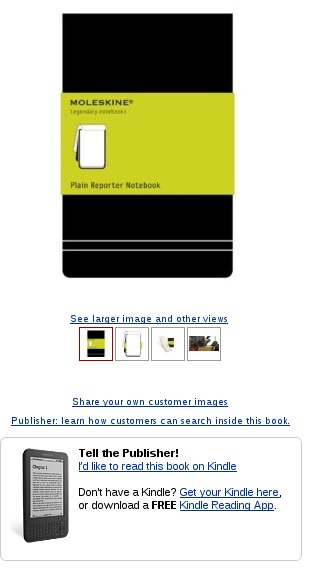
I was considering buying a notebook. Here's part of the page on Amazon: In other words: I wonder if the warranty of Kindles covers writing on the screen in ink.

17 August 2011

Tanguy Ortolo: Booting with UEFI

A combat boot I have just bought a new motherboard, a ASRock E350M1/USB3 with and embedded AMD E350 processor. I was mostly interested in trying the embedded GPU and the UEFI firmware (UEFI is simply the name of EFI 2). According to ASRock's marketing, the main benefit of that UEFI is its graphical interface that allows to use the mouse to configure the board. I cannot agree with that, because I think it is perfectly possible to implement that with a BIOS (and I think some BIOSes actually do it), and it is pointless anyway. For me, the main benefits are a faster and cleaner boot (no idea why it should be faster, but it is).The EFI boot process EFI seems to suffer from some (many?) design errors, but I find its boot process more clean and flexible than the old BIOS one:
  1. It starts with a boot manager which is similar to the temporary boot device selection menu of most recent BIOSes.
  2. When you have selected the device to boot from, it looks into its EFI System partition, identified by its type GUID, as FAT file system, and executes a boot loader from a file at a specific path: /efi/boot/bootx64.efi (on amd64 platforms) by default, specially for removable devices.
  3. Once the boot loader is loaded, the boot process continues as usual and is no longer specific to EFI (although the ABI used by the boot loader is specific, of course).
It is worth mentioning that the boot manager configuration, which lies in the EFI NVRAM, can be accessed and modified from an operating system, to add random entries for loading a boot loader at any path accessible from the boot manager (you will not be able to load a file from an Ext4 file system, for instance). GRUB on EFI To be able to install GRUB on EFI you need an EFI System partition, formatted in FAT and mounted on /boot/efi. GRUB will simply install itself on /boot/efi/efi/debian/grubx64.efi (on Debian) according to the EFI Specification, and use efibootmgr to create a new boot manager entry called debian and pointing to it. Tricks Well, for me, it did not work. The debian boot option failed, saying that this was not a bootable disk. I managed to get an EFI Shell, by putting Tianocore's shell into a FAT-formatted USB stick as /boot/efi/efi/boot/bootx64.efi. Using this DOS-smelling shell, I found that the directory /efi was unusable: it was listed, but any command trying to access to it failed. The reason was quite tricky, caused by a broken FAT implementation. With FAT, the file system label is stored both in the file system header and as a bogus root directory entry (yes, this sounds completely crazy). As I labelled my EFI System partition as EFI , there was such a bogus entry for this name: I think ASUS' implementation of FAT was taking it for the /efi directory. It took me hours to finally find the cause of this problem and fix it be re-formatting the partition with a new label (re-labelling may have been sufficient but I wanted to be safe).

16 August 2011

Erich Schubert: Documenting fat-jar licenses

Dear Lazyweb,
What is the appropriate way to document the individual licenses of a fat jar (a jar archive that includes the program along with all its dependencies)?
I've been living in the happy world of Linux distributions, where one would just package the dependencies independently (or just specify which existing packages you use, actually, since most is already packaged by helpful other developers). But for the non-Linux people, a fat jar seems to be important so they can double-click it to run the application.
When building larger Java applications, you end up using a couple of external code such as various Apache Commons and Apache Batik. I'm currently including all their LICENSE.txt files in a directory named "legal", and I'm trying to make it as obvious as possible which license applies to which parts of the jar archive. Is there any best-practice of doing this? I don't want to reinvent the wheel; it'd also like to avoid any common legal pitfalls, obviously.
Feel free to respond either using the Disqus comment function or by email via erich () debian org

14 August 2011

Iain Lane: Dear lazyweb: Cycle touring by train

dangly bikelets Dear lazyweb, In a couple of weeks I'm likely to be going cycle touring around the North East of England. This will involve first taking a train from Nottingham. While looking at train options just now, I was reminded of a little survey that I wanted to conduct. Taking bicycles on trains in the UK can be a hit-or-miss experience. The UK's train routes are operated by a variety of train operating companies who each have different policies on taking bicycles on their trains. Some require a reservation, some do not. Some do not even allow reservations at all. There's no official database of these policies. It is up to you to check all of the companies' websites individually. As far as I can tell it is impossible to make a cycle reservation online. If you don't make a reservation, chances are that you'll be OK, but there are no guarantees you won't find yourself stranded in Bolton when none of your connections will take you. The number of spaces reserved for cycles is extermely limited. Two seems to be the most common number that a train can officially carry (you may be able to stash it in the vestibule). Even given this, it is usual to find that the cycle spaces are taken up by prams, luggage and other crap when you actually board the train, so the effective number may actually be 0. However, it is thankfully not uncommon to find staff and other passengers who are more than willing to go out of their way to help you if they see you are trying to take a bicycle onto a train. :-) Anyway, I'm interested in how this situation is in other non-UK countries. Better or worse? A lot of countries certainly have a more cycle-friendly culture I'd like to know how this kind of thing works there so that I can write a Strongly Worded Letter about how we Should Be Doing Better. (Image by onohiroki, CC-by-nd.)

Next.

Previous.