Evgeni Golov: Using Ansible Molecule to test roles in monorepos

Ansible Molecule is a toolkit for testing Ansible roles. It allows for easy execution and verification of your roles and also manages the environment (container, VM, etc) in which those are executed.
In the Foreman project we have a collection of Ansible roles to setup Foreman instances called
forklift. The roles vary from configuring Libvirt and Vagrant for our CI to deploying full fledged Foreman and Katello setups with Proxies and everything. The repository also contains a dynamic Vagrant file that can generate Foreman and Katello installations on all supported Debian, Ubuntu and CentOS platforms using the previously mentioned roles. This feature is super helpful when you need to debug something specific to an OS/version combination.
Up until recently, all those roles didn't have any tests. We would run ansible-lint on them, but that was it.
As I am planning to do some heavier work on some of the roles to enhance our upgrade testing, I decided to add some tests first. Using Molecule, of course.
Adding Molecule to an existing role is easy: molecule init scenario -r my-role-name will add all the necessary files/examples for you. It's left as an exercise to the reader how to actually test the role properly as this is not what this post is about.
Executing the tests with Molecule is also easy: molecule test. And there are also examples how to integrate the test execution with the common CI systems.
But what happens if you have more than one role in the repository? Molecule has support for monorepos, however that is rather limited: it will detect the role path correctly, so roles can depend on other roles from the same repository, but it won't find and execute tests for roles if you run it from the repository root. There is an undocumented way to set MOLECULE_GLOB so that Molecule would detect test scenarios in different paths, but I couldn't get it to work nicely for executing tests of multiple roles and upstream currently does not plan to implement this. Well, bash to the rescue!
for roledir in roles/*/molecule; do
    pushd $(dirname $roledir)
    molecule test
    popd
done
Add that to your CI and be happy! The CI will execute all available tests and you can still execute those for the role you're hacking on by just calling
molecule test as you're used to.
However, we can do even better.
When you initialize a role with Molecule or add Molecule to an existing role, there are quite a lot of files added in the molecule directory plus an yamllint configuration in the role root. If you have many roles, you will notice that especially the molecule.yml and .yamllint files look very similar for each role.
It would be much nicer if we could keep those in a shared place.
Molecule supports a "base config": a configuration file that gets merged with the molecule.yml of your project. By default, that's ~/.config/molecule/config.yml, but Molecule will actually look for a .config/molecule/config.yml in two places: the root of the VCS repository and your HOME. And guess what? The one in the repository wins (that's not yet well documented). So by adding a .config/molecule/config.yml to the repository, we can place all shared configuration there and don't have to duplicate it in every role.
And that .yamllint file? We can also move that to the repository root and add the following to Molecule's (now shared) configuration:
lint: yamllint --config-file $ MOLECULE_PROJECT_DIRECTORY /../../.yamllint --format parsable .This will define the lint action as calling
yamllint with the configuration stored in the repository root instead of the project directory, assuming you store your roles as roles/<rolename>/ in the repository.
And that's it. We now have a central place for our Molecule and yamllint configurations and only need to place role-specific data into the role directory. The Linux community is a fascinating and powerful space.When I joined the Ubuntu project approximately five years ago, I (vaguely at the time) understood that there was a profound sense of community and passion everywhere that is difficult to find in other spaces. My involvement has increased, and so has my understanding. I had thought of starting a blog as a means of conveying the information that I stumbled across, but my writing skills were very crude and regrettable, being in my early teenage years.I have finally decided to take the leap. In this blog, I would like to occasionally provide updates on my work, either through focused deep dives on a particular topic, or broad updates on low hanging fruit that has been eliminated. While the articles may be somewhat spontaneous, I decided that an initial post was in order to explain my goals. Feel free to subscribe for more detailed posts in the future, as there are many more to come.
 My laptop battery started to explode in slow motion. HP requires 10 business
days to repair my laptop under warranty, and I cannot afford that length of
downtime.
Alternatively, HP quoted me 375 + VAT for on-site repairs, which I tought was
very funny.
For 376.55 + VAT, which is pretty much exactly the same amount, I bought
instead a refurbished ThinkPad X240 with a dual-core I5, 8G of RAM, 250G SSD,
and a 1920x1080 IPS display, to use as a spare while my laptop is being
repaired. I'd like to thank HP for giving me the opportunity to own a ThinkPad.
Since I'm migrating all my system to the spare and then (hopefully) back, I'm
documenting what I need to be fully productive on new hardware.
Install Debian
A basic Debian netinst with no tasks selected is good enough to get going.
Note that if wifi worked in Debian Installer, it doesn't mean that it will work
in the minimal system it installed.




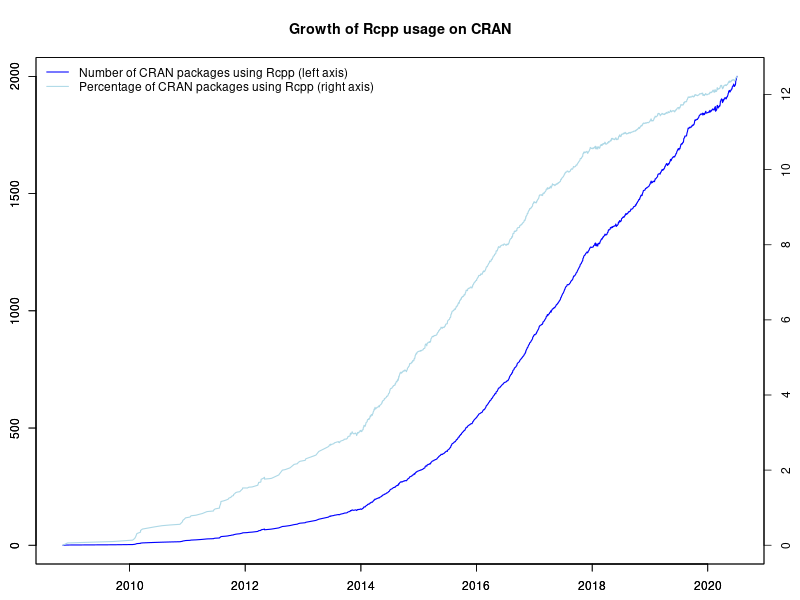 As of yesterday,
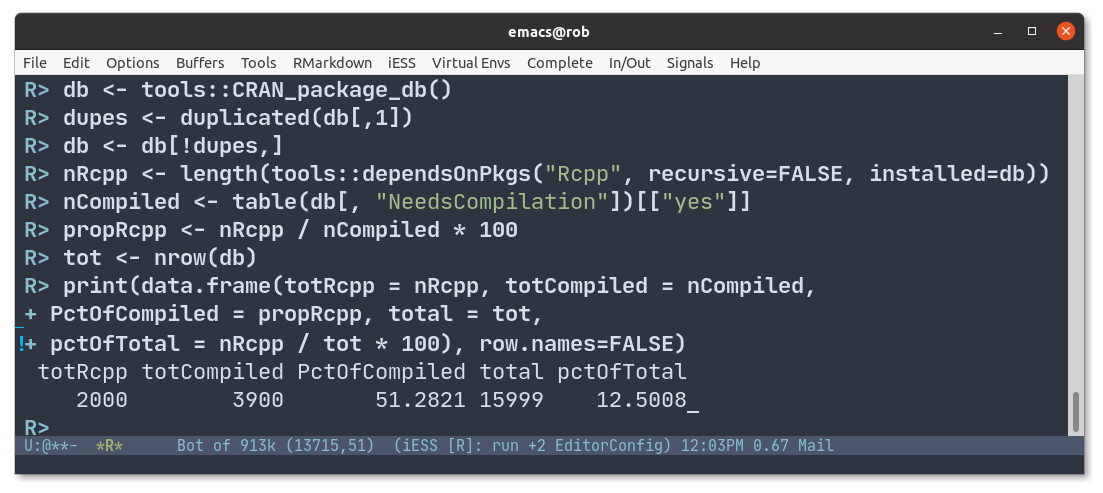 2000 user packages is pretty mind-boggling. We can use the progression of
 Here is my monthly update covering what I have been doing in the free software world during June 2020 (
 The twelveth release of
 This is a fairly self-indulgent post, sorry!
Encouraged by