Search Results: "nic"

19 May 2017

Benjamin Mako Hill: Children s Perspectives on Critical Data Literacies

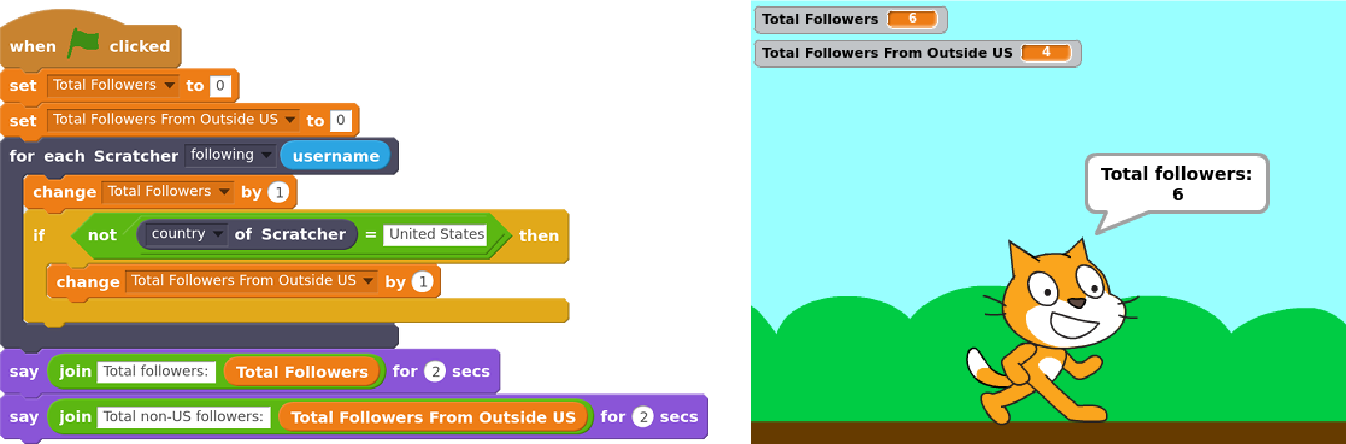
Last week, we presented a new paper that describes how children are thinking through some of the implications of new forms of data collection and analysis. The presentation was given at the ACM CHI conference in Denver last week and the paper is open access and online. Over the last couple years, we ve worked on a large project to support children in doing and not just learning about data science. We built a system, Scratch Community Blocks, that allows the 18 million users of the Scratch online community to write their own computer programs in Scratch of course to analyze data about their own learning and social interactions. An example of one of those programs to find how many of one s follower in Scratch are not from the United States is shown below. Last year, we deployed Scratch Community Blocks to 2,500 active Scratch users who, over a period of several months, used the system to create more than 1,600 projects. As children used the system, Samantha Hautea, a student in UW s Communication Leadership program, led a group of us in an online ethnography. We visited the projects children were creating and sharing. We followed the forums where users discussed the blocks. We read comment threads left on projects. We combined Samantha s detailed field notes with the text of comments and forum posts, with ethnographic interviews of several users, and with notes from two in-person workshops. We used a technique called grounded theory to analyze these data. What we found surprised us. We expected children to reflect on being challenged by and hopefully overcoming the technical parts of doing data science. Although we certainly saw this happen, what emerged much more strongly from our analysis was detailed discussion among children about the social implications of data collection and analysis. In our analysis, we grouped children s comments into five major themes that represented what we called critical data literacies. These literacies reflect things that children felt were important implications of social media data collection and analysis. First, children reflected on the way that programmatic access to data even data that was technically public introduced privacy concerns. One user described the ability to analyze data as, creepy , but at the same time, very cool. Children expressed concern that programmatic access to data could lead to stalking and suggested that the system should ask for permission. Second, children recognized that data analysis requires skepticism and interpretation. For example, Scratch Community Blocks introduced a bug where the block that returned data about followers included users with disabled accounts. One user, in an interview described to us how he managed to figure out the inconsistency:

At one point the follower blocks, it said I have slightly more followers than I do. And, that was kind of confusing when I was trying to make the project. [ ] I pulled up a second [browser] tab and compared the [data from Scratch Community Blocks and the data in my profile]. Third, children discussed the hidden assumptions and decisions that drive the construction of metrics. For example, the number of views received for each project in Scratch is counted using an algorithm that tries to minimize the impact of gaming the system (similar to, for example, Youtube). As children started to build programs with data, they started to uncover and speculate about the decisions behind metrics. For example, they guessed that the view count might only include unique views and that view counts may include users who do not have accounts on the website. Fourth, children building projects with Scratch Community Blocks realized that an algorithm driven by social data may cause certain users to be excluded. For example, a 13-year-old expressed concern that the system could be used to exclude users with few social connections saying:

I love these new Scratch Blocks! However I did notice that they could be used to exclude new Scratchers or Scratchers with not a lot of followers by using a code: like this:
when flag clicked
if then user s followers < 300
stop all.
I do not think this a big problem as it would be easy to remove this code but I did just want to bring this to your attention in case this not what you would want the blocks to be used for.
Fifth, children were concerned about the possibility that measurement might distort the Scratch community s values. While giving feedback on the new system, a user expressed concern that by making it easier to measure and compare followers, the system could elevate popularity over creativity, collaboration, and respect as a marker of success in Scratch.

I think this was a great idea! I am just a bit worried that people will make these projects and take it the wrong way, saying that followers are the most important thing in on Scratch. Kids conversations around Scratch Community Blocks are good news for educators who are starting to think about how to engage young learners in thinking critically about the implications of data. Although no kid using Scratch Community Blocks discussed each of the five literacies described above, the themes reflect starting points for educators designing ways to engage kids in thinking critically about data. Our work shows that if children are given opportunities to actively engage and build with social and behavioral data, they might not only learn how to do data analysis, but also reflect on its implications.

This blog-post and the work that it describes is a collaborative project by Samantha Hautea, Sayamindu Dasgupta, and Benjamin Mako Hill. We have also received support and feedback from members of the Scratch team at MIT (especially Mitch Resnick and Natalie Rusk), as well as from Hal Abelson from MIT CSAIL. Financial support came from the US National Science Foundation.

17 May 2017

Reproducible builds folks: Reproducible Builds: week 107 in Stretch cycle

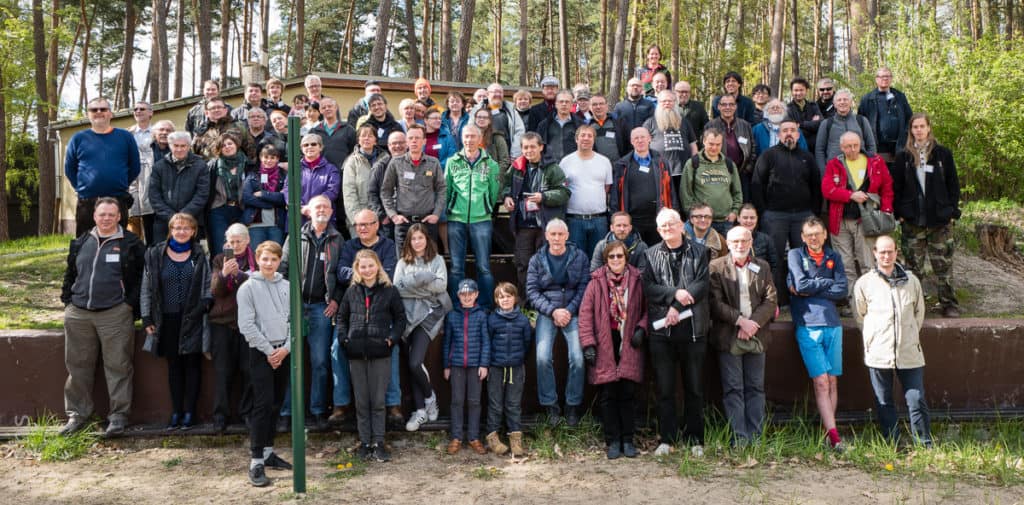
Here's what happened in the Reproducible Builds effort between Sunday May 7 and Saturday May 13 2017: Report from Reproducible Builds Hamburg Hackathon We were 16 participants from 12 projects: 7 Debian, 2 repeatr.io, 1 ArchLinux, 1 coreboot + LEDE, 1 F-Droid, 1 ElectroBSD + privoxy, 1 GNU R, 1 in-toto.io, 1 Meson and 1 openSUSE. Three people came from the USA, 3 from the UK, 2 Finland, 1 Austria, 1 Denmark and 6 from Germany, plus we several guests from our gracious hosts at the CCCHH hackerspace as well as a guest from Australia We had four presentations: Some of the things we worked on: We had a Debian focussed meeting where we discussed a number of topics: And then we also had a lot of fun in the hackerspace, enjoying some of their gimmicks, such as being able to open physical doors with ssh or controlling light and music with an webbrowser without authentication (besides being in the right network). Not quite the hackathon (This wasn't the hackathon per-se, but some of us appreciated these sights and so we thought you would too.) Many thanks to: News and media coverage openSUSE has had a security breach in their infrastructure, including their build services. As of this writing, the scope and impact are still unclear, however the incident illustrates that no one should rely on being able to secure their infrastructure at all times. Reproducible Builds help mitigate this by allowing independent verification of build results, by parties that are unaffected by the compromise. (Whilst this can happen to anyone. Kudos to openSUSE for being open about it. Now let's continue working on Reproducible Builds everywhere!) On May 13th Chris Lamb gave a talk on Reproducible Builds at OSCAL 2017 in Tirana, Albania. OSCAL 2017 Toolchain bug reports and fixes Packages' bug reports Reviews of unreproducible packages 11 package reviews have been added, 2562 have been updated and 278 have been removed in this week, adding to our knowledge about identified issues. Most of the updates were to move ~1800 packages affected by the generic catch-all captures_build_path (out of ~2600 total) to the more specific gcc_captures_build_path, fixed by our proposed patches to GCC. 5 issue types have been updated: Weekly QA work During our reproducibility testing, FTBFS bugs have been detected and reported by: diffoscope development diffoscope development continued on the experimental branch: strip-nondeterminism development reprotest development trydiffoscope development Misc. This week's edition was written by Ximin Luo, Holger Levsen and Chris Lamb & reviewed by a bunch of Reproducible Builds folks on IRC & the mailing lists.

Jamie McClelland: Late to the Raspberry Pi party

I finally bought my first raspberry pi to setup as a router and wifi access point. It wasn't easy. I first had to figure out what to buy. I think that was the hardest part. I ended up with: I already have a cable matters USB to ethernet device, which will provide the second ethernet connection so this device can actually work as a router. I studiously followed the directions to download the raspbian image and copy it to my micro sd card. I also touched a file on the boot partition called ssh so ssh would start automatically. Note: I first touched the ssh file on the root partition (sdb2) before realizing it belonged on the boot partition (sdb1). And, despite ambiguous directions found on the Internet, lowercase 'ssh' for the filename seems to do the trick. Then, I found the IP address with the help of NMAP (sudo nmap -sn 192.168.69.*) and tried to ssh in but alas...
Connection reset by 192.168.69.116 port 22
No dice. So, I re-mounted the sdb2 partition of the micro sd card and looked in var/log/auth.log and found:
May  5 19:23:00 raspberrypi sshd[760]: error: Could not load host key: /etc/ssh/ssh_host_ed25519_key
May  5 19:23:00 raspberrypi sshd[760]: fatal: No supported key exchange algorithms [preauth]
May  5 19:23:07 raspberrypi sshd[762]: error: key_load_public: invalid format
May  5 19:23:07 raspberrypi sshd[762]: error: Could not load host key: /etc/ssh/ssh_host_rsa_key
May  5 19:23:07 raspberrypi sshd[762]: error: key_load_public: invalid format
May  5 19:23:07 raspberrypi sshd[762]: error: Could not load host key: /etc/ssh/ssh_host_dsa_key
May  5 19:23:07 raspberrypi sshd[762]: error: key_load_public: invalid format
May  5 19:23:07 raspberrypi sshd[762]: error: Could not load host key: /etc/ssh/ssh_host_ecdsa_key
May  5 19:23:07 raspberrypi sshd[762]: error: key_load_public: invalid format
How did that happen? And wait a minute...
0 jamie@turkey:~$ ls -l /mnt/etc/ssh/ssh_host_ecdsa_key
-rw------- 1 root root 0 Apr 10 05:58 /mnt/etc/ssh/ssh_host_ecdsa_key
0 jamie@turkey:~$ date
Fri May  5 15:44:15 EDT 2017
0 jamie@turkey:~$
Are the keys embedded in the image? Isn't that wrong? I fixed with:
0 jamie@turkey:mnt$ sudo rm /mnt/etc/ssh/ssh_host_*
0 jamie@turkey:mnt$ sudo ssh-keygen -q -f /mnt/etc/ssh/ssh_host_rsa_key -N '' -t rsa
0 jamie@turkey:mnt$ sudo ssh-keygen -q -f /mnt/etc/ssh/ssh_host_dsa_key -N '' -t dsa
0 jamie@turkey:mnt$ sudo ssh-keygen -q -f /mnt/etc/ssh/ssh_host_ecdsa_key -N '' -t ecdsa
0 jamie@turkey:mnt$ sudo ssh-keygen -q -f /mnt/etc/ssh/ssh_host_ed25519_key -N '' -t ed25519
0 jamie@turkey:mnt$
NOTE: I just did a second installation and this didn't happen. Maybe something went wrong as I experiment with SSH vs ssh on the boot partition? Then I could ssh in. I removed the pi user account and added my ssh key to /root/.ssh/authorized_keys and put a new name "mondragon" in the /etc/hostname file. And... I upgraded to Debian stretch and rebooted. Then, I followed these instructions for fixing the wifi (replacing the firmware does still work for me). I plugged my cable matters USB/Ethernet adapter into the device so it would be recognized, but left it dis-connected. Next I started to configure the device to be a wifi access point using this excellend tutorial, but decided I wanted to setup my networks using systemd-networkd instead. Since /etc/network/interaces already had eth0 set to manual (because apparently it is controlled by dhcpcd instead), I didn't need any modifications there. However, I wanted to use the dhcp client built-in to systemd-networkd, so to prevent dhcpcd from obtaining an IP address, I purged dhcpcd:
apt-get purge dhcpcd5
I was planning to also use systemd-networkd to name the devices (using *.link files) but nothing I could do could convince systemd to rename them, so I gave up and added /etc/udev/rules.d/70-persistent-net.rules:
    SUBSYSTEM=="net", ACTION=="add", DRIVERS=="?*", ATTR address =="b8:27:eb:ce:b5:c3", ATTR dev_id =="0x0", ATTR type =="1", NAME:="wan"
    SUBSYSTEM=="net", ACTION=="add", DRIVERS=="?*", ATTR address =="a0:ce:c8:01:20:7d", ATTR dev_id =="0x0", ATTR type =="1", NAME:="lan"
    SUBSYSTEM=="net", ACTION=="add", DRIVERS=="?*", ATTR address =="b8:27:eb:9b:e0:96", ATTR dev_id =="0x0", ATTR type =="1", NAME:="wlan"
(If you are copying and pasting the mac addresses will have to change.) Then I added the following files:
root@mondragon:~# head /etc/systemd/network/*
==> /etc/systemd/network/50-lan.network <==
[Match]
Name=lan
[Network]
Address=192.168.69.1/24
==> /etc/systemd/network/55-wlan.network <==
[Match]
Name=wlan
[Network]
Address=10.0.69.1/24
==> /etc/systemd/network/60-wan.network <==
[Match]
Name=wan
[Network]
DHCP=v4
IPForward=yes
IPMasquerade=yes
root@mondragon:~#
Sadly, IPMasquerade doesn't seem to work either for some reason, so...
root@mondragon:~# cat /etc/systemd/system/masquerade.service 
[Unit]
Description=Start masquerading because Masquerade=yes not working in wan.network.
[Service]
Type=oneshot
ExecStart=/sbin/iptables -t nat -A POSTROUTING -o wan -j MASQUERADE
[Install]
WantedBy=network.target
root@mondragon:~#
And, systemd DHCPServer worked, but then it didn't and I couldn't figure out how to debug, so...
apt-get install dnsmasq
Followed by:
root@mondragon:~# cat /etc/dnsmasq.d/mondragon.conf 
# Don't provide DNS services (unbound does that).
port=0
interface=lan
interface=wlan
# Only provide dhcp services since systemd-networkd dhcpserver seems
# flakey.
dhcp-range=set:cable,192.168.69.100,192.168.69.150,255.255.255.0,4h
dhcp-option=tag:cable,option:dns-server,192.168.69.1
dhcp-option=tag:cable,option:router,192.168.69.1
dhcp-range=set:wifi,10.0.69.100,10.0.69.150,255.255.255.0,4h
dhcp-option=tag:wifi,option:dns-server,10.0.69.1
dhcp-option=tag:wifi,option:router,10.0.69.1
root@mondragon:~#
It would probably be simpler to have dnsmasq provide DNS service also, but I happen to like unbound:
apt-get install unbound
And...
root@mondragon:~# cat /etc/unbound/unbound.conf.d/server.conf 
server:
    interface: 127.0.0.1
    interface: 192.168.69.1
    interface: 10.0.69.1
    access-control: 192.168.69.0/24 allow
    access-control: 10.0.69.0/24 allow
    # We do query localhost for our stub zone: loc.cx
    do-not-query-localhost: no
    # Up this level when debugging.
    log-queries: no
    logfile: ""
    #verbosity: 1
    # Settings to work better with systemcd
    do-daemonize: no
    pidfile: ""
root@mondragon:~# 
Now on to the wifi access point.
apt-get install hostapd
And the configuration file:
root@mondragon:~# cat /etc/hostapd/hostapd.conf
# This is the name of the WiFi interface we configured above
interface=wlan
# Use the nl80211 driver with the brcmfmac driver
driver=nl80211
# This is the name of the network
ssid=peacock
# Use the 2.4GHz band
hw_mode=g
# Use channel 6
channel=6
# Enable 802.11n
ieee80211n=1
# Enable WMM
wmm_enabled=1
# Enable 40MHz channels with 20ns guard interval
ht_capab=[HT40][SHORT-GI-20][DSSS_CCK-40]
# Accept all MAC addresses
macaddr_acl=0
# Use WPA authentication
auth_algs=1
# Require clients to know the network name
ignore_broadcast_ssid=0
# Use WPA2
wpa=2
# Use a pre-shared key
wpa_key_mgmt=WPA-PSK
# The network passphrase
wpa_passphrase=xxxxxxxxxxxx
# Use AES, instead of TKIP
rsn_pairwise=CCMP
root@mondragon:~#
The hostapd package doesn't have a systemd start up file so I added one:
root@mondragon:~# cat /etc/systemd/system/hostapd.service 
[Unit]
Description=Hostapd IEEE 802.11 AP, IEEE 802.1X/WPA/WPA2/EAP/RADIUS Authenticator
Wants=network.target
Before=network.target
Before=network.service
[Service]
ExecStart=/usr/sbin/hostapd /etc/hostapd/hostapd.conf
[Install]
WantedBy=multi-user.target
root@mondragon:~#
My last step was to modify /etc/ssh/sshd_config so it only listens on the lan and wlan interfaces (listening on wlan is a bit of a risk, but also useful when mucking with the lan network settings to ensure I don't get locked out).

16 May 2017

Rapha&#235;l Hertzog: Freexian s report about Debian Long Term Support, April 2017

A Debian LTS logoLike each month, here comes a report about the work of paid contributors to Debian LTS. Individual reports In April, about 190 work hours have been dispatched among 13 paid contributors. Their reports are available: Evolution of the situation The number of sponsored hours decreased slightly and we re now again a little behind our objective. The security tracker currently lists 54 packages with a known CVE and the dla-needed.txt file 37. The number of open issues is comparable to last month. Thanks to our sponsors New sponsors are in bold.

No comment Liked this article? Click here. My blog is Flattr-enabled.

15 May 2017

Gunnar Wolf: Starting a project on private and anonymous network usage

I am starting a work with the students of LIDSOL (Laboratorio de Investigaci n y Desarrollo de Software Libre, Free Software Research and Development Laboratory) of the Engineering Faculty of UNAM:

We want to dig into the technical and social implications of mechanisms that provide for anonymous, private usage of the network. We will have our first formal work session this Wednesday, for which we have invited several interesting people to join the discussion and help provide a path for our oncoming work. Our invited and confirmed guests are, in alphabetical order:

Michal &#268;iha&#345;: New projects on Hosted Weblate

Hosted Weblate provides also free hosting for free software projects. The hosting requests queue was over one month long, so it's time to process it and include new project. This time, the newly hosted projects include: We now also host few new Minetest mods: If you want to support this effort, please donate to Weblate, especially recurring donations are welcome to make this service alive. You can do them on Liberapay or Bountysource.

Filed under: Debian English SUSE Weblate

intrigeri: GNOME and Debian usability testing, May 2017

During the Contribute your skills to Debian event that took place in Paris last week-end, we conducted a usability testing session. Six people were tasked with testing a few aspects of the GNOME 3.22 desktop environment and of the Debian 9 (Stretch) operating system. A number of other people observed them and took notes. Then, two observers and three testers analyzed the results, that we are hereby presenting: we created a heat map visualization, summed up the challenges met during the tests, and wrote this blog post together. We will point the relevant upstream projects to our results. A couple of other people also did some usability testing but went in much more depth: their feedback is much more detailed and comes with a number of improvement ideas. I will process and publish their results as soon as possible. Missions Testers were provided a laptop running GNOME on a a Debian 9 (Stretch) Live system. A quick introduction (mostly copied from the one we found in some GNOME usability testing reports) was read. Then they were asked to complete the following tasks. A. Nautilus Mission A.1 Download and rename file in Nautilus
  1. Download a file from the web, a PDF document for example.
  2. Open the folder in which the file has been downloaded.
  3. Rename the dowloaded file to SUCCESS.pdf.
  4. Toggle the browser window to full screen.
  5. Open the file SUCCESS.pdf.
  6. Go back to the File manager.
  7. Close the file SUCCESS.pdf.
Mission A.2 Manipulate folders in Nautilus
  1. Create a new folder named cats in your user directory.
  2. Create a new folder named to do in your user directory.
  3. Move the cats folder to the to do folder.
  4. Delete the cats folder.
Mission A.3 Create a bookmark in Nautilus
  1. Create a folder named unicorns in your personal directory.
  2. This folder is important. Add a bookmark for unicorns in order to find it again in a few weeks.
Mission A.4 Nautilus display settings Folders and files are usually listed as icons, but they can also be displayed differently.
  1. Configure the File manager to make it show items as a list, with one file per line.
  2. You forgot your glasses and the font size is too small for you to see the text: increase the size of the text.
B. Package management Introduction On Debian, each application is available as a "package" which contains every file needed for the software to work. Unlike in other operating systems, it is rarely necessary and almost never a good idea, to download and install software from the authors website. We can rather install it from an online library managed by Debian (like an appstore). This alternative offers several advantages, such as being able to update all the software installed in one single action. Specific tools are available to install and update Debian packages. Mission B.1 Install and remove packages
  1. Install the vlc package.
  2. Start VLC.
  3. Remove the vlc package.
Mission B.2 Search and install a package
  1. Find a piece of software which can download files with BitTorrent in a graphical interface.
  2. Install the corresponding package.
  3. Launch that BitTorrent software.
Mission B.3 Upgrade the system Make sure the whole system (meaning all installed packages) is up to date. C. Settings Mission C.1 Change the desktop background
  1. Download an image you like from the web.
  2. Set the downloaded image as the desktop wallpaper.
Mission C.2 Tweak temporary files management Configure the system so that temporary files older than three days are deleted automatically. Mission C.3 Change the default video player
  1. Install VLC (ask for help if you could not do it during the previous mission).
  2. Make VLC the default video player.
  3. Download a video file from the web.
  4. Open the downloaded video, then check if it opens with VLC.
Mission C.4 Add and remove world clocks When you click the time and date in the top bar, a menu pops-up. There, you can display clocks in several time-zones.
  1. Add a clock with Rio de Janeiro timezone, then another showing the current time in Boston.
  2. Check that the time and date menu now displays these two additional clocks.
  3. Remove the Boston clock.
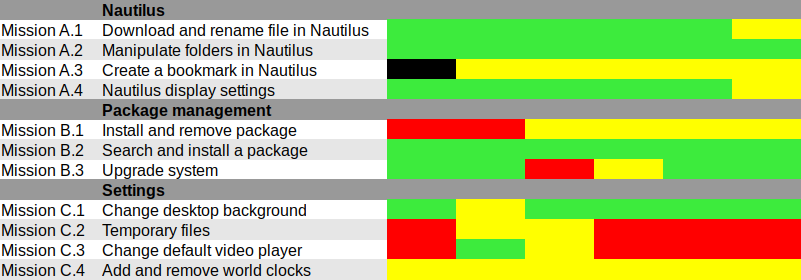
Results and analysis Heat map We used Jim Hall's heat map technique to summarize our usability test results. As Renata puts it, it is "a great way to see how the users performed on each task. The heat map clarifies how easy or difficult it was for the participant to accomplish a certain task.
  1. Scenario tasks (from the usability test) are arranged in rows.
  2. Test participants (for each tester) are arranged in columns.
  3. The colored blocks represent each tester s difficulty with each scenario task.
Green blocks represent the ability of the participant to accomplish the tasks with little or no difficulty. Yellow blocks indicate the tasks that the tester had significant difficulties accomplishing. Red blocks indicate that testers experienced extreme difficulty or where testers completed the tasks incorrectly. Black blocks indicate tasks the tester was unable to complete." Alternatively, here is the spreadsheet that was used to create this picture, with added text to avoid relying on colors only. Most tasks were accomplished with little or no difficulty so we will now focus on the problematic parts. What were the challenges? The heat map shows several "hot" rows, that we will now be looking at in more details. Mission A.3 Create a bookmark in Nautilus Most testers right-clicked the folder first, and eventually found they could simply drag'n'drop to the bookmarks location in the sidebar. One tester thought that he could select a folder, click the hamburger icon, and from there use the "Bookmark this folder" menu item. However, this menu action only works on the folder one has entered, not on the selected one. Mission B.1 Install and remove a package Here we faced a number of issues caused by the fact that Debian Live images don't include package indices (with good reason), so no package manager can list available software. Everyone managed to start a graphical package manager via the Overview (or via the CLI or Alt-F2 for a couple power users). Some testers tried to use GNOME Software, which listed only already installed packages (Debian bug #862560) and provided no way we could find to refresh the package indices. That's arguably a bug in Debian Live, but still: GNOME Software might display some useful information when it detects this unusual situation. We won't list here all the obstacles that were met in Synaptic: it's no news its usability is rather sub-optimal and better alternatives (such as GNOME Software) are in the works. Mission C.2 Tweak temporary files management The mission was poorly phrased: some observers had to clarify that it was specifically about GNOME, and not generic Linux system administration: some power-users were already searching the web for command-line tools to address the task at hand. Even with this clarification, no tester would have succeeded without being told they were allowed to use the web with a search query including the word "GNOME", or use the GNOME help or the Overview. Yet eventually all testers succeeded. It's interesting to note that regular GNOME users had the same problem as others: they did not try searching "temporary" in the Overview and did not look-up the GNOME Help until they were suggested to do so. Mission C.3 Change the default video player One tester configured one single video file format to be opened by default with VLC, via right-click in Nautilus Open with etc. He believed this would be enough to make VLC the default video player, missing the subtle difference between "default video player" and "default player for one single video format". One tester tried to complete this task inside VLC itself and then needed some help to succeed. It might be that the way web browsers ask "Do you want ThisBrowser to become the default web browser?" gave a hint an application GUI is the right place to do it. Two testers searched "default" in the Overview (perhaps the previous mission dealing with temporary files was enough to put them in this direction). At least one tester was confused since the only search result (Details View information about your system), which is the correct one to get there, includes the word View, which suggests that one cannot modify settings there, but only view them. One long-term GNOME user looked in Tweak Tool first, and then used the Overview. Here again, GNOME users experienced essentially the same issues as others. Mission C.4 Add and remove world clocks One tester tried to look for the clock on the top right corner of the screen, then realized it was in the middle. Other than this, all testers easily found a way to add world clocks. However, removing a world clock was rather difficult; although most testers managed to do it, it took them a number of attempts to succeed:
  1. Several testers left-clicked or right-clicked the clock they wanted to remove, expecting this would provide them with a way to remove it (which is not the case).
  2. After a while, all testers noticed the Select button (that has no text label nor tooltip info), which allowed them to select the clock they wanted to remove; then, most testers clicked the 1 selected button, hoping it would provide a contextual menu or some other way to act on the selected clocks (it doesn't).
  3. Eventually, everyone managed to locate the Delete button on the bottom right corner of the window; some testers mentioned that it is less visible and flashy than the blue bar that appears on the top of the screen once they had entered "Selection" mode.
General notes and observations

14 May 2017

Steve Kemp: Some minor updates ..

The past few weeks have been randomly busy, nothing huge has happened, but several minor diversions. Coding
I made a new release of my console-based mail-client, with integrated Lua scripting, this is available for download over at https://lumail.org/ I've also given a talk (!!) on using a literate/markdown configuration for GNU Emacs. In brief I created two files:
~/.emacs/init.md
This contains both my configuration of GNU Emacs as well as documentation for the same. Neat.
~/.emacs/init.el
This parse the previous file, specifically looking for "code blocks" which are then extracted and evaluated.
This system is easy to maintain, and I'm quite happy with it :)
Fuzzing
Somebody nice took the time to report a couple of bugs against my simple bytecode-intepretting virtual-machine project - all found via fuzzing. I've done some fun fuzzing of my own in the past, so this was nice to see. I've now resolved those bugs, and updated the README.md file to include instructions on fuzzing it. (Which I started doing myself, after receiving the first of the reports )
Finally I have more personal news too: I had a pair of CT-scans carried out recently, and apparently here in sunny Finland (that's me being ironic, it was snowing in the first week of May) when you undergo a CT-scan you can pay to obtain your data on CD-ROM. I'm 100% definitely going to get a copy of my brain-scan data. I'll be able to view a 3d-rendered model of my own brain on my desktop. (Once upon a time I worked for a company that produced software, sold to doctors/surgeons, for creating 3d-rendered volumes from individual slices. I confirmed with the radiologist that handled my tests that they do indeed use the standard DICOM format. Small world.)

11 May 2017

Norbert Preining: BachoTeX 2017

A week of typesetting, typography, bookbinding, bibliophily, not to forget long chats with good friends and loads of beer. That is BachoTeX, the best series of conferences I have ever been. This year BachoTeX was held for the 25th time, and was merged with the TUG Meeting for a firework of excellent presentations and long hours of brain storming, hacking, music making, dancing, and simply enjoying life!
Symphony of Green
And while it was a bit less relaxing for me than in the last years, mostly due to the presence of my little daughter who requested presence quite often, it is still the place to be during the Golden Week! Of course I also gave a talk at BachoTeX about our latest changes in the upcoming TeX Live 2017 release: fmtutil and updmap past & future changes (or: cleaning up the mess). Big thanks to my company Accelia Inc. for allowing me to attend the conference. We arrived after a long trip, first via train and plane to Vienna, then two days break (including research with a colleague), followed by a night train ride to Warsaw and another train ride to Torun and a taxi ride to Bachotek. All in all far too long to be done with a 14 month old girl. Finally arrived we went directly to our hut and found it freezing. Fortunately we could organize a heater so that the rest of the week we didn t have to live in 5-10 degrees
Our log house in Bachotek
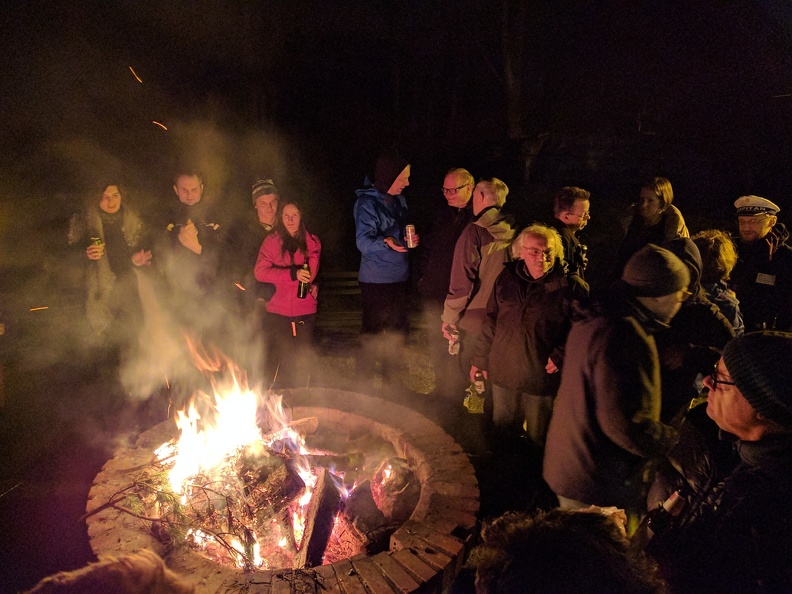
The second day brought already the traditional bonfire. After a small (for Polish standard) dinner we ignored the rain and met at the fireplace for BBQ, beer, and lots of live music.
Bonfire on the second evening
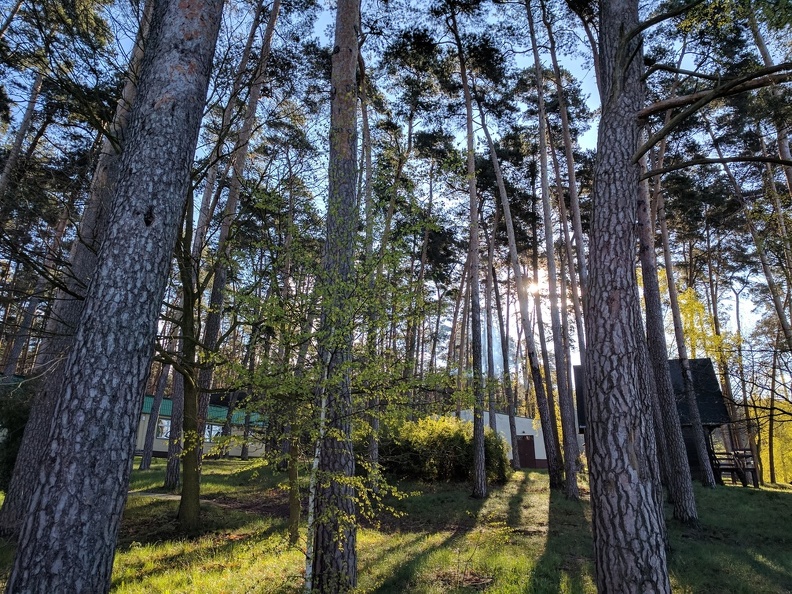
The rain stopped during the bonfire, probably due to my horrible singing, and the following days we were blessed with sunshine and warmer temperatures. The forest sparked in all kinds of greens.
Sunny days in Bachotek
For our daughter the trip was a great experience lots of wild play grounds, many other kids, and a lake she really wanted to go swimming in. Normally I go swimming there, but this year I had a bad cold so I refrained from it, and with me also our daughter, to her great disappointment.
Ready to go swimming
Another day has passed, and the sunset lights up the beautiful lake Bachotek. I cannot imagine a better place for concentrated work paired with great relaxation!
Sunset along the lake
During the days the temperatures were really nice, but the mornings were cold, and our morning walk to the breakfast place was quite chilly.
Enjoying a fresh morning on the lake
Ample coffee breaks and lunch breaks left us enough time to discuss new developments. But the single most important thing that brought people to talk a lot was the horrible internet connection, a big plus in BachoTeX (but as far as rumors go it might have been the last time with that advantage!).
Beautiful and peaceful lake Bachotek
The last evening we had a banquet honoring 25 years of BachoTeX, one of the oldest TeX conference. Live music and dancing, lots of good food and drinks, and outside the perfect evening atmosphere.
Sunset around the lake
Too fast the time has passed and we had to return to Vienna, retracing the long trip. How far it may be, taking the burden to come from Japan is worth every drop of sweat, the time at BachoTeX is probably one of the most productive, and at the same time most relaxing for me. Big thanks to all our Polish friends for organizing the event.
BachoTeX conference photo

(photo by Frans Goddijn)


10 May 2017

Jonathan Dowland: Three things I didn't know about Haskell

I've been trying to refresh my Haskell skills and Paul Callaghan recommended I read the paper "A History of Haskell: Being Lazy With Class", which I found (surprisingly?) fascinating. Three facts about Haskell that I didn't know jumped out at me:

Junichi Uekawa: I tried learning rust but making very little progress.

I tried learning rust but making very little progress.

9 May 2017

Reproducible builds folks: Reproducible Builds: week 106 in Stretch cycle

Here's what happened in the Reproducible Builds effort between Sunday April 30 and Saturday May 6 2017: Past and upcoming events Between May 5th-7th the Reproducible Builds Hackathon 2017 took place in Hamburg, Germany. On May 6th Mattia Rizzolo gave a talk on Reproducible Builds at DUCC-IT 17 in Vicenza, Italy. On May 13th Chris Lamb will give a talk on Reproducible Builds at OSCAL 2017 in Tirana, Albania. Media coverage Toolchain development and fixes Packages reviewed and fixed, and bugs filed Chris Lamb: Reviews of unreproducible packages 93 package reviews have been added, 12 have been updated and 98 have been removed in this week, adding to our knowledge about identified issues. The following issues have been added: 2 issue types have been updated: The following issues have been removed: Weekly QA work During our reproducibility testing, FTBFS bugs have been detected and reported by: diffoscope development strip-nondeterminism development
This week's edition was written by Chris Lamb, Holger Levsen and Ximin Luo & reviewed by a bunch of Reproducible Builds folks on IRC & the mailing lists.

Martin Pitt: Cockpit is now just an apt install away

Cockpit has now been in Debian unstable and Ubuntu 17.04 and devel, which means it s now a simple
$ sudo apt install cockpit
away for you to try and use. This metapackage pulls in the most common plugins, which are currently NetworkManager and udisks/storaged. If you want/need, you can also install cockpit-docker (if you grab docker.io from jessie-backports or use Ubuntu) or cockpit-machines to administer VMs through libvirt. Cockpit upstream also has a rather comprehensive Kubernetes/Openstack plugin, but this isn t currently packaged for Debian/Ubuntu as kubernetes itself is not yet in Debian testing or Ubuntu. After that, point your browser to https://localhost:9090 (or the host name/IP where you installed it) and off you go.

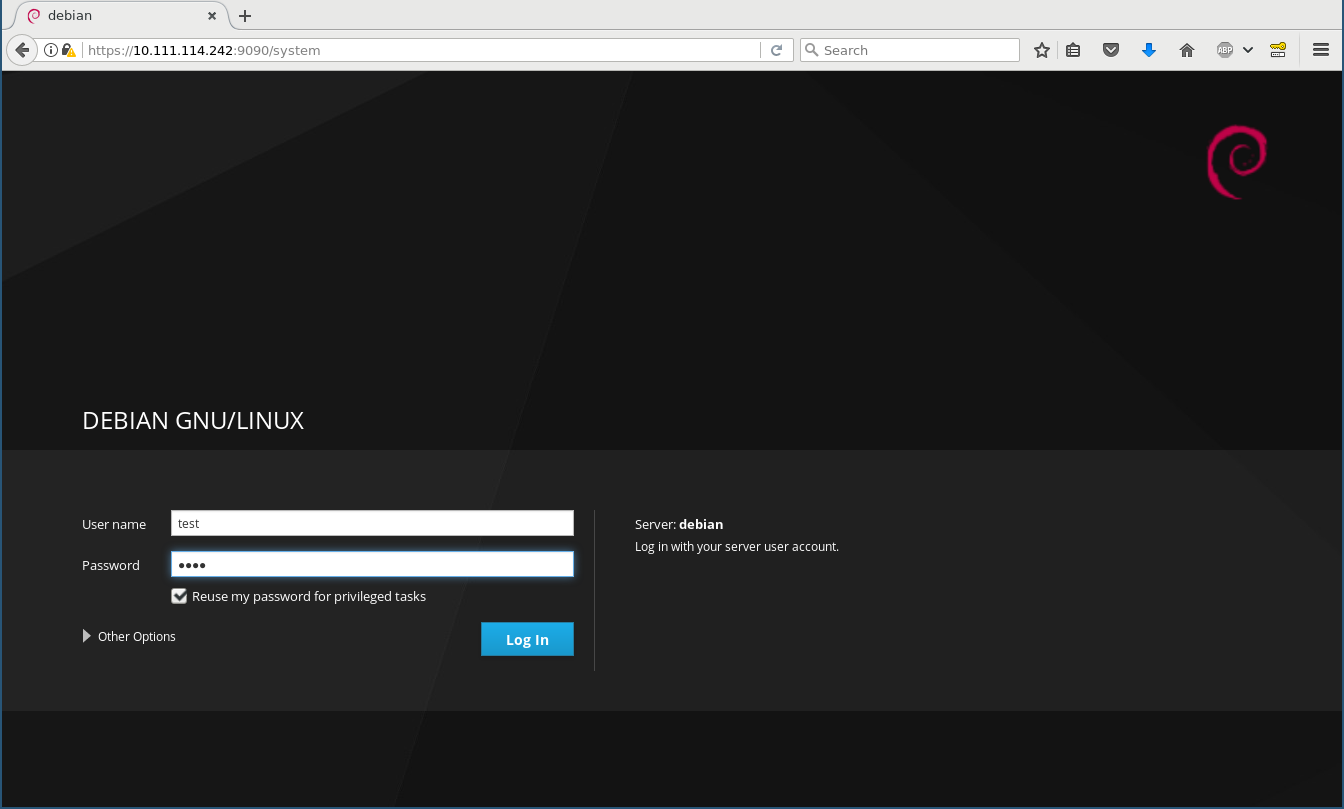
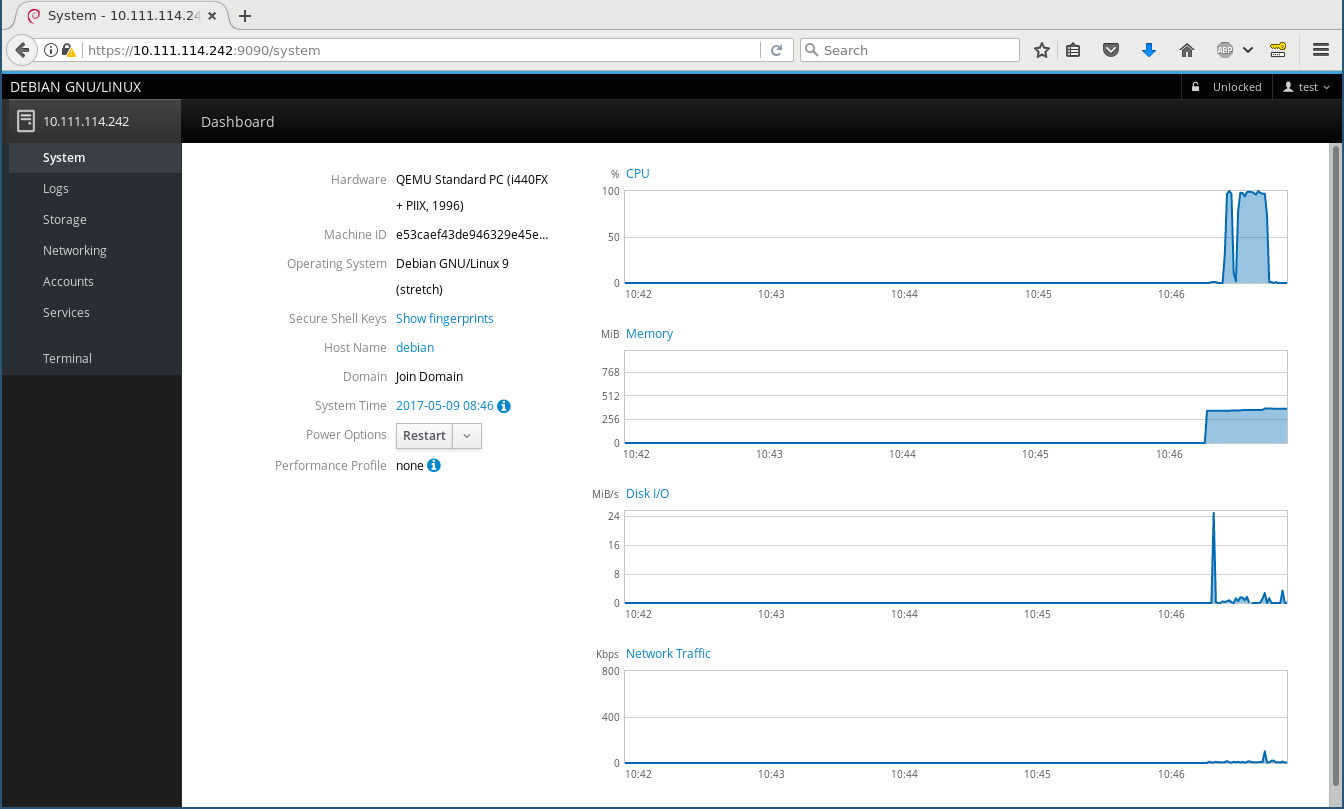
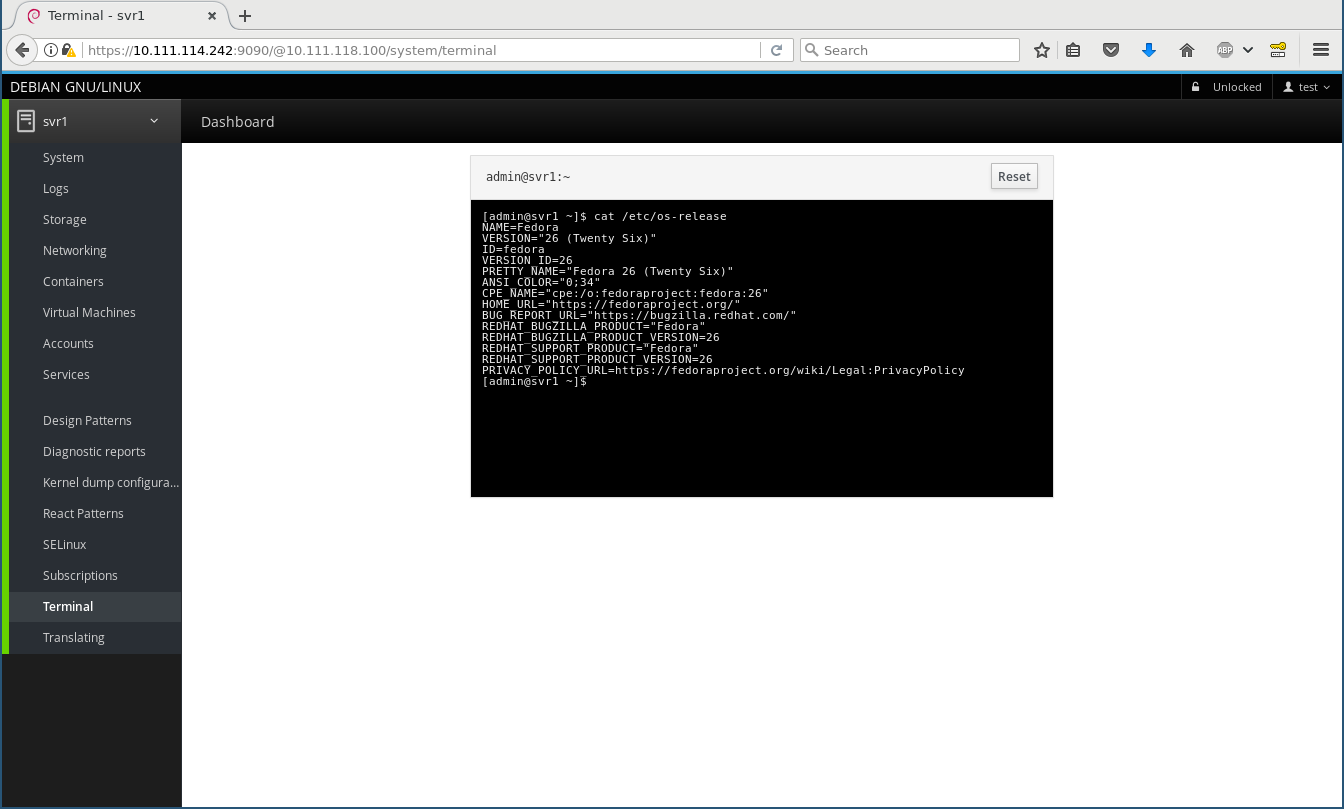
What is Cockpit? Think of it as an equivalent of a desktop (like GNOME or KDE) for configuring, maintaining, and interacting with servers. It is a web service that lets you log into your local or a remote (through ssh) machine using normal credentials (PAM user/password or SSH keys) and then starts a normal login session just as gdm, ssh, or the classic VT logins would. Login screen System page The left side bar is the equivalent of a task switcher , and the applications (i. e. modules for administering various aspects of your server) are run in parallel. The main idea of Cockpit is that it should not behave special in any way - it does not have any specific configuration files or state keeping and uses the same Operating System APIs and privileges like you would on the command line (such as lvmconfig, the org.freedesktop.UDisks2 D-Bus interface, reading/writing the native config files, and using sudo when necessary). You can simultaneously change stuff in Cockpit and in a shell, and Cockpit will instantly react to changes in the OS, e. g. if you create a new LVM PV or a network device gets added. This makes it fundamentally different to projects like webmin or ebox, which basically own your computer once you use them the first time. It is an interface for your operating system, which even reflects in the branding: as you see above, this is Debian (or Ubuntu, or Fedora, or wherever you run it on), not Cockpit .

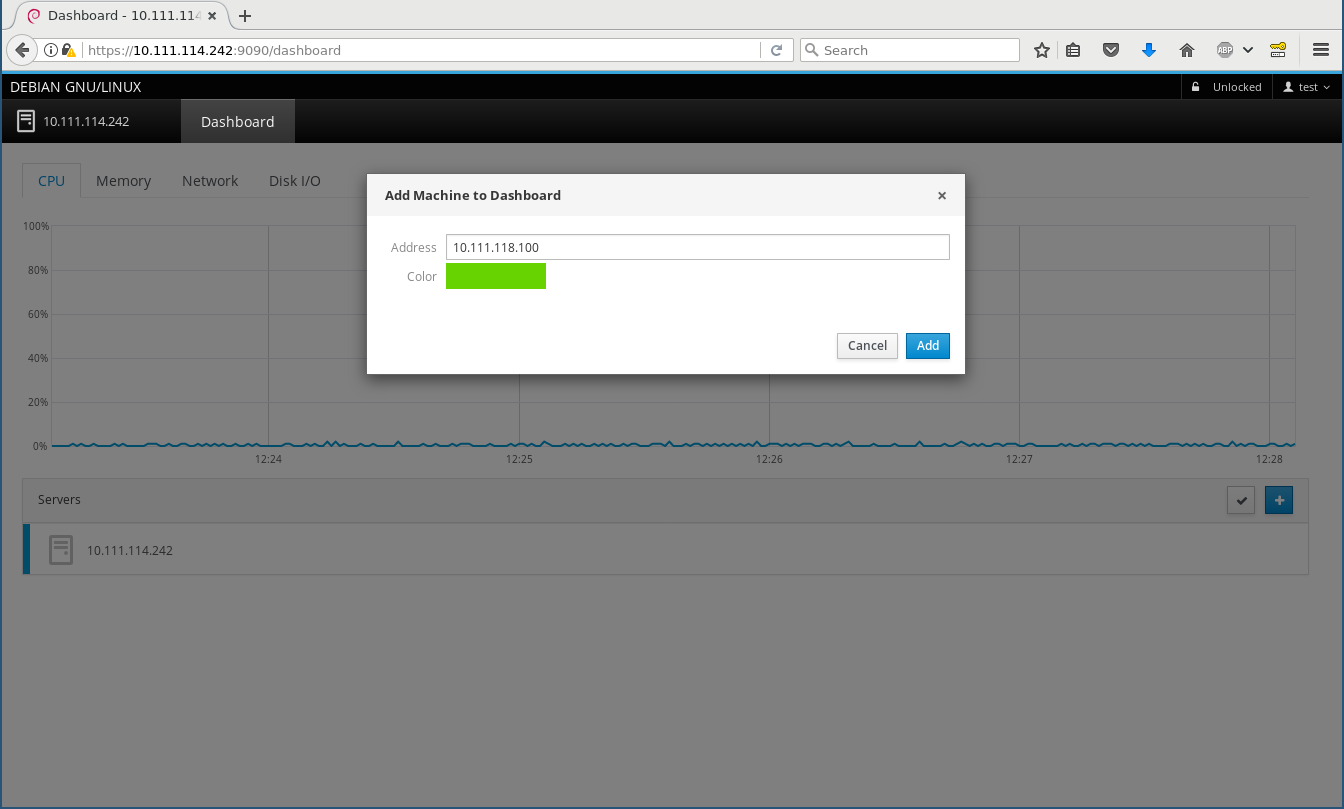
Remote machines In your home or small office you often have more than one machine to maintain. You can install cockpit-bridge and cockpit-system on those for the most basic functionality, configure SSH on them, and then add them on the Dashboard (I add a Fedora 26 machine here) and from then on can switch between them on the top left, and everything works and feels exactly the same, including using the terminal widget: Add remote Remote terminal The Fedora 26 machine has some more Cockpit modules installed, including a lot of playground ones, thus you see a lot more menu entries there.

Under the hood Beneath the fancy Patternfly/React/JavaScript user interface is the Cockpit API and protocol, which particularly fascinates me as a developer as that is what makes Cockpit so generic, reactive, and extensible. This API connects the worlds of the web, which speaks IPs and host names, ports, and JSON, to the local host only world of operating systems which speak D-Bus, command line programs, configuration files, and even use fancy techniques like passing file descriptors through Unix sockets. In an ideal world, all Operating System APIs would be remotable by themselves, but they aren t. This is where the cockpit bridge comes into play. It is a JSON (i. e. ASCII text) stream protocol that can control arbitrarily many channels to the target machine for reading, writing, and getting notifications. There are channel types for running programs, making D-Bus calls, reading/writing files, getting notified about file changes, and so on. Of course every channel can also act on a remote machine. One can play with this protocol directly. E. g. this opens a (local) D-Bus channel named d1 and gets a property from systemd s hostnamed:
$ cockpit-bridge --interact=---
  "command": "open", "channel": "d1", "payload": "dbus-json3", "name": "org.freedesktop.hostname1"  
---
d1
  "call": [ "/org/freedesktop/hostname1", "org.freedesktop.DBus.Properties", "Get",
          [ "org.freedesktop.hostname1", "StaticHostname" ] ],
  "id": "hostname-prop"  
---
and it will reply with something like
d1
 "reply":[[ "t":"s","v":"donald" ]],"id":"hostname-prop" 
---
( donald is my laptop s name). By adding additional parameters like host and passing credentials these can also be run remotely through logging in via ssh and running cockpit-bridge on the remote host. Stef Walter explains this in detail in a blog post about Web Access to System APIs. Of course Cockpit plugins (both internal and third-party) don t directly speak this, but use a nice JavaScript API. As a simple example how to create your own Cockpit plugin that uses this API you can look at my schroot plugin proof of concept which I hacked together at DevConf.cz in about an hour during the Cockpit workshop. Note that I never before wrote any JavaScript and I didn t put any effort into design whatsoever, but it does work .

Next steps Cockpit aims at servers and getting third-party plugins for talking to your favourite part of the system, which means we really want it to be available in Debian testing and stable, and Ubuntu LTS. Our CI runs integration tests on all of these, so each and every change that goes in is certified to work on Debian 8 (jessie) and Ubuntu 16.04 LTS, for example. But I d like to replace the external PPA/repository on the Install instructions with just it s readily available in -backports ! Unfortunately there s some procedural blockers there, the Ubuntu backport request suffers from understaffing, and the Debian stable backport is blocked on getting it in to testing first, which in turn is blocked by the freeze. I will soon ask for a freeze exception into testing, after all it s just about zero risk - it s a new leaf package in testing. Have fun playing around with it, and please report bugs! Feel free to discuss and ask questions on the Google+ post.

8 May 2017

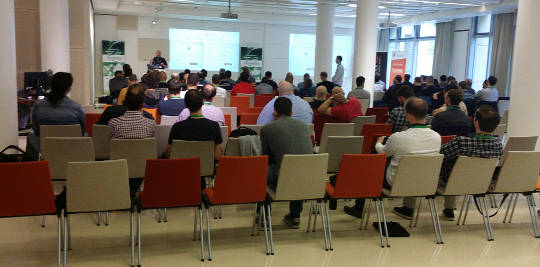
Daniel Pocock: Visiting Kamailio World (Sold Out) and OSCAL'17

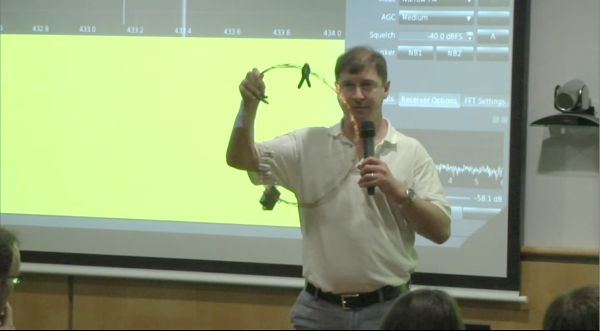
This week I'm visiting Kamailio World (8-10 May, Berlin) and OSCAL'17 (13-14 May, Tirana). Kamailio World Kamailio World features a range of talks about developing and using SIP and telephony applications and offers many opportunities for SIP developers, WebRTC developers, network operators and users to interact. Wednesday, at midday, there is a Dangerous Demos session where cutting edge innovations will make their first (and potentially last) appearance. Daniel Pocock and Daniel-Constantin Mierla at Kamailio World, Berlin, 2017 OSCAL'17, Tirana OSCAL'17 is an event that has grown dramatically in recent years and is expecting hundreds of free software users and developers, including many international guests, to converge on Tirana, Albania this weekend. On Saturday I'll be giving a workshop about the Debian Hams project and Software Defined Radio. On Sunday I'll give a talk about Free Real-time Communications (RTC) and the alternatives to systems like Skype, Whatsapp, Viber and Facebook.

7 May 2017

Dirk Eddelbuettel: RInside 0.2.14

A new release 0.2.14 of RInside is now on CRAN and in Debian. RInside provides a set of convenience classes which facilitate embedding of R inside of C++ applications and programs, using the classes and functions provided by Rcpp. It has been nearly two years since the last release, and a number of nice extensions, build robustifications and fixes had been submitted over this period---see below for more. The only larger and visible extension is both a new example and some corresponding internal changes to allow a readline prompt in an RInside application, should you desire it. RInside is stressing the CRAN system a little in that it triggers a number of NOTE and WARNING messages. Some of these are par for the course as we get close to R internals not all of which are "officially" in the API. This lead to the submission sitting a little longer than usual in incoming queue. Going forward we may need to find a way to either sanction these access point, whitelist them or, as a last resort, take the package off CRAN. Time will tell. Changes since the last release were:

Changes in RInside version 0.2.14 (2017-04-28)
  • Interactive mode can use readline REPL ( ukasz aniewski-Wo k in #25, and Dirk in #26)
  • Windows macros checks now uses _WIN32 (Kevin Ushey in #22)
  • The wt example now links with libboost_system
  • The Makevars file is now more robist (Mattias Ellert in #21)
  • A problem with empty environment variable definitions on Windows was addressed (Jeroen Ooms in #17 addressing #16)
  • HAVE_UINTPTR_T is defined only if not already defined
  • Travis CI is now driven via run.sh from our forked r-travis

CRANberries also provides a short report with changes from the previous release. More information is on the RInside page. Questions, comments etc should go to the rcpp-devel mailing list off the Rcpp R-Forge page, or to issues tickets at the GitHub repo.

This post by Dirk Eddelbuettel originated on his Thinking inside the box blog. Please report excessive re-aggregation in third-party for-profit settings.

6 May 2017

Jelmer Vernooij: Xandikos, a new Git-backed CalDAV/CardDAV server

For the last couple of years, I have self-hosted my calendar and address book data. Originally I just kept local calendars and address books in Evolution, but later I moved to a self-hosted CalDAV/CardDAV server and a plethora of clients.
CalDAV/CardDAV CalDAV and CardDAV are standards for accessing, managing, and sharing calendaring and addressbook information based on the iCalendar format that are built atop the WebDAV standard, and WebDAV itself is a set of extensions to HTTP. CalDAV and CardDAV essentially store iCalendar (.ics) and vCard (.vcf) files using WebDAV, but they provide some extra guarantees (e.g. files must be well-formed) and some additional methods for querying the data. For example, it is possible to retrieve all events between two dates with a single HTTP query, rather than the client having to check all the calendar files in a directory. CalDAV and CardDAV are (unnecessarily) complex, in large part because they are built on top of WebDAV. Being able to use regular HTTP and WebDAV clients is quite neat, but results in extra complexity. In addition, because the standards are so large, clients and servers end up only implementing parts of it. However, CalDAV and CardDAV have one big redeeming quality: they are the dominant standards for synchronising calendar events and addressbooks, and are supported by a wide variety of free and non-free applications. They're the status quo, until something better comes along. (and hey, at least there is a standard to begin with)
Calypso I have tried a number of servers over the years. In the end, I settled for calypso. Calypso started out as friendly fork of Radicale, with some additional improvements. I like Calypso because it is:
  • quite simple, understandable, and small (sloccount reports 1700 LOC)
  • it stores plain .vcf and .ics files
  • stores history in git
  • easy to set up, e.g. no database dependencies
  • written in Python
Its use of regular files and keeping history in Git is useful, because this means that whenever it breaks it is much easier to see what is happening. If something were to go wrong (i.e. a client decides to remove all server-side entries) it's easy to recover by rolling back history using git. However, there are some downsides to Calypso as well. It doesn't have good test coverage, making it harder to change (especially in a way that doesn't break some clients), though there are some recent efforts to make e.g. external spec compliance tests like caldavtester work with it. Calypso's CalDAV/CardDAV/WebDAV implementation is a bit ad-hoc. The only WebDAV REPORTs it implements are calendar-multiget and addressbook-multiget. Support for properties has been added as new clients request them. The logic for replying to DAV requests is mixed with the actual data store implementation. Because of this, it can be hard to get going with some clients and sometimes tricky to debug.
Xandikos After attempting to fix a number of issues in Calypso, I kept running into issues with the way its code is structured. This is only fixable by rewriting sigifnicant chunks of it, so I opted to instead write a new server. The goals of Xandikos are along the same lines as those of Calypso, to be a simple CalDAV/CardDAV server for personal use:
  • easy to set up; at the moment, just running xandikos -d $HOME/dav --defaults is enough to start a new server
  • use of plain .ics/.ivf files for storage
  • history stored in Git
But additionally:
  • clear separation between protocol implementation and storage
  • be well tested
  • standards complete
  • standards compliant
Current status The CalDAV/CardDAV implementation of Xandikos is mostly complete, but there still a number of outstanding issues. In particular:
  • lack of authentication support; setting up authentication support in uwsgi or a reverse proxy is one way of working around this
  • there is no useful UI for users accessing the DAV resources via a web browser
  • test coverage
Xandikos has been tested with the following clients:
Trying it To run Xandikos, follow the instructions on the homepage:
./bin/xandikos --defaults -d $HOME/dav
A server should now be listening on localhost:8080 that you can access with your favorite client.

5 May 2017

Daniel Silverstone: Yarn architecture discussion

Recently Rob and I visited Soile and Lars. We had a lovely time wandering around Helsinki with them, and I also spent a good chunk of time with Lars working on some design and planning for the Yarn test specification and tooling. You see, I wrote a Rust implementation of Yarn called rsyarn "for fun" and in doing so I noted a bunch of missing bits in the understanding Lars and I shared about how Yarn should work. Lars and I filled, and re-filled, a whiteboard with discussion about what the 'Yarn specification' should be, about various language extensions and changes, and also about what functionality a normative implementation of Yarn should have. This article is meant to be a write-up of all of that discussion, but before I start on that, I should probably summarise what Yarn is.
Yarn is a mechanism for specifying tests in a form which is more like documentation than code. Yarn follows the concept of BDD story based design/testing and has a very Cucumberish scenario language in which to write tests. Yarn takes, as input, Markdown documents which contain code blocks with Yarn tests in them; and it then runs those tests and reports on the scenario failures/successes. As an example of a poorly written but still fairly effective Yarn suite, you could look at Gitano's tests or perhaps at Obnam's tests (rendered as HTML). Yarn is not trying to replace unit testing, nor other forms of testing, but rather seeks to be one of a suite of test tools used to help validate software and to verify integrations. Lars writes Yarns which test his server setups for example. As an example, lets look at what a simple test might be for the behaviour of the /bin/true tool:
SCENARIO true should exit with code zero
WHEN /bin/true is run with no arguments
THEN the exit code is 0
 AND stdout is empty
 AND stderr is empty
Anyone ought to be able to understand exactly what that test is doing, even though there's no obvious code to run. Yarn statements are meant to be easily grokked by both developers and managers. This should be so that managers can understand the tests which verify that requirements are being met, without needing to grok python, shell, C, or whatever else is needed to implement the test where the Yarns meet the metal. Obviously, there needs to be a way to join the dots, and Yarn calls those things IMPLEMENTS, for example:
IMPLEMENTS WHEN (\S+) is run with no arguments
set +e
"$ MATCH_1 " > "$ DATADIR /stdout" 2> "$ DATADIR /stderr"
echo $? > "$ DATADIR /exitcode"
As you can see from the example, Yarn IMPLEMENTS can use regular expressions to capture parts of their invocation, allowing the test implementer to handle many different scenario statements with one implementation block. For the rest of the implementation, whatever you assume about things will probably be okay for now.
Given all of the above, we (Lars and I) decided that it would make a lot of sense if there was a set of Yarn scenarios which could validate a Yarn implementation. Such a document could also form the basis of a Yarn specification and also a manual for writing reasonable Yarn scenarios. As such, we wrote up a three-column approach to what we'd need in that test suite. Firstly we considered what the core features of the Yarn language are: We considered unusual (or corner) cases and which of them needed defining in the short to medium term: All of this comes down to how to interpret input to a Yarn implementation. In addition there were a number of things we felt any "normative" Yarn implementation would have to handle or provide in order to be considered useful. It's worth noting that we don't specify anything about an implementation being a command line tool though... There's bound to be more, but right now with the above, we believe we have two roughly conformant Yarn implementations. Lars' Python based implementation which lives in cmdtest (and which I shall refer to as pyyarn for now) and my Rust based one (rsyarn).
One thing which rsyarn supports, but pyyarn does not, is running multiple scenarios in parallel. However when I wrote that support into rsyarn I noticed that there were plenty of issues with running stuff in parallel. (A problem I'm sure any of you who know about threads will appreciate). One particular issue was that scenarios often need to share resources which are not easily sandboxed into the $ DATADIR provided by Yarn. For example databases or access to limited online services. Lars and I had a good chat about that, and decided that a reasonable language extension could be:
USING database foo
with its counterpart
RESOURCE database (\S+)
LABEL database-$1
GIVEN a database called $1
FINALLY database $1 is torn down
The USING statement should be reasonably clear in its pairing to a RESOURCE statement. The LABEL statement I'll get to in a moment (though it's only relevant in a RESOURCE block, and the rest of the statements are essentially substituted into the calling scenario at the point of the USING. This is nowhere near ready to consider adding to the specification though. Both Lars and I are uncomfortable with the $1 syntax though we can't think of anything nicer right now; and the USING/RESOURCE/LABEL vocabulary isn't set in stone either. The idea of the LABEL is that we'd also require that a normative Yarn implementation be capable of specifying resource limits by name. E.g. if a RESOURCE used a LABEL foo then the caller of a Yarn scenario suite could specify that there were 5 foos available. The Yarn implementation would then schedule a maximum of 5 scenarios which are using that label to happen simultaneously. At bare minimum it'd gate new users, but at best it would intelligently schedule them. In addition, since this introduces the concept of parallelism into Yarn proper, we also wanted to add a maximum parallelism setting to the Yarn implementation requirements; and to specify that any resource label which was not explicitly set had a usage limit of 1.
Once we'd discussed the parallelism, we decided that once we had a nice syntax for expanding these sets of statements anyway, we may as well have a syntax for specifying scenario language expansions which could be used to provide something akin to macros for Yarn scenarios. What we came up with as a starter-for-ten was:
CALLING write foo
paired with
EXPANDING write (\S+)
GIVEN bar
WHEN $1 is written to
THEN success was had by all
Again, the CALLING/EXPANDING keywords are not fixed yet, nor is the $1 type syntax, though whatever is used here should match the other places where we might want it.
Finally we discussed multi-line inputs in Yarn. We currently have a syntax akin to:
GIVEN foo
... bar
... baz
which is directly equivalent to:
GIVEN foo bar baz
and this is achieved by collapsing the multiple lines and using the whitespace normalisation functionality of Yarn to replace all whitespace sequences with single space characters. However this means that, for example, injecting chunks of YAML into a Yarn scenario is a pain, as would be including any amount of another whitespace-sensitive input language. After a lot of to-ing and fro-ing, we decided that the right thing to do would be to redefine the ... Yarn statement to be whitespace preserving and to then pass that whitespace through to be matched by the IMPLEMENTS or whatever. In order for that to work, the regexp matching would have to be defined to treat the input as a single line, allowing . to match \n etc. Of course, this would mean that the old functionality wouldn't be possible, so we considered allowing a \ at the end of a line to provide the current kind of behaviour, rewriting the above example as:
GIVEN foo \
bar \
baz
It's not as nice, but since we couldn't find any real uses of ... in any of our Yarn suites where having the whitespace preserved would be an issue, we decided it was worth the pain.
None of the above is, as of yet, set in stone. This blog posting is about me recording the information so that it can be referred to; and also to hopefully spark a little bit of discussion about Yarn. We'd welcome emails to our usual addresses, being poked on Twitter, or on IRC in the common spots we can be found. If you're honestly unsure of how to get hold of us, just comment on this blog post and I'll find your message eventually. Hopefully soon we can start writing that Yarn suite which can be used to validate the behaviour of pyyarn and rsyarn and from there we can implement our new proposals for extending Yarn to be even more useful.

4 May 2017

Guido G nther: Debian Fun in April 2017

Debian LTS April marked the 24th month I contributed to Debian LTS under the Freexian umbrella. I had 8 hours allocated plus 4 hours left from March which I used by: Other Debian stuff git-buildpackage Released versions 0.8.14 and 0.8.15. Notable changes besides bug fixes: The versions are also available on pypi.

3 May 2017

Vincent Bernat: VXLAN: BGP EVPN with Cumulus Quagga

VXLAN is an overlay network to encapsulate Ethernet traffic over an existing (highly available and scalable, possibly the Internet) IP network while accomodating a very large number of tenants. It is defined in RFC 7348. For an uncut introduction on its use with Linux, have a look at my VXLAN & Linux post. VXLAN deployment In the above example, we have hypervisors hosting a virtual machines from different tenants. Each virtual machine is given access to a tenant-specific virtual Ethernet segment. Users are expecting classic Ethernet segments: no MAC restrictions1, total control over the IP addressing scheme they use and availability of multicast. In a large VXLAN deployment, two aspects need attention:
  1. discovery of other endpoints (VTEPs) sharing the same VXLAN segments, and
  2. avoidance of BUM frames (broadcast, unknown unicast and multicast) as they have to be forwarded to all VTEPs.
A typical solution for the first point is using multicast. For the second point, this is source-address learning.

Introduction to BGP EVPN BGP EVPN (RFC 7432 and draft-ietf-bess-evpn-overlay for its application to VXLAN) is a standard control protocol to efficiently solves those two aspects without relying on multicast nor source-address learning. BGP EVPN relies on BGP (RFC 4271) and its MP-BGP extensions (RFC 4760). BGP is the routing protocol powering the Internet. It is highly scalable and interoperable. It is also extensible and one of its extension is MP-BGP. This extension can carry reachability information (NLRI) for multiple protocols (IPv4, IPv6, L3VPN and in our case EVPN). EVPN is a special family to advertise MAC addresses and the remote equipments they are attached to. There are basically two kinds of reachability information a VTEP sends through BGP EVPN:
  1. the VNIs they have interest in (type 3 routes), and
  2. for each VNI, the local MAC addresses (type 2 routes).
The protocol also covers other aspects of virtual Ethernet segments (L3 reachability information from ARP/ND caches, MAC mobility and multi-homing2) but we won t describe them here. To deploy BGP EVPN, a typical solution is to use several route reflectors (both for redundancy and scalability), like in the picture below. Each VTEP opens a BGP session to at least two route reflectors, sends its information (MACs and VNIs) and receives others . This reduces the number of BGP sessions to configure. VXLAN deployment with route reflectors Compared to other solutions to deploy VXLAN, BGP EVPN has three main advantages:
  • interoperability with other vendors (notably Juniper and Cisco),
  • proven scalability (a typical BGP routers handle several millions of routes), and
  • possibility to enforce fine-grained policies.
On Linux, Cumulus Quagga is a fairly complete implementation of BGP EVPN (type 3 routes for VTEP discovery, type 2 routes with MAC or IP addresses, MAC mobility when a host changes from one VTEP to another one) which requires very little configuration. This is a fork of Quagga and currently used in Cumulus Linux, a network operating system based on Debian powering switches from various brands. At some point, BGP EVPN support will be contributed back to FRR, a community-maintained fork of Quagga3. It should be noted the BGP EVPN implementation of Cumulus Quagga currently only supports IPv4.

Route reflector setup Before configuring each VTEP, we need to configure two or more route reflectors. There are many solutions. I will present three of them:
  • using Cumulus Quagga,
  • using GoBGP, an implementation of BGP in Go,
  • using Juniper JunOS.
For reliability purpose, it s possible (and easy) to use one implementation for some route reflectors and another implementation for the other ones. The proposed configurations are quite minimal. However, it is possible to centralize policies on the route reflectors (e.g. routes tagged with some community can only be readvertised to some group of VTEPs).

Using Quagga The configuration is pretty simple. We suppose the configured route reflector has 203.0.113.254 configured as a loopback IP.
router bgp 65000
  bgp router-id 203.0.113.254
  bgp cluster-id 203.0.113.254
  bgp log-neighbor-changes
  no bgp default ipv4-unicast
  neighbor fabric peer-group
  neighbor fabric remote-as 65000
  neighbor fabric capability extended-nexthop
  neighbor fabric update-source 203.0.113.254
  bgp listen range 203.0.113.0/24 peer-group fabric
  !
  address-family evpn
   neighbor fabric activate
   neighbor fabric route-reflector-client
  exit-address-family
  !
  exit
!
A peer group fabric is defined and we leverage the dynamic neighbor feature of Cumulus Quagga: we don t have to explicitely define each neighbor. Any client from 203.0.113.0/24 and presenting itself as part of AS 65000 can connect. All sent EVPN routes will be accepted and reflected to the other clients. You don t need to run Zebra, the route engine talking with the kernel. Instead, start bgpd with the --no_kernel flag.

Using GoBGP GoBGP is a clean implementation of BGP in Go4. It exposes an RPC API for configuration (but accepts a configuration file and comes with a command-line client). It doesn t support dynamic neighbors, so you ll have to use the API, the command-line client or some templating language to automate their declaration. A configuration with only one neighbor is like this:
global:
  config:
    as: 65000
    router-id: 203.0.113.254
    local-address-list:
      - 203.0.113.254
neighbors:
  - config:
      neighbor-address: 203.0.113.1
      peer-as: 65000
    afi-safis:
      - config:
          afi-safi-name: l2vpn-evpn
    route-reflector:
      config:
        route-reflector-client: true
        route-reflector-cluster-id: 203.0.113.254
More neighbors can be added from the command line:
$ gobgp neighbor add 203.0.113.2 as 65000 \
>         route-reflector-client 203.0.113.254 \
>         --address-family evpn
GoBGP won t try to interact with the kernel which is fine as a route reflector.

Using Juniper JunOS A variety of Juniper products can be a BGP route reflector, notably: The main factor is the CPU and the memory. The QFX5100 is low on memory and won t support large deployments without some additional policing. Here is a configuration similar to the Quagga one:
interfaces  
    lo0  
        unit 0  
            family inet  
                address 203.0.113.254/32;


protocols  
    bgp  
        group fabric  
            family evpn  
                signaling  
                    /* Do not try to install EVPN routes */
                    no-install;
                 
             
            type internal;
            cluster 203.0.113.254;
            local-address 203.0.113.254;
            allow 203.0.113.0/24;


routing-options  
    router-id 203.0.113.254;
    autonomous-system 65000;
 

VTEP setup The next step is to configure each VTEP/hypervisor. Each VXLAN is locally configured using a bridge for local virtual interfaces, like illustrated in the below schema. The bridge is taking care of the local MAC addresses (notably, using source-address learning) and the VXLAN interface takes care of the remote MAC addresses (received with BGP EVPN). Bridged VXLAN device VXLANs can be provisioned with the following script. Source-address learning is disabled as we will rely solely on BGP EVPN to synchronize FDBs between the hypervisors.
for vni in 100 200; do
    # Create VXLAN interface
    ip link add vxlan$ vni  type vxlan
        id $ vni  \
        dstport 4789 \
        local 203.0.113.2 \
        nolearning
    # Create companion bridge
    brctl addbr br$ vni 
    brctl addif br$ vni  vxlan$ vni 
    brctl stp br$ vni  off
    ip link set up dev br$ vni 
    ip link set up dev vxlan$ vni 
done
# Attach each VM to the appropriate segment
brctl addif br100 vnet10
brctl addif br100 vnet11
brctl addif br200 vnet12
The configuration of Cumulus Quagga is similar to the one used for a route reflector, except we use the advertise-all-vni directive to publish all local VNIs.
router bgp 65000
  bgp router-id 203.0.113.2
  no bgp default ipv4-unicast
  neighbor fabric peer-group
  neighbor fabric remote-as 65000
  neighbor fabric capability extended-nexthop
  neighbor fabric update-source dummy0
  ! BGP sessions with route reflectors
  neighbor 203.0.113.253 peer-group fabric
  neighbor 203.0.113.254 peer-group fabric
  !
  address-family evpn
   neighbor fabric activate
   advertise-all-vni
  exit-address-family
  !
  exit
!
If everything works as expected, the instances sharing the same VNI should be able to ping each other. If IPv6 is enabled on the VMs, the ping command shows if everything is in order:
$ ping -c10 -w1 -t1 ff02::1%eth0
PING ff02::1%eth0(ff02::1%eth0) 56 data bytes
64 bytes from fe80::5254:33ff:fe00:8%eth0: icmp_seq=1 ttl=64 time=0.016 ms
64 bytes from fe80::5254:33ff:fe00:b%eth0: icmp_seq=1 ttl=64 time=4.98 ms (DUP!)
64 bytes from fe80::5254:33ff:fe00:9%eth0: icmp_seq=1 ttl=64 time=4.99 ms (DUP!)
64 bytes from fe80::5254:33ff:fe00:a%eth0: icmp_seq=1 ttl=64 time=4.99 ms (DUP!)
--- ff02::1%eth0 ping statistics ---
1 packets transmitted, 1 received, +3 duplicates, 0% packet loss, time 0ms
rtt min/avg/max/mdev = 0.016/3.745/4.991/2.152 ms

Verification Step by step, let s check how everything comes together.

Getting VXLAN information from the kernel On each VTEP, Quagga should be able to retrieve the information about configured VXLANs. This can be checked with vtysh:
# show interface vxlan100
Interface vxlan100 is up, line protocol is up
  Link ups:       1    last: 2017/04/29 20:01:33.43
  Link downs:     0    last: (never)
  PTM status: disabled
  vrf: Default-IP-Routing-Table
  index 11 metric 0 mtu 1500
  flags: <UP,BROADCAST,RUNNING,MULTICAST>
  Type: Ethernet
  HWaddr: 62:42:7a:86:44:01
  inet6 fe80::6042:7aff:fe86:4401/64
  Interface Type Vxlan
  VxLAN Id 100
  Access VLAN Id 1
  Master (bridge) ifindex 9 ifp 0x56536e3f3470
The important points are:
  • the VNI is 100, and
  • the bridge device was correctly detected.
Quagga should also be able to retrieve information about the local MAC addresses :
# show evpn mac vni 100
Number of MACs (local and remote) known for this VNI: 2
MAC               Type   Intf/Remote VTEP      VLAN
50:54:33:00:00:0a local  eth1.100
50:54:33:00:00:0b local  eth2.100

BGP sessions Each VTEP has to establish a BGP session to the route reflectors. On the VTEP, this can be checked by running vtysh:
# show bgp neighbors 203.0.113.254
BGP neighbor is 203.0.113.254, remote AS 65000, local AS 65000, internal link
 Member of peer-group fabric for session parameters
  BGP version 4, remote router ID 203.0.113.254
  BGP state = Established, up for 00:00:45
  Neighbor capabilities:
    4 Byte AS: advertised and received
    AddPath:
      L2VPN EVPN: RX advertised L2VPN EVPN
    Route refresh: advertised and received(new)
    Address family L2VPN EVPN: advertised and received
    Hostname Capability: advertised
    Graceful Restart Capabilty: advertised
[...]
 For address family: L2VPN EVPN
  fabric peer-group member
  Update group 1, subgroup 1
  Packet Queue length 0
  Community attribute sent to this neighbor(both)
  8 accepted prefixes

  Connections established 1; dropped 0
  Last reset never
Local host: 203.0.113.2, Local port: 37603
Foreign host: 203.0.113.254, Foreign port: 179
The output includes the following information:
  • the BGP state is Established,
  • the address family L2VPN EVPN is correctly advertised, and
  • 8 routes are received from this route reflector.
The state of the BGP sessions can also be checked from the route reflectors. With GoBGP, use the following command:
# gobgp neighbor 203.0.113.2
BGP neighbor is 203.0.113.2, remote AS 65000, route-reflector-client
  BGP version 4, remote router ID 203.0.113.2
  BGP state = established, up for 00:04:30
  BGP OutQ = 0, Flops = 0
  Hold time is 9, keepalive interval is 3 seconds
  Configured hold time is 90, keepalive interval is 30 seconds
  Neighbor capabilities:
    multiprotocol:
        l2vpn-evpn:     advertised and received
    route-refresh:      advertised and received
    graceful-restart:   received
    4-octet-as: advertised and received
    add-path:   received
    UnknownCapability(73):      received
    cisco-route-refresh:        received
[...]
  Route statistics:
    Advertised:             8
    Received:               5
    Accepted:               5
With JunOS, use the below command:
> show bgp neighbor 203.0.113.2
Peer: 203.0.113.2+38089 AS 65000 Local: 203.0.113.254+179 AS 65000
  Group: fabric                Routing-Instance: master
  Forwarding routing-instance: master
  Type: Internal    State: Established
  Last State: OpenConfirm   Last Event: RecvKeepAlive
  Last Error: None
  Options: <Preference LocalAddress Cluster AddressFamily Rib-group Refresh>
  Address families configured: evpn
  Local Address: 203.0.113.254 Holdtime: 90 Preference: 170
  NLRI evpn: NoInstallForwarding
  Number of flaps: 0
  Peer ID: 203.0.113.2     Local ID: 203.0.113.254     Active Holdtime: 9
  Keepalive Interval: 3          Group index: 0    Peer index: 2
  I/O Session Thread: bgpio-0 State: Enabled
  BFD: disabled, down
  NLRI for restart configured on peer: evpn
  NLRI advertised by peer: evpn
  NLRI for this session: evpn
  Peer supports Refresh capability (2)
  Stale routes from peer are kept for: 300
  Peer does not support Restarter functionality
  NLRI that restart is negotiated for: evpn
  NLRI of received end-of-rib markers: evpn
  NLRI of all end-of-rib markers sent: evpn
  Peer does not support LLGR Restarter or Receiver functionality
  Peer supports 4 byte AS extension (peer-as 65000)
  NLRI's for which peer can receive multiple paths: evpn
  Table bgp.evpn.0 Bit: 20000
    RIB State: BGP restart is complete
    RIB State: VPN restart is complete
    Send state: in sync
    Active prefixes:              5
    Received prefixes:            5
    Accepted prefixes:            5
    Suppressed due to damping:    0
    Advertised prefixes:          8
  Last traffic (seconds): Received 276  Sent 170  Checked 276
  Input messages:  Total 61     Updates 3       Refreshes 0     Octets 1470
  Output messages: Total 62     Updates 4       Refreshes 0     Octets 1775
  Output Queue[1]: 0            (bgp.evpn.0, evpn)
If a BGP session cannot be established, the logs of each BGP daemon should mention the cause.

Sent routes From each VTEP, Quagga needs to send:
  • one type 3 route for each local VNI, and
  • one type 2 route for each local MAC address.
The best place to check the received routes is on one of the route reflectors. If you are using JunOS, the following command will display the received routes from the provided VTEP:
> show route table bgp.evpn.0 receive-protocol bgp 203.0.113.2
bgp.evpn.0: 10 destinations, 10 routes (10 active, 0 holddown, 0 hidden)
  Prefix                  Nexthop              MED     Lclpref    AS path
  2:203.0.113.2:100::0::50:54:33:00:00:0a/304 MAC/IP
*                         203.0.113.2                  100        I
  2:203.0.113.2:100::0::50:54:33:00:00:0b/304 MAC/IP
*                         203.0.113.2                  100        I
  3:203.0.113.2:100::0::203.0.113.2/304 IM
*                         203.0.113.2                  100        I
  3:203.0.113.2:200::0::203.0.113.2/304 IM
*                         203.0.113.2                  100        I
There is one type 3 route for VNI 100 and another one for VNI 200. There are also two type 2 routes for two MAC addresses on VNI 100. To get more information, you can add the keyword extensive. Here is a type 3 route advertising 203.0.113.2 as a VTEP for VNI 1008:
> show route table bgp.evpn.0 receive-protocol bgp 203.0.113.2 extensive
bgp.evpn.0: 11 destinations, 11 routes (11 active, 0 holddown, 0 hidden)
* 3:203.0.113.2:100::0::203.0.113.2/304 IM (1 entry, 1 announced)
     Accepted
     Route Distinguisher: 203.0.113.2:100
     Nexthop: 203.0.113.2
     Localpref: 100
     AS path: I
     Communities: target:65000:268435556 encapsulation:vxlan(0x8)
[...]
Here is a type 2 route announcing the location of the 50:54:33:00:00:0a MAC address for VNI 100:
> show route table bgp.evpn.0 receive-protocol bgp 203.0.113.2 extensive
bgp.evpn.0: 11 destinations, 11 routes (11 active, 0 holddown, 0 hidden)
* 2:203.0.113.2:100::0::50:54:33:00:00:0a/304 MAC/IP (1 entry, 1 announced)
     Accepted
     Route Distinguisher: 203.0.113.2:100
     Route Label: 100
     ESI: 00:00:00:00:00:00:00:00:00:00
     Nexthop: 203.0.113.2
     Localpref: 100
     AS path: I
     Communities: target:65000:268435556 encapsulation:vxlan(0x8)
[...]
With Quagga, you can get a similar output with vtysh:
# show bgp evpn route
BGP table version is 0, local router ID is 203.0.113.1
Status codes: s suppressed, d damped, h history, * valid, > best, i - internal
Origin codes: i - IGP, e - EGP, ? - incomplete
EVPN type-2 prefix: [2]:[ESI]:[EthTag]:[MAClen]:[MAC]
EVPN type-3 prefix: [3]:[EthTag]:[IPlen]:[OrigIP]
   Network          Next Hop            Metric LocPrf Weight Path
Route Distinguisher: 203.0.113.2:100
*>i[2]:[0]:[0]:[48]:[50:54:33:00:00:0a]
                    203.0.113.2                   100      0 i
*>i[2]:[0]:[0]:[48]:[50:54:33:00:00:0b]
                    203.0.113.2                   100      0 i
*>i[3]:[0]:[32]:[203.0.113.2]
                    203.0.113.2                   100      0 i
Route Distinguisher: 203.0.113.2:200
*>i[3]:[0]:[32]:[203.0.113.2]
                    203.0.113.2                   100      0 i
[...]
With GoBGP, use the following command:
# gobgp global rib -a evpn   grep rd:203.0.113.2:200
    Network  Next Hop             AS_PATH              Age        Attrs
*>  [type:macadv][rd:203.0.113.2:100][esi:single-homed][etag:0][mac:50:54:33:00:00:0a][ip:<nil>][labels:[100]]203.0.113.2                               00:00:17   [ Origin: i   LocalPref: 100   Extcomms: [VXLAN], [65000:268435556] ]
*>  [type:macadv][rd:203.0.113.2:100][esi:single-homed][etag:0][mac:50:54:33:00:00:0b][ip:<nil>][labels:[100]]203.0.113.2                               00:00:17   [ Origin: i   LocalPref: 100   Extcomms: [VXLAN], [65000:268435556] ]
*>  [type:macadv][rd:203.0.113.2:200][esi:single-homed][etag:0][mac:50:54:33:00:00:0a][ip:<nil>][labels:[200]]203.0.113.2                               00:00:17   [ Origin: i   LocalPref: 100   Extcomms: [VXLAN], [65000:268435656] ]
*>  [type:multicast][rd:203.0.113.2:100][etag:0][ip:203.0.113.2]203.0.113.2                               00:00:17   [ Origin: i   LocalPref: 100   Extcomms: [VXLAN], [65000:268435556] ]
*>  [type:multicast][rd:203.0.113.2:200][etag:0][ip:203.0.113.2]203.0.113.2                               00:00:17   [ Origin: i   LocalPref: 100   Extcomms: [VXLAN], [65000:268435656] ]

Received routes Each VTEP should have received the type 2 and type 3 routes from its fellow VTEPs, through the route reflectors. You can check with the show bgp evpn route command of vtysh. Does Quagga correctly understand the received routes? The type 3 routes are translated to an assocation between the remote VTEPs and the VNIs:
# show evpn vni
Number of VNIs: 2
VNI        VxLAN IF              VTEP IP         # MACs   # ARPs   Remote VTEPs
100        vxlan100              203.0.113.2     4        0        203.0.113.3
                                                                   203.0.113.1
200        vxlan200              203.0.113.2     3        0        203.0.113.3
                                                                   203.0.113.1
The type 2 routes are translated to an association between the remote MACs and the remote VTEPs:
# show evpn mac vni 100
Number of MACs (local and remote) known for this VNI: 4
MAC               Type   Intf/Remote VTEP      VLAN
50:54:33:00:00:09 remote 203.0.113.1
50:54:33:00:00:0a local  eth1.100
50:54:33:00:00:0b local  eth2.100
50:54:33:00:00:0c remote 203.0.113.3

FDB configuration The last step is to ensure Quagga has correctly provided the received information to the kernel. This can be checked with the bridge command:
# bridge fdb show dev vxlan100   grep dst
00:00:00:00:00:00 dst 203.0.113.1 self permanent
00:00:00:00:00:00 dst 203.0.113.3 self permanent
50:54:33:00:00:0c dst 203.0.113.3 self
50:54:33:00:00:09 dst 203.0.113.1 self
All good! The two first lines are the translation of the type 3 routes (any BUM frame will be sent to both 203.0.113.1 and 203.0.113.3) and the two last ones are the translation of the type 2 routes.

Interoperability One of the strength of BGP EVPN is the interoperability with other network vendors. To demonstrate it works as expected, we will configure a Juniper vMX to act as a VTEP. First, we need to configure the physical bridge9. This is similar to the use of ip link and brctl with Linux. We only configure one physical interface with two old-school VLANs paired with matching VNIs.
interfaces  
    ge-0/0/1  
        unit 0  
            family bridge  
                interface-mode trunk;
                vlan-id-list [ 100 200 ];


routing-instances  
    switch  
        instance-type virtual-switch;
        interface ge-0/0/1.0;
        bridge-domains  
            vlan100  
                domain-type bridge;
                vlan-id 100;
                vxlan  
                    vni 100;
                    ingress-node-replication;
                 
             
            vlan200  
                domain-type bridge;
                vlan-id 200;
                vxlan  
                    vni 200;
                    ingress-node-replication;


Then, we configure BGP EVPN to advertise all known VNIs. The configuration is quite similar to the one we did with Quagga:
protocols  
    bgp  
        group fabric  
            type internal;
            multihop;
            family evpn signaling;
            local-address 203.0.113.3;
            neighbor 203.0.113.253;
            neighbor 203.0.113.254;


routing-instances  
    switch  
        vtep-source-interface lo0.0;
        route-distinguisher 203.0.113.3:1; #  
        vrf-import EVPN-VRF-VXLAN;
        vrf-target  
            target:65000:1;
            auto;
         
        protocols  
            evpn  
                encapsulation vxlan;
                extended-vni-list all;
                multicast-mode ingress-replication;


routing-options  
    router-id 203.0.113.3;
    autonomous-system 65000;
 
policy-options  
    policy-statement EVPN-VRF-VXLAN  
        then accept;
     
 
We also need a small compatibility patch for Cumulus Quagga10. The routes sent by this configuration are very similar to the routes sent by Quagga. The main differences are:
  • on JunOS, the route distinguisher is configured statically (in ), and
  • on JunOS, the VNI is also encoded as an Ethernet tag ID.
Here is a type 3 route, as sent by JunOS:
> show route table bgp.evpn.0 receive-protocol bgp 203.0.113.3 extensive
bgp.evpn.0: 13 destinations, 13 routes (13 active, 0 holddown, 0 hidden)
* 3:203.0.113.3:1::100::203.0.113.3/304 IM (1 entry, 1 announced)
     Accepted
     Route Distinguisher: 203.0.113.3:1
     Nexthop: 203.0.113.3
     Localpref: 100
     AS path: I
     Communities: target:65000:268435556 encapsulation:vxlan(0x8)
     PMSI: Flags 0x0: Label 6: Type INGRESS-REPLICATION 203.0.113.3
[...]
Here is a type 2 route:
> show route table bgp.evpn.0 receive-protocol bgp 203.0.113.3 extensive
bgp.evpn.0: 13 destinations, 13 routes (13 active, 0 holddown, 0 hidden)
* 2:203.0.113.3:1::200::50:54:33:00:00:0f/304 MAC/IP (1 entry, 1 announced)
     Accepted
     Route Distinguisher: 203.0.113.3:1
     Route Label: 200
     ESI: 00:00:00:00:00:00:00:00:00:00
     Nexthop: 203.0.113.3
     Localpref: 100
     AS path: I
     Communities: target:65000:268435656 encapsulation:vxlan(0x8)
[...]
We can check that the vMX is able to make sense of the routes it receives from its peers running Quagga:
> show evpn database l2-domain-id 100
Instance: switch
VLAN  DomainId  MAC address        Active source                  Timestamp        IP address
     100        50:54:33:00:00:0c  203.0.113.1                    Apr 30 12:46:20
     100        50:54:33:00:00:0d  203.0.113.2                    Apr 30 12:32:42
     100        50:54:33:00:00:0e  203.0.113.2                    Apr 30 12:46:20
     100        50:54:33:00:00:0f  ge-0/0/1.0                     Apr 30 12:45:55
On the other end, if we look at one of the Quagga-based VTEP, we can check the received routes are correctly understood:
# show evpn vni 100
VNI: 100
 VxLAN interface: vxlan100 ifIndex: 9 VTEP IP: 203.0.113.1
 Remote VTEPs for this VNI:
  203.0.113.3
  203.0.113.2
 Number of MACs (local and remote) known for this VNI: 4
 Number of ARPs (IPv4 and IPv6, local and remote) known for this VNI: 0
# show evpn mac vni 100
Number of MACs (local and remote) known for this VNI: 4
MAC               Type   Intf/Remote VTEP      VLAN
50:54:33:00:00:0c local  eth1.100
50:54:33:00:00:0d remote 203.0.113.2
50:54:33:00:00:0e remote 203.0.113.2
50:54:33:00:00:0f remote 203.0.113.3
Get in touch if you have some success with other vendors!

  1. For example, they may use bridges to connect containers together.
  2. Such a feature can replace proprietary implementations of MC-LAG allowing several VTEPs to act as a endpoint for a single link aggregation group. This is not needed on our scenario where hypervisors act as VTEPs.
  3. The development of Quagga is slow and closed . New features are often stalled. FRR is placed under the umbrella of the Linux Foundation, has a GitHub-centered development model and an election process. It already has several interesting enhancements (notably, BGP add-path, BGP unnumbered, MPLS and LDP).
  4. I am unenthusiastic about projects whose the sole purpose is to rewrite something in Go. However, while being quite young, GoBGP is quite valuable on its own (good architecture, good performance).
  5. The 48-port version is around $10,000 with the BGP license.
  6. An empty chassis with a dual routing engine (RE-S-1800X4-16G) is around $30,000.
  7. I don t know how pricey the vRR is. For evaluation purposes, it can be downloaded for free if you are a customer.
  8. The value 100 used in the route distinguishier (203.0.113.2:100) is not the one used to encode the VNI. The VNI is encoded in the route target (65000:268435556), in the 24 least signifiant bits (268435556 & 0xffffff equals 100). As long as VNIs are unique, we don t have to understand those details.
  9. For some reason, the use of a virtual switch is mandatory. This is specific to this platform: a QFX doesn t require this.
  10. The encoding of the VNI into the route target is being standardized in draft-ietf-bess-evpn-overlay. Juniper already implements this draft.

Vincent Bernat: VXLAN & Linux

VXLAN is an overlay network to carry Ethernet traffic over an existing (highly available and scalable) IP network while accommodating a very large number of tenants. It is defined in RFC 7348. Starting from Linux 3.12, the VXLAN implementation is quite complete as both multicast and unicast are supported as well as IPv6 and IPv4. Let s explore the various methods to configure it. VXLAN setup To illustrate our examples, we use the following setup: A VXLAN tunnel extends the individual Ethernet segments accross the three bridges, providing a unique (virtual) Ethernet segment. From one host (e.g. H1), we can reach directly all the other hosts in the virtual segment:
$ ping -c10 -w1 -t1 ff02::1%eth0
PING ff02::1%eth0(ff02::1%eth0) 56 data bytes
64 bytes from fe80::5254:33ff:fe00:8%eth0: icmp_seq=1 ttl=64 time=0.016 ms
64 bytes from fe80::5254:33ff:fe00:b%eth0: icmp_seq=1 ttl=64 time=4.98 ms (DUP!)
64 bytes from fe80::5254:33ff:fe00:9%eth0: icmp_seq=1 ttl=64 time=4.99 ms (DUP!)
64 bytes from fe80::5254:33ff:fe00:a%eth0: icmp_seq=1 ttl=64 time=4.99 ms (DUP!)
--- ff02::1%eth0 ping statistics ---
1 packets transmitted, 1 received, +3 duplicates, 0% packet loss, time 0ms
rtt min/avg/max/mdev = 0.016/3.745/4.991/2.152 ms

Basic usage The reference deployment for VXLAN is to use an IP multicast group to join the other VTEPs:
# ip -6 link add vxlan100 type vxlan \
>   id 100 \
>   dstport 4789 \
>   local 2001:db8:1::1 \
>   group ff05::100 \
>   dev eth0 \
>   ttl 5
# brctl addbr br100
# brctl addif br100 vxlan100
# brctl addif br100 vnet22
# brctl addif br100 vnet25
# brctl stp br100 off
# ip link set up dev br100
# ip link set up dev vxlan100
The above commands create a new interface acting as a VXLAN tunnel endpoint, named vxlan100 and put it in a bridge with some regular interfaces1. Each VXLAN segment is associated to a 24-bit segment ID, the VXLAN Network Identifier (VNI). In our example, the default VNI is specified with id 100. When VXLAN was first implemented in Linux 3.7, the UDP port to use was not defined. Several vendors were using 8472 and Linux took the same value. To avoid breaking existing deployments, this is still the default value. Therefore, if you want to use the IANA-assigned port, you need to explicitely set it with dstport 4789. As we want to use multicast, we have to specify a multicast group to join (group ff05::100), as well as a physical device (dev eth0). With multicast, the default TTL is 1. If your multicast network leverages some routing, you ll have to increase the value a bit, like here with ttl 5. The vxlan100 device acts as a bridge device with remote VTEPs as virtual ports:
  • it sends broadcast, unknown unicast and multicast (BUM) frames to all VTEPs using the multicast group, and
  • it discovers the association from Ethernet MAC addresses to VTEP IP addresses using source-address learning.
The following figure summarizes the configuration, with the FDB of the Linux bridge (learning local MAC addresses) and the FDB of the VXLAN device (learning distant MAC addresses): Bridged VXLAN device The FDB of the VXLAN device can be observed with the bridge command. If the destination MAC is present, the frame is sent to the associated VTEP (unicast). The all-zero address is only used when a lookup for the destination MAC fails.
# bridge fdb show dev vxlan100   grep dst
00:00:00:00:00:00 dst ff05::100 via eth0 self permanent
50:54:33:00:00:0b dst 2001:db8:3::1 self
50:54:33:00:00:08 dst 2001:db8:1::1 self
If you are interested to get more details on how to setup a multicast network and build VXLAN segments on top of it, see my Network virtualization with VXLAN article.

Without multicast Using VXLAN over a multicast IP network has several benefits:
  • automatic discovery of other VTEPs sharing the same multicast group,
  • good bandwidth usage (packets are replicated as late as possible),
  • decentralized and controller-less design2.
However, multicast is not available everywhere and managing it at scale can be difficult. In Linux 3.8, the DOVE extensions have been added to the VXLAN implementation, removing the dependency on multicast.

Unicast with static flooding We can replace multicast by head-end replication of BUM frames to a statically configured lists of remote VTEPs3:
# ip -6 link add vxlan100 type vxlan \
>   id 100 \
>   dstport 4789 \
>   local 2001:db8:1::1
# bridge fdb append 00:00:00:00:00:00 dev vxlan100 dst 2001:db8:2::1
# bridge fdb append 00:00:00:00:00:00 dev vxlan100 dst 2001:db8:3::1
The VXLAN is defined without a remote multicast group. Instead, all the remote VTEPs are associated with the all-zero address: a BUM frame will be duplicated to all those destinations. The VXLAN device will still learn remote addresses automatically using source-address learning. It is a very simple solution. With a bit of automation, you can keep the default FDB entries up-to-date easily. However, the host will have to duplicate each BUM frame (head-end replication) as many times as there are remote VTEPs. This is quite reasonable if you have a dozen of them. This may become out-of-hand if you have thousands of them. Cumulus vxfld daemon is an example of use of this strategy (in the head-end replication mode).

Unicast with static L2 entries When the associations of MAC addresses and VTEPs are known, it is possible to pre-populate the FDB and disable learning:
# ip -6 link add vxlan100 type vxlan \
>   id 100 \
>   dstport 4789 \
>   local 2001:db8:1::1 \
>   nolearning
# bridge fdb append 00:00:00:00:00:00 dev vxlan100 dst 2001:db8:2::1
# bridge fdb append 00:00:00:00:00:00 dev vxlan100 dst 2001:db8:3::1
# bridge fdb append 50:54:33:00:00:09 dev vxlan100 dst 2001:db8:2::1
# bridge fdb append 50:54:33:00:00:0a dev vxlan100 dst 2001:db8:2::1
# bridge fdb append 50:54:33:00:00:0b dev vxlan100 dst 2001:db8:3::1
Thanks to the nolearning flag, source-address learning is disabled. Therefore, if a MAC is missing, the frame will always be sent using the all-zero entries. The all-zero entries are still needed for broadcast and multicast traffic (e.g. ARP and IPv6 neighbor discovery). This kind of setup works well to provide virtual L2 networks to virtual machines (no L3 information available). You need some glue to update the FDB entries. BGP EVPN with Cumulus Quagga is an example of use of this strategy (see VXLAN: BGP EVPN with Cumulus Quagga for additional information).

Unicast with static L3 entries In the previous example, we had to keep the all-zero entries for ARP and IPv6 neighbor discovery to work correctly. However, Linux can answer to neighbor requests on behalf of the remote nodes4. When this feature is enabled, the default entries are not needed anymore (but you could keep them):
# ip -6 link add vxlan100 type vxlan \
>   id 100 \
>   dstport 4789 \
>   local 2001:db8:1::1 \
>   nolearning \
>   proxy
# ip -6 neigh add 2001:db8:ff::11 lladdr 50:54:33:00:00:09 dev vxlan100
# ip -6 neigh add 2001:db8:ff::12 lladdr 50:54:33:00:00:0a dev vxlan100
# ip -6 neigh add 2001:db8:ff::13 lladdr 50:54:33:00:00:0b dev vxlan100
# bridge fdb append 50:54:33:00:00:09 dev vxlan100 dst 2001:db8:2::1
# bridge fdb append 50:54:33:00:00:0a dev vxlan100 dst 2001:db8:2::1
# bridge fdb append 50:54:33:00:00:0b dev vxlan100 dst 2001:db8:3::1
This setup totally eliminates head-end replication. However, protocols relying on multicast won t work either. With some automation, this is a setup that should work well with containers: if there is a registry keeping a list of all IP and MAC addresses in use, a program could listen to it and adjust the FDB and the neighbor tables. The VXLAN backend of Docker s libnetwork is an example of use of this strategy (but it also uses the next method).

Unicast with dynamic L3 entries Linux can also notify a program an (L2 or L3) entry is missing. The program queries some central registry and dynamically adds the requested entry. However, for L2 entries, notifications are issued only if:
  • the destination MAC address is not known,
  • there is no all-zero entry in the FDB, and
  • the destination MAC address is not a multicast or broadcast one.
Those limitations prevent us to do a unicast with dynamic L2 entries scenario. First, let s create the VXLAN device with the l2miss and l3miss options5:
ip -6 link add vxlan100 type vxlan \
   id 100 \
   dstport 4789 \
   local 2001:db8:1::1 \
   nolearning \
   l2miss \
   l3miss \
   proxy
Notifications are sent to programs listening to an AF_NETLINK socket using the NETLINK_ROUTE protocol. This socket needs to be bound to the RTNLGRP_NEIGH group. The following is doing exactly that and decodes the received notifications:
# ip monitor neigh dev vxlan100
miss 2001:db8:ff::12 STALE
miss lladdr 50:54:33:00:00:0a STALE
The first notification is about a missing neighbor entry for the requested IP address. We can add it with the following command:
ip -6 neigh replace 2001:db8:ff::12 \
    lladdr 50:54:33:00:00:0a \
    dev vxlan100 \
    nud reachable
The entry is not permanent so that we don t need to delete it when it expires. If the address becomes stale, we will get another notification to refresh it. Once the host receives our proxy answer for the neighbor discovery request, it can send a frame with the MAC we gave as destination. The second notification is about the missing FDB entry for this MAC address. We add the appropriate entry with the following command6:
bridge fdb replace 50:54:33:00:00:0a \
    dst 2001:db8:2::1 \
    dev vxlan100 dynamic
The entry is not permanent either as it would prevent the MAC to migrate to the local VTEP (a dynamic entry cannot override a permanent entry). This setup works well with containers and a global registry. However, there is small latency penalty for the first connections. Moreover, multicast and broadcast won t be available in the underlay network. The VXLAN backend for flannel, a network fabric for Kubernetes, is an example of this strategy.

Decision There is no one-size-fits-all solution. You should consider the multicast solution if:
  • you are in an environment where multicast is available,
  • you are ready to operate (and scale) a multicast network,
  • you need multicast and broadcast inside the virtual segments,
  • you don t have L2/L3 addresses available beforehand.
The scalability of such a solution is pretty good if you take care of not putting all VXLAN interfaces into the same multicast group (e.g. use the last byte of the VNI as the last byte of the multicast group). When multicast is not available, another generic solution is BGP EVPN: BGP is used as a controller to ensure distribution of the list of VTEPs and their respective FDBs. As mentioned earlier, an implementation of this solution is Cumulus Quagga. I explore this option in a separate post: VXLAN: BGP EVPN with Cumulus Quagga. If you operate in a container-like environment where L2/L3 addresses are known beforehand, a solution using static and/or dynamic L2 and L3 entries based on a central registry and no source-address learning would also fit the bill. This provides a more security-tight solution (bound resources, MiTM attacks dampened down, inability to amplify bandwidth usage through excessive broadcast). Various environment-specific solutions are available7 or you can build your own.

Other considerations Independently of the chosen strategy, here are a few important points to keep in mind when implementing a VXLAN overlay.

Isolation While you may expect VXLAN interfaces to only carry L2 traffic, Linux doesn t disable IP processing. If the destination MAC is a local one, Linux will route or deliver the encapsulated IP packet. Check my post about the proper isolation of a Linux bridge.

Encryption VXLAN enforces isolation between tenants, but the traffic is totally unencrypted. The most direct solution to provide encryption is to use IPsec. Some container-based solutions may come with IPsec support out-of-the box (notably Docker s libnetwork, but flannel has plan for it too). This is quite important for a deployment over a public cloud.

Overhead The format of a VXLAN-encapsulated frame is the following: VXLAN encapsulation VXLAN adds a fixed overhead of 50 bytes. If you also use IPsec, the overhead depends on many factors. In transport mode, with AES and SHA256, the overhead is 56 bytes. With NAT traversal, this is 64 bytes (additional UDP header). In tunnel mode, this is 72 bytes. See Cisco IPsec Overhead Calculator Tool. Some users will expect to be able to use an Ethernet MTU of 1500 for the overlay network. Therefore, the underlay MTU should be increased. If it is not possible, ensure the inner MTU (inside the containers or the virtual machines) is correctly decreased8.

IPv6 While all the examples above are using IPv6, the ecosystem is not quite ready yet. The multicast L2-only strategy works fine with IPv6 but every other scenario currently needs some patches (1, 2, 3). On top of that, IPv6 may not have been implemented in VXLAN-related tools:

Multicast Linux VXLAN implementation doesn t support IGMP snooping. Multicast traffic will be broadcasted to all VTEPs unless multicast MAC addresses are inserted into the FDB.

  1. This is one possible implementation. The bridge is only needed if you require some form of source-address learning for local interfaces. Another strategy is to use MACVLAN interfaces.
  2. The underlay multicast network may still need some central components, like rendez-vous points for PIM-SM protocol. Fortunately, it s possible to make them highly available and scalable (e.g. with Anycast-RP, RFC 4610).
  3. For this example and the following ones, a patch is needed for the ip command (to be included in 4.11) to use IPv6 for transport. In the meantime, here is a quick workaround:
    # ip -6 link add vxlan100 type vxlan \
    >   id 100 \
    >   dstport 4789 \
    >   local 2001:db8:1::1 \
    >   remote 2001:db8:2::1
    # bridge fdb append 00:00:00:00:00:00 \
    >   dev vxlan100 dst 2001:db8:3::1
    
  4. You may have to apply an IPv6-related patch to the kernel (to be included in 4.12).
  5. You have to apply an IPv6-related patch to the kernel (to be included in 4.12) to get appropriate notifications for missing IPv6 addresses.
  6. Directly adding the entry after the first notification would have been smarter to avoid unnecessary retransmissions.
  7. flannel and Docker s libnetwork were already mentioned as they both feature a VXLAN backend. There are also some interesting experiments like BaGPipe BGP for Kubernetes which leverages BGP EVPN and is therefore interoperable with other vendors.
  8. There is no such thing as MTU discovery on an Ethernet segment.

Next.

Previous.