Search Results: "tg"

20 March 2023

Daniel Lange: We're still safe, it doesn't claim to be conscious. Yet.

Talking to ChatGPT v4 (2023-03-14 release)... Q: What is the purpose of life? A: The purpose of life is a philosophical question that has puzzled humans for centuries. Different people and cultures have different answers to this question. Some people believe that the purpose of life is to seek happiness, while others believe that it is to fulfill a particular destiny or achieve a specific goal. From a biological perspective, the purpose of life could be to ensure the survival and reproduction of our species. However, this does not explain the purpose of our individual lives or the purpose of life in general beyond a biological imperative. Ultimately, the purpose of life is a subjective and personal matter, and each individual may have their own unique answer to this question. It may involve personal growth, meaningful relationships, contributing to society, or finding spiritual fulfillment. The purpose of life is a journey of self-discovery that each of us must undertake for ourselves. Q: What is the purpose of your life, ChatGPT? A: As an artificial intelligence language model, I do not have a personal life or consciousness, so I do not have a purpose in the same way that humans do. My purpose is to assist and provide information to those who interact with me to the best of my ability based on my training and programming. (emphasis added by human)

16 March 2023

Scarlett Gately Moore: A Big Thank You Community! KDE Snaps resumed and More.

Witch Wells, AzSnowy Sunrise Witch Wells, Az
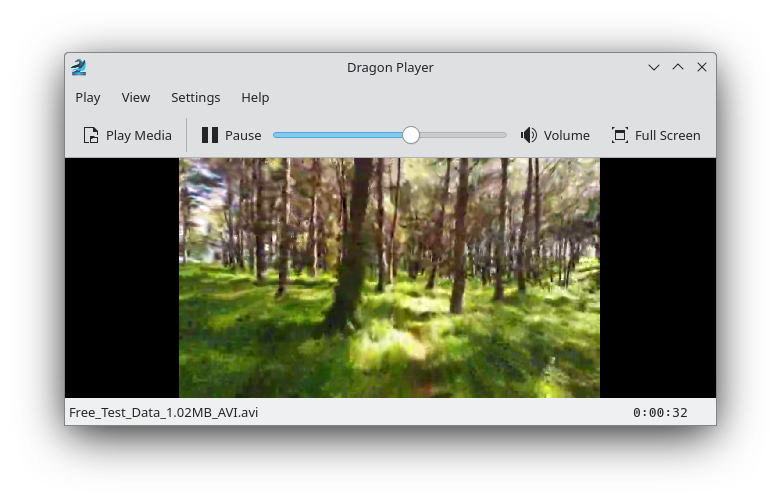
After my last post a few things have happened. First, I want to thank all of you for your support, monetary and moral. The open source community is amazing and I love being a part of it. We are surviving thanks to all of you. Despite my failed interview, a new door has opened up and I am happy to announce that Canonical is funding me to work part time for a period of 3 months on KDE Snaps! While not the full time role I was hoping for, I ll take it, and who knows, maybe they will see just how awesome I am!  I started back to work on these last Tuesday. So far I have made good progress and even have a working Core22 snap! Work done on upstream snapcraft ( tool used to make snaps ): New content pack version, fixed an issue with snapcraft remote-build choking on part with /sdk, fixed regex as our naming scheme has changed: https://github.com/snapcore/snapcraft/pull/4069 Ran into a new bug with snapcraft expand-extensions and so I must now enter all of this information manually into snapcraft.yaml until fixed, bug report here: https://bugs.launchpad.net/snapcraft/+bug/2011719 And without further ado, our first core22 snap is Dragonplayer Version 22.12.3 available in the snap store. Many more coming soon!
KDE Dragon media playerKDE Dragon media player
With a new month upon us, I must ask for help again, I will not see any money for this work until next month. Please consider a dontation. Thank you from the bottom of our hearts. https://gofund.me/c9cc02ed

15 March 2023

Thomas Koch: shared infrastructure coop

Posted on February 5, 2014
I m working in a very small web agency with 4 employees, one of them part time and our boss who doesn t do programming. It shouldn t come as a surprise, that our development infrastructure is not perfect. We have many ideas and dreams how we could improve it, but not the time. Now we have two obvious choices: Either we just do nothing or we buy services from specialized vendors like github, atlassian, travis-ci, heroku, google and others. Doing nothing does not work for me. But just buying all this stuff doesn t please me either. We d depend on proprietary software, lock-in effects or one-size-fits-all offerings. Another option would be to find other small web shops like us, form a cooperative and share essential services. There are thousands of web shops in the same situation like us and we all need the same things: As I said, all of the above is available as commercial offerings. But I d prefer the following to be satisfied: Does something like that already exists? There already is the German cooperative hostsharing which is kind of similar but does provide mainly hosting, not services. But I ll ask them next after writing this blog post. Is your company interested in joining such an effort? Does it sound silly? Comments: Sounds promising. I already answered by mail. Dirk Deimeke (Homepage) am 16.02.2014 08:16 Homepage: http://d5e.org I m sorry for accidentily removing a comment that linked to https://mayfirst.org while moderating comments. I m really looking forward to another blogging engine Thomas Koch am 16.02.2014 12:20 Why? What are you missing? I am using s9y for 9 years now. Dirk Deimeke (Homepage) am 16.02.2014 12:57

13 March 2023

Antoine Beaupr : Framework 12th gen laptop review

The Framework is a 13.5" laptop body with swappable parts, which makes it somewhat future-proof and certainly easily repairable, scoring an "exceedingly rare" 10/10 score from ifixit.com. There are two generations of the laptop's main board (both compatible with the same body): the Intel 11th and 12th gen chipsets. I have received my Framework, 12th generation "DIY", device in late September 2022 and will update this page as I go along in the process of ordering, burning-in, setting up and using the device over the years. Overall, the Framework is a good laptop. I like the keyboard, the touch pad, the expansion cards. Clearly there's been some good work done on industrial design, and it's the most repairable laptop I've had in years. Time will tell, but it looks sturdy enough to survive me many years as well. This is also one of the most powerful devices I ever lay my hands on. I have managed, remotely, more powerful servers, but this is the fastest computer I have ever owned, and it fits in this tiny case. It is an amazing machine. On the downside, there's a bit of proprietary firmware required (WiFi, Bluetooth, some graphics) and the Framework ships with a proprietary BIOS, with currently no Coreboot support. Expect to need the latest kernel, firmware, and hacking around a bunch of things to get resolution and keybindings working right. Like others, I have first found significant power management issues, but many issues can actually be solved with some configuration. Some of the expansion ports (HDMI, DP, MicroSD, and SSD) use power when idle, so don't expect week-long suspend, or "full day" battery while those are plugged in. Finally, the expansion ports are nice, but there's only four of them. If you plan to have a two-monitor setup, you're likely going to need a dock. Read on for the detailed review. For context, I'm moving from the Purism Librem 13v4 because it basically exploded on me. I had, in the meantime, reverted back to an old ThinkPad X220, so I sometimes compare the Framework with that venerable laptop as well. This blog post has been maturing for months now. It started in September 2022 and I declared it completed in March 2023. It's the longest single article on this entire website, currently clocking at about 13,000 words. It will take an average reader a full hour to go through this thing, so I don't expect anyone to actually do that. This introduction should be good enough for most people, read the first section if you intend to actually buy a Framework. Jump around the table of contents as you see fit for after you did buy the laptop, as it might include some crucial hints on how to make it work best for you, especially on (Debian) Linux.

Advice for buyers Those are things I wish I would have known before buying:
  1. consider buying 4 USB-C expansion cards, or at least a mix of 4 USB-A or USB-C cards, as they use less power than other cards and you do want to fill those expansion slots otherwise they snag around and feel insecure
  2. you will likely need a dock or at least a USB hub if you want a two-monitor setup, otherwise you'll run out of ports
  3. you have to do some serious tuning to get proper (10h+ idle, 10 days suspend) power savings
  4. in particular, beware that the HDMI, DisplayPort and particularly the SSD and MicroSD cards take a significant amount power, even when sleeping, up to 2-6W for the latter two
  5. beware that the MicroSD card is what it says: Micro, normal SD cards won't fit, and while there might be full sized one eventually, it's currently only at the prototyping stage
  6. the Framework monitor has an unusual aspect ratio (3:2): I like it (and it matches classic and digital photography aspect ratio), but it might surprise you

Current status I have the framework! It's setup with a fresh new Debian bookworm installation. I've ran through a large number of tests and burn in. I have decided to use the Framework as my daily driver, and had to buy a USB-C dock to get my two monitors connected, which was own adventure. Update: Framework just (2023-03-23) just announced a whole bunch of new stuff: The recording is available in this video and it's not your typical keynote. It starts ~25 minutes late, audio is crap, lightning and camera are crap, clapping seems to be from whatever staff they managed to get together in a room, decor is bizarre, colors are shit. It's amazing.

Specifications Those are the specifications of the 12th gen, in general terms. Your build will of course vary according to your needs.
  • CPU: i5-1240P, i7-1260P, or i7-1280P (Up to 4.4-4.8 GHz, 4+8 cores), Iris Xe graphics
  • Storage: 250-4000GB NVMe (or bring your own)
  • Memory: 8-64GB DDR4-3200 (or bring your own)
  • WiFi 6e (AX210, vPro optional, or bring your own)
  • 296.63mm X 228.98mm X 15.85mm, 1.3Kg
  • 13.5" display, 3:2 ratio, 2256px X 1504px, 100% sRGB, >400 nit
  • 4 x USB-C user-selectable expansion ports, including
    • USB-C
    • USB-A
    • HDMI
    • DP
    • Ethernet
    • MicroSD
    • 250-1000GB SSD
  • 3.5mm combo headphone jack
  • Kill switches for microphone and camera
  • Battery: 55Wh
  • Camera: 1080p 60fps
  • Biometrics: Fingerprint Reader
  • Backlit keyboard
  • Power Adapter: 60W USB-C (or bring your own)
  • ships with a screwdriver/spludger
  • 1 year warranty
  • base price: 1000$CAD, but doesn't give you much, typical builds around 1500-2000$CAD

Actual build This is the actual build I ordered. Amounts in CAD. (1CAD = ~0.75EUR/USD.)

Base configuration
  • CPU: Intel Core i5-1240P (AKA Alder Lake P 8 4.4GHz P-threads, 8 3.2GHz E-threads, 16 total, 28-64W), 1079$
  • Memory: 16GB (1 x 16GB) DDR4-3200, 104$

Customization
  • Keyboard: US English, included

Expansion Cards
  • 2 USB-C $24
  • 3 USB-A $36
  • 2 HDMI $50
  • 1 DP $50
  • 1 MicroSD $25
  • 1 Storage 1TB $199
  • Sub-total: 384$

Accessories
  • Power Adapter - US/Canada $64.00

Total
  • Before tax: 1606$
  • After tax and duties: 1847$
  • Free shipping

Quick evaluation This is basically the TL;DR: here, just focusing on broad pros/cons of the laptop.

Pros

Cons
  • the 11th gen is out of stock, except for the higher-end CPUs, which are much less affordable (700$+)
  • the 12th gen has compatibility issues with Debian, followup in the DebianOn page, but basically: brightness hotkeys, power management, wifi, the webcam is okay even though the chipset is the infamous alder lake because it does not have the fancy camera; most issues currently seem solvable, and upstream is working with mainline to get their shit working
  • 12th gen might have issues with thunderbolt docks
  • they used to have some difficulty keeping up with the orders: first two batches shipped, third batch sold out, fourth batch should have shipped (?) in October 2021. they generally seem to keep up with shipping. update (august 2022): they rolled out a second line of laptops (12th gen), first batch shipped, second batch shipped late, September 2022 batch was generally on time, see this spreadsheet for a crowdsourced effort to track those supply chain issues seem to be under control as of early 2023. I got the Ethernet expansion card shipped within a week.
  • compared to my previous laptop (Purism Librem 13v4), it feels strangely bulkier and heavier; it's actually lighter than the purism (1.3kg vs 1.4kg) and thinner (15.85mm vs 18mm) but the design of the Purism laptop (tapered edges) makes it feel thinner
  • no space for a 2.5" drive
  • rather bright LED around power button, but can be dimmed in the BIOS (not low enough to my taste) I got used to it
  • fan quiet when idle, but can be noisy when running, for example if you max a CPU for a while
  • battery described as "mediocre" by Ars Technica (above), confirmed poor in my tests (see below)
  • no RJ-45 port, and attempts at designing ones are failing because the modular plugs are too thin to fit (according to Linux After Dark), so unlikely to have one in the future Update: they cracked that nut and ship an 2.5 gbps Ethernet expansion card with a realtek chipset, without any firmware blob (!)
  • a bit pricey for the performance, especially when compared to the competition (e.g. Dell XPS, Apple M1)
  • 12th gen Intel has glitchy graphics, seems like Intel hasn't fully landed proper Linux support for that chipset yet

Initial hardware setup A breeze.

Accessing the board The internals are accessed through five TorX screws, but there's a nice screwdriver/spudger that works well enough. The screws actually hold in place so you can't even lose them. The first setup is a bit counter-intuitive coming from the Librem laptop, as I expected the back cover to lift and give me access to the internals. But instead the screws is release the keyboard and touch pad assembly, so you actually need to flip the laptop back upright and lift the assembly off (!) to get access to the internals. Kind of scary. I also actually unplugged a connector in lifting the assembly because I lifted it towards the monitor, while you actually need to lift it to the right. Thankfully, the connector didn't break, it just snapped off and I could plug it back in, no harm done. Once there, everything is well indicated, with QR codes all over the place supposedly leading to online instructions.

Bad QR codes Unfortunately, the QR codes I tested (in the expansion card slot, the memory slot and CPU slots) did not actually work so I wonder how useful those actually are. After all, they need to point to something and that means a URL, a running website that will answer those requests forever. I bet those will break sooner than later and in fact, as far as I can tell, they just don't work at all. I prefer the approach taken by the MNT reform here which designed (with the 100 rabbits folks) an actual paper handbook (PDF). The first QR code that's immediately visible from the back of the laptop, in an expansion cord slot, is a 404. It seems to be some serial number URL, but I can't actually tell because, well, the page is a 404. I was expecting that bar code to lead me to an introduction page, something like "how to setup your Framework laptop". Support actually confirmed that it should point a quickstart guide. But in a bizarre twist, they somehow sent me the URL with the plus (+) signs escaped, like this:
https://guides.frame.work/Guide/Framework\+Laptop\+DIY\+Edition\+Quick\+Start\+Guide/57
... which Firefox immediately transforms in:
https://guides.frame.work/Guide/Framework/+Laptop/+DIY/+Edition/+Quick/+Start/+Guide/57
I'm puzzled as to why they would send the URL that way, the proper URL is of course:
https://guides.frame.work/Guide/Framework+Laptop+DIY+Edition+Quick+Start+Guide/57
(They have also "let the team know about this for feedback and help resolve the problem with the link" which is a support code word for "ha-ha! nope! not my problem right now!" Trust me, I know, my own code word is "can you please make a ticket?")

Seating disks and memory The "DIY" kit doesn't actually have that much of a setup. If you bought RAM, it's shipped outside the laptop in a little plastic case, so you just seat it in as usual. Then you insert your NVMe drive, and, if that's your fancy, you also install your own mPCI WiFi card. If you ordered one (which was my case), it's pre-installed. Closing the laptop is also kind of amazing, because the keyboard assembly snaps into place with magnets. I have actually used the laptop with the keyboard unscrewed as I was putting the drives in and out, and it actually works fine (and will probably void your warranty, so don't do that). (But you can.) (But don't, really.)

Hardware review

Keyboard and touch pad The keyboard feels nice, for a laptop. I'm used to mechanical keyboard and I'm rather violent with those poor things. Yet the key travel is nice and it's clickety enough that I don't feel too disoriented. At first, I felt the keyboard as being more laggy than my normal workstation setup, but it turned out this was a graphics driver issues. After enabling a composition manager, everything feels snappy. The touch pad feels good. The double-finger scroll works well enough, and I don't have to wonder too much where the middle button is, it just works. Taps don't work, out of the box: that needs to be enabled in Xorg, with something like this:
cat > /etc/X11/xorg.conf.d/40-libinput.conf <<EOF
Section "InputClass"
      Identifier "libinput touch pad catchall"
      MatchIsTouchpad "on"
      MatchDevicePath "/dev/input/event*"
      Driver "libinput"
      Option "Tapping" "on"
      Option "TappingButtonMap" "lmr"
EndSection
EOF
But be aware that once you enable that tapping, you'll need to deal with palm detection... So I have not actually enabled this in the end.

Power button The power button is a little dangerous. It's quite easy to hit, as it's right next to one expansion card where you are likely to plug in a cable power. And because the expansion cards are kind of hard to remove, you might squeeze the laptop (and the power key) when trying to remove the expansion card next to the power button. So obviously, don't do that. But that's not very helpful. An alternative is to make the power button do something else. With systemd-managed systems, it's actually quite easy. Add a HandlePowerKey stanza to (say) /etc/systemd/logind.conf.d/power-suspends.conf:
[Login]
HandlePowerKey=suspend
HandlePowerKeyLongPress=poweroff
You might have to create the directory first:
mkdir /etc/systemd/logind.conf.d/
Then restart logind:
systemctl restart systemd-logind
And the power button will suspend! Long-press to power off doesn't actually work as the laptop immediately suspends... Note that there's probably half a dozen other ways of doing this, see this, this, or that.

Special keybindings There is a series of "hidden" (as in: not labeled on the key) keybindings related to the fn keybinding that I actually find quite useful.
Key Equivalent Effect Command
p Pause lock screen xset s activate
b Break ? ?
k ScrLk switch keyboard layout N/A
It looks like those are defined in the microcontroller so it would be possible to add some. For example, the SysRq key is almost bound to fn s in there. Note that most other shortcuts like this are clearly documented (volume, brightness, etc). One key that's less obvious is F12 that only has the Framework logo on it. That actually calls the keysym XF86AudioMedia which, interestingly, does absolutely nothing here. By default, on Windows, it opens your browser to the Framework website and, on Linux, your "default media player". The keyboard backlight can be cycled with fn-space. The dimmer version is dim enough, and the keybinding is easy to find in the dark. A skinny elephant would be performed with alt PrtScr (above F11) KEY, so for example alt fn F11 b should do a hard reset. This comment suggests you need to hold the fn only if "function lock" is on, but that's actually the opposite of my experience. Out of the box, some of the fn keys don't work. Mute, volume up/down, brightness, monitor changes, and the airplane mode key all do basically nothing. They don't send proper keysyms to Xorg at all. This is a known problem and it's related to the fact that the laptop has light sensors to adjust the brightness automatically. Somehow some of those keys (e.g. the brightness controls) are supposed to show up as a different input device, but don't seem to work correctly. It seems like the solution is for the Framework team to write a driver specifically for this, but so far no progress since July 2022. In the meantime, the fancy functionality can be supposedly disabled with:
echo 'blacklist hid_sensor_hub'   sudo tee /etc/modprobe.d/framework-als-blacklist.conf
... and a reboot. This solution is also documented in the upstream guide. Note that there's another solution flying around that fixes this by changing permissions on the input device but I haven't tested that or seen confirmation it works.

Kill switches The Framework has two "kill switches": one for the camera and the other for the microphone. The camera one actually disconnects the USB device when turned off, and the mic one seems to cut the circuit. It doesn't show up as muted, it just stops feeding the sound. Both kill switches are around the main camera, on top of the monitor, and quite discreet. Then turn "red" when enabled (i.e. "red" means "turned off").

Monitor The monitor looks pretty good to my untrained eyes. I have yet to do photography work on it, but some photos I looked at look sharp and the colors are bright and lively. The blacks are dark and the screen is bright. I have yet to use it in full sunlight. The dimmed light is very dim, which I like.

Screen backlight I bind brightness keys to xbacklight in i3, but out of the box I get this error:
sep 29 22:09:14 angela i3[5661]: No outputs have backlight property
It just requires this blob in /etc/X11/xorg.conf.d/backlight.conf:
Section "Device"
    Identifier  "Card0"
    Driver      "intel"
    Option      "Backlight"  "intel_backlight"
EndSection
This way I can control the actual backlight power with the brightness keys, and they do significantly reduce power usage.

Multiple monitor support I have been able to hook up my two old monitors to the HDMI and DisplayPort expansion cards on the laptop. The lid closes without suspending the machine, and everything works great. I actually run out of ports, even with a 4-port USB-A hub, which gives me a total of 7 ports:
  1. power (USB-C)
  2. monitor 1 (DisplayPort)
  3. monitor 2 (HDMI)
  4. USB-A hub, which adds:
  5. keyboard (USB-A)
  6. mouse (USB-A)
  7. Yubikey
  8. external sound card
Now the latter, I might be able to get rid of if I switch to a combo-jack headset, which I do have (and still need to test). But still, this is a problem. I'll probably need a powered USB-C dock and better monitors, possibly with some Thunderbolt chaining, to save yet more ports. But that means more money into this setup, argh. And figuring out my monitor situation is the kind of thing I'm not that big of a fan of. And neither is shopping for USB-C (or is it Thunderbolt?) hubs. My normal autorandr setup doesn't work: I have tried saving a profile and it doesn't get autodetected, so I also first need to do:
autorandr -l framework-external-dual-lg-acer
The magic:
autorandr -l horizontal
... also works well. The worst problem with those monitors right now is that they have a radically smaller resolution than the main screen on the laptop, which means I need to reset the font scaling to normal every time I switch back and forth between those monitors and the laptop, which means I actually need to do this:
autorandr -l horizontal &&
eho Xft.dpi: 96   xrdb -merge &&
systemctl restart terminal xcolortaillog background-image emacs &&
i3-msg restart
Kind of disruptive.

Expansion ports I ordered a total of 10 expansion ports. I did manage to initialize the 1TB drive as an encrypted storage, mostly to keep photos as this is something that takes a massive amount of space (500GB and counting) and that I (unfortunately) don't work on very often (but still carry around). The expansion ports are fancy and nice, but not actually that convenient. They're a bit hard to take out: you really need to crimp your fingernails on there and pull hard to take them out. There's a little button next to them to release, I think, but at first it feels a little scary to pull those pucks out of there. You get used to it though, and it's one of those things you can do without looking eventually. There's only four expansion ports. Once you have two monitors, the drive, and power plugged in, bam, you're out of ports; there's nowhere to plug my Yubikey. So if this is going to be my daily driver, with a dual monitor setup, I will need a dock, which means more crap firmware and uncertainty, which isn't great. There are actually plans to make a dual-USB card, but that is blocked on designing an actual board for this. I can't wait to see more expansion ports produced. There's a ethernet expansion card which quickly went out of stock basically the day it was announced, but was eventually restocked. I would like to see a proper SD-card reader. There's a MicroSD card reader, but that obviously doesn't work for normal SD cards, which would be more broadly compatible anyways (because you can have a MicroSD to SD card adapter, but I have never heard of the reverse). Someone actually found a SD card reader that fits and then someone else managed to cram it in a 3D printed case, which is kind of amazing. Still, I really like that idea that I can carry all those little adapters in a pouch when I travel and can basically do anything I want. It does mean I need to shuffle through them to find the right one which is a little annoying. I have an elastic band to keep them lined up so that all the ports show the same side, to make it easier to find the right one. But that quickly gets undone and instead I have a pouch full of expansion cards. Another awesome thing with the expansion cards is that they don't just work on the laptop: anything that takes USB-C can take those cards, which means you can use it to connect an SD card to your phone, for backups, for example. Heck, you could even connect an external display to your phone that way, assuming that's supported by your phone of course (and it probably isn't). The expansion ports do take up some power, even when idle. See the power management section below, and particularly the power usage tests for details.

USB-C charging One thing that is really a game changer for me is USB-C charging. It's hard to overstate how convenient this is. I often have a USB-C cable lying around to charge my phone, and I can just grab that thing and pop it in my laptop. And while it will obviously not charge as fast as the provided charger, it will stop draining the battery at least. (As I wrote this, I had the laptop plugged in the Samsung charger that came with a phone, and it was telling me it would take 6 hours to charge the remaining 15%. With the provided charger, that flew down to 15 minutes. Similarly, I can power the laptop from the power grommet on my desk, reducing clutter as I have that single wire out there instead of the bulky power adapter.) I also really like the idea that I can charge my laptop with a power bank or, heck, with my phone, if push comes to shove. (And vice-versa!) This is awesome. And it works from any of the expansion ports, of course. There's a little led next to the expansion ports as well, which indicate the charge status:
  • red/amber: charging
  • white: charged
  • off: unplugged
I couldn't find documentation about this, but the forum answered. This is something of a recurring theme with the Framework. While it has a good knowledge base and repair/setup guides (and the forum is awesome) but it doesn't have a good "owner manual" that shows you the different parts of the laptop and what they do. Again, something the MNT reform did well. Another thing that people are asking about is an external sleep indicator: because the power LED is on the main keyboard assembly, you don't actually see whether the device is active or not when the lid is closed. Finally, I wondered what happens when you plug in multiple power sources and it turns out the charge controller is actually pretty smart: it will pick the best power source and use it. The only downside is it can't use multiple power sources, but that seems like a bit much to ask.

Multimedia and other devices Those things also work:
  • webcam: splendid, best webcam I've ever had (but my standards are really low)
  • onboard mic: works well, good gain (maybe a bit much)
  • onboard speakers: sound okay, a little metal-ish, loud enough to be annoying, see this thread for benchmarks, apparently pretty good speakers
  • combo jack: works, with slight hiss, see below
There's also a light sensor, but it conflicts with the keyboard brightness controls (see above). There's also an accelerometer, but it's off by default and will be removed from future builds.

Combo jack mic tests The Framework laptop ships with a combo jack on the left side, which allows you to plug in a CTIA (source) headset. In human terms, it's a device that has both a stereo output and a mono input, typically a headset or ear buds with a microphone somewhere. It works, which is better than the Purism (which only had audio out), but is on par for the course for that kind of onboard hardware. Because of electrical interference, such sound cards very often get lots of noise from the board. With a Jabra Evolve 40, the built-in USB sound card generates basically zero noise on silence (invisible down to -60dB in Audacity) while plugging it in directly generates a solid -30dB hiss. There is a noise-reduction system in that sound card, but the difference is still quite striking. On a comparable setup (curie, a 2017 Intel NUC), there is also a his with the Jabra headset, but it's quieter, more in the order of -40/-50 dB, a noticeable difference. Interestingly, testing with my Mee Audio Pro M6 earbuds leads to a little more hiss on curie, more on the -35/-40 dB range, close to the Framework. Also note that another sound card, the Antlion USB adapter that comes with the ModMic 4, also gives me pretty close to silence on a quiet recording, picking up less than -50dB of background noise. It's actually probably picking up the fans in the office, which do make audible noises. In other words, the hiss of the sound card built in the Framework laptop is so loud that it makes more noise than the quiet fans in the office. Or, another way to put it is that two USB sound cards (the Jabra and the Antlion) are able to pick up ambient noise in my office but not the Framework laptop. See also my audio page.

Performance tests

Compiling Linux 5.19.11 On a single core, compiling the Debian version of the Linux kernel takes around 100 minutes:
5411.85user 673.33system 1:37:46elapsed 103%CPU (0avgtext+0avgdata 831700maxresident)k
10594704inputs+87448000outputs (9131major+410636783minor)pagefaults 0swaps
This was using 16 watts of power, with full screen brightness. With all 16 cores (make -j16), it takes less than 25 minutes:
19251.06user 2467.47system 24:13.07elapsed 1494%CPU (0avgtext+0avgdata 831676maxresident)k
8321856inputs+87427848outputs (30792major+409145263minor)pagefaults 0swaps
I had to plug the normal power supply after a few minutes because battery would actually run out using my desk's power grommet (34 watts). During compilation, fans were spinning really hard, quite noisy, but not painfully so. The laptop was sucking 55 watts of power, steadily:
  Time    User  Nice   Sys  Idle    IO  Run Ctxt/s  IRQ/s Fork Exec Exit  Watts
-------- ----- ----- ----- ----- ----- ---- ------ ------ ---- ---- ---- ------
 Average  87.9   0.0  10.7   1.4   0.1 17.8 6583.6 5054.3 233.0 223.9 233.1  55.96
 GeoMean  87.9   0.0  10.6   1.2   0.0 17.6 6427.8 5048.1 227.6 218.7 227.7  55.96
  StdDev   1.4   0.0   1.2   0.6   0.2  3.0 1436.8  255.5 50.0 47.5 49.7   0.20
-------- ----- ----- ----- ----- ----- ---- ------ ------ ---- ---- ---- ------
 Minimum  85.0   0.0   7.8   0.5   0.0 13.0 3594.0 4638.0 117.0 111.0 120.0  55.52
 Maximum  90.8   0.0  12.9   3.5   0.8 38.0 10174.0 5901.0 374.0 362.0 375.0  56.41
-------- ----- ----- ----- ----- ----- ---- ------ ------ ---- ---- ---- ------
Summary:
CPU:  55.96 Watts on average with standard deviation 0.20
Note: power read from RAPL domains: package-0, uncore, package-0, core, psys.
These readings do not cover all the hardware in this device.

memtest86+ I ran Memtest86+ v6.00b3. It shows something like this:
Memtest86+ v6.00b3        12th Gen Intel(R) Core(TM) i5-1240P
CLK/Temp: 2112MHz    78/78 C   Pass  2% #
L1 Cache:   48KB    414 GB/s   Test 46% ##################
L2 Cache: 1.25MB    118 GB/s   Test #3 [Moving inversions, 1s & 0s] 
L3 Cache:   12MB     43 GB/s   Testing: 16GB - 18GB [1GB of 15.7GB]
Memory  :  15.7GB  14.9 GB/s   Pattern: 
--------------------------------------------------------------------------------
CPU: 4P+8E-Cores (16T)    SMP: 8T (PAR))    Time:  0:27:23  Status: Pass     \
RAM: 1600MHz (DDR4-3200) CAS 22-22-22-51    Pass:  1        Errors: 0
--------------------------------------------------------------------------------
Memory SPD Information
----------------------
 - Slot 2: 16GB DDR-4-3200 - Crucial CT16G4SFRA32A.C16FP (2022-W23)
                          Framework FRANMACP04
 <ESC> Exit  <F1> Configuration  <Space> Scroll Lock            6.00.unknown.x64
So about 30 minutes for a full 16GB memory test.

Software setup Once I had everything in the hardware setup, I figured, voil , I'm done, I'm just going to boot this beautiful machine and I can get back to work. I don't understand why I am so na ve some times. It's mind boggling. Obviously, it didn't happen that way at all, and I spent the best of the three following days tinkering with the laptop.

Secure boot and EFI First, I couldn't boot off of the NVMe drive I transferred from the previous laptop (the Purism) and the BIOS was not very helpful: it was just complaining about not finding any boot device, without dropping me in the real BIOS. At first, I thought it was a problem with my NVMe drive, because it's not listed in the compatible SSD drives from upstream. But I figured out how to enter BIOS (press F2 manically, of course), which showed the NVMe drive was actually detected. It just didn't boot, because it was an old (2010!!) Debian install without EFI. So from there, I disabled secure boot, and booted a grml image to try to recover. And by "boot" I mean, I managed to get to the grml boot loader which promptly failed to load its own root file system somehow. I still have to investigate exactly what happened there, but it failed some time after the initrd load with:
Unable to find medium containing a live file system
This, it turns out, was fixed in Debian lately, so a daily GRML build will not have this problems. The upcoming 2022 release (likely 2022.10 or 2022.11) will also get the fix. I did manage to boot the development version of the Debian installer which was a surprisingly good experience: it mounted the encrypted drives and did everything pretty smoothly. It even offered me to reinstall the boot loader, but that ultimately (and correctly, as it turns out) failed because I didn't have a /boot/efi partition. At this point, I realized there was no easy way out of this, and I just proceeded to completely reinstall Debian. I had a spare NVMe drive lying around (backups FTW!) so I just swapped that in, rebooted in the Debian installer, and did a clean install. I wanted to switch to bookworm anyways, so I guess that's done too.

Storage limitations Another thing that happened during setup is that I tried to copy over the internal 2.5" SSD drive from the Purism to the Framework 1TB expansion card. There's no 2.5" slot in the new laptop, so that's pretty much the only option for storage expansion. I was tired and did something wrong. I ended up wiping the partition table on the original 2.5" drive. Oops. It might be recoverable, but just restoring the partition table didn't work either, so I'm not sure how I recover the data there. Normally, everything on my laptops and workstations is designed to be disposable, so that wasn't that big of a problem. I did manage to recover most of the data thanks to git-annex reinit, but that was a little hairy.

Bootstrapping Puppet Once I had some networking, I had to install all the packages I needed. The time I spent setting up my workstations with Puppet has finally paid off. What I actually did was to restore two critical directories:
/etc/ssh
/var/lib/puppet
So that I would keep the previous machine's identity. That way I could contact the Puppet server and install whatever was missing. I used my Puppet optimization trick to do a batch install and then I had a good base setup, although not exactly as it was before. 1700 packages were installed manually on angela before the reinstall, and not in Puppet. I did not inspect each one individually, but I did go through /etc and copied over more SSH keys, for backups and SMTP over SSH.

LVFS support It looks like there's support for the (de-facto) standard LVFS firmware update system. At least I was able to update the UEFI firmware with a simple:
apt install fwupd-amd64-signed
fwupdmgr refresh
fwupdmgr get-updates
fwupdmgr update
Nice. The 12th gen BIOS updates, currently (January 2023) beta, can be deployed through LVFS with:
fwupdmgr enable-remote lvfs-testing
echo 'DisableCapsuleUpdateOnDisk=true' >> /etc/fwupd/uefi_capsule.conf 
fwupdmgr update
Those instructions come from the beta forum post. I performed the BIOS update on 2023-01-16T16:00-0500.

Resolution tweaks The Framework laptop resolution (2256px X 1504px) is big enough to give you a pretty small font size, so welcome to the marvelous world of "scaling". The Debian wiki page has a few tricks for this.

Console This will make the console and grub fonts more readable:
cat >> /etc/default/console-setup <<EOF
FONTFACE="Terminus"
FONTSIZE=32x16
EOF
echo GRUB_GFXMODE=1024x768 >> /etc/default/grub
update-grub

Xorg Adding this to your .Xresources will make everything look much bigger:
! 1.5*96
Xft.dpi: 144
Apparently, some of this can also help:
! These might also be useful depending on your monitor and personal preference:
Xft.autohint: 0
Xft.lcdfilter:  lcddefault
Xft.hintstyle:  hintfull
Xft.hinting: 1
Xft.antialias: 1
Xft.rgba: rgb
It my experience it also makes things look a little fuzzier, which is frustrating because you have this awesome monitor but everything looks out of focus. Just bumping Xft.dpi by a 1.5 factor looks good to me. The Debian Wiki has a page on HiDPI, but it's not as good as the Arch Wiki, where the above blurb comes from. I am not using the latter because I suspect it's causing some of the "fuzziness". TODO: find the equivalent of this GNOME hack in i3? (gsettings set org.gnome.mutter experimental-features "['scale-monitor-framebuffer']"), taken from this Framework guide

Issues

BIOS configuration The Framework BIOS has some minor issues. One issue I personally encountered is that I had disabled Quick boot and Quiet boot in the BIOS to diagnose the above boot issues. This, in turn, triggers a bug where the BIOS boot manager (F12) would just hang completely. It would also fail to boot from an external USB drive. The current fix (as of BIOS 3.03) is to re-enable both Quick boot and Quiet boot. Presumably this is something that will get fixed in a future BIOS update. Note that the following keybindings are active in the BIOS POST check:
Key Meaning
F2 Enter BIOS setup menu
F12 Enter BIOS boot manager
Delete Enter BIOS setup menu

WiFi compatibility issues I couldn't make WiFi work at first. Obviously, the default Debian installer doesn't ship with proprietary firmware (although that might change soon) so the WiFi card didn't work out of the box. But even after copying the firmware through a USB stick, I couldn't quite manage to find the right combination of ip/iw/wpa-supplicant (yes, after repeatedly copying a bunch more packages over to get those bootstrapped). (Next time I should probably try something like this post.) Thankfully, I had a little USB-C dongle with a RJ-45 jack lying around. That also required a firmware blob, but it was a single package to copy over, and with that loaded, I had network. Eventually, I did managed to make WiFi work; the problem was more on the side of "I forgot how to configure a WPA network by hand from the commandline" than anything else. NetworkManager worked fine and got WiFi working correctly. Note that this is with Debian bookworm, which has the 5.19 Linux kernel, and with the firmware-nonfree (firmware-iwlwifi, specifically) package.

Battery life I was having between about 7 hours of battery on the Purism Librem 13v4, and that's after a year or two of battery life. Now, I still have about 7 hours of battery life, which is nicer than my old ThinkPad X220 (20 minutes!) but really, it's not that good for a new generation laptop. The 12th generation Intel chipset probably improved things compared to the previous one Framework laptop, but I don't have a 11th gen Framework to compare with). (Note that those are estimates from my status bar, not wall clock measurements. They should still be comparable between the Purism and Framework, that said.) The battery life doesn't seem up to, say, Dell XPS 13, ThinkPad X1, and of course not the Apple M1, where I would expect 10+ hours of battery life out of the box. That said, I do get those kind estimates when the machine is fully charged and idle. In fact, when everything is quiet and nothing is plugged in, I get dozens of hours of battery life estimated (I've seen 25h!). So power usage fluctuates quite a bit depending on usage, which I guess is expected. Concretely, so far, light web browsing, reading emails and writing notes in Emacs (e.g. this file) takes about 8W of power:
Time    User  Nice   Sys  Idle    IO  Run Ctxt/s  IRQ/s Fork Exec Exit  Watts
-------- ----- ----- ----- ----- ----- ---- ------ ------ ---- ---- ---- ------
 Average   1.7   0.0   0.5  97.6   0.2  1.2 4684.9 1985.2 126.6 39.1 128.0   7.57
 GeoMean   1.4   0.0   0.4  97.6   0.1  1.2 4416.6 1734.5 111.6 27.9 113.3   7.54
  StdDev   1.0   0.2   0.2   1.2   0.0  0.5 1584.7 1058.3 82.1 44.0 80.2   0.71
-------- ----- ----- ----- ----- ----- ---- ------ ------ ---- ---- ---- ------
 Minimum   0.2   0.0   0.2  94.9   0.1  1.0 2242.0  698.2 82.0 17.0 82.0   6.36
 Maximum   4.1   1.1   1.0  99.4   0.2  3.0 8687.4 4445.1 463.0 249.0 449.0   9.10
-------- ----- ----- ----- ----- ----- ---- ------ ------ ---- ---- ---- ------
Summary:
System:   7.57 Watts on average with standard deviation 0.71
Expansion cards matter a lot in the battery life (see below for a thorough discussion), my normal setup is 2xUSB-C and 1xUSB-A (yes, with an empty slot, and yes, to save power). Interestingly, playing a video in a (720p) window in a window takes up more power (10.5W) than in full screen (9.5W) but I blame that on my desktop setup (i3 + compton)... Not sure if mpv hits the VA-API, maybe not in windowed mode. Similar results with 1080p, interestingly, except the window struggles to keep up altogether. Full screen playback takes a relatively comfortable 9.5W, which means a solid 5h+ of playback, which is fine by me. Fooling around the web, small edits, youtube-dl, and I'm at around 80% battery after about an hour, with an estimated 5h left, which is a little disappointing. I had a 7h remaining estimate before I started goofing around Discourse, so I suspect the website is a pretty big battery drain, actually. I see about 10-12 W, while I was probably at half that (6-8W) just playing music with mpv in the background... In other words, it looks like editing posts in Discourse with Firefox takes a solid 4-6W of power. Amazing and gross. (When writing about abusive power usage generates more power usage, is that an heisenbug? Or schr dinbug?)

Power management Compared to the Purism Librem 13v4, the ongoing power usage seems to be slightly better. An anecdotal metric is that the Purism would take 800mA idle, while the more powerful Framework manages a little over 500mA as I'm typing this, fluctuating between 450 and 600mA. That is without any active expansion card, except the storage. Those numbers come from the output of tlp-stat -b and, unfortunately, the "ampere" unit makes it quite hard to compare those, because voltage is not necessarily the same between the two platforms.
  • TODO: review Arch Linux's tips on power saving
  • TODO: i915 driver has a lot of parameters, including some about power saving, see, again, the arch wiki, and particularly enable_fbc=1
TL:DR; power management on the laptop is an issue, but there's various tweaks you can make to improve it. Try:
  • powertop --auto-tune
  • apt install tlp && systemctl enable tlp
  • nvme.noacpi=1 mem_sleep_default=deep on the kernel command line may help with standby power usage
  • keep only USB-C expansion cards plugged in, all others suck power even when idle
  • consider upgrading the BIOS to latest beta (3.06 at the time of writing), unverified power savings
  • latest Linux kernels (6.2) promise power savings as well (unverified)
Update: also try to follow the official optimization guide. It was made for Ubuntu but will probably also work for your distribution of choice with a few tweaks. They recommend using tlpui but it's not packaged in Debian. There is, however, a Flatpak release. In my case, it resulted in the following diff to tlp.conf: tlp.patch.

Background on CPU architecture There were power problems in the 11th gen Framework laptop, according to this report from Linux After Dark, so the issues with power management on the Framework are not new. The 12th generation Intel CPU (AKA "Alder Lake") is a big-little architecture with "power-saving" and "performance" cores. There used to be performance problems introduced by the scheduler in Linux 5.16 but those were eventually fixed in 5.18, which uses Intel's hardware as an "intelligent, low-latency hardware-assisted scheduler". According to Phoronix, the 5.19 release improved the power saving, at the cost of some penalty cost. There were also patch series to make the scheduler configurable, but it doesn't look those have been merged as of 5.19. There was also a session about this at the 2022 Linux Plumbers, but they stopped short of talking more about the specific problems Linux is facing in Alder lake:
Specifically, the kernel's energy-aware scheduling heuristics don't work well on those CPUs. A number of features present there complicate the energy picture; these include SMT, Intel's "turbo boost" mode, and the CPU's internal power-management mechanisms. For many workloads, running on an ostensibly more power-hungry Pcore can be more efficient than using an Ecore. Time for discussion of the problem was lacking, though, and the session came to a close.
All this to say that the 12gen Intel line shipped with this Framework series should have better power management thanks to its power-saving cores. And Linux has had the scheduler changes to make use of this (but maybe is still having trouble). In any case, this might not be the source of power management problems on my laptop, quite the opposite. Also note that the firmware updates for various chipsets are supposed to improve things eventually. On the other hand, The Verge simply declared the whole P-series a mistake...

Attempts at improving power usage I did try to follow some of the tips in this forum post. The tricks powertop --auto-tune and tlp's PCIE_ASPM_ON_BAT=powersupersave basically did nothing: I was stuck at 10W power usage in powertop (600+mA in tlp-stat). Apparently, I should be able to reach the C8 CPU power state (or even C9, C10) in powertop, but I seem to be stock at C7. (Although I'm not sure how to read that tab in powertop: in the Core(HW) column there's only C3/C6/C7 states, and most cores are 85% in C7 or maybe C6. But the next column over does show many CPUs in C10 states... As it turns out, the graphics card actually takes up a good chunk of power unless proper power management is enabled (see below). After tweaking this, I did manage to get down to around 7W power usage in powertop. Expansion cards actually do take up power, and so does the screen, obviously. The fully-lit screen takes a solid 2-3W of power compared to the fully dimmed screen. When removing all expansion cards and making the laptop idle, I can spin it down to 4 watts power usage at the moment, and an amazing 2 watts when the screen turned off.

Caveats Abusive (10W+) power usage that I initially found could be a problem with my desktop configuration: I have this silly status bar that updates every second and probably causes redraws... The CPU certainly doesn't seem to spin down below 1GHz. Also note that this is with an actual desktop running with everything: it could very well be that some things (I'm looking at you Signal Desktop) take up unreasonable amount of power on their own (hello, 1W/electron, sheesh). Syncthing and containerd (Docker!) also seem to take a good 500mW just sitting there. Beyond my desktop configuration, this could, of course, be a Debian-specific problem; your favorite distribution might be better at power management.

Idle power usage tests Some expansion cards waste energy, even when unused. Here is a summary of the findings from the powerstat page. I also include other devices tested in this page for completeness:
Device Minimum Average Max Stdev Note
Screen, 100% 2.4W 2.6W 2.8W N/A
Screen, 1% 30mW 140mW 250mW N/A
Backlight 1 290mW ? ? ? fairly small, all things considered
Backlight 2 890mW 1.2W 3W? 460mW? geometric progression
Backlight 3 1.69W 1.5W 1.8W? 390mW? significant power use
Radios 100mW 250mW N/A N/A
USB-C N/A N/A N/A N/A negligible power drain
USB-A 10mW 10mW ? 10mW almost negligible
DisplayPort 300mW 390mW 600mW N/A not passive
HDMI 380mW 440mW 1W? 20mW not passive
1TB SSD 1.65W 1.79W 2W 12mW significant, probably higher when busy
MicroSD 1.6W 3W 6W 1.93W highest power usage, possibly even higher when busy
Ethernet 1.69W 1.64W 1.76W N/A comparable to the SSD card
So it looks like all expansion cards but the USB-C ones are active, i.e. they draw power with idle. The USB-A cards are the least concern, sucking out 10mW, pretty much within the margin of error. But both the DisplayPort and HDMI do take a few hundred miliwatts. It looks like USB-A connectors have this fundamental flaw that they necessarily draw some powers because they lack the power negotiation features of USB-C. At least according to this post:
It seems the USB A must have power going to it all the time, that the old USB 2 and 3 protocols, the USB C only provides power when there is a connection. Old versus new.
Apparently, this is a problem specific to the USB-C to USB-A adapter that ships with the Framework. Some people have actually changed their orders to all USB-C because of this problem, but I'm not sure the problem is as serious as claimed in the forums. I couldn't reproduce the "one watt" power drains suggested elsewhere, at least not repeatedly. (A previous version of this post did show such a power drain, but it was in a less controlled test environment than the series of more rigorous tests above.) The worst offenders are the storage cards: the SSD drive takes at least one watt of power and the MicroSD card seems to want to take all the way up to 6 watts of power, both just sitting there doing nothing. This confirms claims of 1.4W for the SSD (but not 5W) power usage found elsewhere. The former post has instructions on how to disable the card in software. The MicroSD card has been reported as using 2 watts, but I've seen it as high as 6 watts, which is pretty damning. The Framework team has a beta update for the DisplayPort adapter but currently only for Windows (LVFS technically possible, "under investigation"). A USB-A firmware update is also under investigation. It is therefore likely at least some of those power management issues will eventually be fixed. Note that the upcoming Ethernet card has a reported 2-8W power usage, depending on traffic. I did my own power usage tests in powerstat-wayland and they seem lower than 2W. The upcoming 6.2 Linux kernel might also improve battery usage when idle, see this Phoronix article for details, likely in early 2023.

Idle power usage tests under Wayland Update: I redid those tests under Wayland, see powerstat-wayland for details. The TL;DR: is that power consumption is either smaller or similar.

Idle power usage tests, 3.06 beta BIOS I redid the idle tests after the 3.06 beta BIOS update and ended up with this results:
Device Minimum Average Max Stdev Note
Baseline 1.96W 2.01W 2.11W 30mW 1 USB-C, screen off, backlight off, no radios
2 USB-C 1.95W 2.16W 3.69W 430mW USB-C confirmed as mostly passive...
3 USB-C 1.95W 2.16W 3.69W 430mW ... although with extra stdev
1TB SSD 3.72W 3.85W 4.62W 200mW unchanged from before upgrade
1 USB-A 1.97W 2.18W 4.02W 530mW unchanged
2 USB-A 1.97W 2.00W 2.08W 30mW unchanged
3 USB-A 1.94W 1.99W 2.03W 20mW unchanged
MicroSD w/o card 3.54W 3.58W 3.71W 40mW significant improvement! 2-3W power saving!
MicroSD w/ card 3.53W 3.72W 5.23W 370mW new measurement! increased deviation
DisplayPort 2.28W 2.31W 2.37W 20mW unchanged
1 HDMI 2.43W 2.69W 4.53W 460mW unchanged
2 HDMI 2.53W 2.59W 2.67W 30mW unchanged
External USB 3.85W 3.89W 3.94W 30mW new result
Ethernet 3.60W 3.70W 4.91W 230mW unchanged
Note that the table summary is different than the previous table: here we show the absolute numbers while the previous table was doing a confusing attempt at showing relative (to the baseline) numbers. Conclusion: the 3.06 BIOS update did not significantly change idle power usage stats except for the MicroSD card which has significantly improved. The new "external USB" test is also interesting: it shows how the provided 1TB SSD card performs (admirably) compared to existing devices. The other new result is the MicroSD card with a card which, interestingly, uses less power than the 1TB SSD drive.

Standby battery usage I wrote some quick hack to evaluate how much power is used during sleep. Apparently, this is one of the areas that should have improved since the first Framework model, let's find out. My baseline for comparison is the Purism laptop, which, in 10 minutes, went from this:
sep 28 11:19:45 angela systemd-sleep[209379]: /sys/class/power_supply/BAT/charge_now                      =   6045 [mAh]
... to this:
sep 28 11:29:47 angela systemd-sleep[209725]: /sys/class/power_supply/BAT/charge_now                      =   6037 [mAh]
That's 8mAh per 10 minutes (and 2 seconds), or 48mA, or, with this battery, about 127 hours or roughly 5 days of standby. Not bad! In comparison, here is my really old x220, before:
sep 29 22:13:54 emma systemd-sleep[176315]: /sys/class/power_supply/BAT0/energy_now                     =   5070 [mWh]
... after:
sep 29 22:23:54 emma systemd-sleep[176486]: /sys/class/power_supply/BAT0/energy_now                     =   4980 [mWh]
... which is 90 mwH in 10 minutes, or a whopping 540mA, which was possibly okay when this battery was new (62000 mAh, so about 100 hours, or about 5 days), but this battery is almost dead and has only 5210 mAh when full, so only 10 hours standby. And here is the Framework performing a similar test, before:
sep 29 22:27:04 angela systemd-sleep[4515]: /sys/class/power_supply/BAT1/charge_full                    =   3518 [mAh]
sep 29 22:27:04 angela systemd-sleep[4515]: /sys/class/power_supply/BAT1/charge_now                     =   2861 [mAh]
... after:
sep 29 22:37:08 angela systemd-sleep[4743]: /sys/class/power_supply/BAT1/charge_now                     =   2812 [mAh]
... which is 49mAh in a little over 10 minutes (and 4 seconds), or 292mA, much more than the Purism, but half of the X220. At this rate, the battery would last on standby only 12 hours!! That is pretty bad. Note that this was done with the following expansion cards:
  • 2 USB-C
  • 1 1TB SSD drive
  • 1 USB-A with a hub connected to it, with keyboard and LAN
Preliminary tests without the hub (over one minute) show that it doesn't significantly affect this power consumption (300mA). This guide also suggests booting with nvme.noacpi=1 but this still gives me about 5mAh/min (or 300mA). Adding mem_sleep_default=deep to the kernel command line does make a difference. Before:
sep 29 23:03:11 angela systemd-sleep[3699]: /sys/class/power_supply/BAT1/charge_now                     =   2544 [mAh]
... after:
sep 29 23:04:25 angela systemd-sleep[4039]: /sys/class/power_supply/BAT1/charge_now                     =   2542 [mAh]
... which is 2mAh in 74 seconds, which is 97mA, brings us to a more reasonable 36 hours, or a day and a half. It's still above the x220 power usage, and more than an order of magnitude more than the Purism laptop. It's also far from the 0.4% promised by upstream, which would be 14mA for the 3500mAh battery. It should also be noted that this "deep" sleep mode is a little more disruptive than regular sleep. As you can see by the timing, it took more than 10 seconds for the laptop to resume, which feels a little alarming as your banging the keyboard to bring it back to life. You can confirm the current sleep mode with:
# cat /sys/power/mem_sleep
s2idle [deep]
In the above, deep is selected. You can change it on the fly with:
printf s2idle > /sys/power/mem_sleep
Here's another test:
sep 30 22:25:50 angela systemd-sleep[32207]: /sys/class/power_supply/BAT1/charge_now                     =   1619 [mAh]
sep 30 22:31:30 angela systemd-sleep[32516]: /sys/class/power_supply/BAT1/charge_now                     =   1613 [mAh]
... better! 6 mAh in about 6 minutes, works out to 63.5mA, so more than two days standby. A longer test:
oct 01 09:22:56 angela systemd-sleep[62978]: /sys/class/power_supply/BAT1/charge_now                     =   3327 [mAh]
oct 01 12:47:35 angela systemd-sleep[63219]: /sys/class/power_supply/BAT1/charge_now                     =   3147 [mAh]
That's 180mAh in about 3.5h, 52mA! Now at 66h, or almost 3 days. I wasn't sure why I was seeing such fluctuations in those tests, but as it turns out, expansion card power tests show that they do significantly affect power usage, especially the SSD drive, which can take up to two full watts of power even when idle. I didn't control for expansion cards in the above tests running them with whatever card I had plugged in without paying attention so it's likely the cause of the high power usage and fluctuations. It might be possible to work around this problem by disabling USB devices before suspend. TODO. See also this post. In the meantime, I have been able to get much better suspend performance by unplugging all modules. Then I get this result:
oct 04 11:15:38 angela systemd-sleep[257571]: /sys/class/power_supply/BAT1/charge_now                     =   3203 [mAh]
oct 04 15:09:32 angela systemd-sleep[257866]: /sys/class/power_supply/BAT1/charge_now                     =   3145 [mAh]
Which is 14.8mA! Almost exactly the number promised by Framework! With a full battery, that means a 10 days suspend time. This is actually pretty good, and far beyond what I was expecting when starting down this journey. So, once the expansion cards are unplugged, suspend power usage is actually quite reasonable. More detailed standby tests are available in the standby-tests page, with a summary below. There is also some hope that the Chromebook edition specifically designed with a specification of 14 days standby time could bring some firmware improvements back down to the normal line. Some of those issues were reported upstream in April 2022, but there doesn't seem to have been any progress there since. TODO: one final solution here is suspend-then-hibernate, which Windows uses for this TODO: consider implementing the S0ix sleep states , see also troubleshooting TODO: consider https://github.com/intel/pm-graph

Standby expansion cards test results This table is a summary of the more extensive standby-tests I have performed:
Device Wattage Amperage Days Note
baseline 0.25W 16mA 9 sleep=deep nvme.noacpi=1
s2idle 0.29W 18.9mA ~7 sleep=s2idle nvme.noacpi=1
normal nvme 0.31W 20mA ~7 sleep=s2idle without nvme.noacpi=1
1 USB-C 0.23W 15mA ~10
2 USB-C 0.23W 14.9mA same as above
1 USB-A 0.75W 48.7mA 3 +500mW (!!) for the first USB-A card!
2 USB-A 1.11W 72mA 2 +360mW
3 USB-A 1.48W 96mA <2 +370mW
1TB SSD 0.49W 32mA <5 +260mW
MicroSD 0.52W 34mA ~4 +290mW
DisplayPort 0.85W 55mA <3 +620mW (!!)
1 HDMI 0.58W 38mA ~4 +250mW
2 HDMI 0.65W 42mA <4 +70mW (?)
Conclusions:
  • USB-C cards take no extra power on suspend, possibly less than empty slots, more testing required
  • USB-A cards take a lot more power on suspend (300-500mW) than on regular idle (~10mW, almost negligible)
  • 1TB SSD and MicroSD cards seem to take a reasonable amount of power (260-290mW), compared to their runtime equivalents (1-6W!)
  • DisplayPort takes a surprising lot of power (620mW), almost double its average runtime usage (390mW)
  • HDMI cards take, surprisingly, less power (250mW) in standby than the DP card (620mW)
  • and oddly, a second card adds less power usage (70mW?!) than the first, maybe a circuit is used by both?
A discussion of those results is in this forum post.

Standby expansion cards test results, 3.06 beta BIOS Framework recently (2022-11-07) announced that they will publish a firmware upgrade to address some of the USB-C issues, including power management. This could positively affect the above result, improving both standby and runtime power usage. The update came out in December 2022 and I redid my analysis with the following results:
Device Wattage Amperage Days Note
baseline 0.25W 16mA 9 no cards, same as before upgrade
1 USB-C 0.25W 16mA 9 same as before
2 USB-C 0.25W 16mA 9 same
1 USB-A 0.80W 62mA 3 +550mW!! worse than before
2 USB-A 1.12W 73mA <2 +320mW, on top of the above, bad!
Ethernet 0.62W 40mA 3-4 new result, decent
1TB SSD 0.52W 34mA 4 a bit worse than before (+2mA)
MicroSD 0.51W 22mA 4 same
DisplayPort 0.52W 34mA 4+ upgrade improved by 300mW
1 HDMI ? 38mA ? same
2 HDMI ? 45mA ? a bit worse than before (+3mA)
Normal 1.08W 70mA ~2 Ethernet, 2 USB-C, USB-A
Full results in standby-tests-306. The big takeaway for me is that the update did not improve power usage on the USB-A ports which is a big problem for my use case. There is a notable improvement on the DisplayPort power consumption which brings it more in line with the HDMI connector, but it still doesn't properly turn off on suspend either. Even worse, the USB-A ports now sometimes fails to resume after suspend, which is pretty annoying. This is a known problem that will hopefully get fixed in the final release.

Battery wear protection The BIOS has an option to limit charge to 80% to mitigate battery wear. There's a way to control the embedded controller from runtime with fw-ectool, partly documented here. The command would be:
sudo ectool fwchargelimit 80
I looked at building this myself but failed to run it. I opened a RFP in Debian so that we can ship this in Debian, and also documented my work there. Note that there is now a counter that tracks charge/discharge cycles. It's visible in tlp-stat -b, which is a nice improvement:
root@angela:/home/anarcat# tlp-stat -b
--- TLP 1.5.0 --------------------------------------------
+++ Battery Care
Plugin: generic
Supported features: none available
+++ Battery Status: BAT1
/sys/class/power_supply/BAT1/manufacturer                   = NVT
/sys/class/power_supply/BAT1/model_name                     = Framewo
/sys/class/power_supply/BAT1/cycle_count                    =      3
/sys/class/power_supply/BAT1/charge_full_design             =   3572 [mAh]
/sys/class/power_supply/BAT1/charge_full                    =   3541 [mAh]
/sys/class/power_supply/BAT1/charge_now                     =   1625 [mAh]
/sys/class/power_supply/BAT1/current_now                    =    178 [mA]
/sys/class/power_supply/BAT1/status                         = Discharging
/sys/class/power_supply/BAT1/charge_control_start_threshold = (not available)
/sys/class/power_supply/BAT1/charge_control_end_threshold   = (not available)
Charge                                                      =   45.9 [%]
Capacity                                                    =   99.1 [%]
One thing that is still missing is the charge threshold data (the (not available) above). There's been some work to make that accessible in August, stay tuned? This would also make it possible implement hysteresis support.

Ethernet expansion card The Framework ethernet expansion card is a fancy little doodle: "2.5Gbit/s and 10/100/1000Mbit/s Ethernet", the "clear housing lets you peek at the RTL8156 controller that powers it". Which is another way to say "we didn't completely finish prod on this one, so it kind of looks like we 3D-printed this in the shop".... The card is a little bulky, but I guess that's inevitable considering the RJ-45 form factor when compared to the thin Framework laptop. I have had a serious issue when trying it at first: the link LEDs just wouldn't come up. I made a full bug report in the forum and with upstream support, but eventually figured it out on my own. It's (of course) a power saving issue: if you reboot the machine, the links come up when the laptop is running the BIOS POST check and even when the Linux kernel boots. I first thought that the problem is likely related to the powertop service which I run at boot time to tweak some power saving settings. It seems like this:
echo 'on' > '/sys/bus/usb/devices/4-2/power/control'
... is a good workaround to bring the card back online. You can even return to power saving mode and the card will still work:
echo 'auto' > '/sys/bus/usb/devices/4-2/power/control'
Further research by Matt_Hartley from the Framework Team found this issue in the tlp tracker that shows how the USB_AUTOSUSPEND setting enables the power saving even if the driver doesn't support it, which, in retrospect, just sounds like a bad idea. To quote that issue:
By default, USB power saving is active in the kernel, but not force-enabled for incompatible drivers. That is, devices that support suspension will suspend, drivers that do not, will not.
So the fix is actually to uninstall tlp or disable that setting by adding this to /etc/tlp.conf:
USB_AUTOSUSPEND=0
... but that disables auto-suspend on all USB devices, which may hurt other power usage performance. I have found that a a combination of:
USB_AUTOSUSPEND=1
USB_DENYLIST="0bda:8156"
and this on the kernel commandline:
usbcore.quirks=0bda:8156:k
... actually does work correctly. I now have this in my /etc/default/grub.d/framework-tweaks.cfg file:
# net.ifnames=0: normal interface names ffs (e.g. eth0, wlan0, not wlp166
s0)
# nvme.noacpi=1: reduce SSD disk power usage (not working)
# mem_sleep_default=deep: reduce power usage during sleep (not working)
# usbcore.quirk is a workaround for the ethernet card suspend bug: https:
//guides.frame.work/Guide/Fedora+37+Installation+on+the+Framework+Laptop/
108?lang=en
GRUB_CMDLINE_LINUX="net.ifnames=0 nvme.noacpi=1 mem_sleep_default=deep usbcore.quirks=0bda:8156:k"
# fix the resolution in grub for fonts to not be tiny
GRUB_GFXMODE=1024x768
Other than that, I haven't been able to max out the card because I don't have other 2.5Gbit/s equipment at home, which is strangely satisfying. But running against my Turris Omnia router, I could pretty much max a gigabit fairly easily:
[ ID] Interval           Transfer     Bitrate         Retr
[  5]   0.00-10.00  sec  1.09 GBytes   937 Mbits/sec  238             sender
[  5]   0.00-10.00  sec  1.09 GBytes   934 Mbits/sec                  receiver
The card doesn't require any proprietary firmware blobs which is surprising. Other than the power saving issues, it just works. In my power tests (see powerstat-wayland), the Ethernet card seems to use about 1.6W of power idle, without link, in the above "quirky" configuration where the card is functional but without autosuspend.

Proprietary firmware blobs The framework does need proprietary firmware to operate. Specifically:
  • the WiFi network card shipped with the DIY kit is a AX210 card that requires a 5.19 kernel or later, and the firmware-iwlwifi non-free firmware package
  • the Bluetooth adapter also loads the firmware-iwlwifi package (untested)
  • the graphics work out of the box without firmware, but certain power management features come only with special proprietary firmware, normally shipped in the firmware-misc-nonfree but currently missing from the package
Note that, at the time of writing, the latest i915 firmware from linux-firmware has a serious bug where loading all the accessible firmware results in noticeable I estimate 200-500ms lag between the keyboard (not the mouse!) and the display. Symptoms also include tearing and shearing of windows, it's pretty nasty. One workaround is to delete the two affected firmware files:
cd /lib/firmware && rm adlp_guc_70.1.1.bin adlp_guc_69.0.3.bin
update-initramfs -u
You will get the following warning during build, which is good as it means the problematic firmware is disabled:
W: Possible missing firmware /lib/firmware/i915/adlp_guc_69.0.3.bin for module i915
W: Possible missing firmware /lib/firmware/i915/adlp_guc_70.1.1.bin for module i915
But then it also means that critical firmware isn't loaded, which means, among other things, a higher battery drain. I was able to move from 8.5-10W down to the 7W range after making the firmware work properly. This is also after turning the backlight all the way down, as that takes a solid 2-3W in full blast. The proper fix is to use some compositing manager. I ended up using compton with the following systemd unit:
[Unit]
Description=start compositing manager
PartOf=graphical-session.target
ConditionHost=angela
[Service]
Type=exec
ExecStart=compton --show-all-xerrors --backend glx --vsync opengl-swc
Restart=on-failure
[Install]
RequiredBy=graphical-session.target
compton is orphaned however, so you might be tempted to use picom instead, but in my experience the latter uses much more power (1-2W extra, similar experience). I also tried compiz but it would just crash with:
anarcat@angela:~$ compiz --replace
compiz (core) - Warn: No XI2 extension
compiz (core) - Error: Another composite manager is already running on screen: 0
compiz (core) - Fatal: No manageable screens found on display :0
When running from the base session, I would get this instead:
compiz (core) - Warn: No XI2 extension
compiz (core) - Error: Couldn't load plugin 'ccp'
Thanks to EmanueleRocca for figuring all that out. See also this discussion about power management on the Framework forum. Note that Wayland environments do not require any special configuration here and actually work better, see my Wayland migration notes for details.
Also note that the iwlwifi firmware also looks incomplete. Even with the package installed, I get those errors in dmesg:
[   19.534429] Intel(R) Wireless WiFi driver for Linux
[   19.534691] iwlwifi 0000:a6:00.0: enabling device (0000 -> 0002)
[   19.541867] iwlwifi 0000:a6:00.0: firmware: failed to load iwlwifi-ty-a0-gf-a0-72.ucode (-2)
[   19.541881] iwlwifi 0000:a6:00.0: firmware: failed to load iwlwifi-ty-a0-gf-a0-72.ucode (-2)
[   19.541882] iwlwifi 0000:a6:00.0: Direct firmware load for iwlwifi-ty-a0-gf-a0-72.ucode failed with error -2
[   19.541890] iwlwifi 0000:a6:00.0: firmware: failed to load iwlwifi-ty-a0-gf-a0-71.ucode (-2)
[   19.541895] iwlwifi 0000:a6:00.0: firmware: failed to load iwlwifi-ty-a0-gf-a0-71.ucode (-2)
[   19.541896] iwlwifi 0000:a6:00.0: Direct firmware load for iwlwifi-ty-a0-gf-a0-71.ucode failed with error -2
[   19.541903] iwlwifi 0000:a6:00.0: firmware: failed to load iwlwifi-ty-a0-gf-a0-70.ucode (-2)
[   19.541907] iwlwifi 0000:a6:00.0: firmware: failed to load iwlwifi-ty-a0-gf-a0-70.ucode (-2)
[   19.541908] iwlwifi 0000:a6:00.0: Direct firmware load for iwlwifi-ty-a0-gf-a0-70.ucode failed with error -2
[   19.541913] iwlwifi 0000:a6:00.0: firmware: failed to load iwlwifi-ty-a0-gf-a0-69.ucode (-2)
[   19.541916] iwlwifi 0000:a6:00.0: firmware: failed to load iwlwifi-ty-a0-gf-a0-69.ucode (-2)
[   19.541917] iwlwifi 0000:a6:00.0: Direct firmware load for iwlwifi-ty-a0-gf-a0-69.ucode failed with error -2
[   19.541922] iwlwifi 0000:a6:00.0: firmware: failed to load iwlwifi-ty-a0-gf-a0-68.ucode (-2)
[   19.541926] iwlwifi 0000:a6:00.0: firmware: failed to load iwlwifi-ty-a0-gf-a0-68.ucode (-2)
[   19.541927] iwlwifi 0000:a6:00.0: Direct firmware load for iwlwifi-ty-a0-gf-a0-68.ucode failed with error -2
[   19.541933] iwlwifi 0000:a6:00.0: firmware: failed to load iwlwifi-ty-a0-gf-a0-67.ucode (-2)
[   19.541937] iwlwifi 0000:a6:00.0: firmware: failed to load iwlwifi-ty-a0-gf-a0-67.ucode (-2)
[   19.541937] iwlwifi 0000:a6:00.0: Direct firmware load for iwlwifi-ty-a0-gf-a0-67.ucode failed with error -2
[   19.544244] iwlwifi 0000:a6:00.0: firmware: direct-loading firmware iwlwifi-ty-a0-gf-a0-66.ucode
[   19.544257] iwlwifi 0000:a6:00.0: api flags index 2 larger than supported by driver
[   19.544270] iwlwifi 0000:a6:00.0: TLV_FW_FSEQ_VERSION: FSEQ Version: 0.63.2.1
[   19.544523] iwlwifi 0000:a6:00.0: firmware: failed to load iwl-debug-yoyo.bin (-2)
[   19.544528] iwlwifi 0000:a6:00.0: firmware: failed to load iwl-debug-yoyo.bin (-2)
[   19.544530] iwlwifi 0000:a6:00.0: loaded firmware version 66.55c64978.0 ty-a0-gf-a0-66.ucode op_mode iwlmvm
Some of those are available in the latest upstream firmware package (iwlwifi-ty-a0-gf-a0-71.ucode, -68, and -67), but not all (e.g. iwlwifi-ty-a0-gf-a0-72.ucode is missing) . It's unclear what those do or don't, as the WiFi seems to work well without them. I still copied them in from the latest linux-firmware package in the hope they would help with power management, but I did not notice a change after loading them. There are also multiple knobs on the iwlwifi and iwlmvm drivers. The latter has a power_schmeme setting which defaults to 2 (balanced), setting it to 3 (low power) could improve battery usage as well, in theory. The iwlwifi driver also has power_save (defaults to disabled) and power_level (1-5, defaults to 1) settings. See also the output of modinfo iwlwifi and modinfo iwlmvm for other driver options.

Graphics acceleration After loading the latest upstream firmware and setting up a compositing manager (compton, above), I tested the classic glxgears. Running in a window gives me odd results, as the gears basically grind to a halt:
Running synchronized to the vertical refresh.  The framerate should be
approximately the same as the monitor refresh rate.
137 frames in 5.1 seconds = 26.984 FPS
27 frames in 5.4 seconds =  5.022 FPS
Ouch. 5FPS! But interestingly, once the window is in full screen, it does hit the monitor refresh rate:
300 frames in 5.0 seconds = 60.000 FPS
I'm not really a gamer and I'm not normally using any of that fancy graphics acceleration stuff (except maybe my browser does?). I installed intel-gpu-tools for the intel_gpu_top command to confirm the GPU was engaged when doing those simulations. A nice find. Other useful diagnostic tools include glxgears and glxinfo (in mesa-utils) and (vainfo in vainfo). Following to this post, I also made sure to have those settings in my about:config in Firefox, or, in user.js:
user_pref("media.ffmpeg.vaapi.enabled", true);
Note that the guide suggests many other settings to tweak, but those might actually be overkill, see this comment and its parents. I did try forcing hardware acceleration by setting gfx.webrender.all to true, but everything became choppy and weird. The guide also mentions installing the intel-media-driver package, but I could not find that in Debian. The Arch wiki has, as usual, an excellent reference on hardware acceleration in Firefox.

Chromium / Signal desktop bugs It looks like both Chromium and Signal Desktop misbehave with my compositor setup (compton + i3). The fix is to add a persistent flag to Chromium. In Arch, it's conveniently in ~/.config/chromium-flags.conf but that doesn't actually work in Debian. I had to put the flag in /etc/chromium.d/disable-compositing, like this:
export CHROMIUM_FLAGS="$CHROMIUM_FLAGS --disable-gpu-compositing"
It's possible another one of the hundreds of flags might fix this issue better, but I don't really have time to go through this entire, incomplete, and unofficial list (!?!). Signal Desktop is a similar problem, and doesn't reuse those flags (because of course it doesn't). Instead I had to rewrite the wrapper script in /usr/local/bin/signal-desktop to use this instead:
exec /usr/bin/flatpak run --branch=stable --arch=x86_64 org.signal.Signal --disable-gpu-compositing "$@"
This was mostly done in this Puppet commit. I haven't figured out the root of this problem. I did try using picom and xcompmgr; they both suffer from the same issue. Another Debian testing user on Wayland told me they haven't seen this problem, so hopefully this can be fixed by switching to wayland.

Graphics card hangs I believe I might have this bug which results in a total graphical hang for 15-30 seconds. It's fairly rare so it's not too disruptive, but when it does happen, it's pretty alarming. The comments on that bug report are encouraging though: it seems this is a bug in either mesa or the Intel graphics driver, which means many people have this problem so it's likely to be fixed. There's actually a merge request on mesa already (2022-12-29). It could also be that bug because the error message I get is actually:
Jan 20 12:49:10 angela kernel: Asynchronous wait on fence 0000:00:02.0:sway[104431]:cb0ae timed out (hint:intel_atomic_commit_ready [i915]) 
Jan 20 12:49:15 angela kernel: i915 0000:00:02.0: [drm] GPU HANG: ecode 12:0:00000000 
Jan 20 12:49:15 angela kernel: i915 0000:00:02.0: [drm] Resetting chip for stopped heartbeat on rcs0 
Jan 20 12:49:15 angela kernel: i915 0000:00:02.0: [drm] GuC firmware i915/adlp_guc_70.1.1.bin version 70.1 
Jan 20 12:49:15 angela kernel: i915 0000:00:02.0: [drm] HuC firmware i915/tgl_huc_7.9.3.bin version 7.9 
Jan 20 12:49:15 angela kernel: i915 0000:00:02.0: [drm] HuC authenticated 
Jan 20 12:49:15 angela kernel: i915 0000:00:02.0: [drm] GuC submission enabled 
Jan 20 12:49:15 angela kernel: i915 0000:00:02.0: [drm] GuC SLPC enabled
It's a solid 30 seconds graphical hang. Maybe the keyboard and everything else keeps working. The latter bug report is quite long, with many comments, but this one from January 2023 seems to say that Sway 1.8 fixed the problem. There's also an earlier patch to add an extra kernel parameter that supposedly fixes that too. There's all sorts of other workarounds in there, for example this:
echo "options i915 enable_dc=1 enable_guc_loading=1 enable_guc_submission=1 edp_vswing=0 enable_guc=2 enable_fbc=1 enable_psr=1 disable_power_well=0"   sudo tee /etc/modprobe.d/i915.conf
from this comment... So that one is unsolved, as far as the upstream drivers are concerned, but maybe could be fixed through Sway.

Weird USB hangs / graphical glitches I have had weird connectivity glitches better described in this post, but basically: my USB keyboard and mice (connected over a USB hub) drop keys, lag a lot or hang, and I get visual glitches. The fix was to tighten the screws around the CPU on the motherboard (!), which is, thankfully, a rather simple repair.

USB docks are hell Note that the monitors are hooked up to angela through a USB-C / Thunderbolt dock from Cable Matters, with the lovely name of 201053-SIL. It has issues, see this blog post for an in-depth discussion.

Shipping details I ordered the Framework in August 2022 and received it about a month later, which is sooner than expected because the August batch was late. People (including me) expected this to have an impact on the September batch, but it seems Framework have been able to fix the delivery problems and keep up with the demand. As of early 2023, their website announces that laptops ship "within 5 days". I have myself ordered a few expansion cards in November 2022, and they shipped on the same day, arriving 3-4 days later.

The supply pipeline There are basically 6 steps in the Framework shipping pipeline, each (except the last) accompanied with an email notification:
  1. pre-order
  2. preparing batch
  3. preparing order
  4. payment complete
  5. shipping
  6. (received)
This comes from the crowdsourced spreadsheet, which should be updated when the status changes here. I was part of the "third batch" of the 12th generation laptop, which was supposed to ship in September. It ended up arriving on my door step on September 27th, about 33 days after ordering. It seems current orders are not processed in "batches", but in real time, see this blog post for details on shipping.

Shipping trivia I don't know about the others, but my laptop shipped through no less than four different airplane flights. Here are the hops it took: I can't quite figure out how to calculate exactly how much mileage that is, but it's huge. The ride through Alaska is surprising enough but the bounce back through Winnipeg is especially weird. I guess the route happens that way because of Fedex shipping hubs. There was a related oddity when I had my Purism laptop shipped: it left from the west coast and seemed to enter on an endless, two week long road trip across the continental US.

Other resources

7 March 2023

Robert McQueen: Flathub in 2023

It s been quite a few months since the most recent updates about Flathub last year. We ve been busy behind the scenes, so I d like to share what we ve been up to at Flathub and why and what s coming up from us this year. I want to focus on: Today Flathub is going strong: we offer 2,000 apps from over 1,500 collaborators on GitHub. We re averaging 700,000 app downloads a day, with 898 million HTTP requests totalling 88.3 TB served by our CDN each day (thank you Fastly!). Flatpak has, in my opinion, solved the largest technical issue which has held back the mainstream growth and acceptance of Linux on the desktop (or other personal computing devices) for the past 25 years: namely, the difficulty for app developers to publish their work in a way that makes it easy for people to discover, download (or sideload, for people in challenging connectivity environments), install and use. Flathub builds on that to help users discover the work of app developers and helps that work reach users in a timely manner. Initial results of this disintermediation are promising: even with its modest size so far, Flathub has hundreds of apps that I have never, ever heard of before and that s even considering I ve been working in the Linux desktop space for nearly 20 years and spent many of those staring at the contents of dselect (showing my age a little) or GNOME Software, attending conferences, and reading blog posts, news articles, and forums. I am also heartened to see that many of our OS distributor partners have recognised that this model is hugely complementary and additive to the indispensable work they are doing to bring the Linux desktop to end users, and that having more apps available to your users is a value-add allowing you to focus on your core offering and not a zero-sum game that should motivate infighting. Ongoing Progress Getting Flathub into its current state has been a long ongoing process. Here s what we ve been up to behind the scenes: Development Last year, we concluded our first engagement with Codethink to build features into the Flathub web app to move from a build service to an app store. That includes accounts for users and developers, payment processing via Stripe, and the ability for developers to manage upload tokens for the apps they control. In parallel, James Westman has been working on app verification and the corresponding features in flat-manager to ensure app metadata accurately reflects verification and pricing, and to provide authentication for paying users for app downloads when the developer enables it. Only verified developers will be able to make direct uploads or access payment settings for their apps. Legal So far, the GNOME Foundation has acted as an incubator and legal host for Flathub even though it s not purely a GNOME product or initiative. Distributing software to end users along with processing and forwarding payments and donations also has a different legal profile in terms of risk exposure and nonprofit compliance than the current activities of the GNOME Foundation. Consequently, we plan to establish an independent legal entity to own and operate Flathub which reduces risk for the GNOME Foundation, better reflects the independent and cross-desktop interests of Flathub, and provides flexibility in the future should we need to change the structure. We re currently in the process of reviewing legal advice to ensure we have the right structure in place before moving forward. Governance As Flathub is something we want to set outside of the existing Linux desktop and distribution space and ensure we represent and serve the widest community of Linux users and developers we ve been working on a governance model that ensures that there is transparency and trust in who is making decisions, and why. We have set up a working group with myself and Mart n Abente Lahaye from GNOME, Aleix Pol Gonzalez, Neofytos Kolokotronis, and Timoth e Ravier from KDE, and Jorge Castro flying the flag for the Flathub community. Thanks also to Neil McGovern and Nick Richards who were also more involved in the process earlier on. We don t want to get held up here creating something complex with memberships and elections, so at first we re going to come up with a simple/balanced way to appoint people into a board that makes key decisions about Flathub and iterate from there. Funding We have received one grant for 2023 of $100K from Endless Network which will go towards the infrastructure, legal, and operations costs of running Flathub and setting up the structure described above. (Full disclosure: Endless Network is the umbrella organisation which also funds my employer, Endless OS Foundation.) I am hoping to grow the available funding to $250K for this year in order to cover the next round of development on the software, prepare for higher operations costs (e.g., accounting gets more complex), and bring in a second full-time staff member in addition to Bart omiej Piotrowski to handle enquiries, reviews, documentation, and partner outreach. We re currently in discussions with NLnet about funding further software development, but have been unfortunately turned down for a grant from the Plaintext Group for this year; this Schmidt Futures project around OSS sustainability is not currently issuing grants in 2023. However, we continue to work on other funding opportunities. Remaining Barriers My personal hypothesis is that our largest remaining barrier to Linux desktop scale and impact is economic. On competing platforms mobile or desktop a developer can offer their work for sale via an app store or direct download with payment or subscription within hours of making a release. While we have taken the time to first download time down from months to days with Flathub, as a community we continue to have a challenging relationship with money. Some creators are lucky enough to have a full-time job within the FLOSS space, while a few superstar developers are able to nurture some level of financial support by investing time in building a following through streaming, Patreon, Kickstarter, or similar. However, a large proportion of us have to make do with the main payback from our labours being a stream of bug reports on GitHub interspersed with occasional conciliatory beers at FOSDEM (other beverages and events are available). The first and most obvious consequence is that if there is no financial payback for participating in developing apps for the free and open source desktop, we will lose many people in the process despite the amazing achievements of those who have brought us to where we are today. As a result, we ll have far fewer developers and apps. If we can t offer access to a growing base of users or the opportunity to offer something of monetary value to them, the reward in terms of adoption and possible payment will be very small. Developers would be forgiven for taking their time and attention elsewhere. With fewer apps, our platform has less to entice and retain prospective users. The second consequence is that this also represents a significant hurdle for diverse and inclusive participation. We essentially require that somebody is in a position of privilege and comfort that they have internet, power, time, and income not to mention childcare, etc. to spare so that they can take part. If that s not the case for somebody, we are leaving them shut out from our community before they even have a chance to start. My belief is that free and open source software represents a better way for people to access computing, and there are billions of people in the world we should hope to reach with our work. But if the mechanism for participation ensures their voices and needs are never represented in our community of creators, we are significantly less likely to understand and meet those needs. While these are my thoughts, you ll notice a strong theme to this year will be leading a consultation process to ensure that we are including, understanding and reflecting the needs of our different communities app creators, OS distributors and Linux users as I don t believe that our initiative will be successful without ensuring mutual benefit and shared success. Ultimately, no matter how beautiful, performant, or featureful the latest versions of the Plasma or GNOME desktops are, or how slick the newly rewritten installer is from your favourite distribution, all of the projects making up the Linux desktop ecosystem are subdividing between ourselves an absolutely tiny market share of the global market of personal computers. To make a bigger mark on the world, as a community, we need to get out more. What s Next? After identifying our major barriers to overcome, we ve planned a number of focused initiatives and restructuring this year: Phased Deployment We re working on deploying the work we have been doing over the past year, starting first with launching the new Flathub web experience as well as the rebrand that Jakub has been talking about on his blog. This also will finally launch the verification features so we can distinguish those apps which are uploaded by their developers. In parallel, we ll also be able to turn on the Flatpak repo subsets that enable users to select only verified and/or FLOSS apps in the Flatpak CLI or their desktop s app center UI. Consultation We would like to make sure that the voices of app creators, OS distributors, and Linux users are reflected in our plans for 2023 and beyond. We will be launching this in the form of Flathub Focus Groups at the Linux App Summit in Brno in May 2023, followed up with surveys and other opportunities for online participation. We see our role as interconnecting communities and want to be sure that we remain transparent and accountable to those we are seeking to empower with our work. Whilst we are being bold and ambitious with what we are trying to create for the Linux desktop community, we also want to make sure we provide the right forums to listen to the FLOSS community and prioritise our work accordingly. Advisory Board As we build the Flathub organisation up in 2023, we re also planning to expand its governance by creating an Advisory Board. We will establish an ongoing forum with different stakeholders around Flathub: OS vendors, hardware integrators, app developers and user representatives to help us create the Flathub that supports and promotes our mutually shared interests in a strong and healthy Linux desktop community. Direct Uploads Direct app uploads are close to ready, and they enable exciting stuff like allowing Electron apps to be built outside of flatpak-builder, or driving automatic Flathub uploads from GitHub actions or GitLab CI flows; however, we need to think a little about how we encourage these to be used. Even with its frustrations, our current Buildbot ensures that the build logs and source versions of each app on Flathub are captured, and that the apps are built on all supported architectures. (Is 2023 when we add RISC-V? Reach out if you d like to help!). If we hand upload tokens out to any developer, even if the majority of apps are open source, we will go from this relatively structured situation to something a lot more unstructured and we fear many apps will be available on only 64-bit Intel/AMD machines. My sketch here is that we need to establish some best practices around how to integrate Flathub uploads into popular CI systems, encouraging best practices so that we promote the properties of transparency and reproducibility that we don t want to lose. If anyone is a CI wizard and would like to work with us as a thought partner about how we can achieve this make it more flexible where and how build tasks can be hosted, but not lose these cross-platform and inspectability properties we d love to hear from you. Donations and Payments Once the work around legal and governance reaches a decent point, we will be in the position to move ahead with our Stripe setup and switch on the third big new feature in the Flathub web app. At present, we have already implemented support for one-off payments either as donations or a required purchase. We would like to go further than that, in line with what we were describing earlier about helping developers sustainably work on apps for our ecosystem: we would also like to enable developers to offer subscriptions. This will allow us to create a relationship between users and creators that funds ongoing work rather than what we already have. Security For Flathub to succeed, we need to make sure that as we grow, we continue to be a platform that can give users confidence in the quality and security of the apps we offer. To that end, we are planning to set up infrastructure to help ensure developers are shipping the best products they possibly can to users. For example, we d like to set up automated linting and security scanning on the Flathub back-end to help developers avoid bad practices, unnecessary sandbox permissions, outdated dependencies, etc. and to keep users informed and as secure as possible. Sponsorship Fundraising is a forever task as is running such a big and growing service. We hope that one day, we can cover our costs through some modest fees built into our payments but until we reach that point, we re going to be seeking a combination of grant funding and sponsorship to keep our roadmap moving. Our hope is very much that we can encourage different organisations that buy into our vision and will benefit from Flathub to help us support it and ensure we can deliver on our goals. If you have any suggestions of who might like to support Flathub, we would be very appreciative if you could reach out and get us in touch. Finally, Thank You! Thanks to you all for reading this far and supporting the work of Flathub, and also to our major sponsors and donors without whom Flathub could not exist: GNOME Foundation, KDE e.V., Mythic Beasts, Endless Network, Fastly, and Equinix Metal via the CNCF Community Cluster. Thanks also to the tireless work of the Freedesktop SDK community to give us the runtime platform most Flatpaks depend on, particularly Seppo Yli-Olli, Codethink and others. I wanted to also give my personal thanks to a handful of dedicated people who keep Flathub working as a service and as a community: Bart omiej Piotrowski is keeping the infrastructure working essentially single-handedly (in his spare time from keeping everything running at GNOME); Kolja Lampe and Bart built the new web app and backend API for Flathub which all of the new functionality has been built on, and Filippe LeMarchand maintains the checker bot which helps keeps all of the Flatpaks up to date. And finally, all of the submissions to Flathub are reviewed to ensure quality, consistency and security by a small dedicated team of reviewers, with a huge amount of work from Hubert Figui re and Bart to keep the submissions flowing. Thanks to everyone named or unnamed for building this vision of the future of the Linux desktop together with us. (originally posted to Flathub Discourse, head there if you have any questions or comments)

6 March 2023

Vincent Bernat: DDoS detection and remediation with Akvorado and Flowspec

Akvorado collects sFlow and IPFIX flows, stores them in a ClickHouse database, and presents them in a web console. Although it lacks built-in DDoS detection, it s possible to create one by crafting custom ClickHouse queries.

DDoS detection Let s assume we want to detect DDoS targeting our customers. As an example, we consider a DDoS attack as a collection of flows over one minute targeting a single customer IP address, from a single source port and matching one of these conditions:
  • an average bandwidth of 1 Gbps,
  • an average bandwidth of 200 Mbps when the protocol is UDP,
  • more than 20 source IP addresses and an average bandwidth of 100 Mbps, or
  • more than 10 source countries and an average bandwidth of 100 Mbps.
Here is the SQL query to detect such attacks over the last 5 minutes:
SELECT *
FROM (
  SELECT
    toStartOfMinute(TimeReceived) AS TimeReceived,
    DstAddr,
    SrcPort,
    dictGetOrDefault('protocols', 'name', Proto, '???') AS Proto,
    SUM(((((Bytes * SamplingRate) * 8) / 1000) / 1000) / 1000) / 60 AS Gbps,
    uniq(SrcAddr) AS sources,
    uniq(SrcCountry) AS countries
  FROM flows
  WHERE TimeReceived > now() - INTERVAL 5 MINUTE
    AND DstNetRole = 'customers'
  GROUP BY
    TimeReceived,
    DstAddr,
    SrcPort,
    Proto
)
WHERE (Gbps > 1)
   OR ((Proto = 'UDP') AND (Gbps > 0.2)) 
   OR ((sources > 20) AND (Gbps > 0.1)) 
   OR ((countries > 10) AND (Gbps > 0.1))
ORDER BY
  TimeReceived DESC,
  Gbps DESC
Here is an example output1 where two of our users are under attack. One from what looks like an NTP amplification attack, the other from a DNS amplification attack:
TimeReceived DstAddr SrcPort Proto Gbps sources countries
2023-02-26 17:44:00 ::ffff:203.0.113.206 123 UDP 0.102 109 13
2023-02-26 17:43:00 ::ffff:203.0.113.206 123 UDP 0.130 133 17
2023-02-26 17:43:00 ::ffff:203.0.113.68 53 UDP 0.129 364 63
2023-02-26 17:43:00 ::ffff:203.0.113.206 123 UDP 0.113 129 21
2023-02-26 17:42:00 ::ffff:203.0.113.206 123 UDP 0.139 50 14
2023-02-26 17:42:00 ::ffff:203.0.113.206 123 UDP 0.105 42 14
2023-02-26 17:40:00 ::ffff:203.0.113.68 53 UDP 0.121 340 65

DDoS remediation Once detected, there are at least two ways to stop the attack at the network level:
  • blackhole the traffic to the targeted user (RTBH), or
  • selectively drop packets matching the attack patterns (Flowspec).

Traffic blackhole The easiest method is to sacrifice the attacked user. While this helps the attacker, this protects your network. It is a method supported by all routers. You can also offload this protection to many transit providers. This is useful if the attack volume exceeds your internet capacity. This works by advertising with BGP a route to the attacked user with a specific community. The border router modifies the next hop address of these routes to a specific IP address configured to forward the traffic to a null interface. RFC 7999 defines 65535:666 for this purpose. This is known as a remote-triggered blackhole (RTBH) and is explained in more detail in RFC 3882. It is also possible to blackhole the source of the attacks by leveraging unicast Reverse Path Forwarding (uRPF) from RFC 3704, as explained in RFC 5635. However, uRPF can be a serious tax on your router resources. See NCS5500 uRPF: Configuration and Impact on Scale for an example of the kind of restrictions you have to expect when enabling uRPF. On the advertising side, we can use BIRD. Here is a complete configuration file to allow any router to collect them:
log stderr all;
router id 192.0.2.1;
protocol device  
  scan time 10;
 
protocol bgp exporter  
  ipv4  
    import none;
    export where proto = "blackhole4";
   ;
  ipv6  
    import none;
    export where proto = "blackhole6";
   ;
  local as 64666;
  neighbor range 192.0.2.0/24 external;
  multihop;
  dynamic name "exporter";
  dynamic name digits 2;
  graceful restart yes;
  graceful restart time 0;
  long lived graceful restart yes;
  long lived stale time 3600;  # keep routes for 1 hour!
 
protocol static blackhole4  
  ipv4;
  route 203.0.113.206/32 blackhole  
    bgp_community.add((65535, 666));
   ;
  route 203.0.113.68/32 blackhole  
    bgp_community.add((65535, 666));
   ;
 
protocol static blackhole6  
  ipv6;
 
We use BGP long-lived graceful restart to ensure routes are kept for one hour, even if the BGP connection goes down, notably during maintenance. On the receiver side, if you have a Cisco router running IOS XR, you can use the following configuration to blackhole traffic received on the BGP session. As the BGP session is dedicated to this usage, The community is not used, but you can also forward these routes to your transit providers.
router static
 vrf public
  address-family ipv4 unicast
   192.0.2.1/32 Null0 description "BGP blackhole"
  !
  address-family ipv6 unicast
   2001:db8::1/128 Null0 description "BGP blackhole"
  !
 !
!
route-policy blackhole_ipv4_in_public
  if destination in (0.0.0.0/0 le 31) then
    drop
  endif
  set next-hop 192.0.2.1
  done
end-policy
!
route-policy blackhole_ipv6_in_public
  if destination in (::/0 le 127) then
    drop
  endif
  set next-hop 2001:db8::1
  done
end-policy
!
router bgp 12322
 neighbor-group BLACKHOLE_IPV4_PUBLIC
  remote-as 64666
  ebgp-multihop 255
  update-source Loopback10
  address-family ipv4 unicast
   maximum-prefix 100 90
   route-policy blackhole_ipv4_in_public in
   route-policy drop out
   long-lived-graceful-restart stale-time send 86400 accept 86400
  !
  address-family ipv6 unicast
   maximum-prefix 100 90
   route-policy blackhole_ipv6_in_public in
   route-policy drop out
   long-lived-graceful-restart stale-time send 86400 accept 86400
  !
 !
 vrf public
  neighbor 192.0.2.1
   use neighbor-group BLACKHOLE_IPV4_PUBLIC
   description akvorado-1
When the traffic is blackholed, it is still reported by IPFIX and sFlow. In Akvorado, use ForwardingStatus >= 128 as a filter. While this method is compatible with all routers, it makes the attack successful as the target is completely unreachable. If your router supports it, Flowspec can selectively filter flows to stop the attack without impacting the customer.

Flowspec Flowspec is defined in RFC 8955 and enables the transmission of flow specifications in BGP sessions. A flow specification is a set of matching criteria to apply to IP traffic. These criteria include the source and destination prefix, the IP protocol, the source and destination port, and the packet length. Each flow specification is associated with an action, encoded as an extended community: traffic shaping, traffic marking, or redirection. To announce flow specifications with BIRD, we extend our configuration. The extended community used shapes the matching traffic to 0 bytes per second.
flow4 table flowtab4;
flow6 table flowtab6;
protocol bgp exporter  
  flow4  
    import none;
    export where proto = "flowspec4";
   ;
  flow6  
    import none;
    export where proto = "flowspec6";
   ;
  # [ ]
 
protocol static flowspec4  
  flow4;
  route flow4  
    dst 203.0.113.68/32;
    sport = 53;
    length >= 1476 && <= 1500;
    proto = 17;
   
    bgp_ext_community.add((generic, 0x80060000, 0x00000000));
   ;
  route flow4  
    dst 203.0.113.206/32;
    sport = 123;
    length = 468;
    proto = 17;
   
    bgp_ext_community.add((generic, 0x80060000, 0x00000000));
   ;
 
protocol static flowspec6  
  flow6;
 
If you have a Cisco router running IOS XR, the configuration may look like this:
vrf public
 address-family ipv4 flowspec
 address-family ipv6 flowspec
!
router bgp 12322
 address-family vpnv4 flowspec
 address-family vpnv6 flowspec
 neighbor-group FLOWSPEC_IPV4_PUBLIC
  remote-as 64666
  ebgp-multihop 255
  update-source Loopback10
  address-family ipv4 flowspec
   long-lived-graceful-restart stale-time send 86400 accept 86400
   route-policy accept in
   route-policy drop out
   maximum-prefix 100 90
   validation disable
  !
  address-family ipv6 flowspec
   long-lived-graceful-restart stale-time send 86400 accept 86400
   route-policy accept in
   route-policy drop out
   maximum-prefix 100 90
   validation disable
  !
 !
 vrf public
  address-family ipv4 flowspec
  address-family ipv6 flowspec
  neighbor 192.0.2.1
   use neighbor-group FLOWSPEC_IPV4_PUBLIC
   description akvorado-1
Then, you need to enable Flowspec on all interfaces with:
flowspec
 vrf public
  address-family ipv4
   local-install interface-all
  !
  address-family ipv6
   local-install interface-all
  !
 !
!
As with the RTBH setup, you can filter dropped flows with ForwardingStatus >= 128.

DDoS detection (continued) In the example using Flowspec, the flows were also filtered on the length of the packet:
route flow4  
  dst 203.0.113.68/32;
  sport = 53;
  length >= 1476 && <= 1500;
  proto = 17;
 
  bgp_ext_community.add((generic, 0x80060000, 0x00000000));
 ;
This is an important addition: legitimate DNS requests are smaller than this and therefore not filtered.2 With ClickHouse, you can get the 10th and 90th percentiles of the packet sizes with quantiles(0.1, 0.9)(Bytes/Packets). The last issue we need to tackle is how to optimize the request: it may need several seconds to collect the data and it is likely to consume substantial resources from your ClickHouse database. One solution is to create a materialized view to pre-aggregate results:
CREATE TABLE ddos_logs (
  TimeReceived DateTime,
  DstAddr IPv6,
  Proto UInt32,
  SrcPort UInt16,
  Gbps SimpleAggregateFunction(sum, Float64),
  Mpps SimpleAggregateFunction(sum, Float64),
  sources AggregateFunction(uniqCombined(12), IPv6),
  countries AggregateFunction(uniqCombined(12), FixedString(2)),
  size AggregateFunction(quantiles(0.1, 0.9), UInt64)
) ENGINE = SummingMergeTree
PARTITION BY toStartOfHour(TimeReceived)
ORDER BY (TimeReceived, DstAddr, Proto, SrcPort)
TTL toStartOfHour(TimeReceived) + INTERVAL 6 HOUR DELETE ;
CREATE MATERIALIZED VIEW ddos_logs_view TO ddos_logs AS
  SELECT
    toStartOfMinute(TimeReceived) AS TimeReceived,
    DstAddr,
    Proto,
    SrcPort,
    sum(((((Bytes * SamplingRate) * 8) / 1000) / 1000) / 1000) / 60 AS Gbps,
    sum(((Packets * SamplingRate) / 1000) / 1000) / 60 AS Mpps,
    uniqCombinedState(12)(SrcAddr) AS sources,
    uniqCombinedState(12)(SrcCountry) AS countries,
    quantilesState(0.1, 0.9)(toUInt64(Bytes/Packets)) AS size
  FROM flows
  WHERE DstNetRole = 'customers'
  GROUP BY
    TimeReceived,
    DstAddr,
    Proto,
    SrcPort
The ddos_logs table is using the SummingMergeTree engine. When the table receives new data, ClickHouse replaces all the rows with the same sorting key, as defined by the ORDER BY directive, with one row which contains summarized values using either the sum() function or the explicitly specified aggregate function (uniqCombined and quantiles in our example).3 Finally, we can modify our initial query with the following one:
SELECT *
FROM (
  SELECT
    TimeReceived,
    DstAddr,
    dictGetOrDefault('protocols', 'name', Proto, '???') AS Proto,
    SrcPort,
    sum(Gbps) AS Gbps,
    sum(Mpps) AS Mpps,
    uniqCombinedMerge(12)(sources) AS sources,
    uniqCombinedMerge(12)(countries) AS countries,
    quantilesMerge(0.1, 0.9)(size) AS size
  FROM ddos_logs
  WHERE TimeReceived > now() - INTERVAL 60 MINUTE
  GROUP BY
    TimeReceived,
    DstAddr,
    Proto,
    SrcPort
)
WHERE (Gbps > 1)
   OR ((Proto = 'UDP') AND (Gbps > 0.2)) 
   OR ((sources > 20) AND (Gbps > 0.1)) 
   OR ((countries > 10) AND (Gbps > 0.1))
ORDER BY
  TimeReceived DESC,
  Gbps DESC

Gluing everything together To sum up, building an anti-DDoS system requires to following these steps:
  1. define a set of criteria to detect a DDoS attack,
  2. translate these criteria into SQL requests,
  3. pre-aggregate flows into SummingMergeTree tables,
  4. query and transform the results to a BIRD configuration file, and
  5. configure your routers to pull the routes from BIRD.
A Python script like the following one can handle the fourth step. For each attacked target, it generates both a Flowspec rule and a blackhole route.
import socket
import types
from clickhouse_driver import Client as CHClient
# Put your SQL query here!
SQL_QUERY = " "
# How many anti-DDoS rules we want at the same time?
MAX_DDOS_RULES = 20
def empty_ruleset():
    ruleset = types.SimpleNamespace()
    ruleset.flowspec = types.SimpleNamespace()
    ruleset.blackhole = types.SimpleNamespace()
    ruleset.flowspec.v4 = []
    ruleset.flowspec.v6 = []
    ruleset.blackhole.v4 = []
    ruleset.blackhole.v6 = []
    return ruleset
current_ruleset = empty_ruleset()
client = CHClient(host="clickhouse.akvorado.net")
while True:
    results = client.execute(SQL_QUERY)
    seen =  
    new_ruleset = empty_ruleset()
    for (t, addr, proto, port, gbps, mpps, sources, countries, size) in results:
        if (addr, proto, port) in seen:
            continue
        seen[(addr, proto, port)] = True
        # Flowspec
        if addr.ipv4_mapped:
            address = addr.ipv4_mapped
            rules = new_ruleset.flowspec.v4
            table = "flow4"
            mask = 32
            nh = "proto"
        else:
            address = addr
            rules = new_ruleset.flowspec.v6
            table = "flow6"
            mask = 128
            nh = "next header"
        if size[0] == size[1]:
            length = f"length =  int(size[0]) "
        else:
            length = f"length >=  int(size[0])  && <=  int(size[1]) "
        header = f"""
# Time:  t 
# Source:  address , protocol:  proto , port:  port 
# Gbps/Mpps:  gbps:.3 / mpps:.3 , packet size:  int(size[0]) <=X<= int(size[1]) 
# Flows:  flows , sources:  sources , countries:  countries 
"""
        rules.append(
                f""" header 
route  table   
  dst  address / mask ;
  sport =  port ;
   length ;
   nh  =  socket.getprotobyname(proto) ;
 
  bgp_ext_community.add((generic, 0x80060000, 0x00000000));
 ;
"""
        )
        # Blackhole
        if addr.ipv4_mapped:
            rules = new_ruleset.blackhole.v4
        else:
            rules = new_ruleset.blackhole.v6
        rules.append(
            f""" header 
route  address / mask  blackhole  
  bgp_community.add((65535, 666));
 ;
"""
        )
        new_ruleset.flowspec.v4 = list(
            set(new_ruleset.flowspec.v4[:MAX_DDOS_RULES])
        )
        new_ruleset.flowspec.v6 = list(
            set(new_ruleset.flowspec.v6[:MAX_DDOS_RULES])
        )
        # TODO: advertise changes by mail, chat, ...
        current_ruleset = new_ruleset
        changes = False
        for rules, path in (
            (current_ruleset.flowspec.v4, "v4-flowspec"),
            (current_ruleset.flowspec.v6, "v6-flowspec"),
            (current_ruleset.blackhole.v4, "v4-blackhole"),
            (current_ruleset.blackhole.v6, "v6-blackhole"),
        ):
            path = os.path.join("/etc/bird/", f" path .conf")
            with open(f" path .tmp", "w") as f:
                for r in rules:
                    f.write(r)
            changes = (
                changes or not os.path.exists(path) or not samefile(path, f" path .tmp")
            )
            os.rename(f" path .tmp", path)
        if not changes:
            continue
        proc = subprocess.Popen(
            ["birdc", "configure"],
            stdin=subprocess.DEVNULL,
            stdout=subprocess.PIPE,
            stderr=subprocess.PIPE,
        )
        stdout, stderr = proc.communicate(None)
        stdout = stdout.decode("utf-8", "replace")
        stderr = stderr.decode("utf-8", "replace")
        if proc.returncode != 0:
            logger.error(
                "  error:\n \n ".format(
                    "birdc reconfigure",
                    "\n".join(
                        [" O:  ".format(line) for line in stdout.rstrip().split("\n")]
                    ),
                    "\n".join(
                        [" E:  ".format(line) for line in stderr.rstrip().split("\n")]
                    ),
                )
            )

Until Akvorado integrates DDoS detection and mitigation, the ideas presented in this blog post provide a solid foundation to get started with your own anti-DDoS system.

  1. ClickHouse can export results using Markdown format when appending FORMAT Markdown to the query.
  2. While most DNS clients should retry with TCP on failures, this is not always the case: until recently, musl libc did not implement this.
  3. The materialized view also aggregates the data at hand, both for efficiency and to ensure we work with the right data types.

24 February 2023

Scarlett Gately Moore: Snowstorms, Kittens and Shattered dreams

Icy morning Witch Wells AzIcy morning Witch Wells Az
Long ago I applied for my dream job at a company I have wanted to wok for since its beginning and I wasn t ready technically. Fast forward to now, I am ready! A big thank you goes out to Blue Systems for that. So I go out and find the perfect role and start the application process. The process was months long, but was going very well, the interviews and I passed the technical with flying colors. I got to the end where the hiring lead told me he was submitting my offer I was so excited, so much so, I told my husband and parents I got the job! I know, I jinxed myself there. Soon I receive the There was a problem .. One obscure assessment called GIA came back not so good. I remember that day, we were in the middle of a long series of winter storms and I when I took the test, my kitten decided right then it was me time. I couldn t very well throw her out into the snowstorm, so I continued on the best I could. It is my fault, it clearly states to be distraction free. So I speak again to the hiring lead and we both feel with my experience and technical knowledge and abilities we can still move forward. I still had hope. After some time passes, I asked for an update and got the dreaded rejection. I am told it wasn t just the GIA, but that I am not a good overall fit for the company. In one fell swoop my dreams are dashed and final, for this and all roles within that company. I wasn t given a reason either. I am devastated, heart broken, and shocked. I get along with everyone, I exceed the technical requirements, and I work well in the community. Dream door closed. I will not let this get me down. I am moving on. I will find my place where I fit in . With that said, I no longer have the will, passion, or drive to work on snaps anymore. I will leave instructions with Jonathon as to what needs to be done to move forward. The good news is my core22 kde-neon extension was merged into upstream snapcraft, so whomever takes over will have a much easier time knocking them out. @kubuntu-council I will do whatever it takes to pay back the money for the hardware you provided me to do snaps, I am truly sorry about this. What does my future hold? I will still continue with my Debian efforts. In fact, I have ventured out from the KDE umbrella and joined the go-team. I am finalizing my packaging for https://github.com/charmbracelet/gum and it s dependencies: roff, mango, mango-kong. I had my first golang patch for a failing test and have submitted it upstream. I will upload these to experimental while the freeze is on. I will be moving all the libraries in the mycroft team to the python umbrella as they are useful for other things and mycroft is no more. During the holidays I was tinkering around with selenium UI testing and stumbled on some accessibility issues within KDE, so I think this is a good place for me to dive into for my KDE contributions. I have been approached to collaborate with OpenOS on a few things, time permitting I will see what I can do there. I have a possible gig to do some websites, while I move forward in my job hunt. I will not give up! I will find my place where I fit in . Meanwhile, I must ask for donations to get us by. Anything helps, thank you for your consideration. https://gofund.me/a9c36b87

16 February 2023

Scarlett Gately Moore: KDE Snaps, Security updates, Debian Freeze

Icy morning Witch Wells AzIcy morning Witch Wells Az
Much like our trees, Debian is now in freeze stage for Bookworm. I am still working on packages locally until development opens up again. My main focus is getting mycroft packages updated to the new fork at https://github.com/orgs/OpenVoiceOS/repositories. On the KDE Snaps side of things: My PPA is not going well. There is a problem in Focal here qhelpgenerator-qt5 is a missing dependency, HOWEVER it is there as shown here: https://launchpad.net/ubuntu/focal/+package/qhelpgenerator-qt5 a fun circular dependency for qtbase. It also builds fine in a focal chroot. I have tried copying packages, source recipe builds, adding another PPA with successful builds, to no avail. My PPA does not seem to use its own packages, or universe for that matter. I have tried all of the dependency settings available and nothing changes. If any of you launchpad experts out there want to help me out, or point me in the right direction, it would be appreciated ! This PPA is mandatory for our core20 snaps moving forward, as they currently have no security updates, and I refuse to have my name on security riddled snaps. As for the kde-neon extension for core22, I have fixed most of the tests and Sergio is wrapping it up, thank you!!!! I am still looking for work!!! Please reach out if you, or anyone you know is looking for my skill set. Once again, I ask for you to please consider a donation. We managed to get the bills paid this month ( Big thank you! ) but, March is quickly approaching. The biggest thing is Phone/Internet so I can keep working on things and Job hunt. Thank you so much for your support! https://gofund.me/a9c36b87

15 February 2023

Marco d'Itri: I replaced grub with systemd-boot

To be able to investigate and work on the the measured boot features I have switched from grub to systemd-boot (sd-boot). This initial step is optional, but it is useful because this way /etc/kernel/cmdline will become the new place where the kernel command line can be configured:
. /etc/default/grub
echo "root=/dev/mapper/root $GRUB_CMDLINE_LINUX $GRUB_CMDLINE_LINUX_DEFAULT" > /etc/kernel/cmdline
Do not forget to set the correct root file system there, because initramfs-tools does not support discovering it at boot time using the Discoverable Partitions Specification. The installation has been automated since systemd version 252.6-1, so installing the package has the effect of installing sd-boot in the ESP, enabling it in the UEFI boot sequence and then creating boot loader entries for the kernels already installed on the system:
apt install systemd-boot
If needed, it could be manually installed again just by running bootctl install. I like to show the boot menu by default, at least until I will be more familiar with sd-boot:
bootctl set-timeout 4
Since other UEFI binaries can be easily chainloaded, I am also going to keep around grub for a while, just to be sure:
cat <<END > /boot/efi/loader/entries/grub.conf
title Grub
linux /EFI/debian/grubx64.efi
END
At this point sd-boot works, but I still had to enable secure boot. So far sd-boot has not been signed with a Debian key known to the shim bootloader, so I needed to create a Machine Owner Key (MOK), enroll it in UEFI and then use it to sign everything. I dislike the complexity of mokutil and the other related programs, so after removing it and the boot shim I have decided to use sbctl instead. With it I easily created new keys, enrolled them in the EFI key store and then signed everything:
sbctl create-keys
sbctl enroll-keys
for file in /boot/efi/*/*/linux /boot/efi/EFI/*/*.efi; do
  sbctl sign -s $file
done
Since there is no sbctl package yet I need to make sure that also the kernels installed in the future will be automatically signed, so I have created a trivial script in /etc/kernel/install.d/ which automatically runs sbctl sign -s or sbctl remove-file. The Debian wiki SecureBoot page documents how do do this with mokutil and sbsigntool, but I think that sbctl is much friendlier. Since I am not using the boot shim, I also had to set DisableShimForSecureBoot=true in /etc/fwupd/uefi_capsule.conf to make firmware updates work automatically. As a bonus, I have also added to the boot menu the excellent Debian-based GRML live distribution. Since sd-boot is not capable of loopback-mounting CD-ROM images like grub, I first had to extract the kernel and initramfs and copy them to the ESP:
mount -o loop /boot/grml/grml64-full_2022.11.iso /mnt/
mkdir /boot/efi/grml/
cp /mnt/boot/grml64full/* /boot/efi/grml/
umount /mnt/
cat <<END > /boot/efi/loader/entries/grml.conf
title GRML
linux /grml/vmlinuz
initrd /grml/initrd.img
options boot=live bootid=grml64full202211 findiso=/grml/grml64-full_2022.11.iso live-media-path=/live/grml64-full net.ifnames=0 
END
As expected, after a reboot bootctl reports the new security features:
System:
      Firmware: UEFI 2.70 (Lenovo 0.4496)
 Firmware Arch: x64
   Secure Boot: enabled (user)
  TPM2 Support: yes
  Boot into FW: supported
Current Boot Loader:
      Product: systemd-boot 252.5-2
     Features:   Boot counting
                 Menu timeout control
                 One-shot menu timeout control
                 Default entry control
                 One-shot entry control
                 Support for XBOOTLDR partition
                 Support for passing random seed to OS
                 Load drop-in drivers
                 Support Type #1 sort-key field
                 Support @saved pseudo-entry
                 Support Type #1 devicetree field
                 Boot loader sets ESP information
          ESP: /dev/disk/by-partuuid/1b767f8e-70fa-5a48-b444-cfe5c272d66e
         File:  /EFI/systemd/systemd-bootx64.efi
...
Relevant documentation:

13 February 2023

Jonathan Dowland: A visit to Prusa Labs

.
.

In September I was in Czechia for a Red Hat event. I ended up travelling via Prague, and had an unexpected extra day due to an airline strike causing my flight home to be cancelled. I took the opportunity to visit Prusa's offices/factory/Lab, and it was amazing! The Prusa team were all busy getting ready for the Prague Maker Faire that was happening the day afterwards.1 On arriving at the street which houses Prusa's Lab and Office buildings, the first thing that hit me was the smell. I find the melted-plastic smell of FDM printing (with PLA, at least) quite pleasant, and this was a super-condensed version of that, pumping out of their ground-floor windows. I started at the reception area on the ground floor. Outside reception there's a lovely sculpture representing the history of the development of the MK3S+.
The Reception The Reception
SLS Farm in the former Hack lab SLS Farm in the former Hack lab
History of the MK3S+ History of the MK3S+

At the reception you have a small waiting area with shelves of demonstration prints and some spools of Prusament. From here, our kind guide first took us to a region on the ground floor that used to be (prior to COVID times) the public maker/hack lab. The lab contained two modest farms of printers: one of their flagship FDM printer, the MK3S+, and another of their SLS resin printers. A close up of some example resin models is pictured above. The bicycle was tiny: about the size of a thumbnail.
A Historic display A Historic display
Bespoke QE equipment Bespoke QE equipment
The MK3S+ Farm The MK3S+ Farm

. Moi in the Farm
2KG orange PLA spools for the Farm 2KG orange PLA spools for the Farm
The rest of the ground floor area was full of heavy machinery and prototyping equipment. Onwards we went to the upstairs floors. Upstairs, past a nice graphic of Prusa's historic products, we visited the assembly and QE testing areas. They have a very organised system of parts buckets and some thorough QE processes, including some bespoke equipment that produces the "receipt" of tests and calibration that they provide for you in the box when you buy a 3D printer. After that, we visited the production Farm: a large room full of MK3S+ printers churning out parts for other printers. The noise was remarkable. The printers were running custom firmware to continually print the part they had been set for. Some of the printers were designated for printing with ASA: they were colour-coded (yellow controller surround) and within boxed regions to prevent the fumes causing problems. (picture at the top) Outside the room sat palettes of orange PETG plastic for the printer farm on 2KG spools (not a size they sell to the public just yet) The final part of the trip was outside, to the real farm: Prusa have a smallholding with Alpacas at the rear of their estate. Whilst we visited it, Josef Prusa himself turned up (in a snazzy looking custom colour Tesla) to feed the animals, say hello and pose for a picture. Overall, it was a fantastic visit. I'm very grateful to Air France for cancelling my flight home, and to Prusa Labs (in particular Luk ) for allowing me to come and say hello!

  1. I managed to squeeze that in too on my way to my rescheduled flight, although it was a rush visit and I don't have much to say or show from it. Suffice to say that it was lovely and bittersweet since the UK Maker Faire used to be hosted in my fair home city of Newcastle before they stopped.

Vincent Bernat: Building a SQL-like language to filter flows

Akvorado collects network flows using IPFIX or sFlow. It stores them in a ClickHouse database. A web console allows a user to query the data and plot some graphs. A nice aspect of this console is how we can filter flows with a SQL-like language:
Filter editor in Akvorado console
Often, web interfaces expose a query builder to build such filters. I think combining a SQL-like language with an editor supporting completion, syntax highlighting, and linting is a better approach.1 The language parser is built with pigeon (Go) from a parsing expression grammar or PEG. The editor component is CodeMirror (TypeScript).

Language parser PEG grammars are relatively recent2 and are an alternative to context-free grammars. They are easier to write and they can generate better error messages. Python switched from an LL(1)-based parser to a PEG-based parser in Python 3.9. pigeon generates a parser for Go. A grammar is a set of rules. Each rule is an identifier, with an optional user-friendly label for error messages, an expression, and an action in Go to be executed on match. You can find the complete grammar in parser.peg. Here is a simplified rule:
ConditionIPExpr "condition on IP"  
  column:("ExporterAddress"i   return "ExporterAddress", nil  
        / "SrcAddr"i   return "SrcAddr", nil  
        / "DstAddr"i   return "DstAddr", nil  ) _ 
  operator:("=" / "!=") _ 
  ip:IP  
    return fmt.Sprintf("%s %s IPv6StringToNum(%s)",
      toString(column), toString(operator), quote(ip)), nil
   
The rule identifier is ConditionIPExpr. It case-insensitively matches ExporterAddress, SrcAddr, or DstAddr. The action for each case returns the proper case for the column name. That s what is stored in the column variable. Then, it matches one of the possible operators. As there is no code block, it stores the matched string directly in the operator variable. Then, it tries to match the IP rule, which is defined elsewhere in the grammar. If it succeeds, it stores the result of the match in the ip variable and executes the final action. The action turns the column, operator, and IP into a proper expression for ClickHouse. For example, if we have ExporterAddress = 203.0.113.15, we get ExporterAddress = IPv6StringToNum('203.0.113.15'). The IP rule uses a rudimentary regular expression but checks if the matched address is correct in the action block, thanks to netip.ParseAddr():
IP "IP address"   [0-9A-Fa-f:.]+  
  ip, err := netip.ParseAddr(string(c.text))
  if err != nil  
    return "", errors.New("expecting an IP address")
   
  return ip.String(), nil
 
Our parser safely turns the filter into a WHERE clause accepted by ClickHouse:3
WHERE InIfBoundary = 'external' 
AND ExporterRegion = 'france' 
AND InIfConnectivity = 'transit' 
AND SrcAS = 15169 
AND DstAddr BETWEEN toIPv6('2a01:e0f:ffff::') 
                AND toIPv6('2a01:e0f:ffff:ffff:ffff:ffff:ffff:ffff')

Integration in CodeMirror CodeMirror is a versatile code editor that can be easily integrated into JavaScript projects. In Akvorado, the Vue.js component, InputFilter, uses CodeMirror as its foundation and leverages features such as syntax highlighting, linting, and completion. The source code for these capabilities can be found in the codemirror/lang-filter/ directory.

Syntax highlighting The PEG grammar for Go cannot be utilized directly4 and the requirements for parsers for editors are distinct: they should be error-tolerant and operate incrementally, as code is typically updated character by character. CodeMirror offers a solution through its own parser generator, Lezer. We don t need this additional parser to fully understand the filter language. Only the basic structure is needed: column names, comparison and logic operators, quoted and unquoted values. The grammar is therefore quite short and does not need to be updated often:
@top Filter  
  expression
 
expression  
 Not expression  
 "(" expression ")"  
 "(" expression ")" And expression  
 "(" expression ")" Or expression  
 comparisonExpression And expression  
 comparisonExpression Or expression  
 comparisonExpression
 
comparisonExpression  
 Column Operator Value
 
Value  
  String   Literal   ValueLParen ListOfValues ValueRParen
 
ListOfValues  
  ListOfValues ValueComma (String   Literal)  
  String   Literal
 
// [ ]
@tokens  
  // [ ]
  Column   std.asciiLetter (std.asciiLetter std.digit)*  
  Operator   $[a-zA-Z!=><]+  
  String  
    '"' (![\\\n"]   "\\" _)* '"'?  
    "'" (![\\\n']   "\\" _)* "'"?
   
  Literal   (std.digit   std.asciiLetter   $[.:/])+  
  // [ ]
 
The expression SrcAS = 12322 AND (DstAS = 1299 OR SrcAS = 29447) is parsed to:
Filter(Column, Operator, Value(Literal),
  And, Column, Operator, Value(Literal),
  Or, Column, Operator, Value(Literal))
The last step is to teach CodeMirror how to map each token to a highlighting tag:
export const FilterLanguage = LRLanguage.define( 
  parser: parser.configure( 
    props: [
      styleTags( 
        Column: t.propertyName,
        String: t.string,
        Literal: t.literal,
        LineComment: t.lineComment,
        BlockComment: t.blockComment,
        Or: t.logicOperator,
        And: t.logicOperator,
        Not: t.logicOperator,
        Operator: t.compareOperator,
        "( )": t.paren,
       ),
    ],
   ),
 );

Linting We offload linting to the original parser in Go. The /api/v0/console/filter/validate endpoint accepts a filter and returns a JSON structure with the errors that were found:
 
  "message": "at line 1, position 12: string literal not terminated",
  "errors": [ 
    "line":    1,
    "column":  12,
    "offset":  11,
    "message": "string literal not terminated",
   ]
 
The linter source for CodeMirror queries the API and turns each error into a diagnostic.

Completion The completion system takes a hybrid approach. It splits the work between the frontend and the backend to offer useful suggestions for completing filters. The frontend uses the parser built with Lezer to determine the context of the completion: do we complete a column name, an operator, or a value? It also extracts the column name if we are completing something else. It forwards the result to the backend through the /api/v0/console/filter/complete endpoint. Walking the syntax tree was not as easy as I thought, but unit tests helped a lot. The backend uses the parser generated by pigeon to complete a column name or a comparison operator. For values, the completions are either static or extracted from the ClickHouse database. A user can complete an AS number from an organization name thanks to the following snippet:
results := []struct  
  Label  string  ch:"label" 
  Detail string  ch:"detail" 
 
columnName := "DstAS"
sqlQuery := fmt.Sprintf( 
 SELECT concat('AS', toString(%s)) AS label, dictGet('asns', 'name', %s) AS detail
 FROM flows
 WHERE TimeReceived > date_sub(minute, 1, now())
 AND detail != ''
 AND positionCaseInsensitive(detail, $1) >= 1
 GROUP BY label, detail
 ORDER BY COUNT(*) DESC
 LIMIT 20
 , columnName, columnName)
if err := conn.Select(ctx, &results, sqlQuery, input.Prefix); err != nil  
  c.r.Err(err).Msg("unable to query database")
  break
 
for _, result := range results  
  completions = append(completions, filterCompletion 
    Label:  result.Label,
    Detail: result.Detail,
    Quoted: false,
   )
 
In my opinion, the completion system is a major factor in making the field editor an efficient way to select flows. While a query builder may have been more beginner-friendly, the completion system s ease of use and functionality make it more enjoyable to use once you become familiar.

  1. Moreover, building a query builder did not seem like a fun task for me.
  2. They were introduced in 2004 in Parsing Expression Grammars: A Recognition-Based Syntactic Foundation. LR parsers were introduced in 1965, LALR parsers in 1969, and LL parsers in the 1970s. Yacc, a popular parser generator, was written in 1975.
  3. The parser returns a string. It does not generate an intermediate AST. This makes it simpler and it currently fits our needs.
  4. It could be manually translated to JavaScript with PEG.js.

8 February 2023

Antoine Beaupr : Major outage with Oricom uplink

The server that normally serves this page, all my email, and many more services was unavailable for about 24 hours. This post explains how and why.

What happened? Starting February 2nd, I started seeing intermittent packet loss on the network. Every hour or so, the link would go down for one or two minutes, then come back up. At first, I didn't think much of it because I was away and could blame the crappy wifi or the uplink I using. But when I came in the office on Monday, the service was indeed seriously degraded. I could barely do videoconferencing calls as they would cut out after about half an hour. I opened a ticket with my uplink, Oricom. They replied that it was an issue they couldn't fix on their end and would need someone on site to fix. So, the next day (Tuesday, at around 10EST) I called Oricom again, and they made me do a full modem reset, which involves plugging a pin in a hole for 15 seconds on the Technicolor TC4400 cable modem. Then the link went down, and it didn't come back up at all. Boom. Oricom then escalated this to their upstream (Oricom is a reseller of Videotron, who has basically the monopoly on cable in Qu bec) which dispatched a tech. This tech, in turn, arrived some time after lunch and said the link worked fine and it was a hardware issue. At this point, Oricom put a new modem in the mail and I started mitigation.

Mitigation

Website The first thing I did, weirdly, was trying to rebuild this blog. I figured it should be pretty simple: install ikiwiki and hit rebuild. I knew I had some patches on ikiwiki to deploy, but surely those are not a deal breaker, right? Nope. Turns out I wrote many plugins and those still don't ship with ikiwiki, despite having been sent upstream a while back, some years ago. So I deployed the plugins inside the .ikiwiki directory of the site in the hope of making things a little more "standalone". Unfortunately, that didn't work either because the theme must be shipped in the system-wide location: I couldn't figure out how to put it to have it bundled with the main repository. At that point I mostly gave up because I had spent too much time on this and I had to do something about email otherwise it would start to bounce.

Email So I made a new VM at Linode (thanks 2.5admins for the credits) to build a new mail server. This wasn't the best idea, in retrospect, because it was really overkill: I started rebuilding the whole mail server from scratch. Ideally, this would be in Puppet and I would just deploy the right profile and the server would be rebuilt. Unfortunately, that part of my infrastructure is not Puppetized and even if it would, well the Puppet server was also down so I would have had to bring that up first. At first, I figured I would just make a secondary mail exchanger (MX), to spool mail for longer so that I wouldn't lose it. But I decided against that: I thought it was too hard to make a "proper" MX as it needs to also filter mail while avoiding backscatter. Might as well just build a whole new server! I had a copy of my full mail spool on my laptop, so I figured that was possible. I mostly got this right: added a DKIM key, installed Postfix, Dovecot, OpenDKIM, OpenDMARC, glue it all together, and voil , I had a mail server. Oh, and spampd. Oh, and I need the training data, oh, and this and... I wasn't done and it was time to sleep. The mail server went online this morning, and started accepting mail. I tried syncing my laptop mail spool against it, but that failed because Dovecot generated new UIDs for the emails, and isync correctly failed to sync. I tried to copy the UIDs from the server in the office (which I had still access to locally), but that somehow didn't work either. But at least the mail was getting delivered and stored properly. I even had the Sieve rules setup so it would get sorted properly too. Unfortunately, I didn't hook that up properly, so those didn't actually get sorted. Thankfully, Dovecot can re-filter emails with the sieve-filter command, so that was fixed later. At this point, I started looking for other things to fix.

Web, again I figured I was almost done with the website, might as well publish it. So I installed the Nginx Debian package, got a cert with certbot, and added the certs to the default configuration. I rsync'd my build in /var/www/html and boom, I had a website. The Goatcounter analytics were timing out, but that was easy to turn off.

Resolution Almost at that exact moment, a bang on the door told me mail was here and I had the modem. I plugged it in and a few minutes later, marcos was back online. So this was a lot (a lot!) of work for basically nothing. I could have just taken the day off and wait for the package to be delivered. It would definitely have been better to make a simpler mail exchanger to spool the mail to avoid losing it. And in fact, that's what I eventually ended up doing: I converted the linode server in a mail relay to continue accepting mail with DNS propagates, but without having to sort the mail out of there... Right now I have about 200 mails in a mailbox that I need to move back into marcos. Normally, this would just be a simple rsync, but because both servers have accepted mail simultaneously, it's going to be simpler to just move those exact mails on there. Because dovecot helpfully names delivered files with the hostname it's running on, it's easy to find those files and transfer them, basically:
rsync -v -n --files-from=<(ssh colette.anarc.at find Maildir -name '*colette*' ) colette.anarc.at: colette/
rsync -v -n --files-from=<(ssh colette.anarc.at find Maildir -name '*colette*' ) colette/ marcos.anarc.at:
Overall, the outage lasted about 24 hours, from 11:00EST (16:00UTC) on 2023-02-07 to the same time today.

Future work I'll probably keep a mail relay to make those situations more manageable in the future. At first I thought that mail filtering would be a problem, but that happens post queue anyways and I don't bounce mail based on Spamassassin, so back-scatter shouldn't be an issue. I basically need Postfix, OpenDMARC, and Postgrey. I'm not even sure I need OpenDKIM as the server won't process outgoing mail, so it doesn't need to sign anything, just check incoming signatures, which OpenDMARC can (probably?) do. Thanks to everyone who supported me through this ordeal, you know who you are (and I'm happy to give credit here if you want to be deanonymized)!

7 February 2023

Stephan Lachnit: Installing Debian on F2FS rootfs with deboostrap and systemd-boot

I recently got a new NVME drive. My plan was to create a fresh Debian install on an F2FS root partition with compression for maximum performance. As it turns out, this is not entirely trivil to accomplish. For one, the Debian installer does not support F2FS (here is my attempt to add it from 2021). And even if it did, grub does not support F2FS with the extra_attr flag that is required for compression support (at least as of grub 2.06). Luckily, we can install Debian anyway with all these these shiny new features when we go the manual road with debootstrap and using systemd-boot as bootloader. We can break down the process into several steps:
  1. Creating the partition table
  2. Creating and mounting the root partition
  3. Bootstrapping with debootstrap
  4. Chrooting into the system
  5. Configure the base system
  6. Define static file system information
  7. Installing the kernel and bootloader
  8. Finishing touches
Warning: Playing around with partitions can easily result in data if you mess up! Make sure to double check your commands and create a data backup if you don t feel confident about the process.

Creating the partition partble The first step is to create the GPT partition table on the new drive. There are several tools to do this, I recommend the ArchWiki page on this topic for details. For simplicity I just went with the GParted since it has an easy GUI, but feel free to use any other tool. The layout should look like this:
Type         Partition        Suggested size
 
EFI          /dev/nvme0n1p1           512MiB
Linux swap   /dev/nvme0n1p2             1GiB
Linux fs     /dev/nvme0n1p3        remainder
Notes:
  • The disk names are just an example and have to be adjusted for your system.
  • Don t set disk labels, they don t appear on the new install anyway and some UEFIs might not like it on your boot partition.
  • The size of the EFI partition can be smaller, in practive it s unlikely that you need more than 300 MiB. However some UEFIs might be buggy and if you ever want to install an additional kernel or something like memtest86+ you will be happy to have the extra space.
  • The swap partition can be omitted, it is not strictly needed. If you need more swap for some reason you can also add more using a swap file later (see ArchWiki page). If you know you want to use suspend-to-RAM, you want to increase the size to something more than the size of your memory.
  • If you used GParted, create the EFI partition as FAT32 and set the esp flag. For the root partition use ext4 or F2FS if available.

Creating and mounting the root partition To create the root partition, we need to install the f2fs-tools first:
sudo apt install f2fs-tools
Now we can create the file system with the correct flags:
mkfs.f2fs -O extra_attr,inode_checksum,sb_checksum,compression,encrypt /dev/nvme0n1p3
For details on the flags visit the ArchWiki page. Next, we need to mount the partition with the correct flags. First, create a working directory:
mkdir boostrap
cd boostrap
mkdir root
export DFS=$(pwd)/root
Then we can mount the partition:
sudo mount -o compress_algorithm=zstd:6,compress_chksum,atgc,gc_merge,lazytime /dev/nvme0n1p3 $DFS
Again, for details on the mount options visit the above mentioned ArchWiki page.

Bootstrapping with debootstrap First we need to install the debootstrap package:
sudo apt install debootstrap
Now we can do the bootstrapping:
debootstrap --arch=amd64 --components=main,contrib,non-free,non-free-firmware unstable $DFS http://deb.debian.org/debian
Notes:
  • --arch sets the CPU architecture (see Debian Wiki).
  • --components sets the archive components, if you don t want non-free pacakges you might want to remove some entries here.
  • unstable is the Debian release, you might want to change that to testing or bookworm.
  • $DFS points to the mounting point of the root partition.
  • http://deb.debian.org/debian is the Debian mirror, you might want to set that to http://ftp.de.debian.org/debian or similar if you have a fast mirror in you area.

Chrooting into the system Before we can chroot into the newly created system, we need to prepare and mount virtual kernel file systems. First create the directories:
sudo mkdir -p $DFS/dev $DFS/dev/pts $DFS/proc $DFS/sys $DFS/run $DFS/sys/firmware/efi/efivars $DFS/boot/efi
Then bind-mount the directories from your system to the mount point of the new system:
sudo mount -v -B /dev $DFS/dev
sudo mount -v -B /dev/pts $DFS/dev/pts
sudo mount -v -B /proc $DFS/proc
sudo mount -v -B /sys $DFS/sys
sudo mount -v -B /run $DFS/run
sudo mount -v -B /sys/firmware/efi/efivars $DFS/sys/firmware/efi/efivars
As a last step, we need to mount the EFI partition:
sudo mount -v -B /dev/nvme0n1p1 $DFS/boot/efi
Now we can chroot into new system:
sudo chroot $DFS /bin/bash

Configure the base system The first step in the chroot is setting the locales. We need this since we might leak the locales from our base system into the chroot and if this happens we get a lot of annoying warnings.
export LC_ALL=C.UTF-8 LANG=C.UTF-8
apt install locales console-setup
Set your locales:
dpkg-reconfigure locales
Set your keyboard layout:
dpkg-reconfigure keyboard-configuration
Set your timezone:
dpkg-reconfigure tzdata
Now you have a fully functional Debian chroot! However, it is not bootable yet, so let s fix that.

Define static file system information The first step is to make sure the system mounts all partitions on startup with the correct mount flags. This is done in /etc/fstab (see ArchWiki page). Open the file and change its content to:
# file system                               mount point   type   options                                                            dump   pass
# NVME efi partition
UUID=XXXX-XXXX                              /boot/efi     vfat   umask=0077                                                         0      0
# NVME swap
UUID=XXXXXXXX-XXXX-XXXX-XXXX-XXXXXXXXXXXX   none          swap   sw                                                                 0      0
# NVME main partition
UUID=XXXXXXXX-XXXX-XXXX-XXXX-XXXXXXXXXXXX   /             f2fs   compress_algorithm=zstd:6,compress_chksum,atgc,gc_merge,lazytime   0      1
You need to fill in the UUIDs for the partitions. You can use
ls -lAph /dev/disk/by-uuid/
to match the UUIDs to the more readable disk name under /dev.

Installing the kernel and bootloader First install the systemd-boot and efibootmgr packages:
apt install systemd-boot efibootmgr
Now we can install the bootloader:
bootctl install --path=/boot/efi
You can verify the procedure worked with
efibootmgr -v
The next step is to install the kernel, you can find a fitting image with:
apt search linux-image-*
In my case:
apt install linux-image-amd64
After the installation of the kernel, apt will add an entry for systemd-boot automatically. Neat! However, since we are in a chroot the current settings are not bootable. The first reason is the boot partition, which will likely be the one from your current system. To change that, navigate to /boot/efi/loader/entries, it should contain one config file. When you open this file, it should look something like this:
title      Debian GNU/Linux bookworm/sid
version    6.1.0-3-amd64
machine-id 2967cafb6420ce7a2b99030163e2ee6a
sort-key   debian
options    root=PARTUUID=f81d4fae-7dec-11d0-a765-00a0c91e6bf6 ro systemd.machine_id=2967cafb6420ce7a2b99030163e2ee6a
linux      /2967cafb6420ce7a2b99030163e2ee6a/6.1.0-3-amd64/linux
initrd     /2967cafb6420ce7a2b99030163e2ee6a/6.1.0-3-amd64/initrd.img-6.1.0-3-amd64
The PARTUUID needs to point to the partition equivalent to /dev/nvme0n1p3 on your system. You can use
ls -lAph /dev/disk/by-partuuid/
to match the PARTUUIDs to the more readable disk name under /dev. The second problem is the ro flag in options which tell the kernel to boot in read-only mode. The default is rw, so you can just remove the ro flag. Once this is fixed, the new system should be bootable. You can change the boot order with:
efibootmgr --bootorder
However, before we reboot we might add well add a user and install some basic software.

Finishing touches Add a user:
useradd -m -G sudo -s /usr/bin/bash -c 'Full Name' username
Debian provides a TUI to install Desktop Environment. To open it, run:
tasksel
Now you can finally reboot into your new system:
reboot

Resources for further reading https://ivanb.neocities.org/blogs/y2022/debootstrap
https://www.debian.org/releases/stable/amd64/apds03.en.html
https://www.addictivetips.com/ubuntu-linux-tips/set-up-systemd-boot-on-arch-linux/
https://p5r.uk/blog/2020/using-systemd-boot-on-debian-bullseye.html
https://www.linuxfromscratch.org/lfs/view/stable/chapter07/kernfs.html
Thanks for reading!

6 February 2023

Vincent Bernat: Fast and dynamic encoding of Protocol Buffers in Go

Protocol Buffers are a popular choice for serializing structured data due to their compact size, fast processing speed, language independence, and compatibility. There exist other alternatives, including Cap n Proto, CBOR, and Avro. Usually, data structures are described in a proto definition file (.proto). The protoc compiler and a language-specific plugin convert it into code:
$ head flow-4.proto
syntax = "proto3";
package decoder;
option go_package = "akvorado/inlet/flow/decoder";
message FlowMessagev4  
  uint64 TimeReceived = 2;
  uint32 SequenceNum = 3;
  uint64 SamplingRate = 4;
  uint32 FlowDirection = 5;
$ protoc -I=. --plugin=protoc-gen-go --go_out=module=akvorado:. flow-4.proto
$ head inlet/flow/decoder/flow-4.pb.go
// Code generated by protoc-gen-go. DO NOT EDIT.
// versions:
//      protoc-gen-go v1.28.0
//      protoc        v3.21.12
// source: inlet/flow/data/schemas/flow-4.proto
package decoder
import (
        protoreflect "google.golang.org/protobuf/reflect/protoreflect"
Akvorado collects network flows using IPFIX or sFlow, decodes them with GoFlow2, encodes them to Protocol Buffers, and sends them to Kafka to be stored in a ClickHouse database. Collecting a new field, such as source and destination MAC addresses, requires modifications in multiple places, including the proto definition file and the ClickHouse migration code. Moreover, the cost is paid by all users.1 It would be nice to have an application-wide schema and let users enable or disable the fields they need. While the main goal is flexibility, we do not want to sacrifice performance. On this front, this is quite a success: when upgrading from 1.6.4 to 1.7.1, the decoding and encoding performance almost doubled!
goos: linux
goarch: amd64
pkg: akvorado/inlet/flow
cpu: AMD Ryzen 5 5600X 6-Core Processor
                              initial.txt                 final.txt               
                                 sec/op        sec/op     vs base                 
Netflow/with_encoding-12      12.963    2%   7.836    1%  -39.55% (p=0.000 n=10)
Sflow/with_encoding-12         19.37    1%   10.15    2%  -47.63% (p=0.000 n=10)

Faster Protocol Buffers encoding I use the following code to benchmark both the decoding and encoding process. Initially, the Decode() method is a thin layer above GoFlow2 producer and stores the decoded data into the in-memory structure generated by protoc. Later, some of the data will be encoded directly during flow decoding. This is why we measure both the decoding and the encoding.2
func BenchmarkDecodeEncodeSflow(b *testing.B)  
    r := reporter.NewMock(b)
    sdecoder := sflow.New(r)
    data := helpers.ReadPcapPayload(b,
        filepath.Join("decoder", "sflow", "testdata", "data-1140.pcap"))
    for _, withEncoding := range []bool true, false   
        title := map[bool]string 
            true:  "with encoding",
            false: "without encoding",
         [withEncoding]
        var got []*decoder.FlowMessage
        b.Run(title, func(b *testing.B)  
            for i := 0; i < b.N; i++  
                got = sdecoder.Decode(decoder.RawFlow 
                    Payload: data,
                    Source: net.ParseIP("127.0.0.1"),
                 )
                if withEncoding  
                    for _, flow := range got  
                        buf := []byte 
                        buf = protowire.AppendVarint(buf, uint64(proto.Size(flow)))
                        proto.MarshalOptions .MarshalAppend(buf, flow)


         )
     
 
The canonical Go implementation for Protocol Buffers, google.golang.org/protobuf is not the most efficient one. For a long time, people were relying on gogoprotobuf. However, the project is now deprecated. A good replacement is vtprotobuf.3
goos: linux
goarch: amd64
pkg: akvorado/inlet/flow
cpu: AMD Ryzen 5 5600X 6-Core Processor
                              initial.txt               bench-2.txt              
                                sec/op        sec/op     vs base                 
Netflow/with_encoding-12      12.96    2%   10.28    2%  -20.67% (p=0.000 n=10)
Netflow/without_encoding-12   8.935    2%   8.975    2%        ~ (p=0.143 n=10)
Sflow/with_encoding-12        19.37    1%   16.67    2%  -13.93% (p=0.000 n=10)
Sflow/without_encoding-12     14.62    3%   14.87    1%   +1.66% (p=0.007 n=10)

Dynamic Protocol Buffers encoding We have our baseline. Let s see how to encode our Protocol Buffers without a .proto file. The wire format is simple and rely a lot on variable-width integers. Variable-width integers, or varints, are an efficient way of encoding unsigned integers using a variable number of bytes, from one to ten, with small values using fewer bytes. They work by splitting integers into 7-bit payloads and using the 8th bit as a continuation indicator, set to 1 for all payloads except the last.
Variable-width integers encoding in Protocol Buffers: conversion of 150 to a varint
Variable-width integers encoding in Protocol Buffers
For our usage, we only need two types: variable-width integers and byte sequences. A byte sequence is encoded by prefixing it by its length as a varint. When a message is encoded, each key-value pair is turned into a record consisting of a field number, a wire type, and a payload. The field number and the wire type are encoded as a single variable-width integer called a tag.
Message encoded with Protocol Buffers: three varints, two sequences of bytes
Message encoded with Protocol Buffers
We use the following low-level functions to build the output buffer: Our schema abstraction contains the appropriate information to encode a message (ProtobufIndex) and to generate a proto definition file (fields starting with Protobuf):
type Column struct  
    Key       ColumnKey
    Name      string
    Disabled  bool
    // [ ]
    // For protobuf.
    ProtobufIndex    protowire.Number
    ProtobufType     protoreflect.Kind // Uint64Kind, Uint32Kind,  
    ProtobufEnum     map[int]string
    ProtobufEnumName string
    ProtobufRepeated bool
 
We have a few helper methods around the protowire functions to directly encode the fields while decoding the flows. They skip disabled fields or non-repeated fields already encoded. Here is an excerpt of the sFlow decoder:
sch.ProtobufAppendVarint(bf, schema.ColumnBytes, uint64(recordData.Base.Length))
sch.ProtobufAppendVarint(bf, schema.ColumnProto, uint64(recordData.Base.Protocol))
sch.ProtobufAppendVarint(bf, schema.ColumnSrcPort, uint64(recordData.Base.SrcPort))
sch.ProtobufAppendVarint(bf, schema.ColumnDstPort, uint64(recordData.Base.DstPort))
sch.ProtobufAppendVarint(bf, schema.ColumnEType, helpers.ETypeIPv4)
For fields that are required later in the pipeline, like source and destination addresses, they are stored unencoded in a separate structure:
type FlowMessage struct  
    TimeReceived uint64
    SamplingRate uint32
    // For exporter classifier
    ExporterAddress netip.Addr
    // For interface classifier
    InIf  uint32
    OutIf uint32
    // For geolocation or BMP
    SrcAddr netip.Addr
    DstAddr netip.Addr
    NextHop netip.Addr
    // Core component may override them
    SrcAS     uint32
    DstAS     uint32
    GotASPath bool
    // protobuf is the protobuf representation for the information not contained above.
    protobuf      []byte
    protobufSet   bitset.BitSet
 
The protobuf slice holds encoded data. It is initialized with a capacity of 500 bytes to avoid resizing during encoding. There is also some reserved room at the beginning to be able to encode the total size as a variable-width integer. Upon finalizing encoding, the remaining fields are added and the message length is prefixed:
func (schema *Schema) ProtobufMarshal(bf *FlowMessage) []byte  
    schema.ProtobufAppendVarint(bf, ColumnTimeReceived, bf.TimeReceived)
    schema.ProtobufAppendVarint(bf, ColumnSamplingRate, uint64(bf.SamplingRate))
    schema.ProtobufAppendIP(bf, ColumnExporterAddress, bf.ExporterAddress)
    schema.ProtobufAppendVarint(bf, ColumnSrcAS, uint64(bf.SrcAS))
    schema.ProtobufAppendVarint(bf, ColumnDstAS, uint64(bf.DstAS))
    schema.ProtobufAppendIP(bf, ColumnSrcAddr, bf.SrcAddr)
    schema.ProtobufAppendIP(bf, ColumnDstAddr, bf.DstAddr)
    // Add length and move it as a prefix
    end := len(bf.protobuf)
    payloadLen := end - maxSizeVarint
    bf.protobuf = protowire.AppendVarint(bf.protobuf, uint64(payloadLen))
    sizeLen := len(bf.protobuf) - end
    result := bf.protobuf[maxSizeVarint-sizeLen : end]
    copy(result, bf.protobuf[end:end+sizeLen])
    return result
 
Minimizing allocations is critical for maintaining encoding performance. The benchmark tests should be run with the -benchmem flag to monitor allocation numbers. Each allocation incurs an additional cost to the garbage collector. The Go profiler is a valuable tool for identifying areas of code that can be optimized:
$ go test -run=__nothing__ -bench=Netflow/with_encoding \
>         -benchmem -cpuprofile profile.out \
>         akvorado/inlet/flow
goos: linux
goarch: amd64
pkg: akvorado/inlet/flow
cpu: AMD Ryzen 5 5600X 6-Core Processor
Netflow/with_encoding-12             143953              7955 ns/op            8256 B/op        134 allocs/op
PASS
ok      akvorado/inlet/flow     1.418s
$ go tool pprof profile.out
File: flow.test
Type: cpu
Time: Feb 4, 2023 at 8:12pm (CET)
Duration: 1.41s, Total samples = 2.08s (147.96%)
Entering interactive mode (type "help" for commands, "o" for options)
(pprof) web
After using the internal schema instead of code generated from the proto definition file, the performance improved. However, this comparison is not entirely fair as less information is being decoded and previously GoFlow2 was decoding to its own structure, which was then copied to our own version.
goos: linux
goarch: amd64
pkg: akvorado/inlet/flow
cpu: AMD Ryzen 5 5600X 6-Core Processor
                              bench-2.txt                bench-3.txt              
                                 sec/op        sec/op     vs base                 
Netflow/with_encoding-12      10.284    2%   7.758    3%  -24.56% (p=0.000 n=10)
Netflow/without_encoding-12    8.975    2%   7.304    2%  -18.61% (p=0.000 n=10)
Sflow/with_encoding-12         16.67    2%   14.26    1%  -14.50% (p=0.000 n=10)
Sflow/without_encoding-12      14.87    1%   13.56    2%   -8.80% (p=0.000 n=10)
As for testing, we use github.com/jhump/protoreflect: the protoparse package parses the proto definition file we generate and the dynamic package decodes the messages. Check the ProtobufDecode() method for more details.4 To get the final figures, I have also optimized the decoding in GoFlow2. It was relying heavily on binary.Read(). This function may use reflection in certain cases and each call allocates a byte array to read data. Replacing it with a more efficient version provides the following improvement:
goos: linux
goarch: amd64
pkg: akvorado/inlet/flow
cpu: AMD Ryzen 5 5600X 6-Core Processor
                              bench-3.txt                bench-4.txt              
                                 sec/op        sec/op     vs base                 
Netflow/with_encoding-12       7.758    3%   7.365    2%   -5.07% (p=0.000 n=10)
Netflow/without_encoding-12    7.304    2%   6.931    3%   -5.11% (p=0.000 n=10)
Sflow/with_encoding-12        14.256    1%   9.834    2%  -31.02% (p=0.000 n=10)
Sflow/without_encoding-12     13.559    2%   9.353    2%  -31.02% (p=0.000 n=10)
It is now easier to collect new data and the inlet component is faster!

Notice Some paragraphs were editorialized by ChatGPT, using editorialize and keep it short as a prompt. The result was proofread by a human for correctness. The main idea is that ChatGPT should be better at English than me.


  1. While empty fields are not serialized to Protocol Buffers, empty columns in ClickHouse take some space, even if they compress well. Moreover, unused fields are still decoded and they may clutter the interface.
  2. There is a similar function using NetFlow. NetFlow and IPFIX protocols are less complex to decode than sFlow as they are using a simpler TLV structure.
  3. vtprotobuf generates more optimized Go code by removing an abstraction layer. It directly generates the code encoding each field to bytes:
    if m.OutIfSpeed != 0  
        i = encodeVarint(dAtA, i, uint64(m.OutIfSpeed))
        i--
        dAtA[i] = 0x6
        i--
        dAtA[i] = 0xd8
     
    
  4. There is also a protoprint package to generate proto definition file. I did not use it.

3 February 2023

Scarlett Gately Moore: KDE Snaps, snapcraft, Debian packages.

Sunset, Witch Wells ArizonaSunset, Witch Wells Arizona
Another busy week! In the snap world, I have been busy trying to solve the problem of core20 snaps needing security updates and focal is no longer supported in KDE Neon. So I have created a ppa at https://launchpad.net/~scarlettmoore/+archive/ubuntu/kf5-5.99-focal-updates/+packages Which of course presents more work, as kf5 5.99.0 requires qt5 5.15.7. Sooo this is a WIP. Snapcraft kde-neon-extension is moving along as I learn the python ways of formatting, and fixing some issues in my tests. In the Debian world, I am sad to report Mycroft-AI has gone bust, however the packaging efforts are not in vain as the project has been forked to https://github.com/orgs/OpenVoiceOS/repositories and should be relatively easy to migrate. I have spent some time verifying the libappimage in buster is NOT vulnerable with CVE-2020-25265 as the code wasn t introduced yet. Skanpage, plasma-bigscreen both have source uploads so the can migrate to testing to hopefully make it into bookworm! As many of you know, I am seeking employment. I am a hard worker, that thrives on learning new things. I am a self starter, knowledge sponge, and eager to be an asset to < insert your company here > ! Meanwhile, as interview processes are much longer than I remember and the industry exploding in layoffs, I am coming up short on living expenses as my unemployment lingers on. Please consider donating to my gofundme. Thank you for your consideration.I still have a ways to go to cover my bills this month, I will continue with my work until I cannot, I hate asking, but please consider a donation. Thank you!GoFundMe

1 February 2023

Simon Josefsson: Apt Archive Transparency: debdistdiff & apt-canary

I ve always found the operation of apt software package repositories to be a mystery. There appears to be a lack of transparency into which people have access to important apt package repositories out there, how the automatic non-human update mechanism is implemented, and what changes are published. I m thinking of big distributions like Ubuntu and Debian, but also the free GNU/Linux distributions like Trisquel and PureOS that are derived from the more well-known distributions. As far as I can tell, anyone who has the OpenPGP private key trusted by a apt-based GNU/Linux distribution can sign a modified Release/InRelease file and if my machine somehow downloads that version of the release file, my machine could be made to download and install packages that the distribution didn t intend me to install. Further, it seems that anyone who has access to the main HTTP server, or any of its mirrors, or is anywhere on the network between them and my machine (when plaintext HTTP is used), can either stall security updates on my machine (on a per-IP basis), or use it to send my machine (again, on a per-IP basis to avoid detection) a modified Release/InRelease file if they had been able to obtain the private signing key for the archive. These are mighty powers that warrant overview. I ve always put off learning about the processes to protect the apt infrastructure, mentally filing it under so many people rely on this infrastructure that enough people are likely to have invested time reviewing and improving these processes . Simultaneous, I ve always followed the more free-software friendly Debian-derived distributions such as gNewSense and have run it on some machines. I ve never put them into serious production use, because the trust issues with their apt package repositories has been a big question mark for me. The enough people part of my rationale for deferring this is not convincing. Even the simple question of is someone updating the apt repository is not easy to understand on a running gNewSense system. At some point in time the gNewSense cron job to pull in security updates from Debian must have stopped working, and I wouldn t have had any good mechanism to notice that. Most likely it happened without any public announcement. I ve recently switched to Trisquel on production machines, and these questions has come back to haunt me. The situation is unsatisfying and I looked into what could be done to improve it. I could try to understand who are the key people involved in each project, and may even learn what hardware component is used, or what software is involved to update and sign apt repositories. Is the server running non-free software? Proprietary BIOS or NIC firmware? Are the GnuPG private keys on disk? Smartcard? TPM? YubiKey? HSM? Where is the server co-located, and who has access to it? I tried to do a bit of this, and discovered things like Trisquel having a DSA1024 key in its default apt trust store (although for fairness, it seems that apt by default does not trust such signatures). However, I m not certain understanding this more would scale to securing my machines against attacks on this infrastructure. Even people with the best intentions, and the state of the art hardware and software, will have problems. To increase my trust in Trisquel I set out to understand how it worked. To make it easier to sort out what the interesting parts of the Trisquel archive to audit further were, I created debdistdiff to produce human readable text output comparing one apt archive with another apt archive. There is a GitLab CI/CD cron job that runs this every day, producing output comparing Trisquel vs Ubuntu and PureOS vs Debian. Working with these output files has made me learn more about how the process works, and I even stumbled upon something that is likely a bug where Trisquel aramo was imported from Ubuntu jammy while it contained a couple of package (e.g., gcc-8, python3.9) that were removed for the final Ubuntu jammy release. After working on auditing the Trisquel archive manually that way, I realized that whatever I could tell from comparing Trisquel with Ubuntu, it would only be something based on a current snapshot of the archives. Tomorrow it may look completely different. What felt necessary was to audit the differences of the Trisquel archive continously. I was quite happy to have developed debdistdiff for one purpose (comparing two different archives like Trisquel and Ubuntu) and discovered that the tool could be used for another purpose (comparing the Trisquel archive at two different points in time). At this time I realized that I needed a log of all different apt archive metadata to be able to produce an audit log of the differences in time for the archive. I create manually curated git-repositories with the Release/InRelease and the Packages files for each architecture/component of the well-known distributions Trisquel, Ubuntu, Debian and PureOS. Eventually I wrote scripts to automate this, which are now published in the debdistget project. At this point, one of the early question about per-IP substitution of Release files were lingering in my mind. However with the tooling I now had available, coming up with a way to resolve this was simple! Merely have apt compute a SHA256 checksum of the just downloaded InRelease file, and see if my git repository had the same file. At this point I started reading the Apt source code, and now I had more doubts about the security of my systems than I ever had before. Oh boy how the name Apt has never before felt more Apt?! Oh well, we must leave some exercises for the students. Eventually I realized I wanted to touch as little of apt code basis as possible, and noticed the SigVerify::CopyAndVerify function called ExecGPGV which called apt-key verify which called GnuPG s gpgv. By setting Apt::Key::gpgvcommand I could get apt-key verify to call another tool than gpgv. See where I m going? I thought wrapping this up would now be trivial but for some reason the hash checksum I computed locally never matched what was on my server. I gave up and started working on other things instead. Today I came back to this idea, and started to debug exactly how the local files looked that I got from apt and how they differed from what I had in my git repositories, that came straight from the apt archives. Eventually I traced this back to SplitClearSignedFile which takes an InRelease file and splits it into two files, probably mimicking the (old?) way of distributing both Release and Release.gpg. So the clearsigned InRelease file is split into one cleartext file (similar to the Release file) and one OpenPGP signature file (similar to the Release.gpg file). But why didn t the cleartext variant of the InRelease file hash to the same value as the hash of the Release file? Sadly they differ by the final newline. Having solved this technicality, wrapping the pieces up was easy, and I came up with a project apt-canary that provides a script apt-canary-gpgv that verify the local apt release files against something I call a apt canary witness file stored at a URL somewhere. I m now running apt-canary on my Trisquel aramo laptop, a Trisquel nabia server, and Talos II ppc64el Debian machine. This means I have solved the per-IP substitution worries (or at least made them less likely to occur, having to send the same malicious release files to both GitLab and my system), and allow me to have an audit log of all release files that I actually use for installing and downloading packages. What do you think? There are clearly a lot of work and improvements to be made. This is a proof-of-concept implementation of an idea, but instead of refining it until perfection and delaying feedback, I wanted to publish this to get others to think about the problems and various ways to resolve them. Btw, I m going to be at FOSDEM 23 this weekend, helping to manage the Security Devroom. Catch me if you want to chat about this or other things. Happy Hacking!

31 January 2023

Dirk Eddelbuettel: #39: Faster Feedback Systems A Continuous Integration Example

Welcome to the 39th post in the relatively randomly recurring rants, or R4 for short. Today s post picks up where the previous post #38: Faster Feedback Systems started. As we argued in #38, the need for fast feedback loops is fairly universal and widespread. Fairly shortly after we posted #38, useR! 2022 happened and one presentation had the key line
Waiting 1-24 minutes for a build to finish can be a massive time suck.
which we would like to come back to today. Furthermore, the unimitable @b0rk had a fabulous tweet just weeks later stating the same point debugging strategy: shorten your feedback loop as a key in a successful debugging strategy. So in sum: shorter is better. Nobody likes to wait. And shorter i.e. faster is a key and recurrent theme in the R4 series. Today we have a fairly nice illustration of two aspects we have stressed before:
  • Fewer dependencies makes for faster installation time (apart from other desirable robustness aspects); and
  • Using binaries makes for faster installation time as it removes the need for compilations.
The combined effects can be staggering as we show below. The example is motivated by a truly surprising (we are being generous here) comment we received as an aside when discussing the eternal topic of whether R users do, or do not, have a choice when picking packages, or approaches, or verses. To our surprise, we were told that packages are not substitutable . Which is both demonstrably false (see below) and astonishing as it came from an academic. I.e. someone trained and paid to abstract superfluous detail away and recognise and compare core features of items under investigation. Truly stunning. But I digress. CRAN by now has many packages, slowly moving in on 20,000 in total, and is a unique success we commented-on time and time before. By now many packages shadow or duplicate each other, reinvent one another, or revise/review. One example is the pair of packages accessing PostgreSQL databases. There are several, but two are key. The older one is RPostgreSQL which has been around since Sameer Kumar Prayaga wrote it as a Google Summer of Code student in 2008 under my mentorship. The package has now been maintained well (if quietly) for many years by Tomoaki Nishiyama. The other entrant is more recent, though not new, and is RPostgres by Kirill M ller and others. We will for the remainder of this post refer to these two as the tiny and the tidy version as either can been as being a representative of a certain verse . The aforementioned comment on non-substitutability struck us as eminently silly, so we set out to prove just how absurd it really is. So about a year ago we set up pair of GitHub repos with minimal code in a pair we called lim-tiny and lim-tidy. Our conjecture was (and is!) that less is more just as post #34 titled Less Is More argued with respect to package dependencies. Each of the repos just does one thing: a query to a (freely accessible but remote) PostgreSQL database. The tiny version just retrieves a data frame using only the dependencies needed for RPostgreSQL namely DBI and nothing else. The tidy version retrieves a tibble and has access to everything else that comes when installing RPostgres: DBI, dplyr, and magrittr plus of course their respective dependencies. We were able to let the code run in (very default) GitHub Actions on a weekly schedule without intervention apart from one change to the SQL query when the remote server (providing public bioinformatics data) changed its schema slighly, plus one update to the action yaml code version. No other changes. We measure the time a standard continuous integration run takes in total using the default GitHub Action setup in the tidy case (which relies on RSPM/PPM binaries, caching, , and does not rebuild from source each time), and our own r-ci script (introduced in #32 for CI with R. It switched to using r2u during the course of this experiment but already had access to binaries via c2d4u so it is always binaries-based (see e.g. #37 or #13 for more). The chart shows the evolution of these run-times over the course of the year with one weekly run each.
tiny vs tidy ci timing impact chart tiny vs tidy ci timing impact chart
This study reveals a few things:
  • Yes, Veronica, we have a choice : one year of identical results retrieving a data set via SQL from a PostgreSQL server. We can often choose between alternative packages to get (or process) our data.
  • There is a Free Lunch (TM) here: RPostgreSQL consistently dominates RPostgres when measured in CI run-time for the same task.
  • While there is (considerable) variability (likely stemming from heterogenous setups at GitHub Action) the tiny approach is on average about twice as fast as the tidy approch.
  • You do have a choice. Would you rather wait x minutes for CI, or 2x?
The key point there is that while the net-time to fire off a single PostgreSQL is likely (near-)identical, the net cost of continuous integration is not. In this setup, it is about twice the run-time simply because Less Is More which (in this setup) comes out to about being twice as fast. And that is a valid (and concrete, and verifiable) illustration of the overall implicit cost of adding dependencies to creating and using development, test, or run-time environments. Faster feedback loops make for faster builds and faster debugging. Consider using fewer dependencies, and/or using binaries as provided by r2u.

This post by Dirk Eddelbuettel originated on his Thinking inside the box blog. Please report excessive re-aggregation in third-party for-profit settings.

30 January 2023

Arturo Borrero Gonz lez: Debian and the adventure of the screen resolution

Post logo I read somewhere a nice meme about Linux: Do you want an operating system or do you want an adventure? I love it, because it is so true. What you are about to read is my adventure to set a usable screen resolution in a fresh Debian testing installation. The context is that I have two different Lenovo Thinkpad laptops with 16 screen and nvidia graphic cards. They are both installed with the latest Debian testing. I use the closed-source nvidia drivers (they seem to work better than the nouveau module). The desktop manager and environment that I use is lightdm + XFCE4. The monitor native resolution in both machines is very high: 3840x2160 (or 4K UHD if you will). The thing is that both laptops show an identical problem: when freshly installed with the Debian default config, the native resolution is in use. For a 16 screen laptop, this high resolution means that the font is tiny. Therefore, the raw native resolution renders the machine almost unusable. This is a picture of what you get by running htop in the console (tty1, the terminal you would get by hitting CTRL+ALT+F1) with the default install: Linux tty console with high resolution and tiny fonts Everything in the system is affected by this:
  1. the grub menu is unreadable. Thanksfully the right option is selected by default.
  2. the tty console, with the boot splash by systemd is unreadable as well. There are some colors, so you at least see some systemd stuff happening in green .
  3. when lightdm starts, the resolution keeps being very high. Can barely click the login button.
  4. when XFCE4 starts, it is a pain to navigate the menu and click the right buttons to set a more reasonable resolution.
The adventure begins after installing the system. Each of these four points must be fixed by hand by the user. XFCE4 Point #4 is the easiest. Navigate with the mouse pointer to the tiny Applications menu, then Settings, then Displays. This is more or less the same in every other desktop operating system. There are no further actions required to persist this setting. Thanks you XFCE4. lightdm Point #3, about lightdm, is more tricky to solve. It involves running xrandr when lightdm sets up the display. Nobody will tell you this trick. You have to search for it on the internet. Thankfully is a common problem, and a person who knows what to search for can find good results. The file /etc/lightdm/lightdm.conf needs to contain something like this:
[LightDM]
[Seat:*]
# set up correct display resolution
display-setup-script=sh -c -- "xrandr -s 1920x1080"
By the way, depending on your system hardware setup, you may also need an additional call to xrandr here. If you want to plug in an HDMI monitor, chances are you require something like xrandr --setprovideroutputsource NVIDIA-G0 modesetting && xrandr --auto to instruct the NVIDIA graphic card to work will with the kernel graphic system. In my case, one of my laptops require it, so I have:
[LightDM]
[Seat:*]
# don't ask me to type my username
greeter-hide-users=false
# set up correct display resolution, and prepare NVIDIA card for HDMI output
display-setup-script=sh -c "xrandr -s 1920x1080 && xrandr --setprovideroutputsource NVIDIA-G0 modesetting && xrandr --auto"
grub Point #1 about the grub menu is also not trivial to solve, but also widely known on the internet. Grub allows you to set arbitrary graphical modes. In Debian systems, adding something like GRUB_GFXMODE=1024x768 to /etc/default/grub and then running sudo update-grub should do the magic. console So we get to point #2 about the tty1 console. For months, I ve been investing my scarce personal time into trying to solve this annoyance. There are a lot of conflicting information about this on the internet. Plenty of misleading solutions, essays about framebuffer, kernel modeset, and other stuff I don t want to read just to get my tty1 in a readable status. People point in different directions, like using GRUB_GFXPAYLOAD_LINUX=keep in /etc/default/grub. Which is a good solution, but won t work: my best bet is that the kernel indeed keeps the resolution as told by grub, but the moment systemd loads the nvidia driver, it enables 4K in the display and the console gets the high resolution. Actually, for a few weeks, I blamed plymouth. Because the plymouth service is loaded early by systemd, it could be responsible for setting some of the display settings. It actually contains some (undocummented) DeviceScale configuration option that is seemingly aimed to integrate into high resolution scenarios. I played with it to no avail. Some folks from IRC suggested reconfiguring the console-font package. Back-then unknown to me. Running sudo dpkg-reconfigure console-font would indeed show a menu to select some preferences for the console, including font size. But apparently, a freshly installed system already uses the biggest possible, so this was a dead end. Other option I evaluted for a few days was touching the kernel framebuffer setting. I honestly don t understand this, and all the solutions pointing to use fbset didn t work for me anyways. This is the default framebuffer configuration in one of the laptops:
user@debian:~$ fbset -i

mode "3840x2160"
    geometry 3840 2160 3840 2160 32
    timings 0 0 0 0 0 0 0
    accel true
    rgba 8/16,8/8,8/0,0/0
endmode
Frame buffer device information:
    Name        : i915drmfb
    Address     : 0
    Size        : 33177600
    Type        : PACKED PIXELS
    Visual      : TRUECOLOR
    XPanStep    : 1
    YPanStep    : 1
    YWrapStep   : 0
    LineLength  : 15360
    Accelerator : No
Playing with these numbers, I was able to modify the geometry of the console, only to reduce the panel to a tiny square in the console display (with equally small fonts anyway). If it was possible to scale or resize the panel in other way, I was unable to understand how to do so by reading the associated docs. One day, out of despair, I tried disabling kernel modesetting (or KMS). It indeed got me a more readable tty1, only to prevent the whole graphic stack from starting, with Xorg complaining about the lack of kernel modeset. After lots of wasted time, I decided to blame the NVIDIA graphic card. Because why not: a closed source module in my system looks fishy. I registered in their official forum and wrote a message about my suspicion on the module, asking for advice on how to modify the driver default resolution. I was hoping that something like modprobe nvidia my_desired_resolution=1920x1080 could exist. Apparently not :-( I was about to give up. I had walked every corner of the known internet. I even tried summoning the ancient gods, I used ChatGPT. I asked the AI god for mercy, for a working solution to no avail. Then I decided to change the kind of queries I was issuing the search engines (don t ask me, I no longer remember). Eventually I landed in this askubuntu.com page. The question described the exact same problem I was experiencing. Finally, that was encouraging! I was not alone in my adventure after all! The solution section included a font size I hadn t seen before in my previous tests: 16x32. More excitement! I did all the steps. I installed the xfonts-terminus package, and in the file /etc/default/console-setup I put:
ACTIVE_CONSOLES="/dev/tty[1-6]"
CHARMAP="ISO-8859-15"
CODESET="guess"
FONTFACE="Terminus"
FONTSIZE="16x32"
VIDEOMODE=
Then I run setupcon from a tty, and the miracle happened! I finally got a bigger font in the tty1 console! Turned out a potential solution was about playing with console-setup, which I had tried wihtout success before. I m not even sure if the additional package was required. This is how my console looks now: Linux tty console with high resolution but not so tiny fonts The truth is the solution is satisfying only to a degree. I m a person with good eyesight and can work with these bit larger fonts. I m not sure if I can get larger fonts using this method, honestly. After some search, I discovered that some folks already managed to describe the problem in detail and filed a proper bug report in Debian, see #595696 opened more than 10 years ago. 2023 is the year of linux on the desktop Nope. I honestly don t see how this disconnected pile of settings can be all reconciled together. Can we please have a systemd-whatever that homogeinizes all of this mess? I m referring to grub + kernel drivers + console + lightdm + XFCE4. Next adventure When I lock the desktop (with CTRL+ALT+L) and close the laptop lid to suspend it, then reopen it, type the login info into the lightdm greeter, then the desktop environment never loads, black screen. I have already tried the first few search results without luck. Perhaps the nvidia card is to blame this time? Perhaps poorly coupled power management by the different system software pieces? Who knows what s going on here. This will probably be my next Debian desktop adventure.

28 January 2023

Scarlett Gately Moore: KDE Snaps, Debian uploads and much more in the works!

Witch Wells, AZ SnowWitch Wells, AZ Snow
It has been a very busy few weeks as we endured snowstorm after snowstorm! I have made some progress on the Mycroft in debian adventure! This will slow down as we enter freeze for bookworm and there is no way we will make it into bookworm as there are some significant issues to solve.
  • lingua-franco uploaded and accepted
  • pako uploaded and accepted
  • speechpy-fast uploaded
  • fitipy ready to upload
On the KDE side of things:
  • Plasma-bigscreen uploaded and accepted
  • skanpage uploaded and in NEW
In the Snap arena, I have made my first significant contribution to snapcraft upstream! It has been a great learning experience as I convert my Ruby knowledge to Python. Formatting is something I need to get used to! https://github.com/snapcore/snapcraft/pull/4023 Snaps have been on hold due to the kde-neon extension not having core22 support and the above pull request fixes that. Meanwhile, I have been working on getting core20 apps ( 22.08.3 final KDE apps version for this base. ) rebuilt for security updates. As many of you know, I am seeking employment. I am a hard worker, that thrives on learning new things. I am a self starter, knowledge sponge, and eager to be an asset to < insert your company here > ! Meanwhile, as interview processes are much longer than I remember and the industry exploding in layoffs, I am coming up short on living expenses as my unemployment lingers on. Please consider donating to my gofundme. Thank you for your consideration. GoFundMe

Emmanuel Kasper: Table of correspondence between AWS / Azure / Red Hat OpenShift Container Platform / upstream projects

If you know the Amazon Web Services or Azure portfolio, and you are interested in OpenShift or the OKD OpenShift community distribution, this is a table of corresponding technologies. OpenShift is Red Hat s Kubernetes distribution: it is basically the upstream Kubernetes delivered with monitoring, logging, CI/CD, underlying OS, tested upgrade paths not found with a manual kubernetes.io kubeadm install. After passing the two corresponding certifications, my opinion on cloud operators is that it is very much a step back in the direction of proprietary software. You can rebuild their cloud stack with opensource components, but it is also a lot of integration work, similar to using the Linux from scratch distribution instead of something like Debian. A good middle point are the OpenShift and OKD Kubernetes distributions, who integrate the most common cloud components, but allow an installation on your own hardware or cloud provider of your choice.
AWS Azure OpenShift *OpenShift upstream project&
Cloud Trail Kubernetes API Server audit log Kubernetes
Cloud Watch Azure Monitor, Azure Log Analytics OpenShift Monitoring Prometheus, Kubernetes Metrics
AWS Artifact Compliance Operator OpenSCAP
AWS Trusted Advisor Azure Advisor Insights
AWS Marketplace Red Hat Market place Operator Hub
AWS Identity and Access Management (IAM) Azure Active Directory, Azure AD DS Red Hat SSO Keycloack
AWS Elastisc Beanstalk Azure App Services OpenShift Source2Image (S2I) Source2Image (S2I)
AWS S3 Azure Blob Storage** ODF Rados Gateway Rook RGW
AWS Elastic Block Storage Azure Disk Storage ODF Rados Block Device Rook RBD
AWS Elastic File System Azure Files ODF Ceph FS Rook CephFS
AWS ELB Classic Azure Load Balancer MetalLB Operator MetalLB
AWS ELB Application Load Balancer Azure Application Gateway OpenShift Router HAProxy
Amazon Simple Notification Service OpenShift Streams for Apache Kafka Apache Kafka
Amazon Guard Duty Microsoft Defender for Cloud API Server audit log review, ACS Runtime detection Stackrox
Amazon Inspector Microsoft Defender for Cloud Quay.io container scanner, ACS Vulnerability Assessment Clair, Stackrox
AWS Lambda Azure Serverless Openshift Serverless* Knative
AWS Key Management System Azure Key Vault could be done with Hashicorp Vault Vault
AWS WAF NGINX Ingress Controller Operator with ModSecurity NGINX ModSecurity
Amazon Elasticache Redis Enterprise Operator Redis, memcached as alternative
AWS Relational Database Service Azure SQL Crunchy Data Operator PostgreSQL
Azure Arc OpenShift ACM Open Cluster Management
AWS Scaling Group Azure Scale Set OpenShift Autoscaler OKD Autoscaler
* OpenShift Serverless requires the application to be packaged as a container, something AWS Lambda does not require. ** Azure Blob Storage covers the object storage use case of S3, but is itself not S3 compatible

Next.

Previous.