Search Results: "pere"

3 September 2015

Petter Reinholdtsen: Book cover for the Free Culture book finally done

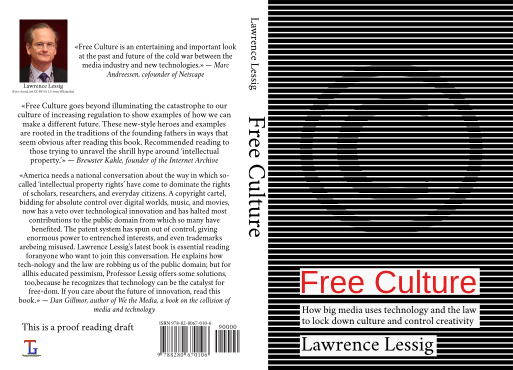
Creating a good looking book cover proved harder than I expected. I wanted to create a cover looking similar to the original cover of the Free Culture book we are translating to Norwegian, and I wanted it in vector format for high resolution printing. But my inkscape knowledge were not nearly good enough to pull that off. But thanks to the great inkscape community, I was able to wrap up the cover yesterday evening. I asked on the #inkscape IRC channel on Freenode for help and clues, and Marc Jeanmougin (Mc-) volunteered to try to recreate it based on the PDF of the cover from the HTML version. Not only did he create a SVG document with the original and his vector version side by side, he even provided an instruction video explaining how he did it. But the instruction video is not easy to follow for an untrained inkscape user. The video is a recording on how he did it, and he is obviously very experienced as the menu selections are very quick and he mentioned on IRC that he did use some keyboard shortcuts that can't be seen on the video, but it give a good idea about the inkscape operations to use to create the stripes with the embossed copyright sign in the center. I took his SVG file, copied the vector image and re-sized it to fit on the cover I was drawing. I am happy with the end result, and the current english version look like this: I am not quite sure about the text on the back, but guess it will do. I picked three quotes from the official site for the book, and hope it will work to trigger the interest of potential readers. The Norwegian cover will look the same, but with the texts and bar code replaced with the Norwegian version. The book is very close to being ready for publication, and I expect to upload the final draft to Lulu in the next few days and order a final proof reading copy to verify that everything look like it should before allowing everyone to order their own copy of Free Culture, in English or Norwegian Bokm l. I'm waiting to give the the productive proof readers a chance to complete their work.

19 August 2015

Petter Reinholdtsen: In my hand, a pocket book edition of the Norwegian Free Culture book!

Today, finally, my first printed draft edition of the Norwegian translation of Free Culture I have been working on for the last few years arrived in the mail. I had to fake a cover to get the interior printed, and the exterior of the book look awful, but that is irrelevant at this point. I asked for a printed pocket book version to get an idea about the font sizes and paper format as well as how good the figures and images look in print, but also to test what the pocket book version would look like. After receiving the 500 page pocket book, it became obvious to me that that pocket book size is too small for this book. I believe the book is too thick, and several tables and figures do not look good in the size they get with that small page sizes. I believe I will go with the 5.5x8.5 inch size instead. A surprise discovery from the paper version was how bad the URLs look in print. They are very hard to read in the colophon page. The URLs are red in the PDF, but light gray on paper. I need to change the color of links somehow to look better. But there is a printed book in my hand, and it feels great. :) Now I only need to fix the cover, wrap up the postscript with the store behind the book, and collect the last corrections from the proof readers before the book is ready for proper printing. Cover artists willing to work for free and create a Creative Commons licensed vector file looking similar to the original is most welcome, as my skills as a graphics designer are mostly missing.

9 August 2015

Yves-Alexis Perez: WPS and Network Manager

So, everybody knows that WPS (Wi-Fi Protected Setup) is broken. But sometimes, you don't own the access point, and you'd just want the wireless to work. That happens for example when you're a guest in some place using an Orange Livebox and you don't have the WPA passphrase (usually because it's written somewhere you don't have access too, or because someone forgot to tell you). Liveboxes WPS is the press button thing: you press a button on the front for one second, then any device can connect in the next two minutes. That works fine with Android devices, for example, but it didn't work with my laptop and NetworkManager, which doesn't support WPS at all. Fortunately, the underlying piece of software (wpa_supplicant) does support WPS, and even the push button style. And you can nicely ask it to reveal the passphrase to you with the following trick.
  1. Disconnect NetworkManager from the network, disable the wireless link, stop it; just make sure wpa_supplicant is not running;
  2. Put a stub wpa_supplicant.conf file with only the following content:
    update_config=1
    
  3. Start wpa_supplicant in the foreground with your stub config file:
    wpa_supplicant -iwlan0 -c wpa_supplicant.conf
    
  4. Start wpa_cli
Inside wpa_cli:
  1. Scan the network:
    scan
    
  2. Get the results:
    scan_results
    
    and identity the bssid of the Livebox
  3. Press the WPS button on the Livebox
  4. Run
    wps_pbc <bssid>
    ; some text should appear in the wpa_cli window, and it should eventually connect successfully (at that point you can even run a dhclient on wlan0)
  5. Run
    save_config
    
The last command will update your stub configuration file, adding a new network block with the passphrase in the clear. You can then use that passphrase inside Network Manager if it's more convenient for you. There might be something easier, but at least it worked just fine for me during the holidays.

Petter Reinholdtsen: First paper version of the Norwegian Free Culture book heading my way

Typesetting a book is harder than I hoped. As the translation is mostly done, and a volunteer proof reader was going to check the text on paper, it was time this summer to focus on formatting my translated docbook based version of the Free Culture book by Lawrence Lessig. I've been trying to get both docboox-xsl+fop and dblatex to give me a good looking PDF, but in the end I went with dblatex, because its Debian maintainer and upstream developer were responsive and very helpful in solving my formatting challenges. Last night, I finally managed to create a PDF that no longer made Lulu.com complain after uploading, and I ordered a text version of the book on paper. It is lacking a proper book cover and is not tagged with the correct ISBN number, but should give me an idea what the finished book will look like. Instead of using Lulu, I did consider printing the book using CreateSpace, but ended up using Lulu because it had smaller book size options (CreateSpace seem to lack pocket book with extended distribution). I looked for a similar service in Norway, but have not seen anything so far. Please let me know if I am missing out on something here. But I still struggle to decide the book size. Should I go for pocket book (4.25x6.875 inches / 10.8x17.5 cm) with 556 pages, Digest (5.5x8.5 inches / 14x21.6 cm) with 323 pages or US Trade (6x8 inches / 15.3x22.9 cm) with 280 pages? Fewer pager give a cheaper book, and a smaller book is easier to carry around. The test book I ordered was pocket book sized, to give me an idea how well that fit in my hand, but I suspect I will end up using a digest sized book in the end to bring the prize down further. My biggest challenge at the moment is making nice cover art. My inkscape skills are not yet up to the task of replicating the original cover in SVG format. I also need to figure out what to write about the book on the back (will most likely use the same text as the description on web based book stores). I would love help with this, if you are willing to license the art source and final version using the same CC license as the book. My artistic skills are not really up to the task. I plan to publish the book in both English and Norwegian and on paper, in PDF form as well as EPUB and MOBI format. The current status can as usual be found on github in the archive/ directory. So far I have spent all time on making the PDF version look good. Someone should probably do the same with the dbtoepub generated e-book. Help is definitely needed here, as I expect to run out of steem before I find time to improve the epub formatting. Please let me know via github if you find typos in the book or discover translations that should be improved. The final proof reading is being done right now, and I expect to publish the finished result in a few months.

31 July 2015

Scott Kitterman: Plasma 5 (KDE) In Testing

A few days ago, fellow Qt/KDE team member Lisandro gave an update on the situation with migration to Plasma 5 in Debian Testing (AKA Stretch). It s changed again. All of Plasma 5 is now in Testing. The upgrade probably won t be entirely smooth, which we ll work on that after the gcc5 transition is done, but it will be much better than the half KDE4 SC half Kf5/Plasma 5 situation we ve had for the last several days. The issues with starting kwin should be resolved once users upgrade to Plasma 5. To use the current kwin with KDE SC 4, you will need to add a symlink from /usr/bin/kwin to /usr/bin/kwin_x11. That will be included in the next upload after gcc5. Systemsettings and plasma-nm now work. In my initial testing, I didn t see anything major that was broken. One user reported an issue with sddm starting automatically, but it worked fine for me. During the upgrade you should get a debconf prompt asking if you want to use kdm or sddm. Pick sddm. When I tried to dist-upgrade, apt wanted to remove task-kde-desktop. I let it remove it and some other packages and then in a second step did apt-get install task-kde-desktop. That pulled it back in successfully along with adding and removing a reasonably large stack of packages. Obviously we need to make that work better before Stretch is released, but as long as you don t restart KDE in between those two steps it should be fine. Lastely, I used apt-get autoremove to clear out a lot of no longer needed KDE4 things (when it asks if you want to stop the running kdm, say no). Here are a few notes on terminology and what I understand of the future plans: What used to be called KDE is now three different things (in part because KDE is now the community of people, not the software): KDE Frameworks 5 (Kf5): This is a group of several dozen small libraries that as a group, roughly equate to what used to be kdelibs. Plasma (Workspaces) 5: This is the desktop that we ve just transitioned to. Applications: These are a mix of kdelibs and Kf5 based applications. Currently in Testing there are some of both and this will evolve over time based on upstream development. As an example, the Kf5 based version of konsole is in Unstable and should transition to Testing shortly. Finally, thanks to Maximiliano Curia (maxy on IRC) for doing virtually all of the packaging of Kf5, Plasma 5, and applications. He did the heavy lifting, the rest of us just nibbled around the edges to keep it moving towards testing.

28 July 2015

Lisandro Dami&aacute;n Nicanor P&eacute;rez Meyer: Plasma/KF5 : Testing situation

Dear Debian/KDE users,

We are aware that the current situation in testing is very unfortunate, with two main issues:

  1. systemsettings transitioned to testing before the corresponding KDE Control Modules. The result is that systemsettings displays an empty screen. This is tracked in the following bug https://bugs.debian.org/cgi-bin/bugreport.cgi?bug=790703.
  2. plasmoids such as plasma-nm transitioned to testing before plasma-desktop 5. The result is that the plasmoid are no longer displayed in the system tray.

We are working on getting plasma-desktop to transition to testing as soon as possible (hopefully in 2 days time), which will resolve both those issues. We appreciate that the transition to KF5 is much rougher than we would have liked, and apologize to all those impacted.

On behalf of the Qt/KDE team,
Lisandro.

16 July 2015

Petter Reinholdtsen: Typesetting DocBook footnotes as endnotes with dblatex

I'm still working on the Norwegian version of the Free Culture book by Lawrence Lessig, and is now working on the final typesetting and layout. One of the features I want to get the structure similar to the original book is to typeset the footnotes as endnotes in the notes chapter. Based on the feedback from the Debian maintainer and the dblatex developer, I came up with this recipe I would like to share with you. The proposal was to create a new LaTeX class file and add the LaTeX code there, but this is not always practical, when I want to be able to replace the class using a make file variable. So my proposal misuses the latex.begindocument XSL parameter value, to get a small fragment into the correct location in the generated LaTeX File. First, decide where in the DocBook document to place the endnotes, and add this text there:
<?latex \theendnotes ?>
Next, create a xsl stylesheet file dblatex-endnotes.xsl to add the code needed to add the endnote instructions in the preamble of the generated LaTeX document, with content like this:
<?xml version='1.0'?>
<xsl:stylesheet xmlns:xsl="http://www.w3.org/1999/XSL/Transform" version='1.0'>
  <xsl:param name="latex.begindocument">
    <xsl:text>
\usepackage endnotes 
\let\footnote=\endnote
\def\enoteheading \mbox \par\vskip-\baselineskip  
\begin document 
    </xsl:text>
  </xsl:param>
</xsl:stylesheet>
Finally, load this xsl file when running dblatex, for example like this:
dblatex --xsl-user=dblatex-endnotes.xsl freeculture.nb.xml
The end result can be seen on github, where my book project is located.

7 July 2015

Petter Reinholdtsen: MPEG LA on "Internet Broadcast AVC Video" licensing and non-private use

After asking the Norwegian Broadcasting Company (NRK) why they can broadcast and stream H.264 video without an agreement with the MPEG LA, I was wiser, but still confused. So I asked MPEG LA if their understanding matched that of NRK. As far as I can tell, it does not. I started by asking for more information about the various licensing classes and what exactly is covered by the "Internet Broadcast AVC Video" class that NRK pointed me at to explain why NRK did not need a license for streaming H.264 video:
According to a MPEG LA press release dated 2010-02-02, there is no charge when using MPEG AVC/H.264 according to the terms of "Internet Broadcast AVC Video". I am trying to understand exactly what the terms of "Internet Broadcast AVC Video" is, and wondered if you could help me. What exactly is covered by these terms, and what is not? The only source of more information I have been able to find is a PDF named AVC Patent Portfolio License Briefing, which states this about the fees:
  • Where End User pays for AVC Video
    • Subscription (not limited by title) 100,000 or fewer subscribers/yr = no royalty; > 100,000 to 250,000 subscribers/yr = $25,000; >250,000 to 500,000 subscribers/yr = $50,000; >500,000 to 1M subscribers/yr = $75,000; >1M subscribers/yr = $100,000
    • Title-by-Title - 12 minutes or less = no royalty; >12 minutes in length = lower of (a) 2% or (b) $0.02 per title
  • Where remuneration is from other sources
    • Free Television - (a) one-time $2,500 per transmission encoder or (b) annual fee starting at $2,500 for > 100,000 HH rising to maximum $10,000 for >1,000,000 HH
    • Internet Broadcast AVC Video (not title-by-title, not subscription) no royalty for life of the AVC Patent Portfolio License
Am I correct in assuming that the four categories listed is the categories used when selecting licensing terms, and that "Internet Broadcast AVC Video" is the category for things that do not fall into one of the other three categories? Can you point me to a good source explaining what is ment by "title-by-title" and "Free Television" in the license terms for AVC/H.264? Will a web service providing H.264 encoded video content in a "video on demand" fashing similar to Youtube and Vimeo, where no subscription is required and no payment is required from end users to get access to the videos, fall under the terms of the "Internet Broadcast AVC Video", ie no royalty for life of the AVC Patent Portfolio license? Does it matter if some users are subscribed to get access to personalized services? Note, this request and all answers will be published on the Internet.
The answer came quickly from Benjamin J. Myers, Licensing Associate with the MPEG LA:
Thank you for your message and for your interest in MPEG LA. We appreciate hearing from you and I will be happy to assist you. As you are aware, MPEG LA offers our AVC Patent Portfolio License which provides coverage under patents that are essential for use of the AVC/H.264 Standard (MPEG-4 Part 10). Specifically, coverage is provided for end products and video content that make use of AVC/H.264 technology. Accordingly, the party offering such end products and video to End Users concludes the AVC License and is responsible for paying the applicable royalties. Regarding Internet Broadcast AVC Video, the AVC License generally defines such content to be video that is distributed to End Users over the Internet free-of-charge. Therefore, if a party offers a service which allows users to upload AVC/H.264 video to its website, and such AVC Video is delivered to End Users for free, then such video would receive coverage under the sublicense for Internet Broadcast AVC Video, which is not subject to any royalties for the life of the AVC License. This would also apply in the scenario where a user creates a free online account in order to receive a customized offering of free AVC Video content. In other words, as long as the End User is given access to or views AVC Video content at no cost to the End User, then no royalties would be payable under our AVC License. On the other hand, if End Users pay for access to AVC Video for a specific period of time (e.g., one month, one year, etc.), then such video would constitute Subscription AVC Video. In cases where AVC Video is delivered to End Users on a pay-per-view basis, then such content would constitute Title-by-Title AVC Video. If a party offers Subscription or Title-by-Title AVC Video to End Users, then they would be responsible for paying the applicable royalties you noted below. Finally, in the case where AVC Video is distributed for free through an "over-the-air, satellite and/or cable transmission", then such content would constitute Free Television AVC Video and would be subject to the applicable royalties. For your reference, I have attached a .pdf copy of the AVC License. You will find the relevant sublicense information regarding AVC Video in Sections 2.2 through 2.5, and the corresponding royalties in Section 3.1.2 through 3.1.4. You will also find the definitions of Title-by-Title AVC Video, Subscription AVC Video, Free Television AVC Video, and Internet Broadcast AVC Video in Section 1 of the License. Please note that the electronic copy is provided for informational purposes only and cannot be used for execution. I hope the above information is helpful. If you have additional questions or need further assistance with the AVC License, please feel free to contact me directly.
Having a fresh copy of the license text was useful, and knowing that the definition of Title-by-Title required payment per title made me aware that my earlier understanding of that phrase had been wrong. But I still had a few questions:
I have a small followup question. Would it be possible for me to get a license with MPEG LA even if there are no royalties to be paid? The reason I ask, is that some video related products have a copyright clause limiting their use without a license with MPEG LA. The clauses typically look similar to this:
This product is licensed under the AVC patent portfolio license for the personal and non-commercial use of a consumer to (a) encode video in compliance with the AVC standard ("AVC video") and/or (b) decode AVC video that was encoded by a consumer engaged in a personal and non-commercial activity and/or AVC video that was obtained from a video provider licensed to provide AVC video. No license is granted or shall be implied for any other use. additional information may be obtained from MPEG LA L.L.C.
It is unclear to me if this clause mean that I need to enter into an agreement with MPEG LA to use the product in question, even if there are no royalties to be paid to MPEG LA. I suspect it will differ depending on the jurisdiction, and mine is Norway. What is MPEG LAs view on this?
According to the answer, MPEG LA believe those using such tools for non-personal or commercial use need a license with them:
With regard to the Notice to Customers, I would like to begin by clarifying that the Notice from Section 7.1 of the AVC License reads: THIS PRODUCT IS LICENSED UNDER THE AVC PATENT PORTFOLIO LICENSE FOR THE PERSONAL USE OF A CONSUMER OR OTHER USES IN WHICH IT DOES NOT RECEIVE REMUNERATION TO (i) ENCODE VIDEO IN COMPLIANCE WITH THE AVC STANDARD ("AVC VIDEO") AND/OR (ii) DECODE AVC VIDEO THAT WAS ENCODED BY A CONSUMER ENGAGED IN A PERSONAL ACTIVITY AND/OR WAS OBTAINED FROM A VIDEO PROVIDER LICENSED TO PROVIDE AVC VIDEO. NO LICENSE IS GRANTED OR SHALL BE IMPLIED FOR ANY OTHER USE. ADDITIONAL INFORMATION MAY BE OBTAINED FROM MPEG LA, L.L.C. SEE HTTP://WWW.MPEGLA.COM The Notice to Customers is intended to inform End Users of the personal usage rights (for example, to watch video content) included with the product they purchased, and to encourage any party using the product for commercial purposes to contact MPEG LA in order to become licensed for such use (for example, when they use an AVC Product to deliver Title-by-Title, Subscription, Free Television or Internet Broadcast AVC Video to End Users, or to re-Sell a third party's AVC Product as their own branded AVC Product). Therefore, if a party is to be licensed for its use of an AVC Product to Sell AVC Video on a Title-by-Title, Subscription, Free Television or Internet Broadcast basis, that party would need to conclude the AVC License, even in the case where no royalties were payable under the License. On the other hand, if that party (either a Consumer or business customer) simply uses an AVC Product for their own internal purposes and not for the commercial purposes referenced above, then such use would be included in the royalty paid for the AVC Products by the licensed supplier. Finally, I note that our AVC License provides worldwide coverage in countries that have AVC Patent Portfolio Patents, including Norway. I hope this clarification is helpful. If I may be of any further assistance, just let me know.
The mentioning of Norwegian patents made me a bit confused, so I asked for more information:
But one minor question at the end. If I understand you correctly, you state in the quote above that there are patents in the AVC Patent Portfolio that are valid in Norway. This make me believe I read the list available from <URL: http://www.mpegla.com/main/programs/AVC/Pages/PatentList.aspx > incorrectly, as I believed the "NO" prefix in front of patents were Norwegian patents, and the only one I could find under Mitsubishi Electric Corporation expired in 2012. Which patents are you referring to that are relevant for Norway?
Again, the quick answer explained how to read the list of patents in that list:
Your understanding is correct that the last AVC Patent Portfolio Patent in Norway expired on 21 October 2012. Therefore, where AVC Video is both made and Sold in Norway after that date, then no royalties would be payable for such AVC Video under the AVC License. With that said, our AVC License provides historic coverage for AVC Products and AVC Video that may have been manufactured or Sold before the last Norwegian AVC patent expired. I would also like to clarify that coverage is provided for the country of manufacture and the country of Sale that has active AVC Patent Portfolio Patents. Therefore, if a party offers AVC Products or AVC Video for Sale in a country with active AVC Patent Portfolio Patents (for example, Sweden, Denmark, Finland, etc.), then that party would still need coverage under the AVC License even if such products or video are initially made in a country without active AVC Patent Portfolio Patents (for example, Norway). Similarly, a party would need to conclude the AVC License if they make AVC Products or AVC Video in a country with active AVC Patent Portfolio Patents, but eventually Sell such AVC Products or AVC Video in a country without active AVC Patent Portfolio Patents.
As far as I understand it, MPEG LA believe anyone using Adobe Premiere and other video related software with a H.264 distribution license need a license agreement with MPEG LA to use such tools for anything non-private or commercial, while it is OK to set up a Youtube-like service as long as no-one pays to get access to the content. I still have no clear idea how this applies to Norway, where none of the patents MPEG LA is licensing are valid. Will the copyright terms take precedence or can those terms be ignored because the patents are not valid in Norway?

6 July 2015

Matthew Garrett: Anti Evil Maid 2 Turbo Edition

The Evil Maid attack has been discussed for some time - in short, it's the idea that most security mechanisms on your laptop can be subverted if an attacker is able to gain physical access to your system (for instance, by pretending to be the maid in a hotel). Most disk encryption systems will fall prey to the attacker replacing the initial boot code of your system with something that records and then exfiltrates your decryption passphrase the next time you type it, at which point the attacker can simply steal your laptop the next day and get hold of all your data.

There are a couple of ways to protect against this, and they both involve the TPM. Trusted Platform Modules are small cryptographic devices on the system motherboard[1]. They have a bunch of Platform Configuration Registers (PCRs) that are cleared on power cycle but otherwise have slightly strange write semantics - attempting to write a new value to a PCR will append the new value to the existing value, take the SHA-1 of that and then store this SHA-1 in the register. During a normal boot, each stage of the boot process will take a SHA-1 of the next stage of the boot process and push that into the TPM, a process called "measurement". Each component is measured into a separate PCR - PCR0 contains the SHA-1 of the firmware itself, PCR1 contains the SHA-1 of the firmware configuration, PCR2 contains the SHA-1 of any option ROMs, PCR5 contains the SHA-1 of the bootloader and so on.

If any component is modified, the previous component will come up with a different measurement and the PCR value will be different, Because you can't directly modify PCR values[2], this modified code will only be able to set the PCR back to the "correct" value if it's able to generate a sequence of writes that will hash back to that value. SHA-1 isn't yet sufficiently broken for that to be practical, so we can probably ignore that. The neat bit here is that you can then use the TPM to encrypt small quantities of data[3] and ask it to only decrypt that data if the PCR values match. If you change the PCR values (by modifying the firmware, bootloader, kernel and so on), the TPM will refuse to decrypt the material.

Bitlocker uses this to encrypt the disk encryption key with the TPM. If the boot process has been tampered with, the TPM will refuse to hand over the key and your disk remains encrypted. This is an effective technical mechanism for protecting against people taking images of your hard drive, but it does have one fairly significant issue - in the default mode, your disk is decrypted automatically. You can add a password, but the obvious attack is then to modify the boot process such that a fake password prompt is presented and the malware exfiltrates the data. The TPM won't hand over the secret, so the malware flashes up a message saying that the system must be rebooted in order to finish installing updates, removes itself and leaves anyone except the most paranoid of users with the impression that nothing bad just happened. It's an improvement over the state of the art, but it's not a perfect one.

Joanna Rutkowska came up with the idea of Anti Evil Maid. This can take two slightly different forms. In both, a secret phrase is generated and encrypted with the TPM. In the first form, this is then stored on a USB stick. If the user suspects that their system has been tampered with, they boot from the USB stick. If the PCR values are good, the secret will be successfully decrypted and printed on the screen. The user verifies that the secret phrase is correct and reboots, satisfied that their system hasn't been tampered with. The downside to this approach is that most boots will not perform this verification, and so you rely on the user being able to make a reasonable judgement about whether it's necessary on a specific boot.

The second approach is to do this on every boot. The obvious problem here is that in this case an attacker simply boots your system, copies down the secret, modifies your system and simply prints the correct secret. To avoid this, the TPM can have a password set. If the user fails to enter the correct password, the TPM will refuse to decrypt the data. This can be attacked in a similar way to Bitlocker, but can be avoided with sufficient training: if the system reboots without the user seeing the secret, the user must assume that their system has been compromised and that an attacker now has a copy of their TPM password.

This isn't entirely great from a usability perspective. I think I've come up with something slightly nicer, and certainly more Web 2.0[4]. Anti Evil Maid relies on having a static secret because expecting a user to remember a dynamic one is pretty unreasonable. But most security conscious people rely on dynamic secret generation daily - it's the basis of most two factor authentication systems. TOTP is an algorithm that takes a seed, the time of day and some reasonably clever calculations and comes up with (usually) a six digit number. The secret is known by the device that you're authenticating against, and also by some other device that you possess (typically a phone). You type in the value that your phone gives you, the remote site confirms that it's the value it expected and you've just proven that you possess the secret. Because the secret depends on the time of day, someone copying that value won't be able to use it later.

But instead of using your phone to identify yourself to a remote computer, we can use the same technique to ensure that your computer possesses the same secret as your phone. If the PCR states are valid, the computer will be able to decrypt the TOTP secret and calculate the current value. This can then be printed on the screen and the user can compare it against their phone. If the values match, the PCR values are valid. If not, the system has been compromised. Because the value changes over time, merely booting your computer gives your attacker nothing - printing an old value won't fool the user[5]. This allows verification to be a normal part of every boot, without forcing the user to type in an additional password.

I've written a prototype implementation of this and uploaded it here. Do pay attention to the list of limitations - without a bootloader that measures your kernel and initrd, you're still open to compromise. Adding TPM support to grub is on my list of things to do. There are also various potential issues like an attacker being able to use external DMA-capable devices to obtain the secret, especially since most Linux distributions still ship kernels that don't enable the IOMMU by default. And, of course, if your firmware is inherently untrustworthy there's multiple ways it can subvert this all. So treat this very much like a research project rather than something you can depend on right now. There's a fair amount of work to do to turn this into a meaningful improvement in security.

[1] I wrote about them in more detail here, including a discussion of whether they can be used for general purpose DRM (answer: not really)

[2] In theory, anyway. In practice, TPMs are embedded devices running their own firmware, so who knows what bugs they're hiding.

[3] On the order of 128 bytes or so. If you want to encrypt larger things with a TPM, the usual way to do it is to generate an AES key, encrypt your material with that and then encrypt the AES key with the TPM.

[4] Is that even a thing these days? What do we say instead?

[5] Assuming that the user is sufficiently diligent in checking the value, anyway

comment count unavailable comments

5 July 2015

Petter Reinholdtsen: New laptop - some more clues and ideas based on feedback

Several people contacted me after my previous blog post about my need for a new laptop, and provided very useful feedback. I wish to thank every one of these. Several pointed me to the possibility of fixing my X230, and I am already in the process of getting Lenovo to do so thanks to the on site, next day support contract covering the machine. But the battery is almost useless (I expect to replace it with a non-official battery) and I do not expect the machine to live for many more years, so it is time to plan its replacement. If I did not have a support contract, it was suggested to find replacement parts using FrancEcrans, but it might present a language barrier as I do not understand French. One tip I got was to use the Skinflint web service to compare laptop models. It seem to have more models available than prisjakt.no. Another tip I got from someone I know have similar keyboard preferences was that the HP EliteBook 840 keyboard is not very good, and this matches my experience with earlier EliteBook keyboards I tested. Because of this, I will not consider it any further. When I wrote my blog post, I was not aware of Thinkpad X250, the newest Thinkpad X model. The keyboard reintroduces mouse buttons (which is missing from the X240), and is working fairly well with Debian Sid/Unstable according to Corsac.net. The reports I got on the keyboard quality are not consistent. Some say the keyboard is good, others say it is ok, while others say it is not very good. Those with experience from X41 and and X60 agree that the X250 keyboard is not as good as those trusty old laptops, and suggest I keep and fix my X230 instead of upgrading, or get a used X230 to replace it. I'm also told that the X250 lack leds for caps lock, disk activity and battery status, which is very convenient on my X230. I'm also told that the CPU fan is running very often, making it a bit noisy. In any case, the X250 do not work out of the box with Debian Stable/Jessie, one of my requirements. I have also gotten a few vendor proposals, one was Pro-Star, another was Libreboot. The latter look very attractive to me. Again, thank you all for the very useful feedback. It help a lot as I keep looking for a replacement. Update 2015-07-06: I was recommended to check out the lapstore.de web shop for used laptops. They got several different old thinkpad X models, and provide one year warranty.

3 July 2015

Petter Reinholdtsen: Time to find a new laptop, as the old one is broken after only two years

My primary work horse laptop is failing, and will need a replacement soon. The left 5 cm of the screen on my Thinkpad X230 started flickering yesterday, and I suspect the cause is a broken cable, as changing the angle of the screen some times get rid of the flickering. My requirements have not really changed since I bought it, and is still as I described them in 2013. The last time I bought a laptop, I had good help from prisjakt.no where I could select at least a few of the requirements (mouse pin, wifi, weight) and go through the rest manually. Three button mouse and a good keyboard is not available as an option, and all the three laptop models proposed today (Thinkpad X240, HP EliteBook 820 G1 and G2) lack three mouse buttons). It is also unclear to me how good the keyboard on the HP EliteBooks are. I hope Lenovo have not messed up the keyboard, even if the quality and robustness in the X series have deteriorated since X41. I wonder how I can find a sensible laptop when none of the options seem sensible to me? Are there better services around to search the set of available laptops for features? Please send me an email if you have suggestions.

2 July 2015

Petter Reinholdtsen: MakerCon Nordic videos now available on Frikanalen

Last oktober I was involved on behalf of NUUG with recording the talks at MakerCon Nordic, a conference for the Maker movement. Since then it has been the plan to publish the recordings on Frikanalen, which finally happened the last few days. A few talks are missing because the speakers asked the organizers to not publish them, but most of the talks are available. The talks are being broadcasted on RiksTV channel 50 and using multicast on Uninett, as well as being available from the Frikanalen web site. The unedited recordings are available on Youtube too. This is the list of talks available at the moment. Visit the Frikanalen video pages to view them. Part of the reason this took so long was that the scripts NUUG had to prepare a recording for publication were five years old and no longer worked with the current video processing tools (command line argument changes). In addition, we needed better audio normalization, which sent me on a detour to package bs1770gain for Debian. Now this is in place and it became a lot easier to publish NUUG videos on Frikanalen.

15 June 2015

Petter Reinholdtsen: Graphing the Norwegian company ownership structure

It is a bit work to figure out the ownership structure of companies in Norway. The information is publicly available, but one need to recursively look up ownership for all owners to figure out the complete ownership graph of a given set of companies. To save me the work in the future, I wrote a script to do this automatically, outputting the ownership structure using the Graphviz/dotty format. The data source is web scraping from Proff, because I failed to find a useful source directly from the official keepers of the ownership data, Br nn ysundsregistrene. To get an ownership graph for a set of companies, fetch the code from git and run it using the organisation number. I'm using the Norwegian newspaper Dagbladet as an example here, as its ownership structure is very simple:
% time ./bin/eierskap-dotty 958033540 > dagbladet.dot
real    0m2.841s
user    0m0.184s
sys     0m0.036s
%
The script accept several organisation numbers on the command line, allowing a cluster of companies to be graphed in the same image. The resulting dot file for the example above look like this. The edges are labeled with the ownership percentage, and the nodes uses the organisation number as their name and the name as the label:
digraph ownership  
rankdir = LR;
"Aller Holding A/s" -> "910119877" [label="100%"]
"910119877" -> "998689015" [label="100%"]
"998689015" -> "958033540" [label="99%"]
"974530600" -> "958033540" [label="1%"]
"958033540" [label="AS DAGBLADET"]
"998689015" [label="Berner Media Holding AS"]
"974530600" [label="Dagbladets Stiftelse"]
"910119877" [label="Aller Media AS"]
 
To view the ownership graph, run "dotty dagbladet.dot" or convert it to a PNG using "dot -T png dagbladet.dot > dagbladet.png". The result can be seen below: Note that I suspect the "Aller Holding A/S" entry to be incorrect data in the official ownership register, as that name is not registered in the official company register for Norway. The ownership register is sensitive to typos and there seem to be no strict checking of the ownership links. Let me know if you improve the script or find better data sources. The code is licensed according to GPL 2 or newer. Update 2015-06-15: Since the initial post I've been told that "Aller Holding A/S" is a Danish company, which explain why it did not have a Norwegian organisation number. I've also been told that there is a web services API available from Br nn ysundsregistrene, for those willing to accept the terms or pay the price.

11 June 2015

Petter Reinholdtsen: Measuring and adjusting the loudness of a TV channel using bs1770gain

Television loudness is the source of frustration for viewers everywhere. Some channels are very load, others are less loud, and ads tend to shout very high to get the attention of the viewers, and the viewers do not like this. This fact is well known to the TV channels. See for example the BBC white paper "Terminology for loudness and level dBTP, LU, and all that" from 2011 for a summary of the problem domain. To better address the need for even loadness, the TV channels got together several years ago to agree on a new way to measure loudness in digital files as one step in standardizing loudness. From this came the ITU-R standard BS.1770, "Algorithms to measure audio programme loudness and true-peak audio level". The ITU-R BS.1770 specification describe an algorithm to measure loadness in LUFS (Loudness Units, referenced to Full Scale). But having a way to measure is not enough. To get the same loudness across TV channels, one also need to decide which value to standardize on. For European TV channels, this was done in the EBU Recommondaton R128, "Loudness normalisation and permitted maximum level of audio signals", which specifies a recommended level of -23 LUFS. In Norway, I have been told that NRK, TV2, MTG and SBS have decided among themselves to follow the R128 recommondation for playout from 2016-03-01. There are free software available to measure and adjust the loudness level using the LUFS. In Debian, I am aware of a library named libebur128 able to measure the loudness and since yesterday morning a new binary named bs1770gain capable of both measuring and adjusting was uploaded and is waiting for NEW processing. I plan to maintain the latter in Debian under the Debian multimedia umbrella. The free software based TV channel I am involved in, Frikanalen, plan to follow the R128 recommondation ourself as soon as we can adjust the software to do so, and the bs1770gain tool seem like a good fit for that part of the puzzle to measure loudness on new video uploaded to Frikanalen. Personally, I plan to use bs1770gain to adjust the loudness of videos I upload to Frikanalen on behalf of the NUUG member organisation. The program seem to be able to measure the LUFS value of any media file handled by ffmpeg, but I've only successfully adjusted the LUFS value of WAV files. I suspect it should be able to adjust it for all the formats handled by ffmpeg.

26 May 2015

Lisandro Dami&aacute;n Nicanor P&eacute;rez Meyer: The last planned Qt 4 release is here: Qt 4.8.7. Is your app runnning with Qt5?

Qt 4.8.7 has been released today. Quoting from the blog post (emphasis is mine):

Many users have already moved their active projects to Qt 5 and we encourage also others to do so. With a high degree of source compatibility, we have ensured that switching to Qt 5 is smooth and straightforward. It should be noted that Qt 4.8.7 provides only the basic functionality to run Qt based applications on Mac OS X 10.10, full support is in Qt 5.

Qt 4.8.7 is planned to be the last patch release of the Qt 4 series. Standard support is available until December 2015, after which extended support will be available. We recommend all active projects to migrate to Qt 5, as new operating systems and compilers with Qt 4.8 will not be supported. If you have challenges migrating to Qt 5, please contact us or some of our service partners for assistance

Have you started to port your project?

21 May 2015

Yves-Alexis Perez: Followup on Debian grsec kernels for Jessie

So, following the previous post, I've indeed updated the way I'm making my grsec kernels. I wanted to upgrade my server to Jessie, and didn't want to keep the 3.2 kernel indefinitely, so I had to update to at least 3.14, and find something to make my life (and maybe some others) easier. In the end, like planned, I've switched to the make deb-pkg way, using some scripts here and there to simplify stuff. The scripts and configs can be found in my debian-grsec-config repository. The repository layout is pretty much self-explaining: The bin/ folder contains two scripts: The configs/ folder contains the various configuration bits: I'm currently building amd64 kernels for Jessie and i386 kernels will follow soon, using config-3.14 + hardening + grsec. I'm hosting them on my apt repository. You're obviously free to use them, but considering how easy it is to rebuild a kernel, you might want to use a personal configuration (instead of mine) and rebuild the kernel yourself, so you don't have to trust my binary packages. Here's a very quick howto (adapt it to your needs):
mkdir linux-grsec && cd linux-grsec
git clone git://git.kernel.org/pub/scm/linux/kernel/git/stable/linux-stable.git
git clone git://anonscm.debian.org/users/corsac/grsec/debian-grsec-config.git
mkdir build
cd linux-stable
../debian-grsec-config/bin/get-grsec.sh stable2 # for 3.14 branch
../debian-grsec-config/bin/kconfig.py ../build/.config ../debian-grsec-config/configs/config-3.14-2-amd64 ../debian-grsec-config/configs/hardening ../debian-grsec-config/configs/grsec
make KBUILD_OUTPUT=../build -j4 oldconfig
make KBUILD_OUTPUT=../build -j4 deb-pkg
Then you can use the generated Debian binary packages. If you use the Debian config, it'll need a lot of disk space for compilation and generate a huge linux-image debug package, so you might want to unset CONFIG_DEBUG_INFO locally if you're not interested. Right now only the deb files are generated but I've submitted a patch to have a .changes file which can be then used to manipulate them more easily (for example for uploading them a local Debian repository). Note that, obviously, this is not targeted for inclusion to the official Debian archive. This is still not possible for various reasons explained here and there, and I still don't have a solution for that. I hope this (either the scripts and config or the generated binary packages) can be useful. Don't hesitate to drop me a mail if needed.

10 May 2015

Petter Reinholdtsen: Norwegian citizens now required by law to give their fingerprint to the police

5 days ago, the Norwegian Parliament decided, unanimously, that all citizens of Norway, no matter if they are suspected of something criminal or not, are required to give fingerprints to the police (vote details from Holder de ord). The law make it sound like it will be optional, but in a few years there will be no option any more. The ID will be required to vote, to get a bank account, a bank card, to change address on the post office, to receive an electronic ID or to get a drivers license and many other tasks required to function in Norway. The banks plan to stop providing their own ID on the bank cards when this new national ID is introduced, and the national road authorities plan to change the drivers license to no longer be usable as identity cards. In effect, to function as a citizen in Norway a national ID card will be required, and to get it one need to provide the fingerprints to the police. In addition to handing the fingerprint to the police (which promised to not make a copy of the fingerprint image at that point in time, but say nothing about doing it later), a picture of the fingerprint will be stored on the RFID chip, along with a picture of the face and other information about the person. Some of the information will be encrypted, but the encryption will be the same system as currently used in the passports. The codes to decrypt will be available to a lot of government offices and their suppliers around the globe, but for those that do not know anyone in those circles it is good to know that the encryption is already broken. And they can be read from 70 meters away. This can be mitigated a bit by keeping it in a Faraday cage (metal box or metal wire container), but one will be required to take it out of there often enough to expose ones private and personal information to a lot of people that have no business getting access to that information. The new Norwegian national IDs are a vehicle for identity theft, and I feel sorry for us all having politicians accepting such invasion of privacy without any objections. So are the Norwegian passports, but it has been possible to function in Norway without those so far. That option is going away with the passing of the new law. In this, I envy the Germans, because for them it is optional how much biometric information is stored in their national ID. And if forced collection of fingerprints was not bad enough, the information collected in the national ID card register can be handed over to foreign intelligence services and police authorities, "when extradition is not considered disproportionate". Update 2015-05-12: For those unable to believe that the Parliament really could make such decision, I wrote a summary of the sources I have for concluding the way I do (Norwegian Only, as the sources are all in Norwegian).

9 May 2015

Yves-Alexis Perez: Xfce 4.12 in Debian sid

So, following the Jessie release, and after a quick approval by the release team for the 4.12 transition, we've uploaded Xfce 4.12 to sid and have asked the RT to schedule the relevant binNMUs for the libxfce4util and xfce4-panel reverse dependencies. It went apparently well (besides some hickups here and there, lilke some lag on sparc, and some build-failulres on hurd). So Xfce 4.12 is now in sid, and should migrate to Stretch in the following weeks, provided nothing release critical is found.

1 May 2015

Petter Reinholdtsen: What would it cost to store all phone calls in Norway?

Many years ago, a friend of mine calculated how much it would cost to store the sound of all phone calls in Norway, and came up with the cost of around 20 million NOK (2.4 mill EUR) for all the calls in a year. I got curious and wondered what the same calculation would look like today. To do so one need an idea of how much data storage is needed for each minute of sound, how many minutes all the calls in Norway sums up to, and the cost of data storage. The 2005 numbers are from digi.no, the 2012 numbers are from a NKOM report, and I got the 2013 numbers after asking NKOM via email. I was told the numbers for 2014 will be presented May 20th, and decided not to wait for those, as I doubt they will be very different from the numbers from 2013. The amount of data storage per minute sound depend on the wanted quality, and for phone calls it is generally believed that 8 Kbit/s is enough. See for example a summary on voice quality from Cisco for some alternatives. 8 Kbit/s is 60 Kbytes/min, and this can be multiplied with the number of call minutes to get the storage requirements. Storage prices varies a lot, depending on speed, backup strategies, availability requirements etc. But a simple way to calculate can be to use the price of a TiB-disk (around 1000 NOK / 120 EUR) and double it to take space, power and redundancy into account. It could be much higher with high speed and good redundancy requirements. But back to the question, What would it cost to store all phone calls in Norway? Not much. Here is a small table showing the estimated cost, which is within the budget constraint of most medium and large organisations:
YearCall minutesSizePrice in NOK / EUR
200524 000 000 0001.3 PiB3 mill / 358 000
201218 000 000 0001.0 PiB2.2 mill / 262 000
201317 000 000 000950 TiB2.1 mill / 250 000
This is the cost of buying the storage. Maintenance need to be taken into account too, but calculating that is left as an exercise for the reader. But it is obvious to me from those numbers that recording the sound of all phone calls in Norway is not going to be stopped because it is too expensive. I wonder if someone already is collecting the data?

Lisandro Dami&aacute;n Nicanor P&eacute;rez Meyer: Qt4's status and Qt4's webkit removal in Stretch

Hi everyone! As you might know Qt4 has been deprecated (in the sense "you better start to port your code") since Qt5's first release in December 19th 2012. Since that point on Qt4 received only bugfixes. Upstream is about to release the last point release, 4.8.7. This means that only severe bugs like security ones will get a chance to get solved.

Moreover upstream recommended keeping Qt4 until 2017. If we get a Debian release every 2 years that will make Jessie oldstable in 2017 and deprecated in 2018. This means we should really consider starting to port code using Qt4 to Qt5 during Stretch's developing life cycle.

It is important to note that Qt4 depends on a number of dependencies that their maintainers might want to get removed from the archive for similar reasons. In this case we will simply don't hesitate in removing their support as long as Qt4 keeps building. This normally doesn't mean API/ABI breakage but missing plugins that will diminish functionality from your apps, maybe even key ones. As an example let's take the **hypothetical** case in which the libasound2 maintainers are switching to a new libasound3 which is not API-compatible and removing libasound2 in the process. In this case we will have no choice but to remove the dependency and drop the functionality it provides. This is another of the important reasons why you should be switching to Qt5.

Qt4's webkit removalWebkit is definitely not an easy piece of code to maintain. For starters it means having a full copy of the code in the archive for both Qt4 and Qt5. Now add to that the fact that the code evolves quickly and thus having upstream support even for security bugs will be getting harder and harder. So we decided to remove Qt4's webkit from the archive. Of course we still have a lot of KDE stuff using Qt4's webkit, so it won't disappear "soon", but it will at some point.

PortingSome of us where involved in various Qt4 to Qt5 migrations [0] and we know for sure that porting stuff from Qt4 to Qt5 is much much easier and less painful than it was from Qt3 to Qt4.

We also understand that there is still a lot of software still using Qt4. In order to ease the transition time we have provided Wheezy backports for Qt5.

Don't forget to take a look at the C++ API changes page [1] whenever you start porting your application.

[0] http://pkg-kde.alioth.debian.org/packagingqtstuff.html
[1] http://doc.qt.io/qt-5/sourcebreaks.html

Temporarily shipping both Qt4 and Qt5 builds of your libraryIn case you maintain a library chances are that upstream already provides a way to build it using Qt5. Please note there is no point in shipping an application built with both flavours, please use Qt5 whenever possible. This double compilation should be left only for libraries.

You can't mix Qt4 and Qt5 in the same binary, but you may provide libraries compiled against one or the other. For example, your source package foo could provide both libqt4foo1 and libqt5foo1. You need to mangle your debian/rules and/or build system accordingly to achieve this.

A good example both for upstream code allowing both styles of compilation and debian packaging is phonon. Take a look at the CMakeLists.txt files for seeing how a source can be built against both flavours and another to debian/rules to see an example of how to handle the compilation. Just bear in mind that you
need to replace $(overridden_command) with the command itself, that variable substitution comes from internal stuff from our team and you should not be using it without a very good reason. If in doubt, feel free to ask us on IRC [2] or on the mailing list [3].

[2] irc.debian.org #debian-kde
[3] debian-kde@lists.debian.org

TimelineWe plan to start filing wishlist bugs soon. Once we get most of KDE stuff running with Qt5's webkit we will start raising the severities.

Next.

Previous.