Search Results: "eof"

26 May 2017

Michal Čihař: Running Bitcoin node on Turris Omnia

For quite some I'm happy user of Turris Omnia router. The router has quite good hardware, so I've decided to try if I can run Bitcoin node on that and ElectrumX server. To make the things easier to manage, I've decided to use LXC and run all these in separate container. First of all you need LXC on the router. This is the default setup, but in case you've removed it, you can add it back in the Updater settings. Now we will create Debian container. There is basic information on using in Turris Documentation on how to create the container, in latter documentation I assume it is called debian. It's also good idea to enable LXC autostart, to do so add your container to cat /etc/config/lxc-auto on :
config container
    option name debian
You might also want to edit lxc container configration to enable clean shutdown:
# Send SIGRTMIN+3 to shutdown systemd (37 on Turris Omnia)
lxc.haltsignal = SIGRTMIN+3
To make the system more recent, I've decided to use Debian Stretch (one of reasons was that ElectrumX needs Python 3.5.3 or newer). Which is anyway probably sane choice right now given that it's already frozen and will be soon stable. As Stretch is not available as a download option in Omnia, I've chosen to use Debian Jessie and upgrate it later:
$ lxc-attach  --name debian
$ sed -i s/jessie/stretch/ /etc/apt/sources.list
$ apt update
$ apt full-upgrade
Now you have up to date system and we can start installing dependencies. First thing to install is Bitcoin Core. Just follow the instructions on their website to do that. Now it's time to set it up and wait for downloading full blockchain:
$ adduser bitcoin
$ su - bitcoin
$ bitcoind -daemon
Depending on your connection speed, the download will take few hours. You can monitor the progress using bitcoin-cli, you're waiting for 450k blocks:
$ bitcoin-cli getinfo
 
  "version": 140000,
  "protocolversion": 70015,
  "walletversion": 130000,
  "balance": 0.00000000,
  "blocks": 301242,
  "timeoffset": -1,
  "connections": 8,
  "proxy": "",
  "difficulty": 8853416309.1278,
  "testnet": false,
  "keypoololdest": 1490267950,
  "keypoolsize": 100,
  "paytxfee": 0.00000000,
  "relayfee": 0.00001000,
  "errors": ""
 
Depending how much memory you have (mine has 2G) and what all you run on the router, you will have to tweak bitcoind configuration to consume less memory. This can be done by editing .bitcoin/bitcoin.conf, I've ended up with following settings:
par=1
dbcache=150
maxmempool=150
You can also create startup unit for Bitcoin daemon (place that as /etc/systemd/system/bitcoind.service):
[Unit]
Description=Bitcoind
After=network.target
[Service]
ExecStart=/opt/bitcoin/bin/bitcoind
User=bitcoin
TimeoutStopSec=30min
Restart=on-failure
RestartSec=30
[Install]
WantedBy=multi-user.target
Now we can enable services to start on container start:
systemctl enable bitcoind.service
Then I wanted to setup ElectrumX as well, but I've quickly realized that it uses way more memory that my router has, so there is no option to run it without using swap, what will probably make it quite slow (I haven't tried that).

Filed under: Debian English OpenWrt

18 May 2017

Michael Prokop: Debugging a mystery: ssh causing strange exit codes?

XKCD comic 1722 Recently we had a WTF moment at a customer of mine which is worth sharing. In an automated deployment procedure we re installing Debian systems and setting up MySQL HA/Scalability. Installation of the first node works fine, but during installation of the second node something weird is going on. Even though the deployment procedure reported that everything went fine: it wasn t fine at all. After bisecting to the relevant command lines where it s going wrong we identified that the failure is happening between two ssh/scp commands, which are invoked inside a chroot through a shell wrapper. The ssh command caused a wrong exit code showing up: instead of bailing out with an error (we re running under set -e ) it returned with exit code 0 and the deployment procedure continued, even though there was a fatal error. Initially we triggered the bug when two ssh/scp command lines close to each other were executed, but I managed to find a minimal example for demonstration purposes:
# cat ssh_wrapper 
chroot << "EOF" / /bin/bash
ssh root@localhost hostname >/dev/null
exit 1
EOF
echo "return code = $?"
What we d expect is the following behavior, receive exit code 1 from the last command line in the chroot wrapper:
# ./ssh_wrapper 
return code = 1
But what we actually get is exit code 0:
# ./ssh_wrapper 
return code = 0
Uhm?! So what s going wrong and what s the fix? Let s find out what s causing the problem:
# cat ssh_wrapper 
chroot << "EOF" / /bin/bash
ssh root@localhost command_does_not_exist >/dev/null 2>&1
exit "$?"
EOF
echo "return code = $?"
# ./ssh_wrapper 
return code = 127
Ok, so if we invoke it with a binary that does not exist we properly get exit code 127, as expected.
What about switching /bin/bash to /bin/sh (which corresponds to dash here) to make sure it s not a bash bug:
# cat ssh_wrapper 
chroot << "EOF" / /bin/sh
ssh root@localhost hostname >/dev/null
exit 1
EOF
echo "return code = $?"
# ./ssh_wrapper 
return code = 1
Oh, but that works as expected!? When looking at this behavior I had the feeling that something is going wrong with file descriptors. So what about wrapping the ssh command line within different tools? No luck with stdbuf -i0 -o0 -e0 ssh root@localhost hostname , nor with script -c ssh root@localhost hostname /dev/null and also not with socat EXEC: ssh root@localhost hostname STDIO . But it works under unbuffer(1) from the expect package:
# cat ssh_wrapper 
chroot << "EOF" / /bin/bash
unbuffer ssh root@localhost hostname >/dev/null
exit 1
EOF
echo "return code = $?"
# ./ssh_wrapper 
return code = 1
So my bet on something with the file descriptor handling was right. Going through the ssh manpage, what about using ssh s -n option to prevent reading from standard input (stdin)?
# cat ssh_wrapper
chroot << "EOF" / /bin/bash
ssh -n root@localhost hostname >/dev/null
exit 1
EOF
echo "return code = $?"
# ./ssh_wrapper 
return code = 1
Bingo! Quoting ssh(1):
     -n      Redirects stdin from /dev/null (actually, prevents reading from stdin).
             This must be used when ssh is run in the background.  A common trick is
             to use this to run X11 programs on a remote machine.  For example,
             ssh -n shadows.cs.hut.fi emacs & will start an emacs on shadows.cs.hut.fi,
             and the X11 connection will be automatically forwarded over an encrypted
             channel.  The ssh program will be put in the background.  (This does not work
             if ssh needs to ask for a password or passphrase; see also the -f option.)
Let s execute the scripts through strace -ff -s500 ./ssh_wrapper to see what s going in more detail.
In the strace run without ssh s -n option we see that it s cloning stdin (file descriptor 0), getting assigned to file descriptor 4:
dup(0)            = 4
[...]
read(4, "exit 1\n", 16384) = 7
while in the strace run with ssh s -n option being present there s no file descriptor duplication but only:
open("/dev/null", O_RDONLY) = 4
This matches ssh.c s ssh_session2_open function (where stdin_null_flag corresponds to ssh s -n option):
        if (stdin_null_flag)                                              
                in = open(_PATH_DEVNULL, O_RDONLY);
          else  
                in = dup(STDIN_FILENO);
         
This behavior can also be simulated if we explicitly read from /dev/null, and this indeed works as well:
# cat ssh_wrapper
chroot << "EOF" / /bin/bash
ssh root@localhost hostname >/dev/null </dev/null
exit 1
EOF
echo "return code = $?"
# ./ssh_wrapper 
return code = 1
The underlying problem is that both bash and ssh are consuming from stdin. This can be verified via:
# cat ssh_wrapper
chroot << "EOF" / /bin/bash
echo "Inner: pre"
while read line; do echo "Eat: $line" ; done
echo "Inner: post"
exit 3
EOF
echo "Outer: exit code = $?"
# ./ssh_wrapper
Inner: pre
Eat: echo "Inner: post"
Eat: exit 3
Outer: exit code = 0
This behavior applies to bash, ksh, mksh, posh and zsh. Only dash doesn t show this behavior.
To understand the difference between bash and dash executions we can use the following test scripts:
# cat stdin-test-cmp
#!/bin/sh
TEST_SH=bash strace -v -s500 -ff ./stdin-test 2>&1   tee stdin-test-bash.out
TEST_SH=dash strace -v -s500 -ff ./stdin-test 2>&1   tee stdin-test-dash.out
# cat stdin-test
#!/bin/sh
: $ TEST_SH:=dash 
$TEST_SH <<"EOF"
echo "Inner: pre"
while read line; do echo "Eat: $line"; done
echo "Inner: post"
exit 3
EOF
echo "Outer: exit code = $?"
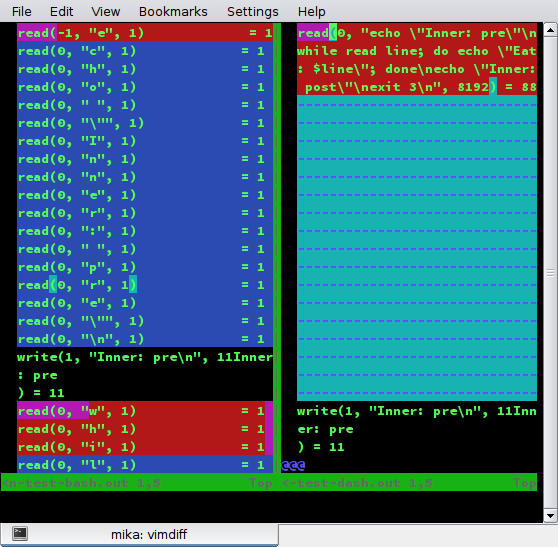
When executing ./stdin-test-cmp and comparing the generated files stdin-test-bash.out and stdin-test-dash.out you ll notice that dash consumes all stdin in one single go (a single read(0, ) ), instead of character-by-character as specified by POSIX and implemented by bash, ksh, mksh, posh and zsh. See stdin-test-bash.out on the left side and stdin-test-dash.out on the right side in this screenshot: screenshot of vimdiff on *.out files So when ssh tries to read from stdin there s nothing there anymore. Quoting POSIX s sh section:
When the shell is using standard input and it invokes a command that also uses standard input, the shell shall ensure that the standard input file pointer points directly after the command it has read when the command begins execution. It shall not read ahead in such a manner that any characters intended to be read by the invoked command are consumed by the shell (whether interpreted by the shell or not) or that characters that are not read by the invoked command are not seen by the shell. When the command expecting to read standard input is started asynchronously by an interactive shell, it is unspecified whether characters are read by the command or interpreted by the shell. If the standard input to sh is a FIFO or terminal device and is set to non-blocking reads, then sh shall enable blocking reads on standard input. This shall remain in effect when the command completes.
So while we learned that both bash and ssh are consuming from stdin and this needs to prevented by either using ssh s -n or explicitly specifying stdin, we also noticed that dash s behavior is different from all the other main shells and could be considered a bug (which we reported as #862907). Lessons learned: Thanks to Guillem Jover for review and feedback regarding this blog post.

5 May 2017

Hideki Yamane: New in Debian stable Stretch: GitHub's Icon font, fonts-octicons


As a member of Debian pkg-fonts-devel team, I added some new packages to Debian. Today I'll introduce "fonts-octicons" in Debian9 "Stretch".

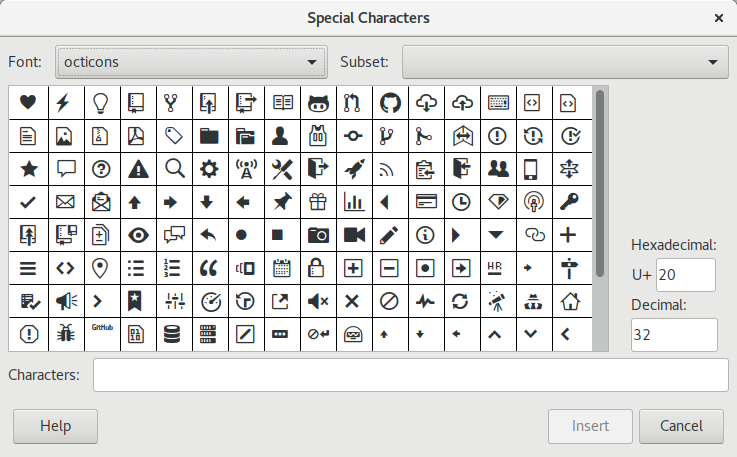
Octicons is GitHub's Icon font. If you want to use it with LibreOffice Impress:
  1. Install fonts-octicons package
  2. Start LibreOffice Impress
  3. Select "Insert" from menu
  4. Select "Special Characters"
  5. Select "octicons" from Fonts
  6. Select and insert it


Enjoy!


3 May 2017

Reproducible builds folks: Reproducing R packages

In the past couple of weeks, Ximin Luo worked on making R generate reproducible output. This is now mostly complete, and we're waiting on feedback from upstream about our patch. In the meantime, there are a few packages that remain unreproducible, but the issue probably lies in those specific packages rather than the R toolchain. Perhaps you can help out with them, after reading this!
R packages compile into a .rdb database format that contains the package's definitions, plus a .rdx index file for easy lookup in the .rdb file. Usually, there is a main rdb with the package contents, plus another rdb that stores the help data. There is also a paths.rds (same format as .rdx) that contains some more stuff. One can actually read these files by hand using Rscript, see the diffoscope code in rdata.py. If you run that, you can see that path.rds contains some obvious paths, but the other files contain less obvious stuff, and in fact these scripts give identical output for the .rdb files, even though they are bitwise different. To get to the bottom of this, we'll have to use the R debugger. Attached to this post is a script that smooths this process. I ran this against Debian's R packages, but it probably also works with other distros' R packages - try it and see. You run it like ./r-mini-repro-test.sh $pkgdir $builddir and it will output some hashes for you; make sure to install the build dependencies first. You should manually vary both $pkgdir and $builddir to introduce the build-path variations; $builddir can be an arbitrary string but $pkgdir should point to the actual R package's source directory, so I just copy that to two locations and point the script at each of them in turn. Now, we can begin debugging. Before I did this, we had 478 unreproducible R packages so the biggest problem was likely with R itself. I downloaded the source code of both R and a small example package (r-cran-tensor), then figured out how the R packages were actually being built. This resulted in me writing the script above, to speed up debugging. You can read about R's debugger here (no HTTPS), it's a bit primitive but it supports the basic stuff (step, continue, where, print/eval) and that was adequate for me. Debugging R core So let's take a small example with Debian R 3.4.0-1:
$ ../r-mini-repro-test.sh r-cran-tensor-1.5 123
[..]
* installing *source* package  tensor  ...
** package  tensor  successfully unpacked and MD5 sums checked
** R
** preparing package for lazy loading
** help
*** installing help indices
** building package indices
** testing if installed package can be loaded
* DONE (tensor)
[..]
c71a766429151a13e46039f3c37a14edc704004f410c34f8f37a2f098506421d  ./debian/123/usr/lib/R/site-library/tensor/R/tensor.rdx
736b5b4a885db71fb3fe2a538faeefe43c500c4080dbf2c75b97135b98401acd  ./debian/123/usr/lib/R/site-library/tensor/R/tensor.rdb
8a3f9616de7ee78a83b07395dd6ec43c5259d3f1b1b653d397808fc9fc5d96c2  ./debian/123/usr/lib/R/site-library/tensor/help/tensor.rdx
d1ac634987b24606a5da627ec073f45edce2bddf071391dd17c246a0a01eba63  ./debian/123/usr/lib/R/site-library/tensor/help/tensor.rdb
80796cc1a2cfcac40c394153f67617d575e103a405430b8483c2261a903db046  ./debian/123/usr/lib/R/site-library/tensor/help/paths.rds
$ ../r-mini-repro-test.sh r-cran-tensor-1.5 1234
[..]
5f081f4d6f9da1fbe06e374067e6636d926de4cdf09886058b15c5928c636c0d  ./debian/1234/usr/lib/R/site-library/tensor/R/tensor.rdx
7145669891e1b766ca0d8d89fa9c317af716e61a62650abe3a11a848240f1d57  ./debian/1234/usr/lib/R/site-library/tensor/R/tensor.rdb
8a3f9616de7ee78a83b07395dd6ec43c5259d3f1b1b653d397808fc9fc5d96c2  ./debian/1234/usr/lib/R/site-library/tensor/help/tensor.rdx
d1ac634987b24606a5da627ec073f45edce2bddf071391dd17c246a0a01eba63  ./debian/1234/usr/lib/R/site-library/tensor/help/tensor.rdb
80796cc1a2cfcac40c394153f67617d575e103a405430b8483c2261a903db046  ./debian/1234/usr/lib/R/site-library/tensor/help/paths.rds
The files are created by the ** preparing package for lazy loading and ** help steps. In retrospect this seems somewhat obvious from the output, but I had never done R before so I spent a while using strace to be sure; one can see that those files are indeed written to after those strings are printed. Then we can grep the R source code for these strings.
r-base-3.4.0$ grep -Ri "preparing package for lazy loading" src
src/library/tools/R/install.R:                starsmsg(stars, "preparing package for lazy loading")
Reading the file, we see that this happens in the tools:::.install_packages function, and reading it further we see that it calls makeLazyLoading then code2LazyLoadDB then makeLazyLoadDB. Seems promising, let's confirm it before chasing potential wild geese. Important: In the rest of these command-line outputs I'll prepend what I input with >>> but this doesn't actually get printed by Rscript. So don't be surprised that you don't see these, when you're trying to recreate my steps. Also I am a total R noob so possibly there are more elegant ways to do what I'm about to show you; this is what I came up with after 2-3 hours of research.
$ DEBUG=1 ../r-mini-repro-test.sh r-cran-tensor-1.5 123
enter (some or all of) the following into R:
[.. helpful commands ..]
+ R_DEFAULT_PACKAGES= LC_COLLATE=C /usr/lib/R/bin/R --no-restore --slave --args nextArg-lnextArgdebian/123/usr/lib/R/site-librarynextArg-dnextArg.nextArg--built-timestamp="Thu, 01 Jan 1970 00:00:00 +0000"
>>> debug(tools:::makeLazyLoadDB)
>>> tools:::.install_packages()
processing  . 
[..]
** preparing package for lazy loading
debugging in: makeLazyLoadDB(ns, dbbase, compress = compress)
debug:  
[.. source code of makeLazyLoadDB, not yet run ..]
 
OK so we just entered the function and it's paused, in a separate shell let's check what it's doing:
$ find r-cran-tensor-1.5 -name '*.rdb'
[ no output ]
So, no files have been written yet, which means none of the parent functions did anything, we are in the right function (or it's in a child). If we continue the function, we get:
>>> c
exiting from: makeLazyLoadDB(ns, dbbase, compress = compress)
** help
debugging in: makeLazyLoadDB(db, file.path(manOutDir, basename(outDir)))
debug:  
[.. source code of makeLazyLoadDB, not yet run ..]
 
$ find r-cran-tensor-1.5 -name '*.rdb'
r-cran-tensor-1.5/debian/123/usr/lib/R/site-library/tensor/R/tensor.rdb
Then continuing again:
>>> c
exiting from: makeLazyLoadDB(db, file.path(manOutDir, basename(outDir)))
*** installing help indices
** building package indices
** testing if installed package can be loaded
* DONE (tensor)
$ find r-cran-tensor-1.5 -name '*.rdb'
r-cran-tensor-1.5/debian/123/usr/lib/R/site-library/tensor/help/tensor.rdb
r-cran-tensor-1.5/debian/123/usr/lib/R/site-library/tensor/R/tensor.rdb
So it seems likely this function is the correct one. After reading the source code of makeLazyLoadDB, even though I don't understand the whole thing, it looks like possibly this part is the one that does the actual writing:
    for (i in seq_along(vars))  
        key <- if (is.null(from)   is.environment(from))
            lazyLoadDBinsertVariable(vars[i], from, datafile,
                                     ascii, compress,  envhook)
        else lazyLoadDBinsertListElement(from, i, datafile, ascii,
                                         compress, envhook)
        assign(vars[i], key, envir = varenv)
     
So let's step through it and see if the data contains any paths.
$ DEBUG=1 ../r-mini-repro-test.sh r-cran-tensor-1.5 123
[..]
>>> debug(tools:::makeLazyLoadDB)
>>> tools:::.install_packages()
processing  . 
[..]
** preparing package for lazy loading
debugging in: makeLazyLoadDB(ns, dbbase, compress = compress)
debug:  
[.. source code of makeLazyLoadDB, not yet run ..]
 
>>>                                                                             # pressing <Enter> just means "step"
debug: ascii <- as.logical(ascii)                                               # this is the first line of the function
>>>                                                                             # keep stepping
[..]
>>>
debug: for (i in seq_along(vars))  
[.. source code of the inside of the block, not yet run ..]
 
>>>
debug: key <- if (is.null(from)   is.environment(from)) lazyLoadDBinsertVariable(vars[i],
    from, datafile, ascii, compress, envhook) else lazyLoadDBinsertListElement(from,
    i, datafile, ascii, compress, envhook)
>>>
debug: lazyLoadDBinsertVariable(vars[i], from, datafile, ascii, compress,
    envhook)                                                                    # not yet run
If we look at the source code we see that it will try to insert the value of .Internal(getVarsFromFrame(vars[i], from, FALSE))[[1L]] into the file, so let's evaluate it:
>>> .Internal(getVarsFromFrame(vars[i], from, FALSE))[[1L]]
function (x, y)
tensor(x, y, 2, 2)
<environment: namespace:tensor>
>>> typeof(.Internal(getVarsFromFrame(vars[i], from, FALSE))[[1L]])
[1] "closure"
>>> environment(.Internal(getVarsFromFrame(vars[i], from, FALSE))[[1L]])        # get the environment of a closure
<environment: namespace:tensor>
>>> envlist(environment(.Internal(getVarsFromFrame(vars[i], from, FALSE))[[1L]])) # environment as an envlist, more detailed output
$ %*t% 
function (x, y)
tensor(x, y, 2, 2)
<environment: namespace:tensor>
$ %t*% 
function (x, y)
tensor(x, y, 1, 1)
<environment: namespace:tensor>
$ %t*t% 
function (x, y)
tensor(x, y, 1, 2)
<environment: namespace:tensor>
$.__NAMESPACE__.
<environment: 0x55eb55d00be0>
$.__S3MethodsTable__.
<environment: 0x55eb55d166e8>
$.packageName
[1] "tensor"
$tensor
function (A, B, alongA = integer(0), alongB = integer(0))
 
[.. function definition ..]
 
<environment: namespace:tensor>
Nothing obviously containing paths so far, let's keep stepping and dumping the objects
>>>
debug: assign(vars[i], key, envir = varenv)
>>>                                                                             # next iteration now
debug: key <- if (is.null(from)   is.environment(from)) lazyLoadDBinsertVariable(vars[i],
    from, datafile, ascii, compress, envhook) else lazyLoadDBinsertListElement(from,
    i, datafile, ascii, compress, envhook)
>>>
debug: lazyLoadDBinsertVariable(vars[i], from, datafile, ascii, compress,
    envhook)
>>> .Internal(getVarsFromFrame(vars[i], from, FALSE))[[1L]]
function (x, y)
tensor(x, y, 1, 1)
<environment: namespace:tensor>
>>>
[.. more stepping ..]
debug: lazyLoadDBinsertVariable(vars[i], from, datafile, ascii, compress,
    envhook)
>>> .Internal(getVarsFromFrame(vars[i], from, FALSE))[[1L]]
<environment: 0x55eb55d00be0>
>>> envlist(.Internal(getVarsFromFrame(vars[i], from, FALSE))[[1L]])
$S3methods
     [,1] [,2] [,3]
$dynlibs
NULL
$exports
<environment: 0x55eb55d0a4f8>
$imports
$imports$base
[1] TRUE
$lazydata
<environment: 0x55eb55d0a178>
attr(,"name")
[1] "lazydata:tensor"
$path
[1] "/mystupidbuildpath/r-tests/r-cran-tensor-1.5/debian/123/usr/lib/R/site-library/tensor"
$spec
    name  version
"tensor"    "1.5"
Oh, here we go. (In fact we could have got this earlier, it was part of the .__NAMESPACE__. key of the first environment that we examined.) Naturally, you'll sometimes miss stuff, and sometimes go down dead ends when doing something like this, perseverence is important. The names are also a hint, after grepping the R source code for names like "S3methods" and "lazydata" we see that src/library/base/R/namespace.R is the only one that contains all of them, then reading that code in more depth reveals this. After patching it, rebuilding r-base, installing this patched version, then running our tests again, we see that we've eliminated differences in the main rdb file but not the help rdb file. :( In fact, after some more time stepping through the loop repeatedly and printing out all the objects, nothing obvious shows up. Time to re-read the source code of makeLazyLoadDB. We notice that all the lazyLoadDBinsert* functions have a hook parameter that we haven't been stepping through because it's in a separate function. So let's do that. Since it's an inner function, one has to call debug() inside makeLazyLoadDB:
$ DEBUG=1 ../r-mini-repro-test.sh r-cran-tensor-1.5 123
[..]
>>> debug(tools:::makeLazyLoadDB)
>>> tools:::.install_packages()
processing  . 
[..]
** preparing package for lazy loading
debugging in: makeLazyLoadDB(ns, dbbase, compress = compress)
debug:  
[.. source code of makeLazyLoadDB, not yet run ..]
 
>>> c
exiting from: makeLazyLoadDB(ns, dbbase, compress = compress)
** help
debugging in: makeLazyLoadDB(db, file.path(manOutDir, basename(outDir)))
debug:  
[.. source code of makeLazyLoadDB, not yet run ..]
 
[.. stepping through the function ..]
debug: envhook <- function(e)  
[.. function definition ..]
 
>>>                                                                             # step next, to define that function
[.. next statement, we don't care about it ..]
>>> debug(envhook)
[.. then keep stepping through makeLazyLoadDB ..]
>>>
debug: lazyLoadDBinsertVariable(vars[i], from, datafile, ascii, compress,
    envhook)
[.. then keep stepping through makeLazyLoadDB ..]
debug: lazyLoadDBinsertVariable(vars[i], from, datafile, ascii, compress,
    envhook)
[.. hook wasn't run for these previous iterations for some reason, but keep stepping ..]
[.. eventually we get ..]
debugging in: (function (e)
 
[.. function definition ..]
 )(<environment>)                                                               # "(..)(<environment>)" is R's name for that function (actually a closure)
debug:  
[.. source code, not yet run ..]
 
>>> e
/mystupidbuildpath/r-tests/r-cran-tensor-1.5/man/tensor.Rd
>>> typeof(e)
[1] "environment"
>>> envlist(e)
$Enc
[1] "UTF-8"
$encoding
[1] ""
$filename
[1] "/mystupidbuildpath/r-tests/r-cran-tensor-1.5/man/tensor.Rd"
$timestamp
[1] "2002-01-16 11:51:14 CET"
$wd
[1] "/mystupidbuildpath/r-tests/r-cran-tensor-1.5"
After doing the same thing as before, i.e. grepping the R source code for "Enc" "timestamp" etc, we spot a few different places that are setting the wd field. Then after some experimenting, we find that overwriting this in a different file (src/library/tools/R/parseRd.R) seems to work to get rid of this irreproducibility. (This may not be the best; our exact strategy is still being discussed with upstream, but at least we know which areas of the code are responsible.) Exercise for the reader to figure out how to get rid of the paths.rds difference. After doing the previous two, this one is fairly easy. These three issues allowed us to write a preliminary patch that enabled us to reproduce r-cran-tensor.
$ ./r-mini-repro-test.sh r-cran-tensor-1.5 123
[..]
bca9de1351ab265475cf6f1af3f6aff49bde1d209e8fafb33954caa8d90f3462  ./debian/123/usr/lib/R/site-library/tensor/R/tensor.rdx
ac7fffeb751ffc2d13c5317704b19787a7078446d97d1c6f259c93f282e04cef  ./debian/123/usr/lib/R/site-library/tensor/R/tensor.rdb
d989603340d1e8f14c35551ef379956653bf3b6e7b1868b4bf9a66d85820998e  ./debian/123/usr/lib/R/site-library/tensor/help/tensor.rdx
30e543cda9f97c202dc9c0291933940dfe71b94d352f66d8ed6c035c1a722b41  ./debian/123/usr/lib/R/site-library/tensor/help/tensor.rdb
e9f78ba2cca39a6face1ed88fce4bb718d911d567d01db49bc00a3011720ac50  ./debian/123/usr/lib/R/site-library/tensor/help/paths.rds
$ ./r-mini-repro-test.sh r-cran-tensor-1.5 1234
[..]
bca9de1351ab265475cf6f1af3f6aff49bde1d209e8fafb33954caa8d90f3462  ./debian/1234/usr/lib/R/site-library/tensor/R/tensor.rdx
ac7fffeb751ffc2d13c5317704b19787a7078446d97d1c6f259c93f282e04cef  ./debian/1234/usr/lib/R/site-library/tensor/R/tensor.rdb
d989603340d1e8f14c35551ef379956653bf3b6e7b1868b4bf9a66d85820998e  ./debian/1234/usr/lib/R/site-library/tensor/help/tensor.rdx
30e543cda9f97c202dc9c0291933940dfe71b94d352f66d8ed6c035c1a722b41  ./debian/1234/usr/lib/R/site-library/tensor/help/tensor.rdb
e9f78ba2cca39a6face1ed88fce4bb718d911d567d01db49bc00a3011720ac50  ./debian/1234/usr/lib/R/site-library/tensor/help/paths.rds
$ ./r-mini-repro-test.sh r-cran-tensor 1234
[..]
bca9de1351ab265475cf6f1af3f6aff49bde1d209e8fafb33954caa8d90f3462  ./debian/1234/usr/lib/R/site-library/tensor/R/tensor.rdx
ac7fffeb751ffc2d13c5317704b19787a7078446d97d1c6f259c93f282e04cef  ./debian/1234/usr/lib/R/site-library/tensor/R/tensor.rdb
d989603340d1e8f14c35551ef379956653bf3b6e7b1868b4bf9a66d85820998e  ./debian/1234/usr/lib/R/site-library/tensor/help/tensor.rdx
30e543cda9f97c202dc9c0291933940dfe71b94d352f66d8ed6c035c1a722b41  ./debian/1234/usr/lib/R/site-library/tensor/help/tensor.rdb
e9f78ba2cca39a6face1ed88fce4bb718d911d567d01db49bc00a3011720ac50  ./debian/1234/usr/lib/R/site-library/tensor/help/paths.rds
Testing the patch Of course r-cran-tensor is just 1 package, so then we tested this patch on all 478 tagged R packages. Before the patch, all of these were unreproducible. Now 463/478 are reproducible, hurray! The first version of the patch made 2 packages FTBFS ("fail to build from source"), r-bioc-biobase and r-cran-shinybs; this was fixed in a subsequent version of the patch. (Some other packages, r-cran-randomfields r-cran-randomfieldsutils, FTBFS even with an unpatched r-base, due to differences between 3.3.3 and 3.4.0 (#861333), and not because of our patch.) Given the overwhelming proportion of packages that did reproduce, the other 14 packages that are still unreproducible, are quite probably due to issues in those specific packages. Only 2 of these are certainly due to build-path differences: r-cran-runit r-cran-rinside. This is because, we currently see they are reproducible in Debian testing but not Debian unstable. This is slightly misleading, the real reason is not testing vs unstable directly; rather the fact that we (at the time of writing) use the same build path when trying to reproduce Debian testing packages, and different paths for unstable. The other 12 are unreproducible in both testing and unstable, so it either suffers from a non-build-path issue as well as a build-path issue, or only a non-build-path issue. So, further investigation of each package is needed. This is where you can help. :) Debugging R packages To investigate why (for example) r-cran-runit doesn't reproduce despite our patches, we just do the above process again:
$ DEBUG=1 ../r-mini-repro-test.sh r-cran-runit
[..]
>>> debug(tools:::makeLazyLoadDB)
>>> tools:::.install_packages()
processing  . 
a directory
* build_help_types=
* DBG: 'R CMD INSTALL' now doing do_install()
* created lock directory  /mystupidbuildpath/r-tests/r-cran-runit/debian/r-cran-runit/usr/lib/R/site-library/00LOCK-r-cran-runit 
* installing *source* package  RUnit  ...
** package  RUnit  successfully unpacked and MD5 sums checked
** backing up earlier installation
** R
** inst
** preparing package for lazy loading
debugging in: makeLazyLoadDB(ns, dbbase, compress = compress)
debug:  
[.. source code of makeLazyLoadDB ..]
 
We know our irreproducibility is with the help files and not the main package, so c to skip this part:
>>> c
exiting from: makeLazyLoadDB(ns, dbbase, compress = compress)
** help
debugging in: makeLazyLoadDB(db, file.path(manOutDir, basename(outDir)))
debug:  
[.. source code of makeLazyLoadDB ..]
 
Examine the "from" object, grep the output for our builddir
>>> from
$ RUnit-internal 
[..]
$ RUnit-intro 
[..]
[.. etc ..]
[..]
$checkFuncs
\title RUnit check [..]
[..]
  For a simple example see the provided test cases in
  /mystupidbuildpath/r-tests/r-cran-runit/debian/r-cran-runit/usr/lib/R/site-library/RUnit/examples/runitVirtualClassTest.r.
[..]
Found it, now we quit, patch the source code, and try again.
>>> Q
[..]
exit code 1
[.. hack hack hack ..]
$ ../r-mini-repro-test.sh r-cran-runit-0.4.31/ 123
[..]
01347305351a45bb88dab909c56942498e97f5edbe583cf6ab1327138914e315  ./debian/123/usr/lib/R/site-library/RUnit/R/RUnit.rdx
ecde40bdfac5b070acc30a0d5889d9d7f65418844d14312aceff6af5b9d0bf7a  ./debian/123/usr/lib/R/site-library/RUnit/R/RUnit.rdb
182d38ac5adc160eb9edd40d5bd7e27b95b756b8f14cee7d912ba4745ae81bdc  ./debian/123/usr/lib/R/site-library/RUnit/help/RUnit.rdx
f8a9f22acc9f937cb47a92f3979d619e83a791ad734796c2fcd9d0a34e1f11ca  ./debian/123/usr/lib/R/site-library/RUnit/help/RUnit.rdb
5c37672fdc1f325b8a3846f4eafd2624b246ec70ce01d197134fa1b97a9ee849  ./debian/123/usr/lib/R/site-library/RUnit/help/paths.rds
$ ../r-mini-repro-test.sh r-cran-runit-0.4.31/ 1234
[..]
01347305351a45bb88dab909c56942498e97f5edbe583cf6ab1327138914e315  ./debian/1234/usr/lib/R/site-library/RUnit/R/RUnit.rdx
ecde40bdfac5b070acc30a0d5889d9d7f65418844d14312aceff6af5b9d0bf7a  ./debian/1234/usr/lib/R/site-library/RUnit/R/RUnit.rdb
182d38ac5adc160eb9edd40d5bd7e27b95b756b8f14cee7d912ba4745ae81bdc  ./debian/1234/usr/lib/R/site-library/RUnit/help/RUnit.rdx
f8a9f22acc9f937cb47a92f3979d619e83a791ad734796c2fcd9d0a34e1f11ca  ./debian/1234/usr/lib/R/site-library/RUnit/help/RUnit.rdb
5c37672fdc1f325b8a3846f4eafd2624b246ec70ce01d197134fa1b97a9ee849  ./debian/1234/usr/lib/R/site-library/RUnit/help/paths.rds
Works! All finished. :) If yours doesn't, just repeat the above loop; hopefully eventually you'll get there.

25 April 2017

Tim Retout: Packet.net arm64 servers

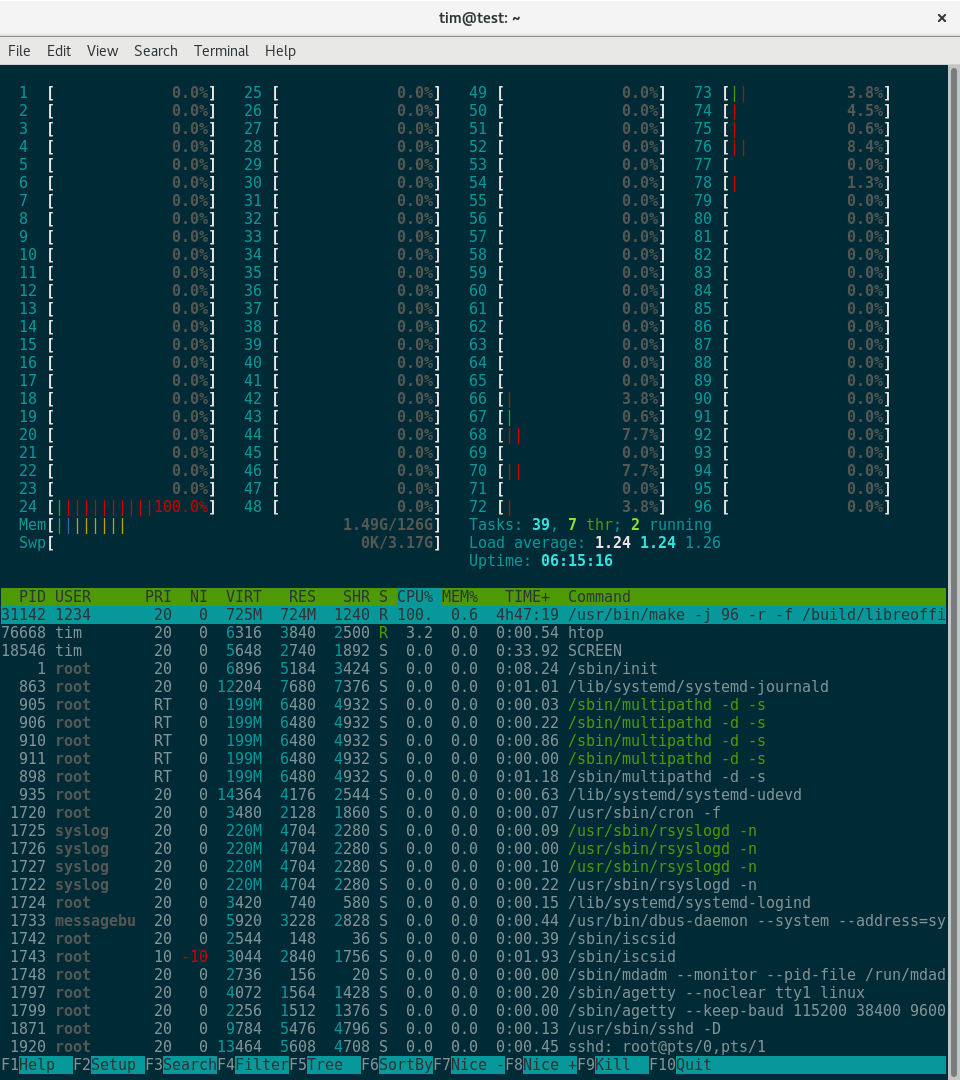
Packet.net offer an ARMv8 server with 96 cores for $0.50/hour. I signed up and tried building Libreoffice to see what would happen. Debian isn't officially supported there yet, but they offer Ubuntu, which suffices for testing the hardware. Screenshot of htop showing one core in use and 95 idle. Final build time: around 12 hours, compared to 2hr 55m on the official arm64 buildd. Most of the Libreoffice build appeared to consist of "touch /some/file" repeated endlessly - I have a suspicion that the I/O performance might be low on this server (although I have no further evidence to offer for this). I think the next thing to try is building on a tmpfs, because the server has 128GB RAM available, and it's a shame not to use it.

23 April 2017

Shirish Agarwal: Debconf 17 in Montreal

Debconf Montreal 17 logo Before I start, debconf registration opened about a week back depending upon what time-frame you are in. So, if you have used and contributed to Debian or are curious to know and try out Debian, this would be right time to register for the conference. For those who are either financially weak (like yours truly) or those who are a minority in any way can avail those
sponsorships, more information about the sponsorship/travel bursary can be found here. Also make sure that you read, understand and accept the Debconf Code of conduct before trying to register. Even if Debconf does give the bursary, getting a visa for Canada might be tricky but then what would be life without any challenges. In the hierarchy of wants and needs, I would say attending debconf would come in the want category and not the needs category as needs are simply food, clothes and roof over one s head, thankfully all of which have been there for as long as I remember or know. To dream is necessary for life and being part of debconf would be part of that dream. While I have put up couple of talks, I have asked if somebody would be willing to tackle/share some basic things in Debconf 17 as well. Let s see if I m able to get any response to that. There was a recent Debian BSP in Montreal. While I don t know how many bugs were fixed, although UDD shows only 32 bugs remain to be fixed before Stretch could be released. Indian cricket team To put things into perspective, I had gone to a friend s place at Market Yard and came to know of a local cricket league which is being played in the city on the likes/basis of the IPL . The amount they will get is INR 88,000 (which is 1,361 USD, around the cost of ticket to and fro from Pune to Montreal and back as of date) and similar and 10 teams of 11-15 people are vying from it. The winning team will get that amount along with a trophy and signed certificates. Of course at the highest level i.e. the IPL, each night the players would probably earn a million or more for each play. One IPL season pay is what 90% of the people don t/can t earn in their whole lifetime. Montreal Metro image from Wikimedia Commons Apart from the conference, I have shared about the northern lights and the snacks on stand thing, there is one thing more to explore and that is the Montreal Metro . While I was re-reading the wiki entry today I was very much reminded about Pune Metro and Metro Samvaad that I attended couple of weeks before. That too as it was not held too far from my house, around 500 metres so could attend. The only hitch I see is the question mark on fate of 6,133 trees . I have shared one probable solution but then it has its own challenges . In the end, Metro is the need of the hour as vehicles in pune are reaching the 5 million mark while residents are around 3 million plus something depending on whether you chose to believe the 2011 census or the more recentish world population review . In either case/scenario I do not see any improvement unless consistent public transport is available. While Buses don t run on time, it is hoped that the metro would run on time. Some of the similarities between the two system, apart from the fact that from what I read Montreal Metro is mostly subway while Pune Metro would be mostly elevated. There is the idea/thought of having POI (Points of Interest) and free shows etc. in order to attract young and old to travel to destinations to and fro. There are a lot of theatre groups, stand-up comedians, rock and roll as well as classical musical concerts for which people like me would be willing to travel week-ends to attend such shows. Of course, this is all in the head, we will know the reality starting this May and commercial journeys if everything goes as planned in end 2018.
Filed under: Miscellenous Tagged: #Canadian Visa, #Debconf Montreal 2017, #Debconf registration, #Debian BSP, #Debian Stretch, #Environment, #Montreal Metro, #Montreal Subway, #planet-debian, #Points of Interest, #Pune Metro, #travel bursary, Debian, Economics

22 April 2017

Manuel A. Fernandez Montecelo: Debian GNU/Linux port for RISC-V 64-bit (riscv64)

This is a post describing my involvement with the Debian GNU/Linux port for RISC-V (unofficial and not endorsed by Debian at the moment) and announcing the availability of the repository (still very much WIP) with packages built for this architecture. If not interested in the story but you want to check the repository, just jump to the bottom. Roots A while ago, mostly during 2014, I was involved in the Debian port for OpenRISC (or1k) about which I posted (by coincidence) exactly 2 years ago. The two of us working on the port stopped in August or September of that year, after knowing that the copyright of the code to add support for this architecture in GCC would not be assigned to the FSF, so it would never be added to GCC upstream unless the original authors changed their mind (which they didn't) or there was a clean-room reimplementation (which didn't happen so far). But a few other key things contributed to the decision to stop working on that port, which bear direct relationship to this story. One thing that particularly influenced me to stop working on it was a sense of lack of purpose, all things considered, for the OpenRISC port that we were working on. For example, these chips are sometimes used as part of bigger devices by Samsung to control or wake up other chips; but it was not clear whether there would ever be devices with OpenRISC as the main chip, specially in devices powerful enough to run Linux or similar kernels, and Debian on top. One can use FPGAs to synthesise OpenRISC or1k, but these are slow, and expensive when using lots of memory. Without prospects of having hardware easily available to users, there's not much point in having a whole Debian port ready to run on hardware that never comes to be. Yeah, sure, it's fun to create such a port, but it's tons of work to maintain and keep it up to-date forever, and with close to zero users it's very unrewarding. Another thing that contributed to decide to stop is that, at least in my opinion, 32-bit was not future-proof enough for general purpose computing, specially for new devices and ports starting to take off on that time and age. There was some incipient work to create another OpenRISC design for 64-bits, but it was still in an early phase. My secret hope and ultimate goal was to be able to run as much a free-ish computer as possible as my main system. Still today many people are buying and using 32-bit devices, like small boards; but very few use it as their main computer or servers for demanding workloads or complex services. So for me, even if feasible if one is very austere and dedicated, OpenRISC or1k failed that test. And lastly, another thing happened at the time... Enter RISC-V In August 2014, at the point when we were fully acknowledging the problem of upstreaming (or rather, lack thereof) the support for OpenRISC in GCC, RISC-V was announced to the world, bringing along papers with suggestive titles such as Instruction Sets Should Be Free: The Case For RISC-V (pdf) and articles like RISC-V: An Open Standard for SoCs - The case for an open ISA in EE Times. RISC-V (as the previous RISC-n marks) had been designed (or rather, was being designed, because it was and is an as yet unfinished standard) by people from UC Berkeley, including David Patterson, the pioneer of RISC computer designs and co-author of the seminal book Computer Architecture: A Quantitative Approach . Other very capable people are also also leading the project, doing the design and legwork to make it happen see the list of contributors. But, apart from throwing names, the project has many other merits. Similarly to OpenRISC, RISC-V is an open instruction set architecture (ISA), but with the advantage of being designed in more recent times (thus avoiding some mistakes and optimising for problems discovered more recently, as technology evolves); with more resources; with support for instruction widths of 32, 64 and even 128 bits; with a clean set of standard but optional extensions (atomics, float, double, quad, vector, ...); and with reserved space to add new extensions in ordered and compatible ways. In the view of some people in the OpenRISC community, this unexpected development in a way made irrelevant the ongoing update of OpenRISC for 64-bits, and from what I know and for better or worse, all efforts on that front stopped. Also interestingly (if nothing else, for my purposes of running as much a free system as possible), was that the people behind RISC-V had strong intentions to make it useful to create modern hardware, and were pushing heavily towards it from the beginning. And together with this announcement or soonly after, it came the promise of free-ish hardware in the form of the lowRISC project. Although still today it seems to be a long way from actually shipping hardware, at least there was some prospect of getting it some day. On top of all that, about the freedom aspect, both the Berkeley and lowRISC teams engaged since very early on with the free hardware community, including attending and presenting at OpenRISC events; and lowRISC intended to have as much free hardware as possible in their planned SoC. Starting to work on the Debian port, this time for RISC-V So in late 2014 I slowly started to prepare the Debian port, switching on and off. The Userland spec was frozen in 2014 just before the announcement, the Privilege one is still not frozen today, so there was no need to rush. There were plans to upstream the support in the toolchain for RISC-V (GNU binutils, glibc and GCC; Linux and other useful software like Qemu) in 2015, but sadly these did not materialise until late 2016 and 2017. One of the main reasons for the delay was due to the slowness to sort out the copyright assignment of the code to the FSF (again). Still today, only binutils and GCC are upstreamed, and Linux and glibc depend on the Privilege spec being finished, so it will take a while. After the experience with OpenRISC and the support in GCC, I didn't want to invest too much time, lest it all became another dead-end due to lack of upstreaming so I was just cross-compiling here and there, testing Qemu (which still today is very limited for this architecture, e.g. no network support and very limited character and block devices) and trying to find and report bugs in the implementations, and send patches (although I did not contribute much in the end). Incompatible changes in the toolchain In terms of compiling packages and building-up a repository, things were complicate, and less mature and stable than the OpenRISC ones were even back in 2014. In theory, with the Userland spec being frozen, regular programs (below the Operating System level) compiled at any time could have run today; but in practice what happened is that there were several rounds of profound or, at least, disrupting changes in the toolchain before and while being upstreamed, which made the binary packages that I had built to not work at all (changes in dynamic loader, registers where arguments are stored when jumping functions, etc.). These major breakages happened several times already, and kind of unexpectedly at least for the people not heavily involved in the implementation. When the different pieces are upstreamed it is expected that these breakages won't happen; but still there's at least the fundamental bit of glibc, which will probably change things once again in incompatible ways before or while being upstreamed. Outside Debian but within the FOSS / Linux world, the main project that I know of is that some people from Fedora also started a port in mid 2016 and did great advances, but from what I know they put the project in the freezer in late 2016 until all such problems are resolved they don't want to spend time rebootstrapping again and again. What happened recently on the Debian front In early 2016 I created the page for RISC-V in the Debian wiki, expecting that things were at last fully stable and the important bits of the toolchain upstreamed during that year I was too optimistic. Some other people (including Debian folks) have been contributing for a while, in the wiki, mailing lists and IRC channels, and in the RISC-V project mailing lists you will see their names everywhere. However, due to the combination of lack of hardware, software not upstreamed and shortcomings of emulators (chiefly Qemu) make contributions hard and very tedious, nothing much happened recently visible to the outside world in terms of software. The private repository-in-the-making In late 2015 and beginning of 2016, having some free time in my hands and expecting that all things would coalesce quickly, I started to build a repository of binary packages in a more systematic way, with most of the basic software that one can expect in a basic Debian system (including things common to all Linux systems, and also specific Debian software like dpkg or apt, and even aptitude!). After that I also built many others outside the basic system (more than 1000 source packages and 2000 or 3000 arch-dependent binary packages in total), specially popular libraries (e.g. boost, gtk+ version 2 and 3), interpreters (several versions of lua, perl and python, also version 2 and 3) and in general packages that are needed to build many other packages (like doxygen). Unfortunately, some of these most interesting packages do not compile cleanly (more because of obscure or silly errors than proper porting), so they are not included at the moment. I intentionally avoided trying to compile thousands of packages in the archive which would be of nobody's use at this point; but many more could be compiled without much effort. About the how, initially I started cross-compiling and using rebootstrap, which was of great help in the beginning. Some of the packages that I cross-compiled had bugs that I did not know how to debug without a live and native (within emulators) system, so I tried to switch to natively built packages very early on. For that I needed many packages built natively (like doxygen or cmake) which would be unnecessary if I remained cross-compiling the host tools would be used in that case. But this also forced me to eat my own dog food, which even if much slower and tedious, it was on the whole a more instructive experience; and above all, it helped to test and make sure that the the tools and the whole stack was working well enough to build hundreds of packages. Why the repository-in-the-making was private Until now I did not attempt to make the repository available on-line, for several reasons. First because it would be kind of useless to publish files that were not working or would soon not work, due to the incompatible changes in the toolchain, rendering many or most of the packages built useless. And because, for many months now, I expected that things would stabilise and to have something stable really soon now but this didn't happen yet. Second because of lack of resources and time since mid 2016, and because I got some packages only compiled thanks to (mostly small and unimportant, but undocumented and unsaved) hacks, often working around temporary bugs and thus not worth sending upstream; but I couldn't share the binaries without sharing the full source and fulfill licenses like the GNU GPL. I did a new round of clean rebuilds in the last few weeks, just finished, the result is close to 1000 arch-dependent packages. And third, because of lack of demand. This changed in the last few weeks, when other people started to ask me to share the results even if incomplete or not working properly (I had one request in the past, but couldn't oblige in time at the time). Finally, the work so far: repository now on-line So finally, with the great help from Kurt Keville from MIT, and Bytemark sponsoring a machine where most of the packages were built, here we have the repository: The lines for /etc/apt/sources.list are:
 deb [ arch=riscv64 signed-by=/usr/share/keyrings/debian-keyring.gpg ] http://riscv.mit.edu/debian unstable main
 deb-src [ signed-by=/usr/share/keyrings/debian-keyring.gpg ] http://riscv.mit.edu/debian unstable main
The repository is signed with my key as Debian Developer, contained in the file /usr/share/keyrings/debian-keyring.gpg, which is part of the package debian-keyring (available from Debian and derivatives). WARNING!! This repository, though, is very much WIP, incomplete (some package dependencies cannot be fulfilled, and it's only a small percentage of the Debian archive, not trying to be comprehensive at the moment) and probably does not work at all in your system at this point, for the following reasons: The combination of all these shortcomings is specially unfortunate, because without glibc provided it will be difficult that you can get the binaries to run at all; but there are some packages that are arch-dependent but not too tied to libc or the dynamic loader will not be affected. At least you can try one the few static packages present in Debian, like the one in the package bash-static. When one removes moving parts like the dynamic loader and libc, since the basic machine instructions are stable for several years now, it should work, but I wouldn't discard some dark magic that prevents even static binaries from working. Still, I hope that the respository in its current state is useful to some people, at least for those who requested it. If one has the environment set-up, it's easy to unpack the contents of the .deb files and try out the software (which often is not trivial or very slow to compile, or needs lots of dependencies to be built first first). ... and finally, even if not useful at all for most people at the moment, by doing this I also hope that efforts like this spark your interest to contribute to free software, free hardware, or both! :-)

1 April 2017

Paul Wise: FLOSS Activities March 2017

Changes

Issues

Review

Administration
  • Debian systems: apply a patch to userdir-ldap, ask a local admin to reset a dead powerpc buildd, remove dead SH4 porterboxen from LDAP, fix perms on www.d.o OC static mirror, report false positives in an an automated abuse report, redirect 1 student to FAQs/support/DebianEdu, redirect 1 event organiser to partners/trademark/merchandise/DPL, redirect 1 guest account seeker to NM, redirect 1 @debian.org desirer to NM, redirect 1 email bounce to a changes@db.d.o user, redirect 2 people to the listmasters, redirect 1 person to Debian Pure Blends, redirect 1 user to a service admin and redirect 2 users to support
  • Debian packages site: deploy my ports/cruft changes
  • Debian wiki: poke at HP page history and advise a contributor, whitelist 13 email address, whitelist 1 domain, check out history of a banned IP, direct 1 hoster to DebConf17 sponsors team, direct 1 user to OpenStack packaging, direct 1 user to InstallingDebianOn and h-node.org, direct 2 users to different ways to help Debian and direct 1 emeritus DD on repository wiki page reorganisation
  • Debian QA: fix an issue with the PTS news, remove some debugging cruft I left behind, fix the usertags on a QA bug and deploy some code fixes
  • Debian mentors: security upgrades and service restarts
  • Openmoko: security upgrades and reboots

Communication

Sponsors The valgrind backport, samba and libthrift-perl bug reports were sponsored by my employer. All other work was done on a volunteer basis.

23 March 2017

Simon McVittie: GTK hackfest 2017: D-Bus communication with containers

At the GTK hackfest in London (which accidentally became mostly a Flatpak hackfest) I've mainly been looking into how to make D-Bus work better for app container technologies like Flatpak and Snap. The initial motivating use cases are: At the moment, Flatpak runs a D-Bus proxy for each app instance that has access to D-Bus, connects to the appropriate bus on the app's behalf, and passes messages through. That proxy is in a container similar to the actual app instance, but not actually the same container; it is trusted to not pass messages through that it shouldn't pass through. The app-identification mechanism works in practice, but is Flatpak-specific, and has a known race condition due to process ID reuse and limitations in the metadata that the Linux kernel maintains for AF_UNIX sockets. In practice the use of X11 rather than Wayland in current systems is a much larger loophole in the container than this race condition, but we want to do better in future. Meanwhile, Snap does its sandboxing with AppArmor, on kernels where it is enabled both at compile-time (Ubuntu, openSUSE, Debian, Debian derivatives like Tails) and at runtime (Ubuntu, openSUSE and Tails, but not Debian by default). Ubuntu's kernel has extra AppArmor features that haven't yet gone upstream, some of which provide reliable app identification via LSM labels, which dbus-daemon can learn by querying its AF_UNIX socket. However, other kernels like the ones in openSUSE and Debian don't have those. The access-control (AppArmor mediation) is implemented in upstream dbus-daemon, but again doesn't work portably, and is not sufficiently fine-grained or flexible to do some of the things we'll likely want to do, particularly in dconf. After a lot of discussion with dconf maintainer Allison Lortie and Flatpak maintainer Alexander Larsson, I think I have a plan for fixing this. This is all subject to change: see fd.o #100344 for the latest ideas. Identity model Each user (uid) has some uncontained processes, plus 0 or more containers. The uncontained processes include dbus-daemon itself, desktop environment components such as gnome-session and gnome-shell, the container managers like Flatpak and Snap, and so on. They have the user's full privileges, and in particular they are allowed to do privileged things on the user's session bus (like running dbus-monitor), and act with the user's full privileges on the system bus. In generic information security jargon, they are the trusted computing base; in AppArmor jargon, they are unconfined. The containers are Flatpak apps, or Snap apps, or other app-container technologies like Firejail and AppImage (if they adopt this mechanism, which I hope they will), or even a mixture (different app-container technologies can coexist on a single system). They are containers (or container instances) and not "apps", because in principle, you could install com.example.MyApp 1.0, run it, and while it's still running, upgrade to com.example.MyApp 2.0 and run that; you'd have two containers for the same app, perhaps with different permissions. Each container has an container type, which is a reversed DNS name like org.flatpak or io.snapcraft representing the container technology, and an app identifier, an arbitrary non-empty string whose meaning is defined by the container technology. For Flatpak, that string would be another reversed DNS name like com.example.MyGreatApp; for Snap, as far as I can tell it would look like example-my-great-app. The container technology can also put arbitrary metadata on the D-Bus representation of a container, again defined and namespaced by the container technology. For instance, Flatpak would use some serialization of the same fields that go in the Flatpak metadata file at the moment. Finally, the container has an opaque container identifier identifying a particular container instance. For example, launching com.example.MyApp twice (maybe different versions or with different command-line options to flatpak run) might result in two containers with different privileges, so they need to have different container identifiers. Contained server sockets App-container managers like Flatpak and Snap would create an AF_UNIX socket inside the container, bind() it to an address that will be made available to the contained processes, and listen(), but not accept() any new connections. Instead, they would fd-pass the new socket to the dbus-daemon by calling a new method, and the dbus-daemon would proceed to accept() connections after the app-container manager has signalled that it has called both bind() and listen(). (See fd.o #100344 for full details.) Processes inside the container must not be allowed to contact the AF_UNIX socket used by the wider, uncontained system - if they could, the dbus-daemon wouldn't be able to distinguish between them and uncontained processes and we'd be back where we started. Instead, they should have the new socket bind-mounted into their container's XDG_RUNTIME_DIR and connect to that, or have the new socket set as their DBUS_SESSION_BUS_ADDRESS and be prevented from connecting to the uncontained socket in some other way. Those familiar with the kdbus proposals a while ago might recognise this as being quite similar to kdbus' concept of endpoints, and I'm considering reusing that name. Along with the socket, the container manager would pass in the container's identity and metadata, and the method would return a unique, opaque identifier for this particular container instance. The basic fields (container technology, technology-specific app ID, container ID) should probably be added to the result of GetConnectionCredentials(), and there should be a new API call to get all of those plus the arbitrary technology-specific metadata. When a process from a container connects to the contained server socket, every message that it sends should also have the container instance ID in a new header field. This is OK even though dbus-daemon does not (in general) forbid sender-specified future header fields, because any dbus-daemon that supported this new feature would guarantee to set that header field correctly, the existing Flatpak D-Bus proxy already filters out unknown header fields, and adding this header field is only ever a reduction in privilege. The reasoning for using the sender's container instance ID (as opposed to the sender's unique name) is for services like dconf to be able to treat multiple unique bus names as belonging to the same equivalence class of contained processes: instead of having to look up the container metadata once per unique name, dconf can look it up once per container instance the first time it sees a new identifier in a header field. For the second and subsequent unique names in the container, dconf can know that the container metadata and permissions are identical to the one it already saw. Access control In principle, we could have the new identification feature without adding any new access control, by keeping Flatpak's proxies. However, in the short term that would mean we'd be adding new API to set up a socket for a container without any access control, and having to keep the proxies anyway, which doesn't seem great; in the longer term, I think we'd find ourselves adding a second new API to set up a socket for a container with new access control. So we might as well bite the bullet and go for the version with access control immediately. In principle, we could also avoid the need for new access control by ensuring that each service that will serve contained clients does its own. However, that makes it really hard to send broadcasts and not have them unintentionally leak information to contained clients - we would need to do something more like kdbus' approach to multicast, where services know who has subscribed to their multicast signals, and that is just not how dbus-daemon works at the moment. If we're going to have access control for broadcasts, it might as well also cover unicast. The plan is that messages from containers to the outside world will be mediated by a new access control mechanism, in parallel with dbus-daemon's current support for firewall-style rules in the XML bus configuration, AppArmor mediation, and SELinux mediation. A message would only be allowed through if the XML configuration, the new container access control mechanism, and the LSM (if any) all agree it should be allowed. By default, processes in a container can send broadcast signals, and send method calls and unicast signals to other processes in the same container. They can also receive method calls from outside the container (so that interfaces like org.freedesktop.Application can work), and send exactly one reply to each of those method calls. They cannot own bus names, communicate with other containers, or send file descriptors (which reduces the scope for denial of service). Obviously, that's not going to be enough for a lot of contained apps, so we need a way to add more access. I'm intending this to be purely additive (start by denying everything except what is always allowed, then add new rules), not a mixture of adding and removing access like the current XML policy language. There are two ways we've identified for rules to be added: Initially, many contained apps would work in the first way (and in particular sockets=session-bus would add a rule that allows almost everything), while over time we'll probably want to head towards recommending more use of the second. Related topics Access control on the system bus We talked about the possibility of using a very similar ruleset to control access to the system bus, as an alternative to the XML rules found in /etc/dbus-1/system.d and /usr/share/dbus-1/system.d. We didn't really come to a conclusion here. Allison had the useful insight that the XML rules are acting like a firewall: they're something that is placed in front of potentially-broken services, and not part of the services themselves (which, as with firewalls like ufw, makes it seem rather odd when the services themselves install rules). D-Bus system services already have total control over what requests they will accept from D-Bus peers, and if they rely on the XML rules to mediate that access, they're essentially rejecting that responsibility and hoping the dbus-daemon will protect them. The D-Bus maintainers would much prefer it if system services took responsibility for their own access control (with or without using polkit), because fundamentally the system service is always going to understand its domain and its intended security model better than the dbus-daemon can. Analogously, when a network service listens on all addresses and accepts requests from elsewhere on the LAN, we sometimes work around that by protecting it with a firewall, but the optimal resolution is to get that network service fixed to do proper authentication and access control instead. For system services, we continue to recommend essentially this "firewall" configuration, filling in the $ variables as appropriate:
<busconfig>
    <policy user="$ the daemon uid under which the service runs ">
        <allow own="$ the service's bus name "/>
    </policy>
    <policy context="default">
        <allow send_destination="$ the service's bus name "/>
    </policy>
</busconfig>
We discussed the possibility of moving towards a model where the daemon uid to be allowed is written in the .service file, together with an opt-in to "modern D-Bus access control" that makes the "firewall" unnecessary; after some flag day when all significant system services follow that pattern, dbus-daemon would even have the option of no longer applying the "firewall" (moving to an allow-by-default model) and just refusing to activate system services that have not opted in to being safe to use without it. However, the "firewall" also protects system bus clients, and services like Avahi that are not bus-activatable, against unintended access, which is harder to solve via that approach; so this is going to take more thought. For system services' clients that follow the "agent" pattern (BlueZ, polkit, NetworkManager, Geoclue), the correct "firewall" configuration is more complicated. At some point I'll try to write up a best-practice for these. New header fields for the system bus At the moment, it's harder than it needs to be to provide non-trivial access control on the system bus, because on receiving a method call, a service has to remember what was in the method call, then call GetConnectionCredentials() to find out who sent it, then only process the actual request when it has the information necessary to do access control. Allison and I had hoped to resolve this by adding new D-Bus message header fields with the user ID, the LSM label, and other interesting facts for access control. These could be "opt-in" to avoid increasing message sizes for no reason: in particular, it is not typically useful for session services to receive the user ID, because only one user ID is allowed to connect to the session bus anyway. Unfortunately, the dbus-daemon currently lets unknown fields through without modification. With hindsight this seems an unwise design choice, because header fields are a finite resource (there are 255 possible header fields) and are defined by the D-Bus Specification. The only field that can currently be trusted is the sender's unique name, because the dbus-daemon sets that field, overwriting the value in the original message (if any). To make it safe to rely on the new fields, we would have to make the dbus-daemon filter out all unknown header fields, and introduce a mechanism for the service to check (during connection to the bus) whether the dbus-daemon is sufficiently new that it does so. If connected to an older dbus-daemon, the service would not be able to rely on the new fields being true, so it would have to ignore the new fields and treat them as unset. The specification is sufficiently vague that making new dbus-daemons filter out unknown header fields is a valid change (it just says that "Header fields with an unknown or unexpected field code must be ignored", without specifying who must ignore them, so having the dbus-daemon delete those fields seems spec-compliant). This all seemed fine when we discussed it in person; but GDBus already has accessors for arbitrary header fields by numeric ID, and I'm concerned that this might mean it's too easy for a system service to be accidentally insecure: It would be natural (but wrong!) for an implementor to assume that if g_message_get_header (message, G_DBUS_MESSAGE_HEADER_FIELD_SENDER_UID) returned non-NULL, then that was guaranteed to be the correct, valid sender uid. As a result, fd.o #100317 might have to be abandoned. I think more thought is needed on that one. Unrelated topics As happens at any good meeting, we took the opportunity of high-bandwidth discussion to cover many useful things and several useless ones. Other discussions that I got into during the hackfest included, in no particular order: More notes are available from the GNOME wiki. Acknowledgements The GTK hackfest was organised by GNOME and hosted by Red Hat and Endless. My attendance was sponsored by Collabora. Thanks to all the sponsors and organisers, and the developers and organisations who attended.

1 March 2017

Thorsten Glaser: New GitHub Terms of Service r e q u i r e removing many Open Source works from it

Please use the correct (perma)link to bookmark this article, not the page listing all wlog entries of the last decade. Thank you.</update> Some updates inline and at the bottom. The new Terms of Service of GitHub became effective today, which is quite problematic there was a review phase, but my reviews pointing out the problems were not answered, and, while the language is somewhat changed from the draft, they became effective immediately. Now, the new ToS are not so bad that one immediately must stop using their service for disagreement, but it s important that certain content may no longer legally be pushed to GitHub. I ll try to explain which is affected, and why. I m mostly working my way backwards through section D, as that s where the problems I identified lie, and because this is from easier to harder. Note that using a private repository does not help, as the same terms apply. Anything requiring attribution (e.g. CC-BY, but also BSD, ) Section D.7 requires the person uploading content to waive any and all attribution rights. Ostensibly to allow basic functions like search to work , which I can even believe, but, for a work the uploader did not create completely by themselves, they can t grant this licence. The CC licences are notably bad because they don t permit sublicencing, but even so, anything requiring attribution can, in almost all cases, not written or otherwise, created or uploaded by our Users . This is fact, and the exceptions are few. Anything putting conditions on the right to use, display and perform the work and, worse, reproduce (all Copyleft) Section D.5 requires the uploader to grant all other GitHub users Note that section D.4 is similar, but granting the licence to GitHub (and their successors); while this is worded much more friendly than in the draft, this fact only makes it harder to see if it affects works in a similar way. But that doesn t matter since D.5 is clear enough. (This doesn t mean it s not a problem, just that I don t want to go there and analyse D.4 as D.5 points out the same problems but is easier.) This means that any and all content under copyleft licences is also no longer welcome on GitHub. Anything requiring integrity of the author s source (e.g. LPPL) Some licences are famous for requiring people to keep the original intact while permitting patches to be piled on top; this is actually permissible for Open Source, even though annoying, and the most common LaTeX licence is rather close to that. Section D.3 says any (partial) content can be removed though keeping a PKZIP archive of the original is a likely workaround. Affected licences Anything copyleft (GPL, AGPL, LGPL, CC-*-SA) or requiring attribution (CC-BY-*, but also 4-clause BSD, Apache 2 with NOTICE text file, ) are affected. BSD-style licences without advertising clause (MIT/Expat, MirOS, etc.) are probably not affected if GitHub doesn t go too far and dissociates excerpts from their context and legal info, but then nobody would be able to distribute it, so that d be useless. But what if I just fork something under such a licence? Only continuing to use GitHub constitutes accepting the new terms. This means that repositories from people who last used GitHub before March 2017 are excluded. Even then, the new terms likely only apply to content uploaded in March 2017 or later (note that git commit dates are unreliable, you have to actually check whether the contribution dates March 2017 or later). And then, most people are likely unaware of the new terms. If they upload content they themselves don t have the appropriate rights (waivers to attribution and copyleft/share-alike clauses), it s plain illegal and also makes your upload of them or a derivate thereof no more legal. Granted, people who, in full knowledge of the new ToS, share any User-Generated Content with GitHub on or after 1 March, 2017, and actually have the appropriate rights to do that, can do that; and if you encounter such a repository, you can fork, modify and upload that iff you also waive attribution and copyleft/share-alike rights for your portion of the upload. But especially in the beginning these will be few and far between (even more so taking into account that GitHub is, legally spoken, a mess, and they don t even care about hosting only OSS / Free works). Conclusion (Fazit) I ll be starting to remove any such content of mine, such as the source code mirrors of jupp, which is under the GNU GPLv1, now and will be requesting people who forked such repositories on GitHub to also remove them. This is not something I like to do but something I am required to do in order to comply with the licence granted to me by my upstream. Anything you ve found contributed by me in the meantime is up for review; ping me if I forgot something. (mksh is likely safe, even if I hereby remind you that the attribution requirement of the BSD-style licences still applies outside of GitHub.) (Pet peeve: why can t I adopt a licence with British spelling? They seem to require oversea barbarian spelling.) The others Atlassian Bitbucket has similar terms (even worse actually; I looked at them to see whether I could mirror mksh there, and turns out, I can t if I don t want to lose most of what few rights I retain when publishing under a permissive licence). Gitlab seems to not have such, but requires you to indemnify them YMMV. I think I ll self-host the removed content. And now? I m in contact with someone from GitHub Legal (not explicitly in the official capacity though) and will try to explain the sheer magnitude of the problem and ways to solve this (leaving the technical issues to technical solutions and requiring legal solutions only where strictly necessary), but for now, the ToS are enacted (another point of my criticism of this move) and thus, the aforementioned works must go off GitHub right now. That s not to say they may not come back later once this all has been addressed, if it will be addressed to allow that. The new ToS do have some good; for example, the old ToS said you allow every GitHub user to fork your repositories without ever specifying what that means. It s just that the people over at GitHub need to understand that, both legally and technically , any and all OSS licences grant enough to run a hosting platform already , and separate explicit grants are only needed if a repository contains content not under an OSI/OKFN/Copyfree/FSF/DFSG-free licence. I have been told that these are important issues and been thanked for my feedback; we ll see what comes from this. maybe with a little more effort on the coders side All licences on one of those lists or conformant to the DFSG, OSD or OKD should do . e.g. when displaying search results, add a note this is an excerpt, click HERE to get to the original work in its context, with licence and attribution where HERE is a backlink to the file in the repository It is understood those organisations never un-approve any licence that rightfully conforms to those definitions (also in cases like a grant saying just use any OSS licence which is occasionally used) Update: In the meantime, joeyh has written not one but two insightful articles (although I disagree in some details; the new licence is only to GitHub users (D.5) and GitHub (D.4) and only within their system, so, while uploaders would violate the ToS (they cannot grant the licence) and (probably) the upstream-granted copyleft licence, this would not mean that everyone else wasn t bound by the copyleft licence in, well, enough cases to count (yes it s possible to construct situations in which this hurts the copyleft fraction, but no, they re nowhere near 100%).

23 February 2017

Lucas Nussbaum: Implementing right to disconnect by delaying outgoing email?

France passed a law about right to disconnect (more info here or here). The idea of not sending professional emails when people are not supposed to read them in order to protect their private lifes, is a pretty good one, especially when hierarchy is involved. However, I tend to do email at random times, and I would rather continue doing that, but just delay the actual sending of the email to the appropriate time (e.g., when I do email in the evening, it would actually be sent the following morning at 9am). I wonder how I could make this fit into my email workflow. I write email using mutt on my laptop, then push it locally to nullmailer, that then relays it, over an SSH tunnel, to a remote server (running Exim4). Of course the fallback solution would be to use mutt s postponing feature. Or to draft the email in a text editor. But that s not really nice, because it requires going back to the email at the appropriate time. I would like a solution where I would write the email, add a header (or maybe manually add a Date: header in all cases that header should reflect the time the mail was sent, not the time it was written), send the email, and have nullmailer or the remote server queue it until the appropriate time is reached (e.g., delaying while current_time < Date header in email ). I don t want to do that for all emails: e.g. personal emails can go out immediately. Any ideas on how to implement that? I m attached to mutt and relaying using SSH, but not attached to nullmailer or exim4. Ideally the delaying would happen on my remote server, so that my laptop doesn t need to be online at the appropriate time. Update: mutt does not allow to set the Date: field manually (if you enable the edit_headers option and edit it manually, its value gets overwritten). I did not find the relevant code yet, but that behaviour is mentioned in that bug. Update 2: ah, it s this code in sendlib.c (and there s no way to configure that behaviour):
 /* mutt_write_rfc822_header() only writes out a Date: header with
 * mode == 0, i.e. _not_ postponment; so write out one ourself */
 if (post)
   fprintf (msg->fp, "%s", mutt_make_date (buf, sizeof (buf)));

22 February 2017

Antoine Beaupr : The case against password hashers

In previous articles, we have looked at how to generate passwords and did a review of various password managers. There is, however, a third way of managing passwords other than remembering them or encrypting them in a "vault", which is what I call "password hashing". A password hasher generates site-specific passwords from a single master password using a cryptographic hash function. It thus allows a user to have a unique and secure password for every site they use while requiring no storage; they need only to remember a single password. You may know these as "deterministic or stateless password managers" but I find the "password manager" phrase to be confusing because a hasher doesn't actually store any passwords. I do not think password hashers represent a good security tradeoff so I generally do not recommend their use, unless you really do not have access to reliable storage that you can access readily. In this article, I use the word "password" for a random string used to unlock things, but "token" to represent a generated random string that the user doesn't need to remember. The input to a password hasher is a password with some site-specific context and the output from a password hasher is a token.

What is a password hasher? A password hasher uses the master password and a label (generally the host name) to generate the site-specific password. To change the generated password, the user can modify the label, for example by appending a number. Some password hashers also have different settings to generate tokens of different lengths or compositions (symbols or not, etc.) to accommodate different site-specific password policies. The whole concept of password hashers relies on the concept of one-way cryptographic hash functions or key derivation functions that take an arbitrary input string (say a password) and generate a unique token, from which it is impossible to guess the original input string. Password hashers are generally written as JavaScript bookmarklets or browser plugins and have been around for over a decade. The biggest advantage of password hashers is that you only need to remember a single password. You do not need to carry around a password manager vault: there's no "state" (other than site-specific settings, which can be easily guessed). A password hasher named Master Password makes a compelling case against traditional password managers in its documentation:
It's as though the implicit assumptions are that everybody backs all of their stuff up to at least two different devices and backups in the cloud in at least two separate countries. Well, people don't always have perfect backups. In fact, they usually don't have any.
It goes on to argue that, when you lose your password: "You lose everything. You lose your own identity." The stateless nature of password hashers also means you do not need to use cloud services to synchronize your passwords, as there is (generally, more on that later) no state to carry around. This means, for example, that the list of accounts that you have access to is only stored in your head, and not in some online database that could be hacked without your knowledge. The downside of this is, of course, that attackers do not actually need to have access to your password hasher to start cracking it: they can try to guess your master key without ever stealing anything from you other than a single token you used to log into some random web site. Password hashers also necessarily generate unique passwords for every site you use them on. While you can also do this with password managers, it is not an enforced decision. With hashers, you get distinct and strong passwords for every site with no effort.

The problem with password hashers If hashers are so great, why would you use a password manager? Programs like LessPass and Master Password seem to have strong crypto that is well implemented, so why isn't everyone using those tools? Password hashing, as a general concept, actually has serious problems: since the hashing outputs are constantly compromised (they are sent in password forms to various possibly hostile sites), it's theoretically possible to derive the master password and then break all the generated tokens in one shot. The use of stronger key derivation functions (like PBKDF2, scrypt, or HMAC) or seeds (like a profile-specific secret) makes those attacks much harder, especially if the seed is long enough to make brute-force attacks infeasible. (Unfortunately, in the case of Password Hasher Plus, the seed is derived from Math.random() calls, which are not considered cryptographically secure.) Basically, as stated by Julian Morrison in this discussion:
A password is now ciphertext, not a block of line noise. Every time you transmit it, you are giving away potential clues of use to an attacker. [...] You only have one password for all the sites, really, underneath, and it's your secret key. If it's broken, it's now a skeleton-key [...]
Newer implementations like LessPass and Master Password fix this by using reasonable key derivation algorithms (PBKDF2 and scrypt, respectively) that are more resistant to offline cracking attacks, but who knows how long those will hold? To give a concrete example, if you would like to use the new winner of the password hashing competition (Argon2) in your password manager, you can patch the program (or wait for an update) and re-encrypt your database. With a password hasher, it's not so easy: changing the algorithm means logging in to every site you visited and changing the password. As someone who used a password hasher for a few years, I can tell you this is really impractical: you quickly end up with hundreds of passwords. The LessPass developers tried to facilitate this, but they ended up mostly giving up. Which brings us to the question of state. A lot of those tools claim to work "without a server" or as being "stateless" and while those claims are partly true, hashers are way more usable (and more secure, with profile secrets) when they do keep some sort of state. For example, Password Hasher Plus records, in your browser profile, which site you visited and which settings were used on each site, which makes it easier to comply with weird password policies. But then that state needs to be backed up and synchronized across multiple devices, which led LessPass to offer a service (which you can also self-host) to keep those settings online. At this point, a key benefit of the password hasher approach (not keeping state) just disappears and you might as well use a password manager. Another issue with password hashers is choosing the right one from the start, because changing software generally means changing the algorithm, and therefore changing passwords everywhere. If there was a well-established program that was be recognized as a solid cryptographic solution by the community, I would feel more confident. But what I have seen is that there are a lot of different implementations each with its own warts and flaws; because changing is so painful, I can't actually use any of those alternatives. All of the password hashers I have reviewed have severe security versus usability tradeoffs. For example, LessPass has what seems to be a sound cryptographic implementation, but using it requires you to click on the icon, fill in the fields, click generate, and then copy the password into the field, which means at least four or five actions per password. The venerable Password Hasher is much easier to use, but it makes you type the master password directly in the site's password form, so hostile sites can simply use JavaScript to sniff the master password while it is typed. While there are workarounds implemented in Password Hasher Plus (the profile-specific secret), both tools are more or less abandoned now. The Password Hasher homepage, linked from the extension page, is now a 404. Password Hasher Plus hasn't seen a release in over a year and there is no space for collaborating on the software the homepage is simply the author's Google+ page with no information on the project. I couldn't actually find the source online and had to download the Chrome extension by hand to review the source code. Software abandonment is a serious issue for every project out there, but I would argue that it is especially severe for password hashers. Furthermore, I have had difficulty using password hashers in unified login environments like Wikipedia's or StackExchange's single-sign-on systems. Because they allow you to log in with the same password on multiple sites, you need to choose (and remember) what label you used when signing in. Did I sign in on stackoverflow.com? Or was it stackexchange.com? Also, as mentioned in the previous article about password managers, web-based password managers have serious security flaws. Since more than a few password hashers are implemented using bookmarklets, they bring all of those serious vulnerabilities with them, which can range from account name to master password disclosures. Finally, some of the password hashers use dubious crypto primitives that were valid and interesting a decade ago, but are really showing their age now. Stanford's pwdhash uses MD5, which is considered "cryptographically broken and unsuitable for further use". We have seen partial key recovery attacks against MD5 already and while those do not allow an attacker to recover the full master password yet (especially not with HMAC-MD5), I would not recommend anyone use MD5 in anything at this point, especially if changing that algorithm later is hard. Some hashers (like Password Hasher and Password Plus) use a a single round of SHA-1 to derive a token from a password; WPA2 (standardized in 2004) uses 4096 iterations of HMAC-SHA1. A recent US National Institute of Standards and Technology (NIST) report also recommends "at least 10,000 iterations of the hash function".

Conclusion Forced to suggest a password hasher, I would probably point to LessPass or Master Password, depending on the platform of the person asking. But, for now, I have determined that the security drawbacks of password hashers are not acceptable and I do not recommend them. It makes my password management recommendation shorter anyway: "remember a few carefully generated passwords and shove everything else in a password manager". [Many thanks to Daniel Kahn Gillmor for the thorough reviews provided for the password articles.]
Note: this article first appeared in the Linux Weekly News. Also, details of my research into password hashers are available in the password hashers history article.

21 February 2017

Steinar H. Gunderson: 8-bit Y'CbCr ought to be enough for anyone?

If you take a random computer today, it's pretty much a given that it runs a 24-bit mode (8 bits of each of R, G and B); as we moved from palettized displays at some point during the 90s, we quickly went past 15- and 16-bit and settled on 24-bit. The reasons are simple; 8 bits per channel is easy to work with on CPUs, and it's on the verge of what human vision can distinguish, at least if you add some dither. As we've been slowly taking the CPU off the pixel path and replacing it with GPUs (which has specialized hardware for more kinds of pixels formats), changing formats have become easier, and there's some push to 10-bit (30-bit) deep color for photo pros, but largely, 8-bit per channel is where we are. Yet, I'm now spending time adding 10-bit input (and eventually also 10-bit output) to Nageru. Why? The reason is simple: Y'CbCr. Video traditionally isn't done in RGB, but in Y'CbCr; that is, a black-and-white signal (Y) and then two color-difference signals (Cb and Cr, roughly additional blueness and additional redness , respectively). We started doing this because it was convenient in analog TV (if you separate the two, black-and-white TVs can just ignore the color signal), but we kept doing it because it's very nice for reducing bandwidth: Human vision is much less sensitive to color than to brightness, so we can transfer the color channels in lower resolution and get away with it. (Also, a typical Bayer sensor can't deliver full color resolution anyway.) So most cameras and video codecs work in Y'CbCr, not RGB. Let's look at the implications of using 8-bit Y'CbCr, using a highly simplified model for, well, simplicity. Let's define Y = 1/3 (R + G + B), Cr = R - Y and Cb = B - Y. (The reverse transformation becomes R = Y + Cr, B = Y + Cb and G = 3Y - R - B.) This means that an RGB color such as pure gray ([127, 127, 127]) becomes [127, 0, 0]. All is good, and Y can go from 0 to 255, just like R, G and B can. A pure red ([255, 0, 0]) becomes [85, 170, 0], and a pure blue ([255, 0, 0]) becomes correspondingly [85, 0, 170]. But we can also have negative Cr and Cb values; a pure yellow ([0, 255, 255]) becomes [170, -170, 85], for instance. So we need to squeeze values from -170 to +170 into an 8-bit range, losing accuracy. Even worse, there are valid Y'CbCr triplets that don't correspond to meaningful RGB colors at all. For instance, Y'CbCr [255, 170, 0] would be RGB [425, 85, 255]; R is out of range! And Y'CbCr [255, -170, 0] would be RGB [85, -85, 255], that is, negative green. This isn't a problem for compression, as we can just avoid using those illegal colors with no loss of efficiency. But it means that the conversion in itself causes a loss; actually, if you do the maths on the real formulas (using the BT.601 standard), it turns out only 17% of the 24-bit Y'CbCr code words are valid! In other words, we lose about two and a half bits of data, and our 24 bits of accuracy have been reduced to 21.5. Or, to put it another way; 8-bit Y'CbCr is roughly equivalent to 7-bit RGB. Thus, pretty much all professional video uses 10-bit Y'CbCr. It's much more annoying to deal with (especially when you've got subsampling!), but if you're using SDI, there's not even any 8-bit version defined, so if you insist on 8-bit, you're taking data you're getting on the wire (whether you want it or not) and throwing 20% of it away. UHDTV standards (using HEVC) are also simply not defined for 8-bit; it's 10- and 12-bit only, even on the codec level. Parts of this is because UHDTV also supports HDR, so you have a wider RGB range than usual to begin with, and 8-bit would cause excessive banding. Using it on the codec level makes a lot of sense for another reason, namely that you reduce internal roundoff errors during processing by a lot; errors equal noise, and noise is bad for compression. I've seen numbers of 15% lower bitrate for H.264 at the same quality, although you also have to take into account that the encoeder also needs more CPU power that you could have used for a higher preset in 8-bit. I don't know how the tradeoff here works out, and you also have to take into account decoder support for 10-bit, especially when it comes to hardware. (When it comes to HEVC, Intel didn't get full fixed-function 10-bit support before Kaby Lake!) So indeed, 10-bit Y'CbCr makes sense even for quite normal video. It isn't a no-brainer to turn it on, though even though Nageru uses a compute shader to convert the 4:2:2 10-bit Y'CbCr to something the GPU can sample from quickly (ie., the CPU doesn't need to touch it), and all internal processing is in 16-bit floating point anyway, it still takes a nonzero amount of time to convert compared to just blasting through 8-bit, so my ultraportable probably won't make it anymore. (A discrete GPU has no issues at all, of course. My laptop converts a 720p frame in about 1.4 ms, FWIW.) But it's worth considering when you want to squeeze even more quality out of the system. And of course, there's still 10-bit output support to be written...

15 February 2017

Antoine Beaupr : A look at password managers

As we noted in an earlier article, passwords are a liability and we'd prefer to get rid of them, but the current reality is that we do use a plethora of passwords in our daily lives. This problem is especially acute for technology professionals, particularly system administrators, who have to manage a lot of different machines. But it also affects regular users who still use a large number of passwords, from their online bank to their favorite social-networking site. Despite the remarkable memory capacity of the human brain, humans are actually terrible at recalling even short sets of arbitrary characters with the precision needed for passwords. Therefore humans reuse passwords, make them trivial or guessable, write them down on little paper notes and stick them on their screens, or just reset them by email every time. Our memory is undeniably failing us and we need help, which is where password managers come in. Password managers allow users to store an arbitrary number of passwords and just remember a single password to unlock them all. But there is a large variety of password managers out there, so which one should we be using? At my previous job, an inventory was done of about 40 different free-software password managers in different stages of development and of varying quality. So, obviously, this article will not be exhaustive, but instead focus on a smaller set of some well-known options that may be interesting to readers.

KeePass: the popular alternative The most commonly used password-manager design pattern is to store passwords in a file that is encrypted and password-protected. The most popular free-software password manager of this kind is probably KeePass. An important feature of KeePass is the ability to auto-type passwords in forms, most notably in web browsers. This feature makes KeePass really easy to use, especially considering it also supports global key bindings to access passwords. KeePass databases are designed for simultaneous access by multiple users, for example, using a shared network drive. KeePass has a graphical interface written in C#, so it uses the Mono framework on Linux. A separate project, called KeePassX is a clean-room implementation written in C++ using the Qt framework. Both support the AES and Twofish encryption algorithms, although KeePass recently added support for the ChaCha20 cipher. AES key derivation is used to generate the actual encryption key for the database, but the latest release of KeePass also added using Argon2, which was the winner of the July 2015 password-hashing competition. Both programs are more or less equivalent, although the original KeePass seem to have more features in general. The KeePassX project has recently been forked into another project now called KeePassXC that implements a set of new features that are present in KeePass but missing from KeePassX like:
  • auto-type on Linux, Mac OS, and Windows
  • database merging which allows multi-user support
  • using the web site's favicon in the interface
So far, the maintainers of KeePassXC seem to be open to re-merging the project "if the original maintainer of KeePassX in the future will be more active and will accept our merge and changes". I can confirm that, at the time of writing, the original KeePassX project now has 79 pending pull requests and only one pull request was merged since the last release, which was 2.0.3 in September 2016. While KeePass and derivatives allow multiple users to access the same database through the merging process, they do not support multi-party access to a single database. This may be a limiting factor for larger organizations, where you may need, for example, a different password set for different technical support team levels. The solution in this case is to use separate databases for each team, with each team using a different shared secret.

Pass: the standard password manager? I am currently using password-store, or pass, as a password manager. It aims to be "the standard Unix password manager". Pass is a GnuPG-based password manager that features a surprising number of features given its small size:
  • copy-paste support
  • Git integration
  • multi-user/group support
  • pluggable extensions (in the upcoming 1.7 release)
The command-line interface is simple to use and intuitive. The following, will, for example, create a pass repository, a 20 character password for your LWN account and copy it to the clipboard:
    $ pass init
    $ pass generate -c lwn 20
The main issue with pass is that it doesn't encrypt the name of those entries: if someone were to compromise my machine, they could easily see which sites I have access to simply by listing the passwords stored in ~/.password-store. This is a deliberate design decision by the upstream project, as stated by a mailing list participant, Allan Odgaard:
Using a single file per item has the advantage of shell completion, using version control, browse, move and rename the items in a file browser, edit them in a regular editor (that does GPG, or manually run GPG first), etc.
Odgaard goes on to point out that there are alternatives that do encrypt the entire database (including the site names) if users really need that feature. Furthermore, there is a tomb plugin for pass that encrypts the password store in a LUKS container (called a "tomb"), although it requires explicitly opening and closing the container, which makes it only marginally better than using full disk encryption system-wide. One could also argue that password file names do not hold secret information, only the site name and username, perhaps, and that doesn't require secrecy. I do believe those should be kept secret, however, as they could be used to discover (or prove) which sites you have access to and then used to perform other attacks. One could draw a parallel with the SSH known_hosts file, which used to be plain text but is now hashed so that hosts are more difficult to discover. Also, sharing a database for multi-user support will require some sort of file-sharing mechanism. Given the integrated Git support, this will likely involve setting up a private Git repository for your team, something which may not be accessible to the average Linux user. Nothing keeps you, however, from sharing the ~/.password-store directory through another file sharing mechanism like (say) Syncthing or Dropbox. You can use multiple distinct databases easily using the PASSWORD_STORE_DIR environment variable. For example, you could have a shell alias to use a different repository for your work passwords with:
    alias work-pass="PASSWORD_STORE_DIR=~/work-passwords pass"
Group support comes from a clever use of the GnuPG multiple-recipient encryption support. You simply have to specify multiple OpenPGP identities when initializing the repository, which also works in subdirectories:
    $ pass init -p Ateam me@example.com joelle@example.com
    mkdir: created directory '/home/me/.password-store/Ateam'
    Password store initialized for me@example.com, joelle@example.com
    [master 0e3dbe7] Set GPG id to me@example.com, joelle@example.com.
     1 file changed, 2 insertions(+)
     create mode 100644 Ateam/.gpg-id
The above will configure pass to encrypt the passwords in the Ateam directory for me@example.com and joelle@example.com. Pass depends on GnuPG to do the right thing when encrypting files and how those identities are treated is entirely delegated to GnuPG's default configuration. This could lead to problems if arbitrary keys can be injected into your key ring, which could confuse GnuPG. I would therefore recommend using full key fingerprints instead of user identifiers. Regarding the actual encryption algorithms used, in my tests, GnuPG 1.4.18 and 2.1.18 seemed to default to 256-bit AES for encryption, but that has not always been the case. The chosen encryption algorithm actually depends on the recipient's key preferences, which may vary wildly: older keys and versions may use anything from 128-bit AES to CAST5 or Triple DES. To figure out which algorithm GnuPG chose, you may want to try this pipeline:
    $ echo test   gpg -e -r you@example.com   gpg -d -v
    [...]
    gpg: encrypted with 2048-bit RSA key, ID XXXXXXX, created XXXXX
      "You Person You <you@example.com>"
    gpg: AES256 encrypted data
    gpg: original file name=''
    test
As you can see, pass is primarily a command-line application, which may make it less accessible to regular users. The community has produced different graphical interfaces that are either using pass directly or operate on the storage with their own GnuPG integration. I personally use pass in combination with Rofi to get quick access to my passwords, but less savvy users may want to try the QtPass interface, which should be more user-friendly. QtPass doesn't actually depend on pass and can use GnuPG directly to interact with the pass database; it is available for Linux, BSD, OS X, and Windows.

Browser password managers Most users are probably already using a password manager through their web browser's "remember password" functionality. For example, Chromium will ask if you want it to remember passwords and encrypt them with your operating system's facilities. For Windows, this encrypts the passwords with your login password and, for GNOME, it will store the passwords in the gnome-keyring storage. If you synchronize your Chromium settings with your Google account, Chromium will store those passwords on Google's servers, encrypted with a key that is stored in the Google Account itself. So your passwords are then only as safe as your Google account. Note that this was covered here in 2010, although back then Chromium didn't synchronize with the Google cloud or encrypt with the system-level key rings. That facility was only added in 2013. In Firefox, there's an optional, profile-specific master password that unlocks all passwords. In this case, the issue is that browsers are generally always open, so the vault is always unlocked. And this is for users that actually do pick a master password; users are often completely unaware that they should set one. The unlocking mechanism is a typical convenience-security trade-off: either users need to constantly input their master passwords to login or they don't, and the passwords are available in the clear. In this case, Chromium's approach of actually asking users to unlock their vault seems preferable, even though the developers actually refused to implement the feature for years. Overall, I would recommend against using a browser-based password manager. Even if it is not used for critical sites, you will end up with hundreds of such passwords that are vulnerable while the browser is running (in the case of Firefox) or at the whim of Google (in the case of Chromium). Furthermore, the "auto-fill" feature that is often coupled with browser-based password managers is often vulnerable to serious attacks, which is mentioned below. Finally, because browser-based managers generally lack a proper password generator, users may fail to use properly generated passwords, so they can then be easily broken. A password generator has been requested for Firefox, according to this feature request opened in 2007, and there is a password generator in Chrome, but it is disabled by default and hidden in the mysterious chrome://flags URL.

Other notable password managers Another alternative password manager, briefly mentioned in the previous article, is the minimalistic Assword password manager that, despite its questionable name, is also interesting. Its main advantage over pass is that it uses a single encrypted JSON file for storage, and therefore doesn't leak the name of the entries by default. In addition to copy/paste, Assword also supports automatically entering passphrases in fields using the xdo library. Like pass, it uses GnuPG to encrypt passphrases. According to Assword maintainer Daniel Kahn Gillmor in email, the main issue with Assword is "interaction between generated passwords and insane password policies". He gave the example of the Time-Warner Cable registration form that requires, among other things, "letters and numbers, between 8 and 16 characters and not repeat the same characters 3 times in a row". Another well-known password manager is the commercial LastPass service which released a free-software command-line client called lastpass-cli about three years ago. Unfortunately, the server software of the lastpass.com service is still proprietary. And given that LastPass has had at least two serious security breaches since that release, one could legitimately question whether this is a viable solution for storing important secrets. In general, web-based password managers expose a whole new attack surface that is not present in regular password managers. A 2014 study by University of California researchers showed that, out of five password managers studied, every one of them was vulnerable to at least one of the vulnerabilities studied. LastPass was, in particular, vulnerable to a cross-site request forgery (CSRF) attack that allowed an attacker to bypass account authentication and access the encrypted database.

Problems with password managers When you share a password database within a team, how do you remove access to a member of the team? While you can, for example, re-encrypt a pass database with new keys (thereby removing or adding certain accesses) or change the password on a KeePass database, a hostile party could have made a backup of the database before the revocation. Indeed, in the case of pass, older entries are still in the Git history. So access revocation is a problematic issue found with all shared password managers, as it may actually mean going through every password and changing them online. This fundamental problem with shared secrets can be better addressed with a tool like Vault or SFLvault. Those tools aim to provide teams with easy ways to store dynamic tokens like API keys or service passwords and share them not only with other humans, but also make them accessible to machines. The general idea of those projects is to store secrets in a central server and send them directly to relevant services without human intervention. This way, passwords are not actually shared anymore, which is similar in spirit to the approach taken by centralized authentication systems like Kerberos. If you are looking at password management for teams, those projects may be worth a look. Furthermore, some password managers that support auto-typing were found to be vulnerable to HTML injection attacks: if some third-party ad or content is able to successfully hijack the parent DOM content, it masquerades as a form that could fool auto-typing software as demonstrated by this paper that was submitted at USENIX 2014. Fortunately, KeePass was not vulnerable according to the security researchers, but LastPass was, again, vulnerable.

Future of password managers? All of the solutions discussed here assume you have a trusted computer you regularly have access to, which is a usage pattern that seems to be disappearing with a majority of the population. You could consider your phone to be that trusted device, yet a phone can be lost or stolen more easily than a traditional workstation or even a laptop. And while KeePass has Android and iOS ports, those do not resolve the question of how to share the password storage among those devices or how to back them up. Password managers are fundamentally file-based, and the "file" concept seems to be quickly disappearing, faster than we technologists sometimes like to admit. Looking at some relatives' use of computers, I notice it is less about "files" than images, videos, recipes, and various abstract objects that are stored in the "cloud". They do not use local storage so much anymore. In that environment, password managers lose their primary advantage, which is a local, somewhat offline file storage that is not directly accessible to attackers. Therefore certain password managers are specifically designed for the cloud, like LastPass or web browser profile synchronization features, without necessarily addressing the inherent issues with cloud storage and opening up huge privacy and security issues that we absolutely need to address. This is where the "password hasher" design comes in. Also known as "stateless" or "deterministic" password managers, password hashers are emerging as a convenient solution that could possibly replace traditional password managers as users switch from generic computing platforms to cloud-based infrastructure. We will cover password hashers and the major security challenges they pose in a future article.
Note: this article first appeared in the Linux Weekly News.

Antoine Beaupr : A look at password managers

As we noted in an earlier article, passwords are a liability and we'd prefer to get rid of them, but the current reality is that we do use a plethora of passwords in our daily lives. This problem is especially acute for technology professionals, particularly system administrators, who have to manage a lot of different machines. But it also affects regular users who still use a large number of passwords, from their online bank to their favorite social-networking site. Despite the remarkable memory capacity of the human brain, humans are actually terrible at recalling even short sets of arbitrary characters with the precision needed for passwords. Therefore humans reuse passwords, make them trivial or guessable, write them down on little paper notes and stick them on their screens, or just reset them by email every time. Our memory is undeniably failing us and we need help, which is where password managers come in. Password managers allow users to store an arbitrary number of passwords and just remember a single password to unlock them all. But there is a large variety of password managers out there, so which one should we be using? At my previous job, an inventory was done of about 40 different free-software password managers in different stages of development and of varying quality. So, obviously, this article will not be exhaustive, but instead focus on a smaller set of some well-known options that may be interesting to readers.

KeePass: the popular alternative The most commonly used password-manager design pattern is to store passwords in a file that is encrypted and password-protected. The most popular free-software password manager of this kind is probably KeePass. An important feature of KeePass is the ability to auto-type passwords in forms, most notably in web browsers. This feature makes KeePass really easy to use, especially considering it also supports global key bindings to access passwords. KeePass databases are designed for simultaneous access by multiple users, for example, using a shared network drive. KeePass has a graphical interface written in C#, so it uses the Mono framework on Linux. A separate project, called KeePassX is a clean-room implementation written in C++ using the Qt framework. Both support the AES and Twofish encryption algorithms, although KeePass recently added support for the ChaCha20 cipher. AES key derivation is used to generate the actual encryption key for the database, but the latest release of KeePass also added using Argon2, which was the winner of the July 2015 password-hashing competition. Both programs are more or less equivalent, although the original KeePass seem to have more features in general. The KeePassX project has recently been forked into another project now called KeePassXC that implements a set of new features that are present in KeePass but missing from KeePassX like:
  • auto-type on Linux, Mac OS, and Windows
  • database merging which allows multi-user support
  • using the web site's favicon in the interface
So far, the maintainers of KeePassXC seem to be open to re-merging the project "if the original maintainer of KeePassX in the future will be more active and will accept our merge and changes". I can confirm that, at the time of writing, the original KeePassX project now has 79 pending pull requests and only one pull request was merged since the last release, which was 2.0.3 in September 2016. While KeePass and derivatives allow multiple users to access the same database through the merging process, they do not support multi-party access to a single database. This may be a limiting factor for larger organizations, where you may need, for example, a different password set for different technical support team levels. The solution in this case is to use separate databases for each team, with each team using a different shared secret.

Pass: the standard password manager? I am currently using password-store, or pass, as a password manager. It aims to be "the standard Unix password manager". Pass is a GnuPG-based password manager that features a surprising number of features given its small size:
  • copy-paste support
  • Git integration
  • multi-user/group support
  • pluggable extensions (in the upcoming 1.7 release)
The command-line interface is simple to use and intuitive. The following, will, for example, create a pass repository, a 20 character password for your LWN account and copy it to the clipboard:
    $ pass init
    $ pass generate -c lwn 20
The main issue with pass is that it doesn't encrypt the name of those entries: if someone were to compromise my machine, they could easily see which sites I have access to simply by listing the passwords stored in ~/.password-store. This is a deliberate design decision by the upstream project, as stated by a mailing list participant, Allan Odgaard:
Using a single file per item has the advantage of shell completion, using version control, browse, move and rename the items in a file browser, edit them in a regular editor (that does GPG, or manually run GPG first), etc.
Odgaard goes on to point out that there are alternatives that do encrypt the entire database (including the site names) if users really need that feature. Furthermore, there is a tomb plugin for pass that encrypts the password store in a LUKS container (called a "tomb"), although it requires explicitly opening and closing the container, which makes it only marginally better than using full disk encryption system-wide. One could also argue that password file names do not hold secret information, only the site name and username, perhaps, and that doesn't require secrecy. I do believe those should be kept secret, however, as they could be used to discover (or prove) which sites you have access to and then used to perform other attacks. One could draw a parallel with the SSH known_hosts file, which used to be plain text but is now hashed so that hosts are more difficult to discover. Also, sharing a database for multi-user support will require some sort of file-sharing mechanism. Given the integrated Git support, this will likely involve setting up a private Git repository for your team, something which may not be accessible to the average Linux user. Nothing keeps you, however, from sharing the ~/.password-store directory through another file sharing mechanism like (say) Syncthing or Dropbox). You can use multiple distinct databases easily using the PASSWORD_STORE_DIR environment variable. For example, you could have a shell alias to use a different repository for your work passwords with:
    alias work-pass="PASSWORD_STORE_DIR=~/work-passwords pass"
Group support comes from a clever use of the GnuPG multiple-recipient encryption support. You simply have to specify multiple OpenPGP identities when initializing the repository, which also works in subdirectories:
    $ pass init -p Ateam me@example.com joelle@example.com
    mkdir: created directory '/home/me/.password-store/Ateam'
    Password store initialized for me@example.com, joelle@example.com
    [master 0e3dbe7] Set GPG id to me@example.com, joelle@example.com.
     1 file changed, 2 insertions(+)
     create mode 100644 Ateam/.gpg-id
The above will configure pass to encrypt the passwords in the Ateam directory for me@example.com and joelle@example.com. Pass depends on GnuPG to do the right thing when encrypting files and how those identities are treated is entirely delegated to GnuPG's default configuration. This could lead to problems if arbitrary keys can be injected into your key ring, which could confuse GnuPG. I would therefore recommend using full key fingerprints instead of user identifiers. Regarding the actual encryption algorithms used, in my tests, GnuPG 1.4.18 and 2.1.18 seemed to default to 256-bit AES for encryption, but that has not always been the case. The chosen encryption algorithm actually depends on the recipient's key preferences, which may vary wildly: older keys and versions may use anything from 128-bit AES to CAST5 or Triple DES. To figure out which algorithm GnuPG chose, you may want to try this pipeline:
    $ echo test   gpg -e -r you@example.com   gpg -d -v
    [...]
    gpg: encrypted with 2048-bit RSA key, ID XXXXXXX, created XXXXX
      "You Person You <you@example.com>"
    gpg: AES256 encrypted data
    gpg: original file name=''
    test
As you can see, pass is primarily a command-line application, which may make it less accessible to regular users. The community has produced different graphical interfaces that are either using pass directly or operate on the storage with their own GnuPG integration. I personally use pass in combination with Rofi to get quick access to my passwords, but less savvy users may want to try the QtPass interface, which should be more user-friendly. QtPass doesn't actually depend on pass and can use GnuPG directly to interact with the pass database; it is available for Linux, BSD, OS X, and Windows.

Browser password managers Most users are probably already using a password manager through their web browser's "remember password" functionality. For example, Chromium will ask if you want it to remember passwords and encrypt them with your operating system's facilities. For Windows, this encrypts the passwords with your login password and, for GNOME, it will store the passwords in the gnome-keyring storage. If you synchronize your Chromium settings with your Google account, Chromium will store those passwords on Google's servers, encrypted with a key that is stored in the Google Account itself. So your passwords are then only as safe as your Google account. Note that this was covered here in 2010, although back then Chromium didn't synchronize with the Google cloud or encrypt with the system-level key rings. That facility was only added in 2013. In Firefox, there's an optional, profile-specific master password that unlocks all passwords. In this case, the issue is that browsers are generally always open, so the vault is always unlocked. And this is for users that actually do pick a master password; users are often completely unaware that they should set one. The unlocking mechanism is a typical convenience-security trade-off: either users need to constantly input their master passwords to login or they don't, and the passwords are available in the clear. In this case, Chromium's approach of actually asking users to unlock their vault seems preferable, even though the developers actually refused to implement the feature for years. Overall, I would recommend against using a browser-based password manager. Even if it is not used for critical sites, you will end up with hundreds of such passwords that are vulnerable while the browser is running (in the case of Firefox) or at the whim of Google (in the case of Chromium). Furthermore, the "auto-fill" feature that is often coupled with browser-based password managers is often vulnerable to serious attacks, which is mentioned below. Finally, because browser-based managers generally lack a proper password generator, users may fail to use properly generated passwords, so they can then be easily broken. A password generator has been requested for Firefox, according to this feature request opened in 2007, and there is a password generator in Chrome, but it is disabled by default and hidden in the mysterious chrome://flags URL.

Other notable password managers Another alternative password manager, briefly mentioned in the previous article, is the minimalistic Assword password manager that, despite its questionable name, is also interesting. Its main advantage over pass is that it uses a single encrypted JSON file for storage, and therefore doesn't leak the name of the entries by default. In addition to copy/paste, Assword also supports automatically entering passphrases in fields using the xdo library. Like pass, it uses GnuPG to encrypt passphrases. According to Assword maintainer Daniel Kahn Gillmor in email, the main issue with Assword is "interaction between generated passwords and insane password policies". He gave the example of the Time-Warner Cable registration form that requires, among other things, "letters and numbers, between 8 and 16 characters and not repeat the same characters 3 times in a row". Another well-known password manager is the commercial LastPass service which released a free-software command-line client called lastpass-cli about three years ago. Unfortunately, the server software of the lastpass.com service is still proprietary. And given that LastPass has had at least two serious security breaches since that release, one could legitimately question whether this is a viable solution for storing important secrets. In general, web-based password managers expose a whole new attack surface that is not present in regular password managers. A 2014 study by University of California researchers showed that, out of five password managers studied, every one of them was vulnerable to at least one of the vulnerabilities studied. LastPass was, in particular, vulnerable to a cross-site request forgery (CSRF) attack that allowed an attacker to bypass account authentication and access the encrypted database.

Problems with password managers When you share a password database within a team, how do you remove access to a member of the team? While you can, for example, re-encrypt a pass database with new keys (thereby removing or adding certain accesses) or change the password on a KeePass database, a hostile party could have made a backup of the database before the revocation. Indeed, in the case of pass, older entries are still in the Git history. So access revocation is a problematic issue found with all shared password managers, as it may actually mean going through every password and changing them online. This fundamental problem with shared secrets can be better addressed with a tool like Vault or SFLvault. Those tools aim to provide teams with easy ways to store dynamic tokens like API keys or service passwords and share them not only with other humans, but also make them accessible to machines. The general idea of those projects is to store secrets in a central server and send them directly to relevant services without human intervention. This way, passwords are not actually shared anymore, which is similar in spirit to the approach taken by centralized authentication systems like Kerberos). If you are looking at password management for teams, those projects may be worth a look. Furthermore, some password managers that support auto-typing were found to be vulnerable to HTML injection attacks: if some third-party ad or content is able to successfully hijack the parent DOM content, it masquerades as a form that could fool auto-typing software as demonstrated by this paper that was submitted at USENIX 2014. Fortunately, KeePass was not vulnerable according to the security researchers, but LastPass was, again, vulnerable.

Future of password managers? All of the solutions discussed here assume you have a trusted computer you regularly have access to, which is a usage pattern that seems to be disappearing with a majority of the population. You could consider your phone to be that trusted device, yet a phone can be lost or stolen more easily than a traditional workstation or even a laptop. And while KeePass has Android and iOS ports, those do not resolve the question of how to share the password storage among those devices or how to back them up. Password managers are fundamentally file-based, and the "file" concept seems to be quickly disappearing, faster than we technologists sometimes like to admit. Looking at some relatives' use of computers, I notice it is less about "files" than images, videos, recipes, and various abstract objects that are stored in the "cloud". They do not use local storage so much anymore. In that environment, password managers lose their primary advantage, which is a local, somewhat offline file storage that is not directly accessible to attackers. Therefore certain password managers are specifically designed for the cloud, like LastPass or web browser profile synchronization features, without necessarily addressing the inherent issues with cloud storage and opening up huge privacy and security issues that we absolutely need to address. This is where the "password hasher" design comes in. Also known as "stateless" or "deterministic" password managers, password hashers are emerging as a convenient solution that could possibly replace traditional password managers as users switch from generic computing platforms to cloud-based infrastructure. We will cover password hashers and the major security challenges they pose in a future article.
Note: this article first appeared in the Linux Weekly News.

Daniel Stender: APT programming snippets for Debian system maintenance

The Python API for the Debian package manager APT is useful for writing practical system maintenance scripts, which are going beyond shell scripting capabilities. There are Python2 and Python3 libraries for that available as packages, as well as a documentation in the package python-apt-doc. If that s also installed, the documentation then could be found in /usr/share/doc/python-apt-doc/html/index.html, and there are also a couple of example scripts shipped into /usr/share/doc/python-apt-doc/examples. The libraries mainly consists of Python bindings for the libapt-inst and libapt-pkg C++ core libraries of the APT package manager, which makes it processing very fast. Debugging symbols are also available as packages (python ,3 -apt-dbg). The module apt_inst provides features like reading from binary packages, while apt_pkg resembles the functions of the package manager. There is also the apt abstraction layer which provides more convenient access to the library, like apt.cache.Cache() could be used to behave like apt-get:
from apt.cache import Cache
mycache = Cache()
mycache.update()                   # apt-get update
mycache.open()                     # re-open
mycache.upgrade(dist_upgrade=True) # apt-get dist-upgrade
mycache.commit()                   # apply

boil out selections As widely known, there is a feature of dpkg which helps to move a package inventory from one installation to another by just using a text file with a list of installed packages. A selections list containing all installed package could be easily generated with $ dpkg --get-selections > selections.txt. The resulting file then looks something similar like this:
$ cat selections.txt
0ad                                 install
0ad-data                            install
0ad-data-common                     install
a2ps                                install
abi-compliance-checker              install
abi-dumper                          install
abigail-tools                       install
accountsservice                     install
acl                                 install
acpi                                install
The counterpart for this operation (--set-selections) could be used to reinstall (add) the complete package inventory on another installation resp. computer (that needs superuser rights), like that s explained in the manpage dpkg(1). No problem so far. The problem is, if that list contains a package which couldn t be found in any of the package inventories which are set up in /etc/apt/sources.list(.d/) on the target system, dpkg stops the whole process:
# dpkg --set-selections < selections.txt
dpkg: warning: package not in database at line 524: google-chrome-beta
dpkg: warning: found unknown packages; this might mean the available database
is outdated, and needs to be updated through a frontend method
Thus, manually downloaded and installed wild packages from unofficial package sources are problematic for this approach, because the package installer simply doesn t know where to get them. Luckily, dpkg puts out the relevant package names, but instead of having them removed manually with an editor this little Python script for python3-apt automatically deletes any of these packages from a selections file:
#!/usr/bin/env python3
import sys
import apt_pkg
apt_pkg.init()
cache = apt_pkg.Cache()
infile = open(sys.argv[1])
outfile_name = sys.argv[1] + '.boiled'
outfile = open(outfile_name, "w")
for line in infile:
    package = line.split()[0]
    if package in cache:
        outfile.write(line)
infile.close()
outfile.close()
sys.exit(0)
The script takes one argument which is the name of the selections file which has been generated by dpkg. The low level module apt_pkg first has to been initialized with apt_pkg.init(). Then apt_pkg.Cache() can be used to instantiate a cache object (here: cache). That object is iterable, thus it s easy to not perform something if a package from that list couldn t be found in the database, like not copying the corresponding line into the outfile (.boiled), while the others are copied. The result then looks something like this:
$ diff selections.txt selections.txt.boiled 
3780d3779
< python-timemachine   install
4438d4436
< wlan-supercracker    install
That script might be useful also for moving from one distribution resp. derivative to another (like from Ubuntu to Debian). For productive use, open() should be of course secured against FileNotFound and IOError-s to prevent program crashs on such events.

purge rc-s Like also widely known, deinstalled packages leave stuff like configuration files, maintainer scripts and logs on the computer, to save that if the package gets reinstalled at some point in the future. That happens if dpkg has been used with -r/--remove instead of -P/--purge, which also removes these files which are left otherwise. These packages are then marked as rc in the package archive, like:
$ dpkg -l   grep ^rc
rc  firebird2.5-common          2.5.6.27020.ds4-3   amd64   common files for firebird 2.5 servers and clients
rc  firebird2.5-server-common   2.5.6.27020.ds4-3   amd64   common files for firebird 2.5 servers
rc  firebird3.0-common          3.0.1.32609.ds4-8   all     common files for firebird 3.0 server, client and utilities
rc  imagemagick-common          8:6.9.6.2+dfsg-2    all     image manipulation programs -- infrastructure dummy package
It could be purged over them afterwards to completely remove them from the system. There are several shell coding snippets to be found on the net for completing this job automatically, like this one here:
dpkg -l   grep "^rc"   sed  e "s/^rc //"  e "s/ .*$//"   \
xargs dpkg  purge
The first thing which is needed to handle this by a Python script is the information that in apt_pkg, the package state rc per default is represented by the code 5:
>>> testpackage = cache['firebird2.5-common']
>>> testpackage.current_state
5
For changing things in the database apt_pkg.DepCache() could be docked onto an cache object to manipulate the installation state of a package within, like marking it to be removed resp. purged:
>>> mydepcache = apt_pkg.DepCache(mycache)
>>> mydepcache.mark_delete(testpackage, True) # True = purge
>>> mydepcache.marked_delete(testpackage)
True
That s basically all which is needed for an old package purging maintenance script in Python 3, another iterator as package filter and there you go:
#!/usr/bin/env python3
import sys
import apt_pkg
from apt.progress.text import AcquireProgress
from apt.progress.base import InstallProgress
acquire = AcquireProgress()
install = InstallProgress()
apt_pkg.init()
cache = apt_pkg.Cache()
depcache = apt_pkg.DepCache(cache)
for paket in cache.packages:
    if paket.current_state == 5:
        depcache.mark_delete(paket, True)
depcache.commit(acquire, install)
The method DepCache.commit() applies the changes to the package archive at the end, and it needs apt_progress to perform. Of course this script needs superuser rights to run. It then returns something like this:
$ sudo ./rc-purge 
Reading package lists... Done
Building dependency tree
Reading state information... Done
Fetched 0 B in 0s (0 B/s)
custom fork found
got pid: 17984
got pid: 0
got fd: 4
(Reading database ... 701434 files and directories currently installed.)
Purging configuration files for libmimic0:amd64 (1.0.4-2.3) ...
Purging configuration files for libadns1 (1.5.0~rc1-1) ...
Purging configuration files for libreoffice-sdbc-firebird (1:5.2.2~rc2-2) ...
Purging configuration files for vlc-nox (2.2.4-7) ...
Purging configuration files for librlog5v5 (1.4-4) ...
Purging configuration files for firebird3.0-common (3.0.1.32609.ds4-8) ...
Purging configuration files for imagemagick-common (8:6.9.6.2+dfsg-2) ...
Purging configuration files for firebird2.5-server-common (2.5.6.27020.ds4-3)
It s not yet production ready (like there s an infinite loop if dpkg returns error code 1 like from can t remove non empty folder ). But generally, ATTENTION: be very careful with typos and other mistakes if you want to use that code snippet, a false script performing changes on the package database might destroy the integrity of your system, and you don t want that to happen.

detect wild packages Like said above, installed Debian packages might be called wild if they have been downloaded from somewhere on the net and installed manually, like that is done from time to time on many systems. If you want to remove that whole class of packages again for any reason, the question would be how to detect them. A characteristic element is that there is no source connected to such a package, and that could be detected by Python scripting using again the bindings for the APT libraries. The package object doesn t have an associated method to query its source, because the origin is always connected to a specific package version, like some specific version might have come from security updates for example. The current version of a package can be queried with DepCache.get_candidate_ver() which returns a complex apt_pkg.Version object:
>>> import apt_pkg
>>> apt_pkg.init()
>>> mycache = apt_pkg.Cache()
Reading package lists... Done
Building dependency tree
Reading state information... Done
>>> mydepcache = apt_pkg.DepCache(mycache)
>>> testpackage = mydepcache.get_candidate_ver(mycache['nano'])
>>> testpackage
<apt_pkg.Version object: Pkg:'nano' Ver:'2.7.4-1' Section:'editors'  Arch:'amd64' Size:484790 ISize:2092032 Hash:33578 ID:31706 Priority:2>
For version objects there is the method file_list available, which returns a list containing PackageFile() objects:
>>> testpackage.file_list
[(<apt_pkg.PackageFile object: filename:'/var/lib/apt/lists/httpredir.debian.org_debian_dists_testing_main_binary-amd64_Packages'  a=testing,c=main,v=,o=Debian,l=Debian arch='amd64' site='httpredir.debian.org' IndexType='Debian Package Index' Size=38943764 ID:0>, 669901L)]
These file objects contain the index files which are associated with a specific package source (a downloaded package index), which could be read out easily (using a for-loop because there could be multiple file objects):
>>> for files in testpackage.file_list:
...     print(files[0].filename)
/var/lib/apt/lists/httpredir.debian.org_debian_dists_testing_main_binary-amd64_Packages
That explains itself: the nano binary package on this amd64 computer comes from httpredir.debian.org/debian testing main. If a package is wild that means it was installed manually, so there is no associated index file to be found, but only /var/lib/dpkg/status (libcudnn5 is not in the official package archives but distributed by Nvidia as a .deb package):
>>> testpackage2 = mydepcache.get_candidate_ver(mycache['libcudnn5'])
>>> for files in testpackage2.file_list:
...     print(files[0].filename)
/var/lib/dpkg/status
The simple trick now is to find all packages which have only /var/lib/dpkg/status as associated system file (that doesn t refer to what packages contain), an not an index file representing a package source. There s a little pitfall: that s truth also for virtual packages. But virtual packages commonly don t have an associated version (python-apt docs: to check whether a package is virtual; that is, it has no versions and is provided at least once ), and that can be queried by Package.has_versions. A filter to find out any packages that aren t virtual packages, are solely associated to one system file, and that file is /var/lib/dpkg/status, then goes like this:
for package in cache.packages:
    if package.has_versions:
        version = mydepcache.get_candidate_ver(package)
        if len(version.file_list) == 1:
            if 'dpkg/status' in version.file_list[0][0].filename:
                print(package.name)
On my Debian testing system this puts out a quite interesting list. It lists all the wild packages like libcudnn5, but also packages which are recently not in testing because they have been temporarily removed by AUTORM due to release critical bugs. Then there s all the obsolete stuff which have been installed from the package archives once and then being forgotten like old kernel header packages ( obsolete packages in dselect). So this snippet brings up other stuff, too. Thus, this might be more experimental stuff so far, though.

13 February 2017

Vincent Sanders: The minority yields to the majority!

Deng Xiaoping (who succeeded Mao) expounded this view and obviously did not depend on a minority to succeed. In open source software projects we often find ourselves implementing features of interest to a minority of users to keep our software relevant to a larger audience.

As previously mentioned I contribute to the NetSurf project and the browser natively supports numerous toolkits for numerous platforms. This produces many challenges in development to obtain the benefits of a more diverse user base. As part of the recent NetSurf developer weekend we took the opportunity to review all the frontends to make a decision on their future sustainability.

Each of the nine frontend toolkits were reviewed in turn and the results of that discussion published. This task was greatly eased because we we able to hold the discussion face to face, over time I have come to the conclusion some tasks in open source projects greatly benefit from this form of interaction.

Netsurf running on windows showing this blog post
Coding and day to day discussions around it can be easily accommodated va IRC and email. Decisions affecting a large area of code are much easier with the subtleties of direct interpersonal communication. An example of this is our decision to abandon the cocoa frontend (toolkit used on Mac OS X) against that to keep the windows frontend.

The cocoa frontend was implemented by Sven Weidauer in 2011, unfortunately Sven did not continue contributing to this frontend afterwards and it has become the responsibility of the core team to maintain. Because NetSuf has a comprehensive CI system that compiles the master branch on every commit any changes that negatively affected the cocoa frontend were immediately obvious.

Thus issues with the compilation were fixed promptly but because these fixes were only ever compile tested and at some point the Mac OS X build environments changed resulting in an application that crashes when used. Despite repeatedly asking for assistance to fix the cocoa frontend over the last eighteen months no one had come forward.

And when the topic was discussed amongst the developers it quickly became apparent that no one had any objections to removing the cocoa support. In contrast the windows frontend, which despite having many similar issues to cocoa, we decided to keep. These were almost immediate consensus on the decision, despite each individual prior to the discussion not advocating any position.

This was a single example but it highlights the benefits of a disparate development team having a physical meeting from time to time. However this was not the main point I wanted to discuss, this incident highlights that supporting a feature only useful to a minority of users can have a disproportionate cost.

The cost of a feature for an open source project is usually a collection of several factors:
Developer time
Arguably the greatest resource of a project is the time its developers can devote to it. Unless it is a very large, well supported project like the Kernel or libreoffice almost all developer time is voluntary.
Developer focus
Any given developer is likely to work on an area of code that interests them in preference to one that does not. This means if a developer must do work which does not interest them they may loose focus and not work on the project at all.
Developer skillset
A given developer may not have the skillset necessary to work on a feature, this is especially acute when considering minority platforms which often have very, very few skilled developers available.
Developer access
It should be obvious that software that only requires commodity hardware and software to develop is much cheaper than that which requires special hardware and software. To use our earlier example the cocoa frontend required an apple computer running MAC OS X to compile and test, this resource was very limited and the project only had access to two such systems via remote desktop. These systems also had to serve as CI builders and required physical system administration as they could not be virtualized.
Support
Once a project releases useful software it generally gains users outside of the developers. Supporting users consumes developer time and generally causes them to focus on things other than code that interests them.

While most developers have enough pride in what they produce to fix bugs, users must always remember that the main freedom they get from OSS is they recived the code and can change it themselves, there is no requirement for a developer to do anything for them.
Resources
A project requires a website, code repository, wiki, CI systems etc. which must all be paid for. Netsurf for example is fortunate to have Pepperfish look after our website hosting at favorable rates, Mythic beasts provide exceptionally good rates for the CI system virtual machine along with hardware donations (our apple macs were donated by them) and Collabora for providing physical hosting for our virtual machine server.

Despite these incredibly good deals the project still spends around 200gbp (250usd) a year on overheads, these services obviously benefit the whole project including minority platforms but are generally donated by users of the more popular platforms.
The benefits of a feature are similarly varied:
Developer learning
A developer may implement a feature to allow them to learn a new technology or skill
Project diversity
A feature may mean the project gets built in a new environment which reveals issues or opportunities in unconnected code. For example the Debian OS is built on a variety of hardware platforms and sometimes reveals issues in software by compiling it on big endian systems. These issues are often underlying bugs that are causing errors which are simply not observed on a little endian platform.
More users
Gaining users of the software is often a benefit and although most OSS developers are contributing for personal reasons having their work appreciated by others is often a factor. This might be seen as the other side of the support cost.

In the end the maintainers of a project often have to consider all of these factors and more to arrive at a decision about a feature, especially those only useful to a minority of users. Such decisions are rarely taken lightly as they often remove another developers work and the question is often what would I think about my contributions being discarded?

As a postscript, if anyone is willing to pay the costs to maintain the NetSurf cocoa frontend I have not removed the code just yet.

7 February 2017

Bits from Debian: DebConf17: Call for Proposals

The DebConf Content team would like to Call for Proposals for the DebConf17 conference, to be held in Montreal, Canada, from August 6 through August 12, 2017. You can find this Call for Proposals in its latest form at: https://debconf17.debconf.org/cfp Please refer to this URL for updates on the present information. Submitting an Event Submit an event proposal and describe your plan. Please note, events are not limited to traditional presentations or informal sessions (BoFs). We welcome submissions of tutorials, performances, art installations, debates, or any other format of event that you think would be beneficial to the Debian community. Please include a short title, suitable for a compact schedule, and an engaging description of the event. You should use the field "Notes" to provide us information such as additional speakers, scheduling restrictions, or any special requirements we should consider for your event. Regular sessions may either be 20 or 45 minutes long (including time for questions), other kinds of sessions (like workshops) could have different durations. Please choose the most suitable duration for your event and explain any special requests. You will need to create an account on the site, to submit a talk. We'd encourage Debian account holders (e.g. DDs) to use Debian SSO when creating an account. But this isn't required for everybody, you can sign up with an e-mail address and password. Timeline The first batch of accepted proposals will be announced in April. If you depend on having your proposal accepted in order to attend the conference, please submit it as soon as possible so that it can be considered during this first evaluation period. All proposals must be submitted before Sunday 4 June 2017 to be evaluated for the official schedule. Topics and Tracks Though we invite proposals on any Debian or FLOSS related subject, we have some broad topics on which we encourage people to submit proposals, including: You are welcome to either suggest more tracks, or become a coordinator for any of them; please refer to the Content Tracks wiki page for more information on that. Code of Conduct Our event is covered by a Code of Conduct designed to ensure everyone's safety and comfort. The code applies to all attendees, including speakers and the content of their presentations. For more information, please see the Code on the Web, and do not hesitate to contact us at content@debconf.org if you have any questions or are unsure about certain content you'd like to present. Video Coverage Providing video of sessions amplifies DebConf achievements and is one of the conference goals. Unless speakers opt-out, official events will be streamed live over the Internet to promote remote participation. Recordings will be published later under the DebConf license, as well as presentation slides and papers whenever available. DebConf would not be possible without the generous support of all our sponsors, especially our Platinum Sponsor Savoir-Faire Linux. DebConf17 is still accepting sponsors; if you are interested, or think you know of others who would be willing to help, please get in touch! In case of any questions, or if you wanted to bounce some ideas off us first, please do not hesitate to reach out to us at content@debconf.org. We hope to see you in Montreal! The DebConf team

2 February 2017

Paul Wise: FLOSS Activities January 2017

Changes

Issues

Review

Administration
  • Debian: reboot 1 non-responsive VM, redirect 2 users to support channels, redirect 1 contributor to xkb upstream, redirect 1 potential contributor, redirect 1 bug reporter to mirror team, ping 7 folks about restarting processes with upgraded libs, manually restart the sectracker process due to upgraded libs, restart the package tracker process due to upgraded libs, investigate failures connecting to the XMPP service, investigate /dev/shm issue on abel.d.o, clean up after rename of the fedmsg group.
  • Debian mentors: lintian/security updates & reboot
  • Debian packages: deploy 2 contributions to the live server
  • Debian wiki: unblacklist 1 IP address, whitelist 10 email addresses, disable 18 accounts with bouncing email, update email for 2 accounts with bouncing email, reported 1 Debian member as MIA, redirect 1 user to support channels, add 4 domains to the whitelist.
  • Reproducible builds: rescheduled Debian pyxplot:amd64/unstable for themill.
  • Openmoko: security updates & reboots.

Debian derivatives
  • Send the annual activity ping mail.
  • Happy new year messages on IRC, forward to the list.
  • Note that SerbianLinux does not provide source packages.
  • Expand URL shortener on SerbianLinux page.
  • Invite PelicanHPC, Netrunner, DietPi, Hamara Linux (on IRC), BitKey to the census.
  • Add research publications link to the census template
  • Fix Symbiosis sources.list
  • Enquired about SalentOS downtime
  • Fixed and removed some 404 BlankOn links (blog, English homepage)
  • Fixed changes to AstraLinux sources.list
  • Welcome Netrunner to the census

Sponsors I renewed my support of Software Freedom Conservancy. The openchange 1:2.2-6+deb8u1 upload was sponsored by my employer. All other work was done on a volunteer basis.

1 January 2017

Joey Hess: p2p dreams

In one of the good parts of the very mixed bag that is "Lo and Behold: Reveries of the Connected World", Werner Herzog asks his interviewees what the Internet might dream of, if it could dream. The best answer he gets is along the lines of: The Internet of before dreamed a dream of the World Wide Web. It dreamed some nodes were servers, and some were clients. And that dream became current reality, because that's the essence of the Internet. Three years ago, it seemed like perhaps another dream was developing post-Snowden, of dissolving the distinction between clients and servers, connecting peer-to-peer using addresses that are also cryptographic public keys, so authentication and encryption and authorization are built in. Telehash is one hopeful attempt at this, others include snow, cjdns, i2p, etc. So far, none of them seem to have developed into a widely used network, although any of them still might get there. There are a lot of technical challenges due to the current Internet dream/nightmare, where the peers on the edges have multiple barriers to connecting to other peers. But, one project has developed something similar to the new dream, almost as a side effect of its main goals: Tor's onion services. I'd wanted to use such a thing in git-annex, for peer-to-peer sharing and syncing of git-annex repositories. On November 13th, I started building it, using Tor, and I'm releasing it concurrently with this blog post.
git-annex's Tor support replaces its old hack of tunneling git protocol over XMPP. That hack was unreliable (it needed a TCP on top of XMPP layer) but worse, the XMPP server could see all the data being transferred. And, there are fewer large XMPP servers these days, so fewer users could use it at all. If you were using XMPP with git-annex, you'll need to switch to either Tor or a server accessed via ssh.
Now git-annex can serve a repository as a Tor onion service, and that can then be accessed as a git remote, using an url like tor-annex::tungqmfb62z3qirc.onion:42913. All the regular git, and git-annex commands, can be used with such a remote. Tor has a lot of goals for protecting anonymity and privacy. But the important things for this project are just that it has end-to-end encryption, with addresses that are public keys, and allows P2P connections. Building an anonymous file exchange on top of Tor is not my goal -- if you want that, you probably don't want to be exchanging git histories that record every edit to the file and expose your real name by default. Building this was not without its difficulties. Tor onion services were originally intended to run hidden websites, not to connect peers to peers, and this kind of shows.. Tor does not cater to end users setting up lots of Onion services. Either root has to edit the torrc file, or the Tor control port can be used to ask it to set one up. But, the control port is not enabled by default, so you still need to su to root to enable it. Also, it's difficult to find a place to put the hidden service's unix socket file that's writable by a non-root user. So I had to code around this, with a git annex enable-tor that su's to root and sets it all up for you.
One interesting detail about the implementation of the P2P protocol in git-annex is that it uses two Free monads to build up actions. There's a Net monad which can be used to send and receive protocol messages, and a Local monad which allows only the necessary modifications to files on disk. Interpreters for Free monad actions can chose exactly which actions to allow for security reasons. For example, before a peer has authenticated, the P2P protocol is being run by an interpreter that refuses to run any Local actions whatsoever. Other interpreters for the Net monad could be used to support other network transports than Tor.
When two peers are connected over Tor, one knows it's talking to the owner of a particular onion address, but the other peer knows nothing about who's talking to it, by design. This makes authentication harder than it would be in a P2P system with a design like Telehash. So git-annex does its own authentication on top of Tor. With authentication, users would need to exchange absurdly long addresses (over 150 characters) to connect their repositories. One very convenient thing about using XMPP was that a user would have connections to their friend's accounts, so it was easy to share with them. Exchanging long addresses is too hard. This is where Magic Wormhole saved the day. It's a very elegant way to get any two peers in touch with each other, and the users only have to exchange a short code phrase, like "2-mango-delight", which can only be used once. Magic Wormhole makes some security tradeoffs for this simplicity. It's got vulnerabilities to DOS attacks, and its MITM resistance could be improved. But I'm lucky it came along just in time. So, it takes only installing Tor and Magic Wormhole, running two git-annex commands, and exchanging short code phrases with a friend, perhaps over the phone or in an encrypted email, to get your git-annex repositories connected and syncing over Tor. See the documentation for details. Also, the git-annex webapp allows setting the same thing up point-and-click style. The Tor project blog has throughout December been featuring all kinds of projects that are using Tor. Consider this a late bonus addition to that. ;) I hope that Tor onion services will continue to develop to make them easier to use for peer-to-peer systems. We can still dream a better Internet.
This work was made possible by all my supporters on Patreon.

Next.

Previous.