Search Results: "xam"

28 November 2014

Richard Hartmann: Release Critical Bug report for Week 48

Holy bug-count-drop, Batman! Some bugs which need loving: The UDD bugs interface currently knows about the following release critical bugs: How do we compare to the Squeeze release cycle?
Week Squeeze Wheezy Jessie
43 284 (213+71) 468 (332+136) 319 (240+79)
44 261 (201+60) 408 (265+143) 274 (224+50)
45 261 (205+56) 425 (291+134) 295 (229+66)
46 271 (200+71) 401 (258+143) 427 (313+114)
47 283 (209+74) 366 (221+145) 342 (260+82)
48 256 (177+79) 378 (230+148) 274 (189+85)
49 256 (180+76) 360 (216+155)
50 204 (148+56) 339 (195+144)
51 178 (124+54) 323 (190+133)
52 115 (78+37) 289 (190+99)
1 93 (60+33) 287 (171+116)
2 82 (46+36) 271 (162+109)
3 25 (15+10) 249 (165+84)
4 14 (8+6) 244 (176+68)
5 2 (0+2) 224 (132+92)
6 release! 212 (129+83)
7 release+1 194 (128+66)
8 release+2 206 (144+62)
9 release+3 174 (105+69)
10 release+4 120 (72+48)
11 release+5 115 (74+41)
12 release+6 93 (47+46)
13 release+7 50 (24+26)
14 release+8 51 (32+19)
15 release+9 39 (32+7)
16 release+10 20 (12+8)
17 release+11 24 (19+5)
18 release+12 2 (2+0)
Graphical overview of bug stats thanks to azhag:

Ian Wienand: rstdiary

I find it very useful to spend 5 minutes a day to keep a small log of what was worked on, major bugs or reviews and a general small status report. It makes rolling up into a bigger status report easier when required, or handy as a reference before you go into meetings etc. I was happily using an etherpad page until I couldn't save any more revisions and the page got too long and started giving javascript timeouts. For a replacement I wanted a single file as input with no boilerplate to aid in back-referencing and adding entries quickly. It should be formatted to be future-proof, as well as being emacs, makefile and git friendly. Output should be web-based so I can refer to it easily and point people at it when required, but it just has to be rsynced to public_html with zero setup. rstdiary will take a flat RST based input file and chunk it into some reasonable looking static-HTML that looks something like this. It's split by month with some minimal navigation. Copy the output directory somewhere and it is done. It might also serve as a small example of parsing and converting RST nodes where it does the chunking; unfortunately the official documentation on that is "to be completed" and I couldn't find anything like a canonical example, so I gathered what I could from looking at the source of the transformation stuff. As the license says, the software is provided "as is" without warranty! So if you've been thinking "I should keep a short daily journal in a flat-file and publish it to a web-server but I can't find any software to do just that" you now have one less excuse.

26 November 2014

Francois Marier: Hiding network disconnections using an IRC bouncer

A bouncer can be a useful tool if you rely on IRC for team communication and instant messaging. The most common use of such a server is to be permanently connected to IRC and to buffer messages while your client is disconnected. However, that's not what got me interested in this tool. I'm not looking for another place where messages accumulate and wait to be processed later. I'm much happier if people email me when I'm not around. Instead, I wanted to do to irssi what mosh did to ssh clients: transparently handle and hide temporary disconnections. Here's how I set everything up.

Server setup The first step is to install znc:
apt-get install znc
Make sure you get the 1.0 series (in jessie or trusty, not wheezy or precise) since it has much better multi-network support. Then, as a non-root user, generate a self-signed TLS certificate for it:
openssl req -x509 -sha256 -newkey rsa:2048 -keyout znc.pem -nodes -out znc.crt -days 365
and make sure you use something like irc.example.com as the subject name, that is the URL you will be connecting to from your IRC client. Then install the certificate in the right place:
mkdir ~/.znc
mv znc.pem ~/.znc/
cat znc.crt >> ~/.znc/znc.pem
Once that's done, you're ready to create a config file for znc using the znc --makeconf command, again as the same non-root user:
  • create separate znc users if you have separate nicks on different networks
  • use your nickserv password as the server password for each network
  • enable ssl
  • say no to the chansaver and nickserv plugins
Finally, open the IRC port (tcp port 6697 by default) in your firewall:
iptables -A INPUT -p tcp --dport 6697 -j ACCEPT

Client setup (irssi) On the client side, the official documentation covers a number of IRC clients, but the irssi page was quite sparse. Here's what I used for the two networks I connect to (irc.oftc.net and irc.mozilla.org):
servers = (
   
    address = "irc.example.com";
    chatnet = "OFTC";
    password = "fmarier/oftc:Passw0rd1!";
    port = "6697";
    use_ssl = "yes";
    ssl_verify = "yes";
    ssl_cafile = "~/.irssi/certs/znc.crt";
   ,
   
    address = "irc.example.com";
    chatnet = "Mozilla";
    password = "francois/mozilla:Passw0rd1!";
    port = "6697";
    use_ssl = "yes";
    ssl_verify = "yes";
    ssl_cafile = "~/.irssi/certs/znc.crt";
   
);
Of course, you'll need to copy your znc.crt file from the server into ~/.irssi/certs/znc.crt. Make sure that you're no longer authenticating with the nickserv from within irssi. That's znc's job now.

Wrapper scripts So far, this is a pretty standard znc+irssi setup. What makes it work with my workflow is the wrapper script I wrote to enable znc before starting irssi and then prompt to turn it off after exiting:
#!/bin/bash
ssh irc.example.com "pgrep znc   znc"
irssi
read -p "Terminate the bouncer? [y/N] " -n 1 -r
echo
if [[ $REPLY =~ ^[Yy]$ ]]
then
  ssh irc.example.com killall -sSIGINT znc
fi
Now, instead of typing irssi to start my IRC client, I use irc. If I'm exiting irssi before commuting or because I need to reboot for a kernel update, I keep the bouncer running. At the end of the day, I say yes to killing the bouncer. That way, I don't have a backlog to go through when I wake up the next day.

25 November 2014

Erich Schubert: Installing Debian with sysvinit

First let me note that I am using systemd, so these things here are untested by me. See e.g. Petter's and Simon's blog entries on the same overall topic.
According to the Debian installer maintainers, the only accepted way to install Debian with sysvinit is to use preseeding. This can either be done at the installer boot prompt by manually typing the magic spell:
preseed/late_command="in-target apt-get install -y sysvinit-core"
or by using a preseeding file (which is a really nice feature I used for installing my Hadoop nodes) to do the same:
d-i preseed/late_command string in-target apt-get install -y sysvinit-core
If you are a sysadmin, using preseeding can save you a lot of typing. Put all your desired configuration into preseeding files, put them on a webserver (best with a short name resolvable by local DNS). Let's assume you have set up the DNS name d-i.example.com, and your DHCP is configured such that example.com is on the DNS search list. You can also add a vendor extension to DHCP to serve a full URL. Manually enabling preseeding then means adding
auto url=d-i
to the installer boot command line (d-i is the hostname I suggested to set up in your DNS before, and the full URL would then be http://d-i.example.com/d-i/jessie/./preseed.cfg. Preseeding is well documented in Appendix B of the installer manual, but nevertheless will require a number of iterations to get everything work as desired for a fully automatic install like I used for my Hadoop nodes.

There might be an easier option.
I have filed a wishlist bug suggesting to use the tasksel mechanism to allow the user to choose sysvinit at installation time. However, it got turned down by the Debian installer maintainers quire rudely in a "No." - essentially this is a "shut the f... up and go away", which is in my opinion an inappropriate to discard a reasonable user wishlist request.
Since I don't intend to use sysvinit anymore, I will not be pursuing this option further. It is, as far as I can tell, still untested. If it works, it might be the least-effort, least-invasive option to allow the installation of sysvinit Jessie (except for above command line magic).
If you have interest in sysvinit, you (because I don't use sysvinit) should now test if this approach works.
  1. Get the patch proposed to add a task-sysvinit package.
  2. Build an installer CD with this tasksel (maybe this documentation is helpful for this step).
  3. Test whether the patch works. Report results to above bug report, so that others interested in sysvinit can find them easily.
  4. Find and fix bugs if it didn't work. Repeat.
  5. Publish the modified ("forked") installer, and get user feedback.
If you are then still up for a fight, you can try to convince the maintainers (or go the nasty way, and ask the CTTE for their opinion, to start another flamewar and make more maintainers give up) that this option should be added to the mainline installer. And hurry up, or you may at best get this into Jessie reloaded, 8.1. - chance are that the release manager will not accept such patches this late anymore. The sysvinit supporters should have investigated this option much, much earlier instead of losing time on the GR.
Again, I won't be doing this job for you. I'm happy with systemd. But patches and proof-of-concept is what makes open source work, not GRs and MikeeUSA's crap videos spammed to the LKML...
(And yes, I am quite annoyed by the way the Debian installer maintainers handled the bug report. This is not how open-source collaboration is supposed to work. I tried to file a proper wishlist bug reporting, suggesting a solution that I could not find discussed anywhere before and got back just this "No. Shut up." answer. I'm not sure if I will be reporting a bug in debian-installer ever again, if this is the way they handle bug reports ...)
I do care about our users, though. If you look at popcon "vote" results, we have 4179 votes for sysvinit-core and 16918 votes for systemd-sysv (graph) indicating that of those already testing jessie and beyond - neglecting 65 upstart votes, and assuming that there is no bias to not-upgrade if you prefer sysvinit - about 20% appear to prefer sysvinit (in fact, they may even have manually switched back to sysvinit after being upgraded to systemd unintentionally?). These are users that we should listen to, and that we should consider adding an installer option for, too.

Dirk Eddelbuettel: YATORP -- Yet Another Tutorial on R Packaging

What the world needs right now is yet another tutorial on R packages and their creation. Luckily, this last Friday and Saturday, I had the opportunity to present in a workshop organized by Frank DiTraglia at Penn's shiny new Warren Center, and held at Wharton. Given the Warren Center's focus, the workshop centered around Big Data and Open Science with R. Yihui Xie and myself alternated on delivering four units on an Introduction to R, Writing R packages, Dynamic Documents with R, and HPC with Rcpp and RcppArmadillo. So I had to come up with a plan for teaching creating R packages -- and decided to do it from the very bottom up, clearly introducing the underlying R CMD ... commands and only then switching to taking advantage of an environment such as the RStudio IDE. The resulting slides are now available on my presentations page. The code examples are in a repo subdirectory on GitHub as well. While both were designed to support the parallel live instruction offered in the workshop, I would be interested in feedback (preferably via email) about how useful the slides are by themselves.

This post by Dirk Eddelbuettel originated on his Thinking inside the box blog. Please report excessive re-aggregation in third-party for-profit settings.

23 November 2014

Matthew Palmer: You stay classy, Uber

You may have heard that Uber has been under a bit of fire lately for its desires to hire private investigators to dig up dirt on journalists who are critical of Uber. From using users ride data for party entertainment, putting the assistance dogs of blind passengers in the trunk, adding a surcharge to reduce the number of dodgy drivers, or even booking rides with competitors and then cancelling, or using the ride to try and convince the driver to change teams, it s pretty clear that Uber is a pretty good example of how companies are inherently sociopathic. However, most of those examples are internal stupidities that happened to be made public. It s a very rare company that doesn t do all sorts of shady things, on the assumption that the world will never find out about them. Uber goes quite a bit further, though, and is so out-of-touch with the world that it blogs about analysing people s sexual activity for amusement. You ll note that if you follow the above link, it sends you to the Wayback Machine, and not Uber s own site. That s because the original page has recently turned into a 404. Why? Probably because someone at Uber realised that bragging about how Uber employees can amuse themselves by perving on your one night stands might not be a great idea. That still leaves the question open of what sort of a corporate culture makes anyone ever think that inspecting user data for amusement would be a good thing, let alone publicising it? It s horrific. Thankfully, despite Uber s fairly transparent attempt at whitewashing ( clearwashing ?), the good ol Wayback Machine helps us to remember what really went on. It would be amusing if Uber tried to pressure the Internet Archive to remove their copies of this blog post (don t bother, Uber; I ve got a Save As button and I m not afraid to use it). In any event, I ve never used Uber (not that I ve got one-night stands to analyse, anyway), and I ll certainly not be patronising them in the future. If you re not keen on companies amusing themselves with your private data, I suggest you might consider doing the same.

21 November 2014

Joey Hess: propelling containers

Propellor has supported docker containers for a "long" time, and it works great. This week I've worked on adding more container support. docker containers (revisited) The syntax for docker containers has changed slightly. Here's how it looks now:
example :: Host
example = host "example.com"
    & Docker.docked webserverContainer
webserverContainer :: Docker.Container
webserverContainer = Docker.container "webserver" "joeyh/debian-stable"
    & os (System (Debian (Stable "wheezy")) "amd64")
    & Docker.publish "80:80"
    & Apt.serviceInstalledRunning "apache2"
    & alias "www.example.com"
That makes example.com have a web server in a docker container, as you'd expect, and when propellor is used to deploy the DNS server it'll automatically make www.example.com point to the host (or hosts!) where this container is docked. I use docker a lot, but I have drank little of the Docker KoolAid. I'm not keen on using random blobs created by random third parties using either unreproducible methods, or the weirdly underpowered dockerfiles. (As for vast complicated collections of containers that each run one program and talk to one another etc ... I'll wait and see.) That's why propellor runs inside the docker container and deploys whatever configuration I tell it to, in a way that's both replicatable later and lets me use the full power of Haskell. Which turns out to be useful when moving on from docker containers to something else... systemd-nspawn containers Propellor now supports containers using systemd-nspawn. It looks a lot like the docker example.
example :: Host
example = host "example.com"
    & Systemd.persistentJournal
    & Systemd.nspawned webserverContainer
webserverContainer :: Systemd.Container
webserverContainer = Systemd.container "webserver" chroot
    & Apt.serviceInstalledRunning "apache2"
    & alias "www.example.com"
  where
    chroot = Chroot.debootstrapped (System (Debian Unstable) "amd64") Debootstrap.MinBase
Notice how I specified the Debian Unstable chroot that forms the basis of this container. Propellor sets up the container by running debootstrap, boots it up using systemd-nspawn, and then runs inside the container to provision it. Unlike docker containers, systemd-nspawn containers use systemd as their init, and it all integrates rather beautifully. You can see the container listed in systemctl status, including the services running inside it, use journalctl to examine its logs, etc. But no, systemd is the devil, and docker is too trendy... chroots Propellor now also supports deploying good old chroots. It looks a lot like the other containers. Rather than repeat myself a third time, and because we don't really run webservers inside chroots much, here's a slightly different example.
example :: Host
example = host "mylaptop"
    & Chroot.provisioned (buildDepChroot "git-annex")
buildDepChroot :: Apt.Package -> Chroot.Chroot
buildDepChroot pkg = Chroot.debootstrapped system Debootstrap.BuildD dir
    & Apt.buildDep pkg
  where
    dir = /srv/chroot/builddep/"++pkg
   system = System (Debian Unstable) "amd64"
Again this uses debootstrap to build the chroot, and then it runs propellor inside the chroot to provision it (btw without bothering to install propellor there, thanks to the magic of bind mounts and completely linux distribution-independent packaging). In fact, the systemd-nspawn container code reuses the chroot code, and so turns out to be really rather simple. 132 lines for the chroot support, and 167 lines for the systemd support (which goes somewhat beyond the nspawn containers shown above). Which leads to the hardest part of all this... debootstrap Making a propellor property for debootstrap should be easy. And it was, for Debian systems. However, I have crazy plans that involve running propellor on non-Debian systems, to debootstrap something, and installing debootstrap on an arbitrary linux system is ... too hard. In the end, I needed 253 lines of code to do it, which is barely one magnitude less code than the size of debootstrap itself. I won't go into the ugly details, but this could be made a lot easier if debootstrap catered more to being used outside of Debian. closing Docker and systemd-nspawn have different strengths and weaknesses, and there are sure to be more container systems to come. I'm pleased that Propellor can add support for a new container system in a few hundred lines of code, and that it abstracts away all the unimportant differences between these systems. PS Seems likely that systemd-nspawn containers can be nested to any depth. So, here's a new kind of fork bomb!
infinitelyNestedContainer :: Systemd.Container
infinitelyNestedContainer = Systemd.container "evil-systemd"
    (Chroot.debootstrapped (System (Debian Unstable) "amd64") Debootstrap.MinBase)
    & Systemd.nspawned infinitelyNestedContainer
Strongly typed purely functional container deployment can only protect us against a certian subset of all badly thought out systems. ;)

Richard Hartmann: Release Critical Bug report for Week 47

There's a BSP this weekend. If you're interested in remote participation, please join #debian-muc on irc.oftc.net. The UDD bugs interface currently knows about the following release critical bugs: How do we compare to the Squeeze release cycle?
Week Squeeze Wheezy Jessie
43 284 (213+71) 468 (332+136) 319 (240+79)
44 261 (201+60) 408 (265+143) 274 (224+50)
45 261 (205+56) 425 (291+134) 295 (229+66)
46 271 (200+71) 401 (258+143) 427 (313+114)
47 283 (209+74) 366 (221+145) 342 (260+82)
48 256 (177+79) 378 (230+148)
49 256 (180+76) 360 (216+155)
50 204 (148+56) 339 (195+144)
51 178 (124+54) 323 (190+133)
52 115 (78+37) 289 (190+99)
1 93 (60+33) 287 (171+116)
2 82 (46+36) 271 (162+109)
3 25 (15+10) 249 (165+84)
4 14 (8+6) 244 (176+68)
5 2 (0+2) 224 (132+92)
6 release! 212 (129+83)
7 release+1 194 (128+66)
8 release+2 206 (144+62)
9 release+3 174 (105+69)
10 release+4 120 (72+48)
11 release+5 115 (74+41)
12 release+6 93 (47+46)
13 release+7 50 (24+26)
14 release+8 51 (32+19)
15 release+9 39 (32+7)
16 release+10 20 (12+8)
17 release+11 24 (19+5)
18 release+12 2 (2+0)
Graphical overview of bug stats thanks to azhag:

Daniel Pocock: PostBooks 4.7 packages available, xTupleCon 2014 award

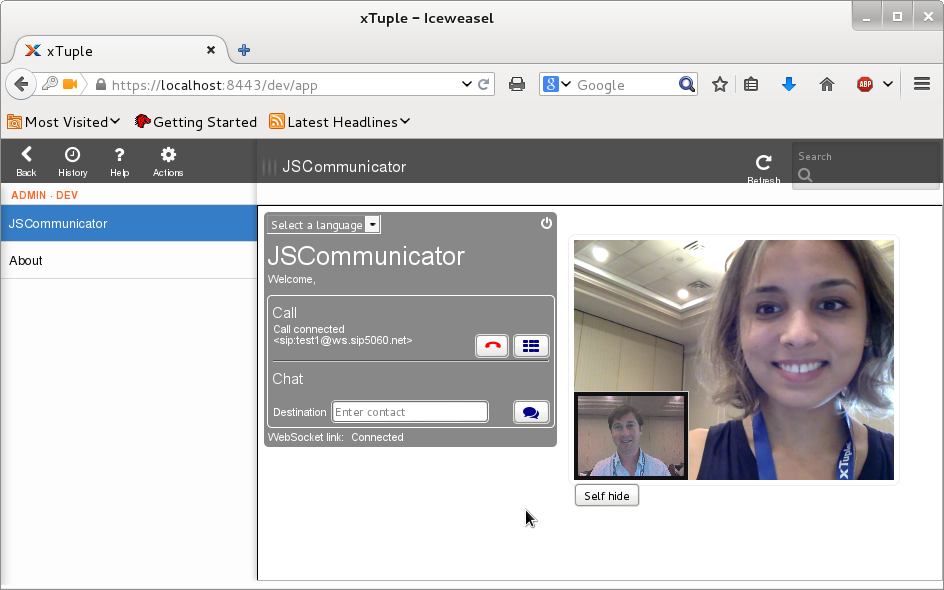
I recently updated the PostBooks packages in Debian and Ubuntu to version 4.7. This is the version that was released in Ubuntu 14.10 (Utopic Unicorn) and is part of the upcoming Debian 8 (jessie) release. Better prospects for Fedora and RHEL/CentOS/EPEL packages As well as getting the packages ready, I've been in contact with xTuple helping them generalize their build system to make packaging easier. This has eliminated the need to patch the makefiles during the build. As well as making it easier to support the Debian/Ubuntu packages, this should make it far easier for somebody to create a spec file for RPM packaging too. Debian wins a prize While visiting xTupleCon 2014 in Norfolk, I was delighted to receive the Community Member of the Year award which I happily accepted not just for my own efforts but for the Debian Project as a whole. Steve Hackbarth, Director of Product Development at xTuple, myself and the impressive Community Member of the Year trophy This is a great example of the productive relationships that exist between Debian, upstream developers and the wider free software community and it is great to be part of a team that can synthesize the work from so many other developers into ready-to-run solutions on a 100% free software platform. Receiving this award really made me think about all the effort that has gone into making it possible to apt-get install postbooks and all the people who have collectively done far more work than myself to make this possible: Here is a screenshot of the xTuple web / JSCommunicator integration, it was one of the highlights of xTupleCon: and gives a preview of the wide range of commercial opportunities that WebRTC is creating for software vendors to displace traditional telecommunications providers. xTupleCon also gave me a great opportunity to see new features (like the xTuple / Drupal web shop integration) and hear about the success of consultants and their clients deploying xTuple/PostBooks in various scenarios. The product is extremely strong in meeting the needs of manufacturing and distribution and has gained a lot of traction in these industries in the US. Many of these features are equally applicable in other markets with a strong manufacturing industry such as Germany or the UK. However, it is also flexible enough to simply disable many of the specialized features and use it as a general purpose accounting solution for consulting and services businesses. This makes it a good option for many IT freelancers and support providers looking for a way to keep their business accounts in a genuinely open source solution with a strong SQL backend and a native Linux desktop interface.

Julien Danjou: Distributed group management and locking in Python with tooz

With OpenStack embracing the Tooz library more and more over the past year, I think it's a good start to write a bit about it. A bit of history A little more than year ago, with my colleague Yassine Lamgarchal and others at eNovance, we investigated on how to solve a problem often encountered inside OpenStack: synchronization of multiple distributed workers. And while many people in our ecosystem continue to drive development by adding new bells and whistles, we made a point of solving new problems with a generic solution able to address the technical debt at the same time. Yassine wrote the first ideas of what should be the group membership service that was needed for OpenStack, identifying several projects that could make use of this. I've presented this concept during the OpenStack Summit in Hong-Kong during an Oslo session. It turned out that the idea was well-received, and the week following the summit we started the tooz project on StackForge. Goals Tooz is a Python library that provides a coordination API. Its primary goal is to handle groups and membership of these groups in distributed systems. Tooz also provides another useful feature which is distributed locking. This allows distributed nodes to acquire and release locks in order to synchronize themselves (for example to access a shared resource). The architecture If you are familiar with distributed systems, you might be thinking that there are a lot of solutions already available to solve these issues: ZooKeeper, the Raft consensus algorithm or even Redis for example. You'll be thrilled to learn that Tooz is not the result of the NIH syndrome, but is an abstraction layer on top of all these solutions. It uses drivers to provide the real functionalities behind, and does not try to do anything fancy. All the drivers do not have the same amount of functionality of robustness, but depending on your environment, any available driver might be suffice. Like most of OpenStack, we let the deployers/operators/developers chose whichever backend they want to use, informing them of the potential trade-offs they will make. So far, Tooz provides drivers based on: All drivers are distributed across processes. Some can be distributed across the network (ZooKeeper, memcached, redis ) and some are only available on the same host (IPC). Also note that the Tooz API is completely asynchronous, allowing it to be more efficient, and potentially included in an event loop. Features Group membership Tooz provides an API to manage group membership. The basic operations provided are: the creation of a group, the ability to join it, leave it and list its members. It's also possible to be notified as soon as a member joins or leaves a group. Leader election Each group can have a leader elected. Each member can decide if it wants to run for the election. If the leader disappears, another one is elected from the list of current candidates. It's possible to be notified of the election result and to retrieve the leader of a group at any moment. Distributed locking When trying to synchronize several workers in a distributed environment, you may need a way to lock access to some resources. That's what a distributed lock can help you with. Adoption in OpenStack Ceilometer is the first project in OpenStack to use Tooz. It has replaced part of the old alarm distribution system, where RPC was used to detect active alarm evaluator workers. The group membership feature of Tooz was leveraged by Ceilometer to coordinate between alarm evaluator workers. Another new feature part of the Juno release of Ceilometer is the distribution of polling tasks of the central agent among multiple workers. There's again a group membership issue to know which nodes are online and available to receive polling tasks, so Tooz is also being used here. The Oslo team has accepted the adoption of Tooz during this release cycle. That means that it will be maintained by more developers, and will be part of the OpenStack release process. This opens the door to push Tooz further in OpenStack. Our next candidate would be write a service group driver for Nova. The complete documentation for Tooz is available online and has examples for the various features described here, go read it if you're curious and adventurous!

Jonathan Wiltshire: Getting things into Jessie (#6)

If it s not in an unblock bug, we probably aren t reading it We really, really prefer unblock bugs to anything else right now (at least, for things relating to Jessie). Mails on the list get lost, and IRC is dubious. This includes for pre-approvals. It s perfectly fine to open an unblock bug and then find it s not needed, or the question is really about something else. We d rather that than your mail get lost between the floorboards. Bugs are easy to track, have metadata so we can keep the status up to date in a standard way, and are publicised in all the right places. They make a great to-do list. By all means twiddle with the subject line, for example appending (pre-approval) so it s clearer though watch out for twiddling too much, or you ll confuse udd. (to continue my theme: asking you to file a bug instead costs you one round-trip; don t forget we re doing it at scale)
Getting things into Jessie (#6) is a post from: jwiltshire.org.uk Flattr

20 November 2014

Steve Kemp: An experiment in (re)building Debian

I've rebuilt many Debian packages over the years, largely to fix bugs which affected me, or to add features which didn't make the cut in various releases. For example I made a package of fabric available for Wheezy, since it wasn't in the release. (Happily in that case a wheezy-backport became available. Similar cases involved repackaging gtk-gnutella when the protocol changed and the official package in the lenny release no longer worked.) I generally release a lot of my own software as Debian packages, although I'll admit I've started switching to publishing Perl-based projects on CPAN instead - from which they can be debianized via dh-make-perl. One thing I've not done for many years is a mass-rebuild of Debian packages. I did that once upon a time when I was trying to push for the stack-smashing-protection inclusion all the way back in 2006. Having had a few interesting emails this past week I decided to do the job for real. I picked a random server of mine, rsync.io, which stores backups, and decided to rebuild it using "my own" packages. The host has about 300 packages installed upon it:

root@rsync ~ # dpkg --list   grep ^ii   wc -l
294
I got the source to every package, patched the changelog to bump the version, and rebuild every package from source. That took about three hours. Every package has a "skx1" suffix now, and all the build-dependencies were also determined by magic and rebuilt:
root@rsync ~ # dpkg --list   grep ^ii   awk '  print $2 " " $3 '  head -n 4
acpi 1.6-1skx1
acpi-support-base 0.140-5+deb7u3skx1
acpid 1:2.0.16-1+deb7u1skx1
adduser 3.113+nmu3skx1
The process was pretty quick once I started getting more and more of the packages built. The only shortcut was not explicitly updating the dependencies to rely upon my updages. For example bash has a Debian control file that contains:
Depends: base-files (>= 2.1.12), debianutils (>= 2.15)
That should have been updated to say:
Depends: base-files (>= 2.1.12skx1), debianutils (>= 2.15skx1)
However I didn't do that, because I suspect if I did want to do this decently, and I wanted to share the source-trees, and the generated packages, the way to go would not be messing about with Debian versions instead I'd create a new Debian release "alpha-apple", "beta-bananna", "crunchy-carrot", "dying-dragonfruit", "easy-elderberry", or similar. In conclusion: Importing Debian packages into git, much like Ubuntu did with bzr, is a fun project, and it doesn't take much to mass-rebuild if you're not making huge changes. Whether it is worth doing is an entirely different question of course.

19 November 2014

Erich Schubert: What the GR outcome means for the users

The GR outcome is: no GR necessary
This is good news.
Because it says: Debian will remain Debian, as it was the last 20 years.
For 20 years, we have tried hard to build the "universal operating system", and give users a choice. We've often had alternative software in the archive. Debian has come up with various tool to manage alternatives over time, and for example allows you to switch the system-wide Java.
You can still run Debian with sysvinit. There are plenty of Debian Developers which will fight for this to be possible in the future.
The outcome of this resolution says:
  • Using a GR to force others is the wrong approach of getting compatibility.
  • We've offered choice before, and we trust our fellow developers to continue to work towards choice.
  • Write patches, not useless GRs. We're coders, not bureocrats.
  • We believe we can do this, without making it a formal MUST requirement. Or even a SHOULD requirement. Just do it.
The sysvinit proponents may perceive this decision as having "lost". But they just don't realize they won, too. Because the GR may easily have backfired on them. The GR was not "every package must support sysvinit". It was also "every sysvinit package must support systemd". Here is an example: eudev, a non-systemd fork of udev. It is not yet in Debian, but I'm fairly confident that someone will make a package of it after the release, for the next Debian. Given the text of the GR, this package might have been inappropriate for Debian, unless it also supports systemd. But systemd has it's own udev - there is no reason to force eudev to work with systemd, is there?
Debian is about choice. This includes the choice to support different init systems as appropriate. Not accepting a proper patch that adds support for a different init would be perceived as a major bug, I'm assured.
A GR doesn't ensure choice. It only is a hammer to annoy others. But it doesn't write the necessary code to actually ensure compatibility.
If GNOME at some point decides that systemd as pid 1 is a must, the GR only would have left us three options: A) fork the previous version, B) remove GNOME altogether, C) remove all other init systems (so that GNOME is compliant). Does this add choice? No.
Now, we can preserve choice: if GNOME decides to go systemd-pid1-only, we can both include a forked GNOME, and the new GNOME (depending on systemd, which is allowed without the GR). Or any other solution that someone codes and packages...
Don't fear that systemd will magically become a must. Trust that the Debian Developers will continue what they have been doing the last 20 years. Trust that there are enough Debian Developers that don't run systemd. Because they do exist, and they'll file bugs where appropriate. Bugs and patches, that are the appropriate tools, not GRs (or trolling).

18 November 2014

Erich Schubert: Generate iptables rules via pyroman

Vincent Bernat blogged on using Netfilter rulesets, pointing out that inserting the rules one-by-one using iptables calls may leave your firewall temporarily incomplete, eventually half-working, and that this approach can be slow.
He's right with that, but there are tools that do this properly. ;-)
Some years ago, for a multi-homed firewall, I wrote a tool called Pyroman. Using rules specified either in Python or XML syntax, it generates a firewall ruleset for you.
But it also adresses the points Vincent raised:
  • It uses iptables-restore to load the firewall more efficiently than by calling iptables a hundred times
  • It will backup the previous firewall, and roll-back on errors (or lack of confirmation, if you are remote and use --safe)
It also has a nice feature for the use in staging: it can generate firewall rule sets offline, to allow you reviewing them before use, or transfer them to a different host. Not all functionality is supported though (e.g. the Firewall.hostname constant usable in python conditionals will still be the name of the host you generate the rules on - you may want to add a --hostname parameter to pyroman)
pyroman --print-verbose will generate a script readable by iptables-restore except for one problem: it contains both the rules for IPv4 and for IPv6, separated by #### IPv6 rules. It will also annotate the origin of the rule, for example:
# /etc/pyroman/02_icmpv6.py:82
-A rfc4890f -p icmpv6 --icmpv6-type 255 -j DROP
indicates that this particular line was produced due to line 82 in file /etc/pyroman/02_icmpv6.py. This makes debugging easier. In particular it allows pyroman to produce a meaningful error message if the rules are rejected by the kernel: it will tell you which line caused the rule that was rejected.
For the next version, I will probably add --output-ipv4 and --output-ipv6 options to make this more convenient to use. So far, pyroman is meant to be used on the firewall itself.
Note: if you have configured a firewall that you are happy with, you can always use iptables-save to dump the current firewall. But it will not preserve comments, obviously.

Antoine Beaupr : bup vs attic silly benchmark

after see attic introduced in a discussion about bup, i figured out i could give it a try. it was answering two of my biggest concerns with bup: and seemed to magically out of nowhere and basically do everything i need, with an inline manual on top of it.

disclaimer Note: this is not a real benchmark! i would probably need to port bup and attic to liw's seivot software to report on this properly (and that would amazing and really interesting, but it's late now). even worse, this was done on a production server with other stuff going on so take results with a grain of salt.

procedure and results Here's what I did. I setup backups of my ridiculously huge ~/src directory on the external hard drive where I usually make my backups. I ran a clean backup with attic, than redid it, then I ran a similar backup with bup, then redid it. Here are the results:
anarcat@marcos:~$ sudo apt-get install attic # this installed 0.13 on debian jessie amd64
[...]
anarcat@marcos:~$ attic init /mnt/attic-test:
Initializing repository at "/media/anarcat/calyx/attic-test"
Encryption NOT enabled.
Use the "--encryption=passphrase keyfile" to enable encryption.
anarcat@marcos:~$ time attic create --stats /mnt/attic-test::src ~/src/
Initializing cache...
------------------------------------------------------------------------------
Archive name: src
Archive fingerprint: 7bdcea8a101dc233d7c122e3f69e67e5b03dbb62596d0b70f5b0759d446d9ed0
Start time: Tue Nov 18 00:42:52 2014
End time: Tue Nov 18 00:54:00 2014
Duration: 11 minutes 8.26 seconds
Number of files: 283910
                       Original size      Compressed size    Deduplicated size
This archive:                6.74 GB              4.27 GB              2.99 GB
All archives:                6.74 GB              4.27 GB              2.99 GB
------------------------------------------------------------------------------
311.60user 68.28system 11:08.49elapsed 56%CPU (0avgtext+0avgdata 122824maxresident)k
15279400inputs+6788816outputs (0major+3258848minor)pagefaults 0swaps
anarcat@marcos:~$ time attic create --stats /mnt/attic-test::src-2014-11-18 ~/src/
------------------------------------------------------------------------------
Archive name: src-2014-11-18
Archive fingerprint: be840f1a49b1deb76aea1cb667d812511943cfb7fee67f0dddc57368bd61c4bf
Start time: Tue Nov 18 00:05:57 2014
End time: Tue Nov 18 00:06:35 2014
Duration: 38.15 seconds
Number of files: 283910
                       Original size      Compressed size    Deduplicated size
This archive:                6.74 GB              4.27 GB            116.63 kB
All archives:               13.47 GB              8.54 GB              3.00 GB
------------------------------------------------------------------------------
30.60user 4.66system 0:38.38elapsed 91%CPU (0avgtext+0avgdata 104688maxresident)k
18264inputs+258696outputs (0major+36892minor)pagefaults 0swaps
anarcat@marcos:~$ sudo apt-get install bup # this installed bup 0.25
anarcat@marcos:~$ free && sync && echo 3   sudo tee /proc/sys/vm/drop_caches && free # flush caches
anarcat@marcos:~$ export BUP_DIR=/mnt/bup-test
anarcat@marcos:~$ bup init
D p t Git vide initialis  dans /mnt/bup-test/
anarcat@marcos:~$ time bup index ~/src
Indexing: 345249, done.
56.57user 14.37system 1:45.29elapsed 67%CPU (0avgtext+0avgdata 85236maxresident)k
699920inputs+104624outputs (4major+25970minor)pagefaults 0swaps
anarcat@marcos:~$ time bup save -n src ~/src
Reading index: 345249, done.
bloom: creating from 1 file (200000 objects).
bloom: adding 1 file (200000 objects).
bloom: creating from 3 files (600000 objects).
Saving: 100.00% (6749592/6749592k, 345249/345249 files), done.
bloom: adding 1 file (126005 objects).
383.08user 61.37system 10:52.68elapsed 68%CPU (0avgtext+0avgdata 194256maxresident)k
14638104inputs+5944384outputs (50major+299868minor)pagefaults 0swaps
anarcat@marcos:attic$ time bup index ~/src
Indexing: 345249, done.
56.13user 13.08system 1:38.65elapsed 70%CPU (0avgtext+0avgdata 133848maxresident)k
806144inputs+104824outputs (137major+38463minor)pagefaults 0swaps
anarcat@marcos:attic$ time bup save -n src2 ~/src
Reading index: 1, done.
Saving: 100.00% (0/0k, 1/1 files), done.
bloom: adding 1 file (1 object).
0.22user 0.05system 0:00.66elapsed 42%CPU (0avgtext+0avgdata 17088maxresident)k
10088inputs+88outputs (39major+15194minor)pagefaults 0swaps
Disk usage is comparable:
anarcat@marcos:attic$ du -sc /mnt/*attic*
2943532K        /mnt/attic-test
2969544K        /mnt/bup-test
People are encouraged to try and reproduce those results, which should be fairly trivial.

Observations Here are interesting things I noted while working with both tools:
  • attic is Python3: i could compile it, with dependencies, by doing apt-get build-dep attic and running setup.py - i could also install it with pip if i needed to (but i didn't)
  • bup is Python 2, and has a scary makefile
  • both have an init command that basically does almost nothing and takes little enough time that i'm ignoring it in the benchmarks
  • attic backups are a single command, bup requires me to know that i first want to index and then save, which is a little confusing
  • bup has nice progress information, especially during save (because when it loaded the index, it knew how much was remaining) - just because of that, bup "feels" faster
  • bup, however, lets me know about its deep internals (like now i know it uses a bloom filter) which is probably barely understandable by most people
  • on the contrary, attic gives me useful information about the size of my backups, including the size of the current increment
  • it is not possible to get that information from bup, even after the fact - you need to du before and after the backup
  • attic modifies the files access times when backing up, while bup is more careful (there's a pull request to fix this in attic, which is how i found out about this)
  • both backup systems seem to produce roughly the same data size from the same input

Summary attic and bup are about equally fast. bup took 30 seconds less than attic to save the files, but that's not counting the 1m45s it took indexing them, so on the total run time, bup was actually slower. attic is also (almost) two times faster on the second run as well. but this could be within the margin of error of this very quick experiment, so my provisional verdict for now would be that they are about as fast. bup may be more robust (for example it doesn't modify the atimes), but this has not been extensively tested and is more based with my familiarity with the "conservatism" of the bup team rather than actual tests. considering all the features promised by attic, it makes for a really serious contender to the already amazing bup.

Next steps The properly do this, we would need to:
  • include other software (thinking of Zbackup, Burp, ddar, obnam, rdiff-backup and duplicity)
  • bench attic with the noatime patch
  • bench dev attic vs dev bup
  • bench data removal
  • bench encryption
  • test data recovery
  • run multiple backup runs, on different datasets, on a cleaner environment
  • ideally, extend seivot to do all of that
Note that the Burp author already did an impressive comparative benchmark of a bunch of those tools for the burp2 design paper, but it unfortunately doesn't include attic or clear ways to reproduce the results.

17 November 2014

Vincent Sanders: NetSurf Developer workshop IV

Michael Drake, John-Mark Bell, Daniel Silverstone, Rob Kendrick and Vincent Sanders at the Codethink manchester office
Over the weekend the NetSurf developers met to make a concentrated effort on improving the browser. This time we were kindly hosted by Codethink in their Manchester office in a pleasant environment with plenty of refreshments.

Five developers managed to attend in person from around the UK: Michael Drake, John-Mark Bell, Daniel Silverstone, Rob Kendrick and Vincent Sanders. We also had Chris Young providing some bug fixes remotely.

We started the weekend by discussing all the thorny core issues that had been put on the agenda and ensuring the outcomes were properly noted. We also held the society AGM which was minuted by Daniel.

The emphasis of this weekend was very much on planning and doing the disruptive changes we had been putting off until we were all together.

John-Mark and myself managed to change the core build system as used by all the libraries to using standard triplets to identify systems and use the gnu autoconf style of naming for parameters (i.e. HOST, BUILD and CC being used correctly).

This was accompanied by improvements and configuration changes to the CI system to accommodate the new usage.

Several issues from the bug tracker were addressed and we put ourselves in a stronger position to address numerous other usability problems in the future.

We managed to pack a great deal into the 20 hours of work on Saturday and Sunday although because we were concentrating much more on planning and infrastructure rather than a release the metrics of commits and files changed were lower than at previous events.

Thorsten Alteholz: Manage own CA with Debian

Self signed SSL certificates are nice, but only provide encryption of retrieved data. Nobody knows who is really sending the data. If one buys an SSL certificate for a website, the browser doesn t complain as much as with a self signed certificate. But can you really trust the other side? Almost every commercial CA has some kind of fast validation or domain validation, issued in minutes , which is done by email or phone. So if required, within minutes everybody might become you. Even with putting money on the table your users can not be sure whether this server really belongs to the right guy. Well, why wasting time and money? Just create your own Root CA and tell users that they need to add something in order to avoid some error messages. In Debian we basically have five packages who claim to be able to manage some kind of CA. easy-rsa is mainly needed to manage certificates used by openVPN. Within this use case it works like a charm, but I don t want to manage a more complex CA with it. gnomint is dead upstream and only uses SHA1 as signature algorithm. This will cause lots of problems as Mircrosoft and Google want to deprecate SHA1 in their products by 2017. Besides, this package is already orphaned and maybe it can disappear now. tinyCA uses more signature algorithms, unfortunately SHA1 seems to be the best it can. There are some patches to support up to SHA512, but they don t work for all parts of the software yet. For example Sub-CAs still use SHA1 despite of choosing something different in the GUI. So nice, but not (yet) usable in Jessie. FreeIPA seems to be great, but didn t make it into Jessie in time. Unfortunately the Release Team has reasons to not unblock it. So nice, but not usable in Jessie. xca is based on QT4. As announced in the 15th DPN of 2014 the deprecated QT4 will be removed from Debian Stretch (= Jessie+1). Apart from this, the software meets all my requirements.

16 November 2014

Tollef Fog Heen: Resigning as a Debian systemd maintainer

Apparently, people care when you, as privileged person (white, male, long-time Debian Developer) throw in the towel because the amount of crap thrown your way just becomes too much. I guess that's good, both because it gives me a soap box for a short while, but also because if enough people talk about how poisonous the well that Debian is has become, we can fix it. This morning, I resigned as a member of the systemd maintainer team. I then proceeded to leave the relevant IRC channels and announced this on twitter. The responses I've gotten have been almost all been heartwarming. People have generally been offering hugs, saying thanks for the work put into systemd in Debian and so on. I've greatly appreciated those (and I've been getting those before I resigned too, so this isn't just a response to that). I feel bad about leaving the rest of the team, they're a great bunch: competent, caring, funny, wonderful people. On the other hand, at some point I had to draw a line and say "no further". Debian and its various maintainer teams are a bunch of tribes (with possibly Debian itself being a supertribe). Unlike many other situations, you can be part of multiple tribes. I'm still a member of the DSA tribe for instance. Leaving pkg-systemd means leaving one of my tribes. That hurts. It hurts even more because it feels like a forced exit rather than because I've lost interest or been distracted by other shiny things for long enough that you don't really feel like part of a tribe. That happened with me with debian-installer. It was my baby for a while (with a then quite small team), then a bunch of real life thing interfered and other people picked it up and ran with it and made it greater and more fantastic than before. I kinda lost touch, and while it's still dear to me, I no longer identify as part of the debian-boot tribe. Now, how did I, standing stout and tall, get forced out of my tribe? I've been a DD for almost 14 years, I should be able to weather any storm, shouldn't I? It turns out that no, the mountain does get worn down by the rain. It's not a single hurtful comment here and there. There's a constant drum about this all being some sort of conspiracy and there are sometimes flares where people wish people involved in systemd would be run over by a bus or just accusations of incompetence. Our code of conduct says, "assume good faith". If you ever find yourself not doing that, step back, breathe. See if there's a reasonable explanation for why somebody is saying something or behaving in a way that doesn't make sense to you. It might be as simple as your native tongue being English and their being something else. If you do genuinely disagree with somebody (something which is entirely fine), try not to escalate, even if the stakes are high. Examples from the last year include talking about this as a war and talking about "increasingly bitter rear-guard battles". By using and accepting this terminology, we, as a project, poison ourselves. Sam Hartman puts this better than me:
I'm hoping that we can all take a few minutes to gain empathy for those who disagree with us. Then I'm hoping we can use that understanding to reassure them that they are valued and respected and their concerns considered even when we end up strongly disagreeing with them or valuing different things.
I'd be lying if I said I didn't ever feel the urge to demonise my opponents in discussions. That they're worse, as people, than I am. However, it is imperative to never give in to this, since doing that will diminish us as humans and make the entire project poorer. Civil disagreements with reasonable discussions lead to better technical outcomes, happier humans and a healthier projects.

Vincent Bernat: Staging a Netfilter ruleset in a network namespace

A common way to build a firewall ruleset is to run a shell script calling iptables and ip6tables. This is convenient since you get access to variables and loops. There are three major drawbacks with this method:
  1. While the script is running, the firewall is temporarily incomplete. Even if existing connections can be arranged to be left untouched, the new ones may not be allowed to be established (or unauthorized flows may be allowed). Also, essential NAT rules or mangling rules may be absent.
  2. If an error occurs, you are left with an half-working firewall. Therefore, you should ensure that some rules authorizing remote access are set very early. Or implement some kind of automatic rollback system.
  3. Building a large firewall can be slow. Each ip ,6 tables command will download the ruleset from the kernel, add the rule and upload the whole modified ruleset to the kernel.

Using iptables-restore A classic way to solve these problems is to build a rule file that will be read by iptables-restore and ip6tables-restore1. Those tools send the ruleset to the kernel in one pass. The kernel applies it atomically. Usually, such a file is built with ip ,6 tables-save but a script can fit the task. The ruleset syntax understood by ip ,6 tables-restore is similar to the syntax of ip ,6 tables but each table has its own block and chain declaration is different. See the following example:
$ iptables -P FORWARD DROP
$ iptables -t nat -A POSTROUTING -s 192.168.0.0/24 -j MASQUERADE
$ iptables -N SSH
$ iptables -A SSH -p tcp --dport ssh -j ACCEPT
$ iptables -A INPUT -i lo -j ACCEPT
$ iptables -A OUTPUT -o lo -j ACCEPT
$ iptables -A FORWARD -m state --state ESTABLISHED,RELATED -j ACCEPT
$ iptables -A FORWARD -j SSH
$ iptables-save
*nat
:PREROUTING ACCEPT [0:0]
:INPUT ACCEPT [0:0]
:OUTPUT ACCEPT [0:0]
:POSTROUTING ACCEPT [0:0]
-A POSTROUTING -s 192.168.0.0/24 -j MASQUERADE
COMMIT
*filter
:INPUT ACCEPT [0:0]
:FORWARD DROP [0:0]
:OUTPUT ACCEPT [0:0]
:SSH - [0:0]
-A INPUT -i lo -j ACCEPT
-A FORWARD -m state --state RELATED,ESTABLISHED -j ACCEPT
-A FORWARD -j SSH
-A OUTPUT -o lo -j ACCEPT
-A SSH -p tcp -m tcp --dport 22 -j ACCEPT
COMMIT
As you see, we have one block for the nat table and one block for the filter table. The user-defined chain SSH is declared at the top of the filter block with other builtin chains. Here is a script diverting ip ,6 tables commands to build such a file (heavily relying on some Zsh-fu2):
#!/bin/zsh
set -e
work=$(mktemp -d)
trap "rm -rf $work" EXIT
#   Redefine ip ,6 tables
iptables()  
    # Intercept -t
    local table="filter"
    [[ -n $ @[(r)-t]  ]] &&  
        # Which table?
        local index=$ (k)@[(r)-t] 
        table=$ @[(( index + 1 ))] 
        argv=( $argv[1,(( $index - 1 ))] $argv[(( $index + 2 )),$#] )
     
    [[ -n $ @[(r)-N]  ]] &&  
        # New user chain
        local index=$ (k)@[(r)-N] 
        local chain=$ @[(( index + 1 ))] 
        print ":$ chain  -" >> $ work /$ 0 -$ table -userchains
        return
     
    [[ -n $ @[(r)-P]  ]] &&  
        # Policy for a builtin chain
        local index=$ (k)@[(r)-P] 
        local chain=$ @[(( index + 1 ))] 
        local policy=$ @[(( index + 2 ))] 
        print ":$ chain  $ policy " >> $ work /$ 0 -$ table -policy
        return
     
    # iptables-restore only handle double quotes
    echo $ $ (q-)@ //\'/\"  >> $ work /$ 0 -$ table -rules #'
 
functions[ip6tables]=$ functions[iptables] 
#   Build the final ruleset that can be parsed by ip ,6 tables-restore
save()  
    for table ($ work /$ 1 -*-rules(:t:s/-rules//))  
        print "*$ $ table #$ 1 - "
        [ ! -f $ work /$ table -policy ]   cat $ work /$ table -policy
        [ ! -f $ work /$ table -userchains   cat $ work /$ table -userchains
        cat $ work /$ table -rules
        print "COMMIT"
     
 
#   Execute rule files
for rule in $(run-parts --list --regex '^[.a-zA-Z0-9_-]+$' $ 0%/* /rules); do
    . $rule
done
#   Execute rule files
ret=0
save iptables    iptables-restore    ret=$?
save ip6tables   ip6tables-restore   ret=$?
exit $ret
In , a new iptables() function is defined and will shadow the iptables command. It will try to locate the -t parameter to know which table should be used. If such a parameter exists, the table is remembered in the $table variable and removed from the list of arguments. Defining a new chain (with -N) is also handled as well as setting the policy (with -P). In , the save() function will output a ruleset that should be parseable by ip ,6 tables-restore. In , user rules are executed. Each ip ,6 tables command will call the previously defined function. When no error has occurred, in , ip ,6 tables-restore is invoked. The command will either succeed or fail. This method works just fine3. However, the second method is more elegant.

Using a network namespace An hybrid approach is to build the firewall rules with ip ,6 tables in a newly created network namespace, save it with ip ,6 tables-save and apply it in the main namespace with ip ,6 tables-restore. Here is the gist (still using Zsh syntax):
#!/bin/zsh
set -e
alias main='/bin/true  '
[ -n $iptables ]    
    #   Execute ourself in a dedicated network namespace
    iptables=1 unshare --net -- \
        $0 4> >(iptables-restore) 6> >(ip6tables-restore)
    #   In main namespace, disable iptables/ip6tables commands
    alias iptables=/bin/true
    alias ip6tables=/bin/true
    alias main='/bin/false  '
 
#   In both namespaces, execute rule files
for rule in $(run-parts --list --regex '^[.a-zA-Z0-9_-]+$' $ 0%/* /rules); do
    . $rule
done
#   In test namespace, save the rules
[ -z $iptables ]    
    iptables-save >&4
    ip6tables-save >&6
 
In , the current script is executed in a new network namespace. Such a namespace has its own ruleset that can be modified without altering the one in the main namespace. The $iptables environment variable tell in which namespace we are. In the new namespace, we execute all the rule files ( ). They contain classic ip ,6 tables commands. If an error occurs, we stop here and nothing happens, thanks to the use of set -e. Otherwise, in , the ruleset of the new namespace are saved using ip ,6 tables-save and sent to dedicated file descriptors. Now, the execution in the main namespace resumes in . The results of ip ,6 tables-save are feeded to ip ,6 tables-restore. At this point, the firewall is mostly operational. However, we will play again the rule files ( ) but the ip ,6 tables commands will be disabled ( ). Additional commands in the rule files, like enabling IP forwarding, will be executed. The new namespace does not provide the same environment as the main namespace. For example, there is no network interface in it, so we cannot get or set IP addresses. A command that must not be executed in the new namespace should be prefixed by main:
main ip addr add 192.168.15.1/24 dev lan-guest
You can look at a complete example on GitHub.

  1. Another nifty tool is iptables-apply which will apply a rule file and rollback after a given timeout unless the change is confirmed by the user.
  2. As you can see in the snippet, Zsh comes with some powerful features to handle arrays. Another big advantage of Zsh is it does not require quoting every variable to avoid field splitting. Hence, the script can handle values with spaces without a problem, making it far more robust.
  3. If I were nitpicking, there are three small flaws with it. First, when an error occurs, it can be difficult to match the appropriate location in your script since you get the position in the ruleset instead. Second, a table can be used before it is defined. So, it may be difficult to spot some copy/paste errors. Third, the IPv4 firewall may fail while the IPv6 firewall is applied, and vice-versa. Those flaws are not present in the next method.

Vincent Bernat: Intel Wireless 7260 as an access point

My home router acts as an access point with an Intel Dual-Band Wireless-AC 7260 wireless card. This card supports 802.11ac (on the 5 GHz band) and 802.11n (on both the 5 GHz and 2.4 GHz band). While this seems a very decent card to use in managed mode, this is not really a great choice for an access point.
$ lspci -k -nn -d 8086:08b1
03:00.0 Network controller [0280]: Intel Corporation Wireless 7260 [8086:08b1] (rev 73)
        Subsystem: Intel Corporation Dual Band Wireless-AC 7260 [8086:4070]
        Kernel driver in use: iwlwifi
TL;DR: Use an Atheros card instead.

Limitations First, the card is said dual-band but you can only uses one band at a time because there is only one radio. Almost all wireless cards have this limitation. If you want to use both the 2.4 GHz band and the less crowded 5 GHz band, two cards are usually needed.

5 GHz band There is no support to set an access point on the 5 GHz band. The firmware doesn t allow it. This can be checked with iw:
$ iw reg get
country CH: DFS-ETSI
        (2402 - 2482 @ 40), (N/A, 20), (N/A)
        (5170 - 5250 @ 80), (N/A, 20), (N/A)
        (5250 - 5330 @ 80), (N/A, 20), (0 ms), DFS
        (5490 - 5710 @ 80), (N/A, 27), (0 ms), DFS
        (57240 - 65880 @ 2160), (N/A, 40), (N/A), NO-OUTDOOR
$ iw list
Wiphy phy0
[...]
        Band 2:
                Capabilities: 0x11e2
                        HT20/HT40
                        Static SM Power Save
                        RX HT20 SGI
                        RX HT40 SGI
                        TX STBC
                        RX STBC 1-stream
                        Max AMSDU length: 3839 bytes
                        DSSS/CCK HT40
                Frequencies:
                        * 5180 MHz [36] (20.0 dBm) (no IR)
                        * 5200 MHz [40] (20.0 dBm) (no IR)
                        * 5220 MHz [44] (20.0 dBm) (no IR)
                        * 5240 MHz [48] (20.0 dBm) (no IR)
                        * 5260 MHz [52] (20.0 dBm) (no IR, radar detection)
                          DFS state: usable (for 192 sec)
                          DFS CAC time: 60000 ms
                        * 5280 MHz [56] (20.0 dBm) (no IR, radar detection)
                          DFS state: usable (for 192 sec)
                          DFS CAC time: 60000 ms
[...]
While the 5 GHz band is allowed by the CRDA, all frequencies are marked with no IR. Here is the explanation for this flag:
The no-ir flag exists to allow regulatory domain definitions to disallow a device from initiating radiation of any kind and that includes using beacons, so for example AP/IBSS/Mesh/GO interfaces would not be able to initiate communication on these channels unless the channel does not have this flag.

Multiple SSID This card can only advertise one SSID. Managing several of them is useful to setup distinct wireless networks, like a public access (routed to Tor), a guest access and a private access. iw can confirm this:
$ iw list
        valid interface combinations:
                 * #  managed   <= 1, #  AP, P2P-client, P2P-GO   <= 1, #  P2P-device   <= 1,
                   total <= 3, #channels <= 1
Here is the output of an Atheros card able to manage 8 SSID:
$ iw list
        valid interface combinations:
                 * #  managed, WDS, P2P-client   <= 2048, #  IBSS, AP, mesg point, P2P-GO   <= 8,
                   total <= 2048, #channels <= 1

Configuration as an access point Except for those two limitations, the card works fine as an access point. Here is the configuration that I use for hostapd:
interface=wlan-guest
driver=nl80211
# Radio
ssid=XXXXXXXXX
hw_mode=g
channel=11
# 802.11n
wmm_enabled=1
ieee80211n=1
ht_capab=[HT40-][SHORT-GI-20][SHORT-GI-40][DSSS_CCK-40][DSSS_CCK-40][DSSS_CCK-40]
# WPA
auth_algs=1
wpa=2
wpa_passphrase=XXXXXXXXXXXXXXX
wpa_key_mgmt=WPA-PSK
wpa_pairwise=TKIP
rsn_pairwise=CCMP
Because of the use of channel 11, only 802.11n HT40- rate can be enabled. Look at the Wikipedia page for 802.11n to check if you can use either HT40-, HT40+ or both.

Next.

Previous.