Search Results: "mak"

21 November 2020

Kentaro Hayashi: Introduction about recent debexpo (mentors.debian.net)

I've make a presentation about "How to hack debexpo (mentors.debian.net)" at Tokyo Debian (local Debian meeting) 21, November 2020. Here is the agenda about presentation. The presentation slide is published at Rabbit Slide Show (Written in Japanese) I hope that more people will be involved to hack debexpo!

20 November 2020

Shirish Agarwal: Rights, Press freedom and India

In some ways it is sad and interesting to see how personal liberty is viewed in India. And how it differs from those having the highest fame and power can get a different kind of justice then the rest cannot.

Arnab Goswami This particular gentleman is a class apart. He is the editor as well as Republic TV, a right-leaning channel which demonizes the minority, women whatever is antithesis to the Central Govt. of India. As a result there have been a spate of cases against him in the past few months. But surprisingly, in each of them he got hearing the day after the suit was filed. This is unique in Indian legal history so much so that a popular legal site which publishes on-going cases put up a post sharing how he was getting prompt hearings. That post itself needs to be updated as there have been 3 more hearings which have been done back to back for him. This is unusual as there have been so many cases pending for the SC attention, some arguably more important than this gentleman . So many precedents have been set which will send a wrong message. The biggest one, that even though a trial is taking place in the sessions court (below High Court) the SC can interject on matters. What this will do to the morale of both lawyers as well as judges of the various Sessions Court is a matter of speculation and yet as shared unprecedented. The saddest part was when Justice Chandrachud said
Justice Chandrachud If you don t like a channel then don t watch it. 11th November 2020 .
This is basically giving a free rope to hate speech. How can a SC say like that ? And this is the Same Supreme Court which could not take two tweets from Shri Prashant Bhushan when he made remarks against the judiciary .

J&K pleas in Supreme Court pending since August 2019 (Abrogation 370) After abrogation of 370, citizens of Jammu and Kashmir, the population of which is 13.6 million people including 4 million Hindus have been stuck with reduced rights and their land being taken away due to new laws. Many of the Hindus which regionally are a minority now rue the fact that they supported the abrogation of 370A . Imagine, a whole state whose answers and prayers have not been heard by the Supreme Court and the people need to move a prayer stating the same.

100 Journalists, activists languishing in Jail without even a hearing 55 Journalists alone have been threatened, booked and in jail for reporting of pandemic . Their fault, they were bring the irregularities, corruption made during the pandemic early months. Activists such as Sudha Bharadwaj, who giving up her American citizenship and settling to fight for tribals is in jail for 2 years without any charges. There are many like her, There are several more petitions lying in the Supreme Court, for e.g. Varavara Rao, not a single hearing from last couple of years, even though he has taken part in so many national movements including the emergency as well as part-responsible for creation of Telengana state out of Andhra Pradesh .

Then there is Devangana kalita who works for gender rights. Similar to Sudha Bharadwaj, she had an opportunity to go to UK and settle here. She did her master s and came back. And now she is in jail for the things that she studied. While she took part in Anti-CAA sittings, none of her speeches were incendiary but she still is locked up under UAPA (Unlawful Practises Act) . I could go on and on but at the moment these should suffice.

Petitions for Hate Speech which resulted in riots in Delhi are pending, Citizen s Amendment Act (controversial) no hearings till date. All of the best has been explained in a newspaper article which articulates perhaps all that I wanted to articulate and more. It is and was amazing to see how in certain cases Article 32 is valid and in many it is not. Also a fair reading of Justice Bobde s article tells you a lot how the SC is functioning. I would like to point out that barandbench along with livelawindia makes it easier for never non-lawyers and public to know how arguments are done in court, what evidences are taken as well as give some clue about judicial orders and judgements. Both of these resources are providing an invaluable service and more often than not, free of charge.

Student Suicide and High Cost of Education
For quite sometime now, the cost of education has been shooting up. While I have visited this topic earlier as well, recently a young girl committed suicide because she was unable to pay the fees as well as additional costs due to pandemic. Further investigations show that this is the case with many of the students who are unable to buy laptops. Now while one could think it is limited to one college then it would be wrong. It is almost across all India and this will continue for months and years. People do know that the pandemic is going to last a significant time and it would be a long time before R value becomes zero . Even the promising vaccine from Pfizer need constant refrigeration which is sort of next to impossible in India. It is going to make things very costly.

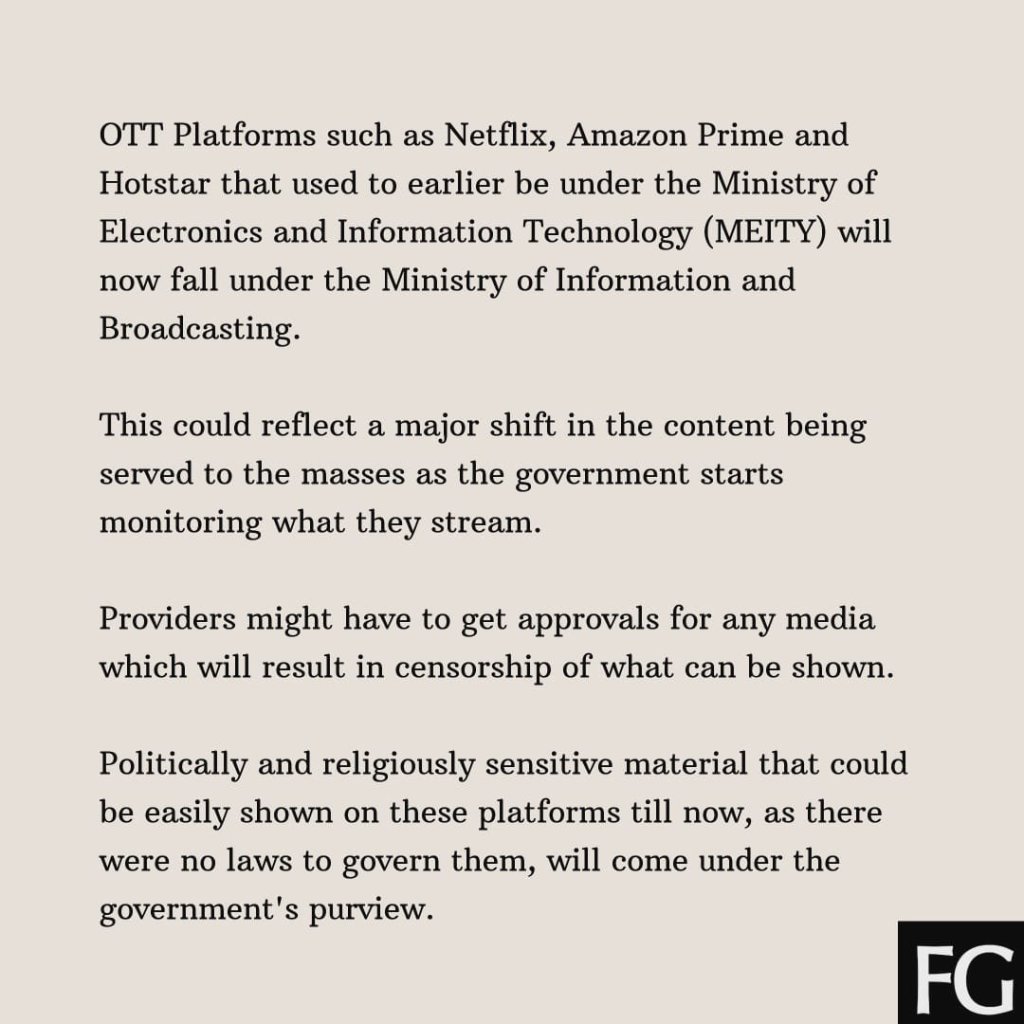
Last Nail on Indian Media Just today the last nail on India has been put. Thankfully Freedom Gazette India did a much better job so just pasting that
Information and Broadcasting Ministry bringing OTT services as well as news within its ambit.
With this, projects like Scam 1992, The Harshad Mehta Story or Bad Boy Billionaires:India, Test Case, Delhi Crime, Laakhon Mein Ek etc. etc. such kind of series, investigative journalism would be still-births. Many of these web-series also shared tales of woman empowerment while at the same time showed some of the hard choices that women had to contend to live with. Even western media may be censored where it finds the political discourse not to its liking. There had been so many accounts of Mr. Ravish Kumar, the winner of Ramon Magsaysay, how in his shows the electricity was cut in many places. I too have been the victim when the BJP governed in Maharashtra as almost all Puneities experienced it. Light would go for just half or 45 minutes at the exact time. There is another aspect to it. The U.S. elections showed how independent media was able to counter Mr. Trump s various falsehoods and give rise to alternative ideas which lead the team of Bernie Sanders, Joe Biden and Kamala Harris, Biden now being the President-elect while Kamala Harris being the vice-president elect. Although the journey to the white house seems as tough as before. Let s see what happens. Hopefully 2021 will bring in some good news. Update On 27th November 2020 Martin who runs the planet got an e-mail/notice by a Mr. Nikhil Sethi who runs the wikibio.com property. Mr. Sethi asked to remove the link pointing Devangana Kalita from my blog post to his site as he has used the no follow link. On inquiring further, the gentleman stated that it is an Updated mandate (his exact quote) from Google algorithm. To further understand the issue, I went to SERP as they are one of the more known ones on the subject. I also looked it up on Google as well. Found that the gentleman was BSing the whole time. The page basically talks about weightage of a page/site and authoritativeness which is known and yet highly contested ideas. In any case, the point for me was for whatever reason (could be fear, could be something else entirely), Mr. Sethi did not want me to link the content. Hence, I have complied above. I could have dragged it out but I do not wish Mr. Sethi any ill-being or/and further harm unduly and unintentionally caused by me. Hence, have taken down the link.

19 November 2020

Daniel Silverstone: Withdrawing Gitano from support

Unfortunately, in Debian in particular, libgit2 is undergoing a transition which is blocked by gall. Despite having had over a month to deal with this, I've not managed to summon the tuits to update Gall to the new libgit2 which means, nominally, I ought to withdraw it from testing and possibly even from unstable given that I'm not really prepared to look after Gitano and friends in Debian any longer. However, I'd love for Gitano to remain in Debian if it's useful to people. Gall isn't exactly a large piece of C code, and so probably won't be a huge job to do the port, I simply don't have the desire/energy to do it myself. If someone wanted to do the work and provide a patch / "pull request" to me, then I'd happily take on the change and upload a new package, or if someone wanted to NMU the gall package in Debian I'll take the change they make and import it into upstream. I just don't have the energy to reload all that context and do the change myself. If you want to do this, email me and let me know, so I can support you and take on the change when it's done. Otherwise I probably will go down the lines of requesting Gitano's removal from Debian in the next week or so.

17 November 2020

Louis-Philippe V ronneau: A better git diff

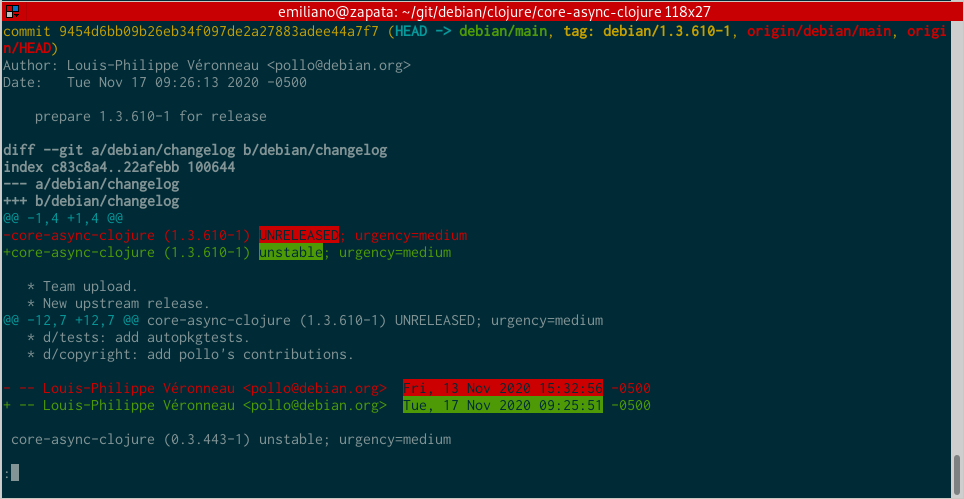
A few days ago I wrote a quick patch and missed a dumb mistake that made the program crash. When reviewing the merge request on Salsa, the problem became immediately apparent; Gitlab's diff is much better than what git diff shows by default in a terminal. Well, it turns out since version 2.9, git bundles a better pager, diff-highlight. la Gitlab, it will highlight what changed in the line. The output of git diff using diff-highlight Sadly, even though diff-highlight comes with the git package in Debian, it is not built by default (925288). You will need to:
$ sudo make --directory /usr/share/doc/git/contrib/diff-highlight
You can then add this line to your .gitconfig file:
[core]
  pager = /usr/share/doc/git/contrib/diff-highlight/diff-highlight   less --tabs=4 -RFX
If you use tig, you'll also need to add this line in your tigrc:
set diff-highlight = /usr/share/doc/git/contrib/diff-highlight/diff-highlight

15 November 2020

Jamie McClelland: Being your own Certificate Authority

There are many blogs and tutorials with nice shortcuts providing the necessary openssl commands to create and sign x509 certficates. However, there is precious few instructions for how to easily create your own certificate authority. You probably never want to do this in a production environment, but in a development environment it will make your life signficantly easier. Create the certificate authority Create the key and certificate Pick a directory to store things in. Then, make your certificate authority key and certificate:
openssl genrsa -out cakey.pem 2048
openssl req -x509 -new -nodes -key cakey.pem -sha256 -days 1024 -out cacert.pem
Some tips: Want to review what you created?
openssl x509 -text -noout -in cacert.pem 
Prepare your directory You can create your own /etc/ssl/openssl.cnf file and really customize things. But I find it safer to use your distribution's default file so you can benefit from changes to it every time you upgrade. If you do take the default file, you may have the dir option coded to demoCA (in Debian at least, maybe it's the upstream default too). So, to avoid changing any configuration files, let's just use this value. Which means... you'll need to create that directory. The setting is relative - so you can create this directory in the same directory you have your keys.
mkdir demoCA
Lastly, you have to have a file that keeps track of your certificates. If it doesn't exist, you get an error:
touch demoCA/index.txt
That's it! Your certificate authority is ready to go. Create a key and ceritificate signing request First, pick your domain names (aka "common" names). For example, example.org and www.example.org. Set those values in an environment variable. If you just have one:
export subjectAltName=DNS:example.org
If you have more then one:
export subjectAltName=DNS:example.org,DNS:www.example.org
Next, create a key and a certificate signing request:
openssl req -new -nodes -out new.csr -keyout new.key
Again, you will be prompted for some values (country, state, etc) - be sure to choose the same values you used with your certficiate authority! I honestly don't understand why this is necessary (when I set different values I get an error on the signing request step below). Maybe someone can add a comment to this post explaining why these values have to match? Also, you must provide a common name for your certificate - you can choose the same name as the altSubjectNames value you set above (but just one domain). Want to review what you created?
openssl req -in new.csr -text -noout 
Sign it! At last the momenet we have been waiting for.
openssl ca -keyfile cakey.pem -cert cacert.pem -out new.crt -outdir . -rand_serial -infiles new.csr
Now yu have a new.crt and new.csr that you can install via your web browser, mail server, etc specification. Sanity check it This command will confirm that the certificate is trusted by your certificate authority.
openssl verify -no-CApath -CAfile cacert.pem new.crt 
But wait, there's still a question of trust You probably want to tell your computer or browser that you want to trust your certificate signing authority. Command line tools Most tools in linux by default will trust all the certificates in /etc/ssl/certs/ca-certificates.crt. (If that file doesn't exist, try installing the ca-certificates package). If you want to add your certificate to that file:
cp cacert.pem /usr/local/share/ca-certificates/cacert.crt
sudo dpkg-reconfigure ca-certificates
Want to know what's funny? Ok, not really funny. If the certificate name ends with .pem the command above won't work. Seriously. Once your certificate is installed with your web server you can now test to make sure it's all working with:
gnutls-cli --print-cert $domainName
Want a second opinion?
curl https://$domainName
wget https://$domainName -O-
Both will report errors if the certificate can't be verified by a system certificate. If you really want to narrow down the cause of error (maybe reconfiguring ca-certificates didn't work)?
curl --cacert /path/to/your/cacert.pem --capath /tmp
Those arguments tell curl to use your certificate authority file and not to load any other certificate authority files (well, unless you have some installed in the temp directory). Web browsers Firefox and Chrome have their own store of trusted certificates - you'll have to import your cacert.pem file into each browser that you want to trust your key.

Vincent Bernat: Zero-Touch Provisioning for Juniper

Juniper s official documentation on ZTP explains how to configure the ISC DHCP Server to automatically upgrade and configure on first boot a Juniper device. However, the proposed configuration could be a bit more elegant. This note explains how.

TL;DR Do not redefine option 43. Instead, specify the vendor option space to use to encode parameters with vendor-option-space.


When booting for the first time, a Juniper device requests its IP address through a DHCP discover message, then request additional parameters for autoconfiguration through a DHCP request message:
Dynamic Host Configuration Protocol (Request)
    Message type: Boot Request (1)
    Hardware type: Ethernet (0x01)
    Hardware address length: 6
    Hops: 0
    Transaction ID: 0x44e3a7c9
    Seconds elapsed: 0
    Bootp flags: 0x8000, Broadcast flag (Broadcast)
    Client IP address: 0.0.0.0
    Your (client) IP address: 0.0.0.0
    Next server IP address: 0.0.0.0
    Relay agent IP address: 0.0.0.0
    Client MAC address: 02:00:00:00:00:01 (02:00:00:00:00:01)
    Client hardware address padding: 00000000000000000000
    Server host name not given
    Boot file name not given
    Magic cookie: DHCP
    Option: (54) DHCP Server Identifier (10.0.2.2)
    Option: (55) Parameter Request List
        Length: 14
        Parameter Request List Item: (3) Router
        Parameter Request List Item: (51) IP Address Lease Time
        Parameter Request List Item: (1) Subnet Mask
        Parameter Request List Item: (15) Domain Name
        Parameter Request List Item: (6) Domain Name Server
        Parameter Request List Item: (66) TFTP Server Name
        Parameter Request List Item: (67) Bootfile name
        Parameter Request List Item: (120) SIP Servers
        Parameter Request List Item: (44) NetBIOS over TCP/IP Name Server
        Parameter Request List Item: (43) Vendor-Specific Information
        Parameter Request List Item: (150) TFTP Server Address
        Parameter Request List Item: (12) Host Name
        Parameter Request List Item: (7) Log Server
        Parameter Request List Item: (42) Network Time Protocol Servers
    Option: (50) Requested IP Address (10.0.2.15)
    Option: (53) DHCP Message Type (Request)
    Option: (60) Vendor class identifier
        Length: 15
        Vendor class identifier: Juniper-mx10003
    Option: (51) IP Address Lease Time
    Option: (12) Host Name
    Option: (255) End
    Padding: 00
It requests several options, including the TFTP server address option 150, and the Vendor-Specific Information Option 43 or VSIO. The DHCP server can use option 60 to identify the vendor-specific information to send. For Juniper devices, option 43 encodes the image name and the configuration file name. They are fetched from the IP address provided in option 150. The official documentation on ZTP provides a valid configuration to answer such a request. However, it does not leverage the ability of the ISC DHCP Server to support several vendors and redefines option 43 to be Juniper-specific:
option NEW_OP-encapsulation code 43 = encapsulate NEW_OP;
Instead, it is possible to define an option space for Juniper, using a self-descriptive name, without overriding option 43:
# Juniper vendor option space
option space juniper;
option juniper.image-file-name     code 0 = text;
option juniper.config-file-name    code 1 = text;
option juniper.image-file-type     code 2 = text;
option juniper.transfer-mode       code 3 = text;
option juniper.alt-image-file-name code 4 = text;
option juniper.http-port           code 5 = text;
Then, when you need to set these suboptions, specify the vendor option space:
class "juniper-mx10003"  
  match if (option vendor-class-identifier = "Juniper-mx10003")  
  vendor-option-space juniper;
  option juniper.transfer-mode    "http";
  option juniper.image-file-name  "/images/junos-vmhost-install-mx-x86-64-19.3R2-S4.5.tgz";
  option juniper.config-file-name "/cfg/juniper-mx10003.txt";
 
This configuration returns the following answer:1
Dynamic Host Configuration Protocol (ACK)
    Message type: Boot Reply (2)
    Hardware type: Ethernet (0x01)
    Hardware address length: 6
    Hops: 0
    Transaction ID: 0x44e3a7c9
    Seconds elapsed: 0
    Bootp flags: 0x8000, Broadcast flag (Broadcast)
    Client IP address: 0.0.0.0
    Your (client) IP address: 10.0.2.15
    Next server IP address: 0.0.0.0
    Relay agent IP address: 0.0.0.0
    Client MAC address: 02:00:00:00:00:01 (02:00:00:00:00:01)
    Client hardware address padding: 00000000000000000000
    Server host name not given
    Boot file name not given
    Magic cookie: DHCP
    Option: (53) DHCP Message Type (ACK)
    Option: (54) DHCP Server Identifier (10.0.2.2)
    Option: (51) IP Address Lease Time
    Option: (1) Subnet Mask (255.255.255.0)
    Option: (3) Router
    Option: (6) Domain Name Server
    Option: (43) Vendor-Specific Information
        Length: 89
        Value: 00362f696d616765732f6a756e6f732d766d686f73742d69 
    Option: (150) TFTP Server Address
    Option: (255) End
Using vendor-option-space directive allows you to make different ZTP implementations coexist. For example, you can add the option space for PXE:
option space PXE;
option PXE.mtftp-ip    code 1 = ip-address;
option PXE.mtftp-cport code 2 = unsigned integer 16;
option PXE.mtftp-sport code 3 = unsigned integer 16;
option PXE.mtftp-tmout code 4 = unsigned integer 8;
option PXE.mtftp-delay code 5 = unsigned integer 8;
option PXE.discovery-control    code 6  = unsigned integer 8;
option PXE.discovery-mcast-addr code 7  = ip-address;
option PXE.boot-server code 8  =   unsigned integer 16, unsigned integer 8, ip-address  ;
option PXE.boot-menu   code 9  =   unsigned integer 16, unsigned integer 8, text  ;
option PXE.menu-prompt code 10 =   unsigned integer 8, text  ;
option PXE.boot-item   code 71 = unsigned integer 32;
class "pxeclients"  
  match if substring (option vendor-class-identifier, 0, 9) = "PXEClient";
  vendor-option-space PXE;
  option PXE.mtftp-ip 10.0.2.2;
  # [ ]
 
On the same topic, do not override option 125 VIVSO. See Zero-Touch Provisioning for Cisco IOS.

  1. Wireshark knows how to decode option 43 for some vendors, thanks to option 60, but not for Juniper.

14 November 2020

Junichi Uekawa: Rewrote my build system in C++.

Rewrote my build system in C++. I used to write build rules in Nodejs, but I figured if my projects are mostly C++ I should probably write them in C++. I wanted to make it a bit more like BUILD files but couldn't really and ended up looking more C++ than I wanted to. Seems like key-value struct initialization isn't available until C++20.

12 November 2020

Dirk Eddelbuettel: tidyCpp 0.0.2: More documentation and features

A first update of the still fairly new package tidyCpp is now on CRAN. The packages offers a C++ layer on top of the C API for R which aims to make its use a little easier and more consistent. The vignette has been extended with a new examples, a new section and some general editing. A few new defines have been added mostly from the Rinternals.h header. We also replaced the Shield class with a simpler yet updated version class Protect. The name better represent the core functionality of offering a simpler alternative to the PROTECT and UNPROTECT macro pairing. We also added a short discussion to the vignette of a gotcha one has to be mindful of, and that we fell for ourselves in version 0.0.1. We also added a typedef so that code using Shield can still be used. The NEWS entry follows.

Changes in tidyCpp version 0.0.2 (2020-11-12)
  • Expanded definitions in internals.h to support new example.
  • The vignette has been extended with an example based on package uchardet.
  • Class Shield has been replaced by an new class Protect; a compatibility typdef has been added.
  • The examples and vignette have been clarified with respect to proper ownership of protected objects; a new vignette section was added.

Thanks to my CRANberries, there is also a diffstat report for this release. For questions, suggestions, or issues please use the issue tracker at the GitHub repo. If you like this or other open-source work I do, you can now sponsor me at GitHub. For the first year, GitHub will match your contributions.

This post by Dirk Eddelbuettel originated on his Thinking inside the box blog. Please report excessive re-aggregation in third-party for-profit settings.

11 November 2020

Vincent Fourmond: Solution for QSoas quiz #1: averaging spectra

This post describes the solution to the Quiz #1, based on the files found there. The point is to produce both the average and the standard deviation of a series of spectra. Below is how the final averaged spectra shoud look like:
I will present here two different solutions. Solution 1: using the definition of standard deviation There is a simple solution using the definition of the standard deviation: $$\sigma_y = \sqrt <y^2> - <y> ^2 $$ in which \(<y^2>\) is the average of \(y^2\) (and so on). So the simplest solution is to construct datasets with an additional column that would contain \(y^2\), average these columns, and replace the average with the above formula. For that, we need first a companion script that loads a single data file and adds a column with \(y^2\). Let's call this script load-one.cmds:
load $ 1 
apply-formula y2=y**2 /extra-columns=1
flag /flags=processed
When this script is run with the name of a spectrum file as argument, it loads it (replaces $ 1 by the first argument, the file name), adds a column y2 containing the square of the y column, and flag it with the processed flag. This is not absolutely necessary, but it makes it much easier to refer to all the spectra when they are processed. Then to process all the spectra, one just has to run the following commands:
run-for-each load-one.cmds Spectrum-1.dat Spectrum-2.dat Spectrum-3.dat
average flagged:processed
apply-formula y2=(y2-y**2)**0.5
dataset-options /yerrors=y2
The run-for-each command runs the load-one.cmds script for all the spectra (one could also have used Spectra-*.dat to not have to give all the file names). Then, the average averages the values of the columns over all the datasets. To be clear, it finds all the values that have the same X (or very close X values) and average them, column by column. The result of this command is therefore a dataset with the average of the original \(y\) data as y column and the average of the original \(y^2\) data as y2 column. So now, the only thing left to do is to use the above equation, which is done by the apply-formula code. The last command, dataset-options, is not absolutely necessary but it signals to QSoas that the standard error of the y column should be found in the y2 column. This is now available as script method-one.cmds in the git repository.

Solution 2: use QSoas's knowledge of standard deviation The other method is a little more involved but it demonstrates a good approach to problem solving with QSoas. The starting point is that, in apply-formula, the value $stats.y_stddev corresponds to the standard deviation of the whole y column... Loading the spectra yields just a series of x,y datasets. We can contract them into a single dataset with one x column and several y columns:
load Spectrum-*.dat /flags=spectra
contract flagged:spectra
After these commands, the current dataset contains data in the form of:
lambda1	a1_1	a1_2	a1_3
lambda2	a2_1	a2_2	a2_3
...
in which the ai_1 come from the first file, ai_2 the second and so on. We need to use transpose to transform that dataset into:
0	a1_1	a2_1	...
1	a1_2	a2_2	...
2	a1_3	a2_3	...
In this dataset, values of the absorbance for the same wavelength for each dataset is now stored in columns. The next step is just to use expand to obtain a series of datasets with the same x column and a single y column (each corresponding to a different wavelength in the original data). The game is now to replace these datasets with something that looks like:
0	a_average
1	a_stddev
For that, one takes advantage of the $stats.y_average and $stats.y_stddev values in apply-formula, together with the i special variable that represents the index of the point:
apply-formula "if i == 0; then y=$stats.y_average; end; if i == 1; then y=$stats.y_stddev; end"
strip-if i>1
Then, all that is left is to apply this to all the datasets created by expand, which can be just made using run-for-datasets, and then, we reverse the splitting by using contract and transpose ! In summary, this looks like this. We need two files. The first, process-one.cmds contains the following code:
apply-formula "if i == 0; then y=$stats.y_average; end; if i == 1; then y=$stats.y_stddev; end"
strip-if i>1
flag /flags=processed
The main file, method-two.cmds looks like this:
load Spectrum-*.dat /flags=spectra
contract flagged:spectra
transpose
expand /flags=tmp
run-for-datasets process-one.cmds flagged:tmp
contract flagged:processed
transpose
dataset-options /yerrors=y2
Note some of the code above can be greatly simplified using new features present in the upcoming 3.0 version, but that is the topic for another post. About QSoasQSoas is a powerful open source data analysis program that focuses on flexibility and powerful fitting capacities. It is released under the GNU General Public License. It is described in Fourmond, Anal. Chem., 2016, 88 (10), pp 5050 5052. Current version is 2.2. You can download its source code and compile it yourself or buy precompiled versions for MacOS and Windows there.

Reproducible Builds: Reproducible Builds in October 2020

Welcome to the October 2020 report from the Reproducible Builds project. In our monthly reports, we outline the major things that we have been up to over the past month. As a brief reminder, the motivation behind the Reproducible Builds effort is to ensure flaws have not been introduced in the binaries we install on our systems. If you are interested in contributing to the project, please visit our main website.

General On Saturday 10th October, Morten Linderud gave a talk at Arch Conf Online 2020 on The State of Reproducible Builds in Arch. The video should be available later this month, but as a teaser:
The previous year has seen great progress in Arch Linux to get reproducible builds in the hands of the users and developers. In this talk we will explore the current tooling that allows users to reproduce packages, the rebuilder software that has been written to check packages and the current issues in this space.
During the Reproducible Builds summit in Marrakesh in 2019, developers from the GNU Guix, NixOS and Debian distributions were able to produce a bit-for-bit identical GNU Mes binary despite using three different versions of GCC. Since this summit, additional work resulted in a bit-for-bit identical Mes binary using tcc, and last month a fuller update was posted to this effect by the individuals involved. This month, however, David Wheeler updated his extensive page on Fully Countering Trusting Trust through Diverse Double-Compiling, remarking that:
GNU Mes rebuild is definitely an application of [Diverse Double-Compiling]. [..] This is an awesome application of DDC, and I believe it s the first publicly acknowledged use of DDC on a binary
There was a small, followup discussion on our mailing list. In openSUSE, Bernhard M. Wiedemann published his monthly Reproducible Builds status update. This month, the Reproducible Builds project restarted our IRC meetings, managing to convene twice: the first time on October 12th (summary & logs), and later on the 26th (logs). As mentioned in previous reports, due to the unprecedented events throughout 2020, there will be no in-person summit event this year. On our mailing list this month El as Alejandro posted a request for help with a local configuration

Software development This month, we tried to fix a large number of currently-unreproducible packages, including: Bernhard M. Wiedemann also reported three issues against bison, ibus and postgresql12.

Tools diffoscope is our in-depth and content-aware diff utility. Not only could you locate and diagnose reproducibility issues, it provides human-readable diffs of all kinds too. This month, Chris Lamb uploaded version 161 to Debian (later backported by Mattia Rizzolo), as well as made the following changes:
  • Move test_ocaml to the assert_diff helper. [ ]
  • Update tests to support OCaml version 4.11.1. Thanks to Sebastian Ramacher for the report. (#972518)
  • Bump minimum version of the Black source code formatter to 20.8b1. (#972518)
In addition, Jean-Romain Garnier temporarily updated the dependency on radare2 to ensure our test pipelines continue to work [ ], and for the GNU Guix distribution Vagrant Cascadian diffoscope to version 161 [ ]. In related development, trydiffoscope is the web-based version of diffoscope. This month, Chris Lamb made the following changes:
  • Mark a --help-only test as being a superficial test. (#971506)
  • Add a real, albeit flaky, test that interacts with the try.diffoscope.org service. [ ]
  • Bump debhelper compatibility level to 13 [ ] and bump Standards-Version to 4.5.0 [ ].
Lastly, disorderfs version 0.5.10-2 was uploaded to Debian unstable by Holger Levsen, which enabled security hardening via DEB_BUILD_MAINT_OPTIONS [ ] and dropped debian/disorderfs.lintian-overrides [ ].

Website and documentation This month, a number of updates to the main Reproducible Builds website and related documentation were made by Chris Lamb:
  • Add a citation link to the academic article regarding dettrace [ ], and added yet another supply-chain security attack publication [ ].
  • Reformatted the Jekyll s Liquid templating language and CSS formatting to be consistent [ ] as well as expand a number of tab characters [ ].
  • Used relative_url to fix missing translation icon on various pages. [ ]
  • Published two announcement blog posts regarding the restarting of our IRC meetings. [ ][ ]
  • Added an explicit note regarding the lack of an in-person summit in 2020 to our events page. [ ]

Testing framework The Reproducible Builds project operates a Jenkins-based testing framework that powers tests.reproducible-builds.org. This month, Holger Levsen made the following changes:
  • Debian-related changes:
    • Refactor and improve the Debian dashboard. [ ][ ][ ]
    • Track bugs which are usertagged as filesystem , fixfilepath , etc.. [ ][ ][ ]
    • Make a number of changes to package index pages. [ ][ ][ ]
  • System health checks:
    • Relax disk space warning levels. [ ]
    • Specifically detect build failures reported by dpkg-buildpackage. [ ]
    • Fix a regular expression to detect outdated package sets. [ ]
    • Detect Lintian issues in diffoscope. [ ]
  • Misc:
    • Make a number of updates to reflect that our sponsor Profitbricks has renamed itself to IONOS. [ ][ ][ ][ ]
    • Run a F-Droid maintenance routine twice a month to utilise its cleanup features. [ ]
    • Fix the target name in OpenWrt builds to ath79 from ath97. [ ]
    • Add a missing Postfix configuration for a node. [ ]
    • Temporarily disable Arch Linux builds until a core node is back. [ ]
    • Make a number of changes to our thanks page. [ ][ ][ ]
Build node maintenance was performed by both Holger Levsen [ ][ ] and Vagrant Cascadian [ ][ ][ ], Vagrant Cascadian also updated the page listing the variations made when testing to reflect changes for in build paths [ ] and Hans-Christoph Steiner made a number of changes for F-Droid, the free software app repository for Android devices, including:
  • Do not fail reproducibility jobs when their cleanup tasks fail. [ ]
  • Skip libvirt-related sudo command if we are not actually running libvirt. [ ]
  • Use direct URLs in order to eliminate a useless HTTP redirect. [ ]

If you are interested in contributing to the Reproducible Builds project, please visit the Contribute page on our website. However, you can also get in touch with us via:

10 November 2020

Jonathan Dowland: Borg, confidence in backups, GtkPod and software preservation

Over the summer I decided to migrate my backups from rdiff-backup to borg, which offers some significant advantages, in particular de-duplication, but comes at a cost of complexity, and a corresponding sense of unease about how sound my backup strategy might be. I've now hit the Point Of No Return: my second external backup drive is overdue being synced with my NAS, which will delete the last copy of the older rdiff-backup backups. Whilst I hesitate over this last action to commit to borg, something else happened. My wife wanted to put a copy of her iTunes music library on her new phone, and I couldn't find it: not only could I not find it on any of our computers, I also couldn't find a copy on the NAS, or in backups, or even in old DVD-Rs. This has further knocked my confidence in our family data management, and makes me even more nervous to commit to borg. I'm now wondering about stashing the contents of the second external backup disk on some cloud service as a fail-safe. There was one known-good copy of Sarah's music: on her ancient iPod Nano. Apple have gone to varying lengths to prevent you from copying music from an iPod. When Music is copied to an iPod, the files are stripped of all their metadata (artist, title, album, etc.) and renamed to something non-identifying (e.g. F01/MNRL.m4a), and the metadata (and correlation to the obscure file name) is saved in separate database files. The partition of the flash drive containing all this is also marked as "hidden" to prevent it appearing on macOS and Windows systems. We are lucky that the iPod is so old, because Apple went even further in more recent models, adding a layer of encryption. To get the music off the iPod, one has to undo all of these steps. Luckily, other fine folks have worked out reversing all these steps and implemented it in software such as libgpod and its frontend, GtkPod, which is still currently available as a Debian package. It mostly worked, and I got back 95% of the tracks. (It would have been nice if GtkPod had reported the tracks it hadn't recovered, it was aware they existed based on the errors it did print. But you can't have everything.) GtkPod is a quirky, erratic piece of software, that is only useful for old Apple equipment that is long out of production, prior to the introduction of the encryption. The upstream homepage is dead, and I suspect it is unmaintained. The Debian package is orphaned. It's been removed from testing, because it won't build with GCC 10. On the other hand, my experience shows that it worked, and was useful for a real problem that someone had today. I'm in two minds about GtkPod's fate. On the one hand, I think Debian has far too many packages, with a corresponding burden of maintenance responsibility (for the whole project, not just the individual package maintainers), and there's a quality problem: once upon a time, if software had been packaged in a distribution like Debian, that was a mark of quality, a vote of confidence, and you could have some hope that the software would work and integrate well with the rest of the system. That is no longer true, and hasn't been in my experience for many years. If we were more discerning about what software we included in the distribution, and what we kept, perhaps we could be a leaner distribution, faster to adapt to the changing needs in the world, and of a higher quality. On the other hand, this story about GtkPod is just one of many similar stories. Real problems have been solved in open source software, and computing historians, vintage computer enthusiasts, researchers etc. can still benefit from that software long into the future. Throwing out all this stuff in the name of "progress", could be misguided. I'm especially sad when I see the glee which people have expressed when ditching libraries like Qt4 from the archive. Some software will not be ported on to Qt5 (or Gtk3, Qt6, Gtk4, Qt7, etc., in perpetuity). Such software might be all of: unmaintained, "finished", and useful for some purpose (however niche), all at the same time.

9 November 2020

Joachim Breitner: Distributing Haskell programs in a multi-platform zip file

My maybe most impactful piece of code is tttool and the surrounding project, which allows you to create your own content for the Ravensburger Tiptoi platform. The program itself is a command line tool, and in this blog post I want to show how I go about building that program for Linux (both normal and static builds), Windows (cross-compiled from Linux), OSX (only on CI), all combined into and released as a single zip file. Maybe some of it is useful or inspiring to my readers, or can even serve as a template. This being a blob post, though, note that it may become obsolete or outdated.

Ingredients I am building on the these components: Without the nix build system and package manger I probably woudn t even attempt to pull of complex tasks that may, say, require a patched ghc. For many years I resisted learning about nix, but when I eventually had to, I didn t want to go back. This project provides an alternative Haskell build infrastructure for nix. While this is not crucial for tttool, it helps that they tend to have some cross-compilation-related patches more than the official nixpkgs. I also like that it more closely follows the cabal build work-flow, where cabal calculates a build plan based on your projects dependencies. It even has decent documentation (which is a new thing compared to two years ago). Niv is a neat little tool to keep track of your dependencies. You can quickly update them with, say niv update nixpkgs. But what s really great is to temporarily replace one of your dependencies with a local checkout, e.g. via NIV_OVERRIDE_haskellNix=$HOME/build/haskell/haskell.nix nix-instantiate -A osx-exe-bundle There is a Github action that will keep your niv-managed dependencies up-to-date. This service (proprietary, but free to public stuff up to 10GB) gives your project its own nix cache. This means that build artifacts can be cached between CI builds or even build steps, and your contributors. A cache like this is a must if you want to use nix in more interesting ways where you may end up using, say, a changed GHC compiler. Comes with GitHub actions integration.
  • CI via Github actions
Until recently, I was using Travis, but Github actions are just a tad easier to set up and, maybe more important here, the job times are high enough that you can rebuild GHC if you have to, and even if your build gets canceled or times out, cleanup CI steps still happen, so that any new nix build products will still reach your nix cache.

The repository setup All files discussed in the following are reflected at https://github.com/entropia/tip-toi-reveng/tree/7020cde7da103a5c33f1918f3bf59835cbc25b0c. We are starting with a fairly normal Haskell project, with a single .cabal file (but multi-package projects should work just fine). To make things more interesting, I also have a cabal.project which configures one dependency to be fetched via git from a specific fork. To start building the nix infrastructure, we can initialize niv and configure it to use the haskell.nix repo:
niv init
niv add input-output-hk/haskell.nix -n haskellNix
This creates nix/sources.json (which you can also edit by hand) and nix/sources.nix (which you can treat like a black box). Now we can start writing the all-important default.nix file, which defines almost everything of interest here. I will just go through it line by line, and explain what I am doing here.
  checkMaterialization ? false  :
This defines a flag that we can later set when using nix-build, by passing --arg checkMaterialization true, and which is off by default. I ll get to that flag later.
let
  sources = import nix/sources.nix;
  haskellNix = import sources.haskellNix  ;
This imports the sources as defined niv/sources.json, and loads the pinned revision of the haskell.nix repository.
  # windows crossbuilding with ghc-8.10 needs at least 20.09.
  # A peek at https://github.com/input-output-hk/haskell.nix/blob/master/ci.nix can help
  nixpkgsSrc = haskellNix.sources.nixpkgs-2009;
  nixpkgsArgs = haskellNix.nixpkgsArgs;
  pkgs = import nixpkgsSrc nixpkgsArgs;
Now we can define pkgs, which is our version of the nixpkgs package set, extended with the haskell.nix machinery. We rely on haskell.nix to pin of a suitable revision of the nixpkgs set (see how we are using their niv setup). Here we could our own configuration, overlays, etc to nixpkgsArgs. In fact, we do in
  pkgs-osx = import nixpkgsSrc (nixpkgsArgs //   system = "x86_64-darwin";  );
to get the nixpkgs package set of an OSX machine.
  # a nicer filterSource
  sourceByRegex =
    src: regexes: builtins.filterSource (path: type:
      let relPath = pkgs.lib.removePrefix (toString src + "/") (toString path); in
      let match = builtins.match (pkgs.lib.strings.concatStringsSep " " regexes); in
      ( type == "directory"  && match (relPath + "/") != null
        match relPath != null)) src;
Next I define a little helper that I have been copying between projects, and which allows me to define the input to a nix derivation (i.e. a nix build job) with a set of regexes. I ll use that soon.
  tttool-exe = pkgs: sha256:
    (pkgs.haskell-nix.cabalProject  
The cabalProject function takes a cabal project and turns it into a nix project, running cabal v2-configure under the hood to let cabal figure out a suitable build plan. Since we want to have multiple variants of the tttool, this is so far just a function of two arguments pkgs and sha256, which will be explained in a bit.
      src = sourceByRegex ./. [
          "cabal.project"
          "src/"
          "src/.*/"
          "src/.*.hs"
          ".*.cabal"
          "LICENSE"
        ];
The cabalProject function wants to know the source of the Haskell projects. There are different ways of specifying this; in this case I went for a simple whitelist approach. Note that cabal.project.freze (which exists in the directory) is not included.
      # Pinning the input to the constraint solver
      compiler-nix-name = "ghc8102";
The cabal solver doesn t find out which version of ghc to use, that is still my choice. I am using GHC-8.10.2 here. It may require a bit of experimentation to see which version works for your project, especially when cross-compiling to odd targets.
      index-state = "2020-11-08T00:00:00Z";
I want the build to be deterministic, and not let cabal suddenly pick different package versions just because something got uploaded. Therefore I specify which snapshot of the Hackage package index it should consider.
      plan-sha256 = sha256;
      inherit checkMaterialization;
Here we use the second parameter, but I ll defer the explanation for a bit.
      modules = [ 
        # smaller files
        packages.tttool.dontStrip = false;
       ] ++
These modules are essentially configuration data that is merged in a structural way. Here we say that we want the tttool binary to be stripped (saves a few megabyte).
      pkgs.lib.optional pkgs.hostPlatform.isMusl  
        packages.tttool.configureFlags = [ "--ghc-option=-static" ];
Also, when we are building on the musl platform, that s when we want to produce a static build, so let s pass -static to GHC. This seems to be enough in terms of flags to produce static binaries. It helps that my project is using mostly pure Haskell libraries; if you link against C libraries you might have to jump through additional hoops to get static linking going. The haskell.nix documentation has a section on static building with some flags to cargo-cult.
        # terminfo is disabled on musl by haskell.nix, but still the flag
        # is set in the package plan, so override this
        packages.haskeline.flags.terminfo = false;
       ;
This (again only used when the platform is musl) seems to be necessary to workaround what might be a big in haskell.nix.
     ).tttool.components.exes.tttool;
The cabalProject function returns a data structure with all Haskell packages of the project, and for each package the different components (libraries, tests, benchmarks and of course executables). We only care about the tttool executable, so let s project that out.
  osx-bundler = pkgs: tttool:
   pkgs.stdenv.mkDerivation  
      name = "tttool-bundle";
      buildInputs = [ pkgs.macdylibbundler ];
      builder = pkgs.writeScript "tttool-osx-bundler.sh" ''
        source $ pkgs.stdenv /setup
        mkdir -p $out/bin/osx
        cp $ tttool /bin/tttool $out/bin/osx
        chmod u+w $out/bin/osx/tttool
        dylibbundler \
          -b \
          -x $out/bin/osx/tttool \
          -d $out/bin/osx \
          -p '@executable_path' \
          -i /usr/lib/system \
          -i $ pkgs.darwin.Libsystem /lib
      '';
     ;
This function, only to be used on OSX, takes a fully build tttool, finds all the system libraries it is linking against, and copies them next to the executable, using the nice macdylibbundler. This way we can get a self-contained executable. A nix expert will notice that this probably should be written with pkgs.runCommandNoCC, but then dylibbundler fails because it lacks otool. This should work eventually, though.
in rec  
  linux-exe      = tttool-exe pkgs
     "0rnn4q0gx670nzb5zp7xpj7kmgqjmxcj2zjl9jqqz8czzlbgzmkh";
  windows-exe    = tttool-exe pkgs.pkgsCross.mingwW64
     "01js5rp6y29m7aif6bsb0qplkh2az0l15nkrrb6m3rz7jrrbcckh";
  static-exe     = tttool-exe pkgs.pkgsCross.musl64
     "0gbkyg8max4mhzzsm9yihsp8n73zw86m3pwvlw8170c75p3vbadv";
  osx-exe        = tttool-exe pkgs-osx
     "0rnn4q0gx670nzb5zp7xpj7kmgqjmxcj2zjl9jqqz8czzlbgzmkh";
Time to create the four versions of tttool. In each case we use the tttool-exe function from above, passing the package set (pkgs, ) and a SHA256 hash. The package set is either the normal one, or it is one of those configured for cross compilation, building either for Windows or for Linux using musl, or it is the OSX package set that we instantiated earlier. The SHA256 hash describes the result of the cabal plan calculation that happens as part of cabalProject. By noting down the expected result, nix can skip that calculation, or fetch it from the nix cache etc. How do we know what number to put there, and when to change it? That s when the --arg checkMaterialization true flag comes into play: When that is set, cabalProject will not blindly trust these hashes, but rather re-calculate them, and tell you when they need to be updated. We ll make sure that CI checks them.
  osx-exe-bundle = osx-bundler pkgs-osx osx-exe;
For OSX, I then run the output through osx-bundler defined above, to make it independent of any library paths in /nix/store. This is already good enough to build the tool for the various systems! The rest of the the file is related to packaging up the binaries, to tests, and various other things, but nothing too essentially. So if you got bored, you can more or less stop now.
  static-files = sourceByRegex ./. [
    "README.md"
    "Changelog.md"
    "oid-decoder.html"
    "example/.*"
    "Debug.yaml"
    "templates/"
    "templates/.*\.md"
    "templates/.*\.yaml"
    "Audio/"
    "Audio/digits/"
    "Audio/digits/.*\.ogg"
  ];
  contrib = ./contrib;
The final zip file that I want to serve to my users contains a bunch of files from throughout my repository; I collect them here.
  book =  ;
The project comes with documentation in the form of a Sphinx project, which we build here. I ll omit the details, because they are not relevant for this post (but of course you can peek if you are curious).
  os-switch = pkgs.writeScript "tttool-os-switch.sh" ''
    #!/usr/bin/env bash
    case "$OSTYPE" in
      linux*)   exec "$(dirname "''$ BASH_SOURCE[0] ")/linux/tttool" "$@" ;;
      darwin*)  exec "$(dirname "''$ BASH_SOURCE[0] ")/osx/tttool" "$@" ;;
      msys*)    exec "$(dirname "''$ BASH_SOURCE[0] ")/tttool.exe" "$@" ;;
      cygwin*)  exec "$(dirname "''$ BASH_SOURCE[0] ")/tttool.exe" "$@" ;;
      *)        echo "unsupported operating system $OSTYPE" ;;
    esac
  '';
The zipfile should provide a tttool command that works on all systems. To that end, I implement a simple platform switch using bash. I use pks.writeScript so that I can include that file directly in default.nix, but it would have been equally reasonable to just save it into nix/tttool-os-switch.sh and include it from there.
  release = pkgs.runCommandNoCC "tttool-release"  
    buildInputs = [ pkgs.perl ];
    ''
    # check version
    version=$($ static-exe /bin/tttool --help perl -ne 'print $1 if /tttool-(.*) -- The swiss army knife/')
    doc_version=$(perl -ne "print \$1 if /VERSION: '(.*)'/" $ book /book.html/_static/documentation_options.js)
    if [ "$version" != "$doc_version" ]
    then
      echo "Mismatch between tttool version \"$version\" and book version \"$doc_version\""
      exit 1
    fi
Now the derivation that builds the content of the release zip file. First I double check that the version number in the code and in the documentation matches. Note how $ static-exe refers to a path with the built static Linux build, and $ book the output of the book building process.
    mkdir -p $out/
    cp -vsr $ static-files /* $out
    mkdir $out/linux
    cp -vs $ static-exe /bin/tttool $out/linux
    cp -vs $ windows-exe /bin/* $out/
    mkdir $out/osx
    cp -vsr $ osx-exe-bundle /bin/osx/* $out/osx
    cp -vs $ os-switch  $out/tttool
    mkdir $out/contrib
    cp -vsr $ contrib /* $out/contrib/
    cp -vsr $ book /* $out
  '';
The rest of the release script just copies files from various build outputs that we have defined so far. Note that this is using both static-exe (built on Linux) and osx-exe-bundle (built on Mac)! This means you can only build the release if you either have setup a remote osx builder (a pretty nifty feature of nix, which I unfortunately can t use, since I don't have access to a Mac), or the build product must be available in a nix cache (which it is in my case, as I will explain later). The output of this derivation is a directory with all the files I want to put in the release.
  release-zip = pkgs.runCommandNoCC "tttool-release.zip"  
    buildInputs = with pkgs; [ perl zip ];
    ''
    version=$(bash $ release /tttool --help perl -ne 'print $1 if /tttool-(.*) -- The swiss army knife/')
    base="tttool-$version"
    echo "Zipping tttool version $version"
    mkdir -p $out/$base
    cd $out
    cp -r $ release /* $base/
    chmod u+w -R $base
    zip -r $base.zip $base
    rm -rf $base
  '';
And now these files are zipped up. Note that this automatically determines the right directory name and basename for the zipfile. This concludes the step necessary for a release.
  gme-downloads =  ;
  tests =  ;
These two definitions in default.nix are related to some simple testing, and again not relevant for this post.
  cabal-freeze = pkgs.stdenv.mkDerivation  
    name = "cabal-freeze";
    src = linux-exe.src;
    buildInputs = [ pkgs.cabal-install linux-exe.env ];
    buildPhase = ''
      mkdir .cabal
      touch .cabal/config
      rm cabal.project # so that cabal new-freeze does not try to use HPDF via git
      HOME=$PWD cabal new-freeze --offline --enable-tests   true
    '';
    installPhase = ''
      mkdir -p $out
      echo "-- Run nix-shell -A check-cabal-freeze to update this file" > $out/cabal.project.freeze
      cat cabal.project.freeze >> $out/cabal.project.freeze
    '';
   ;
Above I mentioned that I still would like to be able to just run cabal, and ideally it should take the same library versions that the nix-based build does. But pinning the version of ghc in cabal.project is not sufficient, I also need to pin the precise versions of the dependencies. This is best done with a cabal.project.freeze file. The above derivation runs cabal new-freeze in the environment set up by haskell.nix and grabs the resulting cabal.project.freeze. With this I can run nix-build -A cabal-freeze and fetch the file from result/cabal.project.freeze and add it to the repository.
  check-cabal-freeze = pkgs.runCommandNoCC "check-cabal-freeze"  
      nativeBuildInputs = [ pkgs.diffutils ];
      expected = cabal-freeze + /cabal.project.freeze;
      actual = ./cabal.project.freeze;
      cmd = "nix-shell -A check-cabal-freeze";
      shellHook = ''
        dest=$ toString ./cabal.project.freeze 
        rm -f $dest
        cp -v $expected $dest
        chmod u-w $dest
        exit 0
      '';
      ''
      diff -r -U 3 $actual $expected  
          echo "To update, please run"; echo "nix-shell -A check-cabal-freeze"; exit 1;  
      touch $out
    '';
But generated files in repositories are bad, so if that cannot be avoided, at least I want a CI job that checks if they are up to date. This job does that. What s more, it is set up so that if I run nix-shell -A check-cabal-freeze it will update the file in the repository automatically, which is much more convenient than manually copying. Lately, I have been using this pattern regularly when adding generated files to a repository: * Create one nix derivation that creates the files * Create a second derivation that compares the output of that derivation against the file in the repo * Create a derivation that, when run in nix-shell, updates that file. Sometimes that derivation is its own file (so that I can just run nix-shell nix/generate.nix), or it is merged into one of the other two. This concludes the tour of default.nix.

The CI setup The next interesting bit is the file .github/workflows/build.yml, which tells Github Actions what to do:
name: "Build and package"
on:
  pull_request:
  push:
Standard prelude: Run the jobs in this file upon all pushes to the repository, and also on all pull requests. Annoying downside: If you open a PR within your repository, everything gets built twice. Oh well.
jobs:
  build:
    strategy:
      fail-fast: false
      matrix:
        include:
        - target: linux-exe
          os: ubuntu-latest
        - target: windows-exe
          os: ubuntu-latest
        - target: static-exe
          os: ubuntu-latest
        - target: osx-exe-bundle
          os: macos-latest
    runs-on: $  matrix.os  
The build job is a matrix job, i.e. there are four variants, one for each of the different tttool builds, together with an indication of what kind of machine to run this on.
    - uses: actions/checkout@v2
    - uses: cachix/install-nix-action@v12
We begin by checking out the code and installing nix via the install-nix-action.
    - name: "Cachix: tttool"
      uses: cachix/cachix-action@v7
      with:
        name: tttool
        signingKey: '$  secrets.CACHIX_SIGNING_KEY  '
Then we configure our Cachix cache. This means that this job will use build products from the cache if possible, and it will also push new builds to the cache. This requires a secret key, which you get when setting up your Cachix cache. See the nix and Cachix tutorial for good instructions.
    - run: nix-build --arg checkMaterialization true -A $  matrix.target  
Now we can actually run the build. We set checkMaterialization to true so that CI will tell us if we need to update these hashes.
    # work around https://github.com/actions/upload-artifact/issues/92
    - run: cp -RvL result upload
    - uses: actions/upload-artifact@v2
      with:
        name: tttool ($  matrix.target  )
        path: upload/
For convenient access to build products, e.g. from pull requests, we store them as Github artifacts. They can then be downloaded from Github s CI status page.
  test:
    runs-on: ubuntu-latest
    needs: build
    steps:
    - uses: actions/checkout@v2
    - uses: cachix/install-nix-action@v12
    - name: "Cachix: tttool"
      uses: cachix/cachix-action@v7
      with:
        name: tttool
        signingKey: '$  secrets.CACHIX_SIGNING_KEY  '
    - run: nix-build -A tests
The next job repeats the setup, but now runs the tests. Because of needs: build it will not start before the builds job has completed. This also means that it should get the actual tttool executable to test from our nix cache.
  check-cabal-freeze:
    runs-on: ubuntu-latest
    steps:
    - uses: actions/checkout@v2
    - uses: cachix/install-nix-action@v12
    - name: "Cachix: tttool"
      uses: cachix/cachix-action@v7
      with:
        name: tttool
        signingKey: '$  secrets.CACHIX_SIGNING_KEY  '
    - run: nix-build -A check-cabal-freeze
The same, but now running the check-cabal-freeze test mentioned above. Quite annoying to repeat the setup instructions for each job
  package:
    runs-on: ubuntu-latest
    needs: build
    steps:
    - uses: actions/checkout@v2
    - uses: cachix/install-nix-action@v12
    - name: "Cachix: tttool"
      uses: cachix/cachix-action@v7
      with:
        name: tttool
        signingKey: '$  secrets.CACHIX_SIGNING_KEY  '
    - run: nix-build -A release-zip
    - run: unzip -d upload ./result/*.zip
    - uses: actions/upload-artifact@v2
      with:
        name: Release zip file
        path: upload
Finally, with the same setup, but slightly different artifact upload, we build the release zip file. Again, we wait for build to finish so that the built programs are in the nix cache. This is especially important since this runs on linux, so it cannot build the OSX binary and has to rely on the cache. Note that we don t need to checkMaterialization again. Annoyingly, the upload-artifact action insists on zipping the files you hand to it. A zip file that contains just a zipfile is kinda annoying, so I unpack the zipfile here before uploading the contents.

Conclusion With this setup, when I do a release of tttool, I just bump the version numbers, wait for CI to finish building, run nix-build -A release-zip and upload result/tttool-n.m.zip. A single file that works on all target platforms. I have not yet automated making the actual release, but with one release per year this is fine. Also, when trying out a new feature, I can easily create a branch or PR for that and grab the build products from Github s CI, or ask people to try them out (e.g. to see if they fixed their bugs). Note, though, that you have to sign into Github before being able to download these artifacts. One might think that this is a fairly hairy setup finding the right combinations of various repertories so that cross-compilation works as intended. But thanks to nix s value propositions, this does work! The setup presented here was a remake of a setup I did two years ago, with a much less mature haskell.nix. Back then, I committed a fair number of generated files to git, and juggled more complex files but once it worked, it kept working for two years. I was indeed insulated from upstream changes. I expect that this setup will also continue to work reliably, until I choose to upgrade it again. Hopefully, then things are even more simple, and require less work-around or manual intervention.

8 November 2020

Russell Coker: Links November 2020

KDE has a long term problem of excessive CPU time used by the screen locker [1]. Part of it is due to software GL emulation, and part of it is due to the screen locker doing things like flashing the cursor when nothing else is happening. One of my systems has an NVidia card and enabling GL would cause it to crash. So now I have kscreenlocker using 30% of a CPU core even when the screen is powered down. Informative NYT article about the latest security features for iPhones [2]. Android needs new features like this! Russ Allbery wrote an interesting review of the book Hand to Mouth by Linda Tirado [3], it s about poverty in the US and related things. Linda first became Internet famous for her essay Why I Make Terrible Decisions or Poverty Thoughts which is very insightful and well written, this is the latest iteration of that essay [4]. This YouTube video by Ruby Payne gives great insights to class based attitudes towards time and money [5]. News Week has an interesting article about chicken sashimi, apparently you can safely eat raw chicken if it s prepared well [6]. Vanity Fair has an informative article about how Qanon and Trumpism have infected the Catholic Church [7]. Some of Mel Gibson s mental illness is affecting a significant portion of the Catholic Church in the US and some parts in the rest of the world. Noema has an interesting article on toxic Internet culture, Japan s 2chan, 4chan, 8chan/8kun, and the conspiracy theories they spawned [8]. Benjamin Corey is an ex-Fundie who wrote an amusing analysis of the Biblical statements about the anti-Christ [9]. NYMag has an interesting article The Final Gasp of Donald Trump s Presidency [10]. Mother Jones has an informative article about the fact that Jim Watkins (the main person behind QAnon) has a history of hosting child porn on sites he runs [11], but we all knew QAnon was never about protecting kids. Eand has an insightful article America s Problem is That White People Want It to Be a Failed State [12].

6 November 2020

Louis-Philippe V ronneau: Book Review: Working in Public by Nadia Eghbal

I have a lot of respect for Nadia Eghbal, partly because I can't help to be jealous of her work on the economics of Free Software1. If you are not already familiar with Eghbal, she is the author of Roads and Bridges: The Unseen Labor Behind Our Digital Infrastructure, a great technical report published for the Ford Foundation in 2016. You may also have caught her excellent keynote at LCA 2017, entitled Consider the Maintainer. Her latest book, Working in Public: The Making and Maintenance of Open Source Software, published by Stripe Press a few months ago, is a great read and if this topic interests you, I highly recommend it. The book itself is simply gorgeous; bright orange, textured hardcover binding, thick paper, wonderful typesetting it has everything to please. Well, nearly everything. Sadly, it is only available on Amazon, exclusively in the United States. A real let down for a book on Free and Open Source Software. The book is divided in five chapters, namely:
  1. Github as a Platform
  2. The Structure of an Open Source Project
  3. Roles, Incentives and Relationships
  4. The Work Required by Software
  5. Managing the Costs of Production
A picture of the book cover Contrary to what I was expecting, the book feels more like an extension of the LCA keynote I previously mentioned than Roads and Bridges. Indeed, as made apparent by the following quote, Eghbal doesn't believe funding to be the primary problem of FOSS anymore:
We still don't have a common understanding about who's doing the work, why they do it, and what work needs to be done. Only when we understand the underlying behavioral dynamics of open source today, and how it differs from its early origins, can we figure out where money fits in. Otherwise, we're just flinging wet paper towels at a brick wall, hoping that something sticks. p.184
That is to say, the behavior of maintainers and the challenges they face not the eternal money problem is the real topic of this book. And it feels refreshing. When was the last time you read something on the economics of Free Software without it being mostly about what licences projects should pick and how business models can be tacked on them? I certainly can't. To be clear, I'm not sure I agree with Eghbal on this. Her having worked at Github for a few years and having interviewed mostly people in the Ruby on Rails and Javascript communities certainly shows in the form of a strong selection bias. As she herself admits, this is a book on how software on Github is produced. As much as this choice irks me (the Free Software community certainly cannot be reduced to Github), this exercise had the merit of forcing me to look at my own selection biases. As such, reading Working in Public did to me something I wasn't expecting it to do: it broke my Free Software echo chamber. Although I consider myself very familiar with the world of Free and Open Source Software, I now understand my somewhat ill-advised contempt for certain programming languages mostly JS skewed my understanding of what FOSS in 2020 really is. My Free Software world very much revolves around Debian, a project with a strong and opinionated view of Free Software, rooted in a historical and political understanding of the term. This, Eghbal argues, is not the case for a large swat of developers anymore. They are The Github Generation, people attached to Github as a platform first and foremost, and who feel "Open Source" is just a convenient way to make things. Although I could intellectualise this, before reading the book, I didn't really grok how communities akin to npm have been reshaping the modern FOSS ecosystem and how different they are from Debian itself. To be honest, I am not sure I like this tangent and it is certainly part of the reason why I had a tendency to dismiss it as a fringe movement I could safely ignore. Thanks to Nadia Eghbal, I come out of this reading more humble and certainly reminded that FOSS' heterogeneity is real and should not be idly dismissed. This book is rich in content and although I could go on (my personal notes clock-in at around 2000 words and I certainly disagree with a number of things), I'll stop here for now. Go and grab a copy already!

  1. She insists on using the term open source, but I won't :)

4 November 2020

Martin-&#201;ric Racine: Migrating to Predictable Network Interface Names

A couple of years ago, I moved into a new flat that comes with RJ45 sockets wired for 10 Gigabit (but currently offering 1 Gigabit) Ethernet.This also meant changing the settings on my router box for my new ISP.I took this opportunity to review my router's other settings too. I'll be blogging about these over the next few posts. Migrating to Predictable Network Interface Names Ever since Linus decided to flip the network interface enumeration order in the Linux kernel, I had been relying on udev's persistent network interface rules to maintain some semblance of consistency in the NIC naming scheme of my hosts. It has never been a totally satisfactory method, since it required manually editing the file to list the MAC addresses of all Ethernet cards and WiFi dongles likely to appear on that host to consistently use an easy-to-remember name that I could adopt for ifupdown configuration files. Enter predictable interface names. What started as a Linux kernel module project at Dell was eventually re-implemented in systemd. However, clear documentation on the naming scheme had been difficult to find and udev's persistent network interface rules gave me what I needed, so I postponed the transition for years. Relocating to a new flat and rethinking my home network to match gave me an opportunity to revisit the topic. The naming scheme is surprisingly simple and logical, once proper explanations have been found. The short version: The rest of the name specifies on which PCI bus and which slot the interface is found. On my old Dell laptop, it looks like this: An added bonus of the naming scheme is that it makes replacing hardware a breeze, since the naming scheme is bus and slot specific, not MAC address specific. No need to edit any configuration file. I saw this first-hand when I got around upgrading my router's network cards to Gigabit-capable ones to take advantage of my new home's broadband LAN. All it took was to power off the host, swap the Ethernet cards and power on the host. That's it. systemd took care of everything else. Still, migrating looked like a daunting task. Debian's wiki page gave me some answers, but didn't provide a systematic approach. I came up with the following shell script:
#!/bin/sh
lspci   grep -i -e ethernet -e network
sudo dmesg   grep -i renamed
for n in $(ls -X /sys/class/net/   grep -v lo);
do
  echo $n: && udevadm test-builtin net_id /sys/class/net/$n 2>/dev/null   grep NAME;
  sudo rgrep $n /etc
  sudo find /etc -name '*$n*'
done
This combined ideas found on the Debian wiki with a few of my own. Running the script before and after the migration ensured that I hadn't missed any configuration file. Once I was satisfied with that, I commented out the old udev persistent network interface rules, ran dpkg-reconfigure on all my Linux kernel images to purge the rules from the initrd images, and called it a day. ... well, not quite. It turns out that with bridge-utils, bridge_ports all no longer works. One must manually list all interfaces to be bridged. Debian bug report filed. PS: Luca Capello pointed out that Debian 10/Buster's Release Notes include migration instructions.

Norbert Preining: Debian KDE/Plasma Status 2020-11-04

About a month worth of updates on KDE/Plasma in Debian has accumulated, so here we go. The highlights are: Plasma 5.19.5 based on Qt 5.15 is in Debian/experimental and hopefully soon in Debian/unstable, and my own builds at OBS have been updated to Plasma 5.20.2, Frameworks 5.75, Apps 20.08.2. Thanks to the dedicated work of the Qt maintainers, Qt 5.15 has finally entered Debian/unstable and we can finally target Plasma 5.20. OBS packages The OBS packages as usual follow the latest release, and currently ship KDE Frameworks 5.75, KDE Apps 20.08.2, and new, Plasma 5.20.2. The package sources are as usual (note the different path for the Plasma packages and the App packages, containing the release version!), for Debian/unstable:
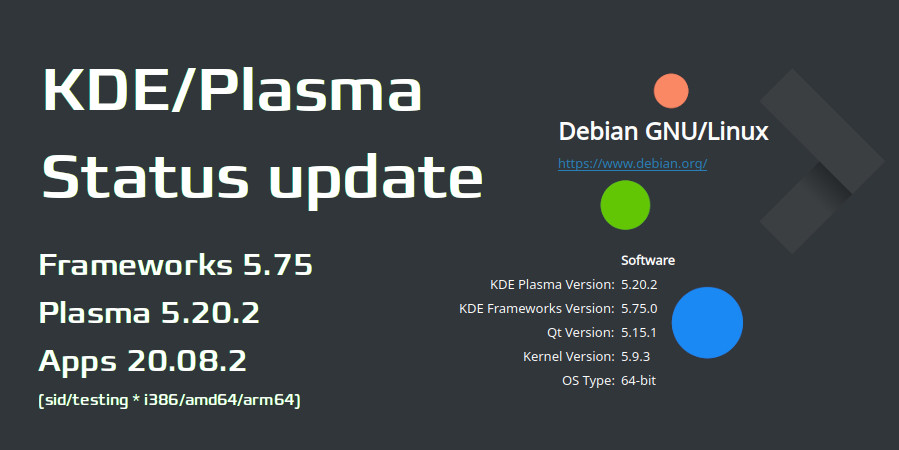
deb https://download.opensuse.org/repositories/home:/npreining:/debian-kde:/frameworks/Debian_Unstable/ ./
deb https://download.opensuse.org/repositories/home:/npreining:/debian-kde:/plasma520/Debian_Unstable/ ./
deb https://download.opensuse.org/repositories/home:/npreining:/debian-kde:/apps2008/Debian_Unstable/ ./
deb https://download.opensuse.org/repositories/home:/npreining:/debian-kde:/other/Debian_Unstable/ ./
and the same with Testing instead of Unstable for Debian/testing. The update to Plasma 5.20 took a bit of time, not only because of the wait for Qt 5.15, but also because I couldn t get it running on my desktop, only in the VM. It turned out that the Plasmoid Event Calendar needed an update, and the old version crashed Plasma ( v68 and below crash in Arch after the Qt 5.15.1 update. ). After I realized that, it was only a question of updating to get Plasma 5.20 running. There are two points I have to mention (and I will fix sooner or later): As usual, let me know your experience! Debian main packages The packages in Debian/experimental are at the most current state, 5.19.5. We have waited with the upload to unstable until the Qt 5.15 transition is over, but hope to upload to unstable rather soon. After the upload is done, we will work on getting 5.20 into unstable. My aim is to get the most recent version of Plasma 5.20 into Debian Bullseye, so we need to do that before the freeze early next year. Let us hope for the best.

3 November 2020

Martin-&#201;ric Racine: Adding IPv6 support to my home LAN

A couple of year ago, I moved into a new flat that comes with RJ45 sockets wired for 10 Gigabit (but currently offering 1 Gigabit) Ethernet.This also meant changing the settings on my router box for my new ISP.I took this opportunity to review my router's other settings too. I'll be blogging about these over the next few posts. Adding IPv6 support to my home LAN I have been following the evolution of IPv6 ever since the KAME project produced the first IPv6 implementation. I have also been keeping track of the IPv4 address depletion. Around the time the IPv6 Day was organized in 2011, I started investigating the situation of IPv6 support at local ISPs. Well, never mind all those rumors about Finland being some high-tech mecca. Back then, no ISP went beyond testing their routers for IPv6 compatibility and producing white papers on what their limited test deployments accomplished. Not that it matters much, in practice. Most IPv6 documentation out there, including Debian's own, still focuses on configuring transitional mechanisms, especially how to connect to a public IPv6 tunnel broker. Relocating to a new flat and rethinking my home network to match gave me an opportunity to revisit the topic. Much to my delight, my current ISP offers native IPv6. This prompted me to go back and read up on IPv6 one more time. One important detail: IPv6 hosts are globally reachable. The implications of this don't immediately spring to mind for someone used to IPv4 network address translation (NAT): Any network service running on an IPv6 host can be reached by anyone anywhere. Contrary to IPv4, there is no division between private and public IP addresses. Whereas a device behind an IPv4 NAT essentially is shielded from the outside world, IPv6 breaks this assumption in more than one way. Not only is the host reachable from anywhere, its default IPv6 address is a mathematical conversion (EUI-64) of the network interface's MAC address, which makes every connection forensically traceable to a unique device. Basically, if you hadn't given much thought to firewalls until now, IPv6 should give you enough goose bumps to get around it. Tightening the configuration of every network service is also an absolute must. For instance, I configured sshd to only listen to private IPv4 addresses. What /etc/network/interfaces might look like on an dual-stack (IPv4 + IPv6) host:
allow-hotplug enp9s0
iface enp9s0 inet dhcp
iface enp9s0 inet6 auto
	privext 2
	dhcp 1
The auto method means that IPv6 will be auto-configured using SLAAC; privext 2 enables IPv6 privacy options and specifies that we prefer connecting via the randomly-generated IPv6 address, rather than the EUI-64 calculated MAC specific address; dhcp 1 enables passive DHCPv6 to fetch additional routing information. The above works for most desktop and laptop configurations. Where things got more complicated is on the router. I decided early on to keep NAT to provide an IPv4 route to the outside world. Now how exactly is IPv6 routing done? Every node along the line must have its own IPv6 address... including the router's LAN interface. This is accomplished using the sample script found in Debian's IPv6 prefix delegation wiki page. I modified mine as follows (the rest of the script is omitted for clarity):
#Both LAN interfaces on my private network are bridged via br0
IA_PD_IFACE="br0"
IA_PD_SERVICES="dnsmasq"
IA_PD_IPV6CALC="/usr/bin/ipv6calc"
Just put the script at the suggested location. We'll need to request a prefix on the router's outside interface to utilize it. This gives us the following interfaces file:
allow-hotplug enp2s4 enp2s8 enp2s9
auto br0
iface enp2s4 inet dhcp
iface enp2s4 inet6 auto
	request_prefix 1
	privext 2
	dhcp 1
iface enp2s8 inet manual
iface enp2s8 inet6 manual
iface enp2s9 inet manual
iface enp2s9 inet6 manual
iface br0 inet static
	bridge_ports enp2s8 enp2s9
	address 10.10.10.254
iface br0 inet6 manual
	bridge_ports enp2s8 enp2s9
	# IPv6 from /etc/dhcp/dhclient-exit-hooks.d/prefix_delegation
The IPv4 NAT and IPv6 Bridge script on my router looks as follows:
#!/bin/sh
PATH="/usr/sbin:/sbin:/usr/bin:/bin"
wan=enp2s4
lan=br0
########################################################################
# IPv4 NAT
iptables -F; iptables -t nat -F; iptables -t mangle -F
iptables -X; iptables -t nat -X; iptables -t mangle -X
iptables -Z; iptables -t nat -Z; iptables -t mangle -Z
iptables -t nat -A POSTROUTING -o $wan -j MASQUERADE
echo 1 > /proc/sys/net/ipv4/ip_forward
########################################################################
# IPv6 bridge
ip6tables -F; ip6tables -X; ip6tables -Z
# Default policy DROP
ip6tables -P FORWARD DROP
# Allow ICMPv6 forwarding
ip6tables -A FORWARD -p ipv6-icmp -j ACCEPT
# Allow established connections
ip6tables -I FORWARD -m state --state RELATED,ESTABLISHED -j ACCEPT
# Accept packets FROM LAN to everywhere
ip6tables -I FORWARD -i $lan -j ACCEPT
echo 1 > /proc/sys/net/ipv6/conf/all/forwarding
echo 1 > /proc/sys/net/ipv6/conf/default/forwarding
# IPv6 propagation via /etc/dhcp/dhclient-exit-hooks.d/prefix_delegation
The above already provided enough IPv6 connectivity to pass the IPv6 test on my desktop inside the LAN. To make things more fun, I enabled DHCPv6 support for my LAN on the router's dnsmasq by adding the last 3 lines to the configuration:
dhcp-hostsfile=/etc/dnsmasq-ethersfile
bind-interfaces
interface=br0
except-interface=enp2s4
no-dhcp-interface=enp2s4
dhcp-range=tag:br0,10.10.10.0,static,infinite
dhcp-range=tag:br0,::1,constructor:br0,ra-names,ra-stateless,infinite
enable-ra
dhcp-option=option6:dns-server,[::],[2606:4700:4700::1111],[2001:4860:4860::8888]
The 5 first lines (included here for emphasis) are extremely important: they ensure that dnsmasq won't provide any IPv4 or IPv6 service to the outside interface (enp2s4) and that DHCP will only be provided for LAN hosts whose MAC address is known. Line 6 shows how dnsmasq's DHCP service syntax differs between IPv4 and IPv6. The rest of my configuration was omitted on purpose. Enabling native IPv6 on my LAN has been an interesting experiment. I'm sure that someone could come up with even better ip6tables rules for the router or for my desktop hosts. Feel free to mention them in the blog's comment.

Martin-&#201;ric Racine: GRUB fine-tuning

A couple of years ago, I moved into a new flat that comes with RJ45 sockets wired for 10 Gigabit (but currently offering 1 Gigabit) Ethernet.This also meant changing the settings on my router box for my new ISP.I took this opportunity to review my router's other settings too. I'll be blogging about these over the next few posts. GRUB fine-tuning One thing that had been annoying me ever since Debian migrated to systemd as /sbin/init is that boot message verbosity hasn't been the same. Previously, the cmdline option quiet merely suppressed the kernel's output to the bootscreen, but left the daemon startup messages alone. Not anymore. Nowadays, quiet produces a blank screen. After some googling, I found the solution to that: GRUB_CMDLINE_LINUX_DEFAULT="noquiet loglevel=5" The former restores daemon startup messages, while the later makes the kernel output only significant notices or more serious messages. On most of my hosts, it mostly reports inconsistencies in the ACPI configuration of the BIOS. Another setting I find useful is a reboot delay in case a kernel panic happens: GRUB_CMDLINE_LINUX="panic=15" This gives me enough time to snap a picture of the screen output to attach to the bug report that will follow.

2 November 2020

Joerg Jaspert: Debian NEW Queue, Rust packaging

Debian NEW Queue So for some reason I got myself motivated again to deal with some packages in Debians NEW Queue. We had 420 source packages waiting for some kind of processing when I started, now we are down to something around 10. (Silly, people keep uploading stuff ) That s not entirely my own work, others from the team have been active too, but for those few days I went through a lot of stuff waiting. And must say it still feels mostly like it did when I somehow stopped doing much in NEW. Except - well, I feel that maintainers are much better in preparing their packages, especially that dreaded task of getting the copyright file written seems to be one that is handled much better. Now, thats not supported by any real numbers, just a feeling, but a good one, I think.

Rust Dealing with NEW meant I got in contact with one part that currently generates some friction between the FTP Team and one group of package maintainers - the Rust team. Note: this is, of course, entirely written from my point of view. Though with the intention of presenting it as objective as possible. Also, I know what rust is, and have tried a Hello world in it, but that s about my deep knowledge of it

The problem Libraries in rust are bundled/shipped/whatever in something called crates, and you manage what your stuff needs and provides with a tool called cargo. A library (one per crate) can provide multiple features, say a TLS lib can link against gnutls or openssl or some other random implementation. Such features may even be combinable in various different ways, so one can have a high number of possible feature combinations for one crate. There is a tool called debcargo which helps creating a Debian package out of a crate. And that tool generates so-called feature-packages, one per feature / combination thereof. Those feature packages are empty packages, only containing a symlink for their /usr/share/doc/ directory, so their size is smaller than the metadata they will produce. Inside the archive and the files generated by it, stuff that every user everywhere has to download and their apt has to process. Additionally, any change of those feature sets means one round through NEW, which is also not ideal. So, naturally, the FTP Team dislikes those empty feature packages. Really, a lot. There appears to be a different way. Not having the feature packages, but putting all the combinations into a Provides header. That sometimes works, but has two problems:
  • It can generate really long Provides: lines. I mean, REALLY REALLY REALLY long. Somewhat around 250kb is the current record. Thats long enough that a tool (not dak itself) broke on it. Sure, that tool needs to be fixed, but still, that s not nice. Currently preferred from us, though.
  • Some of the features may need different dependencies (say, gnutls vs openssl), should those conflict with each other, you can not combine them into one package.

Solutions Currently we do not have a good one. The rust maintainers and the ftp team are talking, exploring various ideas, we will see what will come out.

Devel archive / Component One of the possible solutions for the feature package problem would be something that another set of packages could also make good use of, I think. The introduction of a new archive or component, meant only for packages that are needed to build something, but where users are discouraged from ever using them. What? Well, take golang as an example. While we have a load of golang-something packages in Debian, and they are used for building applications written in go - none of those golang-something are meant to be installed by users. If you use the language and develop in it, the go get way is the one you are expected to use. So having an archive (or maybe component like main or contrib) that, by default, won t be activated for users, but only for things like buildds or archive rebuilds, will make one problem (hated metadata bloat) be evaluated wildly different. It may also allow a more relaxed processing of binary-NEW (easier additions of new feature packages).

But but but Yes, it is not the most perfect solution. Without taking much energy to think about, it requires
  • an adjustment in how main is handled. Right now we have the golden rule that main is self contained, that is, things in it may not need anything outside it for building or running. That would need to be adjusted for building. (Go as well as currently rust are always building static binaries, so no library dependencies there).
  • It would need handling for the release, that is, the release team would need to deal with that archive/component too. We haven t, yet, talked to them (still, slowly, discussing inside FTP Team). So, no idea how many rusty knives they want to sink into our nice bodies for that idea

Final Well, it is still very much open. Had an IRC meeting with the rust people, will have another end of November, it will slowly go forward. And maybe someone comes up with an entire new idea that we all love. Don t know, time will tell.

Vincent Bernat: My collection of vintage PC cards

Recently, I have been gathering some old hardware at my parents house, notably PC extension cards, as they don t take much room and can be converted to a nice display item. Unfortunately, I was not very concerned about keeping stuff around. Compared to all the hardware I have acquired over the years, only a few pieces remain.

Tseng Labs ET4000AX (1989) This SVGA graphics card was installed into a PC powered by a 386SX CPU running at 16 MHz. This was a good card at the time as it was pretty fast. It didn t feature 2D acceleration, unlike the later ET4000/W32. This version only features 512 KB of RAM. It can display 1024 768 images with 16 colors or 800 600 with 256 colors. It was also compatible with CGA, EGA, VGA, MDA, and Hercules modes. No contemporary games were using the SVGA modes but the higher resolutions were useful with Windows 3. This card was manufactured directly by Tseng Labs.
Carte Tseng Labs ET4000AX ISA au-dessus de la bo te "Plan te Aventure"
Tseng Labs ET4000 AX ISA card

AdLib clone (1992) My first sound card was an AdLib. My parents bought it in Canada during the summer holidays in 1992. It uses a Yamaha OPL2 chip to produce sound via FM synthesis. The first game I have tried is Indiana Jones and the Last Crusade. I think I gave this AdLib to a friend once I upgraded my PC with a Sound Blaster Pro 2. Recently, I needed one for a side project, but they are rare and expensive on eBay. Someone mentioned a cheap clone on Vogons, so I bought it. It was sold by Sun Moon Star in 1992 and shipped with a CD-ROM of Doom shareware.
AdLib clone on top of "Alone in the Dark" box
AdLib clone ISA card by Sun Moon Star
On this topic, take a look at OPL2LPT: an AdLib sound card for the parallel port and OPL2 Audio Board: an AdLib sound card for Arduino .

Sound Blaster Pro 2 (1992) Later, I switched the AdLib sound card with a Sound Blaster Pro 2. It features an OPL3 chip and was also able to output digital samples. At the time, this was a welcome addition, but not as important as the FM synthesis introduced earlier by the AdLib.
Sound Blaster Pro 2 on top of "Day of the Tentacle" box
Sound Blaster Pro 2 ISA card

Promise EIDE 2300 Plus (1995) I bought this card mostly for the serial port. I was using a 486DX2 running at 66 MHz with a Creatix LC 288 FC external modem. The serial port was driven by an 8250 UART with no buffer. Thanks to Terminate, I was able to connect to BBSes with DOS, but this was not possible with Windows 3 or OS/2. I needed one of these fancy new cards with a 16550 UART, featuring a 16-byte buffer. At the time, this was quite difficult to find in France. During a holiday trip, I convinced my parent to make a short detour from Los Angeles to San Diego to buy this Promise EIDE 2300 Plus controller card at a shop I located through an advertisement in a local magazine! The card also features an EIDE controller with multi-word DMA mode 2 support. In contrast with the older PIO modes, the CPU didn t have to copy data from disk to memory.
Promise EIDE 2300 Plus next to an OS/2 Warp CD
Promise EIDE 2300 Plus VLB card

3dfx Voodoo2 Magic 3D II (1998) The 3dfx Voodoo2 was one of the first add-in graphics cards implementing hardware acceleration of 3D graphics. I bought it from a friend along with his Pentium II box in 1999. It was a big evolutionary step in PC gaming, as games became more beautiful and fluid. A traditional video controller was still required for 2D. A pass-through VGA cable daisy-chained the video controller to the Voodoo, which was itself connected to the monitor.
3dfx Voodoo 2 Magic 3D II on top of "Jedi Knight: Dark Forces II" box
3dfx Voodoo2 Magic 3D II PCI card

3Com 3C905C-TX-M Tornado (1999) In the early 2000s, in college, the Internet connection on the campus was provided by a student association through a 100 Mbps Ethernet cable. If you wanted to reach the maximum speed, the 3Com 3C905C-TX-M PCI network adapter, nicknamed Tornado , was the card you needed. We would buy it second-hand by the dozen and sell them to other students for around 30 .
3COM 3C905C-TX-M on top of "Red Alert" box
3Com 3C905C-TX-M PCI card

Next.

Previous.