Search Results: "ema"

6 June 2016

John Goerzen: How git-annex replaces Dropbox + encfs with untrusted providers

git-annex has been around for a long time, but I just recently stumbled across some of the work Joey has been doing to it. This post isn t about it s traditional roots in git or all the features it has for partial copies of large data sets, but rather for its live syncing capabilities like Dropbox. It takes a bit to wrap your head around, because git-annex is just a little different from everything else. It s sort of like a different-colored smell. The git-annex wiki has a lot of great information both low-level reference and a high-level 10-minute screencast showing how easy it is to set up. I found I had to sort of piece together the architecture between those levels, so I m writing this all down hoping it will benefit others that are curious. Ir you just want to use it, you don t need to know all this. But I like to understand how my tools work. Overview git-annex lets you set up a live syncing solution that requires no central provider at all, or can be used with a completely untrusted central provider. Depending on your usage pattern, this central provider could require only a few MBs of space even for repositories containing gigabytes or terabytes of data that is kept in sync. Let s take a look at the high-level architecture of the tool. Then I ll illustrate how it works with some scenarios. Three Layers Fundamentally, git-annex takes layers that are all combined in Dropbox and separates them out. There is the storage layer, which stores the literal data bytes that you are interested in. git-annex indexes the data in storage by a hash. There is metadata, which is for things like a filename-to-hash mapping and revision history. And then there is an optional layer, which is live signaling used to drive the real-time syncing. git-annex has several modes of operation, and the one that enables live syncing is called the git-annex assistant. It runs as a daemon, and is available for Linux/POSIX platforms, Windows, Mac, and Android. I ll be covering it here. The storage layer The storage layer simply is blobs of data. These blobs are indexed by a hash, and can be optionally encrypted at rest at remote backends. git-annex has a large number of storage backends; some examples include rsync, a remote machine with git-annex on it that has ssh installed, WebDAV, S3, Amazon Glacier, removable USB drive, etc. There s a huge list. One of the git-annex features is that each client knows the state of each storage repository, as well as the capability set of each storage repository. So let s say you have a workstation at home and a laptop you take with you to work or the coffee shop. You d like changes on one to be instantly recognized on another. With something like Dropbox or OwnCloud, every file in the set you want synchronized has to reside on a server in the cloud. With git-annex, it can be configured such that the server in the cloud only contains a copy of a file until every client has synced it up, at which point it gets removed. Think about it that is often what you want anyhow, so why maintain an unnecessary copy after it s synced everywhere? (This behavior is, of course, configurable.) git-annex can also avoid storing in the cloud entirely if the machines are able to reach each other directly at least some of the time. The metadata layer Metadata about your files includes a mapping from the file names to the storage location (based on hashes), change history, and information about the status of each machine that participates in the syncing. On your clients, git-annex stores this using git. This detail is very useful to some, and irrelevant to others. Some of the git-annex storage backends can support only storage (S3, for instance). Some can support both storage and metadata (rsync, ssh, local drives, etc.) You can even configure a backend to support only metadata (more on why that may be useful in a bit). When you are working with a git-backed repository for git-annex, it can hold data, metadata, or both. So, to have a working sync system, you must have a way to transport both the data and the metadata. The transport for the metadata is generally rsync or git, but it can also be XMPP in which Git changesets are basically wrapped up in XMPP presence messages. Joey says, however, that there are some known issues with XMPP servers sometimes dropping or reordering some XMPP messages, so he doesn t encourage that method currently. The live signaling layer So once you have your data and metadata, you can already do syncs via git annex sync --contents. But the real killer feature here will be automatic detection of changes, both on the local and the remote. To do that, you need some way of live signaling. git-annex supports two methods. The first requires ssh access to a remote machine where git-annex is installed. In this mode of operation, when the git-annex assistant fires up, it opens up a persistent ssh connection to the remote and runs the git-annex-shell over there, which notifies it of changes to the git metadata repository. When a change is detected, a sync is initiated. This is considered ideal. A substitute can be XMPP, and git-annex actually converts git commits into a form that can be sent over XMPP. As I mentioned above, there are some known reliability issues with this and it is not the recommended option. Encryption When it comes to encryption, you generally are concerned about all three layers. In an ideal scenario, the encryption and decryption happens entirely on the client side, so no service provider ever has any details about your data. The live signaling layer is encrypted pretty trivially; the ssh sessions are, of course, encrypted and TLS support in XMPP is pervasive these days. However, this is not end-to-end encryption; those messages are decrypted by the service provider, so a service provider could theoretically spy on metadata, which may include change times and filenames, though not the contents of files themselves. The data layer also can be encrypted very trivially. In the case of the dumb backends like S3, git-annex can use symmetric encryption or a gpg keypair and all that ever shows up on the server are arbitrarily-named buckets. You can also use a gcrypt-based git repository. This can cover both data and metadata and, if the target also has git-annex installed, the live signalling layer. Using a gcrypt-based git repository for the metadata and live signalling is the only way to accomplish live syncing with 100% client-side encryption. All of these methods are implemented in terms of gpg, and can support symmetric of public-key encryption. It should be noted here that the current release versions of git-annex need a one-character patch in order to fix live syncing with a remote using gcrypt. For those of you running jessie, I recommend the version in jessie-backports, which is presently 5.20151208. For your convenience, I have compiled an amd64 binary that can drop in over /usr/bin/git-annex if you have this version. You can download it and a gpg signature for it. Note that you only need this binary on the clients; the server can use the version from jessie-backports without issue. Putting the pieces together: some scenarios Now that I ve explained the layers, let s look at how they fit together. Scenario 1: Central server In this scenario, you might have a workstation and a laptop that sync up with each other by way of a central server that also has a full copy of the data. This is the scenario that most closely resembles Dropbox, box, or OwnCloud. Here you would basically follow the steps in the git-assistant screencast: install git-annex on a server somewhere, and point your clients to it. If you want full end-to-end encryption, I would recommend letting git-annex generate a gpg keypair for you, which you would then need to copy to both your laptop and workstation (but not the server). Every change you make locally will be synced to the server, and then from the server to your other PC. All three systems would be configured in the client transfer group. Scenario 1a: Central server without a full copy of the data In this scenario, everything is configured the same except the central server is configured with the transfer transfer group. This means that the actual data synced to it is deleted after it has been propagated to all clients. Since git-annex can verify which repository has received a copy of which data, it can easily enough delete the actual file content from the central server after it has been copied to all the clients. Many people use something like Dropbox or OwnCloud as a multi-PC syncing solution anyhow, so once the files have been synced everywhere, it makes sense to remove them from the central server. This is often a good ideal for people. There are some obvious downsides that are sometimes relevant. For instance, to add a third sync client, it must be able to initially copy down from one of the existing clients. Or, if you intend to access the data from a device such as a cell phone where you don t intend for it to have a copy of all data all the time, you won t have as convenient way to download your data. Scenario 1b: Split data/metadata central servers Imagine that you have a shell or rsync account on some remote system where you can run git-annex, but don t have much storage space. Maybe you have a cheap VPS or shell account somewhere, but it s just not big enough to hold your data. The answer to this would be to use this shell or rsync account for the metadata, but put the data elsewhere. You could, for instance, store the data in Amazon S3 or Amazon Glacier. These backends aren t capable of storing the git-annex metadata, so all you need is a shell or rsync account somewhere to sync up the metadata. (Or, as below, you might even combine a fully distributed approach with this.) Then you can have your encrypted data pushed up to S3 or some such service, which presumably will grow to whatever size you need. Scenario 2: Fully distributed Like git itself, git-annex does not actually need a central server at all. If your different clients can reach each other directly at least some of the time, that is good enough. Of course, a given client will not be able to do fully automatic live sync unless it can reach at least one other client, so changes may not propagate as quickly. You can simply set this up by making ssh connections available between your clients. git-annex assistant can automatically generate appropriate ~/.ssh/authorized_keys entries for you. Scenario 2a: Fully distributed with multiple disconnected branches You can even have a graph of connections available. For instance, you might have a couple machines at home and a couple machines at work with no ability to have a direct connection between them (due to, say, firewalls). The two machines at home could sync with each other in real-time, as could the two machines at work. git-annex also supports things like USB drives as a transport mechanism, so you could throw a USB drive in your pocket each morning, pop it in to one client at work, and poof both clients are synced up over there. Repeat when you get home in the evening, and you re synced there. The USB drive s repository can, of course, be of the transport type so data is automatically deleted from it once it s been synced everywhere. Scenario 3: Hybrid git-annex can support LAN sync even if you have a central server. If your laptop, say, travels around but is sometimes on the same LAN as your PC, git-annex can easily sync directly between the two when they are reachable, saving a round-trip to the server. You can assign a cost to each remote, and git-annex will always try to sync first to the lowest-cost path that is available. Drawbacks of git-annex There are some scenarios where git-annex with the assistant won t be as useful as one of the more traditional instant-sync systems. The first and most obvious one is if you want to access the files without the git-annex client. For instance, many of the other tools let you generate a URL that you can email to people, and then they can download files without any special client software. This is not directly possible with git-annex. You could, of course, make something like a public_html directory be managed with git-annex, but it wouldn t provide things like obfuscated URLs, password-protected sharing, time-limited sharing, etc. that you get with other systems. While you can share your repositories with others that have git-annex, you can t share individual subdirectories; for a given repository, it is all or nothing. The Android client for git-annex is a pretty interesting thing: it is mostly a small POSIX environment, providing a terminal, git, gpg, and the same web interface that you get on a standalone machine. This means that the git-annex Android client is fully functional compared to a desktop one. It also has a quick setup process for syncing off your photos/videos. On the other hand, the integration with the Android ecosystem is poor compared to most other tools. Other git-annex features git-annex has a lot to offer besides the git-annex assistant. Besides the things I ve already mentioned, any given git-annex repository including your client repository can have a partial copy of the full content. Say, for instance, that you set up a git-annex repository for your music collection, which is quite large. You want some music on your netbook, but don t have room for it all. You can tell git-annex to get or drop files from the netbook s repository without deleting them remotely. git-annex has quite a few ways to automate and configure this, including making sure that at least a certain number of copies of a file exist in your git-annex ecosystem. Conclusion I initially started looking at git-annex due to the security issues with encfs, and the difficulty with setting up ecryptfs in this way. (I had been layering encfs atop OwnCloud). git-annex certainly ticks the box for me security-wise, and obviously anything encrypted with encfs wasn t going to be shared with others anyhow. I ll be using git-annex more in the future, I m sure.


3 June 2016

Eduard Sanou: No more unencrypted emails to gpg contacts

I have been using mutt for about half a year already and I m very happy with it. The previous email client I used was Thunderbird (with the Enigmail extension to handle GPG). There were two main reasons that made me switch. The first one was that I often would like to check my email while I m offline, and it seems that Thunderbird is not very good at this. Sometimes not all my email would have been downloaded (just the headers), and I also found it frustrating that after marking more than 50 emails as read while offline, they would be marked as unread again once I went back online. With mutt I m using mbsync (which apparently is faster than offlineimap) to sync my email to a local folder with a cron job. I couldn t be happier. The other issue was that I like having many filters, and it was tedious to customize filters in Thunderbird: there s no way to copy a filter and modify it, and there s a limit in the combinations of ANDs and ORs for fields. I m using procmail now, which allows me save the filter configuration in plaintext and define patterns with more flexibility. The setup for mutt took several weeks, but I never felt that I couldn t accomplish what I wanted (unlike in Thunderbird). I m using mutt with several python and bash scripts that I wrote. But the reason for this post is an issue that I believe happens in every email client (or should I say, MUA, to be more precise). I ve seen it happening to people using both Thunderbird and mutt, and I bet it has happened in other cases: sending an email to someone for which you have their GPG key unencrypted unwillingly. I ve seen this happening in email replies with several participants: after a few encrypted messages are exchanged, someone replies in the clear, quoting all the previous messages. I tried to avoid this by configuring mutt to encrypt and sign by default, forcing me to set sign only manually before sending every email that I can t send encrypted (I d like to send all my emails encrypted, but not everybody has a GPG key :( ). So what happened? I got so used to sending many unencrypted emails that I would press P S (PGP setting, Sign only) before sending emails as a reflex act. And I sent an email unencrypted to a friend for which I have his GPG key :( So I thought: It s a very rare case to want to send an unencrypted email to someone for which you have their GPG key. I think extensions like Enigmail should give you a warning when this happens, to alert you about it. In my case, I solved it with a python script that inspects the email, and, if it s unencrypted and the recipient/s is/are in your GPG keyring it warns you about it and returns an error. The script stores a temporary file with the Message-ID so that if you run it again with the same email it will properly send the email without returning an error. Now, I only needed to configure mutt to use this script as the sendmail command:
per_account:set sendmail  = "$HOME/bin/check-mail-gpg /usr/bin/msmtp -a $my_email"
And here goes the python script check-mail-gpg:
#! /usr/bin/python3
import os
import sys
import subprocess
import email.parser
from email.header import decode_header
from email.utils import parseaddr
STATUS_FILE = '/tmp/check-mail-gpg.tmp'
def dec(header):
    head = decode_header(header)
    if len(head) == 1 and head[0][1] == None:
        return head[0][0]
    else:
        return ''.join([h.decode(enc) if enc else h.decode('ascii') \
                for (h,enc) in head])
def send_mail(mail):
    print('Calling external email client to send the email...')
    #return -1 # testing mode
    p = subprocess.Popen(sys.argv[1:], stdin=subprocess.PIPE)
    p.stdin.write(mail.encode('utf-8'))
    p.stdin.close()
    return p.wait()
def main():
    mail = sys.stdin.read()
    heads = email.parser.Parser().parsestr(mail, headersonly=True)
    content = heads['Content-Type'].split(';')[0].strip()
    print('Content is:', content)
    if content == 'multipart/encrypted':
        print('Ok: encrypted mail, we can return now...')
        sys.exit(send_mail(mail))
    addrs = [parseaddr(addr) for addr in heads['To'].split(',')]
    print('Found emails:', addrs)
    gpg_cnt = 0
    for name, addr in addrs:
        print('Looking for', addr, 'in the keyring...')
        res = subprocess.call(['gpg', '--list-keys', addr],
                stdout=subprocess.DEVNULL, stderr=subprocess.DEVNULL)
        if res == 0:
            gpg_cnt += 1
    if gpg_cnt == 0:
        print('Ok: no email found in the gpg keyring, we can return now...')
        sys.exit(send_mail(mail))
    if not os.path.exists(STATUS_FILE):
        open(STATUS_FILE, 'w').close()
    msg_id = heads['Message-ID']
    msg_id_prev = ''
    with open(STATUS_FILE, 'r') as f:
        msg_id_prev = f.read()
    if msg_id.strip() == msg_id_prev.strip():
        sys.exit(send_mail(mail))
    else:
        with open(STATUS_FILE, 'w') as f:
            f.write(msg_id)
        print('Alert: trying to send an unencrypted email to', addrs,
                ', for which some gpg keys were found in the keyring!')
        print('Try again if you are sure to send this message unencrypted.')
        sys.exit(1)
if __name__ == '__main__':
    main()

Update I ve been told about the option crypt_opportunistic_encrypt in mutt, which provides a feature very similar to what I was looking for. This option will automatically enable encryption when the recipient has a GPG key in your keyring. From mutt s man page:
3.41. crypt_opportunistic_encrypt Type: boolean Default: no Setting this variable will cause Mutt to automatically enable and disable encryption, based on whether all message recipient keys can be located by mutt. When this option is enabled, mutt will determine the encryption setting each time the TO, CC, and BCC lists are edited. If $edit_headers is set, mutt will also do so each time the message is edited. While this is set, encryption settings can t be manually changed. The pgp or smime menus provide an option to disable the option for a particular message. If $crypt_autoencrypt or $crypt_replyencrypt enable encryption for a message, this option will be disabled for the message. It can be manually re-enabled in the pgp or smime menus. (Crypto only)

2 June 2016

Raphaël Hertzog: My Free Software Activities in May 2016

My monthly report covers a large part of what I have been doing in the free software world. I write it for my donators (thanks to them!) but also for the wider Debian community because it can give ideas to newcomers and it s one of the best ways to find volunteers to work with me on projects that matter to me. Debian LTS Due to some departure and increased workload, I wanted to find out a few new paid contributors for Debian LTS. So I sent a mail to debian-jobs@lists.debian.org and contrary to last time (where I posted the announce only here on my blog), I had plenty of replies I ended up enrolling 6 new contributors and refusing 3 persons that did not have the required profile. All new contributors are supposed to handle at least one LTS update on their free time to get up to speed. But from the 6 new contributors only 3 managed to handle their training update in May.  During the month I spent quite some time providing guidance to the new contributors both in private mails and on the debian-lts mailing list. I also reviewed a xen update where I had (rightfully) some doubts about the work done. Packaging work fonts-cantarell. After having diagnosed the problem last month, I got annoyed enough by the lack of a fixed package that I found a way to package a newer upstream release of fonts-cantarell without requiring a fontforge update that was likely to take some time still so I prepared and uploaded 0.0.24-1. cpputest. Bug #823711 reported some license issues with some of the files. I immediately forwarded this upstream (issue 961) and fixed it in Debian by repacking the upstream tarball. Fortunately upstream has been quick to handle his and there s a new upstream release (3.8) where the problematic files have been dropped. live-boot. Kali s live images were no longer booting (stuck in the initrd) and with the help of Ben Hutchings we diagnosed this back to #823069 which I fixed in live-boot 20160511. udev. I filed #824025 to request that the rule defining the MAC-based name of USB network interfaces be isolated in its own file so that it can be easily disabled (we do that in Kali). Misc stuff. I packaged Django 1.8.13 in jessie-backports. I filed
#824165 against sbuild being broken with $apt_allow_unauthenticated = 1; in .sbuildrc. I filed a wishlist bug #824168 against apt-listchanges to suggest that it ignores news from auto-installed packages. I filed #825923 to report a regression in python-nltk (discovered in Kali first). Infrastructure work packages.debian.org. A few months ago, I wrote a patch for packages.debian.org so that it forwards emails to tracker.debian.org instead of packages.qa.debian.org. At that time, I was in touch with Rhonda and was hoping that she would apply it rather quickly (the patch is rather short). After a few more pings, she made it clear that she was not alone and that I should rather file a proper request so that someone else can also process it. So I filed #824085 and tried to find someone else to apply my patch. Most of the members of pkg_maint said that they were part of the group only due to generic webmaster involvement but that they did not want to touch that part. Fortunately, Martin Zobel Helas was more receptive to my request and helped me to deploy my changes. I committed my change and Martin pulled it in the live checkout on picconi.debian.org. This update is also a first step towards the possibility to use foo@packages.debian.org and/or teams+foo@tracker.debian.org in the Maintainer field of a package. With this we can get rid of dedicated mailing lists that just duplicate the work of the package tracker. And we no longer need to care about the fact that the Maintainer is handled differently than Uploaders since all (human) co-maintainers would then be listed in Uploaders only (and the package tracker would deal appropriately with mails sent to the Maintainer). Distro Tracker. I improved the import process to be able to force a new processing of source packages that were already imported. This was useful to let it recognize architectures which were newly added in its database (and that were ignored and thus not displayed up to now). I also made a first review of the AppStream patch submitted by Matthias Klump in #806740. Thanks See you next month for a new summary of my activities.

No comment Liked this article? Click here. My blog is Flattr-enabled.

1 June 2016

Jamie McClelland: Signal and Google Cloud Services

I just installed Signal on my Android phone. It wasn't an easy decision. I have been running Cyanogenmod, a Google-free version of Android, and installing apps from F-Droid, a repository of free software android apps, for several years now. This setup allows me to run all the applications I need without Google accessing any of my cell phone data. It has been a remarkably successful experiment leaving me with all the phone software I need. And it's consistent with my belief that Google's size, reach and goals are a menace to the left's ability to develop the autonomous communications systems on the Internet that we need to achieve any meaningful political change. However, if I want to install Signal, I have to install Google Play, and the only way to install Google Play is to install Google's base line set of apps and to connect your cell phone to a Gmail account. Why in the world would Signal require Google Play? There is plenty of discussion of the technical debate on this topic, but politically it boils down to this: security is about trade-offs, and the trade-offs you find important are based on your politics. While I consider Signal to be on the same team in the big picture, I think Signal's winning a short term victory for more massively adopted end-to-end encryption at the expense of a longer term and more important struggle for autonomous communication systems specifically for communities fighting corporate power (of which Google itself is an important target) and fighting US hegemony on a global scale. Furthermore, Signal's lead developer's outright hostility to alternate clients connecting to the centralized signal servers demonstrates another political decision that favors central control over any confidence in a broader movement control over what could have become a power new protocol for secure communication. And his refusal to grant an exemption for other developers to use just the encryption algorythm is frustrating to say the least. Given this reasoning, why install Signal? The main reason is because I have yet to convince anyone to remove Google Apps from their phone and Signal, right now, represents a dramatic improvement over most people's current communications habit. And, when it comes down to it, I need to run what I recommend. I'm still running both conversations and Antox which are far better alternatives in the long run. However until they gain more widespread adoption, I'll be experimenting with Signal. Technical Details Oh, and by the way, installing Google Apps nearly bricked my phone. Cyanogenmod's web site conveniently provides instructions for installing Google Apps. However, confusingly, they provide two different links to choose from, one is from OpenGapps which provided my a link to download the zip file to flash on a non-https page (the link itself was over https). The other link was to an https-enabled page on androidfilehost.com that offered a non-https download (but did provide a md5 checksum). I am now sure why people offering software downloads don't enable https from start to finish (well, maybe I do - I haven't yet enabled https on this site...). However, more confusing is that both links were to different files. The OpenGapps one seemed to be a daily build and the androidfilehost was to a file with the date 20140606 in it's name, suggesting it was built nearly 2 years ago. I went with the daily build. When I restarted, I got the error "Unfortunately, Android Keyboard (Aosp) Has Stopped." If you search the web for this error you will see loads of people getting it. However, none of them seem to be using an encrypted disk. Yes, that is a bigger problem since you can't enter your encrypted disk passphrase if your keyboard app has crashed and you can't boot your phone if you can't even hit enter at the passphrase prompt. If you can't boot, you can't clear the keyboard app cache or most of the suggestions. In fact, when you press and hold the power key you don't even get the option to reboot into recovery mode. And, if you connect your device to your USB cable and run the adb tool on your computer, the tool reports that you are not authorized to connect your device. Oh damn. Did I just brick my phone? Fortunately, you can still boot into recovery mode on a Samsung S4 by powering it off. Then, press and hold the up volume button while turning it on. In recovery mode, I as able to convince the adb tool to connect to my device and I copied over the other Gapps zip file from androidfilehost.com and flashing that one seems to have fixed the problem. Once I booted, I ran Google Play and opted to create a new Google Account. I chose the option to not sync my data. Then, I checked in Settings -> Accounts I saw that a Google Account was there and was synchronizing. Great. What was it synchronizing? I clicked the account, then clicked "Accounts and Privacy" and ensured that everything was turned off. Let's hope that works. [Update] Signal's option to take over as your default SMS client and send un-encrypted normal SMS messages while sending encrypted messages to other Signal users is a very good way to smooth adoption. Unfortunately I had some problems with MMS message for which I found a work-around. But sheesh, lots of MMS problems at the moment.

Thorsten Alteholz: My Debian Activities in May 2016

FTP assistant This month I marked 286 packages for accept and rejected 35. I also sent 13 emails to maintainers asking questions. Apart from this nothing unusual happened this month. Debian LTS This was my twenty-third month that I did some work for the Debian LTS initiative, started by Raphael Hertzog at Freexian. This month my all in all workload reached a new high with 31.00h. This resulted in patches for 35 CVEs and the following uploads: Thanks a lot to all the people who answered my calls for testing, especially Gabriel Filion, Joost van Baal-Ili and Stefan! This month I also had another term of doing frontdesk work and looked for CVEs that are important for Wheezy LTS or could be ignored. Other stuff As already mentioned in an earlier post, I tried to enliven the Internet of Things in Debian. If you would like to help in this field, please drop me a line.

Antoine Beaupr : (Still) working too much on the computer

I have been using Workrave to try to force me to step away from the computer regularly to work around Repetitive Strain Injury (RSI) issues that have plagued my life on the computer intermittently in the last decade. Workrave itself is only marginally efficient at getting me away from the machine: as any warning systems, it suffers from alarm fatigue as you frenetically click the dismiss button every time a Workrave warning pops up. However, it has other uses.

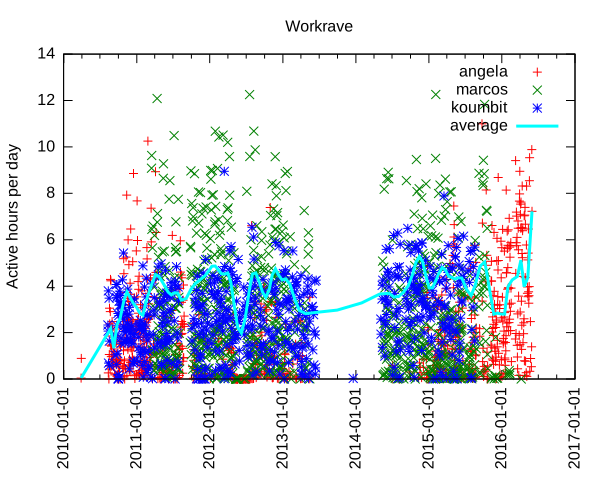
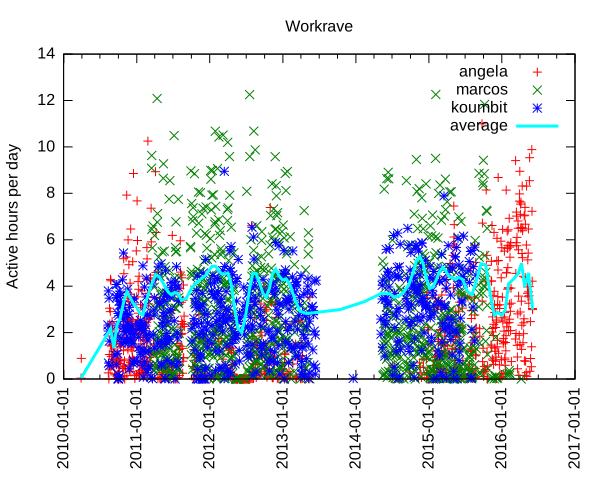
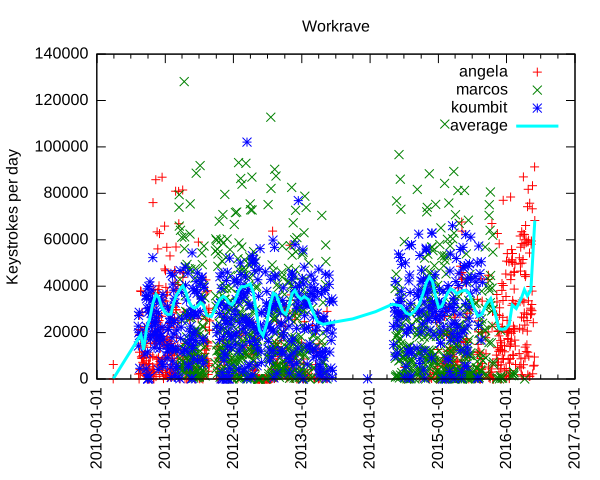
Analyzing data input In the past, I have used Workrave to document how I work too much on the computer, but never went through more serious processing of the vast data store that Workrave accumulates about mouse movements and keystrokes. Interested in knowing how much my leave from Koumbit affected time spent on the computer, I decided to look into this again. It turns out I am working as much, if not more, on the computer since I took that "time off": per machine keystrokes per day and average We can see here that I type a lot on the computer. Normal days range from 10 000 to 60 000 keystrokes, with extremes at around 100 000 keystrokes per day. The average seem to fluctuate around 30 to 40 000 keystrokes per day, but rises sharply around the end of the second quarter of this very year. For those unfamiliar with the underlying technology, one keystroke is roughly one byte I put on the computer. So the average of 40 000 keystrokes is 40 kilobyte (KB) per day on the computer. That means 15 MB over a year or about 150MB (or 100 MiB if you want to be picky about it) over the course of the last decade. That is a lot of typing. I originally thought this could have been only because I type more now, as opposed to use more the mouse previously. Unfortunately, Workrave also tracks general "active time" which we can also examine: per machine keystrokes per day and average Here we see that I work around 4 hours a day continuously on the computer. That is active time: not just login, logout time. In other words, the time where i look away from the computer and think for a while, jot down notes in my paper agenda or otherwise step away from the computer for small breaks is not counted here. Notice how some days go up to 12 hours and how recently the average went up to 7 hours of continuous activity. So we can clearly see that I basically work more on the computer now than I ever did in the last 7 years. This is a problem - one of the reasons of this time off was to step away from the computer, and it seems I have failed.
Update: it turns out the graph was skewed towards the last samples. I went more easy on the keyboard in the last few days and things have significantly improved: per machine keystrokes per day and average, 3 days later
Another interesting thing we can see is when I switched from using my laptop to using the server as my main workstation, around early 2011, which is about the time marcos was built. Now that marcos has been turned into a home cinema downstairs, I went back to using my laptop as my main computing device, in late 2015. We can also clearly see when I stopped using Koumbit machines near the end of 2015 as well.

Further improvements and struggle for meaning The details of how the graph was produced are explained at the end of this article. This is all quite clunky: it doesn't help that the Workrave data structure is not easily parsable and so easily corruptible. It would be best if each data point was on its own separate line, which would be long, granted, but so easier to parse. Furthermore, I do not like the perl/awk/gnuplot data processing pipeline much. It doesn't allow me to do interesting analysis like averages, means and linear regressions easily. It could be interesting to rewrite the tools in Python to allow better graphs and easier data analysis, using the tools I learned in 2015-09-28-fun-with-batteries. Finally, this looks only at keystrokes and non-idle activity. It could be more interesting to look at idle/active times and generally the amount of time spent on the computer each day. And while it is interesting to know that I basically write a small book on the computer every day (according to Wikipedia, 120KB is about the size of a small pocket book), it is mostly meaningless if all that stuff is machine-readable code. Where is, after all, the meaning in all those shell commands and programs we constantly input on our keyboards, in the grand scheme of human existence? Most of those bytes are bound to be destroyed by garbage collection (my shell's history) or catastrophic backup failures.
While the creative works from the 16th century can still be accessed and used by others, the data in some software programs from the 1990s is already inaccessible. - Lawrence Lessig
But is my shell history relevant? Looking back at old posts on this blog, one has to wonder if the battery life of the Thinkpad 380z laptop or how much e-waste I threw away in 2005 will be of any historical value in 20 years, assuming the data survives that long.

How this graph was made I was happy to find that Workrave has some contrib scripts to do such processing. Unfortunately, those scripts are not shipped with the Debian package, so I requested that to be fixed (#825982). There were also some fixes necessary to make the script work at all: first, there was a syntax error in the Perl script. But then since my data is so old, there was bound to be some data corruption in there: incomplete entries or just plain broken data. I had lines that were all NULL characters, typical of power failures or disk corruptions. So I have made a patch to fix that script (#826021). But this wasn't enough: while this processes data on the current machine fine, it doesn't deal with multiple machines very well. In the last 7 years of data I could find, I was using 3 different machines: this server (marcos), my laptop (angela) and Koumbit's office servers (koumbit). I ended up modifying the contrib scripts to be able to collate that data meaningfully. First, I copied over the data from Koumbit in a local fake-koumbit directory. Second, I mounted marcos home directory locally with SSHFS:
sshfs anarc.at:/home/anarcat marcos
I also made this script to sum up datasets:
#!/usr/bin/perl -w
use List::MoreUtils 'pairwise';
$  = 1;
my %data = ();
while (<>)  
    my @fields = split;
    my $date = shift @fields;
    if (defined($data $date ))  
        my @t = pairwise   $a + $b   @ $data $date , @fields;
        $data $date  = \@t;
     
    else  
        $data $date  = \@fields;
     
 
foreach my $d ( sort keys %data )  
    print "$d @ $data $d \n";
 
Then I made a modified version of the Gnuplot script that processes all those files together:
#!/usr/bin/gnuplot
set title "Workrave"
set ylabel "Keystrokes per day"
set timefmt "%Y%m%d%H%M"
#set xrange [450000000:*]
set format x "%Y-%m-%d"
set xtics rotate
set xdata time
set terminal svg
set output "workrave.svg"
plot "workrave-angela.dat" using 1:28 title "angela", \
     "workrave-marcos.dat" using 1:28 title "marcos", \
     "workrave-koumbit.dat" using 1:28 title "koumbit", \
     "workrave-sum.dat" using 1:2 smooth sbezier linewidth 3 title "average"
#plot "workrave-angela.dat" using 1:28 smooth sbezier title "angela", \
#     "workrave-marcos.dat" using 1:28 smooth sbezier title "marcos", \
#     "workrave-koumbit.dat" using 1:28 smooth sbezier title "koumbit"
And finally, I made a small shell script to glue this all together:
#!/bin/sh
perl workrave-dump > workrave-$(hostname).dat
HOME=$HOME/marcos perl workrave-dump > workrave-marcos.dat
HOME=$PWD/fake-koumbit perl workrave-dump > workrave-koumbit.dat
# remove idle days as they skew the average
sed -i '/ 0$/d' workrave-*.dat
# per-day granularity
sed -i 's/^\(........\)....\? /\1 /' workrave-*.dat
# sum up all graphs
cat workrave-*.dat   sort   perl sum.pl > workrave.dat
./gnuplot-workrave-anarcat
I used a different gnuplot script to generate the activity graph:
#!/usr/bin/gnuplot
set title "Workrave"
set ylabel "Active hours per day"
set timefmt "%Y%m%d%H%M"
#set xrange [450000000:*]
set format x "%Y-%m-%d"
set xtics rotate
set xdata time
set terminal svg
set output "workrave.svg"
plot "workrave-angela.dat"  using 1:($23/3600) title "angela", \
     "workrave-marcos.dat"  using 1:($23/3600) title "marcos", \
     "workrave-koumbit.dat" using 1:($23/3600) title "koumbit", \
     "workrave.dat"         using 1:($23/3600) title "average" smooth sbezier linewidth 3
#plot "workrave-angela.dat" using 1:28 smooth sbezier title "angela", \
#     "workrave-marcos.dat" using 1:28 smooth sbezier title "marcos", \
#     "workrave-koumbit.dat" using 1:28 smooth sbezier title "koumbit"

31 May 2016

Chris Lamb: Free software activities in May 2016

Here is my monthly update covering a large part of what I have been doing in the free software world (previously):
Debian My work in the Reproducible Builds project was covered in our weekly reports. (#53, #54, #55, #56 & #57)
Debian LTS

This month I have been paid to work 18 hours on Debian Long Term Support (LTS). In that time I did the following:
  • A week of "frontdesk" duties, triaging CVEs, assigning tasks, etc.
  • Issued DLA 464-1 for libav, a multimedia player, server, encoder and transcoder library that fixed a use-after free vulnerability.
  • Issued DLA 469-1 for libgwenhywfar (an OS abstraction layer that allows porting of software to different operating systems like Linux, *BSD, Windows, etc.) correcting the use of an outdated CA certificate bundle.
  • Issued DLA 470-1 for libksba, a X.509 and CMS certificate support library. patching a buffer vulnerability.
  • Issued DLA 474-1 for dosfstools, a collection of utilities for making and checking MS-DOS FAT filesystems, fixing an invalid memory and heap overflow vulnerability.
  • Issued DLA 482-1 for libgd2 graphics library, rectifying a stack consumption vulnerability.

Uploads
  • python-django (1.9.6-1) New upstream bugfix release.
  • redis (3.2.0-1, etc.) New upstream release, correct build on more exotic architectures and minor packaging fixups.
  • gunicorn (19.5.0-1 & 19.6.0-1) New upstream releases and minor packaging fixups.


30 May 2016

Russ Allbery: Review: By the Sword

Review: By the Sword, by Mercedes Lackey
Series: Vows and Honor #4
Publisher: DAW
Copyright: February 1991
ISBN: 0-88677-463-2
Format: Mass market
Pages: 492
By the Sword is the next book in my (slow) Valdemar re-read. This one is a bit hard to classify in the series; it's technically a stand-alone novel, and it doesn't require a lot of prior series knowledge. But the heroine, Kerowyn, is a relative of Tarma and Kethry, and Tarma and Kethry appear in this novel. Most of the book also deals with similar themes as the rest of the Tarma and Kethry books, even though it's also a bridge into Valdemar proper. I'm going to follow Fantastic Fiction and call it book four of the Vows and Honor series, even though the publisher doesn't refer to it that way and it's not strictly correct. I think that creates the right impression, and it's mildly better to read the other Tarma and Kethry novels first. This book is also a bit confusing for reading order. It was published just before the Mage Winds trilogy, and happens before them in series chronological order (between that trilogy and the Talia series). But some of the chronologies in some of the Valdemar books show it after the Mage Winds trilogy. I think I originally read it afterwards, but both natural reading order and publication order puts it first, and that's the ordering I followed this time. Series ordering trivia aside (sometimes the comic book shared universe continuity geek in me raises its head), By the Sword is a hefty, self-contained novel about a very typical Lackey protagonist. Kerowyn is the daughter of a noble house, largely ignored by her father in favor of her brother and tasked with keeping the keep running since her mother died. She wants to learn to fight and ride, but that's not part of her father's plans for her. But those plans become suddenly irrelevant when the keep is attacked during her brother's wedding and the bride kidnapped. Unless someone at least attempts to recover her, this will be taken as an excuse for conquest of the keep by the bride's family. (Spoilers for the start of the book in the following paragraph. I think the outcomes are reasonably obvious given the type of book this is, but skip it if you don't want to know anything about the plot.) If you're familiar with Lackey's musical work (most probably won't be, but you might if you follow filk), "Kerowyn's Ride" is the start of this book. Kerowyn goes to her grandmother Kethry, who is semi-legendary to Kerowyn but well-known to readers of the rest of the series. From Kethry, she acquires Need; with Need's help, she improbably manages to rescue her brother's bride. It seems like a happy ending, but it completely disrupts and destroys her life. Her role as hero does not fit any of the expectations the remaining members of the household have for her. But it also gives her an escape: she ends up as Tarma and Kethry's student, learning all the things about fighting she'd craved to learn and preparing for a life as a mercenary. Quite a few adventures follow, all of which are familiar to Lackey readers and particularly to readers of the Tarma and Kethry books. But I think this is one of Lackey's better-written books. The pacing is reasonably good despite the length of the book, Kerowyn is a likable and interesting character, and I like the pragmatism and practicalities that Lackey brings to sword and sorcery mercenary groups. In style and subject matter, it's the closest to Oathbreakers, which was also my favorite of the Tarma and Kethry novels. By the Sword is both the natural conclusion of the Tarma and Kethry era and arc, and vital foundational material for what I think of as the "core" Valdemar story: Elspeth's adventures during Selany's reign, which start in the Mage Winds trilogy immediately following this. Kerowyn becomes a vital supporting character in the rest of the story, and Need is hugely important in events to come. But even if you're not as invested in the overall Valdemar story arc as I am, this is solid, if a bit predictable and unspectacular, sword and sorcery writing presented in a meaty and satisfying novel with a good coming-of-age story. This is one of my favorites of the Valdemar series as measured by pure story-telling. There are other books that provide more interesting lore and world background, but there are few characters I like as well as Kerowyn, and I find the compromise she reaches with Need delightful. If you liked Oathbreakers, I'm pretty sure you'd like this as well. And, of course, recommended if you're reading the whole Valdemar series as a fairly key link in the plot and a significant bridge between the Heralds and Tarma and Kethry's world, a bridge that Elspeth is about to cross in the other direction. Rating: 8 out of 10

Reproducible builds folks: Reproducible builds: week 57 in Stretch cycle

What happened in the Reproducible Builds effort between May 22nd and May 28th 2016: Media coverage Documentation update Toolchain fixes Packages fixed The following 18 packages have become reproducible due to changes in their build dependencies: canl-c configshell dbus-java dune-common frobby frown installation-guide jexcelapi libjsyntaxpane-java malaga octave-ocs paje.app pd-boids pfstools r-cran-rniftilib scscp-imcce snort vim-addon-manager The following packages have become reproducible after being fixed: Some uploads have fixed some reproducibility issues, but not all of them: Patches submitted that have not made their way to the archive yet: Package reviews 123 reviews have been added, 57 have been updated and 135 have been removed in this week. 21 FTBFS bugs have been reported by Chris Lamb and Santiago Vila. strip-nondeterminism development tests.reproducible-builds.org Misc. This week's edition was written by Reiner Herrmann and Holger Levsen and reviewed by a bunch of Reproducible builds folks on IRC.

Daniel Stender: My work for Debian in May

No double posting this time ;-) I've got not so much spare time this month to spend on Debian, but I could work on the following packages: This series of blog postings also includes little introductions of and into new packages in the archive. This month there is: Pyinfra Pyinfra is a new project which is currently still in development state. It has been already pointed out in an interesting German article1, and is now available as package maintained within the Python Applications Team. It's currently a one man production by Nick Barrett, and eagerly developed in the past weeks (we're currently at 0.1~dev24). Pyinfra is a remote server configuration/provisioning/service deployment tool which belongs in the same software category like Puppet or Ansible2. It's for provisioning one or an array of remote servers with software packages and to configure them. Pyinfra runs agentless like Ansible, that means for using it nothing special (like a daemon) has to run on targeted servers. It's written to be used for provisioning POSIX compatible Linux systems and has alternatives when it comes to special features like package managers (e.g. supports apt as well as yum). The documentation could be found in usr/share/doc/pyinfra/html/. Here's a little crash course on how to use Pyinfra: The pyinfra CLI tool is used on the command line like this, deploy scripts, single operations or facts (see below) could be used on a single server or a multitude of remote servers:
$ pyinfra -i <inventory script/single host> <deploy script>
$ pyinfra -i <inventory script/single host> --run <operation>
$ pyinfra -i <inventory script/single host> --facts <fact>
Remote servers which are operated on must provide a working shell and they must be reachable by SSH. For connecting, --port, --user, --password, --key/--key-password and --sudo flags are available, --sudo to gain superuser rights. Root access or sudo rights of course have to be already set up. By the way, localhost could be operated on the same way. Single operations are organized in modules like "apt", "files", "init", "server" etc. With the --run option they could be used individually on servers like follows, e.g. server.user adds a new user on a single targeted system (-v adds verbosity to the pyinfra run):
$ pyinfra -i 192.0.2.10 --run server.user sam --user root --key ~/.ssh/sshkey --key-password 123456 -v
Multiple servers can be grouped in inventories, which hold the targeted hosts and data associated with them, like e.g. an inventory file farm1.py would contain lists like this:
COMPUTE_SERVERS = ['192.0.2.10', '192.0.2.11']
DATABASE_SERVERS = ['192.0.2.20', '192.0.2.21']
Group designators must be all caps. A higher level of grouping are the file names of inventory scripts, thus COMPUTE_SERVERS and DATABASE_SERVERS can be referenced to at the same time by the group designator farm1. Plus, all servers are automatically added to the group all. And, inventory scripts should be stored in the subfolder inventory/ in the project directory. Inventory files then could be used instead of specific IP addresses like this, the single operation then gets performed on all given machines in farm1.py:
$ pyinfra -i inventory/farm1.py  --run server.user sam --user root --key ~/.ssh/sshkey --key-password=123456 -v
Deployment scripts could be used together with group data files in the subfolder group_data/ in the project directory. For example, a group_data/farm1.py designates all servers given in inventory/farm1.py (by the way, all.py designates all servers), and contains the random attribute user_name (attributes must be lowercase), next to authentication data for the whole inventory group:
user_name = 'sam'
ssh_user = 'root'
ssh_key = '~/.ssh/sshkey'
ssh_key_password = '123456'
The random attribute can be picked up by a deployment script using host.data() like follows, user_name could be used again for e.g. server.user(), like this:
from pyinfra import host
from pyinfra.modules import server
server.user(host.data.user_name)
This deploy, the ensemble of inventory file, group data file and deployment script (usually placed top level in the project folder) then could be run that way:
$ pyinfra -i inventory/farm1.py deploy.py
You have guessed it, since deployment scripts are Python scripts they are fully programmable (please regard that Pyinfra is build & runs on Python 3 on Debian), and that's the main advantage point with this piece of software. Quite handy for that come Pyinfra facts, functions which check different things on remote systems and return information as Python data. Like e.g. deb_packages returns a dictionary of installed packages from a remote apt based server:
$ pyinfra -i 192.0.2.10 --fact deb_packages --user root --key ~/.ssh/sshkey --key-password=123456
 
    "192.0.2.10":  
        "libdebconfclient0": "0.192",
        "python-debian": "0.1.27",
        "libavahi-client3": "0.6.31-5",
        "dbus": "1.8.20-0+deb8u1",
        "libustr-1.0-1": "1.0.4-3+b2",
        "sed": "4.2.2-4+b1",
Using facts, Pyinfra reveals its full potential. For example, a deployment script could go like this, linux.distribution() returns a dict containing the installed distribution:
from pyinfra import host
from pyinfra.modules import apt
if host.fact.linux_distribution['name'] == 'Debian':
   apt.packages(packages='gummi', present=True, update=True)
elif host.fact.linux_distribution['name'] == 'CentOS':
   pass
I'll spare more sophisticated examples to keep this introduction simple. Beyond fancy deployment scripts, Pyinfra features an own API by which it could be programmed from the outside, and much more. But maybe that's enough to introduce Pyinfra. That are the usage basics. Pyinfra is a brand new project and it remains to be seen whether the developer can keep on further developing the tool like he does these days. For a private project it's insane to attempt to become a contender for the established "big" free configuration management tools and frameworks, but, if Puppet has become too complex in the meanwhile or not3, I really don't think that's the point here. Pyinfra follows an own approach in being programmable the way which it is. And it's definitely not harm to have it in the toolbox already, not trying to replace nothing. Brainstorm After the first package has been in experimental, the Brainstorm library from Swiss AI research institute IDSIA4 is now available as python3-brainstorm in unstable. Brainstorm is a lean, easy-to-use library for setting up deep learning networks (multiple layered artificial neural networks) for machine learning applications like for image and speech recognition or natural language processing. To set up a working training network for a classifier for handwritten digits like the MNIST dataset (a usual "hello world") just takes a couple of lines, like an example demonstrates. The package is maintained within the Debian Python Modules Team. The Debian package ships a couple of examples in /usr/share/python3-brainstorm/examples (the data/ and examples/ folders of the upstream tarball are combined here). Among them there are5: The current documentation in /usr/share/doc/python3-brainstorm/html/ isn't complete yet (several chapters are under construction), but there's a walkthrough on the CIFAR-10 example. The MNIST example has been extended by Github user pinae, and has been explained in German C't recently6. What are the perspectives for further development? Like Zhou Mo confirmed, there are a couple of deep learning frameworks around having a rather poor outlook since there have been abandoned after being completed as PhD projects. There's really no point for thriving to have them all in Debian, like the ITP of Minerva has been given up partly for this reason, there weren't any commits since 08/2015 (and because cuDNN isn't available and most likely won't). Brainstorm, 0.5 have been released 05/2015, also was a PhD project as IDSIA. It's stated on Github that the project is "under active development", but the rather sparse project page on the other side expresses the "hope the community will help us to further improve Brainstorm". This sentence much often implies that the developers are not actively working on the project. But there are recent commits and it looks that upstream is active and could be reached when there are problems, and that the project is active. So I don't think we're riding a dead horse, here. The downside for Brainstorm in Debian is, it seems that the libraries which are needed for GPU accelerated processing can't be fully provided. Pycuda is available, but scikit-cuda (an additional library which provides wrappers for CUDA features like CUBLAS, CUFFT and CUSOLVER) is not and won't be, because the CULA Dense Toolkit (scikit-cuda also contains wrappers for also that) is not available freely as source. Because of that, a dependency against pycuda, not even as Suggests (it's non-free), has been spared. Without GPU acceleration, Brainstorm computes the matrices on openBLAS using a Cython wrapper on the NumpyHandler, and the PyCudaHandler couldn't be used. openBLAS makes pretty good use of the available hardware (it distributes over all available CPU cores), but it's not yet possible to run Brainstorm full throttle using available floating point devices to reduce training times, which becomes crucial when the projects are getting bigger. Brainstorm belongs to the number of deep learning frameworks already being or becoming available in Debian. Currently there is: I've checked over Microsoft's CNTK, but although it's also set free recently I have my doubts if that could be included. Apparently there are dependencies against non-free software and most likely other issues. So much for a little update on the state of deep learning in Debian, please excuse if my radar misses something.

  1. Tim Sch rmann: "Schlangen l: Automatisiertes Service-Deployment mit Pyinfra". In: IT-Administrator 05/2016, pp. 90-95.
  2. For a comparison of configuration management software like this, see B wetter/Johannsen/Steig: "Baukastensysteme: Konfigurationsmanagement mit Open-Source-Software". In: iX 04/2016, pp. 94-99 (please excuse the prevalence of German articles in the pointers, I've just have them at hand).
  3. On the points of critique on Puppet, see Martin Loschwitz: "David gegen Goliath Zwei Welten treffen aufeinander: Puppet und Ansible". In Linux-Magazin 01/2016, 50-54.
  4. See the interview with IDSIA's deep learning guru J rgen Schmidhuber in German C't 2014/09, p. 148
  5. The examples scripts need some more finetuning. To run the data creation scripts in place the environment variable BRAINSTORM_DATA_DIR could be set, but the trained networks are currently tried to write in place. So please copy the scripts into some workspace if you want to try them out. I'll patch the example scripts to run out-of-the-box, soon.
  6. Johannes Merkert: "Ziffernlerner. Ein k nstliches neuronales Netz selber gebaut". In: C't 2016/06, p. 142-147. Web: http://www.heise.de/ct/ausgabe/2016-6-Ein-kuenstliches-neuronales-Netz-selbst-gebaut-3118857.html.
  7. See Ramon Wartala: "Tiefensch rfe: Deep learning mit NVIDIAs Jetson-TX1-Board und dem Caffe-Framework". In: iX 06/2016, pp. 100-103
  8. https://lists.debian.org/debian-science/2016/03/msg00016.html

Steve Kemp: A mixed weekend

This past seven days have been a little mixed: Finally I spent the tail end of the weekend being a little red, sore, and itchy. . I figured this was a surprising outbreak of Dyshidrosis on my hands, and eczema on my body. Instead I received a diagnosis of Scarlet Fever. So now I feel somewhat Dickensian! Apparently this infection is on the rise!

28 May 2016

Stig Sandbeck Mathisen: Puppet 4 uploaded to Debian unstable

Puppet 4 has been uploaded to Debian unstable. This is a major upgrade from Puppet 3. If you are using Puppet, chances are that it is handling important bits of your infrastructure, and you should upgrade with care. Here are some points to consider.

Read Puppet s upgrade checklist First, there are a number of changes in Puppet itself. There is an upgrade checklist for Puppet (the software) published by Puppet (the company). Please read this before you upgrade, and not after.

Using exported resources? In Puppet 4, using exported resources requires PuppetDB, which is not packaged in Debian.

Getting PuppetDB Puppet provides good installation documentation for PuppetDB, and an apt software repository where you you can get the packages you require.

Editor support packages The packages vim-puppet and puppet-el provide support for editors Vim and Emacs. These are no longer built from the puppet source package. The sources for these have moved to separate repositories, and will get individual source packages. For vim-puppet, there are two alternatives for new packaging, rodjek/vim-puppet, and puppetlabs/puppet-syntax-vim For puppet-el puppetlabs/puppet-syntax-emacs and lunaryorn/puppet-mode are available.

Petter Reinholdtsen: Tor - from its creators mouth 11 years ago

A little more than 11 years ago, one of the creators of Tor, and the current President of the Tor project, Roger Dingledine, gave a talk for the members of the Norwegian Unix User group (NUUG). A video of the talk was recorded, and today, thanks to the great help from David Noble, I finally was able to publish the video of the talk on Frikanalen, the Norwegian open channel TV station where NUUG currently publishes its talks. You can watch the live stream using a web browser with WebM support, or check out the recording on the video on demand page for the talk "Tor: Anonymous communication for the US Department of Defence...and you.". Here is the video included for those of you using browsers with HTML video and Ogg Theora support: I guess the gist of the talk can be summarised quite simply: If you want to help the military in USA (and everyone else), use Tor. :)

27 May 2016

Kevin Avignon: Euler problems

Hi guys, Late post before I go to bed. I don t know if you ever heard about Euler problems ? It s a series of challenging computer and mathematical programming problems. They require some thinking in order to be solved. The reason behind solving them is to acquire better skills at problem solving, which is something Continue reading Euler problems

26 May 2016

Norbert Preining: Shotwell vs. digiKam

How to manage your photos? That is probably the biggest question for anyone doing anything with a photo camera. As resolutions of cameras grow, the data we have to manage is growing ever. In my case I am talking about more than 50000 photos and videos measuring up to about 200Gb of disk space, constantly growing. There are several photo management softwares out there, I guess the most commonly used ones are Shotwell for the Gnome desktop, digiKam for the KDE world, and FotoXX. I have not used Shotwell and digiKam for quite some time, and collect here my experiences of strength and weaknesses of the two programs. FotoXX seems to be very powerful, too, but I haven t tested it till now.
shotwell-digikam There is no clear winner here, unfortunately. Both have their strength and their weaknesses. And as a consequence I am using both in parallel. Before I start a clear declaration: I have been using Shotwell for many years, and have myself contributed considerable code to Shotwell, in particular the whole comment system (comments for photos and events), as well as improved the Piwigo upload features. I started using digiKam some month ago when I started to look for offloading parts of my photo library to external devices. Since then I have used both in parallel. Let us start with what these programs say about themselves: Shotwell is declared as a Photo Manager for Gnome 3, with the following features: digiKam says about itself that it is an advanced digital photo management application for Linux, Windows, and Mac-OSX. It has a very long feature page with a short list at the beginning: Now that sounds like they are very similar, but upon using them it turns out that there are huge differences, that can easily be summed up in a short statement:
Shotwell is Gnome 3 that means get rid of functionality. digiKam is KDE that means provide as much functionality as possible.
Now before you run after me with a knife because you do not agree with me on the above, either read on, or stop reading. I am not interested in flame wars over Gnome versus KDE philosophy. I have been using Gnome since many years, and tried to convince myself to G3 for more than a year until I threw out all of it but selected programs but their number is going down. Let us look at those aspects I am using: organization, offline, sharing, editing. Organization In Shotwell, your photos are organized into events, independent from their location on disk. These events can have title and comment and collect a set of related photos. In my case I often have photos from two or more cameras (my camera and mobile, photos of friends), which I keep in separate directories within a main directory for the event. For example I have a folder 2016/05.21-22.Climbing.Tanigakadake with two sub-folders Norbert (for my photos) and Friend (for my friends photos). In Shotwell all the photos are in the same event, which is shown with title 05.21-22 Tanigakawadake Climbing within the 2016 year and May month.
shotwell-events So in short Shotwell distinguishes between disk layout and album/event names. In digiKam there is a strict connection between disk layout and album names 1:1. Albums are directories. One can adjust the viewer to show all photos of sub-albums in the main album, and by this one can achieve the same effect of merging all photos of my friend and myself. The good thing in this approach is that one can easily have sub-albums: Imagine a trip to three different islands of Hawaii during one trip. This is something easy to achieve in digiKam, but hard in Shotwell.
digikam-albums Other organization methods Both Shotwell and digiKam support tags, including hierarchical tags and rating (0-5 stars). Shotwell has in addition a quick flag action that I used quite often for initial selecting photos, as well as accepted and rejected. digiKam also has so called picks (no pick, reject, pending, accepted), and colors (not used by now). Both programs have some face detection support, but also this I haven t used. So in the organization respect there is no clear winner. I like the Event idea of Shotwell, or better, the separation of events from the disk structure. But on the other hand, Shotwell does not allow for sub-albums, which is also a pain. No clear winner draw Offline storage That is simple: Shotwell: forget it, not reasonably possible. One can move parts to an external HD, then unplug it, and Shotwell will tell you that all the photos are missings. And when you plug the external HD in, it will redetect them. But this is not proper support, just a consequence of hash sum storage. Also separation into several libraries (online and offline) is not supported. On the other hand, digiKam supports multiple libraries, partly offline, without a hinch. I would love to have this feature in Shotwell, because I need to free disk space, urgently!!! Clear winner: digiKam Sharing Again here my testing is very restricted I am using my own Piwigo installation exclusively. Here Shotwell is excellent in providing support for various features: upload to existing category, create new category, resize, optionally remove tags, add comments to albums and photos, etc. (partly implemented by me
shotwell-piwigo On the other hand digiKam has a very barebone interface to Piwigo you can upload photos to an existing album and resize them, but that is already everything. One also needs to say that the list of supported services in digiKam is by far longer than the one in Shotwell, but the main services (usual suspects) are supported in both.
digikam-piwigo Clear winner: Shotwell (but I haven t tested other upload services). Editing The editing capabilities of Shotwell are again very restricted: red eyes, resize, levels, .
shotwell-editing digiKam here is more like a photo editor software with loads of tools and features. I haven t even explored all the options maybe I can get rid of GIMP, too?
digikam-editing Clear winner: digiKam Conclusions While I am still working with both, I actually would love to move completely to digiKam. I simply cannot stand the Gnome 3 philosophy of reducing functionality to a minimal for dummy users. There is a market for that, sure, but I am not one of it. Unfortunately, the missing Event support, and much more the completely minimal support for Piwigo sharing in digiKam is a big show stopper at the moment. Even after testing the upcoming digiKam 5.0 version for some time, I didn t see any improvement wrt to sharing. That leaves me with the only option to continue working with both programs, and hope to get a new bigger SSD before the current one runs out of space. Of course I could start hacking into the digiKam source maybe I do this when I have a bit more time to add proper Piwigo support.

22 May 2016

Reproducible builds folks: Reproducible builds: week 56 in Stretch cycle

What happened in the Reproducible Builds effort between May 15th and May 21st 2016: Media coverage Blog posts from our GSoC and Outreachy contributors: Documentation update Ximin Luo clarified instructions on how to set SOURCE_DATE_EPOCH. Toolchain fixes Other upstream fixes Packages fixed The following 18 packages have become reproducible due to changes in their build dependencies: abiword angband apt-listbugs asn1c bacula-doc bittornado cdbackup fenix gap-autpgrp gerbv jboss-logging-tools invokebinder modplugtools objenesis pmw r-cran-rniftilib x-loader zsnes The following packages have become reproducible after being fixed: Some uploads have fixed some reproducibility issues, but not all of them: Patches submitted that have not made their way to the archive yet: Reproducibility-related bugs filed: Package reviews 51 reviews have been added, 19 have been updated and 15 have been removed in this week. 22 FTBFS bugs have been reported by Chris Lamb, Santiago Vila, Niko Tyni and Daniel Schepler. tests.reproducible-builds.org Misc. This week's edition was written by Reiner Herrmann and Holger Levsen and reviewed by a bunch of Reproducible builds folks on IRC.

19 May 2016

Antoine Beaupr : My free software activities, May 2016

Debian Long Term Support (LTS) This is my 6th month working on Debian LTS, started by Raphael Hertzog at Freexian. This is my largest month so far, for which I had requested 20 hours of work.

Xen work I spent the largest amount of time working on the Xen packages. We had to re-roll the patches because it turned out we originally just imported the package from Ubuntu as-is. This was a mistake because that package forked off the Debian packaging a while ago and included regressions in the packaging itself, not just security fixes. So I went ahead and rerolled the whole patchset and tested it on Koumbit's test server. Brian May then completed the uploaded, which included about 40 new patches, mostly from Ubuntu.

Frontdesk duties Next up was the frontdesk duties I had taken this week. This was mostly uneventful, although I had forgotten how to do some of the work and thus ended up doing extensive work on the contributor's documentation. This is especially important since new contributors joined the team! I also did a lot of Debian documentation work in my non-sponsored work below. The triage work involved chasing around missing DLAs, triaging away OpenJDK-6 (for which, let me remind you, security support has ended in LTS), raised the question of Mediawiki maintenance.

Other LTS work I also did a bunch of smaller stuff. Of importance, I can note that I uploaded two advisories that were pending from April: NSS and phpMyAdmin. I also reviewed the patches for the ICU update, since I built the one for squeeze (but didn't have time to upload before squeeze hit end-of-life). I have tried to contribute to the NTP security support but that was way too confusing to me, and I have left it to the package maintainer which seemed to be on top of things, even if things mean complete chaos and confusion in the world of NTP. I somehow thought that situation had improved with the recent investments in ntpsec and ntimed, but unfortunately Debian has not switched to the ntpsec codebase, so it seems that the NTP efforts have diverged in three different projects instead of closing into a single, better codebase.

Future LTS work This is likely to be my last month of work on LTS until September. I will try to contribute a few hours in June, but July and August will be very busy for me outside of Debian, so it's unlikely that I contribute much to the project during the summer. My backlog included those packages which might be of interest to other LTS contributors:
  • libxml2: no upstream fix, but needs fixing!
  • tiff ,3 : same mess
  • libgd2: maintainer contacted
  • samba regression: mailed bug #821811 to try to revive the effort
  • policykit-1: to be investigated
  • p7zip: same

Other free software work

Debian documentation I wrote an detailed short guide to Debian package development, something I felt was missing from the existing corpus, which seems to be too focus in covering all alternatives. My guide is opinionated: I believe there is a right and wrong way of doing things, or at least, there are best practices, especially when just patching packages. I ended up retroactively publishing that as a blog post - now I can simply tag an item with blog and it shows up in the blog. (Of course, because of a mis-configuration on my side, I have suffered from long delays publishing to Debian planet, so all the posts dates are off in the Planet RSS feed. This will hopefully be resolved around the time this post is published, but this allowed me to get more familiar with the Planet Venus software, as detailed in that other article.) Apart from the guide, I have also done extensive research to collate information that allowed me to create workflow graphs of the various Debian repositories, which I have published in the Debian Release section of the Debian wiki. Here is the graph: It helps me understand how packages flow between different suites and who uploads what where. This emerged after I realized I didn't really understand how "proposed updates" worked. Since we are looking at implementing a similar process for the security queue, I figured it was useful to show what changes would happen, graphically. I have also published a graph that describes the relations between different software that make up the Debian archive. The idea behind this is also to provide an overview of what happens when you upload a package in the Debian archive, but it is more aimed at Debian developers trying to figure out why things are not working as expected. The graphs were done with Graphviz, which allowed me to link to various components in the graph easily, which is neat. I also prefered Graphviz over Dia or other tools because it is easier to version and I don't have to bother (too much) about the layout and tweaking the looks. The downside is, of course, that when Graphviz makes the wrong decision, it's actually pretty hard to make it do the right thing, but there are various workarounds that I have found that made the graphs look pretty good. The source is of course available in git but I feel all this documentation (including the guide) should go in a more official document somewhere. I couldn't quite figure out where. Advice on this would be of course welcome.

Ikiwiki I have made yet another plugin for Ikiwiki, called irker, which enables wikis to send notifications to IRC channels, thanks to the simple irker bot. I had trouble with Irker in the past, since it was not quite reliable: it would disappear from channels and not return when we'd send it a notification. Unfortunately, the alternative, the KGB bot is much heavier: each repository needs a server-side, centralized configuration to operate properly. Irker's design is simpler and more adapted to a simple plugin like this. Let's hope it will work reliably enough for my needs. I have also suggested improvements to the footnotes styles, since they looked like hell in my Debian guide. It turns out this was an issue with the multimarkdown plugin that doesn't use proper semantic markup to identify footnotes. The proper fix is to enable footnotes in the default Discount plugin, which will require another, separate patch. Finally, I have done some improvements (I hope!) on the layout of this theme. I made the top header much lighter and transparent to work around an issue where followed anchors would be hidden under the top header. I have also removed the top menu made out of the sidebar plugin because it was cluttering the display too much. Those links are all on the frontpage anyways and I suspect people were not using them so much. The code is, as before, available in this git repository although you may want to start from the new ikistrap theme that is based on Bootstrap 4 and that may eventually be merged in ikiwiki directly.

DNS diagnostics Through this interesting overview of various *ping tools, I got found out about the dnsdiag tool which currently allows users to do DNS traces, tampering detection and ping over DNS. In the hope of packaging it into Debian, I have requested clarifications regarding a modification to the DNSpython library the tool uses. But I went even further and boldly opened a discussion about replacing DNSstuff, the venerable DNS diagnostic tools that is now commercial. It is somewhat surprising that there is no software that has even been publicly released that does those sanity checks for DNS, given how old DNS is. Incidentally, I have also requested smtpping to be packaged in Debian as well but httping is already packaged.

Link checking In the process of writing this article, I suddenly remembered that I constantly make mistakes in the various links I post on my site. So I started looking at a link checker, another tool that should be well established but that, surprisingly, is not quite there yet. I have found this neat software written in Python called LinkChecker. Unfortunately, it is basically broken in Debian, so I had to do a non-maintainer upload to fix that old bug. I managed to force myself to not take over maintainership of this orphaned package but I may end up doing just that if no one steps up the next time I find issues in the package. One of the problems I had checking links in my blog is that I constantly refer to sites that are hostile to bots, like the Debian bugtracker and MoinMoin wikis. So I published a patch that adds a --no-robots flag to be able to crawl those sites effectively. I know there is the W3C tool but it's written in Perl, and there's probably zero chance for me to convince those guys to bypass robots exclusion rules, so I am sticking to Linkchecker.

Other Debian packaging work At my request, Drush has finally been removed from Debian. Hopefully someone else will pick up that work, but since it basically needs to be redone from scratch, there was no sense in keeping it in the next release of Debian. Similarly, Semanticscuttle was removed from Debian as well. I have uploaded new versions of tuptime, sopel and smokeping. I have also file a Request For Help for Smokeping. I am happy to report there was a quick response and people will be stepping up to help with the maintenance of that venerable monitoring software.

Background radiation Finally, here's the generic background noise of me running around like a chicken with his head cut off: Finally, I should mention that I will be less active in the coming months, as I will be heading outside as the summer finally came! I somewhat feel uncomfortable documenting publicly my summer here, as I am more protective of my privacy than I was before on this blog. But we'll see how it goes, maybe you'll hear non-technical articles here again soon!

18 May 2016

Stig Sandbeck Mathisen: Puppet 4 uploaded to Debian experimental

I ve uploaded puppet 4.4.2-1 to Debian experimental. Please test with caution, and expect sharp corners. This is a new major version of Puppet in Debian, with many new features and potentially breaking changes, as well as a big rewrite of the .deb packaging. Bug reports for src:puppet are very welcome. As previously described in #798636, the new package names are: Lots of hugs to the authors, keepers and maintainers of autopkgtest, debci, piuparts and ruby-serverspec for their software. They helped me figure out when I had reached good enough for experimental . Some notes: I sincerely hope someone finds this useful. :)

17 May 2016

Reproducible builds folks: Reproducible builds: week 55 in Stretch cycle

What happened in the Reproducible Builds effort between May 8th and May 14th 2016: Documentation updates Toolchain fixes Packages fixed The following 28 packages have become newly reproducible due to changes in their build dependencies: actor-framework ask asterisk-prompt-fr-armelle asterisk-prompt-fr-proformatique coccinelle cwebx d-itg device-tree-compiler flann fortunes-es idlastro jabref konclude latexdiff libint minlog modplugtools mummer mwrap mxallowd mysql-mmm ocaml-atd ocamlviz postbooks pycorrfit pyscanfcs python-pcs weka The following 9 packages had older versions which were reproducible, and their latest versions are now reproducible again due to changes in their build dependencies: csync2 dune-common dune-localfunctions libcommons-jxpath-java libcommons-logging-java libstax-java libyanfs-java python-daemon yacas The following packages have become newly reproducible after being fixed: The following packages had older versions which were reproducible, and their latest versions are now reproducible again after being fixed: Some uploads have fixed some reproducibility issues, but not all of them: Patches submitted that have not made their way to the archive yet: Package reviews 344 reviews have been added, 125 have been updated and 20 have been removed in this week. 14 FTBFS bugs have been reported by Chris Lamb. tests.reproducible-builds.org Misc. Dan Kegel sent a mail to report about his experiments with a reproducible dpkg PPA for Ubuntu. According to him sudo add-apt-repository ppa:dank/dpkg && sudo apt-get update && sudo apt-get install dpkg should be enough to get reproducible builds on Ubuntu 16.04. This week's edition was written by Ximin Luo and Holger Levsen and reviewed by a bunch of Reproducible builds folks on IRC.

Rapha&#235;l Hertzog: Freexian s report about Debian Long Term Support, April 2016

A Debian LTS logoLike each month, here comes a report about the work of paid contributors to Debian LTS. Individual reports In April, 116.75 work hours have been dispatched among 9 paid contributors. Their reports are available: Many contributors did not use all their allocated hours. This is partly explained by the fact that in April Wheezy was still under the responsibility of the security team and they were not able to drive updates from start to finish. In any case, this means that they have more hours available over May and since the LTS period started, they should hopefully be able to make a good dent in the backlog of security updates. Evolution of the situation The number of sponsored hours reached a new record with 132 hours per month, thanks to two new gold sponsors (Babiel GmbH and Plat Home). Plat Home s sponsorship was aimed to help us maintain Debian 7 Wheezy on armel and armhf (on top of already supported amd64 and i386). Hopefully the trend will continue so that we can reach our objective of funding the equivalent of a full-time position. The security tracker currently lists 45 packages with a known CVE and the dla-needed.txt file lists 44 packages awaiting an update. This is a bit more than the 15-20 open entries that we used to have at the end of the Debian 6 LTS period. Thanks to our sponsors New sponsors are in bold.

No comment Liked this article? Click here. My blog is Flattr-enabled.

Next.

Previous.