Search Results: "bab"

2 October 2013

Raphael Geissert: A bashism a week: dangerous exports

As a user of a shell you have most likely had the need to export a variable to another process; i.e. set/modify an environment variable.

Now, how do you stop exporting an environment variable? can you export anything else?

The bash shell offers the -n option of the export built-in, claiming it "remove[s] the export property". However, this feature is not part of the POSIX:2001 standard and is, therefore, a bashism.

A portable way to stop exporting an environment variable is to unset it. E.g. the effect of "export MY_VAR=foo" can be reverted by calling "unset MY_VAR" - surely enough, this will also destroy the content of the variable.

An equivalent could then be:

# to stop exporting/"unexport" the MY_VAR environment variable:
my_var="$MY_VAR" ; unset MY_VAR ;
MY_VAR="$my_var" ; unset my_var ;


The above code will make a copy of the variable before destroying it and then restoring its content.

How about exporting other things? did you know that you can export shell functions?

With the bash shell, you can export a function with the -f parameter of the export built-in. Needless to say, this is a bashism. Its secret? it's just an environment variable with the name of the function and the rest of the function definition as its value.

Try this:

$ echo="() /bin/echo 'have some bash' ; " bash -c 'echo "Hello World!"'
have some bash


Yes, this means that if you can control the content of an environment variable passed to bash you can probably execute whatever code you want. It comes handy when you want to alter a script's behaviour without modifying the script itself.

Possibilities are endless thanks to bash's support for non-standard characters in function names. Functions with slashes can also be exported, for example:

/sbin/ifconfig()
echo "some people say you should be using ip(1) instead" ;


Are you into bug hunting? export exec='() echo mount this ; '

27 September 2013

Erich Schubert: Big Data madness and reality

"Big Data" has been hyped a lot, and due to this now is burning down to get some reality checking. It's been already overdue, but it is now happening.
I have seen a lot of people be very excited about NoSQL databases; and these databases do have their use cases. However, you just cannot put everything into NoSQL mode and expect it to just work. That is why we have recently seen NewSQL databases, query languages for NoSQL databases etc. - and in fact, they all move towards relational database management again.
Sound new database systems seem to be mostly made up of three aspects: in-memory optimization instead of optimizing for on-disk operation (memory just has become a lot cheaper the last 10 years), the execution of queries on the servers that store the actual data (you may want to call this "stored procedures" if you like SQL, or "map-reduce" if you like buzzwords), and optimized memory layouts (many of the benefits of "colum store" databases come from having a single, often primitive, datatype for the full column to scan, instead of alternating datatypes in records.

However, here is one point you need to consider:
is your data actually this "big"? Big as in: Google scale.
I see people use big data and Hadoop a lot when they just shouldn't. I see a lot of people run Hadoop in a VM on their laptop. Ouch.
The big data technologies are not a one-size-fits-all solution. They are the supersize-me solution, and supersize just does not fit every task.
When you look at the cases where Hadoop is really successful, it is mostly in keeping the original raw data, and enabling people to re-scan the full data again when e.g. their requirements changed. This is where Hadoop is really good at: managing 100 TB of data, and allowing you to quickly filter out the few GB that you really need for your current task.
For the actual analysis - or when you don't have 100 TB, and a large cluster anyway - then just don't try to hadoopify everything.
Here is a raw number from a current experiment. I have a student work on indexing image data; he is implementing some state of the art techniques. For these, a large number of image features are extracted, and then clustering is used to find "typical" features to improve image search.
The benchmarking image set is 56 GB (I have others with 2 TB to use next). The subset the student is currently processing is 13 GB. Extracting 2.3 million 128 dimensional feature vectors reduces this to about 1.4 GB. As you can see, the numbers drop quickly.
State of the art seems to be to load the data into Hadoop, and run clustering (actually, this is more of a vector quantization than clustering) into 1000 groups. Mahout is the obvious candidate to run this on Hadoop.
However, as I've put a lot of effort into the data mining software ELKI, I considered also to try processing it in ELKI.
By cutting the data into 10 MB blocks, Mahout/Hadoop can run the clustering in 52x parallel mappers. k-Means is an iterative algorithm, so it needs multiple processes. I have fixed the number of iterations to 10, which should produce a good enough approximation for my use cases.
K-means is embarrassingly parallel, so one would expect the cluster to really shine at this task. Well, here are some numbers:

So what is happening? Why is ELKI beating Mahout by a factor of 10x?
It's (as always) a mixture of a number of things:
Let me emphasize this: I'm not saying, Hadoop/Mahout is bad. I'm saying: this data set is not big enough to make Mahout beneficial.

Conclusions: As long as your data fits into your main memory and takes just a few hours to compute, don't go for Hadoop.
It will likely be faster on a single node by avoiding the overhead associated with (current) distributed implementations.
Sometimes, it may also be a solution to use the cluster only for preparing the data, then get it to a powerful workstation, and analyze it there. We did do this with the images: for extracting the image features, we used a distributed implementation (not on Hadoop, but on a dozen PCs).
I'm not saying it will stay that way. I have plans for starting "Project HELKI", aka "ELKI on Hadoop". Because I do sometimes hit the barrier of what I can compute on my 8 core CPU in an "reasonable" amount of time. And of course, Mahout will improve over time, and hopefully lose some of its "Java boxing" weight.
But before trying to run everything on a cluster, always try to run it on a single node first. You can still figure out how to scale up later, once you really know what you need.
And last but not least, consider whether scaling up really makes sense. K-means results don't really get better with a larger data set. They are averages, and adding more data will likely only change the last few digits. Now if you have an implementation that doesn't pay attention to numerical issues, you might end up with more numerical error than you gained from that extra data.
In fact, k-means can effectively be accelerated by processing a sample first, and only refining this on the full data set then. And: sampling is the most important "big data" approach. In particular when using statistical methods, consider whether more data can really be expected to improve your quality.
Better algorithms: K-means is a very crude heuristic. It optimizes the sum of squared deviations, which may be not too meaningful for your problem. It is not very noise tolerant, either. And there are thousands of variants. For example bisecting k-means, which no longer is embarrassingly parallel (i.e. it is not as easy to implement on MapReduce), but took just 7 minutes doing 20 iterations for each split. The algorithm can be summarized as starting with k=2, then always splitting the largest cluster in two until you have the desired k. For many use cases, this result will be just as good as the full k-means result.
Don't get me wrong. There are true big data problems. Web scale search, for example. Or product and friend recommendations at Facebook scale. But chances are that you don't have this amount of data. Google probably doesn't employ k-means at that scale either. (actually, Google runs k-means on 5 mio keypoints for vector quantization; which, judging my experience here, can still be done one a single host; in particular with hierarchical approaches such as bisecting k-means)
Don't choose the wrong tool for the wrong problem!

25 September 2013

Daniel Kahn Gillmor: half a minute for science!

A friend is teaching a class on data analysis. She is building a simple and rough data set for the class to examine, and to spur discussion. You can contribute in half a minute! Here's how:
  1. get a stopwatch or other sort of timer (whatever device you're reading this on probably has such a thing).
  2. start the timer, but don't look at it.
  3. wait for what you think is 30 seconds, and then look at the timer
  4. how many actual seconds elapsed?
The data doesn't need to be particularly high-precision (whole second values are fine). The other data points my friend is looking for are age (in years, again, whole numbers are fine) and gender. You can send me your results by e-mail, (i suspect you can find my address if you're reading this blog). Please put "half a minute for science" in the subject line, and make sure you include: Science thanks you!Tags: science

23 September 2013

Daniel Pocock: PostBooks packages available

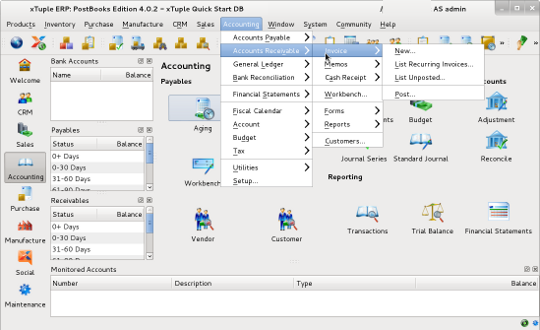
A common theme that comes up in free software evangelism is the question of how to tap into the huge expenditure that small to medium-sized businesses make for off-the-shelf licensed software. It is well known that many small companies are paying over the odds compared to the site-license rates given to big business, so why is it that small businesses are not rushing to adopt free and open source solutions? The answer is not likely to be found by fighting a battle on pricing (even though it is a battle that free software is inherently well prepared for). Rather, the most compelling strategy involves helping businesses find better ways to solve their own problems. A problem that every business encounters in every industry is the maintenance of proper financial records. Up until now, packaged solutions like GnuCash and HomeBank, available in many Linux distributions, have only catered for the smallest businesses and household accounting. At the other end of the spectrum, solutions like Compiere/Adempiere and OpenERP require a level of effort to install and maintain that makes them unsuitable for small users and businesses that don't need their full range of features. OpenERP briefly appeared as a Debian package but subsequently dropped out due to difficulties supporting the package. There is another choice, PostBooks. PostBooks has recently been packaged for Debian and this experience leads me to believe it will be supportable in Fedora and other distributions too. PostBooks, which started off as a commercial product, was re-licensed as an open source solution in 2007. In March 2013, PostBooks was project of the month on Sourceforge. Of particular note,
  • PostBooks has a Qt-based GUI where users of equivalent commercial solutions are likely to feel comfortable very quickly
  • PostBooks does not depend on any dedicated server processes other than a PostgreSQL database
  • Using the quickstart database, it can be set up in less than half a day, making it suitable for many consultants and freelancers who may otherwise use a product having a setup wizard (such as QuickBooks).
  • However, with features like inventory, invoicing, a sophisticated data import GUI (known as CSVImp), a true SQL backend, multi-currency and multiple concurrent users, it scales beyond the use cases that Quickbooks and Sage Accounting are capable of servicing.
  • The company behind PostBooks, xTuple, is well established and offers related services such as training and an annual user conference (which takes place in just a few weeks). Many business users are likely to find this style of support very reassuring and familiar, even if they don't plan to immediately take advantage of these things.
Limitations Two particular limitations caught my attention early when evaluating PostBooks: The developers have acknowledged these limitations and offered to complete these solutions with a crowd-funding campaign dubbed Feature Mob 2.

While everybody likes a free lunch, I personally feel that developers are perfectly entitled to request payment for their work. Having already taken a great leap of faith in open-sourcing a product that had previously been developed in-house, companies like xTuple need to look at new ways to generate revenue. Having looked at some of the prices of equivalent solutions, I felt quite comfortable pledging a similar amount based on four things:
  • it is based on the Kickstarter model, they only keep the money if their funding target is reached and feature implementation goes ahead
  • they are releasing the work as open source
  • the desire to have the option of using a highly capable free software solution that will be around well into the future
  • the probability that this is one piece of software that is likely to create more commercial opportunities for free software developers
Next steps People trying the packages and people who potentially want to package PostBooks for other distributions are very welcome to come and ask questions in the xTuple Debian maintainers packaging list or using the xTuple web forums. Please also feel free to report bugs through the Debian bug tracker.

Gunnar Wolf: This week it was an easy one: On picking free licensing schemes #encirc13

The third lesson of the Arte y cultura en circulaci n: crear y compartir en tiempos digitales course was quite easy, at least for me, as it's one of the topics I've been involved with for a long time: Authors' rights and ways to exercise them. This lesson starts by talking about the paradoxes created in the reality beneath copyright mostly due to the zero-cost-for-perfect-copy reality we live in today, and then goes on to introduce the most widely spread licensing schemes for cultural works nowadays: The Creative Commons licensing schemes. What I felt very interesting is that the lesson tackles the most common issues raised by authors choosing CC licensing: The Non-Commercial and Non-Derivatives restrictions. While authors are usually not very hard to convince about the virtues (and their personal benefit) in CC licensing, it's usually hard for authors to accept and relinquish the "locks" on non-derivability and non-commercial-use. Now, as to the homework: This time, I have to admit it was a no-brainer to me. The homework was to take part of a "Licenciat n": Publish some work under a open or free license (a work of any kind; it can be text, photo, video, etc.; it can be a new or a pre-existing work) and argue as to why did you choose said license. Even the act of writing this blog post means I'm releasing some work. The bottom of my blog reads, All the material found at this site is freely available, and you can use it as you wish, except when the document mentions explicitly different conditions. Yes, this is not a widely known, preexisting licensing scheme, and more or less goes along the lines of CC0 There are some good things I have posted in this blog, some things I am proud about. This post goes more towards the average quality: Not adding anything of great value to the world, just reiterating/reposting what is already said. But I know this blog is syndicated over several different places, and its content might be copied over to other places. I don't need to know or be notified about it. I just care for people to be able to reach back if they want to do it. But, of course, if I'm asked to do a homework, I prefer not to have it so self-referential. What else to license? We are over halfway across the Wiki Loves Monuments contest for 2013. This year I am clearly not as active on it as I was last year, but yesterday I uploaded about 60 photos from our recent trips, from historical monuments in some towns/cities within ~150Km of Mexico City: Puebla, Tlaxcala, Cacaxtla, Toluca, Santiago Tianguistenco. I intend to upload more. Those photos are licensed CC-BY-SA. Why? Mainly, because it is the defaul for the contest. One of the lessons learned working on Debian is that the less the license I choose deviates from what the upstream authors of a larger project prefer, the more useful my work will be. And being Wikimedia a host of many related projects, I prefer to completely abide by their recommendations unless there is a real, strong reason not to do so. Also, I know that at least most the photos I am uploading are not of contest quality (although some are quite nice, but we don't take that long to take a shot, and our camera is probably too basic to get a quality shot, if not by mere chance). I am using the WLM contest as an excuse to categorize and upload my pictures Of course, I'm not including personal photos, but... If I found a building, place or landscape interesting enough to take a photo of, why not make said photo available for whoever needs it, in a canonical, easy to reach media repository (as Wikimedia Commons) is)? And finally, I think it's time to start getting more open and forward-going with a project that I have been giving a lot of work during the past year, a project that has been even eating quite a bit of my Debian time: My upcoming book. While this book is not yet freely licensed (it is freely distributed online, but does not yet have an explicit license, and I mention it on my teaching/project page. Why? Because it still has some figures and data which are not mine, and which I have to re-elaborate to be able to legally license it. But anyway I am writing a book on the subject of Operating Systems, and am basing my teaching on it. The first semester was basically hell for me, as I was working almost full time on it, and needed to allocate some time as well to the rest of my formal work. This second semester has been quite smoother. And there is a very important (to me) initiative to which I (or should I now start saying, we) submitted this work: The LATIn Project: An initiative to collaboratively create quality, freely redistributable text books for the university level, natively in Spanish, for their use in Latin American countries. I was not able to propose this book due to some formalities Projects have to be proposed by professors in participant universities, and UNAM is not one of them. However, I offered this work to people in the Universidad Nacional de Rosario, Argentina, and they managed to push the project forward. Together with people from Universidad Aut noma de Aguascalientes (M xico) and Universidad del Cauca (Colombia), the project was approved by LATIn. And this LATIn project can also be seen as a why do you agree to license your work this way? candidate: I have already written most of what I'd be happy to call a full book. Of course, I do expect my colleagues to chime in with more content, and I expect us to produce a true collaborative project. But as I am not part of the member universities, they will get paid for their contribution And not me. What do I have to gain from this? More than anything else, the circulation of my work. I'm sure that, were I to publish from UNAM, I would have a good projection. I was (am!) thinking of looking for opportunities to present the book to teachers on the subject, as well as to computing engineering/science students, but the most attractive part (for me) for LATIn is that part of the prize will be that the book will be used to base work on for teaching at least during 2014 in the three said universities And of course, my/our work will only start then, as we will have to further circulate the work. Anyway... I expected this post to be small. But as you can see, I am happy with important work perspectives :-)

20 September 2013

Vincent Sanders: Man is fully responsible for his nature and his choices.

Well at least he should be according to Sartre though I am not entirely convinced the repercussions of my choice to manufacture another folding chair were entirely thought through.

After my most recent posting the urge to do "just one more iteration" became too great and I succumbed. I therefore present version 4 of my folding chair which corrects all the previously discovered issues.

The popliteal height (420mm) and buttock popliteal length (400mm) are both comfortable for a wide selection of people. The seat slopes a few degrees front to back and the back rest no longer comes further forward than the rear of the seat.

There is a small gap above where the seat folds in when flat but that is only an aesthetic issue when being stored.

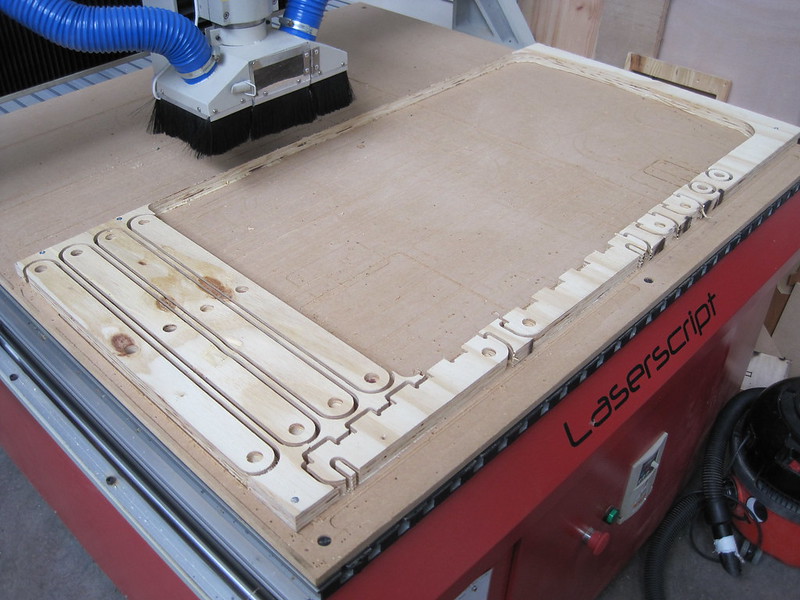
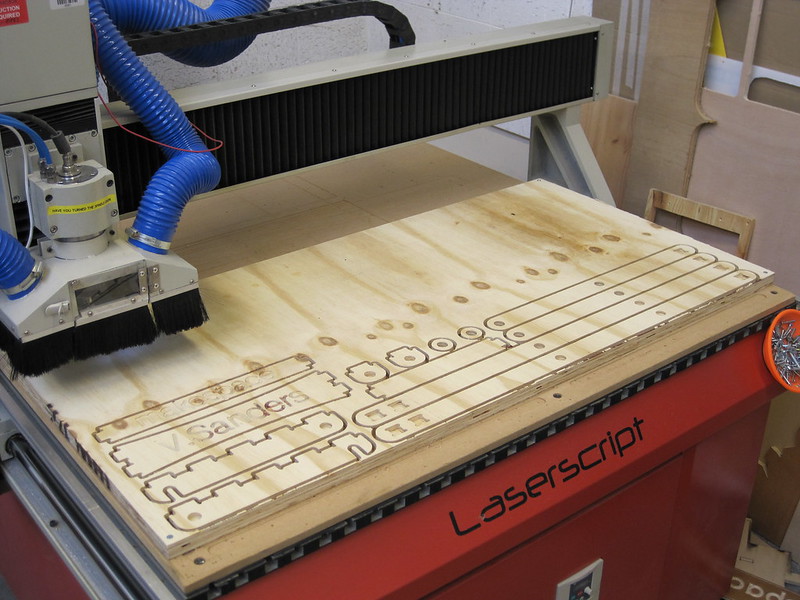
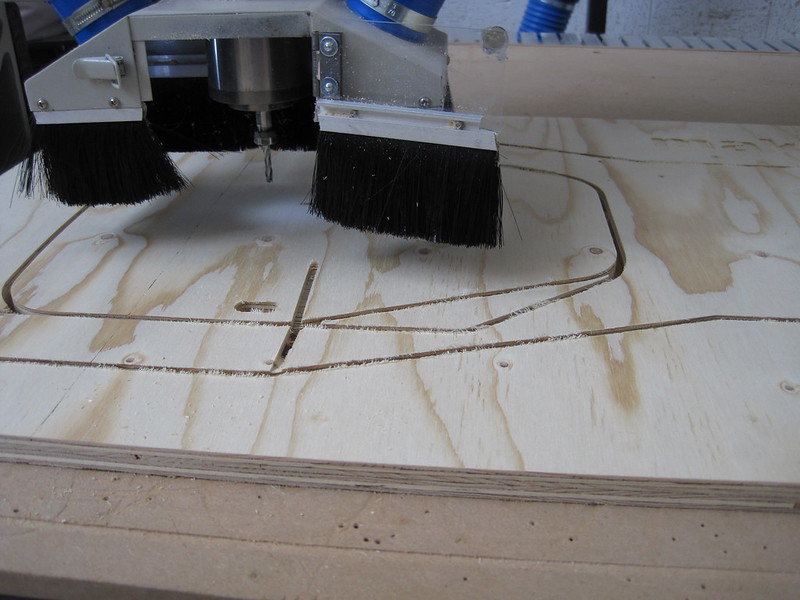
Manufacture wise the design is simple to produce although I really will have to teach our CNC router how to use the round over bit to reduce the finishing steps as currently that takes longer than the CNC operation.

In future if I make more of these I will use this design and, once she is less annoyed at me for making another chair, I am going to consult with my wife on adding some cushioning material to the seat and backrest.

And of course that concludes my furniture making for a while...yeah, right!

there have been comments which have complained about my usage of space on sheets and suggested I waste too much material. That is probably true and in my own defence I have not been working with this machine for very long and am not quite used to what I can "get away with" yet.

Side X folding stool
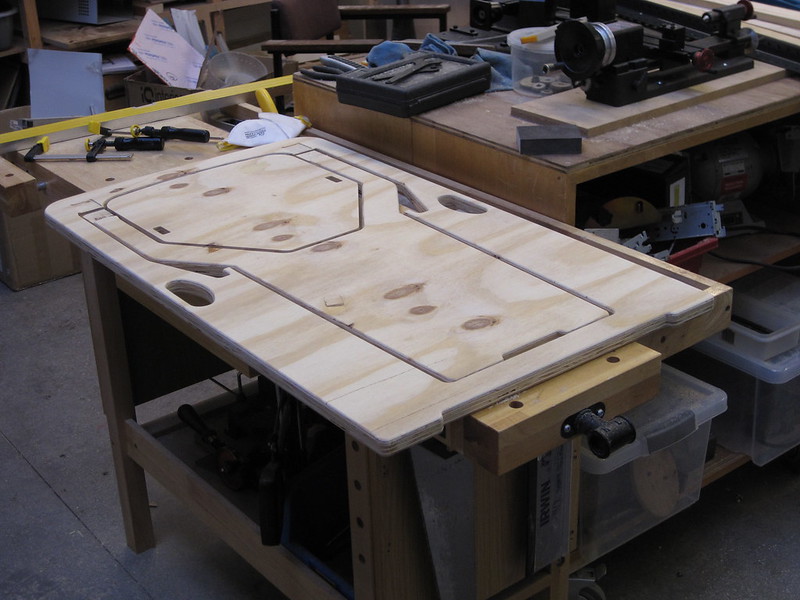
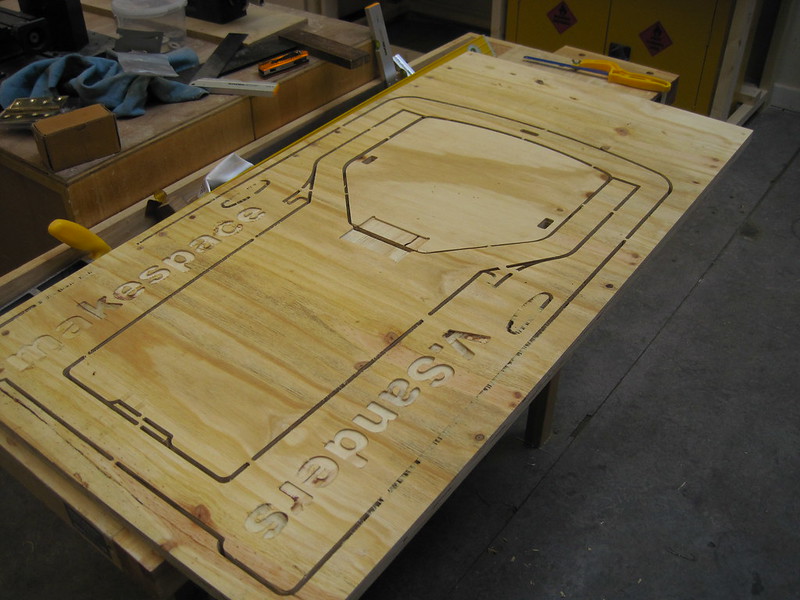
I was looking at the sheet after removing the last chair design and had a thought, I had not attempted a side X type folding design and perhaps I could squeeze one into the offcuts? I kinda got carried away, it roughly went:


Side X folding stool cut from sheet offcut
If all of that sounds like and utterly mad way to design a size X stool, you are of course correct, but it worked, and it was a very fast process taking less than four hours from idea to stool.

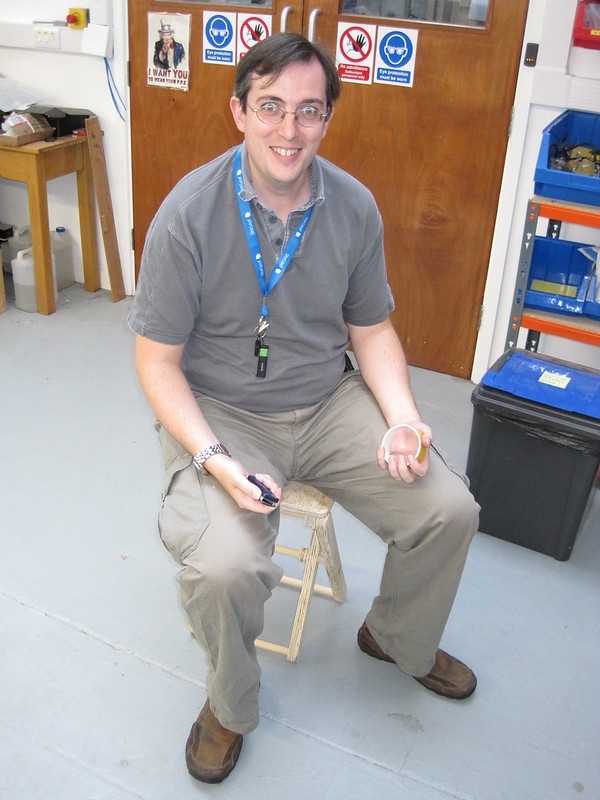
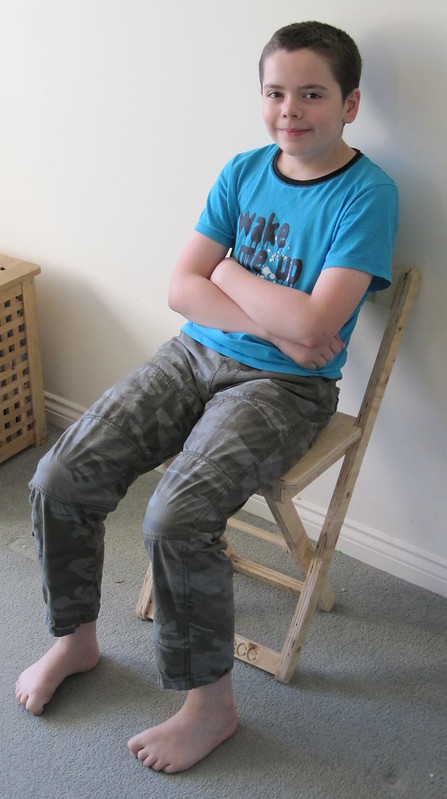
Paul testing the dry fit side X stool
There are a couple of issues:

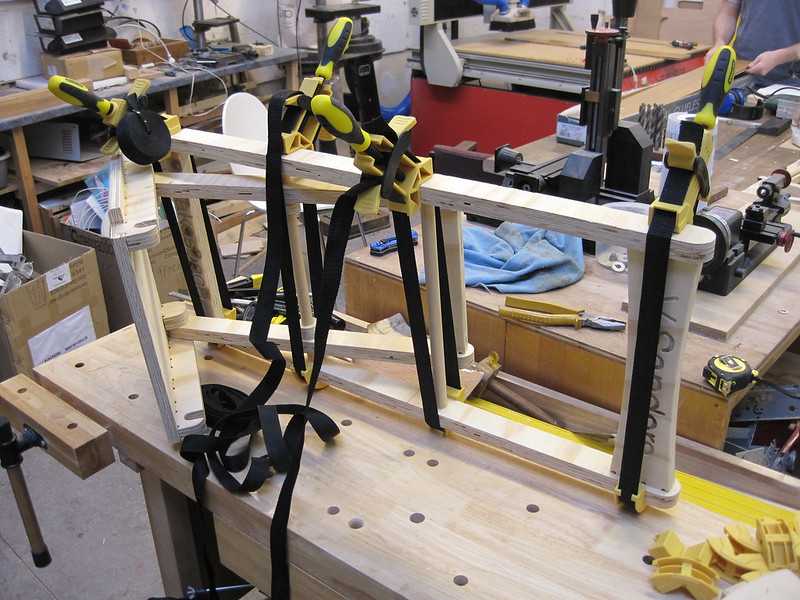
Clamping stool why the glue drys
The seat went together dry fit and Paul tested it for me, however that last issue soon made me realise that this time I was going to have to resort to glue. Yes, sorry, this design needs to be glued to remain stable (I know plywood contains glue...please stop telling me that).


It is pretty simple to put together and aside from needing half the clamps in makespace to hold it in place while the glue dried, I had no trouble.

Though this is definitely not a case of use glue "sparingly" I put generous amounts in all the dowel joints and all the seat slots and got very little ooze so I guess it could have used more.

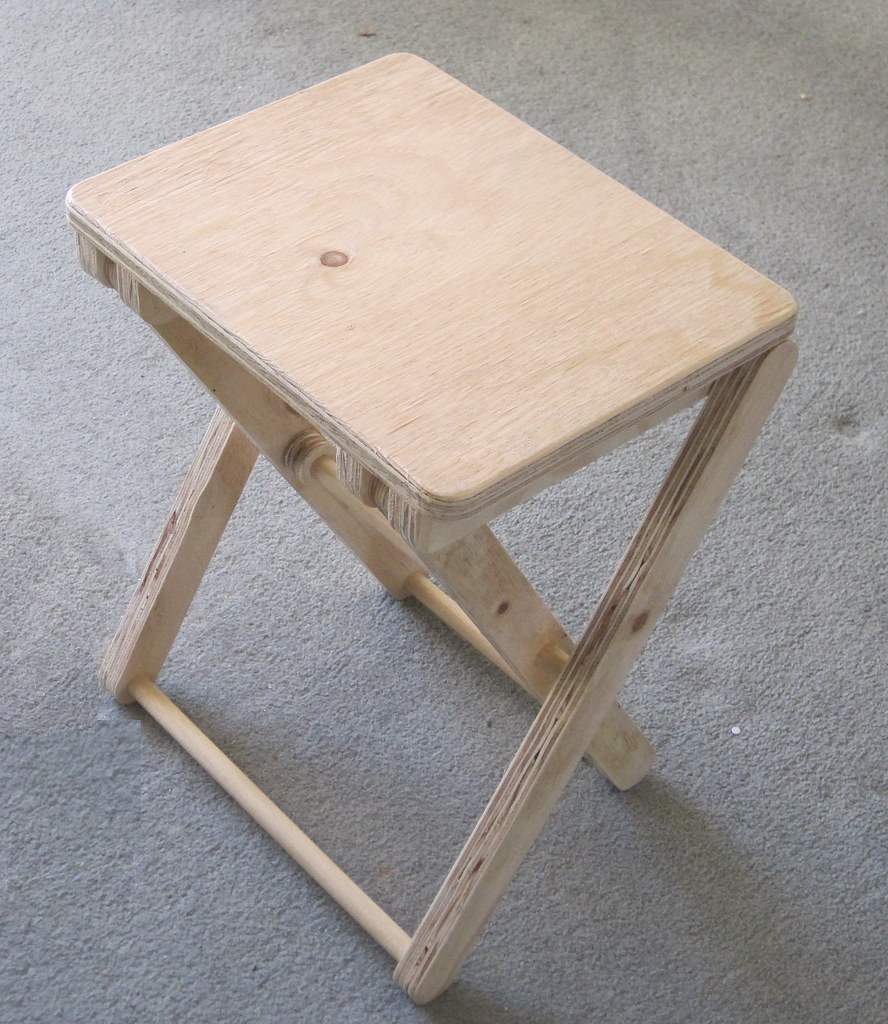
The final varnished stool is pretty robust but folds up nicely the concept of hooking to its own pivot dowel means it stays closed when flat which makes it very portable.

Total cost was an estimated 10.00 ( 4.25 dowel, 2.50 of 24mm ply, 1.75 for 18mm ply, 0.50 tool wear, 1.00 varnish) though the materials in my case could be argued to have cost nothing.

It has been suggested that I could make an entire picnic table and chairs set this way but if I did I would reduce the stool height by 50mm and examine ways to use less dowel.

This is usually the bit where I point you all at the freely usable design files on github and all the photos on flikr and wrap up.

But you know what the Monty Python boys say? "Nobody Expects the Spanish inquisition"

Or in this case my final (and yes I am going to do something else next) chair design. It is based on the stool, in fact it is the stool design with the outer legs extended and a back rest added.

The modified design reduces the dowel requirements to 775mm but requires a bit more sheet material (cannot get this one entirely from offcuts).

Total cost was an estimated 10.50 ( 2.50 dowel, 4.50 of 24mm ply, 1.75 for 18mm ply, 0.50 tool wear, 1.25 varnish).
Because it is based on the stool design it suffers from the height issue and in addition the back rest is a bit far back to be completely comfortable.

Neither of the side X designs have flaws that interest me enough to follow the iterative approach again to solve them. Both the designs work well enough and rounded out my adventures with folding chairs and indeed furniture for now.

As always the design files are on github and the images are on flikr.


Russell Coker: Qi Phone Charging

I have just bought a wireless phone charging system based on the Qi Inductive Power Standard. I bought a charging device which connects to a standard micro-USB cable and receivers for the Samsung Galaxy Note 2 and Samsung Galaxy S3 phones I own. Both those phones have contacts in the back of their case that are designed for wireless charging so you can install a charging device inside them. The charging devices make the case fit a little tight, and the charging device is stuck to the phone battery with contact adhesive, this makes it impractical to change the battery on a phone with such a device and makes it a little more difficult to swap out a battery case. One nice feature of the Nexus 4 is that it has Qi charging built in, that saved me $19 and was also more convenient. I believe that the main advantage of a wireless charger is to avoid the risk of damage to the phone if it s dropped while connected to a USB charger. This allows the phone to be charged in situations where you might need to quickly or regularly unplug it to go somewhere. One example of how I might use it is when working at an office so I could charge my phone while at my desk and then quickly take it with me if I had to go to a meeting (sadly I have worked in many offices where they have so many meetings). Another example is for sysadmin work where I have to frequently visit devices to fix them. The wireless charging mat that I bought from Kogan connects to a standard micro-USB plug, the good thing about this is that it s easy to find cables and it can take power from any PC. The bad thing about this is that the resistance of the USB cable is a factor that limits the power that a phone can receive, when using wireless charging you have the limit of the cable resistance as well as some power loss from the wireless transmission. After any extended period of charging the charging mat feels warm to the touch and the phone that s been resting on it feels warmer than usual. The warmth is an indication of energy loss which means longer charging times, a longer charging time isn t necessarily a problem as the convenience of wireless charging can allow longer charging times, but if you want to charge your phone in a hurry before you go somewhere then wireless isn t a good choice. In the past I ve discovered that the battery in a Samsung Galaxy S3 can t be charged if the phone is at 46C [1]. 46C might seem extremely hot to people in some parts of the world (EG northern Europe and Canada) but the temperature in even southern parts of mainland Australia can get that hot and it can be hotter in central and northern parts, so phone temperature can be a real issue. Currently my house is at 21C according to a digital thermometer, the Galaxy S3 and the Note 2 are being charged from USB and report temperatures of 27C and 23C respectively. While the thermometer in my house and those in the phones probably aren t really accurate it seems reasonable to assume that the battery of a relatively idle smart-phone that s being charged will be a few degrees warmer than the ambient temperature. The Qi charger makes things a lot worse as it even feels warm to the touch. So maybe a phone on a Qi charger would be 8 degrees warmer than the ambient temperature or more. That implies that in Australian summer weather a Qi charger won t be useful outside or in any building that lacks air-conditioning. So I think we can give up on the idea of using Qi devices to charge phones at a BBQ. Picture of Qi charger on top of Samsung Galaxy Note 2 The final problem I have is that the Qi device is quite small, I took the above picture with my phone face-down because no part of the charger is visible in normal use. With that size I can t just dump a phone like a Note 2 on top of the charging mat and expect it to work. I have to carefully place it so that it balances and so that the wireless receptor inside the phone matches the transmitter in the mat, if the phone isn t placed correctly then the Qi mat won t detect it and won t supply full power to the transmitter. Conclusion I m fairly disappointed in this device. The waste heat makes it unsuitable for Australian summer conditions and slows charging. The difficulty of correctly placing the phone reduces the convenience which is one of the major features. The price was $19 for each charging card for the Note 2 and the S3 and $29 for the charging mat to give a total of $67. I think it s worth the money for me to cover the risk of one of my phones having it s USB port damaged. Using a Qi charger on occasion will decrease the probability of such damage and allow the phone to be used after receiving certain types of damage. The prices of those phones nowadays are $389 for a Galaxy S3 (Kogan price), $250 for a Nexus 4 (when it was on sale in the Google store), and probably about $500 for a Galaxy Note 2 (last time Kogan offered them). So by paying $67 for Qi charging I believe that I m getting some degree of damage insurance for just over $1100 worth of phones. It seems likely that the Nexus 5 will ship with Qi charging support and that the Galaxy Note 3 will also support an optional Qi charging card (which will probably also be $19 or some similar price) so the charging mat should be useful for a long time. While I m disappointed I don t regret buying the device. But I would be hesitant to recommend it to other people and definitely wouldn t recommend it to someone who doesn t have a significant interest and investment in smart phones.

18 September 2013

Raphael Geissert: A bashism a week: testing strings

The bashism of this week deals again with tests. How do you compare two strings to tell which one goes before or after the other in the alphabet in a shell script?
(also know as lexicographic comparison)

If you are familiar with perl and the relationship between its comparison operators and that of shell scripts, you would probably write the test as follows:


$ test bar '<' foo
$ test foo '>' bar


And yes, that would work, but not with all shells. I'm afraid to tell you that the < and > comparison operators are not required by the POSIX:2001 specification and are, therefore, bashisms.

What does this have to do with perl? well, the shell way is the inverse of the perl way.
What? In Perl you test the equality of two numbers with '==', in shell you use '-eq'; in perl the equality of strings is 'eq', in shell it is '='. In shell scripts you can compare two numbers with -gt (test 1 -gt 0) while in perl the equivalent comparison is with > (1 > 0).

So in this case the perl way is "bar lt foo" and based on the above the shell way should be "bar < foo". However, care must be taken when using such operators in shell scripts. Since < and > are used for redirections in shell scripts, one must quote them even when using bash. An alternative is to use the [[ special test function of bash which alters the shell syntax.

This time I didn't write a function to portably (or "somewhat portably") replace such comparisons. Feel free to share your solution in the comments, with bonus points if you come up with a solution without using external commands.

Francois Marier: Presenting from a separate user account

While I suspect that professional speakers have separate presentation laptops that they use only to give talks, I don't do this often enough to justify the hassle and cost of a separate machine. However, I do use a separate user account to present from. It allows me to focus on my presentation and not stress out about running into configuration problems or exposing private information. But mostly, I think it's about removing anything that could be distracting for the audience. The great thing of having a separate user for this is that you can do whatever you want in your normal account and still know that the other account is ready to go and configured for presenting on a big screen.

Basics The user account I use when giving talks is called presenter and it has the same password as my main user account, just to keep things simple. However, it doesn't need to belong to any of the UNIX groups that my main user account belongs to. In terms of configuration, it looks like this:
  • power management and screen saver are turned off
  • all sound effects are turned off
  • window manager set to the default one (as opposed to a weird tiling one)
  • desktop notifications are turned off
Of course, this user account only has the software I need while presenting. You won't find an instant messaging, IRC or Twitter client running on there. The desktop only has the icons I need for the presentation: slides and backup videos (in case the network is down and/or prevents me from doing a live demo).

Web browsers While I usually have my presentations in PDF format (for maximum compatibility, you never know when you'll have to borrow someone else's laptop), I use web browsers (different ones to show that my demos work with all of them) all the time for demos. Each browser:
  • clears everything (cookies, history, cache, etc.) at the end of the session
  • has the site I want to demo as the homepage
  • only contains add-ons or extensions I need for the demos
  • has the minimal number of toolbars and doesn't have any bookmarks
  • has search suggestions turned off
  • never asks to remember passwords

Terminal and editors Some of my demos may feature coding demos and running scripts, which is why I have my terminal and editor set to:
  • a large font size
  • a color scheme with lots of contrast
It's all about making sure that the audience can see everything and follow along easily. Also, if you have the sl package installed system-wide, you'll probably want to put the following in your ~/.bashrc:
alias sl="ls"
alias LS="ls"

Rehearsal It's very important to rehearse the whole presentation using this account to make sure that you have everything you need and that you are comfortable with the configuration (for example, the large font size). If you have access to a projector or a digital TV, try connecting your laptop to it. This will ensure that you know how to change the resolution of the external monitor and to turn mirroring ON and OFF ahead of time (especially important if you never use the default window manager or desktop environment). I keep a shortcut to the display settings in the sidebar.

Localization Another thing I like to do is to set my operating system and browser locales to the one where I am giving a talk, assuming that it is a western language I can understand to some extent. It probably doesn't make a big difference, but I think it's a nice touch and a few people have commented on this in the past. My theory is that it might be less distracting to the audience if they are shown the browser UI and menus they see every day. I'd love to have other people's thoughts on this point though. Also, pay attention to the timezone since it could be another source of distraction as audience members try to guess what timezone your computer is set to.

Anything else? If you also use a separate account for your presentations, I'd be curious to know whether there are other things you've customised. If there's anything I missed, please leave a comment!

17 September 2013

Stefano Zacchiroli: sources.debian.net - advanced search and other news

all your ctag (and checksum) are belong to us A few months after the initial announcement, here are some news about the sources.d.n service. I've been late in blogging this, but most of it has been implemented by myself and Matthieu Caneill during DebConf13, which has been a great DebConf, totally exceeding my expectations (and they were already fairly high!). First, you might have noticed some user-visible changes: On the other hand, under the hood: As you usual, your bug reports (and patches!) are more than welcome, just check BUGS before reporting to avoid duplicates.
That's all!

Vincent Sanders: Ever tried. Ever failed. No matter. Try Again. Fail again. Fail better.


I seem to be adhering to Beckett's approach recently but for some reason, after my previous stool attempts, despite having a functioning design I felt I had to do just one more iteration.

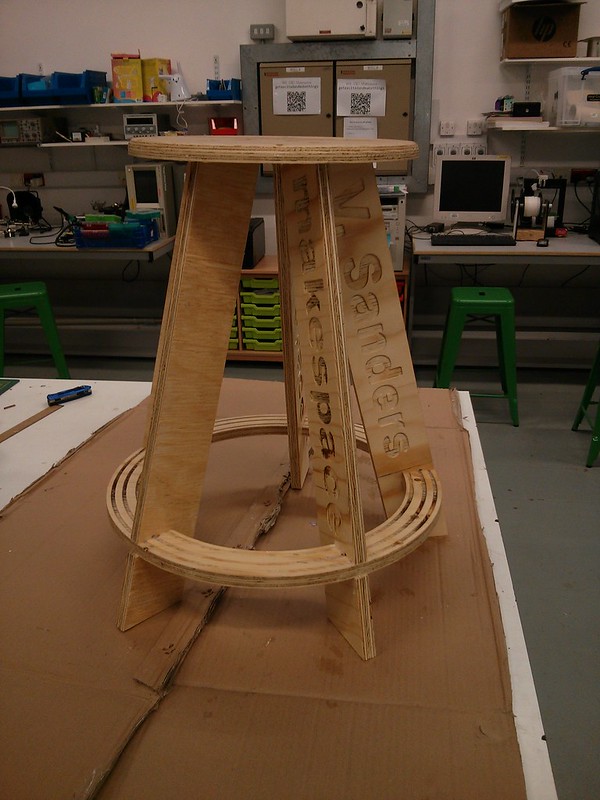
Five legged stoolGoing back to a previous concept of having five legs instead of three while this did not improve the rotational problems with the 12mm thick material, it did make the design more stable overall and less prone to tipping.

The five legged solution realised in 18mm plywood resulted in my final design for this concept. As my friend Stephen demonstrates the design is pretty solid even for those of us with a more ample frame. There are now a couple of them in use at the space alongside the three legged earlier versions.

I was finally satisfied with the result and thought I was done with furniture making for a while. My adorable wife then came up with a challenge, she wanted a practical foldable chair her requirements were:
A frame folding chair, image from wikimedia
Things for individual humans to sit on raised off the floor, or chairs as we call them, have been around for a long time. My previous research for the stool indicated that chairs have a long history with examples still surviving from the ancient egyptians. From this I assumed there would be nothing novel in this project and to quote the song it's all been done before
Foldingchairs
Given this perspective my research started with an image search for "folding chair". The results immediately showed there were two common shapes. Either the chair base was formed with a pair of linked X shapes with the seat across the top, or an A frame style where the seat is across the centre.

My initial thoughts were to replicate the IKEA style A frame design until I noticed that some designs were made from a single sheet of timber with a small number of profile cuts. I searched for pre-existing design files but found none, perhaps I had found something novel to do after all.

A frame chair  1 - Front  2 - Rear  3- seat
Some quick measurements of chairs in shops (and more weird looks, mainly from my family) suggested 900mm is generally the highest a chair ought to stand. I selected a popliteal height of 420mm as a general use compromise which is a bit less than the 430mm of most mass produced chairs. I also decided there should be a front to rear drop across the seat which ought to improve comfort a little.

Material selection was based upon what I had to hand which consisted of a couple of sheets of structural plywood (1220x606x18mm temperate softwood - probably spruce although not specified) which had not become stools yet. Allowing for edge wastage and tool width this gave me a working area from a sheet of 1196x582mm.

I sketched the side view of the chair numbering the three parts. I decided part 1 would be 1000mm total height with top and bottom cross braces 80mm high, assuming the 900mm tall target, the A frame apex would be at 820mm height.

If we assert that the apex is immediately below the top cross brace on part 1 this gives 920mm at which point we have two sides of a right angled triangle (820 and 920) from which we can calculate the top angle is 26 . This also means part 2 will be 840mm long with the same 820 height this gives an angle of 10 .

I did the maths for the seat triangle using the 36 angle and 420mm popliteal height. Having experienced how flexible 18mm plywood was in the face dimension I decided to make the frame sides 50mm wide leaving, after 6mm tool path widths, enough space for a 358mm wide seat .

Once the dimensions were decided the design went pretty quickly producing something that looked similar to the designs I had seen earlier.

CNC routers can go wrong, spot the fail
Generating toolpaths for this design proved challenging with the CAM software we had available, mainly because arranging multiple "inner" and "outer" cuts along the same path and having the tabs line up was obviously not an anticipated feature.

Things had been going far too well for me and during the routing operation our machine decided to follow an uncommanded toolpath excursion mid job (it cut a dirty great hole through the middle of my workpiece where I did not want it) ruining the sheet of material.

Fortunately, once factory reset and reconfigured, the machine ran the job correctly the second time although we still do not know why it went wrong. The parts were cut free of their tabs and hinges fitted.

The resulting design worked with a couple of problems:
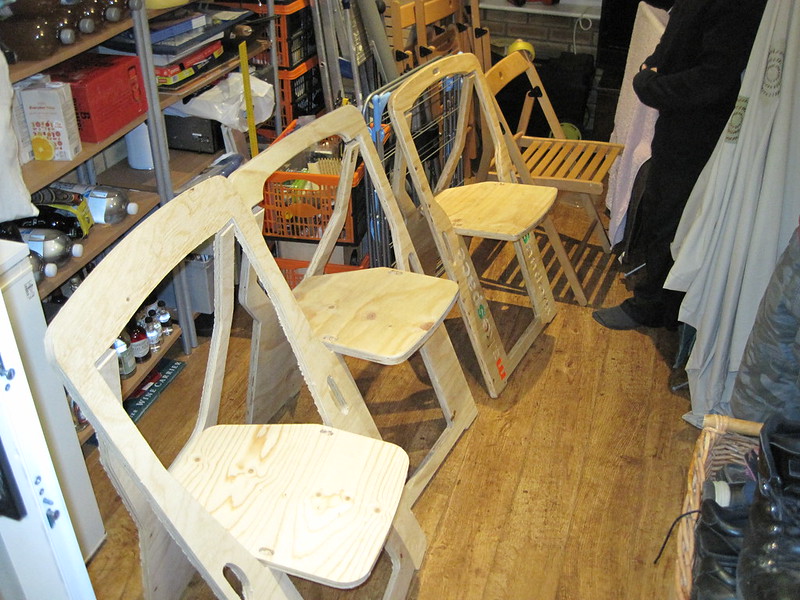
Folding chair in 24mm plywood with edges rounded off
So time for a second iteration, this time I selected a thicker plywood to reduce the bend under large loads (OK already, I mean me). After shopping around for several days I discovered that unlike 12mm and 18mm thick plywood 24mm thick is much harder to find at a sensible price especially if you want it cut into 1220x606 sheets from the full 1220x2440.

I eventually physically went to Ridgeons and looked at what they actually had in the warehouse and got a price on a sheet of brazilian elliotis pine structural plywood for 43.96 which they cut for me while I waited. Being physically present also gave me the opportunity to pick a "less bad" sheet from the stack much to the annoyance of the Ridgeons employee for not just taking the top one.

This time I reduced the apex height by 30mm, the length of part 1 by 80mm. I also reduced the frame width by 10mm relying on the increased thickness of the plywood to maintain the strength. In area terms it is actually an increase in material (50mm*17.7mm = 885 against 40mm*22.80 = 912). I also included rebates for the top hinges within the design allowing them to be mounted flush within the sheet width.

The new design was cut (without incident this time) and the edges rounded off. I also added some simple catches to keep the seat and back inline while being transported.

While this version worked I had made a couple of mistakes again. The first was simply a radius versus diameter error on the handles which meant too much material was removed from a high stress area causing increased bending.

Third version of folding chair ready for finishing
The second error was a stupid mistake that where I had worked the latch holes in the seat to the wrong side of my measure line meaning the apex angle was 35.5 not the expected 33.6 which meant the backrest felt "too far forward"

The third version rectified those two errors and improved the seat front curve a little to further reduce the unneeded material in the back rest.

The fabrication of this design was double sided allowing for the seat hinge to be fully rebated and become flush and also adding some text similar to the stools.

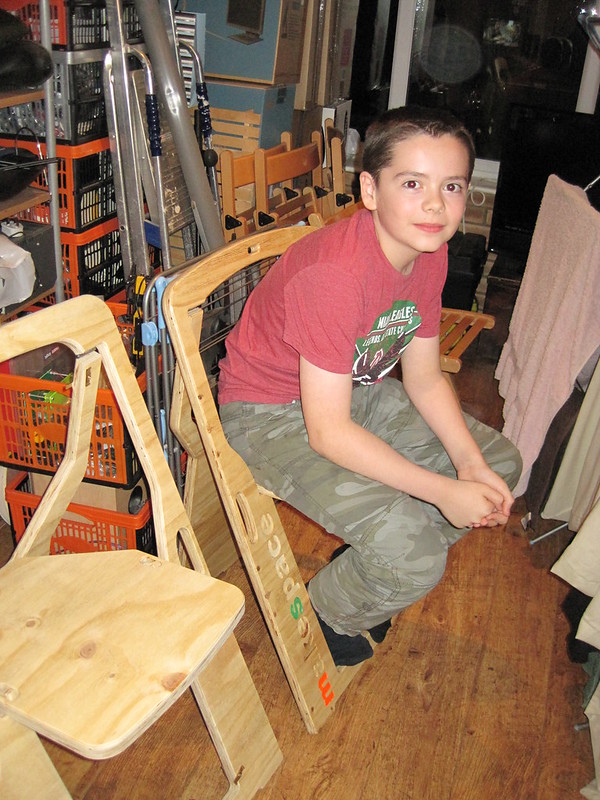
Alex sat on version 3 folding chair
This version still suffers from a backrest that is a bit too far forward and my sons complain it makes them sit up too straight. The problem is that the angle of the front face (23.6 ) means that to move the rest back 20mm means the piece needs to extend another 50mm beyond the frame apex which would probably make the chair feel tall again.

I guess this is a compromise that would take another iteration or two to solve, alas my wife has declared a moratorium on more chairs unless I find somewhere to put the failed prototypes other than her conservatory.

One other addition would be a better form of catch for transport. The ones in version 2 work but are ugly, magnets inset into the frame have been suggested but not actually implemented yet.

Folding chairs versions 1 to 3 and TERJE for comparison
In conclusion I think I succeeded with the original brief and am pretty pleased with the result. A neatly folding chair that can be stacked simply by having a pile of them and are easy to move and setup.

The price per chair is a little higher than I would like at 22 ( 11 for timber, 5 for hinges and screws , 5 for varnish and 1 for tool wear) plus about 2 hours labour (two sided routing plus roundover takes ages)

As previously the design files are available on github and there are plenty more images in the flikr set.

16 September 2013

Petter Reinholdtsen: Third and probably last beta release of Debian Edu Wheezy

The third wheezy based beta release of Debian Edu was wrapped up today. This is the release announcement from Holger Levsen:
Hi, it is my pleasure to announce the third beta release (beta 2 for short) of Debian Edu / Skolelinux based on Debian Wheezy! Please test these images extensivly, if no new problems are found we plan to do this final Debian Edu Wheezy release this coming weekend. We are not aware of any major problems or blockers in beta2, if you find something, please notify us immediately! (More about the remaining steps for the Edu Wheezy release in another mail to the edu list tonight or tomorrow...) Noteworthy changes and software updates for Debian Edu 7.1+edu0~b2 compared to beta1:
  • The KDE proxy setup has been adjusted to use the provided wpad.dat. This also gets Chromium to use this proxy.
  • Install kdepim-groupware with KDE desktops to make sure korganizer understand ical/dav sources.
  • Increased default maximum size of /var/spool/squid and /skole/backup on the main server.
  • A source DVD image containing all source packages is now available as well.
  • Updates for chromium (29.0.1547.57-1~deb7u1), imagemagick (6.7.7.10-5+deb7u2), php5 (5.4.4-14+deb7u4), libmodplug (0.8.8.4-3+deb7u1+git20130828), tiff (4.0.2-6+deb7u2), linux-image (3.2.0-4-486_3.2.46-1+deb7u1).
Where to get it: To download the multiarch netinstall CD release you can use The SHA1SUM of this image is: 3a1c89f4666df80eebcd46c5bf5fedb866f9472f To download the multiarch USB stick ISO release you can use The SHA1SUM of this image is: 702d1718548f401c74bfa6df9f032cc3ee16597e The Source DVD image has the filename debian-edu-7.1+edu0~b2-source-DVD.iso and the SHA1SUM 089eed8b3f962db47aae1f6a9685e9bb2fa30ca5 and is available the same way as the other isos. How to report bugs For information how to report bugs please see
http://wiki.debian.org/DebianEdu/HowTo/ReportBugs About Debian Edu and Skolelinux Debian Edu, also known as Skolelinux, is a Linux distribution based on Debian providing an out-of-the box environment of a completely configured school network. Immediately after installation a school server running all services needed for a school network is set up just waiting for users and machines being added via GOsa , a comfortable Web-UI. A netbooting environment is prepared using PXE, so after initial installation of the main server from CD or USB stick all other machines can be installed via the network. The provided school server provides LDAP database and Kerberos authentication service, centralized home directories, DHCP server, web proxy and many other services. The desktop contains more than 60 educational software packages and more are available from the Debian archive, and schools can choose between KDE, Gnome, LXDE and Xfce desktop environment. This is the seventh test release based on Debian Wheezy. Basically this is an updated and slightly improved version compared to the Squeeze release. Notes for upgrades from Alpha Prereleases Alpha based installations should reinstall or downgrade the versions of gosa and libpam-mklocaluser to the ones used in this beta release. Both alpha and beta0 based installations should reinstall or deal with gosa.conf manually; there are two options: (1) Keep gosa.conf and edit this file as outlined on the mailing list. (2) Accept the new version of gosa.conf and replace both contained admin password placeholders with the password hashes found in the old one (backup copy!). In both cases all users need to change their password to make sure a password is set for CIFS access to their home directory. cheers,
Holger

Debian Med

DebConf 13 report (by Andreas Tille) General impression unofficial  Scenic Hacklab I'm beginning my DebConf report in an unofficial "Scenic Hacklab" right at the edge of the lake in Yverdon. This is the right place to memorise the last days. When I started from this place cycling to Le Camp 12 days ago I was full of great expectations and what should I say - the reality has even beaten these. Once it comes about comparing DebConfs even if it is an unfair comparison due all the differences my secret long term favourite was Helsinki very closely followed by Argentina and also very closely followed by all the other great DebConfs I joined (and I joined all in Europe). Would Le Camp be able to beat it? The short answer is: Yes, it is now my favourite DebConf while I think I do not suffer from the last-Debconf-was-the-best-DebConf-syndrome (and I realised there are others thinking the same). As you might probably know I'm a bit addicted to swimming. While Helsinki had admittedly the better conditions I was at least able to fix the distance issue using my bicycle. (Hey, those Le Camp photographers did a great job in hiding the fact that you can not actually touch the lake right from the meadow of Le Camp.) Being able to have my bicycle at DebConf scored some extra points. However, the really great view of the lake, the inspiring "Scenic Hacklab" which was my favourite place has bumped DebConf13 at first place in my personal ranking. So it comes quite natural to say: "Kudos to the great organisation team!" They did a Swiss-like precise work and perfectly succeeded in hiding any problems (I assume there were some as always) from the attendees so everything went smooth, nice and shiny for the attendees. The local team was even precise in setting up great weather conditions for DebConf. sunrise over  the lake While saying thanks to the local team I would like to also explicitly thank Luca Capello who has quite some share that this DebConf was possible at all (while I have to decrease my DebConf score one point because he was not really there - Luca to bad that you were not able to come full time!) Also thanks to Gunnar and Gannef who helped remotely (another score down because I were missing them this year as well). Even if it was my favourite DebConf I was not able to work down my todo list fully (which was not only uploading one package per day which I at least statistically fullfilled). But that's probably a general feature of todo lists anyway. One item was definitely done: Doing my daily swimming BoF. I actually was able to do the other parts of the triathlon which was skipped by Christian and have done in summary about 150km cycling with 3500m elevation and estimated 7-8km swimming (0m elevation ;-)). Considering the great view at sunrise over the lake I was not hating my "Senile bed escape" disease too much (I was every day waking up at sunset) - it was simply a great experience. I will never forget seeing water drips glimmering like gold inside the morning sun while seeing the Alps panorama in the distant. I hope I was able to help all interested swimmers with the DebConf Beach Map which was just a by-product of my activities in DebCamp. Speaking about OSM: I was astonished that the area was way less covered than I expected. Thanks to several DebConf attendees the situation became better and the map does not only show random trees in the wild but also the tracks leading to these. (Remark: It was no DebConf attendee who is responsible for plastering the map with single trees.) While I had my mapping focus basically close to the edge of the lake I was also able to even map my very own street. :-) I clearly remember one specific mapping tour when I was invited by the DPL: He convinced me to join him on a bicycle tour and since I was afraid to get fired I joined him instead to keep on hacking. Also Sorina was brave enough to join us on the tour and she did quite well. (Sorina, do you remember the agreement about your work on the installer? ;-)) Lucas described the tour as: going uphill on only asphalted roads. Sorina and me were witnessing the mighty DPL powers when we left the wood around Le Camp to reach the described road: The asphalt was just put onto the road - no doubt that it was done on the immediate demand of mighty DPL. :-) DebCamp time was flying like nose dive and a lot of known (and unknown) faces arrived at Le Camp. What I really liked a lot this year was that several really young children has pulled down the average age of DebConf attendees. I clearly remember all the discussion one year ago what to do about children. As always the issue was solved in a typical Debian way: Just do it and bring your children - they had obviously a great time as well. I think the youngest child was 2 months and the oldest "child" above 20. ;-) Actually Baptiste Perrier did great in making the C&W party a success and had obviously a nice time. (I wished my son would have been able to come as well but he needs to write his bachelor s thesis in physics. :-() It was nice to see the kids using all playing facilities and communicating with geeks. Also I would like to point out that even the very young attendees had their share at the success of DebConf: Just think of the three "bell ringing assistants" who helped me ringing the bells for lunch and dinner. I've got this cool job from Didier in the beginning of DebCamp. I must say having some real bells ringing is by far nicer than just the "lunch / dinner starts in 10 minutes" from IRC bot. The only thing I did not understand was that people did not considered ringing the bells at 8:00 for breakfast as a good idea. Regarding the food in general I would also like to send kudos to the kitchen: It was tasty, freshly prepared, regional food with a good change rate. I really liked this. Extra points for having the chance to sit outside when eating. Talks But lets have a look into the conference programme. I'd really recommend watching the videos of the talks Bits from the DPL (video) and Debian Cosmology (video). I considered both talks as entertaining and interesting. I also really hope that the effort Enrico Zini started in Debian Contributors (video) will be successful. I had some talks and BoFs myself starting with Why running a Blend (video) and I admit that (as usual) the number of attendees was quite low even if I think there is some proof (see below) that it is interesting for way more people who should consider working more "blendish" in their team. Do you know how to recruit one developer per year and relax the man power problem in your team? Feel free to watch the video. We have confirmation that ten DDs of our team have considered to join Debian only because Debian Med exists. Admittedly biology and medicine are really leaf topics inside the Debian universe. So if even this topic that has a very tiny share of the Debian users is able to attract this level of attention - how many more people could we win for multimedia, games, GIS and others? So if you feel you are quite overworked with your packaging and you have no time this is most probably wrong. The amount of time is basically a matter of priorities you set for your tasks. Try to put some higher priority onto using the just existing Blends tools I explained in my talk to attract more users and developers to your team and by doing so spread the workload over more people. It works, the prove was given in my main talk. So before you start working on a specific package you should wonder who else could have an even stronger interest to get this work done and provide him with some additional motivation and help to get the common goal done. The interesting thing is that my BoF about How to attract new developers for your team (video) - which was a simple report about some by-product of the Blends work - made it into the main talk room and got way more attention. For me this is the proof that the Blends concept itself is probably badly perceived as something like "a few outsiders are doing damn specific stuff which is not really interesting for anybody else" instead of what is really is: Smoothing the way from specific upstream applications to the end user via Debian. Once you see the video of this BoF you can observe how my friend Asheesh Laroia became more and more excited about the Blends concept and admitted what I said above: We should have more Blends for different fields. Funnily enough Asheesh asked me in his excitement to talk more about Blends. This would have been a really good suggestion ten years ago. At DebConf 3 in Oslo I had my very first talk about Blends (at this time under the name "Debian Internal Projects"). I continuously kept on talking about this (MiniDebConf Peking 2005, DebConf 5, Helsinki (video), DebConf 7, Edinburgh (video), DebConf 8, Mar del Plata (video), DebConf 9, C ceres (video), MiniDebConf Berlin 2010 (video in German), MiniDebConf Paris 2010 (not video recorded), DebConf 11, Banja Luka (video) ... and these are only (Mini)DebConfs my talks page is full of this topic) and every new year I try different ways to communicate the idea to my fellow Debianistas. I'm wondering how I could invent a title + abstract avoiding the term Blends, put "Git", "release" and "systemd versus upstart" in and being able to inform about Blends reasonably by not becoming to off topic with the abstract. I also registered the Debian Science round table. I admit we were lacking some input from remote via IRC which used to be quite helpful in the past. The attendees agreed upon the handling of citations in debian/upstream files which was invented by Debian Med team to create even stronger bounds to our upstream developers by giving their work extra reward and providing users with even better documentation (see my summary in Wiki). As usual I suggested to create some Debian Science offsprings like "Debian Astronomy", "Debian Electronics", "Debian Mathematics", "Debian Physics" etc. who could perfectly leave the Debian Science umbrella to get a more fine grained structure and a more focused team to enhance the contact to our users. Unfortunately there is nobody who volunteers to take over the lead for such Blends. I have given a short summary about this BoF on the Debian Science mailing list. In the Debian Med meeting I have given some status report. No other long term team members were attending DebConf and so I gave some kind of introduction for newcomers and interested people. I touched also the DebiChem topic which maintains some packages that are used by biologists frequently and so we have a good connection to this team. Finally I had registered three BoFs in Blends I'm actually not (or not yet) active part of. My motivation was to turn the ideas I have explained in my main talk into specific application inside these teams and helping them to implement the Blends framework. In the first BoF about Debian GIS I have shown the usual team metrics graphs to demonstrate, that the one packaging team Pkg-OSM is in danger to become MIA. There are only three persons doing actual uploads. Two of them were at DebConf but did not joined the BoF because they do not consider their contribution to Pkg-OSM as a major part of their general Debian work. I will contact the main contributor David Paleino about his opinion to move the packages step by step into maintenance of Debian GIS packaging team to try to overcome the split of two teams that are sharing a good amount of interest. At least if I might become an Uploader for one of the packages currently maintained by Pkg-OSM I will move this to pkg-grass-devel (which is the name of the packaging team of Debian GIS for historical reasons). The attendees of the BoF have considered this plan as sensible. Moreover I talked about my experiences with OSGeo Live - an Ubuntu derivative that tries to provide a full tool chain to work on GIS and OSM problems ... basically the same goal as Debian GIS has just provided by the OSGeo project. I'm lurking on OSGeo mailing list when I asked explicitly I've got the answer that they are working together with Debian GIS and are using common repository (which is IMHO the optimal way of cooperation). However, it seems that several protagonists of OSGeo Live are underestimating the resources provided by Debian. For instance there was a question about Java packaging issues but people were not aware about the existence of the debian-java mailing list. I was able to give an example how the Debian Med team managed to strengthen its ties to BioLinux that is also an Ubuntu derivative for biologists. At our first Debian Med sprint in 2011 we invited developers from BioLinux and reached a state where they are using the very same VCS on Alioth where we are maintaining our packages. At DebConf I was able to upload two packages where BioLinux developers did certain changes for enhancing the user experience. My "work" was just bumping the version number in changelog and so we did profit from the work of the BioLinux developers as well as they are profiting from our work. I plan to dive a bit more into Debian GIS and try to strengthen the connection to OSGeo Live a bit. The next BoF was the Debian Multimedia meeting. It was nice that the current leader of Ubuntu Studio Kaj Ailomaa joined the meeting. When I was explaining my ideas about cooperation with derivatives I repeated my detailed explanation about the relation with BioLinux. It seems every topic you could cover inside Debian has its related derivative. So to me it seems to be quite natural to work together with the developers of the derivative to join forces. I actually consider a Blend a derivative done the right way = inside Debian. The final work for the derivers that might be left for them is doing some shiny customising of backgrounds or something like this - but all the hard work could and should be done in common with the relevant Debian team. My dream is to raise such relevant teams inside Debian ... the Blends. Finally the last BoF of this series was the Debian Games meeting. As always I presented the team metrics graphs and the Debian Games team members who attended the BoF were quite interested. So it seems to be some unknown fact that team metrics are done for several teams in side Debian and so I repeat the link to it for those who are not yet aware of it. As a result of the BoF Debian Games team members agreed to put some more effort into maintaining their Blends tasks. Moreover Miriam Ruiz wants to put some effort into reviving Debian Jr. Regarding Debian Jr. there was an interesting talk about DouDouLinux - in case you might want to watch the video I'd recommend skipping the first 30min and rather watch the nice live demo. There was also an ad hoc BoF about Debian Jr scheduled to bring together all people interested into this cute project and Per Anderson volunteered to take over the lead. I have given a summary about this specific BoF at the Debian Jr list. For some other talks that I'd regard as remarkable for some reasons: I'd regard the talk "Debian-LAN" by Andreas Mundt as some hidden pearl because it did not got a lot of attention but after having seen the video I was quite impressed - specifically because it is also relevant for the Blends topic. Memories I also liked "Paths into Debian" by Moray Allan (and I was only able to enjoy the latter talks thanks to the great work of the video team!) because it also scratched the same topic I was concerned about in my mentoring talk. Related to this was in my opinion also "Women in Debian 2013" were we tried to find out reasons for the lack of woman compared to other projects and how to overcome this issue. Geert hovering  over the grass Besides the talks I will probably never forget two specific moments that make DebConf so special. One of these moments is recorded on an image that clearly needs no words - just see Geert hovering over the grass. Another strong moment in my personal record was in the DebConf Newbies BoF "First time at DebConf" that unfortunately was not recorded but at least for this statement it would have been very great if we would have some reference better than personal memory. Aarsh Shah a GSoC student from India suddenly raised up and said: "Four months ago I was not even aware that Free Software exists. Now I'm here with so many people who are totally equal. If I will tell my mother at home that I was standing in the same queue where the Debian Project Leader was queuing up for food she will never believe me." He was totally excited about things we are regarding as normal. IMHO we should memorise moments like this that might be part of the key to success in cultures, where Debian is widely unknown and very rarely in use. Amongst these not scheduled great moments the scheduled day trip was also a great thing. I had a really hard time to decide what tour I might join but ended up in the "long distance walking (or should I say running) group". Inspired by the "running Bubulle" who was flashing between the walking groups we went uphill with 5.4km/h which was a nice exercise. Our destination the large cliff was an exciting landscape and I guess we all enjoyed the dinner organised by the "Trout cabal". ;-) say goodby to  friends So I had a hard time to leave Le Camp and tried hard to make sure my memories will remain as long as possible. Keeping some signs attached to my bicycle, conserving the "Scenic Hacklab" sign for my private "scenic hacklab @ home" was one part. I also have cut some branches of the Buxus sempervirens in Le Camp and have put them in my garden at home (where I create some hedgerow from places where I spent some great time). These will probably build a great part of the hedgerow ... Thanks for reading this longish report. Looking forward to see you all in Germany 2015 (or earlier) Andreas. Scenic Hacklab  @ home

14 September 2013

Gerfried Fuchs: Earthlings

If you have been in Vienna over the last few weeks, you probably have seen it: there was an URL crayoned throughout the city at several places. Noone standing next to it telling you anything about it, just the address. Plain and simple. The address said earthlings.com (or rather, earthlings.de, but it's actually the same). Curious as I am, I wondered what it's about. And obviously, it wasn't too hard to find out. It's a documentary. But I don't want to say too much about it, I guess I let your own curiosity lead you. All that I want to say is that I consider it worth seeing. And especially worth seeing it through to the end. Definitely got me thinking. Thanks to the unknown people over here in Vienna who made it possible for me to stumble upon it.

/misc permanent link Comments: 4 Flattr this

13 September 2013

Justus Winter: cgroupfs is as cgroupy as it gets...

... at least until the cgroup interface is fixed. So, what can it do? So, what's missing? So, what's wrong with Linux cgroup API? Well for one thing the whole API is underspecified. Yes, there is Documentation/cgroups/cgroups.txt, but that is not a specification, that's a howto at best. Second, the notification API is not particularly nice:
To register a new notification handler you need to:
 - create a file descriptor for event notification using eventfd(2);
 - open a control file to be monitored (e.g. memory.usage_in_bytes);
 - write "<event_fd> <control_fd> <args>" to cgroup.event_control.
   Interpretation of args is defined by control file implementation;
Seriously? There is a POSIXly way to pass file-descriptors around, but smashing the decimal representation of it into a string is not the way to do that. Linux gets away with this hack because the kernel knows the process who wrote(2) that string in the first place, parse the string into an integer and look it up in the table of file descriptors for that process. Now the trouble for cgroupfs is, that it is not the kernel and even if it were, it wouldn't solve the problem because on Hurd there are no file descriptors (well there are, but that's only to appease all the POSIX programs out there). Instead Hurd has ports, and you can send messages to ports, and this is pretty much everything that you can do on a Mach system. Reading a file works roughly like this:
  1. You open a file and get a port X.
  2. You send a message like "I'm like really interested in the first Y bytes of that file" to X.
  3. Whoever has the receiving end of X (probably the one who gave you X in the first place) answers your request.
Ports look pretty much like file descriptors, they are (usually small) integers, you can make them, destroy them, pass them around easily (yes, ports are first class objects in the Mach messaging system). Everything is implemented atop of this mechanism. It is transport-agnostic, the other end could be on another machine and you wouldn't even know. You can create proxies or filters (in fact, that is exactly how the firewall eth-filter is implemented). It's beautiful and extensible at it's heart, like Lego bricks. So if X were a port to e.g. memory.usage_in_bytes and the cgroups interface would be less braindead^W^Wmore carefully designed so that on Hurd it could be transported like ports usually are, then cgroupfs could in fact use port X' to look up which file the caller is interested in (this is possible because cgroupfs was the one handing out the port in the first place) and generate notifications for that file. This is not possible when X is "serialized for transport" using sprintf because port names are specific for each process, so X != X'. The kernel would do the translation while sending the message, but it obviously cannot do that if the number is carried in a character array. I'm not sure what I'm going to do next week. The gsoc timeline suggests a soft-pencils-down, time to scrub code and write documentation, not sure that this is applicable to me as I have pushed most of my work upstream as early as possible. I guess I will nag Samuel so that he merges the outstanding patches and continue working on my gnumach patch.

9 September 2013

Kurt Roeckx: State of encryption

With all the articles about the NSA going around it seems to be hard to follow what is still safe. After reading various things it boils down to:
I don't think this should really surprise anybody. There is also speculation that maybe the NSA has better algorithms for reducing the complexity of public key cryptography or that maybe RC4 might be broken. Those things clearly are possible, but it's not clear. Nobody has suggested that AES has any problems, and I think that's still safe to use. One of the question becomes what does properly done encryption mean. There are various factors to this and many applications using various protocols. SSL/TLS is the most used, so I'm going to concentrate on the parts in that. Bit sizes As far as I understand it, 80 bit of security is around what is currently the upper practical limit of a brute force attack. In 2003 NIST said to stop using 80 bit by 2015, in 2005 they said to stop using it by 2010. When using something like SSL/TLS you using various things each having it's own size. So it's important to known which is the weakest part. Public key encryption (RSA, DSA, DH) doesn't offer the same amount of security per bit than symmetric keys. The equivalent sizes I find are:
Symmetric Public
80 1024
112 2048
128 3072
256 15360
There are other sources that have other numbers, but they're similar So this basically means you really should stop using 80 bit symmetric and 1024 bit public keys and that your public key really should be at least 2048 bit, and should maybe even consider going to 3072 bit. There seems to be a push to moving Diffie-Hellman (DH) to provide Perfect Forward Secrecy (PFS). There are many variants to this. We want to use ephemeral (temporary) keys. But it basically boils down to 2 variants:
With DHE you first negotiate a temporary DH key for this session (hopefully) using a random number on both sides, and then using that DH key to exchange a normal symmetric key for the session. This temporary DH key is what provides the PFS, assuming that this temporary key is thrown away. The drawback of this is that creating a sessions takes a lot more CPU time. The standard DH has the same security as other public key encryption. So we really also want to stop using 1024 keys for that. With ECDHE the key size needs to be the double of the symmetric size. This is also faster than DHE, so people want to move to this. There are various curves that can be used for this, and some of them are generated the the NSA and people have no trust in them. Some people even don't trust any of the curves. Most people seem to think that ECDH is the way forward, but then limit the curves they support. There are also hashes used for various things including signatures and MACs. Depending on how it's used the properties of the hash are important. They have 2 important properties collision resistance and preimage resistance. For a collision attack the upper limit is a little more than the output size over 2. But there are attacks that are known to give worst results. I found those numbers:
MD5 2^20
SHA-1 2^60
SHA-2 No known attack (so SHA-256 would have 1.2 * 2^128)
For preimage attacks I found:
MD5 2^123
SHA-1 No known attack (2^160)
SHA-256 No known attack (2^256)
So I think that MD5 is still safe when a collision attack isn't possible, but should really be avoided for anything else and SHA-1 should probably be considered the same. So you want to avoid them in things like certificates. SSL/TLS also use MD5 / SHA-1, but as part of a HMAC. I understand that those are not vulnerable to the collision attack but preimage resistance is important then and so are still considered safe. Randomness A lot of the algorithms depend on good random numbers. That is that the attacker can't guess what a (likely) random number you've selected. There have been many cases of bad RNG that then resulted in things getting broken. It's hard to tell from the output of most random number generators that they are secure or not. One important thing is that the RNGs gets seeded with random information (entropy) to begin with. If it gets no random information, very limited amount of possible inputs or information that is guessable as input it can appear to give random numbers, but they end up being predictable There have been many cases where this was broken. Ciphers There are various encryption algorithms. But since the public key algorithms take a lot of time we usually want to limit the amount we do with them and do most with a symmetric key encryption. There are basically 2 types of symmetric ciphers: stream and block ciphers. For block ciphers there are various ways of combining the blocks. The most popular was CBC. But in combination with TLS 1.0 it was vulnerable to the BEAST attack, but there is a workaround for this. An other mode is GCM but it's not yet widely deployed. This resulted in the stream cipher RC4 suddenly getting popular again. Some ciphers have known weaknesses. For instance triple DES has 3*56=168 bits, but only provides for 2*56=112 bits of security. Other attacks make this even less. The algorithms them self might be secure, but they might be attacked by other mechanism known as sidechannel attacks. The most important of that is timing attacks. If the algorithm has branches they might result in different amount of time taking in each branch. This might result in an attacker finding out some information about the secret key that is being used. It's important that the difference should be reduced as much as possible. This is usually not a problem if it's implemented in hardware. SSL/TLS Session A typical SSL/TLS session uses those things:
Important aspects of using certificates:
The client sends it's list of supported ciphers to the server and the server will then pick one. This is usually the first from that list that is supported by the server, but it might also be the order that is configured on the server that is used. Current status in software If you go looking at all of those things, you find problems in most if not all software. Some of that is to be compatible with old clients or servers, but most of it is not. If you want to test web servers for various of those properties you can do that at ssllabs. Based on that there are stats available at SSL-pulse. Apache only supports 1024 bit DHE keys and they don't want to apply a patch to support other bit size. Apache 2.2 doesn't offer ECDHE but 2.4 does. I don't know of any good site has lists which browser supports which ciphers, but you can test your own browser here. It lacks information about EC curves that your client offers. You can of course as look at this with wireshark. Mozilla currently has a proposal to change it's list of supported ciphers here. They currently don't have TLS 1.1 or 1.2 enabled yet, but as far as I understand the NSS library should support it. They should now have support for GCM, but they still have an open bug for a constant time patch. In general Mozilla seems to be moving very slowly with adopting things. Last I heard Apple still didn't patch Safari for the BEAST attack. For XMPP see client to server, server to server, clients.

For TOR see here.

7 September 2013

Daniel Pocock: Evacuating Australia

With the news that Australia's 100mbit (and potentially gigabit) fibre to the home is to be abolished and replaced with a cheap 25mbps service using Europe's ADSL hand-me-downs (which will be obsolete in 5 years when the deployment is finished), I've had quite a few emails from people asking just how easy it is to move abroad.
The acoustic modem has a nice retro look Word has got out that I've been spending some time in Switzerland enjoying the world-beating rate of IPv6 deployment. That is not the only reason to leave Australia of course, nor is it the only criteria for people choosing which country will give them a better deal than either of the two non-choices we had in Australia's elections. A free $20,000 for leaving Australia The first good news is that any recent graduate with a big bad ugly HECS bill is only obliged to pay this extra tax when they earn a salary from an Australian employer and file an Australian tax return. Australians who live abroad are not automatically obliged to file tax returns and are not slogged with this extra tax for having attended university. If somebody just graduated and has this hanging over their head, or if they've just started working and seen how much is being deducted on the payslip, moving abroad could make a lot of sense financially. If you have any moral qualms about this, just reflect on the fact that while the Government intimidates students with the feeling that they have to "pay" for fulfilling an education that makes them into a productive member of society, thousands of would-be athletes are given money with no obligation to repay it. The easiest route: a second passport One in four Australians has a parent born abroad. Most of those people qualify for a passport from their parent's country of birth. In some cases this also applies to people with grandparents born abroad. With the European Union now spanning 28 countries and guaranteeing the rights of any citizen from any country to live, work and study in any of the other 27 countries, a passport from any of the EU countries gives a lot of choices, including places where I have lived myself such as the UK, Ireland, France and Switzerland. Europe's citizen-friendly immigration In other words, an Australian with an Italian parent can go up to the Italian embassy in Canberra, collect an Italian passport and immediately fly into London and start working there with no bureaucratic delays, invasive and degrading medical checks or other Government interference in their life.
London's nightlife is popular for Australians. The UK started rolling out their high speed 21CN many years before Australia started the NBN. The rights also transfer automatically to all family members (spouse and children) - an Australian with a second passport is not restricted to living in Australia simply because they are married to somebody who does not have a second passport. As long as they arrive together at a European airport, they can simply show a marriage/birth certificate (in any language) and cross the border immediately, enjoy the same rights as a citizen, including work, study, healthcare and better broadband. No paperwork is necessary, no cottage industry for otherwise unemployable immigration agents, these are basic human rights for those living in Europe.
Eiffel tower: potentially part of the wireless network for France's new 4G internet, potentially two to four times the fixed-line speed planned for Australia's crippled broadband Uncle Sam wants more Australians Although it is not widely known, the US has a fast lane for immigration from Australia. The regular programs for skilled visas in the US are usually exhausted every year, whereas 10,000 "E3" class visas for Australians are never fully taken in any year. Surely it's not that easy to go to the US? It is. To qualify, an Australian only needs a university degree and a suitable job offer. Although the visa is for 2 years, it can be renewed and Australians who meet and marry an American have in various cases have gained full residence or citizenship. Anything is possible, you could even end up becoming a NASA Astronaut.
San Francisco, home to leading technology professionals and innovators from many countries. Some US cities such as Austin and Kansas City have let Google install fibre to the home, San Francisco could follow Working holiday schemes are not just for Britain Most Australians know somebody who went to London on a "working holiday" visa. These visas are not just for the UK and Australia has similar reciprocal programs with many other countries too. These rules for these schemes are rooted in the industrial age concept of workers with punch cards. Participants are typically limited to work 20 hours per week. Of particular interest for those in IT, such rules are hard to quantify for freelancers, web designers or creative people who earn their living charging fees per-project or undertaking management work without specified working hours. Although the visas are limited to 4 years, I've heard of Australians benefiting from the open borders of mainland Europe, spending 4 years in one country and then obtaining another 4 year visa for an adjacent country and travelling freely back and forth, building up a business and lifestyle of their own design. Singapore and Hong Kong Singapore and Hong Kong have become enormously popular destinations for Australians, particularly those with special skills in IT, finance, engineering and international business.
Singapore is respected as one of the cleanest and most orderly cities in Asia while embracing significant diversity in dining, shopping, leisure and lifestyle possibilities. They have recently boosted speeds to help people get a full 100MBit over fibre. A SIM card with high speed broadband charges SGD 7 (about $5) for 1 Gigabyte. These are not necessarily destinations that a graduate can easily move to. People are measured by their salary and the Government simply assumes that anybody earning a high salary is going to make a valuable contribution to society and they are given a visa in 1 or 2 weeks. Usually 3-5 years employment experience is required before making a move to one of these countries. The Not Ordinarily Resident (NOR) scheme gives some hints about the minimum salary level that ex-pats aim for, many earn significantly more with bonuses, stock programs and properly engineered tax-free offshore pension arrangements. These countries offer particularly low taxes (around 10%) and great technology. They have some rough edges too: like Europe, spouses are automatically given a visa too, but in contrast, their visa does not permit them to work unless they also work in a profession that is highly paid. Visas are issued quickly but they are also canceled very quickly if the job is terminated or the company goes bust. There have been various stories of people paying the typical 2-month deposit on an appartment in Singapore and then finding that it is forfeited when their job and visa are canceled and they have 4 weeks to leave. The bottom line is that people moving to these locations usually have a wide professional network and confidence to change their job quickly if necessary. Freestyle immigration and the visa run Not too long ago I was at a house party in Prague, Czech Republic, which is like a Paris of eastern Europe. Somebody introduced me to some Americans who I was told had similar interests in technology. They were operating an offshore web site and living very well. They had spent 10 years in Prague living on tourist visas. Authorities seemed quite happy for them to remain as long as they left every 3 months and spent 1 night abroad, a typical visa run. That could be as simple as a train journey to Vienna, Austria and an overnight stay.
Making a visa run in comfort and style with European railways. The Railjet train pictured includes free wifi, a lot cheaper than the $20 billion Tony Abbott plans to spend rolling out yesterday's technology in Australia When European countries abolished border controls, this system became much more convoluted for those who depend on the visa run. However, it remains common in many Asian and Latin American countries and many ex-pats live this way. Officials in many of these medium sized economies recognise the value of people bringing in money from offshore business (such as web sites) and using it to pay rent, food and local services. To make this effective, the ex-pats typically need to have an international private health insurance policy (high quality offshore policies can be found quickly with a search engine) and not aspire to work in a normal 9-5 job. Conclusion Young Australians might not want to just consider travel, it may even become unavoidable. The reality is, by 2020, one in three Australians will be a retired baby boomer and one way or another, whichever Government is in office will be unable to avoid taxing those of working age to pay for the health care and pension promises made to older generations. Serious expenditure on public infrastructure such as broadband or high speed rail appears to remain a pipe dream. Moving abroad, however, is just so much fun. Look at the way multinational companies make countries compete to attract their new factories and other projects: why should any individual citizen be any less demanding in choosing where they work, play and get the best value for whatever taxes they have to pay? Some people raise questions of patriotism or responsibility to the nation. Think again. The 200,000 Australians who live abroad or travel extensively make a significant contribution to Australia's international profile, engage in new trade initiatives, bring skills back to Australia and generally represent what our country is really about much better than some of those who are paid to do so.

Uwe Hermann: Using mdadm to recover from a dead disk in a Linux RAID-1 array

2.5
Yes, it's that time of the year again. A disk in my desktop-replacement laptop with 2 disks and a RAID-1 has died. Time for recovery. This laptop has been running 24/7 for the last 3 years or such, so it's not too surprising that a disk dies. Surprisingly though, for the first time in a long series of dead disks, smartctl -a does indeed show errors for this disk. Here's a short snippet of those:
  $ smartctl -a /dev/sda
  [...]
  Error 1341 occurred at disk power-on lifetime: 17614 hours (733 days + 22 hours)
   When the command that caused the error occurred, the device was active or idle.
   After command completion occurred, registers were:
   ER ST SC SN CL CH DH
   -- -- -- -- -- -- --
   40 41 02 1f c0 9c 40  Error: UNC at LBA = 0x009cc01f = 10272799
   Commands leading to the command that caused the error were:
   CR FR SC SN CL CH DH DC   Powered_Up_Time  Command/Feature_Name
   -- -- -- -- -- -- -- --  ----------------  --------------------
   60 f8 08 20 c0 9c 40 00  41d+01:51:50.974  READ FPDMA QUEUED
   60 08 00 18 c0 9c 40 00  41d+01:51:50.972  READ FPDMA QUEUED
   ef 10 02 00 00 00 a0 00  41d+01:51:50.972  SET FEATURES [Reserved for Serial ATA]
   ec 00 00 00 00 00 a0 00  41d+01:51:50.971  IDENTIFY DEVICE
   ef 03 45 00 00 00 a0 00  41d+01:51:50.971  SET FEATURES [Set transfer mode]
  SMART Self-test log structure revision number 1
  Num  Test_Description    Status                  Remaining  LifeTime(hours)  LBA_of_first_error
  # 1  Short offline       Completed: read failure       90%     20511         156170102
  [...]
The status of the degraded RAID array looks like this:
  $ cat /proc/mdstat
  Personalities : [raid1] 
  md1 : active raid1 sdb7[1]
       409845696 blocks [2/1] [_U]
  md0 : active raid1 sda6[0] sdb6[1]
       291776 blocks [2/2] [UU]
The [_U] means that one of two disks has failed, it should normally be [UU]. There are two RAID-1s actually, a small md0 (sda6 + sdb6) for /boot and the main md1 (sda7 + sdb7) which holds the OS and my data. Apparently (at first at least), only sda7 was faulty and got kicked out of the array:
  $ dmesg   grep kick
  md: kicking non-fresh sda7 from array!
Anyway, so I ordered a replacement disk, removed the dead disk (I checked the serial number and brand before, so I don't accidentally remove the wrong one), inserted the new disk and rebooted. Note: In order for this to work you have to have (previously) installed the bootloader (usually GRUB) onto both disks, otherwise you won't be able to boot from either of them (which you'll want to do if one of them dies, of course). In my case, sda was now dead, so I put sdb into its place (physically, by using the other SATA connector/port) and the new replacement disk would become the new sdb. After the reboot, the new disk needs to be partitioned like the other RAID disk. This can be done easily by copying the partition layout of the "good" disk (now sda after the reboot) onto the empty disk (sdb):
  $ sfdisk -d /dev/sda   sfdisk /dev/sdb
Specifically, the RAID disks/partitions need to have the type/ID "fd" ("Linux raid autodetect"), check if that is the case. Then, you can add the new disk to the RAIDs:
  $ mdadm /dev/md0 --add /dev/sdb6
  $ mdadm /dev/md1 --add /dev/sdb7
After a few hours the RAID will be re-synced properly and all is good again. You can check the progress via:
  $ watch -n 1 cat /proc/mdstat
You should probably not reboot during the resync (though I'm not 100% sure if that would be an issue in practice; please leave a comment if you know). Also, don't forget to install GRUB on the new disk so you can still boot when the next disk dies:
  $ grub-mkdevicemap
  $ grub-install /dev/sdb
And it might be a good idea to use S.M.A.R.T. to check the new disk, just in case. I did a quick run for the new disk via:
  $ smartctl -t short /dev/sdb # Wait a few minutes after this.
  $ smartctl -a /dev/sdb
  [...]
  SMART Self-test log structure revision number 1
  Num  Test_Description    Status                  Remaining  LifeTime(hours)  LBA_of_first_error
  # 1  Short offline       Completed without error       00%        22         -
  [...]
Looks good. So far.

Julian Andres Klode: Review: ThinkPad X230

This week, a few hours after Lenovo announced the X240, I bought an X230. Normally, the X230 model I bought comes with a Core i5-3320M CPU, 4GB RAM, 500GB HDD. My model was a special set including a second 4GB RAM stick and a 128 GB mSATA Plextor SSD. It came without Windows; and the ThinkVantage button is black instead of blue and has no label. I put a fresh installation of unstable on it and tweaked it to save more power when on battery (enabled RC6++, and enabled autosuspend and other powertop suggestions with a script in /etc/pm/power.d); and configured hdparm.conf to put my hard disk into standby after 5 seconds (it s only used for big data anyway, so most of the time it is unused). It now consumes 5W in idle with minimum brightness, and 8-10W with brightness 13 of 15. Consumption when surfing is 10 15 watts. Booting from grub to gdm is fast, I did not measure it, but it probably took about 5 seconds. The IPS screen looks really good. Much much much better than the screen in my 2010 Edge 15 (I reviewed that one in 2010). It seems a bit more glossy than that one, but still matte. Keyboard is good as well. The touch pad is crap however. All hardware seems to work. Comparison to the X240 for others who think about buying one of them: The X240 is lighter and thinner (it s an Ultrabook) and has an optional FullHD 12.5 inch screen. It also offers a much larger touchpad and palm rest. But compared to the X230, the X240 lacks many things: No dedicated buttons for the trackpoint (you need to use the click-pad), it s limited at 8GB RAM, uses a slower low-voltage Haswell CPU, and it uses the new M.2 connector (probably supporting only the shortest cards) instead of mini-PCIe, so it s not really possible to add an additional SSD currently; as M.2 SSDs do not seem to be available yet. I also do not know whether the X240 offers ThinkLight or LEDs for hard drive activity and similar.
Filed under: General

Ben Armstrong: Wifi roaming on the move redux

It has been nearly six years with a netbook and five since I last wrote about wifi roaming from the bus to stay on irc without a costly celluar link during the daily commute. Since then, some readers have asked me to share my refinements to the method in a followup post. So here it is. The software On the server: On the client: Putting it together: on the client Make sure if you have a wireless manager installed (such as NetworkManager) it is configured to skip your wireless interface, disabled entirely, or if possible, removed. Set up /etc/wpa_supplicant/wpa_supplicant.conf and /etc/network/interfaces for roaming, as per the instructions in /usr/share/doc/wpasupplicant/README.modes.gz. Don t forget to add yourself to the netdev group if you are not in it already. In /etc/wpa_supplicant/wpa_supplicant.conf, list common names of open networks. Normally the catch-all network that associates with any essid, i.e. the first stanza below, works well. However, occasionally the strongest signal is neither one of the common networks nor an easily accessible network (e.g. web portals), so having a list of common open networks helps to quickly select from among those instead. The more you travel, the more of these will discover and add. Just use reconfigure from wpa_cli to reload your edited list each time you add a new one.
ctrl_interface=DIR=/var/run/wpa_supplicant GROUP=netdev
network= 
        key_mgmt=NONE
 
network= 
        ssid="default"
        key_mgmt=NONE
 
network= 
        ssid="linksys"
        key_mgmt=NONE
 
...
Since you ll be using ssh repeatedly to connect and it has to be fast, make sure your server is set up to accept your key and use ssh-add so that you only have to enter your ssh key password once. You can tweak isc-dhcp-client to make connections faster. In /etc/dhcp/dhclient.conf, use:
backoff-cutoff 1;
initial-interval 1;
Here are a few scripts I wrote to facilitate quick roaming from one open AP to another and reconnect to irssi running in screen, to break a connection and try the next one, and to recover from occasional lockups (more about that later). ~/bin/screen_reconnect This is a script to reconnect continuously via ssh to a screen session:
#!/bin/sh
reset
while ! ssh -t 10.9.8.7 'screen -UDr' 2>/dev/null ; do echo -n "." ; sleep .1 ; done
Just substitute the IP of your own server here. Using an IP instead of domain name makes the connection faster because a DNS lookup is not required. ~/bin/wifi_reassociate This script closes any open ssh sessions and informs wpa_supplicant to attempt to connect again.
#/bin/sh
/sbin/wpa_cli rea
killall ssh >/dev/null 2>&1
~/bin/wifi_killall This optional, somewhat ugly script addresses an issue I hope you never have. On my ASUS Eee PC 1001PX, occasionally scanning stops. When this happens, and I have never figured out why, apparently ACPI events are blocked. At this point wifi becomes unusable and ACPI sleep is inhibited. By trial and error I found that if you bring down the interface, kill all network-related processes, and bring it up again, ACPI events are unblocked and wifi is usable once more (and any pending request to sleep will finally happen). The script requires sudo, and to use the openbox key binding, gksudo.
#/bin/sh
sudo ifdown wlan0
# in case any of these are hung
sudo killall dhclient3
sudo killall wpa_cli
sudo killall wpa_action
sudo killall wpa_supplicant
# in case any of these are *really* hung
sleep 1
sudo killall -9 dhclient3
sudo killall -9 wpa_cli
sudo killall -9 wpa_action
sudo killall -9 wpa_supplicant
sudo dhclient -r
sudo ifup wlan0
Openbox Since certain actions need to be performed repeatedly and quickly, it is useful to have hotkeys bound in your window manager to the scripts. In ~/.config/openbox/rc.xml, key bindings for <alt>-r to reassociate and <alt>-d to disconnect a hung connection would look like:
  
<keyboard>
  <!-- My keybindings -->
  <keybind key="A-R">
    <action name="Execute">
        <execute>/home/synrg/bin/wifi_reassociate</execute>
    </action>
  </keybind>
  <keybind key="A-D">
    <action name="Execute">
        <execute>gksudo /home/synrg/bin/wifi_killall</execute>
    </action>
  </keybind>
</keyboard>
Putting it together: on the server There is very little to do here. Just start screen, and start irssi in screen. Running screen on the client as well as the server means you should either bind the screen meta keys to a different key sequence on each system, or else learn to press meta twice to pass through meta to the server screen as needed. I use the latter approach. Alternatively, you could use a tabbed terminal on the client, or separate terminals per client process instead of screen. This is a matter of personal taste. Ready to roam Here is a typical setup for roaming on the bus: In a terminal (I use urxvt), first ssh-add, then start screen with these three processes running in separate virtual terminals: March of the dots Most of the commute, just enjoy watching the dots march by, waiting for a new connection. If you estimate a connection is unusable, press <alt>-r to reassociate immediately, giving the next network a chance. If the connection is already firmly established, this might not work on the first try. If the dots don t resume immediately, wait a bit and press it again. This might take a few tries. Changing selected networks on the fly Use wpa_cli when you need to do some fine-tuning of network selections on the fly. While normally you can just watch the march of the dots until a connection is acquired, sometimes you can improve your chances of connecting to a good network by manually controlling the selected candidate networks here. For example, by watching the speed of the bus relative to known good APs, you can predict which networks are more likely to succeed. Rather than connect to any arbitrary network, you might select a specific one by id, and then later when it goes out of range, revert to the original configuration, e.g.
> select_network 5
...
> reconfigure
You can use tab-completion in wpa_cli to type these commands quickly or else just abbreviate the commands. Another common scenario is when you pass through a business area with many captive portal hotspots. These rarely make good choices because they either require a password not known to you or else you can t click through I agree in time before the bus moves on. In this case, you might just disable the catch-all stanza and let the common open network stanzas you listed ( default , linksys , etc.) do the work:
> disable_network 1
Become a type ahead wizard While running, a continuous stream of periods fills the screen, which provides you with a highly visible cue that no available APs are in range. When the movement stops, you know a connection is being attempted. While waiting to connect, you can type ahead any comments you want to make in the current irssi window (taking care to remember which one you are in!) While having periods interspersed in what you type may be disorienting at first, you get used to it. There is a point when a connection is first established and ssh is accepting input, but anything you type can no longer be seen while you re typing. Depending on whether the connection was completely successful or not, what you type now may or may not finally be sent. For best results, only type ahead before the dots stop moving. Eventually you can become skilled enough at this to type ahead a comment in one channel, switch channels with /win # and continue typing ahead in the new channel, all buffered until the next few seconds (or even fraction of a second) of connection time. Fine-tune antenna direction with wavemon When the bus has come to a standstill, you may find wavemon useful to pull in a weak signal. Because wavemon has continuously updated signal level and link quality bars, you can use it to fine-tune the antenna position. Just turn your laptop until the bars are at their maximum. Captive portals I have not figured out how to do any automation for this, so it really is a crapshoot, as it is likely the bus has moved on by the time you ve managed to manually navigate the login through a captive portal. But in rush hour, you may have the luxury of time to connect to these as you pass them. I have recently learned about the CoovaFX Firefox plugin which automates logins to captive portals. I m going to give it a try to see if it helps. Update: I can t recommend this plugin, as it is not compatible with Iceweasel >= 23.0. Also, the standard it is based on, WISPr, appears to have an uncertain future. That, coupled with the fact that the plugin appears to not be open source means I m still looking for alternatives. Summary If all of this sounds a bit nuts to you, well, it probably is. But after half a decade enjoying free access to irc from the bus, it all seems perfectly natural to me! If you try this method and like it, please let me know in the comments. Likewise, if you have any improvements to the process or scripts, please share them!

Next.

Previous.