Search Results: "will"

31 December 2020

Daniel Kahn Gillmor: New OpenPGP certificate for dkg, 2021

dkg's 2021 OpenPGP transition As 2021 begins, I'm changing to a new OpenPGP certificate. I did a similar transition two years ago, and a fair amount has changed since then. You might know my old OpenPGP certificate as:
pub   ed25519 2019-01-19 [C] [expires: 2021-01-18]
      C4BC2DDB38CCE96485EBE9C2F20691179038E5C6
uid          Daniel Kahn Gillmor <dkg@fifthhorseman.net>
uid          Daniel Kahn Gillmor <dkg@debian.org>
My new OpenPGP certificate is:
pub   ed25519 2020-12-27 [C] [expires: 2023-12-24]
      C29F8A0C01F35E34D816AA5CE092EB3A5CA10DBA
uid           [ unknown] Daniel Kahn Gillmor
uid           [ unknown] <dkg@debian.org>
uid           [ unknown] <dkg@fifthhorseman.net>
You can find a signed transition statement if you're into that sort of thing. If you're interested in the rationale for why I'm making this transition, read on.

Dangers of Offline Primary Secret Keys There are several reasons for transitioning, but one i simply couldn't argue with was my own technical failure. I put the primary secret key into offline storage some time ago for "safety", and used ext4's filesystem-level encryption layered on top of dm-crypt for additional security. But either the tools changed out from under me, or there were failures on the storage medium, or I've failed to remember my passphrase correctly, because I am unable to regain access to the cleartext of the secret key. In particular, I find myself unable to use e4crypt add_key with the passphrase I know to get a usable working directory. I confess I still find e4crypt pretty difficult to use and I don't use it often, so the problem may entirely be user error (either now, or two years ago when I did the initial setup). Anyway, lesson learned: don't use cryptosystems that you're not comfortable with to encrypt data that you care about recovering. This is a lesson I'm pretty sure I've learned before, sigh, but it's a good reminder.

Split User IDs I'm trying to split out my User IDs again -- this way if you know me by e-mail address, you don't have to think/worry about certifying my name, and if you know me by name, you don't have to think/worry about certifying my e-mail address. I think that's simpler and more sensible. It's also nice because e-mail address-only User IDs can be used effectively in contexts like Autocrypt, which I think are increasingly important if we want to have usable encrypted e-mail. Last time around I initially tried split User IDs but rolled them back and I think most of the bugs I discovered then have been fixed.

Certificate Flooding Another reason for making a transition to a new certificate is that my older certificate is one of the ones that was "flooded" on the SKS keyserver network last year, which was one of the final straws for that teetering project. Transitioning to a new certificate lets that old flooded cert expire and people can just simply move on from it, ideally deleting it from their local keyrings. Hopefully as a community we can move on from SKS to key distribution mechanisms like WKD, Autocrypt, DANE, and keys.openpgp.org, all of which address some of the known problems with keyserver abuse.

Trying New Tools Finally, I'm also interested in thinking about how key and certificate management might be handled in different ways. While I'm reasonably competent in handling GnuPG, the larger OpenPGP community (which I'm a part of) has done a lot of thinking and a lot of work about how people can use OpenPGP. I'm particularly happy with the collaborative work that has gone into the Stateless OpenPGP CLI (aka sop), which helps to generate a powerful interoperability test suite. While sop doesn't offer the level of certificate management I'd need to use it to manage this new certificate in full, I wish something like it would! Starting from a fresh certificate and actually using it helps me to think through what I might actually need from a tool that is roughly as straightforward and opinionated as sop is. If you're a software developer who might use or implement OpenPGP, or a protocol designer, and you haven't played around with any of the various implementations of sop yet, I recommend taking a look. And feedback on the specification is always welcome, too, including ideas for new functionality (maybe even like certificate management).

Next Steps If you're the kind of person who's into making OpenPGP certifications, feel free to check in with me via whatever channels you're used to using to verify that this transition is legit. If you think it is, and you're comfortable, please send me (e-mail is probably best) your certifications over the new certficate. I'll keep on working to make OpenPGP more usable and acceptable. Hopefully, 2021 will be a better year ahead for all of us.

Russ Allbery: Review: Billion Dollar Loser

Review: Billion Dollar Loser, by Reeves Wiedeman
Publisher: Little, Brown and Company
Copyright: October 2020
ISBN: 0-316-46134-2
Format: Kindle
Pages: 315
WeWork was founded in 2010 by Adam Neumann and Miguel McKelvey as a successor company to their similar 2008 GreenDesk business. (Adam's wife Rebekah is now presented as a co-founder. This seems dubious in Wiedeman's account, although Rebekah's role in the company is murky, ever-changing, and hard to pin down.) Its business model in reality was to provide turn-key, pre-furnished and stocked co-working and small office space to individuals and businesses on flexible, short-term leases. Its business model in Neumann's speeches and dreams, and represented by the later renaming of the company to the We Corporation, was nothing less than to transform the way people worked, learned, and lived. Through aggressive, money-losing expansion, WeWork grew rapidly to over 500 locations in 29 countries and became the largest office tenant in New York City. Based primarily on massive financial support from Masayoshi Son, CEO of Japanese holding company SoftBank, WeWork's private valuation rose to $47 billion. In 2019, the company attempted to go public, but its IPO collapsed, in part due to deeper analysis of the company's books. Neumann was forced out of the company (with an individual payout valued at $1.7 billion), the IPO was withdrawn, SoftBank wrote down 90% of their investment in the company and took control of it, and WeWork laid off more than 20% of its workforce. This book is a detailed history of WeWork's rise and fall, joining a genre that includes The Smartest Guys in the Room (Enron), Bad Blood (Theranos), and Super Pumped (Uber). I believe it's the first full book on WeWork, although it was preceded by several long-form stories, including "The I In We" by Wiedeman for New York magazine. As the first history, it's a somewhat incomplete cut: litigation between Neumann and WeWork is still pending, WeWork staggered into 2020 and a world-wide pandemic that made cramped open-plan offices an epidemiological disaster, and there will doubtless be new revelations yet to come. The discovery process of lawsuits tends to be good for journalists. But despite being the first out of the gate, Billion Dollar Loser reaches a satisfying conclusion with the ouster of Neumann, who had defined WeWork both internally and externally. I'm fascinated by stories of failed venture capital start-ups in general, but the specific question about WeWork that interested me, and to which Wiedeman provides a partial answer, is why so many people gave Neumann money in the first place. Explaining that question requires a digression into why I thought WeWork's valuation was absurd. The basic problem WeWork had when justifying its sky-high valuation is competition. WeWork didn't own real estate; it rented properties from landlords with long-term leases and then re-rented them with short-term leases. If its business was so successful, why wouldn't the landlords cut out the middle man, do what WeWork was doing directly, and pocket all the profit? Or why wouldn't some other company simply copy WeWork and drive the profit margins down? Normally with startups the answer revolves around something proprietary: an app, a server technology, patents, a secret manufacturing technique, etc. But nothing WeWork was doing was different from what innumerable tech companies and partner landlords had been doing with their office space for a decade, and none of it was secret. There are two decent answers to that question. One is simple outsourcing: landlords like being passive rent collectors, so an opportunity to pay someone else to do the market research on office layouts, arrange all the remodeling, adapt to changing desires for how office space should be equipped and stocked, advertise for short-term tenants, and deal with the tenant churn is attractive. The landlord can sit back and pocket the stable long-term rent. The second answer is related: WeWork is essentially doing rental arbitrage between long-term and short-term rents and thus is taking on most of the risk of a commercial real estate downturn. If no one is renting office space, WeWork is still on the hook for the long-term rent. The landlord is outsourcing risk, at least unless WeWork goes bankrupt. (One infuriating tidbit from this book is that Neumann's explicit and often-stated goal was to make WeWork so large that its bankruptcy would be sufficiently devastating to the real estate industry that it would get a bailout.) There's a legitimate business here. But that business looks like a quietly profitable real estate company that builds very efficient systems for managing short-term leases, remodeling buildings, and handling the supply chain of stocking an office. That looks nothing like WeWork's business, has nothing to do with transforming the world of work, and certainly doesn't warrant sky-high valuations. WeWork didn't build an efficient anything. It relied on weekend labor from underpaid employees and an IT person who was still in high school. And WeWork actively resisted being called a real estate company and claimed it was a tech company or a lifestyle company on the basis of essentially nothing. Wiedeman seems almost as baffled by this as I am, but it's clear from the history he tells that part of the funding answer is the Ponzi scheme of start-up investing. People gave Neumann money because other people had previously given Neumann money, and the earlier investors cashed out at the expense of the later ones. Like any Ponzi scheme, it looks like a great investment until it doesn't, and then the last sucker is left holding the bag. That sucker was Masayoshi Son, who in Wiedeman's telling is an astonishingly casual and undisciplined investor who trusted knee-jerk personal reactions to founders over business model analysis and historically (mostly) got away with it by getting extremely lucky. (I now want to read one of these books about SoftBank, since both this book and Super Pumped make it look like a company that makes numerous wild gambles for the flimsiest of reasons, pushes for completely unsustainable growth, and relies on the sheer volume of investments catching some lucky jackpots and cashing out in IPOs. Unfortunately, the only book currently available seems to be a fawning hagiography of Son.) On one hand, the IPO process worked properly this time. The sheer madness of WeWork's valuation scared off enough institutional investors that it collapsed. On the other hand, it's startling how close it came to success. If WeWork had kept the Ponzi scheme going a bit longer, the last sucker could have been the general investing public. Another interesting question that Billion Dollar Loser answers is how Neumann got enough money to start his rapid growth strategy. The answer appears to be the oldest and most obvious explanation: He made friends with rich people. The initial connections appear to have been through his sister, Adi Neumann, who is a model and hosted parties in her New York apartment (and also started dating a Rothschild heir). Adam met his wealthy wife Rebekah, cousin to actress and "wellness" scam marketer Gwyneth Paltrow, via a connection at a party. He built social connections with other parts of the New York real estate scene and tapped them for investment money. The strong impression one gets from the book is that all of these people have way more money than sense and we should raise their taxes. It won't come as a surprise that Adam and Rebekah Neumann are good friends of Jared Kushner and Ivanka Trump. Those are the questions I was the most curious about, but there's much more here. Wiedeman's style is nearly straight chronological reporting with little analysis, but the story is so wild and absurd that it doesn't need much embellishment. Neumann is obviously a megalomaniac whose delusions of grandeur got worse and worse as WeWork was apparently succeeding. Rebekah Neumann is if anything even less in touch with reality than he is, although in her case that appears to stem from having so much money that reality is an inconvenient speed bump. Miguel McKelvey, Neumann's co-founder, is an odd and interesting side note to the story; he appears to have balanced Adam out a bit in the early going but then wisely started to cash out and pocket his winnings while letting Adam dominate the stage. There are some places where I don't think Wiedeman pushed hard enough, and which cut against the view of Neumann as a true believer in his impossible growth vision. Neumann took several investment opportunities to cash out large amounts of his stock even while WeWork employees were being underpaid and told their stock options would make up for it. He clearly used WeWork as a personal piggy bank on multiple occasions. And Wiedeman documents but doesn't, at least in my opinion, make nearly enough of Neumann's self-dealing: buying real estate that WeWork then rented as a tenant, or paying himself for a license for the name We Holdings (although there at least he later returned the money). I think a good argument could be made that Neumann was embezzling from WeWork, at least morally if not legally, and I wish Wiedeman would have pressed harder on that point. But that aside, this is a great first history of the company, told in a clean, readable, and engaging style, and with a lot more detail here than I've touched on (such as Rebekah Neumann's WeGrow school). It's not as good as Bad Blood (what is), but it's a respectable entry in the corporate collapse genre. If you like this sort of thing, recommended. Rating: 7 out of 10

30 December 2020

John Goerzen: Airgapped / Asynchronous Backups with ZFS over NNCP

In my previous articles in the series on asynchronous communication with the modern NNCP tool, I talked about its use for asynchronous, potentially airgapped, backups. The first article, How & Why To Use Airgapped Backups laid out the foundations for this. Now let s dig into the details. Today s post will cover ZFS, because it has a lot of features that make it very easy to support in this setup. Non-ZFS backups will be covered later. The setup is actually about as simple as it is for SSH, but since people are less familiar with this kind of communication, I m going to try to go into more detail here. Assumptions I am assuming a setup where: Hardware Let s start with hardware for the machine to hold the backups. I initially considered a Raspberry Pi 4 with 8GB of RAM. That would probably have been a suitable machine, at least for smaller backup sets. However, none of the Raspberry Pi machines support hardware AES encryption acceleration, and my Pi4 benchmarks as about 60MB/s for AES encryption. I want my backups to be encrypted, and decided this would just be too slow for my purposes. Again, if you don t need encrypted backups or don t care that much about performance may people probably fall into this category you can have a fully-functional Raspberry Pi 4 system for under $100 that would make a fantastic backup server. I wound up purchasing a Qotom-Q355G4 micro PC with a Core i5 for about $315. It has USB 3 ports and is designed as a rugged, long-lasting system. I have been using one of their older Celeron-based models as my router/firewall for a number of years now and it s been quite reliable. For backup storage, you can get a USB 3 external drive. My own preference is to get a USB 3 toaster (device that lets me plug in SATA drives) so that I have more control over the underlying medium and can save the expense and hassle of a bunch of power supplies. In a future post, I will discuss drive rotation so you always have an offline drive. Then, there is the question of transport to the backup machine. A simple solution would be to have a heavily-firewalled backup system that has no incoming ports open but makes occasional outgoing connections to one specific NNCP daemon on the spooling machine. However, for airgapped operation, it would also be very simple to use nncp-xfer to transport the data across on a USB stick or some such. You could set up automounting for a specific USB stick plug it in, all the spooled data is moved over, then plug it in to the backup system and it s processed, and any outbound email traffic or whatever is copied to the USB stick at that point too. The NNCP page has some more commentary about this kind of setup. Both are fairly easy to set up, and NNCP is designed to be transport-agnostic, so in this article I m going to focus on how to integrate ZFS with NNCP. Operating System Of course, it should be no surprise that I set this up on Debian. As an added step, I did all the configuration in Ansible stored in a local git repo. This adds a lot of work, but it means that it is trivial to periodically wipe and reinstall if any security issue is suspected. The git repo can be copied off to another system for storage and takes the system from freshly-installed to ready-to-use state. Security There is, of course, nothing preventing you from running NNCP as root. The zfs commands, obviously, need to be run as root. However, from a privilege separation standpoint, I have chosen to run everything relating to NNCP as a nncp user. NNCP already does encryption, but if you prefer to have zero knowledge of the data even to NNCP, it s trivial to add gpg to the pipeline as well, and in fact I ll be demonstrating that in a future post for other reasons. Software Besides NNCP, there needs to be a system that generates the zfs send streams. For this project, I looked at quite a few. Most were designed to inspect the list of snapshots on a remote end, compare it to a list on the local end, and calculate a difference from there. This, of course, won t work for this situation. I realized my own simplesnap project was very close to being able to do this. It already used an algorithm of using specially-named snapshots on the machine being backed up, so never needed any communication about what snapshots were present where. All it needed was a few more options to permit sending to a stream instead of zfs receive. I made those changes and they are available in simplesnap 2.0.0 or above. That version has also been uploaded to sid, and will work fine as-is on buster as well. Preparing NNCP I m going to assume three hosts in this setup: The basic NNCP workflow documentation covers the basic steps. You ll need to run nncp-cfgnew on each machine. This generates a basic configuration, along with public and private keys for that machine. You ll copy the public key sets to the configurations of the other machines as usual. On the laptop, you ll add a via line like this:
backupsvr:  
  id: ....
  exchpub: ...
  signpub: ...
  noisepub: ...
  via: ["spooler"]
This tells NNCP that data destined for backupsvr should always be sent via spooler first. You can then arrange for the nncp-daemon to run on the spooler, and nncp-caller or nncp-call on the backupsvr. Or, alternatively, airgapped between the two with nncp-xfer. Generating Backup Data Now, on the laptop, install simplesnap (2.0.0 or above). Although you won t be backing up to the local system, simplesnap still maintains a hostlock in ZFS. Prepate a dataset for it:
zfs create tank/simplesnap
zfs set org.complete.simplesnap:exclude=on tank/simplesnap
Then, create a script /usr/local/bin/runsimplesnap like this:
#!/bin/bash
set -e
simplesnap --store tank/simplesnap --setname backups --local --host  hostname  \
   --receivecmd /usr/local/bin/simplesnap-queue \
   --noreap
su nncp -c '/usr/local/nncp/bin/nncp-toss -noprogress -quiet'
if ip addr   grep -q 192.168.65.64; then
  su nncp -c '/usr/local/nncp/bin/nncp-call -noprogress -quiet -onlinedeadline 1 spooler'
fi
The call to simplesnap sets it up to send the data to simplesnap-queue, which we ll create in a moment. The receivmd, plus noreap, sets it up to run without ZFS on the local system. The call to nncp-toss will process any previously-received inbound NNCP packets, if there are any. Then, in this example, we do a very basic check to see if we re on the LAN (checking 192.168.65.64), and if so, will establish a connection to the spooler to transmit the data. If course, you could also do this over the Internet, with tor, or whatever, but in my case, I don t want to automatically do this in case I m tethered to mobile. I figure if I want to send backups in that case, I can fire up nncp-call myself. You can also use nncp-caller to set up automated connections on other schedules; there are a lot of options. Now, here s what /usr/local/bin/simplesnap-queue looks like:
#!/bin/bash
set -e
set -o pipefail
DEST=" echo $1   sed 's,^tank/simplesnap/,,' "
echo "Processing $DEST" >&2
# stdin piped to this
su nncp -c "/usr/local/nncp/bin/nncp-exec -nice B -noprogress backupsvr zfsreceive '$DEST'" >&2
echo "Queued for $DEST" >&2
This is a pretty simple script. simplesnap will call it with a path based on the store, with the hostname after; so, for instance, tank/simplesnap/laptop/root or some such. This script strips off the leading tank/simplesnap (which is a local fragment), leaving the host and dataset paths. Then it just pipes it to nncp-exec. -nice B classifies it as low-priority bulk data (so if you have some more important interactive data, it would be sent first), then passes it to whatever the backupsvr defines as zfsreceive. Receiving ZFS backups In the NNCP configuration on the recipient s side, in the laptop section, we define what command it s allowed to run as zfsreceive:
      exec:  
        zfsreceive: ["/usr/bin/sudo", "-H", "/usr/local/bin/nncp-zfs-receive"]
       
We authorize the nncp user to run this under sudo in /etc/sudoers.d/local nncp:
Defaults env_keep += "NNCP_SENDER"
nncp ALL=(root) NOPASSWD: /usr/local/bin/nncp-zfs-receive
The NNCP_SENDER is the public key ID of the sending node when nncp-toss processes the incoming data. We can use that for sanity checking later. Now, here s a basic nncp-zfs-receive script:
#!/bin/bash
set -e
set -o pipefail
STORE=backups/simplesnap
DEST="$1"
# now process stdin
runcommand zfs receive -o readonly=on -x mountpoint "$STORE/$DEST"
And there you have it all the basics are in place. Update 2020-12-30: An earlier version of this article had zfs receive -F instead of zfs receive -o readonly=on -x mountpoint . These changed arguments are more robust.
Update 2021-01-04: I am now recommending zfs receive -u -o readonly=on ; see my successor article for more. Enhancements You could enhance the nncp-zfs-receive script to improve logging and error handling. For instance:
#!/bin/bash
set -e
set -o pipefail
STORE=backups/simplesnap
# $1 will be the host/dataset
DEST="$1"
HOST=" echo "$1"   sed 's,/.*,,g' "
if [ -z "$HOST" ]; then
   echo "Malformed command line"
   exit 5
fi
# Log a message
logit ()  
   logger -p info -t " basename "$0" [$$]" "$1"
 
# Log an error message
logerror ()  
   logger -p err -t " basename "$0" [$$]" "$1"
 
# Log stdin with the given code.  Used normally to log stderr.
logstdin ()  
   logger -p info -t " basename "$0" [$$/$1]"
 
# Run command, logging stderr and exit code
runcommand ()  
   logit "Running $*"
   if "$@" 2> >(logstdin "$1") ; then
      logit "$1 exited successfully"
      return 0
   else
       RETVAL="$?"
       logerror "$1 exited with error $RETVAL"
       return "$RETVAL"
   fi
 
exiterror ()  
   logerror "$1"
   echo "$1" 1>&2
   exit 10
 
# Sanity check
if [ "$HOST" = "laptop" ]; then
  if [ "$NNCP_SENDER" != "12345678" ]; then
    exiterror "Host $HOST doesn't match sender $NNCP_SENDER"
  fi
else
  exiterror "Unknown host $HOST"
fi
runcommand zfs receive -F "$STORE/$DEST"
Now you ll capture the ZFS receive output in syslog in a friendly way, so you can look back later why things failed if they did. Further notes on NNCP nncp-toss will examine the exit code from an invocation. If it is nonzero, it will keep the command (and associated stdin) in the queue and retry it on the next invocation. NNCP does not guarantee order of execution, so it is possible in some cases that ZFS streams may be received in the wrong order. That is fine here; zfs receive will exit with an error, and nncp-toss will just run it again after the dependent snapshots have been received. For non-ZFS backups, a simple sequence number can handle this issue.


Russ Allbery: Review: The House in the Cerulean Sea

Review: The House in the Cerulean Sea, by TJ Klune
Publisher: Tor
Copyright: March 2020
ISBN: 1-250-21732-6
Format: Kindle
Pages: 398
Linus Baker is a case worker for the Department in Charge of Magical Youth. His job is to evaluate the orphanages to which children with magical powers are sent and ensure those children are treated properly. This must be done properly, with professional care and detachment and careful documentation so that his superiors can make the correct choices. Linus has no ambition or desire to be anything other than a case worker. He does his job meticulously by the book, namely the DICOMY Rules and Regulations, which he studies religiously. Linus is therefore caught entirely by surprise when he is summoned without explanation to the offices of Extremely Upper Management on the intimidating 5th floor. That summons turns out to be a new assignment for which Extremely Upper Management believes Linus to be ideal: an orphanage on an island far from the city, home to some highly unusual (and, in one case, disturbing) children and a headmaster who is as odd as his charges. Management is correct about Linus up to a point. He is a bureaucrat and a stickler for rules. However, Extremely Upper Management did not account for the possibility that Linus does the work that he does because he cares deeply about children, or that, if the two come into conflict, the children might matter more than the rules. The House in the Cerulean Sea is the sort of book that tells you exactly what it's doing, assures you that you'll enjoy it anyway, and then you actually do. The plot developments are obvious well in advance, the tugs on the heart-strings are telegraphed and obvious, and there are very few surprises. But the story is told with such charm and feeling that I at least didn't mind at all, and indeed would have been furious at the author if he hadn't delivered the expected ending. This is not the book to read if you want to delve deep into the implications of the world-building. It follows children's book logic in several important places: intentions matter more than institutional structure, sincerity is persuasive, and courage is rewarded. A few reviews compare it to Nineteen Eighty-Four, but this is wildly misleading beyond a few trappings of the setting. The internal logic of the book is closer to a cross between Good Omens and Dr. Seuss. It's a "good people are rewarded" sort of book and wears that on its sleeve. One of the things that Klune does extremely well is subtlety of characterization despite the relative lack of subtlety in the plot. Linus starts the book as a caricature whose life is nearly a blank canvas, and by the end of the book he feels like someone you know. Klune pulls this off less by filling in the canvas than by making careful use of all that negative space to put emotional weight and depth behind a few telling details like Linus's pyjamas, records, and cat. He also does an exceptional job with the mannerisms and habits of speech of both Linus and the headmaster of the orphanage. To say much more would be a spoiler; suffice it to say that Klune captures an interaction style that I have rarely seen in novels and certainly not in a fantasy novel of this type, and does it so well that I was strongly reminded of people I've known. Anyone who knows me is unlikely to be surprised that my favorite character in the book is Zoe, the sarcastic and fiercely protective sprite who owns the island on which the orphanage is located, but almost all of the characters are wonderful. One or two of the children are a bit one-note, but the group dynamics make up for that, and the suspicious, thoughtful, and respectful interplay between the three adults is beautifully done. My only real complaints on the characterization front are that some of the confrontations in the nearby village felt a bit strained, and I think Helen got short shrift and could have been fleshed out some more. I will say that the motives of the villains never made much sense, but they didn't have to; they're essentially monsters in Linus's story, and they do enough to serve that purpose. I now want to read the story of how Zoe and the headmaster met, although I'm not sure Klune is the right person to write it, and I'm not sure he left enough emotional space for another novel. Sometimes I want to read a positive, hopeful book in which people learn and grow and good things happen to good people, one where the author is unapologetically manipulating my emotions and I don't care because I want these people to be happy. If you feel the same way, I cannot recommend this book highly enough. It's lovely. Rating: 9 out of 10

29 December 2020

Bastian Venthur: Creating Beautiful Github Streaks

Creating Beautiful Github Streaks Github streaks are a pretty fun and harmless way of visualizing your contributions on github or gitlab. Some people use them to brag a little, some companies use them to check out potential candidates. It s all good as long as everyone is aware how easily you can manipulate them. In order to fake a commit date in the past, you have to set the GIT_AUTHOR_DATE and GIT_COMMITTER_DATE environment variables on git commit both, RFC 2822 and ISO 8601 formats are accepted (for more info see here). When generating hundreds of commits, the --allow-empty flag is very useful, as we don t have to actually change the source tree in order to generate a commit. So the command to generate a fake commit looks like this:
GIT_AUTHOR_DATE="$TIMESTAMP" GIT_COMMITTER_DATE="$TIMESTAMP" git commit --allow-empty -m "$TIMESTAMP"
execute it on an empty git repository and push to github or gitlab and you ll se the result after some time. To automate this, I wrote me a little python script (github, pypi). You can simply install it via:
pip install python-streak
and run it with:
streak
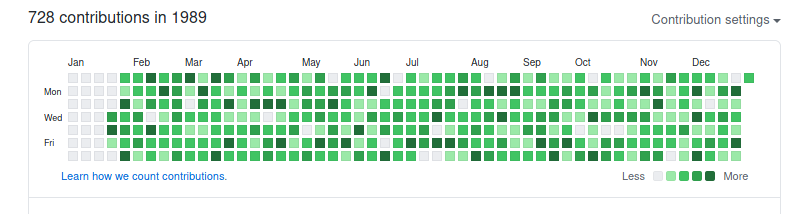
in an empty git repository. By default, streak will create 3 commits per day with a probability of ~71% per commit for 100 years, starting from 1980-05-09. These parameters can be tuned with: Generating a few commits per day for the range of 10 years, took roughly 2 minutes on my computer, and man was I a busy beaver in the 80s! Streak 1989 I know, I m for sure not the first one to discover this kind of thing, but it was a fun afternoon project anyways!
Bastian Venthur: Creating Beautiful Github Streaks

Creating Beautiful Github Streaks Github streaks are a pretty fun and harmless way of visualizing your contributions on github or gitlab. Some people use them to brag a little, some companies use them to check out potential candidates. It s all good as long as everyone is aware how easily you can manipulate them. In order to fake a commit date in the past, you have to set the GIT_AUTHOR_DATE and GIT_COMMITTER_DATE environment variables on git commit both, RFC 2822 and ISO 8601 formats are accepted (for more info see here). When generating hundreds of commits, the --allow-empty flag is very useful, as we don t have to actually change the source tree in order to generate a commit. So the command to generate a fake commit looks like this:
GIT_AUTHOR_DATE="$TIMESTAMP" GIT_COMMITTER_DATE="$TIMESTAMP" git commit --allow-empty -m "$TIMESTAMP"
execute it on an empty git repository and push to github or gitlab and you ll se the result after some time. To automate this, I wrote me a little python script (github, pypi). You can simply install it via:
pip install python-streak
and run it with:
streak
in an empty git repository. By default, streak will create 3 commits per day with a probability of ~71% per commit for 100 years, starting from 1980-05-09. These parameters can be tuned with: Generating a few commits per day for the range of 10 years, took roughly 2 minutes on my computer, and man was I a busy beaver in the 80s! Streak 1989 I know, I m for sure not the first one to discover this kind of thing, but it was a fun afternoon project anyways!

Shirish Agarwal: Inequality in Indian Education

Farmer on-going protests Before I start with the education system in India which I have talked about many times in the past, first let me share couple of pieces about the farmer movement which is still at Sanghu Delhi border.
<Manjeet Kaur,62 at farmer protest with her friends.
The above picture became somewhat viral as it showed Manjeet Kaur, who drove down from Patiala, Punjab to Sanghu border along with her friends to take part in the on-going protests. The picture not only shares how the women are part and parcel of this protest but also they are independently taking part in the protest. The other were two articles I read today, first was an article in tribune which questions that if the policy worked, why it didn t work in the state of Bihar. The other by a young law student who had to go from Chandigarh to Delhi with family for some work and her experience with the ongoing protest. In fact, an interesting observation was made by the CJI in the many suits against farmer protests in the SC. This makes for much more interesting read when you see an RTI query filed by Saket Gokhale to NHAI , a Central Govt. agency which is supposed to be independent and asks if they had filed an FIR and asked compensation from Haryana State and Haryana State Police which had dug up National Highway 44 and if any permission was asked for the same from NHAI. And NHAI unable to take any action for the same. If this isn t shameful, I dunno what is
Saket Gokhale s RTI query on digging up NH44
NHAI response to Saket Gokhale s query.
Sadly, the way the response has been worded makes it impossible for NHAI to discharge its own responsibilities and this becomes a precedent for other states now that know that NHAI is vulnerable. A pretty sad turn on events. Indian Education can t go online There was a recent article on scroll which shared how Indian education can t go online as only a few have computers with decent netlink speeds as well as other factors which are needed for online education. But there are also many things that the article doesn t take into account which actually make the task more difficult and raise the boundary more. Now in most schools and colleges, the number of students to teacher ratio could be anywhere between 70-150 or even more. In the last few years, a lot of schools have been closed down by various Governments, including and not limited to the ruling Govt. They have in fact intensified closures of public schools wherever their Govt. has been in power. Closing to 5000+ schools in one state in a year is a dramatic shift and such has been happening time and again. In fact, the rising costs of Indian education has made many to leave Indian shores and do studies abroad. And once they do their masters or whatever, the chances of them coming back to India become more and more remote. In India the costs have been becoming so bad that NBFC s have started products targeting the same. How NBFC and Banks have (both public and private) have fared with respect to Indian consumers needs its own blog post but one word to describe it is bad . But as shared above, needs its own blog post. Coming to the Indian context though, what has not been captured in that article is that the responsibility of making new content also raises huge barriers for teachers. My own experience in teacher s trainings for ICT usage has shown that most teachers do not know and use internet effectively both to sustain their own curiosity as well as their students. Part of which is whether you are private employee or a public school teacher, the teacher is not paid enough. I have had multiple conversations with friends over the years who are teachers who shared that they get 50% salary in-hand while they sign for 100%. This is more in the case or private schools though. In Govt. schools, the teachers apart from their regular administrative duties apart from teaching duties are also unpaid labor for Govt. policy. Take the recent covid crisis, it was the teachers who for months together went from door-to-door asking if they had a covid patient. This was all over India. Even for voter registration, census, polio and various other immunization efforts, the teachers are roped in. So apart from that, they somehow have to figure out how to make ends meet and also boost student morale. Hence the attention is only limited to the first couple of benches rather than the whole as a 45-minute to an hr. session is just not enough to go through a class of 70-150 school students giving individual attention. And this is when for most teachers, teaching is a means to an end and not the end itself. I am going to take one example of science and sort of break-it-down in multiple steps and how I would have approached that topic for say the 5th-6th standard students in say a public school in Pune and especially if Covid would not have been an issue so you have face-to-face meetup. There was recent news about a mysterious radio signal which came from one of our closest galactic neighbors Proxima Centauri. Now let s say there was a class I was teaching/sharing which I had shared before and there already is trust formed. So before coming to the news, I would tell the students about frequency and more generally the notation of why we like to measure things and how we measure things. There is so much beautiful history which could be acted and enacted which can show and remains in mind why measurement is needed. Once that is understood, discussed and an underpinning is established, we could move to human perception or the lack of it. We know that humans have lots of limits in almost everything, whether it is talking, touching, hearing, all of our five senses are pretty limited with what we know of spectrum available in the immediate family kingdom as well as in the Universe. I would start with how far can a person throw his voice and be heard without using any other means. There does come a point where they need to use anything from a megaphone to a loudspeaker and what it actually does. The other thing I would then talk is about the radio and ask the students to find more about the internals of a radio. If possible to bring an old radio to school where it could be disassembled. After they are familiar with some names of the electronic components and what they do, take them to the electronics market where they try to source all the things needed to make a radio and whatever they encounter. This would allow the students to try and do bargain shopping as well as learn from where to source things. Some might even get a copy or two of electronic projects where the shop themselves sell blueprints to hobbyists so that they can tinker. If there is a place in the school where soldering can be done, then all can try and sooner or later we come to know if something works or not. There is also possibility of talking about noise cancellation and then the topic of ITU can also be bought up and how they do frequency allocation. Last but not the least then the topic can be approached about an alien civilization and an unknown radio signal and what it means and what it can mean. Now if just one topic can give such a wide range of things to do and develop an understanding about not the subject itself but surrounding subjects as well I see no reason why teachers can t do this except they are handcuffed to lot of policy as well as real-life constraints. For e.g. I remember in my school days, we used to go out once or twice a year and that used to be either a school picnic or something similar. The only other I know is going to Mumbai for Nehru planetarium and Nehru science Centre. Unfortunately, I didn t go at that time because the school was taking students via air and the tickets were super costly at the time and that too for a 10 minute journey between the two cities. Those were different days, today you can t have a direct flight between the two cities as it doesn t make an economic sense. It makes more sense to go to Mumbai via train or bus as you will reach Mumbai in about couple of hrs. Of course, Pune does have its own planetarium at New English school and there are a few amateur astronomy clubs in Pune but nothing on the scale that what Mumbai has, but then this is getting off-topic. Now, again in an online world could this be done? Not without both the teacher and the student both spending lot of resources online and even then will be a lower understanding as both the hands-on experience as well as interacting with other students and learning from other students (aping) would be hugely limited. Even the social skills that students develop in a school setting will be rusted. My own social skills probably have weakened and rusted as I have very limited interaction with people over the past few months due to Covid fears and would be at least for the next few years till a large enough population is not vaccinated.

28 December 2020

Emmanuel Kasper: Quick NetBSD serial console install on libvirt

I wanted to set up a small VM with NetBSD to test a couple of virt-install option. It turns out it you can get to the installer prompt quite fast. get the NetBSD installer for serial console:
wget https://cdn.netbsd.org/pub/NetBSD/NetBSD-9.1/i386/installation/cdrom/boot-com.iso 
start the install
$ virt-install \
--connect qemu:///session \
--name netbsd \
--ram 64 \
--vcpus 2 \
--disk path=$HOME/netbsd.qcow2,size=4,bus=scsi,format=qcow2 \
--controller type=scsi,model=virtio-scsi \
--cdrom=boot-com.iso \
--virt-type kvm \
--os-variant netbsd8.0 \
--graphics none \
--arch i686 \
--console pty,target_type=serial
 
This will start a VM in usermode networking, so no need to be root, but the VM won t be reachable from the outside world, except if you add qemu usermode port forwarding.

Russ Allbery: Review: Your Day, Your Way

Review: Your Day, Your Way, by Timothy Caulfield
Publisher: Running Press
Copyright: December 2020
ISBN: 0-7624-7248-0
Format: Kindle
Pages: 236
In case you're wondering why I would pick up a self-help book with such an uninspiring title, it's because this book was originally published in Canada with the title Relax, Damnit! Why Caulfield's US publishers would have changed that title is beyond me. Canada clearly got the better end of this deal. (I'm hoping it's not because they thought "damn" would scare someone off, but it probably is.) The topic of this book is a scientific take on all the little decisions that you may worry about throughout the day: whether to eat breakfast, how much water to drink, whether public toilet seats are risky, whether to weigh yourself, how important flossing is, and much more. Caulfield is a law professor at the University of Alberta specializing in health law and scientific ethics, but the hat he's wearing when writing this book is that of professional skeptic. I found out about this book through Dr. Jen Gunter, a connection that you won't find surprising when I mention that one of Caulfield's earlier books is titled Is Gwyneth Paltrow Wrong About Everything?. (Spoiler: yes.) Caulfield chose to organize this collection of random essays around the timeline of a single day, starting with waking up (how long should you sleep?) and morning routines (what do scientific studies say about brushing your teeth?), going through a work day (there's a chapter on multitasking and why you really shouldn't do it), and concluding with dinner (no, you can't taste the difference between most wines even if you think you can), evening routines, and sleep. This worked for me. It's still a bit arbitrary, but it's hard to organize random bits of skepticism, and this layout let Caulfield make a point about how frequently most people check their phones. (Stop doomscrolling. It makes you feel bad. Yes, I'm talking to myself.) I've now read several books, and considerably more essays, on scientific skepticism of this type. They're all a bit the same, and unless you enjoy this general genre of writing, there aren't many compelling reasons to read this specific entry. (Ben Goldacre's Bad Science is still my favorite.) I think the only tidbit that I found surprising and hadn't heard elsewhere is that the science on flossing is meh at best. The rest is the standard mix of mainstream scientific advice (don't drink raw milk, you're not going to catch something from a public toilet seat, multivitamins just give you expensive urine), advice that's scientifically correct but that I'm still not going to follow (there's no scientific reason to wash your hair daily but I still prefer how it feels), and advice to not worry about things with no evidence on either side (it doesn't matter whether you eat breakfast, ten thousand steps is a marketing gimmick, drink water when you're thirsty and don't worry about how much). Caulfield does have a particularly good debunking of the myth that angry ranting helps you calm down and feel better (it does the exact opposite), but if you're reasonably well-read on scientific trivia, nothing here will be that novel. If you don't follow scientific trivia and want a good collection of debunking essays, this book is fine. I certainly won't discourage you from reading it. Caulfield is engaging and succinct, and there's a balanced mix of odd trivia, debunking of pseudoscience, and good public health advice, all comfortably in line with what I've read elsewhere. That said, I found it striking to read this book shortly after Can't Even. I was hoping that Caulfield would tackle the larger problem of anxiety and overload that is in part created by the proliferation of arbitrary standards and rules to which we hold ourselves. He does tackle some related topics, such as our bizarre belief in the US (and apparently Canada) that it is unsafe to let children walk to school without adult supervision, but Caulfield's solutions are nearly all individual. He wants to inform the reader, he wants to show you how to analyze scientific research and notice when news articles are scaring you unnecessarily, and he wants you to become more immune to fear-mongering. Petersen's salient point in Can't Even is that many of us are burned out already and this is even more work. In order to avoid being gratuitously frightened and deceived by con artists and sensational news stories, we have to run a mental checklist of evidence evaluation and go do independent research. Sure, this works, makes you better at risk analysis, and may thus make you feel calmer, but this takes a lot of time and energy. Wasn't a point of having the news media that other people would do some of that work for you? Once again, everything that's wrong with the world becomes another chore or energy expenditure that we all have to independently make. I know, it's asking too much of a harmless book on the scientific evidence behind daily life decisions to make a political point about individual versus collective effort. But it's hard to shake the feeling that asking individuals to try harder to ignore intentionally deceptive and well-funded propaganda campaigns doesn't scale. Not everyone enjoys skepticism as a hobby, and there's only so much individual energy to go around. Relax, Damnit! is good advice as far as it goes. But I'm more in the mood for the books that look at who is making us so anxious in the first place and how we can (collectively) get them to stop. I don't know what that looks like (there are obvious free speech concerns), but we need reliable sources of information that don't make us anxious. Rating: 6 out of 10

27 December 2020

John Goerzen: See The World Through the Eyes of a Child, and You Are Free

Because we see things so often, we see them less and less. Those who live in thanksgiving daily, however, have a way of opening their eyes and seeing the wonders and beauties of this world as though seeing them for the first time. Joseph Wirthlin
Today is about dirt. I had to learn about it, again, from my 2-year-old last week. She and I were playing outside something we have more time to do right now. She started to roll around in the grass, and asked me to play in the grass, too. As I got close to the ground, I inhaled the wonderfully sweet and earthy scent of spring soil. I hadn t smelled that in a long time. What an unexpected gift. This photo is of a child, having a fantastic time with dirt and water. The more bits of Kansas he had on him, the more shrieks of laughter I heard. It think most adults keep forgetting the joys of simple things like dirt. I am lucky to have children around to remind me. This week, I also had the opportunity to teach my 2-year-old the joys of making big splashes in mud puddles, so maybe I can also remind them on occasion.
See the world as if for the first time; see it through the eyes of a child, and you will suddenly find that you are free. Deepak Chopra
Rural Kansas, 2016 (I originally wrote this on March 31, and am sharing it on my blog for the first time today.)

Russ Allbery: Review: King of the Murgos

Review: King of the Murgos, by David Eddings
Series: The Malloreon #2
Publisher: Del Rey
Copyright: April 1988
Printing: November 1991
ISBN: 0-345-35880-5
Format: Mass market
Pages: 403
This is the second book of the Malloreon, which in turn is a sequel trilogy to The Belgariad. You could start here, since Eddings does a good job at summarizing previous volumes, but I'm not sure why you'd want to. This is the sort of book that gives epic fantasy series a bad name. After a lot of action in Guardians of the West, our band of heroes has been mostly assembled. They set out after the villain through the novel strategy of exploring the parts of the world map we have not yet seen. By the end of 400 pages of traveling they... are on the trail of the villain while exploring parts of the world map we have not yet seen. What I'm saying is that you'd better be really enjoying Silk's nose twitching and Belgarath being grumpy at Polgara, because that's about all you get. The protagonists collect a few important plot coupons and set up some emotional conflicts whose resolutions are already telegraphed, and that's about it. After wasting a bunch of time getting to and wandering around Nyissa, all of which felt pointless except for one moment of Errand doing something nifty (often the best parts of this series), the band of heroes ventures into enemy territory as foreshadowed by the title. The structure of Eddings's series is basically Suikoden (collect all the protagonists), so as one might expect the point of this excursion is to pick up another protagonist. In the process, we get to see a bit more of the Murgos than we have before. I've commented before that Eddings takes racial essentialism to such an absurd degree that these books start feeling like animal fairy tales, which is why I'm willing to tolerate all of the stereotyping. It's Planet of Hats except with fantasy countries. That tolerance is stretched rather thin when it comes to the bad guys, since the congruence with real-life racism and dehumanization of enemies is a bit too strong. Eddings dodges this mostly by not putting many of the bad guys in the page, but in King of the Murgos he has a golden opportunity to undercut his racial structure and surprise the reader. What if one of the Murgos is a protagonist and is vital to the series plot? I won't spoil what Eddings actually does, but if you imagine the stupidest and most obvious way to avoid having to acknowledge his fantasy races are not uniform, you probably just guessed the big reveal in this book. It's sadly not surprising, since Eddings is all in on his racial construction of this fantasy world, but it's still disgusting. The main reason why I decided to re-read this series, which is notorious for being a re-run of the Belgariad, is because I think what Eddings does here with prophecy, the voice in Garion's head, and the meddling of the seers is hilarious. The plot is openly on rails to the point that the characters actively grumble about it. I find that oddly entertaining, a bit like watching a Twitch streamer play an RPG. In this installment, Errand does something random in the middle of a Murgo temple, Garion gets a level-up chime, the prophecy gets very smug about how well things are going, and no one knows why. It's an absolute delight, and I don't know of any other series that isn't pure parody that would be willing to use that as a plot element. Sadly, King of the Murgos has only one or two enjoyable moments like that, a whole lot of frankly boring map exploration, some truly egregious racist claptrap, and no plot development worth speaking of. I probably should have skipped this one when re-reading this series. Followed by Demon Lord of Karanda. Rating: 4 out of 10

John Goerzen: Asynchronous Email: Exim over NNCP (or UUCP)

Following up to yesterday s article about how NNCP rehabilitates asynchronous communication with modern encryption and onion routing, here is the first of my posts showing how to put it into action. Email is a natural fit for async; in fact, much of early email was carried by UUCP. It is useful for an airgapped machine to be able to send back messages; errors from cron, results of handling incoming data, disk space alerts, etc. (Of course, this would apply to a non-airgapped machine also). The NNCP documentation already describes how to do this for Postfix. Here I will show how to do it for Exim. A quick detour to UUCP land When you encounter a system such as email that has instructions for doing something via UUCP, that should be an alert to you that here is some very relevant information for doing this same thing via NNCP. The syntax is different, but broadly, here s a table of similar NNCP commands:
Purpose UUCP NNCP
Connect to remote system uucico -s, uupoll nncp-call, nncp-caller
Receive connection (pipe, daemon, etc) uucico (-l or similar) nncp-daemon
Request remote execution, stdin piped in uux nncp-exec
Copy file to remote machine uucp nncp-file
Copy file from remote machine uucp nncp-freq
Process received requests uuxqt nncp-toss
Move outbound requests to dir (for USB stick, airgap, etc) N/A nncp-xfer
Create streaming package of outbound requests N/A nncp-bundle
If you used UUCP back in the day, you surely remember bang paths. I will not be using those here. NNCP handles routing itself, rather than making the MTA be aware of the network topology, so this simplifies things considerably. Sending from Exim to a smarthost One common use for async email is from a satellite system: one that doesn t receive mail, or have local mailboxes, but just needs to get email out to the Internet. This is a common situation even for conventionally-connected systems; in Exim speak, this is a satellite system that routes mail via a smarthost. That is, every outbound message goes to a specific target, which then is responsible for eventual delivery (over the Internet, LAN, whatever). This is fairly simple in Exim. We actually have two choices for how to do this: bsmtp or rmail mode. bsmtp (batch SMTP) is the more modern way, and is essentially a derivative of SMTP that explicitly can be queued asynchronously. Basically it s a set of SMTP commands that can be saved in a file. The alternative is rmail (which is just an alias for sendmail these days), where the data is piped to rmail/sendmail with the recipients given on the command line. Both can work with Exim and NNCP, but because we re doing shiny new things, we ll use bsmtp. These instructions are loosely based on the Using outgoing BSMTP with Exim HOWTO. Some of these may assume Debianness in the configuration, but should be easily enough extrapolated to other configs as well. First, configure Exim to use satellite mode with minimal DNS lookups (assuming that you may not have working DNS anyhow). Then, in the Exim primary router section for smarthost (router/200_exim4-config_primary in Debian split configurations), just change transport = remote_smtp_smarthost to transport = nncp. Now, define the NNCP transport. If you are on Debian, you might name this transports/40_exim4-config_local_nncp:
nncp:
  debug_print = "T: nncp transport for $local_part@$domain"
  driver = pipe
  user = nncp
  batch_max = 100
  use_bsmtp
  command = /usr/local/nncp/bin/nncp-exec -noprogress -quiet hostname_goes_here rsmtp
.ifdef REMOTE_SMTP_HEADERS_REWRITE
  headers_rewrite = REMOTE_SMTP_HEADERS_REWRITE
.endif
.ifdef REMOTE_SMTP_RETURN_PATH
  return_path = REMOTE_SMTP_RETURN_PATH
.endif
This is pretty straightforward. We pipe to nncp-exec, run it as the nncp user. nncp-exec sends it to a target node and runs whatever that node has called rsmtp (the command to receive bsmtp data). When the target node processes the request, it will run the configured command and pipe the data in to it. More complicated: Routing to various NNCP nodes Perhaps you would like to be able to send mail directly to various NNCP nodes. There are a lot of ways to do that. Fundamentally, you will need a setup similar to the UUCP example in Exim s manualroute manual, which lets you define how to reach various hosts via UUCP/NNCP. Perhaps you have a star topology (every NNCP node exchanges email with a central hub). In the NNCP world, you have two choices of how you do this. You could, at the Exim level, make the central hub the smarthost for all the side nodes, and let it redistribute mail. That would work, but requires decrypting messages at the hub to let Exim process. The other alternative is to configure NNCP to just send to the destinations via the central hub; that takes advantage of onion routing and doesn t require any Exim processing at the central hub at all. Receiving mail from NNCP On the receiving side, first you need to configure NNCP to authorize the execution of a mail program. In the section of your receiving host where you set the permissions for the client, include something like this:
      exec:  
        rsmtp: ["/usr/sbin/sendmail", "-bS"]
       
The -bS option is what tells Exim to receive BSMTP on stdin. Now, you need to tell Exim that nncp is a trusted user (able to set From headers arbitrarily). Assuming you are running NNCP as the nncp user, then add MAIN_TRUSTED_USERS = nncp to a file such as /etc/exim4/conf.d/main/01_exim4-config_local-nncp. That s it! Some hosts, of course, both send and receive mail via NNCP and will need configurations for both.

26 December 2020

Sandro Tosi: Gmail and tracker.debian.org: add a label to team emails

Recently the Python Team started the migration from Alioth mailing list to a tracker.debian.org team.Alioth mailing list, being a real ml, included a List-Id header, which is handled by Gmail natively and which you can use to create a filter based on it.Tracker.d.o instead uses a custom header, X-Distro-Tracker-Team, and Gmail doesn't allow to create filters on custom headers. But there's a solution: Google Apps Scripts.

1. Apps script and its configuration

To create a new apps script, click "New project" from the scripts dashboard: this will open a code editor, so now cut and paste this code (change the label name to match the one you want to use, and the header too if you're going to use this for another team):

function tagPythonTeamEmails()  

// search for all recent threads (hours is the smallest interval searchable)
var threads = GmailApp.search("newer_than:1h");
// this is the label i want to apply to the messages
var label = GmailApp.getUserLabelByName("Debian_Python_Pkgs"); // <-- EDIT THIS

for (var i = 0; i < threads.length; i++)

// get all messages in a given thread
var messages = threads[i].getMessages();

// for each message in the thread
for (var j = 0; j < messages.length; j++)
var message = messages[j];
// needed to have access to the full email: headers + body
var email = message.getRawContent();
// this is the header i want to check for: if present, add label and archive
if (email.indexOf("X-Distro-Tracker-Team: python") > -1) // <-- EDIT THIS
threads[i].addLabel(label);
threads[i].moveToArchive();


(This code is largely inspired by this StackOverflow answer.)

Given we're going to perform changes to the emails, we need to add extra permissions to the script; first we need to toggle the option "View > Show manifest file" which will show the appsscript.json file. Once done, edit it and update the scope of the script to include:

  "oauthScopes": [
...
"https://www.googleapis.com/auth/gmail.readonly",
"https://www.googleapis.com/auth/gmail.modify"
],

These new permission will be granted when we deploy the script, which we can actually do right now: from the editor window click on "Publish > Deploy from manifest..." and then "Install add-on"; it will make the app script available to operate on Gmail by opening the usual Google grants authorization popup.

2. Schedule the app script execution

Unlike filters defined on the web UI, apps scripts are not triggered every time a mail is received (there's a pub-sub mechanism, but it doesn't look like it would work for this), so if we want to execute periodically the new script, we need to create a time-driven trigger.

The simplest way is probably from the script editor (but you can also follow this doc): "View > Current project's triggers" and then "Add trigger" from there. For my specific use-case i set:

  • event source = time-driven
  • type of time based trigger = minutes timer
  • minute interval = 5 minutes
  • Failure notification settings = notify me immediately
it's not great that you have to wait 5 minutes for getting proper labels, and while it's true you can schedule the trigger for every minute, there are further considerations for that, discussed below.

3. Additional information

Be aware of quotas and limitations for Apps scripts; in particular the "Triggers total runtime" set to "90 min / day" is what led me to set the trigger every 510 mins.

Use the scripts dashboard (doc) to monitor the script execution logs, in the "My Executions" section, and specifically the "Duration" column: the script execution time depends exclusively on the number of emails to process at every execution, so fine-tune the trigger time to stay within your quota.

The newer_than search operator doesn't allow a granularity smaller than hours (although that's not even documented), so that means we're going to scan multiple times the same emails.

UPDATE (2020-12-26): I've already had to bump from every 5 to every 10 minutes, as otherwise i'd get Exception: Service invoked too many times for one day: gmail. (remember the quota!)

Paul Tagliamonte: Reverse Engineering my Christmas Tree

Over the course of the last year and a half, I ve been doing some self-directed learning on how radios work. I ve gone from a very basic understanding of wireless communications (there s usually some sort of antenna, I guess?) all the way through the process of learning about and implementing a set of libraries to modulate and demodulate data using my now formidable stash of SDRs. I ve been implementing all of the RF processing code from first principals and purely based on other primitives I ve written myself to prove to myself that I understand each concept before moving on. I figured that there was a fun capstone to be done here - the blind reverse engineering and implementation of the protocol my cheep Amazon power switch uses to turn on and off my Christmas Tree. All the work described in this post was done over the course of a few hours thanks to help during the demodulation from Tom Bereknyei and hlieberman.

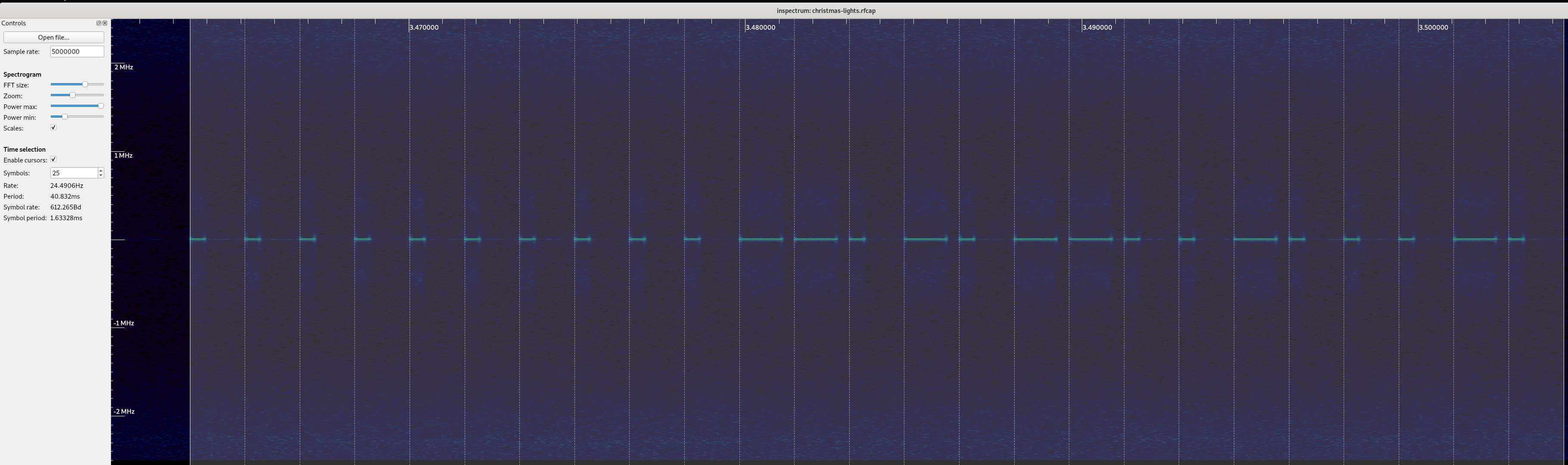
Going in blind When I first got my switch, I checked it for any FCC markings in order to look up the FCC filings to determine the operational frequency of the device, and maybe some other information such as declared modulation or maybe even part numbers and/or diagrams. However, beyond a few regulatory stickers, there were no FCC ids or other distinguishing IDs on the device. Worse yet, it appeared to be a whitelabeled version of another product, so searching Google for the product name was very unhelpful. Since operation of this device is unlicensed, I figured I d start looking in the ISM band. The most common band used that I ve seen is the band starting at 433.05MHz up to 434.79MHz. I fired up my trusty waterfall tuned to a center frequency of 433.92MHz (since it s right in the middle of the band, and it let me see far enough up and down the band to spot the remote) and pressed a few buttons. Imagine my surprise when I realize the operational frequency of this device is 433.920MHz, exactly dead center. Weird, but lucky! After taking a capture, I started to look at understanding what the modulation type of the signal was, and how I may go about demodulating it. Using inspectrum, I was able to clearly see the signal in the capture, and it immediately stuck out to my eye to be encoded using OOK / ASK. Next, I started to measure the smallest pulse, and see if I could infer the symbols per second, and try to decode it by hand. These types of signals are generally pretty easy to decode by eye. This wound up giving me symbol rate of 2.2 Ksym/s, which is a lot faster than I expected. While I was working by hand, Tom demodulated a few messages in Python, and noticed that if you grouped the bits into groups of 4, you either had a 1000 or a 1110 which caused me to realize this was encoded using something I saw documented elsewhere, where the 0 is a short pulse, and a 1 is a long pulse, not unlike morse code, but where each symbol takes up a fixed length of time (monospace morse code?). Working on that assumption, I changed my inspectrum symbol width, and demodulated a few more by hand. This wound up demodulating nicely (and the preamble / clock sync could be represented as repeating 0s, which is handy!) and gave us a symbol rate of 612(ish) symbols per second a lot closer to what I was expecting. If we take the code for on in the inspectrum capture above and demodulate it by hand, we get 0000000000110101100100010 (treat a short pulse as a 0, and a long pulse as a 1). If you re interested in following along at home, click on the inspectrum image, and write down the bits you see, and compare it to what I have! Right, so it looks like from what we can tell so far that the packet looks something like this:

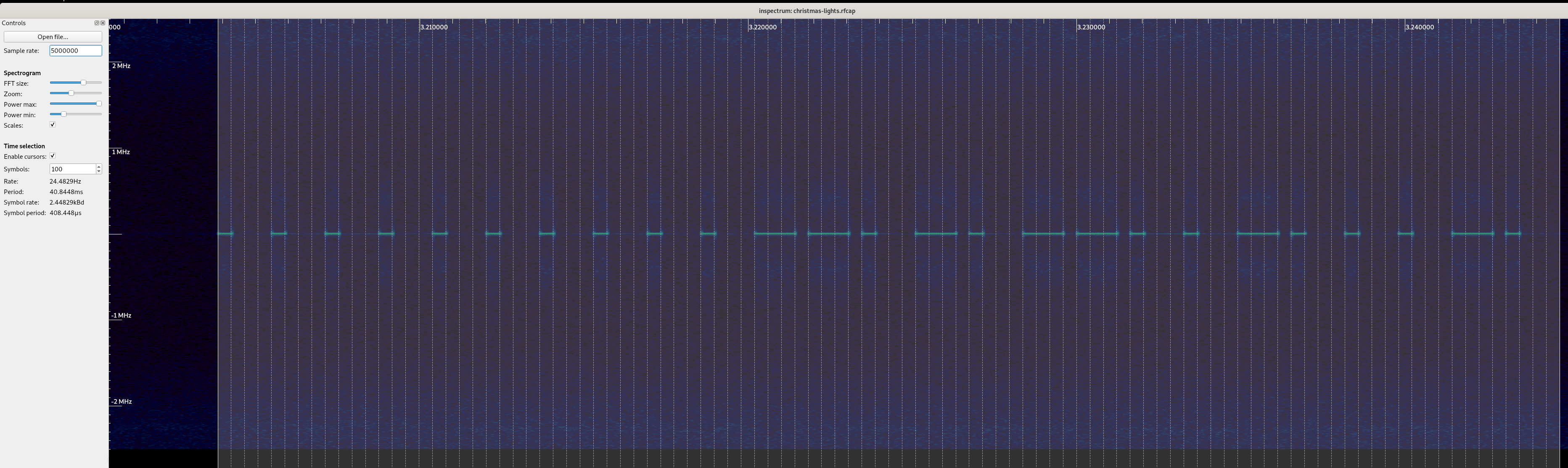
preamble / sync
stuff
Next, I took a capture of all the button presses and demodulated them by hand, and put them into a table to try and understand the format of the messages:
Button Demod'd Bits
On 0000000000110101100100010
Off 00000000001101011001010000
Dim Up 0000000000110101100110100
Dim Down 0000000000110101100100100
Timer 1h 0000000000110101100110010
Timer 2h 0000000000110101100100110
Timer 4h 0000000000110101100100000
Dim 100% 0000000000110101000101010
Dim 75% 00000000001101010001001100
Dim 50% 00000000001101010001001000
Dim 25% 0000000000110101000100000
Great! So, this is enough to attempt to control the tree with, I think so I wrote a simple modulator. My approach was to use the fact that I can break down a single symbol into 4 sub-symbol components which is to say, go back to representing a 1 as 1110, and a 0 as 1000. This let me allocate IQ space for the symbol, break the bit into 4 symbols, and if that symbol is 1, write out values from a carrier wave (cos in the real values, and sin in the imaginary values) to the buffer. Now that I can go from bits to IQ data, I can transmit that IQ data using my PlutoSDR or HackRF and try and control my tree. I gave it a try, and the tree blinked off! Success! But wait that s not enough for me I know I can t just demodulate bits and try and replay the bits forever there s stuff like addresses and keys and stuff, and I want to get a second one of these working. Let s take a look at the bits to see if we spot anything fun & interesting. At first glance, a few things jumped out at me as being weird? First is that the preamble is 10 bits long (fine, let s move along - maybe it just needs 8 in a row and there s two to ensure clocks sync?). Next is that the messages are not all the same length. I double (and triple!) checked the messages, and it s true, the messages are not all the same length. Adding an extra bit at the end didn t break anything, but I wonder if that s just due to the implementation rather than the protocol. But, good news, it looks like we have a stable prefix to the messages from the remote must be my device s address! The stable 6 bits that jump out right away are 110101. Something seems weird, though, 6 bits is a bit awkward, even for a bit limited embedded device. Why 6? But hey, wait, we had 10 bits in the preamble, what if we have an 8 bit address meaning my device is 00110101, and the preamble is 8 0 symbols! Those are numbers that someone working on an 8 bit aligned platform would pick! To test this, I added a 0 to the preamble to see if the message starts at the first 1, or if it requires all the bits to be fully decoded, and lo and behold, the tree did not turn on or off. This would seem to me to confirm that the 0s are part of the address, and I can assume we have two 8 bit aligned bytes in the prefix of the message.
preamble / sync
address
stuff
Now, when we go through the 9-10 bits of stuff , we see all sorts of weird bits floating all over the place. The first 4 bits look like it s either 1001 or 0001, but other than that, there s a lot of chaos. This is where things get really squishy. I needed more information to try and figure this out, but no matter how many times I sent a command it was always the same bits (so, no counters), and things feel very opaque still. The only way I was going to make any progress is to get another switch and see how the messages from the remote change. Off to Amazon I went, and ordered another switch from the same page, and eagerly waited its arrival.

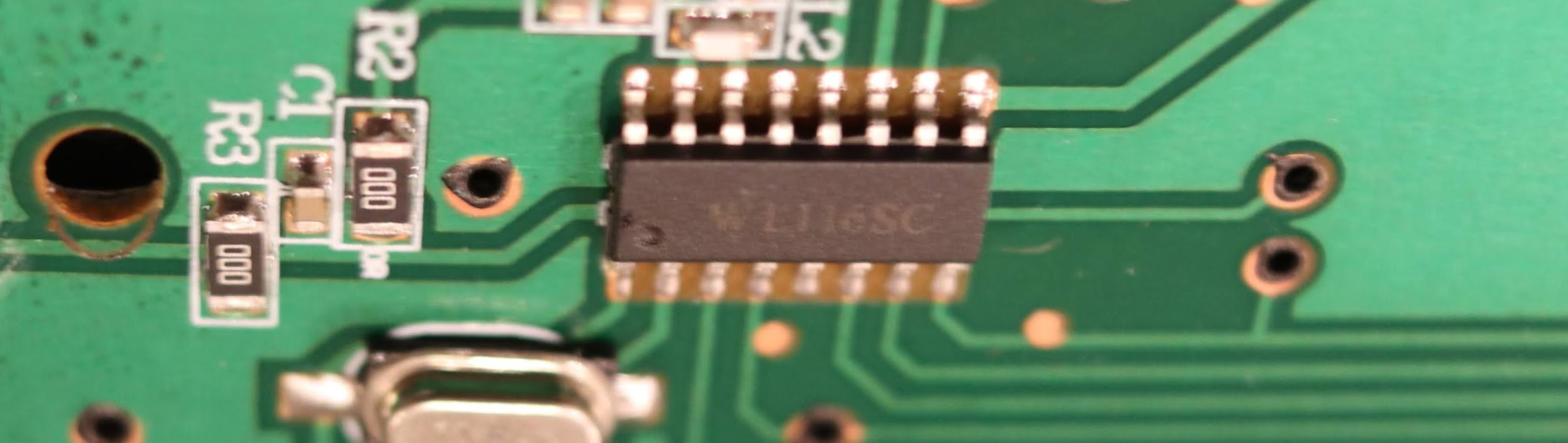
Switch #2 The second switch showed up, and I hurriedly unboxed the kit, put batteries into the remote, and fired up my SDR to take a capture. After I captured the first button ( Off ), my heart sunk as I saw my lights connected to Switch #1 flicker off. Apparently the new switch and the old switch have the same exact address. To be sure, I demodulated the messages as before, and came out with the exact same bit pattern. This is a setback and letdown I was hoping to independently control my switches, but it also means I got no additional information about the address or button format. The upside to all of this, though, is that because the switches are controlled by either remote, I only needed one remote, so why not pull it apart and see if I can figure out what components it s using to transmit, and find any datasheets I can. The PCB was super simple, and I wound up finding a WL116SC IC on the PCB. After some googling, I found a single lone datasheet, entirely in Chinese. Thankfully, Google Translate seems to have worked well enough on technical words, and I was able to put together at least a little bit of understanding based on the documentation that was made available. I took a few screenshots below - I put the google translated text above the hanzi. From that sheet, we can see we got the basics of the 1 and 0 symbol encoding right (I was halfway expecting the bits to be flipped), and a huge find by way of a description of the bits in the message! It s a bummer that we missed the clock sync / preamble pulse before the data message, but that s OK somehow. It also turns out that 8 or 10 bit series of of 0"s wasn t clock sync at all - it was part of the address! Since it also turns out that all devices made by this manufacturer have the hardcoded address of []byte 0x00, 0x35 , that means that the vast majority of bits sent are always going to be the same for any button press on any remote made by this vendor. Seems like a waste of bits to me, but hey, what do I know. Additionally, this also tells us the trailing zeros are not part of the data encoding scheme, which is progress!
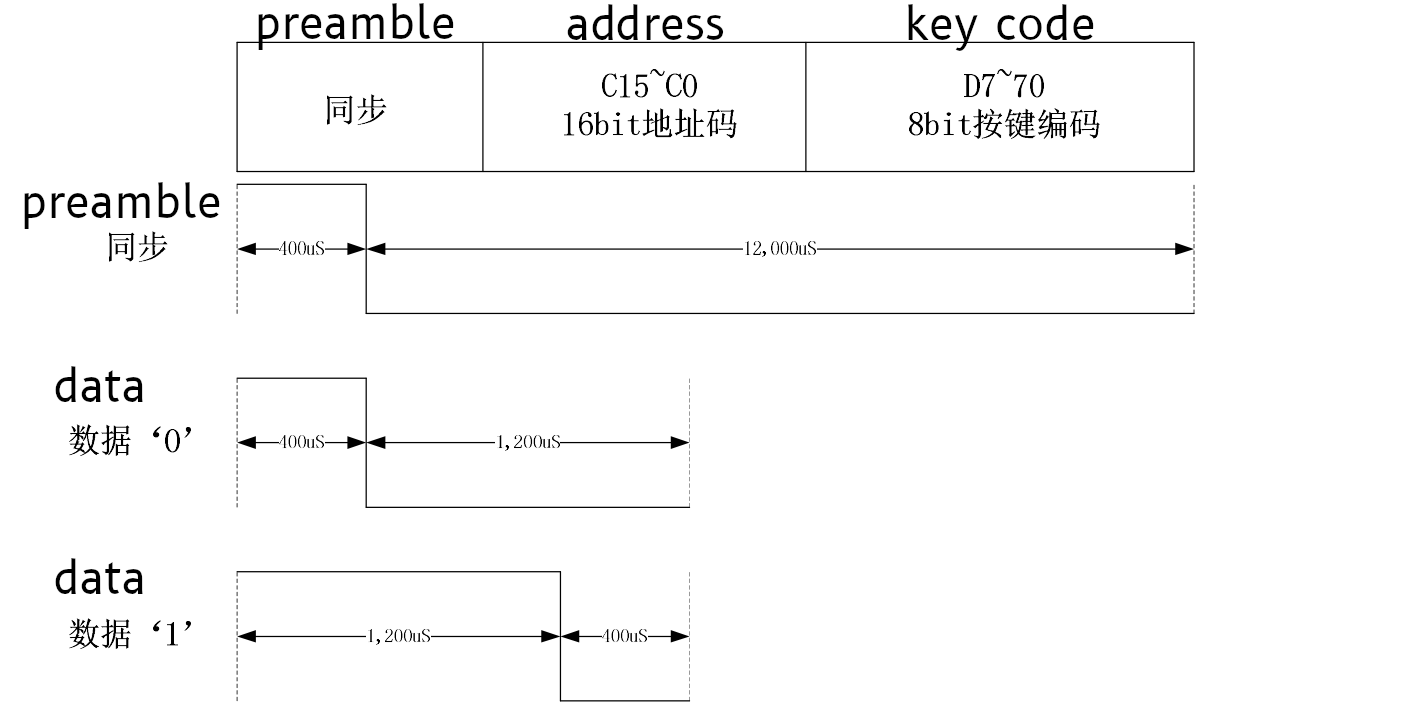
address
keycode
Now, working on the assumptions validated by the datasheet, here s the updated list of scancodes we ve found:
Button Scancode Bits Integer
On 10010001 145 / 0x91
Off 10010100 148 / 0x94
Dim Up 10011010 154 / 0x9A
Dim Down 10010010 146 / 0x92
Timer 1h 10011001 154 / 0x99
Timer 2h 10010011 147 / 0x93
Timer 4h 10010000 144 / 0x90
Dim 100% 00010101 21 / 0x15
Dim 75% 00010011 19 / 0x13
Dim 50% 00010010 18 / 0x12
Dim 25% 00010000 16 / 0x10
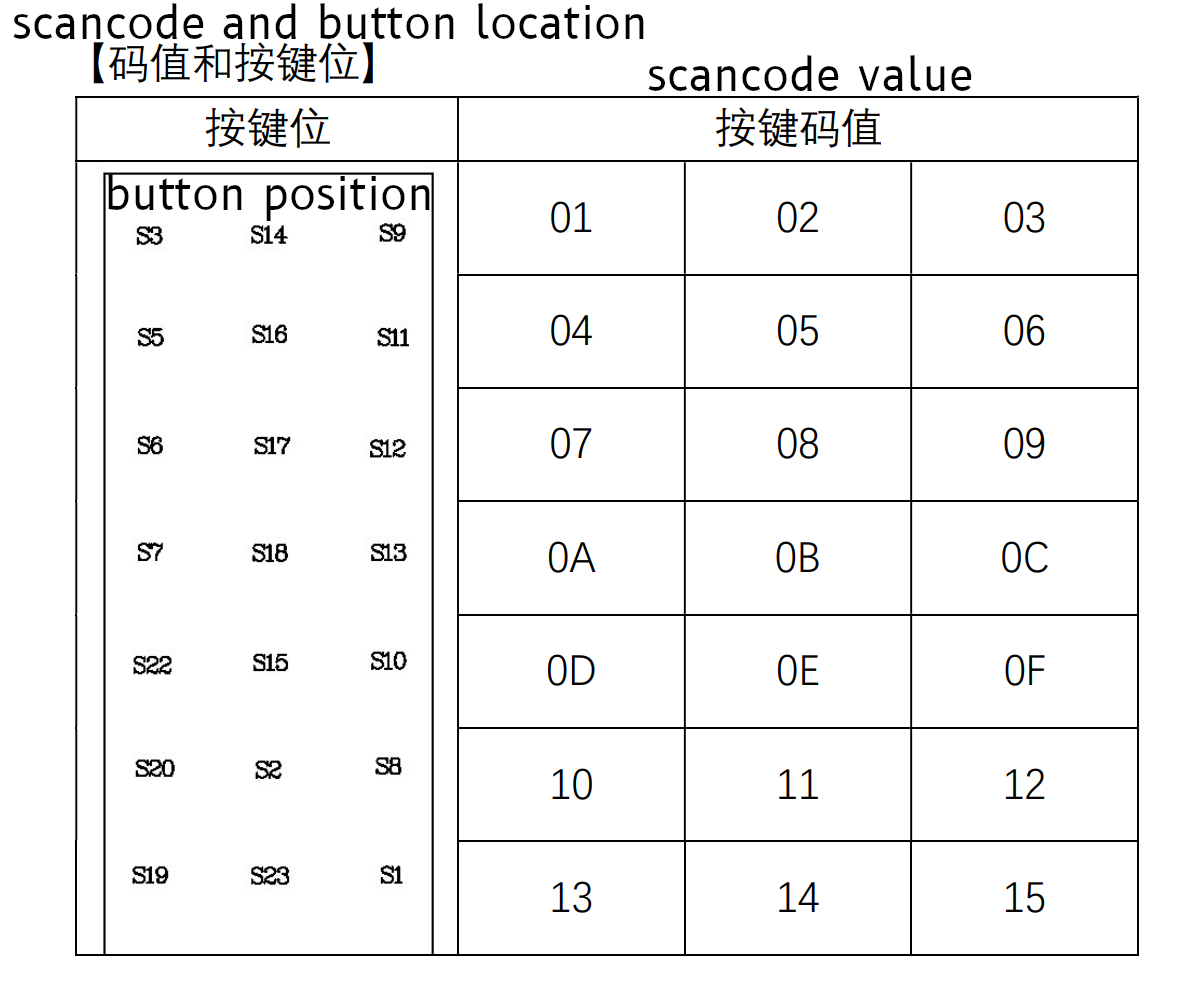
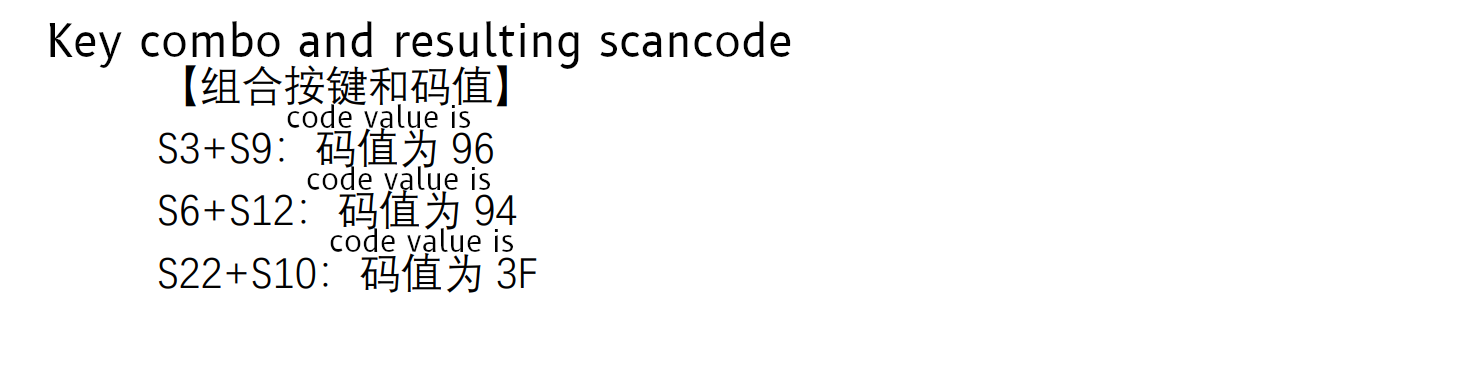
Interestingly, I think the Dim keys may have a confirmation that we have a good demod the codes on the bottom are missing the most significant bit, and when I look back at the scancode table in the datasheet, they make an interesting pattern the bottom two rows, right and left side values match up! If you take a look, Dim 100% is S1 , Dim 75% is S19 , Dim 50% is S8 , and Dim 25% is S20 . Cool! Since none of the other codes line up, I am willing to bet the most significant bit is a Combo indicator, and not part of the button (leaving 7 bits for the keycode). And even more interestingly, one of our scancodes ( Off , which is 0x94) shows up just below this table, in the examples. Over all, I think this tells us we have the right bits to look at for determining the scan code! Great news there!

Back to the modulation! So, armed with this knowledge, I was able to refactor my code to match the timings and understanding outlined by the datasheet and ensure things still work. The switch itself has a high degree of tolerance, so being wildly off frequency or a wildly wrong symbol rate may actually still work. It s hard to know if this is more or less correct, but matching documentation seems like a more stable foundation if nothing else. This code has been really reliable, and tends to work just as well as the remote from what I ve been able to determine. I ve been using incredibly low power to avoid any interference, and it s been very robust - a testament to the engineering that went into the outlet hardware, even though it cost less than of a lot of other switches! I have a lot of respect for the folks who built this device - it s incredibly simple, reliable and my guess is this thing will keep working even in some fairly harsh RF environments. The only downside is the fact the manufacturer used the same address for all their devices, rather than programming a unique address for each outlet and remote when the underlying WL116SC chip supports it. I m sure this was done to avoid complexity in assembly (e.g. pairing the remote and outlet, and having to keep those two items together during assembly), but it s still a bummer. I took apart the switch to see if I could dump an EEPROM and change the address in ROM, but the entire thing was potted in waterproof epoxy, which is a very nice feature if this was ever used outdoors. Not good news for tinkering, though!

Unsolved Mysteries At this point, even though I understand the protocol enough to control the device, it still feels like I hit a dead end in my understanding. I m not able to figure out how exactly the scancodes are implemented, and break them down into more specific parts. They are stable and based on the physical wiring of the remote, so I think I m going to leave it a magic number. I have what I was looking for, and these magic constants appear to be the right one to use, even if I did understand how to create the codes itself. This does leave us with a few bits we never resolved, which I ll memorialize below just to be sure I don t forget about them. Question #1: According to the datasheet there should be a preamble. Why do I not see one leading the first message? My hunch is that the trailing 0 at the end of the payload is actually just the preamble for the next message (always rendering the first message invalid?). This would let us claim there s an engineering reason why we are ignoring the weird bit, and also explain away something from the documentation. It s just weird that it wouldn t be present on the first message. This theory is mostly confirmed by measuring the timing and comparing it to the datasheet, but it s not exactly in line with the datasheet timings either (specifically, it s off by 200 s, which is kinda a lot for a system using 400 s timings). I think I could go either way on the last 0 being the preamble for the next message. It could be that the first message is technically invalid, or it could also be that this was not implemented or actively disabled by the vendor for this specific application / device. It s really hard to know without getting the source code for the WL116SC chip in this specific remote or the source in the outlet itself. Question #2: Why are some keycodes 8 bits and others 9 bits? I still have no idea why there sometimes 8 bits (for instance, On ) and other times there are 9 bits (for instance, Off ) in the 8 bit keycode field. I spent some time playing with the trailing zeros, when I try and send an Off with the most significant 8 bits (without the least significant / last 9th bit, which is a 0 ), it does not turn the tree off. If I send an On with 9 bits (an additional 0 after the least significant bit), it does work, but both On and Off work when I send 10, 11 or 12 bits padded with trailing zeros. I suspect my outlet will ignore data after the switch is done reading bits regardless of trailing zeros. The docs tell me there should only be 8 bits, but it won t work unless I send 9 bits for some commands. There s something fishy going on here, and the datasheet isn t exactly right either way. Question #3: How in the heck do those scancodes work? This one drove me nuts. I ve spent countless hours on trying to figure this out, including emailing the company that makes the WL116SC (they re really nice!), and even though they were super kind and generous with documentation and example source, I m still having a hard time lining up their documentation and examples with what I see from my remote. I think the manufacturer of my remote and switch has modified the protocol enough to where there s actually something different going on here. Bummer. I wound up in my place of last resort asking friends over Signal to try and see if they could find a pattern, as well as making multiple pleas to the twittersphere, to no avail (but thank you to Ben Hilburn, devnulling, Andreas Bombe and Larme for your repiles, help and advice!) I still don t understand how they assemble the scan code for instance, if you merely add, you won t know if a key press of 0x05 is 0x03 + 0x02 or if it s 0x01 + 0x04. On the other hand, treating it as two 4-bit integers won t work for 0x10 to 0x15 (since they need 5 bits to represent). It s also likely the most significant bit is a combo indicator, which only leaves 7 bits for the actual keypress data. Stuffing 10 bits of data into 7 bits is likely resulting in some really intricate bit work. On a last ditch whim, I tried to XOR the math into working, but some initial brute forcing to make the math work given the provided examples did not result in anything. It could be a bitpacked field that I don t understand, but I don t think I can make progress on that without inside knowledge and much more work. Here s the table containing the numbers I was working off of:
Keys Key Codes Scancode
S3 + S9 0x01 + 0x03 0x96
S6 + S12 0x07 + 0x09 0x94
S22 + S10 0x0D + 0x0F 0x3F
If anyone has thoughts on how these codes work, I d love to hear about it! Send me an email or a tweet or something - I m a bit stumped. There s some trick here that is being used to encode the combo key in a way that is decodeable. If it s actually not decodeable (which is a real possibility!), this may act as a unique button combo hash which allows the receiver to not actually determine which keys are pressed, but have a unique button that gets sent when a combo is used. I m not sure I know enough to have a theory as to which it may be.

John Goerzen: Rehabilitating Asynchronous Communication with NNCP: A Cross Between Tor, ssh, and UUCP

Have you ever been traveling, shot a ton of photos and videos, but were annoyed to find it was saturating the terrible wifi you had access to? Maybe you d wish the upload to pause until you get somewhere else, but then pausing syncing on your Nextcloud/Syncthing/Dropbox would also pause other syncing you didn t want to pause. Or you have trouble backing up your laptop when not at home, in a way that won t accidentaly eat up your cell phone data. There are ways to help with this: asynchronous transfer. Here s a lot of background. If you want to see how encrypted, onion-routed UUCP looks, skip ahead to the NNCP section! There is an old saying: When all you have is a hammer, every problem looks like a nail. We have this wonderful tool called ssh available, and it is pervasive and well-understood, so we tend to use it. But we ve missed out on some benefits of asynchronous processing that we actually used to have more frequently. Of course, we are all used to some asynchronous services in our lives. Email is a popular example: most mail clients work offline and will transmit stored messages when the mail server becomes reachable. Mail servers themselves work that way, too. Many instant messaging platforms do as well. Even some backup systems do. Bacula/Bareos, for instance, spools all backup data to disk on the system connected to the tape drive, and from there to the tape itself. They do this for several reasons, but primarily the fact that if tape drives are not fed with data at their design speed, it can cause physical damage to the tape or even the drive. It causes the drive to have to pause, and seek backwards to reposition for the next write. This creates excessive travel of the tape over the write heads, causing a condition known as tape shine where the tape is damaged prematurely. Here are some problems people often run into when sending data across a network (or the Internet) synchronously: Of course, there are plenty of situations where synchronous communication is a must. For instance: I suspect that the reason we don t do more asynchronous processing these days, despite it being strong in the Unix heritage, is the lack of modern tools to do it. Let s explore some more. Some of my use cases I run ZFS on all my systems that support it: file server, laptops, workstations, etc. It is only natural to use ZFS send/receive to do backups, and I do. However, when I am traveling, my laptop never gets backed up, because the backups are pulled from the backup system. Sure, there are ways around that; a VPN, for instance. But then we have the situation where sometimes I do not want to send the backup even if I have a working Internet connection: perhaps I m tethered to a mobile connection and it would be expensive to do so, or I m on hotel Wifi that is flaky and slow and I don t want to give up any of its meager bandwidth. I have another backup-related problem. I have a remote server, which until recently was using extremely slow disks. If I made significant changes, the backup would take the better part of a day. That s annoying when I try to back up hourly. So of course I had to implement locking, but then that means none of my other machines would back up that day either. Once I needed to transmit about 2TB of data. My home Internet connection was terribly slow, and I calculated it would take multiple months to do this. So I took to manually copying parts of the data to my laptop, and whenever I d find an airport or coffee shop with faster Internet than at home, I d send off those bits from it. But it took a ton of work. The bespoke asynchronous problem And that ton of work is perhaps why we aren t doing more of this. There s been no great standard solution, so it s all roll your own when you need to. So we just use ssh, because it s easier and usually good enough . But as I wrote in my recent article on airgapped backups, there are reasons to go async. Solutions Wouldn t it be great to be able to queue up data for a machine, and let it get there in whatever way it can? Maybe a fast Internet connection is found, or via Tor, or via copying to a USB stick, or via radio broadcast? It would make many of these scenarios a lot easier. And there are ways for this now, with modern security! We have some tools on Linux for this: git-annex for storage and migration, syrep for synchronization, and NNCP for file transfer and remote execution (could be combined with some of these other tools). Let s dive in to NNCP. NNCP If you already know UUCP, think of NNCP as UUCP brought into the modern era, with modern security and tools. Basically, NNCP permits you to send files to a remote system, request files from a remote system, and pipe data to an NNCP command that requests execution remotely. So you could, say, pipe a zfs send to NNCP which sends it to the remote and pipes it to zfs receive when it gets there. NNCP has a delay-tolerant, resumable protocol that can run over just about any reliable connection: TCP, serial, Tor, radios of various kinds, you name it. But that s not all; it also can dump its queue onto something like a USB stick for transport, or even make a tar-style stream that could be munged however you like. If you want to get fancy, you can assign priorities to data packets, so that, for instance, outbound email will always get sent before that 1TB file you ve got to send also. You can also configure it so that certain carriers handle certain priorities of data; your cell phone would only handle the most urgent, but a USB stick would take anything. NNCP is source-routed; you can tell it that the way that Bob reaches Alice is via Carl, then Betty. Bob can generate a message that will be sent along that route, fully encrypted and authenticated at each step of the way; Carl can t see the content of the message or even anything about it other than its next hop. How this helps Let s revisit some of my scnearios with NNCP. For the laptop being backed up, while traveling it can queue up its backups, or photos, or videos, or whatever. They could be triggered by a command when on a good connection, or automatically. The data could be copied to USB and given to a friend to transmit; perfectly safe due to encryption. Or it could all wait until arriving at home, safely out of your other syncing directories. The NNCP documentation has an example of this. For the server being backed up slowly, that s easily solved; the slow backup would simply be queued up, and transmitted and processed when it s ready. This wouldn t interrupt other backups. How about the 2TB transmission problem? That s also made a lot easier. A command could be run to fill up a USB stick with parts of the queue, then that USB stick plugged in and transmitted whenever at a fast location. Repeat as needed while the slow system continues its upload of the remaining bits. NNCP has a lot of interesting use cases documented as well. If you are already familiar with how public keys work in SSH, then NNCP should be immediately familiar as well. It is a similar concept (though arguably somewhat easier to set up). I am working on setting up a NNCP network, and will have more posts on how to do so once I ve got it going. In the meantime, the documentation for the project is also pretty good.

25 December 2020

Russ Allbery: DocKnot 4.00

This release of my static site generator and software release management tool is finally at a point where I'm happy with some of the interface and think that piece may be stable for a while. This release converts the package metadata format from JSON to YAML and cleans up a bunch of organizational errors I made when I designed it originally. That also means that the entire metadata is now in a single file, docs/docknot.yaml by convention, instead of needing a whole directory of files. (This comes with the minor drawback that one edits Markdown in text blocks in YAML, which has somewhat less editor support, but it works fine for me.) There's a whole other blog post in how I've now tried many different markup formats, including TOML, and have decided YAML is the best one around if you want humans to be able to write it. (JSON or Protobuf is probably best if you only care about information exchange between software.) The short version is that YAML is way too large of a language and very painful to fully implement, but everything else fails to deal with one or more hard problems: nested structure, multi-line text, comments, or not requiring tedious quoting of everything. I'll be converting other software I maintain over to YAML with time. This release also drops support for pointing the bug reporting address at the CPAN RT instance, since that's going away early in 2021. I will need to do new releases of all my Perl modules to point them at a different bug tracker. Also in this release are some fixes for word wrapping and verbatim paragraph detection, some improved markup in generated README.md files, and other minor fixes. As of this release, I'm now uploading the Debian packages to Debian proper as well. I'm not sure if anyone else will ever use this software, but since I'm going to be doing more automatic generation of files in source releases using it, it's properly part of the build toolchain for the software I maintain. You can get the latest version from the DocKnot distribution page.

John Goerzen: So Many Caring People In This World

When I was a boy and I would see scary things in the news, my mother would say to me, Look for the helpers. You will always find people who are helping. To this day, especially in times of disaster, I remember my mother s words and I am always comforted by realizing that there are still so many helpers so many caring people in this world. Fred Rogers
This photo doesn t have amazing lighting or fantastic composition. In fact, it looks ordinary. It s only when you know its story that the beauty shines through. In 2019, Fremont, NE had been cut off by flooding. People were trying to get in and out of the town, and couldn t. The only way in or out was from the small airport. About 50 pilots from Nebraska and Iowa (and me from Kansas) came over to help. Every plane you see here and more that I couldn t fit in the frame was at Millard Airport, Omaha, flying people and supplies into and out of Fremont. Estimates are that we flew over 1000 people and tons of supplies that weekend. All safely. I remember flying the family with a 1-week-old baby that had gone to Omaha for a doctor appointment and then couldn t get home for three days. I remember the elderly couple and their dog that I flew out of Fremont, the former Marine riding in the co-pilot seat next to me, cracking jokes with me as we went. I remember the group of ladies that were laughing as I gave them the required seat belt briefing, the mom with her kids, the man that had to get to work, and packed a few day s supplies in his backpack, unsure when he d be able to get back home. It was the first some had ever been in a plane. There were so many helpers. People all over Omaha brought supplies to Millard airport. Others had just shown up at both airports to help organize and make lists of passengers and match them up with different size planes. Someone at Millard had a trailer and golf cart for supplies. When I d land at Fremont, before I was even out of the plane, highschoolers had already swarmed it and were helping to unload supplies or help passengers out. One time when I got back to Millard, I found lunch: a pizza place had donated pizza for the pilots, and then a restaurant in Fremont did too. With so many extra planes in the sky, Omaha ATC was slammed and still did a fantastic job. I of course took no photos of the people I carried, but I have thought of them often in the last year. This photo is of Millard airport, Omaha, loading up supplies. Look at all these helpers. I think it s one of the most beautiful sights I ve ever seen. Today there are billions of helpers in this world. The obvious ones: the truck drivers, the health care workers, the grocery store workers. And also the non-obvious ones: all the people that are wearing masks, practicing social distancing, forgoing Christmas gatherings, for the good of others, despite the hardship and heartbreak it may cause. If you didn t know the story of this photo, you wouldn t know these planes were all helpers in time of disaster. We don t know the story of all the people we see in our world today, but chances are good that many of them are helpers also. When you know their story, the beauty shines through. May we all be able to see the beauty that still surrounds us this Christmas.

Niels Thykier: Improvements to IntelliJ/PyCharm support for Debian packaging files

I have updated my debpkg plugin for IDEA (e.g. IntelliJ, PyCharm, Android Studios) to v0.0.8. Here are some of the changes since last time I wrote about the plugin. New file types supported Links for URLs and bug closes There are often links in deb822 files or the debian/changelog and as of v0.0.8, the plugin will now highlight them and able you to easily open them via your browser. In the deb822 case, they generally appear in the Homepage field, the Vcs-* fields or the Format field of the debian/copyright field. For the changelog file, they often appear in the form of bug Closes statements such as the #123456 in Closes: #123456 , which is a reference to https://bugs.debian.org/123456. Improvements to debian/control The dependency validator now has per-field knowledge. This enables it to flag dependency relations in the Provides field that uses operators other than = (which is the only operator that is supported in that field). It also knows which fields support build-profile restrictions. It in theory also do Architecture restrictions, but I have not added it among other because it gets a bit spicy around binary packages. (Fun fact, you can have Depends: foo [amd64] but only for arch:any packages.) The plugin now suggests adding a Rules-Requires-Root field to the Source stanza along with a quick fix for adding the field. Admittedly, it was mostly done as exercise for me to learn how to do that kind of feature. Support for machine-readable debian/copyright The plugin now has a dedicated file type for debian/copyright that follows the machine-readable format. It should auto-detect it automatically based on the presence of the Format field being set to https://www.debian.org/doc/packaging-manuals/copyright-format/1.0. Sadly, I have not found the detection reliable in all cases, so you may have to apply it manually. With the copyright format, the plugin now scans the Files fields for common issues like pointing on non-existing paths and invalid escape sequences. When the plugin discovers a path that does not match anything, it highlights the part of the path that cannot be found. As an example, consider the pattern src/foo/data.c and that src/foo exist but data.c does not exist, then the plugin will only flag the data.c part of src/foo/data.c as invalid. The plugin will also suggest a quick fix if you a directory into the Files field to replace it with a directory wildcard (e.g. src/foo -> src/foo/* ), which is how the spec wants you to reference every file beneath a given directory. Finally, when the plugin can identify part of the path, then it will turn it into a link (reference in IDEA lingo). This means that you can CTRL + click on it to jump to the file. As a side-effect, it also provides refactoring assistance for renaming files, where renaming a file will often be automatically reflected in debian/copyright. This use case is admittedly mostly relevant people, who are both upstream and downstream maintainer. Folding support improvement for .dsc/.changes/.buildinfo files The new field types appeared with two cases, where I decided to improve the folding support logic. The first was the GPG signature (if present), which consists of two parts. The top part with is mostly a single line marker but often followed by a GPG armor header (e.g. Hash: SHA512 ) and then the signature blob with related marker lines around it. Both cases are folded into a single marker line by default to reduce their impact on content in the editor view. The second case was the following special-case pattern:
Files:
 <md5> <size> filename
Checksums-Sha256:
 <sha256> <size> filename
In the above example, where there is exactly on file name, those fields will by default now be folded into:
Files: <md5> <size> filename
Checksums-Sha256: <sha256> <size> filename
For all other multi-line fields, the plugin still falls back to a list of known fields to fold by default as in previous versions. Spellchecking improvements The plugin already supported selective spell checking in v0.0.3, where it often omitted spell checking for fields (in deb822 files) where it did not make sense. The spell check feature has been improved by providing a list of known packaging terms/jargo used by many contributors (so autopkgtests is no longer considered a typo). This applies to all file types (probably also those not handled by the plugin as it is just a dictionary). Furthermore, the plugin also attempts discover common patterns (e.g. file names or command arguments) and exempt these from spell checking in the debian/changelog. This also includes manpage references such as foo.1 or foo(1) . It is far from perfect and relies on common patterns to exclude spell checking. Nonetheless, it should reduce the number of false positive considerably. Feedback welcome Please let me know if you run into bugs or would like a particular feature implemented. You can submit bug reports and feature requests in the issue tracker on github.

23 December 2020

Sven Hoexter: Jenkins dynamically parameterized pipelins for terraform execution

Jenkins in the Ops space is in general already painful. Lately the deprecation of the multiple-scms plugin caused some headache, becaue we relied heavily on it to generate pipelines in a Seedjob based on structure inside secondary repositories. We kind of started from scratch now and ship parameterized pipelines defined in Jenkinsfiles in those secondary repositories. Basically that is the way it should be, you store the pipeline definition along with code you'd like to execute. In our case that is mostly terraform and ansible. Problem Directory structure is roughly "stage" -> "project" -> "service". We'd like to have one job pipeline per project, which dynamically reads all service folder names and offers those as available parameters. A service folder is the smallest entity we manage with terraform in a separate state file. Now Jenkins pipelines are by intention limited, but you can add some groovy at will if you whitelist the usage in Jenkins. You have to click through some security though to make it work. Jenkinsfile This is basically a commented version of the Jenkinsfile we copy now around as a template, to be manually adjusted per project.
// Syntax: https://jenkins.io/doc/book/pipeline/syntax/
// project name as we use it in the folder structure and job name
def TfProject = "myproject-I-dev"
// directory relative to the repo checkout inside the jenkins workspace
def jobDirectory = "terraform/dev/$ TfProject "
// informational string to describe the stage or project
def stageEnvDescription = "DEV"
/* Attention please if you rebuild the Jenkins instance consider the following:
- You've to run this job at least *thrice*. It first has to checkout the
repository, then you've to add permisions for the groovy part, and on
the third run you can gather the list of available terraform folder.
- As a safeguard the first first folder name is always the invalid string
"choose-one". That prevents accidential execution of a random project.
- If you add new terraform folder you've to run the "choose-one" dummy rollout so
the dynamic parameters pick up the new folder. */
/* Here we hardcode the path to the correct job workspace on the jenkins host, and
   discover the service folder list. We have to filter it slightly to avoid temporary folders created by Jenkins (like @tmp folders). */
List tffolder = new File("/var/lib/jenkins/jobs/terraform $ TfProject /workspace/$ jobDirectory ").listFiles().findAll   it.isDirectory() && it.name ==~ /(?i)[a-z0-9_-]+/  .sort()
/* ensure the "choose-one" dummy entry is always the first in the list, otherwise
   initial executions might execute something. By default the first parameter is
   used if none is selected */
tffolder.add(0,"choose-one")
pipeline  
    agent any
    /* Show a choice parameter with the service directory list we stored
       above in the variable tffolder */
    parameters  
        choice(name: "TFFOLDER", choices: tffolder)
     
    // Configure logrotation and coloring.
    options  
        buildDiscarder(logRotator(daysToKeepStr: "30", numToKeepStr: "100"))
        ansiColor("xterm")
     
    // Set some variables for terraform to pick up the right service account.
    environment  
        GOOGLE_CLOUD_KEYFILE_JSON = '/var/lib/jenkins/cicd.json'
        GOOGLE_APPLICATION_CREDENTIALS = '/var/lib/jenkins/cicd.json'
     
stages  
    stage('TF Plan')  
    /* Make sure on every stage that we only execute if the
       choice parameter is not the dummy one. Ensures we
       can run the pipeline smoothly for re-reading the
       service directories. */
    when   expression   params.TFFOLDER != "choose-one"    
    steps  
        /* Initialize terraform and generate a plan in the selected
           service folder. */
        dir("$ params.TFFOLDER ")  
        sh 'terraform init -no-color -upgrade=true'
        sh 'terraform plan -no-color -out myplan'
         
        // Read in the repo name we act on for informational output.
        script  
            remoteRepo = sh(returnStdout: true, script: 'git remote get-url origin').trim()
         
        echo "INFO: job *$ JOB_NAME * in *$ params.TFFOLDER * on branch *$ GIT_BRANCH * of repo *$ remoteRepo *"
     
     
    stage('TF Apply')  
    /* Run terraform apply only after manual acknowledgement, we have to
       make sure that the when     condition is actually evaluated before
       the input. Default is input before when. */
    when  
        beforeInput true
        expression   params.TFFOLDER != "choose-one"  
     
    input  
        message "Cowboy would you really like to run **$ JOB_NAME ** in **$ params.TFFOLDER **"
        ok "Apply $ JOB_NAME  to $ stageEnvDescription "
     
    steps  
        dir("$ params.TFFOLDER ")  
        sh 'terraform apply -no-color -input=false myplan'


    post  
            failure  
                // You can also alert to noisy chat platforms on failures if you like.
                echo "job failed"
             
         
job-dsl side of the story Having all those when conditions in the pipeline stages above allows us to create a dependency between successful Seedjob executions and just let that trigger the execution of the pipeline jobs. This is important because the Seedjob execution itself will reset all pipeline jobs, so your dynamic parameters are gone. By making sure we can re-execute the job, and doing that automatically, we still have up to date parameterized pipelines, whenever the Seedjob ran successfully. The job-dsl script looks like this:
import javaposse.jobdsl.dsl.DslScriptLoader;
import javaposse.jobdsl.plugin.JenkinsJobManagement;
import javaposse.jobdsl.plugin.ExecuteDslScripts;
def params = [
    // Defaults are repo: mycorp/admin, branch: master, jenkinsFilename: Jenkinsfile
    pipelineJobs: [
        [name: 'terraform myproject-I-dev', jenkinsFilename: 'terraform/dev/myproject-I-dev/Jenkinsfile', upstream: 'Seedjob'],
        [name: 'terraform myproject-I-prod', jenkinsFilename: 'terraform/prod/myproject-I-prod/Jenkinsfile', upstream: 'Seedjob'],
    ],
]
params.pipelineJobs.each   job ->
    pipelineJob(job.name)  
        definition  
            cpsScm  
                // assume admin and branch master as a default, look for Jenkinsfile
                def repo = job.repo ?: 'mycorp/admin'
                def branch = job.branch ?: 'master'
                def jenkinsFilename = job.jenkinsFilename ?: 'Jenkinsfile'
                scm  
                    git("ssh://git@github.com/$ repo .git", branch)
                 
                scriptPath(jenkinsFilename)
             
         
        properties  
            pipelineTriggers  
                triggers  
                    if(job.upstream)  
                        upstream  
                            upstreamProjects("$ job.upstream ")
                            threshold('SUCCESS')


Disadvantages There are still a bunch of disadvantages you've to consider Jenkins Rebuilds are Painful In general we rebuild our Jenkins instances quite frequently. With the approach outlined here in place, you've to allow the groovy script execution after the first Seedjob execution, and then go through at least another round of run the job, allow permissions, run the job, until it's finally all up and running. Copy around Jenkinsfile Whenever you create a new project you've to copy around Jenkinsfiles for each and every stage and modify the variables at the top accordingly. Keep the Seedjob definitions and Jenkinsfile in Sync You not only have to copy the Jenkinsfile around, but you also have to keep the variables and names in sync with what you define for the Seedjob. Sadly the pipeline env-vars are not available outside of the pipeline when we execute the groovy parts. Kudos This setup was crafted with a lot of help by Michael and Eric.

Jonathan McDowell: Rooting the Tesco Hudl

Tesco Hudl I have an original Tesco Hudl - a Rockchip RK3188 based Android tablet. It s somewhat long in the tooth and mine is running Android 4.2.2 (Jelly Bean). As a first step in trying to get it updated a bit I decided to root it and have a poke about. There are plenty of guides for this, but they mostly involve downloading Android apps that look dodgy or don t exist any more. Thankfully the bootloader is unlocked, so I did it the hard (manual) way from a Debian 10 (Buster) box. I doubt this is useful to many folk, but I thought I d write it up. As you d expect follow this at your own risk; there is the potential to brick the Hudl. First, enable developer mode on the Hudl (so we can adb in). Open the Settings app, scroll down to the bottom and click About Tablet , scroll down to the bottom and tap Build number 7 times, at which point it will tell you You are now a developer! . Go back to the main settings menu and just above About Tablet there will now be a Developer options entry. Click it, then make sure the box beside USB debugging is ticked. Now you need to install the appropriate tools on your Debian box. That should be:
$ sudo apt install adb rkflashtool
We also need to download a suitable su tool. I lazily went for the prebuilt SuperSU Root:
$ mkdir hudl-root
$ cd hudl-root
$ wget https://supersuroot.org/downloads/SuperSU-v2.79-201612051815.zip
$ unzip SuperSU-v2.79-201612051815.zip
2.82 is the latest version but has problems on Jelly Bean; the device will end up not properly booting. Hook the Hudl up to your machine with a suitable USB cable and you ll now be able to get a shell on it:
$ adb shell
* daemon not running; starting now at tcp:5037
* daemon started successfully
shell@android:/ $
Ctrl-D will quit the shell and return you back to the local prompt. Next step is to reboot into the Rockchip bootloader, and use that to download the system partition (just over 1G in size)
$ adb reboot bootloader
$ sudo rkflashtool r system > system.img
rkflashtool: info: rkflashtool v5.2
rkflashtool: info: Detected RK3188...
rkflashtool: info: interface claimed
rkflashtool: info: working with partition: system
rkflashtool: info: found offset: 0x00142000
rkflashtool: info: found size: 0x00200000
rkflashtool: info: reading flash memory at offset 0x00341fe0... Done!
We now have a system.img file which represents the system partition of the device. We can mount that and copy over the su binary and SuperSU apk.
$ sudo mount -o loop system.img /mnt
$ sudo cp common/Superuser.apk /mnt/app/
$ sudo cp armv7/su /mnt/xbin/
$ sudo chmod +sx /mnt/xbin/su
$ sudo umount /mnt
Finally we can write this image back to the device, reboot and once the reboot has completed use adb to connect and su to root. SuperSU might pop up a dialog on the tablet asking you to ok the action (and possibly indicate it needs to do a fixup of the installation):
$ sudo rkflashtool w system < system.img
$ sudo rkflashtool b
$ adb shell
shell@android:/ $ su -
root@android:/ #

Next.

Previous.