Search Results: "ads"

7 February 2022

Dirk Eddelbuettel: x13binary 1.1.57-3 on CRAN: Packaging Updates

Release 1.1.57-3 of the x13binary package providing the X-13ARIMA-SEATS program by the US Census Bureau arrived late yesterday on CRAN. This release relaxes the download requirement on macOS and Linux: if a user supplies a path in an environment variable X13_PATH we check for a suitable binary there and omit the download. This helps with air-gapped installation (and alike). Courtesy of my CRANberries, there is also a diffstat report for this release showing changes to the previous release. If you like this or other open-source work I do, you can sponsor me at GitHub.

This post by Dirk Eddelbuettel originated on his Thinking inside the box blog. Please report excessive re-aggregation in third-party for-profit settings.

6 February 2022

Jonathan McDowell: Free Software Activities for 2021

About a month later than I probably should have posted it, here s a recap of my Free Software activities in 2021. For previous years see 2019 + 2020. Again, this year had fewer contributions than I d like thanks to continuing fatigue about the state of the world, and trying to work on separation between work and leisure while working from home. I ve made some effort to improve that balance but it s still a work in progress.

Conferences No surprise, I didn t attend any in-person conferences in 2021. I find virtual conferences don t do a lot for me (a combination of my not carving time out for them in the same way, because not being at the conference means other things will inevitably intrude, and the lack of the social side) but I did get to attend a few of the DebConf21 talks, which was nice. I m hoping to make it to DebConf22 this year in person.

Debian Most of my contributions to Free software continue to happen within Debian. As part of the Data Protection Team I responded to various inbound queries to that team. Some of this involved chasing up other project teams who had been slow to respond - folks, if you re running a service that stores personal data about people then you need to be responsive to requests about it. Some of this was dealing with what look like automated scraping tools which send no information about the person making the request, and in all the cases we ve seen so far there s been no indication of any data about that person on any systems we have access to. Further team time was wasted dealing with the Princeton-Radboud Study on Privacy Law Implementation (though Matthew did the majority of the work on this). The Debian Keyring was possibly my largest single point of contribution. We re in a roughly 3 month rotation of who handles the keyring updates, and I handled 2021.03.24, 2021.04.09, 2021.06.25, 2021.09.25 + 2021.12.24 For Debian New Members I m mostly inactive as an application manager - we generally seem to have enough available recently. If that changes I ll look at stepping in to help, but I don t see that happening. I continue to be involved in Front Desk, having various conversations throughout the year with the rest of the team, but there s no doubt Mattia and Pierre-Elliott are the real doers at present. I did take part in an NM Committee appeals process. In terms of package uploads I continued to work on gcc-xtensa-lx106, largely doing uploads to deal with updates to the GCC version or packaging (8 + 9). sigrok had a few minor updates, libsigkrok 0.5.2-3, pulseview 0.4.2-3 as well as a new upstream release of sigrok CLI 0.7.2-1. There was a last minute pre-release upload of libserialport 0.1.1-4 thanks to a kernel change in v5.10.37 which removed termiox support. Despite still not writing any VHDL these days I continue to keep an eye on ghdl, because I found it a useful tool in the past. Last year that was just a build fix for LLVM 11.1.0 - 1.0.0+dfsg+5. Andreas Bombe has largely taken over more proactive maintenance, which is nice to see. I uploaded OpenOCD 0.11.0~rc1-2, cleaning up some packaging / dependency issues. This was followed by 0.11.0~rc2-1 as a newer release candidate. Sadly 0.11.0 did not make it in time for bullseye, but rc2 was fairly close and I uploaded 0.11.0-1 once bullseye was released. Finally I did a drive-by upload for garmin-forerunner-tools 0.10repacked-12, cleaning up some packaging issues and uploading it to salsa. My Forerunner 305 has died (after 11 years of sterling service) and the Forerunner 45 I ve replaced it with uses a different set of tools, so I decided it didn t make sense to pick up longer term ownership of the package.

Linux My Linux contributions continued to revolve around pushing MikroTik RB3011 support upstream. There was a minor code change to Set FIFO sizes for ipq806x (which fixed up the allowed MTU for the internal switch + VLANs). The rest was DTS related - adding ADM DMA + NAND definitions now that the ADM driver was merged, adding tsens details, adding USB port info and adding the L2CC and RPM details for IPQ8064. Finally I was able to update the RB3011 DTS to enable NAND + USB. With all those in I m down to 4 local patches against a mainline kernel, all of which are hacks that aren t suitable for submission upstream. 2 are for patching in details of the root device and ethernet MAC addresses, one is dealing with the fact the IPQ8064 has some reserved memory that doesn t play well with AUTO_ZRELADDR (there keeps being efforts to add some support for this via devicetree, but unfortunately it gets shot down every time), and the final one is a hack to turn off the LCD backlight by treating it as an LED (actually supporting the LCD properly is on my TODO list).

Personal projects 2021 didn t see any releases of onak. It s not dead, just resting, but Sequoia PGP is probably where you should be looking for a modern OpenPGP implementation. I continued work on my Desk Viking project, which is an STM32F103 based debug tool inspired by the Bus Pirate. The main addtion was some CCLib support (forking it in the process to move to Python 3 and add some speed ups) to allow me to program my Zigbee dongles, but I also added some 1-Wire search logic and some support for Linux emulation mode with VCD output to allow for a faster development cycle. I really want to try and get OpenOCD JTAG mode supported at some point, and have vague plans for an STM32F4 based version that have suffered from a combination of a silicon shortage and a lack of time. That wraps up 2021. I d like to say I m hoping to make more Free Software contributions this year, but I don t have a concrete plan yet for how that might happen, so I ll have to wait and see.

5 February 2022

Thorsten Alteholz: My Debian Activities in January 2022

FTP master This month I accepted 342 and rejected 57 packages. The overall number of packages that got accepted was 366. Lately I was asked: Is it ftpmaster s opinion and policy that there is no difference in NEW queue review process between bin and src? This is a yes/no-question and in this generality the answer is clearly: Every package in NEW needs a full review. Of course there are circumstances with exceptions. For example after an upload of -1, which would get a full review, the upload of -2 afterwards, introducing a new binary package, would get a much faster review. In this case it would make sense to ping on IRC and draw attention to this. Nevertheless the evaluation of a light review might differ between the maintainer and the person doing the review. Debian LTS This was my ninety-first month that I did some work for the Debian LTS initiative, started by Raphael Hertzog at Freexian. This month my all in all workload has been 40h. During that time I did LTS and normal security uploads of: I also started to work on security support for golang packages. Though this sounds like an easy task, the devel is in the details.
As CVEs need to be fixed in unstable first, at the moment it looks like this is the most time consuming task. I will report later on my journey to fix open CVEs in golang-github-russellhaering-goxmldsig Further I worked on packages in NEW on security-master and injected missing sources. Last but not least I did some days of frontdesk duties and attended an LTS meeting on IRC. Debian ELTS This month was the forty-third ELTS month. During my allocated time I uploaded: Further I worked on an update for apache2 Last but not least I did some days of frontdesk duties. Debian Printing I was finally able to upload a new version of hplip and Ubuntu is now able to build new snaps for their next release.
Altogether I uploaded new upstream versions or improved packaging of: Now the dashboard looks rather good and my next task for February is an update of cups. Debian Astro As there was a release of version 1.9.4 of INDI and indi-3rdparty, I also uploaded the new version of all INDI drivers and releated libs from indi-3rdparty. Other stuff This month I uploaded lots of new upstream releases of golang packages.

Steve Kemp: Removing my last server?

In the past I used to run a number of virtual machines, or dedicated hosts. Currently I'm cut things down to only a single machine which I'm planning to remove. Email Email used to be hosted via dovecot, and then read with mutt-ng on the host itself. Later I moved to reading mail with my own console-based email client. Eventually I succumbed, and now I pay for Google's Workspace product. Git Repositories I used to use gitbucket for hosting a bunch of (mostly private) git repositories. A bad shutdown/reboot of my host trashed the internal database so that was broken. I replaced the use of gitbucket, which was very pretty, with gitolite to perform access-control, and avoid the need of a binary database. I merged a bunch of repositories, removed the secret things from there where possible, and finally threw them on a second github account. GPG-encryption added where appropriate. Static Hosts Static websites I used to host upon my own machine are now hosted via netlify. There aren't many of them, and they are rarely updated, I guess I care less. Dynamic Hosts That leaves only dynamic hosts. I used to have a couple of these, most notably the debian-administration.org, but that was archived and the final commercial thing I did was retired in January. I now have only one dynamic site up and running, https://api.steve.fi/, this provides two dynamic endpoints: Both of these are used by my tram-display device. Running these two services locally, in Docker, would probably be fine. However there is a third "secret" API - blog-comment submission. When a comment is received upon this blog it is written to a local filesystem, and an email is sent to me. The next time my blog is built rsync is used to get the remote-comments and add them to the blog. (Spam deleted first, of course). Locally the comments are added into the git-repository this blog is built from - and the remote files deleted now and again. Maybe I should just switch from writing the blog-comment to disk, and include all the meta-data in the email? I don't wanna go connecting to Gmail via IMAP, but I could probably copy and paste from the email to my local blog-repository. I can stop hosting the tram-APIs publicly, but the blog comment part is harder. I guess I just need to receive incoming FORM-submission, and send an email. Or maybe I drop blog-comments and sidestep the problem entirely? After all I wrote five posts in the whole of last year ..

Louis-Philippe V ronneau: Migrating from ledger to hledger

I first started using ledger the original plain-text accounting software in 2017. Since then, I had been pretty happy with my accounting routine, but grew a little annoyed by the repetitive manual work I had to do to assign recurring transactions to the right account. To make things easier, I had a collection of bash scripts to parse and convert the CSV files from my bank's website1 into ledger entries. They were of course ugly, unreadable piles of sed-grep-regex and did not let met achieve the automation complexity I longed for. Dissatisfied with ledger's features, I decided to migrate to hledger. Contrary to ledger, hledger comes with a CSV parser one can use to import and classify recurring transactions automagically. Having a proper DSL for this makes all the difference: I can easily add new rules and understand the old ones. In the end, I get a very consistent result, something my old bash scripts weren't great at. Here is what my debit.csv.rules file looks like. It is used to tell hledger how CSV data from my debit card should be parsed:
# skip the headings line:
skip 1
# assign fields
fields , , , date, , description, , amount2-in, amount2-out
# assign account where the money comes from
# 99 to get it at the bottom of the transaction
account99 assets:checking
include matchers.rules
As you can see, the rules matching transactions to specific accounts are imported from another file, matchers.rules. I'm doing this since I want to be able to use the same set of rules for debit and credit and use the cards interchangeably. Here's a snippet of my matchers.rules file:
# house
if Loyer/bail
  account2  expenses:rent
# leisure
if PAYPAL .*STEAM GAMES
  account2  expenses:leisure:videogame
if PAYPAL .*BANDCAMP
  account2  expenses:leisure:music
Using this ruleset, a transaction looking like this:
"SOME ACCOUNT DESC","111111","EOP","2022/01/03",00002,"Loyer/bail","",521.00,"","","","",""
Would be transformed into:
2022-01-03 Loyer/bail
    expenses:rent                               521.00
    assets:checking
Sadly, hledger's CSV rules won't let you do arithmetics. This can be useful when you know a certain transaction needs to be split between accounts. This is where auto postings come in. They are a way to specify arbitrary rules when an account is encountered. Going back to my previous rent example, I split it 50/50 with my SO using this rule:
= expenses:rent
    assets:receivable:rent    *0.5
    assets:checking
After it is applied, the final transaction looks like this:
2022-01-03 Loyer/bail  ; modified:
    expenses:rent                               521.00
    assets:receivable:rent                      260.50  ; generated-posting: = expenses:rent
    assets:checking
Neat eh? Here is the little bash script I've written to automate all these steps:
 #!/bin/bash
#
# Convert CSV to ledger using hledger
declare -a assets=("credit" "debit")
# Read the array values with space
for i in "$ assets[@] "
do
  if test -f "$i.csv"
  then
    # convert to ledger
    LEDGER=$(hledger -f "$i.csv" --rules-file rules/"$i.csv".rules print)
    # add auto_postings
    LEDGER=$(printf "include rules/auto_postings.ledger\n\n$LEDGER\n"   hledger print -f- --auto)
    # remove superfluous assets:checking lines
    LEDGER=$(printf "$LEDGER"   sed '/assets:checking \+; generated.\+/d')
    printf "$LEDGER" > "$i.ledger"
  else
    printf "File $i.csv does not exist\n"
  fi
done
Migrating to hledger, I've cut down the time I spend on accounting from 1 hour per month to about 10 minutes, all while making my workflow much cleaner. Many thanks to the kind folks on #hledger @irc.libera.chat for the help!

  1. One for my checking+savings account and another one for my credit card.

Dirk Eddelbuettel: corels 0.0.4 on CRAN: M1 Update

An updated version of the corels package is now on CRAN! The Certifiably Optimal RulE ListS (Corels) learner provides interpretable decision rules with an optimality guarantee. The change is (just like the previous one) chiefly an update to configure.ac in order to ensure R on M1 macOS finds the locally-added GNU GMP. Our thanks to the infatiguable Brian Ripley for the heads-up even containing the two needed assignments to LD and CPPFLAGS.. If you like this or other open-source work I do, you can now sponsor me at GitHub.

This post by Dirk Eddelbuettel originated on his Thinking inside the box blog. Please report excessive re-aggregation in third-party for-profit settings.

2 February 2022

Norbert Preining: Mechanical keyboards: Pulsar PCMK

Mechanical keyboards the big fat rabbit hole you can disappear I started using mechanical keyboards about a year ago, with a Drevo Blademaster Pro (review coming up), but recently got a Pulsar PCML TKL keyboard in a build-it-yourself order.
The Drevo Blademaster Pro I am using is great, but doesn t allow changing switches at all. So I was contemplating getting a mechanical keyboard that allows for arbitrary switches. My biggest problem here is that I am used to the Japanese JIS layout which gives you a lot more keys which come in extremely handy in Emacs or when typing various languages. Fortunately, APlusX a Korean company manufactures a lot of gear under the Pulsar name, and supports also JIS layout. In addition, they have a great web site to customize your keyboard (layout, color, switch, keycaps) and send you a build-yourself kit for a very reasonable prize at least in Japan. So I got my first keyboard to put together myself . how was I nervous getting all the stuff out! Despite being a DIY keyboard, it is very easy (and they offer also pre-assembly options, too!). You don t need to solder the PCB or similar, the steps are more or less: (i) put in the switches, and (ii) add the key caps. I started with the first, putting the switches (I went with Kailh Box Brown tactile ones) into the PCB board
Well, that was easy at least I thought until I started testing the keys and realized that about 20 of them didn t work!! Pulling out the switches again I saw that I twisted a pin on each of them. One by one I straightened the pins and reinserted them very carefully. Lesson learned! At the end all the switches were on the board and reacted to key presses. Next step was adding the key caps. Again, those are not really special key caps, but simply style and sufficient for me. Of course I messed up 0 and O (which have different heights) and at first were confused about different arrow options etc, but since plugging in and pulling out key caps is very easy, at the end all the caps were in place.
With the final keyboard assembled (see top photo), I connected it to my Linux system and started typing around. And first of all, the typing experience was nice. The Kailh Box Brown switches have a bit stronger actuation point then the switches I have in the Blademaster Pro (which are Cherry MX Brown ones), but above all the sound is a bit deeper and thumbier , which really gives a nice feeling. The keyboard also allows changing the RGB lightening via the keyboard (color, pattern, speed, brightness etc). There is a configuration software for macros etc, unfortunately it only works on Windows (and I couldn t get it to work with Wine, either), a sour point One more negative point is that the LED backlight doesn t have a timeout, that is, it stays on all the time. The Drevo I have turns off after a configured number of seconds, and turns completely black something I really like and miss on the Pulsar. Another difference to the Blademaster is connectivity: While the Blademaster offers cable, bluetooth, and wireless (with dongle), the Pulsar only offers cable (USB-C). Not a real deal-breaker for me, since I use it at my desktop and really don t need wireless/bluetooth capabilities, but still. I have been using the Pulsar now for a few days without even touching the Drevo (besides comparing typing sounds and actuation points), and really like the Pulsar. I think it is hard to get a fully configurable and changeable mechanical keyboard for a similar prize. There is one last thing that I really really miss an ergonomic mechanical keyboard. Of course there are some, like the ErgoDox EZ or the Kinesis Advantage 2, but they don t offer JIS layout (and are very expensive). Then there is the Truly Ergonomic CLEAVE keyboard, which is really great, but quite expensive. I guess I have to dive down the rabbit hole even more and make my own PCB and ergonomic keyboard!

Ben Hutchings: CI for the Debian kernel team

Starting just after Christmas, I have been working on CI for all the kernel team's packages on Salsa. The salsa-ci-team has done great work on producing a common pipeline that is usable for most packages with minimal configuration. However, for some packages a lot more work was required. Linux I started with the most important package, linux itself. This now has about 1.1 GiB of source spread over 76,000 source files. That turns out to be a problem for the pipeline which currently puts unpacked source in artifacts - it is far beyond the limits of what Salsa allows. I worked around this by using a modified version of the extract-source and build jobs that use packed source package as the artifacts. The output of the build job is compatible with the common test jobs. The linux package also takes a lot of resources to build; around 80 minutes on the fastest PC I have at home (if ccache is not primed). Salsa's shared CI runners seem to be about 10 times slower than that, so it is completely unfeasible to even one full build in CI. Instead I defined a new build profile that includes only the smallest kernel configuration, without debug info, and the user-space packages. This still takes over an hour with the Salsa CI runners, but I don't think we can improve this much without losing a lot of code coverage. Our Git repository for linux also does not contain the upstream source, so the extract-source job has to fetch that. The common extract-source job uses origtargz to do that, and in case the orig tarball is not already in the archive this will run uscan. That led me to a new problem: our debian/watch file could only find tarballs linked from the front of www.kernel.org, and we're sometimes working with different upstream versions. There is actually no single page listing all tarball releases of Linux, and tarballs for release candidates are dynamically generated by CGit and unsigned. So I changed debian/watch to fetch from Git, which is what we were already doing with our own genorig.py script. Unfortunately, running uscan against a Git upstream, with some files excluded (as there are still a few upstream files we consider non-free), is about twice as slow as it could be. Since I had to modify the extract-source job anyway, I've continued using genorig.py there. A full build log for linux is over 200 MiB, and even with the reduced build profile it would be much longer than Salsa's limit of 2 4 MiB. I therefore opted to use the 'terse' build option (which translates to V=0), but made the builds of user-space tools ignore this option so that blhc could still do its work. (The kernel itself cannot use the same hardening options, so blhc is not useful there.) Finally, with the CI pipeline running, blhc and lintian showed a lot of problems that we hadn't been attending to. I've fixed all the blhc errors (with some careful suppressions), all the lintian errors, and the most straightforward lintian warnings. firmware-nonfree The firmware-nonfree package also has huge "source" (about 560 MB) and needed some of the same modifications, but is quick to build so did not require a special build profile. Running lintian over firmware-nonfree reminded me that I needed to sort out the unsuual and inconistent handling of machine-readable copyright information in this source package. I had already done most of that work on a private branch in 2020, so this is mostly ready but I still need to resolve a licensing issue with AppStream metadata. Other packages For kernel-handbook, there was already a trivial "CI" pipeline used to push static pages to the web site. I've replaced this with the common pipeline plus a job that will push the pages from each build on the master branch. For everything else, it was straightforward to enable the common pipeline with a little bit of configuration.

1 February 2022

Ben Hutchings: Debian LTS work, January 2022

In January I was assigned 24 hours of work by Freexian's Debian LTS initiative. I worked 16 hours, and will carry over the remaining time to February. I sent various backported security fixes for Linux to the stable mailing list, and they have been included in subsequent stable releases. I rebased the linux package on the latest 4.9-stable release, but did not yet upload it.

Jonathan Dowland: Amateur archiving activities, January 2022

I have a backlog of digital stuff to upload to archive.org that I'm finally starting to flush. I'd had some difficulties in getting uploads to work until I tried using the excellent ia CLI tool, which is packaged in Debian. In January 2022 I uploaded: two sets of multitracks from the 1981 album My Life in the Bush of Ghosts by Brian Eno and David Byrne, "A Secret Life" and "Help Me Somebody"; 28 cover disks from late 80s/early 90s issues of PC Plus, Pc Today, PC Zone and Personal Computing; and a LEGO Land Billund brochure from 1993. I try to keep a record of my amateur archiving work (and related TODO items) at archiving. In January I also discovered that, late last year, the nine inch nails live archive project have had their download links forcibly removed by their ISP. I've been watching this project for a while because I thought it was "at risk". Years ago the project's creator, Ryan, created a series of torrents covering all the material at the time, although there had been a number of changes since the last one. However, this issue with his ISP spurred him on to create up-to-date torrents. It seems to me that archive.org would be a good place for this material, but there are two problems: the most natural collection would be the Live Music Archive, but it has a rule that musicians must have given explicit permission for live recordings to be deposited there (inherited from the earlier etree.org days) and in this case no such permission exists. The second problem is that ninlive's owner/creator, Ryan, has always resisted the idea. For now the best I can think to do is simply to continue to seed the torrent.

Junichi Uekawa: Already February.

Already February. Surprising. I've been practicing Rust every day and I am getting more comfortable with Rust the language now.
Dirk Eddelbuettel: #35: apt install rstudio quarto

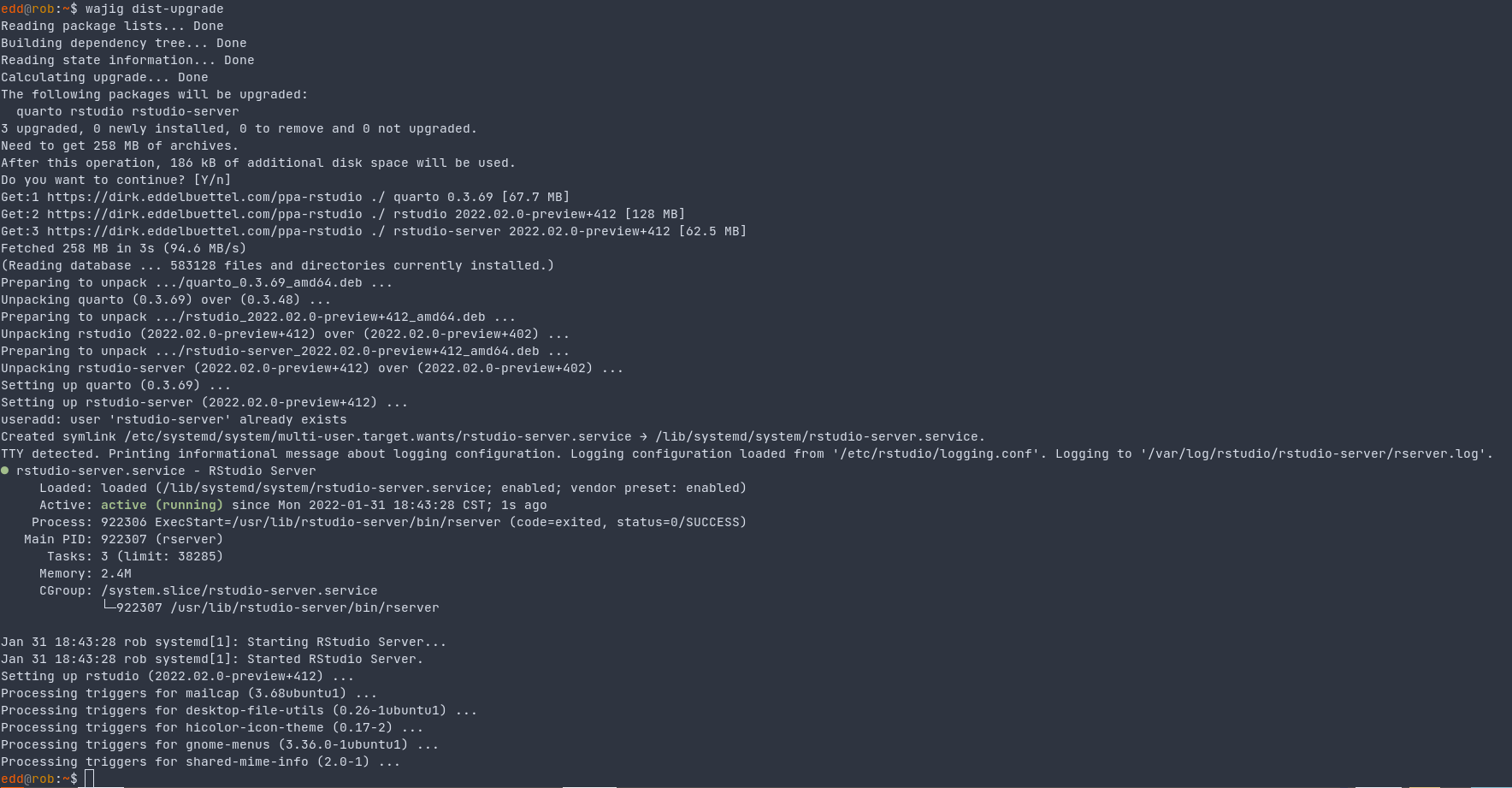
Welcome to the 35th post in the ravishingly rabiant R recommendations, or R4. Today s post is about apt and R tools. Many of us have been running RStudio off our local machines for as long as binaries have been provided. Which is by now probably a bit over a decade. Time flies. And as nice it is to have matching binaries, in my case in the .deb format used on Debian or Ubuntu, it is wee bit a painful to manually download a file and then install it. Twice the pain if you are lucky enough to be on a system where you can also run RStudio Server. And now three times as painful as you may need a matching quarto-cli binary for the nice quarto service. So wouldn t it be nice to have an apt-getable repo? And to autoMAGICall get updated versions when they are available? Oh yes. And I had been bugging JJ from day one. And JJ would almost listen intendly, nod briefly and firmly, and issue an assured we will look into it. Well, they are still looking Luckily, years ago, Carl wrote a helper script for our use in Rocker. I promptly adopted these and kept them in the littler examples directory as a pair of script getRStudioDesktop.r and getRStudioServer.r, later complemented by getQuartoCli.r. And I used these for years, somewhere between weekly and monthly. But it is still very manual: three script calls, one sudo dpkg -i call. And as our good friends at RStudio don t seem to be coming forward with a repo, I created one at GitHub thinking I could serve the files via GitHub Pages. Which of course I cannot as the .deb file for rstudio is well above the 100mb limit. So that seemed to be a bit of a setback. But after a bit of pondering, and recognizing that I am now in the fortunate position to have symmetric broadband access at home, I reckoned that until the bandwidth use gets excessive I will serve this as truly personal package archive (or tPPA) from here. Note that this is calibrated for my use so Ubuntu amd64 it is. Nothing else. And that it installs dailies . Which may cause issues for some people. You have warned. Reading tis paragraphs signifies agreement with the terms and limitations. Just kidding. A quick screenshot from an update earlier is here. Note that I use the fabulous wajig wrapper by Graham Williams here as my frontend to apt, dpkg and more as I have for even longer than I have use RStudio. Its use is tangential here; sudo apt upgrade would have done the same (and is essentially being called). And it demonstrates the main benefit: we are now automated as the cron scheduler launches an update of the PPA at which ever frequency you chose (currently twice a week for me) and after that it becomes part of the normal apt updates we do anyway (and which I do about daily). So that s main gist: automated apt upgrades of rstudio, rstudio-server, and quarto-cli. And you can find the underlying code in the GitHub repo ppa-rstudio which I put together a good week ago. I am currently updating the tPPA twice a week from crontab and have had two full upgrades already. And who knows, maybe with a bid of prodding RStudio may come around. One can always hope. If you like this or other open-source work I do, you can sponsor me at GitHub.
This post by Dirk Eddelbuettel originated on his Thinking inside the box blog. Please report excessive re-aggregation in third-party for-profit settings.

Paul Wise: FLOSS Activities January 2022

Focus This month I didn't have any particular focus. I just worked on issues in my info bubble.

Changes

Issues

Review

Administration
  • Debian BTS: unarchive/reopen/triage bugs for reintroduced packages
  • Debian servers: ping folks about mail forwarding issues
  • Debian wiki: unblock IP addresses, approve accounts

Communication
  • Respond to queries from Debian users and contributors on the mailing lists and IRC

Sponsors The oci-cli, oci-python-sdk, circuitbreaker, autoconf-archive, libpst, purple-discord, sptag work was sponsored. All other work was done on a volunteer basis.

27 January 2022

Jonathan Dowland: Using an iPad for note-taking in talks

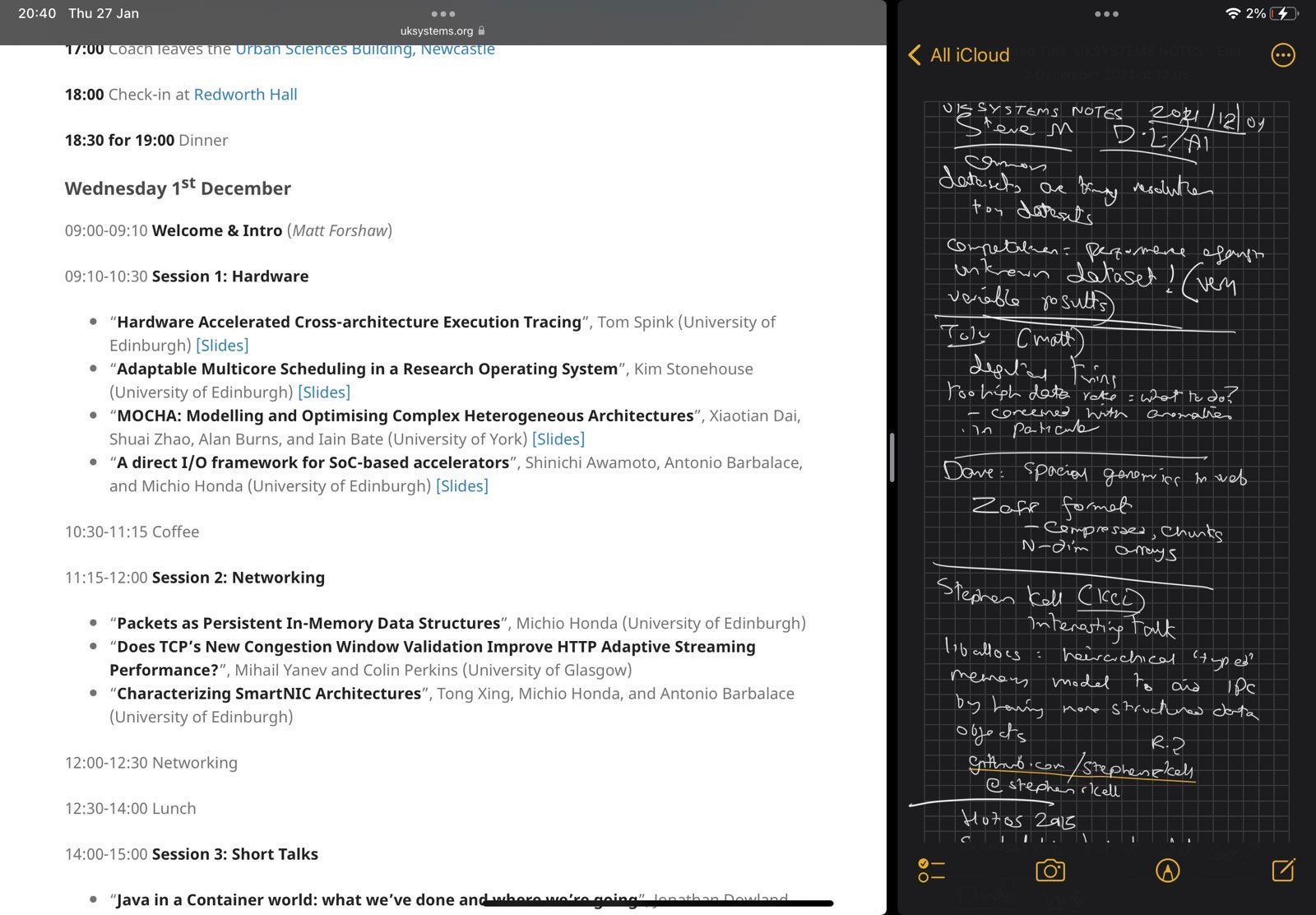
I've found that using a laptop during conference talks means you either end up doing something else and missing important bits of the talk, or at least look like you're doing something else. But it's extremely helpful to be able to look up the person who is talking, or their project, or expand an acronym that's mentioned or read around the subject. At December's uksystems21 conference, I experimented with using an iPad as a kind of compromise. Modern iOS versions let you split the display between two apps1, so I put the built-in Notes app on one side and a web browser on the other. I took notes using the Apple Pencil. I've got a "paper-like" rough surface display protector on the front which vastly improves the experience of using the Apple Pencil for writing2.
An example of note-taking and researching talks on an iPad. An example of note-taking and researching talks on an iPad.
I mostly took notes on the active talk, but I also tweaked my own slides3, looked up supplementary information about the topic and the talker, and things like that. It worked really well: much better than I expected. Apple's split-screen implementation is clunky but essential to make this work. The textured surface protector is a serious improvement over the normal surface for writing. But most importantly I didn't lose focus over the talks, and I don't think I looked like I did either.

  1. Yes, this is something that some Android vendors have supported for years. I remember playing around with Samsung Galaxy Notes when I was still in IT and being pretty impressed. On the other hand, I'd bet not 1% of those tablets are still running Today. My iPad Mini from that time still is, albeit vastly diminished.
  2. It's still not as good as the Remarkable, but that's a topic for another blog post.
  3. A tiny bit. Not serious reworking. Just nervous last minute tweaks that I could probably have not bothered with at all. I'm one of those people who does that right up to the wire.

Dirk Eddelbuettel: td 0.0.6 on CRAN: Minor Bugfix

The td package for accessing the twelvedata API for financial data has been updated once more on CRAN and is now at version 0.0.6. The release comes in response to an email from CRAN who noticed (via r-devel) that I was sloppy (in one spot, it turns out) with a logical expression resulting in an expression of length greather than one. Fixed by wrapping an all() around it and the package was back at CRAN minutes later thanks to automated processing over their end. The NEWS entry follows.

Changes in version 0.0.6 (2022-01-26)
  • Correct one equality comparison by wrapping in all() to ensure a length-one logical expression is created

Courtesy of my CRANberries, there is a comparison to the previous release. For questions or comments use the issue tracker off the GitHub repo. If you like this or other open-source work I do, you can now sponsor me at GitHub.

This post by Dirk Eddelbuettel originated on his Thinking inside the box blog. Please report excessive re-aggregation in third-party for-profit settings.

26 January 2022

Gunnar Wolf: Progvis Now in Debian proper! (unstable)

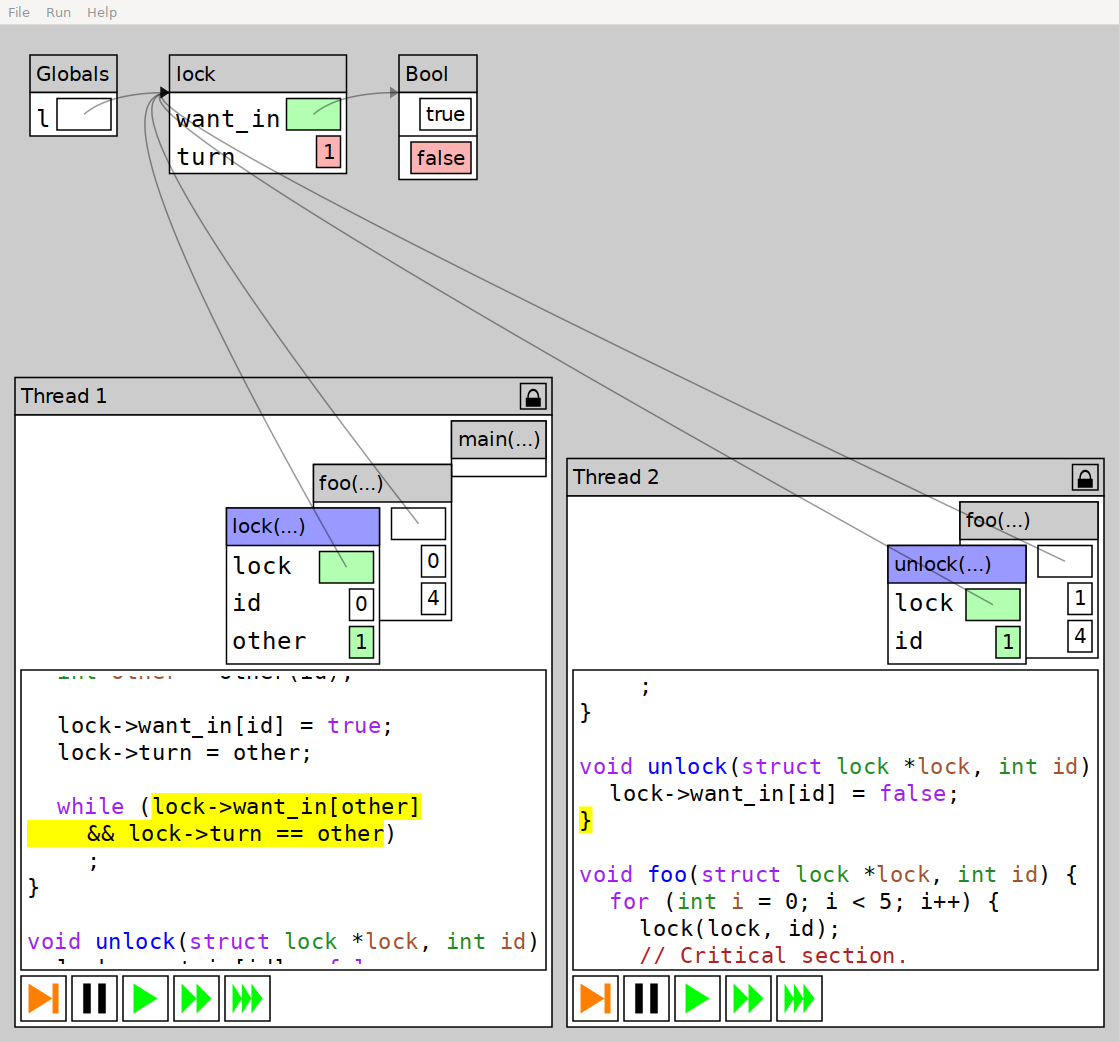
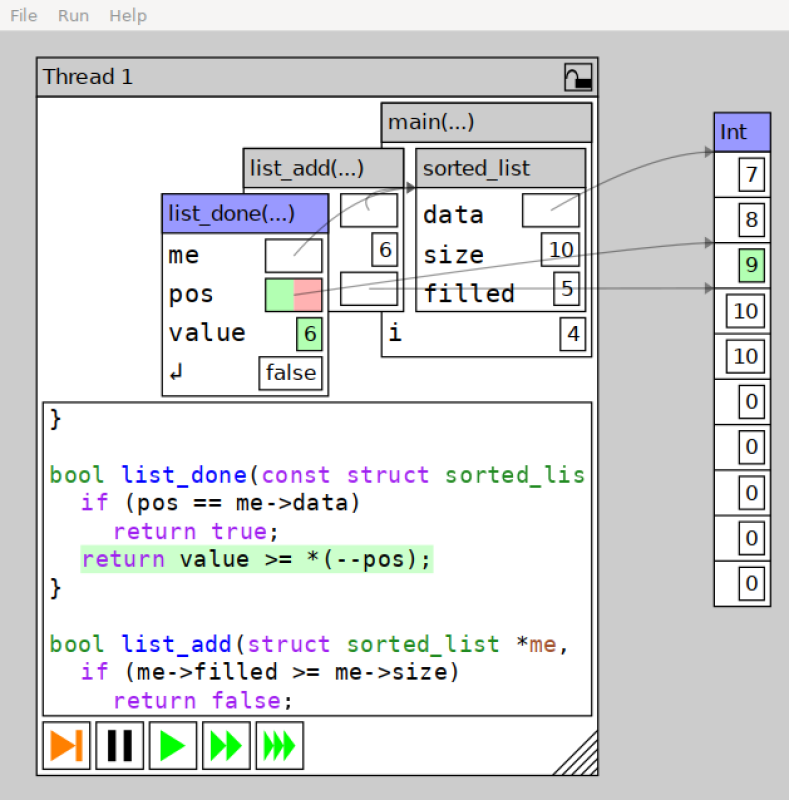
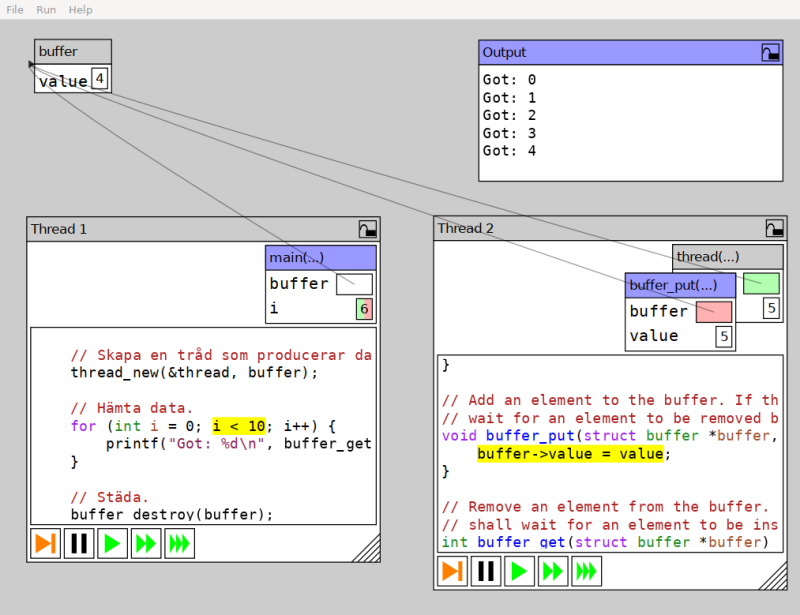
Progvis finally made it into Debian! What is it, you ask? It is a great tool to teach about memory management and concurrency. I first saw progvis in the poster presentation his author, Filip Str mb ck, did last year at the 52nd ACM Technical Sympossium on Computer Science Education (SIGCSE), immediately recognizing it as a tool I wanted to use at my classes, and being it free software, make it available for all interested Debian users. Quoting from Progvis Web page:
This is a program visualization tool aimed at concurrent programs and related issues. The tool itself is mostly language agnostic, and relies on Storm to compile the provided code and provide basic debug information. The generated code is then inspected and instrumented to provide an experience similar to a basic debugger. The tool emphasizes a visual representation of the object hierarchy that is manipulated by the executed program to make it easy to understand how it looks. In particular, a visual representation is beneficial over a text representation since it makes it easier to find shared data that might need to be synchronized in a concurrent program. As mentioned, the tool is aimed at concurrent programs. Therefore, it allows spawning multiple threads running the same program to see if that affects the program s execution (this is mostly interesting if global variables are used). Furthermore, any spawned threads also appear in the tool, and the user may control them independently to explore possible race conditions or other synchronization errors. If enabled from the menu bar, the tool keeps track of reads and writes to the data structure in order to highlight basic race conditions in addition to deadlocks.
So, what is this Storm thing? Filip promptly informed me that Progvis is not just a pedagogical tool Or rather, that it is part of something bigger. Progvis is a program built using the Storm programming language platform is more than a compiler; it presents as a framework for creating languages, designed to make easy to implement languages that can be extended with new syntax and semantics. Storm is much more than what I have explored, and can be used as an interactive compiler, a language server used as a service for highlighting and completing in IDEs. But I won t dig much more into Storm (which is, of course, now also available in Debian as well as the libraries built from the same source). Back to progvis: It implements a very-close-to-C++ language, with some details to better suit its purpose (i.e. instead of using the usual pthread implementation, an own thread model is used; i.e. thread creation is handled via int thread_id = thread_name(funcname, &params) instead of the more complex pthread_create() function (including details such as the thread object being passed as by reference as a parameter) All in all, while I have not yet taken full advantage of this tool in my teaching, it has helped me show somewhat hard to grasp concepts such as: All in all, a great tool. I hope you find it useful and enjoyable as well! PS- I suggest you to install the progvis-examples package to get started. You will find some dozens of sample programs in /usr/share/doc/progvis-examples/examples; playing with them will help you better understand the tool and be able to better write your own programs.

Timo Jyrinki: Unboxing Dell XPS 13 - openSUSE Tumbleweed alongside preinstalled Ubuntu

A look at the 2021 model of Dell XPS 13 - available with Linux pre-installed
I received a new laptop for work - a Dell XPS 13. Dell has been long famous for offering certain models with pre-installed Linux as a supported option, and opting for those is nice for moving some euros/dollars from certain PC desktop OS monopoly towards Linux desktop engineering costs. Notably Lenovo also offers Ubuntu and Fedora options on many models these days (like Carbon X1 and P15 Gen 2).
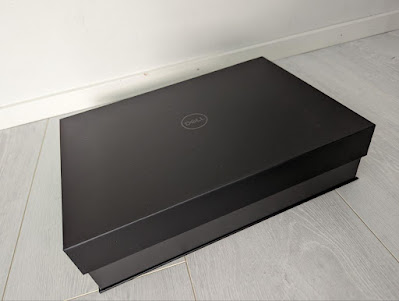
black box

opened box

accessories and a leaflet about Linux support

laptop lifted from the box, closed

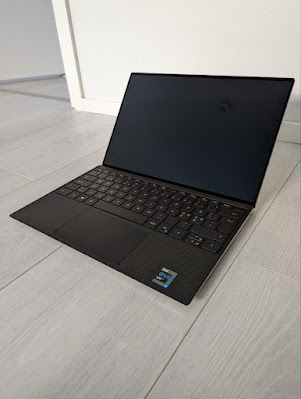
laptop with lid open

Ubuntu running

openSUSE runnin
Obviously a smooth, ready-to-rock Ubuntu installation is nice for most people already, but I need openSUSE, so after checking everything is fine with Ubuntu, I continued to install openSUSE Tumbleweed as a dual boot option. As I m a funny little tinkerer, I obviously went with some special things. I wanted:
  • Ubuntu to remain as the reference supported OS on a small(ish) partition, useful to compare to if trying out new development versions of software on openSUSE and finding oddities.
  • openSUSE as the OS consuming most of the space.
  • LUKS encryption for openSUSE without LVM.
  • ext4 s new fancy fast_commit feature in use during filesystem creation.
  • As a result of all that, I ended up juggling back and forth installation screens a couple of times (even more than shown below, and also because I forgot I wanted to use encryption the first time around).
First boots to pre-installed Ubuntu and installation of openSUSE Tumbleweed as the dual-boot option:
(if the embedded video is not shown, use a direct link)
Some notes from the openSUSE installation:
  • openSUSE installer s partition editor apparently does not support resizing or automatically installing side-by-side another Linux distribution, so I did part of the setup completely on my own.
  • Installation package download hanged a couple of times, only passed when I entered a mirror manually. On my TW I ve also noticed download problems recently, there might be a problem with some mirror I need to escalate.
  • The installer doesn t very clearly show encryption status of the target installation - it took me a couple of attempts before I even noticed the small encrypted column and icon (well, very small, see below), which also did not spell out the device mapper name but only the main partition name. In the end it was going to do the right thing right away and use my pre-created encrypted target partition as I wanted, but it could be a better UX. Then again I was doing my very own tweaks anyway.
  • Let s not go to the details why I m so old-fashioned and use ext4 :)
  • openSUSE s installer does not work fine with HiDPI screen. Funnily the tty consoles seem to be fine and with a big font.
  • At the end of the video I install the two GNOME extensions I can t live without, Dash to Dock and Sound Input & Output Device Chooser.

25 January 2022

Dirk Eddelbuettel: RcppArmadillo 0.10.8.1.0 on CRAN: Upstream Updates

armadillo image Armadillo is a powerful and expressive C++ template library for linear algebra aiming towards a good balance between speed and ease of use with a syntax deliberately close to a Matlab. RcppArmadillo integrates this library with the R environment and language and is widely used by (currently) 950 other packages on CRAN, downloaded over 22.9 million times (per the partial logs from the cloud mirrors of CRAN), and the CSDA paper (preprint/vignette) by Conrad and myself has been cited 451 times according to Google Scholar. This release brings another upstream update 10.8.0, and first bug fix release 10.8.1. As updates by Conrad can come a little quicker than the desired monthly cadence CRAN aims for, we skipped the 10.8.0 release for CRAN only but of course generally provide them via the Rcpp drat repo as well as via general updates to the repo, and full reverse dependency testing (for which results are always logged here). The full set of changes (since the last CRAN release 0.10.7.5.0) follows.

Changes in RcppArmadillo version 0.10.8.1.0 (2022-01-23)
  • Upgraded to Armadillo release 10.8.1 (Realm Raider)
    • fix interaction between OpenBLAS and LAPACK
    • emit warning if find() is incorrectly used to locate NaN elements

Changes in RcppArmadillo version 0.10.8.0.0 (2022-01-02)
  • Upgraded to Armadillo release 10.8 (Realm Raider)
    • faster handling of symmetric matrices by pinv() and rank()
    • faster handling of diagonal matrices by inv_sympd(), pinv(), rank()
    • expanded norm() to handle integer vectors and matrices
    • added datum::tau to replace 2

Courtesy of my CRANberries, there is a diffstat report relative to previous release. More detailed information is on the RcppArmadillo page. Questions, comments etc should go to the rcpp-devel mailing list off the R-Forge page. If you like this or other open-source work I do, you can sponsor me at GitHub.

This post by Dirk Eddelbuettel originated on his Thinking inside the box blog. Please report excessive re-aggregation in third-party for-profit settings.

23 January 2022

Louis-Philippe V ronneau: Goodbye Nexus 5

I've blogged a few times already about my Nexus 5, the Android device I have/had been using for 8 years. Sadly, it died a few weeks ago, when the WiFi chip stopped working. I could probably have attempted a mainboard swap, but at this point, getting a new device seemed like the best choice. In a world where most Android devices are EOL after less than 3 years, it is amazing I was able to keep this device for so long, always running the latest Android version with the latest security patch. The Nexus 5 originally shipped with Android 4.4 and when it broke, I was running Android 11, with the November security patch! I'm very grateful to the FOSS Android community that made this possible, especially the LineageOS community. I've replaced my Nexus 5 by a used Pixel 3a, mostly because of the similar form factor, relatively affordable price and the presence of a headphone jack. Google also makes flashing a custom ROM easy, although I had more trouble with this than I first expected. The first Pixel 3a I bought on eBay was a scam: I ordered an "Open Box" phone and it arrived all scratched1 and with a broken rear camera. The second one I got (from the Amazon Renewed program) arrived in perfect condition, but happened to be a Verizon model. As I found out, Verizon locks the bootloader on their phones, making it impossible to install LineageOS2. The vendor was kind enough to let me return it. As they say, third time's the charm. This time around, I explicitly bought a phone on eBay listed with a unlocked bootloader. I'm very satisfied with my purchase, but all in all, dealing with all the returns and the shipping was exhausting. Hopefully this phone will last as long as my Nexus 5!

  1. There was literally a whole layer missing at the back, as if someone had sanded the phone...
  2. Apparently, and "Unlocked phone" means it is "SIM unlocked", i.e. you can use it with any carrier. What I should have been looking for is a "Factory Unlocked phone", one where the bootloader isn't locked :L

22 January 2022

Steve Kemp: Visiting the UK was difficult, but worth it

So in my previous post I mentioned that we were going to spend the Christmas period in the UK, which we did. We spent a couple of days there, meeting my parents, and family. We also persuaded my sister to drive us to Scarborough so that we could hang out on the beach for an afternoon. Finland has lots of lakes, but it doesn't have proper waves. So it was surprisingly good just to wade in the sea and see waves! Unfortunately our child was a wee bit too scared to ride on a donkey! Unfortunately upon our return to Finland we all tested positive for COVID-19, me first, then the child, and about three days later my wife. We had negative tests in advance of our flights home, so we figure that either the tests were broken, or we were infected in the airplane/airport. Thankfully things weren't too bad, we stayed indoors for the appropriate length of time, and a combination of a couple of neighbours and online shopping meant we didn't run out of food. Since I've been back home I've been automating AWS activities with aws-utils, and updating my simple host-automation system, marionette. Marionette is something that was inspired by puppet, the configuration management utility, but it runs upon localhost only. Despite the small number of integrated primitives it actually works surprisingly well, and although I don't expect it will ever become popular it was an interesting research project. The aws-utilities? They were specifically put together because I've worked in a few places where infrastructure is setup with terraform, or cloudformation, but there are always the odd thing that is configured manually. Typically we'll have an openvpn gateway which uses a manually maintained IP allow-list, or some admin-server which has a security-group maintained somewhat manually. Having the ability to update a bunch of rules with your external IP, as a single command, across a number of AWS accounts/roles, and a number of security-groups is an enormous time-saver when your home IP changes. I'd quite like to add more things to that collection, but there's no particular rush.

Next.

Previous.