Search Results: "zed"

14 April 2011

Lars Wirzenius: Project Harmony

It seems that Project Harmony has finally taken itself public. From the website:
Project Harmony is a community-centered group focused on contributor agreements for free and open source software (FOSS).
In reality, this seems to be a closed group that in no way represents the community in general and mainly acts in the interest of various corporations. Their goal is to create a bunch of templates for contracts to make participating in free software projects even more complicated than it already is. Look, we have a bunch of copyright licenses. They're not always easy to understand, and there's enough details and corner cases and interactions with the real world to make your head hurt. My head as well. (They're still easier, and more standardized, than contracts for proprietary software.) Contributing to a free software project is easy enough, in most cases. You make a patch, and if the project accepts it, yay. Your patch will be licensed the same way as all the other code. These Harmony agreements aim at making you give up your copyright to someone else, usually a corporate sponsor of the project. That's a bad thing. If the corporation owns the copyright, or you give them a license to do anything they wish with the project, they can do all sorts of evil things with it. For example, they can release it under a non-free license, or enter into complicated patent agreement with someone else that will require you to pay protection money later on, or something else. There is no end to the evil corporations invent, when given the chance. If, however, you refuse to give the corporation any ownership, or special powers, then their ability to do evil lessens, or at least you aren't helping them do that. It might be possible to use the Harmony agreements, as they are currently written, in ways that do not directly allow evil. However, why bother? By sticking to well-known, court-tested free software free software licenses, there is no need for the Harmony licenses. You get to keep the corporations honest, without having to read piles more legalese. Another way of looking at this: here's a bunch of corporations that want you to start using complicated legal documents for their benefit. Ask yourself, in what scenario is this going to be a good idea for you? Just say no to copyright assignments.

11 April 2011

Kai Wasserb ch: Debian on a ThinkPad Edge 15

All my notebooks till today have been ThinkPads from the T series, sadly Lenovo decided (or, maybe, were persuaded) to go with nVidia GPUs for their current designs (T5xx). That's sad, because nVidia doesn't cooperate with the FLOSS world. I still wanted a ThinkPad with up-to-date parts. That left me with the Edge series, which is designed to be the bridge between consumer and business models. After some searching I settled on the NVLJ6GE model (the last two letters just indicate, that this is the "German" variant). The key specs are Intel Core i5-480M, 4096 MB RAM, AMD Mobility Radeon HD 5145, Intel WLAN module and a non-glare display. Now to the part about running and installing Debian testing on this. Judging from the hardware I was pretty sure, that getting all hardware (i.e. all hardware I'd be using; e.g. I'm not using WiMax or the integrated web cam so far, which means I've dectivated them in the BIOS) up and running. and I'm happy to report, that this is true. The installation was really straight forward (netinstall CD in expert mode (64 bit), running through all steps and booting, that's it). I did the install over a wired network, mainly because this is faster for me, but with an USB stick and the firmware for the Intel Centrino module a installation over the wireless interface should work too. I'm now running a slightly customized setup (e.g. my own 2.6.38.2 kernel and Mesa 7.10.2, the X from experimental), but not because some serious problems with Wheezy. So far I can recommend this ThinkPad for usage with Debian (or Linux in general), though, if you don't want a "big" GPU, you might be happier with a T or L series model. They should run somewhat longer with the default battery (Lenovo 25+ with six cells). As for the service for this line I can't say anything yet, but as it's still a ThinkPad, I hope it'll be as for the other ThinkPad series.

6 April 2011

Dirk Eddelbuettel: Rcpp workshop / master class on April 28 in Chicago

I realized I never announced this on the blog, so without further ado.... Rcpp Workshop in Chicago on April 28, 2011 This year's R/Finance conference will be preceded by a full-day masterclass on Rcpp and related topics which will be held on Thursday, April 28, 2011, on the University of Illinois at Chicago campus. Join Dirk Eddelbuettel and Romain Francois for six hours of detailed and hands-on instructions and discussions around Rcpp, inline, RInside, RcppArmadillo and other packages---in an intimate small-group setting. The full-day format allows to combine a morning introductory session with a more advanced afternoon session while leaving room for sufficient breaks. There will be about six hours of instructions, a one-hour lunch break and two half-hour coffee breaks. Morning session: "A hands-on introduction to R and C++" The morning session will provide a practical introduction to the Rcpp package (and other related packages). The focus will be on simple and straightforward applications of Rcpp in order to extend R and/or to significantly accelerate the execution of simple functions. The tutorial will cover the inline package which permits embedding of self-contained C, C++ or Fortran code in R scripts. We will also discuss RInside to embed R code in C++ applications, as well as standard Rcpp extension packages such as RcppArmadillo for linear algebra and RcppGSL. Afternoon session: "Advanced R and C++ topics" This afternoon tutorial will provide a hands-on introduction to more advanced Rcpp features. It will cover topics such as writing packages that use Rcpp, how 'Rcpp modules' and the new R ReferenceClasses interact, and how 'Rcpp sugar' lets us write C++ code that is often as expressive as R code. Another possible topic, time permitting, may be writing glue code to extend Rcpp to other C++ projects. We also hope to leave some time to discuss problems brought by the class participants. Prerequisites Knowledge of R as well as general programming knowledge; C or C++ knowledge is helpful but not required. Users should bring a laptop set up so that R packages can be built. That means on Windows, Rtools needs to be present and working, and on OS X the Xcode package should be installed. Registration Registration is available via the R/Finance conference at

http://www.RinFinance.com/register/
or directly at RegOnline
http://www.regonline.com/930153
The cost is USD 500 for the whole day, and space will be limited. Questions Please contact us directly at RomainAndDirk@r-enthusiasts.com.

3 April 2011

Rog rio Brito: Running GRUB2 on PowerPC Macs

Here I write a little bit about my experiences running GRUB2 with a PowerPC Mac (actually, an iBook G4), since the current documentation is lacking in many places (outdated, incorrect, etc.). Some of what I say is platform agnostic, though, and may be of interest to users of GRUB in general.

Basics using GRUB2 with PowerPC First of all, it is important to understand (at least superficially) how botting on a Mac works. One of the first programs that run in your Mac is the OpenFirmware. It works with more or less the same purpose of a BIOS in a regular x86 system. The basic idea is the same: get the computer running with whatever programs you want it to run. The implementation, though, differs quite a bit. First of all, OpenFirmware (OF) usually presents itself as a command-line interface that is programmable, differently from the common day BIOSes from x86 boxes. As it is programmable, it is more flexible, but this flexibility comes at the price of an increased complexity. I may write some things more in a future article, if there is any interest. For now, it just suffices to say that to get to the OF prompt in a Mac, you have to press a combination keys during the time that your Mac gives a chime when you turn it on. At that moment, you have to press (simulaneously) Cmd + Option + O + F. (Note: the Cmd key is the key that has an Apple drawn on it, usually on the side of the space bar).

Limitations of Open Firmware Differently from usual BIOSes of x86 computers, Open Firmware can read the contents of a partition in your HD (or other devices), as long as it is formatted in the original HFS format (not in HFS+ or one of its descendents). This is the reason why some older versions of Linux create an HFS partition in your HD, even if you don't intent to run or use anything besides Linux. The yaboot bootloader consists of, among other things, one binary that is understandable by OpenFirmware. That binary is a file called yaboot, after the name of the booloader. As an aside, you have to indicate to OF what is the file that you want it to load during the boot process, so that it knows what to do. The way to indicate this is to "bless" the file (and the folder that contains it). Some ways to bless a file are to, for example, use the bless command in MacOS X or the hattrib -b command from hfsutils. Files in an HFS filesystem have two attributes that many other filesystems don't: a creator ID (the "application" that created the file) and the type ID (which determines what kind of file it is). OpenFirmware, in particular, looks for files with the type tbxi for the bootstrap process. The yaboot binary is loaded by OF into memory and, then, control is passed to the yaboot program, which then reads its configuration file (yaboot.conf) from the same folder where the binary was in. The file yaboot.conf contains instructions for yaboot to do its job. The file yaboot.conf is very similar in construction to configurations of an older bootloader for x86 computers, lilo.conf. Also, in a way similar to what LILO requires, after you install some new kernel, change some parameter in the configuration file, etc., you have to run a program that will set up everything so that the boot process can know of your new configuration. With LILO, this command was called lilo, while with yaboot the command is called ybin (which, essentially, takes care of putting yaboot.conf in the bootstrap/HFS partition and blesses the yaboot binary).

Going to GRUB2 One of the characteristics of yaboot (which is left as an exercise to the reader to determine if it is a drawback or not) is exactly the way that changes in the configuration have to be copied to the special HFS partition: the step of running ybin. GRUB2 (and its older sibling, GRUB legacy) do away with that: during boot-time, it can understand the filesystems that you have in your computer and interactively load whatever you want from there, also from a command-line like OF, before any (regular) operating system has even been started. But how do you start GRUB2? Well, the way that this is performed is copying a binary to that special HFS partition. Here things start to be hairy, because GRUB2 has a lot of functionality, but it comes at the price of it consuming a lot of space (especially if you are using encrypted partitions or some kind of logical volume managements with some journalling filesystem that allows files to be compressed etc. on top of it). The list goes on. Usually, that special HFS partition only has 800KB, which, BTW, is the size of an old 3.5" floppy used with older Macs (note: due to some contraints on partitions and aligments of such partitions on cylinders, it is not uncommon for disk partitioning software to create partitions slighly larger than 800KB, but not much larger than that). A full-featured binary of GRUB2 to be placed on that HFS partition can have much more than those 800KB. But how do you get that binary, in the first place? And how do you fit that in the HFS partition?

Creating the GRUB2 binary To answer the first question, you have to construct it from your grub-ieee1275 package (I'm assuming here that you are using Debian or Ubuntu, but similar instructions may apply to other distributions). Then, a first step would be to create such binary with:
 mkdir /tmp/foo
 cd /tmp/foo
 cp -a /usr/lib/grub/powerpc-ieee1275/* .
 grub-mkimage -O powerpc-ieee1275 -o ../grub.img *.mod
The last command of these create an executable named grub.img that is callable from OF and which contains every module from grub-ieee1275. This executable that I call here grub.img is called, in GRUB2 parlance, the core image and it it seems to be named core.img in many systems. On my system, with those commands, the binary grub.img is about 1208KB, which is 50% larger than that 800KB partition. And you would like it to be much smaller, becase you want to still have your yaboot bootloader by default while you are evaluating your bootloaders (or using it as a backup plan). As GRUB2 follow a modular design, you can mix and match the features that you want. This already hints you to the way we can fit it in the HFS partition, and it is always the same story: just trim the fat.

Creating the configuration file You will also have to have GRUB2 configuration's file (or you will have to play with way more commands than you'd want to). An important distinction here is that you usually have 2 or more partitions on your Mac:
  • the special bootstrap/HFS partition where OF is going to look at (I'll call it /dev/hda2 here);
  • the partition where your / filesystem resides (denoted by /dev/hda3 here);
  • some partition to hold /boot (I don't have one of these, but let's say that it is /dev/hda7 for our discussion purposes), usually containing your kernels and initial ramdisks.
  • other partitions.
With this in mind, you can With Let's say that this last one, in Linux parlance, is /dev/hda3 (as is the case of this author), and optionally a partition where your Linux kernel resides (people usually use it to store the /boot subtree of a Linux filesystem). Let's say that this last one is /dev/hda7. Then, you would compose something like the following as a configuration file for GRUB2 (named grub.cfg):
insmod part_apple
insmod ext2
set root='(hd,apple7)'
menuentry "Linux"  
    linux /vmlinux root=/dev/hda3
    initrd /initrd
 
There are one two important points here that deserve more comments:
  • Note that, differently from a regular x86 system, in a Mac system with only one HD the way that you specify an HD does not have a trailing zero. For instance, in the case above of the variable root, we have (hd,apple7), while in a "common PC" we would have the (hd part replaced with (hd0. That's something that you should make your distribution aware of, if they aren't yet. As an addendum, I don't know how it works with systems with more than one HD, as I only have (PowerPC) Macs that are notebooks. If you can share any experiences, please do.
  • One point of caution here: what GRUB2 calls root is not necessarily the root of your filesystem (i.e., the partition that holds /), but the device that everything that is "not fully qualified" is interpreted as being relative to. The "not fully qualified" above means anything that is not prefixed with GRUB's device notation. As an example, (hd,apple2)/boot/vmlinux if fully qualified for GRUB's purpose, while /boot/vmlinux is not.

Putting it all together The next step is to just copy the files grub.img and grub.cfg to the special HFS partition. You can do that using hmount, hcopy, and humount or you can use the regular Linux hfs module to copy to that partition. Then, boot your system, get into the OF prompt and execute:
boot hd:2,grub.img
Here, the 2 above is a reference to my HFS partition. Substitute that with yours, appropriately. You will then see the common (familiar?) GRUB prompt and, from there, everything else that you know will (hopefully) work.

The list of modules that "Works for Me(TM)" As I mentioned above, I use a subset of all modules that come with grub-ieee1275 to create my grub.img binary. Here is the list of modules that I use and that gives me a reasonably sized bootloader:
bitmap.mod        datehook.mod  gzio.mod         lsmmap.mod      reboot.mod          terminal.mod
bitmap_scale.mod  datetime.mod  halt.mod         memdisk.mod     regexp.mod          test.mod
blocklist.mod     echo.mod      help.mod         memrw.mod       relocator.mod       trig.mod
boot.mod          elf.mod       hexdump.mod      minicmd.mod     scsi.mod            true.mod
bufio.mod         ext2.mod      hfs.mod          msdospart.mod   search.mod          video.mod
cat.mod           fat.mod       hfsplus.mod      normal.mod      search_fs_file.mod  video_fb.mod
cmp.mod           font.mod      ieee1275_fb.mod  part_apple.mod  search_fs_uuid.mod  videoinfo.mod
configfile.mod    fshelp.mod    linux.mod        part_msdos.mod  search_label.mod
cpio.mod          gettext.mod   loadenv.mod      parttool.mod    setjmp.mod
crypto.mod        gfxmenu.mod   loopback.mod     probe.mod       sleep.mod
date.mod          gfxterm.mod   ls.mod           read.mod        suspend.mod
Just for the record, my grub.img file has 624KB, and that can certainly be shrunk.

The command line that "Works for Me(TM)" to create the image Actually, I lied when I told you that I used the lines above to create my grub.img file, because I'm lazy and I don't want to type the .img extension. I also embed my configuration file in the binary that I create with GRUB2, so that I don't have two files to copy to my HFS partition, but only one. I do that with:
grub-mkimage -c grub.cfg -o ../grub -O powerpc-ieee1275 -d . *.mod
OK. No more lies here. The nice aspect of GRUB is that one you install that image, you don't have to touch that HFS partition anymore: you simply update your regular filesystem's /boot/grub/grub.cfg file (which is usually performed when you install a new kernel, at least with Debian) and you're ready to go. The good way to do that is to use a minimal configuration file embedded in your grub binary in your HFS partition that will hook into the system's /boot/grub/grub.cfg to read newer kernels and leave the HFS partition (and your system's NVRAM) alone. Here is what I am using right now:
search --no-floppy --fs-uuid --set=root 35d26869-f7c9-4852-a9b8-100314560c34
set prefix=($root)/boot/grub
configfile /boot/grub/grub.cfg
You will, of course, want to modify the file above as you install newer kernels (perhaps even that unsupported operating system from that fruity company, who knows?). Don't forget to change the UUID's, and partition numbers to fit your needs. Well, that's it. I hope that it helps somebody out there, as the information that I got otherwise was way outdated, incomplete, etc. to keep up with GRUB2 from these days. Now, let's go patch the tools that we have so that not everybody who wants to use GRUB2 have to learn about its workings. Oh, of course, you can now have your kernels in ext4, btrfs, xfs etc. partitions without the fear that your bootloader won't load them.

1 April 2011

Aigars Mahinovs: New Nokia games coming

Warning, this post is COMPANY CONFIDENTIAL, do not spread outside of authorized corporate internal communication channels. Today Nokia will announce that in order to increase investor confidence and foster brand loyalty all Nokia Symbian phones in the world will receive two free Nokia-themed games. The first game will be Angry Nokias Nokias have discovered that other phones are taking their market share away and now they are very, very angry! Fling cool and shiny Nokia phone and destroy the competition. Complete all free 30 levels and be first to collect all golden Ovi s by gathering MeeGo and Windows Phone 7 logos in the levels! The other game that is sure to be an instant hit among true Nokia fans will be the Nokia Ninja you are a humble user and sales people are throwing phones at you all kinds of phones. But beware most of those phones are not Nokias! Use your finger to slice trough the competition, rake up combos and achievements! But be careful you do not want to slice trough a Nokia phone! Only trough instant brand recognition you can rake up truly great scores in this game. Nokia connecting people. (P.S. Check the date)

31 March 2011

Pau Garcia i Quiles: A wish a day 7: make emerge a generic package manager for Windows

A while ago I said Koen from Emweb made an interesting proposal at FOSDEM about emerge, the KDE Windows build tool. Yesterday, Jaros aw Staniek and I reaffirmed our commitment to emerge . Today, I d like to go a bit further: let s bring more developers to emerge by opening it up to other projects. Keep reading! What is emerge, why is it important and what was Koen s proposal? Fact: Microsoft Windows is very different to Unix in regards to development. On Unix platforms -that includes Linux and Mac OS X-, software is usually installed to /usr: applications in /usr/bin and /usr/sbin, libraries in /usr/lib, headers in /usr/include, common resources in /usr/share, etc. Also, dependency management is usually something you can count on: when you install kdelibs5-dev in Ubuntu, it will automatically install libqt4-dev, kdelibs5-data, libfreetype (runtime), etc That makes setting up a development environment a very easy task: look for shared libraries, header files, etc in the common places and you will probably find them. On Windows there is nothing like that. When you want to compile an application, you need to provide (build and install) all its dependencies, and you need to tell Visual Studio where to find everything. Even CMake usually needs some help in the form of a hint for CMAKE_PREFIX_PATH. As you may imagine, building KDE, which has more than 200 third party dependencies and tens of modules (and with the move + split to git, many more) becomes an almost insurmountable task. Emerge to the rescue: inspired by Gentoo s emerge, Ralf Habacker, Christian Ehrlicher, Patrick Spendrin and others (yours faithfully included) developed a tool which downloads the source, configures, builds, installs and packages KDE and its dependencies. It makes a world of difference when building KDE. Actually, it makes building KDE on Windows possible. Once more: thank you very much guys, impressive tool. There are two well-differentiated parts in emerge, the engine and the recipes . The engine takes care of downloading the sources (tarballs, checkouts from Subversion and git clones, etc) , configuring and building for the usual build systems (QMake, CMake, NMake makefiles, etc), installing, bundling packages together and much more. All that for four compilers (MSVC2008, MSVC2010, MinGW32 and MinGW-W64). It s the equivalent to Gentoo s emerge, Debian s dpkg + debhelper/cdbs or Homebrew and MacPorts for Macintosh. The recipes are the package-specific instructions a particular piece of software needs to build: what s the name of the tarball? URL to download from? What versions are available? What build system to use to configure and build? Does it need any Windows-specific patch? They are written in Python using some helper modules emerge provides (the debhelper-like part I mentioned above). Currently, there are about 70 recipes in emerge, organized in our portage tree (bear in mind the names are taken from Gentoo but the internals of the tool are completely different). With those 70 recipes, we are able to build most KDE modules. Problem is to provide all the optional features, we are missing probably 200 to 250 more recipes. Given that KDE on Windows is quite short on developers, we have to decide: either we fix bugs and improve the integration of KDE on Windows, or we keep track of the dependencies. I won t lie: for KDE on Windows, I d rather focus on development than on packaging. Given that writing and maintaining recipes does not strictly require programming skills (although they help :-) ), during my talk at FOSDEM I kept asking people to join the KDE on Windows team as packagers, even if you know little to nothing about software development. If you think about it, that s what we have in Linux distributions: there are hundreds (thousands?) of packagers in Debian, Fedora, openSuse, etc which take care of the recipes to build software developed by someone else ( upstream , in the parlance). What we have in KDE on Windows, where we are the KDE packagers, the KDE developers (upstream) and the emerge developers, is actually an anomaly. Then Koen took the microphone and said: why don t you open emerge to other projects? And I there I realized he was damn right We have developed an awesome tool to download, configure, build, package and install third party software on Windows, to manage dependencies, to update, etc. For four compilers, no less. The engine of emerge is not really tied to KDE. We already have a lot of recipes for software which is not KDE specific: openssl, Qt, bzip2, libpng, mysql, etc. I see no actual reason to disallow Gnome, GStreamer, OpenSceneGraph, LibreOffice and many others in (assuming someone wants to take care of them, of course no, do not look at me! I don t have time!). Currently, the only barrier preventing those recipes in is emerge is developed in the KDE repository and you need a KDE developer account to commit your recipes. That s about it. There is also a perception problem: if emerge is developed in KDE, it s because it s a KDE-thingy, right? . Well, no. One way to avoid that would be to graduate emerge from KDE and make it an independent project, one in which the current developers have accounts, and new developers get an emerge project account instead of a KDE account to commit recipes. Please note graduating does not mean expelling , firing or anything peyorative. It does not mean that emerge developers (engine and recipes) are worse than KDE developers, or less KDE developers than our god David Faure: in KDE, we consider Debian, Fedora, openSuse, etc KDE packagers as equals, they are also KDE developers and many of them are in the KDE eV (funny thing is I am not). My wish for today: think of one application or library you d like to see in Windows and become its maintainer in emerge for Windows. For now, let s do this in the kde-windows mailing list and if this idea succeeds, then we ll talk about graduating. You could also try to add support for a new compiler (OpenWatcom, Intel C++, etc) but that s a lot more more and it s not a priority now. PS: Yes, I know about CoApp, Microsoft s similar effort, with some magic involved. I ve been watching and trying it since day 1. I m really interested. It s just not there yet and I do not have spare time to help Garrett (hey Microsoft, hire me and I ll have all the time in the world! :-) )

28 March 2011

Christian Perrier: [life] [running Post Eco-Trail update

So, the first half of my spring challenge is over. I managed to run the 50km version of Paris Eco-Trail on Saturday. 50km, this is what was advertized... The reality was 55km and, believe me, these extra 5K were worth a lot of pain..:-). I managed to complete the whole run in 6h36. As you can see, a lot slower (about 8.5km/h) than marathon races (where I managed to keep a 11.5 km/h pace) but, eh, marathons don't have 1000m positive slope! Eco-Trail is a great race. The start was in Versailles Castle park, with 5 kilometers around the Grand Canal and a few more in the castle's neighbourhood, so that the 1500-runners crowd can be a little bit dispersed before we start the forests' single track trails. Then, after 8K, we enter forests, which we won't leave until km 45, except a few street crossing here or there. Paris forests (Satory, Versailles, V lizy, Meudon, Fausses-Reposes, Saint-Cloud) are great in the springtime. The weather was a little bit "hot", which explains the quite high ratio of non finishers (11% for the 50K trail and nearly 15% for the 80K race). I managed well until KM44 where cramps began to appear. The difference between road races and trail races are rhythm differences: nobody (except the very first runners) is running when climbing hills, that would be virtual suicide. So, you have to manage this as well. My goal was keeping a 6'/km pace on the first 15K, which was quite achieved. Later on, the succession of hills makes it impossible to use one's pace as a reference. The point is mostly keeping things smooth, arrive at first food point on KM26 in very good shape and drink, drink, drink. After a 5mins stop at KM26, I started the hardest part of the trail, until KM44: this part is mostly made of ups and downs and is the real challenge: legs start burning, downhill running becomes harder and harder and you need to save some energy for the final kilometers. The second food point was in St-Cloud park, with a very nice view on the Eiffel Tower, far far away. That one is the Grail to reach...but, when here, we already have more than a marathon in our legs. So, the stop is quite longer (about 10 minutes), just to be sure about "drink, drink, drink" (eating is nearly a no-no at this point). The final 10K along river Seine, from Saint-Cloud to Eiffel Tower were really though. I was alternating walk and running, in attempts to avoid cramps (I still remember my 35K trail back in June, where I completed the last 3K with cramps in both legs, a real nightmare). I still managed to run most of the time, though very slowly. Most of us were indeed looking like zombies when crossing a small park on le Saint-Germain with kids playing football and families hanging around, enjoying the (still nice) weather. Now, even a 3-meter high climbing means walking..:-) The final kilometer was fun: at that point, you know you'll make it and you try to look proud and fine while running among the Eiffel Tower neighbourhood tourist crowd. And the applauses for the final 500meters are the real final gift with dozens of people yelling your name (it was written along with our numbers, of course!). Yay. I finally managed to finish 416th out of 1291 finishers, 50th in my age/gender category. Not that bad for the first test beyond 42K. Now the challenge is "rest, rest, rest" until April 10th and the Paris Marathon. The first marathon of my second half-century. I, of course, know that this one will be really hard. No idea, indeed, what goal I should set. Certainly not my marathon personal best (3h40'). I think I would probably already be happy to finish in less than 4 hours. If I feel really really well, I'll set 3h49' as my goal (that was my time in Paris Marathon last year). We'll see if that's crazy or not. Doh, I really have weird ideas for the gifts I offer myself for my birthday...

Peter Van Eynde: how to grow a zfs file system

I'm experimenting with zfs at home, for the moment on top of my md/lvm setup, and I ran out of disk space. Growing the lv is pretty easy:

frost:~# lvextend --size +110G /dev/new-vg/zfs-test
  Extending logical volume zfs-test to 120.00 GiB
  Logical volume zfs-test successfully resized
frost:~# zpool list
NAME       SIZE  ALLOC   FREE    CAP  DEDUP  HEALTH  ALTROOT
zfs-pool  9.94G  9.78G   161M    98%  1.00x  ONLINE  -


Hmm it did not notice the 110GB extra, so I did:

frost:~# zpool export zfs-pool
frost:~# zpool import zfs-pool
frost:~# zpool list
NAME       SIZE  ALLOC   FREE    CAP  DEDUP  HEALTH  ALTROOT
zfs-pool   120G  9.78G   110G     8%  1.00x  ONLINE  -


so simply doing an import/export is enough.

I'm looking at zfs to have a better idea of what btrfs will mean in the future for us.

This entry was originally posted at http://pvaneynd.dreamwidth.org/139208.html. Please comment there using OpenID.

25 March 2011

Philipp Kern: Debian ftpmaster Meeting Autosigning

Proposals for autosigning were floating around for quite some time. The most controversial parts were how we secure the machines that do the building (and in turn: how do we secure the key) and who's going to manage the keyring (because there are multiple teams involved; such discussions can indeed take quite a bit time).

What we've agreed upon now is as follows:
Kudos to Mark Hymers and Joerg Jaspert (both ftpmasters) for implementing the necessary bits on the archive side. It turned out that dak grew support for most bits already in the meantime and it boiled down to sane key management, keyring distribution and setup. sbuild and buildd needed a bit more hackery, but a few patches later it seems to work fine.

So what's the point of this exercise? The main goal is to reduce the build turnaround time. This means cleaning Dependency-Waits and Build-Depends-Uninstallable much more quickly than it used to be. (With a signing run once a day and multiple dependency levels you'd need to wait some days for a leaf package to be buildable again.) This should help speeding up transitions a fair bit. Autosigning also means getting security updates faster, at least if there's a buildd that is not occupied otherwise.

The key generation and configuration deployment will gradually happen in the next days and weeks. It will be used on the regular archive, the security archive and backports (i.e. the archives run by the ftpmasters). As some logs will still need regular signing the deployment cannot happen entirely centralized as the buildd admins need to cope with a new log format. But those steps are tiny given that we can now add keys by ourselves and the archive will even accept them.

Dirk Eddelbuettel: R inside Qt: A simple RInside application

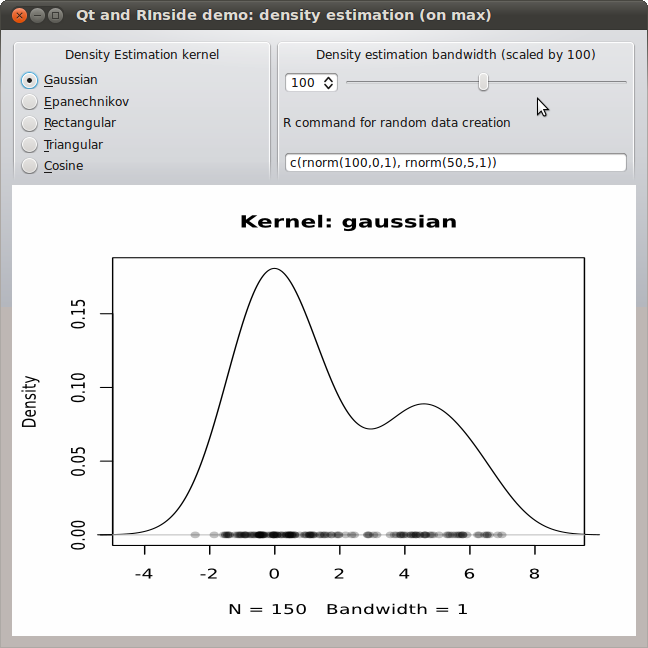
The RInside package makes it pretty simple and straightforward to embed R, the wonderful statistical programming environment and language, inside of a C++ application. This uses both the robust embedding API provided by R itself, and the higher-level abstractions from our Rcpp package. A number of examples are shown on this blog both here and here as well as on the RInside page; and the source package actually contains well over a dozen complete examples which cover anything from simple examples to parallel use via MPI for parallel computing. Beginning users sometimes ask about how to use RInside inside larger projects. And as I had meant to experiment with embedding inside of the powerful Qt framework anyway, I started to dabble a little. A first result is now in the SVN sources of RInside. My starting point was the classic tkdensity demo that comes with R itself. It is a good point of departure as Tcl/Tk makes it very portable---in fact it should run on every platform that runs R---and quite expressive. And having followed some of the GUI experiments around R over the years, I have also seen various re-implementations using different GUI frameworks. And so I am adding mine to this body of work: Example of embedding R via RInside into a Qt C++ application: density estimation for a mixture The problem I addressed first was actual buildability. For the RInside examples, Romain and I provide a Makefile that just works by making calls to R itself to learn about flags for R, Rcpp and RInside such that all required headers and libraries are found. That is actually relatively straightforward (and documented in our vignettes) but a little intimidating at first---which is why a ready-made Makefile is a good thing. Qt of course uses qmake and the .pro files to encode / resolve dependencies. So task one was to map what our Makefile does into its variables. Turns out that wasn't all that hard:
## -*- mode: Makefile; c-indent-level: 4; c-basic-offset: 4;  tab-width: 8; -*-
##
## Qt usage example for RInside, inspired by the standard 'density
## sliders' example for other GUI toolkits
##
## Copyright (C) 2011  Dirk Eddelbuettel and Romain Francois
TEMPLATE =              app
HEADERS =               qtdensity.h 
SOURCES =               qtdensity.cpp main.cpp
QT +=                   svg
## comment this out if you need a different version of R, 
## and set set R_HOME accordingly as an environment variable
R_HOME =                $$system(R RHOME)
## include headers and libraries for R 
RCPPFLAGS =             $$system($$R_HOME/bin/R CMD config --cppflags)
RLDFLAGS =              $$system($$R_HOME/bin/R CMD config --ldflags)
RBLAS =                 $$system($$R_HOME/bin/R CMD config BLAS_LIBS)
RLAPACK =               $$system($$R_HOME/bin/R CMD config LAPACK_LIBS)
## if you need to set an rpath to R itself, also uncomment
#RRPATH =               -Wl,-rpath,$$R_HOME/lib
## include headers and libraries for Rcpp interface classes
RCPPINCL =              $$system($$R_HOME/bin/Rscript -e \'Rcpp:::CxxFlags\(\)\')
RCPPLIBS =              $$system($$R_HOME/bin/Rscript -e \'Rcpp:::LdFlags\(\)\')
## for some reason when building with Qt we get this each time
## so we turn unused parameter warnings off
RCPPWARNING =           -Wno-unused-parameter 
## include headers and libraries for RInside embedding classes
RINSIDEINCL =           $$system($$R_HOME/bin/Rscript -e \'RInside:::CxxFlags\(\)\')
RINSIDELIBS =           $$system($$R_HOME/bin/Rscript -e \'RInside:::LdFlags\(\)\')
## compiler etc settings used in default make rules
QMAKE_CXXFLAGS +=       $$RCPPWARNING $$RCPPFLAGS $$RCPPINCL $$RINSIDEINCL
QMAKE_LFLAGS +=         $$RLDFLAGS $$RBLAS $$RLAPACK $$RCPPLIBS $$RINSIDELIBS
## addition clean targets
QMAKE_CLEAN +=          qtdensity Makefile
The double dollar signs and escaping of parentheses are a little tedious, but hey it works and expands the compiler and linker flags such that everything <emjust works="Works">. The code itself is pretty straightforward too. We instantiate the RInside object as well as the main Qt application object. We then instantiate a new object of class QtDensity that will launch the main widget; it is given a reference to the RInside object.
// -*- mode: C++; c-indent-level: 4; c-basic-offset: 4;  tab-width: 8; -*-
//
// Qt usage example for RInside, inspired by the standard 'density
// sliders' example for other GUI toolkits
//
// Copyright (C) 2011  Dirk Eddelbuettel and Romain Francois
#include <QApplication>
#include "qtdensity.h"
int main(int argc, char *argv[])
 
    RInside R(argc, argv);  		// create an embedded R instance
    QApplication app(argc, argv);
    QtDensity qtdensity(R);
    return app.exec();
 
The definition of the main object is pretty simple: a few private variables, and a few functions to interact with the GUI and get values from the radio buttons, slider or input field---as well as functions to update the chart or re-draw the random variables.
// -*- mode: C++; c-indent-level: 4; c-basic-offset: 4;  tab-width: 8; -*-
//
// Qt usage example for RInside, inspired by the standard 'density
// sliders' example for other GUI toolkits
//
// Copyright (C) 2011  Dirk Eddelbuettel and Romain Francois
#ifndef QTDENSITY_H
#define QTDENSITY_H
#include <RInside.h>
#include <QMainWindow>
#include <QHBoxLayout>
#include <QSlider>
#include <QSpinBox>
#include <QLabel>
#include <QTemporaryFile>
#include <QSvgWidget>
class QtDensity : public QMainWindow
 
    Q_OBJECT
public:
    QtDensity(RInside & R);
private slots:
    void getBandwidth(int bw);
    void getKernel(int kernel);
    void getRandomDataCmd(QString txt);
    void runRandomDataCmd(void);
private:
    void setupDisplay(void);    // standard GUI boilderplate of arranging things
    void plot(void);            // run a density plot in R and update the
    void filterFile(void);      // modify the richer SVG produced by R
    QSvgWidget *m_svg;          // the SVG device
    RInside & m_R;              // reference to the R instance passed to constructor
    QString m_tempfile;         // name of file used by R for plots
    QString m_svgfile;          // another temp file, this time from Qt
    int m_bw, m_kernel;         // parameters used to estimate the density
    QString m_cmd;              // random draw command string
 ;
#endif
Lastly, no big magic in the code either (apart from the standard magic provided by RInside). A bit of standard GUI layouting, and then some functions to pick values from the inputs as well as to compute / update the output. One issue is worth mentioning. The screenshot and code show the second version of this little application. I built a first one using a standard portable network graphics (png) file. That was fine, but not crisp as png is a pixel format so I went back and experimented with scalable vector graphics (svg) instead. One can create svg output with R in a number of ways, one of which is the cairoDevice package by Michael Lawrence (who also wrote RGtk2 and good chunks of Ggobi). Now, it turns out that Qt displays the so-called SVG tiny standard whereas R creates a fuller SVG format. Some discussion with Michael reveals that one can modify the svg file suitably (which is what the function filterFile below does) and it all works. Well: almost. There is a bug (and Michael thinks it is the SVG rendering) in which the density estimate does not get clipped to the plotting region.
// -*- mode: C++; c-indent-level: 4; c-basic-offset: 4;  tab-width: 8; -*-
//
// Qt usage example for RInside, inspired by the standard 'density
// sliders' example for other GUI toolkits -- this time with SVG
//
// Copyright (C) 2011  Dirk Eddelbuettel and Romain Francois
#include <QtGui>
#include "qtdensity.h"
QtDensity::QtDensity(RInside & R) : m_R(R)
 
    m_bw = 100;                 // initial bandwidth, will be scaled by 100 so 1.0
    m_kernel = 0;               // initial kernel: gaussian
    m_cmd = "c(rnorm(100,0,1), rnorm(50,5,1))"; // simple mixture
    m_R["bw"] = m_bw;           // pass bandwidth to R, and have R compute a temp.file name
    m_tempfile = QString::fromStdString(Rcpp::as<std::string>(m_R.parseEval("tfile <- tempfile()")));
    m_svgfile = QString::fromStdString(Rcpp::as<std::string>(m_R.parseEval("sfile <- tempfile()")));
    m_R.parseEvalQ("library(cairoDevice)");
    setupDisplay();
 
void QtDensity::setupDisplay(void)   
    QWidget *window = new QWidget;
    window->setWindowTitle("Qt and RInside demo: density estimation");
    QSpinBox *spinBox = new QSpinBox;
    QSlider *slider = new QSlider(Qt::Horizontal);
    spinBox->setRange(5, 200);
    slider->setRange(5, 200);
    QObject::connect(spinBox, SIGNAL(valueChanged(int)), slider, SLOT(setValue(int)));
    QObject::connect(slider, SIGNAL(valueChanged(int)), spinBox, SLOT(setValue(int)));
    spinBox->setValue(m_bw);
    QObject::connect(spinBox, SIGNAL(valueChanged(int)), this, SLOT(getBandwidth(int)));
    QLabel *cmdLabel = new QLabel("R command for random data creation");
    QLineEdit *cmdEntry = new QLineEdit(m_cmd);
    QObject::connect(cmdEntry,  SIGNAL(textEdited(QString)), this, SLOT(getRandomDataCmd(QString)));
    QObject::connect(cmdEntry,  SIGNAL(editingFinished()), this, SLOT(runRandomDataCmd()));
    QGroupBox *kernelRadioBox = new QGroupBox("Density Estimation kernel");
    QRadioButton *radio1 = new QRadioButton("&Gaussian");
    QRadioButton *radio2 = new QRadioButton("&Epanechnikov");
    QRadioButton *radio3 = new QRadioButton("&Rectangular");
    QRadioButton *radio4 = new QRadioButton("&Triangular");
    QRadioButton *radio5 = new QRadioButton("&Cosine");
    radio1->setChecked(true);
    QVBoxLayout *vbox = new QVBoxLayout;
    vbox->addWidget(radio1);
    vbox->addWidget(radio2);
    vbox->addWidget(radio3);
    vbox->addWidget(radio4);
    vbox->addWidget(radio5);
    kernelRadioBox->setMinimumSize(260,140);
    kernelRadioBox->setMaximumSize(260,140);
    kernelRadioBox->setSizePolicy(QSizePolicy::Fixed, QSizePolicy::Fixed);
    kernelRadioBox->setLayout(vbox);
    QButtonGroup *kernelGroup = new QButtonGroup;
    kernelGroup->addButton(radio1, 0);
    kernelGroup->addButton(radio2, 1);
    kernelGroup->addButton(radio3, 2);
    kernelGroup->addButton(radio4, 3);
    kernelGroup->addButton(radio5, 4);
    QObject::connect(kernelGroup, SIGNAL(buttonClicked(int)), this, SLOT(getKernel(int)));
    m_svg = new QSvgWidget();
    runRandomDataCmd();         // also calls plot()
    QGroupBox *estimationBox = new QGroupBox("Density estimation bandwidth (scaled by 100)");
    QHBoxLayout *spinners = new QHBoxLayout;
    spinners->addWidget(spinBox);
    spinners->addWidget(slider);
    QVBoxLayout *topright = new QVBoxLayout;
    topright->addLayout(spinners);
    topright->addWidget(cmdLabel);
    topright->addWidget(cmdEntry);
    estimationBox->setMinimumSize(360,140);
    estimationBox->setMaximumSize(360,140);
    estimationBox->setSizePolicy(QSizePolicy::Fixed, QSizePolicy::Fixed);
    estimationBox->setLayout(topright);
    QHBoxLayout *upperlayout = new QHBoxLayout;
    upperlayout->addWidget(kernelRadioBox);
    upperlayout->addWidget(estimationBox);
    QHBoxLayout *svglayout = new QHBoxLayout;
    svglayout->addWidget(m_svg);
    QVBoxLayout *outer = new QVBoxLayout;
    outer->addLayout(upperlayout);
    outer->addLayout(svglayout);
    window->setLayout(outer);
    window->show();
 
void QtDensity::plot(void)  
    const char *kernelstrings[] =   "gaussian", "epanechnikov", "rectangular", "triangular", "cosine"  ;
    m_R["bw"] = m_bw;
    m_R["kernel"] = kernelstrings[m_kernel]; // that passes the string to R
    std::string cmd1 = "Cairo(width=6,height=6,pointsize=10,surface='svg',filename=tfile); "
                       "plot(density(y, bw=bw/100, kernel=kernel), xlim=range(y)+c(-2,2), main=\"Kernel: ";
    std::string cmd2 = "\"); points(y, rep(0, length(y)), pch=16, col=rgb(0,0,0,1/4));  dev.off()";
    std::string cmd = cmd1 + kernelstrings[m_kernel] + cmd2; // stick the selected kernel in the middle
    m_R.parseEvalQ(cmd);
    filterFile();               // we need to simplify the svg file for display by Qt 
    m_svg->load(m_svgfile);
 
void QtDensity::getBandwidth(int bw)  
    if (bw != m_bw)  
        m_bw = bw;
        plot();
     
 
void QtDensity::getKernel(int kernel)  
    if (kernel != m_kernel)  
        m_kernel = kernel;
        plot();
     
 
void QtDensity::getRandomDataCmd(QString txt)  
    m_cmd = txt;
 
void QtDensity::runRandomDataCmd(void)  
    std::string cmd = "y <- " + m_cmd.toStdString();
    m_R.parseEvalQ(cmd);
    plot();                     // after each random draw, update plot with estimate
 
void QtDensity::filterFile()  
    // cairoDevice creates richer SVG than Qt can display
    // but per Michaele Lawrence, a simple trick is to s/symbol/g/ which we do here
    QFile infile(m_tempfile);
    infile.open(QFile::ReadOnly);
    QFile outfile(m_svgfile);
    outfile.open(QFile::WriteOnly   QFile::Truncate);
    
    QTextStream in(&infile);
    QTextStream out(&outfile);
    QRegExp rx1("<symbol"); 
    QRegExp rx2("</symbol");    
    while (!in.atEnd())  
        QString line = in.readLine();
        line.replace(rx1, "<g"); // so '<symbol' becomes '<g ...'
        line.replace(rx2, "</g");// and '</symbol becomes '</g'
        out << line << "\n";
     
    infile.close();
    outfile.close();
 
What the little application does is actually somewhat neat for the few lines. One key features is that the generated data can be specified directly by an R expression which allows for mixtures (as shown, and as is the default). With that it easy to see how many points are needed in the second hump to make the estimate multi-modal, and how much of a distance between both centers is needed and so on. Obviously, the effect of the chosen kernel and bandwidth can also be visualized. And with the chart the being a support vector graphics display, we can resize and scale at will and it still looks crisp. The code (for both the simpler png variant and the svg version shown here) is in the SVN repository for RInside and will be in the next release. Special thanks to Michael Lawrence for patiently working through some svg woes with me over a few emails.

Update: Some typos fixed.

Update 2: Two URLs corrected.

23 March 2011

Kumar Appaiah: Review of "Linux Shell Scripting Cookbook"

I have been reading Linux Shell Scripting Cookbook by Sarath Lakshman, published by Packt, for a while. While most people I know learn shell scripts themselves, I was looking to refresh my concepts a little as well as have a reference lying around on the table for fast access. Since I was asked to review it for someone else, I thought I might as well post the review here.First of all, let me remark by saying that shell scripting is something learned more on a need basis than as a tool to solve the main problem. People would seldom write shell scripts as standalone programs (exceptions exist). However, what makes shell scripting invaluable to know is the fact that knowing some tricks can save several minutes, or hours, of work by automating and simplifying certain tasks, generally (but not restricted to) file management and data processing. Linux Shell Scripting Cookbook does go quite far in pursuing this goal, and is appropriate for both beginners who are looking to gain dexterity in shell scripting, as well as intermediate users who wish to polish their skills. The book also can double up as a quick reference, though I would argue that the "Advanced Bash Scripting Guide" would suit that more.At the outset, the author clarifies that the focus will be on Bash. This, people may or may not like, but the fact that bash has become ubiquitous in terms of the available shells on Unix-like systems today, starting out with bash is not a bad thing to do. Besides, learning other shell scripting languages while knowing bash isn't too hard, since the paradigm remains the same.Let's go through the books from the aspects I found most relevant.OrganizationThe book is organized into chapters based more on utility than scripting concepts themselves, although the language aspects are brought onto the reader gradually. For instance, the examples in the first chapter focus more on the basic data elements (variables, arrays, functions etc.) as well as operators (for numbers, files etc.), and all the examples demonstrate simple usage of these concepts, and he further chapters build upon these in a gradual manner.At the same time, if the reader has some familiarity with shell scripting and needs to only refresh or learn a certain concept, he/she needs to just read the relevant chapter. It is not too difficult to grasp the examples of the later chapters, provided some basic shell knowledge is assumed.Content and PresentationA positive trait in the presentation of this book is that it is all based on practical everyday examples which, with minor adaptation, can be used by many for their own daily tasks. For instance, there are several examples which describe searching for and processing files, which, I'd imagine, many users would want to do on a regular basis. Thus, providing realistic examples allows the book to double its utility. The language and approach used is simple and conversational, and the presentation is very clear, with each idea being described as a problem statement followed by a "How to do it" section with the actual code, and ending with a discussion of the nitty-gritties of the code. It is easy to go for a quick scan for those in a hurry, while those who with to read in more detail will not be disappointed either.The book also covers a wide array of applications. For instance, there are examples on automating fetching web pages and processing them, demonstrations of parsing and simplifying and even some queries around databases wrapped around in shell. It also spans to utilities and tasks connected to statistics, backups, compression, version control and many more.Breadth and DepthThe book goes into a fair amount of detail in terms of describing the shell scripting concept under consideration. The examples used go into a fair amount of detail in order to describe to the user all the aspects involved in the method or command being used. The concepts described are fairly complete, and would be sufficient for the reader to use immediately or with just a little bit of fine tuning. In terms of breadth, the book covers most of the features of shell scripting while also describing the various facilities the shell provides access to in a Unix-like environment. Thus, the book does not disappoint in this front either.In summary...In summary, probably the only thing I'd have liked to see more of is some emphasis on how to write more efficient shell scripts. Granted, most of the shell scripts described in the book are very simple and succinct, but a some words on how loops can be made better, or how to spot situations where pipes are not needed to solve a problem etc. might have been a nice addition. Some explanation of differences with dash, tcsh, zsh etc. might also have been nice, since a lot of users have different default shells. But all this isn't going to prevent me from giving this book a high rating, since it delivers quite well on the promises it makes at the beginning.This is definitely a good book to have near your desk, and kudos to the author for having taken the effort to put it together. I would highly recommend it to the beginner and occasional shell user for a thorough read, and to an intermediate to have on his/her desk for borrowing the cool scripting ideas and applications the author has written in this book.

22 March 2011

Dirk Eddelbuettel: 2011 March Madness Half Marathon in Cary

On Sunday the annual March Madness Half Marathon in Cary took place, which (at least informally) opens the running season in greater Chicago. Following my participation in 2005. 2006, 2007, 2008, 2009). and 2010, I kept that streak going. Weather was pretty bad: A forecast of rain materialized with a shower at the start, another at about the halfway mark and a more solid downpour at the end, while temperature where in the lower 40s. And as I train less than I used to, I was also few just a few second slower than last year at 1:39:55 (hand-stopped) but managed to sneak in just under 100 minutes (and having taken six seconds to the starting lime, the official non-chip time has me just over that mark). All-in-all another nice half-marathon and I was appropriately sore yesterday.

21 March 2011

Joerg Jaspert: Debian FTPMaster meeting 2011 - Alright Brain...Its all up to you

And so there went a day of work. Minutes done, come back tomorrow
Okok, more text: We did lots of stuff. There was breakfast, soon after we had Lunch, and guess, Dinner also. Now, would you please come back tomorrow?
Anyways, we did some things. One of those was to have PostgreSQL 9.0 and to enable the replication to the machine any DD can access. Which is, from today on, ries.debian.org. And for the first time ever (since that time ftp-master got closed to the public), DDs can now see the live status of the archive, literally a second after a package got accepted a dak ls on ries will show you that fact. Torsten worked on fixing up old remnants of code and database entries around contents and also tackled a problem between our usage of SQLalchemy and the python multiprocessing module. He also started working on the source contents and was weird enough to get us standardized logging into a dak tool. Mark worked with DSA on the Postgres 9.0 upgrade to fix what was to fix in out database and did some tests with our environment in squeeze and coordinated changes in python-apt needed for multiarch and xz. He then started working on some larger database changes around the built-using feature. I myself started off with getting generate-packages-sources to behave when there is an error instead of silently ignoring that. I also did a bit of groundwork to enable us to do NEW processing adding overrides for all affected binary packages, not just those from the architecture currently uploaded. That will allow stuff like linux-2.6 to pass NEW just once, not once per architecture. That involves a new field in our dsc files and the status of that is tracked in Bug #619131.

18 March 2011

DebConf team: DebConf11: Short insiders summary of recent developments in DC11 organization (Posted by Vedran Omeragic)

Recently there has been some major developments in DebConf11 organization. In short, I will list some of the most important.

Website

Official DC11 website has finally been completed and now contains a great deal of information for those interested in attending this years conference. Some of the most notable changes include:

Navigation

Frontpage now contains a small menu with links to most important parts of website, like About, Registration, Contact Sidebar menu is now divided in 3 categories:

  • The Conference Links to pages which are directly connected with the Conference like About DC, Debian Day, Registration, Call for Papers, Talk Schedules, Payments Most of these links are hidden at the moment, and will be until the registration is open, to avoid any unnecessary confusion.
  • More Information Basic information for attendees like Important Dates, Accommodations, Venue, Visa Everything you need to know about your stay in Banja Luka.
  • Practical While these pages have almost nothing to do with the Conference itself, they do provide a vast information about city, getting to Bosnia, some practical information, as well as the Map of the whole city made my me :)

New Pages added
  • How Can I Help This page contains some basic information for anyone who wants to help out. Weather by volunteering, sponsoring, or just by adding a banner on their website
    DC11: How Can I Help?
  • Contact Instead of just sending visitors to mailto, we replaced it by a page which contains ALL contact information, emails AND phone numbers (which will be added just before DebCamp starts).
    DC11: Contact
  • Sponsorship Just like with the contact page, we made a page to be more user friendly to any interested parties or individuals, and contains most important info, such as sponsorship levels and contact address.
    DC11: Sponsorship
  • About DebConf11 Actually it s just a page with a content copied from frontpage (which is now used for something else).
    DC11: About DebConf11

New features:
  • Documentation Is now used to store all important documents and records for public use and sharing, like brochures, official government documents, important public mails, as well as the recordings of all IRC meeting logs. Can be found at:
    DC11: Documentation
  • Frontpage: Navigation To ensure the main goal of website, information availability, frontpage has been redesigned to provide maximum accessibility as well as easy access to any part of the website. DC11: Frontpage
  • Frontpage: Latest News To keep the public and attendees well informed of any important events and developments, we decided to add latest news section. Note however, that if you want to stay completely informed of any changes and updates, we still recommend subscribing to our mailing list, which can be found under contact page.
    DC11: Frontpage
  • Map of Banja Luka Because of lack of data on Google Maps and Open Street Map, as well as some other minor local maps, we made a small map of almost whole city and added around 60 or 70 locations which we consider to be of importance for our attendees. Such locations include hotels, parking spots, restaurants, bars, clubs, petrol stations, taxi stations, etc. This page uses simple JavaScript and is not dragable . Therefore we added Index Location to auto-locate the needed locations, as well as the legend to clarify the category of locations. Pointing your mouse over a certain location will open a small bubble with some info on that location/object. We should also point out that some of this data may not be 100% correct (ie working hours may be off ). Map is available at:
    DC11: Banja Luka City Map
Bosnian language

Site is now available on Bosnian language for native speaking attendees, should they have problems with English version. Every page is available on both languages, which can be changed by clicking on ba/en flag in upper left corner, or DC11: Bosnian Version.

Design

As you may have noticed, the official page received a small face lift. New header with the Government building, a small token of appreciation for all the help the Government is providing; as well as some minor changes in CSS and color scheme. While talking about design, we d like to thank Leandro G mez for his help with the header.

Sponsorship Sponsorship Levels

As agreed on the meeting, which took place on 22. of February, [Meeting logs], following sponsorship levels will be used for this years conference:

  • Steel < 1.000
  • Bronze > 1.000
  • Silver > 5.000
  • Gold > 10.000
  • Platinum > 20.000

Main reason for lowering amounts is due to last years results of high increase in the same. As for the benefits of these levels, the only thing changed is t-shirts / bags places; we believe t-shirts are much more noticeable than bags, and have therefore been promoted to Silver, while bags have been downgraded to Bronze. For a full list of requirements and benefits, please visit: DC11: Sponsorship Sponsorship Brochure

Sponsorship brochures have finally been completed and are available for a public distribution. The brochures are available in 3 qualities: low, high and original. Low and high quality brochures, ~6Mb and ~8Mb respectively, are for normal distribution to our sponsors, while original quality, at around 240Mb, is intended for maximum quality printing. Just as with the website, each quality is available in both Bosnian and English. Current version of the brochure is 1.1 and is most likely the final one. These brochures are available at Documentation page: DC11: Documentation >> Documents made by Local Team Or download them directly:

Also, I d like to thank Mirosal Remetic for making a great template and Pablo Duboue for some very valuable suggestions regarding the structure of the brochure.

Visas and Customs Rules

Many questions have been raised regarding Bosnian visa regime. We got in contact with the embassy and they clarified who can enter our country with(out) Visa. The list can be found on DC11 Wiki: Visa regime. It also states, which countries have a privilidge of ID-only entrance. If your country is not listed, that means you will need visa. If you want to know what exactly you need to get one, please visit the this official Government page and chose your country from a drop-down menu. As for the visa itself, as well as the list of Customs Rules, please read DC11: Visa.

Also, thanks to Darjan Prtic for getting the list from the Government officials.

So, what s next?

If you think, that is it for now, you are dead wrong. At this very moment following is being organized and developed:

  • Registration Registration Team is currently hacking penta and modifying it for this years needs and conditions. We expect to have registrations open by the end of March / beginning of April.
  • Travel and getting to Banja Luka Being one of the greatest obstacle, Travel Team is working hard on finding best routes for attendees and mapping the city
  • Sponsorship With final decision and agreement for sponsorship levels and brochures ready for public distribution, Sponsorship Team is now actively looking for new sponsors, global and local, preparing various promotional material, as well as planning our advertising strategy.

Final word

Well, these are pretty much the highlights of some recent and some future developments of DebConf11 organizational team. Mind you, there s a lot more going on, but I tried to give a small summary from the inside. Should you be interested in attending, helping out, sponsoring or just have some questions, feel free to ask them on our mailing list at: debconf11-localteam@lists.debconf.org. I should inform you that this is a public mailing list and its archives are available for a broader public. If you do not wish for your mail to be made public, please direct any enquiry directly to me trough the Contact Form or any other member of Core Local Team, Adnan Hodzic or Velimir Iveljic.

16 March 2011

John Goerzen: A Proud Dad

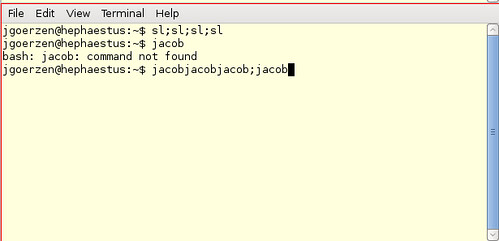
I saw this on my computer screen the other day, and I ve got to say it really warmed my heart. I ll explain below if it doesn t provoke that reaction for you. Evidence a 4-year-old has been using my computer So here s why that made me happy. Well for one, it was the first time Jacob had left stuff on my computer that I found later. And of course he left his name there. But moreover, he s learning a bit about the Unix shell. sl is a command that displays an animated steam locomotive. I taught him how to use the semicolon to combine commands. So he has realized that he can combine calls to sl with the semicolon to get a series of a LOT of steam trains all at once. And was very excited about this discovery. Also he likes how error messages start with the word bash .

Lars Wirzenius: QR codes for backup?

This is probably an idea obvious to everyone, and probably someone's already implemented this, but just in case they haven't, I'll throw this idea out there for someone to hack on. QR codes are two-dimensional bar codes. You can take arbitrary data and encode it into a barcode, which you can then print out. Later, you can scan it in and decode the barcode, and get the original data back. barcode-1.png Given that printed paper is fairly durable and unlikely to go suddenly bad, like hard disks do, this can be used for backups. I did a quick experiment. I put 2000 bytes per barcode and printed it out in various sizes: 10, 20, 30, and 70 mm squares. Then I scanned them in. The 70 mm one was the only one that could be decoded, the others were too small and smudged. It should be possible to fit 12 squares of just under 70 mm on an A4 sized page. That's 24000 bytes of raw data. What could you fit in that space? Or several pages of that? It's not dense enough for storing large amounts of data (images, audio, video), but there's a number of important things that are not so large. Perhaps secret keys, or your Revelation keyring file? For ease of use, it would be good to have a tool to take arbitrary binary data, compress it if possible, divide it into chunks of suitable size, number each chunk, and output a PDF with all the QR codes laid out optimally, ready for printing.

15 March 2011

David Welton: Coming Soon: Easy Kindle Publishing with LiberWriter.com

The Kindle isn't the most beautiful device out there - it's not "beautiful", the keyboard takes away some elegance, but I'm absolutely smitten with mine. I like to read, a lot, and being able to instantly beam books to my house is just fantastic. Kindles and other devices like them are also changing the world of publishing, going from the known world of physical books that can't be easily copied to another information good like movies or songs with something of an uncertain future. Yet they're also opening up many possibilities: thanks to Amazon's Kindle Direct Publishing program, it just got very easy to publish books to a platform that a lot of people regularly search for good things to read. Once upon a time, "vanity publishing" was something done by those who simply wanted to see their names in print, but couldn't actually find a publisher, and thus carried some stigma. Now, though, why not publish something you've always wanted to? Granted, without an editor, and publisher to promote your work, you probably won't become rich or famous, but many people write for the enjoyment of doing so. And who knows... there are already several cases of people publishing directly to the Kindle and making a decent income at it. Indeed, I have several things I'm thinking of writing about that clicked when I found the Kindle publishing program. Maybe now it's time to dust off some ideas I've had and start working on them a little bit at a time. Then, of course, my geeky side took over and I started wondering how the mechanics of it actually work. Messily, it turns out: the preferred format for Kindle authoring is variant of HTML that's not at all what we're used to in these days of ever more potent CSS. The good side of it is that books mostly come out looking the same on the Kindle, and the end user can control how they want to visualize them. The bad side of the system utilized is that there are a lot of tips and tricks and little things to know about the whole process that can be annoying even for someone who knows HTML pretty well. For someone who just wants to write stuff and not worry about it, and who perhaps is not very familiar with HTML, the whole thing can be a huge mess and very frustrating. Which of course looks like an interesting challenge. I set out to work on LiberWriter.com several weeks ago, and it should be ready within the next week or two. In short, it's a system that lets you concentrate on writing and, as much as possible, tries to get out of your way in order to let you concentrate on your content. It is also targeted very specifically at the Kindle (for the time being at least), so as to really focus on making things work on that platform. For instance, it can automatically generate a table of contents, a noted pain point in writing for the Kindle. I have a number of other ideas up my sleeve too, that I'm excited to work on. I'm also definitely abandoning the "let's release it for free, for fun, and see if I can find a way to make money later" model of many past projects, and treating it like a business. I think the price I have in mind is very competitive, if you look at, for instance, conversion services that take word and spit out Kindle-specific HTML. Anyway, have a look at the site and sign up if you're interested: as soon as it's ready, I'll email and let you know. There'll be a somewhat limited trial version so that you can play around with it and see if you like it before buying the full version.

Josselin Mouette: Copyright assignment is killing the free in free software

A few weeks ago, at work, we were looking for a solution to a tricky printing problem: how to manage, in a centralized infrastructure, a large number of locations, worstations and printers? One of the consultants working for us came up with a great idea. With only a 20-line patch to CUPS, workstations would be able to find which printers are on the same location. 20 lines of code, instead of a complex virtualisation solution? This is exactly the kind of reasons why we use free software: when there s something wrong, you can fix it. When you need something more, you can code it. Now, many others could benefit of such an improvement, and we don t want to maintain a forked version of CUPS, so we forwarded it upstream, who looked interested. But upstream now being Apple, they requested a stupid copyright assignment agreement. I will leave to the reader s imagination the complexity of getting such a document signed in a Fortune 500 company with no business with Apple. This will, of course, not happen - and if the decision was mine, the answer would have been a clear No. No, because I want to improve free software, not to contribute to Apple s proprietary version. No, because copyleft is about giving as much as you take. How many contributions are being left out of CUPS because of this stupid copyright assignment? It looks to me that such software is doomed to remain crippled as long as companies like Apple are in charge of their maintenance. There is free software. And there is free software by Apple. And Oracle. And Canonical.

14 March 2011

Axel Beckert: Planet Commandline officially online

Around the first bunch of postings in my Useful but Unknown Unix Tools, Tobias Klauser of inotail and Symlink fame came up with the idea of making a Planet (i.e. a blog aggregator) of all the comandline blogs and blog categories out there. A first Planet Venus running prototype based on the template and style sheets of Planet Symlink was quickly up and running. I just couldn t decide if I should use an amber or phosphor green style for this new planet. Marius Rieder finally had the right idea to solve this dilemma: Offer both, an amber and a phosphor green style. Christian Herzog pointed me to the right piece of code at A List Apart. So here is it, available in you favourite screen colors:

Planet Commandline For a beginning, the following feeds are included:

Which leads us to the discussion what kind of feeds should be included in Planet Commandline. Of course, all blogs or blog categories which (nearly) solely post neat tips and tricks about the command line in English are welcome. Microblogging feeds containing (only) small but useful command line tips are welcome, too, if they neither permanently contain dozens of posts per day nor have a low signal-to-noise ratio. Unfortunately most identi.ca groups do, so they re not suitable for such a planet. What I m though unsure about are non-English feeds. Yes, there s one in already, but I noticed this only after including Beat s Chr tertee and his FreeBSD command line tips are really good. So if it doesn t go overboard, I think it s ok. If there are too many non-English feeds, I ll probably split Planet Commandline off into at least three Planets: One with all feeds, one with English only and one with all non-English feeds or maybe even one feed per language. But for now that s still a long way off. Another thing I m unsure about are more propgram specific blogs like the impressive Mastering Emacs blog about mastering the world s best text editor . *g* (Yeah, I didn t include that one yet. But as soon someone shows me the vi-equivalent of that blog, I ll include both. Anyone thinks, spf13 s vim category is up to that?) Oh, and sure, any shell-specific (zsh, tcsh, bash, mksh, busybox) tips & tricks blogs don t count as program-specific blogs like some $EDITOR, $BROWSER, or $VCS specific blogs do. :-) Of course I m happy about further suggestions for feeds to include in Planet Commandline. Just remember that the feed should provide (at least nearly) exclusively command line tips, tricks or howtos. Suggestions for links to other commandline related planets are welcome, too.

Rapha&#235;l Hertzog: Missing firmware in Debian? Learn how to deal with the problem

You know it already, since Debian 6.0 non-free firmware are no longer provided by a standard Debian installation. This will cause some troubles to users who need them. I m thus going to do a small overview on the topic and teach you what you need to know to deal with the problem. What are firmware and how are they used? From the user s point of view, a firmware is just some data that is needed by some piece of hardware in order to function properly. The driver for that hardware typically loads the firmware on the device as part of its initialization. In the Linux kernel, the drivers are all using a standardized interface (request_firmware) to retrieve the firmware before sending it to the device. Thanks to this standardization, it s possible to either embed the firmware in the kernel or to have it request the firmware from user-space when needed. Debian (like most distributions) has selected the latter option. Thus when the kernel needs a firmware, it sends out a request to user-space. udev is getting the request with the name of the firmware, and in its default configuration (see /lib/udev/rules.d/80-drivers.rules) it executes /lib/udev/firmware.agent in response. Where are firmware stored? firmware.agent is a simple shell script that tries to locate a firmware before sending it back to the kernel through a sysfs entry. It looks into the following directories: Firmware provided by packages are thus usually in /lib/firmware and you can use /usr/local/lib/firmware for manually installed firmware. How do I know whether I need a firmware? First of, you can notice messages from the kernel telling you that it tried to load a firmware but it failed. They look like this:

e100: eth0: e100_request_firmware: Failed to load firmware "e100/d101m_ucode.bin": -2
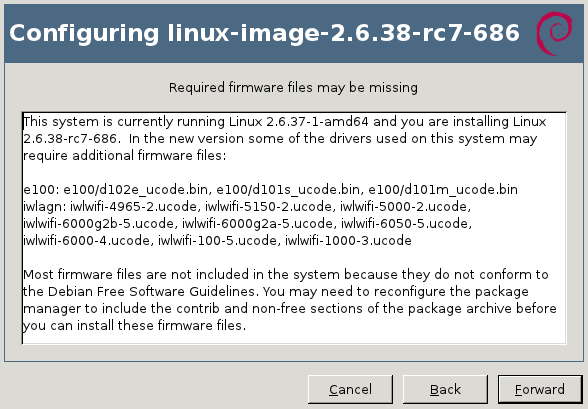
But you might be informed sooner. When you install a new version of the Linux kernel with the official Debian packages, the post-installation script will go through all loaded modules (those listed by lsmod) and it will verify whether this module as provided by the newly installed kernel might require firmware files. This information can be retrieved with modinfo:
$ modinfo -F firmware /lib/modules/2.6.32-5-amd64/kernel/drivers/net/e100.ko
e100/d102e_ucode.bin
e100/d101s_ucode.bin
e100/d101m_ucode.bin
If one (or more) of those firmware is (are) not yet available on the system, you will get a warning message similar to this one:
update-initramfs will also generate a similar warning on the terminal:
update-initramfs: Generating /boot/initrd.img-2.6.32-5-amd64
W: Possible missing firmware /lib/firmware/e100/d102e_ucode.bin for module e100
W: Possible missing firmware /lib/firmware/e100/d101s_ucode.bin for module e100
W: Possible missing firmware /lib/firmware/e100/d101m_ucode.bin for module e100
The Debian installer also detects when you have hardware that might require a missing firmware file. You have the option to supply the missing files on a USB stick (either directly or through the corresponding package). How do I find and install the missing firmware? Now that you have the name of the firmware file that you want, it s relatively easy to identify the package that provides the required file. You can use apt-cache search <filename> because the firmware packages embed the list of firmware files in their description. You can also use apt-file (provided by the package of the same name) or the web interface at packages.debian.org.
$ apt-cache search d101m_ucode.bin
firmware-linux-nonfree - Binary firmware for various drivers in the Linux kernel
$ apt-file search d101m_ucode.bin
firmware-linux-nonfree: /lib/firmware/e100/d101m_ucode.bin
If the above commands return nothing, you probably need to enable the non-free repository in your /etc/apt/sources.list (you can also enable it within synaptic). And you also want to run sudo apt-file update to have the latest information. Now you can install the right package, in the example above it was firmware-linux-nonfree. How do I install all firmware just to be sure I don t miss any? There s no meta-package depending on all firmware packages so there s no easy answer to this question. Furthermore not all firmware packages respect the naming convention firmware-* (there s for example zd1211-firmware). So your best bet is to look up all the packages with a generic search like this one:
$ apt-file --package-only search /lib/firmware/
atmel-firmware
[...]
And then install them all. Are there DVD or CD images with non-free firmware? Yes. Debian provides an unofficial netinst image for i386/amd64/powerpc with the non-free firmware, you can find it here: http://cdimage.debian.org/cdimage/unofficial/non-free/cd-including-firmware/. I provide complete DVD sets with firmware, and Multi-Arch CD/DVD with firmware, it s over there in my DVD shop: http://raphaelhertzog.com/go/debian-cd/ (i386/amd64 only) When using those installation discs, the Debian-installer will be able to find the required firmware immediately. There s no need for you to provide them on a USB stick. Other questions? I think I covered the most important things you have to know about firmware on Debian. But should you still have a question, feel free to share it in the comments so that I can improve this article.
Click here to subscribe to my free newsletter and get my monthly analysis on what s going on in Debian and Ubuntu. Or just follow along via the RSS feed, Identi.ca, Twitter or Facebook.

6 comments Liked this article? Click here. My blog is Flattr-enabled.

Next.

Previous.