Search Results: "xam"

13 January 2015

Erich Schubert: Big data predictions for 2015

My big data predictions for 2015:
  1. Big data will continue to fail to deliver for most companies.
    This has several reasons, including in particular: 1: lack of data to analyze that actually benefits from big data tools and approaches (and which is not better analyzed with traditional tools). 2: lack of talent, and failure to attract analytics talent. 3: stuck in old IT, and too inflexible to allow using modern tools (if you want to use big data, you will need a flexible "in-house development" type of IT that can install tools, try them, abandon them, without going up and down the management chains) 4: too much marketing. As long as big data is being run by the marketing department, not by developers, it will fail.
  2. Project consolidation: we have seen hundreds of big data software projects the last years. Plenty of them on Apache, too. But the current state is a mess, there is massive redundancy, and lots and lots of projects are more-or-less abandoned. Cloudera ML, for example, is dead: superseded by Oryx and Oryx 2. More projects will be abandoned, because we have way too many (including much too many NoSQL databases, that fail to outperform SQL solutions like PostgreSQL). As is, we have dozens of competing NoSQL databases, dozens of competing ML tools, dozens of everything.
  3. Hype: the hype will continue, but eventually (when there is too much negative press on the term "big data" due to failed projects and inflated expectations) move on to other terms. The same is also happening to "data science", so I guess the next will be "big analytics", "big intelligence" or something like that.
  4. Less openness: we have seen lots of open-source projects. However, many decided to go with Apache-style licensing - always ready to close down their sharing, and no longer share their development. In 2015, we'll see this happen more often, as companies try to make money off their reputation. At some point, copyleft licenses like GPL may return to popularity due to this.

10 January 2015

Dirk Eddelbuettel: RcppClassic 0.9.6

A maintenance release of RcppClassic, now at version 0.9.6, went out to CRAN today. This package provides a maintained version of the otherwise deprecated first Rcpp API; no new projects should use it. No changes were in user-facing code. The Makevars file was change to accomodate a request by the CRAN Maintainer to keep it free of GNU Make extensions. At the same time, we overhauled the look and feel of the (very short) vignette. Build instructions were updated both in the vignette and in the included example package. Other accumulated changes since the last release were updates to the DESCRIPTION and NAMESPACE file as well two namespace-related R code updates. Courtesy of CRANberries, there is the set of changes relative to the previous release. Questions, comments etc should go to the rcpp-devel mailing list off the R-Forge page.

This post by Dirk Eddelbuettel originated on his Thinking inside the box blog. Please report excessive re-aggregation in third-party for-profit settings.

9 January 2015

Richard Hartmann: Release Critical Bug report for Week 02

The UDD bugs interface currently knows about the following release critical bugs: How do we compare to the Squeeze and Wheezy release cycles?
Week Squeeze Wheezy Jessie
43 284 (213+71) 468 (332+136) 319 (240+79)
44 261 (201+60) 408 (265+143) 274 (224+50)
45 261 (205+56) 425 (291+134) 295 (229+66)
46 271 (200+71) 401 (258+143) 427 (313+114)
47 283 (209+74) 366 (221+145) 342 (260+82)
48 256 (177+79) 378 (230+148) 274 (189+85)
49 256 (180+76) 360 (216+155) 226 (147+79)
50 204 (148+56) 339 (195+144) ???
51 178 (124+54) 323 (190+133) 189 (134+55)
52 115 (78+37) 289 (190+99) 147 (112+35)
1 93 (60+33) 287 (171+116) 140 (104+36)
2 82 (46+36) 271 (162+109) 157 (124+33)
3 25 (15+10) 249 (165+84)
4 14 (8+6) 244 (176+68)
5 2 (0+2) 224 (132+92)
6 release! 212 (129+83)
7 release+1 194 (128+66)
8 release+2 206 (144+62)
9 release+3 174 (105+69)
10 release+4 120 (72+48)
11 release+5 115 (74+41)
12 release+6 93 (47+46)
13 release+7 50 (24+26)
14 release+8 51 (32+19)
15 release+9 39 (32+7)
16 release+10 20 (12+8)
17 release+11 24 (19+5)
18 release+12 2 (2+0)
Graphical overview of bug stats thanks to azhag:

Peter Eisentraut: Directing output to multiple files with zsh

Normally, this doesn t work as one might naively expect:
program > firstfile > secondfile
The second redirection will override the first one. You d have to use an external tool to make this work, maybe something like:
program   tee firstfile secondfile
But with zsh, this type of thing actually works. It will duplicate the output and write it to multiple files. This feature also works with a combination of redirections and pipes. For example
ls > foo   grep bar
will write the complete directory listing into file foo and print out files matching bar to the terminal. That s great, but this feature pops up in unexpected places. I have a shell function that checks whether a given command produces any output on stderr:
! myprog "$arg" 2>&1 >/dev/null   grep .
The effect of this is: (Note the ordering of 2>&1 >/dev/null to redirect stderr to stdout and silence the original stdout, as opposed to the more common incantation of >/dev/null 2>&1, which silences both stderr and stdout.) The reason for this is that myprog has a bug that causes it to print errors but not produce a proper exit status in some cases. Now how will my little shell function snippet behave under zsh? Well, it s quite confusing at first, but the following happens. If there is stderr output, then only stderr is printed. If there is no stderr output, then stdout is passed through instead. But that s not what I wanted. This can be reproduced simply:
ls --bogus 2>&1 >/dev/null   grep .
prints an error message, as expected, but
ls 2>&1 >/dev/null   grep .
prints a directory listing. That s because zsh redirects stdout to both /dev/null and the pipe, which makes the redirection to /dev/null pointless. Note that in bash, the second command prints nothing. This behavior can be changed by turning off the MULTIOS option (see zshmisc man page), and my first instinct was to do that, but options are not lexically scoped (I think), so this would break again if the option was somehow changed somewhere else. Also, I think I kind of like that option for interactive use. My workaround is to use a subshell:
! ( myprog "$arg" 2>&1 >/dev/null )   grep .
The long-term fix will probably be to write an external shell script in bash or plain POSIX shell.

8 January 2015

Wouter Verhelst: ExtreMon example

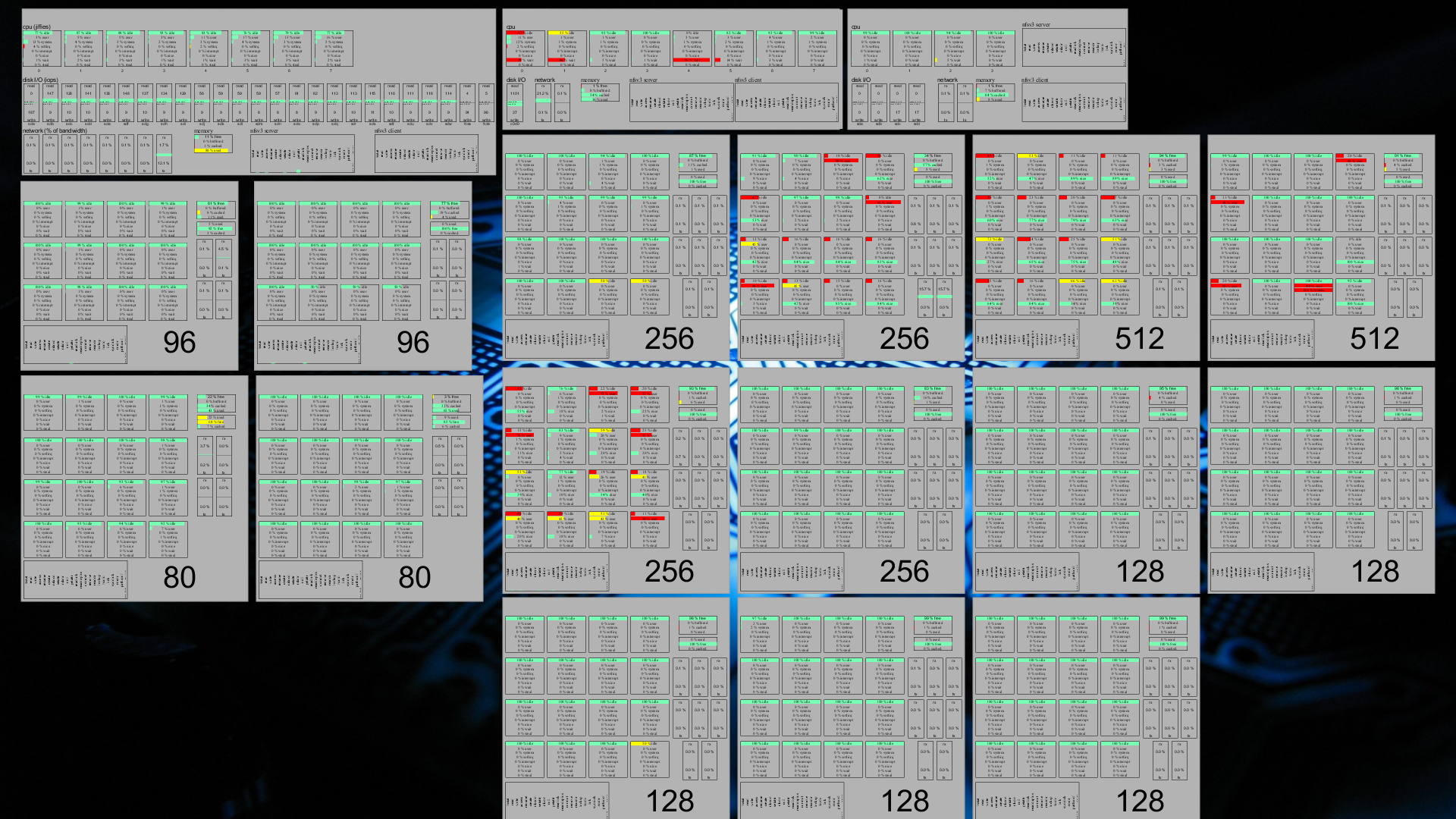
About a month ago, I blogged about extremon. As a reminder, ExtreMon is a monitoring tool that allows you to view things as they are happening, rather than with the ~5 minute delay that munin gives you, and also avoiding the quad-state limitation of Nagios' "good", "bad", "ugly", and "unknown" states. No, they're not really called that. Yes, I know you knew that. Anyway. In my blog post, I explained how you can set up ExtreMon, and I also set up a fairly limited demo version on my own server. But I have since realized that while it is functional, it doesn't actually show why ExtreMon is so great. In an effort to remedy that, I present you an example of what ExtreMon can do. Let's start with a screenshot of the ExtreMon console at the customer for which I spent time trying to figure out how to get it up and running: Click for full sized version. You'll note that even in that full-sized version, many things are unreadable. This is because the ExtreMon console allows one to move around (right mouse button drag for zoom; left mouse button drag for moving around; control+RMB for rotate; center mouse button to reset to default); so what matters is that everything fits on the screen, not whether it is all readable (if you need to read, you zoom). The image shows 18 rectangles. Each rectangle represents a single machine in this particular customer's HPC cluster. The top three rectangles are the cluster's file servers; the rest are its high performance nodes. You'll note that the left fileserver has 8 processor cores (top row), 8 network cards (bottom row, left part), and it also shows information on its memory usage (bottom row, small rectangle in the middle) as well as its NFS client and server procedure calls (bottom row, slightly larger rectangles to the right). This file server is the one on which I installed ZFS a while back; hence the large amount of disks visible in the middle row. The leftmost disk is the root filesystem (which is an ext4 off a hardware RAID1); the two rightmost "disks" are the PCIe-attached SSDs which are used for the ZFS L2ARC and write log. The other disks in this file server nicely show how ZFS does write load balancing over all its disks. The second file server has a hardware RAID1 on which it stores all its data; as such, there is only one disk graph there. It is also somewhat more limited in network, as it has only two NICs. It does, however, also have 8 cores. The last file server has no more than four processor cores; in addition, it also does not have a hardware RAID controller, so it must use software RAID over its four hard disks. This server is used for archival purposes, mostly, since it is insufficient for most anything else. As said, the other nodes are the "compute nodes", where the hard work is done. Most of these compute nodes have 16 cores each; two have 12 instead. When this particular screenshot was taken, four of the nodes (the ones showing red in their processor graphs) were hard at work; the others seem to have been mostly idling. In addition to the familiar memory, NFS (client only), network, and processor graphs, these nodes also show a "swap space" graph (just below the memory one), which seems fine for most nodes, except for the bottom left one (which shows a few bars that are coloured yellow rather than green). The green/yellow/red stuff is supposed to represent the "ok", "warning", "bad" states that would be familiar from Nagios. In this particular case, however, where "processor is busy all the time" is actually a wanted state, a low amount of idleness on the part of the processor isn't actually a problem, on the contrary. I did consider, therefore, to modify the ExtreMon configuration so that the processor graphs would not show red when the system was under high load; however, I found that differences in colour like this actually makes it more easy to see, at a glance, which machines are busy -- and that's one of the main reasons why we wanted to set this up. If you look carefully, you can find a particular processor core in the graph which shows 100% usage for "idle", "system", and "softirq", at the same time. Obviously that can't be the case, so there's a bug somewhere. Frank seems to believe it is a bug in CollectD; I haven't verified that. At any rate, though, this isn't usually a problem, due to the high update frequency of ExtreMon. The amount of data that's flowing through ExtreMon is amazing: Which renders a grand total of 2887 data points that are shown in this particular screenshot; and then I'm not even counting all the intermediate values, some of which also pass through ExtreMon. Nor am I counting the extra bits which have since been added (this screenshot is a few days old, now, and I'm still finetuning things). Yet even so, ExtreMon manages to update those values once every few seconds, in the worst case. As a result, the display isn't static for a moment, constantly moving and updating data so that what you see is never out of date for more than a second or two. Awesome.

Russell Coker: Conference Suggestions

LCA 2015 is next week so it seems like a good time to offer some suggestions for other delegates based on observations of past LCAs. There s nothing LCA specific about the advice, but everything is based on events that happened at past LCAs. Don t Oppose a Lecture Question time at the end of a lecture isn t the time to demonstrate that you oppose everything about the lecture. Discussion time between talks at a mini-conf isn t a time to demonstrate that you oppose the entire mini-conf. If you think a lecture or mini-conf is entirely wrong then you shouldn t attend. The conference organisers decide which lectures and mini-confs are worthy of inclusion and the large number of people who attend the conference are signalling their support for the judgement of the conference organisers. The people who attend the lectures and mini-confs in question want to learn about the topics in question and people who object should be silent. If someone gives a lecture about technology which appears to have a flaw then it might be OK to ask one single question about how that issue is resolved, apart from that the lecture hall is for the lecturer to describe their vision. The worst example of this was between talks at the Haecksen mini-conf last year when an elderly man tried at great length to convince me that everything about feminism is wrong. I m not sure to what degree the Haecksen mini-conf is supposed to be a feminist event, but I think it s quite obviously connected to feminism which is of course was why he wanted to pull that stunt. After he discovered that I was not going to be convinced and that I wasn t at all interested in the discussion he went to the front of the room to make a sexist joke and left. Consider Your Share of Conference Resources I ve previously written about the length of conference questions [1]. Question time after a lecture is a resource that is shared among all delegates. Consider whether you are asking more questions than the other delegates and whether the questions are adding benefit to other people. If not then send email to the speaker or talk to them after their lecture. Note that good questions can add significant value to the experience of most delegates. For example when a lecturer appears to be having difficulty in describing their ideas to the audience then good questions can make a real difference, but it takes significant skill to ask such questions. Dorm Walls Are Thin LCA is one of many conferences that is typically held at a university with dorm rooms offered for delegates. Dorm rooms tend to have thinner walls than hotel rooms so it s good to avoid needless noise at night. If one of your devices is going to make sounds at night please check the volume settings before you start it. At one LCA I was startled at about 2AM but the sound of a very loud porn video from a nearby dorm room, the volume was reduced within a few seconds, but it s difficult to get to sleep quickly after that sort of surprise. If you set an alarm then try to avoid waking other people. If you set an early alarm and then just get up then other people will get back to sleep, but pressing snooze repeatedly for several hours (as has been done in the past) is anti-social. Generally I think that an alarm should be at a low volume unless it is set for less than an hour before the first lecture in which case waking people in other dorm rooms might be doing them a favor. Phones in Lectures Do I need to write about this? Apparently I do because people keep doing it! Phones can be easily turned to vibrate mode, most people who I ve observed taking calls in LCA lectures have managed this but it s worth noting for those who don t. There are very few good reasons for actually taking a call when in a lecture. If the hospital calls to tell you that they have found a matching organ donor then it s a good reason to take the call, but I can t think of any other good example. Many LCA delegates do system administration work and get calls at all times of the day and night when servers have problems. But that isn t an excuse for having a conversation in the middle of the lecture hall while the lecture is in progress (as has been done). If you press the green button on a phone you can then walk out of the lecture hall before talking, it s expected that mobile phone calls sometimes have signal problems at the start of the call so no-one is going to be particularly surprised if it takes 10 seconds before you say hello. As an aside, I think that the requirement for not disturbing other people depends on the number of people who are there to be disturbed. In tutorials there are fewer people and the requirements for avoiding phone calls are less strict. In BoFs the requirements are less strict again. But the above is based on behaviour I ve witnessed in mini-confs and main lectures. Smoking It is the responsibility of people who consume substances to ensure that their actions don t affect others. For smokers that means smoking far enough away from lecture halls that it s possible for other delegates to attend the lecture without breathing in smoke. Don t smoke in the lecture halls or near the doorways. Also using an e-cigarette is still smoking, don t do it in a lecture hall. Photography Unwanted photography can be harassment. I don t think there s a need to ask for permission to photograp people who harass others or break the law. But photographing people who break the social agreement as to what should be done in a lecture probably isn t. At a previous LCA a man wanted to ask so many questions at a keynote lecture that he had a page of written notes (seriously), that was obviously outside the expected range of behaviour but probably didn t justify the many people who photographed him. A Final Note I don t think that LCA is in any way different from other conferences in this regard. Also I don t think that there s much that conference organisers can or should do about such things.

4 January 2015

Russ Allbery: Review: Programming Ruby

Review: Programming Ruby, by Dave Thomas, et al.
Publisher: Pragmatic Bookshelf
Copyright: 2005
Printing: May 2006
ISBN: 0-9745140-5-5
Format: Trade paperback
Pages: 785
There are a few different editions of this book. The version I read is the second edition, written by Dave Thomas with Chad Fowler and Andy Hunt and published in 2005, covering Ruby 1.8.2. There's now a fourth edition, covering Ruby 1.9 and 2.0, which is probably what you'd want if you were buying this book today. This book, in whatever edition, is called the Pickaxe in the Ruby community after its cover. I've used a lot of different programming languages, so I can usually pick one up on the fly reasonably well, but I still like to read a good introductory book before using one seriously. It's a bit too easy to get lost or to fall into habits that don't match the best practices of the language community without a solid introduction. I've been using a bit of Ruby off and on since I started using Puppet, but I'm looking at doing more serious development using Chef, so I decided it was time to get that introduction. (It helped that I had this book sitting around, although that's also why I read an older edition.) Programming Ruby starts with the obligatory introduction to installing and running Ruby, and then provides a high-level introduction to the language and its basic types just enough to make Ruby comprehensible before starting into the object system. Everything is an object in Ruby, so the book introduces the object system as early as possible, and then shows the rest of the language from constants up in the light of that object system. The rest of part one follows the normal language introduction path, building up from constants and methods to exceptions, modules, and basic IO. It closes with chapters about threads and processes, unit testing, and the debugger. Part two is a grab-bag of one-chapter topics describing how to use Ruby in a particular setting, or showing one angle of the language. The best of those chapters for me was the one on RDoc, partly because I'm quite impressed by Ruby's documentation system. A few of these chapters are oddly in-depth for an introductory book I doubt I'm ever going to use all the details about special irb configuration, and if I do, I'd just look them up but I greatly appreciated the solid chapter on how to write Ruby extensions in C. There is also the obligatory chapter on writing GUI applications with Tk, which always seems to show up in these sorts of introductions and which always baffles me. Does anyone actually do this any more instead of writing a web application? Part three dives back into the language and provides a more complete and formal description. The authors aren't afraid to get into some of the internals, which I appreciated. There is a good chapter here on the details of the type system and how objects and classes interact, and a much-needed extended discussion of duck typing. This type of weak typing and runtime binding is fundamental to how Ruby approaches objects, for better or worse. (I have mixed opinions; it makes some things easier, but I increasingly appreciate strong typing and more formal interface definitions.) Some discussion of marshalling and introspection closes out the discussion portion of the book. That's about 420 pages of the material. The rest of the book is a detailed reference on all of the core classes, and a quicker overview of the standard library. Normally, this sort of thing is thrown into language introductions to pad out the page count, but usually the language's official documentation is better at this sort of reference. But I found Programming Ruby to be an exception. The reference is succinct, sticking to a paragraph or two for each method, and did a great job of providing enough cross-reference and discussion to put each class into a broader perspective. It's the most useful example of this type of reference section I've seen. I still probably won't use it after this initial reading, but I think I got a better feel for the language from reading through it. It's hard to review a book like this without reviewing the language it documents, at least a little bit. I'll indulge: it entertains me how much Ruby is obviously based on Perl, including borrowing some of Perl's more dubious ideas. The global punctuation variables will look familiar to any Perl programmer, and the oddly-named global variables for the interpreter flags are in the same spirit. The language unfortunately has similar problems as Perl with safely running commands without using the shell; it's possible, but not the default and not what the built-ins do. There are places where I wish Ruby were a little less like Perl. The plus side for an experienced Perl programmer is that Ruby feels quite familiar and has made some clear improvements. The ? and ! convention for methods that return booleans or modify objects in-place is brilliant in its simplicity, and something I'd love to see in more languages. And the way Ruby implements ubiquitous code blocks for both iterators and for any temporary objects is lovely once one gets used to it. It's similar to Python's context managers, except more general and built deeper into the language. Returning to the review of the book, rather than the topic, Programming Ruby has a good, clear explanation of blocks, iterators, and yield. If you're interested in getting a grounding in Ruby, this book still feels like a solid introduction. The edition I read is getting a bit long in the tooth now that we're on Ruby 2.1, but the pace of language change has slowed, and most of the book is still applicable. (If you're buying it new, you should, of course, get the later edition.) The table of contents makes it seem like the book is covering the same ground multiple times, but that organizational strategy worked better than I expected. Ruby is not the most organized language in the world, so I still felt a bit overwhelmed with random method names in places, but I never felt lost in the mechanics of the language. In short, recommended if you want a good introduction to the language, although probably in a later edition. Rating: 8 out of 10

2 January 2015

Russell Coker: DNSSEC

reason= verification failed; insecure key I ve recently noticed OpenDKIM on systems I run giving the above message when trying to verify a DKIM message from my own domain. According to Google searches this is due to DNSSEC not being enabled. I m not certain that I really need DNSSEC for this reason (I can probably make DKIM work without it), but the lack of it does decrease the utility of DKIM and DNSSEC is generally a good thing to have. Client (Recursive) Configuration The Debian Wiki page about DNSSEC is really good for setting up recursive resolvers [1]. Basically if you install the bind9 package on Debian/Wheezy (current stable) it will work by default. If you have upgraded from an older release then it might not work (IE if you modified the BIND configuration and didn t allow the upgrade to overwrite your changes). The Debian Wiki page is also quite useful if you aren t using Debian, most of it is more Linux specific than Debian specific. dig +short test.dnssec-or-not.net TXT tail -1 After you have enabled DNSSEC on a recursive resolver the above command should return Yes, you are using DNSSEC . dig +noall +comments dnssec-failed.org The above command queries a zone that s deliberately misconfigured, it will fail if DNSSEC is working correctly. Signing a Zone Digital Ocean has a reasonable tutorial on signing a zone [2]. dnssec-keygen -a NSEC3RSASHA1 -b 2048 -n ZONE example.com The above command creates a Zone Signing Key. dnssec-keygen -f KSK -a NSEC3RSASHA1 -b 4096 -n ZONE example.com The above command creates a Key Signing Key. This will take a very long time if you don t have a good entropy source, on my systems it took a couple of days. Run this from screen or tmux. $INCLUDE ksk/Kexample.com.+123+12345.key
$INCLUDE zsk/Kexample.com.+123+34567.key When you have created the ZSK and KSK you need to add something like the above to your zone file to include the DNSKEY records. all: example.com.signed %.signed: %
dnssec-signzone -A -3 $(shell head -c 100 /dev/random sha1sum cut -b 1-16) -k $(shell echo ksk/K$<*.key) -N INCREMENT -o $< -t $< $(shell echo zsk/K$<*.key)
rndc reload Every time you change your signed zone you need to create a new signed zone file. Above is the Makefile I m currently using to generate the signed file. This relies on storing the KSK files in a directory named ksk/ and the ZSK files in a directory named zsk/. Then BIND needs to be configured to use example.com.signed instead of example.com. The Registrar Every time you sign the zone a file with a name like dsset-example.com. will be created, it will have the same contents every time which are the DS entries you send to the registrar to have your zone publicly known as being signed. Many registrars don t support DNSSEC, if you use such a registrar (as I do) then you need to transfer your zone before you can productively use DNSSEC. Without the DS entries being signed by a registrar and included in the TLD no-one will recognise your signatures on zone data. ICANN has a list of registrars that support DNSSEC [3]. My next task is to move some of my domains to such registrars, unfortunately they cost more so I probably won t transfer all my zones. Some of my zones don t do anything that s important enough to need DNSSEC.

Richard Hartmann: Release Critical Bug report for Week 01

The UDD bugs interface currently knows about the following release critical bugs: How do we compare to the Squeeze release cycle?
Week Squeeze Wheezy Jessie
43 284 (213+71) 468 (332+136) 319 (240+79)
44 261 (201+60) 408 (265+143) 274 (224+50)
45 261 (205+56) 425 (291+134) 295 (229+66)
46 271 (200+71) 401 (258+143) 427 (313+114)
47 283 (209+74) 366 (221+145) 342 (260+82)
48 256 (177+79) 378 (230+148) 274 (189+85)
49 256 (180+76) 360 (216+155) 226 (147+79)
50 204 (148+56) 339 (195+144) ???
51 178 (124+54) 323 (190+133) 189 (134+55)
52 115 (78+37) 289 (190+99) 147 (112+35)
1 93 (60+33) 287 (171+116) 140 (104+36)
2 82 (46+36) 271 (162+109)
3 25 (15+10) 249 (165+84)
4 14 (8+6) 244 (176+68)
5 2 (0+2) 224 (132+92)
6 release! 212 (129+83)
7 release+1 194 (128+66)
8 release+2 206 (144+62)
9 release+3 174 (105+69)
10 release+4 120 (72+48)
11 release+5 115 (74+41)
12 release+6 93 (47+46)
13 release+7 50 (24+26)
14 release+8 51 (32+19)
15 release+9 39 (32+7)
16 release+10 20 (12+8)
17 release+11 24 (19+5)
18 release+12 2 (2+0)
Graphical overview of bug stats thanks to azhag:

1 January 2015

Chris Lamb: Goals

Dr. Guy Winch:
We used to think that happiness is based on succeeding at our goals, but it turns out not so much. Most marathon runners, for example not professionals but the amateur runners their high for completing the marathon usually disappears even before their nipples stop bleeding. My point is that the high lasts for a very short amount of time. If you track where people's happiness and satisfaction is, it is in "getting" or in making progress towards our goals. It's a more satisfying, life-affirming, motivating and happy thing than actually reaching them. So it's a great thing to keep in mind... Health, for example. When you define health as something you want to do, living your life and looking back on the week and saying "That was a healthy week for me: I worked out this number of times, I did this amount of push-ups, I ate reasonably most of the time..." that's very satisfying and that's where you'll feel happy about yourself. And if you're too focused on a scale for some reason, then that's an external thing that you'll hit... and then what? So it is about creating goals that are longer lasting and really focusing on the journey because that's really where we get our happiness and our satisfaction. Once it's achieved... now what?

Lars Wirzenius: The shape of a solution

Each software tool exists to solve some problem. For each problem, there are many possible solutions. Even when different programs basically do the same thing, they can have quite different shapes. As an example, this morning I was wondering if it would be possible for me to use notmuch to index my entire mail archive. For that, I needed to convert a number of mbox folders to Maildir format. That's a resonably easy problem, given access to suitable programming libraries, but there's an existing tool for that, called mb2md. Unfortunately, it has the wrong shape for my needs. mb2md doesn't just convert one mbox to one maildir. It's designed to for a mail admin converting all server-side mbox folders for a user into a corresponding structure of Maildir folders. This seems to be necessary when switching IMAP servers. That's a fairly specialised problem, and the program has been written to make it easy for a mail admin to do that. What I need is part of the problem solved by mb2md and indeed it can do just that part. However, the overall shape of mb2md is such that my part is hard to do. The incantation is quite unintuitive and requires careful reading of the documentation. The shape of a solution matters. mb2md could easily have been written in a way that provides a simple tool for the single folder conversion, and then a more complex tool for the mail admin's more complicated problem. This would have resulted in a much more general tool, and that would make it easier for more people to use it without much effort. Mail folder format conversions are a fairly esoteric thing to do. However, the lack of generality is a frequent issue with how programs are designed. It is easy to fall into the trap of writing a highly specialised tool, instead of taking a step back and making a more general purpose tool. The specialised tool will help a small number of people. The general tool will help many people. Examples of this are fairly common. Debian has a set of tools for making Debian live CDs; they are not quite able to make a bootable hard disk image as well (thus, vmdebootstrap). There's programs for computing cyclomatic complexity, which produce HTML reports, rather than something that can be processed by other programs without too much effort. There's tools for managing address books that are limited to specific cultures, e.g., by hardcoding assumptions of what a person's name looks like (thus, clab). One of my favourite examples is xargs, which by default does the wrong thing by assuming its input is whitespace delimited. Any whitespace, not just newlines. Any sensible use requires adding the -0 option, which makes xargs that much more tedious to use. Furthermore, I've often found that the more general tool is simpler. It's functional specification is simpler; it's implementation is simpler, and has fewer special cases; it's user experience is simpler. That's not always true, but often it is. Sometimes the general solution shape is not worth it. But it's always worth considering whether it might be. One of the parts of the Unix culture I really like is the preference for general tools that are easy to combine together.

31 December 2014

Wouter Verhelst: Perl 'issues'

I just watched a CCC talk in which the speaker claims Perl is horribly broken. Watching it was fairly annoying however, since I had to restrain myself from throwing things at the screen. If you're going to complain about the language, better make sure you actually understand the language first. I won't deny that there are a few weird constructions in there, but hey. The talk boils down to a claim that perl is horrible, because the list "data type" is "broken". First of all, Netanel, in Perl, lists are not arrays. Yes, that's confusing if you haven't done more than a few hours of Perl, but hear me out. In Perl, a list is an enumeration of values. A variable with an '@' sigil is an array; a construct consisting of an opening bracket ('(') followed by a number of comma- or arrow-separated values (',' or '=>'), followed by a closing bracket, is a list. Whenever you assign more than one value to an array or a hash, you need to use a list to enumerate the values. Subroutines in perl also use lists as arguments or return values. Yes, that last bit may have been a mistake. Perl has a concept of "scalar context" and "list context". A scalar context is what a sub is in when you assign the return value of your sub to a scalar; a list context is when you assign the return value of your sub to an array or a hash, or when you use the list construct (the thing with brackets and commas) with sub calls (instead of hardcoded values or variables) as the individual values. This works as follows:
sub magic  
    if (wantarray())  
        print "You're asking for a list!";
        return ('a', 'b', 'c');
      else  
        print "You're asking for a scalar!";
        return 'a';
     
 
print ("list: ", magic(), "\n");
print "scalar: " . magic() . "\n";
The above example will produce the following output:
You're asking for a list!
list: abc
You're asking for a scalar!
scalar: a
What happens here? The first print line creates a list (because things are separated by commas); the second one does not (the '.' is perl's string concatenation operator; as you can only concatenate scalars, the result is that you call the magic() sub in scalar context). Yes, seen as how arrays are not lists, the name of the wantarray() sub is horribly chosen. Anyway. It is documented that lists cannot be nested. Lists can only be one-dimensional constructs. If you create a list, and add another list as an element (or something that can be converted to a list, like an array or a hash), then the result is that you get a flattened list. If you don't want a flattened list, you need to use a reference instead. A reference is a scalar value that, very much like a pointer in C, contains a reference to another variable. This other variable can be an array, a hash, or a scalar. But it cannot be a list, because it must be a variable -- and lists cannot be variables. If you need to create multi-dimensional constructs, you need to use references. Taking a reference is done by prepending a backslash to whatever it is you're trying to take a reference of; or, in the case of arrays of hashes, one can create an anonymous array or hash with [] resp . E.g., if you want to add a non-flattened array to a list, you instead create a reference to an array, like so:
$arrayref = [ 'this', 'is', 'an', 'anonymous', 'array'];
you can now create a multi-dimensional construct:
@multiarray = ('elem1', $arrayref);
Or you can do that in one go:
@multiarray = ('elem1', [ 'this', 'is', 'an', 'anonymous', 'array']);
Alternatively, you can create a non-anonymous array first:
@onedimarray = ('this', 'is', 'not', 'an', 'anonymous', 'array');
@multiarray = ('elem1', \@onedimarray);
In perl, curly brackets can be used to create a reference to anonymous hashes, whereas square brackets can be used to create a reference to anonymous arrays. This is all a basic part of the language; if you don't understand that, you simply don't understand Perl. In other words, whenever you see someone doing this:
%hash =  'a' => 'b' ;
or
@array = [ '1', '2' ];
you can say that they don't understand the language. For reference, the assignment to %hash will result in an (unusable) hash with a single key that is a reference to an anonymous hash (which cannot be accessed anymore) and a value of undef; the assignment to @array will result in a two-dimensional array with one element in the first dimension, and two elements in the second. The CGI.pm fix which Natanel dismisses in the Q&A part of the talk as a "warning" which won't help (because it would be too late) is actually a proper fix, which should warn people in all cases. That is, if you do this:
%hash =   'name' => $name, 'password' => $cgi->param('password')  ;
then CGI.pm's param() sub will notice that it's being called in list context, and issue a warning -- regardless of whether the user is passing one or two password query-parameters. It uses the wantarray() sub, and produces a warning if that returns true. In short, Perl is not the horribly broken construct that Natanel claims it to be. Yes, there are a few surprises (most of which exist for historical reasons), and yes, those should be fixed. This is why the Perl community has redone much of perl for Perl 6. But the fact that there are a few surprises doesn't mean the whole language is broken. There are surprises in most languages; that is a fact of life. Yes, the difference between arrays and hashes on the one hand, and lists on the other hand, is fairly confusing; it took me a while to understand this. But once you get the hang of it, it's not all that difficult. And then these two issues that Natanel found (which I suppose could be described as bugs in the core modules) aren't all that surprising anymore. So, in short: What I do agree with is that if you want to use a language, you should understand its features. Unfortunately, this single line in the final slide of Natanel's talk is just about the only thing in the whole talk that sortof made sense to me. Ah well.

30 December 2014

Niels Thykier: Status on Jessie (December 2014)

Here is a slightly overdue status on Jessie. Stricter freeze policy per January 5th The next timed change of the freeze policy will apply per January 5th. After that date, we will only accept RC bugs fixes. Which means it is final chance for translation updates. More on RC bugs In absolute numbers, the RC bugs have declined quite well. We are below 150 now. We lost quite a bit of traction in December compared to November. However, November was an extremely efficient month. However, we still need the final push here. Debian installer release pending Yesterday, we received a list of packages that needed to be unblocked for d-i with a remark that a release of d-i might follow. Based on what we have unblocked previously, it will likely contain some (improved?) UEFI support. Pending Debian 7.8 release While not directly relevant to Jessie, we also got a pending Wheezy release planned for the 10th of January. The window for getting changes into the 7.8 release closes this weekend. Want to help? Thank you, [RN source]: https://anonscm.debian.org/viewvc/ddp/manuals/trunk/release-notes/ svn co https://anonscm.debian.org/viewvc/ddp/manuals/trunk/release-notes/ Git Repo: http://anonscm.debian.org/cgit/users/jcristau/release-notes.git/
Filed under: Debian, Release-Team

Niels Thykier: Status on Jessie (December 2014)

Here is a slightly overdue status on Jessie. Stricter freeze policy per January 5th The next timed change of the freeze policy will apply per January 5th. After that date, we will only accept RC bugs fixes. Which means it is final chance for translation updates. More on RC bugs In absolute numbers, the RC bugs have declined quite well. We are below 150 now. We lost quite a bit of traction in December compared to November. However, November was an extremely efficient month. However, we still need the final push here. Debian installer release pending Yesterday, we received a list of packages that needed to be unblocked for d-i with a remark that a release of d-i might follow. Based on what we have unblocked previously, it will likely contain some (improved?) UEFI support. Pending Debian 7.8 release While not directly relevant to Jessie, we also got a pending Wheezy release planned for the 10th of January. The window for getting changes into the 7.8 release closes this weekend. Want to help? Thank you, [RN source]: https://anonscm.debian.org/viewvc/ddp/manuals/trunk/release-notes/ svn co https://anonscm.debian.org/viewvc/ddp/manuals/trunk/release-notes/ Git Repo: http://anonscm.debian.org/cgit/users/jcristau/release-notes.git/
Filed under: Debian, Release-Team

Michael Prokop: Installing Debian in UEFI mode with some stunts

For a recent customer setup of Debian/wheezy on a IBM x3630 M4 server we used my blog entry State of the art Debian/wheezy deployments with GRUB and LVM/SW-RAID/Crypto as a base. But this time we wanted to use (U)EFI instead of BIOS legacy boot. As usual we went for installing via Grml and grml-debootstrap. We started by dd-ing the Grml ISO to a USB stick ( dd grml64-full_2014.11.iso of=/dev/sdX bs=1M ). The IBM server couldn t boot from it though, as far as we could identify it seems to be related to a problem with the IBM server not being able to properly recognize USB sticks that are registering themselves as mass storage device instead of removable storage devices (you can check your device via the /sys/devices/ /removable setting). So we enabled Legacy Boot and USB Storage in the boot manager of the server to be able to boot Grml in BIOS/legacy mode from this specific USB stick. To install the GRUB boot loader in (U)EFI mode you need to be able to execute modprobe efivars . But our system was booted via BIOS/legacy and in that mode the modprobe efivars doesnt work. We could have used a different USB device for booting Grml in UEFI mode but because we are lazy sysadmins and wanted to save time we went for a different route instead: First of all we write the Grml 64bit ISO (which is (U)EFI capable out-of-the-box, also when dd-ing it) to the local RAID disk (being /dev/sdb in this example):
root@grml ~ # dd if=grml64-full_2014.11.iso of=/dev/sdb bs=1M
Now we should be able to boot in (U)EFI mode from the local RAID disk. To verify this before actually physically rebooting the system (and possibly getting into trouble) we can use qemu with OVMF:
root@grml ~ # apt-get update
root@grml ~ # apt-get install ovmf
root@grml ~ # qemu-system-x86_64 -bios /usr/share/qemu/OVMF.fd -hda /dev/sdb
The Grml boot splash comes up as expected, perfect. Now we actually reboot the live system and boot the ISO from the local disks in (U)EFI mode. Then we put the running Grml live system into RAM to not use and block the local disks any longer since we want to install Debian there. This can be achieved not just by the toram boot option, but also by executing grml2ram on-demand as needed from user space:
root@grml ~ # grml2ram
Now having the local disks available we verify that we re running in (U)EFI mode by executing:
root@grml ~ # modprobe efivars
root@grml ~ # echo $?
0
Great, so we can install the system in (U)EFI mode now. Starting with the according partitioning (/dev/sda being the local RAID disk here):
root@grml ~ # parted /dev/sda
GNU Parted 3.2
Using /dev/sda
Welcome to GNU Parted! Type 'help' to view a list of commands.
(parted) mklabel gpt
(parted) mkpart primary fat16 2048s 4095s
(parted) name 1 "EFI System"
(parted) mkpart primary 4096s 100%
(parted) name 2 "Linux LVM"
(parted) print
Model: IBM ServeRAID M5110 (scsi)
Disk /dev/sda: 9000GB
Sector size (logical/physical): 512B/4096B
Partition Table: gpt
Disk Flags:
  Number  Start   End     Size    File system  Name        Flags
   1      1049kB  2097kB  1049kB  fat16        EFI System
   2      2097kB  9000GB  9000GB               Linux LVM
(parted) quit
Information: You may need to update /etc/fstab.
Then setting up LVM with a logical volume for the root fs and installing Debian via grml-debootstrap on it:
root@grml ~ # pvcreate /dev/sda2
  Physical volume "/dev/sda2" successfully created
root@grml ~ # vgcreate vg0 /dev/sda2
  Volume group "vg0" successfully created
root@grml ~ # lvcreate -n rootfs -L16G vg0
  Logical volume "rootfs" created
root@grml ~ # grml-debootstrap --target /dev/mapper/vg0-rootfs --password secret --hostname foobar --release wheezy
[...]
Now finally set up the (U)EFI partition and properly install GRUB in (U)EFI mode:
root@grml ~ # mkfs.fat -F 16 /dev/sda1
mkfs.fat 3.0.26 (2014-03-07)
WARNING: Not enough clusters for a 16 bit FAT! The filesystem will be
misinterpreted as having a 12 bit FAT without mount option "fat=16".
root@grml ~ # mount /dev/mapper/vg0-rootfs /mnt
root@grml ~ # grml-chroot /mnt /bin/bash
Writing /etc/debian_chroot ...
(foobar)root@grml:/# mkdir -p /boot/efi
(foobar)root@grml:/# mount /dev/sda1 /boot/efi
(foobar)root@grml:/# apt-get install grub-efi-amd64
[...]
(foobar)root@grml:/# grub-install /dev/sda
Timeout: 10 seconds
BootOrder: 0003,0000,0001,0002,0004,0005
Boot0000* CD/DVD Rom
Boot0001* Hard Disk 0
Boot0002* PXE Network
Boot0004* USB Storage
Boot0005* Legacy Only
Boot0003* debian
Installation finished. No error reported.
(foobar)root@grml:/# ls /boot/efi/EFI/debian/
grubx64.efi
(foobar)root@grml:/# update-grub
[...]
(foobar)root@grml:/# exit
root@grml ~ # umount /mnt/boot/efi
root@grml ~ # umount /mnt/
root@grml ~ # vgchange -an
  0 logical volume(s) in volume group "vg0" now active
That s it. Now rebooting the system should bring you to your Debian installation running in (U)EFI mode. You can verify this before actually rebooting into the system by using the qemu/OVMF trick from above once again.

27 December 2014

Richard Hartmann: Release Critical Bug report for Week 52

Sadly, I am a day late. This post brought to you by download speeds of ~2-9kb/s and upload speeds of 1 kb/s. Even though I am only a few kilometers away from Munich, I have worse Internet connection here than I had in the middle of nowhere in Finland Also, the bug count jumped up by about 40 between Thursday and today. Else, we would have been ahead of squeeze. The UDD bugs interface currently knows about the following release critical bugs: How do we compare to the Squeeze release cycle?
Week Squeeze Wheezy Jessie
43 284 (213+71) 468 (332+136) 319 (240+79)
44 261 (201+60) 408 (265+143) 274 (224+50)
45 261 (205+56) 425 (291+134) 295 (229+66)
46 271 (200+71) 401 (258+143) 427 (313+114)
47 283 (209+74) 366 (221+145) 342 (260+82)
48 256 (177+79) 378 (230+148) 274 (189+85)
49 256 (180+76) 360 (216+155) 226 (147+79)
50 204 (148+56) 339 (195+144) ???
51 178 (124+54) 323 (190+133) 189 (134+55)
52 115 (78+37) 289 (190+99) 147 ((112+35))
1 93 (60+33) 287 (171+116)
2 82 (46+36) 271 (162+109)
3 25 (15+10) 249 (165+84)
4 14 (8+6) 244 (176+68)
5 2 (0+2) 224 (132+92)
6 release! 212 (129+83)
7 release+1 194 (128+66)
8 release+2 206 (144+62)
9 release+3 174 (105+69)
10 release+4 120 (72+48)
11 release+5 115 (74+41)
12 release+6 93 (47+46)
13 release+7 50 (24+26)
14 release+8 51 (32+19)
15 release+9 39 (32+7)
16 release+10 20 (12+8)
17 release+11 24 (19+5)
18 release+12 2 (2+0)
Graphical overview of bug stats thanks to azhag:

Joey Hess: shell monad day 3

I have been hard at work on the shell-monad ever since it was born on Christmas Eve. It's now up to 820 lines of code, and has nearly comprehensive coverage of all shell features. Time to use it for something interesting! Let's make a shell script and a haskell program that both speak a simple protocol. This kind of thing could be used by propellor when it's deploying itself to a new host. The haskell program can ssh to a remote host and run the shell program, and talk back and forth over stdio with it, using the protocol they both speak. abstract beginnings First, we'll write a data type for the commands in the protocol.
data Proto
    = Foo String
      Bar
      Baz Integer
    deriving (Show)
Now, let's go type class crazy!
class Monad t => OutputsProto t where
    output :: Proto -> t ()
instance OutputsProto IO where
    output = putStrLn . fromProto
So far, nothing interesting; this makes the IO monad an instance of the OutputsProto type class, and gives a simple implementation to output a line of the protocol.
instance OutputsProto Script where
    output = cmd "echo" . fromProto
Now it gets interesting. The Script monad is now also a member of the OutputsProto. To output a line of the protocol, it just uses echo. Yeah -- shell code is a member of a haskell type class. Awesome -- most abstract shell code evar! Similarly, we can add another type class for monads that can input the protocol:
class Monad t => InputsProto t p where
    input :: t p
instance InputsProto IO Proto where
    input = toProto <$> readLn
instance InputsProto Script Var where
    input = do
        v <- newVar ()
        readVar v
        return v
While the IO version reads and deserializes a line back to a Proto, the shell script version of this returns a Var, which has the newly read line in it, not yet deserialized. Why the difference? Well, Haskell has data types, and shell does not ... speaking the protocol Now we have enough groundwork to write haskell code in the IO monad that speaks the protocol in arbitrary ways. For example:
protoExchangeIO :: Proto -> IO Proto
protoExchangeIO p = do
    output p
    input
fooIO :: IO ()
fooIO = do
    resp <- protoExchangeIO (Foo "starting up")
    -- etc
But that's trivial and uninteresting. Anyone who has read to here certianly knows how to write haskell code in the IO monad. The interesting part is making the shell program speak the protocol, including doing various things when it receives the commands.
foo :: Script ()
foo = do
    stopOnFailure True
    handler <- func (NamedLike "handler") $
        handleProto =<< input
    output (Foo "starting up")
    handler
    output Bar
    handler
handleFoo :: Var -> Script ()
handleFoo v = toStderr $ cmd "echo" "yay, I got a Foo" v
handleBar :: Script ()
handleBar = toStderr $ cmd "echo" "yay, I got a Bar"
handleBaz :: Var -> Script ()
handleBaz num = forCmd (cmd "seq" (Val (1 :: Int)) num) $
    toStderr . cmd "echo" "yay, I got a Baz"
serialization I've left out a few serialization functions. fromProto is used in both instances of OutputsProto. The haskell program and the script will both use this to serialize Proto.
fromProto :: Proto -> String
fromProto (Foo s) = pFOO ++ " " ++ s
fromProto Bar = pBAR ++ " "
fromProto (Baz i) = pBAZ ++ " " ++ show i
pFOO, pBAR, pBAZ :: String
(pFOO, pBAR, pBAZ) = ("FOO", "BAR", "BAZ")
And here's the haskell function to convert the other direction, which was also used earlier.
toProto :: String -> Proto
toProto s = case break (== ' ') s of
    (w, ' ':rest)
          w == pFOO -> Foo rest
          w == pBAR && null rest -> Bar
          w == pBAZ -> Baz (read rest)
          otherwise -> error $ "unknown protocol command: " ++ w
    (_, _) -> error "protocol splitting error"
We also need a version of that written in the Script monad. Here it is. Compare and contrast the function below with the one above. They're really quite similar. (Sadly, not so similar to allow refactoring out a common function..)
handleProto :: Var -> Script ()
handleProto v = do
    w <- getProtoCommand v
    let rest = getProtoRest v
    caseOf w
        [ (quote (T.pack pFOO), handleFoo =<< rest)
        , (quote (T.pack pBAR), handleBar)
        , (quote (T.pack pBAZ), handleBaz =<< rest)
        , (glob "*", do
            toStderr $ cmd "echo" "unknown protocol command" w
            cmd "false"
          )
        ]
Both toProto and handleProto split the incoming line apart into the first word, and the rest of the line, then match the first word against the commands in the protocol, and dispatches to appropriate actions. So, how do we split a variable apart like that in the Shell monad? Like this...
getProtoCommand :: Var -> Script Var
getProtoCommand v = trimVar LongestMatch FromEnd v (glob " *")
getProtoRest :: Var -> Script Var
getProtoRest v = trimVar ShortestMatch FromBeginning v (glob "[! ]*[ ]")
(This could probably be improved by using a DSL to generate the globs too..) conclusion And finally, here's a main to generate the shell script!
main :: IO ()
main = T.writeFile "protocol.sh" $ script foo
The pretty-printed shell script that produces is not very interesting, but I'll include it at the end for completeness. More interestingly for the purposes of sshing to a host and running the command there, we can use linearScript to generate a version of the script that's all contained on a single line. Also included below. I could easily have written the pretty-printed version of the shell script in twice the time that it took to write the haskell program that generates it and also speaks the protocol itself. I would certianly have had to test the hand-written shell script repeatedly. Code like for _x in $(seq 1 "$ _v#[!\ ]*[\ ] ") doesn't just write and debug itself. (Until now!) But, the generated scrpt worked 100% on the first try! Well, it worked as soon as I got the Haskell program to compile... But the best part is that the Haskell program and the shell script don't just speak the same protocol. They both rely on the same definition of Proto. So this is fairly close to the kind of type-safe protocol serialization that Fay provides, when compiling Haskell to javascript. I'm getting the feeling that I won't be writing too many nontrivial shell scripts by hand anymore! :) the complete haskell program Is here, all 99 lines of it. the pretty-printed shell program
#!/bin/sh
set -x
_handler ()   :
    _v=
    read _v
    case "$ _v%%\ * " in FOO) :
        echo 'yay, I got a Foo' "$ _v#[!\ ]*[\ ] " >&2
    : ;; BAR) :
        echo 'yay, I got a Bar' >&2
    : ;; BAZ) :
        for _x in $(seq 1 "$ _v#[!\ ]*[\ ] ")
        do :
            echo 'yay, I got a Baz' "$_x" >&2
        done
    : ;; *) :
        echo 'unknown protocol command' "$ _v%%\ * " >&2
        false
    : ;; esac
 
echo 'FOO starting up'
_handler
echo 'BAR '
_handler
the one-liner shell program
set -p; _handler ()   :;    _v=;    read _v;    case "$ _v%%\ * " in FOO) :;        echo 'yay, I got a Foo' "$ _v#[!\ ]*[\ ] " >&2;     : ;; BAR) :;        echo 'yay, I got a Bar' >&2;    : ;; BAZ) :;        for _x in $(seq 1 "$ _v#[!\ ]*[\ ] ");      do :;           echo 'yay, I got a Baz' "$_x" >&2;      done;   : ;; *) :;      echo 'unknown protocol command' "$ _v%%\ * " >&2;       false;  : ;; esac;  ; echo 'FOO starting up'; _handler; echo 'BAR '; _handler

26 December 2014

Ritesh Raj Sarraf: Linux Desktop in 2014

We are almost at the end of 2014. While 2014 has been a year with many mixed experiences, I think it does warrant one blog entry ;-) Recently, I've again started spending more time on Linux products / solutions, than spending time focused on a specfic subsystem. This change has been good. It has allowed me to re-cap all the advancements that have happened in the Linux world, umm... in the last 5 years. Once upon a time, the Linux kernel sucked on the Desktop. It led to many desktop improvement related initiatives. Many accepted in kernel, while others stood as it is (out-of-tree) still as of today. Over the years, there are many people that advocate for such out-of-tree features, for example the -ck patchset, claiming it has better performance. Most of the times, these are patches not carried by your distribution vendor, which leads you to alternate sources, if you want to try. Having some spare time, I tried the Alternative Kernel project. It is nothing but a bunch of patchsets, on top of the stock kernel. After trying it out, I must say that these patchsets are out-of-tree, for good. I hardly could make out any performance gain. But I did notice a considerable increase in the power consumption. On my stock Debian kernel, the power consumption lies around 15-18 W. That increased to 20+ W on the alternate kernels. I guess most advocates for the out-of-tree patchsets, only measure the 1-2% performance gain, where as completely neglect the fact that that kernel sleeps less often. But back to the generic Linux kernel performance problem...... Recently, in the last 2 years, the performance suckiness of the Linux kernel is hardly noticed. So what changed ? The last couple of years have seen a rise in high capacity RAM, at affordable consumer price. 8 - 16 GiB of RAM is common on laptops these days. If you go and look at the sucky bug report linked above, it is marked as closed, justified Working as Designed. The core problem with the bug reported, has to do with slow media. The Linux scheduler is (in?)efficient. It works hard to give you the best throughput and performance (for server workloads). I/O threads are a high priority task in the Linux kernel. Now map this scene to the typical Linux desktop. If you end up with doing too much buffered I/O, thus exhausting all your available cache, and trigger paging, you are in for some sweet experience. Given that the kernel highly priotizes I/O tasks, and if your underneath persistent storage device is slow (which is common if you have an external USB disk, or even an internal rotating magnetic disk), you end up blocking all your CPU cycles against the slow media. Which further leads to no available CPU cycles for your other desktop tasks. Hence, when you do I/O at such level, you find your desktop go terribly sluggish. It is not that your CPU is slow or in-capable. It is just that all your CPU slices are blocked. Blocked waiting for your write() to report a completion. So what exactly changed that we don't notice that problem any more ????
  1. RAM - Increase in RAM has led to more I/O be accommodated in cache. The best way to see this in action is to do a copy of a large file, something almost equivalent to the amount of RAM you have. But make sure it is less than the overall amount. For example, if you have 4 GiB of RAM, try copying a file of size 3.5 GiB in your graphical file manager. And at the same time, on the terminal, keep triggering the sync command. Check how long does it take for the sync to complete. By being able to cache large amount of data, the Linux kernel has been better at improving the overall performance in the eyes of the user.
  2. File System - But RAM is not alone. The file system has played a very important role too. Earlier, with ext3 file system, we had a commit interval of (5?) 30 seconds. That led to the above mentioned sync equivalent to get triggered every 30 secs. It was a safety measure to ensure, that at worst, you lose 30 secs worth of data. But it did hinder performance. With ext4, came delayed allocation. Delayed Allocation allowed the write() to return immediate while the data was in cache, and deferred the task of actual write() to the file system. This allowed for the allocator to find the best contiguous slot for the data to be written. Thus it improved the file system. It also brough corruption for some of the apps. :-)
  3. Solid State Drives - The file system and RAM alone aren't the sole factors that led to the drastic improvement in the overall experience of the Linux desktop. If you read through the bug report linked in this article, you'll find the core root cause to be slow persistent storage devices. Could the allocator have been improved (like Windows) to not be so pressing of the Linux desktop ? Maybe, yes. But that was a decision for the kernel devs and they believed (and believe) to keep those numbers to minimum. Thus for I/O, as for today, you have 3 schedulers and for CPU, just 1. What dramatically improved the overall Linux Desktop performance was the general availability of solid state devices. These device are real fast, which in effect made the write() calls return immediate, and did not block the CPU.
So, it was the advancement in both hardware and software that led to better overall desktop performance. Does the above mentioned bug still exist ? Yes. Its just that it is much harder to trigger it now. You'll have to ensure that you max out your cache and trigger paging. And then try to do ask for some CPU cycles. But it wasn't that back then we didn't use Linux on the desktop / laptop. It sure did suck more than, say, Windows. But hey, sometimes we have to eat our own dog food. Even then, there sure were some efforts to overcome the then limitations. The first and obvious one is the out-of-tree patchset. But ther were also some other efforts to improve the situation. The first such effort, that I can recollect, was ulatency. With Linux adding support for Control Groups, there were multiple avenues open on how to tackle and tame the resource starvation problem. The crux of the problem was that Linux gave way too much priority to the I/O tasks. I still wish Linux has a profile mechanism, where in on the kernel command line, we could specify what profile should Linux boot into. Anyways, with ulatency, we saw improvements in the Linux Desktop experience. ulatency had in-built policies to whitelist / blacklist a set of profiles. For example, KDE was a profile. Thus, ulatency would club all KDE processes into a group and give that group a higher precedence to ensure that it had its fair share of CPU cycles. Today, at almost the end of 2014, there are many more consumer of Linux's control groups. Prominent names would be: LXC and systemd. ulatency has hardly seen much development in the last year. Probably it is time for systemd to take over. systemd is expected to bring lots of features to the Linux world, thus bridging the (many) gap Linux has had on the desktop. It makes extensive use of Control Groups for a variety of (good) reasons, which has led it to be a linux-only product. I think it should have never marketed itself as the init daemon. It rather fits better when called as the System Management Daemon. The path to Linux Desktop looks much brighter in 2015 and beyond thanks to all the advancements that have happened so far. The other important players, who should be thanked are Mobile and Low Latency products (Android, ChromeBook), whose engagement to productize Linux has led to better features overall.

Categories:

Keywords:

Lars Wirzenius: 'It Will Never Work in Theory' and software engineering research

It Will Never Work in Theory is a web site that blogs, though slowly, of important research and findings about software development. It's one of the most interesting sites I've found recently, possibly for a long time. I disagree with the term "software engineering" to describe the software development that happens today. I don't think it's accurate, and indeed I think the concept's too much of a fantasy for the term to be used seriously about practicing developers do. For software development to be an engineering discipline, it needs a strong foundation based on actual research. In short, we need to know what works, what doesn't work, and preferably why in both cases. We don't have much of that. This website is one example of how that's now changing, and that's good. As a practicing software developer, I want to know, for example, whether code review actually helps improve software quality, the speed of software development, and the total cost of a software project, and also under what the limits of code review are, how it should be done well, and what kind of review doesn't work. Once I know that, I can decide whether and how to do reviews in my development teams. The software development field is full of anecdotal evidence about these things. It's also full of people who've done something once, and then want to sell books, seminars, and lectures about it. That's not been working too well: it makes research be mostly about fads, and that's no way to build a strong foundation. Now I just need the time to read everything, and the brain to understand big words.

25 December 2014

Russ Allbery: Review: Bad Pharma

Review: Bad Pharma, by Ben Goldacre
Publisher: Faber and Faber
Copyright: 2012, 2013
Printing: 2014
ISBN: 0-86547-806-6
Format: Trade paperback
Pages: 397
If you have previously read Bad Science by Ben Goldacre, it's doubtful you need me to do anything other than point out that he has a new book. Oh, and it's subtitled How Drug Companies Mislead Doctors and Harm Patients, and it's written with the same indignant determination, clear explanation, and appreciation for real science as Bad Science. If you haven't read Bad Science, I recommend it. You don't have to read it before Bad Pharma, but it's a more approachable start, and a funnier book. Bad Science opens with some obviously horrible examples, and slowly develops the tools required to analyze more advanced and deceptive quackery. Bad Pharma jumps straight into the deep end of statistical biases in data, how and why they're introduced, and why they undermine your health care. This is a more serious book than Bad Science, since it lacks the medical quackery that is so ludicrous it's funny. Everything in Bad Science is successfully sold to someone there are people who believe in candling but most readers of the book can laugh a bit that anyone would believe in such things before getting to the parts of the book where the quackery is widespread and kills people. Bad Pharma focuses on the mainstream pharmaceutical industry and the way that it distorts the scientific process, which leads to serious consequences quite quickly. Goldacre is more pointedly on a mission here than in his previous book. This is not just an expos . It includes detailed recommendations for how to make the drug evaluation process better, and some specific ethical recommendations for doctors to avoid being unduly influenced by drug company marketing. But before that, he provides the best detailed explanation of how the drug research and approval process is supposed to work that I've seen. There's also a lot of good information about how to detect trials and related studies that haven't been done properly, and how to separate marketing language from scientific evidence. Goldacre wisely does not get into all the details of how to do a trial properly, which would be way beyond the scope of this book, but he does provide valuable rules of thumb and red flags that indicate when someone is probably not doing the trial properly. A point that's both frustrating and enlightening, and made very well by this book, is that fixing many of the problems with the drug approval process is not that difficult. Fixing all of them would be exceedingly difficult, of course, since they involve humans, complex financial motivations, the effectiveness of propaganda, and talented people who are paid well to create favorable impressions for new drugs. But we could get quite significant benefits from a few straightforward enhancements of the existing drug approval process, such as requiring that all clinical trials be pre-registered and all trial results published as a prerequisite for any drug approval. Goldacre makes his case for these changes forcefully and persuasively, and with justified anger. The current situation is bad enough for people like me who are only potential patients with no urgent medical issues. For a practicing doctor like Goldacre, it's infuriating to be actively denied the information required to effectively save people's lives. Normally, I find books like this interesting, but depressing and frustratingly limited. It's easy to write books about abuses that currently exist, or the limitations of the current approach. It's much harder to do what Goldacre does here: clearly describe the goals and ideals of drug testing for the lay reader, detail how the current approaches fall short of that goals, and then propose practical and concrete ways to correct the situation. And keep the details interesting and entertaining enough that I enjoyed reading every page of a nearly 400 page book. This is not a book that will fill you with trust or enthusiasm for the medical establishment (anywhere in the world). But it's still oddly comforting: we do know how to do these things properly, and occasionally we even act on that knowledge. These problems are serious, but they should provoke outrage partly because they're correctable and yet aren't being corrected. And there are doctors like Goldacre who are trying to push medicine towards proper use of evidence, research, and knowledge, instead of commercial manipulation. Recommended if you have any interest at all in how medicine or scientific research is actually done, and what its pitfalls look like. Rating: 8 out of 10

Next.

Previous.