Search Results: "spa"

30 May 2017

Steinar H. Gunderson: Nageru 1.6.0 released

I've released version 1.6.0 of Nageru, my live video mixer, together with dependent libraries Movit 1.5.1 and bmusb 0.7.0. The primray new feature this time is integration with CasparCG, the dominating open-source broadcast graphics system, which opens up a whole new world of possibilities for intelligent overlay graphics. (Actually, the feature is a bit more generic than that; any FFmpeg file or stream will do as input. Audio isn't supported yet, though.) You can see a simple HTML5 CasparCG setup in the ultimate tournament stream test we did in April, in preparation of a larger event in September; CasparCG generates a stream with alpha, which is then fed into Nageru and used on top of the three camera sources. Apart from that, there's a new frame analyzer that helps with calibrating your signal chain; there are lots of devices that will happily mess with your signal, and measuring is the first step in counteracting that. (There's also a few input interpretation tweaks that will help most common issues.) 1.6.0 is on its way to Debian experimental, along with its dependencies (stretch will release with Nageru 1.4.2); there are likely to be backports when stretch releases and the backport queue opens up.

29 May 2017

Enrico Zini: Egg-walking with qemu-nbd and kpartx

I wanted to retrieve a file from a VirtualBox VDI image for this blog post. I followed these instructions and ended up here:
Once having used nbd0, only rebooting the system makes it possible to mount another image ... a little bit unpractical.
What happened was this:
# modprobe nbd  # NOO! Don't *EVER* do that!
# qemu-nbd -c /dev/nbd0 file.vdi
# kpartx -d /dev/nbd0
# mount /dev/nbd0  EHI! Where's /dev/nbdpp1 ??
# qemu-nbd -d /dev/nbd0
# rmmod nbd
rmmod: ERROR: Module nbd is in use
# kpartx -d /dev/nbd0
read error, sector 0
llseek error
llseek error
llseek error
# rmmod nbd
rmmod: ERROR: Module nbd is in use
# WHAT THE 
It turns out it's really modprobe nbd max_part=16, otherwise max_part defaults to, uhm, zero? really? and kpartx cannot create device mappings because there are not enough (as in, not even a single one) partition devices available. At this point, however, kpartx did create some mappings connected to, uhm, probably Ancient Beings from beyond spacetime, and because of those the device is in use and cannot be removed, and unmapping doesn't work either because the Ancient Beings from beyond spacetime are keeping the device busy by feeding on it. I energized the pentacle and tried a desperate ritual of banishment:
# # Reconnect nbd0 to the vdi file to Restore the Balance
# qemu-nbd --verbose -c /dev/nbd0 file.vdi
# # This works now
# kpartx -vd /dev/nbd0
del devmap : nbd0p5
del devmap : nbd0p2
del devmap : nbd0p1
# # This too, the Ancient Beings lie asleep yet again
# modprobe nbd -r
At this point I managed to get my file, almost:
# modprobe nbd max_part=16
# qemu-nbd --verbose -c /dev/nbd0 file.vdi
NBD device /dev/nbd0 is now connected to file.vdi
# kpartx -va /dev/nbd0
add map nbd0p1 (254:12): 0 60260352 linear 43:0 2048
add map nbd0p2 (254:13): 0 2 linear 43:0 60264446
add map nbd0p5 (254:14): 0 2648064 linear 43:0 60264448
# mount /dev/nbd0p1 /mnt
mount: /dev/nbd0p1 is already mounted or /mnt busy
# # WHAT NOW?!
# lsblk
NAME                                       MAJ:MIN RM   SIZE RO TYPE  MOUNTPOINT
 
nbd0                                        43:0    0    30G  0 disk
 nbd0p1                                    43:1    0  28.8G  0 part
 nbd0p2                                    43:2    0     1K  0 part
 nbd0p5                                    43:5    0   1.3G  0 part
 nbd0p1                                   254:12   0  28.8G  0 part
 nbd0p2                                   254:13   0     1K  0 part
 nbd0p5                                   254:14   0   1.3G  0 part
# # WHAAAT?!!
# kpartx -vd /dev/nbd0
del devmap : nbd0p5
del devmap : nbd0p2
del devmap : nbd0p1
# lsblk
NAME                                       MAJ:MIN RM   SIZE RO TYPE  MOUNTPOINT
 
nbd0                                        43:0    0    30G  0 disk
 nbd0p1                                    43:1    0  28.8G  0 part
 nbd0p2                                    43:2    0     1K  0 part
 nbd0p5                                    43:5    0   1.3G  0 part
# mount /dev/nbd0p1 /mnt
# # I got my file, my preciouss file!
# umount /mnt
# kpartx -vd /dev/nbd0
# qemu-nbd -d /dev/nbd0
# rmmod nbd
# # sit in a corner hugging my precious file and sobbing quietly
As can be seen from the multiple exclamation marks, those Ancient Beings from beyond spacetime did manage to have a bite on my sanity after all.

Enrico Zini: Jessie live on UEFI systems

According to the Debian Wiki, you can't boot a Debian Live based on Jessie on a UEFI system:
UEFI support in live images At this point, UEFI support exists only in Debian's installation images. The accompanying live images do not have support for UEFI boot, as the live-build software used to generate them still does not include it. Hopefully the debian-live developers will add this important feature soon.
Some people really needed it, though, so I kept looking. Here's a script that takes a Jessie Debian Live .iso file and the device name for a USB pendrive, and gives you a pendrive that boots on UEFI:
#!/bin/sh
# License: do what you want but it's not my fault, I told you not to.
sh -ue
ISO=$ 1:?"Usage: $0 file.iso usbdev" 
DEV=$ 2:?"Usage: $0 file.iso usbdev" 
parted -s $DEV mklabel gpt mkpart primary fat32 1 100%
mkfs.vfat $ DEV 1
mount $ DEV 1 /mnt
bsdtar -C /mnt -xf $ISO
mkdir -p /mnt/efi/boot
# Shell.efi comes from https://svn.code.sf.net/p/edk2/code/trunk/edk2/ShellBinPkg/UefiShell/X64/
cp Shell.efi /mnt/efi/boot/Bootx64.efi
echo 'live\vmlinuz initrd=live\initrd.img append boot=live components' > /mnt/startup.nsh
umount /mnt
Only use it if you really need it, though: Stretch will support this out of the box, and it's coming soon.

28 May 2017

Antonio Terceiro: Debian CI: new data retention policy

When I started debci for Debian CI, I went for the simplest thing that could possibly work. One of the design decisions was to use the filesystem directly for file storage. A large part of the Debian CI data is log files and test artifacts (which are just files), and using the filesystem directly for storage makes it a lot easier to handle it. The rest of the data which is structured (test history and status of packages) is stored as JSON files. Another nice benefit of using the filesystem like this is that I get a sort of REST API for free by just exposing the file storage to the web. For example, getting the latest test status of debci itself on unstable/amd64 is as easy as:

$ curl https://ci.debian.net/data/packages/unstable/amd64/d/debci/latest.json
 
  "run_id": "20170528_173652",
  "package": "debci",
  "version": "1.5.1",
  "date": "2017-05-28 17:43:05",
  "status": "pass",
  "blame": [],
  "previous_status": "pass",
  "duration_seconds": "373",
  "duration_human": "0h 6m 13s",
  "message": "Tests passed, but at least one test skipped",
  "last_pass_version": "1.5.1",
  "last_pass_date": "2017-05-28 17:43:05"
 

Now, nothing in life is without compromises. One big disadvantage of the way debci stored its data is that there were a lot of files, which ends up using a large number of inodes in the filesystem. The current Debian CI master has more than 10 million inodes in its filesystem, and almost all of them were being used. This is clearly unsustainable. You will notice that I said stored, because as of version 1.6, debci now implements a data retention policy: log files and test artifacts will now only be kept for a configurable amount of days (default: 180). So there you have it: effective immediately, Debian CI will not provide logs and test artifacts older than 180 days. If you are reporting bugs based on logs from Debian CI, please don t hotlink the log files. Instead, make sure you download the logs in question and attach them to the bug report, because in 6 months they will be gone.

26 May 2017

Michal Čihař: Running Bitcoin node on Turris Omnia

For quite some I'm happy user of Turris Omnia router. The router has quite good hardware, so I've decided to try if I can run Bitcoin node on that and ElectrumX server. To make the things easier to manage, I've decided to use LXC and run all these in separate container. First of all you need LXC on the router. This is the default setup, but in case you've removed it, you can add it back in the Updater settings. Now we will create Debian container. There is basic information on using in Turris Documentation on how to create the container, in latter documentation I assume it is called debian. It's also good idea to enable LXC autostart, to do so add your container to cat /etc/config/lxc-auto on :
config container
    option name debian
You might also want to edit lxc container configration to enable clean shutdown:
# Send SIGRTMIN+3 to shutdown systemd (37 on Turris Omnia)
lxc.haltsignal = SIGRTMIN+3
To make the system more recent, I've decided to use Debian Stretch (one of reasons was that ElectrumX needs Python 3.5.3 or newer). Which is anyway probably sane choice right now given that it's already frozen and will be soon stable. As Stretch is not available as a download option in Omnia, I've chosen to use Debian Jessie and upgrate it later:
$ lxc-attach  --name debian
$ sed -i s/jessie/stretch/ /etc/apt/sources.list
$ apt update
$ apt full-upgrade
Now you have up to date system and we can start installing dependencies. First thing to install is Bitcoin Core. Just follow the instructions on their website to do that. Now it's time to set it up and wait for downloading full blockchain:
$ adduser bitcoin
$ su - bitcoin
$ bitcoind -daemon
Depending on your connection speed, the download will take few hours. You can monitor the progress using bitcoin-cli, you're waiting for 450k blocks:
$ bitcoin-cli getinfo
 
  "version": 140000,
  "protocolversion": 70015,
  "walletversion": 130000,
  "balance": 0.00000000,
  "blocks": 301242,
  "timeoffset": -1,
  "connections": 8,
  "proxy": "",
  "difficulty": 8853416309.1278,
  "testnet": false,
  "keypoololdest": 1490267950,
  "keypoolsize": 100,
  "paytxfee": 0.00000000,
  "relayfee": 0.00001000,
  "errors": ""
 
Depending how much memory you have (mine has 2G) and what all you run on the router, you will have to tweak bitcoind configuration to consume less memory. This can be done by editing .bitcoin/bitcoin.conf, I've ended up with following settings:
par=1
dbcache=150
maxmempool=150
You can also create startup unit for Bitcoin daemon (place that as /etc/systemd/system/bitcoind.service):
[Unit]
Description=Bitcoind
After=network.target
[Service]
ExecStart=/opt/bitcoin/bin/bitcoind
User=bitcoin
TimeoutStopSec=30min
Restart=on-failure
RestartSec=30
[Install]
WantedBy=multi-user.target
Now we can enable services to start on container start:
systemctl enable bitcoind.service
Then I wanted to setup ElectrumX as well, but I've quickly realized that it uses way more memory that my router has, so there is no option to run it without using swap, what will probably make it quite slow (I haven't tried that).

Filed under: Debian English OpenWrt

Michael Prokop: The #newinstretch game: dbgsym packages in Debian/stretch

Debug packages include debug symbols and so far were usually named <package>-dbg in Debian. Those packages are essential if you ve to debug failing (especially: crashing) programs. Since December 2015 Debian has automatic dbgsym packages, being built by default. Those packages are available as <package>-dbgsym, so starting with Debian/stretch you should no longer look for -dbg packages but for -dbgsym instead. Currently there are 13.369 dbgsym packages available for the amd64 architecture of Debian/stretch, comparing this to the 2.250 packages which I counted being available for Debian/jessie this is really a huge improvement. (If you re interested in the details of dbgsym packages as a package maintainer take a look at the Automatic Debug Packages page in the Debian wiki.) The dbgsym packages are NOT provided by the usual Debian archive though (which is good thing, since those packages are quite disk space consuming, e.g. just the amd64 stretch mirror of debian-debug consumes 47GB). Instead there s a new archive called debian-debug. To get access to the dbgsym packages via the debian-debug suite on your Debian/stretch system include the following entry in your apt s sources.list configuration (replace deb.debian.org with whatever mirror you prefer):
deb http://deb.debian.org/debian-debug/ stretch-debug main
If you re not yet familiar with usage of such debug packages let me give you a short demo. Let s start with sending SIGILL (Illegal Instruction) to a running sha256sum process, causing it to generate a so called core dump file:
% sha256sum /dev/urandom &
[1] 1126
% kill -4 1126
% 
[1]+  Illegal instruction     (core dumped) sha256sum /dev/urandom
% ls
core
$ file core
core: ELF 64-bit LSB core file x86-64, version 1 (SYSV), SVR4-style, from 'sha256sum /dev/urandom', real uid: 1000, effective uid: 1000, real gid: 1000, effective gid: 1000, execfn: '/usr/bin/sha256sum', platform: 'x86_64'
Now we can run the GNU Debugger (gdb) on this core file, executing:
% gdb sha256sum core
[...]
Type "apropos word" to search for commands related to "word"...
Reading symbols from sha256sum...(no debugging symbols found)...done.
[New LWP 1126]
Core was generated by  sha256sum /dev/urandom'.
Program terminated with signal SIGILL, Illegal instruction.
#0  0x000055fe9aab63db in ?? ()
(gdb) bt
#0  0x000055fe9aab63db in ?? ()
#1  0x000055fe9aab8606 in ?? ()
#2  0x000055fe9aab4e5b in ?? ()
#3  0x000055fe9aab42ea in ?? ()
#4  0x00007faec30872b1 in __libc_start_main (main=0x55fe9aab3ae0, argc=2, argv=0x7ffc512951f8, init=<optimized out>, fini=<optimized out>, rtld_fini=<optimized out>, stack_end=0x7ffc512951e8) at ../csu/libc-start.c:291
#5  0x000055fe9aab4b5a in ?? ()
(gdb) 
As you can see by the several ?? question marks, the bt command (short for backtrace) doesn t provide useful information.
So let s install the according debug package, which is coreutils-dbgsym in this case (since the sha256sum binary which generated the core file is part of the coreutils package). Then let s rerun the same gdb steps:
% gdb sha256sum core
[...]
Type "apropos word" to search for commands related to "word"...
Reading symbols from sha256sum...Reading symbols from /usr/lib/debug/.build-id/a4/b946ef7c161f2d215518ca38d3f0300bcbdbb7.debug...done.
done.
[New LWP 1126]
Core was generated by  sha256sum /dev/urandom'.
Program terminated with signal SIGILL, Illegal instruction.
#0  0x000055fe9aab63db in sha256_process_block (buffer=buffer@entry=0x55fe9be95290, len=len@entry=32768, ctx=ctx@entry=0x7ffc51294eb0) at lib/sha256.c:526
526     lib/sha256.c: No such file or directory.
(gdb) bt
#0  0x000055fe9aab63db in sha256_process_block (buffer=buffer@entry=0x55fe9be95290, len=len@entry=32768, ctx=ctx@entry=0x7ffc51294eb0) at lib/sha256.c:526
#1  0x000055fe9aab8606 in sha256_stream (stream=0x55fe9be95060, resblock=0x7ffc51295080) at lib/sha256.c:230
#2  0x000055fe9aab4e5b in digest_file (filename=0x7ffc51295f3a "/dev/urandom", bin_result=0x7ffc51295080 "\001", missing=0x7ffc51295078, binary=<optimized out>) at src/md5sum.c:624
#3  0x000055fe9aab42ea in main (argc=<optimized out>, argv=<optimized out>) at src/md5sum.c:1036
As you can see it s reading the debug symbols from /usr/lib/debug/.build-id/a4/b946ef7c161f2d215518ca38d3f0300bcbdbb7.debug and this is what we were looking for.
gdb now also tells us that we don t have lib/sha256.c available. For even better debugging it s useful to have the according source code available. This is also just an apt-get source coreutils ; cd coreutils-8.26/ away:
~/coreutils-8.26 % gdb sha256sum ~/core
[...]
Type "apropos word" to search for commands related to "word"...
Reading symbols from sha256sum...Reading symbols from /usr/lib/debug/.build-id/a4/b946ef7c161f2d215518ca38d3f0300bcbdbb7.debug...done.
done.
[New LWP 1126]
Core was generated by  sha256sum /dev/urandom'.
Program terminated with signal SIGILL, Illegal instruction.
#0  0x000055fe9aab63db in sha256_process_block (buffer=buffer@entry=0x55fe9be95290, len=len@entry=32768, ctx=ctx@entry=0x7ffc51294eb0) at lib/sha256.c:526
526           R( h, a, b, c, d, e, f, g, K(25), M(25) );
(gdb) bt
#0  0x000055fe9aab63db in sha256_process_block (buffer=buffer@entry=0x55fe9be95290, len=len@entry=32768, ctx=ctx@entry=0x7ffc51294eb0) at lib/sha256.c:526
#1  0x000055fe9aab8606 in sha256_stream (stream=0x55fe9be95060, resblock=0x7ffc51295080) at lib/sha256.c:230
#2  0x000055fe9aab4e5b in digest_file (filename=0x7ffc51295f3a "/dev/urandom", bin_result=0x7ffc51295080 "\001", missing=0x7ffc51295078, binary=<optimized out>) at src/md5sum.c:624
#3  0x000055fe9aab42ea in main (argc=<optimized out>, argv=<optimized out>) at src/md5sum.c:1036
(gdb) 
Now we re ready for all the debugging magic. :) Thanks to everyone who was involved in getting us the automatic dbgsym package builds in Debian!

25 May 2017

Jaldhar Vyas: For Downtown Hoboken

Q: What should you do if you see a spaceman? A: Park there before someone takes it, man.

23 May 2017

Dirk Eddelbuettel: Rcpp 0.12.11: Loads of goodies

The elevent update in the 0.12.* series of Rcpp landed on CRAN yesterday following the initial upload on the weekend, and the Debian package and Windows binaries should follow as usual. The 0.12.11 release follows the 0.12.0 release from late July, the 0.12.1 release in September, the 0.12.2 release in November, the 0.12.3 release in January, the 0.12.4 release in March, the 0.12.5 release in May, the 0.12.6 release in July, the 0.12.7 release in September, the 0.12.8 release in November, the 0.12.9 release in January, and the 0.12.10.release in March --- making it the fifteenth release at the steady and predictable bi-montly release frequency. Rcpp has become the most popular way of enhancing GNU R with C or C++ code. As of today, 1026 packages on CRAN depend on Rcpp for making analytical code go faster and further, along with another 91 in BioConductor. This releases follows on the heels of R's 3.4.0 release and addresses on or two issues from the transition, along with a literal boatload of other fixes and enhancements. James "coatless" Balamuta was once restless in making the documentation better, Kirill Mueller addressed a number of more obscure compiler warnings (triggered under under -Wextra and the like), Jim Hester improved excecption handling, and much more mostly by the Rcpp Core team. All changes are listed below in some detail. One big change that JJ made is that Rcpp Attributes also generate the now-almost-required package registration. (For background, I blogged about this one, two, three times.) We tested this, and do not expect it to throw curveballs. If you have an existing src/init.c, or if you do not have registration set in your NAMESPACE. It should cover most cases. But one never knows, and one first post-release buglet related to how devtools tests things has already been fixed in this PR by JJ.

Changes in Rcpp version 0.12.11 (2017-05-20)
  • Changes in Rcpp API:
    • Rcpp::exceptions can now be constructed without a call stack (Jim Hester in #663 addressing #664).
    • Somewhat spurious compiler messages under very verbose settings are now suppressed (Kirill Mueller in #670, #671, #672, #687, #688, #691).
    • Refreshed the included tinyformat template library (James Balamuta in #674 addressing #673).
    • Added printf-like syntax support for exception classes and variadic templating for Rcpp::stop and Rcpp::warning (James Balamuta in #676).
    • Exception messages have been rewritten to provide additional information. (James Balamuta in #676 and #677 addressing #184).
    • One more instance of Rf_mkString is protected from garbage collection (Dirk in #686 addressing #685).
    • Two exception specification that are no longer tolerated by g++-7.1 or later were removed (Dirk in #690 addressing #689)
  • Changes in Rcpp Documentation:
  • Changes in Rcpp Sugar:
    • Added sugar function trimws (Nathan Russell in #680 addressing #679).
  • Changes in Rcpp Attributes:
    • Automatically generate native routine registrations (JJ in #694)
    • The plugins for C++11, C++14, C++17 now set the values R 3.4.0 or later expects; a plugin for C++98 was added (Dirk in #684 addressing #683).
  • Changes in Rcpp support functions:
    • The Rcpp.package.skeleton() function now creates a package registration file provided R 3.4.0 or later is used (Dirk in #692)

Thanks to CRANberries, you can also look at a diff to the previous release. As always, even fuller details are on the Rcpp Changelog page and the Rcpp page which also leads to the downloads page, the browseable doxygen docs and zip files of doxygen output for the standard formats. A local directory has source and documentation too. Questions, comments etc should go to the rcpp-devel mailing list off the R-Forge page.

This post by Dirk Eddelbuettel originated on his Thinking inside the box blog. Please report excessive re-aggregation in third-party for-profit settings.

21 May 2017

Ritesh Raj Sarraf: apt-offline 1.8.0 released

I am pleased to announce the release of apt-offline, version 1.8.0. This release is mainly a forward port of apt-offline to Python 3 and PyQt5. There are some glitches related to Python 3 and PyQt5, but overall the CLI interface works fine. Other than the porting, there's also an important bug fixed, related to memory leak when using the MIME library. And then there's some updates to the documentation (user examples) based on feedback from users. Release is availabe from Github and Alioth

What is apt-offline ?

Description: offline APT package manager
apt-offline is an Offline APT Package Manager.
.
apt-offline can fully update and upgrade an APT based distribution without
connecting to the network, all of it transparent to APT.
.
apt-offline can be used to generate a signature on a machine (with no network).
This signature contains all download information required for the APT database
system. This signature file can be used on another machine connected to the
internet (which need not be a Debian box and can even be running windows) to
download the updates.
The downloaded data will contain all updates in a format understood by APT and
this data can be used by apt-offline to update the non-networked machine.
.
apt-offline can also fetch bug reports and make them available offline.

Categories:

Keywords:

Like:

Russ Allbery: Review: Sector General

Review: Sector General, by James White
Series: Sector General #5
Publisher: Orb
Copyright: 1983
Printing: 2002
ISBN: 0-312-87770-6
Format: Trade paperback
Pages: 187
Sector General is the fifth book (or, probably more accurately, collection) in the Sector General series. I blame the original publishers for the confusion. The publication information is for the Alien Emergencies omnibus, which includes the fourth through the sixth books in the series. Looking back on my previous reviews of this series (wow, it's been eight years since I read the last one?), I see I was reviewing them as novels rather than as short story collections. In retrospect, that was a mistake, since they're composed of clearly stand-alone stories with a very loose arc. I'm not going to go back and re-read the earlier collections to give them proper per-story reviews, but may as well do this properly here. Overall, this collection is more of the same, so if that's what you want, there won't be any negative surprises. It's another four engineer-with-a-wrench stories about biological and medical puzzles, with only a tiny bit of characterization and little hint to any personal life for any of the characters outside of the job. Some stories are forgettable, but White does create some memorable aliens. Sadly, the stories don't take us to the point of real communication, so those aliens stop at biological puzzles and guesswork. "Combined Operation" is probably the best, although "Accident" is the most philosophical and an interesting look at the founding principle of Sector General. "Accident": MacEwan and Grawlya-Ki are human and alien brought together by a tragic war, and forever linked by a rather bizarre war monument. (It's a very neat SF concept, although the implications and undiscussed consequences don't bear thinking about too deeply.) The result of that war was a general recognition that such things should not be allowed to happen again, and it brought about a new, deep commitment to inter-species tolerance and politeness. Which is, in a rather fascinating philosophical twist, exactly what MacEwan and Grawlya-Ki are fighting against: not the lack of aggression, which they completely agree with, but with the layers of politeness that result in every species treating all others as if they were eggshells. Their conviction is that this cannot create a lasting peace. This insight is one of the most profound bits I've read in the Sector General novels and supports quite a lot of philosophical debate. (Sadly, there isn't a lot of that in the story itself.) The backdrop against which it plays out is an accidental crash in a spaceport facility, creating a dangerous and potentially deadly environment for a variety of aliens. Given the collection in which this is included and the philosophical bent described above, you can probably guess where this goes, although I'll leave it unspoiled if you can't. It's an idea that could have been presented with more subtlety, but it's a really great piece of setting background that makes the whole series snap into focus. A much better story in context than its surface plot. (7) "Survivor": The hospital ship Rhabwar rescues a sole survivor from the wreck of an alien ship caused by incomplete safeguards on hyperdrive generators. The alien is very badly injured and unconscious and needs the full attention of Sector General, but on the way back, the empath Prilicla also begins suffering from empathic hypersensitivity. Conway, the protagonist of most of this series, devotes most of his attention to that problem, having delivered the rescued alien to competent surgical hands. But it will surprise no regular reader that the problems turn out to be linked (making it a bit improbable that it takes the doctors so long to figure that out). A very typical entry in the series. (6) "Investigation": Another very typical entry, although this time the crashed spaceship is on a planet. The scattered, unconscious bodies of the survivors, plus signs of starvation and recent amputation on all of them, convinces the military (well, police is probably more accurate) escort that this is may be a crime scene. The doctors are unconvinced, but cautious, and local sand storms and mobile vegetation add to the threat. I thought this alien design was a bit less interesting (and a lot creepier). (6) "Combined Operation": The best (and longest) story of this collection. Another crashed alien spacecraft, but this time it's huge, large enough (and, as they quickly realize, of a design) to indicate a space station rather than a ship, except that it's in the middle of nowhere and each segment contains a giant alien worm creature. Here, piecing together the biology and the nature of the vehicle is only the beginning; the conclusion points to an even larger problem, one that requires drawing on rather significant resources to solve. (On a deadline, of course, to add some drama.) This story requires the doctors to go unusually deep into the biology and extrapolated culture of the alien they're attempting to rescue, which made it more intellectually satisfying for me. (7) Followed by Star Healer. Rating: 6 out of 10

Elena 'valhalla' Grandi: Modern XMPP Server

Modern XMPP Server

I've published a new HOWTO on my website www.trueelena.org/computers/ho:

www.enricozini.org/blog/2017/d already wrote about the Why (and the What, Who and When), so I'll just quote his conclusion and move on to the How.

I now have an XMPP setup which has all the features of the recent fancy chat systems, and on top of that it runs, client and server, on Free Software, which can be audited, it is federated and I can self-host my own server in my own VPS if I want to, with packages supported in Debian.


How

I've decided to install prosody.im/, mostly because it was recommended by the RTC QuickStart Guide rtcquickstart.org/; I've heard that similar results can be reached with www.ejabberd.im/ and other servers.

I'm also targeting www.debian.org/ stable (+ backports); as I write this is jessie; if there are significant differences I will update this article when I will upgrade my server to stretch. Right now, this means that I'm using prosody 0.9 (and that's probably also the version that will be available in stretch).

Installation and prerequisites

You will need to enable the backports.debian.org/ repository and then install the packages prosody and prosody-modules.

You also need to setup some TLS certificates (I used Let's Encrypt letsencrypt.org/); and make them readable by the prosody user; you can see Chapter 12 of the RTC QuickStart Guide rtcquickstart.org/guide/multi/ for more details.

On your firewall, you'll need to open the following TCP ports:


The latter two are needed to enable some services provided via http(s), including rich media transfers.

With just a handful of users, I didn't bother to configure LDAP or anything else, but just created users manually via:

prosodyctl adduser alice@example.org

In-band registration is disabled by default (and I've left it that way, to prevent my server from being used to send spim en.wikipedia.org/wiki/Messagin).

prosody configuration

You can then start configuring prosody by editing /etc/prosody/prosody.cfg.lua and changing a few values from the distribution defaults.

First of all, enforce the use of encryption and certificate checking both for client2server and server2server communications with:


c2s_require_encryption = true
s2s_secure_auth = true


and then, sadly, add to the whitelist any server that you want to talk to and doesn't support the above:


s2s_insecure_domains = "gmail.com"


virtualhosts

For each virtualhost you want to configure, create a file /etc/prosody/conf.avail/chat.example.org.cfg.lua with contents like the following:


VirtualHost "chat.example.org"
enabled = true
ssl =
key = "/etc/ssl/private/example.org-key.pem";
certificate = "/etc/ssl/public/example.org.pem";


For the domains where you also want to enable MUCs, add the follwing lines:


Component "conference.chat.example.org" "muc"
restrict_room_creation = "local"


the "local" configures prosody so that only local users are allowed to create new rooms (but then everybody can join them, if the room administrator allows it): this may help reduce unwanted usages of your server by random people.

You can also add the following line to enable rich media transfers via http uploads (XEP-0363):


Component "upload.chat.example.org" "http_upload"

The defaults are pretty sane, but see modules.prosody.im/mod_http_up for details on what knobs you can configure for this module

Don't forget to enable the virtualhost by linking the file inside /etc/prosody/conf.d/.

additional modules

Most of the other interesting XEPs are enabled by loading additional modules inside /etc/prosody/prosody.cfg.lua (under modules_enabled); to enable mod_something just add a line like:


"something";

Most of these come from the prosody-modules package (and thus from modules.prosody.im/ ) and some may require changing when prosody 0.10 will be available; when this is the case it is mentioned below.


@Gruppo Linux Como @LIFO

20 May 2017

Neil Williams: Software, service, data and freedom

Free software, free services but what about your data? I care a lot about free software, not only as a Debian Developer. The use of software as a service matters as well because my principle free software development is on just such a project, licensed under the GNU Affero General Public License version 3. The AGPL helps by allowing anyone who is suitably skilled to install their own copy of the software and run their own service on their own hardware. As a project, we are seeing increasing numbers of groups doing exactly this and these groups are actively contributing back to the project. So what is the problem? We've got an active project, an active community and everything is under a free software licence and regularly uploaded to Debian main. We have open code review with anonymous access to our own source code CI and anonymous access to project planning, open mailing list archives as well as an open bug tracker and a very active IRC channel (#linaro-lava on OFTC). We develop in the open, we respond in the open and we publish frequently (monthly, approximately). The code we write defaults to public visibilty at runtime with restrictions available for certain use cases. What else can we be doing? Well it was a simple question which started me thinking.
The lava documentation has various example test scripts e.g. https://validation.linaro.org/static/docs/v2/examples/test-jobs/qemu-kernel-standard-sid.yaml these have no licence information, we've adapted them for a Linux Foundation project, what licence should apply to these files? Robert Marshall
Those are our own examples, contributed as part of the documentation and covered by the AGPL like the rest of the documentation and the software which it documents, so I replied with the same. However, what about all the other submissions received by the service?
Data Freedom LAVA acts by providing a service to authenticated users. The software runs your test code on hardware which might not be available to the user or which is simply inconvenient for the test writer to setup themselves. The AGPL covers this nicely. What about the data contributed by the users? We make this available to other users who will, naturally, copy and paste for their own tests. In most cases, because the software defaults to public access, anonymous users also get to learn from the contributions of other test writers. This is a good thing and to be encouraged. (One reason why we moved to YAML for all submissions was to allow comments to help other users understand why the submission does specific things.) Writing a test job submission or a test shell definition from scratch is a non-trivial amount of work. We've written dozens of pages of documentation covering how and how not to do it but the detail of how a test job runs exactly what the test writer requires can involve substantial effort. (Our documentation recommends using version control for each of these works for exactly these reasons.) At what point do these works become software? At what point do these need licensing? How could that be declared?
Perils of the Javascript Trap approach When reading up on the AGPL, I also read about Service as a Software Substitute (SaaSS) and this led to The Javascript Trap. I don't consider LAVA to be SaaSS although it is Software as a Service (SaaS). (Distinguishing between those is best left to the GNU document as it is an almighty tangle at times.) I did look at the GNU ideas for licensing Javascript but it seems cumbersome and unnecessary - a protocol designed for the specific purposes of their own service rather than as a solution which could be readily adopted by all such services. The same problems affect trying to untangle sharing the test job data within LAVA.
Adding Licence text The traditional way, of course, is simply to add twenty lines or so of comments at the top of every file. This works nicely for source code because the comments are hidden from the final UI (unless an explicit reference is made in the --help output or similar). It is less nice for human readable submissions where the first thing someone has to do is scroll passed the comments to get to what they want to see. At that point, it starts to look like a popup or a nagging banner - blocking the requested content on a website to try and get the viewer to subscribe to a newsletter or pay for the rest of the content. Let's not actively annoy visitors who are trying to get things done.
Adding Licence files This can be done in the remote version control repository - then a single line in the submitted file can point at the licence. This is how I'm seeking to solve the problem of our own repositories. If the reference URL is included in the metadata of the test job submission, it can even be linked into the test job metadata and made available to everyone through the results API.
metadata:
  licence.text: http://mysite/lava/git/COPYING
  licence.name: BSD 3 clause
Metadata in LAVA test job submissions is free-form but if the example was adopted as a convention for LAVA submissions, it would make it easy for someone to query LAVA for the licences of a range of test submissions. Currently, LAVA does not store metadata from the test shell definitions except the URL of the git repo for the test shell definition but that may be enough in most cases for someone to find the relevant COPYING or LICENCE file.
Which licence? This could be a problem too. If users contribute data under unfriendly licences, what is LAVA to do? I've used the BSD 3 clause in the above example as I expect it to be the most commonly used licence for these contributions. A copyleft licence could be used, although doing so would require additional metadata in the submission to declare how to contribute back to the original author (because that is usually not a member of the LAVA project).
Why not Creative Commons? Although I'm referring to these contributions as data, these are not pieces of prose or images or audio. These are instructions (with comments) for a specific piece of software to execute on behalf of the user. As such, these objects must comply with the schema and syntax of the receiving service, so a code-based licence would seem correct.
Results Finally, a word about what comes back from your data submission - the results. This data cannot be restricted by any licence affecting either the submission or the software, it can be restricted using the API or left as the default of public access. If the results and the submission data really are private, then the solution is to take advantage of the AGPL, take the source code of LAVA and run it internally where the entire service can be placed within a firewall.
What happens next?
  1. Please consider editing your own LAVA test job submissions to add licence metadata.
  2. Please use comments in your own LAVA test job submissions, especially if you are using some form of template engine to generate the submission. This data will be used by others, it is easier for everyone if those users do not have to ask us or you about why your test job does what it does.
  3. Add a file to your own repositories containing LAVA test shell definitions to declare how these files can be shared freely.
  4. Think about other services to which you submit data which is either only partially machine generated or which is entirely human created. Is that data free-form or are you essentially asking the service to do a precise task on your behalf as if you were programming that server directly? (Jenkins is a classic example, closely related to LAVA.)
    • Think about how much developer time was required to create that submission and how the service publishes that submission in ways that allow others to copy and paste it into their own submissions.
    • Some of those submissions can easily end up in documentation or other published sources which will need to know about how to licence and distribute that data in a new format (i.e. modification.) Do you intend for that useful purpose to be defeated by releasing your data under All Rights Reserved?
Contact I don't enable comments on this blog but there are enough ways to contact me and the LAVA project in the body of this post, it really shouldn't be a problem for anyone to comment.

Ritesh Raj Sarraf: Patanjali Research Foundation

PSA: Research in the domain of Ayurveda

http://www.patanjaliresearchfoundation.com/patanjali/
I am so glad to see this initiative taken by the Patanjali group. This is a great stepping stone in the health and wellness domain. So far, Allopathy has been blunt in discarding alternate medicine practices, without much solid justification. The only, repetitive, response I've heard is "lack of research". This initiative definitely is a great step in that regard. Ayurveda (Ancient Hindu art of healing) has a huge potential to touch lives. For the Indian sub-continent, this has the potential of a blessing. The Prime Minister of India himself inaugurated the research centre.

Categories:

Keywords:

Like:

19 May 2017

Michael Prokop: Debian stretch: changes in util-linux #newinstretch

We re coming closer to the Debian/stretch stable release and similar to what we had with #newinwheezy and #newinjessie it s time for #newinstretch! Hideki Yamane already started the game by blogging about GitHub s Icon font, fonts-octicons and Arturo Borrero Gonzalez wrote a nice article about nftables in Debian/stretch. One package that isn t new but its tools are used by many of us is util-linux, providing many essential system utilities. We have util-linux v2.25.2 in Debian/jessie and in Debian/stretch there will be util-linux >=v2.29.2. There are many new options available and we also have a few new tools available. Tools that have been taken over from other packages New tools New features/options addpart (show or change the real-time scheduling attributes of a process):
--reload reload prompts on running agetty instances
blkdiscard (discard the content of sectors on a device):
-p, --step <num>    size of the discard iterations within the offset
-z, --zeroout       zero-fill rather than discard
chrt (show or change the real-time scheduling attributes of a process):
-d, --deadline            set policy to SCHED_DEADLINE
-T, --sched-runtime <ns>  runtime parameter for DEADLINE
-P, --sched-period <ns>   period parameter for DEADLINE
-D, --sched-deadline <ns> deadline parameter for DEADLINE
fdformat (do a low-level formatting of a floppy disk):
-f, --from <N>    start at the track N (default 0)
-t, --to <N>      stop at the track N
-r, --repair <N>  try to repair tracks failed during the verification (max N retries)
fdisk (display or manipulate a disk partition table):
-B, --protect-boot            don't erase bootbits when creating a new label
-o, --output <list>           output columns
    --bytes                   print SIZE in bytes rather than in human readable format
-w, --wipe <mode>             wipe signatures (auto, always or never)
-W, --wipe-partitions <mode>  wipe signatures from new partitions (auto, always or never)
New available columns (for -o):
 gpt: Device Start End Sectors Size Type Type-UUID Attrs Name UUID
 dos: Device Start End Sectors Cylinders Size Type Id Attrs Boot End-C/H/S Start-C/H/S
 bsd: Slice Start End Sectors Cylinders Size Type Bsize Cpg Fsize
 sgi: Device Start End Sectors Cylinders Size Type Id Attrs
 sun: Device Start End Sectors Cylinders Size Type Id Flags
findmnt (find a (mounted) filesystem):
-J, --json             use JSON output format
-M, --mountpoint <dir> the mountpoint directory
-x, --verify           verify mount table content (default is fstab)
    --verbose          print more details
flock (manage file locks from shell scripts):
-F, --no-fork            execute command without forking
    --verbose            increase verbosity
getty (open a terminal and set its mode):
--reload               reload prompts on running agetty instances
hwclock (query or set the hardware clock):
--get            read hardware clock and print drift corrected result
--update-drift   update drift factor in /etc/adjtime (requires --set or --systohc)
ldattach (attach a line discipline to a serial line):
-c, --intro-command <string>  intro sent before ldattach
-p, --pause <seconds>         pause between intro and ldattach
logger (enter messages into the system log):
-e, --skip-empty         do not log empty lines when processing files
    --no-act             do everything except the write the log
    --octet-count        use rfc6587 octet counting
-S, --size <size>        maximum size for a single message
    --rfc3164            use the obsolete BSD syslog protocol
    --rfc5424[=<snip>]   use the syslog protocol (the default for remote);
                           <snip> can be notime, or notq, and/or nohost
    --sd-id <id>         rfc5424 structured data ID
    --sd-param <data>    rfc5424 structured data name=value
    --msgid <msgid>      set rfc5424 message id field
    --socket-errors[=<on off auto>] print connection errors when using Unix sockets
losetup (set up and control loop devices):
-L, --nooverlap               avoid possible conflict between devices
    --direct-io[=<on off>]    open backing file with O_DIRECT 
-J, --json                    use JSON --list output format
New available --list column:
DIO  access backing file with direct-io
lsblk (list information about block devices):
-J, --json           use JSON output format
New available columns (for --output):
HOTPLUG  removable or hotplug device (usb, pcmcia, ...)
SUBSYSTEMS  de-duplicated chain of subsystems
lscpu (display information about the CPU architecture):
-y, --physical          print physical instead of logical IDs
New available column:
DRAWER  logical drawer number
lslocks (list local system locks):
-J, --json             use JSON output format
-i, --noinaccessible   ignore locks without read permissions
nsenter (run a program with namespaces of other processes):
-C, --cgroup[=<file>]      enter cgroup namespace
    --preserve-credentials do not touch uids or gids
-Z, --follow-context       set SELinux context according to --target PID
rtcwake (enter a system sleep state until a specified wakeup time):
--date <timestamp>   date time of timestamp to wake
--list-modes         list available modes
-r, --reorder <dev>  fix partitions order (by start offset)
sfdisk (display or manipulate a disk partition table):
New Commands:
-J, --json <dev>                  dump partition table in JSON format
-F, --list-free [<dev> ...]       list unpartitioned free areas of each device
-r, --reorder <dev>               fix partitions order (by start offset)
    --delete <dev> [<part> ...]   delete all or specified partitions
--part-label <dev> <part> [<str>] print or change partition label
--part-type <dev> <part> [<type>] print or change partition type
--part-uuid <dev> <part> [<uuid>] print or change partition uuid
--part-attrs <dev> <part> [<str>] print or change partition attributes
New Options:
-a, --append                   append partitions to existing partition table
-b, --backup                   backup partition table sectors (see -O)
    --bytes                    print SIZE in bytes rather than in human readable format
    --move-data[=<typescript>] move partition data after relocation (requires -N)
    --color[=<when>]           colorize output (auto, always or never)
                               colors are enabled by default
-N, --partno <num>             specify partition number
-n, --no-act                   do everything except write to device
    --no-tell-kernel           do not tell kernel about changes
-O, --backup-file <path>       override default backup file name
-o, --output <list>            output columns
-w, --wipe <mode>              wipe signatures (auto, always or never)
-W, --wipe-partitions <mode>   wipe signatures from new partitions (auto, always or never)
-X, --label <name>             specify label type (dos, gpt, ...)
-Y, --label-nested <name>      specify nested label type (dos, bsd)
Available columns (for -o):
 gpt: Device Start End Sectors Size Type Type-UUID Attrs Name UUID
 dos: Device Start End Sectors Cylinders Size Type Id Attrs Boot End-C/H/S Start-C/H/S
 bsd: Slice Start  End Sectors Cylinders Size Type Bsize Cpg Fsize
 sgi: Device Start End Sectors Cylinders Size Type Id Attrs
 sun: Device Start End Sectors Cylinders Size Type Id Flags
swapon (enable devices and files for paging and swapping):
-o, --options <list>     comma-separated list of swap options
New available columns (for --show):
UUID   swap uuid
LABEL  swap label
unshare (run a program with some namespaces unshared from the parent):
-C, --cgroup[=<file>]                              unshare cgroup namespace
    --propagation slave shared private unchanged   modify mount propagation in mount namespace
-s, --setgroups allow deny                         control the setgroups syscall in user namespaces
Deprecated / removed options sfdisk (display or manipulate a disk partition table):
-c, --id                  change or print partition Id
    --change-id           change Id
    --print-id            print Id
-C, --cylinders <number>  set the number of cylinders to use
-H, --heads <number>      set the number of heads to use
-S, --sectors <number>    set the number of sectors to use
-G, --show-pt-geometry    deprecated, alias to --show-geometry
-L, --Linux               deprecated, only for backward compatibility
-u, --unit S              deprecated, only sector unit is supported

18 May 2017

Tianon Gravi: My Docker Install Process (redux)

Since I wrote my first post on this topic, Docker has switched from apt.dockerproject.org to download.docker.com, so this post revisits my original steps, but tailored for the new repo. There will be less commentary this time (straight to the beef). For further commentary on why for any step, see my previous post.
These steps should be fairly similar to what s found in upstream s Install Docker on Debian document, but do differ slightly in a few minor ways.

grab Docker s APT repo GPG key
# "Docker Release (CE deb)"
export GNUPGHOME="$(mktemp -d)"
gpg --keyserver ha.pool.sks-keyservers.net --recv-keys 9DC858229FC7DD38854AE2D88D81803C0EBFCD88
# stretch+
gpg --export --armor 9DC858229FC7DD38854AE2D88D81803C0EBFCD88   sudo tee /etc/apt/trusted.gpg.d/docker.gpg.asc
# jessie
# gpg --export 9DC858229FC7DD38854AE2D88D81803C0EBFCD88   sudo tee /etc/apt/trusted.gpg.d/docker.gpg > /dev/null
rm -rf "$GNUPGHOME"
Verify:
$ apt-key list
...
/etc/apt/trusted.gpg.d/docker.gpg.asc
-------------------------------------
pub   rsa4096 2017-02-22 [SCEA]
      9DC8 5822 9FC7 DD38 854A  E2D8 8D81 803C 0EBF CD88
uid           [ unknown] Docker Release (CE deb) <docker@docker.com>
sub   rsa4096 2017-02-22 [S]
...

add Docker s APT source With the switch to download.docker.com, HTTPS is now mandated:
$ apt-get update && apt-get install apt-transport-https
Setup sources.list:
echo "deb [arch=amd64] https://download.docker.com/linux/debian stretch stable"   sudo tee /etc/apt/sources.list.d/docker.list
Add edge component for every-month releases and test for release candidates (ie, ... stretch stable edge). Replace stretch with jessie for Jessie installs. At this point, you should be safe to run apt-get update to verify the changes:
$ sudo apt-get update
...
Get:5 https://download.docker.com/linux/debian stretch/stable amd64 Packages [1227 B]
...
Reading package lists... Done
(There shouldn t be any warnings or errors about missing keys, etc.)

configure Docker
This step could be done after Docker s installed (and indeed, that s usually when I do it because I forget that I should until I ve got Docker installed and realize that my configuration is suboptimal), but doing it before ensures that Docker doesn t have to be restarted later.
sudo mkdir -p /etc/docker
sudo sensible-editor /etc/docker/daemon.json
(sensible-editor can be replaced by whatever editor you prefer, but that command should choose or prompt for a reasonable default)
I then fill daemon.json with at least a default storage-driver. Whether I use aufs or overlay2 depends on my kernel version and available modules if I m on Ubuntu, AUFS is still a no-brainer (since it s included in the default kernel if the linux-image-extra-XXX/linux-image-extra-virtual package is installed), but on Debian AUFS is only available in either 3.x kernels (jessie s default non-backports kernel) or recently in the aufs-dkms package (as of this writing, still only available on stretch and sid no jessie-backports option).
If my kernel is 4.x+, I m likely going to choose overlay2 (or if that errors out, the older overlay driver).
Choosing an appropriate storage driver is a fairly complex topic, and I d recommend that for serious production deployments, more research on pros and cons is performed than I m including here (especially since AUFS and OverlayFS are not the only options they re just the two I personally use most often).
 
	"storage-driver": "overlay2"
 

configure boot parameters
I usually set a few boot parameters as well (in /etc/default/grub s GRUB_CMDLINE_LINUX_DEFAULT option run sudo update-grub after adding these, space-separated).
  • cgroup_enable=memory enable memory accounting for containers (allows docker run --memory for setting hard memory limits on containers)
  • swapaccount=1 enable swap accounting for containers (allows docker run --memory-swap for setting hard swap memory limits on containers)
  • systemd.legacy_systemd_cgroup_controller=yes newer versions of systemd may disable the legacy cgroup interfaces Docker currently uses; this instructs systemd to keep those enabled (for more details, see systemd/systemd#4628, opencontainers/runc#1175, docker/docker#28109)
  • vsyscall=emulate allow older binaries to run (debian:wheezy, etc.; see docker/docker#28705)
All together:
...
GRUB_CMDLINE_LINUX_DEFAULT="cgroup_enable=memory swapaccount=1 systemd.legacy_systemd_cgroup_controller=yes vsyscall=emulate"
...

install Docker! Finally, the time has come.
$ sudo apt-get install -V docker-ce
...
   docker-ce (17.03.1~ce-0~debian-stretch)
...
$ sudo docker version
Client:
 Version:      17.03.1-ce
 API version:  1.27
 Go version:   go1.7.5
 Git commit:   c6d412e
 Built:        Mon Mar 27 17:07:28 2017
 OS/Arch:      linux/amd64
Server:
 Version:      17.03.1-ce
 API version:  1.27 (minimum version 1.12)
 Go version:   go1.7.5
 Git commit:   c6d412e
 Built:        Mon Mar 27 17:07:28 2017
 OS/Arch:      linux/amd64
 Experimental: false
$ sudo usermod -aG docker "$(id -un)"

17 May 2017

Daniel Pocock: Hacking the food chain in Switzerland

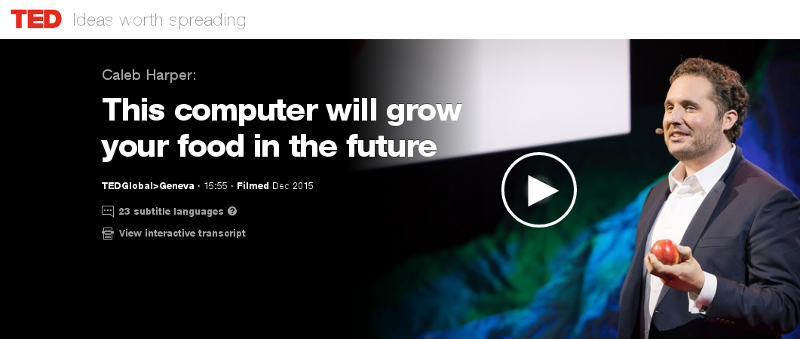
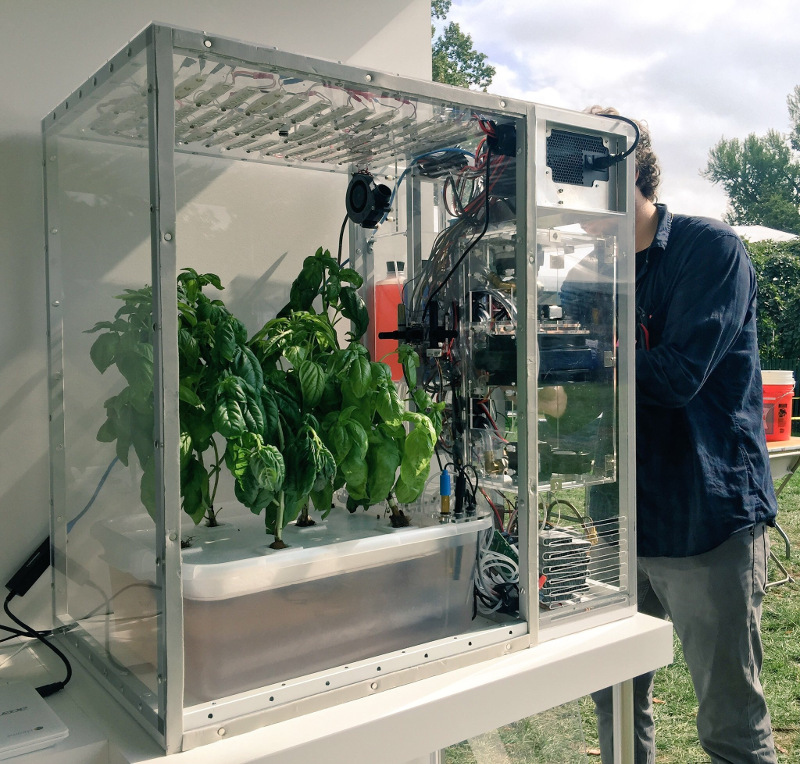
A group has recently been formed on Meetup seeking to build a food computer in Zurich. The initial meeting is planned for 6:30pm on 20 June 2017 at ETH, (Zurich Centre/Zentrum, R mistrasse 101). The question of food security underlies many of the world's problems today. In wealthier nations, we are being called upon to trust a highly opaque supply chain and our choices are limited to those things that major supermarket chains are willing to stock. A huge transport and storage apparatus adds to the cost and CO2 emissions and detracts from the nutritional value of the produce that reaches our plates. In recent times, these problems have been highlighted by the horsemeat scandal, the Guacapocalypse and the British Hummus crisis. One interesting initiative to create transparency and encourage diversity in our diets is the Open Agriculture (OpenAg) Initiative from MIT, summarised in this TED video from Caleb Harper. The food produced is healthier and fresher than anything you might find in a supermarket and has no exposure to pesticides. An open source approach to food An interesting aspect of this project is the promise of an open source approach. The project provides hardware plans, a a video of the build process, source code and the promise of sharing climate recipes (scripts) to replicate the climates of different regions, helping ensure it is always the season for your favour fruit or vegetable. Do we need it? Some people have commented on the cost of equipment and electricity. Carsten Agger recently blogged about permaculture as a cleaner alternative. While there are many places where people can take that approach, there are also many overpopulated regions and cities where it is not feasible. Some countries, like Japan, have an enormous population and previously productive farmland contaminated by industry, such as the Fukushima region. Growing our own food also has the potential to reduce food waste, as individual families and communities can grow what they need. Whether it is essential or not, the food computer project also provides a powerful platform to educate people about food and climate issues and an exciting opportunity to take the free and open source philosophy into many more places in our local communities. The Zurich Meetup group has already received expressions of interest from a diverse group including professionals, researchers, students, hackers, sustainability activists and free software developers. Next steps People who want to form a group in their own region can look in the forum topic "Where are you building your Food Computer?" to find out if anybody has already expressed interest. Which patterns from the free software world can help more people build more food computers? I've already suggested using Debian's live-wrapper to distribute a runnable ISO image that can boot from a USB stick, can you suggest other solutions like this? Can you think of any free software events where you would like to see a talk or exhibit about this project? Please suggest them on the OpenAg forum. There are many interesting resources about the food crisis, an interesting starting point is watching the documentary Food, Inc. If you are in Switzerland, please consider attending the meeting on at 6:30pm on 20 June 2017 at ETH (Centre/Zentrum), Zurich. One final thing to contemplate: if you are not hacking your own food supply, who is?

Reproducible builds folks: Reproducible Builds: week 107 in Stretch cycle

Here's what happened in the Reproducible Builds effort between Sunday May 7 and Saturday May 13 2017: Report from Reproducible Builds Hamburg Hackathon We were 16 participants from 12 projects: 7 Debian, 2 repeatr.io, 1 ArchLinux, 1 coreboot + LEDE, 1 F-Droid, 1 ElectroBSD + privoxy, 1 GNU R, 1 in-toto.io, 1 Meson and 1 openSUSE. Three people came from the USA, 3 from the UK, 2 Finland, 1 Austria, 1 Denmark and 6 from Germany, plus we several guests from our gracious hosts at the CCCHH hackerspace as well as a guest from Australia We had four presentations: Some of the things we worked on: We had a Debian focussed meeting where we discussed a number of topics: And then we also had a lot of fun in the hackerspace, enjoying some of their gimmicks, such as being able to open physical doors with ssh or controlling light and music with an webbrowser without authentication (besides being in the right network). Not quite the hackathon (This wasn't the hackathon per-se, but some of us appreciated these sights and so we thought you would too.) Many thanks to: News and media coverage openSUSE has had a security breach in their infrastructure, including their build services. As of this writing, the scope and impact are still unclear, however the incident illustrates that no one should rely on being able to secure their infrastructure at all times. Reproducible Builds help mitigate this by allowing independent verification of build results, by parties that are unaffected by the compromise. (Whilst this can happen to anyone. Kudos to openSUSE for being open about it. Now let's continue working on Reproducible Builds everywhere!) On May 13th Chris Lamb gave a talk on Reproducible Builds at OSCAL 2017 in Tirana, Albania. OSCAL 2017 Toolchain bug reports and fixes Packages' bug reports Reviews of unreproducible packages 11 package reviews have been added, 2562 have been updated and 278 have been removed in this week, adding to our knowledge about identified issues. Most of the updates were to move ~1800 packages affected by the generic catch-all captures_build_path (out of ~2600 total) to the more specific gcc_captures_build_path, fixed by our proposed patches to GCC. 5 issue types have been updated: Weekly QA work During our reproducibility testing, FTBFS bugs have been detected and reported by: diffoscope development diffoscope development continued on the experimental branch: strip-nondeterminism development reprotest development trydiffoscope development Misc. This week's edition was written by Ximin Luo, Holger Levsen and Chris Lamb & reviewed by a bunch of Reproducible Builds folks on IRC & the mailing lists.

16 May 2017

Daniel Pocock: Building an antenna and receiving ham and shortwave stations with SDR

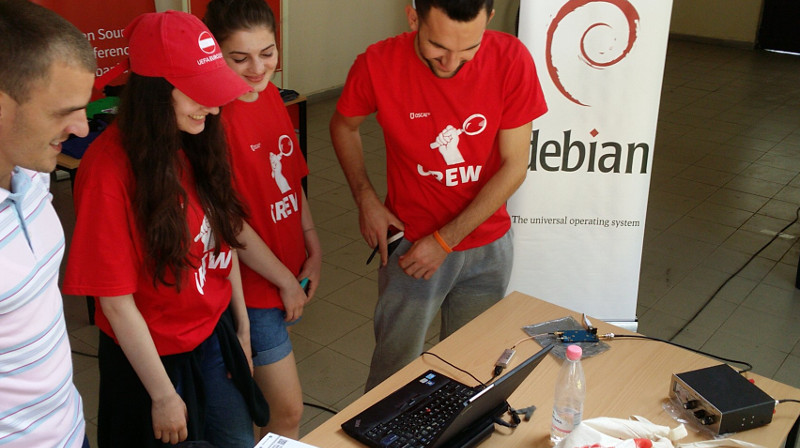
In my previous blog on the topic of software defined radio (SDR), I provided a quickstart guide to using gqrx, GNU Radio and the RTL-SDR dongle to receive FM radio and the amateur 2 meter (VHF) band. Using the same software configuration and the same RTL-SDR dongle, it is possible to add some extra components and receive ham radio and shortwave transmissions from around the world. Here is the antenna setup from the successful SDR workshop at OSCAL'17 on 13 May: After the workshop on Saturday, members of the OSCAL team successfully reconstructed the SDR and antenna at the Debian info booth on Sunday and a wide range of shortwave and ham signals were detected: Here is a close-up look at the laptop, RTL-SDR dongle (above laptop), Ham-It-Up converter (above water bottle) and MFJ-971 ATU (on right): Buying the parts
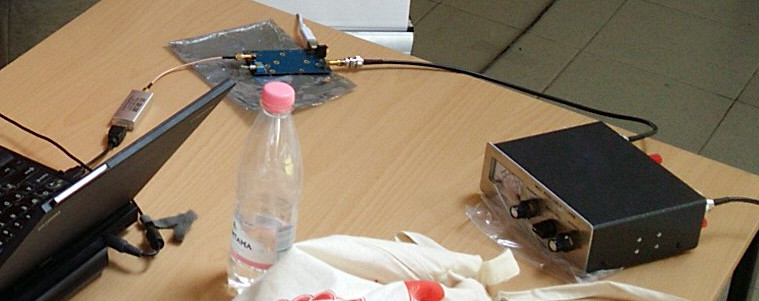
Component Purpose, Notes Price/link to source
RTL-SDR dongle Converts radio signals (RF) into digital signals for reception through the USB port. It is essential to buy the dongles for SDR with TCXO, the generic RTL dongles for TV reception are not stable enough for anything other than TV. ~ 25
Enamelled copper wire, 25 meters or more Loop antenna. Thicker wire provides better reception and is more suitable for transmitting (if you have a license) but it is heavier. The antenna I've demonstrated at recent events uses 1mm thick wire. ~ 10
4 (or more) ceramic egg insulators Attach the antenna to string or rope. Smaller insulators are better as they are lighter and less expensive. ~ 10
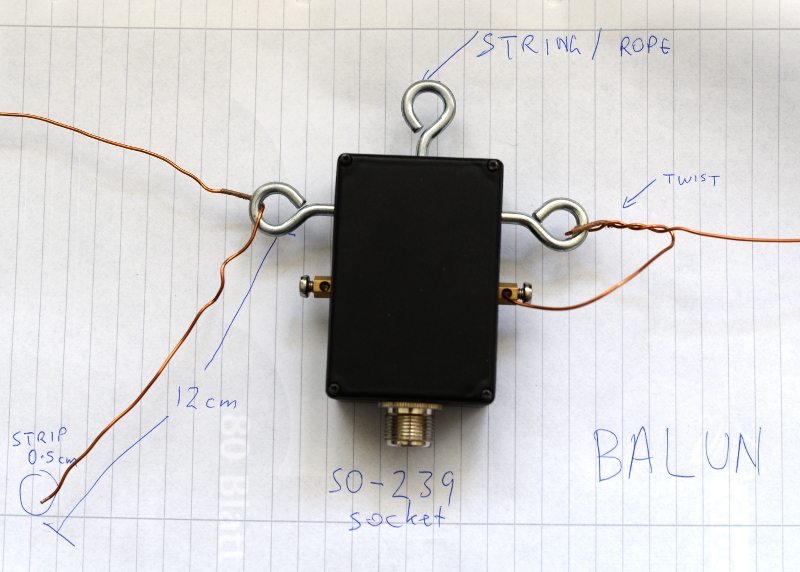
4:1 balun The actual ratio of the balun depends on the shape of the loop (square, rectangle or triangle) and the point where you attach the balun (middle, corner, etc). You may want to buy more than one balun, for example, a 4:1 balun and also a 1:1 balun to try alternative configurations. Make sure it is waterproof, has hooks for attaching a string or rope and an SO-239 socket. from 20
5 meter RG-58 coaxial cable with male PL-259 plugs on both ends If using more than 5 meters or if you want to use higher frequencies above 30MHz, use thicker, heavier and more expensive cables like RG-213. The cable must be 50 ohm. ~ 10
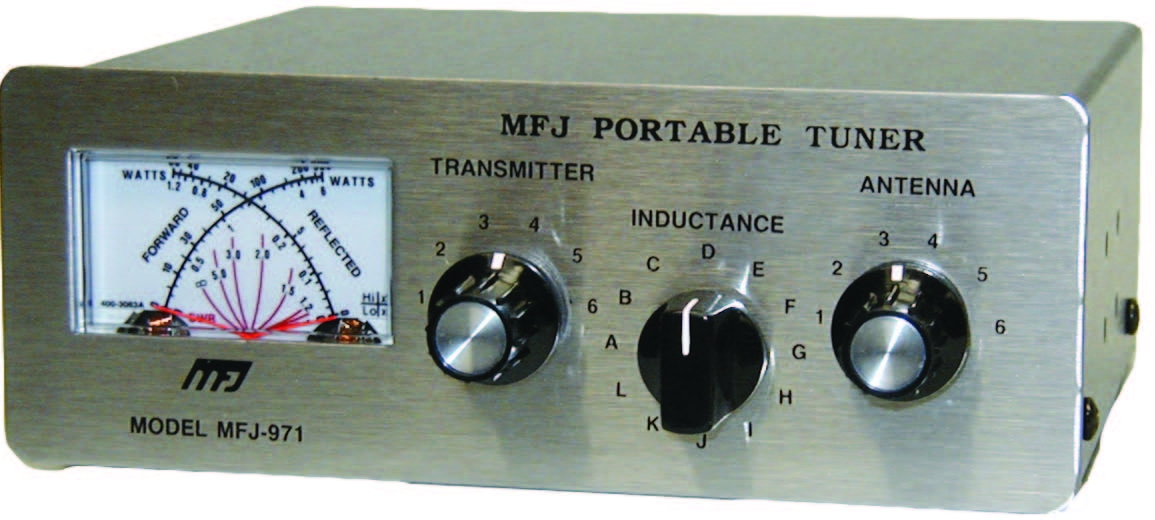
Antenna Tuning Unit (ATU) I've been using the MFJ-971 for portable use and demos because of the weight. There are even lighter and cheaper alternatives if you only need to receive. ~ 20 for receive only or second hand
PL-259 to SMA male pigtail, up to 50cm, RG58 Joins the ATU to the upconverter. Cable must be RG58 or another 50 ohm cable ~ 5
Ham It Up v1.3 up-converter Mixes the HF signal with a signal from a local oscillator to create a new signal in the spectrum covered by the RTL-SDR dongle ~ 40
SMA (male) to SMA (male) pigtail Join the up-converter to the RTL-SDR dongle ~ 2
USB charger and USB type B cable Used for power to the up-converter. A spare USB mobile phone charge plug may be suitable. ~ 5
String or rope For mounting the antenna. A ligher and cheaper string is better for portable use while a stronger and weather-resistent rope is better for a fixed installation. 5
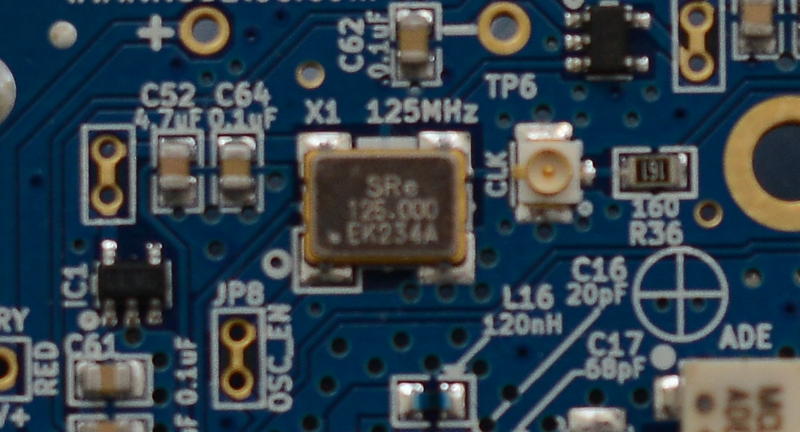
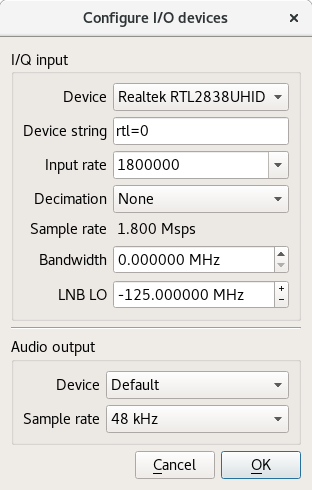
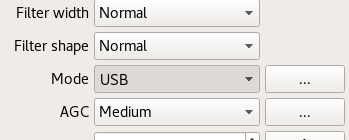
Building the antenna There are numerous online calculators for measuring the amount of enamelled copper wire to cut. For example, for a centre frequency of 14.2 MHz on the 20 meter amateur band, the antenna length is 21.336 meters. Add an extra 24 cm (extra 12 cm on each end) for folding the wire through the hooks on the balun. After cutting the wire, feed it through the egg insulators before attaching the wire to the balun. Measure the extra 12 cm at each end of the wire and wrap some tape around there to make it easy to identify in future. Fold it, insert it into the hook on the balun and twist it around itself. Use between four to six twists. Strip off approximately 0.5cm of the enamel on each end of the wire with a knife, sandpaper or some other tool. Insert the exposed ends of the wire into the screw terminals and screw it firmly into place. Avoid turning the screw too tightly or it may break or snap the wire. Insert string through the egg insulators and/or the middle hook on the balun and use the string to attach it to suitable support structures such as a building, posts or trees. Try to keep it at least two meters from any structure. Maximizing the surface area of the loop improves the performance: a circle is an ideal shape, but a square or 4:3 rectangle will work well too. For optimal performance, if you imagine the loop is on a two-dimensional plane, the first couple of meters of feedline leaving the antenna should be on the plane too and at a right angle to the edge of the antenna. Join all the other components together using the coaxial cables. Configuring gqrx for the up-converter and shortwave signals Inspect the up-converter carefully. Look for the crystal and find the frequency written on the side of it. The frequency written on the specification sheet or web site may be wrong so looking at the crystal itself is the best way to be certain. On my Ham It Up, I found a crystal with 125.000 written on it, this is 125 MHz. Launch gqrx, go to the File menu and select I/O devices. Change the LNB LO value to match the crystal frequency on the up-converter, with a minus sign. For my Ham It Up, I use the LNB LO value -125.000000 MHz. Click OK to close the I/O devices window. On the Input Controls tab, make sure Hardware AGC is enabled. On the Receiver options tab, change the Mode value. Commercial shortwave broadcasts use AM and amateur transmission use single sideband: by convention, LSB is used for signals below 10MHz and USB is used for signals above 10MHz. To start exploring the 20 meter amateur band around 14.2 MHz, for example, use USB. In the top of the window, enter the frequency, for example, 14.200 000 MHz. Now choose the FFT Settings tab and adjust the Freq zoom slider. Zoom until the width of the display is about 100 kHZ, for example, from 14.15 on the left to 14.25 on the right. Click the Play icon at the top left to start receiving. You may hear white noise. If you hear nothing, check the computer's volume controls, move the Gain slider (bottom right) to the maximum position and then lower the Squelch value on the Receiver options tab until you hear the white noise or a transmission. Adjust the Antenna Tuner knobs Now that gqrx is running, it is time to adjust the knobs on the antenna tuner (ATU). Reception improves dramatically when it is tuned correctly. Exact instructions depend on the type of ATU you have purchased, here I present instructions for the MFJ-971 that I have been using. Turn the TRANSMITTER and ANTENNA knobs to the 12 o'clock position and leave them like that. Turn the INDUCTANCE knob while looking at the signals in the gqrx window. When you find the best position, the signal strength displayed on the screen will appear to increase (the animated white line should appear to move upwards and maybe some peaks will appear in the line). When you feel you have found the best position for the INDUCTANCE knob, leave it in that position and begin turning the ANTENNA knob clockwise looking for any increase in signal strength on the chart. When you feel that is correct, begin turning the TRANSMITTER knob. Listening to a transmission At this point, if you are lucky, some transmissions may be visible on the gqrx screen. They will appear as darker colours in the waterfall chart. Try clicking on one of them, the vertical red line will jump to that position. For a USB transmission, try to place the vertical red line at the left hand side of the signal. Try dragging the vertical red line or changing the frequency value at the top of the screen by 100 Hz at a time until the station is tuned as well as possible. Try and listen to the transmission and identify the station. Commercial shortwave broadcasts will usually identify themselves from time to time. Amateur transmissions will usually include a callsign spoken in the phonetic alphabet. For example, if you hear "CQ, this is Victor Kilo 3 Tango Quebec Romeo" then the station is VK3TQR. You may want to note down the callsign, time, frequency and mode in your log book. You may also find information about the callsign in a search engine. The video demonstrates reception of a transmission from another country, can you identify the station's callsign and find his location? If you have questions about this topic, please come and ask on the Debian Hams mailing list. The gqrx package is also available in Fedora and Ubuntu but it is known to crash on startup in Ubuntu 17.04. Users of other distributions may also want to try the Debian Ham Blend bootable ISO live image as a quick and easy way to get started.

Rapha&#235;l Hertzog: Freexian s report about Debian Long Term Support, April 2017

A Debian LTS logoLike each month, here comes a report about the work of paid contributors to Debian LTS. Individual reports In April, about 190 work hours have been dispatched among 13 paid contributors. Their reports are available: Evolution of the situation The number of sponsored hours decreased slightly and we re now again a little behind our objective. The security tracker currently lists 54 packages with a known CVE and the dla-needed.txt file 37. The number of open issues is comparable to last month. Thanks to our sponsors New sponsors are in bold.

No comment Liked this article? Click here. My blog is Flattr-enabled.

Foteini Tsiami: Outreachy internship!

Hello everyone! I am very happy that I have been accepted as an intern in the Outreachy 2017 round. My project task is to adapt sch-scripts into a new project ltsp-manager , primarily through internationalization and localization as well as documentation.

Sch-scripts is a graphical tool that assists with management of a classroom computer lab, managing users and network booted computers with LTSP, and is used in more than 1000 schools in Greece along with the epoptes user monitoring software.

Traditionally, maintaining an LTSP environment requires comfort with a commandline interface, but sch-scripts provides a graphical tool that simplifies the installation, configuration and management of an LTSP classroom.

Epoptes allows the teacher to monitor or assist users in the computer lab, as well as send messages, boot and shut down computers.

Both LTSP and Epoptes are present in Debian, and internationalizing sch-scripts is an important step towards making the same interface used successfully in Greek schools available to all Debian and Ubuntu users.

Next.

Previous.