Search Results: "nic"

5 August 2017

Daniel Silverstone: USB Device Stacks, on RTFM, part 2

Previously we talked about all the different kinds of descriptors which USB devices use to communicate their capability. This is important stuff because to write any useful USB device firmware we need to be able to determine how to populate our descriptors. However, having that data on the device is entirely worthless without an understanding of how it gets from the device to the host so that it can be acted upon. To understand that, let's look at the USB wire protocol.
Note, I'll again be talking mostly about USB2.0 low- and full-speed. I believe that high speed is approximately the same but with faster wires, except not quite that simple.

Down to the wire I don't intend to talk about the actual electrical signalling, though it's not un-reasonable for you to know that USB is a pair of wires forming a differentially signalled bidirectional serial communications link. The host is responsible for managing all the framing and timing on the link, and for formatting the communications into packets. There are a number of packet types which can appear on the USB link:
Packet type Purpose
Token Packet When the host wishes to send a message to the Control endpoint to configure the device, read data IN, or write data OUT, it uses this to start the transaction.
Data(0/1) Packet Following a Setup, In, or Out token, a Data packet is a transfer of data (in either direction). The 0 and 1 alternate to provide a measure of confidence against lost packets.
Handshake Packet Following a data packet of some kind, the other end may ACK the packet (all was well), NAK the packet (report that the device cannot, temporarily, send/receive data, or that an interrupt endpoint isn't triggered), or STALL the bus in which case the host needs to intervene.
Start of Frame Every 1ms (full-speed) the host will send a SOF packet which carries a frame number. This can be used to help keep time on very simple devices. It also divides the bus into frames within which bandwidth is allocated.
As an example, when the host wishes to perform a control transfer, the following packets are transacted in turn:
  1. Setup Token - The host addresses the device and endpoint (OUT0)
  2. Data0 Packet - The host transmits a GET_DESCRIPTOR for the device descriptor
  3. Ack Packet - The device acknowledges receipt of the request
This marks the end of the first transaction. The device decodes the GET_DESCRIPTOR request and prepares the device descriptor for transmission. The transmission occurs as the next transaction on the bus. In this example, we're assuming 8 byte maximum transmission sizes, for illustrative purposes.
  1. In Token - The host addresses the device and endpoint (IN0)
  2. Data1 Packet - The device transmits the first 8 bytes of the descriptor
  3. Ack Packet - The host acknowledges the data packet
  4. In Token - The host addresses the device and endpoint (IN0)
  5. Data0 Packet - The device transmits the remaining 4 bytes of the descriptor (padded)
  6. Ack Packet - The host acknowledges the data packet
The second transaction is now complete, and the host has all the data it needs to proceed. Finally a status transaction occurs in which:
  1. Out Token - The host addresses the device and endpoint (OUT0)
  2. Data1 Packet - The host transmits a 0 byte data packet to indicate successful completion
  3. Ack Packet - The device acknowledges the completion, indicating its own satisfaction
And thus ends the full control transaction in which the host retrieves the device descriptor. From a high level, we need only consider the activity which occurs at the point of the acknowledgement packets. In the above example:
  1. On the first ACK the device prepares IN0 to transmit the descriptor, readying whatever low level device stack there is with a pointer to the descriptor and its length in bytes.
  2. On the second ACK the low levels are still thinking.
  3. On the third ACK the transmission from IN0 is complete and the endpoint no longer expects to transfer data.
  4. On the fourth ACK the control transaction is entirely complete.

Thinking at the low levels of the control interface Before we can build a high level USB stack, we need to consider the activity which might occur at the lower levels. At the low levels, particularly of the device control interface, work has to be done at each and every packet. The hardware likely deals with the token packet for us, leaving the data packets for us to process, and the resultant handshake packets will be likely handled by the hardware in response to our processing the data packets. Since every control transaction is initiated by a setup token, let's look at the setup requests which can come our way...
Setup Packet (Data) Format
Field Name Byte start Byte length Encoding Meaning
bmRequestType 0 1 Bitmap Describes the kind of request, and the target of it. See below.
bRequest 1 1 Code The request code itself, meanings of the rest of the fields vary by bRequest
wValue 2 2 Number A 16 bit value whose meaning varies by request type
wIndex 4 2 Number A 16 bit value whose meaning varies by request type but typically encodes an interface number or endpoint.
wLength 6 2 Number A 16 bit value indicating the length of the transfer to come.
Since bRequest is essentially a switch against which multiple kinds of setup packet are selected between, here's the meanings of a few...
GET_DESCRIPTOR (Device) setup packet
Field Name Value Meaning
bmRequestType 0x08 Data direction is IN (from device to host), recipient is the device
bRequest 0x06 GET_DESCRIPTOR (in this instance, the device descriptor is requested)
wValue 0x0001 This means the device descriptor
wIndex 0x0000 Irrelevant, there's only 1 device descriptor anyway
wLength 12 This is the length of a device descriptor (12 bytes)
SET_ADDRESS to set a device's USB address
Field Name Value Meaning
bmRequestType 0x00 Data direction is OUT (from host to device), recipient is the device
bRequest 0x05 SET_ADDRESS (Set the device's USB address)
wValue 0x00nn The address for the device to adopt (max 127)
wIndex 0x0000 Irrelevant for address setting
wLength 0 There's no data transfer expected for this setup operation
Most hardware blocks will implement an interrupt at the point that the Data packet following the Setup packet has been receive. This is typically called receiving a 'Setup' packet and then it's up to the device stack low levels to determine what to do and dispatch a handler. Otherwise an interrupt will fire for the IN or OUT tokens and if the endpoint is zero, the low level stack will handle it once more. One final thing worth noting about SET_ADDRESS is that it doesn't take effect until the completion of the zero-length "status" transaction following the setup transaction. As such, the status request from the host will still be sent to address zero (the default for new devices).

A very basic early "packet trace" This is an example, and is not guaranteed to be the packet sequence in all cases. It's a good indication of the relative complexity involved in getting a fresh USB device onto the bus though... When a device first attaches to the bus, the bus is in RESET state and so the first event a device sees is a RESET which causes it to set its address to zero, clear any endpoints, clear the configuration, and become ready for control transfers. Shortly after this, the device will become suspended. Next, the host kicks in and sends a port reset of around 30ms. After this, the host is ready to interrogate the device. The host sends a GET_DESCRIPTOR to the device, whose address at this point is zero. Using the information it receives from this, it can set up the host-side memory buffers since the device descriptor contains the maximum transfer size which the device supports. The host is now ready to actually 'address' the device, and so it sends another reset to the device, again around 30ms in length. The host sends a SET_ADDRESS control request to the device, telling it that its new address is nn. Once the acknowledgement has been sent from the host for the zero-data status update from the device, the device sets its internal address to the value supplied in the request. From now on, the device shall respond only to requests to nn rather than to zero. At this point, the host will begin interrogating further descriptors, looking at the configuration descriptors and the strings, to build its host-side representation of the device. These will be GET_DESCRIPTOR and GET_STRING_DESCRIPTOR requests and may continue for some time. Once the host has satisfied itself that it knows everything it needs to about the device, it will issue a SET_CONFIGURATION request which basically starts everything up in the device. Once the configuration is set, interrupt endpoints will be polled, bulk traffic will be transferred, Isochronous streams begin to run, etc.

Okay, but how do we make this concrete? So far, everything we've spoken about has been fairly abstract, or at least "soft". But to transfer data over USB does require some hardware. (Okay, okay, we could do it all virtualised, but there's no fun in that). The hardware I'm going to be using for the duration of this series is the STM32 on the blue-pill development board. This is a very simple development board which does (in theory at least) support USB device mode. If we view the schematic for the blue-pill, we can see a very "lightweight" USB interface which has a pullup resistor for D+. This is the way that a device signals to the host that it is present, and that it wants to speak at full-speed. If the pullup were on D- then it would be a low-speed device. High speed devices need a little more complexity which I'm not going to go into for today. The USB lines connect to pins PA11 and PA12 which are the USB pins on the STM32 on the board. Since USB is quite finicky, the STM32 doesn't let you remap that function elsewhere, so this is all looking quite good for us so far. The specific STM32 on the blue-pill is the STM32F103C8T6. By viewing its product page on ST's website we can find the reference manual for the part. Jumping to section 23 we learn that this STM32 supports full-speed USB2.0 which is convenient given the past article and a half. We also learn it supports up to eight endpoints active at any one time, and offers double-buffering for our bulk and isochronous transfers. It has some internal memory for packet buffering, so it won't use our RAM bandwidth while performing transfers, which is lovely. I'm not going to distill the rest of that section here, because there's a large amount of data which explains how the USB macrocell operates. However useful things to note are:
  • How IN OUT and SETUP transfers work.
  • How the endpoint buffer memory is configured.
  • That all bus-powered devices MUST respond to suspend/resume properly
  • That the hardware will prioritise endpoint interrupts for us so that we only need deal with the most pressing item at any given time.
  • There is an 'Enable Function' bit in the address register which must be set or we won't see any transactions at all.
  • How the endpoint registers signal events to the device firmware.
Next time, we're going to begin the process of writing a very hacky setup routine to try and initialise the USB device macrocell so that we can see incoming transactions through the ITM. It should be quite exciting, but given how complex this will be for me to learn, it might be a little while before it comes through.

Gunnar Wolf: DebConf17 Key Signing Party: You are here

I ran my little analysis program written last year to provide a nice map on the DebConf17 key signing party, based on the . What will you find if you go there? As an example, here is my location on the map (click on the graph to enlarge): Its main use? It will help you find what clusters are you better linked with - And who you have not cross-signed with. Some people have signed you but you didn't sign them? Or the other way around? Whom should you approach to make the keyring better connected? Can you spot some attendees who are islands and can get some help getting better connected to our keyring? Please go ahead and do it! PS There are four keys that are mentioned in the DebConf17 Keysigning Party Names file I used to build this from: 0xE8446B4AC8C77261, 0x485E1BD3AE76CB72, 0x4618E4C700000173, E267B052364F028D. The public keyserver network does not know about them. If you control one of those keys and you want me to run my script again to include it, please send it to the keyservers and mail me. If your key is not in the keyservers, nobody will be able to sign it!

4 August 2017

Daniel Silverstone: USB Device Stacks, on RTFM

I have been spending time with Jorge Aparicio's RTFM for Cortex M3 framework for writing Rust to target Cortex-M3 devices from Arm (and particularly the STM32F103 from ST Microelectronics). Jorge's work in this area has been of interest to me ever since I discovered him working on this stuff a while ago. I am very tempted by the idea of being able to implement code for the STM32 with the guarantees of Rust and the language features which I have come to love such as the trait system. I have been thinking to myself that, while I admire and appreciate the work done on the GNUK, I would like to, personally, have a go at implementing some kind of security token on an STM32 as a USB device. And with the advent of the RTFM for M3 work, and Jorge's magical tooling to make it easier to access and control the registers on an M3 microcontroller, I figured it'd be super-nice to do this in Rust, with all the advantages that entails in terms of isolating unsafe behaviour and generally having the potential to be more easily verified as not misbehaving. To do this though, means that I need a USB device stack which will work in the RTFM framework. Sadly it seems that, thus-far, only Jorge has been working on drivers for any of the M3 devices his framework supports. And one person can only do so much. So, in my infinite madness, I decided I should investigate the complexity of writing a USB device stack in Rust for the RTFM/M3 framework. (Why I thought this was a good idea is lost to the mists of late night Googling, but hey, it might make a good talk at the next conference I go to). As such, this blog post, and further ones along these lines, will serve as a partial tour of what I'm up to, and a partial aide-memoir for me about learning USB. If I get something horribly wrong, please DO contact me to correct me, otherwise I'll just continue to be wrong. If I've simplified something but it's still strictly correct, just let me know if it's an oversimplification since in a lot of cases there's no point in me putting the full details into a blog posting. I will mostly be considering USB2.0 protocol details but only really for low and full speed devices. (The hardware I'm targetting does low-speed and full-speed, but not high-speed. Though some similar HW does high-speed too, I don't have any to hand right now)

A brief introduction to USB In order to go much further, I needed a grounding in USB. It's a multi-layer protocol as you might expect, though we can probably ignore the actual electrical layer since any device we might hope to support will have to have a hardware block to deal with that. We will however need to consider the packet layer (since that will inform how the hardware block is implemented and thus its interface) and then the higher level protocols on top. USB is a deliberately asymmetric protocol. Devices are meant to be significantly easier to implement, both in terms of hardware and software, as compared with hosts. As such, despite some STM32s having OTG ports, I have no intention of supporting host mode at this time. USB is arranged into a set of busses which are, at least in the USB1.1 case, broadcast domains. As such, each device has an address assigned to it by the host during an early phase called 'configuration'. Once the address is assigned, the device is expected to only ever respond to messages addressed to it. Note that since everything is asymmetric in USB, the device can't send messages on its own, but has to be asked for them by the host, and as such the addressing is always from host toward device. USB devices then expose a number of endpoints through which communication can flow IN to the host or OUT to the device. Endpoints are not bidirectional, but the in and out endpoints do overlap in numbering. There is a special pair of endpoints, IN0 and OUT0 which, between them, form what I will call the device control endpoints. The device control endpoints are important since every USB device MUST implement them, and there are a number of well defined messages which pass over them to control the USB device. In theory a bare minimum USB device would implement only the device control endpoints.

Configurations, and Classes, and Interfaces, Oh My! In order for the host to understand what the USB device is, and what it is capable of, part of the device control endpoints' responsibility is to provide a set of descriptors which describe the device. These descriptors form a heirarchy and are then glommed together into a big lump of data which the host can download from the device in order to decide what it is and how to use it. Because of various historical reasons, where a multi-byte value is used, they are defined to be little-endian, though there are some BCD fields. Descriptors always start with a length byte and a type byte because that way the host can parse/skip as necessary, with ease. The first descriptor is the device descriptor, is a big one, and looks like this:
Device Descriptor
Field Name Byte start Byte length Encoding Meaning
bLength 0 1 Number Size of the descriptor in bytes (18)
bDescriptorType 1 1 Constant Device Descriptor (0x01)
bcdUSB 2 2 BCD USB spec version compiled with
bDeviceClass 4 1 Class Code, assigned by USB org (0 means "Look at interface descriptors", common value is 2 for CDC)
bDeviceSubClass 5 1 SubClass Code, assigned by USB org (usually 0)
bDeviceProtocol 6 1 Protocol Code, assigned by USB org (usually 0)
bMaxPacketSize 7 1 Number Max packet size for IN0/OUT0 (Valid are 8, 16, 32, 64)
idVendor 8 2 ID 16bit Vendor ID (Assigned by USB org)
idProduct 10 2 ID 16bit Product ID (Assigned by manufacturer)
bcdDevice 12 2 BCD Device version number (same encoding as bcdUSB)
iManufacturer 14 1 Index String index of manufacturer name (0 if unavailable)
iProduct 15 1 Index String index of product name (0 if unavailable)
iSerialNumber 16 1 Index String index of device serial number (0 if unavailable)
bNumConfigurations 17 1 Number Count of configurations the device has.
This looks quite complex, but breaks down into a relatively simple two halves. The first eight bytes carries everything necessary for the host to be able to configure itself and the device control endpoints properly in order to communicate effectively. Since eight bytes is the bare minimum a device must be able to transmit in one go, the host can guarantee to get those, and they tell it what kind of device it is, what USB protocol it supports, and what the maximum transfer size is for its device control endpoints. The encoding of the bcdUSB and bcdDevice fields is interesting too. It is of the form 0xMMmm where MM is the major number, mm the minor. So USB2.0 is encoded as 0x0200, USB1.1 as 0x0110 etc. If the device version is 17.36 then that'd be 0x1736. Other fields of note are bDeviceClass which can be 0 meaning that interfaces will specify their classes, and idVendor/idProduct which between them form the primary way for the specific USB device to be identified. The Index fields are indices into a string table which we'll look at later. For now it's enough to know that wherever a string index is needed, 0 can be provided to mean "no string here". The last field is bNumConfigurations and this indicates the number of ways in which this device might function. A USB device can provide any number of these configurations, though typically only one is provided. If the host wishes to switch between configurations then it will have to effectively entirely quiesce and reset the device. The next kind of descriptor is the configuration descriptor. This one is much shorter, but starts with the same two fields:
Configuration Descriptor
Field Name Byte start Byte length Encoding Meaning
bLength 0 1 Number Size of the descriptor in bytes (9)
bDescriptorType 1 1 Constant Configuration Descriptor (0x02)
wTotalLength 2 2 Number Size of the configuration in bytes, in total
bNumInterfaces 4 1 Number The number of interfaces in this configuration
bConfigurationValue 5 1 Number The value to use to select this configuration
iConfiguration 6 1 Index The name of this configuration (0 for unavailable)
bmAttributes 7 1 Bitmap Attributes field (see below)
bMaxPower 8 1 Number Maximum bus power this configuration will draw (in 2mA increments)
An important field to consider here is the bmAttributes field which tells the host some useful information. Bit 7 must be set, bit 6 is set if the device would be self-powered in this configuration, bit 5 indicates that the device would like to be able to wake the host from sleep mode, and bits 4 to 0 must be unset. The bMaxPower field is interesting because it encodes the power draw of the device (when set to this configuration). USB allows for up to 100mA of draw per device when it isn't yet configured, and up to 500mA when configured. The value may be used to decide if it's sensible to configure a device if the host is in a low power situation. Typically this field will be set to 50 to indicate the nominal 100mA is fine, or 250 to request the full 500mA. Finally, the wTotalLength field is interesting because it tells the host the total length of this configuration, including all the interface and endpoint descriptors which make it up. With this field, the host can allocate enough RAM to fetch the entire configuration descriptor block at once, simplifying matters dramatically for it. Each configuration has one or more interfaces. The interfaces group some endpoints together into a logical function. For example a configuration for a multifunction scanner/fax/printer might have an interface for the scanner function, one for the fax, and one for the printer. Endpoints are not shared among interfaces, so when building this table, be careful. Next, logically, come the interface descriptors:
Interface Descriptor
Field Name Byte start Byte length Encoding Meaning
bLength 0 1 Number Size of the descriptor in bytes (9)
bDescriptorType 1 1 Constant Interface Descriptor (0x04)
bInterfaceNumber 2 1 Number The number of the interface
bAlternateSetting 3 1 Number The interface alternate index
bNumEndpoints 4 1 Number The number of endpoints in this interface
bInterfaceClass 5 1 Class The interface class (USB Org defined)
bInterfaceSubClass 6 1 SubClass The interface subclass (USB Org defined)
bInterfaceProtocol 7 1 Protocol The interface protocol (USB Org defined)
iInterface 8 1 Index The name of the interface (or 0 if not provided)
The important values here are the class/subclass/protocol fields which provide a lot of information to the host about what the interface is. If the class is a USB Org defined one (e.g. 0x02 for Communications Device Class) then the host may already have drivers designed to work with the interface meaning that the device manufacturer doesn't have to provide host drivers. The bInterfaceNumber is used by the host to indicate this interface when sending messages, and the bAlternateSetting is a way to vary interfaces. Two interfaces with the came bInterfaceNumber but different bAlternateSettings can be switched between (like configurations, but) without resetting the device. Hopefully the rest of this descriptor is self-evident by now. The next descriptor kind is endpoint descriptors:
Endpoint Descriptor
Field Name Byte start Byte length Encoding Meaning
bLength 0 1 Number Size of the descriptor in bytes (7)
bDescriptorType 1 1 Constant Endpoint Descriptor (0x05)
bEndpointAddress 2 1 Endpoint Endpoint address (see below)
bmAttributes 3 1 Bitmap Endpoint attributes (see below)
wMaxPacketSize 4 2 Number Maximum packet size this endpoint can send/receive
bInterval 6 1 Number Interval for polling endpoint (in frames)
The bEndpointAddress is a 4 bit endpoint number (so there're 16 endpoint indices) and a bit to indicate IN vs. OUT. Bit 7 is the direction marker and bits 3 to 0 are the endpoint number. This means there are 32 endpoints in total, 16 in each direction, 2 of which are reserved (IN0 and OUT0) giving 30 endpoints available for interfaces to use in any given configuration. The bmAttributes bitmap covers the transfer type of the endpoint (more below), and the bInterval is an interval measured in frames (1ms for low or full speed, 125 s in high speed). bInterval is only valid for some endpoint types. The final descriptor kind is for the strings which we've seen indices for throughout the above. String descriptors have two forms:
String Descriptor (index zero)
Field Name Byte start Byte length Encoding Meaning
bLength 0 1 Number Size of the descriptor in bytes (variable)
bDescriptorType 1 1 Constant String Descriptor (0x03)
wLangID[0] 2 2 Number Language code zero (e.g. 0x0409 for en_US)
wLangID[n] 4.. 2 Number Language code n ...
This form (for descriptor 0) is that of a series of language IDs supported by the device. The device may support any number of languages. When the host requests a string descriptor, it will supply both the index of the string and also the language id it desires (from the list available in string descriptor zero). The host can tell how many language IDs are available simply by dividing bLength by 2 and subtracting 1 for the two header bytes. And for string descriptors of an index greater than zero:
String Descriptor (index greater than zero)
Field Name Byte start Byte length Encoding Meaning
bLength 0 1 Number Size of the descriptor in bytes (variable)
bDescriptorType 1 1 Constant String Descriptor (0x03)
bString 2.. .. Unicode The string, in "unicode" format
This second form of the string descriptor is simply the the string is in what the USB spec calls 'Unicode' format which is, as of 2005, defined to be UTF16-LE without a BOM or terminator. Since string descriptors are of a variable length, the host must request strings in two transactions. First a request for 2 bytes is sent, retrieving the bLength and bDescriptorType fields which can be checked and memory allocated. Then a request for bLength bytes can be sent to retrieve the entire string descriptor.

Putting that all together Phew, this is getting to be quite a long posting, so I'm going to leave this here and in my next post I'll talk about how the host and device pass packets to get all that information to the host, and how it gets used.

3 August 2017

Elena 'valhalla' Grandi: Debian Day in Varese

Debian Day in Varese

I'm stuck home instead of being able to go to DebConf, but that doesn't mean that Debian Day will be left uncelebrated!

Since many of the locals are away for the holidays, we of @Gruppo Linux Como and @LIFO aren't going to organize a full day of celebrations, but at the very least we are meeting for a dinner in Varese, at some restaurant that will be open on that date.

Everybody is welcome: to join us please add your name (nickname or identifier of any kind, as long as it fits in the box) on dudle.inf.tu-dresden.de/debday before thursday, August 10th, so that we can
get a reservation at the restaurant.

2 August 2017

Markus Koschany: My Free Software Activities in July 2017

Welcome to gambaru.de. Here is my monthly report that covers what I have been doing for Debian. If you re interested in Java, Games and LTS topics, this might be interesting for you. Debian Games Debian Java Debian LTS This was my seventeenth month as a paid contributor and I have been paid to work 23,5 hours on Debian LTS, a project started by Rapha l Hertzog. In that time I did the following: Non-maintainer upload Thanks for reading and see you next time.

1 August 2017

Paul Wise: FLOSS Activities July 2017

Changes

Issues

Review

Administration
  • Debian: fsck/reboot a buildd, reboot a segfaulting buildd, report/fix broken hoster contact, ping hoster about down machines, forcibly reset backup machine, merged cache patch for network-test.d.o, do some samhain dances, fix two stunnel services, update an IP address in LDAP, fix /etc/aliases on one host, reboot 1 non-responsive VM
  • Debian mentors: security updates, reboot
  • Debian wiki: whitelist several email addresses
  • Debian build log scanner: deploy my changes
  • Debian PTS: deploy my changes
  • Openmoko: security updates & reboots

Communication
  • Ping Advogato users on Planet Debian about updating/removing their feeds since it shut down
  • Invite deepin to the Debian derivatives census
  • Welcome Deepin to the Debian derivatives census
  • Inquire about the status of GreenboneOS, HandyLinux

Sponsors All work was done on a volunteer basis.

Thorsten Alteholz: My Debian Activities in July 2017

FTP assistant This month I am back to normal numbers and accepted 319 packages. I also kept the promise from last month and rejected 26 uploads. Debian LTS This was my thirty-seventh month that I did some work for the Debian LTS initiative, started by Raphael Hertzog at Freexian. This month my all in all workload went up to 23.5h. During that time I did LTS uploads of: I could also remove libtorrent-rasterbar and pspp from dla-needed.txt as the affected code was not in the Wheezy version or it was just a simple bug. Last but not least I also had a few days of frontdesk duties. Other stuff This month I uploaded a new version of entropybroker with a revised set of systemd service files. At the moment there is public instance of entropybroker running at eb.debian.net. Its entropy is fed by several Entropy Keys made by Simtec Electronics. Though it is public, it is not yet anonymous, so if you need some entropy please drop me a line. At the moment there are two consumers, but the buffers are still filled. I also uploaded several new packages, orcania, yder, hoel and ulfius. If everything works as expected, there will be soon an oauth2 server available in Debian. Last but not least my DOPOM of this month has been ptunnel.

Russ Allbery: Review: The Fifth Season

Review: The Fifth Season, by N.K. Jemisin
Series: The Broken Earth #1
Publisher: Orbit
Copyright: 2015
ISBN: 0-316-22930-X
Format: Kindle
Pages: 497
The world of The Fifth Season is one of near-constant seismic activity. Volcanoes, massive earthquakes, and all the catastrophes that follow them are a constant threat. Civilization barely survives the turmoil, and only because of two things: strict cultural rules about how to handle a "fifth season" of heavy seismic activity and its aftermath (called stonelore), and the orogenes. Orogenes are humans (well, there is some debate about that) who have an organ that others don't, a biological ability to manipulate the seismic activity and the earth itself. They can protect others by damping down activity, smoothing faults, and redirecting seismic shock waves, but they can also destroy: pull earth out of shape, set off quakes, and create paths for magma to surface. And, to gather the power to manipulate the earth, they draw energy from everything around them, including from other people, often fatally. Orogenes are feared and hated by the typical person. The Stillness, the ironically-named continent on which this book is set, is very old and has had numerous civilizations destroyed by some seismic catastrophe. The landscape is scattered with useless or dangerous remnants of previous forgotten civilizations; the history, likewise, with only the stonelore and some muddled mythology available to most people. The current rulers have kept their empire for a surprising length of time, however, due mostly to the stable ground beneath their centrally-located capital. That stability comes from Fulcrum-trained orogenes, who are taken from their family as children and trained harshly to serve their society by suppressing or fixing dangerous seismic events. Fulcrum orogenes don't have an awful life (well, most of them; for some, it is pure torture), but they're effectively slaves, kept under the watchful eye of Guardians who have mysterious powers of their own. Against this background, The Fifth Season tells three interwoven stories. Essun lives in a small village (comm) at the start of the book, leading a quiet life, until one of her children is beaten to death by her husband following a seismic event that he thinks the child stopped. He's taken their other child and left. Essun, severely traumatized, heads after him to attempt a rescue, or at least revenge. Damaya is a child from another comm who is sold to the Guardians by her parents when she demonstrates orogenic ability, and who goes through Fulcrum training. And Syenite is a Fulcrum orogene, assigned to a field mission with a difficult but very senior orogene named Alabaster. All of these stories eventually interweave, and eventually reveal where they fit in the somewhat unobvious chronology of the story, but it takes some time to get there. It also takes some time for the primary characters to have much in the way of agency. Essun starts with the most, once she recovers her senses enough to start her hunt for revenge. Syenite is ambitious but junior, and Damaya is a child, trying to navigate an unknown world of student politics and strict rules. And all three of the main characters are orogenes, rogga when one is being insulting, and this world does not like orogenes. At all. The Fifth Season starts with an unusual narrative style: a conversational narrator who begins with some of the world background and some mysterious scenes that didn't make sense until much later in the book (late enough that I didn't remember them or make sense of them until I re-read them for this review). The book then focuses on Essun, whose scenes are written in second person present. Normally I think second person feels weirdly intrusive and off-putting, but once I got used to it here, I think it works as well as I've seen it work anywhere. I also see why Jemisin did it: Essun starts the story so traumatized that she's partly disassociating. First person wouldn't have worked, and the second-person voice gives that trauma some immediacy and emotional heft that would have been hard to achieve in third person. The story starts slowly, and builds slowly, as the world is introduced and Jemisin lays down the texture and history of the world. The world-building is ambitious in tracing down the ramifications of the seismic chaos and the implications of orogene ability (although it's best to think of it as pure magic, despite the minor science fiction trappings). But through that world-building, what this story is building is a deep, powerful, frustrated rage. The Fifth Season is an angry book. It's a book about outcasts, about slaves. About people who, even if they're succeeding within the parameters they're given, are channeled and stymied and controlled. It's a story about smiling, kind paternalism hiding lies, control, and abuse, about how hard it is to find enough space from the smothering destructiveness of a totalitarian culture to let yourself relax. It's a story about the horrible things people are willing to do to those they don't consider fully human, and all the ways in which safety, expediency, tradition, culture, and established social roles conspire to keep people within the box where they belong. And it's a story about how being constantly on edge, constantly dreading the next abuse, breaking under it, and being left wanting to burn the whole world to the ground. I struggled at the start of this book, but it grew on me, and by about halfway through it had me hooked completely. At first, Syenite's part of the story (the most traditionally told) was my favorite, but the coming-of-age stories of her and Damaya were overtaken by Essun's far more complex, cautious, and battle-weary tale. And I loved Jemisin's world-building. There's a lot of depth here, a lot of things going on that are unexplained but clearly important, and a restraint and maturity in how the world is revealed that makes it feel older and more layered than Jemisin's The Hundred Thousand Kingdoms. The major drawback of this book is that it is very much the first book of a series, and it doesn't so much have an ending as a hard stop. It's not quite a cliff-hanger, but it's nearly as unsatisfying as one. Most of the major questions of the book who the stone eaters are and what they want, and the fate of Essun's husband and child, just to name two are still unresolved at the end of the story. There is a bit of emotional closure, but not a true moment of catharsis for all of the rage. Hopefully that will be coming in a future book. This is a very unusual story, mixing fantasy and a sort of magic (orogeny) with some science fiction elements and a deep history. It's gritty, textured, emotional, and furious, and very much worth reading. I'm looking forward to the next book in the series. Followed by The Obelisk Gate. Rating: 8 out of 10

Junichi Uekawa: Playing with appengine python ndb.

Playing with appengine python ndb. Some interfaces changed from the old interface and I don't think I quite got the hang of it. The last time I was actively using it is when I was doing tokyodebian reservation system that I haven't touched for 3 years and started 8 years ago.

31 July 2017

Jonathan McDowell: How to make a keyring

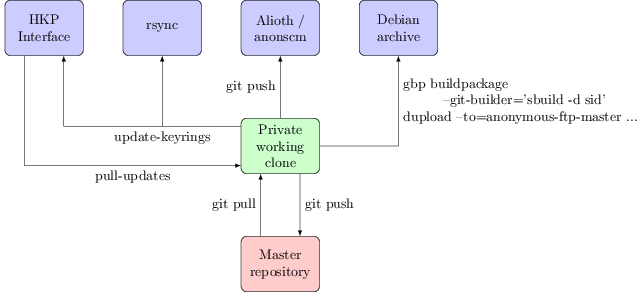
Every month or two keyring-maint gets a comment about how a key update we say we ve performed hasn t actually made it to the active keyring, or a query about why the keyring is so out of date, or told that although a key has been sent to the HKP interface and that is showing the update as received it isn t working when trying to upload to the Debian archive. It s frustrating to have to deal with these queries, but the confusion is understandable. There are multiple public interfaces to the Debian keyrings and they re not all equal. This post attempts to explain the interactions between them, and how I go about working with them as part of the keyring-maint team. First, a diagram to show the different interfaces to the keyring and how they connect to each other: keyring-maint workflow
Public interfaces

rsync: keyring.debian.org::keyrings This is the most important public interface; it s the one that the Debian infrastructure uses. It s the canonical location of the active set of Debian keyrings and is what you should be using if you want the most up to date copy. The validity of the keyrings can be checked using the included sha512sums.txt file, which will be signed by whoever in keyring-maint did the last keyring update.

HKP interface: hkp://keyring.debian.org/ What you talk to with gpg --keyserver keyring.debian.org. Serves out the current keyrings, and accepts updates to any key it already knows about (allowing, for example, expiry updates, new subkeys + uids or new signatures without the need to file a ticket in RT or otherwise explicitly request it). Updates sent to this interface will be available via it within a few hours, but must be manually folded into the active keyring. This in general happens about once a month when preparing for a general update of the keyring; for example b490c1d5f075951e80b22641b2a133c725adaab8. Why not do this automatically? Even though the site uses GnuPG to verify incoming updates there are still occasions we ve seen bugs (such as #787046, where GnuPG would always import subkeys it didn t understand, even when that subkey was already present). Also we don t want to allow just any UID to be part of the keyring. It is thus useful to retain a final set of human based sanity checking for any update before it becomes part of the keyring proper.

Alioth/anonscm: https://anonscm.debian.org/git/keyring/keyring/ A public mirror of the git repository the keyring-maint team use to maintain the keyring. Every action is recorded here, and in general each commit should be a single action (such as adding a new key, doing a key replacement or moving a key between keyrings). Note that pulling in the updates sent via HKP count as a single action, rather than having a commit per key updated. This mirror is updated whenever a new keyring is made active (i.e. made available via the rsync interface). Until that point pending changes are kept private; we sometimes deal with information such as the fact someone has potentially had a key compromised that we don t want to be public until we ve actually disabled it. Every keyring push (as we refer to the process of making a new keyring active) is tagged with the date it was performed. Releases are also tagged with their codenames, to make it easy to do comparisons over time.

Debian archive This is actually the least important public interface to the keyring, at least from the perspective of the keyring-maint team. No infrastructure makes use of it and while it s mostly updated when a new keyring is made active we only make a concerted effort to do so when it is coming up to release. It s provided as a convenience package rather than something which should be utilised for active verification of which keys are and aren t currently part of the keyring.

Team interface

Master repository: kaufmann.debian.org:/srv/keyring.debian.org/master-keyring.git The master git repository for keyring maintenance is stored on kaufmann.debian.org AKA keyring.debian.org. This system is centrally managed by DSA, with only DSA and keyring-maint having login rights to it. None of the actual maintenance work takes place here; it is a bare repo providing a central point for the members of keyring-maint to collaborate around.

Private interface

Private working clone This is where all of the actual keyring work happens. I have a local clone of the repository from kaufmann on a personal machine. The key additions / changes I perform all happen here, and are then pushed to the master repository so that they re visible to the rest of the team. When preparing to make a new keyring active the changes that have been sent to the HKP interface are copied from kaufmann via scp and folded in using the pull-updates script. The tree is assembled into keyrings with a simple make and some sanity tests performed using make test. If these are successful the sha512sums.txt file is signed using gpg --clearsign and the output copied over to kaufmann. update-keyrings is then called to update the active keyrings (both rsync + HKP). A git push public pushes the changes to the public repository on anonscm. Finally gbp buildpackage --git-builder='sbuild -d sid' tells git-buildpackage to use sbuild to build a package ready to be uploaded to the archive. Hopefully that helps explain the different stages and outputs of keyring maintenance; I m aware that it would be a good idea for this to exist somewhere on keyring.debian.org as well and will look at doing so.

Russell Coker: Running a Tor Relay

I previously wrote about running my SE Linux Play Machine over Tor [1] which involved configuring ssh to use Tor. Since then I have installed a Tor hidden service for ssh on many systems I run for clients. The reason is that it is fairly common for them to allow a server to get a new IP address by DHCP or accidentally set their firewall to deny inbound connections. Without some sort of VPN this results in difficult phone calls talking non-technical people through the process of setting up a tunnel or discovering an IP address. While I can run my own VPN for them I don t want their infrastructure tied to mine and they don t want to pay for a 3rd party VPN service. Tor provides a free VPN service and works really well for this purpose. As I believe in giving back to the community I decided to run my own Tor relay. I have no plans to ever run a Tor Exit Node because that involves more legal problems than I am willing or able to deal with. A good overview of how Tor works is the EFF page about it [2]. The main point of a Middle Relay (or just Relay ) is that it only sends and receives encrypted data from other systems. As the Relay software (and the sysadmin if they choose to examine traffic) only sees encrypted data without any knowledge of the source or final destination the legal risk is negligible. Running a Tor relay is quite easy to do. The Tor project has a document on running relays [3], which basically involves changing 4 lines in the torrc file and restarting Tor. If you are running on Debian you should install the package tor-geoipdb to allow Tor to determine where connections come from (and to not whinge in the log files). ORPort [IPV6ADDR]:9001 If you want to use IPv6 then you need a line like the above with IPV6ADDR replaced by the address you want to use. Currently Tor only supports IPv6 for connections between Tor servers and only for the data transfer not the directory services. Data Transfer I currently have 2 systems running as Tor relays, both of them are well connected in a European DC and they are each transferring about 10GB of data per day which isn t a lot by server standards. I don t know if there is a sufficient number of relays around the world that the share of the load is small or if there is some geographic dispersion algorithm which determined that there are too many relays in operation in that region.

29 July 2017

Antoine Beaupr : My free software activities, July 2017

Debian Long Term Support (LTS) This is my monthly working on Debian LTS. This time I worked on various hairy issues surrounding ca-certificates, unattended-upgrades, apache2 regressions, libmtp, tcpdump and ipsec-tools.

ca-certificates updates I've been working on the removal of the Wosign and StartCom certificates (Debian bug #858539) and, in general, the synchronisation of ca-certificates across suites (Debian bug #867461) since at least last march. I have made an attempt at summarizing the issue which led to a productive discussion and it seems that, in the end, the maintainer will take care of synchronizing information across suites. Guido was right in again raising the question of synchronizing NSS across all suites (Debian bug #824872) which itself raised the other question of how to test reverse dependencies. This brings me back to Debian bug #817286 which, basically proposed the idea of having "proposed updates" for security issues. The problem is while we can upload test packages to stable proposed-updates, we can't do the same in LTS because the suite is closed and we operate only on security packages. This issue came up before in other security upload and we need to think better about how to solve this.

unattended-upgrades Speaking of security upgrades brings me to the question of a bug (Debian bug #867169) that was filed against the wheezy version of unattended-upgrades, which showed that the package simply stopped working since the latest stable release, because wheezy became "oldoldstable". I first suggested using the "codename" but that appears to have been introduced only after wheezy. In the end, I proposed a simple update that would fix the configuration files and uploaded this as DLA-1032-1. This is thankfully fixed in later releases and will not require such hackery when jessie becomes LTS as well.

libmtp Next up is the work on the libmtp vulnerabilities (CVE-2017-9831 and CVE-2017-9832). As I described in my announcement, the work to backport the patch was huge, as upstream basically backported a whole library from the gphoto2 package to fix those issues (and probably many more). The lack of a test suite made it difficult to trust my own work, but given that I had no (negative) feedback, I figured it was okay to simply upload the result and that became DLA-1029-1.

tcpdump I then looked at reproducing CVE-2017-11108, a heap overflow triggered tcpdump would parse specifically STP packets. In Debian bug #867718, I described how to reproduce the issue across all suites and opened an issue upstream, given that the upstream maintainers hadn't responded responded in weeks according to notes in the RedHat Bugzilla issue. I eventually worked on a patch which I shared upstream, but that was rejected as they were already working on it in their embargoed repository. I can explain this confusion and duplication of work with:
  1. the original submitter didn't really contact security@tcpdump.org
  2. he did and they didn't reply, being just too busy
  3. they replied and he didn't relay that information back
I think #2 is most likely: the tcpdump.org folks are probably very busy with tons of reports like this. Still, I should probably have contacted security@tcpdump.org directly before starting my work, even though no harm was done because I didn't divulge issues that were already public. Since then, tcpdump has released 4.9.1 which fixes the issue, but then new CVEs came out that will require more work and probably another release. People looking into this issue must be certain to coordinate with the tcpdump security team before fixing the actual issues.

ipsec-tools Another package that didn't quite have a working solution is the ipsec-tools suite, in which the racoon daemon was vulnerable to a remotely-triggered DOS attack (CVE-2016-10396). I reviewed and fixed the upstream patch which introduced a regression. Unfortunately, there is no test suite or proof of concept to control the results. The reality is that ipsec-tools is really old, and should maybe simply be removed from Debian, in favor of strongswan. Upstream hasn't done a release in years and various distributions have patched up forks of those to keep it alive... I was happy, however, to know that a maintainer will take care of updating the various suites, including LTS, with my improved patch. So this fixes the issue for now, but I would strongly encourage users to switch away from ipsec-tools in the future.

apache2 Finally, I was bitten by the old DLA-841-1 upload I did all the way back in February, as it introduced a regression (Debian bug #858373). It turns out it was possible to segfault Apache workers with a trivial HTTP request, in certain (rather exotic, I might add) configurations (ErrorDocument 400 directive pointing to a cgid script in worker mode). Still, it was a serious regression and I found a part of the nasty long patch we worked on back then that was faulty, and introduced a small fix to correct that. The proposed package unfortunately didn't yield any feedback, and I can only assume it will work okay for people. The result is the DLA-841-2 upload which fixes the regression. I unfortunately didn't have time to work on the remaining CVEs affecting apache2 in LTS at the time of writing.

Triage I also did some miscellaneous triage by filing Debian bug #867477 for poppler in an effort to document better the pending issue. Next up was some minor work on eglibc issues. CVE-2017-8804 has a patch, but it's been disputed. since the main victim of this and the core of the vulnerability (rpcbind) has already been fixed, I am not sure this vulnerability is still a thing in LTS at all. I also looked at CVE-2014-9984, but the code is so different in wheezy that I wonder if LTS is affected at all. Unfortunately, the eglibc gymnastics are a little beyond me and I do not feel confident enough to just push those issues aside for now and let them open for others to look at.

Other free software work And of course, there's my usual monthly volunteer work. My ratio is a little better this time, having reached an about even ratio between paid and volunteer work, whereas this was 60% volunteer work in march.

Announcing ecdysis I recently published ecdysis, a set of template and code samples that I frequently reuse across project. This is probably the least pronounceable project name I have ever chosen, but this is somewhat on purpose. The goal of this project is not collaboration or to become a library: it's just a personal project which I share with the world as a curiosity. To quote the README file:
The name comes from what snakes and other animals do to "create a new snake": they shed their skin. This is not so appropriate for snakes, as it's just a way to rejuvenate their skin, but is especially relevant for anthropods since then "ecdysis" may be associated with a metamorphosis:
Ecdysis is the moulting of the cuticle in many invertebrates of the clade Ecdysozoa. Since the cuticle of these animals typically forms a largely inelastic exoskeleton, it is shed during growth and a new, larger covering is formed. The remnants of the old, empty exoskeleton are called exuviae. Wikipedia
So this project is metamorphosed into others when the documentation templates, code examples and so on are reused elsewhere. For that reason, the license is an unusally liberal (for me) MIT/Expat license. The name also has the nice property of being absolutely unpronounceable, which makes it unlikely to be copied but easy to search online.
It was an interesting exercise to go back into older projects and factor out interesting code. The process is not complete yet, as there are older projects I'm still curious in reviewing. A bunch of that code could also be factored into upstream project and maybe even the Python standard library. In short, this is stuff I keep on forgetting how to do: a proper setup.py config, some fancy argparse extensions and so on. Instead of having to remember where I had written that clever piece of code, I now shove it in the crazy chaotic project where I can find it again in the future.

Beets experiments Since I started using Subsonic (or Libresonic) to manage the music on my phone, album covers are suddenly way more interesting. But my collection so far has had limited album covers: my other media player (gmpc) would download those on the fly on its own and store them in its own database - not on the filesystem. I guess this could be considered to be a limitation of Subsonic, but I actually appreciate the separation of duty here. Garbage in, garbage out: the quality of Subsonic's rendering depends largely on how well setup your library and tags are. It turns out there is an amazing tool called beets to do exactly that kind of stuff. I originally discarded that "media library management system for obsessive-compulsive [OC] music geeks", trying to convince myself i was not an "OC music geek". Turns out I am. Oh well. Thanks to beets, I was able to download album covers for a lot of the albums in my collection. The only covers that are missing now are albums that are not correctly tagged and that beets couldn't automatically fix up. I still need to go through those and fix all those tags, but the first run did an impressive job at getting album covers. Then I got the next crazy idea: after a camping trip where we forgot (again) the lyrics to Georges Brassens, I figured I could start putting some lyrics on my ebook reader. "How hard can that be?" of course, being the start of another crazy project. A pull request and 3 days later, I had something that could turn a beets lyrics database into a Sphinx document which, in turn, can be turned into an ePUB. In the process, I probably got blocked from MusixMatch a hundred times, but it's done. Phew! The resulting e-book is about 8000 pages long, but is still surprisingly responsive. In the process, I also happened to do a partial benchmark of Python's bloom filter libraries. The biggest surprise there was the performance of the set builtin: for small items, it is basically as fast as a bloom filter. Of course, when the item size grows larger, its memory usage explodes, but in this case it turned out to be sufficient and bloom filter completely overkill and confusing. Oh, and thanks to those efforts, I got admitted in the beetbox organization on GitHub! I am not sure what I will do with that newfound power: I was just scratching an itch, really. But hopefully I'll be able to help here and there in the future as well.

Debian package maintenance I did some normal upkeep on a bunch of my packages this month, that were long overdue:
  • uploaded slop 6.3.47-1: major new upstream release
  • uploaded an NMU for maim 5.4.64-1.1: maim was broken by the slop release
  • uploaded pv 1.6.6-1: new upstream release
  • uploaded kedpm 1.0+deb8u1 to jessie (oldstable): one last security fix (Debian bug #860817, CVE-2017-8296) for that derelict password manager
  • uploaded charybdis 3.5.5-1: new minor upstream release, with optional support for mbedtls
  • filed Debian bug #866786 against cryptsetup to make the remote initramfs SSH-based unlocking support multiple devices: thanks to the maintainer, this now works flawlessly in buster and may be backported to stretch
  • expanded on Debian bug #805414 against gdm3 and Debian bug #845938 against pulseaudio, because I had trouble connecting my computer to this new Bluetooth speaker. turns out this is a known issue in Pulseaudio: whereas it releases ALSA devices, it doesn't release Bluetooth devices properly. Documented this more clearly in the wiki page
  • filed Debian bug #866790 regarding old stray Apparmor profiles that were lying around my system after an upgrade, which got me interested in Debian bug #830502 in turn
  • filed Debian bug #868728 against cups regarding a weird behavior I had interacting with a network printer. turns out the other workstation was misconfigured... why are printers still so hard?
  • filed Debian bug #870102 to automate sbuild schroots upgrades
  • after playing around with rash tried to complete the packaging (Debian bug #754972) of percol with this pull request upstream. this ended up to be way too much overhead and I reverted to my old normal history habits.

Dirk Eddelbuettel: Updated overbought/oversold plot function

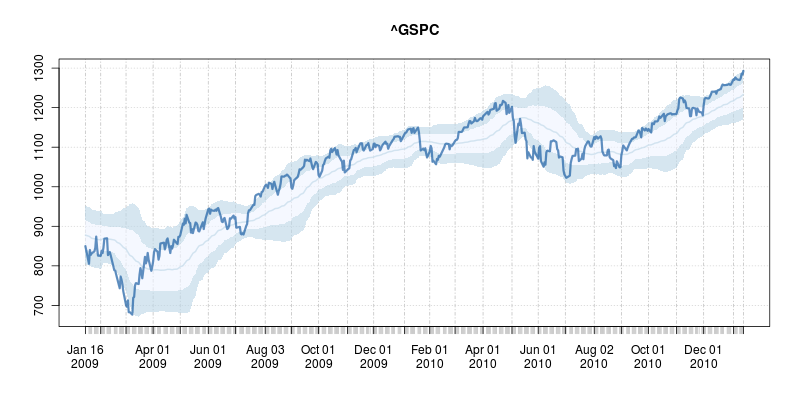
A good six years ago I blogged about plotOBOS() which charts a moving average (from one of several available variants) along with shaded standard deviation bands. That post has a bit more background on the why/how and motivation, but as a teaser here is the resulting chart of the SP500 index (with ticker ^GSCP): Example chart of overbought/oversold levels from plotOBOS() function The code uses a few standard finance packages for R (with most of them maintained by Joshua Ulrich given that Jeff Ryan, who co-wrote chunks of these, is effectively retired from public life). Among these, xts had a recent release reflecting changes which occurred during the four (!!) years since the previous release, and covering at least two GSoC projects. With that came subtle API changes: something we all generally try to avoid but which is at times the only way forward. In this case, the shading code I used (via polygon() from base R) no longer cooperated with the beefed-up functionality of plot.xts(). Luckily, Ross Bennett incorporated that same functionality into a new function addPolygon --- which even credits this same post of mine. With that, the updated code becomes

## plotOBOS -- displaying overbough/oversold as eg in Bespoke's plots
##
## Copyright (C) 2010 - 2017  Dirk Eddelbuettel
##
## This is free software: you can redistribute it and/or modify it
## under the terms of the GNU General Public License as published by
## the Free Software Foundation, either version 2 of the License, or
## (at your option) any later version.
suppressMessages(library(quantmod))     # for getSymbols(), brings in xts too
suppressMessages(library(TTR))          # for various moving averages
plotOBOS <- function(symbol, n=50, type=c("sma", "ema", "zlema"),
                     years=1, blue=TRUE, current=TRUE, title=symbol,
                     ticks=TRUE, axes=TRUE)  
    today <- Sys.Date()
    if (class(symbol) == "character")  
        X <- getSymbols(symbol, from=format(today-365*years-2*n), auto.assign=FALSE)
        x <- X[,6]                          # use Adjusted
      else if (inherits(symbol, "zoo"))  
        x <- X <- as.xts(symbol)
        current <- FALSE                # don't expand the supplied data
     
    n <- min(nrow(x)/3, 50)             # as we may not have 50 days
    sub <- ""
    if (current)  
        xx <- getQuote(symbol)
        xt <- xts(xx$Last, order.by=as.Date(xx$ Trade Time ))
        colnames(xt) <- paste(symbol, "Adjusted", sep=".")
        x <- rbind(x, xt)
        sub <- paste("Last price: ", xx$Last, " at ",
                     format(as.POSIXct(xx$ Trade Time ), "%H:%M"), sep="")
     
    type <- match.arg(type)
    xd <- switch(type,                  # compute xd as the central location via selected MA smoother
                 sma = SMA(x,n),
                 ema = EMA(x,n),
                 zlema = ZLEMA(x,n))
    xv <- runSD(x, n)                   # compute xv as the rolling volatility
    strt <- paste(format(today-365*years), "::", sep="")
    x  <- x[strt]                       # subset plotting range using xts' nice functionality
    xd <- xd[strt]
    xv <- xv[strt]
    xyd <- xy.coords(.index(xd),xd[,1]) # xy coordinates for direct plot commands
    xyv <- xy.coords(.index(xv),xv[,1])
    n <- length(xyd$x)
    xx <- xyd$x[c(1,1:n,n:1)]           # for polygon(): from first point to last and back
    if (blue)  
        blues5 <- c("#EFF3FF", "#BDD7E7", "#6BAED6", "#3182BD", "#08519C") # cf brewer.pal(5, "Blues")
        fairlylight <<- rgb(189/255, 215/255, 231/255, alpha=0.625) # aka blues5[2]
        verylight <<- rgb(239/255, 243/255, 255/255, alpha=0.625) # aka blues5[1]
        dark <<- rgb(8/255, 81/255, 156/255, alpha=0.625) # aka blues5[5]
        ## buglet in xts 0.10-0 requires the <<- here
      else  
        fairlylight <<- rgb(204/255, 204/255, 204/255, alpha=0.5)  # two suitable grays, alpha-blending at 50%
        verylight <<- rgb(242/255, 242/255, 242/255, alpha=0.5)
        dark <<- 'black'
     
    plot(x, ylim=range(range(x, xd+2*xv, xd-2*xv, na.rm=TRUE)), main=title, sub=sub, 
         major.ticks=ticks, minor.ticks=ticks, axes=axes) # basic xts plot setup
    addPolygon(xts(cbind(xyd$y+xyv$y, xyd$y+2*xyv$y), order.by=index(x)), on=1, col=fairlylight)  # upper
    addPolygon(xts(cbind(xyd$y-xyv$y, xyd$y+1*xyv$y), order.by=index(x)), on=1, col=verylight)    # center
    addPolygon(xts(cbind(xyd$y-xyv$y, xyd$y-2*xyv$y), order.by=index(x)), on=1, col=fairlylight)  # lower
    lines(xd, lwd=2, col=fairlylight)   # central smooted location
    lines(x, lwd=3, col=dark)           # actual price, thicker
 
and the main change are the three calls to addPolygon. To illustrate, we call plotOBOS("SPY", years=2) with an updated plot of the ETF representing the SP500 over the last two years: Updated example chart of overbought/oversold levels from plotOBOS() function Comments and further enhancements welcome!

This post by Dirk Eddelbuettel originated on his Thinking inside the box blog. Please report excessive re-aggregation in third-party for-profit settings.

Robert McQueen: Welcome, Flathub!

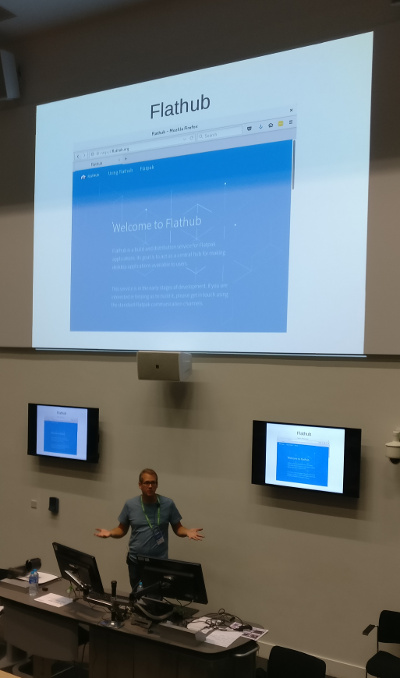
Alex Larsson talks about Flathub at GUADEC 2017At the Gtk+ hackfest in London earlier this year, we stole an afternoon from the toolkit folks (sorry!) to talk about Flatpak, and how we could establish a critical mass behind the Flatpak format. Bringing Linux container and sandboxing technology together with ostree, we ve got a technology which solves real world distribution, technical and security problems which have arguably held back the Linux desktop space and frustrated ISVs and app developers for nearly 20 years. The problem we need to solve, like any ecosystem, is one of users and developers without stuff you can easily get in Flatpak format, there won t be many users, and without many users, we won t have a strong or compelling incentive for developers to take their precious time to understand a new format and a new technology. As Alex Larsson said in his GUADEC talk yesterday: Decentralisation is good. Flatpak is a tool that is totally agnostic of who is publishing the software and where it comes from. For software freedom, that s an important thing because we want technology to empower users, rather than tell them what they can or can t do. Unfortunately, decentralisation makes for a terrible user experience. At present, the Flatpak webpage has a manually curated list of links to 10s of places where you can find different Flatpaks and add them to your system. You can t easily search and browse to find apps to try out so it s clear that if the current situation remains we re not going to be able to get a critical mass of users and developers around Flatpak. Enter Flathub. The idea is that by creating an obvious center of gravity for the Flatpak community to contribute and build their apps, users will have one place to go and find the best that the Linux app ecosystem has to offer. We can take care of the boring stuff like running a build service and empower Linux application developers to choose how and when their app gets out to their users. After the London hackfest we sketched out a minimum viable system Github, Buildbot and a few workers and got it going over the past few months, culminating in a mini-fundraiser to pay for the hosting of a production-ready setup. Thanks to the 20 individuals who supported our fundraiser, to Mythic Beasts who provided a server along with management, monitoring and heaps of bandwidth, and to Codethink and Scaleway who provide our ARM and Intel workers respectively. We inherit our core principles from the Flatpak project we want the Flatpak technology to succeed at alleviating the issues faced by app developers in targeting a diverse set of Linux platforms. None of this stops you from building and hosting your own Flatpak repos and we look forward to this being a wide and open playing field. We care about the success of the Linux desktop as a platform, so we are open to proprietary applications through Flatpak s extra data feature where the client machine downloads 3rd party binaries. They are correctly labeled as such in the AppStream, so will only be shown if you or your OS has configured GNOME Software to show you apps with proprietary licenses, respecting the user s preference. The new infrastructure is up and running and I put it into production on Thursday. We rebuilt the whole repository on the new system over the course of the week, signing everything with our new 4096-bit key stored on a Yubikey smartcard USB key. We have 66 apps at the moment, although Alex is working on bringing in the GNOME apps at present we hope those will be joined soon by the KDE apps, and Endless is planning to move over as many of our 3rd party Flatpaks as possible over the coming months. So, thanks again to Alex and the whole Flatpak community, and the individuals and the companies who supported making this a reality. You can add the repository and get downloading right away. Welcome to Flathub! Go forth and flatten  Flathub logo

Norbert Preining: Gaming: The Long Dark

I normally don t play survival games or walking simulators, but The Long Dark by Hinterland Games, which I purchased back then when it was still in early access on Steam, took me into new realms. You are tossed out into the Canadian wilderness with hardly anything, and your only aim is to survive, find shelter, food, craft tools, hunt for food, explore. And while everything by now is Sandbox mode, on August 1st the first episode of Story mode is released. Best time to get the game! You will be greeted with some icy nights, but also with great vistas, relaxed evenings at a fire place, you will try to survive on moldy food and rotten energy bars, but also feast on the fireside while reading a good book. A real treat this game! Sandbox mode features five different areas to explore. Each one is large enough to spend weeks (in game time) wandering around. The easiest area to start with is Mystery Lake, with plenty of shelter (several huts) and abundance of resources. And just in case you are getting bored, all the areas are connected via tunnels or caves and one can wander of into the neighboring places. My home in Mystery Lake was always the Camp Office, the usual suspect. Nice views, fishing huts nearby to get fresh fish, lots of space. After managing to get from your starting place (which is arbitrary as far as I see) to one of the shelters, one starts collecting food, wood, savaging every accessible place for tools, weapons, burning material. And soon the backpack becomes to heavy, and one needs to store stuff and decide what to take. This is a very well done part of the game. The backpack is not limited by number of items, but you are limited in weight you can carry. That includes clothes (which can get quite heavy) and all the items in your backpack. In addition, the longer the day and the more tired you become, the less weight you can carry. And if the backpack starts getting too heavy you crawl to a very slow movement. There are many influences of the outside world on the player s condition: temperature, the wetness of your clothes, hunger, thirst, exhaustion, but also infections and bruises, all need to be taken care of, otherwise the end is coming faster than one wishes for. I have only two things to complain: First, if one walks outside, or runs outside, the own body temperature does not rise. This is unrealistically and should have been taken into account. The other thing is the difficulty: I have played weeks in game time in the easiest level, without any problem. But the moment I switched to the second level of difficulty (of 5!), I not even manage it for 2(!) days. Wolves, starvation, thirst, any of those kills me within an instant. I don t want to know how the hardest level feels, but it has a certain steep step here. The game takes a very realistic view onto the weather: Every day is different, sunny, foggy, blizzard, windy, often changing very quickly. It is wise to plan one s activities according to the weather, as it is very unforgiving. With beautifully crafted landscapes, loads of areas to explore, your own pride to survive for at least a few weeks, and lots of tools to find and craft and try out, this games, even while it is still in Sandbox mode, is a real feat. My absolute favorite since I have finished the Talos Principle and Portal series, absolutely recommendable!

28 July 2017

Steve Kemp: So I'm considering a new project

In the past there used to be a puppet-labs project called puppet-dashboard, which would let you see the state of your managed-nodes. Having even a very basic and simple "report user-interface" is pretty neat when you're pushing out a change, and you want to see it be applied across your fleet of hosts. There are some other neat features, such as allowing you to identify failures easily, and see nodes that haven't reported-in recently. This was spun out into a community-supported project which is largely stale: Having a dashboard is nice, but the current state of the software is less good. It turns out that the implementation is pretty simple though: The reporting node can thus receive real-time updates, and do what it wants with them. You can even sidestep the extra server if you wish: For example on my puppet-master I have this:
  root@master /var/lib/puppet/reports # ls   tail -n4
  smaug.dh.bytemark.co.uk
  ssh.steve.org.uk
  www.dns-api.com
  www.steve.org.uk
Inside each directory is a bunch of YAML files which describe the state of the host, and the recipes that were applied. Parsing those is pretty simple, the hardest part would be making a useful/attractive GUI. But happily we have the existing one to "inspire" us. I think I just need to write down a list of assumptions and see if they make sense. After all the existing installation(s) won't break, it's just a matter of deciding whether it is useful/worthwhile way to spend some time. Beyond that you might want to export data about the managed-nodes themselves. For example you might want a list of all the hosts which have "bash" installed on them. Or "All nodes with local user "steve"." I've written that stuff already, as it is very useful for auditing & etc. The hard part about that is that to get the extra data you'll need to include a puppet module to collect it. I suspect a new dashboard would be broadly interesting/useful but unless you have that extra detail it might not be so useful. You can't point to a slightly more modern installation and say "Yes this is worth migrating to". But if you have extra meta-data you can say: And that facility is very useful when you have shellshock, or similar knocking at your door. Anyway as a hacky start I wrote some code to parse reports, avoiding the magic object-fu that the YAML would usually invoke. The end result is this:
 root@master ~# dump-run www.steve.org.uk
 www.steve.org.uk
    Puppet Version: 4.8.2
    /var/lib/puppet/reports/www.steve.org.uk/201707291813.yaml
    Runtime: 2.16
    Status:changed
    Time:2017-07-29 18:13:04 +0000
    Resources
            total -> 176
            skipped -> 2
            failed -> 0
            changed -> 3
            out_of_sync -> 3
            scheduled -> 0
            corrective_change -> 3
    Changed Resources
            Ssh_authorized_key[skx@shelob-s-fi] /etc/puppet/code/environments/production/modules/ssh_keys/manifests/init.pp:17
            Ssh_authorized_key[skx@deagol-s-fi] /etc/puppet/code/environments/production/modules/ssh_keys/manifests/init.pp:22
            Ssh_authorized_key[steve@ssh.steve.org.uk-s-fi] /etc/puppet/code/environments/production/modules/ssh_keys/manifests/init.pp:27
    Skipped Resources
            Exec[clone sysadmin utils]
            Exec[update sysadmin utils]

Joachim Breitner: How is coinduction the dual of induction?

Earlier today, I demonstrated how to work with coinduction in the theorem provers Isabelle, Coq and Agda, with a very simple example. This reminded me of a discussion I had in Karlsruhe with my then colleague Denis Lohner: If coinduction is the dual of induction, why do the induction principles look so different? I like what we observed there, so I d like to share this. The following is mostly based on my naive understanding of coinduction based on what I observe in the implementation in Isabelle. I am sure that a different, more categorial presentation of datatypes (as initial resp. terminal objects in some category of algebras) makes the duality more obvious, but that does not necessarily help the working Isabelle user who wants to make sense of coninduction.

Inductive lists I will use the usual polymorphic list data type as an example. So on the one hand, we have normal, finite inductive lists:
datatype 'a list = nil   cons (hd : 'a) (tl : "'a list")
with the well-known induction principle that many of my readers know by heart (syntax slightly un-isabellized):
P nil   ( x xs. P xs   P (cons x xs))     xs. P xs

Coinductive lists In contrast, if we define our lists coinductively to get possibly infinite, Haskell-style lists, by writing
codatatype 'a llist = lnil   lcons (hd : 'a)  (tl : "'a llist")
we get the following coinduction principle:
(  xs ys.
    R xs ys'   (xs = lnil) = (ys = lnil)  
               (xs   lnil   ys'   lnil  
	         hd xs = hd ys   R (tl xs) (tl ys)))  
  (  xs ys. R xs ys   xs = ys)
This is less scary that it looks at first. It tell you if you give me a relation R between lists which implies that either both lists are empty or both lists are nonempty, and furthermore if both are non-empty, that they have the same head and tails related by R, then any two lists related by R are actually equal. If you think of the infinte list as a series of states of a computer program, then this is nothing else than a bisimulation. So we have two proof principles, both of which make intuitive sense. But how are they related? They look very different! In one, we have a predicate P, in the other a relation R, to point out just one difference.

Relation induction To see how they are dual to each other, we have to recognize that both these theorems are actually specializations of a more general (co)induction principle. The datatype declaration automatically creates a relator:
rel_list :: ('a   'b   bool)   'a list   'b list   bool
The definition of rel_list R xs ys is that xs and ys have the same shape (i.e. length), and that the corresponding elements are pairwise related by R. You might have defined this relation yourself at some time, and if so, you probably introduced it as an inductive predicate. So it is not surprising that the following induction principle characterizes this relation:
Q nil nil  
( x xs y ys. R x y   Q xs ys   Q (cons x xs) (cons y ys))  
( xs ys   rel_list R xs ys   Q xs ys)
Note how how similar this lemma is in shape to the normal induction for lists above! And indeed, if we choose Q xs ys (P xs xs = ys) and R x y (x = y), then we obtain exactly that. In that sense, the relation induction is a generalization of the normal induction.

Relation coinduction The same observation can be made in the coinductive world. Here, as well, the codatatype declaration introduces a function
rel_llist :: ('a   'b   bool)   'a llist   'b llist   bool
which relates lists of the same shape with related elements only that this one also relates infinite lists, and therefore is a coinductive relation. The corresponding rule for proof by coinduction is not surprising and should remind you of bisimulation, too:
( xs ys.
    R xs ys   (xs = lnil) = (ys = lnil)  
              (xs   lnil   ys   lnil  
	        Q (hd xs) (hd ys)   R (tl xs) (tl ys)))  
(  xs ys   R xs ys   rel_llist Q xs ys)
It is even more obvious that this is a generalization of the standard coinduction principle shown above: Just instantiate Q with equality, which turns rel_llist Q into equality on the lists, and you have the theorem above.

The duality With our induction and coinduction principle generalized to relations, suddenly a duality emerges: If you turn around the implication in the conclusion of one you get the conclusion of the other one. This is an example of cosomething is something with arrows reversed . But what about the premise(s) of the rules? What happens if we turn around the arrow here? Although slighty less immediate, it turns out that they are the same as well. To see that, we start with the premise of the coinduction rule, reverse the implication and then show that to be equivalent to the two premises of the induction rule:
( xs ys.
    R xs ys   (xs = lnil) = (ys = lnil)  
              (xs   lnil   ys   lnil  
	        Q (hd xs) (hd ys)   R (tl xs) (tl ys)))
=   case analysis (the other two cases are vacuously true)  
  ( xs ys.
    xs = lnil   ys = lnil  
    R xs ys   (xs = lnil) = (ys = lnil)  
              (xs   lnil   ys   lnil  
	        Q (hd xs) (hd ys)   R (tl xs) (tl ys)))
  ( xs ys.
    xs   lnil   ys   lnil
    R xs ys   (xs = lnil) = (ys = lnil)  
              (xs   lnil   ys   lnil  
	        Q (hd xs) (hd ys)   R (tl xs) (tl ys)))
=   simplification  
  ( xs ys.  xs = lnil   ys = lnil   R xs ys
  ( x xs y ys.  R (cons x xs) (cons y ys)   (Q x y   R xs ys))
=   more rewriting  
  R nil nil
  ( x xs y ys. Q x y   R xs ys   R (cons x xs) (cons y ys))

Conclusion The coinduction rule is not the direct dual of the induction rule, but both are specializations of more general, relational proof methods, where the duality is clearly present. More generally, this little excursion shows that it is often beneficial to think of types less as sets, and more as relations this way of thinking is surprisingly fruitful, and led to proofs of parametricity and free theorems and other nice things.

26 July 2017

Thomas Lange: Building a Debian Live CD with FAI

In this wiki entry, I describe how to extend a FAI nfsroot, so it can be used as a file system for a diskless client or a Live CD. A host can mount it via NFS when booting via PXE. You can create a Live CD easily by using the command fai-cd. This works also nicely with a Xfce desktop, and I've prepared a ISO image for easy testing. You can log in as user demo, and the password is fai. The next thing is to check, if we can use FAI's dirinstall or install method for creating the same environment, so it will be easy to create customized Live images. FAI

25 July 2017

Petter Reinholdtsen: Norwegian Bokm l edition of Debian Administrator's Handbook is now available

I finally received a copy of the Norwegian Bokm l edition of "The Debian Administrator's Handbook". This test copy arrived in the mail a few days ago, and I am very happy to hold the result in my hand. We spent around one and a half year translating it. This paperbook edition is available from lulu.com. If you buy it quickly, you save 25% on the list price. The book is also available for download in electronic form as PDF, EPUB and Mobipocket, as can be read online as a web page. This is the second book I publish (the first was the book "Free Culture" by Lawrence Lessig in English, French and Norwegian Bokm l), and I am very excited to finally wrap up this project. I hope "H ndbok for Debian-administratoren" will be well received.

24 July 2017

Jonathan McDowell: Learning to love Ansible

This post attempts to chart my journey towards getting usefully started with Ansible to manage my system configurations. It s a high level discussion of how I went about doing so and what I got out of it, rather than including any actual config snippets - there are plenty of great resources out there that handle the actual practicalities of getting started much better than I could. I ve been convinced about the merits of configuration management for machines for a while now; I remember conversations about producing an appropriate set of recipes to reproduce our haphazard development environment reliably over 4 years ago. That never really got dealt with before I left, and as managing systems hasn t been part of my day job since then I never got around to doing more than working my way through the Puppet Learning VM. I do, however, continue to run a number of different Linux machines - a few VMs, a hosted dedicated server and a few physical machines at home and my parents . In particular I have a VM which handles my parents email, and I thought that was a good candidate for trying to properly manage. It s backed up, but it would be nice to be able to redeploy that setup easily if I wanted to move provider, or do hosting for other domains in their own VMs. I picked Ansible, largely because I wanted something lightweight and the agentless design appealed to me. All I really need to do is ensure Python is on the host I want to manage and everything else I can bootstrap using Ansible itself. Plus it meant I could use the version from Debian testing on my laptop and not require backports on the stable machines I wanted to manage. My first attempt was to write a single Ansible YAML file which did all the appropriate things for the email VM; installed Exim/Apache/Roundcube, created users, made sure the appropriate SSH keys were in place, installed configuration files, etc, etc. This did the job, but I found myself thinking it was no better than writing a shell script to do the same things. Things got a lot better when instead of concentrating on a single host I looked at what commonality was shared between hosts. I started with simple things; Debian is my default distro so I created an Ansible role debian-system which configured up APT and ensured package updates were installed. Then I added a task to setup my own account and install my SSH keys. I was then able to deploy those 2 basic steps across a dozen different machine instances. At one point I got an ARM64 VM from Scaleway to play with, and it was great to be able to just add it to my Ansible hosts file and run the playbook against it to get my basic system setup. Adding email configuration got trickier. In addition to my parents email VM I have my own email hosted elsewhere (along with a whole bunch of other users) and the needs of both systems are different. Sitting down and trying to manage both configurations sensibly forced me to do some rationalisation of the systems, pulling out the commonality and then templating the differences. Additionally I ended up using the lineinfile module to edit the Debian supplied configurations, rather than rolling out my own config files. This helped ensure more common components between systems. There were also a bunch of differences that had grown out of the fact each system was maintained by hand - I had about 4 copies of each Let s Encrypt certificate rather than just putting one copy in /etc/ssl and pointing everything at that. They weren t even in the same places on different systems. I unified these sorts of things as I came across them. Throughout the process of this rationalisation I was able to easily test using containers. I wrote an Ansible role to create systemd-nspawn based containers, doing all of the LVM + debootstrap work required to produce a system which could then be managed by Ansible. I then pointed the same configuration as I was using for the email VM at this container, and could verify at each step along the way that the results were what I expected. It was still a little nerve-racking when I switched over the live email config to be managed by Ansible, but it went without a hitch as hoped. I still have a lot more configuration to switch to being managed by Ansible, especially on the machines which handle a greater number of services, but it s already proved extremely useful. To prepare for a jessie to stretch upgrade I fired up a stretch container and pointed the Ansible config at it. Most things just worked and the minor issues I was able to fix up in that instance leaving me confident that the live system could be upgraded smoothly. Or when I want to roll out a new SSH key I can just add it to the Ansible setup, and then kick off an update. No need to worry about whether I ve updated it everywhere, or correctly removed the old one. So I m a convert; things were a bit more difficult by starting with existing machines that I didn t want too much disruption on, but going forward I ll be using Ansible to roll out any new machines or services I need, and expect that I ll find that new deployment to be much easier now I have a firm grasp on the tools available.

Next.

Previous.