Search Results: "tim"

28 March 2022

Antoine Beaupr : What is going on with web servers

I stumbled upon this graph recently, which is w3techs.com graph of "Historical yearly trends in the usage statistics of web servers". It seems I hadn't looked at it in a long while because I was surprised at many levels:
  1. Apache is now second, behind Nginx, since ~2022 (so that's really new at least)
  2. Cloudflare "server" is third ahead of the traditional third (Microsoft IIS) - I somewhat knew that Cloudflare was hosting a lot of stuff, but I somehow didn't expect to see it there at all for some reason
  3. I had to lookup what LiteSpeed was (and it's not a bike company): it's a drop-in replacement (!?) of the Apache web server (not a fork, a bizarre idea but which seems to be gaining a lot of speed recently, possibly because of its support for QUIC and HTTP/3
So there. I'm surprised. I guess the stats should be taken with a grain of salt because they only partially correlate with Netcraft's numbers which barely mention LiteSpeed at all. (But they do point at a rising share as well.) Netcraft also puts Nginx's first place earlier in time, around April 2019, which is about when Microsoft's IIS took a massive plunge down. That is another thing that doesn't map with w3techs' graphs at all either. So it's all lies and statistics, basically. Moving on. Oh and of course, the two first most popular web servers, regardless of the source, are package in Debian. So while we're working on statistics and just making stuff up, I'm going to go ahead and claim all of this stuff runs on Linux and that BSD is dead. Or something like that.

Russell Coker: Hangouts Replacement

Google is currently in the process of killing Hangouts. Last year Hangouts was quite a nice IM system with integrated video chat and voice calling. Now they have decided to kill it and replace it with Google Chat and Google Meet both of which are integrated with the Gmail app on Android. To start getting people off the old platform they have disabled video and audio chats with more than 2 people in Hangouts. To do a video call you have to use Meet which has a worse user interface and isn t integrated with text chat, so if in a text discussion someone says let s have a video call you have to open a new app. Meet also doesn t appear to have a facility to notify group members that someone has joined a group call so it s required that Chat (or something else) is used to tell people they can join Meet. Many of my relatives use Hangouts because they are forced to have it installed on their Android phones and because it worked quite well. Now it doesn t work well and will soon be going away. So another option is needed. I m considering Matrix as a replacement. Matrix has a good feature set and is being worked on a lot. The video conferencing is through a connection to a Jitsi server and is well integrated giving functionality more like Hangouts than Chat/Meet. For the LUV Matrix server the URL https://luv.asn.au/.well-known/matrix/client has the following contents:
 
  "m.homeserver":  
    "base_url": "https://luv.asn.au"
   
  "jitsi":  
    "preferredDomain": "jitsi.perthchat.org"
   
  "im.vector.riot.jitsi":  
    "preferredDomain": "jitsi.perthchat.org"
   
 
This specifies the Jitsi server to be used for chats started from that Matrix server. The PerthChat.org people seem to be leading the way for self hosted Matrix in Australia. Note that other people shouldn t link to their Jitsi server without discussing it with them first. I only included real data because it s published on the web so there s no point in keeping it secret. The Flounder free software users group [1] uses Matrix a lot. We will probably discuss Matrix at the next meeting on Saturday. There is also Element Call [2] which is apparently more integrated with Matrix (and also newer and possibly buggier). Jitsi works and we can change to a different service easily enough at a later time.

27 March 2022

Russ Allbery: Review: A Song for a New Day

Review: A Song for a New Day, by Sarah Pinsker
Publisher: Berkley
Copyright: September 2019
ISBN: 1-9848-0259-3
Format: Kindle
Pages: 372
Luce Cannon was touring with a session band when the shutdown began. First came the hotel evacuation in the middle of the night due to bomb threats against every hotel in the state. Then came the stadium bombing just before they were ready to go on stage. Luce and most of the band performed anyway, with a volunteer crew and a shaken crowd. It was, people later decided, the last large stage show in the United States before the congregation laws shut down public gatherings. That was the end of Luce's expected career, and could have been the end of music, or at least public music. But Luce was stubborn and needed the music. Rosemary grew up in the aftermath: living at home with her parents well away from other people, attending school virtually, and then moving seamlessly into a virtual job for Superwally, the corporation that ran essentially everything. A good fix for some last-minute technical problems with StageHoloLive's ticketing system got her an upgraded VR hoodie and complimentary tickets to the first virtual concert she'd ever attended. She found the experience astonishing, prompting her to browse StageHoloLive job openings and then apply for a technical job and, on a whim, an artist recruiter role. That's how Rosemary found herself, quite nerve-wrackingly, traveling out into the unsafe world to look for underground musicians who could become StageHoloLive acts. A Song for a New Day was published in 2019 and had a moment of fame at the beginning of 2020, culminating in the Nebula Award for best novel, because it's about lockdowns, isolation, and the suppression of public performances. There's even a pandemic, although it's not a respiratory disease (it's some variety of smallpox or chicken pox) and is only a minor contributing factor to the lockdowns in this book. The primary impetus is random violence. Unfortunately, the subsequent two years have not been kind to this novel. Reading it in 2022, with the experience of the past two years fresh in my mind, was a frustrating and exasperating experience because the world setting is completely unbelievable. This is not entirely Pinsker's fault; this book was published in 2019, was not intended to be about our pandemic, and therefore could not reasonably predict its consequences. Still, it required significant effort to extract the premise of the book from the contradictory evidence of current affairs and salvage the pieces of it I still enjoyed. First, Pinsker's characters are the most astonishingly incurious and docile group of people I've seen in a recent political SF novel. This extends beyond the protagonists, where it could arguably be part of their characterization, to encompass the entire world (or at least the United States; the rest of the world does not appear in this book at all so far as I can recall). You may be wondering why someone bombs a stadium at the start of the book. If so, you are alone; this is not something anyone else sees any reason to be curious about. Why is random violence spiraling out of control? Is there some coordinated terrorist activity? Is there some social condition that has gotten markedly worse? Race riots? Climate crises? Wars? The only answer this book offers is a completely apathetic shrug. There is a hint at one point that the government may have theories that they're not communicating, but no one cares about that either. That leads to the second bizarre gap: for a book that hinges on political action, formal political structures are weirdly absent. Near the end of the book, one random person says that they have been inspired to run for office, which so far as I can tell is the first mention of elections in the entire book. The "government" passes congregation laws shutting down public gatherings and there are no protests, no arguments, no debate, but also no suppression, no laws against the press or free speech, no attempt to stop that debate. There's no attempt to build consensus for or against the laws, and no noticeable political campaigning. That's because there's no need. So far as one can tell from this story, literally everyone just shrugs and feels sad and vaguely compliant. Police officers exist and enforce laws, but changing those laws or defying them in other than tiny covert ways simply never occurs to anyone. This makes the book read a bit like a fatuous libertarian parody of a docile populace, but this is so obviously not the author's intent that it wouldn't be satisfying to read even as that. To be clear, this is not something that lasts only a few months in an emergency when everyone is still scared. This complete political docility and total incuriosity persists for enough years that Rosemary grows up within that mindset. The triggering event was a stadium bombing followed by an escalating series of random shootings and bombings. (The pandemic in the book only happens after everything is locked down and, apart from adding to Rosemary's agoraphobia and making people inconsistently obsessed with surface cleanliness, plays little role in the novel.) I lived through 9/11 and the Oklahoma City bombing in the US, other countries have been through more protracted and personally dangerous periods of violence (the Troubles come to mind), and never in human history has any country reacted to a shock of violence (or, for that matter, disease) like the US does in this book. At points it felt like one of those SF novels where the author is telling an apparently normal story and all the characters turn out to be aliens based on spiders or bats. I finally made sense of this by deciding that the author wasn't using sudden shocks like terrorism or pandemics as a model, even though that's what the book postulates. Instead, the model seems to be something implicitly tolerated and worked around: US school shootings, for instance, or the (incorrect but widespread) US belief in a rise of child kidnappings by strangers. The societal reaction here looks less like a public health or counter-terrorism response and more like suburban attitudes towards child-raising, where no child is ever left unattended for safety reasons but we routinely have school shootings no other country has at the same scale. We have been willing to radically (and ineffectually) alter the experience of childhood due to fears of external threat, and that's vaguely and superficially similar to the premise of this novel. What I think Pinsker still misses (and which the pandemic has made glaringly obvious) is the immense momentum of normality and the inability of adults to accept limitations on their own activities for very long. Even with school shootings, kids go to school in person. We now know that parts of society essentially collapse if they don't, and political pressure becomes intolerable. But by using school shootings as the model, I managed to view Pinsker's setup as an unrealistic but still potentially interesting SF extrapolation: a thought experiment that ignores countervailing pressures in order to exaggerate one aspect of society to an extreme. This is half of Pinsker's setup. The other half, which made less of a splash because it didn't have the same accident of timing, is the company Superwally: essentially "what if Amazon bought Walmart, Google, Facebook, Netflix, Disney, and Live Nation." This is a more typical SF extrapolation that left me with a few grumbles about realism, but that I'll accept as a plot device to talk about commercialization, monopolies, and surveillance capitalism. But here again, the complete absence of formal political structures in this book is not credible. Superwally achieves an all-pervasiveness that in other SF novels results in corporations taking over the role of national governments, but it still lobbies the government in much the same way and with about the same effectiveness as Amazon does in our world. I thought this directly undermined some parts of the end of the book. I simply did not believe that Superwally would be as benign and ineffectual as it is shown here. Those are a lot of complaints. I found reading the first half of this book to be an utterly miserable experience and only continued reading out of pure stubbornness and completionism. But the combination of the above-mentioned perspective shift and Pinsker's character focus did partly salvage the book for me. This is not a book about practical political change, even though it makes gestures in that direction. It's primarily a book about people, music, and personal connection, and Pinsker's portrayal of individual and community trust in all its complexity is the one thing the book gets right. Rosemary's character combines a sort of naive arrogance with self-justification in a way that I found very off-putting, but the pivot point of the book is the way in which Luce and her community extends trust to her anyway, as part of staying true to what they believe. The problem that I think Pinsker was trying to write about is atomization, which leads to social fragmentation into small trust networks with vast gulfs between them. Luce and Rosemary are both characters who are willing to bridge those gulfs in their own ways. Pinsker does an excellent job describing the benefits, the hurt, the misunderstandings, the risk, and the awkward process of building those bridges between communities that fundamentally do not understand each other. There's something deep here about the nature of solidarity, and how you need both people like Luce and people like Rosemary to build strong and effective communities. I've kept thinking about that part. It's also helpful for a community to have people who are curious about cause and effect, and who know how a bill becomes a law. It's hard to sum up this book, other than to say that I understand why it won a Nebula but it has deep world-building flaws that have become far more obvious over the past two years. Pinsker tries hard to capture the feeling of live music for both the listener and the performer and partly succeeded even for me, which probably means others will enjoy that part of the book immensely. The portrayal of the difficult dynamics of personal trust was the best part of the book for me, but you may have to build scaffolding and bracing for your world-building disbelief in order to get there. On the whole, I think A Song for a New Day is worth reading, but maybe not right now. If you do read it now, tell yourself at the start that this is absolutely not about the pandemic and that everything political in this book is a hugely simplified straw-man extrapolation, and hopefully you'll find the experience less frustrating than I found it. Rating: 6 out of 10

Andrew Cater: Imminent release for the media images for Debian 10.12 and 11.3 20220327 0010

OK - so it wasn't quite all done in one day - and since today is TZ change day in the UK, it might actually run into the TZ bump but I suspect that it will all be done very soon now. Very few glitches - everybody cheerful with what's been done.I did spot someone in IRC who had been reading the release notes - which is always much appreciated. Lots of security fixes overall in the last couple of months but just a fairly normal time, I think.Thanks to the team behind all of this: the ftpmasters, the press team and everyone else involved in making Debian more secure. This is the last blog for this one - there will be another point release along in about three months or so.

25 March 2022

Russell Coker: Wayland

The Wayland protocol [1] is designed to be more secure than X, when X was designed there wasn t much thought given to the possibility of programs with different access levels displaying on the same desktop. The Xephyr nested X server [2] is good for running an entire session from a remote untrusted host on a local display but isn t suitable for multiple applications in the same session. GNOME supported Wayland by default in Debian since the Bullseye release and for KDE support you can install the plasma-workspace-wayland which gives you an option for the session type of KDE Plasma Wayland when you login. For systems which don t use the KDE Plasma workspace but which have some KDE apps you should install the package qtwayland5 to allow the KDE apps to use the Wayland protocol. See the KDE page of the Debian Wiki [3] for more information. The Debian Wiki page on Wayland has more useful information [4]. Apparently you have to use gdm instead of sddm to get Wayland for the login prompt. To get screen sharing working on Wayland (and also to get a system that doesn t give out error messages) you need to install the pipewire package (see the Pipewire project page for more information [6]). Daniel Stone gave a great LCA talk about Wayland in 2013 [5]. I have just converted two of my systems to Wayland. It s pretty uneventful, things seem to work the same way as before. It might be theoretically faster but in practice Xorg was fast enough that there s not much possibility to appear faster. My aim is to work on Linux desktop security to try and get process isolation similar to what Android does on the PC desktop and on Debian based phones such as the Librem 5. Allowing some protection against graphics based attacks is only the first step towards that goal, but it s an important step. More blog posts on related topics will follow. Update: One thing I forgot to mention is that MAC systems need policy changes for Wayland. There are direct changes (allowing background daemons for GPU access to talk to a Wayland server running in a user context instead of an X server in a system context) and indirect changes (having the display server and window manager merged).

22 March 2022

Ulrike Uhlig: Workshops about anger, saying NO, and mapping one s capacities and desires

For the second year in a row, I proposed some workshops at the feminist hackers assembly at the remote C3. I m sharing them here because I believe they might be useful to others.

Anger workshop Based on my readings about the subject and a mediation training, I created a first workshop about dealing with one s own anger for the feminist hackers assembly in 2020. Many women who attended said they recognized themselves in what I was talking about. I created the exercises in the workshop with the goal of getting participants to share and self-reflect in small groups. I m not giving out solutions, instead proposals on how to deal with anger come from the participants themselves. (I added the last two content pages to the file after the workshop.) This is why this workshop is always different, depending on the group and what they want to share. The first time I did this workshop was a huge success and so I created an improved version for the assembly of 2021. Angry womxn* workshop

The act of saying NO We often say yes, despite wanting to say no, out of a sense of duty, or because we learned that we should always be nice and helpful, and that our own needs are best served last. Many people don t really know how to say no. Sarah Cooper, a former Google employee herself, makes fun of this in her fabulous book How to Be Successful Without Hurting Men s Feelings (highly recommended read!): A drawing of a woman who says: How I say yes: I'd love to. How I say no: sure. That s why a discussion space about saying NO did not seem out of place at the feminist hackers assembly :) I based my workshop on the original, created by the Institute of War and Peace Reporting and distributed through their holistic security training manual. I like this workshop because sharing happens in a small groups and has an immediately felt effect. Several people reported that the exercises allowed them to identify the exact moment when they had said yes to something despite really having wanted to say no. The exercises from the workshop can easily be done with a friend or trusted person, and they can even be done alone by writing them down, although the effect in writing might be less pronounced. The act of saying NO workshop

Mapping capacities and desires Based on discussions with a friend, whose company uses SWOT analysis (strengths weaknesses opportunities threats) to regularly check in with their employees, and to allow employees to check in with themselves, I created a similar tool for myself which I thought would be nice to share with others. It s a very simple self-reflection that can help map out what works well, what doesn t work so well and where one wants to go in the future. I find it important to not use this tool narrow-mindedly only regarding work skills and expertise. Instead, I think it s useful to also include soft skills, hobbies, non-work capacities and whatever else comes to mind in order to create a truer map. Fun fact: During the assembly, a bunch of participants reported that they found it hard to distinguish between things they don t like doing and things they don t know how to do. Mapping capacities and desires

Known issues One important feedback point I got is that people felt the time for the exercises in all three workshops could have been longer. In case you want to try out these workshops, you might want to take this into account.

Tollef Fog Heen: DNSSEC, ssh and VerifyHostKeyDNS

OpenSSH has this very nice setting, VerifyHostKeyDNS, which when enabled, will pull SSH host keys from DNS, and you no longer need to either trust on first use, or copy host keys around out of band. Naturally, trusting unsecured DNS is a bit scary, so this requires the record to be signed using DNSSEC. This has worked for a long time, but then broke, seemingly out of the blue. Running ssh -vvv gave output similar to
debug1: found 4 insecure fingerprints in DNS
debug3: verify_host_key_dns: checking SSHFP type 1 fptype 2
debug3: verify_host_key_dns: checking SSHFP type 4 fptype 2
debug1: verify_host_key_dns: matched SSHFP type 4 fptype 2
debug3: verify_host_key_dns: checking SSHFP type 4 fptype 1
debug1: verify_host_key_dns: matched SSHFP type 4 fptype 1
debug3: verify_host_key_dns: checking SSHFP type 1 fptype 1
debug1: matching host key fingerprint found in DNS
even though the zone was signed, the resolver was checking the signature and I even checked that the DNS response had the AD bit set. The fix was to add options trust-ad to /etc/resolv.conf. Without this, glibc will discard the AD bit from any upstream DNS servers. Note that you should only add this if you actually have a trusted DNS resolver. I run unbound on localhost, so if somebody can do a man-in-the-middle attack on that traffic, I have other problems.

Norbert Preining: Packages for Debian: KDE/Plasma, RSSguard, et al

As mentioned in this post, most of my activity around Debian has come to a complete halt (Send your thanks to da-manager@debian.org!). Since I still have a few computers running Debian, I keep maintaining a few things which I heavily rely on, in particular KDE/Plasma and RSSguard. For KDE/Plasma, there are the well known OBS repos I maintain, please read the blog posts tagged KDE. For RSSguard, I just uploaded a package for the recently released RSSguard 4.2.0 to a new OBS project debian-various. To activate this repository, first of all, you need to add my OBS key say in /usr/local/share/keyrings/obs-npreining.asc and add a file /etc/apt/sources.list.d/obs-npreining-various.list, containing the following line, replacing the DISTRIBUTION part with one of Debian_11 (for Bullseye), Debian_Testing, or Debian_Unstable:
deb [signed-by=/usr/local/share/keyrings/obs-npreining.asc] https://download.opensuse.org/repositories/home:/npreining:/debian-various/DISTRIBUTION/ ./
With that in place you will get a fresh and new rssguard. I will add more packages over time, typical candidates are rspamd and all the other none-KDE/Plasma packages I maintained. Enjoy.

21 March 2022

Antoine Beaupr : 20+ years of Emacs

I enjoyed reading this article named "22 years of Emacs" recently. It's kind of fascinating, because I realised I don't exactly know for how long I've been using Emacs. It's lost in the mists of history. If I would have to venture a guess, it was back in the "early days", which in that history is mapped around 1996-1997, when I installed my very own "PC" with FreeBSD 2.2.x and painstakingly managed to make XFree86 run on it. Modelines. Those were the days... But I digress.

I am old... The only formal timestamp I can put is that my rebuilt .emacs.d git repository has its first commit in 2002. Some people reading this may be born after that time. This means I'm at least significantly older than those people, to put things gently. Clever history nerds will notice that the commit is obviously fake: Git itself did not exist until 2005. But ah-ah! I was already managing my home directory with CVS in 2001! I converted that repository into git some time in 2009, and therefore you can see all my embarrassing history, including changes from two decades ago. That includes my first known .emacs file which is just bizarre to read right now: 200 lines, most of which are "customize" stuff. Compare with the current, 1000+ lines init.el which is also still kind of a mess, but actually shares very little with the original, thankfully. All this to say that in those years (decades, really) of using Emacs, I have had a very different experience than credmp who wrote packages, sent patches, and got name dropping from other developers. My experience is just struggling to keep up with everything, in general, but also in Emacs.

... and Emacs is too fast for me It might sound odd to say, but Emacs is actually moving pretty fast right now. A lot of new packages are coming out, and I can hardly keep up.
  • I am not using org mode, but did use it for time (and task) tracking for a while (and for invoicing too, funky stuff).
  • I am not using mu4e, but maybe I'm using something better (notmuch) and yes, I am reading my mail in Emacs, which I find questionable from a security perspective. (Sandboxing untrusted inputs? Anyone?)
  • I am using magit, but only when coding, so I do end up using git on the command line quite a bit anyways.
  • I do have which-key enabled, and reading about it reminded me I wanted to turn it off because it's kind of noisy and I never remember I can actually use it for anything. Or, in other words, I don't even remember the prefix key or, when I do, there's too many possible commands after for it to be useful.
  • I haven't setup lsp-mode, let alone Eglot, which I just learned about reading the article. I thought I would be super shiny and cool by setting up LSP instead of the (dying?) elpy package, but I never got around to it. And now it seems lsp-mode is uncool and I should really do eglot instead, and that doesn't help. UPDATE: I finally got tired and switched to lsp-mode. The main reason for choosing it over eglot is that it's in Debian (and eglot is not). (Apparently, eglot has more chance of being upstreamed, "when it's done", but I guess I'll cross that bridge when I get there.) lsp-mode feels slower than elpy but I haven't done any of the performance tuning and this will improve even more with native compilation (see below). I already had lsp-mode partially setup in Emacs so I only had to do this small tweak to switch and change the prefix key (because s-l or mod is used by my window manager). I also had to pin LSP packages to bookworm here and here.
  • I am not using projectile. It's on some of my numerous todo lists somewhere, surely. I suspect it's important to getting my projects organised, but I still live halfway between the terminal and Emacs, so it's not quite clear what I would gain.
  • I had to ask what native compilation was or why it mattered the first time I heard of it. And when I saw it again in the article, I had to click through to remember.
Overall, I feel there's a lot of cool stuff in Emacs out there. But I can't quite tell what's the best of which. I can barely remember which completion mechanism I use (company, maybe?) or what makes my mini-buffer completion work the way it does. Everything is lost in piles of customize and .emacs hacks that is constantly changing. Because a lot is in third-party packages, there are often many different options and it's hard to tell which one we should be using.

... or at least fast enough And really, Emacs feels fast enough for me. When I started, I was running Emacs on a Pentium I, 166MHz, with 8MB of RAM (eventually upgraded to 32MB, whoohoo!). Back in those days, the joke was that EMACS was an acronym for "Eight Megs, Always Scratching" and now that I write this down, I realize it's actually "Eight Megs, and Constantly Swapping", which doesn't sound as nice because you could actually hear Emacs running on those old hard drives back in the days. It would make a "scratching" noise as the hard drive heads would scramble maniacally to swap pages in and out of swap to make room for the memory-hungry editor. Now Emacs is pretty far down the list of processes in top(1) regardless of how you look at it. It's using 97MB of resident memory and close to 400MB of virtual memory, which does sound like an awful lot compared to my first computer... But it's absolutely nothing compared to things like Signal-desktop, which somehow manages to map a whopping 20.5GB virtual memory. (That's twenty Gigabytes of memory for old timers or time travelers from the past, and yes, that is now a thing.) I'm not exactly sure how much resident memory it uses (because it forks multiple processes), probably somewhere around 300MB of resident memory. Firefox also uses gigabytes of that good stuff, also spread around the multiple processes, per tab. Emacs "feels" super fast. Typing latency is noticeably better in Emacs than my web browser, and even beats most terminal emulators. It gets a little worse when font-locking is enabled, unfortunately, but it's still feels much better. And all my old stuff still works in Emacs, amazingly. (Good luck with your old Netscape or ICQ configuration from 2000.) I feel like an oldie, using Emacs, but I'm really happy to see younger people using it, and learning it, and especially improving it. If anything, one direction I would like to see it go is closer to what web browsers are doing (yes, I know how bad that sounds) and get better isolation between tasks. An attack on my email client shouldn't be able to edit my Puppet code, and/or all files on my system, for example. And I know, fundamentally, that's a really hard challenge in Emacs. But if you're going to treat your editor as your operating system (or vice versa, I lost track of where we are now that there's an Emacs Window Manager, which I do not use), at least we should get that kind of security. Otherwise I'll have to find a new mail client, and that's really something I try to limit to once a decade or so.

20 March 2022

Joerg Jaspert: Another shell script moved to rust

Shell? Rust! Not the first shell script I took and made a rust version of, but probably my largest yet. This time I took my little tm (tmux helper) tool which is (well, was) a bit more than 600 lines of shell, and converted it to Rust. I got most of the functionality done now, only one major part is missing.

What s tm? tm started as a tiny shell script to make handling tmux easier. The first commit in git was in July 2013, but I started writing and using it in 2011. It started out as a kind-of wrapper around ssh, opening tmux windows with an ssh session on some other hosts. It quickly gained support to open multiple ssh sessions in one window, telling tmux to synchronize input (send input to all targets at once), which is great when you have a set of machines that ought to get the same commands.

tm vs clusterssh / mussh In spirit it is similar to clusterssh or mussh, allowing to run the same command on many hosts at the same time. clusterssh sets out to open new terminals (xterm) per host and gives you an input line, that it sends everywhere. mussh appears to take your command and then send it to all the hosts. Both have disadvantages in my opinion: clusterssh opens lots of xterm windows, and you can not easily switch between multiple sessions, mussh just seems to send things over ssh and be done. tm instead just creates a tmux session, telling it to ssh to the targets, possibly setting the tmux option to send input to all panes. And leaves all the rest of the handling to tmux. So you can
  • detach a session and reattach later easily,
  • use tmux great builtin support for copy/paste,
  • see all output, modify things even for one machine only,
  • zoom in to one machine that needs just ONE bit different (cssh can do this too),
  • let colleagues also connect to your tmux session, when needed,
  • easily add more machines to the mix, if needed,
  • and all the other extra features tmux brings.

More tm tm also supports just attaching to existing sessions as well as killing sessions, mostly for lazyness (less to type than using tmux directly). At some point tm gained support for setting up sessions according to some session file . It knows two formats now, one is simple and mostly a list of hostnames to open synchronized sessions for. This may contain LIST commands, which let tm execute that command, expected output is list of hostnames (or more LIST commands) for the session. That, combined with the replacement part, lets us have one config file that opens a set of VMs based on tags our Ganeti runs, based on tags. It is simply a LIST command asking for VMs tagged with the replacement arg and up. Very handy. Or also all VMs on host X . The second format is basically free form tmux commands . Mostly commandline tmux call, just drop the tmux in front collection. Both of them supporting a crude variable replacement.

Conversion to Rust Some while ago I started playing with Rust and it somehow clicked , I do like it. My local git tells me, that I tried starting off with go in 2017, but that appearently did not work out. Fun, everywhere I can read says that Rust ought to be harder to learn. So by now I have most of the functionality implemented in the Rust version, even if I am sure that the code isn t a good Rust example. I m learning, after all, and already have adjusted big parts of it, multiple times, whenever I learn (and understand) something more - and am also sure that this will happen again

Compatibility with old tm It turns out that my goal of staying compatible with the behaviour of the old shell script does make some things rather complicated. For example, the LIST commands in session config files - in shell I just execute them commands, and shell deals with variable/parameter expansion, I just set IFS to newline only and read in what I get back. Simple. Because shell is doing a lot of things for me. Now, in Rust, it is a different thing at all:
  • Properly splitting the line into shell words, taking care of quoting (can t simply take whitespace) (there is shlex)
  • Expanding specials like ~ and $HOME (there is home_dir).
  • Supporting environment variables in general, tm has some that adjust behaviour of it. Which shell can use globally. Used lazy_static for a similar effect - they aren t going to change at runtime ever, anyways.
Properly supporting the commandline arguments also turned out to be a bit more work. Rust appearently has multiple crates supporting this, I settled on clap, but as tm supports getopts -style as well as free-form arguments (subcommands in clap), it takes a bit to get that interpreted right.

Speed Most of the time entirely unimportant in the tool that tm is (open a tmux with one to some ssh connections to some places is not exactly hard or time consuming), there are situations, where one can notice that it s calling out to tmux over and over again, for every single bit to do, and that just takes time: Configurations that open sessions to 20 and more hosts at the same time especially lag in setup time. (My largest setup goes to 443 panes in one window). The compiled Rust version is so much faster there, it s just great. Nice side effect, that is. And yes, in the end it is also only driving tmux, still, it takes less than half the time to do so.

Code, Fun parts As this is still me learning to write Rust, I am sure the code has lots to improve. Some of which I will sure find on my own, but if you have time, I love PRs (or just mails with hints).

Github Also the first time I used Github Actions to see how it goes. Letting it build, test, run clippy and also run a code coverage tool (Yay, more than 50% covered ) on it. Unsure my tests are good, I am not used to writing tests for code, but hey, coverage!

Up next I do have to implement the last missing feature, which is reading the other config file format. A little scared, as that means somehow translating those lines into correct calls within the tmux_interface I am using, not sure that is easy. I could be bad and just shell out to tmux on it all the time, but somehow I don t like the thought of doing that. Maybe (ab)using the control mode, but then, why would I use tmux_interface, so trying to handle it with that first. Afterwards I want to gain a new command, to save existing sessions and be able to recreate them easily. Shouldn t be too hard, tmux has a way to get at that info, somewhere.

19 March 2022

Russell Coker: More About the Librem 5

I concluded my previous post about the Purism Librem 5 [1] with the phone working as a Debian/GNOME system with SSH access over the LAN. Before I published that post I managed to render it unbootable, making a new computer unbootable on the first day of owning it isn t uncommon for me. In this case I tried to get SE Linux running on it and changing the kernel commandline parameter security=apparmor to security=selinux caused it to fail the checksum on kernel parameters and halt the boot. That seems to require a fresh install, it seems possible that I could setup my Librem5 to boot a recovery image from a SD card in such situations but that doesn t seem to be well documented and I didn t have any important data to lose. If I do figure out how to recover data by booting from a micro SD card I ll document it. Here s the documentation for reflashing the phone [2], you have to use the --variant luks option for the flashing tool to have an encrypted root filesystem (should default to on to match the default shipping configuration). There is an option --skip-cleanup to allow you to use the same image multiple times, but that probably isn t useful. The image that is available for download today has the latest kernel update that I installed yesterday so it seems that they quickly update the image which makes it convenient to get the latest (dpkg is slow on low power ARM systems). Overall the flash tool is nicely written, does the download and install and instructs you how to get the phone in flashing mode. It is a minor annoyance that the battery has to be removed as part of the flashing process, I will probably end up flashing my phone more often than I want to take the back off the case. A mitigating factor is that the back is well designed and doesn t appear prone to having it s plastic tabs breaking off when removed (as has happened to several other phones I ve owned). The camera doesn t seem to work well at this time, all photos have an unusually low brightness. The audio recording also doesn t work well, speaking clearly into the phone results in quiet recordings. I updated the Debian Wiki page on Mobile devices [3] to include a link to a page about the Librem5 [4] and to also have a section about applications known to work well on mobile devices. Hopefully other people will make some additions to that as most programs in Debian don t work well on mobile devices so we need a list of known good applications as well as applications that can be easily changed to work well. One thing I ve started looking at is the code for the Geary MUA (the default MUA for the Librem5 and the only one in Debian I know to be suitable for a phone). It needs the Thunderbird style autoconfig and it needs the ability to select which IMAP folders to scan as a common practice is to have some large IMAP folders that aren t used on mobile devices. I believe that Android runs each app in a separate UID to prevent them from messing with each other. The configuration on a standard Linux system and on PureOS is to have all apps running with the same permissions, I think this needs to be improved both for phones and for regular Linux systems which will probably benefit more than phones do. I ll write another blog post about this.

18 March 2022

Bits from Debian: DebConf22 registration and call for proposals are open!

DebConf22 banner open registration Registration for DebConf22 is now open. The the 23rd edition of DebConf will take place from July 17th to 24th, 2022 at the Innovation and Training Park (ITP) in Prizren, Kosovo, and will be preceded by DebCamp, from July 10th to 16th. Along with the registration, the DebConf content team announced the call for proposals. Deadline to submit a proposal to be considered in the main schedule is April 15th, 2022 23:59:59 UTC (Friday). DebConf is an event open to everyone, no matter how you identify yourself or how others perceive you. We want to increase visibility of our diversity and work towards inclusion at Debian Project, drawing our attendees from people just starting their Debian journey, to seasoned Debian Developers or active contributors in different areas like packaging, translation, documentation, artwork, testing, specialized derivatives, user support and many other. In other words, all are welcome. To register for the event, log into the registration system and fill out the form. You will be able to edit and update your registration at any point. However, in order to help the organizers have a better estimate of how many people will attend the event, we would appreciate if you could access the system and confirm (or cancel) your participation in the conference as soon as you know if you will be able to come. The last day to confirm or cancel is July 1st, 2022 23:59:59 UTC. If you don't confirm or you register after this date, you can come to the DebConf22 but we cannot guarantee availability of accommodation, food and swag (t-shirt, bag, and so on). For more information about registration, please visit registration information. Submitting an event You can now submit an event proposal. Events are not limited to traditional presentations or informal sessions (BoFs): we welcome submissions of tutorials, performances, art installations, debates, or any other format of event that you think would be of interest to the Debian community. Regular sessions may either be 20 or 45 minutes long (including time for questions), other kinds of sessions (workshops, demos, lightning talks, and so on) could have different durations. Please choose the most suitable duration for your event and explain any special requests. In order to submit a talk, you will need to create an account on the website. We suggest that Debian Salsa account holders (including DDs and DMs) use their Salsa login when creating an account. However, this isn't required, as you can sign up with an e-mail address and password. Bursary for travel, accommodation and meals In an effort to widen the diversity of DebConf attendees, the Debian Project allocates a part of the financial resources obtained through sponsorships to pay for bursaries (travel, accommodation, and/or meals) for participants who request this support when they register. As resources are limited, we will examine the requests and decide who will receive the bursaries. They will be destined: Giving a talk, organizing an event or helping during DebConf22 is taken intoa account when deciding upon your bursary, so please mention them in your bursary application. For more information about bursaries, please visit applying for a bursary to DebConf. Attention: the registration for DebConf22 will be open until the conference starts, but the deadline to apply for bursaries using the registration form before May 1st, 2022 23:59:59 UTC. This deadline is necessary in order to the organizers use time to analyze the requests, and for successful applicants to prepare for the conference. DebConf would not be possible without the generous support of all our sponsors, especially our Platinum Sponsors Lenovo and Infomaniak. DebConf22 is accepting sponsors; if you are interested, or think you know of others who would be willing to help, please get in touch!

17 March 2022

Gunnar Wolf: Speaking about the OpenPGP WoT on LibrePlanet this Saturday

So, LibrePlanet, the FSF s conference, is coming! I much enjoyed attending this conference in person in March 2018. This year I submitted a talk again, and it got accepted of course, given the conference is still 100% online, I doubt I will be able to go 100% conference-mode (I hope to catch a couple of other talks, but well, we are all eager to go back to how things were before 2020!)

Anyway, what is my talk about? My talk is titled Current challenges for the OpenPGP keyserver network. Is there a way forward?. The abstract I submitted follows:
Many free projects use OpenPGP encryption or signatures for various important tasks, like defining membership, authenticating participation, asserting identity over a vote, etc. The Web-of-Trust upon which its operation is based is a model many of us hold dear, allowing for a decentralized way to assign trust to the identity of a given person. But both the Web-of-Trust model and the software that serves as a basis for the above mentioned uses are at risk due to attacks on the key distribution protocol (not on the software itself!) With this talk, I will try to bring awareness to this situation, to some possible mitigations, and present some proposals to allow for the decentralized model to continue to thrive towards the future.
I am on the third semester of my PhD, trying to somehow keep a decentralized infrastructure for the OpenPGP Web of Trust viable and usable for the future. While this is still in the early stages of my PhD work (and I still don t have a solution to present), I will talk about what the main problems are and will sketch out the path I intend to develop. What is the relevance? Mainly, I think, that many free software projects use the OpenPGP Web of Trust for their identity definitions Are we anachronistic? Are we using tools unfit for this century? I don t think so. I think we are in time to fix the main sore spots for this great example of a decentralized infrastructure.

When is my talk scheduled? This Saturday, 2022.03.19, at
GMT / UTC time
19:25 20:10
Conference schedule time (EDT/GMT-4)
15:25 16:10
Mexico City time (GMT-6)
13:25 14:10

How to watch it? The streams are open online. I will be talking in the Saturn room, feel free to just appear there and watch! The FSF asks people to [register for the conference](https://my.fsf.org/civicrm/event/info?reset=1&id=99) beforehand, in order to be able to have an active participation (i.e. ask questions and that). Of course, you might be interested in other talks take a look at the schedule! LibrePlanet keeps a video archive of their past conferences, and this talk will be linked from there. Of course, I will link to the recording once it is online. Update: As of 2022.03.30, LibrePlanet has posted the videos for all of their talks, all linked from the program. And of course, for convenience, I copied the talk over here: Current challenges for the OpenPGP keyserver network. Is there a way forward?

Dirk Eddelbuettel: Rcpp 1.0.8.3: Hotfixing Hotfix

rcpp logo An even newer hot-fix release 1.0.8.3 of Rcpp follows the 1.0.8.2 release of a few days ago and got to CRAN this morning. A Debian upload will follow shortly, and Windows and macOS binaries will appear at CRAN in the next few days. This release again breaks with the six-months cycle started with release 1.0.5 in July 2020. When we addressed the CRAN request in 1.0.8.2 we forgot to dial testing down to their desired level (as three-part release numbers do automagically for us, whereas four-part do not). This is now taken care of, along with the hot-fix that was in 1.0.8.2 already. Rcpp has become the most popular way of enhancing R with C or C++ code. Right now, around 2522 packages on CRAN depend on Rcpp for making analytical code go faster and further, along with 239 in BioConductor. The full list of details for these two interim releases (and hence all changes accumulated since the last regular release, 1.0.8 in January) follows.

Changes in Rcpp hotfix release version 1.0.8.3 (2022-03-14)
  • Changes in Rcpp API:
    • Accomodate C++98 compilation by adjusting attributes.cpp (Dirk in #1193 fixing #1192)
    • Accomodate newest compilers replacing deprecated std::unary_function and std::binary_function with std::function (Dirk in #1202 fixing #1201 and CRAN request)
  • Changes in Rcpp Documentation:
    • Adjust one overflowing column (Bill Denney in #1196 fixing #1195)
  • Changes in Rcpp Deployment:
    • Accomodate four digit version numbers in unit test (Dirk)
    • Do not run complete test suite to limit test time to CRAN preference (Dirk)

Thanks to my CRANberries, you can also look at a diff to the previous release. Questions, comments etc should go to the rcpp-devel mailing list off the R-Forge page. Bugs reports are welcome at the GitHub issue tracker as well (where one can also search among open or closed issues); questions are also welcome under rcpp tag at StackOverflow which also allows searching among the (currently) 2843 previous questions. If you like this or other open-source work I do, you can sponsor me at GitHub.

This post by Dirk Eddelbuettel originated on his Thinking inside the box blog. Please report excessive re-aggregation in third-party for-profit settings.

15 March 2022

Russell Coker: Librem 5 First Impression

I just received the Purism Librem 5 that I paid for years ago (I think it was 2018). The process of getting the basic setup done was typical (choosing keyboard language, connecting to wifi, etc). Then I tried doing things. One thing I did was update to the latest PureOS release which gave me a list of the latest Debian packages installed which is nice. The first problem I found was the lack of notification when the phone is trying to do something. I d select to launch an app, nothing would happen, then a few seconds later it would appear. When I go to the PureOS app store and get a list of apps in a category nothing happens for ages (shows a blank list) then it might show actual apps, or it might not. I don t know what it s doing, maybe downloading a list of apps, if so it should display how many apps have had their summary data downloaded or how many KB of data have been downloaded so I know if it s doing something and how long it might take. Running any of the productivity applications requires a GNOME keyring, I selected a keyring password of a few characters and it gave a warning about having no password (does this mean it took 3 characters to be the same as 0 characters?). Then I couldn t unlock it later. I tried deleting the key file and creating a new one with a single character password and got the same result. I think that such keyring apps have little benefit, all processes in the session have the same UID and presumable can use ptrace to get data from each other s memory space. If the keyring program was SETGID and the directory used to store the keyring files was a system directory with execute access only for that group then it might provide some benefit (SETGID means that ptrace is denied). Ptrace is denied for the keyring but relying on a user space prompt for the passphrase to a file that the user can read seems of minimal benefit as a hostile process could read the file and prompt for the passphrase. This is probably more of a Debian issue, and I reproduced the keyring issue with my Debian workstation. The Librem 5 is a large phone (unusually thick by modern phone standards) and is rumoured to be energy hungry. When I tried charging it from the USB port on my PC (HP ML110 Gen9) the charge level went down. I used the same USB port and USB cable that I use to charge my Huawei Mate 10 Pro every day, so other phones can draw more power from that USB port and cable faster than they use it. The on-sceen keyboard for the Librem 5 is annoying, it doesn t have a TAB key and the cursor control keys are unreasonably small. The keyboard used by ConnectBot (the most popular SSH client for Android) is much better, it has it s own keys for CTRL, ESC, TAB, arrows, HOME, and END in addition to the regular on-screen keyboard. The Librem 5 comes with a terminal app by default which is much more difficult to use than it should be due to the lack of TAB filename completion etc. The phone has a specified temperature range of 0C to 35C, that s not great for Australia where even the cooler cities have summer temperatures higher than that. When charging on a fast charger (one that can provide energy faster than the phone uses it) the phone gets quite warm. It feels like more than 10C hotter than the ambient temperature, so I guess I can t charge it on Monday afternoon when the forecast is 31C! Maybe I should put a USB charger by my fridge with a long enough cable that I can charge a phone that s inside the fridge, seriously. Having switches to disable networking is a good security feature and designing the phone with separate components that can t interfere with each other is good too. There are reports that software fixes will reduce the electricity use which will alleviate the problems with charging and temperature. Most of my problems are clearly software related and therefore things that I can fix (in theory at least I don t have unlimited coding time). Overall this wasn t the experience I had hoped for after spending something like $700 and waiting about 4 years (so long that I can t easily find the records of how long and how much money). Getting It Working It seems that the PureOS app store app doesn t work properly. I can visit the app site and then select an app to install which then launches the app store app to do the install, which failed for every app I tried. Then I tried going to the terminal and running the following:
sudo bash
apt update
apt install openssh-server netcat
So I should be able to use APT to install everything I want and use the PureOS web site as a guide to what is expected to work on the phone. As an aside the PureOS apt repository appears to be a mirror or rebuild of the Debian/Bullseye arm64 archive without non-free components that they call Byzanteum. Then I could ssh to my phone via ssh purism@purism (after adding an entry to /etc/hosts with the name purism and a static entry in my DHCP configuration to match) and run sudo bash to get root. To be able to login to root directly I had to install a ssh key (root is setup to login without password) and run usermod --expiredate= root (empty string for expire date) to have direct root logins. I put the following in /etc/ssh/sshd_config.d/local.conf to restrict who can login (I added the users I want to the sshusers group). It also uses the ClientAlive checks because having sessions break due to IP address changes is really common with mobile devices and we don t want disconnected sessions taking up memory forever.
AllowGroups sshusers
PasswordAuthentication no
UseDNS no
ClientAliveInterval 60
ClientAliveCountMax 6
Notifications The GNOME notification system is used for notifications in the phone UI. So if you install the package libnotify-bin you get a utility notify-send that allows sending notifications from shell scripts. Final Result Now it basically works as a Debian workstation with a single-button mouse. So I just need to configure it as I would a Debian system and fix bugs along the way. Presumably any bug fixes I get into Debian will appear in PureOS shortly after the next Debian release.

13 March 2022

Sam Hartman: Migrating to Dreamwidth

I am migrating my blog to Dreamwidth. I have a lot of fond memories of Livejournal over the years, and miss the world of blogging that was.
Over the years, Livejournal has become more commercial and has been less associated with my community values. I never left during the mass exoduses around TOS changes because while I saw things changing, the worst terms seemed in response to government regulation rather than the choices of the company. I know that if I were to look into US laws, I'd find several that I object to as well.
Ultimately, concerns around the current conflict and around the stability of Russia as a hosting location tipped the balance. I do not support the decisions of the Russian government, and regardless of whether Livejournal does support the conflict or not, stability is also a concern in platform selection.

11 March 2022

Dirk Eddelbuettel: dtts 0.1.0 on CRAN: New Package

Leonardo and I are thrilled to announce the first CRAN release of dtts. The dtts package builds on top of both our nanotime package and the well-loved and widely-used data.table package by Matt, Arun, Jan, and numerous collaborators. In a very rough nutshell, you can think of dtts as combining both these potent ingredients to produce something not-entirely-unlike the venerable xts package by our friends Jeff and Josh but using highest-precision nanosecond increments rather than not-quite-microseconds or dates. The package is still somewhat rare and bare: it is mostly just alignment operators. But because of the power and genius of data.table not all that much more is needed because data.table gets us fifteen years of highly refined, tuned and tested code for data slicing, dicing, and aggregation. To which we now humbly add nanosecond-resolution indexing and alignment. The package had been simmering for some time, and does of course take advantage of (a lot of) earlier work by Leonardo on his ztsdb project. We look forward to user feedback and suggestions at the GitHub repo. If you like this or other open-source work I do, you can now sponsor me at GitHub.

This post by Dirk Eddelbuettel originated on his Thinking inside the box blog. Please report excessive re-aggregation in third-party for-profit settings.

10 March 2022

Holger Levsen: 20220310-Debian-Reunion-Hamburg-2022

Debian Reunion Hamburg 2022 from May 23 to 30 As last year there will be a Debian Reunion Hamburg 2022 event taking place at the same location as previous years, from May 23rd until the 30th. This is just a preliminary announcement to get the word out, that this event will happen, so you can ponder attending. The wiki page has more information and some fine folks have even already registered! A few things still need to be sorted out, eg a call for papers and a call for sponsors. If you want to help with that or have questions about the event, please reach out via #debconf-hamburg on irc.oftc.net or via the debconf-hamburg mailinglist. I'm very much looking forward to meet some of you again soon and getting to know some others for the first time! Yay. It's been a long time...

Michael Ablassmeier: fscom switch shell

fs.com s5850 and s8050 series type switches have a secret mode which lets you enter a regular shell from the switch cli, like so:
hostname # start shell
Password:
The command and password are not documented by the manufacturer, i wondered wether if its possible to extract that password from the firmware. After all: its my device, and i want to have access to all the features! Download the latest firmware image for those switch types and let binwalk do its magic:
$ wget https://img-en.fs.com/file/user_manual/s5850-and-s8050-series-switches-fsos-v7-2-5r-software.zip
binwalk FSOS-S5850-v7.2.5.r.bin  -e
This will extract an regular cpio archive, including the switch root FS:
$ file 2344D4 
2344D4: ASCII cpio archive (SVR4 with no CRC)
$ cpio --no-absolute-filenames -idv < 2344D4
The extracted files include the passwd file with hashes:
cat etc/passwd
root:$1$ZrdxfwMZ$1xAj.S6emtA7gWD7iwmmm/:0:0:root:/root:/bin/sh
nms:$1$nUbsGtA7$5omXOHPNK.ZzNd5KeekUq/:0:0:root:/ftp:/bin/sh
Let john do its job:
$ wget https://github.com/brannondorsey/naive-hashcat/releases/download/data/rockyou.txt
$ sudo john etc/passwd  --wordlist=rockyou.txt
<the_password>   (nms)
<the_password>   (root)
2g 0:00:04:03 100% 0.008220g/s 58931p/s 58935c/s 58935C/s nancy..!*!hahaha!*!
Thats it (wont reveal the password here, but well: its an easy one ;)) Now have fun poking around on your switches firmware:
hostname # start shell
Password: <the_password>
[root@hostname /mnt/flash]$ ps axw
  PID TTY      STAT   TIME COMMAND
    1 ?        Ss     0:29 init
    2 ?        S      0:06 [kthreadd]
 [..]
[root@hostname /mnt/flash]$ uname -a
Linux hostname 2.6.35-svn37723 #1 Thu Aug 22 20:43:19 CST 2019 ppc unknow
even tho the good things wont work, but i guess its time to update the firmware anyways:
[root@hostname /mnt/flash]$ tcpdump -pni vlan250
tcpdump: can't get TPACKET_V3 header len on packet socket: Invalid argument

9 March 2022

Jonathan Dowland: Broken webcam aspect ratio

picture of my Sony RX100-III camera Sony RX100-III, relegated to a webcam
Sometimes I have remote meetings with Google Meet. Unlike the other video-conferencing services that I use (Bluejeans, Zoom), my video was stretched out of proportion under Google Meet with Firefox. I haven't found out why this was happening, but I did figure out a work-around. Thanks to Daniel Silverstone, Rob Kendrick, Gregor Herrmann and Ben Allen for pointing me in the right direction! Hardware The lovely Sony RX-100 mk3 that I bought in 2015 has spent most of its life languishing unused. During the Pandemic, once I was working from home all the time, I decided to press-gang it into service as a better-quality webcam. Newer models of this camera the mark 4 onwards have support for a USB mode called "PC Remote", which effectively makes them into webcams. Unfortunately my mark 3 does not support this, but it does have HDMI out, so I picked up a cheap "HDMI to USB Video Capture Card" from eBay. Video modes
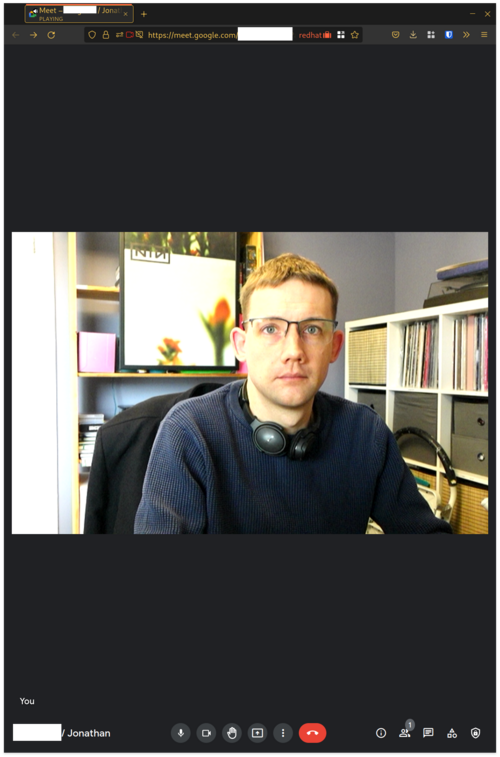
Before: wrong aspect ratio Before: wrong aspect ratio
This device offers a selection of different video modes over a webcam interface. I used qv4l2 to explore the different modes. It became clear that the camera was outputting a signal at 16:9, but the modes on offer from the dongle were for a range of different aspect ratios. The picture for these other ratios was not letter or pillar-boxed, but stretched to fit. I also noticed that the modes which had the correct aspect ratio were at very low framerates: 1920x1080@5fps, 1360x768@8fps, 1280x720@10fps. It felt to me that I would look unnatural at such a low framerate. The most promising mode was close to the right ratio, 720x480 and 30 fps. Software
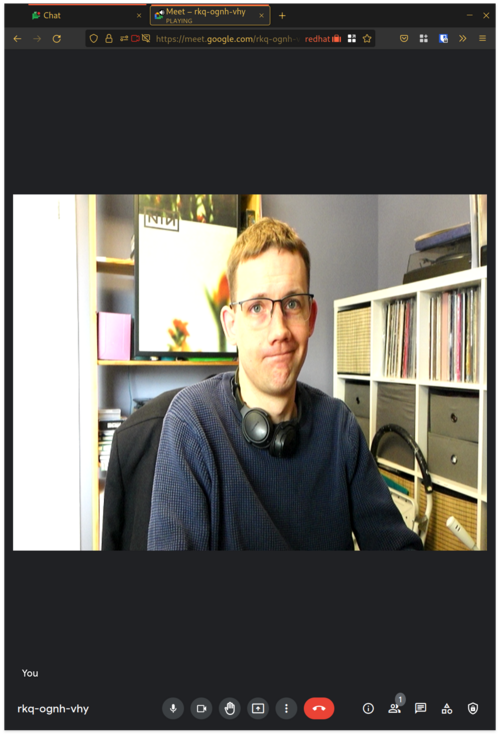
After: corrected aspect ratio After: corrected aspect ratio
My initial solution is to use the v4l2loopback kernel module, which provides a virtual loop-back webcam interface. I can write video data to it from one process, and read it back from another. Loading it as follows:
modprobe v4l2loopback exclusive_caps=1
The option exclusive_caps configures the module into a mode where it initially presents a write-only interface, but once a process has opened a file handle, it then switches to read-only for subsequent processes. Assuming there are no other camera devices connected at the time of loading the module, it will create /dev/video0.1 I experimented briefly with OBS Studio, the very versatile and feature-full streaming tool, which confirmed that I could use filters on the source video to fix the aspect ratio, and emit the result to the virtual device. I don't otherwise use OBS, though, so I achieve the same result using ffmpeg:
fmpeg -s 720x480 -i /dev/video1 -r 30 -f v4l2 -vcodec rawvideo \
    -pix_fmt yuyv422 -s 720x405 /dev/video0
The source options are to select the source video mode I want. The codec and pixel formats are to match what is being emitted (I determined that using ffprobe on the camera device). The resizing is triggered by supplying a different size to the -s parameter. I think that is equivalent to explicitly selecting a "scale" filter, and there might be other filters that could be used instead (to add pillar boxes for example). This worked just as well. In Google Meet, I select the Virtual Camera, and Google Meet is presented with only one video mode, in the correct aspect ratio, and no configurable options for it, so it can't misbehave. Future I'm planning to automate the loading (and unloading) of the module and starting the ffmpeg process in response to the real camera device being plugged or unplugged, using systemd events and services. (I don't leave the camera plugged in all the time due to some bad USB behaviour I've experienced if I do so.) If I get that working, I will write a follow-up.

  1. you can request a specific device name/number with another module option.

Next.

Previous.