Search Results: "he"

28 November 2023

Dirk Eddelbuettel: RcppCNPy 0.2.12 on CRAN: More Maintenance

A new (and again somewhat minor) maintenance release of the RcppCNPy package arrived on CRAN earlier today. RcppCNPy provides R with read and write access to NumPy files thanks to the cnpy library by Carl Rogers along with Rcpp for the glue to R. Recent changes in r-devel hone in on issues concerning printf format string inaccuracies the compiler can detect via the -Wformat -Wformat-security flags. Two fairly simplye ones were present here and have been addressed. In the time since the last release about twenty months ago two or three other minor packaging and setup details have also been taken care of, details are below.

Changes in version 0.2.12 (2022-11-27)
  • The continuous integration workflow received a trivial update, twice.
  • The C++ compilation standard is now implicit per CRAN and R preference.
  • The CITATION file format has been updated for the current usage.
  • Two print format string issues reported by current R-devel have been addressed.

CRANberries also provides a diffstat report for the latest release. As always, feedback is welcome and the best place to start a discussion may be the GitHub issue tickets page. If you like this or other open-source work I do, you can now sponsor me at GitHub.

This post by Dirk Eddelbuettel originated on his Thinking inside the box blog. Please report excessive re-aggregation in third-party for-profit settings.

27 November 2023

Fran ois Marier: Automatically rebooting for kernel updates

I use reboot-notifier on most of my servers to let me know when I need to reboot them for kernel updates since I want to decide exactly when those machines go down. On the other hand, my home backup server has very predictable usage patterns and so I decided to go one step further there and automate these necessary reboots. To do that, I first installed reboot-notifier which puts the following script in /etc/kernel/postinst.d/reboot-notifier to detect when a new kernel was installed:
#!/bin/sh
if [ "$0" = "/etc/kernel/postinst.d/reboot-notifier" ]; then
    DPKG_MAINTSCRIPT_PACKAGE=linux-base
fi
echo "*** System restart required ***" > /var/run/reboot-required
echo "$DPKG_MAINTSCRIPT_PACKAGE" >> /var/run/reboot-required.pkgs
Note that unattended-upgrades puts a similar script in /etc/kernel/postinst.d/unattended-upgrades:
#!/bin/sh
case "$DPKG_MAINTSCRIPT_PACKAGE::$DPKG_MAINTSCRIPT_NAME" in
   linux-image-extra*::postrm)
      exit 0;;
esac
if [ -d /var/run ]; then
    touch /var/run/reboot-required
    if ! grep -q "^$DPKG_MAINTSCRIPT_PACKAGE$" /var/run/reboot-required.pkgs 2> /dev/null ; then
        echo "$DPKG_MAINTSCRIPT_PACKAGE" >> /var/run/reboot-required.pkgs
    fi
fi
and so you only need one of them to be installed since they both write to /var/run/reboot-required. It doesn't hurt to have both of them though. Then I created the following cron job (/etc/cron.daily/reboot-local) to actually reboot the server:
#!/bin/bash
REBOOT_REQUIRED=/var/run/reboot-required
if [ -s $REBOOT_REQUIRED ] ; then
    cat "$REBOOT_REQUIRED"   /usr/bin/mail -s "Rebooting $HOSTNAME" root
    /bin/systemctl reboot
fi
With that in place, my server will send me an email and then automatically reboot itself. This is a work in progress because I'd like to add some checks later on to make sure that no backup is in progress during that time (maybe by looking for active ssh connections?), but it works well enough for now. Feel free to leave a comment if you've got a smarter script you'd like to share.

Andrew Cater: 20231123 - UEFI install on a Raspberry Pi 4 - step by step instructions to a modified d-i

Motivation
Andy (RattusRattus) and I have been formalising instructions for using Pete Batard's version of Tianocore (and therefore UEFI booting) for the Raspberry Pi 4 together with a Debian arm64 netinst to make a modified Debian installer on a USB stick which "just works" for a Raspberry Pi 4.
Thanks also to Steve McIntyre for initial notes that got this working for us and also to Emmanuele Rocca for putting up some useful instructions for copying.

Recipe

Plug in a USB stick - use dmesg or your favourite method to see how it is identified.

Make a couple of mount points under /mnt - /mnt/data and /mnt/cdrom


1. Grab a USB stick, Partition using MBR. Make a single VFAT
partition, type 0xEF (i.e. EFI System Partition)

For a USB stick (identified as sdX) below:
$ sudo parted --script /dev/sdX mklabel msdos $ sudo parted --script /dev/sdX mkpart primary fat32 0% 100% $ sudo mkfs.vfat /dev/sdX1 $ sudo mount /dev/sdX1 /mnt/data/

Download an arm64 netinst.iso

https://cdimage.debian.org/debian-cd/current/arm64/iso-cd/debian-12.2.0-arm64-netinst.iso

2. Copy the complete contents of partition *1* from a Debian arm64
installer image into the filesystem (partition 1 is the installer
stuff itself) on the USB stick, in /

$ sudo kpartx -v -a debian-12.2.0-arm64-netinst.iso # Mount the first partition on the ISO and copy its contents to the stick $ sudo mount /dev/mapper/loop0p1 /mnt/cdrom/ $ sudo rsync -av /mnt/cdrom/ /mnt/data/ $ sudo umount /mnt/cdrom

3. Copy the complete contents of partition *2* from that Debian arm64
installer image into that filesystem (partition 2 is the ESP) on
the USB stick, in /

# Same story with the second partition on the ISO

$ sudo mount /dev/mapper/loop0p2 /mnt/cdrom/

$ sudo rsync -av /mnt/cdrom/ /mnt/data/ $ sudo umount /mnt/cdrom

$ sudo kpartx -d debian-testing-amd64-netinst.iso $ sudo umount /mnt/data


4. Grab the rpi edk2 build from https://github.com/pftf/RPi4/releases
(I used 1.35) and extract it. I copied the files there into *2*
places for now on the USB stick:

/ (so the Pi will boot using it)
/rpi4 (so we can find the files again later)

5. Add the preseed.cfg file (attached) into *both* of the two initrd
files on the USB stick

- /install.a64/initrd.gz and
- /install.a64/gtk/initrd.gz

cpio is an awful tool to use :-(. In each case:

$ cp /path/to/initrd.gz .
$ gunzip initrd.gz
$ echo preseed.cfg cpio -H newc -o -A -F initrd

$ gzip -9v initrd

$ cp initrd.gz /path/to/initrd.gz

If you look at the preseed file, it will do a few things:

- Use an early_command to unmount /media (to work around Debian bug
#1051964)

- Register a late_command call for /cdrom/finish-rpi (the next
file - see below) to run at the end of the installation.

- Force grub installation also to the EFI removable media path,
needed as the rpi doesn't store EFI boot variables.

- Stop the installer asking for firmware from removable media (as
the rpi4 will ask for broadcom bluetooth fw that we can't
ship. Can be ignored safely.)

6. Copy the finish-rpi script (attached) into / on the USB stick. It
will be run at the end of the installation, triggered via the
preseed. It does a couple of things:

- Copy the edk2 firmware files into the ESP on the system that's
just been installer

- Remove shim-signed from the installed systems, as there's a bug
that causes it to fail on rpi4. I need to dig into this to see
what the issue is.

That's it! Run the installer as normal, all should Just Work (TM).

BlueTooth didn't quite work : raspberrypi-firmware didn't install until adding a symlink for boot/efi to /boot/firmware

20231127 - This may not be necessary because raspberrypi-firmware path has been fixed

Preseed.cfg
# The preseed file itself causes a problem - the installer medium is
# left mounted on /medis so things break in cdrom-detect. Let's see if
# we can fix that!
d-i preseed/early_command string umount /media true

# Run our command to do rpi setup before reboot
d-i preseed/late_command string /cdrom/finish-rpi

# Force grub installation to the RM path
grub-efi-arm64 grub2/force_efi_extra_removable boolean true

# Don't prompt for missing firmware from removable media,
# e.g. broadcom bluetooth on the rpi.
d-i hw-detect/load_firmware boolean false

Finish.rpi
!/bin/sh

set -x

grep -q -a RPI4 /sys/firmware/acpi/tables/CSRT
if [ $? -ne 0 ]; then
echo "Not running on a Pi 4, exit!"
exit 0
fi

# Copy the rpi4 firmware binaries onto the installed system.
# Assumes the installer media is mounted on /cdrom.
cp -vr /cdrom/rpi4/. /target/boot/efi/.

# shim-signed doesn't seem happy on rpi4, so remove it
mount --bind /sys /target/sys
mount --bind /proc /target/proc
mount --bind /dev /target/dev

in-target apt-get remove --purge --autoremove -y shim-signed


26 November 2023

Dirk Eddelbuettel: RQuantLib 0.4.20 on CRAN: More Maintenance

A new release 0.4.20 of RQuantLib arrived at CRAN earlier today, and has already been uploaded to Debian as well. QuantLib is a rather comprehensice free/open-source library for quantitative finance. RQuantLib connects (some parts of) it to the R environment and language, and has been part of CRAN for more than twenty years (!!) as it was one of the first packages I uploaded there. This release of RQuantLib brings a few more updates for nags triggered by recent changes in the upcoming R release (aka r-devel , usually due in April). The Rd parser now identifies curly braces that lack a preceding macro, usually a typo as it was here which affected three files. The printf (or alike) format checker found two more small issues. The run-time checker for examples was unhappy with the callable bond example so we only run it in interactive mode now. Lastly I had alread commented-out the setting for a C++14 compilation (required by the remaining Boost headers) as C++14 has been the default since R 4.2.0 (with suitable compilers, at least). Those who need it explicitly will have to uncomment the line in src/Makevars.in. Lastly, the expand printf format strings also found a need for a small change in Rcpp so the development version (now 1.0.11.5) has that addressed; the change will be part of Rcpp 1.0.12 in January.

Changes in RQuantLib version 0.4.20 (2023-11-26)
  • Correct three help pages with stray curly braces
  • Correct two printf format strings
  • Comment-out explicit selection of C++14
  • Wrap one example inside 'if (interactive())' to not exceed total running time limit at CRAN checks

Courtesy of my CRANberries, there is also a diffstat report for the this release 0.4.20. As always, more detailed information is on the RQuantLib page. Questions, comments etc should go to the rquantlib-devel mailing list. Issue tickets can be filed at the GitHub repo. If you like this or other open-source work I do, you can now sponsor me at GitHub.

This post by Dirk Eddelbuettel originated on his Thinking inside the box blog. Please report excessive re-aggregation in third-party for-profit settings.

Andrew Cater: MiniDebConf Cambridge - 26th November 2023 - Afternoon sessions

That's all folks ...
Sadly, nothing too much to report.I delivered a very quick three slides lightning talk on Accessibility, WCAG [Web Content Accessibility Guidelines] version 2.2 and a request for Debian to do better

WCAG 2.2: WCAG 2.2 AbstractDebian-accessibility mailing list link: debian-accessibilityI watched the other lightning talks but then left at 1500 - missing three good talks - to drive home at least partly in daylight.

A great four days - the chance to put some names to faces and to recharge in Debian spaces.

Thanks to all involved and especially ...
Thanks to Cambridge Debian folk for helping arrange evening meals, lifts and so on and especially to those who also happen be ARM employees who were badging us in and out through the four days

Thanks to those who staffed Front Desk on both days and, especially, also to the ARM security guards who let us into site at 0745 on all four days and to Mark who did the weekend shift inside the building for Saturday and Sunday.

Thanks to ARM for excellent facilities, food, coffee, hosting us and coffee, to Codethink for sponsoring - and a lecture from Sudip and some interesting hardware - and Pexip for Pexip sponsorship (and employee attendance).

Here's to the next opportunity, whenever that may be.

Niels Thykier: Providing online reference documentation for debputy

I do not think seasoned Debian contributors quite appreciate how much knowledge we have picked up and internalized. As an example, when I need to look up documentation for debhelper, I generally know which manpage to look in. I suspect most long time contributors would be able to a similar thing (maybe down 2-3 manpages). But new contributors does not have the luxury of years of experience. This problem is by no means unique to debhelper. One thing that debhelper does very well, is that it is hard for users to tell where a addon "starts" and debhelper "ends". It is clear you use addons, but the transition in and out of third party provided tools is generally smooth. This is a sign that things "just work(tm)". Except when it comes to documentation. Here, debhelper's static documentation does not include documentation for third party tooling. If you think from a debhelper maintainer's perspective, this seems obvious. Embedding documentation for all the third-party code would be very hard work, a layer-violation, etc.. But from a user perspective, we should not have to care "who" provides "what". As as user, I want to understand how this works and the more hoops I have to jump through to get that understanding, the more frustrated I will be with the toolstack. With this, I came to the conclusion that the best way to help users and solve the problem of finding the documentation was to provide "online documentation". It should be possible to ask debputy, "What attributes can I use in install-man?" or "What does path-metadata do?". Additionally, the lookup should work the same no matter if debputy provided the feature or some third-party plugin did. In the future, perhaps also other types of documentation such as tutorials or how-to guides. Below, I have some tentative results of my work so far. There are some improvements to be done. Notably, the commands for these documentation features are still treated a "plugin" subcommand features and should probably have its own top level "ask-me-anything" subcommand in the future.
Automatic discard rules Since the introduction of install rules, debputy has included an automatic filter mechanism that prunes out unwanted content. In 0.1.9, these filters have been named "Automatic discard rules" and you can now ask debputy to list them.
$ debputy plugin list automatic-discard-rules
+-----------------------+-------------+
  Name                    Provided By  
+-----------------------+-------------+
  python-cache-files      debputy      
  la-files                debputy      
  backup-files            debputy      
  version-control-paths   debputy      
  gnu-info-dir-file       debputy      
  debian-dir              debputy      
  doxygen-cruft-files     debputy      
+-----------------------+-------------+
For these rules, the provider can both provide a description but also an example of their usage.
$ debputy plugin show automatic-discard-rules la-files
Automatic Discard Rule: la-files
================================
Documentation: Discards any .la files beneath /usr/lib
Example
-------
    /usr/lib/libfoo.la        << Discarded (directly by the rule)
    /usr/lib/libfoo.so.1.0.0
The example is a live example. That is, the provider will provide debputy with a scenario and the expected outcome of that scenario. Here is the concrete code in debputy that registers this example:
api.automatic_discard_rule(
    "la-files",
    _debputy_prune_la_files,
    rule_reference_documentation="Discards any .la files beneath /usr/lib",
    examples=automatic_discard_rule_example(
        "usr/lib/libfoo.la",
        ("usr/lib/libfoo.so.1.0.0", False),
    ),
)
When showing the example, debputy will validate the example matches what the plugin provider intended. Lets say I was to introduce a bug in the code, so that the discard rule no longer worked. Then debputy would start to show the following:
# Output if the code or example is broken
$ debputy plugin show automatic-discard-rules la-files
[...]
Automatic Discard Rule: la-files
================================
Documentation: Discards any .la files beneath /usr/lib
Example
-------
    /usr/lib/libfoo.la        !! INCONSISTENT (code: keep, example: discard)
    /usr/lib/libfoo.so.1.0.0
debputy: warning: The example was inconsistent. Please file a bug against the plugin debputy
Obviously, it would be better if this validation could be added directly as a plugin test, so the CI pipeline would catch it. That is one my personal TODO list. :) One final remark about automatic discard rules before moving on. In 0.1.9, debputy will also list any path automatically discarded by one of these rules in the build output to make sure that the automatic discard rule feature is more discoverable.
Plugable manifest rules like the install rule In the manifest, there are several places where rules can be provided by plugins. To make life easier for users, debputy can now since 0.1.8 list all provided rules:
$ debputy plugin list plugable-manifest-rules
+-------------------------------+------------------------------+-------------+
  Rule Name                       Rule Type                      Provided By  
+-------------------------------+------------------------------+-------------+
  install                         InstallRule                    debputy      
  install-docs                    InstallRule                    debputy      
  install-examples                InstallRule                    debputy      
  install-doc                     InstallRule                    debputy      
  install-example                 InstallRule                    debputy      
  install-man                     InstallRule                    debputy      
  discard                         InstallRule                    debputy      
  move                            TransformationRule             debputy      
  remove                          TransformationRule             debputy      
  [...]                           [...]                          [...]        
  remove                          DpkgMaintscriptHelperCommand   debputy      
  rename                          DpkgMaintscriptHelperCommand   debputy      
  cross-compiling                 ManifestCondition              debputy      
  can-execute-compiled-binaries   ManifestCondition              debputy      
  run-build-time-tests            ManifestCondition              debputy      
  [...]                           [...]                          [...]        
+-------------------------------+------------------------------+-------------+
(Output trimmed a bit for space reasons) And you can then ask debputy to describe any of these rules:
$ debputy plugin show plugable-manifest-rules install
Generic install ( install )
===========================
The generic  install  rule can be used to install arbitrary paths into packages
and is *similar* to how  dh_install  from debhelper works.  It is a two "primary" uses.
  1) The classic "install into directory" similar to the standard  dh_install 
  2) The "install as" similar to  dh-exec 's  foo => bar  feature.
Attributes:
 -  source  (conditional): string
    sources  (conditional): List of string
   A path match ( source ) or a list of path matches ( sources ) defining the
   source path(s) to be installed. [...]
 -  dest-dir  (optional): string
   A path defining the destination *directory*. [...]
 -  into  (optional): string or a list of string
   A path defining the destination *directory*. [...]
 -  as  (optional): string
   A path defining the path to install the source as. [...]
 -  when  (optional): manifest condition (string or mapping of string)
   A condition as defined in [Conditional rules](https://salsa.debian.org/debian/debputy/-/blob/main/MANIFEST-FORMAT.md#Conditional rules).
This rule enforces the following restrictions:
 - The rule must use exactly one of:  source ,  sources 
 - The attribute  as  cannot be used with any of:  dest-dir ,  sources 
[...]
(Output trimmed a bit for space reasons) All the attributes and restrictions are auto-computed by debputy from information provided by the plugin. The associated documentation for each attribute is supplied by the plugin itself, The debputy API validates that all attributes are covered and the documentation does not describe non-existing fields. This ensures that you as a plugin provider never forget to document new attributes when you add them later. The debputy API for manifest rules are not quite stable yet. So currently only debputy provides rules here. However, it is my intention to lift that restriction in the future. I got the idea of supporting online validated examples when I was building this feature. However, sadly, I have not gotten around to supporting it yet.
Manifest variables like PACKAGE I also added a similar documentation feature for manifest variables such as PACKAGE . When I implemented this, I realized listing all manifest variables by default would probably be counter productive to new users. As an example, if you list all variables by default it would include DEB_HOST_MULTIARCH (the most common case) side-by-side with the the much less used DEB_BUILD_MULTIARCH and the even lessor used DEB_TARGET_MULTIARCH variable. Having them side-by-side implies they are of equal importance, which they are not. As an example, the ballpark number of unique packages for which DEB_TARGET_MULTIARCH is useful can be counted on two hands (and maybe two feet if you consider gcc-X distinct from gcc-Y). This is one of the cases, where experience makes us blind. Many of us probably have the "show me everything and I will find what I need" mentality. But that requires experience to be able to pull that off - especially if all alternatives are presented as equals. The cross-building terminology has proven to notoriously match poorly to people's expectation. Therefore, I took a deliberate choice to reduce the list of shown variables by default and in the output explicitly list what filters were active. In the current version of debputy (0.1.9), the listing of manifest-variables look something like this:
$ debputy plugin list manifest-variables
+----------------------------------+----------------------------------------+------+-------------+
  Variable (use via:   NAME  )   Value                                    Flag   Provided by  
+----------------------------------+----------------------------------------+------+-------------+
  DEB_HOST_ARCH                      amd64                                           debputy      
  [... other DEB_HOST_* vars ...]    [...]                                           debputy      
  DEB_HOST_MULTIARCH                 x86_64-linux-gnu                                debputy      
  DEB_SOURCE                         debputy                                         debputy      
  DEB_VERSION                        0.1.8                                           debputy      
  DEB_VERSION_EPOCH_UPSTREAM         0.1.8                                           debputy      
  DEB_VERSION_UPSTREAM               0.1.8                                           debputy      
  DEB_VERSION_UPSTREAM_REVISION      0.1.8                                           debputy      
  PACKAGE                            <package-name>                                  debputy      
  path:BASH_COMPLETION_DIR           /usr/share/bash-completion/completions          debputy      
+----------------------------------+----------------------------------------+------+-------------+
+-----------------------+--------+-------------------------------------------------------+
  Variable type           Value    Option                                                 
+-----------------------+--------+-------------------------------------------------------+
  Token variables         hidden   --show-token-variables OR --show-all-variables         
  Special use variables   hidden   --show-special-case-variables OR --show-all-variables  
+-----------------------+--------+-------------------------------------------------------+
I will probably tweak the concrete listing in the future. Personally, I am considering to provide short-hands variables for some of the DEB_HOST_* variables and then hide the DEB_HOST_* group from the default view as well. Maybe something like ARCH and MULTIARCH, which would default to their DEB_HOST_* counter part. This variable could then have extended documentation that high lights DEB_HOST_<X> as its source and imply that there are special cases for cross-building where you might need DEB_BUILD_<X> or DEB_TARGET_<X>. Speaking of variable documentation, you can also lookup the documentation for a given manifest variable:
$ debputy plugin show manifest-variables path:BASH_COMPLETION_DIR
Variable: path:BASH_COMPLETION_DIR
==================================
Documentation: Directory to install bash completions into
Resolved: /usr/share/bash-completion/completions
Plugin: debputy
This was my update on online reference documentation for debputy. I hope you found it useful. :)
Thanks On a closing note, I would like to thanks Jochen Sprickerhof, Andres Salomon, Paul Gevers for their recent contributions to debputy. Jochen and Paul provided a number of real world cases where debputy would crash or not work, which have now been fixed. Andres and Paul also provided corrections to the documentation.

Ian Jackson: Hacking my filter coffee machine

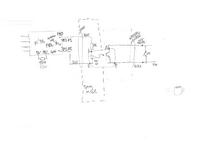
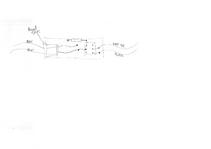
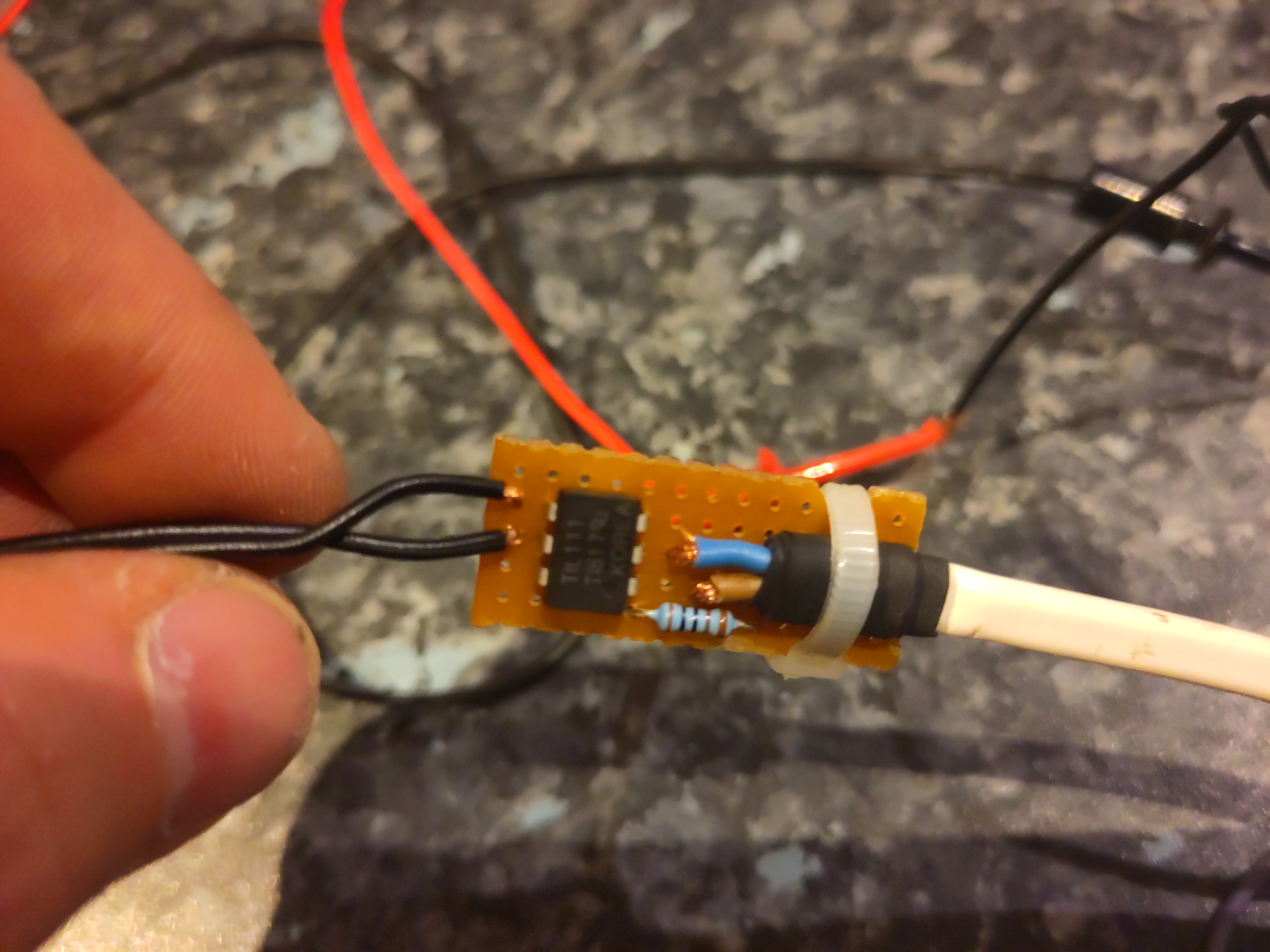
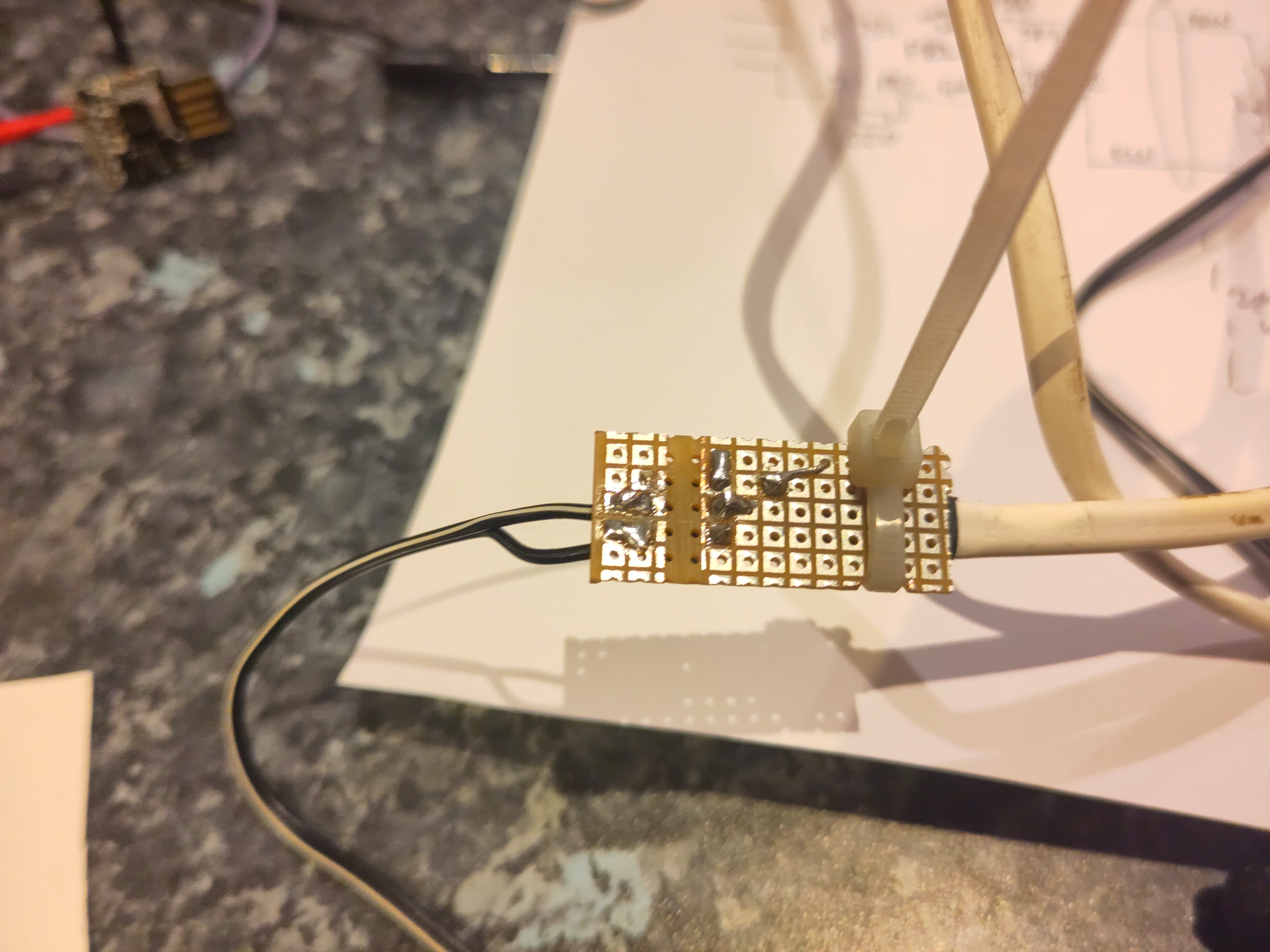
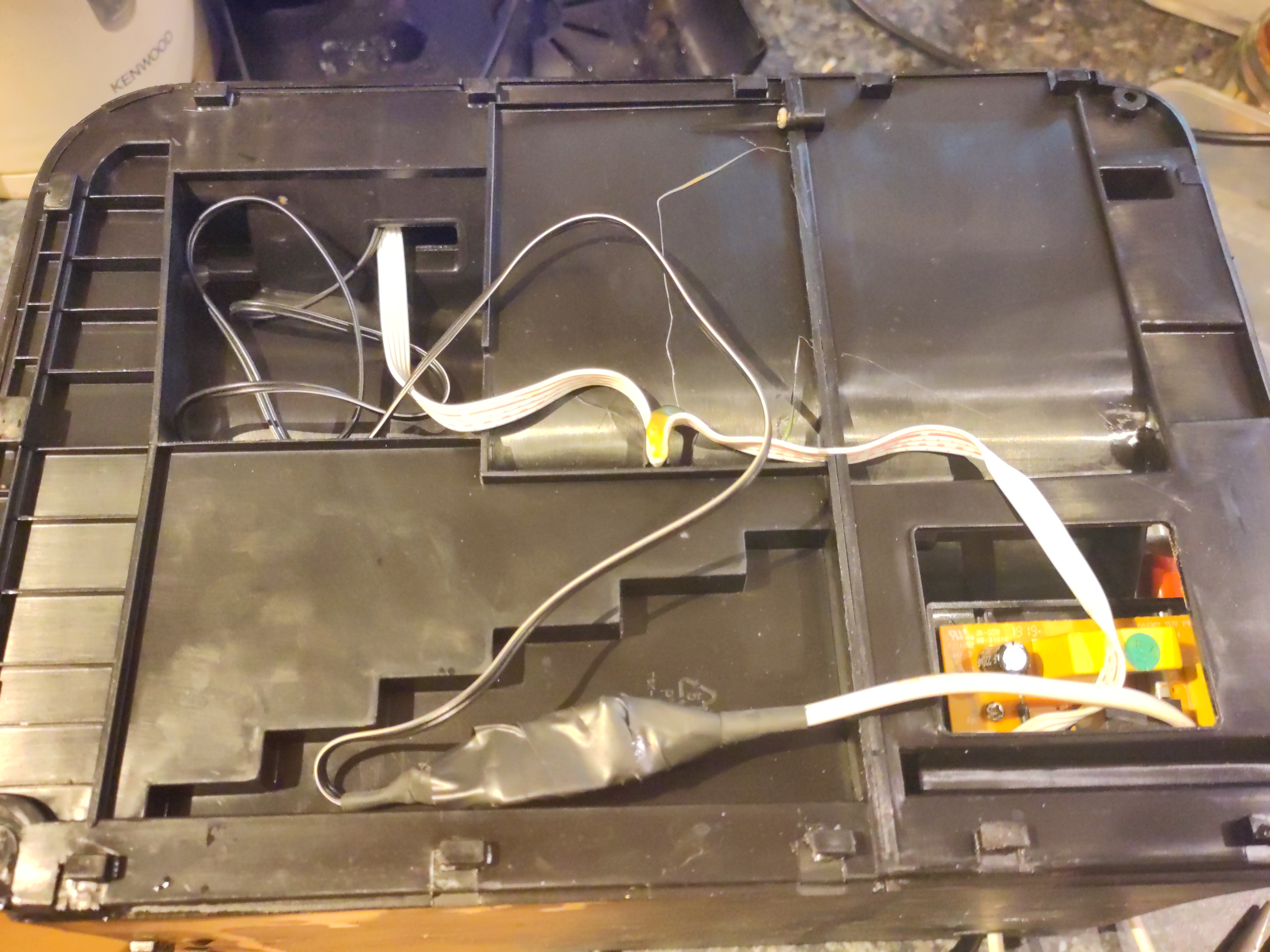
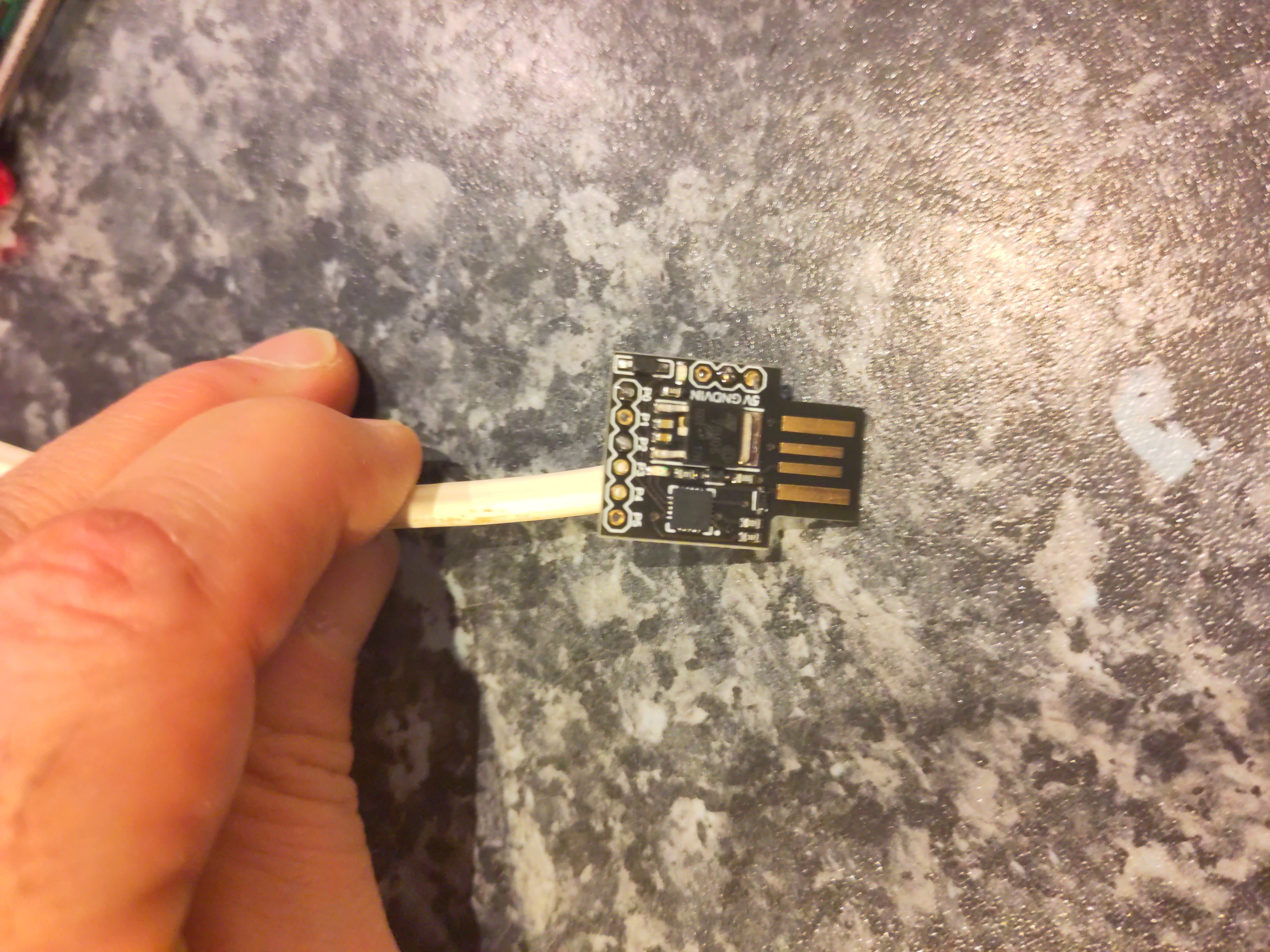
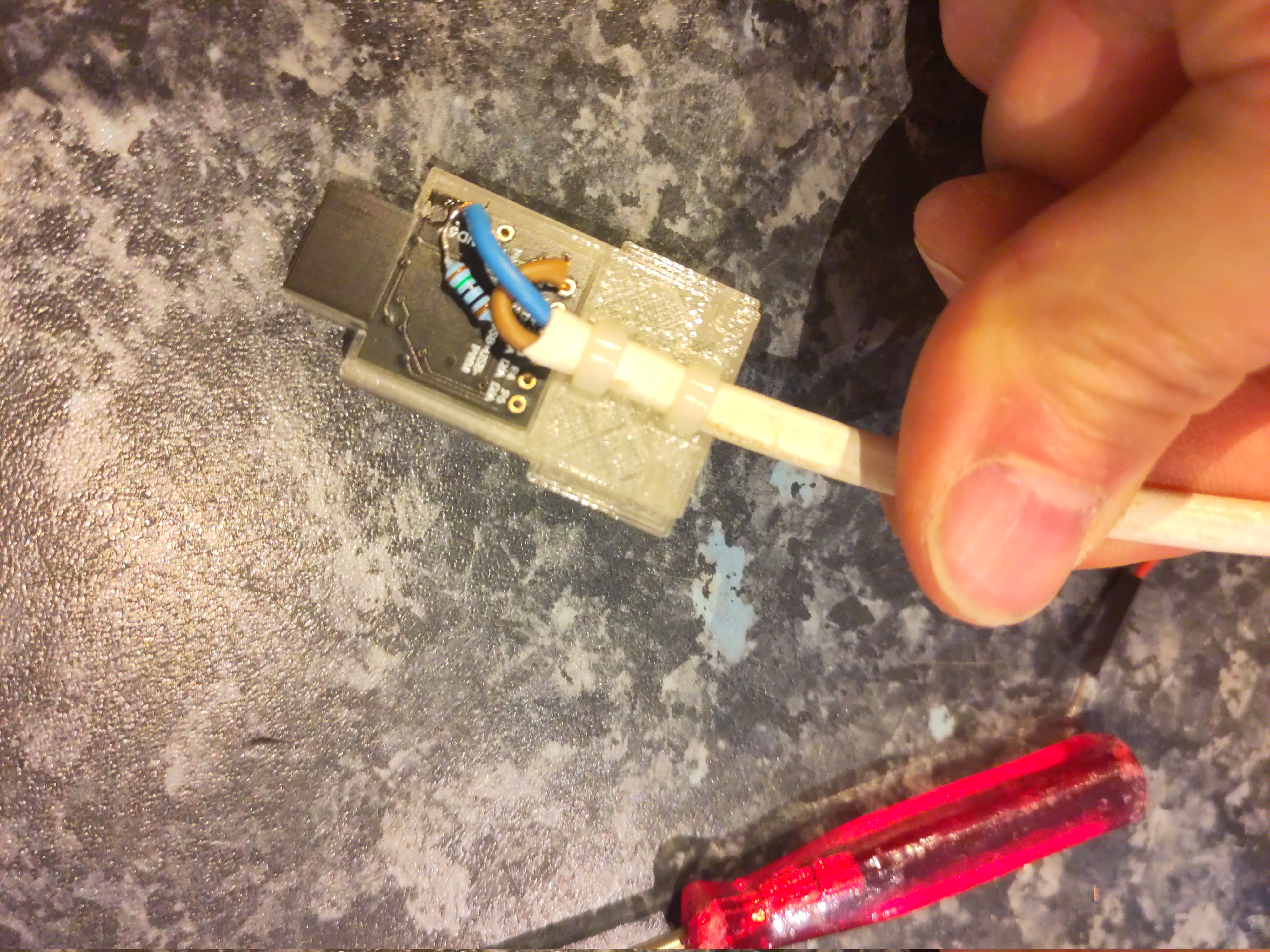
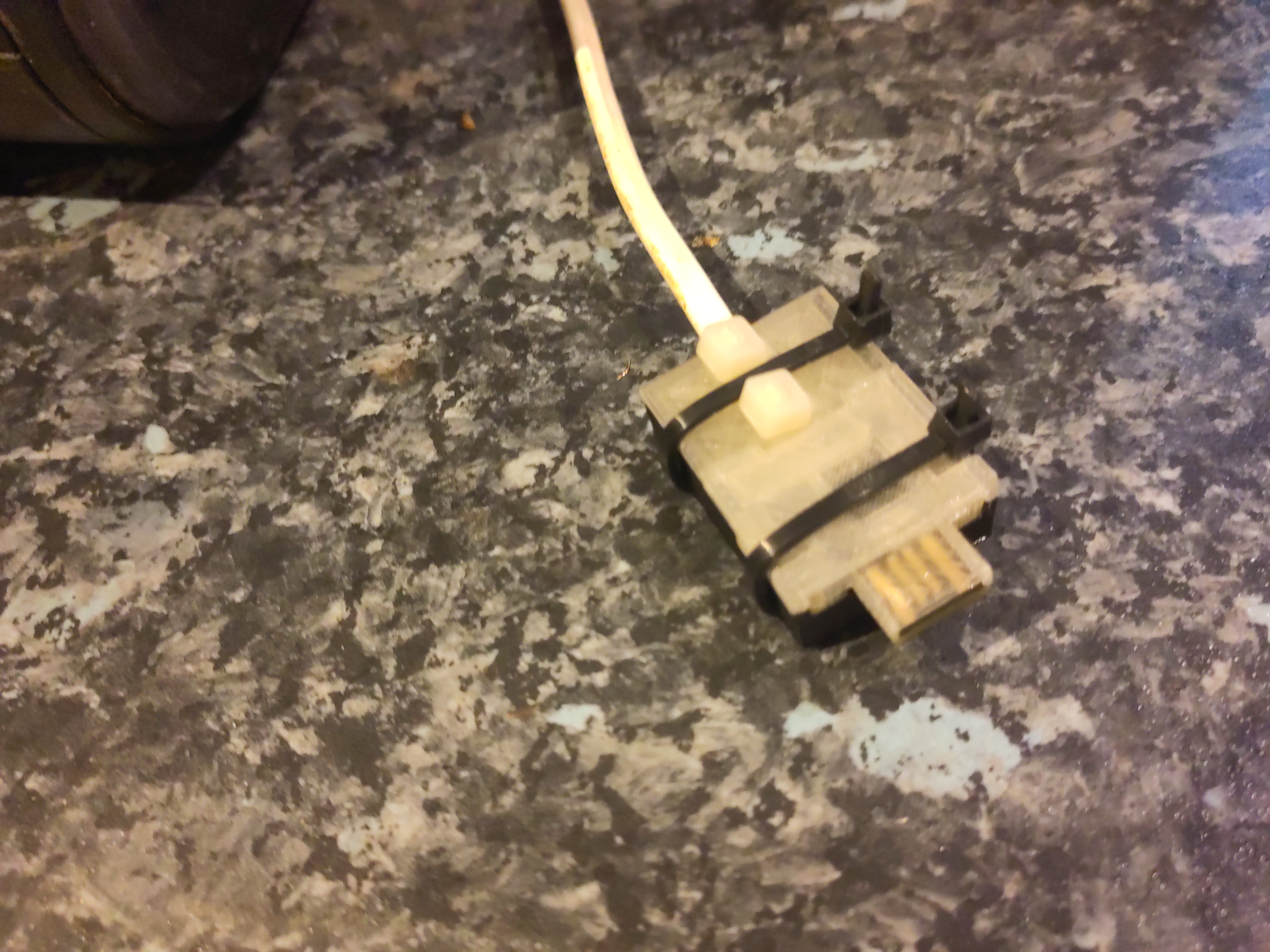
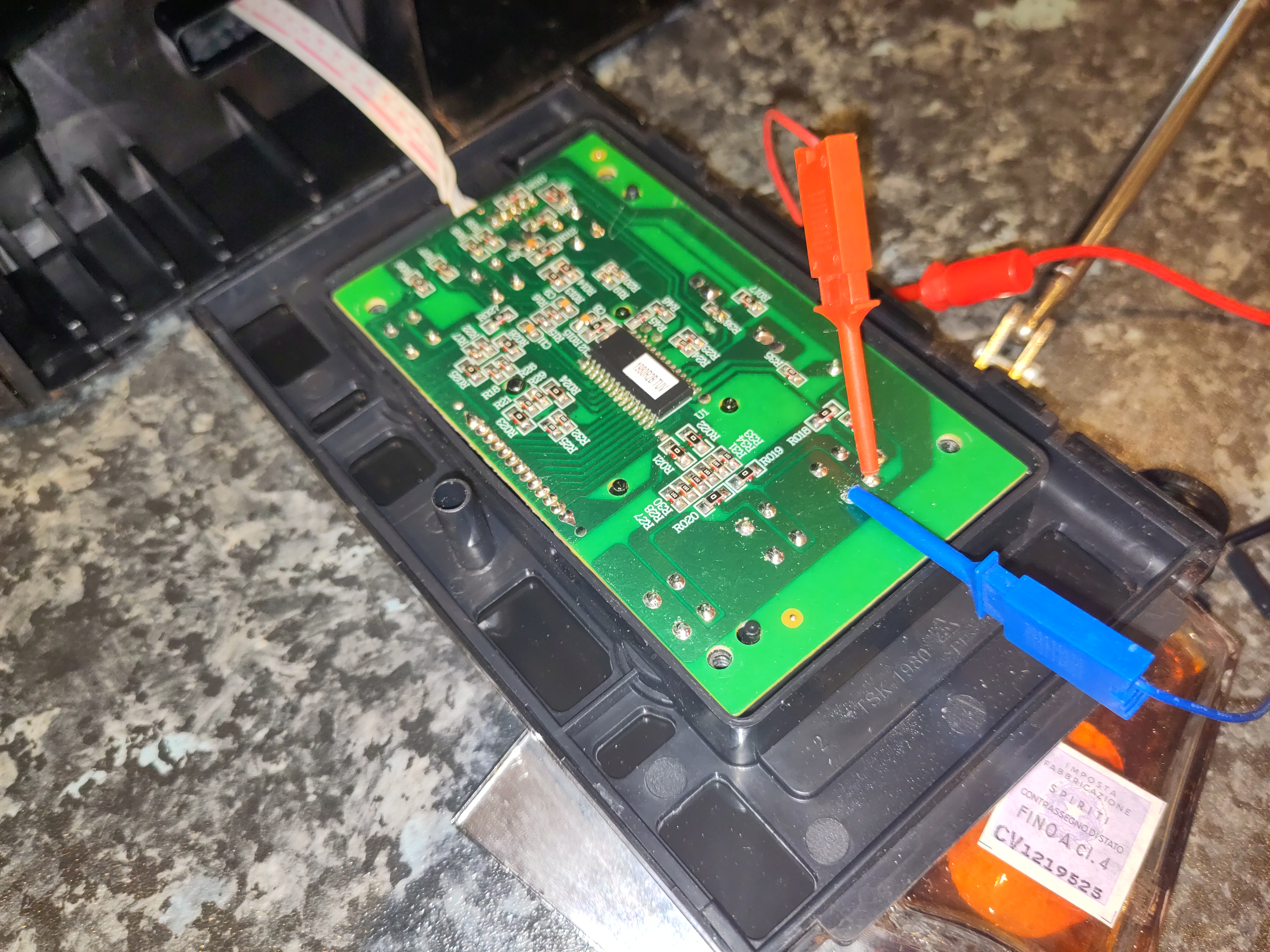
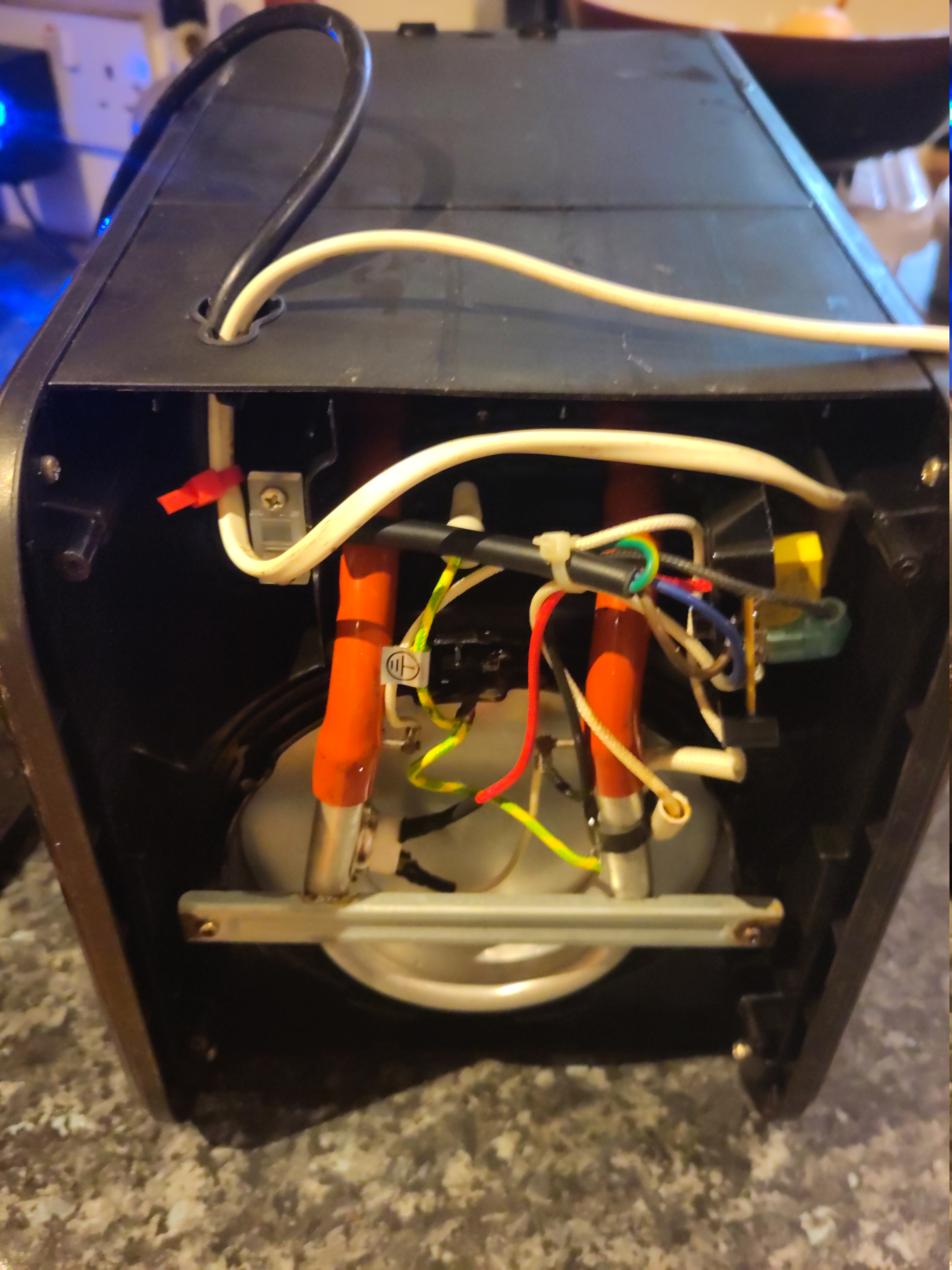
I hacked my coffee machine to let me turn it on from upstairs in bed :-). Read on for explanation, circuit diagrams, 3D models, firmware source code, and pictures. Background: the Morphy Richards filter coffee machine I have a Morphy Richards filter coffee machine. It makes very good coffee. But the display and firmware are quite annoying: Also, I m lazy and wanted to be able to cause coffee to exist from upstairs in bed, without having to make a special trip down just to turn the machine on. Planning My original feeling was I can t be bothered dealing with the coffee machine innards so I thought I would make a mechanical contraption to physically press the coffee machine s on button. I could have my contraption press the button to turn the machine on (timed, or triggered remotely), and then periodically in pairs to reset the 25-minute keep-warm timer. But a friend pointed me at a blog post by Andy Bradford, where Andy recounts modifying his coffee machine, adding an ESP8266 and connecting it to his MQTT-based Home Assistant setup. I looked at the pictures and they looked very similar to my machine. I decided to take a look inside. Inside the Morphy Richards filter coffee machine My coffee machine seemed to be very similar to Andy s. His disassembly report was very helpful. Inside I found the high-voltage parts with the heating elements, and the front panel with the display and buttons. I spent a while poking about, masuring things, and so on. Unexpected electrical hazard At one point I wanted to use my storage oscilloscope to capture the duration and amplitude of the beep signal. I needed to connect the scope ground to the UI board s ground plane, but then when I switched the coffee machine on at the wall socket, it tripped the house s RCD. It turns out that the low voltage UI board is coupled to the mains. In my setting, there s an offset of about 8V between the UI board ground plane, and true earth. (In my house the neutral is about 2-3V away from true earth.) This alarmed me rather. To me, this means that my modifications needed to still properly electrically isolate everything connected to the UI board from anything external to the coffee machine s housing. In Andy s design, I think the internal UI board ground plane is directly brought out to an external USB-A connector. This means that if there were a neutral fault, the USB-A connector would be at live potential, possibly creating an electrocution or fire hazard. I made a comment in Andy Bradford s blog, reporting this issue, but it doesn t seem to have appeared. This is all quite alarming. I hope Andy is OK! Design approach I don t have an MQTT setup at home, or an installation of Home Assistant. I didn t feel like adding a lot of complicated software to my life, if I could avoid it. Nor did I feel like writing a web UI myself. I ve done that before, but I m lazy and in this case my requirements were quite modest. Also, the need for electrical isolation would further complicate any attempt to do something sophisticated (that could, for example, sense the state of the coffee machine). I already had a Tasmota-based cloud-free smart plug, which controls the fairy lights on our gazebo. We just operate that through its web UI. So, I decided I would add a small and stupid microcontroller. The microcontroller would be powered via a smart plug and an off-the-shelf USB power supply. The microcontroller would have no inputs. It would simply simulate an on button press once at startup, and thereafter two presses every 24 minutes. After the 4th double press the microcontroller would stop, leaving the coffee machine to time out itself, after a total period of about 2h. Implementation - hardware I used a DigiSpark board with an ATTiny85. One of the GPIOs is connected to an optoisolator, whose output transistor is wired across the UI board s on button. circuit diagram; board layout diagram; (click for diagram scans as pdfs). The DigiSpark has just a USB tongue, which is very wobbly in a normal USB socket. I designed a 3D printed case which also had an approximation of the rest of the USB A plug. The plug is out of spec; our printer won t go fine enough - and anyway, the shield is supposed to be metal, not fragile plastic. But it fit in the USB PSU I was using, satisfactorily if a bit stiffly, and also into the connector for programming via my laptop. Inside the coffee machine, there s the boundary between the original, coupled to mains, UI board, and the isolated low voltage of the microcontroller. I used a reasonably substantial cable to bring out the low voltage connection, past all the other hazardous innards, to make sure it stays isolated. I added a drain power supply resistor on another of the GPIOs. This is enabled, with a draw of about 30mA, when the microcontroller is soon going to off / on cycle the coffee machine. That reduces the risk that the user will turn off the smart plug, and turn off the machine, but that the microcontroller turns the coffee machine back on again using the remaining power from USB PSU. Empirically in my setup it reduces the time from smart plug off to microcontroller stops from about 2-3s to more like 1s. Optoisolator board (inside coffee machine) pictures (Click through for full size images.) optoisolator board, front; optoisolator board, rear; optoisolator board, fitted. Microcontroller board (in USB-plug-ish housing) pictures microcontroller board, component side; microcontroller board, wiring side, part fitted; microcontroller in USB-plug-ish housing. Implementation - software I originally used the Arduino IDE, writing my program in C. I had a bad time with that and rewrote it in Rust. The firmware is in a repository on Debian s gitlab Results I can now cause the coffee to start, from my phone. It can be programmed more than 12h in advance. And it stays warm until we ve drunk it. UI is worse There s one aspect of the original Morphy Richards machine that I haven t improved: the user interface is still poor. Indeed, it s now even worse: To turn the machine on, you probably want to turn on the smart plug instead. Unhappily, the power button for that is invisible in its installed location. In particular, in the usual case, if you want to turn it off, you should ideally turn off both the smart plug (which can be done with the button on it) and the coffee machine itself. If you forget to turn off the smart plug, the machine can end up being turned on, very briefly, a handful of times, over the next hour or two. Epilogue We had used the new features a handful of times when one morning the coffee machine just wouldn t make coffee. The UI showed it turning on, but it wouldn t get hot, so no coffee. I thought oh no, I ve broken it! But, on investigation, I found that the machine s heating element was open circuit (ie, completely broken). I didn t mess with that part. So, hooray! Not my fault. Probably, just being inverted a number of times and generally lightly jostled, had precipitated a latent fault. The machine was a number of years old. Happily I found a replacement, identical, machine, online. I ve transplanted my modification and now it all works well. Bonus pictures (Click through for full size images.) probing the innards; machine base showing new cable route.
edited 2023-11-26 14:59 UTC in an attempt to fix TOC links


comment count unavailable comments

Andrew Cater: Back at ARM for MiniDebConf day 2 - Morning sessions 26th November 2023

Quick recap of slides and safety information for the day from Steve McIntyre
Now into the Release Team questions following a release team overview.A roomful of people all asking questions which are focused and provoke more questions - how unlike a Debian session :)May just have talked myself into giving a lightning talk this afternoon :)Now about to have a talk about from Sudip about OpenQA, kernel testing and automation

25 November 2023

Andrew Cater: Afternoon talks - MiniDebConf ARM Cambridge - Day 1

A great talk on SteamOS progress to effective boot loaders for atomic OS updates.How to produce something that will allow instant updates and instant fallbacks when updating a whole OS image - lots of explanation - and it's good when three or four people who are directly interested in problems and solutions round, for example, Secure Boot are in the room.Jessica Clarke on CHERI, Morello and security protections in hardware, software and programming hardware which has verifiable pointers and routines. A couple of flourishes which had the room breaking out in applause.Roberto Sanchez and Santiago Rincon on suggestions for LTS and ways forward. The presentation very clearly set out what LTS is, is not, and maybe should be.Last presentation of the day was from Ian Jackson on a potential change to git based working and tagging. Then lots of chasing around to get people out of the building. Thanks very much to the Arm personnel, especially the security staff who have been helpful throughout the day with getting us all in and out

Thanks to all involved with Arm, Codethink and Pexip for hosting and sponsorship without which this would not have been possible.

Andrew Cater: Lightning talks - MiniDebConf ARM Cambridge - Day 1

A quick one slide presentation from Helmut on how to use Debian without sudo - Sudo Apt Purge SudoA presentation on upcoming Ph.D research on Digital Obsolescence - from EdaAntarctic and Arctic research from Carlos Pina i Estany * Amazing * what you can get into three well chosen slides.Ten minutes until the afternoon's talks

Andrew Cater: Laptop with ARM, mobile phone BoF - MiniDebConf Cambridge day 1

So following Emanuele's talk on a Lenovo X13s, we're now at the Debian on Mobile BoF (Birds of a feather) discussion session from Arnaud Ferraris
Discussion and questions on how best to support many variants of mobile phones: the short answer seems to be "it's still *hard* - too many devices around to add individual tweaks for every phone and manufacturer.One thing that may not have been audible in the video soundtrack - lots of laughter in the room prompted as someone's device said, audibly "You are not allowed to do that without unlocking your device"Upstream and downstream packages for hardware enablement are also hard: basic support is sometimes easy but that might even include non-support for charging, for example.Much discussion around the numbers of kernels and kernel image proliferation there could be. Debian tends to prefer *one* way of doing things with kernels.Abstracting hardware is the hardest thing but leads to huge kernels - there's no easy trade-off. Simple/feasible in multiple end user devices/supportable - pick one

Andrew Cater: ARM lecture theatre - MiniDebConf Cambridge day 1

And we're here - a couple of lectures in. Welcome from one Steve, deep internals of ARM from another Steve. A room filling with people - and now a lecture I really need to listen to on a machine I'd like to own. As ever, the hallway track is interesting - and you find people who know you from IRC or mailing lists. Four screens and a lecture theatre layout. Here we go.

Video team doing a great job, as ever - and our brand new talkmeister is doing a sterling job.

Andrew Cater: Mini-DebCamp ARM Cambridge day 2

Another really good day at ARM. Still lots of coffee and good food - supplemented by a cooked breakfast if you were early enough :)

Lots of small groups of people working earnestly in the main lecture theatre and a couple of meeting rooms and the soft seating area: various folk arriving ready for tomorrow. Video team setting up in the afternoon and running up servers and cabling - all ready for a full schedule tomorrow and Sunday.Many thanks to our sponsors - and especially the helpful staff at ARM who were helping us in and out, sorting out meeting rooms and generally coping with a Debian invasion. More people tomorrow for the weekend.

24 November 2023

Jonathan Dowland: Dockerfile ARG footgun

This week I stumbled across a footgun in the Dockerfile/Containerfile ARG instruction. ARG is used to define a build-time variable, possibly with a default value embedded in the Dockerfile, which can be overridden at build-time (by passing --build-arg). The value of a variable FOO is interpolated into any following instructions that include the token $FOO. This behaves a little similar to the existing instruction ENV, which, for RUN instructions at least, can also be interpolated, but can't (I don't think) be set at build time, and bleeds through to the resulting image metadata. ENV has been around longer, and the documentation indicates that, when both are present, ENV takes precedence. This fits with my mental model of how things should work, but, what the documentation does not make clear is, the ENV doesn't need to have been defined in the same Dockerfile: environment variables inherited from the base image also override ARGs. To me this is unexpected and far less sensible: in effect, if you are building a layered image and want to use ARG, you have to be fairly sure that your base image doesn't define an ENV of the same name, either now or in the future, unless you're happy for their value to take precedence. In our case, we broke a downstream build process by defining a new environment variable USER in our image. To defend against the unexpected, I'd recommend using somewhat unique ARG names: perhaps prefix something unusual and unlikely to be shadowed. Or don't use ARG at all, and push that kind of logic up the stack to a Dockerfile pre-processor like CeKit.

Jonathan Dowland: bndcmpr

Last year I put together a Halloween playlist and tried, where possible, to link to the tracks on Bandcamp. At the time, Bandcamp did not offer a Playlist feature; they've since added one, but it's limited to mobile only (and I've found, not a lot of use there either). (I also provided a Spotify playlist. Not all of the tracks in the playlist were available on Spotify, or Bandcamp.) Since then I discovered an independent service bndcmpr which lets you build and share playlists from tracks hosted on Bandcamp. I'm not sure whether it will have longevity, but for now at least, I've ported my Halloween 2022 playlist over to bndcmpr. You can find it here: https://bndcmpr.co/cae6814a, or with any luck, embedded below (if you are reading this post on an aggregation site, or newsreader, it's less likely that this will appear):
I'm overdue cutting the next playlist, theme TBA. Stay tuned.

23 November 2023

Andrew Cater: Arm Cambridge - mini-Debcamp 23 November 2023


At Arm for two days before the mini-Debconf this weekend.First time at Arm for a few years: huge new buildings, shiny lecture theatre.Arm have made us very welcome. A superb buffet lunch and unlimited coffee plus soft drinks - I think they know what Debian folk are like.
Not enough power blocks laid out at the beginning - only one per table - but we soon fixed that
The room is full of Debian folk: some I know, some new faces. Reminiscing about meeting some of them from 25 years ago - and the chance to thank people for help over a long time.
Andy (RattusRattus) and I have been working out the bugs on an install script using UEFI for a Raspberry Pi 4. More on that in the next post, maybe.As ever, it's the sort of place where "I can't get into the wiki" is sorted by walking three metres across the room or where an "I can't find where to get X for Raspberry Pi" can be solved by asking the person who builds Raspbian. "Did you try and sign up to the Debian wiki last week - you didn't follow the instructions to mail wiki@ - I _know_ you didn't because I didn't see the mail ... "

My kind of place and my kind of people, as ever.

Thanks again to Arm who are one of our primary sponsors for this mini-Debconf.

Bits from Debian: archive.debian.org rsync address change

The proposed and previously announced changes to the rsync service have become effective with the rsync://archive.debian.org address now being discontinued. The worldwide Debian mirrors network has served archive.debian.org via both HTTP and rsync. As part of improving the reliability of the service for users, the Debian mirrors team is separating the access methods to different host names: rsync service on archive.debian.org has stopped, and we encourage anyone using the service to migrate to the new host name as soon as possible. If you are currently using rsync to the debian-archive from a debian.org server that forms part of the archive.debian.org rotation, we also encourage Administrators to move to the new service name. This will allow us to better manage which back-end servers offer rsync service in future. Note that due to its nature the content of archive.debian.org does not change frequently - generally there will be several months, possibly more than a year, between updates - so checking for updates more than once a day is unnecessary. For additional information please reach out to the Debian Mirrors Team maillist.

Freexian Collaborators: Debian Contributions: Preparing for Python 3.12, /usr-merge updates, invalid PEP-440 versions, and more! (by Utkarsh Gupta)

Contributing to Debian is part of Freexian s mission. This article covers the latest achievements of Freexian and their collaborators. All of this is made possible by organizations subscribing to our Long Term Support contracts and consulting services.

urllib3 s old security patch by Stefano Rivera Stefano ran into a test-suite failure in a new Debian package (python-truststore), caused by Debian s patch to urllib3 from a decade ago, making it enable TLS verification by default (remember those days!). Some analysis confirmed that this patch isn t useful any more, and could be removed. While working on the package, Stefano investigated the scope of the urllib3 2.x transition. It looks ready to start, not many packages are affected.

Preparing for Python 3.12 in dh-python by Stefano Rivera We are preparing to start the Python 3.12 transition in Debian. Two of the upstream changes that are going to cause a lot of packages to break could be worked-around in dh-python, so we did:
  • Distutils is no longer shipped in the Python stdlib. Packages need to Build-Depend on python3-setuptools to get a (compatibility shim) distutils. Until that happens, dh-python will Depend on setuptools.
  • A failure to find any tests to execute will now make the unittest runner exit 5, like pytest does. This was our change, to test-suites that have failed to be automatically discovered. It will cause many packages to fail to build, so until they explicitly skip running test suites, dh-python will ignore these failures.

/usr-merge by Helmut Grohne It has become clear that the planned changes to debhelper and systemd.pc cause more rc-bugs. Helmut researched these systematically and filed another stack of patches. At the time of this writing, the uploads would still cause about 40 rc-bugs. A new opt-in helper dh_movetousr has been developed and added to debhelper in trixie and unstable.

debian-printing, by Thorsten Alteholz This month Thorsten adopted two packages, namely rlpr and lprng, and moved them to the debian-printing team. As part of this Thorsten could close eight bugs in the BTS. Thorsten also uploaded a new upstream version of cups, which also meant that eleven bugs could be closed. As package hannah-foo2zjs still depended on the deprecated policykit-1 package, Thorsten changed the dependency list accordingly and could close one RC bug by the following upload.

Invalid PEP-440 Versions in Python Packages by Stefano Rivera Stefano investigated how many packages in Debian (typically Debian-native packages) recorded versions in their packaging metadata (egg-info directories) that weren t valid PEP-440 Python versions. pip is starting to enforce that all versions on the system are valid.

Miscellaneous contributions
  • distro-info-data updates in Debian, due to the new Ubuntu release, by Stefano.
  • DebConf 23 bookkeeping continues, but is winding down. Stefano still spends a little time on it.
  • Utkarsh continues to monitor and help with reimbursements.
  • Helmut continues to maintain architecture bootstrap and accidentally broke pam briefly
  • Anton uploaded boost1.83 and started to prepare a transition to make boost1.83 as a default boost version.
  • Rejuntada Debian UY 2023, a MiniDebConf that will be held in Montevideo, from 9 to 11 November, mainly organized by Santiago.

22 November 2023

Scarlett Gately Moore: A Season to be Thankful, Thank You!

Here in the US, we celebrate Thanksgiving tomorrow. I am thankful to be a part of such an amazing community. I have raised enough to manage another month and I can continue my job search in less dire circumstances. I am truly grateful to each and every one of you. While my focus will remain on my job hunt, I will be back next week at reduced hours to maintain my work. I have to alter my priorities to keep my hours reduced enough to focus on my job search so I will be contributing as follows: Again, thank you all ever so much for your support. Though, this didn t end up being my year, I am confident I will find my place in this career path in the near future. I could still use some funds to make land and car payment or at least partial. We purchased from friends so they won t take away my wheels or home, I just feel bad I haven t been able to make payments in awhile. Thanks for your consideration. https://gofund.me/f9f0fb53

Valhalla's Things: PDF planners 2024

Posted on November 22, 2023
A few years ago I wrote a bit of code to generate a custom printable planner, precisely to my taste. And then I showed the result to other people, and added a few variants for their own tastes. And I ve just generated the first 2024 file (yes, this year I m late with the printing and binding), and realized that it may be worth posting all the variants on this blog, in case somebody else is interested in using them. The files with -book in the name have been imposed on A4 paper for a 16 pages signature. All of the fonts have been converted to paths, for ease of printing (yes, this means that customizing the font requires running the script, sorry). A few planners in English: The same planners, in Italian: And finally a monthly planner with ephemerids for the town of Como (I mean, everybody everywhere needs one of those, right?); here the --book files are impressed for a 3 sheet (12 pages) signature. I hereby release all the PDFs linked in this blog post under the CC0 license. I ve just realized that the git repository linked above does not have licensing information, but I m not sure what s the right thing to do, since it s mostly a dump of unsupported works-for-me code, but if you need it for something (that is compatible with its unsupported status) other than running it for personal use (for which afaik there is an implicit license) let me know and I ll push decide on a license higher on the stack of things to do :D

Next.

Previous.